數位簽章是一種數學演算法,用於驗證簽署者的身份並確保文件的完整性。 它建立一個與文件相關聯的唯一標識符,該標識符使用只有簽署者知道的私鑰簽署。 要驗證數位簽名文件的真實性,接收者使用公鑰解密簽章並確認其有效性。
在本文中,我們將比較如何在C#中使用QuestPDF和IronPDF程式庫為PDF文件新增數位簽章。 這兩個程式庫都提供了強大的PDF操作功能,包括數位簽章功能。
為什麼數位簽章很重要?
數位簽章確保文件的內容沒有被篡改,並證明了簽署者的身份。 這比傳統簽名提供了更高的安全性。 數位簽章在許多國家具有法律約束力,通常用於合約、協議及其他法律文件。
先決條件
在我們開始之前,確保您對C#和.NET Framework有基本的了解。 You'll need to install both QuestPDF and IronPDF. QuestPDF可以從NuGet安裝,而IronPDF可以從IronPDF網站下載或通過NuGet Package Manager獲取。
您還需要準備好數位簽章,如果沒有,可以找到許多資源來幫助您建立一個新的簽章。
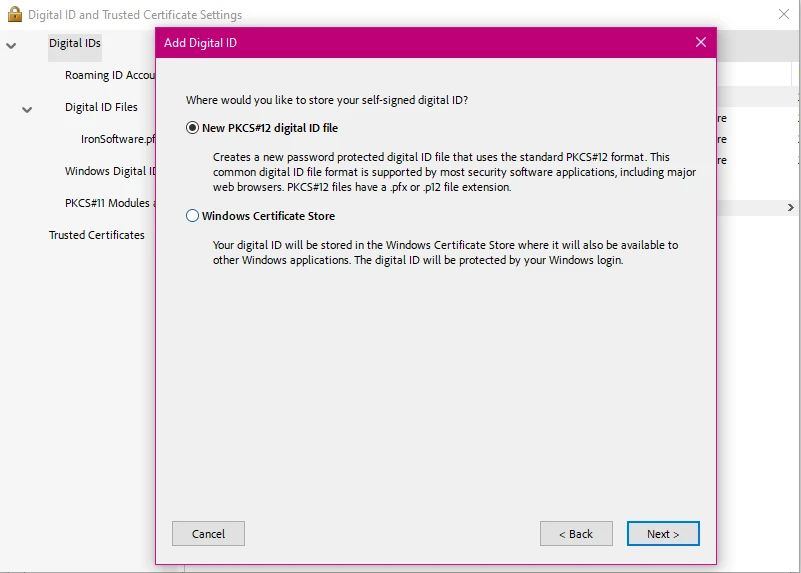
在C#中使用QuestPDF和IronPDF為PDF文件新增數位簽章的比較
現在讓我們更深入地了解這兩個程式庫,及其如何處理將數位簽章應用於PDF文件。
QuestPDF是一個開源程式庫,專注於使用流暢API生成PDF文件,以其全面的佈局引擎創造復雜佈局。雖然它不太適合PDF操作,但可以與其他工具結合使用來簽署PDF文件。 它還附帶一個伴隨應用程式,允許使用者輕鬆探索其PDF的文件結構,並利用即時重載功能提供即時文件預覽,而無需重新編譯程式碼。
IronPDF是一個強大的.NET程式庫,提供為PDF文件生成、操作和簽署PDF文件的強大功能。 專為尋求全面且易於使用的解決方案的.NET開發者設計。 使用IronPDF,您可以輕鬆加密PDF文件、新增註釋、將HTML轉換為PDF、提取內容等等!
QuestPDF
QuestPDF不原生支持數位簽章。 然而,您可以將其與其他程式庫(如BouncyCastle或PDFSharp)結合使用以實現此功能。 在使用QuestPDF生成您的文件後,您可以使用提供PDF簽署工具的程式庫(如iText)對其進行簽署,但QuestPDF程式庫本身不處理PDF簽署。
它提供其他基本形式的PDF安全性,例如PDF加密,以及高級PDF建立和設計PDF文件的能力,因此對於那些尋求能夠處理基本PDF任務且不需要太多精緻功能的PDF程式庫的使用者來說,它仍然是個可行的選擇。
IronPDF
IronPDF提供一個簡單明瞭的API來使用數位證書簽署PDF。 以下程式碼演示如何使用IronPDF將數位簽章應用於PDF文件。
using IronPdf;
using IronPdf.Signing;
using System.Security.Cryptography.X509Certificates;

public class Program
{
    static void Main(string[] args)
    {
        // Load an existing PDF document
        PdfDocument pdf = PdfDocument.FromFile("invoice.pdf");

        // Load a certificate from a .pfx file
        X509Certificate2 cert = new X509Certificate2("IronSoftware.pfx", "your-password", X509KeyStorageFlags.Exportable);

        // Create a PDF signature using the certificate
        var sig = new PdfSignature(cert);

        // Sign the PDF document
        pdf.Sign(sig);

        // Save the signed PDF document
        pdf.SaveAs("signed.pdf");
    }
}
using IronPdf;
using IronPdf.Signing;
using System.Security.Cryptography.X509Certificates;

public class Program
{
    static void Main(string[] args)
    {
        // Load an existing PDF document
        PdfDocument pdf = PdfDocument.FromFile("invoice.pdf");

        // Load a certificate from a .pfx file
        X509Certificate2 cert = new X509Certificate2("IronSoftware.pfx", "your-password", X509KeyStorageFlags.Exportable);

        // Create a PDF signature using the certificate
        var sig = new PdfSignature(cert);

        // Sign the PDF document
        pdf.Sign(sig);

        // Save the signed PDF document
        pdf.SaveAs("signed.pdf");
    }
}
Imports IronPdf
Imports IronPdf.Signing
Imports System.Security.Cryptography.X509Certificates
Public Class Program
Shared Sub Main(ByVal args() As String)
' Load an existing PDF document
Dim pdf As PdfDocument = PdfDocument.FromFile("invoice.pdf")
' Load a certificate from a .pfx file
Dim cert As New X509Certificate2("IronSoftware.pfx", "your-password", X509KeyStorageFlags.Exportable)
' Create a PDF signature using the certificate
Dim sig = New PdfSignature(cert)
' Sign the PDF document
pdf.Sign(sig)
' Save the signed PDF document
pdf.SaveAs("signed.pdf")
End Sub
End Class
Imports IronPdf
Imports IronPdf.Signing
Imports System.Security.Cryptography.X509Certificates

Public Class Program
	Shared Sub Main(ByVal args() As String)
		' Load an existing PDF document
		Dim pdf As PdfDocument = PdfDocument.FromFile("invoice.pdf")

		' Load a certificate from a .pfx file
		Dim cert As New X509Certificate2("IronSoftware.pfx", "your-password", X509KeyStorageFlags.Exportable)

		' Create a PDF signature using the certificate
		Dim sig = New PdfSignature(cert)

		' Sign the PDF document
		pdf.Sign(sig)

		' Save the signed PDF document
		pdf.SaveAs("signed.pdf")
	End Sub
End Class
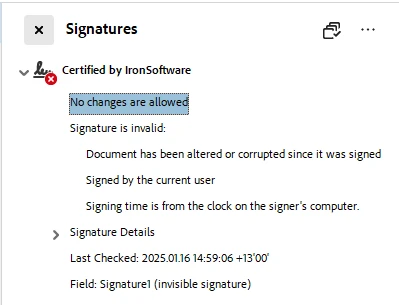
本程式碼演示了如何使用IronPDF和X.509證書對PDF文件進行數位簽署。 首先,它將現有的PDF(PdfDocument物件中。 然後,它通過提供密碼(IronSoftware.pfx)中載入證書。
接著,使用已載入的證書建立一個PdfSignature物件。 然後,這個簽章應用到PDF文件上,有效地對其進行簽署。 最後,簽署好的PDF另存為一個名為signed.pdf的新文件。 這個過程確保PDF被安全簽署,驗證其真實性和完整性。
如何使用IronPDF驗證簽章
IronPDF還提供了一種簡便的方法來驗證數位簽章。 您可以調用VerifyPdfSignatures方法來檢查文件中簽名的有效性。
using IronPdf;

PdfDocument pdf = PdfDocument.FromFile("signed_test_document.pdf");

// Verify the digital signatures in the PDF document
bool isValid = pdf.VerifyPdfSignatures();
if (isValid)
{
    Console.WriteLine("The digital signature is valid.");
}
else
{
    Console.WriteLine("The digital signature is invalid or missing.");
}
using IronPdf;

PdfDocument pdf = PdfDocument.FromFile("signed_test_document.pdf");

// Verify the digital signatures in the PDF document
bool isValid = pdf.VerifyPdfSignatures();
if (isValid)
{
    Console.WriteLine("The digital signature is valid.");
}
else
{
    Console.WriteLine("The digital signature is invalid or missing.");
}
Imports IronPdf
Private pdf As PdfDocument = PdfDocument.FromFile("signed_test_document.pdf")
' Verify the digital signatures in the PDF document
Private isValid As Boolean = pdf.VerifyPdfSignatures()
If isValid Then
Console.WriteLine("The digital signature is valid.")
Else
Console.WriteLine("The digital signature is invalid or missing.")
End If
Imports IronPdf

Private pdf As PdfDocument = PdfDocument.FromFile("signed_test_document.pdf")

' Verify the digital signatures in the PDF document
Private isValid As Boolean = pdf.VerifyPdfSignatures()
If isValid Then
	Console.WriteLine("The digital signature is valid.")
Else
	Console.WriteLine("The digital signature is invalid or missing.")
End If
此方法在文件中的所有簽名均有效時返回false。
QuestPDF和IronPDF之間的差異總結
易用性:與QuestPDF相比,IronPDF提供了一個更簡單的API來簽署PDF。 QuestPDF不提供數位簽章的本地支持,並需要外部程式庫(例如BouncyCastle)來實現此功能。 相比之下,IronPDF具有內建的簽名和驗證PDF的方法,使實現數位簽章更簡便。
證書管理:兩個程式庫都可以使用證書,但IronPDF直接通過其內建方法(例如SignWithFile)處理它們,簡化了過程。 它還允許您指定簽章權限,而這是QuestPDF沒有提供的。 用IronPDF簽署PDF文件只需幾行程式碼。
數位簽章驗證:IronPDF提供一個易於使用的方法(VerifyPdfSignatures)來檢查PDF內數位簽章的有效性,而QuestPDF缺少此功能,需依賴外部程式庫進行簽名驗證。
授權及成本:QuestPDF是一個開源程式庫,使用免費。 這伴隨著缺乏高級功能的成本,例如數位簽章支持。 IronPDF開放予開發之用,在此之外,它提供各種定價等級的商業授權,讓您在購買前試用。
總結
總之,雖然QuestPDF在建立具有複雜佈局的PDF方面表現出色,但缺乏數位簽章的本地支持,需外部程式庫(如BouncyCastle)實現此功能。 相比之下,IronPDF提供了一個整合的數位簽章簽署和驗證解決方案,提供更簡單有效的過程。
對於需要內建數位簽章功能的完整PDF解決方案的開發者,IronPDF是更好的選擇,具備廣泛功能、豐富文件等。 然而,QuestPDF仍然是PDF生成的強大開源選擇,但數位簽署需要額外的複雜性。 最終的決定取決於項目的需求和所需的簡便程度。
QuestPDF和BouncyCastle是其各自所有者的註冊商標。 本網站與QuestPDF或BouncyCastle無關,未經其認可或贊助。 所有產品名稱、標誌和品牌均為其各自所有者的財產。 比較僅供參考,反映撰寫時公開可用的資訊。























