


C# 隨機整數(對於開發者的運行原理)

要在C#中建立隨機整數,開發者可以利用Random類,這是一個在軟體程式中生成隨機性的基本工具。 隨機整數生成是程式設計中的一個關鍵概念,使得統計模擬、遊戲開發、不可預測事件的建模、動態內容的生成和實施帶有隨機輸入的算法等任務成為可能。 這在許多情況下都有益處,從建立隨機遊戲關卡到重新排列列表中的項目或進行統計分析。
如何使用C#隨機整數
- 建立一個新的C#專案。
- 構建
Random類的實例。 - 使用
Next()方法生成隨機整數。 - 如果需要,定義隨機整數的範圍。
- 在您的程式中使用隨機整數,並在需要時重複此過程。
什麼是C#隨機整數
Random類提供了一種簡單且靈活的方法來生成C#中的隨機數。 Next(minValue, maxValue)方法在方便的範圍內提供了偽隨機數生成器。 此外,Random類允許自訂種子值,從而為測試和除錯提供可重複的隨機序列。
在本文中,我們將探討Random類在C#中的功能,包括其用法、安全預防措施和生成隨機數的最佳實踐。 我們還將展示各種場景和範例,展示開發者如何利用隨機化來提升他們的C#程式。 了解C#隨機整數生成可以使開發者在應用程式中引入不可預測性,最終提升使用者體驗並促進軟體開發創新。
基本隨機整數生成
可以使用Next()方法無參數地以最簡單的方式生成非負隨機整數。
// Create an instance of Random
Random random = new Random();
// Generate a random integer
int randomNumber = random.Next();
// Create an instance of Random
Random random = new Random();
// Generate a random integer
int randomNumber = random.Next();' Create an instance of Random
Dim random As New Random()
' Generate a random integer
Dim randomNumber As Integer = random.Next()NextDouble()方法可以生成0.0到1.0之間的隨機浮點數。
特定範圍內的隨機數
使用Next(minValue, maxValue)方法可以在指定範圍內生成隨機數。 此方法返回一個大於或等於maxValue的隨機數。
// Create an instance of Random
Random rnd = new Random();
// Generate a random integer value between 1 and 100
int randomNumberInRange = rnd.Next(1, 101);
// Create an instance of Random
Random rnd = new Random();
// Generate a random integer value between 1 and 100
int randomNumberInRange = rnd.Next(1, 101);' Create an instance of Random
Dim rnd As New Random()
' Generate a random integer value between 1 and 100
Dim randomNumberInRange As Integer = rnd.Next(1, 101)小於最大值的隨機整數
如果您只需要小於指定最大值的隨機數,請使用Next(maxValue)方法。 它返回一個小於提供的maxValue的隨機整數。
// Create an instance of Random
Random random = new Random();
// Generate a random number between 0 and 99
int randomNumberLessThanMax = random.Next(100);
// Create an instance of Random
Random random = new Random();
// Generate a random number between 0 and 99
int randomNumberLessThanMax = random.Next(100);' Create an instance of Random
Dim random As New Random()
' Generate a random number between 0 and 99
Dim randomNumberLessThanMax As Integer = random.Next(100)生成隨機位元組
NextBytes(byte[] buffer)方法允許您用隨機值填充位元組陣列,這對於建立隨機二進位資料很有用。
// Create an instance of Random
Random random = new Random();
// Create a byte array
byte[] randomBytes = new byte[10];
// Fill the array with random byte values
random.NextBytes(randomBytes);
// Create an instance of Random
Random random = new Random();
// Create a byte array
byte[] randomBytes = new byte[10];
// Fill the array with random byte values
random.NextBytes(randomBytes);' Create an instance of Random
Dim random As New Random()
' Create a byte array
Dim randomBytes(9) As Byte
' Fill the array with random byte values
random.NextBytes(randomBytes)自訂種子值
使用特定種子值初始化Random實例以獲得一致的運行結果。 使用相同的種子有助於獲得可重複的結果,如測試場景。
// Initialize Random with a seed value
Random random = new Random(12345);
// Generate a random integer
int randomNumberWithSeed = random.Next();
// Initialize Random with a seed value
Random random = new Random(12345);
// Generate a random integer
int randomNumberWithSeed = random.Next();' Initialize Random with a seed value
Dim random As New Random(12345)
' Generate a random integer
Dim randomNumberWithSeed As Integer = random.Next()執行緒安全的隨機生成
在執行緒安全的隨機數生成在多執行緒環境中至關重要。 一種常見技術是使用Random實例。
// Create a thread-local Random instance
ThreadLocal<Random> threadLocalRandom = new ThreadLocal<Random>(() => new Random());
// Generate a random number safely in a multi-threaded environment
int randomNumberThreadSafe = threadLocalRandom.Value.Next();
// Create a thread-local Random instance
ThreadLocal<Random> threadLocalRandom = new ThreadLocal<Random>(() => new Random());
// Generate a random number safely in a multi-threaded environment
int randomNumberThreadSafe = threadLocalRandom.Value.Next();' Create a thread-local Random instance
Dim threadLocalRandom As New ThreadLocal(Of Random)(Function() New Random())
' Generate a random number safely in a multi-threaded environment
Dim randomNumberThreadSafe As Integer = threadLocalRandom.Value.Next()進階隨機技術
若要產生具有特定分佈(如高斯分佈)的隨機數,您可能需要第三方程式庫或自訂方法。
// Example of generating random numbers with a Gaussian distribution using MathNet.Numerics
using MathNet.Numerics.Distributions;

// Parameters for the Gaussian distribution: mean and standard deviation
double mean = 0;
double standardDeviation = 1;

// Generate a random number with a Gaussian distribution
double randomNumberWithGaussianDistribution = Normal.Sample(new Random(), mean, standardDeviation);
// Example of generating random numbers with a Gaussian distribution using MathNet.Numerics
using MathNet.Numerics.Distributions;
// Parameters for the Gaussian distribution: mean and standard deviation
double mean = 0;
double standardDeviation = 1;
// Generate a random number with a Gaussian distribution
double randomNumberWithGaussianDistribution = Normal.Sample(new Random(), mean, standardDeviation);' Example of generating random numbers with a Gaussian distribution using MathNet.Numerics
Imports MathNet.Numerics.Distributions
' Parameters for the Gaussian distribution: mean and standard deviation
Private mean As Double = 0
Private standardDeviation As Double = 1
' Generate a random number with a Gaussian distribution
Private randomNumberWithGaussianDistribution As Double = Normal.Sample(New Random(), mean, standardDeviation)這些範例展示了C#的Random類用於生成隨機數的各種應用。 根據您的具體需求和情況選擇最佳的方法。
IronPDF是什麼?
IronPDF是一個受歡迎的C#程式庫,提供多種功能用於建立、編輯和修改PDF文件。 雖然其主要用途是與PDF相關的操作,但也可以在C#中用於多種任務,如將隨機整數插入PDF文件中。
IronPDF的一個關鍵功能是其HTML到PDF轉換功能,它保留了佈局和樣式,使其非常適合用於報告、發票和文件資料。 您可以輕鬆地將HTML文件、URLs和HTML字串轉換為PDF。
using IronPdf;

class Program
{
    static void Main(string[] args)
    {
        // Create a ChromePdfRenderer instance
        var renderer = new ChromePdfRenderer();

        // 1. Convert HTML String to PDF
        var htmlContent = "<h1>Hello, IronPDF!</h1><p>This is a PDF from an HTML string.</p>";
        var pdfFromHtmlString = renderer.RenderHtmlAsPdf(htmlContent);
        pdfFromHtmlString.SaveAs("HTMLStringToPDF.pdf");

        // 2. Convert HTML File to PDF
        var htmlFilePath = "path_to_your_html_file.html"; // Specify the path to your HTML file
        var pdfFromHtmlFile = renderer.RenderHtmlFileAsPdf(htmlFilePath);
        pdfFromHtmlFile.SaveAs("HTMLFileToPDF.pdf");

        // 3. Convert URL to PDF
        var url = "http://ironpdf.com"; // Specify the URL
        var pdfFromUrl = renderer.RenderUrlAsPdf(url);
        pdfFromUrl.SaveAs("URLToPDF.pdf");
    }
}
using IronPdf;
class Program
{
static void Main(string[] args)
{
// Create a ChromePdfRenderer instance
var renderer = new ChromePdfRenderer();
// 1. Convert HTML String to PDF
var htmlContent = "<h1>Hello, IronPDF!</h1><p>This is a PDF from an HTML string.</p>";
var pdfFromHtmlString = renderer.RenderHtmlAsPdf(htmlContent);
pdfFromHtmlString.SaveAs("HTMLStringToPDF.pdf");
// 2. Convert HTML File to PDF
var htmlFilePath = "path_to_your_html_file.html"; // Specify the path to your HTML file
var pdfFromHtmlFile = renderer.RenderHtmlFileAsPdf(htmlFilePath);
pdfFromHtmlFile.SaveAs("HTMLFileToPDF.pdf");
// 3. Convert URL to PDF
var url = "http://ironpdf.com"; // Specify the URL
var pdfFromUrl = renderer.RenderUrlAsPdf(url);
pdfFromUrl.SaveAs("URLToPDF.pdf");
}
}Imports IronPdf
Friend Class Program
Shared Sub Main(ByVal args() As String)
' Create a ChromePdfRenderer instance
Dim renderer = New ChromePdfRenderer()
' 1. Convert HTML String to PDF
Dim htmlContent = "<h1>Hello, IronPDF!</h1><p>This is a PDF from an HTML string.</p>"
Dim pdfFromHtmlString = renderer.RenderHtmlAsPdf(htmlContent)
pdfFromHtmlString.SaveAs("HTMLStringToPDF.pdf")
' 2. Convert HTML File to PDF
Dim htmlFilePath = "path_to_your_html_file.html" ' Specify the path to your HTML file
Dim pdfFromHtmlFile = renderer.RenderHtmlFileAsPdf(htmlFilePath)
pdfFromHtmlFile.SaveAs("HTMLFileToPDF.pdf")
' 3. Convert URL to PDF
Dim url = "http://ironpdf.com" ' Specify the URL
Dim pdfFromUrl = renderer.RenderUrlAsPdf(url)
pdfFromUrl.SaveAs("URLToPDF.pdf")
End Sub
End ClassIronPDF的功能:
- IronPDF允許開發者從HTML內容建立高質量的PDF文件,非常適合用於文件存檔、生成報告和爬取網頁。
- 輕鬆將JPEG、PNG、BMP、GIF等圖像文件轉換為PDF文件。 您可以從影像內容(如掃描文件或照片)中建立可搜尋和可編輯的PDF文件。
- 它提供了全面的PDF操作和修改功能,允許您以程式化方式拆分、旋轉和重新安排PDF頁面。 您可以向現有的PDF新增文字、圖像、註釋和水印。
- IronPDF支援PDF表單的處理,允許開發者填寫表單欄位、檢索表單資料和動態建立PDF表單。
- 安全功能包括加密、密碼保護和數位簽章PDF文件,以確保資料隱私和防止未經授權的存取。
欲了解更多資訊,請參考IronPDF文件。
IronPDF的安裝:
要安裝IronPDF程式庫,請使用包管理控制台或NuGet包管理器:
Install-Package IronPdf
使用NuGet包管理器,搜尋"IronPDF"以從相關NuGet包清單中選擇並下載必要的包。
IronPDF中的隨機整數
安裝IronPDF後,您可以在程式中初始化它。 在導入所需的命名空間後,建立IronPdf.HtmlToPdf類的實例。
using IronPdf;
using System;

class Program
{
    static void Main(string[] args)
    {
        // Create a new instance of Random
        Random random = new Random();
        // Generate a random integer between 1 and 100
        int randomNumber = random.Next(1, 101);

        // Create HTML content with the random integer
        string htmlContent = $@"
            <html>
            <head><title>Random Integer PDF</title></head>
            <body>
            <h1>Random Integer: {randomNumber}</h1>
            </body>
            </html>";

        // Create a new HtmlToPdf renderer
        var renderer = new HtmlToPdf();
        // Render the HTML to a PDF
        var pdf = renderer.RenderHtmlAsPdf(htmlContent);
        // Save the PDF document
        pdf.SaveAs("output.pdf");
    }
}
using IronPdf;
using System;
class Program
{
static void Main(string[] args)
{
// Create a new instance of Random
Random random = new Random();
// Generate a random integer between 1 and 100
int randomNumber = random.Next(1, 101);
// Create HTML content with the random integer
string htmlContent = $@"
<html>
<head><title>Random Integer PDF</title></head>
<body>
<h1>Random Integer: {randomNumber}</h1>
</body>
</html>";
// Create a new HtmlToPdf renderer
var renderer = new HtmlToPdf();
// Render the HTML to a PDF
var pdf = renderer.RenderHtmlAsPdf(htmlContent);
// Save the PDF document
pdf.SaveAs("output.pdf");
}
}Imports IronPdf
Imports System
Friend Class Program
Shared Sub Main(ByVal args() As String)
' Create a new instance of Random
Dim random As New Random()
' Generate a random integer between 1 and 100
Dim randomNumber As Integer = random.Next(1, 101)
' Create HTML content with the random integer
Dim htmlContent As String = $"
<html>
<head><title>Random Integer PDF</title></head>
<body>
<h1>Random Integer: {randomNumber}</h1>
</body>
</html>"
' Create a new HtmlToPdf renderer
Dim renderer = New HtmlToPdf()
' Render the HTML to a PDF
Dim pdf = renderer.RenderHtmlAsPdf(htmlContent)
' Save the PDF document
pdf.SaveAs("output.pdf")
End Sub
End Class雖然IronPDF不能直接生成隨機整數,但它可以將它們嵌入到PDF文件中。 使用C#內建的Random類生成隨機數後,您可以利用IronPDF的功能將它們新增到PDF中。 將修改後的PDF文件保存到文件或流中,一旦內容被加入。
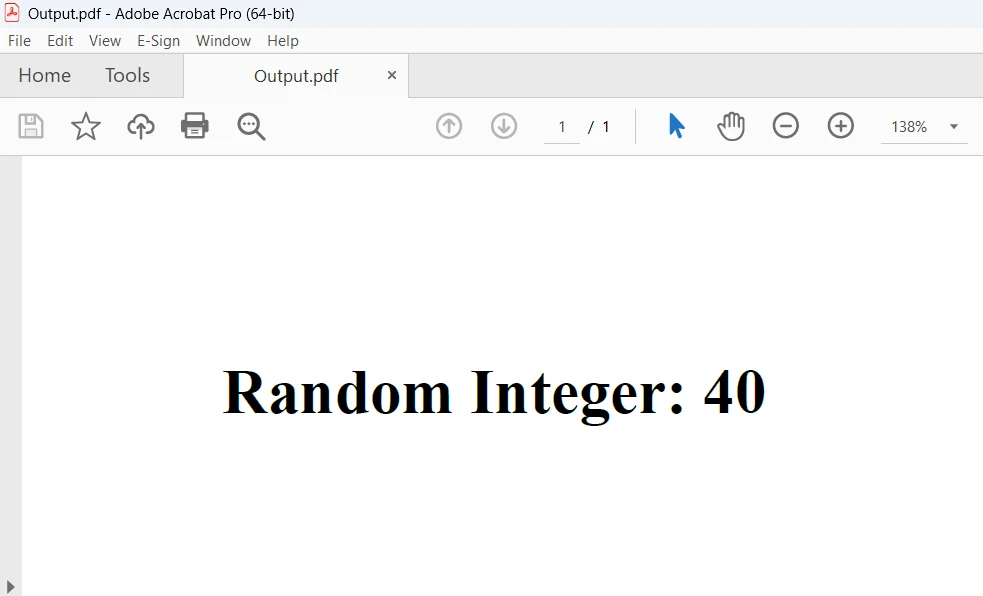
上方螢幕顯示了程式碼的輸出。 欲了解更詳細內容,請參見從HTML建立PDF範例。
結論
總之,將C#用於隨機整數生成以及使用IronPDF的HtmlToPdf功能,是一種動態建立包含嵌入隨機資料的PDF文件的強大方法。 開發者可以輕鬆地通過將IronPDF的HTML到PDF轉換與C#的隨機整數功能結合起來,將動態內容整合到PDF文件中,從而開啟報告生成、資料視覺化和文件自動化的廣泛機遇。
IronPDF的Lite版本包括一年的軟體維護、升級選項和永久授權。 在水印試用期內,允許使用者評估產品。 有關IronPDF的成本、授權和免費試用的詳細資訊,請參閱IronPDF授權資訊。 關於Iron Software的更多資訊,請存取關於Iron Software。
常見問題
如何在C#中生成隨機整數?
要在C#中生成隨機整數,可以使用Random類。建立實例並使用Next()方法來獲取隨機整數。例如:Random random = new Random(); int randomNumber = random.Next();
我可以在C#中生成特定範圍內的隨機整數嗎?
是的,您可以通過使用Random類的Next(minValue, maxValue)方法來生成特定範圍內的隨機整數。例如:int randomNumberInRange = random.Next(1, 101);
在C#中使用具有種子值的Random類有何好處?
在C#中使用具有種子值的Random類允許生成可重複的隨機序列,這對於測試和除錯非常有用。您可以這樣初始化Random:Random random = new Random(12345);
如何確保C#中的隨機數生成是執行緒安全的?
要在多執行緒環境中確保隨機數生成的執行緒安全性,可以使用ThreadLocal類為每個執行緒建立獨特的Random實例:ThreadLocal
在C#中生成隨機數有哪些高級技術?
對於高級隨機數生成技術,如生成特定分佈(例如,Gaussian分佈)的數字,可以利用第三方庫如MathNet.Numerics。
如何使用C#將隨機整數嵌入到PDF文件中?
您可以使用Random類生成隨機整數,並使用IronPDF之類的庫將它們嵌入到PDF中。這允許在PDF文件中建立動態內容。
如何在C#中將HTML內容轉換為PDF?
要在C#中將HTML內容轉換為PDF,請使用如IronPDF之類的PDF轉換庫。您可以使用如RenderHtmlAsPdf的方法將HTML字串轉換為PDF文件。
選擇PDF庫時要注意哪些關鍵功能?
一個強大的PDF庫應提供HTML到PDF轉換、圖像到PDF轉換、PDF操作能力、表單處理以及加密和數位簽章等安全功能。
在購買之前我可以評估PDF庫嗎?
是的,許多PDF庫提供水印輸出的試用期以供評估。您可以存取庫的官方網站了解有關授權和定價選項的更多資訊。
如何在我的C#項目中安裝PDF庫?
要在C#項目中安裝PDF庫,可以使用NuGet Package Manager。在Package Manager Console中執行Install-Package命令或在NuGet Package Manager介面中搜尋該庫。










 免費開始
免費開始 免費開始
免費開始 預訂免費直播演示
















