using IronPdf;

// Disable local disk access or cross-origin requests
Installation.EnableWebSecurity = true;

// Instantiate Renderer
var renderer = new ChromePdfRenderer();

// Create a PDF from a HTML string using C#
var pdf = renderer.RenderHtmlAsPdf("<h1>Hello World</h1>");

// Export to a file or Stream
pdf.SaveAs("output.pdf");

// Advanced Example with HTML Assets
// Load external html assets: Images, CSS and JavaScript.
// An optional BasePath 'C:\site\assets\' is set as the file location to load assets from
var myAdvancedPdf = renderer.RenderHtmlAsPdf("<img src='icons/iron.png'>", @"C:\site\assets\");
myAdvancedPdf.SaveAs("html-with-assets.pdf");
using IronPdf;// Disable local disk access or cross-origin requestsInstallation.EnableWebSecurity = true;// Instantiate Renderervar renderer = new ChromePdfRenderer();// Create a PDF from a HTML string using C#var pdf = renderer.RenderHtmlAsPdf("<h1>Hello World</h1>");// Export to a file or Streampdf.SaveAs("output.pdf");// Advanced Example with HTML Assets// Load external html assets: Images, CSS and JavaScript.// An optional BasePath 'C:\site\assets\' is set as the file location to load assets fromvar myAdvancedPdf = renderer.RenderHtmlAsPdf("<img src='icons/iron.png'>", @"C:\site\assets\");myAdvancedPdf.SaveAs("html-with-assets.pdf");
Comparing PDF documents programmatically is essential for tracking changes, validating different versions, and automating quality assurance workflows. Whether you need to compare two PDF files for document management or find differences in contract revisions, [IronPDF](/) provides a streamlined solution for comparing PDF files in C#.
This tutorial demonstrates how to compare two PDF documents using IronPDF's text extraction capabilities, from basic comparisons to creating detailed difference reports. You'll learn practical techniques with code examples that work across Windows, Linux, macOS, Docker, and cloud platforms.
## Prerequisites and Setup
Before starting, ensure you have installed:
* Visual Studio 2019 or later
* .NET Framework 4.6.2+ or .NET Core 3.1+
* Basic C# knowledge
### Installing the IronPDF .NET Package
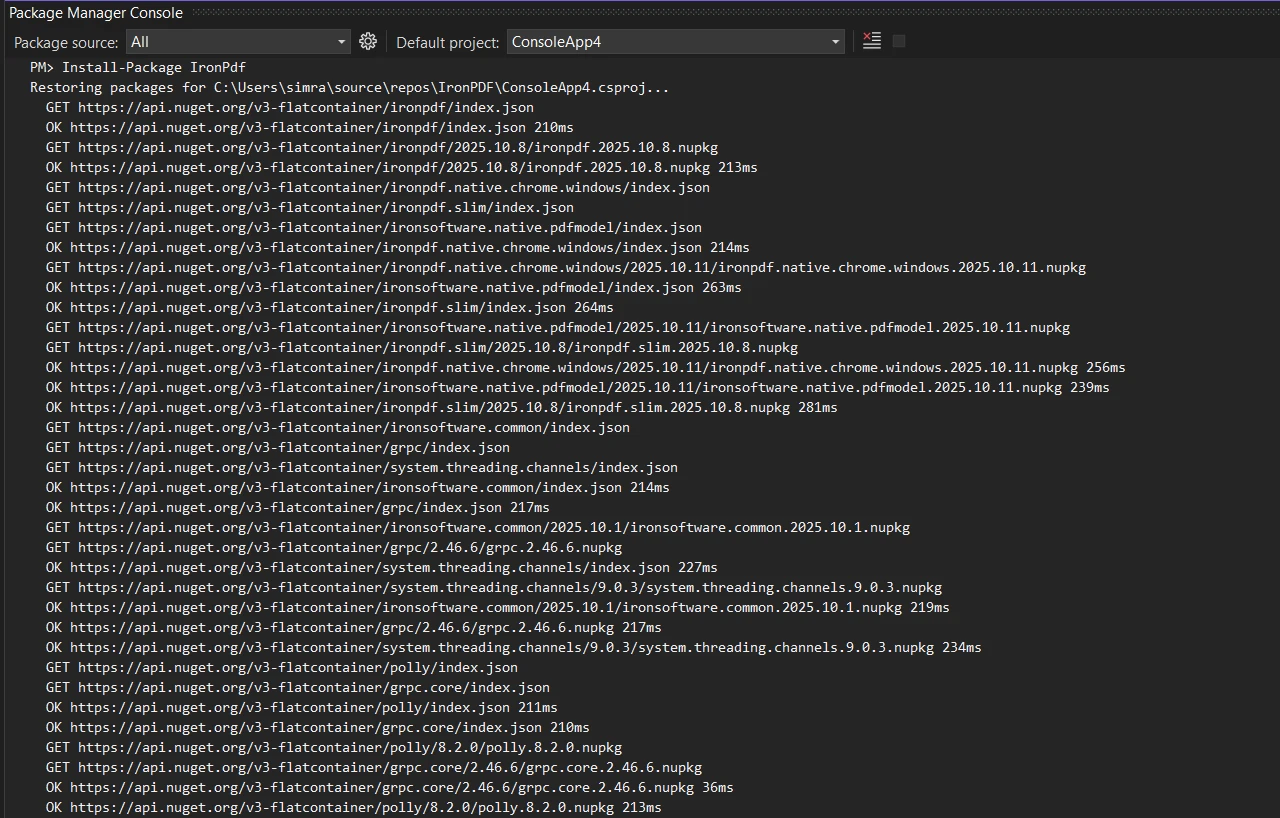
Install IronPDF via NuGet Package Manager in your .NET project:
```shell
:ProductInstall
```
Or using the .NET CLI:
```shell
:InstallCmd dotnet add package IronPdf
```
Add the necessary namespace reference to your files:
```csharp
using IronPdf;
using System;
```
## Basic PDF Document Comparison
Let's start with sample code to compare PDF files by extracting and comparing their text content:
```csharp
public class BasicPdfComparer
{
public static bool ComparePdfFiles(string firstPdfPath, string secondPdfPath)
{
// Load two PDF documents
var pdf1 = PdfDocument.FromFile(firstPdfPath);
var pdf2 = PdfDocument.FromFile(secondPdfPath);
// Extract all text from both PDFs
string text1 = pdf1.ExtractAllText();
string text2 = pdf2.ExtractAllText();
// Compare the two documents
bool areIdentical = text1 == text2;
// Find differences and calculate similarity
double similarity = CalculateSimilarity(text1, text2);
Console.WriteLine($"Documents are {(areIdentical ? "identical" : "different")}");
Console.WriteLine($"Similarity: {similarity:F2}%");
return areIdentical;
}
private static double CalculateSimilarity(string text1, string text2)
{
if (text1 == text2) return 100.0;
if (string.IsNullOrEmpty(text1) || string.IsNullOrEmpty(text2)) return 0.0;
int matchingChars = 0;
int minLength = Math.Min(text1.Length, text2.Length);
for (int i = 0; i < minLength; i++)
{
if (text1[i] == text2[i]) matchingChars++;
}
return (double)matchingChars / Math.Max(text1.Length, text2.Length) * 100;
}
}
```
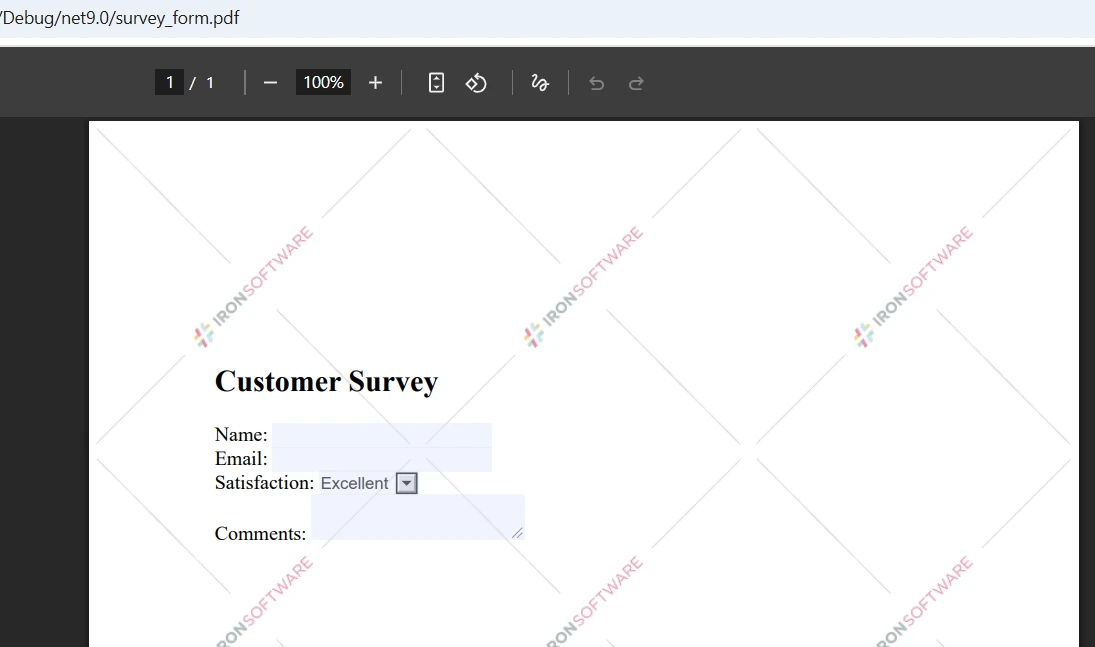
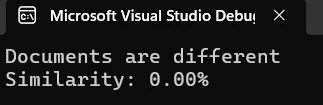
This code loads two PDF files using IronPDF's `PdfDocument.FromFile()` method, extracts all text content, and performs a direct string comparison. The compare method gives you metrics to identify how closely the documents match.
### Input
### Output
## Page-by-Page Comparison Method
For more detailed analysis, compare two PDFs page by page to identify exactly where differences occur:
```csharp
public static void ComparePageByPage(string firstPdfPath, string secondPdfPath)
{
// Load two files
var pdf1 = PdfDocument.FromFile(firstPdfPath);
var pdf2 = PdfDocument.FromFile(secondPdfPath);
int maxPages = Math.Max(pdf1.PageCount, pdf2.PageCount);
int differencesFound = 0;
for (int i = 0; i < maxPages; i++)
{
// Process each page
string page1Text = i < pdf1.PageCount ? pdf1.ExtractTextFromPage(i) : "";
string page2Text = i < pdf2.PageCount ? pdf2.ExtractTextFromPage(i) : "";
if (page1Text != page2Text)
{
differencesFound++;
Console.WriteLine($"Page {i + 1}: Differences detected");
}
else
{
Console.WriteLine($"Page {i + 1}: Identical");
}
}
Console.WriteLine($"\nSummary: {differencesFound} page(s) with changes");
}
```
The `ExtractTextFromPage()` method allows targeted extraction from specific pages. This approach helps developers pinpoint discrepancies between different versions of PDF documents.
## Using the Comparer Class Pattern
Create a dedicated comparer class to enhance your comparison functionality:
```cs
public class PdfComparer
{
private PdfDocument pdf1;
private PdfDocument pdf2;
private bool disposed;
public PdfComparer(string file1Path, string file2Path)
{
// Load the two PDFs
pdf1 = PdfDocument.FromFile(file1Path);
pdf2 = PdfDocument.FromFile(file2Path);
}
public ComparisonResult Compare()
{
var result = new ComparisonResult();
// Compare PDF documents
string text1 = pdf1?.ExtractAllText() ?? string.Empty;
string text2 = pdf2?.ExtractAllText() ?? string.Empty;
result.AreIdentical = string.Equals(text1, text2, StringComparison.Ordinal);
result.SimilarityPercent = CalculateSimilarity(text1, text2);
result.Differences = FindDifferences(text1, text2);
return result;
}
private List<string> FindDifferences(string text1, string text2)
{
var differences = new List<string>();
// Normalize nulls
text1 ??= string.Empty;
text2 ??= string.Empty;
if (string.Equals(text1, text2, StringComparison.Ordinal))
return differences;
// Page-aware comparisons aren't possible here because we only have full-text;
// produce a concise, actionable difference entry:
int min = Math.Min(text1.Length, text2.Length);
int firstDiff = -1;
for (int i = 0; i < min; i++)
{
if (text1[i] != text2[i])
{
firstDiff = i;
break;
}
}
if (firstDiff == -1 && text1.Length != text2.Length)
{
// No differing character in the overlap, but lengths differ
firstDiff = min;
}
// Create short excerpts around the first difference for context
int excerptLength = 200;
string excerpt1 = string.Empty;
string excerpt2 = string.Empty;
if (firstDiff >= 0)
{
int start1 = Math.Max(0, firstDiff);
int len1 = Math.Min(excerptLength, Math.Max(0, text1.Length - start1));
excerpt1 = start1 < text1.Length ? text1.Substring(start1, len1) : string.Empty;
int start2 = Math.Max(0, firstDiff);
int len2 = Math.Min(excerptLength, Math.Max(0, text2.Length - start2));
excerpt2 = start2 < text2.Length ? text2.Substring(start2, len2) : string.Empty;
}
// HTML-encode excerpts if they will be embedded into HTML reports
string safeExcerpt1 = System.Net.WebUtility.HtmlEncode(excerpt1);
string safeExcerpt2 = System.Net.WebUtility.HtmlEncode(excerpt2);
double similarity = CalculateSimilarity(text1, text2);
differences.Add($"Similarity: {similarity:F2}%. Lengths: [{text1.Length}, {text2.Length}]. First difference index: {firstDiff}. Excerpt1: \"{safeExcerpt1}\" Excerpt2: \"{safeExcerpt2}\"");
return differences;
}
public void Close()
{
Dispose();
}
public void Dispose()
{
if (disposed) return;
disposed = true;
pdf1?.Dispose();
pdf2?.Dispose();
}
}
public class ComparisonResult
{
// True when extracted text is exactly the same
public bool AreIdentical { get; set; }
// Similarity expressed as percent (0..100)
public double SimilarityPercent { get; set; }
// Human readable difference entries
public List<string> Differences { get; set; } = new List<string>();
}
```
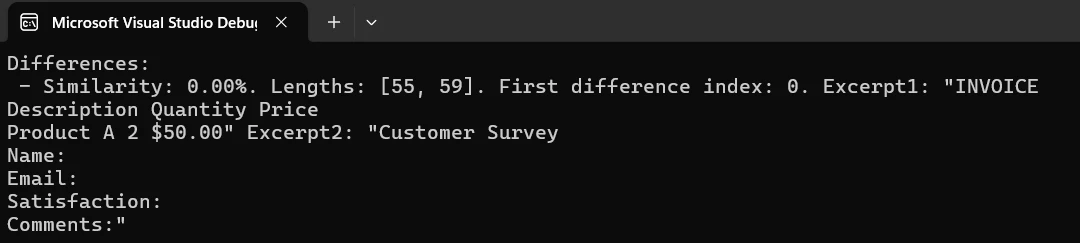
This class structure provides a clean way to compare PDF documents while managing document objects and references properly.
### Output
## Creating a Visual Comparison Report
Generate an HTML-based report that highlights differences between two documents and save it as a PDF file:
```cs
public static void CreateComparisonReport(string pdf1Path, string pdf2Path, string outputPath)
{
// Load PDFs for comparison
var pdf1 = PdfDocument.FromFile(pdf1Path);
var pdf2 = PdfDocument.FromFile(pdf2Path);
// Build HTML report with details
string htmlReport = @"
<html>
<head>
<style>
body { font-family: Arial, sans-serif; margin: 20px; }
.identical { color: green; }
.different { color: red; }
table { width: 100%; border-collapse: collapse; }
th, td { border: 1px solid #ddd; padding: 8px; }
</style>
</head>
<body>
<h1>PDF Comparison Report</h1>
<table>
<tr><th>Page</th><th>Status</th></tr>";
// Process each page
for (int i = 0; i < Math.Max(pdf1.PageCount, pdf2.PageCount); i++)
{
string page1 = i < pdf1.PageCount ? pdf1.ExtractTextFromPage(i) : "";
string page2 = i < pdf2.PageCount ? pdf2.ExtractTextFromPage(i) : "";
bool identical = page1 == page2;
string status = identical ? "Identical" : "Different";
htmlReport += $"<tr><td>Page {i + 1}</td><td class='{status.ToLower()}'>{status}</td></tr>";
}
htmlReport += "</table></body></html>";
// Create and save the report
var renderer = new ChromePdfRenderer();
var reportPdf = renderer.RenderHtmlAsPdf(htmlReport);
reportPdf.SaveAs(outputPath);
Console.WriteLine($"Report saved to: {outputPath}");
}
```
This code demonstrates how to create a professional PDF document with comparison results. The report is saved to the specified path.
## Comparing Multiple PDF Documents
When you need to compare multiple PDF documents simultaneously, use this method:
```cs
public static void CompareMultiplePdfs(params string[] pdfPaths)
{
if (pdfPaths.Length < 2)
{
Console.WriteLine("Need at least two files to compare");
return;
}
// Load multiple PDF documents
var pdfs = new List<PdfDocument>();
foreach (var path in pdfPaths)
{
pdfs.Add(PdfDocument.FromFile(path));
}
// Compare all documents
for (int i = 0; i < pdfs.Count - 1; i++)
{
for (int j = i + 1; j < pdfs.Count; j++)
{
string text1 = pdfs[i].ExtractAllText();
string text2 = pdfs[j].ExtractAllText();
bool identical = text1 == text2;
Console.WriteLine($"File {i+1} vs File {j+1}: {(identical ? "Identical" : "Different")}");
}
}
// Close all documents
pdfs.ForEach(pdf => pdf.Dispose());
}
```
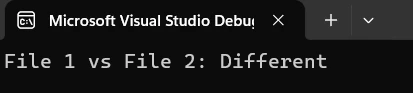
This approach allows comparing multiple PDF documents in a single run, useful for batch processing requirements.
### Output
## Real-World Contract Version Control
Here's a practical example for tracking revisions in legal documents:
```cs
public class ContractVersionControl
{
public static void CompareContractVersions(string originalPath, string revisedPath)
{
// System for comparing contract versions
Console.WriteLine("Contract Version Comparison System");
var original = PdfDocument.FromFile(originalPath);
var revised = PdfDocument.FromFile(revisedPath);
// Extract contract contents
string originalText = original.ExtractAllText();
string revisedText = revised.ExtractAllText();
if (originalText == revisedText)
{
Console.WriteLine("No changes detected");
}
else
{
Console.WriteLine("Changes detected in revised version");
// Create detailed report
string reportPath = $"contract_comparison_{DateTime.Now:yyyyMMdd}.pdf";
CreateComparisonReport(originalPath, revisedPath, reportPath);
Console.WriteLine($"Report created: {reportPath}");
}
// Close documents
original.Dispose();
revised.Dispose();
}
}
```
This demonstrates how to compare two PDF contract versions and generate reports for review. The system automatically detects changes and creates documentation.
## Handling Password-Protected PDFs
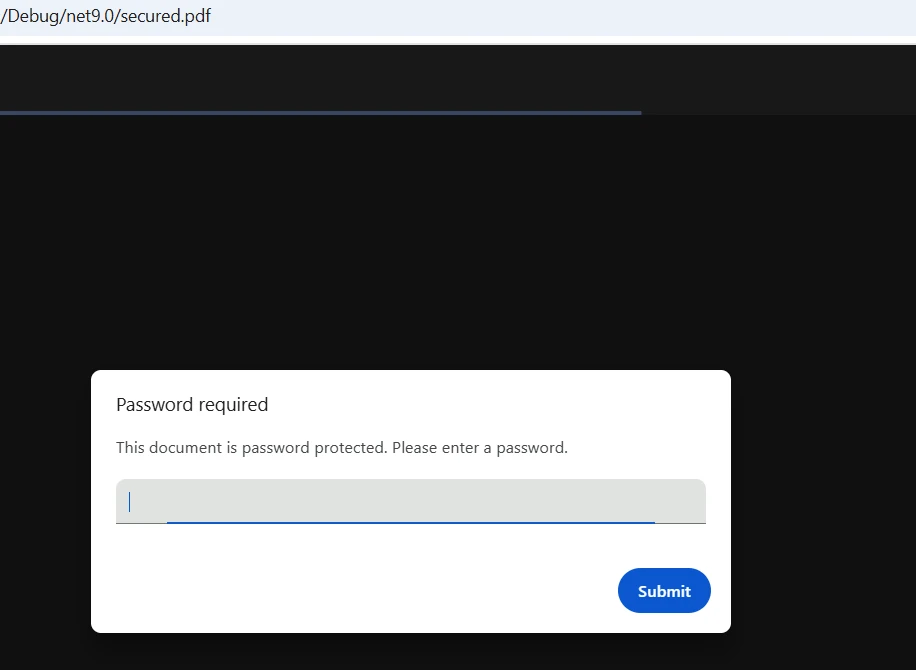
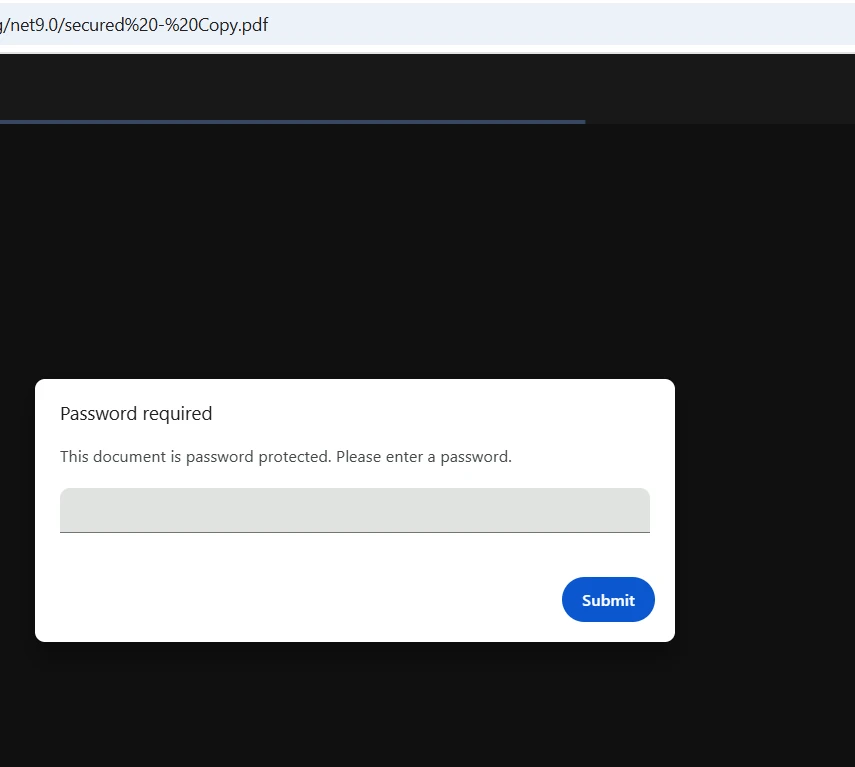
IronPDF seamlessly handles encrypted PDF files by passing the password when calling the load method:
```cs
public static bool CompareProtectedPdfs(string pdf1Path, string pass1,
string pdf2Path, string pass2)
{
// Load password-protected two PDFs
var pdf1 = PdfDocument.FromFile(pdf1Path, pass1);
var pdf2 = PdfDocument.FromFile(pdf2Path, pass2);
// Extract and compare text
string text1 = pdf1.ExtractAllText();
string text2 = pdf2.ExtractAllText();
bool result = text1 == text2;
// Close and dispose
pdf1.Dispose();
pdf2.Dispose();
return result;
}
```
Simply pass the password parameter when loading protected PDFs. IronPDF handles decryption automatically.
### Input
### Output
## Step-by-Step Instructions
Follow these steps to implement PDF comparison in your .NET project:
1. Install the IronPDF for .NET package via NuGet
2. Add the IronPDF namespace reference
3. Create an instance of `PdfDocument` for each file
4. Use methods like `ExtractAllText()` to get contents
5. Compare the extracted text or implement custom logic
6. Save results or generate reports as needed
7. Close document objects to free resources
## Setting Your License
To use IronPDF without watermarks, set your license key:
```cs
IronPdf.License.LicenseKey = "YOUR-LICENSE-KEY";
```
Visit the [licensing page](licensing) for details on available options. Download IronPDF's [free trial](trial-license) and set up PDF files using professional-grade comparison capabilities.
## Best Practices
1. Accept all revisions before comparison if working with tracked changes
2. Develop error handling for crucial file operations
3. Enhance performance by creating page-specific comparisons for large documents
4. Run comparisons asynchronously for multiple PDF documents
5. Update your library regularly for the latest features and support

## Conclusion
IronPDF simplifies the process to compare two PDF files using C# with its intuitive API and powerful extraction capabilities. From basic comparison to creating detailed reports, IronPDF provides all the tools needed for robust document comparison workflows.
The combination of easy installation, comprehensive functionality, and cross-platform support makes IronPDF the ideal choice for developers implementing PDF comparison in .NET applications. Whether you're developing document management systems or version control solutions, IronPDF's straightforward approach gets you running quickly.
Start your free trial of IronPDF today and implement professional PDF comparison features. With full technical support and extensive documentation, you'll have production-ready functionality in hours. Refer to the [complete documentation](/docs/) to learn more about advanced features.
Comparing PDF documents programmatically is essential for tracking changes, validating different versions, and automating quality assurance workflows. Whether you need to compare two PDF files for document management or find differences in contract revisions, IronPDF provides a streamlined solution for comparing PDF files in C#.
This tutorial demonstrates how to compare two PDF documents using IronPDF's text extraction capabilities, from basic comparisons to creating detailed difference reports. You'll learn practical techniques with code examples that work across Windows, Linux, macOS, Docker, and cloud platforms.
Prerequisites and Setup
Before starting, ensure you have installed:
Visual Studio 2019 or later
.NET Framework 4.6.2+ or .NET Core 3.1+
Basic C# knowledge
Installing the IronPDF .NET Package
Install IronPDF via NuGet Package Manager in your .NET project:
PM > Install-Package IronPdf
Install-Package IronPdf
Or using the .NET CLI:
> dotnet add package IronPdf
dotnet add package IronPdf
Add the necessary namespace reference to your files:
using IronPdf;using System;
using IronPdf;
using System;
ImportsIronPdfImportsSystem
Imports IronPdf
Imports System
Basic PDF Document Comparison
Let's start with sample code to compare PDF files by extracting and comparing their text content:
public class BasicPdfComparer{ public static boolComparePdfFiles(string firstPdfPath, string secondPdfPath) { // Load two PDF documents var pdf1 = PdfDocument.FromFile(firstPdfPath); var pdf2 = PdfDocument.FromFile(secondPdfPath); // Extract all text from both PDFs string text1 = pdf1.ExtractAllText(); string text2 = pdf2.ExtractAllText(); // Compare the two documents bool areIdentical = text1 == text2; // Find differences and calculate similarity double similarity = CalculateSimilarity(text1, text2);Console.WriteLine($"Documents are {(areIdentical ? "identical" : "different")}");Console.WriteLine($"Similarity: {similarity:F2}%"); return areIdentical; } private static doubleCalculateSimilarity(string text1, string text2) { if (text1 == text2) return 100.0; if (string.IsNullOrEmpty(text1) || string.IsNullOrEmpty(text2)) return 0.0; int matchingChars = 0; int minLength = Math.Min(text1.Length, text2.Length); for (int i = 0; i < minLength; i++) { if (text1[i] == text2[i]) matchingChars++; } return (double)matchingChars / Math.Max(text1.Length, text2.Length) * 100; }}
public class BasicPdfComparer
{
    public static bool ComparePdfFiles(string firstPdfPath, string secondPdfPath)
    {
        // Load two PDF documents
        var pdf1 = PdfDocument.FromFile(firstPdfPath);
        var pdf2 = PdfDocument.FromFile(secondPdfPath);
        // Extract all text from both PDFs
        string text1 = pdf1.ExtractAllText();
        string text2 = pdf2.ExtractAllText();
        // Compare the two documents
        bool areIdentical = text1 == text2;
        // Find differences and calculate similarity
        double similarity = CalculateSimilarity(text1, text2);
        Console.WriteLine($"Documents are {(areIdentical ? "identical" : "different")}");
        Console.WriteLine($"Similarity: {similarity:F2}%");
        return areIdentical;
    }
    private static double CalculateSimilarity(string text1, string text2)
    {
        if (text1 == text2) return 100.0;
        if (string.IsNullOrEmpty(text1) || string.IsNullOrEmpty(text2)) return 0.0;
        int matchingChars = 0;
        int minLength = Math.Min(text1.Length, text2.Length);
        for (int i = 0; i < minLength; i++)
        {
            if (text1[i] == text2[i]) matchingChars++;
        }
        return (double)matchingChars / Math.Max(text1.Length, text2.Length) * 100;
    }
}
ImportsSystemPublic Class BasicPdfComparer PublicShared Function ComparePdfFiles(firstPdfPath AsString, secondPdfPath AsString) AsBoolean ' Load two PDF documents Dim pdf1 = PdfDocument.FromFile(firstPdfPath) Dim pdf2 = PdfDocument.FromFile(secondPdfPath) ' Extract all text from both PDFs Dim text1 AsString = pdf1.ExtractAllText() Dim text2 AsString = pdf2.ExtractAllText() ' Compare the two documents Dim areIdentical AsBoolean = text1 = text2 ' Find differences and calculate similarity Dim similarity AsDouble = CalculateSimilarity(text1, text2)Console.WriteLine($"Documents are {(If(areIdentical, "identical", "different"))}")Console.WriteLine($"Similarity: {similarity:F2}%") Return areIdentical End Function PrivateShared Function CalculateSimilarity(text1 AsString, text2 AsString) AsDouble If text1 = text2 Then Return 100.0 IfString.IsNullOrEmpty(text1) OrElseString.IsNullOrEmpty(text2) Then Return 0.0 Dim matchingChars AsInteger = 0 Dim minLength AsInteger = Math.Min(text1.Length, text2.Length) For i AsInteger = 0 To minLength - 1 If text1(i) = text2(i) Then matchingChars += 1 Next Return matchingChars / Math.Max(text1.Length, text2.Length) * 100 End FunctionEnd Class
Imports System

Public Class BasicPdfComparer
    Public Shared Function ComparePdfFiles(firstPdfPath As String, secondPdfPath As String) As Boolean
        ' Load two PDF documents
        Dim pdf1 = PdfDocument.FromFile(firstPdfPath)
        Dim pdf2 = PdfDocument.FromFile(secondPdfPath)
        ' Extract all text from both PDFs
        Dim text1 As String = pdf1.ExtractAllText()
        Dim text2 As String = pdf2.ExtractAllText()
        ' Compare the two documents
        Dim areIdentical As Boolean = text1 = text2
        ' Find differences and calculate similarity
        Dim similarity As Double = CalculateSimilarity(text1, text2)
        Console.WriteLine($"Documents are {(If(areIdentical, "identical", "different"))}")
        Console.WriteLine($"Similarity: {similarity:F2}%")
        Return areIdentical
    End Function

    Private Shared Function CalculateSimilarity(text1 As String, text2 As String) As Double
        If text1 = text2 Then Return 100.0
        If String.IsNullOrEmpty(text1) OrElse String.IsNullOrEmpty(text2) Then Return 0.0
        Dim matchingChars As Integer = 0
        Dim minLength As Integer = Math.Min(text1.Length, text2.Length)
        For i As Integer = 0 To minLength - 1
            If text1(i) = text2(i) Then matchingChars += 1
        Next
        Return matchingChars / Math.Max(text1.Length, text2.Length) * 100
    End Function
End Class
This code loads two PDF files using IronPDF's PdfDocument.FromFile() method, extracts all text content, and performs a direct string comparison. The compare method gives you metrics to identify how closely the documents match.
Input
Output
Page-by-Page Comparison Method
For more detailed analysis, compare two PDFs page by page to identify exactly where differences occur:
public static voidComparePageByPage(string firstPdfPath, string secondPdfPath){ // Load two files var pdf1 = PdfDocument.FromFile(firstPdfPath); var pdf2 = PdfDocument.FromFile(secondPdfPath); int maxPages = Math.Max(pdf1.PageCount, pdf2.PageCount); int differencesFound = 0; for (int i = 0; i < maxPages; i++) { // Process each page string page1Text = i < pdf1.PageCount ? pdf1.ExtractTextFromPage(i) : ""; string page2Text = i < pdf2.PageCount ? pdf2.ExtractTextFromPage(i) : ""; if (page1Text != page2Text) { differencesFound++;Console.WriteLine($"Page {i + 1}: Differences detected"); } else {Console.WriteLine($"Page {i + 1}: Identical"); } }Console.WriteLine($"\nSummary: {differencesFound} page(s) with changes");}
public static void ComparePageByPage(string firstPdfPath, string secondPdfPath)
{
    // Load two files
    var pdf1 = PdfDocument.FromFile(firstPdfPath);
    var pdf2 = PdfDocument.FromFile(secondPdfPath);
    int maxPages = Math.Max(pdf1.PageCount, pdf2.PageCount);
    int differencesFound = 0;
    for (int i = 0; i < maxPages; i++)
    {
        // Process each page
        string page1Text = i < pdf1.PageCount ? pdf1.ExtractTextFromPage(i) : "";
        string page2Text = i < pdf2.PageCount ? pdf2.ExtractTextFromPage(i) : "";
        if (page1Text != page2Text)
        {
            differencesFound++;
            Console.WriteLine($"Page {i + 1}: Differences detected");
        }
        else
        {
            Console.WriteLine($"Page {i + 1}: Identical");
        }
    }
    Console.WriteLine($"\nSummary: {differencesFound} page(s) with changes");
}
PublicShared Sub ComparePageByPage(firstPdfPath AsString, secondPdfPath AsString) ' Load two files Dim pdf1 = PdfDocument.FromFile(firstPdfPath) Dim pdf2 = PdfDocument.FromFile(secondPdfPath) Dim maxPages AsInteger = Math.Max(pdf1.PageCount, pdf2.PageCount) Dim differencesFound AsInteger = 0 For i AsInteger = 0 To maxPages - 1 ' Process each page Dim page1Text AsString = If(i < pdf1.PageCount, pdf1.ExtractTextFromPage(i), "") Dim page2Text AsString = If(i < pdf2.PageCount, pdf2.ExtractTextFromPage(i), "") If page1Text <> page2Text Then differencesFound += 1Console.WriteLine($"Page {i + 1}: Differences detected") ElseConsole.WriteLine($"Page {i + 1}: Identical") End If NextConsole.WriteLine(vbCrLf & $"Summary: {differencesFound} page(s) with changes")End Sub
Public Shared Sub ComparePageByPage(firstPdfPath As String, secondPdfPath As String)
    ' Load two files
    Dim pdf1 = PdfDocument.FromFile(firstPdfPath)
    Dim pdf2 = PdfDocument.FromFile(secondPdfPath)
    Dim maxPages As Integer = Math.Max(pdf1.PageCount, pdf2.PageCount)
    Dim differencesFound As Integer = 0
    For i As Integer = 0 To maxPages - 1
        ' Process each page
        Dim page1Text As String = If(i < pdf1.PageCount, pdf1.ExtractTextFromPage(i), "")
        Dim page2Text As String = If(i < pdf2.PageCount, pdf2.ExtractTextFromPage(i), "")
        If page1Text <> page2Text Then
            differencesFound += 1
            Console.WriteLine($"Page {i + 1}: Differences detected")
        Else
            Console.WriteLine($"Page {i + 1}: Identical")
        End If
    Next
    Console.WriteLine(vbCrLf & $"Summary: {differencesFound} page(s) with changes")
End Sub
The ExtractTextFromPage() method allows targeted extraction from specific pages. This approach helps developers pinpoint discrepancies between different versions of PDF documents.
Using the Comparer Class Pattern
Create a dedicated comparer class to enhance your comparison functionality:
public class PdfComparer{ private PdfDocument pdf1; private PdfDocument pdf2; private bool disposed; publicPdfComparer(string file1Path, string file2Path) { // Load the two PDFs pdf1 = PdfDocument.FromFile(file1Path); pdf2 = PdfDocument.FromFile(file2Path); } public ComparisonResultCompare() { var result = new ComparisonResult(); // Compare PDF documents string text1 = pdf1?.ExtractAllText() ?? string.Empty; string text2 = pdf2?.ExtractAllText() ?? string.Empty; result.AreIdentical = string.Equals(text1, text2, StringComparison.Ordinal); result.SimilarityPercent = CalculateSimilarity(text1, text2); result.Differences = FindDifferences(text1, text2); return result; } private List<string> FindDifferences(string text1, string text2) { var differences = new List<string>(); // Normalize nulls text1 ??= string.Empty; text2 ??= string.Empty; if (string.Equals(text1, text2, StringComparison.Ordinal)) return differences; // Page-aware comparisons aren't possible here because we only have full-text; // produce a concise, actionable difference entry: int min = Math.Min(text1.Length, text2.Length); int firstDiff = -1; for (int i = 0; i < min; i++) { if (text1[i] != text2[i]) { firstDiff = i; break; } } if (firstDiff == -1 && text1.Length != text2.Length) { // No differing character in the overlap, but lengths differ firstDiff = min; } // Create short excerpts around the first difference for context int excerptLength = 200; string excerpt1 = string.Empty; string excerpt2 = string.Empty; if (firstDiff >= 0) { int start1 = Math.Max(0, firstDiff); int len1 = Math.Min(excerptLength, Math.Max(0, text1.Length - start1)); excerpt1 = start1 < text1.Length ? text1.Substring(start1, len1) : string.Empty; int start2 = Math.Max(0, firstDiff); int len2 = Math.Min(excerptLength, Math.Max(0, text2.Length - start2)); excerpt2 = start2 < text2.Length ? text2.Substring(start2, len2) : string.Empty; } // HTML-encode excerpts if they will be embedded into HTML reports string safeExcerpt1 = System.Net.WebUtility.HtmlEncode(excerpt1); string safeExcerpt2 = System.Net.WebUtility.HtmlEncode(excerpt2); double similarity = CalculateSimilarity(text1, text2); differences.Add($"Similarity: {similarity:F2}%. Lengths: [{text1.Length}, {text2.Length}]. First difference index: {firstDiff}. Excerpt1: \"{safeExcerpt1}\" Excerpt2: \"{safeExcerpt2}\""); return differences; } public voidClose() {Dispose(); } public voidDispose() { if (disposed) return; disposed = true; pdf1?.Dispose(); pdf2?.Dispose(); }}public class ComparisonResult{ // True when extracted text is exactly the same public boolAreIdentical { get; set; } // Similarity expressed as percent (0..100) public doubleSimilarityPercent { get; set; } // Human readable difference entries public List<string> Differences { get; set; } = new List<string>();}
public class PdfComparer
{
    private PdfDocument pdf1;
    private PdfDocument pdf2;
    private bool disposed;
    public PdfComparer(string file1Path, string file2Path)
    {
        // Load the two PDFs
        pdf1 = PdfDocument.FromFile(file1Path);
        pdf2 = PdfDocument.FromFile(file2Path);
    }
    public ComparisonResult Compare()
    {
        var result = new ComparisonResult();
        // Compare PDF documents
        string text1 = pdf1?.ExtractAllText() ?? string.Empty;
        string text2 = pdf2?.ExtractAllText() ?? string.Empty;
        result.AreIdentical = string.Equals(text1, text2, StringComparison.Ordinal);
        result.SimilarityPercent = CalculateSimilarity(text1, text2);
        result.Differences = FindDifferences(text1, text2);
        return result;
    }
    private List<string> FindDifferences(string text1, string text2)
    {
        var differences = new List<string>();
        // Normalize nulls
        text1 ??= string.Empty;
        text2 ??= string.Empty;
        if (string.Equals(text1, text2, StringComparison.Ordinal))
            return differences;
        // Page-aware comparisons aren't possible here because we only have full-text;
        // produce a concise, actionable difference entry:
        int min = Math.Min(text1.Length, text2.Length);
        int firstDiff = -1;
        for (int i = 0; i < min; i++)
        {
            if (text1[i] != text2[i])
            {
                firstDiff = i;
                break;
            }
        }
        if (firstDiff == -1 && text1.Length != text2.Length)
        {
            // No differing character in the overlap, but lengths differ
            firstDiff = min;
        }
        // Create short excerpts around the first difference for context
        int excerptLength = 200;
        string excerpt1 = string.Empty;
        string excerpt2 = string.Empty;
        if (firstDiff >= 0)
        {
            int start1 = Math.Max(0, firstDiff);
            int len1 = Math.Min(excerptLength, Math.Max(0, text1.Length - start1));
            excerpt1 = start1 < text1.Length ? text1.Substring(start1, len1) : string.Empty;
            int start2 = Math.Max(0, firstDiff);
            int len2 = Math.Min(excerptLength, Math.Max(0, text2.Length - start2));
            excerpt2 = start2 < text2.Length ? text2.Substring(start2, len2) : string.Empty;
        }
        // HTML-encode excerpts if they will be embedded into HTML reports
        string safeExcerpt1 = System.Net.WebUtility.HtmlEncode(excerpt1);
        string safeExcerpt2 = System.Net.WebUtility.HtmlEncode(excerpt2);
        double similarity = CalculateSimilarity(text1, text2);
        differences.Add($"Similarity: {similarity:F2}%. Lengths: [{text1.Length}, {text2.Length}]. First difference index: {firstDiff}. Excerpt1: \"{safeExcerpt1}\" Excerpt2: \"{safeExcerpt2}\"");
        return differences;
    }
    public void Close()
    {
        Dispose();
    }
    public void Dispose()
    {
        if (disposed) return;
        disposed = true;
        pdf1?.Dispose();
        pdf2?.Dispose();
    }
}
public class ComparisonResult
{
    // True when extracted text is exactly the same
    public bool AreIdentical { get; set; }
    // Similarity expressed as percent (0..100)
    public double SimilarityPercent { get; set; }
    // Human readable difference entries
    public List<string> Differences { get; set; } = new List<string>();
}
ImportsSystemImportsSystem.Collections.GenericImportsSystem.NetPublic Class PdfComparerImplementsIDisposable Private pdf1 AsPdfDocument Private pdf2 AsPdfDocument Private disposed AsBoolean Public Sub New(file1Path AsString, file2Path AsString) ' Load the two PDFs pdf1 = PdfDocument.FromFile(file1Path) pdf2 = PdfDocument.FromFile(file2Path) End Sub Public Function Compare() AsComparisonResult Dim result As New ComparisonResult() ' Compare PDF documents Dim text1 AsString = If(pdf1?.ExtractAllText(), String.Empty) Dim text2 AsString = If(pdf2?.ExtractAllText(), String.Empty) result.AreIdentical = String.Equals(text1, text2, StringComparison.Ordinal) result.SimilarityPercent = CalculateSimilarity(text1, text2) result.Differences = FindDifferences(text1, text2) Return result End Function Private Function FindDifferences(text1 AsString, text2 AsString) AsList(OfString) Dim differences As New List(OfString)() ' Normalize nulls text1 = If(text1, String.Empty) text2 = If(text2, String.Empty) IfString.Equals(text1, text2, StringComparison.Ordinal) Then Return differences End If ' Page-aware comparisons aren't possible here because we only have full-text; ' produce a concise, actionable difference entry: Dim min AsInteger = Math.Min(text1.Length, text2.Length) Dim firstDiff AsInteger = -1 For i AsInteger = 0 To min - 1 If text1(i) <> text2(i) Then firstDiff = i Exit For End If Next If firstDiff = -1AndAlso text1.Length <> text2.LengthThen ' No differing character in the overlap, but lengths differ firstDiff = min End If ' Create short excerpts around the first difference for context Dim excerptLength AsInteger = 200 Dim excerpt1 AsString = String.Empty Dim excerpt2 AsString = String.Empty If firstDiff >= 0 Then Dim start1 AsInteger = Math.Max(0, firstDiff) Dim len1 AsInteger = Math.Min(excerptLength, Math.Max(0, text1.Length - start1)) excerpt1 = If(start1 < text1.Length, text1.Substring(start1, len1), String.Empty) Dim start2 AsInteger = Math.Max(0, firstDiff) Dim len2 AsInteger = Math.Min(excerptLength, Math.Max(0, text2.Length - start2)) excerpt2 = If(start2 < text2.Length, text2.Substring(start2, len2), String.Empty) End If ' HTML-encode excerpts if they will be embedded into HTML reports Dim safeExcerpt1 AsString = WebUtility.HtmlEncode(excerpt1) Dim safeExcerpt2 AsString = WebUtility.HtmlEncode(excerpt2) Dim similarity AsDouble = CalculateSimilarity(text1, text2) differences.Add($"Similarity: {similarity:F2}%. Lengths: [{text1.Length}, {text2.Length}]. First difference index: {firstDiff}. Excerpt1: ""{safeExcerpt1}"" Excerpt2: ""{safeExcerpt2}""") Return differences End Function Public Sub Close()Dispose() End Sub Public Sub Dispose() ImplementsIDisposable.Dispose If disposed Then Return disposed = True pdf1?.Dispose() pdf2?.Dispose() End SubEnd ClassPublic Class ComparisonResult ' True when extracted text is exactly the same Public Property AreIdenticalAsBoolean ' Similarity expressed as percent (0..100) Public Property SimilarityPercentAsDouble ' Human readable difference entries Public Property DifferencesAsList(OfString) = New List(OfString)()End Class
Imports System
Imports System.Collections.Generic
Imports System.Net

Public Class PdfComparer
    Implements IDisposable

    Private pdf1 As PdfDocument
    Private pdf2 As PdfDocument
    Private disposed As Boolean

    Public Sub New(file1Path As String, file2Path As String)
        ' Load the two PDFs
        pdf1 = PdfDocument.FromFile(file1Path)
        pdf2 = PdfDocument.FromFile(file2Path)
    End Sub

    Public Function Compare() As ComparisonResult
        Dim result As New ComparisonResult()
        ' Compare PDF documents
        Dim text1 As String = If(pdf1?.ExtractAllText(), String.Empty)
        Dim text2 As String = If(pdf2?.ExtractAllText(), String.Empty)
        result.AreIdentical = String.Equals(text1, text2, StringComparison.Ordinal)
        result.SimilarityPercent = CalculateSimilarity(text1, text2)
        result.Differences = FindDifferences(text1, text2)
        Return result
    End Function

    Private Function FindDifferences(text1 As String, text2 As String) As List(Of String)
        Dim differences As New List(Of String)()
        ' Normalize nulls
        text1 = If(text1, String.Empty)
        text2 = If(text2, String.Empty)
        If String.Equals(text1, text2, StringComparison.Ordinal) Then
            Return differences
        End If
        ' Page-aware comparisons aren't possible here because we only have full-text;
        ' produce a concise, actionable difference entry:
        Dim min As Integer = Math.Min(text1.Length, text2.Length)
        Dim firstDiff As Integer = -1
        For i As Integer = 0 To min - 1
            If text1(i) <> text2(i) Then
                firstDiff = i
                Exit For
            End If
        Next
        If firstDiff = -1 AndAlso text1.Length <> text2.Length Then
            ' No differing character in the overlap, but lengths differ
            firstDiff = min
        End If
        ' Create short excerpts around the first difference for context
        Dim excerptLength As Integer = 200
        Dim excerpt1 As String = String.Empty
        Dim excerpt2 As String = String.Empty
        If firstDiff >= 0 Then
            Dim start1 As Integer = Math.Max(0, firstDiff)
            Dim len1 As Integer = Math.Min(excerptLength, Math.Max(0, text1.Length - start1))
            excerpt1 = If(start1 < text1.Length, text1.Substring(start1, len1), String.Empty)
            Dim start2 As Integer = Math.Max(0, firstDiff)
            Dim len2 As Integer = Math.Min(excerptLength, Math.Max(0, text2.Length - start2))
            excerpt2 = If(start2 < text2.Length, text2.Substring(start2, len2), String.Empty)
        End If
        ' HTML-encode excerpts if they will be embedded into HTML reports
        Dim safeExcerpt1 As String = WebUtility.HtmlEncode(excerpt1)
        Dim safeExcerpt2 As String = WebUtility.HtmlEncode(excerpt2)
        Dim similarity As Double = CalculateSimilarity(text1, text2)
        differences.Add($"Similarity: {similarity:F2}%. Lengths: [{text1.Length}, {text2.Length}]. First difference index: {firstDiff}. Excerpt1: ""{safeExcerpt1}"" Excerpt2: ""{safeExcerpt2}""")
        Return differences
    End Function

    Public Sub Close()
        Dispose()
    End Sub

    Public Sub Dispose() Implements IDisposable.Dispose
        If disposed Then Return
        disposed = True
        pdf1?.Dispose()
        pdf2?.Dispose()
    End Sub
End Class

Public Class ComparisonResult
    ' True when extracted text is exactly the same
    Public Property AreIdentical As Boolean
    ' Similarity expressed as percent (0..100)
    Public Property SimilarityPercent As Double
    ' Human readable difference entries
    Public Property Differences As List(Of String) = New List(Of String)()
End Class
This class structure provides a clean way to compare PDF documents while managing document objects and references properly.
Output
Creating a Visual Comparison Report
Generate an HTML-based report that highlights differences between two documents and save it as a PDF file:
public static voidCreateComparisonReport(string pdf1Path, string pdf2Path, string outputPath){ // Load PDFs for comparison var pdf1 = PdfDocument.FromFile(pdf1Path); var pdf2 = PdfDocument.FromFile(pdf2Path); // Build HTML report with details string htmlReport = @" <html> <head> <style> body { font-family: Arial, sans-serif; margin: 20px; } .identical { color: green; } .different { color: red; } table { width: 100%; border-collapse: collapse; } th, td { border: 1px solid #ddd; padding: 8px; } </style> </head> <body> <h1>PDF Comparison Report</h1> <table> <tr><th>Page</th><th>Status</th></tr>"; // Process each page for (int i = 0; i < Math.Max(pdf1.PageCount, pdf2.PageCount); i++) { string page1 = i < pdf1.PageCount ? pdf1.ExtractTextFromPage(i) : ""; string page2 = i < pdf2.PageCount ? pdf2.ExtractTextFromPage(i) : ""; bool identical = page1 == page2; string status = identical ? "Identical" : "Different"; htmlReport += $"<tr><td>Page {i + 1}</td><td class='{status.ToLower()}'>{status}</td></tr>"; } htmlReport += "</table></body></html>"; // Create and save the report var renderer = new ChromePdfRenderer(); var reportPdf = renderer.RenderHtmlAsPdf(htmlReport); reportPdf.SaveAs(outputPath);Console.WriteLine($"Report saved to: {outputPath}");}
public static void CreateComparisonReport(string pdf1Path, string pdf2Path, string outputPath)
{
    // Load PDFs for comparison
    var pdf1 = PdfDocument.FromFile(pdf1Path);
    var pdf2 = PdfDocument.FromFile(pdf2Path);
    // Build HTML report with details
    string htmlReport = @"
        <html>
        <head>
            <style>
                body { font-family: Arial, sans-serif; margin: 20px; }
                .identical { color: green; }
                .different { color: red; }
                table { width: 100%; border-collapse: collapse; }
                th, td { border: 1px solid #ddd; padding: 8px; }
            </style>
        </head>
        <body>
            <h1>PDF Comparison Report</h1>
            <table>
                <tr><th>Page</th><th>Status</th></tr>";
    // Process each page
    for (int i = 0; i < Math.Max(pdf1.PageCount, pdf2.PageCount); i++)
    {
        string page1 = i < pdf1.PageCount ? pdf1.ExtractTextFromPage(i) : "";
        string page2 = i < pdf2.PageCount ? pdf2.ExtractTextFromPage(i) : "";
        bool identical = page1 == page2;
        string status = identical ? "Identical" : "Different";
        htmlReport += $"<tr><td>Page {i + 1}</td><td class='{status.ToLower()}'>{status}</td></tr>";
    }
    htmlReport += "</table></body></html>";
    // Create and save the report
    var renderer = new ChromePdfRenderer();
    var reportPdf = renderer.RenderHtmlAsPdf(htmlReport);
    reportPdf.SaveAs(outputPath);
    Console.WriteLine($"Report saved to: {outputPath}");
}
ImportsSystemPublicShared Sub CreateComparisonReport(pdf1Path AsString, pdf2Path AsString, outputPath AsString) ' Load PDFs for comparison Dim pdf1 = PdfDocument.FromFile(pdf1Path) Dim pdf2 = PdfDocument.FromFile(pdf2Path) ' Build HTML report with details Dim htmlReport AsString = " <html> <head> <style> body { font-family: Arial, sans-serif; margin: 20px; } .identical { color: green; } .different { color: red; } table { width: 100%; border-collapse: collapse; } th, td { border: 1px solid #ddd; padding: 8px; } </style> </head> <body> <h1>PDF Comparison Report</h1> <table> <tr><th>Page</th><th>Status</th></tr>" ' Process each page For i AsInteger = 0 ToMath.Max(pdf1.PageCount, pdf2.PageCount) - 1 Dim page1 AsString = If(i < pdf1.PageCount, pdf1.ExtractTextFromPage(i), "") Dim page2 AsString = If(i < pdf2.PageCount, pdf2.ExtractTextFromPage(i), "") Dim identical AsBoolean = page1 = page2 Dim status AsString = If(identical, "Identical", "Different") htmlReport &= $"<tr><td>Page {i + 1}</td><td class='{status.ToLower()}'>{status}</td></tr>" Next htmlReport &= "</table></body></html>" ' Create and save the report Dim renderer = New ChromePdfRenderer() Dim reportPdf = renderer.RenderHtmlAsPdf(htmlReport) reportPdf.SaveAs(outputPath)Console.WriteLine($"Report saved to: {outputPath}")End Sub
Imports System

Public Shared Sub CreateComparisonReport(pdf1Path As String, pdf2Path As String, outputPath As String)
    ' Load PDFs for comparison
    Dim pdf1 = PdfDocument.FromFile(pdf1Path)
    Dim pdf2 = PdfDocument.FromFile(pdf2Path)
    ' Build HTML report with details
    Dim htmlReport As String = "
        <html>
        <head>
            <style>
                body { font-family: Arial, sans-serif; margin: 20px; }
                .identical { color: green; }
                .different { color: red; }
                table { width: 100%; border-collapse: collapse; }
                th, td { border: 1px solid #ddd; padding: 8px; }
            </style>
        </head>
        <body>
            <h1>PDF Comparison Report</h1>
            <table>
                <tr><th>Page</th><th>Status</th></tr>"
    ' Process each page
    For i As Integer = 0 To Math.Max(pdf1.PageCount, pdf2.PageCount) - 1
        Dim page1 As String = If(i < pdf1.PageCount, pdf1.ExtractTextFromPage(i), "")
        Dim page2 As String = If(i < pdf2.PageCount, pdf2.ExtractTextFromPage(i), "")
        Dim identical As Boolean = page1 = page2
        Dim status As String = If(identical, "Identical", "Different")
        htmlReport &= $"<tr><td>Page {i + 1}</td><td class='{status.ToLower()}'>{status}</td></tr>"
    Next
    htmlReport &= "</table></body></html>"
    ' Create and save the report
    Dim renderer = New ChromePdfRenderer()
    Dim reportPdf = renderer.RenderHtmlAsPdf(htmlReport)
    reportPdf.SaveAs(outputPath)
    Console.WriteLine($"Report saved to: {outputPath}")
End Sub
This code demonstrates how to create a professional PDF document with comparison results. The report is saved to the specified path.
Comparing Multiple PDF Documents
When you need to compare multiple PDF documents simultaneously, use this method:
public static voidCompareMultiplePdfs(params string[] pdfPaths){ if (pdfPaths.Length < 2) {Console.WriteLine("Need at least two files to compare"); return; } // Load multiple PDF documents var pdfs = new List<PdfDocument>(); foreach (var path in pdfPaths) { pdfs.Add(PdfDocument.FromFile(path)); } // Compare all documents for (int i = 0; i < pdfs.Count - 1; i++) { for (int j = i + 1; j < pdfs.Count; j++) { string text1 = pdfs[i].ExtractAllText(); string text2 = pdfs[j].ExtractAllText(); bool identical = text1 == text2;Console.WriteLine($"File {i+1} vs File {j+1}: {(identical ? "Identical" : "Different")}"); } } // Close all documents pdfs.ForEach(pdf => pdf.Dispose());}
public static void CompareMultiplePdfs(params string[] pdfPaths)
{
    if (pdfPaths.Length < 2)
    {
        Console.WriteLine("Need at least two files to compare");
        return;
    }
    // Load multiple PDF documents
    var pdfs = new List<PdfDocument>();
    foreach (var path in pdfPaths)
    {
        pdfs.Add(PdfDocument.FromFile(path));
    }
    // Compare all documents
    for (int i = 0; i < pdfs.Count - 1; i++)
    {
        for (int j = i + 1; j < pdfs.Count; j++)
        {
            string text1 = pdfs[i].ExtractAllText();
            string text2 = pdfs[j].ExtractAllText();
            bool identical = text1 == text2;
            Console.WriteLine($"File {i+1} vs File {j+1}: {(identical ? "Identical" : "Different")}");
        }
    }
    // Close all documents
    pdfs.ForEach(pdf => pdf.Dispose());
}
ImportsSystemImportsSystem.Collections.GenericPublicShared Sub CompareMultiplePdfs(ParamArray pdfPaths AsString()) If pdfPaths.Length < 2 ThenConsole.WriteLine("Need at least two files to compare") Return End If ' Load multiple PDF documents Dim pdfs As New List(OfPdfDocument)() For Each path AsStringIn pdfPaths pdfs.Add(PdfDocument.FromFile(path)) Next ' Compare all documents For i AsInteger = 0 To pdfs.Count - 2 For j AsInteger = i + 1 To pdfs.Count - 1 Dim text1 AsString = pdfs(i).ExtractAllText() Dim text2 AsString = pdfs(j).ExtractAllText() Dim identical AsBoolean = text1 = text2Console.WriteLine($"File {i + 1} vs File {j + 1}: {(If(identical, "Identical", "Different"))}") Next Next ' Close all documents pdfs.ForEach(Sub(pdf) pdf.Dispose())End Sub
Imports System
Imports System.Collections.Generic

Public Shared Sub CompareMultiplePdfs(ParamArray pdfPaths As String())
    If pdfPaths.Length < 2 Then
        Console.WriteLine("Need at least two files to compare")
        Return
    End If

    ' Load multiple PDF documents
    Dim pdfs As New List(Of PdfDocument)()
    For Each path As String In pdfPaths
        pdfs.Add(PdfDocument.FromFile(path))
    Next

    ' Compare all documents
    For i As Integer = 0 To pdfs.Count - 2
        For j As Integer = i + 1 To pdfs.Count - 1
            Dim text1 As String = pdfs(i).ExtractAllText()
            Dim text2 As String = pdfs(j).ExtractAllText()
            Dim identical As Boolean = text1 = text2
            Console.WriteLine($"File {i + 1} vs File {j + 1}: {(If(identical, "Identical", "Different"))}")
        Next
    Next

    ' Close all documents
    pdfs.ForEach(Sub(pdf) pdf.Dispose())
End Sub
This approach allows comparing multiple PDF documents in a single run, useful for batch processing requirements.
Output
Real-World Contract Version Control
Here's a practical example for tracking revisions in legal documents:
public class ContractVersionControl{ public static voidCompareContractVersions(string originalPath, string revisedPath) { // System for comparing contract versionsConsole.WriteLine("Contract Version Comparison System"); var original = PdfDocument.FromFile(originalPath); var revised = PdfDocument.FromFile(revisedPath); // Extract contract contents string originalText = original.ExtractAllText(); string revisedText = revised.ExtractAllText(); if (originalText == revisedText) {Console.WriteLine("No changes detected"); } else {Console.WriteLine("Changes detected in revised version"); // Create detailed report string reportPath = $"contract_comparison_{DateTime.Now:yyyyMMdd}.pdf";CreateComparisonReport(originalPath, revisedPath, reportPath);Console.WriteLine($"Report created: {reportPath}"); } // Close documents original.Dispose(); revised.Dispose(); }}
public class ContractVersionControl
{
    public static void CompareContractVersions(string originalPath, string revisedPath)
    {
        // System for comparing contract versions
        Console.WriteLine("Contract Version Comparison System");
        var original = PdfDocument.FromFile(originalPath);
        var revised = PdfDocument.FromFile(revisedPath);
        // Extract contract contents
        string originalText = original.ExtractAllText();
        string revisedText = revised.ExtractAllText();
        if (originalText == revisedText)
        {
            Console.WriteLine("No changes detected");
        }
        else
        {
            Console.WriteLine("Changes detected in revised version");
            // Create detailed report
            string reportPath = $"contract_comparison_{DateTime.Now:yyyyMMdd}.pdf";
            CreateComparisonReport(originalPath, revisedPath, reportPath);
            Console.WriteLine($"Report created: {reportPath}");
        }
        // Close documents
        original.Dispose();
        revised.Dispose();
    }
}
Public Class ContractVersionControl PublicShared Sub CompareContractVersions(originalPath AsString, revisedPath AsString) ' System for comparing contract versionsConsole.WriteLine("Contract Version Comparison System") Dim original = PdfDocument.FromFile(originalPath) Dim revised = PdfDocument.FromFile(revisedPath) ' Extract contract contents Dim originalText AsString = original.ExtractAllText() Dim revisedText AsString = revised.ExtractAllText() If originalText = revisedText ThenConsole.WriteLine("No changes detected") ElseConsole.WriteLine("Changes detected in revised version") ' Create detailed report Dim reportPath AsString = $"contract_comparison_{DateTime.Now:yyyyMMdd}.pdf"CreateComparisonReport(originalPath, revisedPath, reportPath)Console.WriteLine($"Report created: {reportPath}") End If ' Close documents original.Dispose() revised.Dispose() End SubEnd Class
Public Class ContractVersionControl
    Public Shared Sub CompareContractVersions(originalPath As String, revisedPath As String)
        ' System for comparing contract versions
        Console.WriteLine("Contract Version Comparison System")
        Dim original = PdfDocument.FromFile(originalPath)
        Dim revised = PdfDocument.FromFile(revisedPath)
        ' Extract contract contents
        Dim originalText As String = original.ExtractAllText()
        Dim revisedText As String = revised.ExtractAllText()
        If originalText = revisedText Then
            Console.WriteLine("No changes detected")
        Else
            Console.WriteLine("Changes detected in revised version")
            ' Create detailed report
            Dim reportPath As String = $"contract_comparison_{DateTime.Now:yyyyMMdd}.pdf"
            CreateComparisonReport(originalPath, revisedPath, reportPath)
            Console.WriteLine($"Report created: {reportPath}")
        End If
        ' Close documents
        original.Dispose()
        revised.Dispose()
    End Sub
End Class
This demonstrates how to compare two PDF contract versions and generate reports for review. The system automatically detects changes and creates documentation.
Handling Password-Protected PDFs
IronPDF seamlessly handles encrypted PDF files by passing the password when calling the load method:
public static boolCompareProtectedPdfs(string pdf1Path, string pass1, string pdf2Path, string pass2){ // Load password-protected two PDFs var pdf1 = PdfDocument.FromFile(pdf1Path, pass1); var pdf2 = PdfDocument.FromFile(pdf2Path, pass2); // Extract and compare text string text1 = pdf1.ExtractAllText(); string text2 = pdf2.ExtractAllText(); bool result = text1 == text2; // Close and dispose pdf1.Dispose(); pdf2.Dispose(); return result;}
public static bool CompareProtectedPdfs(string pdf1Path, string pass1,
                                        string pdf2Path, string pass2)
{
    // Load password-protected two PDFs
    var pdf1 = PdfDocument.FromFile(pdf1Path, pass1);
    var pdf2 = PdfDocument.FromFile(pdf2Path, pass2);
    // Extract and compare text
    string text1 = pdf1.ExtractAllText();
    string text2 = pdf2.ExtractAllText();
    bool result = text1 == text2;
    // Close and dispose
    pdf1.Dispose();
    pdf2.Dispose();
    return result;
}
PublicShared Function CompareProtectedPdfs(pdf1Path AsString, pass1 AsString, pdf2Path AsString, pass2 AsString) AsBoolean ' Load password-protected two PDFs Dim pdf1 = PdfDocument.FromFile(pdf1Path, pass1) Dim pdf2 = PdfDocument.FromFile(pdf2Path, pass2) ' Extract and compare text Dim text1 AsString = pdf1.ExtractAllText() Dim text2 AsString = pdf2.ExtractAllText() Dim result AsBoolean = text1 = text2 ' Close and dispose pdf1.Dispose() pdf2.Dispose() Return resultEnd Function
Public Shared Function CompareProtectedPdfs(pdf1Path As String, pass1 As String, pdf2Path As String, pass2 As String) As Boolean
    ' Load password-protected two PDFs
    Dim pdf1 = PdfDocument.FromFile(pdf1Path, pass1)
    Dim pdf2 = PdfDocument.FromFile(pdf2Path, pass2)
    ' Extract and compare text
    Dim text1 As String = pdf1.ExtractAllText()
    Dim text2 As String = pdf2.ExtractAllText()
    Dim result As Boolean = text1 = text2
    ' Close and dispose
    pdf1.Dispose()
    pdf2.Dispose()
    Return result
End Function
Simply pass the password parameter when loading protected PDFs. IronPDF handles decryption automatically.
Input
Output
Step-by-Step Instructions
Follow these steps to implement PDF comparison in your .NET project:
Install the IronPDF for .NET package via NuGet
Add the IronPDF namespace reference
Create an instance of PdfDocument for each file
Use methods like ExtractAllText() to get contents
Compare the extracted text or implement custom logic
Save results or generate reports as needed
Close document objects to free resources
Setting Your License
To use IronPDF without watermarks, set your license key:
IronPdf.License.LicenseKey = "YOUR-LICENSE-KEY";
IronPdf.License.LicenseKey = "YOUR-LICENSE-KEY";
IronPdf.License.LicenseKey = "YOUR-LICENSE-KEY"
IronPdf.License.LicenseKey = "YOUR-LICENSE-KEY"
Visit the licensing page for details on available options. Download IronPDF's free trial and set up PDF files using professional-grade comparison capabilities.
Best Practices
Accept all revisions before comparison if working with tracked changes
Develop error handling for crucial file operations
Enhance performance by creating page-specific comparisons for large documents
Run comparisons asynchronously for multiple PDF documents
Update your library regularly for the latest features and support
Conclusion
IronPDF simplifies the process to compare two PDF files using C# with its intuitive API and powerful extraction capabilities. From basic comparison to creating detailed reports, IronPDF provides all the tools needed for robust document comparison workflows.
The combination of easy installation, comprehensive functionality, and cross-platform support makes IronPDF the ideal choice for developers implementing PDF comparison in .NET applications. Whether you're developing document management systems or version control solutions, IronPDF's straightforward approach gets you running quickly.
Start your free trial of IronPDF today and implement professional PDF comparison features. With full technical support and extensive documentation, you'll have production-ready functionality in hours. Refer to the complete documentation to learn more about advanced features.
Curtis Chau holds a Bachelor’s degree in Computer Science (Carleton University) and specializes in front-end development with expertise in Node.js, TypeScript, JavaScript, and React. Passionate about crafting intuitive and aesthetically pleasing user interfaces, Curtis enjoys working with modern frameworks and creating well-structured, visually appealing manuals.



































