using IronPdf;

// Disable local disk access or cross-origin requests
Installation.EnableWebSecurity = true;

// Instantiate Renderer
var renderer = new ChromePdfRenderer();

// Create a PDF from a HTML string using C#
var pdf = renderer.RenderHtmlAsPdf("<h1>Hello World</h1>");

// Export to a file or Stream
pdf.SaveAs("output.pdf");

// Advanced Example with HTML Assets
// Load external html assets: Images, CSS and JavaScript.
// An optional BasePath 'C:\site\assets\' is set as the file location to load assets from
var myAdvancedPdf = renderer.RenderHtmlAsPdf("<img src='icons/iron.png'>", @"C:\site\assets\");
myAdvancedPdf.SaveAs("html-with-assets.pdf");
using IronPdf;// Disable local disk access or cross-origin requestsInstallation.EnableWebSecurity = true;// Instantiate Renderervar renderer = new ChromePdfRenderer();// Create a PDF from a HTML string using C#var pdf = renderer.RenderHtmlAsPdf("<h1>Hello World</h1>");// Export to a file or Streampdf.SaveAs("output.pdf");// Advanced Example with HTML Assets// Load external html assets: Images, CSS and JavaScript.// An optional BasePath 'C:\site\assets\' is set as the file location to load assets fromvar myAdvancedPdf = renderer.RenderHtmlAsPdf("<img src='icons/iron.png'>", @"C:\site\assets\");myAdvancedPdf.SaveAs("html-with-assets.pdf");
IronPDF는 `$liteLicense`부터 시작되는 영구 라이선스로 전체 CSS/JavaScript 지원과 코드 우선 방법의 HTML-to-PDF 변환을 제공하며, `CraftMy`PDF는 클라우드 기반 템플릿 디자인과 JSON 통합을 제공하지만 지속적인 구독과 API 의존성을 요구합니다.
`CraftMyPDF`는 JSON 데이터 통합이 가능한 클라우드 기반 드래그 앤 드롭 템플릿 디자이너를 제공하며, [IronPDF](/)는 완전한 CSS/JavaScript 지원을 통해 .NET 개발자가 문서 생성에 대한 완벽한 제어를 갖고 코드 우선 [HTML-to-PDF 변환](/tutorials/html-to-pdf/)을 제공합니다.
[PDF](https://en.wikipedia.org/wiki/PDF), 또는 포터블 문서 형식은 문서 교환을 위해 Adobe에서 개발한 파일 형식입니다. 기기 간 형식, 글꼴 및 이미지를 보존하여 일관된 모양을 보장합니다. PDF는 [보안 기능](/how-to/pdf-permissions-passwords/), 상호 작용성, [압축](/how-to/pdf-compression/) 등을 지원하여 신뢰할 수 있는 [문서 공유](/how-to/export-save-pdf-csharp/)에 적합합니다.
C# PDF 라이브러리는 개발자가 프로그래밍 방식으로 PDF를 [생성](/how-to/create-new-pdfs/), [수정](/how-to/metadata/), [내용 추출](/how-to/extract-text-and-images/)할 수 있게 합니다. 이 도구들은 [양식 처리](/how-to/edit-forms/), [디지털 서명](/how-to/signing/), [크로스 플랫폼 배포](/how-to/windows/)를 지원합니다. PDF 라이브러리를 통합함으로써, 개발자는 애플리케이션에 직접 문서 생성 기능을 추가하고, PDF를 [생성](/how-to/create-new-pdfs/), [편집](/tutorials/csharp-edit-pdf-complete-tutorial/), [관리](/how-to/merge-or-split-pdfs/)하는 워크플로우를 간소화할 수 있습니다.
이 기사는 [IronPDF C# 라이브러리](https://ironpdf.com)와 [Craftmypdf API](https://craftmypdf.com/)라는 두 가지 서로 다른 PDF 생성 접근 방식을 비교합니다. 비교는 특징을 조사하고, 코드 예제를 제공하며, [라이선스 옵션](/licensing/)을 논의합니다.
## `CraftMyPDF` API 기본 솔루션이란 무엇인가요?
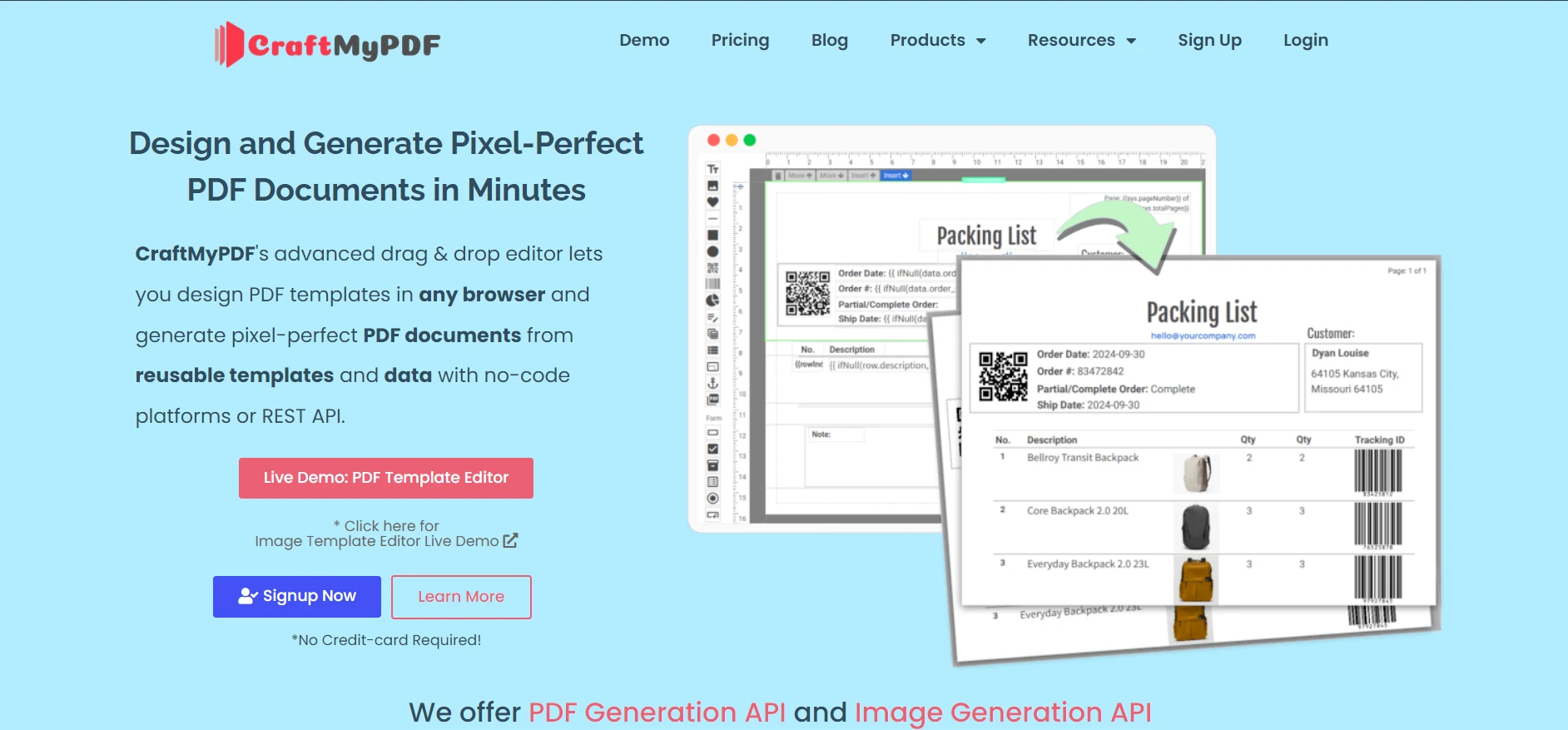
[CraftMyPDF](https://craftmypdf.com/)는 템플릿을 통해 PDF를 생성하는 클라우드 기반 API입니다. 이것은 코딩 없이 재사용 가능한 템플릿을 설계할 수 있는 웹 기반 드래그 앤 드롭 편집기를 제공합니다. 플랫폼은 이 템플릿을 JSON 데이터와 합병하여 [청구서](/examples/cshtml-to-pdf-razor/), [보고서](/how-to/csharp-pdf-reports/), 인증서와 같은 문서를 위한 동적 콘텐츠 생성을 지원합니다.
### `CraftMyPDF`의 주요 기능은 무엇인가요?
1. **드래그 앤 드롭 편집기:** 코딩 지식이 필요 없는 시각적 템플릿 디자이너.
2. **템플릿 재사용:** 한 번 설계하여 다른 데이터 집합과 함께 반복 사용.
3. **JSON 데이터 통합:** JSON을 통해 동적 데이터를 템플릿과 결합.
4. **고급 포맷팅 및 표현식:** 날짜, 숫자 및 통화를 동적으로 포맷.
5. **API 통합:** REST API는 Zapier, Make.com 및 맞춤 애플리케이션을 지원.
6. **채우기 가능 구성 요소:** 텍스트 필드와 체크박스를 사용하여 [인터랙티브 폼](/how-to/create-forms/)을 생성.
7. **보안 및 규정준수:** 지역별 API 엔드포인트와 GDPR 준수를 통해 안전한 PDF 액세스 제공.
## IronPDF 란 무엇인가요?
[IronPDF PDF Library .NET용 Developers](/)는 .NET 애플리케이션을 위한 완전한 PDF 라이브러리입니다. C#로 작성된 이 라이브러리는 [HTML](/how-to/html-string-to-pdf/), [CSS](/how-to/html-to-pdf-responsive-css/), [JavaScript](/how-to/javascript-to-pdf/), [이미지](/how-to/add-images-to-pdfs/)로부터 [픽셀-정확한 PDF](/how-to/pixel-perfect-html-to-pdf/)를 생성합니다. IronPDF는 .NET 환경 내에서 생성, 편집 및 관리를 위한 광범위한 기능을 제공하여 PDF 워크플로우를 간소화합니다.
### IronPDF의 주요 기능은 무엇입니까?
1. **HTML to PDF 변환:** [HTML, CSS 및 JavaScript를 픽셀 정확도로 PDF로 변환](/tutorials/html-to-pdf/).
2. **URL to PDF:** [모든 URL로부터 PDF를 생성](/examples/converting-a-url-to-a-pdf/), 콘텐츠와 [응용 스타일](/how-to/html-to-pdf-responsive-css/)을 보존.
3. **이미지 to PDF:** [JPG, PNG, GIF, BMP, SVG를 PDF 문서로 변환](/how-to/add-images-to-pdfs/)하고 [다중 프레임 TIFF 지원](/examples/multi-frame-tiff-to-pdf/).
4. **폼 채우기 및 데이터 추출:** [프로그램으로 PDF 양식을 생성 및 채우기](/examples/form-data/)와 [사용자 지정 검증](/how-to/edit-forms/).
5. **디지털 서명 및 보안:** [디지털 서명](/examples/digitally-sign-a-pdf/), [암호](/how-to/pdf-permissions-passwords/), [권한](/examples/security-and-metadata/)과 함께 [HSM 지원](/how-to/signing-pdf-with-hsm/).
6. **PDF 편집:** [페이지 추가, 복사 또는 삭제하기](/how-to/add-copy-delete-pages-pdf/). [PDF 병합 및 분할](/how-to/merge-or-split-pdfs/)과 [페이지 회전](/how-to/page-orientation-rotation/) 기능을 사용하세요.
7. **주석 및 첨부 파일:** [스티키 노트](/how-to/annotations/)와 [첨부 파일 임베드](/how-to/add-remove-attachments/)를 [맞춤 메타데이터](/how-to/metadata/)로 추가하세요.
8. **헤더, 푸터, 워터마크:** [헤더, 푸터](/how-to/headers-and-footers/) 및 [워터마크](/how-to/custom-watermark/)를 [HTML 템플릿](/examples/html-headers-and-footers/)으로 적용하세요.
9. **크로스 플랫폼 호환성:** [Windows](/get-started/windows/), [macOS](/get-started/macos/), [Linux](/get-started/linux/), [Docker](/get-started/ironpdf-docker/), [Azure](/get-started/azure/), 및 [AWS](/get-started/aws/)에서 작동합니다.
10. **성능 최적화:** [고용량 생성을 위한 멀티스레딩 및 비동기 지원](/how-to/async/)과 [병렬 처리](/examples/parallel/).
11. **완전한 문서화:** [광범위한 안내서](/docs/), [튜토리얼](/tutorials/html-to-pdf/), 및 [24/5 기술 지원](/troubleshooting/engineering-support-for-ironpdf/).
12. **외부 종속성 없음:** [네이티브 렌더링 엔진](/how-to/ironpdf-2021-chrome-rendering-engine-eap/)을 사용하여 추가 소프트웨어 요구 사항 없이 단일 DLL로 배포.
## Visual Studio에서 C# 애플리케이션을 어떻게 만드나요?
C# 콘솔 애플리케이션을 만들려면 컴퓨터에 Visual Studio가 설치되어 있어야 합니다. 다음 단계에 따라 프로젝트를 설정하세요:
### Visual Studio를 어떻게 엽니까?
시작 메뉴 또는 데스크톱 아이콘에서 Visual Studio를 실행합니다.
### 새 프로젝트를 어떻게 생성하나요?
1. 시작 페이지에서 **"새 프로젝트 만들기"**를 클릭하세요.
2. "Console App"을 검색하거나 템플릿 목록에서 선택하세요.
### 프로젝트 템플릿을 어떻게 선택합니까?
요구 사항에 따라 **"Console App (.NET Core)"** 또는 **"Console App (.NET Framework)"**를 선택하세요. [.NET MAUI 지원](/how-to/pdf-viewing/)의 경우 적절한 MAUI 템플릿을 선택하세요.
### 프로젝트를 어떻게 구성하나요?
1. **프로젝트 이름:** 프로젝트 이름을 입력하세요
2. **위치:** 저장 디렉터리를 선택하세요
3. **솔루션 이름:** 일반적으로 프로젝트 이름과 일치
4. **"Create"**를 클릭하여 진행하세요
## IronPDF 어떻게 설치하나요?
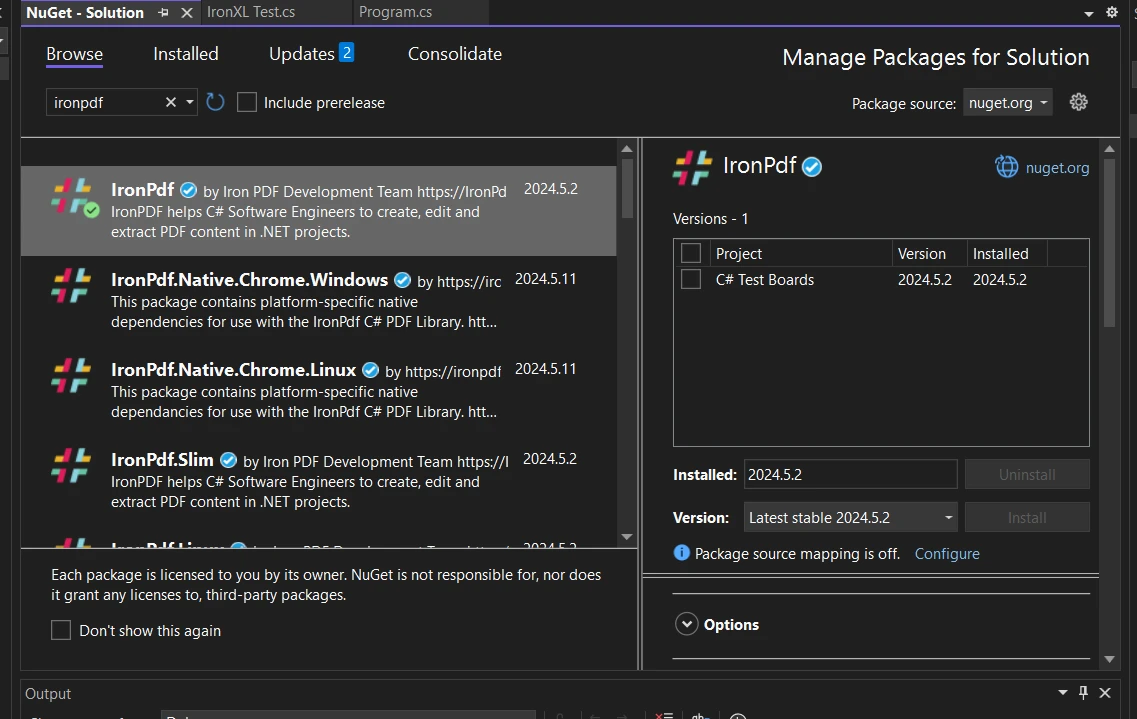
IronPDF는 세 가지 설치 방법을 제공합니다: [NuGet 패키지 관리자](/get-started/installation-overview/), [패키지 관리자 콘솔](/get-started/advanced-installation-nuget/), 및 직접 다운로드. 라이브러리는 [Windows](/how-to/windows/), [macOS](/how-to/macos/), [Linux](/get-started/linux/) 및 [클라우드 배포](/how-to/azure/)를 지원합니다.
### NuGet 패키지 관리자를 어떻게 사용합니까?
Visual Studio의 솔루션 탐색기에서 "참조" 또는 "종속성"을 마우스 오른쪽 버튼으로 클릭하세요. "NuGet 패키지 관리"를 선택하고 "IronPDF"를 검색한 후 "설치"를 클릭하세요.
### NuGet 패키지 관리자 콘솔을 어떻게 사용합니까?
도구 > NuGet 패키지 관리자 > 패키지 관리자 콘솔을 열고 실행합니다:
```shell
:ProductInstall
```
### NuGet 웹사이트에서 어떻게 다운로드합니까?
[NuGet 웹사이트](https://www.nuget.org/packages/IronPdf)를 방문하여 패키지 파일을 다운로드하고 Visual Studio에 패키지 소스로 추가하세요. [Docker 배포](/get-started/ironpdf-docker/)의 경우 특정 컨테이너 구성을 사용하세요.
자세한 안내는 [설치 개요](/get-started/installation-overview/) 및 [고급 NuGet 구성](/get-started/advanced-installation-nuget/)을 참조하세요.
## `CraftMyPDF`을(를) 어떻게 사용하나요?
`CraftMyPDF`을 통합하려면 계정을 생성하고 계획을 선택한 후 API 자격 증명을 얻으세요.
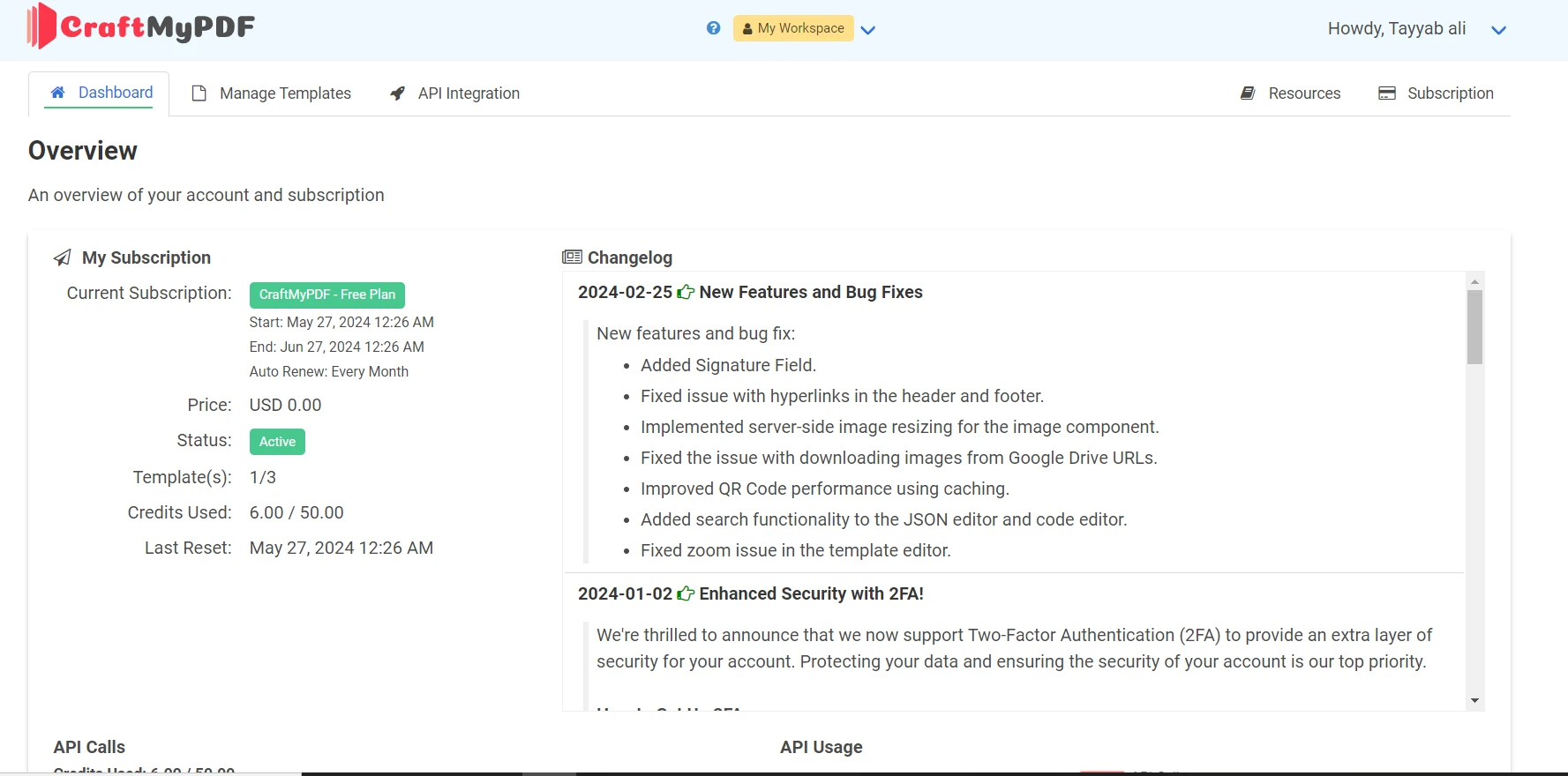
### 계정을 생성하고 무료 플랜을 어떻게 선택합니까?
1. **가입:** [CraftMyPDF 웹사이트](https://craftmypdf.com/)에서 등록하세요
2. **무료 플랜 선택:** 개발 및 테스트를 위해 무료 플랜을 선택하세요
3. **API 키 얻기:** 계정 대시보드에서 API 키를 얻으세요
### 어떤 라이브러리를 설치해야 합니까?
**System.Net.Http**, **`RestSharp`**, **Newtonsoft.Json** 패키지를 설치하세요:
```csharp
using System;
using System.Net.Http;
using System.Text;
using System.Threading.Tasks;
using RestSharp;
```
API 클라이언트를 초기화하세요:
```csharp
var client = new RestClient("___PROTECTED_URL_51___");
var request = new RestRequest(Method.Post);
string apiKey = "API Key"; // Replace with your actual API key
string templateId = "Template ID"; // Replace with your actual template ID
request.AddHeader("X-API-KEY", apiKey);
request.AddHeader("Content-Type", "application/json");
```
## 어떻게 PDF를 생성합니까?
두 라이브러리는 PDF 생성에 대한 서로 다른 접근 방식을 제공합니다. IronPDF는 [HTML 렌더링](/how-to/html-string-to-pdf/)을 사용하며, `CraftMyPDF`는 데이터 바인딩을 이용한 시각적 템플릿을 사용합니다. IronPDF는 또한 [Markdown to PDF](/how-to/md-to-pdf/) 및 [XML to PDF](/how-to/xml-to-pdf/) 변환을 지원합니다.
### IronPDF로 PDF를 어떻게 생성합니까?
#### HTML을 PDF로 어떻게 변환합니까?
HTML 문자열을 직접 PDF로 변환하여 전체 [CSS 지원](/how-to/html-to-pdf-responsive-css/)과 [JavaScript 렌더링](/how-to/javascript-to-pdf/)을 사용하세요:
```csharp
using IronPdf;
public class PDFCreator
{
public void CreatePdfFromHtml()
{
var renderer = new ChromePdfRenderer();
// Define your HTML string
string htmlContent = "<h1>Hello, IronPDF!</h1><p>This is a sample PDF document created from an HTML string.</p>";
// Render the HTML as a PDF document
var pdfDocument = renderer.RenderHtmlAsPdf(htmlContent);
// Save the PDF document
pdfDocument.SaveAs("html_output.pdf");
}
}
```
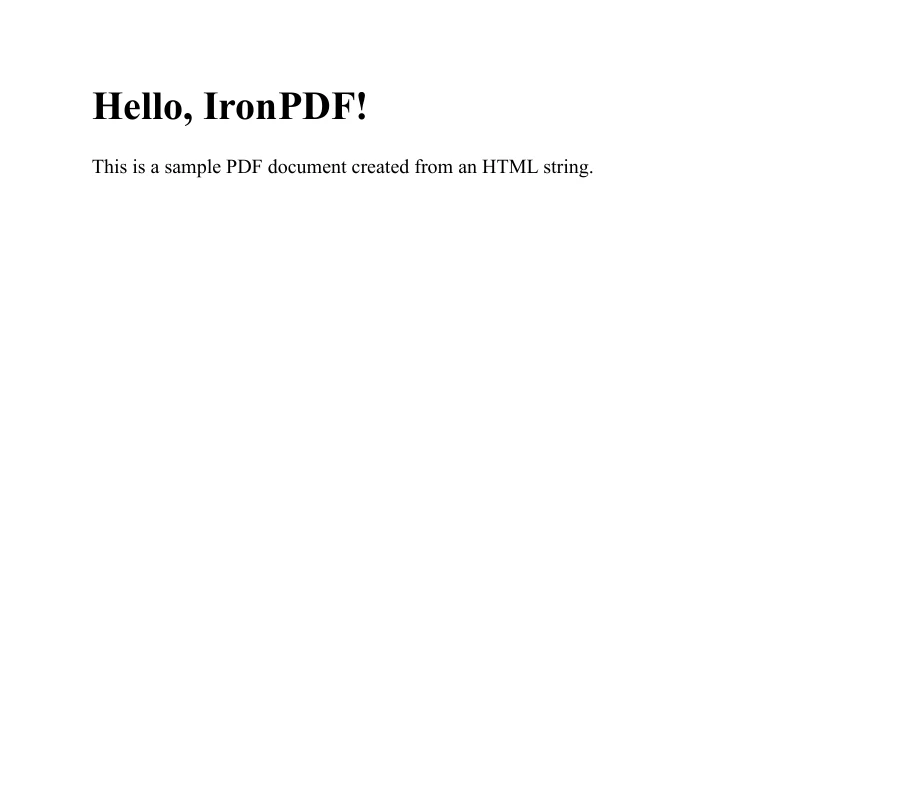
[HTML을 사용하여 PDF 생성](/examples/using-html-to-create-a-pdf/) 예시 페이지를 방문하여 더 많은 예제를 확인하세요. 개발자는 또한 [사용자 지정 여백 설정](/how-to/custom-margins/), [페이지 나누기 추가](/how-to/html-to-pdf-page-breaks/), [종이 크기 구성](/how-to/custom-paper-size/)을 할 수 있습니다.
#### URL을 PDF로 어떻게 변환하나요?
모든 스타일링과 [WebGL 콘텐츠](/how-to/render-webgl/) 및 [반응형 CSS](/how-to/viewport-zoom/)를 보존하면서 웹 페이지를 PDF로 변환하세요:
```csharp
using IronPdf;
public class PDFCreator
{
public void CreatePdfFromUrl(string url)
{
// Initialize the ChromePdfRenderer
var renderer = new ChromePdfRenderer();
// Render the URL as a PDF document
var pdfDocument = renderer.RenderUrlAsPdf(url);
// Save the PDF document
pdfDocument.SaveAs("url_output.pdf");
}
}
```
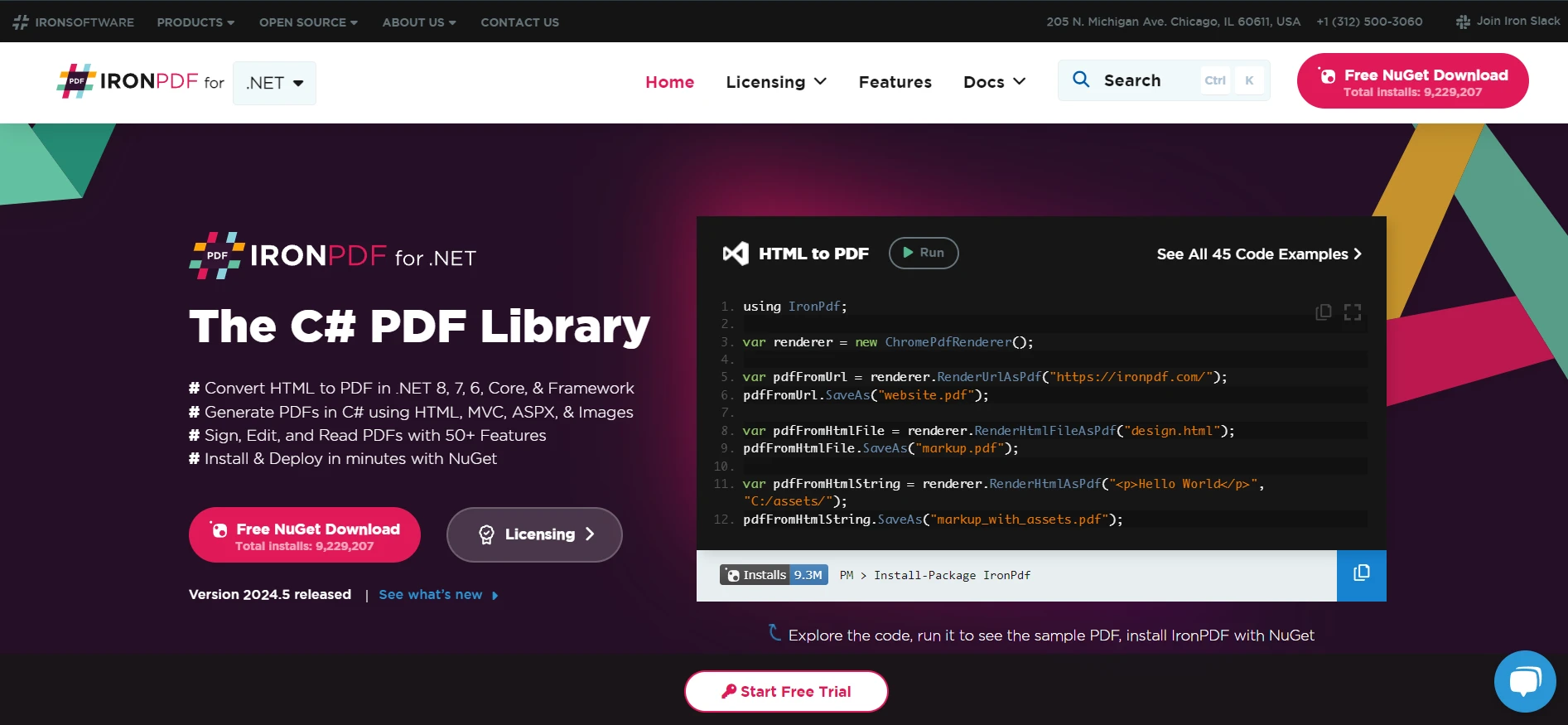
[URL을 PDF로 변환하는 방법](/how-to/url-to-pdf/)에 대해 더 알아보세요. 인증 페이지의 경우 [TLS 웹사이트 로그인](/how-to/logins/) 및 [HTTP 요청 헤더](/how-to/http-request-header/)를 확인하세요.
#### HTML 파일을 PDF로 어떻게 변환하나요?
CSS 미디어 타입과 [기본 URL](/how-to/base-urls/)을 지원하여 로컬 HTML 파일을 PDF로 변환하세요:
```csharp
using IronPdf;
public class PDFCreator
{
public void CreatePdfFromHtmlFile(string filePath)
{
// Initialize the ChromePdfRenderer
var renderer = new ChromePdfRenderer();
// Render the HTML file as a PDF document
var pdfDocument = renderer.RenderHtmlFileAsPdf(filePath);
// Save the PDF document
pdfDocument.SaveAs("html_file_output.pdf");
}
}
```
자세한 내용은 [HTML 파일을 PDF로 변환하는 가이드](/how-to/html-file-to-pdf/)를 참조하세요. [HTML ZIP 파일](/how-to/html-zip-file-to-pdf/)의 경우 IronPDF가 자동으로 추출을 처리합니다.
### `CraftMyPDF` API로 PDF를 어떻게 생성하나요?
`CraftMyPDF`는 먼저 템플릿을 만들고, 데이터를 병합하여 PDF를 생성해야 합니다.
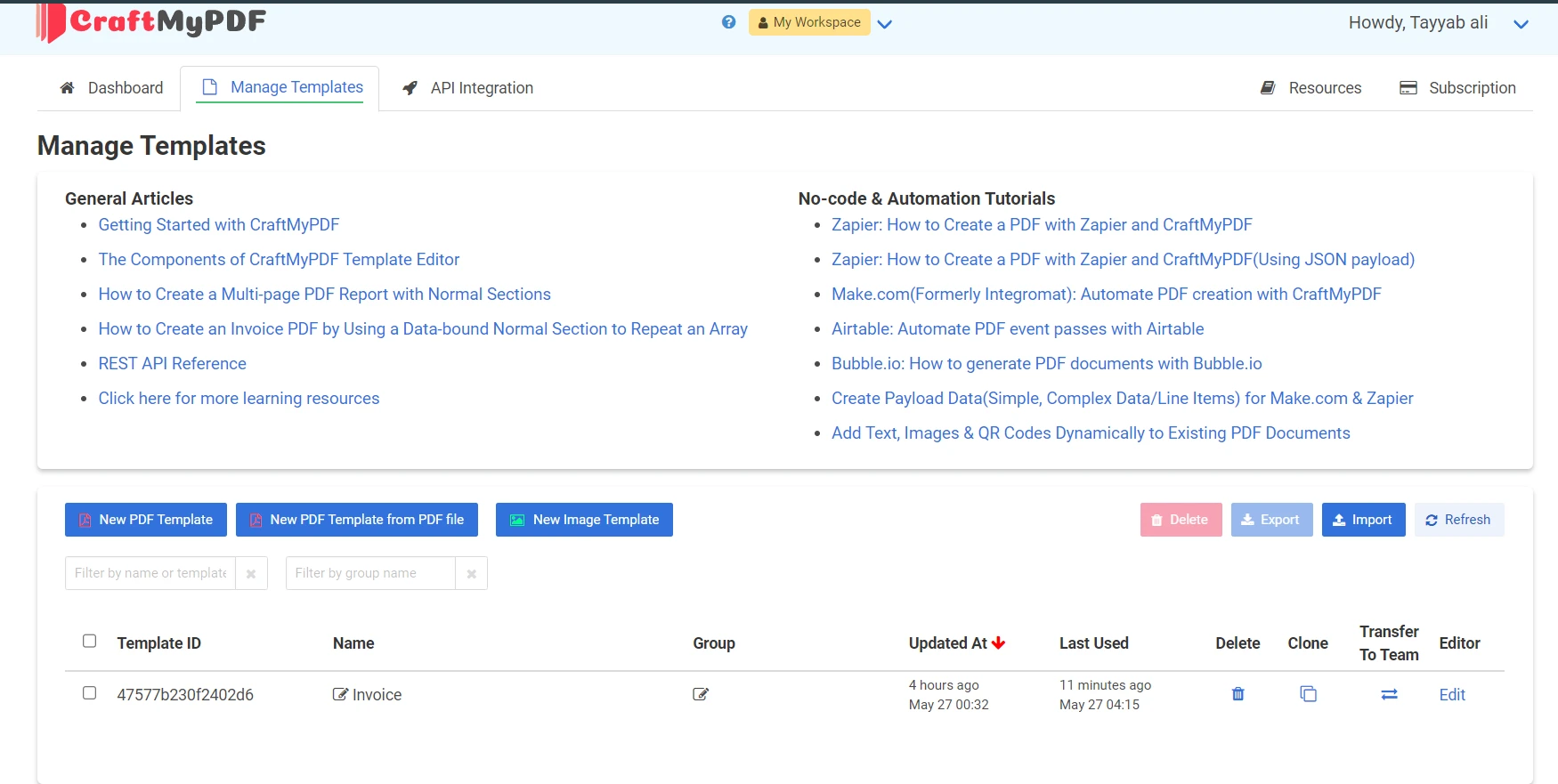
#### 템플릿은 어떻게 만드나요?
1. **대시보드에 로그인:** `CraftMyPDF` 계정에 접근
2. **새 템플릿 생성:** 드래그 앤 드롭 편집기를 사용하여 디자인
3. **템플릿 저장:** API 호출에 필요한 템플릿 ID 가져오기
#### PDF 생성 요청을 어떻게 보내나요?
템플릿에 JSON 데이터를 보내 PDF를 생성하세요:
```csharp
using System;
using System.Net;
using System.Threading.Tasks;
using RestSharp;
class Program
{
static async Task Main(string[] args)
{
var client = new RestClient("___PROTECTED_URL_52___");
var request = new RestRequest(Method.Post);
string apiKey = "API-Key"; // Replace with your actual API key
string templateId = "Template-ID"; // Replace with your actual template ID
request.AddHeader("X-API-KEY", apiKey);
request.AddHeader("Content-Type", "application/json");
var body = new
{
data = new
{
invoice_number = "INV48321",
date = "2024-05-27",
due_date = "2024-06-27",
currency = "EUR",
discount = 10,
tax = 5,
company_name = "Tech Innovations Ltd",
email = "contact@techinnovations.com",
client = "Future Solutions GmbH",
client_address = "1234 Innovation Drive",
client_address2 = "Berlin",
client_address3 = "10115",
items = new[]
{
new { description = "Cloud Hosting Services", quantity = 12, unit_price = 75, total = 900 },
new { description = "Custom Web Application", quantity = 3, unit_price = 150, total = 450 },
new { description = "Technical Support", quantity = 15, unit_price = 30, total = 450 },
new { description = "Digital Marketing Campaign", quantity = 2, unit_price = 500, total = 1000 },
new { description = "SEO Optimization", quantity = 5, unit_price = 120, total = 600 }
},
gross_total = 3400
},
load_data_from = (string)null,
template_id = templateId,
version = 8,
export_type = "json",
expiration = 60,
output_file = "output.pdf",
is_cmyk = false,
image_resample_res = 600,
direct_download = 0,
cloud_storage = 1
};
request.AddJsonBody(body);
RestResponse response = await client.ExecuteAsync(request);
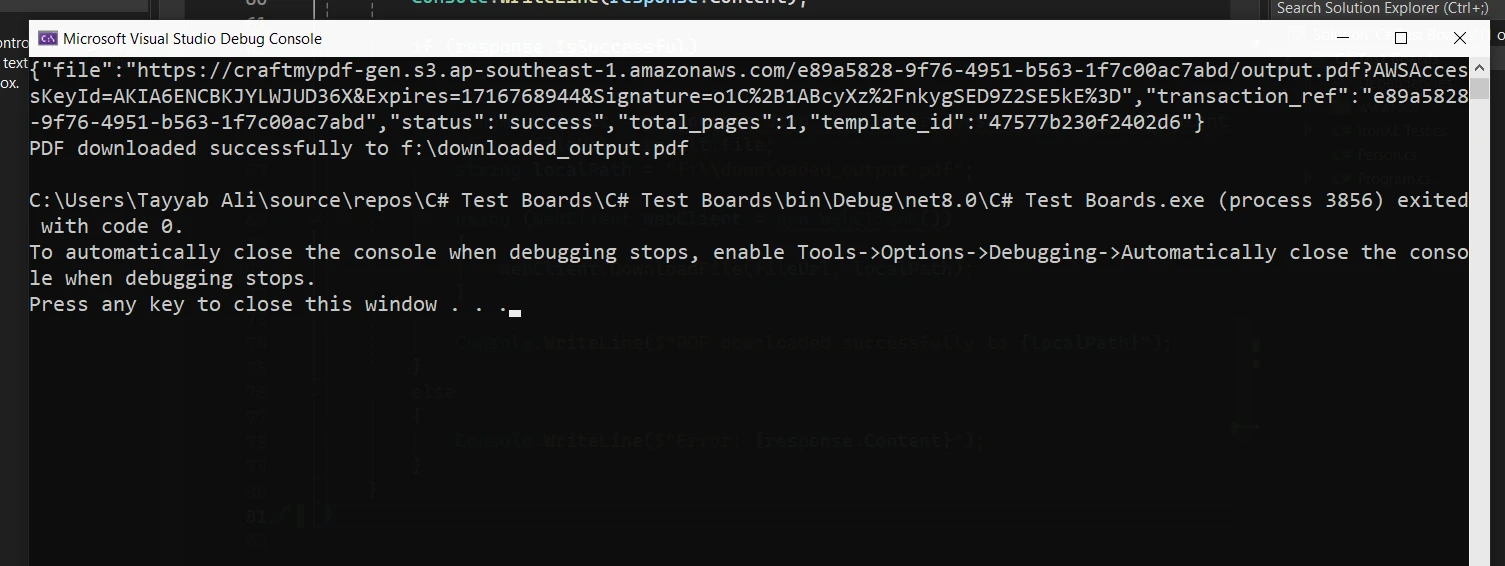
Console.WriteLine(response.Content);
if (response.IsSuccessful)
{
var content = response.Content;
dynamic result = Newtonsoft.Json.JsonConvert.DeserializeObject(content);
string fileUrl = result.file;
string localPath = "f:\\downloaded_output.pdf";
using (WebClient webClient = new WebClient())
{
webClient.DownloadFile(fileUrl, localPath);
}
Console.WriteLine($"PDF downloaded successfully to {localPath}");
}
else
{
Console.WriteLine($"Error: {response.Content}");
}
}
}
```
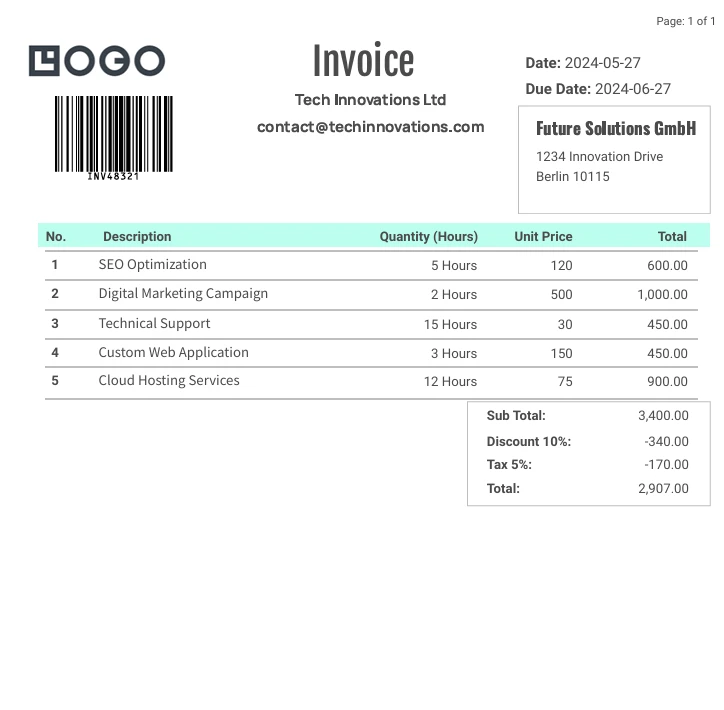
생산된 PDF 출력:
### Bootstrap을 사용하여 전문적인 청구서를 어떻게 생성하나요?
IronPDF는 외부 종속성 없이 [최신 프레임워크](/troubleshooting/bootstrap-flex-css/)를 렌더링합니다. 이 Bootstrap 5 예시는 [반응형 디자인](/how-to/html-to-pdf-responsive-css/)과 [인쇄 CSS](/how-to/html-to-pdf-responsive-css/)를 사용한 전문적인 청구서 생성을 설명합니다:
```csharp
using IronPdf;
var renderer = new ChromePdfRenderer();
string professionalInvoice = @"
<!DOCTYPE html>
<html>
<head>
<meta charset='utf-8'>
<link href='___PROTECTED_URL_53___ rel='stylesheet'>
<style>
.invoice-header { background: linear-gradient(135deg, #667eea 0%, #764ba2 100%); color: white; }
.invoice-table th { background: #f8f9fa; }
@media print { .invoice-box { page-break-inside: avoid; } }
</style>
</head>
<body>
<div class='container my-4'>
<div class='card shadow-lg invoice-box'>
<div class='invoice-header p-4'>
<div class='row align-items-center'>
<div class='col-md-8'>
<h1 class='mb-0'>INVOICE</h1>
<p class='mb-0 opacity-75'>Invoice #INV-2024-0427</p>
</div>
<div class='col-md-4 text-md-end'>
<h3 class='mb-0'>$3,400.00</h3>
<small class='opacity-75'>Due: June 27, 2024</small>
</div>
</div>
</div>
<div class='card-body p-4'>
<div class='row mb-4'>
<div class='col-md-6'>
<h6 class='text-primary text-uppercase mb-2'>From</h6>
<strong>Tech Innovations Ltd</strong><br>
contact@techinnovations.com
</div>
<div class='col-md-6 text-md-end'>
<h6 class='text-primary text-uppercase mb-2'>Bill To</h6>
<strong>Future Solutions GmbH</strong><br>
1234 Innovation Drive<br>
Berlin, 10115
</div>
</div>
<table class='table invoice-table'>
<thead>
<tr>
<th>Description</th>
<th class='text-center'>Qty</th>
<th class='text-end'>Unit Price</th>
<th class='text-end'>Total</th>
</tr>
</thead>
<tbody>
<tr>
<td>Cloud Hosting Services</td>
<td class='text-center'>12</td>
<td class='text-end'>€75.00</td>
<td class='text-end'>€900.00</td>
</tr>
<tr>
<td>Custom Web Application</td>
<td class='text-center'>3</td>
<td class='text-end'>€150.00</td>
<td class='text-end'>€450.00</td>
</tr>
<tr>
<td>Technical Support</td>
<td class='text-center'>15</td>
<td class='text-end'>€30.00</td>
<td class='text-end'>€450.00</td>
</tr>
<tr>
<td>Digital Marketing Campaign</td>
<td class='text-center'>2</td>
<td class='text-end'>€500.00</td>
<td class='text-end'>€1,000.00</td>
</tr>
<tr>
<td>SEO Optimization</td>
<td class='text-center'>5</td>
<td class='text-end'>€120.00</td>
<td class='text-end'>€600.00</td>
</tr>
</tbody>
</table>
<div class='row justify-content-end'>
<div class='col-md-4'>
<table class='table table-sm'>
<tr>
<td>Subtotal:</td>
<td class='text-end'><strong>€3,400.00</strong></td>
</tr>
<tr>
<td>Discount (10%):</td>
<td class='text-end text-success'>-€340.00</td>
</tr>
<tr>
<td>Tax (5%):</td>
<td class='text-end'>€153.00</td>
</tr>
<tr class='table-primary'>
<td><strong>Total Due:</strong></td>
<td class='text-end'><strong>€3,213.00</strong></td>
</tr>
</table>
</div>
</div>
<div class='alert alert-info mt-4'>
<strong>Payment Terms:</strong> Payment due within 30 days. Late payments may incur additional charges.
</div>
<div class='row mt-4 pt-3 border-top'>
<div class='col-md-6'>
<small class='text-muted'>Generated with IronPDF - No external APIs required</small>
</div>
<div class='col-md-6 text-md-end'>
<span class='badge bg-success'>PAID</span>
</div>
</div>
</div>
</div>
</div>
</body>
</html>";
var pdf = renderer.RenderHtmlAsPdf(professionalInvoice);
pdf.SaveAs("professional-invoice.pdf");
```
**출력:** Bootstrap 5 그라데이션 헤더, 반응형 테이블 및 요약 계산을 포함하는 전문 청구서 PDF. IronPDF는 모든 CSS 그라데이션, 테이블 스타일링 및 유틸리티 클래스를 완벽한 정확도로 렌더링합니다 — 외부 API 호출도, 템플릿도, 인터넷 연결도 필요 없습니다. CraftMyPDF의 클라우드 기반 접근 방식과 달리 IronPDF는 서버에서 즉시 청구서를 생성하며 모든 제어 권한을 갖습니다.
#### 코드가 하는 일은 무엇인가요?
1. **`RestClient` 설정:** `CraftMyPDF` API 엔드포인트로 클라이언트를 초기화
2. **헤더 추가:** 인증을 위해 API 키 및 콘텐츠 유형 포함
3. **요청 본문 준비:** 템플릿 데이터 및 옵션으로 JSON 객체 생성
4. **요청 전송:** API 호출을 실하여 PDF 생성
5. **응답 처리:** 생성된 PDF를 다운로드하거나 오류 메시지를 표시
## 기술 창업자에게 핵심적인 차이점은 무엇인가요?
### 템플릿 기반 접근과 코드 우선 접근 방식은 어떻게 비교되나요?
**템플릿 기반 (`CraftMyPDF`):**
- 비기술팀 구성원이 템플릿을 생성 및 수정할 수 있음
- 클라우드 대시보드에서 중앙에서 템플릿 관리
- 템플릿 변경 시 코드 배포가 필요하지 않음
- 템플릿 디자인 제약에 의해 제한됨
- 예측 가능한 레이아웃의 표준화된 문서에 적합
**코드 우선 (IronPDF):**
- HTML 및 CSS를 사용하여 문서 레이아웃에 대한 완전한 제어
- [JavaScript 지원](/how-to/javascript-to-pdf/)으로 [동적 차트](/examples/js-charts-to-pdf/) 및 계산 가능
- 템플릿이 코드베이스의 일부로 버전 관리됨
- 어떤 웹 기술과도 무제한의 디자인 유연성 제공
- 프로그래밍 논리가 필요한 복잡하고 동적인 문서에 이상적
Razor 템플릿의 경우, IronPDF는 MVC Core, MVC Framework 및 Razor Pages 전반에 걸쳐 기본 지원을 제공합니다.
### 다양한 규모에서 비용의 함축적인 의미는 무엇입니까?
**`CraftMyPDF` 비용 구조:**
- 무료 등급: 월 50회 API 호출, 템플릿 3개 제한
- 유료 요금제는 더 높은 월 요금에서 시작
- PDF 당 비용은 볼륨에 따라 선형적으로 증가
- 지속적인 월간/연간 구독 요금
- 프리미엄 기능에 대한 추가 비용
**IronPDF 비용 구조:**
- 전체 평가를 위한 무료 체험판
- `$liteLicense`부터 시작하는 일회성 영구 라이선스
- PDF 당 비용이나 사용 제한 없음
- 1년간 업데이트 및 지원 포함
- SaaS 제품을 위한 OEM 재배포 옵션
매달 1,000개 이상의 PDF를 처리하는 응용 프로그램의 경우, IronPDF의 영구 라이선스는 지속적인 요금 없이 예측 가능한 비용을 제공합니다. 라이선스 계산기는 총 소유 비용을 추정하는 데 도움을 줍니다. 성장하는 팀을 위해 업그레이드와 확장을 고려하십시오.
### 개발 워크플로우는 어떻게 다른가요?
**`CraftMyPDF` 워크플로우:**
1. 디자이너가 웹 인터페이스에서 템플릿 작성
2. 개발자가 템플릿에 JSON 필드 매핑
3. API 통합은 인증 설정 필요
4. 테스트는 API 호출과 크레딧 사용 필요
5. 코드 배포 외부에서 템플릿 업데이트 발생
**IronPDF 워크플로우:**
1. 개발자가 코드에서 HTML/CSS 템플릿 작성
2. API 제한 없이 로컬 테스트
3. 템플릿은 응용 프로그램 코드와 함께 배포
4. 버전 관리로 모든 변경사항 추적
5. 자동화를 위한 CI/CD 통합
IronPDF의 독립적인 접근 방식은 빠른 반복 주기와 오프라인 개발을 가능하게 하여 빠른 개발에 필수적입니다. 라이브러리는 디버깅을 위한 사용자 정의 로깅 및 렌더링 옵션을 지원합니다.
### 데이터 개인정보 보호 및 규정 준수에 대해 어떻게 생각합니까?
**`CraftMyPDF` 데이터 처리:**
- 클라우드 서버에서 문서 처리
- 데이터 전송은 인터넷을 통해 필요
- 규정 준수를 위한 지역 엔드포인트
- 임시 파일 저장 정책
- 제3자 데이터 처리 계약
**IronPDF 데이터 처리:**
- 온프레미스 처리는 데이터를 로컬에 유지
- 외부 API 호출이나 인터넷 요구 사항 없음
- 문서 보안에 대한 완전한 통제
- HIPAA 및 GDPR 규정을 준수하는 배포
- 민감한 데이터에 대한 암호화 옵션
민감한 고객 데이터를 처리하는 응용 프로그램의 경우, IronPDF의 로컬 처리는 제3자의 개인정보 문제를 제거합니다. 디지털 서명과 비밀번호 보호는 추가 보안 계층을 제공합니다. 라이브러리는 또한 준수를 위한 PDF/A 및 PDF/UA 표준을 지원합니다.
### 새로운 문서 유형을 얼마나 빨리 추가할 수 있습니까?
**`CraftMyPDF` 일정:**
- 템플릿 디자인: 복잡성에 따라 1-4시간
- 필드 매핑 및 테스트: 1-2시간
- 디자이너 여건에 따라 달라짐
- 템플릿 승인 워크플로는 지연을 초래할 수 있음
- 에디터 기능의 한계가 있음
**IronPDF 타임라인:**
- HTML 템플릿 생성: 30분에서 2시간
- Bootstrap과 같은 기존 웹 프레임워크 사용
- 문서 전반에 걸쳐 CSS 스타일시트 재사용
- 즉각적인 피드백을 위해 로컬 테스트
- 정기적인 릴리즈로 새로운 문서 유형 배포
IronPDF의 코드 우선 접근 방식은 보통 새로운 문서 유형의 시장 출시 시간을 줄여줍니다, 특히 기존 웹 자산과 프레임워크를 사용할 때. 이 라이브러리는 추가적인 유연성을 위해 [RTF를 PDF로](/how-to/rtf-to-pdf/), [DOCX를 PDF로](/how-to/docx-to-pdf/), 그리고 [Markdown을 PDF로](/how-to/md-to-pdf/) 변환을 지원합니다.
## 라이선스 옵션은 무엇입니까?
IronPDF는 일회성 요금의 영구 라이선스를 제공합니다. Lite 라이선스 (`$liteLicense`)는 한 프로젝트에서 단일 개발자를 지원합니다. Professional 라이선스 (`$plusLicenseOriginal`)는 여러 프로젝트와 개발자를 커버합니다. Enterprise 라이선스 (`$professionalLicenseOriginal`)는 광범위한 배포 요구가 있는 대규모 팀에 적합합니다. 각 라이선스에는 1년 동안의 지원 및 업데이트가 포함됩니다. [OEM 재배포 라이선스](/licensing/extensions/)를 통해 상업적 배포가 가능합니다. 평가를 위한 [무료 체험판](trial-license)을 제공합니다. 전체 [라이선스 옵션](/licensing/)을 확인하십시오.
`CraftMyPDF`는 구독 기반의 가격 정책을 사용합니다. 무료 계층은 제한된 API 호출로 개발 및 테스트에 적합합니다. 유료 플랜은 사용 한도를 늘리고 기능을 추가하여 비즈니스 필요에 따라 확장됩니다. 구독은 `CraftMyPDF` 대시보드에서 관리됩니다.
## 어떤 문서와 지원이 제공되나요?
### 문서와 지원을 위해 IronPDF는 무엇을 제공하나요?
IronPDF는 세부적인 가이드, [예제](/examples/adding-headers-and-footers-advanced/), 및 [QuickStart 섹션](/get-started/quickstart/)을 포함한 [완전한 문서](/docs/)를 제공합니다. 리소스는 기본 사용법부터 고급 구성에 이르기까지 포괄합니다. 지원 채널에는 [지식 베이스](/how-to/html-string-to-pdf/), 이메일 지원, 및 [엔지니어링 지원 요청](/troubleshooting/engineering-request-pdf/)이 포함됩니다. 지원팀은 신속한 지원을 위해 [24/5](/troubleshooting/engineering-support-for-ironpdf/) 운영됩니다. [문제 해결 가이드](/troubleshooting/quick-ironpdf-troubleshooting/)는 일반적인 문제를 다룹니다.
문서에는 [API 참조](/object-reference/api/), [튜토리얼](/tutorials/create-pdfs/), 및 모든 기능에 대한 [코드 예제](/examples/async/)가 포함됩니다. [변경 로그](/product-updates/changelog/)는 업데이트를 추적하고 [마일스톤](/product-updates/milestones/)은 주요 릴리즈를 강조합니다. 이전을 위한 지원은 [Aspose](/competitors/aspose-vs-ironpdf/), [iText](/competitors/itext-vs-ironpdf/), [Syncfusion](/competitors/syncfusion-vs-ironpdf/), 및 [다른 경쟁사들](/competitors/questpdf-vs-ironpdf/)과 비교하는 가이드를 참조하세요.
### `CraftMyPdf`가 문서화와 지원을 위해 제공하는 것은 무엇인가요?
`CraftMyPDF`는 엔드포인트, 매개 변수 및 예제를 상세히 설명하는 API 문서를 제공합니다. 가이드는 템플릿 생성, API 요청, 및 응답 처리에 다룹니다. 지원은 이메일 및 커뮤니티 포럼을 통해 질문과 통찰력에 대해 제공됩니다.
## 어떤 PDF 솔루션을 선택해야 할까요?
IronPDF와 `CraftMyPDF` 모두 능력 있는 PDF 생성 솔루션을 제공하며, 각각의 접근 방식이 다릅니다. `CraftMyPDF`는 시각적 템플릿 디자이너와 클라우드 기반 처리로 뛰어나며, IronPDF는 [HTML 렌더링](/how-to/html-string-to-pdf/)을 통해 완전한 프로그래밍 제어를 제공합니다.
IronPDF는 복잡한 문서 요구 사항을 위한 광범위한 기능 세트로 돋보입니다. 이 제품은 [HTML](/how-to/html-file-to-pdf/), [URL](/how-to/url-to-pdf/), 및 [파일](/how-to/html-zip-file-to-pdf/)을 PDF로 변환하며, 첨단 기능인 [디지털 서명](/how-to/signing-pdf-with-hsm/), [폼 처리](/how-to/create-forms/), 및 [문서 편집](/tutorials/csharp-edit-pdf-complete-tutorial/)을 지원합니다. 외부 종속성이 없는 자체 포함 배포는 [플랫폼 전반에 걸쳐](/get-started/windows/) 신뢰할 수 있는 운영을 보장합니다.
라이선스 모델은 현저히 다릅니다. IronPDF의 영구 라이선스는 `$liteLicense`부터 시작하며, 평가를 위한 [무료 체험](trial-license)이 제공됩니다. 가격적인 메리트가 있는 [Iron Suite 번들](https://ironsoftware.com/enterprise/securedoc/)은 두 개의 가격으로 아홉 개의 제품을 제공합니다, 이는 완전한 문서 관리 필요를 위한 뛰어난 가치를 제공합니다.
공부가 필요한 개발자에게 풍부한 [HTML/CSS 지원](/how-to/html-to-pdf-responsive-css/), 고급 [문서 조작](/how-to/transform-pdf-pages/), 및 예측 가능한 비용으로 PDF 생성에 대한 완전한 제어가 필요한 경우 IronPDF는 신뢰할 수 있는 솔루션을 제공합니다. 풍부한 [문서](/docs/), [신속한 지원](/troubleshooting/engineering-support-for-ironpdf/), 유연한 배포 옵션 덕분에 간단한 문서 생성에서 복잡한 Enterprise 워크플로우에 이르기까지 다양한 애플리케이션에 적합합니다.
[[i:(`CraftMyPDF`는 그 소유자의 등록 상표입니다. 이 사이트는 `CraftMyPDF`와 관련이 없으며, 승인 또는 후원을 받지 않습니다. 모든 제품명, 로고 및 브랜드는 해당 소유자의 자산입니다. 비교는 정보 제공 목적으로만 사용되며, 작성 시점에 공개적으로 이용 가능한 정보를 반영합니다.)]]
IronPDF는 $999부터 시작되는 영구 라이선스로 전체 CSS/JavaScript 지원과 코드 우선 방법의 HTML-to-PDF 변환을 제공하며, CraftMyPDF는 클라우드 기반 템플릿 디자인과 JSON 통합을 제공하지만 지속적인 구독과 API 의존성을 요구합니다.
CraftMyPDF는 JSON 데이터 통합이 가능한 클라우드 기반 드래그 앤 드롭 템플릿 디자이너를 제공하며, IronPDF는 완전한 CSS/JavaScript 지원을 통해 .NET 개발자가 문서 생성에 대한 완벽한 제어를 갖고 코드 우선 HTML-to-PDF 변환을 제공합니다.
PDF, 또는 포터블 문서 형식은 문서 교환을 위해 Adobe에서 개발한 파일 형식입니다. 기기 간 형식, 글꼴 및 이미지를 보존하여 일관된 모양을 보장합니다. PDF는 보안 기능, 상호 작용성, 압축 등을 지원하여 신뢰할 수 있는 문서 공유에 적합합니다.
C# PDF 라이브러리는 개발자가 프로그래밍 방식으로 PDF를 생성, 수정, 내용 추출할 수 있게 합니다. 이 도구들은 양식 처리, 디지털 서명, 크로스 플랫폼 배포를 지원합니다. PDF 라이브러리를 통합함으로써, 개발자는 애플리케이션에 직접 문서 생성 기능을 추가하고, PDF를 생성, 편집, 관리하는 워크플로우를 간소화할 수 있습니다.
CraftMyPDF는 템플릿을 통해 PDF를 생성하는 클라우드 기반 API입니다. 이것은 코딩 없이 재사용 가능한 템플릿을 설계할 수 있는 웹 기반 드래그 앤 드롭 편집기를 제공합니다. 플랫폼은 이 템플릿을 JSON 데이터와 합병하여 청구서, 보고서, 인증서와 같은 문서를 위한 동적 콘텐츠 생성을 지원합니다.
CraftMyPDF의 주요 기능은 무엇인가요?
드래그 앤 드롭 편집기: 코딩 지식이 필요 없는 시각적 템플릿 디자이너.
템플릿 재사용: 한 번 설계하여 다른 데이터 집합과 함께 반복 사용.
JSON 데이터 통합: JSON을 통해 동적 데이터를 템플릿과 결합.
고급 포맷팅 및 표현식: 날짜, 숫자 및 통화를 동적으로 포맷.
API 통합: REST API는 Zapier, Make.com 및 맞춤 애플리케이션을 지원.
Imports System
Imports System.Net.Http
Imports System.Text
Imports System.Threading.Tasks
Imports RestSharp
API 클라이언트를 초기화하세요:
var client = new RestClient("___PROTECTED_URL_51___");var request = new RestRequest(Method.Post);string apiKey = "API Key"; // Replace with your actual API keystring templateId = "Template ID"; // Replace with your actual template IDrequest.AddHeader("X-API-KEY", apiKey);request.AddHeader("Content-Type", "application/json");
var client = new RestClient("___PROTECTED_URL_51___");
var request = new RestRequest(Method.Post);
string apiKey = "API Key"; // Replace with your actual API key
string templateId = "Template ID"; // Replace with your actual template ID
request.AddHeader("X-API-KEY", apiKey);
request.AddHeader("Content-Type", "application/json");
Dim client As New RestClient("___PROTECTED_URL_51___")Dim request As New RestRequest(Method.Post)Dim apiKey AsString = "API Key" ' Replace with your actual API keyDim templateId AsString = "Template ID" ' Replace with your actual template IDrequest.AddHeader("X-API-KEY", apiKey)request.AddHeader("Content-Type", "application/json")
Dim client As New RestClient("___PROTECTED_URL_51___")
Dim request As New RestRequest(Method.Post)
Dim apiKey As String = "API Key" ' Replace with your actual API key
Dim templateId As String = "Template ID" ' Replace with your actual template ID
request.AddHeader("X-API-KEY", apiKey)
request.AddHeader("Content-Type", "application/json")
어떻게 PDF를 생성합니까?
두 라이브러리는 PDF 생성에 대한 서로 다른 접근 방식을 제공합니다. IronPDF는 HTML 렌더링을 사용하며, CraftMyPDF는 데이터 바인딩을 이용한 시각적 템플릿을 사용합니다. IronPDF는 또한 Markdown to PDF 및 XML to PDF 변환을 지원합니다.
using IronPdf;public class PDFCreator{ public voidCreatePdfFromHtml() { var renderer = new ChromePdfRenderer(); // Define your HTML string string htmlContent = "<h1>Hello, IronPDF!</h1><p>This is a sample PDF document created from an HTML string.</p>"; // Render the HTML as a PDF document var pdfDocument = renderer.RenderHtmlAsPdf(htmlContent); // Save the PDF document pdfDocument.SaveAs("html_output.pdf"); }}
using IronPdf;
public class PDFCreator
{
    public void CreatePdfFromHtml()
    {
        var renderer = new ChromePdfRenderer();
        // Define your HTML string
        string htmlContent = "<h1>Hello, IronPDF!</h1><p>This is a sample PDF document created from an HTML string.</p>";
        // Render the HTML as a PDF document
        var pdfDocument = renderer.RenderHtmlAsPdf(htmlContent);
        // Save the PDF document
        pdfDocument.SaveAs("html_output.pdf");
    }
}
ImportsIronPdfPublic Class PDFCreator Public Sub CreatePdfFromHtml() Dim renderer = New ChromePdfRenderer() ' Define your HTML string Dim htmlContent AsString = "<h1>Hello, IronPDF!</h1><p>This is a sample PDF document created from an HTML string.</p>" ' Render the HTML as a PDF document Dim pdfDocument = renderer.RenderHtmlAsPdf(htmlContent) ' Save the PDF document pdfDocument.SaveAs("html_output.pdf") End SubEnd Class
Imports IronPdf
Public Class PDFCreator
	Public Sub CreatePdfFromHtml()
		Dim renderer = New ChromePdfRenderer()
		' Define your HTML string
		Dim htmlContent As String = "<h1>Hello, IronPDF!</h1><p>This is a sample PDF document created from an HTML string.</p>"
		' Render the HTML as a PDF document
		Dim pdfDocument = renderer.RenderHtmlAsPdf(htmlContent)
		' Save the PDF document
		pdfDocument.SaveAs("html_output.pdf")
	End Sub
End Class
using IronPdf;public class PDFCreator{ public voidCreatePdfFromUrl(string url) { // Initialize the ChromePdfRenderer var renderer = new ChromePdfRenderer(); // Render the URL as a PDF document var pdfDocument = renderer.RenderUrlAsPdf(url); // Save the PDF document pdfDocument.SaveAs("url_output.pdf"); }}
using IronPdf;
public class PDFCreator
{
    public void CreatePdfFromUrl(string url)
    {
        // Initialize the ChromePdfRenderer
        var renderer = new ChromePdfRenderer();
        // Render the URL as a PDF document
        var pdfDocument = renderer.RenderUrlAsPdf(url);
        // Save the PDF document
        pdfDocument.SaveAs("url_output.pdf");
    }
}
ImportsIronPdfPublic Class PDFCreator Public Sub CreatePdfFromUrl(url AsString) ' Initialize the ChromePdfRenderer Dim renderer = New ChromePdfRenderer() ' Render the URL as a PDF document Dim pdfDocument = renderer.RenderUrlAsPdf(url) ' Save the PDF document pdfDocument.SaveAs("url_output.pdf") End SubEnd Class
Imports IronPdf

Public Class PDFCreator
    Public Sub CreatePdfFromUrl(url As String)
        ' Initialize the ChromePdfRenderer
        Dim renderer = New ChromePdfRenderer()
        ' Render the URL as a PDF document
        Dim pdfDocument = renderer.RenderUrlAsPdf(url)
        ' Save the PDF document
        pdfDocument.SaveAs("url_output.pdf")
    End Sub
End Class
using IronPdf;public class PDFCreator{ public voidCreatePdfFromHtmlFile(string filePath) { // Initialize the ChromePdfRenderer var renderer = new ChromePdfRenderer(); // Render the HTML file as a PDF document var pdfDocument = renderer.RenderHtmlFileAsPdf(filePath); // Save the PDF document pdfDocument.SaveAs("html_file_output.pdf"); }}
using IronPdf;
public class PDFCreator
{
    public void CreatePdfFromHtmlFile(string filePath)
    {
        // Initialize the ChromePdfRenderer
        var renderer = new ChromePdfRenderer();
        // Render the HTML file as a PDF document
        var pdfDocument = renderer.RenderHtmlFileAsPdf(filePath);
        // Save the PDF document
        pdfDocument.SaveAs("html_file_output.pdf");
    }
}
ImportsIronPdfPublic Class PDFCreator Public Sub CreatePdfFromHtmlFile(filePath AsString) ' Initialize the ChromePdfRenderer Dim renderer As New ChromePdfRenderer() ' Render the HTML file as a PDF document Dim pdfDocument = renderer.RenderHtmlFileAsPdf(filePath) ' Save the PDF document pdfDocument.SaveAs("html_file_output.pdf") End SubEnd Class
Imports IronPdf

Public Class PDFCreator
    Public Sub CreatePdfFromHtmlFile(filePath As String)
        ' Initialize the ChromePdfRenderer
        Dim renderer As New ChromePdfRenderer()
        ' Render the HTML file as a PDF document
        Dim pdfDocument = renderer.RenderHtmlFileAsPdf(filePath)
        ' Save the PDF document
        pdfDocument.SaveAs("html_file_output.pdf")
    End Sub
End Class
using System;using System.Net;using System.Threading.Tasks;using RestSharp;class Program{ static async TaskMain(string[] args) { var client = new RestClient("___PROTECTED_URL_52___"); var request = new RestRequest(Method.Post); string apiKey = "API-Key"; // Replace with your actual API key string templateId = "Template-ID"; // Replace with your actual template ID request.AddHeader("X-API-KEY", apiKey); request.AddHeader("Content-Type", "application/json"); var body = new { data = new { invoice_number = "INV48321", date = "2024-05-27", due_date = "2024-06-27", currency = "EUR", discount = 10, tax = 5, company_name = "Tech Innovations Ltd", email = "contact@techinnovations.com", client = "Future Solutions GmbH", client_address = "1234 Innovation Drive", client_address2 = "Berlin", client_address3 = "10115", items = new[] { new { description = "Cloud Hosting Services", quantity = 12, unit_price = 75, total = 900 }, new { description = "Custom Web Application", quantity = 3, unit_price = 150, total = 450 }, new { description = "Technical Support", quantity = 15, unit_price = 30, total = 450 }, new { description = "Digital Marketing Campaign", quantity = 2, unit_price = 500, total = 1000 }, new { description = "SEO Optimization", quantity = 5, unit_price = 120, total = 600 } }, gross_total = 3400 }, load_data_from = (string)null, template_id = templateId, version = 8, export_type = "json", expiration = 60, output_file = "output.pdf", is_cmyk = false, image_resample_res = 600, direct_download = 0, cloud_storage = 1 }; request.AddJsonBody(body); RestResponse response = await client.ExecuteAsync(request);Console.WriteLine(response.Content); if (response.IsSuccessful) { var content = response.Content; dynamic result = Newtonsoft.Json.JsonConvert.DeserializeObject(content); string fileUrl = result.file; string localPath = "f:\\downloaded_output.pdf"; using (WebClient webClient = new WebClient()) { webClient.DownloadFile(fileUrl, localPath); }Console.WriteLine($"PDF downloaded successfully to {localPath}"); } else {Console.WriteLine($"Error: {response.Content}"); } }}
using System;
using System.Net;
using System.Threading.Tasks;
using RestSharp;

class Program
{
    static async Task Main(string[] args)
    {
        var client = new RestClient("___PROTECTED_URL_52___");
        var request = new RestRequest(Method.Post);
        string apiKey = "API-Key"; // Replace with your actual API key
        string templateId = "Template-ID"; // Replace with your actual template ID
        request.AddHeader("X-API-KEY", apiKey);
        request.AddHeader("Content-Type", "application/json");
        var body = new
        {
            data = new
            {
                invoice_number = "INV48321",
                date = "2024-05-27",
                due_date = "2024-06-27",
                currency = "EUR",
                discount = 10,
                tax = 5,
                company_name = "Tech Innovations Ltd",
                email = "contact@techinnovations.com",
                client = "Future Solutions GmbH",
                client_address = "1234 Innovation Drive",
                client_address2 = "Berlin",
                client_address3 = "10115",
                items = new[]
                {
                    new { description = "Cloud Hosting Services", quantity = 12, unit_price = 75, total = 900 },
                    new { description = "Custom Web Application", quantity = 3, unit_price = 150, total = 450 },
                    new { description = "Technical Support", quantity = 15, unit_price = 30, total = 450 },
                    new { description = "Digital Marketing Campaign", quantity = 2, unit_price = 500, total = 1000 },
                    new { description = "SEO Optimization", quantity = 5, unit_price = 120, total = 600 }
                },
                gross_total = 3400
            },
            load_data_from = (string)null,
            template_id = templateId,
            version = 8,
            export_type = "json",
            expiration = 60,
            output_file = "output.pdf",
            is_cmyk = false,
            image_resample_res = 600,
            direct_download = 0,
            cloud_storage = 1
        };
        request.AddJsonBody(body);
        RestResponse response = await client.ExecuteAsync(request);
        Console.WriteLine(response.Content);
        if (response.IsSuccessful)
        {
            var content = response.Content;
            dynamic result = Newtonsoft.Json.JsonConvert.DeserializeObject(content);
            string fileUrl = result.file;
            string localPath = "f:\\downloaded_output.pdf";
            using (WebClient webClient = new WebClient())
            {
                webClient.DownloadFile(fileUrl, localPath);
            }
            Console.WriteLine($"PDF downloaded successfully to {localPath}");
        }
        else
        {
            Console.WriteLine($"Error: {response.Content}");
        }
    }
}
ImportsSystemImportsSystem.NetImportsSystem.Threading.TasksImportsRestSharpModuleProgramAsync Function Main(args AsString()) AsTask Dim client As New RestClient("___PROTECTED_URL_52___") Dim request As New RestRequest(Method.Post) Dim apiKey AsString = "API-Key" ' Replace with your actual API key Dim templateId AsString = "Template-ID" ' Replace with your actual template ID request.AddHeader("X-API-KEY", apiKey) request.AddHeader("Content-Type", "application/json") Dim body = New With { .data = New With { .invoice_number = "INV48321", .date = "2024-05-27", .due_date = "2024-06-27", .currency = "EUR", .discount = 10, .tax = 5, .company_name = "Tech Innovations Ltd", .email = "contact@techinnovations.com", .client = "Future Solutions GmbH", .client_address = "1234 Innovation Drive", .client_address2 = "Berlin", .client_address3 = "10115", .items = New Object() { New With {.description = "Cloud Hosting Services", .quantity = 12, .unit_price = 75, .total = 900}, New With {.description = "Custom Web Application", .quantity = 3, .unit_price = 150, .total = 450}, New With {.description = "Technical Support", .quantity = 15, .unit_price = 30, .total = 450}, New With {.description = "Digital Marketing Campaign", .quantity = 2, .unit_price = 500, .total = 1000}, New With {.description = "SEO Optimization", .quantity = 5, .unit_price = 120, .total = 600} }, .gross_total = 3400 }, .load_data_from = CType(Nothing, String), .template_id = templateId, .version = 8, .export_type = "json", .expiration = 60, .output_file = "output.pdf", .is_cmyk = False, .image_resample_res = 600, .direct_download = 0, .cloud_storage = 1 } request.AddJsonBody(body) Dim response AsRestResponse = Await client.ExecuteAsync(request)Console.WriteLine(response.Content) If response.IsSuccessfulThen Dim content = response.Content Dim result = Newtonsoft.Json.JsonConvert.DeserializeObject(OfObject)(content) Dim fileUrl AsString = result.file Dim localPath AsString = "f:\downloaded_output.pdf"Using webClient As New WebClient() webClient.DownloadFile(fileUrl, localPath)EndUsingConsole.WriteLine($"PDF downloaded successfully to {localPath}") ElseConsole.WriteLine($"Error: {response.Content}") End If End FunctionEndModule
Imports System
Imports System.Net
Imports System.Threading.Tasks
Imports RestSharp

Module Program
    Async Function Main(args As String()) As Task
        Dim client As New RestClient("___PROTECTED_URL_52___")
        Dim request As New RestRequest(Method.Post)
        Dim apiKey As String = "API-Key" ' Replace with your actual API key
        Dim templateId As String = "Template-ID" ' Replace with your actual template ID
        request.AddHeader("X-API-KEY", apiKey)
        request.AddHeader("Content-Type", "application/json")
        Dim body = New With {
            .data = New With {
                .invoice_number = "INV48321",
                .date = "2024-05-27",
                .due_date = "2024-06-27",
                .currency = "EUR",
                .discount = 10,
                .tax = 5,
                .company_name = "Tech Innovations Ltd",
                .email = "contact@techinnovations.com",
                .client = "Future Solutions GmbH",
                .client_address = "1234 Innovation Drive",
                .client_address2 = "Berlin",
                .client_address3 = "10115",
                .items = New Object() {
                    New With {.description = "Cloud Hosting Services", .quantity = 12, .unit_price = 75, .total = 900},
                    New With {.description = "Custom Web Application", .quantity = 3, .unit_price = 150, .total = 450},
                    New With {.description = "Technical Support", .quantity = 15, .unit_price = 30, .total = 450},
                    New With {.description = "Digital Marketing Campaign", .quantity = 2, .unit_price = 500, .total = 1000},
                    New With {.description = "SEO Optimization", .quantity = 5, .unit_price = 120, .total = 600}
                },
                .gross_total = 3400
            },
            .load_data_from = CType(Nothing, String),
            .template_id = templateId,
            .version = 8,
            .export_type = "json",
            .expiration = 60,
            .output_file = "output.pdf",
            .is_cmyk = False,
            .image_resample_res = 600,
            .direct_download = 0,
            .cloud_storage = 1
        }
        request.AddJsonBody(body)
        Dim response As RestResponse = Await client.ExecuteAsync(request)
        Console.WriteLine(response.Content)
        If response.IsSuccessful Then
            Dim content = response.Content
            Dim result = Newtonsoft.Json.JsonConvert.DeserializeObject(Of Object)(content)
            Dim fileUrl As String = result.file
            Dim localPath As String = "f:\downloaded_output.pdf"
            Using webClient As New WebClient()
                webClient.DownloadFile(fileUrl, localPath)
            End Using
            Console.WriteLine($"PDF downloaded successfully to {localPath}")
        Else
            Console.WriteLine($"Error: {response.Content}")
        End If
    End Function
End Module
생산된 PDF 출력:
Bootstrap을 사용하여 전문적인 청구서를 어떻게 생성하나요?
IronPDF는 외부 종속성 없이 최신 프레임워크를 렌더링합니다. 이 Bootstrap 5 예시는 반응형 디자인과 인쇄 CSS를 사용한 전문적인 청구서 생성을 설명합니다:
출력: Bootstrap 5 그라데이션 헤더, 반응형 테이블 및 요약 계산을 포함하는 전문 청구서 PDF. IronPDF는 모든 CSS 그라데이션, 테이블 스타일링 및 유틸리티 클래스를 완벽한 정확도로 렌더링합니다 — 외부 API 호출도, 템플릿도, 인터넷 연결도 필요 없습니다. CraftMyPDF의 클라우드 기반 접근 방식과 달리 IronPDF는 서버에서 즉시 청구서를 생성하며 모든 제어 권한을 갖습니다.
Razor 템플릿의 경우, IronPDF는 MVC Core, MVC Framework 및 Razor Pages 전반에 걸쳐 기본 지원을 제공합니다.
다양한 규모에서 비용의 함축적인 의미는 무엇입니까?
CraftMyPDF 비용 구조:
무료 등급: 월 50회 API 호출, 템플릿 3개 제한
유료 요금제는 더 높은 월 요금에서 시작
PDF 당 비용은 볼륨에 따라 선형적으로 증가
지속적인 월간/연간 구독 요금
프리미엄 기능에 대한 추가 비용
IronPDF 비용 구조:
전체 평가를 위한 무료 체험판
$999부터 시작하는 일회성 영구 라이선스
PDF 당 비용이나 사용 제한 없음
1년간 업데이트 및 지원 포함
SaaS 제품을 위한 OEM 재배포 옵션
매달 1,000개 이상의 PDF를 처리하는 응용 프로그램의 경우, IronPDF의 영구 라이선스는 지속적인 요금 없이 예측 가능한 비용을 제공합니다. 라이선스 계산기는 총 소유 비용을 추정하는 데 도움을 줍니다. 성장하는 팀을 위해 업그레이드와 확장을 고려하십시오.
개발 워크플로우는 어떻게 다른가요?
CraftMyPDF 워크플로우:
디자이너가 웹 인터페이스에서 템플릿 작성
개발자가 템플릿에 JSON 필드 매핑
API 통합은 인증 설정 필요
테스트는 API 호출과 크레딧 사용 필요
코드 배포 외부에서 템플릿 업데이트 발생
IronPDF 워크플로우:
개발자가 코드에서 HTML/CSS 템플릿 작성
API 제한 없이 로컬 테스트
템플릿은 응용 프로그램 코드와 함께 배포
버전 관리로 모든 변경사항 추적
자동화를 위한 CI/CD 통합
IronPDF의 독립적인 접근 방식은 빠른 반복 주기와 오프라인 개발을 가능하게 하여 빠른 개발에 필수적입니다. 라이브러리는 디버깅을 위한 사용자 정의 로깅 및 렌더링 옵션을 지원합니다.
데이터 개인정보 보호 및 규정 준수에 대해 어떻게 생각합니까?
CraftMyPDF 데이터 처리:
클라우드 서버에서 문서 처리
데이터 전송은 인터넷을 통해 필요
규정 준수를 위한 지역 엔드포인트
임시 파일 저장 정책
제3자 데이터 처리 계약
IronPDF 데이터 처리:
온프레미스 처리는 데이터를 로컬에 유지
외부 API 호출이나 인터넷 요구 사항 없음
문서 보안에 대한 완전한 통제
HIPAA 및 GDPR 규정을 준수하는 배포
민감한 데이터에 대한 암호화 옵션
민감한 고객 데이터를 처리하는 응용 프로그램의 경우, IronPDF의 로컬 처리는 제3자의 개인정보 문제를 제거합니다. 디지털 서명과 비밀번호 보호는 추가 보안 계층을 제공합니다. 라이브러리는 또한 준수를 위한 PDF/A 및 PDF/UA 표준을 지원합니다.
새로운 문서 유형을 얼마나 빨리 추가할 수 있습니까?
CraftMyPDF 일정:
템플릿 디자인: 복잡성에 따라 1-4시간
필드 매핑 및 테스트: 1-2시간
디자이너 여건에 따라 달라짐
템플릿 승인 워크플로는 지연을 초래할 수 있음
에디터 기능의 한계가 있음
IronPDF 타임라인:
HTML 템플릿 생성: 30분에서 2시간
Bootstrap과 같은 기존 웹 프레임워크 사용
문서 전반에 걸쳐 CSS 스타일시트 재사용
즉각적인 피드백을 위해 로컬 테스트
정기적인 릴리즈로 새로운 문서 유형 배포
IronPDF의 코드 우선 접근 방식은 보통 새로운 문서 유형의 시장 출시 시간을 줄여줍니다, 특히 기존 웹 자산과 프레임워크를 사용할 때. 이 라이브러리는 추가적인 유연성을 위해 RTF를 PDF로, DOCX를 PDF로, 그리고 Markdown을 PDF로 변환을 지원합니다.
라이선스 옵션은 무엇입니까?
IronPDF는 일회성 요금의 영구 라이선스를 제공합니다. Lite 라이선스 ($999)는 한 프로젝트에서 단일 개발자를 지원합니다. Professional 라이선스 ($1,499)는 여러 프로젝트와 개발자를 커버합니다. Enterprise 라이선스 ($2,399)는 광범위한 배포 요구가 있는 대규모 팀에 적합합니다. 각 라이선스에는 1년 동안의 지원 및 업데이트가 포함됩니다. OEM 재배포 라이선스를 통해 상업적 배포가 가능합니다. 평가를 위한 무료 체험판을 제공합니다. 전체 라이선스 옵션을 확인하십시오.
CraftMyPDF는 구독 기반의 가격 정책을 사용합니다. 무료 계층은 제한된 API 호출로 개발 및 테스트에 적합합니다. 유료 플랜은 사용 한도를 늘리고 기능을 추가하여 비즈니스 필요에 따라 확장됩니다. 구독은 CraftMyPDF 대시보드에서 관리됩니다.
CraftMyPDF는 엔드포인트, 매개 변수 및 예제를 상세히 설명하는 API 문서를 제공합니다. 가이드는 템플릿 생성, API 요청, 및 응답 처리에 다룹니다. 지원은 이메일 및 커뮤니티 포럼을 통해 질문과 통찰력에 대해 제공됩니다.
어떤 PDF 솔루션을 선택해야 할까요?
IronPDF와 CraftMyPDF 모두 능력 있는 PDF 생성 솔루션을 제공하며, 각각의 접근 방식이 다릅니다. CraftMyPDF는 시각적 템플릿 디자이너와 클라우드 기반 처리로 뛰어나며, IronPDF는 HTML 렌더링을 통해 완전한 프로그래밍 제어를 제공합니다.
IronPDF는 복잡한 문서 요구 사항을 위한 광범위한 기능 세트로 돋보입니다. 이 제품은 HTML, URL, 및 파일을 PDF로 변환하며, 첨단 기능인 디지털 서명, 폼 처리, 및 문서 편집을 지원합니다. 외부 종속성이 없는 자체 포함 배포는 플랫폼 전반에 걸쳐 신뢰할 수 있는 운영을 보장합니다.
라이선스 모델은 현저히 다릅니다. IronPDF의 영구 라이선스는 $999부터 시작하며, 평가를 위한 무료 체험이 제공됩니다. 가격적인 메리트가 있는 Iron Suite 번들은 두 개의 가격으로 아홉 개의 제품을 제공합니다, 이는 완전한 문서 관리 필요를 위한 뛰어난 가치를 제공합니다.
공부가 필요한 개발자에게 풍부한 HTML/CSS 지원, 고급 문서 조작, 및 예측 가능한 비용으로 PDF 생성에 대한 완전한 제어가 필요한 경우 IronPDF는 신뢰할 수 있는 솔루션을 제공합니다. 풍부한 문서, 신속한 지원, 유연한 배포 옵션 덕분에 간단한 문서 생성에서 복잡한 Enterprise 워크플로우에 이르기까지 다양한 애플리케이션에 적합합니다.
참고해 주세요: CraftMyPDF는 그 소유자의 등록 상표입니다. 이 사이트는 CraftMyPDF와 관련이 없으며, 승인 또는 후원을 받지 않습니다. 모든 제품명, 로고 및 브랜드는 해당 소유자의 자산입니다. 비교는 정보 제공 목적으로만 사용되며, 작성 시점에 공개적으로 이용 가능한 정보를 반영합니다.
커티스 차우는 칼턴 대학교에서 컴퓨터 과학 학사 학위를 취득했으며, Node.js, TypeScript, JavaScript, React를 전문으로 하는 프론트엔드 개발자입니다. 직관적이고 미적으로 뛰어난 사용자 인터페이스를 만드는 데 열정을 가진 그는 최신 프레임워크를 활용하고, 잘 구성되고 시각적으로 매력적인 매뉴얼을 제작하는 것을 즐깁니다.































