푸터 콘텐츠로 바로가기
IRONPDF 사용

How to Display a PDF from a Database in ASP.NET

To display PDFs from a database in ASP.NET, retrieve the stored binary data and render it using IronPDF's PdfDocument class, which efficiently handles byte arrays and provides browser-compatible output with customization options.

What Is PDF Database Display in ASP.NET?

Managing PDF documents in ASP.NET applications often involves storing PDF files directly in a database rather than the file system. This method offers better security, centralized backup, and simplified deployment. However, retrieving and displaying PDF documents from a database can be challenging without the right tools.

Why Store PDFs in Database Instead of File System?

Storing PDF files as binary data in a database table allows for better control over document access and versioning. When you need to display PDF documents to users, you must efficiently retrieve the byte array from the database and render it in the browser. IronPDF simplifies this entire process with its effective API for handling PDF documents in ASP.NET applications.

What Benefits Does IronPDF Provide?

This tutorial demonstrates ASP.NET display PDF from database functionality using IronPDF's reliable features. You'll learn to create a complete solution for uploading, storing, and displaying PDF files with optimal performance and security. The library supports various rendering options and advanced PDF manipulation capabilities.

What Prerequisites Do You Need for PDF Database Display?

Before implementing PDF display functionality, ensure your ASP.NET project has IronPDF installed. Open the Package Manager Console in Visual Studio's Solution Explorer and run:

Install-Package IronPdf

What Database Structure Is Required?

Your database table structure needs a varbinary(max) column to store PDF files as binary data. The table should include metadata fields like file name, upload date, and file size for better document management. Here's the following code to set up your environment for working with PDFs in ASP.NET:

using IronPdf;
using System.Data.SqlClient;
using System.IO;
using System.Configuration;
using System.Web.UI.WebControls;
using IronPdf;
using System.Data.SqlClient;
using System.IO;
using System.Configuration;
using System.Web.UI.WebControls;
$vbLabelText   $csharpLabel

How Do You Configure Database Connectivity?

Configure your connection string in the web.config file to establish database connectivity. The PDF viewer implementation will use this connection to retrieve uploaded files from the database and display PDF content smoothly. Consider implementing custom logging for debugging database operations.

How Do You Create a Database Table for PDFs?

Start by creating a database table specifically designed for storing PDF documents. The table structure should accommodate both the binary data and essential metadata for managing PDF documents:

CREATE TABLE PdfDocuments (
    Id INT PRIMARY KEY IDENTITY(1,1),
    FileName NVARCHAR(255) NOT NULL,
    FileData VARBINARY(MAX) NOT NULL,
    ContentType NVARCHAR(100) DEFAULT 'application/pdf',
    FileSize INT,
    UploadDate DATETIME DEFAULT GETDATE(),
    CreatedBy NVARCHAR(100),
    LastModified DATETIME,
    DocumentVersion INT DEFAULT 1
);

What Data Types Should You Use for PDF Storage?

This table stores each PDF file as a byte array in the FileData column. The varbinary(max) data type can hold files up to 2GB, sufficient for most PDF documents. The FileName field preserves the original file name for display and download purposes. Consider compressing PDFs before storage to save database space.

How Can You Improve Database Performance?

Consider adding indexes on frequently queried columns for better performance when retrieving PDF documents. The following code creates an index on the UploadDate column for improving PDF operations:

CREATE INDEX IX_PdfDocuments_UploadDate 
ON PdfDocuments(UploadDate DESC);

CREATE INDEX IX_PdfDocuments_FileName 
ON PdfDocuments(FileName);

This structure ensures efficient storage and retrieval of uploaded files while maintaining the flexibility to add additional metadata fields as needed. For large PDF files, consider implementing streaming operations.

How Do You Upload PDF Files to Database?

Implement the upload functionality using ASP.NET's FileUpload control. Add this HTML markup to your .aspx page, perhaps within a form element with proper validation:

<div class="pdf-upload-container">
    <asp:FileUpload ID="FileUpload1" runat="server" accept=".pdf" />
    <asp:Button ID="btnUpload" Text="Upload PDF" 
                OnClick="btnUpload_Click" runat="server" CssClass="btn-primary" />
    <asp:Label ID="lblMessage" runat="server" CssClass="status-message" />
    <div class="file-info">
        <asp:Label ID="lblFileInfo" runat="server" />
    </div>
</div>
<div class="pdf-upload-container">
    <asp:FileUpload ID="FileUpload1" runat="server" accept=".pdf" />
    <asp:Button ID="btnUpload" Text="Upload PDF" 
                OnClick="btnUpload_Click" runat="server" CssClass="btn-primary" />
    <asp:Label ID="lblMessage" runat="server" CssClass="status-message" />
    <div class="file-info">
        <asp:Label ID="lblFileInfo" runat="server" />
    </div>
</div>
HTML

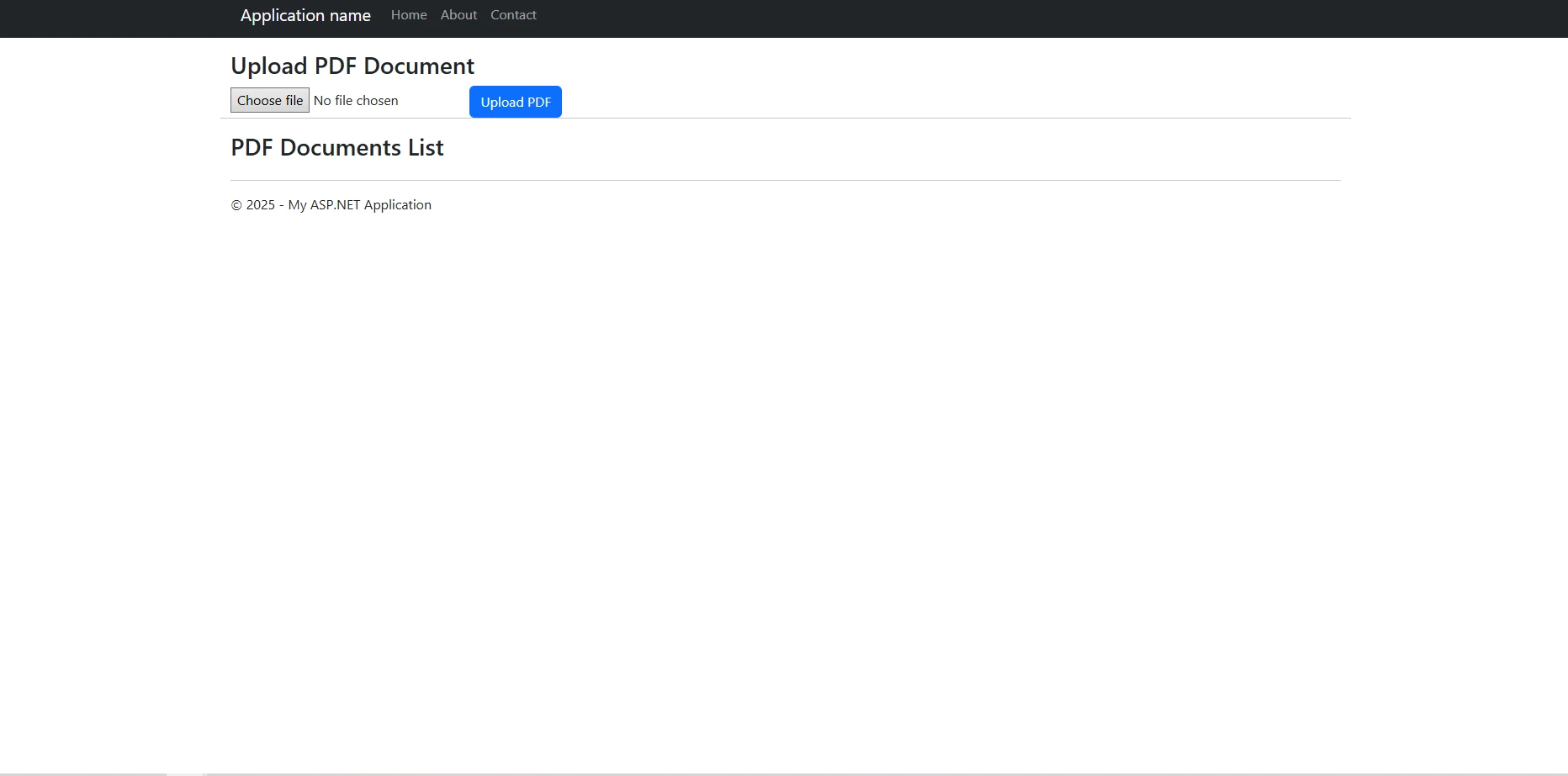
Example UI Output

ASP.NET web application interface showing a PDF upload form with 'Choose file' button and 'Upload PDF' button, plus an empty PDF Documents List section below for document management

How Do You Handle File Upload Events?

The upload button triggers the server-side event handler. Here's the complete implementation for the upload function that converts uploaded files from the specified file path to a byte array and stores them. You'll write the logic to handle the post request with proper error handling:

protected void btnUpload_Click(object sender, EventArgs e)
{
    if (FileUpload1.HasFile && FileUpload1.PostedFile.ContentType == "application/pdf")
    {
        try
        {
            string fileName = FileUpload1.FileName;
            byte[] fileBytes = FileUpload1.FileBytes;
            int maxFileSize = 10 * 1024 * 1024; // 10MB limit

            if (fileBytes.Length > maxFileSize)
            {
                lblMessage.Text = "File size exceeds 10MB limit.";
                return;
            }

            // Validate PDF using IronPDF
            using (var stream = new MemoryStream(fileBytes))
            {
                var testPdf = new IronPdf.PdfDocument(stream);
                if (testPdf.PageCount == 0)
                {
                    lblMessage.Text = "Invalid PDF file.";
                    return;
                }
            }

            // Connection string is retrieved from web.config
            string constr = ConfigurationManager.ConnectionStrings["DefaultConnection"].ConnectionString;
            using (SqlConnection conn = new SqlConnection(constr))
            {
                string query = "INSERT INTO PdfDocuments (FileName, FileData, FileSize, CreatedBy) " +
                               "VALUES (@FileName, @FileData, @FileSize, @CreatedBy)";
                using (SqlCommand cmd = new SqlCommand(query, conn))
                {
                    cmd.Parameters.AddWithValue("@FileName", fileName);
                    cmd.Parameters.AddWithValue("@FileData", fileBytes);
                    cmd.Parameters.AddWithValue("@FileSize", fileBytes.Length);
                    cmd.Parameters.AddWithValue("@CreatedBy", User.Identity.Name ?? "Anonymous");

                    conn.Open();
                    cmd.ExecuteNonQuery();
                }
            }
            lblMessage.Text = "PDF document uploaded successfully!";
            lblFileInfo.Text = $"File: {fileName} ({fileBytes.Length / 1024}KB)";
            LoadPdfList(); // Refresh the list after upload
        }
        catch (Exception ex)
        {
            lblMessage.Text = "Error uploading file: " + ex.Message;
            // Log error details
        }
    }
    else
    {
        lblMessage.Text = "Please select a valid PDF file.";
    }
}
protected void btnUpload_Click(object sender, EventArgs e)
{
    if (FileUpload1.HasFile && FileUpload1.PostedFile.ContentType == "application/pdf")
    {
        try
        {
            string fileName = FileUpload1.FileName;
            byte[] fileBytes = FileUpload1.FileBytes;
            int maxFileSize = 10 * 1024 * 1024; // 10MB limit

            if (fileBytes.Length > maxFileSize)
            {
                lblMessage.Text = "File size exceeds 10MB limit.";
                return;
            }

            // Validate PDF using IronPDF
            using (var stream = new MemoryStream(fileBytes))
            {
                var testPdf = new IronPdf.PdfDocument(stream);
                if (testPdf.PageCount == 0)
                {
                    lblMessage.Text = "Invalid PDF file.";
                    return;
                }
            }

            // Connection string is retrieved from web.config
            string constr = ConfigurationManager.ConnectionStrings["DefaultConnection"].ConnectionString;
            using (SqlConnection conn = new SqlConnection(constr))
            {
                string query = "INSERT INTO PdfDocuments (FileName, FileData, FileSize, CreatedBy) " +
                               "VALUES (@FileName, @FileData, @FileSize, @CreatedBy)";
                using (SqlCommand cmd = new SqlCommand(query, conn))
                {
                    cmd.Parameters.AddWithValue("@FileName", fileName);
                    cmd.Parameters.AddWithValue("@FileData", fileBytes);
                    cmd.Parameters.AddWithValue("@FileSize", fileBytes.Length);
                    cmd.Parameters.AddWithValue("@CreatedBy", User.Identity.Name ?? "Anonymous");

                    conn.Open();
                    cmd.ExecuteNonQuery();
                }
            }
            lblMessage.Text = "PDF document uploaded successfully!";
            lblFileInfo.Text = $"File: {fileName} ({fileBytes.Length / 1024}KB)";
            LoadPdfList(); // Refresh the list after upload
        }
        catch (Exception ex)
        {
            lblMessage.Text = "Error uploading file: " + ex.Message;
            // Log error details
        }
    }
    else
    {
        lblMessage.Text = "Please select a valid PDF file.";
    }
}
$vbLabelText   $csharpLabel

What Validation Should You Implement?

This code validates the file type before uploading, ensuring only valid PDF files are stored in the database. The byte array conversion happens automatically through the FileBytes property. Additional validation includes checking PDF integrity and file size limits.

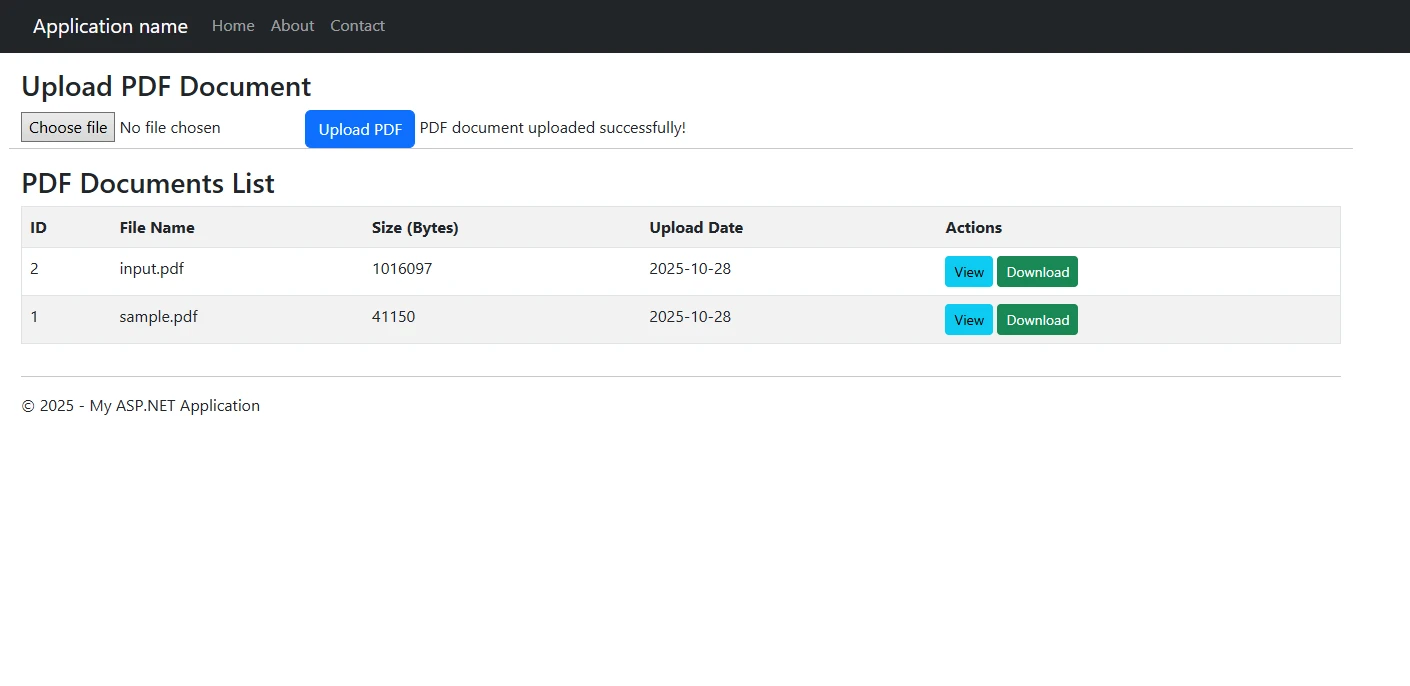
UI with Uploaded Files

ASP.NET web application interface showing PDF upload functionality with a file upload form and a table listing uploaded PDF documents with view and download action buttons for complete document management

How Do You Retrieve and Display PDFs with IronPDF?

IronPDF excels at rendering PDF documents retrieved from a database. The library provides multiple options to display PDF content in browsers with advanced rendering capabilities. First, retrieve the binary data from your database table:

private void LoadPdfList()
{
    string constr = ConfigurationManager.ConnectionStrings["DefaultConnection"].ConnectionString;
    using (SqlConnection conn = new SqlConnection(constr))
    {
        string query = @"SELECT Id, FileName, FileSize, UploadDate, CreatedBy 
                        FROM PdfDocuments 
                        ORDER BY UploadDate DESC";
        using (SqlCommand cmd = new SqlCommand(query, conn))
        {
            conn.Open();
            SqlDataAdapter adapter = new SqlDataAdapter(cmd);
            DataTable dt = new DataTable();
            adapter.Fill(dt);

            // Format file sizes for display
            foreach (DataRow row in dt.Rows)
            {
                int fileSize = Convert.ToInt32(row["FileSize"]);
                row["FileSize"] = FormatFileSize(fileSize);
            }

            GridView1.DataSource = dt;
            GridView1.DataBind();
        }
    }
}

private string FormatFileSize(int bytes)
{
    if (bytes < 1024) return bytes + " B";
    if (bytes < 1048576) return (bytes / 1024) + " KB";
    return (bytes / 1048576) + " MB";
}

// Helper method to retrieve PDF data from the database
private PdfData GetPdfFromDatabase(int id)
{
    byte[] pdfBytes = null;
    string filename = "";
    string constr = ConfigurationManager.ConnectionStrings["DefaultConnection"].ConnectionString;
    using (SqlConnection conn = new SqlConnection(constr))
    {
        string query = "SELECT FileData, FileName FROM PdfDocuments WHERE Id = @Id";
        using (SqlCommand cmd = new SqlCommand(query, conn))
        {
            cmd.Parameters.AddWithValue("@Id", id);
            conn.Open();
            using (SqlDataReader reader = cmd.ExecuteReader())
            {
                if (reader.Read())
                {
                    // Retrieve binary data
                    pdfBytes = (byte[])reader["FileData"];
                    filename = reader["FileName"].ToString();
                }
            }
        }
    }
    if (pdfBytes != null)
    {
        return new PdfData { Bytes = pdfBytes, FileName = filename };
    }
    return null;
}

// ----------------- GridView Command Handlers -----------------
protected void GridView1_RowCommand(object sender, GridViewCommandEventArgs e)
{
    if (e.CommandName == "ViewPdf")
    {
        int documentId = Convert.ToInt32(e.CommandArgument);
        ViewPdfDocument(documentId);
    }
    else if (e.CommandName == "DownloadPdf")
    {
        int documentId = Convert.ToInt32(e.CommandArgument);
        DownloadPdfDocument(documentId);
    }
}

private void ViewPdfDocument(int id)
{
    var pdfData = GetPdfFromDatabase(id);
    if (pdfData != null)
    {
        IronPdf.PdfDocument pdf;
        using (var stream = new System.IO.MemoryStream(pdfData.Bytes))
        {
            pdf = new IronPdf.PdfDocument(stream);
        }

        // Apply security settings if needed
        pdf.SecuritySettings.AllowUserPrinting = true;
        pdf.SecuritySettings.AllowUserCopyPasteContent = false;

        // Configure response to display inline in the browser
        Response.Clear();
        Response.ContentType = "application/pdf";
        Response.AddHeader("content-disposition", $"inline; filename={pdfData.FileName}");
        Response.AddHeader("content-length", pdf.BinaryData.Length.ToString());
        Response.BinaryWrite(pdf.BinaryData);
        Response.End();
    }
}
private void LoadPdfList()
{
    string constr = ConfigurationManager.ConnectionStrings["DefaultConnection"].ConnectionString;
    using (SqlConnection conn = new SqlConnection(constr))
    {
        string query = @"SELECT Id, FileName, FileSize, UploadDate, CreatedBy 
                        FROM PdfDocuments 
                        ORDER BY UploadDate DESC";
        using (SqlCommand cmd = new SqlCommand(query, conn))
        {
            conn.Open();
            SqlDataAdapter adapter = new SqlDataAdapter(cmd);
            DataTable dt = new DataTable();
            adapter.Fill(dt);

            // Format file sizes for display
            foreach (DataRow row in dt.Rows)
            {
                int fileSize = Convert.ToInt32(row["FileSize"]);
                row["FileSize"] = FormatFileSize(fileSize);
            }

            GridView1.DataSource = dt;
            GridView1.DataBind();
        }
    }
}

private string FormatFileSize(int bytes)
{
    if (bytes < 1024) return bytes + " B";
    if (bytes < 1048576) return (bytes / 1024) + " KB";
    return (bytes / 1048576) + " MB";
}

// Helper method to retrieve PDF data from the database
private PdfData GetPdfFromDatabase(int id)
{
    byte[] pdfBytes = null;
    string filename = "";
    string constr = ConfigurationManager.ConnectionStrings["DefaultConnection"].ConnectionString;
    using (SqlConnection conn = new SqlConnection(constr))
    {
        string query = "SELECT FileData, FileName FROM PdfDocuments WHERE Id = @Id";
        using (SqlCommand cmd = new SqlCommand(query, conn))
        {
            cmd.Parameters.AddWithValue("@Id", id);
            conn.Open();
            using (SqlDataReader reader = cmd.ExecuteReader())
            {
                if (reader.Read())
                {
                    // Retrieve binary data
                    pdfBytes = (byte[])reader["FileData"];
                    filename = reader["FileName"].ToString();
                }
            }
        }
    }
    if (pdfBytes != null)
    {
        return new PdfData { Bytes = pdfBytes, FileName = filename };
    }
    return null;
}

// ----------------- GridView Command Handlers -----------------
protected void GridView1_RowCommand(object sender, GridViewCommandEventArgs e)
{
    if (e.CommandName == "ViewPdf")
    {
        int documentId = Convert.ToInt32(e.CommandArgument);
        ViewPdfDocument(documentId);
    }
    else if (e.CommandName == "DownloadPdf")
    {
        int documentId = Convert.ToInt32(e.CommandArgument);
        DownloadPdfDocument(documentId);
    }
}

private void ViewPdfDocument(int id)
{
    var pdfData = GetPdfFromDatabase(id);
    if (pdfData != null)
    {
        IronPdf.PdfDocument pdf;
        using (var stream = new System.IO.MemoryStream(pdfData.Bytes))
        {
            pdf = new IronPdf.PdfDocument(stream);
        }

        // Apply security settings if needed
        pdf.SecuritySettings.AllowUserPrinting = true;
        pdf.SecuritySettings.AllowUserCopyPasteContent = false;

        // Configure response to display inline in the browser
        Response.Clear();
        Response.ContentType = "application/pdf";
        Response.AddHeader("content-disposition", $"inline; filename={pdfData.FileName}");
        Response.AddHeader("content-length", pdf.BinaryData.Length.ToString());
        Response.BinaryWrite(pdf.BinaryData);
        Response.End();
    }
}
$vbLabelText   $csharpLabel

How Do You Handle PDF Rendering Parameters?

The parameters for the SQL command are crucial for safely retrieving the specific PDF. The ViewPdfDocument method then handles streaming the document back to the client with appropriate security settings.

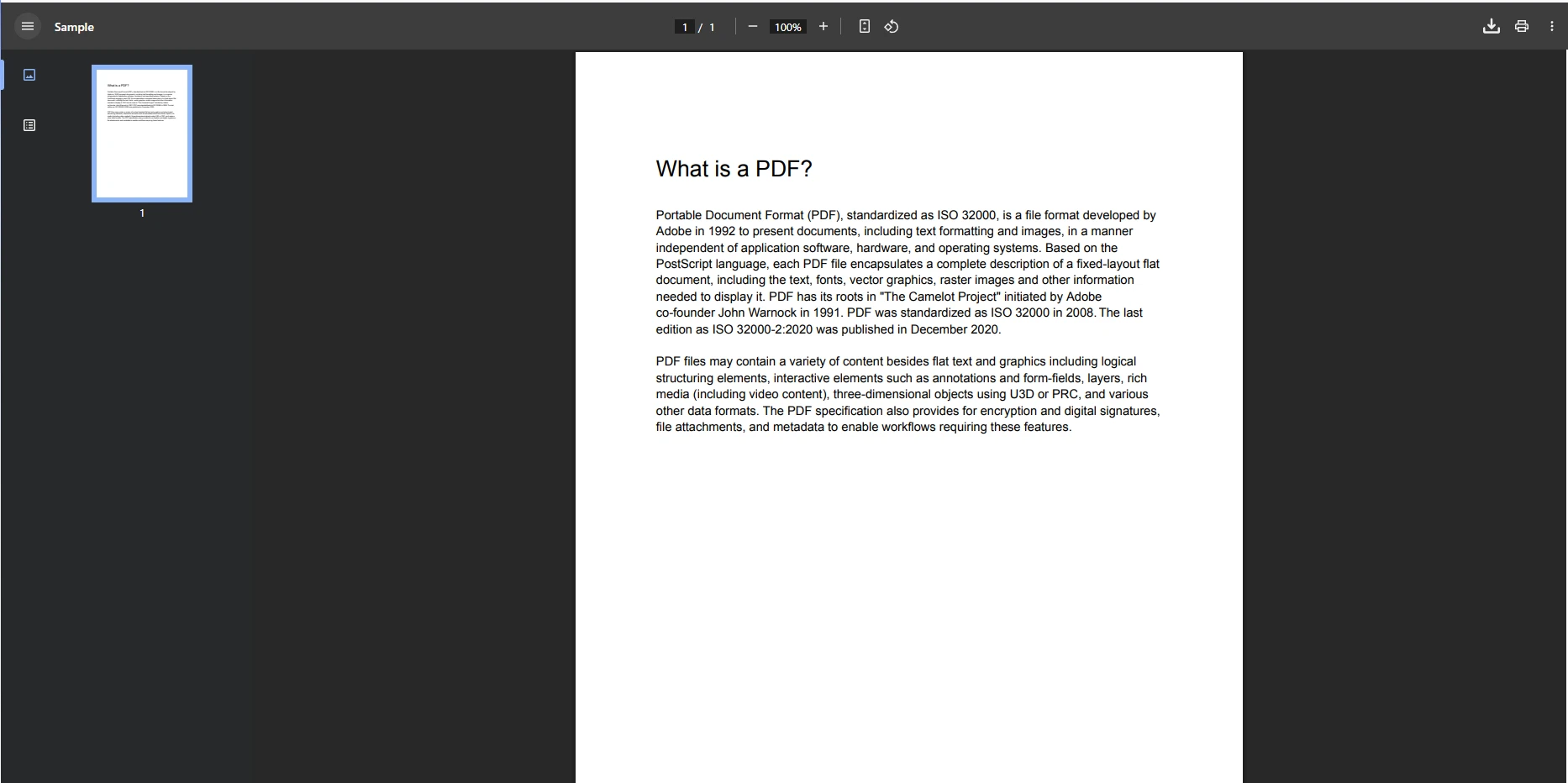
Viewing an Uploaded PDF File

PDF viewer interface showing a document titled 'What is a PDF?' with explanatory text about the Portable Document Format, displayed at 100% zoom with navigation controls and multi-page support indicators

What Advanced Features Can You Add to PDFs?

IronPDF's PDF manipulation capabilities extend beyond simple display. You can manipulate the PDF document before rendering with watermarks, annotations, and digital signatures:

// Add watermark before displaying
pdf.ApplyWatermark("<h2 style='color:red; font-family:Arial'>CONFIDENTIAL</h2>", 
                   rotation: 30, 
                   opacity: 50,
                   VerticalAlignment: VerticalAlignment.Middle,
                   HorizontalAlignment: HorizontalAlignment.Center);

// Add page numbers
pdf.AddTextHeaders("{page} of {total-pages}", 
                  IronPdf.Editing.TextHeaderFooter.DisplayLocation.BottomCenter);

// Convert specific pages to images for preview
var previewImages = pdf.RasterizeToImageFiles("preview_*.png", 1, 3, 150, 
                                              IronPdf.Imaging.ImageType.Png);

// Add metadata
pdf.MetaData.Author = "Your Application";
pdf.MetaData.ModifiedDate = DateTime.Now;
// Add watermark before displaying
pdf.ApplyWatermark("<h2 style='color:red; font-family:Arial'>CONFIDENTIAL</h2>", 
                   rotation: 30, 
                   opacity: 50,
                   VerticalAlignment: VerticalAlignment.Middle,
                   HorizontalAlignment: HorizontalAlignment.Center);

// Add page numbers
pdf.AddTextHeaders("{page} of {total-pages}", 
                  IronPdf.Editing.TextHeaderFooter.DisplayLocation.BottomCenter);

// Convert specific pages to images for preview
var previewImages = pdf.RasterizeToImageFiles("preview_*.png", 1, 3, 150, 
                                              IronPdf.Imaging.ImageType.Png);

// Add metadata
pdf.MetaData.Author = "Your Application";
pdf.MetaData.ModifiedDate = DateTime.Now;
$vbLabelText   $csharpLabel

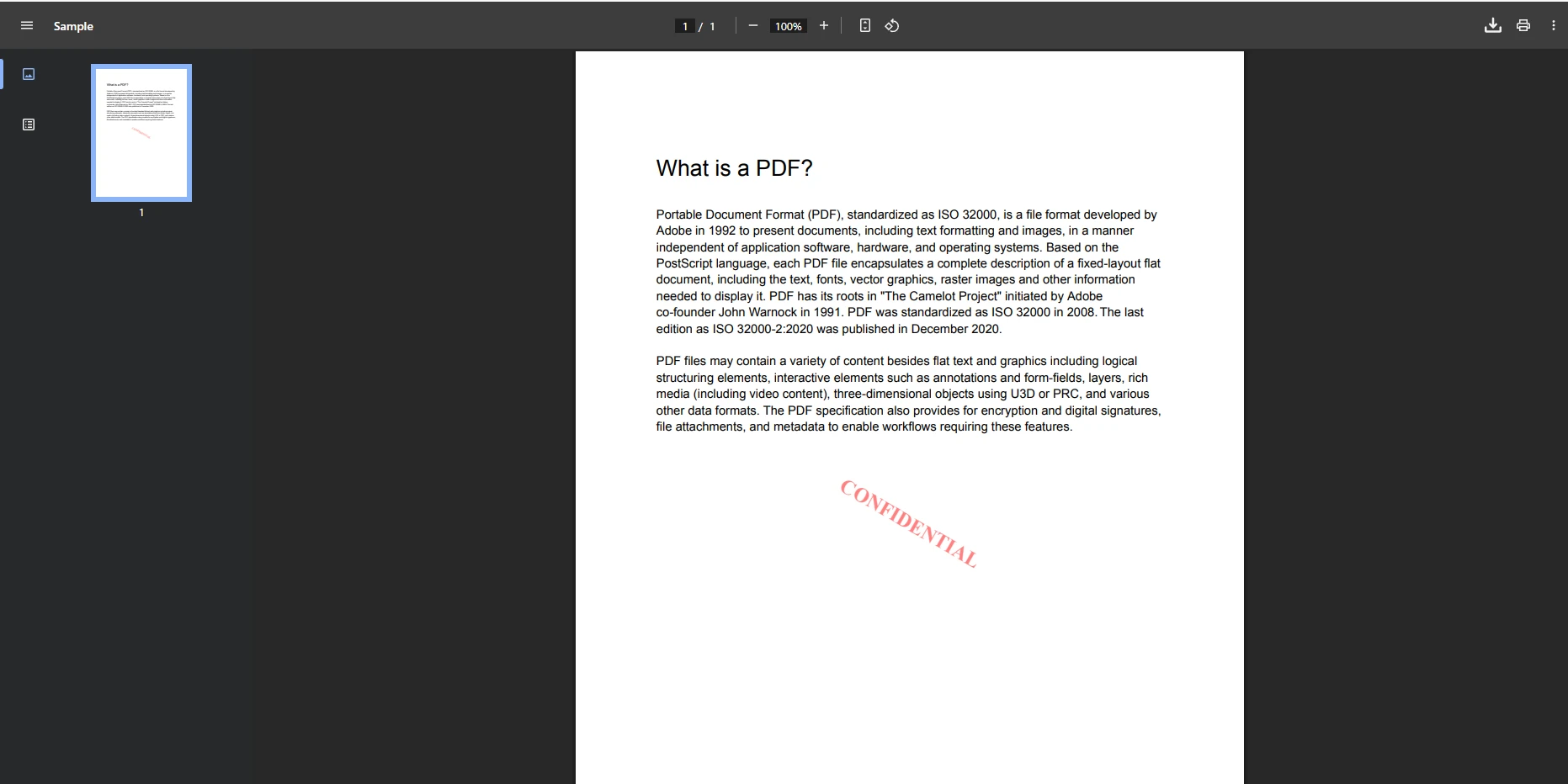
Viewing PDF with Watermark

PDF viewer displaying a document about 'What is a PDF?' with detailed text content and a diagonal 'CONFIDENTIAL' watermark demonstrating IronPDF's watermarking capabilities for document security

How Can You Improve Browser Integration?

The PDF viewer support is reliable. For better web integration and controlling the display width of the content, use CSS and JavaScript to open documents in a dialog or a new tab, centered on the screen. You can also implement custom viewport settings:

<script type="text/javascript">
    function openPdfInNewTab(documentId) {
        // This generates a simple HTTP GET request to a handler URL
        window.open('/PdfHandler.ashx?id=' + documentId, '_blank');
    }

    function openPdfInModal(documentId) {
        var modal = document.getElementById('pdfModal');
        var iframe = document.getElementById('pdfFrame');
        iframe.src = '/PdfHandler.ashx?id=' + documentId;
        modal.style.display = 'block';
    }
</script>

<div id="pdfModal" class="modal">
    <div class="modal-content">
        <span class="close">&times;</span>
        <iframe id="pdfFrame" width="100%" height="600px"></iframe>
    </div>
</div>
```## What Does a Complete PDF Viewer Example Look Like?

Here's a complete sample code combining all components to create a fully functional system for [managing PDF files](https://ironpdf.com/tutorials/organize-pdfs-complete-tutorial/) in your database with [improved security features](https://ironpdf.com/tutorials/csharp-pdf-security-complete-tutorial/):

```csharp
using IronPdf;
using System;
using System.Configuration;
using System.Data;
using System.Data.SqlClient;
using System.IO;
using System.Web.UI.WebControls;

namespace PdfDatabaseViewer
{
    public partial class Default : System.Web.UI.Page
    {
        protected void Page_Load(object sender, EventArgs e)
        {
            if (!IsPostBack)
            {
                LoadPdfList();
            }
            License.LicenseKey = "Your-License-Key";
        }

        // ----------------- Upload Functionality -----------------
        protected void btnUpload_Click(object sender, EventArgs e)
        {
            if (FileUpload1.HasFile && FileUpload1.PostedFile.ContentType == "application/pdf")
            {
                try
                {
                    string fileName = Path.GetFileName(FileUpload1.FileName);
                    byte[] fileBytes = FileUpload1.FileBytes;
                    int maxFileSize = 10 * 1024 * 1024; // 10MB limit

                    if (fileBytes.Length > maxFileSize)
                    {
                        lblMessage.Text = "File size exceeds 10MB limit.";
                        lblMessage.CssClass = "error-message";
                        return;
                    }

                    // Validate PDF using IronPDF
                    using (var stream = new MemoryStream(fileBytes))
                    {
                        var testPdf = new IronPdf.PdfDocument(stream);
                        if (testPdf.PageCount == 0)
                        {
                            lblMessage.Text = "Invalid PDF file.";
                            lblMessage.CssClass = "error-message";
                            return;
                        }
                        lblFileInfo.Text = $"Pages: {testPdf.PageCount}, Size: {FormatFileSize(fileBytes.Length)}";
                    }

                    // Connection string is retrieved from web.config
                    string constr = ConfigurationManager.ConnectionStrings["DefaultConnection"].ConnectionString;
                    using (SqlConnection conn = new SqlConnection(constr))
                    {
                        string query = @"INSERT INTO PdfDocuments 
                                       (FileName, FileData, FileSize, CreatedBy, LastModified) 
                                       VALUES (@FileName, @FileData, @FileSize, @CreatedBy, GETDATE())";
                        using (SqlCommand cmd = new SqlCommand(query, conn))
                        {
                            cmd.Parameters.AddWithValue("@FileName", fileName);
                            cmd.Parameters.AddWithValue("@FileData", fileBytes);
                            cmd.Parameters.AddWithValue("@FileSize", fileBytes.Length);
                            cmd.Parameters.AddWithValue("@CreatedBy", User.Identity.Name ?? "Anonymous");

                            conn.Open();
                            cmd.ExecuteNonQuery();
                        }
                    }
                    lblMessage.Text = "PDF document uploaded successfully!";
                    lblMessage.CssClass = "success-message";
                    LoadPdfList(); // Refresh the list after upload
                }
                catch (Exception ex)
                {
                    lblMessage.Text = "Error uploading file: " + ex.Message;
                    lblMessage.CssClass = "error-message";
                    // Log error details for debugging
                    System.Diagnostics.Trace.WriteLine($"Upload Error: {ex}");
                }
            }
            else
            {
                lblMessage.Text = "Please select a valid PDF file.";
                lblMessage.CssClass = "warning-message";
            }
        }

        // ----------------- Data Retrieval and List Display -----------------
        private void LoadPdfList()
        {
            string constr = ConfigurationManager.ConnectionStrings["DefaultConnection"].ConnectionString;
            using (SqlConnection conn = new SqlConnection(constr))
            {
                string query = @"SELECT Id, FileName, FileSize, UploadDate, CreatedBy 
                               FROM PdfDocuments 
                               ORDER BY UploadDate DESC";
                using (SqlCommand cmd = new SqlCommand(query, conn))
                {
                    conn.Open();
                    SqlDataAdapter adapter = new SqlDataAdapter(cmd);
                    DataTable dt = new DataTable();
                    adapter.Fill(dt);

                    // Add formatted columns
                    dt.Columns.Add("FormattedSize", typeof(string));
                    dt.Columns.Add("FormattedDate", typeof(string));

                    foreach (DataRow row in dt.Rows)
                    {
                        int fileSize = Convert.ToInt32(row["FileSize"]);
                        row["FormattedSize"] = FormatFileSize(fileSize);
                        row["FormattedDate"] = Convert.ToDateTime(row["UploadDate"]).ToString("MMM dd, yyyy HH:mm");
                    }

                    GridView1.DataSource = dt;
                    GridView1.DataBind();
                }
            }
        }

        private string FormatFileSize(int bytes)
        {
            if (bytes < 1024) return bytes + " B";
            if (bytes < 1048576) return (bytes / 1024) + " KB";
            return (bytes / 1048576.0).ToString("F2") + " MB";
        }

        // Helper method to retrieve PDF data from the database
        private PdfData GetPdfFromDatabase(int id)
        {
            byte[] pdfBytes = null;
            string filename = "";
            string constr = ConfigurationManager.ConnectionStrings["DefaultConnection"].ConnectionString;
            using (SqlConnection conn = new SqlConnection(constr))
            {
                string query = "SELECT FileData, FileName FROM PdfDocuments WHERE Id = @Id";
                using (SqlCommand cmd = new SqlCommand(query, conn))
                {
                    cmd.Parameters.AddWithValue("@Id", id);
                    conn.Open();
                    using (SqlDataReader reader = cmd.ExecuteReader())
                    {
                        if (reader.Read())
                        {
                            // Retrieve binary data
                            pdfBytes = (byte[])reader["FileData"];
                            filename = reader["FileName"].ToString();
                        }
                    }
                }
            }
            if (pdfBytes != null)
            {
                return new PdfData { Bytes = pdfBytes, FileName = filename };
            }
            return null;
        }

        // ----------------- GridView Command Handlers -----------------
        protected void GridView1_RowCommand(object sender, GridViewCommandEventArgs e)
        {
            try
            {
                if (e.CommandName == "ViewPdf")
                {
                    int documentId = Convert.ToInt32(e.CommandArgument);
                    ViewPdfDocument(documentId);
                }
                else if (e.CommandName == "DownloadPdf")
                {
                    int documentId = Convert.ToInt32(e.CommandArgument);
                    DownloadPdfDocument(documentId);
                }
            }
            catch (Exception ex)
            {
                lblMessage.Text = "Error processing request: " + ex.Message;
                lblMessage.CssClass = "error-message";
            }
        }

        private void ViewPdfDocument(int id)
        {
            var pdfData = GetPdfFromDatabase(id);
            if (pdfData != null)
            {
                IronPdf.PdfDocument pdf;
                using (var stream = new System.IO.MemoryStream(pdfData.Bytes))
                {
                    pdf = new IronPdf.PdfDocument(stream);
                }

                // Apply watermark for viewing
                pdf.ApplyWatermark("<h2 style='color:red; font-family:Arial'>CONFIDENTIAL</h2>", 
                                 rotation: 30, 
                                 opacity: 50);

                // Add page numbers
                pdf.AddTextHeaders("{page} of {total-pages}", 
                                 IronPdf.Editing.TextHeaderFooter.DisplayLocation.BottomCenter);

                // Apply security settings
                pdf.SecuritySettings.AllowUserPrinting = true;
                pdf.SecuritySettings.AllowUserCopyPasteContent = false;
                pdf.SecuritySettings.AllowUserAnnotations = false;
                pdf.SecuritySettings.AllowUserFormData = false;

                // Configure response to display inline in the browser
                Response.Clear();
                Response.ContentType = "application/pdf";
                Response.AddHeader("content-disposition", $"inline; filename={pdfData.FileName}");
                Response.AddHeader("content-length", pdf.BinaryData.Length.ToString());
                Response.BinaryWrite(pdf.BinaryData);
                Response.End();
            }
        }

        private void DownloadPdfDocument(int id)
        {
            var pdfData = GetPdfFromDatabase(id);
            if (pdfData != null)
            {
                // Configure response to force a download/save prompt
                Response.Clear();
                Response.ContentType = "application/pdf";
                Response.AddHeader("content-disposition", $"attachment; filename={pdfData.FileName}");
                Response.AddHeader("content-length", pdfData.Bytes.Length.ToString());
                Response.BinaryWrite(pdfData.Bytes);
                Response.End();
            }
        }
    }
}

// Helper class must be outside the Default class
public class PdfData
{
    public byte[] Bytes { get; set; }
    public string FileName { get; set; }
}
<script type="text/javascript">
    function openPdfInNewTab(documentId) {
        // This generates a simple HTTP GET request to a handler URL
        window.open('/PdfHandler.ashx?id=' + documentId, '_blank');
    }

    function openPdfInModal(documentId) {
        var modal = document.getElementById('pdfModal');
        var iframe = document.getElementById('pdfFrame');
        iframe.src = '/PdfHandler.ashx?id=' + documentId;
        modal.style.display = 'block';
    }
</script>

<div id="pdfModal" class="modal">
    <div class="modal-content">
        <span class="close">&times;</span>
        <iframe id="pdfFrame" width="100%" height="600px"></iframe>
    </div>
</div>
```## What Does a Complete PDF Viewer Example Look Like?

Here's a complete sample code combining all components to create a fully functional system for [managing PDF files](https://ironpdf.com/tutorials/organize-pdfs-complete-tutorial/) in your database with [improved security features](https://ironpdf.com/tutorials/csharp-pdf-security-complete-tutorial/):

```csharp
using IronPdf;
using System;
using System.Configuration;
using System.Data;
using System.Data.SqlClient;
using System.IO;
using System.Web.UI.WebControls;

namespace PdfDatabaseViewer
{
    public partial class Default : System.Web.UI.Page
    {
        protected void Page_Load(object sender, EventArgs e)
        {
            if (!IsPostBack)
            {
                LoadPdfList();
            }
            License.LicenseKey = "Your-License-Key";
        }

        // ----------------- Upload Functionality -----------------
        protected void btnUpload_Click(object sender, EventArgs e)
        {
            if (FileUpload1.HasFile && FileUpload1.PostedFile.ContentType == "application/pdf")
            {
                try
                {
                    string fileName = Path.GetFileName(FileUpload1.FileName);
                    byte[] fileBytes = FileUpload1.FileBytes;
                    int maxFileSize = 10 * 1024 * 1024; // 10MB limit

                    if (fileBytes.Length > maxFileSize)
                    {
                        lblMessage.Text = "File size exceeds 10MB limit.";
                        lblMessage.CssClass = "error-message";
                        return;
                    }

                    // Validate PDF using IronPDF
                    using (var stream = new MemoryStream(fileBytes))
                    {
                        var testPdf = new IronPdf.PdfDocument(stream);
                        if (testPdf.PageCount == 0)
                        {
                            lblMessage.Text = "Invalid PDF file.";
                            lblMessage.CssClass = "error-message";
                            return;
                        }
                        lblFileInfo.Text = $"Pages: {testPdf.PageCount}, Size: {FormatFileSize(fileBytes.Length)}";
                    }

                    // Connection string is retrieved from web.config
                    string constr = ConfigurationManager.ConnectionStrings["DefaultConnection"].ConnectionString;
                    using (SqlConnection conn = new SqlConnection(constr))
                    {
                        string query = @"INSERT INTO PdfDocuments 
                                       (FileName, FileData, FileSize, CreatedBy, LastModified) 
                                       VALUES (@FileName, @FileData, @FileSize, @CreatedBy, GETDATE())";
                        using (SqlCommand cmd = new SqlCommand(query, conn))
                        {
                            cmd.Parameters.AddWithValue("@FileName", fileName);
                            cmd.Parameters.AddWithValue("@FileData", fileBytes);
                            cmd.Parameters.AddWithValue("@FileSize", fileBytes.Length);
                            cmd.Parameters.AddWithValue("@CreatedBy", User.Identity.Name ?? "Anonymous");

                            conn.Open();
                            cmd.ExecuteNonQuery();
                        }
                    }
                    lblMessage.Text = "PDF document uploaded successfully!";
                    lblMessage.CssClass = "success-message";
                    LoadPdfList(); // Refresh the list after upload
                }
                catch (Exception ex)
                {
                    lblMessage.Text = "Error uploading file: " + ex.Message;
                    lblMessage.CssClass = "error-message";
                    // Log error details for debugging
                    System.Diagnostics.Trace.WriteLine($"Upload Error: {ex}");
                }
            }
            else
            {
                lblMessage.Text = "Please select a valid PDF file.";
                lblMessage.CssClass = "warning-message";
            }
        }

        // ----------------- Data Retrieval and List Display -----------------
        private void LoadPdfList()
        {
            string constr = ConfigurationManager.ConnectionStrings["DefaultConnection"].ConnectionString;
            using (SqlConnection conn = new SqlConnection(constr))
            {
                string query = @"SELECT Id, FileName, FileSize, UploadDate, CreatedBy 
                               FROM PdfDocuments 
                               ORDER BY UploadDate DESC";
                using (SqlCommand cmd = new SqlCommand(query, conn))
                {
                    conn.Open();
                    SqlDataAdapter adapter = new SqlDataAdapter(cmd);
                    DataTable dt = new DataTable();
                    adapter.Fill(dt);

                    // Add formatted columns
                    dt.Columns.Add("FormattedSize", typeof(string));
                    dt.Columns.Add("FormattedDate", typeof(string));

                    foreach (DataRow row in dt.Rows)
                    {
                        int fileSize = Convert.ToInt32(row["FileSize"]);
                        row["FormattedSize"] = FormatFileSize(fileSize);
                        row["FormattedDate"] = Convert.ToDateTime(row["UploadDate"]).ToString("MMM dd, yyyy HH:mm");
                    }

                    GridView1.DataSource = dt;
                    GridView1.DataBind();
                }
            }
        }

        private string FormatFileSize(int bytes)
        {
            if (bytes < 1024) return bytes + " B";
            if (bytes < 1048576) return (bytes / 1024) + " KB";
            return (bytes / 1048576.0).ToString("F2") + " MB";
        }

        // Helper method to retrieve PDF data from the database
        private PdfData GetPdfFromDatabase(int id)
        {
            byte[] pdfBytes = null;
            string filename = "";
            string constr = ConfigurationManager.ConnectionStrings["DefaultConnection"].ConnectionString;
            using (SqlConnection conn = new SqlConnection(constr))
            {
                string query = "SELECT FileData, FileName FROM PdfDocuments WHERE Id = @Id";
                using (SqlCommand cmd = new SqlCommand(query, conn))
                {
                    cmd.Parameters.AddWithValue("@Id", id);
                    conn.Open();
                    using (SqlDataReader reader = cmd.ExecuteReader())
                    {
                        if (reader.Read())
                        {
                            // Retrieve binary data
                            pdfBytes = (byte[])reader["FileData"];
                            filename = reader["FileName"].ToString();
                        }
                    }
                }
            }
            if (pdfBytes != null)
            {
                return new PdfData { Bytes = pdfBytes, FileName = filename };
            }
            return null;
        }

        // ----------------- GridView Command Handlers -----------------
        protected void GridView1_RowCommand(object sender, GridViewCommandEventArgs e)
        {
            try
            {
                if (e.CommandName == "ViewPdf")
                {
                    int documentId = Convert.ToInt32(e.CommandArgument);
                    ViewPdfDocument(documentId);
                }
                else if (e.CommandName == "DownloadPdf")
                {
                    int documentId = Convert.ToInt32(e.CommandArgument);
                    DownloadPdfDocument(documentId);
                }
            }
            catch (Exception ex)
            {
                lblMessage.Text = "Error processing request: " + ex.Message;
                lblMessage.CssClass = "error-message";
            }
        }

        private void ViewPdfDocument(int id)
        {
            var pdfData = GetPdfFromDatabase(id);
            if (pdfData != null)
            {
                IronPdf.PdfDocument pdf;
                using (var stream = new System.IO.MemoryStream(pdfData.Bytes))
                {
                    pdf = new IronPdf.PdfDocument(stream);
                }

                // Apply watermark for viewing
                pdf.ApplyWatermark("<h2 style='color:red; font-family:Arial'>CONFIDENTIAL</h2>", 
                                 rotation: 30, 
                                 opacity: 50);

                // Add page numbers
                pdf.AddTextHeaders("{page} of {total-pages}", 
                                 IronPdf.Editing.TextHeaderFooter.DisplayLocation.BottomCenter);

                // Apply security settings
                pdf.SecuritySettings.AllowUserPrinting = true;
                pdf.SecuritySettings.AllowUserCopyPasteContent = false;
                pdf.SecuritySettings.AllowUserAnnotations = false;
                pdf.SecuritySettings.AllowUserFormData = false;

                // Configure response to display inline in the browser
                Response.Clear();
                Response.ContentType = "application/pdf";
                Response.AddHeader("content-disposition", $"inline; filename={pdfData.FileName}");
                Response.AddHeader("content-length", pdf.BinaryData.Length.ToString());
                Response.BinaryWrite(pdf.BinaryData);
                Response.End();
            }
        }

        private void DownloadPdfDocument(int id)
        {
            var pdfData = GetPdfFromDatabase(id);
            if (pdfData != null)
            {
                // Configure response to force a download/save prompt
                Response.Clear();
                Response.ContentType = "application/pdf";
                Response.AddHeader("content-disposition", $"attachment; filename={pdfData.FileName}");
                Response.AddHeader("content-length", pdfData.Bytes.Length.ToString());
                Response.BinaryWrite(pdfData.Bytes);
                Response.End();
            }
        }
    }
}

// Helper class must be outside the Default class
public class PdfData
{
    public byte[] Bytes { get; set; }
    public string FileName { get; set; }
}
HTML

This implementation includes complete error handling and validation to ensure reliable PDF document management. The source code demonstrates best practices for working with binary data and file operations.

Why Should You Use IronPDF for Database PDF Display?

Implementing ASP.NET display PDF files from database functionality becomes straightforward with IronPDF. The library handles the complexities of PDF document rendering while providing extensive customization options. From simple display scenarios to complex document manipulation, IronPDF offers the tools needed for professional PDF management in ASP.NET applications.

What Makes This Solution Production-Ready?

The techniques covered in this article provide a solid foundation for building reliable document management systems. IronPDF's complete API ensures your application can handle various PDF-related requirements efficiently, from basic file upload and storage to advanced rendering and manipulation features. The library also supports deployment to cloud platforms like Azure and AWS.

How Do You Get Started with IronPDF?

Ready to implement professional PDF functionality in your ASP.NET applications? Start your free trial of IronPDF today and experience the power of smooth PDF management. For production deployments, explore our flexible licensing options that scale with your needs.

자주 묻는 질문

ASP.NET에서 데이터베이스의 PDF를 표시하는 주요 초점은 무엇인가요?

주요 초점은 개발자에게 ASP.NET 웹 애플리케이션 내의 데이터베이스에서 직접 PDF를 표시하여 프로젝트의 기능과 사용자 경험을 향상시키는 효과적인 방법을 제공하는 것입니다.

ASP.NET에서 데이터베이스의 PDF를 표시하는 데 IronPDF가 어떻게 도움이 되나요?

IronPDF는 개발자가 데이터베이스 스토리지에서 PDF를 원활하게 렌더링할 수 있는 강력한 라이브러리를 제공하여 프로세스를 간소화하여 ASP.NET 애플리케이션에 원활하게 통합할 수 있도록 합니다.

ASP.NET에서 PDF 디스플레이를 위해 IronPDF를 사용하면 어떤 이점이 있나요?

IronPDF를 사용하면 손쉬운 통합, 고품질 렌더링, 다양한 PDF 기능 지원 등의 이점을 얻을 수 있어 ASP.NET 애플리케이션의 사용성과 성능을 크게 향상시킬 수 있습니다.

IronPDF는 데이터베이스의 대용량 PDF 파일을 효율적으로 처리할 수 있나요?

예, IronPDF는 대용량 PDF 파일을 효율적으로 처리하도록 설계되어 애플리케이션 성능을 유지하는 데 중요한 빠른 로딩 및 렌더링 시간을 보장합니다.

ASP.NET에서 IronPDF를 사용하여 PDF 디스플레이를 사용자 지정할 수 있나요?

물론 IronPDF는 다양한 사용자 정의 옵션을 제공하여 개발자가 ASP.NET 환경 내에서 특정 요구 사항에 따라 PDF 디스플레이를 조정할 수 있습니다.

IronPDF는 ASP.NET 애플리케이션에서 어떤 파일 형식을 PDF로 변환할 수 있나요?

IronPDF는 HTML, 이미지 등 다양한 파일 형식을 PDF로 변환하는 기능을 지원하며, 이는 특히 ASP.NET 애플리케이션에서 동적 콘텐츠 생성에 유용할 수 있습니다.

IronPDF는 ASP.NET 애플리케이션에 대한 보안 PDF 처리를 지원하나요?

예, IronPDF는 암호화 및 비밀번호 보호를 포함한 안전한 PDF 처리를 지원하므로 ASP.NET 애플리케이션 내에서 민감한 정보를 보호하는 데 도움이 됩니다.

IronPDF를 다른 Iron Software 제품과 통합하여 기능을 향상시킬 수 있나요?

예, IronPDF는 IronOCR 및 IronBarcode와 같은 다른 Iron Software 제품과 통합하여 ASP.NET 애플리케이션에서 문서 관리 및 처리를 위한 포괄적인 솔루션을 제공할 수 있습니다.

커티스 차우
기술 문서 작성자

커티스 차우는 칼턴 대학교에서 컴퓨터 과학 학사 학위를 취득했으며, Node.js, TypeScript, JavaScript, React를 전문으로 하는 프론트엔드 개발자입니다. 직관적이고 미적으로 뛰어난 사용자 인터페이스를 만드는 데 열정을 가진 그는 최신 프레임워크를 활용하고, 잘 구성되고 시각적으로 매력적인 매뉴얼을 제작하는 것을 즐깁니다.


커티스는 개발 분야 외에도 사물 인터넷(IoT)에 깊은 관심을 가지고 있으며, 하드웨어와 소프트웨어를 통합하는 혁신적인 방법을 연구합니다. 여가 시간에는 게임을 즐기거나 디스코드 봇을 만들면서 기술에 대한 애정과 창의성을 결합합니다.