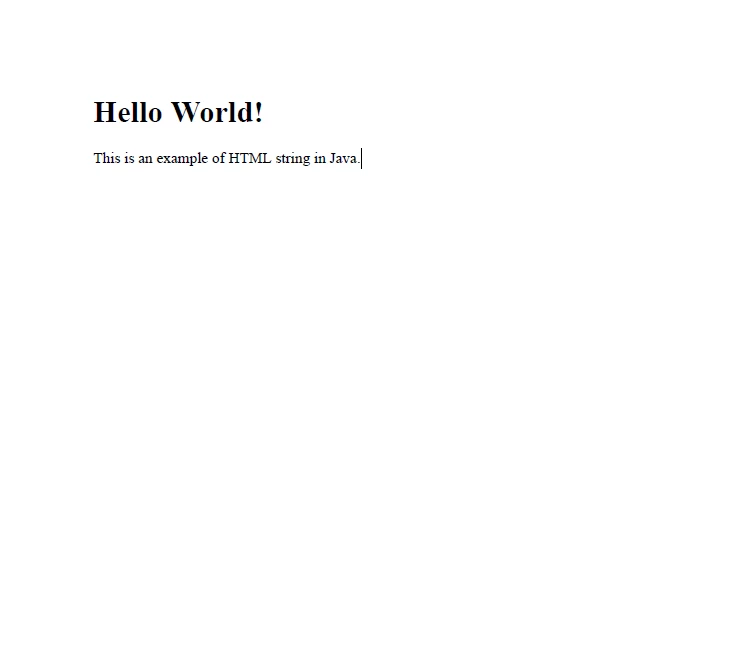
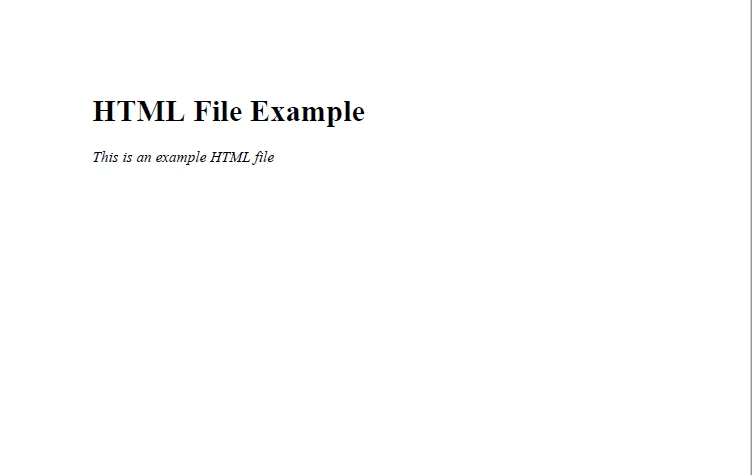
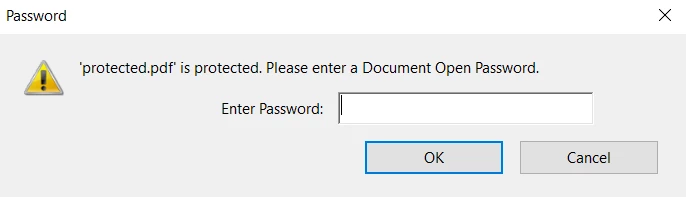
JAVA용 IRONPDF 사용 Java PDF 생성기(코드 예제 튜토리얼) 커티스 차우 업데이트됨:7월 28, 2025 다운로드 IronPDF 메이븐 다운로드 JAR 다운로드 무료 체험 시작하기 LLM용 사본 LLM용 사본 LLM용 마크다운 형식으로 페이지를 복사하세요 ChatGPT에서 열기 ChatGPT에 이 페이지에 대해 문의하세요 제미니에서 열기 제미니에게 이 페이지에 대해 문의하세요 Grok에서 열기 Grok에게 이 페이지에 대해 문의하세요 혼란 속에서 열기 Perplexity에게 이 페이지에 대해 문의하세요 공유하다 페이스북에 공유하기 트위터에 공유하기 LinkedIn에 공유하기 URL 복사 이메일로 기사 보내기 This article will explore how to use IronPDF to generate new files, extract content, and save PDFs. ## How to Generate PDF Files in Java Install IronPDF Java Library for PDF Generation Render PDF from HTML string with renderHtmlAsPdf method Render PDF from HTML file with renderHtmlFileAsPdf method Render PDF from URL with renderUrlAsPdf method Apply password protection on the newly generated PDF in Java IronPDF for Java IronPDF for Java is built for generating PDF documents or PDF forms from HTML code, whether from a file, HTML string, HTML pages, or URL. It generates PDF files with accuracy, and formatting is also preserved. It is designed in a way that developers find it easy to use. IronPDF is built on top of the .NET Framework, allowing it to be a versatile tool for generating PDFs in various contexts. IronPDF provides the following functions for generating and manipulating large documents: The ability to add and extract content from PDFs (text, images, tables, etc.) The ability to control the layout and formatting of the document (e.g., set fonts, colors, margins...) The ability to complete forms and add digital signatures Steps to Create a PDF File in a Java Application Prerequisites To use IronPDF to create a PDF generating tool, the following software needs to be installed on the computer: Java Development Kit - JDK is required for building and running Java programs. If it is not installed, download the latest release from the Oracle Website. Integrated Development Environment - IDE is software that helps write, edit, and debug a program. Download any IDE for Java, e.g., Eclipse, NetBeans, IntelliJ. Maven - Maven is an automation and open-source Java tool that helps download libraries from the Central Maven Repository. Download it from the Apache Maven website. IronPDF - Finally, IronPDF is required to create PDF files in Java. This needs to be added as a dependency in your Java Maven Project. Include the IronPDF artifact along with the slf4j dependency in the pom.xml file as shown below: <dependency> <groupId>com.ironsoftware</groupId> <artifactId>ironpdf</artifactId> <version>YOUR_VERSION_HERE</version> </dependency> <dependency> <groupId>org.slf4j</groupId> <artifactId>slf4j-api</artifactId> <version>YOUR_VERSION_HERE</version> </dependency> <dependency> <groupId>com.ironsoftware</groupId> <artifactId>ironpdf</artifactId> <version>YOUR_VERSION_HERE</version> </dependency> <dependency> <groupId>org.slf4j</groupId> <artifactId>slf4j-api</artifactId> <version>YOUR_VERSION_HERE</version> </dependency> XML Adding Necessary Imports First, add the following line at the top of the Java main class source code file to import all the required important class methods from the IronPDF library. import com.ironsoftware.ironpdf.*; import com.ironsoftware.ironpdf.*; JAVA Next, configure IronPDF with a valid license key to use its methods. Invoke the setLicenseKey method in the main method. License.setLicenseKey("Your license key"); License.setLicenseKey("Your license key"); JAVA Note: You can get a free trial license key from IronPDF to create and read PDFs. Generate PDF Documents from HTML String Creating PDF files from HTML string is very easy and usually takes one or two lines of code to do it. Here, an HTML code is written as a string in a variable and then passed to the renderHtmlAsPdf method found in the PdfDocument class. The following code generates a new PDF document instance: // Create a string that contains HTML content String htmlString = "<h1>Hello World!</h1><p>This is an example of an HTML string in Java.</p>"; // Generate a PDF document from the HTML string PdfDocument pdf = PdfDocument.renderHtmlAsPdf(htmlString); // Create a string that contains HTML content String htmlString = "<h1>Hello World!</h1><p>This is an example of an HTML string in Java.</p>"; // Generate a PDF document from the HTML string PdfDocument pdf = PdfDocument.renderHtmlAsPdf(htmlString); JAVA Now, use the saveAs method to save the generated PDF to a path on your local system: // Save the generated PDF to the specified path pdf.saveAs("htmlstring.pdf"); // Save the generated PDF to the specified path pdf.saveAs("htmlstring.pdf"); JAVA The above line of code creates a PDF called "htmlstring.pdf" containing the contents of the HTML string. The output is as follows: HTML String to PDF Output Create PDF Documents from HTML Files The following code creates a PDF file from an HTML file: // Convert an HTML file to a PDF document PdfDocument myPdf = PdfDocument.renderHtmlFileAsPdf("example.html"); // Save the PDF document to the specified path myPdf.saveAs("html_file.pdf"); // Convert an HTML file to a PDF document PdfDocument myPdf = PdfDocument.renderHtmlFileAsPdf("example.html"); // Save the PDF document to the specified path myPdf.saveAs("html_file.pdf"); JAVA HTML file code: <html> <head> <title>Example HTML File</title> </head> <body> <h1>HTML File Example</h1> <p style="font-style:italic;">This is an example HTML file</p> </body> </html> <html> <head> <title>Example HTML File</title> </head> <body> <h1>HTML File Example</h1> <p style="font-style:italic;">This is an example HTML file</p> </body> </html> HTML In the above code, the renderHtmlFileAsPdf method generates PDF files from HTML files. This method accepts a string argument containing the path to the HTML file. IronPDF renders the HTML file elements along with the CSS and JavaScript attached to it, if any. You can see in the output below that the CSS styling is also maintained by IronPDF, and the output is the same as it would have been in a web browser. HTML File to PDF Output Generate PDF Files from URL The renderUrlAsPdf method is used to create PDF files from a web page. It accepts the web page's URL as an argument. // Generate a PDF document using a URL PdfDocument urlToPdf = PdfDocument.renderUrlAsPdf("https://ironpdf.com"); // Save the generated PDF to the specified path urlToPdf.saveAs("urlToPdf.pdf"); // Generate a PDF document using a URL PdfDocument urlToPdf = PdfDocument.renderUrlAsPdf("https://ironpdf.com"); // Save the generated PDF to the specified path urlToPdf.saveAs("urlToPdf.pdf"); JAVA URL to PDF Output Additional rendering options can be set to configure PDF generation. You can get more information on the Convert URL to PDF Example Code. Generating Password Protected PDF Files IronPDF can be used to create a password-protected PDF file with the SecurityOptions class. All file permissions can be set if you integrate the PDF functionalities of IronPDF. The code goes as follows: // Create security options and set a user password SecurityOptions securityOptions = new SecurityOptions(); securityOptions.setUserPassword("shareable"); // Create security options and set a user password SecurityOptions securityOptions = new SecurityOptions(); securityOptions.setUserPassword("shareable"); JAVA setUserPassword is used to set a secure password. The below code sample applies password protection to the PDF document that was created in the URL to PDF example: // Get the security manager of the PDF document and set the security options SecurityManager securityManager = urlToPdf.getSecurity(); securityManager.setSecurityOptions(securityOptions); // Save the protected PDF document to the specified path urlToPdf.saveAs("protected.pdf"); // Get the security manager of the PDF document and set the security options SecurityManager securityManager = urlToPdf.getSecurity(); securityManager.setSecurityOptions(securityOptions); // Save the protected PDF document to the specified path urlToPdf.saveAs("protected.pdf"); JAVA The PDF file is now password protected. Now open the PDF file, and a password option will appear: Password Protected File After entering the password correctly, the PDF document will open. PDF document More security settings and metadata about the PDF files can be explored in the related Security and Metadata Code Example. Summary This article demonstrated the capability of the IronPDF library to create PDFs using multiple methods. IronPDF is a pure Java library and is powerfully built to easily work with PDF files in Java. IronPDF's Engine makes it easy to create PDFs from various sources such as HTML files, image files, XML documents, Jasper reports, or any other input. It complies with the standard Java printing API, which facilitates document printing, and you can also digitally sign PDF files. IronPDF helps to get all the PDF-related tasks done quickly and easily. IronPDF is not an open-source Java library. It provides a commercial license which starts from $799. You can also get a free trial of IronPDF to test it in production within your Java applications. 자주 묻는 질문 Java의 HTML 문자열에서 PDF를 생성하려면 어떻게 해야 하나요? IronPDF를 사용하여 HTML 문자열에서 PDF를 생성하려면 PdfDocument 클래스의 renderHtmlAsPdf 메서드를 활용하면 됩니다. PDF가 생성되면 saveAs 메서드를 사용하여 문서를 저장합니다. HTML 파일에서 PDF를 만들 수 있나요? 예, IronPDF를 사용하면 파일 경로를 제공하여 PdfDocument 클래스의 renderHtmlFileAsPdf 메서드를 사용하여 HTML 파일에서 PDF를 생성할 수 있습니다. URL에서 PDF를 생성하려면 어떻게 하나요? IronPDF는 renderUrlAsPdf 메서드를 사용하여 웹 페이지 URL에서 PDF를 쉽게 생성할 수 있습니다. 이 메서드에 웹 페이지 URL을 인수로 전달하기만 하면 됩니다. PDF 파일을 비밀번호로 보호할 수 있나요? 예, IronPDF를 사용하면 PDF 파일을 비밀번호로 보호할 수 있습니다. SecurityOptions 클래스를 사용하여 setUserPassword 메서드로 사용자 비밀번호를 설정하세요. Java 애플리케이션에서 IronPDF를 사용하기 위한 전제 조건은 무엇인가요? IronPDF를 사용하여 Java로 PDF 파일을 만들려면 Java 개발 키트(JDK), 통합 개발 환경(IDE), Maven 및 IronPDF 자체가 Maven 종속성으로 구성되어 있는지 확인하세요. IronPDF는 PDF의 디지털 서명을 지원하나요? 예, IronPDF는 PDF 파일에 디지털 서명을 추가하여 문서 보안을 강화하고 진본성을 보장하는 기능을 지원합니다. IronPDF는 오픈 소스 Java 라이브러리인가요? 아니요, IronPDF는 상용 Java 라이브러리입니다. 하지만 구매하기 전에 전체 기능을 테스트할 수 있는 무료 평가판이 제공됩니다. 라이선스 키로 IronPDF를 구성하려면 어떻게 해야 하나요? 라이선스 키로 IronPDF를 구성하려면 Java 애플리케이션에서 setLicenseKey 메서드를 호출하세요. 라이선스 키는 무료 평가판 또는 구매를 통해 얻을 수 있습니다. Java로 PDF를 생성할 때 HTML 서식을 보존하려면 어떻게 해야 하나요? IronPDF는 HTML을 PDF로 변환할 때 HTML 서식을 유지합니다. CSS 및 JavaScript 스타일링을 지원하여 렌더링된 PDF가 원본 HTML 디자인과 거의 일치하도록 보장합니다. IronPDF를 사용하여 생성된 PDF를 저장하려면 어떤 방법을 사용할 수 있나요? IronPDF를 사용하여 PDF를 생성한 후에는 원하는 파일 경로와 이름을 지정하여 saveAs 방법을 사용하여 PDF를 저장할 수 있습니다. 커티스 차우 지금 바로 엔지니어링 팀과 채팅하세요 기술 문서 작성자 커티스 차우는 칼턴 대학교에서 컴퓨터 과학 학사 학위를 취득했으며, Node.js, TypeScript, JavaScript, React를 전문으로 하는 프론트엔드 개발자입니다. 직관적이고 미적으로 뛰어난 사용자 인터페이스를 만드는 데 열정을 가진 그는 최신 프레임워크를 활용하고, 잘 구성되고 시각적으로 매력적인 매뉴얼을 제작하는 것을 즐깁니다. 커티스는 개발 분야 외에도 사물 인터넷(IoT)에 깊은 관심을 가지고 있으며, 하드웨어와 소프트웨어를 통합하는 혁신적인 방법을 연구합니다. 여가 시간에는 게임을 즐기거나 디스코드 봇을 만들면서 기술에 대한 애정과 창의성을 결합합니다. 관련 기사 업데이트됨 6월 22, 2025 Java에서 TIFF를 PDF로 변환하는 방법 이 포괄적인 가이드는 IronPDF를 사용하여 Java에서 TIFF 이미지를 PDF로 원활하게 변환하는 방법에 대한 단계를 안내합니다. 더 읽어보기 업데이트됨 7월 28, 2025 Java에서 PDF를 PDFA로 변환하는 방법 이 문서에서는 IronPDF를 사용하여 Java에서 PDF 파일을 PDF/A 형식으로 변환하는 방법을 살펴봅니다. 더 읽어보기 업데이트됨 7월 28, 2025 Java로 PDF 문서를 만드는 방법 이 문서에서는 주요 개념, 최고의 라이브러리 및 예제를 다루는 Java에서 PDF 작업에 대한 포괄적인 가이드를 제공합니다. 더 읽어보기 Java PDF 편집기 라이브러리(사용 방법 및 코드 예제)Java로 PDF 파일을 작성하는 ...

업데이트됨 6월 22, 2025 Java에서 TIFF를 PDF로 변환하는 방법 이 포괄적인 가이드는 IronPDF를 사용하여 Java에서 TIFF 이미지를 PDF로 원활하게 변환하는 방법에 대한 단계를 안내합니다. 더 읽어보기
업데이트됨 7월 28, 2025 Java에서 PDF를 PDFA로 변환하는 방법 이 문서에서는 IronPDF를 사용하여 Java에서 PDF 파일을 PDF/A 형식으로 변환하는 방법을 살펴봅니다. 더 읽어보기
업데이트됨 7월 28, 2025 Java로 PDF 문서를 만드는 방법 이 문서에서는 주요 개념, 최고의 라이브러리 및 예제를 다루는 Java에서 PDF 작업에 대한 포괄적인 가이드를 제공합니다. 더 읽어보기