


C# 並發列表(開發者的工作原理)

如果您曾經遇到多個執行緒爭奪存取共享資源的情況,您就會知道執行緒安全的實作不是遊戲。 不過,請別擔心! C#提供您併發集合 - 一組強大的執行緒安全的泛型集合類別,以風格和優雅確保執行緒安全。
Thread Safety and Concurrent Collections in C
讓我們以一個繁忙的城市交叉口沒有交通信號燈為例。 您可以想像那種混亂! 這類似於多個執行緒同時存取一個共享資源而沒有合適的系統時會發生的情況。 幸好,在C#中,我們有執行緒的交通信號燈 - 這些叫做併發集合。 它們是只允許一個執行緒同時存取資源的集合類別。這對於與多個執行緒合作時確保執行緒安全是至關重要的。
Exploring Concurrent Thread Safe Collections in C
在C#中,命名空間ConcurrentBag。 這些無序集合類別提供了它們的非併發對應物的執行緒安全版本。 將併發集合與眾不同的是它們是無序的併發集合,也就是說元素沒有特定的順序。 例如,使用併發列表時,您無法確定項目插入的位置。 重點在於確保執行緒安全,而不是維持順序。
讓我們舉個現實生活的例子。 想像一下網站上的密碼提交郵件。使用併發集合,多個使用者可以同時提交他們的密碼。 每個'提交'操作就像一個執行緒,併發集合確保每次提交都是執行緒安全的,被安全和有效地處理。
ConcurrentDictionary:實際範例
現在,讓我們用一個真實生活的例子來探索ConcurrentDictionary集合類別。 想像一個具有推薦功能的線上書店。 每個使用者的點擊都會將一本書新增到他們的個人推薦列表中,這使用字典來表示。 由於多個使用者同時瀏覽並點擊書籍,我們有多個執行緒同時存取字典。
在C#中ConcurrentDictionary看起來就像這樣:
using System.Collections.Concurrent;

ConcurrentDictionary<string, string> recommendedBooks = new ConcurrentDictionary<string, string>();
using System.Collections.Concurrent;
ConcurrentDictionary<string, string> recommendedBooks = new ConcurrentDictionary<string, string>();Imports System.Collections.Concurrent
Private recommendedBooks As New ConcurrentDictionary(Of String, String)()要將書籍加入使用者的整個推薦集合中,我們可以使用TryAdd方法:
public void Insert(string user, string book)
{
    // Try to add the book to the user's recommendations
    recommendedBooks.TryAdd(user, book);
}
public void Insert(string user, string book)
{
// Try to add the book to the user's recommendations
recommendedBooks.TryAdd(user, book);
}Public Sub Insert(ByVal user As String, ByVal book As String)
' Try to add the book to the user's recommendations
recommendedBooks.TryAdd(user, book)
End Sub在這種情況下,ConcurrentDictionary集合類別確保每次點擊(或'執行緒')都是單獨處理的,因此沒有兩個使用者的推薦會混合在一起。它處理所有的執行緒安全,因此您不必擔心資料競賽以及與多個執行緒有關的其他併發問題。
實作執行緒安全操作
除了TryUpdate。 這些方法確保每次只有一個執行緒可以執行操作。因此,例如,如果我們想從上面的例子中從使用者的推薦中移除書籍,我們可以使用TryRemove方法:
public void RemoveAt(string user)
{
    // Attempt to remove the book for the specified user
    string removedBook;
    recommendedBooks.TryRemove(user, out removedBook);
}
public void RemoveAt(string user)
{
// Attempt to remove the book for the specified user
string removedBook;
recommendedBooks.TryRemove(user, out removedBook);
}Public Sub RemoveAt(ByVal user As String)
' Attempt to remove the book for the specified user
Dim removedBook As String = Nothing
recommendedBooks.TryRemove(user, removedBook)
End SubremovedBook變數中。
複製併發集合
現在,假設您想要將您的併發集合複製到一個陣列中。 併發集合提供一個CopyTo方法,正是為了這種目的:
public void CopyTo()
{
    // Create an array to hold the recommended books
    string[] bookArray = new string[recommendedBooks.Count];

    // Copy the values of the concurrent dictionary to the array
    recommendedBooks.Values.CopyTo(bookArray, 0);
}
public void CopyTo()
{
// Create an array to hold the recommended books
string[] bookArray = new string[recommendedBooks.Count];
// Copy the values of the concurrent dictionary to the array
recommendedBooks.Values.CopyTo(bookArray, 0);
}Public Sub CopyTo()
' Create an array to hold the recommended books
Dim bookArray(recommendedBooks.Count - 1) As String
' Copy the values of the concurrent dictionary to the array
recommendedBooks.Values.CopyTo(bookArray, 0)
End Sub這裡,bookArray中。
執行緒安全集合
C#也提供執行緒安全集合,適用於設計來保證多執行緒環境中對共享資源的安全存取。 這些集合如ConcurrentStack,提供了執行緒安全的實作,允許多個執行緒同時存取與修改集合,而不會產生衝突或資料損壞。
它們透過內部處理同步來保障一致性和完整性,這使得它們非常適合於無序集合已足夠且執行緒安全在您的C#應用程式中至關重要的情境。
進一步了解IronPDF是一個受歡迎的C#程式庫,允許您輕鬆地從HTML生成PDF文件。
using IronPdf;

class Program
{
    static void Main(string[] args)
    {
        var renderer = new ChromePdfRenderer();

        // 1. Convert HTML String to PDF
        var htmlContent = "<h1>Hello, IronPDF!</h1><p>This is a PDF from an HTML string.</p>";
        var pdfFromHtmlString = renderer.RenderHtmlAsPdf(htmlContent);
        pdfFromHtmlString.SaveAs("HTMLStringToPDF.pdf");

        // 2. Convert HTML File to PDF
        var htmlFilePath = "path_to_your_html_file.html"; // Specify the path to your HTML file
        var pdfFromHtmlFile = renderer.RenderHtmlFileAsPdf(htmlFilePath);
        pdfFromHtmlFile.SaveAs("HTMLFileToPDF.pdf");

        // 3. Convert URL to PDF
        var url = "http://ironpdf.com"; // Specify the URL
        var pdfFromUrl = renderer.RenderUrlAsPdf(url);
        pdfFromUrl.SaveAs("URLToPDF.pdf");
    }
}
using IronPdf;
class Program
{
static void Main(string[] args)
{
var renderer = new ChromePdfRenderer();
// 1. Convert HTML String to PDF
var htmlContent = "<h1>Hello, IronPDF!</h1><p>This is a PDF from an HTML string.</p>";
var pdfFromHtmlString = renderer.RenderHtmlAsPdf(htmlContent);
pdfFromHtmlString.SaveAs("HTMLStringToPDF.pdf");
// 2. Convert HTML File to PDF
var htmlFilePath = "path_to_your_html_file.html"; // Specify the path to your HTML file
var pdfFromHtmlFile = renderer.RenderHtmlFileAsPdf(htmlFilePath);
pdfFromHtmlFile.SaveAs("HTMLFileToPDF.pdf");
// 3. Convert URL to PDF
var url = "http://ironpdf.com"; // Specify the URL
var pdfFromUrl = renderer.RenderUrlAsPdf(url);
pdfFromUrl.SaveAs("URLToPDF.pdf");
}
}Imports IronPdf
Friend Class Program
Shared Sub Main(ByVal args() As String)
Dim renderer = New ChromePdfRenderer()
' 1. Convert HTML String to PDF
Dim htmlContent = "<h1>Hello, IronPDF!</h1><p>This is a PDF from an HTML string.</p>"
Dim pdfFromHtmlString = renderer.RenderHtmlAsPdf(htmlContent)
pdfFromHtmlString.SaveAs("HTMLStringToPDF.pdf")
' 2. Convert HTML File to PDF
Dim htmlFilePath = "path_to_your_html_file.html" ' Specify the path to your HTML file
Dim pdfFromHtmlFile = renderer.RenderHtmlFileAsPdf(htmlFilePath)
pdfFromHtmlFile.SaveAs("HTMLFileToPDF.pdf")
' 3. Convert URL to PDF
Dim url = "http://ironpdf.com" ' Specify the URL
Dim pdfFromUrl = renderer.RenderUrlAsPdf(url)
pdfFromUrl.SaveAs("URLToPDF.pdf")
End Sub
End Class雖然它一開始看似與併發列表無直接相關,IronPDF能夠補充您之併發集合操作,提供生成PDF報告、日誌或任何其他文件之簡便方法以捕捉併發處理的結果。
考慮到一個多執行緒應用程式執行密集的資料處理之情境。 當執行緒在資料上施展魔法時,您可能希望捕捉結果並生成PDF報告以供進一步分析或記錄保存。 這就是IronPDF發揮作用的地方。
使用IronPDF是將程式庫新增到專案及其便捷API的利用如此簡單。 以下是一個如何將IronPDF與您的併發集合操作整合之範例:
using IronPdf;
using System.Collections.Concurrent;
using System.Collections.Generic;
using System.Threading.Tasks;

// Create a concurrent dictionary to hold your processed data
ConcurrentDictionary<int, string> processedData = new ConcurrentDictionary<int, string>();

// Define your data list (replace with your actual data source)
List<DataItem> dataList = GetDataList();

// Process your data concurrently and store the results in the dictionary
Parallel.ForEach(dataList, (dataItem) =>
{
    // Process each data item and add the result to the dictionary
    string processedResult = ProcessDataItem(dataItem);
    processedData.TryAdd(dataItem.Id, processedResult);
});

// Generate a PDF report with the processed data
var renderer = new ChromePdfRenderer();
var pdfDocument = renderer.RenderHtmlAsPdf(BuildHtmlReport(processedData));
pdfDocument.SaveAs("C:\\processed_data_report.pdf");

// Method to retrieve the data list (replace with your actual data source logic)
List<DataItem> GetDataList()
{
    List<DataItem> dataList = new List<DataItem>()
    {
        new DataItem { Id = 1, Name = "Item 1" },
        new DataItem { Id = 2, Name = "Item 2" },
        new DataItem { Id = 3, Name = "Item 3" },
        new DataItem { Id = 4, Name = "Item 4" }
    };
    return dataList;
}

// Method to process each data item and return the result (replace with your actual data processing logic)
string ProcessDataItem(DataItem dataItem)
{
    // Simulating data processing with a delay
    Task.Delay(100).Wait();
    return $"Processed: {dataItem.Name}";
}

// Method to build the HTML report using the processed data (replace with your actual reporting logic)
string BuildHtmlReport(ConcurrentDictionary<int, string> processedData)
{
    string html = "<h1>Processed Data Report</h1><ul>";
    foreach (var kvp in processedData)
    {
        html += $"<li>Item {kvp.Key}: {kvp.Value}</li>";
    }
    html += "</ul>";
    return html;
}

// Placeholder class for your data item (replace with your actual data item class)
public class DataItem
{
    public int Id { get; set; }
    public string Name { get; set; }
    // Add other properties as needed
}
using IronPdf;
using System.Collections.Concurrent;
using System.Collections.Generic;
using System.Threading.Tasks;
// Create a concurrent dictionary to hold your processed data
ConcurrentDictionary<int, string> processedData = new ConcurrentDictionary<int, string>();
// Define your data list (replace with your actual data source)
List<DataItem> dataList = GetDataList();
// Process your data concurrently and store the results in the dictionary
Parallel.ForEach(dataList, (dataItem) =>
{
// Process each data item and add the result to the dictionary
string processedResult = ProcessDataItem(dataItem);
processedData.TryAdd(dataItem.Id, processedResult);
});
// Generate a PDF report with the processed data
var renderer = new ChromePdfRenderer();
var pdfDocument = renderer.RenderHtmlAsPdf(BuildHtmlReport(processedData));
pdfDocument.SaveAs("C:\\processed_data_report.pdf");
// Method to retrieve the data list (replace with your actual data source logic)
List<DataItem> GetDataList()
{
List<DataItem> dataList = new List<DataItem>()
{
new DataItem { Id = 1, Name = "Item 1" },
new DataItem { Id = 2, Name = "Item 2" },
new DataItem { Id = 3, Name = "Item 3" },
new DataItem { Id = 4, Name = "Item 4" }
};
return dataList;
}
// Method to process each data item and return the result (replace with your actual data processing logic)
string ProcessDataItem(DataItem dataItem)
{
// Simulating data processing with a delay
Task.Delay(100).Wait();
return $"Processed: {dataItem.Name}";
}
// Method to build the HTML report using the processed data (replace with your actual reporting logic)
string BuildHtmlReport(ConcurrentDictionary<int, string> processedData)
{
string html = "<h1>Processed Data Report</h1><ul>";
foreach (var kvp in processedData)
{
html += $"<li>Item {kvp.Key}: {kvp.Value}</li>";
}
html += "</ul>";
return html;
}
// Placeholder class for your data item (replace with your actual data item class)
public class DataItem
{
public int Id { get; set; }
public string Name { get; set; }
// Add other properties as needed
}Imports IronPdf
Imports System.Collections.Concurrent
Imports System.Collections.Generic
Imports System.Threading.Tasks
' Create a concurrent dictionary to hold your processed data
Private processedData As New ConcurrentDictionary(Of Integer, String)()
' Define your data list (replace with your actual data source)
Private dataList As List(Of DataItem) = GetDataList()
' Process your data concurrently and store the results in the dictionary
Parallel.ForEach(dataList, Sub(dataItem)
' Process each data item and add the result to the dictionary
Dim processedResult As String = ProcessDataItem(dataItem)
processedData.TryAdd(dataItem.Id, processedResult)
End Sub)
' Generate a PDF report with the processed data
Dim renderer = New ChromePdfRenderer()
Dim pdfDocument = renderer.RenderHtmlAsPdf(BuildHtmlReport(processedData))
pdfDocument.SaveAs("C:\processed_data_report.pdf")
' Method to retrieve the data list (replace with your actual data source logic)
'INSTANT VB TODO TASK: Local functions are not converted by Instant VB:
'List(Of DataItem) GetDataList()
'{
' List<DataItem> dataList = New List<DataItem>() { New DataItem { Id = 1, Name = "Item 1" }, New DataItem { Id = 2, Name = "Item 2" }, New DataItem { Id = 3, Name = "Item 3" }, New DataItem { Id = 4, Name = "Item 4" } };
' Return dataList;
'}
' Method to process each data item and return the result (replace with your actual data processing logic)
'INSTANT VB TODO TASK: Local functions are not converted by Instant VB:
'string ProcessDataItem(DataItem dataItem)
'{
' ' Simulating data processing with a delay
' Task.Delay(100).Wait();
' Return string.Format("Processed: {0}", dataItem.Name);
'}
' Method to build the HTML report using the processed data (replace with your actual reporting logic)
'INSTANT VB TODO TASK: Local functions are not converted by Instant VB:
'string BuildHtmlReport(ConcurrentDictionary(Of int, string) processedData)
'{
' string html = "<h1>Processed Data Report</h1><ul>";
' foreach (var kvp in processedData)
' {
' html += string.Format("<li>Item {0}: {1}</li>", kvp.Key, kvp.Value);
' }
' html += "</ul>";
' Return html;
'}
' Placeholder class for your data item (replace with your actual data item class)
'INSTANT VB TODO TASK: Local functions are not converted by Instant VB:
'public class DataItem
'{
' public int Id
' {
' get;
' set;
' }
' public string Name
' {
' get;
' set;
' }
' ' Add other properties as needed
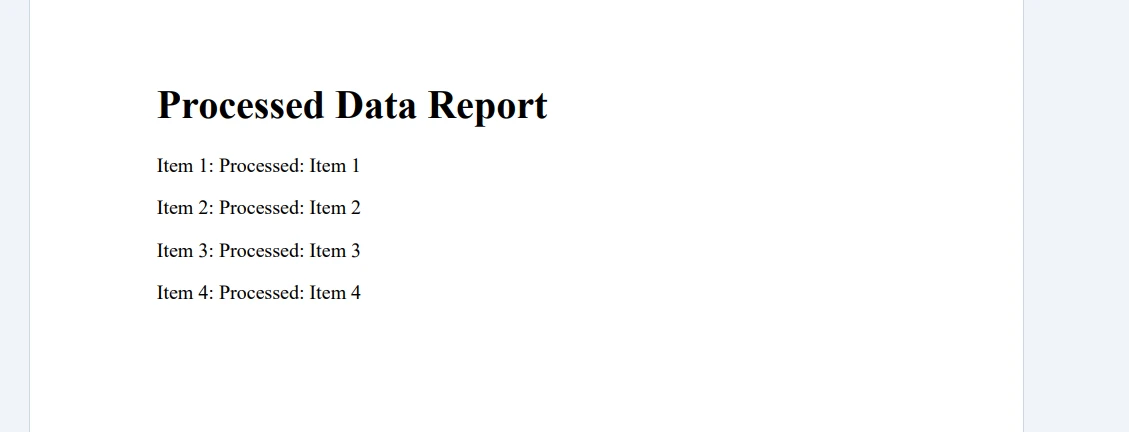
'}以下是程式碼的輸出:
結論
總之,理解與利用C#的併發集合,如併發列表,大幅提高您處理多執行緒情況與確保應用程式執行緒安全的能力。 有了併發集合,您能夠有效地管理共享資源,防止執行緒之間的資料競賽和碰撞。
整合像IronPDF這樣的外部程式庫能進一步增強併發集合的功能,促成視覺上吸引人的PDF報告或文件之生成。 IronPDF提供其程式庫的HTML到PDF轉換免費試用,允許您探索其能力,並提供從$999起的授權選項。
常見問題
什麼是C#中的併發集合?
C#中的併發集合是一組執行緒安全的通用集合類,確保多個執行緒存取共享資源時的執行緒安全。
為什麼在C#中執行緒安全很重要?
執行緒安全在C#中至關重要,以防止混亂及當多個執行緒同時存取和修改共享資源時資料損壞。它確保操作按控制的方式執行。
如何在C#中建立執行緒安全的清單?
雖然C#沒有直接提供執行緒安全的清單類,但您可以使用其他併發集合,如`ConcurrentBag`或`ConcurrentDictionary`,進行類似的執行緒安全操作。
什麼是C#中的ConcurrentDictionary?
C#中的ConcurrentDictionary是`System.Collections.Concurrent`命名空間中的一個執行緒安全集合類。它允許多個執行緒安全地新增、更新和刪除鍵值對。
ConcurrentDictionary如何確保執行緒安全?
ConcurrentDictionary透過內部處理同步來確保執行緒安全,允許一次只有一個執行緒執行如新增或刪除項目的操作。
如何向ConcurrentDictionary新增項目?
您可以使用TryAdd方法向ConcurrentDictionary新增項目,該方法嘗試新增鍵值對,僅當字典中不存在該鍵時。
併發集合中CopyTo方法的目的是什麼?
併發集合中的CopyTo方法用於將集合的元素複製到陣列中,提供一種將資料從集合轉移到其他儲存格式的方法。
IronPDF可以用來從處理過的資料生成PDF報告嗎?
是的,IronPDF可以用來從多執行緒應用程式處理的資料生成PDF報告,捕捉併發操作的結果。
使用IronPDF如何增強併發操作的功能?
IronPDF通過允許根據處理過的資料建立PDF文件,增強了併發操作中的功能,提供了一種記錄和分享多執行緒處理結果的方式。
IronPDF在C#多執行緒應用程式中扮演什麼角色?
IronPDF允許開發者從平行處理的資料生成PDF報告,更容易整合和分享多執行緒操作的結果。










 免費開始
免費開始 免費開始
免費開始 預訂免費直播演示
















