




已更新 2026年4月23日
在 .NET 中用 Microsoft.Extensions.AI 簡化 LLM 整合
AI 正在改變軟體開發,但將大型語言模型 (LLM) 整合到 .NET 中一直很複雜。利用 IronPdf.AI 將 AI 整合推向更遠,為 .NET 應用程式帶來由 OpenAI 驅動的 PDF 解析、資料擷取和內容總結。
閱讀更多

排序是任何程式語言中的一個基本操作,C# 的 OrderBy 方法是一個強大的工具,可以排列集合中的元素。 無論是處理陣列、列表或其他列舉結構,了解如何利用 OrderBy 可以大大增強您的程式碼的可讀性和功能性。
在本文的稍後部分,我們將介紹Iron Software 的 IronPDF 程式庫以及如何使用 LINQ 的 OrderBy 方法和 IronPDF 來生成格式化和排序的 PDF。
OrderBy 方法是 C# 中 LINQ(語言整合查詢)程式庫的一部分,專門設計用來按升序排序元素; 由於這是排序資料的預設方式,因此不需要升序關鍵字。
在 C# 中,有兩種方式可以應用這個方法:通過方法語法或查詢語法。 我們將使用方法語法,因為它很簡單:
var sortedCollection = collection.OrderBy(item => item.OrderByProperty);Dim sortedCollection = collection.OrderBy(Function(item) item.OrderByProperty)在這裡,collection 是您要排序的 IEnumerable 源集合,而 OrderByProperty 是您希望排序元素的屬性或表達式。 在 OrderBy 中的 lambda 表達式指定了排序準則。
要按降序排序,您可以使用方法語法中的 OrderByDescending 方法:
var sortedCollectionDesc = collection.OrderByDescending(item => item.OrderByProperty);Dim sortedCollectionDesc = collection.OrderByDescending(Function(item) item.OrderByProperty)在現實世界的場景中,您經常需要根據多個準則對集合進行排序。 OrderBy 通過連接多個 ThenBy 或 ThenByDescending 調用來允許這樣做:
var multiSortedCollection = collection
    .OrderBy(item => item.OrderByProperty1)
.ThenByDescending(item => item.OrderByProperty2);Dim multiSortedCollection = collection.OrderBy(Function(item) item.OrderByProperty1).ThenByDescending(Function(item) item.OrderByProperty2)在此範例中,集合首先按 OrderByProperty1 升序排序。 然後,對於具有相同 OrderByProperty1 值的元素,它將按 OrderByProperty2 降序排序。
對於更複雜的排序要求,您可以使用自定義比較器。 OrderBy 方法允許您傳遞一個 IComparer<t> 實現,如以下範例所示:
var customSortedCollection = collection.OrderBy(item => item.Property, new CustomComparer());Dim customSortedCollection = collection.OrderBy(Function(item) item.Property, New CustomComparer())在這裡,CustomComparer 是一個實現 IComparer<t> 介面的類,提供了比較元素的自定義邏輯。
using System;
using System.Linq;
using System.Collections.Generic;

class Program
{
    static void Main()
    {
        List<int> numbers = new List<int> { 5, 2, 8, 1, 7 };
        var sortedNumbers = numbers.OrderBy(num => num);
        Console.WriteLine("Sorted Numbers:");
        foreach (var number in sortedNumbers)
        {
            Console.WriteLine(number);
        }
    }
}Imports System
Imports System.Linq
Imports System.Collections.Generic
Friend Class Program
Shared Sub Main()
Dim numbers As New List(Of Integer) From {5, 2, 8, 1, 7}
Dim sortedNumbers = numbers.OrderBy(Function(num) num)
Console.WriteLine("Sorted Numbers:")
For Each number In sortedNumbers
Console.WriteLine(number)
Next number
End Sub
End Class在此範例中,使用 OrderBy 排序一個整數列表使其按升序排列。
using System;
using System.Linq;
using System.Collections.Generic;

class Program
{
    static void Main()
    {
        List<string> names = new List<string> { "Alice", "Charlie", "Bob", "David" };
        var sortedNames = names.OrderBy(name => name);
        Console.WriteLine("Sorted Names:");
        foreach (var name in sortedNames)
        {
            Console.WriteLine(name);
        }
    }
}Imports System
Imports System.Linq
Imports System.Collections.Generic
Friend Class Program
Shared Sub Main()
Dim names As New List(Of String) From {"Alice", "Charlie", "Bob", "David"}
Dim sortedNames = names.OrderBy(Function(name) name)
Console.WriteLine("Sorted Names:")
For Each name In sortedNames
Console.WriteLine(name)
Next name
End Sub
End Class此範例展示了如何按字母順序升序排序一個字串列表。
using System;
using System.Linq;
using System.Collections.Generic;

class Person
{
    public string FirstName { get; set; }
    public string LastName { get; set; }
    public int Age { get; set; }
}

class Program
{
    static void Main()
    {
        List<Person> people = new List<Person>
        {
            new Person { FirstName = "John", LastName = "Doe", Age = 30 },
            new Person { FirstName = "Alice", LastName = "Smith", Age = 25 },
            new Person { FirstName = "Bob", LastName = "Johnson", Age = 35 }
        };
        var sortedPeople = people.OrderBy(person => person.Age);
        Console.WriteLine("Sorted People by Age:");
        foreach (var person in sortedPeople)
        {
            Console.WriteLine($"{person.FirstName} {person.LastName}, Age: {person.Age}");
        }
    }
}Imports System
Imports System.Linq
Imports System.Collections.Generic
Friend Class Person
Public Property FirstName() As String
Public Property LastName() As String
Public Property Age() As Integer
End Class
Friend Class Program
Shared Sub Main()
Dim people As New List(Of Person) From {
New Person With {
.FirstName = "John",
.LastName = "Doe",
.Age = 30
},
New Person With {
.FirstName = "Alice",
.LastName = "Smith",
.Age = 25
},
New Person With {
.FirstName = "Bob",
.LastName = "Johnson",
.Age = 35
}
}
Dim sortedPeople = people.OrderBy(Function(person) person.Age)
Console.WriteLine("Sorted People by Age:")
For Each person In sortedPeople
Console.WriteLine($"{person.FirstName} {person.LastName}, Age: {person.Age}")
Next person
End Sub
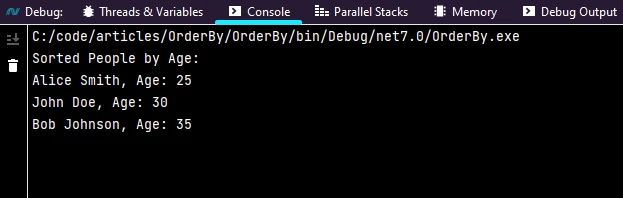
End Class在此範例中,將一個自定義的 Person 物件列表根據 Age 屬性按升序排序。
以下輸出可在控制台中看到:
在處理字串屬性時,您可能希望確保不區分大小寫的排序:
var sortedPeopleByName = people.OrderBy(person => person.LastName, StringComparer.OrdinalIgnoreCase);Dim sortedPeopleByName = people.OrderBy(Function(person) person.LastName, StringComparer.OrdinalIgnoreCase)此範例使用 StringComparer.OrdinalIgnoreCase 以不區分大小寫的方式根據 LastName 屬性進行排序。
儘管 LINQ 提供了一種簡潔的方法來排序集合,但對於大型資料集來說,考慮性能影響是很重要的。 對於性能關鍵的場景,您可能會探索使用 List<t>.Sort 方法進行就地排序的替代方案。
發現來自Iron Software 的 C# PDF 程式庫中的 IronPDF 功能,它有助於閱讀和生成 PDF 文件。 它可以輕鬆地將帶有樣式資訊的格式化文件轉換為 PDF。 IronPDF 可以從 HTML 字串生成 PDF,或從 URL 下載 HTML 然後生成 PDF。
IronPDF 在將 HTML 轉換為 PDF 方面表現優異,可以保持所有佈局和樣式。 它可以從各種網頁內容(如報告、發票和文件)生成 PDF。 該工具可以使用 HTML 文件、網址和 HTML 字串來建立 PDF 文件。
using IronPdf;

class Program
{
    static void Main(string[] args)
    {
        var renderer = new ChromePdfRenderer();

        // 1. Convert HTML String to PDF
        var htmlContent = "<h1>Hello, IronPDF!</h1><p>This is a PDF from an HTML string.</p>";
        var pdfFromHtmlString = renderer.RenderHtmlAsPdf(htmlContent);
        pdfFromHtmlString.SaveAs("HTMLStringToPDF.pdf");

        // 2. Convert HTML File to PDF
        var htmlFilePath = "path_to_your_html_file.html"; // Specify the path to your HTML file
        var pdfFromHtmlFile = renderer.RenderHtmlFileAsPdf(htmlFilePath);
        pdfFromHtmlFile.SaveAs("HTMLFileToPDF.pdf");

        // 3. Convert URL to PDF
        var url = "http://ironpdf.com"; // Specify the URL
        var pdfFromUrl = renderer.RenderUrlAsPdf(url);
        pdfFromUrl.SaveAs("URLToPDF.pdf");
    }
}Imports IronPdf
Friend Class Program
Shared Sub Main(ByVal args() As String)
Dim renderer = New ChromePdfRenderer()
' 1. Convert HTML String to PDF
Dim htmlContent = "<h1>Hello, IronPDF!</h1><p>This is a PDF from an HTML string.</p>"
Dim pdfFromHtmlString = renderer.RenderHtmlAsPdf(htmlContent)
pdfFromHtmlString.SaveAs("HTMLStringToPDF.pdf")
' 2. Convert HTML File to PDF
Dim htmlFilePath = "path_to_your_html_file.html" ' Specify the path to your HTML file
Dim pdfFromHtmlFile = renderer.RenderHtmlFileAsPdf(htmlFilePath)
pdfFromHtmlFile.SaveAs("HTMLFileToPDF.pdf")
' 3. Convert URL to PDF
Dim url = "http://ironpdf.com" ' Specify the URL
Dim pdfFromUrl = renderer.RenderUrlAsPdf(url)
pdfFromUrl.SaveAs("URLToPDF.pdf")
End Sub
End ClassIronPDF 可以使用 NuGet 包管理控制台 或使用 Visual Studio 的包管理器進行安裝。
您也可以通過在搜尋欄中搜尋 "IronPDF" 來使用 NuGet Package Manager 安裝 IronPDF。

以下是使用 HTML 字串和 IronPDF 生成 PDF 報告的程式碼:
// See https://aka.ms/new-console-template for more information

using IronPdf;
using System;
using System.Collections.Generic;
using System.Linq;

class Person
{
    public string FirstName { get; set; }
    public string LastName { get; set; }
    public int Age { get; set; }
}

class Program
{
    static void Main()
    {
        List<Person> people = new List<Person>
        {
            new Person { FirstName = "John", LastName = "Doe", Age = 30 },
            new Person { FirstName = "Alice", LastName = "Smith", Age = 25 },
            new Person { FirstName = "Bob", LastName = "Johnson", Age = 35 }
        };

        // Sort people by age
        var sortedPeople = people.OrderBy(person => person.Age);

        string name = "Sam";
        var count = people.Count;

        // Generate an HTML string
        string content = $@"<!DOCTYPE html>
<html>
<body>
<h1>Hello, {name}!</h1>
<p>You have {count} people sorted by Age.</p>
" + string.Join("\n", sortedPeople.Select(person => $"{person.FirstName} {person.LastName}, Age: {person.Age}"))
+ @"
</body>
</html>";

        // Create a new PDF document and save it
        var pdfDocument = new ChromePdfRenderer();
        pdfDocument.RenderHtmlAsPdf(content).SaveAs("personByAge.pdf");
    }
}' See https://aka.ms/new-console-template for more information
Imports IronPdf
Imports System
Imports System.Collections.Generic
Imports System.Linq
Class Person
Public Property FirstName As String
Public Property LastName As String
Public Property Age As Integer
End Class
Class Program
Shared Sub Main()
Dim people As New List(Of Person) From {
New Person With {.FirstName = "John", .LastName = "Doe", .Age = 30},
New Person With {.FirstName = "Alice", .LastName = "Smith", .Age = 25},
New Person With {.FirstName = "Bob", .LastName = "Johnson", .Age = 35}
}
' Sort people by age
Dim sortedPeople = people.OrderBy(Function(person) person.Age)
Dim name As String = "Sam"
Dim count = people.Count
' Generate an HTML string
Dim content As String = $"<!DOCTYPE html>
<html>
<body>
<h1>Hello, {name}!</h1>
<p>You have {count} people sorted by Age.</p>
" & String.Join(vbLf, sortedPeople.Select(Function(person) $"{person.FirstName} {person.LastName}, Age: {person.Age}")) & "
</body>
</html>"
' Create a new PDF document and save it
Dim pdfDocument As New ChromePdfRenderer()
pdfDocument.RenderHtmlAsPdf(content).SaveAs("personByAge.pdf")
End Sub
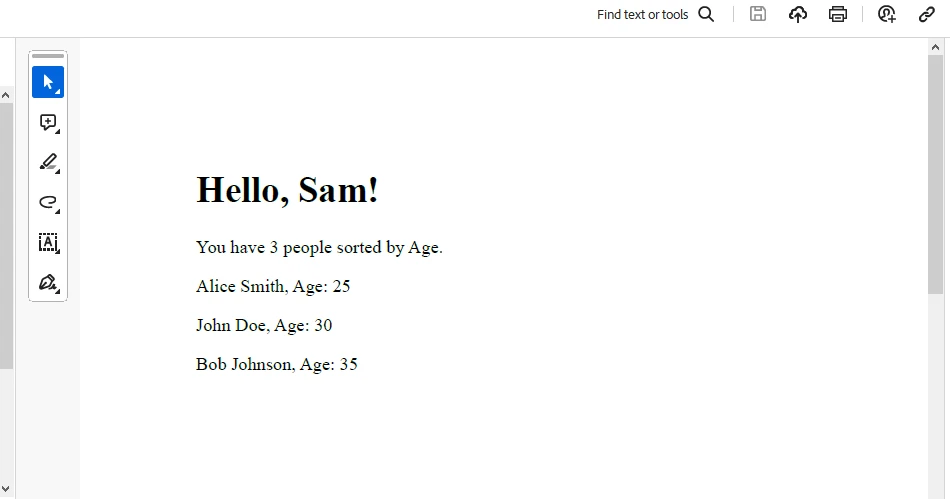
End Class在這裡,我們首先從 sortedPeople 生成一個按升序排列的 HTML 字串,並提供報告所需的所有格式。 然後我們使用 IronPDF 生成一個 PDF 文件。 我們使用 RenderHtmlAsPdf 方法將 HTML 字串轉換為 PDF 文件。
以下輸出在 PDF 中可用:
試用鑰匙可以從 IronPDF 試用授權 中獲得。 此鑰匙需要放在 appsettings.json 中。
"IronPdf.LicenseKey": "your license key"提供您的電子郵件以獲取試用許可。
C# 中的 OrderBy 方法是根據各種準則排序集合的多功能工具。 無論您是按升序還是降序排序,單一或多個準則排序,或使用自定義比較器,掌握 OrderBy 可以顯著提高您的程式碼的清晰度和效率。
與用於生成 PDF 文件的 IronPDF 程式庫 一起,它是一個很好的組合,可以作為文件生成一個精美格式化和排序的集合。

Jacob Mellor是Iron Software的首席技術官,一位在C# PDF技術上開創先河的遠見工程師。作為Iron Software核心程式碼庫的原開發者,他從創立以來就一直在塑造公司的產品架構,與首席執行官Cameron Rimington一起將公司轉變為服務於NASA、特斯拉和全球政府公司的50多名人員的公司。



IronPDF 是 IRONSUITE 的一部分
10 款適用於辦公室文件的 .NET API 產品

當您需要您的PDF看起來像HTML一樣快速。












