




已更新 2026年9月4日
產生每月帳戶報表(PDF 文件)
using IronPDF C# PDF 庫,開發人員可以在 .NET 專案中將 HTML 轉換為可靠的 PDF 文件,而無需依賴外部服務。
閱讀更多

從您的位元組陣列建立PdfDocument.Merge()將它們合併為一個單一的PDF而不保存到磁碟中。 此方法自動處理複雜的PDF結構,允許您合併儲存在資料庫中的文件或從API接收的文件,而無需寫入臨時文件。
在現代C#應用程式中,使用儲存為位元組陣列的PDF文件是很常見的。 無論您是從資料庫中取回PDF文件,從網路服務接收它們,或者在記憶體中處理它們,將多個PDF文件合併為一個而不保存到磁碟中對於企業工作流程是至關重要的。 IronPDF透過直觀的API使之變得簡單。 在本文中,您將學習如何在C#中合併PDF位元組陣列,研究不同的方法,包括MemoryStream處理和真實的資料庫模式。
位元組陣列是在記憶體中表示PDF文件的原始二進位資料。 當在C#中處理PDF文件時,您經常會遇到文件以位元組陣列而非磁碟上的形式存在的情形。 這種情形特別常見於從資料庫中檢索文件時,其中的PDF是以二進位欄儲存的,或從REST API接收文件時。
MemoryStream功能在.NET中(在Microsoft MemoryStream參考資料裡有記載)使得處理這些位元組陣列變得高效,特別是在大文件的正確記憶體管理配合下。 與其寫入臨時文件,不如完全在記憶體中載入、處理和保存PDF——這樣更快、更乾淨,並且避免了檔案系統許可權問題。
簡單地連接兩個PDF位元組陣列是行不通的。 與普通文字文件不同,PDF文件具有複雜的內部結構,包括標頭、交叉參考表和特定的格式約定。 ISO 32000 PDF規範定義了關於文件結構的複雜規則,包括元資料、字體嵌入和加密層。 直接連接字節會產生損毀的文件。您需要一個合適的PDF庫來解析這些位元組陣列並正確組合它們,同時保持所有結構完整性。
IronPDF內部處理所有這些複雜性。 使用少量程式碼即可合併PDF文件,同時精確保留字體、圖片和格式,就像它們在源文件中一樣。
此方法在以下情況下效果最好:
在使用Azure Blob Storage或類似雲服務時,位元組陣列操作變得至關重要,因為您下載原始字節,處理它們,再上傳結果——全過程不接觸文件系統。
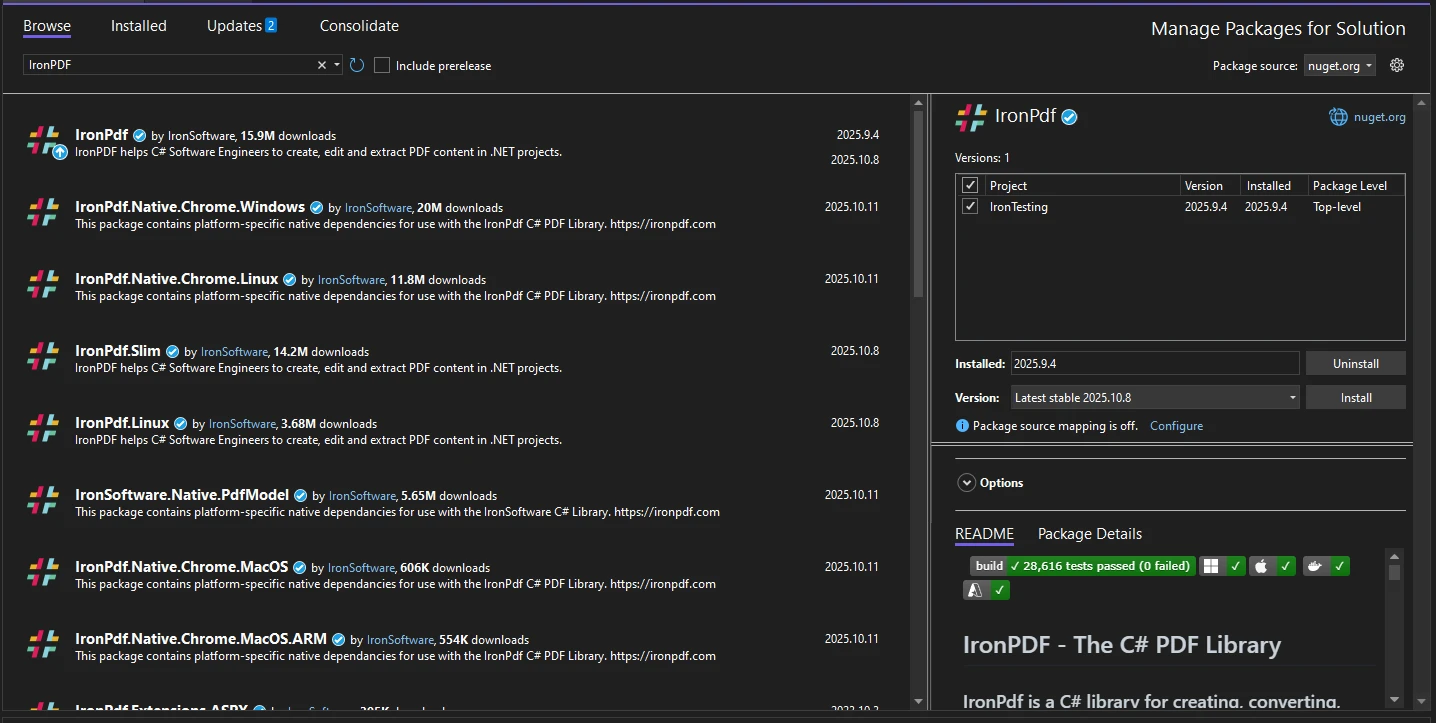
開始時需要將IronPDF NuGet套件新增到您的專案中。 該套件可在NuGet.org上獲得。 您可以使用Package Manager Console或.NET CLI安裝它:
有關詳細安裝選項(包括Docker部署或Linux設置),請參考高級安裝指南。 如果您要部署到一個最小的環境,IronPDF Slim能顯著減少部署佔用空間。
安裝後,請在您的C#文件頂部新增以下命名空間:
using IronPdf;
using System.IO;
using System.Collections.Generic;Imports IronPdf
Imports System.IO
Imports System.Collections.GenericIronPDF支持Windows、macOS和Linux 平台。 它與ASP.NET Core、Blazor、控制台應用程式和雲環境整合,無需任何額外配置。

這是展示如何將兩個PDF位元組陣列合併成單一PDF文件的完整範例:
// Simulate two PDF byte arrays (in practice, these come from a database or API)
byte[] pdfBytes1 = File.ReadAllBytes("document1.pdf");
byte[] pdfBytes2 = File.ReadAllBytes("document2.pdf");

// Create PdfDocument objects from byte arrays
var pdf1 = new PdfDocument(pdfBytes1);
var pdf2 = new PdfDocument(pdfBytes2);

// Merge the two PDF documents
PdfDocument combinedPdf = PdfDocument.Merge(pdf1, pdf2);

// Convert the combined PDF back to a byte array
byte[] mergedPdfBytes = combinedPdf.BinaryData;

// Optionally save the merged PDF to disk
File.WriteAllBytes("merged.pdf", mergedPdfBytes);Imports System.IO
' Simulate two PDF byte arrays (in practice, these come from a database or API)
Dim pdfBytes1 As Byte() = File.ReadAllBytes("document1.pdf")
Dim pdfBytes2 As Byte() = File.ReadAllBytes("document2.pdf")
' Create PdfDocument objects from byte arrays
Dim pdf1 As New PdfDocument(pdfBytes1)
Dim pdf2 As New PdfDocument(pdfBytes2)
' Merge the two PDF documents
Dim combinedPdf As PdfDocument = PdfDocument.Merge(pdf1, pdf2)
' Convert the combined PDF back to a byte array
Dim mergedPdfBytes As Byte() = combinedPdf.BinaryData
' Optionally save the merged PDF to disk
File.WriteAllBytes("merged.pdf", mergedPdfBytes)PdfDocument類直接在其構造函式中接受原始位元組陣列。 一旦您擁有兩個PdfDocument.Merge()便將它們合併成一個單一文件。 BinaryData屬性將結果作為位元組陣列重新提交,準備存回資料庫或通過API傳輸。
PdfDocument API提供比單純合併更全面的功能,包括頁面操作、文字提取及表單處理。 一旦您獲得合併後的文件,您可以在提取最終位元組陣列之前應用任何這些操作。
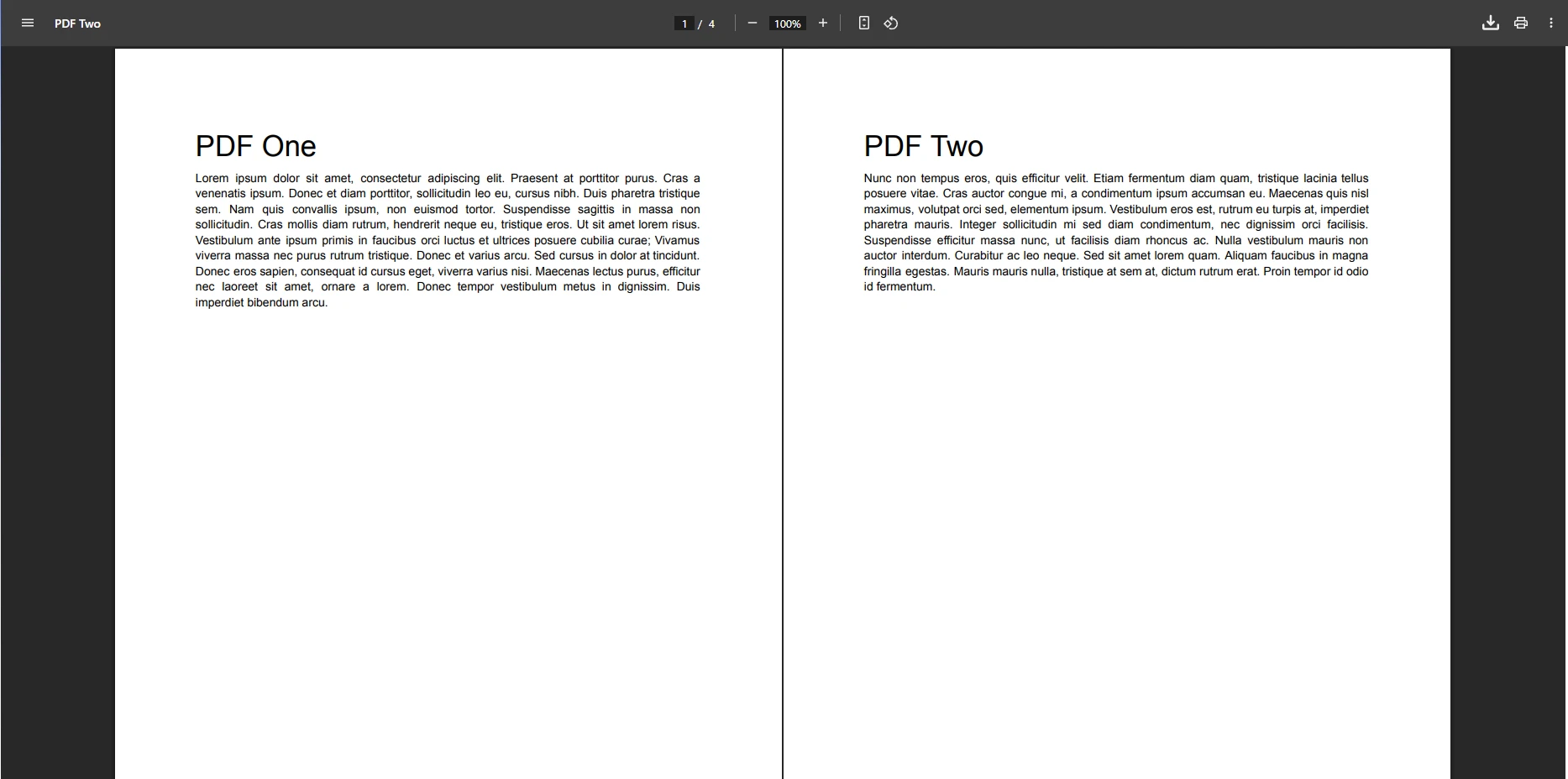
輸出是一個包含所有頁面的單一PDF文件,來源文件的順序與傳遞給Merge()的順序相同。 頁碼、字體、圖片和嵌入內容都被保留。 合併後的文件的行為與任何其他PDF相同——您可以使用相同的IronPDF方法對其進行分頁、註釋、簽名或壓縮。
當您將位元組陣列傳遞給PdfDocument構造函式時,IronPDF解析二進位資料並建立PDF結構的記憶體表示。 PdfDocument.Merge()方法通過順序附加每個來源的頁面來合併多個文件,重建交叉參考表,解決文件之間的字體或資源名稱沖突。
這就是為什麼您不能簡單地連接位元組陣列——第一個PDF中的交叉參考表指向文件中的偏移。在連接之後,那些偏移因第二個文件而移位變得無效。 IronPDF正確地重建整個結構,結果是一個有效的、格式良好的PDF。
IronPDF提供List重載,用於在單次操作中合併任何數量的文件。 這比將多個兩文件合併鏈起來更高效:
// Load four PDFs as byte arrays
List<byte[]> pdfByteArrays = new List<byte[]>
{
    File.ReadAllBytes("example1.pdf"),
    File.ReadAllBytes("example2.pdf"),
    File.ReadAllBytes("example3.pdf"),
    File.ReadAllBytes("example4.pdf")
};

// Convert each byte array to a PdfDocument
List<PdfDocument> pdfsToMerge = new List<PdfDocument>();
for (int i = 0; i < pdfByteArrays.Count; i++)
{
    pdfsToMerge.Add(new PdfDocument(pdfByteArrays[i]));
}

// Merge all documents in one call
PdfDocument combinedPdf = PdfDocument.Merge(pdfsToMerge);
byte[] finalPdfBytes = combinedPdf.BinaryData;

// Apply compression if the result is large
if (finalPdfBytes.Length > 1024 * 1024 * 10) // 10 MB
{
    combinedPdf.CompressImages(90);
    finalPdfBytes = combinedPdf.BinaryData;
}Imports System.IO
' Load four PDFs as byte arrays
Dim pdfByteArrays As New List(Of Byte()) From {
File.ReadAllBytes("example1.pdf"),
File.ReadAllBytes("example2.pdf"),
File.ReadAllBytes("example3.pdf"),
File.ReadAllBytes("example4.pdf")
}
' Convert each byte array to a PdfDocument
Dim pdfsToMerge As New List(Of PdfDocument)()
For i As Integer = 0 To pdfByteArrays.Count - 1
pdfsToMerge.Add(New PdfDocument(pdfByteArrays(i)))
Next
' Merge all documents in one call
Dim combinedPdf As PdfDocument = PdfDocument.Merge(pdfsToMerge)
Dim finalPdfBytes As Byte() = combinedPdf.BinaryData
' Apply compression if the result is large
If finalPdfBytes.Length > 1024 * 1024 * 10 Then ' 10 MB
combinedPdf.CompressImages(90)
finalPdfBytes = combinedPdf.BinaryData
End If此方法能伸縮至任何數量的文件。 每個PDF被載入到一個PdfDocument物件中,新增到一個列表中,然後以單次調用合併。 對於大型輸出文件,PDF壓縮減少最終尺寸而不損失重要品質。
MemoryStream方法在與流而非位元組陣列一起工作的其他.NET庫整合時給了您更多控制。 當您已經有可用的流時(例如,從HTTP回應或BLOB儲存SDK中獲得):
using (var stream1 = new MemoryStream(pdfBytes1))
using (var stream2 = new MemoryStream(pdfBytes2))
{
    var pdf1 = new PdfDocument(stream1);
    var pdf2 = new PdfDocument(stream2);

    var merged = PdfDocument.Merge(pdf1, pdf2);

    // Add metadata to the merged document
    merged.MetaData.Author = "Your Application";
    merged.MetaData.Title = "Merged Document";
    merged.MetaData.CreationDate = DateTime.Now;

    byte[] result = merged.BinaryData;
}Imports System.IO
Using stream1 As New MemoryStream(pdfBytes1)
Using stream2 As New MemoryStream(pdfBytes2)
Dim pdf1 = New PdfDocument(stream1)
Dim pdf2 = New PdfDocument(stream2)
Dim merged = PdfDocument.Merge(pdf1, pdf2)
' Add metadata to the merged document
merged.MetaData.Author = "Your Application"
merged.MetaData.Title = "Merged Document"
merged.MetaData.CreationDate = DateTime.Now
Dim result As Byte() = merged.BinaryData
End Using
End Using您可以在提取最終字節之前為合併後的文件新增元資料,水印或數位簽名。 在合規情景中,考慮PDF/A轉換進行長期歸檔或PDF/UA合規以滿足無障礙需求。
基於流的處理提供了對更大PDF文件的更好記憶體管理,並且能夠與雲儲存SDK進行乾淨的整合。 此方法對於高吞吐服務中的異步模式尤其實用。
常見的實際應用模式包括從SQL資料庫中獲取PDF位元組陣列並按需合併它們。 這是一個帶有錯誤處理的生產就緒範例:
public string MergePdfDocumentsFromDatabase(List<int> documentIds)
{
    List<PdfDocument> documents = new List<PdfDocument>();

    try
    {
        foreach (int id in documentIds)
        {
            // Fetch PDF byte array from database
            byte[] pdfData = GetPdfFromDatabase(id); // Replace with your data access logic

            if (pdfData == null || pdfData.Length == 0)
            {
                Console.WriteLine($"Warning: Document {id} is empty or not found");
                continue;
            }

            documents.Add(new PdfDocument(pdfData));
        }

        if (documents.Count == 0)
        {
            return "Error: No valid documents found to merge";
        }

        // Merge all documents
        PdfDocument mergedDocument = PdfDocument.Merge(documents);

        // Add page numbers to the footer
        mergedDocument.AddHtmlFooters(new HtmlHeaderFooter()
        {
            HtmlFragment = "<center>Page {page} of {total-pages}</center>",
            DrawDividerLine = true
        });

        // Save back to the database
        byte[] resultBytes = mergedDocument.BinaryData;
        SaveMergedPdfToDatabase(resultBytes);

        return "Document successfully combined and saved.";
    }
    catch (Exception ex)
    {
        Console.WriteLine($"Error merging PDFs: {ex.Message}");
        return $"Merge failed: {ex.Message}";
    }
}Imports System
Public Function MergePdfDocumentsFromDatabase(documentIds As List(Of Integer)) As String
Dim documents As New List(Of PdfDocument)()
Try
For Each id As Integer In documentIds
' Fetch PDF byte array from database
Dim pdfData As Byte() = GetPdfFromDatabase(id) ' Replace with your data access logic
If pdfData Is Nothing OrElse pdfData.Length = 0 Then
Console.WriteLine($"Warning: Document {id} is empty or not found")
Continue For
End If
documents.Add(New PdfDocument(pdfData))
Next
If documents.Count = 0 Then
Return "Error: No valid documents found to merge"
End If
' Merge all documents
Dim mergedDocument As PdfDocument = PdfDocument.Merge(documents)
' Add page numbers to the footer
mergedDocument.AddHtmlFooters(New HtmlHeaderFooter() With {
.HtmlFragment = "<center>Page {page} of {total-pages}</center>",
.DrawDividerLine = True
})
' Save back to the database
Dim resultBytes As Byte() = mergedDocument.BinaryData
SaveMergedPdfToDatabase(resultBytes)
Return "Document successfully combined and saved."
Catch ex As Exception
Console.WriteLine($"Error merging PDFs: {ex.Message}")
Return $"Merge failed: {ex.Message}"
End Try
End Function此模式優雅地處理缺失或空的記錄,通過略過它們而繼續進行有效文件的合併。 合併結果在寫回資料庫之前通過HTML標頭/頁腳新增頁碼。 若需要更高級的導航,您可以新增書籤,以幫助讀者導航一個長的合併文件。
上述模式適用於發票、報告、合同或者任何以二進位欄儲存的文件。 主要優勢:
在建設PDF合併工作流程時,值得防範幾種故障模式:
pdfData != null && pdfData.Length > 0。PdfDocument對像。這是一個帶有輸入驗證的可靠模式:
public bool TryMergePdfByteArrays(byte[] pdfBytes1, byte[] pdfBytes2, out byte[] mergedBytes)
{
    mergedBytes = null;

    try
    {
        if (pdfBytes1 == null || pdfBytes1.Length == 0)
            throw new ArgumentException("First PDF byte array is null or empty");

        if (pdfBytes2 == null || pdfBytes2.Length == 0)
            throw new ArgumentException("Second PDF byte array is null or empty");

        using var pdf1 = new PdfDocument(pdfBytes1);
        using var pdf2 = new PdfDocument(pdfBytes2);

        if (pdf1.PageCount == 0)
            throw new InvalidOperationException("First PDF has no pages");

        if (pdf2.PageCount == 0)
            throw new InvalidOperationException("Second PDF has no pages");

        var mergedPdf = PdfDocument.Merge(pdf1, pdf2);
        mergedBytes = mergedPdf.BinaryData;

        return true;
    }
    catch (Exception ex)
    {
        Console.WriteLine($"PDF merge failed: {ex.Message}");
        return false;
    }
}Imports System
Public Function TryMergePdfByteArrays(pdfBytes1 As Byte(), pdfBytes2 As Byte(), ByRef mergedBytes As Byte()) As Boolean
mergedBytes = Nothing
Try
If pdfBytes1 Is Nothing OrElse pdfBytes1.Length = 0 Then
Throw New ArgumentException("First PDF byte array is null or empty")
End If
If pdfBytes2 Is Nothing OrElse pdfBytes2.Length = 0 Then
Throw New ArgumentException("Second PDF byte array is null or empty")
End If
Using pdf1 As New PdfDocument(pdfBytes1)
Using pdf2 As New PdfDocument(pdfBytes2)
If pdf1.PageCount = 0 Then
Throw New InvalidOperationException("First PDF has no pages")
End If
If pdf2.PageCount = 0 Then
Throw New InvalidOperationException("Second PDF has no pages")
End If
Dim mergedPdf = PdfDocument.Merge(pdf1, pdf2)
mergedBytes = mergedPdf.BinaryData
Return True
End Using
End Using
Catch ex As Exception
Console.WriteLine($"PDF merge failed: {ex.Message}")
Return False
End Try
End FunctionPdfDocument物件被正確處置,即使發生異常也能釋放未管理的資源。 TryXxx模式返回布林成功指標而不是拋出,使其易於從處理多個文件的高層程式碼中調用。
幾個習慣減少了生產中的故障風險:
using進行處置:IronPDF文件持有本機資源。 總是處置它們,無論是與Dispose()調用。| 方法 | 最佳適用於 | 記憶體使用 | 靈活性 |
|---|---|---|---|
| 直接位元組陣列(兩個文件) | 簡單的兩文件合併 | 低 | 基礎 |
| List<PdfDocument> overload | 批量合併多個文件 | 中 | 高 |
| MemoryStream構造函式 | 基於流的整合 | 低 | 高 |
| 資料庫提取模式 | 生產文件工作流程 | 中 | 非常高 |
IronPDF提供功能齊全的免費試用,讓您能在實際應用中測試PDF合併,之後再選擇是否訂購授權。 試用包含完整API——合併、拆分、轉換、註釋、簽名等等——在評估期間沒有功能限制。
對於生產使用,授權選項從單一開發者授權到企業站點授權涵蓋無限制部署。 管理高量工作流程的組織可以探索OEM授權以便於再分發情境。
除合併外,IronPDF涵蓋完整的PDF處理生命周期:HTML轉PDF轉換,PDF編輯,表單建立和填寫,文字提取,數位簽名,以及安全管理。 一旦您讓合併工作流正常運作,這些功能不需要任何其他依賴就能插入。
造訪IronPDF教程頁面探索每項主要功能的完整演練,或查閱API參考以獲得每個類和方法的詳細文件。
 使用NuGet安裝
Curtis Chau擁有Carleton大學的電腦科學學士學位,專精於前端開發,擁有Node.js、TypeScript、JavaScript和React的專業知識。Curtis熱衷於建立直觀且美觀的使用者介面,喜愛使用現代框架並建立結構良好、視覺吸引力的手冊。

IronPDF 是 IRONSUITE 的一部分
10 款適用於辦公室文件的 .NET API 產品

當您需要您的PDF看起來像HTML一樣快速。














