


Batch Converting Legacy HTML Content to PDF in a Migration

The Problem With Preserving HTML Content at Scale
 When an organization decommissions a legacy CMS, intranet, or public-facing portal, the content on it doesn't simply stop mattering. A hospital retiring a patient health article database still needs those articles preserved: a government agency redesigning its website must retain public notices that existed at a specific point in time, a law firm shutting down a case research platform needs every page converted into a format that holds up in a legal hold.
The scale is where every manual approach fails. Browser-based print-to-PDF works for one document. It is not a solution for 10,000. Scripting a headless browser works until you hit malformed HTML, missing assets, or authentication wall, and legacy content is rarely clean.
Existing batch conversion tools have a similar problem with old markup: inline styles from 2005, non-standard table layouts, image references to paths that no longer resolve. They either fail silently, produce PDFs with broken layouts, or require manual remediation per page. Meanwhile, IT teams can't justify keeping legacy infrastructure online indefinitely just to support a migration that should have finished months ago.
The output also needs to be consistent. A hospital archiving health articles, a financial institution preserving disclosure pages for regulatory compliance, a law firm building a retention archive, all of them need the resulting PDFs to look like they came from the same system, not a collection of one-off browser exports. For this tutorial, we'll walk you through an IronPDF example for how this library can help elevate your project workflows.
The Solution: Automated HTML to PDF Batch Conversion With IronPDF
Iron Software's own IronPDF lets .NET applications batch-convert HTML files, HTML strings, or live URLs into standardized PDFs in a single automated run. A migration script reads from a source: a directory of HTML files, a database of HTML blobs, or a list of URLs to capture before the old server goes offline, feeds each page to ChromePdfRenderer, and writes the output to an archive destination.
The Chromium-based rendering engine handles inconsistent markup, inline styles, and embedded assets the way a browser would, producing a visually faithful snapshot regardless of how the original HTML was written. There are no browser automation hacks to maintain and no per-document API costs that make a 50,000-page archive prohibitively expensive. The conversion runs inside a .NET console application or background service, one NuGet package, no external processes.
How It Works in Practice: C# PDF Document Creation
1. The Migration Script Enumerates Source Content
The script is typically a console application built for the migration, one-time run or a repeatable job for incremental content sets. It starts by enumerating the source: a directory of .html files on disk, a database table with HTML blobs and metadata (original URL, creation date, content ID), or a flat list of live web pages to capture before the old server goes offline.
For database sources, the query returns both the HTML content and the metadata that will populate the archive manifest. For URL lists, the order of processing can be sorted by priority, high-traffic pages or legally sensitive content captured first.
2. Stylesheet Injection Normalizes Output
Legacy HTML is inconsistent by nature. Pages from different eras of the same CMS can have different base font sizes, margin conventions, and layout assumptions. Before rendering, the script optionally prepends a standardized <style> block to each HTML string — setting uniform margins, a consistent body font, and a fixed page width — so that every archived PDF document shares the same visual baseline regardless of how the original was styled.
This normalization step is the difference between an archive that looks like a coherent document collection and one that looks like a random assortment of browser captures.
3. ChromePdfRenderer Converts Each Page to PDF File
For HTML files on disk or HTML strings from a database, RenderHtmlAsPdf() handles the conversion. A BaseUrlPath parameter resolves relative image and stylesheet references against the original file's directory, preserving embedded assets:
using IronPdf;

var renderer = new ChromePdfRenderer();

renderer.RenderingOptions.PaperSize = IronPdf.Rendering.PdfPaperSize.A4;

renderer.RenderingOptions.MarginTop = 20;

renderer.RenderingOptions.MarginBottom = 20;

string sourceDir = @"C:\LegacyContent\html";

string archiveDir = @"C:\Archive\pdf";

Directory.CreateDirectory(archiveDir);

foreach (string htmlFile in Directory.EnumerateFiles(sourceDir, "*.html"))
{
    string html = File.ReadAllText(htmlFile);
    PdfDocument pdf = renderer.RenderHtmlAsPdf(html, sourceDir);
    string outputPath = Path.Combine(archiveDir,
        Path.GetFileNameWithoutExtension(htmlFile) + ".pdf");

    pdf.SaveAs(outputPath);
    Console.WriteLine($"Archived: {outputPath}");
}
using IronPdf;

var renderer = new ChromePdfRenderer();

renderer.RenderingOptions.PaperSize = IronPdf.Rendering.PdfPaperSize.A4;

renderer.RenderingOptions.MarginTop = 20;

renderer.RenderingOptions.MarginBottom = 20;

string sourceDir = @"C:\LegacyContent\html";

string archiveDir = @"C:\Archive\pdf";

Directory.CreateDirectory(archiveDir);

foreach (string htmlFile in Directory.EnumerateFiles(sourceDir, "*.html"))
{
    string html = File.ReadAllText(htmlFile);
    PdfDocument pdf = renderer.RenderHtmlAsPdf(html, sourceDir);
    string outputPath = Path.Combine(archiveDir,
        Path.GetFileNameWithoutExtension(htmlFile) + ".pdf");

    pdf.SaveAs(outputPath);
    Console.WriteLine($"Archived: {outputPath}");
}
Imports IronPdf
Imports System.IO

Dim renderer As New ChromePdfRenderer()

renderer.RenderingOptions.PaperSize = IronPdf.Rendering.PdfPaperSize.A4

renderer.RenderingOptions.MarginTop = 20

renderer.RenderingOptions.MarginBottom = 20

Dim sourceDir As String = "C:\LegacyContent\html"

Dim archiveDir As String = "C:\Archive\pdf"

Directory.CreateDirectory(archiveDir)

For Each htmlFile As String In Directory.EnumerateFiles(sourceDir, "*.html")
    Dim html As String = File.ReadAllText(htmlFile)
    Dim pdf As PdfDocument = renderer.RenderHtmlAsPdf(html, sourceDir)
    Dim outputPath As String = Path.Combine(archiveDir, Path.GetFileNameWithoutExtension(htmlFile) & ".pdf")

    pdf.SaveAs(outputPath)
    Console.WriteLine($"Archived: {outputPath}")
NextHTML Files converted to PDF Format

Example Output: HTML File vs. Output PDF
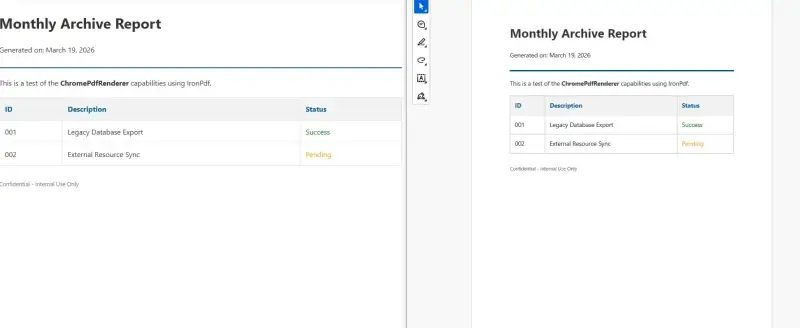 For live URLs, pages that still need to be captured from the running server before decommission, RenderUrlAsPdf() handles each request. Parallel batching keeps the run time manageable across large URL sets:
using IronPdf;

var renderer = new ChromePdfRenderer();

int completed = 0, failed = 0;

await Parallel.ForEachAsync(urlList,
    new ParallelOptions { MaxDegreeOfParallelism = 4 },
    async (url, _) =>
    {
        try
        {
            PdfDocument pdf = renderer.RenderUrlAsPdf(url);
            string filename = Uri.EscapeDataString(url).Replace("%", "_") + ".pdf";
            pdf.SaveAs(Path.Combine(@"C:\Archive\pdf", filename));
            Interlocked.Increment(ref completed);
        }
        catch (Exception ex)
        {
            Interlocked.Increment(ref failed);
            Console.Error.WriteLine($"Failed: {url} — {ex.Message}");
        }
        Console.WriteLine($"Progress: {completed} completed, {failed} failed");
    });
using IronPdf;

var renderer = new ChromePdfRenderer();

int completed = 0, failed = 0;

await Parallel.ForEachAsync(urlList,
    new ParallelOptions { MaxDegreeOfParallelism = 4 },
    async (url, _) =>
    {
        try
        {
            PdfDocument pdf = renderer.RenderUrlAsPdf(url);
            string filename = Uri.EscapeDataString(url).Replace("%", "_") + ".pdf";
            pdf.SaveAs(Path.Combine(@"C:\Archive\pdf", filename));
            Interlocked.Increment(ref completed);
        }
        catch (Exception ex)
        {
            Interlocked.Increment(ref failed);
            Console.Error.WriteLine($"Failed: {url} — {ex.Message}");
        }
        Console.WriteLine($"Progress: {completed} completed, {failed} failed");
    });
Imports IronPdf
Imports System.IO
Imports System.Threading
Imports System.Threading.Tasks

Dim renderer As New ChromePdfRenderer()

Dim completed As Integer = 0
Dim failed As Integer = 0

Await Parallel.ForEachAsync(urlList,
    New ParallelOptions With {.MaxDegreeOfParallelism = 4},
    Async Function(url, _) As Task
        Try
            Dim pdf As PdfDocument = renderer.RenderUrlAsPdf(url)
            Dim filename As String = Uri.EscapeDataString(url).Replace("%", "_") & ".pdf"
            pdf.SaveAs(Path.Combine("C:\Archive\pdf", filename))
            Interlocked.Increment(completed)
        Catch ex As Exception
            Interlocked.Increment(failed)
            Console.Error.WriteLine($"Failed: {url} — {ex.Message}")
        End Try
        Console.WriteLine($"Progress: {completed} completed, {failed} failed")
End Function)Files Generated from URLs

Example Output
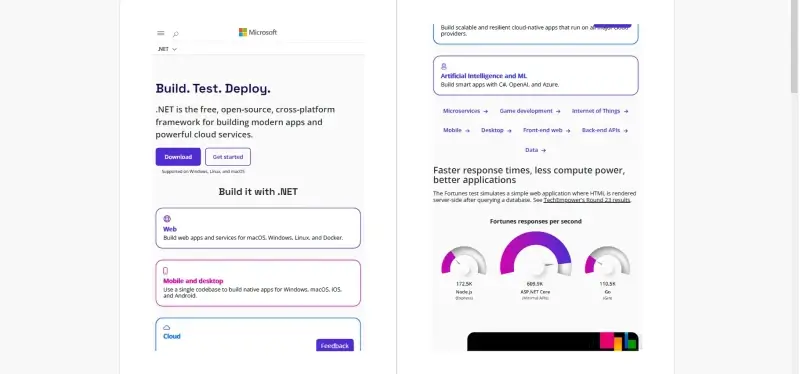 Each output PDF is saved to a folder structure mirroring the original site hierarchy, with a manifest file recording the original URL, conversion timestamp, and output path for every document processed.
Real-World Benefits
Throughput. IronPDF renders each page in milliseconds. A 10,000-page archive with four parallel threads typically completes in a few hours on standard server hardware, no overnight batch windows, no manual handoffs between conversion runs.
Visual fidelity. Chromium-based rendering means tables, CSS layouts, embedded images, and inline styles are handled the same way they would be in a browser. The archived PDF matches what the original page looked like, not a stripped-down approximation.
Decommission on schedule. Once the archive run completes and the manifest is verified, the legacy servers, databases, and CMS installations can be shut down. The content exists as a permanent, self-contained PDF collection that depends on nothing the old infrastructure provided.
Regulatory compliance. Immutable PDF snapshots satisfy legal hold and retention requirements. IronPDF supports PDF/A output for long-term archival preservation, a single rendering option converts the output to an ISO-standardized format accepted for regulated document retention.
Consistency across content quality. Injecting a normalized stylesheet before rendering ensures every archived PDF shares uniform margins, fonts, and page dimensions, regardless of whether the original HTML was written by a developer following standards or a content author pasting from Word.
No per-document costs. The conversion runs in-process. There are no API calls to an external conversion vendor and no pricing model that makes a large archive disproportionately expensive. Converting 500 pages or 50,000 costs the same in infrastructure terms.
Closing
A content migration with a decommission deadline doesn't leave time for manual conversion workflows or tools that fail on messy HTML. The conversion needs to run automatically, produce consistent output at volume, and finish before the old servers go offline.
A .NET migration script powered by IronPDF covers that entire surface, enumerating source content, normalizing styles, rendering each page through Chromium, writing to an archive destination, and logging failures for review. IronPDF handles the full lifecycle of PDF generation in C# at ironpdf.com, from rendering HTML strings and URLs to saving, streaming, and manipulating documents. If you're scoping a migration or starting a pilot run, the free 30-day trial gives you enough time to convert a representative sample of your legacy content and validate the output before committing to a full archive.










 Get started for FREE
 Get started for FREE
 Book Free Live Demo
















