


Scheduled PDF Reports for Management via Email

The Problem With Manual Recurring Reports
 Every organization has a version of the same Monday morning ritual: an analyst opens the reporting database, runs the same queries they ran last week, pastes the numbers into an Excel template, formats the tables, exports to PDF format, and emails it to the leadership distribution list, hoping nothing breaks and the file goes out before the 9 AM standup. When it works, it's an invisible tax on someone's morning. When it doesn't, like with stale data left in a tab, a formula error in the summary row, a report that arrives at 10:30 instead of 7:00, it's visible to exactly the wrong audience.
Existing BI tools offer scheduled delivery, but typically as dashboard screenshots or embedded links that require a login. A VP of Sales on a commute doesn't want to authenticate into a BI tool on their phone, they want a PDF report they can read on their tablet, forward to a prospect, or print before a board meeting. SSRS scheduled subscriptions produce self-contained PDF documents but the output looks like enterprise software from 2010, and updating the template requires navigating a report designer that most current .NET teams no longer have expertise in.
Building a custom pipeline from scratch is the right architectural answer but it means wiring together a scheduler, a query layer, a template engine, and an email sender, each a potential failure point that pages someone at 6 AM when the CFO's weekly P&L summary doesn't arrive.
The Solution: A Scheduled Pipeline With IronPDF as the Rendering Step
IronPDF is a .NET PDF library that acts as the rendering engine inside a scheduled .NET background job that runs SQL queries against the reporting database, maps the results onto an HTML and CSS template, and emails the finished PDF to a distribution list on a cron schedule, no manual steps, no analyst required.
Hangfire, Quartz.NET, or a BackgroundService triggers the job. ADO.NET or Dapper pulls the numbers. The HTML template turns them into a branded report. ChromePdfRenderer produces the PDF. The email goes out before anyone opens their laptop. No BI tool screenshots, no SSRS report definitions, no per-report API fee. The rendering runs inside the existing .NET application, one NuGet package, no external processes.
How It Works in Practice
1. Cron Schedule Triggers the Job
Each report has its own schedule: the sales pipeline snapshot fires daily at 6:30 AM, the P&L summary fires Monday at 6:00 AM, the monthly executive dashboard fires on the 1st. The job is registered with its cron expression in Hangfire or Quartz.NET at application startup, or implemented as a timed BackgroundService for simpler deployments.
When the job fires, it opens a connection to the reporting database and executes the relevant SQL queries or stored procedures for the period, revenue and expense figures, KPI metrics, pipeline stage counts, conversion rates, or fulfillment statistics depending on the report type.
2. Query Results Feed the HTML Template
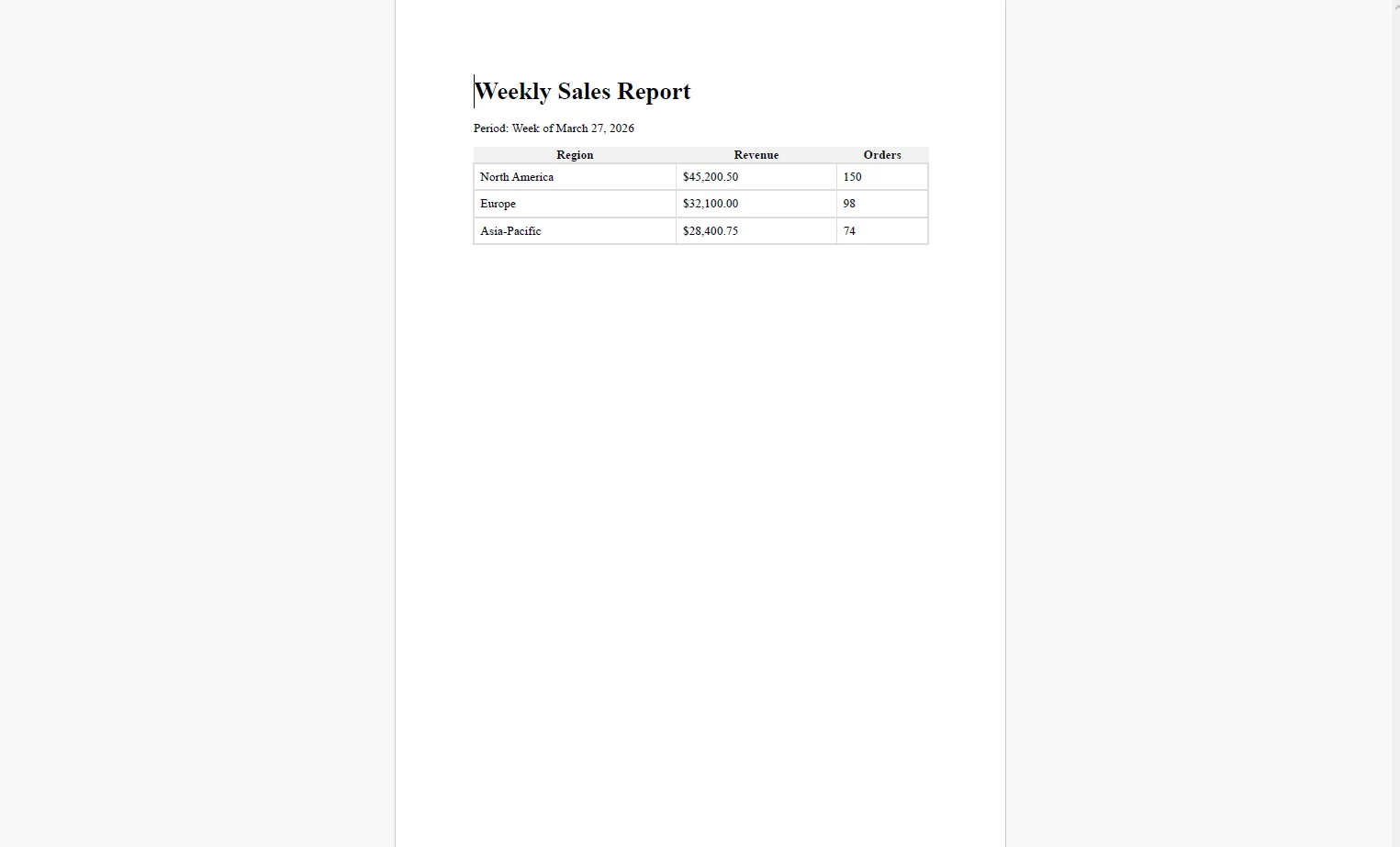
The query results are mapped into a model or dictionary and injected into the HTML template. The template defines everything about the report's appearance: the branded header with the company logo, a period label ("Week of March 27, 2025"), summary metric cards across the top, one or more data tables with alternating row colors, and a footer with the generation timestamp and confidentiality notice. This IronPDF example code will create PDF files that demonstrate exactly this.
using Dapper;
using IronPdf;
using System.Data.SqlClient;

var reportData = new List<dynamic>();

using (var conn = new SqlConnection(_connectionString))
{
    reportData = (await conn.QueryAsync(@"
        SELECT Region, SUM(Revenue) AS Revenue, COUNT(OrderId) AS Orders
        FROM SalesOrders
        WHERE OrderDate >= @Start AND OrderDate < @End
        GROUP BY Region ORDER BY Revenue DESC",
        new { Start = weekStart, End = weekStart.AddDays(7) })).ToList();
}

var tableRows = string.Concat(reportData.Select(r =>
    $"<tr><td>{r.Region}</td><td>{r.Revenue:C}</td><td>{r.Orders}</td></tr>"));
string html = (await File.ReadAllTextAsync("Templates/sales-weekly.html"))
    .Replace("{{Period}}", $"Week of {weekStart:MMMM d, yyyy}")
    .Replace("{{TotalRevenue}}", reportData.Sum(r => (decimal)r.Revenue).ToString("C"))
    .Replace("{{TableRows}}", tableRows);

var renderer = new ChromePdfRenderer();

renderer.RenderingOptions.PaperSize = IronPdf.Rendering.PdfPaperSize.Letter;

renderer.RenderingOptions.MarginTop = 20;

renderer.RenderingOptions.MarginBottom = 20;

PdfDocument report = renderer.RenderHtmlAsPdf(html);
using Dapper;
using IronPdf;
using System.Data.SqlClient;

var reportData = new List<dynamic>();

using (var conn = new SqlConnection(_connectionString))
{
    reportData = (await conn.QueryAsync(@"
        SELECT Region, SUM(Revenue) AS Revenue, COUNT(OrderId) AS Orders
        FROM SalesOrders
        WHERE OrderDate >= @Start AND OrderDate < @End
        GROUP BY Region ORDER BY Revenue DESC",
        new { Start = weekStart, End = weekStart.AddDays(7) })).ToList();
}

var tableRows = string.Concat(reportData.Select(r =>
    $"<tr><td>{r.Region}</td><td>{r.Revenue:C}</td><td>{r.Orders}</td></tr>"));
string html = (await File.ReadAllTextAsync("Templates/sales-weekly.html"))
    .Replace("{{Period}}", $"Week of {weekStart:MMMM d, yyyy}")
    .Replace("{{TotalRevenue}}", reportData.Sum(r => (decimal)r.Revenue).ToString("C"))
    .Replace("{{TableRows}}", tableRows);

var renderer = new ChromePdfRenderer();

renderer.RenderingOptions.PaperSize = IronPdf.Rendering.PdfPaperSize.Letter;

renderer.RenderingOptions.MarginTop = 20;

renderer.RenderingOptions.MarginBottom = 20;

PdfDocument report = renderer.RenderHtmlAsPdf(html);
Imports Dapper
Imports IronPdf
Imports System.Data.SqlClient

Dim reportData As New List(Of Object)()

Using conn As New SqlConnection(_connectionString)
    reportData = (Await conn.QueryAsync("
        SELECT Region, SUM(Revenue) AS Revenue, COUNT(OrderId) AS Orders
        FROM SalesOrders
        WHERE OrderDate >= @Start AND OrderDate < @End
        GROUP BY Region ORDER BY Revenue DESC",
        New With {.Start = weekStart, .End = weekStart.AddDays(7)})).ToList()
End Using

Dim tableRows = String.Concat(reportData.Select(Function(r)
    $"<tr><td>{r.Region}</td><td>{r.Revenue:C}</td><td>{r.Orders}</td></tr>"))

Dim html As String = (Await File.ReadAllTextAsync("Templates/sales-weekly.html")) _
    .Replace("{{Period}}", $"Week of {weekStart:MMMM d, yyyy}") _
    .Replace("{{TotalRevenue}}", reportData.Sum(Function(r) CType(r.Revenue, Decimal)).ToString("C")) _
    .Replace("{{TableRows}}", tableRows)

Dim renderer As New ChromePdfRenderer()

renderer.RenderingOptions.PaperSize = IronPdf.Rendering.PdfPaperSize.Letter

renderer.RenderingOptions.MarginTop = 20

renderer.RenderingOptions.MarginBottom = 20

Dim report As PdfDocument = renderer.RenderHtmlAsPdf(html)Generated PDF File
3. PDF Document Emailed and Archived
using System.Net.Mail;
using System.IO;

var recipients = await _configService.GetDistributionListAsync("sales-weekly");

string subject = $"Weekly Sales Report — {weekStart:MMM d, yyyy}";

using var stream = new MemoryStream(report.BinaryData);

using var attachment = new Attachment(stream, $"Sales-Report-{weekStart:yyyyMMdd}.pdf", "application/pdf");

var message = new MailMessage
{
    From = new MailAddress("reports@yourcompany.com"),
    Subject = subject,
    Body = $"Please find the weekly sales report for the week of {weekStart:MMMM d, yyyy} attached."
};

foreach (var recipient in recipients)
    message.To.Add(recipient);

message.Attachments.Add(attachment);

using var smtp = new SmtpClient("smtp.yourprovider.com");

await smtp.SendMailAsync(message);

// Archive to blob storage for historical access

string archivePath = $"reports/sales-weekly/{weekStart:yyyy/MM/dd}.pdf";

report.SaveAs(archivePath);
using System.Net.Mail;
using System.IO;

var recipients = await _configService.GetDistributionListAsync("sales-weekly");

string subject = $"Weekly Sales Report — {weekStart:MMM d, yyyy}";

using var stream = new MemoryStream(report.BinaryData);

using var attachment = new Attachment(stream, $"Sales-Report-{weekStart:yyyyMMdd}.pdf", "application/pdf");

var message = new MailMessage
{
    From = new MailAddress("reports@yourcompany.com"),
    Subject = subject,
    Body = $"Please find the weekly sales report for the week of {weekStart:MMMM d, yyyy} attached."
};

foreach (var recipient in recipients)
    message.To.Add(recipient);

message.Attachments.Add(attachment);

using var smtp = new SmtpClient("smtp.yourprovider.com");

await smtp.SendMailAsync(message);

// Archive to blob storage for historical access

string archivePath = $"reports/sales-weekly/{weekStart:yyyy/MM/dd}.pdf";

report.SaveAs(archivePath);
Imports System.Net.Mail
Imports System.IO

Dim recipients = Await _configService.GetDistributionListAsync("sales-weekly")

Dim subject As String = $"Weekly Sales Report — {weekStart:MMM d, yyyy}"

Using stream As New MemoryStream(report.BinaryData)
    Using attachment As New Attachment(stream, $"Sales-Report-{weekStart:yyyyMMdd}.pdf", "application/pdf")
        Dim message As New MailMessage With {
            .From = New MailAddress("reports@yourcompany.com"),
            .Subject = subject,
            .Body = $"Please find the weekly sales report for the week of {weekStart:MMMM d, yyyy} attached."
        }

        For Each recipient In recipients
            message.To.Add(recipient)
        Next

        message.Attachments.Add(attachment)

        Using smtp As New SmtpClient("smtp.yourprovider.com")
            Await smtp.SendMailAsync(message)
        End Using
    End Using
End Using

' Archive to blob storage for historical access

Dim archivePath As String = $"reports/sales-weekly/{weekStart:yyyy/MM/dd}.pdf"

report.SaveAs(archivePath)Example Email with Attached PDF
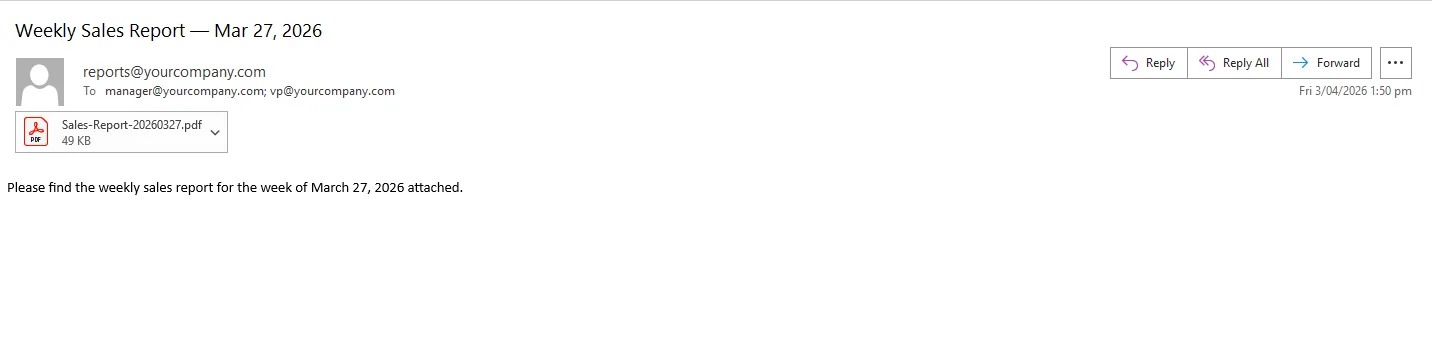 Distribution lists are pulled from a configuration table rather than hardcoded, so adding a new recipient to the weekly sales report doesn't require a code change or a redeployment. Each archived PDF is keyed by report name and date, building a library of past reports accessible from a shared drive or internal portal.
The job logs its execution status — query duration, render time, email send result, and any errors — to structured logging. An alert fires if the job fails to complete, so the first sign of a problem isn't an executive asking why their report didn't arrive.
Real-World Benefits
Zero manual effort. Reports generate and deliver themselves on schedule. No analyst runs queries on Monday morning, no one formats a table, no one remembers to hit send. The process is invisible when it works and alertable when it doesn't.
Timeliness. The report lands in inboxes before the workday starts. A CFO checking email on the way into the office has the P&L numbers before any meeting requires them, not after an analyst finishes their coffee.
Offline readability. A self-contained PDF that executives can read on a plane, print for a board meeting, or forward without requiring the recipient to log into any system. No dashboard URL, no authentication wall, no "this link only works on the corporate network."
Brand consistency. Every report produced by the pipeline uses the same approved HTML and CSS template, the same logo placement, typography, table styling, and footer language across every weekly, daily, and monthly report the organization distributes.
Historical archive. Each generated PDF is stored by date in a structured path. Six months of weekly sales reports are a folder browse away for a trend review or an audit request, no BI tool query required.
No per-report costs. The rendering runs in-process inside the existing .NET application. There is no BI tool premium seat required for scheduled delivery and no reporting API metering that scales with report volume or distribution list size.
Closing
A recurring report that arrives reliably before the workday starts is a small operational detail that affects how decisions get made. Leadership that has numbers before the morning standup runs a different kind of meeting than leadership that waits until an analyst finishes formatting a spreadsheet.
The pipeline to get there — scheduler, query, template, render, email — fits comfortably inside a single .NET background job. IronPDF handles the full lifecycle of PDF generation in C# at ironpdf.com, from rendering HTML templates to saving, streaming, and manipulating documents. If you're ready to replace a manual reporting process with one that runs itself, start your free 30-day trial, it's enough time to wire up a scheduled pipeline, connect it to your database, and confirm the right PDFs land in the right inboxes on time.










 Get started for FREE
 Get started for FREE
 Book Free Live Demo
















