The Problem With Multi-Document Compliance Delivery
 Regulated transactions don't close with a single document. A mortgage closing requires rate lock confirmations, truth-in-lending disclosures, and escrow agreements. An insurance policy issuance bundles declarations pages, coverage terms, and state-mandated notices. A brokerage account opening combines agreements, risk disclosures, and fee schedules. A healthcare intake packages consent forms, HIPAA notices, and treatment authorizations. Every document in that set is required, not optional, not best-effort.
The assembly problem starts with authorship. Legal owns the terms of service. Compliance owns the disclosures. Product owns the confirmation letters. Each team maintains their documents independently, on their own release cycle, which means any manual assembly step whether in Acrobat, a shared folder, or someone's email drafts, is an opportunity for a version mismatch. A customer who receives the current terms of service alongside a disclosure from three versions ago has received a deficient package, and the organization may not find out until an auditor asks.
Sending five separate PDF format attachments compounds the problem differently. Customers open a ticket asking which document they need to sign, which to keep, or whether they received everything. Operations teams field those calls. And the five separate files don't constitute a single auditable artifact, an auditor expecting one complete package per transaction gets a folder of files they have to manually verify.
Manually assembling bundles at scale such as hundreds or thousands of closings per day, simply doesn't work. The process needs to be programmatic, version-aware, and produce one immutable artifact per transaction. Simply put, it needs to be able to dynamically fill out HTML templates, and then programmatically merge the separate documents into one, easy-to-share PDF document.
The Solution: Programmatic Bundle Assembly With IronPDF
IronPDF lets .NET applications generate each document section from its own versioned existing HTML file template and merge them into a single combined PDF bundle programmatically. Each component: terms, disclosures, confirmations, is rendered with transaction-specific data populated where needed, then PdfDocument.Merge() assembles them into one file in the required order.
The bundle is delivered to the customer and archived as a single immutable artifact linked to the transaction ID. No manual Acrobat assembly, no risk of a missing required document, no version mismatch between sections. The rendering and merging run inside the existing .NET application, one NuGet package, no external processes.
How It Works in Practice
1. Transaction Event Triggers Bundle Generation
When an account opens, a loan closes, a policy is issued, or a patient completes intake, the application consults a rules table to determine which document templates are required for that transaction type. A mortgage closing might require five templates; a simple account confirmation might require two. The rules table is maintained by the compliance team and drives the bundle composition without requiring a code change when regulatory requirements update.
Each required document is identified by its template ID and version, Terms of Service v3.2, Privacy Disclosure v4.0, E-Sign Consent v1.5, and the transaction-specific Account Confirmation. The version identifiers are recorded as metadata alongside the archived bundle, creating an audit trail of exactly what the customer received.
2. Individual Sections Rendered Independently from HTML Content
Each document section is rendered from its own HTML and CSS template. Legal maintains the terms template. Compliance maintains the disclosure templates. Product maintains the confirmation templates. Updates to one section don't require re-publishing any other, when the fee schedule changes, only that template file is updated, and the next transaction's bundle picks up the new version automatically.
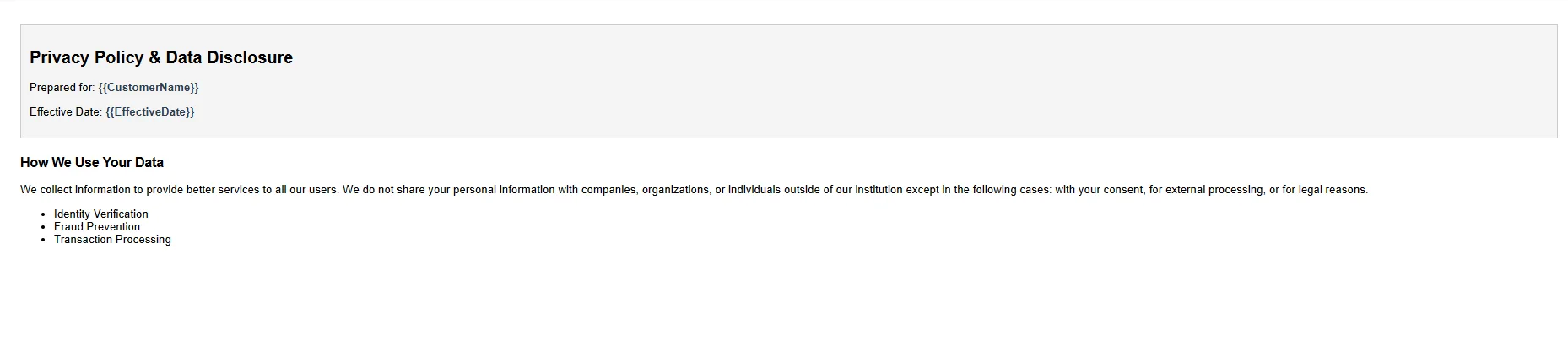
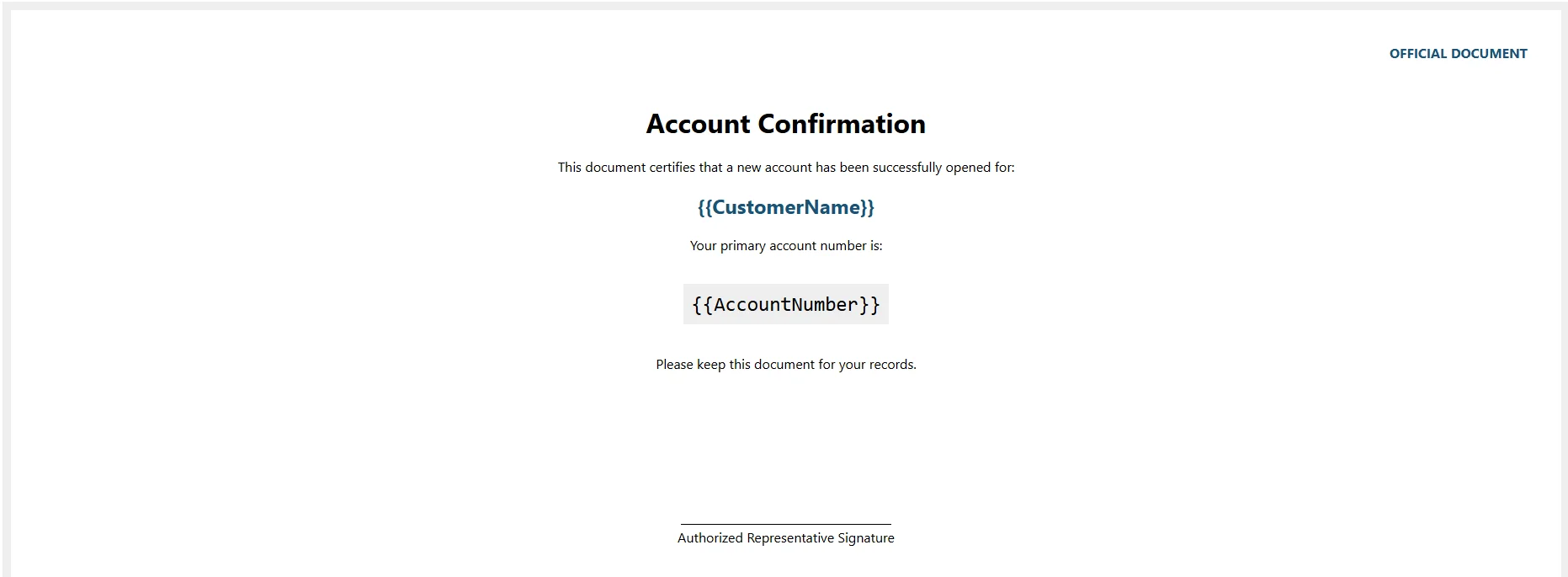
Templates that carry transaction-specific data: customer name, account number, effective date, coverage amounts, are populated before rendering. Static templates like standard terms are rendered as-is, since their content doesn't vary by transaction.
Example HTML Template: terms-v3.2

Example HTML Template: privacy-v4.0
Example HTML Template: account-confirmation
3. Sections Merged Into a Single Bundle
using IronPdf;

var renderer = new ChromePdfRenderer();

renderer.RenderingOptions.MarginTop = 20;

renderer.RenderingOptions.MarginBottom = 20;

// Load and render each required document section
string termsHtml = await File.ReadAllTextAsync("Templates/terms-v3.2.html");

string disclosureHtml = (await File.ReadAllTextAsync("Templates/privacy-v4.0.html"))
    .Replace("{{CustomerName}}", customer.FullName)
    .Replace("{{EffectiveDate}}", transaction.ClosedAt.ToString("MMMM d, yyyy"));

string confirmationHtml = (await File.ReadAllTextAsync("Templates/account-confirmation.html"))
    .Replace("{{AccountNumber}}", account.Number)
    .Replace("{{CustomerName}}", customer.FullName);

// Create individual PDF objects
PdfDocument termsPdf = renderer.RenderHtmlAsPdf(termsHtml);
PdfDocument disclosurePdf = renderer.RenderHtmlAsPdf(disclosureHtml);
PdfDocument confirmationPdf = renderer.RenderHtmlAsPdf(confirmationHtml);

//Merge the PDFs into a single document
var pdfList = new List<PdfDocument> { termsPdf, disclosurePdf, confirmationPdf };
PdfDocument bundle = PdfDocument.Merge(pdfList);

// 6. Save the final file
bundle.SaveAs($"bundles/{transaction.Id}.pdf");
using IronPdf;

var renderer = new ChromePdfRenderer();

renderer.RenderingOptions.MarginTop = 20;

renderer.RenderingOptions.MarginBottom = 20;

// Load and render each required document section
string termsHtml = await File.ReadAllTextAsync("Templates/terms-v3.2.html");

string disclosureHtml = (await File.ReadAllTextAsync("Templates/privacy-v4.0.html"))
    .Replace("{{CustomerName}}", customer.FullName)
    .Replace("{{EffectiveDate}}", transaction.ClosedAt.ToString("MMMM d, yyyy"));

string confirmationHtml = (await File.ReadAllTextAsync("Templates/account-confirmation.html"))
    .Replace("{{AccountNumber}}", account.Number)
    .Replace("{{CustomerName}}", customer.FullName);

// Create individual PDF objects
PdfDocument termsPdf = renderer.RenderHtmlAsPdf(termsHtml);
PdfDocument disclosurePdf = renderer.RenderHtmlAsPdf(disclosureHtml);
PdfDocument confirmationPdf = renderer.RenderHtmlAsPdf(confirmationHtml);

//Merge the PDFs into a single document
var pdfList = new List<PdfDocument> { termsPdf, disclosurePdf, confirmationPdf };
PdfDocument bundle = PdfDocument.Merge(pdfList);

// 6. Save the final file
bundle.SaveAs($"bundles/{transaction.Id}.pdf");
Imports IronPdf
Dim renderer As New ChromePdfRenderer()
renderer.RenderingOptions.MarginTop = 20
renderer.RenderingOptions.MarginBottom = 20
' Load and render each required document section
Dim termsHtml As String = Await File.ReadAllTextAsync("Templates/terms-v3.2.html")
Dim disclosureHtml As String = (Await File.ReadAllTextAsync("Templates/privacy-v4.0.html")) _
.Replace("{{CustomerName}}", customer.FullName) _
.Replace("{{EffectiveDate}}", transaction.ClosedAt.ToString("MMMM d, yyyy"))
Dim confirmationHtml As String = (Await File.ReadAllTextAsync("Templates/account-confirmation.html")) _
.Replace("{{AccountNumber}}", account.Number) _
.Replace("{{CustomerName}}", customer.FullName)
' Create individual PDF objects
Dim termsPdf As PdfDocument = renderer.RenderHtmlAsPdf(termsHtml)
Dim disclosurePdf As PdfDocument = renderer.RenderHtmlAsPdf(disclosureHtml)
Dim confirmationPdf As PdfDocument = renderer.RenderHtmlAsPdf(confirmationHtml)
' Merge the PDFs into a single document
Dim pdfList As New List(Of PdfDocument) From {termsPdf, disclosurePdf, confirmationPdf}
Dim bundle As PdfDocument = PdfDocument.Merge(pdfList)
' Save the final file
bundle.SaveAs($"bundles/{transaction.Id}.pdf")
Imports IronPdf

Dim renderer As New ChromePdfRenderer()

renderer.RenderingOptions.MarginTop = 20

renderer.RenderingOptions.MarginBottom = 20

' Load and render each required document section
Dim termsHtml As String = Await File.ReadAllTextAsync("Templates/terms-v3.2.html")

Dim disclosureHtml As String = (Await File.ReadAllTextAsync("Templates/privacy-v4.0.html")) _
    .Replace("{{CustomerName}}", customer.FullName) _
    .Replace("{{EffectiveDate}}", transaction.ClosedAt.ToString("MMMM d, yyyy"))

Dim confirmationHtml As String = (Await File.ReadAllTextAsync("Templates/account-confirmation.html")) _
    .Replace("{{AccountNumber}}", account.Number) _
    .Replace("{{CustomerName}}", customer.FullName)

' Create individual PDF objects
Dim termsPdf As PdfDocument = renderer.RenderHtmlAsPdf(termsHtml)
Dim disclosurePdf As PdfDocument = renderer.RenderHtmlAsPdf(disclosureHtml)
Dim confirmationPdf As PdfDocument = renderer.RenderHtmlAsPdf(confirmationHtml)

' Merge the PDFs into a single document
Dim pdfList As New List(Of PdfDocument) From {termsPdf, disclosurePdf, confirmationPdf}
Dim bundle As PdfDocument = PdfDocument.Merge(pdfList)

' Save the final file
bundle.SaveAs($"bundles/{transaction.Id}.pdf")
Example Generated PDF Document
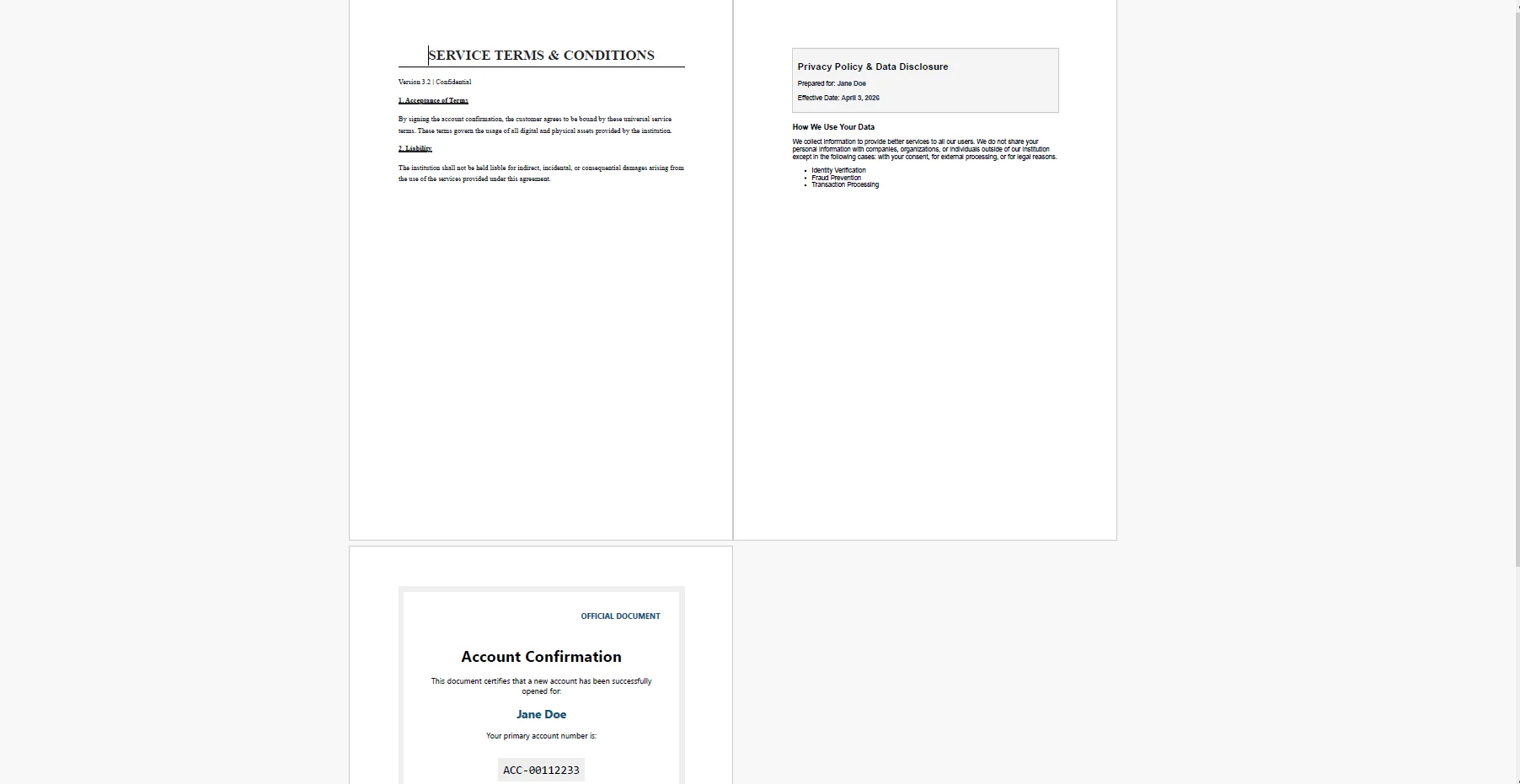 The merge preserves each section's internal formatting and inserts clean page breaks between them. The result reads as one cohesive document, not a stack of separate files joined at the seam.
A merged PDF with sections numbered independently - page 1, 1, 1 - reads like three separate documents. A numbered footer applied across the whole bundle establishes it as a single artifact:
renderer.RenderingOptions.HtmlFooter = new HtmlHeaderFooter
{
HtmlFragment = @"
<div style='font-size:9px; color:#555; text-align:center; width:100%;'>
{page} of {total-pages} | Document Bundle — Confidential
</div>",
DrawDividerLine = true
};
renderer.RenderingOptions.HtmlFooter = new HtmlHeaderFooter
{
HtmlFragment = @"
<div style='font-size:9px; color:#555; text-align:center; width:100%;'>
{page} of {total-pages} | Document Bundle — Confidential
</div>",
DrawDividerLine = true
};
HTML
 Setting this footer on the renderer before the merge step means every section is rendered with the same footer configuration. The
 {page} and {total-pages} tokens resolve correctly across the full merged document.
The final bundle is archived in document storage keyed by transaction ID, with metadata recording the template versions included. Delivered to the customer by email or portal download, and stored for the compliance archive, it's a single artifact that answers any auditor's question about what that customer received and when.
Real-World Benefits
Compliance completeness. The rules table guarantees every required document is included for the transaction type. There are no missing disclosures, no incomplete packages, and no way for a required section to be omitted unless the rules table itself is updated.
Version control. Each document section is rendered from a versioned template file. The archive metadata records exactly which versions were included, satisfying an auditor who asks whether the customer received the current disclosure or an earlier draft.
Single artifact. One PDF per transaction replaces five separate attachments. Simpler for the customer to review and retain, simpler for the archive to manage, and simpler for an auditor who expects a complete package per closing.
Independent authoring. Legal, compliance, and product teams update their own HTML templates without coordinating a monolithic document release. A change to the fee schedule doesn't require legal to re-review and re-publish the terms of service.
Continuous pagination. The merged PDF carries sequential page numbers from first page to last, with an optional table of contents. The bundle reads as one document, not a collection of sections that happen to share a file boundary.
No per-document costs. The rendering and merging run in-process inside the .NET application. There is no third-party document assembly API, no usage metering, and no pricing model that scales against transaction volume.
Closing
A compliance bundle that assembles itself from versioned templates, delivers a single artifact to the customer, and archives an immutable record per transaction is a qualitatively different compliance posture than one that relies on someone manually combining documents before a closing. The first approach scales; the second doesn't.
The pipeline: rules lookup, template rendering, merge, delivery, archive, maps directly onto a .NET application's existing transaction event handler. IronPDF handles the full lifecycle of PDF generation in C# at ironpdf.com, from rendering HTML templates to merging, paginating, and manipulating documents. If you're building or hardening a compliance bundle workflow, start your free 30-day trial and validate the output against your own templates and transaction data before going to production.























