

How to Add Digital Signatures to PDFs in Java

In this article, you will learn how to add a digital signature to a PDF using IronPDF in a Java program.
IronPDF - A Java PDF Library
IronPDF Java PDF Library Overview is a Java library that allows developers to create new PDF documents from scratch through Converting HTML String to PDF, Converting HTML File to PDF, Word to PDF Conversion, or URL. It helps manipulate PDFs easily by adding or removing content from them. It provides Security and Digital Signing Options for the PDF document along with digital signing.
IronPDF does not require any other third-party libraries to perform any of its PDF-related tasks. It also provides the facility to convert between different file formats. It provides cross-platform support and is specifically designed for Java, Scala, and Kotlin.
Steps to Add Digital Signatures to PDF Document in Java
Prerequisites
To digitally sign PDF documents, the following prerequisites are required:
- Any Java IDE (NetBeans, Eclipse, IntelliJ) Installed - This article will use IntelliJ. You can separately download the Java Development Kit from the Oracle Java SE Downloads.
- Maven Java Project for Automation - This will help download and manage dependencies in your Java program. You can download Maven from the Apache Maven Download Page.
- IronPDF Library Downloaded and Installed - To download and install IronPDF, include its Maven dependency artifact. You can add the following code snippet in the
pom.xmlfile dependencies tag:
<dependency>
    <groupId>com.ironsoftware</groupId>
    <artifactId>ironpdf</artifactId>
    <version>2023.2.0</version>
</dependency>
<dependency>
<groupId>com.ironsoftware</groupId>
<artifactId>ironpdf</artifactId>
<version>2023.2.0</version>
</dependency>-
Another dependency required is Slf4j-simple. It is optional and can be added using the following dependency in the
pom.xmlfile:<dependency> <groupId>org.slf4j</groupId> <artifactId>slf4j-simple</artifactId> <version>2.0.5</version> </dependency><dependency> <groupId>org.slf4j</groupId> <artifactId>slf4j-simple</artifactId> <version>2.0.5</version> </dependency>XML
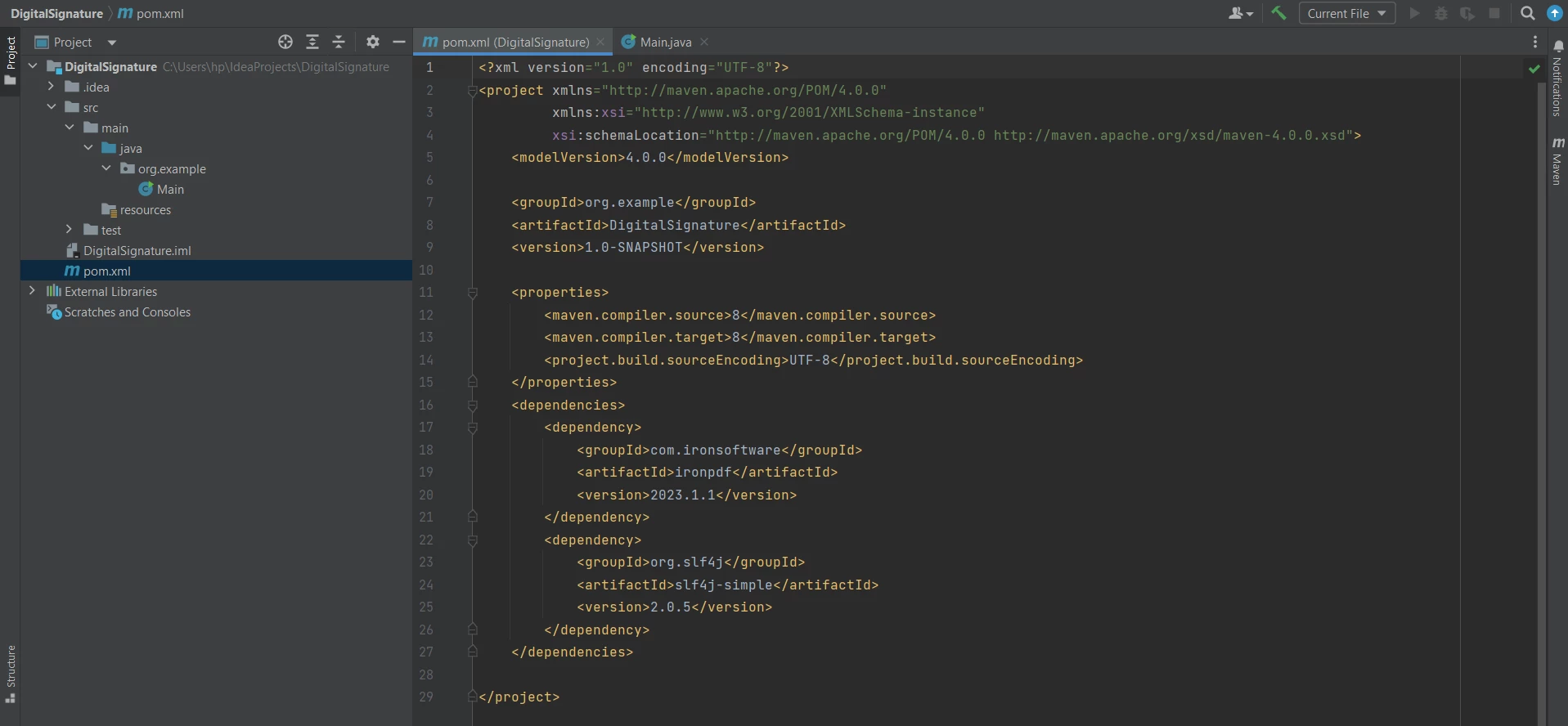 pom.xml file
IronPDF Import Java Packages
The following imports are required in the main file. It allows using IronPDF functions to add a digital signature to a PDF document:
import com.ironsoftware.ironpdf.PdfDocument;
import com.ironsoftware.ironpdf.signature.Signature;
import com.ironsoftware.ironpdf.signature.SignatureManager;
import java.io.IOException;
import java.nio.file.Paths;
import com.ironsoftware.ironpdf.PdfDocument;
import com.ironsoftware.ironpdf.signature.Signature;
import com.ironsoftware.ironpdf.signature.SignatureManager;
import java.io.IOException;
import java.nio.file.Paths;Now, everything required is done and ready to add a digital signature to PDF documents in Java using IronPDF.
Create PDF File or Open Existing PDF File
To Learn How to Digitally Sign PDFs, it is necessary to either create a PDF document from scratch or open an existing PDF document. This article will create a new PDF document for PDF signature using the [renderHtmlAsPdf Method](/java/object-reference/api/com/ironsoftware/ironpdf/PdfDocument.html#renderHtmlAsPdf(java.lang.String) of the PdfDocument Class. The code goes as follows:
PdfDocument pdf = PdfDocument.renderHtmlAsPdf("<h1>Testing 2048 bit digital security</h1>");PdfDocument pdf = PdfDocument.renderHtmlAsPdf("<h1>Testing 2048 bit digital security</h1>");The PDF document is created but not saved yet. So, the next step is to create a digital signature and then add it to this PDF document and then finally save it.
Create a Digital Signature
You will have to create a digital signature certificate using Adobe Reader, which will be used in Java code to digitally sign PDF documents with those details. You can have a look at How to Create a Digital Signature in Adobe Reader.
Open Adobe Reader and click on Edit > Preferences. Then click on Signatures and like more on Identities and Trusted Certificates.
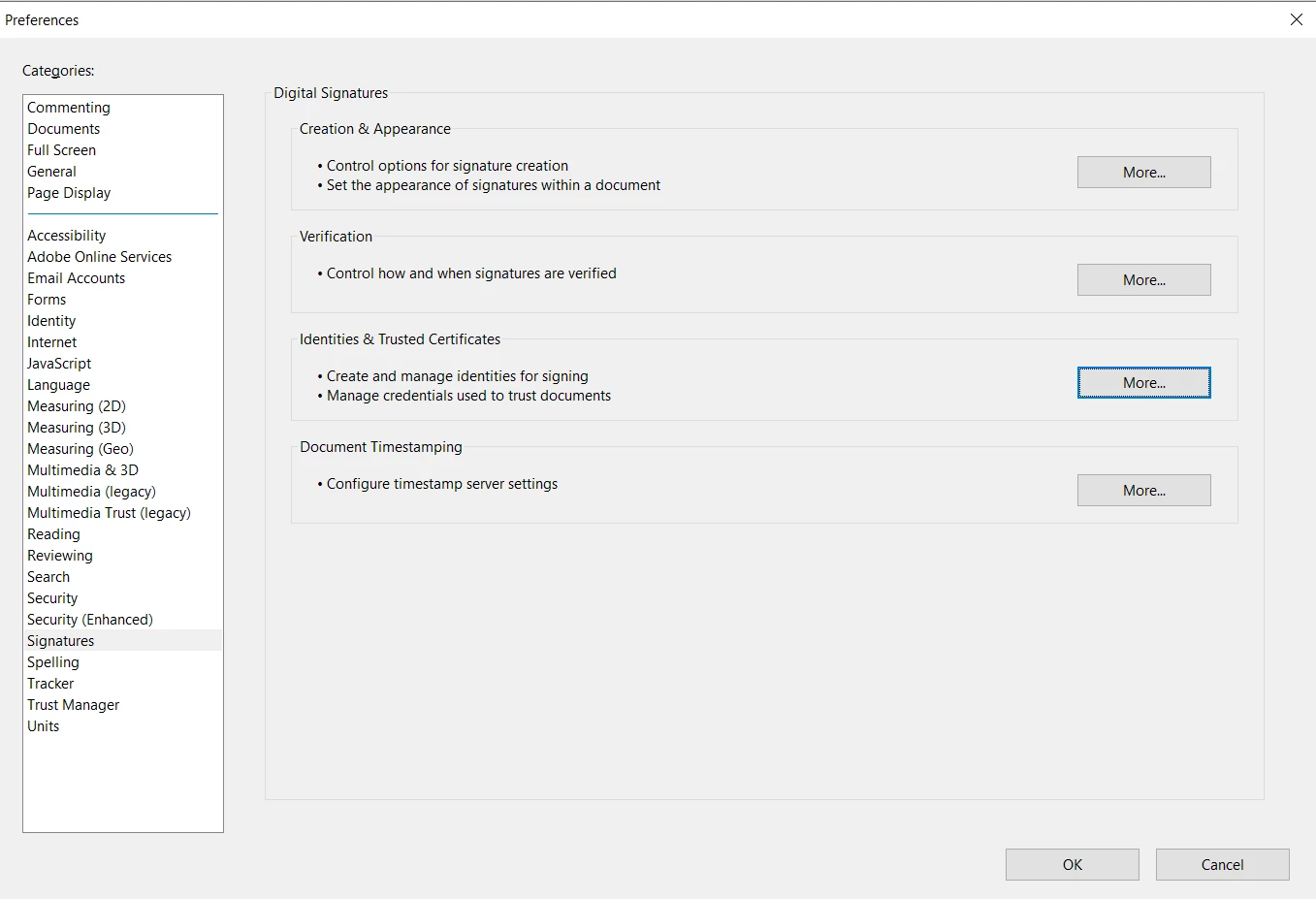 The project preferences
Add the following Signature field to make the .pfx or .p12 file doc.
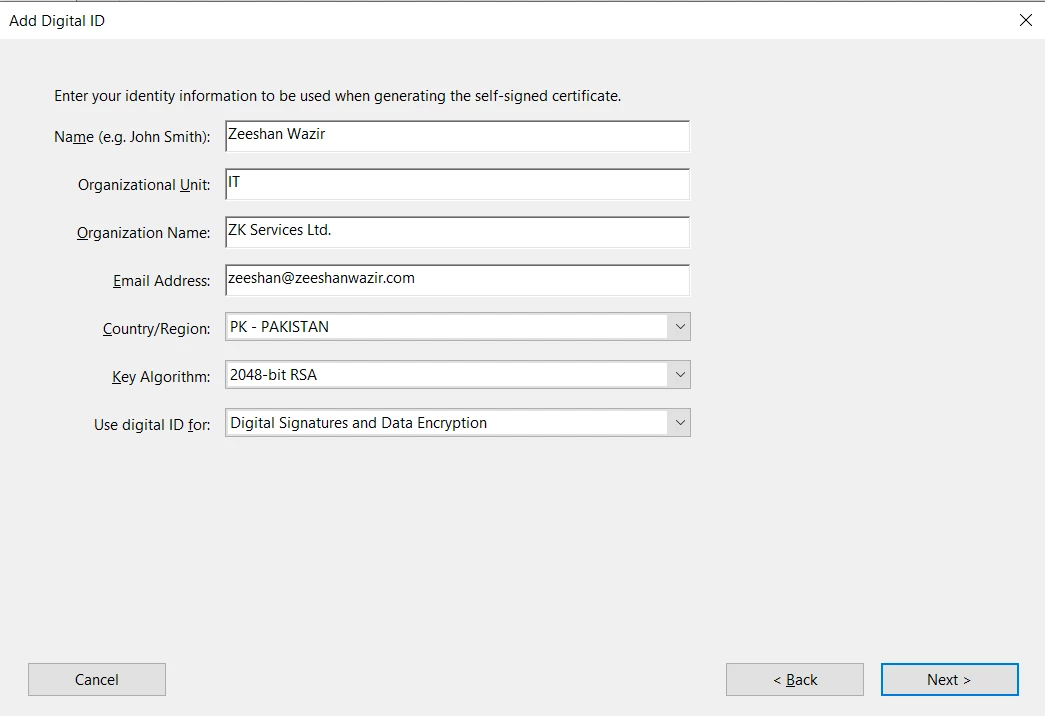 Add Digital ID dialog
The following code sample will create a new signature in Java code using the .pfx certificate file for Windows and .p12 file for Mac along with its private key (password):
Signature signature = new Signature("Iron.pfx", "123456");Signature signature = new Signature("Iron.pfx", "123456");Sign PDF File with Digital Signature
IronPDF helps with adding the signature certificate using the SignatureManager class. [getSignature Method](/java/object-reference/api/com/ironsoftware/ironpdf/PdfDocument.html#getSignature() helps to get the previous signature of the PDF document, and then a new signature can be added using the [SignPdfWithSignature Method](/java/object-reference/api/com/ironsoftware/ironpdf/signature/SignatureManager.html#SignPdfWithSignature(com.ironsoftware.ironpdf.signature.Signature) with the signature file as an argument. The code goes as follows:
SignatureManager signatureManager = pdf.getSignature();
signatureManager.SignPdfWithSignature(signature);
SignatureManager signatureManager = pdf.getSignature();
signatureManager.SignPdfWithSignature(signature);Save PDF Signature File
Finally, let's save the PDF file; otherwise, the PDF is not signed by using the [saveAs Method](/java/object-reference/api/com/ironsoftware/ironpdf/PdfDocument.html#saveAs(java.lang.String) of the PdfDocument class. The code is simple and as follows:
pdf.saveAs("signed.pdf");pdf.saveAs("signed.pdf");On successful compilation and execution of the code, the output produces a PDF that has been digitally signed.
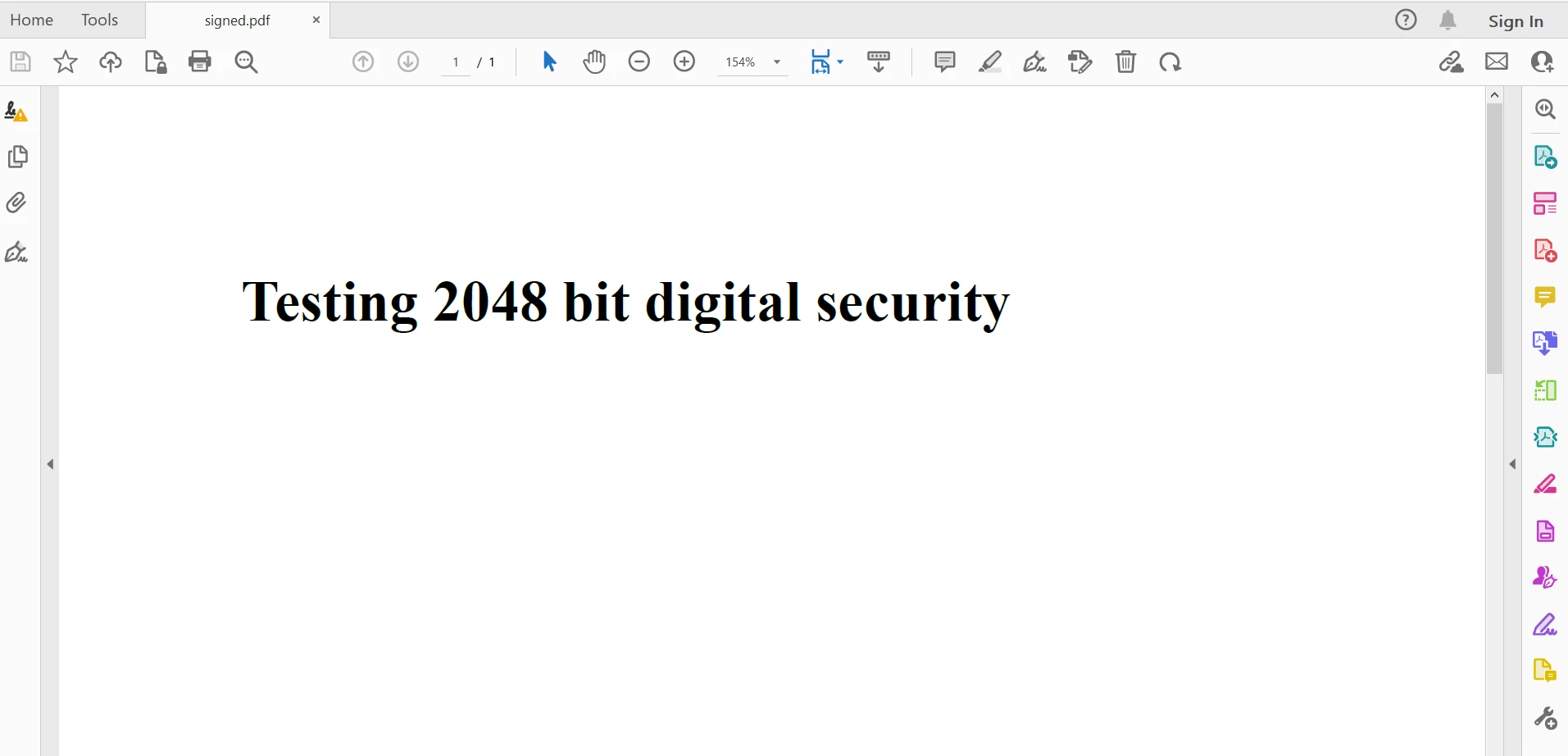 The output PDF file
IronPDF also provides other signing options, which are optional and can also be used for digital signatures. It includes signature images in the form of handwriting, computer-generated text images, or digitized images. The following code sample helps you add some additional security options for digital signing:
signature.setSigningContact("support@ironsoftware.com");
signature.setSigningLocation("Chicago, USA");
signature.setSigningReason("To show how to sign a PDF");
BufferedImage signatureImage = ImageIO.read(new File("handwriting.png"));
WritableRaster raster = signatureImage.getRaster();
DataBufferByte data = (DataBufferByte) raster.getDataBuffer();
signature.setSignatureImage(data.getData());signature.setSigningContact("support@ironsoftware.com");
signature.setSigningLocation("Chicago, USA");
signature.setSigningReason("To show how to sign a PDF");
BufferedImage signatureImage = ImageIO.read(new File("handwriting.png"));
WritableRaster raster = signatureImage.getRaster();
DataBufferByte data = (DataBufferByte) raster.getDataBuffer();
signature.setSignatureImage(data.getData());The complete code goes as follows:
import com.ironsoftware.ironpdf.PdfDocument;
import com.ironsoftware.ironpdf.signature.Signature;
import com.ironsoftware.ironpdf.signature.SignatureManager;
import javax.imageio.ImageIO;
import java.awt.image.BufferedImage;
import java.awt.image.DataBufferByte;
import java.awt.image.WritableRaster;
import java.io.File;
import java.io.IOException;
public class DigitalSignatureExample {
public static void main(String[] args) throws IOException {
// Step 1. Create a PDF File Doc
PdfDocument pdf = PdfDocument.renderHtmlAsPdf("<h1>Testing 2048 bit digital security</h1>");
// Step 2. Create a Signature.
Signature signature = new Signature("Iron.pfx", "123456");
// Step 3. Sign the PDF with the PdfSignature.
SignatureManager signatureManager = pdf.getSignature();
signatureManager.SignPdfWithSignature(signature);
// Step 4. The PDF is not signed until saved to file, stream, or byte array.
pdf.saveAs("signed.pdf");
}
}import com.ironsoftware.ironpdf.PdfDocument;
import com.ironsoftware.ironpdf.signature.Signature;
import com.ironsoftware.ironpdf.signature.SignatureManager;
import javax.imageio.ImageIO;
import java.awt.image.BufferedImage;
import java.awt.image.DataBufferByte;
import java.awt.image.WritableRaster;
import java.io.File;
import java.io.IOException;
public class DigitalSignatureExample {
public static void main(String[] args) throws IOException {
// Step 1. Create a PDF File Doc
PdfDocument pdf = PdfDocument.renderHtmlAsPdf("<h1>Testing 2048 bit digital security</h1>");
// Step 2. Create a Signature.
Signature signature = new Signature("Iron.pfx", "123456");
// Step 3. Sign the PDF with the PdfSignature.
SignatureManager signatureManager = pdf.getSignature();
signatureManager.SignPdfWithSignature(signature);
// Step 4. The PDF is not signed until saved to file, stream, or byte array.
pdf.saveAs("signed.pdf");
}
}You can check more information on Digital Signature from the PDF Signatures Code Example. If you want to add more security and even edit metadata, then check the Security and Metadata Code Example.
Conclusion
This article explained step by step how to add digital signatures to PDF documents using IronPDF for Java.
First, the article covered the necessary components required to work with PDFs in Java using IronPDF. Then created a simple PDF document using an HTML string. A certificate file was created from Adobe Reader, which was used to sign the original PDF document. IronPDF provides a Signature and SignatureManager class, which helps users add a certificate and sign PDF with a signature field.
IronPDF facilitates developers in carrying out PDF-related tasks with ease and speed. It provides accurate results with pixel-perfect PDFs. For a versatile and widely used programming language like Java, IronPDF is well-suited to work with PDF documents as it is also versatile and supports almost all PDF operations. Moreover, it is built on already successful .NET capabilities.
IronPDF also provides easy conversion from different file formats, using the fast IronPDFEngine designed specifically for Java. You can use the IronPDF library to Extract or Add Text, Load and Extract Images, Add Headers and Footers to PDFs, annotations, Render Charts and Graphs to PDFs, work with PDF Forms, and many more.
You can get detailed information on how to use IronPDF from the Java PDF Code Examples pages.
IronPDF is free for individual development and provides a free trial without watermark to generate PDF documents. It can be licensed for commercial use, and its users can get more information on the license from this Detailed Licensing Information Page.
Frequently Asked Questions
How can I add a digital signature to a PDF in Java?
You can add a digital signature to a PDF in Java using IronPDF by creating or opening a PDF document, generating a digital signature with a certificate file, and using IronPDF's `SignatureManager` class to apply the signature. Finally, save the signed PDF document.
What are the steps to convert HTML to PDF using a Java library?
To convert HTML to PDF using IronPDF in Java, utilize the PdfDocument.renderHtmlAsPdf method. This allows you to convert HTML strings directly into a PDF document, which can then be saved using the PdfDocument.saveAs method.
What prerequisites are needed for using IronPDF in a Java project?
To use IronPDF in a Java project, you need a Java IDE like IntelliJ, a Maven project for managing dependencies, and the IronPDF library. Additionally, for adding digital signatures, a digital signature certificate is required.
Can IronPDF in Java convert other file formats to PDF?
Yes, besides HTML, IronPDF can convert various other file formats such as Word documents and URLs to PDF in a Java application.
Does IronPDF require third-party libraries for PDF functionalities?
No, IronPDF does not require any third-party libraries for its core PDF functionalities, making it a standalone solution for PDF creation and manipulation in Java.
How do I generate a digital signature certificate for signing PDFs?
A digital signature certificate can be created using Adobe Reader by navigating to Edit > Preferences > Signatures, and managing Identities and Trusted Certificates.
What class in IronPDF is used for managing digital signatures in Java?
The SignatureManager class in IronPDF is used for managing digital signatures in Java. It allows you to add new signatures and retrieve existing ones from a PDF document.
What additional options are available for digital signing with IronPDF in Java?
IronPDF in Java provides options for adding signature images, specifying signing contact, location, and reason, as well as adding handwriting and digitized images to the digital signature.
Is there a free version of IronPDF for Java?
IronPDF offers a free trial for individual development and can be used without a watermark. There are licensing options available for commercial use.
What are some advanced features of IronPDF for Java?
IronPDF for Java includes features such as text and image extraction, adding headers and footers, rendering charts and graphs, and working with PDF forms.



















 Get started for FREE
 Get started for FREE
 Book Free Live Demo





 No credit card or account creation required










