




업데이트됨 2026년 9월 4일
월별 계정 명세서를 PDF 문서로 생성하기
개발자는 IronPDF C# PDF 라이브러리를 사용하여 외부 서비스에 의존하지 않고도 .NET 프로젝트 내에서 HTML을 신뢰할 수 있는 PDF 파일로 변환할 수 있습니다.
더 읽어보기

바이트 배열에서 PdfDocument 객체를 생성하고, PdfDocument.Merge()를 사용하여 디스크에 저장하지 않고 단일 PDF로 결합하세요. 이 메소드는 복잡한 PDF 구조를 자동으로 처리하여 데이터베이스에 저장된 문서나 API로부터 수신된 문서를 임시 파일을 작성하지 않고 병합할 수 있도록 합니다.
모던한 C# 응용 프로그램에서 바이트 배열로 저장된 PDF 파일을 다루는 것은 일반적입니다. 데이터베이스에서 PDF 문서를 검색하든, 웹 서비스를 통해 수신하든, 메모리에서 처리하든, 디스크에 저장하지 않고 여러 PDF 파일을 하나로 병합하는 기능은 Enterprise 워크플로에 필수적입니다. IronPDF는 직관적인 API로 이를 간단하게 만듭니다. 이 기사에서는 PDF 바이트 배열을 C#에서 병합하는 방법을 살펴보며, MemoryStream 처리 및 실제 데이터베이스 패턴을 포함한 다양한 접근 방식을 검토합니다.
바이트 배열은 메모리 내의 PDF 파일을 나타내는 원시 이진 데이터입니다. C#으로 PDF 문서를 작업할 때, 파일이 디스크가 아닌 바이트 배열로 존재하는 시나리오를 자주 접하게 됩니다. 이것은 특히 PDF가 이진 열로 저장된 데이터베이스에서 문서를 검색하거나 REST API에서 문서를 수신할 때 일반적입니다.
.NET의 MemoryStream 기능은 Microsoft MemoryStream 참조에 문서화되어 있으며, 특히 큰 문서에 대한 적절한 메모리 관리와 결합하여 이러한 바이트 배열을 효율적으로 처리합니다. 임시 파일을 작성하는 대신, PDF를 메모리 내에서 완전히 로드, 처리, 저장할 수 있으며 이는 더욱 빠르고 깨끗하며 파일 시스템 권한 문제를 피합니다.
두 개의 PDF 바이트 배열을 단순히 연결하는 것은 작동하지 않습니다. 일반 텍스트 파일과 달리, PDF 파일에는 헤더, 교차 참조 표 및 특정 포맷 관례가 있는 복잡한 내부 구조가 있습니다. ISO 32000 PDF 사양은 문서 구조, 메타데이터, 글꼴 포함 및 암호화 레이어를 포함한 복잡한 규칙을 정의합니다. 바이트를 직접 결합하면 손상된 파일이 생성됩니다. 바이트 배열을 파싱하고 구조적 무결성을 보존하면서 올바르게 결합하려면 적절한 PDF 라이브러리가 필요합니다.
IronPDF는 모든 복잡성을 내적으로 처리합니다. 소스 파일에 나타난 그대로 글꼴, 이미지 및 포맷을 보존하면서 단 몇 줄의 코드로 PDF 문서를 병합할 수 있습니다.
이 방법은 다음과 같은 상황에서 잘 작동합니다:
Azure Blob Storage 또는 유사한 클라우드 서비스를 사용할 때, 바이트 배열 조작은 필수적입니다. 원시 바이트를 다운로드하고 처리한 후 결과물을 업로드하기 때문입니다. 모든 과정이 파일 시스템에 직접 접근하지 않고 이루어집니다.
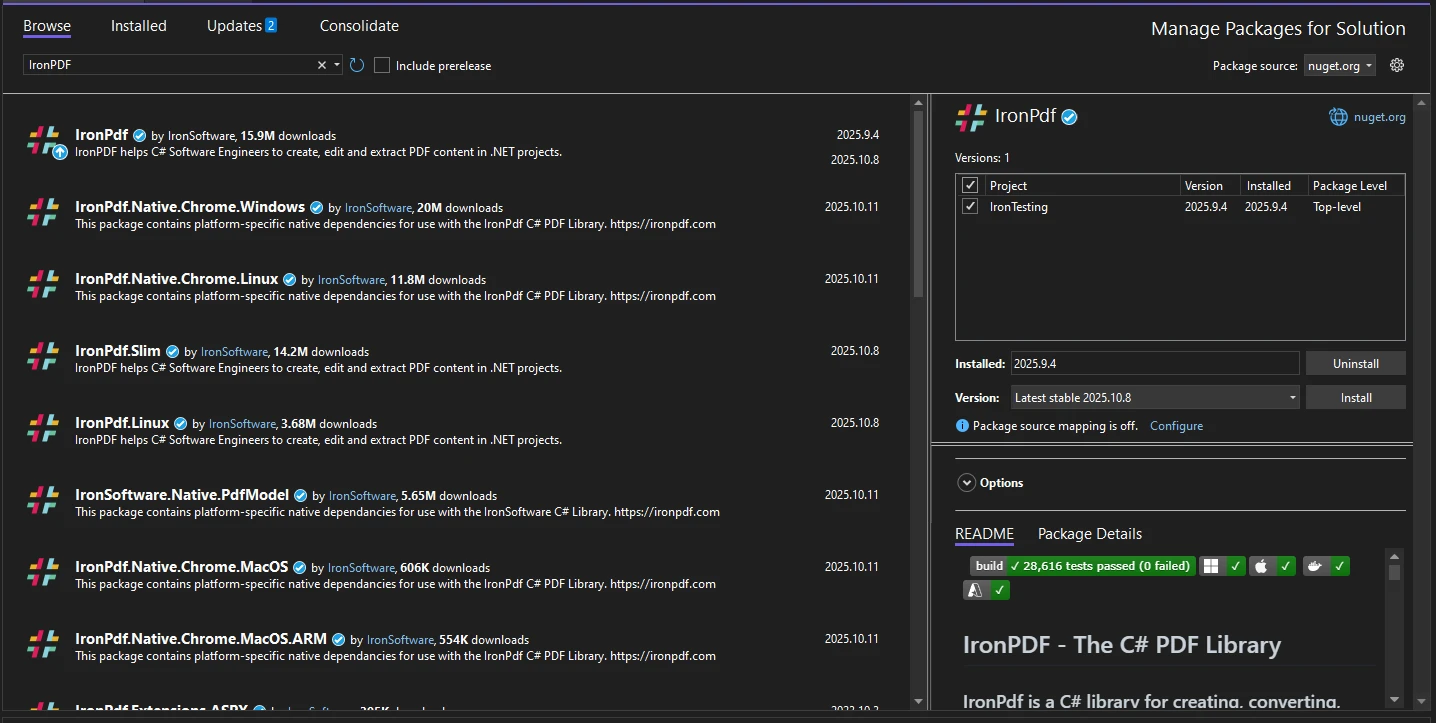
시작하려면 IronPDF NuGet 패키지를 프로젝트에 추가해야 합니다. NuGet.org에서 패키지를 사용할 수 있습니다. 패키지 관리자 콘솔 또는 .NET CLI를 사용하여 설치할 수 있습니다:
상세한 설치 옵션, 포함 Docker 배포 또는 Linux 설정에 대해서는 고급 설치 가이드를 참조하십시오. 최소 환경에 배포할 때, IronPDF Slim은 배포 footprint를 상당히 줄여줍니다.
설치가 완료되면, 다음 네임스페이스를 C# 파일 맨 위에 추가하십시오:
using IronPdf;
using System.IO;
using System.Collections.Generic;Imports IronPdf
Imports System.IO
Imports System.Collections.GenericIronPDF는 Windows, macOS, 및 Linux 플랫폼을 지원합니다. 추가적인 설정 없이 ASP.NET Core, Blazor, 콘솔 애플리케이션, 그리고 클라우드 환경에 통합됩니다.

여기 두 개의 PDF 바이트 배열을 하나의 PDF 문서로 병합하는 방법을 보여주는 완전한 예제가 있습니다:
// Simulate two PDF byte arrays (in practice, these come from a database or API)
byte[] pdfBytes1 = File.ReadAllBytes("document1.pdf");
byte[] pdfBytes2 = File.ReadAllBytes("document2.pdf");

// Create PdfDocument objects from byte arrays
var pdf1 = new PdfDocument(pdfBytes1);
var pdf2 = new PdfDocument(pdfBytes2);

// Merge the two PDF documents
PdfDocument combinedPdf = PdfDocument.Merge(pdf1, pdf2);

// Convert the combined PDF back to a byte array
byte[] mergedPdfBytes = combinedPdf.BinaryData;

// Optionally save the merged PDF to disk
File.WriteAllBytes("merged.pdf", mergedPdfBytes);Imports System.IO
' Simulate two PDF byte arrays (in practice, these come from a database or API)
Dim pdfBytes1 As Byte() = File.ReadAllBytes("document1.pdf")
Dim pdfBytes2 As Byte() = File.ReadAllBytes("document2.pdf")
' Create PdfDocument objects from byte arrays
Dim pdf1 As New PdfDocument(pdfBytes1)
Dim pdf2 As New PdfDocument(pdfBytes2)
' Merge the two PDF documents
Dim combinedPdf As PdfDocument = PdfDocument.Merge(pdf1, pdf2)
' Convert the combined PDF back to a byte array
Dim mergedPdfBytes As Byte() = combinedPdf.BinaryData
' Optionally save the merged PDF to disk
File.WriteAllBytes("merged.pdf", mergedPdfBytes)PdfDocument 클래스는 생성자에서 원시 바이트 배열을 직접 수락합니다. 두 개의 PdfDocument 인스턴스를 가진 후, PdfDocument.Merge()가 그것들을 단일 문서로 결합합니다. 그런 다음 BinaryData 속성은 결과를 바이트 배열로 제공하여 다시 데이터베이스에 저장하거나 API를 통해 전송할 준비를 합니다.
PdfDocument API는 단순 병합을 넘어 페이지 조작, 텍스트 추출, 양식 처리를 포함한 다양한 기능을 제공합니다. 병합된 문서를 얻은 후 최종 바이트 배열을 추출하기 전에 이러한 작업들을 적용할 수 있습니다.
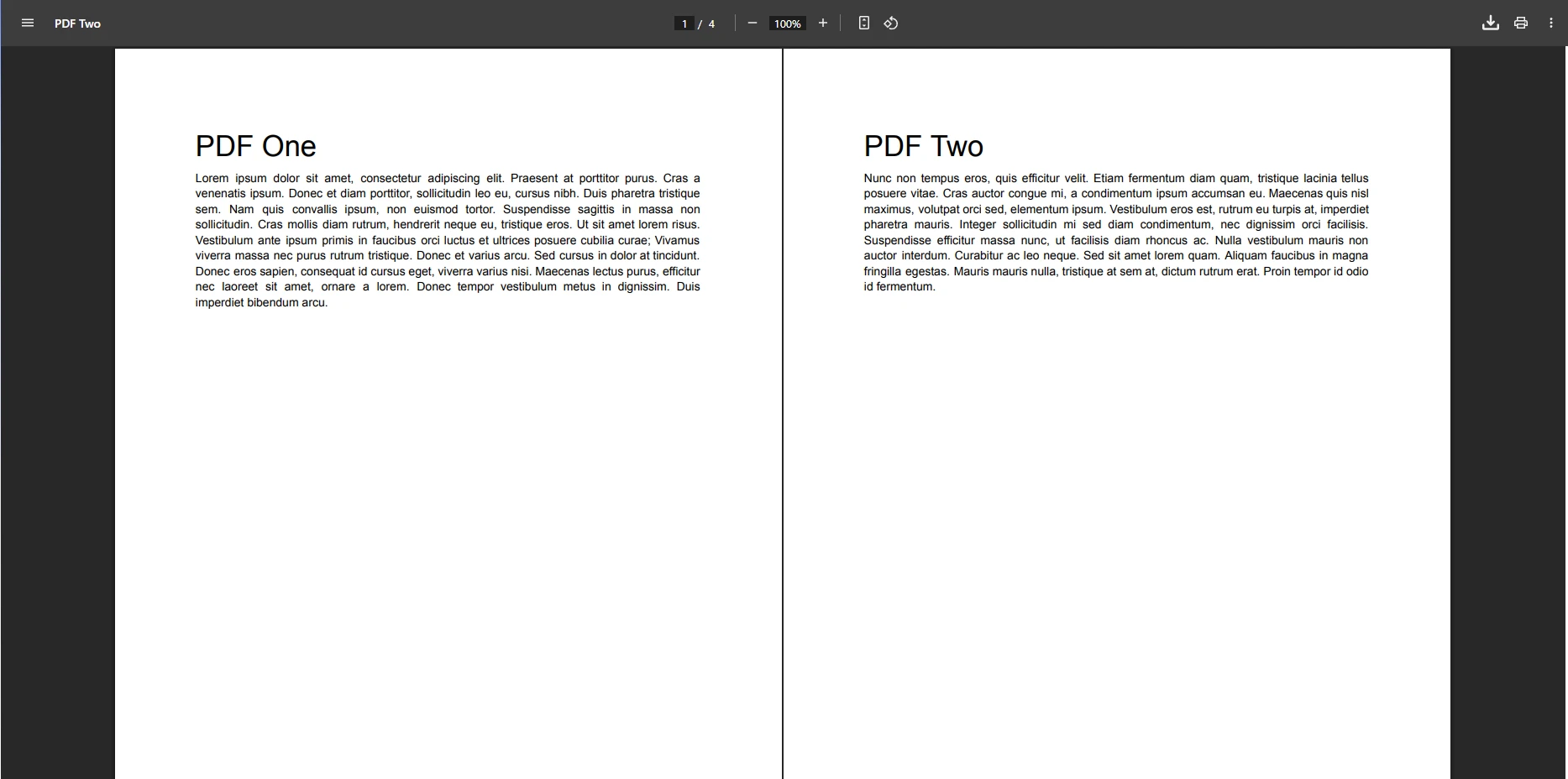
출력은 두 소스 문서의 모든 페이지가 Merge()에 전달된 순서대로 포함된 단일 PDF입니다. 페이지 번호, 글꼴, 이미지 및 포함된 콘텐츠가 모두 보존됩니다. 병합된 문서는 다른 PDF처럼 동일하게 작동합니다 -- IronPDF의 방법을 사용하여 페이지 매기기, 주석 달기, 서명하기 또는 압축할 수 있습니다.
바이트 배열을 PdfDocument 생성자에 전달하면 IronPDF가 이진 데이터를 분석하고 PDF 구조의 메모리 표현을 빌드합니다. 그런 다음 PdfDocument.Merge() 메소드는 각 소스의 페이지를 순서대로 추가하여 여러 문서를 결합하고 교차 참조 테이블을 재구축하며 문서 간의 글꼴이나 리소스 이름 충돌을 해결합니다.
이것이 바이트 배열을 단순히 연결할 수 없는 이유입니다 -- 첫 번째 PDF의 교차 참조 테이블은 그 파일 내 오프셋을 가리킵니다. 연결 후에는 두 번째 파일이 그것들을 이동시켰기 때문에 유효하지 않습니다. IronPDF는 전체 구조를 다시 구성하여 결과적으로 유효하고 잘 형성된 PDF를 만듭니다.
IronPDF는 단일 작업에서 여러 문서를 병합하기 위한 List 오버로드를 제공합니다. 이는 여러 두 문서 병합을 연결하는 것보다 효율적입니다:
// Load four PDFs as byte arrays
List<byte[]> pdfByteArrays = new List<byte[]>
{
    File.ReadAllBytes("example1.pdf"),
    File.ReadAllBytes("example2.pdf"),
    File.ReadAllBytes("example3.pdf"),
    File.ReadAllBytes("example4.pdf")
};

// Convert each byte array to a PdfDocument
List<PdfDocument> pdfsToMerge = new List<PdfDocument>();
for (int i = 0; i < pdfByteArrays.Count; i++)
{
    pdfsToMerge.Add(new PdfDocument(pdfByteArrays[i]));
}

// Merge all documents in one call
PdfDocument combinedPdf = PdfDocument.Merge(pdfsToMerge);
byte[] finalPdfBytes = combinedPdf.BinaryData;

// Apply compression if the result is large
if (finalPdfBytes.Length > 1024 * 1024 * 10) // 10 MB
{
    combinedPdf.CompressImages(90);
    finalPdfBytes = combinedPdf.BinaryData;
}Imports System.IO
' Load four PDFs as byte arrays
Dim pdfByteArrays As New List(Of Byte()) From {
File.ReadAllBytes("example1.pdf"),
File.ReadAllBytes("example2.pdf"),
File.ReadAllBytes("example3.pdf"),
File.ReadAllBytes("example4.pdf")
}
' Convert each byte array to a PdfDocument
Dim pdfsToMerge As New List(Of PdfDocument)()
For i As Integer = 0 To pdfByteArrays.Count - 1
pdfsToMerge.Add(New PdfDocument(pdfByteArrays(i)))
Next
' Merge all documents in one call
Dim combinedPdf As PdfDocument = PdfDocument.Merge(pdfsToMerge)
Dim finalPdfBytes As Byte() = combinedPdf.BinaryData
' Apply compression if the result is large
If finalPdfBytes.Length > 1024 * 1024 * 10 Then ' 10 MB
combinedPdf.CompressImages(90)
finalPdfBytes = combinedPdf.BinaryData
End If이 접근 방법은 문서의 수에 상관없이 확장 가능합니다. 각 PDF는 PdfDocument 객체로 로드되고 리스트에 추가된 후, 단일 호출에서 병합됩니다. 대형 출력 파일의 경우, PDF 압축으로 의미 있는 품질을 잃지 않고 최종 크기를 줄일 수 있습니다.
MemoryStream 접근 방식은 바이트 배열이 아닌 스트림과 작업하는 다른 .NET 라이브러리와의 통합 시 더 많은 제어를 제공합니다. 또한, 이미 스트림이 있는 경우에 유용합니다 (예: HTTP 응답 또는 blob 저장소 SDK에서):
using (var stream1 = new MemoryStream(pdfBytes1))
using (var stream2 = new MemoryStream(pdfBytes2))
{
    var pdf1 = new PdfDocument(stream1);
    var pdf2 = new PdfDocument(stream2);

    var merged = PdfDocument.Merge(pdf1, pdf2);

    // Add metadata to the merged document
    merged.MetaData.Author = "Your Application";
    merged.MetaData.Title = "Merged Document";
    merged.MetaData.CreationDate = DateTime.Now;

    byte[] result = merged.BinaryData;
}Imports System.IO
Using stream1 As New MemoryStream(pdfBytes1)
Using stream2 As New MemoryStream(pdfBytes2)
Dim pdf1 = New PdfDocument(stream1)
Dim pdf2 = New PdfDocument(stream2)
Dim merged = PdfDocument.Merge(pdf1, pdf2)
' Add metadata to the merged document
merged.MetaData.Author = "Your Application"
merged.MetaData.Title = "Merged Document"
merged.MetaData.CreationDate = DateTime.Now
Dim result As Byte() = merged.BinaryData
End Using
End Using최종 바이트를 추출하기 전에 메타데이터 설정, 워터마크 추가, 디지털 서명 적용 등을 통해 병합 문서를 풍부하게 할 수 있습니다. 규정 준수 시나리오의 경우, 장기 보관을 위한 PDF/A 변환 또는 접근성 요구 사항을 위한 PDF/UA 준수를 고려하십시오.
스트림 기반 처리 방식은 더 큰 PDF 파일에 대해 더 나은 메모리 관리를 제공하며, 클라우드 저장소 SDK와 깔끔하게 통합됩니다. 이 접근 방식은 특히 고처리량 서비스에서 비동기 패턴에 실용적입니다.
일상적인 패턴 중 하나는 SQL 데이터베이스에서 PDF 바이트 배열을 가져와 필요에 따라 결합하는 것입니다. 에러 처리가 포함된 생산 준비 예제가 다음과 같습니다:
public string MergePdfDocumentsFromDatabase(List<int> documentIds)
{
    List<PdfDocument> documents = new List<PdfDocument>();

    try
    {
        foreach (int id in documentIds)
        {
            // Fetch PDF byte array from database
            byte[] pdfData = GetPdfFromDatabase(id); // Replace with your data access logic

            if (pdfData == null || pdfData.Length == 0)
            {
                Console.WriteLine($"Warning: Document {id} is empty or not found");
                continue;
            }

            documents.Add(new PdfDocument(pdfData));
        }

        if (documents.Count == 0)
        {
            return "Error: No valid documents found to merge";
        }

        // Merge all documents
        PdfDocument mergedDocument = PdfDocument.Merge(documents);

        // Add page numbers to the footer
        mergedDocument.AddHtmlFooters(new HtmlHeaderFooter()
        {
            HtmlFragment = "<center>Page {page} of {total-pages}</center>",
            DrawDividerLine = true
        });

        // Save back to the database
        byte[] resultBytes = mergedDocument.BinaryData;
        SaveMergedPdfToDatabase(resultBytes);

        return "Document successfully combined and saved.";
    }
    catch (Exception ex)
    {
        Console.WriteLine($"Error merging PDFs: {ex.Message}");
        return $"Merge failed: {ex.Message}";
    }
}Imports System
Public Function MergePdfDocumentsFromDatabase(documentIds As List(Of Integer)) As String
Dim documents As New List(Of PdfDocument)()
Try
For Each id As Integer In documentIds
' Fetch PDF byte array from database
Dim pdfData As Byte() = GetPdfFromDatabase(id) ' Replace with your data access logic
If pdfData Is Nothing OrElse pdfData.Length = 0 Then
Console.WriteLine($"Warning: Document {id} is empty or not found")
Continue For
End If
documents.Add(New PdfDocument(pdfData))
Next
If documents.Count = 0 Then
Return "Error: No valid documents found to merge"
End If
' Merge all documents
Dim mergedDocument As PdfDocument = PdfDocument.Merge(documents)
' Add page numbers to the footer
mergedDocument.AddHtmlFooters(New HtmlHeaderFooter() With {
.HtmlFragment = "<center>Page {page} of {total-pages}</center>",
.DrawDividerLine = True
})
' Save back to the database
Dim resultBytes As Byte() = mergedDocument.BinaryData
SaveMergedPdfToDatabase(resultBytes)
Return "Document successfully combined and saved."
Catch ex As Exception
Console.WriteLine($"Error merging PDFs: {ex.Message}")
Return $"Merge failed: {ex.Message}"
End Try
End Function이 패턴은 누락되거나 null인 레코드를 건너뛰고 유효한 문서로 계속 진행하여 유연하게 처리합니다. 병합된 결과는 HTML 헤더/풋터를 통해 페이지 번호가 추가되어 데이터베이스에 다시 기록됩니다. 더 고급 탐색을 위해, 긴 병합 문서를 독자가 탐색하는 데 도움을 주기 위해 책갈피 추가가 가능합니다.
위의 패턴은 송장, 보고서, 계약서 또는 바이너리 열로 저장된 모든 문서에 작동합니다. 주요 장점:
PDF 병합 워크플로를 구축할 때 여러 가지 실패 모드를 방지할 가치가 있습니다:
pdfData != null && pdfData.Length > 0을 확인한 후 PdfDocument를 생성하세요.PdfDocument 객체를 병합 후 폐기하세요.다음은 입력 유효성 검사가 포함된 신뢰할 수 있는 패턴입니다:
public bool TryMergePdfByteArrays(byte[] pdfBytes1, byte[] pdfBytes2, out byte[] mergedBytes)
{
    mergedBytes = null;

    try
    {
        if (pdfBytes1 == null || pdfBytes1.Length == 0)
            throw new ArgumentException("First PDF byte array is null or empty");

        if (pdfBytes2 == null || pdfBytes2.Length == 0)
            throw new ArgumentException("Second PDF byte array is null or empty");

        using var pdf1 = new PdfDocument(pdfBytes1);
        using var pdf2 = new PdfDocument(pdfBytes2);

        if (pdf1.PageCount == 0)
            throw new InvalidOperationException("First PDF has no pages");

        if (pdf2.PageCount == 0)
            throw new InvalidOperationException("Second PDF has no pages");

        var mergedPdf = PdfDocument.Merge(pdf1, pdf2);
        mergedBytes = mergedPdf.BinaryData;

        return true;
    }
    catch (Exception ex)
    {
        Console.WriteLine($"PDF merge failed: {ex.Message}");
        return false;
    }
}Imports System
Public Function TryMergePdfByteArrays(pdfBytes1 As Byte(), pdfBytes2 As Byte(), ByRef mergedBytes As Byte()) As Boolean
mergedBytes = Nothing
Try
If pdfBytes1 Is Nothing OrElse pdfBytes1.Length = 0 Then
Throw New ArgumentException("First PDF byte array is null or empty")
End If
If pdfBytes2 Is Nothing OrElse pdfBytes2.Length = 0 Then
Throw New ArgumentException("Second PDF byte array is null or empty")
End If
Using pdf1 As New PdfDocument(pdfBytes1)
Using pdf2 As New PdfDocument(pdfBytes2)
If pdf1.PageCount = 0 Then
Throw New InvalidOperationException("First PDF has no pages")
End If
If pdf2.PageCount = 0 Then
Throw New InvalidOperationException("Second PDF has no pages")
End If
Dim mergedPdf = PdfDocument.Merge(pdf1, pdf2)
mergedBytes = mergedPdf.BinaryData
Return True
End Using
End Using
Catch ex As Exception
Console.WriteLine($"PDF merge failed: {ex.Message}")
Return False
End Try
End Functionusing 문장은 예외가 발생해도 관리되지 않는 자원을 해제하여 PdfDocument 객체가 올바르게 폐기되도록 보장합니다. TryXxx 패턴은 예외를 던지는 것이 아니라 부울 성공 표시를 반환하여 여러 문서를 처리하는 상위 코드에서 쉽게 호출할 수 있도록 합니다.
여러 가지 습관은 생산 실패의 위험을 줄여줍니다:
using 사용: IronPDF 문서는 네이티브 자원을 보유하고 있습니다. 항상 using 문장이나 명시적인 Dispose() 호출로 이들을 폐기하세요.| 접근 방식 | 최적의 용도 | 메모리 사용 | 유연성 |
|---|---|---|---|
| 직접 바이트 배열 (두 파일) | 간단한 두 문서 병합 | 낮음 | 기본 |
| List<PdfDocument> overload | 다수 파일 배치 병합 | 중간 | 높음 |
| MemoryStream 생성자 | 스트림 기반 통합 | 낮음 | 높음 |
| 데이터베이스 가져오기 패턴 | 생산 문서 워크플로우 | 중간 | 매우 높음 |
IronPDF에서는 실제 응용 프로그램에서 PDF 병합을 테스트할 수 있도록 무료 체험판을 제공합니다. 체험판에는 평가 동안 기능 제한 없는 전체 API -- 병합, 분할, 변환, 주석 달기, 서명 등 -- 이 포함되어 있습니다.
생산용으로는 한 명의 개발자 라이선스부터 무제한 배포를 포괄하는 Enterprise 사이트 라이선스까지 다양한 라이선스 옵션이 있습니다. 대량 워크플로를 운영하는 조직은 재배포 가능한 시나리오를 위한 OEM 라이선스를 탐색할 수 있습니다.
병합을 넘어, IronPDF는 전체 PDF 처리 수명주기를 다룹니다: HTML을 PDF로 변환, PDF 편집, 양식 생성 및 채우기, 텍스트 추출, 디지털 서명, 및 보안 관리. 병합 워크플로우가 작동한 후에는 추가 종속성 없이 이러한 기능이 들어맞습니다.
IronPDF 튜토리얼 페이지를 방문하여 각 주요 기능에 대한 완전한 안내를 탐색하거나, 각 클래스와 메서드에 대한 자세한 문서를 보려면 API 참조를 확인하세요.
 NuGet을 사용하여 설치하세요
커티스 차우는 칼턴 대학교에서 컴퓨터 과학 학사 학위를 취득했으며, Node.js, TypeScript, JavaScript, React를 전문으로 하는 프론트엔드 개발자입니다. 직관적이고 미적으로 뛰어난 사용자 인터페이스를 만드는 데 열정을 가진 그는 최신 프레임워크를 활용하고, 잘 구성되고 시각적으로 매력적인 매뉴얼을 제작하는 것을 즐깁니다.



IronPDF는 IRON SUITE 의 일부입니다.
10개의 .NET API 제품, 당신의 사무 문서를 위해

PDF 파일을 HTML처럼 빠르게 변환해야 할 때.


