




已更新 2026年4月23日
在 .NET 中用 Microsoft.Extensions.AI 簡化 LLM 整合
AI 正在改變軟體開發,但將大型語言模型 (LLM) 整合到 .NET 中一直很複雜。利用 IronPdf.AI 將 AI 整合推向更遠,為 .NET 應用程式帶來由 OpenAI 驅動的 PDF 解析、資料擷取和內容總結。
閱讀更多

開發人員現在可以輕鬆將Chromium強大的網頁瀏覽器引擎整合到他們的.NET桌面應用程式和WPF應用程式中,使用CefSharp這個創新的.NET包裝器來包裝Chromium嵌入式框架。 CefSharp為.NET應用程式開發人員提供了自訂桌面介面中豐富的網頁體驗,使他們能夠利用Chromium的網路功能和開發者工具,而不需任何外部依賴。 透過提供廣泛的新功能,例如自訂選項和瀏覽器行為控制,這個框架使得整合當代網路技術,如HTML5、CSS3和JavaScript變得更加容易。
CefSharp的跨平台互操作性和網頁內容互動功能讓桌面解決方案中使用者的互動和體驗得以轉變,提升了桌面程式,並在應用程式環境中實現動態網頁瀏覽體驗。 在本文中,我們將透過程式碼片段了解更多關於CefSharp的開源版本。
安裝CefSharp.WinForms:
CefSharp是一個框架,透過無縫整合Chromium強大的網頁瀏覽器引擎到.NET應用程式中,轉變開發人員建構桌面應用和自動化專案的方式。 藉由CefSharp的幫助,我們可以顯示遠端網頁內容,包括支援HTML5的嵌入式UI。
在CefSharp介紹中需強調的重要內容有:
透過使用CefSharp,開發人員可以改進桌面應用程式,提供網路瀏覽體驗,鼓勵使用者互動,並在應用程式環境中為使用者提供豐富的當代資訊。
範例程式碼:
using System;
using System.Windows.Forms;
using CefSharp;
using CefSharp.WinForms;

namespace CefSharpExample
{
    public partial class MainForm : Form
    {
        private ChromiumWebBrowser chromeBrowser;

        public MainForm()
        {
            InitializeComponent();

            // Initialize CefSharp settings
            CefSettings settings = new CefSettings();
            Cef.Initialize(settings);

            // Create the ChromiumWebBrowser instance
            chromeBrowser = new ChromiumWebBrowser("https://ironpdf.com/"); // Load a URL

            // Add the ChromiumWebBrowser control to the form
            this.Controls.Add(chromeBrowser);
            chromeBrowser.Dock = DockStyle.Fill; // Fill the entire form

            // Handle when the browser component has finished loading
            chromeBrowser.LoadingStateChanged += ChromeBrowser_LoadingStateChanged;
        }

        private void ChromeBrowser_LoadingStateChanged(object sender, LoadingStateChangedEventArgs e)
        {
            if (!e.IsLoading)
            {
                // Page has finished loading
                // Perform actions after the page has loaded
                Console.WriteLine("Finished loading.");
            }
        }

        // Dispose of Cef resources when the form is closed
        private void MainForm_FormClosing(object sender, FormClosingEventArgs e)
        {
            Cef.Shutdown();
        }
    }
}Imports System
Imports System.Windows.Forms
Imports CefSharp
Imports CefSharp.WinForms
Namespace CefSharpExample
Partial Public Class MainForm
Inherits Form
Private chromeBrowser As ChromiumWebBrowser
Public Sub New()
InitializeComponent()
' Initialize CefSharp settings
Dim settings As New CefSettings()
Cef.Initialize(settings)
' Create the ChromiumWebBrowser instance
chromeBrowser = New ChromiumWebBrowser("https://ironpdf.com/") ' Load a URL
' Add the ChromiumWebBrowser control to the form
Me.Controls.Add(chromeBrowser)
chromeBrowser.Dock = DockStyle.Fill ' Fill the entire form
' Handle when the browser component has finished loading
AddHandler chromeBrowser.LoadingStateChanged, AddressOf ChromeBrowser_LoadingStateChanged
End Sub
Private Sub ChromeBrowser_LoadingStateChanged(ByVal sender As Object, ByVal e As LoadingStateChangedEventArgs)
If Not e.IsLoading Then
' Page has finished loading
' Perform actions after the page has loaded
Console.WriteLine("Finished loading.")
End If
End Sub
' Dispose of Cef resources when the form is closed
Private Sub MainForm_FormClosing(ByVal sender As Object, ByVal e As FormClosingEventArgs)
Cef.Shutdown()
End Sub
End Class
End Namespace此程式碼使用CefSharp開發了一個基於Chromium的簡單WinForms應用程式,嵌入了網頁瀏覽器。 以下是說明:
CefSettings初始化CefSharp設置。LoadingStateChanged事件處理瀏覽器的載入狀態變化,例如頁面載入完成時。MainForm_FormClosing事件確保在窗體關閉時Cef資源得到正確關閉。對於一個準備編譯的基本範例,基於CefSharp的應用程式,請參考GitHub上的Minimal Example Project。 更複雜的範例專案可在專案的來源中獲得。
將IronPDF的PDF生成功能與CefSharp的ChromiumEmbedded Framework (CEF)瀏覽器整合需要在.NET應用程式中同時使用CefSharp和IronPDF。 然而,截至2022年1月的最新版本,CefSharp和IronPDF之間尚無直接開箱即用的介面。
CefSharp的主要目標是將Chromium網頁瀏覽器引擎整合到.NET程式中,允許透過應用程式的使用者介面顯示並與網路內容交互。 CefSharp為WPF和Windows表單應用程式提供瀏覽器控制。
儘管CefSharp和IronPDF尚未直接整合,但是開發人員仍然可以在相同的應用程式上下文中使用這兩個程式庫。
IronPDF在HTML到PDF轉換方面表現出色,確保精確保留原始設計和樣式。 它非常適合從基於網路的內容如報告、發票和文件中建立PDF。 IronPDF支持HTML文件、URLs和原始HTML字串,輕鬆生成高品質的PDF文件。
using IronPdf;

class Program
{
    static void Main(string[] args)
    {
        var renderer = new ChromePdfRenderer();

        // 1. Convert HTML String to PDF
        var htmlContent = "<h1>Hello, IronPDF!</h1><p>This is a PDF from an HTML string.</p>";
        var pdfFromHtmlString = renderer.RenderHtmlAsPdf(htmlContent);
        pdfFromHtmlString.SaveAs("HTMLStringToPDF.pdf");

        // 2. Convert HTML File to PDF
        var htmlFilePath = "path_to_your_html_file.html"; // Specify the path to your HTML file
        var pdfFromHtmlFile = renderer.RenderHtmlFileAsPdf(htmlFilePath);
        pdfFromHtmlFile.SaveAs("HTMLFileToPDF.pdf");

        // 3. Convert URL to PDF
        var url = "http://ironpdf.com"; // Specify the URL
        var pdfFromUrl = renderer.RenderUrlAsPdf(url);
        pdfFromUrl.SaveAs("URLToPDF.pdf");
    }
}Imports IronPdf
Friend Class Program
Shared Sub Main(ByVal args() As String)
Dim renderer = New ChromePdfRenderer()
' 1. Convert HTML String to PDF
Dim htmlContent = "<h1>Hello, IronPDF!</h1><p>This is a PDF from an HTML string.</p>"
Dim pdfFromHtmlString = renderer.RenderHtmlAsPdf(htmlContent)
pdfFromHtmlString.SaveAs("HTMLStringToPDF.pdf")
' 2. Convert HTML File to PDF
Dim htmlFilePath = "path_to_your_html_file.html" ' Specify the path to your HTML file
Dim pdfFromHtmlFile = renderer.RenderHtmlFileAsPdf(htmlFilePath)
pdfFromHtmlFile.SaveAs("HTMLFileToPDF.pdf")
' 3. Convert URL to PDF
Dim url = "http://ironpdf.com" ' Specify the URL
Dim pdfFromUrl = renderer.RenderUrlAsPdf(url)
pdfFromUrl.SaveAs("URLToPDF.pdf")
End Sub
End Class要獲得IronPDF程式庫,您需要遵循以下步驟。 在套件管理器中輸入以下程式碼:
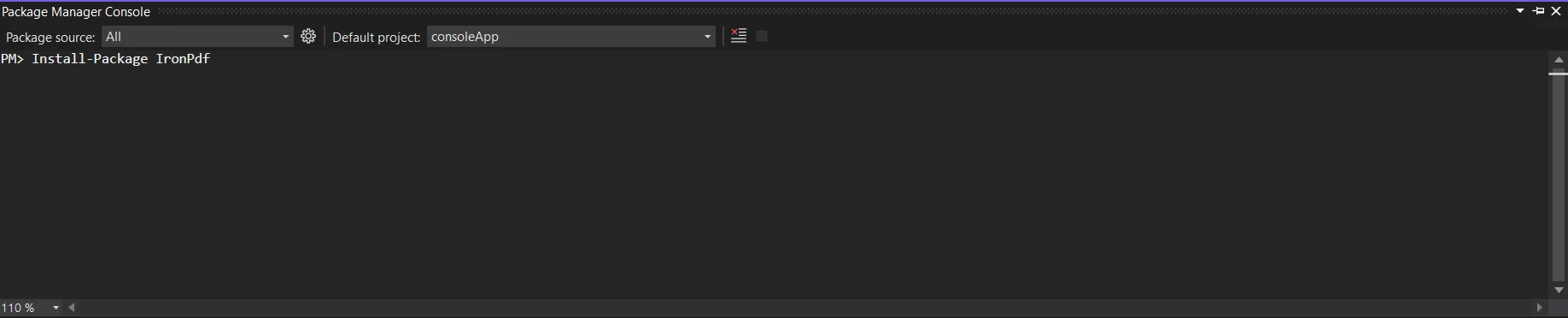
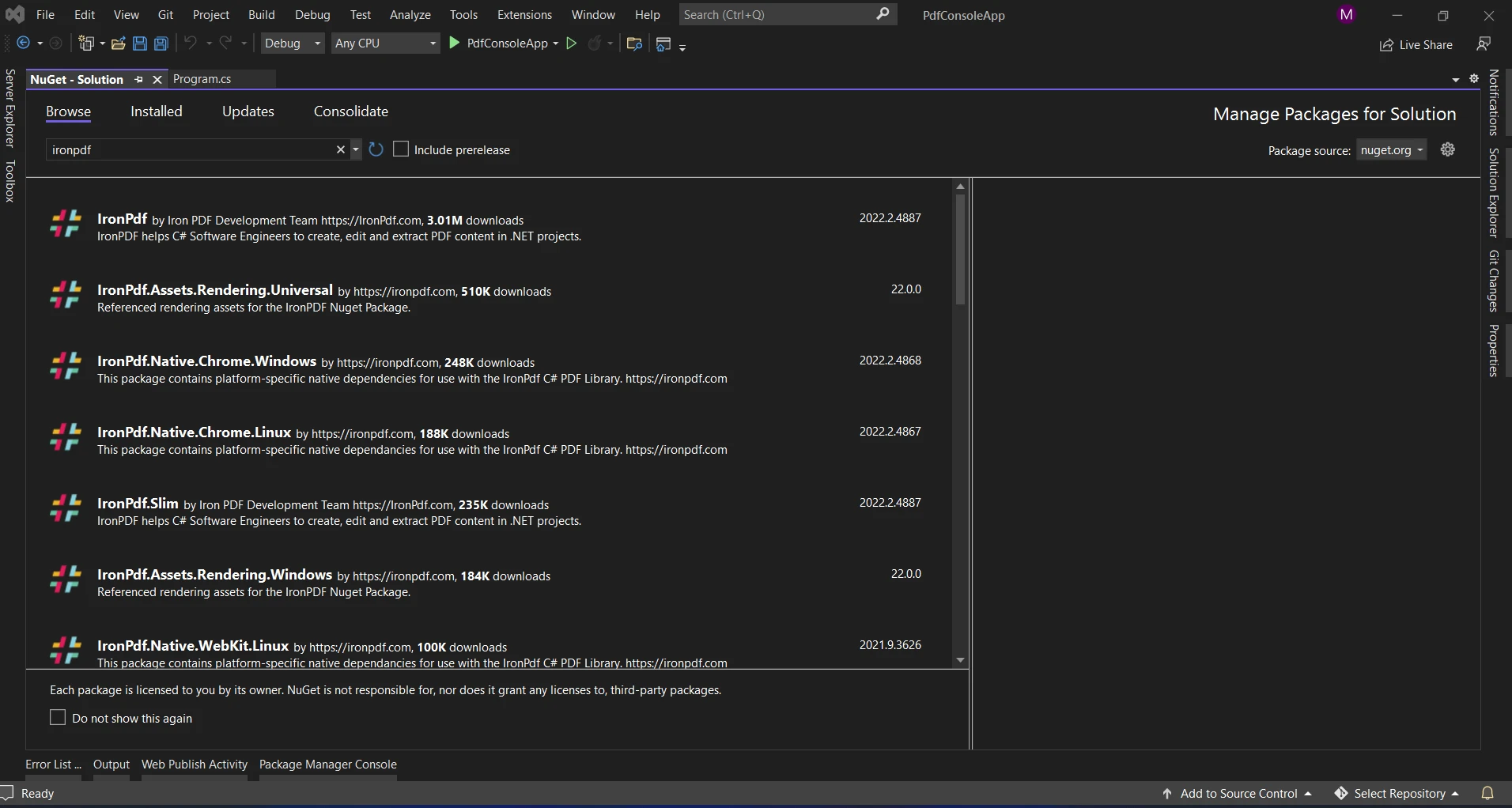
或者,您可以使用NuGet套件管理器搜尋包"IronPDF"。 從所有與IronPDF相關的NuGet包列表中選擇並下載所需包。
要在C#應用中將IronPDF與CefSharp整合,您需要執行兩個步驟:使用CefSharp提供的基於Chromium的瀏覽器渲染HTML內容,然後使用IronPDF將該HTML資訊轉換為PDF文件。 以下範例展示如何完成此整合:
using CefSharp;
using IronPdf;
using System;
using System.Threading.Tasks;
using System.Windows.Forms;

namespace CefSharpIronPdfIntegration
{
    public partial class MainForm : Form
    {
        private ChromiumWebBrowser chromeBrowser;

        public MainForm()
        {
            InitializeComponent();

            // Initialize CefSharp
            CefSettings settings = new CefSettings();
            Cef.Initialize(settings);

            // Create the ChromiumWebBrowser instance
            chromeBrowser = new ChromiumWebBrowser("https://ironpdf.com/"); // Load a URL

            // Add the ChromiumWebBrowser control to the form
            this.Controls.Add(chromeBrowser);
            chromeBrowser.Dock = DockStyle.Fill; // Fill the entire form

            // Handle when the browser component has finished loading
            chromeBrowser.LoadingStateChanged += ChromeBrowser_LoadingStateChanged;
        }

        private async void ChromeBrowser_LoadingStateChanged(object sender, LoadingStateChangedEventArgs e)
        {
            if (!e.IsLoading)
            {
                // Page has finished loading
                // Capture HTML content after page load completes
                string htmlContent = await chromeBrowser.GetSourceAsync();

                // Use IronPDF to generate a PDF from the captured HTML content
                var Renderer = new IronPdf.HtmlToPdf();
                var PDF = Renderer.RenderHtmlAsPdf(htmlContent);
                PDF.SaveAs("Output.pdf"); // Save the generated PDF

                Console.WriteLine("PDF generated successfully.");
            }
        }

        // Dispose of Cef resources when the form is closed to avoid unnecessary memory usage
        private void MainForm_FormClosing(object sender, FormClosingEventArgs e)
        {
            Cef.Shutdown();
        }
    }
}Imports CefSharp
Imports IronPdf
Imports System
Imports System.Threading.Tasks
Imports System.Windows.Forms
Namespace CefSharpIronPdfIntegration
Partial Public Class MainForm
Inherits Form
Private chromeBrowser As ChromiumWebBrowser
Public Sub New()
InitializeComponent()
' Initialize CefSharp
Dim settings As New CefSettings()
Cef.Initialize(settings)
' Create the ChromiumWebBrowser instance
chromeBrowser = New ChromiumWebBrowser("https://ironpdf.com/") ' Load a URL
' Add the ChromiumWebBrowser control to the form
Me.Controls.Add(chromeBrowser)
chromeBrowser.Dock = DockStyle.Fill ' Fill the entire form
' Handle when the browser component has finished loading
AddHandler chromeBrowser.LoadingStateChanged, AddressOf ChromeBrowser_LoadingStateChanged
End Sub
Private Async Sub ChromeBrowser_LoadingStateChanged(ByVal sender As Object, ByVal e As LoadingStateChangedEventArgs)
If Not e.IsLoading Then
' Page has finished loading
' Capture HTML content after page load completes
Dim htmlContent As String = Await chromeBrowser.GetSourceAsync()
' Use IronPDF to generate a PDF from the captured HTML content
Dim Renderer = New IronPdf.HtmlToPdf()
Dim PDF = Renderer.RenderHtmlAsPdf(htmlContent)
PDF.SaveAs("Output.pdf") ' Save the generated PDF
Console.WriteLine("PDF generated successfully.")
End If
End Sub
' Dispose of Cef resources when the form is closed to avoid unnecessary memory usage
Private Sub MainForm_FormClosing(ByVal sender As Object, ByVal e As FormClosingEventArgs)
Cef.Shutdown()
End Sub
End Class
End Namespace此程式碼展示了簡單的整合,捕獲載入於Chromium瀏覽器中的HTML內容,並使用IronPDF將其轉換為PDF文件。 以下是說明:
https://ironpdf.com/")載入到瀏覽器中並建立其實例。LoadingStateChanged事件:跟蹤瀏覽器的載入進度。 當頁面載入完成(GetSourceAsync()異步捕獲載入頁面的HTML內容。htmlContent)通過IronPDF的HtmlToPdf功能轉換為PDF文件。 生成的PDF保存為"Output.pdf"。Cef.Shutdown()正確關閉Cef資源。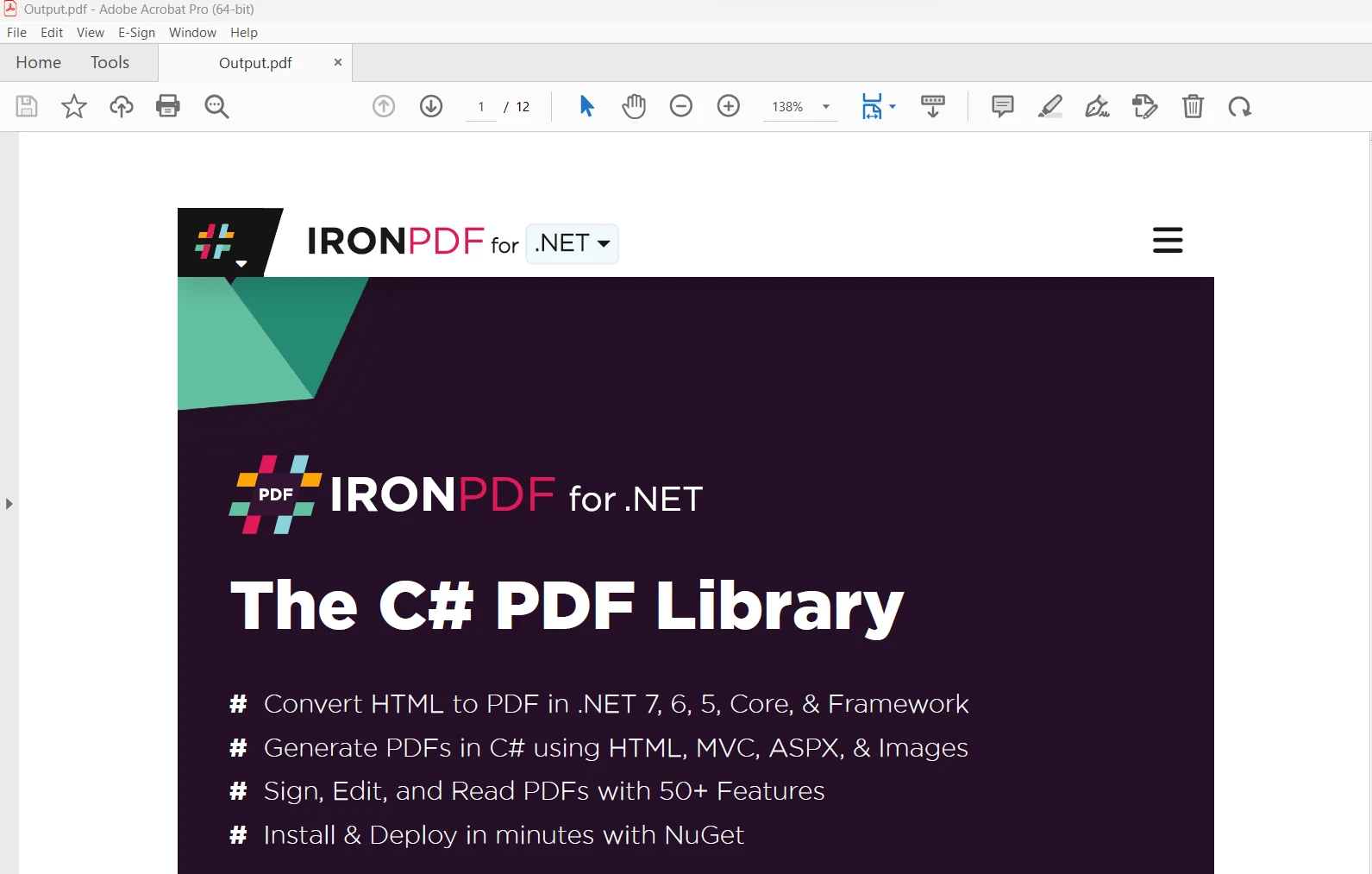
此程式碼展示了簡單的整合,捕獲載入於Chromium瀏覽器中的HTML內容,然後使用IronPDF將其轉換為PDF文件。 根據應用程式的特定需求自訂URL、錯誤處理以及其他方面。 有關IronPDF文件的更多資訊,請參考IronPDF NuGet Package。
IronPDF和CefSharp於C#應用中的整合為管理文件和線上資訊開啟了新的可能性。 通過結合IronPDF的PDF生成功能與CefSharp提供的基於Chromium的瀏覽器,開發人員可以建立靈活的應用程式,可以生成高品質的PDF文件,同時整合動態網頁內容。
IronPDF的Lite包適用於$999,包括一年軟體維護合約、升級選項、永久授權,以及三十天退款保證。 在三十天試用期內,使用者可以在實際情境中評估帶水印的試用版本的產品。 要了解IronPDF的成本、授權及免費版本,請造訪IronPDF Licensing Information。 如需了解更多關於Iron Software的資訊,請造訪他們的Iron Software網站。

Jacob Mellor是Iron Software的首席技術官,一位在C# PDF技術上開創先河的遠見工程師。作為Iron Software核心程式碼庫的原開發者,他從創立以來就一直在塑造公司的產品架構,與首席執行官Cameron Rimington一起將公司轉變為服務於NASA、特斯拉和全球政府公司的50多名人員的公司。



IronPDF 是 IRONSUITE 的一部分
10 款適用於辦公室文件的 .NET API 產品

當您需要您的PDF看起來像HTML一樣快速。












