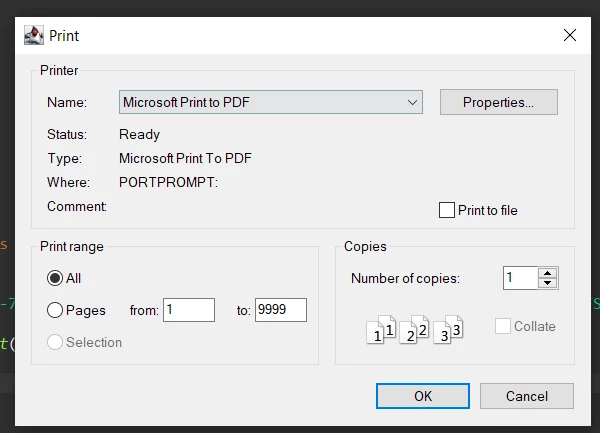
// Add IronPDF dependency to your Maven pom.xml file// Import IronPDF classesimport com.ironsoftware.ironpdf.*;// Load PDF documentPdfDocument pdf = newPdfDocument(Paths.get("MyPdf.pdf"));// Print without dialogpdf.printWithoutDialog();// Or show print dialogpdf.print();
// Add IronPDF dependency to your Maven pom.xml file
// Import IronPDF classes
import com.ironsoftware.ironpdf.*;

// Load PDF document
PdfDocument pdf = new PdfDocument(Paths.get("MyPdf.pdf"));

// Print without dialog
pdf.printWithoutDialog();

// Or show print dialog
pdf.print();
IronPDF for Javaは、ライブラリにPDFコンテンツをロードするためのコンストラクタを提供します。 有効な引数には、バイト配列とファイルパスが含まれます。 パスワードで保護されたドキュメントの場合、パスワードを含む第3のパラメータを提供することができます。
以下のコード・スニペットは、ファイルシステム上にあるPDFを読み込みます:
// Set the license key for IronPDF// Learn more about licensing at https://ironpdf.com/java/get-started/license-keys/License.setLicenseKey("Enter-Your-License"); // Load PDF from the filesystemPdfDocument pdf = newPdfDocument(Paths.get("MyPdf.pdf"));// Alternative: Load from byte array// byte[] pdfBytes = Files.readAllBytes(Paths.get("MyPdf.pdf"));// PdfDocument pdfFromBytes = new PdfDocument(pdfBytes);// For password-protected PDFs// PdfDocument protectedPdf = new PdfDocument(Paths.get("Protected.pdf"), "password123");
// Set the license key for IronPDF
// Learn more about licensing at https://ironpdf.com/java/get-started/license-keys/
License.setLicenseKey("Enter-Your-License");

// Load PDF from the filesystem
PdfDocument pdf = new PdfDocument(Paths.get("MyPdf.pdf"));

// Alternative: Load from byte array
// byte[] pdfBytes = Files.readAllBytes(Paths.get("MyPdf.pdf"));
// PdfDocument pdfFromBytes = new PdfDocument(pdfBytes);

// For password-protected PDFs
// PdfDocument protectedPdf = new PdfDocument(Paths.get("Protected.pdf"), "password123");
// Print PDF document using default printer settings without showing a print dialog// This will immediately send the document to the default system printerpdf.printWithoutDialog();// The method returns immediately after sending the print job to the spoolerSystem.out.println("PDF document sent to default printer");
// Print PDF document using default printer settings without showing a print dialog
// This will immediately send the document to the default system printer
pdf.printWithoutDialog();

// The method returns immediately after sending the print job to the spooler
System.out.println("PDF document sent to default printer");
// Display print dialog to let the user specify printing options// This will show the system print dialog with all available printerspdf.print();// The method will wait for user interaction before proceeding// User can select printer, paper size, orientation, number of copies, etc.
// Display print dialog to let the user specify printing options
// This will show the system print dialog with all available printers
pdf.print();

// The method will wait for user interaction before proceeding
// User can select printer, paper size, orientation, number of copies, etc.
package IronPDF.ironpdf_java;// Import statement for IronPDF Javaimport com.ironsoftware.ironpdf.*;import java.awt.print.PrinterException;import java.io.IOException;import java.nio.file.Paths;public class App { public static void main(String[] args) throws PrinterException, IOException { // Apply your license key // Get your license key from https://ironpdf.com/java/get-started/license-keys/License.setLicenseKey("Enter-Your-License"); // Load PDF document from the file system PdfDocument pdf = newPdfDocument(Paths.get("MyPdf.pdf")); // Option 1: Print the PDF document without displaying a print dialog // Uses default printer and settings pdf.printWithoutDialog(); // Option 2: Display the print dialog for the user to configure printing options // Allows selection of printer, copies, page range, etc. pdf.print(); // Don't forget to close the document when done pdf.close(); }}
package IronPDF.ironpdf_java;

// Import statement for IronPDF Java
import com.ironsoftware.ironpdf.*;
import java.awt.print.PrinterException;
import java.io.IOException;
import java.nio.file.Paths;

public class App {
    public static void main(String[] args) throws PrinterException, IOException {
        // Apply your license key
        // Get your license key from https://ironpdf.com/java/get-started/license-keys/
        License.setLicenseKey("Enter-Your-License");

        // Load PDF document from the file system
        PdfDocument pdf = new PdfDocument(Paths.get("MyPdf.pdf"));

        // Option 1: Print the PDF document without displaying a print dialog
        // Uses default printer and settings
        pdf.printWithoutDialog();

        // Option 2: Display the print dialog for the user to configure printing options
        // Allows selection of printer, copies, page range, etc.
        pdf.print();

        // Don't forget to close the document when done
        pdf.close();
    }
}
How can I optimize performance during PDF printing in Java applications?
For optimal performance, consider compressing large PDFs to reduce memory usage and speed up printing processes, especially for large batch operations.
Can IronPDF be used on different operating systems?
Yes, IronPDF is compatible across various operating systems like Windows, Linux, and macOS; however, printer configurations and options may vary, so it's advisable to test on the target platform.
What is the licensing model for IronPDF?
IronPDF offers a free trial for production testing, with pricing available starting from the 'liteLicense' option. You can explore their pricing page for more details.
Does IronPDF support converting HTML to PDF?
Yes, IronPDF supports converting HTML, CSS, and JavaScript code directly into PDF documents, making it easy to create PDFs from web pages or HTML templates.