




업데이트됨 2026년 9월 4일
월별 계정 명세서를 PDF 문서로 생성하기
개발자는 IronPDF C# PDF 라이브러리를 사용하여 외부 서비스에 의존하지 않고도 .NET 프로젝트 내에서 HTML을 신뢰할 수 있는 PDF 파일로 변환할 수 있습니다.
더 읽어보기

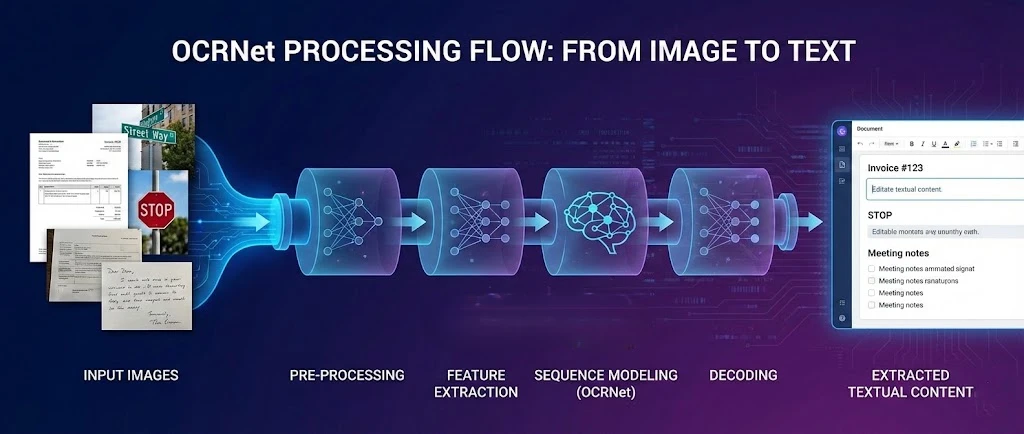
OCR.net은 PDF에서 텍스트를 추출하고 .NET 응용 프로그램에서 검색 가능한 문서를 생성하기 위해 IronPDF와 짝을 이루는 광학 문자 인식에 대한 딥러닝 프레임워크입니다. 이 튜토리얼에서는 응용 프로그램이 스캔 파일을 처리하고, PDF 페이지를 OCR로 래스터화하며, 인식된 텍스트를 새로운 검색 가능한 PDF로 다시 조립할 수 있도록 이 두 도구를 연결하는 방법을 보여줍니다.
OCR.net 모델은 복잡한 환경에서 장면 텍스트 감지 및 문자 인식에 뛰어납니다. IronPDF의 렌더링 엔진과 결합하면 전체 파이프라인을 확보할 수 있습니다: PDF를 생성하거나 로드하고, 그 페이지를 고해상도 이미지로 내보내고, 그 이미지를 OCR.net에 보내고, 결과물을 완전히 검색 가능한 문서로 재구성합니다.

OCR 워크플로우를 구축하기 전에 프로젝트에 IronPDF가 설치되어야 합니다. 가장 빠른 방법은 NuGet 패키지 관리자 콘솔입니다:
또는 NuGet UI에서 IronPDF를 검색하여 직접 추가할 수 있습니다. 설치가 완료되면 응용 프로그램 시작 시 라이센스 키를 적용하십시오:
using IronPdf;

IronPdf.License.LicenseKey = "YOUR-LICENSE-KEY";Imports IronPdf
IronPdf.License.LicenseKey = "YOUR-LICENSE-KEY"무료 체험 라이센스를 사용하여 모든 기능 세트를 제한 없이 테스트 할 수 있습니다. IronPDF는 Windows, Linux, 그리고 macOS에서 .NET 6, 7, 8, 10을 지원하므로 동일한 코드는 데스크톱 앱, ASP.NET Core 웹 서비스, 및 컨테이너화된 배포에서 실행됩니다.
Docker 환경의 경우, IronPDF는 미리 구성된 Linux 배포 가이드 및 이미지 크기를 줄인 슬림 패키지 변형을 제공합니다. 원격 렌더링 아키텍처가 선호된다면, IronPDF Engine은 지원되는 모든 플랫폼의 클라이언트를 통해 별도의 서비스로 실행할 수 있습니다.
OCR.net은 다른 서체 스타일에 걸쳐 영숫자 문자를 인식하는 광학 문자 인식(OCR)에 대한 딥러닝 접근 방식입니다. 이 모델은 입력 이미지에서 공간적 특징을 포착하기 위해 최적화된 신경망 아키텍처를 사용합니다. PDF 생성 기능과 결합된 이 학습된 모델들은 일반적인 문서 유형에서 강한 정밀도로 인식을 제공합니다.
OCR.net 뒤에 있는 인식 프레임워크는 Gated Recurrent Unit (GRU)을 통합하여 특징 학습을 개선하고 이미지 기반 시퀀스 인식 작업을 처리합니다. 이 하이브리드 모델은 시퀀스 라벨링을 위해 처음 도입된 기술인 연결주의적 시퀀스 분류 (CTC)를 통해 주목할 만한 정확도를 달성하며, 문서 OCR에 잘 전이됩니다. 현재 진행 중인 개선 사항은 PDF 텍스트 추출 도구와 통합될 때 특히 OCR.net의 언어 지원을 확장합니다.
최신 OCR 파이프라인의 주요 구성 요소는 다음을 포함합니다:
GRU 기반 아키텍처와 연결주의적 시퀀스 분류는 컨테이너화된 환경에서 효율적인 리소스 사용을 가능하게 하여, 메모리 및 CPU 제한이 중요한 Kubernetes 배치에 OCR.net을 실질적인 선택으로 만듭니다. 경량 아키텍처는 Docker 이미지 크기를 관리 가능한 상태로 유지하면서 강력한 인식 정확도를 보장합니다.
복잡한 장면 텍스트, 손으로 쓴 문서 또는 템플릿 기반 OCR이 실패하는 다국어 콘텐츠를 처리할 때 OCR.net이 더 나은 선택입니다. 외부 종속성 없이 하드웨어 구성 전반에 걸쳐 일관된 성능이 필요한 컨테이너화된 애플리케이션에서 특히 뛰어납니다. 모델은 UTF-8 인코딩을 깔끔하게 처리하며, 이는 국제 언어 지원에 중요합니다.
전통적인 정규 표현식 기반 또는 템플릿 매칭 OCR 시스템은 다양한 글꼴, 필기체 또는 조명이 고르지 않은 이미지에서 무너지게 됩니다. OCR.net의 신경망 접근법은 고정된 템플릿 대신 기능을 학습하기 때문에 이러한 시나리오에서 더 잘 일반화됩니다. 그렇다고 하더라도 문서가 깨끗하고 기계식으로 타이핑된 텍스트와 일관된 서식이라면 더 가벼운 라이브러리가 더 빠르고 충분할 수 있습니다.
생산 배포에는 일반적으로 견고한 성능을 위해 2-4개의 CPU 코어와 4-8GB RAM이 필요합니다. GPU 가속은 NVIDIA Docker 런타임을 사용하는 컨테이너화된 환경에서 배치 처리에 상당한 속도 향상을 제공합니다. 이러한 요구 사항은 Azure App Service 및 AWS Lambda 배포와 잘 맞으며, Lambda의 메모리 한도 때문에 약속하기 전에 특정 문서 크기를 벤치마킹해야 합니다.
IronPDF는 .NET 개발자에게 PDF 생성에 대한 전체 통제권을 제공합니다. 라이브러리는 HTML 문자열, URL, 파일 입력을 Chrome 기반 렌더링 엔진을 통해 세련된 PDF로 렌더링할 수 있습니다. OCR 워크플로우에서 가장 중요한 기능은 RasterizeToImageFiles()로, PDF 페이지를 인식하기 적합한 고해상도 이미지로 내보냅니다.
using IronPdf;

// Create a PDF document with IronPDF
var renderer = new ChromePdfRenderer();

// Set 300 DPI for OCR accuracy -- higher DPI preserves text sharpness
renderer.RenderingOptions.PaperSize = IronPdf.Rendering.PdfPaperSize.A4;
renderer.RenderingOptions.DPI = 300;
renderer.RenderingOptions.MarginTop = 50;
renderer.RenderingOptions.MarginBottom = 50;

var pdf = renderer.RenderHtmlAsPdf(@"
    <h1>Document Report</h1>
    <p>Scene text integration for computer vision analysis.</p>
    <p>Text detection results for dataset and model analysis.</p>");

// Tag the document with searchable metadata
pdf.MetaData.Author = "OCR Processing Pipeline";
pdf.MetaData.Keywords = "OCR, Text Recognition, Computer Vision";
pdf.MetaData.ModifiedDate = DateTime.Now;

pdf.SaveAs("document-for-ocr.pdf");

// Export pages as PNG images for OCR.net -- 300 DPI is the recommended minimum
pdf.RasterizeToImageFiles("page-*.png", IronPdf.Imaging.ImageType.Png, 300);Imports IronPdf
' Create a PDF document with IronPDF
Dim renderer As New ChromePdfRenderer()
' Set 300 DPI for OCR accuracy -- higher DPI preserves text sharpness
renderer.RenderingOptions.PaperSize = IronPdf.Rendering.PdfPaperSize.A4
renderer.RenderingOptions.DPI = 300
renderer.RenderingOptions.MarginTop = 50
renderer.RenderingOptions.MarginBottom = 50
Dim pdf = renderer.RenderHtmlAsPdf("
<h1>Document Report</h1>
<p>Scene text integration for computer vision analysis.</p>
<p>Text detection results for dataset and model analysis.</p>")
' Tag the document with searchable metadata
pdf.MetaData.Author = "OCR Processing Pipeline"
pdf.MetaData.Keywords = "OCR, Text Recognition, Computer Vision"
pdf.MetaData.ModifiedDate = DateTime.Now
pdf.SaveAs("document-for-ocr.pdf")
' Export pages as PNG images for OCR.net -- 300 DPI is the recommended minimum
pdf.RasterizeToImageFiles("page-*.png", IronPdf.Imaging.ImageType.Png, 300)RasterizeToImageFiles() 메소드는 지정된 DPI로 PDF 페이지를 PNG 이미지로 변환합니다. 300 DPI에서는 텍스트 윤곽이 충분히 뚜렷하여 OCR 모델이 비슷한 모양의 문자를 구별할 수 있습니다. 150 DPI 이하에서는 서체와 작은 인쇄물에서 인식 정확도가 눈에 띄게 낮아집니다. 내보낸 후에는 PNG 파일을 OCR.net에 업로드하거나 로컬 모델에 직접 전달하십시오.
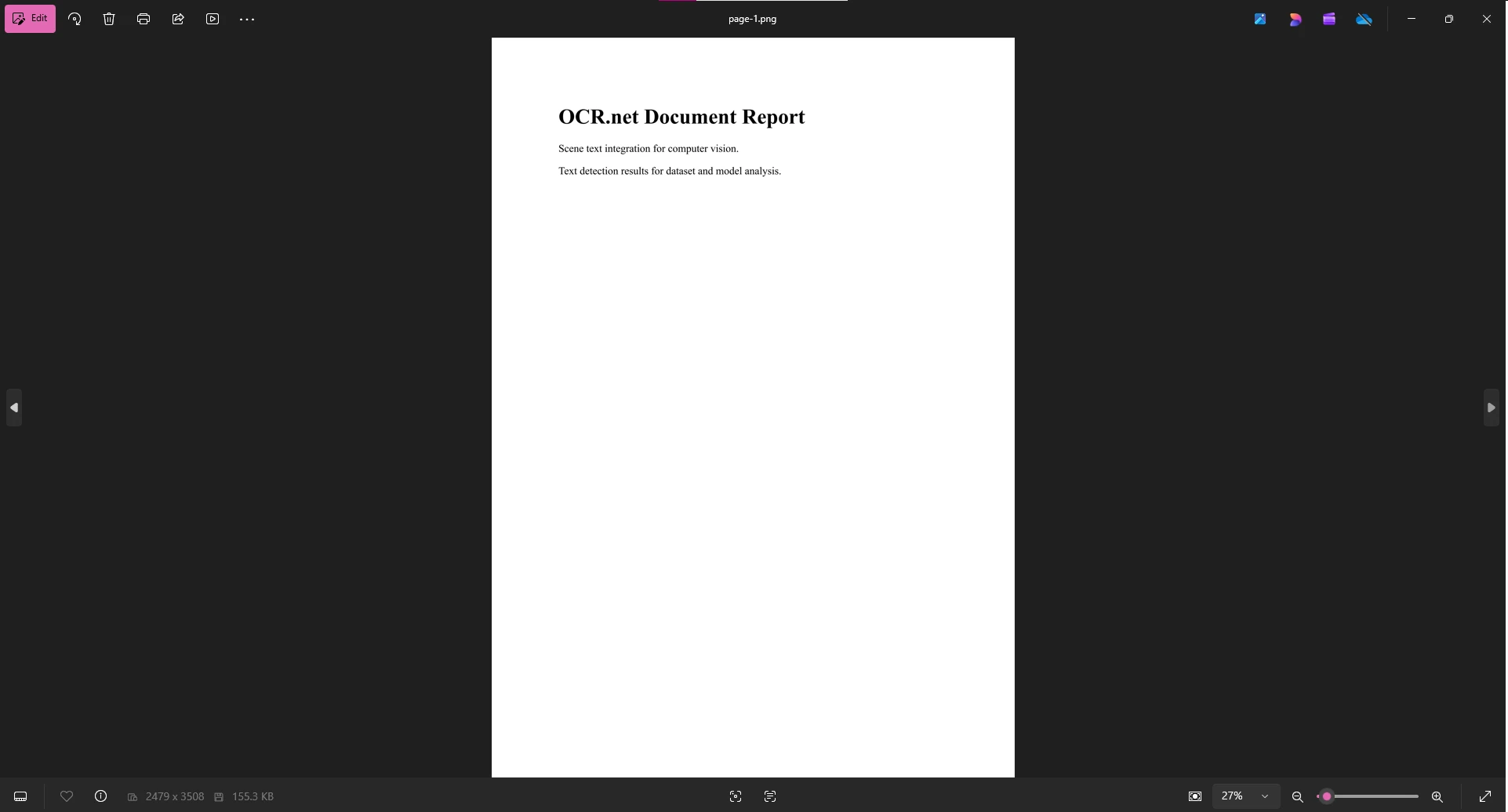
더 높은 DPI 설정(300-600)은 OCR 모델이 문자를 정확하게 구별할 수 있는 텍스트 명확성을 유지합니다. 대가로는 파일 크기와 처리 시간입니다. 300 DPI에서는 단일 A4 페이지가 대략 2-3 MB의 PNG를 생성합니다. 600 DPI에서는 8-12 MB로 증가합니다. 대부분의 문서에서는 300 DPI가 적절한 균형입니다. 렌더링 옵션을 통해 문서 유형별로 이를 조정할 수 있으며, 압축 기술은 OCR 완료 후 파일 크기를 최적화하는 데 도움이 됩니다.
IronPDF의 네이티브 엔진은 Linux, Windows, 및 macOS 컨테이너 간 일관된 렌더링을 보장합니다. 고가용성 서비스를 위해, IronPDF는 ASP.NET Core 상태 확인 엔드포인트와 통합되어, 트래픽을 컨테이너 인스턴스로 라우팅하기 전에 PDF 렌더링이 작동하는지 확인하는 준비 상태 및 활력 테스트를 구현할 수 있습니다.
using IronPdf;

// Kubernetes-compatible health check endpoint
var builder = WebApplication.CreateBuilder(args);
var app = builder.Build();

app.MapGet("/health/ready", async () =>
{
    try
    {
        var renderer = new ChromePdfRenderer();
        var testPdf = await renderer.RenderHtmlAsPdfAsync("<p>Health check</p>");
        return testPdf.PageCount > 0 ? Results.Ok() : Results.Problem();
    }
    catch
    {
        return Results.Problem("PDF rendering unavailable");
    }
});

await app.RunAsync();Imports IronPdf
' Kubernetes-compatible health check endpoint
Dim builder = WebApplication.CreateBuilder(args)
Dim app = builder.Build()
app.MapGet("/health/ready", Async Function()
Try
Dim renderer = New ChromePdfRenderer()
Dim testPdf = Await renderer.RenderHtmlAsPdfAsync("<p>Health check</p>")
Return If(testPdf.PageCount > 0, Results.Ok(), Results.Problem())
Catch
Return Results.Problem("PDF rendering unavailable")
End Try
End Function)
Await app.RunAsync()이 엔드포인트와 함께 맞춤 로깅을 사용하여 렌더링 시간을 캡처하고 완전한 실패 전 악화되는 컨테이너를 식별하십시오.
IronPDF에서 PNG로 내보낸 후, OCR.net에 업로드하여 텍스트 인식을 수행합니다. OCR.net 파이프라인은 이미지를 처리하여 다양한 글꼴 스타일에 걸쳐 정규화된 텍스트 출력을 반환합니다. 이는 활자와 손으로 쓴 텍스트를 모두 처리하며, 60개 이상의 문서 언어를 지원합니다.
온라인에서 OCR.net 사용하기:
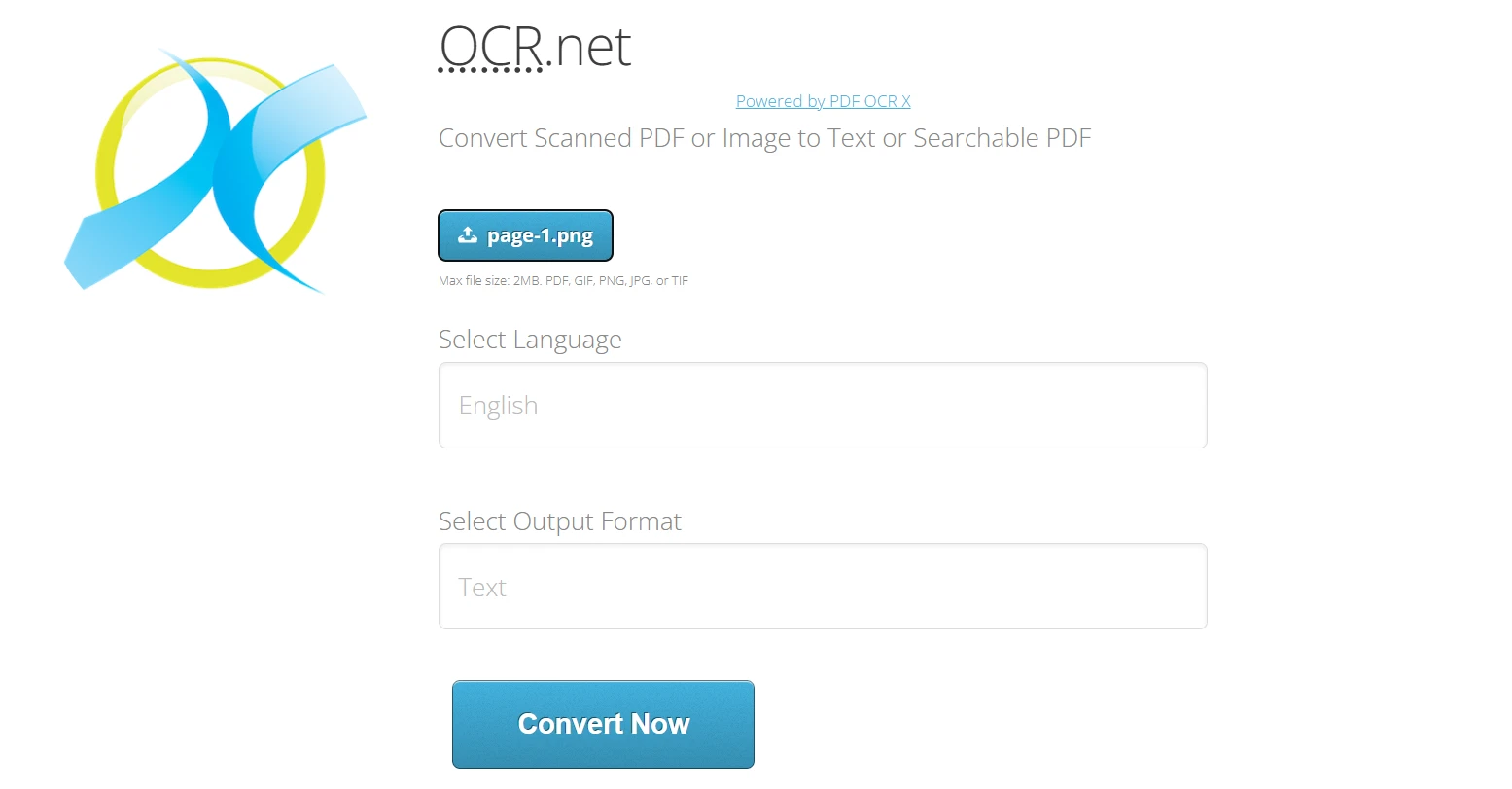
OCR.net은 자동화된 처리를 위한 API도 제공합니다. 무료 계정은 시간당 최대 50개의 요청으로 제한되며, 이는 자동화된 파이프라인에 중요한 제약 조건입니다. 점진적 백오프를 사용하여 제한 응답을 우아하게 처리하는 통합을 설계합니다.
using System;
using System.Net.Http;
using System.Threading.Tasks;

// Queue-based OCR processing with exponential backoff retry
async Task<string> ProcessOcrWithRetry(string imagePath, int maxRetries = 3)
{
    for (int attempt = 0; attempt < maxRetries; attempt++)
    {
        try
        {
            // Replace with your actual OCR.net API call
            return await CallOcrNetApi(imagePath);
        }
        catch (HttpRequestException ex) when (ex.Message.Contains("429"))
        {
            if (attempt == maxRetries - 1) throw;
            var delay = TimeSpan.FromSeconds(Math.Pow(2, attempt));
            await Task.Delay(delay);
        }
    }
    throw new InvalidOperationException("OCR processing failed after all retries");
}Imports System
Imports System.Net.Http
Imports System.Threading.Tasks
' Queue-based OCR processing with exponential backoff retry
Async Function ProcessOcrWithRetry(imagePath As String, Optional maxRetries As Integer = 3) As Task(Of String)
For attempt As Integer = 0 To maxRetries - 1
Try
' Replace with your actual OCR.net API call
Return Await CallOcrNetApi(imagePath)
Catch ex As HttpRequestException When ex.Message.Contains("429")
If attempt = maxRetries - 1 Then Throw
Dim delay As TimeSpan = TimeSpan.FromSeconds(Math.Pow(2, attempt))
Await Task.Delay(delay)
End Try
Next
Throw New InvalidOperationException("OCR processing failed after all retries")
End Function접근성 워크플로우를 위해 OCR 텍스트 추출은 시각장애인이 이전에 이미지 전용 문서로부터 오디오 피드백을 받을 수 있게 해줍니다. PDF/UA 준수와 IronPDF를 통해 OCR.net 출력물을 결합하여 보조 기술이 효과적으로 탐색할 수 있는 문서를 생성합니다.
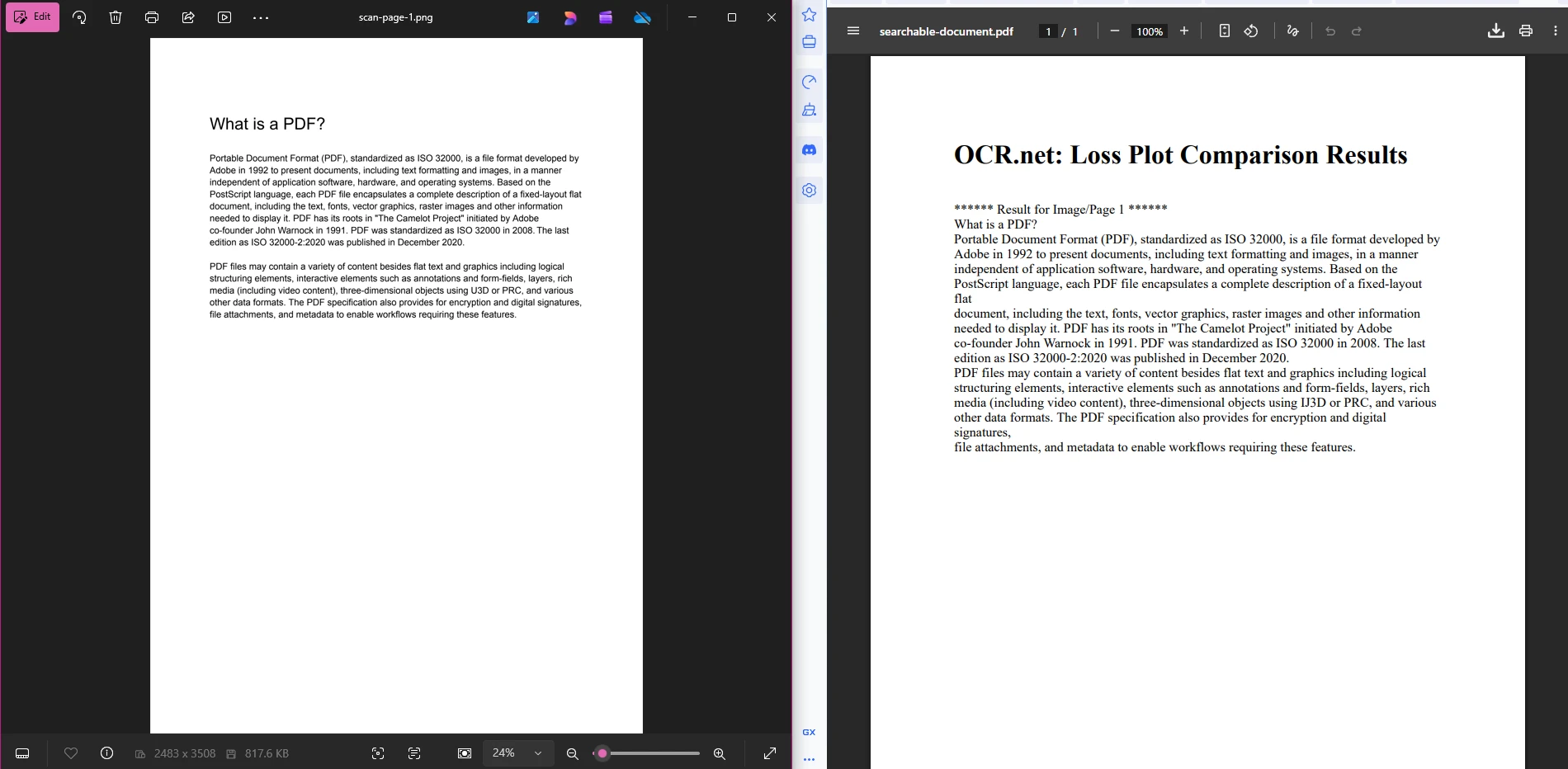
IronPDF와 OCR.net을 연결하여 종단 간 문서 솔루션을 제공합니다. 워크플로우는 세 단계로 구성됩니다: PDF 페이지를 이미지로 내보내고, 이미지를 OCR.net에 보내어 텍스트를 추출하고, 인식된 텍스트를 새로운 검색 가능한 PDF로 재구성합니다.
using IronPdf;
using System;
using System.Collections.Generic;
using System.Net.Http;
using System.Text;
using System.Threading.Tasks;

// --- Stage 1: Export PDF pages as images for OCR ---
var scannedPdf = PdfDocument.FromFile("input-document.pdf");
var imageFiles = scannedPdf.RasterizeToImageFiles(
    "scan-page-{0}.png",
    IronPdf.Imaging.ImageType.Png,
    300 // 300 DPI -- minimum for reliable OCR accuracy
);

// --- Stage 2: Process each image through OCR.net ---
var ocrResults = new List<string>();
foreach (var imageFile in imageFiles)
{
    // Replace this placeholder with your actual OCR.net API integration
    string ocrText = await SendImageToOcrNet(imageFile);
    ocrResults.Add(ocrText);
}

// --- Stage 3: Reassemble recognized text as a searchable PDF ---
var htmlBuilder = new StringBuilder();
htmlBuilder.Append(@"<!DOCTYPE html><html><head>
    <style>body{font-family:Arial,sans-serif;margin:40px;}
    .page{page-break-after:always;} pre{white-space:pre-wrap;}</style>
    </head><body>");

for (int i = 0; i < ocrResults.Count; i++)
{
    htmlBuilder.AppendFormat(
        "<div class='page'><h2>Page {0}</h2><pre>{1}</pre></div>",
        i + 1,
        System.Web.HttpUtility.HtmlEncode(ocrResults[i])
    );
}
htmlBuilder.Append("</body></html>");

var renderer = new ChromePdfRenderer();
renderer.RenderingOptions.DPI = 300;
renderer.RenderingOptions.EnableJavaScript = false;

var searchablePdf = await renderer.RenderHtmlAsPdfAsync(htmlBuilder.ToString());
searchablePdf.MetaData.Title = "OCR Processed Document";
searchablePdf.MetaData.Subject = "Searchable PDF from OCR";
searchablePdf.MetaData.CreationDate = DateTime.UtcNow;
searchablePdf.SecuritySettings.AllowUserPrinting = true;
searchablePdf.SecuritySettings.AllowUserCopyPasteContent = true;

searchablePdf.SaveAs("searchable-document.pdf");Imports IronPdf
Imports System
Imports System.Collections.Generic
Imports System.Net.Http
Imports System.Text
Imports System.Threading.Tasks
' --- Stage 1: Export PDF pages as images for OCR ---
Dim scannedPdf = PdfDocument.FromFile("input-document.pdf")
Dim imageFiles = scannedPdf.RasterizeToImageFiles(
"scan-page-{0}.png",
IronPdf.Imaging.ImageType.Png,
300 ' 300 DPI -- minimum for reliable OCR accuracy
)
' --- Stage 2: Process each image through OCR.net ---
Dim ocrResults As New List(Of String)()
For Each imageFile In imageFiles
' Replace this placeholder with your actual OCR.net API integration
Dim ocrText As String = Await SendImageToOcrNet(imageFile)
ocrResults.Add(ocrText)
Next
' --- Stage 3: Reassemble recognized text as a searchable PDF ---
Dim htmlBuilder As New StringBuilder()
htmlBuilder.Append("<!DOCTYPE html><html><head>
<style>body{font-family:Arial,sans-serif;margin:40px;}
.page{page-break-after:always;} pre{white-space:pre-wrap;}</style>
</head><body>")
For i As Integer = 0 To ocrResults.Count - 1
htmlBuilder.AppendFormat(
"<div class='page'><h2>Page {0}</h2><pre>{1}</pre></div>",
i + 1,
System.Web.HttpUtility.HtmlEncode(ocrResults(i))
)
Next
htmlBuilder.Append("</body></html>")
Dim renderer As New ChromePdfRenderer()
renderer.RenderingOptions.DPI = 300
renderer.RenderingOptions.EnableJavaScript = False
Dim searchablePdf = Await renderer.RenderHtmlAsPdfAsync(htmlBuilder.ToString())
searchablePdf.MetaData.Title = "OCR Processed Document"
searchablePdf.MetaData.Subject = "Searchable PDF from OCR"
searchablePdf.MetaData.CreationDate = DateTime.UtcNow
searchablePdf.SecuritySettings.AllowUserPrinting = True
searchablePdf.SecuritySettings.AllowUserCopyPasteContent = True
searchablePdf.SaveAs("searchable-document.pdf")이 파이프라인은 의도적으로 간단하게 설계되었습니다. 1단계에서는 번호가 매겨진 PNG 파일이 생성됩니다. 2단계에서는 각 파일을 OCR.net으로 보내 반환된 텍스트 문자열을 수집합니다. 3단계에서는 이러한 문자열을 HTML에 감싸고 IronPDF를 사용하여 최종 PDF를 렌더링하며, 텍스트는 완전히 선택 가능하고 검색 가능합니다. 3단계를 확장하여 문서 관리를 위한 PDF 메타데이터 또는 접근 제어를 위한 보안 설정을 적용할 수 있습니다.
다단계 Docker 빌드는 IronPDF가 Linux에서 필요로 하는 모든 실행 시간 종속성을 포함하면서 마지막 이미지를 작게 유지합니다.
FROM mcr.microsoft.com/dotnet/sdk:8.0 AS build
WORKDIR /app

COPY *.csproj ./
RUN dotnet restore

COPY . ./
RUN dotnet publish -c Release -o out

FROM mcr.microsoft.com/dotnet/aspnet:8.0
WORKDIR /app

# IronPDF Linux runtime dependencies
RUN apt-get update && apt-get install -y \
    libgdiplus \
    libc6-dev \
    libx11-dev \
    && rm -rf /var/lib/apt/lists/*

COPY --from=build /app/out .

HEALTHCHECK --interval=30s --timeout=3s --start-period=5s --retries=3 \
  CMD curl -f http://localhost:8080/health/ready || exit 1

ENTRYPOINT ["dotnet", "OcrWorkflow.dll"]생산 규모에서는 배치 OCR 작업에 대해 Kubernetes Jobs를 고려하십시오. Kubernetes Jobs는 실패한 문서 작업이 다른 서비스에 영향을 미치지 않도록 자동 재시도, 병렬성 제어 및 자원 격리를 제공합니다. parallelism을(를) OCR.net API 계층과 일치하도록 설정하고 backoffLimit을(를) 실패한 작업이 실패로 표시되기 전에 pod가 재시도하는 횟수를 제어하도록 설정하십시오.
OCR 처리 시간과 성공률을 추적하여 최종 사용자에게 영향을 미치기 전에 병목 현상을 식별하는 데 도움을 줍니다. Prometheus와 사용자 정의 메트릭을 사용하는 것이 실질적인 접근법 중 하나입니다.
using Prometheus;
using System;
using System.Threading.Tasks;

// Prometheus metrics for OCR pipeline observability
var ocrRequestsTotal = Metrics
    .CreateCounter("ocr_requests_total", "Total OCR requests processed");

var ocrDuration = Metrics
    .CreateHistogram("ocr_duration_seconds", "OCR processing duration in seconds",
        new HistogramConfiguration
        {
            Buckets = Histogram.LinearBuckets(0.1, 0.1, 10)
        });

var activeOcrJobs = Metrics
    .CreateGauge("ocr_active_jobs", "Currently active OCR jobs");

// Wrapper that tracks every OCR operation automatically
async Task<t> TrackOcrOperation<t>(Func<Task<t>> operation)
{
    using (ocrDuration.NewTimer())
    {
        activeOcrJobs.Inc();
        try
        {
            var result = await operation();
            ocrRequestsTotal.Inc();
            return result;
        }
        finally
        {
            activeOcrJobs.Dec();
        }
    }
}Imports Prometheus
Imports System
Imports System.Threading.Tasks
' Prometheus metrics for OCR pipeline observability
Dim ocrRequestsTotal = Metrics.CreateCounter("ocr_requests_total", "Total OCR requests processed")
Dim ocrDuration = Metrics.CreateHistogram("ocr_duration_seconds", "OCR processing duration in seconds",
New HistogramConfiguration With {
.Buckets = Histogram.LinearBuckets(0.1, 0.1, 10)
})
Dim activeOcrJobs = Metrics.CreateGauge("ocr_active_jobs", "Currently active OCR jobs")
' Wrapper that tracks every OCR operation automatically
Async Function TrackOcrOperation(Of T)(operation As Func(Of Task(Of T))) As Task(Of T)
Using ocrDuration.NewTimer()
activeOcrJobs.Inc()
Try
Dim result = Await operation()
ocrRequestsTotal.Inc()
Return result
Finally
activeOcrJobs.Dec()
End Try
End Using
End Function이러한 메트릭을 IronPDF의 로깅 기능과 결합하여 렌더링 시간을 OCR 지속 시간과 관련지을 수 있습니다. OCR 지속 시간이 렌더링 시간의 스파이크 없이 급상승하면 병목 현상이 PDF 생성 단계가 아닌 OCR.net API 호출 또는 네트워크 경로에 있습니다.
OCR.net과 IronPDF의 결합은 .NET에서 텍스트 추출 및 검색 가능한 PDF 생성의 실질적인 경로를 제공합니다. 파이프라인은 핵심 사용 사례들을 포함합니다: HTML에서 PDF 생성, OCR 호환 해상도로 페이지 내보내기, 이미지를 OCR.net에 보내기, 결과를 완전히 검색 가능한 문서로 재조립하는 과정입니다.
생산 환경으로 이동할 때 고려해야 할 주요 사항:
무료 체험판 라이센스로 시작하여 생산 라이센스를 커밋하기 전에 전체 워크플로우를 처음부터 끝까지 테스트합니다. 해당 체험판은 워터마크를 제거하고 모든 기능을 잠금 해제하여, 귀하의 벤치마크 결과가 정확히 생산 동작을 반영하도록 합니다. 배포 준비가 되면 IronPDF 라이센스 옵션을 검토하여 귀하의 사용 패턴과 일치하는 티어를 찾습니다.

커티스 차우는 칼턴 대학교에서 컴퓨터 과학 학사 학위를 취득했으며, Node.js, TypeScript, JavaScript, React를 전문으로 하는 프론트엔드 개발자입니다. 직관적이고 미적으로 뛰어난 사용자 인터페이스를 만드는 데 열정을 가진 그는 최신 프레임워크를 활용하고, 잘 구성되고 시각적으로 매력적인 매뉴얼을 제작하는 것을 즐깁니다.



IronPDF는 IRON SUITE 의 일부입니다.
10개의 .NET API 제품, 당신의 사무 문서를 위해

PDF 파일을 HTML처럼 빠르게 변환해야 할 때.


