using IronPdf;

// Disable local disk access or cross-origin requests
Installation.EnableWebSecurity = true;

// Instantiate Renderer
var renderer = new ChromePdfRenderer();

// Create a PDF from a HTML string using C#
var pdf = renderer.RenderHtmlAsPdf("<h1>Hello World</h1>");

// Export to a file or Stream
pdf.SaveAs("output.pdf");

// Advanced Example with HTML Assets
// Load external html assets: Images, CSS and JavaScript.
// An optional BasePath 'C:\site\assets\' is set as the file location to load assets from
var myAdvancedPdf = renderer.RenderHtmlAsPdf("<img src='icons/iron.png'>", @"C:\site\assets\");
myAdvancedPdf.SaveAs("html-with-assets.pdf");
using IronPdf;// Disable local disk access or cross-origin requestsInstallation.EnableWebSecurity = true;// Instantiate Renderervar renderer = new ChromePdfRenderer();// Create a PDF from a HTML string using C#var pdf = renderer.RenderHtmlAsPdf("<h1>Hello World</h1>");// Export to a file or Streampdf.SaveAs("output.pdf");// Advanced Example with HTML Assets// Load external html assets: Images, CSS and JavaScript.// An optional BasePath 'C:\site\assets\' is set as the file location to load assets fromvar myAdvancedPdf = renderer.RenderHtmlAsPdf("<img src='icons/iron.png'>", @"C:\site\assets\");myAdvancedPdf.SaveAs("html-with-assets.pdf");
PM >Install-Package IronPdf
Install-Package IronPdf
USING IRONPDF
How to Build a PDF OCR Workflow with OCR.net and IronPDF in C#
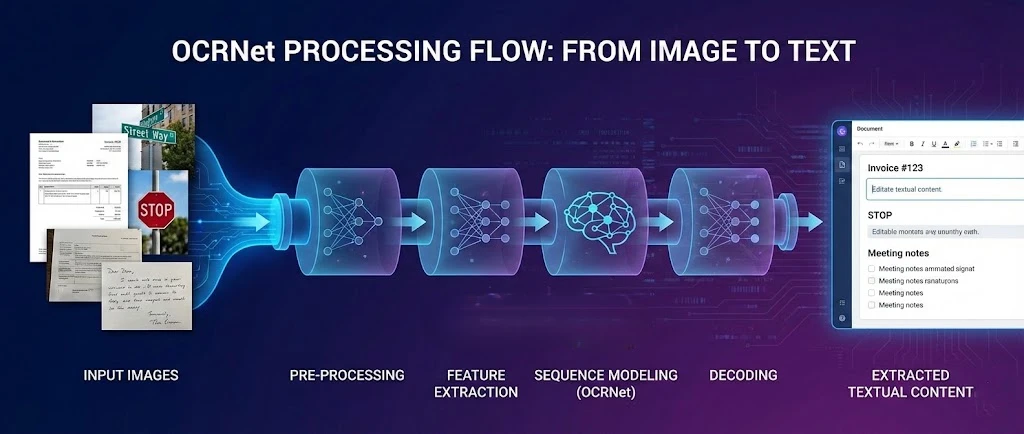
OCR.net is a deep learning framework for optical character recognition that pairs with [IronPDF](https://ironpdf.com/) to extract text from PDFs and produce searchable documents in .NET applications. This tutorial shows you how to connect these two tools so your application can process scanned files, rasterize PDF pages for OCR, and reassemble the recognized text into a new searchable PDF.
The OCR.net model excels at scene text detection and character recognition in complex environments. When you combine it with IronPDF's rendering engine, you gain a complete pipeline: generate or load a PDF, export its pages as high-resolution images, send those images to OCR.net, and reconstruct the results as a fully searchable document.
!!!--LIBRARY_GET_STARTED_WITH_PRODUCT_TRIAL_BLOCK--!!!
## How Do You Get Started with IronPDF?
Before building the OCR workflow, you need IronPDF installed in your project. The fastest path is the NuGet Package Manager console:
```shell
:ProductInstall
```
Or add it directly through the NuGet UI by searching for **IronPDF**. Once installed, apply your license key at application startup:
```csharp
using IronPdf;

IronPdf.License.LicenseKey = "YOUR-LICENSE-KEY";
```
A [free trial license](trial-license) is available so you can test the full feature set without any restrictions. IronPDF supports .NET 6, 7, 8, and 10 on Windows, Linux, and macOS, which means the same code runs in desktop apps, ASP.NET Core web services, and containerized deployments.
For Docker environments, IronPDF provides a pre-configured [Linux deployment guide](https://ironpdf.com/get-started/linux/) and [slim package variants](https://ironpdf.com/troubleshooting/ironpdf-slim/) that reduce image size. If you prefer a remote rendering architecture, the [IronPDF Engine](https://ironpdf.com/get-started/ironpdfengine/) can run as a separate service with clients on any supported platform.
## What Is OCRNet and How Does Optical Character Recognition Work?
OCR.net is a deep learning approach to optical character recognition (OCR) that recognizes alphanumeric characters across different font styles. The model uses an optimized neural network architecture to capture spatial features from input images. Combined with [PDF generation capabilities](https://ironpdf.com/how-to/create-new-pdfs/), these trained models deliver recognition with strong precision across common document types.
The recognition framework behind OCR.net incorporates a Gated Recurrent Unit (GRU) to improve feature learning and process image-based sequence recognition tasks. This hybrid model achieves notable accuracy through connectionist temporal classification (CTC), a technique [originally introduced for sequence labeling](https://www.cs.toronto.edu/~graves/icml_2006.pdf) that transfers well to document OCR. Ongoing improvements continue expanding OCR.net's language support, especially when integrated with [PDF text extraction tools](https://ironpdf.com/how-to/extract-text-and-images/).
Key components of a modern OCR pipeline include:
- **Text Detection:** Identifying textual content regions within an image using trained models
- **Scene Text Detection:** Locating text in complex backgrounds and dynamic environments
- **Alphanumeric Character Recognition:** Using trained models to recognize characters with high validation accuracy
- **Pattern Recognition:** Applying image processing techniques for lightweight scene text recognition
The GRU-based architecture and connectionist temporal classification enable efficient resource usage in containerized environments, making OCR.net a practical choice for [Kubernetes deployments](https://ironpdf.com/get-started/ironpdfengine-docker/) where memory and CPU constraints matter. The lightweight architecture keeps [Docker image sizes](https://ironpdf.com/troubleshooting/ironpdf-slim/) manageable while maintaining strong recognition accuracy.
### When Should You Use OCR.net Over Traditional OCR Libraries?
OCR.net is the better choice when processing complex scene text, handwritten documents, or multi-language content where template-based OCR fails. It performs particularly well in [containerized applications](https://ironpdf.com/how-to/windows/) that need consistent performance across hardware configurations without external dependencies. The model handles [UTF-8 encoding](https://ironpdf.com/how-to/utf-8/) cleanly, which matters for [international language support](https://ironpdf.com/troubleshooting/international-languages-and-cmjk/).
Traditional regex-based or template-matching OCR systems break down on variable fonts, handwriting, or images with uneven lighting. OCR.net's neural approach generalizes better across these scenarios because it learns features rather than matching fixed templates. That said, if your documents are clean, machine-typed text with consistent formatting, a lighter library may be faster and sufficient.
### What Are Common Resource Requirements for OCR.net in Production?
Production deployments typically need 2-4 CPU cores and 4-8 GB RAM for solid performance. GPU acceleration provides a significant speedup for batch processing in containerized environments using the NVIDIA Docker runtime. These requirements fit well with [Azure App Service](https://ironpdf.com/get-started/azure/) and [AWS Lambda deployments](https://ironpdf.com/get-started/aws/), though Lambda's memory ceiling means you should benchmark your specific document sizes before committing.
## How Does IronPDF Create PDF Documents for OCR Processing?
[IronPDF](https://ironpdf.com/) gives .NET developers full control over PDF generation. The library can render [HTML strings](https://ironpdf.com/how-to/html-string-to-pdf/), [URLs](https://ironpdf.com/how-to/url-to-pdf/), and file inputs into polished PDFs through its Chrome-based rendering engine. For OCR workflows, the critical feature is `RasterizeToImageFiles()`, which exports PDF pages as high-resolution images suitable for recognition.
```csharp
using IronPdf;
// Create a PDF document with IronPDF
var renderer = new ChromePdfRenderer();
// Set 300 DPI for OCR accuracy -- higher DPI preserves text sharpness
renderer.RenderingOptions.PaperSize = IronPdf.Rendering.PdfPaperSize.A4;
renderer.RenderingOptions.DPI = 300;
renderer.RenderingOptions.MarginTop = 50;
renderer.RenderingOptions.MarginBottom = 50;
var pdf = renderer.RenderHtmlAsPdf(@"
<h1>Document Report</h1>
<p>Scene text integration for computer vision analysis.</p>
<p>Text detection results for dataset and model analysis.</p>");
// Tag the document with searchable metadata
pdf.MetaData.Author = "OCR Processing Pipeline";
pdf.MetaData.Keywords = "OCR, Text Recognition, Computer Vision";
pdf.MetaData.ModifiedDate = DateTime.Now;
pdf.SaveAs("document-for-ocr.pdf");
// Export pages as PNG images for OCR.net -- 300 DPI is the recommended minimum
pdf.RasterizeToImageFiles("page-*.png", IronPdf.Imaging.ImageType.Png, 300);
```
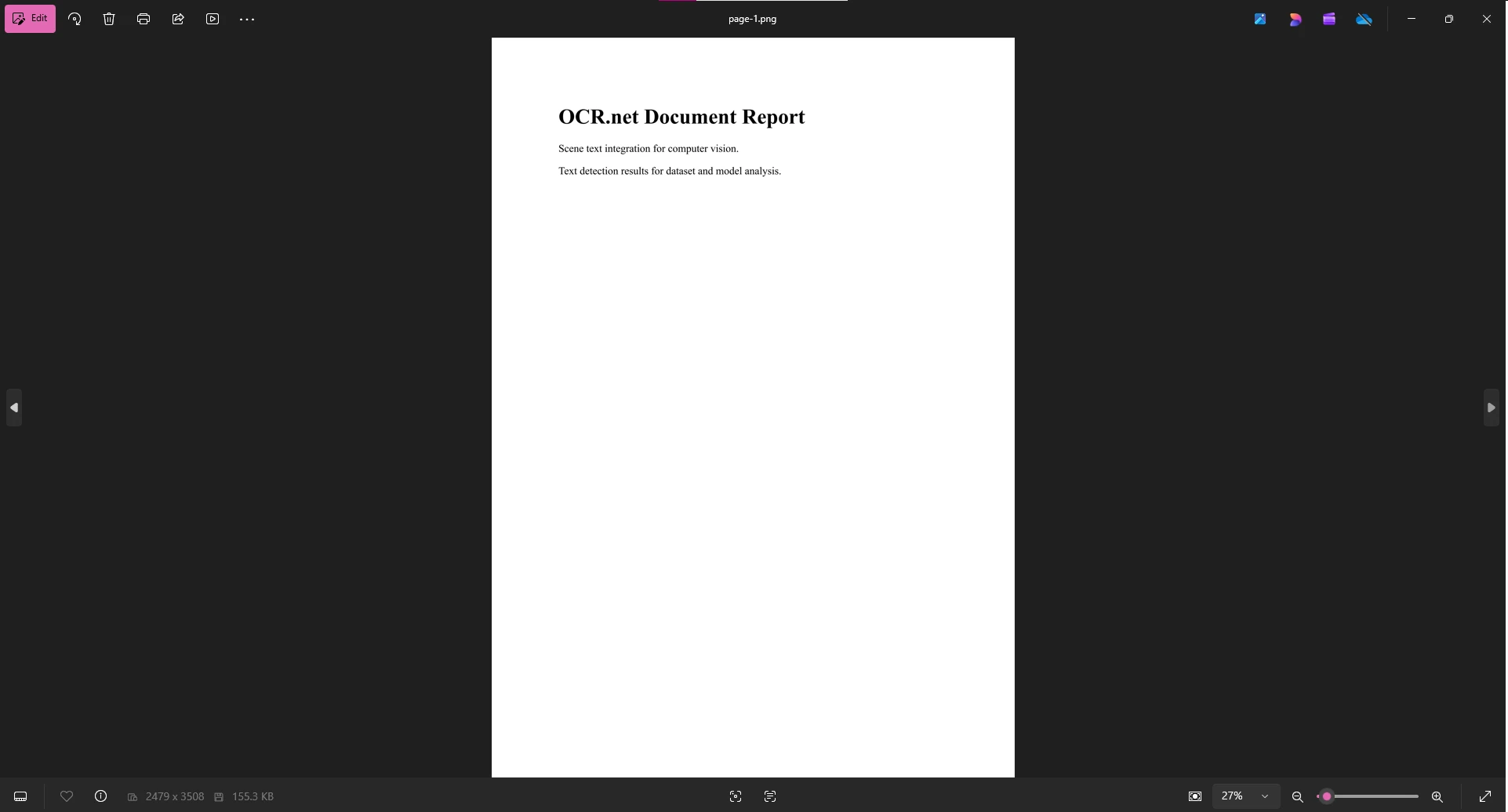
The `RasterizeToImageFiles()` method converts PDF pages to PNG images at the specified DPI. At 300 DPI, text edges remain sharp enough for the OCR model to distinguish similar-looking characters. At 150 DPI or below, recognition accuracy drops noticeably on serif fonts and small print. After exporting, upload the PNG files to OCR.net or pass them directly to a local model.
### Why Does DPI Setting Affect OCR Accuracy?
Higher DPI settings (300-600) preserve text clarity that the OCR model needs to distinguish characters accurately. The trade-off is file size and processing time. At 300 DPI, a single A4 page produces roughly a 2-3 MB PNG. At 600 DPI that grows to 8-12 MB. For most documents, 300 DPI is the right balance. [Rendering options](https://ironpdf.com/how-to/rendering-options/) let you tune this per document type, while [compression techniques](https://ironpdf.com/how-to/pdf-compression/) help optimize file sizes after OCR completes.
### How Does IronPDF Handle Containerized Environments?
IronPDF's [native engine](https://ironpdf.com/get-started/ironpdfengine/) ensures consistent rendering across [Linux](https://ironpdf.com/get-started/linux/), [Windows](https://ironpdf.com/get-started/windows/), and [macOS](https://ironpdf.com/get-started/macos/) containers. For high-availability services, IronPDF integrates with ASP.NET Core health check endpoints so you can implement readiness and liveness probes that verify PDF rendering is operational before routing traffic to a container instance.
```csharp
using IronPdf;
// Kubernetes-compatible health check endpoint
var builder = WebApplication.CreateBuilder(args);
var app = builder.Build();
app.MapGet("/health/ready", async () =>
{
try
{
var renderer = new ChromePdfRenderer();
var testPdf = await renderer.RenderHtmlAsPdfAsync("<p>Health check</p>");
return testPdf.PageCount > 0 ? Results.Ok() : Results.Problem();
}
catch
{
return Results.Problem("PDF rendering unavailable");
}
});
await app.RunAsync();
```
Use [custom logging](https://ironpdf.com/how-to/custom-logging/) alongside this endpoint to capture render times and identify containers that are degrading before they fail outright.
## How Does OCR.net Extract Text from PDF Images?
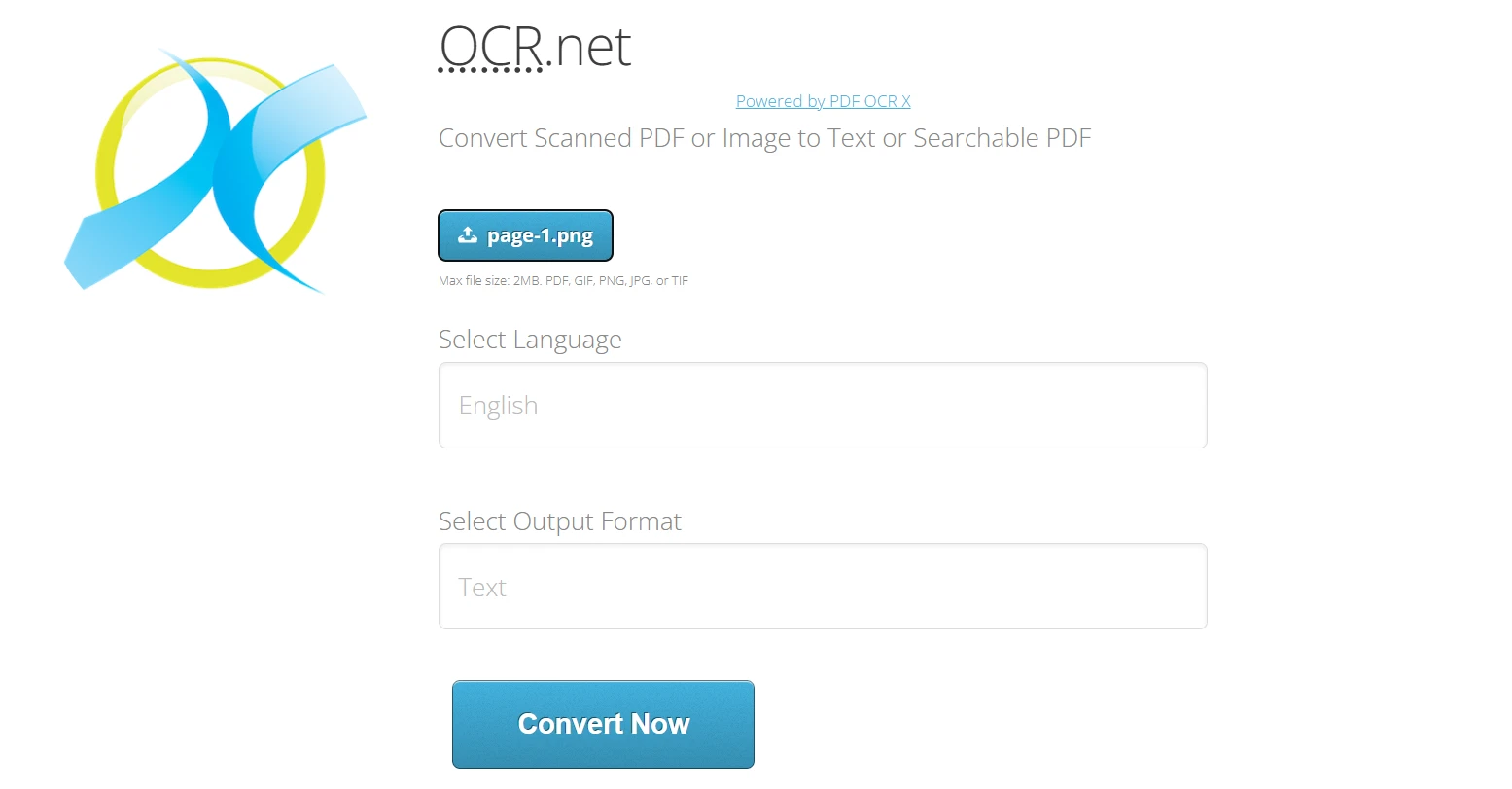
Once you have PNG exports from IronPDF, you upload them to OCR.net for text recognition. The OCR.net pipeline processes images and returns normalized text output across various font styles. It handles both printed and handwritten text and supports over 60 document languages.
**Using OCR.net Online:**
1. Navigate to [https://ocr.net/](https://ocr.net/)
2. Upload the PNG or JPG image (maximum 2 MB) exported from [IronPDF](https://ironpdf.com/how-to/export-save-pdf-csharp/)
3. Select the document language from the 60+ available options
4. Choose the output format: plain Text or [Searchable PDF](https://ironpdf.com/how-to/metadata/)
5. Click "Convert Now" to process the image with OCR.net models
OCR.net also provides an API for automated processing. Free accounts are limited to 50 requests per hour, which is a critical constraint for automated pipelines. Design your integration to handle rate-limit responses gracefully with exponential backoff rather than failing hard:
```csharp
using System;
using System.Net.Http;
using System.Threading.Tasks;
// Queue-based OCR processing with exponential backoff retry
async Task<string> ProcessOcrWithRetry(string imagePath, int maxRetries = 3)
{
for (int attempt = 0; attempt < maxRetries; attempt++)
{
try
{
// Replace with your actual OCR.net API call
return await CallOcrNetApi(imagePath);
}
catch (HttpRequestException ex) when (ex.Message.Contains("429"))
{
if (attempt == maxRetries - 1) throw;
var delay = TimeSpan.FromSeconds(Math.Pow(2, attempt));
await Task.Delay(delay);
}
}
throw new InvalidOperationException("OCR processing failed after all retries");
}
```
For accessibility workflows, OCR text extraction allows visually impaired users to receive audio feedback from documents that were previously image-only. Pairing OCR.net output with [PDF/UA compliance](https://ironpdf.com/how-to/pdfua/) through IronPDF creates documents that assistive technologies can navigate effectively.
## How Do You Build a Complete IronPDF and OCR.net Workflow?
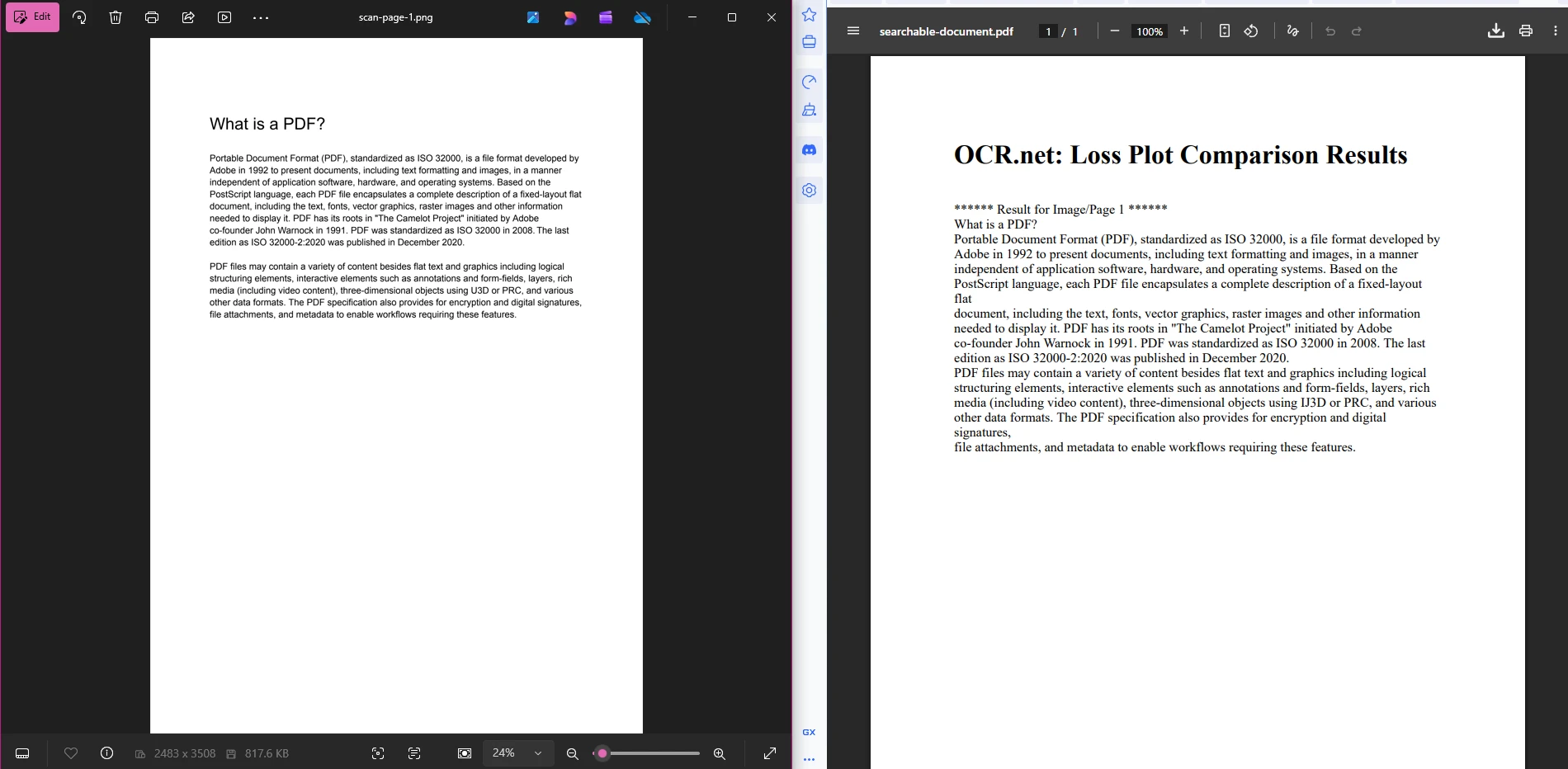
Connecting IronPDF with OCR.net produces end-to-end document solutions. The workflow has three stages: export PDF pages as images, send images to OCR.net for text extraction, and reconstruct the recognized text as a new searchable PDF.
```csharp
using IronPdf;
using System;
using System.Collections.Generic;
using System.Net.Http;
using System.Text;
using System.Threading.Tasks;
// --- Stage 1: Export PDF pages as images for OCR ---
var scannedPdf = PdfDocument.FromFile("input-document.pdf");
var imageFiles = scannedPdf.RasterizeToImageFiles(
"scan-page-{0}.png",
IronPdf.Imaging.ImageType.Png,
300 // 300 DPI -- minimum for reliable OCR accuracy
);
// --- Stage 2: Process each image through OCR.net ---
var ocrResults = new List<string>();
foreach (var imageFile in imageFiles)
{
// Replace this placeholder with your actual OCR.net API integration
string ocrText = await SendImageToOcrNet(imageFile);
ocrResults.Add(ocrText);
}
// --- Stage 3: Reassemble recognized text as a searchable PDF ---
var htmlBuilder = new StringBuilder();
htmlBuilder.Append(@"<!DOCTYPE html><html><head>
<style>body{font-family:Arial,sans-serif;margin:40px;}
.page{page-break-after:always;} pre{white-space:pre-wrap;}</style>
</head><body>");
for (int i = 0; i < ocrResults.Count; i++)
{
htmlBuilder.AppendFormat(
"<div class='page'><h2>Page {0}</h2><pre>{1}</pre></div>",
i + 1,
System.Web.HttpUtility.HtmlEncode(ocrResults[i])
);
}
htmlBuilder.Append("</body></html>");
var renderer = new ChromePdfRenderer();
renderer.RenderingOptions.DPI = 300;
renderer.RenderingOptions.EnableJavaScript = false;
var searchablePdf = await renderer.RenderHtmlAsPdfAsync(htmlBuilder.ToString());
searchablePdf.MetaData.Title = "OCR Processed Document";
searchablePdf.MetaData.Subject = "Searchable PDF from OCR";
searchablePdf.MetaData.CreationDate = DateTime.UtcNow;
searchablePdf.SecuritySettings.AllowUserPrinting = true;
searchablePdf.SecuritySettings.AllowUserCopyPasteContent = true;
searchablePdf.SaveAs("searchable-document.pdf");
```
This pipeline is intentionally straightforward. Stage 1 produces numbered PNG files. Stage 2 sends each file to OCR.net and collects the returned text strings. Stage 3 wraps those strings in HTML and uses IronPDF to render a final PDF where the text is fully selectable and searchable. You can extend Stage 3 to apply [PDF metadata](https://ironpdf.com/how-to/metadata/) for document management or [security settings](https://ironpdf.com/tutorials/csharp-pdf-security-complete-tutorial/) for access control.
### What Docker Configuration Works Best for This Workflow?
Multi-stage Docker builds keep the final image small while including all the runtime dependencies IronPDF needs on Linux:
```dockerfile
FROM mcr.microsoft.com/dotnet/sdk:8.0 AS build
WORKDIR /app
COPY *.csproj ./
RUN dotnet restore
COPY . ./
RUN dotnet publish -c Release -o out
FROM mcr.microsoft.com/dotnet/aspnet:8.0
WORKDIR /app
# IronPDF Linux runtime dependencies
RUN apt-get update && apt-get install -y \
libgdiplus \
libc6-dev \
libx11-dev \
&& rm -rf /var/lib/apt/lists/*
COPY --from=build /app/out .
HEALTHCHECK --interval=30s --timeout=3s --start-period=5s --retries=3 \
CMD curl -f http://localhost:8080/health/ready || exit 1
ENTRYPOINT ["dotnet", "OcrWorkflow.dll"]
```
For production scale, consider [Kubernetes Jobs](https://kubernetes.io/docs/concepts/workloads/controllers/job/) for batch OCR operations. Kubernetes Jobs provide automatic retry, parallelism control, and resource isolation so that failed document tasks do not affect other services. Set `parallelism` to match your OCR.net API tier and `backoffLimit` to control how many times a failed pod retries before the Job marks the task as failed.
### How Do You Monitor Performance Metrics in Production?
Tracking OCR processing times and success rates helps identify bottlenecks before they affect end users. [Prometheus](https://prometheus.io/docs/introduction/overview/) with custom metrics is one practical approach:
```csharp
using Prometheus;
using System;
using System.Threading.Tasks;
// Prometheus metrics for OCR pipeline observability
var ocrRequestsTotal = Metrics
.CreateCounter("ocr_requests_total", "Total OCR requests processed");
var ocrDuration = Metrics
.CreateHistogram("ocr_duration_seconds", "OCR processing duration in seconds",
new HistogramConfiguration
{
Buckets = Histogram.LinearBuckets(0.1, 0.1, 10)
});
var activeOcrJobs = Metrics
.CreateGauge("ocr_active_jobs", "Currently active OCR jobs");
// Wrapper that tracks every OCR operation automatically
async Task<T> TrackOcrOperation<T>(Func<Task<T>> operation)
{
using (ocrDuration.NewTimer())
{
activeOcrJobs.Inc();
try
{
var result = await operation();
ocrRequestsTotal.Inc();
return result;
}
finally
{
activeOcrJobs.Dec();
}
}
}
```
Pair these metrics with [IronPDF's logging capabilities](https://ironpdf.com/how-to/custom-logging/) to correlate render times with OCR durations. When OCR duration spikes without a corresponding spike in render time, the bottleneck is in the OCR.net API call or your network path to it, not in the PDF generation step.
## What Are Your Next Steps?
OCR.net combined with IronPDF gives you a practical path to text extraction and searchable PDF generation in .NET. The pipeline covers the core use cases: creating PDFs from HTML, exporting pages at OCR-compatible resolution, sending images to OCR.net, and reassembling results into a fully searchable document.
Key considerations when moving this to production:
- **Container setup:** Use [IronPDF Slim packages](https://ironpdf.com/troubleshooting/ironpdf-slim/) and multi-stage Docker builds to keep image sizes manageable
- **Resource planning:** Configure [memory limits](https://ironpdf.com/troubleshooting/memory-leak-in-ironpdf/) appropriate to your document sizes and concurrency target
- **Monitoring:** Implement Prometheus metrics alongside [IronPDF logging](https://ironpdf.com/how-to/custom-logging/) to catch degradation early
- **Throughput:** Use [async operations](https://ironpdf.com/how-to/async/) and batch queue management to work within OCR.net's rate limits
- **Reliability:** Build exponential backoff retry logic and circuit breakers around the OCR.net API call
Start with the [free trial license](trial-license) to test the full workflow end to end before committing to a production license. The trial removes the watermark and unlocks all features, so your benchmark results reflect production behavior accurately. When you are ready to deploy, review the [IronPDF licensing options](https://ironpdf.com/licensing/) to find the tier that matches your usage pattern.
OCR.net is a deep learning framework for optical character recognition that pairs with IronPDF to extract text from PDFs and produce searchable documents in .NET applications. This tutorial shows you how to connect these two tools so your application can process scanned files, rasterize PDF pages for OCR, and reassemble the recognized text into a new searchable PDF.
The OCR.net model excels at scene text detection and character recognition in complex environments. When you combine it with IronPDF's rendering engine, you gain a complete pipeline: generate or load a PDF, export its pages as high-resolution images, send those images to OCR.net, and reconstruct the results as a fully searchable document.
First Step:
How Do You Get Started with IronPDF?
Before building the OCR workflow, you need IronPDF installed in your project. The fastest path is the NuGet Package Manager console:
PM > Install-Package IronPdf
Install-Package IronPdf
Or add it directly through the NuGet UI by searching for IronPDF. Once installed, apply your license key at application startup:
using IronPdf;IronPdf.License.LicenseKey = "YOUR-LICENSE-KEY";
using IronPdf;

IronPdf.License.LicenseKey = "YOUR-LICENSE-KEY";
A free trial license is available so you can test the full feature set without any restrictions. IronPDF supports .NET 6, 7, 8, and 10 on Windows, Linux, and macOS, which means the same code runs in desktop apps, ASP.NET Core web services, and containerized deployments.
For Docker environments, IronPDF provides a pre-configured Linux deployment guide and slim package variants that reduce image size. If you prefer a remote rendering architecture, the IronPDF Engine can run as a separate service with clients on any supported platform.
What Is OCRNet and How Does Optical Character Recognition Work?
OCR.net is a deep learning approach to optical character recognition (OCR) that recognizes alphanumeric characters across different font styles. The model uses an optimized neural network architecture to capture spatial features from input images. Combined with PDF generation capabilities, these trained models deliver recognition with strong precision across common document types.
The recognition framework behind OCR.net incorporates a Gated Recurrent Unit (GRU) to improve feature learning and process image-based sequence recognition tasks. This hybrid model achieves notable accuracy through connectionist temporal classification (CTC), a technique originally introduced for sequence labeling that transfers well to document OCR. Ongoing improvements continue expanding OCR.net's language support, especially when integrated with PDF text extraction tools.
Key components of a modern OCR pipeline include:
Text Detection: Identifying textual content regions within an image using trained models
Scene Text Detection: Locating text in complex backgrounds and dynamic environments
Alphanumeric Character Recognition: Using trained models to recognize characters with high validation accuracy
Pattern Recognition: Applying image processing techniques for lightweight scene text recognition
The GRU-based architecture and connectionist temporal classification enable efficient resource usage in containerized environments, making OCR.net a practical choice for Kubernetes deployments where memory and CPU constraints matter. The lightweight architecture keeps Docker image sizes manageable while maintaining strong recognition accuracy.
When Should You Use OCR.net Over Traditional OCR Libraries?
OCR.net is the better choice when processing complex scene text, handwritten documents, or multi-language content where template-based OCR fails. It performs particularly well in containerized applications that need consistent performance across hardware configurations without external dependencies. The model handles UTF-8 encoding cleanly, which matters for international language support.
Traditional regex-based or template-matching OCR systems break down on variable fonts, handwriting, or images with uneven lighting. OCR.net's neural approach generalizes better across these scenarios because it learns features rather than matching fixed templates. That said, if your documents are clean, machine-typed text with consistent formatting, a lighter library may be faster and sufficient.
What Are Common Resource Requirements for OCR.net in Production?
Production deployments typically need 2-4 CPU cores and 4-8 GB RAM for solid performance. GPU acceleration provides a significant speedup for batch processing in containerized environments using the NVIDIA Docker runtime. These requirements fit well with Azure App Service and AWS Lambda deployments, though Lambda's memory ceiling means you should benchmark your specific document sizes before committing.
How Does IronPDF Create PDF Documents for OCR Processing?
IronPDF gives .NET developers full control over PDF generation. The library can render HTML strings, URLs, and file inputs into polished PDFs through its Chrome-based rendering engine. For OCR workflows, the critical feature is RasterizeToImageFiles(), which exports PDF pages as high-resolution images suitable for recognition.
using IronPdf;// Create a PDF document with IronPDFvar renderer = new ChromePdfRenderer();// Set 300 DPI for OCR accuracy -- higher DPI preserves text sharpnessrenderer.RenderingOptions.PaperSize = IronPdf.Rendering.PdfPaperSize.A4;renderer.RenderingOptions.DPI = 300;renderer.RenderingOptions.MarginTop = 50;renderer.RenderingOptions.MarginBottom = 50;var pdf = renderer.RenderHtmlAsPdf(@" <h1>Document Report</h1> <p>Scene text integration for computer vision analysis.</p> <p>Text detection results for dataset and model analysis.</p>");// Tag the document with searchable metadatapdf.MetaData.Author = "OCR Processing Pipeline";pdf.MetaData.Keywords = "OCR, Text Recognition, Computer Vision";pdf.MetaData.ModifiedDate = DateTime.Now;pdf.SaveAs("document-for-ocr.pdf");// Export pages as PNG images for OCR.net -- 300 DPI is the recommended minimumpdf.RasterizeToImageFiles("page-*.png", IronPdf.Imaging.ImageType.Png, 300);
using IronPdf;

// Create a PDF document with IronPDF
var renderer = new ChromePdfRenderer();

// Set 300 DPI for OCR accuracy -- higher DPI preserves text sharpness
renderer.RenderingOptions.PaperSize = IronPdf.Rendering.PdfPaperSize.A4;
renderer.RenderingOptions.DPI = 300;
renderer.RenderingOptions.MarginTop = 50;
renderer.RenderingOptions.MarginBottom = 50;

var pdf = renderer.RenderHtmlAsPdf(@"
    <h1>Document Report</h1>
    <p>Scene text integration for computer vision analysis.</p>
    <p>Text detection results for dataset and model analysis.</p>");

// Tag the document with searchable metadata
pdf.MetaData.Author = "OCR Processing Pipeline";
pdf.MetaData.Keywords = "OCR, Text Recognition, Computer Vision";
pdf.MetaData.ModifiedDate = DateTime.Now;

pdf.SaveAs("document-for-ocr.pdf");

// Export pages as PNG images for OCR.net -- 300 DPI is the recommended minimum
pdf.RasterizeToImageFiles("page-*.png", IronPdf.Imaging.ImageType.Png, 300);
ImportsIronPdf' Create a PDF document with IronPDFDim renderer As New ChromePdfRenderer()' Set 300 DPI for OCR accuracy -- higher DPI preserves text sharpnessrenderer.RenderingOptions.PaperSize = IronPdf.Rendering.PdfPaperSize.A4renderer.RenderingOptions.DPI = 300renderer.RenderingOptions.MarginTop = 50renderer.RenderingOptions.MarginBottom = 50Dim pdf = renderer.RenderHtmlAsPdf(" <h1>Document Report</h1> <p>Scene text integration for computer vision analysis.</p> <p>Text detection results for dataset and model analysis.</p>")' Tag the document with searchable metadatapdf.MetaData.Author = "OCR Processing Pipeline"pdf.MetaData.Keywords = "OCR, Text Recognition, Computer Vision"pdf.MetaData.ModifiedDate = DateTime.Nowpdf.SaveAs("document-for-ocr.pdf")' Export pages as PNG images for OCR.net -- 300 DPI is the recommended minimumpdf.RasterizeToImageFiles("page-*.png", IronPdf.Imaging.ImageType.Png, 300)
Imports IronPdf

' Create a PDF document with IronPDF
Dim renderer As New ChromePdfRenderer()

' Set 300 DPI for OCR accuracy -- higher DPI preserves text sharpness
renderer.RenderingOptions.PaperSize = IronPdf.Rendering.PdfPaperSize.A4
renderer.RenderingOptions.DPI = 300
renderer.RenderingOptions.MarginTop = 50
renderer.RenderingOptions.MarginBottom = 50

Dim pdf = renderer.RenderHtmlAsPdf("
    <h1>Document Report</h1>
    <p>Scene text integration for computer vision analysis.</p>
    <p>Text detection results for dataset and model analysis.</p>")

' Tag the document with searchable metadata
pdf.MetaData.Author = "OCR Processing Pipeline"
pdf.MetaData.Keywords = "OCR, Text Recognition, Computer Vision"
pdf.MetaData.ModifiedDate = DateTime.Now

pdf.SaveAs("document-for-ocr.pdf")

' Export pages as PNG images for OCR.net -- 300 DPI is the recommended minimum
pdf.RasterizeToImageFiles("page-*.png", IronPdf.Imaging.ImageType.Png, 300)
The RasterizeToImageFiles() method converts PDF pages to PNG images at the specified DPI. At 300 DPI, text edges remain sharp enough for the OCR model to distinguish similar-looking characters. At 150 DPI or below, recognition accuracy drops noticeably on serif fonts and small print. After exporting, upload the PNG files to OCR.net or pass them directly to a local model.
Why Does DPI Setting Affect OCR Accuracy?
Higher DPI settings (300-600) preserve text clarity that the OCR model needs to distinguish characters accurately. The trade-off is file size and processing time. At 300 DPI, a single A4 page produces roughly a 2-3 MB PNG. At 600 DPI that grows to 8-12 MB. For most documents, 300 DPI is the right balance. Rendering options let you tune this per document type, while compression techniques help optimize file sizes after OCR completes.
How Does IronPDF Handle Containerized Environments?
IronPDF's native engine ensures consistent rendering across Linux, Windows, and macOS containers. For high-availability services, IronPDF integrates with ASP.NET Core health check endpoints so you can implement readiness and liveness probes that verify PDF rendering is operational before routing traffic to a container instance.
using IronPdf;// Kubernetes-compatible health check endpointvar builder = WebApplication.CreateBuilder(args);var app = builder.Build();app.MapGet("/health/ready", async () =>{ try { var renderer = new ChromePdfRenderer(); var testPdf = await renderer.RenderHtmlAsPdfAsync("<p>Health check</p>"); return testPdf.PageCount > 0 ? Results.Ok() : Results.Problem(); } catch { returnResults.Problem("PDF rendering unavailable"); }});await app.RunAsync();
using IronPdf;

// Kubernetes-compatible health check endpoint
var builder = WebApplication.CreateBuilder(args);
var app = builder.Build();

app.MapGet("/health/ready", async () =>
{
    try
    {
        var renderer = new ChromePdfRenderer();
        var testPdf = await renderer.RenderHtmlAsPdfAsync("<p>Health check</p>");
        return testPdf.PageCount > 0 ? Results.Ok() : Results.Problem();
    }
    catch
    {
        return Results.Problem("PDF rendering unavailable");
    }
});

await app.RunAsync();
ImportsIronPdf' Kubernetes-compatible health check endpointDim builder = WebApplication.CreateBuilder(args)Dim app = builder.Build()app.MapGet("/health/ready", Async Function()Try Dim renderer = New ChromePdfRenderer() Dim testPdf = Await renderer.RenderHtmlAsPdfAsync("<p>Health check</p>") Return If(testPdf.PageCount > 0, Results.Ok(), Results.Problem())Catch ReturnResults.Problem("PDF rendering unavailable")EndTryEnd Function)Await app.RunAsync()
Imports IronPdf

' Kubernetes-compatible health check endpoint
Dim builder = WebApplication.CreateBuilder(args)
Dim app = builder.Build()

app.MapGet("/health/ready", Async Function()
    Try
        Dim renderer = New ChromePdfRenderer()
        Dim testPdf = Await renderer.RenderHtmlAsPdfAsync("<p>Health check</p>")
        Return If(testPdf.PageCount > 0, Results.Ok(), Results.Problem())
    Catch
        Return Results.Problem("PDF rendering unavailable")
    End Try
End Function)

Await app.RunAsync()
Use custom logging alongside this endpoint to capture render times and identify containers that are degrading before they fail outright.
How Does OCR.net Extract Text from PDF Images?
Once you have PNG exports from IronPDF, you upload them to OCR.net for text recognition. The OCR.net pipeline processes images and returns normalized text output across various font styles. It handles both printed and handwritten text and supports over 60 document languages.
Click "Convert Now" to process the image with OCR.net models
OCR.net also provides an API for automated processing. Free accounts are limited to 50 requests per hour, which is a critical constraint for automated pipelines. Design your integration to handle rate-limit responses gracefully with exponential backoff rather than failing hard:
using System;using System.Net.Http;using System.Threading.Tasks;// Queue-based OCR processing with exponential backoff retryasync Task<string> ProcessOcrWithRetry(string imagePath, int maxRetries = 3){ for (int attempt = 0; attempt < maxRetries; attempt++) { try { // Replace with your actual OCR.net API call return awaitCallOcrNetApi(imagePath); } catch (HttpRequestException ex) when (ex.Message.Contains("429")) { if (attempt == maxRetries - 1) throw; var delay = TimeSpan.FromSeconds(Math.Pow(2, attempt)); awaitTask.Delay(delay); } } throw new InvalidOperationException("OCR processing failed after all retries");}
using System;
using System.Net.Http;
using System.Threading.Tasks;

// Queue-based OCR processing with exponential backoff retry
async Task<string> ProcessOcrWithRetry(string imagePath, int maxRetries = 3)
{
    for (int attempt = 0; attempt < maxRetries; attempt++)
    {
        try
        {
            // Replace with your actual OCR.net API call
            return await CallOcrNetApi(imagePath);
        }
        catch (HttpRequestException ex) when (ex.Message.Contains("429"))
        {
            if (attempt == maxRetries - 1) throw;
            var delay = TimeSpan.FromSeconds(Math.Pow(2, attempt));
            await Task.Delay(delay);
        }
    }
    throw new InvalidOperationException("OCR processing failed after all retries");
}
ImportsSystemImportsSystem.Net.HttpImportsSystem.Threading.Tasks' Queue-based OCR processing with exponential backoff retryAsync Function ProcessOcrWithRetry(imagePath AsString, Optional maxRetries AsInteger = 3) AsTask(OfString) For attempt AsInteger = 0 To maxRetries - 1Try ' Replace with your actual OCR.net API call ReturnAwaitCallOcrNetApi(imagePath)Catch ex AsHttpRequestExceptionWhen ex.Message.Contains("429") If attempt = maxRetries - 1 ThenThrow Dim delay AsTimeSpan = TimeSpan.FromSeconds(Math.Pow(2, attempt))AwaitTask.Delay(delay)EndTry NextThrow New InvalidOperationException("OCR processing failed after all retries")End Function
Imports System
Imports System.Net.Http
Imports System.Threading.Tasks

' Queue-based OCR processing with exponential backoff retry
Async Function ProcessOcrWithRetry(imagePath As String, Optional maxRetries As Integer = 3) As Task(Of String)
    For attempt As Integer = 0 To maxRetries - 1
        Try
            ' Replace with your actual OCR.net API call
            Return Await CallOcrNetApi(imagePath)
        Catch ex As HttpRequestException When ex.Message.Contains("429")
            If attempt = maxRetries - 1 Then Throw
            Dim delay As TimeSpan = TimeSpan.FromSeconds(Math.Pow(2, attempt))
            Await Task.Delay(delay)
        End Try
    Next
    Throw New InvalidOperationException("OCR processing failed after all retries")
End Function
For accessibility workflows, OCR text extraction allows visually impaired users to receive audio feedback from documents that were previously image-only. Pairing OCR.net output with PDF/UA compliance through IronPDF creates documents that assistive technologies can navigate effectively.
How Do You Build a Complete IronPDF and OCR.net Workflow?
Connecting IronPDF with OCR.net produces end-to-end document solutions. The workflow has three stages: export PDF pages as images, send images to OCR.net for text extraction, and reconstruct the recognized text as a new searchable PDF.
using IronPdf;using System;using System.Collections.Generic;using System.Net.Http;using System.Text;using System.Threading.Tasks;// --- Stage 1: Export PDF pages as images for OCR ---var scannedPdf = PdfDocument.FromFile("input-document.pdf");var imageFiles = scannedPdf.RasterizeToImageFiles( "scan-page-{0}.png",IronPdf.Imaging.ImageType.Png, 300 // 300 DPI -- minimum for reliable OCR accuracy);// --- Stage 2: Process each image through OCR.net ---var ocrResults = new List<string>();foreach (var imageFile in imageFiles){ // Replace this placeholder with your actual OCR.net API integration string ocrText = awaitSendImageToOcrNet(imageFile); ocrResults.Add(ocrText);}// --- Stage 3: Reassemble recognized text as a searchable PDF ---var htmlBuilder = new StringBuilder();htmlBuilder.Append(@"<!DOCTYPE html><html><head> <style>body{font-family:Arial,sans-serif;margin:40px;} .page{page-break-after:always;} pre{white-space:pre-wrap;}</style> </head><body>");for (int i = 0; i < ocrResults.Count; i++){ htmlBuilder.AppendFormat( "<div class='page'><h2>Page {0}</h2><pre>{1}</pre></div>", i + 1,System.Web.HttpUtility.HtmlEncode(ocrResults[i]) );}htmlBuilder.Append("</body></html>");var renderer = new ChromePdfRenderer();renderer.RenderingOptions.DPI = 300;renderer.RenderingOptions.EnableJavaScript = false;var searchablePdf = await renderer.RenderHtmlAsPdfAsync(htmlBuilder.ToString());searchablePdf.MetaData.Title = "OCR Processed Document";searchablePdf.MetaData.Subject = "Searchable PDF from OCR";searchablePdf.MetaData.CreationDate = DateTime.UtcNow;searchablePdf.SecuritySettings.AllowUserPrinting = true;searchablePdf.SecuritySettings.AllowUserCopyPasteContent = true;searchablePdf.SaveAs("searchable-document.pdf");
using IronPdf;
using System;
using System.Collections.Generic;
using System.Net.Http;
using System.Text;
using System.Threading.Tasks;

// --- Stage 1: Export PDF pages as images for OCR ---
var scannedPdf = PdfDocument.FromFile("input-document.pdf");
var imageFiles = scannedPdf.RasterizeToImageFiles(
    "scan-page-{0}.png",
    IronPdf.Imaging.ImageType.Png,
    300 // 300 DPI -- minimum for reliable OCR accuracy
);

// --- Stage 2: Process each image through OCR.net ---
var ocrResults = new List<string>();
foreach (var imageFile in imageFiles)
{
    // Replace this placeholder with your actual OCR.net API integration
    string ocrText = await SendImageToOcrNet(imageFile);
    ocrResults.Add(ocrText);
}

// --- Stage 3: Reassemble recognized text as a searchable PDF ---
var htmlBuilder = new StringBuilder();
htmlBuilder.Append(@"<!DOCTYPE html><html><head>
    <style>body{font-family:Arial,sans-serif;margin:40px;}
    .page{page-break-after:always;} pre{white-space:pre-wrap;}</style>
    </head><body>");

for (int i = 0; i < ocrResults.Count; i++)
{
    htmlBuilder.AppendFormat(
        "<div class='page'><h2>Page {0}</h2><pre>{1}</pre></div>",
        i + 1,
        System.Web.HttpUtility.HtmlEncode(ocrResults[i])
    );
}
htmlBuilder.Append("</body></html>");

var renderer = new ChromePdfRenderer();
renderer.RenderingOptions.DPI = 300;
renderer.RenderingOptions.EnableJavaScript = false;

var searchablePdf = await renderer.RenderHtmlAsPdfAsync(htmlBuilder.ToString());
searchablePdf.MetaData.Title = "OCR Processed Document";
searchablePdf.MetaData.Subject = "Searchable PDF from OCR";
searchablePdf.MetaData.CreationDate = DateTime.UtcNow;
searchablePdf.SecuritySettings.AllowUserPrinting = true;
searchablePdf.SecuritySettings.AllowUserCopyPasteContent = true;

searchablePdf.SaveAs("searchable-document.pdf");
ImportsIronPdfImportsSystemImportsSystem.Collections.GenericImportsSystem.Net.HttpImportsSystem.TextImportsSystem.Threading.Tasks' --- Stage 1: Export PDF pages as images for OCR ---Dim scannedPdf = PdfDocument.FromFile("input-document.pdf")Dim imageFiles = scannedPdf.RasterizeToImageFiles( "scan-page-{0}.png",IronPdf.Imaging.ImageType.Png, 300 ' 300 DPI -- minimum for reliable OCR accuracy)' --- Stage 2: Process each image through OCR.net ---Dim ocrResults As New List(OfString)()For Each imageFile In imageFiles ' Replace this placeholder with your actual OCR.net API integration Dim ocrText AsString = AwaitSendImageToOcrNet(imageFile) ocrResults.Add(ocrText)Next' --- Stage 3: Reassemble recognized text as a searchable PDF ---Dim htmlBuilder As New StringBuilder()htmlBuilder.Append("<!DOCTYPE html><html><head> <style>body{font-family:Arial,sans-serif;margin:40px;} .page{page-break-after:always;} pre{white-space:pre-wrap;}</style> </head><body>")For i AsInteger = 0 To ocrResults.Count - 1 htmlBuilder.AppendFormat( "<div class='page'><h2>Page {0}</h2><pre>{1}</pre></div>", i + 1,System.Web.HttpUtility.HtmlEncode(ocrResults(i)) )NexthtmlBuilder.Append("</body></html>")Dim renderer As New ChromePdfRenderer()renderer.RenderingOptions.DPI = 300renderer.RenderingOptions.EnableJavaScript = FalseDim searchablePdf = Await renderer.RenderHtmlAsPdfAsync(htmlBuilder.ToString())searchablePdf.MetaData.Title = "OCR Processed Document"searchablePdf.MetaData.Subject = "Searchable PDF from OCR"searchablePdf.MetaData.CreationDate = DateTime.UtcNowsearchablePdf.SecuritySettings.AllowUserPrinting = TruesearchablePdf.SecuritySettings.AllowUserCopyPasteContent = TruesearchablePdf.SaveAs("searchable-document.pdf")
Imports IronPdf
Imports System
Imports System.Collections.Generic
Imports System.Net.Http
Imports System.Text
Imports System.Threading.Tasks

' --- Stage 1: Export PDF pages as images for OCR ---
Dim scannedPdf = PdfDocument.FromFile("input-document.pdf")
Dim imageFiles = scannedPdf.RasterizeToImageFiles(
    "scan-page-{0}.png",
    IronPdf.Imaging.ImageType.Png,
    300 ' 300 DPI -- minimum for reliable OCR accuracy
)

' --- Stage 2: Process each image through OCR.net ---
Dim ocrResults As New List(Of String)()
For Each imageFile In imageFiles
    ' Replace this placeholder with your actual OCR.net API integration
    Dim ocrText As String = Await SendImageToOcrNet(imageFile)
    ocrResults.Add(ocrText)
Next

' --- Stage 3: Reassemble recognized text as a searchable PDF ---
Dim htmlBuilder As New StringBuilder()
htmlBuilder.Append("<!DOCTYPE html><html><head>
    <style>body{font-family:Arial,sans-serif;margin:40px;}
    .page{page-break-after:always;} pre{white-space:pre-wrap;}</style>
    </head><body>")

For i As Integer = 0 To ocrResults.Count - 1
    htmlBuilder.AppendFormat(
        "<div class='page'><h2>Page {0}</h2><pre>{1}</pre></div>",
        i + 1,
        System.Web.HttpUtility.HtmlEncode(ocrResults(i))
    )
Next
htmlBuilder.Append("</body></html>")

Dim renderer As New ChromePdfRenderer()
renderer.RenderingOptions.DPI = 300
renderer.RenderingOptions.EnableJavaScript = False

Dim searchablePdf = Await renderer.RenderHtmlAsPdfAsync(htmlBuilder.ToString())
searchablePdf.MetaData.Title = "OCR Processed Document"
searchablePdf.MetaData.Subject = "Searchable PDF from OCR"
searchablePdf.MetaData.CreationDate = DateTime.UtcNow
searchablePdf.SecuritySettings.AllowUserPrinting = True
searchablePdf.SecuritySettings.AllowUserCopyPasteContent = True

searchablePdf.SaveAs("searchable-document.pdf")
This pipeline is intentionally straightforward. Stage 1 produces numbered PNG files. Stage 2 sends each file to OCR.net and collects the returned text strings. Stage 3 wraps those strings in HTML and uses IronPDF to render a final PDF where the text is fully selectable and searchable. You can extend Stage 3 to apply PDF metadata for document management or security settings for access control.
What Docker Configuration Works Best for This Workflow?
Multi-stage Docker builds keep the final image small while including all the runtime dependencies IronPDF needs on Linux:
FROM mcr.microsoft.com/dotnet/sdk:8.0 AS build
WORKDIR /app

COPY *.csproj ./
RUN dotnet restore

COPY . ./
RUN dotnet publish -c Release -o out

FROM mcr.microsoft.com/dotnet/aspnet:8.0
WORKDIR /app

# IronPDF Linux runtime dependencies
RUN apt-get update && apt-get install -y \
    libgdiplus \
    libc6-dev \
    libx11-dev \
    && rm -rf /var/lib/apt/lists/*

COPY --from=build /app/out .

HEALTHCHECK --interval=30s --timeout=3s --start-period=5s --retries=3 \
  CMD curl -f http://localhost:8080/health/ready || exit 1

ENTRYPOINT ["dotnet", "OcrWorkflow.dll"]
Text
For production scale, consider Kubernetes Jobs for batch OCR operations. Kubernetes Jobs provide automatic retry, parallelism control, and resource isolation so that failed document tasks do not affect other services. Set parallelism to match your OCR.net API tier and backoffLimit to control how many times a failed pod retries before the Job marks the task as failed.
How Do You Monitor Performance Metrics in Production?
Tracking OCR processing times and success rates helps identify bottlenecks before they affect end users. Prometheus with custom metrics is one practical approach:
using Prometheus;using System;using System.Threading.Tasks;// Prometheus metrics for OCR pipeline observabilityvar ocrRequestsTotal = Metrics .CreateCounter("ocr_requests_total", "Total OCR requests processed");var ocrDuration = Metrics .CreateHistogram("ocr_duration_seconds", "OCR processing duration in seconds", new HistogramConfiguration {Buckets = Histogram.LinearBuckets(0.1, 0.1, 10) });var activeOcrJobs = Metrics .CreateGauge("ocr_active_jobs", "Currently active OCR jobs");// Wrapper that tracks every OCR operation automaticallyasync Task<T> TrackOcrOperation<T>(Func<Task<T>> operation){ using (ocrDuration.NewTimer()) { activeOcrJobs.Inc(); try { var result = await operation(); ocrRequestsTotal.Inc(); return result; } finally { activeOcrJobs.Dec(); } }}
using Prometheus;
using System;
using System.Threading.Tasks;

// Prometheus metrics for OCR pipeline observability
var ocrRequestsTotal = Metrics
    .CreateCounter("ocr_requests_total", "Total OCR requests processed");

var ocrDuration = Metrics
    .CreateHistogram("ocr_duration_seconds", "OCR processing duration in seconds",
        new HistogramConfiguration
        {
            Buckets = Histogram.LinearBuckets(0.1, 0.1, 10)
        });

var activeOcrJobs = Metrics
    .CreateGauge("ocr_active_jobs", "Currently active OCR jobs");

// Wrapper that tracks every OCR operation automatically
async Task<T> TrackOcrOperation<T>(Func<Task<T>> operation)
{
    using (ocrDuration.NewTimer())
    {
        activeOcrJobs.Inc();
        try
        {
            var result = await operation();
            ocrRequestsTotal.Inc();
            return result;
        }
        finally
        {
            activeOcrJobs.Dec();
        }
    }
}
ImportsPrometheusImportsSystemImportsSystem.Threading.Tasks' Prometheus metrics for OCR pipeline observabilityDim ocrRequestsTotal = Metrics.CreateCounter("ocr_requests_total", "Total OCR requests processed")Dim ocrDuration = Metrics.CreateHistogram("ocr_duration_seconds", "OCR processing duration in seconds", New HistogramConfigurationWith { .Buckets = Histogram.LinearBuckets(0.1, 0.1, 10) })Dim activeOcrJobs = Metrics.CreateGauge("ocr_active_jobs", "Currently active OCR jobs")' Wrapper that tracks every OCR operation automaticallyPrivateAsync Function TrackOcrOperation(OfT)(operation AsFunc(OfTask(OfT))) AsTask(OfT)Using ocrDuration.NewTimer() activeOcrJobs.Inc()Try Dim result = Await operation() ocrRequestsTotal.Inc() Return resultFinally activeOcrJobs.Dec()EndTryEndUsingEnd Function
Imports Prometheus
Imports System
Imports System.Threading.Tasks

' Prometheus metrics for OCR pipeline observability
Dim ocrRequestsTotal = Metrics.CreateCounter("ocr_requests_total", "Total OCR requests processed")

Dim ocrDuration = Metrics.CreateHistogram("ocr_duration_seconds", "OCR processing duration in seconds",
    New HistogramConfiguration With {
        .Buckets = Histogram.LinearBuckets(0.1, 0.1, 10)
    })

Dim activeOcrJobs = Metrics.CreateGauge("ocr_active_jobs", "Currently active OCR jobs")

' Wrapper that tracks every OCR operation automatically
Private Async Function TrackOcrOperation(Of T)(operation As Func(Of Task(Of T))) As Task(Of T)
    Using ocrDuration.NewTimer()
        activeOcrJobs.Inc()
        Try
            Dim result = Await operation()
            ocrRequestsTotal.Inc()
            Return result
        Finally
            activeOcrJobs.Dec()
        End Try
    End Using
End Function
Pair these metrics with IronPDF's logging capabilities to correlate render times with OCR durations. When OCR duration spikes without a corresponding spike in render time, the bottleneck is in the OCR.net API call or your network path to it, not in the PDF generation step.
What Are Your Next Steps?
OCR.net combined with IronPDF gives you a practical path to text extraction and searchable PDF generation in .NET. The pipeline covers the core use cases: creating PDFs from HTML, exporting pages at OCR-compatible resolution, sending images to OCR.net, and reassembling results into a fully searchable document.
Key considerations when moving this to production:
Container setup: Use IronPDF Slim packages and multi-stage Docker builds to keep image sizes manageable
Resource planning: Configure memory limits appropriate to your document sizes and concurrency target
Monitoring: Implement Prometheus metrics alongside IronPDF logging to catch degradation early
Throughput: Use async operations and batch queue management to work within OCR.net's rate limits
Reliability: Build exponential backoff retry logic and circuit breakers around the OCR.net API call
Start with the free trial license to test the full workflow end to end before committing to a production license. The trial removes the watermark and unlocks all features, so your benchmark results reflect production behavior accurately. When you are ready to deploy, review the IronPDF licensing options to find the tier that matches your usage pattern.
Curtis Chau holds a Bachelor’s degree in Computer Science (Carleton University) and specializes in front-end development with expertise in Node.js, TypeScript, JavaScript, and React. Passionate about crafting intuitive and aesthetically pleasing user interfaces, Curtis enjoys working with modern frameworks and creating well-structured, visually appealing manuals.


















