푸터 콘텐츠로 바로가기
JAVA용 IRONPDF 사용

Java로 PDF에서 데이터를 추출하는 방법

This tutorial will show you how to use IronPDF for Java to extract data from a PDF file. Setting up the environment, importing the library, reading the input file, and extracting the needed data are all explained with code samples.

2. IronPDF Java PDF Library

IronPDF is a software library that provides developers with the ability to generate, edit, and extract data from PDF files using IronPDF for Java within their Java applications. It allows you to create PDFs from HTML documents, images, and more, as well as merge multiple PDFs, split PDF files, and manipulate existing PDFs. IronPDF also provides the ability to secure PDFs with password protection features and add digital signatures to PDFs, among other features.

IronPDF for Java is developed and maintained by Iron Software. One of its top-rated features is to extract text and data from PDF files as well as from HTML and URLs.

3. Prerequisites

To use IronPDF to extract data from PDF files, you must meet the following prerequisites:

  1. Java installation: Make sure Java is installed on your system and its path is set in the environment variables. If you haven't installed Java yet, refer to this download page on the Java website for instructions.
  2. Java IDE: Have a Java IDE like Eclipse or IntelliJ installed. You can download Eclipse from this Eclipse download page and IntelliJ from this IntelliJ download page.
  3. IronPDF library: Download and add the IronPDF library as a dependency in your project. Visit the IronPDF setup instructions page for setup instructions.
  4. Maven installation: Maven should be installed and integrated with your IDE before starting the PDF conversion process. Refer to this Maven installation tutorial on JetBrains on installing and integrating Maven.

4. IronPDF for Java Installation

Installing IronPDF for Java is easy and uncomplicated, provided all the requirements are met. This guide will use JetBrains' IntelliJ IDEA to demonstrate the installation and run sample code.

Here's what to do:

  • Open IntelliJ IDEA: Launch JetBrains IntelliJ IDEA on your system.
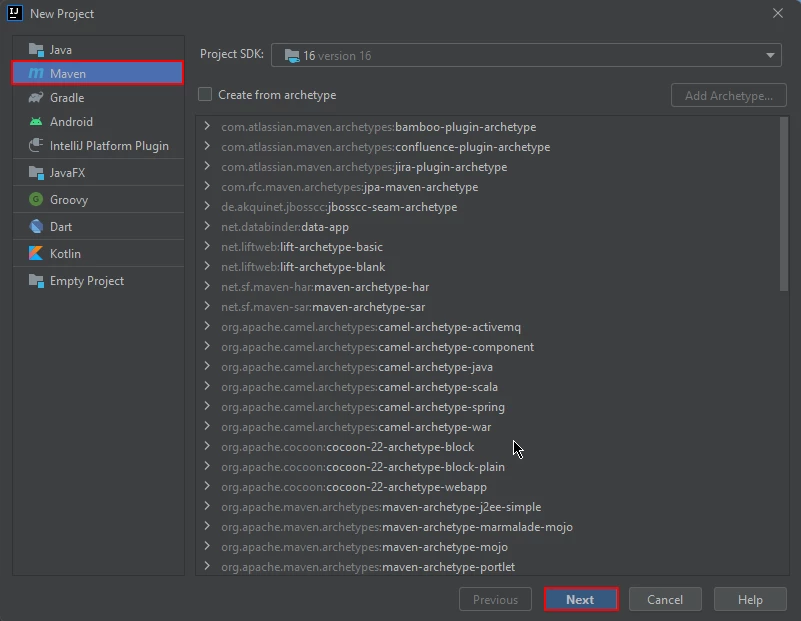
  • Create a Maven Project: In IntelliJ IDEA, create a new Maven project. This will provide a suitable environment for the installation of IronPDF for Java.

How to Extract Data From PDF in Java, Figure 1: New Maven Project in IntelliJ New Maven Project in IntelliJ

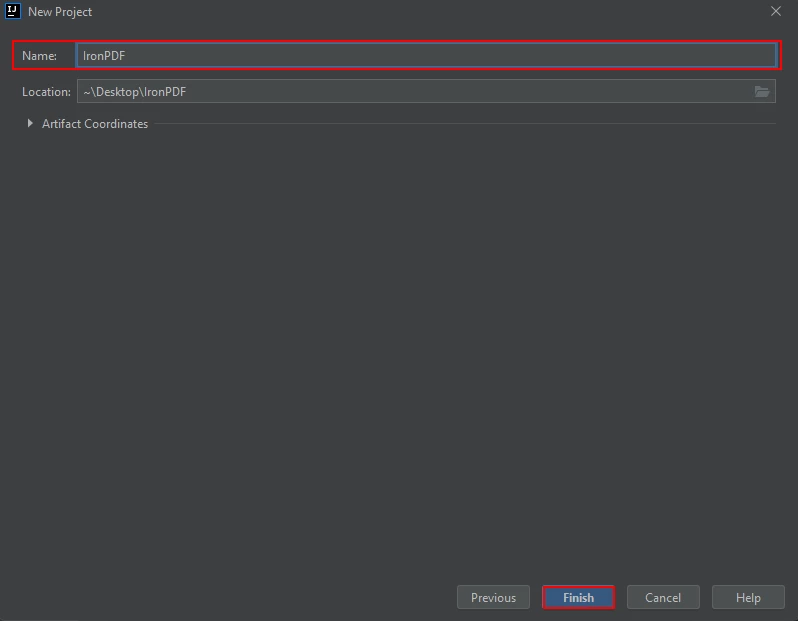
  • A new window will appear. Enter the name of the project and click on Finish.

How to Extract Data From PDF in Java, Figure 2: Name the Maven Project and click Finish Name the Maven Project and click Finish

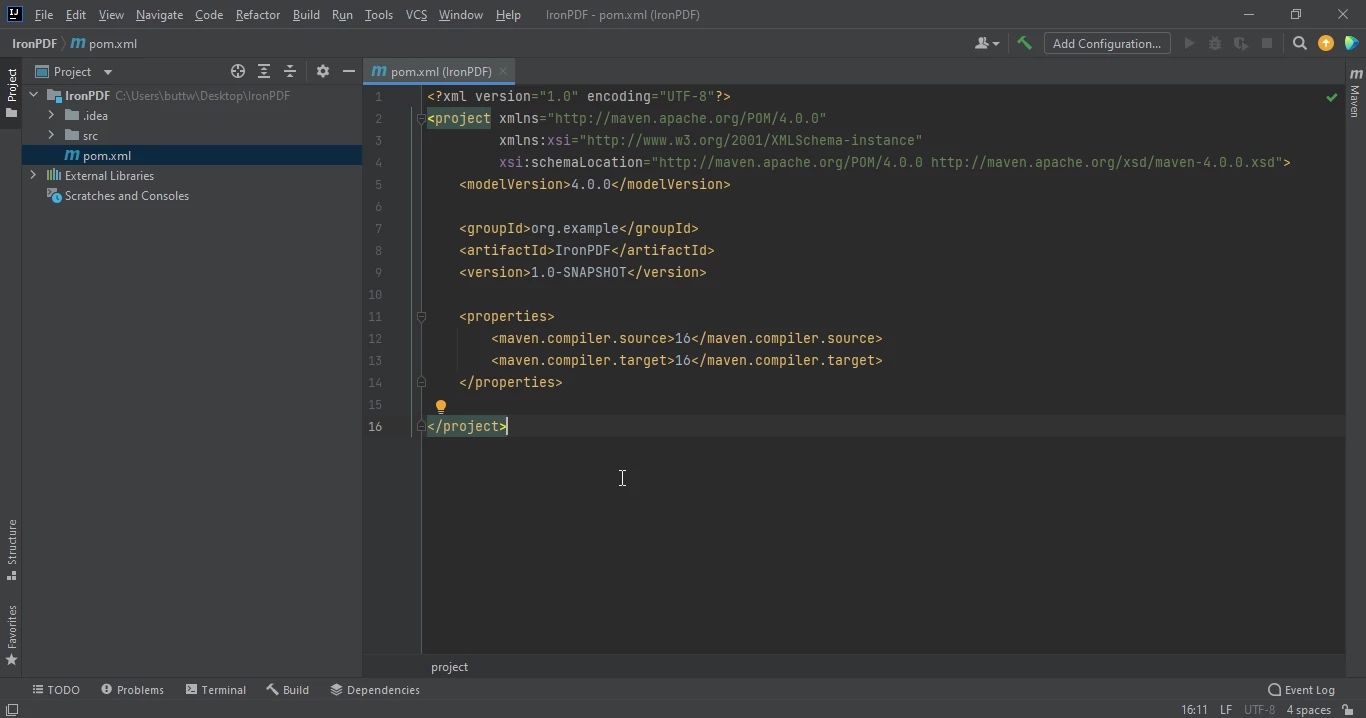
  • A new project with a pom.xml will open once you click Finish. This will be used to add IronPDF Java Maven dependencies.

How to Extract Data From PDF in Java, Figure 3: The pom.xml file The pom.xml file

Add the following dependencies in the pom.xml file or you can download the JAR file from the IronPDF library page on Sonatype Central.

<dependency>
    <groupId>com.ironsoftware</groupId>
    <artifactId>ironpdf</artifactId>
    <version>1.0.0</version> 
</dependency>
<dependency>
    <groupId>com.ironsoftware</groupId>
    <artifactId>ironpdf</artifactId>
    <version>1.0.0</version> 
</dependency>
XML

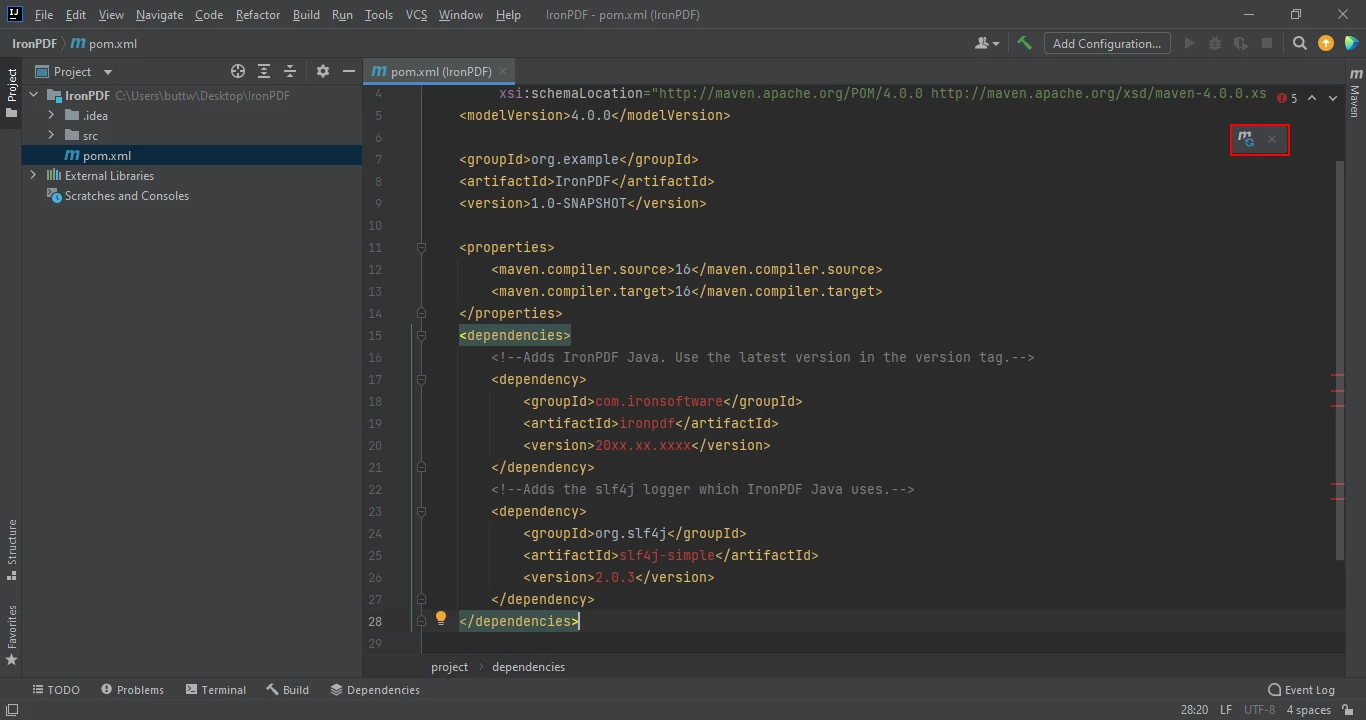
Once you placed the dependencies in the pom.xml file, a small icon will appear in the right top corner of the file.

How to Extract Data From PDF in Java, Figure 4: Click the floating icon to install the Maven dependencies automatically Click the floating icon to install the Maven dependencies automatically

Install IronPDF for Java's Maven dependencies by clicking this button. Depending on the speed of your internet connection, this should just take a few minutes.

5. Extract Data

IronPDF is a Java library for creating, editing, and extracting data from PDF documents. It provides a simple API to extract text from PDF files, URLs, and tables.

5.1. Extract Data from PDF documents

Using IronPDF for Java, you can easily extract text data from PDF documents. Below is the example code for extracting data from a PDF file.

How to Extract Data From PDF in Java, Figure 5: PDF Input PDF Input

// Import the necessary IronPDF package for working with PDF documents
import com.ironsoftware.ironpdf.PdfDocument;

import java.io.IOException;
import java.nio.file.Paths;

public class Main {
    public static void main(String[] args) throws IOException {
        // Load the PDF document from the specified file
        PdfDocument pdf = PdfDocument.fromFile(Paths.get("business plan.pdf"));

        // Extract all text from the PDF document
        String text = pdf.extractAllText();

        // Print the extracted text to the console
        System.out.println("Text extracted from the PDF: " + text);
    }
}
// Import the necessary IronPDF package for working with PDF documents
import com.ironsoftware.ironpdf.PdfDocument;

import java.io.IOException;
import java.nio.file.Paths;

public class Main {
    public static void main(String[] args) throws IOException {
        // Load the PDF document from the specified file
        PdfDocument pdf = PdfDocument.fromFile(Paths.get("business plan.pdf"));

        // Extract all text from the PDF document
        String text = pdf.extractAllText();

        // Print the extracted text to the console
        System.out.println("Text extracted from the PDF: " + text);
    }
}
JAVA

The source code produces the output given below:

> Text extracted from the PDF:
> 
> CRAFT-ARENA
> 
> Muhammad Waleed Butt
> 
> Hassan Khan
> 
> ABOUT US
> 
> Craft-Arena is a partnership based business that will help local crafters of Pakistan to sell their handicrafts at good prices and helps them earn a good living.

5.2. Extract Data from URLs

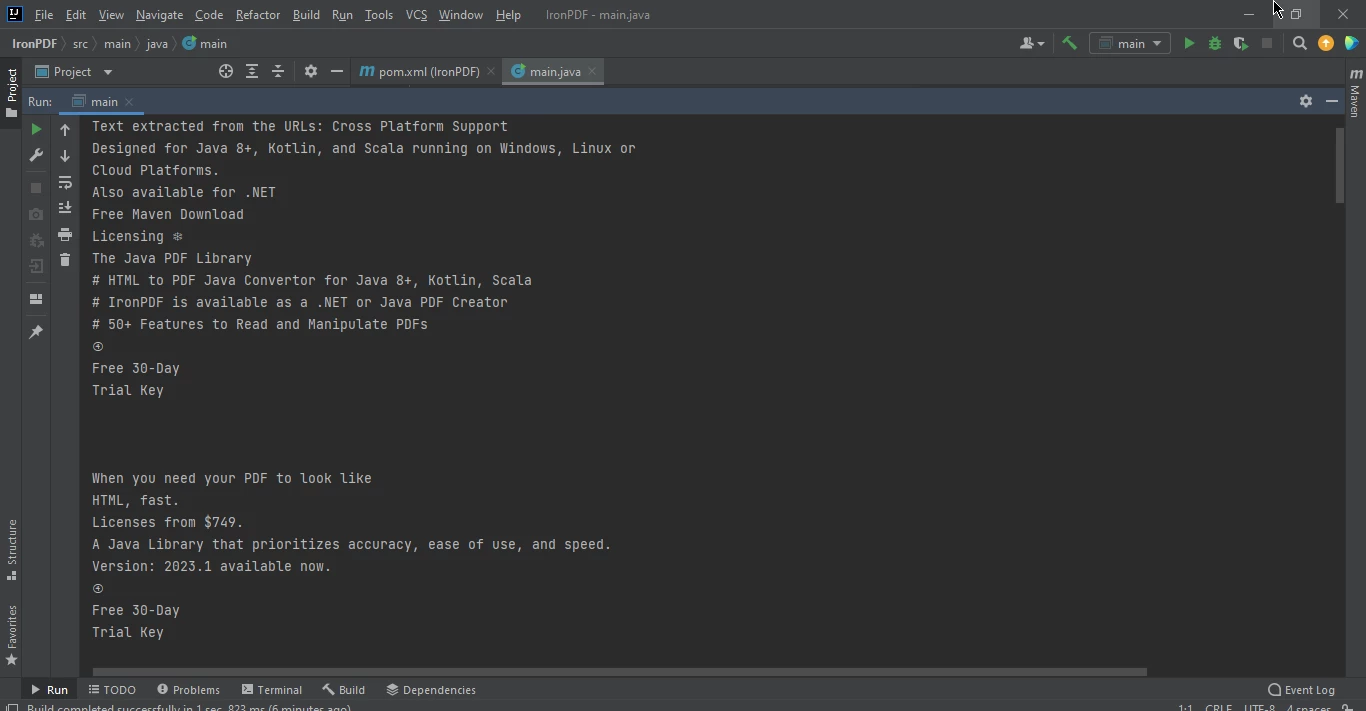
IronPDF for Java converts the URL to PDF in runtime and extracts text from it. This example will show the source code to extract text from URLs.

// Import the necessary IronPDF package for working with PDF documents
import com.ironsoftware.ironpdf.PdfDocument;

import java.io.IOException;

public class Main {
    public static void main(String[] args) throws IOException {
        // Convert a URL to a PDF and load it into a PdfDocument
        PdfDocument pdf = PdfDocument.renderUrlAsPdf("https://ironpdf.com/java/");

        // Extract all text from the PDF document
        String text = pdf.extractAllText();

        // Print the extracted text to the console
        System.out.println("Text extracted from the URLs: " + text);
    }
}
// Import the necessary IronPDF package for working with PDF documents
import com.ironsoftware.ironpdf.PdfDocument;

import java.io.IOException;

public class Main {
    public static void main(String[] args) throws IOException {
        // Convert a URL to a PDF and load it into a PdfDocument
        PdfDocument pdf = PdfDocument.renderUrlAsPdf("https://ironpdf.com/java/");

        // Extract all text from the PDF document
        String text = pdf.extractAllText();

        // Print the extracted text to the console
        System.out.println("Text extracted from the URLs: " + text);
    }
}
JAVA

How to Extract Data From PDF in Java, Figure 6: Extracted Web Page Data Extracted Web Page Data

5.3. Extract Data from Table data

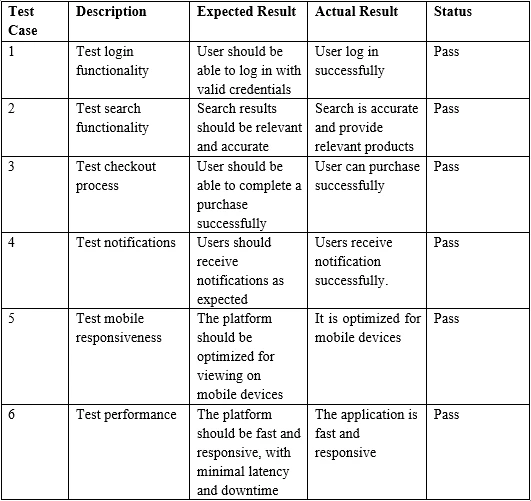
To extract table data from a PDF using IronPDF for Java is very simple; all you need is a PDF containing a table, and to run the below code.

How to Extract Data From PDF in Java, Figure 7: Sample PDF Table Input Sample PDF Table Input

// Import the necessary IronPDF package for working with PDF documents
import com.ironsoftware.ironpdf.PdfDocument;

import java.io.IOException;
import java.nio.file.Paths;

public class Main {
    public static void main(String[] args) throws IOException {
        // Load the PDF document from the specified file
        PdfDocument pdf = PdfDocument.fromFile(Paths.get("table.pdf"));

        // Extract all text from the PDF document, including table data
        String text = pdf.extractAllText();

        // Print the extracted table data to the console
        System.out.print("Text extracted from the Marked tables: " + text);
    }
}
// Import the necessary IronPDF package for working with PDF documents
import com.ironsoftware.ironpdf.PdfDocument;

import java.io.IOException;
import java.nio.file.Paths;

public class Main {
    public static void main(String[] args) throws IOException {
        // Load the PDF document from the specified file
        PdfDocument pdf = PdfDocument.fromFile(Paths.get("table.pdf"));

        // Extract all text from the PDF document, including table data
        String text = pdf.extractAllText();

        // Print the extracted table data to the console
        System.out.print("Text extracted from the Marked tables: " + text);
    }
}
JAVA
> Test Case Description Expected Result Actual Result Status
> 
> 1 Test login functionality User should be able to log in with valid credentials
> 
> User log in successfully Pass
> 
> 2 Test search functionality Search results should be relevant and accurate
> 
> Search is accurate and provide relevant products Pass
> 
> 3 Test checkout process User should be able to complete a purchase successfully
> 
> User can purchase successfully Pass

6. Conclusion

In conclusion, this tutorial has demonstrated how to extract data, specifically tabular data, from a PDF file using IronPDF for Java.

For more information, please refer to the extract text from PDF example on the IronPDF website.

IronPDF is a library with a commercial license details, starting at $799. However, you can evaluate it in production with a free trial using IronPDF trial license.

자주 묻는 질문

Java로 된 PDF에서 텍스트를 추출하려면 어떻게 하나요?

Java용 IronPDF를 사용하여 PdfDocument 클래스로 문서를 로드하고 extractAllText 메서드를 활용하여 텍스트를 검색하면 PDF에서 텍스트를 추출할 수 있습니다.

URL에서 데이터를 추출하여 Java에서 PDF로 변환할 수 있나요?

예, Java용 IronPDF를 사용하면 런타임에 URL을 PDF로 변환하고 PdfDocument 클래스를 사용하여 데이터를 추출할 수 있습니다.

IntelliJ IDEA에서 IronPDF를 설정하는 단계는 무엇인가요?

IntelliJ IDEA에서 IronPDF를 설정하려면 새 Maven 프로젝트를 만들고 pom.xml 파일에 IronPDF 라이브러리를 추가한 다음 표시되는 플로팅 아이콘을 클릭하여 Maven 종속성을 설치합니다.

Java에서 IronPDF를 사용하기 위한 전제 조건은 무엇인가요?

전제 조건으로는 Java가 설치되어 있어야 하며, Eclipse 또는 IntelliJ와 같은 Java IDE, IronPDF 라이브러리, Maven이 설치되어 IDE와 통합되어 있어야 합니다.

Java를 사용하여 PDF에서 표 데이터를 추출하려면 어떻게 해야 하나요?

Java용 IronPDF를 사용하여 PDF에서 표 데이터를 추출하려면 PdfDocument 클래스로 PDF 문서를 로드하고 extractAllText 메서드를 사용하여 표 데이터를 검색하세요.

Java용 IronPDF를 사용하려면 상용 라이선스가 필요하나요?

예, Java용 IronPDF에는 상용 라이선스가 필요하지만 평가 목적으로 무료 평가판을 사용할 수 있습니다.

Java에서 IronPDF를 사용하기 위한 튜토리얼은 어디에서 찾을 수 있나요?

Java용 IronPDF 사용에 대한 튜토리얼과 예제는 IronPDF 웹사이트, 특히 예제 및 튜토리얼 섹션에서 찾을 수 있습니다.

IronPDF는 Java 개발자를 위해 어떤 기능을 제공하나요?

Java용 IronPDF는 PDF 파일을 생성, 편집, 병합, 분할, 조작하는 기능은 물론 비밀번호 보호 및 디지털 서명 추가를 통해 PDF를 보호하는 기능도 제공합니다.

Java를 사용하여 PDF에서 데이터를 추출할 때 발생하는 문제를 해결하려면 어떻게 해야 하나요?

최신 Java 버전, 호환되는 IDE, IronPDF 라이브러리 등 모든 전제 조건이 충족되는지 확인합니다. pom.xml 파일에서 올바른 Maven 통합 및 라이브러리 종속성을 확인합니다.

커티스 차우
기술 문서 작성자

커티스 차우는 칼턴 대학교에서 컴퓨터 과학 학사 학위를 취득했으며, Node.js, TypeScript, JavaScript, React를 전문으로 하는 프론트엔드 개발자입니다. 직관적이고 미적으로 뛰어난 사용자 인터페이스를 만드는 데 열정을 가진 그는 최신 프레임워크를 활용하고, 잘 구성되고 시각적으로 매력적인 매뉴얼을 제작하는 것을 즐깁니다.


커티스는 개발 분야 외에도 사물 인터넷(IoT)에 깊은 관심을 가지고 있으며, 하드웨어와 소프트웨어를 통합하는 혁신적인 방법을 연구합니다. 여가 시간에는 게임을 즐기거나 디스코드 봇을 만들면서 기술에 대한 애정과 창의성을 결합합니다.