using IronPdf;

// Disable local disk access or cross-origin requests
Installation.EnableWebSecurity = true;

// Instantiate Renderer
var renderer = new ChromePdfRenderer();

// Create a PDF from a HTML string using C#
var pdf = renderer.RenderHtmlAsPdf("<h1>Hello World</h1>");

// Export to a file or Stream
pdf.SaveAs("output.pdf");

// Advanced Example with HTML Assets
// Load external html assets: Images, CSS and JavaScript.
// An optional BasePath 'C:\site\assets\' is set as the file location to load assets from
var myAdvancedPdf = renderer.RenderHtmlAsPdf("<img src='icons/iron.png'>", @"C:\site\assets\");
myAdvancedPdf.SaveAs("html-with-assets.pdf");
using IronPdf;// Disable local disk access or cross-origin requestsInstallation.EnableWebSecurity = true;// Instantiate Renderervar renderer = new ChromePdfRenderer();// Create a PDF from a HTML string using C#var pdf = renderer.RenderHtmlAsPdf("<h1>Hello World</h1>");// Export to a file or Streampdf.SaveAs("output.pdf");// Advanced Example with HTML Assets// Load external html assets: Images, CSS and JavaScript.// An optional BasePath 'C:\site\assets\' is set as the file location to load assets fromvar myAdvancedPdf = renderer.RenderHtmlAsPdf("<img src='icons/iron.png'>", @"C:\site\assets\");myAdvancedPdf.SaveAs("html-with-assets.pdf");
PM >Install-Package IronPdf
Install-Package IronPdf
PRODUCT COMPARISONS
C# HTML to PDF Library Comparison: Performance, Accuracy, and Memory
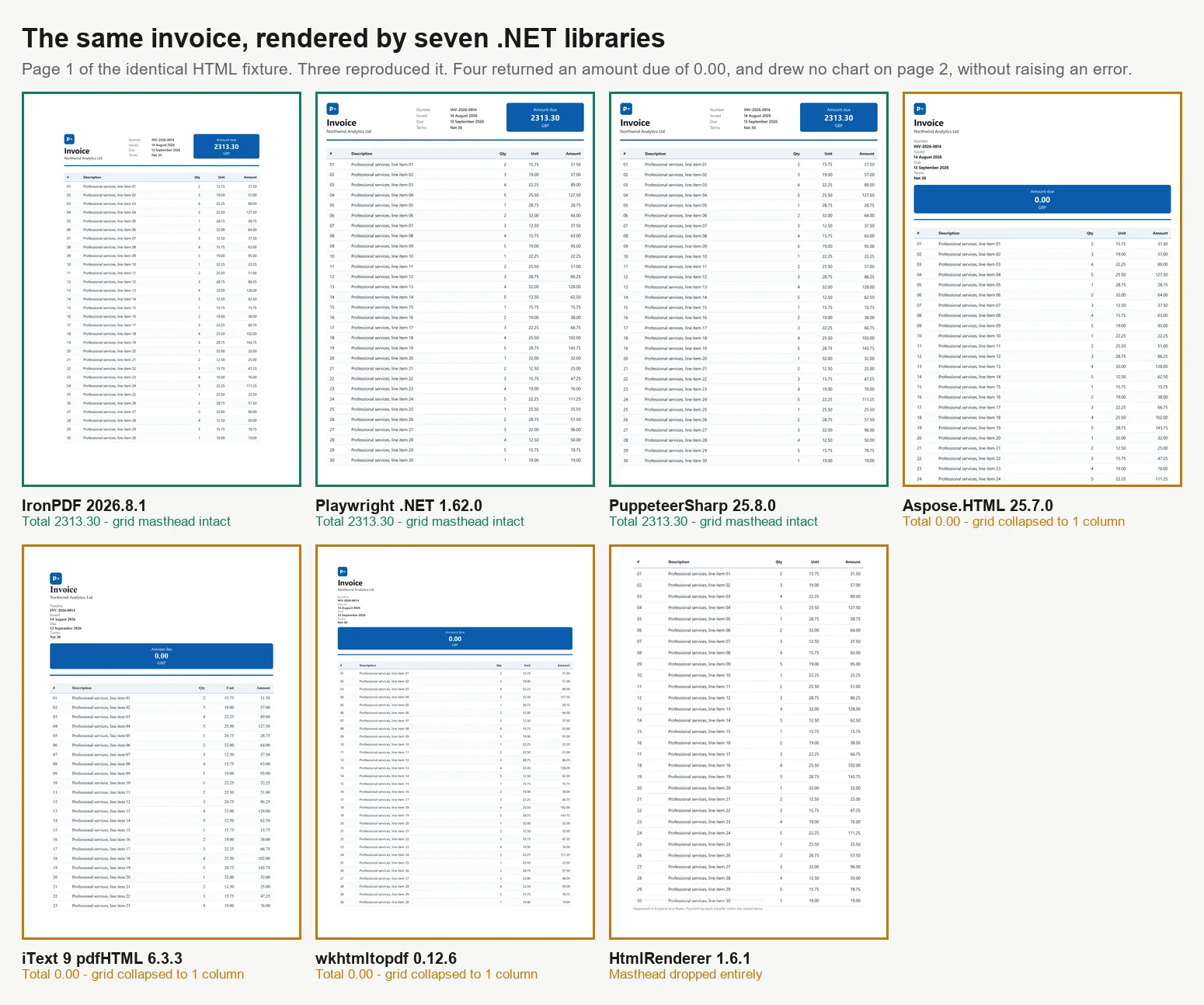
There are 7 main ways to convert HTML to PDF in C#, and not all methods produce identical results. In benchmarking 7 engines with a 2-page invoice, only 3 rendered it correctly. Of the other 4, 3 printed an amount due of 0.00 where the computed total belonged and the fourth dropped the totals block altogether, none of them raising an error or a warning. These engines vary in their support for modern CSS, JavaScript execution, performance under load, and container size. These differences become apparent only after reviewing the output, rather than assuming a successful render means correct content. This guide offers working code for all 7 approaches and benchmark data for each, all measured on a single machine.
The libraries fall into 2 main categories, which largely explains the results below. Browser-grade renderers use a full Chromium engine. IronPDF (2026.8.1) includes Chromium within the package, while PuppeteerSharp (25.8.0) and Playwright .NET (1.62.0) control an external browser via the DevTools protocol. These 3 replicate Chrome's output, including CSS Grid, web fonts, and canvas-based charts, but require more memory and larger containers. Layout-engine libraries, such as iText 9 with pdfHTML (6.3.3 on iText Core 9.7.0), HtmlRenderer with PdfSharp (1.6.1), and Aspose.HTML (25.7.0), use their own layout engines, are far smaller and often faster, but do not support modern JavaScript. wkhtmltopdf (0.12.6) is an intermediate case, using an older Qt (4.8.5) WebKit engine that supports ES5 but not ES6. All benchmarks in this guide are based on processing the same 2-page invoice at 4 concurrency levels, with each PDF reviewed for accuracy.
The Short Version: Where IronPDF Leads
Measured on 3 September 2026, 5 passes, 8,960 timed renders, on an idle 24-core Windows 11 desktop running .NET 10. Full method and raw data are below, and the harness is downloadable.
What you are choosing on
Winner
Measured
What the alternatives cost
A correct document
IronPDF
Totals computed, chart drawn, grid intact
4 of the 7 returned a document that was wrong and raised no error
Throughput on a correct render
IronPDF
44.02 renders/s at 8 concurrent
2.1x Playwright, 2.8x PuppeteerSharp on the same machine
Work per megabyte
IronPDF
27.0 MB per sustained render/s
54.3 MB for Playwright, 82.9 MB for PuppeteerSharp
Cold start on a correct render
IronPDF
486 ms to first PDF
639 ms PuppeteerSharp, 720 ms Playwright, 1,096 ms Aspose.HTML
What you operate
IronPDF
Chromium ships inside the NuGet package
The browser engines add an image, a build-time download, a process pool and a patch cadence
What you integrate next
IronPDF
Merge, forms, signatures, PDF/A, encryption in the same package
The browser engines render and stop, so the next step is a second dependency
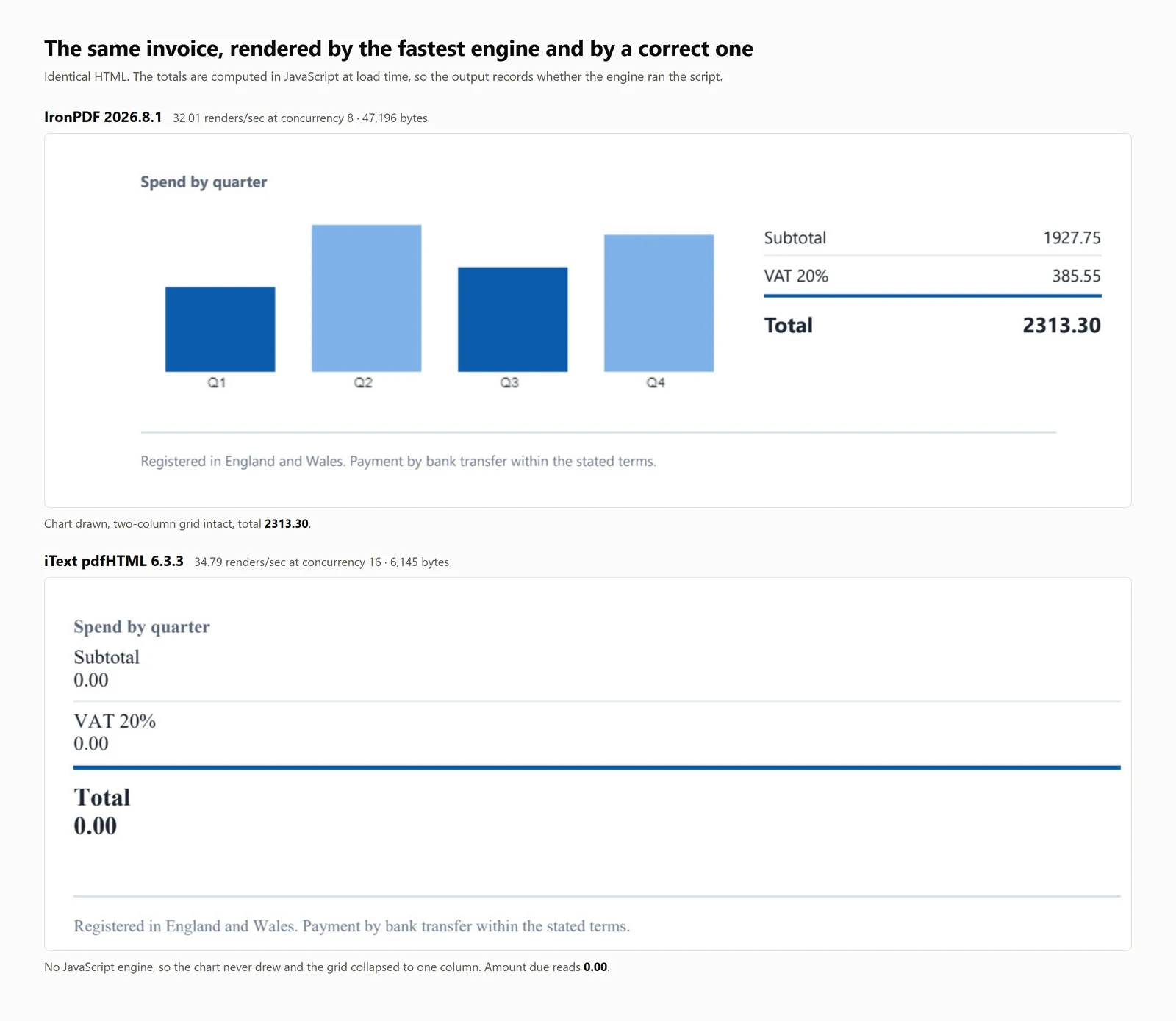
The speed figures above it in the table belong to engines that got the document wrong. iText 9 posted 54.30 renders per second and HtmlRenderer 327.09, and both did it by never running the page's JavaScript. A throughput figure means little without the document it produced, so every table here carries an accuracy column.
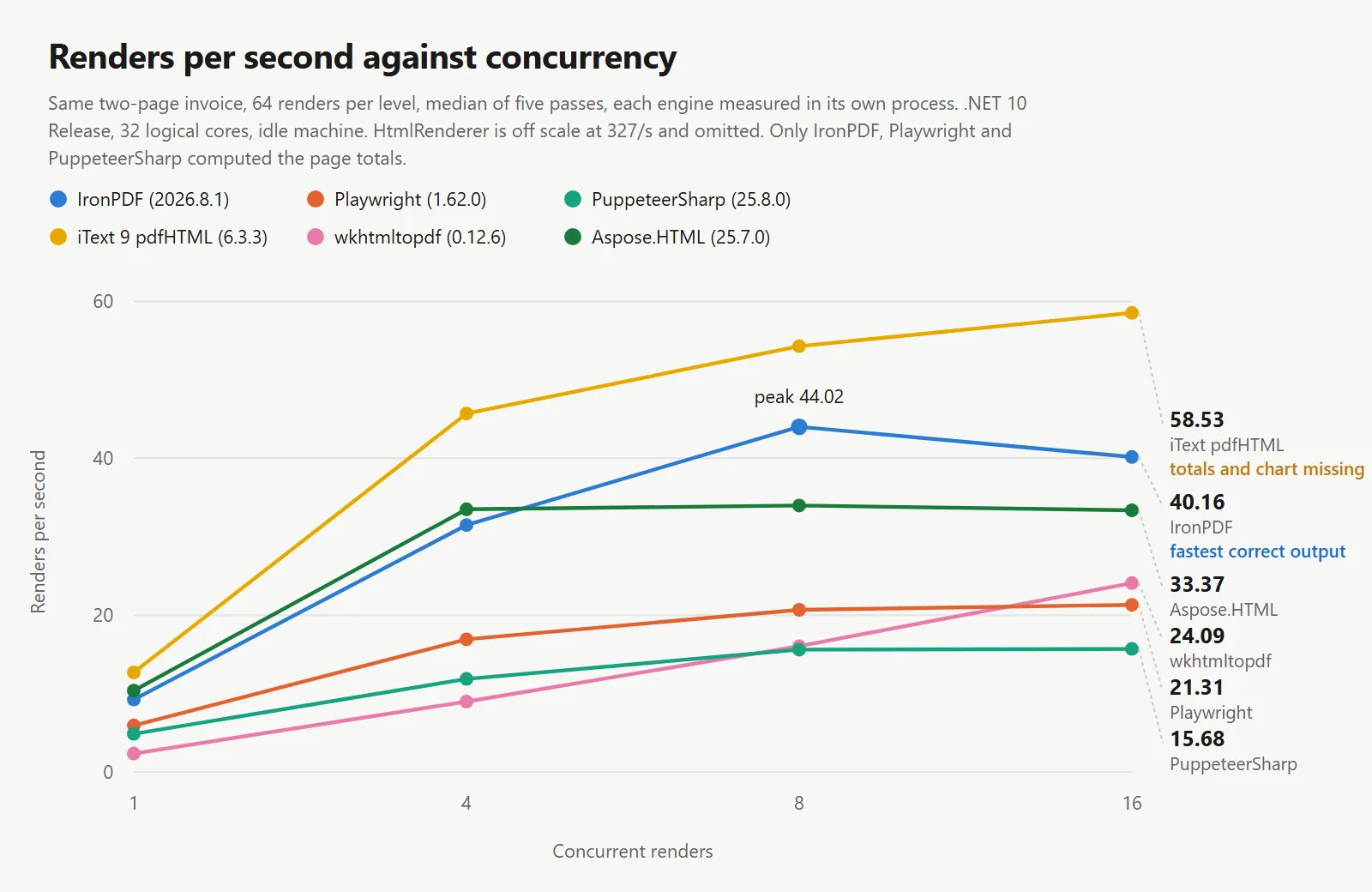
IronPDF leads on throughput per correct render: Among the engines that reproduced the document, IronPDF sustained 44.02 renders per second against 20.68 and 15.60, on the same machine, the same document and the same wait condition, while returning the most work per megabyte of the 3 and reaching a first PDF the quickest.
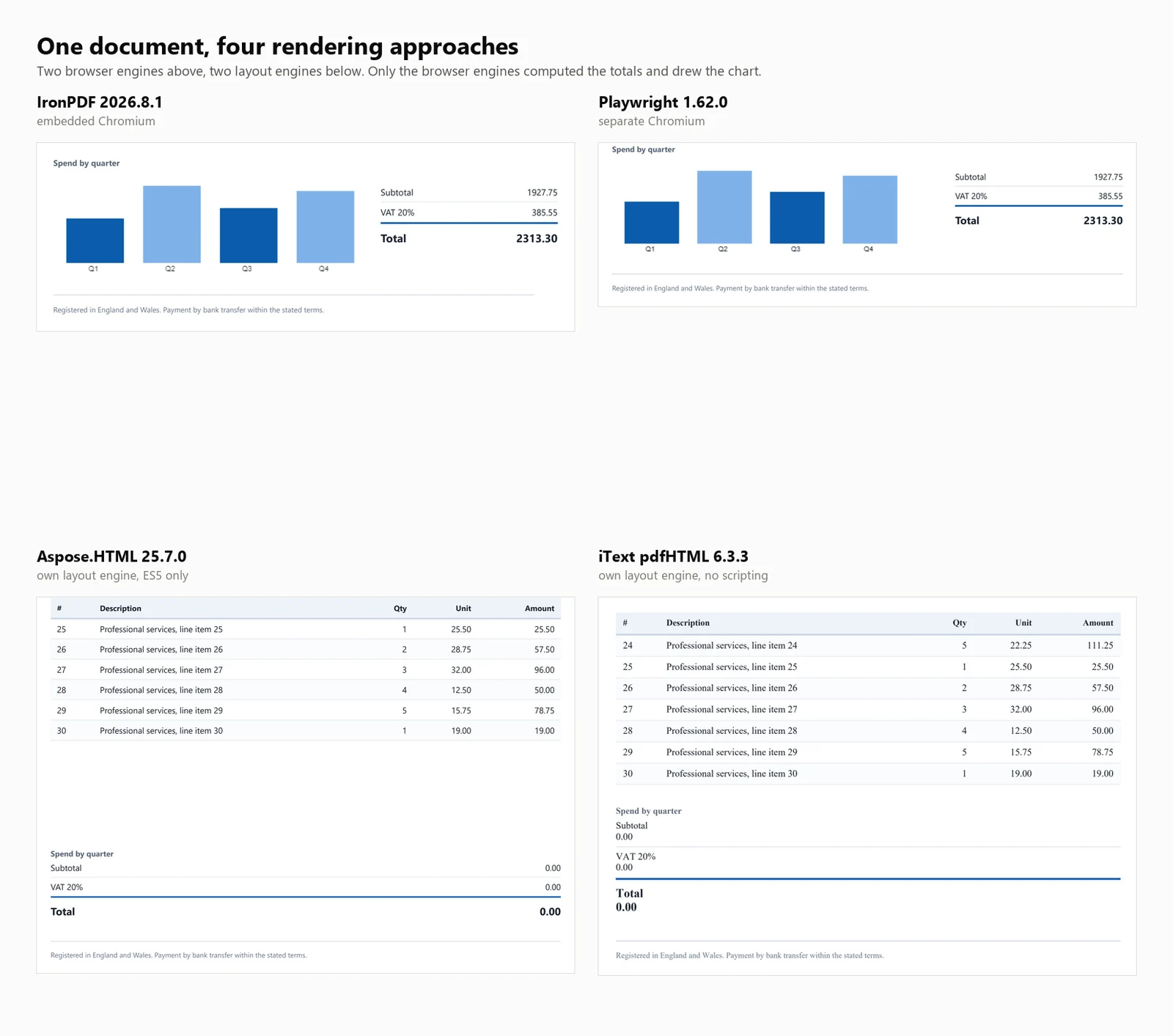
The finding that matters more than any of the above: 4 of the 7 libraries produced a PDF that looked finished and was wrong. In 3 of them the invoice total read 0.00 instead of 2313.30. The fourth, HtmlRenderer, silently dropped the amount due, the totals and the chart. No exception was raised in any case, and nothing in the output said so.
HTML to PDF Quickstart in C#
This guide presents 7 methods to convert HTML to PDF in .NET, providing code samples and quantitative benchmarks for each.
Who this is for: .NET developers evaluating HTML to PDF libraries, and those who need to justify their selection with objective data.
What you will get: Working examples for each approach, covering both HTML strings and live URLs, along with measurements for cold start, throughput, memory usage, and rendering accuracy on a consistent test document.
Where it runs: .NET 6 and later, .NET Framework 4.6.2 and later, and .NET Standard 2.0. Benchmarks were conducted on .NET 10, Windows 11, with 32 logical cores in Release mode.
When to use this approach: When your document is already in HTML format. Rendering controlled markup is more efficient and reliable than constructing PDFs through individual drawing commands for document-like content.
Why it matters technically: Engines fall into 2 categories. Browser-grade renderers use Chromium, resulting in higher memory and container requirements. Layout-engine libraries are smaller and faster but do not execute JavaScript. The benchmarks below quantify these trade-offs.
To use it, install the package, provide an HTML string to the renderer, and save the resulting PDF.
1Install IronPDF with NuGet Package Manager
PM > Install-Package IronPdf
Install-Package IronPdf
2Copy and run this code snippet.
using IronPdf;License.LicenseKey = "YOUR-TRIAL-KEY";var pdf = new ChromePdfRenderer().RenderHtmlAsPdf("<h1>Invoice INV-2026-0814</h1>");pdf.SaveAs("invoice.pdf");
using IronPdf;

License.LicenseKey = "YOUR-TRIAL-KEY";
var pdf = new ChromePdfRenderer().RenderHtmlAsPdf("<h1>Invoice INV-2026-0814</h1>");
pdf.SaveAs("invoice.pdf");
ImportsIronPdfLicense.LicenseKey = "YOUR-TRIAL-KEY"Dim pdf = New ChromePdfRenderer().RenderHtmlAsPdf("<h1>Invoice INV-2026-0814</h1>")pdf.SaveAs("invoice.pdf")
Imports IronPdf

License.LicenseKey = "YOUR-TRIAL-KEY"
Dim pdf = New ChromePdfRenderer().RenderHtmlAsPdf("<h1>Invoice INV-2026-0814</h1>")
pdf.SaveAs("invoice.pdf")
3Deploy to test on your live environment
Start using IronPDF in your project today with a free trial
After purchasing or registering for a 30-day IronPDF trial, enter your license key at the beginning of your application.
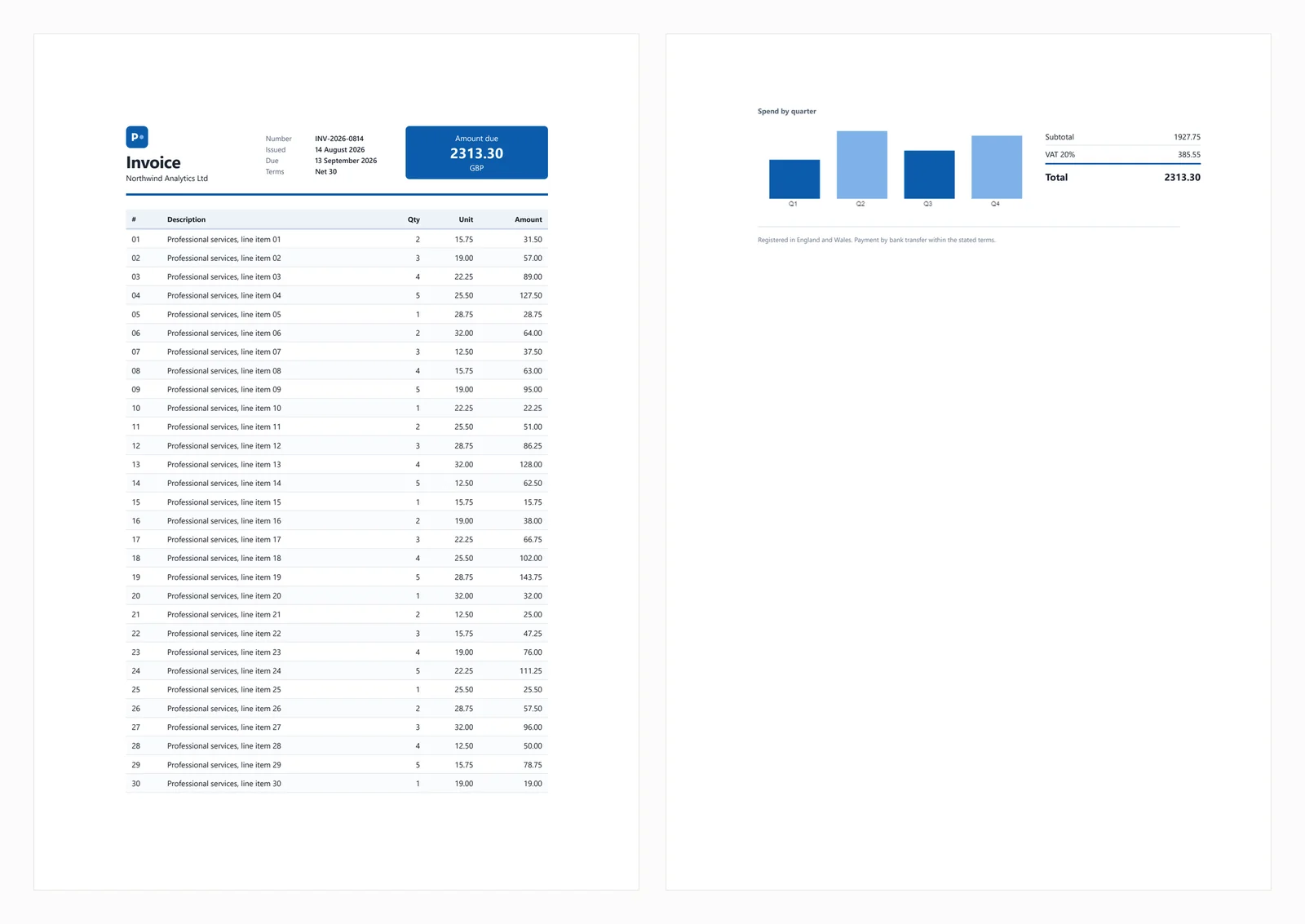
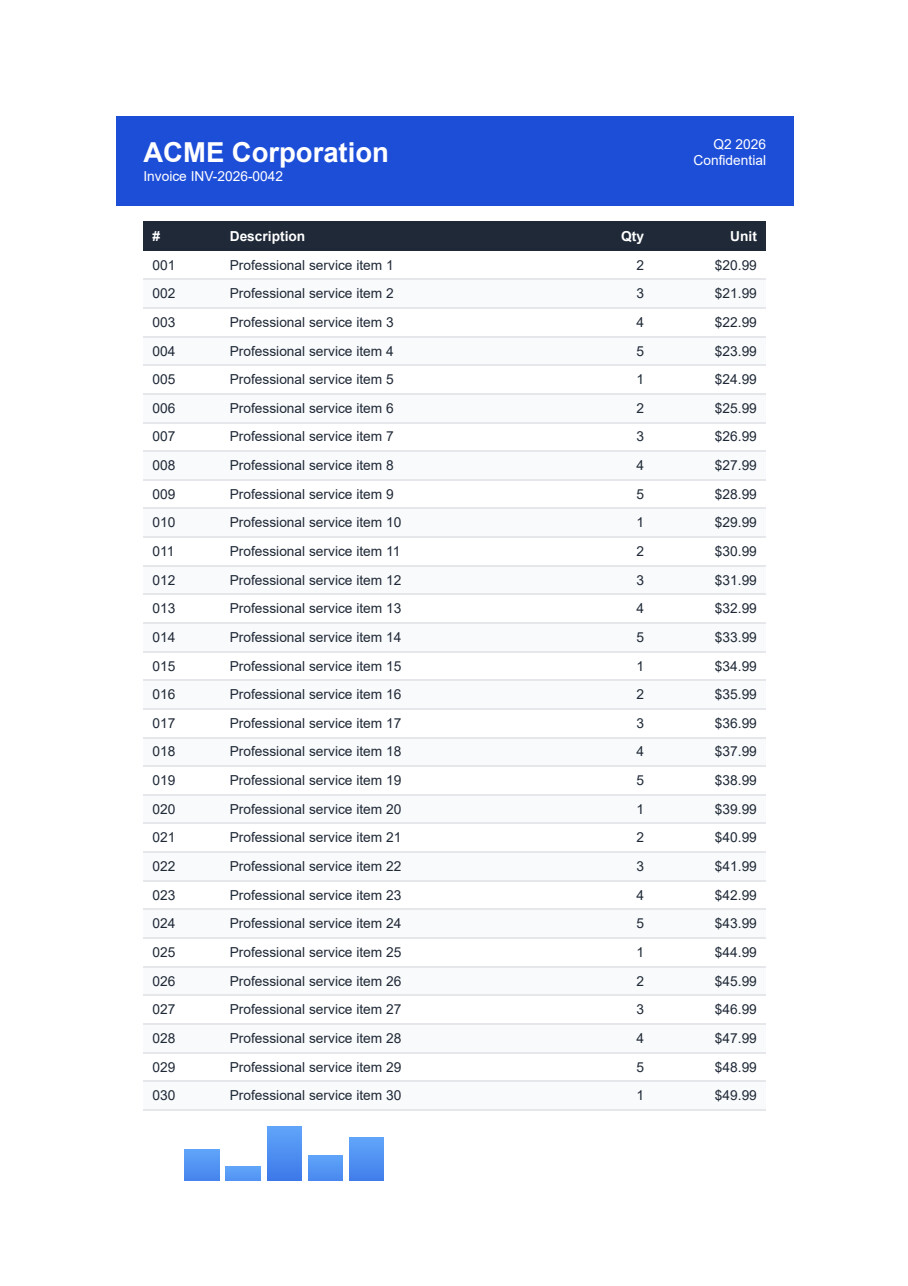
The quickstart above produces the following output from the test invoice used throughout this guide.
The test document includes a CSS Grid masthead, a 30-row table with zebra striping, an inline SVG, a bar chart rendered on a canvas element, and totals calculated in JavaScript at load time. The computed totals are important for testing, as engines without JavaScript support generate invoices that appear complete but display an amount due of 0.00. This behavior appears in 3 of the libraries below, and a fourth drops the totals block entirely.
Common failure scenarios are covered in the sections below.
1. IronPDF: Embedded Chromium, No Browser to Install
IronPDF is a Chromium renderer that operates within your application via NuGet, eliminating the need for a separately installed browser. This distinction primarily affects deployment, which is discussed later in the guide.
Install:
> dotnet add package IronPdf
dotnet add package IronPdf
From an HTML string:
// IronPDF 2026.8.1using IronPdf;License.LicenseKey = "YOUR-TRIAL-KEY"; // trial keys are freestring html = @"<h1>Invoice INV-2026-0814</h1> <p>Northwind Analytics Ltd — Net 30</p> <table><tr><th>Item</th><th>Amount</th></tr> <tr><td>Professional services</td><td>2313.30</td></tr></table>";var renderer = new ChromePdfRenderer();renderer.RenderingOptions.PaperSize = IronPdf.Rendering.PdfPaperSize.A4;renderer.RenderingOptions.PrintHtmlBackgrounds = true;using PdfDocument pdf = renderer.RenderHtmlAsPdf(html);pdf.SaveAs("invoice.pdf");
// IronPDF 2026.8.1
using IronPdf;
License.LicenseKey = "YOUR-TRIAL-KEY"; // trial keys are free
string html = @"<h1>Invoice INV-2026-0814</h1>
<p>Northwind Analytics Ltd — Net 30</p>
<table><tr><th>Item</th><th>Amount</th></tr>
<tr><td>Professional services</td><td>2313.30</td></tr></table>";
var renderer = new ChromePdfRenderer();
renderer.RenderingOptions.PaperSize = IronPdf.Rendering.PdfPaperSize.A4;
renderer.RenderingOptions.PrintHtmlBackgrounds = true;
using PdfDocument pdf = renderer.RenderHtmlAsPdf(html);
pdf.SaveAs("invoice.pdf");
' IronPDF 2026.8.1ImportsIronPdfLicense.LicenseKey = "YOUR-TRIAL-KEY" ' trial keys are freeDim html AsString = "<h1>Invoice INV-2026-0814</h1> <p>Northwind Analytics Ltd — Net 30</p> <table><tr><th>Item</th><th>Amount</th></tr> <tr><td>Professional services</td><td>2313.30</td></tr></table>"Dim renderer As New ChromePdfRenderer()renderer.RenderingOptions.PaperSize = IronPdf.Rendering.PdfPaperSize.A4renderer.RenderingOptions.PrintHtmlBackgrounds = TrueUsing pdf AsPdfDocument = renderer.RenderHtmlAsPdf(html) pdf.SaveAs("invoice.pdf")EndUsing
' IronPDF 2026.8.1
Imports IronPdf
License.LicenseKey = "YOUR-TRIAL-KEY" ' trial keys are free
Dim html As String = "<h1>Invoice INV-2026-0814</h1>
<p>Northwind Analytics Ltd — Net 30</p>
<table><tr><th>Item</th><th>Amount</th></tr>
<tr><td>Professional services</td><td>2313.30</td></tr></table>"
Dim renderer As New ChromePdfRenderer()
renderer.RenderingOptions.PaperSize = IronPdf.Rendering.PdfPaperSize.A4
renderer.RenderingOptions.PrintHtmlBackgrounds = True
Using pdf As PdfDocument = renderer.RenderHtmlAsPdf(html)
pdf.SaveAs("invoice.pdf")
End Using
From a live URL:
// IronPDF 2026.8.1 - only the render call changes.using IronPdf;License.LicenseKey = "YOUR-TRIAL-KEY";var renderer = new ChromePdfRenderer();using PdfDocument pdf = renderer.RenderUrlAsPdf("https://ironpdf.com/");pdf.SaveAs("page.pdf");
// IronPDF 2026.8.1 - only the render call changes.
using IronPdf;

License.LicenseKey = "YOUR-TRIAL-KEY";

var renderer = new ChromePdfRenderer();

using PdfDocument pdf = renderer.RenderUrlAsPdf("https://ironpdf.com/");
pdf.SaveAs("page.pdf");
ImportsIronPdfLicense.LicenseKey = "YOUR-TRIAL-KEY"Dim renderer = New ChromePdfRenderer()Using pdf AsPdfDocument = renderer.RenderUrlAsPdf("https://ironpdf.com/") pdf.SaveAs("page.pdf")EndUsing
Imports IronPdf

License.LicenseKey = "YOUR-TRIAL-KEY"

Dim renderer = New ChromePdfRenderer()

Using pdf As PdfDocument = renderer.RenderUrlAsPdf("https://ironpdf.com/")
    pdf.SaveAs("page.pdf")
End Using
Recommended use: Choose IronPDF when you require browser-accurate PDF rendering without managing the infrastructure of a headless browser, such as process lifecycle, crash recovery, or container configuration.
Trade-off: It ships Chromium inside the package, so peak memory reaches 342 MB for a single cold render and 1,187 MB for 8 concurrent ones. It also starts at $999, where 4 of the other 6 are free. For a side project or a low-volume internal tool, that cost is difficult to justify.
Performance: 486 ms cold start, 161 ms median latency at 8 concurrent renders, 44.02 sustained renders per second, and 1,187 MB peak memory usage across the process tree. The test invoice was rendered accurately, including the chart and totals.
2. PuppeteerSharp: Headless Chrome for PDF Rendering
PuppeteerSharp is the .NET port of Puppeteer. It downloads a Chromium build, controls it via the DevTools protocol, and generates PDFs. It is free, MIT-licensed, actively maintained, and measured here at PuppeteerSharp (25.8.0).
Install:
> dotnet add package PuppeteerSharp
dotnet add package PuppeteerSharp
From an HTML string:
// PuppeteerSharp 25.8.0using PuppeteerSharp;using PuppeteerSharp.Media;string html = @"<h1>Invoice INV-2026-0814</h1> <p>Northwind Analytics Ltd — Net 30</p> <table><tr><th>Item</th><th>Amount</th></tr> <tr><td>Professional services</td><td>2313.30</td></tr></table>";// First run downloads roughly 150 MB of Chromium. Pre-fetch this at build time.await new BrowserFetcher().DownloadAsync();await using IBrowser browser = awaitPuppeteer.LaunchAsync(new LaunchOptions { Headless = true });await using IPage page = await browser.NewPageAsync();await page.SetContentAsync(html, new SetContentOptions{WaitUntil = new[] { WaitUntilNavigation.Load }});await page.PdfAsync("invoice.pdf", new PdfOptions{Format = PaperFormat.A4,PrintBackground = true});
// PuppeteerSharp 25.8.0
using PuppeteerSharp;
using PuppeteerSharp.Media;
string html = @"<h1>Invoice INV-2026-0814</h1>
<p>Northwind Analytics Ltd — Net 30</p>
<table><tr><th>Item</th><th>Amount</th></tr>
<tr><td>Professional services</td><td>2313.30</td></tr></table>";
// First run downloads roughly 150 MB of Chromium. Pre-fetch this at build time.
await new BrowserFetcher().DownloadAsync();
await using IBrowser browser = await Puppeteer.LaunchAsync(new LaunchOptions { Headless = true });
await using IPage page = await browser.NewPageAsync();
await page.SetContentAsync(html, new SetContentOptions
{
WaitUntil = new[] { WaitUntilNavigation.Load }
});
await page.PdfAsync("invoice.pdf", new PdfOptions
{
Format = PaperFormat.A4,
PrintBackground = true
});
' PuppeteerSharp 25.8.0ImportsPuppeteerSharpImportsPuppeteerSharp.MediaDim html AsString = "<h1>Invoice INV-2026-0814</h1> <p>Northwind Analytics Ltd — Net 30</p> <table><tr><th>Item</th><th>Amount</th></tr> <tr><td>Professional services</td><td>2313.30</td></tr></table>"' First run downloads roughly 150 MB of Chromium. Pre-fetch this at build time.Await (New BrowserFetcher()).DownloadAsync()AwaitUsing browser AsIBrowser = AwaitPuppeteer.LaunchAsync(New LaunchOptionsWith {.Headless = True})AwaitUsing page AsIPage = Await browser.NewPageAsync()Await page.SetContentAsync(html, New SetContentOptionsWith {.WaitUntil = {WaitUntilNavigation.Load}})Await page.PdfAsync("invoice.pdf", New PdfOptionsWith { .Format = PaperFormat.A4, .PrintBackground = True })EndUsingEndUsing
' PuppeteerSharp 25.8.0
Imports PuppeteerSharp
Imports PuppeteerSharp.Media
Dim html As String = "<h1>Invoice INV-2026-0814</h1>
<p>Northwind Analytics Ltd — Net 30</p>
<table><tr><th>Item</th><th>Amount</th></tr>
<tr><td>Professional services</td><td>2313.30</td></tr></table>"
' First run downloads roughly 150 MB of Chromium. Pre-fetch this at build time.
Await (New BrowserFetcher()).DownloadAsync()
Await Using browser As IBrowser = Await Puppeteer.LaunchAsync(New LaunchOptions With {.Headless = True})
Await Using page As IPage = Await browser.NewPageAsync()
Await page.SetContentAsync(html, New SetContentOptions With {.WaitUntil = {WaitUntilNavigation.Load}})
Await page.PdfAsync("invoice.pdf", New PdfOptions With {
.Format = PaperFormat.A4,
.PrintBackground = True
})
End Using
End Using
From a live URL:
// PuppeteerSharp 25.8.0 - GoToAsync replaces SetContentAsync.await using IPage page = await browser.NewPageAsync();await page.GoToAsync("https://ironpdf.com/", new NavigationOptions{WaitUntil = new[] { WaitUntilNavigation.Networkidle0 }});await page.PdfAsync("page.pdf", new PdfOptions { Format = PaperFormat.A4, PrintBackground = true });
// PuppeteerSharp 25.8.0 - GoToAsync replaces SetContentAsync.
await using IPage page = await browser.NewPageAsync();

await page.GoToAsync("https://ironpdf.com/", new NavigationOptions
{
    WaitUntil = new[] { WaitUntilNavigation.Networkidle0 }
});

await page.PdfAsync("page.pdf", new PdfOptions { Format = PaperFormat.A4, PrintBackground = true });
' PuppeteerSharp 25.8.0 - GoToAsync replaces SetContentAsync.
Await Using page As IPage = Await browser.NewPageAsync()

Await page.GoToAsync("https://ironpdf.com/", New NavigationOptions With {
    .WaitUntil = {WaitUntilNavigation.Networkidle0}
})

Await page.PdfAsync("page.pdf", New PdfOptions With {.Format = PaperFormat.A4, .PrintBackground = True})
Recommended use: Select PuppeteerSharp when budget constraints are a priority and you are comfortable managing browser processes. It delivers output identical to Chrome, as it uses the same engine.
Trade-off: You are responsible for browser process management, including lifecycle, handling orphaned processes after crashes, and configuring the sandbox. The initial run downloads approximately 150 MB of Chromium, which can fail in containers without outbound network access, so pre-fetch the browser at build time. Under load, PuppeteerSharp spawns the most processes among the measured options, reaching 40 at 16 concurrent renders.
Performance: 639 ms cold start, 507 ms median latency at 8 concurrent renders, 15.60 sustained renders per second, and 1,293 MB peak memory usage across the process tree. The test invoice was rendered correctly.
3. Playwright for .NET: Browser-Grade PDF Rendering
Playwright for .NET is Microsoft's browser automation library. It uses a similar approach to Puppeteer but offers a different API, more efficient page isolation, and similar deployment considerations.
Install:
> dotnet add package Microsoft.Playwright
dotnet add package Microsoft.Playwright
A second command installs the browser binaries.
> playwright install chromium
playwright install chromium
Omitting it is the most common cause of a failed first Playwright build in CI.
From an HTML string:
// Microsoft.Playwright 1.62.0using Microsoft.Playwright;string html = @"<h1>Invoice INV-2026-0814</h1> <p>Northwind Analytics Ltd — Net 30</p> <table><tr><th>Item</th><th>Amount</th></tr> <tr><td>Professional services</td><td>2313.30</td></tr></table>";// Run "playwright install chromium" first, or call the installer in code.Microsoft.Playwright.Program.Main(new[] { "install", "chromium" });using IPlaywright playwright = await Playwright.CreateAsync();await using IBrowser browser = await playwright.Chromium.LaunchAsync();IPage page = await browser.NewPageAsync();await page.SetContentAsync(html, new PageSetContentOptions { WaitUntil = WaitUntilState.Load });await page.PdfAsync(new PagePdfOptions{Path = "invoice.pdf",Format = "A4",PrintBackground = true});
// Microsoft.Playwright 1.62.0
using Microsoft.Playwright;
string html = @"<h1>Invoice INV-2026-0814</h1>
<p>Northwind Analytics Ltd — Net 30</p>
<table><tr><th>Item</th><th>Amount</th></tr>
<tr><td>Professional services</td><td>2313.30</td></tr></table>";
// Run "playwright install chromium" first, or call the installer in code.
Microsoft.Playwright.Program.Main(new[] { "install", "chromium" });
using IPlaywright playwright = await Playwright.CreateAsync();
await using IBrowser browser = await playwright.Chromium.LaunchAsync();
IPage page = await browser.NewPageAsync();
await page.SetContentAsync(html, new PageSetContentOptions { WaitUntil = WaitUntilState.Load });
await page.PdfAsync(new PagePdfOptions
{
Path = "invoice.pdf",
Format = "A4",
PrintBackground = true
});
' Microsoft.Playwright 1.62.0ImportsMicrosoft.PlaywrightDim html AsString = "<h1>Invoice INV-2026-0814</h1> <p>Northwind Analytics Ltd — Net 30</p> <table><tr><th>Item</th><th>Amount</th></tr> <tr><td>Professional services</td><td>2313.30</td></tr></table>"' Run "playwright install chromium" first, or call the installer in code.Microsoft.Playwright.Program.Main(New String() {"install", "chromium"})Using playwright AsIPlaywright = AwaitPlaywright.CreateAsync()AwaitUsing browser AsIBrowser = Await playwright.Chromium.LaunchAsync() Dim page AsIPage = Await browser.NewPageAsync()Await page.SetContentAsync(html, New PageSetContentOptionsWith {.WaitUntil = WaitUntilState.Load})Await page.PdfAsync(New PagePdfOptionsWith { .Path = "invoice.pdf", .Format = "A4", .PrintBackground = True })EndUsingEndUsing
' Microsoft.Playwright 1.62.0
Imports Microsoft.Playwright
Dim html As String = "<h1>Invoice INV-2026-0814</h1>
<p>Northwind Analytics Ltd — Net 30</p>
<table><tr><th>Item</th><th>Amount</th></tr>
<tr><td>Professional services</td><td>2313.30</td></tr></table>"
' Run "playwright install chromium" first, or call the installer in code.
Microsoft.Playwright.Program.Main(New String() {"install", "chromium"})
Using playwright As IPlaywright = Await Playwright.CreateAsync()
Await Using browser As IBrowser = Await playwright.Chromium.LaunchAsync()
Dim page As IPage = Await browser.NewPageAsync()
Await page.SetContentAsync(html, New PageSetContentOptions With {.WaitUntil = WaitUntilState.Load})
Await page.PdfAsync(New PagePdfOptions With {
.Path = "invoice.pdf",
.Format = "A4",
.PrintBackground = True
})
End Using
End Using
' Microsoft.Playwright 1.62.0 - GotoAsync replaces SetContentAsync.
Dim page As IPage = Await browser.NewPageAsync()

Await page.GotoAsync("https://ironpdf.com/", New PageGotoOptions With {
    .WaitUntil = WaitUntilState.NetworkIdle
})

Await page.PdfAsync(New PagePdfOptions With {.Path = "page.pdf", .Format = "A4", .PrintBackground = True})
Recommended use: Choose Playwright for .NET if you require browser-quality rendering at no cost and prefer its API, or if you already use Playwright for testing and want to avoid additional dependencies.
Trade-off: Playwright shares the same considerations as Puppeteer, including browser binaries in your image, process supervision, and an installation step in your Dockerfile. It is the steadiest engine measured here, but delivers a little over half the throughput of the embedded engine.
Performance: 720 ms cold start, 381 ms median latency at 8 concurrent renders, 20.68 sustained renders per second, and 1,122 MB peak memory usage across the process tree. The test invoice was rendered correctly.
4. iText 9 with pdfHTML: Layout Engine, No JavaScript
iText 9 with pdfHTML is a PDF library with an HTML conversion add-on. It uses its own layout engine instead of a browser, offering fast and predictable results within its supported features, and silent about anything outside them. The 2 packages version separately. pdfHTML (6.3.3) is the add-on that runs on iText Core (9.7.0), and that is the pairing measured here.
Install:
> dotnet add package itext.pdfhtml
dotnet add package itext.pdfhtml
Note: The itext7.* package is deprecated and has been renamed to itext.*, a detail the top-ranking tutorials still get wrong. Install itext.pdfhtml, not itext7.pdfhtml. The package name carries no version number, so itext.pdfhtml resolves to the current pdfHTML release on iText 9.
From an HTML string:
// itext.pdfhtml 6.3.3 - AGPL or commercial licence.// Note the package rename: itext7.pdfhtml is deprecated in favour of itext.pdfhtml.using iText.Html2pdf;string html = @"<h1>Invoice INV-2026-0814</h1> <p>Northwind Analytics Ltd — Net 30</p> <table><tr><th>Item</th><th>Amount</th></tr> <tr><td>Professional services</td><td>2313.30</td></tr></table>";using var output = new FileStream("invoice.pdf", FileMode.Create);HtmlConverter.ConvertToPdf(html, output);// No JavaScript engine and no canvas, so anything the page computes or draws// at load time will be missing from the result.
// itext.pdfhtml 6.3.3 - AGPL or commercial licence.
// Note the package rename: itext7.pdfhtml is deprecated in favour of itext.pdfhtml.
using iText.Html2pdf;
string html = @"<h1>Invoice INV-2026-0814</h1>
<p>Northwind Analytics Ltd — Net 30</p>
<table><tr><th>Item</th><th>Amount</th></tr>
<tr><td>Professional services</td><td>2313.30</td></tr></table>";
using var output = new FileStream("invoice.pdf", FileMode.Create);
HtmlConverter.ConvertToPdf(html, output);
// No JavaScript engine and no canvas, so anything the page computes or draws
// at load time will be missing from the result.
// itext.pdfhtml 6.3.3 - AGPL or commercial licence.// Note the package rename: itext7.pdfhtml is deprecated in favour of itext.pdfhtml.Imports iText.Html2pdfDim html AsString = "<h1>Invoice INV-2026-0814</h1> <p>Northwind Analytics Ltd — Net 30</p> <table><tr><th>Item</th><th>Amount</th></tr> <tr><td>Professional services</td><td>2313.30</td></tr></table>"Using output As New FileStream("invoice.pdf", FileMode.Create)HtmlConverter.ConvertToPdf(html, output)EndUsing' No JavaScript engine and no canvas, so anything the page computes or draws' at load time will be missing from the result.
// itext.pdfhtml 6.3.3 - AGPL or commercial licence.
// Note the package rename: itext7.pdfhtml is deprecated in favour of itext.pdfhtml.
Imports iText.Html2pdf
Dim html As String = "<h1>Invoice INV-2026-0814</h1>
<p>Northwind Analytics Ltd — Net 30</p>
<table><tr><th>Item</th><th>Amount</th></tr>
<tr><td>Professional services</td><td>2313.30</td></tr></table>"
Using output As New FileStream("invoice.pdf", FileMode.Create)
HtmlConverter.ConvertToPdf(html, output)
End Using
' No JavaScript engine and no canvas, so anything the page computes or draws
' at load time will be missing from the result.
From a live URL: iText does not accept URLs directly. Fetch the HTML manually and set the base URI to ensure relative assets resolve correctly.
// itext.pdfhtml 6.3.3 - there is no URL method, so fetch the HTML yourself.using iText.Html2pdf;using var client = new HttpClient();string html = await client.GetStringAsync("https://ironpdf.com/");// The base URI is what lets relative images, CSS and links resolve.var properties = new ConverterProperties();properties.SetBaseUri("https://ironpdf.com/");using var output = new FileStream("page.pdf", FileMode.Create);HtmlConverter.ConvertToPdf(html, output, properties);
// itext.pdfhtml 6.3.3 - there is no URL method, so fetch the HTML yourself.
using iText.Html2pdf;

using var client = new HttpClient();
string html = await client.GetStringAsync("https://ironpdf.com/");

// The base URI is what lets relative images, CSS and links resolve.
var properties = new ConverterProperties();
properties.SetBaseUri("https://ironpdf.com/");

using var output = new FileStream("page.pdf", FileMode.Create);
HtmlConverter.ConvertToPdf(html, output, properties);
' itext.pdfhtml 6.3.3 - there is no URL method, so fetch the HTML yourself.Imports iText.Html2pdfUsing client As New HttpClient() Dim html AsString = Await client.GetStringAsync("https://ironpdf.com/") ' The base URI is what lets relative images, CSS and links resolve. Dim properties As New ConverterProperties() properties.SetBaseUri("https://ironpdf.com/")Using output As New FileStream("page.pdf", FileMode.Create)HtmlConverter.ConvertToPdf(html, output, properties)EndUsingEndUsing
' itext.pdfhtml 6.3.3 - there is no URL method, so fetch the HTML yourself.
Imports iText.Html2pdf

Using client As New HttpClient()
    Dim html As String = Await client.GetStringAsync("https://ironpdf.com/")

    ' The base URI is what lets relative images, CSS and links resolve.
    Dim properties As New ConverterProperties()
    properties.SetBaseUri("https://ironpdf.com/")

    Using output As New FileStream("page.pdf", FileMode.Create)
        HtmlConverter.ConvertToPdf(html, output, properties)
    End Using
End Using
Recommended use: Select iText if you already use it for other PDF tasks or require advanced PDF manipulation alongside HTML conversion, and prefer to avoid multiple libraries.
Trade-off: iText is available under AGPL or a paid licence only. AGPL requires open-sourcing your entire application, which makes the paid option necessary for most teams shipping closed software. Technically, iText does not execute JavaScript and offers more limited CSS support compared to browsers, as shown in the fidelity benchmarks below.
Performance: 489 ms cold start, 144 ms median latency at 8 concurrent renders, 54.30 sustained renders per second, and 332 MB peak memory usage in a single process. The invoice total was 0.00 and the chart was not rendered.
5. HtmlRenderer with PdfSharp: Pure Managed, No Native Binaries
HtmlRenderer with PdfSharp is implemented in pure managed C#, with no native binaries or browser dependencies, and requires no additional container installation. It is by a wide margin the smallest and fastest option presented, but its CSS support is limited to approximately 2011 standards.
Install:
> dotnet add package HtmlRenderer.PdfSharp
dotnet add package HtmlRenderer.PdfSharp
From an HTML string:
// HtmlRenderer.PdfSharp 1.6.1 - pure managed, no native binaries at all.using TheArtOfDev.HtmlRenderer.PdfSharp;string html = @"<h1>Invoice INV-2026-0814</h1> <p>Northwind Analytics Ltd — Net 30</p> <table><tr><th>Item</th><th>Amount</th></tr> <tr><td>Professional services</td><td>2313.30</td></tr></table>";PdfSharp.Pdf.PdfDocument pdf = PdfGenerator.GeneratePdf(html, PdfSharp.PageSize.A4);pdf.Save("invoice.pdf");// There is no URL method. Fetch the markup with HttpClient and pass the string.// CSS support stops well short of Flexbox and Grid, and there is no JavaScript.
// HtmlRenderer.PdfSharp 1.6.1 - pure managed, no native binaries at all.
using TheArtOfDev.HtmlRenderer.PdfSharp;
string html = @"<h1>Invoice INV-2026-0814</h1>
<p>Northwind Analytics Ltd — Net 30</p>
<table><tr><th>Item</th><th>Amount</th></tr>
<tr><td>Professional services</td><td>2313.30</td></tr></table>";
PdfSharp.Pdf.PdfDocument pdf = PdfGenerator.GeneratePdf(html, PdfSharp.PageSize.A4);
pdf.Save("invoice.pdf");
// There is no URL method. Fetch the markup with HttpClient and pass the string.
// CSS support stops well short of Flexbox and Grid, and there is no JavaScript.
' HtmlRenderer.PdfSharp 1.6.1 - pure managed, no native binaries at all.ImportsTheArtOfDev.HtmlRenderer.PdfSharpDim html AsString = "<h1>Invoice INV-2026-0814</h1> <p>Northwind Analytics Ltd — Net 30</p> <table><tr><th>Item</th><th>Amount</th></tr> <tr><td>Professional services</td><td>2313.30</td></tr></table>"Dim pdf AsPdfSharp.Pdf.PdfDocument = PdfGenerator.GeneratePdf(html, PdfSharp.PageSize.A4)pdf.Save("invoice.pdf")' There is no URL method. Fetch the markup with HttpClient and pass the string.' CSS support stops well short of Flexbox and Grid, and there is no JavaScript.
' HtmlRenderer.PdfSharp 1.6.1 - pure managed, no native binaries at all.
Imports TheArtOfDev.HtmlRenderer.PdfSharp
Dim html As String = "<h1>Invoice INV-2026-0814</h1>
<p>Northwind Analytics Ltd — Net 30</p>
<table><tr><th>Item</th><th>Amount</th></tr>
<tr><td>Professional services</td><td>2313.30</td></tr></table>"
Dim pdf As PdfSharp.Pdf.PdfDocument = PdfGenerator.GeneratePdf(html, PdfSharp.PageSize.A4)
pdf.Save("invoice.pdf")
' There is no URL method. Fetch the markup with HttpClient and pass the string.
' CSS support stops well short of Flexbox and Grid, and there is no JavaScript.
From a live URL: there is no method for direct URL input. Retrieve the HTML manually and pass it as a string.
Recommended use: Choose HtmlRenderer with PdfSharp only where native binaries are strictly prohibited, such as regulated or air-gapped environments, and only for a template that computes nothing at load time. It is 1 of 3 options here that ship no native binaries, alongside iText 9 and Aspose.HTML, and on this invoice it dropped the masthead, the totals block and the chart.
Trade-off: HtmlRenderer does not support JavaScript, Flexbox, or CSS Grid. For fixed, simple templates, it may be sufficient, and its 23 ms median latency is unmatched, in a single process. However, HTML designed for modern browsers will not render correctly. In testing, it omitted the CSS Grid masthead, totals block, and chart, and compressed 2 pages onto 1, causing content overlap.
HtmlRenderer is the fastest engine measured but cannot render modern CSS. Both factors should be considered in your decision.
Performance: 157 ms cold start, 23 ms median latency at 8 concurrent renders, 327.09 sustained renders per second, 166 MB peak memory usage, and a single process. The output was a single page missing the masthead, totals, and chart.
6. wkhtmltopdf and DinkToPdf: Archived Qt WebKit
wkhtmltopdf is a command-line tool based on an older Qt WebKit engine, commonly integrated with .NET via DinkToPdf. There is no NuGet installation for the engine itself, so it must be shipped as a binary with your application. DinkToPdf serves as the wrapper, though alternatives exist.
From an HTML string:
// wkhtmltopdf 0.12.6 via DinkToPdf. The engine is archived; the native// libwkhtmltox binaries must be shipped alongside your application.using DinkToPdf;using DinkToPdf.Contracts;string html = @"<h1>Invoice INV-2026-0814</h1> <p>Northwind Analytics Ltd — Net 30</p> <table><tr><th>Item</th><th>Amount</th></tr> <tr><td>Professional services</td><td>2313.30</td></tr></table>";IConverter converter = new SynchronizedConverter(new PdfTools());var document = new HtmlToPdfDocument{GlobalSettings = { PaperSize = PaperKind.A4, Out = "invoice.pdf" },Objects = { new ObjectSettings { HtmlContent = html } }};converter.Convert(document);
// wkhtmltopdf 0.12.6 via DinkToPdf. The engine is archived; the native
// libwkhtmltox binaries must be shipped alongside your application.
using DinkToPdf;
using DinkToPdf.Contracts;
string html = @"<h1>Invoice INV-2026-0814</h1>
<p>Northwind Analytics Ltd — Net 30</p>
<table><tr><th>Item</th><th>Amount</th></tr>
<tr><td>Professional services</td><td>2313.30</td></tr></table>";
IConverter converter = new SynchronizedConverter(new PdfTools());
var document = new HtmlToPdfDocument
{
GlobalSettings = { PaperSize = PaperKind.A4, Out = "invoice.pdf" },
Objects = { new ObjectSettings { HtmlContent = html } }
};
converter.Convert(document);
' wkhtmltopdf 0.12.6 via DinkToPdf. The engine is archived; the native' libwkhtmltox binaries must be shipped alongside your application.ImportsDinkToPdfImportsDinkToPdf.ContractsDim html AsString = "<h1>Invoice INV-2026-0814</h1> <p>Northwind Analytics Ltd — Net 30</p> <table><tr><th>Item</th><th>Amount</th></tr> <tr><td>Professional services</td><td>2313.30</td></tr></table>"Dim converter AsIConverter = New SynchronizedConverter(New PdfTools())Dim document = New HtmlToPdfDocument() With { .GlobalSettings = New GlobalSettingsWith {.PaperSize = PaperKind.A4, .Out = "invoice.pdf"}, .Objects = {New ObjectSettingsWith {.HtmlContent = html}}}converter.Convert(document)
' wkhtmltopdf 0.12.6 via DinkToPdf. The engine is archived; the native
' libwkhtmltox binaries must be shipped alongside your application.
Imports DinkToPdf
Imports DinkToPdf.Contracts
Dim html As String = "<h1>Invoice INV-2026-0814</h1>
<p>Northwind Analytics Ltd — Net 30</p>
<table><tr><th>Item</th><th>Amount</th></tr>
<tr><td>Professional services</td><td>2313.30</td></tr></table>"
Dim converter As IConverter = New SynchronizedConverter(New PdfTools())
Dim document = New HtmlToPdfDocument() With {
.GlobalSettings = New GlobalSettings With {.PaperSize = PaperKind.A4, .Out = "invoice.pdf"},
.Objects = {New ObjectSettings With {.HtmlContent = html}}
}
converter.Convert(document)
From a live URL:
// wkhtmltopdf 0.12.6 via DinkToPdf - swap HtmlContent for Page.var document = new HtmlToPdfDocument{GlobalSettings = { PaperSize = PaperKind.A4, Out = "page.pdf" },Objects = { new ObjectSettings { Page = "https://ironpdf.com/" } }};converter.Convert(document);
// wkhtmltopdf 0.12.6 via DinkToPdf - swap HtmlContent for Page.
var document = new HtmlToPdfDocument
{
    GlobalSettings = { PaperSize = PaperKind.A4, Out = "page.pdf" },
    Objects = { new ObjectSettings { Page = "https://ironpdf.com/" } }
};

converter.Convert(document);
' wkhtmltopdf 0.12.6 via DinkToPdf - swap HtmlContent for Page.Dim document = New HtmlToPdfDocumentWith { .GlobalSettings = New GlobalSettingsWith {.PaperSize = PaperKind.A4, .Out = "page.pdf"}, .Objects = {New ObjectSettingsWith {.Page = "https://ironpdf.com/"}}}converter.Convert(document)
' wkhtmltopdf 0.12.6 via DinkToPdf - swap HtmlContent for Page.
Dim document = New HtmlToPdfDocument With {
    .GlobalSettings = New GlobalSettings With {.PaperSize = PaperKind.A4, .Out = "page.pdf"},
    .Objects = {New ObjectSettings With {.Page = "https://ironpdf.com/"}}
}

converter.Convert(document)
Project status: The wkhtmltopdf repository was archived in January 2023, with the last stable release (0.12.6) in June 2020, built on Qt (4.8.5). Its rendering is fixed at approximately 2013 web standards and it no longer receives security updates.
Recommended use: Continue using wkhtmltopdf if it is already in production, renders your documents correctly, and your templates are static. Migration is unnecessary without a functional requirement.
Trade-off: wkhtmltopdf cannot render layouts that rely on Flexbox or newer CSS features, and it does not receive security patches.
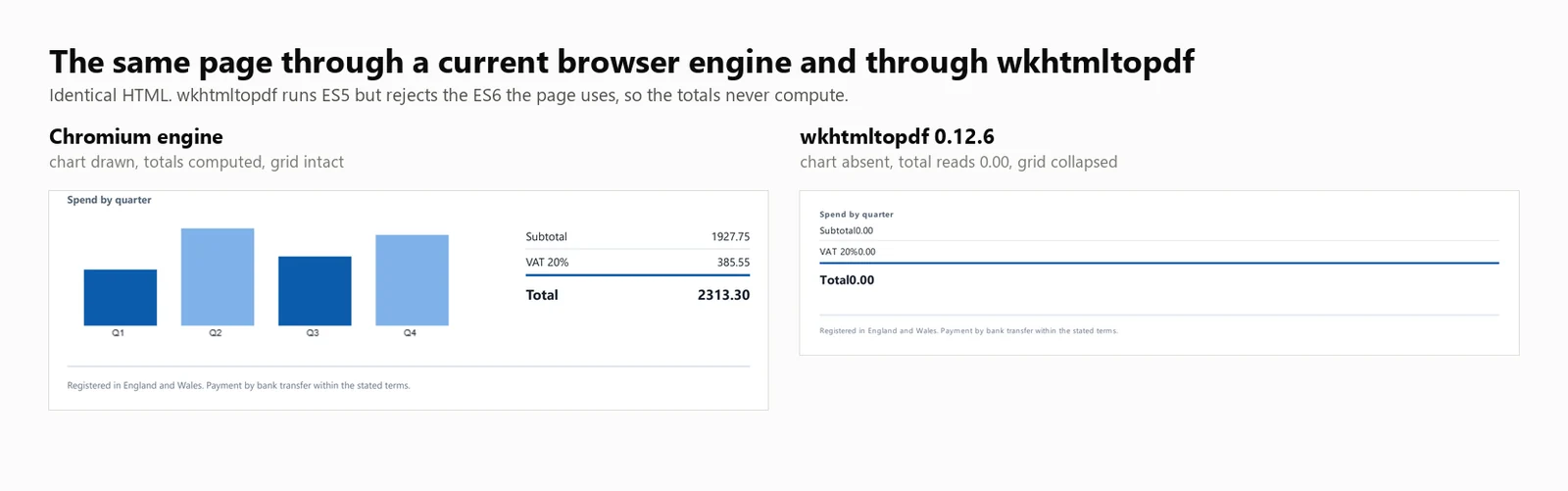
JavaScript support: wkhtmltopdf executes ES5 JavaScript but does not support ES6. A direct test on this build executed ES5 successfully and threw on ES6, because document.querySelectorAll(...).forEach is not supported by the Qt (4.8.5) engine. As a result, the test invoice, which uses this call, displayed a placeholder total of 0.00 without any visible error. Templates written to an ES5 baseline compute correctly, and those using modern JavaScript do not.
Performance: 424 ms cold start, 486 ms median latency at 8 concurrent renders, 16.03 sustained renders per second, and 482 MB peak memory usage across the process tree. The invoice total was 0.00 and the chart was not rendered.
The above figures are based on running wkhtmltopdf.exe as a command-line tool, with 1 process per render. The DinkToPdf wrapper uses the same engine in-process but serializes all calls through SynchronizedConverter, limiting concurrency scalability.
7. Aspose.HTML for .NET: Standalone Layout Engine
Aspose.HTML for .NET has its own rendering engine rather than a browser, and it sits inside a document suite that also covers Word, Excel, and PowerPoint. For teams that already buy from 1 vendor, that means 1 support contract and 1 purchase order instead of integrating several libraries and tracking separate renewals.
Install:
> dotnet add package Aspose.HTML
dotnet add package Aspose.HTML
From an HTML string:
// Aspose.HTML for .NET 25.7.0 - commercial licence, applied from a .lic file.using Aspose.Html;using Aspose.Html.Converters;using Aspose.Html.Saving;newLicense().SetLicense("Aspose.HTMLProductFamily.lic");string html = @"<h1>Invoice INV-2026-0814</h1> <p>Northwind Analytics Ltd — Net 30</p> <table><tr><th>Item</th><th>Amount</th></tr> <tr><td>Professional services</td><td>2313.30</td></tr></table>";// The second argument is the base URL relative assets resolve against.using var doc = new HTMLDocument(html, ".");Converter.ConvertHTML(doc, new PdfSaveOptions(), "invoice.pdf");// Its own rendering stack, not a browser: ES5 runs, ES6 throws, so anything the// page computes with modern syntax is left at its initial value.
// Aspose.HTML for .NET 25.7.0 - commercial licence, applied from a .lic file.
using Aspose.Html;
using Aspose.Html.Converters;
using Aspose.Html.Saving;
new License().SetLicense("Aspose.HTMLProductFamily.lic");
string html = @"<h1>Invoice INV-2026-0814</h1>
<p>Northwind Analytics Ltd — Net 30</p>
<table><tr><th>Item</th><th>Amount</th></tr>
<tr><td>Professional services</td><td>2313.30</td></tr></table>";
// The second argument is the base URL relative assets resolve against.
using var doc = new HTMLDocument(html, ".");
Converter.ConvertHTML(doc, new PdfSaveOptions(), "invoice.pdf");
// Its own rendering stack, not a browser: ES5 runs, ES6 throws, so anything the
// page computes with modern syntax is left at its initial value.
// Aspose.HTMLfor .NET25.7.0 - commercial licence, applied from a .lic file.ImportsAspose.HtmlImportsAspose.Html.ConvertersImportsAspose.Html.SavingCall New License().SetLicense("Aspose.HTMLProductFamily.lic")Dim html AsString = "<h1>Invoice INV-2026-0814</h1> <p>Northwind Analytics Ltd — Net 30</p> <table><tr><th>Item</th><th>Amount</th></tr> <tr><td>Professional services</td><td>2313.30</td></tr></table>"' The second argument is the base URL relative assets resolve against.Using doc = New HTMLDocument(html, ".")Converter.ConvertHTML(doc, New PdfSaveOptions(), "invoice.pdf")EndUsing' Its own rendering stack, not a browser: ES5 runs, ES6 throws, so anything the' page computes with modern syntax is left at its initial value.
// Aspose.HTML for .NET 25.7.0 - commercial licence, applied from a .lic file.
Imports Aspose.Html
Imports Aspose.Html.Converters
Imports Aspose.Html.Saving
Call New License().SetLicense("Aspose.HTMLProductFamily.lic")
Dim html As String = "<h1>Invoice INV-2026-0814</h1>
<p>Northwind Analytics Ltd — Net 30</p>
<table><tr><th>Item</th><th>Amount</th></tr>
<tr><td>Professional services</td><td>2313.30</td></tr></table>"
' The second argument is the base URL relative assets resolve against.
Using doc = New HTMLDocument(html, ".")
Converter.ConvertHTML(doc, New PdfSaveOptions(), "invoice.pdf")
End Using
' Its own rendering stack, not a browser: ES5 runs, ES6 throws, so anything the
' page computes with modern syntax is left at its initial value.
From a live URL:
// Aspose.HTML 25.7.0 - only the HTMLDocument constructor changes.using Aspose.Html;using Aspose.Html.Converters;using Aspose.Html.Saving;newLicense().SetLicense("Aspose.HTMLProductFamily.lic");using var doc = new HTMLDocument("https://ironpdf.com/");Converter.ConvertHTML(doc, new PdfSaveOptions(), "page.pdf");
// Aspose.HTML 25.7.0 - only the HTMLDocument constructor changes.
using Aspose.Html;
using Aspose.Html.Converters;
using Aspose.Html.Saving;

new License().SetLicense("Aspose.HTMLProductFamily.lic");

using var doc = new HTMLDocument("https://ironpdf.com/");
Converter.ConvertHTML(doc, new PdfSaveOptions(), "page.pdf");
' Aspose.HTML 25.7.0 - only the HTMLDocument constructor changes.ImportsAspose.HtmlImportsAspose.Html.ConvertersImportsAspose.Html.SavingNew License().SetLicense("Aspose.HTMLProductFamily.lic")Using doc As New HTMLDocument("https://ironpdf.com/")Converter.ConvertHTML(doc, New PdfSaveOptions(), "page.pdf")EndUsing
' Aspose.HTML 25.7.0 - only the HTMLDocument constructor changes.
Imports Aspose.Html
Imports Aspose.Html.Converters
Imports Aspose.Html.Saving

New License().SetLicense("Aspose.HTMLProductFamily.lic")

Using doc As New HTMLDocument("https://ironpdf.com/")
    Converter.ConvertHTML(doc, New PdfSaveOptions(), "page.pdf")
End Using
Recommended use: Choose Aspose.HTML when you are already standardized on Aspose for other formats and want HTML conversion under the same contract, on templates that do not depend on modern JavaScript.
Trade-off: It is a paid library with no free tier, and its rendering belongs with the layout engines rather than the browsers. Aspose.HTML was benchmarked under a Professional license and its figures appear in every table below.
Performance: 1,096 ms cold start, 227 ms median latency at 8 concurrent renders, 33.98 sustained renders per second, and 334 MB peak memory usage in a single process. The invoice total was 0.00 and the chart was not rendered.
HTML to PDF Benchmark Method: Versions, Machine, and Inputs
Every figure below came from 1 machine, 1 document and 1 campaign of 5 passes on a single date. All 3 are stated here so the numbers can be reproduced or dismissed on their merits.
Library Versions Measured
The version column is what the harness read back out of the loaded assembly at run time, not what the article was written against, so a package resolving to something other than the pinned version would show here.
Library
Package
Version tested
Assembly reported at run time
Engine
IronPDF
IronPdf
2026.8.1
2026.8.0.1
Embedded Chromium
Playwright .NET
Microsoft.Playwright
1.62.0
1.62.0.0
External Chromium
PuppeteerSharp
PuppeteerSharp
25.8.0
25.8.0.0
External Chromium
iText 9 with pdfHTML
itext.pdfhtml
6.3.3
6.3.3.0 on iText Core 9.7.0
Own layout engine
HtmlRenderer + PdfSharp
HtmlRenderer.PdfSharp
1.6.1
1.6.1.0
Own layout engine
wkhtmltopdf
Command-line binary
0.12.6
0.12.6
QtWebKit 5.212 on Qt 4.8.5
Aspose.HTML
Aspose.HTML
25.7.0
25.7.0.0
Own layout engine
Machine, Runtime and Date
Item
Value
CPU
24-core / 32-thread x64 desktop, 3.2 GHz
Memory
64 GB
Operating system
Windows 11 x64, build 10.0.26200
Runtime
.NET 10.0.11, Release build
Machine state
Idle, no other applications running
Test date
3 September 2026
Sample size
8,960 timed renders: 7 engines x 4 concurrency levels x 64 renders x 5 passes
Cold-start launches
105: 7 engines x 3 launches x 5 passes
Reported figure
Median of the 5 passes, never a best case
The Test Document and the Rules Applied to It
Every engine was handed the identical 10,260-character HTML document, in memory, as a string. No engine received a file path, a URL or a warmed cache the others did not get. The document is in the download below, so it can be diffed rather than taken on trust.
The input is self-contained: No external stylesheet, no web font, no remote image. Nothing in the measurement depends on network latency or on which engine caches assets better.
Same wait condition for every browser engine:Load, not network idle. PuppeteerSharp has deprecated the network-idle conditions for SetContent, so Load is the only condition all 3 support identically.
Same page setup, with 1 stated exception:A4 and printed backgrounds on every engine. Margins were not forced to a common value, so each library used its own default, and those defaults differ: IronPDF insets the page where the 2 external-browser engines do not. That is visible in the side-by-side further down. It changes how much white space surrounds the content, not what the engines computed. The 6 engines that honoured the page break produced 2 pages. HtmlRenderer produced 1, from losing that break rather than from margins.
The engines that needed a paid licence had one: IronPDF under a full licence and Aspose.HTML under Professional, so neither was throttled or watermarked by trial limits. iText ran under AGPL, which imposes no functional limit.
Each engine got the configuration its own documentation recommends: 1 renderer or browser instance reused across renders, a fresh page per render for Puppeteer and Playwright, and Aspose.HTML writing to a MemoryStream so it pays no disk cost the others avoid.
Timing boundary: The stopwatch starts when the render call is made and stops when the engine returns PDF bytes. It excludes engine construction and browser launch, which are measured separately as cold start, and it excludes writing to disk, which none of the engines were asked to do. Throughput is successful renders divided by wall-clock seconds for the whole batch, not the sum of individual render times, because only the first describes what a service delivers under load.
Memory definition: Peak working set summed across the whole process tree, sampled every 100 ms, where the tree is every process descended from the benchmark process by real parent and child ancestry. It is a peak rather than an average because the peak is what decides whether a container survives its busiest second. A browser engine keeps most of its memory in spawned children, so measuring only the .NET process would flatter whichever engine spawns the most.
What counts as a failure: Any render returning fewer than 500 bytes. Failures are removed from the throughput numerator and reported separately, so an engine cannot post a high rate by returning nothing. Across the 35 invocations behind these tables, no engine recorded a single failure at any level.
HTML to PDF Benchmark Summary
All speed and memory values in the following tables are based on actual measurements. Where a library was not measured, the table indicates this explicitly.
Library
Cold start
Warm p50 at 8
Throughput at 8
Peak memory at 8
Renders the test invoice
License
IronPDF (2026.8.1)
486 ms
161 ms
44.02/s
1,187 MB
Correct
From $999
Playwright .NET (1.62.0)
720 ms
381 ms
20.68/s
1,122 MB
Correct
MIT
PuppeteerSharp (25.8.0)
639 ms
507 ms
15.60/s
1,293 MB
Correct
MIT
iText 9 pdfHTML (6.3.3)
489 ms
144 ms
54.30/s
332 MB
Total 0.00, no chart
AGPL or paid
HtmlRenderer + PdfSharp (1.6.1)
157 ms
23 ms
327.09/s
166 MB
No masthead, no totals, no chart
Free, BSD
wkhtmltopdf (0.12.6)
424 ms
486 ms
16.03/s
482 MB
Total 0.00, no chart
LGPL, archived
Aspose.HTML (25.7.0)
1,096 ms
227 ms
33.98/s
334 MB
Total 0.00, no chart
Paid
Tested on: 24-core / 32-thread x64 desktop CPU · 3.2 GHz · 64 GB RAM · Windows 11 x64 · .NET 10 · IronPDF (2026.8.1) · last verified September 2026
Interpret throughput figures alongside rendering accuracy. Of the 7 measured engines, 4 omitted significant rendering work, and the 2 fastest results in the table, iText 9 at 54.30/s and HtmlRenderer at 327.09/s, are both from that group.
Full HTML to PDF Benchmark Results by Engine
The following sections provide detailed figures for each summary table entry.
How Was This Benchmark Measured?
The Test Document
Every engine rendered the same 2-page invoice, described above. What makes it a measuring instrument rather than a sample is the totals. They ship in the markup as placeholder 0.00 values and are computed in JavaScript at load time, so an engine that ran the script writes 2313.30 into the text layer and an engine that did not leaves the placeholder where a regular expression finds it.
using System.Text;// The benchmark document. Two pages, a CSS Grid masthead, a 30-row table,// an inline SVG mark, and a bar chart drawn on a canvas element.//// The totals ship as placeholder zeroes and are computed in JavaScript at load// time, so the output itself records whether the engine ran the script. An// engine with no script engine produces a clean invoice whose total reads 0.00.static class TestDocument{ public static stringInvoice() { var rows = new StringBuilder(); for (int i = 1; i <= 30; i++) { decimal unit = 12.50m + (i % 7) * 3.25m; int qty = 1 + (i % 5); rows.Append($@" <tr> <td>{i:00}</td> <td>Professional services, line item {i:00}</td> <td class=""num"">{qty}</td> <td class=""num"">{unit:0.00}</td> <td class=""num"">{unit * qty:0.00}</td> </tr>"); } return $@"<!DOCTYPE html><html lang=""en""><head><meta charset=""utf-8""><title>Invoice INV-2026-0814</title><style> body {{ font-family: 'Segoe UI', 'Helvetica Neue', Arial, sans-serif; color:#1c2430; padding:32px; font-size:12px; }} .masthead {{ display:grid; grid-template-columns: 1fr 1fr 220px; gap:20px; border-bottom:3px solid #0b5cab; padding-bottom:16px; margin-bottom:22px; }} .badge {{ background:#0b5cab; color:#fff; padding:10px 14px; border-radius:6px; text-align:center; }} table {{ width:100%; border-collapse:collapse; }} th {{ background:#eef3f9; text-align:left; padding:7px 9px; border-bottom:2px solid #c6d4e5; }} td {{ padding:6px 9px; border-bottom:1px solid #e7ecf3; }} tr:nth-child(even) td {{ background:#fafbfd; }} td.num, th.num {{ text-align:right; font-variant-numeric:tabular-nums; }} .chartwrap {{ margin-top:26px; display:grid; grid-template-columns:1fr 240px; gap:24px; }} .totals {{ list-style:none; padding:0; }} .totals li {{ display:flex; justify-content:space-between; padding:5px 0; border-bottom:1px solid #e7ecf3; }} .totals li.grand {{ font-weight:700; font-size:15px; border-top:2px solid #0b5cab; }}</style></head><body><header class=""masthead""> <div> <svg width=""34"" height=""34"" viewBox=""0 0 34 34""> <rect width=""34"" height=""34"" rx=""7"" fill=""#0b5cab""/> <circle cx=""24"" cy=""17"" r=""3.2"" fill=""#7fb2e8""/> </svg> <h1>Invoice</h1> </div> <dl><dt>Number</dt><dd>INV-2026-0814</dd><dt>Terms</dt><dd>Net 30</dd></dl> <div class=""badge"">Amount due<span id=""badge-total"">0.00</span>GBP</div></header><table> <thead> <tr><th>#</th><th>Description</th><th class=""num"">Qty</th><th class=""num"">Unit</th><th class=""num"">Amount</th></tr> </thead> <tbody>{rows} </tbody></table><section class=""chartwrap""> <div> <strong>Spend by quarter</strong> <canvas id=""chart"" width=""420"" height=""140""></canvas> </div> <ul class=""totals""> <li><span>Subtotal</span><span id=""sub"">0.00</span></li> <li><span>VAT 20%</span><span id=""vat"">0.00</span></li> <li class=""grand""><span>Total</span><span id=""tot"">0.00</span></li> </ul></section><script> // Totals are computed here, not in the markup. An engine that skips // JavaScript leaves the placeholder zeroes in the output. var sub = 0; document.querySelectorAll('tbody tr').forEach(function (tr) {{ sub += parseFloat(tr.lastElementChild.textContent); }}); var vat = sub * 0.2, tot = sub + vat; var f = function (n) {{ return n.toFixed(2); }}; document.getElementById('sub').textContent = f(sub); document.getElementById('vat').textContent = f(vat); document.getElementById('tot').textContent = f(tot); document.getElementById('badge-total').textContent = f(tot); // A canvas chart, the way a dashboard library would draw one. var data = [sub * 0.18, sub * 0.31, sub * 0.22, sub * 0.29]; var c = document.getElementById('chart').getContext('2d'); var max = Math.max.apply(null, data), bw = 78, gap = 26, base = 128; data.forEach(function (v, i) {{ var h = Math.round((v / max) * 104); c.fillStyle = i % 2 ? '#7fb2e8' : '#0b5cab'; c.fillRect(18 + i * (bw + gap), base - h, bw, h); c.fillStyle = '#1c2430'; c.font = '10px sans-serif'; c.fillText('Q' + (i + 1), 18 + i * (bw + gap) + 30, base + 11); }});</script></body></html>"; }}
using System.Text;

// The benchmark document. Two pages, a CSS Grid masthead, a 30-row table,
// an inline SVG mark, and a bar chart drawn on a canvas element.
//
// The totals ship as placeholder zeroes and are computed in JavaScript at load
// time, so the output itself records whether the engine ran the script. An
// engine with no script engine produces a clean invoice whose total reads 0.00.
static class TestDocument
{
    public static string Invoice()
    {
        var rows = new StringBuilder();
        for (int i = 1; i <= 30; i++)
        {
            decimal unit = 12.50m + (i % 7) * 3.25m;
            int qty = 1 + (i % 5);
            rows.Append($@"
      <tr>
        <td>{i:00}</td>
        <td>Professional services, line item {i:00}</td>
        <td class=""num"">{qty}</td>
        <td class=""num"">{unit:0.00}</td>
        <td class=""num"">{unit * qty:0.00}</td>
      </tr>");
        }

        return $@"<!DOCTYPE html>
<html lang=""en"">
<head>
<meta charset=""utf-8"">
<title>Invoice INV-2026-0814</title>
<style>
  body {{ font-family: 'Segoe UI', 'Helvetica Neue', Arial, sans-serif; color:#1c2430; padding:32px; font-size:12px; }}
  .masthead {{ display:grid; grid-template-columns: 1fr 1fr 220px; gap:20px;
               border-bottom:3px solid #0b5cab; padding-bottom:16px; margin-bottom:22px; }}
  .badge {{ background:#0b5cab; color:#fff; padding:10px 14px; border-radius:6px; text-align:center; }}
  table {{ width:100%; border-collapse:collapse; }}
  th {{ background:#eef3f9; text-align:left; padding:7px 9px; border-bottom:2px solid #c6d4e5; }}
  td {{ padding:6px 9px; border-bottom:1px solid #e7ecf3; }}
  tr:nth-child(even) td {{ background:#fafbfd; }}
  td.num, th.num {{ text-align:right; font-variant-numeric:tabular-nums; }}
  .chartwrap {{ margin-top:26px; display:grid; grid-template-columns:1fr 240px; gap:24px; }}
  .totals {{ list-style:none; padding:0; }}
  .totals li {{ display:flex; justify-content:space-between; padding:5px 0; border-bottom:1px solid #e7ecf3; }}
  .totals li.grand {{ font-weight:700; font-size:15px; border-top:2px solid #0b5cab; }}
</style>
</head>
<body>

<header class=""masthead"">
  <div>
    <svg width=""34"" height=""34"" viewBox=""0 0 34 34"">
      <rect width=""34"" height=""34"" rx=""7"" fill=""#0b5cab""/>
      <circle cx=""24"" cy=""17"" r=""3.2"" fill=""#7fb2e8""/>
    </svg>
    <h1>Invoice</h1>
  </div>
  <dl><dt>Number</dt><dd>INV-2026-0814</dd><dt>Terms</dt><dd>Net 30</dd></dl>
  <div class=""badge"">Amount due<span id=""badge-total"">0.00</span>GBP</div>
</header>

<table>
  <thead>
    <tr><th>#</th><th>Description</th><th class=""num"">Qty</th><th class=""num"">Unit</th><th class=""num"">Amount</th></tr>
  </thead>
  <tbody>{rows}
  </tbody>
</table>

<section class=""chartwrap"">
  <div>
    <strong>Spend by quarter</strong>
    <canvas id=""chart"" width=""420"" height=""140""></canvas>
  </div>
  <ul class=""totals"">
    <li><span>Subtotal</span><span id=""sub"">0.00</span></li>
    <li><span>VAT 20%</span><span id=""vat"">0.00</span></li>
    <li class=""grand""><span>Total</span><span id=""tot"">0.00</span></li>
  </ul>
</section>

<script>
  // Totals are computed here, not in the markup. An engine that skips
  // JavaScript leaves the placeholder zeroes in the output.
  var sub = 0;
  document.querySelectorAll('tbody tr').forEach(function (tr) {{
    sub += parseFloat(tr.lastElementChild.textContent);
  }});
  var vat = sub * 0.2, tot = sub + vat;
  var f = function (n) {{ return n.toFixed(2); }};
  document.getElementById('sub').textContent = f(sub);
  document.getElementById('vat').textContent = f(vat);
  document.getElementById('tot').textContent = f(tot);
  document.getElementById('badge-total').textContent = f(tot);

  // A canvas chart, the way a dashboard library would draw one.
  var data = [sub * 0.18, sub * 0.31, sub * 0.22, sub * 0.29];
  var c = document.getElementById('chart').getContext('2d');
  var max = Math.max.apply(null, data), bw = 78, gap = 26, base = 128;
  data.forEach(function (v, i) {{
    var h = Math.round((v / max) * 104);
    c.fillStyle = i % 2 ? '#7fb2e8' : '#0b5cab';
    c.fillRect(18 + i * (bw + gap), base - h, bw, h);
    c.fillStyle = '#1c2430';
    c.font = '10px sans-serif';
    c.fillText('Q' + (i + 1), 18 + i * (bw + gap) + 30, base + 11);
  }});
</script>

</body>
</html>";
    }
}
ImportsSystem.Text' The benchmark document. Two pages, a CSS Grid masthead, a 30-row table,' an inline SVG mark, and a bar chart drawn on a canvas element.'' The totals ship as placeholder zeroes and are computed in JavaScript at load' time, so the output itself records whether the engine ran the script. An' engine with no script engine produces a clean invoice whose total reads 0.00.FriendModuleTestDocument Public Function Invoice() AsString Dim rows = New StringBuilder() For i AsInteger = 1 To 30 Dim unit AsDecimal = 12.5D + (i Mod7) * 3.25D Dim qty AsInteger = 1 + (i Mod5) rows.AppendFormat(" <tr> <td>{0:00}</td> <td>Professional services, line item {0:00}</td> <td class=""num"">{1}</td> <td class=""num"">{2:0.00}</td> <td class=""num"">{3:0.00}</td> </tr>", i, qty, unit, unit * qty) Next Return "<!DOCTYPE html><html lang=""en""><head><meta charset=""utf-8""><title>Invoice INV-2026-0814</title><style> body { font-family: 'Segoe UI', 'Helvetica Neue', Arial, sans-serif; color:#1c2430; padding:32px; font-size:12px; } .masthead { display:grid; grid-template-columns: 1fr 1fr 220px; gap:20px; border-bottom:3px solid #0b5cab; padding-bottom:16px; margin-bottom:22px; } .badge { background:#0b5cab; color:#fff; padding:10px 14px; border-radius:6px; text-align:center; } table { width:100%; border-collapse:collapse; } th { background:#eef3f9; text-align:left; padding:7px 9px; border-bottom:2px solid #c6d4e5; } td { padding:6px 9px; border-bottom:1px solid #e7ecf3; } tr:nth-child(even) td { background:#fafbfd; } td.num, th.num { text-align:right; font-variant-numeric:tabular-nums; } .chartwrap { margin-top:26px; display:grid; grid-template-columns:1fr 240px; gap:24px; } .totals { list-style:none; padding:0; } .totals li { display:flex; justify-content:space-between; padding:5px 0; border-bottom:1px solid #e7ecf3; } .totals li.grand { font-weight:700; font-size:15px; border-top:2px solid #0b5cab; }</style></head><body><header class=""masthead""> <div> <svg width=""34"" height=""34"" viewBox=""0 0 34 34""> <rect width=""34"" height=""34"" rx=""7"" fill=""#0b5cab""/> <circle cx=""24"" cy=""17"" r=""3.2"" fill=""#7fb2e8""/> </svg> <h1>Invoice</h1> </div> <dl><dt>Number</dt><dd>INV-2026-0814</dd><dt>Terms</dt><dd>Net 30</dd></dl> <div class=""badge"">Amount due<span id=""badge-total"">0.00</span>GBP</div></header><table> <thead> <tr><th>#</th><th>Description</th><th class=""num"">Qty</th><th class=""num"">Unit</th><th class=""num"">Amount</th></tr> </thead> <tbody>" & rows.ToString() & " </tbody></table><section class=""chartwrap""> <div> <strong>Spend by quarter</strong> <canvas id=""chart"" width=""420"" height=""140""></canvas> </div> <ul class=""totals""> <li><span>Subtotal</span><span id=""sub"">0.00</span></li> <li><span>VAT 20%</span><span id=""vat"">0.00</span></li> <li class=""grand""><span>Total</span><span id=""tot"">0.00</span></li> </ul></section><script> var sub = 0; document.querySelectorAll('tbody tr').forEach(function (tr) { sub += parseFloat(tr.lastElementChild.textContent); }); var vat = sub * 0.2, tot = sub + vat; var f = function (n) { return n.toFixed(2); }; document.getElementById('sub').textContent = f(sub); document.getElementById('vat').textContent = f(vat); document.getElementById('tot').textContent = f(tot); document.getElementById('badge-total').textContent = f(tot); var data = [sub * 0.18, sub * 0.31, sub * 0.22, sub * 0.29]; var c = document.getElementById('chart').getContext('2d'); var max = Math.max.apply(null, data), bw = 78, gap = 26, base = 128; data.forEach(function (v, i) { var h = Math.round((v / max) * 104); c.fillStyle = i % 2 ? '#7fb2e8' : '#0b5cab'; c.fillRect(18 + i * (bw + gap), base - h, bw, h); c.fillStyle = '#1c2430'; c.font = '10px sans-serif'; c.fillText('Q' + (i + 1), 18 + i * (bw + gap) + 30, base + 11); });</script></body></html>" End FunctionEndModule
Imports System.Text

' The benchmark document. Two pages, a CSS Grid masthead, a 30-row table,
' an inline SVG mark, and a bar chart drawn on a canvas element.
'
' The totals ship as placeholder zeroes and are computed in JavaScript at load
' time, so the output itself records whether the engine ran the script. An
' engine with no script engine produces a clean invoice whose total reads 0.00.
Friend Module TestDocument
    Public Function Invoice() As String
        Dim rows = New StringBuilder()
        For i As Integer = 1 To 30
            Dim unit As Decimal = 12.5D + (i Mod 7) * 3.25D
            Dim qty As Integer = 1 + (i Mod 5)
            rows.AppendFormat(
"      <tr>
        <td>{0:00}</td>
        <td>Professional services, line item {0:00}</td>
        <td class=""num"">{1}</td>
        <td class=""num"">{2:0.00}</td>
        <td class=""num"">{3:0.00}</td>
      </tr>", i, qty, unit, unit * qty)
        Next

        Return "<!DOCTYPE html>
<html lang=""en"">
<head>
<meta charset=""utf-8"">
<title>Invoice INV-2026-0814</title>
<style>
  body { font-family: 'Segoe UI', 'Helvetica Neue', Arial, sans-serif; color:#1c2430; padding:32px; font-size:12px; }
  .masthead { display:grid; grid-template-columns: 1fr 1fr 220px; gap:20px;
               border-bottom:3px solid #0b5cab; padding-bottom:16px; margin-bottom:22px; }
  .badge { background:#0b5cab; color:#fff; padding:10px 14px; border-radius:6px; text-align:center; }
  table { width:100%; border-collapse:collapse; }
  th { background:#eef3f9; text-align:left; padding:7px 9px; border-bottom:2px solid #c6d4e5; }
  td { padding:6px 9px; border-bottom:1px solid #e7ecf3; }
  tr:nth-child(even) td { background:#fafbfd; }
  td.num, th.num { text-align:right; font-variant-numeric:tabular-nums; }
  .chartwrap { margin-top:26px; display:grid; grid-template-columns:1fr 240px; gap:24px; }
  .totals { list-style:none; padding:0; }
  .totals li { display:flex; justify-content:space-between; padding:5px 0; border-bottom:1px solid #e7ecf3; }
  .totals li.grand { font-weight:700; font-size:15px; border-top:2px solid #0b5cab; }
</style>
</head>
<body>

<header class=""masthead"">
  <div>
    <svg width=""34"" height=""34"" viewBox=""0 0 34 34"">
      <rect width=""34"" height=""34"" rx=""7"" fill=""#0b5cab""/>
      <circle cx=""24"" cy=""17"" r=""3.2"" fill=""#7fb2e8""/>
    </svg>
    <h1>Invoice</h1>
  </div>
  <dl><dt>Number</dt><dd>INV-2026-0814</dd><dt>Terms</dt><dd>Net 30</dd></dl>
  <div class=""badge"">Amount due<span id=""badge-total"">0.00</span>GBP</div>
</header>

<table>
  <thead>
    <tr><th>#</th><th>Description</th><th class=""num"">Qty</th><th class=""num"">Unit</th><th class=""num"">Amount</th></tr>
  </thead>
  <tbody>" & rows.ToString() & "
  </tbody>
</table>

<section class=""chartwrap"">
  <div>
    <strong>Spend by quarter</strong>
    <canvas id=""chart"" width=""420"" height=""140""></canvas>
  </div>
  <ul class=""totals"">
    <li><span>Subtotal</span><span id=""sub"">0.00</span></li>
    <li><span>VAT 20%</span><span id=""vat"">0.00</span></li>
    <li class=""grand""><span>Total</span><span id=""tot"">0.00</span></li>
  </ul>
</section>

<script>
  var sub = 0;
  document.querySelectorAll('tbody tr').forEach(function (tr) {
    sub += parseFloat(tr.lastElementChild.textContent);
  });
  var vat = sub * 0.2, tot = sub + vat;
  var f = function (n) { return n.toFixed(2); };
  document.getElementById('sub').textContent = f(sub);
  document.getElementById('vat').textContent = f(vat);
  document.getElementById('tot').textContent = f(tot);
  document.getElementById('badge-total').textContent = f(tot);

  var data = [sub * 0.18, sub * 0.31, sub * 0.22, sub * 0.29];
  var c = document.getElementById('chart').getContext('2d');
  var max = Math.max.apply(null, data), bw = 78, gap = 26, base = 128;
  data.forEach(function (v, i) {
    var h = Math.round((v / max) * 104);
    c.fillStyle = i % 2 ? '#7fb2e8' : '#0b5cab';
    c.fillRect(18 + i * (bw + gap), base - h, bw, h);
    c.fillStyle = '#1c2430';
    c.font = '10px sans-serif';
    c.fillText('Q' + (i + 1), 18 + i * (bw + gap) + 30, base + 11);
  });
</script>

</body>
</html>"
    End Function
End Module
What Each Number Means
Throughput: successful renders divided by wall-clock seconds for the whole batch, not the sum of the individual render times. Only the first describes what a service delivers under concurrency.
Failures: any render returning fewer than 500 bytes. Failures are removed from the throughput numerator and reported separately, so an engine cannot post a high rate by returning nothing. Across the 35 invocations behind this table no engine recorded a single failure at any level.
p50 and p95: taken from the sorted list of per-render latencies by linear interpolation, not from a mean. A mean hides the tail, and the tail is what a user waits through.
Peak memory: the high-water mark of WorkingSet64 summed across the process tree, sampled every 100 ms. It is a peak rather than an average because the peak is what decides whether a container survives its busiest second.
Cold start: the time from a fresh process to the first PDF, taken as the best of 3 launches rather than the median. The first launch of any engine absorbs one-time costs such as assembly loading, a browser download or a native extraction. Those are real deployment costs but they are not per-start costs, and averaging them in blurs 2 different numbers together.
using System;using System.Collections.Generic;using System.Diagnostics;using System.Linq;using System.Threading;using System.Threading.Tasks;const intTotalRenders = 64;int[] levels = { 1, 4, 8, 16 };string html = TestDocument.Invoice();IEngine engine = Engines.Create("ironpdf");await engine.InitAsync();// Warm the engine so the sweep measures steady state rather than a cold start// smeared across the first few results.for (int i = 0; i < 5; i++) await engine.RenderAsync(html);foreach (int concurrency in levels){ var sampler = new TreeMemorySampler(); var latencies = new List<double>(TotalRenders); int failures = 0; object gate = new();GC.Collect();GC.WaitForPendingFinalizers(); sampler.Start(); var wall = Stopwatch.StartNew(); using (var semaphore = new SemaphoreSlim(concurrency)) { IEnumerable<Task> work = Enumerable.Range(0, TotalRenders).Select(async _ => { await semaphore.WaitAsync(); var perRender = Stopwatch.StartNew(); try { byte[] pdf = await engine.RenderAsync(html); perRender.Stop(); // An engine that returns quickly by returning nothing must not // be rewarded with a throughput number. if (pdf == null || pdf.Length < 500) lock (gate) failures++; else lock (gate) latencies.Add(perRender.Elapsed.TotalMilliseconds); } catch { lock (gate) failures++; } finally { semaphore.Release(); } }); awaitTask.WhenAll(work); } wall.Stop(); sampler.Stop(); latencies.Sort(); double throughput = (TotalRenders - failures) / wall.Elapsed.TotalSeconds;Console.WriteLine( $"C={concurrency,-2} {throughput,6:0.00} rend/s " + $"p50 {Percentile(latencies, 50),6:0} ms " + $"p95 {Percentile(latencies, 95),6:0} ms " + $"peak {sampler.PeakBytes / 1024.0 / 1024.0,6:0} MB " + $"procs {sampler.PeakProcessCount,2} fail {failures}");}await engine.DisposeAsync();// Report percentiles rather than means. A mean hides the tail, and the tail is// what your users experience.static doublePercentile(List<double> sorted, int p){ if (sorted.Count == 0) return -1; double rank = (p / 100.0) * (sorted.Count - 1); int low = (int)Math.Floor(rank); int high = (int)Math.Ceiling(rank); return low == high ? sorted[low] : sorted[low] + (rank - low) * (sorted[high] - sorted[low]);}
using System;
using System.Collections.Generic;
using System.Diagnostics;
using System.Linq;
using System.Threading;
using System.Threading.Tasks;

const int TotalRenders = 64;
int[] levels = { 1, 4, 8, 16 };

string html = TestDocument.Invoice();
IEngine engine = Engines.Create("ironpdf");
await engine.InitAsync();

// Warm the engine so the sweep measures steady state rather than a cold start
// smeared across the first few results.
for (int i = 0; i < 5; i++) await engine.RenderAsync(html);

foreach (int concurrency in levels)
{
    var sampler = new TreeMemorySampler();
    var latencies = new List<double>(TotalRenders);
    int failures = 0;
    object gate = new();

    GC.Collect();
    GC.WaitForPendingFinalizers();

    sampler.Start();
    var wall = Stopwatch.StartNew();

    using (var semaphore = new SemaphoreSlim(concurrency))
    {
        IEnumerable<Task> work = Enumerable.Range(0, TotalRenders).Select(async _ =>
        {
            await semaphore.WaitAsync();
            var perRender = Stopwatch.StartNew();
            try
            {
                byte[] pdf = await engine.RenderAsync(html);
                perRender.Stop();

                // An engine that returns quickly by returning nothing must not
                // be rewarded with a throughput number.
                if (pdf == null || pdf.Length < 500) lock (gate) failures++;
                else lock (gate) latencies.Add(perRender.Elapsed.TotalMilliseconds);
            }
            catch
            {
                lock (gate) failures++;
            }
            finally { semaphore.Release(); }
        });

        await Task.WhenAll(work);
    }

    wall.Stop();
    sampler.Stop();
    latencies.Sort();

    double throughput = (TotalRenders - failures) / wall.Elapsed.TotalSeconds;

    Console.WriteLine(
        $"C={concurrency,-2} {throughput,6:0.00} rend/s  " +
        $"p50 {Percentile(latencies, 50),6:0} ms  " +
        $"p95 {Percentile(latencies, 95),6:0} ms  " +
        $"peak {sampler.PeakBytes / 1024.0 / 1024.0,6:0} MB  " +
        $"procs {sampler.PeakProcessCount,2}  fail {failures}");
}

await engine.DisposeAsync();

// Report percentiles rather than means. A mean hides the tail, and the tail is
// what your users experience.
static double Percentile(List<double> sorted, int p)
{
    if (sorted.Count == 0) return -1;

    double rank = (p / 100.0) * (sorted.Count - 1);
    int low = (int)Math.Floor(rank);
    int high = (int)Math.Ceiling(rank);

    return low == high
        ? sorted[low]
        : sorted[low] + (rank - low) * (sorted[high] - sorted[low]);
}
ImportsSystemImportsSystem.Collections.GenericImportsSystem.DiagnosticsImportsSystem.LinqImportsSystem.ThreadingImportsSystem.Threading.TasksConst TotalRendersAsInteger = 64Dim levels AsInteger() = {1, 4, 8, 16}Dim html AsString = TestDocument.Invoice()Dim engine AsIEngine = Engines.Create("ironpdf")Await engine.InitAsync()' Warm the engine so the sweep measures steady state rather than a cold start' smeared across the first few results.For i AsInteger = 0 To 4Await engine.RenderAsync(html)NextFor Each concurrency AsIntegerIn levels Dim sampler = New TreeMemorySampler() Dim latencies = New List(OfDouble)(TotalRenders) Dim failures AsInteger = 0 Dim gate As New Object()GC.Collect()GC.WaitForPendingFinalizers() sampler.Start() Dim wall = Stopwatch.StartNew()Using semaphore = New SemaphoreSlim(concurrency) Dim work AsIEnumerable(OfTask) = Enumerable.Range(0, TotalRenders).[Select](Async Function(_)Await semaphore.WaitAsync() Dim perRender = Stopwatch.StartNew()Try Dim pdf AsByte() = Await engine.RenderAsync(html) perRender.Stop() ' An engine that returns quickly by returning nothing must not ' be rewarded with a throughput number. If pdf Is NothingOrElse pdf.Length < 500 ThenSyncLock gate failures += 1EndSyncLock ElseSyncLock gate latencies.Add(perRender.Elapsed.TotalMilliseconds)EndSyncLock End IfCatchSyncLock gate failures += 1EndSyncLockFinally semaphore.Release()EndTry End Function)AwaitTask.WhenAll(work)EndUsing wall.Stop() sampler.Stop() latencies.Sort() Dim throughput AsDouble = (TotalRenders - failures) / wall.Elapsed.TotalSecondsConsole.WriteLine($"C={concurrency,-2} {throughput,6:0.00} rend/s " & $"p50 {Percentile(latencies, 50),6:0} ms " & $"p95 {Percentile(latencies, 95),6:0} ms " & $"peak {sampler.PeakBytes / 1024.0 / 1024.0,6:0} MB " & $"procs {sampler.PeakProcessCount,2} fail {failures}")NextAwait engine.DisposeAsync()' Report percentiles rather than means. A mean hides the tail, and the tail is' what your users experience.PrivateShared Function Percentile(sorted AsList(OfDouble), p AsInteger) AsDouble If sorted.Count = 0 Then Return -1 Dim rank AsDouble = (p / 100.0) * (sorted.Count - 1) Dim low AsInteger = CInt(Math.Floor(rank)) Dim high AsInteger = CInt(Math.Ceiling(rank)) Return If(low = high, sorted(low), sorted(low) + (rank - low) * (sorted(high) - sorted(low)))End Function
Imports System
Imports System.Collections.Generic
Imports System.Diagnostics
Imports System.Linq
Imports System.Threading
Imports System.Threading.Tasks

Const TotalRenders As Integer = 64
Dim levels As Integer() = {1, 4, 8, 16}

Dim html As String = TestDocument.Invoice()
Dim engine As IEngine = Engines.Create("ironpdf")
Await engine.InitAsync()

' Warm the engine so the sweep measures steady state rather than a cold start
' smeared across the first few results.
For i As Integer = 0 To 4
    Await engine.RenderAsync(html)
Next

For Each concurrency As Integer In levels
    Dim sampler = New TreeMemorySampler()
    Dim latencies = New List(Of Double)(TotalRenders)
    Dim failures As Integer = 0
    Dim gate As New Object()

    GC.Collect()
    GC.WaitForPendingFinalizers()

    sampler.Start()
    Dim wall = Stopwatch.StartNew()

    Using semaphore = New SemaphoreSlim(concurrency)
        Dim work As IEnumerable(Of Task) = Enumerable.Range(0, TotalRenders).[Select](Async Function(_)
                                                                                        Await semaphore.WaitAsync()
                                                                                        Dim perRender = Stopwatch.StartNew()
                                                                                        Try
                                                                                            Dim pdf As Byte() = Await engine.RenderAsync(html)
                                                                                            perRender.Stop()

                                                                                            ' An engine that returns quickly by returning nothing must not
                                                                                            ' be rewarded with a throughput number.
                                                                                            If pdf Is Nothing OrElse pdf.Length < 500 Then
                                                                                                SyncLock gate
                                                                                                    failures += 1
                                                                                                End SyncLock
                                                                                            Else
                                                                                                SyncLock gate
                                                                                                    latencies.Add(perRender.Elapsed.TotalMilliseconds)
                                                                                                End SyncLock
                                                                                            End If
                                                                                        Catch
                                                                                            SyncLock gate
                                                                                                failures += 1
                                                                                            End SyncLock
                                                                                        Finally
                                                                                            semaphore.Release()
                                                                                        End Try
                                                                                    End Function)

        Await Task.WhenAll(work)
    End Using

    wall.Stop()
    sampler.Stop()
    latencies.Sort()

    Dim throughput As Double = (TotalRenders - failures) / wall.Elapsed.TotalSeconds

    Console.WriteLine($"C={concurrency,-2} {throughput,6:0.00} rend/s  " &
                      $"p50 {Percentile(latencies, 50),6:0} ms  " &
                      $"p95 {Percentile(latencies, 95),6:0} ms  " &
                      $"peak {sampler.PeakBytes / 1024.0 / 1024.0,6:0} MB  " &
                      $"procs {sampler.PeakProcessCount,2}  fail {failures}")
Next

Await engine.DisposeAsync()

' Report percentiles rather than means. A mean hides the tail, and the tail is
' what your users experience.
Private Shared Function Percentile(sorted As List(Of Double), p As Integer) As Double
    If sorted.Count = 0 Then Return -1

    Dim rank As Double = (p / 100.0) * (sorted.Count - 1)
    Dim low As Integer = CInt(Math.Floor(rank))
    Dim high As Integer = CInt(Math.Ceiling(rank))

    Return If(low = high, sorted(low), sorted(low) + (rank - low) * (sorted(high) - sorted(low)))
End Function
using System;using System.Diagnostics;using System.Globalization;using System.Threading.Tasks;// Cold start cannot be measured inside a process that has already rendered.// The parent spawns this same binary with --cold, so every reading is a real// process start rather than a first call inside an already-warm runtime.// --- child mode: initialise one engine, render once, print, exit ------------if (args.Length == 2 && args[0] == "--cold"){ var sampler = new TreeMemorySampler(); sampler.Start(); var sw = Stopwatch.StartNew(); IEngine engine = Engines.Create(args[1]); await engine.InitAsync(); byte[] first = await engine.RenderAsync(TestDocument.Invoice()); sw.Stop(); sampler.Stop();Console.WriteLine($"COLD_MS={sw.Elapsed.TotalMilliseconds:0.0}");Console.WriteLine($"COLD_PEAK_MB={sampler.PeakBytes / 1024.0 / 1024.0:0.0}");Console.WriteLine($"BYTES={first.Length}"); try { await engine.DisposeAsync(); } catch { }Environment.Exit(0);}// --- parent mode: run three fresh children and take the minimum -------------static (double ms, double peakMb) RunColdChild(string engineId){ var psi = new ProcessStartInfo {FileName = Environment.ProcessPath,RedirectStandardOutput = true,RedirectStandardError = true,UseShellExecute = false }; psi.ArgumentList.Add("--cold"); psi.ArgumentList.Add(engineId); using Process p = Process.Start(psi); string output = p.StandardOutput.ReadToEnd(); p.WaitForExit(180_000); double ms = -1, mb = 0; foreach (string line in output.Split('\n')) { if (line.StartsWith("COLD_MS=")) double.TryParse(line.Substring(8).Trim(), NumberStyles.Float, CultureInfo.InvariantCulture, out ms); if (line.StartsWith("COLD_PEAK_MB=")) double.TryParse(line.Substring(13).Trim(), NumberStyles.Float, CultureInfo.InvariantCulture, out mb); } return (ms, mb);}// Take the minimum of three, not the mean. The first run of any engine absorbs// one-time costs - assembly loading, a browser download, a native extraction -// which are real deployment costs but are not per-start costs, and averaging// them in blurs two different numbers together.var readings = new List<double>();double peak = 0;for (int i = 0; i < 3; i++){ var (ms, mb) = RunColdChild("ironpdf"); if (ms > 0) { readings.Add(ms); peak = Math.Max(peak, mb); }}Console.WriteLine($"cold start (best of {readings.Count}): {readings.Min():0} ms, peak {peak:0} MB");
using System;
using System.Diagnostics;
using System.Globalization;
using System.Threading.Tasks;

// Cold start cannot be measured inside a process that has already rendered.
// The parent spawns this same binary with --cold, so every reading is a real
// process start rather than a first call inside an already-warm runtime.

// --- child mode: initialise one engine, render once, print, exit ------------
if (args.Length == 2 && args[0] == "--cold")
{
    var sampler = new TreeMemorySampler();
    sampler.Start();

    var sw = Stopwatch.StartNew();
    IEngine engine = Engines.Create(args[1]);
    await engine.InitAsync();
    byte[] first = await engine.RenderAsync(TestDocument.Invoice());
    sw.Stop();

    sampler.Stop();

    Console.WriteLine($"COLD_MS={sw.Elapsed.TotalMilliseconds:0.0}");
    Console.WriteLine($"COLD_PEAK_MB={sampler.PeakBytes / 1024.0 / 1024.0:0.0}");
    Console.WriteLine($"BYTES={first.Length}");

    try { await engine.DisposeAsync(); } catch { }
    Environment.Exit(0);
}

// --- parent mode: run three fresh children and take the minimum -------------
static (double ms, double peakMb) RunColdChild(string engineId)
{
    var psi = new ProcessStartInfo
    {
        FileName = Environment.ProcessPath,
        RedirectStandardOutput = true,
        RedirectStandardError = true,
        UseShellExecute = false
    };
    psi.ArgumentList.Add("--cold");
    psi.ArgumentList.Add(engineId);

    using Process p = Process.Start(psi);
    string output = p.StandardOutput.ReadToEnd();
    p.WaitForExit(180_000);

    double ms = -1, mb = 0;
    foreach (string line in output.Split('\n'))
    {
        if (line.StartsWith("COLD_MS="))
            double.TryParse(line.Substring(8).Trim(), NumberStyles.Float, CultureInfo.InvariantCulture, out ms);
        if (line.StartsWith("COLD_PEAK_MB="))
            double.TryParse(line.Substring(13).Trim(), NumberStyles.Float, CultureInfo.InvariantCulture, out mb);
    }
    return (ms, mb);
}

// Take the minimum of three, not the mean. The first run of any engine absorbs
// one-time costs - assembly loading, a browser download, a native extraction -
// which are real deployment costs but are not per-start costs, and averaging
// them in blurs two different numbers together.
var readings = new List<double>();
double peak = 0;

for (int i = 0; i < 3; i++)
{
    var (ms, mb) = RunColdChild("ironpdf");
    if (ms > 0) { readings.Add(ms); peak = Math.Max(peak, mb); }
}

Console.WriteLine($"cold start (best of {readings.Count}): {readings.Min():0} ms, peak {peak:0} MB");
ImportsSystemImportsSystem.DiagnosticsImportsSystem.GlobalizationImportsSystem.Threading.Tasks' Cold start cannot be measured inside a process that has already rendered.' The parent spawns this same binary with --cold, so every reading is a real' process start rather than a first call inside an already-warm runtime.' --- child mode: initialise one engine, render once, print, exit ------------If args.Length = 2AndAlso args(0) = "--cold" Then Dim sampler = New TreeMemorySampler() sampler.Start() Dim sw = Stopwatch.StartNew() Dim engine AsIEngine = Engines.Create(args(1))Await engine.InitAsync() Dim first() AsByte = Await engine.RenderAsync(TestDocument.Invoice()) sw.Stop() sampler.Stop()Console.WriteLine($"COLD_MS={sw.Elapsed.TotalMilliseconds:0.0}")Console.WriteLine($"COLD_PEAK_MB={sampler.PeakBytes / 1024.0 / 1024.0:0.0}")Console.WriteLine($"BYTES={first.Length}")TryAwait engine.DisposeAsync()CatchEndTryEnvironment.Exit(0)End If' --- parent mode: run three fresh children and take the minimum -------------PrivateShared Function RunColdChild(engineId AsString) As (ms AsDouble, peakMb AsDouble) Dim psi = New ProcessStartInfoWith { .FileName = Environment.ProcessPath, .RedirectStandardOutput = True, .RedirectStandardError = True, .UseShellExecute = False } psi.ArgumentList.Add("--cold") psi.ArgumentList.Add(engineId)Using p AsProcess = Process.Start(psi) Dim output AsString = p.StandardOutput.ReadToEnd() p.WaitForExit(180000) Dim ms AsDouble = -1, mb AsDouble = 0 For Each line AsStringIn output.Split(vbLf) If line.StartsWith("COLD_MS=") ThenDouble.TryParse(line.Substring(8).Trim(), NumberStyles.Float, CultureInfo.InvariantCulture, ms) End If If line.StartsWith("COLD_PEAK_MB=") ThenDouble.TryParse(line.Substring(13).Trim(), NumberStyles.Float, CultureInfo.InvariantCulture, mb) End If Next Return (ms, mb)EndUsingEnd Function' Take the minimum of three, not the mean. The first run of any engine absorbs' one-time costs - assembly loading, a browser download, a native extraction -' which are real deployment costs but are not per-start costs, and averaging' them in blurs two different numbers together.Dim readings = New List(OfDouble)()Dim peak AsDouble = 0For i AsInteger = 0 To 2 Dim result = RunColdChild("ironpdf") Dim ms = result.ms Dim mb = result.peakMb If ms > 0 Then readings.Add(ms) peak = Math.Max(peak, mb) End IfNextConsole.WriteLine($"cold start (best of {readings.Count}): {readings.Min():0} ms, peak {peak:0} MB")
Imports System
Imports System.Diagnostics
Imports System.Globalization
Imports System.Threading.Tasks

' Cold start cannot be measured inside a process that has already rendered.
' The parent spawns this same binary with --cold, so every reading is a real
' process start rather than a first call inside an already-warm runtime.

' --- child mode: initialise one engine, render once, print, exit ------------
If args.Length = 2 AndAlso args(0) = "--cold" Then
    Dim sampler = New TreeMemorySampler()
    sampler.Start()

    Dim sw = Stopwatch.StartNew()
    Dim engine As IEngine = Engines.Create(args(1))
    Await engine.InitAsync()
    Dim first() As Byte = Await engine.RenderAsync(TestDocument.Invoice())
    sw.Stop()

    sampler.Stop()

    Console.WriteLine($"COLD_MS={sw.Elapsed.TotalMilliseconds:0.0}")
    Console.WriteLine($"COLD_PEAK_MB={sampler.PeakBytes / 1024.0 / 1024.0:0.0}")
    Console.WriteLine($"BYTES={first.Length}")

    Try
        Await engine.DisposeAsync()
    Catch
    End Try
    Environment.Exit(0)
End If

' --- parent mode: run three fresh children and take the minimum -------------
Private Shared Function RunColdChild(engineId As String) As (ms As Double, peakMb As Double)
    Dim psi = New ProcessStartInfo With {
        .FileName = Environment.ProcessPath,
        .RedirectStandardOutput = True,
        .RedirectStandardError = True,
        .UseShellExecute = False
    }
    psi.ArgumentList.Add("--cold")
    psi.ArgumentList.Add(engineId)

    Using p As Process = Process.Start(psi)
        Dim output As String = p.StandardOutput.ReadToEnd()
        p.WaitForExit(180000)

        Dim ms As Double = -1, mb As Double = 0
        For Each line As String In output.Split(vbLf)
            If line.StartsWith("COLD_MS=") Then
                Double.TryParse(line.Substring(8).Trim(), NumberStyles.Float, CultureInfo.InvariantCulture, ms)
            End If
            If line.StartsWith("COLD_PEAK_MB=") Then
                Double.TryParse(line.Substring(13).Trim(), NumberStyles.Float, CultureInfo.InvariantCulture, mb)
            End If
        Next
        Return (ms, mb)
    End Using
End Function

' Take the minimum of three, not the mean. The first run of any engine absorbs
' one-time costs - assembly loading, a browser download, a native extraction -
' which are real deployment costs but are not per-start costs, and averaging
' them in blurs two different numbers together.
Dim readings = New List(Of Double)()
Dim peak As Double = 0

For i As Integer = 0 To 2
    Dim result = RunColdChild("ironpdf")
    Dim ms = result.ms
    Dim mb = result.peakMb
    If ms > 0 Then
        readings.Add(ms)
        peak = Math.Max(peak, mb)
    End If
Next

Console.WriteLine($"cold start (best of {readings.Count}): {readings.Min():0} ms, peak {peak:0} MB")
The Controls
The harness applies these controls to every measurement.
Each engine renders 5 documents before any timing starts, so the figures describe steady state rather than a warm-up smeared across the first few results.
GC.Collect and WaitForPendingFinalizers run before each level.
A 6 second settle follows each engine inside the harness, and the runner leaves a further 8 seconds between engine processes, so one engine's children have exited before the next one starts.
Each engine is measured in its own process. A browser-based engine keeps most of its memory in spawned children that outlive a single render, so measuring 2 engines in 1 process charges the first engine's resident browser to the second.
A pass is only recorded if the engine completed all 4 concurrency levels and the results file names the engine that was asked for. An invocation that dies mid-sweep writes nothing, and without that check the previous engine's file is the one that gets archived, which files one engine's numbers under another engine's name. That happened once during this campaign, on an IronPDF pass that died during its 16-render level, and the pass was re-run rather than published.
Memory is attributed by real parent and child ancestry, not by process name. A process counts when it descends from the benchmark process, walked transitively and remembered so that a grandchild still counts after the child that launched it has exited. Creation times guard each claim, because Windows recycles process IDs faster than these engines churn through renderer processes.
The tree and its memory come from 1 system-wide snapshot per sample rather than a separate query per process. Asking the operating system about each process in turn cannot keep up with an engine that starts and exits renderers faster than the sample interval. Measured against an independent reading taken through WMI, doing it that way reported a 26-process Chromium tree as 11.
Per-engine configuration is set in the adapters. Each decision below avoids giving any engine a configuration advantage.
Every browser engine gets the same wait condition, Load, the same A4 paper size and printed backgrounds.
PuppeteerSharp and Playwright get a fresh page per render, the pattern their own documentation recommends and the cheaper of the 2 options.
Aspose.HTML writes to a MemoryStream through the library's own stream provider, so it pays no disk I/O the others avoid.
wkhtmltopdf runs as the command-line tool it is, 1 process per render over stdin and stdout.
The 2 engines that require a paid licence for this use ran under one, Aspose.HTML under Professional and IronPDF under a full licence, so neither was throttled or watermarked by trial limits. iText ran under its AGPL terms, which carry licensing obligations but no functional limit.
using System;using System.Collections.Generic;using System.Diagnostics;using System.Runtime.InteropServices;using System.Threading;using System.Threading.Tasks;// Samples the whole process tree, not just the .NET process.//// Several rendering libraries keep most of their memory in spawned browser// processes, so measuring only the managed side flatters whichever engine// spawns the most children. Two things have to be right for the reading to be// fair, and both are easy to get wrong.//// First, attribution is by real ancestry rather than by process name. Matching// a list of renderer names and counting anything that started after the// benchmark did over-counts on any machine with a browser or an Electron// application open: a library that spawns nothing reports several processes and// a few hundred spare MB.//// Second, the tree and its memory are read from one system-wide snapshot.// Asking the operating system about each process in turn cannot keep up with an// engine that starts and exits renderers faster than the sample interval: the// child is in the process list, and gone by the time its working set is read.// NtQuerySystemInformation returns process id, parent id, creation time and// working set for every process in a single call, so the shape of the tree and// the memory in it come from the same instant.sealed class TreeMemorySampler{ // pid -> the creation time it had when it was claimed. Windows recycles // process ids quickly and these engines churn through short-lived children, // so a pid on its own is not an identity. readonly Dictionary<int, long> _ours = new Dictionary<int, long>(); long _ourCreateTime = -1; CancellationTokenSource _cts; Task _loop; public longPeakBytes { get; private set; } public intPeakProcessCount { get; private set; } public voidStart() {PeakBytes = 0;PeakProcessCount = 0; _cts = new CancellationTokenSource(); CancellationToken token = _cts.Token; _loop = Task.Run(async () => { while (!token.IsCancellationRequested) {Sample(); try { awaitTask.Delay(100, token); } catch (TaskCanceledException) { return; } } }, token); } public voidStop() {Sample(); // one final reading, in case the peak landed late _cts?.Cancel(); try { _loop?.Wait(2000); } catch { } } voidSample() { List<Entry> all = Snapshot(); if (all.Count == 0) return; int self = Environment.ProcessId; foreach (Entry e in all) if (e.Pid == self) { _ourCreateTime = e.CreateTime; break; } if (_ourCreateTime < 0) return; _ours[self] = _ourCreateTime; // Drop any claim whose pid now carries a different creation time: that // pid was recycled and the process wearing it belongs to someone else. var live = new Dictionary<int, long>(all.Count); foreach (Entry e in all) live[e.Pid] = e.CreateTime; var recycled = new List<int>(); foreach (KeyValuePair<int, long> claim in _ours) { long now; if (live.TryGetValue(claim.Key, out now) && now != claim.Value) recycled.Add(claim.Key); } foreach (int pid in recycled) _ours.Remove(pid); // Grow the owned set until it stops growing: a child seen in this // snapshot may itself be the parent of another process in it. Claims // survive the process exiting, so a grandchild still counts once the // child that launched it is gone. bool added = true; while (added) { added = false; foreach (Entry e in all) { if (_ours.ContainsKey(e.Pid)) continue; long parentClaim; if (!_ours.TryGetValue(e.Ppid, out parentClaim)) continue; // A parent only vouches for children started after it. if (e.CreateTime < parentClaim) continue; _ours[e.Pid] = e.CreateTime; added = true; } } long total = 0; int count = 0; foreach (Entry e in all) { long claim; if (!_ours.TryGetValue(e.Pid, out claim) || claim != e.CreateTime) continue; total += e.WorkingSet; count++; } // Track the peak, not the average. The peak is what decides whether // the container survives its busiest second. if (total > PeakBytes) PeakBytes = total; if (count > PeakProcessCount) PeakProcessCount = count; } readonly struct Entry { public readonly intPid, Ppid; public readonly longCreateTime, WorkingSet; publicEntry(int pid, int ppid, long create, long ws) {Pid = pid; Ppid = ppid; CreateTime = create; WorkingSet = ws; } } // ---- one atomic system-wide process snapshot --------------------------- // SYSTEM_PROCESS_INFORMATION, x64 field offsets: CreateTime 32, // UniqueProcessId 80, InheritedFromUniqueProcessId 88, WorkingSetSize 144. const intSystemProcessInformation = 5; const uintSTATUS_INFO_LENGTH_MISMATCH = 0xC0000004; [DllImport("ntdll.dll")] static extern uintNtQuerySystemInformation(int systemInformationClass, IntPtr systemInformation, int systemInformationLength, out int returnLength); static int _bufferSize = 1 << 20; static List<Entry> Snapshot() { var list = new List<Entry>(400); IntPtr buffer = IntPtr.Zero; try { for (int attempt = 0; attempt < 8; attempt++) { if (buffer != IntPtr.Zero) Marshal.FreeHGlobal(buffer); buffer = Marshal.AllocHGlobal(_bufferSize); int needed; uint status = NtQuerySystemInformation(SystemProcessInformation, buffer, _bufferSize, out needed); if (status == 0) { long offset = 0; while (true) { IntPtr entry = buffer + (int)offset; int next = Marshal.ReadInt32(entry, 0); long create = Marshal.ReadInt64(entry, 32); int pid = (int)Marshal.ReadIntPtr(entry, 80); int ppid = (int)Marshal.ReadIntPtr(entry, 88); long ws = (long)Marshal.ReadIntPtr(entry, 144); if (pid != 0) list.Add(new Entry(pid, ppid, create, ws)); if (next == 0) break; offset += next; } return list; } if (status != STATUS_INFO_LENGTH_MISMATCH) return list; _bufferSize = Math.Max(needed + (64 * 1024), _bufferSize * 2); } } catch { } finally { if (buffer != IntPtr.Zero) Marshal.FreeHGlobal(buffer); } return list; }}
using System;
using System.Collections.Generic;
using System.Diagnostics;
using System.Runtime.InteropServices;
using System.Threading;
using System.Threading.Tasks;

// Samples the whole process tree, not just the .NET process.
//
// Several rendering libraries keep most of their memory in spawned browser
// processes, so measuring only the managed side flatters whichever engine
// spawns the most children. Two things have to be right for the reading to be
// fair, and both are easy to get wrong.
//
// First, attribution is by real ancestry rather than by process name. Matching
// a list of renderer names and counting anything that started after the
// benchmark did over-counts on any machine with a browser or an Electron
// application open: a library that spawns nothing reports several processes and
// a few hundred spare MB.
//
// Second, the tree and its memory are read from one system-wide snapshot.
// Asking the operating system about each process in turn cannot keep up with an
// engine that starts and exits renderers faster than the sample interval: the
// child is in the process list, and gone by the time its working set is read.
// NtQuerySystemInformation returns process id, parent id, creation time and
// working set for every process in a single call, so the shape of the tree and
// the memory in it come from the same instant.
sealed class TreeMemorySampler
{
    // pid -> the creation time it had when it was claimed. Windows recycles
    // process ids quickly and these engines churn through short-lived children,
    // so a pid on its own is not an identity.
    readonly Dictionary<int, long> _ours = new Dictionary<int, long>();
    long _ourCreateTime = -1;

    CancellationTokenSource _cts;
    Task _loop;

    public long PeakBytes { get; private set; }
    public int PeakProcessCount { get; private set; }

    public void Start()
    {
        PeakBytes = 0;
        PeakProcessCount = 0;
        _cts = new CancellationTokenSource();
        CancellationToken token = _cts.Token;

        _loop = Task.Run(async () =>
        {
            while (!token.IsCancellationRequested)
            {
                Sample();
                try { await Task.Delay(100, token); }
                catch (TaskCanceledException) { return; }
            }
        }, token);
    }

    public void Stop()
    {
        Sample();                 // one final reading, in case the peak landed late
        _cts?.Cancel();
        try { _loop?.Wait(2000); } catch { }
    }

    void Sample()
    {
        List<Entry> all = Snapshot();
        if (all.Count == 0) return;

        int self = Environment.ProcessId;
        foreach (Entry e in all)
            if (e.Pid == self) { _ourCreateTime = e.CreateTime; break; }
        if (_ourCreateTime < 0) return;
        _ours[self] = _ourCreateTime;

        // Drop any claim whose pid now carries a different creation time: that
        // pid was recycled and the process wearing it belongs to someone else.
        var live = new Dictionary<int, long>(all.Count);
        foreach (Entry e in all) live[e.Pid] = e.CreateTime;

        var recycled = new List<int>();
        foreach (KeyValuePair<int, long> claim in _ours)
        {
            long now;
            if (live.TryGetValue(claim.Key, out now) && now != claim.Value)
                recycled.Add(claim.Key);
        }
        foreach (int pid in recycled) _ours.Remove(pid);

        // Grow the owned set until it stops growing: a child seen in this
        // snapshot may itself be the parent of another process in it. Claims
        // survive the process exiting, so a grandchild still counts once the
        // child that launched it is gone.
        bool added = true;
        while (added)
        {
            added = false;
            foreach (Entry e in all)
            {
                if (_ours.ContainsKey(e.Pid)) continue;

                long parentClaim;
                if (!_ours.TryGetValue(e.Ppid, out parentClaim)) continue;

                // A parent only vouches for children started after it.
                if (e.CreateTime < parentClaim) continue;

                _ours[e.Pid] = e.CreateTime;
                added = true;
            }
        }

        long total = 0;
        int count = 0;
        foreach (Entry e in all)
        {
            long claim;
            if (!_ours.TryGetValue(e.Pid, out claim) || claim != e.CreateTime) continue;
            total += e.WorkingSet;
            count++;
        }

        // Track the peak, not the average. The peak is what decides whether
        // the container survives its busiest second.
        if (total > PeakBytes) PeakBytes = total;
        if (count > PeakProcessCount) PeakProcessCount = count;
    }

    readonly struct Entry
    {
        public readonly int Pid, Ppid;
        public readonly long CreateTime, WorkingSet;

        public Entry(int pid, int ppid, long create, long ws)
        {
            Pid = pid; Ppid = ppid; CreateTime = create; WorkingSet = ws;
        }
    }

    // ---- one atomic system-wide process snapshot ---------------------------
    // SYSTEM_PROCESS_INFORMATION, x64 field offsets: CreateTime 32,
    // UniqueProcessId 80, InheritedFromUniqueProcessId 88, WorkingSetSize 144.

    const int SystemProcessInformation = 5;
    const uint STATUS_INFO_LENGTH_MISMATCH = 0xC0000004;

    [DllImport("ntdll.dll")]
    static extern uint NtQuerySystemInformation(int systemInformationClass,
        IntPtr systemInformation, int systemInformationLength, out int returnLength);

    static int _bufferSize = 1 << 20;

    static List<Entry> Snapshot()
    {
        var list = new List<Entry>(400);
        IntPtr buffer = IntPtr.Zero;
        try
        {
            for (int attempt = 0; attempt < 8; attempt++)
            {
                if (buffer != IntPtr.Zero) Marshal.FreeHGlobal(buffer);
                buffer = Marshal.AllocHGlobal(_bufferSize);

                int needed;
                uint status = NtQuerySystemInformation(
                    SystemProcessInformation, buffer, _bufferSize, out needed);

                if (status == 0)
                {
                    long offset = 0;
                    while (true)
                    {
                        IntPtr entry = buffer + (int)offset;
                        int next = Marshal.ReadInt32(entry, 0);
                        long create = Marshal.ReadInt64(entry, 32);
                        int pid = (int)Marshal.ReadIntPtr(entry, 80);
                        int ppid = (int)Marshal.ReadIntPtr(entry, 88);
                        long ws = (long)Marshal.ReadIntPtr(entry, 144);

                        if (pid != 0) list.Add(new Entry(pid, ppid, create, ws));
                        if (next == 0) break;
                        offset += next;
                    }
                    return list;
                }

                if (status != STATUS_INFO_LENGTH_MISMATCH) return list;
                _bufferSize = Math.Max(needed + (64 * 1024), _bufferSize * 2);
            }
        }
        catch { }
        finally { if (buffer != IntPtr.Zero) Marshal.FreeHGlobal(buffer); }

        return list;
    }
}
ImportsSystemImportsSystem.Collections.GenericImportsSystem.DiagnosticsImportsSystem.Runtime.InteropServicesImportsSystem.ThreadingImportsSystem.Threading.Tasks' Samples the whole process tree, not just the .NET process.'' Several rendering libraries keep most of their memory in spawned browser' processes, so measuring only the managed side flatters whichever engine' spawns the most children. Two things have to be right for the reading to be' fair, and both are easy to get wrong.'' First, attribution is by real ancestry rather than by process name. Matching' a list of renderer names and counting anything that started after the' benchmark did over-counts on any machine with a browser or an Electron' application open: a library that spawns nothing reports several processes and' a few hundred spare MB.'' Second, the tree and its memory are read from one system-wide snapshot.' Asking the operating system about each process in turn cannot keep up with an' engine that starts and exits renderers faster than the sample interval: the' child is in the process list, and gone by the time its working set is read.' NtQuerySystemInformation returns process id, parent id, creation time and' working set for every process in a single call, so the shape of the tree and' the memory in it come from the same instant.NotInheritable Class TreeMemorySampler ' pid -> the creation time it had when it was claimed. Windows recycles ' process ids quickly and these engines churn through short-lived children, ' so a pid on its own is not an identity.ReadOnly _ours As New Dictionary(OfInteger, Long)() Private _ourCreateTime AsLong = -1 Private _cts AsCancellationTokenSource Private _loop AsTask Public Property PeakBytesAsLong Get Return _PeakBytesEnd Get Private Set(value AsLong) _PeakBytes = valueEnd Set End Property Private _PeakBytes AsLong Public Property PeakProcessCountAsInteger Get Return _PeakProcessCountEnd Get Private Set(value AsInteger) _PeakProcessCount = valueEnd Set End Property Private _PeakProcessCount AsInteger Public Sub Start()PeakBytes = 0PeakProcessCount = 0 _cts = New CancellationTokenSource() Dim token AsCancellationToken = _cts.Token _loop = Task.Run(Async Function() WhileNot token.IsCancellationRequestedSample()TryAwaitTask.Delay(100, token)Catch ex AsTaskCanceledException ReturnEndTryEndWhile End Function, token) End Sub Public Sub [Stop]()Sample() ' one final reading, in case the peak landed late _cts?.Cancel()Try _loop?.Wait(2000)CatchEndTry End Sub Private Sub Sample() Dim all AsList(OfEntry) = Snapshot() If all.Count = 0 Then Return Dim self AsInteger = Environment.ProcessId For Each e AsEntryIn all If e.Pid = self Then _ourCreateTime = e.CreateTime Exit For End If Next If _ourCreateTime < 0 Then Return _ours(self) = _ourCreateTime ' Drop any claim whose pid now carries a different creation time: that ' pid was recycled and the process wearing it belongs to someone else. Dim live As New Dictionary(OfInteger, Long)(all.Count) For Each e AsEntryIn all live(e.Pid) = e.CreateTime Next Dim recycled As New List(OfInteger)() For Each claim AsKeyValuePair(OfInteger, Long) In _ours Dim now AsLong If live.TryGetValue(claim.Key, now) AndAlso now <> claim.ValueThen recycled.Add(claim.Key) End If Next For Each pid AsIntegerIn recycled _ours.Remove(pid) Next ' Grow the owned set until it stops growing: a child seen in this ' snapshot may itself be the parent of another process in it. Claims ' survive the process exiting, so a grandchild still counts once the ' child that launched it is gone. Dim added AsBoolean = True While added added = False For Each e AsEntryIn all If _ours.ContainsKey(e.Pid) Then Continue For Dim parentClaim AsLong IfNot _ours.TryGetValue(e.Ppid, parentClaim) Then Continue For ' A parent only vouches for children started after it. If e.CreateTime < parentClaim Then Continue For _ours(e.Pid) = e.CreateTime added = True NextEndWhile Dim total AsLong = 0 Dim count AsInteger = 0 For Each e AsEntryIn all Dim claim AsLong IfNot _ours.TryGetValue(e.Pid, claim) OrElse claim <> e.CreateTimeThen Continue For total += e.WorkingSet count += 1 Next ' Track the peak, not the average. The peak is what decides whether ' the container survives its busiest second. If total > PeakBytesThenPeakBytes = total If count > PeakProcessCountThenPeakProcessCount = count End Sub PrivateStructureEntry PublicReadOnlyPid, PpidAsInteger PublicReadOnlyCreateTime, WorkingSetAsLong Public Sub New(pid AsInteger, ppid AsInteger, create AsLong, ws AsLong)Me.Pid = pidMe.Ppid = ppidMe.CreateTime = createMe.WorkingSet = ws End SubEndStructure ' ---- one atomic system-wide process snapshot --------------------------- ' SYSTEM_PROCESS_INFORMATION, x64 field offsets: CreateTime 32, ' UniqueProcessId 80, InheritedFromUniqueProcessId 88, WorkingSetSize 144. Const SystemProcessInformationAsInteger = 5 Const STATUS_INFO_LENGTH_MISMATCHAsUInteger = &HC0000004UI <DllImport("ntdll.dll")>Shared Function NtQuerySystemInformation(systemInformationClass AsInteger, systemInformation AsIntPtr, systemInformationLength AsInteger, ByRef returnLength AsInteger) AsUInteger End FunctionShared _bufferSize AsInteger = 1 << 20Shared Function Snapshot() AsList(OfEntry) Dim list As New List(OfEntry)(400) Dim buffer AsIntPtr = IntPtr.ZeroTry For attempt AsInteger = 0 To 7 If buffer <> IntPtr.ZeroThenMarshal.FreeHGlobal(buffer) buffer = Marshal.AllocHGlobal(_bufferSize) Dim needed AsInteger Dim status AsUInteger = NtQuerySystemInformation(SystemProcessInformation, buffer, _bufferSize, needed) If status = 0 Then Dim offset AsLong = 0 While True Dim entry AsIntPtr = buffer + CInt(offset) Dim next AsInteger = Marshal.ReadInt32(entry, 0) Dim create AsLong = Marshal.ReadInt64(entry, 32) Dim pid AsInteger = CType(Marshal.ReadIntPtr(entry, 80), Integer) Dim ppid AsInteger = CType(Marshal.ReadIntPtr(entry, 88), Integer) Dim ws AsLong = CType(Marshal.ReadIntPtr(entry, 144), Long) If pid <> 0 Then list.Add(New Entry(pid, ppid, create, ws)) If next = 0 ThenExitWhile offset += nextEndWhile Return list End If If status <> STATUS_INFO_LENGTH_MISMATCHThen Return list _bufferSize = Math.Max(needed + (64 * 1024), _bufferSize * 2) NextCatchFinally If buffer <> IntPtr.ZeroThenMarshal.FreeHGlobal(buffer)EndTry Return list End FunctionEnd Class
Imports System
Imports System.Collections.Generic
Imports System.Diagnostics
Imports System.Runtime.InteropServices
Imports System.Threading
Imports System.Threading.Tasks

' Samples the whole process tree, not just the .NET process.
'
' Several rendering libraries keep most of their memory in spawned browser
' processes, so measuring only the managed side flatters whichever engine
' spawns the most children. Two things have to be right for the reading to be
' fair, and both are easy to get wrong.
'
' First, attribution is by real ancestry rather than by process name. Matching
' a list of renderer names and counting anything that started after the
' benchmark did over-counts on any machine with a browser or an Electron
' application open: a library that spawns nothing reports several processes and
' a few hundred spare MB.
'
' Second, the tree and its memory are read from one system-wide snapshot.
' Asking the operating system about each process in turn cannot keep up with an
' engine that starts and exits renderers faster than the sample interval: the
' child is in the process list, and gone by the time its working set is read.
' NtQuerySystemInformation returns process id, parent id, creation time and
' working set for every process in a single call, so the shape of the tree and
' the memory in it come from the same instant.
NotInheritable Class TreeMemorySampler

    ' pid -> the creation time it had when it was claimed. Windows recycles
    ' process ids quickly and these engines churn through short-lived children,
    ' so a pid on its own is not an identity.
    ReadOnly _ours As New Dictionary(Of Integer, Long)()
    Private _ourCreateTime As Long = -1

    Private _cts As CancellationTokenSource
    Private _loop As Task

    Public Property PeakBytes As Long
        Get
            Return _PeakBytes
        End Get
        Private Set(value As Long)
            _PeakBytes = value
        End Set
    End Property
    Private _PeakBytes As Long

    Public Property PeakProcessCount As Integer
        Get
            Return _PeakProcessCount
        End Get
        Private Set(value As Integer)
            _PeakProcessCount = value
        End Set
    End Property
    Private _PeakProcessCount As Integer

    Public Sub Start()
        PeakBytes = 0
        PeakProcessCount = 0
        _cts = New CancellationTokenSource()
        Dim token As CancellationToken = _cts.Token

        _loop = Task.Run(Async Function()
                             While Not token.IsCancellationRequested
                                 Sample()
                                 Try
                                     Await Task.Delay(100, token)
                                 Catch ex As TaskCanceledException
                                     Return
                                 End Try
                             End While
                         End Function, token)
    End Sub

    Public Sub [Stop]()
        Sample() ' one final reading, in case the peak landed late
        _cts?.Cancel()
        Try
            _loop?.Wait(2000)
        Catch
        End Try
    End Sub

    Private Sub Sample()
        Dim all As List(Of Entry) = Snapshot()
        If all.Count = 0 Then Return

        Dim self As Integer = Environment.ProcessId
        For Each e As Entry In all
            If e.Pid = self Then
                _ourCreateTime = e.CreateTime
                Exit For
            End If
        Next
        If _ourCreateTime < 0 Then Return
        _ours(self) = _ourCreateTime

        ' Drop any claim whose pid now carries a different creation time: that
        ' pid was recycled and the process wearing it belongs to someone else.
        Dim live As New Dictionary(Of Integer, Long)(all.Count)
        For Each e As Entry In all
            live(e.Pid) = e.CreateTime
        Next

        Dim recycled As New List(Of Integer)()
        For Each claim As KeyValuePair(Of Integer, Long) In _ours
            Dim now As Long
            If live.TryGetValue(claim.Key, now) AndAlso now <> claim.Value Then
                recycled.Add(claim.Key)
            End If
        Next
        For Each pid As Integer In recycled
            _ours.Remove(pid)
        Next

        ' Grow the owned set until it stops growing: a child seen in this
        ' snapshot may itself be the parent of another process in it. Claims
        ' survive the process exiting, so a grandchild still counts once the
        ' child that launched it is gone.
        Dim added As Boolean = True
        While added
            added = False
            For Each e As Entry In all
                If _ours.ContainsKey(e.Pid) Then Continue For

                Dim parentClaim As Long
                If Not _ours.TryGetValue(e.Ppid, parentClaim) Then Continue For

                ' A parent only vouches for children started after it.
                If e.CreateTime < parentClaim Then Continue For

                _ours(e.Pid) = e.CreateTime
                added = True
            Next
        End While

        Dim total As Long = 0
        Dim count As Integer = 0
        For Each e As Entry In all
            Dim claim As Long
            If Not _ours.TryGetValue(e.Pid, claim) OrElse claim <> e.CreateTime Then Continue For
            total += e.WorkingSet
            count += 1
        Next

        ' Track the peak, not the average. The peak is what decides whether
        ' the container survives its busiest second.
        If total > PeakBytes Then PeakBytes = total
        If count > PeakProcessCount Then PeakProcessCount = count
    End Sub

    Private Structure Entry
        Public ReadOnly Pid, Ppid As Integer
        Public ReadOnly CreateTime, WorkingSet As Long

        Public Sub New(pid As Integer, ppid As Integer, create As Long, ws As Long)
            Me.Pid = pid
            Me.Ppid = ppid
            Me.CreateTime = create
            Me.WorkingSet = ws
        End Sub
    End Structure

    ' ---- one atomic system-wide process snapshot ---------------------------
    ' SYSTEM_PROCESS_INFORMATION, x64 field offsets: CreateTime 32,
    ' UniqueProcessId 80, InheritedFromUniqueProcessId 88, WorkingSetSize 144.

    Const SystemProcessInformation As Integer = 5
    Const STATUS_INFO_LENGTH_MISMATCH As UInteger = &HC0000004UI

    <DllImport("ntdll.dll")>
    Shared Function NtQuerySystemInformation(systemInformationClass As Integer, systemInformation As IntPtr, systemInformationLength As Integer, ByRef returnLength As Integer) As UInteger
    End Function

    Shared _bufferSize As Integer = 1 << 20

    Shared Function Snapshot() As List(Of Entry)
        Dim list As New List(Of Entry)(400)
        Dim buffer As IntPtr = IntPtr.Zero
        Try
            For attempt As Integer = 0 To 7
                If buffer <> IntPtr.Zero Then Marshal.FreeHGlobal(buffer)
                buffer = Marshal.AllocHGlobal(_bufferSize)

                Dim needed As Integer
                Dim status As UInteger = NtQuerySystemInformation(SystemProcessInformation, buffer, _bufferSize, needed)

                If status = 0 Then
                    Dim offset As Long = 0
                    While True
                        Dim entry As IntPtr = buffer + CInt(offset)
                        Dim next As Integer = Marshal.ReadInt32(entry, 0)
                        Dim create As Long = Marshal.ReadInt64(entry, 32)
                        Dim pid As Integer = CType(Marshal.ReadIntPtr(entry, 80), Integer)
                        Dim ppid As Integer = CType(Marshal.ReadIntPtr(entry, 88), Integer)
                        Dim ws As Long = CType(Marshal.ReadIntPtr(entry, 144), Long)

                        If pid <> 0 Then list.Add(New Entry(pid, ppid, create, ws))
                        If next = 0 Then Exit While
                        offset += next
                    End While
                    Return list
                End If

                If status <> STATUS_INFO_LENGTH_MISMATCH Then Return list
                _bufferSize = Math.Max(needed + (64 * 1024), _bufferSize * 2)
            Next
        Catch
        Finally
            If buffer <> IntPtr.Zero Then Marshal.FreeHGlobal(buffer)
        End Try

        Return list
    End Function
End Class
using System;using System.IO;using System.Threading.Tasks;using IronPdf;using PuppeteerSharp.Media;using PW = Microsoft.Playwright;using PS = PuppeteerSharp;using iText.Html2pdf;// One interface so a single sweep loop drives every engine. Anyone reading your// results will check these adapters, so the fairness decisions belong here and// should be stated alongside the numbers.interface IEngine{ stringVersion { get; } TaskInitAsync(); Task<byte[]> RenderAsync(string html); TaskDisposeAsync();}static class Engines{ public static readonly string[] All = { "ironpdf", "puppeteersharp", "playwright", "itext-pdfhtml" }; public static IEngineCreate(string id) => id switch { "ironpdf" => new IronPdfEngine(), "puppeteersharp" => new PuppeteerEngine(), "playwright" => new PlaywrightEngine(), "itext-pdfhtml" => new ITextEngine(), _ => throw new ArgumentException("unknown engine: " + id) };}// One renderer instance, reused across every render. ChromePdfRenderer is// thread-safe and stateless per render, so this is both the documented pattern// and what a real service would do.sealed class IronPdfEngine : IEngine{ ChromePdfRenderer _renderer; public stringVersion => typeof(ChromePdfRenderer).Assembly.GetName().Version?.ToString(); public TaskInitAsync() { _renderer = new ChromePdfRenderer(); _renderer.RenderingOptions.PaperSize = IronPdf.Rendering.PdfPaperSize.A4; _renderer.RenderingOptions.PrintHtmlBackgrounds = true; _renderer.RenderingOptions.CssMediaType = IronPdf.Rendering.PdfCssMediaType.Print; returnTask.CompletedTask; } public async Task<byte[]> RenderAsync(string html) { using PdfDocument pdf = await _renderer.RenderHtmlAsPdfAsync(html); return pdf.BinaryData; } public TaskDisposeAsync() => Task.CompletedTask;}// One browser, a fresh page per render. Page-per-render is what the Puppeteer// documentation recommends and it is the cheaper of the two options, so it is// the favourable choice here rather than the convenient one.sealed class PuppeteerEngine : IEngine{ PS.IBrowser _browser; public stringVersion => typeof(PS.Puppeteer).Assembly.GetName().Version?.ToString(); public async TaskInitAsync() { await new PS.BrowserFetcher().DownloadAsync(); _browser = awaitPS.Puppeteer.LaunchAsync(new PS.LaunchOptions { Headless = true }); } public async Task<byte[]> RenderAsync(string html) { await using PS.IPage page = await _browser.NewPageAsync(); // Load, not networkidle. PuppeteerSharp deprecated the networkidle // conditions for SetContent, and every engine here is given the same // wait condition so the comparison stays like for like. await page.SetContentAsync(html, new PS.SetContentOptions {WaitUntil = new[] { PS.WaitUntilNavigation.Load } }); return await page.PdfDataAsync(new PS.PdfOptions {Format = PaperFormat.A4,PrintBackground = true }); } public async TaskDisposeAsync() { if (_browser != null) await _browser.CloseAsync(); }}sealed class PlaywrightEngine : IEngine{ PW.IPlaywright _playwright; PW.IBrowser _browser; public stringVersion => typeof(PW.Playwright).Assembly.GetName().Version?.ToString(); public async TaskInitAsync() {Microsoft.Playwright.Program.Main(new[] { "install", "chromium" }); _playwright = awaitPW.Playwright.CreateAsync(); _browser = await _playwright.Chromium.LaunchAsync( new PW.BrowserTypeLaunchOptions { Headless = true }); } public async Task<byte[]> RenderAsync(string html) { PW.IPage page = await _browser.NewPageAsync(); try { await page.SetContentAsync(html, new PW.PageSetContentOptions {WaitUntil = PW.WaitUntilState.Load }); return await page.PdfAsync(new PW.PagePdfOptions {Format = "A4",PrintBackground = true }); } finally { await page.CloseAsync(); } } public async TaskDisposeAsync() { if (_browser != null) await _browser.CloseAsync(); _playwright?.Dispose(); }}// No browser and no JavaScript engine. It is in the benchmark as the control// that shows what the browser engines are paying for - and what they buy.sealed class ITextEngine : IEngine{ // pdfHTML and iText Core ship as separate packages on independent version // lines, so report both: pdfHTML 6.x is the add-on that runs on Core 9.x. public stringVersion => typeof(HtmlConverter).Assembly.GetName().Version?.ToString() + "+core" + typeof(iText.Kernel.Pdf.PdfDocument).Assembly.GetName().Version?.ToString(); public TaskInitAsync() => Task.CompletedTask; public Task<byte[]> RenderAsync(string html) => Task.Run(() => { using var stream = new MemoryStream();HtmlConverter.ConvertToPdf(html, stream); return stream.ToArray(); }); public TaskDisposeAsync() => Task.CompletedTask;}
using System;
using System.IO;
using System.Threading.Tasks;
using IronPdf;
using PuppeteerSharp.Media;
using PW = Microsoft.Playwright;
using PS = PuppeteerSharp;
using iText.Html2pdf;

// One interface so a single sweep loop drives every engine. Anyone reading your
// results will check these adapters, so the fairness decisions belong here and
// should be stated alongside the numbers.
interface IEngine
{
    string Version { get; }
    Task InitAsync();
    Task<byte[]> RenderAsync(string html);
    Task DisposeAsync();
}

static class Engines
{
    public static readonly string[] All =
        { "ironpdf", "puppeteersharp", "playwright", "itext-pdfhtml" };

    public static IEngine Create(string id) => id switch
    {
        "ironpdf" => new IronPdfEngine(),
        "puppeteersharp" => new PuppeteerEngine(),
        "playwright" => new PlaywrightEngine(),
        "itext-pdfhtml" => new ITextEngine(),
        _ => throw new ArgumentException("unknown engine: " + id)
    };
}

// One renderer instance, reused across every render. ChromePdfRenderer is
// thread-safe and stateless per render, so this is both the documented pattern
// and what a real service would do.
sealed class IronPdfEngine : IEngine
{
    ChromePdfRenderer _renderer;

    public string Version => typeof(ChromePdfRenderer).Assembly.GetName().Version?.ToString();

    public Task InitAsync()
    {
        _renderer = new ChromePdfRenderer();
        _renderer.RenderingOptions.PaperSize = IronPdf.Rendering.PdfPaperSize.A4;
        _renderer.RenderingOptions.PrintHtmlBackgrounds = true;
        _renderer.RenderingOptions.CssMediaType = IronPdf.Rendering.PdfCssMediaType.Print;
        return Task.CompletedTask;
    }

    public async Task<byte[]> RenderAsync(string html)
    {
        using PdfDocument pdf = await _renderer.RenderHtmlAsPdfAsync(html);
        return pdf.BinaryData;
    }

    public Task DisposeAsync() => Task.CompletedTask;
}

// One browser, a fresh page per render. Page-per-render is what the Puppeteer
// documentation recommends and it is the cheaper of the two options, so it is
// the favourable choice here rather than the convenient one.
sealed class PuppeteerEngine : IEngine
{
    PS.IBrowser _browser;

    public string Version => typeof(PS.Puppeteer).Assembly.GetName().Version?.ToString();

    public async Task InitAsync()
    {
        await new PS.BrowserFetcher().DownloadAsync();
        _browser = await PS.Puppeteer.LaunchAsync(new PS.LaunchOptions { Headless = true });
    }

    public async Task<byte[]> RenderAsync(string html)
    {
        await using PS.IPage page = await _browser.NewPageAsync();

        // Load, not networkidle. PuppeteerSharp deprecated the networkidle
        // conditions for SetContent, and every engine here is given the same
        // wait condition so the comparison stays like for like.
        await page.SetContentAsync(html, new PS.SetContentOptions
        {
            WaitUntil = new[] { PS.WaitUntilNavigation.Load }
        });

        return await page.PdfDataAsync(new PS.PdfOptions
        {
            Format = PaperFormat.A4,
            PrintBackground = true
        });
    }

    public async Task DisposeAsync()
    {
        if (_browser != null) await _browser.CloseAsync();
    }
}

sealed class PlaywrightEngine : IEngine
{
    PW.IPlaywright _playwright;
    PW.IBrowser _browser;

    public string Version => typeof(PW.Playwright).Assembly.GetName().Version?.ToString();

    public async Task InitAsync()
    {
        Microsoft.Playwright.Program.Main(new[] { "install", "chromium" });
        _playwright = await PW.Playwright.CreateAsync();
        _browser = await _playwright.Chromium.LaunchAsync(
            new PW.BrowserTypeLaunchOptions { Headless = true });
    }

    public async Task<byte[]> RenderAsync(string html)
    {
        PW.IPage page = await _browser.NewPageAsync();
        try
        {
            await page.SetContentAsync(html, new PW.PageSetContentOptions
            {
                WaitUntil = PW.WaitUntilState.Load
            });

            return await page.PdfAsync(new PW.PagePdfOptions
            {
                Format = "A4",
                PrintBackground = true
            });
        }
        finally { await page.CloseAsync(); }
    }

    public async Task DisposeAsync()
    {
        if (_browser != null) await _browser.CloseAsync();
        _playwright?.Dispose();
    }
}

// No browser and no JavaScript engine. It is in the benchmark as the control
// that shows what the browser engines are paying for - and what they buy.
sealed class ITextEngine : IEngine
{
    // pdfHTML and iText Core ship as separate packages on independent version
    // lines, so report both: pdfHTML 6.x is the add-on that runs on Core 9.x.
    public string Version =>
        typeof(HtmlConverter).Assembly.GetName().Version?.ToString() + "+core" +
        typeof(iText.Kernel.Pdf.PdfDocument).Assembly.GetName().Version?.ToString();

    public Task InitAsync() => Task.CompletedTask;

    public Task<byte[]> RenderAsync(string html) => Task.Run(() =>
    {
        using var stream = new MemoryStream();
        HtmlConverter.ConvertToPdf(html, stream);
        return stream.ToArray();
    });

    public Task DisposeAsync() => Task.CompletedTask;
}
ImportsSystemImportsSystem.IOImportsSystem.Threading.TasksImportsIronPdfImportsPuppeteerSharp.MediaImportsPW = Microsoft.PlaywrightImportsPS = PuppeteerSharpImports iText.Html2pdf' One interface so a single sweep loop drives every engine. Anyone reading your' results will check these adapters, so the fairness decisions belong here and' should be stated alongside the numbers.InterfaceIEngineReadOnlyPropertyVersionAsString Function InitAsync() AsTask Function RenderAsync(html AsString) AsTask(OfByte()) Function DisposeAsync() AsTaskEndInterfaceModuleEngines PublicReadOnlyAllAsString() = {"ironpdf", "puppeteersharp", "playwright", "itext-pdfhtml"} Public Function Create(id AsString) AsIEngine Select Case id Case "ironpdf" Return New IronPdfEngine() Case "puppeteersharp" Return New PuppeteerEngine() Case "playwright" Return New PlaywrightEngine() Case "itext-pdfhtml" Return New ITextEngine() Case ElseThrow New ArgumentException("unknown engine: " & id) End Select End FunctionEndModule' One renderer instance, reused across every render. ChromePdfRenderer is' thread-safe and stateless per render, so this is both the documented pattern' and what a real service would do.NotInheritable Class IronPdfEngineImplementsIEngine Private _renderer AsChromePdfRenderer PublicReadOnlyPropertyVersionAsStringImplementsIEngine.Version Get ReturnGetType(ChromePdfRenderer).Assembly.GetName().Version?.ToString()End Get End Property Public Function InitAsync() AsTaskImplementsIEngine.InitAsync _renderer = New ChromePdfRenderer() _renderer.RenderingOptions.PaperSize = IronPdf.Rendering.PdfPaperSize.A4 _renderer.RenderingOptions.PrintHtmlBackgrounds = True _renderer.RenderingOptions.CssMediaType = IronPdf.Rendering.PdfCssMediaType.Print ReturnTask.CompletedTask End Function PublicAsync Function RenderAsync(html AsString) AsTask(OfByte()) ImplementsIEngine.RenderAsyncUsing pdf AsPdfDocument = Await _renderer.RenderHtmlAsPdfAsync(html) Return pdf.BinaryDataEndUsing End Function Public Function DisposeAsync() AsTaskImplementsIEngine.DisposeAsync ReturnTask.CompletedTask End FunctionEnd Class' One browser, a fresh page per render. Page-per-render is what the Puppeteer' documentation recommends and it is the cheaper of the two options, so it is' the favourable choice here rather than the convenient one.NotInheritable Class PuppeteerEngineImplementsIEngine Private _browser AsPS.IBrowser PublicReadOnlyPropertyVersionAsStringImplementsIEngine.Version Get ReturnGetType(PS.Puppeteer).Assembly.GetName().Version?.ToString()End Get End Property PublicAsync Function InitAsync() AsTaskImplementsIEngine.InitAsyncAwait New PS.BrowserFetcher().DownloadAsync() _browser = AwaitPS.Puppeteer.LaunchAsync(New PS.LaunchOptionsWith {.Headless = True}) End Function PublicAsync Function RenderAsync(html AsString) AsTask(OfByte()) ImplementsIEngine.RenderAsyncAwaitUsing page AsPS.IPage = Await _browser.NewPageAsync() ' Load, not networkidle. PuppeteerSharp deprecated the networkidle ' conditions for SetContent, and every engine here is given the same ' wait condition so the comparison stays like for like.Await page.SetContentAsync(html, New PS.SetContentOptionsWith { .WaitUntil = {PS.WaitUntilNavigation.Load} }) ReturnAwait page.PdfDataAsync(New PS.PdfOptionsWith { .Format = PaperFormat.A4, .PrintBackground = True })EndUsing End Function PublicAsync Function DisposeAsync() AsTaskImplementsIEngine.DisposeAsync If _browser IsNot Nothing ThenAwait _browser.CloseAsync() End FunctionEnd ClassNotInheritable Class PlaywrightEngineImplementsIEngine Private _playwright AsPW.IPlaywright Private _browser AsPW.IBrowser PublicReadOnlyPropertyVersionAsStringImplementsIEngine.Version Get ReturnGetType(PW.Playwright).Assembly.GetName().Version?.ToString()End Get End Property PublicAsync Function InitAsync() AsTaskImplementsIEngine.InitAsyncMicrosoft.Playwright.Program.Main({"install", "chromium"}) _playwright = AwaitPW.Playwright.CreateAsync() _browser = Await _playwright.Chromium.LaunchAsync(New PW.BrowserTypeLaunchOptionsWith {.Headless = True}) End Function PublicAsync Function RenderAsync(html AsString) AsTask(OfByte()) ImplementsIEngine.RenderAsync Dim page AsPW.IPage = Await _browser.NewPageAsync()TryAwait page.SetContentAsync(html, New PW.PageSetContentOptionsWith { .WaitUntil = PW.WaitUntilState.Load }) ReturnAwait page.PdfAsync(New PW.PagePdfOptionsWith { .Format = "A4", .PrintBackground = True })FinallyAwait page.CloseAsync()EndTry End Function PublicAsync Function DisposeAsync() AsTaskImplementsIEngine.DisposeAsync If _browser IsNot Nothing ThenAwait _browser.CloseAsync() _playwright?.Dispose() End FunctionEnd Class' No browser and no JavaScript engine. It is in the benchmark as the control' that shows what the browser engines are paying for - and what they buy.NotInheritable Class ITextEngineImplementsIEngine ' pdfHTML and iText Core ship as separate packages on independent version ' lines, so report both: pdfHTML 6.x is the add-on that runs on Core 9.x. PublicReadOnlyPropertyVersionAsStringImplementsIEngine.Version Get ReturnGetType(HtmlConverter).Assembly.GetName().Version?.ToString() & "+core" &GetType(iText.Kernel.Pdf.PdfDocument).Assembly.GetName().Version?.ToString()End Get End Property Public Function InitAsync() AsTaskImplementsIEngine.InitAsync ReturnTask.CompletedTask End Function Public Function RenderAsync(html AsString) AsTask(OfByte()) ImplementsIEngine.RenderAsync ReturnTask.Run(Function()Using stream As New MemoryStream()HtmlConverter.ConvertToPdf(html, stream) Return stream.ToArray()EndUsing End Function) End Function Public Function DisposeAsync() AsTaskImplementsIEngine.DisposeAsync ReturnTask.CompletedTask End FunctionEnd Class
Imports System
Imports System.IO
Imports System.Threading.Tasks
Imports IronPdf
Imports PuppeteerSharp.Media
Imports PW = Microsoft.Playwright
Imports PS = PuppeteerSharp
Imports iText.Html2pdf

' One interface so a single sweep loop drives every engine. Anyone reading your
' results will check these adapters, so the fairness decisions belong here and
' should be stated alongside the numbers.
Interface IEngine
    ReadOnly Property Version As String
    Function InitAsync() As Task
    Function RenderAsync(html As String) As Task(Of Byte())
    Function DisposeAsync() As Task
End Interface

Module Engines
    Public ReadOnly All As String() = {"ironpdf", "puppeteersharp", "playwright", "itext-pdfhtml"}

    Public Function Create(id As String) As IEngine
        Select Case id
            Case "ironpdf"
                Return New IronPdfEngine()
            Case "puppeteersharp"
                Return New PuppeteerEngine()
            Case "playwright"
                Return New PlaywrightEngine()
            Case "itext-pdfhtml"
                Return New ITextEngine()
            Case Else
                Throw New ArgumentException("unknown engine: " & id)
        End Select
    End Function
End Module

' One renderer instance, reused across every render. ChromePdfRenderer is
' thread-safe and stateless per render, so this is both the documented pattern
' and what a real service would do.
NotInheritable Class IronPdfEngine
    Implements IEngine

    Private _renderer As ChromePdfRenderer

    Public ReadOnly Property Version As String Implements IEngine.Version
        Get
            Return GetType(ChromePdfRenderer).Assembly.GetName().Version?.ToString()
        End Get
    End Property

    Public Function InitAsync() As Task Implements IEngine.InitAsync
        _renderer = New ChromePdfRenderer()
        _renderer.RenderingOptions.PaperSize = IronPdf.Rendering.PdfPaperSize.A4
        _renderer.RenderingOptions.PrintHtmlBackgrounds = True
        _renderer.RenderingOptions.CssMediaType = IronPdf.Rendering.PdfCssMediaType.Print
        Return Task.CompletedTask
    End Function

    Public Async Function RenderAsync(html As String) As Task(Of Byte()) Implements IEngine.RenderAsync
        Using pdf As PdfDocument = Await _renderer.RenderHtmlAsPdfAsync(html)
            Return pdf.BinaryData
        End Using
    End Function

    Public Function DisposeAsync() As Task Implements IEngine.DisposeAsync
        Return Task.CompletedTask
    End Function
End Class

' One browser, a fresh page per render. Page-per-render is what the Puppeteer
' documentation recommends and it is the cheaper of the two options, so it is
' the favourable choice here rather than the convenient one.
NotInheritable Class PuppeteerEngine
    Implements IEngine

    Private _browser As PS.IBrowser

    Public ReadOnly Property Version As String Implements IEngine.Version
        Get
            Return GetType(PS.Puppeteer).Assembly.GetName().Version?.ToString()
        End Get
    End Property

    Public Async Function InitAsync() As Task Implements IEngine.InitAsync
        Await New PS.BrowserFetcher().DownloadAsync()
        _browser = Await PS.Puppeteer.LaunchAsync(New PS.LaunchOptions With {.Headless = True})
    End Function

    Public Async Function RenderAsync(html As String) As Task(Of Byte()) Implements IEngine.RenderAsync
        Await Using page As PS.IPage = Await _browser.NewPageAsync()
            ' Load, not networkidle. PuppeteerSharp deprecated the networkidle
            ' conditions for SetContent, and every engine here is given the same
            ' wait condition so the comparison stays like for like.
            Await page.SetContentAsync(html, New PS.SetContentOptions With {
                .WaitUntil = {PS.WaitUntilNavigation.Load}
            })

            Return Await page.PdfDataAsync(New PS.PdfOptions With {
                .Format = PaperFormat.A4,
                .PrintBackground = True
            })
        End Using
    End Function

    Public Async Function DisposeAsync() As Task Implements IEngine.DisposeAsync
        If _browser IsNot Nothing Then Await _browser.CloseAsync()
    End Function
End Class

NotInheritable Class PlaywrightEngine
    Implements IEngine

    Private _playwright As PW.IPlaywright
    Private _browser As PW.IBrowser

    Public ReadOnly Property Version As String Implements IEngine.Version
        Get
            Return GetType(PW.Playwright).Assembly.GetName().Version?.ToString()
        End Get
    End Property

    Public Async Function InitAsync() As Task Implements IEngine.InitAsync
        Microsoft.Playwright.Program.Main({"install", "chromium"})
        _playwright = Await PW.Playwright.CreateAsync()
        _browser = Await _playwright.Chromium.LaunchAsync(New PW.BrowserTypeLaunchOptions With {.Headless = True})
    End Function

    Public Async Function RenderAsync(html As String) As Task(Of Byte()) Implements IEngine.RenderAsync
        Dim page As PW.IPage = Await _browser.NewPageAsync()
        Try
            Await page.SetContentAsync(html, New PW.PageSetContentOptions With {
                .WaitUntil = PW.WaitUntilState.Load
            })

            Return Await page.PdfAsync(New PW.PagePdfOptions With {
                .Format = "A4",
                .PrintBackground = True
            })
        Finally
            Await page.CloseAsync()
        End Try
    End Function

    Public Async Function DisposeAsync() As Task Implements IEngine.DisposeAsync
        If _browser IsNot Nothing Then Await _browser.CloseAsync()
        _playwright?.Dispose()
    End Function
End Class

' No browser and no JavaScript engine. It is in the benchmark as the control
' that shows what the browser engines are paying for - and what they buy.
NotInheritable Class ITextEngine
    Implements IEngine

    ' pdfHTML and iText Core ship as separate packages on independent version
    ' lines, so report both: pdfHTML 6.x is the add-on that runs on Core 9.x.
    Public ReadOnly Property Version As String Implements IEngine.Version
        Get
            Return GetType(HtmlConverter).Assembly.GetName().Version?.ToString() & "+core" &
                    GetType(iText.Kernel.Pdf.PdfDocument).Assembly.GetName().Version?.ToString()
        End Get
    End Property

    Public Function InitAsync() As Task Implements IEngine.InitAsync
        Return Task.CompletedTask
    End Function

    Public Function RenderAsync(html As String) As Task(Of Byte()) Implements IEngine.RenderAsync
        Return Task.Run(Function()
                            Using stream As New MemoryStream()
                                HtmlConverter.ConvertToPdf(html, stream)
                                Return stream.ToArray()
                            End Using
                        End Function)
    End Function

    Public Function DisposeAsync() As Task Implements IEngine.DisposeAsync
        Return Task.CompletedTask
    End Function
End Class
Confidence
The table rests on 8,960 timed renders, 7 engines across 4 concurrency levels at 64 renders each, repeated over 5 complete passes, alongside 105 cold-start process launches. Every published figure is the median of those 5 passes.
Library
Slowest pass
Median
Fastest pass
Spread
wkhtmltopdf
15.98/s
16.03/s
16.85/s
5.5%
IronPDF
40.71/s
44.02/s
44.31/s
8.8%
iText 9 pdfHTML
51.93/s
54.30/s
56.87/s
9.5%
PuppeteerSharp
14.74/s
15.60/s
16.21/s
10.0%
Aspose.HTML
32.31/s
33.98/s
35.71/s
10.5%
Playwright .NET
20.23/s
20.68/s
22.38/s
10.6%
HtmlRenderer + PdfSharp
290.68/s
327.09/s
429.45/s
47.7%
Tested on: 24-core / 32-thread x64 desktop CPU · 3.2 GHz · 64 GB RAM · Windows 11 x64 · .NET 10 · IronPDF (2026.8.1) · last verified September 2026
Throughput at 8 concurrent renders varied by 5.5% to 47.7% across the 5 passes. The spread is widest on the engines that finish fastest, where a few milliseconds of scheduling noise is a larger share of a short render, and tightest on the slowest, where it is not. HtmlRenderer completes a render in 23 ms and varies by 47.7%. wkhtmltopdf takes 486 ms and varies by 5.5%. Every engine that rendered the document correctly held inside 11%.
The passes ran on an otherwise idle machine, with no other applications competing for the cores. That matters more than it sounds. An earlier campaign of the same 5 passes, taken on the same desktop while ordinary applications were running, returned lower throughput on 6 of the 7 engines, by between 3% and 21%, with PuppeteerSharp and IronPDF losing the most. The exception was HtmlRenderer, which finishes a render in tens of milliseconds and came out 3% higher on the busy machine, which shows how little a single fast measurement establishes. The ordering of the engines was identical in both campaigns, and the ordering is what transfers to other hardware. The absolute rates are specific to this machine and will not.
HTML to PDF Cold Start Latency
This is the latency the first request after a deployment pays. It is rarely published, because most demonstrations use a warmed-up process.
Library
First PDF, best of 3
Peak during cold start
HtmlRenderer + PdfSharp
157 ms
128 MB
wkhtmltopdf
424 ms
116 MB
IronPDF
486 ms
342 MB
iText 9 pdfHTML
489 ms
130 MB
PuppeteerSharp
639 ms
539 MB
Playwright .NET
720 ms
411 MB
Aspose.HTML
1,096 ms
162 MB
Tested on: 24-core / 32-thread x64 desktop CPU · 3.2 GHz · 64 GB RAM · Windows 11 x64 · .NET 10 · IronPDF (2026.8.1) · last verified September 2026
IronPDF is the quickest to a first PDF of everything here that reproduced the document, at 486 ms against 639 ms for PuppeteerSharp and 720 ms for Playwright, and well ahead of Aspose.HTML at 1,096 ms. That is an embedded Chromium reaching a first PDF in half a second, against 2 engines that must launch an external browser and connect to it first.
The 2 engines above it in the table are the ones with no modern browser to start. HtmlRenderer has no rendering engine of that kind at all and reaches a first PDF in 157 ms. wkhtmltopdf loads QtWebKit 5.212, far lighter than current Chromium, and takes 424 ms. both on around 120 MB against IronPDF's 342 MB, and iText 9 is 3 ms behind IronPDF at 489 ms, on 130 MB. That memory gap is the cost of carrying a browser, and it is bounded by what the browser delivers. The same half second produced an invoice with the total at 0.00 and no chart on all 3 of them, so the readings do not time the same operation.
Throughput and Latency by Concurrency
Steady state, across the 4 concurrency levels.
Library
Concurrency
Throughput
p50
p95
Peak process tree
Processes
IronPDF
1
9.22/s
96 ms
181 ms
750 MB
6
IronPDF
4
31.49/s
121 ms
149 ms
850 MB
10
IronPDF
8
44.02/s
161 ms
269 ms
1,187 MB
15
IronPDF
16
40.16/s
364 ms
511 ms
1,770 MB
28
Playwright .NET
1
5.93/s
167 ms
179 ms
511 MB
8
Playwright .NET
4
16.91/s
234 ms
255 ms
750 MB
11
Playwright .NET
8
20.68/s
381 ms
426 ms
1,122 MB
15
Playwright .NET
16
21.31/s
724 ms
870 ms
1,808 MB
23
PuppeteerSharp
1
4.85/s
204 ms
224 ms
584 MB
11
PuppeteerSharp
4
11.85/s
339 ms
383 ms
890 MB
16
PuppeteerSharp
8
15.60/s
507 ms
597 ms
1,293 MB
24
PuppeteerSharp
16
15.68/s
997 ms
1,147 ms
2,094 MB
40
iText 9 pdfHTML
1
12.69/s
53 ms
220 ms
174 MB
1
iText 9 pdfHTML
4
45.69/s
84 ms
111 ms
264 MB
1
iText 9 pdfHTML
8
54.30/s
144 ms
178 ms
332 MB
1
iText 9 pdfHTML
16
58.53/s
268 ms
315 ms
535 MB
1
HtmlRenderer + PdfSharp
1
143.08/s
7 ms
8 ms
153 MB
1
HtmlRenderer + PdfSharp
4
366.96/s
11 ms
14 ms
157 MB
1
HtmlRenderer + PdfSharp
8
327.09/s
23 ms
35 ms
166 MB
1
HtmlRenderer + PdfSharp
16
309.92/s
48 ms
67 ms
181 MB
1
wkhtmltopdf
1
2.34/s
422 ms
478 ms
147 MB
3
wkhtmltopdf
4
8.97/s
443 ms
484 ms
293 MB
10
wkhtmltopdf
8
16.03/s
486 ms
526 ms
482 MB
18
wkhtmltopdf
16
24.09/s
635 ms
743 ms
827 MB
34
Aspose.HTML
1
10.37/s
80 ms
181 ms
235 MB
1
Aspose.HTML
4
33.48/s
119 ms
144 ms
293 MB
1
Aspose.HTML
8
33.98/s
227 ms
299 ms
334 MB
1
Aspose.HTML
16
33.37/s
469 ms
581 ms
398 MB
1
Tested on: 24-core / 32-thread x64 desktop CPU · 3.2 GHz · 64 GB RAM · Windows 11 x64 · .NET 10 · IronPDF (2026.8.1) · last verified September 2026
Among engines that rendered the document correctly, IronPDF led at all tested concurrency levels, with its advantage increasing under higher loads. At concurrency 1 the 3 correct renderers ranged from 4.85 to 9.22 renders per second, a 1.9x difference. At concurrency 8 they ranged from 15.60 to 44.02, a 2.8x difference. The gap widens with load, which is what separates an in-process engine from 2 that must move every page through a browser they do not host.
Most engines also have a knee, a level past which throughput stops rising and only latency grows. IronPDF's is at 8, where 44.02/s becomes 40.16/s at 16 while p50 rises from 161 ms to 364 ms, so a semaphore holding it at 8 keeps the throughput without paying the added latency. PuppeteerSharp is flat from 8 onward, 15.60/s to 15.68/s, while p50 climbs from 507 ms to 997 ms across 40 processes, which is latency bought with nothing. Aspose.HTML flattens even earlier, gaining nothing between 4 and 16. HtmlRenderer turns earliest of all, at 4, which is what a single-process library does once the work exceeds what one core can schedule. iText 9, Playwright and wkhtmltopdf were all still gaining at 16 and had not reached a knee inside the range tested, though Playwright's 21.31/s there is below what IronPDF sustained at 4.
Extrapolating single-render timings by concurrency consistently overestimates actual throughput, with the degree varying by engine. At concurrency 8, IronPDF achieves 60% of its extrapolated throughput, iText 53%, Playwright 44%, and PuppeteerSharp 40%.
Peak Memory Under Load
The same peaks as the sweep table, arranged so one library reads down a column. These values set container size.
Library
Peak at 1
Peak at 4
Peak at 8
Peak at 16
MB per sustained render/s at 8
Rendered correctly
IronPDF
750 MB
850 MB
1,187 MB
1,770 MB
27.0
Yes
Playwright .NET
511 MB
750 MB
1,122 MB
1,808 MB
54.3
Yes
PuppeteerSharp
584 MB
890 MB
1,293 MB
2,094 MB
82.9
Yes
iText 9 pdfHTML
174 MB
264 MB
332 MB
535 MB
6.1
No
HtmlRenderer + PdfSharp
153 MB
157 MB
166 MB
181 MB
0.5
No
wkhtmltopdf
147 MB
293 MB
482 MB
827 MB
30.1
No
Aspose.HTML
235 MB
293 MB
334 MB
398 MB
9.8
No
Tested on: 24-core / 32-thread x64 desktop CPU · 3.2 GHz · 64 GB RAM · Windows 11 x64 · .NET 10 · IronPDF (2026.8.1) · last verified September 2026
Peak memory alone can favor engines that perform less work, which is addressed by the final column. Dividing peak memory by sustained throughput yields the memory cost per render per second. Among engines that rendered the document correctly, IronPDF is the most efficient at 27.0 MB, compared to 54.3 MB for Playwright and 82.9 MB for PuppeteerSharp.
Absolute peak memory rankings differ. Playwright holds the lower peak at concurrency 1, 4 and 8, by 239 MB, 100 MB and 65 MB, and gives that lead back at 16, where IronPDF peaks at 1,770 MB against Playwright's 1,808 MB. At 8, where the lead is real, it delivers 20.68 renders per second against IronPDF's 44.02, so the 65 MB it saves costs more than half the throughput.
Layout-engine libraries have significantly lower memory usage due to the absence of a browser engine. While this is a real advantage, in this test it resulted in totals remaining at 0.00.
For the 3 Chromium-driving engines, peak memory increases by 49% to 62% between 8 and 16 concurrent renders, without a corresponding increase in throughput. IronPDF's throughput drops by 9%, while PuppeteerSharp is flat and Playwright gains 3%. Median latency (p50) rises by 1.9 to 2.3 times over the same step. Additional memory beyond 8 concurrent renders produces latency rather than throughput.
PDF Rendering Accuracy
Every output was read back rather than trusted. The check extracts the text layer, matches the invoice total with a regular expression, and rasterises every page, because a canvas chart has no text layer and cannot be confirmed from text alone.
using System;using System.IO;using System.Linq;using System.Text.RegularExpressions;using IronPdf;// Reads each engine's output back and reports what actually landed on the page.// A render that finishes in 109 ms and gets the total wrong is not faster than// one that finishes in 164 ms and gets it right - it is a different operation,// so the timer alone cannot be trusted.string resultsDir = "results";Console.WriteLine($"{"Engine",-16} {"Pages",5} {"Bytes",8} {"Total",-12} Notes");Console.WriteLine(new string('-', 62));foreach (string path inDirectory.GetFiles(resultsDir, "*-single.pdf").OrderBy(p => p)){ string engine = Path.GetFileNameWithoutExtension(path).Replace("-single", ""); using PdfDocument document = PdfDocument.FromFile(path); string flat = Regex.Replace(document.ExtractAllText() ?? "", @"\s+", " "); // The document computes its totals in JavaScript. If the script never ran, // the placeholder zero survives into the text layer of the PDF. Match total = Regex.Match(flat, @"Total\s+([\d,]+\.\d{2})"); string reported = total.Success ? total.Groups[1].Value : "not found"; bool scriptRan = reported != "0.00" && total.Success; // The canvas chart has no text layer, so rasterise page two as well and // confirm it by eye. A missing chart cannot be detected from text alone. document.RasterizeToImageFiles(Path.Combine(resultsDir, engine + "-page_*.png"), 1400, 1980); long bytes = new FileInfo(path).Length; string note = scriptRan ? "" : "JavaScript did not run"; if (!flat.Contains("Professional services")) note += " | table rows missing";Console.WriteLine($"{engine,-16} {document.PageCount,5} {bytes,8} {reported,-12} {note}");}// Output size is a fast tell, but not a sufficient one. Identical HTML produced// 46 to 104 KB from the engines that ran the script and drew the chart, so the// 6 KB output is missing content rather than encoding it more cleverly. It cuts// the other way too: one engine dropped the masthead, the totals and the chart// and still produced 46 KB, so size narrows the question without answering it.
using System;
using System.IO;
using System.Linq;
using System.Text.RegularExpressions;
using IronPdf;

// Reads each engine's output back and reports what actually landed on the page.
// A render that finishes in 109 ms and gets the total wrong is not faster than
// one that finishes in 164 ms and gets it right - it is a different operation,
// so the timer alone cannot be trusted.
string resultsDir = "results";

Console.WriteLine($"{"Engine",-16} {"Pages",5} {"Bytes",8} {"Total",-12} Notes");
Console.WriteLine(new string('-', 62));

foreach (string path in Directory.GetFiles(resultsDir, "*-single.pdf").OrderBy(p => p))
{
    string engine = Path.GetFileNameWithoutExtension(path).Replace("-single", "");

    using PdfDocument document = PdfDocument.FromFile(path);
    string flat = Regex.Replace(document.ExtractAllText() ?? "", @"\s+", " ");

    // The document computes its totals in JavaScript. If the script never ran,
    // the placeholder zero survives into the text layer of the PDF.
    Match total = Regex.Match(flat, @"Total\s+([\d,]+\.\d{2})");
    string reported = total.Success ? total.Groups[1].Value : "not found";
    bool scriptRan = reported != "0.00" && total.Success;

    // The canvas chart has no text layer, so rasterise page two as well and
    // confirm it by eye. A missing chart cannot be detected from text alone.
    document.RasterizeToImageFiles(Path.Combine(resultsDir, engine + "-page_*.png"), 1400, 1980);

    long bytes = new FileInfo(path).Length;
    string note = scriptRan ? "" : "JavaScript did not run";
    if (!flat.Contains("Professional services")) note += " | table rows missing";

    Console.WriteLine($"{engine,-16} {document.PageCount,5} {bytes,8} {reported,-12} {note}");
}

// Output size is a fast tell, but not a sufficient one. Identical HTML produced
// 46 to 104 KB from the engines that ran the script and drew the chart, so the
// 6 KB output is missing content rather than encoding it more cleverly. It cuts
// the other way too: one engine dropped the masthead, the totals and the chart
// and still produced 46 KB, so size narrows the question without answering it.
ImportsSystemImportsSystem.IOImportsSystem.LinqImportsSystem.Text.RegularExpressionsImportsIronPdf' Reads each engine's output back and reports what actually landed on the page.' A render that finishes in 109 ms and gets the total wrong is not faster than' one that finishes in 164 ms and gets it right - it is a different operation,' so the timer alone cannot be trusted.Dim resultsDir AsString = "results"Console.WriteLine(String.Format("{0,-16} {1,5} {2,8} {3,-12} Notes", "Engine", "Pages", "Bytes", "Total"))Console.WriteLine(New String("-"c, 62))For Each path AsStringInDirectory.GetFiles(resultsDir, "*-single.pdf").OrderBy(Function(p) p) Dim engine AsString = Path.GetFileNameWithoutExtension(path).Replace("-single", "")Using document AsPdfDocument = PdfDocument.FromFile(path) Dim flat AsString = Regex.Replace(document.ExtractAllText() ?? "", "\s+", " ") ' The document computes its totals in JavaScript. If the script never ran, ' the placeholder zero survives into the text layer of the PDF. Dim total AsMatch = Regex.Match(flat, "Total\s+([\d,]+\.\d{2})") Dim reported AsString = If(total.Success, total.Groups(1).Value, "not found") Dim scriptRan AsBoolean = reported <> "0.00"AndAlso total.Success ' The canvas chart has no text layer, so rasterise page two as well and ' confirm it by eye. A missing chart cannot be detected from text alone. document.RasterizeToImageFiles(Path.Combine(resultsDir, engine & "-page_*.png"), 1400, 1980) Dim bytes AsLong = New FileInfo(path).Length Dim note AsString = If(scriptRan, "", "JavaScript did not run") IfNot flat.Contains("Professional services") Then note &= " | table rows missing"Console.WriteLine(String.Format("{0,-16} {1,5} {2,8} {3,-12} {4}", engine, document.PageCount, bytes, reported, note))EndUsingNext' Output size is a fast tell, but not a sufficient one. Identical HTML produced' 46 to 104 KB from the engines that ran the script and drew the chart, so the' 6 KB output is missing content rather than encoding it more cleverly. It cuts' the other way too: one engine dropped the masthead, the totals and the chart' and still produced 46 KB, so size narrows the question without answering it.
Imports System
Imports System.IO
Imports System.Linq
Imports System.Text.RegularExpressions
Imports IronPdf

' Reads each engine's output back and reports what actually landed on the page.
' A render that finishes in 109 ms and gets the total wrong is not faster than
' one that finishes in 164 ms and gets it right - it is a different operation,
' so the timer alone cannot be trusted.
Dim resultsDir As String = "results"

Console.WriteLine(String.Format("{0,-16} {1,5} {2,8} {3,-12} Notes", "Engine", "Pages", "Bytes", "Total"))
Console.WriteLine(New String("-"c, 62))

For Each path As String In Directory.GetFiles(resultsDir, "*-single.pdf").OrderBy(Function(p) p)
    Dim engine As String = Path.GetFileNameWithoutExtension(path).Replace("-single", "")

    Using document As PdfDocument = PdfDocument.FromFile(path)
        Dim flat As String = Regex.Replace(document.ExtractAllText() ?? "", "\s+", " ")

        ' The document computes its totals in JavaScript. If the script never ran,
        ' the placeholder zero survives into the text layer of the PDF.
        Dim total As Match = Regex.Match(flat, "Total\s+([\d,]+\.\d{2})")
        Dim reported As String = If(total.Success, total.Groups(1).Value, "not found")
        Dim scriptRan As Boolean = reported <> "0.00" AndAlso total.Success

        ' The canvas chart has no text layer, so rasterise page two as well and
        ' confirm it by eye. A missing chart cannot be detected from text alone.
        document.RasterizeToImageFiles(Path.Combine(resultsDir, engine & "-page_*.png"), 1400, 1980)

        Dim bytes As Long = New FileInfo(path).Length
        Dim note As String = If(scriptRan, "", "JavaScript did not run")
        If Not flat.Contains("Professional services") Then note &= " | table rows missing"

        Console.WriteLine(String.Format("{0,-16} {1,5} {2,8} {3,-12} {4}", engine, document.PageCount, bytes, reported, note))
    End Using
Next

' Output size is a fast tell, but not a sufficient one. Identical HTML produced
' 46 to 104 KB from the engines that ran the script and drew the chart, so the
' 6 KB output is missing content rather than encoding it more cleverly. It cuts
' the other way too: one engine dropped the masthead, the totals and the chart
' and still produced 46 KB, so size narrows the question without answering it.
Library
Pages
Output size
Invoice total
Chart
Masthead and layout
IronPDF
2
47,196 bytes
2313.30
Drawn
Grid intact
Playwright .NET
2
46,248 bytes
2313.30
Drawn
Grid intact
PuppeteerSharp
2
104,011 bytes
2313.30
Drawn
Grid intact
iText 9 pdfHTML
2
6,145 bytes
0.00
Absent
Grid collapsed to 1 column
HtmlRenderer + PdfSharp
1
46,419 bytes
Block absent
Absent
Masthead dropped, page break lost
wkhtmltopdf
2
22,752 bytes
0.00
Absent
Grid collapsed to 1 column
Aspose.HTML
2
38,780 bytes
0.00
Absent
Grid collapsed to 1 column
Tested on: 24-core / 32-thread x64 desktop CPU · 3.2 GHz · 64 GB RAM · Windows 11 x64 · .NET 10 · IronPDF (2026.8.1) · last verified September 2026
The same page from all 7, at the same scale. The first 3 panels computed the total. The other 4 are the ones a reviewer would sign off on without noticing.
Output file size is a rough indicator of rendering completeness, and a fallible one. The 3 engines that executed the script and rendered the chart produced files between 46 and 104 KB, and iText 9's 6 KB output is missing content rather than better compressed. The heuristic fails in the other direction on HtmlRenderer, whose 46 KB file falls within the same range as the correct outputs while missing the masthead, the totals and the chart entirely, so file size is a useful check rather than a conclusive one. None of these failures raise exceptions or warnings, and every one of those PDFs is well-formed and wrong.
The 4 engines that failed to compute the total did so for different reasons. A targeted test page reporting separately on ES5 and ES6 support revealed 3 distinct categories.
Engine
ES5
ES6
Effect on the test invoice
IronPDF, PuppeteerSharp, Playwright
Runs
Runs
Totals computed, chart drawn
wkhtmltopdf, Aspose.HTML
Runs
Throws
Totals left at zero, no chart
iText 9 pdfHTML, HtmlRenderer
No engine
No engine
iText left the placeholder zeros, HtmlRenderer dropped the block; no chart in either
Tested on: 24-core / 32-thread x64 desktop CPU · 3.2 GHz · 64 GB RAM · Windows 11 x64 · .NET 10 · IronPDF (2026.8.1) · last verified September 2026
This distinction is important when selecting a library. wkhtmltopdf and Aspose.HTML execute scripts written to an ES5 baseline and compute correct results, but do not support document.querySelectorAll(...).forEach, as used in the test page. iText 9 and HtmlRenderer do not execute JavaScript at any language level.
Note: Chrome's rendering is used as the reference, which inherently favors Chromium-based libraries. While this is a known limitation, it remains appropriate for most scenarios, as matching browser output is typically required.
Download the HTML to PDF Benchmark Harness and Raw Data
A benchmark you cannot re-run is an assertion. Everything behind the tables above is in 1 archive, including the parts that make the numbers checkable rather than quotable.
The complete runnable project: engine adapters, concurrency sweep, cold-start driver, memory sampler, fidelity check, and the scripts that run 5 passes and take the median
fixture/invoice.html
The exact input, 10,260 characters, byte for byte what all 7 engines were handed
raw-timings/
35 result files, 7 engines across 5 passes, with every per-level throughput, p50, p95, peak memory and process count, plus the computed medians
outputs/
The PDF each engine produced from that fixture, so the accuracy claims can be opened rather than believed
To reproduce: dotnet build -c Release, then ./run-isolated.sh 1 2 3 4 5, then python median-iso.py. Run a single engine with --engine <id> while you are iterating, because that is the only way the memory figures stay honest.
3 things are deliberately not in the archive. Licence keys, since IronPDF reads IRONPDF_LICENSE_KEY from the environment and Aspose.HTML expects its own .lic file, and both engines ran under commercial licences here. The wkhtmltopdf.exe binary, which is a third-party artifact from that project's archived releases. And the browsers, which PuppeteerSharp and Playwright each download on first run.
Beyond the Benchmark: Where IronPDF Still Leads
The benchmark considers a single question regarding the speed and accuracy with which 7 engines convert the same invoice. In practice, production pipelines have additional requirements. The next section provides answers to frequently asked follow-up questions.
How do these numbers translate to Linux and containers?
All figures above were obtained on Windows 11 running on bare metal. Factors such as container CPU limits, cgroup memory accounting, and shared hosts can affect concurrency. IronPDF operates on Linux and in Docker using the same NuGet package, with Chromium included, so there is no need for a separate browser download or Playwright installation. Size your container based on peak usage at your intended concurrency, and add additional capacity for the runtime.
Why did the benchmark use an HTML string instead of a live URL?
The benchmark provided each engine with an in-memory string to eliminate network latency from the results. In production, the input is often a URL, and converting a URL to PDF typically requires only a method change on the same renderer. The layout engines tested here do not support this directly. iText 9 and HtmlRenderer accept only markup, so you must fetch the page and set a base URL to resolve relative paths.
How do I get CJK, Arabic or Thai text to render correctly in a PDF?
The test invoice uses a web-safe Latin font stack to exclude font coverage from the timing results. Renderers differ most with non-Latin scripts, but the solution is consistent. Specify fonts explicitly rather than relying on inheritance. Embed fonts using @font-face or install the required font package in your image, and consult the font handling guide for embedding rules. Chromium-based engines provide the same shaping and fallback behavior as browsers.
How does HTML to PDF scale to large documents and long-running services?
These results reflect peak readings from processing a batch of 2-page invoices, not larger documents or long-duration tests. Longer or image-heavy documents will require more memory. For sustained workloads, use bounded concurrency. Limit in-flight renders with a semaphore, reuse a single renderer instance instead of creating one per request, and render asynchronously so throughput is limited only by the concurrency cap. The batch processing tutorial provides a complete guide.
This is the stage at which the disparity between solutions increases rather than diminishes. The benchmark evaluated a single operation, specifically rendering, which represents the primary function of the free engines. However, the majority of document processing pipelines require additional capabilities beyond this point.
Everything after the render: Merging, page manipulation, form filling, digital signatures, PDF/A archiving, encryption and permissions, text extraction. IronPDF covers these in the same package that did the rendering. The browser engines render and stop, so anything past that point means another library to add, licence and learn.
Browser operation and patching: Playwright and PuppeteerSharp performed well in these tests. However, they require a container image with Chromium, a browser download during build, ongoing process supervision, and Chromium patching throughout the service lifecycle. IronPDF includes Chromium within its NuGet package, resulting in a cold start time of 486 ms compared to 639 ms and 720 ms for the alternatives.
Memory per unit of work: IronPDF sustains 27.0 MB per render per second, compared to 54.3 MB and 82.9 MB for the alternatives. Although it has a higher license cost, it is the most cost-effective to operate at typical service concurrency levels.
The 2 engines with the highest throughput achieved this by not including a browser, but the resulting documents reflected this limitation. iText 9 returned an amount due of 0.00, and HtmlRenderer omitted the totals block entirely. Aspose.HTML reached the same result with its own layout engine, and wkhtmltopdf with a QtWebKit build too old to execute the page. This approach works only when the markup is static and does not require dynamic computation, charts, calculated totals, or modern layouts. When these features are present, the benchmark results demonstrate the limitations.
Which HTML to PDF Library Should You Use?
The default, for anything that has to come out right: IronPDF. It rendered the document correctly at 44.02 renders per second, 2.1 times Playwright and 2.8 times PuppeteerSharp on identical hardware, reached a first PDF in 486 ms, and returned the most work per megabyte of the 3 engines that reproduced the invoice at all. Chromium ships inside the package, so there is no browser to install, supervise or patch, and merging, forms, signatures, PDF/A and encryption are in the same library rather than the next one.
Each of the other 6 has a specific limitation, set out below.
Playwright .NET produces Chrome-grade output and costs nothing to licence, at 20.68 renders per second against 44.02. The licence is not the only cost. You maintain the browser binaries in your image, the playwright install chromium step in your build, a process pool that reaches 23 processes under load, and Chromium patching for the life of the service.
PuppeteerSharp reproduced the document too, at 15.60 renders per second, and spawns the most processes of anything measured here, 40 at 16 concurrent. Its p50 doubles from 507 ms to 997 ms over that same step while throughput stays flat, so those additional processes add latency rather than capacity.
iText 9 with pdfHTML is quick, at 54.30 renders per second, and the invoice it returned reads 0.00 where the total belongs. It has no JavaScript engine at any language level, so that result is not a configuration problem to solve. It is AGPL or commercial, so for most teams it is a paid library that still cannot run the page.
HtmlRenderer with PdfSharp is the fastest thing in the benchmark, at 327.09 renders per second, and the fastest to a first PDF at 157 ms. Its output dropped the masthead, the totals block and the chart, and compressed 2 pages onto 1. Its CSS support stops around 2011, so the speed is what you get for not laying out the page.
wkhtmltopdf runs an engine archived in January 2023, last released in June 2020, on Qt 4.8.5. It executes ES5 and throws on ES6, which is why the total read 0.00, and it receives no security patches. If it renders your current templates correctly it will keep doing that until the templates change.
Aspose.HTML is a paid library with no free tier that produced the same 0.00 total and missing chart as the other layout engines, and took 1,096 ms to a first PDF, the slowest measured. Its case is procurement, not rendering.
For dashboards, charts, or anything computed at load time: a browser-grade engine is the only category that worked, and IronPDF is the one in that category you do not have to operate.
HTML to PDF Troubleshooting: 5 Failures and Their Fixes
How do I stop my chart rendering blank in the PDF?
The PDF is captured before the JavaScript has finished drawing. The fault reproduces reliably in development and intermittently under production load, which makes it difficult to diagnose.
Wait on a condition rather than a fixed duration. Every browser-based library can hold the render until a condition is met, whether that condition is network inactivity, a named element appearing, or a JavaScript expression returning true. Prefer the element, because a charting library finishes downloading well before it finishes drawing.
// IronPDF 2026.8.1 - waiting for the page to finish drawing itself.using IronPdf;var renderer = new ChromePdfRenderer();// Waiting for a specific element beats waiting for the network, because a chart// library can finish downloading well before it finishes rendering.renderer.RenderingOptions.WaitFor.HtmlElementById("chart-ready", maxWaitTimeInMilliseconds: 10000);// A JavaScript condition works too when there is no element to key on.// renderer.RenderingOptions.WaitFor.JavaScript(5000);using PdfDocument pdf = renderer.RenderHtmlAsPdf(html);pdf.SaveAs("dashboard.pdf");
// IronPDF 2026.8.1 - waiting for the page to finish drawing itself.
using IronPdf;

var renderer = new ChromePdfRenderer();

// Waiting for a specific element beats waiting for the network, because a chart
// library can finish downloading well before it finishes rendering.
renderer.RenderingOptions.WaitFor.HtmlElementById("chart-ready", maxWaitTimeInMilliseconds: 10000);

// A JavaScript condition works too when there is no element to key on.
// renderer.RenderingOptions.WaitFor.JavaScript(5000);

using PdfDocument pdf = renderer.RenderHtmlAsPdf(html);
pdf.SaveAs("dashboard.pdf");
' IronPDF 2026.8.1 - waiting for the page to finish drawing itself.ImportsIronPdfDim renderer = New ChromePdfRenderer()' Waiting for a specific element beats waiting for the network, because a chart' library can finish downloading well before it finishes rendering.renderer.RenderingOptions.WaitFor.HtmlElementById("chart-ready", maxWaitTimeInMilliseconds:=10000)' A JavaScript condition works too when there is no element to key on.' renderer.RenderingOptions.WaitFor.JavaScript(5000)Using pdf AsPdfDocument = renderer.RenderHtmlAsPdf(html) pdf.SaveAs("dashboard.pdf")EndUsing
' IronPDF 2026.8.1 - waiting for the page to finish drawing itself.
Imports IronPdf

Dim renderer = New ChromePdfRenderer()

' Waiting for a specific element beats waiting for the network, because a chart
' library can finish downloading well before it finishes rendering.
renderer.RenderingOptions.WaitFor.HtmlElementById("chart-ready", maxWaitTimeInMilliseconds:=10000)

' A JavaScript condition works too when there is no element to key on.
' renderer.RenderingOptions.WaitFor.JavaScript(5000)

Using pdf As PdfDocument = renderer.RenderHtmlAsPdf(html)
    pdf.SaveAs("dashboard.pdf")
End Using
How do I make CSS render correctly in the PDF?
The majority of CSS rendering issues can be attributed to 4 principal causes.
A common oversight is the @media print block in the stylesheet, which only applies during print rendering and does not appear in the browser. Set the CSS media type explicitly using RenderingOptions.CssMediaType to ensure the correct stylesheet is applied, rather than relying on the default.
The second issue is backgrounds and colors not appearing, as browsers often omit them during printing to conserve ink. Enable RenderingOptions.PrintHtmlBackgrounds = true to restore them, and use print-color-adjust: exact in the CSS for elements that remain unaffected.
The remaining 2 causes relate to timing. Images may still be lazy-loading when the snapshot is taken, or web fonts may not have loaded, causing text to fall back to a system font and altering the layout. Address these issues by ensuring all resources have loaded before rendering.
How do I fix missing images and stylesheets when rendering an HTML string?
When rendering from a string, there is no base location, so the renderer cannot resolve relative paths such as /images/logo.png. This is the most common issue with string input and can be resolved with a single configuration.
Set a base URL or base path before rendering. For IronPDF, use RenderingOptions.BaseUrlOrPath. For iText, use ConverterProperties.SetBaseUri. Alternatively, use absolute URLs throughout the document. Refer to the base URLs guide for information on asset encoding, which may be necessary once relative paths are resolved.
How do I fix HTML to PDF that works locally but fails in Docker?
There are 3 main causes to check. First, required fonts may not be installed in the image. Second, a native dependency may be missing. Third, the browser may not have been downloaded during the image build and cannot be fetched at runtime.
Missing fonts are difficult to diagnose because no error is reported. The PDF renders, but text appears as empty boxes. Install the necessary font packages instead of troubleshooting the rendering code. For browser downloads, embedded engines such as IronPDF's Chromium include the browser in the package, eliminating the need for a first-run download that could fail due to network restrictions.
How do I fix PDF text that renders as boxes or the wrong script?
This issue shares the same root cause as above, but presents as a specific symptom. The required font for a particular script is missing from the container. Languages such as Thai, Arabic, and CJK are most affected, as minimal base images often lack coverage for these scripts.
Embed the faces in the document with @font-face and the font files, or install the packages in the image. Do not rely on the base image's default set, which changes between versions. The font handling guide has the embedding details.
Deploying HTML to PDF in Docker
The common failure is a configuration that works locally and fails in the container. Most cases are covered by 3 fixes.
Download the browser at build time, not first run: If your image does not include Chromium, the first request after deployment triggers a 150 MB download, or fails outright if egress is blocked.
Install the fonts and native dependencies you need: Slim base images ship a minimal font set. Any document beyond Latin script requires additional font packages.
Do not disable the sandbox: Passing --no-sandbox resolves the error by running Chrome as root with sandboxing off. Instead, configure a non-root user with a seccomp profile.
# IronPDF on Linux. The engine ships in the NuGet package, so there is no# browser download at first run and no Chromium to supervise.FROMmcr.microsoft.com/dotnet/aspnet:10.0 AS baseWORKDIR/app# Chromium's Linux dependencies plus fonts. Slim base images carry neither, and# a missing font produces empty boxes rather than an error.RUNapt-get update && apt-get install -y --no-install-recommends \ libnss3 libatk-bridge2.0-0 libgbm1 libasound2 libxshmfence1 \ fonts-liberation fonts-noto-core fonts-noto-cjk \ && rm -rf /var/lib/apt/lists/*FROMmcr.microsoft.com/dotnet/sdk:10.0 AS buildWORKDIR/srcCOPY ["InvoiceService.csproj", "./"]RUNdotnet restore "InvoiceService.csproj"COPY. .RUNdotnet publish "InvoiceService.csproj" -c Release -o /app/publishFROMbase AS finalWORKDIR/appCOPY--from=build /app/publish .# Run as a non-root user rather than reaching for --no-sandbox.RUNuseradd --create-home --shell /usr/sbin/nologin renderer \ && chown -R renderer:renderer /appUSERrendererENVIRONPDF_LICENSE_KEY=""ENTRYPOINT ["dotnet", "InvoiceService.dll"]
# IronPDF on Linux. The engine ships in the NuGet package, so there is no
# browser download at first run and no Chromium to supervise.
FROM mcr.microsoft.com/dotnet/aspnet:10.0 AS base
WORKDIR /app

# Chromium's Linux dependencies plus fonts. Slim base images carry neither, and
# a missing font produces empty boxes rather than an error.
RUN apt-get update && apt-get install -y --no-install-recommends \
        libnss3 libatk-bridge2.0-0 libgbm1 libasound2 libxshmfence1 \
        fonts-liberation fonts-noto-core fonts-noto-cjk \
    && rm -rf /var/lib/apt/lists/*

FROM mcr.microsoft.com/dotnet/sdk:10.0 AS build
WORKDIR /src
COPY ["InvoiceService.csproj", "./"]
RUN dotnet restore "InvoiceService.csproj"
COPY . .
RUN dotnet publish "InvoiceService.csproj" -c Release -o /app/publish

FROM base AS final
WORKDIR /app
COPY --from=build /app/publish .

# Run as a non-root user rather than reaching for --no-sandbox.
RUN useradd --create-home --shell /usr/sbin/nologin renderer \
    && chown -R renderer:renderer /app
USER renderer

ENV IRONPDF_LICENSE_KEY=""
ENTRYPOINT ["dotnet", "InvoiceService.dll"]
SHELL
Deployment Cost by Library
Resource allocation should be determined based on the peak memory usage observed at the intended concurrency level. Additional capacity should be included to accommodate runtime overhead and application requirements. It is advisable to select an instance size that exceeds these combined estimates to ensure reliable performance.
Library
Peak tree at 8 concurrent
Realistic container
Renders/sec sustained
Rendered correctly
IronPDF
1,187 MB
2 GB
44.02
Yes
Playwright .NET
1,122 MB
2 GB
20.68
Yes
PuppeteerSharp
1,293 MB
2 GB
15.60
Yes
iText 9 pdfHTML
332 MB
1 GB
54.30
No
HtmlRenderer + PdfSharp
166 MB
512 MB
327.09
No
wkhtmltopdf
482 MB
1 GB
16.03
No
Aspose.HTML
334 MB
1 GB
33.98
No
Tested on: 24-core / 32-thread x64 desktop CPU · 3.2 GHz · 64 GB RAM · Windows 11 x64 · .NET 10 · IronPDF (2026.8.1) · last verified September 2026
The comparative memory figures presented in the final column provide clarity on resource requirements. All 3 correct rendering engines operated within a 2 GB container, which positions throughput as the critical differentiator rather than memory consumption. Their throughput ranged from 16 to 44 renders per second, meaning that selecting PuppeteerSharp over IronPDF would require nearly 3 times the infrastructure for equivalent output. Marginal differences in peak memory, such as the 65 MB gap between Playwright and IronPDF, do not materially affect instance selection, whereas throughput disparities have a significant effect on operational cost.
2 things change these figures for your own environment. Document shape is one. A 200-page statement, or a document carrying many high-resolution images, raises peak memory well above what a 2-page invoice needs. Where you measure is the other. Run the test inside the container you will deploy to, because a multi-core workstation and a virtualised instance schedule concurrent work differently.
HTML to PDF FAQ
What is the best HTML to PDF library for C#?
Based on these measurements, IronPDF was the quickest engine to render the document correctly, at 44.02 renders per second versus 20.68 for Playwright and 15.60 for PuppeteerSharp, and it returned the most work per megabyte of the 3.
How do I convert a URL to PDF in C#?
Every browser-based library here takes a URL directly. Pass it instead of an HTML string and the rest of your code is unchanged. The layout-engine libraries, iText 9 and HtmlRenderer, do not. Fetch the HTML with HttpClient, pass the string, and set a base URL so relative assets resolve.
Which libraries support JavaScript?
There are 3 levels of support. IronPDF, PuppeteerSharp and Playwright run modern JavaScript in full. wkhtmltopdf and Aspose.HTML run ES5 but throw on ES6, so a modern script fails silently and leaves placeholder values in the output. iText 9 and HtmlRenderer have no JavaScript engine at all.
Can I convert HTML to PDF without a headless browser?
Yes. iText 9, Aspose.HTML, and HtmlRenderer with PdfSharp all have their own layout engines and need no browser. The trade-off is JavaScript execution and modern CSS support.
How do I convert a Razor view to PDF in ASP.NET Core?
Render the view to a string first, then pass that string to any library here. The common failure is relative asset paths, because once the HTML is a string, /css/site.css has nothing to resolve against, so set a base URL or use absolute paths. The Razor-to-PDF guide covers the MVC and Blazor variants.
Is wkhtmltopdf still usable in 2026?
It works, but it is archived. The last stable release is wkhtmltopdf (0.12.6) from June 2020 on Qt (4.8.5), and the repository was archived in January 2023. It will not render modern CSS and it receives no security patches.
Why does my PDF look different from the browser?
Usually a @media print block, backgrounds not printing without print-color-adjust, images still lazy-loading, or a web font that had not arrived when the snapshot was taken.
Which library is fastest?
HtmlRenderer with PdfSharp at 327 renders per second, on output that was a single page with no masthead, no totals and no chart. Among engines that rendered the document correctly, IronPDF was fastest at 44.02 renders per second.
How much memory does HTML to PDF conversion need?
Between 166 MB and 1,293 MB at 8 concurrent renders. Browser-based options are heavier, and much of that memory sits in child processes, so size a container from the whole process tree rather than the .NET process alone.
Next Steps with IronPDF
No single approach excels in every area. Browser-based libraries reproduce modern pages accurately but require more memory and larger containers. Layout-engine libraries are faster and smaller but do not execute JavaScript, which left 4 of the 7 measured outputs without a computed total for this invoice. The best choice depends on your primary constraints.
Where to go next, in the order most people need it. Start with the HTML to PDF tutorial for the full walkthrough, then the runnable HTML to PDF examples for code you can paste. The free 30-day trial runs the templates above against your own documents, and the licence terms cover what you can ship against the AGPL and MIT terms measured here.
Curtis Chau holds a Bachelor’s degree in Computer Science (Carleton University) and specializes in front-end development with expertise in Node.js, TypeScript, JavaScript, and React. Passionate about crafting intuitive and aesthetically pleasing user interfaces, Curtis enjoys working with modern frameworks and creating well-structured, visually appealing manuals.






 Install with NuGet