已更新 2026年9月4日
產生每月帳戶報表(PDF 文件)
using IronPDF C# PDF 庫,開發人員可以在 .NET 專案中將 HTML 轉換為可靠的 PDF 文件,而無需依賴外部服務。
閱讀更多

 作為普通PDF附件通過電子郵件發送的機密分析報告,此時已離開大樓。 收件人可以轉發它、公開發布、將內容剝離到競爭對手的演示文稿中,或者只是將它留在一個被資料洩露破壞的收件箱中。 製作它的組織沒有任何追索權,而在受監管的行業中,可能沒有任何辯護。
這一點重要的情景多種多樣,但潛在風險是一致的。 律師事務所向對方律師發送草稿以供審閱,如果這些草稿沒有表明它們是機密或未完成的,它們可能會被在沒有語境或問責的情況下分享。 研究公司分發分析報告給付費訂閱者作為未加密的PDF,單個訂閱者可以輕易地將整個報告重新分發到郵件列表中。 房地產平台向要求的代理商發送房產評估,如果沒有收件人特定的標記,無法將洩漏追踪回其來源。 醫療機構通過電子郵件傳輸未加密的病患文件在HIPAA傳輸要求之外運作。
在交付前,使用Acrobat手動對每個文件進行加水印處理,無法擴展到每天處理少數幾份文件。 此外,這是非一致的。有人忘記應用水印,或者使用了錯誤的分類標籤,未受保護的版本就會發送出去。
保護需要建在交付流程中,根據文件分類和收件人存取級別自動應用,沒有可以跳過的手動步驟。
IronPDF允許 .NET 應用程式在生成或交付流程中對PDF應用水印、密碼和權限限制。當ChromePdfRenderer生成文件後,應用程式在文件保存、流式傳輸或發送電子郵件前,以程式碼的方式加上水印、設定密碼和配置權限標誌。
每個離開系統的文件都帶有其分類適當的保護策略。 內部草稿加上可見的"草稿"覆蓋。 面向客戶的報告在每頁上打上收件人的名字。 存檔的監管文件通過禁用編輯的所有者密碼進行加密。 沒有 Acrobat,沒有手動步驟,沒有第三方 DRM 服務。這種保護在現有的 .NET 應用程式中作為一個單獨的 NuGet Package 套件應用。
安全層位於渲染之後,而不是其內部。 ChromePdfRenderer從HTML模板或現有文件中生成PdfDocument,就像對未受保護文件的建立一樣。 一旦PdfDocument物件存在於記憶體中,保護流程便會開始。
具體保護措施的應用取決於文件的分類和收件人的環境,由交付觸發點、文件型別或收件人的存取層級決定。 相同的PDF可以在系統中以三種不同狀態離開:僅為內部審閱的加水印版本,水印加密加上密碼保護的外部交付版本,以及完全被權限限制鎖定的監管存檔版本。
使用HtmlStamper應用對角文字水印,這是一段HTML片段,包含控制字型大小、顏色、不透明度和旋轉的CSS。 這樣可以完全控制水印外觀設計,而不需圖像資產:
using IronPdf;
using IronPdf.Editing;

var renderer = new ChromePdfRenderer();

PdfDocument pdf = renderer.RenderHtmlAsPdf(documentHtml);

// Stamp a recipient-specific diagonal watermark across every page
var stamper = new HtmlStamper
{
    Html = $@"<div style='
        font-size: 48px;
        color: rgba(180, 0, 0, 0.18);
        font-family: Arial, sans-serif;
        font-weight: bold;
        transform: rotate(-40deg);
        white-space: nowrap;'>
        CONFIDENTIAL — {recipient.FullName}
    </div>",
    VerticalAlignment = VerticalAlignment.Middle,
    HorizontalAlignment = HorizontalAlignment.Center,
};

pdf.ApplyStamp(stamper);

pdf.SaveAs($"secured/{documentId}-{recipient.Id}.pdf");Imports IronPdf
Imports IronPdf.Editing
Dim renderer As New ChromePdfRenderer()
Dim pdf As PdfDocument = renderer.RenderHtmlAsPdf(documentHtml)
' Stamp a recipient-specific diagonal watermark across every page
Dim stamper As New HtmlStamper With {
.Html = $"<div style='
font-size: 48px;
color: rgba(180, 0, 0, 0.18);
font-family: Arial, sans-serif;
font-weight: bold;
transform: rotate(-40deg);
white-space: nowrap;'>
CONFIDENTIAL — {recipient.FullName}
</div>",
.VerticalAlignment = VerticalAlignment.Middle,
.HorizontalAlignment = HorizontalAlignment.Center
}
pdf.ApplyStamp(stamper)
pdf.SaveAs($"secured/{documentId}-{recipient.Id}.pdf")Imports IronPdf
Imports IronPdf.Editing
Dim renderer As New ChromePdfRenderer()
Dim pdf As PdfDocument = renderer.RenderHtmlAsPdf(documentHtml)
' Stamp a recipient-specific diagonal watermark across every page
Dim stamper As New HtmlStamper With {
.Html = $"<div style='
font-size: 48px;
color: rgba(180, 0, 0, 0.18);
font-family: Arial, sans-serif;
font-weight: bold;
transform: rotate(-40deg);
white-space: nowrap;'>
CONFIDENTIAL — {recipient.FullName}
</div>",
.VerticalAlignment = VerticalAlignment.Middle,
.HorizontalAlignment = HorizontalAlignment.Center
}
pdf.ApplyStamp(stamper)
pdf.SaveAs($"secured/{documentId}-{recipient.Id}.pdf")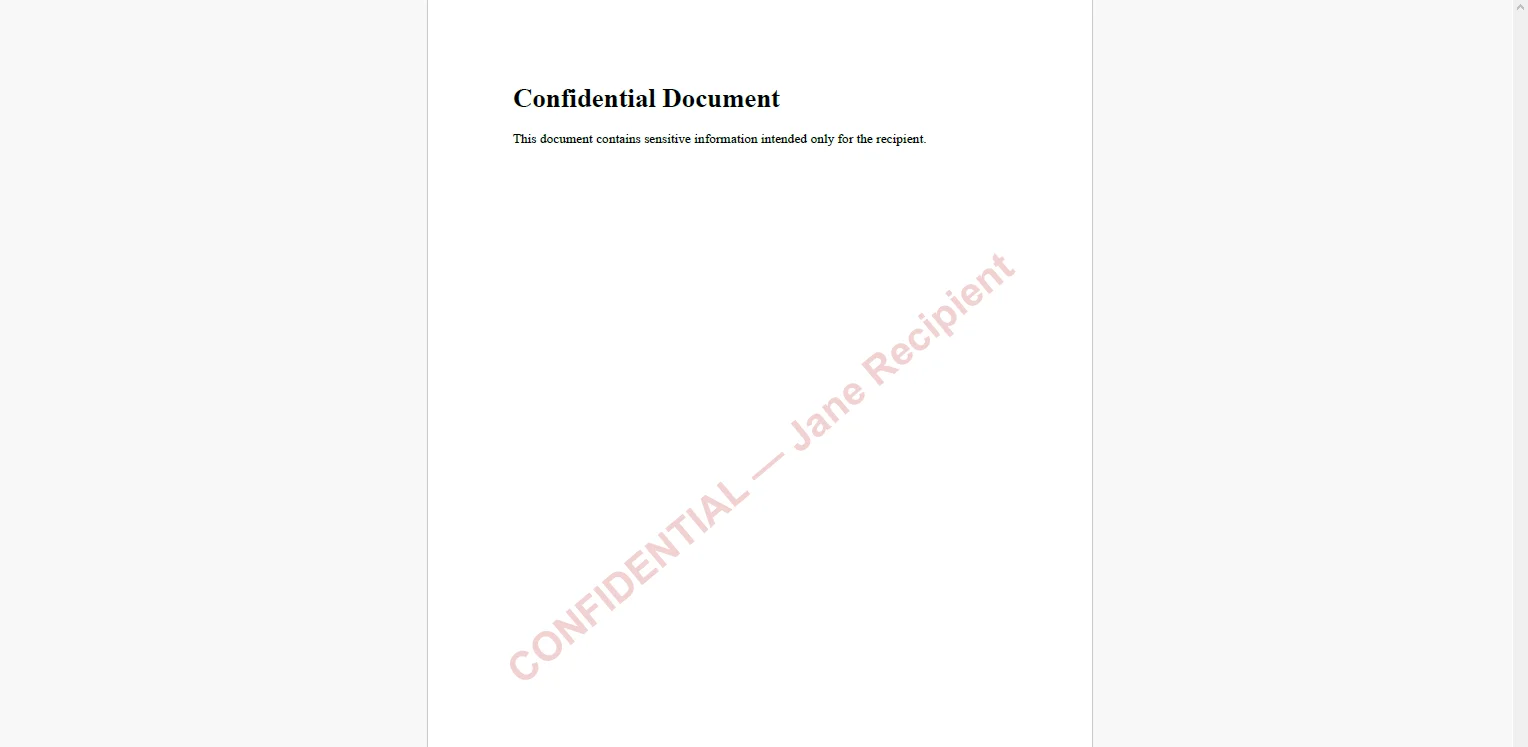 使用收件人的名字代替通用標籤,使任何洩漏的副本可以追踪回具體的交付事件。 不透明值——此處為0.18——使水印可見而不會遮擋正當讀者的文件內容。
using IronPdf;

// Owner password controls who can change security settings
// User password controls who can open the document
pdf.SecuritySettings.OwnerPassword = "internal-owner-secret";
pdf.SecuritySettings.UserPassword = recipientAccessCode;

// Restrict what the recipient can do after opening
pdf.SecuritySettings.AllowUserPrinting = IronPdf.Security.PdfPrintSecurity.FullPrintRights;
pdf.SecuritySettings.AllowUserCopyPasteContent = false;
pdf.SecuritySettings.AllowUserEdits = IronPdf.Security.PdfEditSecurity.NoEdit;

pdf.SaveAs($"secured/{documentId}-{recipient.Id}-protected.pdf");
using IronPdf;
// Owner password controls who can change security settings
// User password controls who can open the document
pdf.SecuritySettings.OwnerPassword = "internal-owner-secret";
pdf.SecuritySettings.UserPassword = recipientAccessCode;
// Restrict what the recipient can do after opening
pdf.SecuritySettings.AllowUserPrinting = IronPdf.Security.PdfPrintSecurity.FullPrintRights;
pdf.SecuritySettings.AllowUserCopyPasteContent = false;
pdf.SecuritySettings.AllowUserEdits = IronPdf.Security.PdfEditSecurity.NoEdit;
pdf.SaveAs($"secured/{documentId}-{recipient.Id}-protected.pdf");Imports IronPdf
' Owner password controls who can change security settings
' User password controls who can open the document
pdf.SecuritySettings.OwnerPassword = "internal-owner-secret"
pdf.SecuritySettings.UserPassword = recipientAccessCode
' Restrict what the recipient can do after opening
pdf.SecuritySettings.AllowUserPrinting = IronPdf.Security.PdfPrintSecurity.FullPrintRights
pdf.SecuritySettings.AllowUserCopyPasteContent = False
pdf.SecuritySettings.AllowUserEdits = IronPdf.Security.PdfEditSecurity.NoEdit
pdf.SaveAs($"secured/{documentId}-{recipient.Id}-protected.pdf")Imports IronPdf
' Owner password controls who can change security settings
' User password controls who can open the document
pdf.SecuritySettings.OwnerPassword = "internal-owner-secret"
pdf.SecuritySettings.UserPassword = recipientAccessCode
' Restrict what the recipient can do after opening
pdf.SecuritySettings.AllowUserPrinting = IronPdf.Security.PdfPrintSecurity.FullPrintRights
pdf.SecuritySettings.AllowUserCopyPasteContent = False
pdf.SecuritySettings.AllowUserEdits = IronPdf.Security.PdfEditSecurity.NoEdit
pdf.SaveAs($"secured/{documentId}-{recipient.Id}-protected.pdf")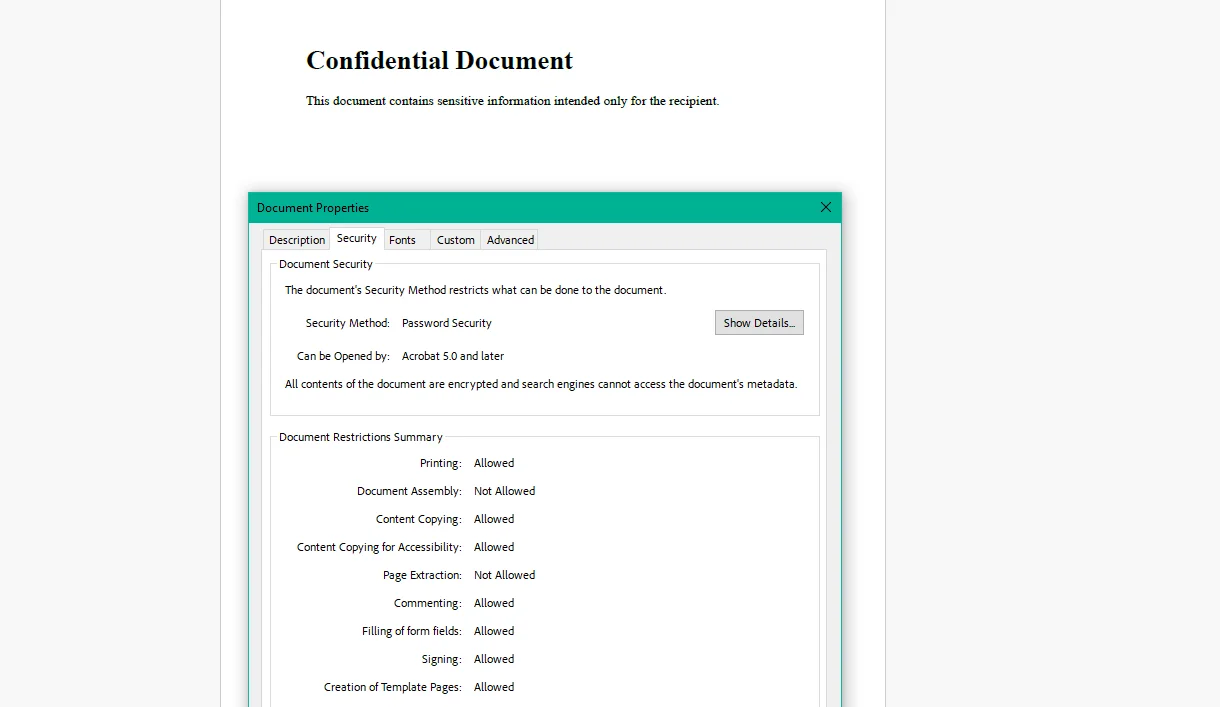 所有者密碼儲存於內部,從不分發,僅在組織需要修改文件的安全設置時使用。 使用者密碼是透過單獨渠道傳送給收件人的。 設置 AllowUserCopyPasteContent = false 阻止收件人即使在打開文件後也無法選擇和提取文字,對於專有研究或法律摘要,關切的是內容提取而非存取。
防洩漏措施。 在每頁上打上收件人的名字或電子郵件,將未經授權的分享變成可追溯的行為。 大多數未經授權的分享之所以發生,是因為感覺沒有後果——可見的收件人特定水印改變了這種考慮,而無需任何DRM基礎設施。
存取控制。 使用者密碼確保只有預定收件人可以打開文件。 即使電子郵件被攔截或者文件在轉發線索中發現,沒有原始收件人收到的密碼就無法閱讀。
使用限制。 允許標誌限制了收件人在打開後可以做的事。 付費訂閱了一份研究報告的訂閱者可以閱讀,但不能將文字複製到競爭者的分析中,列印無限份數或製作可輸出的批註。 內容可存取; 提取和重新利用則不可。
分類靈活性。 同一文件根據上下文獲得不同的保護配置檔案:不帶密碼的"草稿"水印用於內部審查迴圈,使用者密碼和收件人特定水印使用者端送達,禁用編輯的完全加密用於監管存檔。 一個流程、多種輸出政策。
合規性。 使用AES-256加密的PDF具有存取控制,滿足HIPAA、SOC 2文件處理政策和FINRA電子通信標準下的傳輸安全要求。 加密是在進程中應用的,而不是通過單獨的合規性工具。
無每文件成本。 水印和加密在 .NET 應用程式內進行。 沒有第三方DRM或水印API、沒有每文件費用,也沒有使高容量分發運行變得昂貴的定價模型。
離開系統但未受保護的PDF文件是組織放棄控制的文件。 對於公開內容,這是一個可接受的權衡。 對於機密報告、草稿合同、受管制的病患文件和付費研究則不然。
將保護內建於生成流程:根據分類自動應用,發送事件前刪除跳過的手動步驟和做錯判斷的人工決策。 IronPDF在ironpdf.com處理PDF生成C# 全生命週期,從渲染HTML模板到打上水印,加密並控制輸出上的權限。 如果您已準備好將安全策略新增到您的文件交付管道中,開始您的免費30天試用,並在下一份敏感文件出門前,根據您自己的內容分類驗證水印和存取控制。
Curtis Chau擁有Carleton大學的電腦科學學士學位,專精於前端開發,擁有Node.js、TypeScript、JavaScript和React的專業知識。Curtis熱衷於建立直觀且美觀的使用者介面,喜愛使用現代框架並建立結構良好、視覺吸引力的手冊。

IronPDF 是 IRONSUITE 的一部分
10 款適用於辦公室文件的 .NET API 產品

當您需要您的PDF看起來像HTML一樣快速。