


바이트 배열로부터 PDF 생성 C# iTextSharp (vs IronPDF)

IronPDF는 원활한 HTML-에서 PDF로의 변환 및 .NET 환경을 위한 현대적인 CSS 프레임워크 지원에서 뛰어납니다. 반면 Foxit PDF SDK는 더 넓은 플랫폼 호환성을 제공하지만 구현이 더 복잡하며 기본 HTML 변환 기능이 부족합니다.
PDF 문서는 산업 전반에 걸쳐 정보를 공유하고 제시하는 표준 형식이 되었습니다. 애플리케이션에서 PDF 문서를 생성하거나 기존 문서를 조작해야 할 때, PDF 처리 SDK는 필수 기능을 제공합니다. 이 SDK들은 애플리케이션 내에서 PDF 문서를 생성, 편집 및 조작할 수 있는 필요한 도구와 기능을 제공합니다.
Foxit PDF SDK와 IronPDF는 시장에서 확립된 두 가지 PDF 처리 SDK를 대표합니다. 두 SDK는 개발 요구에 맞는 모든 기능을 제공하지만, 다양한 시나리오에 적합성에 영향을 미치는 주요 측면에서 다릅니다.
이 기사는 Foxit PDF SDK와 IronPDF의 기능과 장점을 상세 비교를 통해 분석합니다. 각 SDK의 강점과 약점을 그 기능에 대한 완전한 평가를 통해 발견할 수 있습니다. 이 분석은 특정 요구 사항에 가장 적합한 PDF 처리 SDK를 선택하는 데 도움이 될 것입니다.
IronPDF란 무엇이며 그 핵심 기능은 무엇입니까?
IronPDF는 Iron Software에서 개발한 효과적인 PDF 처리 SDK로, .NET 애플리케이션 내에서 PDF 문서를 생성, 편집, 조작할 수 있습니다. 정기적으로 PDF 문서를 다루기 위한 완벽한 도구와 기능을 제공합니다. 보안 준수가 필요한 Enterprise 환경을 위해 IronPDF는 상세한 보안 문서를 제공하며, 활성 인증을 유지합니다.
IronPDF는 다른 PDF 라이브러리와 무엇이 다릅니까?
IronPDF에서 HTML을 PDF로 변환하는 방법은 무엇입니까?
IronPDF는 HTML 코드를 PDF 문서로 변환하는 것을 효율적으로 가능하게 합니다. 변환 프로세스는 페이지 크기, 여백, 방향과 같은 옵션을 통해 제어할 수 있으면서 빠르게 실행됩니다. IronPDF는 헤더와 푸터를 포함한 고급 서식을 지원하여 PDF 레이아웃을 세부 조정할 수 있습니다. PDF 출력에 포함할 HTML 요소를 지정하여 문서 콘텐츠에 대한 더 큰 제어권을 제공합니다. 복잡한 레이아웃의 경우 페이지 분할 안내서를 참조하세요.
다양한 소스로부터의 PDF 생성이 왜 중요한가요?
IronPDF의 다양한 소스(HTML, URL, JavaScript, CSS, 이미지 형식)에서 PDF를 생성할 수 있는 기능은 현대 애플리케이션에 필수적입니다. 웹 페이지나 이미지에서 PDF 문서를 직접 생성할 수 있습니다. IronPDF의 고급 Chrome 렌더링 엔진을 사용하여 복잡한 웹 페이지를 고품질의 PDF로 정확하게 변환할 수 있습니다. 이 기능은 주문형 PDF 보고서 생성, 인보이스, 기타 문서를 간소화합니다. 라이브러리는 JavaScript 실행과 동적 콘텐츠를 위한 사용자 정의 렌더 지연을 지원합니다.
PDF 추출 기능은 언제 사용해야 하나요?
IronPDF의 추출 기능은 PDF 문서에서 텍스트, 이미지, 데이터를 포함한 다양한 콘텐츠 유형을 추출할 수 있게 합니다. 이 기능은 콘텐츠를 재사용하거나 PDF 데이터를 효과적으로 분석하는 데 도움이 됩니다. IronPDF는 서식의 완전성을 유지하는 고급 텍스트 추출 기능을 제공합니다. 또한 PNG나 JPEG 같은 형식으로 이미지 추출이 가능합니다. 이러한 추출 기능은 PDF 데이터를 다루는 유연하고 효율적인 도구를 제공한다.
기업 사용을 위한 IronPDF의 고급 기능에는 무엇이 있나요?
어노테이션과 양식 채우기는 사용자 상호작용을 어떻게 개선하나요?
IronPDF는 상호작용 가능한 PDF 애플리케이션에 필수적인 어노테이션과 양식 채우기를 지원합니다. 텍스트, 이미지 및 요소를 PDF에 추가하면서 사용자 입력을 위한 양식 필드를 포함할 수 있습니다. IronPDF는 양식 데이터 조작을 위한 API를 제공하여 애플리케이션 내에서 추출 및 처리를 가능하게 합니다. 컴플라이언스 요구에 따라 IronPDF는 아카이브용 PDF/A 형식과 접근성을 위한 PDF/UA를 지원합니다. 이 라이브러리는 정부 요구사항을 위한 섹션 508 컴플라이언스를 충족합니다.
어떤 PDF 출력 제어 옵션을 사용할 수 있나요?
IronPDF는 완전한 출력 제어 옵션을 제공합니다. 페이지 크기, 여백, 방향과 같은 속성을 설정할 수 있습니다. 압축 수준, 보안 설정, 고급 옵션을 지정할 수 있습니다. IronPDF는 병합, 분할 및 페이지 재정렬을 포함한 페이지 작업을 처리합니다. 이 라이브러리는 맞춤 종이 크기와 페이지 분할 제어를 지원합니다.
멀티쓰레딩 및 비동기 지원이 성능에 왜 중요한가요?
IronPDF는 성능을 향상시키기 위한 전체 멀티쓰레딩 및 비동기 지원을 제공합니다. 멀티쓰레딩을 사용하면 여러 스레드에서 동시에 PDF를 처리하여 실행 속도를 높일 수 있습니다. 비동기 지원은 변환이나 추출과 같은 장시간 실행되는 작업을 메인 스레드를 차단하지 않고 처리합니다. 이로 인해 애플리케이션은 반응성을 유지하면서 더 나은 사용자 경험을 제공합니다. 이러한 기능은 효율적이고 신뢰할 수 있는 고성능 애플리케이션을 만드는 데 도움을 줍니다. 성능 보조 가이드를 참조하여 최적화 팁을 얻으십시오.
IronPDF는 보안 및 컴플라이언스 요구 사항을 어떻게 처리하나요?
IronPDF는 기업 사용을 위한 어떤 보안 기능을 제공하나요?
IronPDF의 보안 기능은 PDF 문서를 보호하기 위한 완전한 도구를 제공하여 데이터 안전성과 무결성을 보장합니다. 특정 기능에 대한 접근을 제한하며 문서 또는 페이지 수준에서 비밀번호 보호를 설정할 수 있습니다. 암호화 옵션으로 40비트 및 128비트 암호화를 제공하여 신뢰할 수 있는 무단 접근 보호를 제공합니다. 디지털 서명 및 인증서 관리는 서명자 인증 및 문서 무결성을 보장합니다. 이러한 기능은 민감한 데이터 보호가 필요한 애플리케이션에 IronPDF를 훌륭한 선택으로 만듭니다. IronPDF는 하드웨어 기반 보안을 위한 HSM을 사용한 PDF 서명을 지원합니다. 추가 기능으로 PDF 소독 및 편집 기능이 포함됩니다.
.NET 언어 지원이 기업 개발에 어떻게 이익을 주나요?
IronPDF는 C#, VB.NET, F#를 포함한 .NET 언어와 매끄럽게 통합됩니다. SDK는 .NET 애플리케이션 내에서 PDF 생성, 편집, 조작을 간소화하는 API를 제공합니다. 광범위한 문서 및 예제를 사용하여 빠르게 시작할 수 있습니다. IronPDF는 Java에서도 사용할 수 있습니다. 기업 배포를 위해 IronPDF는 Azure 배포, AWS 배포, 및 Docker 컨테이너화에 대한 가이드를 제공합니다. 이 라이브러리는 MAUI 응용 프로그램과 Blazor 서버를 지원합니다.
폭스잇 PDF SDK의 기업 기능은 무엇인가요?
폭스잇 PDF SDK는 응용 프로그램에 PDF 기능을 통합하기 위한 완벽한 소프트웨어 개발 키트입니다. PDF 문서의 생성, 읽기, 편집 및 주석 기능과 파일 변환 기능을 제공합니다. 대체 비교를 위해, Aspose vs IronPDF 및 iText vs IronPDF를 참조하세요.
폭스잇 PDF SDK가 제공하는 문서 처리 기능은 무엇인가요?
PDF 생성 및 변환은 폭스잇에서 어떻게 작동하나요?
폭스잇 PDF SDK는 새로운 PDF를 처음부터 생성하거나 기존 문서를 PDF 형식으로 변환할 수 있게 해줍니다. Microsoft Word, Excel, PowerPoint 등 다양한 파일 형식을 지원합니다. SDK는 JPEG, PNG, TIFF와 같은 이미지 형식에서 PDF로의 변환을 처리합니다. 고급 변환을 위해, IronPDF는 DOCX에서 PDF로 변환, RTF에서 PDF, 및 XML에서 PDF 변환 기능을 제공합니다.
사용 가능한 PDF 편집 기능은 무엇인가요?
폭스잇 PDF SDK는 효과적인 PDF 수정 도구를 제공합니다. 텍스트 편집, 이미지 자르기, 페이지 재배열, 워터마크 또는 배경 추가와 같은 기능이 포함됩니다. SDK는 페이지 추가 또는 삭제, 파일 병합 또는 분할, 메타데이터 수정이 가능하게 합니다. IronPDF는 텍스트 찾기 및 대체, 선 및 사각형 그리기, 텍스트 및 이미지 스탬프 기능을 제공합니다.
개발자가 PDF 주석을 추가하는 방법은 무엇인가요?
폭스잇 PDF SDK는 주석 추가를 가능하게 합니다. 여기에는 하이라이트, 댓글, 스탬프, 시각적 도움 기능이 포함됩니다. 서명이나 고무 스탬프와 같은 사용자 지정 주석 도구 생성을 제공합니다. IronPDF는 주석 기능을 북마크 및 목차 생성 기능으로 지원합니다.
폭스잇 PDF SDK가 포함하는 보안 및 최적화 기능은 무엇인가요?
폭스잇 PDF SDK는 어떤 보안 옵션을 제공하나요?
폭스잇 PDF SDK는 비인가된 액세스에서 PDF를 보호하는 보안 기능을 제공합니다. 여기에는 암호 보호, 디지털 서명, 암호화 및 인증서 관리가 포함됩니다. IronPDF는 보안 기능을 수정 이력 및 문서 평면화 지원으로 제공합니다.
PDF 최적화는 성능을 어떻게 향상시키나요?
폭스잇 PDF SDK는 더 빠른 로딩 및 성능을 위한 최적화 도구를 포함합니다. 압축, 이미지 다운샘플링, 폰트 임베딩 등을 특징으로 합니다. 이러한 최적화는 파일 크기를 줄이고 더 나은 접근성을 위해 로드 시간을 개선합니다. IronPDF는 고급 압축 옵션과 선형화를 빠른 웹 뷰어를 위해 제공합니다.
언제 PDF 양식 채우기 기능을 사용해야 하나요?
폭스잇 PDF SDK는 프로그래밍 방식으로 채워지는 동적 양식 포함, PDF 양식 생성 및 채우기를 가능하게 합니다. SDK는 더 쉬운 수집과 분석을 위한 양식 필드 유효성 검사 및 데이터 추출을 지원합니다. IronPDF는 대화형 필드 지원으로 양식 생성과 양식 편집을 완벽하게 제공합니다.
데이터 처리에 PDF 추출이 왜 중요한가요?
- 부트스트랩 5: 플렉스박스 레이아웃, CSS 그리드, 유틸리티 클래스 및 모든 구성 요소 시스템에 대한 완벽한 지원
- 부트스트랩 4: 완벽한 카드 구성 요소, 네비게이션 요소, 플렉스 유틸리티 및 반응형 디자인
- Tailwind CSS: 모든 유틸리티 클래스가 정확히 렌더링됩니다
- 파운데이션: 완벽한 그리드 시스템 및 구성 요소 라이브러리
- 현대 CSS3: Flexbox, CSS Grid, 사용자 정의 속성, 애니메이션, 전환 및 변형
실제 검증: IronPDF는 Bootstrap 홈페이지와 공식 예제를 픽셀 완벽하게 렌더합니다. 고급 시나리오에서는 Chrome 렌더링 엔진 문서를 사용하세요. 이 라이브러리는 전체 디자인 충실도를 위해 웹 폰트 및 아이콘 폰트를 지원합니다.
코드 예제: 알림 시스템 및 경고
using IronPdf;

// Set your IronPDF license key
IronPdf.License.LicenseKey = "License-Key goes here";

var renderer = new ChromePdfRenderer();
string bootstrapNotifications = @"
<!DOCTYPE html>
<html>
<head>
    <link href='___PROTECTED_URL_88___ rel='stylesheet'>
    <style>
        .notification-card {
            border-left: 4px solid;
            transition: transform 0.2s;
        }
        .notification-card:hover { transform: translateX(5px); }
        .notification-icon {
            width: 48px;
            height: 48px;
            display: flex;
            align-items: center;
            justify-content: center;
            border-radius: 50%;
            font-size: 1.5rem;
        }
    </style>
</head>
<body>
    <div class='container my-5'>
        <h1 class='mb-4'>System Notifications Dashboard</h1>

        <div class='row g-4 mb-4'>
            <div class='col-md-3'>
                <div class='card text-center bg-success text-white'>
                    <div class='card-body'>
                        <h2 class='display-4 mb-0'>42</h2>
                        <p class='mb-0'>Success</p>
                    </div>
                </div>
            </div>
            <div class='col-md-3'>
                <div class='card text-center bg-warning text-dark'>
                    <div class='card-body'>
                        <h2 class='display-4 mb-0'>8</h2>
                        <p class='mb-0'>Warnings</p>
                    </div>
                </div>
            </div>
            <div class='col-md-3'>
                <div class='card text-center bg-danger text-white'>
                    <div class='card-body'>
                        <h2 class='display-4 mb-0'>3</h2>
                        <p class='mb-0'>Errors</p>
                    </div>
                </div>
            </div>
            <div class='col-md-3'>
                <div class='card text-center bg-info text-white'>
                    <div class='card-body'>
                        <h2 class='display-4 mb-0'>156</h2>
                        <p class='mb-0'>Info</p>
                    </div>
                </div>
            </div>
        </div>

        <div class='alert alert-success d-flex align-items-center mb-3' role='alert'>
            <div class='notification-icon bg-white text-success me-3'>✓</div>
            <div class='flex-grow-1'>
                <h5 class='alert-heading mb-1'>Deployment Successful</h5>
                <p class='mb-0'>Your application has been deployed to production successfully.</p>
                <small class='text-muted'>2 minutes ago</small>
            </div>
            <button type='button' class='btn-close'></button>
        </div>

        <div class='alert alert-info d-flex align-items-center mb-3' role='alert'>
            <div class='notification-icon bg-white text-info me-3'>ℹ</div>
            <div class='flex-grow-1'>
                <h5 class='alert-heading mb-1'>System Update Available</h5>
                <p class='mb-0'>A new system update (v2.5.1) is available for installation.</p>
                <small class='text-muted'>15 minutes ago</small>
            </div>
            <button type='button' class='btn-close'></button>
        </div>

        <div class='alert alert-warning d-flex align-items-center mb-3' role='alert'>
            <div class='notification-icon bg-white text-warning me-3'>⚠</div>
            <div class='flex-grow-1'>
                <h5 class='alert-heading mb-1'>High CPU Usage Detected</h5>
                <p class='mb-0'>CPU usage has exceeded 85% for the past 10 minutes. Consider scaling resources.</p>
                <small class='text-muted'>1 hour ago</small>
            </div>
            <button type='button' class='btn-close'></button>
        </div>

        <div class='alert alert-danger d-flex align-items-center mb-3' role='alert'>
            <div class='notification-icon bg-white text-danger me-3'>✗</div>
            <div class='flex-grow-1'>
                <h5 class='alert-heading mb-1'>Database Connection Failed</h5>
                <p class='mb-0'>Unable to establish connection to the primary database server. Failover initiated.</p>
                <small class='text-muted'>3 hours ago</small>
            </div>
            <button type='button' class='btn-close'></button>
        </div>

        <div class='card'>
            <div class='card-header bg-primary text-white'>
                <h5 class='mb-0'>Recent Activity Log</h5>
            </div>
            <div class='card-body p-0'>
                <ul class='list-group list-group-flush'>
                    <li class='list-group-item notification-card border-success'>
                        <div class='d-flex align-items-start'>
                            <span class='badge bg-success me-3 mt-1'>SUCCESS</span>
                            <div class='flex-grow-1'>
                                <strong>Backup Completed</strong>
                                <p class='mb-1 text-muted'>Daily backup completed successfully. 2.4 GB backed up.</p>
                                <small class='text-muted'>Today at 3:00 AM</small>
                            </div>
                        </div>
                    </li>
                    <li class='list-group-item notification-card border-info'>
                        <div class='d-flex align-items-start'>
                            <span class='badge bg-info me-3 mt-1'>INFO</span>
                            <div class='flex-grow-1'>
                                <strong>User Login</strong>
                                <p class='mb-1 text-muted'>Admin user logged in from 192.168.1.100</p>
                                <small class='text-muted'>Today at 8:30 AM</small>
                            </div>
                        </div>
                    </li>
                    <li class='list-group-item notification-card border-warning'>
                        <div class='d-flex align-items-start'>
                            <span class='badge bg-warning text-dark me-3 mt-1'>WARNING</span>
                            <div class='flex-grow-1'>
                                <strong>SSL Certificate Expiring</strong>
                                <p class='mb-1 text-muted'>SSL certificate for api.example.com expires in 30 days</p>
                                <small class='text-muted'>Today at 9:15 AM</small>
                            </div>
                        </div>
                    </li>
                    <li class='list-group-item notification-card border-success'>
                        <div class='d-flex align-items-start'>
                            <span class='badge bg-success me-3 mt-1'>SUCCESS</span>
                            <div class='flex-grow-1'>
                                <strong>Security Scan Completed</strong>
                                <p class='mb-1 text-muted'>No vulnerabilities detected in latest scan</p>
                                <small class='text-muted'>Today at 10:00 AM</small>
                            </div>
                        </div>
                    </li>
                </ul>
            </div>
        </div>

        <div class='mt-4 d-flex justify-content-between align-items-center'>
            <button class='btn btn-outline-primary'>Mark All as Read</button>
            <button class='btn btn-outline-secondary'>Clear All</button>
            <button class='btn btn-primary'>View All Notifications</button>
        </div>
    </div>
</body>
</html>";

var pdf = renderer.RenderHtmlAsPdf(bootstrapNotifications);
pdf.SaveAs("notifications-dashboard.pdf");
using IronPdf;
// Set your IronPDF license key
IronPdf.License.LicenseKey = "License-Key goes here";
var renderer = new ChromePdfRenderer();
string bootstrapNotifications = @"
<!DOCTYPE html>
<html>
<head>
<link href='___PROTECTED_URL_88___ rel='stylesheet'>
<style>
.notification-card {
border-left: 4px solid;
transition: transform 0.2s;
}
.notification-card:hover { transform: translateX(5px); }
.notification-icon {
width: 48px;
height: 48px;
display: flex;
align-items: center;
justify-content: center;
border-radius: 50%;
font-size: 1.5rem;
}
</style>
</head>
<body>
<div class='container my-5'>
<h1 class='mb-4'>System Notifications Dashboard</h1>
<div class='row g-4 mb-4'>
<div class='col-md-3'>
<div class='card text-center bg-success text-white'>
<div class='card-body'>
<h2 class='display-4 mb-0'>42</h2>
<p class='mb-0'>Success</p>
</div>
</div>
</div>
<div class='col-md-3'>
<div class='card text-center bg-warning text-dark'>
<div class='card-body'>
<h2 class='display-4 mb-0'>8</h2>
<p class='mb-0'>Warnings</p>
</div>
</div>
</div>
<div class='col-md-3'>
<div class='card text-center bg-danger text-white'>
<div class='card-body'>
<h2 class='display-4 mb-0'>3</h2>
<p class='mb-0'>Errors</p>
</div>
</div>
</div>
<div class='col-md-3'>
<div class='card text-center bg-info text-white'>
<div class='card-body'>
<h2 class='display-4 mb-0'>156</h2>
<p class='mb-0'>Info</p>
</div>
</div>
</div>
</div>
<div class='alert alert-success d-flex align-items-center mb-3' role='alert'>
<div class='notification-icon bg-white text-success me-3'>✓</div>
<div class='flex-grow-1'>
<h5 class='alert-heading mb-1'>Deployment Successful</h5>
<p class='mb-0'>Your application has been deployed to production successfully.</p>
<small class='text-muted'>2 minutes ago</small>
</div>
<button type='button' class='btn-close'></button>
</div>
<div class='alert alert-info d-flex align-items-center mb-3' role='alert'>
<div class='notification-icon bg-white text-info me-3'>ℹ</div>
<div class='flex-grow-1'>
<h5 class='alert-heading mb-1'>System Update Available</h5>
<p class='mb-0'>A new system update (v2.5.1) is available for installation.</p>
<small class='text-muted'>15 minutes ago</small>
</div>
<button type='button' class='btn-close'></button>
</div>
<div class='alert alert-warning d-flex align-items-center mb-3' role='alert'>
<div class='notification-icon bg-white text-warning me-3'>⚠</div>
<div class='flex-grow-1'>
<h5 class='alert-heading mb-1'>High CPU Usage Detected</h5>
<p class='mb-0'>CPU usage has exceeded 85% for the past 10 minutes. Consider scaling resources.</p>
<small class='text-muted'>1 hour ago</small>
</div>
<button type='button' class='btn-close'></button>
</div>
<div class='alert alert-danger d-flex align-items-center mb-3' role='alert'>
<div class='notification-icon bg-white text-danger me-3'>✗</div>
<div class='flex-grow-1'>
<h5 class='alert-heading mb-1'>Database Connection Failed</h5>
<p class='mb-0'>Unable to establish connection to the primary database server. Failover initiated.</p>
<small class='text-muted'>3 hours ago</small>
</div>
<button type='button' class='btn-close'></button>
</div>
<div class='card'>
<div class='card-header bg-primary text-white'>
<h5 class='mb-0'>Recent Activity Log</h5>
</div>
<div class='card-body p-0'>
<ul class='list-group list-group-flush'>
<li class='list-group-item notification-card border-success'>
<div class='d-flex align-items-start'>
<span class='badge bg-success me-3 mt-1'>SUCCESS</span>
<div class='flex-grow-1'>
<strong>Backup Completed</strong>
<p class='mb-1 text-muted'>Daily backup completed successfully. 2.4 GB backed up.</p>
<small class='text-muted'>Today at 3:00 AM</small>
</div>
</div>
</li>
<li class='list-group-item notification-card border-info'>
<div class='d-flex align-items-start'>
<span class='badge bg-info me-3 mt-1'>INFO</span>
<div class='flex-grow-1'>
<strong>User Login</strong>
<p class='mb-1 text-muted'>Admin user logged in from 192.168.1.100</p>
<small class='text-muted'>Today at 8:30 AM</small>
</div>
</div>
</li>
<li class='list-group-item notification-card border-warning'>
<div class='d-flex align-items-start'>
<span class='badge bg-warning text-dark me-3 mt-1'>WARNING</span>
<div class='flex-grow-1'>
<strong>SSL Certificate Expiring</strong>
<p class='mb-1 text-muted'>SSL certificate for api.example.com expires in 30 days</p>
<small class='text-muted'>Today at 9:15 AM</small>
</div>
</div>
</li>
<li class='list-group-item notification-card border-success'>
<div class='d-flex align-items-start'>
<span class='badge bg-success me-3 mt-1'>SUCCESS</span>
<div class='flex-grow-1'>
<strong>Security Scan Completed</strong>
<p class='mb-1 text-muted'>No vulnerabilities detected in latest scan</p>
<small class='text-muted'>Today at 10:00 AM</small>
</div>
</div>
</li>
</ul>
</div>
</div>
<div class='mt-4 d-flex justify-content-between align-items-center'>
<button class='btn btn-outline-primary'>Mark All as Read</button>
<button class='btn btn-outline-secondary'>Clear All</button>
<button class='btn btn-primary'>View All Notifications</button>
</div>
</div>
</body>
</html>";
var pdf = renderer.RenderHtmlAsPdf(bootstrapNotifications);
pdf.SaveAs("notifications-dashboard.pdf");Imports IronPdf
' Set your IronPDF license key
IronPdf.License.LicenseKey = "License-Key goes here"
Dim renderer As New ChromePdfRenderer()
Dim bootstrapNotifications As String = "
<!DOCTYPE html>
<html>
<head>
<link href='___PROTECTED_URL_88___ rel='stylesheet'>
<style>
.notification-card {
border-left: 4px solid;
transition: transform 0.2s;
}
.notification-card:hover { transform: translateX(5px); }
.notification-icon {
width: 48px;
height: 48px;
display: flex;
align-items: center;
justify-content: center;
border-radius: 50%;
font-size: 1.5rem;
}
</style>
</head>
<body>
<div class='container my-5'>
<h1 class='mb-4'>System Notifications Dashboard</h1>
<div class='row g-4 mb-4'>
<div class='col-md-3'>
<div class='card text-center bg-success text-white'>
<div class='card-body'>
<h2 class='display-4 mb-0'>42</h2>
<p class='mb-0'>Success</p>
</div>
</div>
</div>
<div class='col-md-3'>
<div class='card text-center bg-warning text-dark'>
<div class='card-body'>
<h2 class='display-4 mb-0'>8</h2>
<p class='mb-0'>Warnings</p>
</div>
</div>
</div>
<div class='col-md-3'>
<div class='card text-center bg-danger text-white'>
<div class='card-body'>
<h2 class='display-4 mb-0'>3</h2>
<p class='mb-0'>Errors</p>
</div>
</div>
</div>
<div class='col-md-3'>
<div class='card text-center bg-info text-white'>
<div class='card-body'>
<h2 class='display-4 mb-0'>156</h2>
<p class='mb-0'>Info</p>
</div>
</div>
</div>
</div>
<div class='alert alert-success d-flex align-items-center mb-3' role='alert'>
<div class='notification-icon bg-white text-success me-3'>✓</div>
<div class='flex-grow-1'>
<h5 class='alert-heading mb-1'>Deployment Successful</h5>
<p class='mb-0'>Your application has been deployed to production successfully.</p>
<small class='text-muted'>2 minutes ago</small>
</div>
<button type='button' class='btn-close'></button>
</div>
<div class='alert alert-info d-flex align-items-center mb-3' role='alert'>
<div class='notification-icon bg-white text-info me-3'>ℹ</div>
<div class='flex-grow-1'>
<h5 class='alert-heading mb-1'>System Update Available</h5>
<p class='mb-0'>A new system update (v2.5.1) is available for installation.</p>
<small class='text-muted'>15 minutes ago</small>
</div>
<button type='button' class='btn-close'></button>
</div>
<div class='alert alert-warning d-flex align-items-center mb-3' role='alert'>
<div class='notification-icon bg-white text-warning me-3'>⚠</div>
<div class='flex-grow-1'>
<h5 class='alert-heading mb-1'>High CPU Usage Detected</h5>
<p class='mb-0'>CPU usage has exceeded 85% for the past 10 minutes. Consider scaling resources.</p>
<small class='text-muted'>1 hour ago</small>
</div>
<button type='button' class='btn-close'></button>
</div>
<div class='alert alert-danger d-flex align-items-center mb-3' role='alert'>
<div class='notification-icon bg-white text-danger me-3'>✗</div>
<div class='flex-grow-1'>
<h5 class='alert-heading mb-1'>Database Connection Failed</h5>
<p class='mb-0'>Unable to establish connection to the primary database server. Failover initiated.</p>
<small class='text-muted'>3 hours ago</small>
</div>
<button type='button' class='btn-close'></button>
</div>
<div class='card'>
<div class='card-header bg-primary text-white'>
<h5 class='mb-0'>Recent Activity Log</h5>
</div>
<div class='card-body p-0'>
<ul class='list-group list-group-flush'>
<li class='list-group-item notification-card border-success'>
<div class='d-flex align-items-start'>
<span class='badge bg-success me-3 mt-1'>SUCCESS</span>
<div class='flex-grow-1'>
<strong>Backup Completed</strong>
<p class='mb-1 text-muted'>Daily backup completed successfully. 2.4 GB backed up.</p>
<small class='text-muted'>Today at 3:00 AM</small>
</div>
</div>
</li>
<li class='list-group-item notification-card border-info'>
<div class='d-flex align-items-start'>
<span class='badge bg-info me-3 mt-1'>INFO</span>
<div class='flex-grow-1'>
<strong>User Login</strong>
<p class='mb-1 text-muted'>Admin user logged in from 192.168.1.100</p>
<small class='text-muted'>Today at 8:30 AM</small>
</div>
</div>
</li>
<li class='list-group-item notification-card border-warning'>
<div class='d-flex align-items-start'>
<span class='badge bg-warning text-dark me-3 mt-1'>WARNING</span>
<div class='flex-grow-1'>
<strong>SSL Certificate Expiring</strong>
<p class='mb-1 text-muted'>SSL certificate for api.example.com expires in 30 days</p>
<small class='text-muted'>Today at 9:15 AM</small>
</div>
</div>
</li>
<li class='list-group-item notification-card border-success'>
<div class='d-flex align-items-start'>
<span class='badge bg-success me-3 mt-1'>SUCCESS</span>
<div class='flex-grow-1'>
<strong>Security Scan Completed</strong>
<p class='mb-1 text-muted'>No vulnerabilities detected in latest scan</p>
<small class='text-muted'>Today at 10:00 AM</small>
</div>
</div>
</li>
</ul>
</div>
</div>
<div class='mt-4 d-flex justify-content-between align-items-center'>
<button class='btn btn-outline-primary'>Mark All as Read</button>
<button class='btn btn-outline-secondary'>Clear All</button>
<button class='btn btn-primary'>View All Notifications</button>
</div>
</div>
</body>
</html>"
Dim pdf = renderer.RenderHtmlAsPdf(bootstrapNotifications)
pdf.SaveAs("notifications-dashboard.pdf")출력: 전문적인 알림 대시보드 PDF는 부트스트랩 5의 경고 구성 요소, 플렉스박스 레이아웃, 배지 유틸리티, 카드 시스템 및 리스트 그룹 전부가 완벽한 색상 정확도, 간격 및 시각적 계층 구조로 렌더링됩니다.
폭스잇 PDF SDK의 CSS 프레임워크 제한 사항은 무엇입니까?
폭스잇 PDF SDK는 현대적인 CSS 프레임워크에 대한 문서화된 제한 사항이 있는 사용자 지정 렌더링 엔진을 사용합니다:
- 부분적인 CSS3 지원: 현대적인 플렉스박스 및 CSS 그리드 기능이 제대로 렌더링되지 않을 수 있음
- 부트스트랩 4/5 제한: 복잡한 레이아웃은 광범위한 테스트 및 해결책이 필요함
- JavaScript 제약: 브라우저 환경과 비교한 실행 한계 임
- 프레임워크 호환성: 부트스트랩 또는 현대적인 프레임워크와 함께 설계되지 않음
문서에서는 고급 CSS 기능이 예상치 못한 결과를 초래할 수 있다고 지적합니다. 당신의 개발 팀은 반응형 유틸리티, 플렉스 레이아웃 및 Bootstrap 구성 요소에서 문제를 보고합니다. CSS 문제 해결을 위해, 글꼴 문제 해결 가이드 및 글꼴 커닝 솔루션을 참고하세요.
개발 영향: Foxit PDF SDK를 사용하는 팀들은 종종 간소화된 레이아웃을 생성하거나 별도의 'PDF 안전' CSS 파일을 유지 관리해야 하며, 이는 개발 부담을 증가시키고 웹 애플리케이션과 PDF 문서 사이의 디자인 일관성을 줄입니다.
Bootstrap 호환성과 CSS3 렌더링 기능에 대한 자세한 내용은 Bootstrap & Flexbox CSS 가이드를 참조하세요. IronPDF는 고급 그래픽을 위해 SVG 그래픽과 WebGL 렌더링을 지원합니다.
기본 PDF 생성을 어떻게 구현하나요?
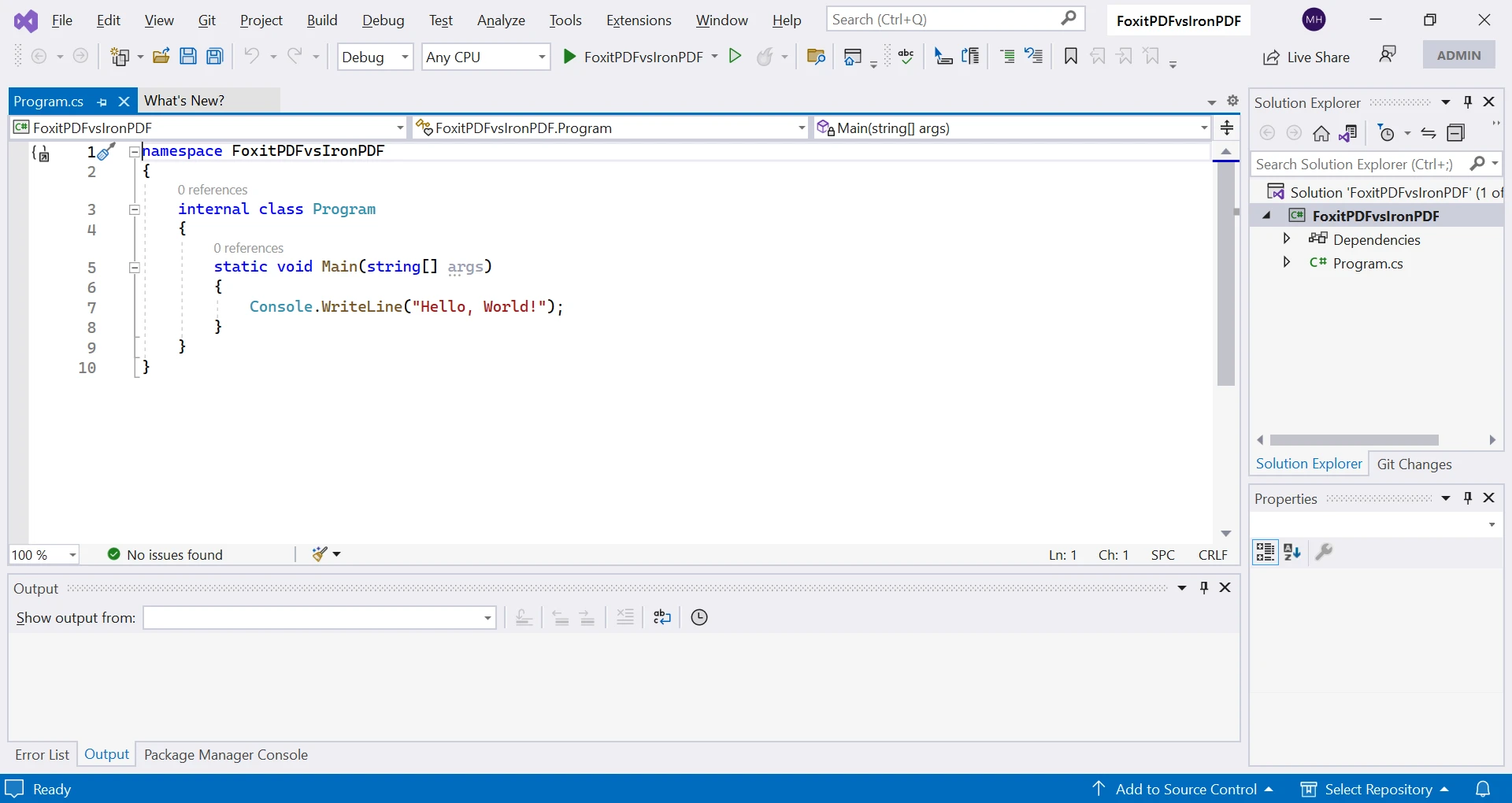
코드 예제를 설명하기 위해 콘솔 애플리케이션 템플릿으로 새 Visual Studio 프로젝트를 만들어 보겠습니다.
새 프로젝트 생성:
- Visual Studio 2022를 엽니다 (어떤 버전도 사용할 수 있습니다).
- 시작 페이지에서 '새 프로젝트 생성'을 클릭하거나 메뉴에서 '파일' > '새로 만들기' > '프로젝트'를 선택합니다.
- '새 프로젝트 생성'에서 '콘솔' 아래의 '콘솔 앱 (.NET Core)'을 선택합니다.
- 프로젝트의 이름과 위치를 선택한 후 '생성'을 클릭합니다.
- Visual Studio는 기본 'Program.cs' 파일과 함께 새 콘솔 애플리케이션 프로젝트를 생성합니다.
IronPDF로 PDF를 어떻게 생성합니까?
프로젝트에 IronPDF NuGet 패키지를 설치해야 합니다:
'도구' 메뉴를 클릭하고 'NuGet 패키지 관리자'를 선택한 후 '패키지 관리자 콘솔'을 선택합니다.
패키지 관리자 콘솔 창에서 입력합니다:
Install-Package IronPdf
실행하려면 'Enter'를 누릅니다. 설치 및 종속성 해결을 기다립니다.
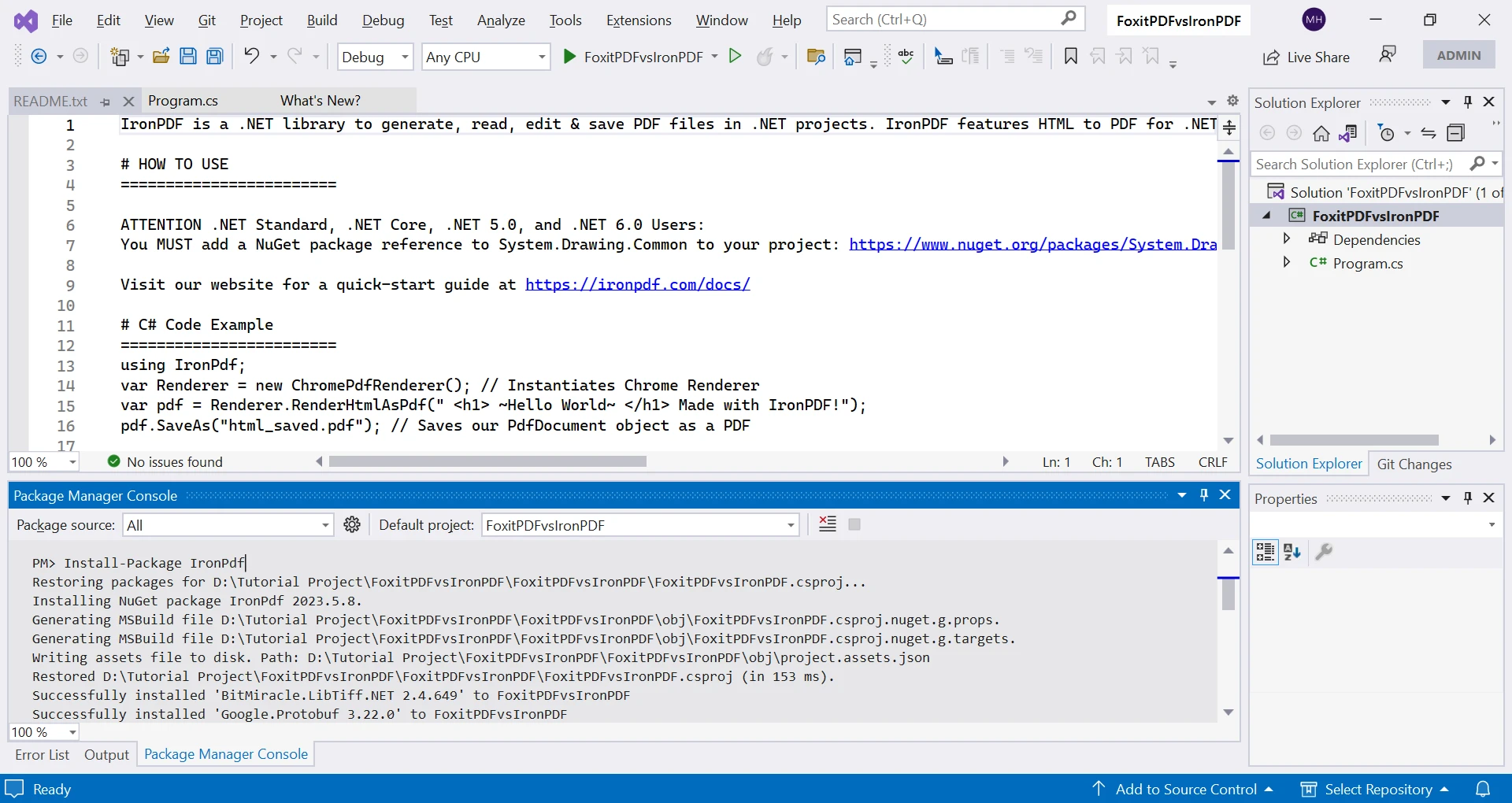
완료되면 IronPDF 사용을 시작할 수 있으며, IronPDF API를 호출할 수 있습니다. Enterprise 배포 가이드는 설치 개요를 참조하세요. 추가 방법으로는 Windows Installer 및 고급 NuGet 구성이 포함됩니다.
// This C# code demonstrates using IronPDF to create a new PDF from HTML content.
static void Main(string[] args)
{
    // Create an instance of ChromePdfRenderer to render HTML as a PDF document.
    var renderer = new ChromePdfRenderer();

    // Convert HTML content to a PDF document using RenderHtmlAsPdf.
    var pdfDoc = renderer.RenderHtmlAsPdf("This is my PDF file created by IronPDF.");

    // Save the PDF document to the filename "IronPDF.pdf".
    pdfDoc.SaveAs("IronPDF.pdf");
}
// This C# code demonstrates using IronPDF to create a new PDF from HTML content.
static void Main(string[] args)
{
// Create an instance of ChromePdfRenderer to render HTML as a PDF document.
var renderer = new ChromePdfRenderer();
// Convert HTML content to a PDF document using RenderHtmlAsPdf.
var pdfDoc = renderer.RenderHtmlAsPdf("This is my PDF file created by IronPDF.");
// Save the PDF document to the filename "IronPDF.pdf".
pdfDoc.SaveAs("IronPDF.pdf");
}' This VB.NET code demonstrates using IronPDF to create a new PDF from HTML content.
Sub Main(ByVal args As String())
' Create an instance of ChromePdfRenderer to render HTML as a PDF document.
Dim renderer As New ChromePdfRenderer()
' Convert HTML content to a PDF document using RenderHtmlAsPdf.
Dim pdfDoc = renderer.RenderHtmlAsPdf("This is my PDF file created by IronPDF.")
' Save the PDF document to the filename "IronPDF.pdf".
pdfDoc.SaveAs("IronPDF.pdf")
End Sub위 코드에서 HTML 문자열에서 PDF를 생성합니다. HTML에서 PDF 렌더링을 위한 ChromePdfRenderer 인스턴스를 생성합니다. HTML 문자열로부터 PDF를 생성하기 위해 RenderHtmlAsPdf를 호출합니다. 마지막으로 SaveAs를 사용하여 PDF를 "IronPDF.pdf"로 저장합니다. 고급 저장 옵션에 대해 PDF 내보내기 및 저장 문서를 참조하세요. PDF를 메모리 스트림으로 저장하거나 다른 PDF 버전을 내보내기 할 수 있습니다.
당신은 단 세 줄의 코드로 PDF를 생성하고 저장했습니다. 이것은 IronPDF의 간단함과 사용의 용이성을 보여줍니다. 추가 예제를 보려면 코드 예제 섹션을 참조하세요.
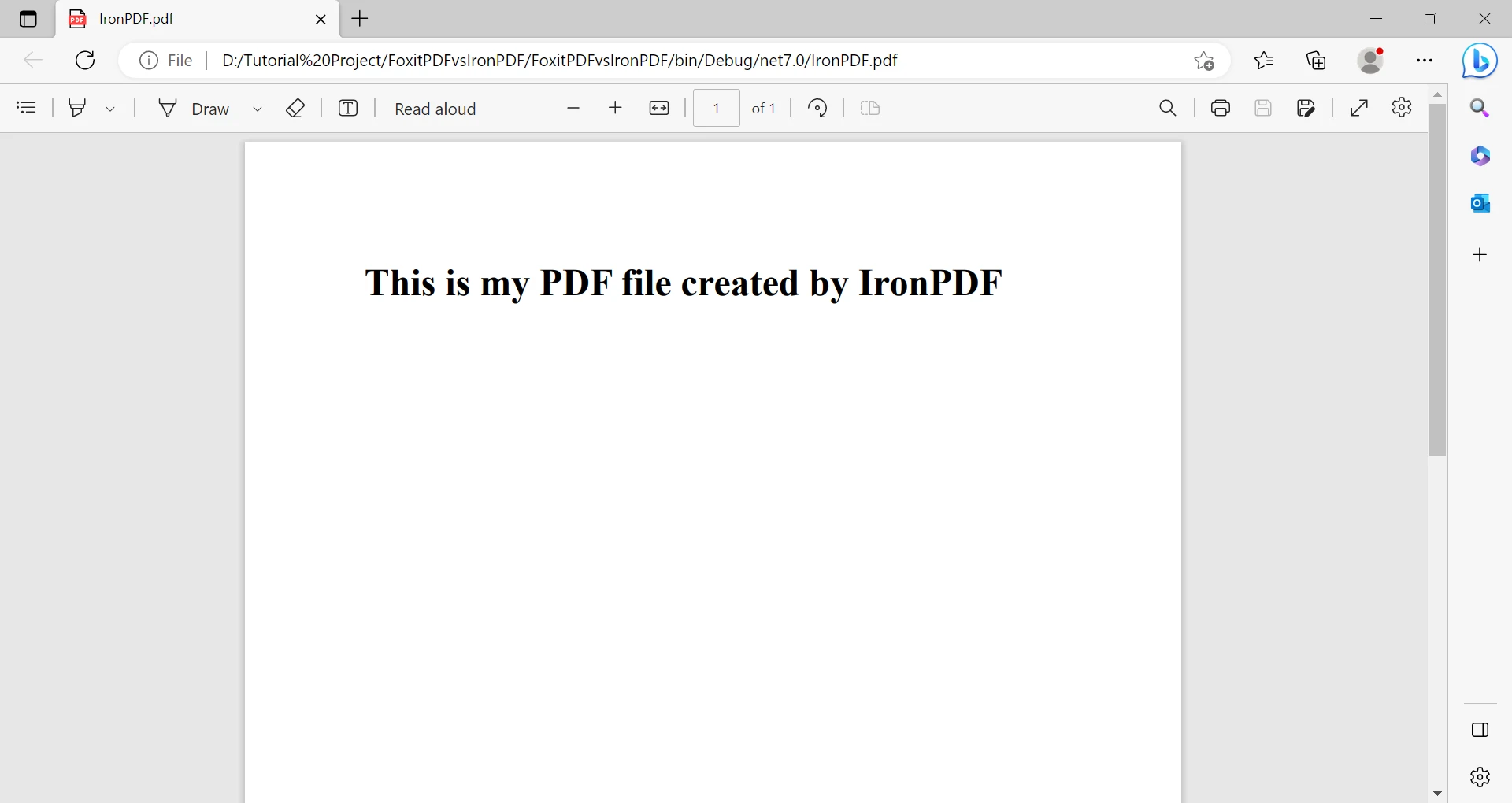
상세한 코드 예제와 튜토리얼을 보려면 IronPDF의 공식 API 문서를 방문하세요. 추가 튜토리얼은 PDF 생성, PDF 편집, PDF 정리를 다룹니다.
Foxit PDF SDK로 PDF를 어떻게 생성합니까?
패키지 관리자 콘솔 창에서 입력합니다:
Install-Package Foxit.SDK.Dotnet실행하려면 'Enter'를 누릅니다. Install-Package와 종속성 해결을 기다립니다.
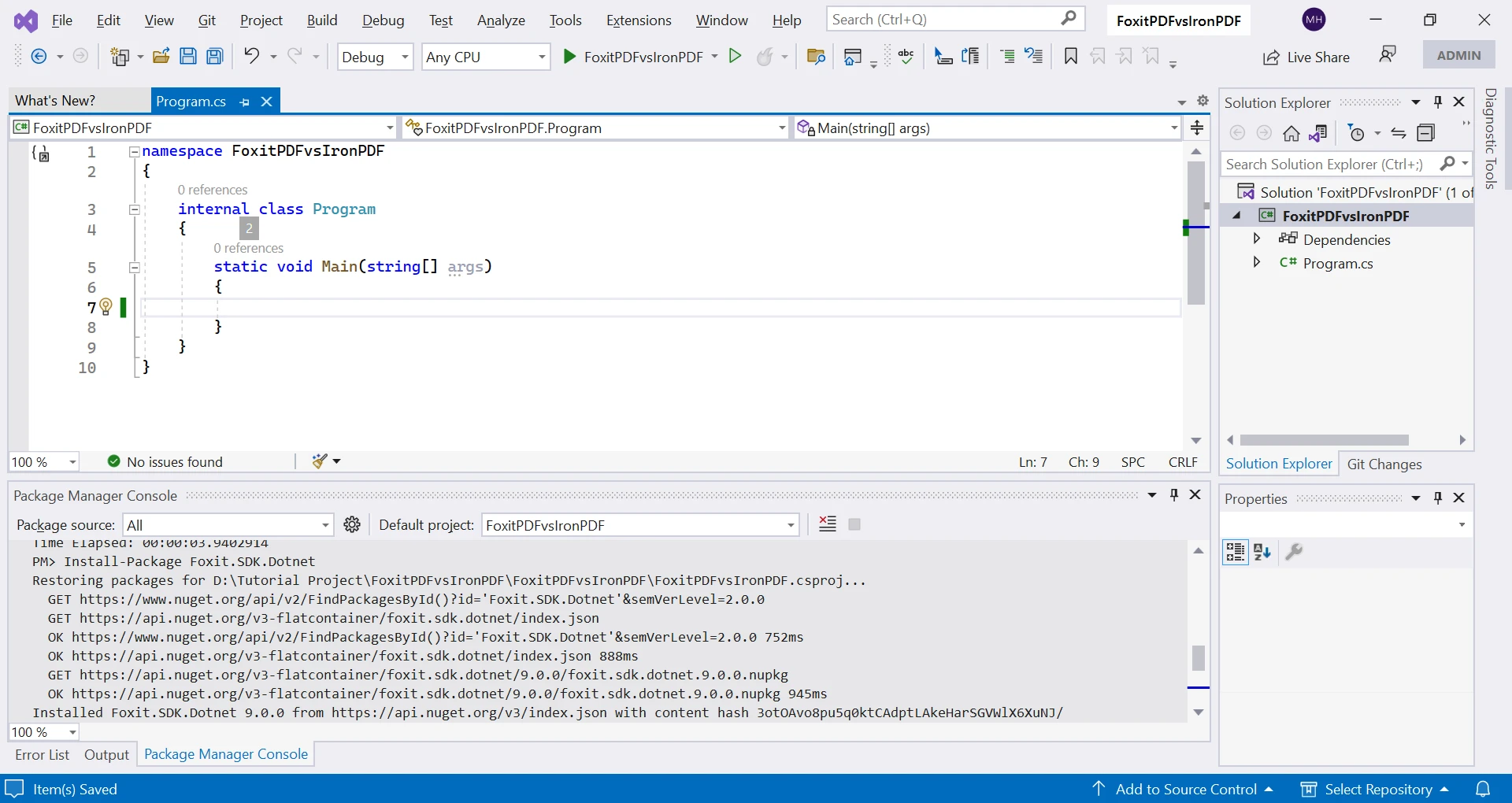
설치가 완료되면 Foxit PDF 사용을 시작할 수 있으며, Foxit PDF API를 호출할 수 있습니다.
// This C# code demonstrates creating a simple PDF document using Foxit PDF SDK.
using (var doc = new PDFDoc())
{
    // Insert a new page in the PDF document.
    var page = doc.InsertPage(0, PDFPage.Size.e_SizeLetter);

    // Define a rectangular area where text will be added on the page.
    RectF rect = new RectF(100, 50, 220, 100);

    // Create a style for the text to be added.
    RichTextStyle richtext_style = new RichTextStyle();

    // Add text to the page within the defined rectangle.
    page.AddText("This is my PDF generated by Foxit PDF.", rect, richtext_style);

    // Save the document as a PDF file on the disk.
    doc.SaveAs("FoxitPDF.pdf", 0);
}
// This C# code demonstrates creating a simple PDF document using Foxit PDF SDK.
using (var doc = new PDFDoc())
{
// Insert a new page in the PDF document.
var page = doc.InsertPage(0, PDFPage.Size.e_SizeLetter);
// Define a rectangular area where text will be added on the page.
RectF rect = new RectF(100, 50, 220, 100);
// Create a style for the text to be added.
RichTextStyle richtext_style = new RichTextStyle();
// Add text to the page within the defined rectangle.
page.AddText("This is my PDF generated by Foxit PDF.", rect, richtext_style);
// Save the document as a PDF file on the disk.
doc.SaveAs("FoxitPDF.pdf", 0);
}' This C# code demonstrates creating a simple PDF document using Foxit PDF SDK.
Using doc = New PDFDoc()
' Insert a new page in the PDF document.
Dim page = doc.InsertPage(0, PDFPage.Size.e_SizeLetter)
' Define a rectangular area where text will be added on the page.
Dim rect As New RectF(100, 50, 220, 100)
' Create a style for the text to be added.
Dim richtext_style As New RichTextStyle()
' Add text to the page within the defined rectangle.
page.AddText("This is my PDF generated by Foxit PDF.", rect, richtext_style)
' Save the document as a PDF file on the disk.
doc.SaveAs("FoxitPDF.pdf", 0)
End Using이 라이브러리는 간단한 작업을 위한 더 많은 노력이 필요하며, 이는 간단한 PDF를 생성하는 이 코드에서 보여집니다. API 세부 정보는 공식 문서를 참조하세요. 간단한 PDF 생성을 위해서는 IronPDF의 새 PDF 만들기 가이드를 참조하세요. IronPDF는 일반적인 PDF 유형을 위한 템플릿과 양식 생성 기능을 제공합니다.
IronPDF로 HTML을 PDF로 변환할 수 있나요?
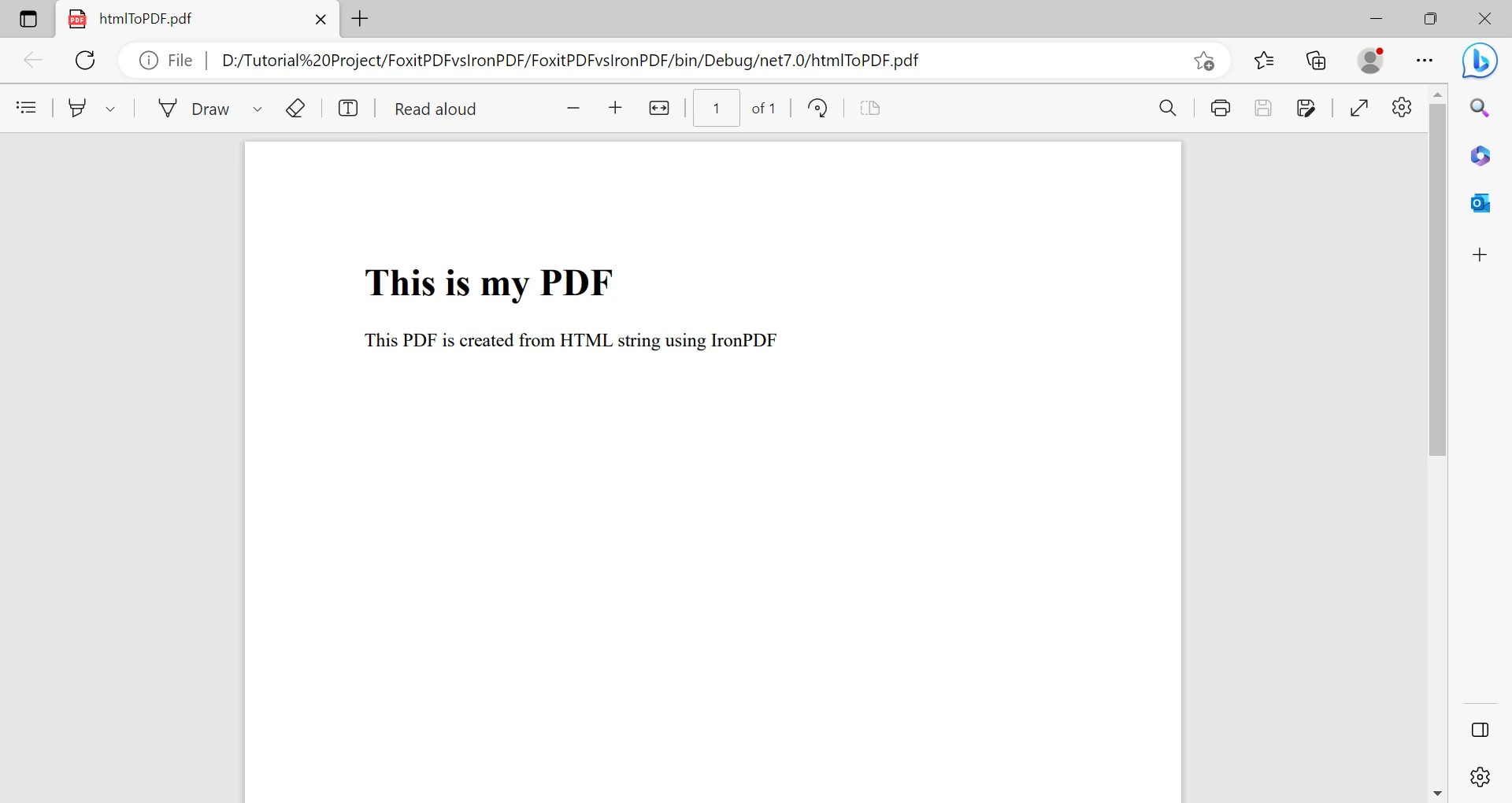
다음 코드는 IronPDF의 HTML에서 PDF로 변환기를 사용하여 HTML에서 PDF를 생성하는 방법을 보여줍니다. IronPDF는 HTML 파일, HTML 문자열, HTML ZIP 파일을 변환합니다.
// This C# code demonstrates converting HTML to PDF using IronPDF.
static void Main(string[] args)
{
    // HTML content to be converted to PDF.
    string htmlText = "This is a PDF created from an HTML string using IronPDF.";

    // Create an instance of ChromePdfRenderer for rendering HTML to PDF.
    var renderer = new ChromePdfRenderer();

    // Render the HTML content as a PDF document.
    PdfDocument pdf = renderer.RenderHtmlAsPdf(htmlText);

    // Save the PDF document to the filename "htmlToPDF.pdf".
    pdf.SaveAs("htmlToPDF.pdf");
}
// This C# code demonstrates converting HTML to PDF using IronPDF.
static void Main(string[] args)
{
// HTML content to be converted to PDF.
string htmlText = "This is a PDF created from an HTML string using IronPDF.";
// Create an instance of ChromePdfRenderer for rendering HTML to PDF.
var renderer = new ChromePdfRenderer();
// Render the HTML content as a PDF document.
PdfDocument pdf = renderer.RenderHtmlAsPdf(htmlText);
// Save the PDF document to the filename "htmlToPDF.pdf".
pdf.SaveAs("htmlToPDF.pdf");
}' This VB.NET code demonstrates converting HTML to PDF using IronPDF.
Sub Main(args As String())
' HTML content to be converted to PDF.
Dim htmlText As String = "This is a PDF created from an HTML string using IronPDF."
' Create an instance of ChromePdfRenderer for rendering HTML to PDF.
Dim renderer As New ChromePdfRenderer()
' Render the HTML content as a PDF document.
Dim pdf As PdfDocument = renderer.RenderHtmlAsPdf(htmlText)
' Save the PDF document to the filename "htmlToPDF.pdf".
pdf.SaveAs("htmlToPDF.pdf")
End Sub또한, IronPDF를 사용하여 URL 및 HTML 파일에서 PDF를 생성할 수 있습니다. JavaScript 지원과 반응형 CSS를 포함한 복잡한 HTML을 처리할 수 있습니다. IronPDF는 ASPX 페이지, Razor 뷰, Blazor 구성 요소를 지원합니다.
Foxit PDF SDK가 HTML을 PDF로 변환할 수 있나요?
Foxit PDF Library는 전체 HTML 문서를 PDF로 변환하는 기능을 지원하지 않습니다. HTML을 PDF로 변환이 필요한 팀이라면 IronPDF의 완전한 HTML 변환 기능을 살펴보세요. IronPDF는 Markdown을 PDF로, Angular를 PDF로, JavaScript 차트를 PDF로 변환하기 위한 전문적인 변환기를 제공합니다.
이제 이 SDK들을 자세히 비교해 보겠습니다.
IronPDF와 Foxit PDF SDK 사이의 주요 차이점은 무엇인가요?
어떤 SDK가 더 나은 HTML을 PDF로 변환하는 기능을 제공하나요?
IronPDF는 훌륭한 HTML을 PDF로 변환하는 지원을 제공합니다. Foxit SDK의 내장 HTML 변환 기능이 부족한 것에 대한 이점은 특히 웹 페이지나 애플리케이션에서 동적 PDF를 생성하는 데 유용합니다. 고급 HTML 렌더링을 위해 IronPDF는 픽셀 완벽한 렌더링과 사용자 정의 렌더 지연을 지원합니다. 이 라이브러리는 HTTP 요청 헤더 및 쿠키를 처리하여 인증된 콘텐츠를 제공합니다.
IronPDF의 HTML 변환은 높은 맞춤화를 제공합니다. 페이지 크기, 방향, 여백 및 스케일링과 같은 옵션을 지정할 수 있으며 저장하기 전에 콘텐츠를 수정할 수 있습니다. IronPDF는 시각적으로 매력적인 PDF를 위한 CSS 스타일링을 지원합니다. 자산 처리를 위해 기본 URL 및 자산 인코딩 가이드와 DataURI 포함을 참조하세요.
프로그래밍 언어 기능은 어떻게 비교할 수 있나요?
IronPDF는 C#, VB.NET, F# 등의 .NET 언어와 함께 작동합니다. 이는 해당 언어에 익숙한 개발자에게 채택을 간소화합니다. Foxit PDF SDK는 여러 언어에 대한 언어 바인딩을 제공하지만 필요로 하는 모든 언어를 지원하지 않을 수 있습니다. .NET 라이브러리를 비교하려면 QuestPDF vs IronPDF 및 Syncfusion vs IronPDF를 참조하세요.
IronPDF는 .NET Standard 및 .NET Core를 지원하여 Windows, Linux, macOS에서 사용할 수 있습니다. 이 플랫폼 유연성은 운영 체제 별로 별도의 SDK를 제공하는 Foxit PDF SDK보다 당신에게 이점이 됩니다. IronPDF는 Android 배포를 지원하고 Docker 컨테이너에서 또는 원격 서비스로 실행됩니다.
어떤 SDK가 더 쉽게 구현할 수 있나요?
IronPDF는 PDF 생성 및 조작의 복잡성을 추상화하는 간단한 핵심 API를 제공합니다. 직관적인 문법을 통해 최소한의 코드로 PDF를 생성하고 편집할 수 있으며, 기술 지식이 덜 필요합니다. 빠른 시작 가이드는 이 간단함을 설명합니다. Foxit PDF SDK는 거의 모든 것을 명시적으로 정의해야 합니다. 효과적인 사용을 위해 SDK의 철저한 이해와 PDF 명세 지식이 필요합니다. 이로 인해 더 긴 개발 시간과 더 가파른 학습 곡선이 발생합니다. IronPDF의 사용 용이성은 더 빠른 생산성을 위한 매끄러운 개발을 제공합니다. 문제 해결을 위해 빠른 문제 해결 가이드를 참조하세요.
SDK끼리의 보안 기능을 어떻게 비교할 수 있나요?
IronPDF와 Foxit PDF SDK 모두 비밀번호 보호와 암호화, 디지털 서명으로 PDF를 보호합니다. 그러나, IronPDF는 다양한 알고리즘과 키 길이를 선택하여 맞춤형 보안을 제공하는 더 큰 암호화 유연성을 제공합니다. 이러한 유연성은 민감하거나 기밀 데이터를 다루는 애플리케이션에 필수적입니다. Foxit PDF SDK는 제한된 암호화 옵션이 있어 더 엄격한 보안 요구에 충분하지 않을 수 있습니다. 기업 준수를 위해 IronPDF는 보안 문서를 제공하고 하드웨어 보안 모듈을 지원합니다. 이 라이브러리는 수정 내역 추적과 문서 소독을 제공합니다.
어떤 SDK가 더 나은 성능을 제공하나요?
IronPDF는 PDF 파일을 신속하고 효율적으로 처리합니다. 향상된 알고리즘은 PDF를 처리할 때 빠른 성능을 보장합니다. IronPDF는 대용량 PDF 파일을 쉽게 처리하여 대규모 데이터를 처리하는 애플리케이션에 탁월합니다. 성능은 비동기 및 멀티쓰레딩 지원을 통해 더욱 향상됩니다. Foxit PDF SDK는 특히 대형 PDF의 경우 IronPDF의 성능을 따라잡지 못해 처리 속도가 느려질 수 있습니다. 최적화 기술에 대해서는 IronPDF 성능 지원 가이드를 참조하세요. IronPDF는 병렬 PDF 생성과 성능 모니터링을 위한 사용자 정의 로깅을 지원합니다.
라이선스 모델과 가격은 어떻게 비교되나요?
IronPDF는 개인적 또는 조직적 필요에 맞는 유연한 라이선스 및 가격을 제공합니다. 상업 라이선스를 위한 무료 체험과 함께 개발에 무료입니다. 영구 라이선스 모델은 추가 비용 없이 구매 후 무기한 사용할 수 있음을 의미합니다. IronPDF는 다양한 라이센스를 제공하며, 단일 개발자, 팀 및 사이트 옵션을 포함하여 가장 적합한 것을 선택하도록 도와줍니다. 라이센스 관리를 위해 라이센스 키 가이드를 참조하세요. IronPDF는 라이센스 확장 및 업그레이드 옵션을 제공합니다.
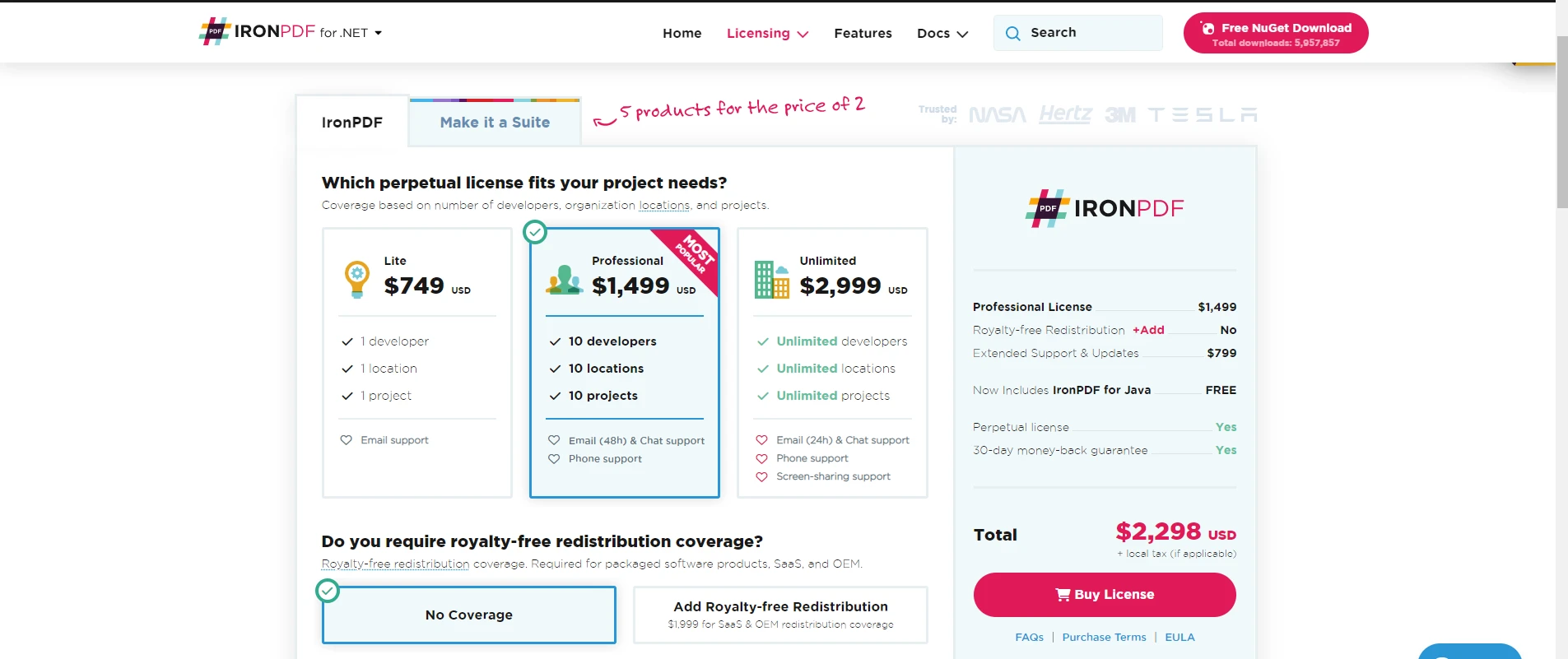
Foxit PDF SDK는 반복 비용이 필요한 구독 기반 라이선스를 사용합니다. Foxit PDF SDK 라이선스는 플랫폼당 연간 $3,000에서 시작합니다. 이는 장기 프로젝트나 다수의 라이선스에는 비용이 많이 듭니다. Foxit PDF SDK의 제한된 라이센스 옵션은 모든 조직에 적합하지 않을 수 있습니다. 대안 가격을 보려면 Apryse vs IronPDF 비교를 확인하세요.
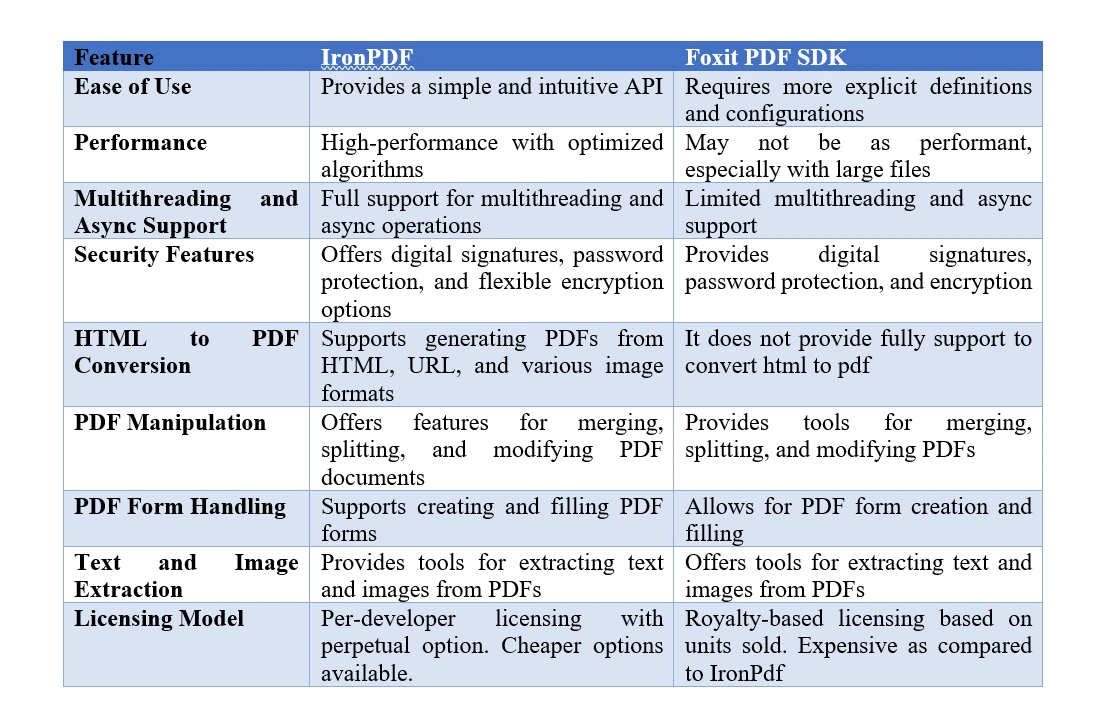
Enterprise 설계자가 선택해야 할 PDF SDK는 무엇입니까?
IronPDF는 뛰어난 사용 편의성과 신뢰할 수 있는 기능성으로 효과적인 PDF 처리를 제공합니다. Chromium 기반 렌더링 엔진에 구축되어 PDF 생성, 조작 및 렌더링을 위한 간단한 API를 제공합니다. 광범위한 HTML, CSS, JavaScript 및 이미지 형식 지원으로 웹 콘텐츠를 고품질 PDF로 매끄럽게 변환할 수 있습니다. 멀티스레딩 및 비동기 지원을 제공하여 성능과 확장성을 향상시킵니다. 또한 IronPDF는 암호화, 디지털 서명 및 암호 보호와 같은 고급 보안 기능을 제공합니다. PDF 조작, 양식 처리 및 텍스트 추출을 위한 완전한 클래스와 기능은 다양한 PDF 작업에 유연성을 제공합니다. IronPDF는 애플리케이션에서 PDF 처리를 위한 신뢰할 수 있는 프레임워크를 제공합니다. PDF 압축, 워터마킹 및 페이지 번호 매기기의 추가 기능을 탐색하세요.
Foxit PDF SDK는 개발 요구에 완벽한 PDF 처리 기능을 제공합니다. PDF 생성, 편집 및 조작을 위한 광범위한 도구를 제공합니다. API를 사용하면 텍스트, 이미지, 주석 및 양식 필드를 세밀하게 제어할 수 있습니다. Foxit PDF SDK는 신뢰할 수 있는 PDF 표준 지원을 통해 호환성을 보장합니다. 그 기능에는 민감한 데이터를 위한 암호화, 디지털 서명 및 암호 보호가 포함됩니다. SDK는 매끄러운 PDF 디스플레이를 위한 고성능 렌더링을 제공합니다. Foxit PDF SDK를 사용하면 맞춤형 워크플로우, 문서 자동화 및 시스템 통합을 통해 정교한 PDF 애플리케이션을 구축할 수 있습니다.
IronPDF는 Foxit PDF SDK 보다 더 비용 효과적인 라이센스를 제공하여 개발 요구에 대해 경제성을 제공합니다. IronPDF의 개발자별 라이센스는 팀 전체가 하나의 라이센스를 사용할 수 있도록 합니다. 이는 각 팀원에 대한 추가 라이센스 비용 없이 협업을 가능하게 합니다. IronPDF는 미래 업데이트 비용 없이 무기한 사용할 수 있는 불변 라이센스를 제공합니다. Foxit PDF SDK의 로열티 기반 모델은 판매된 단위에 따라 비용이 필요합니다. 이는 많은 사용자 기반을 가진 애플리케이션에는 더 높은 비용을 초래합니다. IronPDF는 비용 효과적인 솔루션을 제공하여 라이센스 비용을 절약하면서 효과적인 PDF 기능을 제공합니다.
IronPDF는 Foxit PDF보다 여러 기술적 이점이 있습니다. IronPDF는 쉽게 통합할 수 있는 직관적이고 개발자 친화적인 API를 제공합니다. 직관적인 API로 PDF 처리가 간소화되며, 개발 시간을 줄여줍니다. IronPDF는 원활한 웹-to-PDF 변환을 위해 신뢰할 수 있는 HTML, CSS, JavaScript, 및 이미지 형식 지원을 제공합니다. 멀티스레드 및 비동기 지원을 제공하여 대용량 PDF의 성능과 확장성을 제공합니다. IronPDF의 유연한 암호화 옵션은 보안 맞춤을 위해 알고리즘과 키 길이를 선택할 수 있도록 합니다. IronPDF의 개발자별 및 불변 라이센스는 더 비용 효과적임을 증명합니다. 전반적으로, IronPDF는 사용 용이성, 기능성 및 비용 효율성에서 탁월합니다.
IronPDF는 개발 능력을 개선하기 위한 Iron Suite에 합류합니다. Suite에는 광학 문자 인식을 위한 IronOCR, PDF 처리를 위한 IronPDF, 바코드 생성을 위한 IronBarcode, Excel 조작을 위한 IronXL, 웹 데이터 추출을 위한 IronWebScraper가 포함됩니다. 전체 Suite를 구매함으로써 두 제품의 비용으로 전체 개발 필요를 충족하는 다섯 제품의 결합된 힘을 사용할 수 있습니다. Enterprise 문서 보안을 위해, 고급 보호를 위한 IronSecureDoc을 고려하세요. 데모 페이지를 방문하여 시연을 확인하세요.
자주 묻는 질문
Foxit PDF SDK와 IronPDF의 차이점은 무엇입니까?
IronPDF와 Foxit PDF SDK는 .NET 애플리케이션에서 PDF 작업을 처리하는 데 인기가 있습니다. IronPDF는 HTML을 PDF로의 우수한 변환, 강력한 보안 기능, 비용 효율적인 라이선스 모델을 제공하는 반면, Foxit은 파일 형식 지원과 PDF 주석 기능을 강력하게 제공합니다.
.NET 애플리케이션에서 HTML을 PDF로 변환하는 방법은 무엇입니까?
HTML 문자열을 PDF로 변환하기 위해 IronPDF의 RenderHtmlAsPdf 메서드를 사용할 수 있습니다. 추가적으로,RenderHtmlFileAsPdf를 사용해 HTML 파일을 변환할 수 있습니다.
IronPDF의 보안 기능은 무엇인가요?
IronPDF는 PDF 문서를 보호하기 위해 비밀번호 보호, 암호화 옵션, 디지털 서명, 인증서 관리 등 포괄적인 보안 기능을 제공합니다.
IronPDF는 멀티스레딩 및 비동기 작업을 어떻게 지원하나요?
IronPDF는 멀티스레딩 및 비동기 작업을 지원하도록 설계되어, 개발자들이 .NET 애플리케이션 내에서 여러 PDF 처리 작업을 효율적으로 처리할 수 있습니다.
IronPDF는 다양한 운영 체제에서 사용 가능한가요?
예, IronPDF는 .NET Standard 및 .NET Core를 지원하여 Windows, Linux, macOS 플랫폼에서 호환 가능합니다.
IronPDF를 사용하여 PDF를 생성하는 기본 코드 예제는 무엇인가요?
IronPDF의 기본 예제는 ChromePdfRenderer의 인스턴스를 생성하고, HTML 콘텐츠를 PDF 문서로 렌더링하여 디스크에 저장하는 것을 포함합니다.
IronPDF는 구독 기반 PDF SDK에 비해 어떤 장점이 있나요?
IronPDF는 개발자 당 라이선스 및 영구 라이선스 옵션이 있는 비용 효율적인 라이선스 모델을 제공하여 구독 기반 모델에 비해 더 저렴한 솔루션을 제공합니다.
Iron Suite란 무엇인가요?
Iron Suite는 개발자의 생산성을 높이기 위해 설계된 IronOCR, IronPDF, IronBarcode, IronXL, IronWebscraper 등의 강력한 개발 도구 모음입니다.









 무료로 시작하세요
 무료로 시작하세요
 무료 라이브 데모 예약하기





 신용카드나 계정 생성은 필요하지 않습니다.










