跳過到頁腳內容
產品比較

C#中的HTML到PDF:開源與IronPDF比較

開源的 HTML 轉 PDF 庫雖然省去了授權費用,但需要大量的開發時間和維護工作。 相比之下, IronPDF提供商業解決方案,具有Chrome 渲染、完整功能和專業支持,通常可以降低 .NET 團隊的整體擁有成本。

有哪些適用於 C# 的開放原始碼 HTML to PDF 選項?

.NET 生態系統提供了多個用於HTML 到 PDF 轉換的開源程式庫。 它們各自都有獨特的優勢和局限性,需要仔細評估。 這些庫處理不同的文件格式,對CSS 的支援程度也各不相同,這會影響開發時間和維護成本。

為什麼 PuppeteerSharp 是最受歡迎的開源選擇?

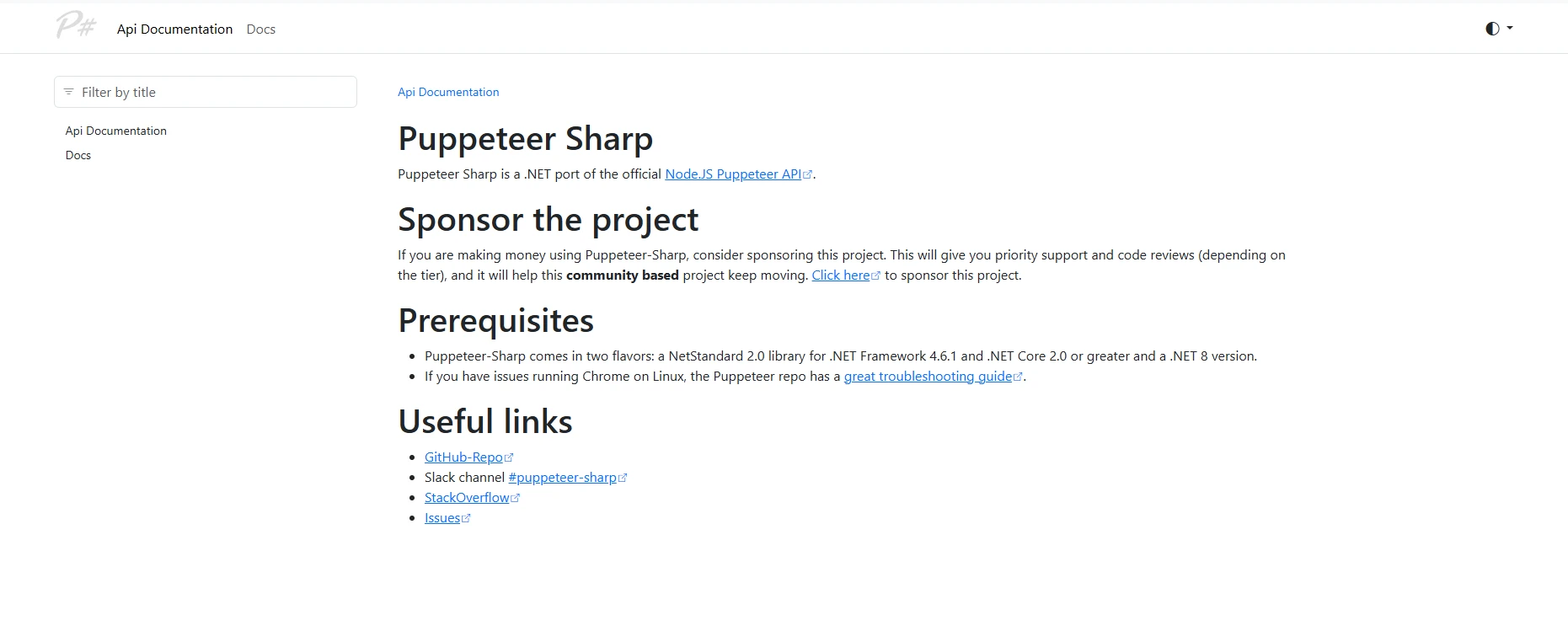
這是 Puppeteer Sharp 文件主頁的截圖,顯示了專案描述、先決條件(包括 .NET Standard 2.0 支援)、GitHub 和 Stack Overflow 的實用鏈接,以及瀏覽器自動化的基本使用範例。

PuppeteerSharp 是 C# 中將 HTML 轉換為 PDF 的領先開源選項。 作為 Google Puppeteer 的 .NET 移植版,它使用無頭Chromium渲染 Web 內容,並完全支援包括CSS3 和 JavaScript在內的現代技術。 轉換過程使用基於 Chrome 的引擎來維持Web 標準的完整性

從生產力角度來看,PuppeteerSharp 要求開發人員了解瀏覽器自動化概念,這增加了 PDF 生成任務的複雜性。 相較之下,較簡單的方案只需幾個小時即可完成開發者入職培訓,而開發者入職培訓通常需要 2-3 天。 您的團隊在擴展瀏覽器實例時必須謹慎管理記憶體使用量

如何使用 PuppeteerSharp 實作基本的 HTML 到 PDF 轉換?

using PuppeteerSharp;
using System.Threading.Tasks;
using System.Diagnostics;

class Program
{
    static async Task Main(string[] args)
    {
        // Track initialization time for ROI calculations
        var stopwatch = Stopwatch.StartNew();

        // DownloadChromiumbrowser (150MB, one-time)
        var browserFetcher = new BrowserFetcher();
        await browserFetcher.DownloadAsync();

        // Launch browser and convert HTML string
        using var browser = await Puppeteer.LaunchAsync(new LaunchOptions 
        { 
            Headless = true,
            Args = new[] { "--no-sandbox", "--disable-setuid-sandbox" } // Required for Linux
        });

        using var page = await browser.NewPageAsync();

        // HTML content with CSS styling and JavaScript
        var html = @"
            <html>
            <head>
                <style>
                    body { font-family: Arial, sans-serif; }
                    .header { color: #2563eb; font-size: 24px; }
                    .content { margin: 20px; }
                    table { width: 100%; border-collapse: collapse; }
                    th, td { padding: 10px; border: 1px solid #ddd; }
                </style>
            </head>
            <body>
                <div class='header'>Invoice #12345</div>
                <div class='content'>
                    <p>Generated on: <span id='date'></span></p>
                    <table>
                        <tr><th>Item</th><th>Quantity</th><th>Price</th></tr>
                        <tr><td>Service A</td><td>10</td><td>$1,000</td></tr>
                    </table>
                    <script>
                        document.getElementById('date').innerText = new Date().toLocaleDateString();
                    </script>
                </div>
            </body>
            </html>";

        await page.SetContentAsync(html);

        // Wait for JavaScript execution
        await page.WaitForSelectorAsync("#date", new WaitForSelectorOptions { Timeout = 5000 });

        await page.PdfAsync("output.pdf", new PdfOptions 
        { 
            Format = PaperFormat.A4,
            PrintBackground = true,
            MarginOptions = new MarginOptions { Top = "20px", Bottom = "20px" }
        });

        stopwatch.Stop();
        Console.WriteLine($"PDF generation took: {stopwatch.ElapsedMilliseconds}ms");
    }
}
using PuppeteerSharp;
using System.Threading.Tasks;
using System.Diagnostics;

class Program
{
    static async Task Main(string[] args)
    {
        // Track initialization time for ROI calculations
        var stopwatch = Stopwatch.StartNew();

        // DownloadChromiumbrowser (150MB, one-time)
        var browserFetcher = new BrowserFetcher();
        await browserFetcher.DownloadAsync();

        // Launch browser and convert HTML string
        using var browser = await Puppeteer.LaunchAsync(new LaunchOptions 
        { 
            Headless = true,
            Args = new[] { "--no-sandbox", "--disable-setuid-sandbox" } // Required for Linux
        });

        using var page = await browser.NewPageAsync();

        // HTML content with CSS styling and JavaScript
        var html = @"
            <html>
            <head>
                <style>
                    body { font-family: Arial, sans-serif; }
                    .header { color: #2563eb; font-size: 24px; }
                    .content { margin: 20px; }
                    table { width: 100%; border-collapse: collapse; }
                    th, td { padding: 10px; border: 1px solid #ddd; }
                </style>
            </head>
            <body>
                <div class='header'>Invoice #12345</div>
                <div class='content'>
                    <p>Generated on: <span id='date'></span></p>
                    <table>
                        <tr><th>Item</th><th>Quantity</th><th>Price</th></tr>
                        <tr><td>Service A</td><td>10</td><td>$1,000</td></tr>
                    </table>
                    <script>
                        document.getElementById('date').innerText = new Date().toLocaleDateString();
                    </script>
                </div>
            </body>
            </html>";

        await page.SetContentAsync(html);

        // Wait for JavaScript execution
        await page.WaitForSelectorAsync("#date", new WaitForSelectorOptions { Timeout = 5000 });

        await page.PdfAsync("output.pdf", new PdfOptions 
        { 
            Format = PaperFormat.A4,
            PrintBackground = true,
            MarginOptions = new MarginOptions { Top = "20px", Bottom = "20px" }
        });

        stopwatch.Stop();
        Console.WriteLine($"PDF generation took: {stopwatch.ElapsedMilliseconds}ms");
    }
}
Imports PuppeteerSharp
Imports System.Threading.Tasks
Imports System.Diagnostics

Module Program
    Async Function Main(args As String()) As Task
        ' Track initialization time for ROI calculations
        Dim stopwatch = Stopwatch.StartNew()

        ' Download Chromium browser (150MB, one-time)
        Dim browserFetcher = New BrowserFetcher()
        Await browserFetcher.DownloadAsync()

        ' Launch browser and convert HTML string
        Using browser = Await Puppeteer.LaunchAsync(New LaunchOptions With {
            .Headless = True,
            .Args = New String() {"--no-sandbox", "--disable-setuid-sandbox"} ' Required for Linux
        })

            Using page = Await browser.NewPageAsync()

                ' HTML content with CSS styling and JavaScript
                Dim html = "
                    <html>
                    <head>
                        <style>
                            body { font-family: Arial, sans-serif; }
                            .header { color: #2563eb; font-size: 24px; }
                            .content { margin: 20px; }
                            table { width: 100%; border-collapse: collapse; }
                            th, td { padding: 10px; border: 1px solid #ddd; }
                        </style>
                    </head>
                    <body>
                        <div class='header'>Invoice #12345</div>
                        <div class='content'>
                            <p>Generated on: <span id='date'></span></p>
                            <table>
                                <tr><th>Item</th><th>Quantity</th><th>Price</th></tr>
                                <tr><td>Service A</td><td>10</td><td>$1,000</td></tr>
                            </table>
                            <script>
                                document.getElementById('date').innerText = new Date().toLocaleDateString();
                            </script>
                        </div>
                    </body>
                    </html>"

                Await page.SetContentAsync(html)

                ' Wait for JavaScript execution
                Await page.WaitForSelectorAsync("#date", New WaitForSelectorOptions With {.Timeout = 5000})

                Await page.PdfAsync("output.pdf", New PdfOptions With {
                    .Format = PaperFormat.A4,
                    .PrintBackground = True,
                    .MarginOptions = New MarginOptions With {.Top = "20px", .Bottom = "20px"}
                })
            End Using
        End Using

        stopwatch.Stop()
        Console.WriteLine($"PDF generation took: {stopwatch.ElapsedMilliseconds}ms")
    End Function
End Module
$vbLabelText   $csharpLabel

PuppeteerSharp 擅長渲染具有動態內容的複雜網頁。 然而,營運開銷仍然很大:Chromium 下載使部署複雜化,每個實例的記憶體使用量超過 200MB,錯誤處理需要瀏覽器自動化的專業知識

其他開源PDF庫有哪些限制?

PDF 檢視器顯示發票 #12345,日期為 2025 年 6 月 11 日,但頁眉下方存在空白內容區域,這表示存在常見的 CSS 渲染錯誤,即僅顯示文件頁眉,而正文內容無法載入。

wkhtmltopdf展示了採用開源軟體的風險。 儘管該工具被廣泛使用,但自 2020 年以來一直缺乏安全性更新。維護者宣布停止維護,導致該工具存在 17 個未修補的CVE 漏洞、與現代Linux 發行版不相容以及 CSS3 支援有限等問題。

DinkToPdf ,wkhtmltopdf 的 .NET 包裝器,繼承了這些問題,同時增加了複雜性。 團隊報告稱,每月需要花費 3-5 小時來解決渲染問題,而商業解決方案可以自動處理這些問題。

PDFsharp/HtmlRenderer.PdfSharp提供輕量級功能,但需要開發人員投入大量精力:

// PDFsharp example - manual HTML parsing required
using PdfSharp.Pdf;
using TheArtOfDev.HtmlRenderer.PdfSharp;

var document = new PdfDocument();
var config = new PdfGenerateConfig()
{
    PageSize = PageSize.A4,
    MarginBottom = 40,
    MarginTop = 40
};

// Very limited HTML/CSS support
var html = "<h1>Basic Title</h1><p>Simple paragraph only</p>";
var pdf = PdfGenerator.GeneratePdf(html, config);
pdf.Save("basic-output.pdf");
// PDFsharp example - manual HTML parsing required
using PdfSharp.Pdf;
using TheArtOfDev.HtmlRenderer.PdfSharp;

var document = new PdfDocument();
var config = new PdfGenerateConfig()
{
    PageSize = PageSize.A4,
    MarginBottom = 40,
    MarginTop = 40
};

// Very limited HTML/CSS support
var html = "<h1>Basic Title</h1><p>Simple paragraph only</p>";
var pdf = PdfGenerator.GeneratePdf(html, config);
pdf.Save("basic-output.pdf");
Imports PdfSharp.Pdf
Imports TheArtOfDev.HtmlRenderer.PdfSharp

Dim document As New PdfDocument()
Dim config As New PdfGenerateConfig() With {
    .PageSize = PageSize.A4,
    .MarginBottom = 40,
    .MarginTop = 40
}

' Very limited HTML/CSS support
Dim html As String = "<h1>Basic Title</h1><p>Simple paragraph only</p>"
Dim pdf = PdfGenerator.GeneratePdf(html, config)
pdf.Save("basic-output.pdf")
$vbLabelText   $csharpLabel

IronPDF 如何簡化 PDF 生成?

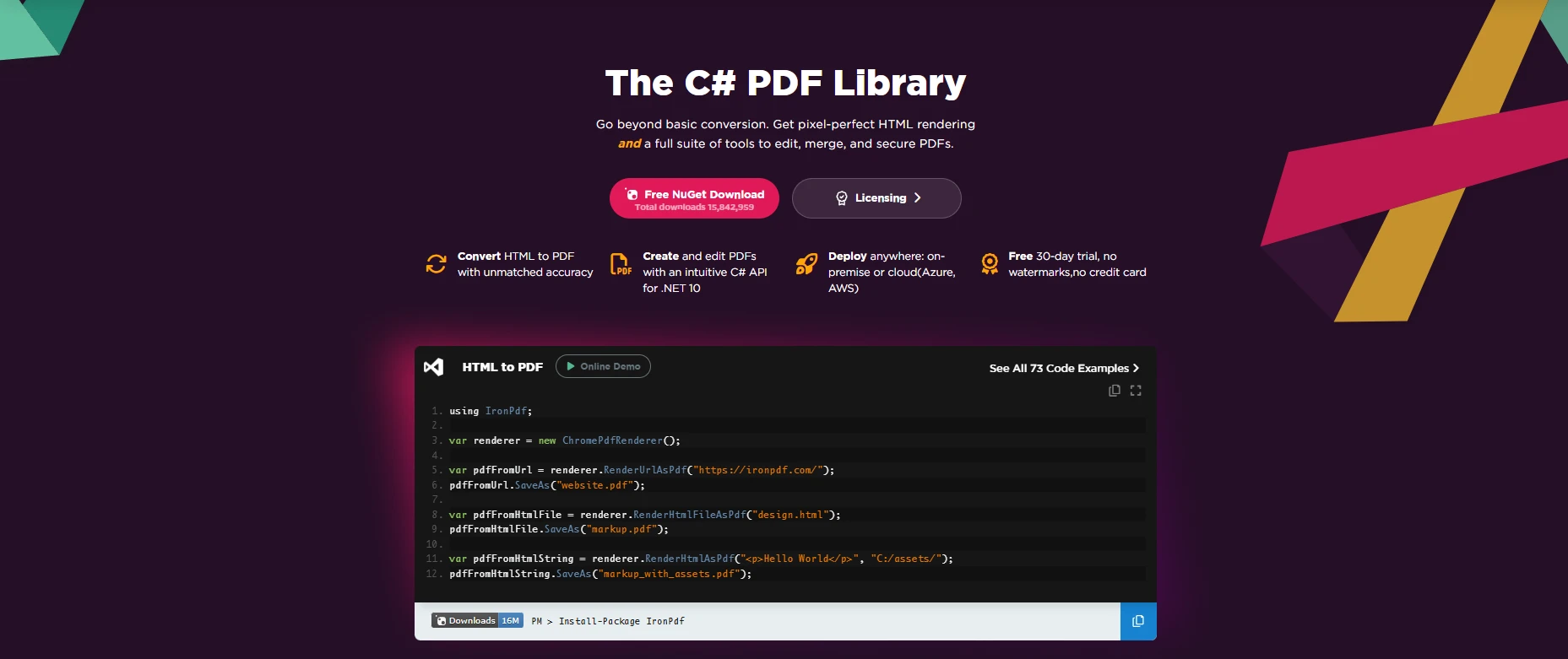
IronPDF C# 庫主頁展示了具有語法高亮顯示的 HTML 轉 PDF 即時程式碼範例,並以"無與倫比的精確度"為標語,同時提供 C# API 整合範例、雲端部署選項以及免費試用版取得方式。

IronPDF 透過其整合的Chrome 渲染引擎提供完整的HTML 到 PDF 轉換功能。 與開源方案不同,它提供了一個簡化的 API,無需外部依賴即可處理複雜場景。 該程式庫與Visual Studio集成,並支援當前的.NET 版本

從管理角度來看,IronPDF 透過以下方式帶來可衡量的回報: -縮短開發時間:實施速度提高 60-70% -維護成本更低自動更新支持 -成本可預測授權條款清晰,無隱藏需求 -企業版功能:內建PDF/A加密簽名 -跨平台WindowsLinuxmacOS

為什麼IronPDF的 API 設計對開發者更友善?

using IronPdf;

class Program
{
    static void Main(string[] args)
    {
        // Initialize renderer with sensible defaults
        var renderer = new ChromePdfRenderer();

        // Configure rendering options for professional output
        renderer.RenderingOptions.MarginTop = 10;
        renderer.RenderingOptions.MarginBottom = 10;
        renderer.RenderingOptions.EnableJavaScript = true;
        renderer.RenderingOptions.WaitFor.RenderDelay(100); // Ensure JS execution

        // HTML with advanced CSS and JavaScript
        var html = @"
            <html>
            <head>
                <style>
                    @page { size: A4; margin: 0; }
                    body { 
                        font-family: 'Segoe UI', Tahoma, Geneva, Verdana, sans-serif;
                        margin: 0;
                        padding: 20px;
                    }
                    .invoice-header { 
                        background: linear-gradient(135deg, #667eea 0%, #764ba2 100%);
                        color: white;
                        padding: 30px;
                        border-radius: 8px;
                        margin-bottom: 30px;
                    }
                    table { 
                        width: 100%; 
                        border-collapse: collapse;
                        margin-top: 20px;
                    }
                    th { 
                        background-color: #f3f4f6;
                        font-weight: 600;
                        text-align: left;
                    }
                    th, td { 
                        padding: 12px 15px;
                        border-bottom: 1px solid #e5e7eb;
                    }
                    .total-row {
                        font-weight: bold;
                        background-color: #f9fafb;
                    }
                </style>
            </head>
            <body>
                <div class='invoice-header'>
                    <h1>Professional Invoice</h1>
                    <p>Generated with IronPDF</p>
                </div>
                <table>
                    <thead>
                        <tr><th>Item</th><th>Quantity</th><th>Unit Price</th><th>Total</th></tr>
                    </thead>
                    <tbody>
                        <tr><td>Consulting Service</td><td>40 hours</td><td>$150</td><td>$6,000</td></tr>
                        <tr><td>Development</td><td>80 hours</td><td>$125</td><td>$10,000</td></tr>
                        <tr class='total-row'><td colspan='3'>Total</td><td>$16,000</td></tr>
                    </tbody>
                </table>
                <script>
                    console.log('PDF generated at ' + new Date().toISOString());
                </script>
            </body>
            </html>";

        // Generate PDF with one method call
        var pdf = renderer.RenderHtmlAsPdf(html);

        // Add professional touches
        pdf.AddWatermark("<h2 style='color:red;opacity:0.5'>CONFIDENTIAL</h2>");
        pdf.AddTextFooter("Page {page} of {total-pages}", IronPdf.Font.FontFamily.Helvetica, 8);

        // Apply security
        pdf.SecuritySettings.MakeReadOnly("owner-password");
        pdf.SecuritySettings.AllowUserPrinting = true;
        pdf.SecuritySettings.AllowUserCopyPasteContent = false;

        pdf.SaveAs("professional-invoice.pdf");

        // Additional conversion methods
        var urlPdf = renderer.RenderUrlAsPdf("___PROTECTED_URL_43___");
        var filePdf = renderer.RenderHtmlFileAsPdf("template.html");
    }
}
using IronPdf;

class Program
{
    static void Main(string[] args)
    {
        // Initialize renderer with sensible defaults
        var renderer = new ChromePdfRenderer();

        // Configure rendering options for professional output
        renderer.RenderingOptions.MarginTop = 10;
        renderer.RenderingOptions.MarginBottom = 10;
        renderer.RenderingOptions.EnableJavaScript = true;
        renderer.RenderingOptions.WaitFor.RenderDelay(100); // Ensure JS execution

        // HTML with advanced CSS and JavaScript
        var html = @"
            <html>
            <head>
                <style>
                    @page { size: A4; margin: 0; }
                    body { 
                        font-family: 'Segoe UI', Tahoma, Geneva, Verdana, sans-serif;
                        margin: 0;
                        padding: 20px;
                    }
                    .invoice-header { 
                        background: linear-gradient(135deg, #667eea 0%, #764ba2 100%);
                        color: white;
                        padding: 30px;
                        border-radius: 8px;
                        margin-bottom: 30px;
                    }
                    table { 
                        width: 100%; 
                        border-collapse: collapse;
                        margin-top: 20px;
                    }
                    th { 
                        background-color: #f3f4f6;
                        font-weight: 600;
                        text-align: left;
                    }
                    th, td { 
                        padding: 12px 15px;
                        border-bottom: 1px solid #e5e7eb;
                    }
                    .total-row {
                        font-weight: bold;
                        background-color: #f9fafb;
                    }
                </style>
            </head>
            <body>
                <div class='invoice-header'>
                    <h1>Professional Invoice</h1>
                    <p>Generated with IronPDF</p>
                </div>
                <table>
                    <thead>
                        <tr><th>Item</th><th>Quantity</th><th>Unit Price</th><th>Total</th></tr>
                    </thead>
                    <tbody>
                        <tr><td>Consulting Service</td><td>40 hours</td><td>$150</td><td>$6,000</td></tr>
                        <tr><td>Development</td><td>80 hours</td><td>$125</td><td>$10,000</td></tr>
                        <tr class='total-row'><td colspan='3'>Total</td><td>$16,000</td></tr>
                    </tbody>
                </table>
                <script>
                    console.log('PDF generated at ' + new Date().toISOString());
                </script>
            </body>
            </html>";

        // Generate PDF with one method call
        var pdf = renderer.RenderHtmlAsPdf(html);

        // Add professional touches
        pdf.AddWatermark("<h2 style='color:red;opacity:0.5'>CONFIDENTIAL</h2>");
        pdf.AddTextFooter("Page {page} of {total-pages}", IronPdf.Font.FontFamily.Helvetica, 8);

        // Apply security
        pdf.SecuritySettings.MakeReadOnly("owner-password");
        pdf.SecuritySettings.AllowUserPrinting = true;
        pdf.SecuritySettings.AllowUserCopyPasteContent = false;

        pdf.SaveAs("professional-invoice.pdf");

        // Additional conversion methods
        var urlPdf = renderer.RenderUrlAsPdf("___PROTECTED_URL_43___");
        var filePdf = renderer.RenderHtmlFileAsPdf("template.html");
    }
}
Imports IronPdf

Module Program
    Sub Main(args As String())
        ' Initialize renderer with sensible defaults
        Dim renderer = New ChromePdfRenderer()

        ' Configure rendering options for professional output
        renderer.RenderingOptions.MarginTop = 10
        renderer.RenderingOptions.MarginBottom = 10
        renderer.RenderingOptions.EnableJavaScript = True
        renderer.RenderingOptions.WaitFor.RenderDelay(100) ' Ensure JS execution

        ' HTML with advanced CSS and JavaScript
        Dim html As String = "
            <html>
            <head>
                <style>
                    @page { size: A4; margin: 0; }
                    body { 
                        font-family: 'Segoe UI', Tahoma, Geneva, Verdana, sans-serif;
                        margin: 0;
                        padding: 20px;
                    }
                    .invoice-header { 
                        background: linear-gradient(135deg, #667eea 0%, #764ba2 100%);
                        color: white;
                        padding: 30px;
                        border-radius: 8px;
                        margin-bottom: 30px;
                    }
                    table { 
                        width: 100%; 
                        border-collapse: collapse;
                        margin-top: 20px;
                    }
                    th { 
                        background-color: #f3f4f6;
                        font-weight: 600;
                        text-align: left;
                    }
                    th, td { 
                        padding: 12px 15px;
                        border-bottom: 1px solid #e5e7eb;
                    }
                    .total-row {
                        font-weight: bold;
                        background-color: #f9fafb;
                    }
                </style>
            </head>
            <body>
                <div class='invoice-header'>
                    <h1>Professional Invoice</h1>
                    <p>Generated with IronPDF</p>
                </div>
                <table>
                    <thead>
                        <tr><th>Item</th><th>Quantity</th><th>Unit Price</th><th>Total</th></tr>
                    </thead>
                    <tbody>
                        <tr><td>Consulting Service</td><td>40 hours</td><td>$150</td><td>$6,000</td></tr>
                        <tr><td>Development</td><td>80 hours</td><td>$125</td><td>$10,000</td></tr>
                        <tr class='total-row'><td colspan='3'>Total</td><td>$16,000</td></tr>
                    </tbody>
                </table>
                <script>
                    console.log('PDF generated at ' + new Date().toISOString());
                </script>
            </body>
            </html>"

        ' Generate PDF with one method call
        Dim pdf = renderer.RenderHtmlAsPdf(html)

        ' Add professional touches
        pdf.AddWatermark("<h2 style='color:red;opacity:0.5'>CONFIDENTIAL</h2>")
        pdf.AddTextFooter("Page {page} of {total-pages}", IronPdf.Font.FontFamily.Helvetica, 8)

        ' Apply security
        pdf.SecuritySettings.MakeReadOnly("owner-password")
        pdf.SecuritySettings.AllowUserPrinting = True
        pdf.SecuritySettings.AllowUserCopyPasteContent = False

        pdf.SaveAs("professional-invoice.pdf")

        ' Additional conversion methods
        Dim urlPdf = renderer.RenderUrlAsPdf("___PROTECTED_URL_43___")
        Dim filePdf = renderer.RenderHtmlFileAsPdf("template.html")
    End Sub
End Module
$vbLabelText   $csharpLabel

IronPDF直覺的API將學習曲線從幾天縮短到幾個小時。 此實作可自動處理複雜的渲染場景,包括帶有頁碼的標題數位簽章PDF/A 合規性表單建立

PDF 轉換功能的主要差異為何?

特點 PuppeteerSharp wkhtmltopdf DinkToPdf PDFsharp IronPDF
CSS3 支援 全文 限額 限額 極簡主義 全文
JavaScript
安裝 約150MB 約40MB 約40MB 約5MB 約20MB
依賴性 Chromium Qt WebKit Qt WebKit
API複雜性 高的 高的 緩和 高的
PDF/A
頁首/頁尾 手動的 命令列介面 命令列介面 手動的 內建
<強>支援</強
設定時間 4-6小時 2-3小時 2-3小時 1-2小時 <30分鐘

開源解決方案和商業解決方案的總成本有何不同?

工程團隊往往只專注於授權費用,而忽略了總擁有成本。 產業數據顯示,中型團隊的實際年度成本是多少?

開源解決方案有哪些隱性成本?

-初期實施:40-80 小時 × 100 美元/小時 = 4,000-8,000 美元 -每月維護費用:10-20 小時 × 100 美元/小時 × 12 = 12,000 美元 - 24,000 美元 -生產問題:2-3 起事故 × 8 小時 × 每小時 150 美元 = 2400-3600 美元 -安全審計:季度審核 = 8,000 美元 -基礎設施:額外伺服器 = 2,400 美元/年

開源軟體總成本:每年 28,800 美元至 46,000 美元

IronPDF的總投資額是多少?

-團隊授權:2,999 美元/年 -實施費用:8-16 小時 × 每小時 100 美元 = 800-1600 美元 -支援:包含在優先回應服務中

IronPDF總費用:每年3,799美元至4,599美元

ROI 分析表明,IronPDF 通常可在 2-3 個月內透過縮短開發時間和消除維護來收回投資。 據各公司反映,每月在 PDF 相關問題上可節省 15-25 個開發人員工時。

哪種解決方案適合您的 PDF 生成需求?

開源解決方案和商業解決方案之間的選擇取決於您的具體情況。

何時選擇開源軟體: 您的團隊擁有深厚的PDF專業知識。

  • 有專門的維修資源 要求保持基本穩定
  • 建構概念驗證項目

選擇IronPDF的情況: 團隊生產力驅動決策 進階功能很重要 專業支持能帶來價值 可預測的成本超過了許可費

我如何才能立即開始創建高品質的PDF文件?

對於正在評估 PDF 解決方案的團隊來說,成功需要評估實際需求並計算實際成本。 雖然開源庫免除了許可費用,但它們也帶來了大量的隱性成本,例如開發時間和維護負擔。

IronPDF 提供以提升開發人員效率為首要目標的完整解決方案。 該庫包含豐富的文件程式碼範例專業支持,確保您的團隊取得成功。

首先可享30 天免費試用,以便根據您的使用情境評估 IronPDF。 此試用版提供完整的功能和支持,使用戶能夠根據經驗而不是假設做出明智的決定。

立即透過 NuGet 套件管理器安裝 IronPDF:

Install-Package IronPdf

使用專為滿足企業需求而設計的解決方案,將 HTML 內容轉換為像素級完美的 PDF。 您的應用程式可以立即使用這個功能豐富的程式庫來加速 PDF 開發。

常見問題解答

與開源 HTML 轉 PDF 庫相比,使用 IronPDF 有哪些優勢?

IronPDF 提供強大的功能,例如精確渲染、支援複雜的 CSS 和 JavaScript 以及卓越的效能,使其成為 .NET 中大規模 PDF 生成專案的理想選擇。

IronPDF在將HTML轉換為PDF時能否處理複雜的網頁?

是的,IronPDF 旨在處理複雜的網頁,包括那些具有複雜 CSS 和 JavaScript 的網頁,從而確保準確、高品質的 PDF 轉換。

IronPDF 如何改善 .NET 專案的開發流程?

IronPDF 透過提供可靠且高效的 HTML 到 PDF 轉換來簡化開發過程,從而減少將 PDF 生成整合到 .NET 應用程式所需的時間和精力。

IronPDF 是否適合產生大規模 PDF 文件?

沒錯,IronPDF 的設計初衷就是為了有效率地處理大規模 PDF 生成,因此非常適合需要大量建立 PDF 的專案。

IronPDF是否支援自訂PDF生成功能?

是的,IronPDF 支援各種自訂功能,例如設定頁首、頁尾和浮水印,因此可以建立客製化的 PDF 文件。

與開源程式庫相比,IronPDF 提供哪些類型的支援?

IronPDF 提供專業支援和定期更新,確保開發人員獲得最新的功能和協助,這與許多開源替代方案不同。

IronPDF 如何確保高質量的 PDF 輸出?

IronPDF 使用先進的渲染技術,確保轉換後的 PDF 文件保持高品質,準確反映原始 HTML 內容。

IronPDF 和開源 HTML 轉 PDF 轉換器在效能上是否有差異?

是的,與許多開源轉換器相比,IronPDF 通常具有更優異的效能,轉換速度更快,資源管理也更好。

我可以輕鬆地將 IronPDF 整合到現有的 .NET 應用程式中嗎?

IronPDF 旨在輕鬆整合到現有的 .NET 應用程式中,提供簡單易用的 API,最大限度地減少添加 PDF 功能所需的工作量。

哪些類型的項目最能從使用 IronPDF 中受益?

需要頻繁產生高品質 PDF 的項目,例如發票系統、報告工具和 Web 存檔應用程序,都可以從使用 IronPDF 中受益匪淺。

Curtis Chau
技術作家

Curtis Chau 擁有卡爾頓大學計算機科學學士學位,專注於前端開發,擅長於 Node.js、TypeScript、JavaScript 和 React。Curtis 熱衷於創建直觀且美觀的用戶界面,喜歡使用現代框架並打造結構良好、視覺吸引人的手冊。

除了開發之外,Curtis 對物聯網 (IoT) 有著濃厚的興趣,探索將硬體和軟體結合的創新方式。在閒暇時間,他喜愛遊戲並構建 Discord 機器人,結合科技與創意的樂趣。

鋼鐵支援團隊

我們每週 5 天,每天 24 小時在線上。
聊天
電子郵件
打電話給我