


C#字符串包含(對開發者如何理解其工作)

在現今的開發世界中,對於需要處理文件、表單或報告的應用程式而言,使用 PDF 是一項常見的需求。 無論您是在建立電子商務平台、文件管理系統,或只是需要處理發票,從 PDF 中萃取和搜尋文字都是非常重要的。 本文將指導您如何使用 C# string.Contains() 與 IronPDF 在您的 .NET 專案中搜尋 PDF 檔案並擷取文字。
字串比較與指定子串
執行搜尋時,可能需要根據特定的字串子串要求執行字串比較。 在這種情況下,C# 提供了 string.Contains() 等選項,這是最簡單的比較形式之一。
如果您需要指定是否要忽略大小寫敏感性,可以使用 StringComparison 列舉。 這可讓您選擇想要的字串比較類型 - 例如順序比較或不區分大小寫的比較。
如果您想要處理字串中的特定位置,例如第一個字元位置或最後一個字元位置,您總是可以使用 Substring 來隔離字串中的特定部分,以便進一步處理。
如果您正在尋找空字串檢查或其他邊緣情況,請務必在邏輯中處理這些情況。
如果您要處理的是大型文件,最佳化文字擷取的起始位置,只擷取相關部分而非整個文件是很有用的。 如果您要避免記憶體負荷過重和處理時間過長,這可能會特別有用。
如果您不確定比較規則的最佳方法,請考慮執行的特定方法,以及您希望搜尋在不同情況下的表現(例如,比較多個詞彙、處理空格等)。
如果您的需求不只是簡單的子串檢查,而是需要更進階的模式匹配,請考慮使用正則表達式,因為正則表達式在處理 PDF 時具有極大的靈活性。
如果您尚未使用 IronPDF,請立即試用 免費試用版,探索其功能,看看它如何簡化您的 PDF 處理工作。 無論您是要建立文件管理系統、處理發票,或只是需要從 PDF 中萃取資料,IronPDF 都是最適合的工具。
什麼是 IronPDF,為什麼要使用它?
IronPDF 是一個功能強大的函式庫,設計用來幫助在 .NET 生態系統中處理 PDF 的開發人員。 它能讓您輕鬆建立、閱讀、編輯和處理 PDF 檔案,而無需依賴外部工具或複雜的設定。
IronPDF 概述
IronPDF 提供了在 C# 應用程式中處理 PDF 的廣泛功能。 一些主要功能包括
*文字擷取:從 PDF 擷取純文字或結構化資料。
- PDF 編輯:透過新增、刪除或編輯文字、圖像和頁面來修改現有 PDF。
- PDF轉換:將HTML或ASPX頁面轉換為PDF,反之亦然。 *表單處理:提取或填入互動式 PDF 表單中的表單欄位。
IronPDF 的設計不僅簡單易用,還能夠靈活處理涉及 PDF 的複雜情況。 它可與 .NET Core 和 .NET Framework 無縫配合,因此非常適合任何以 .NET 為基礎的專案。
安裝 IronPDF。
若要使用 IronPDF,請透過 Visual Studio 中的 NuGet Package Manager 安裝:
Install-Package IronPdf
How to Search Text in PDF Files Using C#
在深入搜尋 PDF 之前,讓我們先瞭解如何使用 IronPDF 從 PDF 擷取文字。
使用 IronPDF 進行基本 PDF 文字萃取
IronPDF 提供簡單的 API,可從 PDF 文件中抽取文字。 這可讓您輕鬆地在 PDF 內搜尋特定內容。
以下範例示範如何使用 IronPDF 從 PDF 中擷取文字:
using IronPdf;
using System;

public class Program
{
    public static void Main(string[] args)
    {
        // Load the PDF from a file
        PdfDocument pdf = PdfDocument.FromFile("invoice.pdf");
        // Extract all text from the PDF
        string text = pdf.ExtractAllText();
        // Optionally, print the extracted text to the console
        Console.WriteLine(text);
    }
}
using IronPdf;
using System;
public class Program
{
public static void Main(string[] args)
{
// Load the PDF from a file
PdfDocument pdf = PdfDocument.FromFile("invoice.pdf");
// Extract all text from the PDF
string text = pdf.ExtractAllText();
// Optionally, print the extracted text to the console
Console.WriteLine(text);
}
}Imports IronPdf
Imports System
Public Class Program
Public Shared Sub Main(ByVal args() As String)
' Load the PDF from a file
Dim pdf As PdfDocument = PdfDocument.FromFile("invoice.pdf")
' Extract all text from the PDF
Dim text As String = pdf.ExtractAllText()
' Optionally, print the extracted text to the console
Console.WriteLine(text)
End Sub
End Class在這個範例中,ExtractAllText() 方法從 PDF 文件中擷取所有文字。 然後可以對這些文字進行處理,以搜尋特定的關鍵字或詞組。
使用 string.Contains() 進行文字搜尋
從 PDF 擷取文字後,您可以使用 C# 內建的 string.Contains() 方法搜尋特定的字或詞組。
string.Contains() 方法傳回布林值,指示指定的字串是否存在於字串中。 這對基本的文字搜尋特別有用。
以下是如何使用 string.Contains() 在擷取的文字中搜尋關鍵字:
bool isFound = text.Contains("search term", StringComparison.OrdinalIgnoreCase);bool isFound = text.Contains("search term", StringComparison.OrdinalIgnoreCase);Dim isFound As Boolean = text.Contains("search term", StringComparison.OrdinalIgnoreCase)實用範例:如何檢查 PDF 文件中的 C# 字串是否包含關鍵字:
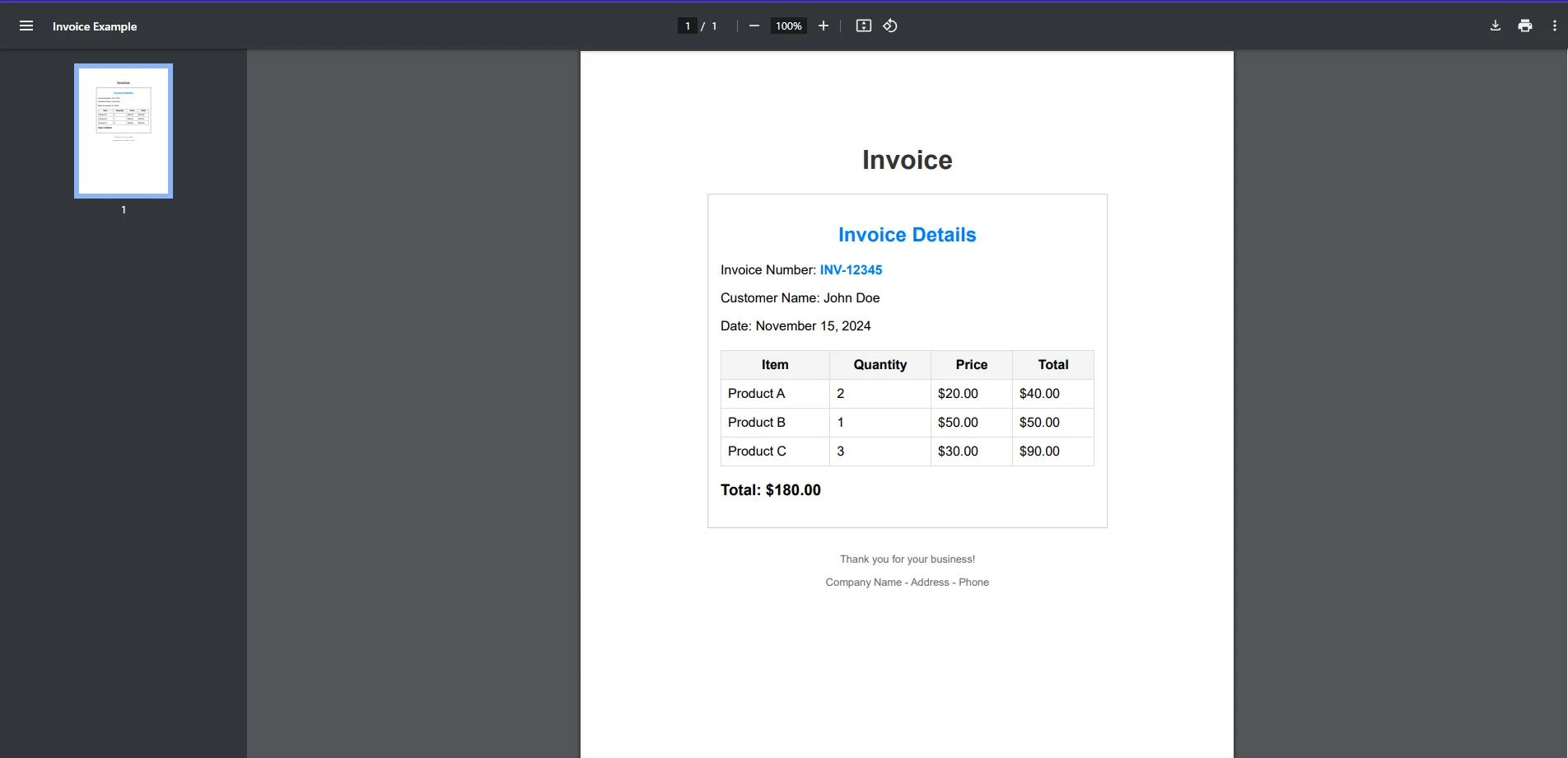
讓我們以實例來進一步說明。 假設您想要找出 PDF 發票文件中是否存在特定的發票號碼。
以下是一個完整的實作範例:
using IronPdf;
using System;

public class Program
{
    public static void Main(string[] args)
    {
        string searchTerm = "INV-12345";
        // Load the PDF from a file
        PdfDocument pdf = PdfDocument.FromFile("exampleInvoice.pdf");
        // Extract all text from the PDF
        string text = pdf.ExtractAllText();
        // Search for the specific invoice number
        bool isFound = text.Contains(searchTerm, StringComparison.OrdinalIgnoreCase);
        // Provide output based on whether the search term was found
        if (isFound)
        {
            Console.WriteLine($"Invoice number: {searchTerm} found in the document");
        }
        else
        {
            Console.WriteLine($"Invoice number {searchTerm} not found in the document");
        }
    }
}
using IronPdf;
using System;
public class Program
{
public static void Main(string[] args)
{
string searchTerm = "INV-12345";
// Load the PDF from a file
PdfDocument pdf = PdfDocument.FromFile("exampleInvoice.pdf");
// Extract all text from the PDF
string text = pdf.ExtractAllText();
// Search for the specific invoice number
bool isFound = text.Contains(searchTerm, StringComparison.OrdinalIgnoreCase);
// Provide output based on whether the search term was found
if (isFound)
{
Console.WriteLine($"Invoice number: {searchTerm} found in the document");
}
else
{
Console.WriteLine($"Invoice number {searchTerm} not found in the document");
}
}
}Imports IronPdf
Imports System
Public Class Program
Public Shared Sub Main(ByVal args() As String)
Dim searchTerm As String = "INV-12345"
' Load the PDF from a file
Dim pdf As PdfDocument = PdfDocument.FromFile("exampleInvoice.pdf")
' Extract all text from the PDF
Dim text As String = pdf.ExtractAllText()
' Search for the specific invoice number
Dim isFound As Boolean = text.Contains(searchTerm, StringComparison.OrdinalIgnoreCase)
' Provide output based on whether the search term was found
If isFound Then
Console.WriteLine($"Invoice number: {searchTerm} found in the document")
Else
Console.WriteLine($"Invoice number {searchTerm} not found in the document")
End If
End Sub
End Class輸入 PDF 文件
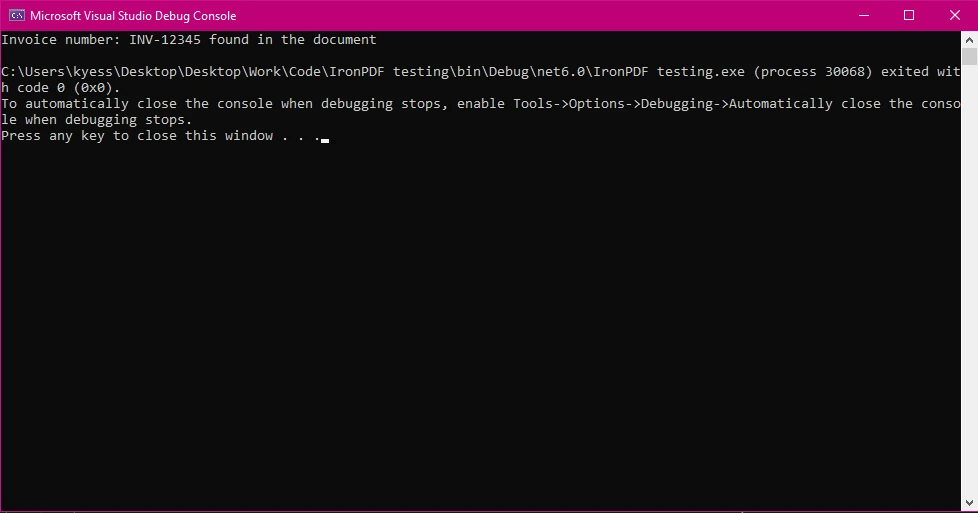
控制台輸出
在這個範例中
- 我們載入 PDF 檔案並擷取其文字。
然後,我們使用
string.Contains()在提取的文字中搜尋發票號碼INV-12345。 - 由於
StringComparison.OrdinalIgnoreCase,搜尋不區分大小寫。
使用正規表達式增強搜尋功能
雖然 string.Contains() 可以用於簡單的子字串搜索,但您可能想要執行更複雜的搜索,例如查找模式或一系列關鍵字。 為此,您可以使用正則表達式。
以下是使用正則表達式在 PDF 文字中搜尋任何有效發票號碼格式的範例:
using IronPdf;
using System;
using System.Text.RegularExpressions;

public class Program
{
    public static void Main(string[] args)
    {
        // Define a regex pattern for a typical invoice number format (e.g., INV-12345)
        string pattern = @"INV-\d{5}";
        // Load the PDF from a file
        PdfDocument pdf = PdfDocument.FromFile("exampleInvoice.pdf");
        // Extract all text from the PDF
        string text = pdf.ExtractAllText();
        // Perform the regex search
        Match match = Regex.Match(text, pattern);
        // Check if a match was found
        if (match.Success)
        {
            Console.WriteLine($"Invoice number found: {match.Value}");
        }
        else
        {
            Console.WriteLine("No matching invoice number found.");
        }
    }
}
using IronPdf;
using System;
using System.Text.RegularExpressions;
public class Program
{
public static void Main(string[] args)
{
// Define a regex pattern for a typical invoice number format (e.g., INV-12345)
string pattern = @"INV-\d{5}";
// Load the PDF from a file
PdfDocument pdf = PdfDocument.FromFile("exampleInvoice.pdf");
// Extract all text from the PDF
string text = pdf.ExtractAllText();
// Perform the regex search
Match match = Regex.Match(text, pattern);
// Check if a match was found
if (match.Success)
{
Console.WriteLine($"Invoice number found: {match.Value}");
}
else
{
Console.WriteLine("No matching invoice number found.");
}
}
}Imports IronPdf
Imports System
Imports System.Text.RegularExpressions
Public Class Program
Public Shared Sub Main(ByVal args() As String)
' Define a regex pattern for a typical invoice number format (e.g., INV-12345)
Dim pattern As String = "INV-\d{5}"
' Load the PDF from a file
Dim pdf As PdfDocument = PdfDocument.FromFile("exampleInvoice.pdf")
' Extract all text from the PDF
Dim text As String = pdf.ExtractAllText()
' Perform the regex search
Dim match As Match = Regex.Match(text, pattern)
' Check if a match was found
If match.Success Then
Console.WriteLine($"Invoice number found: {match.Value}")
Else
Console.WriteLine("No matching invoice number found.")
End If
End Sub
End Class此程式碼會搜尋任何遵循 INV-XXXXX(其中 XXXXX 為一連串數字)模式的發票號碼。
在 .NET 中處理 PDF 的最佳實務
在處理 PDF(尤其是大型或複雜的文件)時,有幾個最佳實務需要牢記:
優化文字萃取
*處理大型 PDF:*如果您要處理大型 PDF,最好將文字分成較小的區塊(按頁)提取,以減少記憶體使用量並提高效能。 處理特殊編碼:**注意 PDF 中的編碼和特殊字元。 IronPDF 通常可以很好地處理這一問題,但複雜的佈局或字體可能需要額外處理。
將 IronPDF 整合到 .NET 專案中。
IronPDF 可輕鬆與 .NET 專案整合。 透過 NuGet 下載並安裝 IronPDF 函式庫後,只需將其匯入您的 C# 程式碼庫即可,如上述範例所示。
IronPDF 的靈活性可讓您建立複雜的文件處理工作流程,例如:
- 從表格中搜尋並擷取資料。
- 將 HTML 轉換為 PDF 並擷取內容。
- 根據使用者輸入或資料庫的資料建立報表。
結論
IronPDF可讓您輕鬆、有效率地處理 PDF,尤其是當您需要抽取和搜尋 PDF 中的文字時。 將 C# 的 string.Contains() 方法與 IronPDF 的文字擷取功能結合,您可以在 .NET 應用程式中快速搜尋和處理 PDF。
如果您還沒有試用 IronPDF,請立即試用 IronPDF 的免費試用版,探索其功能,看看它如何簡化您的 PDF 處理工作。 無論您是要建立文件管理系統、處理發票,或只是需要從 PDF 中萃取資料,IronPDF 都是最適合的工具。
若要開始使用 IronPDF,請下載 免費試用版,親身體驗其強大的 PDF 處理功能。 請造訪 IronPDF 的網站,立即開始。
常見問題
如何使用 C# 的 string.Contains() 在 PDF 文件中搜索文本?
您可以結合使用 C# 的 string.Contains() 和 IronPDF 在 PDF 文件中搜索特定文本。首先,使用 IronPDF 的文本提取功能從 PDF 中提取文本,然後應用 string.Contains() 來尋找所需的文本。
在 .NET 中使用 IronPDF 進行 PDF 文本提取有什麼好處?
IronPDF 提供了易於使用的 API 用於從 PDFs 中提取文本,這對於需要高效處理文檔的應用程序非常重要。它簡化了流程,讓開發人員能夠專注於實施業務邏輯,而不必處理複雜的 PDF 操作。
如何確保使用 C# 在 PDFs 中進行不區分大小寫的文本搜索?
要在 PDFs 中執行不區分大小寫的文本搜索,請使用 IronPDF 提取文本,然後應用 C# 的 string.Contains() 方法與 StringComparison.OrdinalIgnoreCase,以在搜索過程中忽略大小寫。
哪些場景需要使用正則表達式而非 string.Contains()?
當您需要在從 PDF 中提取的文本中搜索複雜模式或多個關鍵字時,正則表達式比 string.Contains() 更合適。它們提供了不適用於簡單子字符串搜索的高級模式匹配能力。
從大型 PDF 文檔中提取文本時如何優化性能?
要在從大型 PDFs 中提取文本時優化性能,考慮分段處理文檔,比如逐頁處理。這種方法減少了內存使用並通過防止資源過載來提高系統性能。
IronPDF 是否與 .NET Core 和 .NET Framework 兼容?
是的,IronPDF 與 .NET Core 和 .NET Framework 兼容,使其對不同的 .NET 應用程序具有多樣性。這種兼容性確保它可以集成到不同類型的項目中而不會出現兼容性問題。
如何開始在 .NET 項目中使用 PDF 庫?
要在 .NET 項目中開始使用 IronPDF,請通過 Visual Studio 中的 NuGet 包管理器安裝它。安裝後,您可以將其導入到 C# 代碼庫中,並利用其功能,如文本提取和 PDF 操作,以滿足您的文檔處理需求。
IronPDF 的 PDF 操作的關鍵功能有哪些?
IronPDF 為 PDF 操作提供了一系列功能,包括文本提取、PDF 編輯和轉換。這些功能幫助開發人員高效處理 PDFs,簡化在 .NET 應用程序中如表單處理和文檔生成子的流程。
IronPDF 如何簡化 .NET 應用程序中的 PDF 處理?
IronPDF 通過提供全面的 API,讓開發人員能夠輕鬆創建、編輯和從 PDF 文件中提取數據來簡化 PDF 處理。這消除了對複雜配置的需求,使 .NET 應用程序內的高效文檔處理工作流程成為可能。
如何在 .NET 項目中安裝 IronPDF?
可以使用 Visual Studio 中的 NuGet 包管理器在 .NET 項目中安裝 IronPDF。使用命令:Install-Package IronPDF 將 IronPDF 添加到您的項目中並開始利用其 PDF 操控功能。









 立即免費開始
 立即免費開始
 預約免費線上示範





 無需信用卡或註冊帳號










