IronPDF凭借原生基于Chromium的HTML渲染、完整的Bootstrap支持、完整的文档和深度.NET集成,在C# PDF生成方面优于ComPDFKit。
PDF,是便携文档格式的缩写,由Adobe创建,以确保文件共享中的统一性。 此格式可在不同设备和操作系统上保持版面、文本及图片的一致性。 PDF 文件具备安全性、交互功能和文件体积小等优势,使其成为分发文档且确保内容不被篡改的理想选择。
对于使用 C# 的开发者而言,PDF 库提供了处理 PDF 文件的解决方案。 这些库支持文档创建、内容修改以及文本和图像的提取。 它们支持表单处理、数字签名和跨平台兼容性等功能。 这些库旨在提高性能,可实现高效的PDF处理。
本文对比了两个 C# PDF 库:IronPDF 和 ComPDFKit。 本对比涵盖了特性、功能、代码示例及许可协议。 通过考察这些方面,开发者可以确定哪款库最适合其与 PDF 相关的项目。
快速比较概述
在深入分析之前,先来看一份关键功能的完整对比:
- **PDF 查看:**ComPDFKit 提供了一个功能强大的 PDF 查看器,允许用户以高保真度查看 PDF 文档。 查看器支持平滑滚动、缩放和导航,确保无缝的用户体验。
- **注释:**该库包含可无缝集成 PDF 注释的工具。 用户可以突出显示文本、添加评论和创建各种类型的注释,这是协作工作流程所必需的。
- **表单处理:**该库为交互式表单提供了全面的支持。 开发人员可以创建、填写和从PDF表单中提取数据,该功能非常适合需要表单处理的应用程序。
- **PDF 编辑:**ComPDFKit 提供了强大的 PDF 编辑功能,包括修改 PDF 文件中的文本、图像及其他内容。 此功能对需要更新或自定义现有PDF文档的应用程序非常有用。
- **格式转换:**该库支持将 PDF 文件与 WORD、Excel、PowerPoint 及图像等多种格式之间进行相互转换。 这种灵活性对于需要为不同用途转换PDF内容的应用程序至关重要。
- **安全性:**ComPDFKit 包含加密和权限管理等强大的安全功能。 开发人员能够保护PDF文档,防止敏感信息被未经授权访问。
- **光学字符识别(OCR):**该库包含 OCR 功能,可将扫描文档转换为可编辑且可搜索的 PDF 文件。 此功能对于将纸质文档数字化并使其可以电子方式访问是必不可少的。
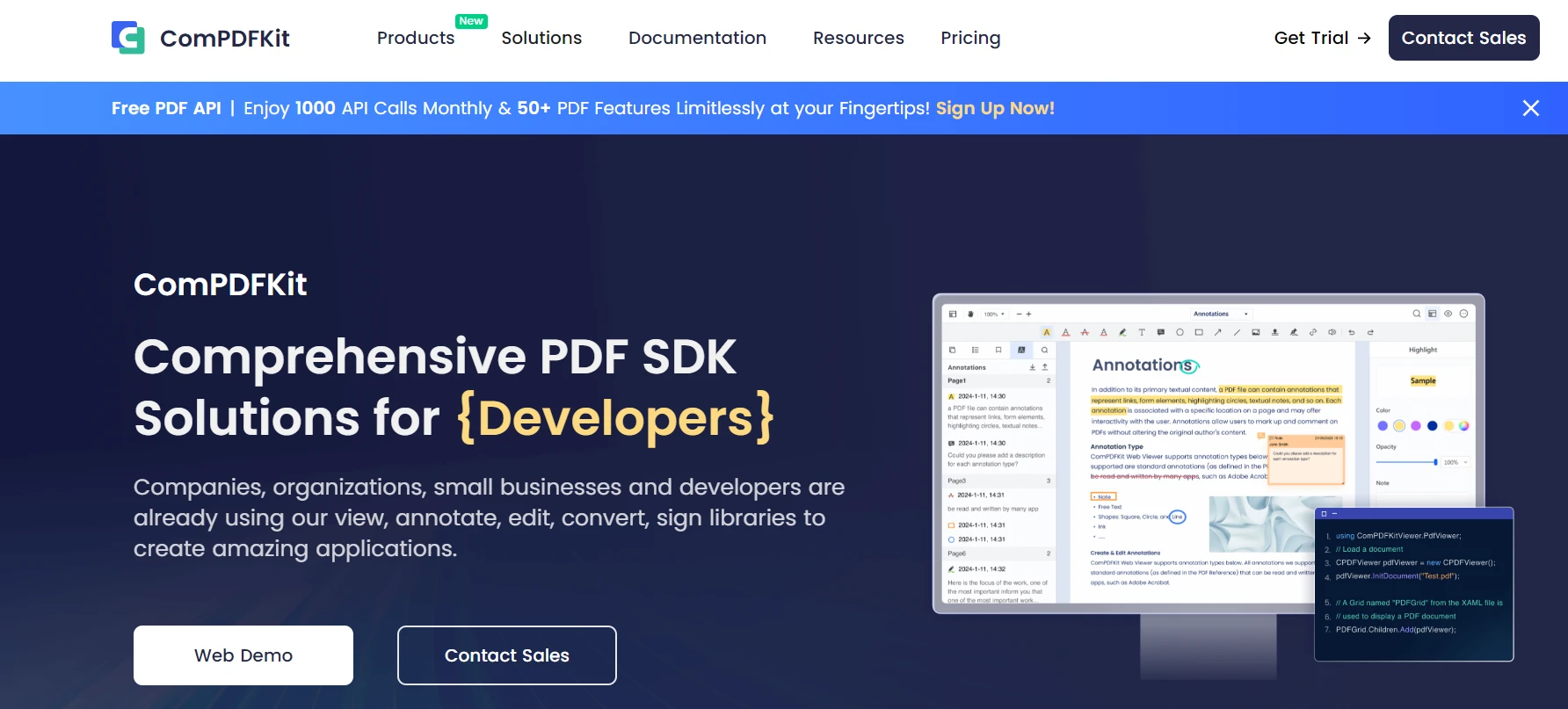
ComPDFKit PDF SDK 是一款可靠的 C# PDF SDK,可让开发人员将完整的 PDF 功能集成到其应用程序中。 该库支持处理PDF文件所需的多种PDF功能。 它被设计用于多种环境,包括网络、桌面和移动平台,使其成为开发跨平台项目的开发人员的多功能工具。 示例解决方案包含多个功能,开发者可以进行选择和测试。
ComPDFKit提供哪些主要功能?
核心功能:
- PDF查看:提供了一个具有平滑滚动、缩放和导航能力的高效查看器
- 注释:包含用于高亮文本、添加注释以及创建各种注释类型的工具
- 表单处理:支持创建交互式 PDF 表单、填写表单以及从表单中提取数据
- PDF 编辑:支持修改现有 PDF 文档中的文本、图像及其他内容
- 转换:支持将PDF转换为Word、Excel、
PowerPoint和图像格式
- 安全性:包含加密和权限管理功能,以保护敏感信息
- 光学字符识别(OCR):将扫描的文档转换为可编辑且可搜索的 PDF 文件
为何考虑采用ComPDFKit的架构?
- **HTML 转 PDF:**IronPDF 擅长将 HTML、CSS 和 JavaScript 内容转换为高质量的 PDF 文档。 此功能支持将HTML字符串转换为PDF,URL,ASPX webforms和MVC视图,使其成为适用于各种基于网络的内容的灵活解决方案。
- **PDF 编辑:**该库提供丰富的编辑功能,包括添加、复制和删除页面,合并及拆分 PDF 文件,以及对文本和图像进行操作。 开发人员还可以向PDF文档添加页眉,页脚,水印和数字签名。
- **表单处理:**IronPDF 支持智能表单创建,并可通过编程方式填写 PDF 表单。 此功能对于需要动态表单生成和从用户提交表单中提取数据的应用程序来说是至关重要的。
- **安全功能:**IronPDF 提供强大的安全选项,例如设置密码和权限、加密文档以及添加数字签名。 这些功能确保PDF文档中的敏感信息得到保护免受未经授权的访问。
- **OCR 与数据提取:**该库包含光学字符识别(OCR)功能,可将扫描文档转换为可编辑且可搜索的 PDF 文件。 此外,IronPDF可以从现有的PDF中提取文本、图像和其他数据,方便内容重用和分析。
- **图像转换:**IronPDF 支持将多种图像格式(包括 JPG、PNG、GIF、BMP 和 SVG)转换为 PDF 文档。 它还提供将PDF页面呈现为图像的功能,这对于需要PDF内容的视觉预览的应用程序非常有用。
- **跨平台兼容性:**IronPDF 兼容多种 .NET 平台,包括 .NET Core、.NET Framework 和 .NET Standard。 它支持在Windows、Linux、macOS和Azure上部署,使其成为在各种不同环境中工作的开发人员的多功能选择。
- **性能优化:**该库专为高性能设计,支持多线程和异步操作。 这确保即使在高负载应用中,PDF处理任务也能高效执行。
- **全面的文档与支持:**IronPDF 提供详尽的文档和大量代码示例,使开发人员能够轻松入门并实现其各项功能。 此外,它提供技术支持以帮助解决开发过程中可能出现的任何问题。
对于需要可靠标注功能的 Enterprise 级应用,ComPDFKit 提供了基础功能。 高级表单创建功能可能需要额外的编程工作。 虽然该工具可满足 OCR 任务的基本需求,但寻求高级文本识别功能的开发者应评估其他替代方案(如 IronOCR),以获得更高的识别准确度。
ComPDFKit有哪些局限性?
尽管功能齐全,ComPDFKit在企业开发方面有几个需要考虑的地方:
- CSS支持:与原生Chromium渲染器相比,现代CSS框架兼容性有限
- 文档:仅包含基础示例,不包含完整的故障排除指南
- 集成复杂性:为实现完整功能可能需要多个包
什么是IronPDF库?
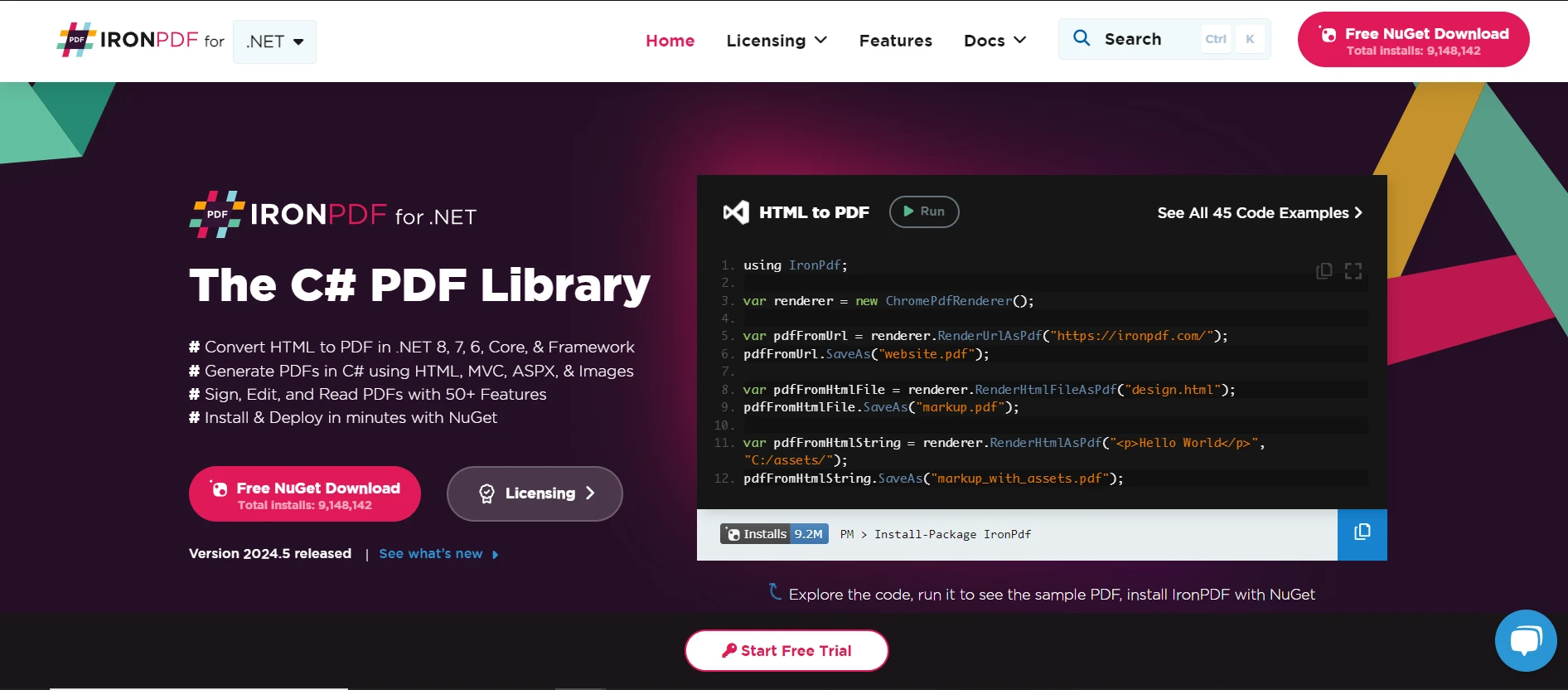
IronPDF 是一个用于.NET的多功能PDF库,允许开发人员使用C#创建、编辑和管理PDF文档。 它通过简化的 API 提供完整的 PDF 功能。该库擅长通过渲染 HTML、CSS、JavaScript 以及各种图像格式来生成 PDF。 这使其成为开发人员将可靠的 PDF 功能集成到 .NET 应用程序中的理想工具。
IronPDF提供哪些主要功能?
高级功能:
为何选择IronPDF用于生产系统?
IronPDF 的架构优先考虑生产环境中的性能和可靠性:
是什么让IronPDF具备 Enterprise 级应用能力?
IronPDF 凭借以下面向生产环境的功能脱颖而出:
如何创建一个新的 Visual Studio 项目?
在探索代码示例之前,开发者应先创建一个新的 Visual Studio 项目。 本指南概述了在 Visual Studio 中设置 C# 控制台应用程序的步骤。
为什么需要安装 Visual Studio?
Visual Studio为C#项目提供了改进的IDE。 请从 Visual Studio 下载页面下载。 IDE提供了集成调试功能、IntelliSense和PDF开发所需的软件包管理。
哪种项目配置效果最佳?
安装完成后,请打开 Visual Studio。 登录或在使用 Visual Studio Community 时无需登录继续操作。 请按照以下配置步骤操作:
-
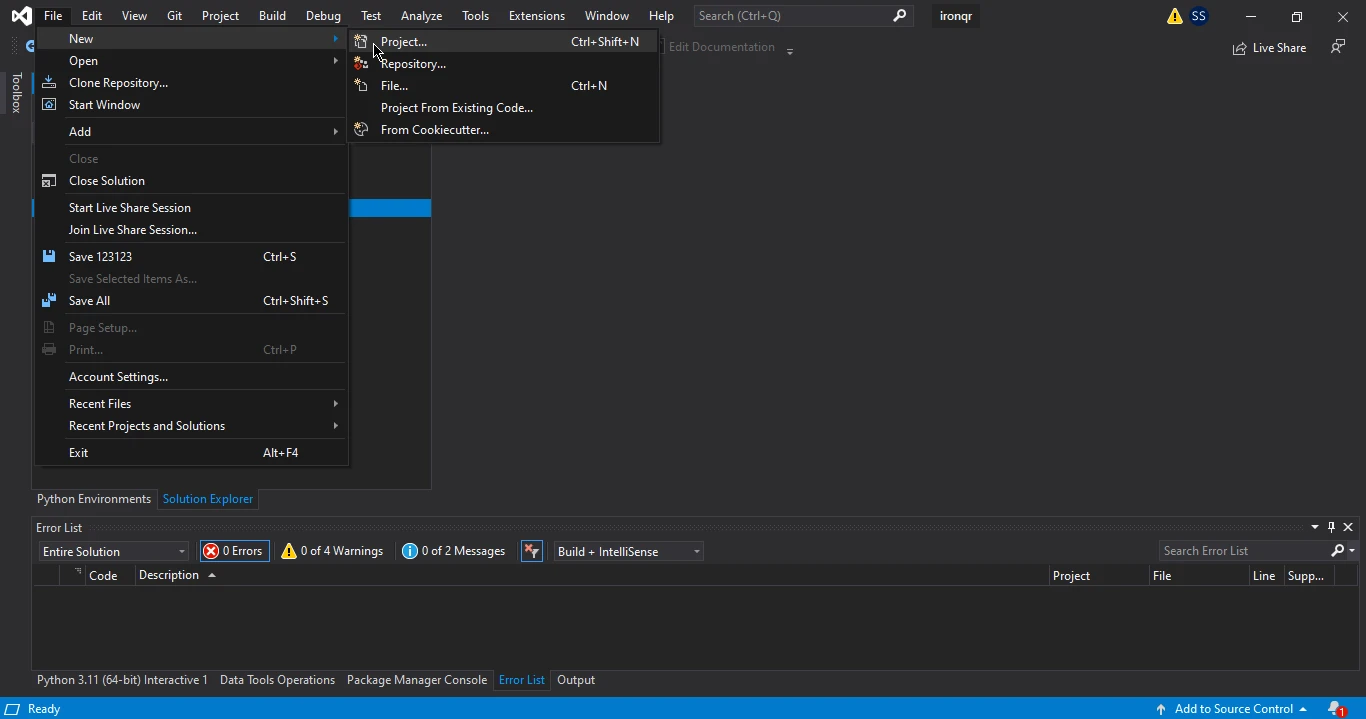
点击"创建新项目",或依次选择"文件" > "新建" > "项目"。
-
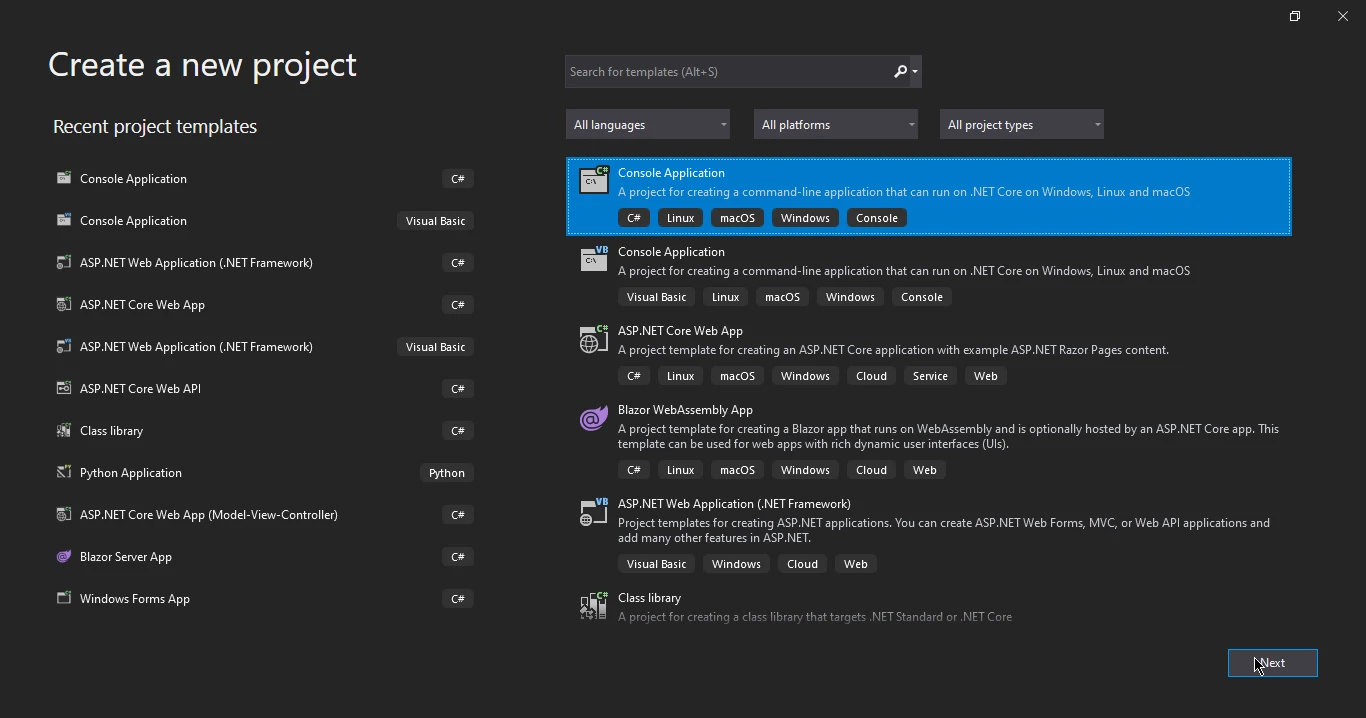
搜索"Console app",然后从搜索结果中选择"Console Application"。
-
**打开 NuGet 包管理器:**在"解决方案资源管理器"中,右键单击"引用",然后选择"管理 NuGet 包"。
-
**搜索并安装:**在 NuGet 包管理器中搜索"ComPDFKit"。 选择适当的包(例如, ComPDFKit.NetFramework 或 ComPDFKit.Conversion.NetFramework)然后点击"安装"。
什么是必备的项目设置?
- **验证安装:**确保该包出现在"解决方案资源管理器"的"引用"下。
- 目标平台:处理大型文档时请设置为 x64
- 输出类型:测试用控制台应用程序,生产环境用类库
- 框架版本:建议使用 .NET 6+ 以获得最佳性能
- NuGet 包管理:启用包恢复功能以进行依赖项管理
- **下载包:**从ComPDFKit官方网站获取 ComPDFKit.NetFramework.nupkg 文件。
- **配置 NuGet 源:**在项目目录中创建或编辑 nuget.config 文件,以包含本地包的路径。
可以通过多种方法将IronPDF集成到项目中。 如需完整的安装指南,请参阅官方文档。 该库支持多种安装方式,以适应不同的开发工作流。
-
**安装本地包:**在 Visual Studio 中重新打开您的解决方案,转到"管理 NuGet 包",然后选择您的本地包源。 从本地源安装ComPDFKit包。
-
Visual Studio NuGet 包管理器:在解决方案中右键单击"依赖项",然后选择"管理 NuGet 包"。在"浏览"选项卡中,搜索"IronPDF"并安装最新版本。 有关 NuGet 的高级安装选项,请参阅详细指南。
-
**获取许可证:**联系ComPDFKit团队以获取试用许可证或正式版许可证。
-
在代码中应用许可证:
-
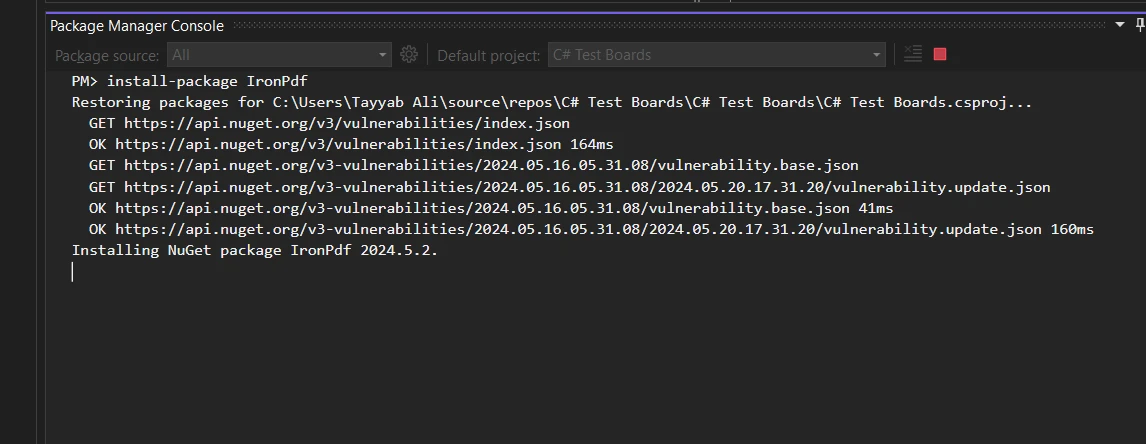
包管理器控制台:通过"工具">"NuGet 包管理器">"包管理器控制台"使用 NuGet 包管理器控制台。 执行以下命令:
CODEBLOCK_0
这可通过命令行界面快速安装库。
-
直接下载方法:访问 IronPDF NuGet 包页面。 下载包文件,双击将其添加到项目中,然后重新加载解决方案。
-
手动安装:直接下载最新版本的 IronPDF。 请按照提供的说明进行 Visual Studio 手动集成。 有关 Windows 系统的安装说明,请参阅 Windows 安装程序指南。
为何选择特定的安装方法?
不同的安装方法适用于各种场景:
- NuGet 包管理器:最适合拥有互联网连接的 Visual Studio 用户
- 包管理器控制台:非常适合脚本化部署和 CI/CD 管道
- 直接下载:适用于离线开发环境
- 手动安装:适用于自定义部署配置
这些方法可将IronPDF高效集成到 .NET 项目中。 如需快速入门指南,请访问入门指南。平台专用指南涵盖 F# 集成和 VB.NET 使用方法。
如何安装ComPDFKit C#?
将ComPDFKit添加到项目中有两种主要方法:NuGet 包管理器或本地包安装。 与IronPDF的单包安装方式相比,该安装过程需要更多步骤。
何时应使用 NuGet 包管理器?
- 打开 NuGet 包管理器:在"解决方案资源管理器"中右键单击"引用",然后选择"管理 NuGet 包"。
- 搜索并安装:在包管理器中搜索"ComPDFKit"。 选择合适的包(ComPDFKit.
NetFramework 或 ComPDFKit.Conversion.NetFramework),然后点击"安装"。
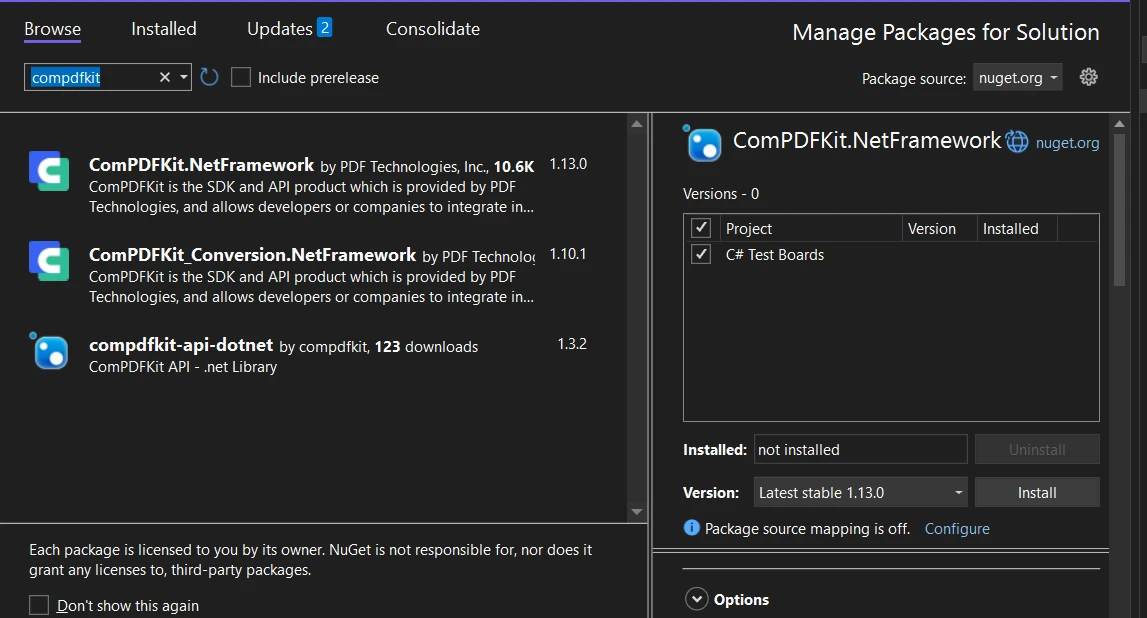
- 验证安装:确保包在解决方案资源管理器中的"引用"下出现。 可能需要安装多个软件包才能实现全部功能。
何时应使用本地化包?
本地包安装Suite适用于受限环境:
-
下载包:从ComPDFKit官网获取ComPDFKit.NetFramework.nupkg。
-
配置NuGet源:在项目目录中创建或编辑nuget.config,以包含本地包路径。
CODEBLOCK_1
-
安装本地包:重新打开解决方案,导航至"管理 NuGet 包",选择本地包源,然后安装 ComPDFKit。
如何应用我的许可证密钥?
各库的许可协议实施方式存在显著差异:
-
获取许可证:联系ComPDFKit获取试用许可证或正式版许可证。
-
在代码中应用许可证:
CODEBLOCK_2
添加此方法以验证许可。 有关IronPDF的简易许可证实现方案,请参阅许可证密钥文档。 IronPDF只需设置License.LicenseKey属性,从而简化了许可过程。
如何将 HTML 转换为 PDF?
将 HTML 转换为 PDF 是从网页内容生成报告、发票或文档时的一项常见需求。 IronPDF和ComPDFKit都提供HTML到PDF的转换,尽管它们的方法不同。 IronPDF使用嵌入的Chromium渲染引擎以实现像素完美输出,而ComPDFKit的渲染引擎和CSS框架支持需要根据您的具体项目要求进行评估。
IronPDF如何处理 HTML 转 PDF 转换?
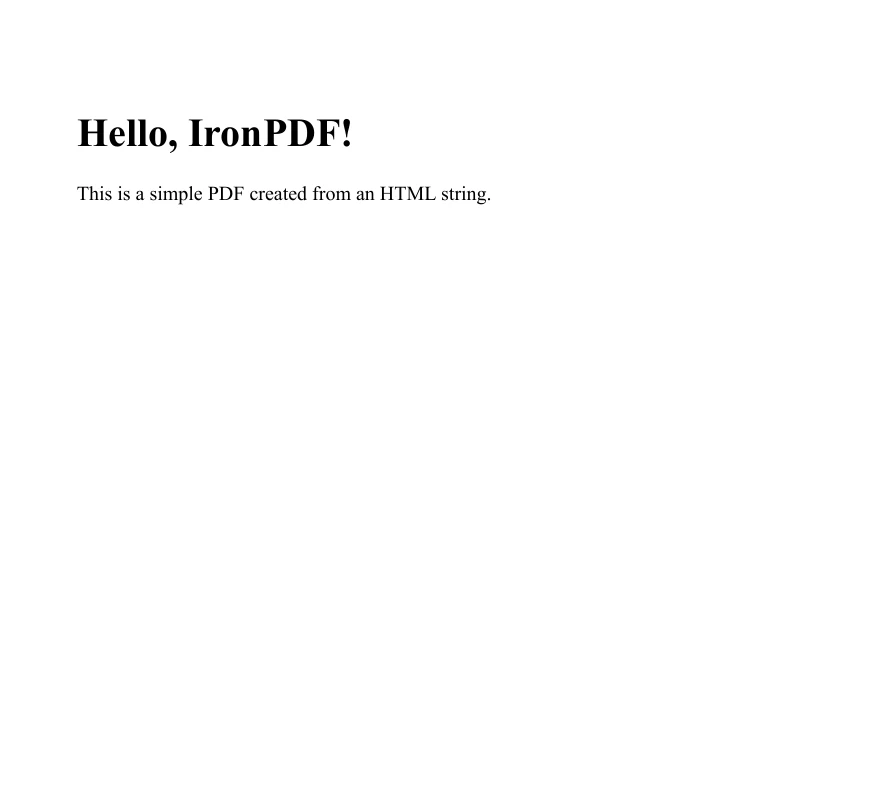
IronPDF 采用基于 Chrome 的渲染引擎,以实现高质量的输出效果。 此过程可将 HTML、CSS 和 JavaScript 准确转换为 PDF 格式。 该库支持 HTML 字符串、HTML 文件和 URL。
基本的 HTML 字符串转 PDF 示例:
using IronPdf;
using System;

class Program
{
    static void Main()
    {
        // Define your HTML string
        string htmlString = @"
            <h1>Hello, IronPDF!</h1>
            <p>This is a simple PDF created from an HTML string.</p>";

        var renderer = new ChromePdfRenderer();
        // Convert the HTML string to a PDF document
        PdfDocument pdf = renderer.RenderHtmlAsPdf(htmlString);
        // Save the PDF document to a file
        string outputPath = "sample.pdf";
        pdf.SaveAs(outputPath);
        Console.WriteLine($"PDF created successfully and saved to {outputPath}");
    }
}
using IronPdf;
using System;

class Program
{
    static void Main()
    {
        // Define your HTML string
        string htmlString = @"
            <h1>Hello, IronPDF!</h1>
            <p>This is a simple PDF created from an HTML string.</p>";

        var renderer = new ChromePdfRenderer();
        // Convert the HTML string to a PDF document
        PdfDocument pdf = renderer.RenderHtmlAsPdf(htmlString);
        // Save the PDF document to a file
        string outputPath = "sample.pdf";
        pdf.SaveAs(outputPath);
        Console.WriteLine($"PDF created successfully and saved to {outputPath}");
    }
}
Imports IronPdf
Imports System
Friend Class Program
Shared Sub Main()
' Define your HTML string
Dim htmlString As String = "
<h1>Hello, IronPDF!</h1>
<p>This is a simple PDF created from an HTML string.</p>"
Dim renderer = New ChromePdfRenderer()
' Convert the HTML string to a PDF document
Dim pdf As PdfDocument = renderer.RenderHtmlAsPdf(htmlString)
' Save the PDF document to a file
Dim outputPath As String = "sample.pdf"
pdf.SaveAs(outputPath)
Console.WriteLine($"PDF created successfully and saved to {outputPath}")
End Sub
End Class
Imports IronPdf
Imports System

Friend Class Program
	Shared Sub Main()
		' Define your HTML string
		Dim htmlString As String = "
            <h1>Hello, IronPDF!</h1>
            <p>This is a simple PDF created from an HTML string.</p>"

		Dim renderer = New ChromePdfRenderer()
		' Convert the HTML string to a PDF document
		Dim pdf As PdfDocument = renderer.RenderHtmlAsPdf(htmlString)
		' Save the PDF document to a file
		Dim outputPath As String = "sample.pdf"
		pdf.SaveAs(outputPath)
		Console.WriteLine($"PDF created successfully and saved to {outputPath}")
	End Sub
End Class
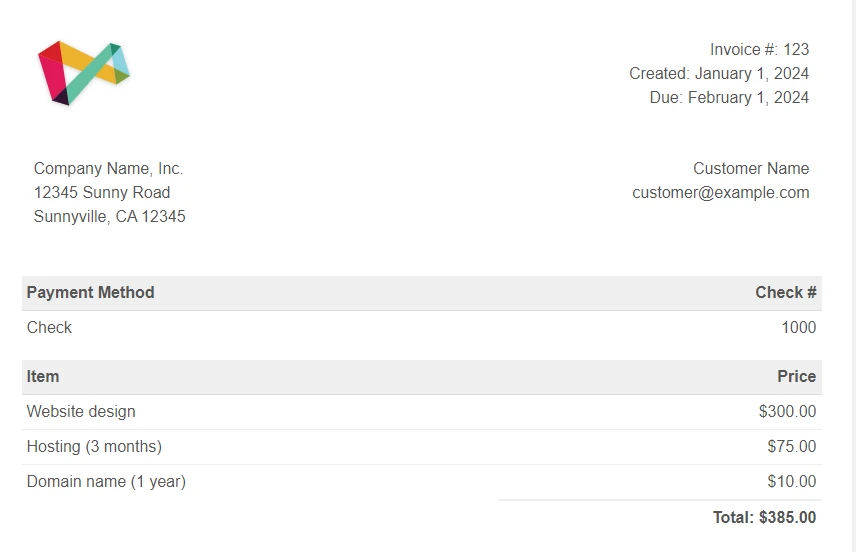
IronPDF 还支持直接转换 HTML 文件,并支持包含 CSS 和 JavaScript:
using IronPdf;
using System;

class Program
{
    static void Main()
    {
        var renderer = new ChromePdfRenderer();
        // Convert the HTML file to a PDF document
        PdfDocument pdf = renderer.RenderHtmlFileAsPdf("index.html");
        // Save the PDF document to a file
        string outputPath = "HTML File.pdf";
        pdf.SaveAs(outputPath);
        Console.WriteLine($"PDF created successfully and saved to {outputPath}");
    }
}
using IronPdf;
using System;

class Program
{
    static void Main()
    {
        var renderer = new ChromePdfRenderer();
        // Convert the HTML file to a PDF document
        PdfDocument pdf = renderer.RenderHtmlFileAsPdf("index.html");
        // Save the PDF document to a file
        string outputPath = "HTML File.pdf";
        pdf.SaveAs(outputPath);
        Console.WriteLine($"PDF created successfully and saved to {outputPath}");
    }
}
Imports IronPdf
Imports System
Friend Class Program
Shared Sub Main()
Dim renderer = New ChromePdfRenderer()
' Convert the HTML file to a PDF document
Dim pdf As PdfDocument = renderer.RenderHtmlFileAsPdf("index.html")
' Save the PDF document to a file
Dim outputPath As String = "HTML File.pdf"
pdf.SaveAs(outputPath)
Console.WriteLine($"PDF created successfully and saved to {outputPath}")
End Sub
End Class
Imports IronPdf
Imports System

Friend Class Program
	Shared Sub Main()
		Dim renderer = New ChromePdfRenderer()
		' Convert the HTML file to a PDF document
		Dim pdf As PdfDocument = renderer.RenderHtmlFileAsPdf("index.html")
		' Save the PDF document to a file
		Dim outputPath As String = "HTML File.pdf"
		pdf.SaveAs(outputPath)
		Console.WriteLine($"PDF created successfully and saved to {outputPath}")
	End Sub
End Class
IronPDF支持哪些高级 HTML 功能?
IronPDF 的 Chromium 引擎可处理复杂的 Web 技术:
ComPDFKit如何处理 HTML 转 PDF 转换?
ComPDFKit的.NET库包含HTML到PDF转换,作为其PDF生成功能集的一部分(截至2026年4月)。 该库还提供基于云的文档处理的开放API服务。 开发人员应查看ComPDFKit文档以确认当前的实现细节及其特定用例的任何CSS框架渲染限制。
ComPDFKit的HTML渲染如何比较?
IronPDF使用嵌入的Chromium引擎提供像素完美的Bootstrap和CSS3渲染,而ComPDFKit的渲染能力及CSS框架兼容性应根据具体渲染要求进行评估:
- 渲染引擎:IronPDF嵌入了Chromium,确保一致的跨浏览器CSS渲染
- CSS框架支持:IronPDF的Chromium引擎能原生处理Bootstrap 5、Flexbox和CSS Grid
- JavaScript执行:IronPDF的引擎执行JavaScript以实现动态内容渲染
- 本地处理:IronPDF完全在本地渲染,无需外部服务依赖
Bootstrap CSS 是否支持 PDF 生成?
现代电子商务和商业应用程序广泛使用 Bootstrap 来实现统一的用户界面设计。 在生成 PDF 格式的发票、收据和报告时,保持 Bootstrap 样式可确保品牌形象的一致性。 IronPDF的嵌入Chromium引擎提供完整的Bootstrap支持,而ComPDFKit在复杂CSS框架中的渲染能力应根据具体项目需要来评估。
IronPDF如何处理 Bootstrap 样式?
IronPDF使用Chromium的渲染引擎,提供所有版本的像素完美的Bootstrap支持(Bootstrap 5、4和3)。 该库无缝支持 Flexbox 布局、CSS 网格、响应式工具和自定义组件。 有关高级 CSS 渲染,请参阅渲染选项指南。
using IronPdf;

// Set license
IronPdf.License.LicenseKey = "License-Key";

var renderer = new ChromePdfRenderer();

// Bootstrap 5 e-commerce invoice example
string bootstrapInvoice = @"
<!DOCTYPE html>
<html lang='en'>
<head>
    <meta charset='utf-8'>
    <meta name='viewport' content='width=device-width, initial-scale=1'>
    <link href='___PROTECTED_URL_138___ rel='stylesheet'>
    <style>
        @page { margin: 20mm; }
        .invoice-header { border-bottom: 3px solid #0d6efd; }
        .product-row { border-bottom: 1px solid #dee2e6; }
        .total-section { background-color: #f8f9fa; }
    </style>
</head>
<body>
    <div class='container-fluid p-4'>
        <!-- Invoice Header -->
        <div class='row invoice-header pb-4 mb-4'>
            <div class='col-8'>
                <h1 class='display-4 text-primary'>INVOICE</h1>
                <p class='text-muted mb-0'>TechStore Inc.</p>
                <p class='text-muted mb-0'>123 Commerce Street, Tech City, TC 12345</p>
                <p class='text-muted'>Email: sales@techstore.com | Phone: (555) 123-4567</p>
            </div>
            <div class='col-4 text-end'>
                <p class='mb-1'><strong>Invoice #:</strong> INV-2024-1089</p>
                <p class='mb-1'><strong>Date:</strong> October 27, 2024</p>
                <p class='mb-1'><strong>Due Date:</strong> November 27, 2024</p>
                <span class='badge bg-success'>PAID</span>
            </div>
        </div>

        <!-- Bill To Section -->
        <div class='row mb-4'>
            <div class='col-6'>
                <h5 class='text-primary'>Bill To:</h5>
                <p class='mb-1'><strong>Acme Corporation</strong></p>
                <p class='mb-1'>456 Business Ave</p>
                <p class='mb-1'>Enterprise City, EC 67890</p>
                <p class='mb-0'>contact@acmecorp.com</p>
            </div>
            <div class='col-6 text-end'>
                <h5 class='text-primary'>Payment Method:</h5>
                <p class='mb-1'>Credit Card ending in 4242</p>
                <p class='mb-0'>Transaction ID: TXN-9876543210</p>
            </div>
        </div>

        <!-- Products Table -->
        <div class='row mb-4'>
            <div class='col-12'>
                <table class='table'>
                    <thead class='table-primary'>
                        <tr>
                            <th scope='col'>#</th>
                            <th scope='col'>Product</th>
                            <th scope='col'>Description</th>
                            <th scope='col' class='text-center'>Qty</th>
                            <th scope='col' class='text-end'>Unit Price</th>
                            <th scope='col' class='text-end'>Amount</th>
                        </tr>
                    </thead>
                    <tbody>
                        <tr class='product-row'>
                            <td>1</td>
                            <td><strong>IronPDF Pro License</strong></td>
                            <td>Professional developer license with 1 year support</td>
                            <td class='text-center'>1</td>
                            <td class='text-end'>$2,399.00</td>
                            <td class='text-end'><strong>$2,399.00</strong></td>
                        </tr>
                        <tr class='product-row'>
                            <td>2</td>
                            <td><strong>Priority Support</strong></td>
                            <td>24/7 priority technical support package</td>
                            <td class='text-center'>1</td>
                            <td class='text-end'>$999.00</td>
                            <td class='text-end'><strong>$999.00</strong></td>
                        </tr>
                        <tr class='product-row'>
                            <td>3</td>
                            <td><strong>Training Package</strong></td>
                            <td>On-site developer training (2 days)</td>
                            <td class='text-center'>1</td>
                            <td class='text-end'>$1,500.00</td>
                            <td class='text-end'><strong>$1,500.00</strong></td>
                        </tr>
                    </tbody>
                </table>
            </div>
        </div>

        <!-- Totals Section -->
        <div class='row justify-content-end mb-4'>
            <div class='col-md-6'>
                <div class='card total-section'>
                    <div class='card-body'>
                        <div class='row mb-2'>
                            <div class='col-6'><strong>Subtotal:</strong></div>
                            <div class='col-6 text-end'>$5,498.00</div>
                        </div>
                        <div class='row mb-2'>
                            <div class='col-6'><strong>Tax (8.5%):</strong></div>
                            <div class='col-6 text-end'>$467.33</div>
                        </div>
                        <div class='row mb-2'>
                            <div class='col-6 text-success'><strong>Discount (10%):</strong></div>
                            <div class='col-6 text-end text-success'>-$549.80</div>
                        </div>
                        <hr>
                        <div class='row'>
                            <div class='col-6'><h4 class='text-primary'>Total:</h4></div>
                            <div class='col-6 text-end'><h4 class='text-primary'>$5,415.53</h4></div>
                        </div>
                    </div>
                </div>
            </div>
        </div>

        <!-- Payment Terms -->
        <div class='row mb-4'>
            <div class='col-12'>
                <div class='alert alert-info' role='alert'>
                    <h6 class='alert-heading'>Payment Terms</h6>
                    <p class='mb-0'>Payment is due within 30 days. Late payments may incur a 1.5% monthly interest charge. Thank you for your business!</p>
                </div>
            </div>
        </div>

        <!-- Footer -->
        <div class='row border-top pt-3'>
            <div class='col-12 text-center text-muted'>
                <small>TechStore Inc. | Tax ID: 12-3456789 | All prices in USD</small>
            </div>
        </div>
    </div>
</body>
</html>";

// Render PDF with optimized settings
var pdf = renderer.RenderHtmlAsPdf(bootstrapInvoice);

// Add metadata for document management
pdf.MetaData.Title = "Invoice INV-2024-1089";
pdf.MetaData.Author = "TechStore Inc.";
pdf.MetaData.Subject = "Sales Invoice";
pdf.MetaData.Keywords = "invoice, payment, e-commerce";

// Save the invoice
pdf.SaveAs("invoice-with-bootstrap.pdf");
using IronPdf;

// Set license
IronPdf.License.LicenseKey = "License-Key";

var renderer = new ChromePdfRenderer();

// Bootstrap 5 e-commerce invoice example
string bootstrapInvoice = @"
<!DOCTYPE html>
<html lang='en'>
<head>
    <meta charset='utf-8'>
    <meta name='viewport' content='width=device-width, initial-scale=1'>
    <link href='___PROTECTED_URL_138___ rel='stylesheet'>
    <style>
        @page { margin: 20mm; }
        .invoice-header { border-bottom: 3px solid #0d6efd; }
        .product-row { border-bottom: 1px solid #dee2e6; }
        .total-section { background-color: #f8f9fa; }
    </style>
</head>
<body>
    <div class='container-fluid p-4'>
        <!-- Invoice Header -->
        <div class='row invoice-header pb-4 mb-4'>
            <div class='col-8'>
                <h1 class='display-4 text-primary'>INVOICE</h1>
                <p class='text-muted mb-0'>TechStore Inc.</p>
                <p class='text-muted mb-0'>123 Commerce Street, Tech City, TC 12345</p>
                <p class='text-muted'>Email: sales@techstore.com | Phone: (555) 123-4567</p>
            </div>
            <div class='col-4 text-end'>
                <p class='mb-1'><strong>Invoice #:</strong> INV-2024-1089</p>
                <p class='mb-1'><strong>Date:</strong> October 27, 2024</p>
                <p class='mb-1'><strong>Due Date:</strong> November 27, 2024</p>
                <span class='badge bg-success'>PAID</span>
            </div>
        </div>

        <!-- Bill To Section -->
        <div class='row mb-4'>
            <div class='col-6'>
                <h5 class='text-primary'>Bill To:</h5>
                <p class='mb-1'><strong>Acme Corporation</strong></p>
                <p class='mb-1'>456 Business Ave</p>
                <p class='mb-1'>Enterprise City, EC 67890</p>
                <p class='mb-0'>contact@acmecorp.com</p>
            </div>
            <div class='col-6 text-end'>
                <h5 class='text-primary'>Payment Method:</h5>
                <p class='mb-1'>Credit Card ending in 4242</p>
                <p class='mb-0'>Transaction ID: TXN-9876543210</p>
            </div>
        </div>

        <!-- Products Table -->
        <div class='row mb-4'>
            <div class='col-12'>
                <table class='table'>
                    <thead class='table-primary'>
                        <tr>
                            <th scope='col'>#</th>
                            <th scope='col'>Product</th>
                            <th scope='col'>Description</th>
                            <th scope='col' class='text-center'>Qty</th>
                            <th scope='col' class='text-end'>Unit Price</th>
                            <th scope='col' class='text-end'>Amount</th>
                        </tr>
                    </thead>
                    <tbody>
                        <tr class='product-row'>
                            <td>1</td>
                            <td><strong>IronPDF Pro License</strong></td>
                            <td>Professional developer license with 1 year support</td>
                            <td class='text-center'>1</td>
                            <td class='text-end'>$2,399.00</td>
                            <td class='text-end'><strong>$2,399.00</strong></td>
                        </tr>
                        <tr class='product-row'>
                            <td>2</td>
                            <td><strong>Priority Support</strong></td>
                            <td>24/7 priority technical support package</td>
                            <td class='text-center'>1</td>
                            <td class='text-end'>$999.00</td>
                            <td class='text-end'><strong>$999.00</strong></td>
                        </tr>
                        <tr class='product-row'>
                            <td>3</td>
                            <td><strong>Training Package</strong></td>
                            <td>On-site developer training (2 days)</td>
                            <td class='text-center'>1</td>
                            <td class='text-end'>$1,500.00</td>
                            <td class='text-end'><strong>$1,500.00</strong></td>
                        </tr>
                    </tbody>
                </table>
            </div>
        </div>

        <!-- Totals Section -->
        <div class='row justify-content-end mb-4'>
            <div class='col-md-6'>
                <div class='card total-section'>
                    <div class='card-body'>
                        <div class='row mb-2'>
                            <div class='col-6'><strong>Subtotal:</strong></div>
                            <div class='col-6 text-end'>$5,498.00</div>
                        </div>
                        <div class='row mb-2'>
                            <div class='col-6'><strong>Tax (8.5%):</strong></div>
                            <div class='col-6 text-end'>$467.33</div>
                        </div>
                        <div class='row mb-2'>
                            <div class='col-6 text-success'><strong>Discount (10%):</strong></div>
                            <div class='col-6 text-end text-success'>-$549.80</div>
                        </div>
                        <hr>
                        <div class='row'>
                            <div class='col-6'><h4 class='text-primary'>Total:</h4></div>
                            <div class='col-6 text-end'><h4 class='text-primary'>$5,415.53</h4></div>
                        </div>
                    </div>
                </div>
            </div>
        </div>

        <!-- Payment Terms -->
        <div class='row mb-4'>
            <div class='col-12'>
                <div class='alert alert-info' role='alert'>
                    <h6 class='alert-heading'>Payment Terms</h6>
                    <p class='mb-0'>Payment is due within 30 days. Late payments may incur a 1.5% monthly interest charge. Thank you for your business!</p>
                </div>
            </div>
        </div>

        <!-- Footer -->
        <div class='row border-top pt-3'>
            <div class='col-12 text-center text-muted'>
                <small>TechStore Inc. | Tax ID: 12-3456789 | All prices in USD</small>
            </div>
        </div>
    </div>
</body>
</html>";

// Render PDF with optimized settings
var pdf = renderer.RenderHtmlAsPdf(bootstrapInvoice);

// Add metadata for document management
pdf.MetaData.Title = "Invoice INV-2024-1089";
pdf.MetaData.Author = "TechStore Inc.";
pdf.MetaData.Subject = "Sales Invoice";
pdf.MetaData.Keywords = "invoice, payment, e-commerce";

// Save the invoice
pdf.SaveAs("invoice-with-bootstrap.pdf");
C#
展示的关键 Bootstrap 功能:
- 网格系统:
row 和 col-* 类用于响应式布局结构
- 排版:
display-4, text-muted, h5 用于分级文本样式
- 表格:
table, table-primary, table-hover 用于结构化数据展示
- 卡片:
card 和 card-body 用于带有背景样式的总计部分
- 徽章:
badge bg-success 用于支付状态指示器
- 警报:
alert alert-info 用于支付条款通知
- 工具:
text-end, text-center, mb-*, pb-* 间隔工具
- **自定义样式:**结合 Bootstrap 类实现针对发票的特定设计
IronPDF 的 Chromium 引擎确保完美呈现 Bootstrap 组件:
- 网格系统:
row 和 col-* 类用于响应式布局
- 排版:
display-4, text-muted, h5 用于分级样式
- 表格:
table, table-primary, table-hover 用于结构化数据
- 卡片:
card 和 card-body 用于样式化部分
- 徽章:
badge bg-success 用于状态指示
- 警报:
alert alert-info 用于通知
- 工具:
text-end, text-center, 间隔工具
- 自定义样式:结合 Bootstrap 进行发票设计
对于网页字体和图标,IronPDF 提供全面的自定义排版支持。 在排查 Bootstrap 布局问题时,请参考 Bootstrap Flex CSS 故障排除指南。 对于视口和Zoom设置,正确的配置可确保响应式布局正确渲染。
ComPDFKit对Bootstrap的考虑是什么?
ComPDFKit的HTML到PDF转换没有使用嵌入的Chromium引擎,这意味着复杂的Bootstrap布局、CSS网格和Flexbox渲染可能与本地浏览器引擎产生不同的结果:
- **CSS框架支持:**复杂Flexbox或CSS网格布局的渲染可能会不同
- **渲染一致性:**结果取决于HTML引擎的实现
- **自定义样式:**Bootstrap组件渲染精度应根据项目要求进行测试
对于需要可靠的Bootstrap渲染并对样式和布局进行完全控制的应用,IronPDF的嵌入Chromium引擎提供了一致的结果。 IronPDF的集成方法保持完全的CSS框架兼容性,而无需依赖外部渲染服务。
如何在 PDF 中添加水印?
对 PDF 文件添加水印有助于保护文档完整性、声明所有权并增强安全性。 水印可以是出现在背景或前景中的文本、徽标或图像。 它们既能防止未经授权的使用和分发,又能传达有关文档状态或创建者身份的重要信息。
如何使用IronPDF添加水印?
IronPDF 提供了一种通过编程方式在 PDF 文档中添加水印的简便方法。 该功能已集成到库中,允许开发人员通过 C# 代码应用水印。 对于背景和前景的放置,IronPDF 提供了灵活的定位选项。
using IronPdf;
using IronPdf.Editing;

class Program
{
    static void Main()
    {
        License.LicenseKey = "License-Code";

        string watermarkHtml = @"
            <img style='width: 500px;' src='C:\Users\Tayyab Ali\Desktop\watermark.png'>
            <h1>IronPDF Watermark</h1>";

        ChromePdfRenderer renderer = new ChromePdfRenderer();
        PdfDocument pdf = renderer.RenderHtmlAsPdf("<h1>It's a PDF with a watermark</h1>");
        // Apply watermark with 30 degrees rotation and 50% opacity
        pdf.ApplyWatermark(watermarkHtml, rotation: 30, opacity: 50);
        pdf.SaveAs("Confidential.pdf");
    }
}
using IronPdf;
using IronPdf.Editing;

class Program
{
    static void Main()
    {
        License.LicenseKey = "License-Code";

        string watermarkHtml = @"
            <img style='width: 500px;' src='C:\Users\Tayyab Ali\Desktop\watermark.png'>
            <h1>IronPDF Watermark</h1>";

        ChromePdfRenderer renderer = new ChromePdfRenderer();
        PdfDocument pdf = renderer.RenderHtmlAsPdf("<h1>It's a PDF with a watermark</h1>");
        // Apply watermark with 30 degrees rotation and 50% opacity
        pdf.ApplyWatermark(watermarkHtml, rotation: 30, opacity: 50);
        pdf.SaveAs("Confidential.pdf");
    }
}
Imports IronPdf
Imports IronPdf.Editing
Friend Class Program
Shared Sub Main()
License.LicenseKey = "License-Code"
Dim watermarkHtml As String = "
<img style='width: 500px;' src='C:\Users\Tayyab Ali\Desktop\watermark.png'>
<h1>IronPDF Watermark</h1>"
Dim renderer As New ChromePdfRenderer()
Dim pdf As PdfDocument = renderer.RenderHtmlAsPdf("<h1>It's a PDF with a watermark</h1>")
' Apply watermark with 30 degrees rotation and 50% opacity
pdf.ApplyWatermark(watermarkHtml, rotation:= 30, opacity:= 50)
pdf.SaveAs("Confidential.pdf")
End Sub
End Class
Imports IronPdf
Imports IronPdf.Editing

Friend Class Program
	Shared Sub Main()
		License.LicenseKey = "License-Code"

		Dim watermarkHtml As String = "
            <img style='width: 500px;' src='C:\Users\Tayyab Ali\Desktop\watermark.png'>
            <h1>IronPDF Watermark</h1>"

		Dim renderer As New ChromePdfRenderer()
		Dim pdf As PdfDocument = renderer.RenderHtmlAsPdf("<h1>It's a PDF with a watermark</h1>")
		' Apply watermark with 30 degrees rotation and 50% opacity
		pdf.ApplyWatermark(watermarkHtml, rotation:= 30, opacity:= 50)
		pdf.SaveAs("Confidential.pdf")
	End Sub
End Class
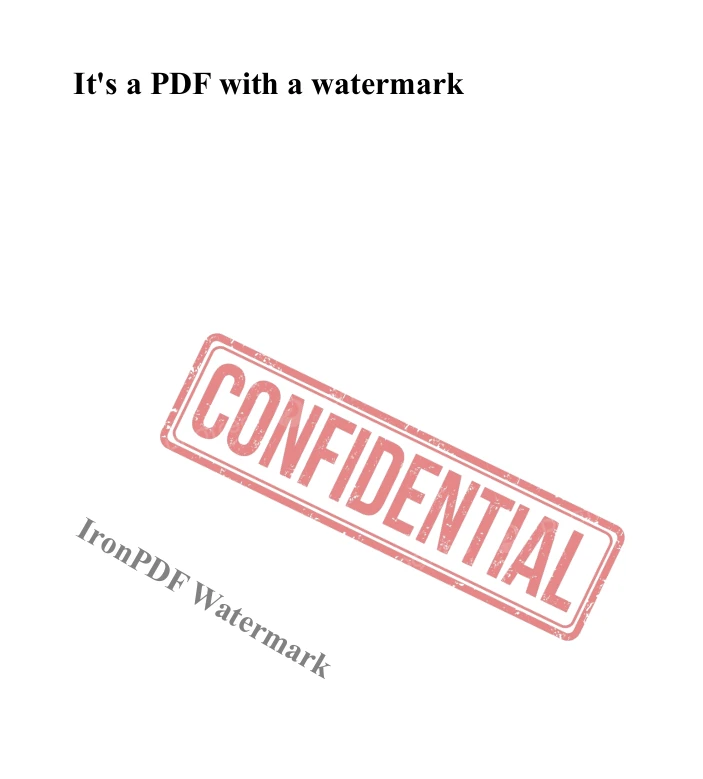
此示例使用ChromePdfRenderer从HTML创建PDF。 ApplyWatermark方法应用含图像和标题的水印。 旋转角度设为 30 度,不透明度设为 50%,以确保可见性同时不压过内容。 生成的 PDF 将保存至指定路径。
有哪些高级水印选项?
IronPDF 提供完整的水印功能:
- 基于 HTML 的水印:使用完整的 HTML/CSS 实现复杂设计
- 定位控制:3x3网格放置系统
- 不透明度设置:微调透明度级别
- 旋转选项:为对角线水印应用任意角度
- 页面选择:应用于所有页面或特定范围
- 多重水印:根据需要叠加不同水印
有关高级技巧,请参阅文本和图像加盖水印或高效添加多个水印。 《新内容加水印指南》演示了动态水印的生成。
如何使用ComPDFKit添加水印?
ComPDFKit 提供了通过该库的方法以编程方式添加水印的功能。 以下代码示例演示了如何添加文本水印:
static private bool AddTextWatermark(CPDFDocument document)
{
    CPDFWatermark watermark = document.InitWatermark(C_Watermark_Type.WATERMARK_TYPE_TEXT);
    watermark.SetText("test");
    watermark.SetFontName("Helvetica");
    watermark.SetPages("0-3");
    byte[] color = { 255, 0, 0 };
    watermark.SetTextRGBColor(color);
    watermark.SetScale(2);
    watermark.SetRotation(0);
    watermark.SetOpacity(120);
    watermark.SetVertalign(C_Watermark_Vertalign.WATERMARK_VERTALIGN_CENTER);
    watermark.SetHorizalign(C_Watermark_Horizalign.WATERMARK_HORIZALIGN_CENTER);
    watermark.SetVertOffset(0);
    watermark.SetHorizOffset(0);
    watermark.SetFront(true);
    watermark.SetFullScreen(true);
    watermark.SetVerticalSpacing(10);
    watermark.SetHorizontalSpacing(10);
    watermark.CreateWatermark();
    string path = "AddTextWatermarkTest.pdf";
    if (!document.WriteToFilePath(path))
    {
        return false;
    }
    Console.WriteLine("Browse the changed file in " + path);
    return true;
}

CPDFDocument document = CPDFDocument.InitWithFilePath("SamplePDF.pdf");
if (AddTextWatermark(document))
{
    Console.WriteLine("Add text watermark done.");
}
else
{
    Console.WriteLine("Add text watermark failed.");
}
static private bool AddTextWatermark(CPDFDocument document)
{
    CPDFWatermark watermark = document.InitWatermark(C_Watermark_Type.WATERMARK_TYPE_TEXT);
    watermark.SetText("test");
    watermark.SetFontName("Helvetica");
    watermark.SetPages("0-3");
    byte[] color = { 255, 0, 0 };
    watermark.SetTextRGBColor(color);
    watermark.SetScale(2);
    watermark.SetRotation(0);
    watermark.SetOpacity(120);
    watermark.SetVertalign(C_Watermark_Vertalign.WATERMARK_VERTALIGN_CENTER);
    watermark.SetHorizalign(C_Watermark_Horizalign.WATERMARK_HORIZALIGN_CENTER);
    watermark.SetVertOffset(0);
    watermark.SetHorizOffset(0);
    watermark.SetFront(true);
    watermark.SetFullScreen(true);
    watermark.SetVerticalSpacing(10);
    watermark.SetHorizontalSpacing(10);
    watermark.CreateWatermark();
    string path = "AddTextWatermarkTest.pdf";
    if (!document.WriteToFilePath(path))
    {
        return false;
    }
    Console.WriteLine("Browse the changed file in " + path);
    return true;
}

CPDFDocument document = CPDFDocument.InitWithFilePath("SamplePDF.pdf");
if (AddTextWatermark(document))
{
    Console.WriteLine("Add text watermark done.");
}
else
{
    Console.WriteLine("Add text watermark failed.");
}
Private Shared Function AddTextWatermark(ByVal document As CPDFDocument) As Boolean
Dim watermark As CPDFWatermark = document.InitWatermark(C_Watermark_Type.WATERMARK_TYPE_TEXT)
watermark.SetText("test")
watermark.SetFontName("Helvetica")
watermark.SetPages("0-3")
Dim color() As Byte = { 255, 0, 0 }
watermark.SetTextRGBColor(color)
watermark.SetScale(2)
watermark.SetRotation(0)
watermark.SetOpacity(120)
watermark.SetVertalign(C_Watermark_Vertalign.WATERMARK_VERTALIGN_CENTER)
watermark.SetHorizalign(C_Watermark_Horizalign.WATERMARK_HORIZALIGN_CENTER)
watermark.SetVertOffset(0)
watermark.SetHorizOffset(0)
watermark.SetFront(True)
watermark.SetFullScreen(True)
watermark.SetVerticalSpacing(10)
watermark.SetHorizontalSpacing(10)
watermark.CreateWatermark()
Dim path As String = "AddTextWatermarkTest.pdf"
If Not document.WriteToFilePath(path) Then
Return False
End If
Console.WriteLine("Browse the changed file in " & path)
Return True
End Function
Private document As CPDFDocument = CPDFDocument.InitWithFilePath("SamplePDF.pdf")
If AddTextWatermark(document) Then
Console.WriteLine("Add text watermark done.")
Else
Console.WriteLine("Add text watermark failed.")
End If
Private Shared Function AddTextWatermark(ByVal document As CPDFDocument) As Boolean
	Dim watermark As CPDFWatermark = document.InitWatermark(C_Watermark_Type.WATERMARK_TYPE_TEXT)
	watermark.SetText("test")
	watermark.SetFontName("Helvetica")
	watermark.SetPages("0-3")
	Dim color() As Byte = { 255, 0, 0 }
	watermark.SetTextRGBColor(color)
	watermark.SetScale(2)
	watermark.SetRotation(0)
	watermark.SetOpacity(120)
	watermark.SetVertalign(C_Watermark_Vertalign.WATERMARK_VERTALIGN_CENTER)
	watermark.SetHorizalign(C_Watermark_Horizalign.WATERMARK_HORIZALIGN_CENTER)
	watermark.SetVertOffset(0)
	watermark.SetHorizOffset(0)
	watermark.SetFront(True)
	watermark.SetFullScreen(True)
	watermark.SetVerticalSpacing(10)
	watermark.SetHorizontalSpacing(10)
	watermark.CreateWatermark()
	Dim path As String = "AddTextWatermarkTest.pdf"
	If Not document.WriteToFilePath(path) Then
		Return False
	End If
	Console.WriteLine("Browse the changed file in " & path)
	Return True
End Function

Private document As CPDFDocument = CPDFDocument.InitWithFilePath("SamplePDF.pdf")
If AddTextWatermark(document) Then
	Console.WriteLine("Add text watermark done.")
Else
	Console.WriteLine("Add text watermark failed.")
End If
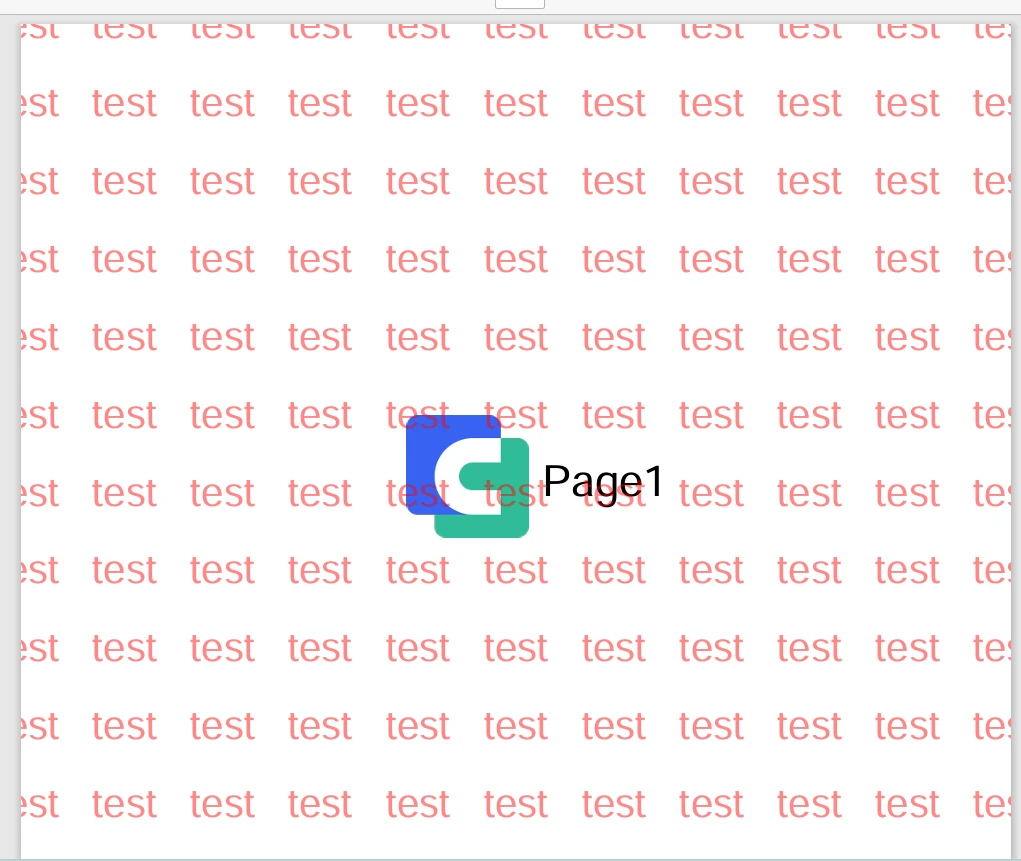
此示例使用 CPDFDocument 打开一个现有的 PDF 文件。 AddTextWatermark方法初始化文本水印,设置属性如文本内容、字体、颜色、缩放、旋转、不透明度、对齐和间距。 水印将应用于指定页面,并保存至预设路径。 图像水印需要采用不同的处理方法,这增加了实现的复杂性。
如何创建符合 PDF/A 标准的文档?
PDF/A 是一种专为长期数字保存而设计的标准化 PDF 版本。 确保符合 PDF/A 标准,可保证未来文件的可靠查看和复制。 本节将探讨如何利用这两个库创建符合 PDF/A 标准的文档。
IronPDF如何创建 PDF/A 文档?
IronPDF 简化了将标准 PDF 转换为符合 PDF/A 标准的格式的过程。 该库支持多种 PDF/A 标准,包括 PDF/A-1、PDF/A-2 和 PDF/A-3。有关 PDF/A 里程碑更新以及支持 ZUGFeRD 的 PDF/A-3 的信息,请参阅产品公告。
using IronPdf;
using System;

class Program
{
    static void Main()
    {
        License.LicenseKey = "License-Key";
        PdfDocument pdf = PdfDocument.FromFile("Source.pdf");
        pdf.SaveAsPdfA("pdfa-compliant.pdf", PdfAVersions.PdfA3);
    }
}
using IronPdf;
using System;

class Program
{
    static void Main()
    {
        License.LicenseKey = "License-Key";
        PdfDocument pdf = PdfDocument.FromFile("Source.pdf");
        pdf.SaveAsPdfA("pdfa-compliant.pdf", PdfAVersions.PdfA3);
    }
}
Imports IronPdf
Imports System
Friend Class Program
Shared Sub Main()
License.LicenseKey = "License-Key"
Dim pdf As PdfDocument = PdfDocument.FromFile("Source.pdf")
pdf.SaveAsPdfA("pdfa-compliant.pdf", PdfAVersions.PdfA3)
End Sub
End Class
Imports IronPdf
Imports System

Friend Class Program
	Shared Sub Main()
		License.LicenseKey = "License-Key"
		Dim pdf As PdfDocument = PdfDocument.FromFile("Source.pdf")
		pdf.SaveAsPdfA("pdfa-compliant.pdf", PdfAVersions.PdfA3)
	End Sub
End Class
该过程包括:
- **初始化 IronPDF:**首先导入IronPDF库并设置许可证密钥。
- **加载 PDF:**使用 PdfDocument.FromFile 加载源 PDF 文件。
- **转换并保存:**通过指定所需的 PDF/A 版本,将加载的 PDF 转换为 PDF/A,并保存生成的文档。
为何选择 PDF/A 进行文档归档?
PDF/A 在长期保存方面具有以下优势:
- 自包含文档:所有字体和资源均已嵌入
- 无外部依赖:无需依赖外部内容
- 标准化格式:通过 ISO 认证,适用于归档用途
- 元数据保留:保留文档属性
- 视觉可重现性:确保外观随时间推移保持一致
IronPDF 还支持 PDF/UA 格式以满足无障碍要求,确保文档符合《第 508 节》合规标准。
ComPDFKit如何创建 PDF/A 文档?
ComPDFKit 通过文档初始化、输出路径定义和转换方法调用,提供可靠的 PDF/A 转换功能。
static public bool CovertToPDFA1a(CPDFDocument document)
{
    string convertToPDFA1aPath = "ConvertToPDFA1aTest.pdf";
    if (!document.WritePDFAToFilePath(CPDFType.CPDFTypePDFA1a, convertToPDFA1aPath))
    {
        return false;
    }
    Console.WriteLine("Browse the changed file in " + convertToPDFA1aPath);
    return true;
}

CPDFDocument document = CPDFDocument.InitWithFilePath("CommonFivePage.pdf");
if (CovertToPDFA1a(document))
{
    Console.WriteLine("Convert to PDF/A-1a done.");
}
else
{
    Console.WriteLine("Convert to PDF/A-1a failed.");
}
static public bool CovertToPDFA1a(CPDFDocument document)
{
    string convertToPDFA1aPath = "ConvertToPDFA1aTest.pdf";
    if (!document.WritePDFAToFilePath(CPDFType.CPDFTypePDFA1a, convertToPDFA1aPath))
    {
        return false;
    }
    Console.WriteLine("Browse the changed file in " + convertToPDFA1aPath);
    return true;
}

CPDFDocument document = CPDFDocument.InitWithFilePath("CommonFivePage.pdf");
if (CovertToPDFA1a(document))
{
    Console.WriteLine("Convert to PDF/A-1a done.");
}
else
{
    Console.WriteLine("Convert to PDF/A-1a failed.");
}
Public Shared Function CovertToPDFA1a(ByVal document As CPDFDocument) As Boolean
Dim convertToPDFA1aPath As String = "ConvertToPDFA1aTest.pdf"
If Not document.WritePDFAToFilePath(CPDFType.CPDFTypePDFA1a, convertToPDFA1aPath) Then
Return False
End If
Console.WriteLine("Browse the changed file in " & convertToPDFA1aPath)
Return True
End Function
Private document As CPDFDocument = CPDFDocument.InitWithFilePath("CommonFivePage.pdf")
If CovertToPDFA1a(document) Then
Console.WriteLine("Convert to PDF/A-1a done.")
Else
Console.WriteLine("Convert to PDF/A-1a failed.")
End If
Public Shared Function CovertToPDFA1a(ByVal document As CPDFDocument) As Boolean
	Dim convertToPDFA1aPath As String = "ConvertToPDFA1aTest.pdf"
	If Not document.WritePDFAToFilePath(CPDFType.CPDFTypePDFA1a, convertToPDFA1aPath) Then
		Return False
	End If
	Console.WriteLine("Browse the changed file in " & convertToPDFA1aPath)
	Return True
End Function

Private document As CPDFDocument = CPDFDocument.InitWithFilePath("CommonFivePage.pdf")
If CovertToPDFA1a(document) Then
	Console.WriteLine("Convert to PDF/A-1a done.")
Else
	Console.WriteLine("Convert to PDF/A-1a failed.")
End If
步骤包括:
- **初始化文档:**使用 CPDFDocument.InitWithFilePath 加载 PDF 文档。
- **设置输出目录:**确保输出目录已存在,如不存在则创建。
- **转换为 PDF/A:**使用 WritePDFAToFilePath 并指定 PDF/A 类型来执行转换并保存文件。
如何在 PDF 中添加数字签名?
数字签名用于验证文档的真实性与完整性。 本节演示了如何使用这两个库添加数字签名。 关于完整的数字签名实现,IronPDF 提供了详尽的文档。
如何使用IronPDF对 PDF 文件进行签名?
IronPDF 提供简单而高效的数字签名应用程序。 该库支持 X.509 证书和 HSM 集成,以满足 Enterprise 安全需求。
using IronPdf;
using IronPdf.Signing;

class Program
{
    static void Main(string[] args)
    {
        var simpleSignature = new PdfSignature("MyCert.p12", "newpassword");
        simpleSignature.SignPdfFile("sample.pdf");
    }
}
using IronPdf;
using IronPdf.Signing;

class Program
{
    static void Main(string[] args)
    {
        var simpleSignature = new PdfSignature("MyCert.p12", "newpassword");
        simpleSignature.SignPdfFile("sample.pdf");
    }
}
Imports IronPdf
Imports IronPdf.Signing
Friend Class Program
Shared Sub Main(ByVal args() As String)
Dim simpleSignature = New PdfSignature("MyCert.p12", "newpassword")
simpleSignature.SignPdfFile("sample.pdf")
End Sub
End Class
Imports IronPdf
Imports IronPdf.Signing

Friend Class Program
	Shared Sub Main(ByVal args() As String)
		Dim simpleSignature = New PdfSignature("MyCert.p12", "newpassword")
		simpleSignature.SignPdfFile("sample.pdf")
	End Sub
End Class
该过程包括:
- **初始化 IronPDF:**导入必要的IronPDF库。
- **创建签名:**使用证书文件和密码初始化一个 PdfSignature 对象。
- **签署 PDF:**使用 SignPdfFile 功能在 PDF 上添加签名。
IronPDF提供了哪些高级签名选项?
IronPDF 提供完整的数字签名功能:
- 多种签名类型:基于证书的签名、视觉签名和表单字段签名
- HSM 支持:硬件安全模块集成
- 时间戳服务器:为签名添加可信时间戳
- 签名外观:自定义视觉签名呈现方式
- 验证支持:通过编程方式验证现有签名
- 版本控制:保留签名修订历史
如需解决签名问题,请参阅数字签名故障排除指南。
如何使用ComPDFKit对 PDF 文件进行签名?
ComPDFKit 提供完整的数字签名创建功能,并具备丰富的自定义选项。
private static void CreateDigitalSignature(CPDFDocument document, string certificatePath, string password)
{
    Console.WriteLine("--------------------");
    Console.WriteLine("Create digital signature.");
    CPDFSignatureCertificate certificate = CPDFPKCS12CertHelper.GetCertificateWithPKCS12Path("Certificate.pfx", "ComPDFKit");
    CPDFPage page = document.PageAtIndex(0);
    CPDFSignatureWidget signatureField = page.CreateWidget(C_WIDGET_TYPE.WIDGET_SIGNATUREFIELDS) as CPDFSignatureWidget;
    signatureField.SetRect(new CRect(28, 420, 150, 370));
    signatureField.SetWidgetBorderRGBColor(new byte[] { 0, 0, 0 });
    signatureField.SetWidgetBgRGBColor(new byte[] { 150, 180, 210 });
    signatureField.UpdateAp();
    string name = GetGrantorFromDictionary(certificate.SubjectDict) + "\n";
    string date = DateTime.Now.ToString("yyyy.MM.dd HH:mm:ss");
    string reason = "I am the owner of the document.";
    string location = certificate.SubjectDict["C"];
    string DN = certificate.Subject;

    CPDFSignatureConfig signatureConfig = new CPDFSignatureConfig
    {
        Text = GetGrantorFromDictionary(certificate.SubjectDict),
        Content =
            "Name: " + name + "\n" +
            "Date: " + date + "\n" +
            "Reason: " + reason + " \n" +
            "Location: " + location + "\n" +
            "DN: " + DN + "\n",
        IsContentAlignLeft = false,
        IsDrawLogo = true,
        LogoBitmap = new Bitmap("Logo.png"),
        TextColor = new float[] { 0, 0, 0 },
        ContentColor = new float[] { 0, 0, 0 }
    };
    string filePath = document.FileName + "_Signed.pdf";
    signatureField.UpdataApWithSignature(signatureConfig);
    if (document.WriteSignatureToFilePath(signatureField,
        filePath,
        certificatePath, password,
        location,
        reason, CPDFSignaturePermissions.CPDFSignaturePermissionsNone))
    {
        Console.WriteLine("File saved in " + filePath);
        Console.WriteLine("Create digital signature done.");
    }
    else
    {
        Console.WriteLine("Create digital signature failed.");
    }
    Console.WriteLine("--------------------");
}
private static void CreateDigitalSignature(CPDFDocument document, string certificatePath, string password)
{
    Console.WriteLine("--------------------");
    Console.WriteLine("Create digital signature.");
    CPDFSignatureCertificate certificate = CPDFPKCS12CertHelper.GetCertificateWithPKCS12Path("Certificate.pfx", "ComPDFKit");
    CPDFPage page = document.PageAtIndex(0);
    CPDFSignatureWidget signatureField = page.CreateWidget(C_WIDGET_TYPE.WIDGET_SIGNATUREFIELDS) as CPDFSignatureWidget;
    signatureField.SetRect(new CRect(28, 420, 150, 370));
    signatureField.SetWidgetBorderRGBColor(new byte[] { 0, 0, 0 });
    signatureField.SetWidgetBgRGBColor(new byte[] { 150, 180, 210 });
    signatureField.UpdateAp();
    string name = GetGrantorFromDictionary(certificate.SubjectDict) + "\n";
    string date = DateTime.Now.ToString("yyyy.MM.dd HH:mm:ss");
    string reason = "I am the owner of the document.";
    string location = certificate.SubjectDict["C"];
    string DN = certificate.Subject;

    CPDFSignatureConfig signatureConfig = new CPDFSignatureConfig
    {
        Text = GetGrantorFromDictionary(certificate.SubjectDict),
        Content =
            "Name: " + name + "\n" +
            "Date: " + date + "\n" +
            "Reason: " + reason + " \n" +
            "Location: " + location + "\n" +
            "DN: " + DN + "\n",
        IsContentAlignLeft = false,
        IsDrawLogo = true,
        LogoBitmap = new Bitmap("Logo.png"),
        TextColor = new float[] { 0, 0, 0 },
        ContentColor = new float[] { 0, 0, 0 }
    };
    string filePath = document.FileName + "_Signed.pdf";
    signatureField.UpdataApWithSignature(signatureConfig);
    if (document.WriteSignatureToFilePath(signatureField,
        filePath,
        certificatePath, password,
        location,
        reason, CPDFSignaturePermissions.CPDFSignaturePermissionsNone))
    {
        Console.WriteLine("File saved in " + filePath);
        Console.WriteLine("Create digital signature done.");
    }
    else
    {
        Console.WriteLine("Create digital signature failed.");
    }
    Console.WriteLine("--------------------");
}
Imports Microsoft.VisualBasic
Private Shared Sub CreateDigitalSignature(ByVal document As CPDFDocument, ByVal certificatePath As String, ByVal password As String)
Console.WriteLine("--------------------")
Console.WriteLine("Create digital signature.")
Dim certificate As CPDFSignatureCertificate = CPDFPKCS12CertHelper.GetCertificateWithPKCS12Path("Certificate.pfx", "ComPDFKit")
Dim page As CPDFPage = document.PageAtIndex(0)
Dim signatureField As CPDFSignatureWidget = TryCast(page.CreateWidget(C_WIDGET_TYPE.WIDGET_SIGNATUREFIELDS), CPDFSignatureWidget)
signatureField.SetRect(New CRect(28, 420, 150, 370))
signatureField.SetWidgetBorderRGBColor(New Byte() { 0, 0, 0 })
signatureField.SetWidgetBgRGBColor(New Byte() { 150, 180, 210 })
signatureField.UpdateAp()
Dim name As String = GetGrantorFromDictionary(certificate.SubjectDict) & vbLf
Dim [date] As String = DateTime.Now.ToString("yyyy.MM.dd HH:mm:ss")
Dim reason As String = "I am the owner of the document."
Dim location As String = certificate.SubjectDict("C")
Dim DN As String = certificate.Subject
Dim signatureConfig As New CPDFSignatureConfig With {
.Text = GetGrantorFromDictionary(certificate.SubjectDict),
.Content = "Name: " & name & vbLf & "Date: " & [date] & vbLf & "Reason: " & reason & " " & vbLf & "Location: " & location & vbLf & "DN: " & DN & vbLf,
.IsContentAlignLeft = False,
.IsDrawLogo = True,
.LogoBitmap = New Bitmap("Logo.png"),
.TextColor = New Single() { 0, 0, 0 },
.ContentColor = New Single() { 0, 0, 0 }
}
Dim filePath As String = document.FileName & "_Signed.pdf"
signatureField.UpdataApWithSignature(signatureConfig)
If document.WriteSignatureToFilePath(signatureField, filePath, certificatePath, password, location, reason, CPDFSignaturePermissions.CPDFSignaturePermissionsNone) Then
Console.WriteLine("File saved in " & filePath)
Console.WriteLine("Create digital signature done.")
Else
Console.WriteLine("Create digital signature failed.")
End If
Console.WriteLine("--------------------")
End Sub
Imports Microsoft.VisualBasic

Private Shared Sub CreateDigitalSignature(ByVal document As CPDFDocument, ByVal certificatePath As String, ByVal password As String)
	Console.WriteLine("--------------------")
	Console.WriteLine("Create digital signature.")
	Dim certificate As CPDFSignatureCertificate = CPDFPKCS12CertHelper.GetCertificateWithPKCS12Path("Certificate.pfx", "ComPDFKit")
	Dim page As CPDFPage = document.PageAtIndex(0)
	Dim signatureField As CPDFSignatureWidget = TryCast(page.CreateWidget(C_WIDGET_TYPE.WIDGET_SIGNATUREFIELDS), CPDFSignatureWidget)
	signatureField.SetRect(New CRect(28, 420, 150, 370))
	signatureField.SetWidgetBorderRGBColor(New Byte() { 0, 0, 0 })
	signatureField.SetWidgetBgRGBColor(New Byte() { 150, 180, 210 })
	signatureField.UpdateAp()
	Dim name As String = GetGrantorFromDictionary(certificate.SubjectDict) & vbLf
	Dim [date] As String = DateTime.Now.ToString("yyyy.MM.dd HH:mm:ss")
	Dim reason As String = "I am the owner of the document."
	Dim location As String = certificate.SubjectDict("C")
	Dim DN As String = certificate.Subject

	Dim signatureConfig As New CPDFSignatureConfig With {
		.Text = GetGrantorFromDictionary(certificate.SubjectDict),
		.Content = "Name: " & name & vbLf & "Date: " & [date] & vbLf & "Reason: " & reason & " " & vbLf & "Location: " & location & vbLf & "DN: " & DN & vbLf,
		.IsContentAlignLeft = False,
		.IsDrawLogo = True,
		.LogoBitmap = New Bitmap("Logo.png"),
		.TextColor = New Single() { 0, 0, 0 },
		.ContentColor = New Single() { 0, 0, 0 }
	}
	Dim filePath As String = document.FileName & "_Signed.pdf"
	signatureField.UpdataApWithSignature(signatureConfig)
	If document.WriteSignatureToFilePath(signatureField, filePath, certificatePath, password, location, reason, CPDFSignaturePermissions.CPDFSignaturePermissionsNone) Then
		Console.WriteLine("File saved in " & filePath)
		Console.WriteLine("Create digital signature done.")
	Else
		Console.WriteLine("Create digital signature failed.")
	End If
	Console.WriteLine("--------------------")
End Sub
步骤包括:
- **初始化文档和证书:**加载 PDF 文档,并使用 CPDFPKCS12CertHelper 检索证书。
- **创建并配置签名字段:**向 PDF 中添加签名字段,设置其属性,并配置签名详细信息。
- **应用签名:**使用 WriteSignatureToFilePath 方法应用签名并保存已签名的 PDF 文件。
如何从 PDF 中提取文本?
从 PDF 文档中提取文本对于数据处理和分析至关重要。 本节将介绍如何使用这两个库进行文本提取。
IronPDF是如何提取文本的?
IronPDF 支持从 PDF 文档中直接提取文本。 该库提供了提取所有文本或特定页面内容的方法。 在解析 PDF 内容方面,IronPDF 支持结构化提取。 在访问 PDF DOM 对象时,开发者可以获取详细的内容信息。
using IronPdf;
using System.IO;

PdfDocument pdf = PdfDocument.FromFile("PDF File With Text.pdf");
string text = pdf.ExtractAllText();
File.WriteAllText("PDF Text.txt", text);
using IronPdf;
using System.IO;

PdfDocument pdf = PdfDocument.FromFile("PDF File With Text.pdf");
string text = pdf.ExtractAllText();
File.WriteAllText("PDF Text.txt", text);
Imports IronPdf
Imports System.IO
Private pdf As PdfDocument = PdfDocument.FromFile("PDF File With Text.pdf")
Private text As String = pdf.ExtractAllText()
File.WriteAllText("PDF Text.txt", text)
Imports IronPdf
Imports System.IO

Private pdf As PdfDocument = PdfDocument.FromFile("PDF File With Text.pdf")
Private text As String = pdf.ExtractAllText()
File.WriteAllText("PDF Text.txt", text)
该过程包括:
- **初始化 IronPDF:**导入IronPDF库。
- **加载 PDF:**使用 PdfDocument.FromFile 加载 PDF 文件。
- **提取文本:**调用 ExtractAllText 方法可从 PDF 中提取所有文本内容。
- **将文本保存到文件:**使用标准的文件 I/O 操作将提取的文本写入文件。
有哪些高级文本提取功能可用?
IronPDF 提供了强大的文本提取功能:
- 单页提取:从单个页面中提取文本
- 结构化内容:访问包含格式信息的文本
- 查找和替换:在 PDF 中查找和替换文本
- 正则表达式支持:基于模式的文本提取
- 基于坐标的提取:从特定区域提取文本
- 语言支持:支持 UTF-8 及国际字符
如需完整的文本阅读示例,请参阅 PDF 文本阅读指南。
ComPDFKit是如何提取文本的?
ComPDFKit 支持从 PDF 文档中灵活提取文本。
static private bool PDFToText(CPDFDocument document)
{
    string path = "//PDFToText.txt";
    if (!document.PdfToText("1-" + document.PageCount.ToString(), path))//Page ranges are counted from 1
    {
        return false;
    }
    Console.WriteLine("Browse the generated file in " + path);
    return true;
}

static void Main(string[] args)
{
    Console.WriteLine("Running PDFPage test sample…\r\n");
    SDKLicenseHelper.LicenseVerify();
    CPDFDocument document = CPDFDocument.InitWithFilePath("CommonFivePage.pdf");

    if (PDFToText(document))
    {
        Console.WriteLine("PDF to text done.");
    }
    else
    {
        Console.WriteLine("PDF to text failed.");
    }
    Console.WriteLine("--------------------");
    Console.WriteLine("Done!");
    Console.WriteLine("--------------------");
    Console.ReadLine();
}
static private bool PDFToText(CPDFDocument document)
{
    string path = "//PDFToText.txt";
    if (!document.PdfToText("1-" + document.PageCount.ToString(), path))//Page ranges are counted from 1
    {
        return false;
    }
    Console.WriteLine("Browse the generated file in " + path);
    return true;
}

static void Main(string[] args)
{
    Console.WriteLine("Running PDFPage test sample…\r\n");
    SDKLicenseHelper.LicenseVerify();
    CPDFDocument document = CPDFDocument.InitWithFilePath("CommonFivePage.pdf");

    if (PDFToText(document))
    {
        Console.WriteLine("PDF to text done.");
    }
    else
    {
        Console.WriteLine("PDF to text failed.");
    }
    Console.WriteLine("--------------------");
    Console.WriteLine("Done!");
    Console.WriteLine("--------------------");
    Console.ReadLine();
}
Imports Microsoft.VisualBasic
Private Shared Function PDFToText(ByVal document As CPDFDocument) As Boolean
Dim path As String = "//PDFToText.txt"
If Not document.PdfToText("1-" & document.PageCount.ToString(), path) Then 'Page ranges are counted from 1
Return False
End If
Console.WriteLine("Browse the generated file in " & path)
Return True
End Function
Shared Sub Main(ByVal args() As String)
Console.WriteLine("Running PDFPage test sample…" & vbCrLf)
SDKLicenseHelper.LicenseVerify()
Dim document As CPDFDocument = CPDFDocument.InitWithFilePath("CommonFivePage.pdf")
If PDFToText(document) Then
Console.WriteLine("PDF to text done.")
Else
Console.WriteLine("PDF to text failed.")
End If
Console.WriteLine("--------------------")
Console.WriteLine("Done!")
Console.WriteLine("--------------------")
Console.ReadLine()
End Sub
Imports Microsoft.VisualBasic

Private Shared Function PDFToText(ByVal document As CPDFDocument) As Boolean
	Dim path As String = "//PDFToText.txt"
	If Not document.PdfToText("1-" & document.PageCount.ToString(), path) Then 'Page ranges are counted from 1
		Return False
	End If
	Console.WriteLine("Browse the generated file in " & path)
	Return True
End Function

Shared Sub Main(ByVal args() As String)
	Console.WriteLine("Running PDFPage test sample…" & vbCrLf)
	SDKLicenseHelper.LicenseVerify()
	Dim document As CPDFDocument = CPDFDocument.InitWithFilePath("CommonFivePage.pdf")

	If PDFToText(document) Then
		Console.WriteLine("PDF to text done.")
	Else
		Console.WriteLine("PDF to text failed.")
	End If
	Console.WriteLine("--------------------")
	Console.WriteLine("Done!")
	Console.WriteLine("--------------------")
	Console.ReadLine()
End Sub
步骤如下
- **初始化文档:**使用 CPDFDocument.InitWithFilePath 加载 PDF 文档。
- **提取并保存文本:**使用 PdfToText 从指定的页面范围中提取文本并将其保存到文件中。
真实世界用例场景
了解何时使用各库,有助于开发人员根据项目需求做出明智的决策。 以下场景展示了各库在实际应用中的优势。
何时应选择 IronPDF?
Enterprise文档生成系统
某金融服务公司需要每月生成 50,000 多份对账单,这些对账单包含复杂的版面布局、图表以及监管合规要求。
IronPDF 的优势:
SaaS 发票生成平台
一个多租户 SaaS 平台,通过自定义模板为数千名客户生成品牌化发票。
IronPDF 的优势:
何时应考虑使用 ComPDFKit?
基础 PDF 查看器应用程序
一款桌面应用程序,需要具备 PDF 查看和基本标注功能,且无需 HTML 转换功能。
ComPDFKit 的优势:
- 查看器组件:内置查看功能
- 注释工具:原生注释支持
- 简单集成:无需 HTML 即可直接操作 PDF
- 离线运行:核心功能无需依赖网络
文档归档系统
一款专注于 PDF 整理和基础编辑的内部文档管理系统。
ComPDFKit 的优势:
- 文件处理:强大的 PDF 合并/拆分功能
- 基础编辑:文本和图像修改工具
- 传统方法:以 PDF 为中心的 API 设计
有哪些许可选项?
IronPDF 和ComPDFKit的许可模式在实施方式和使用条款上存在差异。 了解这些差异有助于开发人员根据项目需求和预算选择合适的工具。
IronPDF提供哪些许可选项?
IronPDF 采用透明的商业许可模式:
许可类型:
- Lite License ($999):1个开发者,1个地点,1个项目
- Plus License ($1,499):3个开发者,3个地点,3个项目
- Professional License ($2,399):10个开发者,10个地点,10个项目
- Enterprise/OEM:不限部署数量的定制价格
主要优势:
IronPDF 的商业模式确保 Enterprise 能够获得专属支持、完整的文档以及用于 Professional PDF 生成和处理的高级功能。 透明的定价结构消除了隐性成本,并确保预算可预测性。
ComPDFKit提供哪些许可选项?
ComPDFKit 提供灵活的许可方案,以满足不同的业务需求:
许可选项:
- 永久许可证:一次性付费即可终身使用 SDK
- 订阅许可:定期付款,持续获取更新
- 报价定价:根据项目需求定制价格
注意事项:
- 变动成本:定价需直接联系获取报价
- 更新费用:版本更新的可选费用
- 支持套餐:单独的支持协议要求
- API使用限制:基于云的API处理可能需要额外费用
有哪些文档和支持资源可用?
IronPDF提供哪些支持?
IronPDF提供文档和支持基础设施:
文档资源:
支持渠道:
- 24/5 工程支持:直接访问开发团队
- 响应时间:优先级支持,保证响应时限
- 代码审查:工程团队对复杂的实现方案进行审查
- 定制解决方案:针对特殊需求提供协助
- 定期更新:产品更新及里程碑功能
如需提交工程支持请求,请遵循详细指南以确保高效解决。 支持体系包括针对各类平台的部署协助。
ComPDFKit提供哪些支持?
ComPDFKit 提供基础文档和支持资源:
文档:
- 入门指南:基本设置说明
- API 参考:标准方法文档
- 示例代码:仅提供核心功能的有限示例
- 平台文档:基础平台集成指南
支持选项:
- 电子邮件支持:标准工作时间内回复
- 技术支持:基础故障排除帮助
- 社区论坛:由用户驱动的支持社区
虽然这两个库都提供文档和支持,但IronPDF提供的资源更为全面,响应速度更快,并提供对生产环境部署至关重要的直接工程支持。
性能与优化注意事项
性能影响生产系统的可行性。 了解每个库的优化能力,有助于架构师设计高效的解决方案。
IronPDF如何优化性能?
IronPDF 提供了丰富的性能优化功能:
架构优势:
- 原生 Chrome 引擎:经过优化的 C++ 渲染引擎
- 内存管理:高效处理大型文档
- 线程安全:专为并发 Web 应用程序打造
- 资源池:可重用的渲染实例
性能特性:
ComPDFKit具有哪些性能特点?
ComPDFKit为常见PDF操作提供标准性能:
性能概况:
- 内存使用:资源消耗因文档复杂性而异
- 并发性:请查阅ComPDFKit文档以获得异步和线程指导
- 跨平台:适用于Windows、Linux、macOS、Docker、Azure和AWS
Enterprise集成模式
生产系统需要特定的架构模式来确保可靠性和可扩展性。 了解集成方法有助于团队实现可靠的解决方案。
如何在微服务中集成 IronPDF?
IronPDF 支持现代架构模式:
容器化 PDF 服务:
// Dockerfile forIronPDFmicroservice
FROM mcr.microsoft.com/dotnet/aspnet:6.0
RUN apt-get update && apt-get install -y \
    libgdiplus \
    libc6-dev \
    libx11-6
COPY . /app
WORKDIR /app
ENTRYPOINT ["dotnet", "PdfService.dll"]
// Dockerfile forIronPDFmicroservice
FROM mcr.microsoft.com/dotnet/aspnet:6.0
RUN apt-get update && apt-get install -y \
    libgdiplus \
    libc6-dev \
    libx11-6
COPY . /app
WORKDIR /app
ENTRYPOINT ["dotnet", "PdfService.dll"]
The provided code is a Dockerfile, which is not written in C# and therefore cannot be directly converted to VB.NET. Dockerfiles are used to define the environment and instructions for building Docker images, and they do not have a direct equivalent in VB.NET. If you have any C# code that needs conversion to VB.NET, please provide that, and I will be happy to assist.
The provided code is a Dockerfile, which is not written in C# and therefore cannot be directly converted to VB.NET. Dockerfiles are used to define the environment and instructions for building Docker images, and they do not have a direct equivalent in VB.NET. If you have any C# code that needs conversion to VB.NET, please provide that, and I will be happy to assist.
可扩展的 API 实现:
[ApiController]
[Route("api/[controller]")]
public class PdfController : ControllerBase
{
    private readonly ChromePdfRenderer _renderer;

    public PdfController()
    {
        _renderer = new ChromePdfRenderer();
        // Configure for production
        _renderer.RenderingOptions.EnableJavaScript = true;
        _renderer.RenderingOptions.RenderDelay = 500;
    }

    [HttpPost("generate")]
    public async Task<IActionResult> GeneratePdf([FromBody] PdfRequest request)
    {
        try
        {
            var pdf = await _renderer.RenderHtmlAsPdfAsync(request.Html);

            // Apply security if needed
            if (request.RequirePassword)
            {
                pdf.SecuritySettings.SetPassword(request.Password);
            }

            var stream = pdf.Stream;
            return File(stream, "application/pdf", request.FileName);
        }
        catch (Exception ex)
        {
            //完成error handling
            return StatusCode(500, new { error = ex.Message });
        }
    }
}
[ApiController]
[Route("api/[controller]")]
public class PdfController : ControllerBase
{
    private readonly ChromePdfRenderer _renderer;

    public PdfController()
    {
        _renderer = new ChromePdfRenderer();
        // Configure for production
        _renderer.RenderingOptions.EnableJavaScript = true;
        _renderer.RenderingOptions.RenderDelay = 500;
    }

    [HttpPost("generate")]
    public async Task<IActionResult> GeneratePdf([FromBody] PdfRequest request)
    {
        try
        {
            var pdf = await _renderer.RenderHtmlAsPdfAsync(request.Html);

            // Apply security if needed
            if (request.RequirePassword)
            {
                pdf.SecuritySettings.SetPassword(request.Password);
            }

            var stream = pdf.Stream;
            return File(stream, "application/pdf", request.FileName);
        }
        catch (Exception ex)
        {
            //完成error handling
            return StatusCode(500, new { error = ex.Message });
        }
    }
}
C#
优势:
- 水平扩展:根据需要添加实例
- 故障隔离:服务故障不会影响系统
- 资源控制:容器限制可防止资源耗尽
- 部署灵活性:支持 Kubernetes、Docker Swarm
关于ComPDFKitEnterprise 集成?
ComPDFKit支持集成到服务器端应用程序中,可在Windows、Linux、macOS、Docker、Azure和AWS环境中使用。 开发人员应查阅ComPDFKit文档以获得多租户部署、扩展策略和容器化架构的具体指导。
安全与合规功能
Enterprise级应用程序需要可靠的安全功能,以满足合规要求并保护数据安全。
IronPDF如何处理安全性?
IronPDF 提供全面的安全功能:
加密选项:
- AES 256 位加密:军用级安全性
- 用户/所有者密码:区分访问权限
- 权限控制:精细的操作限制
- 数字签名:基于证书的身份验证
- HSM 支持:硬件安全模块集成
合规性说明:
实现示例:
// Secure document generation
var pdf = renderer.RenderHtmlAsPdf(htmlContent);

// Apply complete security
pdf.SecuritySettings.SetPassword("user123");
pdf.SecuritySettings.SetOwnerPassword("owner456");
pdf.SecuritySettings.MakePdfDocumentReadOnly();
pdf.SecuritySettings.SetPdfSecuritySettings(
    canPrint: true,
    canCopy: false,
    canModify: false
);

// Add digital signature
var signature = new PdfSignature("cert.pfx", "password");
pdf.SignWithSignature(signature);

// Ensure compliance
pdf.SaveAsPdfA("secure-compliant.pdf", PdfAVersions.PdfA3);
// Secure document generation
var pdf = renderer.RenderHtmlAsPdf(htmlContent);

// Apply complete security
pdf.SecuritySettings.SetPassword("user123");
pdf.SecuritySettings.SetOwnerPassword("owner456");
pdf.SecuritySettings.MakePdfDocumentReadOnly();
pdf.SecuritySettings.SetPdfSecuritySettings(
    canPrint: true,
    canCopy: false,
    canModify: false
);

// Add digital signature
var signature = new PdfSignature("cert.pfx", "password");
pdf.SignWithSignature(signature);

// Ensure compliance
pdf.SaveAsPdfA("secure-compliant.pdf", PdfAVersions.PdfA3);
' Secure document generation
Dim pdf = renderer.RenderHtmlAsPdf(htmlContent)
' Apply complete security
pdf.SecuritySettings.SetPassword("user123")
pdf.SecuritySettings.SetOwnerPassword("owner456")
pdf.SecuritySettings.MakePdfDocumentReadOnly()
pdf.SecuritySettings.SetPdfSecuritySettings(
canPrint:=True,
canCopy:=False,
canModify:=False
)
' Add digital signature
Dim signature As New PdfSignature("cert.pfx", "password")
pdf.SignWithSignature(signature)
' Ensure compliance
pdf.SaveAsPdfA("secure-compliant.pdf", PdfAVersions.PdfA3)
' Secure document generation
Dim pdf = renderer.RenderHtmlAsPdf(htmlContent)

' Apply complete security
pdf.SecuritySettings.SetPassword("user123")
pdf.SecuritySettings.SetOwnerPassword("owner456")
pdf.SecuritySettings.MakePdfDocumentReadOnly()
pdf.SecuritySettings.SetPdfSecuritySettings(
    canPrint:=True,
    canCopy:=False,
    canModify:=False
)

' Add digital signature
Dim signature As New PdfSignature("cert.pfx", "password")
pdf.SignWithSignature(signature)

' Ensure compliance
pdf.SaveAsPdfA("secure-compliant.pdf", PdfAVersions.PdfA3)
ComPDFKit提供了哪些安全功能?
ComPDFKit 提供以下基本安全功能:
- 密码保护:基本用户/所有者密码
- 加密:标准 PDF 加密
- 权限:受限权限设置
- 数字签名:基于证书的签名
对于HSM支持、数据清理和全面可访问性合规工具等高级功能,请查阅ComPDFKit文档以验证当前可用性。
我应该选择哪个PDF库?
IronPDF 与ComPDFKit的对比显示,两者在不同的使用场景和需求下存在明显差异。
IronPDF为何在 Enterprise 应用中表现卓越
对于需要以下功能的生产系统而言,IronPDF 无疑是最佳选择:
技术卓越:
- 原生 HTML 渲染:Chromium 引擎确保完美转换
- 性能:支持异步/多线程处理,适用于高吞吐量场景
- 可靠性:适用于 Web 应用程序的线程安全架构
- 集成:简洁的 API 可缩短开发时间
商业价值:
- 总体拥有成本:透明定价,无隐藏费用
- 支持基础设施:每周 5 天、每天 24 小时的工程支持,最大限度地减少停机时间
- 文档:500 多个示例加速开发
- 面向未来:定期更新与新增功能
IronPDF受财富500强公司的开发团队信任,适用于需要可靠Bootstrap渲染、异步处理和企业支持的大量文档生成工作负载。
何时ComPDFKit足以胜任
ComPDFKit 可能适用于:
- 简单的 PDF 查看:基础桌面应用程序
- 范围限制:不涉及 HTML 转换需求的项目
- 预算约束:当基于报价的定价适合预算模式时
- 基本操作:简单的合并/拆分需求
最终建议
对于致力于构建生产系统且优先考虑性能、可靠性和架构模式的高级 .NET 开发人员,IronPDF 提供了完整的解决方案。 其技术能力、Enterprise级功能与卓越的支持体系的结合,确保了项目的成功交付。
关键决策因素:
IronPDF 提供免费试用许可证,供用户测试该库及其功能。 IronPDF许可证从$999起。 此外,Iron Software捆绑了九个库的费用等于两个库的价格,包括IronXL和IronOCR以及IronPDF。
对于需要 Professional PDF 生成功能并寻求 Enterprise 级支持的团队,IronPDF 提供了完整的解决方案。 它与财富500强公司的合作记录、完整的功能集以及对开发人员成功的奉献,使其成为严肃.NET应用程序的改进选择。
ComPDFKit是其各自所有者的注册商标。 本站与ComPDFKit没有任何关系、认可或赞助。 所有产品名称、徽标和品牌均为各自所有者的财产。 比较仅供参考,反映撰写时公开可用的信息。























