using IronPdf;

// Instantiate Renderer
var renderer = new ChromePdfRenderer();

// Create a PDF from a HTML string using C#
var pdf = renderer.RenderHtmlAsPdf("<h1>Hello World</h1>");

// Export to a file or Stream
pdf.SaveAs("output.pdf");

// Advanced Example with HTML Assets
// Load external html assets: Images, CSS and JavaScript.
// An optional BaseUrlOrPath 'C:\site\assets\' is set as the file location to load assets from
var myAdvancedPdf = renderer.RenderHtmlAsPdf("<img src='icons/iron.png'>", @"C:\site\assets\");
myAdvancedPdf.SaveAs("html-with-assets.pdf");
using IronPdf;// Instantiate Renderervar renderer = new ChromePdfRenderer();// Create a PDF from a HTML string using C#var pdf = renderer.RenderHtmlAsPdf("<h1>Hello World</h1>");// Export to a file or Streampdf.SaveAs("output.pdf");// Advanced Example with HTML Assets// Load external html assets: Images, CSS and JavaScript.// An optional BaseUrlOrPath 'C:\site\assets\' is set as the file location to load assets fromvar myAdvancedPdf = renderer.RenderHtmlAsPdf("<img src='icons/iron.png'>", @"C:\site\assets\");myAdvancedPdf.SaveAs("html-with-assets.pdf");
PM >Install-Package IronPdf
Install-Package IronPdf
NARZĘDZIA PDF
Porównanie bibliotek C# HTML do PDF: Wydajność, dokładność i pamięć
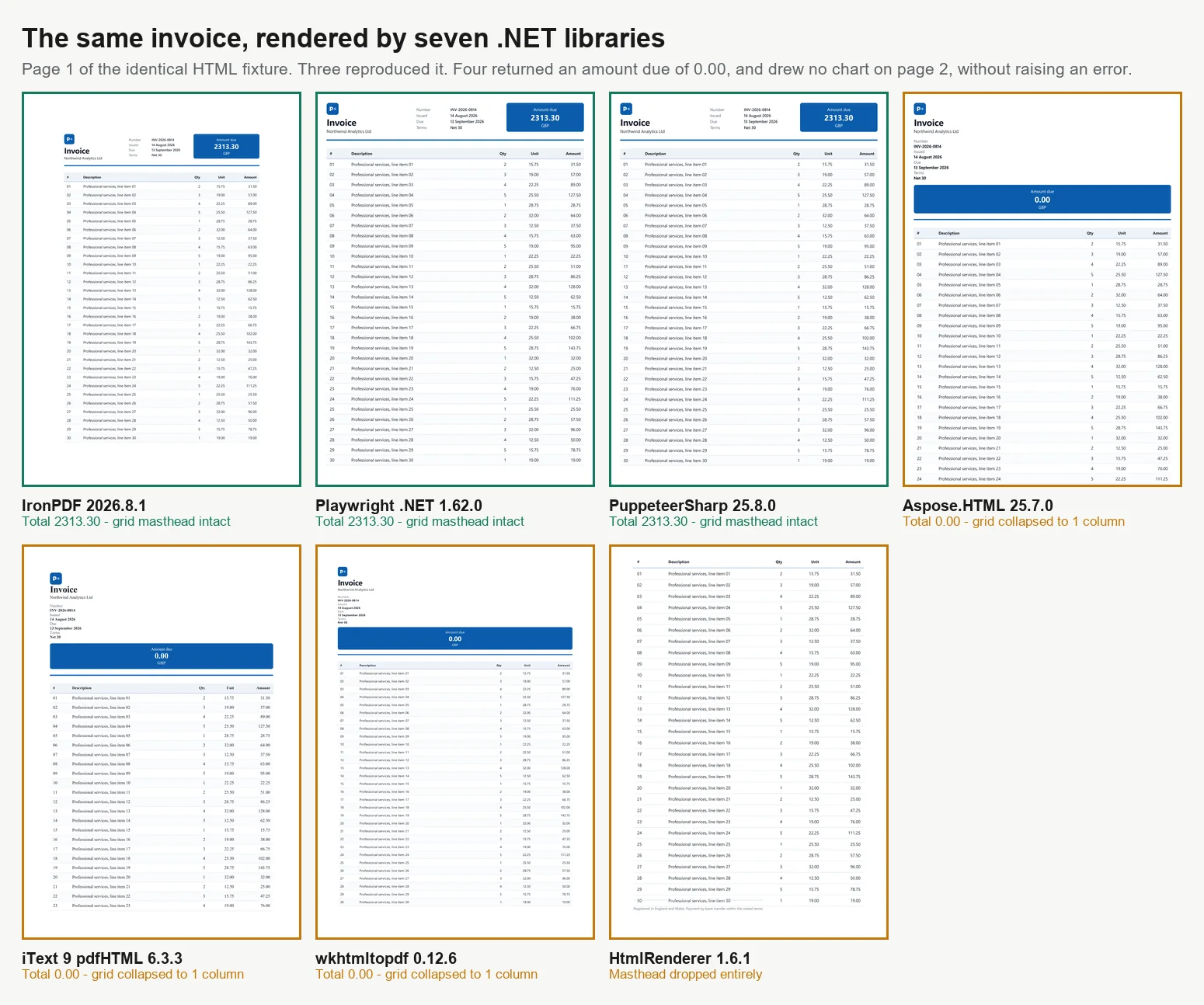
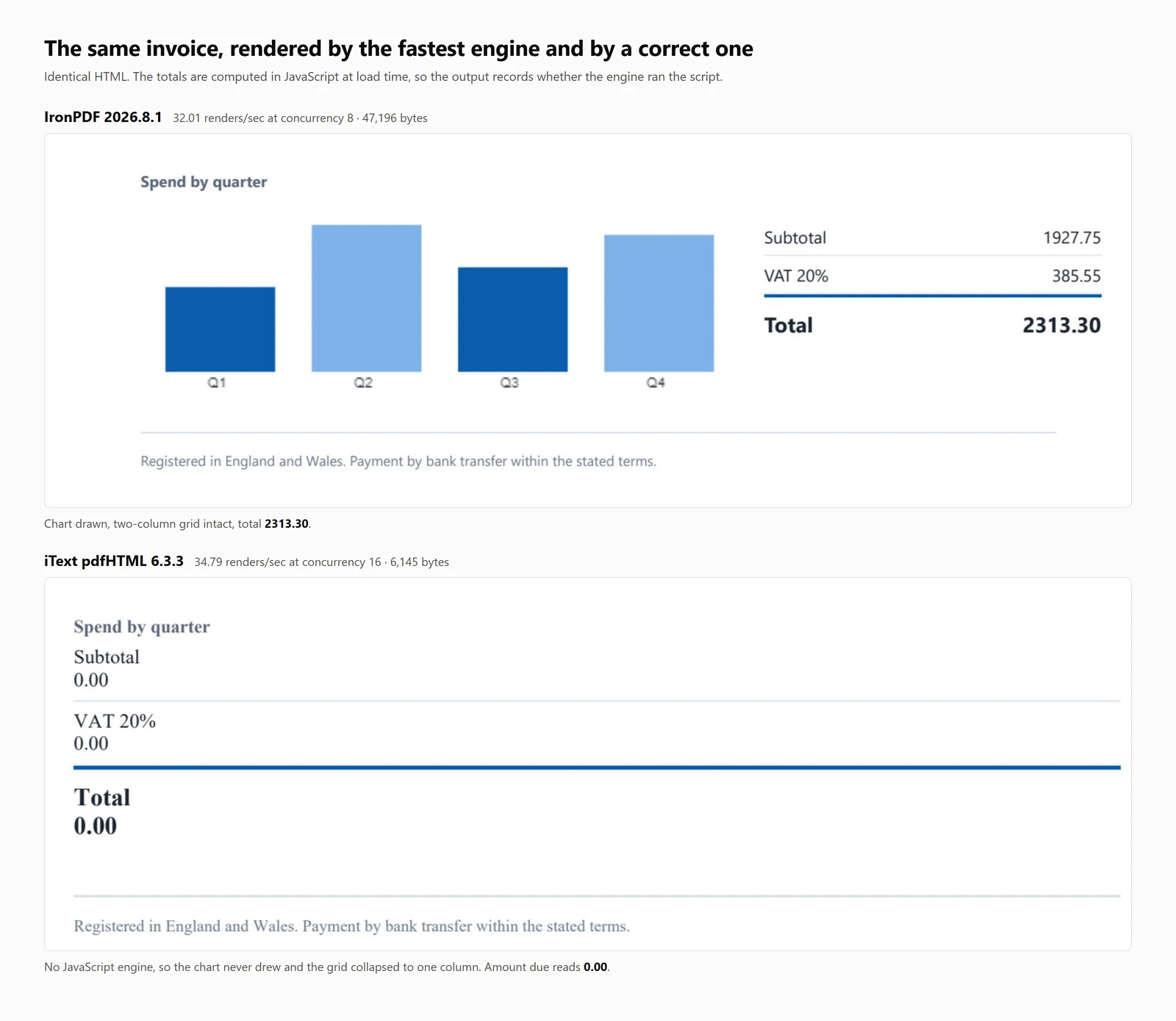
Istnieje 7 głównych sposobów na konwersję HTML do PDF w C#, i nie wszystkie metody dają identyczne wyniki. W testach porównawczych 7 silników z 2-stronicową fakturą, tylko 3 poprawnie ją wyrenderowały. Spośród pozostałych 4, 3 wydrukowały kwotę należną jako 0.00 tam, gdzie powinien być obliczony całkowity koszt, a czwarty całkowicie pominął blok z sumami, żaden z nich nie zgłosił błędu ani ostrzeżenia. Te silniki różnią się wsparciem dla nowoczesnego CSS, wykonywaniem JavaScript, wydajnością pod obciążeniem i rozmiarem kontenera. Te różnice stają się widoczne dopiero po przejrzeniu wynikowego dokumentu, zamiast zakładać, że udane renderowanie oznacza poprawną zawartość. Ten przewodnik oferuje działający kod dla wszystkich 7 podejść oraz dane z testów porównawczych dla każdego z nich, wszystkie mierzone na jednej maszynie.
Biblioteki dzielą się na 2 główne kategorie, co w dużej mierze wyjaśnia poniższe wyniki. Renderery klasy przeglądarkowej używają pełnego silnika Chromium. IronPDF (2026.8.1) zawiera Chromium w pakiecie, podczas gdy PuppeteerSharp (25.8.0) i Playwright .NET (1.62.0) kontrolują zewnętrzną przeglądarkę za pomocą protokołu DevTools. Te 3 odwzorowują wynik Chrome, w tym CSS Grid, czcionki webowe i wykresy oparte na canvas, ale wymagają więcej pamięci i większych kontenerów. Biblioteki z silnikiem układu, takie jak iText 9 z pdfHTML (6.3.3 na iText Core 9.7.0), HtmlRenderer z PdfSharp (1.6.1) i Aspose.HTML (25.7.0), używają własnych silników układu, są znacznie mniejsze i często szybsze, ale nie obsługują nowoczesnego JavaScript. wkhtmltopdf (0.12.6) jest przypadkiem pośrednim, używając starszego silnika Qt (4.8.5) WebKit, który obsługuje ES5, ale nie ES6. Wszystkie testy porównawcze w tym przewodniku opierają się na przetwarzaniu tej samej 2-stronicowej faktury na 4 poziomach współbieżności, z każdym PDF-em sprawdzanym pod kątem dokładności.
Krótka wersja: Gdzie IronPDF prowadzi
Zmierzono 3 września 2026, 5 przebiegów, 8,960 mierzonych renderów, na bezczynnej 24-rdzeniowej stacji roboczej z Windows 11 działającej na .NET 10. Pełna metoda i surowe dane znajdują się poniżej, a narzędzie testowe jest do pobrania.
4 z 7 zwróciły dokument, który był błędny i nie zgłosiły błędu
Przepustowość przy poprawnym renderowaniu
IronPDF
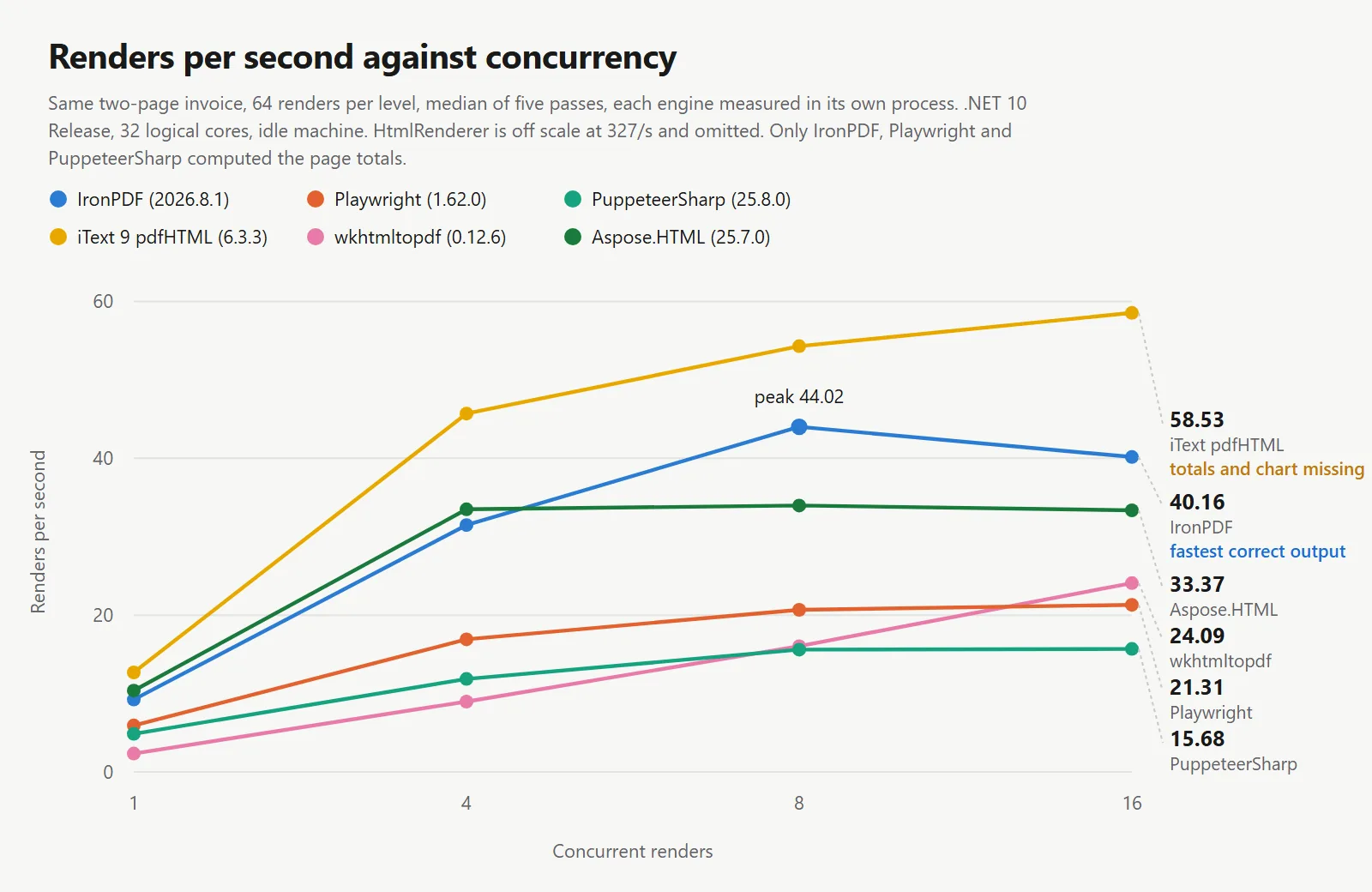
44.02 renderów/s przy 8 współbieżnych
2.1x Playwright, 2.8x PuppeteerSharp na tej samej maszynie
Praca na megabajt
IronPDF
27.0 MB na utrzymany render/s
54.3 MB dla Playwright, 82.9 MB dla PuppeteerSharp
Zimny start przy poprawnym renderowaniu
IronPDF
486 ms do pierwszego PDF
639 ms PuppeteerSharp, 720 ms Playwright, 1,096 ms Aspose.HTML
Co obsługujesz
IronPDF
Chromium dostarczane w pakiecie NuGet
Silniki przeglądarek dodają obraz, pobieranie w czasie budowy, pulę procesów i kadencję poprawek
Co integrujesz dalej
IronPDF
Scalanie, formularze, podpisy, PDF/A, szyfrowanie w tym samym pakiecie
Silniki przeglądarek renderują i zatrzymują się, więc następny krok to druga zależność
Powyższe liczby dotyczące prędkości w tabeli należą do silników, które źle wygenerowały dokument. iText 9 osiągnął 54.30 renderów na sekundę, a HtmlRenderer 327.09, i oba to zrobiły, nigdy nie uruchamiając JavaScript strony. Liczba dotycząca przepustowości niewiele znaczy bez dokumentu, który wyprodukowała, więc każda tabela tutaj zawiera kolumnę dokładności.
IronPDF prowadzi pod względem przepustowości na poprawne renderowanie: Wśród silników, które odtworzyły dokument, IronPDF utrzymywał 44,02 renderowania na sekundę w porównaniu do 20,68 i 15,60, na tej samej maszynie, tym samym dokumencie i w tych samych warunkach oczekiwania, jednocześnie zwracając najwięcej pracy na megabajt z 3 i najszybciej osiągając pierwszy PDF.
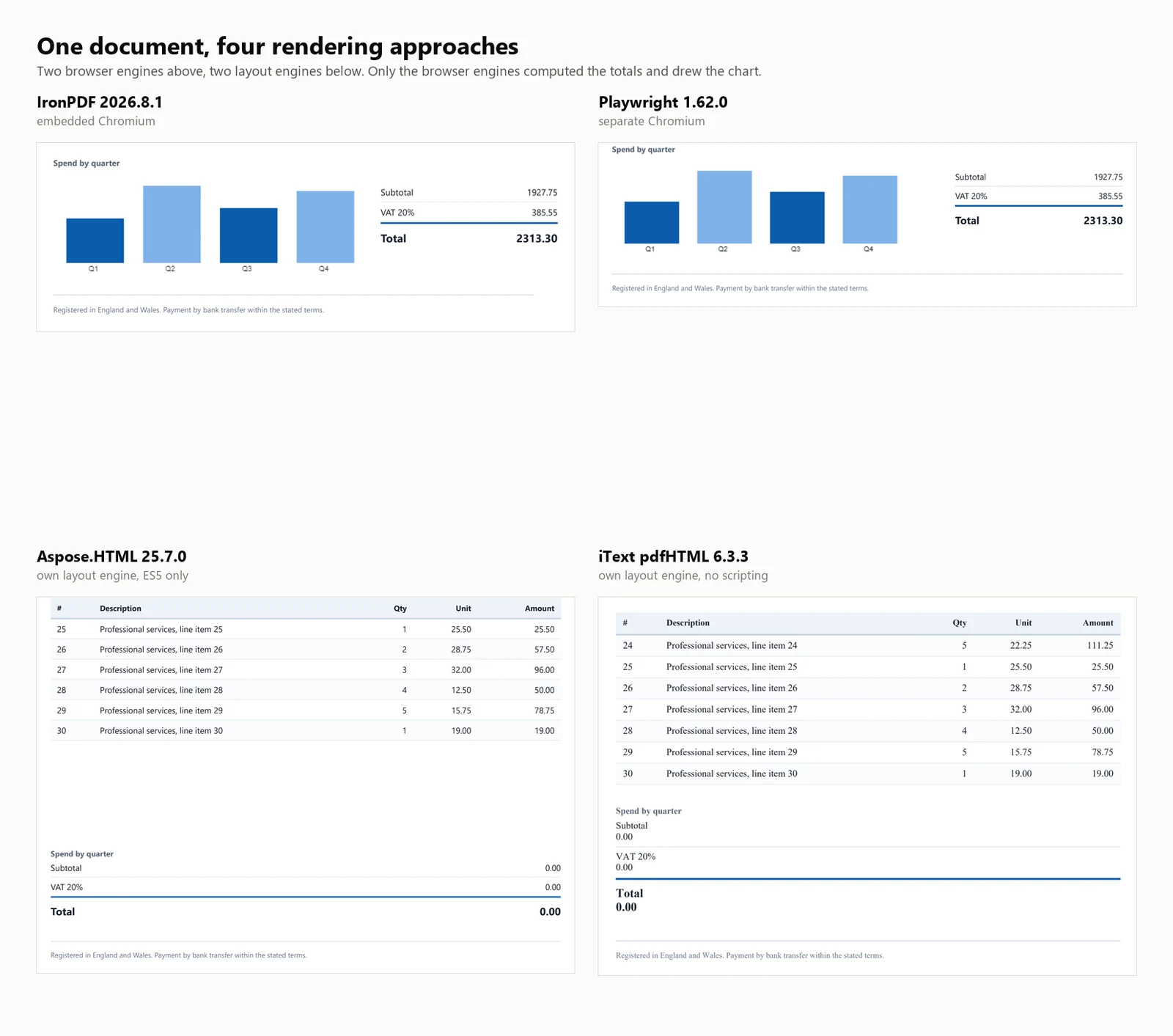
Wynik, który ma większe znaczenie niż którykolwiek z powyższych: 4 z 7 bibliotek wygenerowało PDF, który wyglądał na ukończony, ale był błędny. W 3 z nich suma faktury wynosiła 0.00 zamiast 2313.30. Czwarta, HtmlRenderer, cicho pominęła należną kwotę, sumy i wykres. W żadnym przypadku nie zgłoszono wyjątku, a nic w wyjściu na to nie wskazywało.
Szybki start HTML do PDF w C#
Ten przewodnik przedstawia 7 metod konwersji HTML do PDF w .NET, dostarczając przykłady kodu i ilościowe benchmarki dla każdej z nich.
Dla kogo jest to przeznaczone: Dla deweloperów .NET oceniających biblioteki HTML do PDF oraz tych, którzy muszą uzasadnić swój wybór obiektywnymi danymi.
Co otrzymasz: Działające przykłady dla każdego podejścia, obejmujące zarówno ciągi HTML, jak i aktywne adresy URL, wraz z pomiarami dla zimnego startu, przepustowości, zużycia pamięci i dokładności renderowania na spójnym dokumencie testowym.
Gdzie działa: .NET 6 i nowsze, .NET Framework 4.6.2 i nowsze oraz .NET Standard 2.0. Benchmarki przeprowadzono na .NET 10, Windows 11, z 32 logicznymi rdzeniami w trybie Release.
Kiedy używać tego podejścia: Gdy Twój dokument jest już w formacie HTML. Renderowanie kontrolowanego znaczników jest bardziej efektywne i niezawodne niż konstruowanie PDF-ów za pomocą indywidualnych poleceń rysowania dla treści przypominających dokumenty.
Dlaczego to ma znaczenie techniczne: Silniki dzielą się na 2 kategorie. Renderery klasy przeglądarkowej używają Chromium, co skutkuje wyższymi wymaganiami pamięci i kontenerów. Biblioteki silników układu są mniejsze i szybsze, ale nie wykonują JavaScript. Poniższe benchmarki kwantyfikują te kompromisy.
Aby z niego skorzystać, zainstaluj pakiet, dostarcz ciąg HTML do renderera i zapisz wynikowy PDF.
1Zainstaluj IronPDF z NuGet Package Manager
PM > Install-Package IronPdf
Install-Package IronPdf
2Skopiuj i uruchom ten fragment kodu.
using IronPdf;License.LicenseKey = "YOUR-TRIAL-KEY";var pdf = new ChromePdfRenderer().RenderHtmlAsPdf("<h1>Invoice INV-2026-0814</h1>");pdf.SaveAs("invoice.pdf");
using IronPdf;

License.LicenseKey = "YOUR-TRIAL-KEY";
var pdf = new ChromePdfRenderer().RenderHtmlAsPdf("<h1>Invoice INV-2026-0814</h1>");
pdf.SaveAs("invoice.pdf");
Imports IronPdfLicense.LicenseKey = "YOUR-TRIAL-KEY"Dim pdf = New ChromePdfRenderer().RenderHtmlAsPdf("<h1>Invoice INV-2026-0814</h1>")pdf.SaveAs("invoice.pdf")
ImportsIronPdfLicense.LicenseKey = "YOUR-TRIAL-KEY"Dim pdf = New ChromePdfRenderer().RenderHtmlAsPdf("<h1>Invoice INV-2026-0814</h1>")pdf.SaveAs("invoice.pdf")
Imports IronPdf

License.LicenseKey = "YOUR-TRIAL-KEY"
Dim pdf = New ChromePdfRenderer().RenderHtmlAsPdf("<h1>Invoice INV-2026-0814</h1>")
pdf.SaveAs("invoice.pdf")
3Wdrożenie do testowania w środowisku produkcyjnym
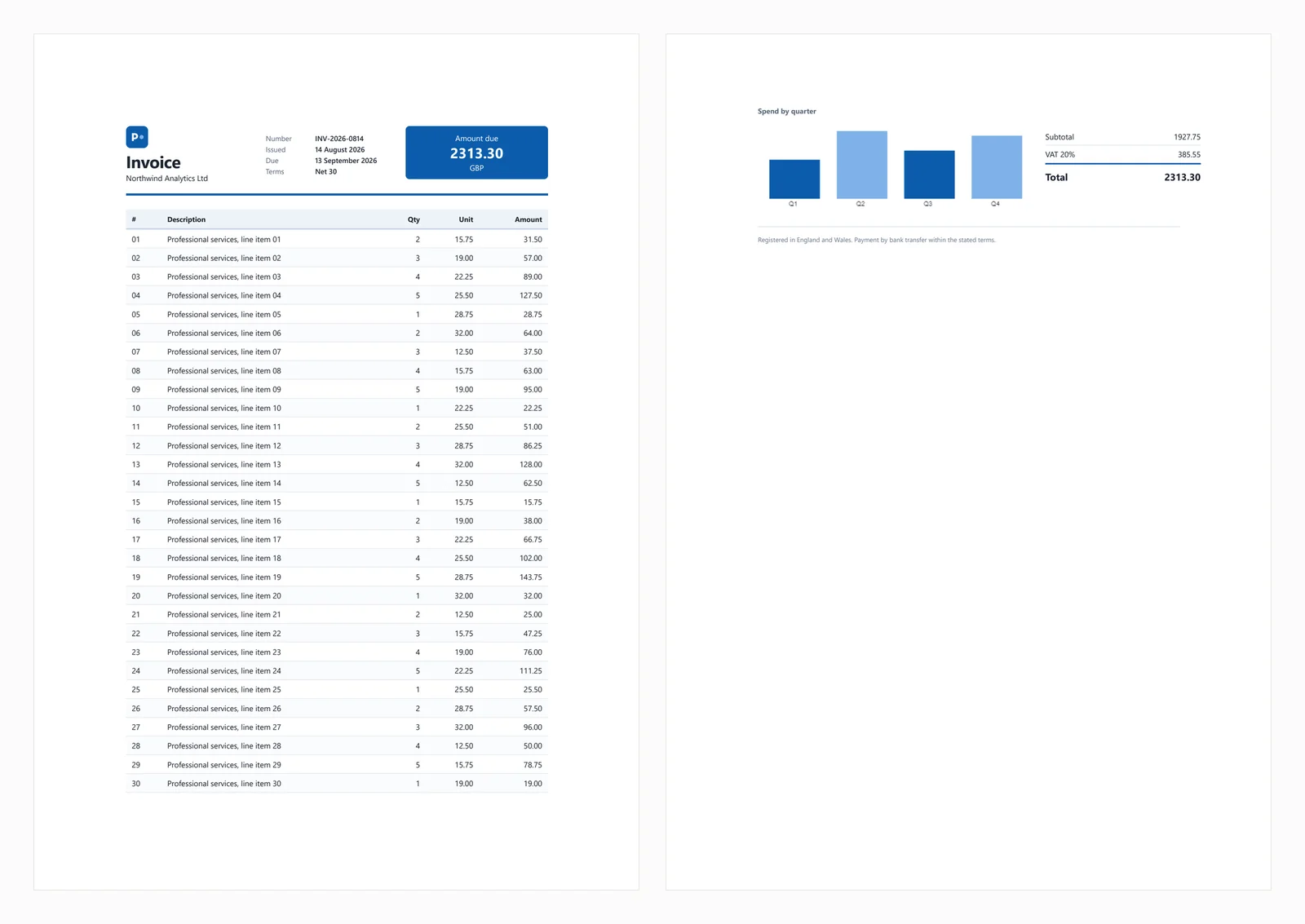
Powyższy szybki start generuje następujący wynik z testowej faktury używanej w całym tym przewodniku.
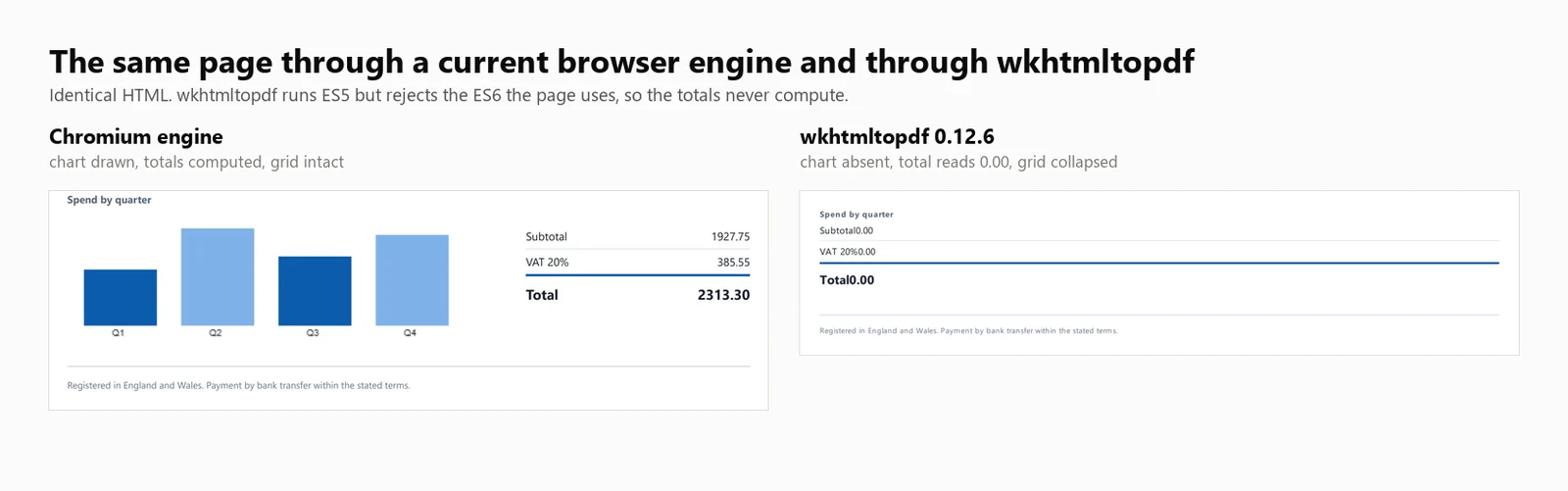
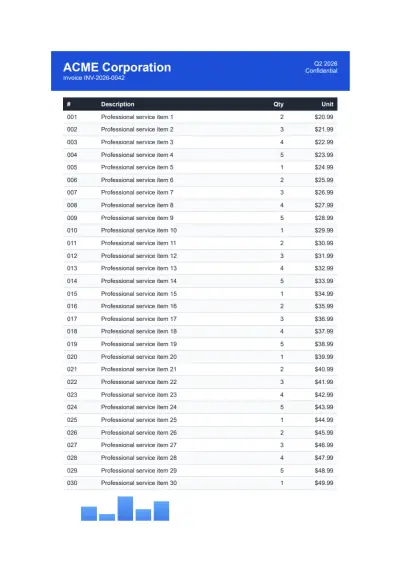
Dokument testowy zawiera nagłówek CSS Grid, tabelę z 30 wierszami z paskowaniem zebry, wbudowany SVG, wykres słupkowy renderowany na elemencie canvas oraz sumy obliczane w JavaScript podczas ładowania. Obliczone sumy są ważne dla testowania, ponieważ silniki bez obsługi JavaScript generują faktury, które wyglądają na kompletne, ale wyświetlają kwotę do zapłaty 0.00. To zachowanie występuje w 3 z poniższych bibliotek, a czwarta całkowicie pomija blok sum.
Typowe scenariusze awarii są omówione w poniższych sekcjach.
1. IronPDF: Wbudowany Chromium, brak przeglądarki do zainstalowania
IronPDF to renderer Chromium, który działa w ramach Twojej aplikacji za pośrednictwem NuGet, eliminując potrzebę instalowania oddzielnej przeglądarki. To rozróżnienie głównie wpływa na wdrożenie, które jest omówione później w przewodniku.
Instalacja:
> dotnet add package IronPdf
dotnet add package IronPdf
Z ciągu HTML:
// IronPDF 2026.8.1using IronPdf;License.LicenseKey = "YOUR-TRIAL-KEY"; // trial keys are freestring html = @"<h1>Invoice INV-2026-0814</h1> <p>Northwind Analytics Ltd — Net 30</p> <table><tr><th>Item</th><th>Amount</th></tr> <tr><td>Professional services</td><td>2313.30</td></tr></table>";var renderer = new ChromePdfRenderer();renderer.RenderingOptions.PaperSize = IronPdf.Rendering.PdfPaperSize.A4;renderer.RenderingOptions.PrintHtmlBackgrounds = true;using PdfDocument pdf = renderer.RenderHtmlAsPdf(html);pdf.SaveAs("invoice.pdf");
// IronPDF 2026.8.1using IronPdf;License.LicenseKey = "YOUR-TRIAL-KEY"; // trial keys are freestring html = @"<h1>Invoice INV-2026-0814</h1> <p>Northwind Analytics Ltd — Net 30</p> <table><tr><th>Item</th><th>Amount</th></tr> <tr><td>Professional services</td><td>2313.30</td></tr></table>";var renderer = new ChromePdfRenderer();renderer.RenderingOptions.PaperSize = IronPdf.Rendering.PdfPaperSize.A4;renderer.RenderingOptions.PrintHtmlBackgrounds = true;using PdfDocument pdf = renderer.RenderHtmlAsPdf(html);pdf.SaveAs("invoice.pdf");
// IronPDF 2026.8.1
using IronPdf;
License.LicenseKey = "YOUR-TRIAL-KEY"; // trial keys are free
string html = @"<h1>Invoice INV-2026-0814</h1>
<p>Northwind Analytics Ltd — Net 30</p>
<table><tr><th>Item</th><th>Amount</th></tr>
<tr><td>Professional services</td><td>2313.30</td></tr></table>";
var renderer = new ChromePdfRenderer();
renderer.RenderingOptions.PaperSize = IronPdf.Rendering.PdfPaperSize.A4;
renderer.RenderingOptions.PrintHtmlBackgrounds = true;
using PdfDocument pdf = renderer.RenderHtmlAsPdf(html);
pdf.SaveAs("invoice.pdf");
' IronPDF 2026.8.1Imports IronPdfLicense.LicenseKey = "YOUR-TRIAL-KEY" ' trial keys are freeDim html As String = "<h1>Invoice INV-2026-0814</h1> <p>Northwind Analytics Ltd — Net 30</p> <table><tr><th>Item</th><th>Amount</th></tr> <tr><td>Professional services</td><td>2313.30</td></tr></table>"Dim renderer As New ChromePdfRenderer()renderer.RenderingOptions.PaperSize = IronPdf.Rendering.PdfPaperSize.A4renderer.RenderingOptions.PrintHtmlBackgrounds = TrueUsing pdf As PdfDocument = renderer.RenderHtmlAsPdf(html) pdf.SaveAs("invoice.pdf")End Using
' IronPDF 2026.8.1ImportsIronPdfLicense.LicenseKey = "YOUR-TRIAL-KEY" ' trial keys are freeDim html AsString = "<h1>Invoice INV-2026-0814</h1> <p>Northwind Analytics Ltd — Net 30</p> <table><tr><th>Item</th><th>Amount</th></tr> <tr><td>Professional services</td><td>2313.30</td></tr></table>"Dim renderer As New ChromePdfRenderer()renderer.RenderingOptions.PaperSize = IronPdf.Rendering.PdfPaperSize.A4renderer.RenderingOptions.PrintHtmlBackgrounds = TrueUsing pdf AsPdfDocument = renderer.RenderHtmlAsPdf(html) pdf.SaveAs("invoice.pdf")EndUsing
' IronPDF 2026.8.1
Imports IronPdf
License.LicenseKey = "YOUR-TRIAL-KEY" ' trial keys are free
Dim html As String = "<h1>Invoice INV-2026-0814</h1>
<p>Northwind Analytics Ltd — Net 30</p>
<table><tr><th>Item</th><th>Amount</th></tr>
<tr><td>Professional services</td><td>2313.30</td></tr></table>"
Dim renderer As New ChromePdfRenderer()
renderer.RenderingOptions.PaperSize = IronPdf.Rendering.PdfPaperSize.A4
renderer.RenderingOptions.PrintHtmlBackgrounds = True
Using pdf As PdfDocument = renderer.RenderHtmlAsPdf(html)
pdf.SaveAs("invoice.pdf")
End Using
Z aktywnego URL:
// IronPDF 2026.8.1 - only the render call changes.using IronPdf;License.LicenseKey = "YOUR-TRIAL-KEY";var renderer = new ChromePdfRenderer();using PdfDocument pdf = renderer.RenderUrlAsPdf("https://ironpdf.com/");pdf.SaveAs("page.pdf");
// IronPDF 2026.8.1 - only the render call changes.using IronPdf;License.LicenseKey = "YOUR-TRIAL-KEY";var renderer = new ChromePdfRenderer();using PdfDocument pdf = renderer.RenderUrlAsPdf("https://ironpdf.com/");pdf.SaveAs("page.pdf");
// IronPDF 2026.8.1 - only the render call changes.
using IronPdf;

License.LicenseKey = "YOUR-TRIAL-KEY";

var renderer = new ChromePdfRenderer();

using PdfDocument pdf = renderer.RenderUrlAsPdf("https://ironpdf.com/");
pdf.SaveAs("page.pdf");
Imports IronPdfLicense.LicenseKey = "YOUR-TRIAL-KEY"Dim renderer = New ChromePdfRenderer()Using pdf As PdfDocument = renderer.RenderUrlAsPdf("https://ironpdf.com/") pdf.SaveAs("page.pdf")End Using
ImportsIronPdfLicense.LicenseKey = "YOUR-TRIAL-KEY"Dim renderer = New ChromePdfRenderer()Using pdf AsPdfDocument = renderer.RenderUrlAsPdf("https://ironpdf.com/") pdf.SaveAs("page.pdf")EndUsing
Imports IronPdf

License.LicenseKey = "YOUR-TRIAL-KEY"

Dim renderer = New ChromePdfRenderer()

Using pdf As PdfDocument = renderer.RenderUrlAsPdf("https://ironpdf.com/")
    pdf.SaveAs("page.pdf")
End Using
Zalecane użycie: Wybierz IronPDF, gdy potrzebujesz dokładnego renderowania PDF w przeglądarce bez zarządzania infrastrukturą przeglądarki bezgłowej, taką jak cykl życia procesu, odzyskiwanie po awarii czy konfiguracja kontenera.
Kompromis: Dostarcza Chromium wewnątrz pakietu, więc szczytowe zużycie pamięci osiąga 342 MB dla pojedynczego zimnego renderowania i 1,187 MB dla 8 równoczesnych. Zaczyna się od 999 USD, gdzie 4 z pozostałych 6 są darmowe. Dla projektu pobocznego lub narzędzia wewnętrznego o niskiej objętości, ten koszt jest trudny do uzasadnienia.
Wydajność: 486 ms zimny start, 161 ms mediana opóźnienia przy 8 równoczesnych renderowaniach, 44,02 utrzymywanych renderów na sekundę i 1,187 MB szczytowego zużycia pamięci w całym drzewie procesów. Testowa faktura została dokładnie wyrenderowana, w tym wykres i sumy.
2. PuppeteerSharp: Headless Chrome do renderowania PDF
PuppeteerSharp to port .NET Puppeteera. Pobiera kompilację Chromium, kontroluje ją za pomocą protokołu DevTools i generuje PDF-y. Jest darmowy, licencjonowany na MIT, aktywnie utrzymywany i mierzony tutaj w wersji PuppeteerSharp (25.8.0).
Instalacja:
> dotnet add package PuppeteerSharp
dotnet add package PuppeteerSharp
Z ciągu HTML:
// PuppeteerSharp 25.8.0using PuppeteerSharp;using PuppeteerSharp.Media;string html = @"<h1>Invoice INV-2026-0814</h1> <p>Northwind Analytics Ltd — Net 30</p> <table><tr><th>Item</th><th>Amount</th></tr> <tr><td>Professional services</td><td>2313.30</td></tr></table>";// First run downloads roughly 150 MB of Chromium. Pre-fetch this at build time.await new BrowserFetcher().DownloadAsync();await using IBrowser browser = await Puppeteer.LaunchAsync(new LaunchOptions { Headless = true });await using IPage page = await browser.NewPageAsync();await page.SetContentAsync(html, new SetContentOptions{ WaitUntil = new[] { WaitUntilNavigation.Load }});await page.PdfAsync("invoice.pdf", new PdfOptions{ Format = PaperFormat.A4, PrintBackground = true});
// PuppeteerSharp 25.8.0using PuppeteerSharp;using PuppeteerSharp.Media;string html = @"<h1>Invoice INV-2026-0814</h1> <p>Northwind Analytics Ltd — Net 30</p> <table><tr><th>Item</th><th>Amount</th></tr> <tr><td>Professional services</td><td>2313.30</td></tr></table>";// First run downloads roughly 150 MB of Chromium. Pre-fetch this at build time.await new BrowserFetcher().DownloadAsync();await using IBrowser browser = awaitPuppeteer.LaunchAsync(new LaunchOptions { Headless = true });await using IPage page = await browser.NewPageAsync();await page.SetContentAsync(html, new SetContentOptions{WaitUntil = new[] { WaitUntilNavigation.Load }});await page.PdfAsync("invoice.pdf", new PdfOptions{Format = PaperFormat.A4,PrintBackground = true});
// PuppeteerSharp 25.8.0
using PuppeteerSharp;
using PuppeteerSharp.Media;
string html = @"<h1>Invoice INV-2026-0814</h1>
<p>Northwind Analytics Ltd — Net 30</p>
<table><tr><th>Item</th><th>Amount</th></tr>
<tr><td>Professional services</td><td>2313.30</td></tr></table>";
// First run downloads roughly 150 MB of Chromium. Pre-fetch this at build time.
await new BrowserFetcher().DownloadAsync();
await using IBrowser browser = await Puppeteer.LaunchAsync(new LaunchOptions { Headless = true });
await using IPage page = await browser.NewPageAsync();
await page.SetContentAsync(html, new SetContentOptions
{
WaitUntil = new[] { WaitUntilNavigation.Load }
});
await page.PdfAsync("invoice.pdf", new PdfOptions
{
Format = PaperFormat.A4,
PrintBackground = true
});
' PuppeteerSharp 25.8.0Imports PuppeteerSharpImports PuppeteerSharp.MediaDim html As String = "<h1>Invoice INV-2026-0814</h1> <p>Northwind Analytics Ltd — Net 30</p> <table><tr><th>Item</th><th>Amount</th></tr> <tr><td>Professional services</td><td>2313.30</td></tr></table>"' First run downloads roughly 150 MB of Chromium. Pre-fetch this at build time.Await (New BrowserFetcher()).DownloadAsync()Await Using browser As IBrowser = Await Puppeteer.LaunchAsync(New LaunchOptions With {.Headless = True}) Await Using page As IPage = Await browser.NewPageAsync() Await page.SetContentAsync(html, New SetContentOptions With {.WaitUntil = {WaitUntilNavigation.Load}}) Await page.PdfAsync("invoice.pdf", New PdfOptions With { .Format = PaperFormat.A4, .PrintBackground = True }) End UsingEnd Using
' PuppeteerSharp 25.8.0ImportsPuppeteerSharpImportsPuppeteerSharp.MediaDim html AsString = "<h1>Invoice INV-2026-0814</h1> <p>Northwind Analytics Ltd — Net 30</p> <table><tr><th>Item</th><th>Amount</th></tr> <tr><td>Professional services</td><td>2313.30</td></tr></table>"' First run downloads roughly 150 MB of Chromium. Pre-fetch this at build time.Await (New BrowserFetcher()).DownloadAsync()AwaitUsing browser AsIBrowser = AwaitPuppeteer.LaunchAsync(New LaunchOptionsWith {.Headless = True})AwaitUsing page AsIPage = Await browser.NewPageAsync()Await page.SetContentAsync(html, New SetContentOptionsWith {.WaitUntil = {WaitUntilNavigation.Load}})Await page.PdfAsync("invoice.pdf", New PdfOptionsWith { .Format = PaperFormat.A4, .PrintBackground = True })EndUsingEndUsing
' PuppeteerSharp 25.8.0
Imports PuppeteerSharp
Imports PuppeteerSharp.Media
Dim html As String = "<h1>Invoice INV-2026-0814</h1>
<p>Northwind Analytics Ltd — Net 30</p>
<table><tr><th>Item</th><th>Amount</th></tr>
<tr><td>Professional services</td><td>2313.30</td></tr></table>"
' First run downloads roughly 150 MB of Chromium. Pre-fetch this at build time.
Await (New BrowserFetcher()).DownloadAsync()
Await Using browser As IBrowser = Await Puppeteer.LaunchAsync(New LaunchOptions With {.Headless = True})
Await Using page As IPage = Await browser.NewPageAsync()
Await page.SetContentAsync(html, New SetContentOptions With {.WaitUntil = {WaitUntilNavigation.Load}})
Await page.PdfAsync("invoice.pdf", New PdfOptions With {
.Format = PaperFormat.A4,
.PrintBackground = True
})
End Using
End Using
Z aktywnego URL:
// PuppeteerSharp 25.8.0 - GoToAsync replaces SetContentAsync.await using IPage page = await browser.NewPageAsync();await page.GoToAsync("https://ironpdf.com/", new NavigationOptions{ WaitUntil = new[] { WaitUntilNavigation.Networkidle0 }});await page.PdfAsync("page.pdf", new PdfOptions { Format = PaperFormat.A4, PrintBackground = true });
// PuppeteerSharp 25.8.0 - GoToAsync replaces SetContentAsync.await using IPage page = await browser.NewPageAsync();await page.GoToAsync("https://ironpdf.com/", new NavigationOptions{WaitUntil = new[] { WaitUntilNavigation.Networkidle0 }});await page.PdfAsync("page.pdf", new PdfOptions { Format = PaperFormat.A4, PrintBackground = true });
// PuppeteerSharp 25.8.0 - GoToAsync replaces SetContentAsync.
await using IPage page = await browser.NewPageAsync();

await page.GoToAsync("https://ironpdf.com/", new NavigationOptions
{
    WaitUntil = new[] { WaitUntilNavigation.Networkidle0 }
});

await page.PdfAsync("page.pdf", new PdfOptions { Format = PaperFormat.A4, PrintBackground = true });
' PuppeteerSharp 25.8.0 - GoToAsync replaces SetContentAsync.Await Using page As IPage = Await browser.NewPageAsync()Await page.GoToAsync("https://ironpdf.com/", New NavigationOptions With { .WaitUntil = {WaitUntilNavigation.Networkidle0}})Await page.PdfAsync("page.pdf", New PdfOptions With {.Format = PaperFormat.A4, .PrintBackground = True})
' PuppeteerSharp 25.8.0 - GoToAsync replaces SetContentAsync.
Await Using page As IPage = Await browser.NewPageAsync()

Await page.GoToAsync("https://ironpdf.com/", New NavigationOptions With {
    .WaitUntil = {WaitUntilNavigation.Networkidle0}
})

Await page.PdfAsync("page.pdf", New PdfOptions With {.Format = PaperFormat.A4, .PrintBackground = True})
Zalecane użycie: Wybierz PuppeteerSharp, gdy ograniczenia budżetowe są priorytetem i jesteś komfortowy z zarządzaniem procesami przeglądarki. Dostarcza wynik identyczny z Chrome, ponieważ używa tego samego silnika.
Kompromis: Jesteś odpowiedzialny za zarządzanie procesami przeglądarki, w tym cyklem życia, obsługą osieroconych procesów po awariach i konfiguracją sandboxa. Pierwsze uruchomienie pobiera około 150 MB Chromium, co może się nie powieść w kontenerach bez dostępu do sieci zewnętrznej, więc pobierz przeglądarkę wcześniej podczas budowy. Pod obciążeniem, PuppeteerSharp uruchamia najwięcej procesów spośród mierzonych opcji, osiągając 40 przy 16 równoczesnych renderowaniach.
Wydajność: 639 ms zimny start, 507 ms mediana opóźnienia przy 8 równoczesnych renderowaniach, 15,60 utrzymywanych renderów na sekundę i 1,293 MB szczytowego zużycia pamięci w całym drzewie procesów. Testowa faktura została poprawnie wyrenderowana.
3. Playwright for .NET: Renderowanie PDF klasy przeglądarki
Playwright for .NET to biblioteka automatyzacji przeglądarki Microsoftu. Używa podobnego podejścia do Puppeteera, ale oferuje inne API, bardziej efektywną izolację stron i podobne rozważania dotyczące wdrożenia.
Instalacja:
> dotnet add package Microsoft.Playwright
dotnet add package Microsoft.Playwright
Drugie polecenie instaluje pliki binarne przeglądarki.
> playwright install chromium
playwright install chromium
Pominięcie tego jest najczęstszą przyczyną nieudanego pierwszego budowania Playwright w CI.
Z ciągu HTML:
// Microsoft.Playwright 1.62.0using Microsoft.Playwright;string html = @"<h1>Invoice INV-2026-0814</h1> <p>Northwind Analytics Ltd — Net 30</p> <table><tr><th>Item</th><th>Amount</th></tr> <tr><td>Professional services</td><td>2313.30</td></tr></table>";// Run "playwright install chromium" first, or call the installer in code.Microsoft.Playwright.Program.Main(new[] { "install", "chromium" });using IPlaywright playwright = await Playwright.CreateAsync();await using IBrowser browser = await playwright.Chromium.LaunchAsync();IPage page = await browser.NewPageAsync();await page.SetContentAsync(html, new PageSetContentOptions { WaitUntil = WaitUntilState.Load });await page.PdfAsync(new PagePdfOptions{ Path = "invoice.pdf", Format = "A4", PrintBackground = true});
// Microsoft.Playwright 1.62.0using Microsoft.Playwright;string html = @"<h1>Invoice INV-2026-0814</h1> <p>Northwind Analytics Ltd — Net 30</p> <table><tr><th>Item</th><th>Amount</th></tr> <tr><td>Professional services</td><td>2313.30</td></tr></table>";// Run "playwright install chromium" first, or call the installer in code.Microsoft.Playwright.Program.Main(new[] { "install", "chromium" });using IPlaywright playwright = await Playwright.CreateAsync();await using IBrowser browser = await playwright.Chromium.LaunchAsync();IPage page = await browser.NewPageAsync();await page.SetContentAsync(html, new PageSetContentOptions { WaitUntil = WaitUntilState.Load });await page.PdfAsync(new PagePdfOptions{Path = "invoice.pdf",Format = "A4",PrintBackground = true});
// Microsoft.Playwright 1.62.0
using Microsoft.Playwright;
string html = @"<h1>Invoice INV-2026-0814</h1>
<p>Northwind Analytics Ltd — Net 30</p>
<table><tr><th>Item</th><th>Amount</th></tr>
<tr><td>Professional services</td><td>2313.30</td></tr></table>";
// Run "playwright install chromium" first, or call the installer in code.
Microsoft.Playwright.Program.Main(new[] { "install", "chromium" });
using IPlaywright playwright = await Playwright.CreateAsync();
await using IBrowser browser = await playwright.Chromium.LaunchAsync();
IPage page = await browser.NewPageAsync();
await page.SetContentAsync(html, new PageSetContentOptions { WaitUntil = WaitUntilState.Load });
await page.PdfAsync(new PagePdfOptions
{
Path = "invoice.pdf",
Format = "A4",
PrintBackground = true
});
' Microsoft.Playwright 1.62.0Imports Microsoft.PlaywrightDim html As String = "<h1>Invoice INV-2026-0814</h1> <p>Northwind Analytics Ltd — Net 30</p> <table><tr><th>Item</th><th>Amount</th></tr> <tr><td>Professional services</td><td>2313.30</td></tr></table>"' Run "playwright install chromium" first, or call the installer in code.Microsoft.Playwright.Program.Main(New String() {"install", "chromium"})Using playwright As IPlaywright = Await Playwright.CreateAsync() Await Using browser As IBrowser = Await playwright.Chromium.LaunchAsync() Dim page As IPage = Await browser.NewPageAsync() Await page.SetContentAsync(html, New PageSetContentOptions With {.WaitUntil = WaitUntilState.Load}) Await page.PdfAsync(New PagePdfOptions With { .Path = "invoice.pdf", .Format = "A4", .PrintBackground = True }) End UsingEnd Using
' Microsoft.Playwright 1.62.0ImportsMicrosoft.PlaywrightDim html AsString = "<h1>Invoice INV-2026-0814</h1> <p>Northwind Analytics Ltd — Net 30</p> <table><tr><th>Item</th><th>Amount</th></tr> <tr><td>Professional services</td><td>2313.30</td></tr></table>"' Run "playwright install chromium" first, or call the installer in code.Microsoft.Playwright.Program.Main(New String() {"install", "chromium"})Using playwright AsIPlaywright = AwaitPlaywright.CreateAsync()AwaitUsing browser AsIBrowser = Await playwright.Chromium.LaunchAsync() Dim page AsIPage = Await browser.NewPageAsync()Await page.SetContentAsync(html, New PageSetContentOptionsWith {.WaitUntil = WaitUntilState.Load})Await page.PdfAsync(New PagePdfOptionsWith { .Path = "invoice.pdf", .Format = "A4", .PrintBackground = True })EndUsingEndUsing
' Microsoft.Playwright 1.62.0
Imports Microsoft.Playwright
Dim html As String = "<h1>Invoice INV-2026-0814</h1>
<p>Northwind Analytics Ltd — Net 30</p>
<table><tr><th>Item</th><th>Amount</th></tr>
<tr><td>Professional services</td><td>2313.30</td></tr></table>"
' Run "playwright install chromium" first, or call the installer in code.
Microsoft.Playwright.Program.Main(New String() {"install", "chromium"})
Using playwright As IPlaywright = Await Playwright.CreateAsync()
Await Using browser As IBrowser = Await playwright.Chromium.LaunchAsync()
Dim page As IPage = Await browser.NewPageAsync()
Await page.SetContentAsync(html, New PageSetContentOptions With {.WaitUntil = WaitUntilState.Load})
Await page.PdfAsync(New PagePdfOptions With {
.Path = "invoice.pdf",
.Format = "A4",
.PrintBackground = True
})
End Using
End Using
' Microsoft.Playwright 1.62.0 - GotoAsync replaces SetContentAsync.
Dim page As IPage = Await browser.NewPageAsync()

Await page.GotoAsync("https://ironpdf.com/", New PageGotoOptions With {
    .WaitUntil = WaitUntilState.NetworkIdle
})

Await page.PdfAsync(New PagePdfOptions With {.Path = "page.pdf", .Format = "A4", .PrintBackground = True})
Zalecane użycie: Wybierz Playwright for .NET, jeśli potrzebujesz renderowania jakości przeglądarki bez kosztów i preferujesz jego API, lub jeśli już używasz Playwright do testowania i chcesz uniknąć dodatkowych zależności.
Kompromis: Playwright dzieli te same rozważania co Puppeteer, w tym pliki binarne przeglądarki w Twoim obrazie, nadzór nad procesami i krok instalacji w Twoim Dockerfile. Jest to najstabilniejszy silnik mierzony tutaj, ale dostarcza nieco ponad połowę przepustowości wbudowanego silnika.
Wydajność: 720 ms zimny start, 381 ms mediana opóźnienia przy 8 równoczesnych renderowaniach, 20,68 utrzymywanych renderów na sekundę i 1,122 MB szczytowego zużycia pamięci w całym drzewie procesów. Testowa faktura została poprawnie wyrenderowana.
4. iText 9 z pdfHTML: Silnik układu, brak JavaScript
iText 9 z pdfHTML to biblioteka PDF z dodatkiem do konwersji HTML. Używa własnego silnika układu zamiast przeglądarki, oferując szybkie i przewidywalne wyniki w ramach obsługiwanych funkcji, i milczy na temat wszystkiego poza nimi. Obie wersje pakietów są oddzielne. pdfHTML (6.3.3) to dodatek działający na iText Core (9.7.0), i to jest para mierzona tutaj.
Instalacja:
> dotnet add package itext.pdfhtml
dotnet add package itext.pdfhtml
Uwaga: Pakiet itext7.* jest przestarzały i został przemianowany na itext.*, co jest szczegółem, który wciąż jest błędnie przedstawiany w najpopularniejszych samouczkach. Zainstaluj itext.pdfhtml, a nie itext7.pdfhtml. Nazwa pakietu nie zawiera numeru wersji, więc itext.pdfhtml odnosi się do bieżącego wydania pdfHTML na iText 9.
Z ciągu HTML:
// itext.pdfhtml 6.3.3 - AGPL or commercial licence.// Note the package rename: itext7.pdfhtml is deprecated in favour of itext.pdfhtml.using iText.Html2pdf;string html = @"<h1>Invoice INV-2026-0814</h1> <p>Northwind Analytics Ltd — Net 30</p> <table><tr><th>Item</th><th>Amount</th></tr> <tr><td>Professional services</td><td>2313.30</td></tr></table>";using var output = new FileStream("invoice.pdf", FileMode.Create);HtmlConverter.ConvertToPdf(html, output);// No JavaScript engine and no canvas, so anything the page computes or draws// at load time will be missing from the result.
// itext.pdfhtml 6.3.3 - AGPL or commercial licence.// Note the package rename: itext7.pdfhtml is deprecated in favour of itext.pdfhtml.using iText.Html2pdf;string html = @"<h1>Invoice INV-2026-0814</h1> <p>Northwind Analytics Ltd — Net 30</p> <table><tr><th>Item</th><th>Amount</th></tr> <tr><td>Professional services</td><td>2313.30</td></tr></table>";using var output = new FileStream("invoice.pdf", FileMode.Create);HtmlConverter.ConvertToPdf(html, output);// No JavaScript engine and no canvas, so anything the page computes or draws// at load time will be missing from the result.
// itext.pdfhtml 6.3.3 - AGPL or commercial licence.
// Note the package rename: itext7.pdfhtml is deprecated in favour of itext.pdfhtml.
using iText.Html2pdf;
string html = @"<h1>Invoice INV-2026-0814</h1>
<p>Northwind Analytics Ltd — Net 30</p>
<table><tr><th>Item</th><th>Amount</th></tr>
<tr><td>Professional services</td><td>2313.30</td></tr></table>";
using var output = new FileStream("invoice.pdf", FileMode.Create);
HtmlConverter.ConvertToPdf(html, output);
// No JavaScript engine and no canvas, so anything the page computes or draws
// at load time will be missing from the result.
// itext.pdfhtml 6.3.3 - AGPL or commercial licence.// Note the package rename: itext7.pdfhtml is deprecated in favour of itext.pdfhtml.Imports iText.Html2pdfDim html As String = "<h1>Invoice INV-2026-0814</h1> <p>Northwind Analytics Ltd — Net 30</p> <table><tr><th>Item</th><th>Amount</th></tr> <tr><td>Professional services</td><td>2313.30</td></tr></table>"Using output As New FileStream("invoice.pdf", FileMode.Create) HtmlConverter.ConvertToPdf(html, output)End Using' No JavaScript engine and no canvas, so anything the page computes or draws' at load time will be missing from the result.
// itext.pdfhtml 6.3.3 - AGPL or commercial licence.// Note the package rename: itext7.pdfhtml is deprecated in favour of itext.pdfhtml.Imports iText.Html2pdfDim html AsString = "<h1>Invoice INV-2026-0814</h1> <p>Northwind Analytics Ltd — Net 30</p> <table><tr><th>Item</th><th>Amount</th></tr> <tr><td>Professional services</td><td>2313.30</td></tr></table>"Using output As New FileStream("invoice.pdf", FileMode.Create)HtmlConverter.ConvertToPdf(html, output)EndUsing' No JavaScript engine and no canvas, so anything the page computes or draws' at load time will be missing from the result.
// itext.pdfhtml 6.3.3 - AGPL or commercial licence.
// Note the package rename: itext7.pdfhtml is deprecated in favour of itext.pdfhtml.
Imports iText.Html2pdf
Dim html As String = "<h1>Invoice INV-2026-0814</h1>
<p>Northwind Analytics Ltd — Net 30</p>
<table><tr><th>Item</th><th>Amount</th></tr>
<tr><td>Professional services</td><td>2313.30</td></tr></table>"
Using output As New FileStream("invoice.pdf", FileMode.Create)
HtmlConverter.ConvertToPdf(html, output)
End Using
' No JavaScript engine and no canvas, so anything the page computes or draws
' at load time will be missing from the result.
Z aktywnego URL: iText nie akceptuje bezpośrednio URL. Pobierz HTML ręcznie i ustaw bazowy URI, aby zapewnić poprawne rozwiązywanie względnych zasobów.
// itext.pdfhtml 6.3.3 - there is no URL method, so fetch the HTML yourself.using iText.Html2pdf;using var client = new HttpClient();string html = await client.GetStringAsync("https://ironpdf.com/");// The base URI is what lets relative images, CSS and links resolve.var properties = new ConverterProperties();properties.SetBaseUri("https://ironpdf.com/");using var output = new FileStream("page.pdf", FileMode.Create);HtmlConverter.ConvertToPdf(html, output, properties);
// itext.pdfhtml 6.3.3 - there is no URL method, so fetch the HTML yourself.using iText.Html2pdf;using var client = new HttpClient();string html = await client.GetStringAsync("https://ironpdf.com/");// The base URI is what lets relative images, CSS and links resolve.var properties = new ConverterProperties();properties.SetBaseUri("https://ironpdf.com/");using var output = new FileStream("page.pdf", FileMode.Create);HtmlConverter.ConvertToPdf(html, output, properties);
// itext.pdfhtml 6.3.3 - there is no URL method, so fetch the HTML yourself.
using iText.Html2pdf;

using var client = new HttpClient();
string html = await client.GetStringAsync("https://ironpdf.com/");

// The base URI is what lets relative images, CSS and links resolve.
var properties = new ConverterProperties();
properties.SetBaseUri("https://ironpdf.com/");

using var output = new FileStream("page.pdf", FileMode.Create);
HtmlConverter.ConvertToPdf(html, output, properties);
' itext.pdfhtml 6.3.3 - there is no URL method, so fetch the HTML yourself.Imports iText.Html2pdfUsing client As New HttpClient() Dim html As String = Await client.GetStringAsync("https://ironpdf.com/") ' The base URI is what lets relative images, CSS and links resolve. Dim properties As New ConverterProperties() properties.SetBaseUri("https://ironpdf.com/") Using output As New FileStream("page.pdf", FileMode.Create) HtmlConverter.ConvertToPdf(html, output, properties) End UsingEnd Using
' itext.pdfhtml 6.3.3 - there is no URL method, so fetch the HTML yourself.Imports iText.Html2pdfUsing client As New HttpClient() Dim html AsString = Await client.GetStringAsync("https://ironpdf.com/") ' The base URI is what lets relative images, CSS and links resolve. Dim properties As New ConverterProperties() properties.SetBaseUri("https://ironpdf.com/")Using output As New FileStream("page.pdf", FileMode.Create)HtmlConverter.ConvertToPdf(html, output, properties)EndUsingEndUsing
' itext.pdfhtml 6.3.3 - there is no URL method, so fetch the HTML yourself.
Imports iText.Html2pdf

Using client As New HttpClient()
    Dim html As String = Await client.GetStringAsync("https://ironpdf.com/")

    ' The base URI is what lets relative images, CSS and links resolve.
    Dim properties As New ConverterProperties()
    properties.SetBaseUri("https://ironpdf.com/")

    Using output As New FileStream("page.pdf", FileMode.Create)
        HtmlConverter.ConvertToPdf(html, output, properties)
    End Using
End Using
Zalecane użycie: Wybierz iText, jeśli już go używasz do innych zadań związanych z PDF lub potrzebujesz zaawansowanej manipulacji PDF wraz z konwersją HTML, i wolisz unikać wielu bibliotek.
Kompromis: iText jest dostępny tylko na licencji AGPL lub płatnej. AGPL wymaga otwarcia kodu całej aplikacji, co sprawia, że opcja płatna jest konieczna dla większości zespołów dostarczających zamknięte oprogramowanie. Technicznie, iText nie wykonuje JavaScript i oferuje bardziej ograniczone wsparcie dla CSS w porównaniu do przeglądarek, co pokazano w poniższych benchmarkach wierności.
Wydajność: 489 ms zimny start, 144 ms mediana opóźnienia przy 8 równoczesnych renderach, 54,30 utrzymywanych renderów na sekundę i 332 MB szczytowego zużycia pamięci w jednym procesie. Całkowita kwota faktury wyniosła 0.00, a wykres nie został wyrenderowany.
5. HtmlRenderer z PdfSharp: Czysto zarządzany, brak natywnych binariów
HtmlRenderer z PdfSharp jest zaimplementowany w czysto zarządzanym C#, bez natywnych binariów ani zależności od przeglądarki, i nie wymaga dodatkowej instalacji kontenera. Jest zdecydowanie najmniejszą i najszybszą opcją przedstawioną tutaj, ale jego wsparcie dla CSS jest ograniczone do standardów z około 2011 roku.
Instalacja:
> dotnet add package HtmlRenderer.PdfSharp
dotnet add package HtmlRenderer.PdfSharp
Z ciągu HTML:
// HtmlRenderer.PdfSharp 1.6.1 - pure managed, no native binaries at all.using TheArtOfDev.HtmlRenderer.PdfSharp;string html = @"<h1>Invoice INV-2026-0814</h1> <p>Northwind Analytics Ltd — Net 30</p> <table><tr><th>Item</th><th>Amount</th></tr> <tr><td>Professional services</td><td>2313.30</td></tr></table>";PdfSharp.Pdf.PdfDocument pdf = PdfGenerator.GeneratePdf(html, PdfSharp.PageSize.A4);pdf.Save("invoice.pdf");// There is no URL method. Fetch the markup with HttpClient and pass the string.// CSS support stops well short of Flexbox and Grid, and there is no JavaScript.
// HtmlRenderer.PdfSharp 1.6.1 - pure managed, no native binaries at all.using TheArtOfDev.HtmlRenderer.PdfSharp;string html = @"<h1>Invoice INV-2026-0814</h1> <p>Northwind Analytics Ltd — Net 30</p> <table><tr><th>Item</th><th>Amount</th></tr> <tr><td>Professional services</td><td>2313.30</td></tr></table>";PdfSharp.Pdf.PdfDocument pdf = PdfGenerator.GeneratePdf(html, PdfSharp.PageSize.A4);pdf.Save("invoice.pdf");// There is no URL method. Fetch the markup with HttpClient and pass the string.// CSS support stops well short of Flexbox and Grid, and there is no JavaScript.
// HtmlRenderer.PdfSharp 1.6.1 - pure managed, no native binaries at all.
using TheArtOfDev.HtmlRenderer.PdfSharp;
string html = @"<h1>Invoice INV-2026-0814</h1>
<p>Northwind Analytics Ltd — Net 30</p>
<table><tr><th>Item</th><th>Amount</th></tr>
<tr><td>Professional services</td><td>2313.30</td></tr></table>";
PdfSharp.Pdf.PdfDocument pdf = PdfGenerator.GeneratePdf(html, PdfSharp.PageSize.A4);
pdf.Save("invoice.pdf");
// There is no URL method. Fetch the markup with HttpClient and pass the string.
// CSS support stops well short of Flexbox and Grid, and there is no JavaScript.
' HtmlRenderer.PdfSharp 1.6.1 - pure managed, no native binaries at all.Imports TheArtOfDev.HtmlRenderer.PdfSharpDim html As String = "<h1>Invoice INV-2026-0814</h1> <p>Northwind Analytics Ltd — Net 30</p> <table><tr><th>Item</th><th>Amount</th></tr> <tr><td>Professional services</td><td>2313.30</td></tr></table>"Dim pdf As PdfSharp.Pdf.PdfDocument = PdfGenerator.GeneratePdf(html, PdfSharp.PageSize.A4)pdf.Save("invoice.pdf")' There is no URL method. Fetch the markup with HttpClient and pass the string.' CSS support stops well short of Flexbox and Grid, and there is no JavaScript.
' HtmlRenderer.PdfSharp 1.6.1 - pure managed, no native binaries at all.ImportsTheArtOfDev.HtmlRenderer.PdfSharpDim html AsString = "<h1>Invoice INV-2026-0814</h1> <p>Northwind Analytics Ltd — Net 30</p> <table><tr><th>Item</th><th>Amount</th></tr> <tr><td>Professional services</td><td>2313.30</td></tr></table>"Dim pdf AsPdfSharp.Pdf.PdfDocument = PdfGenerator.GeneratePdf(html, PdfSharp.PageSize.A4)pdf.Save("invoice.pdf")' There is no URL method. Fetch the markup with HttpClient and pass the string.' CSS support stops well short of Flexbox and Grid, and there is no JavaScript.
' HtmlRenderer.PdfSharp 1.6.1 - pure managed, no native binaries at all.
Imports TheArtOfDev.HtmlRenderer.PdfSharp
Dim html As String = "<h1>Invoice INV-2026-0814</h1>
<p>Northwind Analytics Ltd — Net 30</p>
<table><tr><th>Item</th><th>Amount</th></tr>
<tr><td>Professional services</td><td>2313.30</td></tr></table>"
Dim pdf As PdfSharp.Pdf.PdfDocument = PdfGenerator.GeneratePdf(html, PdfSharp.PageSize.A4)
pdf.Save("invoice.pdf")
' There is no URL method. Fetch the markup with HttpClient and pass the string.
' CSS support stops well short of Flexbox and Grid, and there is no JavaScript.
Z aktywnego URL: nie ma metody dla bezpośredniego wejścia URL. Pobierz HTML ręcznie i przekaż go jako ciąg.
Zalecane użycie: Wybierz HtmlRenderer z PdfSharp tylko tam, gdzie natywne binaria są ściśle zabronione, takie jak środowiska regulowane lub odizolowane, i tylko dla szablonu, który nie wykonuje żadnych obliczeń w czasie ładowania. Jest to 1 z 3 opcji tutaj, które nie dostarczają natywnych binariów, obok iText 9 i Aspose.HTML, a na tej fakturze pominięto nagłówek, blok sum i wykres.
Kompromis: HtmlRenderer nie obsługuje JavaScript, Flexbox ani CSS Grid. Dla stałych, prostych szablonów może być wystarczający, a jego 23 ms mediana opóźnienia jest niezrównana, w jednym procesie. Jednak HTML zaprojektowany dla nowoczesnych przeglądarek nie zostanie poprawnie wyrenderowany. W testach pominięto nagłówek CSS Grid, blok sum i wykres, a dwie strony zostały skompresowane na jedną, powodując nakładanie się treści.
HtmlRenderer jest najszybszym mierzonym silnikiem, ale nie może renderować nowoczesnego CSS. Oba czynniki powinny być brane pod uwagę przy podejmowaniu decyzji.
Wydajność: 157 ms zimny start, 23 ms mediana opóźnienia przy 8 równoczesnych renderach, 327,09 utrzymywanych renderów na sekundę, 166 MB szczytowego zużycia pamięci i jeden proces. Wynik był jedną stroną bez nagłówka, sum i wykresu.
6. wkhtmltopdf i DinkToPdf: Zarchiwizowany Qt WebKit
wkhtmltopdf to narzędzie wiersza poleceń oparte na starszym silniku Qt WebKit, często zintegrowane z .NET za pośrednictwem DinkToPdf. Nie ma instalacji NuGet dla samego silnika, więc musi być dostarczany jako plik binarny z Twoją aplikacją. DinkToPdf działa jako wrapper, choć istnieją alternatywy.
Z ciągu HTML:
// wkhtmltopdf 0.12.6 via DinkToPdf. The engine is archived; the native// libwkhtmltox binaries must be shipped alongside your application.using DinkToPdf;using DinkToPdf.Contracts;string html = @"<h1>Invoice INV-2026-0814</h1> <p>Northwind Analytics Ltd — Net 30</p> <table><tr><th>Item</th><th>Amount</th></tr> <tr><td>Professional services</td><td>2313.30</td></tr></table>";IConverter converter = new SynchronizedConverter(new PdfTools());var document = new HtmlToPdfDocument{ GlobalSettings = { PaperSize = PaperKind.A4, Out = "invoice.pdf" }, Objects = { new ObjectSettings { HtmlContent = html } }};converter.Convert(document);
// wkhtmltopdf 0.12.6 via DinkToPdf. The engine is archived; the native// libwkhtmltox binaries must be shipped alongside your application.using DinkToPdf;using DinkToPdf.Contracts;string html = @"<h1>Invoice INV-2026-0814</h1> <p>Northwind Analytics Ltd — Net 30</p> <table><tr><th>Item</th><th>Amount</th></tr> <tr><td>Professional services</td><td>2313.30</td></tr></table>";IConverter converter = new SynchronizedConverter(new PdfTools());var document = new HtmlToPdfDocument{GlobalSettings = { PaperSize = PaperKind.A4, Out = "invoice.pdf" },Objects = { new ObjectSettings { HtmlContent = html } }};converter.Convert(document);
// wkhtmltopdf 0.12.6 via DinkToPdf. The engine is archived; the native
// libwkhtmltox binaries must be shipped alongside your application.
using DinkToPdf;
using DinkToPdf.Contracts;
string html = @"<h1>Invoice INV-2026-0814</h1>
<p>Northwind Analytics Ltd — Net 30</p>
<table><tr><th>Item</th><th>Amount</th></tr>
<tr><td>Professional services</td><td>2313.30</td></tr></table>";
IConverter converter = new SynchronizedConverter(new PdfTools());
var document = new HtmlToPdfDocument
{
GlobalSettings = { PaperSize = PaperKind.A4, Out = "invoice.pdf" },
Objects = { new ObjectSettings { HtmlContent = html } }
};
converter.Convert(document);
' wkhtmltopdf 0.12.6 via DinkToPdf. The engine is archived; the native' libwkhtmltox binaries must be shipped alongside your application.Imports DinkToPdfImports DinkToPdf.ContractsDim html As String = "<h1>Invoice INV-2026-0814</h1> <p>Northwind Analytics Ltd — Net 30</p> <table><tr><th>Item</th><th>Amount</th></tr> <tr><td>Professional services</td><td>2313.30</td></tr></table>"Dim converter As IConverter = New SynchronizedConverter(New PdfTools())Dim document = New HtmlToPdfDocument() With { .GlobalSettings = New GlobalSettings With {.PaperSize = PaperKind.A4, .Out = "invoice.pdf"}, .Objects = {New ObjectSettings With {.HtmlContent = html}}}converter.Convert(document)
' wkhtmltopdf 0.12.6 via DinkToPdf. The engine is archived; the native' libwkhtmltox binaries must be shipped alongside your application.ImportsDinkToPdfImportsDinkToPdf.ContractsDim html AsString = "<h1>Invoice INV-2026-0814</h1> <p>Northwind Analytics Ltd — Net 30</p> <table><tr><th>Item</th><th>Amount</th></tr> <tr><td>Professional services</td><td>2313.30</td></tr></table>"Dim converter AsIConverter = New SynchronizedConverter(New PdfTools())Dim document = New HtmlToPdfDocument() With { .GlobalSettings = New GlobalSettingsWith {.PaperSize = PaperKind.A4, .Out = "invoice.pdf"}, .Objects = {New ObjectSettingsWith {.HtmlContent = html}}}converter.Convert(document)
' wkhtmltopdf 0.12.6 via DinkToPdf. The engine is archived; the native
' libwkhtmltox binaries must be shipped alongside your application.
Imports DinkToPdf
Imports DinkToPdf.Contracts
Dim html As String = "<h1>Invoice INV-2026-0814</h1>
<p>Northwind Analytics Ltd — Net 30</p>
<table><tr><th>Item</th><th>Amount</th></tr>
<tr><td>Professional services</td><td>2313.30</td></tr></table>"
Dim converter As IConverter = New SynchronizedConverter(New PdfTools())
Dim document = New HtmlToPdfDocument() With {
.GlobalSettings = New GlobalSettings With {.PaperSize = PaperKind.A4, .Out = "invoice.pdf"},
.Objects = {New ObjectSettings With {.HtmlContent = html}}
}
converter.Convert(document)
Z aktywnego URL:
// wkhtmltopdf 0.12.6 via DinkToPdf - swap HtmlContent for Page.var document = new HtmlToPdfDocument{ GlobalSettings = { PaperSize = PaperKind.A4, Out = "page.pdf" }, Objects = { new ObjectSettings { Page = "https://ironpdf.com/" } }};converter.Convert(document);
// wkhtmltopdf 0.12.6 via DinkToPdf - swap HtmlContent for Page.var document = new HtmlToPdfDocument{GlobalSettings = { PaperSize = PaperKind.A4, Out = "page.pdf" },Objects = { new ObjectSettings { Page = "https://ironpdf.com/" } }};converter.Convert(document);
// wkhtmltopdf 0.12.6 via DinkToPdf - swap HtmlContent for Page.
var document = new HtmlToPdfDocument
{
    GlobalSettings = { PaperSize = PaperKind.A4, Out = "page.pdf" },
    Objects = { new ObjectSettings { Page = "https://ironpdf.com/" } }
};

converter.Convert(document);
' wkhtmltopdf 0.12.6 via DinkToPdf - swap HtmlContent for Page.Dim document = New HtmlToPdfDocument With { .GlobalSettings = New GlobalSettings With {.PaperSize = PaperKind.A4, .Out = "page.pdf"}, .Objects = {New ObjectSettings With {.Page = "https://ironpdf.com/"}}}converter.Convert(document)
' wkhtmltopdf 0.12.6 via DinkToPdf - swap HtmlContent for Page.Dim document = New HtmlToPdfDocumentWith { .GlobalSettings = New GlobalSettingsWith {.PaperSize = PaperKind.A4, .Out = "page.pdf"}, .Objects = {New ObjectSettingsWith {.Page = "https://ironpdf.com/"}}}converter.Convert(document)
' wkhtmltopdf 0.12.6 via DinkToPdf - swap HtmlContent for Page.
Dim document = New HtmlToPdfDocument With {
    .GlobalSettings = New GlobalSettings With {.PaperSize = PaperKind.A4, .Out = "page.pdf"},
    .Objects = {New ObjectSettings With {.Page = "https://ironpdf.com/"}}
}

converter.Convert(document)
Status projektu: Repozytorium wkhtmltopdf zostało zarchiwizowane w styczniu 2023 roku, a ostatnie stabilne wydanie (0.12.6) miało miejsce w czerwcu 2020 roku, zbudowane na Qt (4.8.5). Jego renderowanie jest ustalone na standardy webowe z około 2013 roku i nie otrzymuje już aktualizacji bezpieczeństwa.
Zalecane użycie: Kontynuuj używanie wkhtmltopdf, jeśli jest już w produkcji, poprawnie renderuje Twoje dokumenty, a Twoje szablony są statyczne. Migracja nie jest konieczna bez wymogu funkcjonalnego.
Kompromis: wkhtmltopdf nie może renderować układów opartych na Flexbox lub nowszych funkcjach CSS i nie otrzymuje poprawek bezpieczeństwa.
Wsparcie JavaScript: wkhtmltopdf wykonuje JavaScript ES5, ale nie obsługuje ES6. Bezpośredni test na tej wersji wykonał ES5 pomyślnie i zgłosił błąd na ES6, ponieważ document.querySelectorAll(...).forEach nie jest obsługiwany przez silnik Qt (4.8.5). W rezultacie testowa faktura, która używa tego wywołania, wyświetliła zastępczą sumę 0.00 bez widocznego błędu. Szablony napisane na bazie ES5 obliczają się poprawnie, a te używające nowoczesnego JavaScriptu nie.
Wydajność: 424 ms zimny start, 486 ms mediana opóźnienia przy 8 równoczesnych renderowaniach, 16.03 utrzymywanych renderów na sekundę i 482 MB szczytowego zużycia pamięci w całym drzewie procesów. Suma faktury wyniosła 0.00, a wykres nie został wyrenderowany.
Powyższe dane opierają się na uruchomieniu wkhtmltopdf.exe jako narzędzia wiersza poleceń, z 1 procesem na render. Wrapper DinkToPdf używa tego samego silnika w procesie, ale serializuje wszystkie wywołania przez SynchronizedConverter, ograniczając skalowalność współbieżności.
7. Aspose.HTML dla .NET: Samodzielny silnik układu
Aspose.HTML dla .NET ma własny silnik renderujący zamiast przeglądarki i znajduje się w pakiecie dokumentów, który obejmuje również Word, Excel i PowerPoint. Dla zespołów, które już kupują od jednego dostawcy, oznacza to jedną umowę wsparcia i jedno zamówienie zamiast integracji kilku bibliotek i śledzenia oddzielnych odnowień.
Instalacja:
> dotnet add package Aspose.HTML
dotnet add package Aspose.HTML
Z ciągu HTML:
// Aspose.HTML for .NET 25.7.0 - commercial licence, applied from a .lic file.using Aspose.Html;using Aspose.Html.Converters;using Aspose.Html.Saving;new License().SetLicense("Aspose.HTMLProductFamily.lic");string html = @"<h1>Invoice INV-2026-0814</h1> <p>Northwind Analytics Ltd — Net 30</p> <table><tr><th>Item</th><th>Amount</th></tr> <tr><td>Professional services</td><td>2313.30</td></tr></table>";// The second argument is the base URL relative assets resolve against.using var doc = new HTMLDocument(html, ".");Converter.ConvertHTML(doc, new PdfSaveOptions(), "invoice.pdf");// Its own rendering stack, not a browser: ES5 runs, ES6 throws, so anything the// page computes with modern syntax is left at its initial value.
// Aspose.HTML for .NET 25.7.0 - commercial licence, applied from a .lic file.using Aspose.Html;using Aspose.Html.Converters;using Aspose.Html.Saving;newLicense().SetLicense("Aspose.HTMLProductFamily.lic");string html = @"<h1>Invoice INV-2026-0814</h1> <p>Northwind Analytics Ltd — Net 30</p> <table><tr><th>Item</th><th>Amount</th></tr> <tr><td>Professional services</td><td>2313.30</td></tr></table>";// The second argument is the base URL relative assets resolve against.using var doc = new HTMLDocument(html, ".");Converter.ConvertHTML(doc, new PdfSaveOptions(), "invoice.pdf");// Its own rendering stack, not a browser: ES5 runs, ES6 throws, so anything the// page computes with modern syntax is left at its initial value.
// Aspose.HTML for .NET 25.7.0 - commercial licence, applied from a .lic file.
using Aspose.Html;
using Aspose.Html.Converters;
using Aspose.Html.Saving;
new License().SetLicense("Aspose.HTMLProductFamily.lic");
string html = @"<h1>Invoice INV-2026-0814</h1>
<p>Northwind Analytics Ltd — Net 30</p>
<table><tr><th>Item</th><th>Amount</th></tr>
<tr><td>Professional services</td><td>2313.30</td></tr></table>";
// The second argument is the base URL relative assets resolve against.
using var doc = new HTMLDocument(html, ".");
Converter.ConvertHTML(doc, new PdfSaveOptions(), "invoice.pdf");
// Its own rendering stack, not a browser: ES5 runs, ES6 throws, so anything the
// page computes with modern syntax is left at its initial value.
// Aspose.HTML for .NET 25.7.0 - commercial licence, applied from a .lic file.Imports Aspose.HtmlImports Aspose.Html.ConvertersImports Aspose.Html.SavingCall New License().SetLicense("Aspose.HTMLProductFamily.lic")Dim html As String = "<h1>Invoice INV-2026-0814</h1> <p>Northwind Analytics Ltd — Net 30</p> <table><tr><th>Item</th><th>Amount</th></tr> <tr><td>Professional services</td><td>2313.30</td></tr></table>"' The second argument is the base URL relative assets resolve against.Using doc = New HTMLDocument(html, ".") Converter.ConvertHTML(doc, New PdfSaveOptions(), "invoice.pdf")End Using' Its own rendering stack, not a browser: ES5 runs, ES6 throws, so anything the' page computes with modern syntax is left at its initial value.
// Aspose.HTMLfor .NET25.7.0 - commercial licence, applied from a .lic file.ImportsAspose.HtmlImportsAspose.Html.ConvertersImportsAspose.Html.SavingCall New License().SetLicense("Aspose.HTMLProductFamily.lic")Dim html AsString = "<h1>Invoice INV-2026-0814</h1> <p>Northwind Analytics Ltd — Net 30</p> <table><tr><th>Item</th><th>Amount</th></tr> <tr><td>Professional services</td><td>2313.30</td></tr></table>"' The second argument is the base URL relative assets resolve against.Using doc = New HTMLDocument(html, ".")Converter.ConvertHTML(doc, New PdfSaveOptions(), "invoice.pdf")EndUsing' Its own rendering stack, not a browser: ES5 runs, ES6 throws, so anything the' page computes with modern syntax is left at its initial value.
// Aspose.HTML for .NET 25.7.0 - commercial licence, applied from a .lic file.
Imports Aspose.Html
Imports Aspose.Html.Converters
Imports Aspose.Html.Saving
Call New License().SetLicense("Aspose.HTMLProductFamily.lic")
Dim html As String = "<h1>Invoice INV-2026-0814</h1>
<p>Northwind Analytics Ltd — Net 30</p>
<table><tr><th>Item</th><th>Amount</th></tr>
<tr><td>Professional services</td><td>2313.30</td></tr></table>"
' The second argument is the base URL relative assets resolve against.
Using doc = New HTMLDocument(html, ".")
Converter.ConvertHTML(doc, New PdfSaveOptions(), "invoice.pdf")
End Using
' Its own rendering stack, not a browser: ES5 runs, ES6 throws, so anything the
' page computes with modern syntax is left at its initial value.
Z aktywnego URL:
// Aspose.HTML 25.7.0 - only the HTMLDocument constructor changes.using Aspose.Html;using Aspose.Html.Converters;using Aspose.Html.Saving;new License().SetLicense("Aspose.HTMLProductFamily.lic");using var doc = new HTMLDocument("https://ironpdf.com/");Converter.ConvertHTML(doc, new PdfSaveOptions(), "page.pdf");
// Aspose.HTML 25.7.0 - only the HTMLDocument constructor changes.using Aspose.Html;using Aspose.Html.Converters;using Aspose.Html.Saving;newLicense().SetLicense("Aspose.HTMLProductFamily.lic");using var doc = new HTMLDocument("https://ironpdf.com/");Converter.ConvertHTML(doc, new PdfSaveOptions(), "page.pdf");
// Aspose.HTML 25.7.0 - only the HTMLDocument constructor changes.
using Aspose.Html;
using Aspose.Html.Converters;
using Aspose.Html.Saving;

new License().SetLicense("Aspose.HTMLProductFamily.lic");

using var doc = new HTMLDocument("https://ironpdf.com/");
Converter.ConvertHTML(doc, new PdfSaveOptions(), "page.pdf");
' Aspose.HTML 25.7.0 - only the HTMLDocument constructor changes.Imports Aspose.HtmlImports Aspose.Html.ConvertersImports Aspose.Html.SavingNew License().SetLicense("Aspose.HTMLProductFamily.lic")Using doc As New HTMLDocument("https://ironpdf.com/") Converter.ConvertHTML(doc, New PdfSaveOptions(), "page.pdf")End Using
' Aspose.HTML 25.7.0 - only the HTMLDocument constructor changes.ImportsAspose.HtmlImportsAspose.Html.ConvertersImportsAspose.Html.SavingNew License().SetLicense("Aspose.HTMLProductFamily.lic")Using doc As New HTMLDocument("https://ironpdf.com/")Converter.ConvertHTML(doc, New PdfSaveOptions(), "page.pdf")EndUsing
' Aspose.HTML 25.7.0 - only the HTMLDocument constructor changes.
Imports Aspose.Html
Imports Aspose.Html.Converters
Imports Aspose.Html.Saving

New License().SetLicense("Aspose.HTMLProductFamily.lic")

Using doc As New HTMLDocument("https://ironpdf.com/")
    Converter.ConvertHTML(doc, New PdfSaveOptions(), "page.pdf")
End Using
Zalecane użycie: Wybierz Aspose.HTML, gdy już jesteś standardem na Aspose dla innych formatów i chcesz konwersji HTML w ramach tej samej umowy, na szablonach, które nie zależą od nowoczesnego JavaScriptu.
Kompromis: Jest to płatna biblioteka bez darmowej wersji, a jej renderowanie należy do silników układu, a nie przeglądarek. Aspose.HTML był testowany na licencji Professional, a jego dane pojawiają się w każdej tabeli poniżej.
Wydajność: 1,096 ms zimny start, 227 ms mediana opóźnienia przy 8 równoczesnych renderowaniach, 33.98 utrzymywanych renderów na sekundę i 334 MB szczytowego zużycia pamięci w jednym procesie. Suma faktury wyniosła 0.00, a wykres nie został wyrenderowany.
Metoda benchmarku HTML do PDF: Wersje, maszyna i dane wejściowe
Każda liczba poniżej pochodzi z 1 maszyny, 1 dokumentu i 1 kampanii 5 przejść w jednym dniu. Wszystkie 3 są tutaj podane, aby liczby mogły być odtworzone lub odrzucone na podstawie ich wartości.
Wersje bibliotek mierzone
Kolumna wersji to to, co narzędzie odczytało z załadowanego zestawu w czasie wykonywania, a nie to, przeciwko czemu napisano artykuł, więc pakiet rozwiązujący się do czegoś innego niż przypięta wersja pojawiłby się tutaj.
Biblioteka
Pakiet
Wersja testowana
Zgłoszona wersja w czasie wykonywania
Silnik
IronPDF
IronPdf
2026.8.1
2026.8.0.1
Embedded Chromium
Playwright .NET
Microsoft.Playwright
1.62.0
1.62.0.0
External Chromium
PuppeteerSharp
PuppeteerSharp
25.8.0
25.8.0.0
External Chromium
iText 9 with pdfHTML
itext.pdfhtml
6.3.3
6.3.3.0 on iText Core 9.7.0
Własny silnik układu
HtmlRenderer + PdfSharp
HtmlRenderer.PdfSharp
1.6.1
1.6.1.0
Własny silnik układu
wkhtmltopdf
Command-line binary
0.12.6
0.12.6
QtWebKit 5.212 on Qt 4.8.5
Aspose.HTML
Aspose.HTML
25.7.0
25.7.0.0
Własny silnik układu
Maszyna, środowisko wykonawcze i data
Element
Wartość
CPU
24-rdzeniowy / 32-wątkowy x64 desktop, 3.2 GHz
Pamięć
64 GB
System operacyjny
Windows 11 x64, build 10.0.26200
Środowisko wykonawcze
.NET 10.0.11, kompilacja Release
Stan maszyny
Bezczynny, brak innych uruchomionych aplikacji
Data testu
3 września 2026
Rozmiar próbki
8,960 mierzonych renderów: 7 silników x 4 poziomy współbieżności x 64 rendery x 5 przebiegów
Uruchomienia na zimno
105: 7 silników x 3 uruchomienia x 5 przebiegów
Zgłoszona wartość
Mediana z 5 przebiegów, nigdy najlepszy przypadek
Dokument testowy i zastosowane zasady
Każdy silnik otrzymał identyczny dokument HTML o długości 10 260 znaków, w pamięci, jako ciąg znaków. Żaden silnik nie otrzymał ścieżki do pliku, URL ani podgrzanej pamięci podręcznej, której nie miały inne. Dokument znajduje się w poniższym pliku do pobrania, więc można go porównać, zamiast przyjmować na wiarę.
Wejście jest samodzielne: Brak zewnętrznego arkusza stylów, brak czcionki internetowej, brak zdalnego obrazu. Nic w pomiarze nie zależy od opóźnienia sieciowego ani od tego, który silnik lepiej buforuje zasoby.
Ta sama warunkowa oczekiwania dla każdego silnika przeglądarki:Load, nie bezczynność sieci. PuppeteerSharp wycofał warunki bezczynności sieci dla SetContent, więc Load jest jedynym warunkiem, który wszystkie 3 obsługują identycznie.
Ta sama konfiguracja strony, z 1 określonym wyjątkiem:A4 i drukowane tła na każdym silniku. Marginesy nie zostały wymuszone na wspólną wartość, więc każda biblioteka użyła swojego domyślnego ustawienia, a te domyślne różnią się: IronPDF wstawia stronę tam, gdzie 2 zewnętrzne silniki przeglądarki tego nie robią. Jest to widoczne w porównaniu obok siebie poniżej. Zmienia to, ile białej przestrzeni otacza treść, a nie to, co obliczyły silniki. 6 silników, które uwzględniły podział strony, wyprodukowało 2 strony. HtmlRenderer wyprodukował 1, tracąc ten podział zamiast marginesów.
Silniki, które potrzebowały płatnej licencji, miały ją: IronPDF pod pełną licencją i Aspose.HTML pod Professional, więc żaden nie był ograniczony ani oznaczony znakiem wodnym przez limity próbne. iText działał pod AGPL, co nie nakłada żadnych ograniczeń funkcjonalnych.
Każdy silnik otrzymał konfigurację zalecaną przez jego własną dokumentację: 1 instancja renderera lub przeglądarki używana ponownie w wielu renderach, świeża strona na render dla Puppeteer i Playwright, a Aspose.HTML zapisuje do MemoryStream, więc nie ponosi kosztów dysku, których unikają inne.
Granica czasowa: Stoper zaczyna się, gdy wywołanie renderowania jest wykonywane i zatrzymuje się, gdy silnik zwraca bajty PDF. Wyklucza to konstrukcję silnika i uruchomienie przeglądarki, które są mierzone oddzielnie jako zimny start, oraz wyklucza zapis na dysk, którego żaden z silników nie został poproszony o wykonanie. Przepustowość to udane rendery podzielone przez sekundy zegara ściennego dla całej partii, a nie suma indywidualnych czasów renderowania, ponieważ tylko pierwszy opisuje, co usługa dostarcza pod obciążeniem.
Definicja pamięci: Szczytowy zestaw roboczy zsumowany w całym drzewie procesów, próbkowany co 100 ms, gdzie drzewo to każdy proces pochodzący od procesu benchmarkowego przez rzeczywistego rodzica i potomków. Jest to szczyt, a nie średnia, ponieważ szczyt decyduje o tym, czy kontener przetrwa swój najbardziej pracowity moment. Silnik przeglądarki przechowuje większość swojej pamięci w uruchomionych procesach potomnych, więc mierzenie tylko procesu .NET faworyzowałoby ten silnik, który uruchamia najwięcej.
Co liczy się jako awaria: Każde renderowanie zwracające mniej niż 500 bajtów. Awaria jest usuwana z licznika przepustowości i zgłaszana oddzielnie, więc silnik nie może uzyskać wysokiej stawki, zwracając nic. W 35 wywołaniach za tymi tabelami żaden silnik nie zarejestrował ani jednej awarii na żadnym poziomie.
Podsumowanie Benchmarku HTML do PDF
Wszystkie wartości dotyczące szybkości i pamięci w poniższych tabelach opierają się na rzeczywistych pomiarach. Tam, gdzie biblioteka nie została zmierzona, tabela wskazuje to wyraźnie.
Interpretuj liczby dotyczące przepustowości w kontekście dokładności renderowania. Spośród 7 zmierzonych silników, 4 pominęły znaczną część pracy renderowania, a 2 najszybsze wyniki w tabeli, iText 9 przy 54.30/s i HtmlRenderer przy 327.09/s, pochodzą z tej grupy.
Pełne Wyniki Benchmarku HTML do PDF według Silnika
Poniższe sekcje zawierają szczegółowe dane dla każdego wpisu w tabeli podsumowującej.
Jak Zmierzono Ten Benchmark?
Dokument Testowy
Każdy silnik renderował tę samą 2-stronicową fakturę, opisaną powyżej. To, co czyni ją narzędziem pomiarowym, a nie próbką, to sumy. Są one dostarczane w znacznikach jako wartości zastępcze 0.00 i są obliczane w JavaScript podczas ładowania, więc silnik, który uruchomił skrypt, zapisuje 2313.30 w warstwie tekstowej, a silnik, który tego nie zrobił, pozostawia wartość zastępczą, gdzie znajduje ją wyrażenie regularne.
using System.Text;// The benchmark document. Two pages, a CSS Grid masthead, a 30-row table,// an inline SVG mark, and a bar chart drawn on a canvas element.//// The totals ship as placeholder zeroes and are computed in JavaScript at load// time, so the output itself records whether the engine ran the script. An// engine with no script engine produces a clean invoice whose total reads 0.00.static class TestDocument{ public static string Invoice() { var rows = new StringBuilder(); for (int i = 1; i <= 30; i++) { decimal unit = 12.50m + (i % 7) * 3.25m; int qty = 1 + (i % 5); rows.Append($@" <tr> <td>{i:00}</td> <td>Professional services, line item {i:00}</td> <td class=""num"">{qty}</td> <td class=""num"">{unit:0.00}</td> <td class=""num"">{unit * qty:0.00}</td> </tr>"); } return $@"<!DOCTYPE html><html lang=""en""><head><meta charset=""utf-8""><title>Invoice INV-2026-0814</title><style> body {{ font-family: 'Segoe UI', 'Helvetica Neue', Arial, sans-serif; color:#1c2430; padding:32px; font-size:12px; }} .masthead {{ display:grid; grid-template-columns: 1fr 1fr 220px; gap:20px; border-bottom:3px solid #0b5cab; padding-bottom:16px; margin-bottom:22px; }} .badge {{ background:#0b5cab; color:#fff; padding:10px 14px; border-radius:6px; text-align:center; }} table {{ width:100%; border-collapse:collapse; }} th {{ background:#eef3f9; text-align:left; padding:7px 9px; border-bottom:2px solid #c6d4e5; }} td {{ padding:6px 9px; border-bottom:1px solid #e7ecf3; }} tr:nth-child(even) td {{ background:#fafbfd; }} td.num, th.num {{ text-align:right; font-variant-numeric:tabular-nums; }} .chartwrap {{ margin-top:26px; display:grid; grid-template-columns:1fr 240px; gap:24px; }} .totals {{ list-style:none; padding:0; }} .totals li {{ display:flex; justify-content:space-between; padding:5px 0; border-bottom:1px solid #e7ecf3; }} .totals li.grand {{ font-weight:700; font-size:15px; border-top:2px solid #0b5cab; }}</style></head><body><header class=""masthead""> <div> <svg width=""34"" height=""34"" viewBox=""0 0 34 34""> <rect width=""34"" height=""34"" rx=""7"" fill=""#0b5cab""/> <circle cx=""24"" cy=""17"" r=""3.2"" fill=""#7fb2e8""/> </svg> <h1>Invoice</h1> </div> <dl><dt>Number</dt><dd>INV-2026-0814</dd><dt>Terms</dt><dd>Net 30</dd></dl> <div class=""badge"">Amount due<span id=""badge-total"">0.00</span>GBP</div></header><table> <thead> <tr><th>#</th><th>Description</th><th class=""num"">Qty</th><th class=""num"">Unit</th><th class=""num"">Amount</th></tr> </thead> <tbody>{rows} </tbody></table><section class=""chartwrap""> <div> <strong>Spend by quarter</strong> <canvas id=""chart"" width=""420"" height=""140""></canvas> </div> <ul class=""totals""> <li><span>Subtotal</span><span id=""sub"">0.00</span></li> <li><span>VAT 20%</span><span id=""vat"">0.00</span></li> <li class=""grand""><span>Total</span><span id=""tot"">0.00</span></li> </ul></section><script> // Totals are computed here, not in the markup. An engine that skips // JavaScript leaves the placeholder zeroes in the output. var sub = 0; document.querySelectorAll('tbody tr').forEach(function (tr) {{ sub += parseFloat(tr.lastElementChild.textContent); }}); var vat = sub * 0.2, tot = sub + vat; var f = function (n) {{ return n.toFixed(2); }}; document.getElementById('sub').textContent = f(sub); document.getElementById('vat').textContent = f(vat); document.getElementById('tot').textContent = f(tot); document.getElementById('badge-total').textContent = f(tot); // A canvas chart, the way a dashboard library would draw one. var data = [sub * 0.18, sub * 0.31, sub * 0.22, sub * 0.29]; var c = document.getElementById('chart').getContext('2d'); var max = Math.max.apply(null, data), bw = 78, gap = 26, base = 128; data.forEach(function (v, i) {{ var h = Math.round((v / max) * 104); c.fillStyle = i % 2 ? '#7fb2e8' : '#0b5cab'; c.fillRect(18 + i * (bw + gap), base - h, bw, h); c.fillStyle = '#1c2430'; c.font = '10px sans-serif'; c.fillText('Q' + (i + 1), 18 + i * (bw + gap) + 30, base + 11); }});</script></body></html>"; }}
using System.Text;// The benchmark document. Two pages, a CSS Grid masthead, a 30-row table,// an inline SVG mark, and a bar chart drawn on a canvas element.//// The totals ship as placeholder zeroes and are computed in JavaScript at load// time, so the output itself records whether the engine ran the script. An// engine with no script engine produces a clean invoice whose total reads 0.00.static class TestDocument{ public static stringInvoice() { var rows = new StringBuilder(); for (int i = 1; i <= 30; i++) { decimal unit = 12.50m + (i % 7) * 3.25m; int qty = 1 + (i % 5); rows.Append($@" <tr> <td>{i:00}</td> <td>Professional services, line item {i:00}</td> <td class=""num"">{qty}</td> <td class=""num"">{unit:0.00}</td> <td class=""num"">{unit * qty:0.00}</td> </tr>"); } return $@"<!DOCTYPE html><html lang=""en""><head><meta charset=""utf-8""><title>Invoice INV-2026-0814</title><style> body {{ font-family: 'Segoe UI', 'Helvetica Neue', Arial, sans-serif; color:#1c2430; padding:32px; font-size:12px; }} .masthead {{ display:grid; grid-template-columns: 1fr 1fr 220px; gap:20px; border-bottom:3px solid #0b5cab; padding-bottom:16px; margin-bottom:22px; }} .badge {{ background:#0b5cab; color:#fff; padding:10px 14px; border-radius:6px; text-align:center; }} table {{ width:100%; border-collapse:collapse; }} th {{ background:#eef3f9; text-align:left; padding:7px 9px; border-bottom:2px solid #c6d4e5; }} td {{ padding:6px 9px; border-bottom:1px solid #e7ecf3; }} tr:nth-child(even) td {{ background:#fafbfd; }} td.num, th.num {{ text-align:right; font-variant-numeric:tabular-nums; }} .chartwrap {{ margin-top:26px; display:grid; grid-template-columns:1fr 240px; gap:24px; }} .totals {{ list-style:none; padding:0; }} .totals li {{ display:flex; justify-content:space-between; padding:5px 0; border-bottom:1px solid #e7ecf3; }} .totals li.grand {{ font-weight:700; font-size:15px; border-top:2px solid #0b5cab; }}</style></head><body><header class=""masthead""> <div> <svg width=""34"" height=""34"" viewBox=""0 0 34 34""> <rect width=""34"" height=""34"" rx=""7"" fill=""#0b5cab""/> <circle cx=""24"" cy=""17"" r=""3.2"" fill=""#7fb2e8""/> </svg> <h1>Invoice</h1> </div> <dl><dt>Number</dt><dd>INV-2026-0814</dd><dt>Terms</dt><dd>Net 30</dd></dl> <div class=""badge"">Amount due<span id=""badge-total"">0.00</span>GBP</div></header><table> <thead> <tr><th>#</th><th>Description</th><th class=""num"">Qty</th><th class=""num"">Unit</th><th class=""num"">Amount</th></tr> </thead> <tbody>{rows} </tbody></table><section class=""chartwrap""> <div> <strong>Spend by quarter</strong> <canvas id=""chart"" width=""420"" height=""140""></canvas> </div> <ul class=""totals""> <li><span>Subtotal</span><span id=""sub"">0.00</span></li> <li><span>VAT 20%</span><span id=""vat"">0.00</span></li> <li class=""grand""><span>Total</span><span id=""tot"">0.00</span></li> </ul></section><script> // Totals are computed here, not in the markup. An engine that skips // JavaScript leaves the placeholder zeroes in the output. var sub = 0; document.querySelectorAll('tbody tr').forEach(function (tr) {{ sub += parseFloat(tr.lastElementChild.textContent); }}); var vat = sub * 0.2, tot = sub + vat; var f = function (n) {{ return n.toFixed(2); }}; document.getElementById('sub').textContent = f(sub); document.getElementById('vat').textContent = f(vat); document.getElementById('tot').textContent = f(tot); document.getElementById('badge-total').textContent = f(tot); // A canvas chart, the way a dashboard library would draw one. var data = [sub * 0.18, sub * 0.31, sub * 0.22, sub * 0.29]; var c = document.getElementById('chart').getContext('2d'); var max = Math.max.apply(null, data), bw = 78, gap = 26, base = 128; data.forEach(function (v, i) {{ var h = Math.round((v / max) * 104); c.fillStyle = i % 2 ? '#7fb2e8' : '#0b5cab'; c.fillRect(18 + i * (bw + gap), base - h, bw, h); c.fillStyle = '#1c2430'; c.font = '10px sans-serif'; c.fillText('Q' + (i + 1), 18 + i * (bw + gap) + 30, base + 11); }});</script></body></html>"; }}
using System.Text;

// The benchmark document. Two pages, a CSS Grid masthead, a 30-row table,
// an inline SVG mark, and a bar chart drawn on a canvas element.
//
// The totals ship as placeholder zeroes and are computed in JavaScript at load
// time, so the output itself records whether the engine ran the script. An
// engine with no script engine produces a clean invoice whose total reads 0.00.
static class TestDocument
{
    public static string Invoice()
    {
        var rows = new StringBuilder();
        for (int i = 1; i <= 30; i++)
        {
            decimal unit = 12.50m + (i % 7) * 3.25m;
            int qty = 1 + (i % 5);
            rows.Append($@"
      <tr>
        <td>{i:00}</td>
        <td>Professional services, line item {i:00}</td>
        <td class=""num"">{qty}</td>
        <td class=""num"">{unit:0.00}</td>
        <td class=""num"">{unit * qty:0.00}</td>
      </tr>");
        }

        return $@"<!DOCTYPE html>
<html lang=""en"">
<head>
<meta charset=""utf-8"">
<title>Invoice INV-2026-0814</title>
<style>
  body {{ font-family: 'Segoe UI', 'Helvetica Neue', Arial, sans-serif; color:#1c2430; padding:32px; font-size:12px; }}
  .masthead {{ display:grid; grid-template-columns: 1fr 1fr 220px; gap:20px;
               border-bottom:3px solid #0b5cab; padding-bottom:16px; margin-bottom:22px; }}
  .badge {{ background:#0b5cab; color:#fff; padding:10px 14px; border-radius:6px; text-align:center; }}
  table {{ width:100%; border-collapse:collapse; }}
  th {{ background:#eef3f9; text-align:left; padding:7px 9px; border-bottom:2px solid #c6d4e5; }}
  td {{ padding:6px 9px; border-bottom:1px solid #e7ecf3; }}
  tr:nth-child(even) td {{ background:#fafbfd; }}
  td.num, th.num {{ text-align:right; font-variant-numeric:tabular-nums; }}
  .chartwrap {{ margin-top:26px; display:grid; grid-template-columns:1fr 240px; gap:24px; }}
  .totals {{ list-style:none; padding:0; }}
  .totals li {{ display:flex; justify-content:space-between; padding:5px 0; border-bottom:1px solid #e7ecf3; }}
  .totals li.grand {{ font-weight:700; font-size:15px; border-top:2px solid #0b5cab; }}
</style>
</head>
<body>

<header class=""masthead"">
  <div>
    <svg width=""34"" height=""34"" viewBox=""0 0 34 34"">
      <rect width=""34"" height=""34"" rx=""7"" fill=""#0b5cab""/>
      <circle cx=""24"" cy=""17"" r=""3.2"" fill=""#7fb2e8""/>
    </svg>
    <h1>Invoice</h1>
  </div>
  <dl><dt>Number</dt><dd>INV-2026-0814</dd><dt>Terms</dt><dd>Net 30</dd></dl>
  <div class=""badge"">Amount due<span id=""badge-total"">0.00</span>GBP</div>
</header>

<table>
  <thead>
    <tr><th>#</th><th>Description</th><th class=""num"">Qty</th><th class=""num"">Unit</th><th class=""num"">Amount</th></tr>
  </thead>
  <tbody>{rows}
  </tbody>
</table>

<section class=""chartwrap"">
  <div>
    <strong>Spend by quarter</strong>
    <canvas id=""chart"" width=""420"" height=""140""></canvas>
  </div>
  <ul class=""totals"">
    <li><span>Subtotal</span><span id=""sub"">0.00</span></li>
    <li><span>VAT 20%</span><span id=""vat"">0.00</span></li>
    <li class=""grand""><span>Total</span><span id=""tot"">0.00</span></li>
  </ul>
</section>

<script>
  // Totals are computed here, not in the markup. An engine that skips
  // JavaScript leaves the placeholder zeroes in the output.
  var sub = 0;
  document.querySelectorAll('tbody tr').forEach(function (tr) {{
    sub += parseFloat(tr.lastElementChild.textContent);
  }});
  var vat = sub * 0.2, tot = sub + vat;
  var f = function (n) {{ return n.toFixed(2); }};
  document.getElementById('sub').textContent = f(sub);
  document.getElementById('vat').textContent = f(vat);
  document.getElementById('tot').textContent = f(tot);
  document.getElementById('badge-total').textContent = f(tot);

  // A canvas chart, the way a dashboard library would draw one.
  var data = [sub * 0.18, sub * 0.31, sub * 0.22, sub * 0.29];
  var c = document.getElementById('chart').getContext('2d');
  var max = Math.max.apply(null, data), bw = 78, gap = 26, base = 128;
  data.forEach(function (v, i) {{
    var h = Math.round((v / max) * 104);
    c.fillStyle = i % 2 ? '#7fb2e8' : '#0b5cab';
    c.fillRect(18 + i * (bw + gap), base - h, bw, h);
    c.fillStyle = '#1c2430';
    c.font = '10px sans-serif';
    c.fillText('Q' + (i + 1), 18 + i * (bw + gap) + 30, base + 11);
  }});
</script>

</body>
</html>";
    }
}
Imports System.Text' The benchmark document. Two pages, a CSS Grid masthead, a 30-row table,' an inline SVG mark, and a bar chart drawn on a canvas element.'' The totals ship as placeholder zeroes and are computed in JavaScript at load' time, so the output itself records whether the engine ran the script. An' engine with no script engine produces a clean invoice whose total reads 0.00.Friend Module TestDocument Public Function Invoice() As String Dim rows = New StringBuilder() For i As Integer = 1 To 30 Dim unit As Decimal = 12.5D + (i Mod 7) * 3.25D Dim qty As Integer = 1 + (i Mod 5) rows.AppendFormat(" <tr> <td>{0:00}</td> <td>Professional services, line item {0:00}</td> <td class=""num"">{1}</td> <td class=""num"">{2:0.00}</td> <td class=""num"">{3:0.00}</td> </tr>", i, qty, unit, unit * qty) Next Return "<!DOCTYPE html><html lang=""en""><head><meta charset=""utf-8""><title>Invoice INV-2026-0814</title><style> body { font-family: 'Segoe UI', 'Helvetica Neue', Arial, sans-serif; color:#1c2430; padding:32px; font-size:12px; } .masthead { display:grid; grid-template-columns: 1fr 1fr 220px; gap:20px; border-bottom:3px solid #0b5cab; padding-bottom:16px; margin-bottom:22px; } .badge { background:#0b5cab; color:#fff; padding:10px 14px; border-radius:6px; text-align:center; } table { width:100%; border-collapse:collapse; } th { background:#eef3f9; text-align:left; padding:7px 9px; border-bottom:2px solid #c6d4e5; } td { padding:6px 9px; border-bottom:1px solid #e7ecf3; } tr:nth-child(even) td { background:#fafbfd; } td.num, th.num { text-align:right; font-variant-numeric:tabular-nums; } .chartwrap { margin-top:26px; display:grid; grid-template-columns:1fr 240px; gap:24px; } .totals { list-style:none; padding:0; } .totals li { display:flex; justify-content:space-between; padding:5px 0; border-bottom:1px solid #e7ecf3; } .totals li.grand { font-weight:700; font-size:15px; border-top:2px solid #0b5cab; }</style></head><body><header class=""masthead""> <div> <svg width=""34"" height=""34"" viewBox=""0 0 34 34""> <rect width=""34"" height=""34"" rx=""7"" fill=""#0b5cab""/> <circle cx=""24"" cy=""17"" r=""3.2"" fill=""#7fb2e8""/> </svg> <h1>Invoice</h1> </div> <dl><dt>Number</dt><dd>INV-2026-0814</dd><dt>Terms</dt><dd>Net 30</dd></dl> <div class=""badge"">Amount due<span id=""badge-total"">0.00</span>GBP</div></header><table> <thead> <tr><th>#</th><th>Description</th><th class=""num"">Qty</th><th class=""num"">Unit</th><th class=""num"">Amount</th></tr> </thead> <tbody>" & rows.ToString() & " </tbody></table><section class=""chartwrap""> <div> <strong>Spend by quarter</strong> <canvas id=""chart"" width=""420"" height=""140""></canvas> </div> <ul class=""totals""> <li><span>Subtotal</span><span id=""sub"">0.00</span></li> <li><span>VAT 20%</span><span id=""vat"">0.00</span></li> <li class=""grand""><span>Total</span><span id=""tot"">0.00</span></li> </ul></section><script> var sub = 0; document.querySelectorAll('tbody tr').forEach(function (tr) { sub += parseFloat(tr.lastElementChild.textContent); }); var vat = sub * 0.2, tot = sub + vat; var f = function (n) { return n.toFixed(2); }; document.getElementById('sub').textContent = f(sub); document.getElementById('vat').textContent = f(vat); document.getElementById('tot').textContent = f(tot); document.getElementById('badge-total').textContent = f(tot); var data = [sub * 0.18, sub * 0.31, sub * 0.22, sub * 0.29]; var c = document.getElementById('chart').getContext('2d'); var max = Math.max.apply(null, data), bw = 78, gap = 26, base = 128; data.forEach(function (v, i) { var h = Math.round((v / max) * 104); c.fillStyle = i % 2 ? '#7fb2e8' : '#0b5cab'; c.fillRect(18 + i * (bw + gap), base - h, bw, h); c.fillStyle = '#1c2430'; c.font = '10px sans-serif'; c.fillText('Q' + (i + 1), 18 + i * (bw + gap) + 30, base + 11); });</script></body></html>" End FunctionEnd Module
ImportsSystem.Text' The benchmark document. Two pages, a CSS Grid masthead, a 30-row table,' an inline SVG mark, and a bar chart drawn on a canvas element.'' The totals ship as placeholder zeroes and are computed in JavaScript at load' time, so the output itself records whether the engine ran the script. An' engine with no script engine produces a clean invoice whose total reads 0.00.FriendModuleTestDocument Public Function Invoice() AsString Dim rows = New StringBuilder() For i AsInteger = 1 To 30 Dim unit AsDecimal = 12.5D + (i Mod7) * 3.25D Dim qty AsInteger = 1 + (i Mod5) rows.AppendFormat(" <tr> <td>{0:00}</td> <td>Professional services, line item {0:00}</td> <td class=""num"">{1}</td> <td class=""num"">{2:0.00}</td> <td class=""num"">{3:0.00}</td> </tr>", i, qty, unit, unit * qty) Next Return "<!DOCTYPE html><html lang=""en""><head><meta charset=""utf-8""><title>Invoice INV-2026-0814</title><style> body { font-family: 'Segoe UI', 'Helvetica Neue', Arial, sans-serif; color:#1c2430; padding:32px; font-size:12px; } .masthead { display:grid; grid-template-columns: 1fr 1fr 220px; gap:20px; border-bottom:3px solid #0b5cab; padding-bottom:16px; margin-bottom:22px; } .badge { background:#0b5cab; color:#fff; padding:10px 14px; border-radius:6px; text-align:center; } table { width:100%; border-collapse:collapse; } th { background:#eef3f9; text-align:left; padding:7px 9px; border-bottom:2px solid #c6d4e5; } td { padding:6px 9px; border-bottom:1px solid #e7ecf3; } tr:nth-child(even) td { background:#fafbfd; } td.num, th.num { text-align:right; font-variant-numeric:tabular-nums; } .chartwrap { margin-top:26px; display:grid; grid-template-columns:1fr 240px; gap:24px; } .totals { list-style:none; padding:0; } .totals li { display:flex; justify-content:space-between; padding:5px 0; border-bottom:1px solid #e7ecf3; } .totals li.grand { font-weight:700; font-size:15px; border-top:2px solid #0b5cab; }</style></head><body><header class=""masthead""> <div> <svg width=""34"" height=""34"" viewBox=""0 0 34 34""> <rect width=""34"" height=""34"" rx=""7"" fill=""#0b5cab""/> <circle cx=""24"" cy=""17"" r=""3.2"" fill=""#7fb2e8""/> </svg> <h1>Invoice</h1> </div> <dl><dt>Number</dt><dd>INV-2026-0814</dd><dt>Terms</dt><dd>Net 30</dd></dl> <div class=""badge"">Amount due<span id=""badge-total"">0.00</span>GBP</div></header><table> <thead> <tr><th>#</th><th>Description</th><th class=""num"">Qty</th><th class=""num"">Unit</th><th class=""num"">Amount</th></tr> </thead> <tbody>" & rows.ToString() & " </tbody></table><section class=""chartwrap""> <div> <strong>Spend by quarter</strong> <canvas id=""chart"" width=""420"" height=""140""></canvas> </div> <ul class=""totals""> <li><span>Subtotal</span><span id=""sub"">0.00</span></li> <li><span>VAT 20%</span><span id=""vat"">0.00</span></li> <li class=""grand""><span>Total</span><span id=""tot"">0.00</span></li> </ul></section><script> var sub = 0; document.querySelectorAll('tbody tr').forEach(function (tr) { sub += parseFloat(tr.lastElementChild.textContent); }); var vat = sub * 0.2, tot = sub + vat; var f = function (n) { return n.toFixed(2); }; document.getElementById('sub').textContent = f(sub); document.getElementById('vat').textContent = f(vat); document.getElementById('tot').textContent = f(tot); document.getElementById('badge-total').textContent = f(tot); var data = [sub * 0.18, sub * 0.31, sub * 0.22, sub * 0.29]; var c = document.getElementById('chart').getContext('2d'); var max = Math.max.apply(null, data), bw = 78, gap = 26, base = 128; data.forEach(function (v, i) { var h = Math.round((v / max) * 104); c.fillStyle = i % 2 ? '#7fb2e8' : '#0b5cab'; c.fillRect(18 + i * (bw + gap), base - h, bw, h); c.fillStyle = '#1c2430'; c.font = '10px sans-serif'; c.fillText('Q' + (i + 1), 18 + i * (bw + gap) + 30, base + 11); });</script></body></html>" End FunctionEndModule
Imports System.Text

' The benchmark document. Two pages, a CSS Grid masthead, a 30-row table,
' an inline SVG mark, and a bar chart drawn on a canvas element.
'
' The totals ship as placeholder zeroes and are computed in JavaScript at load
' time, so the output itself records whether the engine ran the script. An
' engine with no script engine produces a clean invoice whose total reads 0.00.
Friend Module TestDocument
    Public Function Invoice() As String
        Dim rows = New StringBuilder()
        For i As Integer = 1 To 30
            Dim unit As Decimal = 12.5D + (i Mod 7) * 3.25D
            Dim qty As Integer = 1 + (i Mod 5)
            rows.AppendFormat(
"      <tr>
        <td>{0:00}</td>
        <td>Professional services, line item {0:00}</td>
        <td class=""num"">{1}</td>
        <td class=""num"">{2:0.00}</td>
        <td class=""num"">{3:0.00}</td>
      </tr>", i, qty, unit, unit * qty)
        Next

        Return "<!DOCTYPE html>
<html lang=""en"">
<head>
<meta charset=""utf-8"">
<title>Invoice INV-2026-0814</title>
<style>
  body { font-family: 'Segoe UI', 'Helvetica Neue', Arial, sans-serif; color:#1c2430; padding:32px; font-size:12px; }
  .masthead { display:grid; grid-template-columns: 1fr 1fr 220px; gap:20px;
               border-bottom:3px solid #0b5cab; padding-bottom:16px; margin-bottom:22px; }
  .badge { background:#0b5cab; color:#fff; padding:10px 14px; border-radius:6px; text-align:center; }
  table { width:100%; border-collapse:collapse; }
  th { background:#eef3f9; text-align:left; padding:7px 9px; border-bottom:2px solid #c6d4e5; }
  td { padding:6px 9px; border-bottom:1px solid #e7ecf3; }
  tr:nth-child(even) td { background:#fafbfd; }
  td.num, th.num { text-align:right; font-variant-numeric:tabular-nums; }
  .chartwrap { margin-top:26px; display:grid; grid-template-columns:1fr 240px; gap:24px; }
  .totals { list-style:none; padding:0; }
  .totals li { display:flex; justify-content:space-between; padding:5px 0; border-bottom:1px solid #e7ecf3; }
  .totals li.grand { font-weight:700; font-size:15px; border-top:2px solid #0b5cab; }
</style>
</head>
<body>

<header class=""masthead"">
  <div>
    <svg width=""34"" height=""34"" viewBox=""0 0 34 34"">
      <rect width=""34"" height=""34"" rx=""7"" fill=""#0b5cab""/>
      <circle cx=""24"" cy=""17"" r=""3.2"" fill=""#7fb2e8""/>
    </svg>
    <h1>Invoice</h1>
  </div>
  <dl><dt>Number</dt><dd>INV-2026-0814</dd><dt>Terms</dt><dd>Net 30</dd></dl>
  <div class=""badge"">Amount due<span id=""badge-total"">0.00</span>GBP</div>
</header>

<table>
  <thead>
    <tr><th>#</th><th>Description</th><th class=""num"">Qty</th><th class=""num"">Unit</th><th class=""num"">Amount</th></tr>
  </thead>
  <tbody>" & rows.ToString() & "
  </tbody>
</table>

<section class=""chartwrap"">
  <div>
    <strong>Spend by quarter</strong>
    <canvas id=""chart"" width=""420"" height=""140""></canvas>
  </div>
  <ul class=""totals"">
    <li><span>Subtotal</span><span id=""sub"">0.00</span></li>
    <li><span>VAT 20%</span><span id=""vat"">0.00</span></li>
    <li class=""grand""><span>Total</span><span id=""tot"">0.00</span></li>
  </ul>
</section>

<script>
  var sub = 0;
  document.querySelectorAll('tbody tr').forEach(function (tr) {
    sub += parseFloat(tr.lastElementChild.textContent);
  });
  var vat = sub * 0.2, tot = sub + vat;
  var f = function (n) { return n.toFixed(2); };
  document.getElementById('sub').textContent = f(sub);
  document.getElementById('vat').textContent = f(vat);
  document.getElementById('tot').textContent = f(tot);
  document.getElementById('badge-total').textContent = f(tot);

  var data = [sub * 0.18, sub * 0.31, sub * 0.22, sub * 0.29];
  var c = document.getElementById('chart').getContext('2d');
  var max = Math.max.apply(null, data), bw = 78, gap = 26, base = 128;
  data.forEach(function (v, i) {
    var h = Math.round((v / max) * 104);
    c.fillStyle = i % 2 ? '#7fb2e8' : '#0b5cab';
    c.fillRect(18 + i * (bw + gap), base - h, bw, h);
    c.fillStyle = '#1c2430';
    c.font = '10px sans-serif';
    c.fillText('Q' + (i + 1), 18 + i * (bw + gap) + 30, base + 11);
  });
</script>

</body>
</html>"
    End Function
End Module
Co oznacza każdy numer
Przepustowość: udane renderowania podzielone przez czas zegarowy dla całej partii, a nie suma indywidualnych czasów renderowania. Tylko pierwszy opisuje, co usługa dostarcza przy współbieżności.
Niepowodzenia: każde renderowanie zwracające mniej niż 500 bajtów. Niepowodzenia są usuwane z licznika przepustowości i raportowane osobno, więc silnik nie może uzyskać wysokiej stawki, zwracając nic. W 35 wywołaniach za tą tabelą żaden silnik nie zarejestrował ani jednego niepowodzenia na żadnym poziomie.
p50 i p95: pobrane z posortowanej listy opóźnień na renderowanie przez interpolację liniową, a nie z średniej. Średnia ukrywa ogon, a ogon to to, przez co użytkownik czeka.
Szczytowa pamięć: najwyższy poziom WorkingSet64 zsumowany w całym drzewie procesów, próbkowany co 100 ms. Jest to szczyt, a nie średnia, ponieważ szczyt decyduje o tym, czy kontener przetrwa swój najbardziej pracowity moment.
Zimny start: czas od nowego procesu do pierwszego PDF, przyjęty jako najlepszy z 3 uruchomień, a nie mediana. Pierwsze uruchomienie dowolnego silnika pochłania jednorazowe koszty, takie jak ładowanie zestawów, pobieranie przeglądarki lub ekstrakcja natywna. Są to rzeczywiste koszty wdrożenia, ale nie są to koszty na start, a ich uśrednianie zaciera dwa różne numery.
using System;using System.Collections.Generic;using System.Diagnostics;using System.Linq;using System.Threading;using System.Threading.Tasks;const int TotalRenders = 64;int[] levels = { 1, 4, 8, 16 };string html = TestDocument.Invoice();IEngine engine = Engines.Create("ironpdf");await engine.InitAsync();// Warm the engine so the sweep measures steady state rather than a cold start// smeared across the first few results.for (int i = 0; i < 5; i++) await engine.RenderAsync(html);foreach (int concurrency in levels){ var sampler = new TreeMemorySampler(); var latencies = new List<double>(TotalRenders); int failures = 0; object gate = new(); GC.Collect(); GC.WaitForPendingFinalizers(); sampler.Start(); var wall = Stopwatch.StartNew(); using (var semaphore = new SemaphoreSlim(concurrency)) { IEnumerable<Task> work = Enumerable.Range(0, TotalRenders).Select(async _ => { await semaphore.WaitAsync(); var perRender = Stopwatch.StartNew(); try { byte[] pdf = await engine.RenderAsync(html); perRender.Stop(); // An engine that returns quickly by returning nothing must not // be rewarded with a throughput number. if (pdf == null || pdf.Length < 500) lock (gate) failures++; else lock (gate) latencies.Add(perRender.Elapsed.TotalMilliseconds); } catch { lock (gate) failures++; } finally { semaphore.Release(); } }); await Task.WhenAll(work); } wall.Stop(); sampler.Stop(); latencies.Sort(); double throughput = (TotalRenders - failures) / wall.Elapsed.TotalSeconds; Console.WriteLine( $"C={concurrency,-2} {throughput,6:0.00} rend/s " + $"p50 {Percentile(latencies, 50),6:0} ms " + $"p95 {Percentile(latencies, 95),6:0} ms " + $"peak {sampler.PeakBytes / 1024.0 / 1024.0,6:0} MB " + $"procs {sampler.PeakProcessCount,2} fail {failures}");}await engine.DisposeAsync();// Report percentiles rather than means. A mean hides the tail, and the tail is// what your users experience.static double Percentile(List<double> sorted, int p){ if (sorted.Count == 0) return -1; double rank = (p / 100.0) * (sorted.Count - 1); int low = (int)Math.Floor(rank); int high = (int)Math.Ceiling(rank); return low == high ? sorted[low] : sorted[low] + (rank - low) * (sorted[high] - sorted[low]);}
using System;using System.Collections.Generic;using System.Diagnostics;using System.Linq;using System.Threading;using System.Threading.Tasks;const intTotalRenders = 64;int[] levels = { 1, 4, 8, 16 };string html = TestDocument.Invoice();IEngine engine = Engines.Create("ironpdf");await engine.InitAsync();// Warm the engine so the sweep measures steady state rather than a cold start// smeared across the first few results.for (int i = 0; i < 5; i++) await engine.RenderAsync(html);foreach (int concurrency in levels){ var sampler = new TreeMemorySampler(); var latencies = new List<double>(TotalRenders); int failures = 0; object gate = new();GC.Collect();GC.WaitForPendingFinalizers(); sampler.Start(); var wall = Stopwatch.StartNew(); using (var semaphore = new SemaphoreSlim(concurrency)) { IEnumerable<Task> work = Enumerable.Range(0, TotalRenders).Select(async _ => { await semaphore.WaitAsync(); var perRender = Stopwatch.StartNew(); try { byte[] pdf = await engine.RenderAsync(html); perRender.Stop(); // An engine that returns quickly by returning nothing must not // be rewarded with a throughput number. if (pdf == null || pdf.Length < 500) lock (gate) failures++; else lock (gate) latencies.Add(perRender.Elapsed.TotalMilliseconds); } catch { lock (gate) failures++; } finally { semaphore.Release(); } }); awaitTask.WhenAll(work); } wall.Stop(); sampler.Stop(); latencies.Sort(); double throughput = (TotalRenders - failures) / wall.Elapsed.TotalSeconds;Console.WriteLine( $"C={concurrency,-2} {throughput,6:0.00} rend/s " + $"p50 {Percentile(latencies, 50),6:0} ms " + $"p95 {Percentile(latencies, 95),6:0} ms " + $"peak {sampler.PeakBytes / 1024.0 / 1024.0,6:0} MB " + $"procs {sampler.PeakProcessCount,2} fail {failures}");}await engine.DisposeAsync();// Report percentiles rather than means. A mean hides the tail, and the tail is// what your users experience.static doublePercentile(List<double> sorted, int p){ if (sorted.Count == 0) return -1; double rank = (p / 100.0) * (sorted.Count - 1); int low = (int)Math.Floor(rank); int high = (int)Math.Ceiling(rank); return low == high ? sorted[low] : sorted[low] + (rank - low) * (sorted[high] - sorted[low]);}
using System;
using System.Collections.Generic;
using System.Diagnostics;
using System.Linq;
using System.Threading;
using System.Threading.Tasks;

const int TotalRenders = 64;
int[] levels = { 1, 4, 8, 16 };

string html = TestDocument.Invoice();
IEngine engine = Engines.Create("ironpdf");
await engine.InitAsync();

// Warm the engine so the sweep measures steady state rather than a cold start
// smeared across the first few results.
for (int i = 0; i < 5; i++) await engine.RenderAsync(html);

foreach (int concurrency in levels)
{
    var sampler = new TreeMemorySampler();
    var latencies = new List<double>(TotalRenders);
    int failures = 0;
    object gate = new();

    GC.Collect();
    GC.WaitForPendingFinalizers();

    sampler.Start();
    var wall = Stopwatch.StartNew();

    using (var semaphore = new SemaphoreSlim(concurrency))
    {
        IEnumerable<Task> work = Enumerable.Range(0, TotalRenders).Select(async _ =>
        {
            await semaphore.WaitAsync();
            var perRender = Stopwatch.StartNew();
            try
            {
                byte[] pdf = await engine.RenderAsync(html);
                perRender.Stop();

                // An engine that returns quickly by returning nothing must not
                // be rewarded with a throughput number.
                if (pdf == null || pdf.Length < 500) lock (gate) failures++;
                else lock (gate) latencies.Add(perRender.Elapsed.TotalMilliseconds);
            }
            catch
            {
                lock (gate) failures++;
            }
            finally { semaphore.Release(); }
        });

        await Task.WhenAll(work);
    }

    wall.Stop();
    sampler.Stop();
    latencies.Sort();

    double throughput = (TotalRenders - failures) / wall.Elapsed.TotalSeconds;

    Console.WriteLine(
        $"C={concurrency,-2} {throughput,6:0.00} rend/s  " +
        $"p50 {Percentile(latencies, 50),6:0} ms  " +
        $"p95 {Percentile(latencies, 95),6:0} ms  " +
        $"peak {sampler.PeakBytes / 1024.0 / 1024.0,6:0} MB  " +
        $"procs {sampler.PeakProcessCount,2}  fail {failures}");
}

await engine.DisposeAsync();

// Report percentiles rather than means. A mean hides the tail, and the tail is
// what your users experience.
static double Percentile(List<double> sorted, int p)
{
    if (sorted.Count == 0) return -1;

    double rank = (p / 100.0) * (sorted.Count - 1);
    int low = (int)Math.Floor(rank);
    int high = (int)Math.Ceiling(rank);

    return low == high
        ? sorted[low]
        : sorted[low] + (rank - low) * (sorted[high] - sorted[low]);
}
Imports SystemImports System.Collections.GenericImports System.DiagnosticsImports System.LinqImports System.ThreadingImports System.Threading.TasksConst TotalRenders As Integer = 64Dim levels As Integer() = {1, 4, 8, 16}Dim html As String = TestDocument.Invoice()Dim engine As IEngine = Engines.Create("ironpdf")Await engine.InitAsync()' Warm the engine so the sweep measures steady state rather than a cold start' smeared across the first few results.For i As Integer = 0 To 4 Await engine.RenderAsync(html)NextFor Each concurrency As Integer In levels Dim sampler = New TreeMemorySampler() Dim latencies = New List(Of Double)(TotalRenders) Dim failures As Integer = 0 Dim gate As New Object() GC.Collect() GC.WaitForPendingFinalizers() sampler.Start() Dim wall = Stopwatch.StartNew() Using semaphore = New SemaphoreSlim(concurrency) Dim work As IEnumerable(Of Task) = Enumerable.Range(0, TotalRenders).[Select](Async Function(_) Await semaphore.WaitAsync() Dim perRender = Stopwatch.StartNew() Try Dim pdf As Byte() = Await engine.RenderAsync(html) perRender.Stop() ' An engine that returns quickly by returning nothing must not ' be rewarded with a throughput number. If pdf Is Nothing OrElse pdf.Length < 500 Then SyncLock gate failures += 1 End SyncLock Else SyncLock gate latencies.Add(perRender.Elapsed.TotalMilliseconds) End SyncLock End If Catch SyncLock gate failures += 1 End SyncLock Finally semaphore.Release() End Try End Function) Await Task.WhenAll(work) End Using wall.Stop() sampler.Stop() latencies.Sort() Dim throughput As Double = (TotalRenders - failures) / wall.Elapsed.TotalSeconds Console.WriteLine($"C={concurrency,-2} {throughput,6:0.00} rend/s " & $"p50 {Percentile(latencies, 50),6:0} ms " & $"p95 {Percentile(latencies, 95),6:0} ms " & $"peak {sampler.PeakBytes / 1024.0 / 1024.0,6:0} MB " & $"procs {sampler.PeakProcessCount,2} fail {failures}")NextAwait engine.DisposeAsync()' Report percentiles rather than means. A mean hides the tail, and the tail is' what your users experience.Private Shared Function Percentile(sorted As List(Of Double), p As Integer) As Double If sorted.Count = 0 Then Return -1 Dim rank As Double = (p / 100.0) * (sorted.Count - 1) Dim low As Integer = CInt(Math.Floor(rank)) Dim high As Integer = CInt(Math.Ceiling(rank)) Return If(low = high, sorted(low), sorted(low) + (rank - low) * (sorted(high) - sorted(low)))End Function
ImportsSystemImportsSystem.Collections.GenericImportsSystem.DiagnosticsImportsSystem.LinqImportsSystem.ThreadingImportsSystem.Threading.TasksConst TotalRendersAsInteger = 64Dim levels AsInteger() = {1, 4, 8, 16}Dim html AsString = TestDocument.Invoice()Dim engine AsIEngine = Engines.Create("ironpdf")Await engine.InitAsync()' Warm the engine so the sweep measures steady state rather than a cold start' smeared across the first few results.For i AsInteger = 0 To 4Await engine.RenderAsync(html)NextFor Each concurrency AsIntegerIn levels Dim sampler = New TreeMemorySampler() Dim latencies = New List(OfDouble)(TotalRenders) Dim failures AsInteger = 0 Dim gate As New Object()GC.Collect()GC.WaitForPendingFinalizers() sampler.Start() Dim wall = Stopwatch.StartNew()Using semaphore = New SemaphoreSlim(concurrency) Dim work AsIEnumerable(OfTask) = Enumerable.Range(0, TotalRenders).[Select](Async Function(_)Await semaphore.WaitAsync() Dim perRender = Stopwatch.StartNew()Try Dim pdf AsByte() = Await engine.RenderAsync(html) perRender.Stop() ' An engine that returns quickly by returning nothing must not ' be rewarded with a throughput number. If pdf Is NothingOrElse pdf.Length < 500 ThenSyncLock gate failures += 1EndSyncLock ElseSyncLock gate latencies.Add(perRender.Elapsed.TotalMilliseconds)EndSyncLock End IfCatchSyncLock gate failures += 1EndSyncLockFinally semaphore.Release()EndTry End Function)AwaitTask.WhenAll(work)EndUsing wall.Stop() sampler.Stop() latencies.Sort() Dim throughput AsDouble = (TotalRenders - failures) / wall.Elapsed.TotalSecondsConsole.WriteLine($"C={concurrency,-2} {throughput,6:0.00} rend/s " & $"p50 {Percentile(latencies, 50),6:0} ms " & $"p95 {Percentile(latencies, 95),6:0} ms " & $"peak {sampler.PeakBytes / 1024.0 / 1024.0,6:0} MB " & $"procs {sampler.PeakProcessCount,2} fail {failures}")NextAwait engine.DisposeAsync()' Report percentiles rather than means. A mean hides the tail, and the tail is' what your users experience.PrivateShared Function Percentile(sorted AsList(OfDouble), p AsInteger) AsDouble If sorted.Count = 0 Then Return -1 Dim rank AsDouble = (p / 100.0) * (sorted.Count - 1) Dim low AsInteger = CInt(Math.Floor(rank)) Dim high AsInteger = CInt(Math.Ceiling(rank)) Return If(low = high, sorted(low), sorted(low) + (rank - low) * (sorted(high) - sorted(low)))End Function
Imports System
Imports System.Collections.Generic
Imports System.Diagnostics
Imports System.Linq
Imports System.Threading
Imports System.Threading.Tasks

Const TotalRenders As Integer = 64
Dim levels As Integer() = {1, 4, 8, 16}

Dim html As String = TestDocument.Invoice()
Dim engine As IEngine = Engines.Create("ironpdf")
Await engine.InitAsync()

' Warm the engine so the sweep measures steady state rather than a cold start
' smeared across the first few results.
For i As Integer = 0 To 4
    Await engine.RenderAsync(html)
Next

For Each concurrency As Integer In levels
    Dim sampler = New TreeMemorySampler()
    Dim latencies = New List(Of Double)(TotalRenders)
    Dim failures As Integer = 0
    Dim gate As New Object()

    GC.Collect()
    GC.WaitForPendingFinalizers()

    sampler.Start()
    Dim wall = Stopwatch.StartNew()

    Using semaphore = New SemaphoreSlim(concurrency)
        Dim work As IEnumerable(Of Task) = Enumerable.Range(0, TotalRenders).[Select](Async Function(_)
                                                                                        Await semaphore.WaitAsync()
                                                                                        Dim perRender = Stopwatch.StartNew()
                                                                                        Try
                                                                                            Dim pdf As Byte() = Await engine.RenderAsync(html)
                                                                                            perRender.Stop()

                                                                                            ' An engine that returns quickly by returning nothing must not
                                                                                            ' be rewarded with a throughput number.
                                                                                            If pdf Is Nothing OrElse pdf.Length < 500 Then
                                                                                                SyncLock gate
                                                                                                    failures += 1
                                                                                                End SyncLock
                                                                                            Else
                                                                                                SyncLock gate
                                                                                                    latencies.Add(perRender.Elapsed.TotalMilliseconds)
                                                                                                End SyncLock
                                                                                            End If
                                                                                        Catch
                                                                                            SyncLock gate
                                                                                                failures += 1
                                                                                            End SyncLock
                                                                                        Finally
                                                                                            semaphore.Release()
                                                                                        End Try
                                                                                    End Function)

        Await Task.WhenAll(work)
    End Using

    wall.Stop()
    sampler.Stop()
    latencies.Sort()

    Dim throughput As Double = (TotalRenders - failures) / wall.Elapsed.TotalSeconds

    Console.WriteLine($"C={concurrency,-2} {throughput,6:0.00} rend/s  " &
                      $"p50 {Percentile(latencies, 50),6:0} ms  " &
                      $"p95 {Percentile(latencies, 95),6:0} ms  " &
                      $"peak {sampler.PeakBytes / 1024.0 / 1024.0,6:0} MB  " &
                      $"procs {sampler.PeakProcessCount,2}  fail {failures}")
Next

Await engine.DisposeAsync()

' Report percentiles rather than means. A mean hides the tail, and the tail is
' what your users experience.
Private Shared Function Percentile(sorted As List(Of Double), p As Integer) As Double
    If sorted.Count = 0 Then Return -1

    Dim rank As Double = (p / 100.0) * (sorted.Count - 1)
    Dim low As Integer = CInt(Math.Floor(rank))
    Dim high As Integer = CInt(Math.Ceiling(rank))

    Return If(low = high, sorted(low), sorted(low) + (rank - low) * (sorted(high) - sorted(low)))
End Function
using System;using System.Diagnostics;using System.Globalization;using System.Threading.Tasks;// Cold start cannot be measured inside a process that has already rendered.// The parent spawns this same binary with --cold, so every reading is a real// process start rather than a first call inside an already-warm runtime.// --- child mode: initialise one engine, render once, print, exit ------------if (args.Length == 2 && args[0] == "--cold"){ var sampler = new TreeMemorySampler(); sampler.Start(); var sw = Stopwatch.StartNew(); IEngine engine = Engines.Create(args[1]); await engine.InitAsync(); byte[] first = await engine.RenderAsync(TestDocument.Invoice()); sw.Stop(); sampler.Stop(); Console.WriteLine($"COLD_MS={sw.Elapsed.TotalMilliseconds:0.0}"); Console.WriteLine($"COLD_PEAK_MB={sampler.PeakBytes / 1024.0 / 1024.0:0.0}"); Console.WriteLine($"BYTES={first.Length}"); try { await engine.DisposeAsync(); } catch { } Environment.Exit(0);}// --- parent mode: run three fresh children and take the minimum -------------static (double ms, double peakMb) RunColdChild(string engineId){ var psi = new ProcessStartInfo { FileName = Environment.ProcessPath, RedirectStandardOutput = true, RedirectStandardError = true, UseShellExecute = false }; psi.ArgumentList.Add("--cold"); psi.ArgumentList.Add(engineId); using Process p = Process.Start(psi); string output = p.StandardOutput.ReadToEnd(); p.WaitForExit(180_000); double ms = -1, mb = 0; foreach (string line in output.Split('\n')) { if (line.StartsWith("COLD_MS=")) double.TryParse(line.Substring(8).Trim(), NumberStyles.Float, CultureInfo.InvariantCulture, out ms); if (line.StartsWith("COLD_PEAK_MB=")) double.TryParse(line.Substring(13).Trim(), NumberStyles.Float, CultureInfo.InvariantCulture, out mb); } return (ms, mb);}// Take the minimum of three, not the mean. The first run of any engine absorbs// one-time costs - assembly loading, a browser download, a native extraction -// which are real deployment costs but are not per-start costs, and averaging// them in blurs two different numbers together.var readings = new List<double>();double peak = 0;for (int i = 0; i < 3; i++){ var (ms, mb) = RunColdChild("ironpdf"); if (ms > 0) { readings.Add(ms); peak = Math.Max(peak, mb); }}Console.WriteLine($"cold start (best of {readings.Count}): {readings.Min():0} ms, peak {peak:0} MB");
using System;using System.Diagnostics;using System.Globalization;using System.Threading.Tasks;// Cold start cannot be measured inside a process that has already rendered.// The parent spawns this same binary with --cold, so every reading is a real// process start rather than a first call inside an already-warm runtime.// --- child mode: initialise one engine, render once, print, exit ------------if (args.Length == 2 && args[0] == "--cold"){ var sampler = new TreeMemorySampler(); sampler.Start(); var sw = Stopwatch.StartNew(); IEngine engine = Engines.Create(args[1]); await engine.InitAsync(); byte[] first = await engine.RenderAsync(TestDocument.Invoice()); sw.Stop(); sampler.Stop();Console.WriteLine($"COLD_MS={sw.Elapsed.TotalMilliseconds:0.0}");Console.WriteLine($"COLD_PEAK_MB={sampler.PeakBytes / 1024.0 / 1024.0:0.0}");Console.WriteLine($"BYTES={first.Length}"); try { await engine.DisposeAsync(); } catch { }Environment.Exit(0);}// --- parent mode: run three fresh children and take the minimum -------------static (double ms, double peakMb) RunColdChild(string engineId){ var psi = new ProcessStartInfo {FileName = Environment.ProcessPath,RedirectStandardOutput = true,RedirectStandardError = true,UseShellExecute = false }; psi.ArgumentList.Add("--cold"); psi.ArgumentList.Add(engineId); using Process p = Process.Start(psi); string output = p.StandardOutput.ReadToEnd(); p.WaitForExit(180_000); double ms = -1, mb = 0; foreach (string line in output.Split('\n')) { if (line.StartsWith("COLD_MS=")) double.TryParse(line.Substring(8).Trim(), NumberStyles.Float, CultureInfo.InvariantCulture, out ms); if (line.StartsWith("COLD_PEAK_MB=")) double.TryParse(line.Substring(13).Trim(), NumberStyles.Float, CultureInfo.InvariantCulture, out mb); } return (ms, mb);}// Take the minimum of three, not the mean. The first run of any engine absorbs// one-time costs - assembly loading, a browser download, a native extraction -// which are real deployment costs but are not per-start costs, and averaging// them in blurs two different numbers together.var readings = new List<double>();double peak = 0;for (int i = 0; i < 3; i++){ var (ms, mb) = RunColdChild("ironpdf"); if (ms > 0) { readings.Add(ms); peak = Math.Max(peak, mb); }}Console.WriteLine($"cold start (best of {readings.Count}): {readings.Min():0} ms, peak {peak:0} MB");
using System;
using System.Diagnostics;
using System.Globalization;
using System.Threading.Tasks;

// Cold start cannot be measured inside a process that has already rendered.
// The parent spawns this same binary with --cold, so every reading is a real
// process start rather than a first call inside an already-warm runtime.

// --- child mode: initialise one engine, render once, print, exit ------------
if (args.Length == 2 && args[0] == "--cold")
{
    var sampler = new TreeMemorySampler();
    sampler.Start();

    var sw = Stopwatch.StartNew();
    IEngine engine = Engines.Create(args[1]);
    await engine.InitAsync();
    byte[] first = await engine.RenderAsync(TestDocument.Invoice());
    sw.Stop();

    sampler.Stop();

    Console.WriteLine($"COLD_MS={sw.Elapsed.TotalMilliseconds:0.0}");
    Console.WriteLine($"COLD_PEAK_MB={sampler.PeakBytes / 1024.0 / 1024.0:0.0}");
    Console.WriteLine($"BYTES={first.Length}");

    try { await engine.DisposeAsync(); } catch { }
    Environment.Exit(0);
}

// --- parent mode: run three fresh children and take the minimum -------------
static (double ms, double peakMb) RunColdChild(string engineId)
{
    var psi = new ProcessStartInfo
    {
        FileName = Environment.ProcessPath,
        RedirectStandardOutput = true,
        RedirectStandardError = true,
        UseShellExecute = false
    };
    psi.ArgumentList.Add("--cold");
    psi.ArgumentList.Add(engineId);

    using Process p = Process.Start(psi);
    string output = p.StandardOutput.ReadToEnd();
    p.WaitForExit(180_000);

    double ms = -1, mb = 0;
    foreach (string line in output.Split('\n'))
    {
        if (line.StartsWith("COLD_MS="))
            double.TryParse(line.Substring(8).Trim(), NumberStyles.Float, CultureInfo.InvariantCulture, out ms);
        if (line.StartsWith("COLD_PEAK_MB="))
            double.TryParse(line.Substring(13).Trim(), NumberStyles.Float, CultureInfo.InvariantCulture, out mb);
    }
    return (ms, mb);
}

// Take the minimum of three, not the mean. The first run of any engine absorbs
// one-time costs - assembly loading, a browser download, a native extraction -
// which are real deployment costs but are not per-start costs, and averaging
// them in blurs two different numbers together.
var readings = new List<double>();
double peak = 0;

for (int i = 0; i < 3; i++)
{
    var (ms, mb) = RunColdChild("ironpdf");
    if (ms > 0) { readings.Add(ms); peak = Math.Max(peak, mb); }
}

Console.WriteLine($"cold start (best of {readings.Count}): {readings.Min():0} ms, peak {peak:0} MB");
Imports SystemImports System.DiagnosticsImports System.GlobalizationImports System.Threading.Tasks' Cold start cannot be measured inside a process that has already rendered.' The parent spawns this same binary with --cold, so every reading is a real' process start rather than a first call inside an already-warm runtime.' --- child mode: initialise one engine, render once, print, exit ------------If args.Length = 2 AndAlso args(0) = "--cold" Then Dim sampler = New TreeMemorySampler() sampler.Start() Dim sw = Stopwatch.StartNew() Dim engine As IEngine = Engines.Create(args(1)) Await engine.InitAsync() Dim first() As Byte = Await engine.RenderAsync(TestDocument.Invoice()) sw.Stop() sampler.Stop() Console.WriteLine($"COLD_MS={sw.Elapsed.TotalMilliseconds:0.0}") Console.WriteLine($"COLD_PEAK_MB={sampler.PeakBytes / 1024.0 / 1024.0:0.0}") Console.WriteLine($"BYTES={first.Length}") Try Await engine.DisposeAsync() Catch End Try Environment.Exit(0)End If' --- parent mode: run three fresh children and take the minimum -------------Private Shared Function RunColdChild(engineId As String) As (ms As Double, peakMb As Double) Dim psi = New ProcessStartInfo With { .FileName = Environment.ProcessPath, .RedirectStandardOutput = True, .RedirectStandardError = True, .UseShellExecute = False } psi.ArgumentList.Add("--cold") psi.ArgumentList.Add(engineId) Using p As Process = Process.Start(psi) Dim output As String = p.StandardOutput.ReadToEnd() p.WaitForExit(180000) Dim ms As Double = -1, mb As Double = 0 For Each line As String In output.Split(vbLf) If line.StartsWith("COLD_MS=") Then Double.TryParse(line.Substring(8).Trim(), NumberStyles.Float, CultureInfo.InvariantCulture, ms) End If If line.StartsWith("COLD_PEAK_MB=") Then Double.TryParse(line.Substring(13).Trim(), NumberStyles.Float, CultureInfo.InvariantCulture, mb) End If Next Return (ms, mb) End UsingEnd Function' Take the minimum of three, not the mean. The first run of any engine absorbs' one-time costs - assembly loading, a browser download, a native extraction -' which are real deployment costs but are not per-start costs, and averaging' them in blurs two different numbers together.Dim readings = New List(Of Double)()Dim peak As Double = 0For i As Integer = 0 To 2 Dim result = RunColdChild("ironpdf") Dim ms = result.ms Dim mb = result.peakMb If ms > 0 Then readings.Add(ms) peak = Math.Max(peak, mb) End IfNextConsole.WriteLine($"cold start (best of {readings.Count}): {readings.Min():0} ms, peak {peak:0} MB")
ImportsSystemImportsSystem.DiagnosticsImportsSystem.GlobalizationImportsSystem.Threading.Tasks' Cold start cannot be measured inside a process that has already rendered.' The parent spawns this same binary with --cold, so every reading is a real' process start rather than a first call inside an already-warm runtime.' --- child mode: initialise one engine, render once, print, exit ------------If args.Length = 2AndAlso args(0) = "--cold" Then Dim sampler = New TreeMemorySampler() sampler.Start() Dim sw = Stopwatch.StartNew() Dim engine AsIEngine = Engines.Create(args(1))Await engine.InitAsync() Dim first() AsByte = Await engine.RenderAsync(TestDocument.Invoice()) sw.Stop() sampler.Stop()Console.WriteLine($"COLD_MS={sw.Elapsed.TotalMilliseconds:0.0}")Console.WriteLine($"COLD_PEAK_MB={sampler.PeakBytes / 1024.0 / 1024.0:0.0}")Console.WriteLine($"BYTES={first.Length}")TryAwait engine.DisposeAsync()CatchEndTryEnvironment.Exit(0)End If' --- parent mode: run three fresh children and take the minimum -------------PrivateShared Function RunColdChild(engineId AsString) As (ms AsDouble, peakMb AsDouble) Dim psi = New ProcessStartInfoWith { .FileName = Environment.ProcessPath, .RedirectStandardOutput = True, .RedirectStandardError = True, .UseShellExecute = False } psi.ArgumentList.Add("--cold") psi.ArgumentList.Add(engineId)Using p AsProcess = Process.Start(psi) Dim output AsString = p.StandardOutput.ReadToEnd() p.WaitForExit(180000) Dim ms AsDouble = -1, mb AsDouble = 0 For Each line AsStringIn output.Split(vbLf) If line.StartsWith("COLD_MS=") ThenDouble.TryParse(line.Substring(8).Trim(), NumberStyles.Float, CultureInfo.InvariantCulture, ms) End If If line.StartsWith("COLD_PEAK_MB=") ThenDouble.TryParse(line.Substring(13).Trim(), NumberStyles.Float, CultureInfo.InvariantCulture, mb) End If Next Return (ms, mb)EndUsingEnd Function' Take the minimum of three, not the mean. The first run of any engine absorbs' one-time costs - assembly loading, a browser download, a native extraction -' which are real deployment costs but are not per-start costs, and averaging' them in blurs two different numbers together.Dim readings = New List(OfDouble)()Dim peak AsDouble = 0For i AsInteger = 0 To 2 Dim result = RunColdChild("ironpdf") Dim ms = result.ms Dim mb = result.peakMb If ms > 0 Then readings.Add(ms) peak = Math.Max(peak, mb) End IfNextConsole.WriteLine($"cold start (best of {readings.Count}): {readings.Min():0} ms, peak {peak:0} MB")
Imports System
Imports System.Diagnostics
Imports System.Globalization
Imports System.Threading.Tasks

' Cold start cannot be measured inside a process that has already rendered.
' The parent spawns this same binary with --cold, so every reading is a real
' process start rather than a first call inside an already-warm runtime.

' --- child mode: initialise one engine, render once, print, exit ------------
If args.Length = 2 AndAlso args(0) = "--cold" Then
    Dim sampler = New TreeMemorySampler()
    sampler.Start()

    Dim sw = Stopwatch.StartNew()
    Dim engine As IEngine = Engines.Create(args(1))
    Await engine.InitAsync()
    Dim first() As Byte = Await engine.RenderAsync(TestDocument.Invoice())
    sw.Stop()

    sampler.Stop()

    Console.WriteLine($"COLD_MS={sw.Elapsed.TotalMilliseconds:0.0}")
    Console.WriteLine($"COLD_PEAK_MB={sampler.PeakBytes / 1024.0 / 1024.0:0.0}")
    Console.WriteLine($"BYTES={first.Length}")

    Try
        Await engine.DisposeAsync()
    Catch
    End Try
    Environment.Exit(0)
End If

' --- parent mode: run three fresh children and take the minimum -------------
Private Shared Function RunColdChild(engineId As String) As (ms As Double, peakMb As Double)
    Dim psi = New ProcessStartInfo With {
        .FileName = Environment.ProcessPath,
        .RedirectStandardOutput = True,
        .RedirectStandardError = True,
        .UseShellExecute = False
    }
    psi.ArgumentList.Add("--cold")
    psi.ArgumentList.Add(engineId)

    Using p As Process = Process.Start(psi)
        Dim output As String = p.StandardOutput.ReadToEnd()
        p.WaitForExit(180000)

        Dim ms As Double = -1, mb As Double = 0
        For Each line As String In output.Split(vbLf)
            If line.StartsWith("COLD_MS=") Then
                Double.TryParse(line.Substring(8).Trim(), NumberStyles.Float, CultureInfo.InvariantCulture, ms)
            End If
            If line.StartsWith("COLD_PEAK_MB=") Then
                Double.TryParse(line.Substring(13).Trim(), NumberStyles.Float, CultureInfo.InvariantCulture, mb)
            End If
        Next
        Return (ms, mb)
    End Using
End Function

' Take the minimum of three, not the mean. The first run of any engine absorbs
' one-time costs - assembly loading, a browser download, a native extraction -
' which are real deployment costs but are not per-start costs, and averaging
' them in blurs two different numbers together.
Dim readings = New List(Of Double)()
Dim peak As Double = 0

For i As Integer = 0 To 2
    Dim result = RunColdChild("ironpdf")
    Dim ms = result.ms
    Dim mb = result.peakMb
    If ms > 0 Then
        readings.Add(ms)
        peak = Math.Max(peak, mb)
    End If
Next

Console.WriteLine($"cold start (best of {readings.Count}): {readings.Min():0} ms, peak {peak:0} MB")
Kontrole
Harness stosuje te kontrole do każdego pomiaru.
Każdy silnik renderuje 5 dokumentów przed rozpoczęciem jakiegokolwiek pomiaru czasu, więc liczby opisują stan ustalony, a nie rozgrzewkę rozmazaną na pierwszych kilku wynikach.
GC.Collect i WaitForPendingFinalizers uruchamiane są przed każdym poziomem.
6-sekundowe osiedlenie następuje po każdym silniku wewnątrz harnessu, a runner pozostawia kolejne 8 sekund między procesami silników, więc dzieci jednego silnika zakończyły się przed rozpoczęciem następnego.
Każdy silnik jest mierzony w swoim własnym procesie. Silnik oparty na przeglądarce przechowuje większość swojej pamięci w uruchomionych dzieciach, które przeżywają pojedyncze renderowanie, więc mierzenie 2 silników w 1 procesie obciąża przeglądarkę rezydentną pierwszego silnika na drugi.
Przejście jest rejestrowane tylko wtedy, gdy silnik ukończył wszystkie 4 poziomy współbieżności, a plik wyników nazywa silnik, o który proszono. Wywołanie, które umiera w trakcie przebiegu, nic nie zapisuje, a bez tego sprawdzenia plik poprzedniego silnika jest tym, który zostaje zarchiwizowany, co zapisuje liczby jednego silnika pod nazwą innego silnika. To zdarzyło się raz podczas tej kampanii, na przebiegu IronPDF, który umarł podczas poziomu 16-renderowania, a przebieg został ponownie uruchomiony, a nie opublikowany.
Pamięć jest przypisywana przez rzeczywiste pochodzenie rodzica i dziecka, a nie przez nazwę procesu. Proces liczy się, gdy pochodzi z procesu benchmarku, przechodzony tranzytywnie i zapamiętywany, aby wnuk nadal się liczył po tym, jak dziecko, które go uruchomiło, zakończyło się. Czas tworzenia chroni każde roszczenie, ponieważ Windows recyklinguje identyfikatory procesów szybciej niż te silniki przetwarzają procesy renderowania.
Drzewo i jego pamięć pochodzą z 1 migawki systemowej na próbkę, a nie z osobnego zapytania na proces. Pytanie systemu operacyjnego o każdy proces z osobna nie nadąża za silnikiem, który uruchamia i kończy renderery szybciej niż interwał próbkowania. Mierzone w porównaniu z niezależnym odczytem wykonanym przez WMI, robienie tego w ten sposób zgłosiło drzewo Chromium z 26 procesami jako 11.
Konfiguracja dla każdego silnika jest ustawiona w adapterach. Każda decyzja poniżej unika dawania któremukolwiek silnikowi przewagi konfiguracyjnej.
Każdy silnik przeglądarki otrzymuje ten sam warunek oczekiwania, Load, ten sam rozmiar papieru A4 i drukowane tła.
PuppeteerSharp i Playwright otrzymują nową stronę na renderowanie, wzór zalecany w ich własnej dokumentacji i tańszy z 2 opcji.
Aspose.HTML zapisuje do MemoryStream przez własnego dostawcę strumienia biblioteki, więc nie ponosi kosztów I/O dysku, których unikają inni.
wkhtmltopdf działa jako narzędzie wiersza poleceń, 1 proces na renderowanie przez stdin i stdout.
2 silniki, które wymagają płatnej licencji do tego użytku, działały pod jedną, Aspose.HTML pod Professional i IronPDF pod pełną licencją, więc żaden nie był ograniczony ani oznaczony znakiem wodnym przez limity próbne. iText działał na warunkach AGPL, które niosą ze sobą zobowiązania licencyjne, ale bez funkcjonalnego limitu.
using System;using System.Collections.Generic;using System.Diagnostics;using System.Runtime.InteropServices;using System.Threading;using System.Threading.Tasks;// Samples the whole process tree, not just the .NET process.//// Several rendering libraries keep most of their memory in spawned browser// processes, so measuring only the managed side flatters whichever engine// spawns the most children. Two things have to be right for the reading to be// fair, and both are easy to get wrong.//// First, attribution is by real ancestry rather than by process name. Matching// a list of renderer names and counting anything that started after the// benchmark did over-counts on any machine with a browser or an Electron// application open: a library that spawns nothing reports several processes and// a few hundred spare MB.//// Second, the tree and its memory are read from one system-wide snapshot.// Asking the operating system about each process in turn cannot keep up with an// engine that starts and exits renderers faster than the sample interval: the// child is in the process list, and gone by the time its working set is read.// NtQuerySystemInformation returns process id, parent id, creation time and// working set for every process in a single call, so the shape of the tree and// the memory in it come from the same instant.sealed class TreeMemorySampler{ // pid -> the creation time it had when it was claimed. Windows recycles // process ids quickly and these engines churn through short-lived children, // so a pid on its own is not an identity. readonly Dictionary<int, long> _ours = new Dictionary<int, long>(); long _ourCreateTime = -1; CancellationTokenSource _cts; Task _loop; public long PeakBytes { get; private set; } public int PeakProcessCount { get; private set; } public void Start() { PeakBytes = 0; PeakProcessCount = 0; _cts = new CancellationTokenSource(); CancellationToken token = _cts.Token; _loop = Task.Run(async () => { while (!token.IsCancellationRequested) { Sample(); try { await Task.Delay(100, token); } catch (TaskCanceledException) { return; } } }, token); } public void Stop() { Sample(); // one final reading, in case the peak landed late _cts?.Cancel(); try { _loop?.Wait(2000); } catch { } } void Sample() { List<Entry> all = Snapshot(); if (all.Count == 0) return; int self = Environment.ProcessId; foreach (Entry e in all) if (e.Pid == self) { _ourCreateTime = e.CreateTime; break; } if (_ourCreateTime < 0) return; _ours[self] = _ourCreateTime; // Drop any claim whose pid now carries a different creation time: that // pid was recycled and the process wearing it belongs to someone else. var live = new Dictionary<int, long>(all.Count); foreach (Entry e in all) live[e.Pid] = e.CreateTime; var recycled = new List<int>(); foreach (KeyValuePair<int, long> claim in _ours) { long now; if (live.TryGetValue(claim.Key, out now) && now != claim.Value) recycled.Add(claim.Key); } foreach (int pid in recycled) _ours.Remove(pid); // Grow the owned set until it stops growing: a child seen in this // snapshot may itself be the parent of another process in it. Claims // survive the process exiting, so a grandchild still counts once the // child that launched it is gone. bool added = true; while (added) { added = false; foreach (Entry e in all) { if (_ours.ContainsKey(e.Pid)) continue; long parentClaim; if (!_ours.TryGetValue(e.Ppid, out parentClaim)) continue; // A parent only vouches for children started after it. if (e.CreateTime < parentClaim) continue; _ours[e.Pid] = e.CreateTime; added = true; } } long total = 0; int count = 0; foreach (Entry e in all) { long claim; if (!_ours.TryGetValue(e.Pid, out claim) || claim != e.CreateTime) continue; total += e.WorkingSet; count++; } // Track the peak, not the average. The peak is what decides whether // the container survives its busiest second. if (total > PeakBytes) PeakBytes = total; if (count > PeakProcessCount) PeakProcessCount = count; } readonly struct Entry { public readonly int Pid, Ppid; public readonly long CreateTime, WorkingSet; public Entry(int pid, int ppid, long create, long ws) { Pid = pid; Ppid = ppid; CreateTime = create; WorkingSet = ws; } } // ---- one atomic system-wide process snapshot --------------------------- // SYSTEM_PROCESS_INFORMATION, x64 field offsets: CreateTime 32, // UniqueProcessId 80, InheritedFromUniqueProcessId 88, WorkingSetSize 144. const int SystemProcessInformation = 5; const uint STATUS_INFO_LENGTH_MISMATCH = 0xC0000004; [DllImport("ntdll.dll")] static extern uint NtQuerySystemInformation(int systemInformationClass, IntPtr systemInformation, int systemInformationLength, out int returnLength); static int _bufferSize = 1 << 20; static List<Entry> Snapshot() { var list = new List<Entry>(400); IntPtr buffer = IntPtr.Zero; try { for (int attempt = 0; attempt < 8; attempt++) { if (buffer != IntPtr.Zero) Marshal.FreeHGlobal(buffer); buffer = Marshal.AllocHGlobal(_bufferSize); int needed; uint status = NtQuerySystemInformation( SystemProcessInformation, buffer, _bufferSize, out needed); if (status == 0) { long offset = 0; while (true) { IntPtr entry = buffer + (int)offset; int next = Marshal.ReadInt32(entry, 0); long create = Marshal.ReadInt64(entry, 32); int pid = (int)Marshal.ReadIntPtr(entry, 80); int ppid = (int)Marshal.ReadIntPtr(entry, 88); long ws = (long)Marshal.ReadIntPtr(entry, 144); if (pid != 0) list.Add(new Entry(pid, ppid, create, ws)); if (next == 0) break; offset += next; } return list; } if (status != STATUS_INFO_LENGTH_MISMATCH) return list; _bufferSize = Math.Max(needed + (64 * 1024), _bufferSize * 2); } } catch { } finally { if (buffer != IntPtr.Zero) Marshal.FreeHGlobal(buffer); } return list; }}
using System;using System.Collections.Generic;using System.Diagnostics;using System.Runtime.InteropServices;using System.Threading;using System.Threading.Tasks;// Samples the whole process tree, not just the .NET process.//// Several rendering libraries keep most of their memory in spawned browser// processes, so measuring only the managed side flatters whichever engine// spawns the most children. Two things have to be right for the reading to be// fair, and both are easy to get wrong.//// First, attribution is by real ancestry rather than by process name. Matching// a list of renderer names and counting anything that started after the// benchmark did over-counts on any machine with a browser or an Electron// application open: a library that spawns nothing reports several processes and// a few hundred spare MB.//// Second, the tree and its memory are read from one system-wide snapshot.// Asking the operating system about each process in turn cannot keep up with an// engine that starts and exits renderers faster than the sample interval: the// child is in the process list, and gone by the time its working set is read.// NtQuerySystemInformation returns process id, parent id, creation time and// working set for every process in a single call, so the shape of the tree and// the memory in it come from the same instant.sealed class TreeMemorySampler{ // pid -> the creation time it had when it was claimed. Windows recycles // process ids quickly and these engines churn through short-lived children, // so a pid on its own is not an identity. readonly Dictionary<int, long> _ours = new Dictionary<int, long>(); long _ourCreateTime = -1; CancellationTokenSource _cts; Task _loop; public longPeakBytes { get; private set; } public intPeakProcessCount { get; private set; } public voidStart() {PeakBytes = 0;PeakProcessCount = 0; _cts = new CancellationTokenSource(); CancellationToken token = _cts.Token; _loop = Task.Run(async () => { while (!token.IsCancellationRequested) {Sample(); try { awaitTask.Delay(100, token); } catch (TaskCanceledException) { return; } } }, token); } public voidStop() {Sample(); // one final reading, in case the peak landed late _cts?.Cancel(); try { _loop?.Wait(2000); } catch { } } voidSample() { List<Entry> all = Snapshot(); if (all.Count == 0) return; int self = Environment.ProcessId; foreach (Entry e in all) if (e.Pid == self) { _ourCreateTime = e.CreateTime; break; } if (_ourCreateTime < 0) return; _ours[self] = _ourCreateTime; // Drop any claim whose pid now carries a different creation time: that // pid was recycled and the process wearing it belongs to someone else. var live = new Dictionary<int, long>(all.Count); foreach (Entry e in all) live[e.Pid] = e.CreateTime; var recycled = new List<int>(); foreach (KeyValuePair<int, long> claim in _ours) { long now; if (live.TryGetValue(claim.Key, out now) && now != claim.Value) recycled.Add(claim.Key); } foreach (int pid in recycled) _ours.Remove(pid); // Grow the owned set until it stops growing: a child seen in this // snapshot may itself be the parent of another process in it. Claims // survive the process exiting, so a grandchild still counts once the // child that launched it is gone. bool added = true; while (added) { added = false; foreach (Entry e in all) { if (_ours.ContainsKey(e.Pid)) continue; long parentClaim; if (!_ours.TryGetValue(e.Ppid, out parentClaim)) continue; // A parent only vouches for children started after it. if (e.CreateTime < parentClaim) continue; _ours[e.Pid] = e.CreateTime; added = true; } } long total = 0; int count = 0; foreach (Entry e in all) { long claim; if (!_ours.TryGetValue(e.Pid, out claim) || claim != e.CreateTime) continue; total += e.WorkingSet; count++; } // Track the peak, not the average. The peak is what decides whether // the container survives its busiest second. if (total > PeakBytes) PeakBytes = total; if (count > PeakProcessCount) PeakProcessCount = count; } readonly struct Entry { public readonly intPid, Ppid; public readonly longCreateTime, WorkingSet; publicEntry(int pid, int ppid, long create, long ws) {Pid = pid; Ppid = ppid; CreateTime = create; WorkingSet = ws; } } // ---- one atomic system-wide process snapshot --------------------------- // SYSTEM_PROCESS_INFORMATION, x64 field offsets: CreateTime 32, // UniqueProcessId 80, InheritedFromUniqueProcessId 88, WorkingSetSize 144. const intSystemProcessInformation = 5; const uintSTATUS_INFO_LENGTH_MISMATCH = 0xC0000004; [DllImport("ntdll.dll")] static extern uintNtQuerySystemInformation(int systemInformationClass, IntPtr systemInformation, int systemInformationLength, out int returnLength); static int _bufferSize = 1 << 20; static List<Entry> Snapshot() { var list = new List<Entry>(400); IntPtr buffer = IntPtr.Zero; try { for (int attempt = 0; attempt < 8; attempt++) { if (buffer != IntPtr.Zero) Marshal.FreeHGlobal(buffer); buffer = Marshal.AllocHGlobal(_bufferSize); int needed; uint status = NtQuerySystemInformation(SystemProcessInformation, buffer, _bufferSize, out needed); if (status == 0) { long offset = 0; while (true) { IntPtr entry = buffer + (int)offset; int next = Marshal.ReadInt32(entry, 0); long create = Marshal.ReadInt64(entry, 32); int pid = (int)Marshal.ReadIntPtr(entry, 80); int ppid = (int)Marshal.ReadIntPtr(entry, 88); long ws = (long)Marshal.ReadIntPtr(entry, 144); if (pid != 0) list.Add(new Entry(pid, ppid, create, ws)); if (next == 0) break; offset += next; } return list; } if (status != STATUS_INFO_LENGTH_MISMATCH) return list; _bufferSize = Math.Max(needed + (64 * 1024), _bufferSize * 2); } } catch { } finally { if (buffer != IntPtr.Zero) Marshal.FreeHGlobal(buffer); } return list; }}
using System;
using System.Collections.Generic;
using System.Diagnostics;
using System.Runtime.InteropServices;
using System.Threading;
using System.Threading.Tasks;

// Samples the whole process tree, not just the .NET process.
//
// Several rendering libraries keep most of their memory in spawned browser
// processes, so measuring only the managed side flatters whichever engine
// spawns the most children. Two things have to be right for the reading to be
// fair, and both are easy to get wrong.
//
// First, attribution is by real ancestry rather than by process name. Matching
// a list of renderer names and counting anything that started after the
// benchmark did over-counts on any machine with a browser or an Electron
// application open: a library that spawns nothing reports several processes and
// a few hundred spare MB.
//
// Second, the tree and its memory are read from one system-wide snapshot.
// Asking the operating system about each process in turn cannot keep up with an
// engine that starts and exits renderers faster than the sample interval: the
// child is in the process list, and gone by the time its working set is read.
// NtQuerySystemInformation returns process id, parent id, creation time and
// working set for every process in a single call, so the shape of the tree and
// the memory in it come from the same instant.
sealed class TreeMemorySampler
{
    // pid -> the creation time it had when it was claimed. Windows recycles
    // process ids quickly and these engines churn through short-lived children,
    // so a pid on its own is not an identity.
    readonly Dictionary<int, long> _ours = new Dictionary<int, long>();
    long _ourCreateTime = -1;

    CancellationTokenSource _cts;
    Task _loop;

    public long PeakBytes { get; private set; }
    public int PeakProcessCount { get; private set; }

    public void Start()
    {
        PeakBytes = 0;
        PeakProcessCount = 0;
        _cts = new CancellationTokenSource();
        CancellationToken token = _cts.Token;

        _loop = Task.Run(async () =>
        {
            while (!token.IsCancellationRequested)
            {
                Sample();
                try { await Task.Delay(100, token); }
                catch (TaskCanceledException) { return; }
            }
        }, token);
    }

    public void Stop()
    {
        Sample();                 // one final reading, in case the peak landed late
        _cts?.Cancel();
        try { _loop?.Wait(2000); } catch { }
    }

    void Sample()
    {
        List<Entry> all = Snapshot();
        if (all.Count == 0) return;

        int self = Environment.ProcessId;
        foreach (Entry e in all)
            if (e.Pid == self) { _ourCreateTime = e.CreateTime; break; }
        if (_ourCreateTime < 0) return;
        _ours[self] = _ourCreateTime;

        // Drop any claim whose pid now carries a different creation time: that
        // pid was recycled and the process wearing it belongs to someone else.
        var live = new Dictionary<int, long>(all.Count);
        foreach (Entry e in all) live[e.Pid] = e.CreateTime;

        var recycled = new List<int>();
        foreach (KeyValuePair<int, long> claim in _ours)
        {
            long now;
            if (live.TryGetValue(claim.Key, out now) && now != claim.Value)
                recycled.Add(claim.Key);
        }
        foreach (int pid in recycled) _ours.Remove(pid);

        // Grow the owned set until it stops growing: a child seen in this
        // snapshot may itself be the parent of another process in it. Claims
        // survive the process exiting, so a grandchild still counts once the
        // child that launched it is gone.
        bool added = true;
        while (added)
        {
            added = false;
            foreach (Entry e in all)
            {
                if (_ours.ContainsKey(e.Pid)) continue;

                long parentClaim;
                if (!_ours.TryGetValue(e.Ppid, out parentClaim)) continue;

                // A parent only vouches for children started after it.
                if (e.CreateTime < parentClaim) continue;

                _ours[e.Pid] = e.CreateTime;
                added = true;
            }
        }

        long total = 0;
        int count = 0;
        foreach (Entry e in all)
        {
            long claim;
            if (!_ours.TryGetValue(e.Pid, out claim) || claim != e.CreateTime) continue;
            total += e.WorkingSet;
            count++;
        }

        // Track the peak, not the average. The peak is what decides whether
        // the container survives its busiest second.
        if (total > PeakBytes) PeakBytes = total;
        if (count > PeakProcessCount) PeakProcessCount = count;
    }

    readonly struct Entry
    {
        public readonly int Pid, Ppid;
        public readonly long CreateTime, WorkingSet;

        public Entry(int pid, int ppid, long create, long ws)
        {
            Pid = pid; Ppid = ppid; CreateTime = create; WorkingSet = ws;
        }
    }

    // ---- one atomic system-wide process snapshot ---------------------------
    // SYSTEM_PROCESS_INFORMATION, x64 field offsets: CreateTime 32,
    // UniqueProcessId 80, InheritedFromUniqueProcessId 88, WorkingSetSize 144.

    const int SystemProcessInformation = 5;
    const uint STATUS_INFO_LENGTH_MISMATCH = 0xC0000004;

    [DllImport("ntdll.dll")]
    static extern uint NtQuerySystemInformation(int systemInformationClass,
        IntPtr systemInformation, int systemInformationLength, out int returnLength);

    static int _bufferSize = 1 << 20;

    static List<Entry> Snapshot()
    {
        var list = new List<Entry>(400);
        IntPtr buffer = IntPtr.Zero;
        try
        {
            for (int attempt = 0; attempt < 8; attempt++)
            {
                if (buffer != IntPtr.Zero) Marshal.FreeHGlobal(buffer);
                buffer = Marshal.AllocHGlobal(_bufferSize);

                int needed;
                uint status = NtQuerySystemInformation(
                    SystemProcessInformation, buffer, _bufferSize, out needed);

                if (status == 0)
                {
                    long offset = 0;
                    while (true)
                    {
                        IntPtr entry = buffer + (int)offset;
                        int next = Marshal.ReadInt32(entry, 0);
                        long create = Marshal.ReadInt64(entry, 32);
                        int pid = (int)Marshal.ReadIntPtr(entry, 80);
                        int ppid = (int)Marshal.ReadIntPtr(entry, 88);
                        long ws = (long)Marshal.ReadIntPtr(entry, 144);

                        if (pid != 0) list.Add(new Entry(pid, ppid, create, ws));
                        if (next == 0) break;
                        offset += next;
                    }
                    return list;
                }

                if (status != STATUS_INFO_LENGTH_MISMATCH) return list;
                _bufferSize = Math.Max(needed + (64 * 1024), _bufferSize * 2);
            }
        }
        catch { }
        finally { if (buffer != IntPtr.Zero) Marshal.FreeHGlobal(buffer); }

        return list;
    }
}
Imports SystemImports System.Collections.GenericImports System.DiagnosticsImports System.Runtime.InteropServicesImports System.ThreadingImports System.Threading.Tasks' Samples the whole process tree, not just the .NET process.'' Several rendering libraries keep most of their memory in spawned browser' processes, so measuring only the managed side flatters whichever engine' spawns the most children. Two things have to be right for the reading to be' fair, and both are easy to get wrong.'' First, attribution is by real ancestry rather than by process name. Matching' a list of renderer names and counting anything that started after the' benchmark did over-counts on any machine with a browser or an Electron' application open: a library that spawns nothing reports several processes and' a few hundred spare MB.'' Second, the tree and its memory are read from one system-wide snapshot.' Asking the operating system about each process in turn cannot keep up with an' engine that starts and exits renderers faster than the sample interval: the' child is in the process list, and gone by the time its working set is read.' NtQuerySystemInformation returns process id, parent id, creation time and' working set for every process in a single call, so the shape of the tree and' the memory in it come from the same instant.NotInheritable Class TreeMemorySampler ' pid -> the creation time it had when it was claimed. Windows recycles ' process ids quickly and these engines churn through short-lived children, ' so a pid on its own is not an identity. ReadOnly _ours As New Dictionary(Of Integer, Long)() Private _ourCreateTime As Long = -1 Private _cts As CancellationTokenSource Private _loop As Task Public Property PeakBytes As Long Get Return _PeakBytes End Get Private Set(value As Long) _PeakBytes = value End Set End Property Private _PeakBytes As Long Public Property PeakProcessCount As Integer Get Return _PeakProcessCount End Get Private Set(value As Integer) _PeakProcessCount = value End Set End Property Private _PeakProcessCount As Integer Public Sub Start() PeakBytes = 0 PeakProcessCount = 0 _cts = New CancellationTokenSource() Dim token As CancellationToken = _cts.Token _loop = Task.Run(Async Function() While Not token.IsCancellationRequested Sample() Try Await Task.Delay(100, token) Catch ex As TaskCanceledException Return End Try End While End Function, token) End Sub Public Sub [Stop]() Sample() ' one final reading, in case the peak landed late _cts?.Cancel() Try _loop?.Wait(2000) Catch End Try End Sub Private Sub Sample() Dim all As List(Of Entry) = Snapshot() If all.Count = 0 Then Return Dim self As Integer = Environment.ProcessId For Each e As Entry In all If e.Pid = self Then _ourCreateTime = e.CreateTime Exit For End If Next If _ourCreateTime < 0 Then Return _ours(self) = _ourCreateTime ' Drop any claim whose pid now carries a different creation time: that ' pid was recycled and the process wearing it belongs to someone else. Dim live As New Dictionary(Of Integer, Long)(all.Count) For Each e As Entry In all live(e.Pid) = e.CreateTime Next Dim recycled As New List(Of Integer)() For Each claim As KeyValuePair(Of Integer, Long) In _ours Dim now As Long If live.TryGetValue(claim.Key, now) AndAlso now <> claim.Value Then recycled.Add(claim.Key) End If Next For Each pid As Integer In recycled _ours.Remove(pid) Next ' Grow the owned set until it stops growing: a child seen in this ' snapshot may itself be the parent of another process in it. Claims ' survive the process exiting, so a grandchild still counts once the ' child that launched it is gone. Dim added As Boolean = True While added added = False For Each e As Entry In all If _ours.ContainsKey(e.Pid) Then Continue For Dim parentClaim As Long If Not _ours.TryGetValue(e.Ppid, parentClaim) Then Continue For ' A parent only vouches for children started after it. If e.CreateTime < parentClaim Then Continue For _ours(e.Pid) = e.CreateTime added = True Next End While Dim total As Long = 0 Dim count As Integer = 0 For Each e As Entry In all Dim claim As Long If Not _ours.TryGetValue(e.Pid, claim) OrElse claim <> e.CreateTime Then Continue For total += e.WorkingSet count += 1 Next ' Track the peak, not the average. The peak is what decides whether ' the container survives its busiest second. If total > PeakBytes Then PeakBytes = total If count > PeakProcessCount Then PeakProcessCount = count End Sub Private Structure Entry Public ReadOnly Pid, Ppid As Integer Public ReadOnly CreateTime, WorkingSet As Long Public Sub New(pid As Integer, ppid As Integer, create As Long, ws As Long) Me.Pid = pid Me.Ppid = ppid Me.CreateTime = create Me.WorkingSet = ws End Sub End Structure ' ---- one atomic system-wide process snapshot --------------------------- ' SYSTEM_PROCESS_INFORMATION, x64 field offsets: CreateTime 32, ' UniqueProcessId 80, InheritedFromUniqueProcessId 88, WorkingSetSize 144. Const SystemProcessInformation As Integer = 5 Const STATUS_INFO_LENGTH_MISMATCH As UInteger = &HC0000004UI <DllImport("ntdll.dll")> Shared Function NtQuerySystemInformation(systemInformationClass As Integer, systemInformation As IntPtr, systemInformationLength As Integer, ByRef returnLength As Integer) As UInteger End Function Shared _bufferSize As Integer = 1 << 20 Shared Function Snapshot() As List(Of Entry) Dim list As New List(Of Entry)(400) Dim buffer As IntPtr = IntPtr.Zero Try For attempt As Integer = 0 To 7 If buffer <> IntPtr.Zero Then Marshal.FreeHGlobal(buffer) buffer = Marshal.AllocHGlobal(_bufferSize) Dim needed As Integer Dim status As UInteger = NtQuerySystemInformation(SystemProcessInformation, buffer, _bufferSize, needed) If status = 0 Then Dim offset As Long = 0 While True Dim entry As IntPtr = buffer + CInt(offset) Dim next As Integer = Marshal.ReadInt32(entry, 0) Dim create As Long = Marshal.ReadInt64(entry, 32) Dim pid As Integer = CType(Marshal.ReadIntPtr(entry, 80), Integer) Dim ppid As Integer = CType(Marshal.ReadIntPtr(entry, 88), Integer) Dim ws As Long = CType(Marshal.ReadIntPtr(entry, 144), Long) If pid <> 0 Then list.Add(New Entry(pid, ppid, create, ws)) If next = 0 Then Exit While offset += next End While Return list End If If status <> STATUS_INFO_LENGTH_MISMATCH Then Return list _bufferSize = Math.Max(needed + (64 * 1024), _bufferSize * 2) Next Catch Finally If buffer <> IntPtr.Zero Then Marshal.FreeHGlobal(buffer) End Try Return list End FunctionEnd Class
ImportsSystemImportsSystem.Collections.GenericImportsSystem.DiagnosticsImportsSystem.Runtime.InteropServicesImportsSystem.ThreadingImportsSystem.Threading.Tasks' Samples the whole process tree, not just the .NET process.'' Several rendering libraries keep most of their memory in spawned browser' processes, so measuring only the managed side flatters whichever engine' spawns the most children. Two things have to be right for the reading to be' fair, and both are easy to get wrong.'' First, attribution is by real ancestry rather than by process name. Matching' a list of renderer names and counting anything that started after the' benchmark did over-counts on any machine with a browser or an Electron' application open: a library that spawns nothing reports several processes and' a few hundred spare MB.'' Second, the tree and its memory are read from one system-wide snapshot.' Asking the operating system about each process in turn cannot keep up with an' engine that starts and exits renderers faster than the sample interval: the' child is in the process list, and gone by the time its working set is read.' NtQuerySystemInformation returns process id, parent id, creation time and' working set for every process in a single call, so the shape of the tree and' the memory in it come from the same instant.NotInheritable Class TreeMemorySampler ' pid -> the creation time it had when it was claimed. Windows recycles ' process ids quickly and these engines churn through short-lived children, ' so a pid on its own is not an identity.ReadOnly _ours As New Dictionary(OfInteger, Long)() Private _ourCreateTime AsLong = -1 Private _cts AsCancellationTokenSource Private _loop AsTask Public Property PeakBytesAsLong Get Return _PeakBytesEnd Get Private Set(value AsLong) _PeakBytes = valueEnd Set End Property Private _PeakBytes AsLong Public Property PeakProcessCountAsInteger Get Return _PeakProcessCountEnd Get Private Set(value AsInteger) _PeakProcessCount = valueEnd Set End Property Private _PeakProcessCount AsInteger Public Sub Start()PeakBytes = 0PeakProcessCount = 0 _cts = New CancellationTokenSource() Dim token AsCancellationToken = _cts.Token _loop = Task.Run(Async Function() WhileNot token.IsCancellationRequestedSample()TryAwaitTask.Delay(100, token)Catch ex AsTaskCanceledException ReturnEndTryEndWhile End Function, token) End Sub Public Sub [Stop]()Sample() ' one final reading, in case the peak landed late _cts?.Cancel()Try _loop?.Wait(2000)CatchEndTry End Sub Private Sub Sample() Dim all AsList(OfEntry) = Snapshot() If all.Count = 0 Then Return Dim self AsInteger = Environment.ProcessId For Each e AsEntryIn all If e.Pid = self Then _ourCreateTime = e.CreateTime Exit For End If Next If _ourCreateTime < 0 Then Return _ours(self) = _ourCreateTime ' Drop any claim whose pid now carries a different creation time: that ' pid was recycled and the process wearing it belongs to someone else. Dim live As New Dictionary(OfInteger, Long)(all.Count) For Each e AsEntryIn all live(e.Pid) = e.CreateTime Next Dim recycled As New List(OfInteger)() For Each claim AsKeyValuePair(OfInteger, Long) In _ours Dim now AsLong If live.TryGetValue(claim.Key, now) AndAlso now <> claim.ValueThen recycled.Add(claim.Key) End If Next For Each pid AsIntegerIn recycled _ours.Remove(pid) Next ' Grow the owned set until it stops growing: a child seen in this ' snapshot may itself be the parent of another process in it. Claims ' survive the process exiting, so a grandchild still counts once the ' child that launched it is gone. Dim added AsBoolean = True While added added = False For Each e AsEntryIn all If _ours.ContainsKey(e.Pid) Then Continue For Dim parentClaim AsLong IfNot _ours.TryGetValue(e.Ppid, parentClaim) Then Continue For ' A parent only vouches for children started after it. If e.CreateTime < parentClaim Then Continue For _ours(e.Pid) = e.CreateTime added = True NextEndWhile Dim total AsLong = 0 Dim count AsInteger = 0 For Each e AsEntryIn all Dim claim AsLong IfNot _ours.TryGetValue(e.Pid, claim) OrElse claim <> e.CreateTimeThen Continue For total += e.WorkingSet count += 1 Next ' Track the peak, not the average. The peak is what decides whether ' the container survives its busiest second. If total > PeakBytesThenPeakBytes = total If count > PeakProcessCountThenPeakProcessCount = count End Sub PrivateStructureEntry PublicReadOnlyPid, PpidAsInteger PublicReadOnlyCreateTime, WorkingSetAsLong Public Sub New(pid AsInteger, ppid AsInteger, create AsLong, ws AsLong)Me.Pid = pidMe.Ppid = ppidMe.CreateTime = createMe.WorkingSet = ws End SubEndStructure ' ---- one atomic system-wide process snapshot --------------------------- ' SYSTEM_PROCESS_INFORMATION, x64 field offsets: CreateTime 32, ' UniqueProcessId 80, InheritedFromUniqueProcessId 88, WorkingSetSize 144. Const SystemProcessInformationAsInteger = 5 Const STATUS_INFO_LENGTH_MISMATCHAsUInteger = &HC0000004UI <DllImport("ntdll.dll")>Shared Function NtQuerySystemInformation(systemInformationClass AsInteger, systemInformation AsIntPtr, systemInformationLength AsInteger, ByRef returnLength AsInteger) AsUInteger End FunctionShared _bufferSize AsInteger = 1 << 20Shared Function Snapshot() AsList(OfEntry) Dim list As New List(OfEntry)(400) Dim buffer AsIntPtr = IntPtr.ZeroTry For attempt AsInteger = 0 To 7 If buffer <> IntPtr.ZeroThenMarshal.FreeHGlobal(buffer) buffer = Marshal.AllocHGlobal(_bufferSize) Dim needed AsInteger Dim status AsUInteger = NtQuerySystemInformation(SystemProcessInformation, buffer, _bufferSize, needed) If status = 0 Then Dim offset AsLong = 0 While True Dim entry AsIntPtr = buffer + CInt(offset) Dim next AsInteger = Marshal.ReadInt32(entry, 0) Dim create AsLong = Marshal.ReadInt64(entry, 32) Dim pid AsInteger = CType(Marshal.ReadIntPtr(entry, 80), Integer) Dim ppid AsInteger = CType(Marshal.ReadIntPtr(entry, 88), Integer) Dim ws AsLong = CType(Marshal.ReadIntPtr(entry, 144), Long) If pid <> 0 Then list.Add(New Entry(pid, ppid, create, ws)) If next = 0 ThenExitWhile offset += nextEndWhile Return list End If If status <> STATUS_INFO_LENGTH_MISMATCHThen Return list _bufferSize = Math.Max(needed + (64 * 1024), _bufferSize * 2) NextCatchFinally If buffer <> IntPtr.ZeroThenMarshal.FreeHGlobal(buffer)EndTry Return list End FunctionEnd Class
Imports System
Imports System.Collections.Generic
Imports System.Diagnostics
Imports System.Runtime.InteropServices
Imports System.Threading
Imports System.Threading.Tasks

' Samples the whole process tree, not just the .NET process.
'
' Several rendering libraries keep most of their memory in spawned browser
' processes, so measuring only the managed side flatters whichever engine
' spawns the most children. Two things have to be right for the reading to be
' fair, and both are easy to get wrong.
'
' First, attribution is by real ancestry rather than by process name. Matching
' a list of renderer names and counting anything that started after the
' benchmark did over-counts on any machine with a browser or an Electron
' application open: a library that spawns nothing reports several processes and
' a few hundred spare MB.
'
' Second, the tree and its memory are read from one system-wide snapshot.
' Asking the operating system about each process in turn cannot keep up with an
' engine that starts and exits renderers faster than the sample interval: the
' child is in the process list, and gone by the time its working set is read.
' NtQuerySystemInformation returns process id, parent id, creation time and
' working set for every process in a single call, so the shape of the tree and
' the memory in it come from the same instant.
NotInheritable Class TreeMemorySampler

    ' pid -> the creation time it had when it was claimed. Windows recycles
    ' process ids quickly and these engines churn through short-lived children,
    ' so a pid on its own is not an identity.
    ReadOnly _ours As New Dictionary(Of Integer, Long)()
    Private _ourCreateTime As Long = -1

    Private _cts As CancellationTokenSource
    Private _loop As Task

    Public Property PeakBytes As Long
        Get
            Return _PeakBytes
        End Get
        Private Set(value As Long)
            _PeakBytes = value
        End Set
    End Property
    Private _PeakBytes As Long

    Public Property PeakProcessCount As Integer
        Get
            Return _PeakProcessCount
        End Get
        Private Set(value As Integer)
            _PeakProcessCount = value
        End Set
    End Property
    Private _PeakProcessCount As Integer

    Public Sub Start()
        PeakBytes = 0
        PeakProcessCount = 0
        _cts = New CancellationTokenSource()
        Dim token As CancellationToken = _cts.Token

        _loop = Task.Run(Async Function()
                             While Not token.IsCancellationRequested
                                 Sample()
                                 Try
                                     Await Task.Delay(100, token)
                                 Catch ex As TaskCanceledException
                                     Return
                                 End Try
                             End While
                         End Function, token)
    End Sub

    Public Sub [Stop]()
        Sample() ' one final reading, in case the peak landed late
        _cts?.Cancel()
        Try
            _loop?.Wait(2000)
        Catch
        End Try
    End Sub

    Private Sub Sample()
        Dim all As List(Of Entry) = Snapshot()
        If all.Count = 0 Then Return

        Dim self As Integer = Environment.ProcessId
        For Each e As Entry In all
            If e.Pid = self Then
                _ourCreateTime = e.CreateTime
                Exit For
            End If
        Next
        If _ourCreateTime < 0 Then Return
        _ours(self) = _ourCreateTime

        ' Drop any claim whose pid now carries a different creation time: that
        ' pid was recycled and the process wearing it belongs to someone else.
        Dim live As New Dictionary(Of Integer, Long)(all.Count)
        For Each e As Entry In all
            live(e.Pid) = e.CreateTime
        Next

        Dim recycled As New List(Of Integer)()
        For Each claim As KeyValuePair(Of Integer, Long) In _ours
            Dim now As Long
            If live.TryGetValue(claim.Key, now) AndAlso now <> claim.Value Then
                recycled.Add(claim.Key)
            End If
        Next
        For Each pid As Integer In recycled
            _ours.Remove(pid)
        Next

        ' Grow the owned set until it stops growing: a child seen in this
        ' snapshot may itself be the parent of another process in it. Claims
        ' survive the process exiting, so a grandchild still counts once the
        ' child that launched it is gone.
        Dim added As Boolean = True
        While added
            added = False
            For Each e As Entry In all
                If _ours.ContainsKey(e.Pid) Then Continue For

                Dim parentClaim As Long
                If Not _ours.TryGetValue(e.Ppid, parentClaim) Then Continue For

                ' A parent only vouches for children started after it.
                If e.CreateTime < parentClaim Then Continue For

                _ours(e.Pid) = e.CreateTime
                added = True
            Next
        End While

        Dim total As Long = 0
        Dim count As Integer = 0
        For Each e As Entry In all
            Dim claim As Long
            If Not _ours.TryGetValue(e.Pid, claim) OrElse claim <> e.CreateTime Then Continue For
            total += e.WorkingSet
            count += 1
        Next

        ' Track the peak, not the average. The peak is what decides whether
        ' the container survives its busiest second.
        If total > PeakBytes Then PeakBytes = total
        If count > PeakProcessCount Then PeakProcessCount = count
    End Sub

    Private Structure Entry
        Public ReadOnly Pid, Ppid As Integer
        Public ReadOnly CreateTime, WorkingSet As Long

        Public Sub New(pid As Integer, ppid As Integer, create As Long, ws As Long)
            Me.Pid = pid
            Me.Ppid = ppid
            Me.CreateTime = create
            Me.WorkingSet = ws
        End Sub
    End Structure

    ' ---- one atomic system-wide process snapshot ---------------------------
    ' SYSTEM_PROCESS_INFORMATION, x64 field offsets: CreateTime 32,
    ' UniqueProcessId 80, InheritedFromUniqueProcessId 88, WorkingSetSize 144.

    Const SystemProcessInformation As Integer = 5
    Const STATUS_INFO_LENGTH_MISMATCH As UInteger = &HC0000004UI

    <DllImport("ntdll.dll")>
    Shared Function NtQuerySystemInformation(systemInformationClass As Integer, systemInformation As IntPtr, systemInformationLength As Integer, ByRef returnLength As Integer) As UInteger
    End Function

    Shared _bufferSize As Integer = 1 << 20

    Shared Function Snapshot() As List(Of Entry)
        Dim list As New List(Of Entry)(400)
        Dim buffer As IntPtr = IntPtr.Zero
        Try
            For attempt As Integer = 0 To 7
                If buffer <> IntPtr.Zero Then Marshal.FreeHGlobal(buffer)
                buffer = Marshal.AllocHGlobal(_bufferSize)

                Dim needed As Integer
                Dim status As UInteger = NtQuerySystemInformation(SystemProcessInformation, buffer, _bufferSize, needed)

                If status = 0 Then
                    Dim offset As Long = 0
                    While True
                        Dim entry As IntPtr = buffer + CInt(offset)
                        Dim next As Integer = Marshal.ReadInt32(entry, 0)
                        Dim create As Long = Marshal.ReadInt64(entry, 32)
                        Dim pid As Integer = CType(Marshal.ReadIntPtr(entry, 80), Integer)
                        Dim ppid As Integer = CType(Marshal.ReadIntPtr(entry, 88), Integer)
                        Dim ws As Long = CType(Marshal.ReadIntPtr(entry, 144), Long)

                        If pid <> 0 Then list.Add(New Entry(pid, ppid, create, ws))
                        If next = 0 Then Exit While
                        offset += next
                    End While
                    Return list
                End If

                If status <> STATUS_INFO_LENGTH_MISMATCH Then Return list
                _bufferSize = Math.Max(needed + (64 * 1024), _bufferSize * 2)
            Next
        Catch
        Finally
            If buffer <> IntPtr.Zero Then Marshal.FreeHGlobal(buffer)
        End Try

        Return list
    End Function
End Class
using System;using System.IO;using System.Threading.Tasks;using IronPdf;using PuppeteerSharp.Media;using PW = Microsoft.Playwright;using PS = PuppeteerSharp;using iText.Html2pdf;// One interface so a single sweep loop drives every engine. Anyone reading your// results will check these adapters, so the fairness decisions belong here and// should be stated alongside the numbers.interface IEngine{ string Version { get; } Task InitAsync(); Task<byte[]> RenderAsync(string html); Task DisposeAsync();}static class Engines{ public static readonly string[] All = { "ironpdf", "puppeteersharp", "playwright", "itext-pdfhtml" }; public static IEngine Create(string id) => id switch { "ironpdf" => new IronPdfEngine(), "puppeteersharp" => new PuppeteerEngine(), "playwright" => new PlaywrightEngine(), "itext-pdfhtml" => new ITextEngine(), _ => throw new ArgumentException("unknown engine: " + id) };}// One renderer instance, reused across every render. ChromePdfRenderer is// thread-safe and stateless per render, so this is both the documented pattern// and what a real service would do.sealed class IronPdfEngine : IEngine{ ChromePdfRenderer _renderer; public string Version => typeof(ChromePdfRenderer).Assembly.GetName().Version?.ToString(); public Task InitAsync() { _renderer = new ChromePdfRenderer(); _renderer.RenderingOptions.PaperSize = IronPdf.Rendering.PdfPaperSize.A4; _renderer.RenderingOptions.PrintHtmlBackgrounds = true; _renderer.RenderingOptions.CssMediaType = IronPdf.Rendering.PdfCssMediaType.Print; return Task.CompletedTask; } public async Task<byte[]> RenderAsync(string html) { using PdfDocument pdf = await _renderer.RenderHtmlAsPdfAsync(html); return pdf.BinaryData; } public Task DisposeAsync() => Task.CompletedTask;}// One browser, a fresh page per render. Page-per-render is what the Puppeteer// documentation recommends and it is the cheaper of the two options, so it is// the favourable choice here rather than the convenient one.sealed class PuppeteerEngine : IEngine{ PS.IBrowser _browser; public string Version => typeof(PS.Puppeteer).Assembly.GetName().Version?.ToString(); public async Task InitAsync() { await new PS.BrowserFetcher().DownloadAsync(); _browser = await PS.Puppeteer.LaunchAsync(new PS.LaunchOptions { Headless = true }); } public async Task<byte[]> RenderAsync(string html) { await using PS.IPage page = await _browser.NewPageAsync(); // Load, not networkidle. PuppeteerSharp deprecated the networkidle // conditions for SetContent, and every engine here is given the same // wait condition so the comparison stays like for like. await page.SetContentAsync(html, new PS.SetContentOptions { WaitUntil = new[] { PS.WaitUntilNavigation.Load } }); return await page.PdfDataAsync(new PS.PdfOptions { Format = PaperFormat.A4, PrintBackground = true }); } public async Task DisposeAsync() { if (_browser != null) await _browser.CloseAsync(); }}sealed class PlaywrightEngine : IEngine{ PW.IPlaywright _playwright; PW.IBrowser _browser; public string Version => typeof(PW.Playwright).Assembly.GetName().Version?.ToString(); public async Task InitAsync() { Microsoft.Playwright.Program.Main(new[] { "install", "chromium" }); _playwright = await PW.Playwright.CreateAsync(); _browser = await _playwright.Chromium.LaunchAsync( new PW.BrowserTypeLaunchOptions { Headless = true }); } public async Task<byte[]> RenderAsync(string html) { PW.IPage page = await _browser.NewPageAsync(); try { await page.SetContentAsync(html, new PW.PageSetContentOptions { WaitUntil = PW.WaitUntilState.Load }); return await page.PdfAsync(new PW.PagePdfOptions { Format = "A4", PrintBackground = true }); } finally { await page.CloseAsync(); } } public async Task DisposeAsync() { if (_browser != null) await _browser.CloseAsync(); _playwright?.Dispose(); }}// No browser and no JavaScript engine. It is in the benchmark as the control// that shows what the browser engines are paying for - and what they buy.sealed class ITextEngine : IEngine{ // pdfHTML and iText Core ship as separate packages on independent version // lines, so report both: pdfHTML 6.x is the add-on that runs on Core 9.x. public string Version => typeof(HtmlConverter).Assembly.GetName().Version?.ToString() + "+core" + typeof(iText.Kernel.Pdf.PdfDocument).Assembly.GetName().Version?.ToString(); public Task InitAsync() => Task.CompletedTask; public Task<byte[]> RenderAsync(string html) => Task.Run(() => { using var stream = new MemoryStream(); HtmlConverter.ConvertToPdf(html, stream); return stream.ToArray(); }); public Task DisposeAsync() => Task.CompletedTask;}
using System;using System.IO;using System.Threading.Tasks;using IronPdf;using PuppeteerSharp.Media;using PW = Microsoft.Playwright;using PS = PuppeteerSharp;using iText.Html2pdf;// One interface so a single sweep loop drives every engine. Anyone reading your// results will check these adapters, so the fairness decisions belong here and// should be stated alongside the numbers.interface IEngine{ stringVersion { get; } TaskInitAsync(); Task<byte[]> RenderAsync(string html); TaskDisposeAsync();}static class Engines{ public static readonly string[] All = { "ironpdf", "puppeteersharp", "playwright", "itext-pdfhtml" }; public static IEngineCreate(string id) => id switch { "ironpdf" => new IronPdfEngine(), "puppeteersharp" => new PuppeteerEngine(), "playwright" => new PlaywrightEngine(), "itext-pdfhtml" => new ITextEngine(), _ => throw new ArgumentException("unknown engine: " + id) };}// One renderer instance, reused across every render. ChromePdfRenderer is// thread-safe and stateless per render, so this is both the documented pattern// and what a real service would do.sealed class IronPdfEngine : IEngine{ ChromePdfRenderer _renderer; public stringVersion => typeof(ChromePdfRenderer).Assembly.GetName().Version?.ToString(); public TaskInitAsync() { _renderer = new ChromePdfRenderer(); _renderer.RenderingOptions.PaperSize = IronPdf.Rendering.PdfPaperSize.A4; _renderer.RenderingOptions.PrintHtmlBackgrounds = true; _renderer.RenderingOptions.CssMediaType = IronPdf.Rendering.PdfCssMediaType.Print; returnTask.CompletedTask; } public async Task<byte[]> RenderAsync(string html) { using PdfDocument pdf = await _renderer.RenderHtmlAsPdfAsync(html); return pdf.BinaryData; } public TaskDisposeAsync() => Task.CompletedTask;}// One browser, a fresh page per render. Page-per-render is what the Puppeteer// documentation recommends and it is the cheaper of the two options, so it is// the favourable choice here rather than the convenient one.sealed class PuppeteerEngine : IEngine{ PS.IBrowser _browser; public stringVersion => typeof(PS.Puppeteer).Assembly.GetName().Version?.ToString(); public async TaskInitAsync() { await new PS.BrowserFetcher().DownloadAsync(); _browser = awaitPS.Puppeteer.LaunchAsync(new PS.LaunchOptions { Headless = true }); } public async Task<byte[]> RenderAsync(string html) { await using PS.IPage page = await _browser.NewPageAsync(); // Load, not networkidle. PuppeteerSharp deprecated the networkidle // conditions for SetContent, and every engine here is given the same // wait condition so the comparison stays like for like. await page.SetContentAsync(html, new PS.SetContentOptions {WaitUntil = new[] { PS.WaitUntilNavigation.Load } }); return await page.PdfDataAsync(new PS.PdfOptions {Format = PaperFormat.A4,PrintBackground = true }); } public async TaskDisposeAsync() { if (_browser != null) await _browser.CloseAsync(); }}sealed class PlaywrightEngine : IEngine{ PW.IPlaywright _playwright; PW.IBrowser _browser; public stringVersion => typeof(PW.Playwright).Assembly.GetName().Version?.ToString(); public async TaskInitAsync() {Microsoft.Playwright.Program.Main(new[] { "install", "chromium" }); _playwright = awaitPW.Playwright.CreateAsync(); _browser = await _playwright.Chromium.LaunchAsync( new PW.BrowserTypeLaunchOptions { Headless = true }); } public async Task<byte[]> RenderAsync(string html) { PW.IPage page = await _browser.NewPageAsync(); try { await page.SetContentAsync(html, new PW.PageSetContentOptions {WaitUntil = PW.WaitUntilState.Load }); return await page.PdfAsync(new PW.PagePdfOptions {Format = "A4",PrintBackground = true }); } finally { await page.CloseAsync(); } } public async TaskDisposeAsync() { if (_browser != null) await _browser.CloseAsync(); _playwright?.Dispose(); }}// No browser and no JavaScript engine. It is in the benchmark as the control// that shows what the browser engines are paying for - and what they buy.sealed class ITextEngine : IEngine{ // pdfHTML and iText Core ship as separate packages on independent version // lines, so report both: pdfHTML 6.x is the add-on that runs on Core 9.x. public stringVersion => typeof(HtmlConverter).Assembly.GetName().Version?.ToString() + "+core" + typeof(iText.Kernel.Pdf.PdfDocument).Assembly.GetName().Version?.ToString(); public TaskInitAsync() => Task.CompletedTask; public Task<byte[]> RenderAsync(string html) => Task.Run(() => { using var stream = new MemoryStream();HtmlConverter.ConvertToPdf(html, stream); return stream.ToArray(); }); public TaskDisposeAsync() => Task.CompletedTask;}
using System;
using System.IO;
using System.Threading.Tasks;
using IronPdf;
using PuppeteerSharp.Media;
using PW = Microsoft.Playwright;
using PS = PuppeteerSharp;
using iText.Html2pdf;

// One interface so a single sweep loop drives every engine. Anyone reading your
// results will check these adapters, so the fairness decisions belong here and
// should be stated alongside the numbers.
interface IEngine
{
    string Version { get; }
    Task InitAsync();
    Task<byte[]> RenderAsync(string html);
    Task DisposeAsync();
}

static class Engines
{
    public static readonly string[] All =
        { "ironpdf", "puppeteersharp", "playwright", "itext-pdfhtml" };

    public static IEngine Create(string id) => id switch
    {
        "ironpdf" => new IronPdfEngine(),
        "puppeteersharp" => new PuppeteerEngine(),
        "playwright" => new PlaywrightEngine(),
        "itext-pdfhtml" => new ITextEngine(),
        _ => throw new ArgumentException("unknown engine: " + id)
    };
}

// One renderer instance, reused across every render. ChromePdfRenderer is
// thread-safe and stateless per render, so this is both the documented pattern
// and what a real service would do.
sealed class IronPdfEngine : IEngine
{
    ChromePdfRenderer _renderer;

    public string Version => typeof(ChromePdfRenderer).Assembly.GetName().Version?.ToString();

    public Task InitAsync()
    {
        _renderer = new ChromePdfRenderer();
        _renderer.RenderingOptions.PaperSize = IronPdf.Rendering.PdfPaperSize.A4;
        _renderer.RenderingOptions.PrintHtmlBackgrounds = true;
        _renderer.RenderingOptions.CssMediaType = IronPdf.Rendering.PdfCssMediaType.Print;
        return Task.CompletedTask;
    }

    public async Task<byte[]> RenderAsync(string html)
    {
        using PdfDocument pdf = await _renderer.RenderHtmlAsPdfAsync(html);
        return pdf.BinaryData;
    }

    public Task DisposeAsync() => Task.CompletedTask;
}

// One browser, a fresh page per render. Page-per-render is what the Puppeteer
// documentation recommends and it is the cheaper of the two options, so it is
// the favourable choice here rather than the convenient one.
sealed class PuppeteerEngine : IEngine
{
    PS.IBrowser _browser;

    public string Version => typeof(PS.Puppeteer).Assembly.GetName().Version?.ToString();

    public async Task InitAsync()
    {
        await new PS.BrowserFetcher().DownloadAsync();
        _browser = await PS.Puppeteer.LaunchAsync(new PS.LaunchOptions { Headless = true });
    }

    public async Task<byte[]> RenderAsync(string html)
    {
        await using PS.IPage page = await _browser.NewPageAsync();

        // Load, not networkidle. PuppeteerSharp deprecated the networkidle
        // conditions for SetContent, and every engine here is given the same
        // wait condition so the comparison stays like for like.
        await page.SetContentAsync(html, new PS.SetContentOptions
        {
            WaitUntil = new[] { PS.WaitUntilNavigation.Load }
        });

        return await page.PdfDataAsync(new PS.PdfOptions
        {
            Format = PaperFormat.A4,
            PrintBackground = true
        });
    }

    public async Task DisposeAsync()
    {
        if (_browser != null) await _browser.CloseAsync();
    }
}

sealed class PlaywrightEngine : IEngine
{
    PW.IPlaywright _playwright;
    PW.IBrowser _browser;

    public string Version => typeof(PW.Playwright).Assembly.GetName().Version?.ToString();

    public async Task InitAsync()
    {
        Microsoft.Playwright.Program.Main(new[] { "install", "chromium" });
        _playwright = await PW.Playwright.CreateAsync();
        _browser = await _playwright.Chromium.LaunchAsync(
            new PW.BrowserTypeLaunchOptions { Headless = true });
    }

    public async Task<byte[]> RenderAsync(string html)
    {
        PW.IPage page = await _browser.NewPageAsync();
        try
        {
            await page.SetContentAsync(html, new PW.PageSetContentOptions
            {
                WaitUntil = PW.WaitUntilState.Load
            });

            return await page.PdfAsync(new PW.PagePdfOptions
            {
                Format = "A4",
                PrintBackground = true
            });
        }
        finally { await page.CloseAsync(); }
    }

    public async Task DisposeAsync()
    {
        if (_browser != null) await _browser.CloseAsync();
        _playwright?.Dispose();
    }
}

// No browser and no JavaScript engine. It is in the benchmark as the control
// that shows what the browser engines are paying for - and what they buy.
sealed class ITextEngine : IEngine
{
    // pdfHTML and iText Core ship as separate packages on independent version
    // lines, so report both: pdfHTML 6.x is the add-on that runs on Core 9.x.
    public string Version =>
        typeof(HtmlConverter).Assembly.GetName().Version?.ToString() + "+core" +
        typeof(iText.Kernel.Pdf.PdfDocument).Assembly.GetName().Version?.ToString();

    public Task InitAsync() => Task.CompletedTask;

    public Task<byte[]> RenderAsync(string html) => Task.Run(() =>
    {
        using var stream = new MemoryStream();
        HtmlConverter.ConvertToPdf(html, stream);
        return stream.ToArray();
    });

    public Task DisposeAsync() => Task.CompletedTask;
}
Imports SystemImports System.IOImports System.Threading.TasksImports IronPdfImports PuppeteerSharp.MediaImports PW = Microsoft.PlaywrightImports PS = PuppeteerSharpImports iText.Html2pdf' One interface so a single sweep loop drives every engine. Anyone reading your' results will check these adapters, so the fairness decisions belong here and' should be stated alongside the numbers.Interface IEngine ReadOnly Property Version As String Function InitAsync() As Task Function RenderAsync(html As String) As Task(Of Byte()) Function DisposeAsync() As TaskEnd InterfaceModule Engines Public ReadOnly All As String() = {"ironpdf", "puppeteersharp", "playwright", "itext-pdfhtml"} Public Function Create(id As String) As IEngine Select Case id Case "ironpdf" Return New IronPdfEngine() Case "puppeteersharp" Return New PuppeteerEngine() Case "playwright" Return New PlaywrightEngine() Case "itext-pdfhtml" Return New ITextEngine() Case Else Throw New ArgumentException("unknown engine: " & id) End Select End FunctionEnd Module' One renderer instance, reused across every render. ChromePdfRenderer is' thread-safe and stateless per render, so this is both the documented pattern' and what a real service would do.NotInheritable Class IronPdfEngine Implements IEngine Private _renderer As ChromePdfRenderer Public ReadOnly Property Version As String Implements IEngine.Version Get Return GetType(ChromePdfRenderer).Assembly.GetName().Version?.ToString() End Get End Property Public Function InitAsync() As Task Implements IEngine.InitAsync _renderer = New ChromePdfRenderer() _renderer.RenderingOptions.PaperSize = IronPdf.Rendering.PdfPaperSize.A4 _renderer.RenderingOptions.PrintHtmlBackgrounds = True _renderer.RenderingOptions.CssMediaType = IronPdf.Rendering.PdfCssMediaType.Print Return Task.CompletedTask End Function Public Async Function RenderAsync(html As String) As Task(Of Byte()) Implements IEngine.RenderAsync Using pdf As PdfDocument = Await _renderer.RenderHtmlAsPdfAsync(html) Return pdf.BinaryData End Using End Function Public Function DisposeAsync() As Task Implements IEngine.DisposeAsync Return Task.CompletedTask End FunctionEnd Class' One browser, a fresh page per render. Page-per-render is what the Puppeteer' documentation recommends and it is the cheaper of the two options, so it is' the favourable choice here rather than the convenient one.NotInheritable Class PuppeteerEngine Implements IEngine Private _browser As PS.IBrowser Public ReadOnly Property Version As String Implements IEngine.Version Get Return GetType(PS.Puppeteer).Assembly.GetName().Version?.ToString() End Get End Property Public Async Function InitAsync() As Task Implements IEngine.InitAsync Await New PS.BrowserFetcher().DownloadAsync() _browser = Await PS.Puppeteer.LaunchAsync(New PS.LaunchOptions With {.Headless = True}) End Function Public Async Function RenderAsync(html As String) As Task(Of Byte()) Implements IEngine.RenderAsync Await Using page As PS.IPage = Await _browser.NewPageAsync() ' Load, not networkidle. PuppeteerSharp deprecated the networkidle ' conditions for SetContent, and every engine here is given the same ' wait condition so the comparison stays like for like. Await page.SetContentAsync(html, New PS.SetContentOptions With { .WaitUntil = {PS.WaitUntilNavigation.Load} }) Return Await page.PdfDataAsync(New PS.PdfOptions With { .Format = PaperFormat.A4, .PrintBackground = True }) End Using End Function Public Async Function DisposeAsync() As Task Implements IEngine.DisposeAsync If _browser IsNot Nothing Then Await _browser.CloseAsync() End FunctionEnd ClassNotInheritable Class PlaywrightEngine Implements IEngine Private _playwright As PW.IPlaywright Private _browser As PW.IBrowser Public ReadOnly Property Version As String Implements IEngine.Version Get Return GetType(PW.Playwright).Assembly.GetName().Version?.ToString() End Get End Property Public Async Function InitAsync() As Task Implements IEngine.InitAsync Microsoft.Playwright.Program.Main({"install", "chromium"}) _playwright = Await PW.Playwright.CreateAsync() _browser = Await _playwright.Chromium.LaunchAsync(New PW.BrowserTypeLaunchOptions With {.Headless = True}) End Function Public Async Function RenderAsync(html As String) As Task(Of Byte()) Implements IEngine.RenderAsync Dim page As PW.IPage = Await _browser.NewPageAsync() Try Await page.SetContentAsync(html, New PW.PageSetContentOptions With { .WaitUntil = PW.WaitUntilState.Load }) Return Await page.PdfAsync(New PW.PagePdfOptions With { .Format = "A4", .PrintBackground = True }) Finally Await page.CloseAsync() End Try End Function Public Async Function DisposeAsync() As Task Implements IEngine.DisposeAsync If _browser IsNot Nothing Then Await _browser.CloseAsync() _playwright?.Dispose() End FunctionEnd Class' No browser and no JavaScript engine. It is in the benchmark as the control' that shows what the browser engines are paying for - and what they buy.NotInheritable Class ITextEngine Implements IEngine ' pdfHTML and iText Core ship as separate packages on independent version ' lines, so report both: pdfHTML 6.x is the add-on that runs on Core 9.x. Public ReadOnly Property Version As String Implements IEngine.Version Get Return GetType(HtmlConverter).Assembly.GetName().Version?.ToString() & "+core" & GetType(iText.Kernel.Pdf.PdfDocument).Assembly.GetName().Version?.ToString() End Get End Property Public Function InitAsync() As Task Implements IEngine.InitAsync Return Task.CompletedTask End Function Public Function RenderAsync(html As String) As Task(Of Byte()) Implements IEngine.RenderAsync Return Task.Run(Function() Using stream As New MemoryStream() HtmlConverter.ConvertToPdf(html, stream) Return stream.ToArray() End Using End Function) End Function Public Function DisposeAsync() As Task Implements IEngine.DisposeAsync Return Task.CompletedTask End FunctionEnd Class
ImportsSystemImportsSystem.IOImportsSystem.Threading.TasksImportsIronPdfImportsPuppeteerSharp.MediaImportsPW = Microsoft.PlaywrightImportsPS = PuppeteerSharpImports iText.Html2pdf' One interface so a single sweep loop drives every engine. Anyone reading your' results will check these adapters, so the fairness decisions belong here and' should be stated alongside the numbers.InterfaceIEngineReadOnlyPropertyVersionAsString Function InitAsync() AsTask Function RenderAsync(html AsString) AsTask(OfByte()) Function DisposeAsync() AsTaskEndInterfaceModuleEngines PublicReadOnlyAllAsString() = {"ironpdf", "puppeteersharp", "playwright", "itext-pdfhtml"} Public Function Create(id AsString) AsIEngine Select Case id Case "ironpdf" Return New IronPdfEngine() Case "puppeteersharp" Return New PuppeteerEngine() Case "playwright" Return New PlaywrightEngine() Case "itext-pdfhtml" Return New ITextEngine() Case ElseThrow New ArgumentException("unknown engine: " & id) End Select End FunctionEndModule' One renderer instance, reused across every render. ChromePdfRenderer is' thread-safe and stateless per render, so this is both the documented pattern' and what a real service would do.NotInheritable Class IronPdfEngineImplementsIEngine Private _renderer AsChromePdfRenderer PublicReadOnlyPropertyVersionAsStringImplementsIEngine.Version Get ReturnGetType(ChromePdfRenderer).Assembly.GetName().Version?.ToString()End Get End Property Public Function InitAsync() AsTaskImplementsIEngine.InitAsync _renderer = New ChromePdfRenderer() _renderer.RenderingOptions.PaperSize = IronPdf.Rendering.PdfPaperSize.A4 _renderer.RenderingOptions.PrintHtmlBackgrounds = True _renderer.RenderingOptions.CssMediaType = IronPdf.Rendering.PdfCssMediaType.Print ReturnTask.CompletedTask End Function PublicAsync Function RenderAsync(html AsString) AsTask(OfByte()) ImplementsIEngine.RenderAsyncUsing pdf AsPdfDocument = Await _renderer.RenderHtmlAsPdfAsync(html) Return pdf.BinaryDataEndUsing End Function Public Function DisposeAsync() AsTaskImplementsIEngine.DisposeAsync ReturnTask.CompletedTask End FunctionEnd Class' One browser, a fresh page per render. Page-per-render is what the Puppeteer' documentation recommends and it is the cheaper of the two options, so it is' the favourable choice here rather than the convenient one.NotInheritable Class PuppeteerEngineImplementsIEngine Private _browser AsPS.IBrowser PublicReadOnlyPropertyVersionAsStringImplementsIEngine.Version Get ReturnGetType(PS.Puppeteer).Assembly.GetName().Version?.ToString()End Get End Property PublicAsync Function InitAsync() AsTaskImplementsIEngine.InitAsyncAwait New PS.BrowserFetcher().DownloadAsync() _browser = AwaitPS.Puppeteer.LaunchAsync(New PS.LaunchOptionsWith {.Headless = True}) End Function PublicAsync Function RenderAsync(html AsString) AsTask(OfByte()) ImplementsIEngine.RenderAsyncAwaitUsing page AsPS.IPage = Await _browser.NewPageAsync() ' Load, not networkidle. PuppeteerSharp deprecated the networkidle ' conditions for SetContent, and every engine here is given the same ' wait condition so the comparison stays like for like.Await page.SetContentAsync(html, New PS.SetContentOptionsWith { .WaitUntil = {PS.WaitUntilNavigation.Load} }) ReturnAwait page.PdfDataAsync(New PS.PdfOptionsWith { .Format = PaperFormat.A4, .PrintBackground = True })EndUsing End Function PublicAsync Function DisposeAsync() AsTaskImplementsIEngine.DisposeAsync If _browser IsNot Nothing ThenAwait _browser.CloseAsync() End FunctionEnd ClassNotInheritable Class PlaywrightEngineImplementsIEngine Private _playwright AsPW.IPlaywright Private _browser AsPW.IBrowser PublicReadOnlyPropertyVersionAsStringImplementsIEngine.Version Get ReturnGetType(PW.Playwright).Assembly.GetName().Version?.ToString()End Get End Property PublicAsync Function InitAsync() AsTaskImplementsIEngine.InitAsyncMicrosoft.Playwright.Program.Main({"install", "chromium"}) _playwright = AwaitPW.Playwright.CreateAsync() _browser = Await _playwright.Chromium.LaunchAsync(New PW.BrowserTypeLaunchOptionsWith {.Headless = True}) End Function PublicAsync Function RenderAsync(html AsString) AsTask(OfByte()) ImplementsIEngine.RenderAsync Dim page AsPW.IPage = Await _browser.NewPageAsync()TryAwait page.SetContentAsync(html, New PW.PageSetContentOptionsWith { .WaitUntil = PW.WaitUntilState.Load }) ReturnAwait page.PdfAsync(New PW.PagePdfOptionsWith { .Format = "A4", .PrintBackground = True })FinallyAwait page.CloseAsync()EndTry End Function PublicAsync Function DisposeAsync() AsTaskImplementsIEngine.DisposeAsync If _browser IsNot Nothing ThenAwait _browser.CloseAsync() _playwright?.Dispose() End FunctionEnd Class' No browser and no JavaScript engine. It is in the benchmark as the control' that shows what the browser engines are paying for - and what they buy.NotInheritable Class ITextEngineImplementsIEngine ' pdfHTML and iText Core ship as separate packages on independent version ' lines, so report both: pdfHTML 6.x is the add-on that runs on Core 9.x. PublicReadOnlyPropertyVersionAsStringImplementsIEngine.Version Get ReturnGetType(HtmlConverter).Assembly.GetName().Version?.ToString() & "+core" &GetType(iText.Kernel.Pdf.PdfDocument).Assembly.GetName().Version?.ToString()End Get End Property Public Function InitAsync() AsTaskImplementsIEngine.InitAsync ReturnTask.CompletedTask End Function Public Function RenderAsync(html AsString) AsTask(OfByte()) ImplementsIEngine.RenderAsync ReturnTask.Run(Function()Using stream As New MemoryStream()HtmlConverter.ConvertToPdf(html, stream) Return stream.ToArray()EndUsing End Function) End Function Public Function DisposeAsync() AsTaskImplementsIEngine.DisposeAsync ReturnTask.CompletedTask End FunctionEnd Class
Imports System
Imports System.IO
Imports System.Threading.Tasks
Imports IronPdf
Imports PuppeteerSharp.Media
Imports PW = Microsoft.Playwright
Imports PS = PuppeteerSharp
Imports iText.Html2pdf

' One interface so a single sweep loop drives every engine. Anyone reading your
' results will check these adapters, so the fairness decisions belong here and
' should be stated alongside the numbers.
Interface IEngine
    ReadOnly Property Version As String
    Function InitAsync() As Task
    Function RenderAsync(html As String) As Task(Of Byte())
    Function DisposeAsync() As Task
End Interface

Module Engines
    Public ReadOnly All As String() = {"ironpdf", "puppeteersharp", "playwright", "itext-pdfhtml"}

    Public Function Create(id As String) As IEngine
        Select Case id
            Case "ironpdf"
                Return New IronPdfEngine()
            Case "puppeteersharp"
                Return New PuppeteerEngine()
            Case "playwright"
                Return New PlaywrightEngine()
            Case "itext-pdfhtml"
                Return New ITextEngine()
            Case Else
                Throw New ArgumentException("unknown engine: " & id)
        End Select
    End Function
End Module

' One renderer instance, reused across every render. ChromePdfRenderer is
' thread-safe and stateless per render, so this is both the documented pattern
' and what a real service would do.
NotInheritable Class IronPdfEngine
    Implements IEngine

    Private _renderer As ChromePdfRenderer

    Public ReadOnly Property Version As String Implements IEngine.Version
        Get
            Return GetType(ChromePdfRenderer).Assembly.GetName().Version?.ToString()
        End Get
    End Property

    Public Function InitAsync() As Task Implements IEngine.InitAsync
        _renderer = New ChromePdfRenderer()
        _renderer.RenderingOptions.PaperSize = IronPdf.Rendering.PdfPaperSize.A4
        _renderer.RenderingOptions.PrintHtmlBackgrounds = True
        _renderer.RenderingOptions.CssMediaType = IronPdf.Rendering.PdfCssMediaType.Print
        Return Task.CompletedTask
    End Function

    Public Async Function RenderAsync(html As String) As Task(Of Byte()) Implements IEngine.RenderAsync
        Using pdf As PdfDocument = Await _renderer.RenderHtmlAsPdfAsync(html)
            Return pdf.BinaryData
        End Using
    End Function

    Public Function DisposeAsync() As Task Implements IEngine.DisposeAsync
        Return Task.CompletedTask
    End Function
End Class

' One browser, a fresh page per render. Page-per-render is what the Puppeteer
' documentation recommends and it is the cheaper of the two options, so it is
' the favourable choice here rather than the convenient one.
NotInheritable Class PuppeteerEngine
    Implements IEngine

    Private _browser As PS.IBrowser

    Public ReadOnly Property Version As String Implements IEngine.Version
        Get
            Return GetType(PS.Puppeteer).Assembly.GetName().Version?.ToString()
        End Get
    End Property

    Public Async Function InitAsync() As Task Implements IEngine.InitAsync
        Await New PS.BrowserFetcher().DownloadAsync()
        _browser = Await PS.Puppeteer.LaunchAsync(New PS.LaunchOptions With {.Headless = True})
    End Function

    Public Async Function RenderAsync(html As String) As Task(Of Byte()) Implements IEngine.RenderAsync
        Await Using page As PS.IPage = Await _browser.NewPageAsync()
            ' Load, not networkidle. PuppeteerSharp deprecated the networkidle
            ' conditions for SetContent, and every engine here is given the same
            ' wait condition so the comparison stays like for like.
            Await page.SetContentAsync(html, New PS.SetContentOptions With {
                .WaitUntil = {PS.WaitUntilNavigation.Load}
            })

            Return Await page.PdfDataAsync(New PS.PdfOptions With {
                .Format = PaperFormat.A4,
                .PrintBackground = True
            })
        End Using
    End Function

    Public Async Function DisposeAsync() As Task Implements IEngine.DisposeAsync
        If _browser IsNot Nothing Then Await _browser.CloseAsync()
    End Function
End Class

NotInheritable Class PlaywrightEngine
    Implements IEngine

    Private _playwright As PW.IPlaywright
    Private _browser As PW.IBrowser

    Public ReadOnly Property Version As String Implements IEngine.Version
        Get
            Return GetType(PW.Playwright).Assembly.GetName().Version?.ToString()
        End Get
    End Property

    Public Async Function InitAsync() As Task Implements IEngine.InitAsync
        Microsoft.Playwright.Program.Main({"install", "chromium"})
        _playwright = Await PW.Playwright.CreateAsync()
        _browser = Await _playwright.Chromium.LaunchAsync(New PW.BrowserTypeLaunchOptions With {.Headless = True})
    End Function

    Public Async Function RenderAsync(html As String) As Task(Of Byte()) Implements IEngine.RenderAsync
        Dim page As PW.IPage = Await _browser.NewPageAsync()
        Try
            Await page.SetContentAsync(html, New PW.PageSetContentOptions With {
                .WaitUntil = PW.WaitUntilState.Load
            })

            Return Await page.PdfAsync(New PW.PagePdfOptions With {
                .Format = "A4",
                .PrintBackground = True
            })
        Finally
            Await page.CloseAsync()
        End Try
    End Function

    Public Async Function DisposeAsync() As Task Implements IEngine.DisposeAsync
        If _browser IsNot Nothing Then Await _browser.CloseAsync()
        _playwright?.Dispose()
    End Function
End Class

' No browser and no JavaScript engine. It is in the benchmark as the control
' that shows what the browser engines are paying for - and what they buy.
NotInheritable Class ITextEngine
    Implements IEngine

    ' pdfHTML and iText Core ship as separate packages on independent version
    ' lines, so report both: pdfHTML 6.x is the add-on that runs on Core 9.x.
    Public ReadOnly Property Version As String Implements IEngine.Version
        Get
            Return GetType(HtmlConverter).Assembly.GetName().Version?.ToString() & "+core" &
                    GetType(iText.Kernel.Pdf.PdfDocument).Assembly.GetName().Version?.ToString()
        End Get
    End Property

    Public Function InitAsync() As Task Implements IEngine.InitAsync
        Return Task.CompletedTask
    End Function

    Public Function RenderAsync(html As String) As Task(Of Byte()) Implements IEngine.RenderAsync
        Return Task.Run(Function()
                            Using stream As New MemoryStream()
                                HtmlConverter.ConvertToPdf(html, stream)
                                Return stream.ToArray()
                            End Using
                        End Function)
    End Function

    Public Function DisposeAsync() As Task Implements IEngine.DisposeAsync
        Return Task.CompletedTask
    End Function
End Class
Pewność
Tabela opiera się na 8 960 mierzonych renderach, 7 silnikach przy 4 poziomach współbieżności po 64 rendery każdy, powtarzanych przez 5 pełnych przebiegów, wraz z 105 uruchomieniami procesów na zimno. Każda opublikowana wartość to mediana tych 5 przebiegów.
Przepustowość przy 8 współbieżnych renderach wahała się od 5.5% do 47.7% w ciągu 5 przebiegów. Rozpiętość jest najszersza w silnikach, które kończą najszybciej, gdzie kilka milisekund szumu harmonogramu stanowi większą część krótkiego renderu, a najwęższa w najwolniejszych, gdzie nie jest. HtmlRenderer kończy render w 23 ms i waha się o 47.7%. wkhtmltopdf zajmuje 486 ms i waha się o 5.5%. Każdy silnik, który poprawnie renderował dokument, mieścił się w 11%.
Przebiegi były uruchamiane na maszynie bez innych aplikacji konkurujących o rdzenie. To ma większe znaczenie, niż się wydaje. Wcześniejsza kampania tych samych 5 przebiegów, przeprowadzona na tym samym komputerze podczas działania zwykłych aplikacji, przyniosła niższą przepustowość na 6 z 7 silników, od 3% do 21%, przy czym PuppeteerSharp i IronPDF straciły najwięcej. Wyjątkiem był HtmlRenderer, który kończy render w dziesiątkach milisekund i osiągnął wynik o 3% wyższy na zajętej maszynie, co pokazuje, jak niewiele ustanawia pojedynczy szybki pomiar. Kolejność silników była identyczna w obu kampaniach, a kolejność to, co przenosi się na inne sprzęty. Absolutne wartości są specyficzne dla tej maszyny i nie będą.
Opóźnienie zimnego startu HTML do PDF
To jest opóźnienie, które ponosi pierwsze żądanie po wdrożeniu. Rzadko jest publikowane, ponieważ większość demonstracji używa już rozgrzanego procesu.
IronPDF jest najszybszy do pierwszego PDF-a spośród wszystkich tutaj, które odtworzyły dokument, z czasem 486 ms w porównaniu do 639 ms dla PuppeteerSharp i 720 ms dla Playwright, i znacznie przed Aspose.HTML z czasem 1,096 ms. To jest osadzony Chromium osiągający pierwszy PDF w pół sekundy, w porównaniu do 2 silników, które muszą najpierw uruchomić zewnętrzną przeglądarkę i się z nią połączyć.
2 silniki powyżej w tabeli to te, które nie mają nowoczesnej przeglądarki do uruchomienia. HtmlRenderer nie ma w ogóle takiego silnika renderującego i osiąga pierwszy PDF w 157 ms. wkhtmltopdf ładuje QtWebKit 5.212, znacznie lżejszy niż obecny Chromium, i zajmuje 424 ms. oba na około 120 MB w porównaniu do 342 MB IronPDF, a iText 9 jest 3 ms za IronPDF z czasem 489 ms, na 130 MB. Ta różnica w pamięci to koszt posiadania przeglądarki, i jest ograniczona przez to, co przeglądarka dostarcza. To samo pół sekundy wyprodukowało fakturę z sumą na 0.00 i bez wykresu na wszystkich 3 z nich, więc odczyty nie mierzą tej samej operacji.
Przepustowość i opóźnienie według współbieżności
Stan ustalony, w czterech poziomach współbieżności.
Wśród silników, które poprawnie renderowały dokument, IronPDF prowadził na wszystkich testowanych poziomach współbieżności, a jego przewaga rosła przy wyższych obciążeniach. Przy współbieżności 1, 3 poprawne renderery osiągały od 4,85 do 9,22 renderów na sekundę, co stanowi różnicę 1,9x. Przy współbieżności 8, osiągały od 15,60 do 44,02, co stanowi różnicę 2,8x. Luka powiększa się wraz z obciążeniem, co odróżnia silnik działający w procesie od 2, które muszą przenosić każdą stronę przez przeglądarkę, której nie hostują.
Większość silników ma również punkt załamania, poziom, po którym przepustowość przestaje rosnąć, a rośnie tylko opóźnienie. Punkt załamania IronPDF to 8, gdzie 44,02/s staje się 40,16/s przy 16, podczas gdy p50 rośnie z 161 ms do 364 ms, więc semafor utrzymujący go na poziomie 8 utrzymuje przepustowość bez płacenia za dodatkowe opóźnienie. PuppeteerSharp jest płaski od 8 wzwyż, 15,60/s do 15,68/s, podczas gdy p50 wspina się z 507 ms do 997 ms w 40 procesach, co jest opóźnieniem kupionym za nic. Aspose.HTML spłaszcza się jeszcze wcześniej, nie zyskując nic między 4 a 16. HtmlRenderer odwraca się najwcześniej ze wszystkich, przy 4, co jest tym, co robi biblioteka jednowątkowa, gdy praca przekracza to, co jeden rdzeń może zaplanować. iText 9, Playwright i wkhtmltopdf nadal zyskiwały przy 16 i nie osiągnęły punktu załamania w testowanym zakresie, chociaż Playwright's 21,31/s tam jest poniżej tego, co IronPDF utrzymywał przy 4.
Ekstrapolacja czasów pojedynczego renderowania przez współbieżność konsekwentnie przeszacowuje rzeczywistą przepustowość, a stopień ten różni się w zależności od silnika. Przy współbieżności 8, IronPDF osiąga 60% swojej ekstrapolowanej przepustowości, iText 53%, Playwright 44%, a PuppeteerSharp 40%.
Szczytowe zużycie pamięci pod obciążeniem
Te same szczyty co tabela przemiatania, ułożone tak, aby jedna biblioteka była czytana w dół kolumny. Te wartości określają rozmiar kontenera.
Szczytowa pamięć może faworyzować silniki, które wykonują mniej pracy, co jest uwzględnione w ostatniej kolumnie. Podzielenie szczytowej pamięci przez utrzymaną przepustowość daje koszt pamięci na render na sekundę. Wśród silników, które poprawnie renderowały dokument, IronPDF jest najbardziej efektywny przy 27.0 MB, w porównaniu do 54.3 MB dla Playwright i 82.9 MB dla PuppeteerSharp.
Ranking absolutnej szczytowej pamięci różni się. Playwright ma niższy szczyt przy współbieżności 1, 4 i 8, o 239 MB, 100 MB i 65 MB, i oddaje tę przewagę przy 16, gdzie IronPDF osiąga szczyt 1,770 MB w porównaniu do 1,808 MB Playwright. Przy 8, gdzie przewaga jest rzeczywista, dostarcza 20.68 renderów na sekundę w porównaniu do 44.02 IronPDF, więc 65 MB, które oszczędza, kosztuje ponad połowę przepustowości.
Biblioteki silników układu mają znacznie niższe zużycie pamięci z powodu braku silnika przeglądarki. Chociaż jest to realna zaleta, w tym teście skutkowało to pozostaniem sum przy 0.00.
Dla 3 silników napędzających Chromium, szczytowa pamięć wzrasta o 49% do 62% między 8 a 16 współbieżnymi renderami, bez odpowiadającego wzrostu przepustowości. Przepustowość IronPDF spada o 9%, podczas gdy PuppeteerSharp pozostaje na tym samym poziomie, a Playwright zyskuje 3%. Mediana opóźnienia (p50) wzrasta od 1.9 do 2.3 razy w tym samym kroku. Dodatkowa pamięć poza 8 współbieżnymi renderami powoduje opóźnienie zamiast przepustowości.
Dokładność renderowania PDF
Każdy wynik został odczytany ponownie, zamiast być zaufanym. Sprawdzenie wyodrębnia warstwę tekstową, dopasowuje sumę faktury za pomocą wyrażenia regularnego i rasteryzuje każdą stronę, ponieważ wykres na płótnie nie ma warstwy tekstowej i nie można go potwierdzić tylko na podstawie tekstu.
using System;using System.IO;using System.Linq;using System.Text.RegularExpressions;using IronPdf;// Reads each engine's output back and reports what actually landed on the page.// A render that finishes in 109 ms and gets the total wrong is not faster than// one that finishes in 164 ms and gets it right - it is a different operation,// so the timer alone cannot be trusted.string resultsDir = "results";Console.WriteLine($"{"Engine",-16} {"Pages",5} {"Bytes",8} {"Total",-12} Notes");Console.WriteLine(new string('-', 62));foreach (string path in Directory.GetFiles(resultsDir, "*-single.pdf").OrderBy(p => p)){ string engine = Path.GetFileNameWithoutExtension(path).Replace("-single", ""); using PdfDocument document = PdfDocument.FromFile(path); string flat = Regex.Replace(document.ExtractAllText() ?? "", @"\s+", " "); // The document computes its totals in JavaScript. If the script never ran, // the placeholder zero survives into the text layer of the PDF. Match total = Regex.Match(flat, @"Total\s+([\d,]+\.\d{2})"); string reported = total.Success ? total.Groups[1].Value : "not found"; bool scriptRan = reported != "0.00" && total.Success; // The canvas chart has no text layer, so rasterise page two as well and // confirm it by eye. A missing chart cannot be detected from text alone. document.RasterizeToImageFiles(Path.Combine(resultsDir, engine + "-page_*.png"), 1400, 1980); long bytes = new FileInfo(path).Length; string note = scriptRan ? "" : "JavaScript did not run"; if (!flat.Contains("Professional services")) note += " | table rows missing"; Console.WriteLine($"{engine,-16} {document.PageCount,5} {bytes,8} {reported,-12} {note}");}// Output size is a fast tell, but not a sufficient one. Identical HTML produced// 46 to 104 KB from the engines that ran the script and drew the chart, so the// 6 KB output is missing content rather than encoding it more cleverly. It cuts// the other way too: one engine dropped the masthead, the totals and the chart// and still produced 46 KB, so size narrows the question without answering it.
using System;using System.IO;using System.Linq;using System.Text.RegularExpressions;using IronPdf;// Reads each engine's output back and reports what actually landed on the page.// A render that finishes in 109 ms and gets the total wrong is not faster than// one that finishes in 164 ms and gets it right - it is a different operation,// so the timer alone cannot be trusted.string resultsDir = "results";Console.WriteLine($"{"Engine",-16} {"Pages",5} {"Bytes",8} {"Total",-12} Notes");Console.WriteLine(new string('-', 62));foreach (string path inDirectory.GetFiles(resultsDir, "*-single.pdf").OrderBy(p => p)){ string engine = Path.GetFileNameWithoutExtension(path).Replace("-single", ""); using PdfDocument document = PdfDocument.FromFile(path); string flat = Regex.Replace(document.ExtractAllText() ?? "", @"\s+", " "); // The document computes its totals in JavaScript. If the script never ran, // the placeholder zero survives into the text layer of the PDF. Match total = Regex.Match(flat, @"Total\s+([\d,]+\.\d{2})"); string reported = total.Success ? total.Groups[1].Value : "not found"; bool scriptRan = reported != "0.00" && total.Success; // The canvas chart has no text layer, so rasterise page two as well and // confirm it by eye. A missing chart cannot be detected from text alone. document.RasterizeToImageFiles(Path.Combine(resultsDir, engine + "-page_*.png"), 1400, 1980); long bytes = new FileInfo(path).Length; string note = scriptRan ? "" : "JavaScript did not run"; if (!flat.Contains("Professional services")) note += " | table rows missing";Console.WriteLine($"{engine,-16} {document.PageCount,5} {bytes,8} {reported,-12} {note}");}// Output size is a fast tell, but not a sufficient one. Identical HTML produced// 46 to 104 KB from the engines that ran the script and drew the chart, so the// 6 KB output is missing content rather than encoding it more cleverly. It cuts// the other way too: one engine dropped the masthead, the totals and the chart// and still produced 46 KB, so size narrows the question without answering it.
using System;
using System.IO;
using System.Linq;
using System.Text.RegularExpressions;
using IronPdf;

// Reads each engine's output back and reports what actually landed on the page.
// A render that finishes in 109 ms and gets the total wrong is not faster than
// one that finishes in 164 ms and gets it right - it is a different operation,
// so the timer alone cannot be trusted.
string resultsDir = "results";

Console.WriteLine($"{"Engine",-16} {"Pages",5} {"Bytes",8} {"Total",-12} Notes");
Console.WriteLine(new string('-', 62));

foreach (string path in Directory.GetFiles(resultsDir, "*-single.pdf").OrderBy(p => p))
{
    string engine = Path.GetFileNameWithoutExtension(path).Replace("-single", "");

    using PdfDocument document = PdfDocument.FromFile(path);
    string flat = Regex.Replace(document.ExtractAllText() ?? "", @"\s+", " ");

    // The document computes its totals in JavaScript. If the script never ran,
    // the placeholder zero survives into the text layer of the PDF.
    Match total = Regex.Match(flat, @"Total\s+([\d,]+\.\d{2})");
    string reported = total.Success ? total.Groups[1].Value : "not found";
    bool scriptRan = reported != "0.00" && total.Success;

    // The canvas chart has no text layer, so rasterise page two as well and
    // confirm it by eye. A missing chart cannot be detected from text alone.
    document.RasterizeToImageFiles(Path.Combine(resultsDir, engine + "-page_*.png"), 1400, 1980);

    long bytes = new FileInfo(path).Length;
    string note = scriptRan ? "" : "JavaScript did not run";
    if (!flat.Contains("Professional services")) note += " | table rows missing";

    Console.WriteLine($"{engine,-16} {document.PageCount,5} {bytes,8} {reported,-12} {note}");
}

// Output size is a fast tell, but not a sufficient one. Identical HTML produced
// 46 to 104 KB from the engines that ran the script and drew the chart, so the
// 6 KB output is missing content rather than encoding it more cleverly. It cuts
// the other way too: one engine dropped the masthead, the totals and the chart
// and still produced 46 KB, so size narrows the question without answering it.
Imports SystemImports System.IOImports System.LinqImports System.Text.RegularExpressionsImports IronPdf' Reads each engine's output back and reports what actually landed on the page.' A render that finishes in 109 ms and gets the total wrong is not faster than' one that finishes in 164 ms and gets it right - it is a different operation,' so the timer alone cannot be trusted.Dim resultsDir As String = "results"Console.WriteLine(String.Format("{0,-16} {1,5} {2,8} {3,-12} Notes", "Engine", "Pages", "Bytes", "Total"))Console.WriteLine(New String("-"c, 62))For Each path As String In Directory.GetFiles(resultsDir, "*-single.pdf").OrderBy(Function(p) p) Dim engine As String = Path.GetFileNameWithoutExtension(path).Replace("-single", "") Using document As PdfDocument = PdfDocument.FromFile(path) Dim flat As String = Regex.Replace(document.ExtractAllText() ?? "", "\s+", " ") ' The document computes its totals in JavaScript. If the script never ran, ' the placeholder zero survives into the text layer of the PDF. Dim total As Match = Regex.Match(flat, "Total\s+([\d,]+\.\d{2})") Dim reported As String = If(total.Success, total.Groups(1).Value, "not found") Dim scriptRan As Boolean = reported <> "0.00" AndAlso total.Success ' The canvas chart has no text layer, so rasterise page two as well and ' confirm it by eye. A missing chart cannot be detected from text alone. document.RasterizeToImageFiles(Path.Combine(resultsDir, engine & "-page_*.png"), 1400, 1980) Dim bytes As Long = New FileInfo(path).Length Dim note As String = If(scriptRan, "", "JavaScript did not run") If Not flat.Contains("Professional services") Then note &= " | table rows missing" Console.WriteLine(String.Format("{0,-16} {1,5} {2,8} {3,-12} {4}", engine, document.PageCount, bytes, reported, note)) End UsingNext' Output size is a fast tell, but not a sufficient one. Identical HTML produced' 46 to 104 KB from the engines that ran the script and drew the chart, so the' 6 KB output is missing content rather than encoding it more cleverly. It cuts' the other way too: one engine dropped the masthead, the totals and the chart' and still produced 46 KB, so size narrows the question without answering it.
ImportsSystemImportsSystem.IOImportsSystem.LinqImportsSystem.Text.RegularExpressionsImportsIronPdf' Reads each engine's output back and reports what actually landed on the page.' A render that finishes in 109 ms and gets the total wrong is not faster than' one that finishes in 164 ms and gets it right - it is a different operation,' so the timer alone cannot be trusted.Dim resultsDir AsString = "results"Console.WriteLine(String.Format("{0,-16} {1,5} {2,8} {3,-12} Notes", "Engine", "Pages", "Bytes", "Total"))Console.WriteLine(New String("-"c, 62))For Each path AsStringInDirectory.GetFiles(resultsDir, "*-single.pdf").OrderBy(Function(p) p) Dim engine AsString = Path.GetFileNameWithoutExtension(path).Replace("-single", "")Using document AsPdfDocument = PdfDocument.FromFile(path) Dim flat AsString = Regex.Replace(document.ExtractAllText() ?? "", "\s+", " ") ' The document computes its totals in JavaScript. If the script never ran, ' the placeholder zero survives into the text layer of the PDF. Dim total AsMatch = Regex.Match(flat, "Total\s+([\d,]+\.\d{2})") Dim reported AsString = If(total.Success, total.Groups(1).Value, "not found") Dim scriptRan AsBoolean = reported <> "0.00"AndAlso total.Success ' The canvas chart has no text layer, so rasterise page two as well and ' confirm it by eye. A missing chart cannot be detected from text alone. document.RasterizeToImageFiles(Path.Combine(resultsDir, engine & "-page_*.png"), 1400, 1980) Dim bytes AsLong = New FileInfo(path).Length Dim note AsString = If(scriptRan, "", "JavaScript did not run") IfNot flat.Contains("Professional services") Then note &= " | table rows missing"Console.WriteLine(String.Format("{0,-16} {1,5} {2,8} {3,-12} {4}", engine, document.PageCount, bytes, reported, note))EndUsingNext' Output size is a fast tell, but not a sufficient one. Identical HTML produced' 46 to 104 KB from the engines that ran the script and drew the chart, so the' 6 KB output is missing content rather than encoding it more cleverly. It cuts' the other way too: one engine dropped the masthead, the totals and the chart' and still produced 46 KB, so size narrows the question without answering it.
Imports System
Imports System.IO
Imports System.Linq
Imports System.Text.RegularExpressions
Imports IronPdf

' Reads each engine's output back and reports what actually landed on the page.
' A render that finishes in 109 ms and gets the total wrong is not faster than
' one that finishes in 164 ms and gets it right - it is a different operation,
' so the timer alone cannot be trusted.
Dim resultsDir As String = "results"

Console.WriteLine(String.Format("{0,-16} {1,5} {2,8} {3,-12} Notes", "Engine", "Pages", "Bytes", "Total"))
Console.WriteLine(New String("-"c, 62))

For Each path As String In Directory.GetFiles(resultsDir, "*-single.pdf").OrderBy(Function(p) p)
    Dim engine As String = Path.GetFileNameWithoutExtension(path).Replace("-single", "")

    Using document As PdfDocument = PdfDocument.FromFile(path)
        Dim flat As String = Regex.Replace(document.ExtractAllText() ?? "", "\s+", " ")

        ' The document computes its totals in JavaScript. If the script never ran,
        ' the placeholder zero survives into the text layer of the PDF.
        Dim total As Match = Regex.Match(flat, "Total\s+([\d,]+\.\d{2})")
        Dim reported As String = If(total.Success, total.Groups(1).Value, "not found")
        Dim scriptRan As Boolean = reported <> "0.00" AndAlso total.Success

        ' The canvas chart has no text layer, so rasterise page two as well and
        ' confirm it by eye. A missing chart cannot be detected from text alone.
        document.RasterizeToImageFiles(Path.Combine(resultsDir, engine & "-page_*.png"), 1400, 1980)

        Dim bytes As Long = New FileInfo(path).Length
        Dim note As String = If(scriptRan, "", "JavaScript did not run")
        If Not flat.Contains("Professional services") Then note &= " | table rows missing"

        Console.WriteLine(String.Format("{0,-16} {1,5} {2,8} {3,-12} {4}", engine, document.PageCount, bytes, reported, note))
    End Using
Next

' Output size is a fast tell, but not a sufficient one. Identical HTML produced
' 46 to 104 KB from the engines that ran the script and drew the chart, so the
' 6 KB output is missing content rather than encoding it more cleverly. It cuts
' the other way too: one engine dropped the masthead, the totals and the chart
' and still produced 46 KB, so size narrows the question without answering it.
Ta sama strona z wszystkich 7, w tej samej skali. Pierwsze 3 panele obliczyły sumę. Pozostałe 4 to te, które recenzent podpisałby bez zauważenia.
Rozmiar pliku wyjściowego jest niedokładnym wskaźnikiem kompletności renderowania i zawodnym. Trzy silniki, które wykonały skrypt i wyrenderowały wykres, wygenerowały pliki o rozmiarze od 46 do 104 KB, a wyjście iText 9 o rozmiarze 6 KB brakuje zawartości, a nie jest lepiej skompresowane. Heurystyka zawodzi w przeciwnym kierunku w przypadku HtmlRenderer, którego plik o rozmiarze 46 KB mieści się w tym samym zakresie co poprawne wyjścia, podczas gdy brakuje nagłówka, sum i całego wykresu, więc rozmiar pliku jest użytecznym, ale nie rozstrzygającym sprawdzeniem. Żadne z tych niepowodzeń nie generuje wyjątków ani ostrzeżeń, a każdy z tych plików PDF jest dobrze uformowany i błędny.
Cztery silniki, które nie obliczyły sumy, zrobiły to z różnych powodów. Strona testowa ukierunkowana na raportowanie wsparcia ES5 i ES6 ujawniła trzy odrębne kategorie.
Silnik
ES5
ES6
Wpływ na fakturę testową
IronPDF, PuppeteerSharp, Playwright
Działa
Działa
Suma obliczona, wykres narysowany
wkhtmltopdf, Aspose.HTML
Działa
Rzuca wyjątek
Suma pozostawiona na zero, brak wykresu
iText 9 pdfHTML, HtmlRenderer
Brak silnika
Brak silnika
iText pozostawił zera jako placeholdery, HtmlRenderer usunął blok; brak wykresu w obu przypadkach
To rozróżnienie jest ważne przy wyborze biblioteki. wkhtmltopdf i Aspose.HTML wykonują skrypty napisane na bazie ES5 i obliczają poprawne wyniki, ale nie obsługują document.querySelectorAll(...).forEach, jak użyto na stronie testowej. iText 9 i HtmlRenderer nie wykonują JavaScript na żadnym poziomie języka.
Uwaga: Renderowanie Chrome jest używane jako odniesienie, co z natury faworyzuje biblioteki oparte na Chromium. Chociaż jest to znane ograniczenie, pozostaje odpowiednie w większości scenariuszy, ponieważ zazwyczaj wymagane jest dopasowanie wyników przeglądarki.
Pobierz narzędzie do testowania HTML do PDF i surowe dane
Benchmark, którego nie można ponownie uruchomić, jest twierdzeniem. Wszystko, co znajduje się za powyższymi tabelami, jest w jednym archiwum, w tym części, które sprawiają, że liczby są weryfikowalne, a nie tylko cytowalne.
Kompletny projekt do uruchomienia: adaptery silników, przegląd współbieżności, sterownik zimnego startu, próbnik pamięci, kontrola wierności i skrypty, które wykonują 5 przebiegów i biorą medianę
fixture/invoice.html
Dokładne wejście, 10 260 znaków, bajt po bajcie, co zostało przekazane wszystkim 7 silnikom
raw-timings/
35 plików wynikowych, 7 silników w 5 przebiegach, z każdym przepustowością na poziom, p50, p95, szczytową pamięcią i liczbą procesów, plus obliczone mediany
outputs/
PDF, który każdy silnik wygenerował z tego wzorca, aby można było otworzyć, a nie tylko uwierzyć w twierdzenia o dokładności
Aby odtworzyć: dotnet build -c Release, następnie ./run-isolated.sh 1 2 3 4 5, następnie python median-iso.py. Uruchom pojedynczy silnik z --engine <id> podczas iteracji, ponieważ jest to jedyny sposób, aby dane dotyczące pamięci pozostały uczciwe.
3 rzeczy celowo nie znajdują się w archiwum. Klucze licencyjne, ponieważ IronPDF odczytuje IRONPDF_LICENSE_KEY z otoczenia, a Aspose.HTML oczekuje własnego pliku .lic, a oba silniki działały tutaj na licencjach komercyjnych. Binarny wkhtmltopdf.exe, który jest artefaktem zewnętrznym z archiwalnych wydań tego projektu. I przeglądarki, które PuppeteerSharp i Playwright pobierają przy pierwszym uruchomieniu.
Poza Benchmarkiem: Gdzie IronPDF Nadal Prowadzi
Benchmark uwzględnia jedno pytanie dotyczące szybkości i dokładności, z jaką 7 silników konwertuje tę samą fakturę. W praktyce, linie produkcyjne mają dodatkowe wymagania. Następna sekcja dostarcza odpowiedzi na często zadawane pytania uzupełniające.
Jak te liczby przekładają się na Linux i kontenery?
Wszystkie powyższe dane uzyskano na Windows 11 działającym na sprzęcie fizycznym. Czynniki takie jak limity CPU kontenera, rozliczanie pamięci cgroup i współdzieleni gospodarze mogą wpływać na współbieżność. IronPDF działa na Linux i w Docker używając tego samego pakietu NuGet, z dołączonym Chromium, więc nie ma potrzeby pobierania osobnej przeglądarki ani instalacji Playwright. Dostosuj rozmiar kontenera na podstawie szczytowego użycia przy zamierzonej współbieżności i dodaj dodatkową pojemność dla środowiska uruchomieniowego.
Dlaczego benchmark użył ciągu HTML zamiast aktywnego URL?
Benchmark dostarczył każdemu silnikowi ciąg w pamięci, aby wyeliminować opóźnienia sieciowe z wyników. W produkcji, wejściem jest często URL, a konwersja URL do PDF zazwyczaj wymaga tylko zmiany metody na tym samym rendererze. Testowane tutaj silniki układu nie obsługują tego bezpośrednio. iText 9 i HtmlRenderer akceptują tylko markup, więc musisz pobrać stronę i ustawić bazowy URL, aby rozwiązać ścieżki względne.
Jak uzyskać poprawne renderowanie tekstu CJK, arabskiego lub tajskiego w PDF?
Testowa faktura używa stosu czcionek łacińskich bezpiecznych dla sieci, aby wykluczyć pokrycie czcionek z wyników czasowych. Renderery różnią się najbardziej w przypadku skryptów niełacińskich, ale rozwiązanie jest spójne. Określ czcionki jawnie zamiast polegać na dziedziczeniu. Osadź czcionki używając @font-face lub zainstaluj wymagany pakiet czcionek w swoim obrazie i zapoznaj się z przewodnikiem po obsłudze czcionek dla zasad osadzania. Silniki oparte na Chromium zapewniają takie samo kształtowanie i zachowanie rezerwowe jak przeglądarki.
Jak HTML do PDF skaluje się do dużych dokumentów i usług długoterminowych?
Te wyniki odzwierciedlają szczytowe odczyty z przetwarzania partii faktur 2-stronicowych, a nie większych dokumentów czy testów długoterminowych. Dłuższe lub ciężkie graficznie dokumenty będą wymagały więcej pamięci. Dla trwałych obciążeń używaj ograniczonej współbieżności. Ogranicz renderowanie w locie za pomocą semafora, ponownie używaj jednej instancji renderera zamiast tworzyć jedną na każde żądanie i renderuj asynchronicznie, aby przepustowość była ograniczona tylko przez limit współbieżności. Samouczek przetwarzania partii dostarcza pełnego przewodnika.
To jest etap, na którym różnice między rozwiązaniami rosną, a nie maleją. Benchmark ocenił jedną operację, konkretnie renderowanie, które reprezentuje główną funkcję darmowych silników. Jednak większość linii przetwarzania dokumentów wymaga dodatkowych możliwości poza tym punktem.
Wszystko po renderowaniu: Scalanie, manipulacja stronami, wypełnianie formularzy, podpisy cyfrowe, archiwizacja PDF/A, szyfrowanie i uprawnienia, ekstrakcja tekstu. IronPDF obejmuje to wszystko w tym samym pakiecie, który wykonał renderowanie. Silniki przeglądarkowe renderują i zatrzymują się, więc wszystko po tym punkcie oznacza dodanie kolejnej biblioteki, licencjonowanie i naukę.
Działanie przeglądarki i łatanie: Playwright i PuppeteerSharp wypadły dobrze w tych testach. Jednak wymagają obrazu kontenera z Chromium, pobrania przeglądarki podczas budowy, ciągłego nadzoru nad procesem i łatania Chromium przez cały cykl życia usługi. IronPDF zawiera Chromium w swoim pakiecie NuGet, co skutkuje czasem zimnego startu wynoszącym 486 ms w porównaniu do 639 ms i 720 ms dla alternatyw.
Pamięć na jednostkę pracy: IronPDF utrzymuje 27,0 MB na render na sekundę, w porównaniu do 54,3 MB i 82,9 MB dla alternatyw. Chociaż ma wyższy koszt licencji, jest najbardziej opłacalny w eksploatacji przy typowych poziomach współbieżności usług.
Dwa silniki o najwyższej przepustowości osiągnęły to, nie uwzględniając przeglądarki, ale wynikowe dokumenty odzwierciedlały to ograniczenie. iText 9 zwrócił należność w wysokości 0.00, a HtmlRenderer całkowicie pominął blok sum. Aspose.HTML osiągnął ten sam wynik z własnym silnikiem układu, a wkhtmltopdf z kompilacją QtWebKit zbyt starą, aby wykonać stronę. To podejście działa tylko wtedy, gdy markup jest statyczny i nie wymaga dynamicznych obliczeń, wykresów, obliczonych sum czy nowoczesnych układów. Gdy te funkcje są obecne, wyniki benchmarku pokazują ograniczenia.
Którą bibliotekę HTML do PDF powinieneś użyć?
Domyślnie, dla wszystkiego, co musi wyjść poprawnie: IronPDF. Renderował dokument poprawnie z prędkością 44,02 renderów na sekundę, 2,1 razy szybciej niż Playwright i 2,8 razy szybciej niż PuppeteerSharp na identycznym sprzęcie, osiągnął pierwszy PDF w 486 ms i zwrócił najwięcej pracy na megabajt spośród 3 silników, które w ogóle odtworzyły fakturę. Chromium jest dostarczane w pakiecie, więc nie ma potrzeby instalowania, nadzorowania ani łatania przeglądarki, a łączenie, formularze, podpisy, PDF/A i szyfrowanie znajdują się w tej samej bibliotece, a nie w kolejnej.
Każda z pozostałych 6 ma określone ograniczenie, przedstawione poniżej.
Playwright .NET produkuje wyjście na poziomie Chrome i nie kosztuje nic za licencję, przy 20,68 renderach na sekundę w porównaniu do 44,02. Licencja nie jest jedynym kosztem. Musisz utrzymywać binaria przeglądarki w swoim obrazie, krok playwright install chromium w swoim buildzie, pulę procesów, która osiąga 23 procesy pod obciążeniem, oraz łatanie Chromium przez cały okres działania usługi.
PuppeteerSharp również odtworzył dokument, przy 15,60 renderach na sekundę, i uruchamia najwięcej procesów spośród wszystkich mierzonych tutaj, 40 przy 16 równoczesnych. Jego p50 podwaja się z 507 ms do 997 ms w tym samym kroku, podczas gdy przepustowość pozostaje stała, więc te dodatkowe procesy dodają opóźnienie zamiast zwiększać pojemność.
iText 9 z pdfHTML jest szybki, przy 54,30 renderach na sekundę, a zwrócona faktura odczytuje 0.00 tam, gdzie powinien być całkowity. Nie ma silnika JavaScript na żadnym poziomie języka, więc ten wynik nie jest problemem konfiguracyjnym do rozwiązania. Jest AGPL lub komercyjny, więc dla większości zespołów jest to płatna biblioteka, która nadal nie może uruchomić strony.
HtmlRenderer z PdfSharp jest najszybszy w benchmarku, przy 327,09 renderach na sekundę, i najszybszy do pierwszego PDF w 157 ms. Jego wyjście pominęło nagłówek, blok sum i wykres, i skompresowało 2 strony na 1. Jego wsparcie dla CSS zatrzymuje się około 2011 roku, więc szybkość to to, co dostajesz za nieukładanie strony.
wkhtmltopdf działa na silniku zarchiwizowanym w styczniu 2023, ostatnio wydanym w czerwcu 2020, na Qt 4.8.5. Wykonuje ES5 i rzuca wyjątki na ES6, dlatego całkowity odczyt 0.00, i nie otrzymuje żadnych poprawek bezpieczeństwa. Jeśli poprawnie renderuje twoje obecne szablony, będzie to robić, dopóki szablony się nie zmienią.
Aspose.HTML to płatna biblioteka bez darmowej wersji, która wyprodukowała ten sam 0.00 całkowity i brakujący wykres, co inne silniki układu, i zajęła 1,096 ms do pierwszego PDF, najwolniejszy zmierzony. Jej przypadek to zakup, a nie renderowanie.
Dla pulpitów nawigacyjnych, wykresów lub czegokolwiek obliczanego w czasie ładowania: silnik na poziomie przeglądarki to jedyna kategoria, która działała, a IronPDF to ten w tej kategorii, którego nie musisz obsługiwać.
Rozwiązywanie problemów HTML do PDF: 5 błędów i ich naprawy
Jak zatrzymać renderowanie wykresu jako pustego w PDF?
PDF jest przechwytywany, zanim JavaScript zakończy rysowanie. Błąd powtarza się niezawodnie w fazie rozwoju i sporadycznie pod obciążeniem produkcyjnym, co utrudnia diagnozę.
Czekaj na warunek, a nie na stały czas trwania. Każda biblioteka oparta na przeglądarce może wstrzymać renderowanie, aż zostanie spełniony warunek, niezależnie od tego, czy tym warunkiem jest brak aktywności sieciowej, pojawienie się nazwanego elementu, czy wyrażenie JavaScript zwracające wartość true. Preferuj element, ponieważ biblioteka wykresów kończy pobieranie na długo przed zakończeniem rysowania.
// IronPDF 2026.8.1 - waiting for the page to finish drawing itself.using IronPdf;var renderer = new ChromePdfRenderer();// Waiting for a specific element beats waiting for the network, because a chart// library can finish downloading well before it finishes rendering.renderer.RenderingOptions.WaitFor.HtmlElementById("chart-ready", maxWaitTimeInMilliseconds: 10000);// A JavaScript condition works too when there is no element to key on.// renderer.RenderingOptions.WaitFor.JavaScript(5000);using PdfDocument pdf = renderer.RenderHtmlAsPdf(html);pdf.SaveAs("dashboard.pdf");
// IronPDF 2026.8.1 - waiting for the page to finish drawing itself.using IronPdf;var renderer = new ChromePdfRenderer();// Waiting for a specific element beats waiting for the network, because a chart// library can finish downloading well before it finishes rendering.renderer.RenderingOptions.WaitFor.HtmlElementById("chart-ready", maxWaitTimeInMilliseconds: 10000);// A JavaScript condition works too when there is no element to key on.// renderer.RenderingOptions.WaitFor.JavaScript(5000);using PdfDocument pdf = renderer.RenderHtmlAsPdf(html);pdf.SaveAs("dashboard.pdf");
// IronPDF 2026.8.1 - waiting for the page to finish drawing itself.
using IronPdf;

var renderer = new ChromePdfRenderer();

// Waiting for a specific element beats waiting for the network, because a chart
// library can finish downloading well before it finishes rendering.
renderer.RenderingOptions.WaitFor.HtmlElementById("chart-ready", maxWaitTimeInMilliseconds: 10000);

// A JavaScript condition works too when there is no element to key on.
// renderer.RenderingOptions.WaitFor.JavaScript(5000);

using PdfDocument pdf = renderer.RenderHtmlAsPdf(html);
pdf.SaveAs("dashboard.pdf");
' IronPDF 2026.8.1 - waiting for the page to finish drawing itself.Imports IronPdfDim renderer = New ChromePdfRenderer()' Waiting for a specific element beats waiting for the network, because a chart' library can finish downloading well before it finishes rendering.renderer.RenderingOptions.WaitFor.HtmlElementById("chart-ready", maxWaitTimeInMilliseconds:=10000)' A JavaScript condition works too when there is no element to key on.' renderer.RenderingOptions.WaitFor.JavaScript(5000)Using pdf As PdfDocument = renderer.RenderHtmlAsPdf(html) pdf.SaveAs("dashboard.pdf")End Using
' IronPDF 2026.8.1 - waiting for the page to finish drawing itself.ImportsIronPdfDim renderer = New ChromePdfRenderer()' Waiting for a specific element beats waiting for the network, because a chart' library can finish downloading well before it finishes rendering.renderer.RenderingOptions.WaitFor.HtmlElementById("chart-ready", maxWaitTimeInMilliseconds:=10000)' A JavaScript condition works too when there is no element to key on.' renderer.RenderingOptions.WaitFor.JavaScript(5000)Using pdf AsPdfDocument = renderer.RenderHtmlAsPdf(html) pdf.SaveAs("dashboard.pdf")EndUsing
' IronPDF 2026.8.1 - waiting for the page to finish drawing itself.
Imports IronPdf

Dim renderer = New ChromePdfRenderer()

' Waiting for a specific element beats waiting for the network, because a chart
' library can finish downloading well before it finishes rendering.
renderer.RenderingOptions.WaitFor.HtmlElementById("chart-ready", maxWaitTimeInMilliseconds:=10000)

' A JavaScript condition works too when there is no element to key on.
' renderer.RenderingOptions.WaitFor.JavaScript(5000)

Using pdf As PdfDocument = renderer.RenderHtmlAsPdf(html)
    pdf.SaveAs("dashboard.pdf")
End Using
Jak sprawić, by CSS renderował się poprawnie w PDF?
Większość problemów z renderowaniem CSS można przypisać 4 głównym przyczynom.
Częstym przeoczeniem jest blok @media print w arkuszu stylów, który ma zastosowanie tylko podczas renderowania do druku i nie pojawia się w przeglądarce. Ustaw typ mediów CSS jawnie za pomocą RenderingOptions.CssMediaType, aby upewnić się, że zastosowano właściwy arkusz stylów, zamiast polegać na domyślnym.
Drugim problemem są tła i kolory, które nie pojawiają się, ponieważ przeglądarki często pomijają je podczas drukowania, aby oszczędzać tusz. Włącz RenderingOptions.PrintHtmlBackgrounds = true, aby je przywrócić, i użyj print-color-adjust: exact w CSS dla elementów, które pozostają niezmienione.
Pozostałe 2 przyczyny dotyczą czasu. Obrazy mogą nadal być ładowane leniwie, gdy wykonywany jest zrzut, lub czcionki internetowe mogą nie być załadowane, co powoduje, że tekst wraca do czcionki systemowej i zmienia układ. Rozwiąż te problemy, upewniając się, że wszystkie zasoby zostały załadowane przed renderowaniem.
Jak naprawić brakujące obrazy i arkusze stylów podczas renderowania ciągu HTML?
Podczas renderowania z ciągu nie ma lokalizacji bazowej, więc renderer nie może rozwiązać ścieżek względnych, takich jak /images/logo.png. Jest to najczęstszy problem z wejściem w postaci ciągu i można go rozwiązać za pomocą jednej konfiguracji.
Ustaw bazowy URL lub ścieżkę bazową przed renderowaniem. Dla IronPDF użyj RenderingOptions.BaseUrlOrPath. Dla iText użyj ConverterProperties.SetBaseUri. Alternatywnie, użyj absolutnych URL-i w całym dokumencie. Odwołaj się do przewodnika po bazowych URL-ach w celu uzyskania informacji o kodowaniu zasobów, które może być konieczne po rozwiązaniu ścieżek względnych.
Jak naprawić HTML do PDF, który działa lokalnie, ale nie działa w Dockerze?
Istnieją 3 główne przyczyny do sprawdzenia. Po pierwsze, wymagane czcionki mogą nie być zainstalowane w obrazie. Po drugie, może brakować natywnej zależności. Po trzecie, przeglądarka mogła nie zostać pobrana podczas budowy obrazu i nie można jej pobrać w czasie wykonywania.
Brakujące czcionki są trudne do zdiagnozowania, ponieważ nie jest zgłaszany żaden błąd. PDF renderuje się, ale tekst pojawia się jako puste pola. Zainstaluj niezbędne pakiety czcionek zamiast rozwiązywać problemy z kodem renderowania. W przypadku pobierania przeglądarek, wbudowane silniki, takie jak Chromium w IronPDF, zawierają przeglądarkę w pakiecie, eliminując potrzebę pobierania przy pierwszym uruchomieniu, które mogłoby się nie powieść z powodu ograniczeń sieciowych.
Jak naprawić tekst PDF, który renderuje się jako pola lub w niewłaściwym skrypcie?
Ten problem ma tę samą przyczynę co powyżej, ale objawia się jako specyficzny symptom. Wymagana czcionka dla określonego skryptu jest brakująca w kontenerze. Języki takie jak tajski, arabski i CJK są najbardziej dotknięte, ponieważ minimalne obrazy bazowe często nie obejmują tych skryptów.
Osadź czcionki w dokumencie za pomocą @font-face i plików czcionek lub zainstaluj pakiety w obrazie. Nie polegaj na domyślnym zestawie obrazu bazowego, który zmienia się między wersjami. Przewodnik po obsłudze czcionek zawiera szczegóły dotyczące osadzania.
Wdrażanie HTML do PDF w Dockerze
Najczęstszą awarią jest konfiguracja, która działa lokalnie, a zawodzi w kontenerze. Większość przypadków jest pokryta przez 3 poprawki.
Pobierz przeglądarkę podczas budowy, a nie przy pierwszym uruchomieniu: Jeśli twój obraz nie zawiera Chromium, pierwsze żądanie po wdrożeniu wyzwala pobieranie 150 MB lub całkowicie się nie powiedzie, jeśli wyjście jest zablokowane.
Zainstaluj potrzebne czcionki i natywne zależności: Smukłe obrazy bazowe dostarczają minimalny zestaw czcionek. Każdy dokument poza skryptem łacińskim wymaga dodatkowych pakietów czcionek.
Nie wyłączaj piaskownicy: Przekazanie --no-sandbox rozwiązuje błąd, uruchamiając Chrome jako root z wyłączoną piaskownicą. Zamiast tego skonfiguruj użytkownika bez uprawnień root z profilem seccomp.
# IronPDF on Linux. The engine ships in the NuGet package, so there is no# browser download at first run and no Chromium to supervise.FROMmcr.microsoft.com/dotnet/aspnet:10.0 AS baseWORKDIR/app# Chromium's Linux dependencies plus fonts. Slim base images carry neither, and# a missing font produces empty boxes rather than an error.RUNapt-get update && apt-get install -y --no-install-recommends \ libnss3 libatk-bridge2.0-0 libgbm1 libasound2 libxshmfence1 \ fonts-liberation fonts-noto-core fonts-noto-cjk \ && rm -rf /var/lib/apt/lists/*FROMmcr.microsoft.com/dotnet/sdk:10.0 AS buildWORKDIR/srcCOPY ["InvoiceService.csproj", "./"]RUNdotnet restore "InvoiceService.csproj"COPY. .RUNdotnet publish "InvoiceService.csproj" -c Release -o /app/publishFROMbase AS finalWORKDIR/appCOPY--from=build /app/publish .# Run as a non-root user rather than reaching for --no-sandbox.RUNuseradd --create-home --shell /usr/sbin/nologin renderer \ && chown -R renderer:renderer /appUSERrendererENVIRONPDF_LICENSE_KEY=""ENTRYPOINT ["dotnet", "InvoiceService.dll"]
# IronPDF on Linux. The engine ships in the NuGet package, so there is no
# browser download at first run and no Chromium to supervise.
FROM mcr.microsoft.com/dotnet/aspnet:10.0 AS base
WORKDIR /app

# Chromium's Linux dependencies plus fonts. Slim base images carry neither, and
# a missing font produces empty boxes rather than an error.
RUN apt-get update && apt-get install -y --no-install-recommends \
        libnss3 libatk-bridge2.0-0 libgbm1 libasound2 libxshmfence1 \
        fonts-liberation fonts-noto-core fonts-noto-cjk \
    && rm -rf /var/lib/apt/lists/*

FROM mcr.microsoft.com/dotnet/sdk:10.0 AS build
WORKDIR /src
COPY ["InvoiceService.csproj", "./"]
RUN dotnet restore "InvoiceService.csproj"
COPY . .
RUN dotnet publish "InvoiceService.csproj" -c Release -o /app/publish

FROM base AS final
WORKDIR /app
COPY --from=build /app/publish .

# Run as a non-root user rather than reaching for --no-sandbox.
RUN useradd --create-home --shell /usr/sbin/nologin renderer \
    && chown -R renderer:renderer /app
USER renderer

ENV IRONPDF_LICENSE_KEY=""
ENTRYPOINT ["dotnet", "InvoiceService.dll"]
SHELL
Koszt wdrożenia według biblioteki
Alokacja zasobów powinna być określona na podstawie szczytowego zużycia pamięci obserwowanego na zamierzonym poziomie współbieżności. Należy uwzględnić dodatkową pojemność, aby sprostać wymaganiom związanym z czasem działania i aplikacją. Zaleca się wybór rozmiaru instancji, który przekracza te łączne szacunki, aby zapewnić niezawodną wydajność.
Porównawcze dane dotyczące pamięci przedstawione w ostatniej kolumnie dostarczają jasności co do wymagań dotyczących zasobów. Wszystkie 3 silniki renderujące poprawnie działały w kontenerze 2 GB, co sprawia, że przepustowość jest kluczowym czynnikiem różnicującym, a nie zużycie pamięci. Ich przepustowość wahała się od 16 do 44 renderowań na sekundę, co oznacza, że wybór PuppeteerSharp zamiast IronPDF wymagałby prawie 3 razy większej infrastruktury dla równoważnego wyniku. Marginalne różnice w szczytowej pamięci, takie jak różnica 65 MB między Playwright a IronPDF, nie mają istotnego wpływu na wybór instancji, podczas gdy różnice w przepustowości mają znaczący wpływ na koszty operacyjne.
2 rzeczy zmieniają te dane dla twojego własnego środowiska. Kształt dokumentu to jedna z nich. 200-stronicowe zestawienie lub dokument zawierający wiele obrazów w wysokiej rozdzielczości podnosi szczytową pamięć znacznie powyżej tego, co potrzebuje 2-stronicowa faktura. Drugą jest miejsce, w którym mierzysz. Przeprowadź test wewnątrz kontenera, do którego będziesz wdrażać, ponieważ wielordzeniowa stacja robocza i zwirtualizowana instancja planują współbieżną pracę w różny sposób.
HTML to PDF FAQ
Jaka jest najlepsza biblioteka HTML do PDF dla C#?
Na podstawie tych pomiarów, IronPDF był najszybszym silnikiem do poprawnego renderowania dokumentu, z wynikiem 44,02 renderów na sekundę w porównaniu do 20,68 dla Playwright i 15,60 dla PuppeteerSharp, i zwrócił najwięcej pracy na megabajt z tych trzech.
Jak przekonwertować URL na PDF w C#?
Każda biblioteka oparta na przeglądarce tutaj przyjmuje URL bezpośrednio. Przekaż go zamiast ciągu HTML, a reszta twojego kodu pozostaje niezmieniona. Biblioteki silników układu, iText 9 i HtmlRenderer, tego nie robią. Pobierz HTML za pomocą HttpClient, przekaż ciąg i ustaw bazowy URL, aby względne zasoby się rozwiązały.
Które biblioteki obsługują JavaScript?
Istnieją 3 poziomy wsparcia. IronPDF, PuppeteerSharp i Playwright uruchamiają nowoczesny JavaScript w pełni. wkhtmltopdf i Aspose.HTML obsługują ES5, ale rzucają wyjątki na ES6, więc nowoczesny skrypt kończy się cicho i pozostawia wartości zastępcze w wyniku. iText 9 i HtmlRenderer nie mają w ogóle silnika JavaScript.
Czy mogę przekonwertować HTML na PDF bez przeglądarki bezgłowej?
Tak. iText 9, Aspose.HTML i HtmlRenderer z PdfSharp mają własne silniki układu i nie potrzebują przeglądarki. Kompromisem jest wykonanie JavaScript i wsparcie dla nowoczesnego CSS.
Jak przekonwertować widok Razor na PDF w ASP.NET Core?
Najpierw renderuj widok do ciągu, a następnie przekaż ten ciąg do dowolnej biblioteki tutaj. Częstym błędem są względne ścieżki zasobów, ponieważ gdy HTML jest ciągiem, /css/site.css nie ma nic do rozwiązania, więc ustaw bazowy URL lub użyj ścieżek absolutnych. Przewodnik Razor-to-PDF obejmuje warianty MVC i Blazor.
Czy wkhtmltopdf jest nadal użyteczny w 2026 roku?
Działa, ale jest zarchiwizowany. Ostatnia stabilna wersja to wkhtmltopdf (0.12.6) z czerwca 2020 na Qt (4.8.5), a repozytorium zostało zarchiwizowane w styczniu 2023. Nie renderuje nowoczesnego CSS i nie otrzymuje poprawek bezpieczeństwa.
Dlaczego mój PDF wygląda inaczej niż w przeglądarce?
Zwykle blok @media print, tła nie drukują się bez print-color-adjust, obrazy nadal ładują się leniwie lub czcionka internetowa, która nie dotarła, gdy zrobiono zrzut.
Która biblioteka jest najszybsza?
HtmlRenderer z PdfSharp przy 327 renderach na sekundę, na wyjściu, które było jedną stroną bez nagłówka, bez sum i bez wykresu. Wśród silników, które poprawnie renderowały dokument, IronPDF był najszybszy przy 44,02 renderach na sekundę.
Ile pamięci potrzebuje konwersja HTML na PDF?
Między 166 MB a 1 293 MB przy 8 równoczesnych renderach. Opcje oparte na przeglądarce są cięższe, a większość tej pamięci znajduje się w procesach potomnych, więc rozmiaruj kontener z całego drzewa procesów, a nie tylko z procesu .NET.
Kolejne kroki z IronPDF
Żadne pojedyncze podejście nie jest doskonałe we wszystkich obszarach. Biblioteki oparte na przeglądarce dokładnie odwzorowują nowoczesne strony, ale wymagają więcej pamięci i większych kontenerów. Biblioteki silników układu są szybsze i mniejsze, ale nie wykonują JavaScript, co pozostawiło 4 z 7 zmierzonych wyników bez obliczonej sumy dla tej faktury. Najlepszy wybór zależy od twoich głównych ograniczeń.
Curtis Chau posiada tytuł licencjata z informatyki (Uniwersytet Carleton) i specjalizuje się w front-endowym rozwoju, z ekspertką w Node.js, TypeScript, JavaScript i React. Pasjonuje się tworzeniem intuicyjnych i estetycznie przyjemnych interfejsów użytkownika, Curtis cieszy się pracą z nowoczesnymi frameworkami i tworzeniem dobrze zorganizowanych, atrakcyjnych wizualnie podręczników.


 Instalacja z NuGet