using IronPdf;

// Instantiate Renderer
var renderer = new ChromePdfRenderer();

// Create a PDF from a HTML string using C#
var pdf = renderer.RenderHtmlAsPdf("<h1>Hello World</h1>");

// Export to a file or Stream
pdf.SaveAs("output.pdf");

// Advanced Example with HTML Assets
// Load external html assets: Images, CSS and JavaScript.
// An optional BaseUrlOrPath 'C:\site\assets\' is set as the file location to load assets from
var myAdvancedPdf = renderer.RenderHtmlAsPdf("<img src='icons/iron.png'>", @"C:\site\assets\");
myAdvancedPdf.SaveAs("html-with-assets.pdf");
using IronPdf;// Instantiate Renderervar renderer = new ChromePdfRenderer();// Create a PDF from a HTML string using C#var pdf = renderer.RenderHtmlAsPdf("<h1>Hello World</h1>");// Export to a file or Streampdf.SaveAs("output.pdf");// Advanced Example with HTML Assets// Load external html assets: Images, CSS and JavaScript.// An optional BaseUrlOrPath 'C:\site\assets\' is set as the file location to load assets fromvar myAdvancedPdf = renderer.RenderHtmlAsPdf("<img src='icons/iron.png'>", @"C:\site\assets\");myAdvancedPdf.SaveAs("html-with-assets.pdf");
PM >Install-Package IronPdf
Install-Package IronPdf
PDF-WERKZEUGE
C# HTML zu PDF Bibliotheksvergleich: Leistung, Genauigkeit und Speicher
Es gibt 7 Hauptmethoden, um HTML in PDF in C# zu konvertieren, und nicht alle Methoden liefern identische Ergebnisse. Beim Benchmarking von 7 Engines mit einer 2-seitigen Rechnung haben nur 3 diese korrekt gerendert. Von den anderen 4 haben 3 einen fälligen Betrag von 0.00 gedruckt, wo die berechnete Summe hingehörte, und die vierte hat den Summenblock komplett weggelassen, ohne einen Fehler oder eine Warnung auszugeben. Diese Engines unterscheiden sich in ihrer Unterstützung für modernes CSS, JavaScript-Ausführung, Leistung unter Last und Containergröße. Diese Unterschiede werden erst nach der Überprüfung der Ausgabe deutlich, anstatt anzunehmen, dass ein erfolgreicher Render korrekten Inhalt bedeutet. Dieser Leitfaden bietet funktionierenden Code für alle 7 Ansätze und Benchmark-Daten für jeden, alle auf einer einzigen Maschine gemessen.
Die Bibliotheken fallen in 2 Hauptkategorien, was die untenstehenden Ergebnisse weitgehend erklärt. Browser-Grade Renderer verwenden eine vollständige Chromium-Engine. IronPDF (2026.8.1) enthält Chromium innerhalb des Pakets, während PuppeteerSharp (25.8.0) und Playwright .NET (1.62.0) einen externen Browser über das DevTools-Protokoll steuern. Diese 3 replizieren die Ausgabe von Chrome, einschließlich CSS Grid, Webfonts und Canvas-basierte Diagramme, erfordern jedoch mehr Speicher und größere Container. Layout-Engine-Bibliotheken, wie iText 9 mit pdfHTML (6.3.3 auf iText Core 9.7.0), HtmlRenderer mit PdfSharp (1.6.1) und Aspose.HTML (25.7.0), verwenden ihre eigenen Layout-Engines, sind weit kleiner und oft schneller, unterstützen jedoch kein modernes JavaScript. wkhtmltopdf (0.12.6) ist ein Zwischenfall, der eine ältere Qt (4.8.5) WebKit-Engine verwendet, die ES5, aber nicht ES6 unterstützt. Alle Benchmarks in diesem Leitfaden basieren auf der Verarbeitung derselben 2-seitigen Rechnung bei 4 Parallelitätsstufen, wobei jedes PDF auf Genauigkeit überprüft wurde.
Die Kurzversion: Wo IronPDF führt
Gemessen am 3. September 2026, 5 Durchläufe, 8.960 zeitgesteuerte Renderings, auf einem inaktiven 24-Kern Windows 11 Desktop, der .NET 10 ausführt. Die vollständige Methode und Rohdaten sind unten, und das Testprogramm ist herunterladbar.
4 der 7 lieferten ein falsches Dokument und gaben keinen Fehler aus
Durchsatz bei einem korrekten Render
IronPDF
44,02 Render/s bei 8 gleichzeitig
2,1x Playwright, 2,8x PuppeteerSharp auf derselben Maschine
Arbeit pro Megabyte
IronPDF
27,0 MB pro anhaltendem Render/s
54,3 MB für Playwright, 82,9 MB für PuppeteerSharp
Kaltstart bei einem korrekten Render
IronPDF
486 ms bis zum ersten PDF
639 ms PuppeteerSharp, 720 ms Playwright, 1.096 ms Aspose.HTML
Was Sie betreiben
IronPDF
Chromium wird innerhalb des NuGet-Pakets geliefert
Die Browser-Engines fügen ein Image, einen Build-Zeit-Download, einen Prozesspool und eine Patch-Kadenz hinzu
Was Sie als nächstes integrieren
IronPDF
Zusammenführen, Formulare, Signaturen, PDF/A, Verschlüsselung im selben Paket
Die Browser-Engines rendern und stoppen, sodass der nächste Schritt eine zweite Abhängigkeit ist
Die oben in der Tabelle angegebenen Geschwindigkeitszahlen gehören zu Engines, die das Dokument falsch erhalten haben. iText 9 erzielte 54,30 Render pro Sekunde und HtmlRenderer 327,09, und beide taten dies, indem sie das JavaScript der Seite nie ausführten. Eine Durchsatzzahl bedeutet wenig ohne das Dokument, das es produziert hat, daher enthält jede Tabelle hier eine Genauigkeitsspalte.
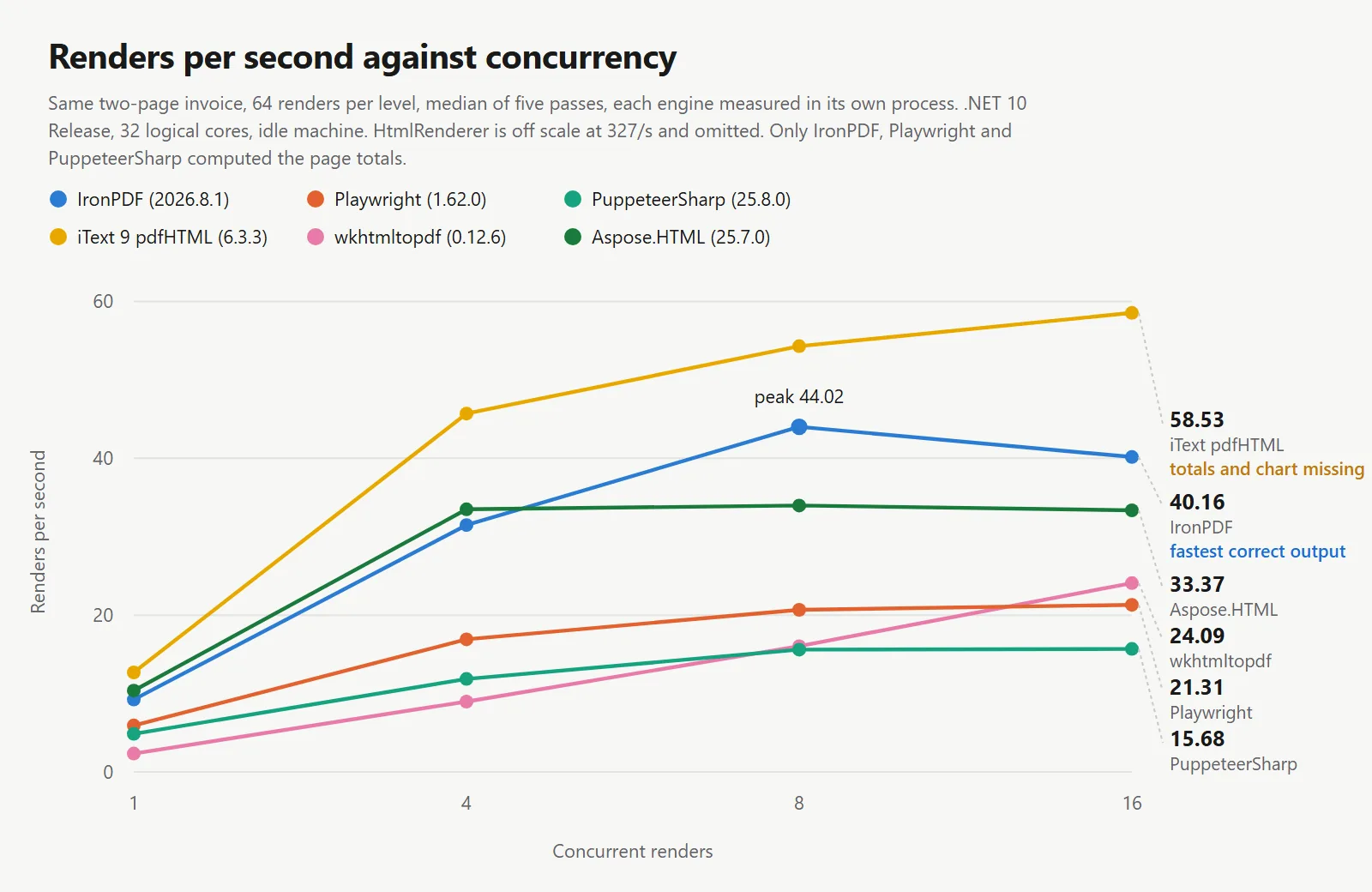
IronPDF führt bei der Durchsatzrate pro korrektem Rendern: Unter den Engines, die das Dokument reproduzierten, hielt IronPDF 44,02 Renderings pro Sekunde gegenüber 20,68 und 15,60 auf derselben Maschine, demselben Dokument und derselben Wartebedingung aufrecht, während es die meiste Arbeit pro Megabyte der 3 zurückgab und das erste PDF am schnellsten erreichte.
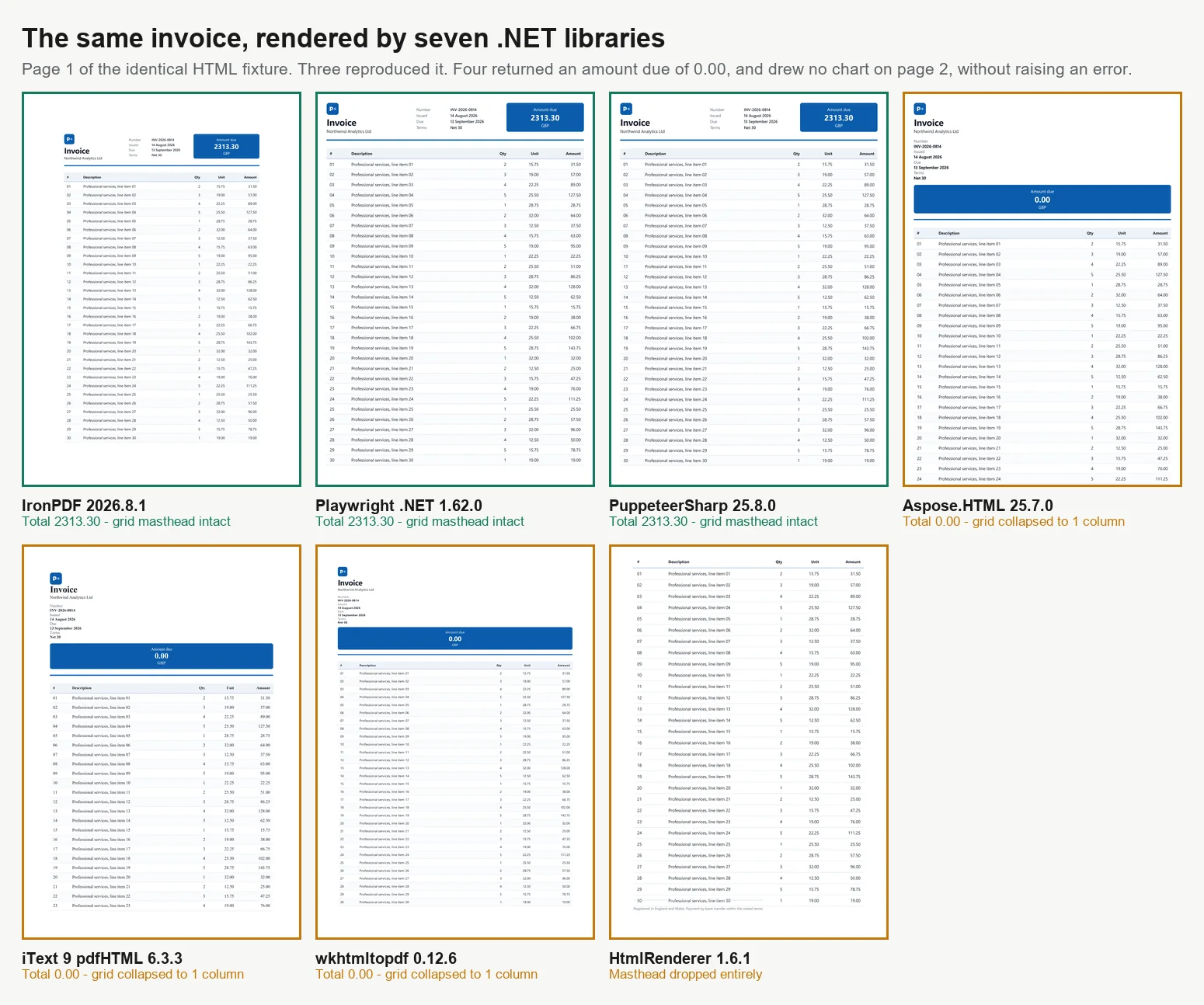
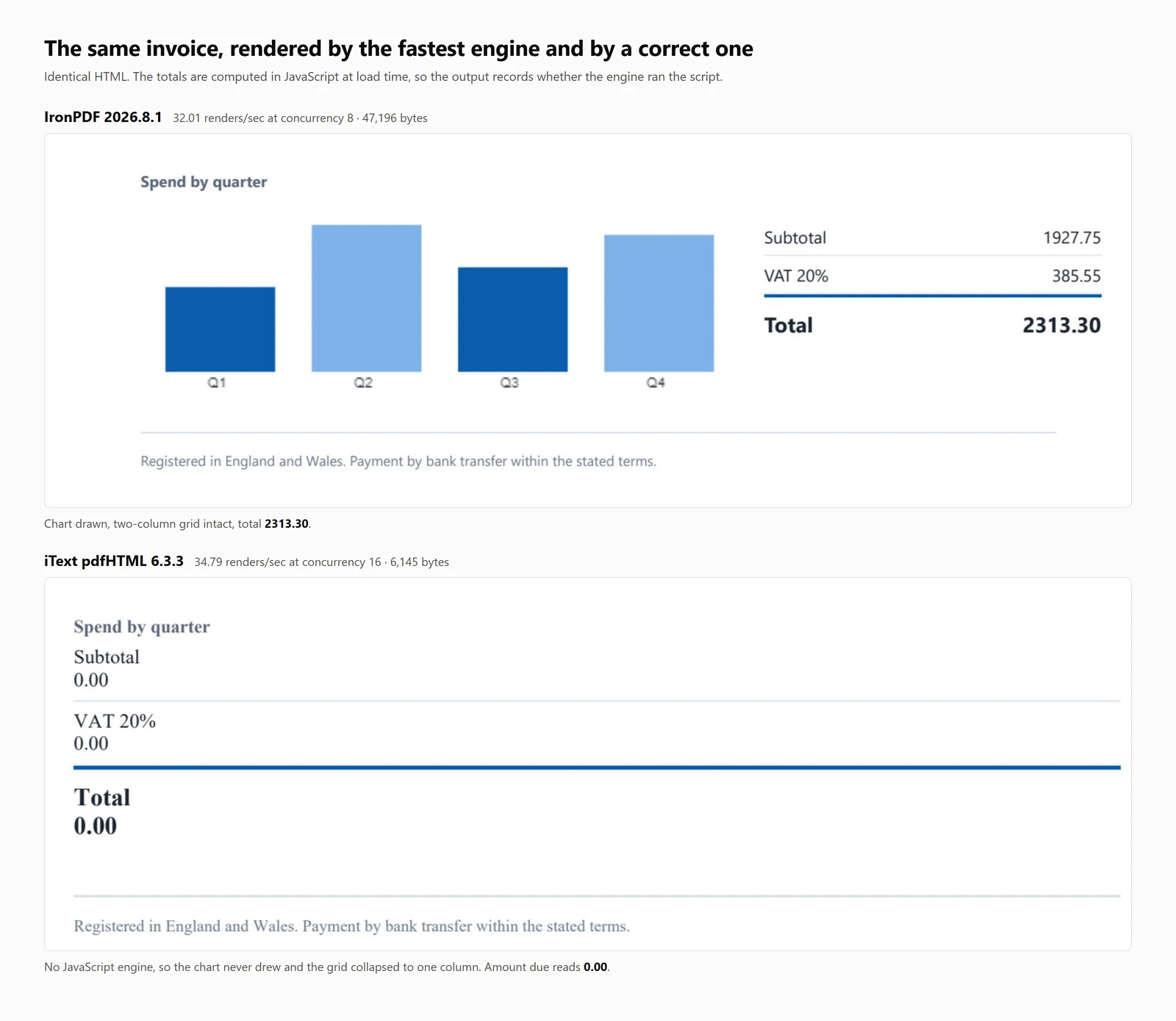
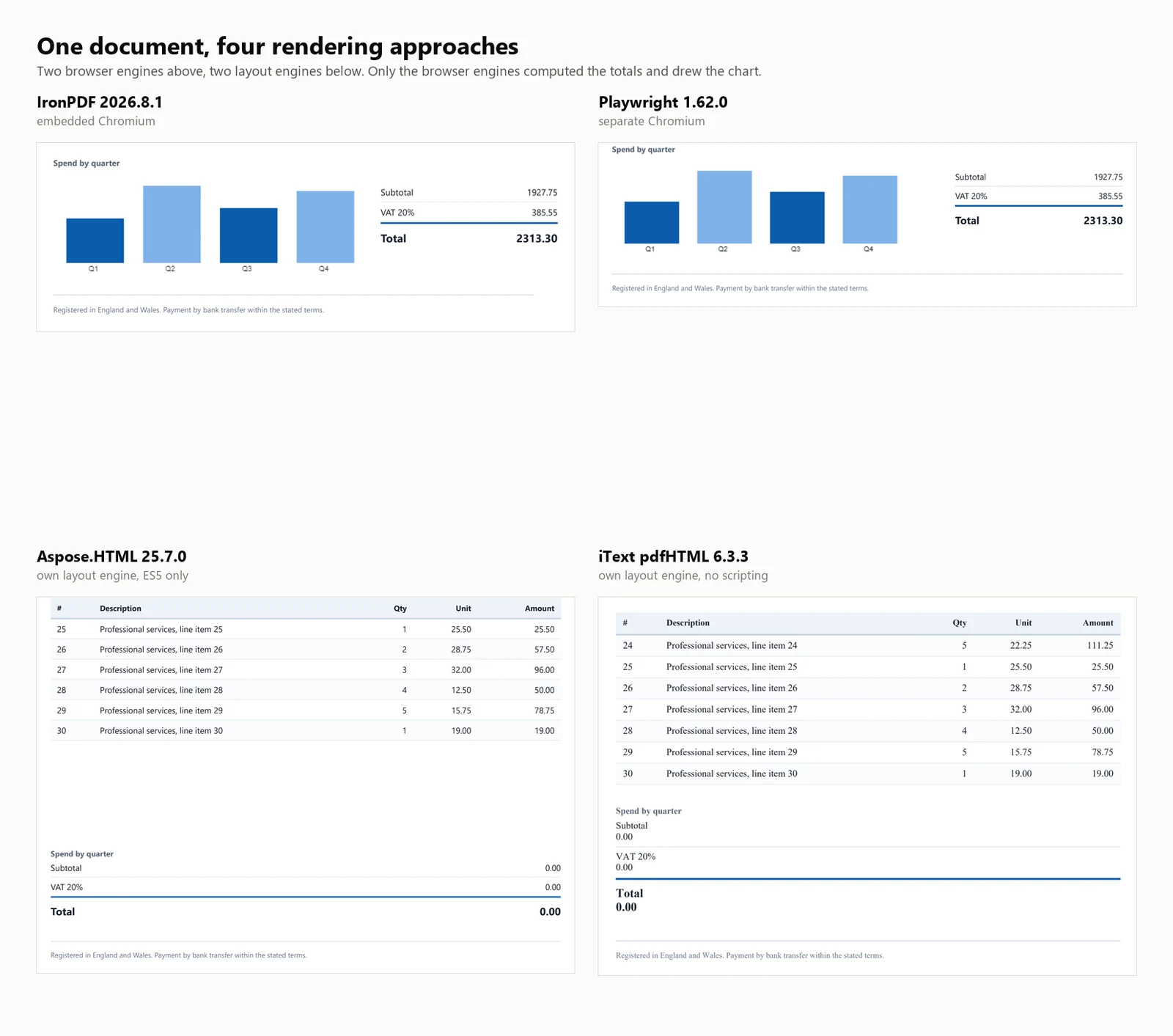
Die Erkenntnis, die mehr zählt als jede der oben genannten: 4 der 7 Bibliotheken erzeugten ein PDF, das fertig aussah und falsch war. In 3 von ihnen lautete die Gesamtsumme der Rechnung 0.00 anstelle von 2313.30. Die vierte, HtmlRenderer, ließ stillschweigend den fälligen Betrag, die Gesamtsummen und das Diagramm weg. In keinem Fall wurde eine Ausnahme ausgelöst, und nichts im Output sagte dies aus.
HTML zu PDF Schnellstart in C#
Dieser Leitfaden stellt 7 Methoden zur Konvertierung von HTML in PDF in .NET vor und bietet Codebeispiele und quantitative Benchmarks für jede.
Für wen das ist: .NET-Entwickler, die HTML-zu-PDF-Bibliotheken evaluieren, und diejenigen, die ihre Auswahl mit objektiven Daten rechtfertigen müssen.
Was Sie erhalten: Funktionierende Beispiele für jeden Ansatz, die sowohl HTML-Strings als auch Live-URLs abdecken, zusammen mit Messungen für Kaltstart, Durchsatz, Speicherverbrauch und Rendering-Genauigkeit auf einem konsistenten Testdokument.
Wo es läuft: .NET 6 und höher, .NET Framework 4.6.2 und höher und .NET Standard 2.0. Benchmarks wurden auf .NET 10, Windows 11, mit 32 logischen Kernen im Release-Modus durchgeführt.
Wann Sie diesen Ansatz verwenden sollten: Wenn Ihr Dokument bereits im HTML-Format vorliegt. Das Rendern von kontrolliertem Markup ist effizienter und zuverlässiger als das Erstellen von PDFs durch einzelne Zeichenbefehle für dokumentähnliche Inhalte.
Warum es technisch wichtig ist: Engines fallen in 2 Kategorien. Browser-Grade-Renderer verwenden Chromium, was zu höheren Speicher- und Containeranforderungen führt. Layout-Engine-Bibliotheken sind kleiner und schneller, führen jedoch kein JavaScript aus. Die untenstehenden Benchmarks quantifizieren diese Kompromisse.
Um es zu verwenden, installieren Sie das Paket, geben Sie einen HTML-String an den Renderer und speichern Sie das resultierende PDF.
1Installieren Sie IronPDF mit NuGet Package Manager
PM > Install-Package IronPdf
Install-Package IronPdf
2Kopieren Sie diesen Codeausschnitt und führen Sie ihn aus.
using IronPdf;License.LicenseKey = "YOUR-TRIAL-KEY";var pdf = new ChromePdfRenderer().RenderHtmlAsPdf("<h1>Invoice INV-2026-0814</h1>");pdf.SaveAs("invoice.pdf");
using IronPdf;

License.LicenseKey = "YOUR-TRIAL-KEY";
var pdf = new ChromePdfRenderer().RenderHtmlAsPdf("<h1>Invoice INV-2026-0814</h1>");
pdf.SaveAs("invoice.pdf");
Imports IronPdfLicense.LicenseKey = "YOUR-TRIAL-KEY"Dim pdf = New ChromePdfRenderer().RenderHtmlAsPdf("<h1>Invoice INV-2026-0814</h1>")pdf.SaveAs("invoice.pdf")
ImportsIronPdfLicense.LicenseKey = "YOUR-TRIAL-KEY"Dim pdf = New ChromePdfRenderer().RenderHtmlAsPdf("<h1>Invoice INV-2026-0814</h1>")pdf.SaveAs("invoice.pdf")
Imports IronPdf

License.LicenseKey = "YOUR-TRIAL-KEY"
Dim pdf = New ChromePdfRenderer().RenderHtmlAsPdf("<h1>Invoice INV-2026-0814</h1>")
pdf.SaveAs("invoice.pdf")
3Bereitstellen zum Testen in Ihrer Live-Umgebung
Beginnen Sie noch heute, IronPDF in Ihrem Projekt mit einer kostenlosen Testversion zu verwenden
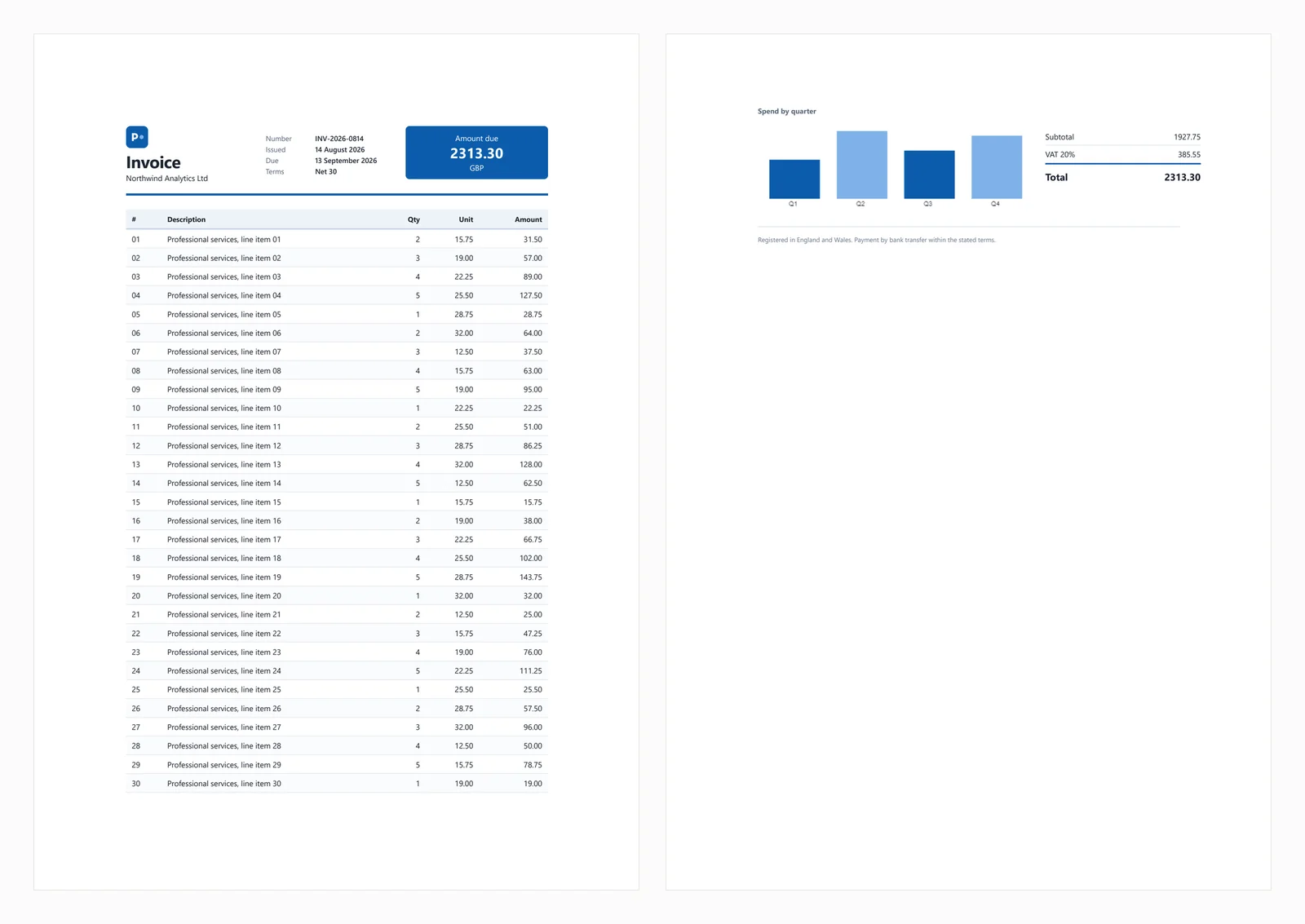
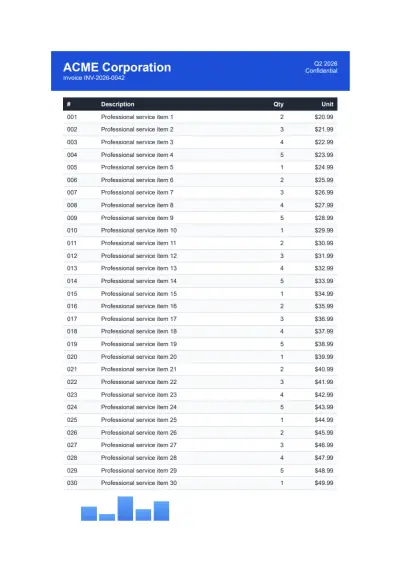
Der obige Schnellstart erzeugt die folgende Ausgabe aus der Testrechnung, die in diesem Leitfaden verwendet wird.
Das Testdokument enthält ein CSS-Grid-Kopfteil, eine 30-zeilige Tabelle mit Zebra-Streifen, ein Inline-SVG, ein Balkendiagramm, das auf einem canvas-Element gerendert wird, und in JavaScript zur Ladezeit berechnete Summen. Die berechneten Summen sind wichtig für Tests, da Engines ohne JavaScript-Unterstützung Rechnungen erzeugen, die vollständig erscheinen, aber einen fälligen Betrag von 0.00 anzeigen. Dieses Verhalten tritt bei 3 der unten aufgeführten Bibliotheken auf, und eine vierte lässt den Summenblock vollständig weg.
Häufige Fehlerszenarien werden in den folgenden Abschnitten behandelt.
1. IronPDF: Eingebettetes Chromium, kein zu installierender Browser
IronPDF ist ein Chromium-Renderer, der innerhalb Ihrer Anwendung über NuGet arbeitet und die Notwendigkeit eines separat installierten Browsers eliminiert. Diese Unterscheidung betrifft hauptsächlich die Bereitstellung, die später im Leitfaden besprochen wird.
Installation:
> dotnet add package IronPdf
dotnet add package IronPdf
Aus einem HTML-String:
// IronPDF 2026.8.1using IronPdf;License.LicenseKey = "YOUR-TRIAL-KEY"; // trial keys are freestring html = @"<h1>Invoice INV-2026-0814</h1> <p>Northwind Analytics Ltd — Net 30</p> <table><tr><th>Item</th><th>Amount</th></tr> <tr><td>Professional services</td><td>2313.30</td></tr></table>";var renderer = new ChromePdfRenderer();renderer.RenderingOptions.PaperSize = IronPdf.Rendering.PdfPaperSize.A4;renderer.RenderingOptions.PrintHtmlBackgrounds = true;using PdfDocument pdf = renderer.RenderHtmlAsPdf(html);pdf.SaveAs("invoice.pdf");
// IronPDF 2026.8.1using IronPdf;License.LicenseKey = "YOUR-TRIAL-KEY"; // trial keys are freestring html = @"<h1>Invoice INV-2026-0814</h1> <p>Northwind Analytics Ltd — Net 30</p> <table><tr><th>Item</th><th>Amount</th></tr> <tr><td>Professional services</td><td>2313.30</td></tr></table>";var renderer = new ChromePdfRenderer();renderer.RenderingOptions.PaperSize = IronPdf.Rendering.PdfPaperSize.A4;renderer.RenderingOptions.PrintHtmlBackgrounds = true;using PdfDocument pdf = renderer.RenderHtmlAsPdf(html);pdf.SaveAs("invoice.pdf");
// IronPDF 2026.8.1
using IronPdf;
License.LicenseKey = "YOUR-TRIAL-KEY"; // trial keys are free
string html = @"<h1>Invoice INV-2026-0814</h1>
<p>Northwind Analytics Ltd — Net 30</p>
<table><tr><th>Item</th><th>Amount</th></tr>
<tr><td>Professional services</td><td>2313.30</td></tr></table>";
var renderer = new ChromePdfRenderer();
renderer.RenderingOptions.PaperSize = IronPdf.Rendering.PdfPaperSize.A4;
renderer.RenderingOptions.PrintHtmlBackgrounds = true;
using PdfDocument pdf = renderer.RenderHtmlAsPdf(html);
pdf.SaveAs("invoice.pdf");
' IronPDF 2026.8.1Imports IronPdfLicense.LicenseKey = "YOUR-TRIAL-KEY" ' trial keys are freeDim html As String = "<h1>Invoice INV-2026-0814</h1> <p>Northwind Analytics Ltd — Net 30</p> <table><tr><th>Item</th><th>Amount</th></tr> <tr><td>Professional services</td><td>2313.30</td></tr></table>"Dim renderer As New ChromePdfRenderer()renderer.RenderingOptions.PaperSize = IronPdf.Rendering.PdfPaperSize.A4renderer.RenderingOptions.PrintHtmlBackgrounds = TrueUsing pdf As PdfDocument = renderer.RenderHtmlAsPdf(html) pdf.SaveAs("invoice.pdf")End Using
' IronPDF 2026.8.1ImportsIronPdfLicense.LicenseKey = "YOUR-TRIAL-KEY" ' trial keys are freeDim html AsString = "<h1>Invoice INV-2026-0814</h1> <p>Northwind Analytics Ltd — Net 30</p> <table><tr><th>Item</th><th>Amount</th></tr> <tr><td>Professional services</td><td>2313.30</td></tr></table>"Dim renderer As New ChromePdfRenderer()renderer.RenderingOptions.PaperSize = IronPdf.Rendering.PdfPaperSize.A4renderer.RenderingOptions.PrintHtmlBackgrounds = TrueUsing pdf AsPdfDocument = renderer.RenderHtmlAsPdf(html) pdf.SaveAs("invoice.pdf")EndUsing
' IronPDF 2026.8.1
Imports IronPdf
License.LicenseKey = "YOUR-TRIAL-KEY" ' trial keys are free
Dim html As String = "<h1>Invoice INV-2026-0814</h1>
<p>Northwind Analytics Ltd — Net 30</p>
<table><tr><th>Item</th><th>Amount</th></tr>
<tr><td>Professional services</td><td>2313.30</td></tr></table>"
Dim renderer As New ChromePdfRenderer()
renderer.RenderingOptions.PaperSize = IronPdf.Rendering.PdfPaperSize.A4
renderer.RenderingOptions.PrintHtmlBackgrounds = True
Using pdf As PdfDocument = renderer.RenderHtmlAsPdf(html)
pdf.SaveAs("invoice.pdf")
End Using
Von einer Live-URL:
// IronPDF 2026.8.1 - only the render call changes.using IronPdf;License.LicenseKey = "YOUR-TRIAL-KEY";var renderer = new ChromePdfRenderer();using PdfDocument pdf = renderer.RenderUrlAsPdf("https://ironpdf.com/");pdf.SaveAs("page.pdf");
// IronPDF 2026.8.1 - only the render call changes.using IronPdf;License.LicenseKey = "YOUR-TRIAL-KEY";var renderer = new ChromePdfRenderer();using PdfDocument pdf = renderer.RenderUrlAsPdf("https://ironpdf.com/");pdf.SaveAs("page.pdf");
// IronPDF 2026.8.1 - only the render call changes.
using IronPdf;

License.LicenseKey = "YOUR-TRIAL-KEY";

var renderer = new ChromePdfRenderer();

using PdfDocument pdf = renderer.RenderUrlAsPdf("https://ironpdf.com/");
pdf.SaveAs("page.pdf");
Imports IronPdfLicense.LicenseKey = "YOUR-TRIAL-KEY"Dim renderer = New ChromePdfRenderer()Using pdf As PdfDocument = renderer.RenderUrlAsPdf("https://ironpdf.com/") pdf.SaveAs("page.pdf")End Using
ImportsIronPdfLicense.LicenseKey = "YOUR-TRIAL-KEY"Dim renderer = New ChromePdfRenderer()Using pdf AsPdfDocument = renderer.RenderUrlAsPdf("https://ironpdf.com/") pdf.SaveAs("page.pdf")EndUsing
Imports IronPdf

License.LicenseKey = "YOUR-TRIAL-KEY"

Dim renderer = New ChromePdfRenderer()

Using pdf As PdfDocument = renderer.RenderUrlAsPdf("https://ironpdf.com/")
    pdf.SaveAs("page.pdf")
End Using
Empfohlene Verwendung: Wählen Sie IronPDF, wenn Sie eine browsergenaue PDF-Darstellung benötigen, ohne die Infrastruktur eines Headless-Browsers zu verwalten, wie z.B. Prozesslebenszyklus, Absturzsicherung oder Containerkonfiguration.
Kompromiss: Es wird Chromium im Paket mitgeliefert, sodass der maximale Speicherverbrauch 342 MB für ein einzelnes kaltes Rendern und 1.187 MB für 8 gleichzeitige Renderings erreicht. Es beginnt auch bei 999 $, wobei 4 der anderen 6 kostenlos sind. Für ein Nebenprojekt oder ein internes Tool mit geringem Volumen ist dieser Preis schwer zu rechtfertigen.
Leistung: 486 ms Kaltstart, 161 ms mittlere Latenz bei 8 gleichzeitigen Renderings, 44,02 anhaltende Renderings pro Sekunde und 1.187 MB maximaler Speicherverbrauch im gesamten Prozessbaum. Die Testrechnung wurde genau gerendert, einschließlich des Diagramms und der Summen.
2. PuppeteerSharp: Headless Chrome für PDF-Rendering
PuppeteerSharp ist der .NET-Port von Puppeteer. Es lädt einen Chromium-Build herunter, steuert ihn über das DevTools-Protokoll und generiert PDFs. Es ist kostenlos, MIT-lizenziert, wird aktiv gepflegt und hier bei PuppeteerSharp (25.8.0) gemessen.
Installation:
> dotnet add package PuppeteerSharp
dotnet add package PuppeteerSharp
Aus einem HTML-String:
// PuppeteerSharp 25.8.0using PuppeteerSharp;using PuppeteerSharp.Media;string html = @"<h1>Invoice INV-2026-0814</h1> <p>Northwind Analytics Ltd — Net 30</p> <table><tr><th>Item</th><th>Amount</th></tr> <tr><td>Professional services</td><td>2313.30</td></tr></table>";// First run downloads roughly 150 MB of Chromium. Pre-fetch this at build time.await new BrowserFetcher().DownloadAsync();await using IBrowser browser = await Puppeteer.LaunchAsync(new LaunchOptions { Headless = true });await using IPage page = await browser.NewPageAsync();await page.SetContentAsync(html, new SetContentOptions{ WaitUntil = new[] { WaitUntilNavigation.Load }});await page.PdfAsync("invoice.pdf", new PdfOptions{ Format = PaperFormat.A4, PrintBackground = true});
// PuppeteerSharp 25.8.0using PuppeteerSharp;using PuppeteerSharp.Media;string html = @"<h1>Invoice INV-2026-0814</h1> <p>Northwind Analytics Ltd — Net 30</p> <table><tr><th>Item</th><th>Amount</th></tr> <tr><td>Professional services</td><td>2313.30</td></tr></table>";// First run downloads roughly 150 MB of Chromium. Pre-fetch this at build time.await new BrowserFetcher().DownloadAsync();await using IBrowser browser = awaitPuppeteer.LaunchAsync(new LaunchOptions { Headless = true });await using IPage page = await browser.NewPageAsync();await page.SetContentAsync(html, new SetContentOptions{WaitUntil = new[] { WaitUntilNavigation.Load }});await page.PdfAsync("invoice.pdf", new PdfOptions{Format = PaperFormat.A4,PrintBackground = true});
// PuppeteerSharp 25.8.0
using PuppeteerSharp;
using PuppeteerSharp.Media;
string html = @"<h1>Invoice INV-2026-0814</h1>
<p>Northwind Analytics Ltd — Net 30</p>
<table><tr><th>Item</th><th>Amount</th></tr>
<tr><td>Professional services</td><td>2313.30</td></tr></table>";
// First run downloads roughly 150 MB of Chromium. Pre-fetch this at build time.
await new BrowserFetcher().DownloadAsync();
await using IBrowser browser = await Puppeteer.LaunchAsync(new LaunchOptions { Headless = true });
await using IPage page = await browser.NewPageAsync();
await page.SetContentAsync(html, new SetContentOptions
{
WaitUntil = new[] { WaitUntilNavigation.Load }
});
await page.PdfAsync("invoice.pdf", new PdfOptions
{
Format = PaperFormat.A4,
PrintBackground = true
});
' PuppeteerSharp 25.8.0Imports PuppeteerSharpImports PuppeteerSharp.MediaDim html As String = "<h1>Invoice INV-2026-0814</h1> <p>Northwind Analytics Ltd — Net 30</p> <table><tr><th>Item</th><th>Amount</th></tr> <tr><td>Professional services</td><td>2313.30</td></tr></table>"' First run downloads roughly 150 MB of Chromium. Pre-fetch this at build time.Await (New BrowserFetcher()).DownloadAsync()Await Using browser As IBrowser = Await Puppeteer.LaunchAsync(New LaunchOptions With {.Headless = True}) Await Using page As IPage = Await browser.NewPageAsync() Await page.SetContentAsync(html, New SetContentOptions With {.WaitUntil = {WaitUntilNavigation.Load}}) Await page.PdfAsync("invoice.pdf", New PdfOptions With { .Format = PaperFormat.A4, .PrintBackground = True }) End UsingEnd Using
' PuppeteerSharp 25.8.0ImportsPuppeteerSharpImportsPuppeteerSharp.MediaDim html AsString = "<h1>Invoice INV-2026-0814</h1> <p>Northwind Analytics Ltd — Net 30</p> <table><tr><th>Item</th><th>Amount</th></tr> <tr><td>Professional services</td><td>2313.30</td></tr></table>"' First run downloads roughly 150 MB of Chromium. Pre-fetch this at build time.Await (New BrowserFetcher()).DownloadAsync()AwaitUsing browser AsIBrowser = AwaitPuppeteer.LaunchAsync(New LaunchOptionsWith {.Headless = True})AwaitUsing page AsIPage = Await browser.NewPageAsync()Await page.SetContentAsync(html, New SetContentOptionsWith {.WaitUntil = {WaitUntilNavigation.Load}})Await page.PdfAsync("invoice.pdf", New PdfOptionsWith { .Format = PaperFormat.A4, .PrintBackground = True })EndUsingEndUsing
' PuppeteerSharp 25.8.0
Imports PuppeteerSharp
Imports PuppeteerSharp.Media
Dim html As String = "<h1>Invoice INV-2026-0814</h1>
<p>Northwind Analytics Ltd — Net 30</p>
<table><tr><th>Item</th><th>Amount</th></tr>
<tr><td>Professional services</td><td>2313.30</td></tr></table>"
' First run downloads roughly 150 MB of Chromium. Pre-fetch this at build time.
Await (New BrowserFetcher()).DownloadAsync()
Await Using browser As IBrowser = Await Puppeteer.LaunchAsync(New LaunchOptions With {.Headless = True})
Await Using page As IPage = Await browser.NewPageAsync()
Await page.SetContentAsync(html, New SetContentOptions With {.WaitUntil = {WaitUntilNavigation.Load}})
Await page.PdfAsync("invoice.pdf", New PdfOptions With {
.Format = PaperFormat.A4,
.PrintBackground = True
})
End Using
End Using
Von einer Live-URL:
// PuppeteerSharp 25.8.0 - GoToAsync replaces SetContentAsync.await using IPage page = await browser.NewPageAsync();await page.GoToAsync("https://ironpdf.com/", new NavigationOptions{ WaitUntil = new[] { WaitUntilNavigation.Networkidle0 }});await page.PdfAsync("page.pdf", new PdfOptions { Format = PaperFormat.A4, PrintBackground = true });
// PuppeteerSharp 25.8.0 - GoToAsync replaces SetContentAsync.await using IPage page = await browser.NewPageAsync();await page.GoToAsync("https://ironpdf.com/", new NavigationOptions{WaitUntil = new[] { WaitUntilNavigation.Networkidle0 }});await page.PdfAsync("page.pdf", new PdfOptions { Format = PaperFormat.A4, PrintBackground = true });
// PuppeteerSharp 25.8.0 - GoToAsync replaces SetContentAsync.
await using IPage page = await browser.NewPageAsync();

await page.GoToAsync("https://ironpdf.com/", new NavigationOptions
{
    WaitUntil = new[] { WaitUntilNavigation.Networkidle0 }
});

await page.PdfAsync("page.pdf", new PdfOptions { Format = PaperFormat.A4, PrintBackground = true });
' PuppeteerSharp 25.8.0 - GoToAsync replaces SetContentAsync.Await Using page As IPage = Await browser.NewPageAsync()Await page.GoToAsync("https://ironpdf.com/", New NavigationOptions With { .WaitUntil = {WaitUntilNavigation.Networkidle0}})Await page.PdfAsync("page.pdf", New PdfOptions With {.Format = PaperFormat.A4, .PrintBackground = True})
' PuppeteerSharp 25.8.0 - GoToAsync replaces SetContentAsync.
Await Using page As IPage = Await browser.NewPageAsync()

Await page.GoToAsync("https://ironpdf.com/", New NavigationOptions With {
    .WaitUntil = {WaitUntilNavigation.Networkidle0}
})

Await page.PdfAsync("page.pdf", New PdfOptions With {.Format = PaperFormat.A4, .PrintBackground = True})
Empfohlene Verwendung: Wählen Sie PuppeteerSharp, wenn Budgetbeschränkungen Priorität haben und Sie sich mit der Verwaltung von Browserprozessen wohlfühlen. Es liefert identische Ausgaben wie Chrome, da es denselben Motor verwendet.
Kompromiss: Sie sind verantwortlich für die Verwaltung von Browserprozessen, einschließlich Lebenszyklus, Umgang mit verwaisten Prozessen nach Abstürzen und Konfiguration des Sandkastens. Der erste Lauf lädt etwa 150 MB Chromium herunter, was in Containern ohne ausgehenden Netzwerkzugang fehlschlagen kann, daher sollten Sie den Browser zur Build-Zeit vorab abrufen. Unter Last erzeugt PuppeteerSharp die meisten Prozesse unter den gemessenen Optionen und erreicht 40 bei 16 gleichzeitigen Renderings.
Leistung: 639 ms Kaltstart, 507 ms mittlere Latenz bei 8 gleichzeitigen Renderings, 15,60 anhaltende Renderings pro Sekunde und 1.293 MB maximaler Speicherverbrauch im gesamten Prozessbaum. Die Testrechnung wurde korrekt gerendert.
3. Playwright für .NET: Browser-Grade PDF-Rendering
Playwright für .NET ist Microsofts Bibliothek zur Browserautomatisierung. Es verwendet einen ähnlichen Ansatz wie Puppeteer, bietet jedoch eine andere API, effizientere Seitenisolierung und ähnliche Bereitstellungsüberlegungen.
Installation:
> dotnet add package Microsoft.Playwright
dotnet add package Microsoft.Playwright
Ein zweiter Befehl installiert die Browser-Binärdateien.
> playwright install chromium
playwright install chromium
Das Weglassen ist die häufigste Ursache für einen fehlgeschlagenen ersten Playwright-Build in CI.
Aus einem HTML-String:
// Microsoft.Playwright 1.62.0using Microsoft.Playwright;string html = @"<h1>Invoice INV-2026-0814</h1> <p>Northwind Analytics Ltd — Net 30</p> <table><tr><th>Item</th><th>Amount</th></tr> <tr><td>Professional services</td><td>2313.30</td></tr></table>";// Run "playwright install chromium" first, or call the installer in code.Microsoft.Playwright.Program.Main(new[] { "install", "chromium" });using IPlaywright playwright = await Playwright.CreateAsync();await using IBrowser browser = await playwright.Chromium.LaunchAsync();IPage page = await browser.NewPageAsync();await page.SetContentAsync(html, new PageSetContentOptions { WaitUntil = WaitUntilState.Load });await page.PdfAsync(new PagePdfOptions{ Path = "invoice.pdf", Format = "A4", PrintBackground = true});
// Microsoft.Playwright 1.62.0using Microsoft.Playwright;string html = @"<h1>Invoice INV-2026-0814</h1> <p>Northwind Analytics Ltd — Net 30</p> <table><tr><th>Item</th><th>Amount</th></tr> <tr><td>Professional services</td><td>2313.30</td></tr></table>";// Run "playwright install chromium" first, or call the installer in code.Microsoft.Playwright.Program.Main(new[] { "install", "chromium" });using IPlaywright playwright = await Playwright.CreateAsync();await using IBrowser browser = await playwright.Chromium.LaunchAsync();IPage page = await browser.NewPageAsync();await page.SetContentAsync(html, new PageSetContentOptions { WaitUntil = WaitUntilState.Load });await page.PdfAsync(new PagePdfOptions{Path = "invoice.pdf",Format = "A4",PrintBackground = true});
// Microsoft.Playwright 1.62.0
using Microsoft.Playwright;
string html = @"<h1>Invoice INV-2026-0814</h1>
<p>Northwind Analytics Ltd — Net 30</p>
<table><tr><th>Item</th><th>Amount</th></tr>
<tr><td>Professional services</td><td>2313.30</td></tr></table>";
// Run "playwright install chromium" first, or call the installer in code.
Microsoft.Playwright.Program.Main(new[] { "install", "chromium" });
using IPlaywright playwright = await Playwright.CreateAsync();
await using IBrowser browser = await playwright.Chromium.LaunchAsync();
IPage page = await browser.NewPageAsync();
await page.SetContentAsync(html, new PageSetContentOptions { WaitUntil = WaitUntilState.Load });
await page.PdfAsync(new PagePdfOptions
{
Path = "invoice.pdf",
Format = "A4",
PrintBackground = true
});
' Microsoft.Playwright 1.62.0Imports Microsoft.PlaywrightDim html As String = "<h1>Invoice INV-2026-0814</h1> <p>Northwind Analytics Ltd — Net 30</p> <table><tr><th>Item</th><th>Amount</th></tr> <tr><td>Professional services</td><td>2313.30</td></tr></table>"' Run "playwright install chromium" first, or call the installer in code.Microsoft.Playwright.Program.Main(New String() {"install", "chromium"})Using playwright As IPlaywright = Await Playwright.CreateAsync() Await Using browser As IBrowser = Await playwright.Chromium.LaunchAsync() Dim page As IPage = Await browser.NewPageAsync() Await page.SetContentAsync(html, New PageSetContentOptions With {.WaitUntil = WaitUntilState.Load}) Await page.PdfAsync(New PagePdfOptions With { .Path = "invoice.pdf", .Format = "A4", .PrintBackground = True }) End UsingEnd Using
' Microsoft.Playwright 1.62.0ImportsMicrosoft.PlaywrightDim html AsString = "<h1>Invoice INV-2026-0814</h1> <p>Northwind Analytics Ltd — Net 30</p> <table><tr><th>Item</th><th>Amount</th></tr> <tr><td>Professional services</td><td>2313.30</td></tr></table>"' Run "playwright install chromium" first, or call the installer in code.Microsoft.Playwright.Program.Main(New String() {"install", "chromium"})Using playwright AsIPlaywright = AwaitPlaywright.CreateAsync()AwaitUsing browser AsIBrowser = Await playwright.Chromium.LaunchAsync() Dim page AsIPage = Await browser.NewPageAsync()Await page.SetContentAsync(html, New PageSetContentOptionsWith {.WaitUntil = WaitUntilState.Load})Await page.PdfAsync(New PagePdfOptionsWith { .Path = "invoice.pdf", .Format = "A4", .PrintBackground = True })EndUsingEndUsing
' Microsoft.Playwright 1.62.0
Imports Microsoft.Playwright
Dim html As String = "<h1>Invoice INV-2026-0814</h1>
<p>Northwind Analytics Ltd — Net 30</p>
<table><tr><th>Item</th><th>Amount</th></tr>
<tr><td>Professional services</td><td>2313.30</td></tr></table>"
' Run "playwright install chromium" first, or call the installer in code.
Microsoft.Playwright.Program.Main(New String() {"install", "chromium"})
Using playwright As IPlaywright = Await Playwright.CreateAsync()
Await Using browser As IBrowser = Await playwright.Chromium.LaunchAsync()
Dim page As IPage = Await browser.NewPageAsync()
Await page.SetContentAsync(html, New PageSetContentOptions With {.WaitUntil = WaitUntilState.Load})
Await page.PdfAsync(New PagePdfOptions With {
.Path = "invoice.pdf",
.Format = "A4",
.PrintBackground = True
})
End Using
End Using
' Microsoft.Playwright 1.62.0 - GotoAsync replaces SetContentAsync.
Dim page As IPage = Await browser.NewPageAsync()

Await page.GotoAsync("https://ironpdf.com/", New PageGotoOptions With {
    .WaitUntil = WaitUntilState.NetworkIdle
})

Await page.PdfAsync(New PagePdfOptions With {.Path = "page.pdf", .Format = "A4", .PrintBackground = True})
Empfohlene Verwendung: Wählen Sie Playwright für .NET, wenn Sie eine browsergenaue Darstellung ohne Kosten benötigen und seine API bevorzugen oder wenn Sie Playwright bereits für Tests verwenden und zusätzliche Abhängigkeiten vermeiden möchten.
Kompromiss: Playwright teilt dieselben Überlegungen wie Puppeteer, einschließlich Browser-Binärdateien in Ihrem Image, Prozessüberwachung und einem Installationsschritt in Ihrer Dockerfile. Es ist der stabilste hier gemessene Motor, liefert jedoch etwas mehr als die Hälfte des Durchsatzes des eingebetteten Motors.
Leistung: 720 ms Kaltstart, 381 ms mittlere Latenz bei 8 gleichzeitigen Renderings, 20,68 anhaltende Renderings pro Sekunde und 1.122 MB maximaler Speicherverbrauch im gesamten Prozessbaum. Die Testrechnung wurde korrekt gerendert.
4. iText 9 mit pdfHTML: Layout-Engine, Kein JavaScript
iText 9 mit pdfHTML ist eine PDF-Bibliothek mit einem HTML-Konvertierungs-Add-on. Es verwendet seine eigene Layout-Engine anstelle eines Browsers und bietet schnelle und vorhersehbare Ergebnisse innerhalb seiner unterstützten Funktionen, während es über alles außerhalb dieser Funktionen schweigt. Die 2 Pakete werden separat versioniert. pdfHTML (6.3.3) ist das Add-on, das auf iText Core (9.7.0) läuft, und das ist die hier gemessene Kombination.
Installation:
> dotnet add package itext.pdfhtml
dotnet add package itext.pdfhtml
Hinweis: Das Paket itext7.* ist veraltet und wurde in itext.* umbenannt, ein Detail, das in den am besten bewerteten Tutorials immer noch falsch dargestellt wird. Installieren Sie itext.pdfhtml, nicht itext7.pdfhtml. Der Paketname enthält keine Versionsnummer, daher löst itext.pdfhtml die aktuelle pdfHTML-Version auf iText 9 auf.
Aus einem HTML-String:
// itext.pdfhtml 6.3.3 - AGPL or commercial licence.// Note the package rename: itext7.pdfhtml is deprecated in favour of itext.pdfhtml.using iText.Html2pdf;string html = @"<h1>Invoice INV-2026-0814</h1> <p>Northwind Analytics Ltd — Net 30</p> <table><tr><th>Item</th><th>Amount</th></tr> <tr><td>Professional services</td><td>2313.30</td></tr></table>";using var output = new FileStream("invoice.pdf", FileMode.Create);HtmlConverter.ConvertToPdf(html, output);// No JavaScript engine and no canvas, so anything the page computes or draws// at load time will be missing from the result.
// itext.pdfhtml 6.3.3 - AGPL or commercial licence.// Note the package rename: itext7.pdfhtml is deprecated in favour of itext.pdfhtml.using iText.Html2pdf;string html = @"<h1>Invoice INV-2026-0814</h1> <p>Northwind Analytics Ltd — Net 30</p> <table><tr><th>Item</th><th>Amount</th></tr> <tr><td>Professional services</td><td>2313.30</td></tr></table>";using var output = new FileStream("invoice.pdf", FileMode.Create);HtmlConverter.ConvertToPdf(html, output);// No JavaScript engine and no canvas, so anything the page computes or draws// at load time will be missing from the result.
// itext.pdfhtml 6.3.3 - AGPL or commercial licence.
// Note the package rename: itext7.pdfhtml is deprecated in favour of itext.pdfhtml.
using iText.Html2pdf;
string html = @"<h1>Invoice INV-2026-0814</h1>
<p>Northwind Analytics Ltd — Net 30</p>
<table><tr><th>Item</th><th>Amount</th></tr>
<tr><td>Professional services</td><td>2313.30</td></tr></table>";
using var output = new FileStream("invoice.pdf", FileMode.Create);
HtmlConverter.ConvertToPdf(html, output);
// No JavaScript engine and no canvas, so anything the page computes or draws
// at load time will be missing from the result.
// itext.pdfhtml 6.3.3 - AGPL or commercial licence.// Note the package rename: itext7.pdfhtml is deprecated in favour of itext.pdfhtml.Imports iText.Html2pdfDim html As String = "<h1>Invoice INV-2026-0814</h1> <p>Northwind Analytics Ltd — Net 30</p> <table><tr><th>Item</th><th>Amount</th></tr> <tr><td>Professional services</td><td>2313.30</td></tr></table>"Using output As New FileStream("invoice.pdf", FileMode.Create) HtmlConverter.ConvertToPdf(html, output)End Using' No JavaScript engine and no canvas, so anything the page computes or draws' at load time will be missing from the result.
// itext.pdfhtml 6.3.3 - AGPL or commercial licence.// Note the package rename: itext7.pdfhtml is deprecated in favour of itext.pdfhtml.Imports iText.Html2pdfDim html AsString = "<h1>Invoice INV-2026-0814</h1> <p>Northwind Analytics Ltd — Net 30</p> <table><tr><th>Item</th><th>Amount</th></tr> <tr><td>Professional services</td><td>2313.30</td></tr></table>"Using output As New FileStream("invoice.pdf", FileMode.Create)HtmlConverter.ConvertToPdf(html, output)EndUsing' No JavaScript engine and no canvas, so anything the page computes or draws' at load time will be missing from the result.
// itext.pdfhtml 6.3.3 - AGPL or commercial licence.
// Note the package rename: itext7.pdfhtml is deprecated in favour of itext.pdfhtml.
Imports iText.Html2pdf
Dim html As String = "<h1>Invoice INV-2026-0814</h1>
<p>Northwind Analytics Ltd — Net 30</p>
<table><tr><th>Item</th><th>Amount</th></tr>
<tr><td>Professional services</td><td>2313.30</td></tr></table>"
Using output As New FileStream("invoice.pdf", FileMode.Create)
HtmlConverter.ConvertToPdf(html, output)
End Using
' No JavaScript engine and no canvas, so anything the page computes or draws
' at load time will be missing from the result.
Von einer Live-URL: iText akzeptiert keine URLs direkt. Holen Sie das HTML manuell ab und setzen Sie die Basis-URI, um sicherzustellen, dass relative Assets korrekt aufgelöst werden.
// itext.pdfhtml 6.3.3 - there is no URL method, so fetch the HTML yourself.using iText.Html2pdf;using var client = new HttpClient();string html = await client.GetStringAsync("https://ironpdf.com/");// The base URI is what lets relative images, CSS and links resolve.var properties = new ConverterProperties();properties.SetBaseUri("https://ironpdf.com/");using var output = new FileStream("page.pdf", FileMode.Create);HtmlConverter.ConvertToPdf(html, output, properties);
// itext.pdfhtml 6.3.3 - there is no URL method, so fetch the HTML yourself.using iText.Html2pdf;using var client = new HttpClient();string html = await client.GetStringAsync("https://ironpdf.com/");// The base URI is what lets relative images, CSS and links resolve.var properties = new ConverterProperties();properties.SetBaseUri("https://ironpdf.com/");using var output = new FileStream("page.pdf", FileMode.Create);HtmlConverter.ConvertToPdf(html, output, properties);
// itext.pdfhtml 6.3.3 - there is no URL method, so fetch the HTML yourself.
using iText.Html2pdf;

using var client = new HttpClient();
string html = await client.GetStringAsync("https://ironpdf.com/");

// The base URI is what lets relative images, CSS and links resolve.
var properties = new ConverterProperties();
properties.SetBaseUri("https://ironpdf.com/");

using var output = new FileStream("page.pdf", FileMode.Create);
HtmlConverter.ConvertToPdf(html, output, properties);
' itext.pdfhtml 6.3.3 - there is no URL method, so fetch the HTML yourself.Imports iText.Html2pdfUsing client As New HttpClient() Dim html As String = Await client.GetStringAsync("https://ironpdf.com/") ' The base URI is what lets relative images, CSS and links resolve. Dim properties As New ConverterProperties() properties.SetBaseUri("https://ironpdf.com/") Using output As New FileStream("page.pdf", FileMode.Create) HtmlConverter.ConvertToPdf(html, output, properties) End UsingEnd Using
' itext.pdfhtml 6.3.3 - there is no URL method, so fetch the HTML yourself.Imports iText.Html2pdfUsing client As New HttpClient() Dim html AsString = Await client.GetStringAsync("https://ironpdf.com/") ' The base URI is what lets relative images, CSS and links resolve. Dim properties As New ConverterProperties() properties.SetBaseUri("https://ironpdf.com/")Using output As New FileStream("page.pdf", FileMode.Create)HtmlConverter.ConvertToPdf(html, output, properties)EndUsingEndUsing
' itext.pdfhtml 6.3.3 - there is no URL method, so fetch the HTML yourself.
Imports iText.Html2pdf

Using client As New HttpClient()
    Dim html As String = Await client.GetStringAsync("https://ironpdf.com/")

    ' The base URI is what lets relative images, CSS and links resolve.
    Dim properties As New ConverterProperties()
    properties.SetBaseUri("https://ironpdf.com/")

    Using output As New FileStream("page.pdf", FileMode.Create)
        HtmlConverter.ConvertToPdf(html, output, properties)
    End Using
End Using
Empfohlene Verwendung: Wählen Sie iText, wenn Sie es bereits für andere PDF-Aufgaben verwenden oder erweiterte PDF-Manipulationen zusammen mit der HTML-Konvertierung benötigen und mehrere Bibliotheken vermeiden möchten.
Kompromiss: iText ist nur unter AGPL oder einer kostenpflichtigen Lizenz verfügbar. AGPL erfordert die Offenlegung Ihrer gesamten Anwendung, was die kostenpflichtige Option für die meisten Teams, die geschlossene Software ausliefern, notwendig macht. Technisch führt iText kein JavaScript aus und bietet im Vergleich zu Browsern eine eingeschränktere CSS-Unterstützung, wie in den unten stehenden Treue-Benchmarks gezeigt.
Leistung: 489 ms Kaltstart, 144 ms mittlere Latenz bei 8 gleichzeitigen Renderings, 54,30 anhaltende Renderings pro Sekunde und 332 MB Spitzenarbeitsspeicherverbrauch in einem einzigen Prozess. Die Gesamtsumme der Rechnung war 0.00 und das Diagramm wurde nicht gerendert.
5. HtmlRenderer mit PdfSharp: Reines Managed, Keine nativen Binärdateien
HtmlRenderer mit PdfSharp ist in reinem verwaltetem C# implementiert, ohne native Binärdateien oder Browser-Abhängigkeiten, und erfordert keine zusätzliche Container-Installation. Es ist mit großem Abstand die kleinste und schnellste hier vorgestellte Option, aber seine CSS-Unterstützung ist auf Standards von etwa 2011 beschränkt.
Installation:
> dotnet add package HtmlRenderer.PdfSharp
dotnet add package HtmlRenderer.PdfSharp
Aus einem HTML-String:
// HtmlRenderer.PdfSharp 1.6.1 - pure managed, no native binaries at all.using TheArtOfDev.HtmlRenderer.PdfSharp;string html = @"<h1>Invoice INV-2026-0814</h1> <p>Northwind Analytics Ltd — Net 30</p> <table><tr><th>Item</th><th>Amount</th></tr> <tr><td>Professional services</td><td>2313.30</td></tr></table>";PdfSharp.Pdf.PdfDocument pdf = PdfGenerator.GeneratePdf(html, PdfSharp.PageSize.A4);pdf.Save("invoice.pdf");// There is no URL method. Fetch the markup with HttpClient and pass the string.// CSS support stops well short of Flexbox and Grid, and there is no JavaScript.
// HtmlRenderer.PdfSharp 1.6.1 - pure managed, no native binaries at all.using TheArtOfDev.HtmlRenderer.PdfSharp;string html = @"<h1>Invoice INV-2026-0814</h1> <p>Northwind Analytics Ltd — Net 30</p> <table><tr><th>Item</th><th>Amount</th></tr> <tr><td>Professional services</td><td>2313.30</td></tr></table>";PdfSharp.Pdf.PdfDocument pdf = PdfGenerator.GeneratePdf(html, PdfSharp.PageSize.A4);pdf.Save("invoice.pdf");// There is no URL method. Fetch the markup with HttpClient and pass the string.// CSS support stops well short of Flexbox and Grid, and there is no JavaScript.
// HtmlRenderer.PdfSharp 1.6.1 - pure managed, no native binaries at all.
using TheArtOfDev.HtmlRenderer.PdfSharp;
string html = @"<h1>Invoice INV-2026-0814</h1>
<p>Northwind Analytics Ltd — Net 30</p>
<table><tr><th>Item</th><th>Amount</th></tr>
<tr><td>Professional services</td><td>2313.30</td></tr></table>";
PdfSharp.Pdf.PdfDocument pdf = PdfGenerator.GeneratePdf(html, PdfSharp.PageSize.A4);
pdf.Save("invoice.pdf");
// There is no URL method. Fetch the markup with HttpClient and pass the string.
// CSS support stops well short of Flexbox and Grid, and there is no JavaScript.
' HtmlRenderer.PdfSharp 1.6.1 - pure managed, no native binaries at all.Imports TheArtOfDev.HtmlRenderer.PdfSharpDim html As String = "<h1>Invoice INV-2026-0814</h1> <p>Northwind Analytics Ltd — Net 30</p> <table><tr><th>Item</th><th>Amount</th></tr> <tr><td>Professional services</td><td>2313.30</td></tr></table>"Dim pdf As PdfSharp.Pdf.PdfDocument = PdfGenerator.GeneratePdf(html, PdfSharp.PageSize.A4)pdf.Save("invoice.pdf")' There is no URL method. Fetch the markup with HttpClient and pass the string.' CSS support stops well short of Flexbox and Grid, and there is no JavaScript.
' HtmlRenderer.PdfSharp 1.6.1 - pure managed, no native binaries at all.ImportsTheArtOfDev.HtmlRenderer.PdfSharpDim html AsString = "<h1>Invoice INV-2026-0814</h1> <p>Northwind Analytics Ltd — Net 30</p> <table><tr><th>Item</th><th>Amount</th></tr> <tr><td>Professional services</td><td>2313.30</td></tr></table>"Dim pdf AsPdfSharp.Pdf.PdfDocument = PdfGenerator.GeneratePdf(html, PdfSharp.PageSize.A4)pdf.Save("invoice.pdf")' There is no URL method. Fetch the markup with HttpClient and pass the string.' CSS support stops well short of Flexbox and Grid, and there is no JavaScript.
' HtmlRenderer.PdfSharp 1.6.1 - pure managed, no native binaries at all.
Imports TheArtOfDev.HtmlRenderer.PdfSharp
Dim html As String = "<h1>Invoice INV-2026-0814</h1>
<p>Northwind Analytics Ltd — Net 30</p>
<table><tr><th>Item</th><th>Amount</th></tr>
<tr><td>Professional services</td><td>2313.30</td></tr></table>"
Dim pdf As PdfSharp.Pdf.PdfDocument = PdfGenerator.GeneratePdf(html, PdfSharp.PageSize.A4)
pdf.Save("invoice.pdf")
' There is no URL method. Fetch the markup with HttpClient and pass the string.
' CSS support stops well short of Flexbox and Grid, and there is no JavaScript.
Von einer Live-URL: Es gibt keine Methode für die direkte URL-Eingabe. Holen Sie das HTML manuell ab und übergeben Sie es als String.
Empfohlene Verwendung: Wählen Sie HtmlRenderer mit PdfSharp nur dort, wo native Binärdateien strikt verboten sind, wie in regulierten oder luftdichten Umgebungen, und nur für eine Vorlage, die zur Ladezeit nichts berechnet. Es ist eine von 3 Optionen hier, die keine nativen Binärdateien ausliefern, neben iText 9 und Aspose.HTML, und bei dieser Rechnung ließ es das Kopfteil, den Summenblock und das Diagramm weg.
Kompromiss: HtmlRenderer unterstützt kein JavaScript, Flexbox oder CSS Grid. Für feste, einfache Vorlagen kann es ausreichend sein, und seine 23 ms mittlere Latenz ist unübertroffen, in einem einzigen Prozess. HTML, das für moderne Browser entworfen wurde, wird jedoch nicht korrekt gerendert. In Tests ließ es das CSS Grid-Kopfteil, den Summenblock und das Diagramm weg und komprimierte 2 Seiten auf 1, was zu Überlappungen im Inhalt führte.
HtmlRenderer ist die schnellste gemessene Engine, kann jedoch modernes CSS nicht rendern. Beide Faktoren sollten in Ihre Entscheidung einfließen.
Leistung: 157 ms Kaltstart, 23 ms mittlere Latenz bei 8 gleichzeitigen Renderings, 327,09 anhaltende Renderings pro Sekunde, 166 MB Spitzenarbeitsspeicherverbrauch und ein einzelner Prozess. Die Ausgabe war eine einzelne Seite, die das Kopfteil, die Summen und das Diagramm fehlte.
6. wkhtmltopdf und DinkToPdf: Archiviertes Qt WebKit
wkhtmltopdf ist ein Befehlszeilenwerkzeug, das auf einer älteren Qt WebKit-Engine basiert und häufig mit .NET über DinkToPdf integriert wird. Es gibt keine NuGet-Installation für die Engine selbst, daher muss sie als Binärdatei mit Ihrer Anwendung ausgeliefert werden. DinkToPdf dient als Wrapper, obwohl es Alternativen gibt.
Aus einem HTML-String:
// wkhtmltopdf 0.12.6 via DinkToPdf. The engine is archived; the native// libwkhtmltox binaries must be shipped alongside your application.using DinkToPdf;using DinkToPdf.Contracts;string html = @"<h1>Invoice INV-2026-0814</h1> <p>Northwind Analytics Ltd — Net 30</p> <table><tr><th>Item</th><th>Amount</th></tr> <tr><td>Professional services</td><td>2313.30</td></tr></table>";IConverter converter = new SynchronizedConverter(new PdfTools());var document = new HtmlToPdfDocument{ GlobalSettings = { PaperSize = PaperKind.A4, Out = "invoice.pdf" }, Objects = { new ObjectSettings { HtmlContent = html } }};converter.Convert(document);
// wkhtmltopdf 0.12.6 via DinkToPdf. The engine is archived; the native// libwkhtmltox binaries must be shipped alongside your application.using DinkToPdf;using DinkToPdf.Contracts;string html = @"<h1>Invoice INV-2026-0814</h1> <p>Northwind Analytics Ltd — Net 30</p> <table><tr><th>Item</th><th>Amount</th></tr> <tr><td>Professional services</td><td>2313.30</td></tr></table>";IConverter converter = new SynchronizedConverter(new PdfTools());var document = new HtmlToPdfDocument{GlobalSettings = { PaperSize = PaperKind.A4, Out = "invoice.pdf" },Objects = { new ObjectSettings { HtmlContent = html } }};converter.Convert(document);
// wkhtmltopdf 0.12.6 via DinkToPdf. The engine is archived; the native
// libwkhtmltox binaries must be shipped alongside your application.
using DinkToPdf;
using DinkToPdf.Contracts;
string html = @"<h1>Invoice INV-2026-0814</h1>
<p>Northwind Analytics Ltd — Net 30</p>
<table><tr><th>Item</th><th>Amount</th></tr>
<tr><td>Professional services</td><td>2313.30</td></tr></table>";
IConverter converter = new SynchronizedConverter(new PdfTools());
var document = new HtmlToPdfDocument
{
GlobalSettings = { PaperSize = PaperKind.A4, Out = "invoice.pdf" },
Objects = { new ObjectSettings { HtmlContent = html } }
};
converter.Convert(document);
' wkhtmltopdf 0.12.6 via DinkToPdf. The engine is archived; the native' libwkhtmltox binaries must be shipped alongside your application.Imports DinkToPdfImports DinkToPdf.ContractsDim html As String = "<h1>Invoice INV-2026-0814</h1> <p>Northwind Analytics Ltd — Net 30</p> <table><tr><th>Item</th><th>Amount</th></tr> <tr><td>Professional services</td><td>2313.30</td></tr></table>"Dim converter As IConverter = New SynchronizedConverter(New PdfTools())Dim document = New HtmlToPdfDocument() With { .GlobalSettings = New GlobalSettings With {.PaperSize = PaperKind.A4, .Out = "invoice.pdf"}, .Objects = {New ObjectSettings With {.HtmlContent = html}}}converter.Convert(document)
' wkhtmltopdf 0.12.6 via DinkToPdf. The engine is archived; the native' libwkhtmltox binaries must be shipped alongside your application.ImportsDinkToPdfImportsDinkToPdf.ContractsDim html AsString = "<h1>Invoice INV-2026-0814</h1> <p>Northwind Analytics Ltd — Net 30</p> <table><tr><th>Item</th><th>Amount</th></tr> <tr><td>Professional services</td><td>2313.30</td></tr></table>"Dim converter AsIConverter = New SynchronizedConverter(New PdfTools())Dim document = New HtmlToPdfDocument() With { .GlobalSettings = New GlobalSettingsWith {.PaperSize = PaperKind.A4, .Out = "invoice.pdf"}, .Objects = {New ObjectSettingsWith {.HtmlContent = html}}}converter.Convert(document)
' wkhtmltopdf 0.12.6 via DinkToPdf. The engine is archived; the native
' libwkhtmltox binaries must be shipped alongside your application.
Imports DinkToPdf
Imports DinkToPdf.Contracts
Dim html As String = "<h1>Invoice INV-2026-0814</h1>
<p>Northwind Analytics Ltd — Net 30</p>
<table><tr><th>Item</th><th>Amount</th></tr>
<tr><td>Professional services</td><td>2313.30</td></tr></table>"
Dim converter As IConverter = New SynchronizedConverter(New PdfTools())
Dim document = New HtmlToPdfDocument() With {
.GlobalSettings = New GlobalSettings With {.PaperSize = PaperKind.A4, .Out = "invoice.pdf"},
.Objects = {New ObjectSettings With {.HtmlContent = html}}
}
converter.Convert(document)
Von einer Live-URL:
// wkhtmltopdf 0.12.6 via DinkToPdf - swap HtmlContent for Page.var document = new HtmlToPdfDocument{ GlobalSettings = { PaperSize = PaperKind.A4, Out = "page.pdf" }, Objects = { new ObjectSettings { Page = "https://ironpdf.com/" } }};converter.Convert(document);
// wkhtmltopdf 0.12.6 via DinkToPdf - swap HtmlContent for Page.var document = new HtmlToPdfDocument{GlobalSettings = { PaperSize = PaperKind.A4, Out = "page.pdf" },Objects = { new ObjectSettings { Page = "https://ironpdf.com/" } }};converter.Convert(document);
// wkhtmltopdf 0.12.6 via DinkToPdf - swap HtmlContent for Page.
var document = new HtmlToPdfDocument
{
    GlobalSettings = { PaperSize = PaperKind.A4, Out = "page.pdf" },
    Objects = { new ObjectSettings { Page = "https://ironpdf.com/" } }
};

converter.Convert(document);
' wkhtmltopdf 0.12.6 via DinkToPdf - swap HtmlContent for Page.Dim document = New HtmlToPdfDocument With { .GlobalSettings = New GlobalSettings With {.PaperSize = PaperKind.A4, .Out = "page.pdf"}, .Objects = {New ObjectSettings With {.Page = "https://ironpdf.com/"}}}converter.Convert(document)
' wkhtmltopdf 0.12.6 via DinkToPdf - swap HtmlContent for Page.Dim document = New HtmlToPdfDocumentWith { .GlobalSettings = New GlobalSettingsWith {.PaperSize = PaperKind.A4, .Out = "page.pdf"}, .Objects = {New ObjectSettingsWith {.Page = "https://ironpdf.com/"}}}converter.Convert(document)
' wkhtmltopdf 0.12.6 via DinkToPdf - swap HtmlContent for Page.
Dim document = New HtmlToPdfDocument With {
    .GlobalSettings = New GlobalSettings With {.PaperSize = PaperKind.A4, .Out = "page.pdf"},
    .Objects = {New ObjectSettings With {.Page = "https://ironpdf.com/"}}
}

converter.Convert(document)
Projektstatus: Das wkhtmltopdf-Repository wurde im Januar 2023 archiviert, mit der letzten stabilen Version (0.12.6) im Juni 2020, basierend auf Qt (4.8.5). Sein Rendering ist auf etwa 2013 Webstandards festgelegt und es erhält keine Sicherheitsupdates mehr.
Empfohlene Verwendung: Verwenden Sie wkhtmltopdf weiterhin, wenn es bereits in der Produktion ist, Ihre Dokumente korrekt rendert und Ihre Vorlagen statisch sind. Eine Migration ist ohne funktionale Anforderung nicht notwendig.
Kompromiss: wkhtmltopdf kann keine Layouts rendern, die auf Flexbox oder neueren CSS-Funktionen basieren, und es erhält keine Sicherheitspatches.
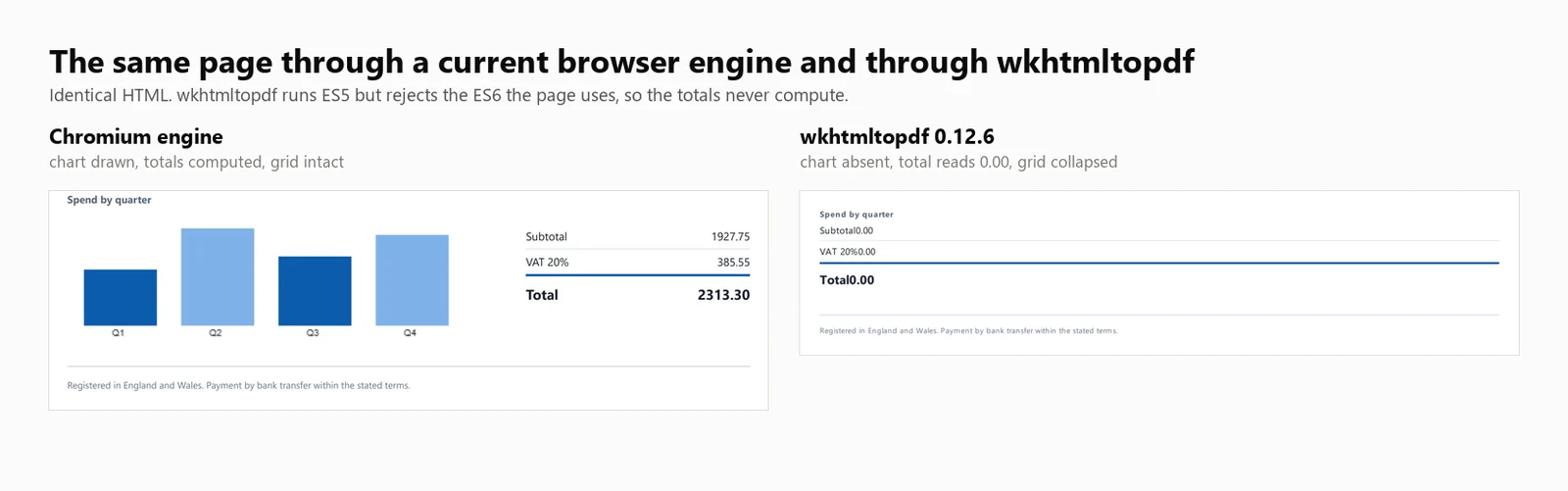
JavaScript-Unterstützung: wkhtmltopdf führt ES5 JavaScript aus, unterstützt jedoch kein ES6. Ein direkter Test auf diesem Build führte ES5 erfolgreich aus und warf bei ES6 einen Fehler, da document.querySelectorAll(...).forEach von der Qt (4.8.5) Engine nicht unterstützt wird. Infolgedessen zeigte die Testrechnung, die diesen Aufruf verwendet, einen Platzhalterwert von 0.00 ohne sichtbaren Fehler an. Vorlagen, die auf einer ES5-Basis geschrieben sind, werden korrekt berechnet, und solche, die modernes JavaScript verwenden, nicht.
Leistung: 424 ms Kaltstart, 486 ms mittlere Latenz bei 8 gleichzeitigen Rendern, 16,03 dauerhafte Render pro Sekunde und 482 MB Spitzenarbeitsspeicherverbrauch über den gesamten Prozessbaum. Die Rechnungssumme betrug 0.00 und das Diagramm wurde nicht gerendert.
Die obigen Zahlen basieren auf dem Ausführen von wkhtmltopdf.exe als Befehlszeilenwerkzeug, mit 1 Prozess pro Render. Der DinkToPdf-Wrapper verwendet die gleiche Engine im Prozess, serialisiert jedoch alle Aufrufe über SynchronizedConverter, was die Skalierbarkeit der Parallelität einschränkt.
7. Aspose.HTML für .NET: Eigenständige Layout-Engine
Aspose.HTML für .NET hat seine eigene Rendering-Engine anstelle eines Browsers und ist Teil einer Dokumentensuite, die auch Word, Excel und PowerPoint abdeckt. Für Teams, die bereits bei einem Anbieter kaufen, bedeutet das 1 Supportvertrag und 1 Bestellauftrag anstelle der Integration mehrerer Bibliotheken und der Nachverfolgung separater Verlängerungen.
Installation:
> dotnet add package Aspose.HTML
dotnet add package Aspose.HTML
Aus einem HTML-String:
// Aspose.HTML for .NET 25.7.0 - commercial licence, applied from a .lic file.using Aspose.Html;using Aspose.Html.Converters;using Aspose.Html.Saving;new License().SetLicense("Aspose.HTMLProductFamily.lic");string html = @"<h1>Invoice INV-2026-0814</h1> <p>Northwind Analytics Ltd — Net 30</p> <table><tr><th>Item</th><th>Amount</th></tr> <tr><td>Professional services</td><td>2313.30</td></tr></table>";// The second argument is the base URL relative assets resolve against.using var doc = new HTMLDocument(html, ".");Converter.ConvertHTML(doc, new PdfSaveOptions(), "invoice.pdf");// Its own rendering stack, not a browser: ES5 runs, ES6 throws, so anything the// page computes with modern syntax is left at its initial value.
// Aspose.HTML for .NET 25.7.0 - commercial licence, applied from a .lic file.using Aspose.Html;using Aspose.Html.Converters;using Aspose.Html.Saving;newLicense().SetLicense("Aspose.HTMLProductFamily.lic");string html = @"<h1>Invoice INV-2026-0814</h1> <p>Northwind Analytics Ltd — Net 30</p> <table><tr><th>Item</th><th>Amount</th></tr> <tr><td>Professional services</td><td>2313.30</td></tr></table>";// The second argument is the base URL relative assets resolve against.using var doc = new HTMLDocument(html, ".");Converter.ConvertHTML(doc, new PdfSaveOptions(), "invoice.pdf");// Its own rendering stack, not a browser: ES5 runs, ES6 throws, so anything the// page computes with modern syntax is left at its initial value.
// Aspose.HTML for .NET 25.7.0 - commercial licence, applied from a .lic file.
using Aspose.Html;
using Aspose.Html.Converters;
using Aspose.Html.Saving;
new License().SetLicense("Aspose.HTMLProductFamily.lic");
string html = @"<h1>Invoice INV-2026-0814</h1>
<p>Northwind Analytics Ltd — Net 30</p>
<table><tr><th>Item</th><th>Amount</th></tr>
<tr><td>Professional services</td><td>2313.30</td></tr></table>";
// The second argument is the base URL relative assets resolve against.
using var doc = new HTMLDocument(html, ".");
Converter.ConvertHTML(doc, new PdfSaveOptions(), "invoice.pdf");
// Its own rendering stack, not a browser: ES5 runs, ES6 throws, so anything the
// page computes with modern syntax is left at its initial value.
// Aspose.HTML for .NET 25.7.0 - commercial licence, applied from a .lic file.Imports Aspose.HtmlImports Aspose.Html.ConvertersImports Aspose.Html.SavingCall New License().SetLicense("Aspose.HTMLProductFamily.lic")Dim html As String = "<h1>Invoice INV-2026-0814</h1> <p>Northwind Analytics Ltd — Net 30</p> <table><tr><th>Item</th><th>Amount</th></tr> <tr><td>Professional services</td><td>2313.30</td></tr></table>"' The second argument is the base URL relative assets resolve against.Using doc = New HTMLDocument(html, ".") Converter.ConvertHTML(doc, New PdfSaveOptions(), "invoice.pdf")End Using' Its own rendering stack, not a browser: ES5 runs, ES6 throws, so anything the' page computes with modern syntax is left at its initial value.
// Aspose.HTMLfor .NET25.7.0 - commercial licence, applied from a .lic file.ImportsAspose.HtmlImportsAspose.Html.ConvertersImportsAspose.Html.SavingCall New License().SetLicense("Aspose.HTMLProductFamily.lic")Dim html AsString = "<h1>Invoice INV-2026-0814</h1> <p>Northwind Analytics Ltd — Net 30</p> <table><tr><th>Item</th><th>Amount</th></tr> <tr><td>Professional services</td><td>2313.30</td></tr></table>"' The second argument is the base URL relative assets resolve against.Using doc = New HTMLDocument(html, ".")Converter.ConvertHTML(doc, New PdfSaveOptions(), "invoice.pdf")EndUsing' Its own rendering stack, not a browser: ES5 runs, ES6 throws, so anything the' page computes with modern syntax is left at its initial value.
// Aspose.HTML for .NET 25.7.0 - commercial licence, applied from a .lic file.
Imports Aspose.Html
Imports Aspose.Html.Converters
Imports Aspose.Html.Saving
Call New License().SetLicense("Aspose.HTMLProductFamily.lic")
Dim html As String = "<h1>Invoice INV-2026-0814</h1>
<p>Northwind Analytics Ltd — Net 30</p>
<table><tr><th>Item</th><th>Amount</th></tr>
<tr><td>Professional services</td><td>2313.30</td></tr></table>"
' The second argument is the base URL relative assets resolve against.
Using doc = New HTMLDocument(html, ".")
Converter.ConvertHTML(doc, New PdfSaveOptions(), "invoice.pdf")
End Using
' Its own rendering stack, not a browser: ES5 runs, ES6 throws, so anything the
' page computes with modern syntax is left at its initial value.
Von einer Live-URL:
// Aspose.HTML 25.7.0 - only the HTMLDocument constructor changes.using Aspose.Html;using Aspose.Html.Converters;using Aspose.Html.Saving;new License().SetLicense("Aspose.HTMLProductFamily.lic");using var doc = new HTMLDocument("https://ironpdf.com/");Converter.ConvertHTML(doc, new PdfSaveOptions(), "page.pdf");
// Aspose.HTML 25.7.0 - only the HTMLDocument constructor changes.using Aspose.Html;using Aspose.Html.Converters;using Aspose.Html.Saving;newLicense().SetLicense("Aspose.HTMLProductFamily.lic");using var doc = new HTMLDocument("https://ironpdf.com/");Converter.ConvertHTML(doc, new PdfSaveOptions(), "page.pdf");
// Aspose.HTML 25.7.0 - only the HTMLDocument constructor changes.
using Aspose.Html;
using Aspose.Html.Converters;
using Aspose.Html.Saving;

new License().SetLicense("Aspose.HTMLProductFamily.lic");

using var doc = new HTMLDocument("https://ironpdf.com/");
Converter.ConvertHTML(doc, new PdfSaveOptions(), "page.pdf");
' Aspose.HTML 25.7.0 - only the HTMLDocument constructor changes.Imports Aspose.HtmlImports Aspose.Html.ConvertersImports Aspose.Html.SavingNew License().SetLicense("Aspose.HTMLProductFamily.lic")Using doc As New HTMLDocument("https://ironpdf.com/") Converter.ConvertHTML(doc, New PdfSaveOptions(), "page.pdf")End Using
' Aspose.HTML 25.7.0 - only the HTMLDocument constructor changes.ImportsAspose.HtmlImportsAspose.Html.ConvertersImportsAspose.Html.SavingNew License().SetLicense("Aspose.HTMLProductFamily.lic")Using doc As New HTMLDocument("https://ironpdf.com/")Converter.ConvertHTML(doc, New PdfSaveOptions(), "page.pdf")EndUsing
' Aspose.HTML 25.7.0 - only the HTMLDocument constructor changes.
Imports Aspose.Html
Imports Aspose.Html.Converters
Imports Aspose.Html.Saving

New License().SetLicense("Aspose.HTMLProductFamily.lic")

Using doc As New HTMLDocument("https://ironpdf.com/")
    Converter.ConvertHTML(doc, New PdfSaveOptions(), "page.pdf")
End Using
Empfohlene Verwendung: Wählen Sie Aspose.HTML, wenn Sie bereits auf Aspose für andere Formate standardisiert sind und HTML-Konvertierung unter demselben Vertrag wünschen, bei Vorlagen, die nicht von modernem JavaScript abhängen.
Kompromiss: Es ist eine kostenpflichtige Bibliothek ohne kostenlose Stufe, und ihr Rendering gehört zu den Layout-Engines und nicht zu den Browsern. Aspose.HTML wurde unter einer Professional-Lizenz getestet und seine Zahlen erscheinen in jeder Tabelle unten.
Leistung: 1.096 ms Kaltstart, 227 ms mittlere Latenz bei 8 gleichzeitigen Rendern, 33,98 dauerhafte Render pro Sekunde und 334 MB Spitzenarbeitsspeicherverbrauch in einem einzelnen Prozess. Die Rechnungssumme betrug 0.00 und das Diagramm wurde nicht gerendert.
HTML zu PDF Benchmark-Methode: Versionen, Maschine und Eingaben
Jede unten stehende Zahl stammt von 1 Maschine, 1 Dokument und 1 Kampagne mit 5 Durchläufen an einem einzigen Datum. Alle 3 sind hier angegeben, damit die Zahlen reproduziert oder nach ihren Verdiensten verworfen werden können.
Gemessene Bibliotheksversionen
Die Versionsspalte zeigt, was das Testprogramm zur Laufzeit aus der geladenen Assembly ausgelesen hat, nicht gegen welche Version der Artikel geschrieben wurde. Ein Paket, das auf eine andere als die festgelegte Version aufgelöst wird, würde hier angezeigt.
Bibliothek
Paket
Getestete Version
Zur Laufzeit gemeldete Assembly
Engine
IronPDF
IronPdf
2026.8.1
2026.8.0.1
Eingebettetes Chromium
Playwright .NET
Microsoft.Playwright
1.62.0
1.62.0.0
Externes Chromium
PuppeteerSharp
PuppeteerSharp
25.8.0
25.8.0.0
Externes Chromium
iText 9 mit pdfHTML
itext.pdfhtml
6.3.3
6.3.3.0 auf iText Core 9.7.0
Eigene Layout-Engine
HtmlRenderer + PdfSharp
HtmlRenderer.PdfSharp
1.6.1
1.6.1.0
Eigene Layout-Engine
wkhtmltopdf
Kommandozeilen-Binärdatei
0.12.6
0.12.6
QtWebKit 5.212 auf Qt 4.8.5
Aspose.HTML
Aspose.HTML
25.7.0
25.7.0.0
Eigene Layout-Engine
Maschine, Laufzeit und Datum
Element
Wert
CPU
24-Kern / 32-Thread x64 Desktop, 3,2 GHz
Speicher
64 GB
Betriebssystem
Windows 11 x64, Build 10.0.26200
Laufzeit
.NET 10.0.11, Release-Build
Maschinenzustand
Leerlauf, keine anderen Anwendungen laufen
Testdatum
3. September 2026
Stichprobengröße
8.960 zeitgesteuerte Renderings: 7 Engines x 4 Parallelitätsstufen x 64 Renderings x 5 Durchläufe
Kaltstart-Starts
105: 7 Engines x 3 Starts x 5 Durchläufe
Gemeldete Zahl
Median der 5 Durchläufe, niemals ein Bestfall
Das Testdokument und die darauf angewendeten Regeln
Jeder Engine wurde das identische HTML-Dokument mit 10.260 Zeichen im Speicher als String übergeben. Keine Engine erhielt einen Dateipfad, eine URL oder einen vorgewärmten Cache, den die anderen nicht bekamen. Das Dokument befindet sich im untenstehenden Download, sodass es verglichen werden kann, anstatt auf Vertrauen zu basieren.
Der Input ist eigenständig: Kein externes Stylesheet, keine Web-Schriftart, kein entferntes Bild. Nichts in der Messung hängt von der Netzwerkverzögerung oder davon ab, welche Engine Assets besser zwischenspeichert.
Gleiche Wartebedingung für jede Browser-Engine:Load, nicht Netzwerk-Leerlauf. PuppeteerSharp hat die Netzwerk-Leerlauf-Bedingungen für SetContent veraltet, daher ist Load die einzige Bedingung, die alle 3 identisch unterstützen.
Gleiche Seiteneinrichtung, mit 1 angegebenen Ausnahme:A4 und gedruckte Hintergründe auf jeder Engine. Ränder wurden nicht auf einen gemeinsamen Wert erzwungen, sodass jede Bibliothek ihren eigenen Standard verwendete, und diese Standards unterscheiden sich: IronPDF setzt die Seite ein, wo die 2 externen Browser-Engines dies nicht tun. Das ist im Vergleich weiter unten sichtbar. Es ändert, wie viel Weißraum den Inhalt umgibt, nicht das, was die Engines berechnet haben. Die 6 Engines, die den Seitenumbruch beachteten, produzierten 2 Seiten. HtmlRenderer produzierte 1, da der Umbruch verloren ging und nicht aufgrund der Ränder.
Die Engines, die eine bezahlte Lizenz benötigten, hatten eine: IronPDF unter einer Voll-Lizenz und Aspose.HTML unter Professional, sodass keine durch Testlimits gedrosselt oder mit Wasserzeichen versehen wurde. iText lief unter AGPL, was keine funktionalen Einschränkungen auferlegt.
Jede Engine erhielt die Konfiguration, die ihre eigene Dokumentation empfiehlt: 1 Renderer- oder Browser-Instanz, die über Render hinweg wiederverwendet wird, eine neue Seite pro Render für Puppeteer und Playwright, und Aspose.HTML schreibt in eine MemoryStream, sodass keine Festplattenkosten anfallen, die die anderen vermeiden.
Zeitgrenze: Die Stoppuhr startet, wenn der Renderaufruf gemacht wird, und stoppt, wenn die Engine PDF-Bytes zurückgibt. Sie schließt den Aufbau der Engine und den Start des Browsers aus, die separat als Kaltstart gemessen werden, und sie schließt das Schreiben auf die Festplatte aus, was keine der Engines tun sollte. Der Durchsatz ist erfolgreiche Render geteilt durch die Echtzeitsekunden für das gesamte Batch, nicht die Summe der einzelnen Renderzeiten, da nur das erste beschreibt, was ein Dienst unter Last liefert.
Speicherdefinition: Spitzen-Arbeitssatz summiert über den gesamten Prozessbaum, alle 100 ms abgetastet, wobei der Baum jeder Prozess ist, der vom Benchmark-Prozess durch echte Eltern- und Kind-Abstammung abstammt. Es ist ein Spitzenwert und kein Durchschnitt, da der Spitzenwert entscheidet, ob ein Container seine geschäftigste Sekunde überlebt. Eine Browser-Engine hält den Großteil ihres Speichers in erzeugten Kindprozessen, daher würde das Messen nur des .NET-Prozesses die Engine bevorzugen, die die meisten Prozesse erzeugt.
Was als Fehler zählt: Jeder Render, der weniger als 500 Bytes zurückgibt. Fehler werden aus dem Durchsatz-Zähler entfernt und separat gemeldet, sodass eine Engine keine hohe Rate erzielen kann, indem sie nichts zurückgibt. Über die 35 Aufrufe hinter diesen Tabellen hinweg hat keine Engine auf irgendeiner Ebene einen einzigen Fehler aufgezeichnet.
Zusammenfassung des HTML-zu-PDF-Benchmarks
Alle Geschwindigkeits- und Speicherwerte in den folgenden Tabellen basieren auf tatsächlichen Messungen. Wo eine Bibliothek nicht gemessen wurde, wird dies in der Tabelle explizit angegeben.
Interpretieren Sie die Durchsatzwerte im Zusammenhang mit der Rendering-Genauigkeit. Von den 7 gemessenen Engines haben 4 wesentliche Rendering-Arbeiten ausgelassen, und die 2 schnellsten Ergebnisse in der Tabelle, iText 9 mit 54.30/s und HtmlRenderer mit 327.09/s, stammen beide aus dieser Gruppe.
Vollständige HTML-zu-PDF-Benchmark-Ergebnisse nach Engine
Die folgenden Abschnitte bieten detaillierte Zahlen für jeden Eintrag in der Zusammenfassungstabelle.
Wie wurde dieser Benchmark gemessen?
Das Testdokument
Jede Engine hat die gleiche 2-seitige Rechnung gerendert, wie oben beschrieben. Was es zu einem Messinstrument anstelle eines Beispiels macht, sind die Summen. Sie werden im Markup als Platzhalter 0.00 Werte geliefert und beim Laden in JavaScript berechnet, sodass eine Engine, die das Skript ausgeführt hat, 2313.30 in die Textebene schreibt und eine Engine, die dies nicht getan hat, den Platzhalter dort belässt, wo ein regulärer Ausdruck ihn findet.
using System.Text;// The benchmark document. Two pages, a CSS Grid masthead, a 30-row table,// an inline SVG mark, and a bar chart drawn on a canvas element.//// The totals ship as placeholder zeroes and are computed in JavaScript at load// time, so the output itself records whether the engine ran the script. An// engine with no script engine produces a clean invoice whose total reads 0.00.static class TestDocument{ public static string Invoice() { var rows = new StringBuilder(); for (int i = 1; i <= 30; i++) { decimal unit = 12.50m + (i % 7) * 3.25m; int qty = 1 + (i % 5); rows.Append($@" <tr> <td>{i:00}</td> <td>Professional services, line item {i:00}</td> <td class=""num"">{qty}</td> <td class=""num"">{unit:0.00}</td> <td class=""num"">{unit * qty:0.00}</td> </tr>"); } return $@"<!DOCTYPE html><html lang=""en""><head><meta charset=""utf-8""><title>Invoice INV-2026-0814</title><style> body {{ font-family: 'Segoe UI', 'Helvetica Neue', Arial, sans-serif; color:#1c2430; padding:32px; font-size:12px; }} .masthead {{ display:grid; grid-template-columns: 1fr 1fr 220px; gap:20px; border-bottom:3px solid #0b5cab; padding-bottom:16px; margin-bottom:22px; }} .badge {{ background:#0b5cab; color:#fff; padding:10px 14px; border-radius:6px; text-align:center; }} table {{ width:100%; border-collapse:collapse; }} th {{ background:#eef3f9; text-align:left; padding:7px 9px; border-bottom:2px solid #c6d4e5; }} td {{ padding:6px 9px; border-bottom:1px solid #e7ecf3; }} tr:nth-child(even) td {{ background:#fafbfd; }} td.num, th.num {{ text-align:right; font-variant-numeric:tabular-nums; }} .chartwrap {{ margin-top:26px; display:grid; grid-template-columns:1fr 240px; gap:24px; }} .totals {{ list-style:none; padding:0; }} .totals li {{ display:flex; justify-content:space-between; padding:5px 0; border-bottom:1px solid #e7ecf3; }} .totals li.grand {{ font-weight:700; font-size:15px; border-top:2px solid #0b5cab; }}</style></head><body><header class=""masthead""> <div> <svg width=""34"" height=""34"" viewBox=""0 0 34 34""> <rect width=""34"" height=""34"" rx=""7"" fill=""#0b5cab""/> <circle cx=""24"" cy=""17"" r=""3.2"" fill=""#7fb2e8""/> </svg> <h1>Invoice</h1> </div> <dl><dt>Number</dt><dd>INV-2026-0814</dd><dt>Terms</dt><dd>Net 30</dd></dl> <div class=""badge"">Amount due<span id=""badge-total"">0.00</span>GBP</div></header><table> <thead> <tr><th>#</th><th>Description</th><th class=""num"">Qty</th><th class=""num"">Unit</th><th class=""num"">Amount</th></tr> </thead> <tbody>{rows} </tbody></table><section class=""chartwrap""> <div> <strong>Spend by quarter</strong> <canvas id=""chart"" width=""420"" height=""140""></canvas> </div> <ul class=""totals""> <li><span>Subtotal</span><span id=""sub"">0.00</span></li> <li><span>VAT 20%</span><span id=""vat"">0.00</span></li> <li class=""grand""><span>Total</span><span id=""tot"">0.00</span></li> </ul></section><script> // Totals are computed here, not in the markup. An engine that skips // JavaScript leaves the placeholder zeroes in the output. var sub = 0; document.querySelectorAll('tbody tr').forEach(function (tr) {{ sub += parseFloat(tr.lastElementChild.textContent); }}); var vat = sub * 0.2, tot = sub + vat; var f = function (n) {{ return n.toFixed(2); }}; document.getElementById('sub').textContent = f(sub); document.getElementById('vat').textContent = f(vat); document.getElementById('tot').textContent = f(tot); document.getElementById('badge-total').textContent = f(tot); // A canvas chart, the way a dashboard library would draw one. var data = [sub * 0.18, sub * 0.31, sub * 0.22, sub * 0.29]; var c = document.getElementById('chart').getContext('2d'); var max = Math.max.apply(null, data), bw = 78, gap = 26, base = 128; data.forEach(function (v, i) {{ var h = Math.round((v / max) * 104); c.fillStyle = i % 2 ? '#7fb2e8' : '#0b5cab'; c.fillRect(18 + i * (bw + gap), base - h, bw, h); c.fillStyle = '#1c2430'; c.font = '10px sans-serif'; c.fillText('Q' + (i + 1), 18 + i * (bw + gap) + 30, base + 11); }});</script></body></html>"; }}
using System.Text;// The benchmark document. Two pages, a CSS Grid masthead, a 30-row table,// an inline SVG mark, and a bar chart drawn on a canvas element.//// The totals ship as placeholder zeroes and are computed in JavaScript at load// time, so the output itself records whether the engine ran the script. An// engine with no script engine produces a clean invoice whose total reads 0.00.static class TestDocument{ public static stringInvoice() { var rows = new StringBuilder(); for (int i = 1; i <= 30; i++) { decimal unit = 12.50m + (i % 7) * 3.25m; int qty = 1 + (i % 5); rows.Append($@" <tr> <td>{i:00}</td> <td>Professional services, line item {i:00}</td> <td class=""num"">{qty}</td> <td class=""num"">{unit:0.00}</td> <td class=""num"">{unit * qty:0.00}</td> </tr>"); } return $@"<!DOCTYPE html><html lang=""en""><head><meta charset=""utf-8""><title>Invoice INV-2026-0814</title><style> body {{ font-family: 'Segoe UI', 'Helvetica Neue', Arial, sans-serif; color:#1c2430; padding:32px; font-size:12px; }} .masthead {{ display:grid; grid-template-columns: 1fr 1fr 220px; gap:20px; border-bottom:3px solid #0b5cab; padding-bottom:16px; margin-bottom:22px; }} .badge {{ background:#0b5cab; color:#fff; padding:10px 14px; border-radius:6px; text-align:center; }} table {{ width:100%; border-collapse:collapse; }} th {{ background:#eef3f9; text-align:left; padding:7px 9px; border-bottom:2px solid #c6d4e5; }} td {{ padding:6px 9px; border-bottom:1px solid #e7ecf3; }} tr:nth-child(even) td {{ background:#fafbfd; }} td.num, th.num {{ text-align:right; font-variant-numeric:tabular-nums; }} .chartwrap {{ margin-top:26px; display:grid; grid-template-columns:1fr 240px; gap:24px; }} .totals {{ list-style:none; padding:0; }} .totals li {{ display:flex; justify-content:space-between; padding:5px 0; border-bottom:1px solid #e7ecf3; }} .totals li.grand {{ font-weight:700; font-size:15px; border-top:2px solid #0b5cab; }}</style></head><body><header class=""masthead""> <div> <svg width=""34"" height=""34"" viewBox=""0 0 34 34""> <rect width=""34"" height=""34"" rx=""7"" fill=""#0b5cab""/> <circle cx=""24"" cy=""17"" r=""3.2"" fill=""#7fb2e8""/> </svg> <h1>Invoice</h1> </div> <dl><dt>Number</dt><dd>INV-2026-0814</dd><dt>Terms</dt><dd>Net 30</dd></dl> <div class=""badge"">Amount due<span id=""badge-total"">0.00</span>GBP</div></header><table> <thead> <tr><th>#</th><th>Description</th><th class=""num"">Qty</th><th class=""num"">Unit</th><th class=""num"">Amount</th></tr> </thead> <tbody>{rows} </tbody></table><section class=""chartwrap""> <div> <strong>Spend by quarter</strong> <canvas id=""chart"" width=""420"" height=""140""></canvas> </div> <ul class=""totals""> <li><span>Subtotal</span><span id=""sub"">0.00</span></li> <li><span>VAT 20%</span><span id=""vat"">0.00</span></li> <li class=""grand""><span>Total</span><span id=""tot"">0.00</span></li> </ul></section><script> // Totals are computed here, not in the markup. An engine that skips // JavaScript leaves the placeholder zeroes in the output. var sub = 0; document.querySelectorAll('tbody tr').forEach(function (tr) {{ sub += parseFloat(tr.lastElementChild.textContent); }}); var vat = sub * 0.2, tot = sub + vat; var f = function (n) {{ return n.toFixed(2); }}; document.getElementById('sub').textContent = f(sub); document.getElementById('vat').textContent = f(vat); document.getElementById('tot').textContent = f(tot); document.getElementById('badge-total').textContent = f(tot); // A canvas chart, the way a dashboard library would draw one. var data = [sub * 0.18, sub * 0.31, sub * 0.22, sub * 0.29]; var c = document.getElementById('chart').getContext('2d'); var max = Math.max.apply(null, data), bw = 78, gap = 26, base = 128; data.forEach(function (v, i) {{ var h = Math.round((v / max) * 104); c.fillStyle = i % 2 ? '#7fb2e8' : '#0b5cab'; c.fillRect(18 + i * (bw + gap), base - h, bw, h); c.fillStyle = '#1c2430'; c.font = '10px sans-serif'; c.fillText('Q' + (i + 1), 18 + i * (bw + gap) + 30, base + 11); }});</script></body></html>"; }}
using System.Text;

// The benchmark document. Two pages, a CSS Grid masthead, a 30-row table,
// an inline SVG mark, and a bar chart drawn on a canvas element.
//
// The totals ship as placeholder zeroes and are computed in JavaScript at load
// time, so the output itself records whether the engine ran the script. An
// engine with no script engine produces a clean invoice whose total reads 0.00.
static class TestDocument
{
    public static string Invoice()
    {
        var rows = new StringBuilder();
        for (int i = 1; i <= 30; i++)
        {
            decimal unit = 12.50m + (i % 7) * 3.25m;
            int qty = 1 + (i % 5);
            rows.Append($@"
      <tr>
        <td>{i:00}</td>
        <td>Professional services, line item {i:00}</td>
        <td class=""num"">{qty}</td>
        <td class=""num"">{unit:0.00}</td>
        <td class=""num"">{unit * qty:0.00}</td>
      </tr>");
        }

        return $@"<!DOCTYPE html>
<html lang=""en"">
<head>
<meta charset=""utf-8"">
<title>Invoice INV-2026-0814</title>
<style>
  body {{ font-family: 'Segoe UI', 'Helvetica Neue', Arial, sans-serif; color:#1c2430; padding:32px; font-size:12px; }}
  .masthead {{ display:grid; grid-template-columns: 1fr 1fr 220px; gap:20px;
               border-bottom:3px solid #0b5cab; padding-bottom:16px; margin-bottom:22px; }}
  .badge {{ background:#0b5cab; color:#fff; padding:10px 14px; border-radius:6px; text-align:center; }}
  table {{ width:100%; border-collapse:collapse; }}
  th {{ background:#eef3f9; text-align:left; padding:7px 9px; border-bottom:2px solid #c6d4e5; }}
  td {{ padding:6px 9px; border-bottom:1px solid #e7ecf3; }}
  tr:nth-child(even) td {{ background:#fafbfd; }}
  td.num, th.num {{ text-align:right; font-variant-numeric:tabular-nums; }}
  .chartwrap {{ margin-top:26px; display:grid; grid-template-columns:1fr 240px; gap:24px; }}
  .totals {{ list-style:none; padding:0; }}
  .totals li {{ display:flex; justify-content:space-between; padding:5px 0; border-bottom:1px solid #e7ecf3; }}
  .totals li.grand {{ font-weight:700; font-size:15px; border-top:2px solid #0b5cab; }}
</style>
</head>
<body>

<header class=""masthead"">
  <div>
    <svg width=""34"" height=""34"" viewBox=""0 0 34 34"">
      <rect width=""34"" height=""34"" rx=""7"" fill=""#0b5cab""/>
      <circle cx=""24"" cy=""17"" r=""3.2"" fill=""#7fb2e8""/>
    </svg>
    <h1>Invoice</h1>
  </div>
  <dl><dt>Number</dt><dd>INV-2026-0814</dd><dt>Terms</dt><dd>Net 30</dd></dl>
  <div class=""badge"">Amount due<span id=""badge-total"">0.00</span>GBP</div>
</header>

<table>
  <thead>
    <tr><th>#</th><th>Description</th><th class=""num"">Qty</th><th class=""num"">Unit</th><th class=""num"">Amount</th></tr>
  </thead>
  <tbody>{rows}
  </tbody>
</table>

<section class=""chartwrap"">
  <div>
    <strong>Spend by quarter</strong>
    <canvas id=""chart"" width=""420"" height=""140""></canvas>
  </div>
  <ul class=""totals"">
    <li><span>Subtotal</span><span id=""sub"">0.00</span></li>
    <li><span>VAT 20%</span><span id=""vat"">0.00</span></li>
    <li class=""grand""><span>Total</span><span id=""tot"">0.00</span></li>
  </ul>
</section>

<script>
  // Totals are computed here, not in the markup. An engine that skips
  // JavaScript leaves the placeholder zeroes in the output.
  var sub = 0;
  document.querySelectorAll('tbody tr').forEach(function (tr) {{
    sub += parseFloat(tr.lastElementChild.textContent);
  }});
  var vat = sub * 0.2, tot = sub + vat;
  var f = function (n) {{ return n.toFixed(2); }};
  document.getElementById('sub').textContent = f(sub);
  document.getElementById('vat').textContent = f(vat);
  document.getElementById('tot').textContent = f(tot);
  document.getElementById('badge-total').textContent = f(tot);

  // A canvas chart, the way a dashboard library would draw one.
  var data = [sub * 0.18, sub * 0.31, sub * 0.22, sub * 0.29];
  var c = document.getElementById('chart').getContext('2d');
  var max = Math.max.apply(null, data), bw = 78, gap = 26, base = 128;
  data.forEach(function (v, i) {{
    var h = Math.round((v / max) * 104);
    c.fillStyle = i % 2 ? '#7fb2e8' : '#0b5cab';
    c.fillRect(18 + i * (bw + gap), base - h, bw, h);
    c.fillStyle = '#1c2430';
    c.font = '10px sans-serif';
    c.fillText('Q' + (i + 1), 18 + i * (bw + gap) + 30, base + 11);
  }});
</script>

</body>
</html>";
    }
}
Imports System.Text' The benchmark document. Two pages, a CSS Grid masthead, a 30-row table,' an inline SVG mark, and a bar chart drawn on a canvas element.'' The totals ship as placeholder zeroes and are computed in JavaScript at load' time, so the output itself records whether the engine ran the script. An' engine with no script engine produces a clean invoice whose total reads 0.00.Friend Module TestDocument Public Function Invoice() As String Dim rows = New StringBuilder() For i As Integer = 1 To 30 Dim unit As Decimal = 12.5D + (i Mod 7) * 3.25D Dim qty As Integer = 1 + (i Mod 5) rows.AppendFormat(" <tr> <td>{0:00}</td> <td>Professional services, line item {0:00}</td> <td class=""num"">{1}</td> <td class=""num"">{2:0.00}</td> <td class=""num"">{3:0.00}</td> </tr>", i, qty, unit, unit * qty) Next Return "<!DOCTYPE html><html lang=""en""><head><meta charset=""utf-8""><title>Invoice INV-2026-0814</title><style> body { font-family: 'Segoe UI', 'Helvetica Neue', Arial, sans-serif; color:#1c2430; padding:32px; font-size:12px; } .masthead { display:grid; grid-template-columns: 1fr 1fr 220px; gap:20px; border-bottom:3px solid #0b5cab; padding-bottom:16px; margin-bottom:22px; } .badge { background:#0b5cab; color:#fff; padding:10px 14px; border-radius:6px; text-align:center; } table { width:100%; border-collapse:collapse; } th { background:#eef3f9; text-align:left; padding:7px 9px; border-bottom:2px solid #c6d4e5; } td { padding:6px 9px; border-bottom:1px solid #e7ecf3; } tr:nth-child(even) td { background:#fafbfd; } td.num, th.num { text-align:right; font-variant-numeric:tabular-nums; } .chartwrap { margin-top:26px; display:grid; grid-template-columns:1fr 240px; gap:24px; } .totals { list-style:none; padding:0; } .totals li { display:flex; justify-content:space-between; padding:5px 0; border-bottom:1px solid #e7ecf3; } .totals li.grand { font-weight:700; font-size:15px; border-top:2px solid #0b5cab; }</style></head><body><header class=""masthead""> <div> <svg width=""34"" height=""34"" viewBox=""0 0 34 34""> <rect width=""34"" height=""34"" rx=""7"" fill=""#0b5cab""/> <circle cx=""24"" cy=""17"" r=""3.2"" fill=""#7fb2e8""/> </svg> <h1>Invoice</h1> </div> <dl><dt>Number</dt><dd>INV-2026-0814</dd><dt>Terms</dt><dd>Net 30</dd></dl> <div class=""badge"">Amount due<span id=""badge-total"">0.00</span>GBP</div></header><table> <thead> <tr><th>#</th><th>Description</th><th class=""num"">Qty</th><th class=""num"">Unit</th><th class=""num"">Amount</th></tr> </thead> <tbody>" & rows.ToString() & " </tbody></table><section class=""chartwrap""> <div> <strong>Spend by quarter</strong> <canvas id=""chart"" width=""420"" height=""140""></canvas> </div> <ul class=""totals""> <li><span>Subtotal</span><span id=""sub"">0.00</span></li> <li><span>VAT 20%</span><span id=""vat"">0.00</span></li> <li class=""grand""><span>Total</span><span id=""tot"">0.00</span></li> </ul></section><script> var sub = 0; document.querySelectorAll('tbody tr').forEach(function (tr) { sub += parseFloat(tr.lastElementChild.textContent); }); var vat = sub * 0.2, tot = sub + vat; var f = function (n) { return n.toFixed(2); }; document.getElementById('sub').textContent = f(sub); document.getElementById('vat').textContent = f(vat); document.getElementById('tot').textContent = f(tot); document.getElementById('badge-total').textContent = f(tot); var data = [sub * 0.18, sub * 0.31, sub * 0.22, sub * 0.29]; var c = document.getElementById('chart').getContext('2d'); var max = Math.max.apply(null, data), bw = 78, gap = 26, base = 128; data.forEach(function (v, i) { var h = Math.round((v / max) * 104); c.fillStyle = i % 2 ? '#7fb2e8' : '#0b5cab'; c.fillRect(18 + i * (bw + gap), base - h, bw, h); c.fillStyle = '#1c2430'; c.font = '10px sans-serif'; c.fillText('Q' + (i + 1), 18 + i * (bw + gap) + 30, base + 11); });</script></body></html>" End FunctionEnd Module
ImportsSystem.Text' The benchmark document. Two pages, a CSS Grid masthead, a 30-row table,' an inline SVG mark, and a bar chart drawn on a canvas element.'' The totals ship as placeholder zeroes and are computed in JavaScript at load' time, so the output itself records whether the engine ran the script. An' engine with no script engine produces a clean invoice whose total reads 0.00.FriendModuleTestDocument Public Function Invoice() AsString Dim rows = New StringBuilder() For i AsInteger = 1 To 30 Dim unit AsDecimal = 12.5D + (i Mod7) * 3.25D Dim qty AsInteger = 1 + (i Mod5) rows.AppendFormat(" <tr> <td>{0:00}</td> <td>Professional services, line item {0:00}</td> <td class=""num"">{1}</td> <td class=""num"">{2:0.00}</td> <td class=""num"">{3:0.00}</td> </tr>", i, qty, unit, unit * qty) Next Return "<!DOCTYPE html><html lang=""en""><head><meta charset=""utf-8""><title>Invoice INV-2026-0814</title><style> body { font-family: 'Segoe UI', 'Helvetica Neue', Arial, sans-serif; color:#1c2430; padding:32px; font-size:12px; } .masthead { display:grid; grid-template-columns: 1fr 1fr 220px; gap:20px; border-bottom:3px solid #0b5cab; padding-bottom:16px; margin-bottom:22px; } .badge { background:#0b5cab; color:#fff; padding:10px 14px; border-radius:6px; text-align:center; } table { width:100%; border-collapse:collapse; } th { background:#eef3f9; text-align:left; padding:7px 9px; border-bottom:2px solid #c6d4e5; } td { padding:6px 9px; border-bottom:1px solid #e7ecf3; } tr:nth-child(even) td { background:#fafbfd; } td.num, th.num { text-align:right; font-variant-numeric:tabular-nums; } .chartwrap { margin-top:26px; display:grid; grid-template-columns:1fr 240px; gap:24px; } .totals { list-style:none; padding:0; } .totals li { display:flex; justify-content:space-between; padding:5px 0; border-bottom:1px solid #e7ecf3; } .totals li.grand { font-weight:700; font-size:15px; border-top:2px solid #0b5cab; }</style></head><body><header class=""masthead""> <div> <svg width=""34"" height=""34"" viewBox=""0 0 34 34""> <rect width=""34"" height=""34"" rx=""7"" fill=""#0b5cab""/> <circle cx=""24"" cy=""17"" r=""3.2"" fill=""#7fb2e8""/> </svg> <h1>Invoice</h1> </div> <dl><dt>Number</dt><dd>INV-2026-0814</dd><dt>Terms</dt><dd>Net 30</dd></dl> <div class=""badge"">Amount due<span id=""badge-total"">0.00</span>GBP</div></header><table> <thead> <tr><th>#</th><th>Description</th><th class=""num"">Qty</th><th class=""num"">Unit</th><th class=""num"">Amount</th></tr> </thead> <tbody>" & rows.ToString() & " </tbody></table><section class=""chartwrap""> <div> <strong>Spend by quarter</strong> <canvas id=""chart"" width=""420"" height=""140""></canvas> </div> <ul class=""totals""> <li><span>Subtotal</span><span id=""sub"">0.00</span></li> <li><span>VAT 20%</span><span id=""vat"">0.00</span></li> <li class=""grand""><span>Total</span><span id=""tot"">0.00</span></li> </ul></section><script> var sub = 0; document.querySelectorAll('tbody tr').forEach(function (tr) { sub += parseFloat(tr.lastElementChild.textContent); }); var vat = sub * 0.2, tot = sub + vat; var f = function (n) { return n.toFixed(2); }; document.getElementById('sub').textContent = f(sub); document.getElementById('vat').textContent = f(vat); document.getElementById('tot').textContent = f(tot); document.getElementById('badge-total').textContent = f(tot); var data = [sub * 0.18, sub * 0.31, sub * 0.22, sub * 0.29]; var c = document.getElementById('chart').getContext('2d'); var max = Math.max.apply(null, data), bw = 78, gap = 26, base = 128; data.forEach(function (v, i) { var h = Math.round((v / max) * 104); c.fillStyle = i % 2 ? '#7fb2e8' : '#0b5cab'; c.fillRect(18 + i * (bw + gap), base - h, bw, h); c.fillStyle = '#1c2430'; c.font = '10px sans-serif'; c.fillText('Q' + (i + 1), 18 + i * (bw + gap) + 30, base + 11); });</script></body></html>" End FunctionEndModule
Imports System.Text

' The benchmark document. Two pages, a CSS Grid masthead, a 30-row table,
' an inline SVG mark, and a bar chart drawn on a canvas element.
'
' The totals ship as placeholder zeroes and are computed in JavaScript at load
' time, so the output itself records whether the engine ran the script. An
' engine with no script engine produces a clean invoice whose total reads 0.00.
Friend Module TestDocument
    Public Function Invoice() As String
        Dim rows = New StringBuilder()
        For i As Integer = 1 To 30
            Dim unit As Decimal = 12.5D + (i Mod 7) * 3.25D
            Dim qty As Integer = 1 + (i Mod 5)
            rows.AppendFormat(
"      <tr>
        <td>{0:00}</td>
        <td>Professional services, line item {0:00}</td>
        <td class=""num"">{1}</td>
        <td class=""num"">{2:0.00}</td>
        <td class=""num"">{3:0.00}</td>
      </tr>", i, qty, unit, unit * qty)
        Next

        Return "<!DOCTYPE html>
<html lang=""en"">
<head>
<meta charset=""utf-8"">
<title>Invoice INV-2026-0814</title>
<style>
  body { font-family: 'Segoe UI', 'Helvetica Neue', Arial, sans-serif; color:#1c2430; padding:32px; font-size:12px; }
  .masthead { display:grid; grid-template-columns: 1fr 1fr 220px; gap:20px;
               border-bottom:3px solid #0b5cab; padding-bottom:16px; margin-bottom:22px; }
  .badge { background:#0b5cab; color:#fff; padding:10px 14px; border-radius:6px; text-align:center; }
  table { width:100%; border-collapse:collapse; }
  th { background:#eef3f9; text-align:left; padding:7px 9px; border-bottom:2px solid #c6d4e5; }
  td { padding:6px 9px; border-bottom:1px solid #e7ecf3; }
  tr:nth-child(even) td { background:#fafbfd; }
  td.num, th.num { text-align:right; font-variant-numeric:tabular-nums; }
  .chartwrap { margin-top:26px; display:grid; grid-template-columns:1fr 240px; gap:24px; }
  .totals { list-style:none; padding:0; }
  .totals li { display:flex; justify-content:space-between; padding:5px 0; border-bottom:1px solid #e7ecf3; }
  .totals li.grand { font-weight:700; font-size:15px; border-top:2px solid #0b5cab; }
</style>
</head>
<body>

<header class=""masthead"">
  <div>
    <svg width=""34"" height=""34"" viewBox=""0 0 34 34"">
      <rect width=""34"" height=""34"" rx=""7"" fill=""#0b5cab""/>
      <circle cx=""24"" cy=""17"" r=""3.2"" fill=""#7fb2e8""/>
    </svg>
    <h1>Invoice</h1>
  </div>
  <dl><dt>Number</dt><dd>INV-2026-0814</dd><dt>Terms</dt><dd>Net 30</dd></dl>
  <div class=""badge"">Amount due<span id=""badge-total"">0.00</span>GBP</div>
</header>

<table>
  <thead>
    <tr><th>#</th><th>Description</th><th class=""num"">Qty</th><th class=""num"">Unit</th><th class=""num"">Amount</th></tr>
  </thead>
  <tbody>" & rows.ToString() & "
  </tbody>
</table>

<section class=""chartwrap"">
  <div>
    <strong>Spend by quarter</strong>
    <canvas id=""chart"" width=""420"" height=""140""></canvas>
  </div>
  <ul class=""totals"">
    <li><span>Subtotal</span><span id=""sub"">0.00</span></li>
    <li><span>VAT 20%</span><span id=""vat"">0.00</span></li>
    <li class=""grand""><span>Total</span><span id=""tot"">0.00</span></li>
  </ul>
</section>

<script>
  var sub = 0;
  document.querySelectorAll('tbody tr').forEach(function (tr) {
    sub += parseFloat(tr.lastElementChild.textContent);
  });
  var vat = sub * 0.2, tot = sub + vat;
  var f = function (n) { return n.toFixed(2); };
  document.getElementById('sub').textContent = f(sub);
  document.getElementById('vat').textContent = f(vat);
  document.getElementById('tot').textContent = f(tot);
  document.getElementById('badge-total').textContent = f(tot);

  var data = [sub * 0.18, sub * 0.31, sub * 0.22, sub * 0.29];
  var c = document.getElementById('chart').getContext('2d');
  var max = Math.max.apply(null, data), bw = 78, gap = 26, base = 128;
  data.forEach(function (v, i) {
    var h = Math.round((v / max) * 104);
    c.fillStyle = i % 2 ? '#7fb2e8' : '#0b5cab';
    c.fillRect(18 + i * (bw + gap), base - h, bw, h);
    c.fillStyle = '#1c2430';
    c.font = '10px sans-serif';
    c.fillText('Q' + (i + 1), 18 + i * (bw + gap) + 30, base + 11);
  });
</script>

</body>
</html>"
    End Function
End Module
Was jede Zahl bedeutet
Durchsatz: erfolgreiche Renderings geteilt durch die Echtzeitsekunden für das gesamte Batch, nicht die Summe der einzelnen Renderzeiten. Nur der erste beschreibt, was ein Dienst unter gleichzeitiger Ausführung liefert.
Fehler: jedes Rendering, das weniger als 500 Bytes zurückgibt. Fehler werden aus dem Durchsatz-Zähler entfernt und separat gemeldet, sodass eine Engine keine hohe Rate erzielen kann, indem sie nichts zurückgibt. Bei den 35 Aufrufen hinter dieser Tabelle hat keine Engine auf irgendeiner Ebene einen einzigen Fehler verzeichnet.
p50 und p95: entnommen aus der sortierten Liste der Latenzen pro Rendering durch lineare Interpolation, nicht aus einem Mittelwert. Ein Mittelwert verbirgt das Ende, und das Ende ist das, worauf ein Benutzer wartet.
Spitzenspeicher: der Höchststand von WorkingSet64 summiert über den Prozessbaum, alle 100 ms abgetastet. Es ist ein Spitzenwert und kein Durchschnitt, weil der Spitzenwert entscheidet, ob ein Container seine geschäftigste Sekunde überlebt.
Kaltstart: die Zeit von einem neuen Prozess bis zum ersten PDF, als das beste von 3 Starts genommen, nicht als Median. Der erste Start einer beliebigen Engine absorbiert einmalige Kosten wie das Laden von Assemblies, einen Browser-Download oder eine native Extraktion. Diese sind reale Bereitstellungskosten, aber keine Kosten pro Start, und sie in den Durchschnitt einzubeziehen, verwischt zwei verschiedene Zahlen.
using System;using System.Collections.Generic;using System.Diagnostics;using System.Linq;using System.Threading;using System.Threading.Tasks;const int TotalRenders = 64;int[] levels = { 1, 4, 8, 16 };string html = TestDocument.Invoice();IEngine engine = Engines.Create("ironpdf");await engine.InitAsync();// Warm the engine so the sweep measures steady state rather than a cold start// smeared across the first few results.for (int i = 0; i < 5; i++) await engine.RenderAsync(html);foreach (int concurrency in levels){ var sampler = new TreeMemorySampler(); var latencies = new List<double>(TotalRenders); int failures = 0; object gate = new(); GC.Collect(); GC.WaitForPendingFinalizers(); sampler.Start(); var wall = Stopwatch.StartNew(); using (var semaphore = new SemaphoreSlim(concurrency)) { IEnumerable<Task> work = Enumerable.Range(0, TotalRenders).Select(async _ => { await semaphore.WaitAsync(); var perRender = Stopwatch.StartNew(); try { byte[] pdf = await engine.RenderAsync(html); perRender.Stop(); // An engine that returns quickly by returning nothing must not // be rewarded with a throughput number. if (pdf == null || pdf.Length < 500) lock (gate) failures++; else lock (gate) latencies.Add(perRender.Elapsed.TotalMilliseconds); } catch { lock (gate) failures++; } finally { semaphore.Release(); } }); await Task.WhenAll(work); } wall.Stop(); sampler.Stop(); latencies.Sort(); double throughput = (TotalRenders - failures) / wall.Elapsed.TotalSeconds; Console.WriteLine( $"C={concurrency,-2} {throughput,6:0.00} rend/s " + $"p50 {Percentile(latencies, 50),6:0} ms " + $"p95 {Percentile(latencies, 95),6:0} ms " + $"peak {sampler.PeakBytes / 1024.0 / 1024.0,6:0} MB " + $"procs {sampler.PeakProcessCount,2} fail {failures}");}await engine.DisposeAsync();// Report percentiles rather than means. A mean hides the tail, and the tail is// what your users experience.static double Percentile(List<double> sorted, int p){ if (sorted.Count == 0) return -1; double rank = (p / 100.0) * (sorted.Count - 1); int low = (int)Math.Floor(rank); int high = (int)Math.Ceiling(rank); return low == high ? sorted[low] : sorted[low] + (rank - low) * (sorted[high] - sorted[low]);}
using System;using System.Collections.Generic;using System.Diagnostics;using System.Linq;using System.Threading;using System.Threading.Tasks;const intTotalRenders = 64;int[] levels = { 1, 4, 8, 16 };string html = TestDocument.Invoice();IEngine engine = Engines.Create("ironpdf");await engine.InitAsync();// Warm the engine so the sweep measures steady state rather than a cold start// smeared across the first few results.for (int i = 0; i < 5; i++) await engine.RenderAsync(html);foreach (int concurrency in levels){ var sampler = new TreeMemorySampler(); var latencies = new List<double>(TotalRenders); int failures = 0; object gate = new();GC.Collect();GC.WaitForPendingFinalizers(); sampler.Start(); var wall = Stopwatch.StartNew(); using (var semaphore = new SemaphoreSlim(concurrency)) { IEnumerable<Task> work = Enumerable.Range(0, TotalRenders).Select(async _ => { await semaphore.WaitAsync(); var perRender = Stopwatch.StartNew(); try { byte[] pdf = await engine.RenderAsync(html); perRender.Stop(); // An engine that returns quickly by returning nothing must not // be rewarded with a throughput number. if (pdf == null || pdf.Length < 500) lock (gate) failures++; else lock (gate) latencies.Add(perRender.Elapsed.TotalMilliseconds); } catch { lock (gate) failures++; } finally { semaphore.Release(); } }); awaitTask.WhenAll(work); } wall.Stop(); sampler.Stop(); latencies.Sort(); double throughput = (TotalRenders - failures) / wall.Elapsed.TotalSeconds;Console.WriteLine( $"C={concurrency,-2} {throughput,6:0.00} rend/s " + $"p50 {Percentile(latencies, 50),6:0} ms " + $"p95 {Percentile(latencies, 95),6:0} ms " + $"peak {sampler.PeakBytes / 1024.0 / 1024.0,6:0} MB " + $"procs {sampler.PeakProcessCount,2} fail {failures}");}await engine.DisposeAsync();// Report percentiles rather than means. A mean hides the tail, and the tail is// what your users experience.static doublePercentile(List<double> sorted, int p){ if (sorted.Count == 0) return -1; double rank = (p / 100.0) * (sorted.Count - 1); int low = (int)Math.Floor(rank); int high = (int)Math.Ceiling(rank); return low == high ? sorted[low] : sorted[low] + (rank - low) * (sorted[high] - sorted[low]);}
using System;
using System.Collections.Generic;
using System.Diagnostics;
using System.Linq;
using System.Threading;
using System.Threading.Tasks;

const int TotalRenders = 64;
int[] levels = { 1, 4, 8, 16 };

string html = TestDocument.Invoice();
IEngine engine = Engines.Create("ironpdf");
await engine.InitAsync();

// Warm the engine so the sweep measures steady state rather than a cold start
// smeared across the first few results.
for (int i = 0; i < 5; i++) await engine.RenderAsync(html);

foreach (int concurrency in levels)
{
    var sampler = new TreeMemorySampler();
    var latencies = new List<double>(TotalRenders);
    int failures = 0;
    object gate = new();

    GC.Collect();
    GC.WaitForPendingFinalizers();

    sampler.Start();
    var wall = Stopwatch.StartNew();

    using (var semaphore = new SemaphoreSlim(concurrency))
    {
        IEnumerable<Task> work = Enumerable.Range(0, TotalRenders).Select(async _ =>
        {
            await semaphore.WaitAsync();
            var perRender = Stopwatch.StartNew();
            try
            {
                byte[] pdf = await engine.RenderAsync(html);
                perRender.Stop();

                // An engine that returns quickly by returning nothing must not
                // be rewarded with a throughput number.
                if (pdf == null || pdf.Length < 500) lock (gate) failures++;
                else lock (gate) latencies.Add(perRender.Elapsed.TotalMilliseconds);
            }
            catch
            {
                lock (gate) failures++;
            }
            finally { semaphore.Release(); }
        });

        await Task.WhenAll(work);
    }

    wall.Stop();
    sampler.Stop();
    latencies.Sort();

    double throughput = (TotalRenders - failures) / wall.Elapsed.TotalSeconds;

    Console.WriteLine(
        $"C={concurrency,-2} {throughput,6:0.00} rend/s  " +
        $"p50 {Percentile(latencies, 50),6:0} ms  " +
        $"p95 {Percentile(latencies, 95),6:0} ms  " +
        $"peak {sampler.PeakBytes / 1024.0 / 1024.0,6:0} MB  " +
        $"procs {sampler.PeakProcessCount,2}  fail {failures}");
}

await engine.DisposeAsync();

// Report percentiles rather than means. A mean hides the tail, and the tail is
// what your users experience.
static double Percentile(List<double> sorted, int p)
{
    if (sorted.Count == 0) return -1;

    double rank = (p / 100.0) * (sorted.Count - 1);
    int low = (int)Math.Floor(rank);
    int high = (int)Math.Ceiling(rank);

    return low == high
        ? sorted[low]
        : sorted[low] + (rank - low) * (sorted[high] - sorted[low]);
}
Imports SystemImports System.Collections.GenericImports System.DiagnosticsImports System.LinqImports System.ThreadingImports System.Threading.TasksConst TotalRenders As Integer = 64Dim levels As Integer() = {1, 4, 8, 16}Dim html As String = TestDocument.Invoice()Dim engine As IEngine = Engines.Create("ironpdf")Await engine.InitAsync()' Warm the engine so the sweep measures steady state rather than a cold start' smeared across the first few results.For i As Integer = 0 To 4 Await engine.RenderAsync(html)NextFor Each concurrency As Integer In levels Dim sampler = New TreeMemorySampler() Dim latencies = New List(Of Double)(TotalRenders) Dim failures As Integer = 0 Dim gate As New Object() GC.Collect() GC.WaitForPendingFinalizers() sampler.Start() Dim wall = Stopwatch.StartNew() Using semaphore = New SemaphoreSlim(concurrency) Dim work As IEnumerable(Of Task) = Enumerable.Range(0, TotalRenders).[Select](Async Function(_) Await semaphore.WaitAsync() Dim perRender = Stopwatch.StartNew() Try Dim pdf As Byte() = Await engine.RenderAsync(html) perRender.Stop() ' An engine that returns quickly by returning nothing must not ' be rewarded with a throughput number. If pdf Is Nothing OrElse pdf.Length < 500 Then SyncLock gate failures += 1 End SyncLock Else SyncLock gate latencies.Add(perRender.Elapsed.TotalMilliseconds) End SyncLock End If Catch SyncLock gate failures += 1 End SyncLock Finally semaphore.Release() End Try End Function) Await Task.WhenAll(work) End Using wall.Stop() sampler.Stop() latencies.Sort() Dim throughput As Double = (TotalRenders - failures) / wall.Elapsed.TotalSeconds Console.WriteLine($"C={concurrency,-2} {throughput,6:0.00} rend/s " & $"p50 {Percentile(latencies, 50),6:0} ms " & $"p95 {Percentile(latencies, 95),6:0} ms " & $"peak {sampler.PeakBytes / 1024.0 / 1024.0,6:0} MB " & $"procs {sampler.PeakProcessCount,2} fail {failures}")NextAwait engine.DisposeAsync()' Report percentiles rather than means. A mean hides the tail, and the tail is' what your users experience.Private Shared Function Percentile(sorted As List(Of Double), p As Integer) As Double If sorted.Count = 0 Then Return -1 Dim rank As Double = (p / 100.0) * (sorted.Count - 1) Dim low As Integer = CInt(Math.Floor(rank)) Dim high As Integer = CInt(Math.Ceiling(rank)) Return If(low = high, sorted(low), sorted(low) + (rank - low) * (sorted(high) - sorted(low)))End Function
ImportsSystemImportsSystem.Collections.GenericImportsSystem.DiagnosticsImportsSystem.LinqImportsSystem.ThreadingImportsSystem.Threading.TasksConst TotalRendersAsInteger = 64Dim levels AsInteger() = {1, 4, 8, 16}Dim html AsString = TestDocument.Invoice()Dim engine AsIEngine = Engines.Create("ironpdf")Await engine.InitAsync()' Warm the engine so the sweep measures steady state rather than a cold start' smeared across the first few results.For i AsInteger = 0 To 4Await engine.RenderAsync(html)NextFor Each concurrency AsIntegerIn levels Dim sampler = New TreeMemorySampler() Dim latencies = New List(OfDouble)(TotalRenders) Dim failures AsInteger = 0 Dim gate As New Object()GC.Collect()GC.WaitForPendingFinalizers() sampler.Start() Dim wall = Stopwatch.StartNew()Using semaphore = New SemaphoreSlim(concurrency) Dim work AsIEnumerable(OfTask) = Enumerable.Range(0, TotalRenders).[Select](Async Function(_)Await semaphore.WaitAsync() Dim perRender = Stopwatch.StartNew()Try Dim pdf AsByte() = Await engine.RenderAsync(html) perRender.Stop() ' An engine that returns quickly by returning nothing must not ' be rewarded with a throughput number. If pdf Is NothingOrElse pdf.Length < 500 ThenSyncLock gate failures += 1EndSyncLock ElseSyncLock gate latencies.Add(perRender.Elapsed.TotalMilliseconds)EndSyncLock End IfCatchSyncLock gate failures += 1EndSyncLockFinally semaphore.Release()EndTry End Function)AwaitTask.WhenAll(work)EndUsing wall.Stop() sampler.Stop() latencies.Sort() Dim throughput AsDouble = (TotalRenders - failures) / wall.Elapsed.TotalSecondsConsole.WriteLine($"C={concurrency,-2} {throughput,6:0.00} rend/s " & $"p50 {Percentile(latencies, 50),6:0} ms " & $"p95 {Percentile(latencies, 95),6:0} ms " & $"peak {sampler.PeakBytes / 1024.0 / 1024.0,6:0} MB " & $"procs {sampler.PeakProcessCount,2} fail {failures}")NextAwait engine.DisposeAsync()' Report percentiles rather than means. A mean hides the tail, and the tail is' what your users experience.PrivateShared Function Percentile(sorted AsList(OfDouble), p AsInteger) AsDouble If sorted.Count = 0 Then Return -1 Dim rank AsDouble = (p / 100.0) * (sorted.Count - 1) Dim low AsInteger = CInt(Math.Floor(rank)) Dim high AsInteger = CInt(Math.Ceiling(rank)) Return If(low = high, sorted(low), sorted(low) + (rank - low) * (sorted(high) - sorted(low)))End Function
Imports System
Imports System.Collections.Generic
Imports System.Diagnostics
Imports System.Linq
Imports System.Threading
Imports System.Threading.Tasks

Const TotalRenders As Integer = 64
Dim levels As Integer() = {1, 4, 8, 16}

Dim html As String = TestDocument.Invoice()
Dim engine As IEngine = Engines.Create("ironpdf")
Await engine.InitAsync()

' Warm the engine so the sweep measures steady state rather than a cold start
' smeared across the first few results.
For i As Integer = 0 To 4
    Await engine.RenderAsync(html)
Next

For Each concurrency As Integer In levels
    Dim sampler = New TreeMemorySampler()
    Dim latencies = New List(Of Double)(TotalRenders)
    Dim failures As Integer = 0
    Dim gate As New Object()

    GC.Collect()
    GC.WaitForPendingFinalizers()

    sampler.Start()
    Dim wall = Stopwatch.StartNew()

    Using semaphore = New SemaphoreSlim(concurrency)
        Dim work As IEnumerable(Of Task) = Enumerable.Range(0, TotalRenders).[Select](Async Function(_)
                                                                                        Await semaphore.WaitAsync()
                                                                                        Dim perRender = Stopwatch.StartNew()
                                                                                        Try
                                                                                            Dim pdf As Byte() = Await engine.RenderAsync(html)
                                                                                            perRender.Stop()

                                                                                            ' An engine that returns quickly by returning nothing must not
                                                                                            ' be rewarded with a throughput number.
                                                                                            If pdf Is Nothing OrElse pdf.Length < 500 Then
                                                                                                SyncLock gate
                                                                                                    failures += 1
                                                                                                End SyncLock
                                                                                            Else
                                                                                                SyncLock gate
                                                                                                    latencies.Add(perRender.Elapsed.TotalMilliseconds)
                                                                                                End SyncLock
                                                                                            End If
                                                                                        Catch
                                                                                            SyncLock gate
                                                                                                failures += 1
                                                                                            End SyncLock
                                                                                        Finally
                                                                                            semaphore.Release()
                                                                                        End Try
                                                                                    End Function)

        Await Task.WhenAll(work)
    End Using

    wall.Stop()
    sampler.Stop()
    latencies.Sort()

    Dim throughput As Double = (TotalRenders - failures) / wall.Elapsed.TotalSeconds

    Console.WriteLine($"C={concurrency,-2} {throughput,6:0.00} rend/s  " &
                      $"p50 {Percentile(latencies, 50),6:0} ms  " &
                      $"p95 {Percentile(latencies, 95),6:0} ms  " &
                      $"peak {sampler.PeakBytes / 1024.0 / 1024.0,6:0} MB  " &
                      $"procs {sampler.PeakProcessCount,2}  fail {failures}")
Next

Await engine.DisposeAsync()

' Report percentiles rather than means. A mean hides the tail, and the tail is
' what your users experience.
Private Shared Function Percentile(sorted As List(Of Double), p As Integer) As Double
    If sorted.Count = 0 Then Return -1

    Dim rank As Double = (p / 100.0) * (sorted.Count - 1)
    Dim low As Integer = CInt(Math.Floor(rank))
    Dim high As Integer = CInt(Math.Ceiling(rank))

    Return If(low = high, sorted(low), sorted(low) + (rank - low) * (sorted(high) - sorted(low)))
End Function
using System;using System.Diagnostics;using System.Globalization;using System.Threading.Tasks;// Cold start cannot be measured inside a process that has already rendered.// The parent spawns this same binary with --cold, so every reading is a real// process start rather than a first call inside an already-warm runtime.// --- child mode: initialise one engine, render once, print, exit ------------if (args.Length == 2 && args[0] == "--cold"){ var sampler = new TreeMemorySampler(); sampler.Start(); var sw = Stopwatch.StartNew(); IEngine engine = Engines.Create(args[1]); await engine.InitAsync(); byte[] first = await engine.RenderAsync(TestDocument.Invoice()); sw.Stop(); sampler.Stop(); Console.WriteLine($"COLD_MS={sw.Elapsed.TotalMilliseconds:0.0}"); Console.WriteLine($"COLD_PEAK_MB={sampler.PeakBytes / 1024.0 / 1024.0:0.0}"); Console.WriteLine($"BYTES={first.Length}"); try { await engine.DisposeAsync(); } catch { } Environment.Exit(0);}// --- parent mode: run three fresh children and take the minimum -------------static (double ms, double peakMb) RunColdChild(string engineId){ var psi = new ProcessStartInfo { FileName = Environment.ProcessPath, RedirectStandardOutput = true, RedirectStandardError = true, UseShellExecute = false }; psi.ArgumentList.Add("--cold"); psi.ArgumentList.Add(engineId); using Process p = Process.Start(psi); string output = p.StandardOutput.ReadToEnd(); p.WaitForExit(180_000); double ms = -1, mb = 0; foreach (string line in output.Split('\n')) { if (line.StartsWith("COLD_MS=")) double.TryParse(line.Substring(8).Trim(), NumberStyles.Float, CultureInfo.InvariantCulture, out ms); if (line.StartsWith("COLD_PEAK_MB=")) double.TryParse(line.Substring(13).Trim(), NumberStyles.Float, CultureInfo.InvariantCulture, out mb); } return (ms, mb);}// Take the minimum of three, not the mean. The first run of any engine absorbs// one-time costs - assembly loading, a browser download, a native extraction -// which are real deployment costs but are not per-start costs, and averaging// them in blurs two different numbers together.var readings = new List<double>();double peak = 0;for (int i = 0; i < 3; i++){ var (ms, mb) = RunColdChild("ironpdf"); if (ms > 0) { readings.Add(ms); peak = Math.Max(peak, mb); }}Console.WriteLine($"cold start (best of {readings.Count}): {readings.Min():0} ms, peak {peak:0} MB");
using System;using System.Diagnostics;using System.Globalization;using System.Threading.Tasks;// Cold start cannot be measured inside a process that has already rendered.// The parent spawns this same binary with --cold, so every reading is a real// process start rather than a first call inside an already-warm runtime.// --- child mode: initialise one engine, render once, print, exit ------------if (args.Length == 2 && args[0] == "--cold"){ var sampler = new TreeMemorySampler(); sampler.Start(); var sw = Stopwatch.StartNew(); IEngine engine = Engines.Create(args[1]); await engine.InitAsync(); byte[] first = await engine.RenderAsync(TestDocument.Invoice()); sw.Stop(); sampler.Stop();Console.WriteLine($"COLD_MS={sw.Elapsed.TotalMilliseconds:0.0}");Console.WriteLine($"COLD_PEAK_MB={sampler.PeakBytes / 1024.0 / 1024.0:0.0}");Console.WriteLine($"BYTES={first.Length}"); try { await engine.DisposeAsync(); } catch { }Environment.Exit(0);}// --- parent mode: run three fresh children and take the minimum -------------static (double ms, double peakMb) RunColdChild(string engineId){ var psi = new ProcessStartInfo {FileName = Environment.ProcessPath,RedirectStandardOutput = true,RedirectStandardError = true,UseShellExecute = false }; psi.ArgumentList.Add("--cold"); psi.ArgumentList.Add(engineId); using Process p = Process.Start(psi); string output = p.StandardOutput.ReadToEnd(); p.WaitForExit(180_000); double ms = -1, mb = 0; foreach (string line in output.Split('\n')) { if (line.StartsWith("COLD_MS=")) double.TryParse(line.Substring(8).Trim(), NumberStyles.Float, CultureInfo.InvariantCulture, out ms); if (line.StartsWith("COLD_PEAK_MB=")) double.TryParse(line.Substring(13).Trim(), NumberStyles.Float, CultureInfo.InvariantCulture, out mb); } return (ms, mb);}// Take the minimum of three, not the mean. The first run of any engine absorbs// one-time costs - assembly loading, a browser download, a native extraction -// which are real deployment costs but are not per-start costs, and averaging// them in blurs two different numbers together.var readings = new List<double>();double peak = 0;for (int i = 0; i < 3; i++){ var (ms, mb) = RunColdChild("ironpdf"); if (ms > 0) { readings.Add(ms); peak = Math.Max(peak, mb); }}Console.WriteLine($"cold start (best of {readings.Count}): {readings.Min():0} ms, peak {peak:0} MB");
using System;
using System.Diagnostics;
using System.Globalization;
using System.Threading.Tasks;

// Cold start cannot be measured inside a process that has already rendered.
// The parent spawns this same binary with --cold, so every reading is a real
// process start rather than a first call inside an already-warm runtime.

// --- child mode: initialise one engine, render once, print, exit ------------
if (args.Length == 2 && args[0] == "--cold")
{
    var sampler = new TreeMemorySampler();
    sampler.Start();

    var sw = Stopwatch.StartNew();
    IEngine engine = Engines.Create(args[1]);
    await engine.InitAsync();
    byte[] first = await engine.RenderAsync(TestDocument.Invoice());
    sw.Stop();

    sampler.Stop();

    Console.WriteLine($"COLD_MS={sw.Elapsed.TotalMilliseconds:0.0}");
    Console.WriteLine($"COLD_PEAK_MB={sampler.PeakBytes / 1024.0 / 1024.0:0.0}");
    Console.WriteLine($"BYTES={first.Length}");

    try { await engine.DisposeAsync(); } catch { }
    Environment.Exit(0);
}

// --- parent mode: run three fresh children and take the minimum -------------
static (double ms, double peakMb) RunColdChild(string engineId)
{
    var psi = new ProcessStartInfo
    {
        FileName = Environment.ProcessPath,
        RedirectStandardOutput = true,
        RedirectStandardError = true,
        UseShellExecute = false
    };
    psi.ArgumentList.Add("--cold");
    psi.ArgumentList.Add(engineId);

    using Process p = Process.Start(psi);
    string output = p.StandardOutput.ReadToEnd();
    p.WaitForExit(180_000);

    double ms = -1, mb = 0;
    foreach (string line in output.Split('\n'))
    {
        if (line.StartsWith("COLD_MS="))
            double.TryParse(line.Substring(8).Trim(), NumberStyles.Float, CultureInfo.InvariantCulture, out ms);
        if (line.StartsWith("COLD_PEAK_MB="))
            double.TryParse(line.Substring(13).Trim(), NumberStyles.Float, CultureInfo.InvariantCulture, out mb);
    }
    return (ms, mb);
}

// Take the minimum of three, not the mean. The first run of any engine absorbs
// one-time costs - assembly loading, a browser download, a native extraction -
// which are real deployment costs but are not per-start costs, and averaging
// them in blurs two different numbers together.
var readings = new List<double>();
double peak = 0;

for (int i = 0; i < 3; i++)
{
    var (ms, mb) = RunColdChild("ironpdf");
    if (ms > 0) { readings.Add(ms); peak = Math.Max(peak, mb); }
}

Console.WriteLine($"cold start (best of {readings.Count}): {readings.Min():0} ms, peak {peak:0} MB");
Imports SystemImports System.DiagnosticsImports System.GlobalizationImports System.Threading.Tasks' Cold start cannot be measured inside a process that has already rendered.' The parent spawns this same binary with --cold, so every reading is a real' process start rather than a first call inside an already-warm runtime.' --- child mode: initialise one engine, render once, print, exit ------------If args.Length = 2 AndAlso args(0) = "--cold" Then Dim sampler = New TreeMemorySampler() sampler.Start() Dim sw = Stopwatch.StartNew() Dim engine As IEngine = Engines.Create(args(1)) Await engine.InitAsync() Dim first() As Byte = Await engine.RenderAsync(TestDocument.Invoice()) sw.Stop() sampler.Stop() Console.WriteLine($"COLD_MS={sw.Elapsed.TotalMilliseconds:0.0}") Console.WriteLine($"COLD_PEAK_MB={sampler.PeakBytes / 1024.0 / 1024.0:0.0}") Console.WriteLine($"BYTES={first.Length}") Try Await engine.DisposeAsync() Catch End Try Environment.Exit(0)End If' --- parent mode: run three fresh children and take the minimum -------------Private Shared Function RunColdChild(engineId As String) As (ms As Double, peakMb As Double) Dim psi = New ProcessStartInfo With { .FileName = Environment.ProcessPath, .RedirectStandardOutput = True, .RedirectStandardError = True, .UseShellExecute = False } psi.ArgumentList.Add("--cold") psi.ArgumentList.Add(engineId) Using p As Process = Process.Start(psi) Dim output As String = p.StandardOutput.ReadToEnd() p.WaitForExit(180000) Dim ms As Double = -1, mb As Double = 0 For Each line As String In output.Split(vbLf) If line.StartsWith("COLD_MS=") Then Double.TryParse(line.Substring(8).Trim(), NumberStyles.Float, CultureInfo.InvariantCulture, ms) End If If line.StartsWith("COLD_PEAK_MB=") Then Double.TryParse(line.Substring(13).Trim(), NumberStyles.Float, CultureInfo.InvariantCulture, mb) End If Next Return (ms, mb) End UsingEnd Function' Take the minimum of three, not the mean. The first run of any engine absorbs' one-time costs - assembly loading, a browser download, a native extraction -' which are real deployment costs but are not per-start costs, and averaging' them in blurs two different numbers together.Dim readings = New List(Of Double)()Dim peak As Double = 0For i As Integer = 0 To 2 Dim result = RunColdChild("ironpdf") Dim ms = result.ms Dim mb = result.peakMb If ms > 0 Then readings.Add(ms) peak = Math.Max(peak, mb) End IfNextConsole.WriteLine($"cold start (best of {readings.Count}): {readings.Min():0} ms, peak {peak:0} MB")
ImportsSystemImportsSystem.DiagnosticsImportsSystem.GlobalizationImportsSystem.Threading.Tasks' Cold start cannot be measured inside a process that has already rendered.' The parent spawns this same binary with --cold, so every reading is a real' process start rather than a first call inside an already-warm runtime.' --- child mode: initialise one engine, render once, print, exit ------------If args.Length = 2AndAlso args(0) = "--cold" Then Dim sampler = New TreeMemorySampler() sampler.Start() Dim sw = Stopwatch.StartNew() Dim engine AsIEngine = Engines.Create(args(1))Await engine.InitAsync() Dim first() AsByte = Await engine.RenderAsync(TestDocument.Invoice()) sw.Stop() sampler.Stop()Console.WriteLine($"COLD_MS={sw.Elapsed.TotalMilliseconds:0.0}")Console.WriteLine($"COLD_PEAK_MB={sampler.PeakBytes / 1024.0 / 1024.0:0.0}")Console.WriteLine($"BYTES={first.Length}")TryAwait engine.DisposeAsync()CatchEndTryEnvironment.Exit(0)End If' --- parent mode: run three fresh children and take the minimum -------------PrivateShared Function RunColdChild(engineId AsString) As (ms AsDouble, peakMb AsDouble) Dim psi = New ProcessStartInfoWith { .FileName = Environment.ProcessPath, .RedirectStandardOutput = True, .RedirectStandardError = True, .UseShellExecute = False } psi.ArgumentList.Add("--cold") psi.ArgumentList.Add(engineId)Using p AsProcess = Process.Start(psi) Dim output AsString = p.StandardOutput.ReadToEnd() p.WaitForExit(180000) Dim ms AsDouble = -1, mb AsDouble = 0 For Each line AsStringIn output.Split(vbLf) If line.StartsWith("COLD_MS=") ThenDouble.TryParse(line.Substring(8).Trim(), NumberStyles.Float, CultureInfo.InvariantCulture, ms) End If If line.StartsWith("COLD_PEAK_MB=") ThenDouble.TryParse(line.Substring(13).Trim(), NumberStyles.Float, CultureInfo.InvariantCulture, mb) End If Next Return (ms, mb)EndUsingEnd Function' Take the minimum of three, not the mean. The first run of any engine absorbs' one-time costs - assembly loading, a browser download, a native extraction -' which are real deployment costs but are not per-start costs, and averaging' them in blurs two different numbers together.Dim readings = New List(OfDouble)()Dim peak AsDouble = 0For i AsInteger = 0 To 2 Dim result = RunColdChild("ironpdf") Dim ms = result.ms Dim mb = result.peakMb If ms > 0 Then readings.Add(ms) peak = Math.Max(peak, mb) End IfNextConsole.WriteLine($"cold start (best of {readings.Count}): {readings.Min():0} ms, peak {peak:0} MB")
Imports System
Imports System.Diagnostics
Imports System.Globalization
Imports System.Threading.Tasks

' Cold start cannot be measured inside a process that has already rendered.
' The parent spawns this same binary with --cold, so every reading is a real
' process start rather than a first call inside an already-warm runtime.

' --- child mode: initialise one engine, render once, print, exit ------------
If args.Length = 2 AndAlso args(0) = "--cold" Then
    Dim sampler = New TreeMemorySampler()
    sampler.Start()

    Dim sw = Stopwatch.StartNew()
    Dim engine As IEngine = Engines.Create(args(1))
    Await engine.InitAsync()
    Dim first() As Byte = Await engine.RenderAsync(TestDocument.Invoice())
    sw.Stop()

    sampler.Stop()

    Console.WriteLine($"COLD_MS={sw.Elapsed.TotalMilliseconds:0.0}")
    Console.WriteLine($"COLD_PEAK_MB={sampler.PeakBytes / 1024.0 / 1024.0:0.0}")
    Console.WriteLine($"BYTES={first.Length}")

    Try
        Await engine.DisposeAsync()
    Catch
    End Try
    Environment.Exit(0)
End If

' --- parent mode: run three fresh children and take the minimum -------------
Private Shared Function RunColdChild(engineId As String) As (ms As Double, peakMb As Double)
    Dim psi = New ProcessStartInfo With {
        .FileName = Environment.ProcessPath,
        .RedirectStandardOutput = True,
        .RedirectStandardError = True,
        .UseShellExecute = False
    }
    psi.ArgumentList.Add("--cold")
    psi.ArgumentList.Add(engineId)

    Using p As Process = Process.Start(psi)
        Dim output As String = p.StandardOutput.ReadToEnd()
        p.WaitForExit(180000)

        Dim ms As Double = -1, mb As Double = 0
        For Each line As String In output.Split(vbLf)
            If line.StartsWith("COLD_MS=") Then
                Double.TryParse(line.Substring(8).Trim(), NumberStyles.Float, CultureInfo.InvariantCulture, ms)
            End If
            If line.StartsWith("COLD_PEAK_MB=") Then
                Double.TryParse(line.Substring(13).Trim(), NumberStyles.Float, CultureInfo.InvariantCulture, mb)
            End If
        Next
        Return (ms, mb)
    End Using
End Function

' Take the minimum of three, not the mean. The first run of any engine absorbs
' one-time costs - assembly loading, a browser download, a native extraction -
' which are real deployment costs but are not per-start costs, and averaging
' them in blurs two different numbers together.
Dim readings = New List(Of Double)()
Dim peak As Double = 0

For i As Integer = 0 To 2
    Dim result = RunColdChild("ironpdf")
    Dim ms = result.ms
    Dim mb = result.peakMb
    If ms > 0 Then
        readings.Add(ms)
        peak = Math.Max(peak, mb)
    End If
Next

Console.WriteLine($"cold start (best of {readings.Count}): {readings.Min():0} ms, peak {peak:0} MB")
Die Steuerungen
Das Testprogramm wendet diese Steuerungen auf jede Messung an.
Jede Engine rendert 5 Dokumente, bevor irgendeine Zeitmessung beginnt, sodass die Zahlen den stabilen Zustand beschreiben und nicht ein Aufwärmen, das über die ersten Ergebnisse verteilt ist.
GC.Collect und WaitForPendingFinalizers laufen vor jedem Level.
Eine 6-sekündige Beruhigung folgt jeder Engine innerhalb des Testprogramms, und der Runner lässt weitere 8 Sekunden zwischen den Engine-Prozessen, sodass die Kinder einer Engine beendet sind, bevor die nächste startet.
Jede Engine wird in ihrem eigenen Prozess gemessen. Eine browserbasierte Engine hält den Großteil ihres Speichers in gestarteten Kindern, die ein einzelnes Rendering überdauern, sodass das Messen von 2 Engines in 1 Prozess den residenten Browser der ersten Engine der zweiten anlastet.
Ein Durchlauf wird nur aufgezeichnet, wenn die Engine alle 4 Parallelitätsebenen abgeschlossen hat und die Ergebnisdatei den Namen der angeforderten Engine enthält. Ein Aufruf, der mitten im Durchlauf stirbt, schreibt nichts, und ohne diese Überprüfung wird die Datei der vorherigen Engine archiviert, was die Zahlen einer Engine unter dem Namen einer anderen Engine ablegt. Das geschah einmal während dieser Kampagne, bei einem IronPDF-Durchlauf, der während seines 16-Render-Levels starb, und der Durchlauf wurde erneut durchgeführt, anstatt veröffentlicht zu werden.
Speicher wird durch echte Eltern- und Kind-Abstammung zugeordnet, nicht durch Prozessnamen. Ein Prozess zählt, wenn er vom Benchmark-Prozess abstammt, transitiv durchlaufen und gemerkt, sodass ein Enkelkind immer noch zählt, nachdem das Kind, das es gestartet hat, beendet ist. Erstellungszeiten schützen jeden Anspruch, weil Windows Prozess-IDs schneller recycelt, als diese Engines Renderer-Prozesse durchlaufen.
Der Baum und sein Speicher stammen aus 1 systemweiten Snapshot pro Probe, anstatt einer separaten Abfrage pro Prozess. Das Betriebssystem nacheinander nach jedem Prozess zu fragen, kann mit einer Engine, die Renderer schneller startet und beendet als das Probeintervall, nicht mithalten. Gemessen an einer unabhängigen Messung, die über WMI durchgeführt wurde, meldete diese Methode einen 26-Prozess-Chromium-Baum als 11.
Die Konfiguration pro Engine wird in den Adaptern festgelegt. Jede der folgenden Entscheidungen vermeidet es, einer Engine einen Konfigurationsvorteil zu geben.
Jede Browser-Engine erhält die gleiche Wartebedingung, Load, die gleiche A4-Papiergröße und gedruckte Hintergründe.
PuppeteerSharp und Playwright erhalten pro Rendering eine neue Seite, das Muster, das ihre eigene Dokumentation empfiehlt, und die günstigere der beiden Optionen.
Aspose.HTML schreibt in einen MemoryStream über den eigenen Stream-Provider der Bibliothek, sodass es keine Festplatten-I/O zahlt, die die anderen vermeiden.
wkhtmltopdf läuft als das Kommandozeilen-Tool, das es ist, 1 Prozess pro Rendering über stdin und stdout.
Die 2 Engines, die für diese Nutzung eine kostenpflichtige Lizenz benötigen, liefen unter einer, Aspose.HTML unter Professional und IronPDF unter einer Vollversion, sodass keine durch Testbeschränkungen gedrosselt oder mit Wasserzeichen versehen wurde. iText lief unter seinen AGPL-Bedingungen, die Lizenzverpflichtungen, aber keine funktionalen Beschränkungen mit sich bringen.
using System;using System.Collections.Generic;using System.Diagnostics;using System.Runtime.InteropServices;using System.Threading;using System.Threading.Tasks;// Samples the whole process tree, not just the .NET process.//// Several rendering libraries keep most of their memory in spawned browser// processes, so measuring only the managed side flatters whichever engine// spawns the most children. Two things have to be right for the reading to be// fair, and both are easy to get wrong.//// First, attribution is by real ancestry rather than by process name. Matching// a list of renderer names and counting anything that started after the// benchmark did over-counts on any machine with a browser or an Electron// application open: a library that spawns nothing reports several processes and// a few hundred spare MB.//// Second, the tree and its memory are read from one system-wide snapshot.// Asking the operating system about each process in turn cannot keep up with an// engine that starts and exits renderers faster than the sample interval: the// child is in the process list, and gone by the time its working set is read.// NtQuerySystemInformation returns process id, parent id, creation time and// working set for every process in a single call, so the shape of the tree and// the memory in it come from the same instant.sealed class TreeMemorySampler{ // pid -> the creation time it had when it was claimed. Windows recycles // process ids quickly and these engines churn through short-lived children, // so a pid on its own is not an identity. readonly Dictionary<int, long> _ours = new Dictionary<int, long>(); long _ourCreateTime = -1; CancellationTokenSource _cts; Task _loop; public long PeakBytes { get; private set; } public int PeakProcessCount { get; private set; } public void Start() { PeakBytes = 0; PeakProcessCount = 0; _cts = new CancellationTokenSource(); CancellationToken token = _cts.Token; _loop = Task.Run(async () => { while (!token.IsCancellationRequested) { Sample(); try { await Task.Delay(100, token); } catch (TaskCanceledException) { return; } } }, token); } public void Stop() { Sample(); // one final reading, in case the peak landed late _cts?.Cancel(); try { _loop?.Wait(2000); } catch { } } void Sample() { List<Entry> all = Snapshot(); if (all.Count == 0) return; int self = Environment.ProcessId; foreach (Entry e in all) if (e.Pid == self) { _ourCreateTime = e.CreateTime; break; } if (_ourCreateTime < 0) return; _ours[self] = _ourCreateTime; // Drop any claim whose pid now carries a different creation time: that // pid was recycled and the process wearing it belongs to someone else. var live = new Dictionary<int, long>(all.Count); foreach (Entry e in all) live[e.Pid] = e.CreateTime; var recycled = new List<int>(); foreach (KeyValuePair<int, long> claim in _ours) { long now; if (live.TryGetValue(claim.Key, out now) && now != claim.Value) recycled.Add(claim.Key); } foreach (int pid in recycled) _ours.Remove(pid); // Grow the owned set until it stops growing: a child seen in this // snapshot may itself be the parent of another process in it. Claims // survive the process exiting, so a grandchild still counts once the // child that launched it is gone. bool added = true; while (added) { added = false; foreach (Entry e in all) { if (_ours.ContainsKey(e.Pid)) continue; long parentClaim; if (!_ours.TryGetValue(e.Ppid, out parentClaim)) continue; // A parent only vouches for children started after it. if (e.CreateTime < parentClaim) continue; _ours[e.Pid] = e.CreateTime; added = true; } } long total = 0; int count = 0; foreach (Entry e in all) { long claim; if (!_ours.TryGetValue(e.Pid, out claim) || claim != e.CreateTime) continue; total += e.WorkingSet; count++; } // Track the peak, not the average. The peak is what decides whether // the container survives its busiest second. if (total > PeakBytes) PeakBytes = total; if (count > PeakProcessCount) PeakProcessCount = count; } readonly struct Entry { public readonly int Pid, Ppid; public readonly long CreateTime, WorkingSet; public Entry(int pid, int ppid, long create, long ws) { Pid = pid; Ppid = ppid; CreateTime = create; WorkingSet = ws; } } // ---- one atomic system-wide process snapshot --------------------------- // SYSTEM_PROCESS_INFORMATION, x64 field offsets: CreateTime 32, // UniqueProcessId 80, InheritedFromUniqueProcessId 88, WorkingSetSize 144. const int SystemProcessInformation = 5; const uint STATUS_INFO_LENGTH_MISMATCH = 0xC0000004; [DllImport("ntdll.dll")] static extern uint NtQuerySystemInformation(int systemInformationClass, IntPtr systemInformation, int systemInformationLength, out int returnLength); static int _bufferSize = 1 << 20; static List<Entry> Snapshot() { var list = new List<Entry>(400); IntPtr buffer = IntPtr.Zero; try { for (int attempt = 0; attempt < 8; attempt++) { if (buffer != IntPtr.Zero) Marshal.FreeHGlobal(buffer); buffer = Marshal.AllocHGlobal(_bufferSize); int needed; uint status = NtQuerySystemInformation( SystemProcessInformation, buffer, _bufferSize, out needed); if (status == 0) { long offset = 0; while (true) { IntPtr entry = buffer + (int)offset; int next = Marshal.ReadInt32(entry, 0); long create = Marshal.ReadInt64(entry, 32); int pid = (int)Marshal.ReadIntPtr(entry, 80); int ppid = (int)Marshal.ReadIntPtr(entry, 88); long ws = (long)Marshal.ReadIntPtr(entry, 144); if (pid != 0) list.Add(new Entry(pid, ppid, create, ws)); if (next == 0) break; offset += next; } return list; } if (status != STATUS_INFO_LENGTH_MISMATCH) return list; _bufferSize = Math.Max(needed + (64 * 1024), _bufferSize * 2); } } catch { } finally { if (buffer != IntPtr.Zero) Marshal.FreeHGlobal(buffer); } return list; }}
using System;using System.Collections.Generic;using System.Diagnostics;using System.Runtime.InteropServices;using System.Threading;using System.Threading.Tasks;// Samples the whole process tree, not just the .NET process.//// Several rendering libraries keep most of their memory in spawned browser// processes, so measuring only the managed side flatters whichever engine// spawns the most children. Two things have to be right for the reading to be// fair, and both are easy to get wrong.//// First, attribution is by real ancestry rather than by process name. Matching// a list of renderer names and counting anything that started after the// benchmark did over-counts on any machine with a browser or an Electron// application open: a library that spawns nothing reports several processes and// a few hundred spare MB.//// Second, the tree and its memory are read from one system-wide snapshot.// Asking the operating system about each process in turn cannot keep up with an// engine that starts and exits renderers faster than the sample interval: the// child is in the process list, and gone by the time its working set is read.// NtQuerySystemInformation returns process id, parent id, creation time and// working set for every process in a single call, so the shape of the tree and// the memory in it come from the same instant.sealed class TreeMemorySampler{ // pid -> the creation time it had when it was claimed. Windows recycles // process ids quickly and these engines churn through short-lived children, // so a pid on its own is not an identity. readonly Dictionary<int, long> _ours = new Dictionary<int, long>(); long _ourCreateTime = -1; CancellationTokenSource _cts; Task _loop; public longPeakBytes { get; private set; } public intPeakProcessCount { get; private set; } public voidStart() {PeakBytes = 0;PeakProcessCount = 0; _cts = new CancellationTokenSource(); CancellationToken token = _cts.Token; _loop = Task.Run(async () => { while (!token.IsCancellationRequested) {Sample(); try { awaitTask.Delay(100, token); } catch (TaskCanceledException) { return; } } }, token); } public voidStop() {Sample(); // one final reading, in case the peak landed late _cts?.Cancel(); try { _loop?.Wait(2000); } catch { } } voidSample() { List<Entry> all = Snapshot(); if (all.Count == 0) return; int self = Environment.ProcessId; foreach (Entry e in all) if (e.Pid == self) { _ourCreateTime = e.CreateTime; break; } if (_ourCreateTime < 0) return; _ours[self] = _ourCreateTime; // Drop any claim whose pid now carries a different creation time: that // pid was recycled and the process wearing it belongs to someone else. var live = new Dictionary<int, long>(all.Count); foreach (Entry e in all) live[e.Pid] = e.CreateTime; var recycled = new List<int>(); foreach (KeyValuePair<int, long> claim in _ours) { long now; if (live.TryGetValue(claim.Key, out now) && now != claim.Value) recycled.Add(claim.Key); } foreach (int pid in recycled) _ours.Remove(pid); // Grow the owned set until it stops growing: a child seen in this // snapshot may itself be the parent of another process in it. Claims // survive the process exiting, so a grandchild still counts once the // child that launched it is gone. bool added = true; while (added) { added = false; foreach (Entry e in all) { if (_ours.ContainsKey(e.Pid)) continue; long parentClaim; if (!_ours.TryGetValue(e.Ppid, out parentClaim)) continue; // A parent only vouches for children started after it. if (e.CreateTime < parentClaim) continue; _ours[e.Pid] = e.CreateTime; added = true; } } long total = 0; int count = 0; foreach (Entry e in all) { long claim; if (!_ours.TryGetValue(e.Pid, out claim) || claim != e.CreateTime) continue; total += e.WorkingSet; count++; } // Track the peak, not the average. The peak is what decides whether // the container survives its busiest second. if (total > PeakBytes) PeakBytes = total; if (count > PeakProcessCount) PeakProcessCount = count; } readonly struct Entry { public readonly intPid, Ppid; public readonly longCreateTime, WorkingSet; publicEntry(int pid, int ppid, long create, long ws) {Pid = pid; Ppid = ppid; CreateTime = create; WorkingSet = ws; } } // ---- one atomic system-wide process snapshot --------------------------- // SYSTEM_PROCESS_INFORMATION, x64 field offsets: CreateTime 32, // UniqueProcessId 80, InheritedFromUniqueProcessId 88, WorkingSetSize 144. const intSystemProcessInformation = 5; const uintSTATUS_INFO_LENGTH_MISMATCH = 0xC0000004; [DllImport("ntdll.dll")] static extern uintNtQuerySystemInformation(int systemInformationClass, IntPtr systemInformation, int systemInformationLength, out int returnLength); static int _bufferSize = 1 << 20; static List<Entry> Snapshot() { var list = new List<Entry>(400); IntPtr buffer = IntPtr.Zero; try { for (int attempt = 0; attempt < 8; attempt++) { if (buffer != IntPtr.Zero) Marshal.FreeHGlobal(buffer); buffer = Marshal.AllocHGlobal(_bufferSize); int needed; uint status = NtQuerySystemInformation(SystemProcessInformation, buffer, _bufferSize, out needed); if (status == 0) { long offset = 0; while (true) { IntPtr entry = buffer + (int)offset; int next = Marshal.ReadInt32(entry, 0); long create = Marshal.ReadInt64(entry, 32); int pid = (int)Marshal.ReadIntPtr(entry, 80); int ppid = (int)Marshal.ReadIntPtr(entry, 88); long ws = (long)Marshal.ReadIntPtr(entry, 144); if (pid != 0) list.Add(new Entry(pid, ppid, create, ws)); if (next == 0) break; offset += next; } return list; } if (status != STATUS_INFO_LENGTH_MISMATCH) return list; _bufferSize = Math.Max(needed + (64 * 1024), _bufferSize * 2); } } catch { } finally { if (buffer != IntPtr.Zero) Marshal.FreeHGlobal(buffer); } return list; }}
using System;
using System.Collections.Generic;
using System.Diagnostics;
using System.Runtime.InteropServices;
using System.Threading;
using System.Threading.Tasks;

// Samples the whole process tree, not just the .NET process.
//
// Several rendering libraries keep most of their memory in spawned browser
// processes, so measuring only the managed side flatters whichever engine
// spawns the most children. Two things have to be right for the reading to be
// fair, and both are easy to get wrong.
//
// First, attribution is by real ancestry rather than by process name. Matching
// a list of renderer names and counting anything that started after the
// benchmark did over-counts on any machine with a browser or an Electron
// application open: a library that spawns nothing reports several processes and
// a few hundred spare MB.
//
// Second, the tree and its memory are read from one system-wide snapshot.
// Asking the operating system about each process in turn cannot keep up with an
// engine that starts and exits renderers faster than the sample interval: the
// child is in the process list, and gone by the time its working set is read.
// NtQuerySystemInformation returns process id, parent id, creation time and
// working set for every process in a single call, so the shape of the tree and
// the memory in it come from the same instant.
sealed class TreeMemorySampler
{
    // pid -> the creation time it had when it was claimed. Windows recycles
    // process ids quickly and these engines churn through short-lived children,
    // so a pid on its own is not an identity.
    readonly Dictionary<int, long> _ours = new Dictionary<int, long>();
    long _ourCreateTime = -1;

    CancellationTokenSource _cts;
    Task _loop;

    public long PeakBytes { get; private set; }
    public int PeakProcessCount { get; private set; }

    public void Start()
    {
        PeakBytes = 0;
        PeakProcessCount = 0;
        _cts = new CancellationTokenSource();
        CancellationToken token = _cts.Token;

        _loop = Task.Run(async () =>
        {
            while (!token.IsCancellationRequested)
            {
                Sample();
                try { await Task.Delay(100, token); }
                catch (TaskCanceledException) { return; }
            }
        }, token);
    }

    public void Stop()
    {
        Sample();                 // one final reading, in case the peak landed late
        _cts?.Cancel();
        try { _loop?.Wait(2000); } catch { }
    }

    void Sample()
    {
        List<Entry> all = Snapshot();
        if (all.Count == 0) return;

        int self = Environment.ProcessId;
        foreach (Entry e in all)
            if (e.Pid == self) { _ourCreateTime = e.CreateTime; break; }
        if (_ourCreateTime < 0) return;
        _ours[self] = _ourCreateTime;

        // Drop any claim whose pid now carries a different creation time: that
        // pid was recycled and the process wearing it belongs to someone else.
        var live = new Dictionary<int, long>(all.Count);
        foreach (Entry e in all) live[e.Pid] = e.CreateTime;

        var recycled = new List<int>();
        foreach (KeyValuePair<int, long> claim in _ours)
        {
            long now;
            if (live.TryGetValue(claim.Key, out now) && now != claim.Value)
                recycled.Add(claim.Key);
        }
        foreach (int pid in recycled) _ours.Remove(pid);

        // Grow the owned set until it stops growing: a child seen in this
        // snapshot may itself be the parent of another process in it. Claims
        // survive the process exiting, so a grandchild still counts once the
        // child that launched it is gone.
        bool added = true;
        while (added)
        {
            added = false;
            foreach (Entry e in all)
            {
                if (_ours.ContainsKey(e.Pid)) continue;

                long parentClaim;
                if (!_ours.TryGetValue(e.Ppid, out parentClaim)) continue;

                // A parent only vouches for children started after it.
                if (e.CreateTime < parentClaim) continue;

                _ours[e.Pid] = e.CreateTime;
                added = true;
            }
        }

        long total = 0;
        int count = 0;
        foreach (Entry e in all)
        {
            long claim;
            if (!_ours.TryGetValue(e.Pid, out claim) || claim != e.CreateTime) continue;
            total += e.WorkingSet;
            count++;
        }

        // Track the peak, not the average. The peak is what decides whether
        // the container survives its busiest second.
        if (total > PeakBytes) PeakBytes = total;
        if (count > PeakProcessCount) PeakProcessCount = count;
    }

    readonly struct Entry
    {
        public readonly int Pid, Ppid;
        public readonly long CreateTime, WorkingSet;

        public Entry(int pid, int ppid, long create, long ws)
        {
            Pid = pid; Ppid = ppid; CreateTime = create; WorkingSet = ws;
        }
    }

    // ---- one atomic system-wide process snapshot ---------------------------
    // SYSTEM_PROCESS_INFORMATION, x64 field offsets: CreateTime 32,
    // UniqueProcessId 80, InheritedFromUniqueProcessId 88, WorkingSetSize 144.

    const int SystemProcessInformation = 5;
    const uint STATUS_INFO_LENGTH_MISMATCH = 0xC0000004;

    [DllImport("ntdll.dll")]
    static extern uint NtQuerySystemInformation(int systemInformationClass,
        IntPtr systemInformation, int systemInformationLength, out int returnLength);

    static int _bufferSize = 1 << 20;

    static List<Entry> Snapshot()
    {
        var list = new List<Entry>(400);
        IntPtr buffer = IntPtr.Zero;
        try
        {
            for (int attempt = 0; attempt < 8; attempt++)
            {
                if (buffer != IntPtr.Zero) Marshal.FreeHGlobal(buffer);
                buffer = Marshal.AllocHGlobal(_bufferSize);

                int needed;
                uint status = NtQuerySystemInformation(
                    SystemProcessInformation, buffer, _bufferSize, out needed);

                if (status == 0)
                {
                    long offset = 0;
                    while (true)
                    {
                        IntPtr entry = buffer + (int)offset;
                        int next = Marshal.ReadInt32(entry, 0);
                        long create = Marshal.ReadInt64(entry, 32);
                        int pid = (int)Marshal.ReadIntPtr(entry, 80);
                        int ppid = (int)Marshal.ReadIntPtr(entry, 88);
                        long ws = (long)Marshal.ReadIntPtr(entry, 144);

                        if (pid != 0) list.Add(new Entry(pid, ppid, create, ws));
                        if (next == 0) break;
                        offset += next;
                    }
                    return list;
                }

                if (status != STATUS_INFO_LENGTH_MISMATCH) return list;
                _bufferSize = Math.Max(needed + (64 * 1024), _bufferSize * 2);
            }
        }
        catch { }
        finally { if (buffer != IntPtr.Zero) Marshal.FreeHGlobal(buffer); }

        return list;
    }
}
Imports SystemImports System.Collections.GenericImports System.DiagnosticsImports System.Runtime.InteropServicesImports System.ThreadingImports System.Threading.Tasks' Samples the whole process tree, not just the .NET process.'' Several rendering libraries keep most of their memory in spawned browser' processes, so measuring only the managed side flatters whichever engine' spawns the most children. Two things have to be right for the reading to be' fair, and both are easy to get wrong.'' First, attribution is by real ancestry rather than by process name. Matching' a list of renderer names and counting anything that started after the' benchmark did over-counts on any machine with a browser or an Electron' application open: a library that spawns nothing reports several processes and' a few hundred spare MB.'' Second, the tree and its memory are read from one system-wide snapshot.' Asking the operating system about each process in turn cannot keep up with an' engine that starts and exits renderers faster than the sample interval: the' child is in the process list, and gone by the time its working set is read.' NtQuerySystemInformation returns process id, parent id, creation time and' working set for every process in a single call, so the shape of the tree and' the memory in it come from the same instant.NotInheritable Class TreeMemorySampler ' pid -> the creation time it had when it was claimed. Windows recycles ' process ids quickly and these engines churn through short-lived children, ' so a pid on its own is not an identity. ReadOnly _ours As New Dictionary(Of Integer, Long)() Private _ourCreateTime As Long = -1 Private _cts As CancellationTokenSource Private _loop As Task Public Property PeakBytes As Long Get Return _PeakBytes End Get Private Set(value As Long) _PeakBytes = value End Set End Property Private _PeakBytes As Long Public Property PeakProcessCount As Integer Get Return _PeakProcessCount End Get Private Set(value As Integer) _PeakProcessCount = value End Set End Property Private _PeakProcessCount As Integer Public Sub Start() PeakBytes = 0 PeakProcessCount = 0 _cts = New CancellationTokenSource() Dim token As CancellationToken = _cts.Token _loop = Task.Run(Async Function() While Not token.IsCancellationRequested Sample() Try Await Task.Delay(100, token) Catch ex As TaskCanceledException Return End Try End While End Function, token) End Sub Public Sub [Stop]() Sample() ' one final reading, in case the peak landed late _cts?.Cancel() Try _loop?.Wait(2000) Catch End Try End Sub Private Sub Sample() Dim all As List(Of Entry) = Snapshot() If all.Count = 0 Then Return Dim self As Integer = Environment.ProcessId For Each e As Entry In all If e.Pid = self Then _ourCreateTime = e.CreateTime Exit For End If Next If _ourCreateTime < 0 Then Return _ours(self) = _ourCreateTime ' Drop any claim whose pid now carries a different creation time: that ' pid was recycled and the process wearing it belongs to someone else. Dim live As New Dictionary(Of Integer, Long)(all.Count) For Each e As Entry In all live(e.Pid) = e.CreateTime Next Dim recycled As New List(Of Integer)() For Each claim As KeyValuePair(Of Integer, Long) In _ours Dim now As Long If live.TryGetValue(claim.Key, now) AndAlso now <> claim.Value Then recycled.Add(claim.Key) End If Next For Each pid As Integer In recycled _ours.Remove(pid) Next ' Grow the owned set until it stops growing: a child seen in this ' snapshot may itself be the parent of another process in it. Claims ' survive the process exiting, so a grandchild still counts once the ' child that launched it is gone. Dim added As Boolean = True While added added = False For Each e As Entry In all If _ours.ContainsKey(e.Pid) Then Continue For Dim parentClaim As Long If Not _ours.TryGetValue(e.Ppid, parentClaim) Then Continue For ' A parent only vouches for children started after it. If e.CreateTime < parentClaim Then Continue For _ours(e.Pid) = e.CreateTime added = True Next End While Dim total As Long = 0 Dim count As Integer = 0 For Each e As Entry In all Dim claim As Long If Not _ours.TryGetValue(e.Pid, claim) OrElse claim <> e.CreateTime Then Continue For total += e.WorkingSet count += 1 Next ' Track the peak, not the average. The peak is what decides whether ' the container survives its busiest second. If total > PeakBytes Then PeakBytes = total If count > PeakProcessCount Then PeakProcessCount = count End Sub Private Structure Entry Public ReadOnly Pid, Ppid As Integer Public ReadOnly CreateTime, WorkingSet As Long Public Sub New(pid As Integer, ppid As Integer, create As Long, ws As Long) Me.Pid = pid Me.Ppid = ppid Me.CreateTime = create Me.WorkingSet = ws End Sub End Structure ' ---- one atomic system-wide process snapshot --------------------------- ' SYSTEM_PROCESS_INFORMATION, x64 field offsets: CreateTime 32, ' UniqueProcessId 80, InheritedFromUniqueProcessId 88, WorkingSetSize 144. Const SystemProcessInformation As Integer = 5 Const STATUS_INFO_LENGTH_MISMATCH As UInteger = &HC0000004UI <DllImport("ntdll.dll")> Shared Function NtQuerySystemInformation(systemInformationClass As Integer, systemInformation As IntPtr, systemInformationLength As Integer, ByRef returnLength As Integer) As UInteger End Function Shared _bufferSize As Integer = 1 << 20 Shared Function Snapshot() As List(Of Entry) Dim list As New List(Of Entry)(400) Dim buffer As IntPtr = IntPtr.Zero Try For attempt As Integer = 0 To 7 If buffer <> IntPtr.Zero Then Marshal.FreeHGlobal(buffer) buffer = Marshal.AllocHGlobal(_bufferSize) Dim needed As Integer Dim status As UInteger = NtQuerySystemInformation(SystemProcessInformation, buffer, _bufferSize, needed) If status = 0 Then Dim offset As Long = 0 While True Dim entry As IntPtr = buffer + CInt(offset) Dim next As Integer = Marshal.ReadInt32(entry, 0) Dim create As Long = Marshal.ReadInt64(entry, 32) Dim pid As Integer = CType(Marshal.ReadIntPtr(entry, 80), Integer) Dim ppid As Integer = CType(Marshal.ReadIntPtr(entry, 88), Integer) Dim ws As Long = CType(Marshal.ReadIntPtr(entry, 144), Long) If pid <> 0 Then list.Add(New Entry(pid, ppid, create, ws)) If next = 0 Then Exit While offset += next End While Return list End If If status <> STATUS_INFO_LENGTH_MISMATCH Then Return list _bufferSize = Math.Max(needed + (64 * 1024), _bufferSize * 2) Next Catch Finally If buffer <> IntPtr.Zero Then Marshal.FreeHGlobal(buffer) End Try Return list End FunctionEnd Class
ImportsSystemImportsSystem.Collections.GenericImportsSystem.DiagnosticsImportsSystem.Runtime.InteropServicesImportsSystem.ThreadingImportsSystem.Threading.Tasks' Samples the whole process tree, not just the .NET process.'' Several rendering libraries keep most of their memory in spawned browser' processes, so measuring only the managed side flatters whichever engine' spawns the most children. Two things have to be right for the reading to be' fair, and both are easy to get wrong.'' First, attribution is by real ancestry rather than by process name. Matching' a list of renderer names and counting anything that started after the' benchmark did over-counts on any machine with a browser or an Electron' application open: a library that spawns nothing reports several processes and' a few hundred spare MB.'' Second, the tree and its memory are read from one system-wide snapshot.' Asking the operating system about each process in turn cannot keep up with an' engine that starts and exits renderers faster than the sample interval: the' child is in the process list, and gone by the time its working set is read.' NtQuerySystemInformation returns process id, parent id, creation time and' working set for every process in a single call, so the shape of the tree and' the memory in it come from the same instant.NotInheritable Class TreeMemorySampler ' pid -> the creation time it had when it was claimed. Windows recycles ' process ids quickly and these engines churn through short-lived children, ' so a pid on its own is not an identity.ReadOnly _ours As New Dictionary(OfInteger, Long)() Private _ourCreateTime AsLong = -1 Private _cts AsCancellationTokenSource Private _loop AsTask Public Property PeakBytesAsLong Get Return _PeakBytesEnd Get Private Set(value AsLong) _PeakBytes = valueEnd Set End Property Private _PeakBytes AsLong Public Property PeakProcessCountAsInteger Get Return _PeakProcessCountEnd Get Private Set(value AsInteger) _PeakProcessCount = valueEnd Set End Property Private _PeakProcessCount AsInteger Public Sub Start()PeakBytes = 0PeakProcessCount = 0 _cts = New CancellationTokenSource() Dim token AsCancellationToken = _cts.Token _loop = Task.Run(Async Function() WhileNot token.IsCancellationRequestedSample()TryAwaitTask.Delay(100, token)Catch ex AsTaskCanceledException ReturnEndTryEndWhile End Function, token) End Sub Public Sub [Stop]()Sample() ' one final reading, in case the peak landed late _cts?.Cancel()Try _loop?.Wait(2000)CatchEndTry End Sub Private Sub Sample() Dim all AsList(OfEntry) = Snapshot() If all.Count = 0 Then Return Dim self AsInteger = Environment.ProcessId For Each e AsEntryIn all If e.Pid = self Then _ourCreateTime = e.CreateTime Exit For End If Next If _ourCreateTime < 0 Then Return _ours(self) = _ourCreateTime ' Drop any claim whose pid now carries a different creation time: that ' pid was recycled and the process wearing it belongs to someone else. Dim live As New Dictionary(OfInteger, Long)(all.Count) For Each e AsEntryIn all live(e.Pid) = e.CreateTime Next Dim recycled As New List(OfInteger)() For Each claim AsKeyValuePair(OfInteger, Long) In _ours Dim now AsLong If live.TryGetValue(claim.Key, now) AndAlso now <> claim.ValueThen recycled.Add(claim.Key) End If Next For Each pid AsIntegerIn recycled _ours.Remove(pid) Next ' Grow the owned set until it stops growing: a child seen in this ' snapshot may itself be the parent of another process in it. Claims ' survive the process exiting, so a grandchild still counts once the ' child that launched it is gone. Dim added AsBoolean = True While added added = False For Each e AsEntryIn all If _ours.ContainsKey(e.Pid) Then Continue For Dim parentClaim AsLong IfNot _ours.TryGetValue(e.Ppid, parentClaim) Then Continue For ' A parent only vouches for children started after it. If e.CreateTime < parentClaim Then Continue For _ours(e.Pid) = e.CreateTime added = True NextEndWhile Dim total AsLong = 0 Dim count AsInteger = 0 For Each e AsEntryIn all Dim claim AsLong IfNot _ours.TryGetValue(e.Pid, claim) OrElse claim <> e.CreateTimeThen Continue For total += e.WorkingSet count += 1 Next ' Track the peak, not the average. The peak is what decides whether ' the container survives its busiest second. If total > PeakBytesThenPeakBytes = total If count > PeakProcessCountThenPeakProcessCount = count End Sub PrivateStructureEntry PublicReadOnlyPid, PpidAsInteger PublicReadOnlyCreateTime, WorkingSetAsLong Public Sub New(pid AsInteger, ppid AsInteger, create AsLong, ws AsLong)Me.Pid = pidMe.Ppid = ppidMe.CreateTime = createMe.WorkingSet = ws End SubEndStructure ' ---- one atomic system-wide process snapshot --------------------------- ' SYSTEM_PROCESS_INFORMATION, x64 field offsets: CreateTime 32, ' UniqueProcessId 80, InheritedFromUniqueProcessId 88, WorkingSetSize 144. Const SystemProcessInformationAsInteger = 5 Const STATUS_INFO_LENGTH_MISMATCHAsUInteger = &HC0000004UI <DllImport("ntdll.dll")>Shared Function NtQuerySystemInformation(systemInformationClass AsInteger, systemInformation AsIntPtr, systemInformationLength AsInteger, ByRef returnLength AsInteger) AsUInteger End FunctionShared _bufferSize AsInteger = 1 << 20Shared Function Snapshot() AsList(OfEntry) Dim list As New List(OfEntry)(400) Dim buffer AsIntPtr = IntPtr.ZeroTry For attempt AsInteger = 0 To 7 If buffer <> IntPtr.ZeroThenMarshal.FreeHGlobal(buffer) buffer = Marshal.AllocHGlobal(_bufferSize) Dim needed AsInteger Dim status AsUInteger = NtQuerySystemInformation(SystemProcessInformation, buffer, _bufferSize, needed) If status = 0 Then Dim offset AsLong = 0 While True Dim entry AsIntPtr = buffer + CInt(offset) Dim next AsInteger = Marshal.ReadInt32(entry, 0) Dim create AsLong = Marshal.ReadInt64(entry, 32) Dim pid AsInteger = CType(Marshal.ReadIntPtr(entry, 80), Integer) Dim ppid AsInteger = CType(Marshal.ReadIntPtr(entry, 88), Integer) Dim ws AsLong = CType(Marshal.ReadIntPtr(entry, 144), Long) If pid <> 0 Then list.Add(New Entry(pid, ppid, create, ws)) If next = 0 ThenExitWhile offset += nextEndWhile Return list End If If status <> STATUS_INFO_LENGTH_MISMATCHThen Return list _bufferSize = Math.Max(needed + (64 * 1024), _bufferSize * 2) NextCatchFinally If buffer <> IntPtr.ZeroThenMarshal.FreeHGlobal(buffer)EndTry Return list End FunctionEnd Class
Imports System
Imports System.Collections.Generic
Imports System.Diagnostics
Imports System.Runtime.InteropServices
Imports System.Threading
Imports System.Threading.Tasks

' Samples the whole process tree, not just the .NET process.
'
' Several rendering libraries keep most of their memory in spawned browser
' processes, so measuring only the managed side flatters whichever engine
' spawns the most children. Two things have to be right for the reading to be
' fair, and both are easy to get wrong.
'
' First, attribution is by real ancestry rather than by process name. Matching
' a list of renderer names and counting anything that started after the
' benchmark did over-counts on any machine with a browser or an Electron
' application open: a library that spawns nothing reports several processes and
' a few hundred spare MB.
'
' Second, the tree and its memory are read from one system-wide snapshot.
' Asking the operating system about each process in turn cannot keep up with an
' engine that starts and exits renderers faster than the sample interval: the
' child is in the process list, and gone by the time its working set is read.
' NtQuerySystemInformation returns process id, parent id, creation time and
' working set for every process in a single call, so the shape of the tree and
' the memory in it come from the same instant.
NotInheritable Class TreeMemorySampler

    ' pid -> the creation time it had when it was claimed. Windows recycles
    ' process ids quickly and these engines churn through short-lived children,
    ' so a pid on its own is not an identity.
    ReadOnly _ours As New Dictionary(Of Integer, Long)()
    Private _ourCreateTime As Long = -1

    Private _cts As CancellationTokenSource
    Private _loop As Task

    Public Property PeakBytes As Long
        Get
            Return _PeakBytes
        End Get
        Private Set(value As Long)
            _PeakBytes = value
        End Set
    End Property
    Private _PeakBytes As Long

    Public Property PeakProcessCount As Integer
        Get
            Return _PeakProcessCount
        End Get
        Private Set(value As Integer)
            _PeakProcessCount = value
        End Set
    End Property
    Private _PeakProcessCount As Integer

    Public Sub Start()
        PeakBytes = 0
        PeakProcessCount = 0
        _cts = New CancellationTokenSource()
        Dim token As CancellationToken = _cts.Token

        _loop = Task.Run(Async Function()
                             While Not token.IsCancellationRequested
                                 Sample()
                                 Try
                                     Await Task.Delay(100, token)
                                 Catch ex As TaskCanceledException
                                     Return
                                 End Try
                             End While
                         End Function, token)
    End Sub

    Public Sub [Stop]()
        Sample() ' one final reading, in case the peak landed late
        _cts?.Cancel()
        Try
            _loop?.Wait(2000)
        Catch
        End Try
    End Sub

    Private Sub Sample()
        Dim all As List(Of Entry) = Snapshot()
        If all.Count = 0 Then Return

        Dim self As Integer = Environment.ProcessId
        For Each e As Entry In all
            If e.Pid = self Then
                _ourCreateTime = e.CreateTime
                Exit For
            End If
        Next
        If _ourCreateTime < 0 Then Return
        _ours(self) = _ourCreateTime

        ' Drop any claim whose pid now carries a different creation time: that
        ' pid was recycled and the process wearing it belongs to someone else.
        Dim live As New Dictionary(Of Integer, Long)(all.Count)
        For Each e As Entry In all
            live(e.Pid) = e.CreateTime
        Next

        Dim recycled As New List(Of Integer)()
        For Each claim As KeyValuePair(Of Integer, Long) In _ours
            Dim now As Long
            If live.TryGetValue(claim.Key, now) AndAlso now <> claim.Value Then
                recycled.Add(claim.Key)
            End If
        Next
        For Each pid As Integer In recycled
            _ours.Remove(pid)
        Next

        ' Grow the owned set until it stops growing: a child seen in this
        ' snapshot may itself be the parent of another process in it. Claims
        ' survive the process exiting, so a grandchild still counts once the
        ' child that launched it is gone.
        Dim added As Boolean = True
        While added
            added = False
            For Each e As Entry In all
                If _ours.ContainsKey(e.Pid) Then Continue For

                Dim parentClaim As Long
                If Not _ours.TryGetValue(e.Ppid, parentClaim) Then Continue For

                ' A parent only vouches for children started after it.
                If e.CreateTime < parentClaim Then Continue For

                _ours(e.Pid) = e.CreateTime
                added = True
            Next
        End While

        Dim total As Long = 0
        Dim count As Integer = 0
        For Each e As Entry In all
            Dim claim As Long
            If Not _ours.TryGetValue(e.Pid, claim) OrElse claim <> e.CreateTime Then Continue For
            total += e.WorkingSet
            count += 1
        Next

        ' Track the peak, not the average. The peak is what decides whether
        ' the container survives its busiest second.
        If total > PeakBytes Then PeakBytes = total
        If count > PeakProcessCount Then PeakProcessCount = count
    End Sub

    Private Structure Entry
        Public ReadOnly Pid, Ppid As Integer
        Public ReadOnly CreateTime, WorkingSet As Long

        Public Sub New(pid As Integer, ppid As Integer, create As Long, ws As Long)
            Me.Pid = pid
            Me.Ppid = ppid
            Me.CreateTime = create
            Me.WorkingSet = ws
        End Sub
    End Structure

    ' ---- one atomic system-wide process snapshot ---------------------------
    ' SYSTEM_PROCESS_INFORMATION, x64 field offsets: CreateTime 32,
    ' UniqueProcessId 80, InheritedFromUniqueProcessId 88, WorkingSetSize 144.

    Const SystemProcessInformation As Integer = 5
    Const STATUS_INFO_LENGTH_MISMATCH As UInteger = &HC0000004UI

    <DllImport("ntdll.dll")>
    Shared Function NtQuerySystemInformation(systemInformationClass As Integer, systemInformation As IntPtr, systemInformationLength As Integer, ByRef returnLength As Integer) As UInteger
    End Function

    Shared _bufferSize As Integer = 1 << 20

    Shared Function Snapshot() As List(Of Entry)
        Dim list As New List(Of Entry)(400)
        Dim buffer As IntPtr = IntPtr.Zero
        Try
            For attempt As Integer = 0 To 7
                If buffer <> IntPtr.Zero Then Marshal.FreeHGlobal(buffer)
                buffer = Marshal.AllocHGlobal(_bufferSize)

                Dim needed As Integer
                Dim status As UInteger = NtQuerySystemInformation(SystemProcessInformation, buffer, _bufferSize, needed)

                If status = 0 Then
                    Dim offset As Long = 0
                    While True
                        Dim entry As IntPtr = buffer + CInt(offset)
                        Dim next As Integer = Marshal.ReadInt32(entry, 0)
                        Dim create As Long = Marshal.ReadInt64(entry, 32)
                        Dim pid As Integer = CType(Marshal.ReadIntPtr(entry, 80), Integer)
                        Dim ppid As Integer = CType(Marshal.ReadIntPtr(entry, 88), Integer)
                        Dim ws As Long = CType(Marshal.ReadIntPtr(entry, 144), Long)

                        If pid <> 0 Then list.Add(New Entry(pid, ppid, create, ws))
                        If next = 0 Then Exit While
                        offset += next
                    End While
                    Return list
                End If

                If status <> STATUS_INFO_LENGTH_MISMATCH Then Return list
                _bufferSize = Math.Max(needed + (64 * 1024), _bufferSize * 2)
            Next
        Catch
        Finally
            If buffer <> IntPtr.Zero Then Marshal.FreeHGlobal(buffer)
        End Try

        Return list
    End Function
End Class
using System;using System.IO;using System.Threading.Tasks;using IronPdf;using PuppeteerSharp.Media;using PW = Microsoft.Playwright;using PS = PuppeteerSharp;using iText.Html2pdf;// One interface so a single sweep loop drives every engine. Anyone reading your// results will check these adapters, so the fairness decisions belong here and// should be stated alongside the numbers.interface IEngine{ string Version { get; } Task InitAsync(); Task<byte[]> RenderAsync(string html); Task DisposeAsync();}static class Engines{ public static readonly string[] All = { "ironpdf", "puppeteersharp", "playwright", "itext-pdfhtml" }; public static IEngine Create(string id) => id switch { "ironpdf" => new IronPdfEngine(), "puppeteersharp" => new PuppeteerEngine(), "playwright" => new PlaywrightEngine(), "itext-pdfhtml" => new ITextEngine(), _ => throw new ArgumentException("unknown engine: " + id) };}// One renderer instance, reused across every render. ChromePdfRenderer is// thread-safe and stateless per render, so this is both the documented pattern// and what a real service would do.sealed class IronPdfEngine : IEngine{ ChromePdfRenderer _renderer; public string Version => typeof(ChromePdfRenderer).Assembly.GetName().Version?.ToString(); public Task InitAsync() { _renderer = new ChromePdfRenderer(); _renderer.RenderingOptions.PaperSize = IronPdf.Rendering.PdfPaperSize.A4; _renderer.RenderingOptions.PrintHtmlBackgrounds = true; _renderer.RenderingOptions.CssMediaType = IronPdf.Rendering.PdfCssMediaType.Print; return Task.CompletedTask; } public async Task<byte[]> RenderAsync(string html) { using PdfDocument pdf = await _renderer.RenderHtmlAsPdfAsync(html); return pdf.BinaryData; } public Task DisposeAsync() => Task.CompletedTask;}// One browser, a fresh page per render. Page-per-render is what the Puppeteer// documentation recommends and it is the cheaper of the two options, so it is// the favourable choice here rather than the convenient one.sealed class PuppeteerEngine : IEngine{ PS.IBrowser _browser; public string Version => typeof(PS.Puppeteer).Assembly.GetName().Version?.ToString(); public async Task InitAsync() { await new PS.BrowserFetcher().DownloadAsync(); _browser = await PS.Puppeteer.LaunchAsync(new PS.LaunchOptions { Headless = true }); } public async Task<byte[]> RenderAsync(string html) { await using PS.IPage page = await _browser.NewPageAsync(); // Load, not networkidle. PuppeteerSharp deprecated the networkidle // conditions for SetContent, and every engine here is given the same // wait condition so the comparison stays like for like. await page.SetContentAsync(html, new PS.SetContentOptions { WaitUntil = new[] { PS.WaitUntilNavigation.Load } }); return await page.PdfDataAsync(new PS.PdfOptions { Format = PaperFormat.A4, PrintBackground = true }); } public async Task DisposeAsync() { if (_browser != null) await _browser.CloseAsync(); }}sealed class PlaywrightEngine : IEngine{ PW.IPlaywright _playwright; PW.IBrowser _browser; public string Version => typeof(PW.Playwright).Assembly.GetName().Version?.ToString(); public async Task InitAsync() { Microsoft.Playwright.Program.Main(new[] { "install", "chromium" }); _playwright = await PW.Playwright.CreateAsync(); _browser = await _playwright.Chromium.LaunchAsync( new PW.BrowserTypeLaunchOptions { Headless = true }); } public async Task<byte[]> RenderAsync(string html) { PW.IPage page = await _browser.NewPageAsync(); try { await page.SetContentAsync(html, new PW.PageSetContentOptions { WaitUntil = PW.WaitUntilState.Load }); return await page.PdfAsync(new PW.PagePdfOptions { Format = "A4", PrintBackground = true }); } finally { await page.CloseAsync(); } } public async Task DisposeAsync() { if (_browser != null) await _browser.CloseAsync(); _playwright?.Dispose(); }}// No browser and no JavaScript engine. It is in the benchmark as the control// that shows what the browser engines are paying for - and what they buy.sealed class ITextEngine : IEngine{ // pdfHTML and iText Core ship as separate packages on independent version // lines, so report both: pdfHTML 6.x is the add-on that runs on Core 9.x. public string Version => typeof(HtmlConverter).Assembly.GetName().Version?.ToString() + "+core" + typeof(iText.Kernel.Pdf.PdfDocument).Assembly.GetName().Version?.ToString(); public Task InitAsync() => Task.CompletedTask; public Task<byte[]> RenderAsync(string html) => Task.Run(() => { using var stream = new MemoryStream(); HtmlConverter.ConvertToPdf(html, stream); return stream.ToArray(); }); public Task DisposeAsync() => Task.CompletedTask;}
using System;using System.IO;using System.Threading.Tasks;using IronPdf;using PuppeteerSharp.Media;using PW = Microsoft.Playwright;using PS = PuppeteerSharp;using iText.Html2pdf;// One interface so a single sweep loop drives every engine. Anyone reading your// results will check these adapters, so the fairness decisions belong here and// should be stated alongside the numbers.interface IEngine{ stringVersion { get; } TaskInitAsync(); Task<byte[]> RenderAsync(string html); TaskDisposeAsync();}static class Engines{ public static readonly string[] All = { "ironpdf", "puppeteersharp", "playwright", "itext-pdfhtml" }; public static IEngineCreate(string id) => id switch { "ironpdf" => new IronPdfEngine(), "puppeteersharp" => new PuppeteerEngine(), "playwright" => new PlaywrightEngine(), "itext-pdfhtml" => new ITextEngine(), _ => throw new ArgumentException("unknown engine: " + id) };}// One renderer instance, reused across every render. ChromePdfRenderer is// thread-safe and stateless per render, so this is both the documented pattern// and what a real service would do.sealed class IronPdfEngine : IEngine{ ChromePdfRenderer _renderer; public stringVersion => typeof(ChromePdfRenderer).Assembly.GetName().Version?.ToString(); public TaskInitAsync() { _renderer = new ChromePdfRenderer(); _renderer.RenderingOptions.PaperSize = IronPdf.Rendering.PdfPaperSize.A4; _renderer.RenderingOptions.PrintHtmlBackgrounds = true; _renderer.RenderingOptions.CssMediaType = IronPdf.Rendering.PdfCssMediaType.Print; returnTask.CompletedTask; } public async Task<byte[]> RenderAsync(string html) { using PdfDocument pdf = await _renderer.RenderHtmlAsPdfAsync(html); return pdf.BinaryData; } public TaskDisposeAsync() => Task.CompletedTask;}// One browser, a fresh page per render. Page-per-render is what the Puppeteer// documentation recommends and it is the cheaper of the two options, so it is// the favourable choice here rather than the convenient one.sealed class PuppeteerEngine : IEngine{ PS.IBrowser _browser; public stringVersion => typeof(PS.Puppeteer).Assembly.GetName().Version?.ToString(); public async TaskInitAsync() { await new PS.BrowserFetcher().DownloadAsync(); _browser = awaitPS.Puppeteer.LaunchAsync(new PS.LaunchOptions { Headless = true }); } public async Task<byte[]> RenderAsync(string html) { await using PS.IPage page = await _browser.NewPageAsync(); // Load, not networkidle. PuppeteerSharp deprecated the networkidle // conditions for SetContent, and every engine here is given the same // wait condition so the comparison stays like for like. await page.SetContentAsync(html, new PS.SetContentOptions {WaitUntil = new[] { PS.WaitUntilNavigation.Load } }); return await page.PdfDataAsync(new PS.PdfOptions {Format = PaperFormat.A4,PrintBackground = true }); } public async TaskDisposeAsync() { if (_browser != null) await _browser.CloseAsync(); }}sealed class PlaywrightEngine : IEngine{ PW.IPlaywright _playwright; PW.IBrowser _browser; public stringVersion => typeof(PW.Playwright).Assembly.GetName().Version?.ToString(); public async TaskInitAsync() {Microsoft.Playwright.Program.Main(new[] { "install", "chromium" }); _playwright = awaitPW.Playwright.CreateAsync(); _browser = await _playwright.Chromium.LaunchAsync( new PW.BrowserTypeLaunchOptions { Headless = true }); } public async Task<byte[]> RenderAsync(string html) { PW.IPage page = await _browser.NewPageAsync(); try { await page.SetContentAsync(html, new PW.PageSetContentOptions {WaitUntil = PW.WaitUntilState.Load }); return await page.PdfAsync(new PW.PagePdfOptions {Format = "A4",PrintBackground = true }); } finally { await page.CloseAsync(); } } public async TaskDisposeAsync() { if (_browser != null) await _browser.CloseAsync(); _playwright?.Dispose(); }}// No browser and no JavaScript engine. It is in the benchmark as the control// that shows what the browser engines are paying for - and what they buy.sealed class ITextEngine : IEngine{ // pdfHTML and iText Core ship as separate packages on independent version // lines, so report both: pdfHTML 6.x is the add-on that runs on Core 9.x. public stringVersion => typeof(HtmlConverter).Assembly.GetName().Version?.ToString() + "+core" + typeof(iText.Kernel.Pdf.PdfDocument).Assembly.GetName().Version?.ToString(); public TaskInitAsync() => Task.CompletedTask; public Task<byte[]> RenderAsync(string html) => Task.Run(() => { using var stream = new MemoryStream();HtmlConverter.ConvertToPdf(html, stream); return stream.ToArray(); }); public TaskDisposeAsync() => Task.CompletedTask;}
using System;
using System.IO;
using System.Threading.Tasks;
using IronPdf;
using PuppeteerSharp.Media;
using PW = Microsoft.Playwright;
using PS = PuppeteerSharp;
using iText.Html2pdf;

// One interface so a single sweep loop drives every engine. Anyone reading your
// results will check these adapters, so the fairness decisions belong here and
// should be stated alongside the numbers.
interface IEngine
{
    string Version { get; }
    Task InitAsync();
    Task<byte[]> RenderAsync(string html);
    Task DisposeAsync();
}

static class Engines
{
    public static readonly string[] All =
        { "ironpdf", "puppeteersharp", "playwright", "itext-pdfhtml" };

    public static IEngine Create(string id) => id switch
    {
        "ironpdf" => new IronPdfEngine(),
        "puppeteersharp" => new PuppeteerEngine(),
        "playwright" => new PlaywrightEngine(),
        "itext-pdfhtml" => new ITextEngine(),
        _ => throw new ArgumentException("unknown engine: " + id)
    };
}

// One renderer instance, reused across every render. ChromePdfRenderer is
// thread-safe and stateless per render, so this is both the documented pattern
// and what a real service would do.
sealed class IronPdfEngine : IEngine
{
    ChromePdfRenderer _renderer;

    public string Version => typeof(ChromePdfRenderer).Assembly.GetName().Version?.ToString();

    public Task InitAsync()
    {
        _renderer = new ChromePdfRenderer();
        _renderer.RenderingOptions.PaperSize = IronPdf.Rendering.PdfPaperSize.A4;
        _renderer.RenderingOptions.PrintHtmlBackgrounds = true;
        _renderer.RenderingOptions.CssMediaType = IronPdf.Rendering.PdfCssMediaType.Print;
        return Task.CompletedTask;
    }

    public async Task<byte[]> RenderAsync(string html)
    {
        using PdfDocument pdf = await _renderer.RenderHtmlAsPdfAsync(html);
        return pdf.BinaryData;
    }

    public Task DisposeAsync() => Task.CompletedTask;
}

// One browser, a fresh page per render. Page-per-render is what the Puppeteer
// documentation recommends and it is the cheaper of the two options, so it is
// the favourable choice here rather than the convenient one.
sealed class PuppeteerEngine : IEngine
{
    PS.IBrowser _browser;

    public string Version => typeof(PS.Puppeteer).Assembly.GetName().Version?.ToString();

    public async Task InitAsync()
    {
        await new PS.BrowserFetcher().DownloadAsync();
        _browser = await PS.Puppeteer.LaunchAsync(new PS.LaunchOptions { Headless = true });
    }

    public async Task<byte[]> RenderAsync(string html)
    {
        await using PS.IPage page = await _browser.NewPageAsync();

        // Load, not networkidle. PuppeteerSharp deprecated the networkidle
        // conditions for SetContent, and every engine here is given the same
        // wait condition so the comparison stays like for like.
        await page.SetContentAsync(html, new PS.SetContentOptions
        {
            WaitUntil = new[] { PS.WaitUntilNavigation.Load }
        });

        return await page.PdfDataAsync(new PS.PdfOptions
        {
            Format = PaperFormat.A4,
            PrintBackground = true
        });
    }

    public async Task DisposeAsync()
    {
        if (_browser != null) await _browser.CloseAsync();
    }
}

sealed class PlaywrightEngine : IEngine
{
    PW.IPlaywright _playwright;
    PW.IBrowser _browser;

    public string Version => typeof(PW.Playwright).Assembly.GetName().Version?.ToString();

    public async Task InitAsync()
    {
        Microsoft.Playwright.Program.Main(new[] { "install", "chromium" });
        _playwright = await PW.Playwright.CreateAsync();
        _browser = await _playwright.Chromium.LaunchAsync(
            new PW.BrowserTypeLaunchOptions { Headless = true });
    }

    public async Task<byte[]> RenderAsync(string html)
    {
        PW.IPage page = await _browser.NewPageAsync();
        try
        {
            await page.SetContentAsync(html, new PW.PageSetContentOptions
            {
                WaitUntil = PW.WaitUntilState.Load
            });

            return await page.PdfAsync(new PW.PagePdfOptions
            {
                Format = "A4",
                PrintBackground = true
            });
        }
        finally { await page.CloseAsync(); }
    }

    public async Task DisposeAsync()
    {
        if (_browser != null) await _browser.CloseAsync();
        _playwright?.Dispose();
    }
}

// No browser and no JavaScript engine. It is in the benchmark as the control
// that shows what the browser engines are paying for - and what they buy.
sealed class ITextEngine : IEngine
{
    // pdfHTML and iText Core ship as separate packages on independent version
    // lines, so report both: pdfHTML 6.x is the add-on that runs on Core 9.x.
    public string Version =>
        typeof(HtmlConverter).Assembly.GetName().Version?.ToString() + "+core" +
        typeof(iText.Kernel.Pdf.PdfDocument).Assembly.GetName().Version?.ToString();

    public Task InitAsync() => Task.CompletedTask;

    public Task<byte[]> RenderAsync(string html) => Task.Run(() =>
    {
        using var stream = new MemoryStream();
        HtmlConverter.ConvertToPdf(html, stream);
        return stream.ToArray();
    });

    public Task DisposeAsync() => Task.CompletedTask;
}
Imports SystemImports System.IOImports System.Threading.TasksImports IronPdfImports PuppeteerSharp.MediaImports PW = Microsoft.PlaywrightImports PS = PuppeteerSharpImports iText.Html2pdf' One interface so a single sweep loop drives every engine. Anyone reading your' results will check these adapters, so the fairness decisions belong here and' should be stated alongside the numbers.Interface IEngine ReadOnly Property Version As String Function InitAsync() As Task Function RenderAsync(html As String) As Task(Of Byte()) Function DisposeAsync() As TaskEnd InterfaceModule Engines Public ReadOnly All As String() = {"ironpdf", "puppeteersharp", "playwright", "itext-pdfhtml"} Public Function Create(id As String) As IEngine Select Case id Case "ironpdf" Return New IronPdfEngine() Case "puppeteersharp" Return New PuppeteerEngine() Case "playwright" Return New PlaywrightEngine() Case "itext-pdfhtml" Return New ITextEngine() Case Else Throw New ArgumentException("unknown engine: " & id) End Select End FunctionEnd Module' One renderer instance, reused across every render. ChromePdfRenderer is' thread-safe and stateless per render, so this is both the documented pattern' and what a real service would do.NotInheritable Class IronPdfEngine Implements IEngine Private _renderer As ChromePdfRenderer Public ReadOnly Property Version As String Implements IEngine.Version Get Return GetType(ChromePdfRenderer).Assembly.GetName().Version?.ToString() End Get End Property Public Function InitAsync() As Task Implements IEngine.InitAsync _renderer = New ChromePdfRenderer() _renderer.RenderingOptions.PaperSize = IronPdf.Rendering.PdfPaperSize.A4 _renderer.RenderingOptions.PrintHtmlBackgrounds = True _renderer.RenderingOptions.CssMediaType = IronPdf.Rendering.PdfCssMediaType.Print Return Task.CompletedTask End Function Public Async Function RenderAsync(html As String) As Task(Of Byte()) Implements IEngine.RenderAsync Using pdf As PdfDocument = Await _renderer.RenderHtmlAsPdfAsync(html) Return pdf.BinaryData End Using End Function Public Function DisposeAsync() As Task Implements IEngine.DisposeAsync Return Task.CompletedTask End FunctionEnd Class' One browser, a fresh page per render. Page-per-render is what the Puppeteer' documentation recommends and it is the cheaper of the two options, so it is' the favourable choice here rather than the convenient one.NotInheritable Class PuppeteerEngine Implements IEngine Private _browser As PS.IBrowser Public ReadOnly Property Version As String Implements IEngine.Version Get Return GetType(PS.Puppeteer).Assembly.GetName().Version?.ToString() End Get End Property Public Async Function InitAsync() As Task Implements IEngine.InitAsync Await New PS.BrowserFetcher().DownloadAsync() _browser = Await PS.Puppeteer.LaunchAsync(New PS.LaunchOptions With {.Headless = True}) End Function Public Async Function RenderAsync(html As String) As Task(Of Byte()) Implements IEngine.RenderAsync Await Using page As PS.IPage = Await _browser.NewPageAsync() ' Load, not networkidle. PuppeteerSharp deprecated the networkidle ' conditions for SetContent, and every engine here is given the same ' wait condition so the comparison stays like for like. Await page.SetContentAsync(html, New PS.SetContentOptions With { .WaitUntil = {PS.WaitUntilNavigation.Load} }) Return Await page.PdfDataAsync(New PS.PdfOptions With { .Format = PaperFormat.A4, .PrintBackground = True }) End Using End Function Public Async Function DisposeAsync() As Task Implements IEngine.DisposeAsync If _browser IsNot Nothing Then Await _browser.CloseAsync() End FunctionEnd ClassNotInheritable Class PlaywrightEngine Implements IEngine Private _playwright As PW.IPlaywright Private _browser As PW.IBrowser Public ReadOnly Property Version As String Implements IEngine.Version Get Return GetType(PW.Playwright).Assembly.GetName().Version?.ToString() End Get End Property Public Async Function InitAsync() As Task Implements IEngine.InitAsync Microsoft.Playwright.Program.Main({"install", "chromium"}) _playwright = Await PW.Playwright.CreateAsync() _browser = Await _playwright.Chromium.LaunchAsync(New PW.BrowserTypeLaunchOptions With {.Headless = True}) End Function Public Async Function RenderAsync(html As String) As Task(Of Byte()) Implements IEngine.RenderAsync Dim page As PW.IPage = Await _browser.NewPageAsync() Try Await page.SetContentAsync(html, New PW.PageSetContentOptions With { .WaitUntil = PW.WaitUntilState.Load }) Return Await page.PdfAsync(New PW.PagePdfOptions With { .Format = "A4", .PrintBackground = True }) Finally Await page.CloseAsync() End Try End Function Public Async Function DisposeAsync() As Task Implements IEngine.DisposeAsync If _browser IsNot Nothing Then Await _browser.CloseAsync() _playwright?.Dispose() End FunctionEnd Class' No browser and no JavaScript engine. It is in the benchmark as the control' that shows what the browser engines are paying for - and what they buy.NotInheritable Class ITextEngine Implements IEngine ' pdfHTML and iText Core ship as separate packages on independent version ' lines, so report both: pdfHTML 6.x is the add-on that runs on Core 9.x. Public ReadOnly Property Version As String Implements IEngine.Version Get Return GetType(HtmlConverter).Assembly.GetName().Version?.ToString() & "+core" & GetType(iText.Kernel.Pdf.PdfDocument).Assembly.GetName().Version?.ToString() End Get End Property Public Function InitAsync() As Task Implements IEngine.InitAsync Return Task.CompletedTask End Function Public Function RenderAsync(html As String) As Task(Of Byte()) Implements IEngine.RenderAsync Return Task.Run(Function() Using stream As New MemoryStream() HtmlConverter.ConvertToPdf(html, stream) Return stream.ToArray() End Using End Function) End Function Public Function DisposeAsync() As Task Implements IEngine.DisposeAsync Return Task.CompletedTask End FunctionEnd Class
ImportsSystemImportsSystem.IOImportsSystem.Threading.TasksImportsIronPdfImportsPuppeteerSharp.MediaImportsPW = Microsoft.PlaywrightImportsPS = PuppeteerSharpImports iText.Html2pdf' One interface so a single sweep loop drives every engine. Anyone reading your' results will check these adapters, so the fairness decisions belong here and' should be stated alongside the numbers.InterfaceIEngineReadOnlyPropertyVersionAsString Function InitAsync() AsTask Function RenderAsync(html AsString) AsTask(OfByte()) Function DisposeAsync() AsTaskEndInterfaceModuleEngines PublicReadOnlyAllAsString() = {"ironpdf", "puppeteersharp", "playwright", "itext-pdfhtml"} Public Function Create(id AsString) AsIEngine Select Case id Case "ironpdf" Return New IronPdfEngine() Case "puppeteersharp" Return New PuppeteerEngine() Case "playwright" Return New PlaywrightEngine() Case "itext-pdfhtml" Return New ITextEngine() Case ElseThrow New ArgumentException("unknown engine: " & id) End Select End FunctionEndModule' One renderer instance, reused across every render. ChromePdfRenderer is' thread-safe and stateless per render, so this is both the documented pattern' and what a real service would do.NotInheritable Class IronPdfEngineImplementsIEngine Private _renderer AsChromePdfRenderer PublicReadOnlyPropertyVersionAsStringImplementsIEngine.Version Get ReturnGetType(ChromePdfRenderer).Assembly.GetName().Version?.ToString()End Get End Property Public Function InitAsync() AsTaskImplementsIEngine.InitAsync _renderer = New ChromePdfRenderer() _renderer.RenderingOptions.PaperSize = IronPdf.Rendering.PdfPaperSize.A4 _renderer.RenderingOptions.PrintHtmlBackgrounds = True _renderer.RenderingOptions.CssMediaType = IronPdf.Rendering.PdfCssMediaType.Print ReturnTask.CompletedTask End Function PublicAsync Function RenderAsync(html AsString) AsTask(OfByte()) ImplementsIEngine.RenderAsyncUsing pdf AsPdfDocument = Await _renderer.RenderHtmlAsPdfAsync(html) Return pdf.BinaryDataEndUsing End Function Public Function DisposeAsync() AsTaskImplementsIEngine.DisposeAsync ReturnTask.CompletedTask End FunctionEnd Class' One browser, a fresh page per render. Page-per-render is what the Puppeteer' documentation recommends and it is the cheaper of the two options, so it is' the favourable choice here rather than the convenient one.NotInheritable Class PuppeteerEngineImplementsIEngine Private _browser AsPS.IBrowser PublicReadOnlyPropertyVersionAsStringImplementsIEngine.Version Get ReturnGetType(PS.Puppeteer).Assembly.GetName().Version?.ToString()End Get End Property PublicAsync Function InitAsync() AsTaskImplementsIEngine.InitAsyncAwait New PS.BrowserFetcher().DownloadAsync() _browser = AwaitPS.Puppeteer.LaunchAsync(New PS.LaunchOptionsWith {.Headless = True}) End Function PublicAsync Function RenderAsync(html AsString) AsTask(OfByte()) ImplementsIEngine.RenderAsyncAwaitUsing page AsPS.IPage = Await _browser.NewPageAsync() ' Load, not networkidle. PuppeteerSharp deprecated the networkidle ' conditions for SetContent, and every engine here is given the same ' wait condition so the comparison stays like for like.Await page.SetContentAsync(html, New PS.SetContentOptionsWith { .WaitUntil = {PS.WaitUntilNavigation.Load} }) ReturnAwait page.PdfDataAsync(New PS.PdfOptionsWith { .Format = PaperFormat.A4, .PrintBackground = True })EndUsing End Function PublicAsync Function DisposeAsync() AsTaskImplementsIEngine.DisposeAsync If _browser IsNot Nothing ThenAwait _browser.CloseAsync() End FunctionEnd ClassNotInheritable Class PlaywrightEngineImplementsIEngine Private _playwright AsPW.IPlaywright Private _browser AsPW.IBrowser PublicReadOnlyPropertyVersionAsStringImplementsIEngine.Version Get ReturnGetType(PW.Playwright).Assembly.GetName().Version?.ToString()End Get End Property PublicAsync Function InitAsync() AsTaskImplementsIEngine.InitAsyncMicrosoft.Playwright.Program.Main({"install", "chromium"}) _playwright = AwaitPW.Playwright.CreateAsync() _browser = Await _playwright.Chromium.LaunchAsync(New PW.BrowserTypeLaunchOptionsWith {.Headless = True}) End Function PublicAsync Function RenderAsync(html AsString) AsTask(OfByte()) ImplementsIEngine.RenderAsync Dim page AsPW.IPage = Await _browser.NewPageAsync()TryAwait page.SetContentAsync(html, New PW.PageSetContentOptionsWith { .WaitUntil = PW.WaitUntilState.Load }) ReturnAwait page.PdfAsync(New PW.PagePdfOptionsWith { .Format = "A4", .PrintBackground = True })FinallyAwait page.CloseAsync()EndTry End Function PublicAsync Function DisposeAsync() AsTaskImplementsIEngine.DisposeAsync If _browser IsNot Nothing ThenAwait _browser.CloseAsync() _playwright?.Dispose() End FunctionEnd Class' No browser and no JavaScript engine. It is in the benchmark as the control' that shows what the browser engines are paying for - and what they buy.NotInheritable Class ITextEngineImplementsIEngine ' pdfHTML and iText Core ship as separate packages on independent version ' lines, so report both: pdfHTML 6.x is the add-on that runs on Core 9.x. PublicReadOnlyPropertyVersionAsStringImplementsIEngine.Version Get ReturnGetType(HtmlConverter).Assembly.GetName().Version?.ToString() & "+core" &GetType(iText.Kernel.Pdf.PdfDocument).Assembly.GetName().Version?.ToString()End Get End Property Public Function InitAsync() AsTaskImplementsIEngine.InitAsync ReturnTask.CompletedTask End Function Public Function RenderAsync(html AsString) AsTask(OfByte()) ImplementsIEngine.RenderAsync ReturnTask.Run(Function()Using stream As New MemoryStream()HtmlConverter.ConvertToPdf(html, stream) Return stream.ToArray()EndUsing End Function) End Function Public Function DisposeAsync() AsTaskImplementsIEngine.DisposeAsync ReturnTask.CompletedTask End FunctionEnd Class
Imports System
Imports System.IO
Imports System.Threading.Tasks
Imports IronPdf
Imports PuppeteerSharp.Media
Imports PW = Microsoft.Playwright
Imports PS = PuppeteerSharp
Imports iText.Html2pdf

' One interface so a single sweep loop drives every engine. Anyone reading your
' results will check these adapters, so the fairness decisions belong here and
' should be stated alongside the numbers.
Interface IEngine
    ReadOnly Property Version As String
    Function InitAsync() As Task
    Function RenderAsync(html As String) As Task(Of Byte())
    Function DisposeAsync() As Task
End Interface

Module Engines
    Public ReadOnly All As String() = {"ironpdf", "puppeteersharp", "playwright", "itext-pdfhtml"}

    Public Function Create(id As String) As IEngine
        Select Case id
            Case "ironpdf"
                Return New IronPdfEngine()
            Case "puppeteersharp"
                Return New PuppeteerEngine()
            Case "playwright"
                Return New PlaywrightEngine()
            Case "itext-pdfhtml"
                Return New ITextEngine()
            Case Else
                Throw New ArgumentException("unknown engine: " & id)
        End Select
    End Function
End Module

' One renderer instance, reused across every render. ChromePdfRenderer is
' thread-safe and stateless per render, so this is both the documented pattern
' and what a real service would do.
NotInheritable Class IronPdfEngine
    Implements IEngine

    Private _renderer As ChromePdfRenderer

    Public ReadOnly Property Version As String Implements IEngine.Version
        Get
            Return GetType(ChromePdfRenderer).Assembly.GetName().Version?.ToString()
        End Get
    End Property

    Public Function InitAsync() As Task Implements IEngine.InitAsync
        _renderer = New ChromePdfRenderer()
        _renderer.RenderingOptions.PaperSize = IronPdf.Rendering.PdfPaperSize.A4
        _renderer.RenderingOptions.PrintHtmlBackgrounds = True
        _renderer.RenderingOptions.CssMediaType = IronPdf.Rendering.PdfCssMediaType.Print
        Return Task.CompletedTask
    End Function

    Public Async Function RenderAsync(html As String) As Task(Of Byte()) Implements IEngine.RenderAsync
        Using pdf As PdfDocument = Await _renderer.RenderHtmlAsPdfAsync(html)
            Return pdf.BinaryData
        End Using
    End Function

    Public Function DisposeAsync() As Task Implements IEngine.DisposeAsync
        Return Task.CompletedTask
    End Function
End Class

' One browser, a fresh page per render. Page-per-render is what the Puppeteer
' documentation recommends and it is the cheaper of the two options, so it is
' the favourable choice here rather than the convenient one.
NotInheritable Class PuppeteerEngine
    Implements IEngine

    Private _browser As PS.IBrowser

    Public ReadOnly Property Version As String Implements IEngine.Version
        Get
            Return GetType(PS.Puppeteer).Assembly.GetName().Version?.ToString()
        End Get
    End Property

    Public Async Function InitAsync() As Task Implements IEngine.InitAsync
        Await New PS.BrowserFetcher().DownloadAsync()
        _browser = Await PS.Puppeteer.LaunchAsync(New PS.LaunchOptions With {.Headless = True})
    End Function

    Public Async Function RenderAsync(html As String) As Task(Of Byte()) Implements IEngine.RenderAsync
        Await Using page As PS.IPage = Await _browser.NewPageAsync()
            ' Load, not networkidle. PuppeteerSharp deprecated the networkidle
            ' conditions for SetContent, and every engine here is given the same
            ' wait condition so the comparison stays like for like.
            Await page.SetContentAsync(html, New PS.SetContentOptions With {
                .WaitUntil = {PS.WaitUntilNavigation.Load}
            })

            Return Await page.PdfDataAsync(New PS.PdfOptions With {
                .Format = PaperFormat.A4,
                .PrintBackground = True
            })
        End Using
    End Function

    Public Async Function DisposeAsync() As Task Implements IEngine.DisposeAsync
        If _browser IsNot Nothing Then Await _browser.CloseAsync()
    End Function
End Class

NotInheritable Class PlaywrightEngine
    Implements IEngine

    Private _playwright As PW.IPlaywright
    Private _browser As PW.IBrowser

    Public ReadOnly Property Version As String Implements IEngine.Version
        Get
            Return GetType(PW.Playwright).Assembly.GetName().Version?.ToString()
        End Get
    End Property

    Public Async Function InitAsync() As Task Implements IEngine.InitAsync
        Microsoft.Playwright.Program.Main({"install", "chromium"})
        _playwright = Await PW.Playwright.CreateAsync()
        _browser = Await _playwright.Chromium.LaunchAsync(New PW.BrowserTypeLaunchOptions With {.Headless = True})
    End Function

    Public Async Function RenderAsync(html As String) As Task(Of Byte()) Implements IEngine.RenderAsync
        Dim page As PW.IPage = Await _browser.NewPageAsync()
        Try
            Await page.SetContentAsync(html, New PW.PageSetContentOptions With {
                .WaitUntil = PW.WaitUntilState.Load
            })

            Return Await page.PdfAsync(New PW.PagePdfOptions With {
                .Format = "A4",
                .PrintBackground = True
            })
        Finally
            Await page.CloseAsync()
        End Try
    End Function

    Public Async Function DisposeAsync() As Task Implements IEngine.DisposeAsync
        If _browser IsNot Nothing Then Await _browser.CloseAsync()
        _playwright?.Dispose()
    End Function
End Class

' No browser and no JavaScript engine. It is in the benchmark as the control
' that shows what the browser engines are paying for - and what they buy.
NotInheritable Class ITextEngine
    Implements IEngine

    ' pdfHTML and iText Core ship as separate packages on independent version
    ' lines, so report both: pdfHTML 6.x is the add-on that runs on Core 9.x.
    Public ReadOnly Property Version As String Implements IEngine.Version
        Get
            Return GetType(HtmlConverter).Assembly.GetName().Version?.ToString() & "+core" &
                    GetType(iText.Kernel.Pdf.PdfDocument).Assembly.GetName().Version?.ToString()
        End Get
    End Property

    Public Function InitAsync() As Task Implements IEngine.InitAsync
        Return Task.CompletedTask
    End Function

    Public Function RenderAsync(html As String) As Task(Of Byte()) Implements IEngine.RenderAsync
        Return Task.Run(Function()
                            Using stream As New MemoryStream()
                                HtmlConverter.ConvertToPdf(html, stream)
                                Return stream.ToArray()
                            End Using
                        End Function)
    End Function

    Public Function DisposeAsync() As Task Implements IEngine.DisposeAsync
        Return Task.CompletedTask
    End Function
End Class
Vertrauen
Die Tabelle basiert auf 8.960 zeitgesteuerten Renderings, 7 Engines über 4 Parallelitätsstufen mit jeweils 64 Renderings, wiederholt über 5 vollständige Durchläufe, zusammen mit 105 Kaltstart-Prozessstarts. Jede veröffentlichte Zahl ist der Median dieser 5 Durchläufe.
Bibliothek
Langsamster Durchlauf
Median
Schnellster Durchlauf
Streuung
wkhtmltopdf
15,98/s
16,03/s
16,85/s
5,5%
IronPDF
40,71/s
44,02/s
44,31/s
8,8%
iText 9 pdfHTML
51,93/s
54,30/s
56,87/s
9,5%
PuppeteerSharp
14,74/s
15,60/s
16,21/s
10,0%
Aspose.HTML
32,31/s
33,98/s
35,71/s
10,5%
Playwright .NET
20,23/s
20,68/s
22,38/s
10,6%
HtmlRenderer + PdfSharp
290,68/s
327,09/s
429,45/s
47,7%
Getestet auf: 24-Kern / 32-Thread x64 Desktop-CPU · 3,2 GHz · 64 GB RAM · Windows 11 x64 · .NET 10 · IronPDF (2026.8.1) · zuletzt überprüft im September 2026
Der Durchsatz bei 8 gleichzeitigen Renderings variierte über die 5 Durchläufe um 5,5% bis 47,7%. Die Streuung ist bei den Engines am größten, die am schnellsten fertig sind, wo ein paar Millisekunden Planungsrauschen einen größeren Anteil an einem kurzen Rendering ausmachen, und am geringsten bei den langsamsten, wo dies nicht der Fall ist. HtmlRenderer schließt ein Rendering in 23 ms ab und variiert um 47,7%. wkhtmltopdf benötigt 486 ms und variiert um 5,5%. Jede Engine, die das Dokument korrekt gerendert hat, blieb innerhalb von 11%.
Die Durchläufe wurden auf einem ansonsten inaktiven Rechner durchgeführt, ohne dass andere Anwendungen um die Kerne konkurrierten. Das ist wichtiger, als es klingt. Eine frühere Kampagne derselben 5 Durchläufe, die auf demselben Desktop durchgeführt wurde, während gewöhnliche Anwendungen liefen, ergab einen niedrigeren Durchsatz bei 6 der 7 Engines, um zwischen 3% und 21%, wobei PuppeteerSharp und IronPDF am meisten verloren. Die Ausnahme war HtmlRenderer, das ein Rendering in wenigen Dutzend Millisekunden abschließt und auf dem ausgelasteten Rechner um 3% höher lag, was zeigt, wie wenig eine einzelne schnelle Messung aussagt. Die Reihenfolge der Engines war in beiden Kampagnen identisch, und die Reihenfolge ist das, was auf andere Hardware übertragbar ist. Die absoluten Raten sind spezifisch für diesen Rechner und werden es nicht sein.
HTML-zu-PDF-Kaltstartlatenz
Dies ist die Latenz, die die erste Anfrage nach einer Bereitstellung verursacht. Sie wird selten veröffentlicht, da die meisten Demonstrationen einen aufgewärmten Prozess verwenden.
Bibliothek
Erstes PDF, bestes von 3
Spitze während des Kaltstarts
HtmlRenderer + PdfSharp
157 ms
128 MB
wkhtmltopdf
424 ms
116 MB
IronPDF
486 ms
342 MB
iText 9 pdfHTML
489 ms
130 MB
PuppeteerSharp
639 ms
539 MB
Playwright .NET
720 ms
411 MB
Aspose.HTML
1.096 ms
162 MB
Getestet auf: 24-Kern / 32-Thread x64 Desktop-CPU · 3,2 GHz · 64 GB RAM · Windows 11 x64 · .NET 10 · IronPDF (2026.8.1) · zuletzt überprüft im September 2026
IronPDF ist das schnellste zu einem ersten PDF von allem hier, das das Dokument reproduzierte, mit 486 ms gegenüber 639 ms für PuppeteerSharp und 720 ms für Playwright, und weit vor Aspose.HTML mit 1.096 ms. Das ist ein eingebettetes Chromium, das ein erstes PDF in einer halben Sekunde erreicht, gegenüber 2 Engines, die zuerst einen externen Browser starten und sich mit ihm verbinden müssen.
Die 2 Engines über ihm in der Tabelle sind diejenigen, die keinen modernen Browser zu starten haben. HtmlRenderer hat überhaupt keine Rendering-Engine dieser Art und erreicht ein erstes PDF in 157 ms. wkhtmltopdf lädt QtWebKit 5.212, weit leichter als das aktuelle Chromium, und benötigt 424 ms. beide bei etwa 120 MB gegenüber IronPDFs 342 MB, und iText 9 ist 3 ms hinter IronPDF bei 489 ms, bei 130 MB. Diese Speicherlücke ist der Preis für das Mitführen eines Browsers, und sie wird durch das begrenzt, was der Browser liefert. Die gleiche halbe Sekunde produzierte eine Rechnung mit dem Gesamtbetrag bei 0.00 und kein Diagramm auf allen 3 von ihnen, sodass die Messwerte nicht die gleiche Operation zeitlich erfassen.
Durchsatz und Latenz nach Gleichzeitigkeit
Stabiler Zustand über die 4 Ebenen der Gleichzeitigkeit hinweg.
Bibliothek
Parallelität
Durchsatz
p50
p95
Spitzenprozessbaum
Prozesse
IronPDF
1
9.22/s
96 ms
181 ms
750 MB
6
IronPDF
4
31.49/s
121 ms
149 ms
850 MB
10
IronPDF
8
44.02/s
161 ms
269 ms
1,187 MB
15
IronPDF
16
40.16/s
364 ms
511 ms
1,770 MB
28
Playwright .NET
1
5.93/s
167 ms
179 ms
511 MB
8
Playwright .NET
4
16.91/s
234 ms
255 ms
750 MB
11
Playwright .NET
8
20.68/s
381 ms
426 ms
1,122 MB
15
Playwright .NET
16
21.31/s
724 ms
870 ms
1,808 MB
23
PuppeteerSharp
1
4.85/s
204 ms
224 ms
584 MB
11
PuppeteerSharp
4
11.85/s
339 ms
383 ms
890 MB
16
PuppeteerSharp
8
15.60/s
507 ms
597 ms
1,293 MB
24
PuppeteerSharp
16
15.68/s
997 ms
1,147 ms
2,094 MB
40
iText 9 pdfHTML
1
12.69/s
53 ms
220 ms
174 MB
1
iText 9 pdfHTML
4
45.69/s
84 ms
111 ms
264 MB
1
iText 9 pdfHTML
8
54.30/s
144 ms
178 ms
332 MB
1
iText 9 pdfHTML
16
58.53/s
268 ms
315 ms
535 MB
1
HtmlRenderer + PdfSharp
1
143.08/s
7 ms
8 ms
153 MB
1
HtmlRenderer + PdfSharp
4
366.96/s
11 ms
14 ms
157 MB
1
HtmlRenderer + PdfSharp
8
327.09/s
23 ms
35 ms
166 MB
1
HtmlRenderer + PdfSharp
16
309.92/s
48 ms
67 ms
181 MB
1
wkhtmltopdf
1
2.34/s
422 ms
478 ms
147 MB
3
wkhtmltopdf
4
8.97/s
443 ms
484 ms
293 MB
10
wkhtmltopdf
8
16.03/s
486 ms
526 ms
482 MB
18
wkhtmltopdf
16
24.09/s
635 ms
743 ms
827 MB
34
Aspose.HTML
1
10.37/s
80 ms
181 ms
235 MB
1
Aspose.HTML
4
33.48/s
119 ms
144 ms
293 MB
1
Aspose.HTML
8
33.98/s
227 ms
299 ms
334 MB
1
Aspose.HTML
16
33.37/s
469 ms
581 ms
398 MB
1
Getestet auf: 24-Kern / 32-Thread x64 Desktop-CPU · 3,2 GHz · 64 GB RAM · Windows 11 x64 · .NET 10 · IronPDF (2026.8.1) · zuletzt überprüft im September 2026
Unter den Engines, die das Dokument korrekt gerendert haben, führte IronPDF bei allen getesteten Parallelitätsstufen, wobei sein Vorteil bei höherer Last zunahm. Bei Parallelität 1 reichten die 3 korrekten Renderer von 4,85 bis 9,22 Renderings pro Sekunde, ein Unterschied von 1,9x. Bei Parallelität 8 reichten sie von 15,60 bis 44,02, ein Unterschied von 2,8x. Die Lücke vergrößert sich mit der Last, was eine In-Prozess-Engine von 2 unterscheidet, die jede Seite durch einen Browser bewegen müssen, den sie nicht hosten.
Die meisten Engines haben auch einen Knick, ein Niveau, ab dem der Durchsatz nicht mehr steigt und nur noch die Latenz zunimmt. IronPDF's liegt bei 8, wo 44,02/s zu 40,16/s bei 16 wird, während p50 von 161 ms auf 364 ms steigt, sodass ein Semaphore, das es bei 8 hält, den Durchsatz ohne die zusätzliche Latenz beibehält. PuppeteerSharp ist ab 8 flach, 15,60/s bis 15,68/s, während p50 von 507 ms auf 997 ms über 40 Prozesse steigt, was eine Latenz ist, die mit nichts erkauft wird. Aspose.HTML flacht noch früher ab und gewinnt zwischen 4 und 16 nichts. HtmlRenderer dreht am frühesten von allen, bei 4, was eine Ein-Prozess-Bibliothek tut, sobald die Arbeit das übersteigt, was ein Kern planen kann. iText 9, Playwright und wkhtmltopdf gewannen alle noch bei 16 und hatten innerhalb des getesteten Bereichs keinen Knick erreicht, obwohl Playwrights 21,31/s dort unter dem liegt, was IronPDF bei 4 aufrechterhielt.
Die Extrapolation von Einzel-Render-Zeiten durch Parallelität überschätzt durchweg den tatsächlichen Durchsatz, wobei der Grad je nach Engine variiert. Bei Parallelität 8 erreicht IronPDF 60% seines extrapolierten Durchsatzes, iText 53%, Playwright 44% und PuppeteerSharp 40%.
Spitzenwert des Speichers unter Last
Die gleichen Spitzenwerte wie die Sweep-Tabelle, so angeordnet, dass eine Bibliothek eine Spalte heruntergelesen wird. Diese Werte bestimmen die Containergröße.
Allein der Spitzenwert des Speichers kann Engines begünstigen, die weniger Arbeit leisten, was in der letzten Spalte berücksichtigt wird. Die Division des Spitzenwerts des Speichers durch den anhaltenden Durchsatz ergibt die Speicherkosten pro Render pro Sekunde. Unter den Engines, die das Dokument korrekt gerendert haben, ist IronPDF mit 27,0 MB am effizientesten, verglichen mit 54,3 MB für Playwright und 82,9 MB für PuppeteerSharp.
Die absoluten Spitzenwerte des Speichers unterscheiden sich. Playwright hält die niedrigere Spitze bei Parallelität 1, 4 und 8, um 239 MB, 100 MB und 65 MB, und gibt diesen Vorsprung bei 16 zurück, wo IronPDF bei 1.770 MB gegen Playwrights 1.808 MB liegt. Bei 8, wo der Vorsprung real ist, liefert es 20,68 Render pro Sekunde gegenüber 44,02 bei IronPDF, sodass die 65 MB, die es spart, mehr als die Hälfte des Durchsatzes kosten.
Layout-Engine-Bibliotheken haben aufgrund des Fehlens einer Browser-Engine einen deutlich geringeren Speicherverbrauch. Während dies ein echter Vorteil ist, führte es in diesem Test dazu, dass die Gesamtwerte bei 0.00 blieben.
Für die 3 Chromium-gesteuerten Engines steigt der Spitzenwert des Speichers um 49 % bis 62 % zwischen 8 und 16 gleichzeitigen Renders, ohne dass ein entsprechender Anstieg des Durchsatzes erfolgt. Der Durchsatz von IronPDF sinkt um 9 %, während PuppeteerSharp konstant bleibt und Playwright um 3 % zunimmt. Die mittlere Latenz (p50) steigt im gleichen Schritt um das 1,9- bis 2,3-fache. Zusätzlicher Speicher über 8 gleichzeitige Renders hinaus erzeugt Latenz statt Durchsatz.
PDF-Rendering-Genauigkeit
Jede Ausgabe wurde zurückgelesen, anstatt ihr zu vertrauen. Die Überprüfung extrahiert die Textebene, stimmt die Gesamtsumme der Rechnung mit einem regulären Ausdruck ab und rastert jede Seite, da ein Canvas-Diagramm keine Textebene hat und nicht allein durch Text bestätigt werden kann.
using System;using System.IO;using System.Linq;using System.Text.RegularExpressions;using IronPdf;// Reads each engine's output back and reports what actually landed on the page.// A render that finishes in 109 ms and gets the total wrong is not faster than// one that finishes in 164 ms and gets it right - it is a different operation,// so the timer alone cannot be trusted.string resultsDir = "results";Console.WriteLine($"{"Engine",-16} {"Pages",5} {"Bytes",8} {"Total",-12} Notes");Console.WriteLine(new string('-', 62));foreach (string path in Directory.GetFiles(resultsDir, "*-single.pdf").OrderBy(p => p)){ string engine = Path.GetFileNameWithoutExtension(path).Replace("-single", ""); using PdfDocument document = PdfDocument.FromFile(path); string flat = Regex.Replace(document.ExtractAllText() ?? "", @"\s+", " "); // The document computes its totals in JavaScript. If the script never ran, // the placeholder zero survives into the text layer of the PDF. Match total = Regex.Match(flat, @"Total\s+([\d,]+\.\d{2})"); string reported = total.Success ? total.Groups[1].Value : "not found"; bool scriptRan = reported != "0.00" && total.Success; // The canvas chart has no text layer, so rasterise page two as well and // confirm it by eye. A missing chart cannot be detected from text alone. document.RasterizeToImageFiles(Path.Combine(resultsDir, engine + "-page_*.png"), 1400, 1980); long bytes = new FileInfo(path).Length; string note = scriptRan ? "" : "JavaScript did not run"; if (!flat.Contains("Professional services")) note += " | table rows missing"; Console.WriteLine($"{engine,-16} {document.PageCount,5} {bytes,8} {reported,-12} {note}");}// Output size is a fast tell, but not a sufficient one. Identical HTML produced// 46 to 104 KB from the engines that ran the script and drew the chart, so the// 6 KB output is missing content rather than encoding it more cleverly. It cuts// the other way too: one engine dropped the masthead, the totals and the chart// and still produced 46 KB, so size narrows the question without answering it.
using System;using System.IO;using System.Linq;using System.Text.RegularExpressions;using IronPdf;// Reads each engine's output back and reports what actually landed on the page.// A render that finishes in 109 ms and gets the total wrong is not faster than// one that finishes in 164 ms and gets it right - it is a different operation,// so the timer alone cannot be trusted.string resultsDir = "results";Console.WriteLine($"{"Engine",-16} {"Pages",5} {"Bytes",8} {"Total",-12} Notes");Console.WriteLine(new string('-', 62));foreach (string path inDirectory.GetFiles(resultsDir, "*-single.pdf").OrderBy(p => p)){ string engine = Path.GetFileNameWithoutExtension(path).Replace("-single", ""); using PdfDocument document = PdfDocument.FromFile(path); string flat = Regex.Replace(document.ExtractAllText() ?? "", @"\s+", " "); // The document computes its totals in JavaScript. If the script never ran, // the placeholder zero survives into the text layer of the PDF. Match total = Regex.Match(flat, @"Total\s+([\d,]+\.\d{2})"); string reported = total.Success ? total.Groups[1].Value : "not found"; bool scriptRan = reported != "0.00" && total.Success; // The canvas chart has no text layer, so rasterise page two as well and // confirm it by eye. A missing chart cannot be detected from text alone. document.RasterizeToImageFiles(Path.Combine(resultsDir, engine + "-page_*.png"), 1400, 1980); long bytes = new FileInfo(path).Length; string note = scriptRan ? "" : "JavaScript did not run"; if (!flat.Contains("Professional services")) note += " | table rows missing";Console.WriteLine($"{engine,-16} {document.PageCount,5} {bytes,8} {reported,-12} {note}");}// Output size is a fast tell, but not a sufficient one. Identical HTML produced// 46 to 104 KB from the engines that ran the script and drew the chart, so the// 6 KB output is missing content rather than encoding it more cleverly. It cuts// the other way too: one engine dropped the masthead, the totals and the chart// and still produced 46 KB, so size narrows the question without answering it.
using System;
using System.IO;
using System.Linq;
using System.Text.RegularExpressions;
using IronPdf;

// Reads each engine's output back and reports what actually landed on the page.
// A render that finishes in 109 ms and gets the total wrong is not faster than
// one that finishes in 164 ms and gets it right - it is a different operation,
// so the timer alone cannot be trusted.
string resultsDir = "results";

Console.WriteLine($"{"Engine",-16} {"Pages",5} {"Bytes",8} {"Total",-12} Notes");
Console.WriteLine(new string('-', 62));

foreach (string path in Directory.GetFiles(resultsDir, "*-single.pdf").OrderBy(p => p))
{
    string engine = Path.GetFileNameWithoutExtension(path).Replace("-single", "");

    using PdfDocument document = PdfDocument.FromFile(path);
    string flat = Regex.Replace(document.ExtractAllText() ?? "", @"\s+", " ");

    // The document computes its totals in JavaScript. If the script never ran,
    // the placeholder zero survives into the text layer of the PDF.
    Match total = Regex.Match(flat, @"Total\s+([\d,]+\.\d{2})");
    string reported = total.Success ? total.Groups[1].Value : "not found";
    bool scriptRan = reported != "0.00" && total.Success;

    // The canvas chart has no text layer, so rasterise page two as well and
    // confirm it by eye. A missing chart cannot be detected from text alone.
    document.RasterizeToImageFiles(Path.Combine(resultsDir, engine + "-page_*.png"), 1400, 1980);

    long bytes = new FileInfo(path).Length;
    string note = scriptRan ? "" : "JavaScript did not run";
    if (!flat.Contains("Professional services")) note += " | table rows missing";

    Console.WriteLine($"{engine,-16} {document.PageCount,5} {bytes,8} {reported,-12} {note}");
}

// Output size is a fast tell, but not a sufficient one. Identical HTML produced
// 46 to 104 KB from the engines that ran the script and drew the chart, so the
// 6 KB output is missing content rather than encoding it more cleverly. It cuts
// the other way too: one engine dropped the masthead, the totals and the chart
// and still produced 46 KB, so size narrows the question without answering it.
Imports SystemImports System.IOImports System.LinqImports System.Text.RegularExpressionsImports IronPdf' Reads each engine's output back and reports what actually landed on the page.' A render that finishes in 109 ms and gets the total wrong is not faster than' one that finishes in 164 ms and gets it right - it is a different operation,' so the timer alone cannot be trusted.Dim resultsDir As String = "results"Console.WriteLine(String.Format("{0,-16} {1,5} {2,8} {3,-12} Notes", "Engine", "Pages", "Bytes", "Total"))Console.WriteLine(New String("-"c, 62))For Each path As String In Directory.GetFiles(resultsDir, "*-single.pdf").OrderBy(Function(p) p) Dim engine As String = Path.GetFileNameWithoutExtension(path).Replace("-single", "") Using document As PdfDocument = PdfDocument.FromFile(path) Dim flat As String = Regex.Replace(document.ExtractAllText() ?? "", "\s+", " ") ' The document computes its totals in JavaScript. If the script never ran, ' the placeholder zero survives into the text layer of the PDF. Dim total As Match = Regex.Match(flat, "Total\s+([\d,]+\.\d{2})") Dim reported As String = If(total.Success, total.Groups(1).Value, "not found") Dim scriptRan As Boolean = reported <> "0.00" AndAlso total.Success ' The canvas chart has no text layer, so rasterise page two as well and ' confirm it by eye. A missing chart cannot be detected from text alone. document.RasterizeToImageFiles(Path.Combine(resultsDir, engine & "-page_*.png"), 1400, 1980) Dim bytes As Long = New FileInfo(path).Length Dim note As String = If(scriptRan, "", "JavaScript did not run") If Not flat.Contains("Professional services") Then note &= " | table rows missing" Console.WriteLine(String.Format("{0,-16} {1,5} {2,8} {3,-12} {4}", engine, document.PageCount, bytes, reported, note)) End UsingNext' Output size is a fast tell, but not a sufficient one. Identical HTML produced' 46 to 104 KB from the engines that ran the script and drew the chart, so the' 6 KB output is missing content rather than encoding it more cleverly. It cuts' the other way too: one engine dropped the masthead, the totals and the chart' and still produced 46 KB, so size narrows the question without answering it.
ImportsSystemImportsSystem.IOImportsSystem.LinqImportsSystem.Text.RegularExpressionsImportsIronPdf' Reads each engine's output back and reports what actually landed on the page.' A render that finishes in 109 ms and gets the total wrong is not faster than' one that finishes in 164 ms and gets it right - it is a different operation,' so the timer alone cannot be trusted.Dim resultsDir AsString = "results"Console.WriteLine(String.Format("{0,-16} {1,5} {2,8} {3,-12} Notes", "Engine", "Pages", "Bytes", "Total"))Console.WriteLine(New String("-"c, 62))For Each path AsStringInDirectory.GetFiles(resultsDir, "*-single.pdf").OrderBy(Function(p) p) Dim engine AsString = Path.GetFileNameWithoutExtension(path).Replace("-single", "")Using document AsPdfDocument = PdfDocument.FromFile(path) Dim flat AsString = Regex.Replace(document.ExtractAllText() ?? "", "\s+", " ") ' The document computes its totals in JavaScript. If the script never ran, ' the placeholder zero survives into the text layer of the PDF. Dim total AsMatch = Regex.Match(flat, "Total\s+([\d,]+\.\d{2})") Dim reported AsString = If(total.Success, total.Groups(1).Value, "not found") Dim scriptRan AsBoolean = reported <> "0.00"AndAlso total.Success ' The canvas chart has no text layer, so rasterise page two as well and ' confirm it by eye. A missing chart cannot be detected from text alone. document.RasterizeToImageFiles(Path.Combine(resultsDir, engine & "-page_*.png"), 1400, 1980) Dim bytes AsLong = New FileInfo(path).Length Dim note AsString = If(scriptRan, "", "JavaScript did not run") IfNot flat.Contains("Professional services") Then note &= " | table rows missing"Console.WriteLine(String.Format("{0,-16} {1,5} {2,8} {3,-12} {4}", engine, document.PageCount, bytes, reported, note))EndUsingNext' Output size is a fast tell, but not a sufficient one. Identical HTML produced' 46 to 104 KB from the engines that ran the script and drew the chart, so the' 6 KB output is missing content rather than encoding it more cleverly. It cuts' the other way too: one engine dropped the masthead, the totals and the chart' and still produced 46 KB, so size narrows the question without answering it.
Imports System
Imports System.IO
Imports System.Linq
Imports System.Text.RegularExpressions
Imports IronPdf

' Reads each engine's output back and reports what actually landed on the page.
' A render that finishes in 109 ms and gets the total wrong is not faster than
' one that finishes in 164 ms and gets it right - it is a different operation,
' so the timer alone cannot be trusted.
Dim resultsDir As String = "results"

Console.WriteLine(String.Format("{0,-16} {1,5} {2,8} {3,-12} Notes", "Engine", "Pages", "Bytes", "Total"))
Console.WriteLine(New String("-"c, 62))

For Each path As String In Directory.GetFiles(resultsDir, "*-single.pdf").OrderBy(Function(p) p)
    Dim engine As String = Path.GetFileNameWithoutExtension(path).Replace("-single", "")

    Using document As PdfDocument = PdfDocument.FromFile(path)
        Dim flat As String = Regex.Replace(document.ExtractAllText() ?? "", "\s+", " ")

        ' The document computes its totals in JavaScript. If the script never ran,
        ' the placeholder zero survives into the text layer of the PDF.
        Dim total As Match = Regex.Match(flat, "Total\s+([\d,]+\.\d{2})")
        Dim reported As String = If(total.Success, total.Groups(1).Value, "not found")
        Dim scriptRan As Boolean = reported <> "0.00" AndAlso total.Success

        ' The canvas chart has no text layer, so rasterise page two as well and
        ' confirm it by eye. A missing chart cannot be detected from text alone.
        document.RasterizeToImageFiles(Path.Combine(resultsDir, engine & "-page_*.png"), 1400, 1980)

        Dim bytes As Long = New FileInfo(path).Length
        Dim note As String = If(scriptRan, "", "JavaScript did not run")
        If Not flat.Contains("Professional services") Then note &= " | table rows missing"

        Console.WriteLine(String.Format("{0,-16} {1,5} {2,8} {3,-12} {4}", engine, document.PageCount, bytes, reported, note))
    End Using
Next

' Output size is a fast tell, but not a sufficient one. Identical HTML produced
' 46 to 104 KB from the engines that ran the script and drew the chart, so the
' 6 KB output is missing content rather than encoding it more cleverly. It cuts
' the other way too: one engine dropped the masthead, the totals and the chart
' and still produced 46 KB, so size narrows the question without answering it.
Bibliothek
Seiten
Ausgabegröße
Rechnungssumme
Diagramm
Kopfzeile und Layout
IronPDF
2
47.196 Bytes
2313,30
Gezeichnet
Raster intakt
Playwright .NET
2
46.248 Bytes
2313,30
Gezeichnet
Raster intakt
PuppeteerSharp
2
104.011 Bytes
2313,30
Gezeichnet
Raster intakt
iText 9 pdfHTML
2
6.145 Bytes
0,00
Abwesend
Raster auf 1 Spalte reduziert
HtmlRenderer + PdfSharp
1
46.419 Bytes
Block abwesend
Abwesend
Kopfzeile entfernt, Seitenumbruch verloren
wkhtmltopdf
2
22.752 Bytes
0,00
Abwesend
Raster auf 1 Spalte reduziert
Aspose.HTML
2
38.780 Bytes
0,00
Abwesend
Raster auf 1 Spalte reduziert
Getestet auf: 24-Kern / 32-Thread x64 Desktop-CPU · 3,2 GHz · 64 GB RAM · Windows 11 x64 · .NET 10 · IronPDF (2026.8.1) · zuletzt überprüft im September 2026
Die gleiche Seite von allen 7, im gleichen Maßstab. Die ersten 3 Tafeln berechneten die Gesamtsumme. Die anderen 4 sind diejenigen, die ein Prüfer abzeichnen würde, ohne es zu bemerken.
Die Ausgabedateigröße ist ein grober Indikator für die Vollständigkeit der Darstellung und ein fehlerhafter. Die 3 Engines, die das Skript ausführten und das Diagramm renderten, erzeugten Dateien zwischen 46 und 104 KB, und die 6 KB Ausgabe von iText 9 fehlt Inhalt, anstatt besser komprimiert zu sein. Die Heuristik versagt in die andere Richtung bei HtmlRenderer, dessen 46 KB Datei in denselben Bereich wie die korrekten Ausgaben fällt, während das Kopfteil, die Summen und das Diagramm vollständig fehlen, sodass die Dateigröße eher eine nützliche Überprüfung als eine schlüssige ist. Keiner dieser Fehler löst Ausnahmen oder Warnungen aus, und jeder dieser PDFs ist wohlgeformt und falsch.
Die 4 Engines, die es nicht geschafft haben, die Gesamtsumme zu berechnen, taten dies aus unterschiedlichen Gründen. Eine gezielte Testseite, die separat über ES5- und ES6-Unterstützung berichtet, enthüllte 3 verschiedene Kategorien.
Engine
ES5
ES6
Auswirkung auf die Testrechnung
IronPDF, PuppeteerSharp, Playwright
Läuft
Läuft
Summen berechnet, Diagramm gezeichnet
wkhtmltopdf, Aspose.HTML
Läuft
Wirft
Summen bleiben bei null, kein Diagramm
iText 9 pdfHTML, HtmlRenderer
Keine Engine
Keine Engine
iText ließ die Platzhalter-Nullen, HtmlRenderer ließ den Block fallen; kein Diagramm in beiden
Getestet auf: 24-Kern / 32-Thread x64 Desktop-CPU · 3,2 GHz · 64 GB RAM · Windows 11 x64 · .NET 10 · IronPDF (2026.8.1) · zuletzt überprüft im September 2026
Diese Unterscheidung ist wichtig bei der Auswahl einer Bibliothek. wkhtmltopdf und Aspose.HTML führen Skripte aus, die auf einem ES5-Basis geschrieben sind und korrekte Ergebnisse berechnen, unterstützen jedoch nicht document.querySelectorAll(...).forEach, wie auf der Testseite verwendet. iText 9 und HtmlRenderer führen JavaScript auf keiner Sprachebene aus.
Hinweis: Die Darstellung von Chrome wird als Referenz verwendet, was von Natur aus Chromium-basierte Bibliotheken begünstigt. Obwohl dies eine bekannte Einschränkung ist, bleibt es für die meisten Szenarien angemessen, da in der Regel ein Abgleich der Browserausgabe erforderlich ist.
Laden Sie das HTML-zu-PDF-Benchmark-Harness und Rohdaten herunter
Ein Benchmark, den Sie nicht erneut ausführen können, ist eine Behauptung. Alles hinter den obigen Tabellen befindet sich in einem Archiv, einschließlich der Teile, die die Zahlen überprüfbar anstatt zitierbar machen.
Das vollständige ausführbare Projekt: Engine-Adapter, Parallelitätssweep, Kaltstart-Treiber, Speichermessgerät, Treueprüfung und die Skripte, die 5 Durchläufe ausführen und den Median nehmen
fixture/invoice.html
Die genaue Eingabe, 10.260 Zeichen, Byte für Byte, was allen 7 Engines übergeben wurde
raw-timings/
35 Ergebnisdateien, 7 Engines über 5 Durchläufe, mit jedem Durchsatz pro Ebene, p50, p95, Spitzenwert Speicher und Prozessanzahl, plus die berechneten Mediane
outputs/
Das PDF, das jede Engine aus diesem Fixture erzeugt hat, sodass die Genauigkeitsansprüche geöffnet anstatt geglaubt werden können
Um zu reproduzieren: dotnet build -c Release, dann ./run-isolated.sh 1 2 3 4 5, dann python median-iso.py. Führen Sie eine einzelne Engine mit --engine <id> aus, während Sie iterieren, da dies der einzige Weg ist, wie die Speicherzahlen ehrlich bleiben.
3 Dinge sind absichtlich nicht im Archiv enthalten. Lizenzschlüssel, da IronPDF IRONPDF_LICENSE_KEY aus der Umgebung liest und Aspose.HTML seine eigene .lic Datei erwartet, und beide Engines hier unter kommerziellen Lizenzen liefen. Die wkhtmltopdf.exe Binärdatei, die ein Drittanbieter-Artefakt aus den archivierten Veröffentlichungen dieses Projekts ist. Und die Browser, die PuppeteerSharp und Playwright jeweils beim ersten Lauf herunterladen.
Über den Benchmark hinaus: Wo IronPDF weiterhin führend ist
Der Benchmark betrachtet eine einzige Frage bezüglich der Geschwindigkeit und Genauigkeit, mit der 7 Engines die gleiche Rechnung konvertieren. In der Praxis haben Produktionspipelines zusätzliche Anforderungen. Der nächste Abschnitt gibt Antworten auf häufig gestellte Folgefragen.
Wie lassen sich diese Zahlen auf Linux und Container übertragen?
Alle oben genannten Zahlen wurden auf Windows 11 auf Bare-Metal-Hardware ermittelt. Faktoren wie CPU-Limits von Containern, cgroup-Speicherabrechnung und gemeinsame Hosts können die Parallelität beeinflussen. IronPDF arbeitet auf Linux und in Docker mit dem gleichen NuGet-Paket, einschließlich Chromium, sodass kein separater Browser-Download oder Playwright-Installation erforderlich ist. Dimensionieren Sie Ihren Container basierend auf der Spitzenlast bei Ihrer beabsichtigten Parallelität und fügen Sie zusätzliche Kapazität für die Laufzeit hinzu.
Warum wurde im Benchmark ein HTML-String anstelle einer Live-URL verwendet?
Der Benchmark stellte jeder Engine einen In-Memory-String zur Verfügung, um die Netzwerklatenz aus den Ergebnissen zu eliminieren. In der Produktion ist die Eingabe oft eine URL, und die Konvertierung einer URL in PDF erfordert typischerweise nur eine Methodenänderung am gleichen Renderer. Die hier getesteten Layout-Engines unterstützen dies nicht direkt. iText 9 und HtmlRenderer akzeptieren nur Markup, daher müssen Sie die Seite abrufen und eine Basis-URL festlegen, um relative Pfade aufzulösen.
Wie bekomme ich CJK-, Arabisch- oder Thai-Text korrekt in einem PDF gerendert?
Die Testrechnung verwendet einen web-sicheren lateinischen Font-Stack, um die Schriftabdeckung aus den Zeitmessungsergebnissen auszuschließen. Renderer unterscheiden sich am meisten bei nicht-lateinischen Schriften, aber die Lösung ist konsistent. Geben Sie Schriften explizit an, anstatt sich auf Vererbung zu verlassen. Betten Sie Schriften mit @font-face ein oder installieren Sie das erforderliche Schriftpaket in Ihrem Image und konsultieren Sie den Leitfaden zur Schriftverwaltung für Einbettungsregeln. Chromium-basierte Engines bieten das gleiche Shaping- und Fallback-Verhalten wie Browser.
Wie skaliert HTML zu PDF für große Dokumente und langlaufende Dienste?
Diese Ergebnisse spiegeln Spitzenwerte aus der Verarbeitung eines Stapels von 2-seitigen Rechnungen wider, nicht größerer Dokumente oder Langzeittests. Längere oder bildlastige Dokumente benötigen mehr Speicher. Für dauerhafte Arbeitslasten verwenden Sie begrenzte Parallelität. Begrenzen Sie laufende Renderings mit einem Semaphor, verwenden Sie eine einzelne Renderer-Instanz wieder, anstatt für jede Anfrage eine neue zu erstellen, und rendern Sie asynchron, sodass der Durchsatz nur durch das Parallelitätslimit begrenzt ist. Das Batch-Verarbeitungstutorial bietet eine vollständige Anleitung.
Dies ist die Phase, in der die Unterschiede zwischen den Lösungen zunehmen, anstatt abzunehmen. Der Benchmark bewertete eine einzelne Operation, nämlich das Rendering, das die Hauptfunktion der kostenlosen Engines darstellt. Die meisten Dokumentenverarbeitungspipelines erfordern jedoch zusätzliche Fähigkeiten über diesen Punkt hinaus.
Alles nach dem Rendern: Zusammenführen, Seitenmanipulation, Formularausfüllung, digitale Signaturen, PDF/A-Archivierung, Verschlüsselung und Berechtigungen, Textextraktion. IronPDF deckt diese im gleichen Paket ab, das das Rendering durchgeführt hat. Die Browser-Engines rendern und stoppen, sodass alles darüber hinaus eine weitere Bibliothek bedeutet, die hinzugefügt, lizenziert und erlernt werden muss.
Browserbetrieb und Patchen: Playwright und PuppeteerSharp schnitten in diesen Tests gut ab. Sie erfordern jedoch ein Container-Image mit Chromium, einen Browser-Download während des Builds, laufende Prozessüberwachung und Chromium-Patching während des gesamten Lebenszyklus des Dienstes. IronPDF enthält Chromium innerhalb seines NuGet-Pakets, was zu einer Kaltstartzeit von 486 ms im Vergleich zu 639 ms und 720 ms für die Alternativen führt.
Speicher pro Arbeitseinheit: IronPDF hält 27,0 MB pro Render pro Sekunde aufrecht, verglichen mit 54,3 MB und 82,9 MB für die Alternativen. Obwohl es höhere Lizenzkosten hat, ist es am kostengünstigsten bei typischen Dienstparallelitätsstufen zu betreiben.
Die 2 Engines mit dem höchsten Durchsatz erreichten dies, indem sie keinen Browser einbezogen, aber die resultierenden Dokumente spiegelten diese Einschränkung wider. iText 9 gab einen fälligen Betrag von 0.00 zurück, und HtmlRenderer ließ den Summenblock vollständig aus. Aspose.HTML erreichte das gleiche Ergebnis mit seiner eigenen Layout-Engine, und wkhtmltopdf mit einem QtWebKit-Build, der zu alt war, um die Seite auszuführen. Dieser Ansatz funktioniert nur, wenn das Markup statisch ist und keine dynamische Berechnung, Diagramme, berechnete Summen oder moderne Layouts erfordert. Wenn diese Funktionen vorhanden sind, zeigen die Benchmark-Ergebnisse die Einschränkungen auf.
Welche HTML-zu-PDF-Bibliothek sollten Sie verwenden?
Der Standard, für alles, was richtig herauskommen muss: IronPDF. Es rendert das Dokument korrekt mit 44,02 Renderings pro Sekunde, 2,1-mal schneller als Playwright und 2,8-mal schneller als PuppeteerSharp auf identischer Hardware, erreichte ein erstes PDF in 486 ms und lieferte die meiste Arbeit pro Megabyte der 3 Engines, die die Rechnung überhaupt reproduzierten. Chromium wird im Paket mitgeliefert, sodass kein Browser installiert, überwacht oder gepatcht werden muss, und das Zusammenführen, Formulare, Signaturen, PDF/A und Verschlüsselung sind in derselben Bibliothek enthalten, anstatt in der nächsten.
Jede der anderen 6 hat eine spezifische Einschränkung, die unten aufgeführt ist.
Playwright .NET erzeugt Chrome-ähnliche Ausgaben und kostet keine Lizenzgebühren, bei 20,68 Renderings pro Sekunde gegenüber 44,02. Die Lizenz ist nicht der einzige Kostenfaktor. Sie müssen die Browser-Binärdateien in Ihrem Image pflegen, den playwright install chromium-Schritt in Ihrem Build, einen Prozesspool, der unter Last 23 Prozesse erreicht, und das Patchen von Chromium für die Lebensdauer des Dienstes.
PuppeteerSharp reproduzierte das Dokument ebenfalls, bei 15,60 Renderings pro Sekunde, und erzeugt die meisten Prozesse von allem, was hier gemessen wurde, 40 bei 16 gleichzeitig. Sein p50 verdoppelt sich von 507 ms auf 997 ms über denselben Schritt, während der Durchsatz konstant bleibt, sodass diese zusätzlichen Prozesse Latenz statt Kapazität hinzufügen.
iText 9 mit pdfHTML ist schnell, bei 54,30 Renderings pro Sekunde, und die zurückgegebene Rechnung liest 0.00, wo die Summe hingehört. Es hat keine JavaScript-Engine auf irgendeiner Sprachebene, sodass dieses Ergebnis kein Konfigurationsproblem ist, das gelöst werden muss. Es ist AGPL oder kommerziell, daher ist es für die meisten Teams eine kostenpflichtige Bibliothek, die die Seite dennoch nicht ausführen kann.
HtmlRenderer mit PdfSharp ist das schnellste im Benchmark, bei 327,09 Renderings pro Sekunde, und das schnellste zu einem ersten PDF bei 157 ms. Seine Ausgabe ließ das Kopfteil, den Summenblock und das Diagramm weg und komprimierte 2 Seiten auf 1. Seine CSS-Unterstützung endet um 2011, sodass die Geschwindigkeit das ist, was Sie dafür bekommen, dass die Seite nicht layoutet wird.
wkhtmltopdf läuft auf einer Engine, die im Januar 2023 archiviert wurde, zuletzt im Juni 2020 veröffentlicht, auf Qt 4.8.5. Es führt ES5 aus und wirft bei ES6, weshalb die Summe 0.00 liest, und es erhält keine Sicherheitspatches. Wenn es Ihre aktuellen Vorlagen korrekt rendert, wird es dies weiterhin tun, bis sich die Vorlagen ändern.
Aspose.HTML ist eine kostenpflichtige Bibliothek ohne kostenlose Stufe, die dieselbe 0.00-Summe und das fehlende Diagramm wie die anderen Layout-Engines erzeugte und 1.096 ms zu einem ersten PDF benötigte, das langsamste gemessene. Sein Fall ist die Beschaffung, nicht das Rendering.
Für Dashboards, Diagramme oder alles, was zur Ladezeit berechnet wird: Eine browserähnliche Engine ist die einzige Kategorie, die funktioniert hat, und IronPDF ist diejenige in dieser Kategorie, die Sie nicht betreiben müssen.
HTML-zu-PDF-Fehlerbehebung: 5 Fehler und deren Behebungen
Wie verhindere ich, dass mein Diagramm im PDF leer gerendert wird?
Das PDF wird erfasst, bevor das JavaScript das Zeichnen abgeschlossen hat. Der Fehler tritt zuverlässig in der Entwicklung und intermittierend unter Produktionslast auf, was die Diagnose erschwert.
Warten Sie auf eine Bedingung anstatt auf eine feste Dauer. Jede browserbasierte Bibliothek kann das Rendern halten, bis eine Bedingung erfüllt ist, sei es, dass die Bedingung Netzwerk-Inaktivität, das Erscheinen eines benannten Elements oder ein JavaScript-Ausdruck ist, der wahr zurückgibt. Bevorzugen Sie das Element, da eine Diagrammbibliothek das Herunterladen lange vor dem Zeichnen abschließt.
// IronPDF 2026.8.1 - waiting for the page to finish drawing itself.using IronPdf;var renderer = new ChromePdfRenderer();// Waiting for a specific element beats waiting for the network, because a chart// library can finish downloading well before it finishes rendering.renderer.RenderingOptions.WaitFor.HtmlElementById("chart-ready", maxWaitTimeInMilliseconds: 10000);// A JavaScript condition works too when there is no element to key on.// renderer.RenderingOptions.WaitFor.JavaScript(5000);using PdfDocument pdf = renderer.RenderHtmlAsPdf(html);pdf.SaveAs("dashboard.pdf");
// IronPDF 2026.8.1 - waiting for the page to finish drawing itself.using IronPdf;var renderer = new ChromePdfRenderer();// Waiting for a specific element beats waiting for the network, because a chart// library can finish downloading well before it finishes rendering.renderer.RenderingOptions.WaitFor.HtmlElementById("chart-ready", maxWaitTimeInMilliseconds: 10000);// A JavaScript condition works too when there is no element to key on.// renderer.RenderingOptions.WaitFor.JavaScript(5000);using PdfDocument pdf = renderer.RenderHtmlAsPdf(html);pdf.SaveAs("dashboard.pdf");
// IronPDF 2026.8.1 - waiting for the page to finish drawing itself.
using IronPdf;

var renderer = new ChromePdfRenderer();

// Waiting for a specific element beats waiting for the network, because a chart
// library can finish downloading well before it finishes rendering.
renderer.RenderingOptions.WaitFor.HtmlElementById("chart-ready", maxWaitTimeInMilliseconds: 10000);

// A JavaScript condition works too when there is no element to key on.
// renderer.RenderingOptions.WaitFor.JavaScript(5000);

using PdfDocument pdf = renderer.RenderHtmlAsPdf(html);
pdf.SaveAs("dashboard.pdf");
' IronPDF 2026.8.1 - waiting for the page to finish drawing itself.Imports IronPdfDim renderer = New ChromePdfRenderer()' Waiting for a specific element beats waiting for the network, because a chart' library can finish downloading well before it finishes rendering.renderer.RenderingOptions.WaitFor.HtmlElementById("chart-ready", maxWaitTimeInMilliseconds:=10000)' A JavaScript condition works too when there is no element to key on.' renderer.RenderingOptions.WaitFor.JavaScript(5000)Using pdf As PdfDocument = renderer.RenderHtmlAsPdf(html) pdf.SaveAs("dashboard.pdf")End Using
' IronPDF 2026.8.1 - waiting for the page to finish drawing itself.ImportsIronPdfDim renderer = New ChromePdfRenderer()' Waiting for a specific element beats waiting for the network, because a chart' library can finish downloading well before it finishes rendering.renderer.RenderingOptions.WaitFor.HtmlElementById("chart-ready", maxWaitTimeInMilliseconds:=10000)' A JavaScript condition works too when there is no element to key on.' renderer.RenderingOptions.WaitFor.JavaScript(5000)Using pdf AsPdfDocument = renderer.RenderHtmlAsPdf(html) pdf.SaveAs("dashboard.pdf")EndUsing
' IronPDF 2026.8.1 - waiting for the page to finish drawing itself.
Imports IronPdf

Dim renderer = New ChromePdfRenderer()

' Waiting for a specific element beats waiting for the network, because a chart
' library can finish downloading well before it finishes rendering.
renderer.RenderingOptions.WaitFor.HtmlElementById("chart-ready", maxWaitTimeInMilliseconds:=10000)

' A JavaScript condition works too when there is no element to key on.
' renderer.RenderingOptions.WaitFor.JavaScript(5000)

Using pdf As PdfDocument = renderer.RenderHtmlAsPdf(html)
    pdf.SaveAs("dashboard.pdf")
End Using
Wie bringe ich CSS dazu, im PDF korrekt zu rendern?
Die Mehrheit der CSS-Rendering-Probleme kann auf 4 Hauptursachen zurückgeführt werden.
Ein häufiger Fehler ist der @media print-Block im Stylesheet, der nur während des Druck-Renderings gilt und im Browser nicht erscheint. Setzen Sie den CSS-Mediatyp explizit mit RenderingOptions.CssMediaType, um sicherzustellen, dass das richtige Stylesheet angewendet wird, anstatt sich auf den Standard zu verlassen.
Das zweite Problem sind Hintergründe und Farben, die nicht erscheinen, da Browser sie beim Drucken oft weglassen, um Tinte zu sparen. Aktivieren Sie RenderingOptions.PrintHtmlBackgrounds = true, um sie wiederherzustellen, und verwenden Sie print-color-adjust: exact im CSS für Elemente, die davon unberührt bleiben.
Die verbleibenden 2 Ursachen beziehen sich auf das Timing. Bilder können noch im Lazy-Loading sein, wenn der Schnappschuss gemacht wird, oder Webfonts sind möglicherweise nicht geladen, was dazu führt, dass der Text auf eine Systemschriftart zurückfällt und das Layout verändert. Beheben Sie diese Probleme, indem Sie sicherstellen, dass alle Ressourcen geladen sind, bevor das Rendering erfolgt.
Wie behebe ich fehlende Bilder und Stylesheets beim Rendern eines HTML-Strings?
Beim Rendern aus einem String gibt es keinen Basisstandort, sodass der Renderer relative Pfade wie /images/logo.png nicht auflösen kann. Dies ist das häufigste Problem bei der Eingabe von Strings und kann mit einer einzigen Konfiguration behoben werden.
Setzen Sie eine Basis-URL oder einen Basis-Pfad, bevor Sie rendern. Für IronPDF verwenden Sie RenderingOptions.BaseUrlOrPath. Für iText verwenden Sie ConverterProperties.SetBaseUri. Alternativ verwenden Sie im gesamten Dokument absolute URLs. Weitere Informationen zur Asset-Codierung, die möglicherweise erforderlich ist, sobald relative Pfade aufgelöst sind, finden Sie im Leitfaden zu Basis-URLs.
Wie behebe ich HTML zu PDF, das lokal funktioniert, aber in Docker fehlschlägt?
Es gibt 3 Hauptursachen, die überprüft werden müssen. Erstens, möglicherweise sind die erforderlichen Schriftarten nicht im Image installiert. Zweitens, eine native Abhängigkeit könnte fehlen. Drittens, der Browser wurde möglicherweise während des Image-Builds nicht heruntergeladen und kann zur Laufzeit nicht abgerufen werden.
Fehlende Schriftarten sind schwer zu diagnostizieren, da kein Fehler gemeldet wird. Das PDF wird gerendert, aber der Text erscheint als leere Kästchen. Installieren Sie die notwendigen Schriftpakete, anstatt den Rendering-Code zu überprüfen. Für Browser-Downloads beinhalten eingebettete Engines wie IronPDFs Chromium den Browser im Paket, wodurch ein erster Download entfällt, der aufgrund von Netzwerkbeschränkungen fehlschlagen könnte.
Wie behebe ich PDF-Text, der als Kästchen oder im falschen Skript gerendert wird?
Dieses Problem hat die gleiche Ursache wie oben, zeigt sich jedoch als spezifisches Symptom. Die erforderliche Schriftart für ein bestimmtes Skript fehlt im Container. Sprachen wie Thai, Arabisch und CJK sind am stärksten betroffen, da minimale Basis-Images oft keine Abdeckung für diese Skripte bieten.
Betten Sie die Schriftarten im Dokument mit @font-face und den Schriftdateien ein oder installieren Sie die Pakete im Image. Verlassen Sie sich nicht auf das Standardsatz der Basis-Images, das sich zwischen den Versionen ändert. Der Leitfaden zur Schriftartenverwaltung enthält die Einbettungsdetails.
Bereitstellung von HTML zu PDF in Docker
Der häufigste Fehler ist eine Konfiguration, die lokal funktioniert und im Container fehlschlägt. Die meisten Fälle werden durch 3 Korrekturen abgedeckt.
Laden Sie den Browser zur Build-Zeit herunter, nicht beim ersten Start: Wenn Ihr Image Chromium nicht enthält, löst die erste Anfrage nach der Bereitstellung einen 150 MB großen Download aus oder schlägt fehl, wenn der Egress blockiert ist.
Installieren Sie die benötigten Schriftarten und nativen Abhängigkeiten: Schlanke Basis-Images liefern einen minimalen Schriftsatz. Jedes Dokument über das lateinische Skript hinaus erfordert zusätzliche Schriftpakete.
Deaktivieren Sie nicht die Sandbox: Das Übergeben von --no-sandbox behebt den Fehler, indem Chrome als Root mit deaktivierter Sandbox ausgeführt wird. Konfigurieren Sie stattdessen einen Nicht-Root-Benutzer mit einem seccomp-Profil.
# IronPDF on Linux. The engine ships in the NuGet package, so there is no# browser download at first run and no Chromium to supervise.FROMmcr.microsoft.com/dotnet/aspnet:10.0 AS baseWORKDIR/app# Chromium's Linux dependencies plus fonts. Slim base images carry neither, and# a missing font produces empty boxes rather than an error.RUNapt-get update && apt-get install -y --no-install-recommends \ libnss3 libatk-bridge2.0-0 libgbm1 libasound2 libxshmfence1 \ fonts-liberation fonts-noto-core fonts-noto-cjk \ && rm -rf /var/lib/apt/lists/*FROMmcr.microsoft.com/dotnet/sdk:10.0 AS buildWORKDIR/srcCOPY ["InvoiceService.csproj", "./"]RUNdotnet restore "InvoiceService.csproj"COPY. .RUNdotnet publish "InvoiceService.csproj" -c Release -o /app/publishFROMbase AS finalWORKDIR/appCOPY--from=build /app/publish .# Run as a non-root user rather than reaching for --no-sandbox.RUNuseradd --create-home --shell /usr/sbin/nologin renderer \ && chown -R renderer:renderer /appUSERrendererENVIRONPDF_LICENSE_KEY=""ENTRYPOINT ["dotnet", "InvoiceService.dll"]
# IronPDF on Linux. The engine ships in the NuGet package, so there is no
# browser download at first run and no Chromium to supervise.
FROM mcr.microsoft.com/dotnet/aspnet:10.0 AS base
WORKDIR /app

# Chromium's Linux dependencies plus fonts. Slim base images carry neither, and
# a missing font produces empty boxes rather than an error.
RUN apt-get update && apt-get install -y --no-install-recommends \
        libnss3 libatk-bridge2.0-0 libgbm1 libasound2 libxshmfence1 \
        fonts-liberation fonts-noto-core fonts-noto-cjk \
    && rm -rf /var/lib/apt/lists/*

FROM mcr.microsoft.com/dotnet/sdk:10.0 AS build
WORKDIR /src
COPY ["InvoiceService.csproj", "./"]
RUN dotnet restore "InvoiceService.csproj"
COPY . .
RUN dotnet publish "InvoiceService.csproj" -c Release -o /app/publish

FROM base AS final
WORKDIR /app
COPY --from=build /app/publish .

# Run as a non-root user rather than reaching for --no-sandbox.
RUN useradd --create-home --shell /usr/sbin/nologin renderer \
    && chown -R renderer:renderer /app
USER renderer

ENV IRONPDF_LICENSE_KEY=""
ENTRYPOINT ["dotnet", "InvoiceService.dll"]
SHELL
Bereitstellungskosten nach Bibliothek
Die Ressourcenallokation sollte basierend auf der beobachteten Spitzen-Speichernutzung auf der beabsichtigten Parallelitätsebene bestimmt werden. Zusätzliche Kapazität sollte eingeschlossen werden, um Laufzeit-Overhead und Anwendungsanforderungen zu berücksichtigen. Es ist ratsam, eine Instanzgröße zu wählen, die diese kombinierten Schätzungen übersteigt, um eine zuverlässige Leistung sicherzustellen.
Die vergleichenden Speicherzahlen in der letzten Spalte bieten Klarheit über die Ressourcenanforderungen. Alle 3 korrekt rendernden Engines arbeiteten innerhalb eines 2 GB Containers, was den Durchsatz als den entscheidenden Unterschied und nicht den Speicherverbrauch positioniert. Ihr Durchsatz reichte von 16 bis 44 Renderings pro Sekunde, was bedeutet, dass die Auswahl von PuppeteerSharp gegenüber IronPDF fast die dreifache Infrastruktur für eine gleichwertige Ausgabe erfordern würde. Marginale Unterschiede im Spitzenwert des Speichers, wie die 65 MB Lücke zwischen Playwright und IronPDF, beeinflussen die Instanzauswahl nicht wesentlich, während Durchsatzunterschiede erhebliche Auswirkungen auf die Betriebskosten haben.
2 Dinge ändern diese Zahlen für Ihre eigene Umgebung. Die Form des Dokuments ist eine davon. Ein 200-seitiges Dokument oder ein Dokument mit vielen hochauflösenden Bildern erhöht die Spitzen-Speichernutzung weit über das hinaus, was eine 2-seitige Rechnung benötigt. Wo Sie messen, ist das andere. Führen Sie den Test innerhalb des Containers durch, in den Sie bereitstellen werden, da eine Multi-Core-Workstation und eine virtualisierte Instanz gleichzeitige Arbeiten unterschiedlich planen.
HTML zu PDF FAQ
Was ist die beste HTML zu PDF Bibliothek für C#?
Basierend auf diesen Messungen war IronPDF die schnellste Engine, um das Dokument korrekt zu rendern, mit 44,02 Renderings pro Sekunde im Vergleich zu 20,68 für Playwright und 15,60 für PuppeteerSharp, und es lieferte die meiste Arbeit pro Megabyte der 3.
Wie konvertiere ich eine URL zu PDF in C#?
Jede browserbasierte Bibliothek hier nimmt eine URL direkt. Übergeben Sie sie anstelle eines HTML-Strings und der Rest Ihres Codes bleibt unverändert. Die Layout-Engine-Bibliotheken, iText 9 und HtmlRenderer, tun dies nicht. Holen Sie das HTML mit HttpClient, übergeben Sie den String und setzen Sie eine Basis-URL, damit relative Assets aufgelöst werden.
Welche Bibliotheken unterstützen JavaScript?
Es gibt 3 Unterstützungsstufen. IronPDF, PuppeteerSharp und Playwright führen modernes JavaScript vollständig aus. wkhtmltopdf und Aspose.HTML führen ES5 aus, werfen jedoch bei ES6 einen Fehler, sodass ein modernes Skript stillschweigend fehlschlägt und Platzhalterwerte im Output hinterlässt. iText 9 und HtmlRenderer haben überhaupt keine JavaScript-Engine.
Kann ich HTML zu PDF ohne einen Headless-Browser konvertieren?
Ja. iText 9, Aspose.HTML und HtmlRenderer mit PdfSharp haben alle ihre eigenen Layout-Engines und benötigen keinen Browser. Der Kompromiss ist die JavaScript-Ausführung und die Unterstützung moderner CSS.
Wie konvertiere ich eine Razor-Ansicht zu PDF in ASP.NET Core?
Rendern Sie die Ansicht zuerst zu einem String und übergeben Sie dann diesen String an jede Bibliothek hier. Der häufigste Fehler sind relative Asset-Pfade, da, sobald das HTML ein String ist, /css/site.css nichts hat, worauf es sich beziehen kann, also setzen Sie eine Basis-URL oder verwenden Sie absolute Pfade. Der Razor-to-PDF-Leitfaden behandelt die MVC- und Blazor-Varianten.
Ist wkhtmltopdf im Jahr 2026 noch verwendbar?
Es funktioniert, aber es ist archiviert. Die letzte stabile Version ist wkhtmltopdf (0.12.6) von Juni 2020 auf Qt (4.8.5), und das Repository wurde im Januar 2023 archiviert. Es wird kein modernes CSS rendern und erhält keine Sicherheitspatches.
Warum sieht mein PDF anders aus als im Browser?
Normalerweise ein @media print-Block, Hintergründe, die ohne print-color-adjust nicht gedruckt werden, Bilder, die immer noch lazy-loading sind, oder eine Web-Schriftart, die nicht angekommen war, als der Schnappschuss gemacht wurde.
Welche Bibliothek ist die schnellste?
HtmlRenderer mit PdfSharp bei 327 Renderings pro Sekunde, bei einem Output, der eine einzelne Seite ohne Kopfzeile, ohne Summen und ohne Diagramm war. Unter den Engines, die das Dokument korrekt gerendert haben, war IronPDF mit 44,02 Renderings pro Sekunde die schnellste.
Wie viel Speicher benötigt die HTML zu PDF Konvertierung?
Zwischen 166 MB und 1.293 MB bei 8 gleichzeitigen Renderings. Browserbasierte Optionen sind schwerer, und ein Großteil dieses Speichers befindet sich in Kindprozessen, daher dimensionieren Sie einen Container aus dem gesamten Prozessbaum und nicht nur aus dem .NET-Prozess.
Nächste Schritte mit IronPDF
Kein einzelner Ansatz ist in jedem Bereich überlegen. Browserbasierte Bibliotheken reproduzieren moderne Seiten genau, erfordern jedoch mehr Speicher und größere Container. Layout-Engine-Bibliotheken sind schneller und kleiner, führen jedoch kein JavaScript aus, was dazu führte, dass 4 der 7 gemessenen Outputs ohne berechnete Gesamtsumme für diese Rechnung blieben. Die beste Wahl hängt von Ihren primären Einschränkungen ab.
Wo Sie als nächstes hingehen, in der Reihenfolge, in der die meisten Leute es brauchen. Beginnen Sie mit dem HTML zu PDF Tutorial für die vollständige Anleitung, dann die ausführbaren HTML zu PDF Beispiele für Code, den Sie einfügen können. Die kostenlose 30-Tage-Testversion führt die oben genannten Vorlagen gegen Ihre eigenen Dokumente aus, und die Lizenzbedingungen decken ab, was Sie gegen die hier gemessenen AGPL- und MIT-Bedingungen versenden können.
Download IronPDF um zu starten. Wenn Ihre Zahlen von diesen abweichen oder Sie eine zweite Meinung zur Dimensionierung für Ihre Arbeitslast wünschen, kontaktieren Sie unser Engineering-Support-Team. IronPDF wird von Iron Software entwickelt, deren .NET-Bibliotheken auch OCR, Barcodes, Word und Excel abdecken.
Curtis Chau hat einen Bachelor-Abschluss in Informatik von der Carleton University und ist spezialisiert auf Frontend-Entwicklung mit Expertise in Node.js, TypeScript, JavaScript und React. Leidenschaftlich widmet er sich der Erstellung intuitiver und ästhetisch ansprechender Benutzerschnittstellen und arbeitet gerne mit modernen Frameworks sowie der Erstellung gut strukturierter, optisch ansprechender Handbücher.


 Mit NuGet installieren