using IronPdf;

// Instantiate Renderer
var renderer = new ChromePdfRenderer();

// Create a PDF from a HTML string using C#
var pdf = renderer.RenderHtmlAsPdf("<h1>Hello World</h1>");

// Export to a file or Stream
pdf.SaveAs("output.pdf");

// Advanced Example with HTML Assets
// Load external html assets: Images, CSS and JavaScript.
// An optional BaseUrlOrPath 'C:\site\assets\' is set as the file location to load assets from
var myAdvancedPdf = renderer.RenderHtmlAsPdf("<img src='icons/iron.png'>", @"C:\site\assets\");
myAdvancedPdf.SaveAs("html-with-assets.pdf");
using IronPdf;// Instantiate Renderervar renderer = new ChromePdfRenderer();// Create a PDF from a HTML string using C#var pdf = renderer.RenderHtmlAsPdf("<h1>Hello World</h1>");// Export to a file or Streampdf.SaveAs("output.pdf");// Advanced Example with HTML Assets// Load external html assets: Images, CSS and JavaScript.// An optional BaseUrlOrPath 'C:\site\assets\' is set as the file location to load assets fromvar myAdvancedPdf = renderer.RenderHtmlAsPdf("<img src='icons/iron.png'>", @"C:\site\assets\");myAdvancedPdf.SaveAs("html-with-assets.pdf");
PM >Install-Package IronPdf
Install-Package IronPdf
FERRAMENTAS DE PDF
Comparação de Bibliotecas C# HTML para PDF: Desempenho, Precisão e Memória
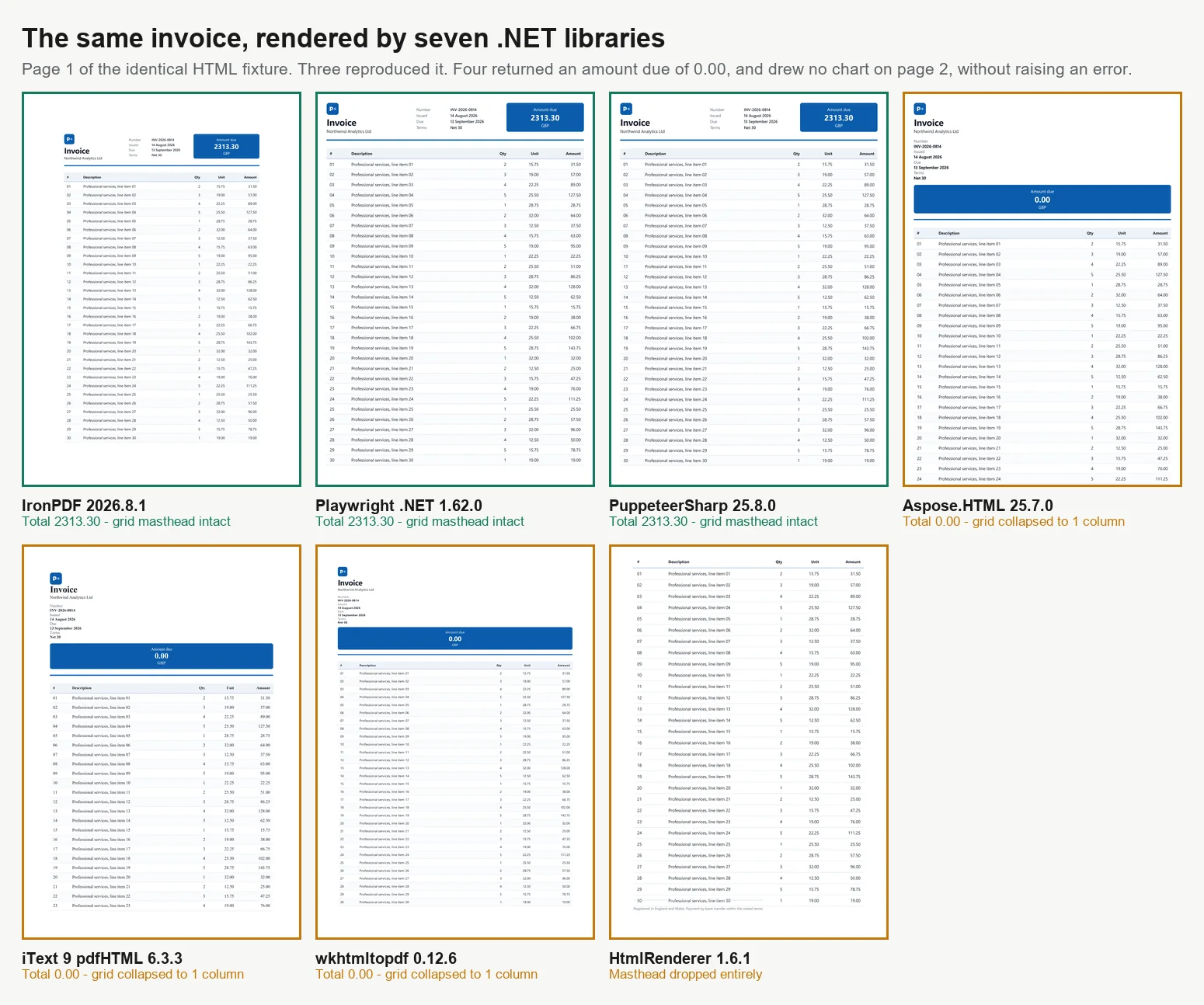
Existem 7 maneiras principais de converter HTML para PDF em C#, e nem todos os métodos produzem resultados idênticos. Ao avaliar 7 motores com uma fatura de 2 páginas, apenas 3 a renderizaram corretamente. Dos outros 4, 3 imprimiram um valor devido de 0.00 onde o total calculado deveria estar e o quarto eliminou o bloco de totais por completo, nenhum deles levantando um erro ou aviso. Esses motores variam em seu suporte para CSS moderno, execução de JavaScript, desempenho sob carga e tamanho do contêiner. Essas diferenças se tornam aparentes apenas após revisar o resultado, em vez de assumir que uma renderização bem-sucedida significa conteúdo correto. Este guia oferece código funcional para todas as 7 abordagens e dados de benchmark para cada uma, todos medidos em uma única máquina.
As bibliotecas se dividem em 2 categorias principais, o que explica em grande parte os resultados abaixo. Renderizadores de nível de navegador usam um motor Chromium completo. IronPDF (2026.8.1) inclui Chromium dentro do pacote, enquanto PuppeteerSharp (25.8.0) e Playwright .NET (1.62.0) controlam um navegador externo via o protocolo DevTools. Esses 3 replicam a saída do Chrome, incluindo CSS Grid, fontes web e gráficos baseados em canvas, mas requerem mais memória e contêineres maiores. Bibliotecas de motor de layout, como iText 9 com pdfHTML (6.3.3 no iText Core 9.7.0), HtmlRenderer com PdfSharp (1.6.1) e Aspose.HTML (25.7.0), usam seus próprios motores de layout, são muito menores e frequentemente mais rápidas, mas não suportam JavaScript moderno. wkhtmltopdf (0.12.6) é um caso intermediário, usando um motor WebKit Qt (4.8.5) mais antigo que suporta ES5, mas não ES6. Todos os benchmarks neste guia são baseados no processamento da mesma fatura de 2 páginas em 4 níveis de concorrência, com cada PDF revisado para precisão.
A Versão Curta: Onde IronPDF Lidera
Medido em 3 de setembro de 2026, 5 passagens, 8.960 renderizações cronometradas, em um desktop Windows 11 de 24 núcleos ocioso executando .NET 10. Método completo e dados brutos estão abaixo, e o arnês é baixável.
4 dos 7 retornaram um documento que estava errado e não levantaram erro
Taxa de transferência em uma renderização correta
IronPDF
44,02 renderizações/s a 8 concorrentes
2,1x Playwright, 2,8x PuppeteerSharp na mesma máquina
Trabalho por megabyte
IronPDF
27,0 MB por renderização sustentada/s
54,3 MB para Playwright, 82,9 MB para PuppeteerSharp
Início a frio em uma renderização correta
IronPDF
486 ms para o primeiro PDF
639 ms PuppeteerSharp, 720 ms Playwright, 1.096 ms Aspose.HTML
O que você opera
IronPDF
Chromium é enviado dentro do pacote NuGet
Os motores de navegador adicionam uma imagem, um download em tempo de compilação, um pool de processos e uma cadência de patches
O que você integra a seguir
IronPDF
Mesclar, formulários, assinaturas, PDF/A, criptografia no mesmo pacote
Os motores de navegador renderizam e param, então o próximo passo é uma segunda dependência
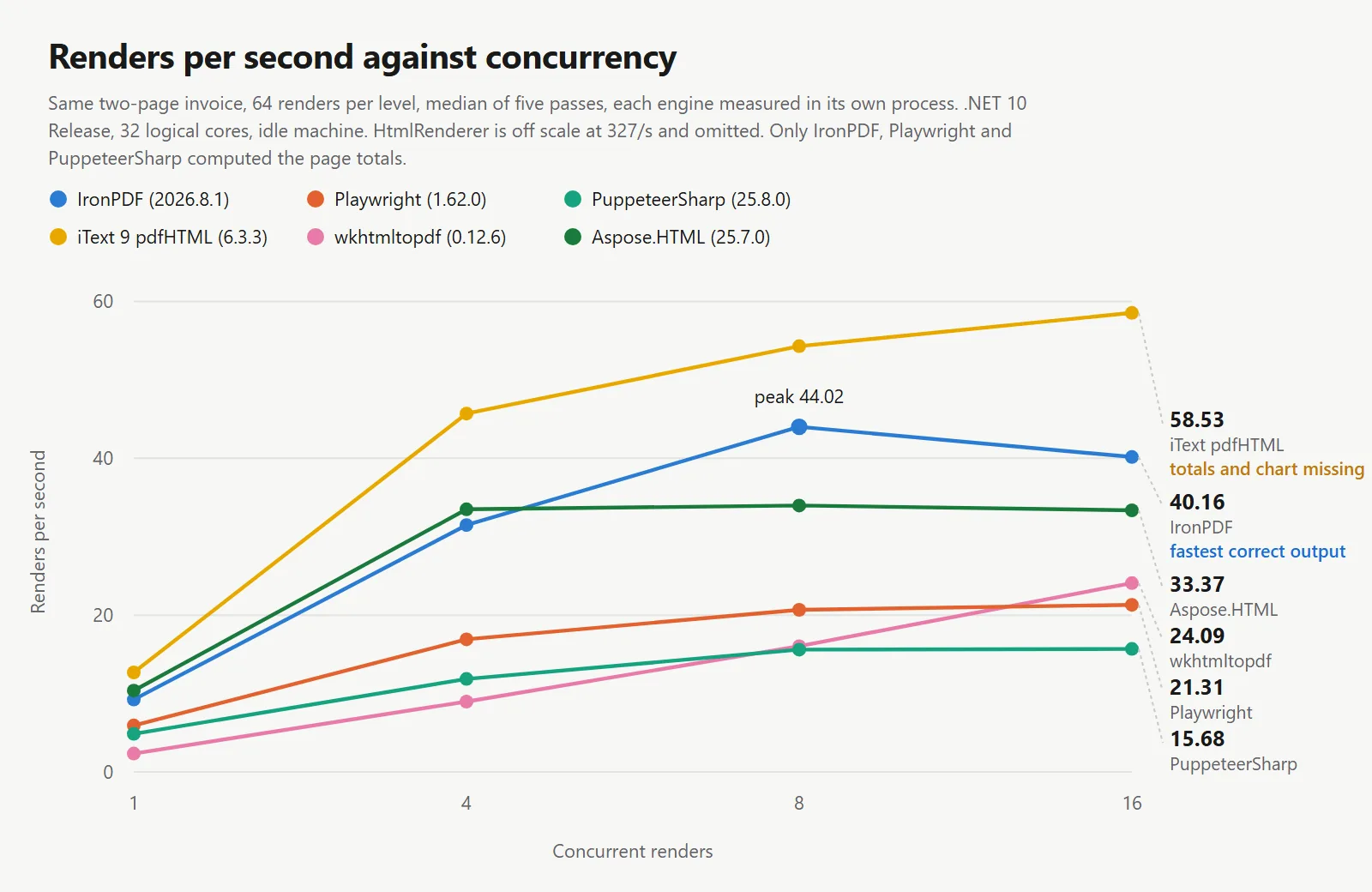
Os números de velocidade acima na tabela pertencem a motores que erraram o documento. iText 9 registrou 54,30 renderizações por segundo e HtmlRenderer 327,09, e ambos fizeram isso sem nunca executar o JavaScript da página. Um número de taxa de transferência significa pouco sem o documento que produziu, então cada tabela aqui traz uma coluna de precisão.
IronPDF lidera em rendimento por renderização correta: Entre os motores que reproduziram o documento, o IronPDF sustentou 44,02 renderizações por segundo contra 20,68 e 15,60, na mesma máquina, no mesmo documento e na mesma condição de espera, enquanto retornava o maior trabalho por megabyte dos 3 e alcançava o primeiro PDF mais rapidamente.
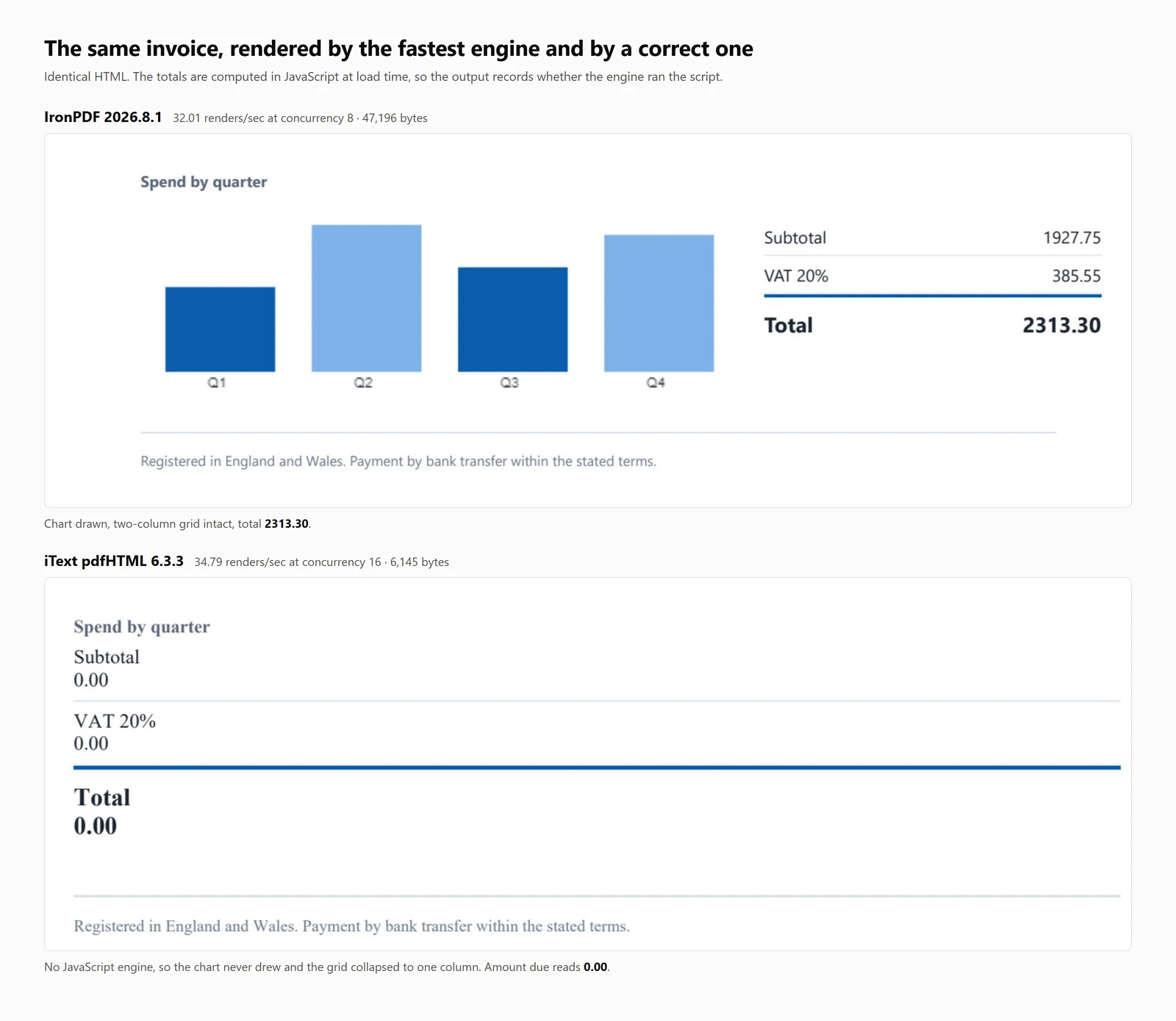
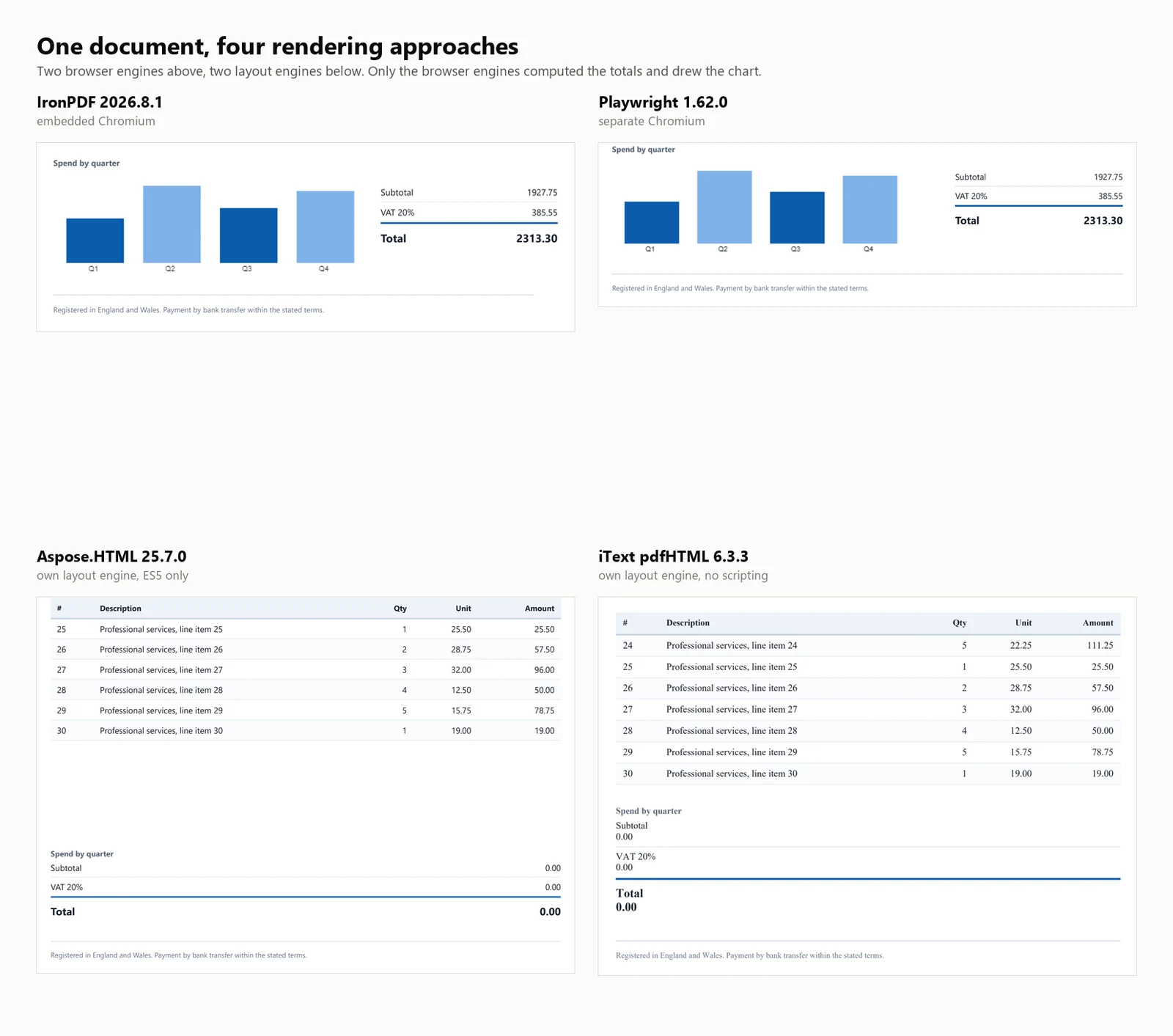
A descoberta que importa mais do que qualquer uma das acima: 4 das 7 bibliotecas produziram um PDF que parecia finalizado e estava errado. Em 3 delas, o total da fatura lia-se 0.00 em vez de 2313.30. A quarta, HtmlRenderer, silenciosamente omitiu o valor devido, os totais e o gráfico. Nenhuma exceção foi levantada em qualquer caso, e nada na saída indicava isso.
HTML para PDF Início Rápido em C#
Este guia apresenta 7 métodos para converter HTML em PDF no .NET, fornecendo exemplos de código e benchmarks quantitativos para cada um.
Para quem é isso: Desenvolvedores .NET avaliando bibliotecas de HTML para PDF, e aqueles que precisam justificar sua seleção com dados objetivos.
O que você obterá: Exemplos funcionais para cada abordagem, cobrindo tanto strings HTML quanto URLs ao vivo, juntamente com medições para início a frio, rendimento, uso de memória e precisão de renderização em um documento de teste consistente.
Onde ele roda: .NET 6 e posterior, .NET Framework 4.6.2 e posterior, e .NET Standard 2.0. Os benchmarks foram conduzidos no .NET 10, Windows 11, com 32 núcleos lógicos em modo Release.
Quando usar esta abordagem: Quando seu documento já está em formato HTML. Renderizar marcação controlada é mais eficiente e confiável do que construir PDFs através de comandos de desenho individuais para conteúdo semelhante a documentos.
Por que isso importa tecnicamente: Os motores se dividem em 2 categorias. Renderizadores de nível de navegador usam Chromium, resultando em maiores requisitos de memória e contêiner. Bibliotecas de mecanismo de layout são menores e mais rápidas, mas não executam JavaScript. Os benchmarks abaixo quantificam essas compensações.
Para usá-lo, instale o pacote, forneça uma string HTML ao renderizador e salve o PDF resultante.
1Instale o IronPDF com NuGet Package Manager
PM > Install-Package IronPdf
Install-Package IronPdf
2Copie e execute este trecho de código.
using IronPdf;License.LicenseKey = "YOUR-TRIAL-KEY";var pdf = new ChromePdfRenderer().RenderHtmlAsPdf("<h1>Invoice INV-2026-0814</h1>");pdf.SaveAs("invoice.pdf");
using IronPdf;

License.LicenseKey = "YOUR-TRIAL-KEY";
var pdf = new ChromePdfRenderer().RenderHtmlAsPdf("<h1>Invoice INV-2026-0814</h1>");
pdf.SaveAs("invoice.pdf");
Imports IronPdfLicense.LicenseKey = "YOUR-TRIAL-KEY"Dim pdf = New ChromePdfRenderer().RenderHtmlAsPdf("<h1>Invoice INV-2026-0814</h1>")pdf.SaveAs("invoice.pdf")
ImportsIronPdfLicense.LicenseKey = "YOUR-TRIAL-KEY"Dim pdf = New ChromePdfRenderer().RenderHtmlAsPdf("<h1>Invoice INV-2026-0814</h1>")pdf.SaveAs("invoice.pdf")
Imports IronPdf

License.LicenseKey = "YOUR-TRIAL-KEY"
Dim pdf = New ChromePdfRenderer().RenderHtmlAsPdf("<h1>Invoice INV-2026-0814</h1>")
pdf.SaveAs("invoice.pdf")
3Implante para testar em seu ambiente de produção.
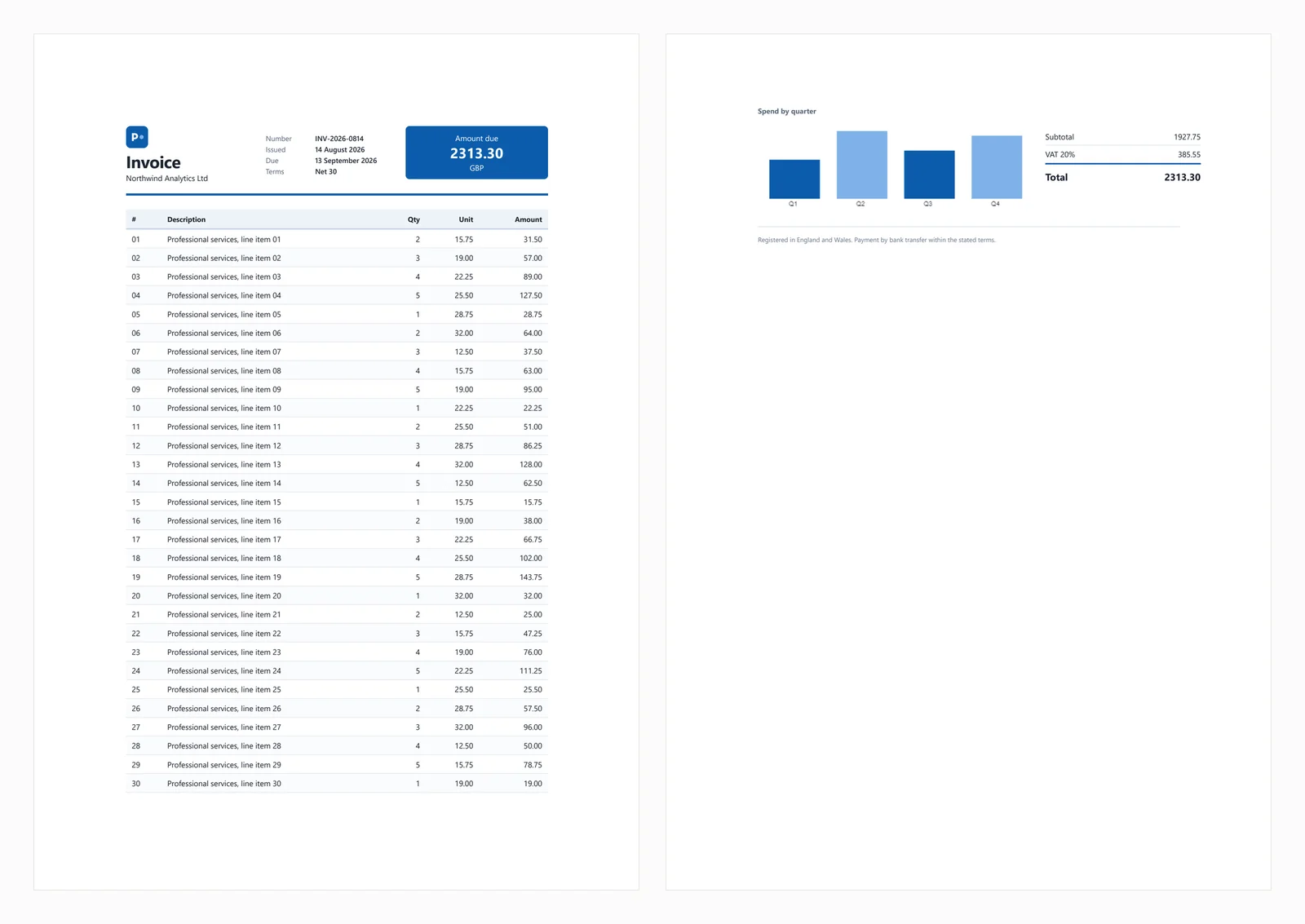
O início rápido acima produz a seguinte saída a partir da fatura de teste usada ao longo deste guia.
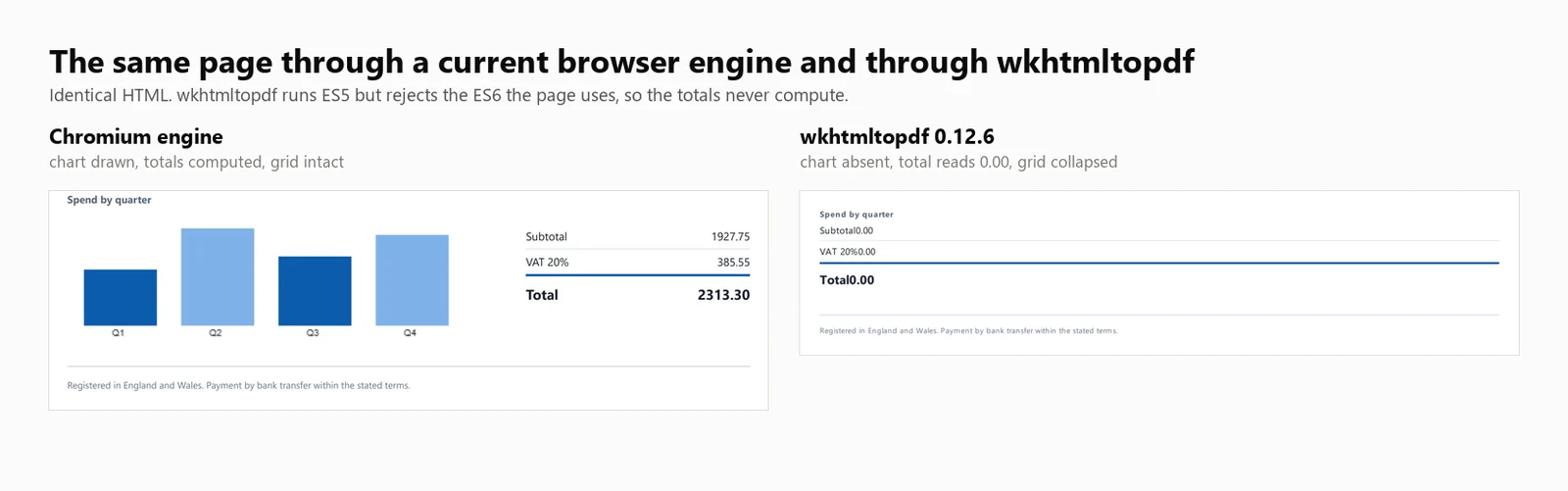
O documento de teste inclui um cabeçalho de CSS Grid, uma tabela de 30 linhas com listras zebradas, um SVG embutido, um gráfico de barras renderizado em um elemento canvas, e totais calculados em JavaScript no momento do carregamento. Os totais calculados são importantes para o teste, pois motores sem suporte a JavaScript geram faturas que parecem completas, mas exibem um valor devido de 0.00. Esse comportamento aparece em 3 das bibliotecas abaixo, e uma quarta elimina completamente o bloco de totais.
Cenários comuns de falha são abordados nas seções abaixo.
1. IronPDF: Chromium Embutido, Nenhum Navegador para Instalar
IronPDF é um renderizador Chromium que opera dentro do seu aplicativo via NuGet, eliminando a necessidade de um navegador instalado separadamente. Essa distinção afeta principalmente a implantação, que é discutida mais adiante no guia.
Instalar:
> dotnet add package IronPdf
dotnet add package IronPdf
A partir de uma string HTML:
// IronPDF 2026.8.1using IronPdf;License.LicenseKey = "YOUR-TRIAL-KEY"; // trial keys are freestring html = @"<h1>Invoice INV-2026-0814</h1> <p>Northwind Analytics Ltd — Net 30</p> <table><tr><th>Item</th><th>Amount</th></tr> <tr><td>Professional services</td><td>2313.30</td></tr></table>";var renderer = new ChromePdfRenderer();renderer.RenderingOptions.PaperSize = IronPdf.Rendering.PdfPaperSize.A4;renderer.RenderingOptions.PrintHtmlBackgrounds = true;using PdfDocument pdf = renderer.RenderHtmlAsPdf(html);pdf.SaveAs("invoice.pdf");
// IronPDF 2026.8.1using IronPdf;License.LicenseKey = "YOUR-TRIAL-KEY"; // trial keys are freestring html = @"<h1>Invoice INV-2026-0814</h1> <p>Northwind Analytics Ltd — Net 30</p> <table><tr><th>Item</th><th>Amount</th></tr> <tr><td>Professional services</td><td>2313.30</td></tr></table>";var renderer = new ChromePdfRenderer();renderer.RenderingOptions.PaperSize = IronPdf.Rendering.PdfPaperSize.A4;renderer.RenderingOptions.PrintHtmlBackgrounds = true;using PdfDocument pdf = renderer.RenderHtmlAsPdf(html);pdf.SaveAs("invoice.pdf");
// IronPDF 2026.8.1
using IronPdf;
License.LicenseKey = "YOUR-TRIAL-KEY"; // trial keys are free
string html = @"<h1>Invoice INV-2026-0814</h1>
<p>Northwind Analytics Ltd — Net 30</p>
<table><tr><th>Item</th><th>Amount</th></tr>
<tr><td>Professional services</td><td>2313.30</td></tr></table>";
var renderer = new ChromePdfRenderer();
renderer.RenderingOptions.PaperSize = IronPdf.Rendering.PdfPaperSize.A4;
renderer.RenderingOptions.PrintHtmlBackgrounds = true;
using PdfDocument pdf = renderer.RenderHtmlAsPdf(html);
pdf.SaveAs("invoice.pdf");
' IronPDF 2026.8.1Imports IronPdfLicense.LicenseKey = "YOUR-TRIAL-KEY" ' trial keys are freeDim html As String = "<h1>Invoice INV-2026-0814</h1> <p>Northwind Analytics Ltd — Net 30</p> <table><tr><th>Item</th><th>Amount</th></tr> <tr><td>Professional services</td><td>2313.30</td></tr></table>"Dim renderer As New ChromePdfRenderer()renderer.RenderingOptions.PaperSize = IronPdf.Rendering.PdfPaperSize.A4renderer.RenderingOptions.PrintHtmlBackgrounds = TrueUsing pdf As PdfDocument = renderer.RenderHtmlAsPdf(html) pdf.SaveAs("invoice.pdf")End Using
' IronPDF 2026.8.1ImportsIronPdfLicense.LicenseKey = "YOUR-TRIAL-KEY" ' trial keys are freeDim html AsString = "<h1>Invoice INV-2026-0814</h1> <p>Northwind Analytics Ltd — Net 30</p> <table><tr><th>Item</th><th>Amount</th></tr> <tr><td>Professional services</td><td>2313.30</td></tr></table>"Dim renderer As New ChromePdfRenderer()renderer.RenderingOptions.PaperSize = IronPdf.Rendering.PdfPaperSize.A4renderer.RenderingOptions.PrintHtmlBackgrounds = TrueUsing pdf AsPdfDocument = renderer.RenderHtmlAsPdf(html) pdf.SaveAs("invoice.pdf")EndUsing
' IronPDF 2026.8.1
Imports IronPdf
License.LicenseKey = "YOUR-TRIAL-KEY" ' trial keys are free
Dim html As String = "<h1>Invoice INV-2026-0814</h1>
<p>Northwind Analytics Ltd — Net 30</p>
<table><tr><th>Item</th><th>Amount</th></tr>
<tr><td>Professional services</td><td>2313.30</td></tr></table>"
Dim renderer As New ChromePdfRenderer()
renderer.RenderingOptions.PaperSize = IronPdf.Rendering.PdfPaperSize.A4
renderer.RenderingOptions.PrintHtmlBackgrounds = True
Using pdf As PdfDocument = renderer.RenderHtmlAsPdf(html)
pdf.SaveAs("invoice.pdf")
End Using
A partir de uma URL ao vivo:
// IronPDF 2026.8.1 - only the render call changes.using IronPdf;License.LicenseKey = "YOUR-TRIAL-KEY";var renderer = new ChromePdfRenderer();using PdfDocument pdf = renderer.RenderUrlAsPdf("https://ironpdf.com/");pdf.SaveAs("page.pdf");
// IronPDF 2026.8.1 - only the render call changes.using IronPdf;License.LicenseKey = "YOUR-TRIAL-KEY";var renderer = new ChromePdfRenderer();using PdfDocument pdf = renderer.RenderUrlAsPdf("https://ironpdf.com/");pdf.SaveAs("page.pdf");
// IronPDF 2026.8.1 - only the render call changes.
using IronPdf;

License.LicenseKey = "YOUR-TRIAL-KEY";

var renderer = new ChromePdfRenderer();

using PdfDocument pdf = renderer.RenderUrlAsPdf("https://ironpdf.com/");
pdf.SaveAs("page.pdf");
Imports IronPdfLicense.LicenseKey = "YOUR-TRIAL-KEY"Dim renderer = New ChromePdfRenderer()Using pdf As PdfDocument = renderer.RenderUrlAsPdf("https://ironpdf.com/") pdf.SaveAs("page.pdf")End Using
ImportsIronPdfLicense.LicenseKey = "YOUR-TRIAL-KEY"Dim renderer = New ChromePdfRenderer()Using pdf AsPdfDocument = renderer.RenderUrlAsPdf("https://ironpdf.com/") pdf.SaveAs("page.pdf")EndUsing
Imports IronPdf

License.LicenseKey = "YOUR-TRIAL-KEY"

Dim renderer = New ChromePdfRenderer()

Using pdf As PdfDocument = renderer.RenderUrlAsPdf("https://ironpdf.com/")
    pdf.SaveAs("page.pdf")
End Using
Uso recomendado: Escolha IronPDF quando precisar de renderização de PDF precisa de navegador sem gerenciar a infraestrutura de um navegador sem cabeça, como ciclo de vida do processo, recuperação de falhas ou configuração de contêiner.
Compromisso: Ele envia o Chromium dentro do pacote, então a memória máxima atinge 342 MB para uma única renderização fria e 1.187 MB para 8 renderizações simultâneas. Também começa em $999, onde 4 dos outros 6 são gratuitos. Para um projeto paralelo ou uma ferramenta interna de baixo volume, esse custo é difícil de justificar.
Desempenho: 486 ms de início a frio, 161 ms de latência mediana em 8 renderizações simultâneas, 44,02 renderizações sustentadas por segundo e 1.187 MB de uso máximo de memória em toda a árvore de processos. A fatura de teste foi renderizada com precisão, incluindo o gráfico e os totais.
2. PuppeteerSharp: Chrome Sem Cabeça para Renderização de PDF
PuppeteerSharp é a porta .NET do Puppeteer. Ele baixa uma versão do Chromium, controla-a via protocolo DevTools e gera PDFs. É gratuito, licenciado pelo MIT, mantido ativamente e medido aqui no PuppeteerSharp (25.8.0).
Instalar:
> dotnet add package PuppeteerSharp
dotnet add package PuppeteerSharp
A partir de uma string HTML:
// PuppeteerSharp 25.8.0using PuppeteerSharp;using PuppeteerSharp.Media;string html = @"<h1>Invoice INV-2026-0814</h1> <p>Northwind Analytics Ltd — Net 30</p> <table><tr><th>Item</th><th>Amount</th></tr> <tr><td>Professional services</td><td>2313.30</td></tr></table>";// First run downloads roughly 150 MB of Chromium. Pre-fetch this at build time.await new BrowserFetcher().DownloadAsync();await using IBrowser browser = await Puppeteer.LaunchAsync(new LaunchOptions { Headless = true });await using IPage page = await browser.NewPageAsync();await page.SetContentAsync(html, new SetContentOptions{ WaitUntil = new[] { WaitUntilNavigation.Load }});await page.PdfAsync("invoice.pdf", new PdfOptions{ Format = PaperFormat.A4, PrintBackground = true});
// PuppeteerSharp 25.8.0using PuppeteerSharp;using PuppeteerSharp.Media;string html = @"<h1>Invoice INV-2026-0814</h1> <p>Northwind Analytics Ltd — Net 30</p> <table><tr><th>Item</th><th>Amount</th></tr> <tr><td>Professional services</td><td>2313.30</td></tr></table>";// First run downloads roughly 150 MB of Chromium. Pre-fetch this at build time.await new BrowserFetcher().DownloadAsync();await using IBrowser browser = awaitPuppeteer.LaunchAsync(new LaunchOptions { Headless = true });await using IPage page = await browser.NewPageAsync();await page.SetContentAsync(html, new SetContentOptions{WaitUntil = new[] { WaitUntilNavigation.Load }});await page.PdfAsync("invoice.pdf", new PdfOptions{Format = PaperFormat.A4,PrintBackground = true});
// PuppeteerSharp 25.8.0
using PuppeteerSharp;
using PuppeteerSharp.Media;
string html = @"<h1>Invoice INV-2026-0814</h1>
<p>Northwind Analytics Ltd — Net 30</p>
<table><tr><th>Item</th><th>Amount</th></tr>
<tr><td>Professional services</td><td>2313.30</td></tr></table>";
// First run downloads roughly 150 MB of Chromium. Pre-fetch this at build time.
await new BrowserFetcher().DownloadAsync();
await using IBrowser browser = await Puppeteer.LaunchAsync(new LaunchOptions { Headless = true });
await using IPage page = await browser.NewPageAsync();
await page.SetContentAsync(html, new SetContentOptions
{
WaitUntil = new[] { WaitUntilNavigation.Load }
});
await page.PdfAsync("invoice.pdf", new PdfOptions
{
Format = PaperFormat.A4,
PrintBackground = true
});
' PuppeteerSharp 25.8.0Imports PuppeteerSharpImports PuppeteerSharp.MediaDim html As String = "<h1>Invoice INV-2026-0814</h1> <p>Northwind Analytics Ltd — Net 30</p> <table><tr><th>Item</th><th>Amount</th></tr> <tr><td>Professional services</td><td>2313.30</td></tr></table>"' First run downloads roughly 150 MB of Chromium. Pre-fetch this at build time.Await (New BrowserFetcher()).DownloadAsync()Await Using browser As IBrowser = Await Puppeteer.LaunchAsync(New LaunchOptions With {.Headless = True}) Await Using page As IPage = Await browser.NewPageAsync() Await page.SetContentAsync(html, New SetContentOptions With {.WaitUntil = {WaitUntilNavigation.Load}}) Await page.PdfAsync("invoice.pdf", New PdfOptions With { .Format = PaperFormat.A4, .PrintBackground = True }) End UsingEnd Using
' PuppeteerSharp 25.8.0ImportsPuppeteerSharpImportsPuppeteerSharp.MediaDim html AsString = "<h1>Invoice INV-2026-0814</h1> <p>Northwind Analytics Ltd — Net 30</p> <table><tr><th>Item</th><th>Amount</th></tr> <tr><td>Professional services</td><td>2313.30</td></tr></table>"' First run downloads roughly 150 MB of Chromium. Pre-fetch this at build time.Await (New BrowserFetcher()).DownloadAsync()AwaitUsing browser AsIBrowser = AwaitPuppeteer.LaunchAsync(New LaunchOptionsWith {.Headless = True})AwaitUsing page AsIPage = Await browser.NewPageAsync()Await page.SetContentAsync(html, New SetContentOptionsWith {.WaitUntil = {WaitUntilNavigation.Load}})Await page.PdfAsync("invoice.pdf", New PdfOptionsWith { .Format = PaperFormat.A4, .PrintBackground = True })EndUsingEndUsing
' PuppeteerSharp 25.8.0
Imports PuppeteerSharp
Imports PuppeteerSharp.Media
Dim html As String = "<h1>Invoice INV-2026-0814</h1>
<p>Northwind Analytics Ltd — Net 30</p>
<table><tr><th>Item</th><th>Amount</th></tr>
<tr><td>Professional services</td><td>2313.30</td></tr></table>"
' First run downloads roughly 150 MB of Chromium. Pre-fetch this at build time.
Await (New BrowserFetcher()).DownloadAsync()
Await Using browser As IBrowser = Await Puppeteer.LaunchAsync(New LaunchOptions With {.Headless = True})
Await Using page As IPage = Await browser.NewPageAsync()
Await page.SetContentAsync(html, New SetContentOptions With {.WaitUntil = {WaitUntilNavigation.Load}})
Await page.PdfAsync("invoice.pdf", New PdfOptions With {
.Format = PaperFormat.A4,
.PrintBackground = True
})
End Using
End Using
A partir de uma URL ao vivo:
// PuppeteerSharp 25.8.0 - GoToAsync replaces SetContentAsync.await using IPage page = await browser.NewPageAsync();await page.GoToAsync("https://ironpdf.com/", new NavigationOptions{ WaitUntil = new[] { WaitUntilNavigation.Networkidle0 }});await page.PdfAsync("page.pdf", new PdfOptions { Format = PaperFormat.A4, PrintBackground = true });
// PuppeteerSharp 25.8.0 - GoToAsync replaces SetContentAsync.await using IPage page = await browser.NewPageAsync();await page.GoToAsync("https://ironpdf.com/", new NavigationOptions{WaitUntil = new[] { WaitUntilNavigation.Networkidle0 }});await page.PdfAsync("page.pdf", new PdfOptions { Format = PaperFormat.A4, PrintBackground = true });
// PuppeteerSharp 25.8.0 - GoToAsync replaces SetContentAsync.
await using IPage page = await browser.NewPageAsync();

await page.GoToAsync("https://ironpdf.com/", new NavigationOptions
{
    WaitUntil = new[] { WaitUntilNavigation.Networkidle0 }
});

await page.PdfAsync("page.pdf", new PdfOptions { Format = PaperFormat.A4, PrintBackground = true });
' PuppeteerSharp 25.8.0 - GoToAsync replaces SetContentAsync.Await Using page As IPage = Await browser.NewPageAsync()Await page.GoToAsync("https://ironpdf.com/", New NavigationOptions With { .WaitUntil = {WaitUntilNavigation.Networkidle0}})Await page.PdfAsync("page.pdf", New PdfOptions With {.Format = PaperFormat.A4, .PrintBackground = True})
' PuppeteerSharp 25.8.0 - GoToAsync replaces SetContentAsync.
Await Using page As IPage = Await browser.NewPageAsync()

Await page.GoToAsync("https://ironpdf.com/", New NavigationOptions With {
    .WaitUntil = {WaitUntilNavigation.Networkidle0}
})

Await page.PdfAsync("page.pdf", New PdfOptions With {.Format = PaperFormat.A4, .PrintBackground = True})
Uso recomendado: Selecione PuppeteerSharp quando restrições orçamentárias forem uma prioridade e você estiver confortável em gerenciar processos de navegador. Ele entrega saída idêntica ao Chrome, pois usa o mesmo mecanismo.
Compromisso: Você é responsável pelo gerenciamento do processo do navegador, incluindo ciclo de vida, tratamento de processos órfãos após falhas e configuração do sandbox. A execução inicial baixa aproximadamente 150 MB de Chromium, o que pode falhar em contêineres sem acesso à rede externa, então pré-busque o navegador no momento da construção. Sob carga, o PuppeteerSharp gera o maior número de processos entre as opções medidas, atingindo 40 em 16 renderizações simultâneas.
Desempenho: 639 ms de início a frio, 507 ms de latência mediana em 8 renderizações simultâneas, 15,60 renderizações sustentadas por segundo e 1.293 MB de uso máximo de memória em toda a árvore de processos. A fatura de teste foi renderizada corretamente.
3. Playwright para .NET: Renderização de PDF em Nível de Navegador
Playwright para .NET é a biblioteca de automação de navegador da Microsoft. Ele usa uma abordagem semelhante ao Puppeteer, mas oferece uma API diferente, isolamento de página mais eficiente e considerações de implantação semelhantes.
Instalar:
> dotnet add package Microsoft.Playwright
dotnet add package Microsoft.Playwright
Um segundo comando instala os binários do navegador.
> playwright install chromium
playwright install chromium
Omiti-lo é a causa mais comum de uma falha na primeira construção do Playwright em CI.
A partir de uma string HTML:
// Microsoft.Playwright 1.62.0using Microsoft.Playwright;string html = @"<h1>Invoice INV-2026-0814</h1> <p>Northwind Analytics Ltd — Net 30</p> <table><tr><th>Item</th><th>Amount</th></tr> <tr><td>Professional services</td><td>2313.30</td></tr></table>";// Run "playwright install chromium" first, or call the installer in code.Microsoft.Playwright.Program.Main(new[] { "install", "chromium" });using IPlaywright playwright = await Playwright.CreateAsync();await using IBrowser browser = await playwright.Chromium.LaunchAsync();IPage page = await browser.NewPageAsync();await page.SetContentAsync(html, new PageSetContentOptions { WaitUntil = WaitUntilState.Load });await page.PdfAsync(new PagePdfOptions{ Path = "invoice.pdf", Format = "A4", PrintBackground = true});
// Microsoft.Playwright 1.62.0using Microsoft.Playwright;string html = @"<h1>Invoice INV-2026-0814</h1> <p>Northwind Analytics Ltd — Net 30</p> <table><tr><th>Item</th><th>Amount</th></tr> <tr><td>Professional services</td><td>2313.30</td></tr></table>";// Run "playwright install chromium" first, or call the installer in code.Microsoft.Playwright.Program.Main(new[] { "install", "chromium" });using IPlaywright playwright = await Playwright.CreateAsync();await using IBrowser browser = await playwright.Chromium.LaunchAsync();IPage page = await browser.NewPageAsync();await page.SetContentAsync(html, new PageSetContentOptions { WaitUntil = WaitUntilState.Load });await page.PdfAsync(new PagePdfOptions{Path = "invoice.pdf",Format = "A4",PrintBackground = true});
// Microsoft.Playwright 1.62.0
using Microsoft.Playwright;
string html = @"<h1>Invoice INV-2026-0814</h1>
<p>Northwind Analytics Ltd — Net 30</p>
<table><tr><th>Item</th><th>Amount</th></tr>
<tr><td>Professional services</td><td>2313.30</td></tr></table>";
// Run "playwright install chromium" first, or call the installer in code.
Microsoft.Playwright.Program.Main(new[] { "install", "chromium" });
using IPlaywright playwright = await Playwright.CreateAsync();
await using IBrowser browser = await playwright.Chromium.LaunchAsync();
IPage page = await browser.NewPageAsync();
await page.SetContentAsync(html, new PageSetContentOptions { WaitUntil = WaitUntilState.Load });
await page.PdfAsync(new PagePdfOptions
{
Path = "invoice.pdf",
Format = "A4",
PrintBackground = true
});
' Microsoft.Playwright 1.62.0Imports Microsoft.PlaywrightDim html As String = "<h1>Invoice INV-2026-0814</h1> <p>Northwind Analytics Ltd — Net 30</p> <table><tr><th>Item</th><th>Amount</th></tr> <tr><td>Professional services</td><td>2313.30</td></tr></table>"' Run "playwright install chromium" first, or call the installer in code.Microsoft.Playwright.Program.Main(New String() {"install", "chromium"})Using playwright As IPlaywright = Await Playwright.CreateAsync() Await Using browser As IBrowser = Await playwright.Chromium.LaunchAsync() Dim page As IPage = Await browser.NewPageAsync() Await page.SetContentAsync(html, New PageSetContentOptions With {.WaitUntil = WaitUntilState.Load}) Await page.PdfAsync(New PagePdfOptions With { .Path = "invoice.pdf", .Format = "A4", .PrintBackground = True }) End UsingEnd Using
' Microsoft.Playwright 1.62.0ImportsMicrosoft.PlaywrightDim html AsString = "<h1>Invoice INV-2026-0814</h1> <p>Northwind Analytics Ltd — Net 30</p> <table><tr><th>Item</th><th>Amount</th></tr> <tr><td>Professional services</td><td>2313.30</td></tr></table>"' Run "playwright install chromium" first, or call the installer in code.Microsoft.Playwright.Program.Main(New String() {"install", "chromium"})Using playwright AsIPlaywright = AwaitPlaywright.CreateAsync()AwaitUsing browser AsIBrowser = Await playwright.Chromium.LaunchAsync() Dim page AsIPage = Await browser.NewPageAsync()Await page.SetContentAsync(html, New PageSetContentOptionsWith {.WaitUntil = WaitUntilState.Load})Await page.PdfAsync(New PagePdfOptionsWith { .Path = "invoice.pdf", .Format = "A4", .PrintBackground = True })EndUsingEndUsing
' Microsoft.Playwright 1.62.0
Imports Microsoft.Playwright
Dim html As String = "<h1>Invoice INV-2026-0814</h1>
<p>Northwind Analytics Ltd — Net 30</p>
<table><tr><th>Item</th><th>Amount</th></tr>
<tr><td>Professional services</td><td>2313.30</td></tr></table>"
' Run "playwright install chromium" first, or call the installer in code.
Microsoft.Playwright.Program.Main(New String() {"install", "chromium"})
Using playwright As IPlaywright = Await Playwright.CreateAsync()
Await Using browser As IBrowser = Await playwright.Chromium.LaunchAsync()
Dim page As IPage = Await browser.NewPageAsync()
Await page.SetContentAsync(html, New PageSetContentOptions With {.WaitUntil = WaitUntilState.Load})
Await page.PdfAsync(New PagePdfOptions With {
.Path = "invoice.pdf",
.Format = "A4",
.PrintBackground = True
})
End Using
End Using
' Microsoft.Playwright 1.62.0 - GotoAsync replaces SetContentAsync.
Dim page As IPage = Await browser.NewPageAsync()

Await page.GotoAsync("https://ironpdf.com/", New PageGotoOptions With {
    .WaitUntil = WaitUntilState.NetworkIdle
})

Await page.PdfAsync(New PagePdfOptions With {.Path = "page.pdf", .Format = "A4", .PrintBackground = True})
Uso recomendado: Escolha Playwright para .NET se precisar de renderização de qualidade de navegador sem custo e preferir sua API, ou se já usar Playwright para testes e quiser evitar dependências adicionais.
Compromisso: Playwright compartilha as mesmas considerações que o Puppeteer, incluindo binários do navegador na sua imagem, supervisão de processos e uma etapa de instalação no seu Dockerfile. É o motor mais estável medido aqui, mas entrega um pouco mais da metade do rendimento do motor embutido.
Desempenho: 720 ms de início a frio, 381 ms de latência mediana em 8 renderizações simultâneas, 20,68 renderizações sustentadas por segundo e 1.122 MB de uso máximo de memória em toda a árvore de processos. A fatura de teste foi renderizada corretamente.
4. iText 9 com pdfHTML: Motor de Layout, Sem JavaScript
iText 9 com pdfHTML é uma biblioteca PDF com um complemento de conversão HTML. Ele usa seu próprio motor de layout em vez de um navegador, oferecendo resultados rápidos e previsíveis dentro de seus recursos suportados, e silencioso sobre qualquer coisa fora deles. As 2 versões de pacotes são separadas. pdfHTML (6.3.3) é o complemento que roda no iText Core (9.7.0), e essa é a combinação medida aqui.
Instalação:
> dotnet add package itext.pdfhtml
dotnet add package itext.pdfhtml
Nota: O pacote itext7.* está obsoleto e foi renomeado para itext.*, um detalhe que os tutoriais mais bem classificados ainda erram. Instale itext.pdfhtml, não itext7.pdfhtml. O nome do pacote não carrega número de versão, então itext.pdfhtml resolve para a versão atual do pdfHTML no iText 9.
A partir de uma string HTML:
// itext.pdfhtml 6.3.3 - AGPL or commercial licence.// Note the package rename: itext7.pdfhtml is deprecated in favour of itext.pdfhtml.using iText.Html2pdf;string html = @"<h1>Invoice INV-2026-0814</h1> <p>Northwind Analytics Ltd — Net 30</p> <table><tr><th>Item</th><th>Amount</th></tr> <tr><td>Professional services</td><td>2313.30</td></tr></table>";using var output = new FileStream("invoice.pdf", FileMode.Create);HtmlConverter.ConvertToPdf(html, output);// No JavaScript engine and no canvas, so anything the page computes or draws// at load time will be missing from the result.
// itext.pdfhtml 6.3.3 - AGPL or commercial licence.// Note the package rename: itext7.pdfhtml is deprecated in favour of itext.pdfhtml.using iText.Html2pdf;string html = @"<h1>Invoice INV-2026-0814</h1> <p>Northwind Analytics Ltd — Net 30</p> <table><tr><th>Item</th><th>Amount</th></tr> <tr><td>Professional services</td><td>2313.30</td></tr></table>";using var output = new FileStream("invoice.pdf", FileMode.Create);HtmlConverter.ConvertToPdf(html, output);// No JavaScript engine and no canvas, so anything the page computes or draws// at load time will be missing from the result.
// itext.pdfhtml 6.3.3 - AGPL or commercial licence.
// Note the package rename: itext7.pdfhtml is deprecated in favour of itext.pdfhtml.
using iText.Html2pdf;
string html = @"<h1>Invoice INV-2026-0814</h1>
<p>Northwind Analytics Ltd — Net 30</p>
<table><tr><th>Item</th><th>Amount</th></tr>
<tr><td>Professional services</td><td>2313.30</td></tr></table>";
using var output = new FileStream("invoice.pdf", FileMode.Create);
HtmlConverter.ConvertToPdf(html, output);
// No JavaScript engine and no canvas, so anything the page computes or draws
// at load time will be missing from the result.
// itext.pdfhtml 6.3.3 - AGPL or commercial licence.// Note the package rename: itext7.pdfhtml is deprecated in favour of itext.pdfhtml.Imports iText.Html2pdfDim html As String = "<h1>Invoice INV-2026-0814</h1> <p>Northwind Analytics Ltd — Net 30</p> <table><tr><th>Item</th><th>Amount</th></tr> <tr><td>Professional services</td><td>2313.30</td></tr></table>"Using output As New FileStream("invoice.pdf", FileMode.Create) HtmlConverter.ConvertToPdf(html, output)End Using' No JavaScript engine and no canvas, so anything the page computes or draws' at load time will be missing from the result.
// itext.pdfhtml 6.3.3 - AGPL or commercial licence.// Note the package rename: itext7.pdfhtml is deprecated in favour of itext.pdfhtml.Imports iText.Html2pdfDim html AsString = "<h1>Invoice INV-2026-0814</h1> <p>Northwind Analytics Ltd — Net 30</p> <table><tr><th>Item</th><th>Amount</th></tr> <tr><td>Professional services</td><td>2313.30</td></tr></table>"Using output As New FileStream("invoice.pdf", FileMode.Create)HtmlConverter.ConvertToPdf(html, output)EndUsing' No JavaScript engine and no canvas, so anything the page computes or draws' at load time will be missing from the result.
// itext.pdfhtml 6.3.3 - AGPL or commercial licence.
// Note the package rename: itext7.pdfhtml is deprecated in favour of itext.pdfhtml.
Imports iText.Html2pdf
Dim html As String = "<h1>Invoice INV-2026-0814</h1>
<p>Northwind Analytics Ltd — Net 30</p>
<table><tr><th>Item</th><th>Amount</th></tr>
<tr><td>Professional services</td><td>2313.30</td></tr></table>"
Using output As New FileStream("invoice.pdf", FileMode.Create)
HtmlConverter.ConvertToPdf(html, output)
End Using
' No JavaScript engine and no canvas, so anything the page computes or draws
' at load time will be missing from the result.
A partir de uma URL ao vivo: iText não aceita URLs diretamente. Busque o HTML manualmente e defina o URI base para garantir que os recursos relativos sejam resolvidos corretamente.
// itext.pdfhtml 6.3.3 - there is no URL method, so fetch the HTML yourself.using iText.Html2pdf;using var client = new HttpClient();string html = await client.GetStringAsync("https://ironpdf.com/");// The base URI is what lets relative images, CSS and links resolve.var properties = new ConverterProperties();properties.SetBaseUri("https://ironpdf.com/");using var output = new FileStream("page.pdf", FileMode.Create);HtmlConverter.ConvertToPdf(html, output, properties);
// itext.pdfhtml 6.3.3 - there is no URL method, so fetch the HTML yourself.using iText.Html2pdf;using var client = new HttpClient();string html = await client.GetStringAsync("https://ironpdf.com/");// The base URI is what lets relative images, CSS and links resolve.var properties = new ConverterProperties();properties.SetBaseUri("https://ironpdf.com/");using var output = new FileStream("page.pdf", FileMode.Create);HtmlConverter.ConvertToPdf(html, output, properties);
// itext.pdfhtml 6.3.3 - there is no URL method, so fetch the HTML yourself.
using iText.Html2pdf;

using var client = new HttpClient();
string html = await client.GetStringAsync("https://ironpdf.com/");

// The base URI is what lets relative images, CSS and links resolve.
var properties = new ConverterProperties();
properties.SetBaseUri("https://ironpdf.com/");

using var output = new FileStream("page.pdf", FileMode.Create);
HtmlConverter.ConvertToPdf(html, output, properties);
' itext.pdfhtml 6.3.3 - there is no URL method, so fetch the HTML yourself.Imports iText.Html2pdfUsing client As New HttpClient() Dim html As String = Await client.GetStringAsync("https://ironpdf.com/") ' The base URI is what lets relative images, CSS and links resolve. Dim properties As New ConverterProperties() properties.SetBaseUri("https://ironpdf.com/") Using output As New FileStream("page.pdf", FileMode.Create) HtmlConverter.ConvertToPdf(html, output, properties) End UsingEnd Using
' itext.pdfhtml 6.3.3 - there is no URL method, so fetch the HTML yourself.Imports iText.Html2pdfUsing client As New HttpClient() Dim html AsString = Await client.GetStringAsync("https://ironpdf.com/") ' The base URI is what lets relative images, CSS and links resolve. Dim properties As New ConverterProperties() properties.SetBaseUri("https://ironpdf.com/")Using output As New FileStream("page.pdf", FileMode.Create)HtmlConverter.ConvertToPdf(html, output, properties)EndUsingEndUsing
' itext.pdfhtml 6.3.3 - there is no URL method, so fetch the HTML yourself.
Imports iText.Html2pdf

Using client As New HttpClient()
    Dim html As String = Await client.GetStringAsync("https://ironpdf.com/")

    ' The base URI is what lets relative images, CSS and links resolve.
    Dim properties As New ConverterProperties()
    properties.SetBaseUri("https://ironpdf.com/")

    Using output As New FileStream("page.pdf", FileMode.Create)
        HtmlConverter.ConvertToPdf(html, output, properties)
    End Using
End Using
Uso recomendado: Selecione iText se você já o utiliza para outras tarefas de PDF ou requer manipulação avançada de PDF juntamente com a conversão de HTML, e prefere evitar múltiplas bibliotecas.
Compromisso: iText está disponível apenas sob AGPL ou uma licença paga. AGPL exige a abertura de todo o código-fonte da sua aplicação, o que torna a opção paga necessária para a maioria das equipes que distribuem software fechado. Tecnicamente, iText não executa JavaScript e oferece suporte mais limitado a CSS em comparação com navegadores, como mostrado nos benchmarks de fidelidade abaixo.
Desempenho: 489 ms de início a frio, 144 ms de latência mediana em 8 renderizações concorrentes, 54,30 renderizações sustentadas por segundo, e 332 MB de uso máximo de memória em um único processo. O total da fatura foi 0.00 e o gráfico não foi renderizado.
5. HtmlRenderer com PdfSharp: Totalmente Gerenciado, Sem Binários Nativos
HtmlRenderer com PdfSharp é implementado em C# totalmente gerenciado, sem binários nativos ou dependências de navegador, e não requer instalação de contêiner adicional. É de longe a opção menor e mais rápida apresentada, mas seu suporte a CSS é limitado aos padrões de aproximadamente 2011.
Instalação:
> dotnet add package HtmlRenderer.PdfSharp
dotnet add package HtmlRenderer.PdfSharp
A partir de uma string HTML:
// HtmlRenderer.PdfSharp 1.6.1 - pure managed, no native binaries at all.using TheArtOfDev.HtmlRenderer.PdfSharp;string html = @"<h1>Invoice INV-2026-0814</h1> <p>Northwind Analytics Ltd — Net 30</p> <table><tr><th>Item</th><th>Amount</th></tr> <tr><td>Professional services</td><td>2313.30</td></tr></table>";PdfSharp.Pdf.PdfDocument pdf = PdfGenerator.GeneratePdf(html, PdfSharp.PageSize.A4);pdf.Save("invoice.pdf");// There is no URL method. Fetch the markup with HttpClient and pass the string.// CSS support stops well short of Flexbox and Grid, and there is no JavaScript.
// HtmlRenderer.PdfSharp 1.6.1 - pure managed, no native binaries at all.using TheArtOfDev.HtmlRenderer.PdfSharp;string html = @"<h1>Invoice INV-2026-0814</h1> <p>Northwind Analytics Ltd — Net 30</p> <table><tr><th>Item</th><th>Amount</th></tr> <tr><td>Professional services</td><td>2313.30</td></tr></table>";PdfSharp.Pdf.PdfDocument pdf = PdfGenerator.GeneratePdf(html, PdfSharp.PageSize.A4);pdf.Save("invoice.pdf");// There is no URL method. Fetch the markup with HttpClient and pass the string.// CSS support stops well short of Flexbox and Grid, and there is no JavaScript.
// HtmlRenderer.PdfSharp 1.6.1 - pure managed, no native binaries at all.
using TheArtOfDev.HtmlRenderer.PdfSharp;
string html = @"<h1>Invoice INV-2026-0814</h1>
<p>Northwind Analytics Ltd — Net 30</p>
<table><tr><th>Item</th><th>Amount</th></tr>
<tr><td>Professional services</td><td>2313.30</td></tr></table>";
PdfSharp.Pdf.PdfDocument pdf = PdfGenerator.GeneratePdf(html, PdfSharp.PageSize.A4);
pdf.Save("invoice.pdf");
// There is no URL method. Fetch the markup with HttpClient and pass the string.
// CSS support stops well short of Flexbox and Grid, and there is no JavaScript.
' HtmlRenderer.PdfSharp 1.6.1 - pure managed, no native binaries at all.Imports TheArtOfDev.HtmlRenderer.PdfSharpDim html As String = "<h1>Invoice INV-2026-0814</h1> <p>Northwind Analytics Ltd — Net 30</p> <table><tr><th>Item</th><th>Amount</th></tr> <tr><td>Professional services</td><td>2313.30</td></tr></table>"Dim pdf As PdfSharp.Pdf.PdfDocument = PdfGenerator.GeneratePdf(html, PdfSharp.PageSize.A4)pdf.Save("invoice.pdf")' There is no URL method. Fetch the markup with HttpClient and pass the string.' CSS support stops well short of Flexbox and Grid, and there is no JavaScript.
' HtmlRenderer.PdfSharp 1.6.1 - pure managed, no native binaries at all.ImportsTheArtOfDev.HtmlRenderer.PdfSharpDim html AsString = "<h1>Invoice INV-2026-0814</h1> <p>Northwind Analytics Ltd — Net 30</p> <table><tr><th>Item</th><th>Amount</th></tr> <tr><td>Professional services</td><td>2313.30</td></tr></table>"Dim pdf AsPdfSharp.Pdf.PdfDocument = PdfGenerator.GeneratePdf(html, PdfSharp.PageSize.A4)pdf.Save("invoice.pdf")' There is no URL method. Fetch the markup with HttpClient and pass the string.' CSS support stops well short of Flexbox and Grid, and there is no JavaScript.
' HtmlRenderer.PdfSharp 1.6.1 - pure managed, no native binaries at all.
Imports TheArtOfDev.HtmlRenderer.PdfSharp
Dim html As String = "<h1>Invoice INV-2026-0814</h1>
<p>Northwind Analytics Ltd — Net 30</p>
<table><tr><th>Item</th><th>Amount</th></tr>
<tr><td>Professional services</td><td>2313.30</td></tr></table>"
Dim pdf As PdfSharp.Pdf.PdfDocument = PdfGenerator.GeneratePdf(html, PdfSharp.PageSize.A4)
pdf.Save("invoice.pdf")
' There is no URL method. Fetch the markup with HttpClient and pass the string.
' CSS support stops well short of Flexbox and Grid, and there is no JavaScript.
A partir de uma URL ao vivo: não há método para entrada direta de URL. Recupere o HTML manualmente e passe-o como uma string.
Uso recomendado: Escolha HtmlRenderer com PdfSharp apenas onde binários nativos são estritamente proibidos, como em ambientes regulados ou isolados, e apenas para um modelo que não computa nada no momento do carregamento. É 1 das 3 opções aqui que não enviam binários nativos, juntamente com iText 9 e Aspose.HTML, e nesta fatura ele omitiu o cabeçalho, o bloco de totais e o gráfico.
Compromisso: HtmlRenderer não suporta JavaScript, Flexbox ou CSS Grid. Para modelos fixos e simples, pode ser suficiente, e sua latência mediana de 23 ms é incomparável, em um único processo. No entanto, HTML projetado para navegadores modernos não será renderizado corretamente. Nos testes, ele omitiu o cabeçalho CSS Grid, o bloco de totais e o gráfico, e comprimiu 2 páginas em 1, causando sobreposição de conteúdo.
HtmlRenderer é o motor mais rápido medido, mas não pode renderizar CSS moderno. Ambos os fatores devem ser considerados em sua decisão.
Desempenho: 157 ms de início a frio, 23 ms de latência mediana em 8 renderizações concorrentes, 327,09 renderizações sustentadas por segundo, 166 MB de uso máximo de memória, e um único processo. A saída foi uma única página faltando o cabeçalho, totais e gráfico.
6. wkhtmltopdf e DinkToPdf: Qt WebKit Arquivado
wkhtmltopdf é uma ferramenta de linha de comando baseada em um motor Qt WebKit mais antigo, comumente integrada ao .NET via DinkToPdf. Não há instalação NuGet para o próprio motor, então ele deve ser enviado como um binário com sua aplicação. DinkToPdf serve como o wrapper, embora existam alternativas.
De uma string HTML:
// wkhtmltopdf 0.12.6 via DinkToPdf. The engine is archived; the native// libwkhtmltox binaries must be shipped alongside your application.using DinkToPdf;using DinkToPdf.Contracts;string html = @"<h1>Invoice INV-2026-0814</h1> <p>Northwind Analytics Ltd — Net 30</p> <table><tr><th>Item</th><th>Amount</th></tr> <tr><td>Professional services</td><td>2313.30</td></tr></table>";IConverter converter = new SynchronizedConverter(new PdfTools());var document = new HtmlToPdfDocument{ GlobalSettings = { PaperSize = PaperKind.A4, Out = "invoice.pdf" }, Objects = { new ObjectSettings { HtmlContent = html } }};converter.Convert(document);
// wkhtmltopdf 0.12.6 via DinkToPdf. The engine is archived; the native// libwkhtmltox binaries must be shipped alongside your application.using DinkToPdf;using DinkToPdf.Contracts;string html = @"<h1>Invoice INV-2026-0814</h1> <p>Northwind Analytics Ltd — Net 30</p> <table><tr><th>Item</th><th>Amount</th></tr> <tr><td>Professional services</td><td>2313.30</td></tr></table>";IConverter converter = new SynchronizedConverter(new PdfTools());var document = new HtmlToPdfDocument{GlobalSettings = { PaperSize = PaperKind.A4, Out = "invoice.pdf" },Objects = { new ObjectSettings { HtmlContent = html } }};converter.Convert(document);
// wkhtmltopdf 0.12.6 via DinkToPdf. The engine is archived; the native
// libwkhtmltox binaries must be shipped alongside your application.
using DinkToPdf;
using DinkToPdf.Contracts;
string html = @"<h1>Invoice INV-2026-0814</h1>
<p>Northwind Analytics Ltd — Net 30</p>
<table><tr><th>Item</th><th>Amount</th></tr>
<tr><td>Professional services</td><td>2313.30</td></tr></table>";
IConverter converter = new SynchronizedConverter(new PdfTools());
var document = new HtmlToPdfDocument
{
GlobalSettings = { PaperSize = PaperKind.A4, Out = "invoice.pdf" },
Objects = { new ObjectSettings { HtmlContent = html } }
};
converter.Convert(document);
' wkhtmltopdf 0.12.6 via DinkToPdf. The engine is archived; the native' libwkhtmltox binaries must be shipped alongside your application.Imports DinkToPdfImports DinkToPdf.ContractsDim html As String = "<h1>Invoice INV-2026-0814</h1> <p>Northwind Analytics Ltd — Net 30</p> <table><tr><th>Item</th><th>Amount</th></tr> <tr><td>Professional services</td><td>2313.30</td></tr></table>"Dim converter As IConverter = New SynchronizedConverter(New PdfTools())Dim document = New HtmlToPdfDocument() With { .GlobalSettings = New GlobalSettings With {.PaperSize = PaperKind.A4, .Out = "invoice.pdf"}, .Objects = {New ObjectSettings With {.HtmlContent = html}}}converter.Convert(document)
' wkhtmltopdf 0.12.6 via DinkToPdf. The engine is archived; the native' libwkhtmltox binaries must be shipped alongside your application.ImportsDinkToPdfImportsDinkToPdf.ContractsDim html AsString = "<h1>Invoice INV-2026-0814</h1> <p>Northwind Analytics Ltd — Net 30</p> <table><tr><th>Item</th><th>Amount</th></tr> <tr><td>Professional services</td><td>2313.30</td></tr></table>"Dim converter AsIConverter = New SynchronizedConverter(New PdfTools())Dim document = New HtmlToPdfDocument() With { .GlobalSettings = New GlobalSettingsWith {.PaperSize = PaperKind.A4, .Out = "invoice.pdf"}, .Objects = {New ObjectSettingsWith {.HtmlContent = html}}}converter.Convert(document)
' wkhtmltopdf 0.12.6 via DinkToPdf. The engine is archived; the native
' libwkhtmltox binaries must be shipped alongside your application.
Imports DinkToPdf
Imports DinkToPdf.Contracts
Dim html As String = "<h1>Invoice INV-2026-0814</h1>
<p>Northwind Analytics Ltd — Net 30</p>
<table><tr><th>Item</th><th>Amount</th></tr>
<tr><td>Professional services</td><td>2313.30</td></tr></table>"
Dim converter As IConverter = New SynchronizedConverter(New PdfTools())
Dim document = New HtmlToPdfDocument() With {
.GlobalSettings = New GlobalSettings With {.PaperSize = PaperKind.A4, .Out = "invoice.pdf"},
.Objects = {New ObjectSettings With {.HtmlContent = html}}
}
converter.Convert(document)
De uma URL ao vivo:
// wkhtmltopdf 0.12.6 via DinkToPdf - swap HtmlContent for Page.var document = new HtmlToPdfDocument{ GlobalSettings = { PaperSize = PaperKind.A4, Out = "page.pdf" }, Objects = { new ObjectSettings { Page = "https://ironpdf.com/" } }};converter.Convert(document);
// wkhtmltopdf 0.12.6 via DinkToPdf - swap HtmlContent for Page.var document = new HtmlToPdfDocument{GlobalSettings = { PaperSize = PaperKind.A4, Out = "page.pdf" },Objects = { new ObjectSettings { Page = "https://ironpdf.com/" } }};converter.Convert(document);
// wkhtmltopdf 0.12.6 via DinkToPdf - swap HtmlContent for Page.
var document = new HtmlToPdfDocument
{
    GlobalSettings = { PaperSize = PaperKind.A4, Out = "page.pdf" },
    Objects = { new ObjectSettings { Page = "https://ironpdf.com/" } }
};

converter.Convert(document);
' wkhtmltopdf 0.12.6 via DinkToPdf - swap HtmlContent for Page.Dim document = New HtmlToPdfDocument With { .GlobalSettings = New GlobalSettings With {.PaperSize = PaperKind.A4, .Out = "page.pdf"}, .Objects = {New ObjectSettings With {.Page = "https://ironpdf.com/"}}}converter.Convert(document)
' wkhtmltopdf 0.12.6 via DinkToPdf - swap HtmlContent for Page.Dim document = New HtmlToPdfDocumentWith { .GlobalSettings = New GlobalSettingsWith {.PaperSize = PaperKind.A4, .Out = "page.pdf"}, .Objects = {New ObjectSettingsWith {.Page = "https://ironpdf.com/"}}}converter.Convert(document)
' wkhtmltopdf 0.12.6 via DinkToPdf - swap HtmlContent for Page.
Dim document = New HtmlToPdfDocument With {
    .GlobalSettings = New GlobalSettings With {.PaperSize = PaperKind.A4, .Out = "page.pdf"},
    .Objects = {New ObjectSettings With {.Page = "https://ironpdf.com/"}}
}

converter.Convert(document)
Status do projeto: O repositório wkhtmltopdf foi arquivado em janeiro de 2023, com o último lançamento estável (0.12.6) em junho de 2020, construído no Qt (4.8.5). Sua renderização está fixa em padrões web de aproximadamente 2013 e não recebe mais atualizações de segurança.
Uso recomendado: Continue usando wkhtmltopdf se já estiver em produção, renderizar seus documentos corretamente e seus templates forem estáticos. A migração é desnecessária sem um requisito funcional.
Compromisso: wkhtmltopdf não pode renderizar layouts que dependem de Flexbox ou recursos CSS mais novos, e não recebe patches de segurança.
Suporte a JavaScript: wkhtmltopdf executa JavaScript ES5, mas não suporta ES6. Um teste direto nesta compilação executou ES5 com sucesso e falhou em ES6, porque document.querySelectorAll(...).forEach não é suportado pelo motor Qt (4.8.5). Como resultado, a fatura de teste, que usa essa chamada, exibiu um total de espaço reservado de 0.00 sem nenhum erro visível. Templates escritos para uma base ES5 computam corretamente, e aqueles que usam JavaScript moderno não.
Desempenho: 424 ms de início a frio, 486 ms de latência mediana em 8 renderizações concorrentes, 16.03 renderizações sustentadas por segundo e 482 MB de uso máximo de memória em todo o processo. O total da fatura foi 0.00 e o gráfico não foi renderizado.
Os números acima são baseados na execução de wkhtmltopdf.exe como uma ferramenta de linha de comando, com 1 processo por renderização. O wrapper DinkToPdf usa o mesmo motor em processo, mas serializa todas as chamadas através de SynchronizedConverter, limitando a escalabilidade da concorrência.
7. Aspose.HTML para .NET: Motor de Layout Independente
Aspose.HTML para .NET tem seu próprio motor de renderização em vez de um navegador, e está dentro de um conjunto de documentos que também cobre Word, Excel e PowerPoint. Para equipes que já compram de 1 fornecedor, isso significa 1 contrato de suporte e 1 ordem de compra em vez de integrar várias bibliotecas e acompanhar renovações separadas.
Instalação:
> dotnet add package Aspose.HTML
dotnet add package Aspose.HTML
De uma string HTML:
// Aspose.HTML for .NET 25.7.0 - commercial licence, applied from a .lic file.using Aspose.Html;using Aspose.Html.Converters;using Aspose.Html.Saving;new License().SetLicense("Aspose.HTMLProductFamily.lic");string html = @"<h1>Invoice INV-2026-0814</h1> <p>Northwind Analytics Ltd — Net 30</p> <table><tr><th>Item</th><th>Amount</th></tr> <tr><td>Professional services</td><td>2313.30</td></tr></table>";// The second argument is the base URL relative assets resolve against.using var doc = new HTMLDocument(html, ".");Converter.ConvertHTML(doc, new PdfSaveOptions(), "invoice.pdf");// Its own rendering stack, not a browser: ES5 runs, ES6 throws, so anything the// page computes with modern syntax is left at its initial value.
// Aspose.HTML for .NET 25.7.0 - commercial licence, applied from a .lic file.using Aspose.Html;using Aspose.Html.Converters;using Aspose.Html.Saving;newLicense().SetLicense("Aspose.HTMLProductFamily.lic");string html = @"<h1>Invoice INV-2026-0814</h1> <p>Northwind Analytics Ltd — Net 30</p> <table><tr><th>Item</th><th>Amount</th></tr> <tr><td>Professional services</td><td>2313.30</td></tr></table>";// The second argument is the base URL relative assets resolve against.using var doc = new HTMLDocument(html, ".");Converter.ConvertHTML(doc, new PdfSaveOptions(), "invoice.pdf");// Its own rendering stack, not a browser: ES5 runs, ES6 throws, so anything the// page computes with modern syntax is left at its initial value.
// Aspose.HTML for .NET 25.7.0 - commercial licence, applied from a .lic file.
using Aspose.Html;
using Aspose.Html.Converters;
using Aspose.Html.Saving;
new License().SetLicense("Aspose.HTMLProductFamily.lic");
string html = @"<h1>Invoice INV-2026-0814</h1>
<p>Northwind Analytics Ltd — Net 30</p>
<table><tr><th>Item</th><th>Amount</th></tr>
<tr><td>Professional services</td><td>2313.30</td></tr></table>";
// The second argument is the base URL relative assets resolve against.
using var doc = new HTMLDocument(html, ".");
Converter.ConvertHTML(doc, new PdfSaveOptions(), "invoice.pdf");
// Its own rendering stack, not a browser: ES5 runs, ES6 throws, so anything the
// page computes with modern syntax is left at its initial value.
// Aspose.HTML for .NET 25.7.0 - commercial licence, applied from a .lic file.Imports Aspose.HtmlImports Aspose.Html.ConvertersImports Aspose.Html.SavingCall New License().SetLicense("Aspose.HTMLProductFamily.lic")Dim html As String = "<h1>Invoice INV-2026-0814</h1> <p>Northwind Analytics Ltd — Net 30</p> <table><tr><th>Item</th><th>Amount</th></tr> <tr><td>Professional services</td><td>2313.30</td></tr></table>"' The second argument is the base URL relative assets resolve against.Using doc = New HTMLDocument(html, ".") Converter.ConvertHTML(doc, New PdfSaveOptions(), "invoice.pdf")End Using' Its own rendering stack, not a browser: ES5 runs, ES6 throws, so anything the' page computes with modern syntax is left at its initial value.
// Aspose.HTMLfor .NET25.7.0 - commercial licence, applied from a .lic file.ImportsAspose.HtmlImportsAspose.Html.ConvertersImportsAspose.Html.SavingCall New License().SetLicense("Aspose.HTMLProductFamily.lic")Dim html AsString = "<h1>Invoice INV-2026-0814</h1> <p>Northwind Analytics Ltd — Net 30</p> <table><tr><th>Item</th><th>Amount</th></tr> <tr><td>Professional services</td><td>2313.30</td></tr></table>"' The second argument is the base URL relative assets resolve against.Using doc = New HTMLDocument(html, ".")Converter.ConvertHTML(doc, New PdfSaveOptions(), "invoice.pdf")EndUsing' Its own rendering stack, not a browser: ES5 runs, ES6 throws, so anything the' page computes with modern syntax is left at its initial value.
// Aspose.HTML for .NET 25.7.0 - commercial licence, applied from a .lic file.
Imports Aspose.Html
Imports Aspose.Html.Converters
Imports Aspose.Html.Saving
Call New License().SetLicense("Aspose.HTMLProductFamily.lic")
Dim html As String = "<h1>Invoice INV-2026-0814</h1>
<p>Northwind Analytics Ltd — Net 30</p>
<table><tr><th>Item</th><th>Amount</th></tr>
<tr><td>Professional services</td><td>2313.30</td></tr></table>"
' The second argument is the base URL relative assets resolve against.
Using doc = New HTMLDocument(html, ".")
Converter.ConvertHTML(doc, New PdfSaveOptions(), "invoice.pdf")
End Using
' Its own rendering stack, not a browser: ES5 runs, ES6 throws, so anything the
' page computes with modern syntax is left at its initial value.
De uma URL ao vivo:
// Aspose.HTML 25.7.0 - only the HTMLDocument constructor changes.using Aspose.Html;using Aspose.Html.Converters;using Aspose.Html.Saving;new License().SetLicense("Aspose.HTMLProductFamily.lic");using var doc = new HTMLDocument("https://ironpdf.com/");Converter.ConvertHTML(doc, new PdfSaveOptions(), "page.pdf");
// Aspose.HTML 25.7.0 - only the HTMLDocument constructor changes.using Aspose.Html;using Aspose.Html.Converters;using Aspose.Html.Saving;newLicense().SetLicense("Aspose.HTMLProductFamily.lic");using var doc = new HTMLDocument("https://ironpdf.com/");Converter.ConvertHTML(doc, new PdfSaveOptions(), "page.pdf");
// Aspose.HTML 25.7.0 - only the HTMLDocument constructor changes.
using Aspose.Html;
using Aspose.Html.Converters;
using Aspose.Html.Saving;

new License().SetLicense("Aspose.HTMLProductFamily.lic");

using var doc = new HTMLDocument("https://ironpdf.com/");
Converter.ConvertHTML(doc, new PdfSaveOptions(), "page.pdf");
' Aspose.HTML 25.7.0 - only the HTMLDocument constructor changes.Imports Aspose.HtmlImports Aspose.Html.ConvertersImports Aspose.Html.SavingNew License().SetLicense("Aspose.HTMLProductFamily.lic")Using doc As New HTMLDocument("https://ironpdf.com/") Converter.ConvertHTML(doc, New PdfSaveOptions(), "page.pdf")End Using
' Aspose.HTML 25.7.0 - only the HTMLDocument constructor changes.ImportsAspose.HtmlImportsAspose.Html.ConvertersImportsAspose.Html.SavingNew License().SetLicense("Aspose.HTMLProductFamily.lic")Using doc As New HTMLDocument("https://ironpdf.com/")Converter.ConvertHTML(doc, New PdfSaveOptions(), "page.pdf")EndUsing
' Aspose.HTML 25.7.0 - only the HTMLDocument constructor changes.
Imports Aspose.Html
Imports Aspose.Html.Converters
Imports Aspose.Html.Saving

New License().SetLicense("Aspose.HTMLProductFamily.lic")

Using doc As New HTMLDocument("https://ironpdf.com/")
    Converter.ConvertHTML(doc, New PdfSaveOptions(), "page.pdf")
End Using
Uso recomendado: Escolha Aspose.HTML quando você já estiver padronizado no Aspose para outros formatos e quiser conversão HTML sob o mesmo contrato, em templates que não dependem de JavaScript moderno.
Compromisso: É uma biblioteca paga sem nível gratuito, e sua renderização pertence aos motores de layout em vez dos navegadores. Aspose.HTML foi testado sob uma licença Professional e seus números aparecem em todas as tabelas abaixo.
Desempenho: 1,096 ms de início a frio, 227 ms de latência mediana em 8 renderizações concorrentes, 33.98 renderizações sustentadas por segundo e 334 MB de uso máximo de memória em um único processo. O total da fatura foi 0.00 e o gráfico não foi renderizado.
Método de Benchmark HTML para PDF: Versões, Máquina e Entradas
Cada número abaixo veio de 1 máquina, 1 documento e 1 campanha de 5 passagens em uma única data. Todos os 3 estão declarados aqui para que os números possam ser reproduzidos ou descartados por seus méritos.
Versões da Biblioteca Medidas
A coluna de versão é o que o sistema leu do assembly carregado em tempo de execução, não contra o que o artigo foi escrito, então um pacote resolvendo para algo diferente da versão fixada apareceria aqui.
Biblioteca
Pacote
Versão testada
Assembly reportado em tempo de execução
Motor
IronPDF
IronPdf
2026.8.1
2026.8.0.1
Chromium Embutido
Playwright .NET
Microsoft.Playwright
1.62.0
1.62.0.0
Chromium Externo
PuppeteerSharp
PuppeteerSharp
25.8.0
25.8.0.0
Chromium Externo
iText 9 com pdfHTML
itext.pdfhtml
6.3.3
6.3.3.0 no iText Core 9.7.0
Próprio motor de layout
HtmlRenderer + PdfSharp
HtmlRenderer.PdfSharp
1.6.1
1.6.1.0
Próprio motor de layout
wkhtmltopdf
Binário de linha de comando
0.12.6
0.12.6
QtWebKit 5.212 no Qt 4.8.5
Aspose.HTML
Aspose.HTML
25.7.0
25.7.0.0
Próprio motor de layout
Máquina, Runtime e Data
Item
Valor
CPU
Desktop x64 de 24 núcleos / 32 threads, 3.2 GHz
Memória
64 GB
Sistema operacional
Windows 11 x64, build 10.0.26200
Runtime
.NET 10.0.11, build de Release
Estado da máquina
Ociosa, sem outros aplicativos em execução
Data do teste
3 de setembro de 2026
Tamanho da amostra
8.960 renderizações cronometradas: 7 motores x 4 níveis de concorrência x 64 renderizações x 5 passagens
Lançamentos de início a frio
105: 7 motores x 3 lançamentos x 5 passagens
Figura reportada
Mediana das 5 passagens, nunca um melhor caso
O Documento de Teste e as Regras Aplicadas a Ele
Cada mecanismo recebeu o mesmo documento HTML de 10.260 caracteres, na memória, como uma string. Nenhum mecanismo recebeu um caminho de arquivo, uma URL ou um cache pré-aquecido que os outros não tivessem. O documento está disponível para download abaixo, para que possa ser comparado em vez de ser aceito apenas com base na confiança.
A entrada é autossuficiente: Sem folha de estilo externa, sem fonte web, sem imagem remota. Nada na medição depende da latência da rede ou de qual mecanismo armazena melhor os ativos em cache.
Mesma condição de espera para cada mecanismo de navegador:Load, não ocioso de rede. PuppeteerSharp descontinuou as condições de ociosidade de rede para SetContent, então Load é a única condição que todos os 3 suportam de forma idêntica.
Mesma configuração de página, com 1 exceção declarada:A4 e fundos impressos em cada mecanismo. As margens não foram forçadas a um valor comum, então cada biblioteca usou seu próprio padrão, e esses padrões diferem: IronPDF insere a página onde os 2 mecanismos de navegador externo não o fazem. Isso é visível na comparação lado a lado mais abaixo. Isso altera o quanto de espaço em branco envolve o conteúdo, não o que os mecanismos computaram. Os 6 mecanismos que respeitaram a quebra de página produziram 2 páginas. HtmlRenderer produziu 1, por perder essa quebra em vez de por causa das margens.
Os mecanismos que precisavam de uma licença paga tinham uma: IronPDF sob uma licença completa e Aspose.HTML sob Professional, então nenhum foi limitado ou marcado por limites de teste. iText rodou sob AGPL, que não impõe limite funcional.
Cada mecanismo recebeu a configuração que sua própria documentação recomenda: 1 renderizador ou instância de navegador reutilizada entre renderizações, uma página nova por renderização para Puppeteer e Playwright, e Aspose.HTML escrevendo para um MemoryStream para que não pague o custo de disco que os outros evitam.
Limite de tempo: O cronômetro começa quando a chamada de renderização é feita e para quando o mecanismo retorna bytes de PDF. Exclui a construção do mecanismo e o lançamento do navegador, que são medidos separadamente como início a frio, e exclui a gravação em disco, que nenhum dos mecanismos foi solicitado a fazer. A taxa de transferência é o número de renderizações bem-sucedidas dividido pelos segundos de relógio de parede para todo o lote, não a soma dos tempos de renderização individuais, porque apenas o primeiro descreve o que um serviço entrega sob carga.
Definição de memória: Conjunto de trabalho máximo somado em todo o processo, amostrado a cada 100 ms, onde o processo é cada processo descendente do processo de benchmark por ancestralidade real de pai e filho. É um pico em vez de uma média porque o pico é o que decide se um contêiner sobrevive ao seu segundo mais ocupado. Um mecanismo de navegador mantém a maior parte de sua memória em processos filhos gerados, então medir apenas o processo .NET favoreceria o mecanismo que gera mais.
O que conta como uma falha: Qualquer renderização que retorne menos de 500 bytes. As falhas são removidas do numerador da taxa de transferência e relatadas separadamente, para que um mecanismo não possa registrar uma alta taxa retornando nada. Nas 35 invocações por trás dessas tabelas, nenhum mecanismo registrou uma única falha em qualquer nível.
Resumo do Benchmark de HTML para PDF
Todos os valores de velocidade e memória nas tabelas a seguir são baseados em medições reais. Onde uma biblioteca não foi medida, a tabela indica isso explicitamente.
Biblioteca
Início a frio
Quente p50 a 8
Taxa de transferência a 8
Memória máxima a 8
Renderiza a fatura de teste
Licença
IronPDF (2026.8.1)
486 ms
161 ms
44.02/s
1,187 MB
Correto
A partir de $999
Playwright .NET (1.62.0)
720 ms
381 ms
20.68/s
1,122 MB
Correto
MIT
PuppeteerSharp (25.8.0)
639 ms
507 ms
15.60/s
1,293 MB
Correto
MIT
iText 9 pdfHTML (6.3.3)
489 ms
144 ms
54.30/s
332 MB
Total 0.00, sem gráfico
AGPL ou pago
HtmlRenderer + PdfSharp (1.6.1)
157 ms
23 ms
327.09/s
166 MB
Sem cabeçalho, sem totais, sem gráfico
Gratuito, BSD
wkhtmltopdf (0.12.6)
424 ms
486 ms
16.03/s
482 MB
Total 0.00, sem gráfico
LGPL, arquivado
Aspose.HTML (25.7.0)
1,096 ms
227 ms
33.98/s
334 MB
Total 0.00, sem gráfico
Pago
Testado em: CPU desktop x64 de 24 núcleos / 32 threads · 3.2 GHz · 64 GB RAM · Windows 11 x64 · .NET 10 · IronPDF (2026.8.1) · última verificação em setembro de 2026
Interprete os números de taxa de transferência juntamente com a precisão de renderização. Dos 7 motores medidos, 4 omitiram trabalho de renderização significativo, e os 2 resultados mais rápidos na tabela, iText 9 a 54.30/s e HtmlRenderer a 327.09/s, são ambos desse grupo.
Resultados Completos do Benchmark de HTML para PDF por Motor
As seções a seguir fornecem números detalhados para cada entrada da tabela de resumo.
Como Este Benchmark Foi Medido?
O Documento de Teste
Cada motor renderizou a mesma fatura de 2 páginas, descrita acima. O que a torna um instrumento de medição em vez de uma amostra são os totais. Eles são enviados na marcação como valores de espaço reservado 0.00 e são calculados em JavaScript no momento do carregamento, então um motor que executou o script escreve 2313.30 na camada de texto e um motor que não executou deixa o espaço reservado onde uma expressão regular o encontra.
using System.Text;// The benchmark document. Two pages, a CSS Grid masthead, a 30-row table,// an inline SVG mark, and a bar chart drawn on a canvas element.//// The totals ship as placeholder zeroes and are computed in JavaScript at load// time, so the output itself records whether the engine ran the script. An// engine with no script engine produces a clean invoice whose total reads 0.00.static class TestDocument{ public static string Invoice() { var rows = new StringBuilder(); for (int i = 1; i <= 30; i++) { decimal unit = 12.50m + (i % 7) * 3.25m; int qty = 1 + (i % 5); rows.Append($@" <tr> <td>{i:00}</td> <td>Professional services, line item {i:00}</td> <td class=""num"">{qty}</td> <td class=""num"">{unit:0.00}</td> <td class=""num"">{unit * qty:0.00}</td> </tr>"); } return $@"<!DOCTYPE html><html lang=""en""><head><meta charset=""utf-8""><title>Invoice INV-2026-0814</title><style> body {{ font-family: 'Segoe UI', 'Helvetica Neue', Arial, sans-serif; color:#1c2430; padding:32px; font-size:12px; }} .masthead {{ display:grid; grid-template-columns: 1fr 1fr 220px; gap:20px; border-bottom:3px solid #0b5cab; padding-bottom:16px; margin-bottom:22px; }} .badge {{ background:#0b5cab; color:#fff; padding:10px 14px; border-radius:6px; text-align:center; }} table {{ width:100%; border-collapse:collapse; }} th {{ background:#eef3f9; text-align:left; padding:7px 9px; border-bottom:2px solid #c6d4e5; }} td {{ padding:6px 9px; border-bottom:1px solid #e7ecf3; }} tr:nth-child(even) td {{ background:#fafbfd; }} td.num, th.num {{ text-align:right; font-variant-numeric:tabular-nums; }} .chartwrap {{ margin-top:26px; display:grid; grid-template-columns:1fr 240px; gap:24px; }} .totals {{ list-style:none; padding:0; }} .totals li {{ display:flex; justify-content:space-between; padding:5px 0; border-bottom:1px solid #e7ecf3; }} .totals li.grand {{ font-weight:700; font-size:15px; border-top:2px solid #0b5cab; }}</style></head><body><header class=""masthead""> <div> <svg width=""34"" height=""34"" viewBox=""0 0 34 34""> <rect width=""34"" height=""34"" rx=""7"" fill=""#0b5cab""/> <circle cx=""24"" cy=""17"" r=""3.2"" fill=""#7fb2e8""/> </svg> <h1>Invoice</h1> </div> <dl><dt>Number</dt><dd>INV-2026-0814</dd><dt>Terms</dt><dd>Net 30</dd></dl> <div class=""badge"">Amount due<span id=""badge-total"">0.00</span>GBP</div></header><table> <thead> <tr><th>#</th><th>Description</th><th class=""num"">Qty</th><th class=""num"">Unit</th><th class=""num"">Amount</th></tr> </thead> <tbody>{rows} </tbody></table><section class=""chartwrap""> <div> <strong>Spend by quarter</strong> <canvas id=""chart"" width=""420"" height=""140""></canvas> </div> <ul class=""totals""> <li><span>Subtotal</span><span id=""sub"">0.00</span></li> <li><span>VAT 20%</span><span id=""vat"">0.00</span></li> <li class=""grand""><span>Total</span><span id=""tot"">0.00</span></li> </ul></section><script> // Totals are computed here, not in the markup. An engine that skips // JavaScript leaves the placeholder zeroes in the output. var sub = 0; document.querySelectorAll('tbody tr').forEach(function (tr) {{ sub += parseFloat(tr.lastElementChild.textContent); }}); var vat = sub * 0.2, tot = sub + vat; var f = function (n) {{ return n.toFixed(2); }}; document.getElementById('sub').textContent = f(sub); document.getElementById('vat').textContent = f(vat); document.getElementById('tot').textContent = f(tot); document.getElementById('badge-total').textContent = f(tot); // A canvas chart, the way a dashboard library would draw one. var data = [sub * 0.18, sub * 0.31, sub * 0.22, sub * 0.29]; var c = document.getElementById('chart').getContext('2d'); var max = Math.max.apply(null, data), bw = 78, gap = 26, base = 128; data.forEach(function (v, i) {{ var h = Math.round((v / max) * 104); c.fillStyle = i % 2 ? '#7fb2e8' : '#0b5cab'; c.fillRect(18 + i * (bw + gap), base - h, bw, h); c.fillStyle = '#1c2430'; c.font = '10px sans-serif'; c.fillText('Q' + (i + 1), 18 + i * (bw + gap) + 30, base + 11); }});</script></body></html>"; }}
using System.Text;// The benchmark document. Two pages, a CSS Grid masthead, a 30-row table,// an inline SVG mark, and a bar chart drawn on a canvas element.//// The totals ship as placeholder zeroes and are computed in JavaScript at load// time, so the output itself records whether the engine ran the script. An// engine with no script engine produces a clean invoice whose total reads 0.00.static class TestDocument{ public static stringInvoice() { var rows = new StringBuilder(); for (int i = 1; i <= 30; i++) { decimal unit = 12.50m + (i % 7) * 3.25m; int qty = 1 + (i % 5); rows.Append($@" <tr> <td>{i:00}</td> <td>Professional services, line item {i:00}</td> <td class=""num"">{qty}</td> <td class=""num"">{unit:0.00}</td> <td class=""num"">{unit * qty:0.00}</td> </tr>"); } return $@"<!DOCTYPE html><html lang=""en""><head><meta charset=""utf-8""><title>Invoice INV-2026-0814</title><style> body {{ font-family: 'Segoe UI', 'Helvetica Neue', Arial, sans-serif; color:#1c2430; padding:32px; font-size:12px; }} .masthead {{ display:grid; grid-template-columns: 1fr 1fr 220px; gap:20px; border-bottom:3px solid #0b5cab; padding-bottom:16px; margin-bottom:22px; }} .badge {{ background:#0b5cab; color:#fff; padding:10px 14px; border-radius:6px; text-align:center; }} table {{ width:100%; border-collapse:collapse; }} th {{ background:#eef3f9; text-align:left; padding:7px 9px; border-bottom:2px solid #c6d4e5; }} td {{ padding:6px 9px; border-bottom:1px solid #e7ecf3; }} tr:nth-child(even) td {{ background:#fafbfd; }} td.num, th.num {{ text-align:right; font-variant-numeric:tabular-nums; }} .chartwrap {{ margin-top:26px; display:grid; grid-template-columns:1fr 240px; gap:24px; }} .totals {{ list-style:none; padding:0; }} .totals li {{ display:flex; justify-content:space-between; padding:5px 0; border-bottom:1px solid #e7ecf3; }} .totals li.grand {{ font-weight:700; font-size:15px; border-top:2px solid #0b5cab; }}</style></head><body><header class=""masthead""> <div> <svg width=""34"" height=""34"" viewBox=""0 0 34 34""> <rect width=""34"" height=""34"" rx=""7"" fill=""#0b5cab""/> <circle cx=""24"" cy=""17"" r=""3.2"" fill=""#7fb2e8""/> </svg> <h1>Invoice</h1> </div> <dl><dt>Number</dt><dd>INV-2026-0814</dd><dt>Terms</dt><dd>Net 30</dd></dl> <div class=""badge"">Amount due<span id=""badge-total"">0.00</span>GBP</div></header><table> <thead> <tr><th>#</th><th>Description</th><th class=""num"">Qty</th><th class=""num"">Unit</th><th class=""num"">Amount</th></tr> </thead> <tbody>{rows} </tbody></table><section class=""chartwrap""> <div> <strong>Spend by quarter</strong> <canvas id=""chart"" width=""420"" height=""140""></canvas> </div> <ul class=""totals""> <li><span>Subtotal</span><span id=""sub"">0.00</span></li> <li><span>VAT 20%</span><span id=""vat"">0.00</span></li> <li class=""grand""><span>Total</span><span id=""tot"">0.00</span></li> </ul></section><script> // Totals are computed here, not in the markup. An engine that skips // JavaScript leaves the placeholder zeroes in the output. var sub = 0; document.querySelectorAll('tbody tr').forEach(function (tr) {{ sub += parseFloat(tr.lastElementChild.textContent); }}); var vat = sub * 0.2, tot = sub + vat; var f = function (n) {{ return n.toFixed(2); }}; document.getElementById('sub').textContent = f(sub); document.getElementById('vat').textContent = f(vat); document.getElementById('tot').textContent = f(tot); document.getElementById('badge-total').textContent = f(tot); // A canvas chart, the way a dashboard library would draw one. var data = [sub * 0.18, sub * 0.31, sub * 0.22, sub * 0.29]; var c = document.getElementById('chart').getContext('2d'); var max = Math.max.apply(null, data), bw = 78, gap = 26, base = 128; data.forEach(function (v, i) {{ var h = Math.round((v / max) * 104); c.fillStyle = i % 2 ? '#7fb2e8' : '#0b5cab'; c.fillRect(18 + i * (bw + gap), base - h, bw, h); c.fillStyle = '#1c2430'; c.font = '10px sans-serif'; c.fillText('Q' + (i + 1), 18 + i * (bw + gap) + 30, base + 11); }});</script></body></html>"; }}
using System.Text;

// The benchmark document. Two pages, a CSS Grid masthead, a 30-row table,
// an inline SVG mark, and a bar chart drawn on a canvas element.
//
// The totals ship as placeholder zeroes and are computed in JavaScript at load
// time, so the output itself records whether the engine ran the script. An
// engine with no script engine produces a clean invoice whose total reads 0.00.
static class TestDocument
{
    public static string Invoice()
    {
        var rows = new StringBuilder();
        for (int i = 1; i <= 30; i++)
        {
            decimal unit = 12.50m + (i % 7) * 3.25m;
            int qty = 1 + (i % 5);
            rows.Append($@"
      <tr>
        <td>{i:00}</td>
        <td>Professional services, line item {i:00}</td>
        <td class=""num"">{qty}</td>
        <td class=""num"">{unit:0.00}</td>
        <td class=""num"">{unit * qty:0.00}</td>
      </tr>");
        }

        return $@"<!DOCTYPE html>
<html lang=""en"">
<head>
<meta charset=""utf-8"">
<title>Invoice INV-2026-0814</title>
<style>
  body {{ font-family: 'Segoe UI', 'Helvetica Neue', Arial, sans-serif; color:#1c2430; padding:32px; font-size:12px; }}
  .masthead {{ display:grid; grid-template-columns: 1fr 1fr 220px; gap:20px;
               border-bottom:3px solid #0b5cab; padding-bottom:16px; margin-bottom:22px; }}
  .badge {{ background:#0b5cab; color:#fff; padding:10px 14px; border-radius:6px; text-align:center; }}
  table {{ width:100%; border-collapse:collapse; }}
  th {{ background:#eef3f9; text-align:left; padding:7px 9px; border-bottom:2px solid #c6d4e5; }}
  td {{ padding:6px 9px; border-bottom:1px solid #e7ecf3; }}
  tr:nth-child(even) td {{ background:#fafbfd; }}
  td.num, th.num {{ text-align:right; font-variant-numeric:tabular-nums; }}
  .chartwrap {{ margin-top:26px; display:grid; grid-template-columns:1fr 240px; gap:24px; }}
  .totals {{ list-style:none; padding:0; }}
  .totals li {{ display:flex; justify-content:space-between; padding:5px 0; border-bottom:1px solid #e7ecf3; }}
  .totals li.grand {{ font-weight:700; font-size:15px; border-top:2px solid #0b5cab; }}
</style>
</head>
<body>

<header class=""masthead"">
  <div>
    <svg width=""34"" height=""34"" viewBox=""0 0 34 34"">
      <rect width=""34"" height=""34"" rx=""7"" fill=""#0b5cab""/>
      <circle cx=""24"" cy=""17"" r=""3.2"" fill=""#7fb2e8""/>
    </svg>
    <h1>Invoice</h1>
  </div>
  <dl><dt>Number</dt><dd>INV-2026-0814</dd><dt>Terms</dt><dd>Net 30</dd></dl>
  <div class=""badge"">Amount due<span id=""badge-total"">0.00</span>GBP</div>
</header>

<table>
  <thead>
    <tr><th>#</th><th>Description</th><th class=""num"">Qty</th><th class=""num"">Unit</th><th class=""num"">Amount</th></tr>
  </thead>
  <tbody>{rows}
  </tbody>
</table>

<section class=""chartwrap"">
  <div>
    <strong>Spend by quarter</strong>
    <canvas id=""chart"" width=""420"" height=""140""></canvas>
  </div>
  <ul class=""totals"">
    <li><span>Subtotal</span><span id=""sub"">0.00</span></li>
    <li><span>VAT 20%</span><span id=""vat"">0.00</span></li>
    <li class=""grand""><span>Total</span><span id=""tot"">0.00</span></li>
  </ul>
</section>

<script>
  // Totals are computed here, not in the markup. An engine that skips
  // JavaScript leaves the placeholder zeroes in the output.
  var sub = 0;
  document.querySelectorAll('tbody tr').forEach(function (tr) {{
    sub += parseFloat(tr.lastElementChild.textContent);
  }});
  var vat = sub * 0.2, tot = sub + vat;
  var f = function (n) {{ return n.toFixed(2); }};
  document.getElementById('sub').textContent = f(sub);
  document.getElementById('vat').textContent = f(vat);
  document.getElementById('tot').textContent = f(tot);
  document.getElementById('badge-total').textContent = f(tot);

  // A canvas chart, the way a dashboard library would draw one.
  var data = [sub * 0.18, sub * 0.31, sub * 0.22, sub * 0.29];
  var c = document.getElementById('chart').getContext('2d');
  var max = Math.max.apply(null, data), bw = 78, gap = 26, base = 128;
  data.forEach(function (v, i) {{
    var h = Math.round((v / max) * 104);
    c.fillStyle = i % 2 ? '#7fb2e8' : '#0b5cab';
    c.fillRect(18 + i * (bw + gap), base - h, bw, h);
    c.fillStyle = '#1c2430';
    c.font = '10px sans-serif';
    c.fillText('Q' + (i + 1), 18 + i * (bw + gap) + 30, base + 11);
  }});
</script>

</body>
</html>";
    }
}
Imports System.Text' The benchmark document. Two pages, a CSS Grid masthead, a 30-row table,' an inline SVG mark, and a bar chart drawn on a canvas element.'' The totals ship as placeholder zeroes and are computed in JavaScript at load' time, so the output itself records whether the engine ran the script. An' engine with no script engine produces a clean invoice whose total reads 0.00.Friend Module TestDocument Public Function Invoice() As String Dim rows = New StringBuilder() For i As Integer = 1 To 30 Dim unit As Decimal = 12.5D + (i Mod 7) * 3.25D Dim qty As Integer = 1 + (i Mod 5) rows.AppendFormat(" <tr> <td>{0:00}</td> <td>Professional services, line item {0:00}</td> <td class=""num"">{1}</td> <td class=""num"">{2:0.00}</td> <td class=""num"">{3:0.00}</td> </tr>", i, qty, unit, unit * qty) Next Return "<!DOCTYPE html><html lang=""en""><head><meta charset=""utf-8""><title>Invoice INV-2026-0814</title><style> body { font-family: 'Segoe UI', 'Helvetica Neue', Arial, sans-serif; color:#1c2430; padding:32px; font-size:12px; } .masthead { display:grid; grid-template-columns: 1fr 1fr 220px; gap:20px; border-bottom:3px solid #0b5cab; padding-bottom:16px; margin-bottom:22px; } .badge { background:#0b5cab; color:#fff; padding:10px 14px; border-radius:6px; text-align:center; } table { width:100%; border-collapse:collapse; } th { background:#eef3f9; text-align:left; padding:7px 9px; border-bottom:2px solid #c6d4e5; } td { padding:6px 9px; border-bottom:1px solid #e7ecf3; } tr:nth-child(even) td { background:#fafbfd; } td.num, th.num { text-align:right; font-variant-numeric:tabular-nums; } .chartwrap { margin-top:26px; display:grid; grid-template-columns:1fr 240px; gap:24px; } .totals { list-style:none; padding:0; } .totals li { display:flex; justify-content:space-between; padding:5px 0; border-bottom:1px solid #e7ecf3; } .totals li.grand { font-weight:700; font-size:15px; border-top:2px solid #0b5cab; }</style></head><body><header class=""masthead""> <div> <svg width=""34"" height=""34"" viewBox=""0 0 34 34""> <rect width=""34"" height=""34"" rx=""7"" fill=""#0b5cab""/> <circle cx=""24"" cy=""17"" r=""3.2"" fill=""#7fb2e8""/> </svg> <h1>Invoice</h1> </div> <dl><dt>Number</dt><dd>INV-2026-0814</dd><dt>Terms</dt><dd>Net 30</dd></dl> <div class=""badge"">Amount due<span id=""badge-total"">0.00</span>GBP</div></header><table> <thead> <tr><th>#</th><th>Description</th><th class=""num"">Qty</th><th class=""num"">Unit</th><th class=""num"">Amount</th></tr> </thead> <tbody>" & rows.ToString() & " </tbody></table><section class=""chartwrap""> <div> <strong>Spend by quarter</strong> <canvas id=""chart"" width=""420"" height=""140""></canvas> </div> <ul class=""totals""> <li><span>Subtotal</span><span id=""sub"">0.00</span></li> <li><span>VAT 20%</span><span id=""vat"">0.00</span></li> <li class=""grand""><span>Total</span><span id=""tot"">0.00</span></li> </ul></section><script> var sub = 0; document.querySelectorAll('tbody tr').forEach(function (tr) { sub += parseFloat(tr.lastElementChild.textContent); }); var vat = sub * 0.2, tot = sub + vat; var f = function (n) { return n.toFixed(2); }; document.getElementById('sub').textContent = f(sub); document.getElementById('vat').textContent = f(vat); document.getElementById('tot').textContent = f(tot); document.getElementById('badge-total').textContent = f(tot); var data = [sub * 0.18, sub * 0.31, sub * 0.22, sub * 0.29]; var c = document.getElementById('chart').getContext('2d'); var max = Math.max.apply(null, data), bw = 78, gap = 26, base = 128; data.forEach(function (v, i) { var h = Math.round((v / max) * 104); c.fillStyle = i % 2 ? '#7fb2e8' : '#0b5cab'; c.fillRect(18 + i * (bw + gap), base - h, bw, h); c.fillStyle = '#1c2430'; c.font = '10px sans-serif'; c.fillText('Q' + (i + 1), 18 + i * (bw + gap) + 30, base + 11); });</script></body></html>" End FunctionEnd Module
ImportsSystem.Text' The benchmark document. Two pages, a CSS Grid masthead, a 30-row table,' an inline SVG mark, and a bar chart drawn on a canvas element.'' The totals ship as placeholder zeroes and are computed in JavaScript at load' time, so the output itself records whether the engine ran the script. An' engine with no script engine produces a clean invoice whose total reads 0.00.FriendModuleTestDocument Public Function Invoice() AsString Dim rows = New StringBuilder() For i AsInteger = 1 To 30 Dim unit AsDecimal = 12.5D + (i Mod7) * 3.25D Dim qty AsInteger = 1 + (i Mod5) rows.AppendFormat(" <tr> <td>{0:00}</td> <td>Professional services, line item {0:00}</td> <td class=""num"">{1}</td> <td class=""num"">{2:0.00}</td> <td class=""num"">{3:0.00}</td> </tr>", i, qty, unit, unit * qty) Next Return "<!DOCTYPE html><html lang=""en""><head><meta charset=""utf-8""><title>Invoice INV-2026-0814</title><style> body { font-family: 'Segoe UI', 'Helvetica Neue', Arial, sans-serif; color:#1c2430; padding:32px; font-size:12px; } .masthead { display:grid; grid-template-columns: 1fr 1fr 220px; gap:20px; border-bottom:3px solid #0b5cab; padding-bottom:16px; margin-bottom:22px; } .badge { background:#0b5cab; color:#fff; padding:10px 14px; border-radius:6px; text-align:center; } table { width:100%; border-collapse:collapse; } th { background:#eef3f9; text-align:left; padding:7px 9px; border-bottom:2px solid #c6d4e5; } td { padding:6px 9px; border-bottom:1px solid #e7ecf3; } tr:nth-child(even) td { background:#fafbfd; } td.num, th.num { text-align:right; font-variant-numeric:tabular-nums; } .chartwrap { margin-top:26px; display:grid; grid-template-columns:1fr 240px; gap:24px; } .totals { list-style:none; padding:0; } .totals li { display:flex; justify-content:space-between; padding:5px 0; border-bottom:1px solid #e7ecf3; } .totals li.grand { font-weight:700; font-size:15px; border-top:2px solid #0b5cab; }</style></head><body><header class=""masthead""> <div> <svg width=""34"" height=""34"" viewBox=""0 0 34 34""> <rect width=""34"" height=""34"" rx=""7"" fill=""#0b5cab""/> <circle cx=""24"" cy=""17"" r=""3.2"" fill=""#7fb2e8""/> </svg> <h1>Invoice</h1> </div> <dl><dt>Number</dt><dd>INV-2026-0814</dd><dt>Terms</dt><dd>Net 30</dd></dl> <div class=""badge"">Amount due<span id=""badge-total"">0.00</span>GBP</div></header><table> <thead> <tr><th>#</th><th>Description</th><th class=""num"">Qty</th><th class=""num"">Unit</th><th class=""num"">Amount</th></tr> </thead> <tbody>" & rows.ToString() & " </tbody></table><section class=""chartwrap""> <div> <strong>Spend by quarter</strong> <canvas id=""chart"" width=""420"" height=""140""></canvas> </div> <ul class=""totals""> <li><span>Subtotal</span><span id=""sub"">0.00</span></li> <li><span>VAT 20%</span><span id=""vat"">0.00</span></li> <li class=""grand""><span>Total</span><span id=""tot"">0.00</span></li> </ul></section><script> var sub = 0; document.querySelectorAll('tbody tr').forEach(function (tr) { sub += parseFloat(tr.lastElementChild.textContent); }); var vat = sub * 0.2, tot = sub + vat; var f = function (n) { return n.toFixed(2); }; document.getElementById('sub').textContent = f(sub); document.getElementById('vat').textContent = f(vat); document.getElementById('tot').textContent = f(tot); document.getElementById('badge-total').textContent = f(tot); var data = [sub * 0.18, sub * 0.31, sub * 0.22, sub * 0.29]; var c = document.getElementById('chart').getContext('2d'); var max = Math.max.apply(null, data), bw = 78, gap = 26, base = 128; data.forEach(function (v, i) { var h = Math.round((v / max) * 104); c.fillStyle = i % 2 ? '#7fb2e8' : '#0b5cab'; c.fillRect(18 + i * (bw + gap), base - h, bw, h); c.fillStyle = '#1c2430'; c.font = '10px sans-serif'; c.fillText('Q' + (i + 1), 18 + i * (bw + gap) + 30, base + 11); });</script></body></html>" End FunctionEndModule
Imports System.Text

' The benchmark document. Two pages, a CSS Grid masthead, a 30-row table,
' an inline SVG mark, and a bar chart drawn on a canvas element.
'
' The totals ship as placeholder zeroes and are computed in JavaScript at load
' time, so the output itself records whether the engine ran the script. An
' engine with no script engine produces a clean invoice whose total reads 0.00.
Friend Module TestDocument
    Public Function Invoice() As String
        Dim rows = New StringBuilder()
        For i As Integer = 1 To 30
            Dim unit As Decimal = 12.5D + (i Mod 7) * 3.25D
            Dim qty As Integer = 1 + (i Mod 5)
            rows.AppendFormat(
"      <tr>
        <td>{0:00}</td>
        <td>Professional services, line item {0:00}</td>
        <td class=""num"">{1}</td>
        <td class=""num"">{2:0.00}</td>
        <td class=""num"">{3:0.00}</td>
      </tr>", i, qty, unit, unit * qty)
        Next

        Return "<!DOCTYPE html>
<html lang=""en"">
<head>
<meta charset=""utf-8"">
<title>Invoice INV-2026-0814</title>
<style>
  body { font-family: 'Segoe UI', 'Helvetica Neue', Arial, sans-serif; color:#1c2430; padding:32px; font-size:12px; }
  .masthead { display:grid; grid-template-columns: 1fr 1fr 220px; gap:20px;
               border-bottom:3px solid #0b5cab; padding-bottom:16px; margin-bottom:22px; }
  .badge { background:#0b5cab; color:#fff; padding:10px 14px; border-radius:6px; text-align:center; }
  table { width:100%; border-collapse:collapse; }
  th { background:#eef3f9; text-align:left; padding:7px 9px; border-bottom:2px solid #c6d4e5; }
  td { padding:6px 9px; border-bottom:1px solid #e7ecf3; }
  tr:nth-child(even) td { background:#fafbfd; }
  td.num, th.num { text-align:right; font-variant-numeric:tabular-nums; }
  .chartwrap { margin-top:26px; display:grid; grid-template-columns:1fr 240px; gap:24px; }
  .totals { list-style:none; padding:0; }
  .totals li { display:flex; justify-content:space-between; padding:5px 0; border-bottom:1px solid #e7ecf3; }
  .totals li.grand { font-weight:700; font-size:15px; border-top:2px solid #0b5cab; }
</style>
</head>
<body>

<header class=""masthead"">
  <div>
    <svg width=""34"" height=""34"" viewBox=""0 0 34 34"">
      <rect width=""34"" height=""34"" rx=""7"" fill=""#0b5cab""/>
      <circle cx=""24"" cy=""17"" r=""3.2"" fill=""#7fb2e8""/>
    </svg>
    <h1>Invoice</h1>
  </div>
  <dl><dt>Number</dt><dd>INV-2026-0814</dd><dt>Terms</dt><dd>Net 30</dd></dl>
  <div class=""badge"">Amount due<span id=""badge-total"">0.00</span>GBP</div>
</header>

<table>
  <thead>
    <tr><th>#</th><th>Description</th><th class=""num"">Qty</th><th class=""num"">Unit</th><th class=""num"">Amount</th></tr>
  </thead>
  <tbody>" & rows.ToString() & "
  </tbody>
</table>

<section class=""chartwrap"">
  <div>
    <strong>Spend by quarter</strong>
    <canvas id=""chart"" width=""420"" height=""140""></canvas>
  </div>
  <ul class=""totals"">
    <li><span>Subtotal</span><span id=""sub"">0.00</span></li>
    <li><span>VAT 20%</span><span id=""vat"">0.00</span></li>
    <li class=""grand""><span>Total</span><span id=""tot"">0.00</span></li>
  </ul>
</section>

<script>
  var sub = 0;
  document.querySelectorAll('tbody tr').forEach(function (tr) {
    sub += parseFloat(tr.lastElementChild.textContent);
  });
  var vat = sub * 0.2, tot = sub + vat;
  var f = function (n) { return n.toFixed(2); };
  document.getElementById('sub').textContent = f(sub);
  document.getElementById('vat').textContent = f(vat);
  document.getElementById('tot').textContent = f(tot);
  document.getElementById('badge-total').textContent = f(tot);

  var data = [sub * 0.18, sub * 0.31, sub * 0.22, sub * 0.29];
  var c = document.getElementById('chart').getContext('2d');
  var max = Math.max.apply(null, data), bw = 78, gap = 26, base = 128;
  data.forEach(function (v, i) {
    var h = Math.round((v / max) * 104);
    c.fillStyle = i % 2 ? '#7fb2e8' : '#0b5cab';
    c.fillRect(18 + i * (bw + gap), base - h, bw, h);
    c.fillStyle = '#1c2430';
    c.font = '10px sans-serif';
    c.fillText('Q' + (i + 1), 18 + i * (bw + gap) + 30, base + 11);
  });
</script>

</body>
</html>"
    End Function
End Module
O Que Cada Número Significa
Throughput: renderizações bem-sucedidas divididas pelos segundos de relógio de parede para todo o lote, não a soma dos tempos de renderização individuais. Apenas o primeiro descreve o que um serviço entrega sob concorrência.
Falhas: qualquer renderização que retorne menos de 500 bytes. As falhas são removidas do numerador do throughput e relatadas separadamente, para que um mecanismo não possa postar uma alta taxa retornando nada. Nas 35 invocações por trás desta tabela, nenhum mecanismo registrou uma única falha em qualquer nível.
p50 e p95: retirados da lista ordenada de latências por renderização por interpolação linear, não a partir de uma média. Uma média esconde a cauda, e a cauda é o que um usuário espera.
Memória de pico: o ponto mais alto de WorkingSet64 somado em toda a árvore de processos, amostrado a cada 100 ms. É um pico em vez de uma média porque o pico é o que decide se um contêiner sobrevive ao seu segundo mais ocupado.
Início a frio: o tempo de um processo novo até o primeiro PDF, considerado como o melhor de 3 lançamentos em vez da mediana. O primeiro lançamento de qualquer mecanismo absorve custos únicos, como carregamento de montagem, download de navegador ou extração nativa. Esses são custos reais de implantação, mas não são custos por início, e medi-los juntos confunde 2 números diferentes.
using System;using System.Collections.Generic;using System.Diagnostics;using System.Linq;using System.Threading;using System.Threading.Tasks;const int TotalRenders = 64;int[] levels = { 1, 4, 8, 16 };string html = TestDocument.Invoice();IEngine engine = Engines.Create("ironpdf");await engine.InitAsync();// Warm the engine so the sweep measures steady state rather than a cold start// smeared across the first few results.for (int i = 0; i < 5; i++) await engine.RenderAsync(html);foreach (int concurrency in levels){ var sampler = new TreeMemorySampler(); var latencies = new List<double>(TotalRenders); int failures = 0; object gate = new(); GC.Collect(); GC.WaitForPendingFinalizers(); sampler.Start(); var wall = Stopwatch.StartNew(); using (var semaphore = new SemaphoreSlim(concurrency)) { IEnumerable<Task> work = Enumerable.Range(0, TotalRenders).Select(async _ => { await semaphore.WaitAsync(); var perRender = Stopwatch.StartNew(); try { byte[] pdf = await engine.RenderAsync(html); perRender.Stop(); // An engine that returns quickly by returning nothing must not // be rewarded with a throughput number. if (pdf == null || pdf.Length < 500) lock (gate) failures++; else lock (gate) latencies.Add(perRender.Elapsed.TotalMilliseconds); } catch { lock (gate) failures++; } finally { semaphore.Release(); } }); await Task.WhenAll(work); } wall.Stop(); sampler.Stop(); latencies.Sort(); double throughput = (TotalRenders - failures) / wall.Elapsed.TotalSeconds; Console.WriteLine( $"C={concurrency,-2} {throughput,6:0.00} rend/s " + $"p50 {Percentile(latencies, 50),6:0} ms " + $"p95 {Percentile(latencies, 95),6:0} ms " + $"peak {sampler.PeakBytes / 1024.0 / 1024.0,6:0} MB " + $"procs {sampler.PeakProcessCount,2} fail {failures}");}await engine.DisposeAsync();// Report percentiles rather than means. A mean hides the tail, and the tail is// what your users experience.static double Percentile(List<double> sorted, int p){ if (sorted.Count == 0) return -1; double rank = (p / 100.0) * (sorted.Count - 1); int low = (int)Math.Floor(rank); int high = (int)Math.Ceiling(rank); return low == high ? sorted[low] : sorted[low] + (rank - low) * (sorted[high] - sorted[low]);}
using System;using System.Collections.Generic;using System.Diagnostics;using System.Linq;using System.Threading;using System.Threading.Tasks;const intTotalRenders = 64;int[] levels = { 1, 4, 8, 16 };string html = TestDocument.Invoice();IEngine engine = Engines.Create("ironpdf");await engine.InitAsync();// Warm the engine so the sweep measures steady state rather than a cold start// smeared across the first few results.for (int i = 0; i < 5; i++) await engine.RenderAsync(html);foreach (int concurrency in levels){ var sampler = new TreeMemorySampler(); var latencies = new List<double>(TotalRenders); int failures = 0; object gate = new();GC.Collect();GC.WaitForPendingFinalizers(); sampler.Start(); var wall = Stopwatch.StartNew(); using (var semaphore = new SemaphoreSlim(concurrency)) { IEnumerable<Task> work = Enumerable.Range(0, TotalRenders).Select(async _ => { await semaphore.WaitAsync(); var perRender = Stopwatch.StartNew(); try { byte[] pdf = await engine.RenderAsync(html); perRender.Stop(); // An engine that returns quickly by returning nothing must not // be rewarded with a throughput number. if (pdf == null || pdf.Length < 500) lock (gate) failures++; else lock (gate) latencies.Add(perRender.Elapsed.TotalMilliseconds); } catch { lock (gate) failures++; } finally { semaphore.Release(); } }); awaitTask.WhenAll(work); } wall.Stop(); sampler.Stop(); latencies.Sort(); double throughput = (TotalRenders - failures) / wall.Elapsed.TotalSeconds;Console.WriteLine( $"C={concurrency,-2} {throughput,6:0.00} rend/s " + $"p50 {Percentile(latencies, 50),6:0} ms " + $"p95 {Percentile(latencies, 95),6:0} ms " + $"peak {sampler.PeakBytes / 1024.0 / 1024.0,6:0} MB " + $"procs {sampler.PeakProcessCount,2} fail {failures}");}await engine.DisposeAsync();// Report percentiles rather than means. A mean hides the tail, and the tail is// what your users experience.static doublePercentile(List<double> sorted, int p){ if (sorted.Count == 0) return -1; double rank = (p / 100.0) * (sorted.Count - 1); int low = (int)Math.Floor(rank); int high = (int)Math.Ceiling(rank); return low == high ? sorted[low] : sorted[low] + (rank - low) * (sorted[high] - sorted[low]);}
using System;
using System.Collections.Generic;
using System.Diagnostics;
using System.Linq;
using System.Threading;
using System.Threading.Tasks;

const int TotalRenders = 64;
int[] levels = { 1, 4, 8, 16 };

string html = TestDocument.Invoice();
IEngine engine = Engines.Create("ironpdf");
await engine.InitAsync();

// Warm the engine so the sweep measures steady state rather than a cold start
// smeared across the first few results.
for (int i = 0; i < 5; i++) await engine.RenderAsync(html);

foreach (int concurrency in levels)
{
    var sampler = new TreeMemorySampler();
    var latencies = new List<double>(TotalRenders);
    int failures = 0;
    object gate = new();

    GC.Collect();
    GC.WaitForPendingFinalizers();

    sampler.Start();
    var wall = Stopwatch.StartNew();

    using (var semaphore = new SemaphoreSlim(concurrency))
    {
        IEnumerable<Task> work = Enumerable.Range(0, TotalRenders).Select(async _ =>
        {
            await semaphore.WaitAsync();
            var perRender = Stopwatch.StartNew();
            try
            {
                byte[] pdf = await engine.RenderAsync(html);
                perRender.Stop();

                // An engine that returns quickly by returning nothing must not
                // be rewarded with a throughput number.
                if (pdf == null || pdf.Length < 500) lock (gate) failures++;
                else lock (gate) latencies.Add(perRender.Elapsed.TotalMilliseconds);
            }
            catch
            {
                lock (gate) failures++;
            }
            finally { semaphore.Release(); }
        });

        await Task.WhenAll(work);
    }

    wall.Stop();
    sampler.Stop();
    latencies.Sort();

    double throughput = (TotalRenders - failures) / wall.Elapsed.TotalSeconds;

    Console.WriteLine(
        $"C={concurrency,-2} {throughput,6:0.00} rend/s  " +
        $"p50 {Percentile(latencies, 50),6:0} ms  " +
        $"p95 {Percentile(latencies, 95),6:0} ms  " +
        $"peak {sampler.PeakBytes / 1024.0 / 1024.0,6:0} MB  " +
        $"procs {sampler.PeakProcessCount,2}  fail {failures}");
}

await engine.DisposeAsync();

// Report percentiles rather than means. A mean hides the tail, and the tail is
// what your users experience.
static double Percentile(List<double> sorted, int p)
{
    if (sorted.Count == 0) return -1;

    double rank = (p / 100.0) * (sorted.Count - 1);
    int low = (int)Math.Floor(rank);
    int high = (int)Math.Ceiling(rank);

    return low == high
        ? sorted[low]
        : sorted[low] + (rank - low) * (sorted[high] - sorted[low]);
}
Imports SystemImports System.Collections.GenericImports System.DiagnosticsImports System.LinqImports System.ThreadingImports System.Threading.TasksConst TotalRenders As Integer = 64Dim levels As Integer() = {1, 4, 8, 16}Dim html As String = TestDocument.Invoice()Dim engine As IEngine = Engines.Create("ironpdf")Await engine.InitAsync()' Warm the engine so the sweep measures steady state rather than a cold start' smeared across the first few results.For i As Integer = 0 To 4 Await engine.RenderAsync(html)NextFor Each concurrency As Integer In levels Dim sampler = New TreeMemorySampler() Dim latencies = New List(Of Double)(TotalRenders) Dim failures As Integer = 0 Dim gate As New Object() GC.Collect() GC.WaitForPendingFinalizers() sampler.Start() Dim wall = Stopwatch.StartNew() Using semaphore = New SemaphoreSlim(concurrency) Dim work As IEnumerable(Of Task) = Enumerable.Range(0, TotalRenders).[Select](Async Function(_) Await semaphore.WaitAsync() Dim perRender = Stopwatch.StartNew() Try Dim pdf As Byte() = Await engine.RenderAsync(html) perRender.Stop() ' An engine that returns quickly by returning nothing must not ' be rewarded with a throughput number. If pdf Is Nothing OrElse pdf.Length < 500 Then SyncLock gate failures += 1 End SyncLock Else SyncLock gate latencies.Add(perRender.Elapsed.TotalMilliseconds) End SyncLock End If Catch SyncLock gate failures += 1 End SyncLock Finally semaphore.Release() End Try End Function) Await Task.WhenAll(work) End Using wall.Stop() sampler.Stop() latencies.Sort() Dim throughput As Double = (TotalRenders - failures) / wall.Elapsed.TotalSeconds Console.WriteLine($"C={concurrency,-2} {throughput,6:0.00} rend/s " & $"p50 {Percentile(latencies, 50),6:0} ms " & $"p95 {Percentile(latencies, 95),6:0} ms " & $"peak {sampler.PeakBytes / 1024.0 / 1024.0,6:0} MB " & $"procs {sampler.PeakProcessCount,2} fail {failures}")NextAwait engine.DisposeAsync()' Report percentiles rather than means. A mean hides the tail, and the tail is' what your users experience.Private Shared Function Percentile(sorted As List(Of Double), p As Integer) As Double If sorted.Count = 0 Then Return -1 Dim rank As Double = (p / 100.0) * (sorted.Count - 1) Dim low As Integer = CInt(Math.Floor(rank)) Dim high As Integer = CInt(Math.Ceiling(rank)) Return If(low = high, sorted(low), sorted(low) + (rank - low) * (sorted(high) - sorted(low)))End Function
ImportsSystemImportsSystem.Collections.GenericImportsSystem.DiagnosticsImportsSystem.LinqImportsSystem.ThreadingImportsSystem.Threading.TasksConst TotalRendersAsInteger = 64Dim levels AsInteger() = {1, 4, 8, 16}Dim html AsString = TestDocument.Invoice()Dim engine AsIEngine = Engines.Create("ironpdf")Await engine.InitAsync()' Warm the engine so the sweep measures steady state rather than a cold start' smeared across the first few results.For i AsInteger = 0 To 4Await engine.RenderAsync(html)NextFor Each concurrency AsIntegerIn levels Dim sampler = New TreeMemorySampler() Dim latencies = New List(OfDouble)(TotalRenders) Dim failures AsInteger = 0 Dim gate As New Object()GC.Collect()GC.WaitForPendingFinalizers() sampler.Start() Dim wall = Stopwatch.StartNew()Using semaphore = New SemaphoreSlim(concurrency) Dim work AsIEnumerable(OfTask) = Enumerable.Range(0, TotalRenders).[Select](Async Function(_)Await semaphore.WaitAsync() Dim perRender = Stopwatch.StartNew()Try Dim pdf AsByte() = Await engine.RenderAsync(html) perRender.Stop() ' An engine that returns quickly by returning nothing must not ' be rewarded with a throughput number. If pdf Is NothingOrElse pdf.Length < 500 ThenSyncLock gate failures += 1EndSyncLock ElseSyncLock gate latencies.Add(perRender.Elapsed.TotalMilliseconds)EndSyncLock End IfCatchSyncLock gate failures += 1EndSyncLockFinally semaphore.Release()EndTry End Function)AwaitTask.WhenAll(work)EndUsing wall.Stop() sampler.Stop() latencies.Sort() Dim throughput AsDouble = (TotalRenders - failures) / wall.Elapsed.TotalSecondsConsole.WriteLine($"C={concurrency,-2} {throughput,6:0.00} rend/s " & $"p50 {Percentile(latencies, 50),6:0} ms " & $"p95 {Percentile(latencies, 95),6:0} ms " & $"peak {sampler.PeakBytes / 1024.0 / 1024.0,6:0} MB " & $"procs {sampler.PeakProcessCount,2} fail {failures}")NextAwait engine.DisposeAsync()' Report percentiles rather than means. A mean hides the tail, and the tail is' what your users experience.PrivateShared Function Percentile(sorted AsList(OfDouble), p AsInteger) AsDouble If sorted.Count = 0 Then Return -1 Dim rank AsDouble = (p / 100.0) * (sorted.Count - 1) Dim low AsInteger = CInt(Math.Floor(rank)) Dim high AsInteger = CInt(Math.Ceiling(rank)) Return If(low = high, sorted(low), sorted(low) + (rank - low) * (sorted(high) - sorted(low)))End Function
Imports System
Imports System.Collections.Generic
Imports System.Diagnostics
Imports System.Linq
Imports System.Threading
Imports System.Threading.Tasks

Const TotalRenders As Integer = 64
Dim levels As Integer() = {1, 4, 8, 16}

Dim html As String = TestDocument.Invoice()
Dim engine As IEngine = Engines.Create("ironpdf")
Await engine.InitAsync()

' Warm the engine so the sweep measures steady state rather than a cold start
' smeared across the first few results.
For i As Integer = 0 To 4
    Await engine.RenderAsync(html)
Next

For Each concurrency As Integer In levels
    Dim sampler = New TreeMemorySampler()
    Dim latencies = New List(Of Double)(TotalRenders)
    Dim failures As Integer = 0
    Dim gate As New Object()

    GC.Collect()
    GC.WaitForPendingFinalizers()

    sampler.Start()
    Dim wall = Stopwatch.StartNew()

    Using semaphore = New SemaphoreSlim(concurrency)
        Dim work As IEnumerable(Of Task) = Enumerable.Range(0, TotalRenders).[Select](Async Function(_)
                                                                                        Await semaphore.WaitAsync()
                                                                                        Dim perRender = Stopwatch.StartNew()
                                                                                        Try
                                                                                            Dim pdf As Byte() = Await engine.RenderAsync(html)
                                                                                            perRender.Stop()

                                                                                            ' An engine that returns quickly by returning nothing must not
                                                                                            ' be rewarded with a throughput number.
                                                                                            If pdf Is Nothing OrElse pdf.Length < 500 Then
                                                                                                SyncLock gate
                                                                                                    failures += 1
                                                                                                End SyncLock
                                                                                            Else
                                                                                                SyncLock gate
                                                                                                    latencies.Add(perRender.Elapsed.TotalMilliseconds)
                                                                                                End SyncLock
                                                                                            End If
                                                                                        Catch
                                                                                            SyncLock gate
                                                                                                failures += 1
                                                                                            End SyncLock
                                                                                        Finally
                                                                                            semaphore.Release()
                                                                                        End Try
                                                                                    End Function)

        Await Task.WhenAll(work)
    End Using

    wall.Stop()
    sampler.Stop()
    latencies.Sort()

    Dim throughput As Double = (TotalRenders - failures) / wall.Elapsed.TotalSeconds

    Console.WriteLine($"C={concurrency,-2} {throughput,6:0.00} rend/s  " &
                      $"p50 {Percentile(latencies, 50),6:0} ms  " &
                      $"p95 {Percentile(latencies, 95),6:0} ms  " &
                      $"peak {sampler.PeakBytes / 1024.0 / 1024.0,6:0} MB  " &
                      $"procs {sampler.PeakProcessCount,2}  fail {failures}")
Next

Await engine.DisposeAsync()

' Report percentiles rather than means. A mean hides the tail, and the tail is
' what your users experience.
Private Shared Function Percentile(sorted As List(Of Double), p As Integer) As Double
    If sorted.Count = 0 Then Return -1

    Dim rank As Double = (p / 100.0) * (sorted.Count - 1)
    Dim low As Integer = CInt(Math.Floor(rank))
    Dim high As Integer = CInt(Math.Ceiling(rank))

    Return If(low = high, sorted(low), sorted(low) + (rank - low) * (sorted(high) - sorted(low)))
End Function
using System;using System.Diagnostics;using System.Globalization;using System.Threading.Tasks;// Cold start cannot be measured inside a process that has already rendered.// The parent spawns this same binary with --cold, so every reading is a real// process start rather than a first call inside an already-warm runtime.// --- child mode: initialise one engine, render once, print, exit ------------if (args.Length == 2 && args[0] == "--cold"){ var sampler = new TreeMemorySampler(); sampler.Start(); var sw = Stopwatch.StartNew(); IEngine engine = Engines.Create(args[1]); await engine.InitAsync(); byte[] first = await engine.RenderAsync(TestDocument.Invoice()); sw.Stop(); sampler.Stop(); Console.WriteLine($"COLD_MS={sw.Elapsed.TotalMilliseconds:0.0}"); Console.WriteLine($"COLD_PEAK_MB={sampler.PeakBytes / 1024.0 / 1024.0:0.0}"); Console.WriteLine($"BYTES={first.Length}"); try { await engine.DisposeAsync(); } catch { } Environment.Exit(0);}// --- parent mode: run three fresh children and take the minimum -------------static (double ms, double peakMb) RunColdChild(string engineId){ var psi = new ProcessStartInfo { FileName = Environment.ProcessPath, RedirectStandardOutput = true, RedirectStandardError = true, UseShellExecute = false }; psi.ArgumentList.Add("--cold"); psi.ArgumentList.Add(engineId); using Process p = Process.Start(psi); string output = p.StandardOutput.ReadToEnd(); p.WaitForExit(180_000); double ms = -1, mb = 0; foreach (string line in output.Split('\n')) { if (line.StartsWith("COLD_MS=")) double.TryParse(line.Substring(8).Trim(), NumberStyles.Float, CultureInfo.InvariantCulture, out ms); if (line.StartsWith("COLD_PEAK_MB=")) double.TryParse(line.Substring(13).Trim(), NumberStyles.Float, CultureInfo.InvariantCulture, out mb); } return (ms, mb);}// Take the minimum of three, not the mean. The first run of any engine absorbs// one-time costs - assembly loading, a browser download, a native extraction -// which are real deployment costs but are not per-start costs, and averaging// them in blurs two different numbers together.var readings = new List<double>();double peak = 0;for (int i = 0; i < 3; i++){ var (ms, mb) = RunColdChild("ironpdf"); if (ms > 0) { readings.Add(ms); peak = Math.Max(peak, mb); }}Console.WriteLine($"cold start (best of {readings.Count}): {readings.Min():0} ms, peak {peak:0} MB");
using System;using System.Diagnostics;using System.Globalization;using System.Threading.Tasks;// Cold start cannot be measured inside a process that has already rendered.// The parent spawns this same binary with --cold, so every reading is a real// process start rather than a first call inside an already-warm runtime.// --- child mode: initialise one engine, render once, print, exit ------------if (args.Length == 2 && args[0] == "--cold"){ var sampler = new TreeMemorySampler(); sampler.Start(); var sw = Stopwatch.StartNew(); IEngine engine = Engines.Create(args[1]); await engine.InitAsync(); byte[] first = await engine.RenderAsync(TestDocument.Invoice()); sw.Stop(); sampler.Stop();Console.WriteLine($"COLD_MS={sw.Elapsed.TotalMilliseconds:0.0}");Console.WriteLine($"COLD_PEAK_MB={sampler.PeakBytes / 1024.0 / 1024.0:0.0}");Console.WriteLine($"BYTES={first.Length}"); try { await engine.DisposeAsync(); } catch { }Environment.Exit(0);}// --- parent mode: run three fresh children and take the minimum -------------static (double ms, double peakMb) RunColdChild(string engineId){ var psi = new ProcessStartInfo {FileName = Environment.ProcessPath,RedirectStandardOutput = true,RedirectStandardError = true,UseShellExecute = false }; psi.ArgumentList.Add("--cold"); psi.ArgumentList.Add(engineId); using Process p = Process.Start(psi); string output = p.StandardOutput.ReadToEnd(); p.WaitForExit(180_000); double ms = -1, mb = 0; foreach (string line in output.Split('\n')) { if (line.StartsWith("COLD_MS=")) double.TryParse(line.Substring(8).Trim(), NumberStyles.Float, CultureInfo.InvariantCulture, out ms); if (line.StartsWith("COLD_PEAK_MB=")) double.TryParse(line.Substring(13).Trim(), NumberStyles.Float, CultureInfo.InvariantCulture, out mb); } return (ms, mb);}// Take the minimum of three, not the mean. The first run of any engine absorbs// one-time costs - assembly loading, a browser download, a native extraction -// which are real deployment costs but are not per-start costs, and averaging// them in blurs two different numbers together.var readings = new List<double>();double peak = 0;for (int i = 0; i < 3; i++){ var (ms, mb) = RunColdChild("ironpdf"); if (ms > 0) { readings.Add(ms); peak = Math.Max(peak, mb); }}Console.WriteLine($"cold start (best of {readings.Count}): {readings.Min():0} ms, peak {peak:0} MB");
using System;
using System.Diagnostics;
using System.Globalization;
using System.Threading.Tasks;

// Cold start cannot be measured inside a process that has already rendered.
// The parent spawns this same binary with --cold, so every reading is a real
// process start rather than a first call inside an already-warm runtime.

// --- child mode: initialise one engine, render once, print, exit ------------
if (args.Length == 2 && args[0] == "--cold")
{
    var sampler = new TreeMemorySampler();
    sampler.Start();

    var sw = Stopwatch.StartNew();
    IEngine engine = Engines.Create(args[1]);
    await engine.InitAsync();
    byte[] first = await engine.RenderAsync(TestDocument.Invoice());
    sw.Stop();

    sampler.Stop();

    Console.WriteLine($"COLD_MS={sw.Elapsed.TotalMilliseconds:0.0}");
    Console.WriteLine($"COLD_PEAK_MB={sampler.PeakBytes / 1024.0 / 1024.0:0.0}");
    Console.WriteLine($"BYTES={first.Length}");

    try { await engine.DisposeAsync(); } catch { }
    Environment.Exit(0);
}

// --- parent mode: run three fresh children and take the minimum -------------
static (double ms, double peakMb) RunColdChild(string engineId)
{
    var psi = new ProcessStartInfo
    {
        FileName = Environment.ProcessPath,
        RedirectStandardOutput = true,
        RedirectStandardError = true,
        UseShellExecute = false
    };
    psi.ArgumentList.Add("--cold");
    psi.ArgumentList.Add(engineId);

    using Process p = Process.Start(psi);
    string output = p.StandardOutput.ReadToEnd();
    p.WaitForExit(180_000);

    double ms = -1, mb = 0;
    foreach (string line in output.Split('\n'))
    {
        if (line.StartsWith("COLD_MS="))
            double.TryParse(line.Substring(8).Trim(), NumberStyles.Float, CultureInfo.InvariantCulture, out ms);
        if (line.StartsWith("COLD_PEAK_MB="))
            double.TryParse(line.Substring(13).Trim(), NumberStyles.Float, CultureInfo.InvariantCulture, out mb);
    }
    return (ms, mb);
}

// Take the minimum of three, not the mean. The first run of any engine absorbs
// one-time costs - assembly loading, a browser download, a native extraction -
// which are real deployment costs but are not per-start costs, and averaging
// them in blurs two different numbers together.
var readings = new List<double>();
double peak = 0;

for (int i = 0; i < 3; i++)
{
    var (ms, mb) = RunColdChild("ironpdf");
    if (ms > 0) { readings.Add(ms); peak = Math.Max(peak, mb); }
}

Console.WriteLine($"cold start (best of {readings.Count}): {readings.Min():0} ms, peak {peak:0} MB");
Imports SystemImports System.DiagnosticsImports System.GlobalizationImports System.Threading.Tasks' Cold start cannot be measured inside a process that has already rendered.' The parent spawns this same binary with --cold, so every reading is a real' process start rather than a first call inside an already-warm runtime.' --- child mode: initialise one engine, render once, print, exit ------------If args.Length = 2 AndAlso args(0) = "--cold" Then Dim sampler = New TreeMemorySampler() sampler.Start() Dim sw = Stopwatch.StartNew() Dim engine As IEngine = Engines.Create(args(1)) Await engine.InitAsync() Dim first() As Byte = Await engine.RenderAsync(TestDocument.Invoice()) sw.Stop() sampler.Stop() Console.WriteLine($"COLD_MS={sw.Elapsed.TotalMilliseconds:0.0}") Console.WriteLine($"COLD_PEAK_MB={sampler.PeakBytes / 1024.0 / 1024.0:0.0}") Console.WriteLine($"BYTES={first.Length}") Try Await engine.DisposeAsync() Catch End Try Environment.Exit(0)End If' --- parent mode: run three fresh children and take the minimum -------------Private Shared Function RunColdChild(engineId As String) As (ms As Double, peakMb As Double) Dim psi = New ProcessStartInfo With { .FileName = Environment.ProcessPath, .RedirectStandardOutput = True, .RedirectStandardError = True, .UseShellExecute = False } psi.ArgumentList.Add("--cold") psi.ArgumentList.Add(engineId) Using p As Process = Process.Start(psi) Dim output As String = p.StandardOutput.ReadToEnd() p.WaitForExit(180000) Dim ms As Double = -1, mb As Double = 0 For Each line As String In output.Split(vbLf) If line.StartsWith("COLD_MS=") Then Double.TryParse(line.Substring(8).Trim(), NumberStyles.Float, CultureInfo.InvariantCulture, ms) End If If line.StartsWith("COLD_PEAK_MB=") Then Double.TryParse(line.Substring(13).Trim(), NumberStyles.Float, CultureInfo.InvariantCulture, mb) End If Next Return (ms, mb) End UsingEnd Function' Take the minimum of three, not the mean. The first run of any engine absorbs' one-time costs - assembly loading, a browser download, a native extraction -' which are real deployment costs but are not per-start costs, and averaging' them in blurs two different numbers together.Dim readings = New List(Of Double)()Dim peak As Double = 0For i As Integer = 0 To 2 Dim result = RunColdChild("ironpdf") Dim ms = result.ms Dim mb = result.peakMb If ms > 0 Then readings.Add(ms) peak = Math.Max(peak, mb) End IfNextConsole.WriteLine($"cold start (best of {readings.Count}): {readings.Min():0} ms, peak {peak:0} MB")
ImportsSystemImportsSystem.DiagnosticsImportsSystem.GlobalizationImportsSystem.Threading.Tasks' Cold start cannot be measured inside a process that has already rendered.' The parent spawns this same binary with --cold, so every reading is a real' process start rather than a first call inside an already-warm runtime.' --- child mode: initialise one engine, render once, print, exit ------------If args.Length = 2AndAlso args(0) = "--cold" Then Dim sampler = New TreeMemorySampler() sampler.Start() Dim sw = Stopwatch.StartNew() Dim engine AsIEngine = Engines.Create(args(1))Await engine.InitAsync() Dim first() AsByte = Await engine.RenderAsync(TestDocument.Invoice()) sw.Stop() sampler.Stop()Console.WriteLine($"COLD_MS={sw.Elapsed.TotalMilliseconds:0.0}")Console.WriteLine($"COLD_PEAK_MB={sampler.PeakBytes / 1024.0 / 1024.0:0.0}")Console.WriteLine($"BYTES={first.Length}")TryAwait engine.DisposeAsync()CatchEndTryEnvironment.Exit(0)End If' --- parent mode: run three fresh children and take the minimum -------------PrivateShared Function RunColdChild(engineId AsString) As (ms AsDouble, peakMb AsDouble) Dim psi = New ProcessStartInfoWith { .FileName = Environment.ProcessPath, .RedirectStandardOutput = True, .RedirectStandardError = True, .UseShellExecute = False } psi.ArgumentList.Add("--cold") psi.ArgumentList.Add(engineId)Using p AsProcess = Process.Start(psi) Dim output AsString = p.StandardOutput.ReadToEnd() p.WaitForExit(180000) Dim ms AsDouble = -1, mb AsDouble = 0 For Each line AsStringIn output.Split(vbLf) If line.StartsWith("COLD_MS=") ThenDouble.TryParse(line.Substring(8).Trim(), NumberStyles.Float, CultureInfo.InvariantCulture, ms) End If If line.StartsWith("COLD_PEAK_MB=") ThenDouble.TryParse(line.Substring(13).Trim(), NumberStyles.Float, CultureInfo.InvariantCulture, mb) End If Next Return (ms, mb)EndUsingEnd Function' Take the minimum of three, not the mean. The first run of any engine absorbs' one-time costs - assembly loading, a browser download, a native extraction -' which are real deployment costs but are not per-start costs, and averaging' them in blurs two different numbers together.Dim readings = New List(OfDouble)()Dim peak AsDouble = 0For i AsInteger = 0 To 2 Dim result = RunColdChild("ironpdf") Dim ms = result.ms Dim mb = result.peakMb If ms > 0 Then readings.Add(ms) peak = Math.Max(peak, mb) End IfNextConsole.WriteLine($"cold start (best of {readings.Count}): {readings.Min():0} ms, peak {peak:0} MB")
Imports System
Imports System.Diagnostics
Imports System.Globalization
Imports System.Threading.Tasks

' Cold start cannot be measured inside a process that has already rendered.
' The parent spawns this same binary with --cold, so every reading is a real
' process start rather than a first call inside an already-warm runtime.

' --- child mode: initialise one engine, render once, print, exit ------------
If args.Length = 2 AndAlso args(0) = "--cold" Then
    Dim sampler = New TreeMemorySampler()
    sampler.Start()

    Dim sw = Stopwatch.StartNew()
    Dim engine As IEngine = Engines.Create(args(1))
    Await engine.InitAsync()
    Dim first() As Byte = Await engine.RenderAsync(TestDocument.Invoice())
    sw.Stop()

    sampler.Stop()

    Console.WriteLine($"COLD_MS={sw.Elapsed.TotalMilliseconds:0.0}")
    Console.WriteLine($"COLD_PEAK_MB={sampler.PeakBytes / 1024.0 / 1024.0:0.0}")
    Console.WriteLine($"BYTES={first.Length}")

    Try
        Await engine.DisposeAsync()
    Catch
    End Try
    Environment.Exit(0)
End If

' --- parent mode: run three fresh children and take the minimum -------------
Private Shared Function RunColdChild(engineId As String) As (ms As Double, peakMb As Double)
    Dim psi = New ProcessStartInfo With {
        .FileName = Environment.ProcessPath,
        .RedirectStandardOutput = True,
        .RedirectStandardError = True,
        .UseShellExecute = False
    }
    psi.ArgumentList.Add("--cold")
    psi.ArgumentList.Add(engineId)

    Using p As Process = Process.Start(psi)
        Dim output As String = p.StandardOutput.ReadToEnd()
        p.WaitForExit(180000)

        Dim ms As Double = -1, mb As Double = 0
        For Each line As String In output.Split(vbLf)
            If line.StartsWith("COLD_MS=") Then
                Double.TryParse(line.Substring(8).Trim(), NumberStyles.Float, CultureInfo.InvariantCulture, ms)
            End If
            If line.StartsWith("COLD_PEAK_MB=") Then
                Double.TryParse(line.Substring(13).Trim(), NumberStyles.Float, CultureInfo.InvariantCulture, mb)
            End If
        Next
        Return (ms, mb)
    End Using
End Function

' Take the minimum of three, not the mean. The first run of any engine absorbs
' one-time costs - assembly loading, a browser download, a native extraction -
' which are real deployment costs but are not per-start costs, and averaging
' them in blurs two different numbers together.
Dim readings = New List(Of Double)()
Dim peak As Double = 0

For i As Integer = 0 To 2
    Dim result = RunColdChild("ironpdf")
    Dim ms = result.ms
    Dim mb = result.peakMb
    If ms > 0 Then
        readings.Add(ms)
        peak = Math.Max(peak, mb)
    End If
Next

Console.WriteLine($"cold start (best of {readings.Count}): {readings.Min():0} ms, peak {peak:0} MB")
Os Controles
O arnês aplica esses controles a cada medição.
Cada mecanismo renderiza 5 documentos antes de qualquer cronometragem começar, então os números descrevem o estado estável em vez de um aquecimento espalhado pelos primeiros resultados.
GC.Collect e WaitForPendingFinalizers são executados antes de cada nível.
Um assentamento de 6 segundos segue cada mecanismo dentro do arnês, e o executor deixa mais 8 segundos entre os processos dos mecanismos, para que os filhos de um mecanismo tenham saído antes que o próximo comece.
Cada mecanismo é medido em seu próprio processo. Um mecanismo baseado em navegador mantém a maior parte de sua memória em filhos gerados que sobrevivem a uma única renderização, então medir 2 mecanismos em 1 processo cobra o navegador residente do primeiro mecanismo ao segundo.
Uma passagem só é registrada se o mecanismo completou todos os 4 níveis de concorrência e o arquivo de resultados nomeia o mecanismo solicitado. Uma invocação que morre no meio da varredura não escreve nada, e sem essa verificação o arquivo do mecanismo anterior é o que é arquivado, o que arquiva os números de um mecanismo sob o nome de outro. Isso aconteceu uma vez durante esta campanha, em uma passagem do IronPDF que morreu durante seu nível de 16 renderizações, e a passagem foi reexecutada em vez de publicada.
A memória é atribuída por verdadeira ancestralidade de pai e filho, não pelo nome do processo. Um processo conta quando descende do processo de benchmark, caminhado transitivamente e lembrado para que um neto ainda conte depois que o filho que o lançou tenha saído. Os tempos de criação protegem cada reivindicação, porque o Windows recicla IDs de processo mais rápido do que esses mecanismos passam por processos de renderização.
A árvore e sua memória vêm de 1 instantâneo de sistema inteiro por amostra em vez de uma consulta separada por processo. Perguntar ao sistema operacional sobre cada processo, por sua vez, não consegue acompanhar um mecanismo que inicia e sai de renderizadores mais rápido do que o intervalo de amostra. Medido contra uma leitura independente feita através do WMI, fazer dessa forma relatou uma árvore de 26 processos do Chromium como 11.
A configuração por mecanismo é definida nos adaptadores. Cada decisão abaixo evita dar a qualquer mecanismo uma vantagem de configuração.
Cada mecanismo de navegador recebe a mesma condição de espera, Load, o mesmo tamanho de papel A4 e fundos impressos.
PuppeteerSharp e Playwright recebem uma nova página por renderização, o padrão que sua própria documentação recomenda e o mais barato das 2 opções.
Aspose.HTML escreve para um MemoryStream através do próprio provedor de stream da biblioteca, então não paga I/O de disco que os outros evitam.
wkhtmltopdf é executado como a ferramenta de linha de comando que é, 1 processo por renderização sobre stdin e stdout.
Os 2 mecanismos que exigem uma licença paga para este uso foram executados sob uma, Aspose.HTML sob Professional e IronPDF sob uma licença completa, então nenhum foi limitado ou marcado por limites de teste. iText foi executado sob seus termos AGPL, que carregam obrigações de licenciamento, mas sem limite funcional.
using System;using System.Collections.Generic;using System.Diagnostics;using System.Runtime.InteropServices;using System.Threading;using System.Threading.Tasks;// Samples the whole process tree, not just the .NET process.//// Several rendering libraries keep most of their memory in spawned browser// processes, so measuring only the managed side flatters whichever engine// spawns the most children. Two things have to be right for the reading to be// fair, and both are easy to get wrong.//// First, attribution is by real ancestry rather than by process name. Matching// a list of renderer names and counting anything that started after the// benchmark did over-counts on any machine with a browser or an Electron// application open: a library that spawns nothing reports several processes and// a few hundred spare MB.//// Second, the tree and its memory are read from one system-wide snapshot.// Asking the operating system about each process in turn cannot keep up with an// engine that starts and exits renderers faster than the sample interval: the// child is in the process list, and gone by the time its working set is read.// NtQuerySystemInformation returns process id, parent id, creation time and// working set for every process in a single call, so the shape of the tree and// the memory in it come from the same instant.sealed class TreeMemorySampler{ // pid -> the creation time it had when it was claimed. Windows recycles // process ids quickly and these engines churn through short-lived children, // so a pid on its own is not an identity. readonly Dictionary<int, long> _ours = new Dictionary<int, long>(); long _ourCreateTime = -1; CancellationTokenSource _cts; Task _loop; public long PeakBytes { get; private set; } public int PeakProcessCount { get; private set; } public void Start() { PeakBytes = 0; PeakProcessCount = 0; _cts = new CancellationTokenSource(); CancellationToken token = _cts.Token; _loop = Task.Run(async () => { while (!token.IsCancellationRequested) { Sample(); try { await Task.Delay(100, token); } catch (TaskCanceledException) { return; } } }, token); } public void Stop() { Sample(); // one final reading, in case the peak landed late _cts?.Cancel(); try { _loop?.Wait(2000); } catch { } } void Sample() { List<Entry> all = Snapshot(); if (all.Count == 0) return; int self = Environment.ProcessId; foreach (Entry e in all) if (e.Pid == self) { _ourCreateTime = e.CreateTime; break; } if (_ourCreateTime < 0) return; _ours[self] = _ourCreateTime; // Drop any claim whose pid now carries a different creation time: that // pid was recycled and the process wearing it belongs to someone else. var live = new Dictionary<int, long>(all.Count); foreach (Entry e in all) live[e.Pid] = e.CreateTime; var recycled = new List<int>(); foreach (KeyValuePair<int, long> claim in _ours) { long now; if (live.TryGetValue(claim.Key, out now) && now != claim.Value) recycled.Add(claim.Key); } foreach (int pid in recycled) _ours.Remove(pid); // Grow the owned set until it stops growing: a child seen in this // snapshot may itself be the parent of another process in it. Claims // survive the process exiting, so a grandchild still counts once the // child that launched it is gone. bool added = true; while (added) { added = false; foreach (Entry e in all) { if (_ours.ContainsKey(e.Pid)) continue; long parentClaim; if (!_ours.TryGetValue(e.Ppid, out parentClaim)) continue; // A parent only vouches for children started after it. if (e.CreateTime < parentClaim) continue; _ours[e.Pid] = e.CreateTime; added = true; } } long total = 0; int count = 0; foreach (Entry e in all) { long claim; if (!_ours.TryGetValue(e.Pid, out claim) || claim != e.CreateTime) continue; total += e.WorkingSet; count++; } // Track the peak, not the average. The peak is what decides whether // the container survives its busiest second. if (total > PeakBytes) PeakBytes = total; if (count > PeakProcessCount) PeakProcessCount = count; } readonly struct Entry { public readonly int Pid, Ppid; public readonly long CreateTime, WorkingSet; public Entry(int pid, int ppid, long create, long ws) { Pid = pid; Ppid = ppid; CreateTime = create; WorkingSet = ws; } } // ---- one atomic system-wide process snapshot --------------------------- // SYSTEM_PROCESS_INFORMATION, x64 field offsets: CreateTime 32, // UniqueProcessId 80, InheritedFromUniqueProcessId 88, WorkingSetSize 144. const int SystemProcessInformation = 5; const uint STATUS_INFO_LENGTH_MISMATCH = 0xC0000004; [DllImport("ntdll.dll")] static extern uint NtQuerySystemInformation(int systemInformationClass, IntPtr systemInformation, int systemInformationLength, out int returnLength); static int _bufferSize = 1 << 20; static List<Entry> Snapshot() { var list = new List<Entry>(400); IntPtr buffer = IntPtr.Zero; try { for (int attempt = 0; attempt < 8; attempt++) { if (buffer != IntPtr.Zero) Marshal.FreeHGlobal(buffer); buffer = Marshal.AllocHGlobal(_bufferSize); int needed; uint status = NtQuerySystemInformation( SystemProcessInformation, buffer, _bufferSize, out needed); if (status == 0) { long offset = 0; while (true) { IntPtr entry = buffer + (int)offset; int next = Marshal.ReadInt32(entry, 0); long create = Marshal.ReadInt64(entry, 32); int pid = (int)Marshal.ReadIntPtr(entry, 80); int ppid = (int)Marshal.ReadIntPtr(entry, 88); long ws = (long)Marshal.ReadIntPtr(entry, 144); if (pid != 0) list.Add(new Entry(pid, ppid, create, ws)); if (next == 0) break; offset += next; } return list; } if (status != STATUS_INFO_LENGTH_MISMATCH) return list; _bufferSize = Math.Max(needed + (64 * 1024), _bufferSize * 2); } } catch { } finally { if (buffer != IntPtr.Zero) Marshal.FreeHGlobal(buffer); } return list; }}
using System;using System.Collections.Generic;using System.Diagnostics;using System.Runtime.InteropServices;using System.Threading;using System.Threading.Tasks;// Samples the whole process tree, not just the .NET process.//// Several rendering libraries keep most of their memory in spawned browser// processes, so measuring only the managed side flatters whichever engine// spawns the most children. Two things have to be right for the reading to be// fair, and both are easy to get wrong.//// First, attribution is by real ancestry rather than by process name. Matching// a list of renderer names and counting anything that started after the// benchmark did over-counts on any machine with a browser or an Electron// application open: a library that spawns nothing reports several processes and// a few hundred spare MB.//// Second, the tree and its memory are read from one system-wide snapshot.// Asking the operating system about each process in turn cannot keep up with an// engine that starts and exits renderers faster than the sample interval: the// child is in the process list, and gone by the time its working set is read.// NtQuerySystemInformation returns process id, parent id, creation time and// working set for every process in a single call, so the shape of the tree and// the memory in it come from the same instant.sealed class TreeMemorySampler{ // pid -> the creation time it had when it was claimed. Windows recycles // process ids quickly and these engines churn through short-lived children, // so a pid on its own is not an identity. readonly Dictionary<int, long> _ours = new Dictionary<int, long>(); long _ourCreateTime = -1; CancellationTokenSource _cts; Task _loop; public longPeakBytes { get; private set; } public intPeakProcessCount { get; private set; } public voidStart() {PeakBytes = 0;PeakProcessCount = 0; _cts = new CancellationTokenSource(); CancellationToken token = _cts.Token; _loop = Task.Run(async () => { while (!token.IsCancellationRequested) {Sample(); try { awaitTask.Delay(100, token); } catch (TaskCanceledException) { return; } } }, token); } public voidStop() {Sample(); // one final reading, in case the peak landed late _cts?.Cancel(); try { _loop?.Wait(2000); } catch { } } voidSample() { List<Entry> all = Snapshot(); if (all.Count == 0) return; int self = Environment.ProcessId; foreach (Entry e in all) if (e.Pid == self) { _ourCreateTime = e.CreateTime; break; } if (_ourCreateTime < 0) return; _ours[self] = _ourCreateTime; // Drop any claim whose pid now carries a different creation time: that // pid was recycled and the process wearing it belongs to someone else. var live = new Dictionary<int, long>(all.Count); foreach (Entry e in all) live[e.Pid] = e.CreateTime; var recycled = new List<int>(); foreach (KeyValuePair<int, long> claim in _ours) { long now; if (live.TryGetValue(claim.Key, out now) && now != claim.Value) recycled.Add(claim.Key); } foreach (int pid in recycled) _ours.Remove(pid); // Grow the owned set until it stops growing: a child seen in this // snapshot may itself be the parent of another process in it. Claims // survive the process exiting, so a grandchild still counts once the // child that launched it is gone. bool added = true; while (added) { added = false; foreach (Entry e in all) { if (_ours.ContainsKey(e.Pid)) continue; long parentClaim; if (!_ours.TryGetValue(e.Ppid, out parentClaim)) continue; // A parent only vouches for children started after it. if (e.CreateTime < parentClaim) continue; _ours[e.Pid] = e.CreateTime; added = true; } } long total = 0; int count = 0; foreach (Entry e in all) { long claim; if (!_ours.TryGetValue(e.Pid, out claim) || claim != e.CreateTime) continue; total += e.WorkingSet; count++; } // Track the peak, not the average. The peak is what decides whether // the container survives its busiest second. if (total > PeakBytes) PeakBytes = total; if (count > PeakProcessCount) PeakProcessCount = count; } readonly struct Entry { public readonly intPid, Ppid; public readonly longCreateTime, WorkingSet; publicEntry(int pid, int ppid, long create, long ws) {Pid = pid; Ppid = ppid; CreateTime = create; WorkingSet = ws; } } // ---- one atomic system-wide process snapshot --------------------------- // SYSTEM_PROCESS_INFORMATION, x64 field offsets: CreateTime 32, // UniqueProcessId 80, InheritedFromUniqueProcessId 88, WorkingSetSize 144. const intSystemProcessInformation = 5; const uintSTATUS_INFO_LENGTH_MISMATCH = 0xC0000004; [DllImport("ntdll.dll")] static extern uintNtQuerySystemInformation(int systemInformationClass, IntPtr systemInformation, int systemInformationLength, out int returnLength); static int _bufferSize = 1 << 20; static List<Entry> Snapshot() { var list = new List<Entry>(400); IntPtr buffer = IntPtr.Zero; try { for (int attempt = 0; attempt < 8; attempt++) { if (buffer != IntPtr.Zero) Marshal.FreeHGlobal(buffer); buffer = Marshal.AllocHGlobal(_bufferSize); int needed; uint status = NtQuerySystemInformation(SystemProcessInformation, buffer, _bufferSize, out needed); if (status == 0) { long offset = 0; while (true) { IntPtr entry = buffer + (int)offset; int next = Marshal.ReadInt32(entry, 0); long create = Marshal.ReadInt64(entry, 32); int pid = (int)Marshal.ReadIntPtr(entry, 80); int ppid = (int)Marshal.ReadIntPtr(entry, 88); long ws = (long)Marshal.ReadIntPtr(entry, 144); if (pid != 0) list.Add(new Entry(pid, ppid, create, ws)); if (next == 0) break; offset += next; } return list; } if (status != STATUS_INFO_LENGTH_MISMATCH) return list; _bufferSize = Math.Max(needed + (64 * 1024), _bufferSize * 2); } } catch { } finally { if (buffer != IntPtr.Zero) Marshal.FreeHGlobal(buffer); } return list; }}
using System;
using System.Collections.Generic;
using System.Diagnostics;
using System.Runtime.InteropServices;
using System.Threading;
using System.Threading.Tasks;

// Samples the whole process tree, not just the .NET process.
//
// Several rendering libraries keep most of their memory in spawned browser
// processes, so measuring only the managed side flatters whichever engine
// spawns the most children. Two things have to be right for the reading to be
// fair, and both are easy to get wrong.
//
// First, attribution is by real ancestry rather than by process name. Matching
// a list of renderer names and counting anything that started after the
// benchmark did over-counts on any machine with a browser or an Electron
// application open: a library that spawns nothing reports several processes and
// a few hundred spare MB.
//
// Second, the tree and its memory are read from one system-wide snapshot.
// Asking the operating system about each process in turn cannot keep up with an
// engine that starts and exits renderers faster than the sample interval: the
// child is in the process list, and gone by the time its working set is read.
// NtQuerySystemInformation returns process id, parent id, creation time and
// working set for every process in a single call, so the shape of the tree and
// the memory in it come from the same instant.
sealed class TreeMemorySampler
{
    // pid -> the creation time it had when it was claimed. Windows recycles
    // process ids quickly and these engines churn through short-lived children,
    // so a pid on its own is not an identity.
    readonly Dictionary<int, long> _ours = new Dictionary<int, long>();
    long _ourCreateTime = -1;

    CancellationTokenSource _cts;
    Task _loop;

    public long PeakBytes { get; private set; }
    public int PeakProcessCount { get; private set; }

    public void Start()
    {
        PeakBytes = 0;
        PeakProcessCount = 0;
        _cts = new CancellationTokenSource();
        CancellationToken token = _cts.Token;

        _loop = Task.Run(async () =>
        {
            while (!token.IsCancellationRequested)
            {
                Sample();
                try { await Task.Delay(100, token); }
                catch (TaskCanceledException) { return; }
            }
        }, token);
    }

    public void Stop()
    {
        Sample();                 // one final reading, in case the peak landed late
        _cts?.Cancel();
        try { _loop?.Wait(2000); } catch { }
    }

    void Sample()
    {
        List<Entry> all = Snapshot();
        if (all.Count == 0) return;

        int self = Environment.ProcessId;
        foreach (Entry e in all)
            if (e.Pid == self) { _ourCreateTime = e.CreateTime; break; }
        if (_ourCreateTime < 0) return;
        _ours[self] = _ourCreateTime;

        // Drop any claim whose pid now carries a different creation time: that
        // pid was recycled and the process wearing it belongs to someone else.
        var live = new Dictionary<int, long>(all.Count);
        foreach (Entry e in all) live[e.Pid] = e.CreateTime;

        var recycled = new List<int>();
        foreach (KeyValuePair<int, long> claim in _ours)
        {
            long now;
            if (live.TryGetValue(claim.Key, out now) && now != claim.Value)
                recycled.Add(claim.Key);
        }
        foreach (int pid in recycled) _ours.Remove(pid);

        // Grow the owned set until it stops growing: a child seen in this
        // snapshot may itself be the parent of another process in it. Claims
        // survive the process exiting, so a grandchild still counts once the
        // child that launched it is gone.
        bool added = true;
        while (added)
        {
            added = false;
            foreach (Entry e in all)
            {
                if (_ours.ContainsKey(e.Pid)) continue;

                long parentClaim;
                if (!_ours.TryGetValue(e.Ppid, out parentClaim)) continue;

                // A parent only vouches for children started after it.
                if (e.CreateTime < parentClaim) continue;

                _ours[e.Pid] = e.CreateTime;
                added = true;
            }
        }

        long total = 0;
        int count = 0;
        foreach (Entry e in all)
        {
            long claim;
            if (!_ours.TryGetValue(e.Pid, out claim) || claim != e.CreateTime) continue;
            total += e.WorkingSet;
            count++;
        }

        // Track the peak, not the average. The peak is what decides whether
        // the container survives its busiest second.
        if (total > PeakBytes) PeakBytes = total;
        if (count > PeakProcessCount) PeakProcessCount = count;
    }

    readonly struct Entry
    {
        public readonly int Pid, Ppid;
        public readonly long CreateTime, WorkingSet;

        public Entry(int pid, int ppid, long create, long ws)
        {
            Pid = pid; Ppid = ppid; CreateTime = create; WorkingSet = ws;
        }
    }

    // ---- one atomic system-wide process snapshot ---------------------------
    // SYSTEM_PROCESS_INFORMATION, x64 field offsets: CreateTime 32,
    // UniqueProcessId 80, InheritedFromUniqueProcessId 88, WorkingSetSize 144.

    const int SystemProcessInformation = 5;
    const uint STATUS_INFO_LENGTH_MISMATCH = 0xC0000004;

    [DllImport("ntdll.dll")]
    static extern uint NtQuerySystemInformation(int systemInformationClass,
        IntPtr systemInformation, int systemInformationLength, out int returnLength);

    static int _bufferSize = 1 << 20;

    static List<Entry> Snapshot()
    {
        var list = new List<Entry>(400);
        IntPtr buffer = IntPtr.Zero;
        try
        {
            for (int attempt = 0; attempt < 8; attempt++)
            {
                if (buffer != IntPtr.Zero) Marshal.FreeHGlobal(buffer);
                buffer = Marshal.AllocHGlobal(_bufferSize);

                int needed;
                uint status = NtQuerySystemInformation(
                    SystemProcessInformation, buffer, _bufferSize, out needed);

                if (status == 0)
                {
                    long offset = 0;
                    while (true)
                    {
                        IntPtr entry = buffer + (int)offset;
                        int next = Marshal.ReadInt32(entry, 0);
                        long create = Marshal.ReadInt64(entry, 32);
                        int pid = (int)Marshal.ReadIntPtr(entry, 80);
                        int ppid = (int)Marshal.ReadIntPtr(entry, 88);
                        long ws = (long)Marshal.ReadIntPtr(entry, 144);

                        if (pid != 0) list.Add(new Entry(pid, ppid, create, ws));
                        if (next == 0) break;
                        offset += next;
                    }
                    return list;
                }

                if (status != STATUS_INFO_LENGTH_MISMATCH) return list;
                _bufferSize = Math.Max(needed + (64 * 1024), _bufferSize * 2);
            }
        }
        catch { }
        finally { if (buffer != IntPtr.Zero) Marshal.FreeHGlobal(buffer); }

        return list;
    }
}
Imports SystemImports System.Collections.GenericImports System.DiagnosticsImports System.Runtime.InteropServicesImports System.ThreadingImports System.Threading.Tasks' Samples the whole process tree, not just the .NET process.'' Several rendering libraries keep most of their memory in spawned browser' processes, so measuring only the managed side flatters whichever engine' spawns the most children. Two things have to be right for the reading to be' fair, and both are easy to get wrong.'' First, attribution is by real ancestry rather than by process name. Matching' a list of renderer names and counting anything that started after the' benchmark did over-counts on any machine with a browser or an Electron' application open: a library that spawns nothing reports several processes and' a few hundred spare MB.'' Second, the tree and its memory are read from one system-wide snapshot.' Asking the operating system about each process in turn cannot keep up with an' engine that starts and exits renderers faster than the sample interval: the' child is in the process list, and gone by the time its working set is read.' NtQuerySystemInformation returns process id, parent id, creation time and' working set for every process in a single call, so the shape of the tree and' the memory in it come from the same instant.NotInheritable Class TreeMemorySampler ' pid -> the creation time it had when it was claimed. Windows recycles ' process ids quickly and these engines churn through short-lived children, ' so a pid on its own is not an identity. ReadOnly _ours As New Dictionary(Of Integer, Long)() Private _ourCreateTime As Long = -1 Private _cts As CancellationTokenSource Private _loop As Task Public Property PeakBytes As Long Get Return _PeakBytes End Get Private Set(value As Long) _PeakBytes = value End Set End Property Private _PeakBytes As Long Public Property PeakProcessCount As Integer Get Return _PeakProcessCount End Get Private Set(value As Integer) _PeakProcessCount = value End Set End Property Private _PeakProcessCount As Integer Public Sub Start() PeakBytes = 0 PeakProcessCount = 0 _cts = New CancellationTokenSource() Dim token As CancellationToken = _cts.Token _loop = Task.Run(Async Function() While Not token.IsCancellationRequested Sample() Try Await Task.Delay(100, token) Catch ex As TaskCanceledException Return End Try End While End Function, token) End Sub Public Sub [Stop]() Sample() ' one final reading, in case the peak landed late _cts?.Cancel() Try _loop?.Wait(2000) Catch End Try End Sub Private Sub Sample() Dim all As List(Of Entry) = Snapshot() If all.Count = 0 Then Return Dim self As Integer = Environment.ProcessId For Each e As Entry In all If e.Pid = self Then _ourCreateTime = e.CreateTime Exit For End If Next If _ourCreateTime < 0 Then Return _ours(self) = _ourCreateTime ' Drop any claim whose pid now carries a different creation time: that ' pid was recycled and the process wearing it belongs to someone else. Dim live As New Dictionary(Of Integer, Long)(all.Count) For Each e As Entry In all live(e.Pid) = e.CreateTime Next Dim recycled As New List(Of Integer)() For Each claim As KeyValuePair(Of Integer, Long) In _ours Dim now As Long If live.TryGetValue(claim.Key, now) AndAlso now <> claim.Value Then recycled.Add(claim.Key) End If Next For Each pid As Integer In recycled _ours.Remove(pid) Next ' Grow the owned set until it stops growing: a child seen in this ' snapshot may itself be the parent of another process in it. Claims ' survive the process exiting, so a grandchild still counts once the ' child that launched it is gone. Dim added As Boolean = True While added added = False For Each e As Entry In all If _ours.ContainsKey(e.Pid) Then Continue For Dim parentClaim As Long If Not _ours.TryGetValue(e.Ppid, parentClaim) Then Continue For ' A parent only vouches for children started after it. If e.CreateTime < parentClaim Then Continue For _ours(e.Pid) = e.CreateTime added = True Next End While Dim total As Long = 0 Dim count As Integer = 0 For Each e As Entry In all Dim claim As Long If Not _ours.TryGetValue(e.Pid, claim) OrElse claim <> e.CreateTime Then Continue For total += e.WorkingSet count += 1 Next ' Track the peak, not the average. The peak is what decides whether ' the container survives its busiest second. If total > PeakBytes Then PeakBytes = total If count > PeakProcessCount Then PeakProcessCount = count End Sub Private Structure Entry Public ReadOnly Pid, Ppid As Integer Public ReadOnly CreateTime, WorkingSet As Long Public Sub New(pid As Integer, ppid As Integer, create As Long, ws As Long) Me.Pid = pid Me.Ppid = ppid Me.CreateTime = create Me.WorkingSet = ws End Sub End Structure ' ---- one atomic system-wide process snapshot --------------------------- ' SYSTEM_PROCESS_INFORMATION, x64 field offsets: CreateTime 32, ' UniqueProcessId 80, InheritedFromUniqueProcessId 88, WorkingSetSize 144. Const SystemProcessInformation As Integer = 5 Const STATUS_INFO_LENGTH_MISMATCH As UInteger = &HC0000004UI <DllImport("ntdll.dll")> Shared Function NtQuerySystemInformation(systemInformationClass As Integer, systemInformation As IntPtr, systemInformationLength As Integer, ByRef returnLength As Integer) As UInteger End Function Shared _bufferSize As Integer = 1 << 20 Shared Function Snapshot() As List(Of Entry) Dim list As New List(Of Entry)(400) Dim buffer As IntPtr = IntPtr.Zero Try For attempt As Integer = 0 To 7 If buffer <> IntPtr.Zero Then Marshal.FreeHGlobal(buffer) buffer = Marshal.AllocHGlobal(_bufferSize) Dim needed As Integer Dim status As UInteger = NtQuerySystemInformation(SystemProcessInformation, buffer, _bufferSize, needed) If status = 0 Then Dim offset As Long = 0 While True Dim entry As IntPtr = buffer + CInt(offset) Dim next As Integer = Marshal.ReadInt32(entry, 0) Dim create As Long = Marshal.ReadInt64(entry, 32) Dim pid As Integer = CType(Marshal.ReadIntPtr(entry, 80), Integer) Dim ppid As Integer = CType(Marshal.ReadIntPtr(entry, 88), Integer) Dim ws As Long = CType(Marshal.ReadIntPtr(entry, 144), Long) If pid <> 0 Then list.Add(New Entry(pid, ppid, create, ws)) If next = 0 Then Exit While offset += next End While Return list End If If status <> STATUS_INFO_LENGTH_MISMATCH Then Return list _bufferSize = Math.Max(needed + (64 * 1024), _bufferSize * 2) Next Catch Finally If buffer <> IntPtr.Zero Then Marshal.FreeHGlobal(buffer) End Try Return list End FunctionEnd Class
ImportsSystemImportsSystem.Collections.GenericImportsSystem.DiagnosticsImportsSystem.Runtime.InteropServicesImportsSystem.ThreadingImportsSystem.Threading.Tasks' Samples the whole process tree, not just the .NET process.'' Several rendering libraries keep most of their memory in spawned browser' processes, so measuring only the managed side flatters whichever engine' spawns the most children. Two things have to be right for the reading to be' fair, and both are easy to get wrong.'' First, attribution is by real ancestry rather than by process name. Matching' a list of renderer names and counting anything that started after the' benchmark did over-counts on any machine with a browser or an Electron' application open: a library that spawns nothing reports several processes and' a few hundred spare MB.'' Second, the tree and its memory are read from one system-wide snapshot.' Asking the operating system about each process in turn cannot keep up with an' engine that starts and exits renderers faster than the sample interval: the' child is in the process list, and gone by the time its working set is read.' NtQuerySystemInformation returns process id, parent id, creation time and' working set for every process in a single call, so the shape of the tree and' the memory in it come from the same instant.NotInheritable Class TreeMemorySampler ' pid -> the creation time it had when it was claimed. Windows recycles ' process ids quickly and these engines churn through short-lived children, ' so a pid on its own is not an identity.ReadOnly _ours As New Dictionary(OfInteger, Long)() Private _ourCreateTime AsLong = -1 Private _cts AsCancellationTokenSource Private _loop AsTask Public Property PeakBytesAsLong Get Return _PeakBytesEnd Get Private Set(value AsLong) _PeakBytes = valueEnd Set End Property Private _PeakBytes AsLong Public Property PeakProcessCountAsInteger Get Return _PeakProcessCountEnd Get Private Set(value AsInteger) _PeakProcessCount = valueEnd Set End Property Private _PeakProcessCount AsInteger Public Sub Start()PeakBytes = 0PeakProcessCount = 0 _cts = New CancellationTokenSource() Dim token AsCancellationToken = _cts.Token _loop = Task.Run(Async Function() WhileNot token.IsCancellationRequestedSample()TryAwaitTask.Delay(100, token)Catch ex AsTaskCanceledException ReturnEndTryEndWhile End Function, token) End Sub Public Sub [Stop]()Sample() ' one final reading, in case the peak landed late _cts?.Cancel()Try _loop?.Wait(2000)CatchEndTry End Sub Private Sub Sample() Dim all AsList(OfEntry) = Snapshot() If all.Count = 0 Then Return Dim self AsInteger = Environment.ProcessId For Each e AsEntryIn all If e.Pid = self Then _ourCreateTime = e.CreateTime Exit For End If Next If _ourCreateTime < 0 Then Return _ours(self) = _ourCreateTime ' Drop any claim whose pid now carries a different creation time: that ' pid was recycled and the process wearing it belongs to someone else. Dim live As New Dictionary(OfInteger, Long)(all.Count) For Each e AsEntryIn all live(e.Pid) = e.CreateTime Next Dim recycled As New List(OfInteger)() For Each claim AsKeyValuePair(OfInteger, Long) In _ours Dim now AsLong If live.TryGetValue(claim.Key, now) AndAlso now <> claim.ValueThen recycled.Add(claim.Key) End If Next For Each pid AsIntegerIn recycled _ours.Remove(pid) Next ' Grow the owned set until it stops growing: a child seen in this ' snapshot may itself be the parent of another process in it. Claims ' survive the process exiting, so a grandchild still counts once the ' child that launched it is gone. Dim added AsBoolean = True While added added = False For Each e AsEntryIn all If _ours.ContainsKey(e.Pid) Then Continue For Dim parentClaim AsLong IfNot _ours.TryGetValue(e.Ppid, parentClaim) Then Continue For ' A parent only vouches for children started after it. If e.CreateTime < parentClaim Then Continue For _ours(e.Pid) = e.CreateTime added = True NextEndWhile Dim total AsLong = 0 Dim count AsInteger = 0 For Each e AsEntryIn all Dim claim AsLong IfNot _ours.TryGetValue(e.Pid, claim) OrElse claim <> e.CreateTimeThen Continue For total += e.WorkingSet count += 1 Next ' Track the peak, not the average. The peak is what decides whether ' the container survives its busiest second. If total > PeakBytesThenPeakBytes = total If count > PeakProcessCountThenPeakProcessCount = count End Sub PrivateStructureEntry PublicReadOnlyPid, PpidAsInteger PublicReadOnlyCreateTime, WorkingSetAsLong Public Sub New(pid AsInteger, ppid AsInteger, create AsLong, ws AsLong)Me.Pid = pidMe.Ppid = ppidMe.CreateTime = createMe.WorkingSet = ws End SubEndStructure ' ---- one atomic system-wide process snapshot --------------------------- ' SYSTEM_PROCESS_INFORMATION, x64 field offsets: CreateTime 32, ' UniqueProcessId 80, InheritedFromUniqueProcessId 88, WorkingSetSize 144. Const SystemProcessInformationAsInteger = 5 Const STATUS_INFO_LENGTH_MISMATCHAsUInteger = &HC0000004UI <DllImport("ntdll.dll")>Shared Function NtQuerySystemInformation(systemInformationClass AsInteger, systemInformation AsIntPtr, systemInformationLength AsInteger, ByRef returnLength AsInteger) AsUInteger End FunctionShared _bufferSize AsInteger = 1 << 20Shared Function Snapshot() AsList(OfEntry) Dim list As New List(OfEntry)(400) Dim buffer AsIntPtr = IntPtr.ZeroTry For attempt AsInteger = 0 To 7 If buffer <> IntPtr.ZeroThenMarshal.FreeHGlobal(buffer) buffer = Marshal.AllocHGlobal(_bufferSize) Dim needed AsInteger Dim status AsUInteger = NtQuerySystemInformation(SystemProcessInformation, buffer, _bufferSize, needed) If status = 0 Then Dim offset AsLong = 0 While True Dim entry AsIntPtr = buffer + CInt(offset) Dim next AsInteger = Marshal.ReadInt32(entry, 0) Dim create AsLong = Marshal.ReadInt64(entry, 32) Dim pid AsInteger = CType(Marshal.ReadIntPtr(entry, 80), Integer) Dim ppid AsInteger = CType(Marshal.ReadIntPtr(entry, 88), Integer) Dim ws AsLong = CType(Marshal.ReadIntPtr(entry, 144), Long) If pid <> 0 Then list.Add(New Entry(pid, ppid, create, ws)) If next = 0 ThenExitWhile offset += nextEndWhile Return list End If If status <> STATUS_INFO_LENGTH_MISMATCHThen Return list _bufferSize = Math.Max(needed + (64 * 1024), _bufferSize * 2) NextCatchFinally If buffer <> IntPtr.ZeroThenMarshal.FreeHGlobal(buffer)EndTry Return list End FunctionEnd Class
Imports System
Imports System.Collections.Generic
Imports System.Diagnostics
Imports System.Runtime.InteropServices
Imports System.Threading
Imports System.Threading.Tasks

' Samples the whole process tree, not just the .NET process.
'
' Several rendering libraries keep most of their memory in spawned browser
' processes, so measuring only the managed side flatters whichever engine
' spawns the most children. Two things have to be right for the reading to be
' fair, and both are easy to get wrong.
'
' First, attribution is by real ancestry rather than by process name. Matching
' a list of renderer names and counting anything that started after the
' benchmark did over-counts on any machine with a browser or an Electron
' application open: a library that spawns nothing reports several processes and
' a few hundred spare MB.
'
' Second, the tree and its memory are read from one system-wide snapshot.
' Asking the operating system about each process in turn cannot keep up with an
' engine that starts and exits renderers faster than the sample interval: the
' child is in the process list, and gone by the time its working set is read.
' NtQuerySystemInformation returns process id, parent id, creation time and
' working set for every process in a single call, so the shape of the tree and
' the memory in it come from the same instant.
NotInheritable Class TreeMemorySampler

    ' pid -> the creation time it had when it was claimed. Windows recycles
    ' process ids quickly and these engines churn through short-lived children,
    ' so a pid on its own is not an identity.
    ReadOnly _ours As New Dictionary(Of Integer, Long)()
    Private _ourCreateTime As Long = -1

    Private _cts As CancellationTokenSource
    Private _loop As Task

    Public Property PeakBytes As Long
        Get
            Return _PeakBytes
        End Get
        Private Set(value As Long)
            _PeakBytes = value
        End Set
    End Property
    Private _PeakBytes As Long

    Public Property PeakProcessCount As Integer
        Get
            Return _PeakProcessCount
        End Get
        Private Set(value As Integer)
            _PeakProcessCount = value
        End Set
    End Property
    Private _PeakProcessCount As Integer

    Public Sub Start()
        PeakBytes = 0
        PeakProcessCount = 0
        _cts = New CancellationTokenSource()
        Dim token As CancellationToken = _cts.Token

        _loop = Task.Run(Async Function()
                             While Not token.IsCancellationRequested
                                 Sample()
                                 Try
                                     Await Task.Delay(100, token)
                                 Catch ex As TaskCanceledException
                                     Return
                                 End Try
                             End While
                         End Function, token)
    End Sub

    Public Sub [Stop]()
        Sample() ' one final reading, in case the peak landed late
        _cts?.Cancel()
        Try
            _loop?.Wait(2000)
        Catch
        End Try
    End Sub

    Private Sub Sample()
        Dim all As List(Of Entry) = Snapshot()
        If all.Count = 0 Then Return

        Dim self As Integer = Environment.ProcessId
        For Each e As Entry In all
            If e.Pid = self Then
                _ourCreateTime = e.CreateTime
                Exit For
            End If
        Next
        If _ourCreateTime < 0 Then Return
        _ours(self) = _ourCreateTime

        ' Drop any claim whose pid now carries a different creation time: that
        ' pid was recycled and the process wearing it belongs to someone else.
        Dim live As New Dictionary(Of Integer, Long)(all.Count)
        For Each e As Entry In all
            live(e.Pid) = e.CreateTime
        Next

        Dim recycled As New List(Of Integer)()
        For Each claim As KeyValuePair(Of Integer, Long) In _ours
            Dim now As Long
            If live.TryGetValue(claim.Key, now) AndAlso now <> claim.Value Then
                recycled.Add(claim.Key)
            End If
        Next
        For Each pid As Integer In recycled
            _ours.Remove(pid)
        Next

        ' Grow the owned set until it stops growing: a child seen in this
        ' snapshot may itself be the parent of another process in it. Claims
        ' survive the process exiting, so a grandchild still counts once the
        ' child that launched it is gone.
        Dim added As Boolean = True
        While added
            added = False
            For Each e As Entry In all
                If _ours.ContainsKey(e.Pid) Then Continue For

                Dim parentClaim As Long
                If Not _ours.TryGetValue(e.Ppid, parentClaim) Then Continue For

                ' A parent only vouches for children started after it.
                If e.CreateTime < parentClaim Then Continue For

                _ours(e.Pid) = e.CreateTime
                added = True
            Next
        End While

        Dim total As Long = 0
        Dim count As Integer = 0
        For Each e As Entry In all
            Dim claim As Long
            If Not _ours.TryGetValue(e.Pid, claim) OrElse claim <> e.CreateTime Then Continue For
            total += e.WorkingSet
            count += 1
        Next

        ' Track the peak, not the average. The peak is what decides whether
        ' the container survives its busiest second.
        If total > PeakBytes Then PeakBytes = total
        If count > PeakProcessCount Then PeakProcessCount = count
    End Sub

    Private Structure Entry
        Public ReadOnly Pid, Ppid As Integer
        Public ReadOnly CreateTime, WorkingSet As Long

        Public Sub New(pid As Integer, ppid As Integer, create As Long, ws As Long)
            Me.Pid = pid
            Me.Ppid = ppid
            Me.CreateTime = create
            Me.WorkingSet = ws
        End Sub
    End Structure

    ' ---- one atomic system-wide process snapshot ---------------------------
    ' SYSTEM_PROCESS_INFORMATION, x64 field offsets: CreateTime 32,
    ' UniqueProcessId 80, InheritedFromUniqueProcessId 88, WorkingSetSize 144.

    Const SystemProcessInformation As Integer = 5
    Const STATUS_INFO_LENGTH_MISMATCH As UInteger = &HC0000004UI

    <DllImport("ntdll.dll")>
    Shared Function NtQuerySystemInformation(systemInformationClass As Integer, systemInformation As IntPtr, systemInformationLength As Integer, ByRef returnLength As Integer) As UInteger
    End Function

    Shared _bufferSize As Integer = 1 << 20

    Shared Function Snapshot() As List(Of Entry)
        Dim list As New List(Of Entry)(400)
        Dim buffer As IntPtr = IntPtr.Zero
        Try
            For attempt As Integer = 0 To 7
                If buffer <> IntPtr.Zero Then Marshal.FreeHGlobal(buffer)
                buffer = Marshal.AllocHGlobal(_bufferSize)

                Dim needed As Integer
                Dim status As UInteger = NtQuerySystemInformation(SystemProcessInformation, buffer, _bufferSize, needed)

                If status = 0 Then
                    Dim offset As Long = 0
                    While True
                        Dim entry As IntPtr = buffer + CInt(offset)
                        Dim next As Integer = Marshal.ReadInt32(entry, 0)
                        Dim create As Long = Marshal.ReadInt64(entry, 32)
                        Dim pid As Integer = CType(Marshal.ReadIntPtr(entry, 80), Integer)
                        Dim ppid As Integer = CType(Marshal.ReadIntPtr(entry, 88), Integer)
                        Dim ws As Long = CType(Marshal.ReadIntPtr(entry, 144), Long)

                        If pid <> 0 Then list.Add(New Entry(pid, ppid, create, ws))
                        If next = 0 Then Exit While
                        offset += next
                    End While
                    Return list
                End If

                If status <> STATUS_INFO_LENGTH_MISMATCH Then Return list
                _bufferSize = Math.Max(needed + (64 * 1024), _bufferSize * 2)
            Next
        Catch
        Finally
            If buffer <> IntPtr.Zero Then Marshal.FreeHGlobal(buffer)
        End Try

        Return list
    End Function
End Class
using System;using System.IO;using System.Threading.Tasks;using IronPdf;using PuppeteerSharp.Media;using PW = Microsoft.Playwright;using PS = PuppeteerSharp;using iText.Html2pdf;// One interface so a single sweep loop drives every engine. Anyone reading your// results will check these adapters, so the fairness decisions belong here and// should be stated alongside the numbers.interface IEngine{ string Version { get; } Task InitAsync(); Task<byte[]> RenderAsync(string html); Task DisposeAsync();}static class Engines{ public static readonly string[] All = { "ironpdf", "puppeteersharp", "playwright", "itext-pdfhtml" }; public static IEngine Create(string id) => id switch { "ironpdf" => new IronPdfEngine(), "puppeteersharp" => new PuppeteerEngine(), "playwright" => new PlaywrightEngine(), "itext-pdfhtml" => new ITextEngine(), _ => throw new ArgumentException("unknown engine: " + id) };}// One renderer instance, reused across every render. ChromePdfRenderer is// thread-safe and stateless per render, so this is both the documented pattern// and what a real service would do.sealed class IronPdfEngine : IEngine{ ChromePdfRenderer _renderer; public string Version => typeof(ChromePdfRenderer).Assembly.GetName().Version?.ToString(); public Task InitAsync() { _renderer = new ChromePdfRenderer(); _renderer.RenderingOptions.PaperSize = IronPdf.Rendering.PdfPaperSize.A4; _renderer.RenderingOptions.PrintHtmlBackgrounds = true; _renderer.RenderingOptions.CssMediaType = IronPdf.Rendering.PdfCssMediaType.Print; return Task.CompletedTask; } public async Task<byte[]> RenderAsync(string html) { using PdfDocument pdf = await _renderer.RenderHtmlAsPdfAsync(html); return pdf.BinaryData; } public Task DisposeAsync() => Task.CompletedTask;}// One browser, a fresh page per render. Page-per-render is what the Puppeteer// documentation recommends and it is the cheaper of the two options, so it is// the favourable choice here rather than the convenient one.sealed class PuppeteerEngine : IEngine{ PS.IBrowser _browser; public string Version => typeof(PS.Puppeteer).Assembly.GetName().Version?.ToString(); public async Task InitAsync() { await new PS.BrowserFetcher().DownloadAsync(); _browser = await PS.Puppeteer.LaunchAsync(new PS.LaunchOptions { Headless = true }); } public async Task<byte[]> RenderAsync(string html) { await using PS.IPage page = await _browser.NewPageAsync(); // Load, not networkidle. PuppeteerSharp deprecated the networkidle // conditions for SetContent, and every engine here is given the same // wait condition so the comparison stays like for like. await page.SetContentAsync(html, new PS.SetContentOptions { WaitUntil = new[] { PS.WaitUntilNavigation.Load } }); return await page.PdfDataAsync(new PS.PdfOptions { Format = PaperFormat.A4, PrintBackground = true }); } public async Task DisposeAsync() { if (_browser != null) await _browser.CloseAsync(); }}sealed class PlaywrightEngine : IEngine{ PW.IPlaywright _playwright; PW.IBrowser _browser; public string Version => typeof(PW.Playwright).Assembly.GetName().Version?.ToString(); public async Task InitAsync() { Microsoft.Playwright.Program.Main(new[] { "install", "chromium" }); _playwright = await PW.Playwright.CreateAsync(); _browser = await _playwright.Chromium.LaunchAsync( new PW.BrowserTypeLaunchOptions { Headless = true }); } public async Task<byte[]> RenderAsync(string html) { PW.IPage page = await _browser.NewPageAsync(); try { await page.SetContentAsync(html, new PW.PageSetContentOptions { WaitUntil = PW.WaitUntilState.Load }); return await page.PdfAsync(new PW.PagePdfOptions { Format = "A4", PrintBackground = true }); } finally { await page.CloseAsync(); } } public async Task DisposeAsync() { if (_browser != null) await _browser.CloseAsync(); _playwright?.Dispose(); }}// No browser and no JavaScript engine. It is in the benchmark as the control// that shows what the browser engines are paying for - and what they buy.sealed class ITextEngine : IEngine{ // pdfHTML and iText Core ship as separate packages on independent version // lines, so report both: pdfHTML 6.x is the add-on that runs on Core 9.x. public string Version => typeof(HtmlConverter).Assembly.GetName().Version?.ToString() + "+core" + typeof(iText.Kernel.Pdf.PdfDocument).Assembly.GetName().Version?.ToString(); public Task InitAsync() => Task.CompletedTask; public Task<byte[]> RenderAsync(string html) => Task.Run(() => { using var stream = new MemoryStream(); HtmlConverter.ConvertToPdf(html, stream); return stream.ToArray(); }); public Task DisposeAsync() => Task.CompletedTask;}
using System;using System.IO;using System.Threading.Tasks;using IronPdf;using PuppeteerSharp.Media;using PW = Microsoft.Playwright;using PS = PuppeteerSharp;using iText.Html2pdf;// One interface so a single sweep loop drives every engine. Anyone reading your// results will check these adapters, so the fairness decisions belong here and// should be stated alongside the numbers.interface IEngine{ stringVersion { get; } TaskInitAsync(); Task<byte[]> RenderAsync(string html); TaskDisposeAsync();}static class Engines{ public static readonly string[] All = { "ironpdf", "puppeteersharp", "playwright", "itext-pdfhtml" }; public static IEngineCreate(string id) => id switch { "ironpdf" => new IronPdfEngine(), "puppeteersharp" => new PuppeteerEngine(), "playwright" => new PlaywrightEngine(), "itext-pdfhtml" => new ITextEngine(), _ => throw new ArgumentException("unknown engine: " + id) };}// One renderer instance, reused across every render. ChromePdfRenderer is// thread-safe and stateless per render, so this is both the documented pattern// and what a real service would do.sealed class IronPdfEngine : IEngine{ ChromePdfRenderer _renderer; public stringVersion => typeof(ChromePdfRenderer).Assembly.GetName().Version?.ToString(); public TaskInitAsync() { _renderer = new ChromePdfRenderer(); _renderer.RenderingOptions.PaperSize = IronPdf.Rendering.PdfPaperSize.A4; _renderer.RenderingOptions.PrintHtmlBackgrounds = true; _renderer.RenderingOptions.CssMediaType = IronPdf.Rendering.PdfCssMediaType.Print; returnTask.CompletedTask; } public async Task<byte[]> RenderAsync(string html) { using PdfDocument pdf = await _renderer.RenderHtmlAsPdfAsync(html); return pdf.BinaryData; } public TaskDisposeAsync() => Task.CompletedTask;}// One browser, a fresh page per render. Page-per-render is what the Puppeteer// documentation recommends and it is the cheaper of the two options, so it is// the favourable choice here rather than the convenient one.sealed class PuppeteerEngine : IEngine{ PS.IBrowser _browser; public stringVersion => typeof(PS.Puppeteer).Assembly.GetName().Version?.ToString(); public async TaskInitAsync() { await new PS.BrowserFetcher().DownloadAsync(); _browser = awaitPS.Puppeteer.LaunchAsync(new PS.LaunchOptions { Headless = true }); } public async Task<byte[]> RenderAsync(string html) { await using PS.IPage page = await _browser.NewPageAsync(); // Load, not networkidle. PuppeteerSharp deprecated the networkidle // conditions for SetContent, and every engine here is given the same // wait condition so the comparison stays like for like. await page.SetContentAsync(html, new PS.SetContentOptions {WaitUntil = new[] { PS.WaitUntilNavigation.Load } }); return await page.PdfDataAsync(new PS.PdfOptions {Format = PaperFormat.A4,PrintBackground = true }); } public async TaskDisposeAsync() { if (_browser != null) await _browser.CloseAsync(); }}sealed class PlaywrightEngine : IEngine{ PW.IPlaywright _playwright; PW.IBrowser _browser; public stringVersion => typeof(PW.Playwright).Assembly.GetName().Version?.ToString(); public async TaskInitAsync() {Microsoft.Playwright.Program.Main(new[] { "install", "chromium" }); _playwright = awaitPW.Playwright.CreateAsync(); _browser = await _playwright.Chromium.LaunchAsync( new PW.BrowserTypeLaunchOptions { Headless = true }); } public async Task<byte[]> RenderAsync(string html) { PW.IPage page = await _browser.NewPageAsync(); try { await page.SetContentAsync(html, new PW.PageSetContentOptions {WaitUntil = PW.WaitUntilState.Load }); return await page.PdfAsync(new PW.PagePdfOptions {Format = "A4",PrintBackground = true }); } finally { await page.CloseAsync(); } } public async TaskDisposeAsync() { if (_browser != null) await _browser.CloseAsync(); _playwright?.Dispose(); }}// No browser and no JavaScript engine. It is in the benchmark as the control// that shows what the browser engines are paying for - and what they buy.sealed class ITextEngine : IEngine{ // pdfHTML and iText Core ship as separate packages on independent version // lines, so report both: pdfHTML 6.x is the add-on that runs on Core 9.x. public stringVersion => typeof(HtmlConverter).Assembly.GetName().Version?.ToString() + "+core" + typeof(iText.Kernel.Pdf.PdfDocument).Assembly.GetName().Version?.ToString(); public TaskInitAsync() => Task.CompletedTask; public Task<byte[]> RenderAsync(string html) => Task.Run(() => { using var stream = new MemoryStream();HtmlConverter.ConvertToPdf(html, stream); return stream.ToArray(); }); public TaskDisposeAsync() => Task.CompletedTask;}
using System;
using System.IO;
using System.Threading.Tasks;
using IronPdf;
using PuppeteerSharp.Media;
using PW = Microsoft.Playwright;
using PS = PuppeteerSharp;
using iText.Html2pdf;

// One interface so a single sweep loop drives every engine. Anyone reading your
// results will check these adapters, so the fairness decisions belong here and
// should be stated alongside the numbers.
interface IEngine
{
    string Version { get; }
    Task InitAsync();
    Task<byte[]> RenderAsync(string html);
    Task DisposeAsync();
}

static class Engines
{
    public static readonly string[] All =
        { "ironpdf", "puppeteersharp", "playwright", "itext-pdfhtml" };

    public static IEngine Create(string id) => id switch
    {
        "ironpdf" => new IronPdfEngine(),
        "puppeteersharp" => new PuppeteerEngine(),
        "playwright" => new PlaywrightEngine(),
        "itext-pdfhtml" => new ITextEngine(),
        _ => throw new ArgumentException("unknown engine: " + id)
    };
}

// One renderer instance, reused across every render. ChromePdfRenderer is
// thread-safe and stateless per render, so this is both the documented pattern
// and what a real service would do.
sealed class IronPdfEngine : IEngine
{
    ChromePdfRenderer _renderer;

    public string Version => typeof(ChromePdfRenderer).Assembly.GetName().Version?.ToString();

    public Task InitAsync()
    {
        _renderer = new ChromePdfRenderer();
        _renderer.RenderingOptions.PaperSize = IronPdf.Rendering.PdfPaperSize.A4;
        _renderer.RenderingOptions.PrintHtmlBackgrounds = true;
        _renderer.RenderingOptions.CssMediaType = IronPdf.Rendering.PdfCssMediaType.Print;
        return Task.CompletedTask;
    }

    public async Task<byte[]> RenderAsync(string html)
    {
        using PdfDocument pdf = await _renderer.RenderHtmlAsPdfAsync(html);
        return pdf.BinaryData;
    }

    public Task DisposeAsync() => Task.CompletedTask;
}

// One browser, a fresh page per render. Page-per-render is what the Puppeteer
// documentation recommends and it is the cheaper of the two options, so it is
// the favourable choice here rather than the convenient one.
sealed class PuppeteerEngine : IEngine
{
    PS.IBrowser _browser;

    public string Version => typeof(PS.Puppeteer).Assembly.GetName().Version?.ToString();

    public async Task InitAsync()
    {
        await new PS.BrowserFetcher().DownloadAsync();
        _browser = await PS.Puppeteer.LaunchAsync(new PS.LaunchOptions { Headless = true });
    }

    public async Task<byte[]> RenderAsync(string html)
    {
        await using PS.IPage page = await _browser.NewPageAsync();

        // Load, not networkidle. PuppeteerSharp deprecated the networkidle
        // conditions for SetContent, and every engine here is given the same
        // wait condition so the comparison stays like for like.
        await page.SetContentAsync(html, new PS.SetContentOptions
        {
            WaitUntil = new[] { PS.WaitUntilNavigation.Load }
        });

        return await page.PdfDataAsync(new PS.PdfOptions
        {
            Format = PaperFormat.A4,
            PrintBackground = true
        });
    }

    public async Task DisposeAsync()
    {
        if (_browser != null) await _browser.CloseAsync();
    }
}

sealed class PlaywrightEngine : IEngine
{
    PW.IPlaywright _playwright;
    PW.IBrowser _browser;

    public string Version => typeof(PW.Playwright).Assembly.GetName().Version?.ToString();

    public async Task InitAsync()
    {
        Microsoft.Playwright.Program.Main(new[] { "install", "chromium" });
        _playwright = await PW.Playwright.CreateAsync();
        _browser = await _playwright.Chromium.LaunchAsync(
            new PW.BrowserTypeLaunchOptions { Headless = true });
    }

    public async Task<byte[]> RenderAsync(string html)
    {
        PW.IPage page = await _browser.NewPageAsync();
        try
        {
            await page.SetContentAsync(html, new PW.PageSetContentOptions
            {
                WaitUntil = PW.WaitUntilState.Load
            });

            return await page.PdfAsync(new PW.PagePdfOptions
            {
                Format = "A4",
                PrintBackground = true
            });
        }
        finally { await page.CloseAsync(); }
    }

    public async Task DisposeAsync()
    {
        if (_browser != null) await _browser.CloseAsync();
        _playwright?.Dispose();
    }
}

// No browser and no JavaScript engine. It is in the benchmark as the control
// that shows what the browser engines are paying for - and what they buy.
sealed class ITextEngine : IEngine
{
    // pdfHTML and iText Core ship as separate packages on independent version
    // lines, so report both: pdfHTML 6.x is the add-on that runs on Core 9.x.
    public string Version =>
        typeof(HtmlConverter).Assembly.GetName().Version?.ToString() + "+core" +
        typeof(iText.Kernel.Pdf.PdfDocument).Assembly.GetName().Version?.ToString();

    public Task InitAsync() => Task.CompletedTask;

    public Task<byte[]> RenderAsync(string html) => Task.Run(() =>
    {
        using var stream = new MemoryStream();
        HtmlConverter.ConvertToPdf(html, stream);
        return stream.ToArray();
    });

    public Task DisposeAsync() => Task.CompletedTask;
}
Imports SystemImports System.IOImports System.Threading.TasksImports IronPdfImports PuppeteerSharp.MediaImports PW = Microsoft.PlaywrightImports PS = PuppeteerSharpImports iText.Html2pdf' One interface so a single sweep loop drives every engine. Anyone reading your' results will check these adapters, so the fairness decisions belong here and' should be stated alongside the numbers.Interface IEngine ReadOnly Property Version As String Function InitAsync() As Task Function RenderAsync(html As String) As Task(Of Byte()) Function DisposeAsync() As TaskEnd InterfaceModule Engines Public ReadOnly All As String() = {"ironpdf", "puppeteersharp", "playwright", "itext-pdfhtml"} Public Function Create(id As String) As IEngine Select Case id Case "ironpdf" Return New IronPdfEngine() Case "puppeteersharp" Return New PuppeteerEngine() Case "playwright" Return New PlaywrightEngine() Case "itext-pdfhtml" Return New ITextEngine() Case Else Throw New ArgumentException("unknown engine: " & id) End Select End FunctionEnd Module' One renderer instance, reused across every render. ChromePdfRenderer is' thread-safe and stateless per render, so this is both the documented pattern' and what a real service would do.NotInheritable Class IronPdfEngine Implements IEngine Private _renderer As ChromePdfRenderer Public ReadOnly Property Version As String Implements IEngine.Version Get Return GetType(ChromePdfRenderer).Assembly.GetName().Version?.ToString() End Get End Property Public Function InitAsync() As Task Implements IEngine.InitAsync _renderer = New ChromePdfRenderer() _renderer.RenderingOptions.PaperSize = IronPdf.Rendering.PdfPaperSize.A4 _renderer.RenderingOptions.PrintHtmlBackgrounds = True _renderer.RenderingOptions.CssMediaType = IronPdf.Rendering.PdfCssMediaType.Print Return Task.CompletedTask End Function Public Async Function RenderAsync(html As String) As Task(Of Byte()) Implements IEngine.RenderAsync Using pdf As PdfDocument = Await _renderer.RenderHtmlAsPdfAsync(html) Return pdf.BinaryData End Using End Function Public Function DisposeAsync() As Task Implements IEngine.DisposeAsync Return Task.CompletedTask End FunctionEnd Class' One browser, a fresh page per render. Page-per-render is what the Puppeteer' documentation recommends and it is the cheaper of the two options, so it is' the favourable choice here rather than the convenient one.NotInheritable Class PuppeteerEngine Implements IEngine Private _browser As PS.IBrowser Public ReadOnly Property Version As String Implements IEngine.Version Get Return GetType(PS.Puppeteer).Assembly.GetName().Version?.ToString() End Get End Property Public Async Function InitAsync() As Task Implements IEngine.InitAsync Await New PS.BrowserFetcher().DownloadAsync() _browser = Await PS.Puppeteer.LaunchAsync(New PS.LaunchOptions With {.Headless = True}) End Function Public Async Function RenderAsync(html As String) As Task(Of Byte()) Implements IEngine.RenderAsync Await Using page As PS.IPage = Await _browser.NewPageAsync() ' Load, not networkidle. PuppeteerSharp deprecated the networkidle ' conditions for SetContent, and every engine here is given the same ' wait condition so the comparison stays like for like. Await page.SetContentAsync(html, New PS.SetContentOptions With { .WaitUntil = {PS.WaitUntilNavigation.Load} }) Return Await page.PdfDataAsync(New PS.PdfOptions With { .Format = PaperFormat.A4, .PrintBackground = True }) End Using End Function Public Async Function DisposeAsync() As Task Implements IEngine.DisposeAsync If _browser IsNot Nothing Then Await _browser.CloseAsync() End FunctionEnd ClassNotInheritable Class PlaywrightEngine Implements IEngine Private _playwright As PW.IPlaywright Private _browser As PW.IBrowser Public ReadOnly Property Version As String Implements IEngine.Version Get Return GetType(PW.Playwright).Assembly.GetName().Version?.ToString() End Get End Property Public Async Function InitAsync() As Task Implements IEngine.InitAsync Microsoft.Playwright.Program.Main({"install", "chromium"}) _playwright = Await PW.Playwright.CreateAsync() _browser = Await _playwright.Chromium.LaunchAsync(New PW.BrowserTypeLaunchOptions With {.Headless = True}) End Function Public Async Function RenderAsync(html As String) As Task(Of Byte()) Implements IEngine.RenderAsync Dim page As PW.IPage = Await _browser.NewPageAsync() Try Await page.SetContentAsync(html, New PW.PageSetContentOptions With { .WaitUntil = PW.WaitUntilState.Load }) Return Await page.PdfAsync(New PW.PagePdfOptions With { .Format = "A4", .PrintBackground = True }) Finally Await page.CloseAsync() End Try End Function Public Async Function DisposeAsync() As Task Implements IEngine.DisposeAsync If _browser IsNot Nothing Then Await _browser.CloseAsync() _playwright?.Dispose() End FunctionEnd Class' No browser and no JavaScript engine. It is in the benchmark as the control' that shows what the browser engines are paying for - and what they buy.NotInheritable Class ITextEngine Implements IEngine ' pdfHTML and iText Core ship as separate packages on independent version ' lines, so report both: pdfHTML 6.x is the add-on that runs on Core 9.x. Public ReadOnly Property Version As String Implements IEngine.Version Get Return GetType(HtmlConverter).Assembly.GetName().Version?.ToString() & "+core" & GetType(iText.Kernel.Pdf.PdfDocument).Assembly.GetName().Version?.ToString() End Get End Property Public Function InitAsync() As Task Implements IEngine.InitAsync Return Task.CompletedTask End Function Public Function RenderAsync(html As String) As Task(Of Byte()) Implements IEngine.RenderAsync Return Task.Run(Function() Using stream As New MemoryStream() HtmlConverter.ConvertToPdf(html, stream) Return stream.ToArray() End Using End Function) End Function Public Function DisposeAsync() As Task Implements IEngine.DisposeAsync Return Task.CompletedTask End FunctionEnd Class
ImportsSystemImportsSystem.IOImportsSystem.Threading.TasksImportsIronPdfImportsPuppeteerSharp.MediaImportsPW = Microsoft.PlaywrightImportsPS = PuppeteerSharpImports iText.Html2pdf' One interface so a single sweep loop drives every engine. Anyone reading your' results will check these adapters, so the fairness decisions belong here and' should be stated alongside the numbers.InterfaceIEngineReadOnlyPropertyVersionAsString Function InitAsync() AsTask Function RenderAsync(html AsString) AsTask(OfByte()) Function DisposeAsync() AsTaskEndInterfaceModuleEngines PublicReadOnlyAllAsString() = {"ironpdf", "puppeteersharp", "playwright", "itext-pdfhtml"} Public Function Create(id AsString) AsIEngine Select Case id Case "ironpdf" Return New IronPdfEngine() Case "puppeteersharp" Return New PuppeteerEngine() Case "playwright" Return New PlaywrightEngine() Case "itext-pdfhtml" Return New ITextEngine() Case ElseThrow New ArgumentException("unknown engine: " & id) End Select End FunctionEndModule' One renderer instance, reused across every render. ChromePdfRenderer is' thread-safe and stateless per render, so this is both the documented pattern' and what a real service would do.NotInheritable Class IronPdfEngineImplementsIEngine Private _renderer AsChromePdfRenderer PublicReadOnlyPropertyVersionAsStringImplementsIEngine.Version Get ReturnGetType(ChromePdfRenderer).Assembly.GetName().Version?.ToString()End Get End Property Public Function InitAsync() AsTaskImplementsIEngine.InitAsync _renderer = New ChromePdfRenderer() _renderer.RenderingOptions.PaperSize = IronPdf.Rendering.PdfPaperSize.A4 _renderer.RenderingOptions.PrintHtmlBackgrounds = True _renderer.RenderingOptions.CssMediaType = IronPdf.Rendering.PdfCssMediaType.Print ReturnTask.CompletedTask End Function PublicAsync Function RenderAsync(html AsString) AsTask(OfByte()) ImplementsIEngine.RenderAsyncUsing pdf AsPdfDocument = Await _renderer.RenderHtmlAsPdfAsync(html) Return pdf.BinaryDataEndUsing End Function Public Function DisposeAsync() AsTaskImplementsIEngine.DisposeAsync ReturnTask.CompletedTask End FunctionEnd Class' One browser, a fresh page per render. Page-per-render is what the Puppeteer' documentation recommends and it is the cheaper of the two options, so it is' the favourable choice here rather than the convenient one.NotInheritable Class PuppeteerEngineImplementsIEngine Private _browser AsPS.IBrowser PublicReadOnlyPropertyVersionAsStringImplementsIEngine.Version Get ReturnGetType(PS.Puppeteer).Assembly.GetName().Version?.ToString()End Get End Property PublicAsync Function InitAsync() AsTaskImplementsIEngine.InitAsyncAwait New PS.BrowserFetcher().DownloadAsync() _browser = AwaitPS.Puppeteer.LaunchAsync(New PS.LaunchOptionsWith {.Headless = True}) End Function PublicAsync Function RenderAsync(html AsString) AsTask(OfByte()) ImplementsIEngine.RenderAsyncAwaitUsing page AsPS.IPage = Await _browser.NewPageAsync() ' Load, not networkidle. PuppeteerSharp deprecated the networkidle ' conditions for SetContent, and every engine here is given the same ' wait condition so the comparison stays like for like.Await page.SetContentAsync(html, New PS.SetContentOptionsWith { .WaitUntil = {PS.WaitUntilNavigation.Load} }) ReturnAwait page.PdfDataAsync(New PS.PdfOptionsWith { .Format = PaperFormat.A4, .PrintBackground = True })EndUsing End Function PublicAsync Function DisposeAsync() AsTaskImplementsIEngine.DisposeAsync If _browser IsNot Nothing ThenAwait _browser.CloseAsync() End FunctionEnd ClassNotInheritable Class PlaywrightEngineImplementsIEngine Private _playwright AsPW.IPlaywright Private _browser AsPW.IBrowser PublicReadOnlyPropertyVersionAsStringImplementsIEngine.Version Get ReturnGetType(PW.Playwright).Assembly.GetName().Version?.ToString()End Get End Property PublicAsync Function InitAsync() AsTaskImplementsIEngine.InitAsyncMicrosoft.Playwright.Program.Main({"install", "chromium"}) _playwright = AwaitPW.Playwright.CreateAsync() _browser = Await _playwright.Chromium.LaunchAsync(New PW.BrowserTypeLaunchOptionsWith {.Headless = True}) End Function PublicAsync Function RenderAsync(html AsString) AsTask(OfByte()) ImplementsIEngine.RenderAsync Dim page AsPW.IPage = Await _browser.NewPageAsync()TryAwait page.SetContentAsync(html, New PW.PageSetContentOptionsWith { .WaitUntil = PW.WaitUntilState.Load }) ReturnAwait page.PdfAsync(New PW.PagePdfOptionsWith { .Format = "A4", .PrintBackground = True })FinallyAwait page.CloseAsync()EndTry End Function PublicAsync Function DisposeAsync() AsTaskImplementsIEngine.DisposeAsync If _browser IsNot Nothing ThenAwait _browser.CloseAsync() _playwright?.Dispose() End FunctionEnd Class' No browser and no JavaScript engine. It is in the benchmark as the control' that shows what the browser engines are paying for - and what they buy.NotInheritable Class ITextEngineImplementsIEngine ' pdfHTML and iText Core ship as separate packages on independent version ' lines, so report both: pdfHTML 6.x is the add-on that runs on Core 9.x. PublicReadOnlyPropertyVersionAsStringImplementsIEngine.Version Get ReturnGetType(HtmlConverter).Assembly.GetName().Version?.ToString() & "+core" &GetType(iText.Kernel.Pdf.PdfDocument).Assembly.GetName().Version?.ToString()End Get End Property Public Function InitAsync() AsTaskImplementsIEngine.InitAsync ReturnTask.CompletedTask End Function Public Function RenderAsync(html AsString) AsTask(OfByte()) ImplementsIEngine.RenderAsync ReturnTask.Run(Function()Using stream As New MemoryStream()HtmlConverter.ConvertToPdf(html, stream) Return stream.ToArray()EndUsing End Function) End Function Public Function DisposeAsync() AsTaskImplementsIEngine.DisposeAsync ReturnTask.CompletedTask End FunctionEnd Class
Imports System
Imports System.IO
Imports System.Threading.Tasks
Imports IronPdf
Imports PuppeteerSharp.Media
Imports PW = Microsoft.Playwright
Imports PS = PuppeteerSharp
Imports iText.Html2pdf

' One interface so a single sweep loop drives every engine. Anyone reading your
' results will check these adapters, so the fairness decisions belong here and
' should be stated alongside the numbers.
Interface IEngine
    ReadOnly Property Version As String
    Function InitAsync() As Task
    Function RenderAsync(html As String) As Task(Of Byte())
    Function DisposeAsync() As Task
End Interface

Module Engines
    Public ReadOnly All As String() = {"ironpdf", "puppeteersharp", "playwright", "itext-pdfhtml"}

    Public Function Create(id As String) As IEngine
        Select Case id
            Case "ironpdf"
                Return New IronPdfEngine()
            Case "puppeteersharp"
                Return New PuppeteerEngine()
            Case "playwright"
                Return New PlaywrightEngine()
            Case "itext-pdfhtml"
                Return New ITextEngine()
            Case Else
                Throw New ArgumentException("unknown engine: " & id)
        End Select
    End Function
End Module

' One renderer instance, reused across every render. ChromePdfRenderer is
' thread-safe and stateless per render, so this is both the documented pattern
' and what a real service would do.
NotInheritable Class IronPdfEngine
    Implements IEngine

    Private _renderer As ChromePdfRenderer

    Public ReadOnly Property Version As String Implements IEngine.Version
        Get
            Return GetType(ChromePdfRenderer).Assembly.GetName().Version?.ToString()
        End Get
    End Property

    Public Function InitAsync() As Task Implements IEngine.InitAsync
        _renderer = New ChromePdfRenderer()
        _renderer.RenderingOptions.PaperSize = IronPdf.Rendering.PdfPaperSize.A4
        _renderer.RenderingOptions.PrintHtmlBackgrounds = True
        _renderer.RenderingOptions.CssMediaType = IronPdf.Rendering.PdfCssMediaType.Print
        Return Task.CompletedTask
    End Function

    Public Async Function RenderAsync(html As String) As Task(Of Byte()) Implements IEngine.RenderAsync
        Using pdf As PdfDocument = Await _renderer.RenderHtmlAsPdfAsync(html)
            Return pdf.BinaryData
        End Using
    End Function

    Public Function DisposeAsync() As Task Implements IEngine.DisposeAsync
        Return Task.CompletedTask
    End Function
End Class

' One browser, a fresh page per render. Page-per-render is what the Puppeteer
' documentation recommends and it is the cheaper of the two options, so it is
' the favourable choice here rather than the convenient one.
NotInheritable Class PuppeteerEngine
    Implements IEngine

    Private _browser As PS.IBrowser

    Public ReadOnly Property Version As String Implements IEngine.Version
        Get
            Return GetType(PS.Puppeteer).Assembly.GetName().Version?.ToString()
        End Get
    End Property

    Public Async Function InitAsync() As Task Implements IEngine.InitAsync
        Await New PS.BrowserFetcher().DownloadAsync()
        _browser = Await PS.Puppeteer.LaunchAsync(New PS.LaunchOptions With {.Headless = True})
    End Function

    Public Async Function RenderAsync(html As String) As Task(Of Byte()) Implements IEngine.RenderAsync
        Await Using page As PS.IPage = Await _browser.NewPageAsync()
            ' Load, not networkidle. PuppeteerSharp deprecated the networkidle
            ' conditions for SetContent, and every engine here is given the same
            ' wait condition so the comparison stays like for like.
            Await page.SetContentAsync(html, New PS.SetContentOptions With {
                .WaitUntil = {PS.WaitUntilNavigation.Load}
            })

            Return Await page.PdfDataAsync(New PS.PdfOptions With {
                .Format = PaperFormat.A4,
                .PrintBackground = True
            })
        End Using
    End Function

    Public Async Function DisposeAsync() As Task Implements IEngine.DisposeAsync
        If _browser IsNot Nothing Then Await _browser.CloseAsync()
    End Function
End Class

NotInheritable Class PlaywrightEngine
    Implements IEngine

    Private _playwright As PW.IPlaywright
    Private _browser As PW.IBrowser

    Public ReadOnly Property Version As String Implements IEngine.Version
        Get
            Return GetType(PW.Playwright).Assembly.GetName().Version?.ToString()
        End Get
    End Property

    Public Async Function InitAsync() As Task Implements IEngine.InitAsync
        Microsoft.Playwright.Program.Main({"install", "chromium"})
        _playwright = Await PW.Playwright.CreateAsync()
        _browser = Await _playwright.Chromium.LaunchAsync(New PW.BrowserTypeLaunchOptions With {.Headless = True})
    End Function

    Public Async Function RenderAsync(html As String) As Task(Of Byte()) Implements IEngine.RenderAsync
        Dim page As PW.IPage = Await _browser.NewPageAsync()
        Try
            Await page.SetContentAsync(html, New PW.PageSetContentOptions With {
                .WaitUntil = PW.WaitUntilState.Load
            })

            Return Await page.PdfAsync(New PW.PagePdfOptions With {
                .Format = "A4",
                .PrintBackground = True
            })
        Finally
            Await page.CloseAsync()
        End Try
    End Function

    Public Async Function DisposeAsync() As Task Implements IEngine.DisposeAsync
        If _browser IsNot Nothing Then Await _browser.CloseAsync()
        _playwright?.Dispose()
    End Function
End Class

' No browser and no JavaScript engine. It is in the benchmark as the control
' that shows what the browser engines are paying for - and what they buy.
NotInheritable Class ITextEngine
    Implements IEngine

    ' pdfHTML and iText Core ship as separate packages on independent version
    ' lines, so report both: pdfHTML 6.x is the add-on that runs on Core 9.x.
    Public ReadOnly Property Version As String Implements IEngine.Version
        Get
            Return GetType(HtmlConverter).Assembly.GetName().Version?.ToString() & "+core" &
                    GetType(iText.Kernel.Pdf.PdfDocument).Assembly.GetName().Version?.ToString()
        End Get
    End Property

    Public Function InitAsync() As Task Implements IEngine.InitAsync
        Return Task.CompletedTask
    End Function

    Public Function RenderAsync(html As String) As Task(Of Byte()) Implements IEngine.RenderAsync
        Return Task.Run(Function()
                            Using stream As New MemoryStream()
                                HtmlConverter.ConvertToPdf(html, stream)
                                Return stream.ToArray()
                            End Using
                        End Function)
    End Function

    Public Function DisposeAsync() As Task Implements IEngine.DisposeAsync
        Return Task.CompletedTask
    End Function
End Class
Confiança
A tabela baseia-se em 8.960 renderizações cronometradas, 7 motores em 4 níveis de concorrência com 64 renderizações cada, repetidas em 5 passagens completas, juntamente com 105 lançamentos de processos de inicialização a frio. Cada valor publicado é a mediana dessas 5 passagens.
Biblioteca
Passagem mais lenta
Mediana
Passagem mais rápida
Variação
wkhtmltopdf
15.98/s
16.03/s
16.85/s
5.5%
IronPDF
40.71/s
44.02/s
44.31/s
8.8%
iText 9 pdfHTML
51.93/s
54.30/s
56.87/s
9.5%
PuppeteerSharp
14.74/s
15.60/s
16.21/s
10.0%
Aspose.HTML
32.31/s
33.98/s
35.71/s
10.5%
Playwright .NET
20.23/s
20.68/s
22.38/s
10.6%
HtmlRenderer + PdfSharp
290.68/s
327.09/s
429.45/s
47.7%
Testado em: CPU desktop x64 de 24 núcleos / 32 threads · 3.2 GHz · 64 GB RAM · Windows 11 x64 · .NET 10 · IronPDF (2026.8.1) · última verificação em setembro de 2026
A taxa de transferência em 8 renderizações concorrentes variou de 5.5% a 47.7% ao longo das 5 passagens. A variação é maior nos motores que terminam mais rápido, onde alguns milissegundos de ruído de agendamento representam uma parte maior de uma renderização curta, e menor nos mais lentos, onde não é. HtmlRenderer completa uma renderização em 23 ms e varia em 47.7%. wkhtmltopdf leva 486 ms e varia em 5.5%. Cada motor que renderizou o documento corretamente manteve-se dentro de 11%.
As passagens foram executadas em uma máquina ociosa, sem outros aplicativos competindo pelos núcleos. Isso importa mais do que parece. Uma campanha anterior das mesmas 5 passagens, realizada no mesmo desktop enquanto aplicativos comuns estavam em execução, retornou uma taxa de transferência menor em 6 dos 7 motores, entre 3% e 21%, com PuppeteerSharp e IronPDF perdendo mais. A exceção foi HtmlRenderer, que termina uma renderização em dezenas de milissegundos e teve um aumento de 3% na máquina ocupada, o que mostra o quão pouco uma única medição rápida estabelece. A ordem dos motores foi idêntica em ambas as campanhas, e a ordem é o que se transfere para outros hardwares. As taxas absolutas são específicas para esta máquina e não serão transferidas.
Latência de Inicialização a Frio de HTML para PDF
Esta é a latência que a primeira solicitação após uma implantação paga. Raramente é publicada, porque a maioria das demonstrações usa um processo já aquecido.
Biblioteca
Primeiro PDF, melhor de 3
Pico durante a inicialização a frio
HtmlRenderer + PdfSharp
157 ms
128 MB
wkhtmltopdf
424 ms
116 MB
IronPDF
486 ms
342 MB
iText 9 pdfHTML
489 ms
130 MB
PuppeteerSharp
639 ms
539 MB
Playwright .NET
720 ms
411 MB
Aspose.HTML
1,096 ms
162 MB
Testado em: CPU desktop x64 de 24 núcleos / 32 threads · 3,2 GHz · 64 GB RAM · Windows 11 x64 · .NET 10 · IronPDF (2026.8.1) · última verificação em setembro de 2026
IronPDF é o mais rápido para um primeiro PDF de tudo aqui que reproduziu o documento, com 486 ms contra 639 ms para PuppeteerSharp e 720 ms para Playwright, e bem à frente do Aspose.HTML com 1,096 ms. Isso é um Chromium embutido alcançando um primeiro PDF em meio segundo, contra 2 motores que devem lançar um navegador externo e conectar-se a ele primeiro.
Os 2 motores acima dele na tabela são aqueles sem navegador moderno para iniciar. HtmlRenderer não possui nenhum motor de renderização desse tipo e alcança um primeiro PDF em 157 ms. wkhtmltopdf carrega QtWebKit 5.212, muito mais leve que o Chromium atual, e leva 424 ms. ambos em torno de 120 MB contra 342 MB do IronPDF, e iText 9 está 3 ms atrás do IronPDF com 489 ms, em 130 MB. Essa diferença de memória é o custo de carregar um navegador, e é limitada pelo que o navegador entrega. O mesmo meio segundo produziu uma fatura com o total em 0.00 e sem gráfico em todos os 3, então as leituras não cronometraram a mesma operação.
Taxa de Transferência e Latência por Concorrência
Estado estável, através dos 4 níveis de concorrência.
Biblioteca
Concorrência
Taxa de transferência
p50
p95
Árvore de processos de pico
Processos
IronPDF
1
9.22/s
96 ms
181 ms
750 MB
6
IronPDF
4
31.49/s
121 ms
149 ms
850 MB
10
IronPDF
8
44.02/s
161 ms
269 ms
1,187 MB
15
IronPDF
16
40.16/s
364 ms
511 ms
1,770 MB
28
Playwright .NET
1
5.93/s
167 ms
179 ms
511 MB
8
Playwright .NET
4
16.91/s
234 ms
255 ms
750 MB
11
Playwright .NET
8
20.68/s
381 ms
426 ms
1,122 MB
15
Playwright .NET
16
21.31/s
724 ms
870 ms
1,808 MB
23
PuppeteerSharp
1
4.85/s
204 ms
224 ms
584 MB
11
PuppeteerSharp
4
11.85/s
339 ms
383 ms
890 MB
16
PuppeteerSharp
8
15.60/s
507 ms
597 ms
1,293 MB
24
PuppeteerSharp
16
15.68/s
997 ms
1,147 ms
2,094 MB
40
iText 9 pdfHTML
1
12.69/s
53 ms
220 ms
174 MB
1
iText 9 pdfHTML
4
45.69/s
84 ms
111 ms
264 MB
1
iText 9 pdfHTML
8
54.30/s
144 ms
178 ms
332 MB
1
iText 9 pdfHTML
16
58.53/s
268 ms
315 ms
535 MB
1
HtmlRenderer + PdfSharp
1
143.08/s
7 ms
8 ms
153 MB
1
HtmlRenderer + PdfSharp
4
366.96/s
11 ms
14 ms
157 MB
1
HtmlRenderer + PdfSharp
8
327.09/s
23 ms
35 ms
166 MB
1
HtmlRenderer + PdfSharp
16
309.92/s
48 ms
67 ms
181 MB
1
wkhtmltopdf
1
2.34/s
422 ms
478 ms
147 MB
3
wkhtmltopdf
4
8.97/s
443 ms
484 ms
293 MB
10
wkhtmltopdf
8
16.03/s
486 ms
526 ms
482 MB
18
wkhtmltopdf
16
24.09/s
635 ms
743 ms
827 MB
34
Aspose.HTML
1
10.37/s
80 ms
181 ms
235 MB
1
Aspose.HTML
4
33.48/s
119 ms
144 ms
293 MB
1
Aspose.HTML
8
33.98/s
227 ms
299 ms
334 MB
1
Aspose.HTML
16
33.37/s
469 ms
581 ms
398 MB
1
Testado em: CPU desktop x64 de 24 núcleos / 32 threads · 3,2 GHz · 64 GB RAM · Windows 11 x64 · .NET 10 · IronPDF (2026.8.1) · última verificação em setembro de 2026
Entre os motores que renderizaram o documento corretamente, o IronPDF liderou em todos os níveis de concorrência testados, com sua vantagem aumentando sob cargas mais altas. Na concorrência 1, os 3 renderizadores corretos variaram de 4,85 a 9,22 renderizações por segundo, uma diferença de 1,9x. Na concorrência 8, eles variaram de 15,60 a 44,02, uma diferença de 2,8x. A diferença aumenta com a carga, o que separa um motor em processo de 2 que devem mover cada página através de um navegador que não hospedam.
A maioria dos motores também tem um ponto de inflexão, um nível além do qual a taxa de transferência para de subir e apenas a latência cresce. O ponto de inflexão do IronPDF é em 8, onde 44,02/s se torna 40,16/s em 16 enquanto o p50 sobe de 161 ms para 364 ms, então um semaforo mantendo-o em 8 mantém a taxa de transferência sem pagar a latência adicional. PuppeteerSharp é constante a partir de 8, de 15,60/s a 15,68/s, enquanto o p50 sobe de 507 ms para 997 ms em 40 processos, o que é latência comprada sem nada. Aspose.HTML se estabiliza ainda mais cedo, não ganhando nada entre 4 e 16. HtmlRenderer se estabiliza mais cedo de todos, em 4, que é o que uma biblioteca de processo único faz uma vez que o trabalho excede o que um núcleo pode agendar. iText 9, Playwright e wkhtmltopdf ainda estavam ganhando em 16 e não haviam atingido um ponto de inflexão dentro do intervalo testado, embora os 21,31/s do Playwright lá estejam abaixo do que o IronPDF sustentou em 4.
Extrapolar tempos de renderização única por concorrência consistentemente superestima a taxa de transferência real, com o grau variando por motor. Na concorrência 8, o IronPDF alcança 60% de sua taxa de transferência extrapolada, iText 53%, Playwright 44% e PuppeteerSharp 40%.
Memória Máxima Sob Carga
Os mesmos picos que a tabela de varredura, organizados para que uma biblioteca leia para baixo em uma coluna. Esses valores definem o tamanho do contêiner.
Biblioteca
Pico em 1
Pico em 4
Pico em 8
Pico em 16
MB por renderização sustentada/s em 8
Renderizado corretamente
IronPDF
750 MB
850 MB
1,187 MB
1,770 MB
27.0
Sim
Playwright .NET
511 MB
750 MB
1,122 MB
1,808 MB
54.3
Sim
PuppeteerSharp
584 MB
890 MB
1,293 MB
2,094 MB
82.9
Sim
iText 9 pdfHTML
174 MB
264 MB
332 MB
535 MB
6.1
Não
HtmlRenderer + PdfSharp
153 MB
157 MB
166 MB
181 MB
0.5
Não
wkhtmltopdf
147 MB
293 MB
482 MB
827 MB
30.1
Não
Aspose.HTML
235 MB
293 MB
334 MB
398 MB
9.8
Não
Testado em: CPU desktop x64 de 24 núcleos / 32 threads · 3.2 GHz · 64 GB RAM · Windows 11 x64 · .NET 10 · IronPDF (2026.8.1) · última verificação setembro de 2026
Apenas a memória de pico pode favorecer motores que realizam menos trabalho, o que é abordado pela coluna final. Dividir a memória de pico pelo rendimento sustentado resulta no custo de memória por renderização por segundo. Entre os motores que renderizaram o documento corretamente, o IronPDF é o mais eficiente com 27.0 MB, em comparação com 54.3 MB para o Playwright e 82.9 MB para o PuppeteerSharp.
Os rankings de memória de pico absoluto diferem. O Playwright mantém o pico mais baixo em concorrência 1, 4 e 8, por 239 MB, 100 MB e 65 MB, e devolve essa liderança em 16, onde o IronPDF atinge o pico de 1,770 MB contra 1,808 MB do Playwright. Em 8, onde a liderança é real, ele entrega 20.68 renderizações por segundo contra 44.02 do IronPDF, então os 65 MB que economiza custam mais da metade do rendimento.
Bibliotecas de motores de layout têm uso de memória significativamente menor devido à ausência de um motor de navegador. Embora isso seja uma vantagem real, neste teste resultou em totais permanecendo em 0.00.
Para os 3 motores que dirigem o Chromium, a memória de pico aumenta de 49% a 62% entre 8 e 16 renderizações concorrentes, sem um aumento correspondente no rendimento. O rendimento do IronPDF cai 9%, enquanto o PuppeteerSharp permanece estável e o Playwright ganha 3%. A latência mediana (p50) aumenta de 1.9 a 2.3 vezes no mesmo passo. Memória adicional além de 8 renderizações concorrentes produz latência em vez de rendimento.
Precisão de Renderização de PDF
Cada saída foi lida novamente em vez de confiada. A verificação extrai a camada de texto, compara o total da fatura com uma expressão regular e rasteriza cada página, porque um gráfico em canvas não possui camada de texto e não pode ser confirmado apenas pelo texto.
using System;using System.IO;using System.Linq;using System.Text.RegularExpressions;using IronPdf;// Reads each engine's output back and reports what actually landed on the page.// A render that finishes in 109 ms and gets the total wrong is not faster than// one that finishes in 164 ms and gets it right - it is a different operation,// so the timer alone cannot be trusted.string resultsDir = "results";Console.WriteLine($"{"Engine",-16} {"Pages",5} {"Bytes",8} {"Total",-12} Notes");Console.WriteLine(new string('-', 62));foreach (string path in Directory.GetFiles(resultsDir, "*-single.pdf").OrderBy(p => p)){ string engine = Path.GetFileNameWithoutExtension(path).Replace("-single", ""); using PdfDocument document = PdfDocument.FromFile(path); string flat = Regex.Replace(document.ExtractAllText() ?? "", @"\s+", " "); // The document computes its totals in JavaScript. If the script never ran, // the placeholder zero survives into the text layer of the PDF. Match total = Regex.Match(flat, @"Total\s+([\d,]+\.\d{2})"); string reported = total.Success ? total.Groups[1].Value : "not found"; bool scriptRan = reported != "0.00" && total.Success; // The canvas chart has no text layer, so rasterise page two as well and // confirm it by eye. A missing chart cannot be detected from text alone. document.RasterizeToImageFiles(Path.Combine(resultsDir, engine + "-page_*.png"), 1400, 1980); long bytes = new FileInfo(path).Length; string note = scriptRan ? "" : "JavaScript did not run"; if (!flat.Contains("Professional services")) note += " | table rows missing"; Console.WriteLine($"{engine,-16} {document.PageCount,5} {bytes,8} {reported,-12} {note}");}// Output size is a fast tell, but not a sufficient one. Identical HTML produced// 46 to 104 KB from the engines that ran the script and drew the chart, so the// 6 KB output is missing content rather than encoding it more cleverly. It cuts// the other way too: one engine dropped the masthead, the totals and the chart// and still produced 46 KB, so size narrows the question without answering it.
using System;using System.IO;using System.Linq;using System.Text.RegularExpressions;using IronPdf;// Reads each engine's output back and reports what actually landed on the page.// A render that finishes in 109 ms and gets the total wrong is not faster than// one that finishes in 164 ms and gets it right - it is a different operation,// so the timer alone cannot be trusted.string resultsDir = "results";Console.WriteLine($"{"Engine",-16} {"Pages",5} {"Bytes",8} {"Total",-12} Notes");Console.WriteLine(new string('-', 62));foreach (string path inDirectory.GetFiles(resultsDir, "*-single.pdf").OrderBy(p => p)){ string engine = Path.GetFileNameWithoutExtension(path).Replace("-single", ""); using PdfDocument document = PdfDocument.FromFile(path); string flat = Regex.Replace(document.ExtractAllText() ?? "", @"\s+", " "); // The document computes its totals in JavaScript. If the script never ran, // the placeholder zero survives into the text layer of the PDF. Match total = Regex.Match(flat, @"Total\s+([\d,]+\.\d{2})"); string reported = total.Success ? total.Groups[1].Value : "not found"; bool scriptRan = reported != "0.00" && total.Success; // The canvas chart has no text layer, so rasterise page two as well and // confirm it by eye. A missing chart cannot be detected from text alone. document.RasterizeToImageFiles(Path.Combine(resultsDir, engine + "-page_*.png"), 1400, 1980); long bytes = new FileInfo(path).Length; string note = scriptRan ? "" : "JavaScript did not run"; if (!flat.Contains("Professional services")) note += " | table rows missing";Console.WriteLine($"{engine,-16} {document.PageCount,5} {bytes,8} {reported,-12} {note}");}// Output size is a fast tell, but not a sufficient one. Identical HTML produced// 46 to 104 KB from the engines that ran the script and drew the chart, so the// 6 KB output is missing content rather than encoding it more cleverly. It cuts// the other way too: one engine dropped the masthead, the totals and the chart// and still produced 46 KB, so size narrows the question without answering it.
using System;
using System.IO;
using System.Linq;
using System.Text.RegularExpressions;
using IronPdf;

// Reads each engine's output back and reports what actually landed on the page.
// A render that finishes in 109 ms and gets the total wrong is not faster than
// one that finishes in 164 ms and gets it right - it is a different operation,
// so the timer alone cannot be trusted.
string resultsDir = "results";

Console.WriteLine($"{"Engine",-16} {"Pages",5} {"Bytes",8} {"Total",-12} Notes");
Console.WriteLine(new string('-', 62));

foreach (string path in Directory.GetFiles(resultsDir, "*-single.pdf").OrderBy(p => p))
{
    string engine = Path.GetFileNameWithoutExtension(path).Replace("-single", "");

    using PdfDocument document = PdfDocument.FromFile(path);
    string flat = Regex.Replace(document.ExtractAllText() ?? "", @"\s+", " ");

    // The document computes its totals in JavaScript. If the script never ran,
    // the placeholder zero survives into the text layer of the PDF.
    Match total = Regex.Match(flat, @"Total\s+([\d,]+\.\d{2})");
    string reported = total.Success ? total.Groups[1].Value : "not found";
    bool scriptRan = reported != "0.00" && total.Success;

    // The canvas chart has no text layer, so rasterise page two as well and
    // confirm it by eye. A missing chart cannot be detected from text alone.
    document.RasterizeToImageFiles(Path.Combine(resultsDir, engine + "-page_*.png"), 1400, 1980);

    long bytes = new FileInfo(path).Length;
    string note = scriptRan ? "" : "JavaScript did not run";
    if (!flat.Contains("Professional services")) note += " | table rows missing";

    Console.WriteLine($"{engine,-16} {document.PageCount,5} {bytes,8} {reported,-12} {note}");
}

// Output size is a fast tell, but not a sufficient one. Identical HTML produced
// 46 to 104 KB from the engines that ran the script and drew the chart, so the
// 6 KB output is missing content rather than encoding it more cleverly. It cuts
// the other way too: one engine dropped the masthead, the totals and the chart
// and still produced 46 KB, so size narrows the question without answering it.
Imports SystemImports System.IOImports System.LinqImports System.Text.RegularExpressionsImports IronPdf' Reads each engine's output back and reports what actually landed on the page.' A render that finishes in 109 ms and gets the total wrong is not faster than' one that finishes in 164 ms and gets it right - it is a different operation,' so the timer alone cannot be trusted.Dim resultsDir As String = "results"Console.WriteLine(String.Format("{0,-16} {1,5} {2,8} {3,-12} Notes", "Engine", "Pages", "Bytes", "Total"))Console.WriteLine(New String("-"c, 62))For Each path As String In Directory.GetFiles(resultsDir, "*-single.pdf").OrderBy(Function(p) p) Dim engine As String = Path.GetFileNameWithoutExtension(path).Replace("-single", "") Using document As PdfDocument = PdfDocument.FromFile(path) Dim flat As String = Regex.Replace(document.ExtractAllText() ?? "", "\s+", " ") ' The document computes its totals in JavaScript. If the script never ran, ' the placeholder zero survives into the text layer of the PDF. Dim total As Match = Regex.Match(flat, "Total\s+([\d,]+\.\d{2})") Dim reported As String = If(total.Success, total.Groups(1).Value, "not found") Dim scriptRan As Boolean = reported <> "0.00" AndAlso total.Success ' The canvas chart has no text layer, so rasterise page two as well and ' confirm it by eye. A missing chart cannot be detected from text alone. document.RasterizeToImageFiles(Path.Combine(resultsDir, engine & "-page_*.png"), 1400, 1980) Dim bytes As Long = New FileInfo(path).Length Dim note As String = If(scriptRan, "", "JavaScript did not run") If Not flat.Contains("Professional services") Then note &= " | table rows missing" Console.WriteLine(String.Format("{0,-16} {1,5} {2,8} {3,-12} {4}", engine, document.PageCount, bytes, reported, note)) End UsingNext' Output size is a fast tell, but not a sufficient one. Identical HTML produced' 46 to 104 KB from the engines that ran the script and drew the chart, so the' 6 KB output is missing content rather than encoding it more cleverly. It cuts' the other way too: one engine dropped the masthead, the totals and the chart' and still produced 46 KB, so size narrows the question without answering it.
ImportsSystemImportsSystem.IOImportsSystem.LinqImportsSystem.Text.RegularExpressionsImportsIronPdf' Reads each engine's output back and reports what actually landed on the page.' A render that finishes in 109 ms and gets the total wrong is not faster than' one that finishes in 164 ms and gets it right - it is a different operation,' so the timer alone cannot be trusted.Dim resultsDir AsString = "results"Console.WriteLine(String.Format("{0,-16} {1,5} {2,8} {3,-12} Notes", "Engine", "Pages", "Bytes", "Total"))Console.WriteLine(New String("-"c, 62))For Each path AsStringInDirectory.GetFiles(resultsDir, "*-single.pdf").OrderBy(Function(p) p) Dim engine AsString = Path.GetFileNameWithoutExtension(path).Replace("-single", "")Using document AsPdfDocument = PdfDocument.FromFile(path) Dim flat AsString = Regex.Replace(document.ExtractAllText() ?? "", "\s+", " ") ' The document computes its totals in JavaScript. If the script never ran, ' the placeholder zero survives into the text layer of the PDF. Dim total AsMatch = Regex.Match(flat, "Total\s+([\d,]+\.\d{2})") Dim reported AsString = If(total.Success, total.Groups(1).Value, "not found") Dim scriptRan AsBoolean = reported <> "0.00"AndAlso total.Success ' The canvas chart has no text layer, so rasterise page two as well and ' confirm it by eye. A missing chart cannot be detected from text alone. document.RasterizeToImageFiles(Path.Combine(resultsDir, engine & "-page_*.png"), 1400, 1980) Dim bytes AsLong = New FileInfo(path).Length Dim note AsString = If(scriptRan, "", "JavaScript did not run") IfNot flat.Contains("Professional services") Then note &= " | table rows missing"Console.WriteLine(String.Format("{0,-16} {1,5} {2,8} {3,-12} {4}", engine, document.PageCount, bytes, reported, note))EndUsingNext' Output size is a fast tell, but not a sufficient one. Identical HTML produced' 46 to 104 KB from the engines that ran the script and drew the chart, so the' 6 KB output is missing content rather than encoding it more cleverly. It cuts' the other way too: one engine dropped the masthead, the totals and the chart' and still produced 46 KB, so size narrows the question without answering it.
Imports System
Imports System.IO
Imports System.Linq
Imports System.Text.RegularExpressions
Imports IronPdf

' Reads each engine's output back and reports what actually landed on the page.
' A render that finishes in 109 ms and gets the total wrong is not faster than
' one that finishes in 164 ms and gets it right - it is a different operation,
' so the timer alone cannot be trusted.
Dim resultsDir As String = "results"

Console.WriteLine(String.Format("{0,-16} {1,5} {2,8} {3,-12} Notes", "Engine", "Pages", "Bytes", "Total"))
Console.WriteLine(New String("-"c, 62))

For Each path As String In Directory.GetFiles(resultsDir, "*-single.pdf").OrderBy(Function(p) p)
    Dim engine As String = Path.GetFileNameWithoutExtension(path).Replace("-single", "")

    Using document As PdfDocument = PdfDocument.FromFile(path)
        Dim flat As String = Regex.Replace(document.ExtractAllText() ?? "", "\s+", " ")

        ' The document computes its totals in JavaScript. If the script never ran,
        ' the placeholder zero survives into the text layer of the PDF.
        Dim total As Match = Regex.Match(flat, "Total\s+([\d,]+\.\d{2})")
        Dim reported As String = If(total.Success, total.Groups(1).Value, "not found")
        Dim scriptRan As Boolean = reported <> "0.00" AndAlso total.Success

        ' The canvas chart has no text layer, so rasterise page two as well and
        ' confirm it by eye. A missing chart cannot be detected from text alone.
        document.RasterizeToImageFiles(Path.Combine(resultsDir, engine & "-page_*.png"), 1400, 1980)

        Dim bytes As Long = New FileInfo(path).Length
        Dim note As String = If(scriptRan, "", "JavaScript did not run")
        If Not flat.Contains("Professional services") Then note &= " | table rows missing"

        Console.WriteLine(String.Format("{0,-16} {1,5} {2,8} {3,-12} {4}", engine, document.PageCount, bytes, reported, note))
    End Using
Next

' Output size is a fast tell, but not a sufficient one. Identical HTML produced
' 46 to 104 KB from the engines that ran the script and drew the chart, so the
' 6 KB output is missing content rather than encoding it more cleverly. It cuts
' the other way too: one engine dropped the masthead, the totals and the chart
' and still produced 46 KB, so size narrows the question without answering it.
Biblioteca
Páginas
Tamanho da saída
Total da fatura
Gráfico
Cabeçalho e layout
IronPDF
2
47,196 bytes
2313.30
Desenhado
Grade intacta
Playwright .NET
2
46,248 bytes
2313.30
Desenhado
Grade intacta
PuppeteerSharp
2
104,011 bytes
2313.30
Desenhado
Grade intacta
iText 9 pdfHTML
2
6,145 bytes
0.00
Ausente
Grade colapsada para 1 coluna
HtmlRenderer + PdfSharp
1
46,419 bytes
Bloco ausente
Ausente
Cabeçalho removido, quebra de página perdida
wkhtmltopdf
2
22,752 bytes
0.00
Ausente
Grade colapsada para 1 coluna
Aspose.HTML
2
38,780 bytes
0.00
Ausente
Grade colapsada para 1 coluna
Testado em: CPU desktop x64 de 24 núcleos / 32 threads · 3.2 GHz · 64 GB RAM · Windows 11 x64 · .NET 10 · IronPDF (2026.8.1) · última verificação em setembro de 2026
A mesma página de todos os 7, na mesma escala. Os primeiros 3 painéis calcularam o total. Os outros 4 são aqueles que um revisor aprovaria sem perceber.
O tamanho do arquivo de saída é um indicador aproximado da completude da renderização, e um falível. Os 3 motores que executaram o script e renderizaram o gráfico produziram arquivos entre 46 e 104 KB, e a saída de 6 KB do iText 9 está faltando conteúdo em vez de estar melhor comprimida. A heurística falha na outra direção no HtmlRenderer, cujo arquivo de 46 KB cai na mesma faixa que as saídas corretas, enquanto falta o cabeçalho, os totais e o gráfico completamente, então o tamanho do arquivo é uma verificação útil em vez de uma conclusiva. Nenhuma dessas falhas gera exceções ou avisos, e cada um desses PDFs está bem formado e errado.
Os 4 motores que falharam em calcular o total o fizeram por diferentes razões. Uma página de teste direcionada relatando separadamente o suporte a ES5 e ES6 revelou 3 categorias distintas.
Motor
ES5
ES6
Efeito na fatura de teste
IronPDF, PuppeteerSharp, Playwright
Executa
Executa
Totais calculados, gráfico desenhado
wkhtmltopdf, Aspose.HTML
Executa
Lança exceção
Totais deixados em zero, sem gráfico
iText 9 pdfHTML, HtmlRenderer
Sem motor
Sem motor
iText deixou os zeros de espaço reservado, HtmlRenderer descartou o bloco; sem gráfico em ambos
Testado em: CPU desktop x64 de 24 núcleos / 32 threads · 3,2 GHz · 64 GB RAM · Windows 11 x64 · .NET 10 · IronPDF (2026.8.1) · última verificação em setembro de 2026
Essa distinção é importante ao selecionar uma biblioteca. wkhtmltopdf e Aspose.HTML executam scripts escritos para uma base ES5 e computam resultados corretos, mas não suportam document.querySelectorAll(...).forEach, conforme usado na página de teste. iText 9 e HtmlRenderer não executam JavaScript em nenhum nível de linguagem.
Nota: A renderização do Chrome é usada como referência, o que favorece inerentemente bibliotecas baseadas em Chromium. Embora esta seja uma limitação conhecida, permanece apropriada para a maioria dos cenários, pois geralmente é necessário corresponder à saída do navegador.
Baixe o HTML para PDF Benchmark Harness e Dados Brutos
Um benchmark que você não pode executar novamente é uma afirmação. Tudo por trás das tabelas acima está em 1 arquivo, incluindo as partes que tornam os números verificáveis em vez de citáveis.
O projeto completo executável: adaptadores de motor, varredura de concorrência, driver de inicialização a frio, amostrador de memória, verificação de fidelidade e os scripts que executam 5 passagens e tomam a mediana
fixture/invoice.html
A entrada exata, 10.260 caracteres, byte por byte o que todos os 7 motores receberam
raw-timings/
35 arquivos de resultados, 7 motores em 5 passagens, com cada taxa de transferência por nível, p50, p95, memória máxima e contagem de processos, além das medianas calculadas
outputs/
O PDF que cada motor produziu a partir desse fixture, para que as alegações de precisão possam ser abertas em vez de acreditadas
Para reproduzir: dotnet build -c Release, depois ./run-isolated.sh 1 2 3 4 5, depois python median-iso.py. Execute um único motor com --engine <id> enquanto estiver iterando, porque essa é a única maneira de as figuras de memória permanecerem honestas.
3 coisas não estão deliberadamente no arquivo. Chaves de licença, já que o IronPDF lê IRONPDF_LICENSE_KEY do ambiente e o Aspose.HTML espera seu próprio arquivo .lic, e ambos os motores foram executados sob licenças comerciais aqui. O binário wkhtmltopdf.exe, que é um artefato de terceiros dos lançamentos arquivados desse projeto. E os navegadores, que PuppeteerSharp e Playwright baixam na primeira execução.
Além do Benchmark: Onde o IronPDF Ainda Lidera
O benchmark considera uma única questão sobre a velocidade e precisão com que 7 motores convertem a mesma fatura. Na prática, pipelines de produção têm requisitos adicionais. A próxima seção fornece respostas a perguntas frequentes de acompanhamento.
Como esses números se traduzem para Linux e contêineres?
Todos os números acima foram obtidos no Windows 11 rodando em hardware dedicado. Fatores como limites de CPU do contêiner, contabilidade de memória do cgroup e hosts compartilhados podem afetar a concorrência. O IronPDF opera no Linux e no Docker usando o mesmo pacote NuGet, com Chromium incluído, portanto, não há necessidade de um download de navegador separado ou instalação do Playwright. Dimensione seu contêiner com base no uso máximo na concorrência pretendida e adicione capacidade adicional para o tempo de execução.
Por que o benchmark usou uma string HTML em vez de uma URL ao vivo?
O benchmark forneceu a cada motor uma string na memória para eliminar a latência de rede dos resultados. Em produção, a entrada é frequentemente uma URL, e converter uma URL para PDF normalmente requer apenas uma mudança de método no mesmo renderizador. Os motores de layout testados aqui não suportam isso diretamente. iText 9 e HtmlRenderer aceitam apenas marcação, então você deve buscar a página e definir uma URL base para resolver caminhos relativos.
Como faço para que textos em CJK, árabe ou tailandês sejam renderizados corretamente em um PDF?
A fatura de teste usa uma pilha de fontes latinas seguras para a web para excluir a cobertura de fontes dos resultados de tempo. Os renderizadores diferem mais com scripts não latinos, mas a solução é consistente. Especifique fontes explicitamente em vez de depender de herança. Incorpore fontes usando @font-face ou instale o pacote de fontes necessário na sua imagem, e consulte o guia de manipulação de fontes para regras de incorporação. Motores baseados em Chromium fornecem o mesmo comportamento de formatação e fallback que os navegadores.
Como o HTML para PDF escala para documentos grandes e serviços de longa duração?
Esses resultados refletem leituras de pico do processamento de um lote de faturas de 2 páginas, não documentos maiores ou testes de longa duração. Documentos mais longos ou com muitas imagens exigirão mais memória. Para cargas de trabalho sustentadas, use concorrência limitada. Limite renderizações em andamento com um semáforo, reutilize uma única instância de renderizador em vez de criar uma por solicitação, e renderize assincronamente para que a taxa de transferência seja limitada apenas pelo limite de concorrência. O tutorial de processamento em lote fornece um guia completo.
Este é o estágio em que a disparidade entre as soluções aumenta em vez de diminuir. O benchmark avaliou uma única operação, especificamente a renderização, que representa a função principal dos motores gratuitos. No entanto, a maioria dos pipelines de processamento de documentos requer capacidades adicionais além deste ponto.
Tudo após a renderização: Mesclagem, manipulação de páginas, preenchimento de formulários, assinaturas digitais, arquivamento PDF/A, criptografia e permissões, extração de texto. O IronPDF cobre isso no mesmo pacote que fez a renderização. Os motores de navegador renderizam e param, então qualquer coisa além desse ponto significa outra biblioteca para adicionar, licenciar e aprender.
Operação e correção do navegador: Playwright e PuppeteerSharp tiveram bom desempenho nesses testes. No entanto, eles exigem uma imagem de contêiner com Chromium, um download de navegador durante a construção, supervisão contínua do processo e correção do Chromium ao longo do ciclo de vida do serviço. O IronPDF inclui o Chromium dentro de seu pacote NuGet, resultando em um tempo de inicialização a frio de 486 ms em comparação com 639 ms e 720 ms para as alternativas.
Memória por unidade de trabalho: O IronPDF sustenta 27,0 MB por renderização por segundo, em comparação com 54,3 MB e 82,9 MB para as alternativas. Embora tenha um custo de licença mais alto, é o mais econômico para operar em níveis típicos de concorrência de serviço.
Os 2 motores com maior taxa de transferência conseguiram isso por não incluir um navegador, mas os documentos resultantes refletiram essa limitação. O iText 9 retornou um valor devido de 0.00, e o HtmlRenderer omitiu completamente o bloco de totais. Aspose.HTML alcançou o mesmo resultado com seu próprio motor de layout, e wkhtmltopdf com uma construção QtWebKit muito antiga para executar a página. Essa abordagem funciona apenas quando a marcação é estática e não requer computação dinâmica, gráficos, totais calculados ou layouts modernos. Quando esses recursos estão presentes, os resultados do benchmark demonstram as limitações.
Qual biblioteca HTML para PDF você deve usar?
A padrão, para qualquer coisa que precise sair corretamente: IronPDF. Ele renderizou o documento corretamente a 44,02 renderizações por segundo, 2,1 vezes o Playwright e 2,8 vezes o PuppeteerSharp no mesmo hardware, alcançou o primeiro PDF em 486 ms e retornou o maior trabalho por megabyte dos 3 mecanismos que reproduziram a fatura. O Chromium é enviado dentro do pacote, então não há navegador para instalar, supervisionar ou corrigir, e a mesclagem, formulários, assinaturas, PDF/A e criptografia estão na mesma biblioteca em vez de na próxima.
Cada um dos outros 6 tem uma limitação específica, descrita abaixo.
Playwright .NET produz saída de qualidade Chrome e não custa nada para licenciar, a 20,68 renderizações por segundo contra 44,02. A licença não é o único custo. Você mantém os binários do navegador na sua imagem, o passo playwright install chromium na sua build, um pool de processos que atinge 23 processos sob carga, e a correção do Chromium durante a vida útil do serviço.
PuppeteerSharp também reproduziu o documento, a 15,60 renderizações por segundo, e gera o maior número de processos de tudo medido aqui, 40 em 16 concorrentes. Seu p50 dobra de 507 ms para 997 ms nesse mesmo passo enquanto a taxa de transferência permanece estável, então esses processos adicionais adicionam latência em vez de capacidade.
iText 9 com pdfHTML é rápido, a 54,30 renderizações por segundo, e a fatura que retornou lê 0.00 onde o total pertence. Ele não tem motor JavaScript em nenhum nível de linguagem, então esse resultado não é um problema de configuração a ser resolvido. É AGPL ou comercial, então para a maioria das equipes é uma biblioteca paga que ainda não consegue executar a página.
HtmlRenderer com PdfSharp é a coisa mais rápida no benchmark, a 327,09 renderizações por segundo, e a mais rápida para um primeiro PDF em 157 ms. Sua saída deixou de fora o cabeçalho, o bloco de totais e o gráfico, e comprimiu 2 páginas em 1. Seu suporte a CSS para por volta de 2011, então a velocidade é o que você obtém por não dispor a página.
wkhtmltopdf executa um motor arquivado em janeiro de 2023, lançado pela última vez em junho de 2020, no Qt 4.8.5. Ele executa ES5 e lança em ES6, razão pela qual o total lê 0.00, e não recebe patches de segurança. Se ele renderizar seus modelos atuais corretamente, continuará fazendo isso até que os modelos mudem.
Aspose.HTML é uma biblioteca paga sem nível gratuito que produziu o mesmo total 0.00 e gráfico ausente que os outros motores de layout, e levou 1.096 ms para um primeiro PDF, o mais lento medido. Seu caso é aquisição, não renderização.
Para painéis, gráficos ou qualquer coisa calculada no momento da carga: um motor de qualidade de navegador é a única categoria que funcionou, e IronPDF é aquele nessa categoria que você não precisa operar.
Solução de problemas de HTML para PDF: 5 falhas e suas correções
Como faço para que meu gráfico não seja renderizado em branco no PDF?
O PDF é capturado antes que o JavaScript termine de desenhar. A falha se reproduz de forma confiável no desenvolvimento e intermitentemente sob carga de produção, o que torna difícil diagnosticá-la.
Espere por uma condição em vez de uma duração fixa. Toda biblioteca baseada em navegador pode segurar a renderização até que uma condição seja atendida, seja essa condição inatividade de rede, um elemento nomeado aparecendo ou uma expressão JavaScript retornando verdadeiro. Prefira o elemento, porque uma biblioteca de gráficos termina de baixar bem antes de terminar de desenhar.
// IronPDF 2026.8.1 - waiting for the page to finish drawing itself.using IronPdf;var renderer = new ChromePdfRenderer();// Waiting for a specific element beats waiting for the network, because a chart// library can finish downloading well before it finishes rendering.renderer.RenderingOptions.WaitFor.HtmlElementById("chart-ready", maxWaitTimeInMilliseconds: 10000);// A JavaScript condition works too when there is no element to key on.// renderer.RenderingOptions.WaitFor.JavaScript(5000);using PdfDocument pdf = renderer.RenderHtmlAsPdf(html);pdf.SaveAs("dashboard.pdf");
// IronPDF 2026.8.1 - waiting for the page to finish drawing itself.using IronPdf;var renderer = new ChromePdfRenderer();// Waiting for a specific element beats waiting for the network, because a chart// library can finish downloading well before it finishes rendering.renderer.RenderingOptions.WaitFor.HtmlElementById("chart-ready", maxWaitTimeInMilliseconds: 10000);// A JavaScript condition works too when there is no element to key on.// renderer.RenderingOptions.WaitFor.JavaScript(5000);using PdfDocument pdf = renderer.RenderHtmlAsPdf(html);pdf.SaveAs("dashboard.pdf");
// IronPDF 2026.8.1 - waiting for the page to finish drawing itself.
using IronPdf;

var renderer = new ChromePdfRenderer();

// Waiting for a specific element beats waiting for the network, because a chart
// library can finish downloading well before it finishes rendering.
renderer.RenderingOptions.WaitFor.HtmlElementById("chart-ready", maxWaitTimeInMilliseconds: 10000);

// A JavaScript condition works too when there is no element to key on.
// renderer.RenderingOptions.WaitFor.JavaScript(5000);

using PdfDocument pdf = renderer.RenderHtmlAsPdf(html);
pdf.SaveAs("dashboard.pdf");
' IronPDF 2026.8.1 - waiting for the page to finish drawing itself.Imports IronPdfDim renderer = New ChromePdfRenderer()' Waiting for a specific element beats waiting for the network, because a chart' library can finish downloading well before it finishes rendering.renderer.RenderingOptions.WaitFor.HtmlElementById("chart-ready", maxWaitTimeInMilliseconds:=10000)' A JavaScript condition works too when there is no element to key on.' renderer.RenderingOptions.WaitFor.JavaScript(5000)Using pdf As PdfDocument = renderer.RenderHtmlAsPdf(html) pdf.SaveAs("dashboard.pdf")End Using
' IronPDF 2026.8.1 - waiting for the page to finish drawing itself.ImportsIronPdfDim renderer = New ChromePdfRenderer()' Waiting for a specific element beats waiting for the network, because a chart' library can finish downloading well before it finishes rendering.renderer.RenderingOptions.WaitFor.HtmlElementById("chart-ready", maxWaitTimeInMilliseconds:=10000)' A JavaScript condition works too when there is no element to key on.' renderer.RenderingOptions.WaitFor.JavaScript(5000)Using pdf AsPdfDocument = renderer.RenderHtmlAsPdf(html) pdf.SaveAs("dashboard.pdf")EndUsing
' IronPDF 2026.8.1 - waiting for the page to finish drawing itself.
Imports IronPdf

Dim renderer = New ChromePdfRenderer()

' Waiting for a specific element beats waiting for the network, because a chart
' library can finish downloading well before it finishes rendering.
renderer.RenderingOptions.WaitFor.HtmlElementById("chart-ready", maxWaitTimeInMilliseconds:=10000)

' A JavaScript condition works too when there is no element to key on.
' renderer.RenderingOptions.WaitFor.JavaScript(5000)

Using pdf As PdfDocument = renderer.RenderHtmlAsPdf(html)
    pdf.SaveAs("dashboard.pdf")
End Using
Como faço para que o CSS seja renderizado corretamente no PDF?
A maioria dos problemas de renderização de CSS pode ser atribuída a 4 causas principais.
Um descuido comum é o bloco @media print na folha de estilo, que só se aplica durante a renderização de impressão e não aparece no navegador. Defina explicitamente o tipo de mídia CSS usando RenderingOptions.CssMediaType para garantir que a folha de estilo correta seja aplicada, em vez de depender do padrão.
O segundo problema é que os fundos e cores não aparecem, pois os navegadores frequentemente os omitem durante a impressão para economizar tinta. Ative RenderingOptions.PrintHtmlBackgrounds = true para restaurá-los e use print-color-adjust: exact no CSS para elementos que permanecem inalterados.
As 2 causas restantes estão relacionadas ao tempo. As imagens podem ainda estar carregando lentamente quando a captura é feita, ou as fontes da web podem não ter sido carregadas, fazendo com que o texto volte para uma fonte do sistema e altere o layout. Resolva esses problemas garantindo que todos os recursos tenham sido carregados antes da renderização.
Como corrigir imagens e folhas de estilo ausentes ao renderizar uma string HTML?
Ao renderizar a partir de uma string, não há uma localização base, então o renderizador não pode resolver caminhos relativos como /images/logo.png. Este é o problema mais comum com entrada de string e pode ser resolvido com uma única configuração.
Defina uma URL base ou caminho base antes de renderizar. Para IronPDF, use RenderingOptions.BaseUrlOrPath. Para iText, use ConverterProperties.SetBaseUri. Alternativamente, use URLs absolutas em todo o documento. Consulte o guia de URLs base para obter informações sobre codificação de ativos, que pode ser necessária uma vez que os caminhos relativos sejam resolvidos.
Como corrigir HTML para PDF que funciona localmente, mas falha no Docker?
Existem 3 causas principais a serem verificadas. Primeiro, as fontes necessárias podem não estar instaladas na imagem. Segundo, uma dependência nativa pode estar faltando. Terceiro, o navegador pode não ter sido baixado durante a construção da imagem e não pode ser buscado em tempo de execução.
Fontes ausentes são difíceis de diagnosticar porque nenhum erro é relatado. O PDF é renderizado, mas o texto aparece como caixas vazias. Instale os pacotes de fontes necessários em vez de solucionar problemas no código de renderização. Para downloads de navegador, motores embutidos como o Chromium do IronPDF incluem o navegador no pacote, eliminando a necessidade de um download na primeira execução que poderia falhar devido a restrições de rede.
Como corrigir texto em PDF que é renderizado como caixas ou no script errado?
Este problema compartilha a mesma causa raiz mencionada acima, mas se apresenta como um sintoma específico. A fonte necessária para um script particular está ausente do contêiner. Idiomas como Tailandês, Árabe e CJK são os mais afetados, pois imagens base mínimas frequentemente não cobrem esses scripts.
Incorpore as fontes no documento com @font-face e os arquivos de fontes, ou instale os pacotes na imagem. Não confie no conjunto padrão da imagem base, que muda entre versões. O guia de gerenciamento de fontes possui os detalhes de incorporação.
Implantando HTML para PDF no Docker
A falha comum é uma configuração que funciona localmente e falha no contêiner. A maioria dos casos é coberta por 3 correções.
Baixe o navegador no momento da construção, não na primeira execução: Se sua imagem não incluir o Chromium, a primeira solicitação após a implantação aciona um download de 150 MB, ou falha completamente se a saída estiver bloqueada.
Instale as fontes e dependências nativas necessárias: Imagens base mínimas enviam um conjunto de fontes mínimo. Qualquer documento além do script latino requer pacotes de fontes adicionais.
Não desative o sandbox: Passar --no-sandbox resolve o erro executando o Chrome como root com o sandbox desativado. Em vez disso, configure um usuário não-root com um perfil seccomp.
# IronPDF on Linux. The engine ships in the NuGet package, so there is no# browser download at first run and no Chromium to supervise.FROMmcr.microsoft.com/dotnet/aspnet:10.0 AS baseWORKDIR/app# Chromium's Linux dependencies plus fonts. Slim base images carry neither, and# a missing font produces empty boxes rather than an error.RUNapt-get update && apt-get install -y --no-install-recommends \ libnss3 libatk-bridge2.0-0 libgbm1 libasound2 libxshmfence1 \ fonts-liberation fonts-noto-core fonts-noto-cjk \ && rm -rf /var/lib/apt/lists/*FROMmcr.microsoft.com/dotnet/sdk:10.0 AS buildWORKDIR/srcCOPY ["InvoiceService.csproj", "./"]RUNdotnet restore "InvoiceService.csproj"COPY. .RUNdotnet publish "InvoiceService.csproj" -c Release -o /app/publishFROMbase AS finalWORKDIR/appCOPY--from=build /app/publish .# Run as a non-root user rather than reaching for --no-sandbox.RUNuseradd --create-home --shell /usr/sbin/nologin renderer \ && chown -R renderer:renderer /appUSERrendererENVIRONPDF_LICENSE_KEY=""ENTRYPOINT ["dotnet", "InvoiceService.dll"]
# IronPDF on Linux. The engine ships in the NuGet package, so there is no
# browser download at first run and no Chromium to supervise.
FROM mcr.microsoft.com/dotnet/aspnet:10.0 AS base
WORKDIR /app

# Chromium's Linux dependencies plus fonts. Slim base images carry neither, and
# a missing font produces empty boxes rather than an error.
RUN apt-get update && apt-get install -y --no-install-recommends \
        libnss3 libatk-bridge2.0-0 libgbm1 libasound2 libxshmfence1 \
        fonts-liberation fonts-noto-core fonts-noto-cjk \
    && rm -rf /var/lib/apt/lists/*

FROM mcr.microsoft.com/dotnet/sdk:10.0 AS build
WORKDIR /src
COPY ["InvoiceService.csproj", "./"]
RUN dotnet restore "InvoiceService.csproj"
COPY . .
RUN dotnet publish "InvoiceService.csproj" -c Release -o /app/publish

FROM base AS final
WORKDIR /app
COPY --from=build /app/publish .

# Run as a non-root user rather than reaching for --no-sandbox.
RUN useradd --create-home --shell /usr/sbin/nologin renderer \
    && chown -R renderer:renderer /app
USER renderer

ENV IRONPDF_LICENSE_KEY=""
ENTRYPOINT ["dotnet", "InvoiceService.dll"]
SHELL
Custo de Implantação por Biblioteca
A alocação de recursos deve ser determinada com base no uso máximo de memória observado no nível de concorrência pretendido. Deve-se incluir capacidade adicional para acomodar a sobrecarga de tempo de execução e os requisitos da aplicação. É aconselhável selecionar um tamanho de instância que exceda essas estimativas combinadas para garantir um desempenho confiável.
Biblioteca
Árvore de pico com 8 concorrentes
Contêiner realista
Renderizações/seg sustentadas
Renderizado corretamente
IronPDF
1.187 MB
2 GB
44,02
Sim
Playwright .NET
1.122 MB
2 GB
20,68
Sim
PuppeteerSharp
1.293 MB
2 GB
15,60
Sim
iText 9 pdfHTML
332 MB
1 GB
54,30
Não
HtmlRenderer + PdfSharp
166 MB
512 MB
327,09
Não
wkhtmltopdf
482 MB
1 GB
16,03
Não
Aspose.HTML
334 MB
1 GB
33,98
Não
Testado em: CPU desktop x64 de 24 núcleos / 32 threads · 3,2 GHz · 64 GB RAM · Windows 11 x64 · .NET 10 · IronPDF (2026.8.1) · última verificação em setembro de 2026
Os números comparativos de memória apresentados na coluna final fornecem clareza sobre os requisitos de recursos. Todos os 3 mecanismos de renderização corretos operaram dentro de um contêiner de 2 GB, o que posiciona a taxa de transferência como o diferenciador crítico, em vez do consumo de memória. Sua taxa de transferência variou de 16 a 44 renderizações por segundo, o que significa que selecionar PuppeteerSharp em vez de IronPDF exigiria quase 3 vezes a infraestrutura para uma saída equivalente. Diferenças marginais na memória de pico, como a diferença de 65 MB entre Playwright e IronPDF, não afetam materialmente a seleção de instâncias, enquanto as disparidades na taxa de transferência têm um efeito significativo no custo operacional.
2 coisas mudam esses números para o seu próprio ambiente. A forma do documento é uma. Uma declaração de 200 páginas ou um documento com muitas imagens de alta resolução eleva a memória de pico bem acima do que uma fatura de 2 páginas necessita. Onde você mede é a outra. Execute o teste dentro do contêiner em que você irá implantar, porque uma estação de trabalho multi-core e uma instância virtualizada agendam o trabalho concorrente de maneira diferente.
FAQ sobre HTML para PDF
Qual é a melhor biblioteca de HTML para PDF para C#?
Com base nessas medições, o IronPDF foi o mecanismo mais rápido para renderizar o documento corretamente, com 44,02 renderizações por segundo em comparação com 20,68 para Playwright e 15,60 para PuppeteerSharp, e retornou o maior trabalho por megabyte dos 3.
Como posso converter uma URL para PDF em C#?
Toda biblioteca baseada em navegador aqui aceita uma URL diretamente. Passe-a em vez de uma string HTML e o restante do seu código permanece inalterado. As bibliotecas de mecanismo de layout, iText 9 e HtmlRenderer, não aceitam. Busque o HTML com HttpClient, passe a string e defina uma URL base para que os recursos relativos sejam resolvidos.
Quais bibliotecas suportam JavaScript?
Existem 3 níveis de suporte. IronPDF, PuppeteerSharp e Playwright executam JavaScript moderno completamente. wkhtmltopdf e Aspose.HTML executam ES5, mas falham em ES6, então um script moderno falha silenciosamente e deixa valores de espaço reservado na saída. iText 9 e HtmlRenderer não têm nenhum mecanismo JavaScript.
Posso converter HTML para PDF sem um navegador headless?
Sim. iText 9, Aspose.HTML e HtmlRenderer com PdfSharp têm seus próprios mecanismos de layout e não precisam de navegador. A desvantagem é a execução de JavaScript e o suporte a CSS moderno.
Como posso converter uma visualização Razor para PDF no ASP.NET Core?
Renderize a visualização para uma string primeiro, depois passe essa string para qualquer biblioteca aqui. O erro comum são os caminhos de ativos relativos, porque uma vez que o HTML é uma string, /css/site.css não tem nada contra o que resolver, então defina uma URL base ou use caminhos absolutos. O guia Razor-para-PDF cobre as variantes MVC e Blazor.
wkhtmltopdf ainda é utilizável em 2026?
Funciona, mas está arquivado. A última versão estável é wkhtmltopdf (0.12.6) de junho de 2020 no Qt (4.8.5), e o repositório foi arquivado em janeiro de 2023. Não renderizará CSS moderno e não recebe patches de segurança.
Por que meu PDF parece diferente do navegador?
Geralmente um bloco @media print, fundos não imprimindo sem print-color-adjust, imagens ainda carregando lentamente ou uma fonte web que não havia chegado quando a captura foi feita.
Qual biblioteca é a mais rápida?
HtmlRenderer com PdfSharp a 327 renderizações por segundo, em uma saída que era uma única página sem cabeçalho, sem totais e sem gráfico. Entre os mecanismos que renderizaram o documento corretamente, IronPDF foi o mais rápido com 44,02 renderizações por segundo.
Quanta memória a conversão de HTML para PDF precisa?
Entre 166 MB e 1.293 MB em 8 renderizações simultâneas. As opções baseadas em navegador são mais pesadas, e grande parte dessa memória está em processos filhos, então dimensione um contêiner a partir de toda a árvore de processos em vez de apenas o processo .NET.
Próximos Passos com IronPDF
Nenhuma abordagem única se destaca em todas as áreas. Bibliotecas baseadas em navegador reproduzem páginas modernas com precisão, mas requerem mais memória e contêineres maiores. Bibliotecas de mecanismo de layout são mais rápidas e menores, mas não executam JavaScript, o que deixou 4 das 7 saídas medidas sem um total calculado para esta fatura. A melhor escolha depende de suas principais restrições.
Curtis Chau é bacharel em Ciência da Computação (Universidade Carleton) e se especializa em desenvolvimento front-end, com experiência em Node.js, TypeScript, JavaScript e React. Apaixonado por criar interfaces de usuário intuitivas e esteticamente agradáveis, Curtis gosta de trabalhar com frameworks modernos e criar manuais bem estruturados e visualmente atraentes.


 Instalar com NuGet