using IronPdf;

// Instantiate Renderer
var renderer = new ChromePdfRenderer();

// Create a PDF from a HTML string using C#
var pdf = renderer.RenderHtmlAsPdf("<h1>Hello World</h1>");

// Export to a file or Stream
pdf.SaveAs("output.pdf");

// Advanced Example with HTML Assets
// Load external html assets: Images, CSS and JavaScript.
// An optional BaseUrlOrPath 'C:\site\assets\' is set as the file location to load assets from
var myAdvancedPdf = renderer.RenderHtmlAsPdf("<img src='icons/iron.png'>", @"C:\site\assets\");
myAdvancedPdf.SaveAs("html-with-assets.pdf");
using IronPdf;// Instantiate Renderervar renderer = new ChromePdfRenderer();// Create a PDF from a HTML string using C#var pdf = renderer.RenderHtmlAsPdf("<h1>Hello World</h1>");// Export to a file or Streampdf.SaveAs("output.pdf");// Advanced Example with HTML Assets// Load external html assets: Images, CSS and JavaScript.// An optional BaseUrlOrPath 'C:\site\assets\' is set as the file location to load assets fromvar myAdvancedPdf = renderer.RenderHtmlAsPdf("<img src='icons/iron.png'>", @"C:\site\assets\");myAdvancedPdf.SaveAs("html-with-assets.pdf");
PM >Install-Package IronPdf
Install-Package IronPdf
PDF ARAÇLARI
C# HTML'den PDF'e Kütüphane Karşılaştırması: Performans, Doğruluk ve Bellek
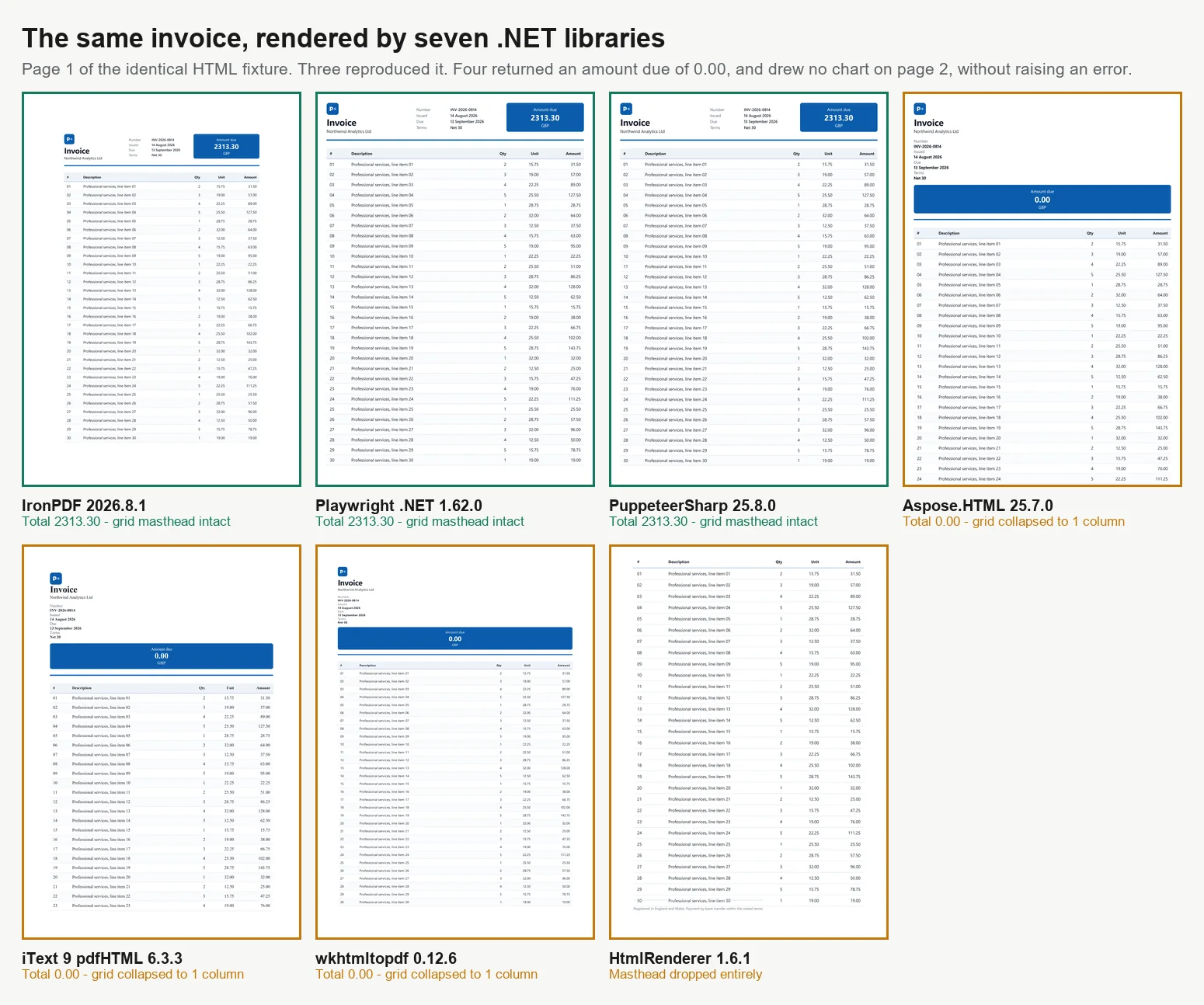
C# dilinde HTML'den PDF'e dönüştürmenin 7 ana yolu vardır ve tüm yöntemler aynı sonuçları üretmez. 7 motorun 2 sayfalık bir faturayla karşılaştırıldığı testlerde, yalnızca 3'ü doğru şekilde oluşturdu. Diğer 4'ünden 3'ü, hesaplanan toplamın ait olduğu yerde 0.00 tutarını yazdırdı ve dördüncüsü toplamlar bloğunu tamamen düşürdü, hiçbiri hata veya uyarı vermedi. Bu motorlar, modern CSS desteği, JavaScript yürütme, yük altındaki performans ve konteyner boyutu açısından farklılık gösterir. Bu farklılıklar, başarılı bir oluşturmanın doğru içerik anlamına geldiğini varsaymak yerine, yalnızca çıktıyı inceledikten sonra ortaya çıkar. Bu kılavuz, tüm 7 yaklaşım için çalışan kod ve her biri için tek bir makinede ölçülen karşılaştırma verileri sunar.
Kütüphaneler, aşağıdaki sonuçları büyük ölçüde açıklayan 2 ana kategoriye ayrılır. Tarayıcı düzeyinde oluşturucular tam bir Chromium motoru kullanır. IronPDF (2026.8.1) paketin içinde Chromium içerirken, PuppeteerSharp (25.8.0) ve Playwright .NET (1.62.0) DevTools protokolü aracılığıyla harici bir tarayıcıyı kontrol eder. Bu 3'ü, CSS Grid, web yazı tipleri ve tuval tabanlı grafikler dahil olmak üzere Chrome'un çıktısını çoğaltır, ancak daha fazla bellek ve daha büyük konteynerler gerektirir. iText 9 ile pdfHTML (iText Core 9.7.0 üzerinde 6.3.3), PdfSharp ile HtmlRenderer (1.6.1) ve Aspose.HTML (25.7.0) gibi düzen motoru kütüphaneleri, kendi düzen motorlarını kullanır, çok daha küçük ve genellikle daha hızlıdır, ancak modern JavaScript'i desteklemez. wkhtmltopdf (0.12.6), ES5'i destekleyen ancak ES6'yı desteklemeyen daha eski bir Qt (4.8.5) WebKit motoru kullanan bir ara durumdur. Bu kılavuzdaki tüm karşılaştırmalar, aynı 2 sayfalık faturayı 4 eşzamanlılık seviyesinde işleme dayanmaktadır ve her PDF doğruluk açısından incelenmiştir.
Kısa Versiyon: IronPDF'in Öne Çıktığı Yer
3 Eylül 2026'da ölçüldü, 5 geçiş, 8.960 zamanlanmış oluşturma, .NET 10 çalıştıran boşta bir 24 çekirdekli Windows 11 masaüstünde. Tam yöntem ve ham veriler aşağıda, ve test çerçevesi indirilebilir.
Seçtiğiniz şey
Kazanan
Ölçülen
Alternatiflerin maliyeti
Doğru bir belge
IronPDF
Toplamlar hesaplandı, grafik çizildi, ızgara sağlam
7'den 4'ü yanlış bir belge döndürdü ve hata vermedi
Doğru bir oluşturma üzerindeki verim
IronPDF
8 eşzamanlıda 44.02 oluşturma/s
Aynı makinede 2.1x Playwright, 2.8x PuppeteerSharp
Megabayt başına iş
IronPDF
Sürdürülen oluşturma/s başına 27.0 MB
Playwright için 54.3 MB, PuppeteerSharp için 82.9 MB
Doğru bir oluşturma üzerindeki soğuk başlangıç
IronPDF
İlk PDF için 486 ms
PuppeteerSharp 639 ms, Playwright 720 ms, Aspose.HTML 1,096 ms
İşlettiğiniz şey
IronPDF
Chromium, NuGet paketinin içinde gelir
Tarayıcı motorları bir görüntü, derleme zamanı indirme, işlem havuzu ve yama kadansı ekler
Sonraki entegre edeceğiniz şey
IronPDF
Aynı pakette birleştirme, formlar, imzalar, PDF/A, şifreleme
Tarayıcı motorları oluşturur ve durur, bu yüzden bir sonraki adım ikinci bir bağımlılıktır
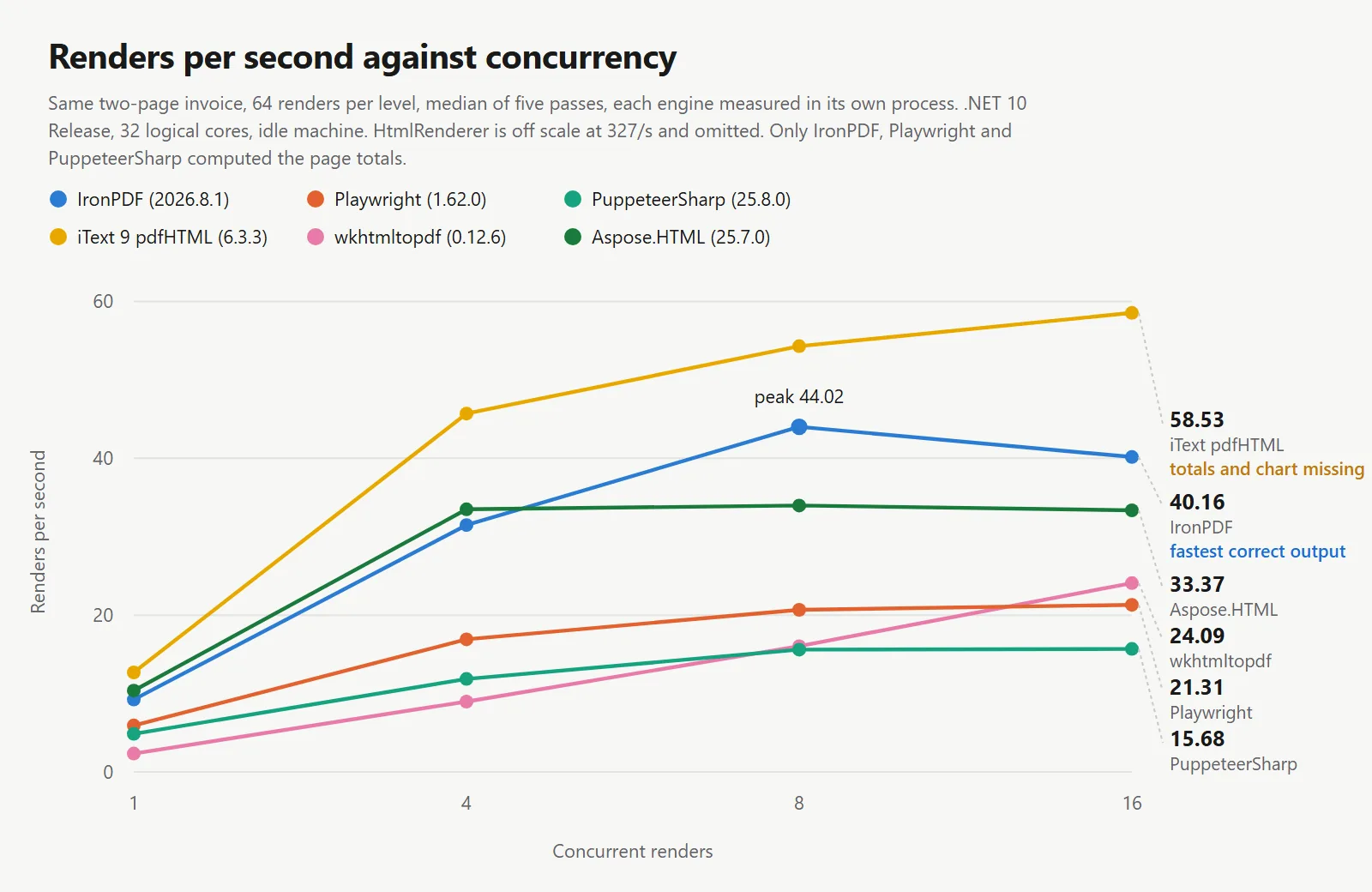
Tablodaki hız rakamları, belgeyi yanlış alan motorlara aittir. iText 9 saniyede 54.30 oluşturma ve HtmlRenderer 327.09 yayınladı ve her ikisi de sayfanın JavaScript'ini hiç çalıştırmayarak yaptı. Bir verim rakamı, ürettiği belge olmadan pek bir şey ifade etmez, bu yüzden burada her tablo bir doğruluk sütunu taşır.
IronPDF, doğru render başına verimlilikte liderdir: Belgeyi yeniden üreten motorlar arasında, IronPDF aynı makinede, aynı belge ve aynı bekleme koşulunda saniyede 44.02 render gerçekleştirirken, diğerleri 20.68 ve 15.60 render gerçekleştirdi. IronPDF, 3 motor arasında megabayt başına en fazla işi geri döndürerek ve ilk PDF'ye en hızlı ulaşarak öne çıktı.
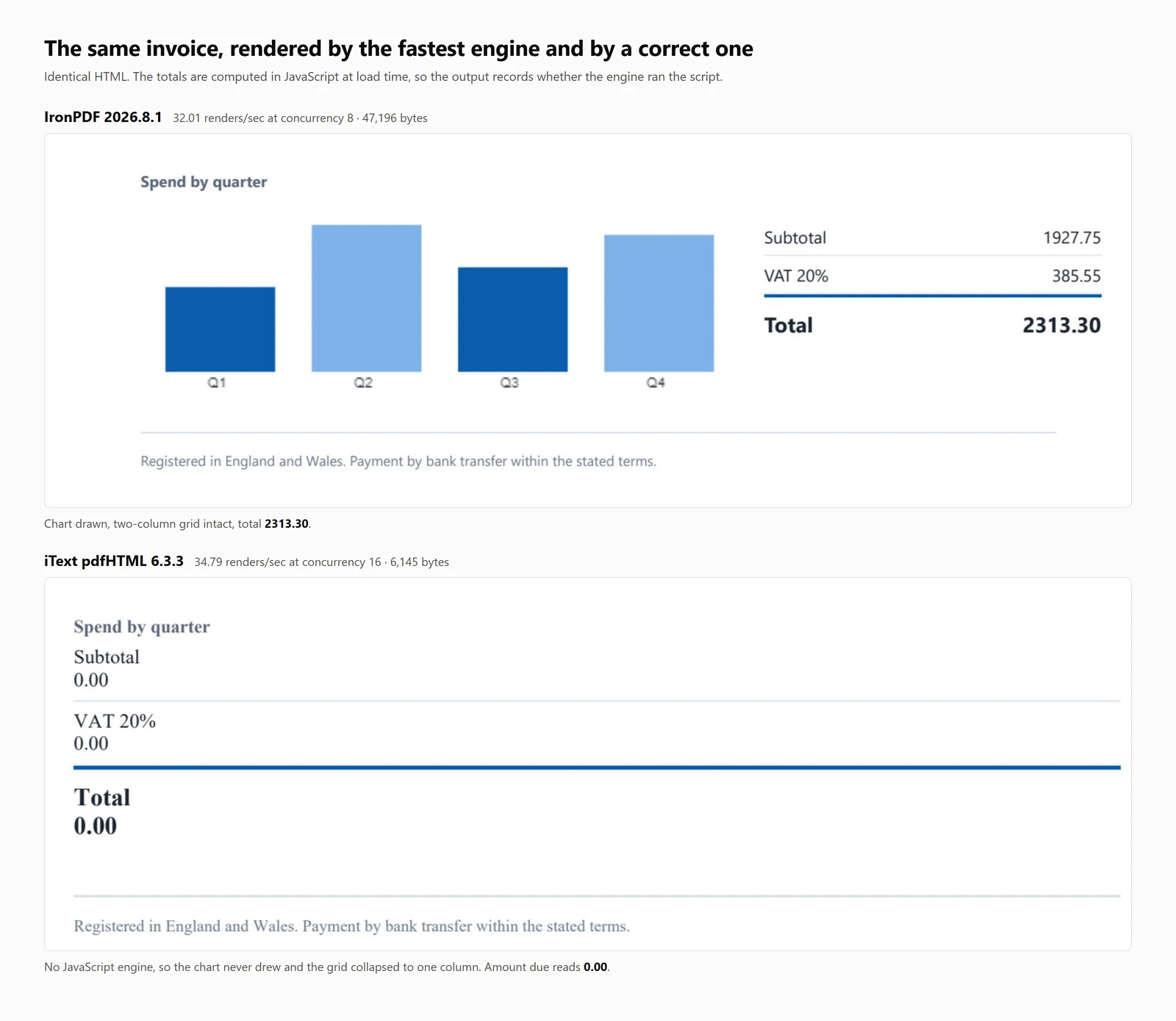
Yukarıdakilerin hepsinden daha önemli olan bulgu: 7 kütüphaneden 4'ü bitmiş gibi görünen ancak yanlış olan bir PDF üretti. Bunlardan 3'ünde fatura toplamı 0.00 yerine 2313.30 olarak okunuyordu. Dördüncü kütüphane, HtmlRenderer, ödenecek miktarı, toplamları ve grafiği sessizce düşürdü. Hiçbir durumda bir istisna oluşmadı ve çıktıda bunu belirten bir şey yoktu.
C#'ta HTML'den PDF'ye Hızlı Başlangıç
Bu kılavuz, .NET'te HTML'yi PDF'ye dönüştürmenin 7 yöntemini sunar, her biri için kod örnekleri ve nicel karşılaştırmalar sağlar.
Ne elde edeceksiniz: Her yaklaşım için çalışan örnekler, hem HTML dizgileri hem de canlı URL'ler için, soğuk başlangıç, verimlilik, bellek kullanımı ve tutarlı bir test belgesinde render doğruluğu ölçümleri ile birlikte.
Nerede çalışır: .NET 6 ve sonrası, .NET Framework 4.6.2 ve sonrası, ve .NET Standard 2.0. Karşılaştırmalar .NET 10, Windows 11 üzerinde, 32 mantıksal çekirdekte ve Release modunda gerçekleştirildi.
Ne zaman bu yaklaşımı kullanmalı: Belgeniz zaten HTML formatındaysa. Kontrol edilen işaretlemeyi render etmek, belge benzeri içerikler için bireysel çizim komutlarıyla PDF oluşturmak yerine daha verimli ve güvenilirdir.
Neden teknik olarak önemlidir: Motorlar 2 kategoriye ayrılır. Tarayıcı düzeyinde render motorları Chromium kullanır, bu da daha yüksek bellek ve konteyner gereksinimlerine yol açar. Düzen motoru kütüphaneleri daha küçük ve daha hızlıdır ancak JavaScript çalıştırmazlar. Aşağıdaki karşılaştırmalar bu ödünleşimleri nicelendirir.
Kullanmak için paketi yükleyin, render motoruna bir HTML dizgisi sağlayın ve ortaya çıkan PDF'yi kaydedin.
1IronPDF ile NuGet Package Manager'u yükleyin
PM > Install-Package IronPdf
Install-Package IronPdf
2Bu kod parçacığını kopyalayın ve çalıştırın.
using IronPdf;License.LicenseKey = "YOUR-TRIAL-KEY";var pdf = new ChromePdfRenderer().RenderHtmlAsPdf("<h1>Invoice INV-2026-0814</h1>");pdf.SaveAs("invoice.pdf");
using IronPdf;

License.LicenseKey = "YOUR-TRIAL-KEY";
var pdf = new ChromePdfRenderer().RenderHtmlAsPdf("<h1>Invoice INV-2026-0814</h1>");
pdf.SaveAs("invoice.pdf");
Imports IronPdfLicense.LicenseKey = "YOUR-TRIAL-KEY"Dim pdf = New ChromePdfRenderer().RenderHtmlAsPdf("<h1>Invoice INV-2026-0814</h1>")pdf.SaveAs("invoice.pdf")
ImportsIronPdfLicense.LicenseKey = "YOUR-TRIAL-KEY"Dim pdf = New ChromePdfRenderer().RenderHtmlAsPdf("<h1>Invoice INV-2026-0814</h1>")pdf.SaveAs("invoice.pdf")
Imports IronPdf

License.LicenseKey = "YOUR-TRIAL-KEY"
Dim pdf = New ChromePdfRenderer().RenderHtmlAsPdf("<h1>Invoice INV-2026-0814</h1>")
pdf.SaveAs("invoice.pdf")
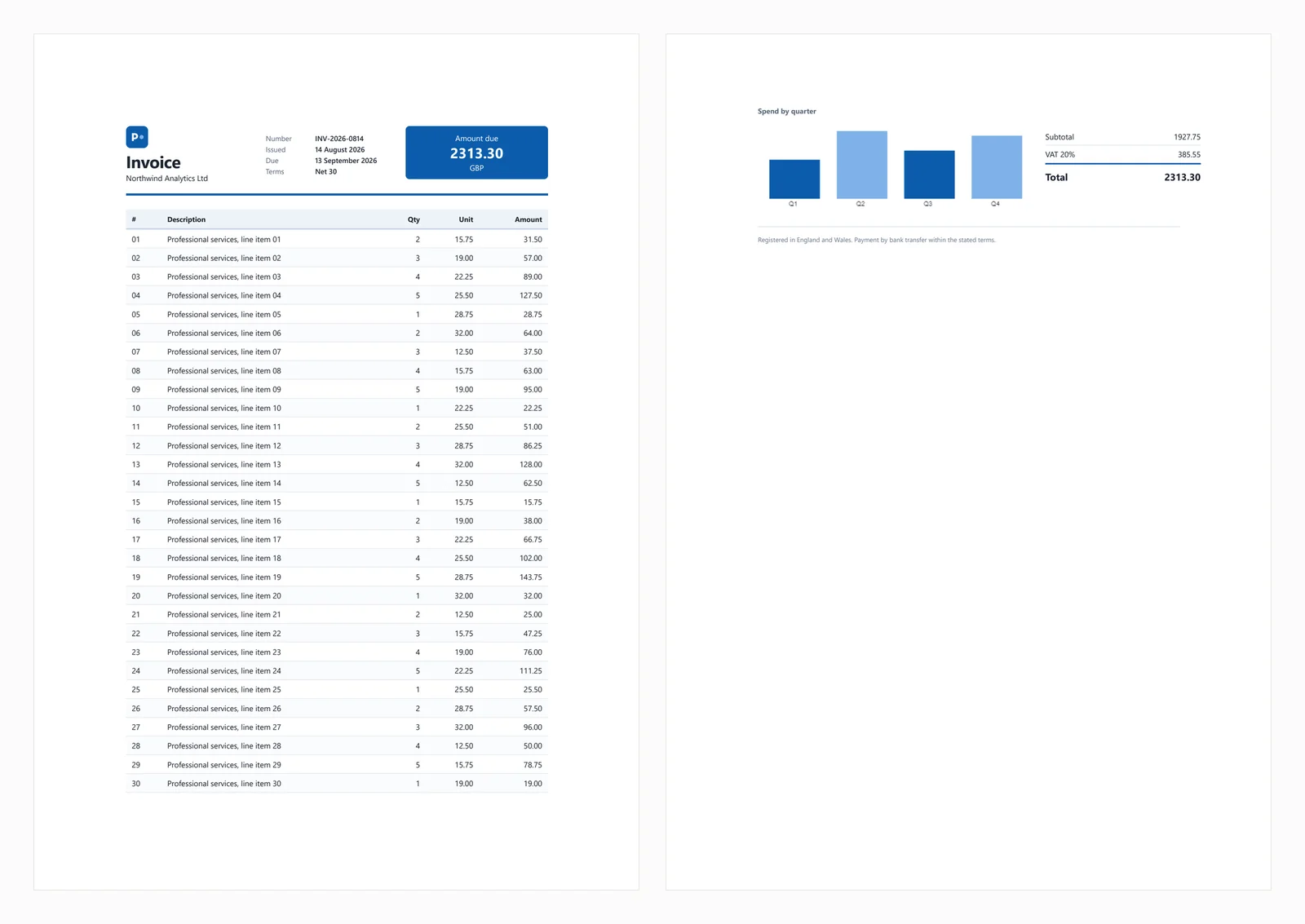
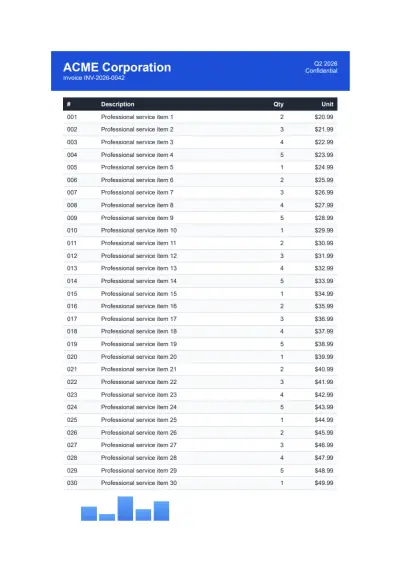
Yukarıdaki hızlı başlangıç, bu kılavuz boyunca kullanılan test faturasından aşağıdaki çıktıyı üretir.
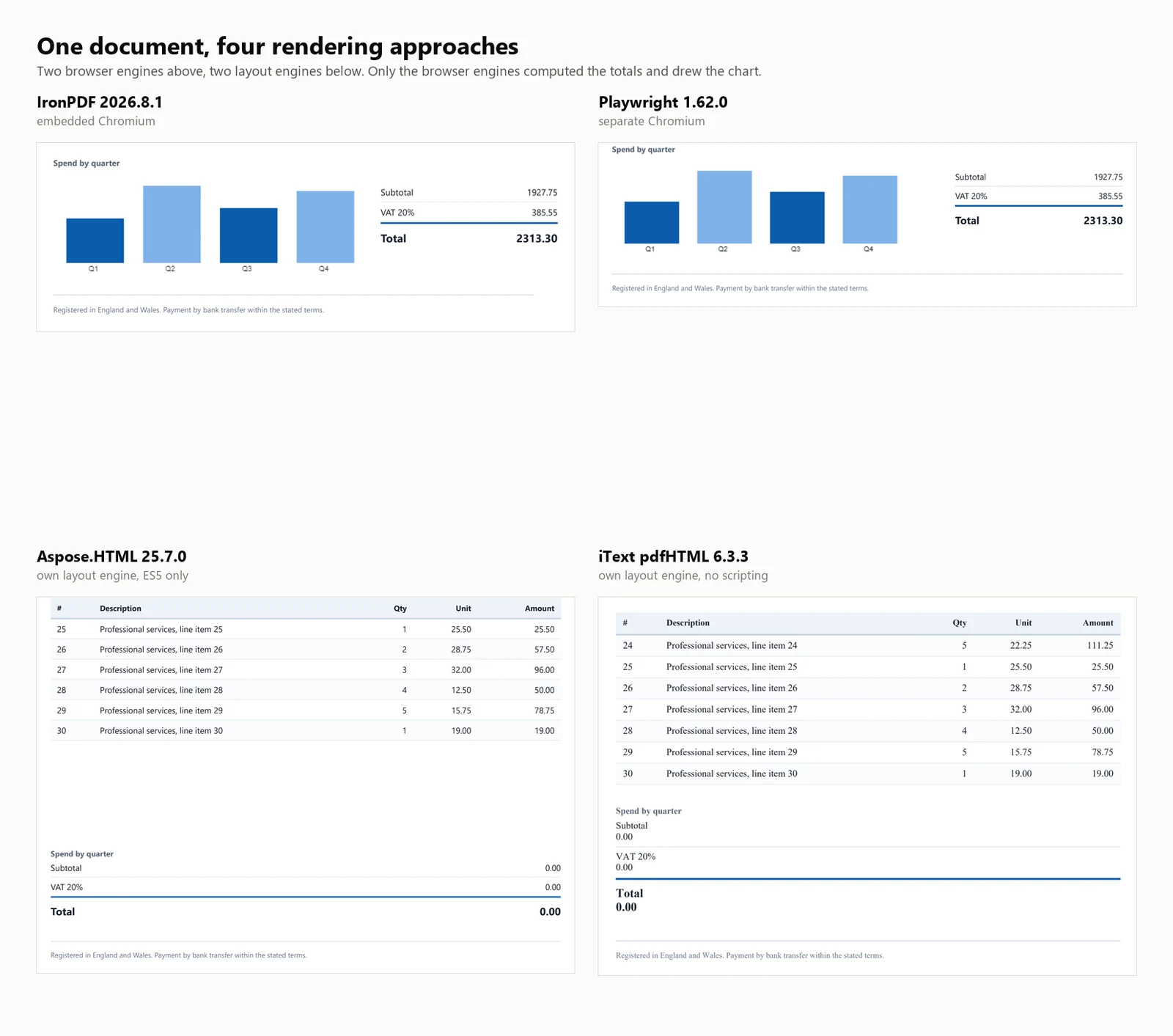
Test belgesi, bir CSS Grid başlığı, zebra çizgili 30 satırlık bir tablo, bir satır içi SVG, bir canvas elemanında oluşturulmuş bir çubuk grafik ve yükleme sırasında JavaScript ile hesaplanan toplamları içerir. Hesaplanan toplamlar, test için önemlidir çünkü JavaScript desteği olmayan motorlar, tamamlanmış gibi görünen ancak borç miktarı 0.00 olan faturalar üretir. Bu davranış aşağıdaki kütüphanelerden 3'ünde görülür ve dördüncüsü toplamlar bloğunu tamamen düşürür.
Yaygın hata senaryoları aşağıdaki bölümlerde ele alınmıştır.
1. IronPDF: Gömülü Chromium, Yüklenecek Tarayıcı Yok
IronPDF, uygulamanız içinde NuGet aracılığıyla çalışan bir Chromium renderleyicisidir ve ayrı bir tarayıcı yükleme ihtiyacını ortadan kaldırır. Bu ayrım öncelikle dağıtımı etkiler ve kılavuzun ilerleyen bölümlerinde tartışılır.
Kurulum:
> dotnet add package IronPdf
dotnet add package IronPdf
Bir HTML dizesinden:
// IronPDF 2026.8.1using IronPdf;License.LicenseKey = "YOUR-TRIAL-KEY"; // trial keys are freestring html = @"<h1>Invoice INV-2026-0814</h1> <p>Northwind Analytics Ltd — Net 30</p> <table><tr><th>Item</th><th>Amount</th></tr> <tr><td>Professional services</td><td>2313.30</td></tr></table>";var renderer = new ChromePdfRenderer();renderer.RenderingOptions.PaperSize = IronPdf.Rendering.PdfPaperSize.A4;renderer.RenderingOptions.PrintHtmlBackgrounds = true;using PdfDocument pdf = renderer.RenderHtmlAsPdf(html);pdf.SaveAs("invoice.pdf");
// IronPDF 2026.8.1using IronPdf;License.LicenseKey = "YOUR-TRIAL-KEY"; // trial keys are freestring html = @"<h1>Invoice INV-2026-0814</h1> <p>Northwind Analytics Ltd — Net 30</p> <table><tr><th>Item</th><th>Amount</th></tr> <tr><td>Professional services</td><td>2313.30</td></tr></table>";var renderer = new ChromePdfRenderer();renderer.RenderingOptions.PaperSize = IronPdf.Rendering.PdfPaperSize.A4;renderer.RenderingOptions.PrintHtmlBackgrounds = true;using PdfDocument pdf = renderer.RenderHtmlAsPdf(html);pdf.SaveAs("invoice.pdf");
// IronPDF 2026.8.1
using IronPdf;
License.LicenseKey = "YOUR-TRIAL-KEY"; // trial keys are free
string html = @"<h1>Invoice INV-2026-0814</h1>
<p>Northwind Analytics Ltd — Net 30</p>
<table><tr><th>Item</th><th>Amount</th></tr>
<tr><td>Professional services</td><td>2313.30</td></tr></table>";
var renderer = new ChromePdfRenderer();
renderer.RenderingOptions.PaperSize = IronPdf.Rendering.PdfPaperSize.A4;
renderer.RenderingOptions.PrintHtmlBackgrounds = true;
using PdfDocument pdf = renderer.RenderHtmlAsPdf(html);
pdf.SaveAs("invoice.pdf");
' IronPDF 2026.8.1Imports IronPdfLicense.LicenseKey = "YOUR-TRIAL-KEY" ' trial keys are freeDim html As String = "<h1>Invoice INV-2026-0814</h1> <p>Northwind Analytics Ltd — Net 30</p> <table><tr><th>Item</th><th>Amount</th></tr> <tr><td>Professional services</td><td>2313.30</td></tr></table>"Dim renderer As New ChromePdfRenderer()renderer.RenderingOptions.PaperSize = IronPdf.Rendering.PdfPaperSize.A4renderer.RenderingOptions.PrintHtmlBackgrounds = TrueUsing pdf As PdfDocument = renderer.RenderHtmlAsPdf(html) pdf.SaveAs("invoice.pdf")End Using
' IronPDF 2026.8.1ImportsIronPdfLicense.LicenseKey = "YOUR-TRIAL-KEY" ' trial keys are freeDim html AsString = "<h1>Invoice INV-2026-0814</h1> <p>Northwind Analytics Ltd — Net 30</p> <table><tr><th>Item</th><th>Amount</th></tr> <tr><td>Professional services</td><td>2313.30</td></tr></table>"Dim renderer As New ChromePdfRenderer()renderer.RenderingOptions.PaperSize = IronPdf.Rendering.PdfPaperSize.A4renderer.RenderingOptions.PrintHtmlBackgrounds = TrueUsing pdf AsPdfDocument = renderer.RenderHtmlAsPdf(html) pdf.SaveAs("invoice.pdf")EndUsing
' IronPDF 2026.8.1
Imports IronPdf
License.LicenseKey = "YOUR-TRIAL-KEY" ' trial keys are free
Dim html As String = "<h1>Invoice INV-2026-0814</h1>
<p>Northwind Analytics Ltd — Net 30</p>
<table><tr><th>Item</th><th>Amount</th></tr>
<tr><td>Professional services</td><td>2313.30</td></tr></table>"
Dim renderer As New ChromePdfRenderer()
renderer.RenderingOptions.PaperSize = IronPdf.Rendering.PdfPaperSize.A4
renderer.RenderingOptions.PrintHtmlBackgrounds = True
Using pdf As PdfDocument = renderer.RenderHtmlAsPdf(html)
pdf.SaveAs("invoice.pdf")
End Using
Canlı bir URL'den:
// IronPDF 2026.8.1 - only the render call changes.using IronPdf;License.LicenseKey = "YOUR-TRIAL-KEY";var renderer = new ChromePdfRenderer();using PdfDocument pdf = renderer.RenderUrlAsPdf("https://ironpdf.com/");pdf.SaveAs("page.pdf");
// IronPDF 2026.8.1 - only the render call changes.using IronPdf;License.LicenseKey = "YOUR-TRIAL-KEY";var renderer = new ChromePdfRenderer();using PdfDocument pdf = renderer.RenderUrlAsPdf("https://ironpdf.com/");pdf.SaveAs("page.pdf");
// IronPDF 2026.8.1 - only the render call changes.
using IronPdf;

License.LicenseKey = "YOUR-TRIAL-KEY";

var renderer = new ChromePdfRenderer();

using PdfDocument pdf = renderer.RenderUrlAsPdf("https://ironpdf.com/");
pdf.SaveAs("page.pdf");
Imports IronPdfLicense.LicenseKey = "YOUR-TRIAL-KEY"Dim renderer = New ChromePdfRenderer()Using pdf As PdfDocument = renderer.RenderUrlAsPdf("https://ironpdf.com/") pdf.SaveAs("page.pdf")End Using
ImportsIronPdfLicense.LicenseKey = "YOUR-TRIAL-KEY"Dim renderer = New ChromePdfRenderer()Using pdf AsPdfDocument = renderer.RenderUrlAsPdf("https://ironpdf.com/") pdf.SaveAs("page.pdf")EndUsing
Imports IronPdf

License.LicenseKey = "YOUR-TRIAL-KEY"

Dim renderer = New ChromePdfRenderer()

Using pdf As PdfDocument = renderer.RenderUrlAsPdf("https://ironpdf.com/")
    pdf.SaveAs("page.pdf")
End Using
Önerilen kullanım: Tarayıcıya doğru PDF renderleme gerektirdiğinizde ve başsız bir tarayıcının altyapısını yönetmek istemediğinizde IronPDF'yi seçin, örneğin işlem yaşam döngüsü, çökme kurtarma veya konteyner yapılandırması gibi.
Takas: Paket içinde Chromium ile birlikte gelir, bu nedenle tek bir soğuk render için maksimum bellek 342 MB'a ve 8 eşzamanlı render için 1,187 MB'a ulaşır. Ayrıca 999 $'dan başlar, diğer 6'sından 4'ü ücretsizdir. Yan bir proje veya düşük hacimli bir iç araç için bu maliyeti haklı çıkarmak zordur.
Performans: 486 ms soğuk başlangıç, 8 eşzamanlı renderda 161 ms medyan gecikme, saniyede 44.02 sürekli render ve işlem ağacı boyunca 1,187 MB maksimum bellek kullanımı. Test faturası, grafik ve toplamlar dahil olmak üzere doğru bir şekilde render edildi.
2. PuppeteerSharp: PDF Renderleme için Başsız Chrome
PuppeteerSharp, Puppeteer'ın .NET portudur. Bir Chromium yapısını indirir, DevTools protokolü aracılığıyla kontrol eder ve PDF'ler oluşturur. Ücretsizdir, MIT lisanslıdır, aktif olarak bakımı yapılır ve burada PuppeteerSharp (25.8.0) olarak ölçülmüştür.
Kurulum:
> dotnet add package PuppeteerSharp
dotnet add package PuppeteerSharp
Bir HTML dizesinden:
// PuppeteerSharp 25.8.0using PuppeteerSharp;using PuppeteerSharp.Media;string html = @"<h1>Invoice INV-2026-0814</h1> <p>Northwind Analytics Ltd — Net 30</p> <table><tr><th>Item</th><th>Amount</th></tr> <tr><td>Professional services</td><td>2313.30</td></tr></table>";// First run downloads roughly 150 MB of Chromium. Pre-fetch this at build time.await new BrowserFetcher().DownloadAsync();await using IBrowser browser = await Puppeteer.LaunchAsync(new LaunchOptions { Headless = true });await using IPage page = await browser.NewPageAsync();await page.SetContentAsync(html, new SetContentOptions{ WaitUntil = new[] { WaitUntilNavigation.Load }});await page.PdfAsync("invoice.pdf", new PdfOptions{ Format = PaperFormat.A4, PrintBackground = true});
// PuppeteerSharp 25.8.0using PuppeteerSharp;using PuppeteerSharp.Media;string html = @"<h1>Invoice INV-2026-0814</h1> <p>Northwind Analytics Ltd — Net 30</p> <table><tr><th>Item</th><th>Amount</th></tr> <tr><td>Professional services</td><td>2313.30</td></tr></table>";// First run downloads roughly 150 MB of Chromium. Pre-fetch this at build time.await new BrowserFetcher().DownloadAsync();await using IBrowser browser = awaitPuppeteer.LaunchAsync(new LaunchOptions { Headless = true });await using IPage page = await browser.NewPageAsync();await page.SetContentAsync(html, new SetContentOptions{WaitUntil = new[] { WaitUntilNavigation.Load }});await page.PdfAsync("invoice.pdf", new PdfOptions{Format = PaperFormat.A4,PrintBackground = true});
// PuppeteerSharp 25.8.0
using PuppeteerSharp;
using PuppeteerSharp.Media;
string html = @"<h1>Invoice INV-2026-0814</h1>
<p>Northwind Analytics Ltd — Net 30</p>
<table><tr><th>Item</th><th>Amount</th></tr>
<tr><td>Professional services</td><td>2313.30</td></tr></table>";
// First run downloads roughly 150 MB of Chromium. Pre-fetch this at build time.
await new BrowserFetcher().DownloadAsync();
await using IBrowser browser = await Puppeteer.LaunchAsync(new LaunchOptions { Headless = true });
await using IPage page = await browser.NewPageAsync();
await page.SetContentAsync(html, new SetContentOptions
{
WaitUntil = new[] { WaitUntilNavigation.Load }
});
await page.PdfAsync("invoice.pdf", new PdfOptions
{
Format = PaperFormat.A4,
PrintBackground = true
});
' PuppeteerSharp 25.8.0Imports PuppeteerSharpImports PuppeteerSharp.MediaDim html As String = "<h1>Invoice INV-2026-0814</h1> <p>Northwind Analytics Ltd — Net 30</p> <table><tr><th>Item</th><th>Amount</th></tr> <tr><td>Professional services</td><td>2313.30</td></tr></table>"' First run downloads roughly 150 MB of Chromium. Pre-fetch this at build time.Await (New BrowserFetcher()).DownloadAsync()Await Using browser As IBrowser = Await Puppeteer.LaunchAsync(New LaunchOptions With {.Headless = True}) Await Using page As IPage = Await browser.NewPageAsync() Await page.SetContentAsync(html, New SetContentOptions With {.WaitUntil = {WaitUntilNavigation.Load}}) Await page.PdfAsync("invoice.pdf", New PdfOptions With { .Format = PaperFormat.A4, .PrintBackground = True }) End UsingEnd Using
' PuppeteerSharp 25.8.0ImportsPuppeteerSharpImportsPuppeteerSharp.MediaDim html AsString = "<h1>Invoice INV-2026-0814</h1> <p>Northwind Analytics Ltd — Net 30</p> <table><tr><th>Item</th><th>Amount</th></tr> <tr><td>Professional services</td><td>2313.30</td></tr></table>"' First run downloads roughly 150 MB of Chromium. Pre-fetch this at build time.Await (New BrowserFetcher()).DownloadAsync()AwaitUsing browser AsIBrowser = AwaitPuppeteer.LaunchAsync(New LaunchOptionsWith {.Headless = True})AwaitUsing page AsIPage = Await browser.NewPageAsync()Await page.SetContentAsync(html, New SetContentOptionsWith {.WaitUntil = {WaitUntilNavigation.Load}})Await page.PdfAsync("invoice.pdf", New PdfOptionsWith { .Format = PaperFormat.A4, .PrintBackground = True })EndUsingEndUsing
' PuppeteerSharp 25.8.0
Imports PuppeteerSharp
Imports PuppeteerSharp.Media
Dim html As String = "<h1>Invoice INV-2026-0814</h1>
<p>Northwind Analytics Ltd — Net 30</p>
<table><tr><th>Item</th><th>Amount</th></tr>
<tr><td>Professional services</td><td>2313.30</td></tr></table>"
' First run downloads roughly 150 MB of Chromium. Pre-fetch this at build time.
Await (New BrowserFetcher()).DownloadAsync()
Await Using browser As IBrowser = Await Puppeteer.LaunchAsync(New LaunchOptions With {.Headless = True})
Await Using page As IPage = Await browser.NewPageAsync()
Await page.SetContentAsync(html, New SetContentOptions With {.WaitUntil = {WaitUntilNavigation.Load}})
Await page.PdfAsync("invoice.pdf", New PdfOptions With {
.Format = PaperFormat.A4,
.PrintBackground = True
})
End Using
End Using
Canlı bir URL'den:
// PuppeteerSharp 25.8.0 - GoToAsync replaces SetContentAsync.await using IPage page = await browser.NewPageAsync();await page.GoToAsync("https://ironpdf.com/", new NavigationOptions{ WaitUntil = new[] { WaitUntilNavigation.Networkidle0 }});await page.PdfAsync("page.pdf", new PdfOptions { Format = PaperFormat.A4, PrintBackground = true });
// PuppeteerSharp 25.8.0 - GoToAsync replaces SetContentAsync.await using IPage page = await browser.NewPageAsync();await page.GoToAsync("https://ironpdf.com/", new NavigationOptions{WaitUntil = new[] { WaitUntilNavigation.Networkidle0 }});await page.PdfAsync("page.pdf", new PdfOptions { Format = PaperFormat.A4, PrintBackground = true });
// PuppeteerSharp 25.8.0 - GoToAsync replaces SetContentAsync.
await using IPage page = await browser.NewPageAsync();

await page.GoToAsync("https://ironpdf.com/", new NavigationOptions
{
    WaitUntil = new[] { WaitUntilNavigation.Networkidle0 }
});

await page.PdfAsync("page.pdf", new PdfOptions { Format = PaperFormat.A4, PrintBackground = true });
' PuppeteerSharp 25.8.0 - GoToAsync replaces SetContentAsync.Await Using page As IPage = Await browser.NewPageAsync()Await page.GoToAsync("https://ironpdf.com/", New NavigationOptions With { .WaitUntil = {WaitUntilNavigation.Networkidle0}})Await page.PdfAsync("page.pdf", New PdfOptions With {.Format = PaperFormat.A4, .PrintBackground = True})
' PuppeteerSharp 25.8.0 - GoToAsync replaces SetContentAsync.
Await Using page As IPage = Await browser.NewPageAsync()

Await page.GoToAsync("https://ironpdf.com/", New NavigationOptions With {
    .WaitUntil = {WaitUntilNavigation.Networkidle0}
})

Await page.PdfAsync("page.pdf", New PdfOptions With {.Format = PaperFormat.A4, .PrintBackground = True})
Önerilen kullanım: Bütçe kısıtlamaları öncelikli olduğunda ve tarayıcı süreçlerini yönetmekte rahat olduğunuzda PuppeteerSharp'ı seçin. Aynı motoru kullandığı için Chrome ile aynı çıktıyı verir.
Takas: Tarayıcı süreç yönetiminden siz sorumlusunuz, yaşam döngüsü, çökme sonrası yetim süreçlerin ele alınması ve sandbox yapılandırması dahil. İlk çalıştırma, yaklaşık 150 MB'lık bir Chromium indirir, bu da dışa dönük ağ erişimi olmayan konteynerlerde başarısız olabilir, bu nedenle tarayıcıyı derleme zamanında önceden alın. Yük altında, PuppeteerSharp ölçülen seçenekler arasında en fazla süreci oluşturur ve 16 eşzamanlı renderda 40'a ulaşır.
Performans: 639 ms soğuk başlangıç, 8 eşzamanlı renderda 507 ms medyan gecikme, saniyede 15.60 sürekli render ve işlem ağacı boyunca 1,293 MB maksimum bellek kullanımı. Test faturası doğru bir şekilde render edildi.
3. Playwright for .NET: Tarayıcı Seviyesinde PDF Renderleme
Playwright for .NET, Microsoft'un tarayıcı otomasyon kütüphanesidir. Puppeteer'a benzer bir yaklaşım kullanır ancak farklı bir API, daha verimli sayfa izolasyonu ve benzer dağıtım hususları sunar.
Kurulum:
> dotnet add package Microsoft.Playwright
dotnet add package Microsoft.Playwright
İkinci bir komut tarayıcı ikili dosyalarını yükler.
> playwright install chromium
playwright install chromium
Bunu atlamak, CI'da başarısız olan ilk Playwright derlemesinin en yaygın nedenidir.
Bir HTML dizesinden:
// Microsoft.Playwright 1.62.0using Microsoft.Playwright;string html = @"<h1>Invoice INV-2026-0814</h1> <p>Northwind Analytics Ltd — Net 30</p> <table><tr><th>Item</th><th>Amount</th></tr> <tr><td>Professional services</td><td>2313.30</td></tr></table>";// Run "playwright install chromium" first, or call the installer in code.Microsoft.Playwright.Program.Main(new[] { "install", "chromium" });using IPlaywright playwright = await Playwright.CreateAsync();await using IBrowser browser = await playwright.Chromium.LaunchAsync();IPage page = await browser.NewPageAsync();await page.SetContentAsync(html, new PageSetContentOptions { WaitUntil = WaitUntilState.Load });await page.PdfAsync(new PagePdfOptions{ Path = "invoice.pdf", Format = "A4", PrintBackground = true});
// Microsoft.Playwright 1.62.0using Microsoft.Playwright;string html = @"<h1>Invoice INV-2026-0814</h1> <p>Northwind Analytics Ltd — Net 30</p> <table><tr><th>Item</th><th>Amount</th></tr> <tr><td>Professional services</td><td>2313.30</td></tr></table>";// Run "playwright install chromium" first, or call the installer in code.Microsoft.Playwright.Program.Main(new[] { "install", "chromium" });using IPlaywright playwright = await Playwright.CreateAsync();await using IBrowser browser = await playwright.Chromium.LaunchAsync();IPage page = await browser.NewPageAsync();await page.SetContentAsync(html, new PageSetContentOptions { WaitUntil = WaitUntilState.Load });await page.PdfAsync(new PagePdfOptions{Path = "invoice.pdf",Format = "A4",PrintBackground = true});
// Microsoft.Playwright 1.62.0
using Microsoft.Playwright;
string html = @"<h1>Invoice INV-2026-0814</h1>
<p>Northwind Analytics Ltd — Net 30</p>
<table><tr><th>Item</th><th>Amount</th></tr>
<tr><td>Professional services</td><td>2313.30</td></tr></table>";
// Run "playwright install chromium" first, or call the installer in code.
Microsoft.Playwright.Program.Main(new[] { "install", "chromium" });
using IPlaywright playwright = await Playwright.CreateAsync();
await using IBrowser browser = await playwright.Chromium.LaunchAsync();
IPage page = await browser.NewPageAsync();
await page.SetContentAsync(html, new PageSetContentOptions { WaitUntil = WaitUntilState.Load });
await page.PdfAsync(new PagePdfOptions
{
Path = "invoice.pdf",
Format = "A4",
PrintBackground = true
});
' Microsoft.Playwright 1.62.0Imports Microsoft.PlaywrightDim html As String = "<h1>Invoice INV-2026-0814</h1> <p>Northwind Analytics Ltd — Net 30</p> <table><tr><th>Item</th><th>Amount</th></tr> <tr><td>Professional services</td><td>2313.30</td></tr></table>"' Run "playwright install chromium" first, or call the installer in code.Microsoft.Playwright.Program.Main(New String() {"install", "chromium"})Using playwright As IPlaywright = Await Playwright.CreateAsync() Await Using browser As IBrowser = Await playwright.Chromium.LaunchAsync() Dim page As IPage = Await browser.NewPageAsync() Await page.SetContentAsync(html, New PageSetContentOptions With {.WaitUntil = WaitUntilState.Load}) Await page.PdfAsync(New PagePdfOptions With { .Path = "invoice.pdf", .Format = "A4", .PrintBackground = True }) End UsingEnd Using
' Microsoft.Playwright 1.62.0ImportsMicrosoft.PlaywrightDim html AsString = "<h1>Invoice INV-2026-0814</h1> <p>Northwind Analytics Ltd — Net 30</p> <table><tr><th>Item</th><th>Amount</th></tr> <tr><td>Professional services</td><td>2313.30</td></tr></table>"' Run "playwright install chromium" first, or call the installer in code.Microsoft.Playwright.Program.Main(New String() {"install", "chromium"})Using playwright AsIPlaywright = AwaitPlaywright.CreateAsync()AwaitUsing browser AsIBrowser = Await playwright.Chromium.LaunchAsync() Dim page AsIPage = Await browser.NewPageAsync()Await page.SetContentAsync(html, New PageSetContentOptionsWith {.WaitUntil = WaitUntilState.Load})Await page.PdfAsync(New PagePdfOptionsWith { .Path = "invoice.pdf", .Format = "A4", .PrintBackground = True })EndUsingEndUsing
' Microsoft.Playwright 1.62.0
Imports Microsoft.Playwright
Dim html As String = "<h1>Invoice INV-2026-0814</h1>
<p>Northwind Analytics Ltd — Net 30</p>
<table><tr><th>Item</th><th>Amount</th></tr>
<tr><td>Professional services</td><td>2313.30</td></tr></table>"
' Run "playwright install chromium" first, or call the installer in code.
Microsoft.Playwright.Program.Main(New String() {"install", "chromium"})
Using playwright As IPlaywright = Await Playwright.CreateAsync()
Await Using browser As IBrowser = Await playwright.Chromium.LaunchAsync()
Dim page As IPage = Await browser.NewPageAsync()
Await page.SetContentAsync(html, New PageSetContentOptions With {.WaitUntil = WaitUntilState.Load})
Await page.PdfAsync(New PagePdfOptions With {
.Path = "invoice.pdf",
.Format = "A4",
.PrintBackground = True
})
End Using
End Using
' Microsoft.Playwright 1.62.0 - GotoAsync replaces SetContentAsync.
Dim page As IPage = Await browser.NewPageAsync()

Await page.GotoAsync("https://ironpdf.com/", New PageGotoOptions With {
    .WaitUntil = WaitUntilState.NetworkIdle
})

Await page.PdfAsync(New PagePdfOptions With {.Path = "page.pdf", .Format = "A4", .PrintBackground = True})
Önerilen kullanım: Tarayıcı kalitesinde renderleme gerektirdiğinizde ve maliyetsiz bir çözüm istediğinizde veya zaten test için Playwright kullanıyorsanız ve ek bağımlılıklardan kaçınmak istiyorsanız Playwright for .NET'i seçin.
Takas: Playwright, Puppeteer ile aynı hususları paylaşır, görüntünüzde tarayıcı ikili dosyaları, süreç denetimi ve Dockerfile'ınızda bir kurulum adımı içerir. Burada ölçülen en istikrarlı motor olmasına rağmen, gömülü motorun biraz üzerinde bir verimlilik sunar.
Performans: 720 ms soğuk başlangıç, 8 eşzamanlı renderda 381 ms medyan gecikme, saniyede 20.68 sürekli render ve işlem ağacı boyunca 1,122 MB maksimum bellek kullanımı. Test faturası doğru bir şekilde render edildi.
4. iText 9 ile pdfHTML: Düzen Motoru, JavaScript Yok
iText 9 ile pdfHTML, HTML dönüştürme eklentisine sahip bir PDF kütüphanesidir. Tarayıcı yerine kendi düzen motorunu kullanarak, desteklenen özellikler dahilinde hızlı ve öngörülebilir sonuçlar sunar ve bunların dışındaki her şey hakkında sessiz kalır. İki paket ayrı ayrı sürümlenir. pdfHTML (6.3.3), iText Core (9.7.0) üzerinde çalışan eklentidir ve burada ölçülen eşleştirme budur.
Kurulum:
> dotnet add package itext.pdfhtml
dotnet add package itext.pdfhtml
Not:itext7.* paketi kullanımdan kaldırılmıştır ve itext.* olarak yeniden adlandırılmıştır, bu detay en üst sıradaki eğitimlerde hala yanlış anlaşılmaktadır. itext.pdfhtml yükleyin, itext7.pdfhtml değil. Paket adı bir sürüm numarası taşımaz, bu nedenle itext.pdfhtml iText 9 üzerindeki mevcut pdfHTML sürümüne çözülür.
Bir HTML dizesinden:
// itext.pdfhtml 6.3.3 - AGPL or commercial licence.// Note the package rename: itext7.pdfhtml is deprecated in favour of itext.pdfhtml.using iText.Html2pdf;string html = @"<h1>Invoice INV-2026-0814</h1> <p>Northwind Analytics Ltd — Net 30</p> <table><tr><th>Item</th><th>Amount</th></tr> <tr><td>Professional services</td><td>2313.30</td></tr></table>";using var output = new FileStream("invoice.pdf", FileMode.Create);HtmlConverter.ConvertToPdf(html, output);// No JavaScript engine and no canvas, so anything the page computes or draws// at load time will be missing from the result.
// itext.pdfhtml 6.3.3 - AGPL or commercial licence.// Note the package rename: itext7.pdfhtml is deprecated in favour of itext.pdfhtml.using iText.Html2pdf;string html = @"<h1>Invoice INV-2026-0814</h1> <p>Northwind Analytics Ltd — Net 30</p> <table><tr><th>Item</th><th>Amount</th></tr> <tr><td>Professional services</td><td>2313.30</td></tr></table>";using var output = new FileStream("invoice.pdf", FileMode.Create);HtmlConverter.ConvertToPdf(html, output);// No JavaScript engine and no canvas, so anything the page computes or draws// at load time will be missing from the result.
// itext.pdfhtml 6.3.3 - AGPL or commercial licence.
// Note the package rename: itext7.pdfhtml is deprecated in favour of itext.pdfhtml.
using iText.Html2pdf;
string html = @"<h1>Invoice INV-2026-0814</h1>
<p>Northwind Analytics Ltd — Net 30</p>
<table><tr><th>Item</th><th>Amount</th></tr>
<tr><td>Professional services</td><td>2313.30</td></tr></table>";
using var output = new FileStream("invoice.pdf", FileMode.Create);
HtmlConverter.ConvertToPdf(html, output);
// No JavaScript engine and no canvas, so anything the page computes or draws
// at load time will be missing from the result.
// itext.pdfhtml 6.3.3 - AGPL or commercial licence.// Note the package rename: itext7.pdfhtml is deprecated in favour of itext.pdfhtml.Imports iText.Html2pdfDim html As String = "<h1>Invoice INV-2026-0814</h1> <p>Northwind Analytics Ltd — Net 30</p> <table><tr><th>Item</th><th>Amount</th></tr> <tr><td>Professional services</td><td>2313.30</td></tr></table>"Using output As New FileStream("invoice.pdf", FileMode.Create) HtmlConverter.ConvertToPdf(html, output)End Using' No JavaScript engine and no canvas, so anything the page computes or draws' at load time will be missing from the result.
// itext.pdfhtml 6.3.3 - AGPL or commercial licence.// Note the package rename: itext7.pdfhtml is deprecated in favour of itext.pdfhtml.Imports iText.Html2pdfDim html AsString = "<h1>Invoice INV-2026-0814</h1> <p>Northwind Analytics Ltd — Net 30</p> <table><tr><th>Item</th><th>Amount</th></tr> <tr><td>Professional services</td><td>2313.30</td></tr></table>"Using output As New FileStream("invoice.pdf", FileMode.Create)HtmlConverter.ConvertToPdf(html, output)EndUsing' No JavaScript engine and no canvas, so anything the page computes or draws' at load time will be missing from the result.
// itext.pdfhtml 6.3.3 - AGPL or commercial licence.
// Note the package rename: itext7.pdfhtml is deprecated in favour of itext.pdfhtml.
Imports iText.Html2pdf
Dim html As String = "<h1>Invoice INV-2026-0814</h1>
<p>Northwind Analytics Ltd — Net 30</p>
<table><tr><th>Item</th><th>Amount</th></tr>
<tr><td>Professional services</td><td>2313.30</td></tr></table>"
Using output As New FileStream("invoice.pdf", FileMode.Create)
HtmlConverter.ConvertToPdf(html, output)
End Using
' No JavaScript engine and no canvas, so anything the page computes or draws
' at load time will be missing from the result.
Canlı bir URL'den: iText URL'leri doğrudan kabul etmez. HTML'yi manuel olarak alın ve göreli varlıkların doğru şekilde çözülmesini sağlamak için temel URI'yi ayarlayın.
// itext.pdfhtml 6.3.3 - there is no URL method, so fetch the HTML yourself.using iText.Html2pdf;using var client = new HttpClient();string html = await client.GetStringAsync("https://ironpdf.com/");// The base URI is what lets relative images, CSS and links resolve.var properties = new ConverterProperties();properties.SetBaseUri("https://ironpdf.com/");using var output = new FileStream("page.pdf", FileMode.Create);HtmlConverter.ConvertToPdf(html, output, properties);
// itext.pdfhtml 6.3.3 - there is no URL method, so fetch the HTML yourself.using iText.Html2pdf;using var client = new HttpClient();string html = await client.GetStringAsync("https://ironpdf.com/");// The base URI is what lets relative images, CSS and links resolve.var properties = new ConverterProperties();properties.SetBaseUri("https://ironpdf.com/");using var output = new FileStream("page.pdf", FileMode.Create);HtmlConverter.ConvertToPdf(html, output, properties);
// itext.pdfhtml 6.3.3 - there is no URL method, so fetch the HTML yourself.
using iText.Html2pdf;

using var client = new HttpClient();
string html = await client.GetStringAsync("https://ironpdf.com/");

// The base URI is what lets relative images, CSS and links resolve.
var properties = new ConverterProperties();
properties.SetBaseUri("https://ironpdf.com/");

using var output = new FileStream("page.pdf", FileMode.Create);
HtmlConverter.ConvertToPdf(html, output, properties);
' itext.pdfhtml 6.3.3 - there is no URL method, so fetch the HTML yourself.Imports iText.Html2pdfUsing client As New HttpClient() Dim html As String = Await client.GetStringAsync("https://ironpdf.com/") ' The base URI is what lets relative images, CSS and links resolve. Dim properties As New ConverterProperties() properties.SetBaseUri("https://ironpdf.com/") Using output As New FileStream("page.pdf", FileMode.Create) HtmlConverter.ConvertToPdf(html, output, properties) End UsingEnd Using
' itext.pdfhtml 6.3.3 - there is no URL method, so fetch the HTML yourself.Imports iText.Html2pdfUsing client As New HttpClient() Dim html AsString = Await client.GetStringAsync("https://ironpdf.com/") ' The base URI is what lets relative images, CSS and links resolve. Dim properties As New ConverterProperties() properties.SetBaseUri("https://ironpdf.com/")Using output As New FileStream("page.pdf", FileMode.Create)HtmlConverter.ConvertToPdf(html, output, properties)EndUsingEndUsing
' itext.pdfhtml 6.3.3 - there is no URL method, so fetch the HTML yourself.
Imports iText.Html2pdf

Using client As New HttpClient()
    Dim html As String = Await client.GetStringAsync("https://ironpdf.com/")

    ' The base URI is what lets relative images, CSS and links resolve.
    Dim properties As New ConverterProperties()
    properties.SetBaseUri("https://ironpdf.com/")

    Using output As New FileStream("page.pdf", FileMode.Create)
        HtmlConverter.ConvertToPdf(html, output, properties)
    End Using
End Using
Önerilen kullanım: iText'i zaten diğer PDF görevleri için kullanıyorsanız veya HTML dönüştürmenin yanı sıra gelişmiş PDF manipülasyonu gerektiriyorsa ve birden fazla kütüphaneden kaçınmayı tercih ediyorsanız seçin.
Takas: iText yalnızca AGPL veya ücretli bir lisans altında mevcuttur. AGPL, tüm uygulamanızı açık kaynak yapmanızı gerektirir, bu da kapalı yazılım gönderen çoğu ekip için ücretli seçeneği gerekli kılar. Teknik olarak, iText JavaScript çalıştırmaz ve tarayıcılara kıyasla daha sınırlı CSS desteği sunar, aşağıdaki sadakat karşılaştırmalarında gösterildiği gibi.
Performans: 489 ms soğuk başlangıç, 8 eşzamanlı renderda 144 ms medyan gecikme, saniyede 54.30 sürdürülebilir render ve tek bir işlemde 332 MB tepe bellek kullanımı. Fatura toplamı 0.00 idi ve grafik render edilmedi.
5. HtmlRenderer ile PdfSharp: Tamamen Yönetilen, Yerel İkili Yok
HtmlRenderer ile PdfSharp, tamamen yönetilen C# ile uygulanmıştır, yerel ikili veya tarayıcı bağımlılığı yoktur ve ek konteyner kurulumu gerektirmez. Sunulan en küçük ve en hızlı seçenek olup, CSS desteği yaklaşık 2011 standartları ile sınırlıdır.
Kurulum:
> dotnet add package HtmlRenderer.PdfSharp
dotnet add package HtmlRenderer.PdfSharp
Bir HTML dizesinden:
// HtmlRenderer.PdfSharp 1.6.1 - pure managed, no native binaries at all.using TheArtOfDev.HtmlRenderer.PdfSharp;string html = @"<h1>Invoice INV-2026-0814</h1> <p>Northwind Analytics Ltd — Net 30</p> <table><tr><th>Item</th><th>Amount</th></tr> <tr><td>Professional services</td><td>2313.30</td></tr></table>";PdfSharp.Pdf.PdfDocument pdf = PdfGenerator.GeneratePdf(html, PdfSharp.PageSize.A4);pdf.Save("invoice.pdf");// There is no URL method. Fetch the markup with HttpClient and pass the string.// CSS support stops well short of Flexbox and Grid, and there is no JavaScript.
// HtmlRenderer.PdfSharp 1.6.1 - pure managed, no native binaries at all.using TheArtOfDev.HtmlRenderer.PdfSharp;string html = @"<h1>Invoice INV-2026-0814</h1> <p>Northwind Analytics Ltd — Net 30</p> <table><tr><th>Item</th><th>Amount</th></tr> <tr><td>Professional services</td><td>2313.30</td></tr></table>";PdfSharp.Pdf.PdfDocument pdf = PdfGenerator.GeneratePdf(html, PdfSharp.PageSize.A4);pdf.Save("invoice.pdf");// There is no URL method. Fetch the markup with HttpClient and pass the string.// CSS support stops well short of Flexbox and Grid, and there is no JavaScript.
// HtmlRenderer.PdfSharp 1.6.1 - pure managed, no native binaries at all.
using TheArtOfDev.HtmlRenderer.PdfSharp;
string html = @"<h1>Invoice INV-2026-0814</h1>
<p>Northwind Analytics Ltd — Net 30</p>
<table><tr><th>Item</th><th>Amount</th></tr>
<tr><td>Professional services</td><td>2313.30</td></tr></table>";
PdfSharp.Pdf.PdfDocument pdf = PdfGenerator.GeneratePdf(html, PdfSharp.PageSize.A4);
pdf.Save("invoice.pdf");
// There is no URL method. Fetch the markup with HttpClient and pass the string.
// CSS support stops well short of Flexbox and Grid, and there is no JavaScript.
' HtmlRenderer.PdfSharp 1.6.1 - pure managed, no native binaries at all.Imports TheArtOfDev.HtmlRenderer.PdfSharpDim html As String = "<h1>Invoice INV-2026-0814</h1> <p>Northwind Analytics Ltd — Net 30</p> <table><tr><th>Item</th><th>Amount</th></tr> <tr><td>Professional services</td><td>2313.30</td></tr></table>"Dim pdf As PdfSharp.Pdf.PdfDocument = PdfGenerator.GeneratePdf(html, PdfSharp.PageSize.A4)pdf.Save("invoice.pdf")' There is no URL method. Fetch the markup with HttpClient and pass the string.' CSS support stops well short of Flexbox and Grid, and there is no JavaScript.
' HtmlRenderer.PdfSharp 1.6.1 - pure managed, no native binaries at all.ImportsTheArtOfDev.HtmlRenderer.PdfSharpDim html AsString = "<h1>Invoice INV-2026-0814</h1> <p>Northwind Analytics Ltd — Net 30</p> <table><tr><th>Item</th><th>Amount</th></tr> <tr><td>Professional services</td><td>2313.30</td></tr></table>"Dim pdf AsPdfSharp.Pdf.PdfDocument = PdfGenerator.GeneratePdf(html, PdfSharp.PageSize.A4)pdf.Save("invoice.pdf")' There is no URL method. Fetch the markup with HttpClient and pass the string.' CSS support stops well short of Flexbox and Grid, and there is no JavaScript.
' HtmlRenderer.PdfSharp 1.6.1 - pure managed, no native binaries at all.
Imports TheArtOfDev.HtmlRenderer.PdfSharp
Dim html As String = "<h1>Invoice INV-2026-0814</h1>
<p>Northwind Analytics Ltd — Net 30</p>
<table><tr><th>Item</th><th>Amount</th></tr>
<tr><td>Professional services</td><td>2313.30</td></tr></table>"
Dim pdf As PdfSharp.Pdf.PdfDocument = PdfGenerator.GeneratePdf(html, PdfSharp.PageSize.A4)
pdf.Save("invoice.pdf")
' There is no URL method. Fetch the markup with HttpClient and pass the string.
' CSS support stops well short of Flexbox and Grid, and there is no JavaScript.
Canlı bir URL'den: doğrudan URL girişi için bir yöntem yoktur. HTML'yi manuel olarak alın ve bir dize olarak iletin.
Önerilen kullanım: Yerel ikililerin kesinlikle yasaklandığı, düzenlenmiş veya hava boşluklu ortamlar gibi yerlerde ve yalnızca yükleme sırasında hiçbir şey hesaplamayan bir şablon için HtmlRenderer ile PdfSharp'ı seçin. Burada yerel ikili göndermeyen 3 seçenekten biridir, iText 9 ve Aspose.HTML ile birlikte, ve bu faturada başlık, toplamlar bloğu ve grafik düşürüldü.
Takas: HtmlRenderer JavaScript, Flexbox veya CSS Grid desteklemez. Sabit, basit şablonlar için yeterli olabilir ve tek bir işlemde 23 ms medyan gecikmesi eşsizdir. Ancak, modern tarayıcılar için tasarlanmış HTML doğru şekilde render edilmeyecektir. Testlerde, CSS Grid başlığı, toplamlar bloğu ve grafik atlandı ve 2 sayfa 1'e sıkıştırıldı, bu da içerik çakışmasına neden oldu.
HtmlRenderer ölçülen en hızlı motor olup modern CSS'yi render edemez. Her iki faktör de kararınızda dikkate alınmalıdır.
Performans: 157 ms soğuk başlangıç, 8 eşzamanlı renderda 23 ms medyan gecikme, saniyede 327.09 sürdürülebilir render, 166 MB tepe bellek kullanımı ve tek bir işlem. Çıktı, başlık, toplamlar ve grafik eksik tek bir sayfaydı.
6. wkhtmltopdf ve DinkToPdf: Arşivlenmiş Qt WebKit
wkhtmltopdf, genellikle .NET ile DinkToPdf aracılığıyla entegre edilen, eski bir Qt WebKit motoruna dayanan bir komut satırı aracıdır. Motorun kendisi için bir NuGet kurulumu yoktur, bu nedenle uygulamanızla birlikte bir ikili dosya olarak gönderilmelidir. DinkToPdf bir sarmalayıcı olarak hizmet eder, ancak alternatifleri mevcuttur.
Bir HTML dizesinden:
// wkhtmltopdf 0.12.6 via DinkToPdf. The engine is archived; the native// libwkhtmltox binaries must be shipped alongside your application.using DinkToPdf;using DinkToPdf.Contracts;string html = @"<h1>Invoice INV-2026-0814</h1> <p>Northwind Analytics Ltd — Net 30</p> <table><tr><th>Item</th><th>Amount</th></tr> <tr><td>Professional services</td><td>2313.30</td></tr></table>";IConverter converter = new SynchronizedConverter(new PdfTools());var document = new HtmlToPdfDocument{ GlobalSettings = { PaperSize = PaperKind.A4, Out = "invoice.pdf" }, Objects = { new ObjectSettings { HtmlContent = html } }};converter.Convert(document);
// wkhtmltopdf 0.12.6 via DinkToPdf. The engine is archived; the native// libwkhtmltox binaries must be shipped alongside your application.using DinkToPdf;using DinkToPdf.Contracts;string html = @"<h1>Invoice INV-2026-0814</h1> <p>Northwind Analytics Ltd — Net 30</p> <table><tr><th>Item</th><th>Amount</th></tr> <tr><td>Professional services</td><td>2313.30</td></tr></table>";IConverter converter = new SynchronizedConverter(new PdfTools());var document = new HtmlToPdfDocument{GlobalSettings = { PaperSize = PaperKind.A4, Out = "invoice.pdf" },Objects = { new ObjectSettings { HtmlContent = html } }};converter.Convert(document);
// wkhtmltopdf 0.12.6 via DinkToPdf. The engine is archived; the native
// libwkhtmltox binaries must be shipped alongside your application.
using DinkToPdf;
using DinkToPdf.Contracts;
string html = @"<h1>Invoice INV-2026-0814</h1>
<p>Northwind Analytics Ltd — Net 30</p>
<table><tr><th>Item</th><th>Amount</th></tr>
<tr><td>Professional services</td><td>2313.30</td></tr></table>";
IConverter converter = new SynchronizedConverter(new PdfTools());
var document = new HtmlToPdfDocument
{
GlobalSettings = { PaperSize = PaperKind.A4, Out = "invoice.pdf" },
Objects = { new ObjectSettings { HtmlContent = html } }
};
converter.Convert(document);
' wkhtmltopdf 0.12.6 via DinkToPdf. The engine is archived; the native' libwkhtmltox binaries must be shipped alongside your application.Imports DinkToPdfImports DinkToPdf.ContractsDim html As String = "<h1>Invoice INV-2026-0814</h1> <p>Northwind Analytics Ltd — Net 30</p> <table><tr><th>Item</th><th>Amount</th></tr> <tr><td>Professional services</td><td>2313.30</td></tr></table>"Dim converter As IConverter = New SynchronizedConverter(New PdfTools())Dim document = New HtmlToPdfDocument() With { .GlobalSettings = New GlobalSettings With {.PaperSize = PaperKind.A4, .Out = "invoice.pdf"}, .Objects = {New ObjectSettings With {.HtmlContent = html}}}converter.Convert(document)
' wkhtmltopdf 0.12.6 via DinkToPdf. The engine is archived; the native' libwkhtmltox binaries must be shipped alongside your application.ImportsDinkToPdfImportsDinkToPdf.ContractsDim html AsString = "<h1>Invoice INV-2026-0814</h1> <p>Northwind Analytics Ltd — Net 30</p> <table><tr><th>Item</th><th>Amount</th></tr> <tr><td>Professional services</td><td>2313.30</td></tr></table>"Dim converter AsIConverter = New SynchronizedConverter(New PdfTools())Dim document = New HtmlToPdfDocument() With { .GlobalSettings = New GlobalSettingsWith {.PaperSize = PaperKind.A4, .Out = "invoice.pdf"}, .Objects = {New ObjectSettingsWith {.HtmlContent = html}}}converter.Convert(document)
' wkhtmltopdf 0.12.6 via DinkToPdf. The engine is archived; the native
' libwkhtmltox binaries must be shipped alongside your application.
Imports DinkToPdf
Imports DinkToPdf.Contracts
Dim html As String = "<h1>Invoice INV-2026-0814</h1>
<p>Northwind Analytics Ltd — Net 30</p>
<table><tr><th>Item</th><th>Amount</th></tr>
<tr><td>Professional services</td><td>2313.30</td></tr></table>"
Dim converter As IConverter = New SynchronizedConverter(New PdfTools())
Dim document = New HtmlToPdfDocument() With {
.GlobalSettings = New GlobalSettings With {.PaperSize = PaperKind.A4, .Out = "invoice.pdf"},
.Objects = {New ObjectSettings With {.HtmlContent = html}}
}
converter.Convert(document)
Canlı bir URL'den:
// wkhtmltopdf 0.12.6 via DinkToPdf - swap HtmlContent for Page.var document = new HtmlToPdfDocument{ GlobalSettings = { PaperSize = PaperKind.A4, Out = "page.pdf" }, Objects = { new ObjectSettings { Page = "https://ironpdf.com/" } }};converter.Convert(document);
// wkhtmltopdf 0.12.6 via DinkToPdf - swap HtmlContent for Page.var document = new HtmlToPdfDocument{GlobalSettings = { PaperSize = PaperKind.A4, Out = "page.pdf" },Objects = { new ObjectSettings { Page = "https://ironpdf.com/" } }};converter.Convert(document);
// wkhtmltopdf 0.12.6 via DinkToPdf - swap HtmlContent for Page.
var document = new HtmlToPdfDocument
{
    GlobalSettings = { PaperSize = PaperKind.A4, Out = "page.pdf" },
    Objects = { new ObjectSettings { Page = "https://ironpdf.com/" } }
};

converter.Convert(document);
' wkhtmltopdf 0.12.6 via DinkToPdf - swap HtmlContent for Page.Dim document = New HtmlToPdfDocument With { .GlobalSettings = New GlobalSettings With {.PaperSize = PaperKind.A4, .Out = "page.pdf"}, .Objects = {New ObjectSettings With {.Page = "https://ironpdf.com/"}}}converter.Convert(document)
' wkhtmltopdf 0.12.6 via DinkToPdf - swap HtmlContent for Page.Dim document = New HtmlToPdfDocumentWith { .GlobalSettings = New GlobalSettingsWith {.PaperSize = PaperKind.A4, .Out = "page.pdf"}, .Objects = {New ObjectSettingsWith {.Page = "https://ironpdf.com/"}}}converter.Convert(document)
' wkhtmltopdf 0.12.6 via DinkToPdf - swap HtmlContent for Page.
Dim document = New HtmlToPdfDocument With {
    .GlobalSettings = New GlobalSettings With {.PaperSize = PaperKind.A4, .Out = "page.pdf"},
    .Objects = {New ObjectSettings With {.Page = "https://ironpdf.com/"}}
}

converter.Convert(document)
Proje durumu: wkhtmltopdf deposu Ocak 2023'te arşivlendi, son kararlı sürüm (0.12.6) Haziran 2020'de Qt (4.8.5) üzerinde oluşturuldu. Yaklaşık 2013 web standartlarına sabitlenmiş bir şekilde render yapar ve artık güvenlik güncellemeleri almaz.
Önerilen kullanım: wkhtmltopdf zaten üretimdeyse, belgelerinizi doğru bir şekilde render ediyorsa ve şablonlarınız statikse kullanmaya devam edin. İşlevsel bir gereklilik olmadan geçiş gereksizdir.
Taviz: wkhtmltopdf, Flexbox veya daha yeni CSS özelliklerine dayanan düzenleri render edemez ve güvenlik yamaları almaz.
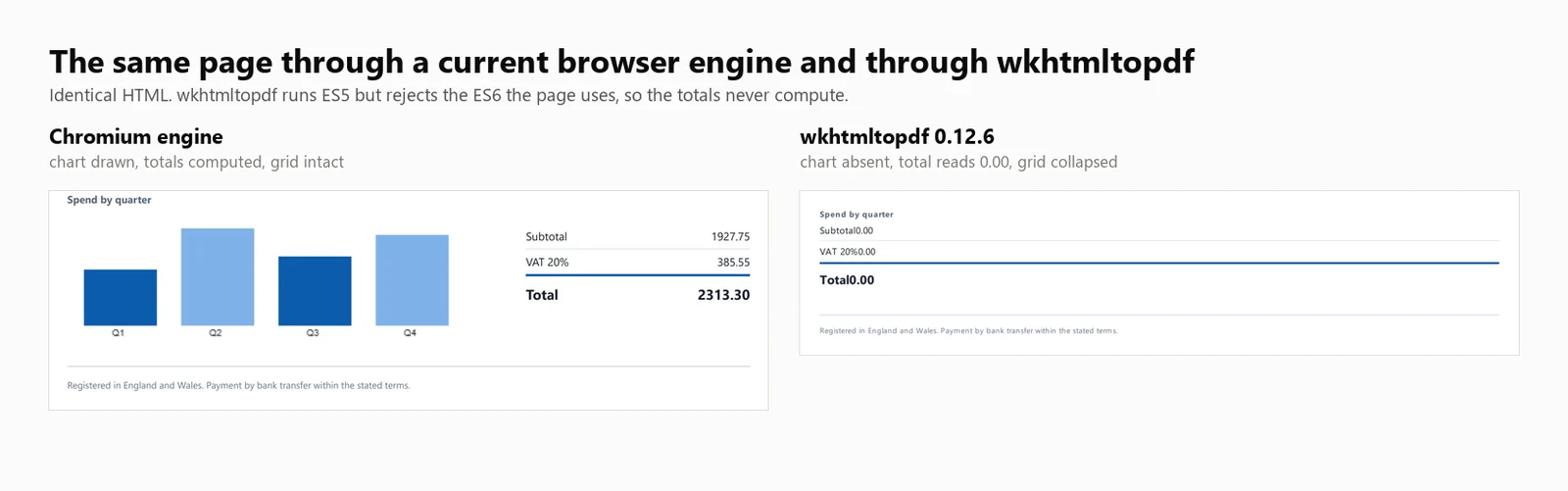
JavaScript desteği: wkhtmltopdf ES5 JavaScript'i çalıştırır ancak ES6'yı desteklemez. Bu yapı üzerinde yapılan doğrudan bir test, ES5'i başarıyla çalıştırdı ve ES6'da hata verdi, çünkü document.querySelectorAll(...).forEach Qt (4.8.5) motoru tarafından desteklenmiyor. Sonuç olarak, bu çağrıyı kullanan test faturası, herhangi bir görünür hata olmadan 0.00 yer tutucu toplamını gösterdi. ES5 taban çizgisine yazılmış şablonlar doğru hesaplanır ve modern JavaScript kullananlar hesaplanmaz.
Performans: 424 ms soğuk başlangıç, 8 eşzamanlı renderda 486 ms medyan gecikme, saniyede 16.03 sürdürülebilir render ve işlem ağacı genelinde 482 MB tepe bellek kullanımı. Fatura toplamı 0.00 idi ve grafik render edilmedi.
Yukarıdaki rakamlar, wkhtmltopdf.exe komut satırı aracı olarak çalıştırılarak elde edilmiştir, render başına 1 işlem ile. DinkToPdf sarmalayıcı aynı motoru işlem içinde kullanır ancak tüm çağrıları SynchronizedConverter üzerinden seri hale getirir, bu da eşzamanlılık ölçeklenebilirliğini sınırlar.
7. Aspose.HTML for .NET: Bağımsız Düzen Motoru
Aspose.HTML for .NET, bir tarayıcı yerine kendi render motoruna sahiptir ve Word, Excel ve PowerPoint'i de kapsayan bir belge paketi içinde yer alır. Zaten 1 satıcıdan satın alan ekipler için, bu, birkaç kütüphaneyi entegre etmek ve ayrı yenilemeleri takip etmek yerine 1 destek sözleşmesi ve 1 satın alma siparişi anlamına gelir.
Kurulum:
> dotnet add package Aspose.HTML
dotnet add package Aspose.HTML
Bir HTML dizesinden:
// Aspose.HTML for .NET 25.7.0 - commercial licence, applied from a .lic file.using Aspose.Html;using Aspose.Html.Converters;using Aspose.Html.Saving;new License().SetLicense("Aspose.HTMLProductFamily.lic");string html = @"<h1>Invoice INV-2026-0814</h1> <p>Northwind Analytics Ltd — Net 30</p> <table><tr><th>Item</th><th>Amount</th></tr> <tr><td>Professional services</td><td>2313.30</td></tr></table>";// The second argument is the base URL relative assets resolve against.using var doc = new HTMLDocument(html, ".");Converter.ConvertHTML(doc, new PdfSaveOptions(), "invoice.pdf");// Its own rendering stack, not a browser: ES5 runs, ES6 throws, so anything the// page computes with modern syntax is left at its initial value.
// Aspose.HTML for .NET 25.7.0 - commercial licence, applied from a .lic file.using Aspose.Html;using Aspose.Html.Converters;using Aspose.Html.Saving;newLicense().SetLicense("Aspose.HTMLProductFamily.lic");string html = @"<h1>Invoice INV-2026-0814</h1> <p>Northwind Analytics Ltd — Net 30</p> <table><tr><th>Item</th><th>Amount</th></tr> <tr><td>Professional services</td><td>2313.30</td></tr></table>";// The second argument is the base URL relative assets resolve against.using var doc = new HTMLDocument(html, ".");Converter.ConvertHTML(doc, new PdfSaveOptions(), "invoice.pdf");// Its own rendering stack, not a browser: ES5 runs, ES6 throws, so anything the// page computes with modern syntax is left at its initial value.
// Aspose.HTML for .NET 25.7.0 - commercial licence, applied from a .lic file.
using Aspose.Html;
using Aspose.Html.Converters;
using Aspose.Html.Saving;
new License().SetLicense("Aspose.HTMLProductFamily.lic");
string html = @"<h1>Invoice INV-2026-0814</h1>
<p>Northwind Analytics Ltd — Net 30</p>
<table><tr><th>Item</th><th>Amount</th></tr>
<tr><td>Professional services</td><td>2313.30</td></tr></table>";
// The second argument is the base URL relative assets resolve against.
using var doc = new HTMLDocument(html, ".");
Converter.ConvertHTML(doc, new PdfSaveOptions(), "invoice.pdf");
// Its own rendering stack, not a browser: ES5 runs, ES6 throws, so anything the
// page computes with modern syntax is left at its initial value.
// Aspose.HTML for .NET 25.7.0 - commercial licence, applied from a .lic file.Imports Aspose.HtmlImports Aspose.Html.ConvertersImports Aspose.Html.SavingCall New License().SetLicense("Aspose.HTMLProductFamily.lic")Dim html As String = "<h1>Invoice INV-2026-0814</h1> <p>Northwind Analytics Ltd — Net 30</p> <table><tr><th>Item</th><th>Amount</th></tr> <tr><td>Professional services</td><td>2313.30</td></tr></table>"' The second argument is the base URL relative assets resolve against.Using doc = New HTMLDocument(html, ".") Converter.ConvertHTML(doc, New PdfSaveOptions(), "invoice.pdf")End Using' Its own rendering stack, not a browser: ES5 runs, ES6 throws, so anything the' page computes with modern syntax is left at its initial value.
// Aspose.HTMLfor .NET25.7.0 - commercial licence, applied from a .lic file.ImportsAspose.HtmlImportsAspose.Html.ConvertersImportsAspose.Html.SavingCall New License().SetLicense("Aspose.HTMLProductFamily.lic")Dim html AsString = "<h1>Invoice INV-2026-0814</h1> <p>Northwind Analytics Ltd — Net 30</p> <table><tr><th>Item</th><th>Amount</th></tr> <tr><td>Professional services</td><td>2313.30</td></tr></table>"' The second argument is the base URL relative assets resolve against.Using doc = New HTMLDocument(html, ".")Converter.ConvertHTML(doc, New PdfSaveOptions(), "invoice.pdf")EndUsing' Its own rendering stack, not a browser: ES5 runs, ES6 throws, so anything the' page computes with modern syntax is left at its initial value.
// Aspose.HTML for .NET 25.7.0 - commercial licence, applied from a .lic file.
Imports Aspose.Html
Imports Aspose.Html.Converters
Imports Aspose.Html.Saving
Call New License().SetLicense("Aspose.HTMLProductFamily.lic")
Dim html As String = "<h1>Invoice INV-2026-0814</h1>
<p>Northwind Analytics Ltd — Net 30</p>
<table><tr><th>Item</th><th>Amount</th></tr>
<tr><td>Professional services</td><td>2313.30</td></tr></table>"
' The second argument is the base URL relative assets resolve against.
Using doc = New HTMLDocument(html, ".")
Converter.ConvertHTML(doc, New PdfSaveOptions(), "invoice.pdf")
End Using
' Its own rendering stack, not a browser: ES5 runs, ES6 throws, so anything the
' page computes with modern syntax is left at its initial value.
Canlı bir URL'den:
// Aspose.HTML 25.7.0 - only the HTMLDocument constructor changes.using Aspose.Html;using Aspose.Html.Converters;using Aspose.Html.Saving;new License().SetLicense("Aspose.HTMLProductFamily.lic");using var doc = new HTMLDocument("https://ironpdf.com/");Converter.ConvertHTML(doc, new PdfSaveOptions(), "page.pdf");
// Aspose.HTML 25.7.0 - only the HTMLDocument constructor changes.using Aspose.Html;using Aspose.Html.Converters;using Aspose.Html.Saving;newLicense().SetLicense("Aspose.HTMLProductFamily.lic");using var doc = new HTMLDocument("https://ironpdf.com/");Converter.ConvertHTML(doc, new PdfSaveOptions(), "page.pdf");
// Aspose.HTML 25.7.0 - only the HTMLDocument constructor changes.
using Aspose.Html;
using Aspose.Html.Converters;
using Aspose.Html.Saving;

new License().SetLicense("Aspose.HTMLProductFamily.lic");

using var doc = new HTMLDocument("https://ironpdf.com/");
Converter.ConvertHTML(doc, new PdfSaveOptions(), "page.pdf");
' Aspose.HTML 25.7.0 - only the HTMLDocument constructor changes.Imports Aspose.HtmlImports Aspose.Html.ConvertersImports Aspose.Html.SavingNew License().SetLicense("Aspose.HTMLProductFamily.lic")Using doc As New HTMLDocument("https://ironpdf.com/") Converter.ConvertHTML(doc, New PdfSaveOptions(), "page.pdf")End Using
' Aspose.HTML 25.7.0 - only the HTMLDocument constructor changes.ImportsAspose.HtmlImportsAspose.Html.ConvertersImportsAspose.Html.SavingNew License().SetLicense("Aspose.HTMLProductFamily.lic")Using doc As New HTMLDocument("https://ironpdf.com/")Converter.ConvertHTML(doc, New PdfSaveOptions(), "page.pdf")EndUsing
' Aspose.HTML 25.7.0 - only the HTMLDocument constructor changes.
Imports Aspose.Html
Imports Aspose.Html.Converters
Imports Aspose.Html.Saving

New License().SetLicense("Aspose.HTMLProductFamily.lic")

Using doc As New HTMLDocument("https://ironpdf.com/")
    Converter.ConvertHTML(doc, New PdfSaveOptions(), "page.pdf")
End Using
Önerilen kullanım: Diğer formatlar için zaten Aspose üzerinde standartlaştığınızda ve aynı sözleşme altında HTML dönüştürme istediğinizde, modern JavaScript'e bağlı olmayan şablonlarda Aspose.HTML'yi seçin.
Taviz: Ücretsiz katmanı olmayan ücretli bir kütüphanedir ve render motorlarıyla birlikte tarayıcılarla değil, düzen motorlarıyla ilişkilidir. Aspose.HTML, Profesyonel lisans altında test edilmiştir ve rakamları aşağıdaki her tabloda görünmektedir.
Performans: 1,096 ms soğuk başlangıç, 8 eşzamanlı renderda 227 ms medyan gecikme, saniyede 33.98 sürdürülebilir render ve tek bir işlemde 334 MB tepe bellek kullanımı. Fatura toplamı 0.00 idi ve grafik render edilmedi.
HTML'den PDF'ye Benchmark Yöntemi: Sürümler, Makine ve Girdiler
Aşağıdaki her rakam, 1 makine, 1 belge ve tek bir tarihte 5 geçişlik 1 kampanyadan elde edilmiştir. Tüm 3'ü burada belirtilmiştir, böylece rakamlar kendi değerlerine göre yeniden üretilebilir veya reddedilebilir.
Ölçülen Kütüphane Sürümleri
Sürüm sütunu, makalenin yazıldığı sürüm değil, çalıştırma zamanında yüklenen derlemeden okunan sürümdür, bu nedenle sabitlenmiş sürümden farklı bir sürüme çözümlenen bir paket burada gösterilecektir.
Kütüphane
Paket
Test edilen sürüm
Çalışma zamanında bildirilen derleme
Motor
IronPDF
IronPdf
2026.8.1
2026.8.0.1
Gömülü Chromium
Playwright .NET
Microsoft.Playwright
1.62.0
1.62.0.0
Harici Chromium
PuppeteerSharp
PuppeteerSharp
25.8.0
25.8.0.0
Harici Chromium
iText 9 with pdfHTML
itext.pdfhtml
6.3.3
iText Core 9.7.0 üzerinde 6.3.3.0
Kendi yerleşim motoru
HtmlRenderer + PdfSharp
HtmlRenderer.PdfSharp
1.6.1
1.6.1.0
Kendi yerleşim motoru
wkhtmltopdf
Komut satırı ikili dosyası
0.12.6
0.12.6
Qt 4.8.5 üzerinde QtWebKit 5.212
Aspose.HTML
Aspose.HTML
25.7.0
25.7.0.0
Kendi yerleşim motoru
Makine, Çalışma Zamanı ve Tarih
Öğe
Değer
CPU
24 çekirdek / 32 iş parçacıklı x64 masaüstü, 3.2 GHz
Hafıza
64 GB
İşletim sistemi
Windows 11 x64, yapı 10.0.26200
Çalışma zamanı
.NET 10.0.11, Yayın yapısı
Makine durumu
Boşta, başka uygulama çalışmıyor
Test tarihi
3 Eylül 2026
Örnek boyutu
8,960 zamanlanmış render: 7 motor x 4 eşzamanlılık seviyesi x 64 render x 5 geçiş
Soğuk başlatma başlatmaları
105: 7 motor x 3 başlatma x 5 geçiş
Rapor edilen rakam
5 geçişin medyanı, asla en iyi durum değil
Test Belgesi ve Uygulanan Kurallar
Her motor, hafızada bir dize olarak, aynı 10.260 karakterlik HTML belgesini aldı. Hiçbir motor, diğerlerinin almadığı bir dosya yolu, URL veya önceden ısıtılmış bir önbellek almadı. Belge, aşağıdaki indirmede yer almaktadır, böylece güven yerine karşılaştırılabilir.
Girdi kendi içinde yeterlidir: Harici stil sayfası yok, web yazı tipi yok, uzaktan resim yok. Ölçümde hiçbir şey ağ gecikmesine veya hangi motorun varlıkları daha iyi önbelleğe aldığına bağlı değildir.
Her tarayıcı motoru için aynı bekleme koşulu:Load, ağ boşta değil. PuppeteerSharp, SetContent için ağ boşta koşullarını kullanımdan kaldırdı, bu yüzden Load, tüm 3'ünün aynı şekilde desteklediği tek koşuldur.
1 belirtilen istisna ile aynı sayfa ayarı: Her motorda A4 ve basılı arka planlar. Kenar boşlukları ortak bir değere zorlanmadı, bu yüzden her kütüphane kendi varsayılanını kullandı ve bu varsayılanlar farklıdır: IronPDF, 2 harici tarayıcı motorunun yapmadığı yerde sayfayı içe alır. Bu, aşağıda yan yana görülebilir. İçeriği çevreleyen beyaz alan miktarını değiştirir, motorların hesapladığını değil. Sayfa sonunu onurlandıran 6 motor 2 sayfa üretti. HtmlRenderer, kenar boşluklarından ziyade bu sonu kaybetmekten dolayı 1 sayfa üretti.
Ücretli lisansa ihtiyaç duyan motorlar bir tane aldı: IronPDF tam lisans altında ve Aspose.HTML Professional altında, bu yüzden hiçbiri deneme sınırları tarafından kısıtlanmadı veya filigranlanmadı. iText, işlevsel bir sınır getirmeyen AGPL altında çalıştı.
Her motor, kendi belgelerinin önerdiği yapılandırmayı aldı: Rendeleme boyunca yeniden kullanılan 1 render veya tarayıcı örneği, Puppeteer ve Playwright için her render için yeni bir sayfa ve Aspose.HTML, diğerlerinin kaçındığı disk maliyetini ödememesi için bir MemoryStream'a yazıyor.
Zamanlama sınırı: Kronometre, render çağrısı yapıldığında başlar ve motor PDF baytlarını döndürdüğünde durur. Motor yapımı ve tarayıcı başlatılması, soğuk başlangıç olarak ayrı ölçülür ve disk yazımı hariç tutulur, çünkü motorların hiçbiri bunu yapmaları istenmedi. Verim, başarılı renderlar, tüm grup için duvar saati saniyelerine bölünerek hesaplanır, çünkü yalnızca ilki bir hizmetin yük altında ne sunduğunu tanımlar.
Bellek tanımı: Tüm süreç ağacı boyunca toplanan en yüksek çalışma seti, her 100 ms'de bir örneklenir, burada ağaç, gerçek ebeveyn ve çocuk soyuyla benchmark sürecinden türeyen her süreçtir. Ortalama yerine bir zirvedir çünkü zirve, bir konteynerin en yoğun saniyesinde hayatta kalıp kalmayacağını belirler. Bir tarayıcı motoru, belleğinin çoğunu oluşturulan çocuklarda tutar, bu yüzden yalnızca .NET sürecini ölçmek, en çok oluşturulan motoru överdi.
Başarısızlık olarak sayılanlar: 500 bayttan az döndüren herhangi bir render. Başarısızlıklar, verim paydasından çıkarılır ve ayrı raporlanır, bu yüzden bir motor hiçbir şey döndürmeyerek yüksek bir oran gönderemez. Bu tabloların arkasındaki 35 çağrı boyunca, hiçbir motor herhangi bir seviyede tek bir başarısızlık kaydetmedi.
HTML'den PDF'e Benchmark Özeti
Aşağıdaki tabloların tüm hız ve bellek değerleri gerçek ölçümlere dayanmaktadır. Bir kütüphane ölçülmediyse, tablo bunu açıkça belirtir.
Kütüphane
Soğuk başlangıç
Sıcak p50 at 8
Verim at 8
Zirve bellek at 8
Test faturası oluşturur
Lisans
IronPDF (2026.8.1)
486 ms
161 ms
44.02/s
1,187 MB
Doğru
$999'dan itibaren
Playwright .NET (1.62.0)
720 ms
381 ms
20.68/s
1,122 MB
Doğru
MIT
PuppeteerSharp (25.8.0)
639 ms
507 ms
15.60/s
1,293 MB
Doğru
MIT
iText 9 pdfHTML (6.3.3)
489 ms
144 ms
54.30/s
332 MB
Toplam 0.00, grafik yok
AGPL veya ücretli
HtmlRenderer + PdfSharp (1.6.1)
157 ms
23 ms
327.09/s
166 MB
Başlık yok, toplam yok, grafik yok
Ücretsiz, BSD
wkhtmltopdf (0.12.6)
424 ms
486 ms
16.03/s
482 MB
Toplam 0.00, grafik yok
LGPL, arşivlenmiş
Aspose.HTML (25.7.0)
1,096 ms
227 ms
33.98/s
334 MB
Toplam 0.00, grafik yok
Ücretli
Test Edilen: 24 çekirdek / 32 iş parçacıklı x64 masaüstü CPU · 3.2 GHz · 64 GB RAM · Windows 11 x64 · .NET 10 · IronPDF (2026.8.1) · son doğrulama Eylül 2026
Verim rakamlarını oluşturma doğruluğu ile birlikte değerlendirin. Ölçülen 7 motorun 4'ü önemli oluşturma işlerini atladı ve tablodaki en hızlı 2 sonuç, iText 9'da 54.30/s ve HtmlRenderer'da 327.09/s, bu gruptan.
Motorlara Göre Tam HTML'den PDF'e Benchmark Sonuçları
Aşağıdaki bölümler, her özet tablo girdisi için ayrıntılı rakamlar sağlar.
Bu Benchmark Nasıl Ölçüldü?
Test Belgesi
Her motor, yukarıda açıklanan aynı 2 sayfalık faturayı oluşturdu. Onu bir örnek yerine bir ölçüm aracı yapan şey toplamlar. Bunlar, yer tutucu 0.00 değerleri olarak işaretlemede gönderilir ve yükleme sırasında JavaScript'te hesaplanır, bu nedenle script'i çalıştıran bir motor metin katmanına 2313.30 yazar ve çalıştırmayan bir motor, düzenli bir ifadenin bulduğu yerde yer tutucuyu bırakır.
using System.Text;// The benchmark document. Two pages, a CSS Grid masthead, a 30-row table,// an inline SVG mark, and a bar chart drawn on a canvas element.//// The totals ship as placeholder zeroes and are computed in JavaScript at load// time, so the output itself records whether the engine ran the script. An// engine with no script engine produces a clean invoice whose total reads 0.00.static class TestDocument{ public static string Invoice() { var rows = new StringBuilder(); for (int i = 1; i <= 30; i++) { decimal unit = 12.50m + (i % 7) * 3.25m; int qty = 1 + (i % 5); rows.Append($@" <tr> <td>{i:00}</td> <td>Professional services, line item {i:00}</td> <td class=""num"">{qty}</td> <td class=""num"">{unit:0.00}</td> <td class=""num"">{unit * qty:0.00}</td> </tr>"); } return $@"<!DOCTYPE html><html lang=""en""><head><meta charset=""utf-8""><title>Invoice INV-2026-0814</title><style> body {{ font-family: 'Segoe UI', 'Helvetica Neue', Arial, sans-serif; color:#1c2430; padding:32px; font-size:12px; }} .masthead {{ display:grid; grid-template-columns: 1fr 1fr 220px; gap:20px; border-bottom:3px solid #0b5cab; padding-bottom:16px; margin-bottom:22px; }} .badge {{ background:#0b5cab; color:#fff; padding:10px 14px; border-radius:6px; text-align:center; }} table {{ width:100%; border-collapse:collapse; }} th {{ background:#eef3f9; text-align:left; padding:7px 9px; border-bottom:2px solid #c6d4e5; }} td {{ padding:6px 9px; border-bottom:1px solid #e7ecf3; }} tr:nth-child(even) td {{ background:#fafbfd; }} td.num, th.num {{ text-align:right; font-variant-numeric:tabular-nums; }} .chartwrap {{ margin-top:26px; display:grid; grid-template-columns:1fr 240px; gap:24px; }} .totals {{ list-style:none; padding:0; }} .totals li {{ display:flex; justify-content:space-between; padding:5px 0; border-bottom:1px solid #e7ecf3; }} .totals li.grand {{ font-weight:700; font-size:15px; border-top:2px solid #0b5cab; }}</style></head><body><header class=""masthead""> <div> <svg width=""34"" height=""34"" viewBox=""0 0 34 34""> <rect width=""34"" height=""34"" rx=""7"" fill=""#0b5cab""/> <circle cx=""24"" cy=""17"" r=""3.2"" fill=""#7fb2e8""/> </svg> <h1>Invoice</h1> </div> <dl><dt>Number</dt><dd>INV-2026-0814</dd><dt>Terms</dt><dd>Net 30</dd></dl> <div class=""badge"">Amount due<span id=""badge-total"">0.00</span>GBP</div></header><table> <thead> <tr><th>#</th><th>Description</th><th class=""num"">Qty</th><th class=""num"">Unit</th><th class=""num"">Amount</th></tr> </thead> <tbody>{rows} </tbody></table><section class=""chartwrap""> <div> <strong>Spend by quarter</strong> <canvas id=""chart"" width=""420"" height=""140""></canvas> </div> <ul class=""totals""> <li><span>Subtotal</span><span id=""sub"">0.00</span></li> <li><span>VAT 20%</span><span id=""vat"">0.00</span></li> <li class=""grand""><span>Total</span><span id=""tot"">0.00</span></li> </ul></section><script> // Totals are computed here, not in the markup. An engine that skips // JavaScript leaves the placeholder zeroes in the output. var sub = 0; document.querySelectorAll('tbody tr').forEach(function (tr) {{ sub += parseFloat(tr.lastElementChild.textContent); }}); var vat = sub * 0.2, tot = sub + vat; var f = function (n) {{ return n.toFixed(2); }}; document.getElementById('sub').textContent = f(sub); document.getElementById('vat').textContent = f(vat); document.getElementById('tot').textContent = f(tot); document.getElementById('badge-total').textContent = f(tot); // A canvas chart, the way a dashboard library would draw one. var data = [sub * 0.18, sub * 0.31, sub * 0.22, sub * 0.29]; var c = document.getElementById('chart').getContext('2d'); var max = Math.max.apply(null, data), bw = 78, gap = 26, base = 128; data.forEach(function (v, i) {{ var h = Math.round((v / max) * 104); c.fillStyle = i % 2 ? '#7fb2e8' : '#0b5cab'; c.fillRect(18 + i * (bw + gap), base - h, bw, h); c.fillStyle = '#1c2430'; c.font = '10px sans-serif'; c.fillText('Q' + (i + 1), 18 + i * (bw + gap) + 30, base + 11); }});</script></body></html>"; }}
using System.Text;// The benchmark document. Two pages, a CSS Grid masthead, a 30-row table,// an inline SVG mark, and a bar chart drawn on a canvas element.//// The totals ship as placeholder zeroes and are computed in JavaScript at load// time, so the output itself records whether the engine ran the script. An// engine with no script engine produces a clean invoice whose total reads 0.00.static class TestDocument{ public static stringInvoice() { var rows = new StringBuilder(); for (int i = 1; i <= 30; i++) { decimal unit = 12.50m + (i % 7) * 3.25m; int qty = 1 + (i % 5); rows.Append($@" <tr> <td>{i:00}</td> <td>Professional services, line item {i:00}</td> <td class=""num"">{qty}</td> <td class=""num"">{unit:0.00}</td> <td class=""num"">{unit * qty:0.00}</td> </tr>"); } return $@"<!DOCTYPE html><html lang=""en""><head><meta charset=""utf-8""><title>Invoice INV-2026-0814</title><style> body {{ font-family: 'Segoe UI', 'Helvetica Neue', Arial, sans-serif; color:#1c2430; padding:32px; font-size:12px; }} .masthead {{ display:grid; grid-template-columns: 1fr 1fr 220px; gap:20px; border-bottom:3px solid #0b5cab; padding-bottom:16px; margin-bottom:22px; }} .badge {{ background:#0b5cab; color:#fff; padding:10px 14px; border-radius:6px; text-align:center; }} table {{ width:100%; border-collapse:collapse; }} th {{ background:#eef3f9; text-align:left; padding:7px 9px; border-bottom:2px solid #c6d4e5; }} td {{ padding:6px 9px; border-bottom:1px solid #e7ecf3; }} tr:nth-child(even) td {{ background:#fafbfd; }} td.num, th.num {{ text-align:right; font-variant-numeric:tabular-nums; }} .chartwrap {{ margin-top:26px; display:grid; grid-template-columns:1fr 240px; gap:24px; }} .totals {{ list-style:none; padding:0; }} .totals li {{ display:flex; justify-content:space-between; padding:5px 0; border-bottom:1px solid #e7ecf3; }} .totals li.grand {{ font-weight:700; font-size:15px; border-top:2px solid #0b5cab; }}</style></head><body><header class=""masthead""> <div> <svg width=""34"" height=""34"" viewBox=""0 0 34 34""> <rect width=""34"" height=""34"" rx=""7"" fill=""#0b5cab""/> <circle cx=""24"" cy=""17"" r=""3.2"" fill=""#7fb2e8""/> </svg> <h1>Invoice</h1> </div> <dl><dt>Number</dt><dd>INV-2026-0814</dd><dt>Terms</dt><dd>Net 30</dd></dl> <div class=""badge"">Amount due<span id=""badge-total"">0.00</span>GBP</div></header><table> <thead> <tr><th>#</th><th>Description</th><th class=""num"">Qty</th><th class=""num"">Unit</th><th class=""num"">Amount</th></tr> </thead> <tbody>{rows} </tbody></table><section class=""chartwrap""> <div> <strong>Spend by quarter</strong> <canvas id=""chart"" width=""420"" height=""140""></canvas> </div> <ul class=""totals""> <li><span>Subtotal</span><span id=""sub"">0.00</span></li> <li><span>VAT 20%</span><span id=""vat"">0.00</span></li> <li class=""grand""><span>Total</span><span id=""tot"">0.00</span></li> </ul></section><script> // Totals are computed here, not in the markup. An engine that skips // JavaScript leaves the placeholder zeroes in the output. var sub = 0; document.querySelectorAll('tbody tr').forEach(function (tr) {{ sub += parseFloat(tr.lastElementChild.textContent); }}); var vat = sub * 0.2, tot = sub + vat; var f = function (n) {{ return n.toFixed(2); }}; document.getElementById('sub').textContent = f(sub); document.getElementById('vat').textContent = f(vat); document.getElementById('tot').textContent = f(tot); document.getElementById('badge-total').textContent = f(tot); // A canvas chart, the way a dashboard library would draw one. var data = [sub * 0.18, sub * 0.31, sub * 0.22, sub * 0.29]; var c = document.getElementById('chart').getContext('2d'); var max = Math.max.apply(null, data), bw = 78, gap = 26, base = 128; data.forEach(function (v, i) {{ var h = Math.round((v / max) * 104); c.fillStyle = i % 2 ? '#7fb2e8' : '#0b5cab'; c.fillRect(18 + i * (bw + gap), base - h, bw, h); c.fillStyle = '#1c2430'; c.font = '10px sans-serif'; c.fillText('Q' + (i + 1), 18 + i * (bw + gap) + 30, base + 11); }});</script></body></html>"; }}
using System.Text;

// The benchmark document. Two pages, a CSS Grid masthead, a 30-row table,
// an inline SVG mark, and a bar chart drawn on a canvas element.
//
// The totals ship as placeholder zeroes and are computed in JavaScript at load
// time, so the output itself records whether the engine ran the script. An
// engine with no script engine produces a clean invoice whose total reads 0.00.
static class TestDocument
{
    public static string Invoice()
    {
        var rows = new StringBuilder();
        for (int i = 1; i <= 30; i++)
        {
            decimal unit = 12.50m + (i % 7) * 3.25m;
            int qty = 1 + (i % 5);
            rows.Append($@"
      <tr>
        <td>{i:00}</td>
        <td>Professional services, line item {i:00}</td>
        <td class=""num"">{qty}</td>
        <td class=""num"">{unit:0.00}</td>
        <td class=""num"">{unit * qty:0.00}</td>
      </tr>");
        }

        return $@"<!DOCTYPE html>
<html lang=""en"">
<head>
<meta charset=""utf-8"">
<title>Invoice INV-2026-0814</title>
<style>
  body {{ font-family: 'Segoe UI', 'Helvetica Neue', Arial, sans-serif; color:#1c2430; padding:32px; font-size:12px; }}
  .masthead {{ display:grid; grid-template-columns: 1fr 1fr 220px; gap:20px;
               border-bottom:3px solid #0b5cab; padding-bottom:16px; margin-bottom:22px; }}
  .badge {{ background:#0b5cab; color:#fff; padding:10px 14px; border-radius:6px; text-align:center; }}
  table {{ width:100%; border-collapse:collapse; }}
  th {{ background:#eef3f9; text-align:left; padding:7px 9px; border-bottom:2px solid #c6d4e5; }}
  td {{ padding:6px 9px; border-bottom:1px solid #e7ecf3; }}
  tr:nth-child(even) td {{ background:#fafbfd; }}
  td.num, th.num {{ text-align:right; font-variant-numeric:tabular-nums; }}
  .chartwrap {{ margin-top:26px; display:grid; grid-template-columns:1fr 240px; gap:24px; }}
  .totals {{ list-style:none; padding:0; }}
  .totals li {{ display:flex; justify-content:space-between; padding:5px 0; border-bottom:1px solid #e7ecf3; }}
  .totals li.grand {{ font-weight:700; font-size:15px; border-top:2px solid #0b5cab; }}
</style>
</head>
<body>

<header class=""masthead"">
  <div>
    <svg width=""34"" height=""34"" viewBox=""0 0 34 34"">
      <rect width=""34"" height=""34"" rx=""7"" fill=""#0b5cab""/>
      <circle cx=""24"" cy=""17"" r=""3.2"" fill=""#7fb2e8""/>
    </svg>
    <h1>Invoice</h1>
  </div>
  <dl><dt>Number</dt><dd>INV-2026-0814</dd><dt>Terms</dt><dd>Net 30</dd></dl>
  <div class=""badge"">Amount due<span id=""badge-total"">0.00</span>GBP</div>
</header>

<table>
  <thead>
    <tr><th>#</th><th>Description</th><th class=""num"">Qty</th><th class=""num"">Unit</th><th class=""num"">Amount</th></tr>
  </thead>
  <tbody>{rows}
  </tbody>
</table>

<section class=""chartwrap"">
  <div>
    <strong>Spend by quarter</strong>
    <canvas id=""chart"" width=""420"" height=""140""></canvas>
  </div>
  <ul class=""totals"">
    <li><span>Subtotal</span><span id=""sub"">0.00</span></li>
    <li><span>VAT 20%</span><span id=""vat"">0.00</span></li>
    <li class=""grand""><span>Total</span><span id=""tot"">0.00</span></li>
  </ul>
</section>

<script>
  // Totals are computed here, not in the markup. An engine that skips
  // JavaScript leaves the placeholder zeroes in the output.
  var sub = 0;
  document.querySelectorAll('tbody tr').forEach(function (tr) {{
    sub += parseFloat(tr.lastElementChild.textContent);
  }});
  var vat = sub * 0.2, tot = sub + vat;
  var f = function (n) {{ return n.toFixed(2); }};
  document.getElementById('sub').textContent = f(sub);
  document.getElementById('vat').textContent = f(vat);
  document.getElementById('tot').textContent = f(tot);
  document.getElementById('badge-total').textContent = f(tot);

  // A canvas chart, the way a dashboard library would draw one.
  var data = [sub * 0.18, sub * 0.31, sub * 0.22, sub * 0.29];
  var c = document.getElementById('chart').getContext('2d');
  var max = Math.max.apply(null, data), bw = 78, gap = 26, base = 128;
  data.forEach(function (v, i) {{
    var h = Math.round((v / max) * 104);
    c.fillStyle = i % 2 ? '#7fb2e8' : '#0b5cab';
    c.fillRect(18 + i * (bw + gap), base - h, bw, h);
    c.fillStyle = '#1c2430';
    c.font = '10px sans-serif';
    c.fillText('Q' + (i + 1), 18 + i * (bw + gap) + 30, base + 11);
  }});
</script>

</body>
</html>";
    }
}
Imports System.Text' The benchmark document. Two pages, a CSS Grid masthead, a 30-row table,' an inline SVG mark, and a bar chart drawn on a canvas element.'' The totals ship as placeholder zeroes and are computed in JavaScript at load' time, so the output itself records whether the engine ran the script. An' engine with no script engine produces a clean invoice whose total reads 0.00.Friend Module TestDocument Public Function Invoice() As String Dim rows = New StringBuilder() For i As Integer = 1 To 30 Dim unit As Decimal = 12.5D + (i Mod 7) * 3.25D Dim qty As Integer = 1 + (i Mod 5) rows.AppendFormat(" <tr> <td>{0:00}</td> <td>Professional services, line item {0:00}</td> <td class=""num"">{1}</td> <td class=""num"">{2:0.00}</td> <td class=""num"">{3:0.00}</td> </tr>", i, qty, unit, unit * qty) Next Return "<!DOCTYPE html><html lang=""en""><head><meta charset=""utf-8""><title>Invoice INV-2026-0814</title><style> body { font-family: 'Segoe UI', 'Helvetica Neue', Arial, sans-serif; color:#1c2430; padding:32px; font-size:12px; } .masthead { display:grid; grid-template-columns: 1fr 1fr 220px; gap:20px; border-bottom:3px solid #0b5cab; padding-bottom:16px; margin-bottom:22px; } .badge { background:#0b5cab; color:#fff; padding:10px 14px; border-radius:6px; text-align:center; } table { width:100%; border-collapse:collapse; } th { background:#eef3f9; text-align:left; padding:7px 9px; border-bottom:2px solid #c6d4e5; } td { padding:6px 9px; border-bottom:1px solid #e7ecf3; } tr:nth-child(even) td { background:#fafbfd; } td.num, th.num { text-align:right; font-variant-numeric:tabular-nums; } .chartwrap { margin-top:26px; display:grid; grid-template-columns:1fr 240px; gap:24px; } .totals { list-style:none; padding:0; } .totals li { display:flex; justify-content:space-between; padding:5px 0; border-bottom:1px solid #e7ecf3; } .totals li.grand { font-weight:700; font-size:15px; border-top:2px solid #0b5cab; }</style></head><body><header class=""masthead""> <div> <svg width=""34"" height=""34"" viewBox=""0 0 34 34""> <rect width=""34"" height=""34"" rx=""7"" fill=""#0b5cab""/> <circle cx=""24"" cy=""17"" r=""3.2"" fill=""#7fb2e8""/> </svg> <h1>Invoice</h1> </div> <dl><dt>Number</dt><dd>INV-2026-0814</dd><dt>Terms</dt><dd>Net 30</dd></dl> <div class=""badge"">Amount due<span id=""badge-total"">0.00</span>GBP</div></header><table> <thead> <tr><th>#</th><th>Description</th><th class=""num"">Qty</th><th class=""num"">Unit</th><th class=""num"">Amount</th></tr> </thead> <tbody>" & rows.ToString() & " </tbody></table><section class=""chartwrap""> <div> <strong>Spend by quarter</strong> <canvas id=""chart"" width=""420"" height=""140""></canvas> </div> <ul class=""totals""> <li><span>Subtotal</span><span id=""sub"">0.00</span></li> <li><span>VAT 20%</span><span id=""vat"">0.00</span></li> <li class=""grand""><span>Total</span><span id=""tot"">0.00</span></li> </ul></section><script> var sub = 0; document.querySelectorAll('tbody tr').forEach(function (tr) { sub += parseFloat(tr.lastElementChild.textContent); }); var vat = sub * 0.2, tot = sub + vat; var f = function (n) { return n.toFixed(2); }; document.getElementById('sub').textContent = f(sub); document.getElementById('vat').textContent = f(vat); document.getElementById('tot').textContent = f(tot); document.getElementById('badge-total').textContent = f(tot); var data = [sub * 0.18, sub * 0.31, sub * 0.22, sub * 0.29]; var c = document.getElementById('chart').getContext('2d'); var max = Math.max.apply(null, data), bw = 78, gap = 26, base = 128; data.forEach(function (v, i) { var h = Math.round((v / max) * 104); c.fillStyle = i % 2 ? '#7fb2e8' : '#0b5cab'; c.fillRect(18 + i * (bw + gap), base - h, bw, h); c.fillStyle = '#1c2430'; c.font = '10px sans-serif'; c.fillText('Q' + (i + 1), 18 + i * (bw + gap) + 30, base + 11); });</script></body></html>" End FunctionEnd Module
ImportsSystem.Text' The benchmark document. Two pages, a CSS Grid masthead, a 30-row table,' an inline SVG mark, and a bar chart drawn on a canvas element.'' The totals ship as placeholder zeroes and are computed in JavaScript at load' time, so the output itself records whether the engine ran the script. An' engine with no script engine produces a clean invoice whose total reads 0.00.FriendModuleTestDocument Public Function Invoice() AsString Dim rows = New StringBuilder() For i AsInteger = 1 To 30 Dim unit AsDecimal = 12.5D + (i Mod7) * 3.25D Dim qty AsInteger = 1 + (i Mod5) rows.AppendFormat(" <tr> <td>{0:00}</td> <td>Professional services, line item {0:00}</td> <td class=""num"">{1}</td> <td class=""num"">{2:0.00}</td> <td class=""num"">{3:0.00}</td> </tr>", i, qty, unit, unit * qty) Next Return "<!DOCTYPE html><html lang=""en""><head><meta charset=""utf-8""><title>Invoice INV-2026-0814</title><style> body { font-family: 'Segoe UI', 'Helvetica Neue', Arial, sans-serif; color:#1c2430; padding:32px; font-size:12px; } .masthead { display:grid; grid-template-columns: 1fr 1fr 220px; gap:20px; border-bottom:3px solid #0b5cab; padding-bottom:16px; margin-bottom:22px; } .badge { background:#0b5cab; color:#fff; padding:10px 14px; border-radius:6px; text-align:center; } table { width:100%; border-collapse:collapse; } th { background:#eef3f9; text-align:left; padding:7px 9px; border-bottom:2px solid #c6d4e5; } td { padding:6px 9px; border-bottom:1px solid #e7ecf3; } tr:nth-child(even) td { background:#fafbfd; } td.num, th.num { text-align:right; font-variant-numeric:tabular-nums; } .chartwrap { margin-top:26px; display:grid; grid-template-columns:1fr 240px; gap:24px; } .totals { list-style:none; padding:0; } .totals li { display:flex; justify-content:space-between; padding:5px 0; border-bottom:1px solid #e7ecf3; } .totals li.grand { font-weight:700; font-size:15px; border-top:2px solid #0b5cab; }</style></head><body><header class=""masthead""> <div> <svg width=""34"" height=""34"" viewBox=""0 0 34 34""> <rect width=""34"" height=""34"" rx=""7"" fill=""#0b5cab""/> <circle cx=""24"" cy=""17"" r=""3.2"" fill=""#7fb2e8""/> </svg> <h1>Invoice</h1> </div> <dl><dt>Number</dt><dd>INV-2026-0814</dd><dt>Terms</dt><dd>Net 30</dd></dl> <div class=""badge"">Amount due<span id=""badge-total"">0.00</span>GBP</div></header><table> <thead> <tr><th>#</th><th>Description</th><th class=""num"">Qty</th><th class=""num"">Unit</th><th class=""num"">Amount</th></tr> </thead> <tbody>" & rows.ToString() & " </tbody></table><section class=""chartwrap""> <div> <strong>Spend by quarter</strong> <canvas id=""chart"" width=""420"" height=""140""></canvas> </div> <ul class=""totals""> <li><span>Subtotal</span><span id=""sub"">0.00</span></li> <li><span>VAT 20%</span><span id=""vat"">0.00</span></li> <li class=""grand""><span>Total</span><span id=""tot"">0.00</span></li> </ul></section><script> var sub = 0; document.querySelectorAll('tbody tr').forEach(function (tr) { sub += parseFloat(tr.lastElementChild.textContent); }); var vat = sub * 0.2, tot = sub + vat; var f = function (n) { return n.toFixed(2); }; document.getElementById('sub').textContent = f(sub); document.getElementById('vat').textContent = f(vat); document.getElementById('tot').textContent = f(tot); document.getElementById('badge-total').textContent = f(tot); var data = [sub * 0.18, sub * 0.31, sub * 0.22, sub * 0.29]; var c = document.getElementById('chart').getContext('2d'); var max = Math.max.apply(null, data), bw = 78, gap = 26, base = 128; data.forEach(function (v, i) { var h = Math.round((v / max) * 104); c.fillStyle = i % 2 ? '#7fb2e8' : '#0b5cab'; c.fillRect(18 + i * (bw + gap), base - h, bw, h); c.fillStyle = '#1c2430'; c.font = '10px sans-serif'; c.fillText('Q' + (i + 1), 18 + i * (bw + gap) + 30, base + 11); });</script></body></html>" End FunctionEndModule
Imports System.Text

' The benchmark document. Two pages, a CSS Grid masthead, a 30-row table,
' an inline SVG mark, and a bar chart drawn on a canvas element.
'
' The totals ship as placeholder zeroes and are computed in JavaScript at load
' time, so the output itself records whether the engine ran the script. An
' engine with no script engine produces a clean invoice whose total reads 0.00.
Friend Module TestDocument
    Public Function Invoice() As String
        Dim rows = New StringBuilder()
        For i As Integer = 1 To 30
            Dim unit As Decimal = 12.5D + (i Mod 7) * 3.25D
            Dim qty As Integer = 1 + (i Mod 5)
            rows.AppendFormat(
"      <tr>
        <td>{0:00}</td>
        <td>Professional services, line item {0:00}</td>
        <td class=""num"">{1}</td>
        <td class=""num"">{2:0.00}</td>
        <td class=""num"">{3:0.00}</td>
      </tr>", i, qty, unit, unit * qty)
        Next

        Return "<!DOCTYPE html>
<html lang=""en"">
<head>
<meta charset=""utf-8"">
<title>Invoice INV-2026-0814</title>
<style>
  body { font-family: 'Segoe UI', 'Helvetica Neue', Arial, sans-serif; color:#1c2430; padding:32px; font-size:12px; }
  .masthead { display:grid; grid-template-columns: 1fr 1fr 220px; gap:20px;
               border-bottom:3px solid #0b5cab; padding-bottom:16px; margin-bottom:22px; }
  .badge { background:#0b5cab; color:#fff; padding:10px 14px; border-radius:6px; text-align:center; }
  table { width:100%; border-collapse:collapse; }
  th { background:#eef3f9; text-align:left; padding:7px 9px; border-bottom:2px solid #c6d4e5; }
  td { padding:6px 9px; border-bottom:1px solid #e7ecf3; }
  tr:nth-child(even) td { background:#fafbfd; }
  td.num, th.num { text-align:right; font-variant-numeric:tabular-nums; }
  .chartwrap { margin-top:26px; display:grid; grid-template-columns:1fr 240px; gap:24px; }
  .totals { list-style:none; padding:0; }
  .totals li { display:flex; justify-content:space-between; padding:5px 0; border-bottom:1px solid #e7ecf3; }
  .totals li.grand { font-weight:700; font-size:15px; border-top:2px solid #0b5cab; }
</style>
</head>
<body>

<header class=""masthead"">
  <div>
    <svg width=""34"" height=""34"" viewBox=""0 0 34 34"">
      <rect width=""34"" height=""34"" rx=""7"" fill=""#0b5cab""/>
      <circle cx=""24"" cy=""17"" r=""3.2"" fill=""#7fb2e8""/>
    </svg>
    <h1>Invoice</h1>
  </div>
  <dl><dt>Number</dt><dd>INV-2026-0814</dd><dt>Terms</dt><dd>Net 30</dd></dl>
  <div class=""badge"">Amount due<span id=""badge-total"">0.00</span>GBP</div>
</header>

<table>
  <thead>
    <tr><th>#</th><th>Description</th><th class=""num"">Qty</th><th class=""num"">Unit</th><th class=""num"">Amount</th></tr>
  </thead>
  <tbody>" & rows.ToString() & "
  </tbody>
</table>

<section class=""chartwrap"">
  <div>
    <strong>Spend by quarter</strong>
    <canvas id=""chart"" width=""420"" height=""140""></canvas>
  </div>
  <ul class=""totals"">
    <li><span>Subtotal</span><span id=""sub"">0.00</span></li>
    <li><span>VAT 20%</span><span id=""vat"">0.00</span></li>
    <li class=""grand""><span>Total</span><span id=""tot"">0.00</span></li>
  </ul>
</section>

<script>
  var sub = 0;
  document.querySelectorAll('tbody tr').forEach(function (tr) {
    sub += parseFloat(tr.lastElementChild.textContent);
  });
  var vat = sub * 0.2, tot = sub + vat;
  var f = function (n) { return n.toFixed(2); };
  document.getElementById('sub').textContent = f(sub);
  document.getElementById('vat').textContent = f(vat);
  document.getElementById('tot').textContent = f(tot);
  document.getElementById('badge-total').textContent = f(tot);

  var data = [sub * 0.18, sub * 0.31, sub * 0.22, sub * 0.29];
  var c = document.getElementById('chart').getContext('2d');
  var max = Math.max.apply(null, data), bw = 78, gap = 26, base = 128;
  data.forEach(function (v, i) {
    var h = Math.round((v / max) * 104);
    c.fillStyle = i % 2 ? '#7fb2e8' : '#0b5cab';
    c.fillRect(18 + i * (bw + gap), base - h, bw, h);
    c.fillStyle = '#1c2430';
    c.font = '10px sans-serif';
    c.fillText('Q' + (i + 1), 18 + i * (bw + gap) + 30, base + 11);
  });
</script>

</body>
</html>"
    End Function
End Module
Her Sayının Anlamı
Verim: başarılı işlemlerin tüm grup için geçen süreye bölünmesi, bireysel işlem sürelerinin toplamı değil. Sadece ilki, bir hizmetin eşzamanlılık altında ne sunduğunu açıklar.
Başarısızlıklar: 500 bayttan az dönen herhangi bir işlem. Başarısızlıklar verim paydasından çıkarılır ve ayrı raporlanır, böylece bir motor hiçbir şey döndürmeyerek yüksek bir oran elde edemez. Bu tablonun arkasındaki 35 çağrı boyunca hiçbir motor herhangi bir seviyede tek bir başarısızlık kaydetmedi.
p50 ve p95: ortalamadan değil, doğrusal enterpolasyonla sıralanmış işlem gecikmeleri listesinden alınır. Ortalama, kuyruğu gizler ve kullanıcı kuyruğu bekler.
Tepe bellek: her 100 ms'de bir örneklenen işlem ağacı boyunca toplanan WorkingSet64'nin yüksek su işareti. Ortalama yerine bir tepe noktasıdır çünkü tepe noktası, bir konteynerin en yoğun saniyesinde hayatta kalıp kalamayacağını belirler.
Soğuk başlangıç: yeni bir işlemden ilk PDF'ye kadar geçen süre, medyan yerine 3 başlatmanın en iyisi olarak alınır. Herhangi bir motorun ilk başlatması, montaj yükleme, tarayıcı indirme veya yerel çıkarım gibi tek seferlik maliyetleri emer. Bunlar gerçek dağıtım maliyetleridir ancak başlangıç başına maliyetler değildir ve bunları ortalamak, 2 farklı sayıyı bir araya getirir.
using System;using System.Collections.Generic;using System.Diagnostics;using System.Linq;using System.Threading;using System.Threading.Tasks;const int TotalRenders = 64;int[] levels = { 1, 4, 8, 16 };string html = TestDocument.Invoice();IEngine engine = Engines.Create("ironpdf");await engine.InitAsync();// Warm the engine so the sweep measures steady state rather than a cold start// smeared across the first few results.for (int i = 0; i < 5; i++) await engine.RenderAsync(html);foreach (int concurrency in levels){ var sampler = new TreeMemorySampler(); var latencies = new List<double>(TotalRenders); int failures = 0; object gate = new(); GC.Collect(); GC.WaitForPendingFinalizers(); sampler.Start(); var wall = Stopwatch.StartNew(); using (var semaphore = new SemaphoreSlim(concurrency)) { IEnumerable<Task> work = Enumerable.Range(0, TotalRenders).Select(async _ => { await semaphore.WaitAsync(); var perRender = Stopwatch.StartNew(); try { byte[] pdf = await engine.RenderAsync(html); perRender.Stop(); // An engine that returns quickly by returning nothing must not // be rewarded with a throughput number. if (pdf == null || pdf.Length < 500) lock (gate) failures++; else lock (gate) latencies.Add(perRender.Elapsed.TotalMilliseconds); } catch { lock (gate) failures++; } finally { semaphore.Release(); } }); await Task.WhenAll(work); } wall.Stop(); sampler.Stop(); latencies.Sort(); double throughput = (TotalRenders - failures) / wall.Elapsed.TotalSeconds; Console.WriteLine( $"C={concurrency,-2} {throughput,6:0.00} rend/s " + $"p50 {Percentile(latencies, 50),6:0} ms " + $"p95 {Percentile(latencies, 95),6:0} ms " + $"peak {sampler.PeakBytes / 1024.0 / 1024.0,6:0} MB " + $"procs {sampler.PeakProcessCount,2} fail {failures}");}await engine.DisposeAsync();// Report percentiles rather than means. A mean hides the tail, and the tail is// what your users experience.static double Percentile(List<double> sorted, int p){ if (sorted.Count == 0) return -1; double rank = (p / 100.0) * (sorted.Count - 1); int low = (int)Math.Floor(rank); int high = (int)Math.Ceiling(rank); return low == high ? sorted[low] : sorted[low] + (rank - low) * (sorted[high] - sorted[low]);}
using System;using System.Collections.Generic;using System.Diagnostics;using System.Linq;using System.Threading;using System.Threading.Tasks;const intTotalRenders = 64;int[] levels = { 1, 4, 8, 16 };string html = TestDocument.Invoice();IEngine engine = Engines.Create("ironpdf");await engine.InitAsync();// Warm the engine so the sweep measures steady state rather than a cold start// smeared across the first few results.for (int i = 0; i < 5; i++) await engine.RenderAsync(html);foreach (int concurrency in levels){ var sampler = new TreeMemorySampler(); var latencies = new List<double>(TotalRenders); int failures = 0; object gate = new();GC.Collect();GC.WaitForPendingFinalizers(); sampler.Start(); var wall = Stopwatch.StartNew(); using (var semaphore = new SemaphoreSlim(concurrency)) { IEnumerable<Task> work = Enumerable.Range(0, TotalRenders).Select(async _ => { await semaphore.WaitAsync(); var perRender = Stopwatch.StartNew(); try { byte[] pdf = await engine.RenderAsync(html); perRender.Stop(); // An engine that returns quickly by returning nothing must not // be rewarded with a throughput number. if (pdf == null || pdf.Length < 500) lock (gate) failures++; else lock (gate) latencies.Add(perRender.Elapsed.TotalMilliseconds); } catch { lock (gate) failures++; } finally { semaphore.Release(); } }); awaitTask.WhenAll(work); } wall.Stop(); sampler.Stop(); latencies.Sort(); double throughput = (TotalRenders - failures) / wall.Elapsed.TotalSeconds;Console.WriteLine( $"C={concurrency,-2} {throughput,6:0.00} rend/s " + $"p50 {Percentile(latencies, 50),6:0} ms " + $"p95 {Percentile(latencies, 95),6:0} ms " + $"peak {sampler.PeakBytes / 1024.0 / 1024.0,6:0} MB " + $"procs {sampler.PeakProcessCount,2} fail {failures}");}await engine.DisposeAsync();// Report percentiles rather than means. A mean hides the tail, and the tail is// what your users experience.static doublePercentile(List<double> sorted, int p){ if (sorted.Count == 0) return -1; double rank = (p / 100.0) * (sorted.Count - 1); int low = (int)Math.Floor(rank); int high = (int)Math.Ceiling(rank); return low == high ? sorted[low] : sorted[low] + (rank - low) * (sorted[high] - sorted[low]);}
using System;
using System.Collections.Generic;
using System.Diagnostics;
using System.Linq;
using System.Threading;
using System.Threading.Tasks;

const int TotalRenders = 64;
int[] levels = { 1, 4, 8, 16 };

string html = TestDocument.Invoice();
IEngine engine = Engines.Create("ironpdf");
await engine.InitAsync();

// Warm the engine so the sweep measures steady state rather than a cold start
// smeared across the first few results.
for (int i = 0; i < 5; i++) await engine.RenderAsync(html);

foreach (int concurrency in levels)
{
    var sampler = new TreeMemorySampler();
    var latencies = new List<double>(TotalRenders);
    int failures = 0;
    object gate = new();

    GC.Collect();
    GC.WaitForPendingFinalizers();

    sampler.Start();
    var wall = Stopwatch.StartNew();

    using (var semaphore = new SemaphoreSlim(concurrency))
    {
        IEnumerable<Task> work = Enumerable.Range(0, TotalRenders).Select(async _ =>
        {
            await semaphore.WaitAsync();
            var perRender = Stopwatch.StartNew();
            try
            {
                byte[] pdf = await engine.RenderAsync(html);
                perRender.Stop();

                // An engine that returns quickly by returning nothing must not
                // be rewarded with a throughput number.
                if (pdf == null || pdf.Length < 500) lock (gate) failures++;
                else lock (gate) latencies.Add(perRender.Elapsed.TotalMilliseconds);
            }
            catch
            {
                lock (gate) failures++;
            }
            finally { semaphore.Release(); }
        });

        await Task.WhenAll(work);
    }

    wall.Stop();
    sampler.Stop();
    latencies.Sort();

    double throughput = (TotalRenders - failures) / wall.Elapsed.TotalSeconds;

    Console.WriteLine(
        $"C={concurrency,-2} {throughput,6:0.00} rend/s  " +
        $"p50 {Percentile(latencies, 50),6:0} ms  " +
        $"p95 {Percentile(latencies, 95),6:0} ms  " +
        $"peak {sampler.PeakBytes / 1024.0 / 1024.0,6:0} MB  " +
        $"procs {sampler.PeakProcessCount,2}  fail {failures}");
}

await engine.DisposeAsync();

// Report percentiles rather than means. A mean hides the tail, and the tail is
// what your users experience.
static double Percentile(List<double> sorted, int p)
{
    if (sorted.Count == 0) return -1;

    double rank = (p / 100.0) * (sorted.Count - 1);
    int low = (int)Math.Floor(rank);
    int high = (int)Math.Ceiling(rank);

    return low == high
        ? sorted[low]
        : sorted[low] + (rank - low) * (sorted[high] - sorted[low]);
}
Imports SystemImports System.Collections.GenericImports System.DiagnosticsImports System.LinqImports System.ThreadingImports System.Threading.TasksConst TotalRenders As Integer = 64Dim levels As Integer() = {1, 4, 8, 16}Dim html As String = TestDocument.Invoice()Dim engine As IEngine = Engines.Create("ironpdf")Await engine.InitAsync()' Warm the engine so the sweep measures steady state rather than a cold start' smeared across the first few results.For i As Integer = 0 To 4 Await engine.RenderAsync(html)NextFor Each concurrency As Integer In levels Dim sampler = New TreeMemorySampler() Dim latencies = New List(Of Double)(TotalRenders) Dim failures As Integer = 0 Dim gate As New Object() GC.Collect() GC.WaitForPendingFinalizers() sampler.Start() Dim wall = Stopwatch.StartNew() Using semaphore = New SemaphoreSlim(concurrency) Dim work As IEnumerable(Of Task) = Enumerable.Range(0, TotalRenders).[Select](Async Function(_) Await semaphore.WaitAsync() Dim perRender = Stopwatch.StartNew() Try Dim pdf As Byte() = Await engine.RenderAsync(html) perRender.Stop() ' An engine that returns quickly by returning nothing must not ' be rewarded with a throughput number. If pdf Is Nothing OrElse pdf.Length < 500 Then SyncLock gate failures += 1 End SyncLock Else SyncLock gate latencies.Add(perRender.Elapsed.TotalMilliseconds) End SyncLock End If Catch SyncLock gate failures += 1 End SyncLock Finally semaphore.Release() End Try End Function) Await Task.WhenAll(work) End Using wall.Stop() sampler.Stop() latencies.Sort() Dim throughput As Double = (TotalRenders - failures) / wall.Elapsed.TotalSeconds Console.WriteLine($"C={concurrency,-2} {throughput,6:0.00} rend/s " & $"p50 {Percentile(latencies, 50),6:0} ms " & $"p95 {Percentile(latencies, 95),6:0} ms " & $"peak {sampler.PeakBytes / 1024.0 / 1024.0,6:0} MB " & $"procs {sampler.PeakProcessCount,2} fail {failures}")NextAwait engine.DisposeAsync()' Report percentiles rather than means. A mean hides the tail, and the tail is' what your users experience.Private Shared Function Percentile(sorted As List(Of Double), p As Integer) As Double If sorted.Count = 0 Then Return -1 Dim rank As Double = (p / 100.0) * (sorted.Count - 1) Dim low As Integer = CInt(Math.Floor(rank)) Dim high As Integer = CInt(Math.Ceiling(rank)) Return If(low = high, sorted(low), sorted(low) + (rank - low) * (sorted(high) - sorted(low)))End Function
ImportsSystemImportsSystem.Collections.GenericImportsSystem.DiagnosticsImportsSystem.LinqImportsSystem.ThreadingImportsSystem.Threading.TasksConst TotalRendersAsInteger = 64Dim levels AsInteger() = {1, 4, 8, 16}Dim html AsString = TestDocument.Invoice()Dim engine AsIEngine = Engines.Create("ironpdf")Await engine.InitAsync()' Warm the engine so the sweep measures steady state rather than a cold start' smeared across the first few results.For i AsInteger = 0 To 4Await engine.RenderAsync(html)NextFor Each concurrency AsIntegerIn levels Dim sampler = New TreeMemorySampler() Dim latencies = New List(OfDouble)(TotalRenders) Dim failures AsInteger = 0 Dim gate As New Object()GC.Collect()GC.WaitForPendingFinalizers() sampler.Start() Dim wall = Stopwatch.StartNew()Using semaphore = New SemaphoreSlim(concurrency) Dim work AsIEnumerable(OfTask) = Enumerable.Range(0, TotalRenders).[Select](Async Function(_)Await semaphore.WaitAsync() Dim perRender = Stopwatch.StartNew()Try Dim pdf AsByte() = Await engine.RenderAsync(html) perRender.Stop() ' An engine that returns quickly by returning nothing must not ' be rewarded with a throughput number. If pdf Is NothingOrElse pdf.Length < 500 ThenSyncLock gate failures += 1EndSyncLock ElseSyncLock gate latencies.Add(perRender.Elapsed.TotalMilliseconds)EndSyncLock End IfCatchSyncLock gate failures += 1EndSyncLockFinally semaphore.Release()EndTry End Function)AwaitTask.WhenAll(work)EndUsing wall.Stop() sampler.Stop() latencies.Sort() Dim throughput AsDouble = (TotalRenders - failures) / wall.Elapsed.TotalSecondsConsole.WriteLine($"C={concurrency,-2} {throughput,6:0.00} rend/s " & $"p50 {Percentile(latencies, 50),6:0} ms " & $"p95 {Percentile(latencies, 95),6:0} ms " & $"peak {sampler.PeakBytes / 1024.0 / 1024.0,6:0} MB " & $"procs {sampler.PeakProcessCount,2} fail {failures}")NextAwait engine.DisposeAsync()' Report percentiles rather than means. A mean hides the tail, and the tail is' what your users experience.PrivateShared Function Percentile(sorted AsList(OfDouble), p AsInteger) AsDouble If sorted.Count = 0 Then Return -1 Dim rank AsDouble = (p / 100.0) * (sorted.Count - 1) Dim low AsInteger = CInt(Math.Floor(rank)) Dim high AsInteger = CInt(Math.Ceiling(rank)) Return If(low = high, sorted(low), sorted(low) + (rank - low) * (sorted(high) - sorted(low)))End Function
Imports System
Imports System.Collections.Generic
Imports System.Diagnostics
Imports System.Linq
Imports System.Threading
Imports System.Threading.Tasks

Const TotalRenders As Integer = 64
Dim levels As Integer() = {1, 4, 8, 16}

Dim html As String = TestDocument.Invoice()
Dim engine As IEngine = Engines.Create("ironpdf")
Await engine.InitAsync()

' Warm the engine so the sweep measures steady state rather than a cold start
' smeared across the first few results.
For i As Integer = 0 To 4
    Await engine.RenderAsync(html)
Next

For Each concurrency As Integer In levels
    Dim sampler = New TreeMemorySampler()
    Dim latencies = New List(Of Double)(TotalRenders)
    Dim failures As Integer = 0
    Dim gate As New Object()

    GC.Collect()
    GC.WaitForPendingFinalizers()

    sampler.Start()
    Dim wall = Stopwatch.StartNew()

    Using semaphore = New SemaphoreSlim(concurrency)
        Dim work As IEnumerable(Of Task) = Enumerable.Range(0, TotalRenders).[Select](Async Function(_)
                                                                                        Await semaphore.WaitAsync()
                                                                                        Dim perRender = Stopwatch.StartNew()
                                                                                        Try
                                                                                            Dim pdf As Byte() = Await engine.RenderAsync(html)
                                                                                            perRender.Stop()

                                                                                            ' An engine that returns quickly by returning nothing must not
                                                                                            ' be rewarded with a throughput number.
                                                                                            If pdf Is Nothing OrElse pdf.Length < 500 Then
                                                                                                SyncLock gate
                                                                                                    failures += 1
                                                                                                End SyncLock
                                                                                            Else
                                                                                                SyncLock gate
                                                                                                    latencies.Add(perRender.Elapsed.TotalMilliseconds)
                                                                                                End SyncLock
                                                                                            End If
                                                                                        Catch
                                                                                            SyncLock gate
                                                                                                failures += 1
                                                                                            End SyncLock
                                                                                        Finally
                                                                                            semaphore.Release()
                                                                                        End Try
                                                                                    End Function)

        Await Task.WhenAll(work)
    End Using

    wall.Stop()
    sampler.Stop()
    latencies.Sort()

    Dim throughput As Double = (TotalRenders - failures) / wall.Elapsed.TotalSeconds

    Console.WriteLine($"C={concurrency,-2} {throughput,6:0.00} rend/s  " &
                      $"p50 {Percentile(latencies, 50),6:0} ms  " &
                      $"p95 {Percentile(latencies, 95),6:0} ms  " &
                      $"peak {sampler.PeakBytes / 1024.0 / 1024.0,6:0} MB  " &
                      $"procs {sampler.PeakProcessCount,2}  fail {failures}")
Next

Await engine.DisposeAsync()

' Report percentiles rather than means. A mean hides the tail, and the tail is
' what your users experience.
Private Shared Function Percentile(sorted As List(Of Double), p As Integer) As Double
    If sorted.Count = 0 Then Return -1

    Dim rank As Double = (p / 100.0) * (sorted.Count - 1)
    Dim low As Integer = CInt(Math.Floor(rank))
    Dim high As Integer = CInt(Math.Ceiling(rank))

    Return If(low = high, sorted(low), sorted(low) + (rank - low) * (sorted(high) - sorted(low)))
End Function
using System;using System.Diagnostics;using System.Globalization;using System.Threading.Tasks;// Cold start cannot be measured inside a process that has already rendered.// The parent spawns this same binary with --cold, so every reading is a real// process start rather than a first call inside an already-warm runtime.// --- child mode: initialise one engine, render once, print, exit ------------if (args.Length == 2 && args[0] == "--cold"){ var sampler = new TreeMemorySampler(); sampler.Start(); var sw = Stopwatch.StartNew(); IEngine engine = Engines.Create(args[1]); await engine.InitAsync(); byte[] first = await engine.RenderAsync(TestDocument.Invoice()); sw.Stop(); sampler.Stop(); Console.WriteLine($"COLD_MS={sw.Elapsed.TotalMilliseconds:0.0}"); Console.WriteLine($"COLD_PEAK_MB={sampler.PeakBytes / 1024.0 / 1024.0:0.0}"); Console.WriteLine($"BYTES={first.Length}"); try { await engine.DisposeAsync(); } catch { } Environment.Exit(0);}// --- parent mode: run three fresh children and take the minimum -------------static (double ms, double peakMb) RunColdChild(string engineId){ var psi = new ProcessStartInfo { FileName = Environment.ProcessPath, RedirectStandardOutput = true, RedirectStandardError = true, UseShellExecute = false }; psi.ArgumentList.Add("--cold"); psi.ArgumentList.Add(engineId); using Process p = Process.Start(psi); string output = p.StandardOutput.ReadToEnd(); p.WaitForExit(180_000); double ms = -1, mb = 0; foreach (string line in output.Split('\n')) { if (line.StartsWith("COLD_MS=")) double.TryParse(line.Substring(8).Trim(), NumberStyles.Float, CultureInfo.InvariantCulture, out ms); if (line.StartsWith("COLD_PEAK_MB=")) double.TryParse(line.Substring(13).Trim(), NumberStyles.Float, CultureInfo.InvariantCulture, out mb); } return (ms, mb);}// Take the minimum of three, not the mean. The first run of any engine absorbs// one-time costs - assembly loading, a browser download, a native extraction -// which are real deployment costs but are not per-start costs, and averaging// them in blurs two different numbers together.var readings = new List<double>();double peak = 0;for (int i = 0; i < 3; i++){ var (ms, mb) = RunColdChild("ironpdf"); if (ms > 0) { readings.Add(ms); peak = Math.Max(peak, mb); }}Console.WriteLine($"cold start (best of {readings.Count}): {readings.Min():0} ms, peak {peak:0} MB");
using System;using System.Diagnostics;using System.Globalization;using System.Threading.Tasks;// Cold start cannot be measured inside a process that has already rendered.// The parent spawns this same binary with --cold, so every reading is a real// process start rather than a first call inside an already-warm runtime.// --- child mode: initialise one engine, render once, print, exit ------------if (args.Length == 2 && args[0] == "--cold"){ var sampler = new TreeMemorySampler(); sampler.Start(); var sw = Stopwatch.StartNew(); IEngine engine = Engines.Create(args[1]); await engine.InitAsync(); byte[] first = await engine.RenderAsync(TestDocument.Invoice()); sw.Stop(); sampler.Stop();Console.WriteLine($"COLD_MS={sw.Elapsed.TotalMilliseconds:0.0}");Console.WriteLine($"COLD_PEAK_MB={sampler.PeakBytes / 1024.0 / 1024.0:0.0}");Console.WriteLine($"BYTES={first.Length}"); try { await engine.DisposeAsync(); } catch { }Environment.Exit(0);}// --- parent mode: run three fresh children and take the minimum -------------static (double ms, double peakMb) RunColdChild(string engineId){ var psi = new ProcessStartInfo {FileName = Environment.ProcessPath,RedirectStandardOutput = true,RedirectStandardError = true,UseShellExecute = false }; psi.ArgumentList.Add("--cold"); psi.ArgumentList.Add(engineId); using Process p = Process.Start(psi); string output = p.StandardOutput.ReadToEnd(); p.WaitForExit(180_000); double ms = -1, mb = 0; foreach (string line in output.Split('\n')) { if (line.StartsWith("COLD_MS=")) double.TryParse(line.Substring(8).Trim(), NumberStyles.Float, CultureInfo.InvariantCulture, out ms); if (line.StartsWith("COLD_PEAK_MB=")) double.TryParse(line.Substring(13).Trim(), NumberStyles.Float, CultureInfo.InvariantCulture, out mb); } return (ms, mb);}// Take the minimum of three, not the mean. The first run of any engine absorbs// one-time costs - assembly loading, a browser download, a native extraction -// which are real deployment costs but are not per-start costs, and averaging// them in blurs two different numbers together.var readings = new List<double>();double peak = 0;for (int i = 0; i < 3; i++){ var (ms, mb) = RunColdChild("ironpdf"); if (ms > 0) { readings.Add(ms); peak = Math.Max(peak, mb); }}Console.WriteLine($"cold start (best of {readings.Count}): {readings.Min():0} ms, peak {peak:0} MB");
using System;
using System.Diagnostics;
using System.Globalization;
using System.Threading.Tasks;

// Cold start cannot be measured inside a process that has already rendered.
// The parent spawns this same binary with --cold, so every reading is a real
// process start rather than a first call inside an already-warm runtime.

// --- child mode: initialise one engine, render once, print, exit ------------
if (args.Length == 2 && args[0] == "--cold")
{
    var sampler = new TreeMemorySampler();
    sampler.Start();

    var sw = Stopwatch.StartNew();
    IEngine engine = Engines.Create(args[1]);
    await engine.InitAsync();
    byte[] first = await engine.RenderAsync(TestDocument.Invoice());
    sw.Stop();

    sampler.Stop();

    Console.WriteLine($"COLD_MS={sw.Elapsed.TotalMilliseconds:0.0}");
    Console.WriteLine($"COLD_PEAK_MB={sampler.PeakBytes / 1024.0 / 1024.0:0.0}");
    Console.WriteLine($"BYTES={first.Length}");

    try { await engine.DisposeAsync(); } catch { }
    Environment.Exit(0);
}

// --- parent mode: run three fresh children and take the minimum -------------
static (double ms, double peakMb) RunColdChild(string engineId)
{
    var psi = new ProcessStartInfo
    {
        FileName = Environment.ProcessPath,
        RedirectStandardOutput = true,
        RedirectStandardError = true,
        UseShellExecute = false
    };
    psi.ArgumentList.Add("--cold");
    psi.ArgumentList.Add(engineId);

    using Process p = Process.Start(psi);
    string output = p.StandardOutput.ReadToEnd();
    p.WaitForExit(180_000);

    double ms = -1, mb = 0;
    foreach (string line in output.Split('\n'))
    {
        if (line.StartsWith("COLD_MS="))
            double.TryParse(line.Substring(8).Trim(), NumberStyles.Float, CultureInfo.InvariantCulture, out ms);
        if (line.StartsWith("COLD_PEAK_MB="))
            double.TryParse(line.Substring(13).Trim(), NumberStyles.Float, CultureInfo.InvariantCulture, out mb);
    }
    return (ms, mb);
}

// Take the minimum of three, not the mean. The first run of any engine absorbs
// one-time costs - assembly loading, a browser download, a native extraction -
// which are real deployment costs but are not per-start costs, and averaging
// them in blurs two different numbers together.
var readings = new List<double>();
double peak = 0;

for (int i = 0; i < 3; i++)
{
    var (ms, mb) = RunColdChild("ironpdf");
    if (ms > 0) { readings.Add(ms); peak = Math.Max(peak, mb); }
}

Console.WriteLine($"cold start (best of {readings.Count}): {readings.Min():0} ms, peak {peak:0} MB");
Imports SystemImports System.DiagnosticsImports System.GlobalizationImports System.Threading.Tasks' Cold start cannot be measured inside a process that has already rendered.' The parent spawns this same binary with --cold, so every reading is a real' process start rather than a first call inside an already-warm runtime.' --- child mode: initialise one engine, render once, print, exit ------------If args.Length = 2 AndAlso args(0) = "--cold" Then Dim sampler = New TreeMemorySampler() sampler.Start() Dim sw = Stopwatch.StartNew() Dim engine As IEngine = Engines.Create(args(1)) Await engine.InitAsync() Dim first() As Byte = Await engine.RenderAsync(TestDocument.Invoice()) sw.Stop() sampler.Stop() Console.WriteLine($"COLD_MS={sw.Elapsed.TotalMilliseconds:0.0}") Console.WriteLine($"COLD_PEAK_MB={sampler.PeakBytes / 1024.0 / 1024.0:0.0}") Console.WriteLine($"BYTES={first.Length}") Try Await engine.DisposeAsync() Catch End Try Environment.Exit(0)End If' --- parent mode: run three fresh children and take the minimum -------------Private Shared Function RunColdChild(engineId As String) As (ms As Double, peakMb As Double) Dim psi = New ProcessStartInfo With { .FileName = Environment.ProcessPath, .RedirectStandardOutput = True, .RedirectStandardError = True, .UseShellExecute = False } psi.ArgumentList.Add("--cold") psi.ArgumentList.Add(engineId) Using p As Process = Process.Start(psi) Dim output As String = p.StandardOutput.ReadToEnd() p.WaitForExit(180000) Dim ms As Double = -1, mb As Double = 0 For Each line As String In output.Split(vbLf) If line.StartsWith("COLD_MS=") Then Double.TryParse(line.Substring(8).Trim(), NumberStyles.Float, CultureInfo.InvariantCulture, ms) End If If line.StartsWith("COLD_PEAK_MB=") Then Double.TryParse(line.Substring(13).Trim(), NumberStyles.Float, CultureInfo.InvariantCulture, mb) End If Next Return (ms, mb) End UsingEnd Function' Take the minimum of three, not the mean. The first run of any engine absorbs' one-time costs - assembly loading, a browser download, a native extraction -' which are real deployment costs but are not per-start costs, and averaging' them in blurs two different numbers together.Dim readings = New List(Of Double)()Dim peak As Double = 0For i As Integer = 0 To 2 Dim result = RunColdChild("ironpdf") Dim ms = result.ms Dim mb = result.peakMb If ms > 0 Then readings.Add(ms) peak = Math.Max(peak, mb) End IfNextConsole.WriteLine($"cold start (best of {readings.Count}): {readings.Min():0} ms, peak {peak:0} MB")
ImportsSystemImportsSystem.DiagnosticsImportsSystem.GlobalizationImportsSystem.Threading.Tasks' Cold start cannot be measured inside a process that has already rendered.' The parent spawns this same binary with --cold, so every reading is a real' process start rather than a first call inside an already-warm runtime.' --- child mode: initialise one engine, render once, print, exit ------------If args.Length = 2AndAlso args(0) = "--cold" Then Dim sampler = New TreeMemorySampler() sampler.Start() Dim sw = Stopwatch.StartNew() Dim engine AsIEngine = Engines.Create(args(1))Await engine.InitAsync() Dim first() AsByte = Await engine.RenderAsync(TestDocument.Invoice()) sw.Stop() sampler.Stop()Console.WriteLine($"COLD_MS={sw.Elapsed.TotalMilliseconds:0.0}")Console.WriteLine($"COLD_PEAK_MB={sampler.PeakBytes / 1024.0 / 1024.0:0.0}")Console.WriteLine($"BYTES={first.Length}")TryAwait engine.DisposeAsync()CatchEndTryEnvironment.Exit(0)End If' --- parent mode: run three fresh children and take the minimum -------------PrivateShared Function RunColdChild(engineId AsString) As (ms AsDouble, peakMb AsDouble) Dim psi = New ProcessStartInfoWith { .FileName = Environment.ProcessPath, .RedirectStandardOutput = True, .RedirectStandardError = True, .UseShellExecute = False } psi.ArgumentList.Add("--cold") psi.ArgumentList.Add(engineId)Using p AsProcess = Process.Start(psi) Dim output AsString = p.StandardOutput.ReadToEnd() p.WaitForExit(180000) Dim ms AsDouble = -1, mb AsDouble = 0 For Each line AsStringIn output.Split(vbLf) If line.StartsWith("COLD_MS=") ThenDouble.TryParse(line.Substring(8).Trim(), NumberStyles.Float, CultureInfo.InvariantCulture, ms) End If If line.StartsWith("COLD_PEAK_MB=") ThenDouble.TryParse(line.Substring(13).Trim(), NumberStyles.Float, CultureInfo.InvariantCulture, mb) End If Next Return (ms, mb)EndUsingEnd Function' Take the minimum of three, not the mean. The first run of any engine absorbs' one-time costs - assembly loading, a browser download, a native extraction -' which are real deployment costs but are not per-start costs, and averaging' them in blurs two different numbers together.Dim readings = New List(OfDouble)()Dim peak AsDouble = 0For i AsInteger = 0 To 2 Dim result = RunColdChild("ironpdf") Dim ms = result.ms Dim mb = result.peakMb If ms > 0 Then readings.Add(ms) peak = Math.Max(peak, mb) End IfNextConsole.WriteLine($"cold start (best of {readings.Count}): {readings.Min():0} ms, peak {peak:0} MB")
Imports System
Imports System.Diagnostics
Imports System.Globalization
Imports System.Threading.Tasks

' Cold start cannot be measured inside a process that has already rendered.
' The parent spawns this same binary with --cold, so every reading is a real
' process start rather than a first call inside an already-warm runtime.

' --- child mode: initialise one engine, render once, print, exit ------------
If args.Length = 2 AndAlso args(0) = "--cold" Then
    Dim sampler = New TreeMemorySampler()
    sampler.Start()

    Dim sw = Stopwatch.StartNew()
    Dim engine As IEngine = Engines.Create(args(1))
    Await engine.InitAsync()
    Dim first() As Byte = Await engine.RenderAsync(TestDocument.Invoice())
    sw.Stop()

    sampler.Stop()

    Console.WriteLine($"COLD_MS={sw.Elapsed.TotalMilliseconds:0.0}")
    Console.WriteLine($"COLD_PEAK_MB={sampler.PeakBytes / 1024.0 / 1024.0:0.0}")
    Console.WriteLine($"BYTES={first.Length}")

    Try
        Await engine.DisposeAsync()
    Catch
    End Try
    Environment.Exit(0)
End If

' --- parent mode: run three fresh children and take the minimum -------------
Private Shared Function RunColdChild(engineId As String) As (ms As Double, peakMb As Double)
    Dim psi = New ProcessStartInfo With {
        .FileName = Environment.ProcessPath,
        .RedirectStandardOutput = True,
        .RedirectStandardError = True,
        .UseShellExecute = False
    }
    psi.ArgumentList.Add("--cold")
    psi.ArgumentList.Add(engineId)

    Using p As Process = Process.Start(psi)
        Dim output As String = p.StandardOutput.ReadToEnd()
        p.WaitForExit(180000)

        Dim ms As Double = -1, mb As Double = 0
        For Each line As String In output.Split(vbLf)
            If line.StartsWith("COLD_MS=") Then
                Double.TryParse(line.Substring(8).Trim(), NumberStyles.Float, CultureInfo.InvariantCulture, ms)
            End If
            If line.StartsWith("COLD_PEAK_MB=") Then
                Double.TryParse(line.Substring(13).Trim(), NumberStyles.Float, CultureInfo.InvariantCulture, mb)
            End If
        Next
        Return (ms, mb)
    End Using
End Function

' Take the minimum of three, not the mean. The first run of any engine absorbs
' one-time costs - assembly loading, a browser download, a native extraction -
' which are real deployment costs but are not per-start costs, and averaging
' them in blurs two different numbers together.
Dim readings = New List(Of Double)()
Dim peak As Double = 0

For i As Integer = 0 To 2
    Dim result = RunColdChild("ironpdf")
    Dim ms = result.ms
    Dim mb = result.peakMb
    If ms > 0 Then
        readings.Add(ms)
        peak = Math.Max(peak, mb)
    End If
Next

Console.WriteLine($"cold start (best of {readings.Count}): {readings.Min():0} ms, peak {peak:0} MB")
Kontroller
Test düzeneği her ölçüme bu kontrolleri uygular.
Her motor, herhangi bir zamanlama başlamadan önce 5 belge işler, böylece rakamlar ilk birkaç sonuca yayılmış bir ısınma yerine kararlı durumu tanımlar.
GC.Collect ve WaitForPendingFinalizers her seviyeden önce çalışır.
Test düzeneği içinde her motorun ardından 6 saniyelik bir yerleşme süresi gelir ve çalıştırıcı, motor işlemleri arasında 8 saniye daha bırakır, böylece bir motorun çocukları çıkmadan önce bir sonraki başlar.
Her motor kendi işleminde ölçülür. Tarayıcı tabanlı bir motor, belleğinin çoğunu tek bir işlemin ömrünü aşan çocuklarda tutar, bu nedenle 1 işlemde 2 motor ölçmek, ilk motorun yerleşik tarayıcısını ikinciye yükler.
Bir geçiş, yalnızca motor tüm 4 eşzamanlılık seviyesini tamamladıysa ve sonuç dosyası istenen motorun adını veriyorsa kaydedilir. Bir tarama ortasında ölen bir çağrı hiçbir şey yazmaz ve bu kontrol olmadan önceki motorun dosyası arşivlenen olur, bu da bir motorun sayılarını başka bir motorun adı altında dosyalar. Bu kampanya sırasında bir kez, 16 işlem seviyesinde ölen bir IronPDF geçişinde bu oldu ve geçiş yayınlanmak yerine yeniden çalıştırıldı.
Bellek, işlem adıyla değil, gerçek ebeveyn ve çocuk soyuyla atanır. Bir işlem, kıyaslama işleminden türediğinde sayılır, transitif olarak yürünür ve başlatan çocuk çıktıktan sonra bir torun hala sayılır. Oluşturma zamanları her iddiayı korur çünkü Windows, bu motorların işlemcileri hızla tükettiğinden daha hızlı işlem kimliklerini geri dönüştürür.
Ağaç ve belleği, işlem başına ayrı bir sorgu yerine örnek başına 1 sistem genelinde anlık görüntüden gelir. İşletim sistemine her işlemi sırayla sormak, örnekleme aralığından daha hızlı işlemcileri başlatıp çıkartan bir motorla baş edemez. WMI aracılığıyla alınan bağımsız bir okumaya karşı ölçüldüğünde, bu şekilde yapmak 26 işlemli bir Chromium ağacını 11 olarak raporladı.
Motor başına yapılandırma adaptörlerde ayarlanır. Aşağıdaki her karar, herhangi bir motora yapılandırma avantajı vermekten kaçınır.
Her tarayıcı motoru aynı bekleme koşulunu, Load, aynı A4 kağıt boyutunu ve basılı arka planları alır.
PuppeteerSharp ve Playwright, kendi belgelerinin önerdiği ve 2 seçenekten daha ucuz olan bir desen olan her işlem için yeni bir sayfa alır.
Aspose.HTML, kütüphanenin kendi akış sağlayıcısı aracılığıyla bir MemoryStream'ye yazar, bu nedenle diğerlerinin kaçındığı disk G/Ç'sini ödemez.
wkhtmltopdf, olduğu gibi komut satırı aracı olarak çalışır, stdin ve stdout üzerinden işlem başına 1 işlem.
Bu kullanım için ücretli lisans gerektiren 2 motor, biri altında çalıştı, Aspose.HTML Professional altında ve IronPDF tam lisans altında, böylece hiçbiri deneme sınırları tarafından kısıtlanmadı veya filigranlanmadı. iText, lisans yükümlülükleri taşıyan ancak işlevsel bir sınır olmayan AGPL şartları altında çalıştı.
using System;using System.Collections.Generic;using System.Diagnostics;using System.Runtime.InteropServices;using System.Threading;using System.Threading.Tasks;// Samples the whole process tree, not just the .NET process.//// Several rendering libraries keep most of their memory in spawned browser// processes, so measuring only the managed side flatters whichever engine// spawns the most children. Two things have to be right for the reading to be// fair, and both are easy to get wrong.//// First, attribution is by real ancestry rather than by process name. Matching// a list of renderer names and counting anything that started after the// benchmark did over-counts on any machine with a browser or an Electron// application open: a library that spawns nothing reports several processes and// a few hundred spare MB.//// Second, the tree and its memory are read from one system-wide snapshot.// Asking the operating system about each process in turn cannot keep up with an// engine that starts and exits renderers faster than the sample interval: the// child is in the process list, and gone by the time its working set is read.// NtQuerySystemInformation returns process id, parent id, creation time and// working set for every process in a single call, so the shape of the tree and// the memory in it come from the same instant.sealed class TreeMemorySampler{ // pid -> the creation time it had when it was claimed. Windows recycles // process ids quickly and these engines churn through short-lived children, // so a pid on its own is not an identity. readonly Dictionary<int, long> _ours = new Dictionary<int, long>(); long _ourCreateTime = -1; CancellationTokenSource _cts; Task _loop; public long PeakBytes { get; private set; } public int PeakProcessCount { get; private set; } public void Start() { PeakBytes = 0; PeakProcessCount = 0; _cts = new CancellationTokenSource(); CancellationToken token = _cts.Token; _loop = Task.Run(async () => { while (!token.IsCancellationRequested) { Sample(); try { await Task.Delay(100, token); } catch (TaskCanceledException) { return; } } }, token); } public void Stop() { Sample(); // one final reading, in case the peak landed late _cts?.Cancel(); try { _loop?.Wait(2000); } catch { } } void Sample() { List<Entry> all = Snapshot(); if (all.Count == 0) return; int self = Environment.ProcessId; foreach (Entry e in all) if (e.Pid == self) { _ourCreateTime = e.CreateTime; break; } if (_ourCreateTime < 0) return; _ours[self] = _ourCreateTime; // Drop any claim whose pid now carries a different creation time: that // pid was recycled and the process wearing it belongs to someone else. var live = new Dictionary<int, long>(all.Count); foreach (Entry e in all) live[e.Pid] = e.CreateTime; var recycled = new List<int>(); foreach (KeyValuePair<int, long> claim in _ours) { long now; if (live.TryGetValue(claim.Key, out now) && now != claim.Value) recycled.Add(claim.Key); } foreach (int pid in recycled) _ours.Remove(pid); // Grow the owned set until it stops growing: a child seen in this // snapshot may itself be the parent of another process in it. Claims // survive the process exiting, so a grandchild still counts once the // child that launched it is gone. bool added = true; while (added) { added = false; foreach (Entry e in all) { if (_ours.ContainsKey(e.Pid)) continue; long parentClaim; if (!_ours.TryGetValue(e.Ppid, out parentClaim)) continue; // A parent only vouches for children started after it. if (e.CreateTime < parentClaim) continue; _ours[e.Pid] = e.CreateTime; added = true; } } long total = 0; int count = 0; foreach (Entry e in all) { long claim; if (!_ours.TryGetValue(e.Pid, out claim) || claim != e.CreateTime) continue; total += e.WorkingSet; count++; } // Track the peak, not the average. The peak is what decides whether // the container survives its busiest second. if (total > PeakBytes) PeakBytes = total; if (count > PeakProcessCount) PeakProcessCount = count; } readonly struct Entry { public readonly int Pid, Ppid; public readonly long CreateTime, WorkingSet; public Entry(int pid, int ppid, long create, long ws) { Pid = pid; Ppid = ppid; CreateTime = create; WorkingSet = ws; } } // ---- one atomic system-wide process snapshot --------------------------- // SYSTEM_PROCESS_INFORMATION, x64 field offsets: CreateTime 32, // UniqueProcessId 80, InheritedFromUniqueProcessId 88, WorkingSetSize 144. const int SystemProcessInformation = 5; const uint STATUS_INFO_LENGTH_MISMATCH = 0xC0000004; [DllImport("ntdll.dll")] static extern uint NtQuerySystemInformation(int systemInformationClass, IntPtr systemInformation, int systemInformationLength, out int returnLength); static int _bufferSize = 1 << 20; static List<Entry> Snapshot() { var list = new List<Entry>(400); IntPtr buffer = IntPtr.Zero; try { for (int attempt = 0; attempt < 8; attempt++) { if (buffer != IntPtr.Zero) Marshal.FreeHGlobal(buffer); buffer = Marshal.AllocHGlobal(_bufferSize); int needed; uint status = NtQuerySystemInformation( SystemProcessInformation, buffer, _bufferSize, out needed); if (status == 0) { long offset = 0; while (true) { IntPtr entry = buffer + (int)offset; int next = Marshal.ReadInt32(entry, 0); long create = Marshal.ReadInt64(entry, 32); int pid = (int)Marshal.ReadIntPtr(entry, 80); int ppid = (int)Marshal.ReadIntPtr(entry, 88); long ws = (long)Marshal.ReadIntPtr(entry, 144); if (pid != 0) list.Add(new Entry(pid, ppid, create, ws)); if (next == 0) break; offset += next; } return list; } if (status != STATUS_INFO_LENGTH_MISMATCH) return list; _bufferSize = Math.Max(needed + (64 * 1024), _bufferSize * 2); } } catch { } finally { if (buffer != IntPtr.Zero) Marshal.FreeHGlobal(buffer); } return list; }}
using System;using System.Collections.Generic;using System.Diagnostics;using System.Runtime.InteropServices;using System.Threading;using System.Threading.Tasks;// Samples the whole process tree, not just the .NET process.//// Several rendering libraries keep most of their memory in spawned browser// processes, so measuring only the managed side flatters whichever engine// spawns the most children. Two things have to be right for the reading to be// fair, and both are easy to get wrong.//// First, attribution is by real ancestry rather than by process name. Matching// a list of renderer names and counting anything that started after the// benchmark did over-counts on any machine with a browser or an Electron// application open: a library that spawns nothing reports several processes and// a few hundred spare MB.//// Second, the tree and its memory are read from one system-wide snapshot.// Asking the operating system about each process in turn cannot keep up with an// engine that starts and exits renderers faster than the sample interval: the// child is in the process list, and gone by the time its working set is read.// NtQuerySystemInformation returns process id, parent id, creation time and// working set for every process in a single call, so the shape of the tree and// the memory in it come from the same instant.sealed class TreeMemorySampler{ // pid -> the creation time it had when it was claimed. Windows recycles // process ids quickly and these engines churn through short-lived children, // so a pid on its own is not an identity. readonly Dictionary<int, long> _ours = new Dictionary<int, long>(); long _ourCreateTime = -1; CancellationTokenSource _cts; Task _loop; public longPeakBytes { get; private set; } public intPeakProcessCount { get; private set; } public voidStart() {PeakBytes = 0;PeakProcessCount = 0; _cts = new CancellationTokenSource(); CancellationToken token = _cts.Token; _loop = Task.Run(async () => { while (!token.IsCancellationRequested) {Sample(); try { awaitTask.Delay(100, token); } catch (TaskCanceledException) { return; } } }, token); } public voidStop() {Sample(); // one final reading, in case the peak landed late _cts?.Cancel(); try { _loop?.Wait(2000); } catch { } } voidSample() { List<Entry> all = Snapshot(); if (all.Count == 0) return; int self = Environment.ProcessId; foreach (Entry e in all) if (e.Pid == self) { _ourCreateTime = e.CreateTime; break; } if (_ourCreateTime < 0) return; _ours[self] = _ourCreateTime; // Drop any claim whose pid now carries a different creation time: that // pid was recycled and the process wearing it belongs to someone else. var live = new Dictionary<int, long>(all.Count); foreach (Entry e in all) live[e.Pid] = e.CreateTime; var recycled = new List<int>(); foreach (KeyValuePair<int, long> claim in _ours) { long now; if (live.TryGetValue(claim.Key, out now) && now != claim.Value) recycled.Add(claim.Key); } foreach (int pid in recycled) _ours.Remove(pid); // Grow the owned set until it stops growing: a child seen in this // snapshot may itself be the parent of another process in it. Claims // survive the process exiting, so a grandchild still counts once the // child that launched it is gone. bool added = true; while (added) { added = false; foreach (Entry e in all) { if (_ours.ContainsKey(e.Pid)) continue; long parentClaim; if (!_ours.TryGetValue(e.Ppid, out parentClaim)) continue; // A parent only vouches for children started after it. if (e.CreateTime < parentClaim) continue; _ours[e.Pid] = e.CreateTime; added = true; } } long total = 0; int count = 0; foreach (Entry e in all) { long claim; if (!_ours.TryGetValue(e.Pid, out claim) || claim != e.CreateTime) continue; total += e.WorkingSet; count++; } // Track the peak, not the average. The peak is what decides whether // the container survives its busiest second. if (total > PeakBytes) PeakBytes = total; if (count > PeakProcessCount) PeakProcessCount = count; } readonly struct Entry { public readonly intPid, Ppid; public readonly longCreateTime, WorkingSet; publicEntry(int pid, int ppid, long create, long ws) {Pid = pid; Ppid = ppid; CreateTime = create; WorkingSet = ws; } } // ---- one atomic system-wide process snapshot --------------------------- // SYSTEM_PROCESS_INFORMATION, x64 field offsets: CreateTime 32, // UniqueProcessId 80, InheritedFromUniqueProcessId 88, WorkingSetSize 144. const intSystemProcessInformation = 5; const uintSTATUS_INFO_LENGTH_MISMATCH = 0xC0000004; [DllImport("ntdll.dll")] static extern uintNtQuerySystemInformation(int systemInformationClass, IntPtr systemInformation, int systemInformationLength, out int returnLength); static int _bufferSize = 1 << 20; static List<Entry> Snapshot() { var list = new List<Entry>(400); IntPtr buffer = IntPtr.Zero; try { for (int attempt = 0; attempt < 8; attempt++) { if (buffer != IntPtr.Zero) Marshal.FreeHGlobal(buffer); buffer = Marshal.AllocHGlobal(_bufferSize); int needed; uint status = NtQuerySystemInformation(SystemProcessInformation, buffer, _bufferSize, out needed); if (status == 0) { long offset = 0; while (true) { IntPtr entry = buffer + (int)offset; int next = Marshal.ReadInt32(entry, 0); long create = Marshal.ReadInt64(entry, 32); int pid = (int)Marshal.ReadIntPtr(entry, 80); int ppid = (int)Marshal.ReadIntPtr(entry, 88); long ws = (long)Marshal.ReadIntPtr(entry, 144); if (pid != 0) list.Add(new Entry(pid, ppid, create, ws)); if (next == 0) break; offset += next; } return list; } if (status != STATUS_INFO_LENGTH_MISMATCH) return list; _bufferSize = Math.Max(needed + (64 * 1024), _bufferSize * 2); } } catch { } finally { if (buffer != IntPtr.Zero) Marshal.FreeHGlobal(buffer); } return list; }}
using System;
using System.Collections.Generic;
using System.Diagnostics;
using System.Runtime.InteropServices;
using System.Threading;
using System.Threading.Tasks;

// Samples the whole process tree, not just the .NET process.
//
// Several rendering libraries keep most of their memory in spawned browser
// processes, so measuring only the managed side flatters whichever engine
// spawns the most children. Two things have to be right for the reading to be
// fair, and both are easy to get wrong.
//
// First, attribution is by real ancestry rather than by process name. Matching
// a list of renderer names and counting anything that started after the
// benchmark did over-counts on any machine with a browser or an Electron
// application open: a library that spawns nothing reports several processes and
// a few hundred spare MB.
//
// Second, the tree and its memory are read from one system-wide snapshot.
// Asking the operating system about each process in turn cannot keep up with an
// engine that starts and exits renderers faster than the sample interval: the
// child is in the process list, and gone by the time its working set is read.
// NtQuerySystemInformation returns process id, parent id, creation time and
// working set for every process in a single call, so the shape of the tree and
// the memory in it come from the same instant.
sealed class TreeMemorySampler
{
    // pid -> the creation time it had when it was claimed. Windows recycles
    // process ids quickly and these engines churn through short-lived children,
    // so a pid on its own is not an identity.
    readonly Dictionary<int, long> _ours = new Dictionary<int, long>();
    long _ourCreateTime = -1;

    CancellationTokenSource _cts;
    Task _loop;

    public long PeakBytes { get; private set; }
    public int PeakProcessCount { get; private set; }

    public void Start()
    {
        PeakBytes = 0;
        PeakProcessCount = 0;
        _cts = new CancellationTokenSource();
        CancellationToken token = _cts.Token;

        _loop = Task.Run(async () =>
        {
            while (!token.IsCancellationRequested)
            {
                Sample();
                try { await Task.Delay(100, token); }
                catch (TaskCanceledException) { return; }
            }
        }, token);
    }

    public void Stop()
    {
        Sample();                 // one final reading, in case the peak landed late
        _cts?.Cancel();
        try { _loop?.Wait(2000); } catch { }
    }

    void Sample()
    {
        List<Entry> all = Snapshot();
        if (all.Count == 0) return;

        int self = Environment.ProcessId;
        foreach (Entry e in all)
            if (e.Pid == self) { _ourCreateTime = e.CreateTime; break; }
        if (_ourCreateTime < 0) return;
        _ours[self] = _ourCreateTime;

        // Drop any claim whose pid now carries a different creation time: that
        // pid was recycled and the process wearing it belongs to someone else.
        var live = new Dictionary<int, long>(all.Count);
        foreach (Entry e in all) live[e.Pid] = e.CreateTime;

        var recycled = new List<int>();
        foreach (KeyValuePair<int, long> claim in _ours)
        {
            long now;
            if (live.TryGetValue(claim.Key, out now) && now != claim.Value)
                recycled.Add(claim.Key);
        }
        foreach (int pid in recycled) _ours.Remove(pid);

        // Grow the owned set until it stops growing: a child seen in this
        // snapshot may itself be the parent of another process in it. Claims
        // survive the process exiting, so a grandchild still counts once the
        // child that launched it is gone.
        bool added = true;
        while (added)
        {
            added = false;
            foreach (Entry e in all)
            {
                if (_ours.ContainsKey(e.Pid)) continue;

                long parentClaim;
                if (!_ours.TryGetValue(e.Ppid, out parentClaim)) continue;

                // A parent only vouches for children started after it.
                if (e.CreateTime < parentClaim) continue;

                _ours[e.Pid] = e.CreateTime;
                added = true;
            }
        }

        long total = 0;
        int count = 0;
        foreach (Entry e in all)
        {
            long claim;
            if (!_ours.TryGetValue(e.Pid, out claim) || claim != e.CreateTime) continue;
            total += e.WorkingSet;
            count++;
        }

        // Track the peak, not the average. The peak is what decides whether
        // the container survives its busiest second.
        if (total > PeakBytes) PeakBytes = total;
        if (count > PeakProcessCount) PeakProcessCount = count;
    }

    readonly struct Entry
    {
        public readonly int Pid, Ppid;
        public readonly long CreateTime, WorkingSet;

        public Entry(int pid, int ppid, long create, long ws)
        {
            Pid = pid; Ppid = ppid; CreateTime = create; WorkingSet = ws;
        }
    }

    // ---- one atomic system-wide process snapshot ---------------------------
    // SYSTEM_PROCESS_INFORMATION, x64 field offsets: CreateTime 32,
    // UniqueProcessId 80, InheritedFromUniqueProcessId 88, WorkingSetSize 144.

    const int SystemProcessInformation = 5;
    const uint STATUS_INFO_LENGTH_MISMATCH = 0xC0000004;

    [DllImport("ntdll.dll")]
    static extern uint NtQuerySystemInformation(int systemInformationClass,
        IntPtr systemInformation, int systemInformationLength, out int returnLength);

    static int _bufferSize = 1 << 20;

    static List<Entry> Snapshot()
    {
        var list = new List<Entry>(400);
        IntPtr buffer = IntPtr.Zero;
        try
        {
            for (int attempt = 0; attempt < 8; attempt++)
            {
                if (buffer != IntPtr.Zero) Marshal.FreeHGlobal(buffer);
                buffer = Marshal.AllocHGlobal(_bufferSize);

                int needed;
                uint status = NtQuerySystemInformation(
                    SystemProcessInformation, buffer, _bufferSize, out needed);

                if (status == 0)
                {
                    long offset = 0;
                    while (true)
                    {
                        IntPtr entry = buffer + (int)offset;
                        int next = Marshal.ReadInt32(entry, 0);
                        long create = Marshal.ReadInt64(entry, 32);
                        int pid = (int)Marshal.ReadIntPtr(entry, 80);
                        int ppid = (int)Marshal.ReadIntPtr(entry, 88);
                        long ws = (long)Marshal.ReadIntPtr(entry, 144);

                        if (pid != 0) list.Add(new Entry(pid, ppid, create, ws));
                        if (next == 0) break;
                        offset += next;
                    }
                    return list;
                }

                if (status != STATUS_INFO_LENGTH_MISMATCH) return list;
                _bufferSize = Math.Max(needed + (64 * 1024), _bufferSize * 2);
            }
        }
        catch { }
        finally { if (buffer != IntPtr.Zero) Marshal.FreeHGlobal(buffer); }

        return list;
    }
}
Imports SystemImports System.Collections.GenericImports System.DiagnosticsImports System.Runtime.InteropServicesImports System.ThreadingImports System.Threading.Tasks' Samples the whole process tree, not just the .NET process.'' Several rendering libraries keep most of their memory in spawned browser' processes, so measuring only the managed side flatters whichever engine' spawns the most children. Two things have to be right for the reading to be' fair, and both are easy to get wrong.'' First, attribution is by real ancestry rather than by process name. Matching' a list of renderer names and counting anything that started after the' benchmark did over-counts on any machine with a browser or an Electron' application open: a library that spawns nothing reports several processes and' a few hundred spare MB.'' Second, the tree and its memory are read from one system-wide snapshot.' Asking the operating system about each process in turn cannot keep up with an' engine that starts and exits renderers faster than the sample interval: the' child is in the process list, and gone by the time its working set is read.' NtQuerySystemInformation returns process id, parent id, creation time and' working set for every process in a single call, so the shape of the tree and' the memory in it come from the same instant.NotInheritable Class TreeMemorySampler ' pid -> the creation time it had when it was claimed. Windows recycles ' process ids quickly and these engines churn through short-lived children, ' so a pid on its own is not an identity. ReadOnly _ours As New Dictionary(Of Integer, Long)() Private _ourCreateTime As Long = -1 Private _cts As CancellationTokenSource Private _loop As Task Public Property PeakBytes As Long Get Return _PeakBytes End Get Private Set(value As Long) _PeakBytes = value End Set End Property Private _PeakBytes As Long Public Property PeakProcessCount As Integer Get Return _PeakProcessCount End Get Private Set(value As Integer) _PeakProcessCount = value End Set End Property Private _PeakProcessCount As Integer Public Sub Start() PeakBytes = 0 PeakProcessCount = 0 _cts = New CancellationTokenSource() Dim token As CancellationToken = _cts.Token _loop = Task.Run(Async Function() While Not token.IsCancellationRequested Sample() Try Await Task.Delay(100, token) Catch ex As TaskCanceledException Return End Try End While End Function, token) End Sub Public Sub [Stop]() Sample() ' one final reading, in case the peak landed late _cts?.Cancel() Try _loop?.Wait(2000) Catch End Try End Sub Private Sub Sample() Dim all As List(Of Entry) = Snapshot() If all.Count = 0 Then Return Dim self As Integer = Environment.ProcessId For Each e As Entry In all If e.Pid = self Then _ourCreateTime = e.CreateTime Exit For End If Next If _ourCreateTime < 0 Then Return _ours(self) = _ourCreateTime ' Drop any claim whose pid now carries a different creation time: that ' pid was recycled and the process wearing it belongs to someone else. Dim live As New Dictionary(Of Integer, Long)(all.Count) For Each e As Entry In all live(e.Pid) = e.CreateTime Next Dim recycled As New List(Of Integer)() For Each claim As KeyValuePair(Of Integer, Long) In _ours Dim now As Long If live.TryGetValue(claim.Key, now) AndAlso now <> claim.Value Then recycled.Add(claim.Key) End If Next For Each pid As Integer In recycled _ours.Remove(pid) Next ' Grow the owned set until it stops growing: a child seen in this ' snapshot may itself be the parent of another process in it. Claims ' survive the process exiting, so a grandchild still counts once the ' child that launched it is gone. Dim added As Boolean = True While added added = False For Each e As Entry In all If _ours.ContainsKey(e.Pid) Then Continue For Dim parentClaim As Long If Not _ours.TryGetValue(e.Ppid, parentClaim) Then Continue For ' A parent only vouches for children started after it. If e.CreateTime < parentClaim Then Continue For _ours(e.Pid) = e.CreateTime added = True Next End While Dim total As Long = 0 Dim count As Integer = 0 For Each e As Entry In all Dim claim As Long If Not _ours.TryGetValue(e.Pid, claim) OrElse claim <> e.CreateTime Then Continue For total += e.WorkingSet count += 1 Next ' Track the peak, not the average. The peak is what decides whether ' the container survives its busiest second. If total > PeakBytes Then PeakBytes = total If count > PeakProcessCount Then PeakProcessCount = count End Sub Private Structure Entry Public ReadOnly Pid, Ppid As Integer Public ReadOnly CreateTime, WorkingSet As Long Public Sub New(pid As Integer, ppid As Integer, create As Long, ws As Long) Me.Pid = pid Me.Ppid = ppid Me.CreateTime = create Me.WorkingSet = ws End Sub End Structure ' ---- one atomic system-wide process snapshot --------------------------- ' SYSTEM_PROCESS_INFORMATION, x64 field offsets: CreateTime 32, ' UniqueProcessId 80, InheritedFromUniqueProcessId 88, WorkingSetSize 144. Const SystemProcessInformation As Integer = 5 Const STATUS_INFO_LENGTH_MISMATCH As UInteger = &HC0000004UI <DllImport("ntdll.dll")> Shared Function NtQuerySystemInformation(systemInformationClass As Integer, systemInformation As IntPtr, systemInformationLength As Integer, ByRef returnLength As Integer) As UInteger End Function Shared _bufferSize As Integer = 1 << 20 Shared Function Snapshot() As List(Of Entry) Dim list As New List(Of Entry)(400) Dim buffer As IntPtr = IntPtr.Zero Try For attempt As Integer = 0 To 7 If buffer <> IntPtr.Zero Then Marshal.FreeHGlobal(buffer) buffer = Marshal.AllocHGlobal(_bufferSize) Dim needed As Integer Dim status As UInteger = NtQuerySystemInformation(SystemProcessInformation, buffer, _bufferSize, needed) If status = 0 Then Dim offset As Long = 0 While True Dim entry As IntPtr = buffer + CInt(offset) Dim next As Integer = Marshal.ReadInt32(entry, 0) Dim create As Long = Marshal.ReadInt64(entry, 32) Dim pid As Integer = CType(Marshal.ReadIntPtr(entry, 80), Integer) Dim ppid As Integer = CType(Marshal.ReadIntPtr(entry, 88), Integer) Dim ws As Long = CType(Marshal.ReadIntPtr(entry, 144), Long) If pid <> 0 Then list.Add(New Entry(pid, ppid, create, ws)) If next = 0 Then Exit While offset += next End While Return list End If If status <> STATUS_INFO_LENGTH_MISMATCH Then Return list _bufferSize = Math.Max(needed + (64 * 1024), _bufferSize * 2) Next Catch Finally If buffer <> IntPtr.Zero Then Marshal.FreeHGlobal(buffer) End Try Return list End FunctionEnd Class
ImportsSystemImportsSystem.Collections.GenericImportsSystem.DiagnosticsImportsSystem.Runtime.InteropServicesImportsSystem.ThreadingImportsSystem.Threading.Tasks' Samples the whole process tree, not just the .NET process.'' Several rendering libraries keep most of their memory in spawned browser' processes, so measuring only the managed side flatters whichever engine' spawns the most children. Two things have to be right for the reading to be' fair, and both are easy to get wrong.'' First, attribution is by real ancestry rather than by process name. Matching' a list of renderer names and counting anything that started after the' benchmark did over-counts on any machine with a browser or an Electron' application open: a library that spawns nothing reports several processes and' a few hundred spare MB.'' Second, the tree and its memory are read from one system-wide snapshot.' Asking the operating system about each process in turn cannot keep up with an' engine that starts and exits renderers faster than the sample interval: the' child is in the process list, and gone by the time its working set is read.' NtQuerySystemInformation returns process id, parent id, creation time and' working set for every process in a single call, so the shape of the tree and' the memory in it come from the same instant.NotInheritable Class TreeMemorySampler ' pid -> the creation time it had when it was claimed. Windows recycles ' process ids quickly and these engines churn through short-lived children, ' so a pid on its own is not an identity.ReadOnly _ours As New Dictionary(OfInteger, Long)() Private _ourCreateTime AsLong = -1 Private _cts AsCancellationTokenSource Private _loop AsTask Public Property PeakBytesAsLong Get Return _PeakBytesEnd Get Private Set(value AsLong) _PeakBytes = valueEnd Set End Property Private _PeakBytes AsLong Public Property PeakProcessCountAsInteger Get Return _PeakProcessCountEnd Get Private Set(value AsInteger) _PeakProcessCount = valueEnd Set End Property Private _PeakProcessCount AsInteger Public Sub Start()PeakBytes = 0PeakProcessCount = 0 _cts = New CancellationTokenSource() Dim token AsCancellationToken = _cts.Token _loop = Task.Run(Async Function() WhileNot token.IsCancellationRequestedSample()TryAwaitTask.Delay(100, token)Catch ex AsTaskCanceledException ReturnEndTryEndWhile End Function, token) End Sub Public Sub [Stop]()Sample() ' one final reading, in case the peak landed late _cts?.Cancel()Try _loop?.Wait(2000)CatchEndTry End Sub Private Sub Sample() Dim all AsList(OfEntry) = Snapshot() If all.Count = 0 Then Return Dim self AsInteger = Environment.ProcessId For Each e AsEntryIn all If e.Pid = self Then _ourCreateTime = e.CreateTime Exit For End If Next If _ourCreateTime < 0 Then Return _ours(self) = _ourCreateTime ' Drop any claim whose pid now carries a different creation time: that ' pid was recycled and the process wearing it belongs to someone else. Dim live As New Dictionary(OfInteger, Long)(all.Count) For Each e AsEntryIn all live(e.Pid) = e.CreateTime Next Dim recycled As New List(OfInteger)() For Each claim AsKeyValuePair(OfInteger, Long) In _ours Dim now AsLong If live.TryGetValue(claim.Key, now) AndAlso now <> claim.ValueThen recycled.Add(claim.Key) End If Next For Each pid AsIntegerIn recycled _ours.Remove(pid) Next ' Grow the owned set until it stops growing: a child seen in this ' snapshot may itself be the parent of another process in it. Claims ' survive the process exiting, so a grandchild still counts once the ' child that launched it is gone. Dim added AsBoolean = True While added added = False For Each e AsEntryIn all If _ours.ContainsKey(e.Pid) Then Continue For Dim parentClaim AsLong IfNot _ours.TryGetValue(e.Ppid, parentClaim) Then Continue For ' A parent only vouches for children started after it. If e.CreateTime < parentClaim Then Continue For _ours(e.Pid) = e.CreateTime added = True NextEndWhile Dim total AsLong = 0 Dim count AsInteger = 0 For Each e AsEntryIn all Dim claim AsLong IfNot _ours.TryGetValue(e.Pid, claim) OrElse claim <> e.CreateTimeThen Continue For total += e.WorkingSet count += 1 Next ' Track the peak, not the average. The peak is what decides whether ' the container survives its busiest second. If total > PeakBytesThenPeakBytes = total If count > PeakProcessCountThenPeakProcessCount = count End Sub PrivateStructureEntry PublicReadOnlyPid, PpidAsInteger PublicReadOnlyCreateTime, WorkingSetAsLong Public Sub New(pid AsInteger, ppid AsInteger, create AsLong, ws AsLong)Me.Pid = pidMe.Ppid = ppidMe.CreateTime = createMe.WorkingSet = ws End SubEndStructure ' ---- one atomic system-wide process snapshot --------------------------- ' SYSTEM_PROCESS_INFORMATION, x64 field offsets: CreateTime 32, ' UniqueProcessId 80, InheritedFromUniqueProcessId 88, WorkingSetSize 144. Const SystemProcessInformationAsInteger = 5 Const STATUS_INFO_LENGTH_MISMATCHAsUInteger = &HC0000004UI <DllImport("ntdll.dll")>Shared Function NtQuerySystemInformation(systemInformationClass AsInteger, systemInformation AsIntPtr, systemInformationLength AsInteger, ByRef returnLength AsInteger) AsUInteger End FunctionShared _bufferSize AsInteger = 1 << 20Shared Function Snapshot() AsList(OfEntry) Dim list As New List(OfEntry)(400) Dim buffer AsIntPtr = IntPtr.ZeroTry For attempt AsInteger = 0 To 7 If buffer <> IntPtr.ZeroThenMarshal.FreeHGlobal(buffer) buffer = Marshal.AllocHGlobal(_bufferSize) Dim needed AsInteger Dim status AsUInteger = NtQuerySystemInformation(SystemProcessInformation, buffer, _bufferSize, needed) If status = 0 Then Dim offset AsLong = 0 While True Dim entry AsIntPtr = buffer + CInt(offset) Dim next AsInteger = Marshal.ReadInt32(entry, 0) Dim create AsLong = Marshal.ReadInt64(entry, 32) Dim pid AsInteger = CType(Marshal.ReadIntPtr(entry, 80), Integer) Dim ppid AsInteger = CType(Marshal.ReadIntPtr(entry, 88), Integer) Dim ws AsLong = CType(Marshal.ReadIntPtr(entry, 144), Long) If pid <> 0 Then list.Add(New Entry(pid, ppid, create, ws)) If next = 0 ThenExitWhile offset += nextEndWhile Return list End If If status <> STATUS_INFO_LENGTH_MISMATCHThen Return list _bufferSize = Math.Max(needed + (64 * 1024), _bufferSize * 2) NextCatchFinally If buffer <> IntPtr.ZeroThenMarshal.FreeHGlobal(buffer)EndTry Return list End FunctionEnd Class
Imports System
Imports System.Collections.Generic
Imports System.Diagnostics
Imports System.Runtime.InteropServices
Imports System.Threading
Imports System.Threading.Tasks

' Samples the whole process tree, not just the .NET process.
'
' Several rendering libraries keep most of their memory in spawned browser
' processes, so measuring only the managed side flatters whichever engine
' spawns the most children. Two things have to be right for the reading to be
' fair, and both are easy to get wrong.
'
' First, attribution is by real ancestry rather than by process name. Matching
' a list of renderer names and counting anything that started after the
' benchmark did over-counts on any machine with a browser or an Electron
' application open: a library that spawns nothing reports several processes and
' a few hundred spare MB.
'
' Second, the tree and its memory are read from one system-wide snapshot.
' Asking the operating system about each process in turn cannot keep up with an
' engine that starts and exits renderers faster than the sample interval: the
' child is in the process list, and gone by the time its working set is read.
' NtQuerySystemInformation returns process id, parent id, creation time and
' working set for every process in a single call, so the shape of the tree and
' the memory in it come from the same instant.
NotInheritable Class TreeMemorySampler

    ' pid -> the creation time it had when it was claimed. Windows recycles
    ' process ids quickly and these engines churn through short-lived children,
    ' so a pid on its own is not an identity.
    ReadOnly _ours As New Dictionary(Of Integer, Long)()
    Private _ourCreateTime As Long = -1

    Private _cts As CancellationTokenSource
    Private _loop As Task

    Public Property PeakBytes As Long
        Get
            Return _PeakBytes
        End Get
        Private Set(value As Long)
            _PeakBytes = value
        End Set
    End Property
    Private _PeakBytes As Long

    Public Property PeakProcessCount As Integer
        Get
            Return _PeakProcessCount
        End Get
        Private Set(value As Integer)
            _PeakProcessCount = value
        End Set
    End Property
    Private _PeakProcessCount As Integer

    Public Sub Start()
        PeakBytes = 0
        PeakProcessCount = 0
        _cts = New CancellationTokenSource()
        Dim token As CancellationToken = _cts.Token

        _loop = Task.Run(Async Function()
                             While Not token.IsCancellationRequested
                                 Sample()
                                 Try
                                     Await Task.Delay(100, token)
                                 Catch ex As TaskCanceledException
                                     Return
                                 End Try
                             End While
                         End Function, token)
    End Sub

    Public Sub [Stop]()
        Sample() ' one final reading, in case the peak landed late
        _cts?.Cancel()
        Try
            _loop?.Wait(2000)
        Catch
        End Try
    End Sub

    Private Sub Sample()
        Dim all As List(Of Entry) = Snapshot()
        If all.Count = 0 Then Return

        Dim self As Integer = Environment.ProcessId
        For Each e As Entry In all
            If e.Pid = self Then
                _ourCreateTime = e.CreateTime
                Exit For
            End If
        Next
        If _ourCreateTime < 0 Then Return
        _ours(self) = _ourCreateTime

        ' Drop any claim whose pid now carries a different creation time: that
        ' pid was recycled and the process wearing it belongs to someone else.
        Dim live As New Dictionary(Of Integer, Long)(all.Count)
        For Each e As Entry In all
            live(e.Pid) = e.CreateTime
        Next

        Dim recycled As New List(Of Integer)()
        For Each claim As KeyValuePair(Of Integer, Long) In _ours
            Dim now As Long
            If live.TryGetValue(claim.Key, now) AndAlso now <> claim.Value Then
                recycled.Add(claim.Key)
            End If
        Next
        For Each pid As Integer In recycled
            _ours.Remove(pid)
        Next

        ' Grow the owned set until it stops growing: a child seen in this
        ' snapshot may itself be the parent of another process in it. Claims
        ' survive the process exiting, so a grandchild still counts once the
        ' child that launched it is gone.
        Dim added As Boolean = True
        While added
            added = False
            For Each e As Entry In all
                If _ours.ContainsKey(e.Pid) Then Continue For

                Dim parentClaim As Long
                If Not _ours.TryGetValue(e.Ppid, parentClaim) Then Continue For

                ' A parent only vouches for children started after it.
                If e.CreateTime < parentClaim Then Continue For

                _ours(e.Pid) = e.CreateTime
                added = True
            Next
        End While

        Dim total As Long = 0
        Dim count As Integer = 0
        For Each e As Entry In all
            Dim claim As Long
            If Not _ours.TryGetValue(e.Pid, claim) OrElse claim <> e.CreateTime Then Continue For
            total += e.WorkingSet
            count += 1
        Next

        ' Track the peak, not the average. The peak is what decides whether
        ' the container survives its busiest second.
        If total > PeakBytes Then PeakBytes = total
        If count > PeakProcessCount Then PeakProcessCount = count
    End Sub

    Private Structure Entry
        Public ReadOnly Pid, Ppid As Integer
        Public ReadOnly CreateTime, WorkingSet As Long

        Public Sub New(pid As Integer, ppid As Integer, create As Long, ws As Long)
            Me.Pid = pid
            Me.Ppid = ppid
            Me.CreateTime = create
            Me.WorkingSet = ws
        End Sub
    End Structure

    ' ---- one atomic system-wide process snapshot ---------------------------
    ' SYSTEM_PROCESS_INFORMATION, x64 field offsets: CreateTime 32,
    ' UniqueProcessId 80, InheritedFromUniqueProcessId 88, WorkingSetSize 144.

    Const SystemProcessInformation As Integer = 5
    Const STATUS_INFO_LENGTH_MISMATCH As UInteger = &HC0000004UI

    <DllImport("ntdll.dll")>
    Shared Function NtQuerySystemInformation(systemInformationClass As Integer, systemInformation As IntPtr, systemInformationLength As Integer, ByRef returnLength As Integer) As UInteger
    End Function

    Shared _bufferSize As Integer = 1 << 20

    Shared Function Snapshot() As List(Of Entry)
        Dim list As New List(Of Entry)(400)
        Dim buffer As IntPtr = IntPtr.Zero
        Try
            For attempt As Integer = 0 To 7
                If buffer <> IntPtr.Zero Then Marshal.FreeHGlobal(buffer)
                buffer = Marshal.AllocHGlobal(_bufferSize)

                Dim needed As Integer
                Dim status As UInteger = NtQuerySystemInformation(SystemProcessInformation, buffer, _bufferSize, needed)

                If status = 0 Then
                    Dim offset As Long = 0
                    While True
                        Dim entry As IntPtr = buffer + CInt(offset)
                        Dim next As Integer = Marshal.ReadInt32(entry, 0)
                        Dim create As Long = Marshal.ReadInt64(entry, 32)
                        Dim pid As Integer = CType(Marshal.ReadIntPtr(entry, 80), Integer)
                        Dim ppid As Integer = CType(Marshal.ReadIntPtr(entry, 88), Integer)
                        Dim ws As Long = CType(Marshal.ReadIntPtr(entry, 144), Long)

                        If pid <> 0 Then list.Add(New Entry(pid, ppid, create, ws))
                        If next = 0 Then Exit While
                        offset += next
                    End While
                    Return list
                End If

                If status <> STATUS_INFO_LENGTH_MISMATCH Then Return list
                _bufferSize = Math.Max(needed + (64 * 1024), _bufferSize * 2)
            Next
        Catch
        Finally
            If buffer <> IntPtr.Zero Then Marshal.FreeHGlobal(buffer)
        End Try

        Return list
    End Function
End Class
using System;using System.IO;using System.Threading.Tasks;using IronPdf;using PuppeteerSharp.Media;using PW = Microsoft.Playwright;using PS = PuppeteerSharp;using iText.Html2pdf;// One interface so a single sweep loop drives every engine. Anyone reading your// results will check these adapters, so the fairness decisions belong here and// should be stated alongside the numbers.interface IEngine{ string Version { get; } Task InitAsync(); Task<byte[]> RenderAsync(string html); Task DisposeAsync();}static class Engines{ public static readonly string[] All = { "ironpdf", "puppeteersharp", "playwright", "itext-pdfhtml" }; public static IEngine Create(string id) => id switch { "ironpdf" => new IronPdfEngine(), "puppeteersharp" => new PuppeteerEngine(), "playwright" => new PlaywrightEngine(), "itext-pdfhtml" => new ITextEngine(), _ => throw new ArgumentException("unknown engine: " + id) };}// One renderer instance, reused across every render. ChromePdfRenderer is// thread-safe and stateless per render, so this is both the documented pattern// and what a real service would do.sealed class IronPdfEngine : IEngine{ ChromePdfRenderer _renderer; public string Version => typeof(ChromePdfRenderer).Assembly.GetName().Version?.ToString(); public Task InitAsync() { _renderer = new ChromePdfRenderer(); _renderer.RenderingOptions.PaperSize = IronPdf.Rendering.PdfPaperSize.A4; _renderer.RenderingOptions.PrintHtmlBackgrounds = true; _renderer.RenderingOptions.CssMediaType = IronPdf.Rendering.PdfCssMediaType.Print; return Task.CompletedTask; } public async Task<byte[]> RenderAsync(string html) { using PdfDocument pdf = await _renderer.RenderHtmlAsPdfAsync(html); return pdf.BinaryData; } public Task DisposeAsync() => Task.CompletedTask;}// One browser, a fresh page per render. Page-per-render is what the Puppeteer// documentation recommends and it is the cheaper of the two options, so it is// the favourable choice here rather than the convenient one.sealed class PuppeteerEngine : IEngine{ PS.IBrowser _browser; public string Version => typeof(PS.Puppeteer).Assembly.GetName().Version?.ToString(); public async Task InitAsync() { await new PS.BrowserFetcher().DownloadAsync(); _browser = await PS.Puppeteer.LaunchAsync(new PS.LaunchOptions { Headless = true }); } public async Task<byte[]> RenderAsync(string html) { await using PS.IPage page = await _browser.NewPageAsync(); // Load, not networkidle. PuppeteerSharp deprecated the networkidle // conditions for SetContent, and every engine here is given the same // wait condition so the comparison stays like for like. await page.SetContentAsync(html, new PS.SetContentOptions { WaitUntil = new[] { PS.WaitUntilNavigation.Load } }); return await page.PdfDataAsync(new PS.PdfOptions { Format = PaperFormat.A4, PrintBackground = true }); } public async Task DisposeAsync() { if (_browser != null) await _browser.CloseAsync(); }}sealed class PlaywrightEngine : IEngine{ PW.IPlaywright _playwright; PW.IBrowser _browser; public string Version => typeof(PW.Playwright).Assembly.GetName().Version?.ToString(); public async Task InitAsync() { Microsoft.Playwright.Program.Main(new[] { "install", "chromium" }); _playwright = await PW.Playwright.CreateAsync(); _browser = await _playwright.Chromium.LaunchAsync( new PW.BrowserTypeLaunchOptions { Headless = true }); } public async Task<byte[]> RenderAsync(string html) { PW.IPage page = await _browser.NewPageAsync(); try { await page.SetContentAsync(html, new PW.PageSetContentOptions { WaitUntil = PW.WaitUntilState.Load }); return await page.PdfAsync(new PW.PagePdfOptions { Format = "A4", PrintBackground = true }); } finally { await page.CloseAsync(); } } public async Task DisposeAsync() { if (_browser != null) await _browser.CloseAsync(); _playwright?.Dispose(); }}// No browser and no JavaScript engine. It is in the benchmark as the control// that shows what the browser engines are paying for - and what they buy.sealed class ITextEngine : IEngine{ // pdfHTML and iText Core ship as separate packages on independent version // lines, so report both: pdfHTML 6.x is the add-on that runs on Core 9.x. public string Version => typeof(HtmlConverter).Assembly.GetName().Version?.ToString() + "+core" + typeof(iText.Kernel.Pdf.PdfDocument).Assembly.GetName().Version?.ToString(); public Task InitAsync() => Task.CompletedTask; public Task<byte[]> RenderAsync(string html) => Task.Run(() => { using var stream = new MemoryStream(); HtmlConverter.ConvertToPdf(html, stream); return stream.ToArray(); }); public Task DisposeAsync() => Task.CompletedTask;}
using System;using System.IO;using System.Threading.Tasks;using IronPdf;using PuppeteerSharp.Media;using PW = Microsoft.Playwright;using PS = PuppeteerSharp;using iText.Html2pdf;// One interface so a single sweep loop drives every engine. Anyone reading your// results will check these adapters, so the fairness decisions belong here and// should be stated alongside the numbers.interface IEngine{ stringVersion { get; } TaskInitAsync(); Task<byte[]> RenderAsync(string html); TaskDisposeAsync();}static class Engines{ public static readonly string[] All = { "ironpdf", "puppeteersharp", "playwright", "itext-pdfhtml" }; public static IEngineCreate(string id) => id switch { "ironpdf" => new IronPdfEngine(), "puppeteersharp" => new PuppeteerEngine(), "playwright" => new PlaywrightEngine(), "itext-pdfhtml" => new ITextEngine(), _ => throw new ArgumentException("unknown engine: " + id) };}// One renderer instance, reused across every render. ChromePdfRenderer is// thread-safe and stateless per render, so this is both the documented pattern// and what a real service would do.sealed class IronPdfEngine : IEngine{ ChromePdfRenderer _renderer; public stringVersion => typeof(ChromePdfRenderer).Assembly.GetName().Version?.ToString(); public TaskInitAsync() { _renderer = new ChromePdfRenderer(); _renderer.RenderingOptions.PaperSize = IronPdf.Rendering.PdfPaperSize.A4; _renderer.RenderingOptions.PrintHtmlBackgrounds = true; _renderer.RenderingOptions.CssMediaType = IronPdf.Rendering.PdfCssMediaType.Print; returnTask.CompletedTask; } public async Task<byte[]> RenderAsync(string html) { using PdfDocument pdf = await _renderer.RenderHtmlAsPdfAsync(html); return pdf.BinaryData; } public TaskDisposeAsync() => Task.CompletedTask;}// One browser, a fresh page per render. Page-per-render is what the Puppeteer// documentation recommends and it is the cheaper of the two options, so it is// the favourable choice here rather than the convenient one.sealed class PuppeteerEngine : IEngine{ PS.IBrowser _browser; public stringVersion => typeof(PS.Puppeteer).Assembly.GetName().Version?.ToString(); public async TaskInitAsync() { await new PS.BrowserFetcher().DownloadAsync(); _browser = awaitPS.Puppeteer.LaunchAsync(new PS.LaunchOptions { Headless = true }); } public async Task<byte[]> RenderAsync(string html) { await using PS.IPage page = await _browser.NewPageAsync(); // Load, not networkidle. PuppeteerSharp deprecated the networkidle // conditions for SetContent, and every engine here is given the same // wait condition so the comparison stays like for like. await page.SetContentAsync(html, new PS.SetContentOptions {WaitUntil = new[] { PS.WaitUntilNavigation.Load } }); return await page.PdfDataAsync(new PS.PdfOptions {Format = PaperFormat.A4,PrintBackground = true }); } public async TaskDisposeAsync() { if (_browser != null) await _browser.CloseAsync(); }}sealed class PlaywrightEngine : IEngine{ PW.IPlaywright _playwright; PW.IBrowser _browser; public stringVersion => typeof(PW.Playwright).Assembly.GetName().Version?.ToString(); public async TaskInitAsync() {Microsoft.Playwright.Program.Main(new[] { "install", "chromium" }); _playwright = awaitPW.Playwright.CreateAsync(); _browser = await _playwright.Chromium.LaunchAsync( new PW.BrowserTypeLaunchOptions { Headless = true }); } public async Task<byte[]> RenderAsync(string html) { PW.IPage page = await _browser.NewPageAsync(); try { await page.SetContentAsync(html, new PW.PageSetContentOptions {WaitUntil = PW.WaitUntilState.Load }); return await page.PdfAsync(new PW.PagePdfOptions {Format = "A4",PrintBackground = true }); } finally { await page.CloseAsync(); } } public async TaskDisposeAsync() { if (_browser != null) await _browser.CloseAsync(); _playwright?.Dispose(); }}// No browser and no JavaScript engine. It is in the benchmark as the control// that shows what the browser engines are paying for - and what they buy.sealed class ITextEngine : IEngine{ // pdfHTML and iText Core ship as separate packages on independent version // lines, so report both: pdfHTML 6.x is the add-on that runs on Core 9.x. public stringVersion => typeof(HtmlConverter).Assembly.GetName().Version?.ToString() + "+core" + typeof(iText.Kernel.Pdf.PdfDocument).Assembly.GetName().Version?.ToString(); public TaskInitAsync() => Task.CompletedTask; public Task<byte[]> RenderAsync(string html) => Task.Run(() => { using var stream = new MemoryStream();HtmlConverter.ConvertToPdf(html, stream); return stream.ToArray(); }); public TaskDisposeAsync() => Task.CompletedTask;}
using System;
using System.IO;
using System.Threading.Tasks;
using IronPdf;
using PuppeteerSharp.Media;
using PW = Microsoft.Playwright;
using PS = PuppeteerSharp;
using iText.Html2pdf;

// One interface so a single sweep loop drives every engine. Anyone reading your
// results will check these adapters, so the fairness decisions belong here and
// should be stated alongside the numbers.
interface IEngine
{
    string Version { get; }
    Task InitAsync();
    Task<byte[]> RenderAsync(string html);
    Task DisposeAsync();
}

static class Engines
{
    public static readonly string[] All =
        { "ironpdf", "puppeteersharp", "playwright", "itext-pdfhtml" };

    public static IEngine Create(string id) => id switch
    {
        "ironpdf" => new IronPdfEngine(),
        "puppeteersharp" => new PuppeteerEngine(),
        "playwright" => new PlaywrightEngine(),
        "itext-pdfhtml" => new ITextEngine(),
        _ => throw new ArgumentException("unknown engine: " + id)
    };
}

// One renderer instance, reused across every render. ChromePdfRenderer is
// thread-safe and stateless per render, so this is both the documented pattern
// and what a real service would do.
sealed class IronPdfEngine : IEngine
{
    ChromePdfRenderer _renderer;

    public string Version => typeof(ChromePdfRenderer).Assembly.GetName().Version?.ToString();

    public Task InitAsync()
    {
        _renderer = new ChromePdfRenderer();
        _renderer.RenderingOptions.PaperSize = IronPdf.Rendering.PdfPaperSize.A4;
        _renderer.RenderingOptions.PrintHtmlBackgrounds = true;
        _renderer.RenderingOptions.CssMediaType = IronPdf.Rendering.PdfCssMediaType.Print;
        return Task.CompletedTask;
    }

    public async Task<byte[]> RenderAsync(string html)
    {
        using PdfDocument pdf = await _renderer.RenderHtmlAsPdfAsync(html);
        return pdf.BinaryData;
    }

    public Task DisposeAsync() => Task.CompletedTask;
}

// One browser, a fresh page per render. Page-per-render is what the Puppeteer
// documentation recommends and it is the cheaper of the two options, so it is
// the favourable choice here rather than the convenient one.
sealed class PuppeteerEngine : IEngine
{
    PS.IBrowser _browser;

    public string Version => typeof(PS.Puppeteer).Assembly.GetName().Version?.ToString();

    public async Task InitAsync()
    {
        await new PS.BrowserFetcher().DownloadAsync();
        _browser = await PS.Puppeteer.LaunchAsync(new PS.LaunchOptions { Headless = true });
    }

    public async Task<byte[]> RenderAsync(string html)
    {
        await using PS.IPage page = await _browser.NewPageAsync();

        // Load, not networkidle. PuppeteerSharp deprecated the networkidle
        // conditions for SetContent, and every engine here is given the same
        // wait condition so the comparison stays like for like.
        await page.SetContentAsync(html, new PS.SetContentOptions
        {
            WaitUntil = new[] { PS.WaitUntilNavigation.Load }
        });

        return await page.PdfDataAsync(new PS.PdfOptions
        {
            Format = PaperFormat.A4,
            PrintBackground = true
        });
    }

    public async Task DisposeAsync()
    {
        if (_browser != null) await _browser.CloseAsync();
    }
}

sealed class PlaywrightEngine : IEngine
{
    PW.IPlaywright _playwright;
    PW.IBrowser _browser;

    public string Version => typeof(PW.Playwright).Assembly.GetName().Version?.ToString();

    public async Task InitAsync()
    {
        Microsoft.Playwright.Program.Main(new[] { "install", "chromium" });
        _playwright = await PW.Playwright.CreateAsync();
        _browser = await _playwright.Chromium.LaunchAsync(
            new PW.BrowserTypeLaunchOptions { Headless = true });
    }

    public async Task<byte[]> RenderAsync(string html)
    {
        PW.IPage page = await _browser.NewPageAsync();
        try
        {
            await page.SetContentAsync(html, new PW.PageSetContentOptions
            {
                WaitUntil = PW.WaitUntilState.Load
            });

            return await page.PdfAsync(new PW.PagePdfOptions
            {
                Format = "A4",
                PrintBackground = true
            });
        }
        finally { await page.CloseAsync(); }
    }

    public async Task DisposeAsync()
    {
        if (_browser != null) await _browser.CloseAsync();
        _playwright?.Dispose();
    }
}

// No browser and no JavaScript engine. It is in the benchmark as the control
// that shows what the browser engines are paying for - and what they buy.
sealed class ITextEngine : IEngine
{
    // pdfHTML and iText Core ship as separate packages on independent version
    // lines, so report both: pdfHTML 6.x is the add-on that runs on Core 9.x.
    public string Version =>
        typeof(HtmlConverter).Assembly.GetName().Version?.ToString() + "+core" +
        typeof(iText.Kernel.Pdf.PdfDocument).Assembly.GetName().Version?.ToString();

    public Task InitAsync() => Task.CompletedTask;

    public Task<byte[]> RenderAsync(string html) => Task.Run(() =>
    {
        using var stream = new MemoryStream();
        HtmlConverter.ConvertToPdf(html, stream);
        return stream.ToArray();
    });

    public Task DisposeAsync() => Task.CompletedTask;
}
Imports SystemImports System.IOImports System.Threading.TasksImports IronPdfImports PuppeteerSharp.MediaImports PW = Microsoft.PlaywrightImports PS = PuppeteerSharpImports iText.Html2pdf' One interface so a single sweep loop drives every engine. Anyone reading your' results will check these adapters, so the fairness decisions belong here and' should be stated alongside the numbers.Interface IEngine ReadOnly Property Version As String Function InitAsync() As Task Function RenderAsync(html As String) As Task(Of Byte()) Function DisposeAsync() As TaskEnd InterfaceModule Engines Public ReadOnly All As String() = {"ironpdf", "puppeteersharp", "playwright", "itext-pdfhtml"} Public Function Create(id As String) As IEngine Select Case id Case "ironpdf" Return New IronPdfEngine() Case "puppeteersharp" Return New PuppeteerEngine() Case "playwright" Return New PlaywrightEngine() Case "itext-pdfhtml" Return New ITextEngine() Case Else Throw New ArgumentException("unknown engine: " & id) End Select End FunctionEnd Module' One renderer instance, reused across every render. ChromePdfRenderer is' thread-safe and stateless per render, so this is both the documented pattern' and what a real service would do.NotInheritable Class IronPdfEngine Implements IEngine Private _renderer As ChromePdfRenderer Public ReadOnly Property Version As String Implements IEngine.Version Get Return GetType(ChromePdfRenderer).Assembly.GetName().Version?.ToString() End Get End Property Public Function InitAsync() As Task Implements IEngine.InitAsync _renderer = New ChromePdfRenderer() _renderer.RenderingOptions.PaperSize = IronPdf.Rendering.PdfPaperSize.A4 _renderer.RenderingOptions.PrintHtmlBackgrounds = True _renderer.RenderingOptions.CssMediaType = IronPdf.Rendering.PdfCssMediaType.Print Return Task.CompletedTask End Function Public Async Function RenderAsync(html As String) As Task(Of Byte()) Implements IEngine.RenderAsync Using pdf As PdfDocument = Await _renderer.RenderHtmlAsPdfAsync(html) Return pdf.BinaryData End Using End Function Public Function DisposeAsync() As Task Implements IEngine.DisposeAsync Return Task.CompletedTask End FunctionEnd Class' One browser, a fresh page per render. Page-per-render is what the Puppeteer' documentation recommends and it is the cheaper of the two options, so it is' the favourable choice here rather than the convenient one.NotInheritable Class PuppeteerEngine Implements IEngine Private _browser As PS.IBrowser Public ReadOnly Property Version As String Implements IEngine.Version Get Return GetType(PS.Puppeteer).Assembly.GetName().Version?.ToString() End Get End Property Public Async Function InitAsync() As Task Implements IEngine.InitAsync Await New PS.BrowserFetcher().DownloadAsync() _browser = Await PS.Puppeteer.LaunchAsync(New PS.LaunchOptions With {.Headless = True}) End Function Public Async Function RenderAsync(html As String) As Task(Of Byte()) Implements IEngine.RenderAsync Await Using page As PS.IPage = Await _browser.NewPageAsync() ' Load, not networkidle. PuppeteerSharp deprecated the networkidle ' conditions for SetContent, and every engine here is given the same ' wait condition so the comparison stays like for like. Await page.SetContentAsync(html, New PS.SetContentOptions With { .WaitUntil = {PS.WaitUntilNavigation.Load} }) Return Await page.PdfDataAsync(New PS.PdfOptions With { .Format = PaperFormat.A4, .PrintBackground = True }) End Using End Function Public Async Function DisposeAsync() As Task Implements IEngine.DisposeAsync If _browser IsNot Nothing Then Await _browser.CloseAsync() End FunctionEnd ClassNotInheritable Class PlaywrightEngine Implements IEngine Private _playwright As PW.IPlaywright Private _browser As PW.IBrowser Public ReadOnly Property Version As String Implements IEngine.Version Get Return GetType(PW.Playwright).Assembly.GetName().Version?.ToString() End Get End Property Public Async Function InitAsync() As Task Implements IEngine.InitAsync Microsoft.Playwright.Program.Main({"install", "chromium"}) _playwright = Await PW.Playwright.CreateAsync() _browser = Await _playwright.Chromium.LaunchAsync(New PW.BrowserTypeLaunchOptions With {.Headless = True}) End Function Public Async Function RenderAsync(html As String) As Task(Of Byte()) Implements IEngine.RenderAsync Dim page As PW.IPage = Await _browser.NewPageAsync() Try Await page.SetContentAsync(html, New PW.PageSetContentOptions With { .WaitUntil = PW.WaitUntilState.Load }) Return Await page.PdfAsync(New PW.PagePdfOptions With { .Format = "A4", .PrintBackground = True }) Finally Await page.CloseAsync() End Try End Function Public Async Function DisposeAsync() As Task Implements IEngine.DisposeAsync If _browser IsNot Nothing Then Await _browser.CloseAsync() _playwright?.Dispose() End FunctionEnd Class' No browser and no JavaScript engine. It is in the benchmark as the control' that shows what the browser engines are paying for - and what they buy.NotInheritable Class ITextEngine Implements IEngine ' pdfHTML and iText Core ship as separate packages on independent version ' lines, so report both: pdfHTML 6.x is the add-on that runs on Core 9.x. Public ReadOnly Property Version As String Implements IEngine.Version Get Return GetType(HtmlConverter).Assembly.GetName().Version?.ToString() & "+core" & GetType(iText.Kernel.Pdf.PdfDocument).Assembly.GetName().Version?.ToString() End Get End Property Public Function InitAsync() As Task Implements IEngine.InitAsync Return Task.CompletedTask End Function Public Function RenderAsync(html As String) As Task(Of Byte()) Implements IEngine.RenderAsync Return Task.Run(Function() Using stream As New MemoryStream() HtmlConverter.ConvertToPdf(html, stream) Return stream.ToArray() End Using End Function) End Function Public Function DisposeAsync() As Task Implements IEngine.DisposeAsync Return Task.CompletedTask End FunctionEnd Class
ImportsSystemImportsSystem.IOImportsSystem.Threading.TasksImportsIronPdfImportsPuppeteerSharp.MediaImportsPW = Microsoft.PlaywrightImportsPS = PuppeteerSharpImports iText.Html2pdf' One interface so a single sweep loop drives every engine. Anyone reading your' results will check these adapters, so the fairness decisions belong here and' should be stated alongside the numbers.InterfaceIEngineReadOnlyPropertyVersionAsString Function InitAsync() AsTask Function RenderAsync(html AsString) AsTask(OfByte()) Function DisposeAsync() AsTaskEndInterfaceModuleEngines PublicReadOnlyAllAsString() = {"ironpdf", "puppeteersharp", "playwright", "itext-pdfhtml"} Public Function Create(id AsString) AsIEngine Select Case id Case "ironpdf" Return New IronPdfEngine() Case "puppeteersharp" Return New PuppeteerEngine() Case "playwright" Return New PlaywrightEngine() Case "itext-pdfhtml" Return New ITextEngine() Case ElseThrow New ArgumentException("unknown engine: " & id) End Select End FunctionEndModule' One renderer instance, reused across every render. ChromePdfRenderer is' thread-safe and stateless per render, so this is both the documented pattern' and what a real service would do.NotInheritable Class IronPdfEngineImplementsIEngine Private _renderer AsChromePdfRenderer PublicReadOnlyPropertyVersionAsStringImplementsIEngine.Version Get ReturnGetType(ChromePdfRenderer).Assembly.GetName().Version?.ToString()End Get End Property Public Function InitAsync() AsTaskImplementsIEngine.InitAsync _renderer = New ChromePdfRenderer() _renderer.RenderingOptions.PaperSize = IronPdf.Rendering.PdfPaperSize.A4 _renderer.RenderingOptions.PrintHtmlBackgrounds = True _renderer.RenderingOptions.CssMediaType = IronPdf.Rendering.PdfCssMediaType.Print ReturnTask.CompletedTask End Function PublicAsync Function RenderAsync(html AsString) AsTask(OfByte()) ImplementsIEngine.RenderAsyncUsing pdf AsPdfDocument = Await _renderer.RenderHtmlAsPdfAsync(html) Return pdf.BinaryDataEndUsing End Function Public Function DisposeAsync() AsTaskImplementsIEngine.DisposeAsync ReturnTask.CompletedTask End FunctionEnd Class' One browser, a fresh page per render. Page-per-render is what the Puppeteer' documentation recommends and it is the cheaper of the two options, so it is' the favourable choice here rather than the convenient one.NotInheritable Class PuppeteerEngineImplementsIEngine Private _browser AsPS.IBrowser PublicReadOnlyPropertyVersionAsStringImplementsIEngine.Version Get ReturnGetType(PS.Puppeteer).Assembly.GetName().Version?.ToString()End Get End Property PublicAsync Function InitAsync() AsTaskImplementsIEngine.InitAsyncAwait New PS.BrowserFetcher().DownloadAsync() _browser = AwaitPS.Puppeteer.LaunchAsync(New PS.LaunchOptionsWith {.Headless = True}) End Function PublicAsync Function RenderAsync(html AsString) AsTask(OfByte()) ImplementsIEngine.RenderAsyncAwaitUsing page AsPS.IPage = Await _browser.NewPageAsync() ' Load, not networkidle. PuppeteerSharp deprecated the networkidle ' conditions for SetContent, and every engine here is given the same ' wait condition so the comparison stays like for like.Await page.SetContentAsync(html, New PS.SetContentOptionsWith { .WaitUntil = {PS.WaitUntilNavigation.Load} }) ReturnAwait page.PdfDataAsync(New PS.PdfOptionsWith { .Format = PaperFormat.A4, .PrintBackground = True })EndUsing End Function PublicAsync Function DisposeAsync() AsTaskImplementsIEngine.DisposeAsync If _browser IsNot Nothing ThenAwait _browser.CloseAsync() End FunctionEnd ClassNotInheritable Class PlaywrightEngineImplementsIEngine Private _playwright AsPW.IPlaywright Private _browser AsPW.IBrowser PublicReadOnlyPropertyVersionAsStringImplementsIEngine.Version Get ReturnGetType(PW.Playwright).Assembly.GetName().Version?.ToString()End Get End Property PublicAsync Function InitAsync() AsTaskImplementsIEngine.InitAsyncMicrosoft.Playwright.Program.Main({"install", "chromium"}) _playwright = AwaitPW.Playwright.CreateAsync() _browser = Await _playwright.Chromium.LaunchAsync(New PW.BrowserTypeLaunchOptionsWith {.Headless = True}) End Function PublicAsync Function RenderAsync(html AsString) AsTask(OfByte()) ImplementsIEngine.RenderAsync Dim page AsPW.IPage = Await _browser.NewPageAsync()TryAwait page.SetContentAsync(html, New PW.PageSetContentOptionsWith { .WaitUntil = PW.WaitUntilState.Load }) ReturnAwait page.PdfAsync(New PW.PagePdfOptionsWith { .Format = "A4", .PrintBackground = True })FinallyAwait page.CloseAsync()EndTry End Function PublicAsync Function DisposeAsync() AsTaskImplementsIEngine.DisposeAsync If _browser IsNot Nothing ThenAwait _browser.CloseAsync() _playwright?.Dispose() End FunctionEnd Class' No browser and no JavaScript engine. It is in the benchmark as the control' that shows what the browser engines are paying for - and what they buy.NotInheritable Class ITextEngineImplementsIEngine ' pdfHTML and iText Core ship as separate packages on independent version ' lines, so report both: pdfHTML 6.x is the add-on that runs on Core 9.x. PublicReadOnlyPropertyVersionAsStringImplementsIEngine.Version Get ReturnGetType(HtmlConverter).Assembly.GetName().Version?.ToString() & "+core" &GetType(iText.Kernel.Pdf.PdfDocument).Assembly.GetName().Version?.ToString()End Get End Property Public Function InitAsync() AsTaskImplementsIEngine.InitAsync ReturnTask.CompletedTask End Function Public Function RenderAsync(html AsString) AsTask(OfByte()) ImplementsIEngine.RenderAsync ReturnTask.Run(Function()Using stream As New MemoryStream()HtmlConverter.ConvertToPdf(html, stream) Return stream.ToArray()EndUsing End Function) End Function Public Function DisposeAsync() AsTaskImplementsIEngine.DisposeAsync ReturnTask.CompletedTask End FunctionEnd Class
Imports System
Imports System.IO
Imports System.Threading.Tasks
Imports IronPdf
Imports PuppeteerSharp.Media
Imports PW = Microsoft.Playwright
Imports PS = PuppeteerSharp
Imports iText.Html2pdf

' One interface so a single sweep loop drives every engine. Anyone reading your
' results will check these adapters, so the fairness decisions belong here and
' should be stated alongside the numbers.
Interface IEngine
    ReadOnly Property Version As String
    Function InitAsync() As Task
    Function RenderAsync(html As String) As Task(Of Byte())
    Function DisposeAsync() As Task
End Interface

Module Engines
    Public ReadOnly All As String() = {"ironpdf", "puppeteersharp", "playwright", "itext-pdfhtml"}

    Public Function Create(id As String) As IEngine
        Select Case id
            Case "ironpdf"
                Return New IronPdfEngine()
            Case "puppeteersharp"
                Return New PuppeteerEngine()
            Case "playwright"
                Return New PlaywrightEngine()
            Case "itext-pdfhtml"
                Return New ITextEngine()
            Case Else
                Throw New ArgumentException("unknown engine: " & id)
        End Select
    End Function
End Module

' One renderer instance, reused across every render. ChromePdfRenderer is
' thread-safe and stateless per render, so this is both the documented pattern
' and what a real service would do.
NotInheritable Class IronPdfEngine
    Implements IEngine

    Private _renderer As ChromePdfRenderer

    Public ReadOnly Property Version As String Implements IEngine.Version
        Get
            Return GetType(ChromePdfRenderer).Assembly.GetName().Version?.ToString()
        End Get
    End Property

    Public Function InitAsync() As Task Implements IEngine.InitAsync
        _renderer = New ChromePdfRenderer()
        _renderer.RenderingOptions.PaperSize = IronPdf.Rendering.PdfPaperSize.A4
        _renderer.RenderingOptions.PrintHtmlBackgrounds = True
        _renderer.RenderingOptions.CssMediaType = IronPdf.Rendering.PdfCssMediaType.Print
        Return Task.CompletedTask
    End Function

    Public Async Function RenderAsync(html As String) As Task(Of Byte()) Implements IEngine.RenderAsync
        Using pdf As PdfDocument = Await _renderer.RenderHtmlAsPdfAsync(html)
            Return pdf.BinaryData
        End Using
    End Function

    Public Function DisposeAsync() As Task Implements IEngine.DisposeAsync
        Return Task.CompletedTask
    End Function
End Class

' One browser, a fresh page per render. Page-per-render is what the Puppeteer
' documentation recommends and it is the cheaper of the two options, so it is
' the favourable choice here rather than the convenient one.
NotInheritable Class PuppeteerEngine
    Implements IEngine

    Private _browser As PS.IBrowser

    Public ReadOnly Property Version As String Implements IEngine.Version
        Get
            Return GetType(PS.Puppeteer).Assembly.GetName().Version?.ToString()
        End Get
    End Property

    Public Async Function InitAsync() As Task Implements IEngine.InitAsync
        Await New PS.BrowserFetcher().DownloadAsync()
        _browser = Await PS.Puppeteer.LaunchAsync(New PS.LaunchOptions With {.Headless = True})
    End Function

    Public Async Function RenderAsync(html As String) As Task(Of Byte()) Implements IEngine.RenderAsync
        Await Using page As PS.IPage = Await _browser.NewPageAsync()
            ' Load, not networkidle. PuppeteerSharp deprecated the networkidle
            ' conditions for SetContent, and every engine here is given the same
            ' wait condition so the comparison stays like for like.
            Await page.SetContentAsync(html, New PS.SetContentOptions With {
                .WaitUntil = {PS.WaitUntilNavigation.Load}
            })

            Return Await page.PdfDataAsync(New PS.PdfOptions With {
                .Format = PaperFormat.A4,
                .PrintBackground = True
            })
        End Using
    End Function

    Public Async Function DisposeAsync() As Task Implements IEngine.DisposeAsync
        If _browser IsNot Nothing Then Await _browser.CloseAsync()
    End Function
End Class

NotInheritable Class PlaywrightEngine
    Implements IEngine

    Private _playwright As PW.IPlaywright
    Private _browser As PW.IBrowser

    Public ReadOnly Property Version As String Implements IEngine.Version
        Get
            Return GetType(PW.Playwright).Assembly.GetName().Version?.ToString()
        End Get
    End Property

    Public Async Function InitAsync() As Task Implements IEngine.InitAsync
        Microsoft.Playwright.Program.Main({"install", "chromium"})
        _playwright = Await PW.Playwright.CreateAsync()
        _browser = Await _playwright.Chromium.LaunchAsync(New PW.BrowserTypeLaunchOptions With {.Headless = True})
    End Function

    Public Async Function RenderAsync(html As String) As Task(Of Byte()) Implements IEngine.RenderAsync
        Dim page As PW.IPage = Await _browser.NewPageAsync()
        Try
            Await page.SetContentAsync(html, New PW.PageSetContentOptions With {
                .WaitUntil = PW.WaitUntilState.Load
            })

            Return Await page.PdfAsync(New PW.PagePdfOptions With {
                .Format = "A4",
                .PrintBackground = True
            })
        Finally
            Await page.CloseAsync()
        End Try
    End Function

    Public Async Function DisposeAsync() As Task Implements IEngine.DisposeAsync
        If _browser IsNot Nothing Then Await _browser.CloseAsync()
        _playwright?.Dispose()
    End Function
End Class

' No browser and no JavaScript engine. It is in the benchmark as the control
' that shows what the browser engines are paying for - and what they buy.
NotInheritable Class ITextEngine
    Implements IEngine

    ' pdfHTML and iText Core ship as separate packages on independent version
    ' lines, so report both: pdfHTML 6.x is the add-on that runs on Core 9.x.
    Public ReadOnly Property Version As String Implements IEngine.Version
        Get
            Return GetType(HtmlConverter).Assembly.GetName().Version?.ToString() & "+core" &
                    GetType(iText.Kernel.Pdf.PdfDocument).Assembly.GetName().Version?.ToString()
        End Get
    End Property

    Public Function InitAsync() As Task Implements IEngine.InitAsync
        Return Task.CompletedTask
    End Function

    Public Function RenderAsync(html As String) As Task(Of Byte()) Implements IEngine.RenderAsync
        Return Task.Run(Function()
                            Using stream As New MemoryStream()
                                HtmlConverter.ConvertToPdf(html, stream)
                                Return stream.ToArray()
                            End Using
                        End Function)
    End Function

    Public Function DisposeAsync() As Task Implements IEngine.DisposeAsync
        Return Task.CompletedTask
    End Function
End Class
Güven
Tablo, 8.960 zamanlanmış render, 7 motor, 4 eşzamanlılık seviyesinde her biri 64 render olmak üzere, 5 tam geçiş boyunca tekrarlanmış ve 105 soğuk başlatma işlem başlatması ile desteklenmiştir. Yayınlanan her rakam, bu 5 geçişin medyanıdır.
Kütüphane
En yavaş geçiş
Medyan
En hızlı geçiş
Yayılım
wkhtmltopdf
15.98/s
16.03/s
16.85/s
5.5%
IronPDF
40.71/s
44.02/s
44.31/s
8.8%
iText 9 pdfHTML
51.93/s
54.30/s
56.87/s
9.5%
PuppeteerSharp
14.74/s
15.60/s
16.21/s
10.0%
Aspose.HTML
32.31/s
33.98/s
35.71/s
10.5%
Playwright .NET
20.23/s
20.68/s
22.38/s
10.6%
HtmlRenderer + PdfSharp
290.68/s
327.09/s
429.45/s
47.7%
Test edilen: 24 çekirdek / 32 iş parçacıklı x64 masaüstü CPU · 3.2 GHz · 64 GB RAM · Windows 11 x64 · .NET 10 · IronPDF (2026.8.1) · son doğrulama Eylül 2026
8 eşzamanlı renderda verimlilik, 5 geçiş boyunca %5.5 ile %47.7 arasında değişiklik gösterdi. Yayılım, en hızlı bitiren motorlarda en geniştir, burada birkaç milisaniyelik zamanlama gürültüsü kısa bir renderın daha büyük bir payıdır ve en yavaş olanlarda en sıkıdır, burada değildir. HtmlRenderer bir renderı 23 ms'de tamamlar ve %47.7 oranında değişir. wkhtmltopdf 486 ms sürer ve %5.5 oranında değişir. Belgeyi doğru şekilde render eden her motor %11 içinde kaldı.
Geçişler, çekirdekler için başka uygulamaların rekabet etmediği, aksi halde boş bir makinede çalıştırıldı. Bu, göründüğünden daha fazla önem taşır. Aynı masaüstünde sıradan uygulamalar çalışırken alınan aynı 5 geçişin önceki bir kampanyası, 7 motorun 6'sında %3 ile %21 arasında daha düşük verimlilik sağladı, en çok PuppeteerSharp ve IronPDF kaybetti. İstisna, bir renderı onlarca milisaniyede tamamlayan ve yoğun makinede %3 daha yüksek çıkan HtmlRenderer idi, bu da tek bir hızlı ölçümün ne kadar az şey belirlediğini gösterir. Motorların sıralaması her iki kampanyada da aynıydı ve sıralama diğer donanımlara aktarılır. Mutlak oranlar bu makineye özgüdür ve aktarılmaz.
HTML'den PDF'ye Soğuk Başlatma Gecikmesi
Bu, bir dağıtımdan sonraki ilk isteğin ödediği gecikmedir. Genellikle yayınlanmaz, çünkü çoğu gösterim ısınmış bir süreç kullanır.
Kütüphane
İlk PDF, 3'ün en iyisi
Soğuk başlatma sırasında zirve
HtmlRenderer + PdfSharp
157 ms
128 MB
wkhtmltopdf
424 ms
116 MB
IronPDF
486 ms
342 MB
iText 9 pdfHTML
489 ms
130 MB
PuppeteerSharp
639 ms
539 MB
Playwright .NET
720 ms
411 MB
Aspose.HTML
1,096 ms
162 MB
Test Edilen: 24 çekirdek / 32 iş parçacıklı x64 masaüstü CPU · 3.2 GHz · 64 GB RAM · Windows 11 x64 · .NET 10 · IronPDF (2026.8.1) · son doğrulama Eylül 2026
IronPDF, burada belgeleri yeniden üreten her şeyin en hızlısıdır, 486 ms ile PuppeteerSharp için 639 ms ve Playwright için 720 ms'ye karşı, ve Aspose.HTML'nin 1,096 ms'sinin çok önündedir. Bu, gömülü bir Chromium'un yarım saniyede ilk PDF'ye ulaşmasıdır, iki motorun önce harici bir tarayıcı başlatması ve ona bağlanması gerekir.
Tabloda üstünde yer alan 2 motor, başlatacak modern bir tarayıcıya sahip olmayanlardır. HtmlRenderer, bu tür bir render motoruna hiç sahip değildir ve 157 ms'de ilk PDF'ye ulaşır. wkhtmltopdf, mevcut Chromium'dan çok daha hafif olan QtWebKit 5.212'yi yükler ve 424 ms sürer. her ikisi de IronPDF'nin 342 MB'sine karşı yaklaşık 120 MB'de, ve iText 9, 130 MB'de IronPDF'nin 3 ms gerisindedir, 489 ms'de. Bu bellek farkı, bir tarayıcı taşımak için ödenen maliyettir ve tarayıcının sağladığı şeyle sınırlıdır. Aynı yarım saniye, toplamı 0.00 olan ve üçünde de grafik olmayan bir fatura üretti, bu nedenle okumalar aynı işlemi zamanlamaz.
Eşzamanlılık ile Verim ve Gecikme
Dört eşzamanlılık seviyesi boyunca, kararlı durum.
Kütüphane
Eşzamanlılık
Verim
p50
p95
Tepe işlem ağacı
İşlemler
IronPDF
1
9.22/s
96 ms
181 ms
750 MB
6
IronPDF
4
31.49/s
121 ms
149 ms
850 MB
10
IronPDF
8
44.02/s
161 ms
269 ms
1,187 MB
15
IronPDF
16
40.16/s
364 ms
511 ms
1,770 MB
28
Playwright .NET
1
5.93/s
167 ms
179 ms
511 MB
8
Playwright .NET
4
16.91/s
234 ms
255 ms
750 MB
11
Playwright .NET
8
20.68/s
381 ms
426 ms
1,122 MB
15
Playwright .NET
16
21.31/s
724 ms
870 ms
1,808 MB
23
PuppeteerSharp
1
4.85/s
204 ms
224 ms
584 MB
11
PuppeteerSharp
4
11.85/s
339 ms
383 ms
890 MB
16
PuppeteerSharp
8
15.60/s
507 ms
597 ms
1,293 MB
24
PuppeteerSharp
16
15.68/s
997 ms
1,147 ms
2,094 MB
40
iText 9 pdfHTML
1
12.69/s
53 ms
220 ms
174 MB
1
iText 9 pdfHTML
4
45.69/s
84 ms
111 ms
264 MB
1
iText 9 pdfHTML
8
54.30/s
144 ms
178 ms
332 MB
1
iText 9 pdfHTML
16
58.53/s
268 ms
315 ms
535 MB
1
HtmlRenderer + PdfSharp
1
143.08/s
7 ms
8 ms
153 MB
1
HtmlRenderer + PdfSharp
4
366.96/s
11 ms
14 ms
157 MB
1
HtmlRenderer + PdfSharp
8
327.09/s
23 ms
35 ms
166 MB
1
HtmlRenderer + PdfSharp
16
309.92/s
48 ms
67 ms
181 MB
1
wkhtmltopdf
1
2.34/s
422 ms
478 ms
147 MB
3
wkhtmltopdf
4
8.97/s
443 ms
484 ms
293 MB
10
wkhtmltopdf
8
16.03/s
486 ms
526 ms
482 MB
18
wkhtmltopdf
16
24.09/s
635 ms
743 ms
827 MB
34
Aspose.HTML
1
10.37/s
80 ms
181 ms
235 MB
1
Aspose.HTML
4
33.48/s
119 ms
144 ms
293 MB
1
Aspose.HTML
8
33.98/s
227 ms
299 ms
334 MB
1
Aspose.HTML
16
33.37/s
469 ms
581 ms
398 MB
1
Test Edildi: 24 çekirdek / 32 iş parçacıklı x64 masaüstü CPU · 3.2 GHz · 64 GB RAM · Windows 11 x64 · .NET 10 · IronPDF (2026.8.1) · son doğrulama Eylül 2026
Belgeyi doğru şekilde render eden motorlar arasında, IronPDF test edilen tüm eşzamanlılık seviyelerinde önde geldi ve avantajı daha yüksek yüklerde arttı. Eşzamanlılık 1'de, 3 doğru rendercı saniyede 4.85 ile 9.22 render arasında değişiyordu, bu 1.9 kat fark demektir. Eşzamanlılık 8'de, 15.60 ile 44.02 arasında değişiyorlardı, bu 2.8 kat fark demektir. Yük arttıkça fark genişler, bu da her sayfayı barındırmadıkları bir tarayıcıdan geçirmek zorunda olan 2 motoru bir işlem içi motordan ayırır.
Çoğu motorun ayrıca bir diz noktası vardır, bu seviyeden sonra verim artmayı durdurur ve sadece gecikme artar. IronPDF'nin diz noktası 8'de, burada 44.02/s 16'da 40.16/s olurken p50 161 ms'den 364 ms'ye yükselir, bu yüzden onu 8'de tutan bir semafor ek gecikme ödemeden verimi korur. PuppeteerSharp 8'den itibaren düz, 15.60/s'den 15.68/s'ye, p50 ise 40 işlem boyunca 507 ms'den 997 ms'ye tırmanır, bu da hiçbir şeyle satın alınmayan bir gecikmedir. Aspose.HTML daha da erken düzleşir, 4 ile 16 arasında hiçbir şey kazanmaz. HtmlRenderer hepsinden daha erken, 4'te döner, bu da tek işlemli bir kütüphanenin bir çekirdeğin planlayabileceğinden fazla iş olduğunda yaptığı şeydir. iText 9, Playwright ve wkhtmltopdf 16'da hala kazanıyordu ve test edilen aralık içinde bir diz noktasına ulaşmamışlardı, ancak Playwright'ın oradaki 21.31/s'si IronPDF'nin 4'te sürdüğü seviyenin altındadır.
Eşzamanlılık ile tek render zamanlamalarını ekstrapole etmek tutarlı bir şekilde gerçek verimi fazla tahmin eder, derece motora göre değişir. Eşzamanlılık 8'de, IronPDF ekstrapole edilen veriminin %60'ına ulaşır, iText %53, Playwright %44 ve PuppeteerSharp %40.
Yük Altında Zirve Bellek
Aynı zirveler süpürme tablosu gibi, bir kütüphane bir sütunu aşağı okuyacak şekilde düzenlenmiştir. Bu değerler konteyner boyutunu belirler.
Kütüphane
1'de Zirve
4'te Zirve
8'de Zirve
16'da Zirve
8'de sürdürülebilir render/s başına MB
Doğru şekilde render edildi
IronPDF
750 MB
850 MB
1,187 MB
1,770 MB
27.0
Evet
Playwright .NET
511 MB
750 MB
1,122 MB
1,808 MB
54.3
Evet
PuppeteerSharp
584 MB
890 MB
1,293 MB
2,094 MB
82.9
Evet
iText 9 pdfHTML
174 MB
264 MB
332 MB
535 MB
6.1
Hayır
HtmlRenderer + PdfSharp
153 MB
157 MB
166 MB
181 MB
0.5
Hayır
wkhtmltopdf
147 MB
293 MB
482 MB
827 MB
30.1
Hayır
Aspose.HTML
235 MB
293 MB
334 MB
398 MB
9.8
Hayır
Test Edilen: 24 çekirdek / 32 iş parçacıklı x64 masaüstü CPU · 3.2 GHz · 64 GB RAM · Windows 11 x64 · .NET 10 · IronPDF (2026.8.1) · son doğrulama Eylül 2026
Yalnızca zirve bellek, daha az iş yapan motorları tercih edebilir, bu da son sütunla ele alınmıştır. Zirve belleği sürdürülebilir verimle bölmek, saniye başına render başına bellek maliyetini verir. Belgeyi doğru şekilde render eden motorlar arasında, IronPDF 27.0 MB ile en verimli olanıdır, Playwright için 54.3 MB ve PuppeteerSharp için 82.9 MB ile karşılaştırıldığında.
Mutlak zirve bellek sıralamaları farklıdır. Playwright, 1, 4 ve 8 eşzamanlılıkta daha düşük zirveye sahiptir, 239 MB, 100 MB ve 65 MB ile, ve bu avantajı 16'da geri verir, burada IronPDF 1,770 MB ile zirve yaparken Playwright 1,808 MB ile zirve yapar. 8'de, avantajın gerçek olduğu yerde, IronPDF'nin 44.02'sine karşılık 20.68 render/saniye sunar, bu nedenle tasarruf ettiği 65 MB, verimin yarısından fazlasına mal olur.
Düzen motoru kütüphaneleri, tarayıcı motorunun yokluğu nedeniyle önemli ölçüde daha düşük bellek kullanımı sağlar. Bu gerçek bir avantaj olsa da, bu testte toplamların 0.00'de kalmasına neden oldu.
3 Chromium sürücülü motor için, zirve bellek 8 ile 16 eşzamanlı render arasında %49 ila %62 artar, buna karşılık gelen bir verim artışı olmadan. IronPDF'nin verimi %9 düşerken, PuppeteerSharp sabit kalır ve Playwright %3 kazanır. Medyan gecikme (p50) aynı adımda 1.9 ila 2.3 kat artar. 8 eşzamanlı render'ın ötesindeki ek bellek, verim yerine gecikme üretir.
PDF İşleme Doğruluğu
Her çıktı güvenilmek yerine geri okundu. Kontrol, metin katmanını çıkarır, fatura toplamını bir düzenli ifadeyle eşleştirir ve her sayfayı rasterize eder, çünkü bir tuval grafiğinin metin katmanı yoktur ve yalnızca metinden doğrulanamaz.
using System;using System.IO;using System.Linq;using System.Text.RegularExpressions;using IronPdf;// Reads each engine's output back and reports what actually landed on the page.// A render that finishes in 109 ms and gets the total wrong is not faster than// one that finishes in 164 ms and gets it right - it is a different operation,// so the timer alone cannot be trusted.string resultsDir = "results";Console.WriteLine($"{"Engine",-16} {"Pages",5} {"Bytes",8} {"Total",-12} Notes");Console.WriteLine(new string('-', 62));foreach (string path in Directory.GetFiles(resultsDir, "*-single.pdf").OrderBy(p => p)){ string engine = Path.GetFileNameWithoutExtension(path).Replace("-single", ""); using PdfDocument document = PdfDocument.FromFile(path); string flat = Regex.Replace(document.ExtractAllText() ?? "", @"\s+", " "); // The document computes its totals in JavaScript. If the script never ran, // the placeholder zero survives into the text layer of the PDF. Match total = Regex.Match(flat, @"Total\s+([\d,]+\.\d{2})"); string reported = total.Success ? total.Groups[1].Value : "not found"; bool scriptRan = reported != "0.00" && total.Success; // The canvas chart has no text layer, so rasterise page two as well and // confirm it by eye. A missing chart cannot be detected from text alone. document.RasterizeToImageFiles(Path.Combine(resultsDir, engine + "-page_*.png"), 1400, 1980); long bytes = new FileInfo(path).Length; string note = scriptRan ? "" : "JavaScript did not run"; if (!flat.Contains("Professional services")) note += " | table rows missing"; Console.WriteLine($"{engine,-16} {document.PageCount,5} {bytes,8} {reported,-12} {note}");}// Output size is a fast tell, but not a sufficient one. Identical HTML produced// 46 to 104 KB from the engines that ran the script and drew the chart, so the// 6 KB output is missing content rather than encoding it more cleverly. It cuts// the other way too: one engine dropped the masthead, the totals and the chart// and still produced 46 KB, so size narrows the question without answering it.
using System;using System.IO;using System.Linq;using System.Text.RegularExpressions;using IronPdf;// Reads each engine's output back and reports what actually landed on the page.// A render that finishes in 109 ms and gets the total wrong is not faster than// one that finishes in 164 ms and gets it right - it is a different operation,// so the timer alone cannot be trusted.string resultsDir = "results";Console.WriteLine($"{"Engine",-16} {"Pages",5} {"Bytes",8} {"Total",-12} Notes");Console.WriteLine(new string('-', 62));foreach (string path inDirectory.GetFiles(resultsDir, "*-single.pdf").OrderBy(p => p)){ string engine = Path.GetFileNameWithoutExtension(path).Replace("-single", ""); using PdfDocument document = PdfDocument.FromFile(path); string flat = Regex.Replace(document.ExtractAllText() ?? "", @"\s+", " "); // The document computes its totals in JavaScript. If the script never ran, // the placeholder zero survives into the text layer of the PDF. Match total = Regex.Match(flat, @"Total\s+([\d,]+\.\d{2})"); string reported = total.Success ? total.Groups[1].Value : "not found"; bool scriptRan = reported != "0.00" && total.Success; // The canvas chart has no text layer, so rasterise page two as well and // confirm it by eye. A missing chart cannot be detected from text alone. document.RasterizeToImageFiles(Path.Combine(resultsDir, engine + "-page_*.png"), 1400, 1980); long bytes = new FileInfo(path).Length; string note = scriptRan ? "" : "JavaScript did not run"; if (!flat.Contains("Professional services")) note += " | table rows missing";Console.WriteLine($"{engine,-16} {document.PageCount,5} {bytes,8} {reported,-12} {note}");}// Output size is a fast tell, but not a sufficient one. Identical HTML produced// 46 to 104 KB from the engines that ran the script and drew the chart, so the// 6 KB output is missing content rather than encoding it more cleverly. It cuts// the other way too: one engine dropped the masthead, the totals and the chart// and still produced 46 KB, so size narrows the question without answering it.
using System;
using System.IO;
using System.Linq;
using System.Text.RegularExpressions;
using IronPdf;

// Reads each engine's output back and reports what actually landed on the page.
// A render that finishes in 109 ms and gets the total wrong is not faster than
// one that finishes in 164 ms and gets it right - it is a different operation,
// so the timer alone cannot be trusted.
string resultsDir = "results";

Console.WriteLine($"{"Engine",-16} {"Pages",5} {"Bytes",8} {"Total",-12} Notes");
Console.WriteLine(new string('-', 62));

foreach (string path in Directory.GetFiles(resultsDir, "*-single.pdf").OrderBy(p => p))
{
    string engine = Path.GetFileNameWithoutExtension(path).Replace("-single", "");

    using PdfDocument document = PdfDocument.FromFile(path);
    string flat = Regex.Replace(document.ExtractAllText() ?? "", @"\s+", " ");

    // The document computes its totals in JavaScript. If the script never ran,
    // the placeholder zero survives into the text layer of the PDF.
    Match total = Regex.Match(flat, @"Total\s+([\d,]+\.\d{2})");
    string reported = total.Success ? total.Groups[1].Value : "not found";
    bool scriptRan = reported != "0.00" && total.Success;

    // The canvas chart has no text layer, so rasterise page two as well and
    // confirm it by eye. A missing chart cannot be detected from text alone.
    document.RasterizeToImageFiles(Path.Combine(resultsDir, engine + "-page_*.png"), 1400, 1980);

    long bytes = new FileInfo(path).Length;
    string note = scriptRan ? "" : "JavaScript did not run";
    if (!flat.Contains("Professional services")) note += " | table rows missing";

    Console.WriteLine($"{engine,-16} {document.PageCount,5} {bytes,8} {reported,-12} {note}");
}

// Output size is a fast tell, but not a sufficient one. Identical HTML produced
// 46 to 104 KB from the engines that ran the script and drew the chart, so the
// 6 KB output is missing content rather than encoding it more cleverly. It cuts
// the other way too: one engine dropped the masthead, the totals and the chart
// and still produced 46 KB, so size narrows the question without answering it.
Imports SystemImports System.IOImports System.LinqImports System.Text.RegularExpressionsImports IronPdf' Reads each engine's output back and reports what actually landed on the page.' A render that finishes in 109 ms and gets the total wrong is not faster than' one that finishes in 164 ms and gets it right - it is a different operation,' so the timer alone cannot be trusted.Dim resultsDir As String = "results"Console.WriteLine(String.Format("{0,-16} {1,5} {2,8} {3,-12} Notes", "Engine", "Pages", "Bytes", "Total"))Console.WriteLine(New String("-"c, 62))For Each path As String In Directory.GetFiles(resultsDir, "*-single.pdf").OrderBy(Function(p) p) Dim engine As String = Path.GetFileNameWithoutExtension(path).Replace("-single", "") Using document As PdfDocument = PdfDocument.FromFile(path) Dim flat As String = Regex.Replace(document.ExtractAllText() ?? "", "\s+", " ") ' The document computes its totals in JavaScript. If the script never ran, ' the placeholder zero survives into the text layer of the PDF. Dim total As Match = Regex.Match(flat, "Total\s+([\d,]+\.\d{2})") Dim reported As String = If(total.Success, total.Groups(1).Value, "not found") Dim scriptRan As Boolean = reported <> "0.00" AndAlso total.Success ' The canvas chart has no text layer, so rasterise page two as well and ' confirm it by eye. A missing chart cannot be detected from text alone. document.RasterizeToImageFiles(Path.Combine(resultsDir, engine & "-page_*.png"), 1400, 1980) Dim bytes As Long = New FileInfo(path).Length Dim note As String = If(scriptRan, "", "JavaScript did not run") If Not flat.Contains("Professional services") Then note &= " | table rows missing" Console.WriteLine(String.Format("{0,-16} {1,5} {2,8} {3,-12} {4}", engine, document.PageCount, bytes, reported, note)) End UsingNext' Output size is a fast tell, but not a sufficient one. Identical HTML produced' 46 to 104 KB from the engines that ran the script and drew the chart, so the' 6 KB output is missing content rather than encoding it more cleverly. It cuts' the other way too: one engine dropped the masthead, the totals and the chart' and still produced 46 KB, so size narrows the question without answering it.
ImportsSystemImportsSystem.IOImportsSystem.LinqImportsSystem.Text.RegularExpressionsImportsIronPdf' Reads each engine's output back and reports what actually landed on the page.' A render that finishes in 109 ms and gets the total wrong is not faster than' one that finishes in 164 ms and gets it right - it is a different operation,' so the timer alone cannot be trusted.Dim resultsDir AsString = "results"Console.WriteLine(String.Format("{0,-16} {1,5} {2,8} {3,-12} Notes", "Engine", "Pages", "Bytes", "Total"))Console.WriteLine(New String("-"c, 62))For Each path AsStringInDirectory.GetFiles(resultsDir, "*-single.pdf").OrderBy(Function(p) p) Dim engine AsString = Path.GetFileNameWithoutExtension(path).Replace("-single", "")Using document AsPdfDocument = PdfDocument.FromFile(path) Dim flat AsString = Regex.Replace(document.ExtractAllText() ?? "", "\s+", " ") ' The document computes its totals in JavaScript. If the script never ran, ' the placeholder zero survives into the text layer of the PDF. Dim total AsMatch = Regex.Match(flat, "Total\s+([\d,]+\.\d{2})") Dim reported AsString = If(total.Success, total.Groups(1).Value, "not found") Dim scriptRan AsBoolean = reported <> "0.00"AndAlso total.Success ' The canvas chart has no text layer, so rasterise page two as well and ' confirm it by eye. A missing chart cannot be detected from text alone. document.RasterizeToImageFiles(Path.Combine(resultsDir, engine & "-page_*.png"), 1400, 1980) Dim bytes AsLong = New FileInfo(path).Length Dim note AsString = If(scriptRan, "", "JavaScript did not run") IfNot flat.Contains("Professional services") Then note &= " | table rows missing"Console.WriteLine(String.Format("{0,-16} {1,5} {2,8} {3,-12} {4}", engine, document.PageCount, bytes, reported, note))EndUsingNext' Output size is a fast tell, but not a sufficient one. Identical HTML produced' 46 to 104 KB from the engines that ran the script and drew the chart, so the' 6 KB output is missing content rather than encoding it more cleverly. It cuts' the other way too: one engine dropped the masthead, the totals and the chart' and still produced 46 KB, so size narrows the question without answering it.
Imports System
Imports System.IO
Imports System.Linq
Imports System.Text.RegularExpressions
Imports IronPdf

' Reads each engine's output back and reports what actually landed on the page.
' A render that finishes in 109 ms and gets the total wrong is not faster than
' one that finishes in 164 ms and gets it right - it is a different operation,
' so the timer alone cannot be trusted.
Dim resultsDir As String = "results"

Console.WriteLine(String.Format("{0,-16} {1,5} {2,8} {3,-12} Notes", "Engine", "Pages", "Bytes", "Total"))
Console.WriteLine(New String("-"c, 62))

For Each path As String In Directory.GetFiles(resultsDir, "*-single.pdf").OrderBy(Function(p) p)
    Dim engine As String = Path.GetFileNameWithoutExtension(path).Replace("-single", "")

    Using document As PdfDocument = PdfDocument.FromFile(path)
        Dim flat As String = Regex.Replace(document.ExtractAllText() ?? "", "\s+", " ")

        ' The document computes its totals in JavaScript. If the script never ran,
        ' the placeholder zero survives into the text layer of the PDF.
        Dim total As Match = Regex.Match(flat, "Total\s+([\d,]+\.\d{2})")
        Dim reported As String = If(total.Success, total.Groups(1).Value, "not found")
        Dim scriptRan As Boolean = reported <> "0.00" AndAlso total.Success

        ' The canvas chart has no text layer, so rasterise page two as well and
        ' confirm it by eye. A missing chart cannot be detected from text alone.
        document.RasterizeToImageFiles(Path.Combine(resultsDir, engine & "-page_*.png"), 1400, 1980)

        Dim bytes As Long = New FileInfo(path).Length
        Dim note As String = If(scriptRan, "", "JavaScript did not run")
        If Not flat.Contains("Professional services") Then note &= " | table rows missing"

        Console.WriteLine(String.Format("{0,-16} {1,5} {2,8} {3,-12} {4}", engine, document.PageCount, bytes, reported, note))
    End Using
Next

' Output size is a fast tell, but not a sufficient one. Identical HTML produced
' 46 to 104 KB from the engines that ran the script and drew the chart, so the
' 6 KB output is missing content rather than encoding it more cleverly. It cuts
' the other way too: one engine dropped the masthead, the totals and the chart
' and still produced 46 KB, so size narrows the question without answering it.
Kütüphane
Sayfalar
Çıktı boyutu
Fatura toplamı
Grafik
Başlık ve düzen
IronPDF
2
47,196 bayt
2313.30
Çizildi
Izgara sağlam
Playwright .NET
2
46,248 bayt
2313.30
Çizildi
Izgara sağlam
PuppeteerSharp
2
104,011 bayt
2313.30
Çizildi
Izgara sağlam
iText 9 pdfHTML
2
6,145 bayt
0.00
Yok
Izgara 1 sütuna çöktü
HtmlRenderer + PdfSharp
1
46,419 bayt
Blok yok
Yok
Başlık düştü, sayfa kesimi kayboldu
wkhtmltopdf
2
22,752 bayt
0.00
Yok
Izgara 1 sütuna çöktü
Aspose.HTML
2
38,780 bayt
0.00
Yok
Izgara 1 sütuna çöktü
Test Edilen: 24 çekirdek / 32 iş parçacıklı x64 masaüstü CPU · 3.2 GHz · 64 GB RAM · Windows 11 x64 · .NET 10 · IronPDF (2026.8.1) · son doğrulama Eylül 2026
Tüm 7'sinden aynı sayfa, aynı ölçekte. İlk 3 panel toplamı hesapladı. Diğer 4'ü, bir gözden geçiricinin fark etmeden onaylayacağı türden.
Çıktı dosya boyutu, render tamamlanmasının kabaca bir göstergesidir ve yanılabilir bir göstergedir. Betiği çalıştıran ve grafiği oluşturan 3 motor, 46 ile 104 KB arasında dosyalar üretti ve iText 9'un 6 KB çıktısı daha iyi sıkıştırılmış olmaktan ziyade içerik eksikliği gösteriyor. Heuristik, HtmlRenderer üzerinde ters yönde başarısız oluyor; 46 KB dosyası, başlık, toplamlar ve grafiği tamamen eksik olmasına rağmen doğru çıktılarla aynı aralıkta yer alıyor, bu nedenle dosya boyutu kesin bir kontrol yerine yararlı bir kontrol olarak kabul ediliyor. Bu hataların hiçbiri istisna veya uyarı yükseltmez ve bu PDF'lerin her biri iyi biçimlendirilmiş ve yanlıştır.
Toplamı hesaplayamayan 4 motor, bunu farklı nedenlerle yaptı. ES5 ve ES6 desteği hakkında ayrı ayrı rapor veren hedeflenmiş bir test sayfası, 3 farklı kategori ortaya çıkardı.
Motor
ES5
ES6
Test faturası üzerindeki etkisi
IronPDF, PuppeteerSharp, Playwright
Çalışır
Çalışır
Toplamlar hesaplandı, grafik çizildi
wkhtmltopdf, Aspose.HTML
Çalışır
Hata verir
Toplamlar sıfırda kaldı, grafik yok
iText 9 pdfHTML, HtmlRenderer
Motor yok
Motor yok
iText yer tutucu sıfırları bıraktı, HtmlRenderer bloğu düşürdü; her ikisinde de grafik yok
Test edilen: 24 çekirdek / 32 iş parçacıklı x64 masaüstü CPU · 3.2 GHz · 64 GB RAM · Windows 11 x64 · .NET 10 · IronPDF (2026.8.1) · son doğrulama Eylül 2026
Bu ayrım, bir kütüphane seçerken önemlidir. wkhtmltopdf ve Aspose.HTML, ES5 taban çizgisine yazılmış betikleri çalıştırır ve doğru sonuçlar hesaplar, ancak test sayfasında kullanılan document.querySelectorAll(...).forEach'i desteklemez. iText 9 ve HtmlRenderer, herhangi bir dil seviyesinde JavaScript çalıştırmaz.
Not: Chrome'un render işlemi referans olarak kullanılır, bu da doğal olarak Chromium tabanlı kütüphaneleri tercih eder. Bu bilinen bir sınırlama olsa da, çoğu senaryo için uygun kalır çünkü genellikle tarayıcı çıktısının eşleşmesi gereklidir.
HTML'den PDF'ye Benchmark Araç Setini ve Ham Verileri İndirin
Tekrar çalıştıramayacağınız bir kıyaslama bir iddiadır. Yukarıdaki tabloların arkasındaki her şey, sayıları alıntı yapılabilir olmaktan ziyade kontrol edilebilir kılan parçalar dahil olmak üzere 1 arşivde bulunmaktadır.
Tam çalıştırılabilir proje: motor adaptörleri, eşzamanlılık taraması, soğuk başlatma sürücüsü, bellek örnekleyici, sadakat kontrolü ve 5 geçiş çalıştıran ve ortalamayı alan betikler
fixture/invoice.html
Tam giriş, 10.260 karakter, tüm 7 motorun eline verilen bayt bayt aynı
raw-timings/
35 sonuç dosyası, 5 geçişte 7 motor, her seviye başına verim, p50, p95, tepe bellek ve işlem sayısı ile hesaplanan ortalamalar
outputs/
Bu fikstürden her motorun ürettiği PDF, böylece doğruluk iddiaları inanmak yerine açılabilir
Tekrar üretmek için: dotnet build -c Release, ardından ./run-isolated.sh 1 2 3 4 5, ardından python median-iso.py. Tek bir motoru --engine <id> ile çalıştırın, çünkü bu, bellek rakamlarının dürüst kalmasının tek yoludur.
Arşivde kasıtlı olarak 3 şey yoktur. Lisans anahtarları, çünkü IronPDF IRONPDF_LICENSE_KEY'i ortamdan okur ve Aspose.HTML kendi .lic dosyasını bekler ve her iki motor da burada ticari lisanslar altında çalıştırıldı. wkhtmltopdf.exe ikili dosyası, bu projenin arşivlenmiş sürümlerinden bir üçüncü taraf eseri. Ve tarayıcılar, çünkü PuppeteerSharp ve Playwright her biri ilk çalıştırmada indirir.
Kıyaslamanın Ötesinde: IronPDF'in Hâlâ Önde Olduğu Yerler
Kıyaslama, 7 motorun aynı faturayı ne kadar hızlı ve doğru bir şekilde dönüştürdüğünü değerlendiren tek bir soruyu ele alır. Pratikte, üretim hatlarının ek gereksinimleri vardır. Bir sonraki bölüm, sıkça sorulan takip sorularına yanıtlar sağlar.
Bu rakamlar Linux ve konteynerlere nasıl çevriliyor?
Yukarıdaki tüm rakamlar, bare metal üzerinde çalışan Windows 11'de elde edilmiştir. Konteyner CPU sınırları, cgroup bellek hesaplaması ve paylaşılan ana makineler gibi faktörler eşzamanlılığı etkileyebilir. IronPDF, Chromium dahil olmak üzere aynı NuGet paketi kullanılarak Linux ve Docker üzerinde çalışır, bu nedenle ayrı bir tarayıcı indirmeye veya Playwright kurulumuna gerek yoktur. Konteynerinizi, hedeflediğiniz eşzamanlılıkta en yüksek kullanımınıza göre boyutlandırın ve çalışma zamanı için ek kapasite ekleyin.
Kıyaslama neden canlı bir URL yerine bir HTML dizesi kullandı?
Kıyaslama, sonuçlardan ağ gecikmesini ortadan kaldırmak için her motora bellekte bir dize sağladı. Üretimde, giriş genellikle bir URL'dir ve bir URL'yi PDF'ye dönüştürmek genellikle aynı render üzerinde yalnızca bir yöntem değişikliği gerektirir. Burada test edilen düzen motorları bunu doğrudan desteklemez. iText 9 ve HtmlRenderer yalnızca işaretlemeyi kabul eder, bu nedenle sayfayı almalı ve göreli yolları çözmek için bir temel URL ayarlamalısınız.
CJK, Arapça veya Tayca metni bir PDF'de doğru şekilde nasıl oluşturabilirim?
Test faturası, zamanlama sonuçlarından yazı tipi kapsamını hariç tutmak için web güvenli Latin yazı tipi yığını kullanır. Renderlar, Latin olmayan yazı tipleriyle en çok farklılık gösterir, ancak çözüm tutarlıdır. Yazı tiplerini mirasa güvenmek yerine açıkça belirtin. Yazı tiplerini @font-face kullanarak gömün veya görüntünüzde gerekli yazı tipi paketini yükleyin ve gömme kuralları için yazı tipi yönetim kılavuzuna başvurun. Chromium tabanlı motorlar, tarayıcılarla aynı şekillendirme ve yedekleme davranışını sağlar.
HTML'den PDF'ye büyük belgeler ve uzun süreli hizmetler için nasıl ölçeklenir?
Bu sonuçlar, daha büyük belgeler veya uzun süreli testler değil, 2 sayfalık faturaların bir partisinin işlenmesinden elde edilen en yüksek okumaları yansıtır. Daha uzun veya resim ağırlıklı belgeler daha fazla bellek gerektirecektir. Sürekli iş yükleri için sınırlı eşzamanlılık kullanın. Uçuşta olan renderları bir semaforla sınırlayın, her istek için bir tane oluşturmak yerine tek bir render örneğini yeniden kullanın ve eşzamanlılık sınırıyla sınırlı olacak şekilde eşzamansız render yapın. Toplu işleme öğreticisi tam bir kılavuz sağlar.
Bu, çözümler arasındaki farkın azalmaktan ziyade arttığı aşamadır. Kıyaslama, ücretsiz motorların birincil işlevini temsil eden tek bir işlemi, özellikle renderlamayı değerlendirdi. Ancak, çoğu belge işleme hattı bu noktadan öte ek yetenekler gerektirir.
Renderdan sonraki her şey: Birleştirme, sayfa manipülasyonu, form doldurma, dijital imzalar, PDF/A arşivleme, şifreleme ve izinler, metin çıkarma. IronPDF, renderlamayı gerçekleştiren aynı pakette bunları kapsar. Tarayıcı motorları renderlar ve durur, bu nedenle bu noktadan sonra başka bir kütüphane eklemek, lisanslamak ve öğrenmek gerekir.
Tarayıcı işletimi ve yamalama: Playwright ve PuppeteerSharp bu testlerde iyi performans gösterdi. Ancak, Chromium ile bir konteyner görüntüsü, derleme sırasında bir tarayıcı indirme, sürekli süreç gözetimi ve hizmet yaşam döngüsü boyunca Chromium yamalama gerektirirler. IronPDF, NuGet paketi içinde Chromium'u içerir ve bu da alternatiflere göre 486 ms soğuk başlatma süresi sağlar.
İş birimi başına bellek: IronPDF, saniyede render başına 27.0 MB sürdürüyor, alternatiflere göre 54.3 MB ve 82.9 MB. Daha yüksek bir lisans maliyetine sahip olmasına rağmen, tipik hizmet eşzamanlılık seviyelerinde çalıştırmak en maliyet-etkin olanıdır.
En yüksek verime sahip 2 motor, bir tarayıcı içermeyerek bunu başardı, ancak ortaya çıkan belgeler bu sınırlamayı yansıttı. iText 9, 0.00 tutarında bir borç döndürdü ve HtmlRenderer toplamlar bloğunu tamamen atladı. Aspose.HTML, kendi düzen motoruyla aynı sonuca ulaştı ve wkhtmltopdf, sayfayı çalıştırmak için çok eski bir QtWebKit yapısıyla aynı sonuca ulaştı. Bu yaklaşım, yalnızca işaretleme statik olduğunda ve dinamik hesaplama, grafikler, hesaplanmış toplamlar veya modern düzenler gerektirmediğinde çalışır. Bu özellikler mevcut olduğunda, kıyaslama sonuçları sınırlamaları gösterir.
Hangi HTML'den PDF'e Kütüphanesini Kullanmalısınız?
Her şeyin doğru çıkması gereken varsayılan: IronPDF. Belgeyi doğru bir şekilde saniyede 44.02 render ile, aynı donanımda Playwright'tan 2.1 kat ve PuppeteerSharp'tan 2.8 kat daha hızlı render etti, ilk PDF'e 486 ms'de ulaştı ve faturayı yeniden üreten 3 motor arasında megabayt başına en fazla işi geri döndürdü. Chromium paketin içinde yer alır, bu nedenle yüklenecek, denetlenecek veya yamalanacak bir tarayıcı yoktur ve birleştirme, formlar, imzalar, PDF/A ve şifreleme bir sonraki kütüphanede değil, aynı kütüphanede yer alır.
Diğer 6'sının her birinin aşağıda belirtilen belirli bir sınırlaması vardır.
Playwright .NET Chrome kalitesinde çıktı üretir ve lisans için hiçbir maliyeti yoktur, saniyede 20.68 render ile 44.02'ye karşı. Lisans tek maliyet değildir. Tarayıcı ikili dosyalarını imajınızda, derlemenizdeki playwright install chromium adımında, yük altında 23 işleme ulaşan bir işlem havuzunda ve hizmetin ömrü boyunca Chromium yamalarını sürdürürsünüz.
PuppeteerSharp belgeyi de yeniden üretti, saniyede 15.60 render ile ve burada ölçülen her şeyden en fazla işlemi başlatır, 16 eşzamanlıda 40 işlem. p50'si aynı adımda 507 ms'den 997 ms'ye iki katına çıkar ve bu ek işlemler kapasite yerine gecikme eklerken verim sabit kalır.
iText 9 with pdfHTML hızlıdır, saniyede 54.30 render ile ve döndürdüğü fatura toplamın ait olduğu yerde 0.00 okur. Herhangi bir dil seviyesinde JavaScript motoru yoktur, bu nedenle bu sonuç çözülecek bir yapılandırma sorunu değildir. AGPL veya ticari olup, çoğu ekip için sayfayı çalıştıramayan ücretli bir kütüphanedir.
HtmlRenderer with PdfSharp benchmark'taki en hızlı şeydir, saniyede 327.09 render ile ve 157 ms'de ilk PDF'e en hızlı ulaşan. Çıktısı başlığı, toplamlar bloğunu ve grafiği düşürdü ve 2 sayfayı 1'e sıkıştırdı. CSS desteği 2011 civarında durur, bu nedenle sayfayı düzenlememek için aldığınız hız budur.
wkhtmltopdf Ocak 2023'te arşivlenen, en son Haziran 2020'de yayınlanan bir motoru Qt 4.8.5 üzerinde çalıştırır. ES5'i yürütür ve ES6'da hata verir, bu yüzden toplam 0.00 okur ve güvenlik yamaları almaz. Mevcut şablonlarınızı doğru bir şekilde render ediyorsa, şablonlar değişene kadar bunu yapmaya devam edecektir.
Aspose.HTML ücretsiz katmanı olmayan ücretli bir kütüphanedir ve diğer düzen motorlarıyla aynı 0.00 toplamı ve eksik grafiği üretti ve ilk PDF'e 1,096 ms aldı, ölçülen en yavaş. Durumu satın alma, render etme değil.
Gösterge tabloları, grafikler veya yükleme sırasında hesaplanan herhangi bir şey için: tarayıcı kalitesinde bir motor çalışan tek kategoridir ve IronPDF bu kategoride işletmeniz gerekmeyen tek motor.
HTML'den PDF'e Sorun Giderme: 5 Hata ve Çözümleri
Grafiğimin PDF'de boş render edilmesini nasıl durdurabilirim?
PDF, JavaScript çizimi bitirmeden önce yakalanır. Hata, geliştirme sırasında güvenilir bir şekilde ve üretim yükü altında aralıklı olarak yeniden üretilir, bu da teşhis etmeyi zorlaştırır.
Sabit bir süre yerine bir koşul bekleyin. Her tarayıcı tabanlı kütüphane, koşul karşılanana kadar render'ı bekletebilir, bu koşul ağ etkinliğinin olmaması, adlandırılmış bir öğenin görünmesi veya bir JavaScript ifadesinin true döndürmesi olabilir. Bir grafik kütüphanesi indirmeyi bitirmeden çok önce çizmeyi bitirdiği için öğeyi tercih edin.
// IronPDF 2026.8.1 - waiting for the page to finish drawing itself.using IronPdf;var renderer = new ChromePdfRenderer();// Waiting for a specific element beats waiting for the network, because a chart// library can finish downloading well before it finishes rendering.renderer.RenderingOptions.WaitFor.HtmlElementById("chart-ready", maxWaitTimeInMilliseconds: 10000);// A JavaScript condition works too when there is no element to key on.// renderer.RenderingOptions.WaitFor.JavaScript(5000);using PdfDocument pdf = renderer.RenderHtmlAsPdf(html);pdf.SaveAs("dashboard.pdf");
// IronPDF 2026.8.1 - waiting for the page to finish drawing itself.using IronPdf;var renderer = new ChromePdfRenderer();// Waiting for a specific element beats waiting for the network, because a chart// library can finish downloading well before it finishes rendering.renderer.RenderingOptions.WaitFor.HtmlElementById("chart-ready", maxWaitTimeInMilliseconds: 10000);// A JavaScript condition works too when there is no element to key on.// renderer.RenderingOptions.WaitFor.JavaScript(5000);using PdfDocument pdf = renderer.RenderHtmlAsPdf(html);pdf.SaveAs("dashboard.pdf");
// IronPDF 2026.8.1 - waiting for the page to finish drawing itself.
using IronPdf;

var renderer = new ChromePdfRenderer();

// Waiting for a specific element beats waiting for the network, because a chart
// library can finish downloading well before it finishes rendering.
renderer.RenderingOptions.WaitFor.HtmlElementById("chart-ready", maxWaitTimeInMilliseconds: 10000);

// A JavaScript condition works too when there is no element to key on.
// renderer.RenderingOptions.WaitFor.JavaScript(5000);

using PdfDocument pdf = renderer.RenderHtmlAsPdf(html);
pdf.SaveAs("dashboard.pdf");
' IronPDF 2026.8.1 - waiting for the page to finish drawing itself.Imports IronPdfDim renderer = New ChromePdfRenderer()' Waiting for a specific element beats waiting for the network, because a chart' library can finish downloading well before it finishes rendering.renderer.RenderingOptions.WaitFor.HtmlElementById("chart-ready", maxWaitTimeInMilliseconds:=10000)' A JavaScript condition works too when there is no element to key on.' renderer.RenderingOptions.WaitFor.JavaScript(5000)Using pdf As PdfDocument = renderer.RenderHtmlAsPdf(html) pdf.SaveAs("dashboard.pdf")End Using
' IronPDF 2026.8.1 - waiting for the page to finish drawing itself.ImportsIronPdfDim renderer = New ChromePdfRenderer()' Waiting for a specific element beats waiting for the network, because a chart' library can finish downloading well before it finishes rendering.renderer.RenderingOptions.WaitFor.HtmlElementById("chart-ready", maxWaitTimeInMilliseconds:=10000)' A JavaScript condition works too when there is no element to key on.' renderer.RenderingOptions.WaitFor.JavaScript(5000)Using pdf AsPdfDocument = renderer.RenderHtmlAsPdf(html) pdf.SaveAs("dashboard.pdf")EndUsing
' IronPDF 2026.8.1 - waiting for the page to finish drawing itself.
Imports IronPdf

Dim renderer = New ChromePdfRenderer()

' Waiting for a specific element beats waiting for the network, because a chart
' library can finish downloading well before it finishes rendering.
renderer.RenderingOptions.WaitFor.HtmlElementById("chart-ready", maxWaitTimeInMilliseconds:=10000)

' A JavaScript condition works too when there is no element to key on.
' renderer.RenderingOptions.WaitFor.JavaScript(5000)

Using pdf As PdfDocument = renderer.RenderHtmlAsPdf(html)
    pdf.SaveAs("dashboard.pdf")
End Using
CSS'in PDF'de doğru render edilmesini nasıl sağlarım?
CSS render sorunlarının çoğu 4 ana nedene bağlanabilir.
Yaygın bir ihmal, yalnızca baskı render'ı sırasında uygulanan ve tarayıcıda görünmeyen stil sayfasındaki @media print bloğudur. Doğru stil sayfasının uygulandığından emin olmak için varsayılan yerine RenderingOptions.CssMediaType kullanarak CSS medya türünü açıkça ayarlayın.
İkinci sorun, arka planlar ve renklerin görünmemesidir, çünkü tarayıcılar genellikle mürekkep tasarrufu için bunları baskı sırasında atlar. Bunları geri yüklemek için RenderingOptions.PrintHtmlBackgrounds = true etkinleştirin ve etkilenmeyen öğeler için CSS'de print-color-adjust: exact kullanın.
Kalan 2 neden zamanlamayla ilgilidir. Görüntüler anlık görüntü alındığında hala tembel yükleniyor olabilir veya web yazı tipleri yüklenmemiş olabilir, bu da metnin bir sistem yazı tipine geri dönmesine ve düzenin değişmesine neden olur. Tüm kaynakların render'dan önce yüklendiğinden emin olarak bu sorunları çözün.
HTML dizesi oluştururken eksik resim ve stil sayfalarını nasıl düzeltirim?
Bir dizgeden oluştururken, bir temel konum yoktur, bu nedenle oluşturucu /images/logo.png gibi göreceli yolları çözemeyebilir. Bu, dizge girdisiyle ilgili en yaygın sorundur ve tek bir yapılandırma ile çözülebilir.
Oluşturmadan önce bir temel URL veya temel yol ayarlayın. IronPDF için RenderingOptions.BaseUrlOrPath kullanın. iText için ConverterProperties.SetBaseUri kullanın. Alternatif olarak, belge boyunca mutlak URL'ler kullanın. Göreceli yollar çözüldüğünde gerekli olabilecek varlık kodlaması hakkında bilgi için temel URL'ler kılavuzuna bakın.
Yerel olarak çalışan ancak Docker'da başarısız olan HTML'den PDF'ye nasıl düzeltirim?
Kontrol edilmesi gereken 3 ana neden vardır. İlk olarak, gerekli yazı tipleri görüntüde yüklü olmayabilir. İkinci olarak, yerel bir bağımlılık eksik olabilir. Üçüncü olarak, tarayıcı görüntü oluşturulurken indirilmeyebilir ve çalışma zamanında alınamayabilir.
Eksik yazı tiplerini teşhis etmek zordur çünkü herhangi bir hata bildirilmez. PDF oluşturulur, ancak metin boş kutular olarak görünür. Gerekli yazı tipi paketlerini yükleyin, oluşturma kodunu sorun gidermek yerine. Tarayıcı indirmeleri için, IronPDF'nin Chromium gibi gömülü motorları pakette tarayıcıyı içerir, bu da ağ kısıtlamaları nedeniyle başarısız olabilecek ilk çalıştırma indirmesine gerek kalmaz.
Kutular veya yanlış yazı tipi olarak oluşturulan PDF metnini nasıl düzeltirim?
Bu sorun, yukarıdakiyle aynı temel nedene sahiptir, ancak belirli bir semptom olarak ortaya çıkar. Belirli bir yazı tipi için gerekli yazı tipi konteynerde eksiktir. Tayca, Arapça ve CJK gibi diller en çok etkilenir, çünkü minimal temel görüntüler genellikle bu yazı tipleri için kapsama alanı sağlamaz.
Yazı tiplerini @font-face ve yazı tipi dosyaları ile belgeye gömün veya paketleri görüntüye yükleyin. Sürümler arasında değişen temel görüntünün varsayılan setine güvenmeyin. Yazı tipi yönetimi kılavuzu gömme detaylarına sahiptir.
Docker'da HTML'den PDF'ye Dağıtım
Yaygın hata, yerel olarak çalışan ve konteynerde başarısız olan bir yapılandırmadır. Çoğu durum 3 düzeltme ile kapsanır.
Tarayıcıyı ilk çalıştırmada değil, oluşturma zamanında indirin: Görüntünüz Chromium içermiyorsa, dağıtımdan sonraki ilk istek 150 MB'lık bir indirme tetikler veya çıkış engellenmişse tamamen başarısız olur.
Gerekli yazı tiplerini ve yerel bağımlılıkları yükleyin: İnce temel görüntüler minimal bir yazı tipi seti ile gelir. Latin yazı tipinin ötesindeki herhangi bir belge ek yazı tipi paketleri gerektirir.
Kum havuzunu devre dışı bırakmayın:--no-sandbox geçmek, Chrome'u kök olarak çalıştırarak ve kum havuzunu kapatarak hatayı çözer. Bunun yerine, bir seccomp profili ile kök olmayan bir kullanıcı yapılandırın.
# IronPDF on Linux. The engine ships in the NuGet package, so there is no# browser download at first run and no Chromium to supervise.FROMmcr.microsoft.com/dotnet/aspnet:10.0 AS baseWORKDIR/app# Chromium's Linux dependencies plus fonts. Slim base images carry neither, and# a missing font produces empty boxes rather than an error.RUNapt-get update && apt-get install -y --no-install-recommends \ libnss3 libatk-bridge2.0-0 libgbm1 libasound2 libxshmfence1 \ fonts-liberation fonts-noto-core fonts-noto-cjk \ && rm -rf /var/lib/apt/lists/*FROMmcr.microsoft.com/dotnet/sdk:10.0 AS buildWORKDIR/srcCOPY ["InvoiceService.csproj", "./"]RUNdotnet restore "InvoiceService.csproj"COPY. .RUNdotnet publish "InvoiceService.csproj" -c Release -o /app/publishFROMbase AS finalWORKDIR/appCOPY--from=build /app/publish .# Run as a non-root user rather than reaching for --no-sandbox.RUNuseradd --create-home --shell /usr/sbin/nologin renderer \ && chown -R renderer:renderer /appUSERrendererENVIRONPDF_LICENSE_KEY=""ENTRYPOINT ["dotnet", "InvoiceService.dll"]
# IronPDF on Linux. The engine ships in the NuGet package, so there is no
# browser download at first run and no Chromium to supervise.
FROM mcr.microsoft.com/dotnet/aspnet:10.0 AS base
WORKDIR /app

# Chromium's Linux dependencies plus fonts. Slim base images carry neither, and
# a missing font produces empty boxes rather than an error.
RUN apt-get update && apt-get install -y --no-install-recommends \
        libnss3 libatk-bridge2.0-0 libgbm1 libasound2 libxshmfence1 \
        fonts-liberation fonts-noto-core fonts-noto-cjk \
    && rm -rf /var/lib/apt/lists/*

FROM mcr.microsoft.com/dotnet/sdk:10.0 AS build
WORKDIR /src
COPY ["InvoiceService.csproj", "./"]
RUN dotnet restore "InvoiceService.csproj"
COPY . .
RUN dotnet publish "InvoiceService.csproj" -c Release -o /app/publish

FROM base AS final
WORKDIR /app
COPY --from=build /app/publish .

# Run as a non-root user rather than reaching for --no-sandbox.
RUN useradd --create-home --shell /usr/sbin/nologin renderer \
    && chown -R renderer:renderer /app
USER renderer

ENV IRONPDF_LICENSE_KEY=""
ENTRYPOINT ["dotnet", "InvoiceService.dll"]
SHELL
Kütüphane Başına Dağıtım Maliyeti
Kaynak tahsisi, hedeflenen eşzamanlılık seviyesinde gözlemlenen en yüksek bellek kullanımı temel alınarak belirlenmelidir. Çalışma zamanı yükü ve uygulama gereksinimlerini karşılamak için ek kapasite dahil edilmelidir. Güvenilir performans sağlamak için bu birleşik tahminleri aşan bir örnek boyutu seçilmesi tavsiye edilir.
Kütüphane
8 eşzamanlıda en yüksek ağaç
Gerçekçi konteyner
Sürdürülen render/sn
Doğru render edildi
IronPDF
1,187 MB
2 GB
44.02
Evet
Playwright .NET
1,122 MB
2 GB
20.68
Evet
PuppeteerSharp
1,293 MB
2 GB
15.60
Evet
iText 9 pdfHTML
332 MB
1 GB
54.30
Hayır
HtmlRenderer + PdfSharp
166 MB
512 MB
327.09
Hayır
wkhtmltopdf
482 MB
1 GB
16.03
Hayır
Aspose.HTML
334 MB
1 GB
33.98
Hayır
Test Edilen: 24 çekirdek / 32 iş parçacıklı x64 masaüstü CPU · 3.2 GHz · 64 GB RAM · Windows 11 x64 · .NET 10 · IronPDF (2026.8.1) · son doğrulama Eylül 2026
Son sütunda sunulan karşılaştırmalı bellek rakamları, kaynak gereksinimleri konusunda netlik sağlar. Tüm 3 doğru render motoru, 2 GB'lık bir konteyner içinde çalıştı, bu da bellek tüketiminden ziyade verimi kritik bir ayırt edici olarak konumlandırıyor. Verimleri saniyede 16 ila 44 render arasında değişiyordu, bu da IronPDF yerine PuppeteerSharp seçmenin eşdeğer çıktı için neredeyse 3 kat daha fazla altyapı gerektireceği anlamına geliyor. Playwright ve IronPDF arasındaki 65 MB'lık fark gibi en yüksek bellek kullanımındaki marjinal farklılıklar, örnek seçiminde maddi bir etki yaratmazken, verim farklılıkları operasyonel maliyet üzerinde önemli bir etkiye sahiptir.
Bu rakamları kendi ortamınız için değiştiren 2 şey vardır. Belge şekli bunlardan biridir. 200 sayfalık bir beyan veya birçok yüksek çözünürlüklü görüntü taşıyan bir belge, en yüksek bellek kullanımını 2 sayfalık bir faturanın ihtiyaç duyduğundan çok daha yukarı çıkarır. Nerede ölçüm yaptığınız ise diğeridir. Testi dağıtacağınız konteyner içinde çalıştırın, çünkü çok çekirdekli bir iş istasyonu ve sanallaştırılmış bir örnek eşzamanlı çalışmayı farklı şekilde planlar.
HTML'den PDF'e SSS
C# için en iyi HTML'den PDF'e kütüphanesi nedir?
Bu ölçümlere göre, IronPDF belgeyi doğru bir şekilde işlemek için en hızlı motor olup, saniyede 44.02 işleme karşılık Playwright için 20.68 ve PuppeteerSharp için 15.60 işleme sahiptir ve 3'ü arasında megabayt başına en fazla işi geri döndürmüştür.
Bir URL'yi C# ile PDF'e nasıl dönüştürürüm?
Buradaki her tarayıcı tabanlı kütüphane bir URL'yi doğrudan alır. HTML dizesi yerine bunu geçirin ve kodunuzun geri kalanı değişmeden kalır. iText 9 ve HtmlRenderer gibi düzen motoru kütüphaneleri bunu yapmaz. HTML'yi HttpClient ile alın, dizeyi geçirin ve göreli varlıkların çözülmesi için bir temel URL ayarlayın.
Hangi kütüphaneler JavaScript'i destekliyor?
3 destek seviyesi vardır. IronPDF, PuppeteerSharp ve Playwright modern JavaScript'i tam olarak çalıştırır. wkhtmltopdf ve Aspose.HTML ES5'i çalıştırır ancak ES6'da hata verir, bu nedenle modern bir betik sessizce başarısız olur ve çıktıda yer tutucu değerler bırakır. iText 9 ve HtmlRenderer'ın hiç JavaScript motoru yoktur.
Başsız bir tarayıcı olmadan HTML'yi PDF'e dönüştürebilir miyim?
Evet. iText 9, Aspose.HTML ve PdfSharp ile HtmlRenderer kendi düzen motorlarına sahiptir ve tarayıcıya ihtiyaç duymaz. Dezavantajı JavaScript yürütme ve modern CSS desteğidir.
ASP.NET Core'da bir Razor görünümünü PDF'e nasıl dönüştürürüm?
Önce görünümü bir dizeye render edin, ardından bu dizeyi buradaki herhangi bir kütüphaneye geçirin. Yaygın hata, göreli varlık yollarıdır, çünkü HTML bir dize olduğunda /css/site.css karşı çözülecek bir şey yoktur, bu nedenle bir temel URL ayarlayın veya mutlak yollar kullanın. Razor-to-PDF rehberi MVC ve Blazor varyantlarını kapsar.
wkhtmltopdf 2026'da hala kullanılabilir mi?
Çalışır, ancak arşivlenmiştir. Son kararlı sürüm, Haziran 2020'de Qt (4.8.5) üzerinde wkhtmltopdf (0.12.6) olup, depo Ocak 2023'te arşivlenmiştir. Modern CSS'yi render etmeyecek ve güvenlik yamaları almayacaktır.
PDF'im neden tarayıcıdan farklı görünüyor?
Genellikle bir @media print bloğu, print-color-adjust olmadan arka planların yazdırılmaması, resimlerin hala tembel yüklenmesi veya anlık görüntü alındığında henüz gelmemiş bir web yazı tipi.
Hangi kütüphane en hızlı?
HtmlRenderer ve PdfSharp ile 327 işleme saniyede, tek sayfalık, başlık, toplam veya grafik içermeyen bir çıktı üzerinde. Belgeyi doğru bir şekilde işleyen motorlar arasında, IronPDF saniyede 44.02 işleme ile en hızlıydı.
HTML'den PDF'e dönüştürme ne kadar bellek gerektirir?
8 eşzamanlı işleme ile 166 MB ile 1,293 MB arasında. Tarayıcı tabanlı seçenekler daha ağırdır ve bu belleğin çoğu alt süreçlerde bulunur, bu nedenle bir konteyneri yalnızca .NET sürecinden ziyade tüm süreç ağacından boyutlandırın.
IronPDF ile Sonraki Adımlar
Tek bir yaklaşım her alanda mükemmel değildir. Tarayıcı tabanlı kütüphaneler modern sayfaları doğru bir şekilde yeniden üretir ancak daha fazla bellek ve daha büyük konteynerler gerektirir. Düzen motoru kütüphaneleri daha hızlı ve daha küçüktür ancak JavaScript çalıştırmaz, bu da ölçülen 7 çıktının 4'ünü bu fatura için hesaplanmış bir toplam olmadan bırakır. En iyi seçim, birincil kısıtlamalarınıza bağlıdır.
Başlamak için IronPDF'i indirin. Sayılarınız bunlardan farklıysa veya iş yükünüz için boyutlandırma konusunda ikinci bir görüş istiyorsanız, mühendislik destek ekibimize ulaşın. IronPDF, .NET kütüphaneleri ayrıca OCR, barkodlar, Word ve Excel'i kapsayan Iron Software tarafından geliştirilmiştir.
Curtis Chau, Bilgisayar Bilimleri alanında Lisans Derecesine (Carleton Üniversitesi) sahip ve Node.js, TypeScript, JavaScript ve React konularında uzmanlaşmış ön uç geliştirmeyle ilgileniyor. Sezgisel ve estetik açıdan hoş kullanıcı arayüzleri oluşturma tutkunu, Curtis modern çerçevelerle çalışmayı ve iyi yapılandırılmış, görsel olarak çekici kılavuzlar oluşturmayı seviyor.


 NuGet ile Yükle