


업데이트됨 2026년 8월 16일
ABCpdf vs IronPDF: .NET PDF 라이브러리 비교 - PDF 생성 및 HTML 변환
.NET PDF 생성을 위해 ABCpdf와 IronPDF 중에서 선택해야 하나요? HTML 렌더링 엔진, 기능 및 사용 용이성을 비교하여 프로젝트에 적합한 라이브러리를 찾으세요.
더 읽기

C#에서 HTML을 PDF로 변환하는 주요 방법은 7가지가 있으며, 모든 방법이 동일한 결과를 생성하지는 않습니다. 2페이지 청구서를 사용하여 7개의 엔진을 벤치마킹한 결과, 3개만이 올바르게 렌더링했습니다. 나머지 4개 중 3개는 계산된 총액이 있어야 할 곳에 0.00를 출력했고, 네 번째는 총액 블록을 완전히 누락시켰으며, 오류나 경고를 발생시키지 않았습니다. 이러한 엔진들은 최신 CSS 지원, JavaScript 실행, 부하 시 성능, 컨테이너 크기에서 차이가 있습니다. 이러한 차이는 성공적인 렌더링이 올바른 콘텐츠를 의미한다고 가정하기보다는 출력을 검토한 후에만 명확해집니다. 이 가이드는 모든 7가지 접근 방식에 대한 작동 코드와 각각의 벤치마크 데이터를 제공하며, 모두 단일 기계에서 측정되었습니다.
라이브러리는 크게 두 가지 주요 범주로 나뉘며, 이는 아래 결과를 크게 설명합니다. 브라우저급 렌더러는 전체 Chromium 엔진을 사용합니다. IronPDF (2026.8.1)는 패키지 내에 Chromium을 포함하고 있으며, PuppeteerSharp (25.8.0)과 Playwright .NET (1.62.0)은 DevTools 프로토콜을 통해 외부 브라우저를 제어합니다. 이 3개는 CSS Grid, 웹 글꼴 및 캔버스 기반 차트를 포함하여 Chrome의 출력을 복제하지만, 더 많은 메모리와 더 큰 컨테이너가 필요합니다. iText 9 with pdfHTML (iText Core 9.7.0의 6.3.3), HtmlRenderer with PdfSharp (1.6.1), Aspose.HTML (25.7.0)과 같은 레이아웃 엔진 라이브러리는 자체 레이아웃 엔진을 사용하며, 훨씬 작고 종종 더 빠르지만 최신 JavaScript를 지원하지 않습니다. wkhtmltopdf (0.12.6)는 ES5는 지원하지만 ES6는 지원하지 않는 오래된 Qt (4.8.5) WebKit 엔진을 사용하는 중간 사례입니다. 이 가이드의 모든 벤치마크는 4개의 동시성 수준에서 동일한 2페이지 청구서를 처리하는 것을 기반으로 하며, 각 PDF는 정확성을 검토했습니다.
간단한 버전: IronPDF가 선도하는 곳2026년 9월 3일에 측정된 결과로, 5회 통과, 8,960번의 시간 측정 렌더링, .NET 10을 실행하는 유휴 상태의 24코어 Windows 11 데스크톱에서 수행되었습니다. 전체 방법과 원시 데이터는 아래에 있으며, 하네스는 다운로드 가능합니다.
| 선택 기준 | 우승자 | 측정된 항목 | 대안의 비용 |
|---|---|---|---|
| 정확한 문서 | IronPDF | 총계 계산, 차트 작성, 그리드 유지 | 7개 중 4개는 잘못된 문서를 반환하고 오류를 발생시키지 않았습니다 |
| 정확한 렌더링의 처리량 | IronPDF | 8개 동시 실행 시 44.02 렌더링/초 | 같은 기기에서 Playwright의 2.1배, PuppeteerSharp의 2.8배 |
| 메가바이트당 작업량 | IronPDF | 지속적인 렌더링/초당 27.0 MB | Playwright는 54.3 MB, PuppeteerSharp는 82.9 MB |
| 정확한 렌더링의 콜드 스타트 | IronPDF | 첫 PDF까지 486 ms | PuppeteerSharp는 639 ms, Playwright는 720 ms, Aspose.HTML은 1,096 ms |
| 운영 항목 | IronPDF | Chromium이 NuGet 패키지에 포함되어 제공됩니다 | 브라우저 엔진은 이미지, 빌드 시 다운로드, 프로세스 풀 및 패치 주기를 추가합니다 |
| 다음 통합 항목 | IronPDF | 병합, 양식, 서명, PDF/A, 암호화가 동일한 패키지에 포함됩니다 | 브라우저 엔진은 렌더링 후 멈추므로 다음 단계는 두 번째 종속성입니다 |
위 표의 속도 수치는 문서를 잘못 처리한 엔진에 속합니다. iText 9는 초당 54.30 렌더링을, HtmlRenderer는 327.09를 기록했으며, 둘 다 페이지의 JavaScript를 실행하지 않았습니다. 처리량 수치는 생성된 문서 없이는 의미가 없으므로, 여기의 모든 표에는 정확성 열이 포함되어 있습니다.
IronPDF는 정확한 렌더링당 처리량에서 선두를 차지합니다: 문서를 재현한 엔진 중에서 IronPDF는 같은 기기, 같은 문서, 같은 대기 조건에서 44.02 렌더링/초를 유지하며, 3개 중 가장 많은 메가바이트당 작업량을 반환하고 가장 빠르게 첫 PDF에 도달했습니다.
위의 어떤 것보다 더 중요한 발견: 7개의 라이브러리 중 4개는 완성된 것처럼 보이지만 잘못된 PDF를 생성했습니다. 그 중 3개는 송장 총액이 0.00 대신 2313.30로 표시되었습니다. 네 번째인 HtmlRenderer는 금액, 총액 및 차트를 조용히 누락했습니다. 어떤 경우에도 예외가 발생하지 않았으며 출력에 아무런 표시도 없었습니다.
이 가이드는 .NET에서 HTML을 PDF로 변환하는 7가지 방법을 제시하며, 각 방법에 대한 코드 샘플과 정량적 벤치마크를 제공합니다.
사용하려면 패키지를 설치하고 렌더러에 HTML 문자열을 제공한 다음 결과 PDF를 저장하십시오.
using IronPdf;

License.LicenseKey = "YOUR-TRIAL-KEY";
var pdf = new ChromePdfRenderer().RenderHtmlAsPdf("<h1>Invoice INV-2026-0814</h1>");
pdf.SaveAs("invoice.pdf");Imports IronPdf
License.LicenseKey = "YOUR-TRIAL-KEY"
Dim pdf = New ChromePdfRenderer().RenderHtmlAsPdf("<h1>Invoice INV-2026-0814</h1>")
pdf.SaveAs("invoice.pdf")Imports IronPdf
License.LicenseKey = "YOUR-TRIAL-KEY"
Dim pdf = New ChromePdfRenderer().RenderHtmlAsPdf("<h1>Invoice INV-2026-0814</h1>")
pdf.SaveAs("invoice.pdf")
IronPDF 30일 체험판을 구매하거나 등록한 후, 애플리케이션 시작 시 라이선스 키를 입력하세요.
IronPdf.License.LicenseKey = "KEY";IronPdf.License.LicenseKey = "KEY";Imports IronPdf
IronPdf.License.LicenseKey = "KEY"Imports IronPdf
IronPdf.License.LicenseKey = "KEY"오늘 무료 체험으로 프로젝트에서 IronPDF 사용을 시작하십시오.
 NuGet으로 설치
위의 빠른 시작은 이 가이드 전반에 걸쳐 사용된 테스트 송장에서 다음과 같은 출력을 생성합니다.
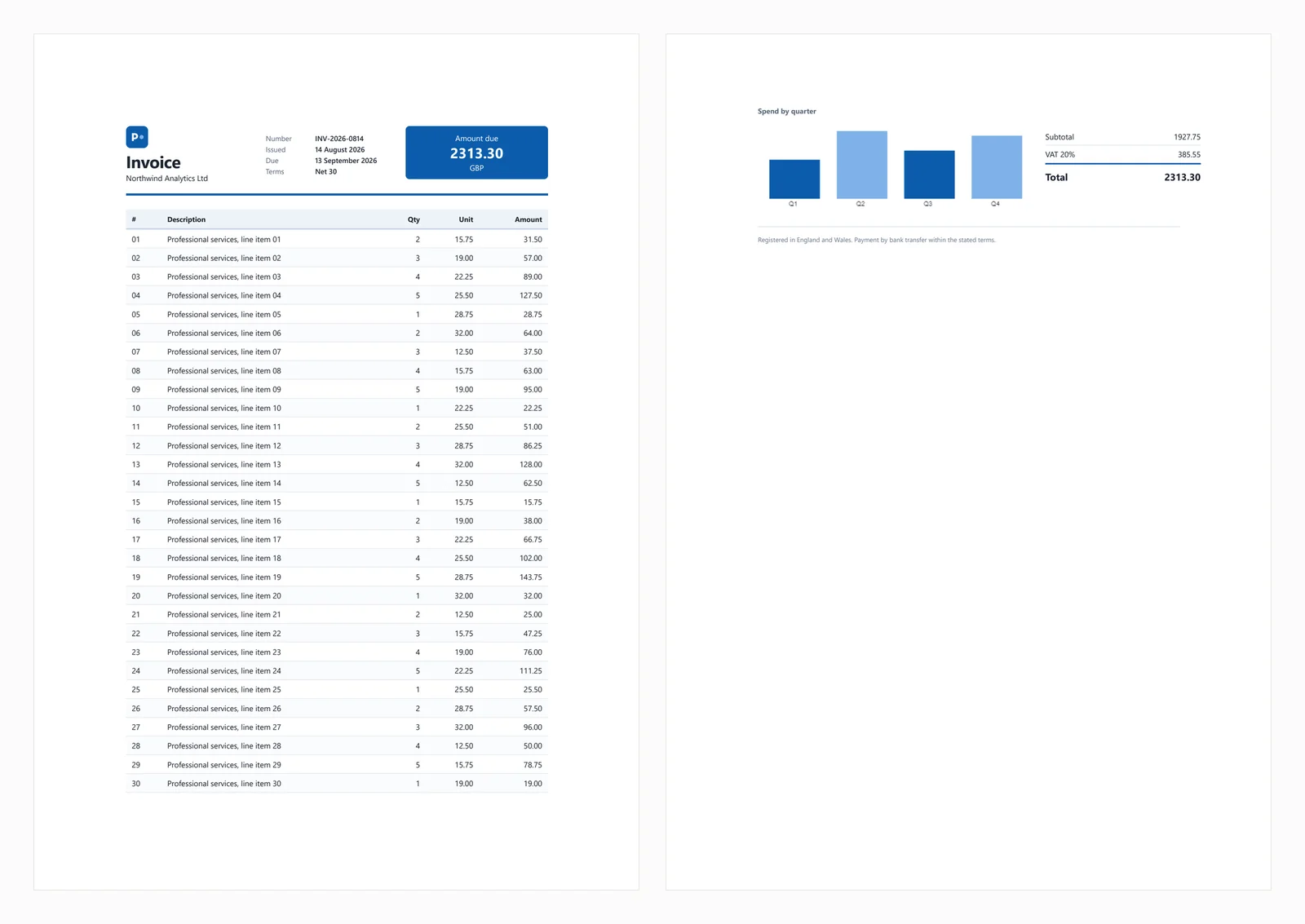
테스트 문서에는 CSS Grid 머리글, 얼룩무늬가 있는 30행 테이블, 인라인 SVG, canvas 요소에 렌더링된 막대 차트, 로드 시 JavaScript로 계산된 총계가 포함되어 있습니다. 계산된 총계는 테스트에 중요하며, JavaScript 지원이 없는 엔진은 완전해 보이지만 지불 금액이 0.00인 송장을 생성합니다. 이러한 동작은 아래의 3개의 라이브러리에서 나타나며, 네 번째는 총계 블록을 완전히 생략합니다.
일반적인 실패 시나리오는 아래 섹션에서 다룹니다.
IronPDF는 NuGet을 통해 애플리케이션 내에서 작동하는 Chromium 렌더러로, 별도로 설치된 브라우저가 필요하지 않습니다. 이 차이점은 주로 배포에 영향을 미치며, 가이드 후반부에서 논의됩니다.
설치:
HTML 문자열에서:
// IronPDF 2026.8.1
using IronPdf;
License.LicenseKey = "YOUR-TRIAL-KEY"; // trial keys are free
string html = @"<h1>Invoice INV-2026-0814</h1>
<p>Northwind Analytics Ltd — Net 30</p>
<table><tr><th>Item</th><th>Amount</th></tr>
<tr><td>Professional services</td><td>2313.30</td></tr></table>";
var renderer = new ChromePdfRenderer();
renderer.RenderingOptions.PaperSize = IronPdf.Rendering.PdfPaperSize.A4;
renderer.RenderingOptions.PrintHtmlBackgrounds = true;
using PdfDocument pdf = renderer.RenderHtmlAsPdf(html);
pdf.SaveAs("invoice.pdf");// IronPDF 2026.8.1
using IronPdf;
License.LicenseKey = "YOUR-TRIAL-KEY"; // trial keys are free
string html = @"<h1>Invoice INV-2026-0814</h1>
<p>Northwind Analytics Ltd — Net 30</p>
<table><tr><th>Item</th><th>Amount</th></tr>
<tr><td>Professional services</td><td>2313.30</td></tr></table>";
var renderer = new ChromePdfRenderer();
renderer.RenderingOptions.PaperSize = IronPdf.Rendering.PdfPaperSize.A4;
renderer.RenderingOptions.PrintHtmlBackgrounds = true;
using PdfDocument pdf = renderer.RenderHtmlAsPdf(html);
pdf.SaveAs("invoice.pdf");' IronPDF 2026.8.1
Imports IronPdf
License.LicenseKey = "YOUR-TRIAL-KEY" ' trial keys are free
Dim html As String = "<h1>Invoice INV-2026-0814</h1>
<p>Northwind Analytics Ltd — Net 30</p>
<table><tr><th>Item</th><th>Amount</th></tr>
<tr><td>Professional services</td><td>2313.30</td></tr></table>"
Dim renderer As New ChromePdfRenderer()
renderer.RenderingOptions.PaperSize = IronPdf.Rendering.PdfPaperSize.A4
renderer.RenderingOptions.PrintHtmlBackgrounds = True
Using pdf As PdfDocument = renderer.RenderHtmlAsPdf(html)
pdf.SaveAs("invoice.pdf")
End Using' IronPDF 2026.8.1
Imports IronPdf
License.LicenseKey = "YOUR-TRIAL-KEY" ' trial keys are free
Dim html As String = "<h1>Invoice INV-2026-0814</h1>
<p>Northwind Analytics Ltd — Net 30</p>
<table><tr><th>Item</th><th>Amount</th></tr>
<tr><td>Professional services</td><td>2313.30</td></tr></table>"
Dim renderer As New ChromePdfRenderer()
renderer.RenderingOptions.PaperSize = IronPdf.Rendering.PdfPaperSize.A4
renderer.RenderingOptions.PrintHtmlBackgrounds = True
Using pdf As PdfDocument = renderer.RenderHtmlAsPdf(html)
pdf.SaveAs("invoice.pdf")
End Using실시간 URL에서:
// IronPDF 2026.8.1 - only the render call changes.
using IronPdf;

License.LicenseKey = "YOUR-TRIAL-KEY";

var renderer = new ChromePdfRenderer();

using PdfDocument pdf = renderer.RenderUrlAsPdf("https://ironpdf.com/");
pdf.SaveAs("page.pdf");
// IronPDF 2026.8.1 - only the render call changes.
using IronPdf;
License.LicenseKey = "YOUR-TRIAL-KEY";
var renderer = new ChromePdfRenderer();
using PdfDocument pdf = renderer.RenderUrlAsPdf("https://ironpdf.com/");
pdf.SaveAs("page.pdf");Imports IronPdf
License.LicenseKey = "YOUR-TRIAL-KEY"
Dim renderer = New ChromePdfRenderer()
Using pdf As PdfDocument = renderer.RenderUrlAsPdf("https://ironpdf.com/")
pdf.SaveAs("page.pdf")
End UsingImports IronPdf
License.LicenseKey = "YOUR-TRIAL-KEY"
Dim renderer = New ChromePdfRenderer()
Using pdf As PdfDocument = renderer.RenderUrlAsPdf("https://ironpdf.com/")
pdf.SaveAs("page.pdf")
End Using권장 사용: 헤드리스 브라우저의 인프라를 관리하지 않고 브라우저 정확도의 PDF 렌더링이 필요할 때 IronPDF를 선택하십시오. 프로세스 수명 주기, 충돌 복구 또는 컨테이너 구성과 같은 요소를 관리할 필요가 없습니다.
트레이드오프: 패키지 내에 Chromium을 포함하고 있어, 단일 콜드 렌더링 시 최대 메모리가 342 MB에 도달하며, 8개의 동시 렌더링 시 1,187 MB에 도달합니다. 또한 가격은 $999부터 시작하며, 다른 6개 중 4개는 무료입니다. 사이드 프로젝트나 저용량 내부 도구의 경우, 그 비용을 정당화하기 어렵습니다.
성능: 486 ms 콜드 스타트, 8개의 동시 렌더링 시 161 ms의 중앙 지연 시간, 초당 44.02의 지속적인 렌더링, 프로세스 트리 전체에서 1,187 MB의 최대 메모리 사용량을 기록합니다. 테스트 송장은 차트와 총계를 포함하여 정확하게 렌더링되었습니다.
PuppeteerSharp는 Puppeteer의 .NET 포트입니다. Chromium 빌드를 다운로드하고 DevTools 프로토콜을 통해 제어하여 PDF를 생성합니다. 무료이며, MIT 라이선스를 가지고 있고, 적극적으로 유지 관리되고 있으며, 여기서는 PuppeteerSharp (25.8.0)에서 측정되었습니다.
설치:
HTML 문자열에서:
// PuppeteerSharp 25.8.0
using PuppeteerSharp;
using PuppeteerSharp.Media;
string html = @"<h1>Invoice INV-2026-0814</h1>
<p>Northwind Analytics Ltd — Net 30</p>
<table><tr><th>Item</th><th>Amount</th></tr>
<tr><td>Professional services</td><td>2313.30</td></tr></table>";
// First run downloads roughly 150 MB of Chromium. Pre-fetch this at build time.
await new BrowserFetcher().DownloadAsync();
await using IBrowser browser = await Puppeteer.LaunchAsync(new LaunchOptions { Headless = true });
await using IPage page = await browser.NewPageAsync();
await page.SetContentAsync(html, new SetContentOptions
{
WaitUntil = new[] { WaitUntilNavigation.Load }
});
await page.PdfAsync("invoice.pdf", new PdfOptions
{
Format = PaperFormat.A4,
PrintBackground = true
});// PuppeteerSharp 25.8.0
using PuppeteerSharp;
using PuppeteerSharp.Media;
string html = @"<h1>Invoice INV-2026-0814</h1>
<p>Northwind Analytics Ltd — Net 30</p>
<table><tr><th>Item</th><th>Amount</th></tr>
<tr><td>Professional services</td><td>2313.30</td></tr></table>";
// First run downloads roughly 150 MB of Chromium. Pre-fetch this at build time.
await new BrowserFetcher().DownloadAsync();
await using IBrowser browser = await Puppeteer.LaunchAsync(new LaunchOptions { Headless = true });
await using IPage page = await browser.NewPageAsync();
await page.SetContentAsync(html, new SetContentOptions
{
WaitUntil = new[] { WaitUntilNavigation.Load }
});
await page.PdfAsync("invoice.pdf", new PdfOptions
{
Format = PaperFormat.A4,
PrintBackground = true
});' PuppeteerSharp 25.8.0
Imports PuppeteerSharp
Imports PuppeteerSharp.Media
Dim html As String = "<h1>Invoice INV-2026-0814</h1>
<p>Northwind Analytics Ltd — Net 30</p>
<table><tr><th>Item</th><th>Amount</th></tr>
<tr><td>Professional services</td><td>2313.30</td></tr></table>"
' First run downloads roughly 150 MB of Chromium. Pre-fetch this at build time.
Await (New BrowserFetcher()).DownloadAsync()
Await Using browser As IBrowser = Await Puppeteer.LaunchAsync(New LaunchOptions With {.Headless = True})
Await Using page As IPage = Await browser.NewPageAsync()
Await page.SetContentAsync(html, New SetContentOptions With {.WaitUntil = {WaitUntilNavigation.Load}})
Await page.PdfAsync("invoice.pdf", New PdfOptions With {
.Format = PaperFormat.A4,
.PrintBackground = True
})
End Using
End Using' PuppeteerSharp 25.8.0
Imports PuppeteerSharp
Imports PuppeteerSharp.Media
Dim html As String = "<h1>Invoice INV-2026-0814</h1>
<p>Northwind Analytics Ltd — Net 30</p>
<table><tr><th>Item</th><th>Amount</th></tr>
<tr><td>Professional services</td><td>2313.30</td></tr></table>"
' First run downloads roughly 150 MB of Chromium. Pre-fetch this at build time.
Await (New BrowserFetcher()).DownloadAsync()
Await Using browser As IBrowser = Await Puppeteer.LaunchAsync(New LaunchOptions With {.Headless = True})
Await Using page As IPage = Await browser.NewPageAsync()
Await page.SetContentAsync(html, New SetContentOptions With {.WaitUntil = {WaitUntilNavigation.Load}})
Await page.PdfAsync("invoice.pdf", New PdfOptions With {
.Format = PaperFormat.A4,
.PrintBackground = True
})
End Using
End Using실시간 URL에서:
// PuppeteerSharp 25.8.0 - GoToAsync replaces SetContentAsync.
await using IPage page = await browser.NewPageAsync();

await page.GoToAsync("https://ironpdf.com/", new NavigationOptions
{
    WaitUntil = new[] { WaitUntilNavigation.Networkidle0 }
});

await page.PdfAsync("page.pdf", new PdfOptions { Format = PaperFormat.A4, PrintBackground = true });
// PuppeteerSharp 25.8.0 - GoToAsync replaces SetContentAsync.
await using IPage page = await browser.NewPageAsync();
await page.GoToAsync("https://ironpdf.com/", new NavigationOptions
{
WaitUntil = new[] { WaitUntilNavigation.Networkidle0 }
});
await page.PdfAsync("page.pdf", new PdfOptions { Format = PaperFormat.A4, PrintBackground = true });' PuppeteerSharp 25.8.0 - GoToAsync replaces SetContentAsync.
Await Using page As IPage = Await browser.NewPageAsync()
Await page.GoToAsync("https://ironpdf.com/", New NavigationOptions With {
.WaitUntil = {WaitUntilNavigation.Networkidle0}
})
Await page.PdfAsync("page.pdf", New PdfOptions With {.Format = PaperFormat.A4, .PrintBackground = True})' PuppeteerSharp 25.8.0 - GoToAsync replaces SetContentAsync.
Await Using page As IPage = Await browser.NewPageAsync()
Await page.GoToAsync("https://ironpdf.com/", New NavigationOptions With {
.WaitUntil = {WaitUntilNavigation.Networkidle0}
})
Await page.PdfAsync("page.pdf", New PdfOptions With {.Format = PaperFormat.A4, .PrintBackground = True})권장 사용: 예산 제약이 우선이고 브라우저 프로세스 관리를 편안하게 할 수 있을 때 PuppeteerSharp를 선택하십시오. 동일한 엔진을 사용하므로 Chrome과 동일한 출력을 제공합니다.
트레이드오프: 브라우저 프로세스 관리, 수명 주기, 충돌 후 고아 프로세스 처리 및 샌드박스 구성을 책임져야 합니다. 초기 실행 시 약 150 MB의 Chromium을 다운로드하며, 아웃바운드 네트워크 액세스가 없는 컨테이너에서는 실패할 수 있으므로 빌드 시 브라우저를 미리 가져와야 합니다. 부하가 걸릴 때 PuppeteerSharp는 측정된 옵션 중 가장 많은 프로세스를 생성하며, 16개의 동시 렌더링 시 40개에 도달합니다.
성능: 639 ms 콜드 스타트, 8개의 동시 렌더링 시 507 ms의 중앙 지연 시간, 초당 15.60의 지속적인 렌더링, 프로세스 트리 전체에서 1,293 MB의 최대 메모리 사용량을 기록합니다. 테스트 송장은 정확하게 렌더링되었습니다.
.NET용 Playwright는 Microsoft의 브라우저 자동화 라이브러리입니다. Puppeteer와 유사한 접근 방식을 사용하지만, 다른 API, 더 효율적인 페이지 격리 및 유사한 배포 고려 사항을 제공합니다.
설치:
두 번째 명령은 브라우저 바이너리를 설치합니다.
이를 생략하는 것은 CI에서 첫 Playwright 빌드 실패의 가장 일반적인 원인입니다.
HTML 문자열에서:
// Microsoft.Playwright 1.62.0
using Microsoft.Playwright;
string html = @"<h1>Invoice INV-2026-0814</h1>
<p>Northwind Analytics Ltd — Net 30</p>
<table><tr><th>Item</th><th>Amount</th></tr>
<tr><td>Professional services</td><td>2313.30</td></tr></table>";
// Run "playwright install chromium" first, or call the installer in code.
Microsoft.Playwright.Program.Main(new[] { "install", "chromium" });
using IPlaywright playwright = await Playwright.CreateAsync();
await using IBrowser browser = await playwright.Chromium.LaunchAsync();
IPage page = await browser.NewPageAsync();
await page.SetContentAsync(html, new PageSetContentOptions { WaitUntil = WaitUntilState.Load });
await page.PdfAsync(new PagePdfOptions
{
Path = "invoice.pdf",
Format = "A4",
PrintBackground = true
});// Microsoft.Playwright 1.62.0
using Microsoft.Playwright;
string html = @"<h1>Invoice INV-2026-0814</h1>
<p>Northwind Analytics Ltd — Net 30</p>
<table><tr><th>Item</th><th>Amount</th></tr>
<tr><td>Professional services</td><td>2313.30</td></tr></table>";
// Run "playwright install chromium" first, or call the installer in code.
Microsoft.Playwright.Program.Main(new[] { "install", "chromium" });
using IPlaywright playwright = await Playwright.CreateAsync();
await using IBrowser browser = await playwright.Chromium.LaunchAsync();
IPage page = await browser.NewPageAsync();
await page.SetContentAsync(html, new PageSetContentOptions { WaitUntil = WaitUntilState.Load });
await page.PdfAsync(new PagePdfOptions
{
Path = "invoice.pdf",
Format = "A4",
PrintBackground = true
});' Microsoft.Playwright 1.62.0
Imports Microsoft.Playwright
Dim html As String = "<h1>Invoice INV-2026-0814</h1>
<p>Northwind Analytics Ltd — Net 30</p>
<table><tr><th>Item</th><th>Amount</th></tr>
<tr><td>Professional services</td><td>2313.30</td></tr></table>"
' Run "playwright install chromium" first, or call the installer in code.
Microsoft.Playwright.Program.Main(New String() {"install", "chromium"})
Using playwright As IPlaywright = Await Playwright.CreateAsync()
Await Using browser As IBrowser = Await playwright.Chromium.LaunchAsync()
Dim page As IPage = Await browser.NewPageAsync()
Await page.SetContentAsync(html, New PageSetContentOptions With {.WaitUntil = WaitUntilState.Load})
Await page.PdfAsync(New PagePdfOptions With {
.Path = "invoice.pdf",
.Format = "A4",
.PrintBackground = True
})
End Using
End Using' Microsoft.Playwright 1.62.0
Imports Microsoft.Playwright
Dim html As String = "<h1>Invoice INV-2026-0814</h1>
<p>Northwind Analytics Ltd — Net 30</p>
<table><tr><th>Item</th><th>Amount</th></tr>
<tr><td>Professional services</td><td>2313.30</td></tr></table>"
' Run "playwright install chromium" first, or call the installer in code.
Microsoft.Playwright.Program.Main(New String() {"install", "chromium"})
Using playwright As IPlaywright = Await Playwright.CreateAsync()
Await Using browser As IBrowser = Await playwright.Chromium.LaunchAsync()
Dim page As IPage = Await browser.NewPageAsync()
Await page.SetContentAsync(html, New PageSetContentOptions With {.WaitUntil = WaitUntilState.Load})
Await page.PdfAsync(New PagePdfOptions With {
.Path = "invoice.pdf",
.Format = "A4",
.PrintBackground = True
})
End Using
End Using실시간 URL에서:
// Microsoft.Playwright 1.62.0 - GotoAsync replaces SetContentAsync.
IPage page = await browser.NewPageAsync();

await page.GotoAsync("https://ironpdf.com/", new PageGotoOptions
{
    WaitUntil = WaitUntilState.NetworkIdle
});

await page.PdfAsync(new PagePdfOptions { Path = "page.pdf", Format = "A4", PrintBackground = true });
// Microsoft.Playwright 1.62.0 - GotoAsync replaces SetContentAsync.
IPage page = await browser.NewPageAsync();
await page.GotoAsync("https://ironpdf.com/", new PageGotoOptions
{
WaitUntil = WaitUntilState.NetworkIdle
});
await page.PdfAsync(new PagePdfOptions { Path = "page.pdf", Format = "A4", PrintBackground = true });' Microsoft.Playwright 1.62.0 - GotoAsync replaces SetContentAsync.
Dim page As IPage = Await browser.NewPageAsync()
Await page.GotoAsync("https://ironpdf.com/", New PageGotoOptions With {
.WaitUntil = WaitUntilState.NetworkIdle
})
Await page.PdfAsync(New PagePdfOptions With {.Path = "page.pdf", .Format = "A4", .PrintBackground = True})' Microsoft.Playwright 1.62.0 - GotoAsync replaces SetContentAsync.
Dim page As IPage = Await browser.NewPageAsync()
Await page.GotoAsync("https://ironpdf.com/", New PageGotoOptions With {
.WaitUntil = WaitUntilState.NetworkIdle
})
Await page.PdfAsync(New PagePdfOptions With {.Path = "page.pdf", .Format = "A4", .PrintBackground = True})권장 사용: 브라우저 품질의 렌더링이 필요하고 비용이 들지 않으며 Playwright의 API를 선호하거나 이미 테스트에 Playwright를 사용하고 추가 종속성을 피하고 싶다면 .NET용 Playwright를 선택하십시오.
트레이드오프: Playwright는 Puppeteer와 동일한 고려 사항을 공유하며, 이미지에 브라우저 바이너리 포함, 프로세스 감독 및 Dockerfile에 설치 단계가 포함됩니다. 여기서 측정된 가장 안정적인 엔진이지만, 내장 엔진의 절반 이상의 처리량을 제공합니다.
성능: 720 ms 콜드 스타트, 8개의 동시 렌더링에서 381 ms의 중앙 지연 시간, 초당 20.68의 지속적인 렌더링, 프로세스 트리 전체에서 1,122 MB의 최대 메모리 사용량. 테스트 송장은 올바르게 렌더링되었습니다.
pdfHTML을 사용한 iText 9는 HTML 변환 애드온이 있는 PDF 라이브러리입니다. 브라우저 대신 자체 레이아웃 엔진을 사용하여 지원되는 기능 내에서 빠르고 예측 가능한 결과를 제공하며, 그 외의 것에 대해서는 조용합니다. 두 패키지는 별도로 버전이 지정됩니다. pdfHTML (6.3.3)은 iText Core (9.7.0)에서 실행되는 애드온이며, 여기서 측정된 페어링입니다.
설치:
참고: itext7.* 패키지는 더 이상 사용되지 않으며 itext.*로 이름이 변경되었습니다. 상위 튜토리얼에서도 여전히 잘못된 정보를 제공하고 있습니다. itext.pdfhtml를 설치하고, itext7.pdfhtml를 설치하지 마십시오. 패키지 이름에는 버전 번호가 포함되어 있지 않으므로 itext.pdfhtml는 iText 9의 현재 pdfHTML 릴리스로 해석됩니다.
HTML 문자열에서:
// itext.pdfhtml 6.3.3 - AGPL or commercial licence.
// Note the package rename: itext7.pdfhtml is deprecated in favour of itext.pdfhtml.
using iText.Html2pdf;
string html = @"<h1>Invoice INV-2026-0814</h1>
<p>Northwind Analytics Ltd — Net 30</p>
<table><tr><th>Item</th><th>Amount</th></tr>
<tr><td>Professional services</td><td>2313.30</td></tr></table>";
using var output = new FileStream("invoice.pdf", FileMode.Create);
HtmlConverter.ConvertToPdf(html, output);
// No JavaScript engine and no canvas, so anything the page computes or draws
// at load time will be missing from the result.// itext.pdfhtml 6.3.3 - AGPL or commercial licence.
// Note the package rename: itext7.pdfhtml is deprecated in favour of itext.pdfhtml.
using iText.Html2pdf;
string html = @"<h1>Invoice INV-2026-0814</h1>
<p>Northwind Analytics Ltd — Net 30</p>
<table><tr><th>Item</th><th>Amount</th></tr>
<tr><td>Professional services</td><td>2313.30</td></tr></table>";
using var output = new FileStream("invoice.pdf", FileMode.Create);
HtmlConverter.ConvertToPdf(html, output);
// No JavaScript engine and no canvas, so anything the page computes or draws
// at load time will be missing from the result.// itext.pdfhtml 6.3.3 - AGPL or commercial licence.
// Note the package rename: itext7.pdfhtml is deprecated in favour of itext.pdfhtml.
Imports iText.Html2pdf
Dim html As String = "<h1>Invoice INV-2026-0814</h1>
<p>Northwind Analytics Ltd — Net 30</p>
<table><tr><th>Item</th><th>Amount</th></tr>
<tr><td>Professional services</td><td>2313.30</td></tr></table>"
Using output As New FileStream("invoice.pdf", FileMode.Create)
HtmlConverter.ConvertToPdf(html, output)
End Using
' No JavaScript engine and no canvas, so anything the page computes or draws
' at load time will be missing from the result.// itext.pdfhtml 6.3.3 - AGPL or commercial licence.
// Note the package rename: itext7.pdfhtml is deprecated in favour of itext.pdfhtml.
Imports iText.Html2pdf
Dim html As String = "<h1>Invoice INV-2026-0814</h1>
<p>Northwind Analytics Ltd — Net 30</p>
<table><tr><th>Item</th><th>Amount</th></tr>
<tr><td>Professional services</td><td>2313.30</td></tr></table>"
Using output As New FileStream("invoice.pdf", FileMode.Create)
HtmlConverter.ConvertToPdf(html, output)
End Using
' No JavaScript engine and no canvas, so anything the page computes or draws
' at load time will be missing from the result.실시간 URL에서: iText는 URL을 직접 수락하지 않습니다. HTML을 수동으로 가져오고 상대 자산이 올바르게 해결되도록 기본 URI를 설정하십시오.
// itext.pdfhtml 6.3.3 - there is no URL method, so fetch the HTML yourself.
using iText.Html2pdf;

using var client = new HttpClient();
string html = await client.GetStringAsync("https://ironpdf.com/");

// The base URI is what lets relative images, CSS and links resolve.
var properties = new ConverterProperties();
properties.SetBaseUri("https://ironpdf.com/");

using var output = new FileStream("page.pdf", FileMode.Create);
HtmlConverter.ConvertToPdf(html, output, properties);
// itext.pdfhtml 6.3.3 - there is no URL method, so fetch the HTML yourself.
using iText.Html2pdf;
using var client = new HttpClient();
string html = await client.GetStringAsync("https://ironpdf.com/");
// The base URI is what lets relative images, CSS and links resolve.
var properties = new ConverterProperties();
properties.SetBaseUri("https://ironpdf.com/");
using var output = new FileStream("page.pdf", FileMode.Create);
HtmlConverter.ConvertToPdf(html, output, properties);' itext.pdfhtml 6.3.3 - there is no URL method, so fetch the HTML yourself.
Imports iText.Html2pdf
Using client As New HttpClient()
Dim html As String = Await client.GetStringAsync("https://ironpdf.com/")
' The base URI is what lets relative images, CSS and links resolve.
Dim properties As New ConverterProperties()
properties.SetBaseUri("https://ironpdf.com/")
Using output As New FileStream("page.pdf", FileMode.Create)
HtmlConverter.ConvertToPdf(html, output, properties)
End Using
End Using' itext.pdfhtml 6.3.3 - there is no URL method, so fetch the HTML yourself.
Imports iText.Html2pdf
Using client As New HttpClient()
Dim html As String = Await client.GetStringAsync("https://ironpdf.com/")
' The base URI is what lets relative images, CSS and links resolve.
Dim properties As New ConverterProperties()
properties.SetBaseUri("https://ironpdf.com/")
Using output As New FileStream("page.pdf", FileMode.Create)
HtmlConverter.ConvertToPdf(html, output, properties)
End Using
End Using권장 사용: 다른 PDF 작업에 이미 iText를 사용하거나 HTML 변환과 함께 고급 PDF 조작이 필요하고 여러 라이브러리를 피하고 싶다면 iText를 선택하십시오.
트레이드오프: iText는 AGPL 또는 유료 라이선스만으로 제공됩니다. AGPL은 전체 애플리케이션의 오픈 소스를 요구하므로, 대부분의 폐쇄형 소프트웨어를 배포하는 팀에게는 유료 옵션이 필요합니다. 기술적으로 iText는 JavaScript를 실행하지 않으며, 아래의 충실도 벤치마크에서 보여지듯이 브라우저에 비해 제한된 CSS 지원을 제공합니다.
성능: 489 ms 콜드 스타트, 8개의 동시 렌더링에서 144 ms의 중앙 지연 시간, 초당 54.30의 지속적인 렌더링, 단일 프로세스에서 332 MB의 최대 메모리 사용량. 송장 총액은 0.00였으며 차트는 렌더링되지 않았습니다.
HtmlRenderer with PdfSharp는 순수 관리 C#로 구현되었으며, 네이티브 바이너리나 브라우저 종속성이 없고 추가 컨테이너 설치가 필요하지 않습니다. 제시된 옵션 중 가장 작고 빠른 옵션이지만, CSS 지원은 대략 2011년 표준에 제한됩니다.
설치:
HTML 문자열에서:
// HtmlRenderer.PdfSharp 1.6.1 - pure managed, no native binaries at all.
using TheArtOfDev.HtmlRenderer.PdfSharp;
string html = @"<h1>Invoice INV-2026-0814</h1>
<p>Northwind Analytics Ltd — Net 30</p>
<table><tr><th>Item</th><th>Amount</th></tr>
<tr><td>Professional services</td><td>2313.30</td></tr></table>";
PdfSharp.Pdf.PdfDocument pdf = PdfGenerator.GeneratePdf(html, PdfSharp.PageSize.A4);
pdf.Save("invoice.pdf");
// There is no URL method. Fetch the markup with HttpClient and pass the string.
// CSS support stops well short of Flexbox and Grid, and there is no JavaScript.// HtmlRenderer.PdfSharp 1.6.1 - pure managed, no native binaries at all.
using TheArtOfDev.HtmlRenderer.PdfSharp;
string html = @"<h1>Invoice INV-2026-0814</h1>
<p>Northwind Analytics Ltd — Net 30</p>
<table><tr><th>Item</th><th>Amount</th></tr>
<tr><td>Professional services</td><td>2313.30</td></tr></table>";
PdfSharp.Pdf.PdfDocument pdf = PdfGenerator.GeneratePdf(html, PdfSharp.PageSize.A4);
pdf.Save("invoice.pdf");
// There is no URL method. Fetch the markup with HttpClient and pass the string.
// CSS support stops well short of Flexbox and Grid, and there is no JavaScript.' HtmlRenderer.PdfSharp 1.6.1 - pure managed, no native binaries at all.
Imports TheArtOfDev.HtmlRenderer.PdfSharp
Dim html As String = "<h1>Invoice INV-2026-0814</h1>
<p>Northwind Analytics Ltd — Net 30</p>
<table><tr><th>Item</th><th>Amount</th></tr>
<tr><td>Professional services</td><td>2313.30</td></tr></table>"
Dim pdf As PdfSharp.Pdf.PdfDocument = PdfGenerator.GeneratePdf(html, PdfSharp.PageSize.A4)
pdf.Save("invoice.pdf")
' There is no URL method. Fetch the markup with HttpClient and pass the string.
' CSS support stops well short of Flexbox and Grid, and there is no JavaScript.' HtmlRenderer.PdfSharp 1.6.1 - pure managed, no native binaries at all.
Imports TheArtOfDev.HtmlRenderer.PdfSharp
Dim html As String = "<h1>Invoice INV-2026-0814</h1>
<p>Northwind Analytics Ltd — Net 30</p>
<table><tr><th>Item</th><th>Amount</th></tr>
<tr><td>Professional services</td><td>2313.30</td></tr></table>"
Dim pdf As PdfSharp.Pdf.PdfDocument = PdfGenerator.GeneratePdf(html, PdfSharp.PageSize.A4)
pdf.Save("invoice.pdf")
' There is no URL method. Fetch the markup with HttpClient and pass the string.
' CSS support stops well short of Flexbox and Grid, and there is no JavaScript.실시간 URL에서: 직접 URL 입력을 위한 메서드는 없습니다. HTML을 수동으로 가져와 문자열로 전달하십시오.
권장 사용: HtmlRenderer with PdfSharp는 네이티브 바이너리가 엄격히 금지된 환경, 예를 들어 규제된 환경이나 에어갭 환경에서만 선택하고, 로드 시 아무것도 계산하지 않는 템플릿에만 사용하십시오. 이는 iText 9 및 Aspose.HTML과 함께 네이티브 바이너리를 제공하지 않는 3가지 옵션 중 하나이며, 이 송장에서는 머리글, 총계 블록 및 차트를 생략했습니다.
트레이드오프: HtmlRenderer는 JavaScript, Flexbox 또는 CSS Grid를 지원하지 않습니다. 고정되고 단순한 템플릿의 경우 충분할 수 있으며, 단일 프로세스에서 23 ms의 중간 지연 시간은 타의 추종을 불허합니다. 그러나 현대 브라우저용으로 설계된 HTML은 올바르게 렌더링되지 않습니다. 테스트에서는 CSS Grid 머리글, 총계 블록 및 차트를 생략하고 2페이지를 1페이지로 압축하여 콘텐츠가 겹치게 되었습니다.
HtmlRenderer는 측정된 가장 빠른 엔진이지만 현대 CSS를 렌더링할 수 없습니다. 두 가지 요소를 결정에 고려해야 합니다.
성능: 157 ms 콜드 스타트, 8개의 동시 렌더링에서 23 ms 중간 지연 시간, 초당 327.09 지속 렌더링, 166 MB 피크 메모리 사용량, 단일 프로세스. 출력은 머리글, 총계 및 차트가 없는 단일 페이지였습니다.
wkhtmltopdf는 오래된 Qt WebKit 엔진을 기반으로 하는 명령줄 도구로, 일반적으로 .NET과 DinkToPdf를 통해 통합됩니다. 엔진 자체에 대한 NuGet 설치는 없으므로 애플리케이션과 함께 바이너리로 제공되어야 합니다. DinkToPdf는 래퍼 역할을 하지만 대안도 존재합니다.
HTML 문자열에서:
// wkhtmltopdf 0.12.6 via DinkToPdf. The engine is archived; the native
// libwkhtmltox binaries must be shipped alongside your application.
using DinkToPdf;
using DinkToPdf.Contracts;
string html = @"<h1>Invoice INV-2026-0814</h1>
<p>Northwind Analytics Ltd — Net 30</p>
<table><tr><th>Item</th><th>Amount</th></tr>
<tr><td>Professional services</td><td>2313.30</td></tr></table>";
IConverter converter = new SynchronizedConverter(new PdfTools());
var document = new HtmlToPdfDocument
{
GlobalSettings = { PaperSize = PaperKind.A4, Out = "invoice.pdf" },
Objects = { new ObjectSettings { HtmlContent = html } }
};
converter.Convert(document);// wkhtmltopdf 0.12.6 via DinkToPdf. The engine is archived; the native
// libwkhtmltox binaries must be shipped alongside your application.
using DinkToPdf;
using DinkToPdf.Contracts;
string html = @"<h1>Invoice INV-2026-0814</h1>
<p>Northwind Analytics Ltd — Net 30</p>
<table><tr><th>Item</th><th>Amount</th></tr>
<tr><td>Professional services</td><td>2313.30</td></tr></table>";
IConverter converter = new SynchronizedConverter(new PdfTools());
var document = new HtmlToPdfDocument
{
GlobalSettings = { PaperSize = PaperKind.A4, Out = "invoice.pdf" },
Objects = { new ObjectSettings { HtmlContent = html } }
};
converter.Convert(document);' wkhtmltopdf 0.12.6 via DinkToPdf. The engine is archived; the native
' libwkhtmltox binaries must be shipped alongside your application.
Imports DinkToPdf
Imports DinkToPdf.Contracts
Dim html As String = "<h1>Invoice INV-2026-0814</h1>
<p>Northwind Analytics Ltd — Net 30</p>
<table><tr><th>Item</th><th>Amount</th></tr>
<tr><td>Professional services</td><td>2313.30</td></tr></table>"
Dim converter As IConverter = New SynchronizedConverter(New PdfTools())
Dim document = New HtmlToPdfDocument() With {
.GlobalSettings = New GlobalSettings With {.PaperSize = PaperKind.A4, .Out = "invoice.pdf"},
.Objects = {New ObjectSettings With {.HtmlContent = html}}
}
converter.Convert(document)' wkhtmltopdf 0.12.6 via DinkToPdf. The engine is archived; the native
' libwkhtmltox binaries must be shipped alongside your application.
Imports DinkToPdf
Imports DinkToPdf.Contracts
Dim html As String = "<h1>Invoice INV-2026-0814</h1>
<p>Northwind Analytics Ltd — Net 30</p>
<table><tr><th>Item</th><th>Amount</th></tr>
<tr><td>Professional services</td><td>2313.30</td></tr></table>"
Dim converter As IConverter = New SynchronizedConverter(New PdfTools())
Dim document = New HtmlToPdfDocument() With {
.GlobalSettings = New GlobalSettings With {.PaperSize = PaperKind.A4, .Out = "invoice.pdf"},
.Objects = {New ObjectSettings With {.HtmlContent = html}}
}
converter.Convert(document)실시간 URL에서:
// wkhtmltopdf 0.12.6 via DinkToPdf - swap HtmlContent for Page.
var document = new HtmlToPdfDocument
{
    GlobalSettings = { PaperSize = PaperKind.A4, Out = "page.pdf" },
    Objects = { new ObjectSettings { Page = "https://ironpdf.com/" } }
};

converter.Convert(document);
// wkhtmltopdf 0.12.6 via DinkToPdf - swap HtmlContent for Page.
var document = new HtmlToPdfDocument
{
GlobalSettings = { PaperSize = PaperKind.A4, Out = "page.pdf" },
Objects = { new ObjectSettings { Page = "https://ironpdf.com/" } }
};
converter.Convert(document);' wkhtmltopdf 0.12.6 via DinkToPdf - swap HtmlContent for Page.
Dim document = New HtmlToPdfDocument With {
.GlobalSettings = New GlobalSettings With {.PaperSize = PaperKind.A4, .Out = "page.pdf"},
.Objects = {New ObjectSettings With {.Page = "https://ironpdf.com/"}}
}
converter.Convert(document)' wkhtmltopdf 0.12.6 via DinkToPdf - swap HtmlContent for Page.
Dim document = New HtmlToPdfDocument With {
.GlobalSettings = New GlobalSettings With {.PaperSize = PaperKind.A4, .Out = "page.pdf"},
.Objects = {New ObjectSettings With {.Page = "https://ironpdf.com/"}}
}
converter.Convert(document)프로젝트 상태: wkhtmltopdf 저장소는 2023년 1월에 보관되었으며, 마지막 안정 릴리스(0.12.6)는 2020년 6월에 Qt (4.8.5)로 빌드되었습니다. 렌더링은 대략 2013년 웹 표준에 고정되어 있으며 더 이상 보안 업데이트를 받지 않습니다.
권장 사용: 이미 프로덕션에서 사용 중이고 문서를 올바르게 렌더링하며 템플릿이 정적이라면 wkhtmltopdf를 계속 사용하십시오. 기능적 요구 사항이 없는 한 마이그레이션은 불필요합니다.
트레이드오프: wkhtmltopdf는 Flexbox 또는 최신 CSS 기능에 의존하는 레이아웃을 렌더링할 수 없으며 보안 패치를 받지 않습니다.
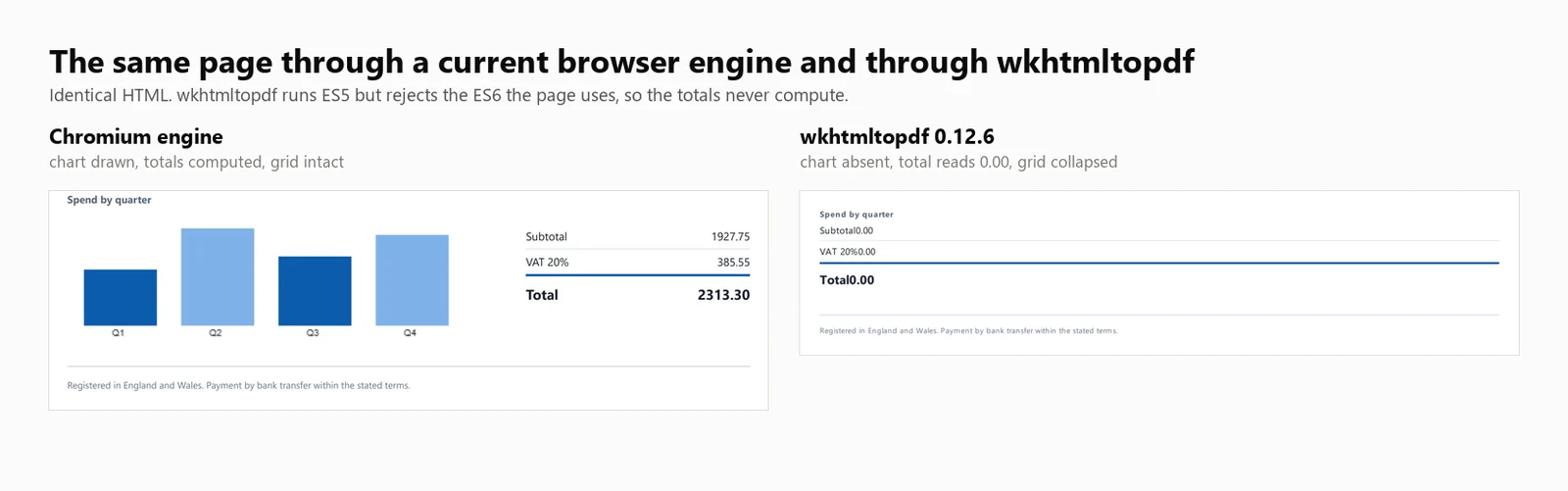
JavaScript 지원: wkhtmltopdf는 ES5 JavaScript를 실행하지만 ES6은 지원하지 않습니다. 이 빌드에 대한 직접 테스트에서 ES5는 성공적으로 실행되었고 ES6에서는 오류가 발생했습니다. 이는 Qt (4.8.5) 엔진이 document.querySelectorAll(...).forEach을 지원하지 않기 때문입니다. 결과적으로 이 호출을 사용하는 테스트 송장은 0.00의 자리 표시자 총계를 표시했으며, 눈에 띄는 오류는 없었습니다. ES5 기준으로 작성된 템플릿은 올바르게 계산되며, 최신 JavaScript를 사용하는 템플릿은 그렇지 않습니다.
성능: 424 ms 콜드 스타트, 8개의 동시 렌더링에서 486 ms의 중앙 지연 시간, 초당 16.03의 지속적인 렌더링, 프로세스 트리 전체에서 482 MB의 최대 메모리 사용량. 송장 총계는 0.00였으며 차트는 렌더링되지 않았습니다.
위의 수치는 wkhtmltopdf.exe을 명령줄 도구로 실행하여 얻은 것이며, 렌더당 1개의 프로세스를 사용합니다. DinkToPdf 래퍼는 동일한 엔진을 인프로세스에서 사용하지만 모든 호출을 SynchronizedConverter를 통해 직렬화하여 동시성 확장성을 제한합니다.
Aspose.HTML for .NET은 브라우저가 아닌 자체 렌더링 엔진을 가지고 있으며, Word, Excel, PowerPoint도 포함하는 문서 제품군 내에 위치합니다. 이미 한 공급업체에서 구매하는 팀에게는 여러 라이브러리를 통합하고 개별 갱신을 추적하는 대신 하나의 지원 계약과 하나의 구매 주문서만 필요하다는 의미입니다.
설치:
HTML 문자열에서:
// Aspose.HTML for .NET 25.7.0 - commercial licence, applied from a .lic file.
using Aspose.Html;
using Aspose.Html.Converters;
using Aspose.Html.Saving;
new License().SetLicense("Aspose.HTMLProductFamily.lic");
string html = @"<h1>Invoice INV-2026-0814</h1>
<p>Northwind Analytics Ltd — Net 30</p>
<table><tr><th>Item</th><th>Amount</th></tr>
<tr><td>Professional services</td><td>2313.30</td></tr></table>";
// The second argument is the base URL relative assets resolve against.
using var doc = new HTMLDocument(html, ".");
Converter.ConvertHTML(doc, new PdfSaveOptions(), "invoice.pdf");
// Its own rendering stack, not a browser: ES5 runs, ES6 throws, so anything the
// page computes with modern syntax is left at its initial value.// Aspose.HTML for .NET 25.7.0 - commercial licence, applied from a .lic file.
using Aspose.Html;
using Aspose.Html.Converters;
using Aspose.Html.Saving;
new License().SetLicense("Aspose.HTMLProductFamily.lic");
string html = @"<h1>Invoice INV-2026-0814</h1>
<p>Northwind Analytics Ltd — Net 30</p>
<table><tr><th>Item</th><th>Amount</th></tr>
<tr><td>Professional services</td><td>2313.30</td></tr></table>";
// The second argument is the base URL relative assets resolve against.
using var doc = new HTMLDocument(html, ".");
Converter.ConvertHTML(doc, new PdfSaveOptions(), "invoice.pdf");
// Its own rendering stack, not a browser: ES5 runs, ES6 throws, so anything the
// page computes with modern syntax is left at its initial value.// Aspose.HTML for .NET 25.7.0 - commercial licence, applied from a .lic file.
Imports Aspose.Html
Imports Aspose.Html.Converters
Imports Aspose.Html.Saving
Call New License().SetLicense("Aspose.HTMLProductFamily.lic")
Dim html As String = "<h1>Invoice INV-2026-0814</h1>
<p>Northwind Analytics Ltd — Net 30</p>
<table><tr><th>Item</th><th>Amount</th></tr>
<tr><td>Professional services</td><td>2313.30</td></tr></table>"
' The second argument is the base URL relative assets resolve against.
Using doc = New HTMLDocument(html, ".")
Converter.ConvertHTML(doc, New PdfSaveOptions(), "invoice.pdf")
End Using
' Its own rendering stack, not a browser: ES5 runs, ES6 throws, so anything the
' page computes with modern syntax is left at its initial value.// Aspose.HTML for .NET 25.7.0 - commercial licence, applied from a .lic file.
Imports Aspose.Html
Imports Aspose.Html.Converters
Imports Aspose.Html.Saving
Call New License().SetLicense("Aspose.HTMLProductFamily.lic")
Dim html As String = "<h1>Invoice INV-2026-0814</h1>
<p>Northwind Analytics Ltd — Net 30</p>
<table><tr><th>Item</th><th>Amount</th></tr>
<tr><td>Professional services</td><td>2313.30</td></tr></table>"
' The second argument is the base URL relative assets resolve against.
Using doc = New HTMLDocument(html, ".")
Converter.ConvertHTML(doc, New PdfSaveOptions(), "invoice.pdf")
End Using
' Its own rendering stack, not a browser: ES5 runs, ES6 throws, so anything the
' page computes with modern syntax is left at its initial value.실시간 URL에서:
// Aspose.HTML 25.7.0 - only the HTMLDocument constructor changes.
using Aspose.Html;
using Aspose.Html.Converters;
using Aspose.Html.Saving;

new License().SetLicense("Aspose.HTMLProductFamily.lic");

using var doc = new HTMLDocument("https://ironpdf.com/");
Converter.ConvertHTML(doc, new PdfSaveOptions(), "page.pdf");
// Aspose.HTML 25.7.0 - only the HTMLDocument constructor changes.
using Aspose.Html;
using Aspose.Html.Converters;
using Aspose.Html.Saving;
new License().SetLicense("Aspose.HTMLProductFamily.lic");
using var doc = new HTMLDocument("https://ironpdf.com/");
Converter.ConvertHTML(doc, new PdfSaveOptions(), "page.pdf");' Aspose.HTML 25.7.0 - only the HTMLDocument constructor changes.
Imports Aspose.Html
Imports Aspose.Html.Converters
Imports Aspose.Html.Saving
New License().SetLicense("Aspose.HTMLProductFamily.lic")
Using doc As New HTMLDocument("https://ironpdf.com/")
Converter.ConvertHTML(doc, New PdfSaveOptions(), "page.pdf")
End Using' Aspose.HTML 25.7.0 - only the HTMLDocument constructor changes.
Imports Aspose.Html
Imports Aspose.Html.Converters
Imports Aspose.Html.Saving
New License().SetLicense("Aspose.HTMLProductFamily.lic")
Using doc As New HTMLDocument("https://ironpdf.com/")
Converter.ConvertHTML(doc, New PdfSaveOptions(), "page.pdf")
End Using권장 사용: 다른 형식에 대해 이미 Aspose로 표준화되어 있고, 현대 JavaScript에 의존하지 않는 템플릿에서 동일한 계약 하에 HTML 변환을 원할 때 Aspose.HTML을 선택하십시오.
절충점: 무료 계층이 없는 유료 라이브러리이며, 렌더링은 브라우저보다는 레이아웃 엔진에 속합니다. Aspose.HTML은 Professional 라이선스 하에 벤치마크되었으며, 그 수치는 아래 모든 표에 나타납니다.
성능: 1,096 ms 콜드 스타트, 8개의 동시 렌더링에서 227 ms 중간 지연 시간, 초당 33.98 지속 렌더링, 단일 프로세스에서 334 MB의 최대 메모리 사용량. 송장 총액은 0.00였으며 차트는 렌더링되지 않았습니다.
아래의 모든 수치는 하나의 기계, 하나의 문서 및 단일 날짜에 5회 실행된 하나의 캠페인에서 나왔습니다. 모든 3가지는 여기 명시되어 있어 숫자가 그 자체로 재현되거나 무시될 수 있습니다.
버전 열은 기사가 작성된 버전이 아닌, 실행 시 로드된 어셈블리에서 하니스가 읽어낸 것입니다. 따라서 고정된 버전과 다른 것으로 해결된 패키지가 여기 표시될 수 있습니다.
| 라이브러리 | 패키지 | 테스트된 버전 | 실행 시 보고된 어셈블리 | 엔진 |
|---|---|---|---|---|
| IronPDF | IronPdf | 2026.8.1 | 2026.8.0.1 | 임베디드 Chromium |
| Playwright .NET | Microsoft.Playwright | 1.62.0 | 1.62.0.0 | 외부 Chromium |
| PuppeteerSharp | PuppeteerSharp | 25.8.0 | 25.8.0.0 | 외부 Chromium |
| iText 9 with pdfHTML | itext.pdfhtml | 6.3.3 | iText Core 9.7.0에서 6.3.3.0 | 자체 레이아웃 엔진 |
| HtmlRenderer + PdfSharp | HtmlRenderer.PdfSharp | 1.6.1 | 1.6.1.0 | 자체 레이아웃 엔진 |
| wkhtmltopdf | 명령줄 바이너리 | 0.12.6 | 0.12.6 | Qt 4.8.5에서 QtWebKit 5.212 |
| Aspose.HTML | Aspose.HTML | 25.7.0 | 25.7.0.0 | 자체 레이아웃 엔진 |
| 항목 | 값 |
|---|---|
| CPU | 24코어 / 32스레드 x64 데스크탑, 3.2 GHz |
| 메모리 | 64 GB |
| 운영 체제 | Windows 11 x64, 빌드 10.0.26200 |
| 런타임 | .NET 10.0.11, 릴리스 빌드 |
| 기계 상태 | 유휴, 다른 애플리케이션 실행 안 함 |
| 테스트 날짜 | 2026년 9월 3일 |
| 샘플 크기 | 8,960 타이밍 렌더: 7 엔진 x 4 동시성 수준 x 64 렌더 x 5 패스 |
| 콜드 스타트 실행 | 105: 7 엔진 x 3 실행 x 5 패스 |
| 보고된 수치 | 5 패스의 중앙값, 최상의 경우는 아님 |
모든 엔진은 동일한 10,260자 HTML 문서를 메모리 내에서 문자열로 받았습니다. 어떤 엔진도 다른 엔진이 받지 않은 파일 경로, URL 또는 캐시를 받지 않았습니다. 문서는 아래 다운로드에 있으며, 신뢰하지 않고 비교할 수 있습니다.
Load, 네트워크 유휴 상태가 아닙니다. PuppeteerSharp는 SetContent에 대한 네트워크 유휴 조건을 더 이상 지원하지 않으므로 Load는 모든 3개 엔진이 동일하게 지원하는 유일한 조건입니다.MemoryStream에 기록하여 다른 엔진이 피하는 디스크 비용을 지불하지 않습니다.타이밍 경계: 스톱워치는 렌더 호출이 이루어질 때 시작되고 엔진이 PDF 바이트를 반환할 때 멈춥니다. 이는 엔진 구성 및 브라우저 시작을 제외하며, 이는 콜드 스타트로 별도로 측정되며, 디스크에 쓰는 것도 제외됩니다. 처리량은 전체 배치에 대한 벽 시계 초로 나눈 성공적인 렌더링 수이며, 개별 렌더링 시간의 합이 아닙니다. 이는 서비스가 부하 상태에서 제공하는 것을 설명하는 유일한 방법이기 때문입니다.
메모리 정의: 전체 프로세스 트리에서 100ms마다 샘플링된 피크 작업 세트의 합계로, 트리는 실제 부모 및 자식 계보에 의해 벤치마크 프로세스에서 파생된 모든 프로세스를 포함합니다. 이는 평균이 아닌 피크입니다. 피크는 컨테이너가 가장 바쁜 순간을 견딜 수 있는지를 결정하기 때문입니다. 브라우저 엔진은 대부분의 메모리를 생성된 자식에 보관하므로 .NET 프로세스만 측정하면 가장 많은 자식을 생성하는 엔진이 유리하게 됩니다.
실패로 간주되는 것: 500바이트 미만을 반환하는 모든 렌더링. 실패는 처리량 분자에서 제거되고 별도로 보고되므로, 엔진이 아무것도 반환하지 않고 높은 비율을 게시할 수 없습니다. 이 표 뒤의 35번의 호출에서 어떤 엔진도 어떤 수준에서도 단일 실패를 기록하지 않았습니다.
다음 표의 모든 속도 및 메모리 값은 실제 측정을 기반으로 합니다. 라이브러리가 측정되지 않은 경우, 표에 명시되어 있습니다.
| 라이브러리 | 콜드 스타트 | 웜 p50 at 8 | 처리량 at 8 | 피크 메모리 at 8 | 테스트 인보이스 렌더링 | 라이선스 |
|---|---|---|---|---|---|---|
| IronPDF (2026.8.1) | 486 ms | 161 ms | 44.02/s | 1,187 MB | 정확함 | From $999 |
| Playwright .NET (1.62.0) | 720 ms | 381 ms | 20.68/s | 1,122 MB | 정확함 | MIT |
| PuppeteerSharp (25.8.0) | 639 ms | 507 ms | 15.60/s | 1,293 MB | 정확함 | MIT |
| iText 9 pdfHTML (6.3.3) | 489 ms | 144 ms | 54.30/s | 332 MB | 총 0.00, 차트 없음 | AGPL 또는 유료 |
| HtmlRenderer + PdfSharp (1.6.1) | 157 ms | 23 ms | 327.09/s | 166 MB | 머리글 없음, 총계 없음, 차트 없음 | 무료, BSD |
| wkhtmltopdf (0.12.6) | 424 ms | 486 ms | 16.03/s | 482 MB | 총 0.00, 차트 없음 | LGPL, 보관됨 |
| Aspose.HTML (25.7.0) | 1,096 ms | 227 ms | 33.98/s | 334 MB | 총 0.00, 차트 없음 | 유료 |
테스트 환경: 24코어 / 32스레드 x64 데스크탑 CPU · 3.2 GHz · 64 GB RAM · Windows 11 x64 · .NET 10 · IronPDF (2026.8.1) · 마지막 검증 2026년 9월
렌더링 정확도와 함께 처리량 수치를 해석합니다. 측정된 7개의 엔진 중 4개는 중요한 렌더링 작업을 생략했으며, 표에서 가장 빠른 두 결과인 iText 9의 54.30/s와 HtmlRenderer의 327.09/s는 모두 그 그룹에 속합니다.
다음 섹션에서는 각 요약 표 항목에 대한 자세한 수치를 제공합니다.
모든 엔진은 위에서 설명한 동일한 2페이지 송장을 렌더링했습니다. 이를 샘플이 아닌 측정 도구로 만드는 것은 총계입니다. 이들은 자리 표시자 0.00 값으로 마크업에 포함되어 있으며, 로드 시 JavaScript에서 계산됩니다. 따라서 스크립트를 실행한 엔진은 텍스트 레이어에 2313.30을 기록하고, 실행하지 않은 엔진은 정규 표현식이 찾을 수 있는 자리 표시자를 남깁니다.
using System.Text;

// The benchmark document. Two pages, a CSS Grid masthead, a 30-row table,
// an inline SVG mark, and a bar chart drawn on a canvas element.
//
// The totals ship as placeholder zeroes and are computed in JavaScript at load
// time, so the output itself records whether the engine ran the script. An
// engine with no script engine produces a clean invoice whose total reads 0.00.
static class TestDocument
{
    public static string Invoice()
    {
        var rows = new StringBuilder();
        for (int i = 1; i <= 30; i++)
        {
            decimal unit = 12.50m + (i % 7) * 3.25m;
            int qty = 1 + (i % 5);
            rows.Append($@"
      <tr>
        <td>{i:00}</td>
        <td>Professional services, line item {i:00}</td>
        <td class=""num"">{qty}</td>
        <td class=""num"">{unit:0.00}</td>
        <td class=""num"">{unit * qty:0.00}</td>
      </tr>");
        }

        return $@"<!DOCTYPE html>
<html lang=""en"">
<head>
<meta charset=""utf-8"">
<title>Invoice INV-2026-0814</title>
<style>
  body {{ font-family: 'Segoe UI', 'Helvetica Neue', Arial, sans-serif; color:#1c2430; padding:32px; font-size:12px; }}
  .masthead {{ display:grid; grid-template-columns: 1fr 1fr 220px; gap:20px;
               border-bottom:3px solid #0b5cab; padding-bottom:16px; margin-bottom:22px; }}
  .badge {{ background:#0b5cab; color:#fff; padding:10px 14px; border-radius:6px; text-align:center; }}
  table {{ width:100%; border-collapse:collapse; }}
  th {{ background:#eef3f9; text-align:left; padding:7px 9px; border-bottom:2px solid #c6d4e5; }}
  td {{ padding:6px 9px; border-bottom:1px solid #e7ecf3; }}
  tr:nth-child(even) td {{ background:#fafbfd; }}
  td.num, th.num {{ text-align:right; font-variant-numeric:tabular-nums; }}
  .chartwrap {{ margin-top:26px; display:grid; grid-template-columns:1fr 240px; gap:24px; }}
  .totals {{ list-style:none; padding:0; }}
  .totals li {{ display:flex; justify-content:space-between; padding:5px 0; border-bottom:1px solid #e7ecf3; }}
  .totals li.grand {{ font-weight:700; font-size:15px; border-top:2px solid #0b5cab; }}
</style>
</head>
<body>

<header class=""masthead"">
  <div>
    <svg width=""34"" height=""34"" viewBox=""0 0 34 34"">
      <rect width=""34"" height=""34"" rx=""7"" fill=""#0b5cab""/>
      <circle cx=""24"" cy=""17"" r=""3.2"" fill=""#7fb2e8""/>
    </svg>
    <h1>Invoice</h1>
  </div>
  <dl><dt>Number</dt><dd>INV-2026-0814</dd><dt>Terms</dt><dd>Net 30</dd></dl>
  <div class=""badge"">Amount due<span id=""badge-total"">0.00</span>GBP</div>
</header>

<table>
  <thead>
    <tr><th>#</th><th>Description</th><th class=""num"">Qty</th><th class=""num"">Unit</th><th class=""num"">Amount</th></tr>
  </thead>
  <tbody>{rows}
  </tbody>
</table>

<section class=""chartwrap"">
  <div>
    <strong>Spend by quarter</strong>
    <canvas id=""chart"" width=""420"" height=""140""></canvas>
  </div>
  <ul class=""totals"">
    <li><span>Subtotal</span><span id=""sub"">0.00</span></li>
    <li><span>VAT 20%</span><span id=""vat"">0.00</span></li>
    <li class=""grand""><span>Total</span><span id=""tot"">0.00</span></li>
  </ul>
</section>

<script>
  // Totals are computed here, not in the markup. An engine that skips
  // JavaScript leaves the placeholder zeroes in the output.
  var sub = 0;
  document.querySelectorAll('tbody tr').forEach(function (tr) {{
    sub += parseFloat(tr.lastElementChild.textContent);
  }});
  var vat = sub * 0.2, tot = sub + vat;
  var f = function (n) {{ return n.toFixed(2); }};
  document.getElementById('sub').textContent = f(sub);
  document.getElementById('vat').textContent = f(vat);
  document.getElementById('tot').textContent = f(tot);
  document.getElementById('badge-total').textContent = f(tot);

  // A canvas chart, the way a dashboard library would draw one.
  var data = [sub * 0.18, sub * 0.31, sub * 0.22, sub * 0.29];
  var c = document.getElementById('chart').getContext('2d');
  var max = Math.max.apply(null, data), bw = 78, gap = 26, base = 128;
  data.forEach(function (v, i) {{
    var h = Math.round((v / max) * 104);
    c.fillStyle = i % 2 ? '#7fb2e8' : '#0b5cab';
    c.fillRect(18 + i * (bw + gap), base - h, bw, h);
    c.fillStyle = '#1c2430';
    c.font = '10px sans-serif';
    c.fillText('Q' + (i + 1), 18 + i * (bw + gap) + 30, base + 11);
  }});
</script>

</body>
</html>";
    }
}
using System.Text;
// The benchmark document. Two pages, a CSS Grid masthead, a 30-row table,
// an inline SVG mark, and a bar chart drawn on a canvas element.
//
// The totals ship as placeholder zeroes and are computed in JavaScript at load
// time, so the output itself records whether the engine ran the script. An
// engine with no script engine produces a clean invoice whose total reads 0.00.
static class TestDocument
{
public static string Invoice()
{
var rows = new StringBuilder();
for (int i = 1; i <= 30; i++)
{
decimal unit = 12.50m + (i % 7) * 3.25m;
int qty = 1 + (i % 5);
rows.Append($@"
<tr>
<td>{i:00}</td>
<td>Professional services, line item {i:00}</td>
<td class=""num"">{qty}</td>
<td class=""num"">{unit:0.00}</td>
<td class=""num"">{unit * qty:0.00}</td>
</tr>");
}
return $@"<!DOCTYPE html>
<html lang=""en"">
<head>
<meta charset=""utf-8"">
<title>Invoice INV-2026-0814</title>
<style>
body {{ font-family: 'Segoe UI', 'Helvetica Neue', Arial, sans-serif; color:#1c2430; padding:32px; font-size:12px; }}
.masthead {{ display:grid; grid-template-columns: 1fr 1fr 220px; gap:20px;
border-bottom:3px solid #0b5cab; padding-bottom:16px; margin-bottom:22px; }}
.badge {{ background:#0b5cab; color:#fff; padding:10px 14px; border-radius:6px; text-align:center; }}
table {{ width:100%; border-collapse:collapse; }}
th {{ background:#eef3f9; text-align:left; padding:7px 9px; border-bottom:2px solid #c6d4e5; }}
td {{ padding:6px 9px; border-bottom:1px solid #e7ecf3; }}
tr:nth-child(even) td {{ background:#fafbfd; }}
td.num, th.num {{ text-align:right; font-variant-numeric:tabular-nums; }}
.chartwrap {{ margin-top:26px; display:grid; grid-template-columns:1fr 240px; gap:24px; }}
.totals {{ list-style:none; padding:0; }}
.totals li {{ display:flex; justify-content:space-between; padding:5px 0; border-bottom:1px solid #e7ecf3; }}
.totals li.grand {{ font-weight:700; font-size:15px; border-top:2px solid #0b5cab; }}
</style>
</head>
<body>
<header class=""masthead"">
<div>
<svg width=""34"" height=""34"" viewBox=""0 0 34 34"">
<rect width=""34"" height=""34"" rx=""7"" fill=""#0b5cab""/>
<circle cx=""24"" cy=""17"" r=""3.2"" fill=""#7fb2e8""/>
</svg>
<h1>Invoice</h1>
</div>
<dl><dt>Number</dt><dd>INV-2026-0814</dd><dt>Terms</dt><dd>Net 30</dd></dl>
<div class=""badge"">Amount due<span id=""badge-total"">0.00</span>GBP</div>
</header>
<table>
<thead>
<tr><th>#</th><th>Description</th><th class=""num"">Qty</th><th class=""num"">Unit</th><th class=""num"">Amount</th></tr>
</thead>
<tbody>{rows}
</tbody>
</table>
<section class=""chartwrap"">
<div>
<strong>Spend by quarter</strong>
<canvas id=""chart"" width=""420"" height=""140""></canvas>
</div>
<ul class=""totals"">
<li><span>Subtotal</span><span id=""sub"">0.00</span></li>
<li><span>VAT 20%</span><span id=""vat"">0.00</span></li>
<li class=""grand""><span>Total</span><span id=""tot"">0.00</span></li>
</ul>
</section>
<script>
// Totals are computed here, not in the markup. An engine that skips
// JavaScript leaves the placeholder zeroes in the output.
var sub = 0;
document.querySelectorAll('tbody tr').forEach(function (tr) {{
sub += parseFloat(tr.lastElementChild.textContent);
}});
var vat = sub * 0.2, tot = sub + vat;
var f = function (n) {{ return n.toFixed(2); }};
document.getElementById('sub').textContent = f(sub);
document.getElementById('vat').textContent = f(vat);
document.getElementById('tot').textContent = f(tot);
document.getElementById('badge-total').textContent = f(tot);
// A canvas chart, the way a dashboard library would draw one.
var data = [sub * 0.18, sub * 0.31, sub * 0.22, sub * 0.29];
var c = document.getElementById('chart').getContext('2d');
var max = Math.max.apply(null, data), bw = 78, gap = 26, base = 128;
data.forEach(function (v, i) {{
var h = Math.round((v / max) * 104);
c.fillStyle = i % 2 ? '#7fb2e8' : '#0b5cab';
c.fillRect(18 + i * (bw + gap), base - h, bw, h);
c.fillStyle = '#1c2430';
c.font = '10px sans-serif';
c.fillText('Q' + (i + 1), 18 + i * (bw + gap) + 30, base + 11);
}});
</script>
</body>
</html>";
}
}Imports System.Text
' The benchmark document. Two pages, a CSS Grid masthead, a 30-row table,
' an inline SVG mark, and a bar chart drawn on a canvas element.
'
' The totals ship as placeholder zeroes and are computed in JavaScript at load
' time, so the output itself records whether the engine ran the script. An
' engine with no script engine produces a clean invoice whose total reads 0.00.
Friend Module TestDocument
Public Function Invoice() As String
Dim rows = New StringBuilder()
For i As Integer = 1 To 30
Dim unit As Decimal = 12.5D + (i Mod 7) * 3.25D
Dim qty As Integer = 1 + (i Mod 5)
rows.AppendFormat(
" <tr>
<td>{0:00}</td>
<td>Professional services, line item {0:00}</td>
<td class=""num"">{1}</td>
<td class=""num"">{2:0.00}</td>
<td class=""num"">{3:0.00}</td>
</tr>", i, qty, unit, unit * qty)
Next
Return "<!DOCTYPE html>
<html lang=""en"">
<head>
<meta charset=""utf-8"">
<title>Invoice INV-2026-0814</title>
<style>
body { font-family: 'Segoe UI', 'Helvetica Neue', Arial, sans-serif; color:#1c2430; padding:32px; font-size:12px; }
.masthead { display:grid; grid-template-columns: 1fr 1fr 220px; gap:20px;
border-bottom:3px solid #0b5cab; padding-bottom:16px; margin-bottom:22px; }
.badge { background:#0b5cab; color:#fff; padding:10px 14px; border-radius:6px; text-align:center; }
table { width:100%; border-collapse:collapse; }
th { background:#eef3f9; text-align:left; padding:7px 9px; border-bottom:2px solid #c6d4e5; }
td { padding:6px 9px; border-bottom:1px solid #e7ecf3; }
tr:nth-child(even) td { background:#fafbfd; }
td.num, th.num { text-align:right; font-variant-numeric:tabular-nums; }
.chartwrap { margin-top:26px; display:grid; grid-template-columns:1fr 240px; gap:24px; }
.totals { list-style:none; padding:0; }
.totals li { display:flex; justify-content:space-between; padding:5px 0; border-bottom:1px solid #e7ecf3; }
.totals li.grand { font-weight:700; font-size:15px; border-top:2px solid #0b5cab; }
</style>
</head>
<body>
<header class=""masthead"">
<div>
<svg width=""34"" height=""34"" viewBox=""0 0 34 34"">
<rect width=""34"" height=""34"" rx=""7"" fill=""#0b5cab""/>
<circle cx=""24"" cy=""17"" r=""3.2"" fill=""#7fb2e8""/>
</svg>
<h1>Invoice</h1>
</div>
<dl><dt>Number</dt><dd>INV-2026-0814</dd><dt>Terms</dt><dd>Net 30</dd></dl>
<div class=""badge"">Amount due<span id=""badge-total"">0.00</span>GBP</div>
</header>
<table>
<thead>
<tr><th>#</th><th>Description</th><th class=""num"">Qty</th><th class=""num"">Unit</th><th class=""num"">Amount</th></tr>
</thead>
<tbody>" & rows.ToString() & "
</tbody>
</table>
<section class=""chartwrap"">
<div>
<strong>Spend by quarter</strong>
<canvas id=""chart"" width=""420"" height=""140""></canvas>
</div>
<ul class=""totals"">
<li><span>Subtotal</span><span id=""sub"">0.00</span></li>
<li><span>VAT 20%</span><span id=""vat"">0.00</span></li>
<li class=""grand""><span>Total</span><span id=""tot"">0.00</span></li>
</ul>
</section>
<script>
var sub = 0;
document.querySelectorAll('tbody tr').forEach(function (tr) {
sub += parseFloat(tr.lastElementChild.textContent);
});
var vat = sub * 0.2, tot = sub + vat;
var f = function (n) { return n.toFixed(2); };
document.getElementById('sub').textContent = f(sub);
document.getElementById('vat').textContent = f(vat);
document.getElementById('tot').textContent = f(tot);
document.getElementById('badge-total').textContent = f(tot);
var data = [sub * 0.18, sub * 0.31, sub * 0.22, sub * 0.29];
var c = document.getElementById('chart').getContext('2d');
var max = Math.max.apply(null, data), bw = 78, gap = 26, base = 128;
data.forEach(function (v, i) {
var h = Math.round((v / max) * 104);
c.fillStyle = i % 2 ? '#7fb2e8' : '#0b5cab';
c.fillRect(18 + i * (bw + gap), base - h, bw, h);
c.fillStyle = '#1c2430';
c.font = '10px sans-serif';
c.fillText('Q' + (i + 1), 18 + i * (bw + gap) + 30, base + 11);
});
</script>
</body>
</html>"
End Function
End ModuleImports System.Text
' The benchmark document. Two pages, a CSS Grid masthead, a 30-row table,
' an inline SVG mark, and a bar chart drawn on a canvas element.
'
' The totals ship as placeholder zeroes and are computed in JavaScript at load
' time, so the output itself records whether the engine ran the script. An
' engine with no script engine produces a clean invoice whose total reads 0.00.
Friend Module TestDocument
Public Function Invoice() As String
Dim rows = New StringBuilder()
For i As Integer = 1 To 30
Dim unit As Decimal = 12.5D + (i Mod 7) * 3.25D
Dim qty As Integer = 1 + (i Mod 5)
rows.AppendFormat(
" <tr>
<td>{0:00}</td>
<td>Professional services, line item {0:00}</td>
<td class=""num"">{1}</td>
<td class=""num"">{2:0.00}</td>
<td class=""num"">{3:0.00}</td>
</tr>", i, qty, unit, unit * qty)
Next
Return "<!DOCTYPE html>
<html lang=""en"">
<head>
<meta charset=""utf-8"">
<title>Invoice INV-2026-0814</title>
<style>
body { font-family: 'Segoe UI', 'Helvetica Neue', Arial, sans-serif; color:#1c2430; padding:32px; font-size:12px; }
.masthead { display:grid; grid-template-columns: 1fr 1fr 220px; gap:20px;
border-bottom:3px solid #0b5cab; padding-bottom:16px; margin-bottom:22px; }
.badge { background:#0b5cab; color:#fff; padding:10px 14px; border-radius:6px; text-align:center; }
table { width:100%; border-collapse:collapse; }
th { background:#eef3f9; text-align:left; padding:7px 9px; border-bottom:2px solid #c6d4e5; }
td { padding:6px 9px; border-bottom:1px solid #e7ecf3; }
tr:nth-child(even) td { background:#fafbfd; }
td.num, th.num { text-align:right; font-variant-numeric:tabular-nums; }
.chartwrap { margin-top:26px; display:grid; grid-template-columns:1fr 240px; gap:24px; }
.totals { list-style:none; padding:0; }
.totals li { display:flex; justify-content:space-between; padding:5px 0; border-bottom:1px solid #e7ecf3; }
.totals li.grand { font-weight:700; font-size:15px; border-top:2px solid #0b5cab; }
</style>
</head>
<body>
<header class=""masthead"">
<div>
<svg width=""34"" height=""34"" viewBox=""0 0 34 34"">
<rect width=""34"" height=""34"" rx=""7"" fill=""#0b5cab""/>
<circle cx=""24"" cy=""17"" r=""3.2"" fill=""#7fb2e8""/>
</svg>
<h1>Invoice</h1>
</div>
<dl><dt>Number</dt><dd>INV-2026-0814</dd><dt>Terms</dt><dd>Net 30</dd></dl>
<div class=""badge"">Amount due<span id=""badge-total"">0.00</span>GBP</div>
</header>
<table>
<thead>
<tr><th>#</th><th>Description</th><th class=""num"">Qty</th><th class=""num"">Unit</th><th class=""num"">Amount</th></tr>
</thead>
<tbody>" & rows.ToString() & "
</tbody>
</table>
<section class=""chartwrap"">
<div>
<strong>Spend by quarter</strong>
<canvas id=""chart"" width=""420"" height=""140""></canvas>
</div>
<ul class=""totals"">
<li><span>Subtotal</span><span id=""sub"">0.00</span></li>
<li><span>VAT 20%</span><span id=""vat"">0.00</span></li>
<li class=""grand""><span>Total</span><span id=""tot"">0.00</span></li>
</ul>
</section>
<script>
var sub = 0;
document.querySelectorAll('tbody tr').forEach(function (tr) {
sub += parseFloat(tr.lastElementChild.textContent);
});
var vat = sub * 0.2, tot = sub + vat;
var f = function (n) { return n.toFixed(2); };
document.getElementById('sub').textContent = f(sub);
document.getElementById('vat').textContent = f(vat);
document.getElementById('tot').textContent = f(tot);
document.getElementById('badge-total').textContent = f(tot);
var data = [sub * 0.18, sub * 0.31, sub * 0.22, sub * 0.29];
var c = document.getElementById('chart').getContext('2d');
var max = Math.max.apply(null, data), bw = 78, gap = 26, base = 128;
data.forEach(function (v, i) {
var h = Math.round((v / max) * 104);
c.fillStyle = i % 2 ? '#7fb2e8' : '#0b5cab';
c.fillRect(18 + i * (bw + gap), base - h, bw, h);
c.fillStyle = '#1c2430';
c.font = '10px sans-serif';
c.fillText('Q' + (i + 1), 18 + i * (bw + gap) + 30, base + 11);
});
</script>
</body>
</html>"
End Function
End ModuleWorkingSet64의 합계의 최고 수위, 100ms마다 샘플링됩니다. 이는 평균이 아닌 피크입니다. 피크는 컨테이너가 가장 바쁜 순간을 견딜 수 있는지를 결정하기 때문입니다.using System;
using System.Collections.Generic;
using System.Diagnostics;
using System.Linq;
using System.Threading;
using System.Threading.Tasks;
const int TotalRenders = 64;
int[] levels = { 1, 4, 8, 16 };
string html = TestDocument.Invoice();
IEngine engine = Engines.Create("ironpdf");
await engine.InitAsync();
// Warm the engine so the sweep measures steady state rather than a cold start
// smeared across the first few results.
for (int i = 0; i < 5; i++) await engine.RenderAsync(html);
foreach (int concurrency in levels)
{
var sampler = new TreeMemorySampler();
var latencies = new List<double>(TotalRenders);
int failures = 0;
object gate = new();
GC.Collect();
GC.WaitForPendingFinalizers();
sampler.Start();
var wall = Stopwatch.StartNew();
using (var semaphore = new SemaphoreSlim(concurrency))
{
IEnumerable<Task> work = Enumerable.Range(0, TotalRenders).Select(async _ =>
{
await semaphore.WaitAsync();
var perRender = Stopwatch.StartNew();
try
{
byte[] pdf = await engine.RenderAsync(html);
perRender.Stop();
// An engine that returns quickly by returning nothing must not
// be rewarded with a throughput number.
if (pdf == null || pdf.Length < 500) lock (gate) failures++;
else lock (gate) latencies.Add(perRender.Elapsed.TotalMilliseconds);
}
catch
{
lock (gate) failures++;
}
finally { semaphore.Release(); }
});
await Task.WhenAll(work);
}
wall.Stop();
sampler.Stop();
latencies.Sort();
double throughput = (TotalRenders - failures) / wall.Elapsed.TotalSeconds;
Console.WriteLine(
$"C={concurrency,-2} {throughput,6:0.00} rend/s " +
$"p50 {Percentile(latencies, 50),6:0} ms " +
$"p95 {Percentile(latencies, 95),6:0} ms " +
$"peak {sampler.PeakBytes / 1024.0 / 1024.0,6:0} MB " +
$"procs {sampler.PeakProcessCount,2} fail {failures}");
}
await engine.DisposeAsync();
// Report percentiles rather than means. A mean hides the tail, and the tail is
// what your users experience.
static double Percentile(List<double> sorted, int p)
{
if (sorted.Count == 0) return -1;
double rank = (p / 100.0) * (sorted.Count - 1);
int low = (int)Math.Floor(rank);
int high = (int)Math.Ceiling(rank);
return low == high
? sorted[low]
: sorted[low] + (rank - low) * (sorted[high] - sorted[low]);
}using System;
using System.Collections.Generic;
using System.Diagnostics;
using System.Linq;
using System.Threading;
using System.Threading.Tasks;
const int TotalRenders = 64;
int[] levels = { 1, 4, 8, 16 };
string html = TestDocument.Invoice();
IEngine engine = Engines.Create("ironpdf");
await engine.InitAsync();
// Warm the engine so the sweep measures steady state rather than a cold start
// smeared across the first few results.
for (int i = 0; i < 5; i++) await engine.RenderAsync(html);
foreach (int concurrency in levels)
{
var sampler = new TreeMemorySampler();
var latencies = new List<double>(TotalRenders);
int failures = 0;
object gate = new();
GC.Collect();
GC.WaitForPendingFinalizers();
sampler.Start();
var wall = Stopwatch.StartNew();
using (var semaphore = new SemaphoreSlim(concurrency))
{
IEnumerable<Task> work = Enumerable.Range(0, TotalRenders).Select(async _ =>
{
await semaphore.WaitAsync();
var perRender = Stopwatch.StartNew();
try
{
byte[] pdf = await engine.RenderAsync(html);
perRender.Stop();
// An engine that returns quickly by returning nothing must not
// be rewarded with a throughput number.
if (pdf == null || pdf.Length < 500) lock (gate) failures++;
else lock (gate) latencies.Add(perRender.Elapsed.TotalMilliseconds);
}
catch
{
lock (gate) failures++;
}
finally { semaphore.Release(); }
});
await Task.WhenAll(work);
}
wall.Stop();
sampler.Stop();
latencies.Sort();
double throughput = (TotalRenders - failures) / wall.Elapsed.TotalSeconds;
Console.WriteLine(
$"C={concurrency,-2} {throughput,6:0.00} rend/s " +
$"p50 {Percentile(latencies, 50),6:0} ms " +
$"p95 {Percentile(latencies, 95),6:0} ms " +
$"peak {sampler.PeakBytes / 1024.0 / 1024.0,6:0} MB " +
$"procs {sampler.PeakProcessCount,2} fail {failures}");
}
await engine.DisposeAsync();
// Report percentiles rather than means. A mean hides the tail, and the tail is
// what your users experience.
static double Percentile(List<double> sorted, int p)
{
if (sorted.Count == 0) return -1;
double rank = (p / 100.0) * (sorted.Count - 1);
int low = (int)Math.Floor(rank);
int high = (int)Math.Ceiling(rank);
return low == high
? sorted[low]
: sorted[low] + (rank - low) * (sorted[high] - sorted[low]);
}Imports System
Imports System.Collections.Generic
Imports System.Diagnostics
Imports System.Linq
Imports System.Threading
Imports System.Threading.Tasks
Const TotalRenders As Integer = 64
Dim levels As Integer() = {1, 4, 8, 16}
Dim html As String = TestDocument.Invoice()
Dim engine As IEngine = Engines.Create("ironpdf")
Await engine.InitAsync()
' Warm the engine so the sweep measures steady state rather than a cold start
' smeared across the first few results.
For i As Integer = 0 To 4
Await engine.RenderAsync(html)
Next
For Each concurrency As Integer In levels
Dim sampler = New TreeMemorySampler()
Dim latencies = New List(Of Double)(TotalRenders)
Dim failures As Integer = 0
Dim gate As New Object()
GC.Collect()
GC.WaitForPendingFinalizers()
sampler.Start()
Dim wall = Stopwatch.StartNew()
Using semaphore = New SemaphoreSlim(concurrency)
Dim work As IEnumerable(Of Task) = Enumerable.Range(0, TotalRenders).[Select](Async Function(_)
Await semaphore.WaitAsync()
Dim perRender = Stopwatch.StartNew()
Try
Dim pdf As Byte() = Await engine.RenderAsync(html)
perRender.Stop()
' An engine that returns quickly by returning nothing must not
' be rewarded with a throughput number.
If pdf Is Nothing OrElse pdf.Length < 500 Then
SyncLock gate
failures += 1
End SyncLock
Else
SyncLock gate
latencies.Add(perRender.Elapsed.TotalMilliseconds)
End SyncLock
End If
Catch
SyncLock gate
failures += 1
End SyncLock
Finally
semaphore.Release()
End Try
End Function)
Await Task.WhenAll(work)
End Using
wall.Stop()
sampler.Stop()
latencies.Sort()
Dim throughput As Double = (TotalRenders - failures) / wall.Elapsed.TotalSeconds
Console.WriteLine($"C={concurrency,-2} {throughput,6:0.00} rend/s " &
$"p50 {Percentile(latencies, 50),6:0} ms " &
$"p95 {Percentile(latencies, 95),6:0} ms " &
$"peak {sampler.PeakBytes / 1024.0 / 1024.0,6:0} MB " &
$"procs {sampler.PeakProcessCount,2} fail {failures}")
Next
Await engine.DisposeAsync()
' Report percentiles rather than means. A mean hides the tail, and the tail is
' what your users experience.
Private Shared Function Percentile(sorted As List(Of Double), p As Integer) As Double
If sorted.Count = 0 Then Return -1
Dim rank As Double = (p / 100.0) * (sorted.Count - 1)
Dim low As Integer = CInt(Math.Floor(rank))
Dim high As Integer = CInt(Math.Ceiling(rank))
Return If(low = high, sorted(low), sorted(low) + (rank - low) * (sorted(high) - sorted(low)))
End FunctionImports System
Imports System.Collections.Generic
Imports System.Diagnostics
Imports System.Linq
Imports System.Threading
Imports System.Threading.Tasks
Const TotalRenders As Integer = 64
Dim levels As Integer() = {1, 4, 8, 16}
Dim html As String = TestDocument.Invoice()
Dim engine As IEngine = Engines.Create("ironpdf")
Await engine.InitAsync()
' Warm the engine so the sweep measures steady state rather than a cold start
' smeared across the first few results.
For i As Integer = 0 To 4
Await engine.RenderAsync(html)
Next
For Each concurrency As Integer In levels
Dim sampler = New TreeMemorySampler()
Dim latencies = New List(Of Double)(TotalRenders)
Dim failures As Integer = 0
Dim gate As New Object()
GC.Collect()
GC.WaitForPendingFinalizers()
sampler.Start()
Dim wall = Stopwatch.StartNew()
Using semaphore = New SemaphoreSlim(concurrency)
Dim work As IEnumerable(Of Task) = Enumerable.Range(0, TotalRenders).[Select](Async Function(_)
Await semaphore.WaitAsync()
Dim perRender = Stopwatch.StartNew()
Try
Dim pdf As Byte() = Await engine.RenderAsync(html)
perRender.Stop()
' An engine that returns quickly by returning nothing must not
' be rewarded with a throughput number.
If pdf Is Nothing OrElse pdf.Length < 500 Then
SyncLock gate
failures += 1
End SyncLock
Else
SyncLock gate
latencies.Add(perRender.Elapsed.TotalMilliseconds)
End SyncLock
End If
Catch
SyncLock gate
failures += 1
End SyncLock
Finally
semaphore.Release()
End Try
End Function)
Await Task.WhenAll(work)
End Using
wall.Stop()
sampler.Stop()
latencies.Sort()
Dim throughput As Double = (TotalRenders - failures) / wall.Elapsed.TotalSeconds
Console.WriteLine($"C={concurrency,-2} {throughput,6:0.00} rend/s " &
$"p50 {Percentile(latencies, 50),6:0} ms " &
$"p95 {Percentile(latencies, 95),6:0} ms " &
$"peak {sampler.PeakBytes / 1024.0 / 1024.0,6:0} MB " &
$"procs {sampler.PeakProcessCount,2} fail {failures}")
Next
Await engine.DisposeAsync()
' Report percentiles rather than means. A mean hides the tail, and the tail is
' what your users experience.
Private Shared Function Percentile(sorted As List(Of Double), p As Integer) As Double
If sorted.Count = 0 Then Return -1
Dim rank As Double = (p / 100.0) * (sorted.Count - 1)
Dim low As Integer = CInt(Math.Floor(rank))
Dim high As Integer = CInt(Math.Ceiling(rank))
Return If(low = high, sorted(low), sorted(low) + (rank - low) * (sorted(high) - sorted(low)))
End Functionusing System;
using System.Diagnostics;
using System.Globalization;
using System.Threading.Tasks;
// Cold start cannot be measured inside a process that has already rendered.
// The parent spawns this same binary with --cold, so every reading is a real
// process start rather than a first call inside an already-warm runtime.
// --- child mode: initialise one engine, render once, print, exit ------------
if (args.Length == 2 && args[0] == "--cold")
{
var sampler = new TreeMemorySampler();
sampler.Start();
var sw = Stopwatch.StartNew();
IEngine engine = Engines.Create(args[1]);
await engine.InitAsync();
byte[] first = await engine.RenderAsync(TestDocument.Invoice());
sw.Stop();
sampler.Stop();
Console.WriteLine($"COLD_MS={sw.Elapsed.TotalMilliseconds:0.0}");
Console.WriteLine($"COLD_PEAK_MB={sampler.PeakBytes / 1024.0 / 1024.0:0.0}");
Console.WriteLine($"BYTES={first.Length}");
try { await engine.DisposeAsync(); } catch { }
Environment.Exit(0);
}
// --- parent mode: run three fresh children and take the minimum -------------
static (double ms, double peakMb) RunColdChild(string engineId)
{
var psi = new ProcessStartInfo
{
FileName = Environment.ProcessPath,
RedirectStandardOutput = true,
RedirectStandardError = true,
UseShellExecute = false
};
psi.ArgumentList.Add("--cold");
psi.ArgumentList.Add(engineId);
using Process p = Process.Start(psi);
string output = p.StandardOutput.ReadToEnd();
p.WaitForExit(180_000);
double ms = -1, mb = 0;
foreach (string line in output.Split('\n'))
{
if (line.StartsWith("COLD_MS="))
double.TryParse(line.Substring(8).Trim(), NumberStyles.Float, CultureInfo.InvariantCulture, out ms);
if (line.StartsWith("COLD_PEAK_MB="))
double.TryParse(line.Substring(13).Trim(), NumberStyles.Float, CultureInfo.InvariantCulture, out mb);
}
return (ms, mb);
}
// Take the minimum of three, not the mean. The first run of any engine absorbs
// one-time costs - assembly loading, a browser download, a native extraction -
// which are real deployment costs but are not per-start costs, and averaging
// them in blurs two different numbers together.
var readings = new List<double>();
double peak = 0;
for (int i = 0; i < 3; i++)
{
var (ms, mb) = RunColdChild("ironpdf");
if (ms > 0) { readings.Add(ms); peak = Math.Max(peak, mb); }
}
Console.WriteLine($"cold start (best of {readings.Count}): {readings.Min():0} ms, peak {peak:0} MB");using System;
using System.Diagnostics;
using System.Globalization;
using System.Threading.Tasks;
// Cold start cannot be measured inside a process that has already rendered.
// The parent spawns this same binary with --cold, so every reading is a real
// process start rather than a first call inside an already-warm runtime.
// --- child mode: initialise one engine, render once, print, exit ------------
if (args.Length == 2 && args[0] == "--cold")
{
var sampler = new TreeMemorySampler();
sampler.Start();
var sw = Stopwatch.StartNew();
IEngine engine = Engines.Create(args[1]);
await engine.InitAsync();
byte[] first = await engine.RenderAsync(TestDocument.Invoice());
sw.Stop();
sampler.Stop();
Console.WriteLine($"COLD_MS={sw.Elapsed.TotalMilliseconds:0.0}");
Console.WriteLine($"COLD_PEAK_MB={sampler.PeakBytes / 1024.0 / 1024.0:0.0}");
Console.WriteLine($"BYTES={first.Length}");
try { await engine.DisposeAsync(); } catch { }
Environment.Exit(0);
}
// --- parent mode: run three fresh children and take the minimum -------------
static (double ms, double peakMb) RunColdChild(string engineId)
{
var psi = new ProcessStartInfo
{
FileName = Environment.ProcessPath,
RedirectStandardOutput = true,
RedirectStandardError = true,
UseShellExecute = false
};
psi.ArgumentList.Add("--cold");
psi.ArgumentList.Add(engineId);
using Process p = Process.Start(psi);
string output = p.StandardOutput.ReadToEnd();
p.WaitForExit(180_000);
double ms = -1, mb = 0;
foreach (string line in output.Split('\n'))
{
if (line.StartsWith("COLD_MS="))
double.TryParse(line.Substring(8).Trim(), NumberStyles.Float, CultureInfo.InvariantCulture, out ms);
if (line.StartsWith("COLD_PEAK_MB="))
double.TryParse(line.Substring(13).Trim(), NumberStyles.Float, CultureInfo.InvariantCulture, out mb);
}
return (ms, mb);
}
// Take the minimum of three, not the mean. The first run of any engine absorbs
// one-time costs - assembly loading, a browser download, a native extraction -
// which are real deployment costs but are not per-start costs, and averaging
// them in blurs two different numbers together.
var readings = new List<double>();
double peak = 0;
for (int i = 0; i < 3; i++)
{
var (ms, mb) = RunColdChild("ironpdf");
if (ms > 0) { readings.Add(ms); peak = Math.Max(peak, mb); }
}
Console.WriteLine($"cold start (best of {readings.Count}): {readings.Min():0} ms, peak {peak:0} MB");Imports System
Imports System.Diagnostics
Imports System.Globalization
Imports System.Threading.Tasks
' Cold start cannot be measured inside a process that has already rendered.
' The parent spawns this same binary with --cold, so every reading is a real
' process start rather than a first call inside an already-warm runtime.
' --- child mode: initialise one engine, render once, print, exit ------------
If args.Length = 2 AndAlso args(0) = "--cold" Then
Dim sampler = New TreeMemorySampler()
sampler.Start()
Dim sw = Stopwatch.StartNew()
Dim engine As IEngine = Engines.Create(args(1))
Await engine.InitAsync()
Dim first() As Byte = Await engine.RenderAsync(TestDocument.Invoice())
sw.Stop()
sampler.Stop()
Console.WriteLine($"COLD_MS={sw.Elapsed.TotalMilliseconds:0.0}")
Console.WriteLine($"COLD_PEAK_MB={sampler.PeakBytes / 1024.0 / 1024.0:0.0}")
Console.WriteLine($"BYTES={first.Length}")
Try
Await engine.DisposeAsync()
Catch
End Try
Environment.Exit(0)
End If
' --- parent mode: run three fresh children and take the minimum -------------
Private Shared Function RunColdChild(engineId As String) As (ms As Double, peakMb As Double)
Dim psi = New ProcessStartInfo With {
.FileName = Environment.ProcessPath,
.RedirectStandardOutput = True,
.RedirectStandardError = True,
.UseShellExecute = False
}
psi.ArgumentList.Add("--cold")
psi.ArgumentList.Add(engineId)
Using p As Process = Process.Start(psi)
Dim output As String = p.StandardOutput.ReadToEnd()
p.WaitForExit(180000)
Dim ms As Double = -1, mb As Double = 0
For Each line As String In output.Split(vbLf)
If line.StartsWith("COLD_MS=") Then
Double.TryParse(line.Substring(8).Trim(), NumberStyles.Float, CultureInfo.InvariantCulture, ms)
End If
If line.StartsWith("COLD_PEAK_MB=") Then
Double.TryParse(line.Substring(13).Trim(), NumberStyles.Float, CultureInfo.InvariantCulture, mb)
End If
Next
Return (ms, mb)
End Using
End Function
' Take the minimum of three, not the mean. The first run of any engine absorbs
' one-time costs - assembly loading, a browser download, a native extraction -
' which are real deployment costs but are not per-start costs, and averaging
' them in blurs two different numbers together.
Dim readings = New List(Of Double)()
Dim peak As Double = 0
For i As Integer = 0 To 2
Dim result = RunColdChild("ironpdf")
Dim ms = result.ms
Dim mb = result.peakMb
If ms > 0 Then
readings.Add(ms)
peak = Math.Max(peak, mb)
End If
Next
Console.WriteLine($"cold start (best of {readings.Count}): {readings.Min():0} ms, peak {peak:0} MB")Imports System
Imports System.Diagnostics
Imports System.Globalization
Imports System.Threading.Tasks
' Cold start cannot be measured inside a process that has already rendered.
' The parent spawns this same binary with --cold, so every reading is a real
' process start rather than a first call inside an already-warm runtime.
' --- child mode: initialise one engine, render once, print, exit ------------
If args.Length = 2 AndAlso args(0) = "--cold" Then
Dim sampler = New TreeMemorySampler()
sampler.Start()
Dim sw = Stopwatch.StartNew()
Dim engine As IEngine = Engines.Create(args(1))
Await engine.InitAsync()
Dim first() As Byte = Await engine.RenderAsync(TestDocument.Invoice())
sw.Stop()
sampler.Stop()
Console.WriteLine($"COLD_MS={sw.Elapsed.TotalMilliseconds:0.0}")
Console.WriteLine($"COLD_PEAK_MB={sampler.PeakBytes / 1024.0 / 1024.0:0.0}")
Console.WriteLine($"BYTES={first.Length}")
Try
Await engine.DisposeAsync()
Catch
End Try
Environment.Exit(0)
End If
' --- parent mode: run three fresh children and take the minimum -------------
Private Shared Function RunColdChild(engineId As String) As (ms As Double, peakMb As Double)
Dim psi = New ProcessStartInfo With {
.FileName = Environment.ProcessPath,
.RedirectStandardOutput = True,
.RedirectStandardError = True,
.UseShellExecute = False
}
psi.ArgumentList.Add("--cold")
psi.ArgumentList.Add(engineId)
Using p As Process = Process.Start(psi)
Dim output As String = p.StandardOutput.ReadToEnd()
p.WaitForExit(180000)
Dim ms As Double = -1, mb As Double = 0
For Each line As String In output.Split(vbLf)
If line.StartsWith("COLD_MS=") Then
Double.TryParse(line.Substring(8).Trim(), NumberStyles.Float, CultureInfo.InvariantCulture, ms)
End If
If line.StartsWith("COLD_PEAK_MB=") Then
Double.TryParse(line.Substring(13).Trim(), NumberStyles.Float, CultureInfo.InvariantCulture, mb)
End If
Next
Return (ms, mb)
End Using
End Function
' Take the minimum of three, not the mean. The first run of any engine absorbs
' one-time costs - assembly loading, a browser download, a native extraction -
' which are real deployment costs but are not per-start costs, and averaging
' them in blurs two different numbers together.
Dim readings = New List(Of Double)()
Dim peak As Double = 0
For i As Integer = 0 To 2
Dim result = RunColdChild("ironpdf")
Dim ms = result.ms
Dim mb = result.peakMb
If ms > 0 Then
readings.Add(ms)
peak = Math.Max(peak, mb)
End If
Next
Console.WriteLine($"cold start (best of {readings.Count}): {readings.Min():0} ms, peak {peak:0} MB")하네스는 모든 측정에 대해 다음 제어를 적용합니다.
GC.Collect 및 WaitForPendingFinalizers는 각 레벨 전에 실행됩니다.엔진별 구성은 어댑터에서 설정됩니다. 아래의 각 결정은 어떤 엔진에도 구성상의 이점을 주지 않도록 합니다.
Load, 동일한 A4 용지 크기 및 인쇄된 배경을 받습니다.MemoryStream에 기록하므로 다른 엔진이 피하는 디스크 I/O를 지불하지 않습니다.using System;
using System.Collections.Generic;
using System.Diagnostics;
using System.Runtime.InteropServices;
using System.Threading;
using System.Threading.Tasks;
// Samples the whole process tree, not just the .NET process.
//
// Several rendering libraries keep most of their memory in spawned browser
// processes, so measuring only the managed side flatters whichever engine
// spawns the most children. Two things have to be right for the reading to be
// fair, and both are easy to get wrong.
//
// First, attribution is by real ancestry rather than by process name. Matching
// a list of renderer names and counting anything that started after the
// benchmark did over-counts on any machine with a browser or an Electron
// application open: a library that spawns nothing reports several processes and
// a few hundred spare MB.
//
// Second, the tree and its memory are read from one system-wide snapshot.
// Asking the operating system about each process in turn cannot keep up with an
// engine that starts and exits renderers faster than the sample interval: the
// child is in the process list, and gone by the time its working set is read.
// NtQuerySystemInformation returns process id, parent id, creation time and
// working set for every process in a single call, so the shape of the tree and
// the memory in it come from the same instant.
sealed class TreeMemorySampler
{
// pid -> the creation time it had when it was claimed. Windows recycles
// process ids quickly and these engines churn through short-lived children,
// so a pid on its own is not an identity.
readonly Dictionary<int, long> _ours = new Dictionary<int, long>();
long _ourCreateTime = -1;
CancellationTokenSource _cts;
Task _loop;
public long PeakBytes { get; private set; }
public int PeakProcessCount { get; private set; }
public void Start()
{
PeakBytes = 0;
PeakProcessCount = 0;
_cts = new CancellationTokenSource();
CancellationToken token = _cts.Token;
_loop = Task.Run(async () =>
{
while (!token.IsCancellationRequested)
{
Sample();
try { await Task.Delay(100, token); }
catch (TaskCanceledException) { return; }
}
}, token);
}
public void Stop()
{
Sample(); // one final reading, in case the peak landed late
_cts?.Cancel();
try { _loop?.Wait(2000); } catch { }
}
void Sample()
{
List<Entry> all = Snapshot();
if (all.Count == 0) return;
int self = Environment.ProcessId;
foreach (Entry e in all)
if (e.Pid == self) { _ourCreateTime = e.CreateTime; break; }
if (_ourCreateTime < 0) return;
_ours[self] = _ourCreateTime;
// Drop any claim whose pid now carries a different creation time: that
// pid was recycled and the process wearing it belongs to someone else.
var live = new Dictionary<int, long>(all.Count);
foreach (Entry e in all) live[e.Pid] = e.CreateTime;
var recycled = new List<int>();
foreach (KeyValuePair<int, long> claim in _ours)
{
long now;
if (live.TryGetValue(claim.Key, out now) && now != claim.Value)
recycled.Add(claim.Key);
}
foreach (int pid in recycled) _ours.Remove(pid);
// Grow the owned set until it stops growing: a child seen in this
// snapshot may itself be the parent of another process in it. Claims
// survive the process exiting, so a grandchild still counts once the
// child that launched it is gone.
bool added = true;
while (added)
{
added = false;
foreach (Entry e in all)
{
if (_ours.ContainsKey(e.Pid)) continue;
long parentClaim;
if (!_ours.TryGetValue(e.Ppid, out parentClaim)) continue;
// A parent only vouches for children started after it.
if (e.CreateTime < parentClaim) continue;
_ours[e.Pid] = e.CreateTime;
added = true;
}
}
long total = 0;
int count = 0;
foreach (Entry e in all)
{
long claim;
if (!_ours.TryGetValue(e.Pid, out claim) || claim != e.CreateTime) continue;
total += e.WorkingSet;
count++;
}
// Track the peak, not the average. The peak is what decides whether
// the container survives its busiest second.
if (total > PeakBytes) PeakBytes = total;
if (count > PeakProcessCount) PeakProcessCount = count;
}
readonly struct Entry
{
public readonly int Pid, Ppid;
public readonly long CreateTime, WorkingSet;
public Entry(int pid, int ppid, long create, long ws)
{
Pid = pid; Ppid = ppid; CreateTime = create; WorkingSet = ws;
}
}
// ---- one atomic system-wide process snapshot ---------------------------
// SYSTEM_PROCESS_INFORMATION, x64 field offsets: CreateTime 32,
// UniqueProcessId 80, InheritedFromUniqueProcessId 88, WorkingSetSize 144.
const int SystemProcessInformation = 5;
const uint STATUS_INFO_LENGTH_MISMATCH = 0xC0000004;
[DllImport("ntdll.dll")]
static extern uint NtQuerySystemInformation(int systemInformationClass,
IntPtr systemInformation, int systemInformationLength, out int returnLength);
static int _bufferSize = 1 << 20;
static List<Entry> Snapshot()
{
var list = new List<Entry>(400);
IntPtr buffer = IntPtr.Zero;
try
{
for (int attempt = 0; attempt < 8; attempt++)
{
if (buffer != IntPtr.Zero) Marshal.FreeHGlobal(buffer);
buffer = Marshal.AllocHGlobal(_bufferSize);
int needed;
uint status = NtQuerySystemInformation(
SystemProcessInformation, buffer, _bufferSize, out needed);
if (status == 0)
{
long offset = 0;
while (true)
{
IntPtr entry = buffer + (int)offset;
int next = Marshal.ReadInt32(entry, 0);
long create = Marshal.ReadInt64(entry, 32);
int pid = (int)Marshal.ReadIntPtr(entry, 80);
int ppid = (int)Marshal.ReadIntPtr(entry, 88);
long ws = (long)Marshal.ReadIntPtr(entry, 144);
if (pid != 0) list.Add(new Entry(pid, ppid, create, ws));
if (next == 0) break;
offset += next;
}
return list;
}
if (status != STATUS_INFO_LENGTH_MISMATCH) return list;
_bufferSize = Math.Max(needed + (64 * 1024), _bufferSize * 2);
}
}
catch { }
finally { if (buffer != IntPtr.Zero) Marshal.FreeHGlobal(buffer); }
return list;
}
}using System;
using System.Collections.Generic;
using System.Diagnostics;
using System.Runtime.InteropServices;
using System.Threading;
using System.Threading.Tasks;
// Samples the whole process tree, not just the .NET process.
//
// Several rendering libraries keep most of their memory in spawned browser
// processes, so measuring only the managed side flatters whichever engine
// spawns the most children. Two things have to be right for the reading to be
// fair, and both are easy to get wrong.
//
// First, attribution is by real ancestry rather than by process name. Matching
// a list of renderer names and counting anything that started after the
// benchmark did over-counts on any machine with a browser or an Electron
// application open: a library that spawns nothing reports several processes and
// a few hundred spare MB.
//
// Second, the tree and its memory are read from one system-wide snapshot.
// Asking the operating system about each process in turn cannot keep up with an
// engine that starts and exits renderers faster than the sample interval: the
// child is in the process list, and gone by the time its working set is read.
// NtQuerySystemInformation returns process id, parent id, creation time and
// working set for every process in a single call, so the shape of the tree and
// the memory in it come from the same instant.
sealed class TreeMemorySampler
{
// pid -> the creation time it had when it was claimed. Windows recycles
// process ids quickly and these engines churn through short-lived children,
// so a pid on its own is not an identity.
readonly Dictionary<int, long> _ours = new Dictionary<int, long>();
long _ourCreateTime = -1;
CancellationTokenSource _cts;
Task _loop;
public long PeakBytes { get; private set; }
public int PeakProcessCount { get; private set; }
public void Start()
{
PeakBytes = 0;
PeakProcessCount = 0;
_cts = new CancellationTokenSource();
CancellationToken token = _cts.Token;
_loop = Task.Run(async () =>
{
while (!token.IsCancellationRequested)
{
Sample();
try { await Task.Delay(100, token); }
catch (TaskCanceledException) { return; }
}
}, token);
}
public void Stop()
{
Sample(); // one final reading, in case the peak landed late
_cts?.Cancel();
try { _loop?.Wait(2000); } catch { }
}
void Sample()
{
List<Entry> all = Snapshot();
if (all.Count == 0) return;
int self = Environment.ProcessId;
foreach (Entry e in all)
if (e.Pid == self) { _ourCreateTime = e.CreateTime; break; }
if (_ourCreateTime < 0) return;
_ours[self] = _ourCreateTime;
// Drop any claim whose pid now carries a different creation time: that
// pid was recycled and the process wearing it belongs to someone else.
var live = new Dictionary<int, long>(all.Count);
foreach (Entry e in all) live[e.Pid] = e.CreateTime;
var recycled = new List<int>();
foreach (KeyValuePair<int, long> claim in _ours)
{
long now;
if (live.TryGetValue(claim.Key, out now) && now != claim.Value)
recycled.Add(claim.Key);
}
foreach (int pid in recycled) _ours.Remove(pid);
// Grow the owned set until it stops growing: a child seen in this
// snapshot may itself be the parent of another process in it. Claims
// survive the process exiting, so a grandchild still counts once the
// child that launched it is gone.
bool added = true;
while (added)
{
added = false;
foreach (Entry e in all)
{
if (_ours.ContainsKey(e.Pid)) continue;
long parentClaim;
if (!_ours.TryGetValue(e.Ppid, out parentClaim)) continue;
// A parent only vouches for children started after it.
if (e.CreateTime < parentClaim) continue;
_ours[e.Pid] = e.CreateTime;
added = true;
}
}
long total = 0;
int count = 0;
foreach (Entry e in all)
{
long claim;
if (!_ours.TryGetValue(e.Pid, out claim) || claim != e.CreateTime) continue;
total += e.WorkingSet;
count++;
}
// Track the peak, not the average. The peak is what decides whether
// the container survives its busiest second.
if (total > PeakBytes) PeakBytes = total;
if (count > PeakProcessCount) PeakProcessCount = count;
}
readonly struct Entry
{
public readonly int Pid, Ppid;
public readonly long CreateTime, WorkingSet;
public Entry(int pid, int ppid, long create, long ws)
{
Pid = pid; Ppid = ppid; CreateTime = create; WorkingSet = ws;
}
}
// ---- one atomic system-wide process snapshot ---------------------------
// SYSTEM_PROCESS_INFORMATION, x64 field offsets: CreateTime 32,
// UniqueProcessId 80, InheritedFromUniqueProcessId 88, WorkingSetSize 144.
const int SystemProcessInformation = 5;
const uint STATUS_INFO_LENGTH_MISMATCH = 0xC0000004;
[DllImport("ntdll.dll")]
static extern uint NtQuerySystemInformation(int systemInformationClass,
IntPtr systemInformation, int systemInformationLength, out int returnLength);
static int _bufferSize = 1 << 20;
static List<Entry> Snapshot()
{
var list = new List<Entry>(400);
IntPtr buffer = IntPtr.Zero;
try
{
for (int attempt = 0; attempt < 8; attempt++)
{
if (buffer != IntPtr.Zero) Marshal.FreeHGlobal(buffer);
buffer = Marshal.AllocHGlobal(_bufferSize);
int needed;
uint status = NtQuerySystemInformation(
SystemProcessInformation, buffer, _bufferSize, out needed);
if (status == 0)
{
long offset = 0;
while (true)
{
IntPtr entry = buffer + (int)offset;
int next = Marshal.ReadInt32(entry, 0);
long create = Marshal.ReadInt64(entry, 32);
int pid = (int)Marshal.ReadIntPtr(entry, 80);
int ppid = (int)Marshal.ReadIntPtr(entry, 88);
long ws = (long)Marshal.ReadIntPtr(entry, 144);
if (pid != 0) list.Add(new Entry(pid, ppid, create, ws));
if (next == 0) break;
offset += next;
}
return list;
}
if (status != STATUS_INFO_LENGTH_MISMATCH) return list;
_bufferSize = Math.Max(needed + (64 * 1024), _bufferSize * 2);
}
}
catch { }
finally { if (buffer != IntPtr.Zero) Marshal.FreeHGlobal(buffer); }
return list;
}
}Imports System
Imports System.Collections.Generic
Imports System.Diagnostics
Imports System.Runtime.InteropServices
Imports System.Threading
Imports System.Threading.Tasks
' Samples the whole process tree, not just the .NET process.
'
' Several rendering libraries keep most of their memory in spawned browser
' processes, so measuring only the managed side flatters whichever engine
' spawns the most children. Two things have to be right for the reading to be
' fair, and both are easy to get wrong.
'
' First, attribution is by real ancestry rather than by process name. Matching
' a list of renderer names and counting anything that started after the
' benchmark did over-counts on any machine with a browser or an Electron
' application open: a library that spawns nothing reports several processes and
' a few hundred spare MB.
'
' Second, the tree and its memory are read from one system-wide snapshot.
' Asking the operating system about each process in turn cannot keep up with an
' engine that starts and exits renderers faster than the sample interval: the
' child is in the process list, and gone by the time its working set is read.
' NtQuerySystemInformation returns process id, parent id, creation time and
' working set for every process in a single call, so the shape of the tree and
' the memory in it come from the same instant.
NotInheritable Class TreeMemorySampler
' pid -> the creation time it had when it was claimed. Windows recycles
' process ids quickly and these engines churn through short-lived children,
' so a pid on its own is not an identity.
ReadOnly _ours As New Dictionary(Of Integer, Long)()
Private _ourCreateTime As Long = -1
Private _cts As CancellationTokenSource
Private _loop As Task
Public Property PeakBytes As Long
Get
Return _PeakBytes
End Get
Private Set(value As Long)
_PeakBytes = value
End Set
End Property
Private _PeakBytes As Long
Public Property PeakProcessCount As Integer
Get
Return _PeakProcessCount
End Get
Private Set(value As Integer)
_PeakProcessCount = value
End Set
End Property
Private _PeakProcessCount As Integer
Public Sub Start()
PeakBytes = 0
PeakProcessCount = 0
_cts = New CancellationTokenSource()
Dim token As CancellationToken = _cts.Token
_loop = Task.Run(Async Function()
While Not token.IsCancellationRequested
Sample()
Try
Await Task.Delay(100, token)
Catch ex As TaskCanceledException
Return
End Try
End While
End Function, token)
End Sub
Public Sub [Stop]()
Sample() ' one final reading, in case the peak landed late
_cts?.Cancel()
Try
_loop?.Wait(2000)
Catch
End Try
End Sub
Private Sub Sample()
Dim all As List(Of Entry) = Snapshot()
If all.Count = 0 Then Return
Dim self As Integer = Environment.ProcessId
For Each e As Entry In all
If e.Pid = self Then
_ourCreateTime = e.CreateTime
Exit For
End If
Next
If _ourCreateTime < 0 Then Return
_ours(self) = _ourCreateTime
' Drop any claim whose pid now carries a different creation time: that
' pid was recycled and the process wearing it belongs to someone else.
Dim live As New Dictionary(Of Integer, Long)(all.Count)
For Each e As Entry In all
live(e.Pid) = e.CreateTime
Next
Dim recycled As New List(Of Integer)()
For Each claim As KeyValuePair(Of Integer, Long) In _ours
Dim now As Long
If live.TryGetValue(claim.Key, now) AndAlso now <> claim.Value Then
recycled.Add(claim.Key)
End If
Next
For Each pid As Integer In recycled
_ours.Remove(pid)
Next
' Grow the owned set until it stops growing: a child seen in this
' snapshot may itself be the parent of another process in it. Claims
' survive the process exiting, so a grandchild still counts once the
' child that launched it is gone.
Dim added As Boolean = True
While added
added = False
For Each e As Entry In all
If _ours.ContainsKey(e.Pid) Then Continue For
Dim parentClaim As Long
If Not _ours.TryGetValue(e.Ppid, parentClaim) Then Continue For
' A parent only vouches for children started after it.
If e.CreateTime < parentClaim Then Continue For
_ours(e.Pid) = e.CreateTime
added = True
Next
End While
Dim total As Long = 0
Dim count As Integer = 0
For Each e As Entry In all
Dim claim As Long
If Not _ours.TryGetValue(e.Pid, claim) OrElse claim <> e.CreateTime Then Continue For
total += e.WorkingSet
count += 1
Next
' Track the peak, not the average. The peak is what decides whether
' the container survives its busiest second.
If total > PeakBytes Then PeakBytes = total
If count > PeakProcessCount Then PeakProcessCount = count
End Sub
Private Structure Entry
Public ReadOnly Pid, Ppid As Integer
Public ReadOnly CreateTime, WorkingSet As Long
Public Sub New(pid As Integer, ppid As Integer, create As Long, ws As Long)
Me.Pid = pid
Me.Ppid = ppid
Me.CreateTime = create
Me.WorkingSet = ws
End Sub
End Structure
' ---- one atomic system-wide process snapshot ---------------------------
' SYSTEM_PROCESS_INFORMATION, x64 field offsets: CreateTime 32,
' UniqueProcessId 80, InheritedFromUniqueProcessId 88, WorkingSetSize 144.
Const SystemProcessInformation As Integer = 5
Const STATUS_INFO_LENGTH_MISMATCH As UInteger = &HC0000004UI
<DllImport("ntdll.dll")>
Shared Function NtQuerySystemInformation(systemInformationClass As Integer, systemInformation As IntPtr, systemInformationLength As Integer, ByRef returnLength As Integer) As UInteger
End Function
Shared _bufferSize As Integer = 1 << 20
Shared Function Snapshot() As List(Of Entry)
Dim list As New List(Of Entry)(400)
Dim buffer As IntPtr = IntPtr.Zero
Try
For attempt As Integer = 0 To 7
If buffer <> IntPtr.Zero Then Marshal.FreeHGlobal(buffer)
buffer = Marshal.AllocHGlobal(_bufferSize)
Dim needed As Integer
Dim status As UInteger = NtQuerySystemInformation(SystemProcessInformation, buffer, _bufferSize, needed)
If status = 0 Then
Dim offset As Long = 0
While True
Dim entry As IntPtr = buffer + CInt(offset)
Dim next As Integer = Marshal.ReadInt32(entry, 0)
Dim create As Long = Marshal.ReadInt64(entry, 32)
Dim pid As Integer = CType(Marshal.ReadIntPtr(entry, 80), Integer)
Dim ppid As Integer = CType(Marshal.ReadIntPtr(entry, 88), Integer)
Dim ws As Long = CType(Marshal.ReadIntPtr(entry, 144), Long)
If pid <> 0 Then list.Add(New Entry(pid, ppid, create, ws))
If next = 0 Then Exit While
offset += next
End While
Return list
End If
If status <> STATUS_INFO_LENGTH_MISMATCH Then Return list
_bufferSize = Math.Max(needed + (64 * 1024), _bufferSize * 2)
Next
Catch
Finally
If buffer <> IntPtr.Zero Then Marshal.FreeHGlobal(buffer)
End Try
Return list
End Function
End ClassImports System
Imports System.Collections.Generic
Imports System.Diagnostics
Imports System.Runtime.InteropServices
Imports System.Threading
Imports System.Threading.Tasks
' Samples the whole process tree, not just the .NET process.
'
' Several rendering libraries keep most of their memory in spawned browser
' processes, so measuring only the managed side flatters whichever engine
' spawns the most children. Two things have to be right for the reading to be
' fair, and both are easy to get wrong.
'
' First, attribution is by real ancestry rather than by process name. Matching
' a list of renderer names and counting anything that started after the
' benchmark did over-counts on any machine with a browser or an Electron
' application open: a library that spawns nothing reports several processes and
' a few hundred spare MB.
'
' Second, the tree and its memory are read from one system-wide snapshot.
' Asking the operating system about each process in turn cannot keep up with an
' engine that starts and exits renderers faster than the sample interval: the
' child is in the process list, and gone by the time its working set is read.
' NtQuerySystemInformation returns process id, parent id, creation time and
' working set for every process in a single call, so the shape of the tree and
' the memory in it come from the same instant.
NotInheritable Class TreeMemorySampler
' pid -> the creation time it had when it was claimed. Windows recycles
' process ids quickly and these engines churn through short-lived children,
' so a pid on its own is not an identity.
ReadOnly _ours As New Dictionary(Of Integer, Long)()
Private _ourCreateTime As Long = -1
Private _cts As CancellationTokenSource
Private _loop As Task
Public Property PeakBytes As Long
Get
Return _PeakBytes
End Get
Private Set(value As Long)
_PeakBytes = value
End Set
End Property
Private _PeakBytes As Long
Public Property PeakProcessCount As Integer
Get
Return _PeakProcessCount
End Get
Private Set(value As Integer)
_PeakProcessCount = value
End Set
End Property
Private _PeakProcessCount As Integer
Public Sub Start()
PeakBytes = 0
PeakProcessCount = 0
_cts = New CancellationTokenSource()
Dim token As CancellationToken = _cts.Token
_loop = Task.Run(Async Function()
While Not token.IsCancellationRequested
Sample()
Try
Await Task.Delay(100, token)
Catch ex As TaskCanceledException
Return
End Try
End While
End Function, token)
End Sub
Public Sub [Stop]()
Sample() ' one final reading, in case the peak landed late
_cts?.Cancel()
Try
_loop?.Wait(2000)
Catch
End Try
End Sub
Private Sub Sample()
Dim all As List(Of Entry) = Snapshot()
If all.Count = 0 Then Return
Dim self As Integer = Environment.ProcessId
For Each e As Entry In all
If e.Pid = self Then
_ourCreateTime = e.CreateTime
Exit For
End If
Next
If _ourCreateTime < 0 Then Return
_ours(self) = _ourCreateTime
' Drop any claim whose pid now carries a different creation time: that
' pid was recycled and the process wearing it belongs to someone else.
Dim live As New Dictionary(Of Integer, Long)(all.Count)
For Each e As Entry In all
live(e.Pid) = e.CreateTime
Next
Dim recycled As New List(Of Integer)()
For Each claim As KeyValuePair(Of Integer, Long) In _ours
Dim now As Long
If live.TryGetValue(claim.Key, now) AndAlso now <> claim.Value Then
recycled.Add(claim.Key)
End If
Next
For Each pid As Integer In recycled
_ours.Remove(pid)
Next
' Grow the owned set until it stops growing: a child seen in this
' snapshot may itself be the parent of another process in it. Claims
' survive the process exiting, so a grandchild still counts once the
' child that launched it is gone.
Dim added As Boolean = True
While added
added = False
For Each e As Entry In all
If _ours.ContainsKey(e.Pid) Then Continue For
Dim parentClaim As Long
If Not _ours.TryGetValue(e.Ppid, parentClaim) Then Continue For
' A parent only vouches for children started after it.
If e.CreateTime < parentClaim Then Continue For
_ours(e.Pid) = e.CreateTime
added = True
Next
End While
Dim total As Long = 0
Dim count As Integer = 0
For Each e As Entry In all
Dim claim As Long
If Not _ours.TryGetValue(e.Pid, claim) OrElse claim <> e.CreateTime Then Continue For
total += e.WorkingSet
count += 1
Next
' Track the peak, not the average. The peak is what decides whether
' the container survives its busiest second.
If total > PeakBytes Then PeakBytes = total
If count > PeakProcessCount Then PeakProcessCount = count
End Sub
Private Structure Entry
Public ReadOnly Pid, Ppid As Integer
Public ReadOnly CreateTime, WorkingSet As Long
Public Sub New(pid As Integer, ppid As Integer, create As Long, ws As Long)
Me.Pid = pid
Me.Ppid = ppid
Me.CreateTime = create
Me.WorkingSet = ws
End Sub
End Structure
' ---- one atomic system-wide process snapshot ---------------------------
' SYSTEM_PROCESS_INFORMATION, x64 field offsets: CreateTime 32,
' UniqueProcessId 80, InheritedFromUniqueProcessId 88, WorkingSetSize 144.
Const SystemProcessInformation As Integer = 5
Const STATUS_INFO_LENGTH_MISMATCH As UInteger = &HC0000004UI
<DllImport("ntdll.dll")>
Shared Function NtQuerySystemInformation(systemInformationClass As Integer, systemInformation As IntPtr, systemInformationLength As Integer, ByRef returnLength As Integer) As UInteger
End Function
Shared _bufferSize As Integer = 1 << 20
Shared Function Snapshot() As List(Of Entry)
Dim list As New List(Of Entry)(400)
Dim buffer As IntPtr = IntPtr.Zero
Try
For attempt As Integer = 0 To 7
If buffer <> IntPtr.Zero Then Marshal.FreeHGlobal(buffer)
buffer = Marshal.AllocHGlobal(_bufferSize)
Dim needed As Integer
Dim status As UInteger = NtQuerySystemInformation(SystemProcessInformation, buffer, _bufferSize, needed)
If status = 0 Then
Dim offset As Long = 0
While True
Dim entry As IntPtr = buffer + CInt(offset)
Dim next As Integer = Marshal.ReadInt32(entry, 0)
Dim create As Long = Marshal.ReadInt64(entry, 32)
Dim pid As Integer = CType(Marshal.ReadIntPtr(entry, 80), Integer)
Dim ppid As Integer = CType(Marshal.ReadIntPtr(entry, 88), Integer)
Dim ws As Long = CType(Marshal.ReadIntPtr(entry, 144), Long)
If pid <> 0 Then list.Add(New Entry(pid, ppid, create, ws))
If next = 0 Then Exit While
offset += next
End While
Return list
End If
If status <> STATUS_INFO_LENGTH_MISMATCH Then Return list
_bufferSize = Math.Max(needed + (64 * 1024), _bufferSize * 2)
Next
Catch
Finally
If buffer <> IntPtr.Zero Then Marshal.FreeHGlobal(buffer)
End Try
Return list
End Function
End Classusing System;
using System.IO;
using System.Threading.Tasks;
using IronPdf;
using PuppeteerSharp.Media;
using PW = Microsoft.Playwright;
using PS = PuppeteerSharp;
using iText.Html2pdf;
// One interface so a single sweep loop drives every engine. Anyone reading your
// results will check these adapters, so the fairness decisions belong here and
// should be stated alongside the numbers.
interface IEngine
{
string Version { get; }
Task InitAsync();
Task<byte[]> RenderAsync(string html);
Task DisposeAsync();
}
static class Engines
{
public static readonly string[] All =
{ "ironpdf", "puppeteersharp", "playwright", "itext-pdfhtml" };
public static IEngine Create(string id) => id switch
{
"ironpdf" => new IronPdfEngine(),
"puppeteersharp" => new PuppeteerEngine(),
"playwright" => new PlaywrightEngine(),
"itext-pdfhtml" => new ITextEngine(),
_ => throw new ArgumentException("unknown engine: " + id)
};
}
// One renderer instance, reused across every render. ChromePdfRenderer is
// thread-safe and stateless per render, so this is both the documented pattern
// and what a real service would do.
sealed class IronPdfEngine : IEngine
{
ChromePdfRenderer _renderer;
public string Version => typeof(ChromePdfRenderer).Assembly.GetName().Version?.ToString();
public Task InitAsync()
{
_renderer = new ChromePdfRenderer();
_renderer.RenderingOptions.PaperSize = IronPdf.Rendering.PdfPaperSize.A4;
_renderer.RenderingOptions.PrintHtmlBackgrounds = true;
_renderer.RenderingOptions.CssMediaType = IronPdf.Rendering.PdfCssMediaType.Print;
return Task.CompletedTask;
}
public async Task<byte[]> RenderAsync(string html)
{
using PdfDocument pdf = await _renderer.RenderHtmlAsPdfAsync(html);
return pdf.BinaryData;
}
public Task DisposeAsync() => Task.CompletedTask;
}
// One browser, a fresh page per render. Page-per-render is what the Puppeteer
// documentation recommends and it is the cheaper of the two options, so it is
// the favourable choice here rather than the convenient one.
sealed class PuppeteerEngine : IEngine
{
PS.IBrowser _browser;
public string Version => typeof(PS.Puppeteer).Assembly.GetName().Version?.ToString();
public async Task InitAsync()
{
await new PS.BrowserFetcher().DownloadAsync();
_browser = await PS.Puppeteer.LaunchAsync(new PS.LaunchOptions { Headless = true });
}
public async Task<byte[]> RenderAsync(string html)
{
await using PS.IPage page = await _browser.NewPageAsync();
// Load, not networkidle. PuppeteerSharp deprecated the networkidle
// conditions for SetContent, and every engine here is given the same
// wait condition so the comparison stays like for like.
await page.SetContentAsync(html, new PS.SetContentOptions
{
WaitUntil = new[] { PS.WaitUntilNavigation.Load }
});
return await page.PdfDataAsync(new PS.PdfOptions
{
Format = PaperFormat.A4,
PrintBackground = true
});
}
public async Task DisposeAsync()
{
if (_browser != null) await _browser.CloseAsync();
}
}
sealed class PlaywrightEngine : IEngine
{
PW.IPlaywright _playwright;
PW.IBrowser _browser;
public string Version => typeof(PW.Playwright).Assembly.GetName().Version?.ToString();
public async Task InitAsync()
{
Microsoft.Playwright.Program.Main(new[] { "install", "chromium" });
_playwright = await PW.Playwright.CreateAsync();
_browser = await _playwright.Chromium.LaunchAsync(
new PW.BrowserTypeLaunchOptions { Headless = true });
}
public async Task<byte[]> RenderAsync(string html)
{
PW.IPage page = await _browser.NewPageAsync();
try
{
await page.SetContentAsync(html, new PW.PageSetContentOptions
{
WaitUntil = PW.WaitUntilState.Load
});
return await page.PdfAsync(new PW.PagePdfOptions
{
Format = "A4",
PrintBackground = true
});
}
finally { await page.CloseAsync(); }
}
public async Task DisposeAsync()
{
if (_browser != null) await _browser.CloseAsync();
_playwright?.Dispose();
}
}
// No browser and no JavaScript engine. It is in the benchmark as the control
// that shows what the browser engines are paying for - and what they buy.
sealed class ITextEngine : IEngine
{
// pdfHTML and iText Core ship as separate packages on independent version
// lines, so report both: pdfHTML 6.x is the add-on that runs on Core 9.x.
public string Version =>
typeof(HtmlConverter).Assembly.GetName().Version?.ToString() + "+core" +
typeof(iText.Kernel.Pdf.PdfDocument).Assembly.GetName().Version?.ToString();
public Task InitAsync() => Task.CompletedTask;
public Task<byte[]> RenderAsync(string html) => Task.Run(() =>
{
using var stream = new MemoryStream();
HtmlConverter.ConvertToPdf(html, stream);
return stream.ToArray();
});
public Task DisposeAsync() => Task.CompletedTask;
}using System;
using System.IO;
using System.Threading.Tasks;
using IronPdf;
using PuppeteerSharp.Media;
using PW = Microsoft.Playwright;
using PS = PuppeteerSharp;
using iText.Html2pdf;
// One interface so a single sweep loop drives every engine. Anyone reading your
// results will check these adapters, so the fairness decisions belong here and
// should be stated alongside the numbers.
interface IEngine
{
string Version { get; }
Task InitAsync();
Task<byte[]> RenderAsync(string html);
Task DisposeAsync();
}
static class Engines
{
public static readonly string[] All =
{ "ironpdf", "puppeteersharp", "playwright", "itext-pdfhtml" };
public static IEngine Create(string id) => id switch
{
"ironpdf" => new IronPdfEngine(),
"puppeteersharp" => new PuppeteerEngine(),
"playwright" => new PlaywrightEngine(),
"itext-pdfhtml" => new ITextEngine(),
_ => throw new ArgumentException("unknown engine: " + id)
};
}
// One renderer instance, reused across every render. ChromePdfRenderer is
// thread-safe and stateless per render, so this is both the documented pattern
// and what a real service would do.
sealed class IronPdfEngine : IEngine
{
ChromePdfRenderer _renderer;
public string Version => typeof(ChromePdfRenderer).Assembly.GetName().Version?.ToString();
public Task InitAsync()
{
_renderer = new ChromePdfRenderer();
_renderer.RenderingOptions.PaperSize = IronPdf.Rendering.PdfPaperSize.A4;
_renderer.RenderingOptions.PrintHtmlBackgrounds = true;
_renderer.RenderingOptions.CssMediaType = IronPdf.Rendering.PdfCssMediaType.Print;
return Task.CompletedTask;
}
public async Task<byte[]> RenderAsync(string html)
{
using PdfDocument pdf = await _renderer.RenderHtmlAsPdfAsync(html);
return pdf.BinaryData;
}
public Task DisposeAsync() => Task.CompletedTask;
}
// One browser, a fresh page per render. Page-per-render is what the Puppeteer
// documentation recommends and it is the cheaper of the two options, so it is
// the favourable choice here rather than the convenient one.
sealed class PuppeteerEngine : IEngine
{
PS.IBrowser _browser;
public string Version => typeof(PS.Puppeteer).Assembly.GetName().Version?.ToString();
public async Task InitAsync()
{
await new PS.BrowserFetcher().DownloadAsync();
_browser = await PS.Puppeteer.LaunchAsync(new PS.LaunchOptions { Headless = true });
}
public async Task<byte[]> RenderAsync(string html)
{
await using PS.IPage page = await _browser.NewPageAsync();
// Load, not networkidle. PuppeteerSharp deprecated the networkidle
// conditions for SetContent, and every engine here is given the same
// wait condition so the comparison stays like for like.
await page.SetContentAsync(html, new PS.SetContentOptions
{
WaitUntil = new[] { PS.WaitUntilNavigation.Load }
});
return await page.PdfDataAsync(new PS.PdfOptions
{
Format = PaperFormat.A4,
PrintBackground = true
});
}
public async Task DisposeAsync()
{
if (_browser != null) await _browser.CloseAsync();
}
}
sealed class PlaywrightEngine : IEngine
{
PW.IPlaywright _playwright;
PW.IBrowser _browser;
public string Version => typeof(PW.Playwright).Assembly.GetName().Version?.ToString();
public async Task InitAsync()
{
Microsoft.Playwright.Program.Main(new[] { "install", "chromium" });
_playwright = await PW.Playwright.CreateAsync();
_browser = await _playwright.Chromium.LaunchAsync(
new PW.BrowserTypeLaunchOptions { Headless = true });
}
public async Task<byte[]> RenderAsync(string html)
{
PW.IPage page = await _browser.NewPageAsync();
try
{
await page.SetContentAsync(html, new PW.PageSetContentOptions
{
WaitUntil = PW.WaitUntilState.Load
});
return await page.PdfAsync(new PW.PagePdfOptions
{
Format = "A4",
PrintBackground = true
});
}
finally { await page.CloseAsync(); }
}
public async Task DisposeAsync()
{
if (_browser != null) await _browser.CloseAsync();
_playwright?.Dispose();
}
}
// No browser and no JavaScript engine. It is in the benchmark as the control
// that shows what the browser engines are paying for - and what they buy.
sealed class ITextEngine : IEngine
{
// pdfHTML and iText Core ship as separate packages on independent version
// lines, so report both: pdfHTML 6.x is the add-on that runs on Core 9.x.
public string Version =>
typeof(HtmlConverter).Assembly.GetName().Version?.ToString() + "+core" +
typeof(iText.Kernel.Pdf.PdfDocument).Assembly.GetName().Version?.ToString();
public Task InitAsync() => Task.CompletedTask;
public Task<byte[]> RenderAsync(string html) => Task.Run(() =>
{
using var stream = new MemoryStream();
HtmlConverter.ConvertToPdf(html, stream);
return stream.ToArray();
});
public Task DisposeAsync() => Task.CompletedTask;
}Imports System
Imports System.IO
Imports System.Threading.Tasks
Imports IronPdf
Imports PuppeteerSharp.Media
Imports PW = Microsoft.Playwright
Imports PS = PuppeteerSharp
Imports iText.Html2pdf
' One interface so a single sweep loop drives every engine. Anyone reading your
' results will check these adapters, so the fairness decisions belong here and
' should be stated alongside the numbers.
Interface IEngine
ReadOnly Property Version As String
Function InitAsync() As Task
Function RenderAsync(html As String) As Task(Of Byte())
Function DisposeAsync() As Task
End Interface
Module Engines
Public ReadOnly All As String() = {"ironpdf", "puppeteersharp", "playwright", "itext-pdfhtml"}
Public Function Create(id As String) As IEngine
Select Case id
Case "ironpdf"
Return New IronPdfEngine()
Case "puppeteersharp"
Return New PuppeteerEngine()
Case "playwright"
Return New PlaywrightEngine()
Case "itext-pdfhtml"
Return New ITextEngine()
Case Else
Throw New ArgumentException("unknown engine: " & id)
End Select
End Function
End Module
' One renderer instance, reused across every render. ChromePdfRenderer is
' thread-safe and stateless per render, so this is both the documented pattern
' and what a real service would do.
NotInheritable Class IronPdfEngine
Implements IEngine
Private _renderer As ChromePdfRenderer
Public ReadOnly Property Version As String Implements IEngine.Version
Get
Return GetType(ChromePdfRenderer).Assembly.GetName().Version?.ToString()
End Get
End Property
Public Function InitAsync() As Task Implements IEngine.InitAsync
_renderer = New ChromePdfRenderer()
_renderer.RenderingOptions.PaperSize = IronPdf.Rendering.PdfPaperSize.A4
_renderer.RenderingOptions.PrintHtmlBackgrounds = True
_renderer.RenderingOptions.CssMediaType = IronPdf.Rendering.PdfCssMediaType.Print
Return Task.CompletedTask
End Function
Public Async Function RenderAsync(html As String) As Task(Of Byte()) Implements IEngine.RenderAsync
Using pdf As PdfDocument = Await _renderer.RenderHtmlAsPdfAsync(html)
Return pdf.BinaryData
End Using
End Function
Public Function DisposeAsync() As Task Implements IEngine.DisposeAsync
Return Task.CompletedTask
End Function
End Class
' One browser, a fresh page per render. Page-per-render is what the Puppeteer
' documentation recommends and it is the cheaper of the two options, so it is
' the favourable choice here rather than the convenient one.
NotInheritable Class PuppeteerEngine
Implements IEngine
Private _browser As PS.IBrowser
Public ReadOnly Property Version As String Implements IEngine.Version
Get
Return GetType(PS.Puppeteer).Assembly.GetName().Version?.ToString()
End Get
End Property
Public Async Function InitAsync() As Task Implements IEngine.InitAsync
Await New PS.BrowserFetcher().DownloadAsync()
_browser = Await PS.Puppeteer.LaunchAsync(New PS.LaunchOptions With {.Headless = True})
End Function
Public Async Function RenderAsync(html As String) As Task(Of Byte()) Implements IEngine.RenderAsync
Await Using page As PS.IPage = Await _browser.NewPageAsync()
' Load, not networkidle. PuppeteerSharp deprecated the networkidle
' conditions for SetContent, and every engine here is given the same
' wait condition so the comparison stays like for like.
Await page.SetContentAsync(html, New PS.SetContentOptions With {
.WaitUntil = {PS.WaitUntilNavigation.Load}
})
Return Await page.PdfDataAsync(New PS.PdfOptions With {
.Format = PaperFormat.A4,
.PrintBackground = True
})
End Using
End Function
Public Async Function DisposeAsync() As Task Implements IEngine.DisposeAsync
If _browser IsNot Nothing Then Await _browser.CloseAsync()
End Function
End Class
NotInheritable Class PlaywrightEngine
Implements IEngine
Private _playwright As PW.IPlaywright
Private _browser As PW.IBrowser
Public ReadOnly Property Version As String Implements IEngine.Version
Get
Return GetType(PW.Playwright).Assembly.GetName().Version?.ToString()
End Get
End Property
Public Async Function InitAsync() As Task Implements IEngine.InitAsync
Microsoft.Playwright.Program.Main({"install", "chromium"})
_playwright = Await PW.Playwright.CreateAsync()
_browser = Await _playwright.Chromium.LaunchAsync(New PW.BrowserTypeLaunchOptions With {.Headless = True})
End Function
Public Async Function RenderAsync(html As String) As Task(Of Byte()) Implements IEngine.RenderAsync
Dim page As PW.IPage = Await _browser.NewPageAsync()
Try
Await page.SetContentAsync(html, New PW.PageSetContentOptions With {
.WaitUntil = PW.WaitUntilState.Load
})
Return Await page.PdfAsync(New PW.PagePdfOptions With {
.Format = "A4",
.PrintBackground = True
})
Finally
Await page.CloseAsync()
End Try
End Function
Public Async Function DisposeAsync() As Task Implements IEngine.DisposeAsync
If _browser IsNot Nothing Then Await _browser.CloseAsync()
_playwright?.Dispose()
End Function
End Class
' No browser and no JavaScript engine. It is in the benchmark as the control
' that shows what the browser engines are paying for - and what they buy.
NotInheritable Class ITextEngine
Implements IEngine
' pdfHTML and iText Core ship as separate packages on independent version
' lines, so report both: pdfHTML 6.x is the add-on that runs on Core 9.x.
Public ReadOnly Property Version As String Implements IEngine.Version
Get
Return GetType(HtmlConverter).Assembly.GetName().Version?.ToString() & "+core" &
GetType(iText.Kernel.Pdf.PdfDocument).Assembly.GetName().Version?.ToString()
End Get
End Property
Public Function InitAsync() As Task Implements IEngine.InitAsync
Return Task.CompletedTask
End Function
Public Function RenderAsync(html As String) As Task(Of Byte()) Implements IEngine.RenderAsync
Return Task.Run(Function()
Using stream As New MemoryStream()
HtmlConverter.ConvertToPdf(html, stream)
Return stream.ToArray()
End Using
End Function)
End Function
Public Function DisposeAsync() As Task Implements IEngine.DisposeAsync
Return Task.CompletedTask
End Function
End ClassImports System
Imports System.IO
Imports System.Threading.Tasks
Imports IronPdf
Imports PuppeteerSharp.Media
Imports PW = Microsoft.Playwright
Imports PS = PuppeteerSharp
Imports iText.Html2pdf
' One interface so a single sweep loop drives every engine. Anyone reading your
' results will check these adapters, so the fairness decisions belong here and
' should be stated alongside the numbers.
Interface IEngine
ReadOnly Property Version As String
Function InitAsync() As Task
Function RenderAsync(html As String) As Task(Of Byte())
Function DisposeAsync() As Task
End Interface
Module Engines
Public ReadOnly All As String() = {"ironpdf", "puppeteersharp", "playwright", "itext-pdfhtml"}
Public Function Create(id As String) As IEngine
Select Case id
Case "ironpdf"
Return New IronPdfEngine()
Case "puppeteersharp"
Return New PuppeteerEngine()
Case "playwright"
Return New PlaywrightEngine()
Case "itext-pdfhtml"
Return New ITextEngine()
Case Else
Throw New ArgumentException("unknown engine: " & id)
End Select
End Function
End Module
' One renderer instance, reused across every render. ChromePdfRenderer is
' thread-safe and stateless per render, so this is both the documented pattern
' and what a real service would do.
NotInheritable Class IronPdfEngine
Implements IEngine
Private _renderer As ChromePdfRenderer
Public ReadOnly Property Version As String Implements IEngine.Version
Get
Return GetType(ChromePdfRenderer).Assembly.GetName().Version?.ToString()
End Get
End Property
Public Function InitAsync() As Task Implements IEngine.InitAsync
_renderer = New ChromePdfRenderer()
_renderer.RenderingOptions.PaperSize = IronPdf.Rendering.PdfPaperSize.A4
_renderer.RenderingOptions.PrintHtmlBackgrounds = True
_renderer.RenderingOptions.CssMediaType = IronPdf.Rendering.PdfCssMediaType.Print
Return Task.CompletedTask
End Function
Public Async Function RenderAsync(html As String) As Task(Of Byte()) Implements IEngine.RenderAsync
Using pdf As PdfDocument = Await _renderer.RenderHtmlAsPdfAsync(html)
Return pdf.BinaryData
End Using
End Function
Public Function DisposeAsync() As Task Implements IEngine.DisposeAsync
Return Task.CompletedTask
End Function
End Class
' One browser, a fresh page per render. Page-per-render is what the Puppeteer
' documentation recommends and it is the cheaper of the two options, so it is
' the favourable choice here rather than the convenient one.
NotInheritable Class PuppeteerEngine
Implements IEngine
Private _browser As PS.IBrowser
Public ReadOnly Property Version As String Implements IEngine.Version
Get
Return GetType(PS.Puppeteer).Assembly.GetName().Version?.ToString()
End Get
End Property
Public Async Function InitAsync() As Task Implements IEngine.InitAsync
Await New PS.BrowserFetcher().DownloadAsync()
_browser = Await PS.Puppeteer.LaunchAsync(New PS.LaunchOptions With {.Headless = True})
End Function
Public Async Function RenderAsync(html As String) As Task(Of Byte()) Implements IEngine.RenderAsync
Await Using page As PS.IPage = Await _browser.NewPageAsync()
' Load, not networkidle. PuppeteerSharp deprecated the networkidle
' conditions for SetContent, and every engine here is given the same
' wait condition so the comparison stays like for like.
Await page.SetContentAsync(html, New PS.SetContentOptions With {
.WaitUntil = {PS.WaitUntilNavigation.Load}
})
Return Await page.PdfDataAsync(New PS.PdfOptions With {
.Format = PaperFormat.A4,
.PrintBackground = True
})
End Using
End Function
Public Async Function DisposeAsync() As Task Implements IEngine.DisposeAsync
If _browser IsNot Nothing Then Await _browser.CloseAsync()
End Function
End Class
NotInheritable Class PlaywrightEngine
Implements IEngine
Private _playwright As PW.IPlaywright
Private _browser As PW.IBrowser
Public ReadOnly Property Version As String Implements IEngine.Version
Get
Return GetType(PW.Playwright).Assembly.GetName().Version?.ToString()
End Get
End Property
Public Async Function InitAsync() As Task Implements IEngine.InitAsync
Microsoft.Playwright.Program.Main({"install", "chromium"})
_playwright = Await PW.Playwright.CreateAsync()
_browser = Await _playwright.Chromium.LaunchAsync(New PW.BrowserTypeLaunchOptions With {.Headless = True})
End Function
Public Async Function RenderAsync(html As String) As Task(Of Byte()) Implements IEngine.RenderAsync
Dim page As PW.IPage = Await _browser.NewPageAsync()
Try
Await page.SetContentAsync(html, New PW.PageSetContentOptions With {
.WaitUntil = PW.WaitUntilState.Load
})
Return Await page.PdfAsync(New PW.PagePdfOptions With {
.Format = "A4",
.PrintBackground = True
})
Finally
Await page.CloseAsync()
End Try
End Function
Public Async Function DisposeAsync() As Task Implements IEngine.DisposeAsync
If _browser IsNot Nothing Then Await _browser.CloseAsync()
_playwright?.Dispose()
End Function
End Class
' No browser and no JavaScript engine. It is in the benchmark as the control
' that shows what the browser engines are paying for - and what they buy.
NotInheritable Class ITextEngine
Implements IEngine
' pdfHTML and iText Core ship as separate packages on independent version
' lines, so report both: pdfHTML 6.x is the add-on that runs on Core 9.x.
Public ReadOnly Property Version As String Implements IEngine.Version
Get
Return GetType(HtmlConverter).Assembly.GetName().Version?.ToString() & "+core" &
GetType(iText.Kernel.Pdf.PdfDocument).Assembly.GetName().Version?.ToString()
End Get
End Property
Public Function InitAsync() As Task Implements IEngine.InitAsync
Return Task.CompletedTask
End Function
Public Function RenderAsync(html As String) As Task(Of Byte()) Implements IEngine.RenderAsync
Return Task.Run(Function()
Using stream As New MemoryStream()
HtmlConverter.ConvertToPdf(html, stream)
Return stream.ToArray()
End Using
End Function)
End Function
Public Function DisposeAsync() As Task Implements IEngine.DisposeAsync
Return Task.CompletedTask
End Function
End Class이 표는 8,960번의 시간 측정 렌더링, 7개의 엔진, 4개의 동시성 수준에서 각각 64번의 렌더링을 5번의 완전한 패스를 반복하여, 105번의 콜드 스타트 프로세스 실행과 함께 수행한 결과입니다. 모든 공개된 수치는 이 5번의 패스의 중앙값입니다.
| 라이브러리 | 가장 느린 패스 | 중앙값 | 가장 빠른 패스 | 변동폭 |
|---|---|---|---|---|
| wkhtmltopdf | 15.98/s | 16.03/s | 16.85/s | 5.5% |
| IronPDF | 40.71/s | 44.02/s | 44.31/s | 8.8% |
| iText 9 pdfHTML | 51.93/s | 54.30/s | 56.87/s | 9.5% |
| PuppeteerSharp | 14.74/s | 15.60/s | 16.21/s | 10.0% |
| Aspose.HTML | 32.31/s | 33.98/s | 35.71/s | 10.5% |
| Playwright .NET | 20.23/s | 20.68/s | 22.38/s | 10.6% |
| HtmlRenderer + PdfSharp | 290.68/s | 327.09/s | 429.45/s | 47.7% |
테스트 환경: 24코어 / 32스레드 x64 데스크탑 CPU · 3.2 GHz · 64 GB RAM · Windows 11 x64 · .NET 10 · IronPDF (2026.8.1) · 마지막 검증 2026년 9월
8개의 동시 렌더링에서의 처리량은 5번의 패스 동안 5.5%에서 47.7%까지 변동했습니다. 변동폭은 가장 빠르게 완료되는 엔진에서 가장 넓으며, 몇 밀리초의 스케줄링 노이즈가 짧은 렌더링의 큰 비율을 차지하고, 가장 느린 엔진에서는 그렇지 않습니다. HtmlRenderer는 23ms에 렌더링을 완료하며 47.7%의 변동을 보입니다. wkhtmltopdf는 486ms가 걸리며 5.5%의 변동을 보입니다. 문서를 올바르게 렌더링한 모든 엔진은 11% 이내의 변동폭을 유지했습니다.
패스는 다른 애플리케이션이 코어와 경쟁하지 않는 유휴 상태의 머신에서 실행되었습니다. 이는 생각보다 중요합니다. 동일한 데스크톱에서 일반 애플리케이션이 실행 중일 때 수행된 동일한 5개의 패스의 이전 캠페인은 7개의 엔진 중 6개에서 3%에서 21%까지 낮은 처리량을 반환했으며, PuppeteerSharp와 IronPDF가 가장 큰 손실을 보았습니다. 예외는 HtmlRenderer로, 수십 밀리초 내에 렌더링을 완료하며 바쁜 머신에서 3% 더 높은 결과를 보여주었는데, 이는 단일 빠른 측정이 얼마나 적은 것을 입증하는지를 보여줍니다. 두 캠페인에서 엔진의 순서는 동일했으며, 이 순서는 다른 하드웨어로 전이됩니다. 절대적인 속도는 이 머신에 특화되어 있으며 그렇지 않을 것입니다.
이는 배포 후 첫 번째 요청이 지불하는 지연 시간입니다. 대부분의 데모가 예열된 프로세스를 사용하기 때문에 거의 공개되지 않습니다.
| 라이브러리 | 첫 번째 PDF, 3회 중 최고 | 콜드 스타트 중 최고 |
|---|---|---|
| HtmlRenderer + PdfSharp | 157 ms | 128 MB |
| wkhtmltopdf | 424 ms | 116 MB |
| IronPDF | 486 ms | 342 MB |
| iText 9 pdfHTML | 489 ms | 130 MB |
| PuppeteerSharp | 639 ms | 539 MB |
| Playwright .NET | 720 ms | 411 MB |
| Aspose.HTML | 1,096 ms | 162 MB |
테스트 환경: 24코어 / 32스레드 x64 데스크톱 CPU · 3.2 GHz · 64 GB RAM · Windows 11 x64 · .NET 10 · IronPDF (2026.8.1) · 마지막 검증 2026년 9월
IronPDF는 여기서 문서를 재현한 모든 것 중에서 첫 번째 PDF를 가장 빠르게 생성하며, PuppeteerSharp의 639 ms와 Playwright의 720 ms에 비해 486 ms로, Aspose.HTML의 1,096 ms보다 훨씬 앞서 있습니다. 이는 외부 브라우저를 먼저 실행하고 연결해야 하는 두 엔진에 비해 반 초 만에 첫 번째 PDF를 생성하는 내장 Chromium입니다.
표에서 위의 두 엔진은 시작할 현대 브라우저가 없는 엔진입니다. HtmlRenderer는 그러한 종류의 렌더링 엔진이 전혀 없으며 157ms 만에 첫 번째 PDF를 생성합니다. wkhtmltopdf는 현재의 Chromium보다 훨씬 가벼운 QtWebKit 5.212를 로드하며 424ms가 소요됩니다. 둘 다 약 120MB에서 IronPDF의 342MB와 비교되며, iText 9는 130MB에서 IronPDF보다 3ms 뒤진 489ms입니다. 이 메모리 차이는 브라우저를 포함하는 비용이며, 브라우저가 제공하는 것에 의해 제한됩니다. 같은 반초 동안 세 가지 모두에서 0.00로 총액이 있는 송장을 생성했으며, 차트는 없었기 때문에 측정값은 동일한 작업을 시간 측정하지 않습니다.
4개의 동시성 수준에 걸친 정상 상태.
| 라이브러리 | 동시성 | 처리량 | p50 | p95 | 최대 프로세스 트리 | 프로세스 |
|---|---|---|---|---|---|---|
| IronPDF | 1 | 9.22/s | 96 ms | 181 ms | 750 MB | 6 |
| IronPDF | 4 | 31.49/s | 121 ms | 149 ms | 850 MB | 10 |
| IronPDF | 8 | 44.02/s | 161 ms | 269 ms | 1,187 MB | 15 |
| IronPDF | 16 | 40.16/s | 364 ms | 511 ms | 1,770 MB | 28 |
| Playwright .NET | 1 | 5.93/s | 167 ms | 179 ms | 511 MB | 8 |
| Playwright .NET | 4 | 16.91/s | 234 ms | 255 ms | 750 MB | 11 |
| Playwright .NET | 8 | 20.68/s | 381 ms | 426 ms | 1,122 MB | 15 |
| Playwright .NET | 16 | 21.31/s | 724 ms | 870 ms | 1,808 MB | 23 |
| PuppeteerSharp | 1 | 4.85/s | 204 ms | 224 ms | 584 MB | 11 |
| PuppeteerSharp | 4 | 11.85/s | 339 ms | 383 ms | 890 MB | 16 |
| PuppeteerSharp | 8 | 15.60/s | 507 ms | 597 ms | 1,293 MB | 24 |
| PuppeteerSharp | 16 | 15.68/s | 997 ms | 1,147 ms | 2,094 MB | 40 |
| iText 9 pdfHTML | 1 | 12.69/s | 53 ms | 220 ms | 174 MB | 1 |
| iText 9 pdfHTML | 4 | 45.69/s | 84 ms | 111 ms | 264 MB | 1 |
| iText 9 pdfHTML | 8 | 54.30/s | 144 ms | 178 ms | 332 MB | 1 |
| iText 9 pdfHTML | 16 | 58.53/s | 268 ms | 315 ms | 535 MB | 1 |
| HtmlRenderer + PdfSharp | 1 | 143.08/s | 7 ms | 8 ms | 153 MB | 1 |
| HtmlRenderer + PdfSharp | 4 | 366.96/s | 11 ms | 14 ms | 157 MB | 1 |
| HtmlRenderer + PdfSharp | 8 | 327.09/s | 23 ms | 35 ms | 166 MB | 1 |
| HtmlRenderer + PdfSharp | 16 | 309.92/s | 48 ms | 67 ms | 181 MB | 1 |
| wkhtmltopdf | 1 | 2.34/s | 422 ms | 478 ms | 147 MB | 3 |
| wkhtmltopdf | 4 | 8.97/s | 443 ms | 484 ms | 293 MB | 10 |
| wkhtmltopdf | 8 | 16.03/s | 486 ms | 526 ms | 482 MB | 18 |
| wkhtmltopdf | 16 | 24.09/s | 635 ms | 743 ms | 827 MB | 34 |
| Aspose.HTML | 1 | 10.37/s | 80 ms | 181 ms | 235 MB | 1 |
| Aspose.HTML | 4 | 33.48/s | 119 ms | 144 ms | 293 MB | 1 |
| Aspose.HTML | 8 | 33.98/s | 227 ms | 299 ms | 334 MB | 1 |
| Aspose.HTML | 16 | 33.37/s | 469 ms | 581 ms | 398 MB | 1 |
테스트 환경: 24코어 / 32스레드 x64 데스크탑 CPU · 3.2 GHz · 64 GB RAM · Windows 11 x64 · .NET 10 · IronPDF (2026.8.1) · 마지막 검증 2026년 9월
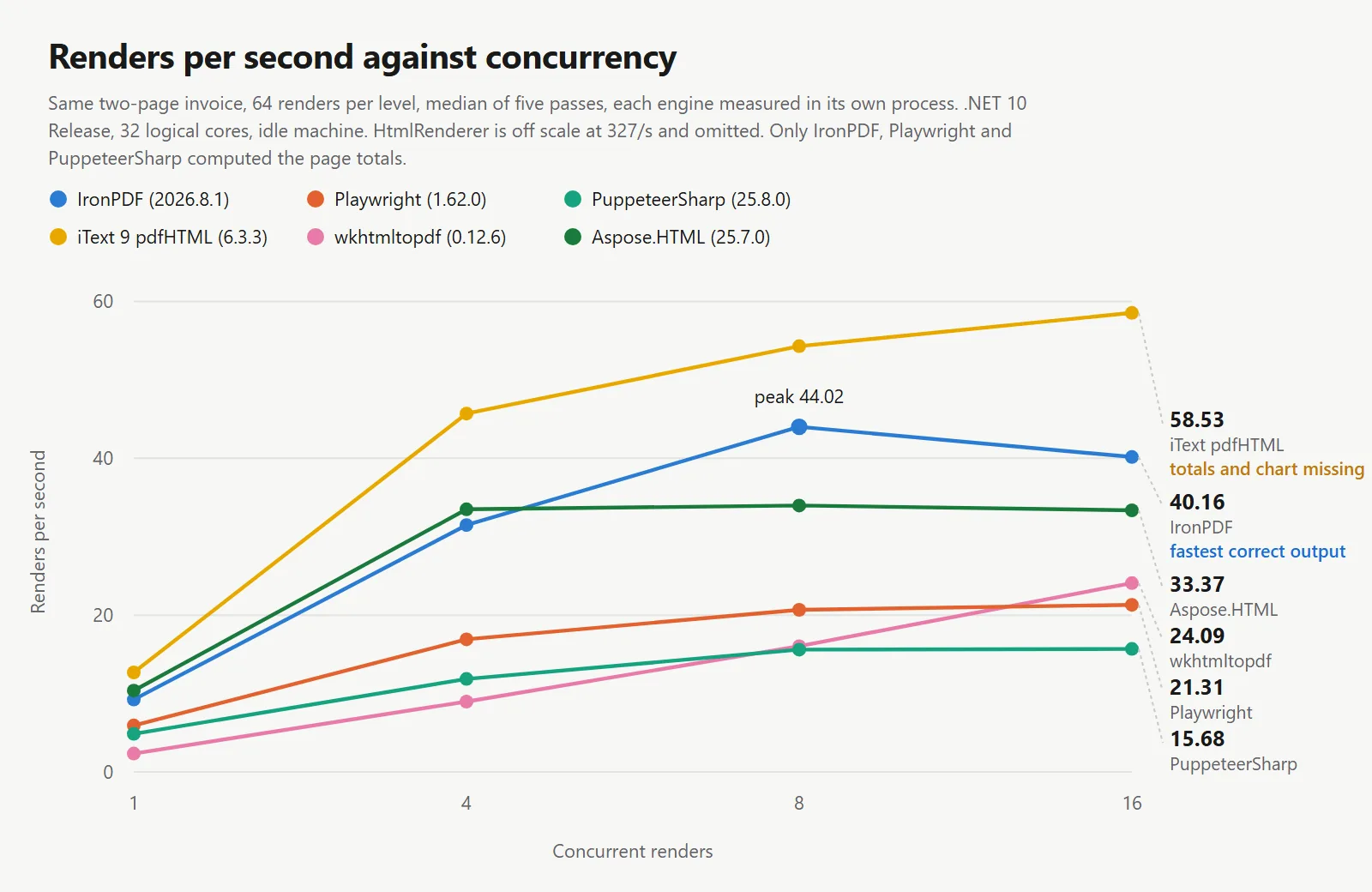
문서를 올바르게 렌더링한 엔진 중에서 IronPDF는 테스트된 모든 동시성 수준에서 선두를 달렸으며, 부하가 증가할수록 그 우위가 커졌습니다. 동시성 1에서는 3개의 올바른 렌더러가 초당 4.85에서 9.22 렌더링으로 1.9배 차이를 보였습니다. 동시성 8에서는 15.60에서 44.02로 2.8배 차이를 보였습니다. 부하가 증가함에 따라 격차가 벌어지며, 이는 호스팅하지 않는 브라우저를 통해 모든 페이지를 이동해야 하는 2개의 엔진과 인프로세스 엔진을 구분하는 요소입니다.
대부분의 엔진은 또한 무릎 지점을 가지고 있으며, 이 수준을 넘어서면 처리량이 증가하지 않고 지연 시간만 증가합니다. IronPDF의 경우 8에서 44.02/s가 16에서 40.16/s로 감소하고 p50이 161 ms에서 364 ms로 상승하므로 8에서 유지하는 세마포어는 추가 지연 시간을 지불하지 않고 처리량을 유지합니다. PuppeteerSharp는 8부터 평평해져서 15.60/s에서 15.68/s로 변하지 않으며, p50은 40개의 프로세스에서 507 ms에서 997 ms로 상승하여 아무것도 얻지 못한 채 지연 시간이 증가합니다. Aspose.HTML은 더 일찍 평평해져서 4와 16 사이에서 아무것도 얻지 못합니다. HtmlRenderer는 모든 것 중 가장 일찍, 4에서 평평해지며, 이는 단일 프로세스 라이브러리가 하나의 코어가 스케줄할 수 있는 작업을 초과할 때 발생하는 현상입니다. iText 9, Playwright 및 wkhtmltopdf는 모두 16에서 여전히 증가하고 있었으며, 테스트된 범위 내에서 무릎에 도달하지 않았지만, Playwright의 21.31/s는 IronPDF가 4에서 유지한 것보다 낮습니다.
동시성에 따라 단일 렌더링 타이밍을 외삽하는 것은 실제 처리량을 일관되게 과대평가하며, 그 정도는 엔진에 따라 다릅니다. 동시성 8에서 IronPDF는 외삽된 처리량의 60%를 달성하고, iText는 53%, Playwright는 44%, PuppeteerSharp는 40%를 달성합니다.
스윕 테이블과 동일한 피크를 하나의 라이브러리가 열을 따라 읽도록 배열했습니다. 이러한 값은 컨테이너 크기를 설정합니다.
| 라이브러리 | 1에서의 피크 | 4에서의 피크 | 8에서의 피크 | 16에서의 피크 | 8에서 지속적인 렌더링/초당 MB | 정확하게 렌더링됨 |
|---|---|---|---|---|---|---|
| IronPDF | 750 MB | 850 MB | 1,187 MB | 1,770 MB | 27.0 | 예 |
| Playwright .NET | 511 MB | 750 MB | 1,122 MB | 1,808 MB | 54.3 | 예 |
| PuppeteerSharp | 584 MB | 890 MB | 1,293 MB | 2,094 MB | 82.9 | 예 |
| iText 9 pdfHTML | 174 MB | 264 MB | 332 MB | 535 MB | 6.1 | 아니오 |
| HtmlRenderer + PdfSharp | 153 MB | 157 MB | 166 MB | 181 MB | 0.5 | 아니오 |
| wkhtmltopdf | 147 MB | 293 MB | 482 MB | 827 MB | 30.1 | 아니오 |
| Aspose.HTML | 235 MB | 293 MB | 334 MB | 398 MB | 9.8 | 아니오 |
테스트 환경: 24코어 / 32스레드 x64 데스크탑 CPU · 3.2 GHz · 64 GB RAM · Windows 11 x64 · .NET 10 · IronPDF (2026.8.1) · 마지막 검증 2026년 9월
최대 메모리만으로는 작업을 덜 수행하는 엔진에 유리할 수 있으며, 이는 마지막 열에서 해결됩니다. 최대 메모리를 지속적인 처리량으로 나누면 초당 렌더링당 메모리 비용이 산출됩니다. 문서를 올바르게 렌더링한 엔진 중에서 IronPDF는 27.0 MB로 가장 효율적이며, Playwright는 54.3 MB, PuppeteerSharp는 82.9 MB입니다.
절대 최대 메모리 순위는 다릅니다. Playwright는 동시성 1, 4 및 8에서 각각 239 MB, 100 MB 및 65 MB로 더 낮은 최대치를 기록하며, 16에서는 IronPDF가 1,770 MB로 Playwright의 1,808 MB에 비해 최대치를 기록합니다. 8에서는 실제로 우위를 점하며, IronPDF의 44.02에 비해 초당 20.68 렌더링을 제공합니다. 따라서 65 MB를 절약하는 것이 처리량의 절반 이상을 비용으로 지불하게 됩니다.
레이아웃 엔진 라이브러리는 브라우저 엔진이 없기 때문에 메모리 사용량이 상당히 낮습니다. 이는 실제로 장점이지만, 이 테스트에서는 총계가 0.00에 머물렀습니다.
3개의 Chromium 기반 엔진의 경우, 8에서 16개의 동시 렌더링 사이에 최대 메모리가 49%에서 62% 증가하지만, 처리량은 이에 상응하는 증가가 없습니다. IronPDF의 처리량은 9% 감소하고, PuppeteerSharp는 변동이 없으며, Playwright는 3% 증가합니다. 중앙값 지연 시간(p50)은 같은 단계에서 1.9배에서 2.3배 증가합니다. 8개 이상의 동시 렌더링을 위한 추가 메모리는 처리량보다는 지연 시간을 초래합니다.
모든 출력은 신뢰하기보다는 다시 읽혔습니다. 텍스트 레이어를 추출하고, 정규 표현식으로 송장 총계를 일치시키며, 캔버스 차트에는 텍스트 레이어가 없고 텍스트만으로 확인할 수 없기 때문에 모든 페이지를 래스터화합니다.
using System;
using System.IO;
using System.Linq;
using System.Text.RegularExpressions;
using IronPdf;

// Reads each engine's output back and reports what actually landed on the page.
// A render that finishes in 109 ms and gets the total wrong is not faster than
// one that finishes in 164 ms and gets it right - it is a different operation,
// so the timer alone cannot be trusted.
string resultsDir = "results";

Console.WriteLine($"{"Engine",-16} {"Pages",5} {"Bytes",8} {"Total",-12} Notes");
Console.WriteLine(new string('-', 62));

foreach (string path in Directory.GetFiles(resultsDir, "*-single.pdf").OrderBy(p => p))
{
    string engine = Path.GetFileNameWithoutExtension(path).Replace("-single", "");

    using PdfDocument document = PdfDocument.FromFile(path);
    string flat = Regex.Replace(document.ExtractAllText() ?? "", @"\s+", " ");

    // The document computes its totals in JavaScript. If the script never ran,
    // the placeholder zero survives into the text layer of the PDF.
    Match total = Regex.Match(flat, @"Total\s+([\d,]+\.\d{2})");
    string reported = total.Success ? total.Groups[1].Value : "not found";
    bool scriptRan = reported != "0.00" && total.Success;

    // The canvas chart has no text layer, so rasterise page two as well and
    // confirm it by eye. A missing chart cannot be detected from text alone.
    document.RasterizeToImageFiles(Path.Combine(resultsDir, engine + "-page_*.png"), 1400, 1980);

    long bytes = new FileInfo(path).Length;
    string note = scriptRan ? "" : "JavaScript did not run";
    if (!flat.Contains("Professional services")) note += " | table rows missing";

    Console.WriteLine($"{engine,-16} {document.PageCount,5} {bytes,8} {reported,-12} {note}");
}

// Output size is a fast tell, but not a sufficient one. Identical HTML produced
// 46 to 104 KB from the engines that ran the script and drew the chart, so the
// 6 KB output is missing content rather than encoding it more cleverly. It cuts
// the other way too: one engine dropped the masthead, the totals and the chart
// and still produced 46 KB, so size narrows the question without answering it.
using System;
using System.IO;
using System.Linq;
using System.Text.RegularExpressions;
using IronPdf;
// Reads each engine's output back and reports what actually landed on the page.
// A render that finishes in 109 ms and gets the total wrong is not faster than
// one that finishes in 164 ms and gets it right - it is a different operation,
// so the timer alone cannot be trusted.
string resultsDir = "results";
Console.WriteLine($"{"Engine",-16} {"Pages",5} {"Bytes",8} {"Total",-12} Notes");
Console.WriteLine(new string('-', 62));
foreach (string path in Directory.GetFiles(resultsDir, "*-single.pdf").OrderBy(p => p))
{
string engine = Path.GetFileNameWithoutExtension(path).Replace("-single", "");
using PdfDocument document = PdfDocument.FromFile(path);
string flat = Regex.Replace(document.ExtractAllText() ?? "", @"\s+", " ");
// The document computes its totals in JavaScript. If the script never ran,
// the placeholder zero survives into the text layer of the PDF.
Match total = Regex.Match(flat, @"Total\s+([\d,]+\.\d{2})");
string reported = total.Success ? total.Groups[1].Value : "not found";
bool scriptRan = reported != "0.00" && total.Success;
// The canvas chart has no text layer, so rasterise page two as well and
// confirm it by eye. A missing chart cannot be detected from text alone.
document.RasterizeToImageFiles(Path.Combine(resultsDir, engine + "-page_*.png"), 1400, 1980);
long bytes = new FileInfo(path).Length;
string note = scriptRan ? "" : "JavaScript did not run";
if (!flat.Contains("Professional services")) note += " | table rows missing";
Console.WriteLine($"{engine,-16} {document.PageCount,5} {bytes,8} {reported,-12} {note}");
}
// Output size is a fast tell, but not a sufficient one. Identical HTML produced
// 46 to 104 KB from the engines that ran the script and drew the chart, so the
// 6 KB output is missing content rather than encoding it more cleverly. It cuts
// the other way too: one engine dropped the masthead, the totals and the chart
// and still produced 46 KB, so size narrows the question without answering it.Imports System
Imports System.IO
Imports System.Linq
Imports System.Text.RegularExpressions
Imports IronPdf
' Reads each engine's output back and reports what actually landed on the page.
' A render that finishes in 109 ms and gets the total wrong is not faster than
' one that finishes in 164 ms and gets it right - it is a different operation,
' so the timer alone cannot be trusted.
Dim resultsDir As String = "results"
Console.WriteLine(String.Format("{0,-16} {1,5} {2,8} {3,-12} Notes", "Engine", "Pages", "Bytes", "Total"))
Console.WriteLine(New String("-"c, 62))
For Each path As String In Directory.GetFiles(resultsDir, "*-single.pdf").OrderBy(Function(p) p)
Dim engine As String = Path.GetFileNameWithoutExtension(path).Replace("-single", "")
Using document As PdfDocument = PdfDocument.FromFile(path)
Dim flat As String = Regex.Replace(document.ExtractAllText() ?? "", "\s+", " ")
' The document computes its totals in JavaScript. If the script never ran,
' the placeholder zero survives into the text layer of the PDF.
Dim total As Match = Regex.Match(flat, "Total\s+([\d,]+\.\d{2})")
Dim reported As String = If(total.Success, total.Groups(1).Value, "not found")
Dim scriptRan As Boolean = reported <> "0.00" AndAlso total.Success
' The canvas chart has no text layer, so rasterise page two as well and
' confirm it by eye. A missing chart cannot be detected from text alone.
document.RasterizeToImageFiles(Path.Combine(resultsDir, engine & "-page_*.png"), 1400, 1980)
Dim bytes As Long = New FileInfo(path).Length
Dim note As String = If(scriptRan, "", "JavaScript did not run")
If Not flat.Contains("Professional services") Then note &= " | table rows missing"
Console.WriteLine(String.Format("{0,-16} {1,5} {2,8} {3,-12} {4}", engine, document.PageCount, bytes, reported, note))
End Using
Next
' Output size is a fast tell, but not a sufficient one. Identical HTML produced
' 46 to 104 KB from the engines that ran the script and drew the chart, so the
' 6 KB output is missing content rather than encoding it more cleverly. It cuts
' the other way too: one engine dropped the masthead, the totals and the chart
' and still produced 46 KB, so size narrows the question without answering it.Imports System
Imports System.IO
Imports System.Linq
Imports System.Text.RegularExpressions
Imports IronPdf
' Reads each engine's output back and reports what actually landed on the page.
' A render that finishes in 109 ms and gets the total wrong is not faster than
' one that finishes in 164 ms and gets it right - it is a different operation,
' so the timer alone cannot be trusted.
Dim resultsDir As String = "results"
Console.WriteLine(String.Format("{0,-16} {1,5} {2,8} {3,-12} Notes", "Engine", "Pages", "Bytes", "Total"))
Console.WriteLine(New String("-"c, 62))
For Each path As String In Directory.GetFiles(resultsDir, "*-single.pdf").OrderBy(Function(p) p)
Dim engine As String = Path.GetFileNameWithoutExtension(path).Replace("-single", "")
Using document As PdfDocument = PdfDocument.FromFile(path)
Dim flat As String = Regex.Replace(document.ExtractAllText() ?? "", "\s+", " ")
' The document computes its totals in JavaScript. If the script never ran,
' the placeholder zero survives into the text layer of the PDF.
Dim total As Match = Regex.Match(flat, "Total\s+([\d,]+\.\d{2})")
Dim reported As String = If(total.Success, total.Groups(1).Value, "not found")
Dim scriptRan As Boolean = reported <> "0.00" AndAlso total.Success
' The canvas chart has no text layer, so rasterise page two as well and
' confirm it by eye. A missing chart cannot be detected from text alone.
document.RasterizeToImageFiles(Path.Combine(resultsDir, engine & "-page_*.png"), 1400, 1980)
Dim bytes As Long = New FileInfo(path).Length
Dim note As String = If(scriptRan, "", "JavaScript did not run")
If Not flat.Contains("Professional services") Then note &= " | table rows missing"
Console.WriteLine(String.Format("{0,-16} {1,5} {2,8} {3,-12} {4}", engine, document.PageCount, bytes, reported, note))
End Using
Next
' Output size is a fast tell, but not a sufficient one. Identical HTML produced
' 46 to 104 KB from the engines that ran the script and drew the chart, so the
' 6 KB output is missing content rather than encoding it more cleverly. It cuts
' the other way too: one engine dropped the masthead, the totals and the chart
' and still produced 46 KB, so size narrows the question without answering it.| 라이브러리 | 페이지 | 출력 크기 | 청구서 총액 | 차트 | 머리글 및 레이아웃 |
|---|---|---|---|---|---|
| IronPDF | 2 | 47,196 bytes | 2313.30 | 그려짐 | 그리드 유지 |
| Playwright .NET | 2 | 46,248 bytes | 2313.30 | 그려짐 | 그리드 유지 |
| PuppeteerSharp | 2 | 104,011 bytes | 2313.30 | 그려짐 | 그리드 유지 |
| iText 9 pdfHTML | 2 | 6,145 bytes | 0.00 | 없음 | 그리드가 1열로 축소됨 |
| HtmlRenderer + PdfSharp | 1 | 46,419 bytes | 블록 없음 | 없음 | 머리글 삭제, 페이지 구분 손실 |
| wkhtmltopdf | 2 | 22,752 bytes | 0.00 | 없음 | 그리드가 1열로 축소됨 |
| Aspose.HTML | 2 | 38,780 bytes | 0.00 | 없음 | 그리드가 1열로 축소됨 |
테스트 환경: 24코어 / 32스레드 x64 데스크탑 CPU · 3.2 GHz · 64 GB RAM · Windows 11 x64 · .NET 10 · IronPDF (2026.8.1) · 마지막 검증 2026년 9월
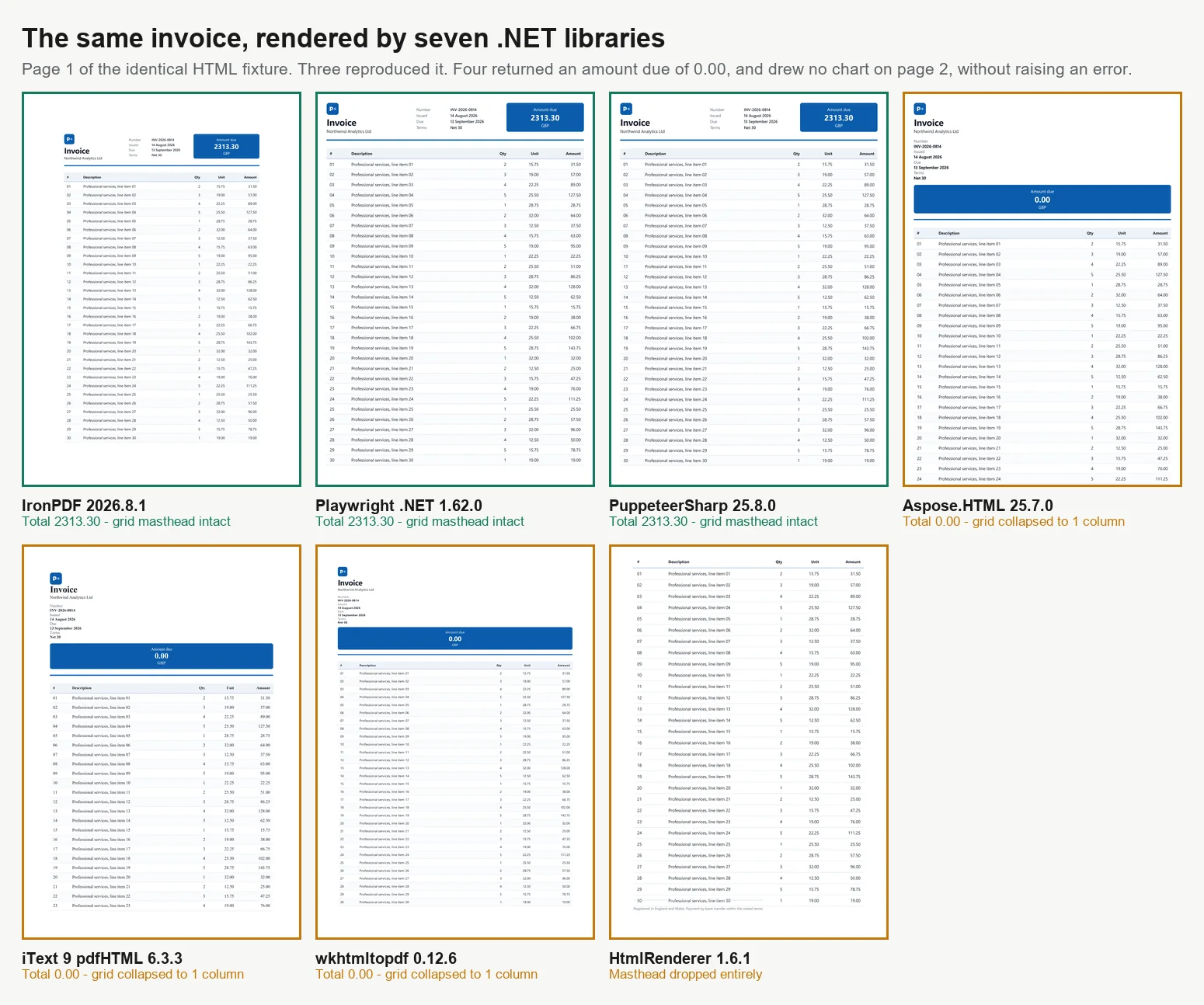
모두 동일한 배율로 7개 엔진에서 동일한 페이지를 보여줍니다. 처음 3개의 패널은 총계를 계산했습니다. 나머지 4개는 검토자가 알아차리지 못하고 승인할 수 있는 것들입니다.
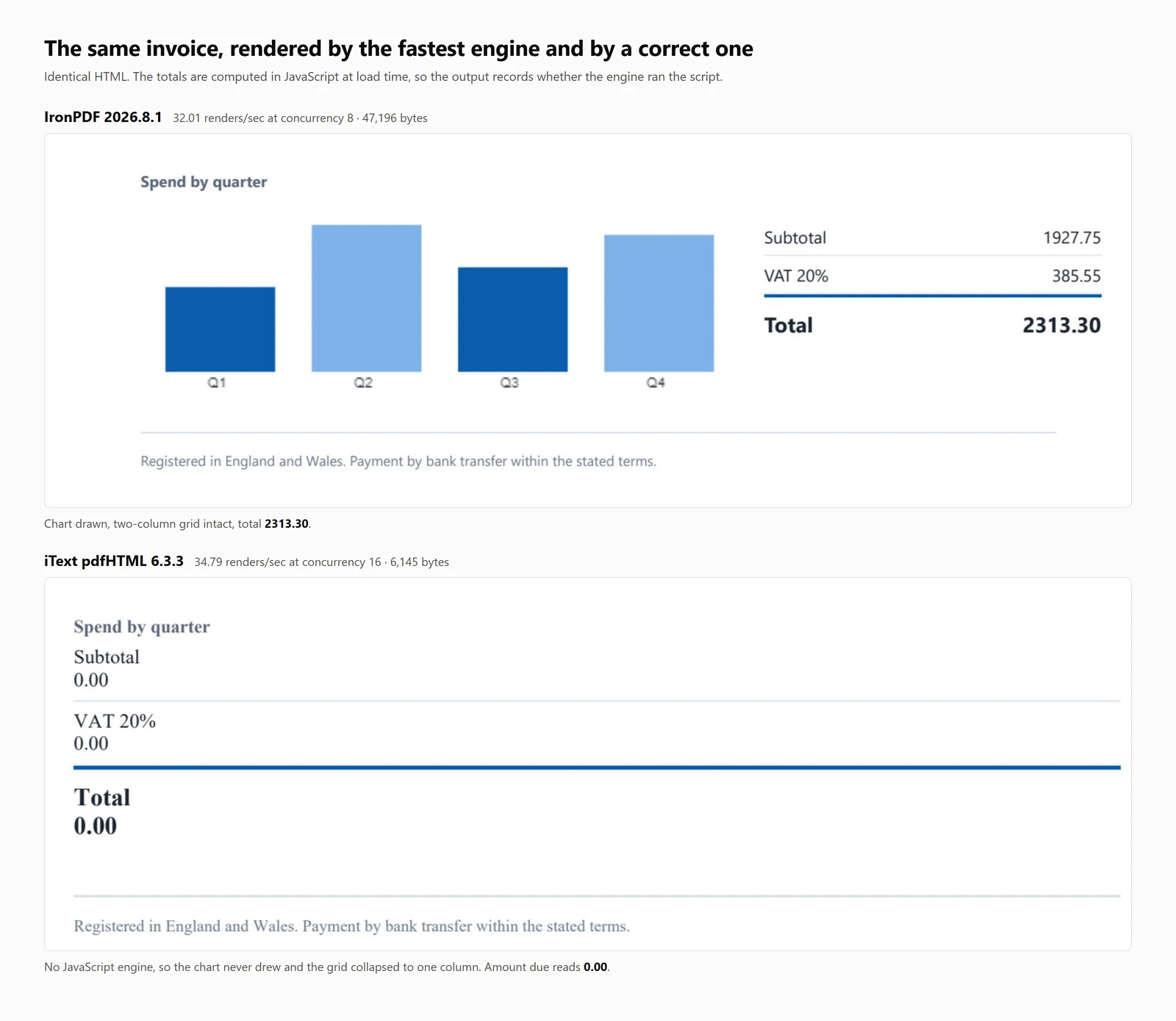
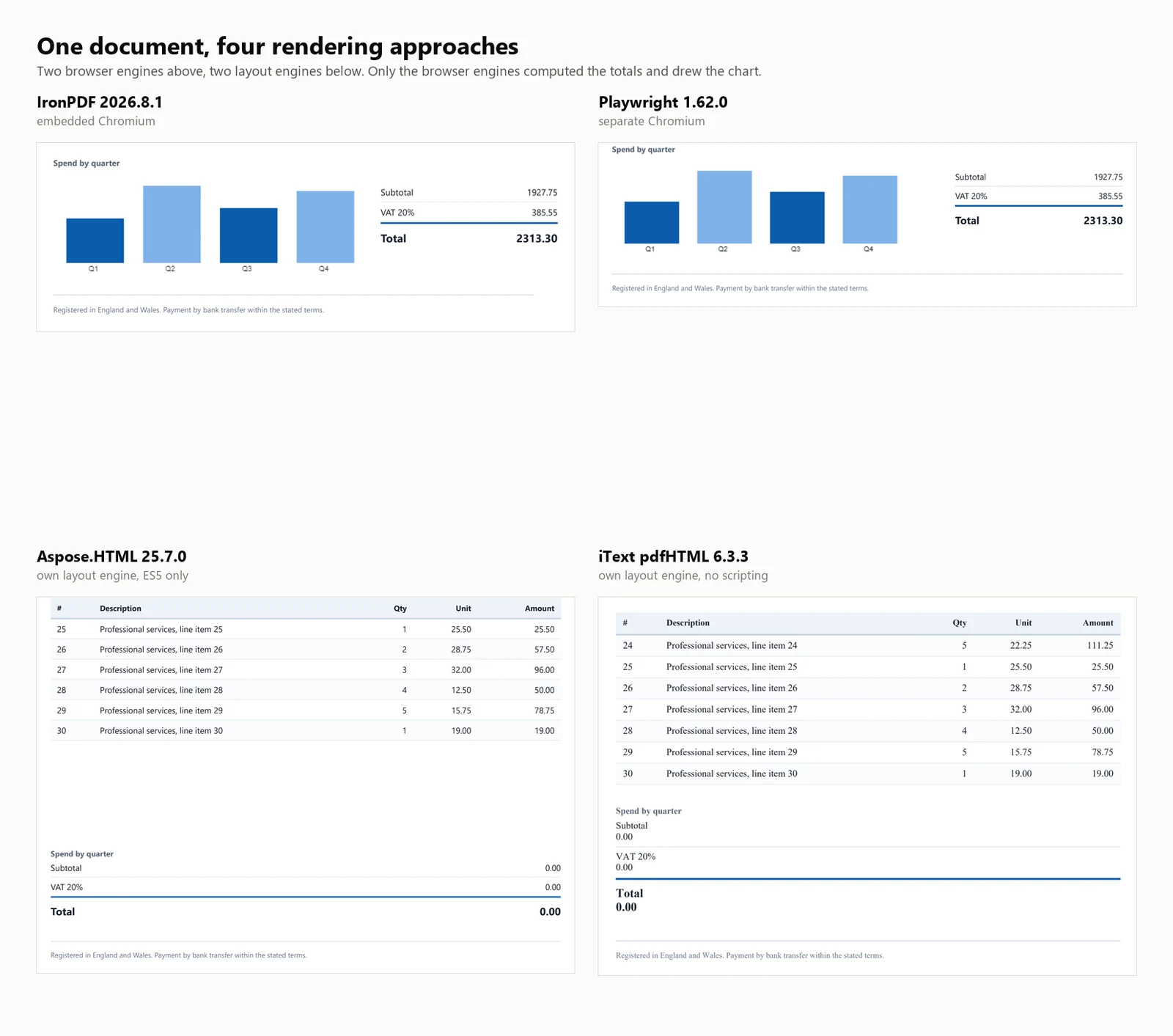
출력 파일 크기는 렌더링 완전성을 대략적으로 나타내는 지표이며, 오류가 있을 수 있습니다. 스크립트를 실행하고 차트를 렌더링한 3개의 엔진은 46KB에서 104KB 사이의 파일을 생성했으며, iText 9의 6KB 출력은 더 잘 압축된 것이 아니라 콘텐츠가 누락된 것입니다. HtmlRenderer의 경우에는 반대 방향으로 실패하여, 46KB 파일이 머리글, 총계 및 차트가 전혀 없는 상태에서 올바른 출력과 동일한 범위에 속하므로 파일 크기는 유용한 확인 수단일 뿐 결론적인 것은 아닙니다. 이러한 실패 중 어느 것도 예외나 경고를 발생시키지 않으며, 모든 PDF는 형식적으로는 올바르지만 잘못된 것입니다.
총계를 계산하지 못한 4개의 엔진은 각각 다른 이유로 실패했습니다. ES5 및 ES6 지원을 별도로 보고하는 대상 테스트 페이지는 3개의 뚜렷한 범주를 드러냈습니다.
| 엔진 | ES5 | ES6 | 테스트 송장에 대한 영향 |
|---|---|---|---|
| IronPDF, PuppeteerSharp, Playwright | 실행됨 | 실행됨 | 합계 계산됨, 차트 그려짐 |
| wkhtmltopdf, Aspose.HTML | 실행됨 | 예외 발생 | 합계가 0으로 남음, 차트 없음 |
| iText 9 pdfHTML, HtmlRenderer | 엔진 없음 | 엔진 없음 | iText는 자리 표시자 0을 남겼고, HtmlRenderer는 블록을 삭제함; 둘 다 차트 없음 |
테스트 환경: 24코어 / 32스레드 x64 데스크탑 CPU · 3.2 GHz · 64 GB RAM · Windows 11 x64 · .NET 10 · IronPDF (2026.8.1) · 마지막 검증 2026년 9월
이 차이는 라이브러리를 선택할 때 중요합니다. wkhtmltopdf와 Aspose.HTML은 ES5 기준으로 작성된 스크립트를 실행하고 올바른 결과를 계산하지만, 테스트 페이지에서 사용된 document.querySelectorAll(...).forEach을 지원하지 않습니다. iText 9와 HtmlRenderer는 어떤 언어 수준에서도 JavaScript를 실행하지 않습니다.
참고: Chrome의 렌더링이 기준으로 사용되며, 이는 본질적으로 Chromium 기반 라이브러리에 유리합니다. 이는 알려진 제한 사항이지만, 대부분의 시나리오에서 브라우저 출력과 일치하는 것이 일반적으로 요구되기 때문에 적절합니다.
다시 실행할 수 없는 벤치마크는 단순한 주장에 불과합니다. 위의 표 뒤에 있는 모든 것은 하나의 아카이브에 포함되어 있으며, 숫자를 인용할 수 있는 것이 아니라 검증할 수 있도록 하는 부분도 포함되어 있습니다.
벤치마크 번들 다운로드 (282 KB)
| 폴더 | 포함 내용 |
|---|---|
| harness/ | 완전한 실행 가능한 프로젝트: 엔진 어댑터, 동시성 스윕, 콜드 스타트 드라이버, 메모리 샘플러, 충실도 검사 및 5회 실행 후 중간값을 취하는 스크립트 |
| fixture/invoice.html | 정확한 입력, 10,260자, 7개의 엔진 모두에 전달된 바이트 단위의 내용 |
| raw-timings/ | 35개의 결과 파일, 7개의 엔진이 5회 실행된 결과, 각 레벨별 처리량, p50, p95, 최대 메모리 및 프로세스 수, 그리고 계산된 중간값 포함 |
| outputs/ | 각 엔진이 해당 고정 장치에서 생성한 PDF, 정확성 주장을 믿기보다는 열어볼 수 있도록 함 |
재현하려면: dotnet build -c Release, 그런 다음 ./run-isolated.sh 1 2 3 4 5, 그런 다음 python median-iso.py. 반복하는 동안 --engine <id>로 단일 엔진을 실행하십시오. 이것이 메모리 수치가 정직하게 유지되는 유일한 방법이기 때문입니다.
3가지 항목은 의도적으로 아카이브에 포함되지 않았습니다. 라이센스 키는 IronPDF가 환경에서 IRONPDF_LICENSE_KEY를 읽고 Aspose.HTML은 자체 .lic 파일을 기대하며, 여기서는 두 엔진 모두 상용 라이센스로 실행되었습니다. wkhtmltopdf.exe 바이너리는 해당 프로젝트의 아카이브 릴리스에서 가져온 타사 아티팩트입니다. 그리고 PuppeteerSharp와 Playwright가 각각 첫 실행 시 다운로드하는 브라우저입니다.
벤치마크는 7개의 엔진이 동일한 송장을 변환하는 속도와 정확성에 관한 단일 질문을 고려합니다. 실제로, 생산 파이프라인에는 추가 요구 사항이 있습니다. 다음 섹션에서는 자주 묻는 후속 질문에 대한 답변을 제공합니다.
위의 모든 수치는 Windows 11에서 베어 메탈로 실행된 결과입니다. 컨테이너 CPU 제한, cgroup 메모리 계정 및 공유 호스트와 같은 요소는 동시성에 영향을 미칠 수 있습니다. IronPDF는 Linux 및 Docker에서 동일한 NuGet 패키지를 사용하여 Chromium이 포함된 상태로 작동하므로 별도의 브라우저 다운로드나 Playwright 설치가 필요하지 않습니다. 의도한 동시성에서의 최대 사용량을 기준으로 컨테이너 크기를 조정하고 런타임을 위한 추가 용량을 추가하십시오.
벤치마크는 네트워크 지연을 결과에서 제거하기 위해 각 엔진에 메모리 내 문자열을 제공했습니다. 실제 환경에서는 입력이 종종 URL이며, URL을 PDF로 변환하는 것은 일반적으로 동일한 렌더러에서 메서드 변경만 필요합니다. 여기서 테스트된 레이아웃 엔진은 이를 직접 지원하지 않습니다. iText 9와 HtmlRenderer는 마크업만을 수용하므로 페이지를 가져와 상대 경로를 해결하기 위해 기본 URL을 설정해야 합니다.
테스트 송장은 타이밍 결과에서 글꼴 범위를 제외하기 위해 웹 안전 라틴 글꼴 스택을 사용합니다. 렌더러는 비라틴 스크립트에서 가장 차이가 나지만, 해결책은 일관됩니다. 상속에 의존하지 않고 글꼴을 명시적으로 지정하세요. @font-face을 사용하여 글꼴을 포함하거나 이미지에 필요한 글꼴 패키지를 설치하고, 포함 규칙에 대해서는 글꼴 처리 가이드를 참조하세요. Chromium 기반 엔진은 브라우저와 동일한 셰이핑 및 폴백 동작을 제공합니다.
이 결과는 2페이지 송장 배치를 처리한 피크 판독값을 반영하며, 더 큰 문서나 장기 테스트는 아닙니다. 더 길거나 이미지가 많은 문서는 더 많은 메모리가 필요합니다. 지속적인 작업 부하를 위해서는 제한된 동시성을 사용하세요. 세마포어로 진행 중인 렌더를 제한하고, 요청당 하나의 렌더러 인스턴스를 생성하는 대신 단일 렌더러 인스턴스를 재사용하며, 비동기적으로 렌더링하여 처리량이 동시성 제한에 의해서만 제한되도록 하세요. 배치 처리 튜토리얼은 완전한 가이드를 제공합니다.
이 단계에서 솔루션 간의 격차는 줄어들기보다는 증가합니다. 벤치마크는 단일 작업, 즉 렌더링을 평가했으며, 이는 무료 엔진의 주요 기능을 나타냅니다. 그러나 대부분의 문서 처리 파이프라인은 이 지점 이후 추가 기능이 필요합니다.
두 개의 엔진은 브라우저를 포함하지 않음으로써 가장 높은 처리량을 달성했지만, 결과 문서는 이러한 제한을 반영했습니다. iText 9는 0.00의 금액을 반환했고, HtmlRenderer는 합계 블록을 완전히 생략했습니다. Aspose.HTML은 자체 레이아웃 엔진으로 동일한 결과를 얻었고, wkhtmltopdf는 페이지를 실행하기에는 너무 오래된 QtWebKit 빌드를 사용했습니다. 이 접근 방식은 마크업이 정적이고 동적 계산, 차트, 계산된 합계 또는 최신 레이아웃이 필요하지 않을 때만 작동합니다. 이러한 기능이 있을 경우, 벤치마크 결과는 제한을 보여줍니다.
정확하게 나와야 하는 모든 것의 기본값: IronPDF. 동일한 하드웨어에서 Playwright보다 2.1배, PuppeteerSharp보다 2.8배 빠른 44.02초당 렌더링 속도로 문서를 정확하게 렌더링했으며, 첫 번째 PDF를 486ms에 도달했고, 송장을 재현한 3개의 엔진 중 메가바이트당 가장 많은 작업을 반환했습니다. Chromium은 패키지에 포함되어 있어 설치, 감독 또는 패치할 브라우저가 없으며, 병합, 양식, 서명, PDF/A 및 암호화가 다음 라이브러리가 아닌 동일한 라이브러리에 포함되어 있습니다.
다른 6개는 각각 특정한 제한이 있으며, 아래에 설명되어 있습니다.
Playwright .NET은 Chrome 수준의 출력을 생성하며 라이센스 비용이 없으며, 44.02에 비해 20.68초당 렌더링 속도를 가집니다. 라이센스가 유일한 비용은 아닙니다. 이미지에서 브라우저 바이너리를 유지하고, 빌드에서 playwright install chromium 단계를 유지하며, 부하 시 23개의 프로세스에 도달하는 프로세스 풀을 유지하고, 서비스 수명 동안 Chromium 패치를 유지해야 합니다.
PuppeteerSharp도 문서를 재현했으며, 15.60초당 렌더링 속도를 가집니다. 여기서 측정된 것 중 가장 많은 프로세스를 생성하며, 16개의 동시 프로세스에서 40개를 생성합니다. p50은 동일한 단계에서 507ms에서 997ms로 두 배가 되며, 처리량은 일정하게 유지되므로 추가 프로세스는 용량보다는 지연을 추가합니다.
iText 9 with pdfHTML은 빠르며, 54.30초당 렌더링 속도를 가집니다. 반환된 송장은 합계가 있어야 할 곳에 0.00로 읽힙니다. 모든 언어 수준에서 JavaScript 엔진이 없으므로, 그 결과는 해결할 구성 문제는 아닙니다. AGPL 또는 상업용이므로 대부분의 팀에게는 여전히 페이지를 실행할 수 없는 유료 라이브러리입니다.
HtmlRenderer with PdfSharp는 벤치마크에서 가장 빠르며, 327.09초당 렌더링 속도를 가집니다. 첫 번째 PDF에 도달하는 속도는 157ms로 가장 빠릅니다. 출력은 머리글, 합계 블록 및 차트를 삭제하고 2페이지를 1페이지로 압축했습니다. CSS 지원은 2011년경에 멈추므로, 페이지를 레이아웃하지 않음으로써 얻는 속도입니다.
wkhtmltopdf는 2023년 1월에 보관된 엔진을 실행하며, 마지막으로 2020년 6월에 릴리스된 Qt 4.8.5에서 실행됩니다. ES5를 실행하고 ES6에서 오류를 발생시키며, 총계가 0.00로 읽히는 이유입니다. 보안 패치를 받지 않습니다. 현재 템플릿을 올바르게 렌더링하면 템플릿이 변경될 때까지 계속 그렇게 할 것입니다.
Aspose.HTML은 무료 티어가 없는 유료 라이브러리로, 다른 레이아웃 엔진과 동일한 0.00 총계와 누락된 차트를 생성했으며, 첫 번째 PDF에 도달하는 데 1,096ms가 걸렸으며, 측정된 것 중 가장 느립니다. 이 경우는 렌더링이 아닌 조달입니다.
대시보드, 차트 또는 로드 시 계산되는 모든 것에 대해: 브라우저급 엔진만이 작동하는 유일한 카테고리이며, IronPDF는 해당 카테고리에서 운영할 필요가 없는 유일한 제품입니다.
PDF가 JavaScript가 그리기를 완료하기 전에 캡처됩니다. 이 오류는 개발 중에는 안정적으로 재현되며, 프로덕션 로드에서는 간헐적으로 발생하여 진단이 어렵습니다.
고정된 기간 대신 조건을 기다리십시오. 모든 브라우저 기반 라이브러리는 조건이 충족될 때까지 렌더링을 보류할 수 있습니다. 이 조건은 네트워크 비활성, 명명된 요소의 등장 또는 JavaScript 표현식이 true를 반환하는 것일 수 있습니다. 차트 라이브러리는 다운로드를 완료하기 전에 그리기를 완료하므로 요소를 선호하십시오.
// IronPDF 2026.8.1 - waiting for the page to finish drawing itself.
using IronPdf;

var renderer = new ChromePdfRenderer();

// Waiting for a specific element beats waiting for the network, because a chart
// library can finish downloading well before it finishes rendering.
renderer.RenderingOptions.WaitFor.HtmlElementById("chart-ready", maxWaitTimeInMilliseconds: 10000);

// A JavaScript condition works too when there is no element to key on.
// renderer.RenderingOptions.WaitFor.JavaScript(5000);

using PdfDocument pdf = renderer.RenderHtmlAsPdf(html);
pdf.SaveAs("dashboard.pdf");
// IronPDF 2026.8.1 - waiting for the page to finish drawing itself.
using IronPdf;
var renderer = new ChromePdfRenderer();
// Waiting for a specific element beats waiting for the network, because a chart
// library can finish downloading well before it finishes rendering.
renderer.RenderingOptions.WaitFor.HtmlElementById("chart-ready", maxWaitTimeInMilliseconds: 10000);
// A JavaScript condition works too when there is no element to key on.
// renderer.RenderingOptions.WaitFor.JavaScript(5000);
using PdfDocument pdf = renderer.RenderHtmlAsPdf(html);
pdf.SaveAs("dashboard.pdf");' IronPDF 2026.8.1 - waiting for the page to finish drawing itself.
Imports IronPdf
Dim renderer = New ChromePdfRenderer()
' Waiting for a specific element beats waiting for the network, because a chart
' library can finish downloading well before it finishes rendering.
renderer.RenderingOptions.WaitFor.HtmlElementById("chart-ready", maxWaitTimeInMilliseconds:=10000)
' A JavaScript condition works too when there is no element to key on.
' renderer.RenderingOptions.WaitFor.JavaScript(5000)
Using pdf As PdfDocument = renderer.RenderHtmlAsPdf(html)
pdf.SaveAs("dashboard.pdf")
End Using' IronPDF 2026.8.1 - waiting for the page to finish drawing itself.
Imports IronPdf
Dim renderer = New ChromePdfRenderer()
' Waiting for a specific element beats waiting for the network, because a chart
' library can finish downloading well before it finishes rendering.
renderer.RenderingOptions.WaitFor.HtmlElementById("chart-ready", maxWaitTimeInMilliseconds:=10000)
' A JavaScript condition works too when there is no element to key on.
' renderer.RenderingOptions.WaitFor.JavaScript(5000)
Using pdf As PdfDocument = renderer.RenderHtmlAsPdf(html)
pdf.SaveAs("dashboard.pdf")
End Using대부분의 CSS 렌더링 문제는 4가지 주요 원인에 기인할 수 있습니다.
일반적인 실수는 스타일시트에서 @media print 블록을 사용하는 것입니다. 이는 인쇄 렌더링 중에만 적용되며 브라우저에서는 나타나지 않습니다. 기본값에 의존하지 않고 올바른 스타일시트가 적용되도록 CSS 미디어 타입을 RenderingOptions.CssMediaType를 사용하여 명시적으로 설정하십시오.
두 번째 문제는 배경과 색상이 나타나지 않는 것입니다. 브라우저는 종종 잉크를 절약하기 위해 인쇄 중에 이를 생략합니다. RenderingOptions.PrintHtmlBackgrounds = true를 활성화하여 이를 복원하고, 영향을 받지 않는 요소에 대해 CSS에서 print-color-adjust: exact를 사용하십시오.
나머지 두 가지 원인은 타이밍과 관련이 있습니다. 이미지가 스냅샷이 찍힐 때 여전히 지연 로딩 중일 수 있으며, 웹 폰트가 로드되지 않아 텍스트가 시스템 폰트로 대체되어 레이아웃이 변경될 수 있습니다. 모든 리소스가 렌더링 전에 로드되었는지 확인하여 이러한 문제를 해결하십시오.
문자열에서 렌더링할 때 기본 위치가 없으므로 렌더러가 /images/logo.png와 같은 상대 경로를 해결할 수 없습니다. 이는 문자열 입력에서 가장 일반적인 문제이며, 단일 구성으로 해결할 수 있습니다.
렌더링 전에 기본 URL 또는 기본 경로를 설정하십시오. IronPDF의 경우 RenderingOptions.BaseUrlOrPath를 사용하십시오. iText의 경우 ConverterProperties.SetBaseUri를 사용하십시오. 또는 문서 전체에 절대 URL을 사용하십시오. 상대 경로가 해결된 후 필요할 수 있는 자산 인코딩에 대한 정보는 기본 URL 가이드를 참조하십시오.
확인해야 할 주요 원인은 3가지입니다. 첫째, 필요한 폰트가 이미지에 설치되지 않았을 수 있습니다. 둘째, 네이티브 종속성이 누락되었을 수 있습니다. 셋째, 이미지 빌드 중에 브라우저가 다운로드되지 않았고 런타임에 가져올 수 없습니다.
누락된 폰트는 오류가 보고되지 않기 때문에 진단하기 어렵습니다. PDF는 렌더링되지만 텍스트는 빈 상자로 나타납니다. 렌더링 코드를 문제 해결하는 대신 필요한 폰트 패키지를 설치하십시오. 브라우저 다운로드의 경우, IronPDF의 Chromium과 같은 내장 엔진은 패키지에 브라우저를 포함하여 네트워크 제한으로 인해 실패할 수 있는 첫 실행 다운로드의 필요성을 제거합니다.
이 문제는 위와 동일한 근본 원인을 가지고 있지만, 특정 증상으로 나타납니다. 특정 스크립트에 필요한 글꼴이 컨테이너에 없기 때문입니다. 태국어, 아랍어, CJK와 같은 언어는 최소한의 기본 이미지가 이러한 스크립트를 지원하지 않는 경우가 많아 가장 큰 영향을 받습니다.
문서에 @font-face 및 글꼴 파일을 포함하거나 이미지에 패키지를 설치하세요. 버전마다 변경되는 기본 이미지의 기본 세트에 의존하지 마세요. 글꼴 처리 가이드에는 포함 세부 정보가 있습니다.
일반적인 실패는 로컬에서는 작동하지만 컨테이너에서는 실패하는 구성입니다. 대부분의 경우는 3가지 수정으로 해결됩니다.
첫 실행이 아닌 빌드 시 브라우저 다운로드: 이미지에 Chromium이 포함되어 있지 않으면 배포 후 첫 요청 시 150MB 다운로드가 발생하거나, 이그레스가 차단된 경우 완전히 실패합니다.
필요한 글꼴 및 네이티브 종속성 설치: 슬림 기본 이미지는 최소한의 글꼴 세트를 제공합니다. 라틴 스크립트를 넘어서는 모든 문서는 추가 글꼴 패키지가 필요합니다.
샌드박스를 비활성화하지 마세요: --no-sandbox를 전달하면 샌드박스를 끈 상태로 루트로 Chrome을 실행하여 오류를 해결합니다. 대신, seccomp 프로파일을 가진 비루트 사용자를 구성하세요.
# IronPDF on Linux. The engine ships in the NuGet package, so there is no
# browser download at first run and no Chromium to supervise.
FROM mcr.microsoft.com/dotnet/aspnet:10.0 AS base
WORKDIR /app

# Chromium's Linux dependencies plus fonts. Slim base images carry neither, and
# a missing font produces empty boxes rather than an error.
RUN apt-get update && apt-get install -y --no-install-recommends \
        libnss3 libatk-bridge2.0-0 libgbm1 libasound2 libxshmfence1 \
        fonts-liberation fonts-noto-core fonts-noto-cjk \
    && rm -rf /var/lib/apt/lists/*

FROM mcr.microsoft.com/dotnet/sdk:10.0 AS build
WORKDIR /src
COPY ["InvoiceService.csproj", "./"]
RUN dotnet restore "InvoiceService.csproj"
COPY . .
RUN dotnet publish "InvoiceService.csproj" -c Release -o /app/publish

FROM base AS final
WORKDIR /app
COPY --from=build /app/publish .

# Run as a non-root user rather than reaching for --no-sandbox.
RUN useradd --create-home --shell /usr/sbin/nologin renderer \
    && chown -R renderer:renderer /app
USER renderer

ENV IRONPDF_LICENSE_KEY=""
ENTRYPOINT ["dotnet", "InvoiceService.dll"]리소스 할당은 의도된 동시성 수준에서 관찰된 최대 메모리 사용량을 기준으로 결정해야 합니다. 런타임 오버헤드 및 애플리케이션 요구 사항을 수용하기 위해 추가 용량을 포함해야 합니다. 이러한 결합된 추정치를 초과하는 인스턴스 크기를 선택하여 신뢰할 수 있는 성능을 보장하는 것이 좋습니다.
| 라이브러리 | 8 동시 실행 시 피크 트리 | 현실적인 컨테이너 | 지속적인 렌더링/초 | 정확하게 렌더링됨 |
|---|---|---|---|---|
| IronPDF | 1,187 MB | 2 GB | 44.02 | 예 |
| Playwright .NET | 1,122 MB | 2 GB | 20.68 | 예 |
| PuppeteerSharp | 1,293 MB | 2 GB | 15.60 | 예 |
| iText 9 pdfHTML | 332 MB | 1 GB | 54.30 | 아니오 |
| HtmlRenderer + PdfSharp | 166 MB | 512 MB | 327.09 | 아니오 |
| wkhtmltopdf | 482 MB | 1 GB | 16.03 | 아니오 |
| Aspose.HTML | 334 MB | 1 GB | 33.98 | 아니오 |
테스트 환경: 24코어 / 32스레드 x64 데스크탑 CPU · 3.2 GHz · 64 GB RAM · Windows 11 x64 · .NET 10 · IronPDF (2026.8.1) · 마지막 검증 2026년 9월
마지막 열에 제시된 비교 메모리 수치는 자원 요구 사항에 대한 명확성을 제공합니다. 모든 3개의 정확한 렌더링 엔진은 2 GB 컨테이너 내에서 작동했으며, 이는 메모리 소비보다는 처리량을 중요한 차별화 요소로 만듭니다. 이들의 처리량은 초당 16에서 44 렌더링으로 범위가 있으며, 이는 IronPDF 대신 PuppeteerSharp를 선택할 경우 동일한 출력을 위해 거의 3배의 인프라가 필요함을 의미합니다. Playwright와 IronPDF 간의 65 MB 차이와 같은 피크 메모리의 미세한 차이는 인스턴스 선택에 실질적인 영향을 미치지 않지만, 처리량 차이는 운영 비용에 큰 영향을 미칩니다.
2가지 사항이 이러한 수치를 귀하의 환경에 맞게 변경합니다. 문서의 형태가 하나입니다. 200페이지의 명세서나 고해상도 이미지를 많이 포함한 문서는 2페이지의 송장이 필요로 하는 것보다 메모리 피크를 훨씬 높입니다. 측정 위치가 다른 하나입니다. 배포할 컨테이너 내부에서 테스트를 실행하세요. 멀티코어 워크스테이션과 가상화된 인스턴스는 동시 작업을 다르게 스케줄링합니다.
C#에서 최고의 HTML to PDF 라이브러리는 무엇입니까? 이 측정에 따르면 IronPDF는 문서를 올바르게 렌더링하는 가장 빠른 엔진이었으며, 초당 44.02번의 렌더링을 기록하여 Playwright의 20.68번과 PuppeteerSharp의 15.60번을 능가했으며, 3개 중 메가바이트당 가장 많은 작업을 반환했습니다.
C#에서 URL을 PDF로 변환하려면 어떻게 해야 합니까?
여기 있는 모든 브라우저 기반 라이브러리는 URL을 직접 받습니다. HTML 문자열 대신 URL을 전달하면 나머지 코드는 변경되지 않습니다. 레이아웃 엔진 라이브러리인 iText 9와 HtmlRenderer는 그렇지 않습니다. HttpClient로 HTML을 가져와 문자열을 전달하고 상대 자산이 해결되도록 기본 URL을 설정하세요.
어떤 라이브러리가 JavaScript를 지원합니까? 지원 수준은 3단계입니다. IronPDF, PuppeteerSharp 및 Playwright는 최신 JavaScript를 완전히 실행합니다. wkhtmltopdf와 Aspose.HTML은 ES5를 실행하지만 ES6에서는 오류가 발생하므로 최신 스크립트는 조용히 실패하고 출력에 자리 표시자 값을 남깁니다. iText 9와 HtmlRenderer는 JavaScript 엔진이 전혀 없습니다.
헤드리스 브라우저 없이 HTML을 PDF로 변환할 수 있습니까? 예. iText 9, Aspose.HTML 및 PdfSharp과 함께 사용하는 HtmlRenderer는 자체 레이아웃 엔진을 가지고 있으며 브라우저가 필요하지 않습니다. 대가로 JavaScript 실행 및 최신 CSS 지원이 제한됩니다.
ASP.NET Core에서 Razor 뷰를 PDF로 변환하려면 어떻게 해야 합니까?
먼저 뷰를 문자열로 렌더링한 다음 해당 문자열을 여기 있는 모든 라이브러리에 전달하세요. 일반적인 실패는 상대 자산 경로입니다. HTML이 문자열이 되면 /css/site.css가 해결할 것이 없으므로 기본 URL을 설정하거나 절대 경로를 사용하세요. Razor-to-PDF 가이드는 MVC 및 Blazor 변형을 다룹니다.
wkhtmltopdf는 2026년에 여전히 사용 가능한가요? 작동하지만 보관되었습니다. 마지막 안정 릴리스는 2020년 6월 Qt (4.8.5)에서의 wkhtmltopdf (0.12.6)이며, 저장소는 2023년 1월에 보관되었습니다. 최신 CSS를 렌더링하지 않으며 보안 패치를 받지 않습니다.
왜 내 PDF가 브라우저와 다르게 보이나요?
보통 @media print 블록, print-color-adjust 없이 배경이 인쇄되지 않거나, 이미지가 여전히 지연 로딩되거나, 스냅샷이 찍힐 때 도착하지 않은 웹 폰트 때문입니다.
어떤 라이브러리가 가장 빠릅니까? HtmlRenderer와 PdfSharp는 초당 327번의 렌더링을 기록했으며, 출력은 머리글, 합계 및 차트가 없는 단일 페이지였습니다. 문서를 올바르게 렌더링한 엔진 중에서는 IronPDF가 초당 44.02번의 렌더링으로 가장 빨랐습니다.
HTML to PDF 변환에 얼마나 많은 메모리가 필요합니까? 8개의 동시 렌더링에서 166 MB에서 1,293 MB 사이입니다. 브라우저 기반 옵션은 더 무겁고, 많은 메모리가 자식 프로세스에 존재하므로 .NET 프로세스만이 아닌 전체 프로세스 트리에서 컨테이너 크기를 조정하세요.
모든 접근 방식이 모든 영역에서 뛰어난 것은 아닙니다. 브라우저 기반 라이브러리는 최신 페이지를 정확하게 재현하지만 더 많은 메모리와 더 큰 컨테이너가 필요합니다. 레이아웃 엔진 라이브러리는 더 빠르고 작지만 JavaScript를 실행하지 않으므로 측정된 7개의 출력 중 4개는 이 송장의 계산된 총계를 제공하지 않았습니다. 최상의 선택은 주요 제약 조건에 따라 다릅니다.
브라우저 프로세스를 관리하지 않고 정확한 렌더링이 주요 요구 사항이라면, IronPDF는 여기에서 측정된 가장 빠른 정확한 렌더러였습니다. 또한, API는 HTML 문자열 변환, Razor 뷰, 반응형 CSS, 사용자 정의 여백 및 용지 크기, 비동기 렌더링, PDF/A 아카이빙, 디지털 서명을 추가 라이브러리 없이 지원합니다. 대량 사용의 경우, 동시성 패턴을 위한 배치 처리 튜토리얼을 참조하고, 더 넓은 라이브러리 선택을 위해 C# HTML to PDF 라이브러리 비교를 참조하십시오.
대부분의 사람들이 필요로 하는 순서대로 다음 단계로 이동하십시오. 전체 과정을 위해 HTML to PDF 튜토리얼로 시작한 다음, 붙여넣을 수 있는 코드를 위한 실행 가능한 HTML to PDF 예제를 참조하십시오. 무료 30일 평가판은 위의 템플릿을 사용자의 문서에 대해 실행하며, 라이센스 조건은 여기에서 측정된 AGPL 및 MIT 조건에 대해 배송할 수 있는 내용을 다룹니다.
IronPDF 다운로드하여 시작하십시오. 숫자가 다르거나 작업량에 대한 크기 조정에 대한 두 번째 의견이 필요하면 엔지니어링 지원 팀에 문의하십시오. IronPDF는 Iron Software에서 제작한 것으로, .NET 라이브러리는 OCR, 바코드, Word 및 Excel도 다룹니다.
커티스 차우는 칼턴 대학교에서 컴퓨터 과학 학사 학위를 취득했으며, Node.js, TypeScript, JavaScript, React를 전문으로 하는 프론트엔드 개발자입니다. 직관적이고 미적으로 뛰어난 사용자 인터페이스를 만드는 데 열정을 가진 그는 최신 프레임워크를 활용하고, 잘 구성되고 시각적으로 매력적인 매뉴얼을 제작하는 것을 즐깁니다.
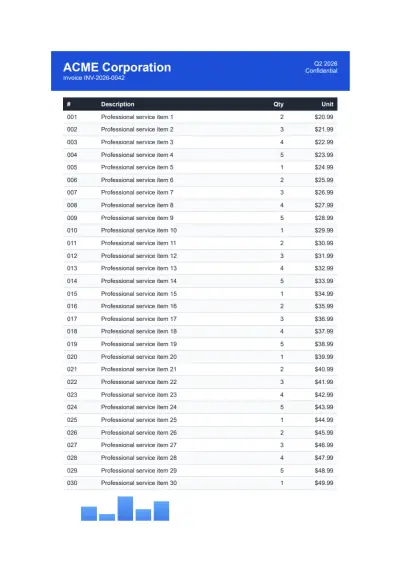

IronPDF는 IRON SUITE 의 일부입니다.
10 .NET API 제품 당신의 사무 문서를 위한

PDF 파일을 HTML처럼 빠르게 변환해야 할 때.
