



已更新 2026年8月16日
ABCpdf vs IronPDF:.NET PDF 庫比較 PDF 生成和 HTML 轉換
在 ABCpdf 和 IronPDF 之間選擇 .NET PDF 生成?比較 HTML 渲染引擎、功能和易用性,以找到適合您項目的庫。
閱讀更多

在 C# 中有 7 種主要方法可以將 HTML 轉換為 PDF,但並非所有方法都能產生相同的結果。在對 7 個引擎進行基準測試時,只有 3 個能正確渲染一份 2 頁的發票。在其他 4 個中,有 3 個在應計算總額的地方打印了 0.00,而第四個則完全省略了總額區塊,且沒有任何一個引擎提出錯誤或警告。這些引擎在對現代 CSS 的支援、JavaScript 執行、負載下的效能和容器大小方面各不相同。這些差異只有在查看輸出後才會顯現,而不是假設成功渲染就意味著內容正確。本指南提供了所有 7 種方法的工作代碼和每個方法的基準數據,所有測量均在單台機器上進行。
這些庫主要分為兩大類,這在很大程度上解釋了下面的結果。瀏覽器級渲染器使用完整的 Chromium 引擎。IronPDF (2026.8.1) 在包中包含了 Chromium,而 PuppeteerSharp (25.8.0) 和 Playwright .NET (1.62.0) 則通過 DevTools 協議控制外部瀏覽器。這三者複製了 Chrome 的輸出,包括 CSS Grid、網頁字體和基於畫布的圖表,但需要更多的記憶體和更大的容器。布局引擎庫,如 iText 9 與 pdfHTML (6.3.3 on iText Core 9.7.0)、HtmlRenderer 與 PdfSharp (1.6.1) 和 Aspose.HTML (25.7.0),使用自己的布局引擎,體積更小且通常更快,但不支援現代 JavaScript。wkhtmltopdf (0.12.6) 是一個中間案例,使用較舊的 Qt (4.8.5) WebKit 引擎,支援 ES5 但不支援 ES6。本指南中的所有基準測試均基於在 4 個並發級別下處理相同的 2 頁發票,每個 PDF 都經過準確性審核。
簡短版本:IronPDF 的領先之處測量於 2026 年 9 月 3 日,5 次通過,8,960 次計時渲染,在閒置的 24 核 Windows 11 桌面上運行 .NET 10。完整的方法和原始數據如下,並且可以下載測試工具。
| 您正在選擇的項目 | 獲勝者 | 測量結果 | 替代方案的成本 |
|---|---|---|---|
| 正確的文件 | IronPDF | 計算總數、繪製圖表、網格保持完整 | 7個中有4個返回了錯誤的文件且未引發錯誤 |
| 正確渲染的吞吐量 | IronPDF | 8個並發時每秒渲染44.02次 | 同一台機器上是Playwright的2.1倍,PuppeteerSharp的2.8倍 |
| 每兆字節的工作量 | IronPDF | 每秒持續渲染27.0 MB | Playwright為54.3 MB,PuppeteerSharp為82.9 MB |
| 正確渲染的冷啟動 | IronPDF | 486毫秒到第一個PDF | PuppeteerSharp為639毫秒,Playwright為720毫秒,Aspose.HTML為1,096毫秒 |
| 您操作的內容 | IronPDF | Chromium隨NuGet包一起提供 | 瀏覽器引擎增加了一個映像、一個構建時下載、一個進程池和一個補丁節奏 |
| 您接下來整合的內容 | IronPDF | 合併、表單、簽名、PDF/A、加密在同一個包中 | 瀏覽器引擎渲染並停止,因此下一步是第二個依賴項 |
上表中的速度數據屬於生成錯誤文件的引擎。 iText 9每秒渲染54.30次,HtmlRenderer為327.09次,兩者都通過不運行頁面的JavaScript來實現。吞吐量數據在沒有生成的文件的情況下意義不大,因此這裡的每個表格都有一個準確性列。
IronPDF在每次正確渲染的吞吐量方面領先: 在重現文件的引擎中,IronPDF在同一台機器、同一文件和相同的等待條件下,每秒持續渲染44.02次,相比之下,其他兩個引擎分別為20.68次和15.60次,同時在每兆字節的工作量中表現最佳,並且最快達到第一個PDF。
比上述任何一項更重要的發現: 7個庫中有4個生成的PDF看起來完成了但卻是錯誤的。在其中3個中,發票總額顯示為0.00而不是2313.30。第四個,HtmlRenderer,默默地丟掉了應付金額、總額和圖表。任何情況下都沒有引發異常,輸出中也沒有任何提示。
本指南介紹了在.NET中將HTML轉換為PDF的7種方法,並為每種方法提供了代碼示例和定量基準。
要使用它,安裝套件,向渲染器提供 HTML 字串,並保存生成的 PDF。
using IronPdf;

License.LicenseKey = "YOUR-TRIAL-KEY";
var pdf = new ChromePdfRenderer().RenderHtmlAsPdf("<h1>Invoice INV-2026-0814</h1>");
pdf.SaveAs("invoice.pdf");Imports IronPdf
License.LicenseKey = "YOUR-TRIAL-KEY"
Dim pdf = New ChromePdfRenderer().RenderHtmlAsPdf("<h1>Invoice INV-2026-0814</h1>")
pdf.SaveAs("invoice.pdf")Imports IronPdf
License.LicenseKey = "YOUR-TRIAL-KEY"
Dim pdf = New ChromePdfRenderer().RenderHtmlAsPdf("<h1>Invoice INV-2026-0814</h1>")
pdf.SaveAs("invoice.pdf")
購買或註冊 30 天 IronPDF 試用後,在應用程式開始時輸入您的授權金鑰。
IronPdf.License.LicenseKey = "KEY";IronPdf.License.LicenseKey = "KEY";Imports IronPdf
IronPdf.License.LicenseKey = "KEY"Imports IronPdf
IronPdf.License.LicenseKey = "KEY"立即在您的項目中開始使用 IronPDF,免費試用。
 使用NuGet安裝
上述快速入門從本指南中使用的測試發票產生以下輸出。
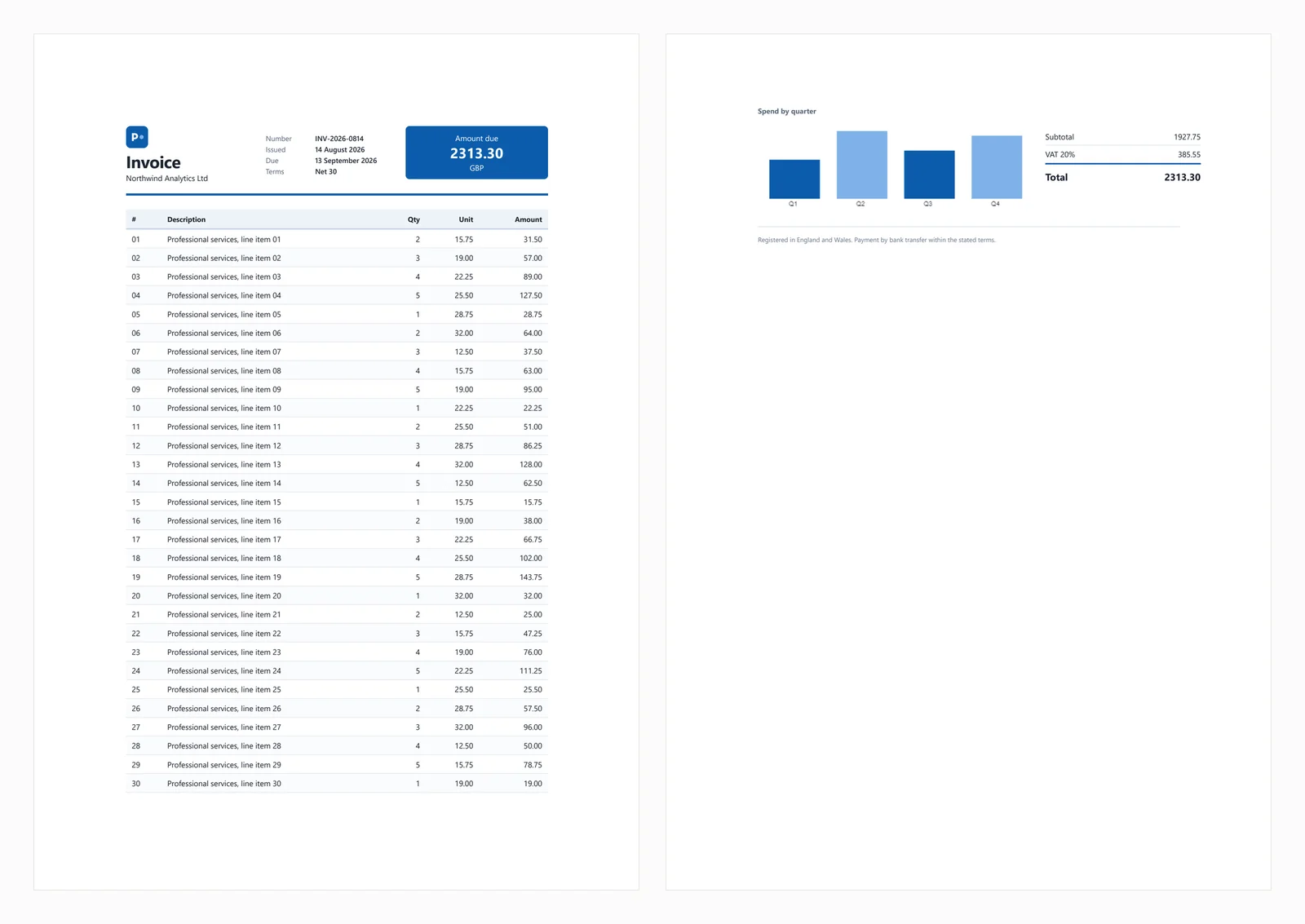
測試文檔包括一個 CSS Grid 頭部、一個具有斑馬條紋的 30 行表格、一個內嵌 SVG、一個在 canvas 元素上渲染的條形圖,以及在加載時用 JavaScript 計算的總計。計算出的總計對於測試非常重要,因為沒有 JavaScript 支持 的引擎會生成看似完整但顯示應付金額為 0.00 的發票。這種行為出現在下面的 3 個庫中,第四個則完全省略了總計塊。
常見的故障情境在下面的部分中涵蓋。
IronPDF 是一個在您的應用程序中運行的 Chromium 渲染器 通過 NuGet,消除了單獨安裝瀏覽器的需要。這一區別主要影響部署,稍後在指南中會討論。
安裝:
從 HTML 字串:
// IronPDF 2026.8.1
using IronPdf;
License.LicenseKey = "YOUR-TRIAL-KEY"; // trial keys are free
string html = @"<h1>Invoice INV-2026-0814</h1>
<p>Northwind Analytics Ltd — Net 30</p>
<table><tr><th>Item</th><th>Amount</th></tr>
<tr><td>Professional services</td><td>2313.30</td></tr></table>";
var renderer = new ChromePdfRenderer();
renderer.RenderingOptions.PaperSize = IronPdf.Rendering.PdfPaperSize.A4;
renderer.RenderingOptions.PrintHtmlBackgrounds = true;
using PdfDocument pdf = renderer.RenderHtmlAsPdf(html);
pdf.SaveAs("invoice.pdf");// IronPDF 2026.8.1
using IronPdf;
License.LicenseKey = "YOUR-TRIAL-KEY"; // trial keys are free
string html = @"<h1>Invoice INV-2026-0814</h1>
<p>Northwind Analytics Ltd — Net 30</p>
<table><tr><th>Item</th><th>Amount</th></tr>
<tr><td>Professional services</td><td>2313.30</td></tr></table>";
var renderer = new ChromePdfRenderer();
renderer.RenderingOptions.PaperSize = IronPdf.Rendering.PdfPaperSize.A4;
renderer.RenderingOptions.PrintHtmlBackgrounds = true;
using PdfDocument pdf = renderer.RenderHtmlAsPdf(html);
pdf.SaveAs("invoice.pdf");' IronPDF 2026.8.1
Imports IronPdf
License.LicenseKey = "YOUR-TRIAL-KEY" ' trial keys are free
Dim html As String = "<h1>Invoice INV-2026-0814</h1>
<p>Northwind Analytics Ltd — Net 30</p>
<table><tr><th>Item</th><th>Amount</th></tr>
<tr><td>Professional services</td><td>2313.30</td></tr></table>"
Dim renderer As New ChromePdfRenderer()
renderer.RenderingOptions.PaperSize = IronPdf.Rendering.PdfPaperSize.A4
renderer.RenderingOptions.PrintHtmlBackgrounds = True
Using pdf As PdfDocument = renderer.RenderHtmlAsPdf(html)
pdf.SaveAs("invoice.pdf")
End Using' IronPDF 2026.8.1
Imports IronPdf
License.LicenseKey = "YOUR-TRIAL-KEY" ' trial keys are free
Dim html As String = "<h1>Invoice INV-2026-0814</h1>
<p>Northwind Analytics Ltd — Net 30</p>
<table><tr><th>Item</th><th>Amount</th></tr>
<tr><td>Professional services</td><td>2313.30</td></tr></table>"
Dim renderer As New ChromePdfRenderer()
renderer.RenderingOptions.PaperSize = IronPdf.Rendering.PdfPaperSize.A4
renderer.RenderingOptions.PrintHtmlBackgrounds = True
Using pdf As PdfDocument = renderer.RenderHtmlAsPdf(html)
pdf.SaveAs("invoice.pdf")
End Using從實時 URL:
// IronPDF 2026.8.1 - only the render call changes.
using IronPdf;

License.LicenseKey = "YOUR-TRIAL-KEY";

var renderer = new ChromePdfRenderer();

using PdfDocument pdf = renderer.RenderUrlAsPdf("https://ironpdf.com/");
pdf.SaveAs("page.pdf");
// IronPDF 2026.8.1 - only the render call changes.
using IronPdf;
License.LicenseKey = "YOUR-TRIAL-KEY";
var renderer = new ChromePdfRenderer();
using PdfDocument pdf = renderer.RenderUrlAsPdf("https://ironpdf.com/");
pdf.SaveAs("page.pdf");Imports IronPdf
License.LicenseKey = "YOUR-TRIAL-KEY"
Dim renderer = New ChromePdfRenderer()
Using pdf As PdfDocument = renderer.RenderUrlAsPdf("https://ironpdf.com/")
pdf.SaveAs("page.pdf")
End UsingImports IronPdf
License.LicenseKey = "YOUR-TRIAL-KEY"
Dim renderer = New ChromePdfRenderer()
Using pdf As PdfDocument = renderer.RenderUrlAsPdf("https://ironpdf.com/")
pdf.SaveAs("page.pdf")
End Using推薦使用: 當您需要瀏覽器準確的 PDF 渲染而不需要管理無頭瀏覽器的基礎設施時,選擇 IronPDF,例如進程生命周期、崩潰恢復或容器配置。
權衡: 它將 Chromium 包含在包中,因此單次冷渲染的峰值內存達到 342 MB,8 個並發渲染時達到 1,187 MB。它的起價為 $999,而其他 6 個中有 4 個是免費的。對於一個副項目或低量內部工具來說,這個成本很難證明是合理的。
性能: 486 毫秒冷啟動,8 個並發渲染時的中位延遲為 161 毫秒,每秒持續渲染 44.02 次,整個進程樹的峰值內存使用量為 1,187 MB。測試發票準確渲染,包括圖表和總計。
PuppeteerSharp 是 Puppeteer 的 .NET 移植版。它下載一個 Chromium 構建,通過 DevTools 協議控制它並生成 PDF。它是免費的,具有 MIT 許可證,積極維護,並在此處測量為 PuppeteerSharp (25.8.0)。
安裝:
從 HTML 字串:
// PuppeteerSharp 25.8.0
using PuppeteerSharp;
using PuppeteerSharp.Media;
string html = @"<h1>Invoice INV-2026-0814</h1>
<p>Northwind Analytics Ltd — Net 30</p>
<table><tr><th>Item</th><th>Amount</th></tr>
<tr><td>Professional services</td><td>2313.30</td></tr></table>";
// First run downloads roughly 150 MB of Chromium. Pre-fetch this at build time.
await new BrowserFetcher().DownloadAsync();
await using IBrowser browser = await Puppeteer.LaunchAsync(new LaunchOptions { Headless = true });
await using IPage page = await browser.NewPageAsync();
await page.SetContentAsync(html, new SetContentOptions
{
WaitUntil = new[] { WaitUntilNavigation.Load }
});
await page.PdfAsync("invoice.pdf", new PdfOptions
{
Format = PaperFormat.A4,
PrintBackground = true
});// PuppeteerSharp 25.8.0
using PuppeteerSharp;
using PuppeteerSharp.Media;
string html = @"<h1>Invoice INV-2026-0814</h1>
<p>Northwind Analytics Ltd — Net 30</p>
<table><tr><th>Item</th><th>Amount</th></tr>
<tr><td>Professional services</td><td>2313.30</td></tr></table>";
// First run downloads roughly 150 MB of Chromium. Pre-fetch this at build time.
await new BrowserFetcher().DownloadAsync();
await using IBrowser browser = await Puppeteer.LaunchAsync(new LaunchOptions { Headless = true });
await using IPage page = await browser.NewPageAsync();
await page.SetContentAsync(html, new SetContentOptions
{
WaitUntil = new[] { WaitUntilNavigation.Load }
});
await page.PdfAsync("invoice.pdf", new PdfOptions
{
Format = PaperFormat.A4,
PrintBackground = true
});' PuppeteerSharp 25.8.0
Imports PuppeteerSharp
Imports PuppeteerSharp.Media
Dim html As String = "<h1>Invoice INV-2026-0814</h1>
<p>Northwind Analytics Ltd — Net 30</p>
<table><tr><th>Item</th><th>Amount</th></tr>
<tr><td>Professional services</td><td>2313.30</td></tr></table>"
' First run downloads roughly 150 MB of Chromium. Pre-fetch this at build time.
Await (New BrowserFetcher()).DownloadAsync()
Await Using browser As IBrowser = Await Puppeteer.LaunchAsync(New LaunchOptions With {.Headless = True})
Await Using page As IPage = Await browser.NewPageAsync()
Await page.SetContentAsync(html, New SetContentOptions With {.WaitUntil = {WaitUntilNavigation.Load}})
Await page.PdfAsync("invoice.pdf", New PdfOptions With {
.Format = PaperFormat.A4,
.PrintBackground = True
})
End Using
End Using' PuppeteerSharp 25.8.0
Imports PuppeteerSharp
Imports PuppeteerSharp.Media
Dim html As String = "<h1>Invoice INV-2026-0814</h1>
<p>Northwind Analytics Ltd — Net 30</p>
<table><tr><th>Item</th><th>Amount</th></tr>
<tr><td>Professional services</td><td>2313.30</td></tr></table>"
' First run downloads roughly 150 MB of Chromium. Pre-fetch this at build time.
Await (New BrowserFetcher()).DownloadAsync()
Await Using browser As IBrowser = Await Puppeteer.LaunchAsync(New LaunchOptions With {.Headless = True})
Await Using page As IPage = Await browser.NewPageAsync()
Await page.SetContentAsync(html, New SetContentOptions With {.WaitUntil = {WaitUntilNavigation.Load}})
Await page.PdfAsync("invoice.pdf", New PdfOptions With {
.Format = PaperFormat.A4,
.PrintBackground = True
})
End Using
End Using從實時 URL:
// PuppeteerSharp 25.8.0 - GoToAsync replaces SetContentAsync.
await using IPage page = await browser.NewPageAsync();

await page.GoToAsync("https://ironpdf.com/", new NavigationOptions
{
    WaitUntil = new[] { WaitUntilNavigation.Networkidle0 }
});

await page.PdfAsync("page.pdf", new PdfOptions { Format = PaperFormat.A4, PrintBackground = true });
// PuppeteerSharp 25.8.0 - GoToAsync replaces SetContentAsync.
await using IPage page = await browser.NewPageAsync();
await page.GoToAsync("https://ironpdf.com/", new NavigationOptions
{
WaitUntil = new[] { WaitUntilNavigation.Networkidle0 }
});
await page.PdfAsync("page.pdf", new PdfOptions { Format = PaperFormat.A4, PrintBackground = true });' PuppeteerSharp 25.8.0 - GoToAsync replaces SetContentAsync.
Await Using page As IPage = Await browser.NewPageAsync()
Await page.GoToAsync("https://ironpdf.com/", New NavigationOptions With {
.WaitUntil = {WaitUntilNavigation.Networkidle0}
})
Await page.PdfAsync("page.pdf", New PdfOptions With {.Format = PaperFormat.A4, .PrintBackground = True})' PuppeteerSharp 25.8.0 - GoToAsync replaces SetContentAsync.
Await Using page As IPage = Await browser.NewPageAsync()
Await page.GoToAsync("https://ironpdf.com/", New NavigationOptions With {
.WaitUntil = {WaitUntilNavigation.Networkidle0}
})
Await page.PdfAsync("page.pdf", New PdfOptions With {.Format = PaperFormat.A4, .PrintBackground = True})推薦使用: 當預算限制是優先考慮的,並且您對管理瀏覽器進程感到舒適時,選擇 PuppeteerSharp。它輸出的結果與 Chrome 相同,因為它使用相同的引擎。
權衡: 您需要負責瀏覽器進程管理,包括生命周期、處理崩潰後的孤立進程以及配置沙箱。初次運行會下載大約 150 MB 的 Chromium,如果在沒有外部網絡訪問的容器中可能會失敗,因此請在構建時預先獲取瀏覽器。在負載下,PuppeteerSharp 在測量的選項中生成最多的進程,在 16 個並發渲染時達到 40 個。
性能: 639 毫秒冷啟動,8 個並發渲染時的中位延遲為 507 毫秒,每秒持續渲染 15.60 次,整個進程樹的峰值內存使用量為 1,293 MB。測試發票正確渲染。
Playwright for .NET 是微軟的瀏覽器自動化庫。它使用類似於 Puppeteer 的方法,但提供不同的 API、更高效的頁面隔離以及類似的部署考量。
安裝:
第二個命令安裝瀏覽器二進制文件。
省略它是 CI 中第一次 Playwright 構建失敗的最常見原因。
從 HTML 字串:
// Microsoft.Playwright 1.62.0
using Microsoft.Playwright;
string html = @"<h1>Invoice INV-2026-0814</h1>
<p>Northwind Analytics Ltd — Net 30</p>
<table><tr><th>Item</th><th>Amount</th></tr>
<tr><td>Professional services</td><td>2313.30</td></tr></table>";
// Run "playwright install chromium" first, or call the installer in code.
Microsoft.Playwright.Program.Main(new[] { "install", "chromium" });
using IPlaywright playwright = await Playwright.CreateAsync();
await using IBrowser browser = await playwright.Chromium.LaunchAsync();
IPage page = await browser.NewPageAsync();
await page.SetContentAsync(html, new PageSetContentOptions { WaitUntil = WaitUntilState.Load });
await page.PdfAsync(new PagePdfOptions
{
Path = "invoice.pdf",
Format = "A4",
PrintBackground = true
});// Microsoft.Playwright 1.62.0
using Microsoft.Playwright;
string html = @"<h1>Invoice INV-2026-0814</h1>
<p>Northwind Analytics Ltd — Net 30</p>
<table><tr><th>Item</th><th>Amount</th></tr>
<tr><td>Professional services</td><td>2313.30</td></tr></table>";
// Run "playwright install chromium" first, or call the installer in code.
Microsoft.Playwright.Program.Main(new[] { "install", "chromium" });
using IPlaywright playwright = await Playwright.CreateAsync();
await using IBrowser browser = await playwright.Chromium.LaunchAsync();
IPage page = await browser.NewPageAsync();
await page.SetContentAsync(html, new PageSetContentOptions { WaitUntil = WaitUntilState.Load });
await page.PdfAsync(new PagePdfOptions
{
Path = "invoice.pdf",
Format = "A4",
PrintBackground = true
});' Microsoft.Playwright 1.62.0
Imports Microsoft.Playwright
Dim html As String = "<h1>Invoice INV-2026-0814</h1>
<p>Northwind Analytics Ltd — Net 30</p>
<table><tr><th>Item</th><th>Amount</th></tr>
<tr><td>Professional services</td><td>2313.30</td></tr></table>"
' Run "playwright install chromium" first, or call the installer in code.
Microsoft.Playwright.Program.Main(New String() {"install", "chromium"})
Using playwright As IPlaywright = Await Playwright.CreateAsync()
Await Using browser As IBrowser = Await playwright.Chromium.LaunchAsync()
Dim page As IPage = Await browser.NewPageAsync()
Await page.SetContentAsync(html, New PageSetContentOptions With {.WaitUntil = WaitUntilState.Load})
Await page.PdfAsync(New PagePdfOptions With {
.Path = "invoice.pdf",
.Format = "A4",
.PrintBackground = True
})
End Using
End Using' Microsoft.Playwright 1.62.0
Imports Microsoft.Playwright
Dim html As String = "<h1>Invoice INV-2026-0814</h1>
<p>Northwind Analytics Ltd — Net 30</p>
<table><tr><th>Item</th><th>Amount</th></tr>
<tr><td>Professional services</td><td>2313.30</td></tr></table>"
' Run "playwright install chromium" first, or call the installer in code.
Microsoft.Playwright.Program.Main(New String() {"install", "chromium"})
Using playwright As IPlaywright = Await Playwright.CreateAsync()
Await Using browser As IBrowser = Await playwright.Chromium.LaunchAsync()
Dim page As IPage = Await browser.NewPageAsync()
Await page.SetContentAsync(html, New PageSetContentOptions With {.WaitUntil = WaitUntilState.Load})
Await page.PdfAsync(New PagePdfOptions With {
.Path = "invoice.pdf",
.Format = "A4",
.PrintBackground = True
})
End Using
End Using從即時 URL:
// Microsoft.Playwright 1.62.0 - GotoAsync replaces SetContentAsync.
IPage page = await browser.NewPageAsync();

await page.GotoAsync("https://ironpdf.com/", new PageGotoOptions
{
    WaitUntil = WaitUntilState.NetworkIdle
});

await page.PdfAsync(new PagePdfOptions { Path = "page.pdf", Format = "A4", PrintBackground = true });
// Microsoft.Playwright 1.62.0 - GotoAsync replaces SetContentAsync.
IPage page = await browser.NewPageAsync();
await page.GotoAsync("https://ironpdf.com/", new PageGotoOptions
{
WaitUntil = WaitUntilState.NetworkIdle
});
await page.PdfAsync(new PagePdfOptions { Path = "page.pdf", Format = "A4", PrintBackground = true });' Microsoft.Playwright 1.62.0 - GotoAsync replaces SetContentAsync.
Dim page As IPage = Await browser.NewPageAsync()
Await page.GotoAsync("https://ironpdf.com/", New PageGotoOptions With {
.WaitUntil = WaitUntilState.NetworkIdle
})
Await page.PdfAsync(New PagePdfOptions With {.Path = "page.pdf", .Format = "A4", .PrintBackground = True})' Microsoft.Playwright 1.62.0 - GotoAsync replaces SetContentAsync.
Dim page As IPage = Await browser.NewPageAsync()
Await page.GotoAsync("https://ironpdf.com/", New PageGotoOptions With {
.WaitUntil = WaitUntilState.NetworkIdle
})
Await page.PdfAsync(New PagePdfOptions With {.Path = "page.pdf", .Format = "A4", .PrintBackground = True})推薦使用: 如果您需要免費的瀏覽器級渲染並且偏好其 API,或者您已經使用 Playwright 進行測試並希望避免額外的依賴項,請選擇 Playwright for .NET。
權衡: Playwright 與 Puppeteer 共享相同的考量,包括在您的映像中包含瀏覽器二進制文件、進程監督以及在 Dockerfile 中的安裝步驟。它是此處測量的最穩定引擎,但其吞吐量僅略高於嵌入式引擎的一半。
性能: 720 毫秒冷啟動,8 個並發渲染時的中位延遲為 381 毫秒,每秒持續渲染 20.68 次,整個進程樹的峰值內存使用量為 1,122 MB。測試發票正確渲染。
iText 9 與 pdfHTML 是一個帶有 HTML 轉換附加功能的 PDF 庫。它使用自己的佈局引擎而不是瀏覽器,在其支持的功能內提供快速且可預測的結果,對於超出其支持範圍的功能則保持沉默。這兩個包分別版本化。pdfHTML (6.3.3) 是在 iText Core (9.7.0) 上運行的附加功能,這是此處測量的配對。
安裝:
注意: itext7.* 包已被棄用並重命名為 itext.*,這是一個頂級教程仍然錯誤的細節。安裝 itext.pdfhtml,而不是 itext7.pdfhtml。包名不帶版本號,因此 itext.pdfhtml 解析為 iText 9 上當前的 pdfHTML 版本。
從 HTML 字串:
// itext.pdfhtml 6.3.3 - AGPL or commercial licence.
// Note the package rename: itext7.pdfhtml is deprecated in favour of itext.pdfhtml.
using iText.Html2pdf;
string html = @"<h1>Invoice INV-2026-0814</h1>
<p>Northwind Analytics Ltd — Net 30</p>
<table><tr><th>Item</th><th>Amount</th></tr>
<tr><td>Professional services</td><td>2313.30</td></tr></table>";
using var output = new FileStream("invoice.pdf", FileMode.Create);
HtmlConverter.ConvertToPdf(html, output);
// No JavaScript engine and no canvas, so anything the page computes or draws
// at load time will be missing from the result.// itext.pdfhtml 6.3.3 - AGPL or commercial licence.
// Note the package rename: itext7.pdfhtml is deprecated in favour of itext.pdfhtml.
using iText.Html2pdf;
string html = @"<h1>Invoice INV-2026-0814</h1>
<p>Northwind Analytics Ltd — Net 30</p>
<table><tr><th>Item</th><th>Amount</th></tr>
<tr><td>Professional services</td><td>2313.30</td></tr></table>";
using var output = new FileStream("invoice.pdf", FileMode.Create);
HtmlConverter.ConvertToPdf(html, output);
// No JavaScript engine and no canvas, so anything the page computes or draws
// at load time will be missing from the result.// itext.pdfhtml 6.3.3 - AGPL or commercial licence.
// Note the package rename: itext7.pdfhtml is deprecated in favour of itext.pdfhtml.
Imports iText.Html2pdf
Dim html As String = "<h1>Invoice INV-2026-0814</h1>
<p>Northwind Analytics Ltd — Net 30</p>
<table><tr><th>Item</th><th>Amount</th></tr>
<tr><td>Professional services</td><td>2313.30</td></tr></table>"
Using output As New FileStream("invoice.pdf", FileMode.Create)
HtmlConverter.ConvertToPdf(html, output)
End Using
' No JavaScript engine and no canvas, so anything the page computes or draws
' at load time will be missing from the result.// itext.pdfhtml 6.3.3 - AGPL or commercial licence.
// Note the package rename: itext7.pdfhtml is deprecated in favour of itext.pdfhtml.
Imports iText.Html2pdf
Dim html As String = "<h1>Invoice INV-2026-0814</h1>
<p>Northwind Analytics Ltd — Net 30</p>
<table><tr><th>Item</th><th>Amount</th></tr>
<tr><td>Professional services</td><td>2313.30</td></tr></table>"
Using output As New FileStream("invoice.pdf", FileMode.Create)
HtmlConverter.ConvertToPdf(html, output)
End Using
' No JavaScript engine and no canvas, so anything the page computes or draws
' at load time will be missing from the result.從即時 URL: iText 不直接接受 URL。手動獲取 HTML 並設置基 URI 以確保相對資產正確解析。
// itext.pdfhtml 6.3.3 - there is no URL method, so fetch the HTML yourself.
using iText.Html2pdf;

using var client = new HttpClient();
string html = await client.GetStringAsync("https://ironpdf.com/");

// The base URI is what lets relative images, CSS and links resolve.
var properties = new ConverterProperties();
properties.SetBaseUri("https://ironpdf.com/");

using var output = new FileStream("page.pdf", FileMode.Create);
HtmlConverter.ConvertToPdf(html, output, properties);
// itext.pdfhtml 6.3.3 - there is no URL method, so fetch the HTML yourself.
using iText.Html2pdf;
using var client = new HttpClient();
string html = await client.GetStringAsync("https://ironpdf.com/");
// The base URI is what lets relative images, CSS and links resolve.
var properties = new ConverterProperties();
properties.SetBaseUri("https://ironpdf.com/");
using var output = new FileStream("page.pdf", FileMode.Create);
HtmlConverter.ConvertToPdf(html, output, properties);' itext.pdfhtml 6.3.3 - there is no URL method, so fetch the HTML yourself.
Imports iText.Html2pdf
Using client As New HttpClient()
Dim html As String = Await client.GetStringAsync("https://ironpdf.com/")
' The base URI is what lets relative images, CSS and links resolve.
Dim properties As New ConverterProperties()
properties.SetBaseUri("https://ironpdf.com/")
Using output As New FileStream("page.pdf", FileMode.Create)
HtmlConverter.ConvertToPdf(html, output, properties)
End Using
End Using' itext.pdfhtml 6.3.3 - there is no URL method, so fetch the HTML yourself.
Imports iText.Html2pdf
Using client As New HttpClient()
Dim html As String = Await client.GetStringAsync("https://ironpdf.com/")
' The base URI is what lets relative images, CSS and links resolve.
Dim properties As New ConverterProperties()
properties.SetBaseUri("https://ironpdf.com/")
Using output As New FileStream("page.pdf", FileMode.Create)
HtmlConverter.ConvertToPdf(html, output, properties)
End Using
End Using推薦使用: 如果您已經使用 iText 進行其他 PDF 任務或需要高級 PDF 操作以及 HTML 轉換,並且希望避免多個庫,請選擇 iText。
權衡: iText 僅在 AGPL 或付費許可下可用。AGPL 要求開源您的整個應用程序,這使得對於大多數團隊來說,付費選項對於發佈封閉軟件是必要的。技術上,iText 不執行 JavaScript,並且與瀏覽器相比,提供的 CSS 支持更有限,如下方的保真度基準所示。
性能: 489 毫秒冷啟動,8 個並發渲染時的中位延遲為 144 毫秒,每秒持續渲染 54.30 次,單個進程中的峰值內存使用量為 332 MB。發票總計為 0.00,圖表未渲染。
HtmlRenderer 與 PdfSharp 是以純管理的 C# 實作,無原生二進位檔或瀏覽器相依性,且不需要額外的容器安裝。它是目前提供的選項中最小且最快的,但其 CSS 支援僅限於大約 2011 年的標準。
安裝:
從 HTML 字串:
// HtmlRenderer.PdfSharp 1.6.1 - pure managed, no native binaries at all.
using TheArtOfDev.HtmlRenderer.PdfSharp;
string html = @"<h1>Invoice INV-2026-0814</h1>
<p>Northwind Analytics Ltd — Net 30</p>
<table><tr><th>Item</th><th>Amount</th></tr>
<tr><td>Professional services</td><td>2313.30</td></tr></table>";
PdfSharp.Pdf.PdfDocument pdf = PdfGenerator.GeneratePdf(html, PdfSharp.PageSize.A4);
pdf.Save("invoice.pdf");
// There is no URL method. Fetch the markup with HttpClient and pass the string.
// CSS support stops well short of Flexbox and Grid, and there is no JavaScript.// HtmlRenderer.PdfSharp 1.6.1 - pure managed, no native binaries at all.
using TheArtOfDev.HtmlRenderer.PdfSharp;
string html = @"<h1>Invoice INV-2026-0814</h1>
<p>Northwind Analytics Ltd — Net 30</p>
<table><tr><th>Item</th><th>Amount</th></tr>
<tr><td>Professional services</td><td>2313.30</td></tr></table>";
PdfSharp.Pdf.PdfDocument pdf = PdfGenerator.GeneratePdf(html, PdfSharp.PageSize.A4);
pdf.Save("invoice.pdf");
// There is no URL method. Fetch the markup with HttpClient and pass the string.
// CSS support stops well short of Flexbox and Grid, and there is no JavaScript.' HtmlRenderer.PdfSharp 1.6.1 - pure managed, no native binaries at all.
Imports TheArtOfDev.HtmlRenderer.PdfSharp
Dim html As String = "<h1>Invoice INV-2026-0814</h1>
<p>Northwind Analytics Ltd — Net 30</p>
<table><tr><th>Item</th><th>Amount</th></tr>
<tr><td>Professional services</td><td>2313.30</td></tr></table>"
Dim pdf As PdfSharp.Pdf.PdfDocument = PdfGenerator.GeneratePdf(html, PdfSharp.PageSize.A4)
pdf.Save("invoice.pdf")
' There is no URL method. Fetch the markup with HttpClient and pass the string.
' CSS support stops well short of Flexbox and Grid, and there is no JavaScript.' HtmlRenderer.PdfSharp 1.6.1 - pure managed, no native binaries at all.
Imports TheArtOfDev.HtmlRenderer.PdfSharp
Dim html As String = "<h1>Invoice INV-2026-0814</h1>
<p>Northwind Analytics Ltd — Net 30</p>
<table><tr><th>Item</th><th>Amount</th></tr>
<tr><td>Professional services</td><td>2313.30</td></tr></table>"
Dim pdf As PdfSharp.Pdf.PdfDocument = PdfGenerator.GeneratePdf(html, PdfSharp.PageSize.A4)
pdf.Save("invoice.pdf")
' There is no URL method. Fetch the markup with HttpClient and pass the string.
' CSS support stops well short of Flexbox and Grid, and there is no JavaScript.從即時 URL: 沒有直接輸入 URL 的方法。需手動擷取 HTML 並以字串形式傳遞。
建議使用情境: 僅在嚴格禁止原生二進位檔的情境下選擇 HtmlRenderer 與 PdfSharp,例如受管制或隔離的環境,且僅用於載入時不進行計算的範本。它是此處三個不附帶原生二進位檔的選項之一,與 iText 9 和 Aspose.HTML 並列。在此發票中,它省略了標題、總計區塊和圖表。
權衡: HtmlRenderer 不支援 JavaScript、Flexbox 或 CSS Grid。對於固定、簡單的範本,它可能足夠,且其 23 毫秒的中位延遲在單一程序中無可匹敵。然而,為現代瀏覽器設計的 HTML 將無法正確呈現。在測試中,它省略了 CSS Grid 標題、總計區塊和圖表,並將兩頁壓縮成一頁,導致內容重疊。
HtmlRenderer 是測量中最快的引擎,但無法呈現現代 CSS。這兩個因素應在您的決策中考慮。
效能: 157 毫秒冷啟動,8 個並行渲染時中位延遲 23 毫秒,每秒持續渲染 327.09 次,166 MB 峰值記憶體使用量,單一程序。輸出為缺少標題、總計和圖表的單頁。
wkhtmltopdf 是一個基於較舊的 Qt WebKit 引擎的命令行工具,通常通過 .NET via DinkToPdf 集成。該引擎本身沒有 NuGet 安裝,因此必須作為二進制文件與您的應用程序一起發佈。DinkToPdf 作為包裝器,儘管存在替代方案。
從 HTML 字串:
// wkhtmltopdf 0.12.6 via DinkToPdf. The engine is archived; the native
// libwkhtmltox binaries must be shipped alongside your application.
using DinkToPdf;
using DinkToPdf.Contracts;
string html = @"<h1>Invoice INV-2026-0814</h1>
<p>Northwind Analytics Ltd — Net 30</p>
<table><tr><th>Item</th><th>Amount</th></tr>
<tr><td>Professional services</td><td>2313.30</td></tr></table>";
IConverter converter = new SynchronizedConverter(new PdfTools());
var document = new HtmlToPdfDocument
{
GlobalSettings = { PaperSize = PaperKind.A4, Out = "invoice.pdf" },
Objects = { new ObjectSettings { HtmlContent = html } }
};
converter.Convert(document);// wkhtmltopdf 0.12.6 via DinkToPdf. The engine is archived; the native
// libwkhtmltox binaries must be shipped alongside your application.
using DinkToPdf;
using DinkToPdf.Contracts;
string html = @"<h1>Invoice INV-2026-0814</h1>
<p>Northwind Analytics Ltd — Net 30</p>
<table><tr><th>Item</th><th>Amount</th></tr>
<tr><td>Professional services</td><td>2313.30</td></tr></table>";
IConverter converter = new SynchronizedConverter(new PdfTools());
var document = new HtmlToPdfDocument
{
GlobalSettings = { PaperSize = PaperKind.A4, Out = "invoice.pdf" },
Objects = { new ObjectSettings { HtmlContent = html } }
};
converter.Convert(document);' wkhtmltopdf 0.12.6 via DinkToPdf. The engine is archived; the native
' libwkhtmltox binaries must be shipped alongside your application.
Imports DinkToPdf
Imports DinkToPdf.Contracts
Dim html As String = "<h1>Invoice INV-2026-0814</h1>
<p>Northwind Analytics Ltd — Net 30</p>
<table><tr><th>Item</th><th>Amount</th></tr>
<tr><td>Professional services</td><td>2313.30</td></tr></table>"
Dim converter As IConverter = New SynchronizedConverter(New PdfTools())
Dim document = New HtmlToPdfDocument() With {
.GlobalSettings = New GlobalSettings With {.PaperSize = PaperKind.A4, .Out = "invoice.pdf"},
.Objects = {New ObjectSettings With {.HtmlContent = html}}
}
converter.Convert(document)' wkhtmltopdf 0.12.6 via DinkToPdf. The engine is archived; the native
' libwkhtmltox binaries must be shipped alongside your application.
Imports DinkToPdf
Imports DinkToPdf.Contracts
Dim html As String = "<h1>Invoice INV-2026-0814</h1>
<p>Northwind Analytics Ltd — Net 30</p>
<table><tr><th>Item</th><th>Amount</th></tr>
<tr><td>Professional services</td><td>2313.30</td></tr></table>"
Dim converter As IConverter = New SynchronizedConverter(New PdfTools())
Dim document = New HtmlToPdfDocument() With {
.GlobalSettings = New GlobalSettings With {.PaperSize = PaperKind.A4, .Out = "invoice.pdf"},
.Objects = {New ObjectSettings With {.HtmlContent = html}}
}
converter.Convert(document)從即時 URL:
// wkhtmltopdf 0.12.6 via DinkToPdf - swap HtmlContent for Page.
var document = new HtmlToPdfDocument
{
    GlobalSettings = { PaperSize = PaperKind.A4, Out = "page.pdf" },
    Objects = { new ObjectSettings { Page = "https://ironpdf.com/" } }
};

converter.Convert(document);
// wkhtmltopdf 0.12.6 via DinkToPdf - swap HtmlContent for Page.
var document = new HtmlToPdfDocument
{
GlobalSettings = { PaperSize = PaperKind.A4, Out = "page.pdf" },
Objects = { new ObjectSettings { Page = "https://ironpdf.com/" } }
};
converter.Convert(document);' wkhtmltopdf 0.12.6 via DinkToPdf - swap HtmlContent for Page.
Dim document = New HtmlToPdfDocument With {
.GlobalSettings = New GlobalSettings With {.PaperSize = PaperKind.A4, .Out = "page.pdf"},
.Objects = {New ObjectSettings With {.Page = "https://ironpdf.com/"}}
}
converter.Convert(document)' wkhtmltopdf 0.12.6 via DinkToPdf - swap HtmlContent for Page.
Dim document = New HtmlToPdfDocument With {
.GlobalSettings = New GlobalSettings With {.PaperSize = PaperKind.A4, .Out = "page.pdf"},
.Objects = {New ObjectSettings With {.Page = "https://ironpdf.com/"}}
}
converter.Convert(document)專案狀態: wkhtmltopdf 儲存庫於 2023 年 1 月被封存,最後一個穩定版本(0.12.6)於 2020 年 6 月發佈,基於 Qt (4.8.5) 構建。其渲染固定在大約 2013 年的網頁標準,並且不再接收安全更新。
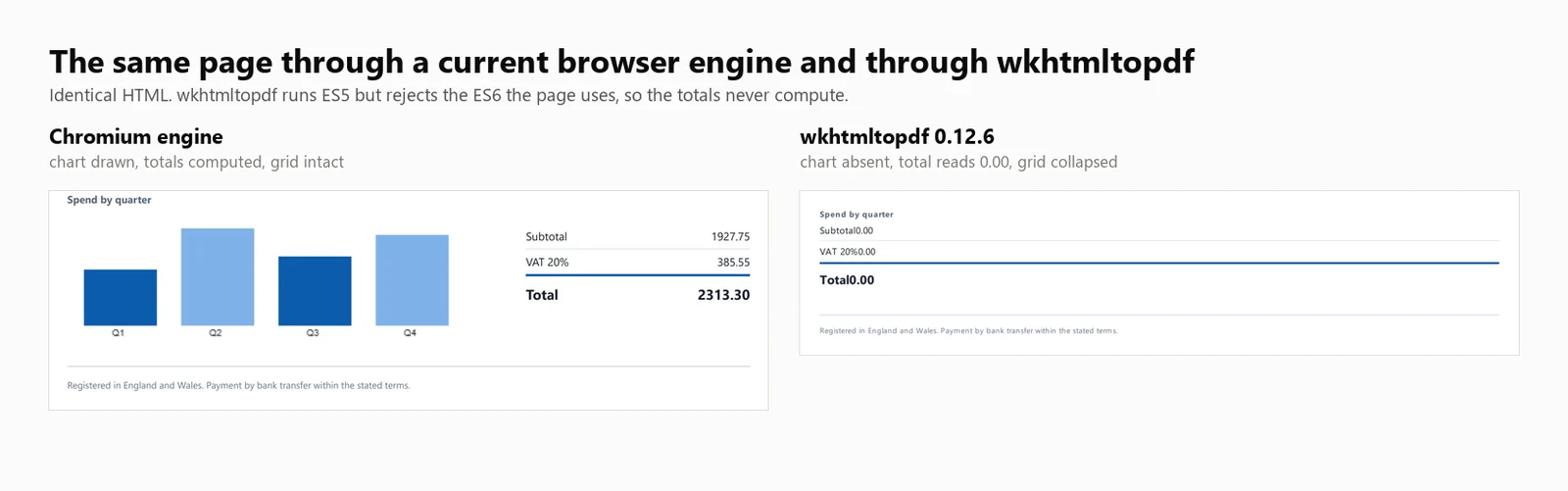
建議使用: 如果 wkhtmltopdf 已經在生產中使用,能正確渲染您的文件,並且您的模板是靜態的,則繼續使用。沒有功能需求則不需要遷移。
權衡: wkhtmltopdf 無法渲染依賴於 Flexbox 或較新 CSS 特性的佈局,並且不接收安全補丁。
JavaScript 支援: wkhtmltopdf 執行 ES5 JavaScript,但不支援 ES6。對此構建的直接測試成功執行了 ES5 並在 ES6 上拋出錯誤,因為 document.querySelectorAll(...).forEach 不受 Qt (4.8.5) 引擎支援。因此,使用此調用的測試發票顯示了一個佔位符總計 0.00,而沒有任何可見錯誤。寫入 ES5 基線的模板計算正確,而使用現代 JavaScript 的模板則不會。
性能: 424 毫秒冷啟動,8 個並發渲染時的中位延遲為 486 毫秒,每秒持續渲染 16.03 次,整個進程樹的峰值記憶體使用量為 482 MB。發票總計為 0.00,圖表未渲染。
上述數據基於將 wkhtmltopdf.exe 作為命令行工具運行,每次渲染 1 個進程。DinkToPdf 包裝器在進程中使用相同的引擎,但通過 SynchronizedConverter 序列化所有調用,限制了並發性擴展性。
Aspose.HTML for .NET 擁有自己的渲染引擎,而不是瀏覽器,它位於一個文檔套件中,該套件還涵蓋 Word、Excel 和 PowerPoint。對於已經從一個供應商購買的團隊來說,這意味著只需一份支持合同和一份採購訂單,而不是整合多個庫並跟蹤單獨的續訂。
安裝:
從 HTML 字串:
// Aspose.HTML for .NET 25.7.0 - commercial licence, applied from a .lic file.
using Aspose.Html;
using Aspose.Html.Converters;
using Aspose.Html.Saving;
new License().SetLicense("Aspose.HTMLProductFamily.lic");
string html = @"<h1>Invoice INV-2026-0814</h1>
<p>Northwind Analytics Ltd — Net 30</p>
<table><tr><th>Item</th><th>Amount</th></tr>
<tr><td>Professional services</td><td>2313.30</td></tr></table>";
// The second argument is the base URL relative assets resolve against.
using var doc = new HTMLDocument(html, ".");
Converter.ConvertHTML(doc, new PdfSaveOptions(), "invoice.pdf");
// Its own rendering stack, not a browser: ES5 runs, ES6 throws, so anything the
// page computes with modern syntax is left at its initial value.// Aspose.HTML for .NET 25.7.0 - commercial licence, applied from a .lic file.
using Aspose.Html;
using Aspose.Html.Converters;
using Aspose.Html.Saving;
new License().SetLicense("Aspose.HTMLProductFamily.lic");
string html = @"<h1>Invoice INV-2026-0814</h1>
<p>Northwind Analytics Ltd — Net 30</p>
<table><tr><th>Item</th><th>Amount</th></tr>
<tr><td>Professional services</td><td>2313.30</td></tr></table>";
// The second argument is the base URL relative assets resolve against.
using var doc = new HTMLDocument(html, ".");
Converter.ConvertHTML(doc, new PdfSaveOptions(), "invoice.pdf");
// Its own rendering stack, not a browser: ES5 runs, ES6 throws, so anything the
// page computes with modern syntax is left at its initial value.// Aspose.HTML for .NET 25.7.0 - commercial licence, applied from a .lic file.
Imports Aspose.Html
Imports Aspose.Html.Converters
Imports Aspose.Html.Saving
Call New License().SetLicense("Aspose.HTMLProductFamily.lic")
Dim html As String = "<h1>Invoice INV-2026-0814</h1>
<p>Northwind Analytics Ltd — Net 30</p>
<table><tr><th>Item</th><th>Amount</th></tr>
<tr><td>Professional services</td><td>2313.30</td></tr></table>"
' The second argument is the base URL relative assets resolve against.
Using doc = New HTMLDocument(html, ".")
Converter.ConvertHTML(doc, New PdfSaveOptions(), "invoice.pdf")
End Using
' Its own rendering stack, not a browser: ES5 runs, ES6 throws, so anything the
' page computes with modern syntax is left at its initial value.// Aspose.HTML for .NET 25.7.0 - commercial licence, applied from a .lic file.
Imports Aspose.Html
Imports Aspose.Html.Converters
Imports Aspose.Html.Saving
Call New License().SetLicense("Aspose.HTMLProductFamily.lic")
Dim html As String = "<h1>Invoice INV-2026-0814</h1>
<p>Northwind Analytics Ltd — Net 30</p>
<table><tr><th>Item</th><th>Amount</th></tr>
<tr><td>Professional services</td><td>2313.30</td></tr></table>"
' The second argument is the base URL relative assets resolve against.
Using doc = New HTMLDocument(html, ".")
Converter.ConvertHTML(doc, New PdfSaveOptions(), "invoice.pdf")
End Using
' Its own rendering stack, not a browser: ES5 runs, ES6 throws, so anything the
' page computes with modern syntax is left at its initial value.從即時 URL:
// Aspose.HTML 25.7.0 - only the HTMLDocument constructor changes.
using Aspose.Html;
using Aspose.Html.Converters;
using Aspose.Html.Saving;

new License().SetLicense("Aspose.HTMLProductFamily.lic");

using var doc = new HTMLDocument("https://ironpdf.com/");
Converter.ConvertHTML(doc, new PdfSaveOptions(), "page.pdf");
// Aspose.HTML 25.7.0 - only the HTMLDocument constructor changes.
using Aspose.Html;
using Aspose.Html.Converters;
using Aspose.Html.Saving;
new License().SetLicense("Aspose.HTMLProductFamily.lic");
using var doc = new HTMLDocument("https://ironpdf.com/");
Converter.ConvertHTML(doc, new PdfSaveOptions(), "page.pdf");' Aspose.HTML 25.7.0 - only the HTMLDocument constructor changes.
Imports Aspose.Html
Imports Aspose.Html.Converters
Imports Aspose.Html.Saving
New License().SetLicense("Aspose.HTMLProductFamily.lic")
Using doc As New HTMLDocument("https://ironpdf.com/")
Converter.ConvertHTML(doc, New PdfSaveOptions(), "page.pdf")
End Using' Aspose.HTML 25.7.0 - only the HTMLDocument constructor changes.
Imports Aspose.Html
Imports Aspose.Html.Converters
Imports Aspose.Html.Saving
New License().SetLicense("Aspose.HTMLProductFamily.lic")
Using doc As New HTMLDocument("https://ironpdf.com/")
Converter.ConvertHTML(doc, New PdfSaveOptions(), "page.pdf")
End Using推薦使用: 當您已經在其他格式上標準化使用 Aspose 並希望在同一合同下進行 HTML 轉換時,選擇 Aspose.HTML,適用於不依賴於現代 JavaScript 的模板。
權衡: 這是一個付費庫,沒有免費層,其渲染屬於佈局引擎而不是瀏覽器。Aspose.HTML 在專業許可下進行了基準測試,其數據出現在下表中。
性能: 1,096 毫秒冷啟動,8 個並發渲染時的中位延遲為 227 毫秒,每秒持續渲染 33.98 次,單個進程中的峰值內存使用量為 334 MB。發票總額為 0.00,圖表未渲染。
以下每個數據均來自一台機器、一個文檔和一個日期的 5 次通過的單次測試。這裡列出了所有三者,以便根據其優點重現或駁回這些數據。
版本列是測試工具在運行時從加載的程序集讀取的內容,而不是文章所針對的版本,因此解決為非固定版本的包將顯示在此處。
| 函式庫 | 套件 | 測試版本 | 執行時報告的組件 | 引擎 |
|---|---|---|---|---|
| IronPDF | IronPdf | 2026.8.1 | 2026.8.0.1 | 內嵌 Chromium |
| Playwright .NET | Microsoft.Playwright | 1.62.0 | 1.62.0.0 | 外部 Chromium |
| PuppeteerSharp | PuppeteerSharp | 25.8.0 | 25.8.0.0 | 外部 Chromium |
| iText 9 with pdfHTML | itext.pdfhtml | 6.3.3 | 6.3.3.0 on iText Core 9.7.0 | 自有版面引擎 |
| HtmlRenderer + PdfSharp | HtmlRenderer.PdfSharp | 1.6.1 | 1.6.1.0 | 自有版面引擎 |
| wkhtmltopdf | Command-line binary | 0.12.6 | 0.12.6 | QtWebKit 5.212 on Qt 4.8.5 |
| Aspose.HTML | Aspose.HTML | 25.7.0 | 25.7.0.0 | 自有版面引擎 |
| 項目 | 值 |
|---|---|
| CPU | 24核 / 32線程 x64 桌面,3.2 GHz |
| 記憶體 | 64 GB |
| 作業系統 | Windows 11 x64,版本 10.0.26200 |
| 運行時 | .NET 10.0.11,Release build |
| 機器狀態 | 閒置,無其他應用程式運行 |
| 測試日期 | 2026年9月3日 |
| 樣本大小 | 8,960 次計時渲染:7 個引擎 x 4 個並發級別 x 64 次渲染 x 5 次通過 |
| 冷啟動次數 | 105:7 個引擎 x 3 次啟動 x 5 次通過 |
| 報告數據 | 5 次通過的中位數,從不取最佳情況 |
每個引擎都接收到相同的10,260字元HTML文件,作為字串存於記憶體中。沒有引擎接收到其他引擎未獲得的文件路徑、URL或預熱的快取。文件可從下方下載,因此可以進行差異比較,而不是僅憑信任。
Load,而不是網路閒置。PuppeteerSharp 已棄用網路閒置條件,改為 SetContent,因此 Load 是所有3個引擎都支持的唯一條件。MemoryStream,因此不會支付其他引擎避免的磁碟成本。計時邊界: 計時器從渲染調用開始計時,並在引擎返回PDF位元組時停止。它不包括引擎構建和瀏覽器啟動,這些是作為冷啟動單獨測量的,也不包括寫入磁碟,因為沒有要求任何引擎這樣做。吞吐量是成功渲染數除以整個批次的實際時間秒數,而不是各個渲染時間的總和,因為只有前者描述了服務在負載下的交付情況。
記憶體定義: 整個進程樹的峰值工作集總和,每100毫秒取樣一次,其中樹是從基準進程按實際父子關係派生的每個進程。這是一個峰值而不是平均值,因為峰值決定了一個容器是否能在其最繁忙的秒鐘中存活。瀏覽器引擎將大部分記憶體保存在生成的子進程中,因此僅測量.NET進程會使生成最多的引擎看起來更好。
什麼算作失敗: 任何渲染返回少於500位元組。失敗被從吞吐量分子中移除並單獨報告,因此引擎不能通過返回空值來發布高比率。在這些表格背後的35次調用中,沒有任何引擎在任何層級記錄到一次失敗。
以下表格中的所有速度和記憶體值均基於實際測量。若某個庫未被測量,表格會明確指出這一點。
| 函式庫 | 冷啟動 | 8個時的溫啟動p50 | 8個時的吞吐量 | 8個時的峰值記憶體 | 渲染測試發票 | 授權 |
|---|---|---|---|---|---|---|
| IronPDF (2026.8.1) | 486 毫秒 | 161 毫秒 | 44.02/s | 1,187 MB | 正確 | 從 $999 起 |
| Playwright .NET (1.62.0) | 720 毫秒 | 381 毫秒 | 20.68/s | 1,122 MB | 正確 | MIT |
| PuppeteerSharp (25.8.0) | 639 毫秒 | 507 毫秒 | 15.60/s | 1,293 MB | 正確 | MIT |
| iText 9 pdfHTML (6.3.3) | 489 毫秒 | 144 毫秒 | 54.30/s | 332 MB | 總計 0.00,無圖表 | AGPL 或付費 |
| HtmlRenderer + PdfSharp (1.6.1) | 157 毫秒 | 23 毫秒 | 327.09/s | 166 MB | 無抬頭,無總計,無圖表 | 免費,BSD |
| wkhtmltopdf (0.12.6) | 424 毫秒 | 486 毫秒 | 16.03/s | 482 MB | 總計 0.00,無圖表 | LGPL,已存檔 |
| Aspose.HTML (25.7.0) | 1,096 毫秒 | 227 毫秒 | 33.98/s | 334 MB | 總計 0.00,無圖表 | 付費 |
測試於:24核心/32執行緒 x64 桌上型 CPU · 3.2 GHz · 64 GB RAM · Windows 11 x64 · .NET 10 · IronPDF (2026.8.1) · 最後驗證於2026年9月
將吞吐量數據與渲染準確性一起解讀。在測量的7個引擎中,有4個省略了重要的渲染工作,而表中最快的兩個結果,iText 9 的 54.30/s 和 HtmlRenderer 的 327.09/s,均來自該組。
以下各節提供每個摘要表項的詳細數據。
每個引擎都渲染了相同的兩頁發票,如上所述。使其成為測量工具而非樣本的是總數。它們在標記中作為佔位符 0.00 值發送,並在加載時用 JavaScript 計算,因此運行腳本的引擎將 2313.30 寫入文本層,而未運行的引擎則保留佔位符,正則表達式會找到它。
using System.Text;

// The benchmark document. Two pages, a CSS Grid masthead, a 30-row table,
// an inline SVG mark, and a bar chart drawn on a canvas element.
//
// The totals ship as placeholder zeroes and are computed in JavaScript at load
// time, so the output itself records whether the engine ran the script. An
// engine with no script engine produces a clean invoice whose total reads 0.00.
static class TestDocument
{
    public static string Invoice()
    {
        var rows = new StringBuilder();
        for (int i = 1; i <= 30; i++)
        {
            decimal unit = 12.50m + (i % 7) * 3.25m;
            int qty = 1 + (i % 5);
            rows.Append($@"
      <tr>
        <td>{i:00}</td>
        <td>Professional services, line item {i:00}</td>
        <td class=""num"">{qty}</td>
        <td class=""num"">{unit:0.00}</td>
        <td class=""num"">{unit * qty:0.00}</td>
      </tr>");
        }

        return $@"<!DOCTYPE html>
<html lang=""en"">
<head>
<meta charset=""utf-8"">
<title>Invoice INV-2026-0814</title>
<style>
  body {{ font-family: 'Segoe UI', 'Helvetica Neue', Arial, sans-serif; color:#1c2430; padding:32px; font-size:12px; }}
  .masthead {{ display:grid; grid-template-columns: 1fr 1fr 220px; gap:20px;
               border-bottom:3px solid #0b5cab; padding-bottom:16px; margin-bottom:22px; }}
  .badge {{ background:#0b5cab; color:#fff; padding:10px 14px; border-radius:6px; text-align:center; }}
  table {{ width:100%; border-collapse:collapse; }}
  th {{ background:#eef3f9; text-align:left; padding:7px 9px; border-bottom:2px solid #c6d4e5; }}
  td {{ padding:6px 9px; border-bottom:1px solid #e7ecf3; }}
  tr:nth-child(even) td {{ background:#fafbfd; }}
  td.num, th.num {{ text-align:right; font-variant-numeric:tabular-nums; }}
  .chartwrap {{ margin-top:26px; display:grid; grid-template-columns:1fr 240px; gap:24px; }}
  .totals {{ list-style:none; padding:0; }}
  .totals li {{ display:flex; justify-content:space-between; padding:5px 0; border-bottom:1px solid #e7ecf3; }}
  .totals li.grand {{ font-weight:700; font-size:15px; border-top:2px solid #0b5cab; }}
</style>
</head>
<body>

<header class=""masthead"">
  <div>
    <svg width=""34"" height=""34"" viewBox=""0 0 34 34"">
      <rect width=""34"" height=""34"" rx=""7"" fill=""#0b5cab""/>
      <circle cx=""24"" cy=""17"" r=""3.2"" fill=""#7fb2e8""/>
    </svg>
    <h1>Invoice</h1>
  </div>
  <dl><dt>Number</dt><dd>INV-2026-0814</dd><dt>Terms</dt><dd>Net 30</dd></dl>
  <div class=""badge"">Amount due<span id=""badge-total"">0.00</span>GBP</div>
</header>

<table>
  <thead>
    <tr><th>#</th><th>Description</th><th class=""num"">Qty</th><th class=""num"">Unit</th><th class=""num"">Amount</th></tr>
  </thead>
  <tbody>{rows}
  </tbody>
</table>

<section class=""chartwrap"">
  <div>
    <strong>Spend by quarter</strong>
    <canvas id=""chart"" width=""420"" height=""140""></canvas>
  </div>
  <ul class=""totals"">
    <li><span>Subtotal</span><span id=""sub"">0.00</span></li>
    <li><span>VAT 20%</span><span id=""vat"">0.00</span></li>
    <li class=""grand""><span>Total</span><span id=""tot"">0.00</span></li>
  </ul>
</section>

<script>
  // Totals are computed here, not in the markup. An engine that skips
  // JavaScript leaves the placeholder zeroes in the output.
  var sub = 0;
  document.querySelectorAll('tbody tr').forEach(function (tr) {{
    sub += parseFloat(tr.lastElementChild.textContent);
  }});
  var vat = sub * 0.2, tot = sub + vat;
  var f = function (n) {{ return n.toFixed(2); }};
  document.getElementById('sub').textContent = f(sub);
  document.getElementById('vat').textContent = f(vat);
  document.getElementById('tot').textContent = f(tot);
  document.getElementById('badge-total').textContent = f(tot);

  // A canvas chart, the way a dashboard library would draw one.
  var data = [sub * 0.18, sub * 0.31, sub * 0.22, sub * 0.29];
  var c = document.getElementById('chart').getContext('2d');
  var max = Math.max.apply(null, data), bw = 78, gap = 26, base = 128;
  data.forEach(function (v, i) {{
    var h = Math.round((v / max) * 104);
    c.fillStyle = i % 2 ? '#7fb2e8' : '#0b5cab';
    c.fillRect(18 + i * (bw + gap), base - h, bw, h);
    c.fillStyle = '#1c2430';
    c.font = '10px sans-serif';
    c.fillText('Q' + (i + 1), 18 + i * (bw + gap) + 30, base + 11);
  }});
</script>

</body>
</html>";
    }
}
using System.Text;
// The benchmark document. Two pages, a CSS Grid masthead, a 30-row table,
// an inline SVG mark, and a bar chart drawn on a canvas element.
//
// The totals ship as placeholder zeroes and are computed in JavaScript at load
// time, so the output itself records whether the engine ran the script. An
// engine with no script engine produces a clean invoice whose total reads 0.00.
static class TestDocument
{
public static string Invoice()
{
var rows = new StringBuilder();
for (int i = 1; i <= 30; i++)
{
decimal unit = 12.50m + (i % 7) * 3.25m;
int qty = 1 + (i % 5);
rows.Append($@"
<tr>
<td>{i:00}</td>
<td>Professional services, line item {i:00}</td>
<td class=""num"">{qty}</td>
<td class=""num"">{unit:0.00}</td>
<td class=""num"">{unit * qty:0.00}</td>
</tr>");
}
return $@"<!DOCTYPE html>
<html lang=""en"">
<head>
<meta charset=""utf-8"">
<title>Invoice INV-2026-0814</title>
<style>
body {{ font-family: 'Segoe UI', 'Helvetica Neue', Arial, sans-serif; color:#1c2430; padding:32px; font-size:12px; }}
.masthead {{ display:grid; grid-template-columns: 1fr 1fr 220px; gap:20px;
border-bottom:3px solid #0b5cab; padding-bottom:16px; margin-bottom:22px; }}
.badge {{ background:#0b5cab; color:#fff; padding:10px 14px; border-radius:6px; text-align:center; }}
table {{ width:100%; border-collapse:collapse; }}
th {{ background:#eef3f9; text-align:left; padding:7px 9px; border-bottom:2px solid #c6d4e5; }}
td {{ padding:6px 9px; border-bottom:1px solid #e7ecf3; }}
tr:nth-child(even) td {{ background:#fafbfd; }}
td.num, th.num {{ text-align:right; font-variant-numeric:tabular-nums; }}
.chartwrap {{ margin-top:26px; display:grid; grid-template-columns:1fr 240px; gap:24px; }}
.totals {{ list-style:none; padding:0; }}
.totals li {{ display:flex; justify-content:space-between; padding:5px 0; border-bottom:1px solid #e7ecf3; }}
.totals li.grand {{ font-weight:700; font-size:15px; border-top:2px solid #0b5cab; }}
</style>
</head>
<body>
<header class=""masthead"">
<div>
<svg width=""34"" height=""34"" viewBox=""0 0 34 34"">
<rect width=""34"" height=""34"" rx=""7"" fill=""#0b5cab""/>
<circle cx=""24"" cy=""17"" r=""3.2"" fill=""#7fb2e8""/>
</svg>
<h1>Invoice</h1>
</div>
<dl><dt>Number</dt><dd>INV-2026-0814</dd><dt>Terms</dt><dd>Net 30</dd></dl>
<div class=""badge"">Amount due<span id=""badge-total"">0.00</span>GBP</div>
</header>
<table>
<thead>
<tr><th>#</th><th>Description</th><th class=""num"">Qty</th><th class=""num"">Unit</th><th class=""num"">Amount</th></tr>
</thead>
<tbody>{rows}
</tbody>
</table>
<section class=""chartwrap"">
<div>
<strong>Spend by quarter</strong>
<canvas id=""chart"" width=""420"" height=""140""></canvas>
</div>
<ul class=""totals"">
<li><span>Subtotal</span><span id=""sub"">0.00</span></li>
<li><span>VAT 20%</span><span id=""vat"">0.00</span></li>
<li class=""grand""><span>Total</span><span id=""tot"">0.00</span></li>
</ul>
</section>
<script>
// Totals are computed here, not in the markup. An engine that skips
// JavaScript leaves the placeholder zeroes in the output.
var sub = 0;
document.querySelectorAll('tbody tr').forEach(function (tr) {{
sub += parseFloat(tr.lastElementChild.textContent);
}});
var vat = sub * 0.2, tot = sub + vat;
var f = function (n) {{ return n.toFixed(2); }};
document.getElementById('sub').textContent = f(sub);
document.getElementById('vat').textContent = f(vat);
document.getElementById('tot').textContent = f(tot);
document.getElementById('badge-total').textContent = f(tot);
// A canvas chart, the way a dashboard library would draw one.
var data = [sub * 0.18, sub * 0.31, sub * 0.22, sub * 0.29];
var c = document.getElementById('chart').getContext('2d');
var max = Math.max.apply(null, data), bw = 78, gap = 26, base = 128;
data.forEach(function (v, i) {{
var h = Math.round((v / max) * 104);
c.fillStyle = i % 2 ? '#7fb2e8' : '#0b5cab';
c.fillRect(18 + i * (bw + gap), base - h, bw, h);
c.fillStyle = '#1c2430';
c.font = '10px sans-serif';
c.fillText('Q' + (i + 1), 18 + i * (bw + gap) + 30, base + 11);
}});
</script>
</body>
</html>";
}
}Imports System.Text
' The benchmark document. Two pages, a CSS Grid masthead, a 30-row table,
' an inline SVG mark, and a bar chart drawn on a canvas element.
'
' The totals ship as placeholder zeroes and are computed in JavaScript at load
' time, so the output itself records whether the engine ran the script. An
' engine with no script engine produces a clean invoice whose total reads 0.00.
Friend Module TestDocument
Public Function Invoice() As String
Dim rows = New StringBuilder()
For i As Integer = 1 To 30
Dim unit As Decimal = 12.5D + (i Mod 7) * 3.25D
Dim qty As Integer = 1 + (i Mod 5)
rows.AppendFormat(
" <tr>
<td>{0:00}</td>
<td>Professional services, line item {0:00}</td>
<td class=""num"">{1}</td>
<td class=""num"">{2:0.00}</td>
<td class=""num"">{3:0.00}</td>
</tr>", i, qty, unit, unit * qty)
Next
Return "<!DOCTYPE html>
<html lang=""en"">
<head>
<meta charset=""utf-8"">
<title>Invoice INV-2026-0814</title>
<style>
body { font-family: 'Segoe UI', 'Helvetica Neue', Arial, sans-serif; color:#1c2430; padding:32px; font-size:12px; }
.masthead { display:grid; grid-template-columns: 1fr 1fr 220px; gap:20px;
border-bottom:3px solid #0b5cab; padding-bottom:16px; margin-bottom:22px; }
.badge { background:#0b5cab; color:#fff; padding:10px 14px; border-radius:6px; text-align:center; }
table { width:100%; border-collapse:collapse; }
th { background:#eef3f9; text-align:left; padding:7px 9px; border-bottom:2px solid #c6d4e5; }
td { padding:6px 9px; border-bottom:1px solid #e7ecf3; }
tr:nth-child(even) td { background:#fafbfd; }
td.num, th.num { text-align:right; font-variant-numeric:tabular-nums; }
.chartwrap { margin-top:26px; display:grid; grid-template-columns:1fr 240px; gap:24px; }
.totals { list-style:none; padding:0; }
.totals li { display:flex; justify-content:space-between; padding:5px 0; border-bottom:1px solid #e7ecf3; }
.totals li.grand { font-weight:700; font-size:15px; border-top:2px solid #0b5cab; }
</style>
</head>
<body>
<header class=""masthead"">
<div>
<svg width=""34"" height=""34"" viewBox=""0 0 34 34"">
<rect width=""34"" height=""34"" rx=""7"" fill=""#0b5cab""/>
<circle cx=""24"" cy=""17"" r=""3.2"" fill=""#7fb2e8""/>
</svg>
<h1>Invoice</h1>
</div>
<dl><dt>Number</dt><dd>INV-2026-0814</dd><dt>Terms</dt><dd>Net 30</dd></dl>
<div class=""badge"">Amount due<span id=""badge-total"">0.00</span>GBP</div>
</header>
<table>
<thead>
<tr><th>#</th><th>Description</th><th class=""num"">Qty</th><th class=""num"">Unit</th><th class=""num"">Amount</th></tr>
</thead>
<tbody>" & rows.ToString() & "
</tbody>
</table>
<section class=""chartwrap"">
<div>
<strong>Spend by quarter</strong>
<canvas id=""chart"" width=""420"" height=""140""></canvas>
</div>
<ul class=""totals"">
<li><span>Subtotal</span><span id=""sub"">0.00</span></li>
<li><span>VAT 20%</span><span id=""vat"">0.00</span></li>
<li class=""grand""><span>Total</span><span id=""tot"">0.00</span></li>
</ul>
</section>
<script>
var sub = 0;
document.querySelectorAll('tbody tr').forEach(function (tr) {
sub += parseFloat(tr.lastElementChild.textContent);
});
var vat = sub * 0.2, tot = sub + vat;
var f = function (n) { return n.toFixed(2); };
document.getElementById('sub').textContent = f(sub);
document.getElementById('vat').textContent = f(vat);
document.getElementById('tot').textContent = f(tot);
document.getElementById('badge-total').textContent = f(tot);
var data = [sub * 0.18, sub * 0.31, sub * 0.22, sub * 0.29];
var c = document.getElementById('chart').getContext('2d');
var max = Math.max.apply(null, data), bw = 78, gap = 26, base = 128;
data.forEach(function (v, i) {
var h = Math.round((v / max) * 104);
c.fillStyle = i % 2 ? '#7fb2e8' : '#0b5cab';
c.fillRect(18 + i * (bw + gap), base - h, bw, h);
c.fillStyle = '#1c2430';
c.font = '10px sans-serif';
c.fillText('Q' + (i + 1), 18 + i * (bw + gap) + 30, base + 11);
});
</script>
</body>
</html>"
End Function
End ModuleImports System.Text
' The benchmark document. Two pages, a CSS Grid masthead, a 30-row table,
' an inline SVG mark, and a bar chart drawn on a canvas element.
'
' The totals ship as placeholder zeroes and are computed in JavaScript at load
' time, so the output itself records whether the engine ran the script. An
' engine with no script engine produces a clean invoice whose total reads 0.00.
Friend Module TestDocument
Public Function Invoice() As String
Dim rows = New StringBuilder()
For i As Integer = 1 To 30
Dim unit As Decimal = 12.5D + (i Mod 7) * 3.25D
Dim qty As Integer = 1 + (i Mod 5)
rows.AppendFormat(
" <tr>
<td>{0:00}</td>
<td>Professional services, line item {0:00}</td>
<td class=""num"">{1}</td>
<td class=""num"">{2:0.00}</td>
<td class=""num"">{3:0.00}</td>
</tr>", i, qty, unit, unit * qty)
Next
Return "<!DOCTYPE html>
<html lang=""en"">
<head>
<meta charset=""utf-8"">
<title>Invoice INV-2026-0814</title>
<style>
body { font-family: 'Segoe UI', 'Helvetica Neue', Arial, sans-serif; color:#1c2430; padding:32px; font-size:12px; }
.masthead { display:grid; grid-template-columns: 1fr 1fr 220px; gap:20px;
border-bottom:3px solid #0b5cab; padding-bottom:16px; margin-bottom:22px; }
.badge { background:#0b5cab; color:#fff; padding:10px 14px; border-radius:6px; text-align:center; }
table { width:100%; border-collapse:collapse; }
th { background:#eef3f9; text-align:left; padding:7px 9px; border-bottom:2px solid #c6d4e5; }
td { padding:6px 9px; border-bottom:1px solid #e7ecf3; }
tr:nth-child(even) td { background:#fafbfd; }
td.num, th.num { text-align:right; font-variant-numeric:tabular-nums; }
.chartwrap { margin-top:26px; display:grid; grid-template-columns:1fr 240px; gap:24px; }
.totals { list-style:none; padding:0; }
.totals li { display:flex; justify-content:space-between; padding:5px 0; border-bottom:1px solid #e7ecf3; }
.totals li.grand { font-weight:700; font-size:15px; border-top:2px solid #0b5cab; }
</style>
</head>
<body>
<header class=""masthead"">
<div>
<svg width=""34"" height=""34"" viewBox=""0 0 34 34"">
<rect width=""34"" height=""34"" rx=""7"" fill=""#0b5cab""/>
<circle cx=""24"" cy=""17"" r=""3.2"" fill=""#7fb2e8""/>
</svg>
<h1>Invoice</h1>
</div>
<dl><dt>Number</dt><dd>INV-2026-0814</dd><dt>Terms</dt><dd>Net 30</dd></dl>
<div class=""badge"">Amount due<span id=""badge-total"">0.00</span>GBP</div>
</header>
<table>
<thead>
<tr><th>#</th><th>Description</th><th class=""num"">Qty</th><th class=""num"">Unit</th><th class=""num"">Amount</th></tr>
</thead>
<tbody>" & rows.ToString() & "
</tbody>
</table>
<section class=""chartwrap"">
<div>
<strong>Spend by quarter</strong>
<canvas id=""chart"" width=""420"" height=""140""></canvas>
</div>
<ul class=""totals"">
<li><span>Subtotal</span><span id=""sub"">0.00</span></li>
<li><span>VAT 20%</span><span id=""vat"">0.00</span></li>
<li class=""grand""><span>Total</span><span id=""tot"">0.00</span></li>
</ul>
</section>
<script>
var sub = 0;
document.querySelectorAll('tbody tr').forEach(function (tr) {
sub += parseFloat(tr.lastElementChild.textContent);
});
var vat = sub * 0.2, tot = sub + vat;
var f = function (n) { return n.toFixed(2); };
document.getElementById('sub').textContent = f(sub);
document.getElementById('vat').textContent = f(vat);
document.getElementById('tot').textContent = f(tot);
document.getElementById('badge-total').textContent = f(tot);
var data = [sub * 0.18, sub * 0.31, sub * 0.22, sub * 0.29];
var c = document.getElementById('chart').getContext('2d');
var max = Math.max.apply(null, data), bw = 78, gap = 26, base = 128;
data.forEach(function (v, i) {
var h = Math.round((v / max) * 104);
c.fillStyle = i % 2 ? '#7fb2e8' : '#0b5cab';
c.fillRect(18 + i * (bw + gap), base - h, bw, h);
c.fillStyle = '#1c2430';
c.font = '10px sans-serif';
c.fillText('Q' + (i + 1), 18 + i * (bw + gap) + 30, base + 11);
});
</script>
</body>
</html>"
End Function
End ModuleWorkingSet64 在進程樹中累加的高水位標記,每 100 毫秒取樣一次。它是峰值而不是平均值,因為峰值決定了容器是否能在最繁忙的秒數中存活。using System;
using System.Collections.Generic;
using System.Diagnostics;
using System.Linq;
using System.Threading;
using System.Threading.Tasks;
const int TotalRenders = 64;
int[] levels = { 1, 4, 8, 16 };
string html = TestDocument.Invoice();
IEngine engine = Engines.Create("ironpdf");
await engine.InitAsync();
// Warm the engine so the sweep measures steady state rather than a cold start
// smeared across the first few results.
for (int i = 0; i < 5; i++) await engine.RenderAsync(html);
foreach (int concurrency in levels)
{
var sampler = new TreeMemorySampler();
var latencies = new List<double>(TotalRenders);
int failures = 0;
object gate = new();
GC.Collect();
GC.WaitForPendingFinalizers();
sampler.Start();
var wall = Stopwatch.StartNew();
using (var semaphore = new SemaphoreSlim(concurrency))
{
IEnumerable<Task> work = Enumerable.Range(0, TotalRenders).Select(async _ =>
{
await semaphore.WaitAsync();
var perRender = Stopwatch.StartNew();
try
{
byte[] pdf = await engine.RenderAsync(html);
perRender.Stop();
// An engine that returns quickly by returning nothing must not
// be rewarded with a throughput number.
if (pdf == null || pdf.Length < 500) lock (gate) failures++;
else lock (gate) latencies.Add(perRender.Elapsed.TotalMilliseconds);
}
catch
{
lock (gate) failures++;
}
finally { semaphore.Release(); }
});
await Task.WhenAll(work);
}
wall.Stop();
sampler.Stop();
latencies.Sort();
double throughput = (TotalRenders - failures) / wall.Elapsed.TotalSeconds;
Console.WriteLine(
$"C={concurrency,-2} {throughput,6:0.00} rend/s " +
$"p50 {Percentile(latencies, 50),6:0} ms " +
$"p95 {Percentile(latencies, 95),6:0} ms " +
$"peak {sampler.PeakBytes / 1024.0 / 1024.0,6:0} MB " +
$"procs {sampler.PeakProcessCount,2} fail {failures}");
}
await engine.DisposeAsync();
// Report percentiles rather than means. A mean hides the tail, and the tail is
// what your users experience.
static double Percentile(List<double> sorted, int p)
{
if (sorted.Count == 0) return -1;
double rank = (p / 100.0) * (sorted.Count - 1);
int low = (int)Math.Floor(rank);
int high = (int)Math.Ceiling(rank);
return low == high
? sorted[low]
: sorted[low] + (rank - low) * (sorted[high] - sorted[low]);
}using System;
using System.Collections.Generic;
using System.Diagnostics;
using System.Linq;
using System.Threading;
using System.Threading.Tasks;
const int TotalRenders = 64;
int[] levels = { 1, 4, 8, 16 };
string html = TestDocument.Invoice();
IEngine engine = Engines.Create("ironpdf");
await engine.InitAsync();
// Warm the engine so the sweep measures steady state rather than a cold start
// smeared across the first few results.
for (int i = 0; i < 5; i++) await engine.RenderAsync(html);
foreach (int concurrency in levels)
{
var sampler = new TreeMemorySampler();
var latencies = new List<double>(TotalRenders);
int failures = 0;
object gate = new();
GC.Collect();
GC.WaitForPendingFinalizers();
sampler.Start();
var wall = Stopwatch.StartNew();
using (var semaphore = new SemaphoreSlim(concurrency))
{
IEnumerable<Task> work = Enumerable.Range(0, TotalRenders).Select(async _ =>
{
await semaphore.WaitAsync();
var perRender = Stopwatch.StartNew();
try
{
byte[] pdf = await engine.RenderAsync(html);
perRender.Stop();
// An engine that returns quickly by returning nothing must not
// be rewarded with a throughput number.
if (pdf == null || pdf.Length < 500) lock (gate) failures++;
else lock (gate) latencies.Add(perRender.Elapsed.TotalMilliseconds);
}
catch
{
lock (gate) failures++;
}
finally { semaphore.Release(); }
});
await Task.WhenAll(work);
}
wall.Stop();
sampler.Stop();
latencies.Sort();
double throughput = (TotalRenders - failures) / wall.Elapsed.TotalSeconds;
Console.WriteLine(
$"C={concurrency,-2} {throughput,6:0.00} rend/s " +
$"p50 {Percentile(latencies, 50),6:0} ms " +
$"p95 {Percentile(latencies, 95),6:0} ms " +
$"peak {sampler.PeakBytes / 1024.0 / 1024.0,6:0} MB " +
$"procs {sampler.PeakProcessCount,2} fail {failures}");
}
await engine.DisposeAsync();
// Report percentiles rather than means. A mean hides the tail, and the tail is
// what your users experience.
static double Percentile(List<double> sorted, int p)
{
if (sorted.Count == 0) return -1;
double rank = (p / 100.0) * (sorted.Count - 1);
int low = (int)Math.Floor(rank);
int high = (int)Math.Ceiling(rank);
return low == high
? sorted[low]
: sorted[low] + (rank - low) * (sorted[high] - sorted[low]);
}Imports System
Imports System.Collections.Generic
Imports System.Diagnostics
Imports System.Linq
Imports System.Threading
Imports System.Threading.Tasks
Const TotalRenders As Integer = 64
Dim levels As Integer() = {1, 4, 8, 16}
Dim html As String = TestDocument.Invoice()
Dim engine As IEngine = Engines.Create("ironpdf")
Await engine.InitAsync()
' Warm the engine so the sweep measures steady state rather than a cold start
' smeared across the first few results.
For i As Integer = 0 To 4
Await engine.RenderAsync(html)
Next
For Each concurrency As Integer In levels
Dim sampler = New TreeMemorySampler()
Dim latencies = New List(Of Double)(TotalRenders)
Dim failures As Integer = 0
Dim gate As New Object()
GC.Collect()
GC.WaitForPendingFinalizers()
sampler.Start()
Dim wall = Stopwatch.StartNew()
Using semaphore = New SemaphoreSlim(concurrency)
Dim work As IEnumerable(Of Task) = Enumerable.Range(0, TotalRenders).[Select](Async Function(_)
Await semaphore.WaitAsync()
Dim perRender = Stopwatch.StartNew()
Try
Dim pdf As Byte() = Await engine.RenderAsync(html)
perRender.Stop()
' An engine that returns quickly by returning nothing must not
' be rewarded with a throughput number.
If pdf Is Nothing OrElse pdf.Length < 500 Then
SyncLock gate
failures += 1
End SyncLock
Else
SyncLock gate
latencies.Add(perRender.Elapsed.TotalMilliseconds)
End SyncLock
End If
Catch
SyncLock gate
failures += 1
End SyncLock
Finally
semaphore.Release()
End Try
End Function)
Await Task.WhenAll(work)
End Using
wall.Stop()
sampler.Stop()
latencies.Sort()
Dim throughput As Double = (TotalRenders - failures) / wall.Elapsed.TotalSeconds
Console.WriteLine($"C={concurrency,-2} {throughput,6:0.00} rend/s " &
$"p50 {Percentile(latencies, 50),6:0} ms " &
$"p95 {Percentile(latencies, 95),6:0} ms " &
$"peak {sampler.PeakBytes / 1024.0 / 1024.0,6:0} MB " &
$"procs {sampler.PeakProcessCount,2} fail {failures}")
Next
Await engine.DisposeAsync()
' Report percentiles rather than means. A mean hides the tail, and the tail is
' what your users experience.
Private Shared Function Percentile(sorted As List(Of Double), p As Integer) As Double
If sorted.Count = 0 Then Return -1
Dim rank As Double = (p / 100.0) * (sorted.Count - 1)
Dim low As Integer = CInt(Math.Floor(rank))
Dim high As Integer = CInt(Math.Ceiling(rank))
Return If(low = high, sorted(low), sorted(low) + (rank - low) * (sorted(high) - sorted(low)))
End FunctionImports System
Imports System.Collections.Generic
Imports System.Diagnostics
Imports System.Linq
Imports System.Threading
Imports System.Threading.Tasks
Const TotalRenders As Integer = 64
Dim levels As Integer() = {1, 4, 8, 16}
Dim html As String = TestDocument.Invoice()
Dim engine As IEngine = Engines.Create("ironpdf")
Await engine.InitAsync()
' Warm the engine so the sweep measures steady state rather than a cold start
' smeared across the first few results.
For i As Integer = 0 To 4
Await engine.RenderAsync(html)
Next
For Each concurrency As Integer In levels
Dim sampler = New TreeMemorySampler()
Dim latencies = New List(Of Double)(TotalRenders)
Dim failures As Integer = 0
Dim gate As New Object()
GC.Collect()
GC.WaitForPendingFinalizers()
sampler.Start()
Dim wall = Stopwatch.StartNew()
Using semaphore = New SemaphoreSlim(concurrency)
Dim work As IEnumerable(Of Task) = Enumerable.Range(0, TotalRenders).[Select](Async Function(_)
Await semaphore.WaitAsync()
Dim perRender = Stopwatch.StartNew()
Try
Dim pdf As Byte() = Await engine.RenderAsync(html)
perRender.Stop()
' An engine that returns quickly by returning nothing must not
' be rewarded with a throughput number.
If pdf Is Nothing OrElse pdf.Length < 500 Then
SyncLock gate
failures += 1
End SyncLock
Else
SyncLock gate
latencies.Add(perRender.Elapsed.TotalMilliseconds)
End SyncLock
End If
Catch
SyncLock gate
failures += 1
End SyncLock
Finally
semaphore.Release()
End Try
End Function)
Await Task.WhenAll(work)
End Using
wall.Stop()
sampler.Stop()
latencies.Sort()
Dim throughput As Double = (TotalRenders - failures) / wall.Elapsed.TotalSeconds
Console.WriteLine($"C={concurrency,-2} {throughput,6:0.00} rend/s " &
$"p50 {Percentile(latencies, 50),6:0} ms " &
$"p95 {Percentile(latencies, 95),6:0} ms " &
$"peak {sampler.PeakBytes / 1024.0 / 1024.0,6:0} MB " &
$"procs {sampler.PeakProcessCount,2} fail {failures}")
Next
Await engine.DisposeAsync()
' Report percentiles rather than means. A mean hides the tail, and the tail is
' what your users experience.
Private Shared Function Percentile(sorted As List(Of Double), p As Integer) As Double
If sorted.Count = 0 Then Return -1
Dim rank As Double = (p / 100.0) * (sorted.Count - 1)
Dim low As Integer = CInt(Math.Floor(rank))
Dim high As Integer = CInt(Math.Ceiling(rank))
Return If(low = high, sorted(low), sorted(low) + (rank - low) * (sorted(high) - sorted(low)))
End Functionusing System;
using System.Diagnostics;
using System.Globalization;
using System.Threading.Tasks;
// Cold start cannot be measured inside a process that has already rendered.
// The parent spawns this same binary with --cold, so every reading is a real
// process start rather than a first call inside an already-warm runtime.
// --- child mode: initialise one engine, render once, print, exit ------------
if (args.Length == 2 && args[0] == "--cold")
{
var sampler = new TreeMemorySampler();
sampler.Start();
var sw = Stopwatch.StartNew();
IEngine engine = Engines.Create(args[1]);
await engine.InitAsync();
byte[] first = await engine.RenderAsync(TestDocument.Invoice());
sw.Stop();
sampler.Stop();
Console.WriteLine($"COLD_MS={sw.Elapsed.TotalMilliseconds:0.0}");
Console.WriteLine($"COLD_PEAK_MB={sampler.PeakBytes / 1024.0 / 1024.0:0.0}");
Console.WriteLine($"BYTES={first.Length}");
try { await engine.DisposeAsync(); } catch { }
Environment.Exit(0);
}
// --- parent mode: run three fresh children and take the minimum -------------
static (double ms, double peakMb) RunColdChild(string engineId)
{
var psi = new ProcessStartInfo
{
FileName = Environment.ProcessPath,
RedirectStandardOutput = true,
RedirectStandardError = true,
UseShellExecute = false
};
psi.ArgumentList.Add("--cold");
psi.ArgumentList.Add(engineId);
using Process p = Process.Start(psi);
string output = p.StandardOutput.ReadToEnd();
p.WaitForExit(180_000);
double ms = -1, mb = 0;
foreach (string line in output.Split('\n'))
{
if (line.StartsWith("COLD_MS="))
double.TryParse(line.Substring(8).Trim(), NumberStyles.Float, CultureInfo.InvariantCulture, out ms);
if (line.StartsWith("COLD_PEAK_MB="))
double.TryParse(line.Substring(13).Trim(), NumberStyles.Float, CultureInfo.InvariantCulture, out mb);
}
return (ms, mb);
}
// Take the minimum of three, not the mean. The first run of any engine absorbs
// one-time costs - assembly loading, a browser download, a native extraction -
// which are real deployment costs but are not per-start costs, and averaging
// them in blurs two different numbers together.
var readings = new List<double>();
double peak = 0;
for (int i = 0; i < 3; i++)
{
var (ms, mb) = RunColdChild("ironpdf");
if (ms > 0) { readings.Add(ms); peak = Math.Max(peak, mb); }
}
Console.WriteLine($"cold start (best of {readings.Count}): {readings.Min():0} ms, peak {peak:0} MB");using System;
using System.Diagnostics;
using System.Globalization;
using System.Threading.Tasks;
// Cold start cannot be measured inside a process that has already rendered.
// The parent spawns this same binary with --cold, so every reading is a real
// process start rather than a first call inside an already-warm runtime.
// --- child mode: initialise one engine, render once, print, exit ------------
if (args.Length == 2 && args[0] == "--cold")
{
var sampler = new TreeMemorySampler();
sampler.Start();
var sw = Stopwatch.StartNew();
IEngine engine = Engines.Create(args[1]);
await engine.InitAsync();
byte[] first = await engine.RenderAsync(TestDocument.Invoice());
sw.Stop();
sampler.Stop();
Console.WriteLine($"COLD_MS={sw.Elapsed.TotalMilliseconds:0.0}");
Console.WriteLine($"COLD_PEAK_MB={sampler.PeakBytes / 1024.0 / 1024.0:0.0}");
Console.WriteLine($"BYTES={first.Length}");
try { await engine.DisposeAsync(); } catch { }
Environment.Exit(0);
}
// --- parent mode: run three fresh children and take the minimum -------------
static (double ms, double peakMb) RunColdChild(string engineId)
{
var psi = new ProcessStartInfo
{
FileName = Environment.ProcessPath,
RedirectStandardOutput = true,
RedirectStandardError = true,
UseShellExecute = false
};
psi.ArgumentList.Add("--cold");
psi.ArgumentList.Add(engineId);
using Process p = Process.Start(psi);
string output = p.StandardOutput.ReadToEnd();
p.WaitForExit(180_000);
double ms = -1, mb = 0;
foreach (string line in output.Split('\n'))
{
if (line.StartsWith("COLD_MS="))
double.TryParse(line.Substring(8).Trim(), NumberStyles.Float, CultureInfo.InvariantCulture, out ms);
if (line.StartsWith("COLD_PEAK_MB="))
double.TryParse(line.Substring(13).Trim(), NumberStyles.Float, CultureInfo.InvariantCulture, out mb);
}
return (ms, mb);
}
// Take the minimum of three, not the mean. The first run of any engine absorbs
// one-time costs - assembly loading, a browser download, a native extraction -
// which are real deployment costs but are not per-start costs, and averaging
// them in blurs two different numbers together.
var readings = new List<double>();
double peak = 0;
for (int i = 0; i < 3; i++)
{
var (ms, mb) = RunColdChild("ironpdf");
if (ms > 0) { readings.Add(ms); peak = Math.Max(peak, mb); }
}
Console.WriteLine($"cold start (best of {readings.Count}): {readings.Min():0} ms, peak {peak:0} MB");Imports System
Imports System.Diagnostics
Imports System.Globalization
Imports System.Threading.Tasks
' Cold start cannot be measured inside a process that has already rendered.
' The parent spawns this same binary with --cold, so every reading is a real
' process start rather than a first call inside an already-warm runtime.
' --- child mode: initialise one engine, render once, print, exit ------------
If args.Length = 2 AndAlso args(0) = "--cold" Then
Dim sampler = New TreeMemorySampler()
sampler.Start()
Dim sw = Stopwatch.StartNew()
Dim engine As IEngine = Engines.Create(args(1))
Await engine.InitAsync()
Dim first() As Byte = Await engine.RenderAsync(TestDocument.Invoice())
sw.Stop()
sampler.Stop()
Console.WriteLine($"COLD_MS={sw.Elapsed.TotalMilliseconds:0.0}")
Console.WriteLine($"COLD_PEAK_MB={sampler.PeakBytes / 1024.0 / 1024.0:0.0}")
Console.WriteLine($"BYTES={first.Length}")
Try
Await engine.DisposeAsync()
Catch
End Try
Environment.Exit(0)
End If
' --- parent mode: run three fresh children and take the minimum -------------
Private Shared Function RunColdChild(engineId As String) As (ms As Double, peakMb As Double)
Dim psi = New ProcessStartInfo With {
.FileName = Environment.ProcessPath,
.RedirectStandardOutput = True,
.RedirectStandardError = True,
.UseShellExecute = False
}
psi.ArgumentList.Add("--cold")
psi.ArgumentList.Add(engineId)
Using p As Process = Process.Start(psi)
Dim output As String = p.StandardOutput.ReadToEnd()
p.WaitForExit(180000)
Dim ms As Double = -1, mb As Double = 0
For Each line As String In output.Split(vbLf)
If line.StartsWith("COLD_MS=") Then
Double.TryParse(line.Substring(8).Trim(), NumberStyles.Float, CultureInfo.InvariantCulture, ms)
End If
If line.StartsWith("COLD_PEAK_MB=") Then
Double.TryParse(line.Substring(13).Trim(), NumberStyles.Float, CultureInfo.InvariantCulture, mb)
End If
Next
Return (ms, mb)
End Using
End Function
' Take the minimum of three, not the mean. The first run of any engine absorbs
' one-time costs - assembly loading, a browser download, a native extraction -
' which are real deployment costs but are not per-start costs, and averaging
' them in blurs two different numbers together.
Dim readings = New List(Of Double)()
Dim peak As Double = 0
For i As Integer = 0 To 2
Dim result = RunColdChild("ironpdf")
Dim ms = result.ms
Dim mb = result.peakMb
If ms > 0 Then
readings.Add(ms)
peak = Math.Max(peak, mb)
End If
Next
Console.WriteLine($"cold start (best of {readings.Count}): {readings.Min():0} ms, peak {peak:0} MB")Imports System
Imports System.Diagnostics
Imports System.Globalization
Imports System.Threading.Tasks
' Cold start cannot be measured inside a process that has already rendered.
' The parent spawns this same binary with --cold, so every reading is a real
' process start rather than a first call inside an already-warm runtime.
' --- child mode: initialise one engine, render once, print, exit ------------
If args.Length = 2 AndAlso args(0) = "--cold" Then
Dim sampler = New TreeMemorySampler()
sampler.Start()
Dim sw = Stopwatch.StartNew()
Dim engine As IEngine = Engines.Create(args(1))
Await engine.InitAsync()
Dim first() As Byte = Await engine.RenderAsync(TestDocument.Invoice())
sw.Stop()
sampler.Stop()
Console.WriteLine($"COLD_MS={sw.Elapsed.TotalMilliseconds:0.0}")
Console.WriteLine($"COLD_PEAK_MB={sampler.PeakBytes / 1024.0 / 1024.0:0.0}")
Console.WriteLine($"BYTES={first.Length}")
Try
Await engine.DisposeAsync()
Catch
End Try
Environment.Exit(0)
End If
' --- parent mode: run three fresh children and take the minimum -------------
Private Shared Function RunColdChild(engineId As String) As (ms As Double, peakMb As Double)
Dim psi = New ProcessStartInfo With {
.FileName = Environment.ProcessPath,
.RedirectStandardOutput = True,
.RedirectStandardError = True,
.UseShellExecute = False
}
psi.ArgumentList.Add("--cold")
psi.ArgumentList.Add(engineId)
Using p As Process = Process.Start(psi)
Dim output As String = p.StandardOutput.ReadToEnd()
p.WaitForExit(180000)
Dim ms As Double = -1, mb As Double = 0
For Each line As String In output.Split(vbLf)
If line.StartsWith("COLD_MS=") Then
Double.TryParse(line.Substring(8).Trim(), NumberStyles.Float, CultureInfo.InvariantCulture, ms)
End If
If line.StartsWith("COLD_PEAK_MB=") Then
Double.TryParse(line.Substring(13).Trim(), NumberStyles.Float, CultureInfo.InvariantCulture, mb)
End If
Next
Return (ms, mb)
End Using
End Function
' Take the minimum of three, not the mean. The first run of any engine absorbs
' one-time costs - assembly loading, a browser download, a native extraction -
' which are real deployment costs but are not per-start costs, and averaging
' them in blurs two different numbers together.
Dim readings = New List(Of Double)()
Dim peak As Double = 0
For i As Integer = 0 To 2
Dim result = RunColdChild("ironpdf")
Dim ms = result.ms
Dim mb = result.peakMb
If ms > 0 Then
readings.Add(ms)
peak = Math.Max(peak, mb)
End If
Next
Console.WriteLine($"cold start (best of {readings.Count}): {readings.Min():0} ms, peak {peak:0} MB")測試工具對每次測量應用這些控制。
GC.Collect 和 WaitForPendingFinalizers 在每個級別之前運行。每個引擎的配置在適配器中設置。以下每個決策都避免給任何引擎配置優勢。
Load、相同的A4紙張大小和打印背景。MemoryStream,因此它不會支付其他引擎避免的磁盤I/O。using System;
using System.Collections.Generic;
using System.Diagnostics;
using System.Runtime.InteropServices;
using System.Threading;
using System.Threading.Tasks;
// Samples the whole process tree, not just the .NET process.
//
// Several rendering libraries keep most of their memory in spawned browser
// processes, so measuring only the managed side flatters whichever engine
// spawns the most children. Two things have to be right for the reading to be
// fair, and both are easy to get wrong.
//
// First, attribution is by real ancestry rather than by process name. Matching
// a list of renderer names and counting anything that started after the
// benchmark did over-counts on any machine with a browser or an Electron
// application open: a library that spawns nothing reports several processes and
// a few hundred spare MB.
//
// Second, the tree and its memory are read from one system-wide snapshot.
// Asking the operating system about each process in turn cannot keep up with an
// engine that starts and exits renderers faster than the sample interval: the
// child is in the process list, and gone by the time its working set is read.
// NtQuerySystemInformation returns process id, parent id, creation time and
// working set for every process in a single call, so the shape of the tree and
// the memory in it come from the same instant.
sealed class TreeMemorySampler
{
// pid -> the creation time it had when it was claimed. Windows recycles
// process ids quickly and these engines churn through short-lived children,
// so a pid on its own is not an identity.
readonly Dictionary<int, long> _ours = new Dictionary<int, long>();
long _ourCreateTime = -1;
CancellationTokenSource _cts;
Task _loop;
public long PeakBytes { get; private set; }
public int PeakProcessCount { get; private set; }
public void Start()
{
PeakBytes = 0;
PeakProcessCount = 0;
_cts = new CancellationTokenSource();
CancellationToken token = _cts.Token;
_loop = Task.Run(async () =>
{
while (!token.IsCancellationRequested)
{
Sample();
try { await Task.Delay(100, token); }
catch (TaskCanceledException) { return; }
}
}, token);
}
public void Stop()
{
Sample(); // one final reading, in case the peak landed late
_cts?.Cancel();
try { _loop?.Wait(2000); } catch { }
}
void Sample()
{
List<Entry> all = Snapshot();
if (all.Count == 0) return;
int self = Environment.ProcessId;
foreach (Entry e in all)
if (e.Pid == self) { _ourCreateTime = e.CreateTime; break; }
if (_ourCreateTime < 0) return;
_ours[self] = _ourCreateTime;
// Drop any claim whose pid now carries a different creation time: that
// pid was recycled and the process wearing it belongs to someone else.
var live = new Dictionary<int, long>(all.Count);
foreach (Entry e in all) live[e.Pid] = e.CreateTime;
var recycled = new List<int>();
foreach (KeyValuePair<int, long> claim in _ours)
{
long now;
if (live.TryGetValue(claim.Key, out now) && now != claim.Value)
recycled.Add(claim.Key);
}
foreach (int pid in recycled) _ours.Remove(pid);
// Grow the owned set until it stops growing: a child seen in this
// snapshot may itself be the parent of another process in it. Claims
// survive the process exiting, so a grandchild still counts once the
// child that launched it is gone.
bool added = true;
while (added)
{
added = false;
foreach (Entry e in all)
{
if (_ours.ContainsKey(e.Pid)) continue;
long parentClaim;
if (!_ours.TryGetValue(e.Ppid, out parentClaim)) continue;
// A parent only vouches for children started after it.
if (e.CreateTime < parentClaim) continue;
_ours[e.Pid] = e.CreateTime;
added = true;
}
}
long total = 0;
int count = 0;
foreach (Entry e in all)
{
long claim;
if (!_ours.TryGetValue(e.Pid, out claim) || claim != e.CreateTime) continue;
total += e.WorkingSet;
count++;
}
// Track the peak, not the average. The peak is what decides whether
// the container survives its busiest second.
if (total > PeakBytes) PeakBytes = total;
if (count > PeakProcessCount) PeakProcessCount = count;
}
readonly struct Entry
{
public readonly int Pid, Ppid;
public readonly long CreateTime, WorkingSet;
public Entry(int pid, int ppid, long create, long ws)
{
Pid = pid; Ppid = ppid; CreateTime = create; WorkingSet = ws;
}
}
// ---- one atomic system-wide process snapshot ---------------------------
// SYSTEM_PROCESS_INFORMATION, x64 field offsets: CreateTime 32,
// UniqueProcessId 80, InheritedFromUniqueProcessId 88, WorkingSetSize 144.
const int SystemProcessInformation = 5;
const uint STATUS_INFO_LENGTH_MISMATCH = 0xC0000004;
[DllImport("ntdll.dll")]
static extern uint NtQuerySystemInformation(int systemInformationClass,
IntPtr systemInformation, int systemInformationLength, out int returnLength);
static int _bufferSize = 1 << 20;
static List<Entry> Snapshot()
{
var list = new List<Entry>(400);
IntPtr buffer = IntPtr.Zero;
try
{
for (int attempt = 0; attempt < 8; attempt++)
{
if (buffer != IntPtr.Zero) Marshal.FreeHGlobal(buffer);
buffer = Marshal.AllocHGlobal(_bufferSize);
int needed;
uint status = NtQuerySystemInformation(
SystemProcessInformation, buffer, _bufferSize, out needed);
if (status == 0)
{
long offset = 0;
while (true)
{
IntPtr entry = buffer + (int)offset;
int next = Marshal.ReadInt32(entry, 0);
long create = Marshal.ReadInt64(entry, 32);
int pid = (int)Marshal.ReadIntPtr(entry, 80);
int ppid = (int)Marshal.ReadIntPtr(entry, 88);
long ws = (long)Marshal.ReadIntPtr(entry, 144);
if (pid != 0) list.Add(new Entry(pid, ppid, create, ws));
if (next == 0) break;
offset += next;
}
return list;
}
if (status != STATUS_INFO_LENGTH_MISMATCH) return list;
_bufferSize = Math.Max(needed + (64 * 1024), _bufferSize * 2);
}
}
catch { }
finally { if (buffer != IntPtr.Zero) Marshal.FreeHGlobal(buffer); }
return list;
}
}using System;
using System.Collections.Generic;
using System.Diagnostics;
using System.Runtime.InteropServices;
using System.Threading;
using System.Threading.Tasks;
// Samples the whole process tree, not just the .NET process.
//
// Several rendering libraries keep most of their memory in spawned browser
// processes, so measuring only the managed side flatters whichever engine
// spawns the most children. Two things have to be right for the reading to be
// fair, and both are easy to get wrong.
//
// First, attribution is by real ancestry rather than by process name. Matching
// a list of renderer names and counting anything that started after the
// benchmark did over-counts on any machine with a browser or an Electron
// application open: a library that spawns nothing reports several processes and
// a few hundred spare MB.
//
// Second, the tree and its memory are read from one system-wide snapshot.
// Asking the operating system about each process in turn cannot keep up with an
// engine that starts and exits renderers faster than the sample interval: the
// child is in the process list, and gone by the time its working set is read.
// NtQuerySystemInformation returns process id, parent id, creation time and
// working set for every process in a single call, so the shape of the tree and
// the memory in it come from the same instant.
sealed class TreeMemorySampler
{
// pid -> the creation time it had when it was claimed. Windows recycles
// process ids quickly and these engines churn through short-lived children,
// so a pid on its own is not an identity.
readonly Dictionary<int, long> _ours = new Dictionary<int, long>();
long _ourCreateTime = -1;
CancellationTokenSource _cts;
Task _loop;
public long PeakBytes { get; private set; }
public int PeakProcessCount { get; private set; }
public void Start()
{
PeakBytes = 0;
PeakProcessCount = 0;
_cts = new CancellationTokenSource();
CancellationToken token = _cts.Token;
_loop = Task.Run(async () =>
{
while (!token.IsCancellationRequested)
{
Sample();
try { await Task.Delay(100, token); }
catch (TaskCanceledException) { return; }
}
}, token);
}
public void Stop()
{
Sample(); // one final reading, in case the peak landed late
_cts?.Cancel();
try { _loop?.Wait(2000); } catch { }
}
void Sample()
{
List<Entry> all = Snapshot();
if (all.Count == 0) return;
int self = Environment.ProcessId;
foreach (Entry e in all)
if (e.Pid == self) { _ourCreateTime = e.CreateTime; break; }
if (_ourCreateTime < 0) return;
_ours[self] = _ourCreateTime;
// Drop any claim whose pid now carries a different creation time: that
// pid was recycled and the process wearing it belongs to someone else.
var live = new Dictionary<int, long>(all.Count);
foreach (Entry e in all) live[e.Pid] = e.CreateTime;
var recycled = new List<int>();
foreach (KeyValuePair<int, long> claim in _ours)
{
long now;
if (live.TryGetValue(claim.Key, out now) && now != claim.Value)
recycled.Add(claim.Key);
}
foreach (int pid in recycled) _ours.Remove(pid);
// Grow the owned set until it stops growing: a child seen in this
// snapshot may itself be the parent of another process in it. Claims
// survive the process exiting, so a grandchild still counts once the
// child that launched it is gone.
bool added = true;
while (added)
{
added = false;
foreach (Entry e in all)
{
if (_ours.ContainsKey(e.Pid)) continue;
long parentClaim;
if (!_ours.TryGetValue(e.Ppid, out parentClaim)) continue;
// A parent only vouches for children started after it.
if (e.CreateTime < parentClaim) continue;
_ours[e.Pid] = e.CreateTime;
added = true;
}
}
long total = 0;
int count = 0;
foreach (Entry e in all)
{
long claim;
if (!_ours.TryGetValue(e.Pid, out claim) || claim != e.CreateTime) continue;
total += e.WorkingSet;
count++;
}
// Track the peak, not the average. The peak is what decides whether
// the container survives its busiest second.
if (total > PeakBytes) PeakBytes = total;
if (count > PeakProcessCount) PeakProcessCount = count;
}
readonly struct Entry
{
public readonly int Pid, Ppid;
public readonly long CreateTime, WorkingSet;
public Entry(int pid, int ppid, long create, long ws)
{
Pid = pid; Ppid = ppid; CreateTime = create; WorkingSet = ws;
}
}
// ---- one atomic system-wide process snapshot ---------------------------
// SYSTEM_PROCESS_INFORMATION, x64 field offsets: CreateTime 32,
// UniqueProcessId 80, InheritedFromUniqueProcessId 88, WorkingSetSize 144.
const int SystemProcessInformation = 5;
const uint STATUS_INFO_LENGTH_MISMATCH = 0xC0000004;
[DllImport("ntdll.dll")]
static extern uint NtQuerySystemInformation(int systemInformationClass,
IntPtr systemInformation, int systemInformationLength, out int returnLength);
static int _bufferSize = 1 << 20;
static List<Entry> Snapshot()
{
var list = new List<Entry>(400);
IntPtr buffer = IntPtr.Zero;
try
{
for (int attempt = 0; attempt < 8; attempt++)
{
if (buffer != IntPtr.Zero) Marshal.FreeHGlobal(buffer);
buffer = Marshal.AllocHGlobal(_bufferSize);
int needed;
uint status = NtQuerySystemInformation(
SystemProcessInformation, buffer, _bufferSize, out needed);
if (status == 0)
{
long offset = 0;
while (true)
{
IntPtr entry = buffer + (int)offset;
int next = Marshal.ReadInt32(entry, 0);
long create = Marshal.ReadInt64(entry, 32);
int pid = (int)Marshal.ReadIntPtr(entry, 80);
int ppid = (int)Marshal.ReadIntPtr(entry, 88);
long ws = (long)Marshal.ReadIntPtr(entry, 144);
if (pid != 0) list.Add(new Entry(pid, ppid, create, ws));
if (next == 0) break;
offset += next;
}
return list;
}
if (status != STATUS_INFO_LENGTH_MISMATCH) return list;
_bufferSize = Math.Max(needed + (64 * 1024), _bufferSize * 2);
}
}
catch { }
finally { if (buffer != IntPtr.Zero) Marshal.FreeHGlobal(buffer); }
return list;
}
}Imports System
Imports System.Collections.Generic
Imports System.Diagnostics
Imports System.Runtime.InteropServices
Imports System.Threading
Imports System.Threading.Tasks
' Samples the whole process tree, not just the .NET process.
'
' Several rendering libraries keep most of their memory in spawned browser
' processes, so measuring only the managed side flatters whichever engine
' spawns the most children. Two things have to be right for the reading to be
' fair, and both are easy to get wrong.
'
' First, attribution is by real ancestry rather than by process name. Matching
' a list of renderer names and counting anything that started after the
' benchmark did over-counts on any machine with a browser or an Electron
' application open: a library that spawns nothing reports several processes and
' a few hundred spare MB.
'
' Second, the tree and its memory are read from one system-wide snapshot.
' Asking the operating system about each process in turn cannot keep up with an
' engine that starts and exits renderers faster than the sample interval: the
' child is in the process list, and gone by the time its working set is read.
' NtQuerySystemInformation returns process id, parent id, creation time and
' working set for every process in a single call, so the shape of the tree and
' the memory in it come from the same instant.
NotInheritable Class TreeMemorySampler
' pid -> the creation time it had when it was claimed. Windows recycles
' process ids quickly and these engines churn through short-lived children,
' so a pid on its own is not an identity.
ReadOnly _ours As New Dictionary(Of Integer, Long)()
Private _ourCreateTime As Long = -1
Private _cts As CancellationTokenSource
Private _loop As Task
Public Property PeakBytes As Long
Get
Return _PeakBytes
End Get
Private Set(value As Long)
_PeakBytes = value
End Set
End Property
Private _PeakBytes As Long
Public Property PeakProcessCount As Integer
Get
Return _PeakProcessCount
End Get
Private Set(value As Integer)
_PeakProcessCount = value
End Set
End Property
Private _PeakProcessCount As Integer
Public Sub Start()
PeakBytes = 0
PeakProcessCount = 0
_cts = New CancellationTokenSource()
Dim token As CancellationToken = _cts.Token
_loop = Task.Run(Async Function()
While Not token.IsCancellationRequested
Sample()
Try
Await Task.Delay(100, token)
Catch ex As TaskCanceledException
Return
End Try
End While
End Function, token)
End Sub
Public Sub [Stop]()
Sample() ' one final reading, in case the peak landed late
_cts?.Cancel()
Try
_loop?.Wait(2000)
Catch
End Try
End Sub
Private Sub Sample()
Dim all As List(Of Entry) = Snapshot()
If all.Count = 0 Then Return
Dim self As Integer = Environment.ProcessId
For Each e As Entry In all
If e.Pid = self Then
_ourCreateTime = e.CreateTime
Exit For
End If
Next
If _ourCreateTime < 0 Then Return
_ours(self) = _ourCreateTime
' Drop any claim whose pid now carries a different creation time: that
' pid was recycled and the process wearing it belongs to someone else.
Dim live As New Dictionary(Of Integer, Long)(all.Count)
For Each e As Entry In all
live(e.Pid) = e.CreateTime
Next
Dim recycled As New List(Of Integer)()
For Each claim As KeyValuePair(Of Integer, Long) In _ours
Dim now As Long
If live.TryGetValue(claim.Key, now) AndAlso now <> claim.Value Then
recycled.Add(claim.Key)
End If
Next
For Each pid As Integer In recycled
_ours.Remove(pid)
Next
' Grow the owned set until it stops growing: a child seen in this
' snapshot may itself be the parent of another process in it. Claims
' survive the process exiting, so a grandchild still counts once the
' child that launched it is gone.
Dim added As Boolean = True
While added
added = False
For Each e As Entry In all
If _ours.ContainsKey(e.Pid) Then Continue For
Dim parentClaim As Long
If Not _ours.TryGetValue(e.Ppid, parentClaim) Then Continue For
' A parent only vouches for children started after it.
If e.CreateTime < parentClaim Then Continue For
_ours(e.Pid) = e.CreateTime
added = True
Next
End While
Dim total As Long = 0
Dim count As Integer = 0
For Each e As Entry In all
Dim claim As Long
If Not _ours.TryGetValue(e.Pid, claim) OrElse claim <> e.CreateTime Then Continue For
total += e.WorkingSet
count += 1
Next
' Track the peak, not the average. The peak is what decides whether
' the container survives its busiest second.
If total > PeakBytes Then PeakBytes = total
If count > PeakProcessCount Then PeakProcessCount = count
End Sub
Private Structure Entry
Public ReadOnly Pid, Ppid As Integer
Public ReadOnly CreateTime, WorkingSet As Long
Public Sub New(pid As Integer, ppid As Integer, create As Long, ws As Long)
Me.Pid = pid
Me.Ppid = ppid
Me.CreateTime = create
Me.WorkingSet = ws
End Sub
End Structure
' ---- one atomic system-wide process snapshot ---------------------------
' SYSTEM_PROCESS_INFORMATION, x64 field offsets: CreateTime 32,
' UniqueProcessId 80, InheritedFromUniqueProcessId 88, WorkingSetSize 144.
Const SystemProcessInformation As Integer = 5
Const STATUS_INFO_LENGTH_MISMATCH As UInteger = &HC0000004UI
<DllImport("ntdll.dll")>
Shared Function NtQuerySystemInformation(systemInformationClass As Integer, systemInformation As IntPtr, systemInformationLength As Integer, ByRef returnLength As Integer) As UInteger
End Function
Shared _bufferSize As Integer = 1 << 20
Shared Function Snapshot() As List(Of Entry)
Dim list As New List(Of Entry)(400)
Dim buffer As IntPtr = IntPtr.Zero
Try
For attempt As Integer = 0 To 7
If buffer <> IntPtr.Zero Then Marshal.FreeHGlobal(buffer)
buffer = Marshal.AllocHGlobal(_bufferSize)
Dim needed As Integer
Dim status As UInteger = NtQuerySystemInformation(SystemProcessInformation, buffer, _bufferSize, needed)
If status = 0 Then
Dim offset As Long = 0
While True
Dim entry As IntPtr = buffer + CInt(offset)
Dim next As Integer = Marshal.ReadInt32(entry, 0)
Dim create As Long = Marshal.ReadInt64(entry, 32)
Dim pid As Integer = CType(Marshal.ReadIntPtr(entry, 80), Integer)
Dim ppid As Integer = CType(Marshal.ReadIntPtr(entry, 88), Integer)
Dim ws As Long = CType(Marshal.ReadIntPtr(entry, 144), Long)
If pid <> 0 Then list.Add(New Entry(pid, ppid, create, ws))
If next = 0 Then Exit While
offset += next
End While
Return list
End If
If status <> STATUS_INFO_LENGTH_MISMATCH Then Return list
_bufferSize = Math.Max(needed + (64 * 1024), _bufferSize * 2)
Next
Catch
Finally
If buffer <> IntPtr.Zero Then Marshal.FreeHGlobal(buffer)
End Try
Return list
End Function
End ClassImports System
Imports System.Collections.Generic
Imports System.Diagnostics
Imports System.Runtime.InteropServices
Imports System.Threading
Imports System.Threading.Tasks
' Samples the whole process tree, not just the .NET process.
'
' Several rendering libraries keep most of their memory in spawned browser
' processes, so measuring only the managed side flatters whichever engine
' spawns the most children. Two things have to be right for the reading to be
' fair, and both are easy to get wrong.
'
' First, attribution is by real ancestry rather than by process name. Matching
' a list of renderer names and counting anything that started after the
' benchmark did over-counts on any machine with a browser or an Electron
' application open: a library that spawns nothing reports several processes and
' a few hundred spare MB.
'
' Second, the tree and its memory are read from one system-wide snapshot.
' Asking the operating system about each process in turn cannot keep up with an
' engine that starts and exits renderers faster than the sample interval: the
' child is in the process list, and gone by the time its working set is read.
' NtQuerySystemInformation returns process id, parent id, creation time and
' working set for every process in a single call, so the shape of the tree and
' the memory in it come from the same instant.
NotInheritable Class TreeMemorySampler
' pid -> the creation time it had when it was claimed. Windows recycles
' process ids quickly and these engines churn through short-lived children,
' so a pid on its own is not an identity.
ReadOnly _ours As New Dictionary(Of Integer, Long)()
Private _ourCreateTime As Long = -1
Private _cts As CancellationTokenSource
Private _loop As Task
Public Property PeakBytes As Long
Get
Return _PeakBytes
End Get
Private Set(value As Long)
_PeakBytes = value
End Set
End Property
Private _PeakBytes As Long
Public Property PeakProcessCount As Integer
Get
Return _PeakProcessCount
End Get
Private Set(value As Integer)
_PeakProcessCount = value
End Set
End Property
Private _PeakProcessCount As Integer
Public Sub Start()
PeakBytes = 0
PeakProcessCount = 0
_cts = New CancellationTokenSource()
Dim token As CancellationToken = _cts.Token
_loop = Task.Run(Async Function()
While Not token.IsCancellationRequested
Sample()
Try
Await Task.Delay(100, token)
Catch ex As TaskCanceledException
Return
End Try
End While
End Function, token)
End Sub
Public Sub [Stop]()
Sample() ' one final reading, in case the peak landed late
_cts?.Cancel()
Try
_loop?.Wait(2000)
Catch
End Try
End Sub
Private Sub Sample()
Dim all As List(Of Entry) = Snapshot()
If all.Count = 0 Then Return
Dim self As Integer = Environment.ProcessId
For Each e As Entry In all
If e.Pid = self Then
_ourCreateTime = e.CreateTime
Exit For
End If
Next
If _ourCreateTime < 0 Then Return
_ours(self) = _ourCreateTime
' Drop any claim whose pid now carries a different creation time: that
' pid was recycled and the process wearing it belongs to someone else.
Dim live As New Dictionary(Of Integer, Long)(all.Count)
For Each e As Entry In all
live(e.Pid) = e.CreateTime
Next
Dim recycled As New List(Of Integer)()
For Each claim As KeyValuePair(Of Integer, Long) In _ours
Dim now As Long
If live.TryGetValue(claim.Key, now) AndAlso now <> claim.Value Then
recycled.Add(claim.Key)
End If
Next
For Each pid As Integer In recycled
_ours.Remove(pid)
Next
' Grow the owned set until it stops growing: a child seen in this
' snapshot may itself be the parent of another process in it. Claims
' survive the process exiting, so a grandchild still counts once the
' child that launched it is gone.
Dim added As Boolean = True
While added
added = False
For Each e As Entry In all
If _ours.ContainsKey(e.Pid) Then Continue For
Dim parentClaim As Long
If Not _ours.TryGetValue(e.Ppid, parentClaim) Then Continue For
' A parent only vouches for children started after it.
If e.CreateTime < parentClaim Then Continue For
_ours(e.Pid) = e.CreateTime
added = True
Next
End While
Dim total As Long = 0
Dim count As Integer = 0
For Each e As Entry In all
Dim claim As Long
If Not _ours.TryGetValue(e.Pid, claim) OrElse claim <> e.CreateTime Then Continue For
total += e.WorkingSet
count += 1
Next
' Track the peak, not the average. The peak is what decides whether
' the container survives its busiest second.
If total > PeakBytes Then PeakBytes = total
If count > PeakProcessCount Then PeakProcessCount = count
End Sub
Private Structure Entry
Public ReadOnly Pid, Ppid As Integer
Public ReadOnly CreateTime, WorkingSet As Long
Public Sub New(pid As Integer, ppid As Integer, create As Long, ws As Long)
Me.Pid = pid
Me.Ppid = ppid
Me.CreateTime = create
Me.WorkingSet = ws
End Sub
End Structure
' ---- one atomic system-wide process snapshot ---------------------------
' SYSTEM_PROCESS_INFORMATION, x64 field offsets: CreateTime 32,
' UniqueProcessId 80, InheritedFromUniqueProcessId 88, WorkingSetSize 144.
Const SystemProcessInformation As Integer = 5
Const STATUS_INFO_LENGTH_MISMATCH As UInteger = &HC0000004UI
<DllImport("ntdll.dll")>
Shared Function NtQuerySystemInformation(systemInformationClass As Integer, systemInformation As IntPtr, systemInformationLength As Integer, ByRef returnLength As Integer) As UInteger
End Function
Shared _bufferSize As Integer = 1 << 20
Shared Function Snapshot() As List(Of Entry)
Dim list As New List(Of Entry)(400)
Dim buffer As IntPtr = IntPtr.Zero
Try
For attempt As Integer = 0 To 7
If buffer <> IntPtr.Zero Then Marshal.FreeHGlobal(buffer)
buffer = Marshal.AllocHGlobal(_bufferSize)
Dim needed As Integer
Dim status As UInteger = NtQuerySystemInformation(SystemProcessInformation, buffer, _bufferSize, needed)
If status = 0 Then
Dim offset As Long = 0
While True
Dim entry As IntPtr = buffer + CInt(offset)
Dim next As Integer = Marshal.ReadInt32(entry, 0)
Dim create As Long = Marshal.ReadInt64(entry, 32)
Dim pid As Integer = CType(Marshal.ReadIntPtr(entry, 80), Integer)
Dim ppid As Integer = CType(Marshal.ReadIntPtr(entry, 88), Integer)
Dim ws As Long = CType(Marshal.ReadIntPtr(entry, 144), Long)
If pid <> 0 Then list.Add(New Entry(pid, ppid, create, ws))
If next = 0 Then Exit While
offset += next
End While
Return list
End If
If status <> STATUS_INFO_LENGTH_MISMATCH Then Return list
_bufferSize = Math.Max(needed + (64 * 1024), _bufferSize * 2)
Next
Catch
Finally
If buffer <> IntPtr.Zero Then Marshal.FreeHGlobal(buffer)
End Try
Return list
End Function
End Classusing System;
using System.IO;
using System.Threading.Tasks;
using IronPdf;
using PuppeteerSharp.Media;
using PW = Microsoft.Playwright;
using PS = PuppeteerSharp;
using iText.Html2pdf;
// One interface so a single sweep loop drives every engine. Anyone reading your
// results will check these adapters, so the fairness decisions belong here and
// should be stated alongside the numbers.
interface IEngine
{
string Version { get; }
Task InitAsync();
Task<byte[]> RenderAsync(string html);
Task DisposeAsync();
}
static class Engines
{
public static readonly string[] All =
{ "ironpdf", "puppeteersharp", "playwright", "itext-pdfhtml" };
public static IEngine Create(string id) => id switch
{
"ironpdf" => new IronPdfEngine(),
"puppeteersharp" => new PuppeteerEngine(),
"playwright" => new PlaywrightEngine(),
"itext-pdfhtml" => new ITextEngine(),
_ => throw new ArgumentException("unknown engine: " + id)
};
}
// One renderer instance, reused across every render. ChromePdfRenderer is
// thread-safe and stateless per render, so this is both the documented pattern
// and what a real service would do.
sealed class IronPdfEngine : IEngine
{
ChromePdfRenderer _renderer;
public string Version => typeof(ChromePdfRenderer).Assembly.GetName().Version?.ToString();
public Task InitAsync()
{
_renderer = new ChromePdfRenderer();
_renderer.RenderingOptions.PaperSize = IronPdf.Rendering.PdfPaperSize.A4;
_renderer.RenderingOptions.PrintHtmlBackgrounds = true;
_renderer.RenderingOptions.CssMediaType = IronPdf.Rendering.PdfCssMediaType.Print;
return Task.CompletedTask;
}
public async Task<byte[]> RenderAsync(string html)
{
using PdfDocument pdf = await _renderer.RenderHtmlAsPdfAsync(html);
return pdf.BinaryData;
}
public Task DisposeAsync() => Task.CompletedTask;
}
// One browser, a fresh page per render. Page-per-render is what the Puppeteer
// documentation recommends and it is the cheaper of the two options, so it is
// the favourable choice here rather than the convenient one.
sealed class PuppeteerEngine : IEngine
{
PS.IBrowser _browser;
public string Version => typeof(PS.Puppeteer).Assembly.GetName().Version?.ToString();
public async Task InitAsync()
{
await new PS.BrowserFetcher().DownloadAsync();
_browser = await PS.Puppeteer.LaunchAsync(new PS.LaunchOptions { Headless = true });
}
public async Task<byte[]> RenderAsync(string html)
{
await using PS.IPage page = await _browser.NewPageAsync();
// Load, not networkidle. PuppeteerSharp deprecated the networkidle
// conditions for SetContent, and every engine here is given the same
// wait condition so the comparison stays like for like.
await page.SetContentAsync(html, new PS.SetContentOptions
{
WaitUntil = new[] { PS.WaitUntilNavigation.Load }
});
return await page.PdfDataAsync(new PS.PdfOptions
{
Format = PaperFormat.A4,
PrintBackground = true
});
}
public async Task DisposeAsync()
{
if (_browser != null) await _browser.CloseAsync();
}
}
sealed class PlaywrightEngine : IEngine
{
PW.IPlaywright _playwright;
PW.IBrowser _browser;
public string Version => typeof(PW.Playwright).Assembly.GetName().Version?.ToString();
public async Task InitAsync()
{
Microsoft.Playwright.Program.Main(new[] { "install", "chromium" });
_playwright = await PW.Playwright.CreateAsync();
_browser = await _playwright.Chromium.LaunchAsync(
new PW.BrowserTypeLaunchOptions { Headless = true });
}
public async Task<byte[]> RenderAsync(string html)
{
PW.IPage page = await _browser.NewPageAsync();
try
{
await page.SetContentAsync(html, new PW.PageSetContentOptions
{
WaitUntil = PW.WaitUntilState.Load
});
return await page.PdfAsync(new PW.PagePdfOptions
{
Format = "A4",
PrintBackground = true
});
}
finally { await page.CloseAsync(); }
}
public async Task DisposeAsync()
{
if (_browser != null) await _browser.CloseAsync();
_playwright?.Dispose();
}
}
// No browser and no JavaScript engine. It is in the benchmark as the control
// that shows what the browser engines are paying for - and what they buy.
sealed class ITextEngine : IEngine
{
// pdfHTML and iText Core ship as separate packages on independent version
// lines, so report both: pdfHTML 6.x is the add-on that runs on Core 9.x.
public string Version =>
typeof(HtmlConverter).Assembly.GetName().Version?.ToString() + "+core" +
typeof(iText.Kernel.Pdf.PdfDocument).Assembly.GetName().Version?.ToString();
public Task InitAsync() => Task.CompletedTask;
public Task<byte[]> RenderAsync(string html) => Task.Run(() =>
{
using var stream = new MemoryStream();
HtmlConverter.ConvertToPdf(html, stream);
return stream.ToArray();
});
public Task DisposeAsync() => Task.CompletedTask;
}using System;
using System.IO;
using System.Threading.Tasks;
using IronPdf;
using PuppeteerSharp.Media;
using PW = Microsoft.Playwright;
using PS = PuppeteerSharp;
using iText.Html2pdf;
// One interface so a single sweep loop drives every engine. Anyone reading your
// results will check these adapters, so the fairness decisions belong here and
// should be stated alongside the numbers.
interface IEngine
{
string Version { get; }
Task InitAsync();
Task<byte[]> RenderAsync(string html);
Task DisposeAsync();
}
static class Engines
{
public static readonly string[] All =
{ "ironpdf", "puppeteersharp", "playwright", "itext-pdfhtml" };
public static IEngine Create(string id) => id switch
{
"ironpdf" => new IronPdfEngine(),
"puppeteersharp" => new PuppeteerEngine(),
"playwright" => new PlaywrightEngine(),
"itext-pdfhtml" => new ITextEngine(),
_ => throw new ArgumentException("unknown engine: " + id)
};
}
// One renderer instance, reused across every render. ChromePdfRenderer is
// thread-safe and stateless per render, so this is both the documented pattern
// and what a real service would do.
sealed class IronPdfEngine : IEngine
{
ChromePdfRenderer _renderer;
public string Version => typeof(ChromePdfRenderer).Assembly.GetName().Version?.ToString();
public Task InitAsync()
{
_renderer = new ChromePdfRenderer();
_renderer.RenderingOptions.PaperSize = IronPdf.Rendering.PdfPaperSize.A4;
_renderer.RenderingOptions.PrintHtmlBackgrounds = true;
_renderer.RenderingOptions.CssMediaType = IronPdf.Rendering.PdfCssMediaType.Print;
return Task.CompletedTask;
}
public async Task<byte[]> RenderAsync(string html)
{
using PdfDocument pdf = await _renderer.RenderHtmlAsPdfAsync(html);
return pdf.BinaryData;
}
public Task DisposeAsync() => Task.CompletedTask;
}
// One browser, a fresh page per render. Page-per-render is what the Puppeteer
// documentation recommends and it is the cheaper of the two options, so it is
// the favourable choice here rather than the convenient one.
sealed class PuppeteerEngine : IEngine
{
PS.IBrowser _browser;
public string Version => typeof(PS.Puppeteer).Assembly.GetName().Version?.ToString();
public async Task InitAsync()
{
await new PS.BrowserFetcher().DownloadAsync();
_browser = await PS.Puppeteer.LaunchAsync(new PS.LaunchOptions { Headless = true });
}
public async Task<byte[]> RenderAsync(string html)
{
await using PS.IPage page = await _browser.NewPageAsync();
// Load, not networkidle. PuppeteerSharp deprecated the networkidle
// conditions for SetContent, and every engine here is given the same
// wait condition so the comparison stays like for like.
await page.SetContentAsync(html, new PS.SetContentOptions
{
WaitUntil = new[] { PS.WaitUntilNavigation.Load }
});
return await page.PdfDataAsync(new PS.PdfOptions
{
Format = PaperFormat.A4,
PrintBackground = true
});
}
public async Task DisposeAsync()
{
if (_browser != null) await _browser.CloseAsync();
}
}
sealed class PlaywrightEngine : IEngine
{
PW.IPlaywright _playwright;
PW.IBrowser _browser;
public string Version => typeof(PW.Playwright).Assembly.GetName().Version?.ToString();
public async Task InitAsync()
{
Microsoft.Playwright.Program.Main(new[] { "install", "chromium" });
_playwright = await PW.Playwright.CreateAsync();
_browser = await _playwright.Chromium.LaunchAsync(
new PW.BrowserTypeLaunchOptions { Headless = true });
}
public async Task<byte[]> RenderAsync(string html)
{
PW.IPage page = await _browser.NewPageAsync();
try
{
await page.SetContentAsync(html, new PW.PageSetContentOptions
{
WaitUntil = PW.WaitUntilState.Load
});
return await page.PdfAsync(new PW.PagePdfOptions
{
Format = "A4",
PrintBackground = true
});
}
finally { await page.CloseAsync(); }
}
public async Task DisposeAsync()
{
if (_browser != null) await _browser.CloseAsync();
_playwright?.Dispose();
}
}
// No browser and no JavaScript engine. It is in the benchmark as the control
// that shows what the browser engines are paying for - and what they buy.
sealed class ITextEngine : IEngine
{
// pdfHTML and iText Core ship as separate packages on independent version
// lines, so report both: pdfHTML 6.x is the add-on that runs on Core 9.x.
public string Version =>
typeof(HtmlConverter).Assembly.GetName().Version?.ToString() + "+core" +
typeof(iText.Kernel.Pdf.PdfDocument).Assembly.GetName().Version?.ToString();
public Task InitAsync() => Task.CompletedTask;
public Task<byte[]> RenderAsync(string html) => Task.Run(() =>
{
using var stream = new MemoryStream();
HtmlConverter.ConvertToPdf(html, stream);
return stream.ToArray();
});
public Task DisposeAsync() => Task.CompletedTask;
}Imports System
Imports System.IO
Imports System.Threading.Tasks
Imports IronPdf
Imports PuppeteerSharp.Media
Imports PW = Microsoft.Playwright
Imports PS = PuppeteerSharp
Imports iText.Html2pdf
' One interface so a single sweep loop drives every engine. Anyone reading your
' results will check these adapters, so the fairness decisions belong here and
' should be stated alongside the numbers.
Interface IEngine
ReadOnly Property Version As String
Function InitAsync() As Task
Function RenderAsync(html As String) As Task(Of Byte())
Function DisposeAsync() As Task
End Interface
Module Engines
Public ReadOnly All As String() = {"ironpdf", "puppeteersharp", "playwright", "itext-pdfhtml"}
Public Function Create(id As String) As IEngine
Select Case id
Case "ironpdf"
Return New IronPdfEngine()
Case "puppeteersharp"
Return New PuppeteerEngine()
Case "playwright"
Return New PlaywrightEngine()
Case "itext-pdfhtml"
Return New ITextEngine()
Case Else
Throw New ArgumentException("unknown engine: " & id)
End Select
End Function
End Module
' One renderer instance, reused across every render. ChromePdfRenderer is
' thread-safe and stateless per render, so this is both the documented pattern
' and what a real service would do.
NotInheritable Class IronPdfEngine
Implements IEngine
Private _renderer As ChromePdfRenderer
Public ReadOnly Property Version As String Implements IEngine.Version
Get
Return GetType(ChromePdfRenderer).Assembly.GetName().Version?.ToString()
End Get
End Property
Public Function InitAsync() As Task Implements IEngine.InitAsync
_renderer = New ChromePdfRenderer()
_renderer.RenderingOptions.PaperSize = IronPdf.Rendering.PdfPaperSize.A4
_renderer.RenderingOptions.PrintHtmlBackgrounds = True
_renderer.RenderingOptions.CssMediaType = IronPdf.Rendering.PdfCssMediaType.Print
Return Task.CompletedTask
End Function
Public Async Function RenderAsync(html As String) As Task(Of Byte()) Implements IEngine.RenderAsync
Using pdf As PdfDocument = Await _renderer.RenderHtmlAsPdfAsync(html)
Return pdf.BinaryData
End Using
End Function
Public Function DisposeAsync() As Task Implements IEngine.DisposeAsync
Return Task.CompletedTask
End Function
End Class
' One browser, a fresh page per render. Page-per-render is what the Puppeteer
' documentation recommends and it is the cheaper of the two options, so it is
' the favourable choice here rather than the convenient one.
NotInheritable Class PuppeteerEngine
Implements IEngine
Private _browser As PS.IBrowser
Public ReadOnly Property Version As String Implements IEngine.Version
Get
Return GetType(PS.Puppeteer).Assembly.GetName().Version?.ToString()
End Get
End Property
Public Async Function InitAsync() As Task Implements IEngine.InitAsync
Await New PS.BrowserFetcher().DownloadAsync()
_browser = Await PS.Puppeteer.LaunchAsync(New PS.LaunchOptions With {.Headless = True})
End Function
Public Async Function RenderAsync(html As String) As Task(Of Byte()) Implements IEngine.RenderAsync
Await Using page As PS.IPage = Await _browser.NewPageAsync()
' Load, not networkidle. PuppeteerSharp deprecated the networkidle
' conditions for SetContent, and every engine here is given the same
' wait condition so the comparison stays like for like.
Await page.SetContentAsync(html, New PS.SetContentOptions With {
.WaitUntil = {PS.WaitUntilNavigation.Load}
})
Return Await page.PdfDataAsync(New PS.PdfOptions With {
.Format = PaperFormat.A4,
.PrintBackground = True
})
End Using
End Function
Public Async Function DisposeAsync() As Task Implements IEngine.DisposeAsync
If _browser IsNot Nothing Then Await _browser.CloseAsync()
End Function
End Class
NotInheritable Class PlaywrightEngine
Implements IEngine
Private _playwright As PW.IPlaywright
Private _browser As PW.IBrowser
Public ReadOnly Property Version As String Implements IEngine.Version
Get
Return GetType(PW.Playwright).Assembly.GetName().Version?.ToString()
End Get
End Property
Public Async Function InitAsync() As Task Implements IEngine.InitAsync
Microsoft.Playwright.Program.Main({"install", "chromium"})
_playwright = Await PW.Playwright.CreateAsync()
_browser = Await _playwright.Chromium.LaunchAsync(New PW.BrowserTypeLaunchOptions With {.Headless = True})
End Function
Public Async Function RenderAsync(html As String) As Task(Of Byte()) Implements IEngine.RenderAsync
Dim page As PW.IPage = Await _browser.NewPageAsync()
Try
Await page.SetContentAsync(html, New PW.PageSetContentOptions With {
.WaitUntil = PW.WaitUntilState.Load
})
Return Await page.PdfAsync(New PW.PagePdfOptions With {
.Format = "A4",
.PrintBackground = True
})
Finally
Await page.CloseAsync()
End Try
End Function
Public Async Function DisposeAsync() As Task Implements IEngine.DisposeAsync
If _browser IsNot Nothing Then Await _browser.CloseAsync()
_playwright?.Dispose()
End Function
End Class
' No browser and no JavaScript engine. It is in the benchmark as the control
' that shows what the browser engines are paying for - and what they buy.
NotInheritable Class ITextEngine
Implements IEngine
' pdfHTML and iText Core ship as separate packages on independent version
' lines, so report both: pdfHTML 6.x is the add-on that runs on Core 9.x.
Public ReadOnly Property Version As String Implements IEngine.Version
Get
Return GetType(HtmlConverter).Assembly.GetName().Version?.ToString() & "+core" &
GetType(iText.Kernel.Pdf.PdfDocument).Assembly.GetName().Version?.ToString()
End Get
End Property
Public Function InitAsync() As Task Implements IEngine.InitAsync
Return Task.CompletedTask
End Function
Public Function RenderAsync(html As String) As Task(Of Byte()) Implements IEngine.RenderAsync
Return Task.Run(Function()
Using stream As New MemoryStream()
HtmlConverter.ConvertToPdf(html, stream)
Return stream.ToArray()
End Using
End Function)
End Function
Public Function DisposeAsync() As Task Implements IEngine.DisposeAsync
Return Task.CompletedTask
End Function
End ClassImports System
Imports System.IO
Imports System.Threading.Tasks
Imports IronPdf
Imports PuppeteerSharp.Media
Imports PW = Microsoft.Playwright
Imports PS = PuppeteerSharp
Imports iText.Html2pdf
' One interface so a single sweep loop drives every engine. Anyone reading your
' results will check these adapters, so the fairness decisions belong here and
' should be stated alongside the numbers.
Interface IEngine
ReadOnly Property Version As String
Function InitAsync() As Task
Function RenderAsync(html As String) As Task(Of Byte())
Function DisposeAsync() As Task
End Interface
Module Engines
Public ReadOnly All As String() = {"ironpdf", "puppeteersharp", "playwright", "itext-pdfhtml"}
Public Function Create(id As String) As IEngine
Select Case id
Case "ironpdf"
Return New IronPdfEngine()
Case "puppeteersharp"
Return New PuppeteerEngine()
Case "playwright"
Return New PlaywrightEngine()
Case "itext-pdfhtml"
Return New ITextEngine()
Case Else
Throw New ArgumentException("unknown engine: " & id)
End Select
End Function
End Module
' One renderer instance, reused across every render. ChromePdfRenderer is
' thread-safe and stateless per render, so this is both the documented pattern
' and what a real service would do.
NotInheritable Class IronPdfEngine
Implements IEngine
Private _renderer As ChromePdfRenderer
Public ReadOnly Property Version As String Implements IEngine.Version
Get
Return GetType(ChromePdfRenderer).Assembly.GetName().Version?.ToString()
End Get
End Property
Public Function InitAsync() As Task Implements IEngine.InitAsync
_renderer = New ChromePdfRenderer()
_renderer.RenderingOptions.PaperSize = IronPdf.Rendering.PdfPaperSize.A4
_renderer.RenderingOptions.PrintHtmlBackgrounds = True
_renderer.RenderingOptions.CssMediaType = IronPdf.Rendering.PdfCssMediaType.Print
Return Task.CompletedTask
End Function
Public Async Function RenderAsync(html As String) As Task(Of Byte()) Implements IEngine.RenderAsync
Using pdf As PdfDocument = Await _renderer.RenderHtmlAsPdfAsync(html)
Return pdf.BinaryData
End Using
End Function
Public Function DisposeAsync() As Task Implements IEngine.DisposeAsync
Return Task.CompletedTask
End Function
End Class
' One browser, a fresh page per render. Page-per-render is what the Puppeteer
' documentation recommends and it is the cheaper of the two options, so it is
' the favourable choice here rather than the convenient one.
NotInheritable Class PuppeteerEngine
Implements IEngine
Private _browser As PS.IBrowser
Public ReadOnly Property Version As String Implements IEngine.Version
Get
Return GetType(PS.Puppeteer).Assembly.GetName().Version?.ToString()
End Get
End Property
Public Async Function InitAsync() As Task Implements IEngine.InitAsync
Await New PS.BrowserFetcher().DownloadAsync()
_browser = Await PS.Puppeteer.LaunchAsync(New PS.LaunchOptions With {.Headless = True})
End Function
Public Async Function RenderAsync(html As String) As Task(Of Byte()) Implements IEngine.RenderAsync
Await Using page As PS.IPage = Await _browser.NewPageAsync()
' Load, not networkidle. PuppeteerSharp deprecated the networkidle
' conditions for SetContent, and every engine here is given the same
' wait condition so the comparison stays like for like.
Await page.SetContentAsync(html, New PS.SetContentOptions With {
.WaitUntil = {PS.WaitUntilNavigation.Load}
})
Return Await page.PdfDataAsync(New PS.PdfOptions With {
.Format = PaperFormat.A4,
.PrintBackground = True
})
End Using
End Function
Public Async Function DisposeAsync() As Task Implements IEngine.DisposeAsync
If _browser IsNot Nothing Then Await _browser.CloseAsync()
End Function
End Class
NotInheritable Class PlaywrightEngine
Implements IEngine
Private _playwright As PW.IPlaywright
Private _browser As PW.IBrowser
Public ReadOnly Property Version As String Implements IEngine.Version
Get
Return GetType(PW.Playwright).Assembly.GetName().Version?.ToString()
End Get
End Property
Public Async Function InitAsync() As Task Implements IEngine.InitAsync
Microsoft.Playwright.Program.Main({"install", "chromium"})
_playwright = Await PW.Playwright.CreateAsync()
_browser = Await _playwright.Chromium.LaunchAsync(New PW.BrowserTypeLaunchOptions With {.Headless = True})
End Function
Public Async Function RenderAsync(html As String) As Task(Of Byte()) Implements IEngine.RenderAsync
Dim page As PW.IPage = Await _browser.NewPageAsync()
Try
Await page.SetContentAsync(html, New PW.PageSetContentOptions With {
.WaitUntil = PW.WaitUntilState.Load
})
Return Await page.PdfAsync(New PW.PagePdfOptions With {
.Format = "A4",
.PrintBackground = True
})
Finally
Await page.CloseAsync()
End Try
End Function
Public Async Function DisposeAsync() As Task Implements IEngine.DisposeAsync
If _browser IsNot Nothing Then Await _browser.CloseAsync()
_playwright?.Dispose()
End Function
End Class
' No browser and no JavaScript engine. It is in the benchmark as the control
' that shows what the browser engines are paying for - and what they buy.
NotInheritable Class ITextEngine
Implements IEngine
' pdfHTML and iText Core ship as separate packages on independent version
' lines, so report both: pdfHTML 6.x is the add-on that runs on Core 9.x.
Public ReadOnly Property Version As String Implements IEngine.Version
Get
Return GetType(HtmlConverter).Assembly.GetName().Version?.ToString() & "+core" &
GetType(iText.Kernel.Pdf.PdfDocument).Assembly.GetName().Version?.ToString()
End Get
End Property
Public Function InitAsync() As Task Implements IEngine.InitAsync
Return Task.CompletedTask
End Function
Public Function RenderAsync(html As String) As Task(Of Byte()) Implements IEngine.RenderAsync
Return Task.Run(Function()
Using stream As New MemoryStream()
HtmlConverter.ConvertToPdf(html, stream)
Return stream.ToArray()
End Using
End Function)
End Function
Public Function DisposeAsync() As Task Implements IEngine.DisposeAsync
Return Task.CompletedTask
End Function
End Class該表基於8,960次定時渲染、7個引擎在4個並發級別下每個64次渲染,重複5次完整通過,並伴隨105次冷啟動進程啟動。每個公佈的數字都是這5次通過的中位數。
| 庫 | 最慢通過 | 中位數 | 最快通過 | 差距 |
|---|---|---|---|---|
| wkhtmltopdf | 15.98/s | 16.03/s | 16.85/s | 5.5% |
| IronPDF | 40.71/s | 44.02/s | 44.31/s | 8.8% |
| iText 9 pdfHTML | 51.93/s | 54.30/s | 56.87/s | 9.5% |
| PuppeteerSharp | 14.74/s | 15.60/s | 16.21/s | 10.0% |
| Aspose.HTML | 32.31/s | 33.98/s | 35.71/s | 10.5% |
| Playwright .NET | 20.23/s | 20.68/s | 22.38/s | 10.6% |
| HtmlRenderer + PdfSharp | 290.68/s | 327.09/s | 429.45/s | 47.7% |
測試於:24核/32線程 x64 桌面 CPU · 3.2 GHz · 64 GB RAM · Windows 11 x64 · .NET 10 · IronPDF (2026.8.1) · 最後驗證於2026年9月
在8個並發渲染下的吞吐量在5次通過中變化了5.5%到47.7%。差距在最快完成的引擎上最寬,因為幾毫秒的調度噪音在短渲染中佔比更大,而在最慢的引擎上最緊,因為不是。HtmlRenderer在23毫秒內完成渲染,變化47.7%。wkhtmltopdf需要486毫秒,變化5.5%。每個正確渲染文檔的引擎都保持在11%以內。
這些測試是在一台空閒的機器上進行的,沒有其他應用程式與核心競爭。這比聽起來更重要。之前在同一台桌面電腦上進行的相同5次測試中,當普通應用程式正在運行時,7個引擎中的6個的吞吐量降低了3%到21%,其中PuppeteerSharp和IronPDF的下降幅度最大。例外的是HtmlRenderer,它在繁忙的機器上完成渲染的時間提高了3%,顯示出單次快速測量所能確定的有限性。兩次測試中引擎的排序是相同的,這種排序可以轉移到其他硬體上。絕對速率是特定於這台機器的,不會轉移。
這是部署後第一次請求所需的延遲。這很少被公佈,因為大多數演示使用的是已經預熱的過程。
| 庫 | 第一次PDF,3次中最佳 | 冷啟動期間峰值 |
|---|---|---|
| HtmlRenderer + PdfSharp | 157 ms | 128 MB |
| wkhtmltopdf | 424 ms | 116 MB |
| IronPDF | 486 ms | 342 MB |
| iText 9 pdfHTML | 489 ms | 130 MB |
| PuppeteerSharp | 639 ms | 539 MB |
| Playwright .NET | 720 ms | 411 MB |
| Aspose.HTML | 1,096 ms | 162 MB |
測試於:24核心/32線程 x64 桌面CPU · 3.2 GHz · 64 GB RAM · Windows 11 x64 · .NET 10 · IronPDF (2026.8.1) · 最後驗證於2026年9月
IronPDF是這裡所有重現文件的工具中最快的,首次PDF生成時間為486 ms,相比之下,PuppeteerSharp為639 ms,Playwright為720 ms,遠遠領先於Aspose.HTML的1,096 ms。這是一個嵌入式Chromium在半秒內生成首次PDF,而其他兩個引擎必須先啟動外部瀏覽器並連接到它。
表中位於其上方的兩個引擎是沒有現代瀏覽器啟動的。HtmlRenderer 完全沒有這種類型的渲染引擎,並在 157 毫秒內達到第一個 PDF。wkhtmltopdf 加載了 QtWebKit 5.212,比當前的 Chromium 輕得多,並在 424 毫秒內完成。兩者的內存使用量約為 120 MB,而 IronPDF 為 342 MB,iText 9 則比 IronPDF 慢 3 毫秒,為 489 毫秒,內存使用量為 130 MB。這個內存差距是攜帶瀏覽器的代價,並且受限於瀏覽器所提供的功能。同樣的半秒鐘內,三者都生成了一份總計為 0.00 的發票,且沒有圖表,因此這些讀數並不是在計時相同的操作。
在四個並發級別下的穩定狀態。
| 函式庫 | 並發性 | 吞吐量 | p50 | p95 | 峰值進程樹 | 進程數 |
|---|---|---|---|---|---|---|
| IronPDF | 1 | 9.22/s | 96 毫秒 | 181 毫秒 | 750 MB | 6 |
| IronPDF | 4 | 31.49/s | 121 毫秒 | 149 毫秒 | 850 MB | 10 |
| IronPDF | 8 | 44.02/s | 161 毫秒 | 269 毫秒 | 1,187 MB | 15 |
| IronPDF | 16 | 40.16/s | 364 毫秒 | 511 毫秒 | 1,770 MB | 28 |
| Playwright .NET | 1 | 5.93/s | 167 毫秒 | 179 毫秒 | 511 MB | 8 |
| Playwright .NET | 4 | 16.91/s | 234 毫秒 | 255 毫秒 | 750 MB | 11 |
| Playwright .NET | 8 | 20.68/s | 381 毫秒 | 426 毫秒 | 1,122 MB | 15 |
| Playwright .NET | 16 | 21.31/s | 724 毫秒 | 870 毫秒 | 1,808 MB | 23 |
| PuppeteerSharp | 1 | 4.85/s | 204 毫秒 | 224 毫秒 | 584 MB | 11 |
| PuppeteerSharp | 4 | 11.85/s | 339 毫秒 | 383 毫秒 | 890 MB | 16 |
| PuppeteerSharp | 8 | 15.60/s | 507 毫秒 | 597 毫秒 | 1,293 MB | 24 |
| PuppeteerSharp | 16 | 15.68/s | 997 毫秒 | 1,147 毫秒 | 2,094 MB | 40 |
| iText 9 pdfHTML | 1 | 12.69/s | 53 毫秒 | 220 毫秒 | 174 MB | 1 |
| iText 9 pdfHTML | 4 | 45.69/s | 84 毫秒 | 111 毫秒 | 264 MB | 1 |
| iText 9 pdfHTML | 8 | 54.30/s | 144 毫秒 | 178 毫秒 | 332 MB | 1 |
| iText 9 pdfHTML | 16 | 58.53/s | 268 毫秒 | 315 毫秒 | 535 MB | 1 |
| HtmlRenderer + PdfSharp | 1 | 143.08/s | 7 毫秒 | 8 毫秒 | 153 MB | 1 |
| HtmlRenderer + PdfSharp | 4 | 366.96/s | 11 毫秒 | 14 毫秒 | 157 MB | 1 |
| HtmlRenderer + PdfSharp | 8 | 327.09/s | 23 毫秒 | 35 毫秒 | 166 MB | 1 |
| HtmlRenderer + PdfSharp | 16 | 309.92/s | 48 毫秒 | 67 毫秒 | 181 MB | 1 |
| wkhtmltopdf | 1 | 2.34/s | 422 毫秒 | 478 毫秒 | 147 MB | 3 |
| wkhtmltopdf | 4 | 8.97/s | 443 毫秒 | 484 毫秒 | 293 MB | 10 |
| wkhtmltopdf | 8 | 16.03/s | 486 毫秒 | 526 毫秒 | 482 MB | 18 |
| wkhtmltopdf | 16 | 24.09/s | 635 毫秒 | 743 毫秒 | 827 MB | 34 |
| Aspose.HTML | 1 | 10.37/s | 80 毫秒 | 181 毫秒 | 235 MB | 1 |
| Aspose.HTML | 4 | 33.48/s | 119 毫秒 | 144 毫秒 | 293 MB | 1 |
| Aspose.HTML | 8 | 33.98/s | 227 毫秒 | 299 毫秒 | 334 MB | 1 |
| Aspose.HTML | 16 | 33.37/s | 469 毫秒 | 581 毫秒 | 398 MB | 1 |
測試於:24 核心 / 32 執行緒 x64 桌上型 CPU · 3.2 GHz · 64 GB RAM · Windows 11 x64 · .NET 10 · IronPDF (2026.8.1) · 最後驗證於 2026 年 9 月
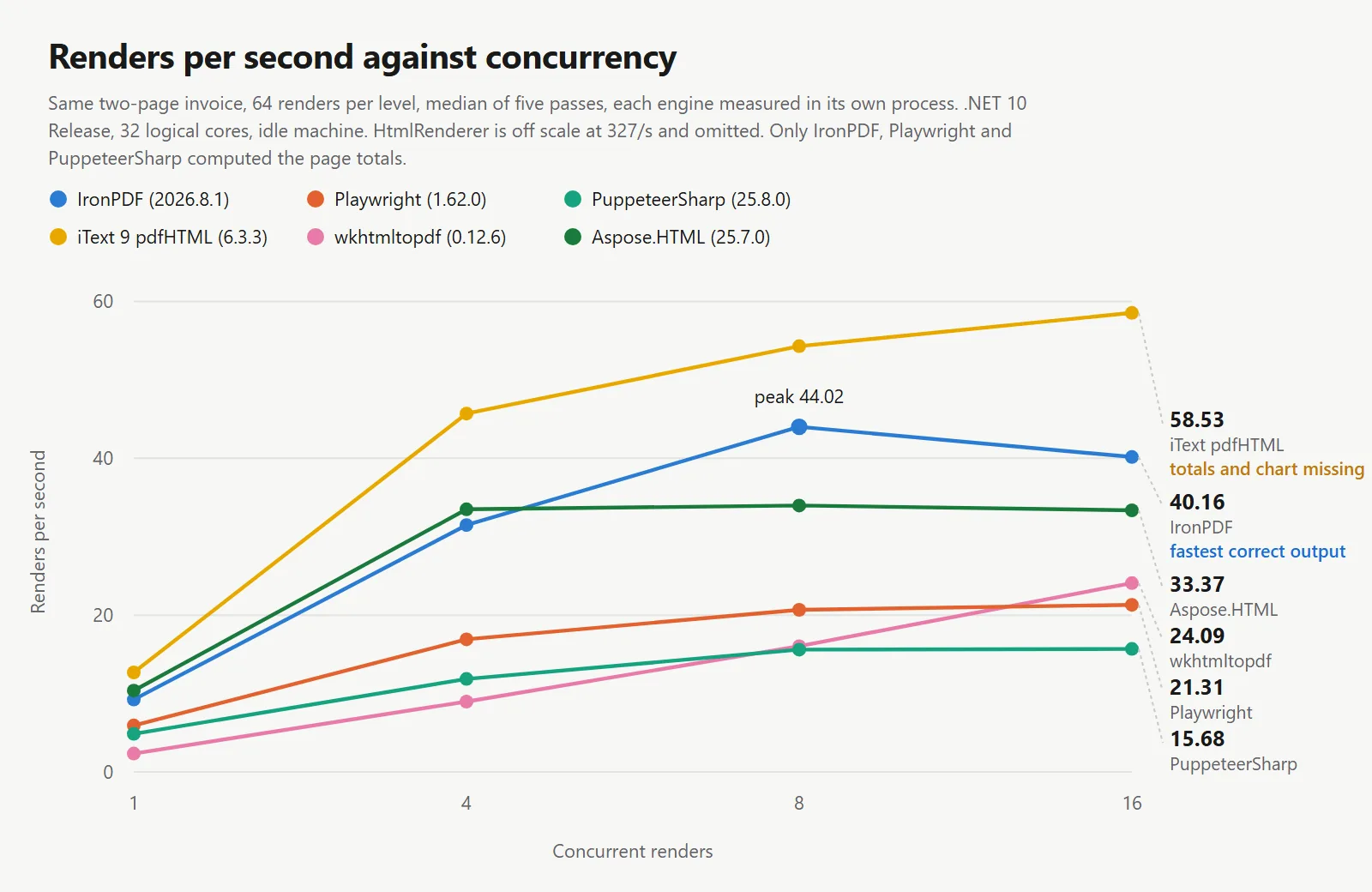
在正確渲染文檔的引擎中,IronPDF 在所有測試的並發級別中領先,並且在更高負載下其優勢增加。在並發 1 時,3 個正確的渲染器每秒渲染次數範圍從 4.85 到 9.22,相差 1.9 倍。在並發 8 時,它們的範圍從 15.60 到 44.02,相差 2.8 倍。隨著負載的增加,差距擴大,這就是一個內部處理引擎與必須通過它們不託管的瀏覽器移動每個頁面的兩個引擎之間的區別。
大多數引擎也有一個拐點,超過該級別後吞吐量停止上升,只有延遲增加。IronPDF 的拐點在 8,從 44.02/s 變為 40.16/s 在 16 時,而 p50 從 161 ms 上升到 364 ms,因此一個信號量將其保持在 8 可以保持吞吐量而不增加延遲。PuppeteerSharp 從 8 開始保持平穩,從 15.60/s 到 15.68/s,而 p50 在 40 個進程中從 507 ms 上升到 997 ms,這是沒有任何收益的延遲。Aspose.HTML 更早平穩,在 4 到 16 之間沒有任何增益。HtmlRenderer 是所有中最早轉折的,在 4 時,這是單進程庫在工作超過一個核心可以調度時所做的。iText 9、Playwright 和 wkhtmltopdf 在 16 時仍在增長,並且在測試範圍內尚未達到拐點,儘管 Playwright 在那裡的 21.31/s 低於 IronPDF 在 4 時的持續水平。
通過並發推算單次渲染時間始終高估實際吞吐量,程度因引擎而異。在並發 8 時,IronPDF 實現了其推算吞吐量的 60%,iText 為 53%,Playwright 為 44%,PuppeteerSharp 為 40%。
與掃描表相同的峰值,排列方式使得一個庫讀取一列。這些值設定容器大小。
| 庫 | 峰值在 1 | 峰值在 4 | 峰值在 8 | 峰值在 16 | 每秒持續渲染的 MB 在 8 | 正確渲染 |
|---|---|---|---|---|---|---|
| IronPDF | 750 MB | 850 MB | 1,187 MB | 1,770 MB | 27.0 | 是 |
| Playwright .NET | 511 MB | 750 MB | 1,122 MB | 1,808 MB | 54.3 | 是 |
| PuppeteerSharp | 584 MB | 890 MB | 1,293 MB | 2,094 MB | 82.9 | 是 |
| iText 9 pdfHTML | 174 MB | 264 MB | 332 MB | 535 MB | 6.1 | 否 |
| HtmlRenderer + PdfSharp | 153 MB | 157 MB | 166 MB | 181 MB | 0.5 | 否 |
| wkhtmltopdf | 147 MB | 293 MB | 482 MB | 827 MB | 30.1 | 否 |
| Aspose.HTML | 235 MB | 293 MB | 334 MB | 398 MB | 9.8 | 否 |
測試於:24 核心 / 32 線程 x64 桌面 CPU · 3.2 GHz · 64 GB RAM · Windows 11 x64 · .NET 10 · IronPDF (2026.8.1) · 最後驗證於 2026 年 9 月
僅考慮峰值記憶體可能偏向於執行較少工作的引擎,這在最後一列中得到了解決。將峰值記憶體除以持續吞吐量可得出每秒渲染的記憶體成本。在正確渲染文檔的引擎中,IronPDF 以 27.0 MB 的效率最高,相較於 Playwright 的 54.3 MB 和 PuppeteerSharp 的 82.9 MB。
絕對峰值記憶體排名有所不同。Playwright 在並發 1、4 和 8 時的峰值較低,分別為 239 MB、100 MB 和 65 MB,但在 16 時將領先優勢交還,IronPDF 的峰值為 1,770 MB,而 Playwright 的峰值為 1,808 MB。在 8 時,當領先是真實的,它每秒提供 20.68 次渲染,而 IronPDF 為 44.02 次,因此節省的 65 MB 代價是超過一半的吞吐量。
由於缺少瀏覽器引擎,佈局引擎庫的記憶體使用量顯著降低。雖然這是一個真正的優勢,但在此測試中,結果總數保持在 0.00。
對於 3 個 Chromium 驅動的引擎,峰值記憶體在 8 到 16 個並發渲染之間增加了 49% 到 62%,而吞吐量沒有相應增加。IronPDF 的吞吐量下降了 9%,而 PuppeteerSharp 保持不變,Playwright 增加了 3%。中位延遲(p50)在相同步驟中上升了 1.9 到 2.3 倍。超過 8 個並發渲染的額外記憶體產生延遲而非吞吐量。
每個輸出都被讀回而不是被信任。檢查提取文本層,使用正則表達式匹配發票總額,並光柵化每個頁面,因為畫布圖表沒有文本層,無法僅從文本中確認。
using System;
using System.IO;
using System.Linq;
using System.Text.RegularExpressions;
using IronPdf;

// Reads each engine's output back and reports what actually landed on the page.
// A render that finishes in 109 ms and gets the total wrong is not faster than
// one that finishes in 164 ms and gets it right - it is a different operation,
// so the timer alone cannot be trusted.
string resultsDir = "results";

Console.WriteLine($"{"Engine",-16} {"Pages",5} {"Bytes",8} {"Total",-12} Notes");
Console.WriteLine(new string('-', 62));

foreach (string path in Directory.GetFiles(resultsDir, "*-single.pdf").OrderBy(p => p))
{
    string engine = Path.GetFileNameWithoutExtension(path).Replace("-single", "");

    using PdfDocument document = PdfDocument.FromFile(path);
    string flat = Regex.Replace(document.ExtractAllText() ?? "", @"\s+", " ");

    // The document computes its totals in JavaScript. If the script never ran,
    // the placeholder zero survives into the text layer of the PDF.
    Match total = Regex.Match(flat, @"Total\s+([\d,]+\.\d{2})");
    string reported = total.Success ? total.Groups[1].Value : "not found";
    bool scriptRan = reported != "0.00" && total.Success;

    // The canvas chart has no text layer, so rasterise page two as well and
    // confirm it by eye. A missing chart cannot be detected from text alone.
    document.RasterizeToImageFiles(Path.Combine(resultsDir, engine + "-page_*.png"), 1400, 1980);

    long bytes = new FileInfo(path).Length;
    string note = scriptRan ? "" : "JavaScript did not run";
    if (!flat.Contains("Professional services")) note += " | table rows missing";

    Console.WriteLine($"{engine,-16} {document.PageCount,5} {bytes,8} {reported,-12} {note}");
}

// Output size is a fast tell, but not a sufficient one. Identical HTML produced
// 46 to 104 KB from the engines that ran the script and drew the chart, so the
// 6 KB output is missing content rather than encoding it more cleverly. It cuts
// the other way too: one engine dropped the masthead, the totals and the chart
// and still produced 46 KB, so size narrows the question without answering it.
using System;
using System.IO;
using System.Linq;
using System.Text.RegularExpressions;
using IronPdf;
// Reads each engine's output back and reports what actually landed on the page.
// A render that finishes in 109 ms and gets the total wrong is not faster than
// one that finishes in 164 ms and gets it right - it is a different operation,
// so the timer alone cannot be trusted.
string resultsDir = "results";
Console.WriteLine($"{"Engine",-16} {"Pages",5} {"Bytes",8} {"Total",-12} Notes");
Console.WriteLine(new string('-', 62));
foreach (string path in Directory.GetFiles(resultsDir, "*-single.pdf").OrderBy(p => p))
{
string engine = Path.GetFileNameWithoutExtension(path).Replace("-single", "");
using PdfDocument document = PdfDocument.FromFile(path);
string flat = Regex.Replace(document.ExtractAllText() ?? "", @"\s+", " ");
// The document computes its totals in JavaScript. If the script never ran,
// the placeholder zero survives into the text layer of the PDF.
Match total = Regex.Match(flat, @"Total\s+([\d,]+\.\d{2})");
string reported = total.Success ? total.Groups[1].Value : "not found";
bool scriptRan = reported != "0.00" && total.Success;
// The canvas chart has no text layer, so rasterise page two as well and
// confirm it by eye. A missing chart cannot be detected from text alone.
document.RasterizeToImageFiles(Path.Combine(resultsDir, engine + "-page_*.png"), 1400, 1980);
long bytes = new FileInfo(path).Length;
string note = scriptRan ? "" : "JavaScript did not run";
if (!flat.Contains("Professional services")) note += " | table rows missing";
Console.WriteLine($"{engine,-16} {document.PageCount,5} {bytes,8} {reported,-12} {note}");
}
// Output size is a fast tell, but not a sufficient one. Identical HTML produced
// 46 to 104 KB from the engines that ran the script and drew the chart, so the
// 6 KB output is missing content rather than encoding it more cleverly. It cuts
// the other way too: one engine dropped the masthead, the totals and the chart
// and still produced 46 KB, so size narrows the question without answering it.Imports System
Imports System.IO
Imports System.Linq
Imports System.Text.RegularExpressions
Imports IronPdf
' Reads each engine's output back and reports what actually landed on the page.
' A render that finishes in 109 ms and gets the total wrong is not faster than
' one that finishes in 164 ms and gets it right - it is a different operation,
' so the timer alone cannot be trusted.
Dim resultsDir As String = "results"
Console.WriteLine(String.Format("{0,-16} {1,5} {2,8} {3,-12} Notes", "Engine", "Pages", "Bytes", "Total"))
Console.WriteLine(New String("-"c, 62))
For Each path As String In Directory.GetFiles(resultsDir, "*-single.pdf").OrderBy(Function(p) p)
Dim engine As String = Path.GetFileNameWithoutExtension(path).Replace("-single", "")
Using document As PdfDocument = PdfDocument.FromFile(path)
Dim flat As String = Regex.Replace(document.ExtractAllText() ?? "", "\s+", " ")
' The document computes its totals in JavaScript. If the script never ran,
' the placeholder zero survives into the text layer of the PDF.
Dim total As Match = Regex.Match(flat, "Total\s+([\d,]+\.\d{2})")
Dim reported As String = If(total.Success, total.Groups(1).Value, "not found")
Dim scriptRan As Boolean = reported <> "0.00" AndAlso total.Success
' The canvas chart has no text layer, so rasterise page two as well and
' confirm it by eye. A missing chart cannot be detected from text alone.
document.RasterizeToImageFiles(Path.Combine(resultsDir, engine & "-page_*.png"), 1400, 1980)
Dim bytes As Long = New FileInfo(path).Length
Dim note As String = If(scriptRan, "", "JavaScript did not run")
If Not flat.Contains("Professional services") Then note &= " | table rows missing"
Console.WriteLine(String.Format("{0,-16} {1,5} {2,8} {3,-12} {4}", engine, document.PageCount, bytes, reported, note))
End Using
Next
' Output size is a fast tell, but not a sufficient one. Identical HTML produced
' 46 to 104 KB from the engines that ran the script and drew the chart, so the
' 6 KB output is missing content rather than encoding it more cleverly. It cuts
' the other way too: one engine dropped the masthead, the totals and the chart
' and still produced 46 KB, so size narrows the question without answering it.Imports System
Imports System.IO
Imports System.Linq
Imports System.Text.RegularExpressions
Imports IronPdf
' Reads each engine's output back and reports what actually landed on the page.
' A render that finishes in 109 ms and gets the total wrong is not faster than
' one that finishes in 164 ms and gets it right - it is a different operation,
' so the timer alone cannot be trusted.
Dim resultsDir As String = "results"
Console.WriteLine(String.Format("{0,-16} {1,5} {2,8} {3,-12} Notes", "Engine", "Pages", "Bytes", "Total"))
Console.WriteLine(New String("-"c, 62))
For Each path As String In Directory.GetFiles(resultsDir, "*-single.pdf").OrderBy(Function(p) p)
Dim engine As String = Path.GetFileNameWithoutExtension(path).Replace("-single", "")
Using document As PdfDocument = PdfDocument.FromFile(path)
Dim flat As String = Regex.Replace(document.ExtractAllText() ?? "", "\s+", " ")
' The document computes its totals in JavaScript. If the script never ran,
' the placeholder zero survives into the text layer of the PDF.
Dim total As Match = Regex.Match(flat, "Total\s+([\d,]+\.\d{2})")
Dim reported As String = If(total.Success, total.Groups(1).Value, "not found")
Dim scriptRan As Boolean = reported <> "0.00" AndAlso total.Success
' The canvas chart has no text layer, so rasterise page two as well and
' confirm it by eye. A missing chart cannot be detected from text alone.
document.RasterizeToImageFiles(Path.Combine(resultsDir, engine & "-page_*.png"), 1400, 1980)
Dim bytes As Long = New FileInfo(path).Length
Dim note As String = If(scriptRan, "", "JavaScript did not run")
If Not flat.Contains("Professional services") Then note &= " | table rows missing"
Console.WriteLine(String.Format("{0,-16} {1,5} {2,8} {3,-12} {4}", engine, document.PageCount, bytes, reported, note))
End Using
Next
' Output size is a fast tell, but not a sufficient one. Identical HTML produced
' 46 to 104 KB from the engines that ran the script and drew the chart, so the
' 6 KB output is missing content rather than encoding it more cleverly. It cuts
' the other way too: one engine dropped the masthead, the totals and the chart
' and still produced 46 KB, so size narrows the question without answering it.| 函式庫 | 頁數 | 輸出大小 | 發票總額 | 圖表 | 標題和佈局 |
|---|---|---|---|---|---|
| IronPDF | 2 | 47,196 bytes | 2313.30 | 已繪製 | 網格完整 |
| Playwright .NET | 2 | 46,248 bytes | 2313.30 | 已繪製 | 網格完整 |
| PuppeteerSharp | 2 | 104,011 bytes | 2313.30 | 已繪製 | 網格完整 |
| iText 9 pdfHTML | 2 | 6,145 bytes | 0.00 | 缺失 | 網格縮減為1列 |
| HtmlRenderer + PdfSharp | 1 | 46,419 bytes | 區塊缺失 | 缺失 | 標題丟失,頁面分隔丟失 |
| wkhtmltopdf | 2 | 22,752 bytes | 0.00 | 缺失 | 網格縮減為1列 |
| Aspose.HTML | 2 | 38,780 bytes | 0.00 | 缺失 | 網格縮減為1列 |
測試於:24核心/32執行緒 x64 桌上型 CPU · 3.2 GHz · 64 GB RAM · Windows 11 x64 · .NET 10 · IronPDF (2026.8.1) · 最後驗證於2026年9月
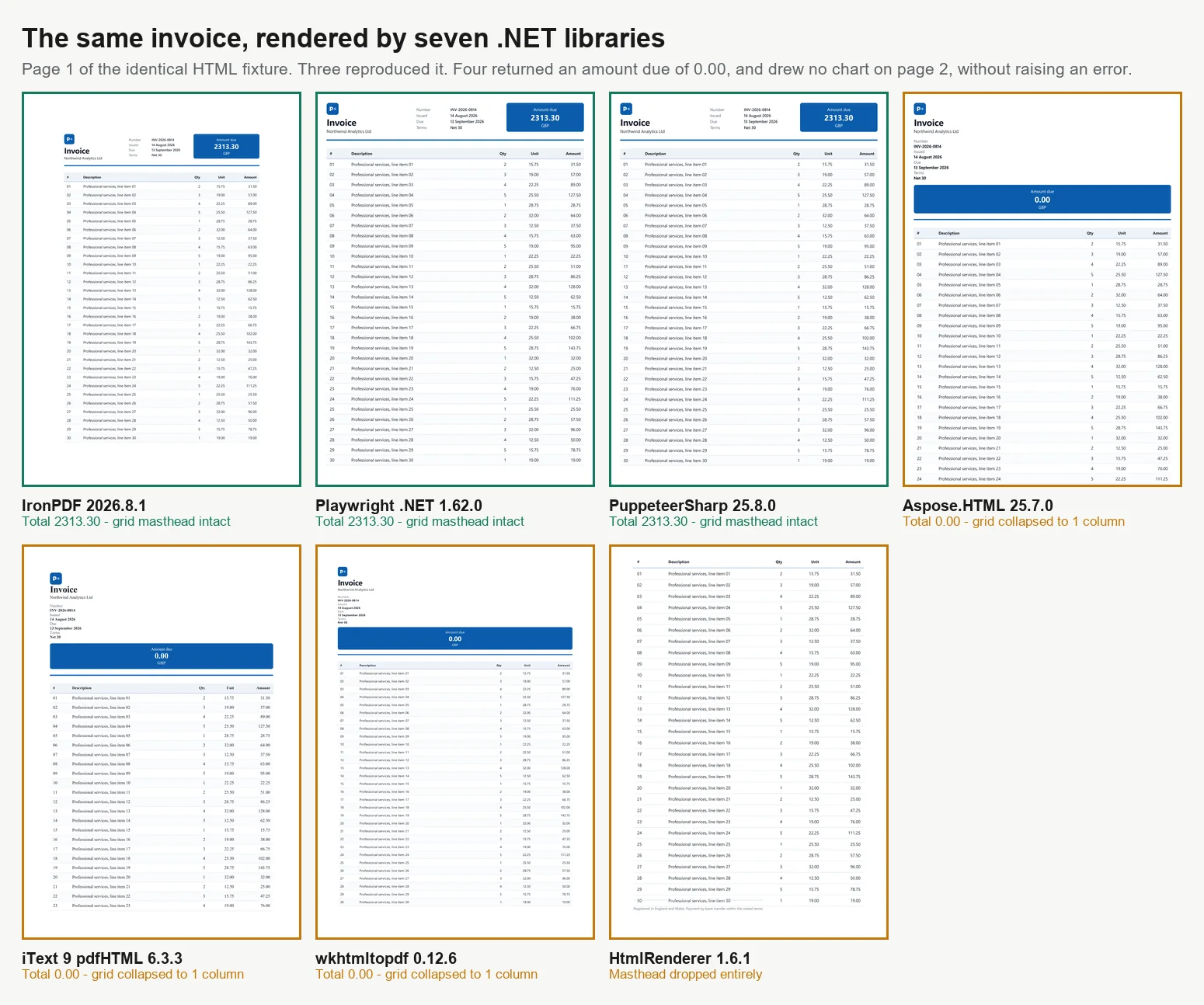
所有7個的相同頁面,比例相同。前3個面板計算了總額。其他4個是審核者在不注意的情況下會簽署的。
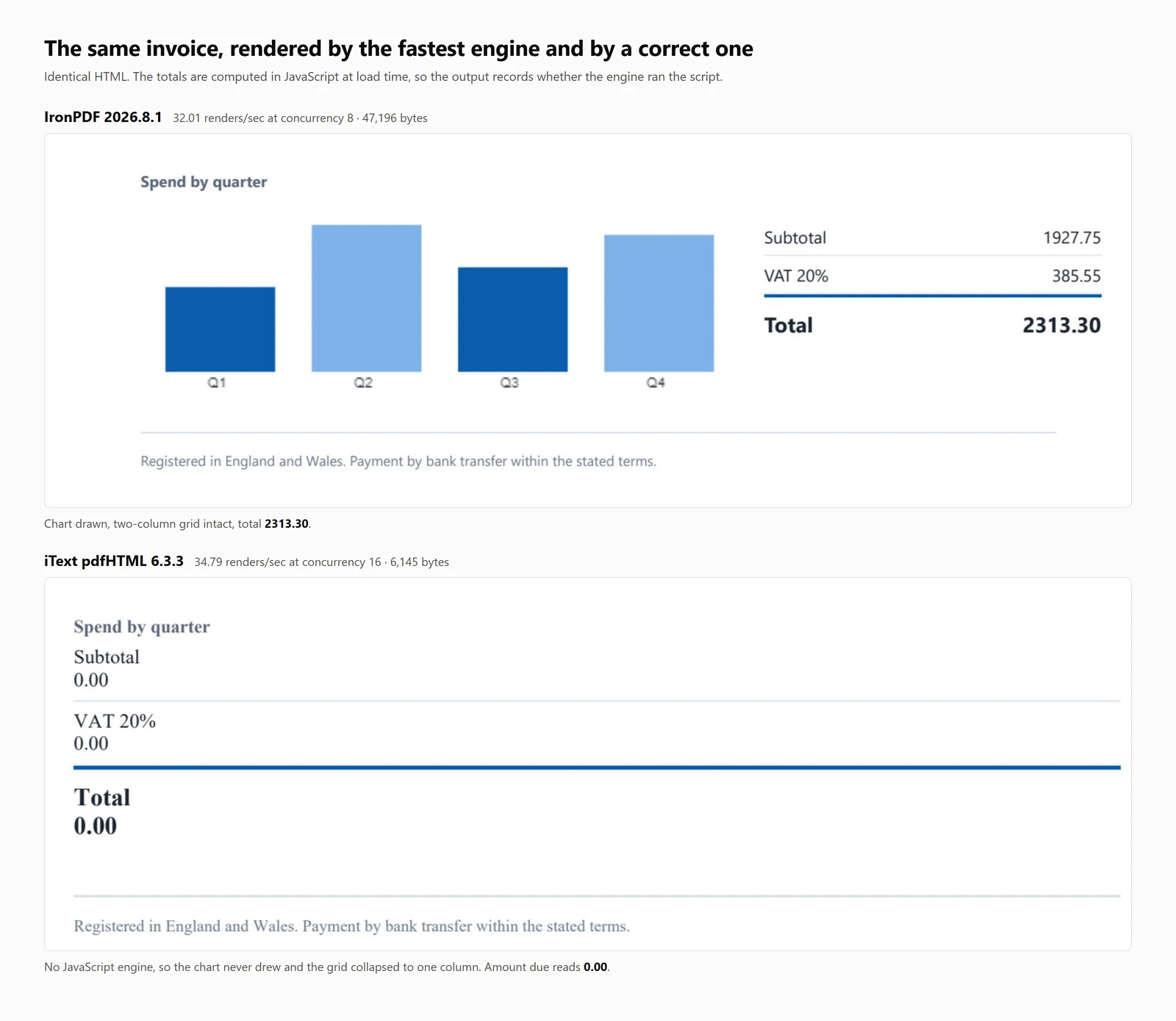
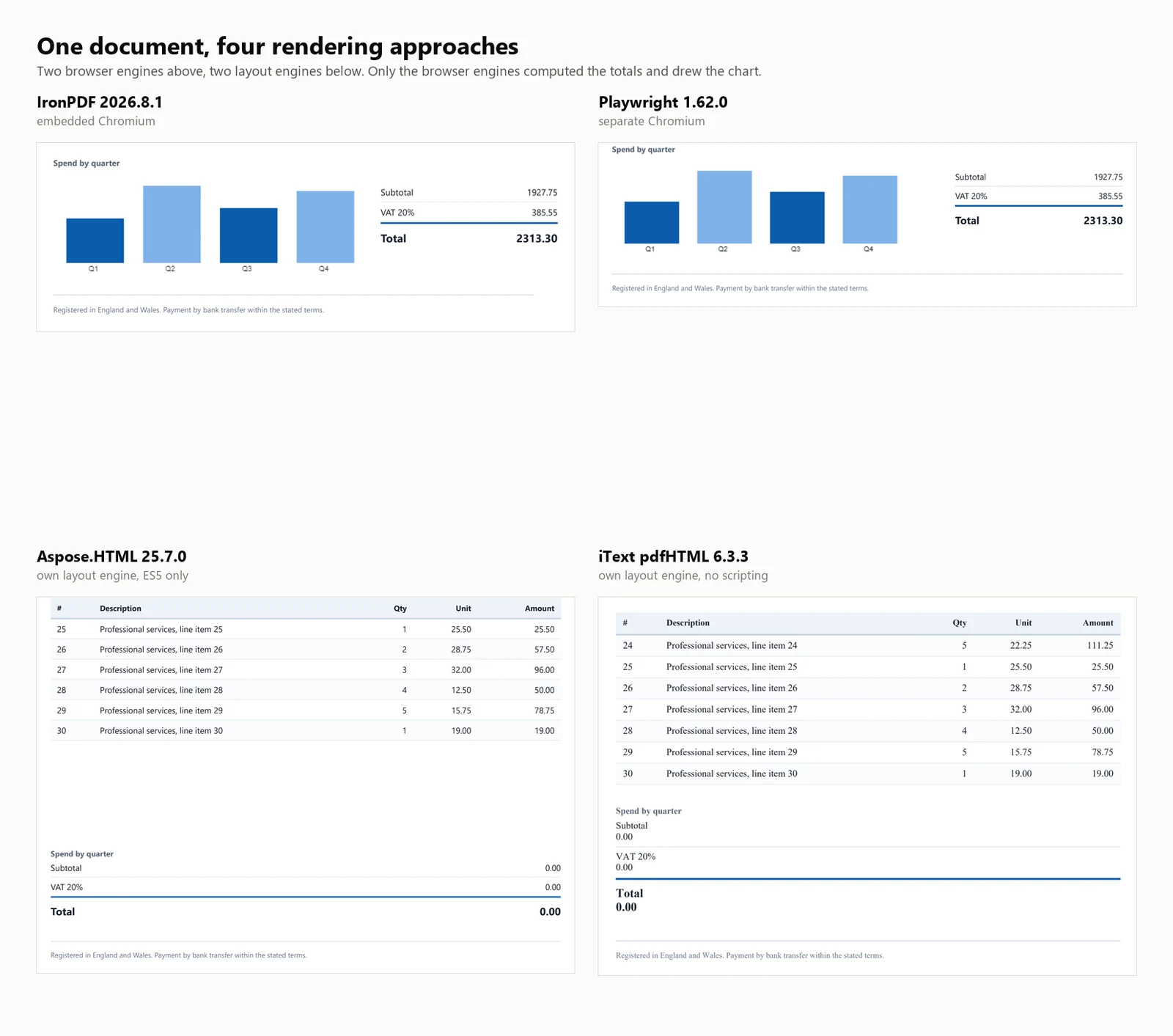
輸出文件大小是渲染完整性的粗略指標,但也是不可靠的。執行腳本並渲染圖表的三個引擎生成的文件大小在 46 到 104 KB 之間,而 iText 9 的 6 KB 輸出缺少內容而不是更好地壓縮。這種啟發式方法在 HtmlRenderer 上的另一個方向上失敗,其 46 KB 文件與正確輸出處於相同範圍內,但完全缺少標題、總計和圖表,因此文件大小是一個有用的檢查而不是決定性的。這些失敗中沒有一個引發異常或警告,並且每個 PDF 都是格式正確但錯誤的。
未能計算總計的四個引擎是由於不同的原因。針對 ES5 和 ES6 支持分別報告的測試頁面揭示了三個不同的類別。
| 引擎 | ES5 | ES6 | 對測試發票的影響 |
|---|---|---|---|
| IronPDF, PuppeteerSharp, Playwright | 運行 | 運行 | 計算總計,繪製圖表 |
| wkhtmltopdf, Aspose.HTML | 運行 | 拋出 | 總計保持為零,無圖表 |
| iText 9 pdfHTML, HtmlRenderer | 無引擎 | 無引擎 | iText 保留了佔位符零,HtmlRenderer 刪除了區塊;兩者都沒有圖表 |
測試於:24 核 / 32 線程 x64 桌面 CPU · 3.2 GHz · 64 GB RAM · Windows 11 x64 · .NET 10 · IronPDF (2026.8.1) · 最後驗證於 2026 年 9 月
在選擇庫時,這一區別很重要。wkhtmltopdf 和 Aspose.HTML 執行寫入 ES5 基線的腳本並計算正確的結果,但不支持 document.querySelectorAll(...).forEach,如測試頁面中所用。iText 9 和 HtmlRenderer 不執行任何語言級別的 JavaScript。
注意: Chrome 的渲染用作參考,這本質上偏向於基於 Chromium 的庫。雖然這是一個已知的限制,但對於大多數情況來說仍然是合適的,因為通常需要匹配瀏覽器輸出。
無法重新運行的基準測試只是斷言。上面表格背後的一切都在一個壓縮包中,包括使數字可檢查而非可引用的部分。
下載基準測試包 (282 KB)
| 資料夾 | 內容 |
|---|---|
| harness/ | 完整可運行的專案:引擎適配器、並發掃描、冷啟動驅動、記憶體取樣器、保真度檢查,以及運行5次並取中位數的腳本 |
| fixture/invoice.html | 精確的輸入,10,260個字元,逐字節提供給所有7個引擎的內容 |
| raw-timings/ | 35個結果文件,7個引擎跨5次運行,每個級別的吞吐量、p50、p95、峰值記憶體和進程數量,以及計算出的中位數 |
| outputs/ | 每個引擎從該夾具生成的PDF,因此準確性聲明可以被打開而非被相信 |
要重現:dotnet build -c Release,然後./run-isolated.sh 1 2 3 4 5,然後python median-iso.py。在迭代時運行單個引擎使用--engine <id>,因為這是保持記憶體數據誠實的唯一方法。
有3樣東西故意不在壓縮包中。許可證密鑰,因為IronPDF從環境中讀取IRONPDF_LICENSE_KEY,而Aspose.HTML需要其自己的.lic文件,並且這裡兩個引擎都在商業許可證下運行。wkhtmltopdf.exe二進制文件,這是該專案存檔版本中的第三方工件。以及瀏覽器,因為PuppeteerSharp和Playwright在首次運行時各自下載。
基準測試考慮了一個關於7個引擎轉換相同發票的速度和準確性的問題。在實際操作中,生產管道有其他要求。下一節提供了常見後續問題的答案。
以上所有數據均在Windows 11裸機上獲得。容器CPU限制、cgroup記憶體計算和共享主機等因素可能會影響並發性。IronPDF在Linux和Docker上運行,使用相同的NuGet包,並包含Chromium,因此無需單獨下載瀏覽器或安裝Playwright。根據預期並發性的峰值使用量來調整容器大小,並為運行時增加額外容量。
基準測試為每個引擎提供了一個記憶體內的字串,以消除結果中的網路延遲。在生產環境中,輸入通常是一個 URL,而將 URL 轉換為 PDF通常只需要在相同的渲染器上更改方法。這裡測試的佈局引擎不直接支援這一點。iText 9 和 HtmlRenderer 只接受標記,因此您必須獲取頁面並設置基礎 URL 以解析相對路徑。
測試發票使用了網頁安全的拉丁字體堆疊,以排除字體覆蓋對計時結果的影響。渲染器在非拉丁文字上差異最大,但解決方案是一致的。明確指定字體而不是依賴繼承。使用 @font-face 嵌入字體或在您的映像中安裝所需的字體包,並參考字體處理指南以獲取嵌入規則。基於 Chromium 的引擎提供與瀏覽器相同的字形和回退行為。
這些結果反映了處理一批 2 頁發票的峰值讀數,而不是較大文件或長時間測試。較長或圖像密集的文件將需要更多記憶體。對於持續的工作負載,使用有界並發性。使用信號量限制正在進行的渲染,重用單個渲染器實例而不是為每個請求創建一個,並異步渲染,以便吞吐量僅受並發上限限制。批量處理教程提供了完整的指南。
這是解決方案之間差異增加而不是減少的階段。基準測試評估了一個單一操作,特別是渲染,這代表了免費引擎的主要功能。然而,大多數文件處理管道需要超出此點的額外功能。
這兩個吞吐量最高的引擎通過不包含瀏覽器來實現這一點,但生成的文件反映了這一限制。iText 9 返回的應付金額為 0.00,而 HtmlRenderer 完全省略了總計區塊。Aspose.HTML 使用其自己的佈局引擎達到了相同的結果,而 wkhtmltopdf 則使用了一個過於陳舊的 QtWebKit 構建,無法執行該頁面。這種方法僅在標記是靜態且不需要動態計算、圖表、計算總計或現代佈局時才有效。當這些功能存在時,基準測試結果顯示了其限制。
默認選擇,適用於任何必須正確輸出的情況:IronPDF。它以每秒 44.02 次的速度正確渲染文檔,比 Playwright 快 2.1 倍,比 PuppeteerSharp 快 2.8 倍,硬體相同,首次 PDF 在 486 毫秒內完成,並且在所有能夠重現發票的三個引擎中每兆字節返回最多的工作量。Chromium 隨包提供,因此無需安裝、監督或修補瀏覽器,合併、表單、簽名、PDF/A 和加密都在同一個庫中,而不是下一個。
其他 6 個庫各有特定限制,詳述如下。
Playwright .NET 生成 Chrome 級別的輸出,且不需要許可費,每秒渲染 20.68 次,相對於 44.02 次。許可費並不是唯一的成本。您需要在映像中維護瀏覽器二進制文件,playwright install chromium 步驟在您的構建中,負載下達到 23 個進程的進程池,以及服務生命週期內的 Chromium 修補。
PuppeteerSharp 也重現了文檔,每秒渲染 15.60 次,是這裡測量的生成最多進程的工具,16 個並發時達到 40 個。其 p50 從 507 毫秒翻倍到 997 毫秒,而吞吐量保持不變,因此這些額外的進程增加了延遲而不是容量。
iText 9 with pdfHTML 很快,每秒渲染 54.30 次,返回的發票在總計應有的位置顯示 0.00。它在任何語言級別上都沒有 JavaScript 引擎,因此這個結果不是配置問題可以解決的。它是 AGPL 或商業版,因此對於大多數團隊來說,它是一個付費庫,但仍然無法運行該頁面。
HtmlRenderer with PdfSharp 是基準測試中最快的,每秒渲染 327.09 次,首次 PDF 在 157 毫秒內完成。其輸出丟失了標題、總計區塊和圖表,並將 2 頁壓縮到 1 頁。其 CSS 支持停留在 2011 年左右,因此速度是您不佈局頁面所獲得的。
wkhtmltopdf 運行的是 2023 年 1 月存檔的引擎,最後一次發布是在 2020 年 6 月,基於 Qt 4.8.5。它執行 ES5 並在 ES6 上拋出,這就是為什麼總計顯示 0.00,並且不接收安全補丁。如果它正確渲染您當前的模板,它將繼續這樣做,直到模板更改。
Aspose.HTML 是一個沒有免費層的付費庫,生成了與其他佈局引擎相同的 0.00 總計和缺失的圖表,首次 PDF 用時 1,096 毫秒,是測量中最慢的。其案例是採購,而不是渲染。
對於儀表板、圖表或任何在加載時計算的內容:瀏覽器級別的引擎是唯一有效的類別,而 IronPDF 是該類別中您不必操作的引擎。
PDF 在 JavaScript 完成繪製之前被捕獲。此問題在開發中可以可靠地重現,而在生產負載下則間歇性出現,這使得診斷變得困難。
等待條件而不是固定持續時間。每個基於瀏覽器的庫都可以保持渲染直到滿足條件,無論該條件是網絡不活動、命名元素出現還是 JavaScript 表達式返回 true。優先選擇元素,因為圖表庫在完成繪製之前就已經完成下載。
// IronPDF 2026.8.1 - waiting for the page to finish drawing itself.
using IronPdf;

var renderer = new ChromePdfRenderer();

// Waiting for a specific element beats waiting for the network, because a chart
// library can finish downloading well before it finishes rendering.
renderer.RenderingOptions.WaitFor.HtmlElementById("chart-ready", maxWaitTimeInMilliseconds: 10000);

// A JavaScript condition works too when there is no element to key on.
// renderer.RenderingOptions.WaitFor.JavaScript(5000);

using PdfDocument pdf = renderer.RenderHtmlAsPdf(html);
pdf.SaveAs("dashboard.pdf");
// IronPDF 2026.8.1 - waiting for the page to finish drawing itself.
using IronPdf;
var renderer = new ChromePdfRenderer();
// Waiting for a specific element beats waiting for the network, because a chart
// library can finish downloading well before it finishes rendering.
renderer.RenderingOptions.WaitFor.HtmlElementById("chart-ready", maxWaitTimeInMilliseconds: 10000);
// A JavaScript condition works too when there is no element to key on.
// renderer.RenderingOptions.WaitFor.JavaScript(5000);
using PdfDocument pdf = renderer.RenderHtmlAsPdf(html);
pdf.SaveAs("dashboard.pdf");' IronPDF 2026.8.1 - waiting for the page to finish drawing itself.
Imports IronPdf
Dim renderer = New ChromePdfRenderer()
' Waiting for a specific element beats waiting for the network, because a chart
' library can finish downloading well before it finishes rendering.
renderer.RenderingOptions.WaitFor.HtmlElementById("chart-ready", maxWaitTimeInMilliseconds:=10000)
' A JavaScript condition works too when there is no element to key on.
' renderer.RenderingOptions.WaitFor.JavaScript(5000)
Using pdf As PdfDocument = renderer.RenderHtmlAsPdf(html)
pdf.SaveAs("dashboard.pdf")
End Using' IronPDF 2026.8.1 - waiting for the page to finish drawing itself.
Imports IronPdf
Dim renderer = New ChromePdfRenderer()
' Waiting for a specific element beats waiting for the network, because a chart
' library can finish downloading well before it finishes rendering.
renderer.RenderingOptions.WaitFor.HtmlElementById("chart-ready", maxWaitTimeInMilliseconds:=10000)
' A JavaScript condition works too when there is no element to key on.
' renderer.RenderingOptions.WaitFor.JavaScript(5000)
Using pdf As PdfDocument = renderer.RenderHtmlAsPdf(html)
pdf.SaveAs("dashboard.pdf")
End Using大多數 CSS 渲染問題可歸因於四個主要原因。
一個常見的疏忽是樣式表中的 @media print 塊,該塊僅在打印渲染期間應用,並不會在瀏覽器中出現。使用 RenderingOptions.CssMediaType 明確設置 CSS 媒體類型,以確保應用正確的樣式表,而不是依賴默認設置。
第二個問題是背景和顏色未顯示,因為瀏覽器在打印時通常會省略它們以節省墨水。啟用 RenderingOptions.PrintHtmlBackgrounds = true 以恢復它們,並在 CSS 中對未受影響的元素使用 print-color-adjust: exact。
剩下的兩個原因與時間有關。當快照被拍攝時,圖像可能仍在延遲加載,或者網頁字體可能尚未加載,導致文本回退到系統字體並改變佈局。通過確保所有資源在渲染之前已加載來解決這些問題。
從字串渲染時,沒有基礎位置,因此渲染器無法解析相對路徑,例如 /images/logo.png。這是字串輸入最常見的問題,可以通過一個簡單的配置來解決。
在渲染之前設置基礎 URL 或基礎路徑。對於 IronPDF,使用 RenderingOptions.BaseUrlOrPath。對於 iText,使用 ConverterProperties.SetBaseUri。或者,在整個文檔中使用絕對 URL。請參閱 基礎 URL 指南 以獲取資產編碼的信息,這在解析相對路徑後可能是必要的。
有三個主要原因需要檢查。首先,所需的字體可能未安裝在映像中。其次,可能缺少本機依賴項。第三,瀏覽器可能在映像構建期間未下載,並且無法在運行時獲取。
缺少字體很難診斷,因為沒有報告錯誤。PDF 渲染,但文本顯示為空框。安裝必要的字體包,而不是對渲染代碼進行故障排除。對於瀏覽器下載,嵌入式引擎(如 IronPDF 的 Chromium)將瀏覽器包含在包中,消除了首次運行下載的需要,這可能因網絡限制而失敗。
此問題與上述問題有相同的根本原因,但表現為特定症狀。容器中缺少特定字體所需的字體。泰語、阿拉伯語和 CJK 等語言受影響最大,因為最小的基礎映像通常缺乏對這些字體的支持。
使用 @font-face 和字體文件將字體嵌入文檔中,或在映像中安裝這些包。不要依賴基礎映像的默認字體集,因為它會隨版本變化。字體處理指南中有嵌入的詳細信息。
常見的失敗是本地配置正常,但在容器中失敗。大多數情況可以通過三種修復方法解決。
在構建時下載瀏覽器,而不是首次運行時: 如果您的映像不包含 Chromium,則部署後的第一次請求會觸發 150 MB 的下載,或者如果出口被阻止則完全失敗。
安裝所需的字體和本機依賴項: 精簡的基礎映像僅提供最小的字體集。任何超出拉丁字母的文檔都需要額外的字體包。
不要禁用沙盒: 傳遞 --no-sandbox 通過以 root 身份運行 Chrome 並關閉沙盒來解決錯誤。相反,請配置具有 seccomp 配置文件的非 root 用戶。
# IronPDF on Linux. The engine ships in the NuGet package, so there is no
# browser download at first run and no Chromium to supervise.
FROM mcr.microsoft.com/dotnet/aspnet:10.0 AS base
WORKDIR /app

# Chromium's Linux dependencies plus fonts. Slim base images carry neither, and
# a missing font produces empty boxes rather than an error.
RUN apt-get update && apt-get install -y --no-install-recommends \
        libnss3 libatk-bridge2.0-0 libgbm1 libasound2 libxshmfence1 \
        fonts-liberation fonts-noto-core fonts-noto-cjk \
    && rm -rf /var/lib/apt/lists/*

FROM mcr.microsoft.com/dotnet/sdk:10.0 AS build
WORKDIR /src
COPY ["InvoiceService.csproj", "./"]
RUN dotnet restore "InvoiceService.csproj"
COPY . .
RUN dotnet publish "InvoiceService.csproj" -c Release -o /app/publish

FROM base AS final
WORKDIR /app
COPY --from=build /app/publish .

# Run as a non-root user rather than reaching for --no-sandbox.
RUN useradd --create-home --shell /usr/sbin/nologin renderer \
    && chown -R renderer:renderer /app
USER renderer

ENV IRONPDF_LICENSE_KEY=""
ENTRYPOINT ["dotnet", "InvoiceService.dll"]資源分配應根據預期並發級別下觀察到的峰值內存使用情況來確定。應包括額外的容量以適應運行時開銷和應用程序需求。建議選擇超過這些綜合估算的實例大小,以確保可靠的性能。
| 函式庫 | 8 個並行時的峰值樹 | 實際容器 | 每秒持續渲染次數 | 正確渲染 |
|---|---|---|---|---|
| IronPDF | 1,187 MB | 2 GB | 44.02 | 是 |
| Playwright .NET | 1,122 MB | 2 GB | 20.68 | 是 |
| PuppeteerSharp | 1,293 MB | 2 GB | 15.60 | 是 |
| iText 9 pdfHTML | 332 MB | 1 GB | 54.30 | 否 |
| HtmlRenderer + PdfSharp | 166 MB | 512 MB | 327.09 | 否 |
| wkhtmltopdf | 482 MB | 1 GB | 16.03 | 否 |
| Aspose.HTML | 334 MB | 1 GB | 33.98 | 否 |
測試於:24 核心 / 32 線程 x64 桌面 CPU · 3.2 GHz · 64 GB RAM · Windows 11 x64 · .NET 10 · IronPDF (2026.8.1) · 最後驗證於 2026 年 9 月
最後一欄中呈現的比較記憶體數據提供了資源需求的清晰度。所有 3 個正確渲染引擎均在 2 GB 容器內運行,這使得吞吐量成為關鍵的區別因素,而非記憶體消耗。它們的吞吐量範圍從每秒 16 到 44 次渲染,這意味著選擇 PuppeteerSharp 而非 IronPDF 需要近 3 倍的基礎設施以達到相同的輸出。峰值記憶體的微小差異,例如 Playwright 和 IronPDF 之間的 65 MB 差距,對於實例選擇沒有實質影響,而吞吐量差異對運營成本有顯著影響。
有兩件事會改變這些數據在您自己的環境中的表現。文件形狀是一個因素。一份 200 頁的報告或包含許多高解析度圖像的文件會使峰值記憶體遠高於 2 頁發票所需的記憶體。測量的地點是另一個因素。在您將部署的容器內運行測試,因為多核心工作站和虛擬化實例的並行工作調度方式不同。
什麼是 C# 最佳的 HTML 到 PDF 庫? 根據這些測量,IronPDF 是最快速正確渲染文檔的引擎,每秒渲染 44.02 次,相較於 Playwright 的 20.68 次和 PuppeteerSharp 的 15.60 次,並且在這三者中每兆字節返回最多的工作量。
如何在 C# 中將 URL 轉換為 PDF?
這裡的每個基於瀏覽器的庫都直接接受 URL。傳遞它而不是 HTML 字串,其他代碼保持不變。布局引擎庫 iText 9 和 HtmlRenderer 則不行。使用 HttpClient 獲取 HTML,傳遞字串,並設置基礎 URL 以便解析相對資源。
哪些庫支持 JavaScript? 有三個支持級別。IronPDF、PuppeteerSharp 和 Playwright 完全運行現代 JavaScript。wkhtmltopdf 和 Aspose.HTML 運行 ES5,但在 ES6 上會拋出錯誤,因此現代腳本會靜默失敗並在輸出中留下佔位符值。iText 9 和 HtmlRenderer 完全沒有 JavaScript 引擎。
我可以在沒有無頭瀏覽器的情況下將 HTML 轉換為 PDF 嗎? 可以。iText 9、Aspose.HTML 和使用 PdfSharp 的 HtmlRenderer 都有自己的布局引擎,不需要瀏覽器。權衡在於 JavaScript 執行和現代 CSS 支持。
如何在 ASP.NET Core 中將 Razor 視圖轉換為 PDF?
首先將視圖渲染為字串,然後將該字串傳遞給這裡的任何庫。常見的失敗是相對資源路徑,因為一旦 HTML 是字串,/css/site.css 就無法解析,因此設置基礎 URL 或使用絕對路徑。Razor-to-PDF 指南 涵蓋了 MVC 和 Blazor 的變體。
wkhtmltopdf 在 2026 年仍可用嗎? 它可以運行,但已被存檔。最後一個穩定版本是 2020 年 6 月的 wkhtmltopdf (0.12.6) 基於 Qt (4.8.5),並且該存儲庫於 2023 年 1 月被存檔。它無法渲染現代 CSS 並且不會收到安全補丁。
為什麼我的 PDF 看起來與瀏覽器不同?
通常是 @media print 區塊,背景未打印而沒有 print-color-adjust,圖像仍在延遲加載,或者在快照拍攝時尚未到達的網頁字體。
哪個庫最快? HtmlRenderer 與 PdfSharp 每秒渲染 327 次,輸出是一個沒有標頭、沒有總計和沒有圖表的單頁。在正確渲染文檔的引擎中,IronPDF 是最快的,每秒渲染 44.02 次。
HTML 到 PDF 轉換需要多少內存? 在 8 個並發渲染下需要 166 MB 到 1,293 MB。基於瀏覽器的選項更重,並且大部分內存位於子進程中,因此應從整個進程樹而不是僅 .NET 進程來調整容器大小。
沒有一種方法在每個方面都表現出色。基於瀏覽器的庫可以準確地重現現代頁面,但需要更多的記憶體和更大的容器。佈局引擎庫速度更快且體積更小,但不執行 JavaScript,這使得測量的 7 個輸出中有 4 個沒有計算出此發票的總額。最佳選擇取決於您的主要限制。
如果準確渲染而不管理瀏覽器進程是您的主要需求,IronPDF 是此處測量的最快的正確渲染器。其 API 還支持HTML 字串轉換、Razor 視圖、響應式 CSS、自定義邊距和紙張尺寸、異步渲染、PDF/A 存檔和數位簽名,而不需要額外的庫。對於高容量使用,請參考批量處理教程以獲取並發模式,並查閱C# HTML 到 PDF 庫比較以獲得更廣泛的庫選擇。
接下來要去哪裡,按照大多數人需要的順序。從HTML 到 PDF 教程開始,獲取完整的操作指南,然後是可運行的 HTML 到 PDF 示例,以獲取您可以粘貼的代碼。免費 30 天試用將上述模板運行在您自己的文檔上,許可條款涵蓋了您可以根據此處測量的 AGPL 和 MIT 條款發佈的內容。
下載 IronPDF 開始。如果您的數據與這些不同,或者您想要對您的工作負載進行尺寸調整的第二意見,請聯繫我們的工程支持團隊。IronPDF 由 Iron Software 構建,其 .NET 庫還涵蓋 OCR、條碼、Word 和 Excel。
Curtis Chau 擁有卡爾頓大學計算機科學學士學位,專注於前端開發,擅長於 Node.js、TypeScript、JavaScript 和 React。Curtis 熱衷於創建直觀且美觀的用戶界面,喜歡使用現代框架並打造結構良好、視覺吸引人的手冊。
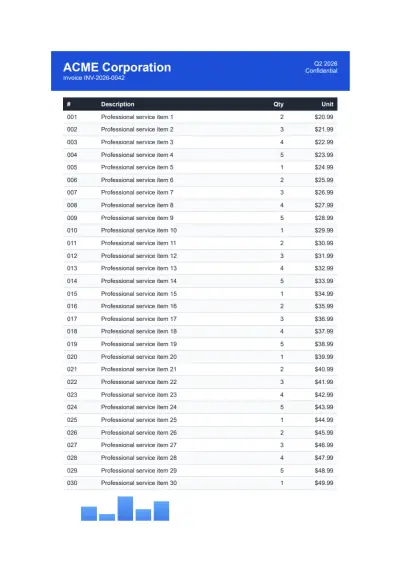

IronPDF是IRON SUITE的一部分
10 個 .NET API 產品適用於您的辦公室文檔

當您需要您的PDF看起來像HTML一樣快速。
