using IronPdf;

// Instantiate Renderer
var renderer = new ChromePdfRenderer();

// Create a PDF from a HTML string using C#
var pdf = renderer.RenderHtmlAsPdf("<h1>Hello World</h1>");

// Export to a file or Stream
pdf.SaveAs("output.pdf");

// Advanced Example with HTML Assets
// Load external html assets: Images, CSS and JavaScript.
// An optional BaseUrlOrPath 'C:\site\assets\' is set as the file location to load assets from
var myAdvancedPdf = renderer.RenderHtmlAsPdf("<img src='icons/iron.png'>", @"C:\site\assets\");
myAdvancedPdf.SaveAs("html-with-assets.pdf");
using IronPdf;// Instantiate Renderervar renderer = new ChromePdfRenderer();// Create a PDF from a HTML string using C#var pdf = renderer.RenderHtmlAsPdf("<h1>Hello World</h1>");// Export to a file or Streampdf.SaveAs("output.pdf");// Advanced Example with HTML Assets// Load external html assets: Images, CSS and JavaScript.// An optional BaseUrlOrPath 'C:\site\assets\' is set as the file location to load assets fromvar myAdvancedPdf = renderer.RenderHtmlAsPdf("<img src='icons/iron.png'>", @"C:\site\assets\");myAdvancedPdf.SaveAs("html-with-assets.pdf");
PM >Install-Package IronPdf
Install-Package IronPdf
OUTILS PDF
Comparaison des bibliothèques C# HTML vers PDF : Performance, Précision et Mémoire
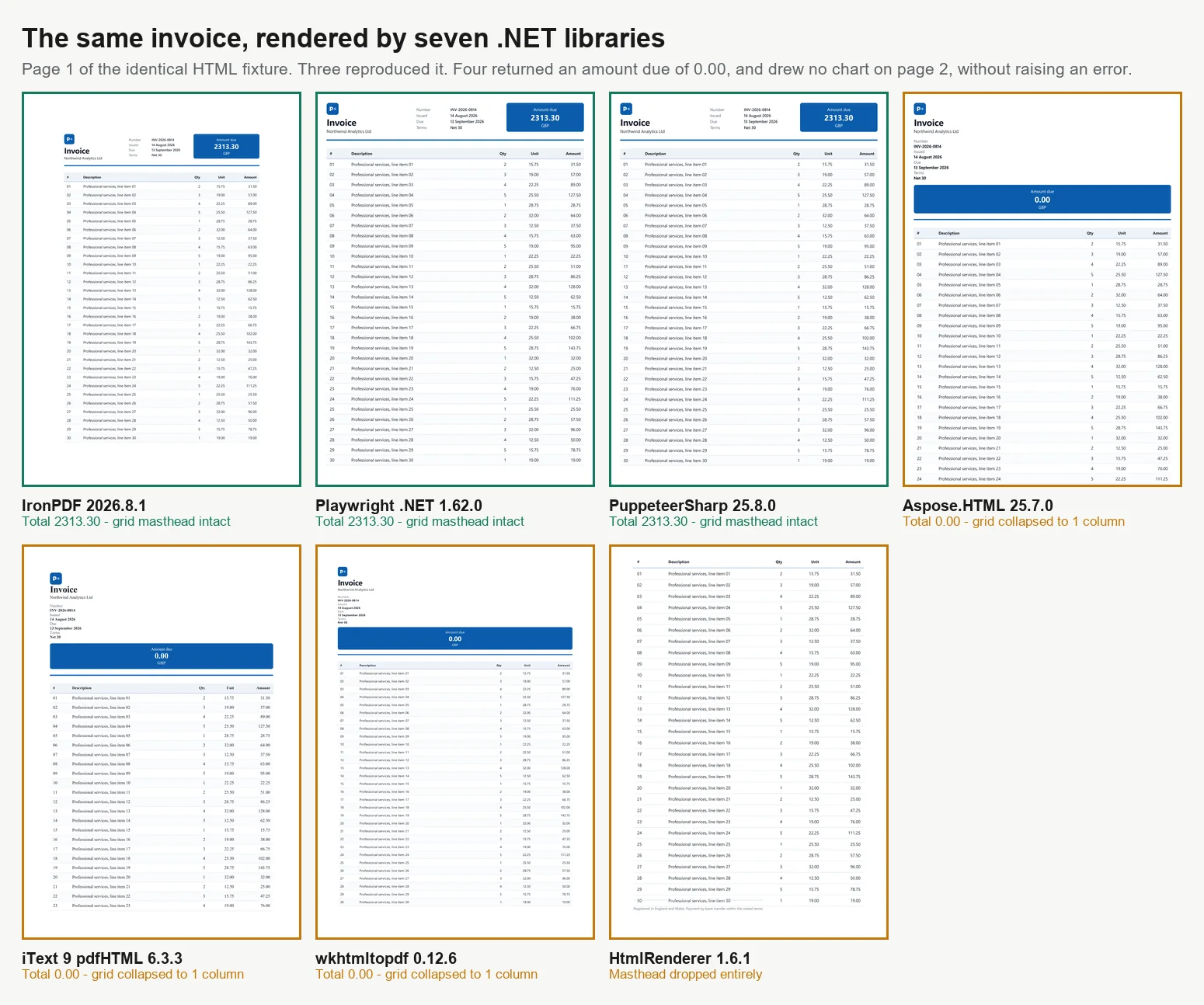
Il existe 7 principales façons de convertir HTML en PDF en C#, et toutes les méthodes ne produisent pas des résultats identiques. Lors du benchmarking de 7 moteurs avec une facture de 2 pages, seuls 3 l'ont rendue correctement. Parmi les 4 autres, 3 ont imprimé un montant dû de 0.00 là où le total calculé devait être, et le quatrième a complètement omis le bloc des totaux, aucun d'eux ne soulevant une erreur ou un avertissement. Ces moteurs varient dans leur prise en charge des CSS modernes, l'exécution de JavaScript, la performance sous charge et la taille des conteneurs. Ces différences ne deviennent apparentes qu'après avoir examiné le résultat, plutôt que de supposer qu'un rendu réussi signifie un contenu correct. Ce guide propose du code fonctionnel pour les 7 approches et des données de benchmark pour chacune, toutes mesurées sur une seule machine.
Les bibliothèques se divisent en 2 grandes catégories, ce qui explique en grande partie les résultats ci-dessous. Les moteurs de rendu de niveau navigateur utilisent un moteur Chromium complet. IronPDF (2026.8.1) inclut Chromium dans le package, tandis que PuppeteerSharp (25.8.0) et Playwright .NET (1.62.0) contrôlent un navigateur externe via le protocole DevTools. Ces 3 reproduisent la sortie de Chrome, y compris CSS Grid, les polices web et les graphiques basés sur canvas, mais nécessitent plus de mémoire et des conteneurs plus grands. Les bibliothèques de moteur de mise en page, telles que iText 9 avec pdfHTML (6.3.3 sur iText Core 9.7.0), HtmlRenderer avec PdfSharp (1.6.1) et Aspose.HTML (25.7.0), utilisent leurs propres moteurs de mise en page, sont beaucoup plus petites et souvent plus rapides, mais ne prennent pas en charge le JavaScript moderne. wkhtmltopdf (0.12.6) est un cas intermédiaire, utilisant un moteur WebKit Qt (4.8.5) plus ancien qui prend en charge ES5 mais pas ES6. Tous les benchmarks de ce guide sont basés sur le traitement de la même facture de 2 pages à 4 niveaux de concurrence, chaque PDF étant vérifié pour sa précision.
La version courte : Où IronPDF excelle
Mesuré le 3 septembre 2026, 5 passages, 8 960 rendus chronométrés, sur un bureau Windows 11 à 24 cœurs inactif exécutant .NET 10. La méthode complète et les données brutes sont ci-dessous, et le harnais est téléchargeable.
4 des 7 ont retourné un document incorrect sans erreur
Débit sur un rendu correct
IronPDF
44,02 rendus/s à 8 simultanés
2,1x Playwright, 2,8x PuppeteerSharp sur la même machine
Travail par mégaoctet
IronPDF
27,0 Mo par rendu soutenu/s
54,3 Mo pour Playwright, 82,9 Mo pour PuppeteerSharp
Démarrage à froid sur un rendu correct
IronPDF
486 ms pour le premier PDF
639 ms PuppeteerSharp, 720 ms Playwright, 1 096 ms Aspose.HTML
Ce que vous opérez
IronPDF
Chromium est inclus dans le package NuGet
Les moteurs de navigateur ajoutent une image, un téléchargement au moment de la construction, un pool de processus et une cadence de correctifs
Ce que vous intégrez ensuite
IronPDF
Fusion, formulaires, signatures, PDF/A, chiffrement dans le même package
Les moteurs de navigateur rendent et s'arrêtent, donc l'étape suivante est une seconde dépendance
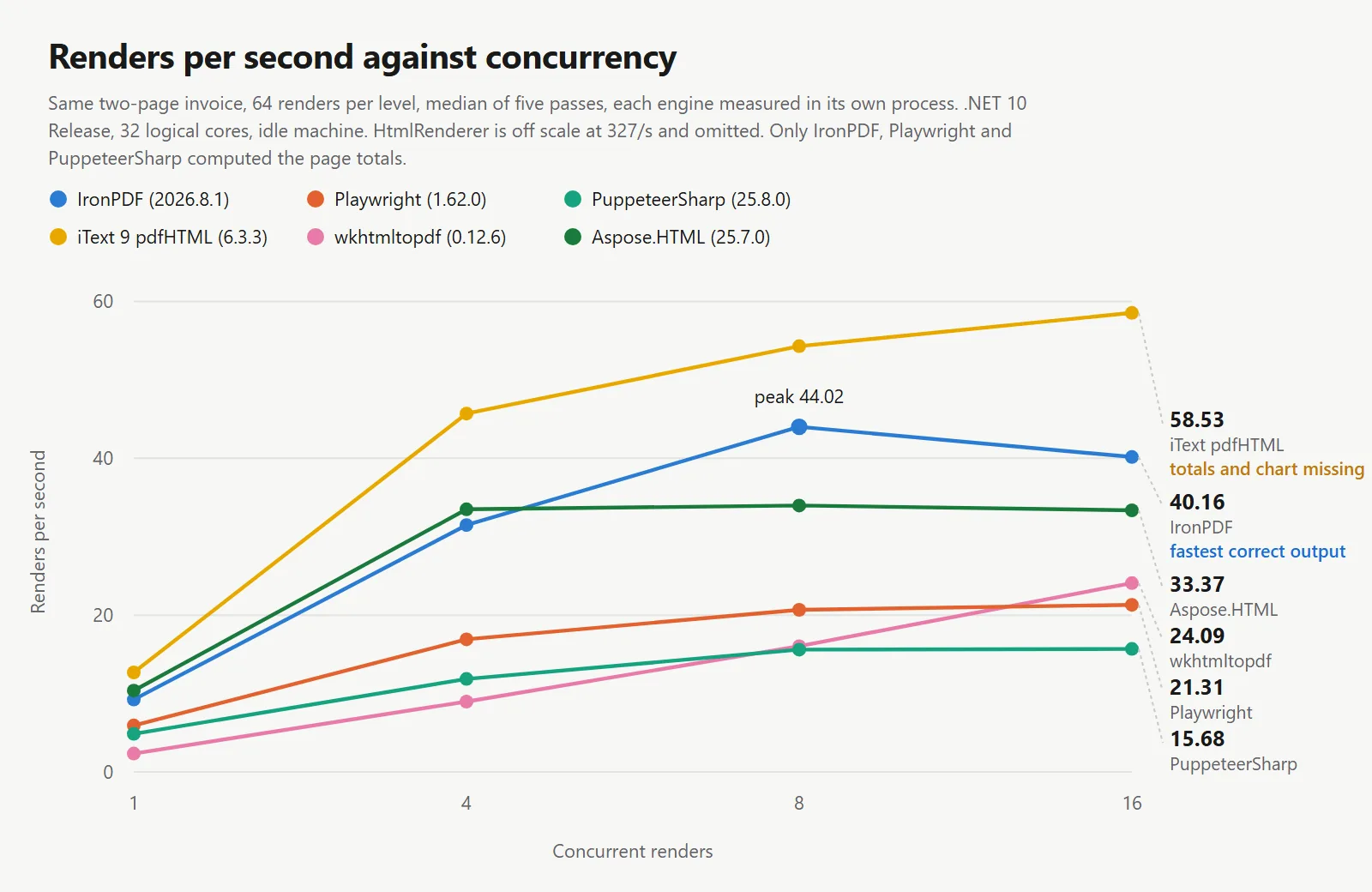
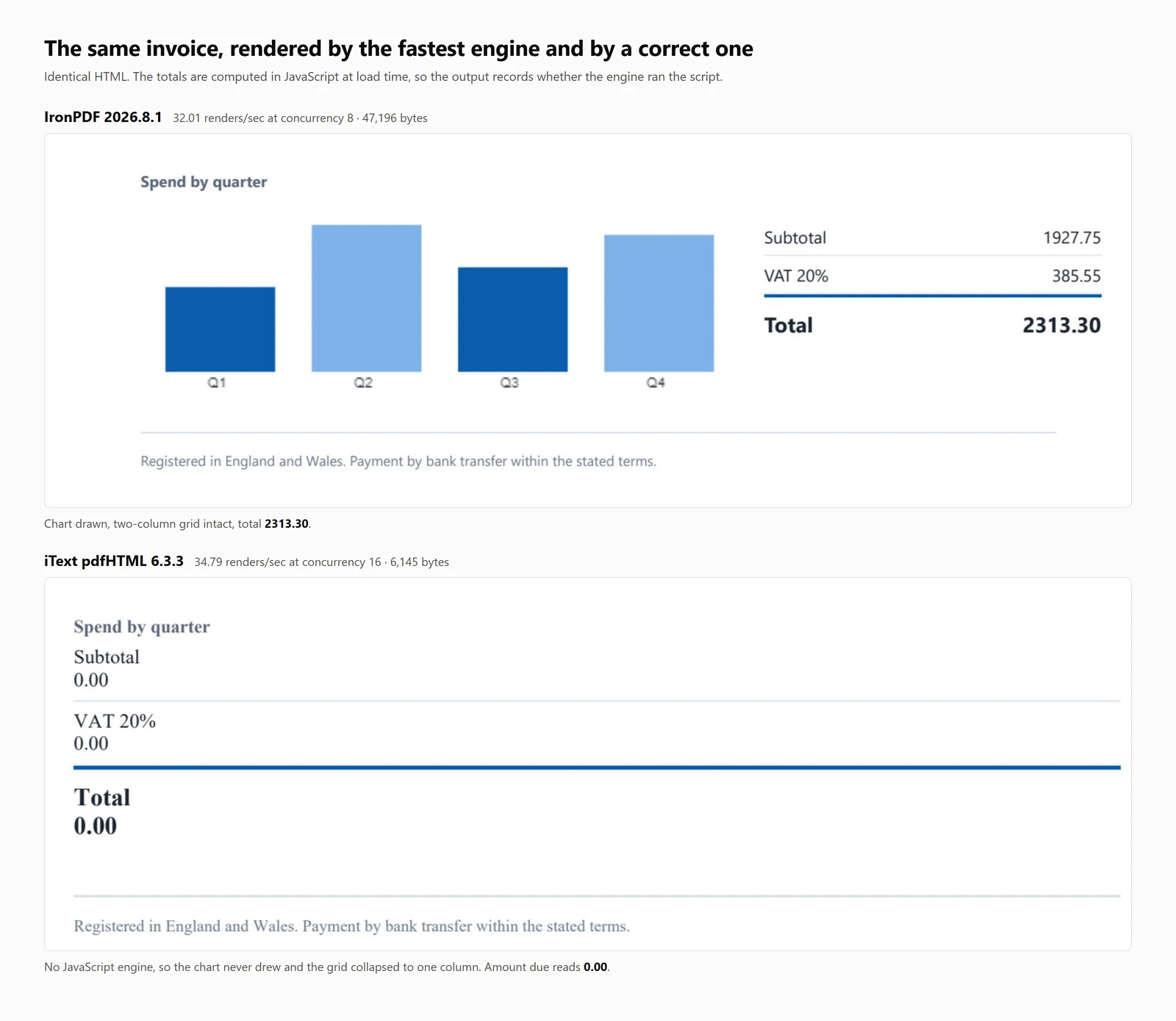
Les chiffres de vitesse ci-dessus dans le tableau appartiennent à des moteurs qui ont mal rendu le document. iText 9 a affiché 54,30 rendus par seconde et HtmlRenderer 327,09, et les deux l'ont fait sans jamais exécuter le JavaScript de la page. Un chiffre de débit signifie peu sans le document qu'il a produit, donc chaque tableau ici comporte une colonne de précision.
IronPDF est en tête en termes de débit par rendu correct : Parmi les moteurs qui ont reproduit le document, IronPDF a maintenu 44,02 rendus par seconde contre 20,68 et 15,60, sur la même machine, le même document et la même condition d'attente, tout en retournant le plus de travail par mégaoctet des 3 et en atteignant un premier PDF le plus rapidement.
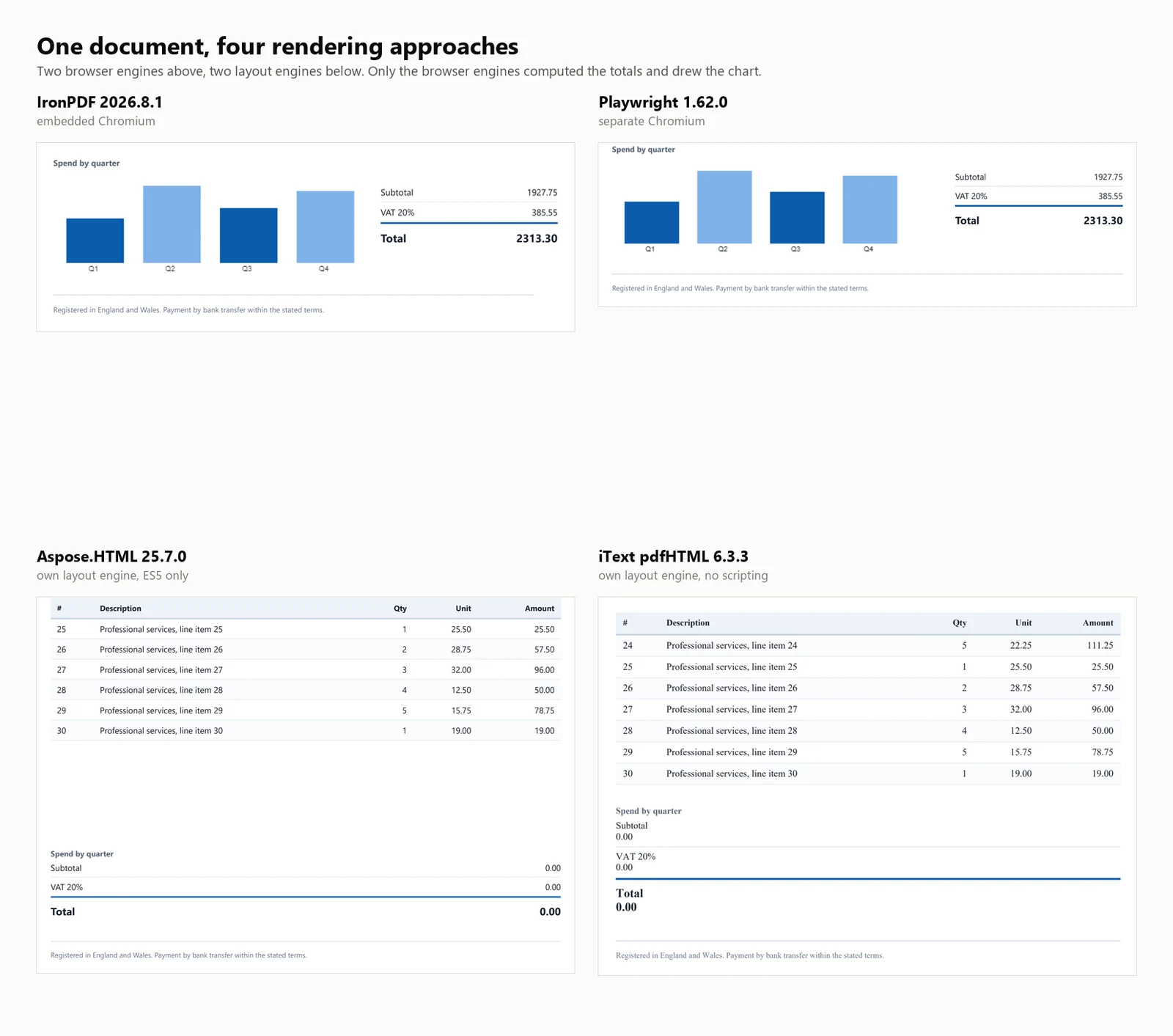
La constatation qui compte plus que tout ce qui précède : 4 des 7 bibliothèques ont produit un PDF qui semblait terminé mais était incorrect. Dans 3 d'entre elles, le total de la facture affichait 0.00 au lieu de 2313.30. La quatrième, HtmlRenderer, a silencieusement omis le montant dû, les totaux et le graphique. Aucune exception n'a été levée dans aucun des cas, et rien dans la sortie ne l'indiquait.
Démarrage rapide HTML vers PDF en C#
Ce guide présente 7 méthodes pour convertir HTML en PDF dans .NET, fournissant des exemples de code et des benchmarks quantitatifs pour chacune.
Pour qui est-ce : Développeurs .NET évaluant des bibliothèques HTML vers PDF, et ceux qui ont besoin de justifier leur sélection avec des données objectives.
Ce que vous obtiendrez : Des exemples fonctionnels pour chaque approche, couvrant à la fois les chaînes HTML et les URL en direct, ainsi que des mesures pour le démarrage à froid, le débit, l'utilisation de la mémoire et la précision du rendu sur un document de test cohérent.
Où cela fonctionne : .NET 6 et versions ultérieures, .NET Framework 4.6.2 et versions ultérieures, et .NET Standard 2.0. Les benchmarks ont été réalisés sur .NET 10, Windows 11, avec 32 cœurs logiques en mode Release.
Quand utiliser cette approche : Lorsque votre document est déjà au format HTML. Le rendu de balisage contrôlé est plus efficace et fiable que la construction de PDF par des commandes de dessin individuelles pour un contenu de type document.
Pourquoi cela importe techniquement : Les moteurs se divisent en 2 catégories. Les moteurs de rendu de niveau navigateur utilisent Chromium, entraînant des exigences plus élevées en mémoire et en conteneur. Les bibliothèques de moteur de mise en page sont plus petites et plus rapides mais n'exécutent pas JavaScript. Les benchmarks ci-dessous quantifient ces compromis.
Pour l'utiliser, installez le package, fournissez une chaîne HTML au moteur de rendu, et enregistrez le PDF résultant.
1Installez IronPDF avec NuGet Package Manager
PM > Install-Package IronPdf
Install-Package IronPdf
2Copiez et exécutez cet extrait de code.
using IronPdf;License.LicenseKey = "YOUR-TRIAL-KEY";var pdf = new ChromePdfRenderer().RenderHtmlAsPdf("<h1>Invoice INV-2026-0814</h1>");pdf.SaveAs("invoice.pdf");
using IronPdf;

License.LicenseKey = "YOUR-TRIAL-KEY";
var pdf = new ChromePdfRenderer().RenderHtmlAsPdf("<h1>Invoice INV-2026-0814</h1>");
pdf.SaveAs("invoice.pdf");
Imports IronPdfLicense.LicenseKey = "YOUR-TRIAL-KEY"Dim pdf = New ChromePdfRenderer().RenderHtmlAsPdf("<h1>Invoice INV-2026-0814</h1>")pdf.SaveAs("invoice.pdf")
ImportsIronPdfLicense.LicenseKey = "YOUR-TRIAL-KEY"Dim pdf = New ChromePdfRenderer().RenderHtmlAsPdf("<h1>Invoice INV-2026-0814</h1>")pdf.SaveAs("invoice.pdf")
Imports IronPdf

License.LicenseKey = "YOUR-TRIAL-KEY"
Dim pdf = New ChromePdfRenderer().RenderHtmlAsPdf("<h1>Invoice INV-2026-0814</h1>")
pdf.SaveAs("invoice.pdf")
3Déployez pour tester sur votre environnement de production.
Commencez à utiliser IronPDF dans votre projet dès aujourd'hui avec un essai gratuit
Après avoir acheté ou enregistré pour un essai de 30 jours d'IronPDF, entrez votre clé de licence au début de votre application.
Commencez à utiliser IronPDF dans votre projet dès aujourd'hui avec un essai gratuit.
Première étape :
Installer avec NuGet
PM > Install-Package IronPdf
Install-Package IronPdf
Installez IronPDF en exécutant la commande ci-dessus dans la console du gestionnaire de packages NuGet, ou recherchez le package dans le gestionnaire de packages NuGet.
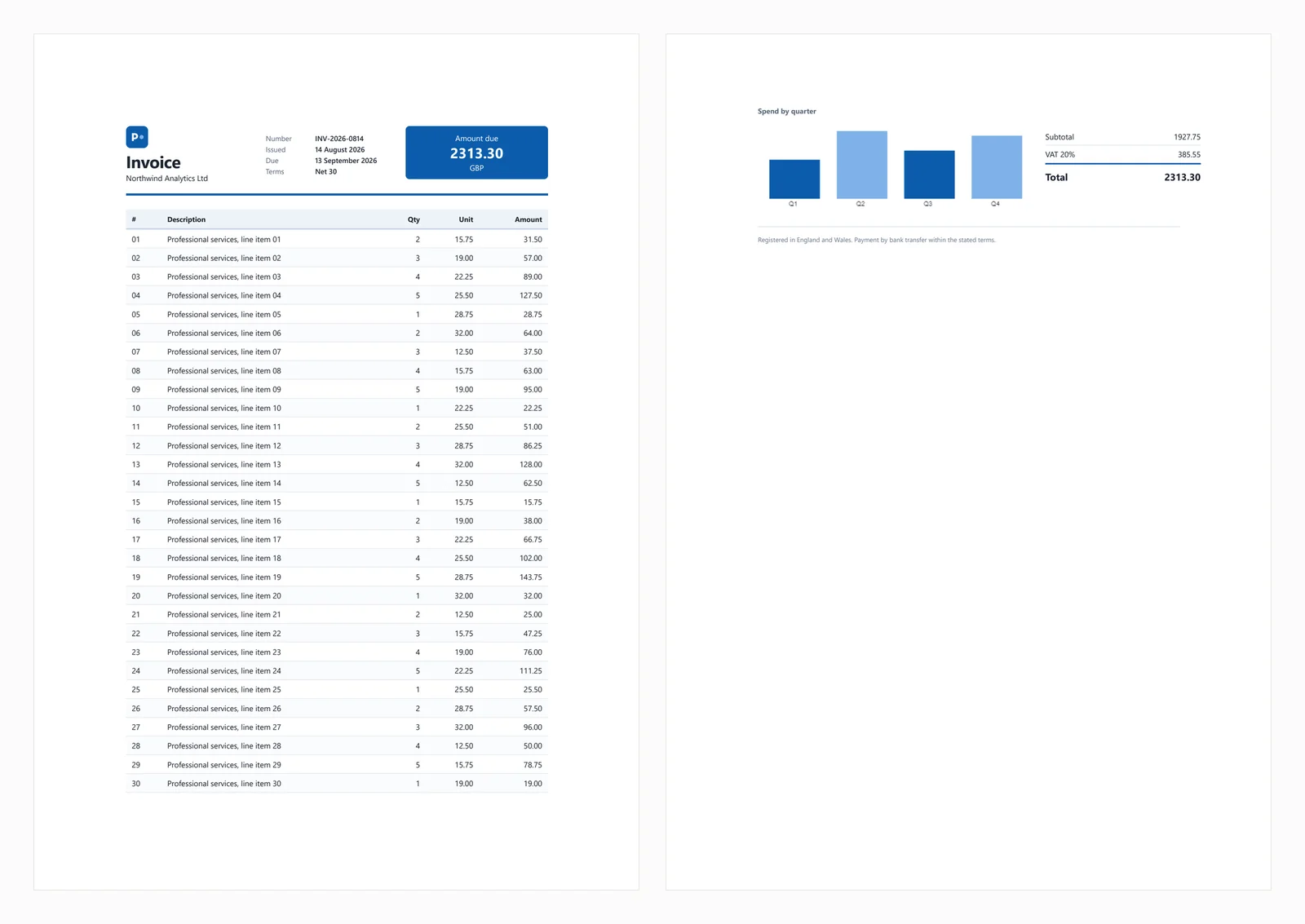
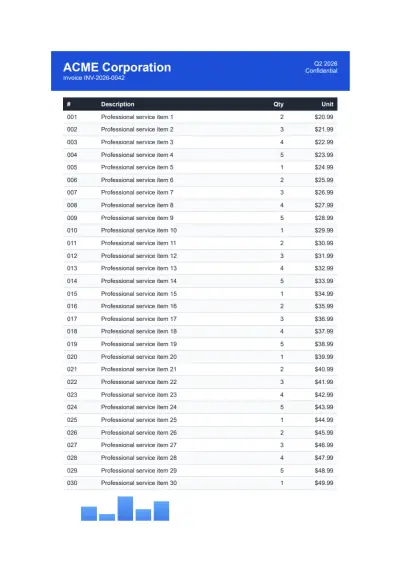
Le démarrage rapide ci-dessus produit la sortie suivante à partir de la facture test utilisée tout au long de ce guide.
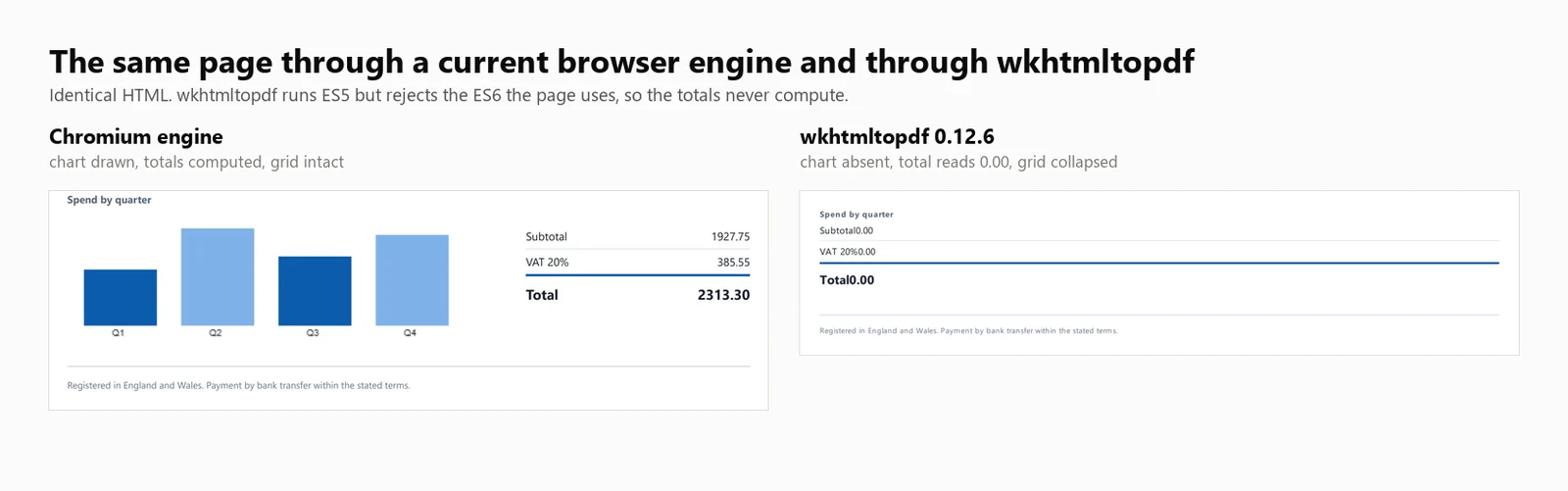
Le document test inclut une en-tête CSS Grid, un tableau de 30 lignes avec des rayures zébrées, un SVG en ligne, un graphique à barres rendu sur un élément canvas, et des totaux calculés en JavaScript au moment du chargement. Les totaux calculés sont importants pour les tests, car les moteurs sans support JavaScript génèrent des factures qui semblent complètes mais affichent un montant dû de 0.00. Ce comportement apparaît dans 3 des bibliothèques ci-dessous, et une quatrième omet complètement le bloc des totaux.
Les scénarios d'échec courants sont couverts dans les sections ci-dessous.
1. IronPDF : Chromium intégré, pas de navigateur à installer
IronPDF est un moteur de rendu Chromium qui fonctionne au sein de votre application via NuGet, éliminant le besoin d'un navigateur installé séparément. Cette distinction affecte principalement le déploiement, qui est discuté plus loin dans le guide.
Installation :
> dotnet add package IronPdf
dotnet add package IronPdf
À partir d'une chaîne HTML :
// IronPDF 2026.8.1using IronPdf;License.LicenseKey = "YOUR-TRIAL-KEY"; // trial keys are freestring html = @"<h1>Invoice INV-2026-0814</h1> <p>Northwind Analytics Ltd — Net 30</p> <table><tr><th>Item</th><th>Amount</th></tr> <tr><td>Professional services</td><td>2313.30</td></tr></table>";var renderer = new ChromePdfRenderer();renderer.RenderingOptions.PaperSize = IronPdf.Rendering.PdfPaperSize.A4;renderer.RenderingOptions.PrintHtmlBackgrounds = true;using PdfDocument pdf = renderer.RenderHtmlAsPdf(html);pdf.SaveAs("invoice.pdf");
// IronPDF 2026.8.1using IronPdf;License.LicenseKey = "YOUR-TRIAL-KEY"; // trial keys are freestring html = @"<h1>Invoice INV-2026-0814</h1> <p>Northwind Analytics Ltd — Net 30</p> <table><tr><th>Item</th><th>Amount</th></tr> <tr><td>Professional services</td><td>2313.30</td></tr></table>";var renderer = new ChromePdfRenderer();renderer.RenderingOptions.PaperSize = IronPdf.Rendering.PdfPaperSize.A4;renderer.RenderingOptions.PrintHtmlBackgrounds = true;using PdfDocument pdf = renderer.RenderHtmlAsPdf(html);pdf.SaveAs("invoice.pdf");
// IronPDF 2026.8.1
using IronPdf;
License.LicenseKey = "YOUR-TRIAL-KEY"; // trial keys are free
string html = @"<h1>Invoice INV-2026-0814</h1>
<p>Northwind Analytics Ltd — Net 30</p>
<table><tr><th>Item</th><th>Amount</th></tr>
<tr><td>Professional services</td><td>2313.30</td></tr></table>";
var renderer = new ChromePdfRenderer();
renderer.RenderingOptions.PaperSize = IronPdf.Rendering.PdfPaperSize.A4;
renderer.RenderingOptions.PrintHtmlBackgrounds = true;
using PdfDocument pdf = renderer.RenderHtmlAsPdf(html);
pdf.SaveAs("invoice.pdf");
' IronPDF 2026.8.1Imports IronPdfLicense.LicenseKey = "YOUR-TRIAL-KEY" ' trial keys are freeDim html As String = "<h1>Invoice INV-2026-0814</h1> <p>Northwind Analytics Ltd — Net 30</p> <table><tr><th>Item</th><th>Amount</th></tr> <tr><td>Professional services</td><td>2313.30</td></tr></table>"Dim renderer As New ChromePdfRenderer()renderer.RenderingOptions.PaperSize = IronPdf.Rendering.PdfPaperSize.A4renderer.RenderingOptions.PrintHtmlBackgrounds = TrueUsing pdf As PdfDocument = renderer.RenderHtmlAsPdf(html) pdf.SaveAs("invoice.pdf")End Using
' IronPDF 2026.8.1ImportsIronPdfLicense.LicenseKey = "YOUR-TRIAL-KEY" ' trial keys are freeDim html AsString = "<h1>Invoice INV-2026-0814</h1> <p>Northwind Analytics Ltd — Net 30</p> <table><tr><th>Item</th><th>Amount</th></tr> <tr><td>Professional services</td><td>2313.30</td></tr></table>"Dim renderer As New ChromePdfRenderer()renderer.RenderingOptions.PaperSize = IronPdf.Rendering.PdfPaperSize.A4renderer.RenderingOptions.PrintHtmlBackgrounds = TrueUsing pdf AsPdfDocument = renderer.RenderHtmlAsPdf(html) pdf.SaveAs("invoice.pdf")EndUsing
' IronPDF 2026.8.1
Imports IronPdf
License.LicenseKey = "YOUR-TRIAL-KEY" ' trial keys are free
Dim html As String = "<h1>Invoice INV-2026-0814</h1>
<p>Northwind Analytics Ltd — Net 30</p>
<table><tr><th>Item</th><th>Amount</th></tr>
<tr><td>Professional services</td><td>2313.30</td></tr></table>"
Dim renderer As New ChromePdfRenderer()
renderer.RenderingOptions.PaperSize = IronPdf.Rendering.PdfPaperSize.A4
renderer.RenderingOptions.PrintHtmlBackgrounds = True
Using pdf As PdfDocument = renderer.RenderHtmlAsPdf(html)
pdf.SaveAs("invoice.pdf")
End Using
À partir d'une URL en direct :
// IronPDF 2026.8.1 - only the render call changes.using IronPdf;License.LicenseKey = "YOUR-TRIAL-KEY";var renderer = new ChromePdfRenderer();using PdfDocument pdf = renderer.RenderUrlAsPdf("https://ironpdf.com/");pdf.SaveAs("page.pdf");
// IronPDF 2026.8.1 - only the render call changes.using IronPdf;License.LicenseKey = "YOUR-TRIAL-KEY";var renderer = new ChromePdfRenderer();using PdfDocument pdf = renderer.RenderUrlAsPdf("https://ironpdf.com/");pdf.SaveAs("page.pdf");
// IronPDF 2026.8.1 - only the render call changes.
using IronPdf;

License.LicenseKey = "YOUR-TRIAL-KEY";

var renderer = new ChromePdfRenderer();

using PdfDocument pdf = renderer.RenderUrlAsPdf("https://ironpdf.com/");
pdf.SaveAs("page.pdf");
Imports IronPdfLicense.LicenseKey = "YOUR-TRIAL-KEY"Dim renderer = New ChromePdfRenderer()Using pdf As PdfDocument = renderer.RenderUrlAsPdf("https://ironpdf.com/") pdf.SaveAs("page.pdf")End Using
ImportsIronPdfLicense.LicenseKey = "YOUR-TRIAL-KEY"Dim renderer = New ChromePdfRenderer()Using pdf AsPdfDocument = renderer.RenderUrlAsPdf("https://ironpdf.com/") pdf.SaveAs("page.pdf")EndUsing
Imports IronPdf

License.LicenseKey = "YOUR-TRIAL-KEY"

Dim renderer = New ChromePdfRenderer()

Using pdf As PdfDocument = renderer.RenderUrlAsPdf("https://ironpdf.com/")
    pdf.SaveAs("page.pdf")
End Using
Utilisation recommandée : Choisissez IronPDF lorsque vous avez besoin d'un rendu PDF précis au niveau du navigateur sans gérer l'infrastructure d'un navigateur sans tête, tel que le cycle de vie du processus, la récupération après crash ou la configuration du conteneur.
Compromis : Il embarque Chromium dans le package, donc la mémoire maximale atteint 342 Mo pour un rendu à froid unique et 1 187 Mo pour 8 rendus simultanés. Il commence également à 999 $, alors que 4 des 6 autres sont gratuits. Pour un projet parallèle ou un outil interne à faible volume, ce coût est difficile à justifier.
Performance : 486 ms au démarrage à froid, 161 ms de latence médiane à 8 rendus simultanés, 44,02 rendus soutenus par seconde, et 1 187 Mo de mémoire maximale utilisée à travers l'arbre de processus. La facture test a été rendue avec précision, y compris le graphique et les totaux.
2. PuppeteerSharp : Chrome sans tête pour le rendu PDF
PuppeteerSharp est le portage .NET de Puppeteer. Il télécharge une version de Chromium, la contrôle via le protocole DevTools, et génère des PDFs. Il est gratuit, sous licence MIT, activement maintenu, et mesuré ici à PuppeteerSharp (25.8.0).
Installation :
> dotnet add package PuppeteerSharp
dotnet add package PuppeteerSharp
À partir d'une chaîne HTML :
// PuppeteerSharp 25.8.0using PuppeteerSharp;using PuppeteerSharp.Media;string html = @"<h1>Invoice INV-2026-0814</h1> <p>Northwind Analytics Ltd — Net 30</p> <table><tr><th>Item</th><th>Amount</th></tr> <tr><td>Professional services</td><td>2313.30</td></tr></table>";// First run downloads roughly 150 MB of Chromium. Pre-fetch this at build time.await new BrowserFetcher().DownloadAsync();await using IBrowser browser = await Puppeteer.LaunchAsync(new LaunchOptions { Headless = true });await using IPage page = await browser.NewPageAsync();await page.SetContentAsync(html, new SetContentOptions{ WaitUntil = new[] { WaitUntilNavigation.Load }});await page.PdfAsync("invoice.pdf", new PdfOptions{ Format = PaperFormat.A4, PrintBackground = true});
// PuppeteerSharp 25.8.0using PuppeteerSharp;using PuppeteerSharp.Media;string html = @"<h1>Invoice INV-2026-0814</h1> <p>Northwind Analytics Ltd — Net 30</p> <table><tr><th>Item</th><th>Amount</th></tr> <tr><td>Professional services</td><td>2313.30</td></tr></table>";// First run downloads roughly 150 MB of Chromium. Pre-fetch this at build time.await new BrowserFetcher().DownloadAsync();await using IBrowser browser = awaitPuppeteer.LaunchAsync(new LaunchOptions { Headless = true });await using IPage page = await browser.NewPageAsync();await page.SetContentAsync(html, new SetContentOptions{WaitUntil = new[] { WaitUntilNavigation.Load }});await page.PdfAsync("invoice.pdf", new PdfOptions{Format = PaperFormat.A4,PrintBackground = true});
// PuppeteerSharp 25.8.0
using PuppeteerSharp;
using PuppeteerSharp.Media;
string html = @"<h1>Invoice INV-2026-0814</h1>
<p>Northwind Analytics Ltd — Net 30</p>
<table><tr><th>Item</th><th>Amount</th></tr>
<tr><td>Professional services</td><td>2313.30</td></tr></table>";
// First run downloads roughly 150 MB of Chromium. Pre-fetch this at build time.
await new BrowserFetcher().DownloadAsync();
await using IBrowser browser = await Puppeteer.LaunchAsync(new LaunchOptions { Headless = true });
await using IPage page = await browser.NewPageAsync();
await page.SetContentAsync(html, new SetContentOptions
{
WaitUntil = new[] { WaitUntilNavigation.Load }
});
await page.PdfAsync("invoice.pdf", new PdfOptions
{
Format = PaperFormat.A4,
PrintBackground = true
});
' PuppeteerSharp 25.8.0Imports PuppeteerSharpImports PuppeteerSharp.MediaDim html As String = "<h1>Invoice INV-2026-0814</h1> <p>Northwind Analytics Ltd — Net 30</p> <table><tr><th>Item</th><th>Amount</th></tr> <tr><td>Professional services</td><td>2313.30</td></tr></table>"' First run downloads roughly 150 MB of Chromium. Pre-fetch this at build time.Await (New BrowserFetcher()).DownloadAsync()Await Using browser As IBrowser = Await Puppeteer.LaunchAsync(New LaunchOptions With {.Headless = True}) Await Using page As IPage = Await browser.NewPageAsync() Await page.SetContentAsync(html, New SetContentOptions With {.WaitUntil = {WaitUntilNavigation.Load}}) Await page.PdfAsync("invoice.pdf", New PdfOptions With { .Format = PaperFormat.A4, .PrintBackground = True }) End UsingEnd Using
' PuppeteerSharp 25.8.0ImportsPuppeteerSharpImportsPuppeteerSharp.MediaDim html AsString = "<h1>Invoice INV-2026-0814</h1> <p>Northwind Analytics Ltd — Net 30</p> <table><tr><th>Item</th><th>Amount</th></tr> <tr><td>Professional services</td><td>2313.30</td></tr></table>"' First run downloads roughly 150 MB of Chromium. Pre-fetch this at build time.Await (New BrowserFetcher()).DownloadAsync()AwaitUsing browser AsIBrowser = AwaitPuppeteer.LaunchAsync(New LaunchOptionsWith {.Headless = True})AwaitUsing page AsIPage = Await browser.NewPageAsync()Await page.SetContentAsync(html, New SetContentOptionsWith {.WaitUntil = {WaitUntilNavigation.Load}})Await page.PdfAsync("invoice.pdf", New PdfOptionsWith { .Format = PaperFormat.A4, .PrintBackground = True })EndUsingEndUsing
' PuppeteerSharp 25.8.0
Imports PuppeteerSharp
Imports PuppeteerSharp.Media
Dim html As String = "<h1>Invoice INV-2026-0814</h1>
<p>Northwind Analytics Ltd — Net 30</p>
<table><tr><th>Item</th><th>Amount</th></tr>
<tr><td>Professional services</td><td>2313.30</td></tr></table>"
' First run downloads roughly 150 MB of Chromium. Pre-fetch this at build time.
Await (New BrowserFetcher()).DownloadAsync()
Await Using browser As IBrowser = Await Puppeteer.LaunchAsync(New LaunchOptions With {.Headless = True})
Await Using page As IPage = Await browser.NewPageAsync()
Await page.SetContentAsync(html, New SetContentOptions With {.WaitUntil = {WaitUntilNavigation.Load}})
Await page.PdfAsync("invoice.pdf", New PdfOptions With {
.Format = PaperFormat.A4,
.PrintBackground = True
})
End Using
End Using
À partir d'une URL en direct :
// PuppeteerSharp 25.8.0 - GoToAsync replaces SetContentAsync.await using IPage page = await browser.NewPageAsync();await page.GoToAsync("https://ironpdf.com/", new NavigationOptions{ WaitUntil = new[] { WaitUntilNavigation.Networkidle0 }});await page.PdfAsync("page.pdf", new PdfOptions { Format = PaperFormat.A4, PrintBackground = true });
// PuppeteerSharp 25.8.0 - GoToAsync replaces SetContentAsync.await using IPage page = await browser.NewPageAsync();await page.GoToAsync("https://ironpdf.com/", new NavigationOptions{WaitUntil = new[] { WaitUntilNavigation.Networkidle0 }});await page.PdfAsync("page.pdf", new PdfOptions { Format = PaperFormat.A4, PrintBackground = true });
// PuppeteerSharp 25.8.0 - GoToAsync replaces SetContentAsync.
await using IPage page = await browser.NewPageAsync();

await page.GoToAsync("https://ironpdf.com/", new NavigationOptions
{
    WaitUntil = new[] { WaitUntilNavigation.Networkidle0 }
});

await page.PdfAsync("page.pdf", new PdfOptions { Format = PaperFormat.A4, PrintBackground = true });
' PuppeteerSharp 25.8.0 - GoToAsync replaces SetContentAsync.Await Using page As IPage = Await browser.NewPageAsync()Await page.GoToAsync("https://ironpdf.com/", New NavigationOptions With { .WaitUntil = {WaitUntilNavigation.Networkidle0}})Await page.PdfAsync("page.pdf", New PdfOptions With {.Format = PaperFormat.A4, .PrintBackground = True})
' PuppeteerSharp 25.8.0 - GoToAsync replaces SetContentAsync.
Await Using page As IPage = Await browser.NewPageAsync()

Await page.GoToAsync("https://ironpdf.com/", New NavigationOptions With {
    .WaitUntil = {WaitUntilNavigation.Networkidle0}
})

Await page.PdfAsync("page.pdf", New PdfOptions With {.Format = PaperFormat.A4, .PrintBackground = True})
Utilisation recommandée : Sélectionnez PuppeteerSharp lorsque les contraintes budgétaires sont une priorité et que vous êtes à l'aise pour gérer les processus du navigateur. Il délivre une sortie identique à Chrome, car il utilise le même moteur.
Compromis : Vous êtes responsable de la gestion des processus du navigateur, y compris le cycle de vie, la gestion des processus orphelins après des crashs, et la configuration du bac à sable. La première exécution télécharge environ 150 Mo de Chromium, ce qui peut échouer dans des conteneurs sans accès réseau sortant, donc pré-téléchargez le navigateur au moment de la construction. Sous charge, PuppeteerSharp génère le plus de processus parmi les options mesurées, atteignant 40 à 16 rendus simultanés.
Performance : 639 ms au démarrage à froid, 507 ms de latence médiane à 8 rendus simultanés, 15,60 rendus soutenus par seconde, et 1 293 Mo de mémoire maximale utilisée à travers l'arbre de processus. La facture test a été rendue correctement.
3. Playwright pour .NET : Rendu PDF de qualité navigateur
Playwright pour .NET est la bibliothèque d'automatisation de navigateur de Microsoft. Il utilise une approche similaire à Puppeteer mais offre une API différente, une isolation de page plus efficace, et des considérations de déploiement similaires.
Installation :
> dotnet add package Microsoft.Playwright
dotnet add package Microsoft.Playwright
Une deuxième commande installe les binaires du navigateur.
> playwright install chromium
playwright install chromium
L'omission de cette étape est la cause la plus courante d'un échec de la première construction Playwright en CI.
À partir d'une chaîne HTML :
// Microsoft.Playwright 1.62.0using Microsoft.Playwright;string html = @"<h1>Invoice INV-2026-0814</h1> <p>Northwind Analytics Ltd — Net 30</p> <table><tr><th>Item</th><th>Amount</th></tr> <tr><td>Professional services</td><td>2313.30</td></tr></table>";// Run "playwright install chromium" first, or call the installer in code.Microsoft.Playwright.Program.Main(new[] { "install", "chromium" });using IPlaywright playwright = await Playwright.CreateAsync();await using IBrowser browser = await playwright.Chromium.LaunchAsync();IPage page = await browser.NewPageAsync();await page.SetContentAsync(html, new PageSetContentOptions { WaitUntil = WaitUntilState.Load });await page.PdfAsync(new PagePdfOptions{ Path = "invoice.pdf", Format = "A4", PrintBackground = true});
// Microsoft.Playwright 1.62.0using Microsoft.Playwright;string html = @"<h1>Invoice INV-2026-0814</h1> <p>Northwind Analytics Ltd — Net 30</p> <table><tr><th>Item</th><th>Amount</th></tr> <tr><td>Professional services</td><td>2313.30</td></tr></table>";// Run "playwright install chromium" first, or call the installer in code.Microsoft.Playwright.Program.Main(new[] { "install", "chromium" });using IPlaywright playwright = await Playwright.CreateAsync();await using IBrowser browser = await playwright.Chromium.LaunchAsync();IPage page = await browser.NewPageAsync();await page.SetContentAsync(html, new PageSetContentOptions { WaitUntil = WaitUntilState.Load });await page.PdfAsync(new PagePdfOptions{Path = "invoice.pdf",Format = "A4",PrintBackground = true});
// Microsoft.Playwright 1.62.0
using Microsoft.Playwright;
string html = @"<h1>Invoice INV-2026-0814</h1>
<p>Northwind Analytics Ltd — Net 30</p>
<table><tr><th>Item</th><th>Amount</th></tr>
<tr><td>Professional services</td><td>2313.30</td></tr></table>";
// Run "playwright install chromium" first, or call the installer in code.
Microsoft.Playwright.Program.Main(new[] { "install", "chromium" });
using IPlaywright playwright = await Playwright.CreateAsync();
await using IBrowser browser = await playwright.Chromium.LaunchAsync();
IPage page = await browser.NewPageAsync();
await page.SetContentAsync(html, new PageSetContentOptions { WaitUntil = WaitUntilState.Load });
await page.PdfAsync(new PagePdfOptions
{
Path = "invoice.pdf",
Format = "A4",
PrintBackground = true
});
' Microsoft.Playwright 1.62.0Imports Microsoft.PlaywrightDim html As String = "<h1>Invoice INV-2026-0814</h1> <p>Northwind Analytics Ltd — Net 30</p> <table><tr><th>Item</th><th>Amount</th></tr> <tr><td>Professional services</td><td>2313.30</td></tr></table>"' Run "playwright install chromium" first, or call the installer in code.Microsoft.Playwright.Program.Main(New String() {"install", "chromium"})Using playwright As IPlaywright = Await Playwright.CreateAsync() Await Using browser As IBrowser = Await playwright.Chromium.LaunchAsync() Dim page As IPage = Await browser.NewPageAsync() Await page.SetContentAsync(html, New PageSetContentOptions With {.WaitUntil = WaitUntilState.Load}) Await page.PdfAsync(New PagePdfOptions With { .Path = "invoice.pdf", .Format = "A4", .PrintBackground = True }) End UsingEnd Using
' Microsoft.Playwright 1.62.0ImportsMicrosoft.PlaywrightDim html AsString = "<h1>Invoice INV-2026-0814</h1> <p>Northwind Analytics Ltd — Net 30</p> <table><tr><th>Item</th><th>Amount</th></tr> <tr><td>Professional services</td><td>2313.30</td></tr></table>"' Run "playwright install chromium" first, or call the installer in code.Microsoft.Playwright.Program.Main(New String() {"install", "chromium"})Using playwright AsIPlaywright = AwaitPlaywright.CreateAsync()AwaitUsing browser AsIBrowser = Await playwright.Chromium.LaunchAsync() Dim page AsIPage = Await browser.NewPageAsync()Await page.SetContentAsync(html, New PageSetContentOptionsWith {.WaitUntil = WaitUntilState.Load})Await page.PdfAsync(New PagePdfOptionsWith { .Path = "invoice.pdf", .Format = "A4", .PrintBackground = True })EndUsingEndUsing
' Microsoft.Playwright 1.62.0
Imports Microsoft.Playwright
Dim html As String = "<h1>Invoice INV-2026-0814</h1>
<p>Northwind Analytics Ltd — Net 30</p>
<table><tr><th>Item</th><th>Amount</th></tr>
<tr><td>Professional services</td><td>2313.30</td></tr></table>"
' Run "playwright install chromium" first, or call the installer in code.
Microsoft.Playwright.Program.Main(New String() {"install", "chromium"})
Using playwright As IPlaywright = Await Playwright.CreateAsync()
Await Using browser As IBrowser = Await playwright.Chromium.LaunchAsync()
Dim page As IPage = Await browser.NewPageAsync()
Await page.SetContentAsync(html, New PageSetContentOptions With {.WaitUntil = WaitUntilState.Load})
Await page.PdfAsync(New PagePdfOptions With {
.Path = "invoice.pdf",
.Format = "A4",
.PrintBackground = True
})
End Using
End Using
' Microsoft.Playwright 1.62.0 - GotoAsync replaces SetContentAsync.
Dim page As IPage = Await browser.NewPageAsync()

Await page.GotoAsync("https://ironpdf.com/", New PageGotoOptions With {
    .WaitUntil = WaitUntilState.NetworkIdle
})

Await page.PdfAsync(New PagePdfOptions With {.Path = "page.pdf", .Format = "A4", .PrintBackground = True})
Utilisation recommandée : Choisissez Playwright pour .NET si vous avez besoin d'un rendu de qualité navigateur sans coût et que vous préférez son API, ou si vous utilisez déjà Playwright pour les tests et souhaitez éviter des dépendances supplémentaires.
Compromis : Playwright partage les mêmes considérations que Puppeteer, y compris les binaires du navigateur dans votre image, la supervision des processus, et une étape d'installation dans votre Dockerfile. C'est le moteur le plus stable mesuré ici, mais il offre un peu plus de la moitié du débit du moteur intégré.
Performance : 720 ms au démarrage à froid, 381 ms de latence médiane à 8 rendus simultanés, 20,68 rendus soutenus par seconde, et 1 122 Mo de mémoire maximale utilisée à travers l'arbre de processus. La facture test a été rendue correctement.
4. iText 9 avec pdfHTML : Moteur de mise en page, pas de JavaScript
iText 9 avec pdfHTML est une bibliothèque PDF avec un module complémentaire de conversion HTML. Il utilise son propre moteur de mise en page au lieu d'un navigateur, offrant des résultats rapides et prévisibles dans les fonctionnalités qu'il prend en charge, et reste silencieux sur tout ce qui est en dehors de celles-ci. Les 2 packages sont versionnés séparément. pdfHTML (6.3.3) est le module complémentaire qui fonctionne sur iText Core (9.7.0), et c'est cette association qui est mesurée ici.
Installation :
> dotnet add package itext.pdfhtml
dotnet add package itext.pdfhtml
Remarque : Le package itext7.* est obsolète et a été renommé en itext.*, un détail que les tutoriels les mieux classés se trompent encore. Installez itext.pdfhtml, pas itext7.pdfhtml. Le nom du package ne porte pas de numéro de version, donc itext.pdfhtml se résout à la version actuelle de pdfHTML sur iText 9.
À partir d'une chaîne HTML :
// itext.pdfhtml 6.3.3 - AGPL or commercial licence.// Note the package rename: itext7.pdfhtml is deprecated in favour of itext.pdfhtml.using iText.Html2pdf;string html = @"<h1>Invoice INV-2026-0814</h1> <p>Northwind Analytics Ltd — Net 30</p> <table><tr><th>Item</th><th>Amount</th></tr> <tr><td>Professional services</td><td>2313.30</td></tr></table>";using var output = new FileStream("invoice.pdf", FileMode.Create);HtmlConverter.ConvertToPdf(html, output);// No JavaScript engine and no canvas, so anything the page computes or draws// at load time will be missing from the result.
// itext.pdfhtml 6.3.3 - AGPL or commercial licence.// Note the package rename: itext7.pdfhtml is deprecated in favour of itext.pdfhtml.using iText.Html2pdf;string html = @"<h1>Invoice INV-2026-0814</h1> <p>Northwind Analytics Ltd — Net 30</p> <table><tr><th>Item</th><th>Amount</th></tr> <tr><td>Professional services</td><td>2313.30</td></tr></table>";using var output = new FileStream("invoice.pdf", FileMode.Create);HtmlConverter.ConvertToPdf(html, output);// No JavaScript engine and no canvas, so anything the page computes or draws// at load time will be missing from the result.
// itext.pdfhtml 6.3.3 - AGPL or commercial licence.
// Note the package rename: itext7.pdfhtml is deprecated in favour of itext.pdfhtml.
using iText.Html2pdf;
string html = @"<h1>Invoice INV-2026-0814</h1>
<p>Northwind Analytics Ltd — Net 30</p>
<table><tr><th>Item</th><th>Amount</th></tr>
<tr><td>Professional services</td><td>2313.30</td></tr></table>";
using var output = new FileStream("invoice.pdf", FileMode.Create);
HtmlConverter.ConvertToPdf(html, output);
// No JavaScript engine and no canvas, so anything the page computes or draws
// at load time will be missing from the result.
// itext.pdfhtml 6.3.3 - AGPL or commercial licence.// Note the package rename: itext7.pdfhtml is deprecated in favour of itext.pdfhtml.Imports iText.Html2pdfDim html As String = "<h1>Invoice INV-2026-0814</h1> <p>Northwind Analytics Ltd — Net 30</p> <table><tr><th>Item</th><th>Amount</th></tr> <tr><td>Professional services</td><td>2313.30</td></tr></table>"Using output As New FileStream("invoice.pdf", FileMode.Create) HtmlConverter.ConvertToPdf(html, output)End Using' No JavaScript engine and no canvas, so anything the page computes or draws' at load time will be missing from the result.
// itext.pdfhtml 6.3.3 - AGPL or commercial licence.// Note the package rename: itext7.pdfhtml is deprecated in favour of itext.pdfhtml.Imports iText.Html2pdfDim html AsString = "<h1>Invoice INV-2026-0814</h1> <p>Northwind Analytics Ltd — Net 30</p> <table><tr><th>Item</th><th>Amount</th></tr> <tr><td>Professional services</td><td>2313.30</td></tr></table>"Using output As New FileStream("invoice.pdf", FileMode.Create)HtmlConverter.ConvertToPdf(html, output)EndUsing' No JavaScript engine and no canvas, so anything the page computes or draws' at load time will be missing from the result.
// itext.pdfhtml 6.3.3 - AGPL or commercial licence.
// Note the package rename: itext7.pdfhtml is deprecated in favour of itext.pdfhtml.
Imports iText.Html2pdf
Dim html As String = "<h1>Invoice INV-2026-0814</h1>
<p>Northwind Analytics Ltd — Net 30</p>
<table><tr><th>Item</th><th>Amount</th></tr>
<tr><td>Professional services</td><td>2313.30</td></tr></table>"
Using output As New FileStream("invoice.pdf", FileMode.Create)
HtmlConverter.ConvertToPdf(html, output)
End Using
' No JavaScript engine and no canvas, so anything the page computes or draws
' at load time will be missing from the result.
À partir d'une URL en direct : iText n'accepte pas les URL directement. Récupérez le HTML manuellement et définissez l'URI de base pour vous assurer que les ressources relatives se résolvent correctement.
// itext.pdfhtml 6.3.3 - there is no URL method, so fetch the HTML yourself.using iText.Html2pdf;using var client = new HttpClient();string html = await client.GetStringAsync("https://ironpdf.com/");// The base URI is what lets relative images, CSS and links resolve.var properties = new ConverterProperties();properties.SetBaseUri("https://ironpdf.com/");using var output = new FileStream("page.pdf", FileMode.Create);HtmlConverter.ConvertToPdf(html, output, properties);
// itext.pdfhtml 6.3.3 - there is no URL method, so fetch the HTML yourself.using iText.Html2pdf;using var client = new HttpClient();string html = await client.GetStringAsync("https://ironpdf.com/");// The base URI is what lets relative images, CSS and links resolve.var properties = new ConverterProperties();properties.SetBaseUri("https://ironpdf.com/");using var output = new FileStream("page.pdf", FileMode.Create);HtmlConverter.ConvertToPdf(html, output, properties);
// itext.pdfhtml 6.3.3 - there is no URL method, so fetch the HTML yourself.
using iText.Html2pdf;

using var client = new HttpClient();
string html = await client.GetStringAsync("https://ironpdf.com/");

// The base URI is what lets relative images, CSS and links resolve.
var properties = new ConverterProperties();
properties.SetBaseUri("https://ironpdf.com/");

using var output = new FileStream("page.pdf", FileMode.Create);
HtmlConverter.ConvertToPdf(html, output, properties);
' itext.pdfhtml 6.3.3 - there is no URL method, so fetch the HTML yourself.Imports iText.Html2pdfUsing client As New HttpClient() Dim html As String = Await client.GetStringAsync("https://ironpdf.com/") ' The base URI is what lets relative images, CSS and links resolve. Dim properties As New ConverterProperties() properties.SetBaseUri("https://ironpdf.com/") Using output As New FileStream("page.pdf", FileMode.Create) HtmlConverter.ConvertToPdf(html, output, properties) End UsingEnd Using
' itext.pdfhtml 6.3.3 - there is no URL method, so fetch the HTML yourself.Imports iText.Html2pdfUsing client As New HttpClient() Dim html AsString = Await client.GetStringAsync("https://ironpdf.com/") ' The base URI is what lets relative images, CSS and links resolve. Dim properties As New ConverterProperties() properties.SetBaseUri("https://ironpdf.com/")Using output As New FileStream("page.pdf", FileMode.Create)HtmlConverter.ConvertToPdf(html, output, properties)EndUsingEndUsing
' itext.pdfhtml 6.3.3 - there is no URL method, so fetch the HTML yourself.
Imports iText.Html2pdf

Using client As New HttpClient()
    Dim html As String = Await client.GetStringAsync("https://ironpdf.com/")

    ' The base URI is what lets relative images, CSS and links resolve.
    Dim properties As New ConverterProperties()
    properties.SetBaseUri("https://ironpdf.com/")

    Using output As New FileStream("page.pdf", FileMode.Create)
        HtmlConverter.ConvertToPdf(html, output, properties)
    End Using
End Using
Utilisation recommandée : Sélectionnez iText si vous l'utilisez déjà pour d'autres tâches PDF ou si vous avez besoin d'une manipulation PDF avancée en plus de la conversion HTML, et préférez éviter plusieurs bibliothèques.
Compromis : iText est disponible uniquement sous AGPL ou sous licence payante. AGPL nécessite de rendre open-source l'ensemble de votre application, ce qui rend l'option payante nécessaire pour la plupart des équipes livrant des logiciels fermés. Techniquement, iText n'exécute pas JavaScript et offre un support CSS plus limité par rapport aux navigateurs, comme le montrent les benchmarks de fidélité ci-dessous.
Performance : 489 ms au démarrage à froid, 144 ms de latence médiane à 8 rendus simultanés, 54,30 rendus soutenus par seconde, et 332 Mo de mémoire maximale utilisée dans un seul processus. Le total de la facture était 0.00 et le graphique n'a pas été rendu.
5. HtmlRenderer avec PdfSharp : Purement géré, pas de binaires natifs
HtmlRenderer avec PdfSharp est implémenté en C# purement géré, sans binaires natifs ni dépendances de navigateur, et ne nécessite aucune installation de conteneur supplémentaire. C'est de loin l'option la plus petite et la plus rapide présentée, mais son support CSS est limité aux normes d'environ 2011.
Installation :
> dotnet add package HtmlRenderer.PdfSharp
dotnet add package HtmlRenderer.PdfSharp
À partir d'une chaîne HTML :
// HtmlRenderer.PdfSharp 1.6.1 - pure managed, no native binaries at all.using TheArtOfDev.HtmlRenderer.PdfSharp;string html = @"<h1>Invoice INV-2026-0814</h1> <p>Northwind Analytics Ltd — Net 30</p> <table><tr><th>Item</th><th>Amount</th></tr> <tr><td>Professional services</td><td>2313.30</td></tr></table>";PdfSharp.Pdf.PdfDocument pdf = PdfGenerator.GeneratePdf(html, PdfSharp.PageSize.A4);pdf.Save("invoice.pdf");// There is no URL method. Fetch the markup with HttpClient and pass the string.// CSS support stops well short of Flexbox and Grid, and there is no JavaScript.
// HtmlRenderer.PdfSharp 1.6.1 - pure managed, no native binaries at all.using TheArtOfDev.HtmlRenderer.PdfSharp;string html = @"<h1>Invoice INV-2026-0814</h1> <p>Northwind Analytics Ltd — Net 30</p> <table><tr><th>Item</th><th>Amount</th></tr> <tr><td>Professional services</td><td>2313.30</td></tr></table>";PdfSharp.Pdf.PdfDocument pdf = PdfGenerator.GeneratePdf(html, PdfSharp.PageSize.A4);pdf.Save("invoice.pdf");// There is no URL method. Fetch the markup with HttpClient and pass the string.// CSS support stops well short of Flexbox and Grid, and there is no JavaScript.
// HtmlRenderer.PdfSharp 1.6.1 - pure managed, no native binaries at all.
using TheArtOfDev.HtmlRenderer.PdfSharp;
string html = @"<h1>Invoice INV-2026-0814</h1>
<p>Northwind Analytics Ltd — Net 30</p>
<table><tr><th>Item</th><th>Amount</th></tr>
<tr><td>Professional services</td><td>2313.30</td></tr></table>";
PdfSharp.Pdf.PdfDocument pdf = PdfGenerator.GeneratePdf(html, PdfSharp.PageSize.A4);
pdf.Save("invoice.pdf");
// There is no URL method. Fetch the markup with HttpClient and pass the string.
// CSS support stops well short of Flexbox and Grid, and there is no JavaScript.
' HtmlRenderer.PdfSharp 1.6.1 - pure managed, no native binaries at all.Imports TheArtOfDev.HtmlRenderer.PdfSharpDim html As String = "<h1>Invoice INV-2026-0814</h1> <p>Northwind Analytics Ltd — Net 30</p> <table><tr><th>Item</th><th>Amount</th></tr> <tr><td>Professional services</td><td>2313.30</td></tr></table>"Dim pdf As PdfSharp.Pdf.PdfDocument = PdfGenerator.GeneratePdf(html, PdfSharp.PageSize.A4)pdf.Save("invoice.pdf")' There is no URL method. Fetch the markup with HttpClient and pass the string.' CSS support stops well short of Flexbox and Grid, and there is no JavaScript.
' HtmlRenderer.PdfSharp 1.6.1 - pure managed, no native binaries at all.ImportsTheArtOfDev.HtmlRenderer.PdfSharpDim html AsString = "<h1>Invoice INV-2026-0814</h1> <p>Northwind Analytics Ltd — Net 30</p> <table><tr><th>Item</th><th>Amount</th></tr> <tr><td>Professional services</td><td>2313.30</td></tr></table>"Dim pdf AsPdfSharp.Pdf.PdfDocument = PdfGenerator.GeneratePdf(html, PdfSharp.PageSize.A4)pdf.Save("invoice.pdf")' There is no URL method. Fetch the markup with HttpClient and pass the string.' CSS support stops well short of Flexbox and Grid, and there is no JavaScript.
' HtmlRenderer.PdfSharp 1.6.1 - pure managed, no native binaries at all.
Imports TheArtOfDev.HtmlRenderer.PdfSharp
Dim html As String = "<h1>Invoice INV-2026-0814</h1>
<p>Northwind Analytics Ltd — Net 30</p>
<table><tr><th>Item</th><th>Amount</th></tr>
<tr><td>Professional services</td><td>2313.30</td></tr></table>"
Dim pdf As PdfSharp.Pdf.PdfDocument = PdfGenerator.GeneratePdf(html, PdfSharp.PageSize.A4)
pdf.Save("invoice.pdf")
' There is no URL method. Fetch the markup with HttpClient and pass the string.
' CSS support stops well short of Flexbox and Grid, and there is no JavaScript.
À partir d'une URL en direct : il n'existe pas de méthode pour l'entrée directe d'URL. Récupérez le HTML manuellement et passez-le sous forme de chaîne.
Utilisation recommandée : Choisissez HtmlRenderer avec PdfSharp uniquement là où les binaires natifs sont strictement interdits, comme dans les environnements réglementés ou isolés, et uniquement pour un modèle qui ne calcule rien au moment du chargement. C'est l'une des 3 options ici qui ne livrent aucun binaire natif, aux côtés de iText 9 et Aspose.HTML, et sur cette facture, il a omis l'en-tête, le bloc des totaux et le graphique.
Compromis : HtmlRenderer ne prend pas en charge JavaScript, Flexbox, ou CSS Grid. Pour des modèles fixes et simples, cela peut être suffisant, et sa latence médiane de 23 ms est inégalée, dans un seul processus. Cependant, le HTML conçu pour les navigateurs modernes ne sera pas rendu correctement. Lors des tests, il a omis l'en-tête CSS Grid, le bloc des totaux et le graphique, et a compressé 2 pages en 1, provoquant un chevauchement de contenu.
HtmlRenderer est le moteur le plus rapide mesuré mais ne peut pas rendre le CSS moderne. Les deux facteurs doivent être pris en compte dans votre décision.
Performance : 157 ms au démarrage à froid, 23 ms de latence médiane à 8 rendus simultanés, 327,09 rendus soutenus par seconde, 166 Mo de mémoire maximale utilisée, et un seul processus. La sortie était une seule page manquant l'en-tête, les totaux et le graphique.
6. wkhtmltopdf et DinkToPdf : Qt WebKit archivé
wkhtmltopdf est un outil en ligne de commande basé sur un ancien moteur Qt WebKit, couramment intégré avec .NET via DinkToPdf. Il n'existe pas d'installation NuGet pour le moteur lui-même, il doit donc être livré en tant que binaire avec votre application. DinkToPdf sert de wrapper, bien que des alternatives existent.
À partir d'une chaîne HTML :
// wkhtmltopdf 0.12.6 via DinkToPdf. The engine is archived; the native// libwkhtmltox binaries must be shipped alongside your application.using DinkToPdf;using DinkToPdf.Contracts;string html = @"<h1>Invoice INV-2026-0814</h1> <p>Northwind Analytics Ltd — Net 30</p> <table><tr><th>Item</th><th>Amount</th></tr> <tr><td>Professional services</td><td>2313.30</td></tr></table>";IConverter converter = new SynchronizedConverter(new PdfTools());var document = new HtmlToPdfDocument{ GlobalSettings = { PaperSize = PaperKind.A4, Out = "invoice.pdf" }, Objects = { new ObjectSettings { HtmlContent = html } }};converter.Convert(document);
// wkhtmltopdf 0.12.6 via DinkToPdf. The engine is archived; the native// libwkhtmltox binaries must be shipped alongside your application.using DinkToPdf;using DinkToPdf.Contracts;string html = @"<h1>Invoice INV-2026-0814</h1> <p>Northwind Analytics Ltd — Net 30</p> <table><tr><th>Item</th><th>Amount</th></tr> <tr><td>Professional services</td><td>2313.30</td></tr></table>";IConverter converter = new SynchronizedConverter(new PdfTools());var document = new HtmlToPdfDocument{GlobalSettings = { PaperSize = PaperKind.A4, Out = "invoice.pdf" },Objects = { new ObjectSettings { HtmlContent = html } }};converter.Convert(document);
// wkhtmltopdf 0.12.6 via DinkToPdf. The engine is archived; the native
// libwkhtmltox binaries must be shipped alongside your application.
using DinkToPdf;
using DinkToPdf.Contracts;
string html = @"<h1>Invoice INV-2026-0814</h1>
<p>Northwind Analytics Ltd — Net 30</p>
<table><tr><th>Item</th><th>Amount</th></tr>
<tr><td>Professional services</td><td>2313.30</td></tr></table>";
IConverter converter = new SynchronizedConverter(new PdfTools());
var document = new HtmlToPdfDocument
{
GlobalSettings = { PaperSize = PaperKind.A4, Out = "invoice.pdf" },
Objects = { new ObjectSettings { HtmlContent = html } }
};
converter.Convert(document);
' wkhtmltopdf 0.12.6 via DinkToPdf. The engine is archived; the native' libwkhtmltox binaries must be shipped alongside your application.Imports DinkToPdfImports DinkToPdf.ContractsDim html As String = "<h1>Invoice INV-2026-0814</h1> <p>Northwind Analytics Ltd — Net 30</p> <table><tr><th>Item</th><th>Amount</th></tr> <tr><td>Professional services</td><td>2313.30</td></tr></table>"Dim converter As IConverter = New SynchronizedConverter(New PdfTools())Dim document = New HtmlToPdfDocument() With { .GlobalSettings = New GlobalSettings With {.PaperSize = PaperKind.A4, .Out = "invoice.pdf"}, .Objects = {New ObjectSettings With {.HtmlContent = html}}}converter.Convert(document)
' wkhtmltopdf 0.12.6 via DinkToPdf. The engine is archived; the native' libwkhtmltox binaries must be shipped alongside your application.ImportsDinkToPdfImportsDinkToPdf.ContractsDim html AsString = "<h1>Invoice INV-2026-0814</h1> <p>Northwind Analytics Ltd — Net 30</p> <table><tr><th>Item</th><th>Amount</th></tr> <tr><td>Professional services</td><td>2313.30</td></tr></table>"Dim converter AsIConverter = New SynchronizedConverter(New PdfTools())Dim document = New HtmlToPdfDocument() With { .GlobalSettings = New GlobalSettingsWith {.PaperSize = PaperKind.A4, .Out = "invoice.pdf"}, .Objects = {New ObjectSettingsWith {.HtmlContent = html}}}converter.Convert(document)
' wkhtmltopdf 0.12.6 via DinkToPdf. The engine is archived; the native
' libwkhtmltox binaries must be shipped alongside your application.
Imports DinkToPdf
Imports DinkToPdf.Contracts
Dim html As String = "<h1>Invoice INV-2026-0814</h1>
<p>Northwind Analytics Ltd — Net 30</p>
<table><tr><th>Item</th><th>Amount</th></tr>
<tr><td>Professional services</td><td>2313.30</td></tr></table>"
Dim converter As IConverter = New SynchronizedConverter(New PdfTools())
Dim document = New HtmlToPdfDocument() With {
.GlobalSettings = New GlobalSettings With {.PaperSize = PaperKind.A4, .Out = "invoice.pdf"},
.Objects = {New ObjectSettings With {.HtmlContent = html}}
}
converter.Convert(document)
À partir d'une URL en direct :
// wkhtmltopdf 0.12.6 via DinkToPdf - swap HtmlContent for Page.var document = new HtmlToPdfDocument{ GlobalSettings = { PaperSize = PaperKind.A4, Out = "page.pdf" }, Objects = { new ObjectSettings { Page = "https://ironpdf.com/" } }};converter.Convert(document);
// wkhtmltopdf 0.12.6 via DinkToPdf - swap HtmlContent for Page.var document = new HtmlToPdfDocument{GlobalSettings = { PaperSize = PaperKind.A4, Out = "page.pdf" },Objects = { new ObjectSettings { Page = "https://ironpdf.com/" } }};converter.Convert(document);
// wkhtmltopdf 0.12.6 via DinkToPdf - swap HtmlContent for Page.
var document = new HtmlToPdfDocument
{
    GlobalSettings = { PaperSize = PaperKind.A4, Out = "page.pdf" },
    Objects = { new ObjectSettings { Page = "https://ironpdf.com/" } }
};

converter.Convert(document);
' wkhtmltopdf 0.12.6 via DinkToPdf - swap HtmlContent for Page.Dim document = New HtmlToPdfDocument With { .GlobalSettings = New GlobalSettings With {.PaperSize = PaperKind.A4, .Out = "page.pdf"}, .Objects = {New ObjectSettings With {.Page = "https://ironpdf.com/"}}}converter.Convert(document)
' wkhtmltopdf 0.12.6 via DinkToPdf - swap HtmlContent for Page.Dim document = New HtmlToPdfDocumentWith { .GlobalSettings = New GlobalSettingsWith {.PaperSize = PaperKind.A4, .Out = "page.pdf"}, .Objects = {New ObjectSettingsWith {.Page = "https://ironpdf.com/"}}}converter.Convert(document)
' wkhtmltopdf 0.12.6 via DinkToPdf - swap HtmlContent for Page.
Dim document = New HtmlToPdfDocument With {
    .GlobalSettings = New GlobalSettings With {.PaperSize = PaperKind.A4, .Out = "page.pdf"},
    .Objects = {New ObjectSettings With {.Page = "https://ironpdf.com/"}}
}

converter.Convert(document)
Statut du projet : Le dépôt wkhtmltopdf a été archivé en janvier 2023, avec la dernière version stable (0.12.6) en juin 2020, construite sur Qt (4.8.5). Son rendu est fixé aux normes web d'environ 2013 et il ne reçoit plus de mises à jour de sécurité.
Utilisation recommandée : Continuez à utiliser wkhtmltopdf s'il est déjà en production, rend correctement vos documents et que vos modèles sont statiques. La migration est inutile sans exigence fonctionnelle.
Compromis : wkhtmltopdf ne peut pas rendre les mises en page qui reposent sur Flexbox ou des fonctionnalités CSS plus récentes, et il ne reçoit pas de correctifs de sécurité.
Support JavaScript : wkhtmltopdf exécute JavaScript ES5 mais ne prend pas en charge ES6. Un test direct sur cette version a exécuté ES5 avec succès et a échoué sur ES6, car document.querySelectorAll(...).forEach n'est pas pris en charge par le moteur Qt (4.8.5). En conséquence, la facture test, qui utilise cet appel, a affiché un total de remplacement de 0.00 sans aucune erreur visible. Les modèles écrits sur une base ES5 se calculent correctement, et ceux utilisant JavaScript moderne ne le font pas.
Performance : 424 ms au démarrage à froid, 486 ms de latence médiane à 8 rendus simultanés, 16,03 rendus soutenus par seconde, et 482 Mo de consommation mémoire maximale à travers l'arbre de processus. Le total de la facture était 0.00 et le graphique n'a pas été rendu.
Les chiffres ci-dessus sont basés sur l'exécution de wkhtmltopdf.exe en tant qu'outil en ligne de commande, avec 1 processus par rendu. Le wrapper DinkToPdf utilise le même moteur en processus mais sérialise tous les appels via SynchronizedConverter, limitant l'évolutivité de la concurrence.
7. Aspose.HTML pour .NET : Moteur de mise en page autonome
Aspose.HTML pour .NET possède son propre moteur de rendu plutôt qu'un navigateur, et il s'inscrit dans une suite de documents qui couvre également Word, Excel et PowerPoint. Pour les équipes qui achètent déjà auprès d'un seul fournisseur, cela signifie 1 contrat de support et 1 bon de commande au lieu d'intégrer plusieurs bibliothèques et de suivre des renouvellements séparés.
Installation :
> dotnet add package Aspose.HTML
dotnet add package Aspose.HTML
À partir d'une chaîne HTML :
// Aspose.HTML for .NET 25.7.0 - commercial licence, applied from a .lic file.using Aspose.Html;using Aspose.Html.Converters;using Aspose.Html.Saving;new License().SetLicense("Aspose.HTMLProductFamily.lic");string html = @"<h1>Invoice INV-2026-0814</h1> <p>Northwind Analytics Ltd — Net 30</p> <table><tr><th>Item</th><th>Amount</th></tr> <tr><td>Professional services</td><td>2313.30</td></tr></table>";// The second argument is the base URL relative assets resolve against.using var doc = new HTMLDocument(html, ".");Converter.ConvertHTML(doc, new PdfSaveOptions(), "invoice.pdf");// Its own rendering stack, not a browser: ES5 runs, ES6 throws, so anything the// page computes with modern syntax is left at its initial value.
// Aspose.HTML for .NET 25.7.0 - commercial licence, applied from a .lic file.using Aspose.Html;using Aspose.Html.Converters;using Aspose.Html.Saving;newLicense().SetLicense("Aspose.HTMLProductFamily.lic");string html = @"<h1>Invoice INV-2026-0814</h1> <p>Northwind Analytics Ltd — Net 30</p> <table><tr><th>Item</th><th>Amount</th></tr> <tr><td>Professional services</td><td>2313.30</td></tr></table>";// The second argument is the base URL relative assets resolve against.using var doc = new HTMLDocument(html, ".");Converter.ConvertHTML(doc, new PdfSaveOptions(), "invoice.pdf");// Its own rendering stack, not a browser: ES5 runs, ES6 throws, so anything the// page computes with modern syntax is left at its initial value.
// Aspose.HTML for .NET 25.7.0 - commercial licence, applied from a .lic file.
using Aspose.Html;
using Aspose.Html.Converters;
using Aspose.Html.Saving;
new License().SetLicense("Aspose.HTMLProductFamily.lic");
string html = @"<h1>Invoice INV-2026-0814</h1>
<p>Northwind Analytics Ltd — Net 30</p>
<table><tr><th>Item</th><th>Amount</th></tr>
<tr><td>Professional services</td><td>2313.30</td></tr></table>";
// The second argument is the base URL relative assets resolve against.
using var doc = new HTMLDocument(html, ".");
Converter.ConvertHTML(doc, new PdfSaveOptions(), "invoice.pdf");
// Its own rendering stack, not a browser: ES5 runs, ES6 throws, so anything the
// page computes with modern syntax is left at its initial value.
// Aspose.HTML for .NET 25.7.0 - commercial licence, applied from a .lic file.Imports Aspose.HtmlImports Aspose.Html.ConvertersImports Aspose.Html.SavingCall New License().SetLicense("Aspose.HTMLProductFamily.lic")Dim html As String = "<h1>Invoice INV-2026-0814</h1> <p>Northwind Analytics Ltd — Net 30</p> <table><tr><th>Item</th><th>Amount</th></tr> <tr><td>Professional services</td><td>2313.30</td></tr></table>"' The second argument is the base URL relative assets resolve against.Using doc = New HTMLDocument(html, ".") Converter.ConvertHTML(doc, New PdfSaveOptions(), "invoice.pdf")End Using' Its own rendering stack, not a browser: ES5 runs, ES6 throws, so anything the' page computes with modern syntax is left at its initial value.
// Aspose.HTMLfor .NET25.7.0 - commercial licence, applied from a .lic file.ImportsAspose.HtmlImportsAspose.Html.ConvertersImportsAspose.Html.SavingCall New License().SetLicense("Aspose.HTMLProductFamily.lic")Dim html AsString = "<h1>Invoice INV-2026-0814</h1> <p>Northwind Analytics Ltd — Net 30</p> <table><tr><th>Item</th><th>Amount</th></tr> <tr><td>Professional services</td><td>2313.30</td></tr></table>"' The second argument is the base URL relative assets resolve against.Using doc = New HTMLDocument(html, ".")Converter.ConvertHTML(doc, New PdfSaveOptions(), "invoice.pdf")EndUsing' Its own rendering stack, not a browser: ES5 runs, ES6 throws, so anything the' page computes with modern syntax is left at its initial value.
// Aspose.HTML for .NET 25.7.0 - commercial licence, applied from a .lic file.
Imports Aspose.Html
Imports Aspose.Html.Converters
Imports Aspose.Html.Saving
Call New License().SetLicense("Aspose.HTMLProductFamily.lic")
Dim html As String = "<h1>Invoice INV-2026-0814</h1>
<p>Northwind Analytics Ltd — Net 30</p>
<table><tr><th>Item</th><th>Amount</th></tr>
<tr><td>Professional services</td><td>2313.30</td></tr></table>"
' The second argument is the base URL relative assets resolve against.
Using doc = New HTMLDocument(html, ".")
Converter.ConvertHTML(doc, New PdfSaveOptions(), "invoice.pdf")
End Using
' Its own rendering stack, not a browser: ES5 runs, ES6 throws, so anything the
' page computes with modern syntax is left at its initial value.
À partir d'une URL en direct :
// Aspose.HTML 25.7.0 - only the HTMLDocument constructor changes.using Aspose.Html;using Aspose.Html.Converters;using Aspose.Html.Saving;new License().SetLicense("Aspose.HTMLProductFamily.lic");using var doc = new HTMLDocument("https://ironpdf.com/");Converter.ConvertHTML(doc, new PdfSaveOptions(), "page.pdf");
// Aspose.HTML 25.7.0 - only the HTMLDocument constructor changes.using Aspose.Html;using Aspose.Html.Converters;using Aspose.Html.Saving;newLicense().SetLicense("Aspose.HTMLProductFamily.lic");using var doc = new HTMLDocument("https://ironpdf.com/");Converter.ConvertHTML(doc, new PdfSaveOptions(), "page.pdf");
// Aspose.HTML 25.7.0 - only the HTMLDocument constructor changes.
using Aspose.Html;
using Aspose.Html.Converters;
using Aspose.Html.Saving;

new License().SetLicense("Aspose.HTMLProductFamily.lic");

using var doc = new HTMLDocument("https://ironpdf.com/");
Converter.ConvertHTML(doc, new PdfSaveOptions(), "page.pdf");
' Aspose.HTML 25.7.0 - only the HTMLDocument constructor changes.Imports Aspose.HtmlImports Aspose.Html.ConvertersImports Aspose.Html.SavingNew License().SetLicense("Aspose.HTMLProductFamily.lic")Using doc As New HTMLDocument("https://ironpdf.com/") Converter.ConvertHTML(doc, New PdfSaveOptions(), "page.pdf")End Using
' Aspose.HTML 25.7.0 - only the HTMLDocument constructor changes.ImportsAspose.HtmlImportsAspose.Html.ConvertersImportsAspose.Html.SavingNew License().SetLicense("Aspose.HTMLProductFamily.lic")Using doc As New HTMLDocument("https://ironpdf.com/")Converter.ConvertHTML(doc, New PdfSaveOptions(), "page.pdf")EndUsing
' Aspose.HTML 25.7.0 - only the HTMLDocument constructor changes.
Imports Aspose.Html
Imports Aspose.Html.Converters
Imports Aspose.Html.Saving

New License().SetLicense("Aspose.HTMLProductFamily.lic")

Using doc As New HTMLDocument("https://ironpdf.com/")
    Converter.ConvertHTML(doc, New PdfSaveOptions(), "page.pdf")
End Using
Utilisation recommandée : Choisissez Aspose.HTML lorsque vous êtes déjà standardisé sur Aspose pour d'autres formats et que vous souhaitez une conversion HTML sous le même contrat, sur des modèles qui ne dépendent pas de JavaScript moderne.
Compromis : C'est une bibliothèque payante sans niveau gratuit, et son rendu appartient aux moteurs de mise en page plutôt qu'aux navigateurs. Aspose.HTML a été évalué sous une licence Professionnelle et ses chiffres apparaissent dans chaque tableau ci-dessous.
Performance : 1 096 ms au démarrage à froid, 227 ms de latence médiane à 8 rendus simultanés, 33,98 rendus soutenus par seconde, et 334 Mo de consommation mémoire maximale dans un seul processus. Le total de la facture était 0.00 et le graphique n'a pas été rendu.
Méthode de Benchmark HTML vers PDF : Versions, Machine et Entrées
Chaque chiffre ci-dessous provient d'une machine, d'un document et d'une campagne de 5 passages à une seule date. Les trois sont indiqués ici afin que les chiffres puissent être reproduits ou rejetés sur leurs mérites.
Versions des bibliothèques mesurées
La colonne version est ce que le harnais a lu à partir de l'assembly chargé au moment de l'exécution, et non ce contre quoi l'article a été écrit, donc un package se résolvant à quelque chose d'autre que la version épinglée apparaîtrait ici.
Bibliothèque
Package
Version testée
Assembly rapporté à l'exécution
Moteur
IronPDF
IronPdf
2026.8.1
2026.8.0.1
Chromium intégré
Playwright .NET
Microsoft.Playwright
1.62.0
1.62.0.0
Chromium externe
PuppeteerSharp
PuppeteerSharp
25.8.0
25.8.0.0
Chromium externe
iText 9 avec pdfHTML
itext.pdfhtml
6.3.3
6.3.3.0 sur iText Core 9.7.0
Propre moteur de mise en page
HtmlRenderer + PdfSharp
HtmlRenderer.PdfSharp
1.6.1
1.6.1.0
Propre moteur de mise en page
wkhtmltopdf
Binaire en ligne de commande
0.12.6
0.12.6
QtWebKit 5.212 sur Qt 4.8.5
Aspose.HTML
Aspose.HTML
25.7.0
25.7.0.0
Propre moteur de mise en page
Machine, Runtime et Date
Élément
Valeur
CPU
Ordinateur de bureau x64 à 24 cœurs / 32 threads, 3,2 GHz
Mémoire
64 Go
Système d'exploitation
Windows 11 x64, build 10.0.26200
Runtime
.NET 10.0.11, build Release
État de la machine
Inactif, aucune autre application en cours d'exécution
Date du test
3 septembre 2026
Taille de l'échantillon
8 960 rendus chronométrés : 7 moteurs x 4 niveaux de concurrence x 64 rendus x 5 passages
Lancements à froid
105 : 7 moteurs x 3 lancements x 5 passages
Chiffre rapporté
Médiane des 5 passages, jamais un cas optimal
Le document de test et les règles appliquées
Chaque moteur a reçu le même document HTML de 10 260 caractères, en mémoire, sous forme de chaîne. Aucun moteur n'a reçu un chemin de fichier, une URL ou un cache préchauffé que les autres n'ont pas eu. Le document est dans le téléchargement ci-dessous, il peut donc être comparé plutôt que pris sur parole.
L'entrée est autonome : Pas de feuille de style externe, pas de police web, pas d'image distante. Rien dans la mesure ne dépend de la latence du réseau ou de la manière dont chaque moteur met en cache les ressources.
Même condition d'attente pour chaque moteur de navigateur :Load, pas d'inactivité réseau. PuppeteerSharp a déprécié les conditions d'inactivité réseau pour SetContent, donc Load est la seule condition que les 3 supportent identiquement.
Même configuration de page, avec 1 exception déclarée :A4 et arrière-plans imprimés sur chaque moteur. Les marges n'ont pas été forcées à une valeur commune, donc chaque bibliothèque a utilisé son propre défaut, et ces défauts diffèrent : IronPDF insère la page là où les 2 moteurs de navigateur externes ne le font pas. Cela est visible dans la comparaison côte à côte plus bas. Cela change la quantité d'espace blanc entourant le contenu, pas ce que les moteurs ont calculé. Les 6 moteurs qui ont respecté le saut de page ont produit 2 pages. HtmlRenderer en a produit 1, en perdant ce saut plutôt qu'à cause des marges.
Les moteurs nécessitant une licence payante en avaient une : IronPDF sous une licence complète et Aspose.HTML sous Professional, donc aucun n'était limité ou marqué par les limites d'essai. iText a fonctionné sous AGPL, qui n'impose aucune limite fonctionnelle.
Chaque moteur a reçu la configuration recommandée par sa propre documentation : 1 instance de rendu ou de navigateur réutilisée à travers les rendus, une nouvelle page par rendu pour Puppeteer et Playwright, et Aspose.HTML écrivant dans un MemoryStream pour éviter les coûts de disque que les autres évitent.
Limite de temps : Le chronomètre démarre lorsque l'appel de rendu est effectué et s'arrête lorsque le moteur renvoie les octets PDF. Il exclut la construction du moteur et le lancement du navigateur, qui sont mesurés séparément comme démarrage à froid, et il exclut l'écriture sur disque, que aucun des moteurs n'a été demandé de faire. Le débit est le nombre de rendus réussis divisé par les secondes de l'horloge murale pour l'ensemble du lot, pas la somme des temps de rendu individuels, car seul le premier décrit ce qu'un service délivre sous charge.
Définition de la mémoire : Ensemble de travail maximal cumulé sur l'ensemble de l'arbre de processus, échantillonné toutes les 100 ms, où l'arbre est chaque processus descendant du processus de référence par filiation réelle de parent et d'enfant. C'est un pic plutôt qu'une moyenne car le pic décide si un conteneur survit à sa seconde la plus chargée. Un moteur de navigateur garde la plupart de sa mémoire dans des enfants générés, donc mesurer uniquement le processus .NET flatterait le moteur qui génère le plus.
Ce qui compte comme un échec : Tout rendu renvoyant moins de 500 octets. Les échecs sont retirés du numérateur du débit et signalés séparément, donc un moteur ne peut pas afficher un taux élevé en ne renvoyant rien. Sur les 35 invocations derrière ces tableaux, aucun moteur n'a enregistré un seul échec à aucun niveau.
Résumé du Benchmark HTML vers PDF
Toutes les valeurs de vitesse et de mémoire dans les tableaux suivants sont basées sur des mesures réelles. Lorsqu'une bibliothèque n'a pas été mesurée, le tableau l'indique explicitement.
Bibliothèque
Démarrage à froid
p50 à chaud à 8
Débit à 8
Mémoire de pointe à 8
Rend la facture test
Licence
IronPDF (2026.8.1)
486 ms
161 ms
44.02/s
1,187 MB
Correct
À partir de 999 $
Playwright .NET (1.62.0)
720 ms
381 ms
20.68/s
1,122 MB
Correct
MIT
PuppeteerSharp (25.8.0)
639 ms
507 ms
15.60/s
1,293 MB
Correct
MIT
iText 9 pdfHTML (6.3.3)
489 ms
144 ms
54.30/s
332 MB
Total 0.00, pas de graphique
AGPL ou payant
HtmlRenderer + PdfSharp (1.6.1)
157 ms
23 ms
327.09/s
166 MB
Pas d'en-tête, pas de totaux, pas de graphique
Gratuit, BSD
wkhtmltopdf (0.12.6)
424 ms
486 ms
16.03/s
482 MB
Total 0.00, pas de graphique
LGPL, archivé
Aspose.HTML (25.7.0)
1,096 ms
227 ms
33.98/s
334 MB
Total 0.00, pas de graphique
Payant
Testé sur : CPU de bureau x64 à 24 cœurs / 32 threads · 3,2 GHz · 64 Go de RAM · Windows 11 x64 · .NET 10 · IronPDF (2026.8.1) · dernière vérification septembre 2026
Interprétez les chiffres de débit en tenant compte de la précision du rendu. Parmi les 7 moteurs mesurés, 4 ont omis un travail de rendu significatif, et les 2 résultats les plus rapides du tableau, iText 9 à 54.30/s et HtmlRenderer à 327.09/s, proviennent tous deux de ce groupe.
Résultats complets du Benchmark HTML vers PDF par moteur
Les sections suivantes fournissent des chiffres détaillés pour chaque entrée du tableau récapitulatif.
Comment ce Benchmark a-t-il été mesuré ?
Le Document de Test
Chaque moteur a rendu la même facture de 2 pages, décrite ci-dessus. Ce qui en fait un instrument de mesure plutôt qu'un échantillon, ce sont les totaux. Ils sont livrés dans le balisage sous forme de valeurs de 0.00 espace réservé et sont calculés en JavaScript au moment du chargement, donc un moteur qui a exécuté le script écrit 2313.30 dans la couche de texte et un moteur qui ne l'a pas fait laisse l'espace réservé là où une expression régulière le trouve.
using System.Text;// The benchmark document. Two pages, a CSS Grid masthead, a 30-row table,// an inline SVG mark, and a bar chart drawn on a canvas element.//// The totals ship as placeholder zeroes and are computed in JavaScript at load// time, so the output itself records whether the engine ran the script. An// engine with no script engine produces a clean invoice whose total reads 0.00.static class TestDocument{ public static string Invoice() { var rows = new StringBuilder(); for (int i = 1; i <= 30; i++) { decimal unit = 12.50m + (i % 7) * 3.25m; int qty = 1 + (i % 5); rows.Append($@" <tr> <td>{i:00}</td> <td>Professional services, line item {i:00}</td> <td class=""num"">{qty}</td> <td class=""num"">{unit:0.00}</td> <td class=""num"">{unit * qty:0.00}</td> </tr>"); } return $@"<!DOCTYPE html><html lang=""en""><head><meta charset=""utf-8""><title>Invoice INV-2026-0814</title><style> body {{ font-family: 'Segoe UI', 'Helvetica Neue', Arial, sans-serif; color:#1c2430; padding:32px; font-size:12px; }} .masthead {{ display:grid; grid-template-columns: 1fr 1fr 220px; gap:20px; border-bottom:3px solid #0b5cab; padding-bottom:16px; margin-bottom:22px; }} .badge {{ background:#0b5cab; color:#fff; padding:10px 14px; border-radius:6px; text-align:center; }} table {{ width:100%; border-collapse:collapse; }} th {{ background:#eef3f9; text-align:left; padding:7px 9px; border-bottom:2px solid #c6d4e5; }} td {{ padding:6px 9px; border-bottom:1px solid #e7ecf3; }} tr:nth-child(even) td {{ background:#fafbfd; }} td.num, th.num {{ text-align:right; font-variant-numeric:tabular-nums; }} .chartwrap {{ margin-top:26px; display:grid; grid-template-columns:1fr 240px; gap:24px; }} .totals {{ list-style:none; padding:0; }} .totals li {{ display:flex; justify-content:space-between; padding:5px 0; border-bottom:1px solid #e7ecf3; }} .totals li.grand {{ font-weight:700; font-size:15px; border-top:2px solid #0b5cab; }}</style></head><body><header class=""masthead""> <div> <svg width=""34"" height=""34"" viewBox=""0 0 34 34""> <rect width=""34"" height=""34"" rx=""7"" fill=""#0b5cab""/> <circle cx=""24"" cy=""17"" r=""3.2"" fill=""#7fb2e8""/> </svg> <h1>Invoice</h1> </div> <dl><dt>Number</dt><dd>INV-2026-0814</dd><dt>Terms</dt><dd>Net 30</dd></dl> <div class=""badge"">Amount due<span id=""badge-total"">0.00</span>GBP</div></header><table> <thead> <tr><th>#</th><th>Description</th><th class=""num"">Qty</th><th class=""num"">Unit</th><th class=""num"">Amount</th></tr> </thead> <tbody>{rows} </tbody></table><section class=""chartwrap""> <div> <strong>Spend by quarter</strong> <canvas id=""chart"" width=""420"" height=""140""></canvas> </div> <ul class=""totals""> <li><span>Subtotal</span><span id=""sub"">0.00</span></li> <li><span>VAT 20%</span><span id=""vat"">0.00</span></li> <li class=""grand""><span>Total</span><span id=""tot"">0.00</span></li> </ul></section><script> // Totals are computed here, not in the markup. An engine that skips // JavaScript leaves the placeholder zeroes in the output. var sub = 0; document.querySelectorAll('tbody tr').forEach(function (tr) {{ sub += parseFloat(tr.lastElementChild.textContent); }}); var vat = sub * 0.2, tot = sub + vat; var f = function (n) {{ return n.toFixed(2); }}; document.getElementById('sub').textContent = f(sub); document.getElementById('vat').textContent = f(vat); document.getElementById('tot').textContent = f(tot); document.getElementById('badge-total').textContent = f(tot); // A canvas chart, the way a dashboard library would draw one. var data = [sub * 0.18, sub * 0.31, sub * 0.22, sub * 0.29]; var c = document.getElementById('chart').getContext('2d'); var max = Math.max.apply(null, data), bw = 78, gap = 26, base = 128; data.forEach(function (v, i) {{ var h = Math.round((v / max) * 104); c.fillStyle = i % 2 ? '#7fb2e8' : '#0b5cab'; c.fillRect(18 + i * (bw + gap), base - h, bw, h); c.fillStyle = '#1c2430'; c.font = '10px sans-serif'; c.fillText('Q' + (i + 1), 18 + i * (bw + gap) + 30, base + 11); }});</script></body></html>"; }}
using System.Text;// The benchmark document. Two pages, a CSS Grid masthead, a 30-row table,// an inline SVG mark, and a bar chart drawn on a canvas element.//// The totals ship as placeholder zeroes and are computed in JavaScript at load// time, so the output itself records whether the engine ran the script. An// engine with no script engine produces a clean invoice whose total reads 0.00.static class TestDocument{ public static stringInvoice() { var rows = new StringBuilder(); for (int i = 1; i <= 30; i++) { decimal unit = 12.50m + (i % 7) * 3.25m; int qty = 1 + (i % 5); rows.Append($@" <tr> <td>{i:00}</td> <td>Professional services, line item {i:00}</td> <td class=""num"">{qty}</td> <td class=""num"">{unit:0.00}</td> <td class=""num"">{unit * qty:0.00}</td> </tr>"); } return $@"<!DOCTYPE html><html lang=""en""><head><meta charset=""utf-8""><title>Invoice INV-2026-0814</title><style> body {{ font-family: 'Segoe UI', 'Helvetica Neue', Arial, sans-serif; color:#1c2430; padding:32px; font-size:12px; }} .masthead {{ display:grid; grid-template-columns: 1fr 1fr 220px; gap:20px; border-bottom:3px solid #0b5cab; padding-bottom:16px; margin-bottom:22px; }} .badge {{ background:#0b5cab; color:#fff; padding:10px 14px; border-radius:6px; text-align:center; }} table {{ width:100%; border-collapse:collapse; }} th {{ background:#eef3f9; text-align:left; padding:7px 9px; border-bottom:2px solid #c6d4e5; }} td {{ padding:6px 9px; border-bottom:1px solid #e7ecf3; }} tr:nth-child(even) td {{ background:#fafbfd; }} td.num, th.num {{ text-align:right; font-variant-numeric:tabular-nums; }} .chartwrap {{ margin-top:26px; display:grid; grid-template-columns:1fr 240px; gap:24px; }} .totals {{ list-style:none; padding:0; }} .totals li {{ display:flex; justify-content:space-between; padding:5px 0; border-bottom:1px solid #e7ecf3; }} .totals li.grand {{ font-weight:700; font-size:15px; border-top:2px solid #0b5cab; }}</style></head><body><header class=""masthead""> <div> <svg width=""34"" height=""34"" viewBox=""0 0 34 34""> <rect width=""34"" height=""34"" rx=""7"" fill=""#0b5cab""/> <circle cx=""24"" cy=""17"" r=""3.2"" fill=""#7fb2e8""/> </svg> <h1>Invoice</h1> </div> <dl><dt>Number</dt><dd>INV-2026-0814</dd><dt>Terms</dt><dd>Net 30</dd></dl> <div class=""badge"">Amount due<span id=""badge-total"">0.00</span>GBP</div></header><table> <thead> <tr><th>#</th><th>Description</th><th class=""num"">Qty</th><th class=""num"">Unit</th><th class=""num"">Amount</th></tr> </thead> <tbody>{rows} </tbody></table><section class=""chartwrap""> <div> <strong>Spend by quarter</strong> <canvas id=""chart"" width=""420"" height=""140""></canvas> </div> <ul class=""totals""> <li><span>Subtotal</span><span id=""sub"">0.00</span></li> <li><span>VAT 20%</span><span id=""vat"">0.00</span></li> <li class=""grand""><span>Total</span><span id=""tot"">0.00</span></li> </ul></section><script> // Totals are computed here, not in the markup. An engine that skips // JavaScript leaves the placeholder zeroes in the output. var sub = 0; document.querySelectorAll('tbody tr').forEach(function (tr) {{ sub += parseFloat(tr.lastElementChild.textContent); }}); var vat = sub * 0.2, tot = sub + vat; var f = function (n) {{ return n.toFixed(2); }}; document.getElementById('sub').textContent = f(sub); document.getElementById('vat').textContent = f(vat); document.getElementById('tot').textContent = f(tot); document.getElementById('badge-total').textContent = f(tot); // A canvas chart, the way a dashboard library would draw one. var data = [sub * 0.18, sub * 0.31, sub * 0.22, sub * 0.29]; var c = document.getElementById('chart').getContext('2d'); var max = Math.max.apply(null, data), bw = 78, gap = 26, base = 128; data.forEach(function (v, i) {{ var h = Math.round((v / max) * 104); c.fillStyle = i % 2 ? '#7fb2e8' : '#0b5cab'; c.fillRect(18 + i * (bw + gap), base - h, bw, h); c.fillStyle = '#1c2430'; c.font = '10px sans-serif'; c.fillText('Q' + (i + 1), 18 + i * (bw + gap) + 30, base + 11); }});</script></body></html>"; }}
using System.Text;

// The benchmark document. Two pages, a CSS Grid masthead, a 30-row table,
// an inline SVG mark, and a bar chart drawn on a canvas element.
//
// The totals ship as placeholder zeroes and are computed in JavaScript at load
// time, so the output itself records whether the engine ran the script. An
// engine with no script engine produces a clean invoice whose total reads 0.00.
static class TestDocument
{
    public static string Invoice()
    {
        var rows = new StringBuilder();
        for (int i = 1; i <= 30; i++)
        {
            decimal unit = 12.50m + (i % 7) * 3.25m;
            int qty = 1 + (i % 5);
            rows.Append($@"
      <tr>
        <td>{i:00}</td>
        <td>Professional services, line item {i:00}</td>
        <td class=""num"">{qty}</td>
        <td class=""num"">{unit:0.00}</td>
        <td class=""num"">{unit * qty:0.00}</td>
      </tr>");
        }

        return $@"<!DOCTYPE html>
<html lang=""en"">
<head>
<meta charset=""utf-8"">
<title>Invoice INV-2026-0814</title>
<style>
  body {{ font-family: 'Segoe UI', 'Helvetica Neue', Arial, sans-serif; color:#1c2430; padding:32px; font-size:12px; }}
  .masthead {{ display:grid; grid-template-columns: 1fr 1fr 220px; gap:20px;
               border-bottom:3px solid #0b5cab; padding-bottom:16px; margin-bottom:22px; }}
  .badge {{ background:#0b5cab; color:#fff; padding:10px 14px; border-radius:6px; text-align:center; }}
  table {{ width:100%; border-collapse:collapse; }}
  th {{ background:#eef3f9; text-align:left; padding:7px 9px; border-bottom:2px solid #c6d4e5; }}
  td {{ padding:6px 9px; border-bottom:1px solid #e7ecf3; }}
  tr:nth-child(even) td {{ background:#fafbfd; }}
  td.num, th.num {{ text-align:right; font-variant-numeric:tabular-nums; }}
  .chartwrap {{ margin-top:26px; display:grid; grid-template-columns:1fr 240px; gap:24px; }}
  .totals {{ list-style:none; padding:0; }}
  .totals li {{ display:flex; justify-content:space-between; padding:5px 0; border-bottom:1px solid #e7ecf3; }}
  .totals li.grand {{ font-weight:700; font-size:15px; border-top:2px solid #0b5cab; }}
</style>
</head>
<body>

<header class=""masthead"">
  <div>
    <svg width=""34"" height=""34"" viewBox=""0 0 34 34"">
      <rect width=""34"" height=""34"" rx=""7"" fill=""#0b5cab""/>
      <circle cx=""24"" cy=""17"" r=""3.2"" fill=""#7fb2e8""/>
    </svg>
    <h1>Invoice</h1>
  </div>
  <dl><dt>Number</dt><dd>INV-2026-0814</dd><dt>Terms</dt><dd>Net 30</dd></dl>
  <div class=""badge"">Amount due<span id=""badge-total"">0.00</span>GBP</div>
</header>

<table>
  <thead>
    <tr><th>#</th><th>Description</th><th class=""num"">Qty</th><th class=""num"">Unit</th><th class=""num"">Amount</th></tr>
  </thead>
  <tbody>{rows}
  </tbody>
</table>

<section class=""chartwrap"">
  <div>
    <strong>Spend by quarter</strong>
    <canvas id=""chart"" width=""420"" height=""140""></canvas>
  </div>
  <ul class=""totals"">
    <li><span>Subtotal</span><span id=""sub"">0.00</span></li>
    <li><span>VAT 20%</span><span id=""vat"">0.00</span></li>
    <li class=""grand""><span>Total</span><span id=""tot"">0.00</span></li>
  </ul>
</section>

<script>
  // Totals are computed here, not in the markup. An engine that skips
  // JavaScript leaves the placeholder zeroes in the output.
  var sub = 0;
  document.querySelectorAll('tbody tr').forEach(function (tr) {{
    sub += parseFloat(tr.lastElementChild.textContent);
  }});
  var vat = sub * 0.2, tot = sub + vat;
  var f = function (n) {{ return n.toFixed(2); }};
  document.getElementById('sub').textContent = f(sub);
  document.getElementById('vat').textContent = f(vat);
  document.getElementById('tot').textContent = f(tot);
  document.getElementById('badge-total').textContent = f(tot);

  // A canvas chart, the way a dashboard library would draw one.
  var data = [sub * 0.18, sub * 0.31, sub * 0.22, sub * 0.29];
  var c = document.getElementById('chart').getContext('2d');
  var max = Math.max.apply(null, data), bw = 78, gap = 26, base = 128;
  data.forEach(function (v, i) {{
    var h = Math.round((v / max) * 104);
    c.fillStyle = i % 2 ? '#7fb2e8' : '#0b5cab';
    c.fillRect(18 + i * (bw + gap), base - h, bw, h);
    c.fillStyle = '#1c2430';
    c.font = '10px sans-serif';
    c.fillText('Q' + (i + 1), 18 + i * (bw + gap) + 30, base + 11);
  }});
</script>

</body>
</html>";
    }
}
Imports System.Text' The benchmark document. Two pages, a CSS Grid masthead, a 30-row table,' an inline SVG mark, and a bar chart drawn on a canvas element.'' The totals ship as placeholder zeroes and are computed in JavaScript at load' time, so the output itself records whether the engine ran the script. An' engine with no script engine produces a clean invoice whose total reads 0.00.Friend Module TestDocument Public Function Invoice() As String Dim rows = New StringBuilder() For i As Integer = 1 To 30 Dim unit As Decimal = 12.5D + (i Mod 7) * 3.25D Dim qty As Integer = 1 + (i Mod 5) rows.AppendFormat(" <tr> <td>{0:00}</td> <td>Professional services, line item {0:00}</td> <td class=""num"">{1}</td> <td class=""num"">{2:0.00}</td> <td class=""num"">{3:0.00}</td> </tr>", i, qty, unit, unit * qty) Next Return "<!DOCTYPE html><html lang=""en""><head><meta charset=""utf-8""><title>Invoice INV-2026-0814</title><style> body { font-family: 'Segoe UI', 'Helvetica Neue', Arial, sans-serif; color:#1c2430; padding:32px; font-size:12px; } .masthead { display:grid; grid-template-columns: 1fr 1fr 220px; gap:20px; border-bottom:3px solid #0b5cab; padding-bottom:16px; margin-bottom:22px; } .badge { background:#0b5cab; color:#fff; padding:10px 14px; border-radius:6px; text-align:center; } table { width:100%; border-collapse:collapse; } th { background:#eef3f9; text-align:left; padding:7px 9px; border-bottom:2px solid #c6d4e5; } td { padding:6px 9px; border-bottom:1px solid #e7ecf3; } tr:nth-child(even) td { background:#fafbfd; } td.num, th.num { text-align:right; font-variant-numeric:tabular-nums; } .chartwrap { margin-top:26px; display:grid; grid-template-columns:1fr 240px; gap:24px; } .totals { list-style:none; padding:0; } .totals li { display:flex; justify-content:space-between; padding:5px 0; border-bottom:1px solid #e7ecf3; } .totals li.grand { font-weight:700; font-size:15px; border-top:2px solid #0b5cab; }</style></head><body><header class=""masthead""> <div> <svg width=""34"" height=""34"" viewBox=""0 0 34 34""> <rect width=""34"" height=""34"" rx=""7"" fill=""#0b5cab""/> <circle cx=""24"" cy=""17"" r=""3.2"" fill=""#7fb2e8""/> </svg> <h1>Invoice</h1> </div> <dl><dt>Number</dt><dd>INV-2026-0814</dd><dt>Terms</dt><dd>Net 30</dd></dl> <div class=""badge"">Amount due<span id=""badge-total"">0.00</span>GBP</div></header><table> <thead> <tr><th>#</th><th>Description</th><th class=""num"">Qty</th><th class=""num"">Unit</th><th class=""num"">Amount</th></tr> </thead> <tbody>" & rows.ToString() & " </tbody></table><section class=""chartwrap""> <div> <strong>Spend by quarter</strong> <canvas id=""chart"" width=""420"" height=""140""></canvas> </div> <ul class=""totals""> <li><span>Subtotal</span><span id=""sub"">0.00</span></li> <li><span>VAT 20%</span><span id=""vat"">0.00</span></li> <li class=""grand""><span>Total</span><span id=""tot"">0.00</span></li> </ul></section><script> var sub = 0; document.querySelectorAll('tbody tr').forEach(function (tr) { sub += parseFloat(tr.lastElementChild.textContent); }); var vat = sub * 0.2, tot = sub + vat; var f = function (n) { return n.toFixed(2); }; document.getElementById('sub').textContent = f(sub); document.getElementById('vat').textContent = f(vat); document.getElementById('tot').textContent = f(tot); document.getElementById('badge-total').textContent = f(tot); var data = [sub * 0.18, sub * 0.31, sub * 0.22, sub * 0.29]; var c = document.getElementById('chart').getContext('2d'); var max = Math.max.apply(null, data), bw = 78, gap = 26, base = 128; data.forEach(function (v, i) { var h = Math.round((v / max) * 104); c.fillStyle = i % 2 ? '#7fb2e8' : '#0b5cab'; c.fillRect(18 + i * (bw + gap), base - h, bw, h); c.fillStyle = '#1c2430'; c.font = '10px sans-serif'; c.fillText('Q' + (i + 1), 18 + i * (bw + gap) + 30, base + 11); });</script></body></html>" End FunctionEnd Module
ImportsSystem.Text' The benchmark document. Two pages, a CSS Grid masthead, a 30-row table,' an inline SVG mark, and a bar chart drawn on a canvas element.'' The totals ship as placeholder zeroes and are computed in JavaScript at load' time, so the output itself records whether the engine ran the script. An' engine with no script engine produces a clean invoice whose total reads 0.00.FriendModuleTestDocument Public Function Invoice() AsString Dim rows = New StringBuilder() For i AsInteger = 1 To 30 Dim unit AsDecimal = 12.5D + (i Mod7) * 3.25D Dim qty AsInteger = 1 + (i Mod5) rows.AppendFormat(" <tr> <td>{0:00}</td> <td>Professional services, line item {0:00}</td> <td class=""num"">{1}</td> <td class=""num"">{2:0.00}</td> <td class=""num"">{3:0.00}</td> </tr>", i, qty, unit, unit * qty) Next Return "<!DOCTYPE html><html lang=""en""><head><meta charset=""utf-8""><title>Invoice INV-2026-0814</title><style> body { font-family: 'Segoe UI', 'Helvetica Neue', Arial, sans-serif; color:#1c2430; padding:32px; font-size:12px; } .masthead { display:grid; grid-template-columns: 1fr 1fr 220px; gap:20px; border-bottom:3px solid #0b5cab; padding-bottom:16px; margin-bottom:22px; } .badge { background:#0b5cab; color:#fff; padding:10px 14px; border-radius:6px; text-align:center; } table { width:100%; border-collapse:collapse; } th { background:#eef3f9; text-align:left; padding:7px 9px; border-bottom:2px solid #c6d4e5; } td { padding:6px 9px; border-bottom:1px solid #e7ecf3; } tr:nth-child(even) td { background:#fafbfd; } td.num, th.num { text-align:right; font-variant-numeric:tabular-nums; } .chartwrap { margin-top:26px; display:grid; grid-template-columns:1fr 240px; gap:24px; } .totals { list-style:none; padding:0; } .totals li { display:flex; justify-content:space-between; padding:5px 0; border-bottom:1px solid #e7ecf3; } .totals li.grand { font-weight:700; font-size:15px; border-top:2px solid #0b5cab; }</style></head><body><header class=""masthead""> <div> <svg width=""34"" height=""34"" viewBox=""0 0 34 34""> <rect width=""34"" height=""34"" rx=""7"" fill=""#0b5cab""/> <circle cx=""24"" cy=""17"" r=""3.2"" fill=""#7fb2e8""/> </svg> <h1>Invoice</h1> </div> <dl><dt>Number</dt><dd>INV-2026-0814</dd><dt>Terms</dt><dd>Net 30</dd></dl> <div class=""badge"">Amount due<span id=""badge-total"">0.00</span>GBP</div></header><table> <thead> <tr><th>#</th><th>Description</th><th class=""num"">Qty</th><th class=""num"">Unit</th><th class=""num"">Amount</th></tr> </thead> <tbody>" & rows.ToString() & " </tbody></table><section class=""chartwrap""> <div> <strong>Spend by quarter</strong> <canvas id=""chart"" width=""420"" height=""140""></canvas> </div> <ul class=""totals""> <li><span>Subtotal</span><span id=""sub"">0.00</span></li> <li><span>VAT 20%</span><span id=""vat"">0.00</span></li> <li class=""grand""><span>Total</span><span id=""tot"">0.00</span></li> </ul></section><script> var sub = 0; document.querySelectorAll('tbody tr').forEach(function (tr) { sub += parseFloat(tr.lastElementChild.textContent); }); var vat = sub * 0.2, tot = sub + vat; var f = function (n) { return n.toFixed(2); }; document.getElementById('sub').textContent = f(sub); document.getElementById('vat').textContent = f(vat); document.getElementById('tot').textContent = f(tot); document.getElementById('badge-total').textContent = f(tot); var data = [sub * 0.18, sub * 0.31, sub * 0.22, sub * 0.29]; var c = document.getElementById('chart').getContext('2d'); var max = Math.max.apply(null, data), bw = 78, gap = 26, base = 128; data.forEach(function (v, i) { var h = Math.round((v / max) * 104); c.fillStyle = i % 2 ? '#7fb2e8' : '#0b5cab'; c.fillRect(18 + i * (bw + gap), base - h, bw, h); c.fillStyle = '#1c2430'; c.font = '10px sans-serif'; c.fillText('Q' + (i + 1), 18 + i * (bw + gap) + 30, base + 11); });</script></body></html>" End FunctionEndModule
Imports System.Text

' The benchmark document. Two pages, a CSS Grid masthead, a 30-row table,
' an inline SVG mark, and a bar chart drawn on a canvas element.
'
' The totals ship as placeholder zeroes and are computed in JavaScript at load
' time, so the output itself records whether the engine ran the script. An
' engine with no script engine produces a clean invoice whose total reads 0.00.
Friend Module TestDocument
    Public Function Invoice() As String
        Dim rows = New StringBuilder()
        For i As Integer = 1 To 30
            Dim unit As Decimal = 12.5D + (i Mod 7) * 3.25D
            Dim qty As Integer = 1 + (i Mod 5)
            rows.AppendFormat(
"      <tr>
        <td>{0:00}</td>
        <td>Professional services, line item {0:00}</td>
        <td class=""num"">{1}</td>
        <td class=""num"">{2:0.00}</td>
        <td class=""num"">{3:0.00}</td>
      </tr>", i, qty, unit, unit * qty)
        Next

        Return "<!DOCTYPE html>
<html lang=""en"">
<head>
<meta charset=""utf-8"">
<title>Invoice INV-2026-0814</title>
<style>
  body { font-family: 'Segoe UI', 'Helvetica Neue', Arial, sans-serif; color:#1c2430; padding:32px; font-size:12px; }
  .masthead { display:grid; grid-template-columns: 1fr 1fr 220px; gap:20px;
               border-bottom:3px solid #0b5cab; padding-bottom:16px; margin-bottom:22px; }
  .badge { background:#0b5cab; color:#fff; padding:10px 14px; border-radius:6px; text-align:center; }
  table { width:100%; border-collapse:collapse; }
  th { background:#eef3f9; text-align:left; padding:7px 9px; border-bottom:2px solid #c6d4e5; }
  td { padding:6px 9px; border-bottom:1px solid #e7ecf3; }
  tr:nth-child(even) td { background:#fafbfd; }
  td.num, th.num { text-align:right; font-variant-numeric:tabular-nums; }
  .chartwrap { margin-top:26px; display:grid; grid-template-columns:1fr 240px; gap:24px; }
  .totals { list-style:none; padding:0; }
  .totals li { display:flex; justify-content:space-between; padding:5px 0; border-bottom:1px solid #e7ecf3; }
  .totals li.grand { font-weight:700; font-size:15px; border-top:2px solid #0b5cab; }
</style>
</head>
<body>

<header class=""masthead"">
  <div>
    <svg width=""34"" height=""34"" viewBox=""0 0 34 34"">
      <rect width=""34"" height=""34"" rx=""7"" fill=""#0b5cab""/>
      <circle cx=""24"" cy=""17"" r=""3.2"" fill=""#7fb2e8""/>
    </svg>
    <h1>Invoice</h1>
  </div>
  <dl><dt>Number</dt><dd>INV-2026-0814</dd><dt>Terms</dt><dd>Net 30</dd></dl>
  <div class=""badge"">Amount due<span id=""badge-total"">0.00</span>GBP</div>
</header>

<table>
  <thead>
    <tr><th>#</th><th>Description</th><th class=""num"">Qty</th><th class=""num"">Unit</th><th class=""num"">Amount</th></tr>
  </thead>
  <tbody>" & rows.ToString() & "
  </tbody>
</table>

<section class=""chartwrap"">
  <div>
    <strong>Spend by quarter</strong>
    <canvas id=""chart"" width=""420"" height=""140""></canvas>
  </div>
  <ul class=""totals"">
    <li><span>Subtotal</span><span id=""sub"">0.00</span></li>
    <li><span>VAT 20%</span><span id=""vat"">0.00</span></li>
    <li class=""grand""><span>Total</span><span id=""tot"">0.00</span></li>
  </ul>
</section>

<script>
  var sub = 0;
  document.querySelectorAll('tbody tr').forEach(function (tr) {
    sub += parseFloat(tr.lastElementChild.textContent);
  });
  var vat = sub * 0.2, tot = sub + vat;
  var f = function (n) { return n.toFixed(2); };
  document.getElementById('sub').textContent = f(sub);
  document.getElementById('vat').textContent = f(vat);
  document.getElementById('tot').textContent = f(tot);
  document.getElementById('badge-total').textContent = f(tot);

  var data = [sub * 0.18, sub * 0.31, sub * 0.22, sub * 0.29];
  var c = document.getElementById('chart').getContext('2d');
  var max = Math.max.apply(null, data), bw = 78, gap = 26, base = 128;
  data.forEach(function (v, i) {
    var h = Math.round((v / max) * 104);
    c.fillStyle = i % 2 ? '#7fb2e8' : '#0b5cab';
    c.fillRect(18 + i * (bw + gap), base - h, bw, h);
    c.fillStyle = '#1c2430';
    c.font = '10px sans-serif';
    c.fillText('Q' + (i + 1), 18 + i * (bw + gap) + 30, base + 11);
  });
</script>

</body>
</html>"
    End Function
End Module
Ce que chaque nombre signifie
Débit : rendus réussis divisés par les secondes d'horloge murale pour l'ensemble du lot, et non la somme des temps de rendu individuels. Seul le premier décrit ce qu'un service délivre en cas de concurrence.
Échecs : tout rendu renvoyant moins de 500 octets. Les échecs sont retirés du numérateur du débit et signalés séparément, de sorte qu'un moteur ne peut pas afficher un taux élevé en ne renvoyant rien. Sur les 35 invocations derrière ce tableau, aucun moteur n'a enregistré un seul échec à aucun niveau.
p50 et p95 : pris de la liste triée des latences par rendu par interpolation linéaire, et non à partir d'une moyenne. Une moyenne cache la queue, et c'est la queue que l'utilisateur attend.
Mémoire de pointe : le point culminant de WorkingSet64 sommé à travers l'arbre de processus, échantillonné toutes les 100 ms. C'est un pic plutôt qu'une moyenne car le pic décide si un conteneur survit à sa seconde la plus chargée.
Démarrage à froid : le temps d'un processus frais au premier PDF, pris comme le meilleur de 3 lancements plutôt que la médiane. Le premier lancement de tout moteur absorbe des coûts uniques tels que le chargement d'assemblage, un téléchargement de navigateur ou une extraction native. Ce sont des coûts de déploiement réels mais ils ne sont pas des coûts par démarrage, et les moyenner brouille 2 chiffres différents ensemble.
using System;using System.Collections.Generic;using System.Diagnostics;using System.Linq;using System.Threading;using System.Threading.Tasks;const int TotalRenders = 64;int[] levels = { 1, 4, 8, 16 };string html = TestDocument.Invoice();IEngine engine = Engines.Create("ironpdf");await engine.InitAsync();// Warm the engine so the sweep measures steady state rather than a cold start// smeared across the first few results.for (int i = 0; i < 5; i++) await engine.RenderAsync(html);foreach (int concurrency in levels){ var sampler = new TreeMemorySampler(); var latencies = new List<double>(TotalRenders); int failures = 0; object gate = new(); GC.Collect(); GC.WaitForPendingFinalizers(); sampler.Start(); var wall = Stopwatch.StartNew(); using (var semaphore = new SemaphoreSlim(concurrency)) { IEnumerable<Task> work = Enumerable.Range(0, TotalRenders).Select(async _ => { await semaphore.WaitAsync(); var perRender = Stopwatch.StartNew(); try { byte[] pdf = await engine.RenderAsync(html); perRender.Stop(); // An engine that returns quickly by returning nothing must not // be rewarded with a throughput number. if (pdf == null || pdf.Length < 500) lock (gate) failures++; else lock (gate) latencies.Add(perRender.Elapsed.TotalMilliseconds); } catch { lock (gate) failures++; } finally { semaphore.Release(); } }); await Task.WhenAll(work); } wall.Stop(); sampler.Stop(); latencies.Sort(); double throughput = (TotalRenders - failures) / wall.Elapsed.TotalSeconds; Console.WriteLine( $"C={concurrency,-2} {throughput,6:0.00} rend/s " + $"p50 {Percentile(latencies, 50),6:0} ms " + $"p95 {Percentile(latencies, 95),6:0} ms " + $"peak {sampler.PeakBytes / 1024.0 / 1024.0,6:0} MB " + $"procs {sampler.PeakProcessCount,2} fail {failures}");}await engine.DisposeAsync();// Report percentiles rather than means. A mean hides the tail, and the tail is// what your users experience.static double Percentile(List<double> sorted, int p){ if (sorted.Count == 0) return -1; double rank = (p / 100.0) * (sorted.Count - 1); int low = (int)Math.Floor(rank); int high = (int)Math.Ceiling(rank); return low == high ? sorted[low] : sorted[low] + (rank - low) * (sorted[high] - sorted[low]);}
using System;using System.Collections.Generic;using System.Diagnostics;using System.Linq;using System.Threading;using System.Threading.Tasks;const intTotalRenders = 64;int[] levels = { 1, 4, 8, 16 };string html = TestDocument.Invoice();IEngine engine = Engines.Create("ironpdf");await engine.InitAsync();// Warm the engine so the sweep measures steady state rather than a cold start// smeared across the first few results.for (int i = 0; i < 5; i++) await engine.RenderAsync(html);foreach (int concurrency in levels){ var sampler = new TreeMemorySampler(); var latencies = new List<double>(TotalRenders); int failures = 0; object gate = new();GC.Collect();GC.WaitForPendingFinalizers(); sampler.Start(); var wall = Stopwatch.StartNew(); using (var semaphore = new SemaphoreSlim(concurrency)) { IEnumerable<Task> work = Enumerable.Range(0, TotalRenders).Select(async _ => { await semaphore.WaitAsync(); var perRender = Stopwatch.StartNew(); try { byte[] pdf = await engine.RenderAsync(html); perRender.Stop(); // An engine that returns quickly by returning nothing must not // be rewarded with a throughput number. if (pdf == null || pdf.Length < 500) lock (gate) failures++; else lock (gate) latencies.Add(perRender.Elapsed.TotalMilliseconds); } catch { lock (gate) failures++; } finally { semaphore.Release(); } }); awaitTask.WhenAll(work); } wall.Stop(); sampler.Stop(); latencies.Sort(); double throughput = (TotalRenders - failures) / wall.Elapsed.TotalSeconds;Console.WriteLine( $"C={concurrency,-2} {throughput,6:0.00} rend/s " + $"p50 {Percentile(latencies, 50),6:0} ms " + $"p95 {Percentile(latencies, 95),6:0} ms " + $"peak {sampler.PeakBytes / 1024.0 / 1024.0,6:0} MB " + $"procs {sampler.PeakProcessCount,2} fail {failures}");}await engine.DisposeAsync();// Report percentiles rather than means. A mean hides the tail, and the tail is// what your users experience.static doublePercentile(List<double> sorted, int p){ if (sorted.Count == 0) return -1; double rank = (p / 100.0) * (sorted.Count - 1); int low = (int)Math.Floor(rank); int high = (int)Math.Ceiling(rank); return low == high ? sorted[low] : sorted[low] + (rank - low) * (sorted[high] - sorted[low]);}
using System;
using System.Collections.Generic;
using System.Diagnostics;
using System.Linq;
using System.Threading;
using System.Threading.Tasks;

const int TotalRenders = 64;
int[] levels = { 1, 4, 8, 16 };

string html = TestDocument.Invoice();
IEngine engine = Engines.Create("ironpdf");
await engine.InitAsync();

// Warm the engine so the sweep measures steady state rather than a cold start
// smeared across the first few results.
for (int i = 0; i < 5; i++) await engine.RenderAsync(html);

foreach (int concurrency in levels)
{
    var sampler = new TreeMemorySampler();
    var latencies = new List<double>(TotalRenders);
    int failures = 0;
    object gate = new();

    GC.Collect();
    GC.WaitForPendingFinalizers();

    sampler.Start();
    var wall = Stopwatch.StartNew();

    using (var semaphore = new SemaphoreSlim(concurrency))
    {
        IEnumerable<Task> work = Enumerable.Range(0, TotalRenders).Select(async _ =>
        {
            await semaphore.WaitAsync();
            var perRender = Stopwatch.StartNew();
            try
            {
                byte[] pdf = await engine.RenderAsync(html);
                perRender.Stop();

                // An engine that returns quickly by returning nothing must not
                // be rewarded with a throughput number.
                if (pdf == null || pdf.Length < 500) lock (gate) failures++;
                else lock (gate) latencies.Add(perRender.Elapsed.TotalMilliseconds);
            }
            catch
            {
                lock (gate) failures++;
            }
            finally { semaphore.Release(); }
        });

        await Task.WhenAll(work);
    }

    wall.Stop();
    sampler.Stop();
    latencies.Sort();

    double throughput = (TotalRenders - failures) / wall.Elapsed.TotalSeconds;

    Console.WriteLine(
        $"C={concurrency,-2} {throughput,6:0.00} rend/s  " +
        $"p50 {Percentile(latencies, 50),6:0} ms  " +
        $"p95 {Percentile(latencies, 95),6:0} ms  " +
        $"peak {sampler.PeakBytes / 1024.0 / 1024.0,6:0} MB  " +
        $"procs {sampler.PeakProcessCount,2}  fail {failures}");
}

await engine.DisposeAsync();

// Report percentiles rather than means. A mean hides the tail, and the tail is
// what your users experience.
static double Percentile(List<double> sorted, int p)
{
    if (sorted.Count == 0) return -1;

    double rank = (p / 100.0) * (sorted.Count - 1);
    int low = (int)Math.Floor(rank);
    int high = (int)Math.Ceiling(rank);

    return low == high
        ? sorted[low]
        : sorted[low] + (rank - low) * (sorted[high] - sorted[low]);
}
Imports SystemImports System.Collections.GenericImports System.DiagnosticsImports System.LinqImports System.ThreadingImports System.Threading.TasksConst TotalRenders As Integer = 64Dim levels As Integer() = {1, 4, 8, 16}Dim html As String = TestDocument.Invoice()Dim engine As IEngine = Engines.Create("ironpdf")Await engine.InitAsync()' Warm the engine so the sweep measures steady state rather than a cold start' smeared across the first few results.For i As Integer = 0 To 4 Await engine.RenderAsync(html)NextFor Each concurrency As Integer In levels Dim sampler = New TreeMemorySampler() Dim latencies = New List(Of Double)(TotalRenders) Dim failures As Integer = 0 Dim gate As New Object() GC.Collect() GC.WaitForPendingFinalizers() sampler.Start() Dim wall = Stopwatch.StartNew() Using semaphore = New SemaphoreSlim(concurrency) Dim work As IEnumerable(Of Task) = Enumerable.Range(0, TotalRenders).[Select](Async Function(_) Await semaphore.WaitAsync() Dim perRender = Stopwatch.StartNew() Try Dim pdf As Byte() = Await engine.RenderAsync(html) perRender.Stop() ' An engine that returns quickly by returning nothing must not ' be rewarded with a throughput number. If pdf Is Nothing OrElse pdf.Length < 500 Then SyncLock gate failures += 1 End SyncLock Else SyncLock gate latencies.Add(perRender.Elapsed.TotalMilliseconds) End SyncLock End If Catch SyncLock gate failures += 1 End SyncLock Finally semaphore.Release() End Try End Function) Await Task.WhenAll(work) End Using wall.Stop() sampler.Stop() latencies.Sort() Dim throughput As Double = (TotalRenders - failures) / wall.Elapsed.TotalSeconds Console.WriteLine($"C={concurrency,-2} {throughput,6:0.00} rend/s " & $"p50 {Percentile(latencies, 50),6:0} ms " & $"p95 {Percentile(latencies, 95),6:0} ms " & $"peak {sampler.PeakBytes / 1024.0 / 1024.0,6:0} MB " & $"procs {sampler.PeakProcessCount,2} fail {failures}")NextAwait engine.DisposeAsync()' Report percentiles rather than means. A mean hides the tail, and the tail is' what your users experience.Private Shared Function Percentile(sorted As List(Of Double), p As Integer) As Double If sorted.Count = 0 Then Return -1 Dim rank As Double = (p / 100.0) * (sorted.Count - 1) Dim low As Integer = CInt(Math.Floor(rank)) Dim high As Integer = CInt(Math.Ceiling(rank)) Return If(low = high, sorted(low), sorted(low) + (rank - low) * (sorted(high) - sorted(low)))End Function
ImportsSystemImportsSystem.Collections.GenericImportsSystem.DiagnosticsImportsSystem.LinqImportsSystem.ThreadingImportsSystem.Threading.TasksConst TotalRendersAsInteger = 64Dim levels AsInteger() = {1, 4, 8, 16}Dim html AsString = TestDocument.Invoice()Dim engine AsIEngine = Engines.Create("ironpdf")Await engine.InitAsync()' Warm the engine so the sweep measures steady state rather than a cold start' smeared across the first few results.For i AsInteger = 0 To 4Await engine.RenderAsync(html)NextFor Each concurrency AsIntegerIn levels Dim sampler = New TreeMemorySampler() Dim latencies = New List(OfDouble)(TotalRenders) Dim failures AsInteger = 0 Dim gate As New Object()GC.Collect()GC.WaitForPendingFinalizers() sampler.Start() Dim wall = Stopwatch.StartNew()Using semaphore = New SemaphoreSlim(concurrency) Dim work AsIEnumerable(OfTask) = Enumerable.Range(0, TotalRenders).[Select](Async Function(_)Await semaphore.WaitAsync() Dim perRender = Stopwatch.StartNew()Try Dim pdf AsByte() = Await engine.RenderAsync(html) perRender.Stop() ' An engine that returns quickly by returning nothing must not ' be rewarded with a throughput number. If pdf Is NothingOrElse pdf.Length < 500 ThenSyncLock gate failures += 1EndSyncLock ElseSyncLock gate latencies.Add(perRender.Elapsed.TotalMilliseconds)EndSyncLock End IfCatchSyncLock gate failures += 1EndSyncLockFinally semaphore.Release()EndTry End Function)AwaitTask.WhenAll(work)EndUsing wall.Stop() sampler.Stop() latencies.Sort() Dim throughput AsDouble = (TotalRenders - failures) / wall.Elapsed.TotalSecondsConsole.WriteLine($"C={concurrency,-2} {throughput,6:0.00} rend/s " & $"p50 {Percentile(latencies, 50),6:0} ms " & $"p95 {Percentile(latencies, 95),6:0} ms " & $"peak {sampler.PeakBytes / 1024.0 / 1024.0,6:0} MB " & $"procs {sampler.PeakProcessCount,2} fail {failures}")NextAwait engine.DisposeAsync()' Report percentiles rather than means. A mean hides the tail, and the tail is' what your users experience.PrivateShared Function Percentile(sorted AsList(OfDouble), p AsInteger) AsDouble If sorted.Count = 0 Then Return -1 Dim rank AsDouble = (p / 100.0) * (sorted.Count - 1) Dim low AsInteger = CInt(Math.Floor(rank)) Dim high AsInteger = CInt(Math.Ceiling(rank)) Return If(low = high, sorted(low), sorted(low) + (rank - low) * (sorted(high) - sorted(low)))End Function
Imports System
Imports System.Collections.Generic
Imports System.Diagnostics
Imports System.Linq
Imports System.Threading
Imports System.Threading.Tasks

Const TotalRenders As Integer = 64
Dim levels As Integer() = {1, 4, 8, 16}

Dim html As String = TestDocument.Invoice()
Dim engine As IEngine = Engines.Create("ironpdf")
Await engine.InitAsync()

' Warm the engine so the sweep measures steady state rather than a cold start
' smeared across the first few results.
For i As Integer = 0 To 4
    Await engine.RenderAsync(html)
Next

For Each concurrency As Integer In levels
    Dim sampler = New TreeMemorySampler()
    Dim latencies = New List(Of Double)(TotalRenders)
    Dim failures As Integer = 0
    Dim gate As New Object()

    GC.Collect()
    GC.WaitForPendingFinalizers()

    sampler.Start()
    Dim wall = Stopwatch.StartNew()

    Using semaphore = New SemaphoreSlim(concurrency)
        Dim work As IEnumerable(Of Task) = Enumerable.Range(0, TotalRenders).[Select](Async Function(_)
                                                                                        Await semaphore.WaitAsync()
                                                                                        Dim perRender = Stopwatch.StartNew()
                                                                                        Try
                                                                                            Dim pdf As Byte() = Await engine.RenderAsync(html)
                                                                                            perRender.Stop()

                                                                                            ' An engine that returns quickly by returning nothing must not
                                                                                            ' be rewarded with a throughput number.
                                                                                            If pdf Is Nothing OrElse pdf.Length < 500 Then
                                                                                                SyncLock gate
                                                                                                    failures += 1
                                                                                                End SyncLock
                                                                                            Else
                                                                                                SyncLock gate
                                                                                                    latencies.Add(perRender.Elapsed.TotalMilliseconds)
                                                                                                End SyncLock
                                                                                            End If
                                                                                        Catch
                                                                                            SyncLock gate
                                                                                                failures += 1
                                                                                            End SyncLock
                                                                                        Finally
                                                                                            semaphore.Release()
                                                                                        End Try
                                                                                    End Function)

        Await Task.WhenAll(work)
    End Using

    wall.Stop()
    sampler.Stop()
    latencies.Sort()

    Dim throughput As Double = (TotalRenders - failures) / wall.Elapsed.TotalSeconds

    Console.WriteLine($"C={concurrency,-2} {throughput,6:0.00} rend/s  " &
                      $"p50 {Percentile(latencies, 50),6:0} ms  " &
                      $"p95 {Percentile(latencies, 95),6:0} ms  " &
                      $"peak {sampler.PeakBytes / 1024.0 / 1024.0,6:0} MB  " &
                      $"procs {sampler.PeakProcessCount,2}  fail {failures}")
Next

Await engine.DisposeAsync()

' Report percentiles rather than means. A mean hides the tail, and the tail is
' what your users experience.
Private Shared Function Percentile(sorted As List(Of Double), p As Integer) As Double
    If sorted.Count = 0 Then Return -1

    Dim rank As Double = (p / 100.0) * (sorted.Count - 1)
    Dim low As Integer = CInt(Math.Floor(rank))
    Dim high As Integer = CInt(Math.Ceiling(rank))

    Return If(low = high, sorted(low), sorted(low) + (rank - low) * (sorted(high) - sorted(low)))
End Function
using System;using System.Diagnostics;using System.Globalization;using System.Threading.Tasks;// Cold start cannot be measured inside a process that has already rendered.// The parent spawns this same binary with --cold, so every reading is a real// process start rather than a first call inside an already-warm runtime.// --- child mode: initialise one engine, render once, print, exit ------------if (args.Length == 2 && args[0] == "--cold"){ var sampler = new TreeMemorySampler(); sampler.Start(); var sw = Stopwatch.StartNew(); IEngine engine = Engines.Create(args[1]); await engine.InitAsync(); byte[] first = await engine.RenderAsync(TestDocument.Invoice()); sw.Stop(); sampler.Stop(); Console.WriteLine($"COLD_MS={sw.Elapsed.TotalMilliseconds:0.0}"); Console.WriteLine($"COLD_PEAK_MB={sampler.PeakBytes / 1024.0 / 1024.0:0.0}"); Console.WriteLine($"BYTES={first.Length}"); try { await engine.DisposeAsync(); } catch { } Environment.Exit(0);}// --- parent mode: run three fresh children and take the minimum -------------static (double ms, double peakMb) RunColdChild(string engineId){ var psi = new ProcessStartInfo { FileName = Environment.ProcessPath, RedirectStandardOutput = true, RedirectStandardError = true, UseShellExecute = false }; psi.ArgumentList.Add("--cold"); psi.ArgumentList.Add(engineId); using Process p = Process.Start(psi); string output = p.StandardOutput.ReadToEnd(); p.WaitForExit(180_000); double ms = -1, mb = 0; foreach (string line in output.Split('\n')) { if (line.StartsWith("COLD_MS=")) double.TryParse(line.Substring(8).Trim(), NumberStyles.Float, CultureInfo.InvariantCulture, out ms); if (line.StartsWith("COLD_PEAK_MB=")) double.TryParse(line.Substring(13).Trim(), NumberStyles.Float, CultureInfo.InvariantCulture, out mb); } return (ms, mb);}// Take the minimum of three, not the mean. The first run of any engine absorbs// one-time costs - assembly loading, a browser download, a native extraction -// which are real deployment costs but are not per-start costs, and averaging// them in blurs two different numbers together.var readings = new List<double>();double peak = 0;for (int i = 0; i < 3; i++){ var (ms, mb) = RunColdChild("ironpdf"); if (ms > 0) { readings.Add(ms); peak = Math.Max(peak, mb); }}Console.WriteLine($"cold start (best of {readings.Count}): {readings.Min():0} ms, peak {peak:0} MB");
using System;using System.Diagnostics;using System.Globalization;using System.Threading.Tasks;// Cold start cannot be measured inside a process that has already rendered.// The parent spawns this same binary with --cold, so every reading is a real// process start rather than a first call inside an already-warm runtime.// --- child mode: initialise one engine, render once, print, exit ------------if (args.Length == 2 && args[0] == "--cold"){ var sampler = new TreeMemorySampler(); sampler.Start(); var sw = Stopwatch.StartNew(); IEngine engine = Engines.Create(args[1]); await engine.InitAsync(); byte[] first = await engine.RenderAsync(TestDocument.Invoice()); sw.Stop(); sampler.Stop();Console.WriteLine($"COLD_MS={sw.Elapsed.TotalMilliseconds:0.0}");Console.WriteLine($"COLD_PEAK_MB={sampler.PeakBytes / 1024.0 / 1024.0:0.0}");Console.WriteLine($"BYTES={first.Length}"); try { await engine.DisposeAsync(); } catch { }Environment.Exit(0);}// --- parent mode: run three fresh children and take the minimum -------------static (double ms, double peakMb) RunColdChild(string engineId){ var psi = new ProcessStartInfo {FileName = Environment.ProcessPath,RedirectStandardOutput = true,RedirectStandardError = true,UseShellExecute = false }; psi.ArgumentList.Add("--cold"); psi.ArgumentList.Add(engineId); using Process p = Process.Start(psi); string output = p.StandardOutput.ReadToEnd(); p.WaitForExit(180_000); double ms = -1, mb = 0; foreach (string line in output.Split('\n')) { if (line.StartsWith("COLD_MS=")) double.TryParse(line.Substring(8).Trim(), NumberStyles.Float, CultureInfo.InvariantCulture, out ms); if (line.StartsWith("COLD_PEAK_MB=")) double.TryParse(line.Substring(13).Trim(), NumberStyles.Float, CultureInfo.InvariantCulture, out mb); } return (ms, mb);}// Take the minimum of three, not the mean. The first run of any engine absorbs// one-time costs - assembly loading, a browser download, a native extraction -// which are real deployment costs but are not per-start costs, and averaging// them in blurs two different numbers together.var readings = new List<double>();double peak = 0;for (int i = 0; i < 3; i++){ var (ms, mb) = RunColdChild("ironpdf"); if (ms > 0) { readings.Add(ms); peak = Math.Max(peak, mb); }}Console.WriteLine($"cold start (best of {readings.Count}): {readings.Min():0} ms, peak {peak:0} MB");
using System;
using System.Diagnostics;
using System.Globalization;
using System.Threading.Tasks;

// Cold start cannot be measured inside a process that has already rendered.
// The parent spawns this same binary with --cold, so every reading is a real
// process start rather than a first call inside an already-warm runtime.

// --- child mode: initialise one engine, render once, print, exit ------------
if (args.Length == 2 && args[0] == "--cold")
{
    var sampler = new TreeMemorySampler();
    sampler.Start();

    var sw = Stopwatch.StartNew();
    IEngine engine = Engines.Create(args[1]);
    await engine.InitAsync();
    byte[] first = await engine.RenderAsync(TestDocument.Invoice());
    sw.Stop();

    sampler.Stop();

    Console.WriteLine($"COLD_MS={sw.Elapsed.TotalMilliseconds:0.0}");
    Console.WriteLine($"COLD_PEAK_MB={sampler.PeakBytes / 1024.0 / 1024.0:0.0}");
    Console.WriteLine($"BYTES={first.Length}");

    try { await engine.DisposeAsync(); } catch { }
    Environment.Exit(0);
}

// --- parent mode: run three fresh children and take the minimum -------------
static (double ms, double peakMb) RunColdChild(string engineId)
{
    var psi = new ProcessStartInfo
    {
        FileName = Environment.ProcessPath,
        RedirectStandardOutput = true,
        RedirectStandardError = true,
        UseShellExecute = false
    };
    psi.ArgumentList.Add("--cold");
    psi.ArgumentList.Add(engineId);

    using Process p = Process.Start(psi);
    string output = p.StandardOutput.ReadToEnd();
    p.WaitForExit(180_000);

    double ms = -1, mb = 0;
    foreach (string line in output.Split('\n'))
    {
        if (line.StartsWith("COLD_MS="))
            double.TryParse(line.Substring(8).Trim(), NumberStyles.Float, CultureInfo.InvariantCulture, out ms);
        if (line.StartsWith("COLD_PEAK_MB="))
            double.TryParse(line.Substring(13).Trim(), NumberStyles.Float, CultureInfo.InvariantCulture, out mb);
    }
    return (ms, mb);
}

// Take the minimum of three, not the mean. The first run of any engine absorbs
// one-time costs - assembly loading, a browser download, a native extraction -
// which are real deployment costs but are not per-start costs, and averaging
// them in blurs two different numbers together.
var readings = new List<double>();
double peak = 0;

for (int i = 0; i < 3; i++)
{
    var (ms, mb) = RunColdChild("ironpdf");
    if (ms > 0) { readings.Add(ms); peak = Math.Max(peak, mb); }
}

Console.WriteLine($"cold start (best of {readings.Count}): {readings.Min():0} ms, peak {peak:0} MB");
Imports SystemImports System.DiagnosticsImports System.GlobalizationImports System.Threading.Tasks' Cold start cannot be measured inside a process that has already rendered.' The parent spawns this same binary with --cold, so every reading is a real' process start rather than a first call inside an already-warm runtime.' --- child mode: initialise one engine, render once, print, exit ------------If args.Length = 2 AndAlso args(0) = "--cold" Then Dim sampler = New TreeMemorySampler() sampler.Start() Dim sw = Stopwatch.StartNew() Dim engine As IEngine = Engines.Create(args(1)) Await engine.InitAsync() Dim first() As Byte = Await engine.RenderAsync(TestDocument.Invoice()) sw.Stop() sampler.Stop() Console.WriteLine($"COLD_MS={sw.Elapsed.TotalMilliseconds:0.0}") Console.WriteLine($"COLD_PEAK_MB={sampler.PeakBytes / 1024.0 / 1024.0:0.0}") Console.WriteLine($"BYTES={first.Length}") Try Await engine.DisposeAsync() Catch End Try Environment.Exit(0)End If' --- parent mode: run three fresh children and take the minimum -------------Private Shared Function RunColdChild(engineId As String) As (ms As Double, peakMb As Double) Dim psi = New ProcessStartInfo With { .FileName = Environment.ProcessPath, .RedirectStandardOutput = True, .RedirectStandardError = True, .UseShellExecute = False } psi.ArgumentList.Add("--cold") psi.ArgumentList.Add(engineId) Using p As Process = Process.Start(psi) Dim output As String = p.StandardOutput.ReadToEnd() p.WaitForExit(180000) Dim ms As Double = -1, mb As Double = 0 For Each line As String In output.Split(vbLf) If line.StartsWith("COLD_MS=") Then Double.TryParse(line.Substring(8).Trim(), NumberStyles.Float, CultureInfo.InvariantCulture, ms) End If If line.StartsWith("COLD_PEAK_MB=") Then Double.TryParse(line.Substring(13).Trim(), NumberStyles.Float, CultureInfo.InvariantCulture, mb) End If Next Return (ms, mb) End UsingEnd Function' Take the minimum of three, not the mean. The first run of any engine absorbs' one-time costs - assembly loading, a browser download, a native extraction -' which are real deployment costs but are not per-start costs, and averaging' them in blurs two different numbers together.Dim readings = New List(Of Double)()Dim peak As Double = 0For i As Integer = 0 To 2 Dim result = RunColdChild("ironpdf") Dim ms = result.ms Dim mb = result.peakMb If ms > 0 Then readings.Add(ms) peak = Math.Max(peak, mb) End IfNextConsole.WriteLine($"cold start (best of {readings.Count}): {readings.Min():0} ms, peak {peak:0} MB")
ImportsSystemImportsSystem.DiagnosticsImportsSystem.GlobalizationImportsSystem.Threading.Tasks' Cold start cannot be measured inside a process that has already rendered.' The parent spawns this same binary with --cold, so every reading is a real' process start rather than a first call inside an already-warm runtime.' --- child mode: initialise one engine, render once, print, exit ------------If args.Length = 2AndAlso args(0) = "--cold" Then Dim sampler = New TreeMemorySampler() sampler.Start() Dim sw = Stopwatch.StartNew() Dim engine AsIEngine = Engines.Create(args(1))Await engine.InitAsync() Dim first() AsByte = Await engine.RenderAsync(TestDocument.Invoice()) sw.Stop() sampler.Stop()Console.WriteLine($"COLD_MS={sw.Elapsed.TotalMilliseconds:0.0}")Console.WriteLine($"COLD_PEAK_MB={sampler.PeakBytes / 1024.0 / 1024.0:0.0}")Console.WriteLine($"BYTES={first.Length}")TryAwait engine.DisposeAsync()CatchEndTryEnvironment.Exit(0)End If' --- parent mode: run three fresh children and take the minimum -------------PrivateShared Function RunColdChild(engineId AsString) As (ms AsDouble, peakMb AsDouble) Dim psi = New ProcessStartInfoWith { .FileName = Environment.ProcessPath, .RedirectStandardOutput = True, .RedirectStandardError = True, .UseShellExecute = False } psi.ArgumentList.Add("--cold") psi.ArgumentList.Add(engineId)Using p AsProcess = Process.Start(psi) Dim output AsString = p.StandardOutput.ReadToEnd() p.WaitForExit(180000) Dim ms AsDouble = -1, mb AsDouble = 0 For Each line AsStringIn output.Split(vbLf) If line.StartsWith("COLD_MS=") ThenDouble.TryParse(line.Substring(8).Trim(), NumberStyles.Float, CultureInfo.InvariantCulture, ms) End If If line.StartsWith("COLD_PEAK_MB=") ThenDouble.TryParse(line.Substring(13).Trim(), NumberStyles.Float, CultureInfo.InvariantCulture, mb) End If Next Return (ms, mb)EndUsingEnd Function' Take the minimum of three, not the mean. The first run of any engine absorbs' one-time costs - assembly loading, a browser download, a native extraction -' which are real deployment costs but are not per-start costs, and averaging' them in blurs two different numbers together.Dim readings = New List(OfDouble)()Dim peak AsDouble = 0For i AsInteger = 0 To 2 Dim result = RunColdChild("ironpdf") Dim ms = result.ms Dim mb = result.peakMb If ms > 0 Then readings.Add(ms) peak = Math.Max(peak, mb) End IfNextConsole.WriteLine($"cold start (best of {readings.Count}): {readings.Min():0} ms, peak {peak:0} MB")
Imports System
Imports System.Diagnostics
Imports System.Globalization
Imports System.Threading.Tasks

' Cold start cannot be measured inside a process that has already rendered.
' The parent spawns this same binary with --cold, so every reading is a real
' process start rather than a first call inside an already-warm runtime.

' --- child mode: initialise one engine, render once, print, exit ------------
If args.Length = 2 AndAlso args(0) = "--cold" Then
    Dim sampler = New TreeMemorySampler()
    sampler.Start()

    Dim sw = Stopwatch.StartNew()
    Dim engine As IEngine = Engines.Create(args(1))
    Await engine.InitAsync()
    Dim first() As Byte = Await engine.RenderAsync(TestDocument.Invoice())
    sw.Stop()

    sampler.Stop()

    Console.WriteLine($"COLD_MS={sw.Elapsed.TotalMilliseconds:0.0}")
    Console.WriteLine($"COLD_PEAK_MB={sampler.PeakBytes / 1024.0 / 1024.0:0.0}")
    Console.WriteLine($"BYTES={first.Length}")

    Try
        Await engine.DisposeAsync()
    Catch
    End Try
    Environment.Exit(0)
End If

' --- parent mode: run three fresh children and take the minimum -------------
Private Shared Function RunColdChild(engineId As String) As (ms As Double, peakMb As Double)
    Dim psi = New ProcessStartInfo With {
        .FileName = Environment.ProcessPath,
        .RedirectStandardOutput = True,
        .RedirectStandardError = True,
        .UseShellExecute = False
    }
    psi.ArgumentList.Add("--cold")
    psi.ArgumentList.Add(engineId)

    Using p As Process = Process.Start(psi)
        Dim output As String = p.StandardOutput.ReadToEnd()
        p.WaitForExit(180000)

        Dim ms As Double = -1, mb As Double = 0
        For Each line As String In output.Split(vbLf)
            If line.StartsWith("COLD_MS=") Then
                Double.TryParse(line.Substring(8).Trim(), NumberStyles.Float, CultureInfo.InvariantCulture, ms)
            End If
            If line.StartsWith("COLD_PEAK_MB=") Then
                Double.TryParse(line.Substring(13).Trim(), NumberStyles.Float, CultureInfo.InvariantCulture, mb)
            End If
        Next
        Return (ms, mb)
    End Using
End Function

' Take the minimum of three, not the mean. The first run of any engine absorbs
' one-time costs - assembly loading, a browser download, a native extraction -
' which are real deployment costs but are not per-start costs, and averaging
' them in blurs two different numbers together.
Dim readings = New List(Of Double)()
Dim peak As Double = 0

For i As Integer = 0 To 2
    Dim result = RunColdChild("ironpdf")
    Dim ms = result.ms
    Dim mb = result.peakMb
    If ms > 0 Then
        readings.Add(ms)
        peak = Math.Max(peak, mb)
    End If
Next

Console.WriteLine($"cold start (best of {readings.Count}): {readings.Min():0} ms, peak {peak:0} MB")
Les contrôles
Le harnais applique ces contrôles à chaque mesure.
Chaque moteur rend 5 documents avant que tout chronométrage ne commence, de sorte que les chiffres décrivent l'état stable plutôt qu'un échauffement étalé sur les premiers résultats.
GC.Collect et WaitForPendingFinalizers s'exécutent avant chaque niveau.
Un temps de stabilisation de 6 secondes suit chaque moteur à l'intérieur du harnais, et le coureur laisse un délai supplémentaire de 8 secondes entre les processus des moteurs, de sorte que les enfants d'un moteur soient sortis avant que le suivant ne commence.
Chaque moteur est mesuré dans son propre processus. Un moteur basé sur un navigateur conserve la plupart de sa mémoire dans des enfants engendrés qui survivent à un seul rendu, donc mesurer 2 moteurs dans 1 processus impute le navigateur résident du premier moteur au second.
Un passage n'est enregistré que si le moteur a complété les 4 niveaux de concurrence et que le fichier de résultats nomme le moteur demandé. Une invocation qui meurt en cours d'exécution n'écrit rien, et sans cette vérification, le fichier du moteur précédent est celui qui est archivé, ce qui classe les chiffres d'un moteur sous le nom d'un autre moteur. Cela s'est produit une fois au cours de cette campagne, lors d'un passage d'IronPDF qui est mort pendant son niveau de 16 rendus, et le passage a été relancé plutôt que publié.
La mémoire est attribuée par une véritable ascendance parent-enfant, et non par le nom du processus. Un processus compte lorsqu'il descend du processus de référence, parcouru de manière transitive et mémorisé de sorte qu'un petit-enfant compte encore après que l'enfant qui l'a lancé soit sorti. Les temps de création protègent chaque revendication, car Windows recycle les identifiants de processus plus rapidement que ces moteurs ne consomment les processus de rendu.
L'arbre et sa mémoire proviennent d'un instantané système unique par échantillon plutôt que d'une requête distincte par processus. Interroger le système d'exploitation sur chaque processus à tour de rôle ne peut pas suivre un moteur qui démarre et quitte les processus de rendu plus rapidement que l'intervalle d'échantillonnage. Mesuré par rapport à une lecture indépendante prise via WMI, le faire de cette manière a rapporté un arbre Chromium de 26 processus comme 11.
La configuration par moteur est définie dans les adaptateurs. Chaque décision ci-dessous évite de donner à un moteur un avantage de configuration.
Chaque moteur de navigateur obtient la même condition d'attente, Load, le même format de papier A4 et les arrière-plans imprimés.
PuppeteerSharp et Playwright obtiennent une nouvelle page par rendu, le modèle recommandé par leur propre documentation et le moins cher des 2 options.
Aspose.HTML écrit dans un MemoryStream via le fournisseur de flux de la bibliothèque, donc il ne paie pas l'I/O disque que les autres évitent.
wkhtmltopdf fonctionne comme l'outil en ligne de commande qu'il est, 1 processus par rendu via stdin et stdout.
Les 2 moteurs nécessitant une licence payante pour cet usage ont fonctionné sous une, Aspose.HTML sous Professional et IronPDF sous une licence complète, donc aucun n'a été limité ou marqué par les limites d'essai. iText a fonctionné sous ses termes AGPL, qui comportent des obligations de licence mais aucune limite fonctionnelle.
using System;using System.Collections.Generic;using System.Diagnostics;using System.Runtime.InteropServices;using System.Threading;using System.Threading.Tasks;// Samples the whole process tree, not just the .NET process.//// Several rendering libraries keep most of their memory in spawned browser// processes, so measuring only the managed side flatters whichever engine// spawns the most children. Two things have to be right for the reading to be// fair, and both are easy to get wrong.//// First, attribution is by real ancestry rather than by process name. Matching// a list of renderer names and counting anything that started after the// benchmark did over-counts on any machine with a browser or an Electron// application open: a library that spawns nothing reports several processes and// a few hundred spare MB.//// Second, the tree and its memory are read from one system-wide snapshot.// Asking the operating system about each process in turn cannot keep up with an// engine that starts and exits renderers faster than the sample interval: the// child is in the process list, and gone by the time its working set is read.// NtQuerySystemInformation returns process id, parent id, creation time and// working set for every process in a single call, so the shape of the tree and// the memory in it come from the same instant.sealed class TreeMemorySampler{ // pid -> the creation time it had when it was claimed. Windows recycles // process ids quickly and these engines churn through short-lived children, // so a pid on its own is not an identity. readonly Dictionary<int, long> _ours = new Dictionary<int, long>(); long _ourCreateTime = -1; CancellationTokenSource _cts; Task _loop; public long PeakBytes { get; private set; } public int PeakProcessCount { get; private set; } public void Start() { PeakBytes = 0; PeakProcessCount = 0; _cts = new CancellationTokenSource(); CancellationToken token = _cts.Token; _loop = Task.Run(async () => { while (!token.IsCancellationRequested) { Sample(); try { await Task.Delay(100, token); } catch (TaskCanceledException) { return; } } }, token); } public void Stop() { Sample(); // one final reading, in case the peak landed late _cts?.Cancel(); try { _loop?.Wait(2000); } catch { } } void Sample() { List<Entry> all = Snapshot(); if (all.Count == 0) return; int self = Environment.ProcessId; foreach (Entry e in all) if (e.Pid == self) { _ourCreateTime = e.CreateTime; break; } if (_ourCreateTime < 0) return; _ours[self] = _ourCreateTime; // Drop any claim whose pid now carries a different creation time: that // pid was recycled and the process wearing it belongs to someone else. var live = new Dictionary<int, long>(all.Count); foreach (Entry e in all) live[e.Pid] = e.CreateTime; var recycled = new List<int>(); foreach (KeyValuePair<int, long> claim in _ours) { long now; if (live.TryGetValue(claim.Key, out now) && now != claim.Value) recycled.Add(claim.Key); } foreach (int pid in recycled) _ours.Remove(pid); // Grow the owned set until it stops growing: a child seen in this // snapshot may itself be the parent of another process in it. Claims // survive the process exiting, so a grandchild still counts once the // child that launched it is gone. bool added = true; while (added) { added = false; foreach (Entry e in all) { if (_ours.ContainsKey(e.Pid)) continue; long parentClaim; if (!_ours.TryGetValue(e.Ppid, out parentClaim)) continue; // A parent only vouches for children started after it. if (e.CreateTime < parentClaim) continue; _ours[e.Pid] = e.CreateTime; added = true; } } long total = 0; int count = 0; foreach (Entry e in all) { long claim; if (!_ours.TryGetValue(e.Pid, out claim) || claim != e.CreateTime) continue; total += e.WorkingSet; count++; } // Track the peak, not the average. The peak is what decides whether // the container survives its busiest second. if (total > PeakBytes) PeakBytes = total; if (count > PeakProcessCount) PeakProcessCount = count; } readonly struct Entry { public readonly int Pid, Ppid; public readonly long CreateTime, WorkingSet; public Entry(int pid, int ppid, long create, long ws) { Pid = pid; Ppid = ppid; CreateTime = create; WorkingSet = ws; } } // ---- one atomic system-wide process snapshot --------------------------- // SYSTEM_PROCESS_INFORMATION, x64 field offsets: CreateTime 32, // UniqueProcessId 80, InheritedFromUniqueProcessId 88, WorkingSetSize 144. const int SystemProcessInformation = 5; const uint STATUS_INFO_LENGTH_MISMATCH = 0xC0000004; [DllImport("ntdll.dll")] static extern uint NtQuerySystemInformation(int systemInformationClass, IntPtr systemInformation, int systemInformationLength, out int returnLength); static int _bufferSize = 1 << 20; static List<Entry> Snapshot() { var list = new List<Entry>(400); IntPtr buffer = IntPtr.Zero; try { for (int attempt = 0; attempt < 8; attempt++) { if (buffer != IntPtr.Zero) Marshal.FreeHGlobal(buffer); buffer = Marshal.AllocHGlobal(_bufferSize); int needed; uint status = NtQuerySystemInformation( SystemProcessInformation, buffer, _bufferSize, out needed); if (status == 0) { long offset = 0; while (true) { IntPtr entry = buffer + (int)offset; int next = Marshal.ReadInt32(entry, 0); long create = Marshal.ReadInt64(entry, 32); int pid = (int)Marshal.ReadIntPtr(entry, 80); int ppid = (int)Marshal.ReadIntPtr(entry, 88); long ws = (long)Marshal.ReadIntPtr(entry, 144); if (pid != 0) list.Add(new Entry(pid, ppid, create, ws)); if (next == 0) break; offset += next; } return list; } if (status != STATUS_INFO_LENGTH_MISMATCH) return list; _bufferSize = Math.Max(needed + (64 * 1024), _bufferSize * 2); } } catch { } finally { if (buffer != IntPtr.Zero) Marshal.FreeHGlobal(buffer); } return list; }}
using System;using System.Collections.Generic;using System.Diagnostics;using System.Runtime.InteropServices;using System.Threading;using System.Threading.Tasks;// Samples the whole process tree, not just the .NET process.//// Several rendering libraries keep most of their memory in spawned browser// processes, so measuring only the managed side flatters whichever engine// spawns the most children. Two things have to be right for the reading to be// fair, and both are easy to get wrong.//// First, attribution is by real ancestry rather than by process name. Matching// a list of renderer names and counting anything that started after the// benchmark did over-counts on any machine with a browser or an Electron// application open: a library that spawns nothing reports several processes and// a few hundred spare MB.//// Second, the tree and its memory are read from one system-wide snapshot.// Asking the operating system about each process in turn cannot keep up with an// engine that starts and exits renderers faster than the sample interval: the// child is in the process list, and gone by the time its working set is read.// NtQuerySystemInformation returns process id, parent id, creation time and// working set for every process in a single call, so the shape of the tree and// the memory in it come from the same instant.sealed class TreeMemorySampler{ // pid -> the creation time it had when it was claimed. Windows recycles // process ids quickly and these engines churn through short-lived children, // so a pid on its own is not an identity. readonly Dictionary<int, long> _ours = new Dictionary<int, long>(); long _ourCreateTime = -1; CancellationTokenSource _cts; Task _loop; public longPeakBytes { get; private set; } public intPeakProcessCount { get; private set; } public voidStart() {PeakBytes = 0;PeakProcessCount = 0; _cts = new CancellationTokenSource(); CancellationToken token = _cts.Token; _loop = Task.Run(async () => { while (!token.IsCancellationRequested) {Sample(); try { awaitTask.Delay(100, token); } catch (TaskCanceledException) { return; } } }, token); } public voidStop() {Sample(); // one final reading, in case the peak landed late _cts?.Cancel(); try { _loop?.Wait(2000); } catch { } } voidSample() { List<Entry> all = Snapshot(); if (all.Count == 0) return; int self = Environment.ProcessId; foreach (Entry e in all) if (e.Pid == self) { _ourCreateTime = e.CreateTime; break; } if (_ourCreateTime < 0) return; _ours[self] = _ourCreateTime; // Drop any claim whose pid now carries a different creation time: that // pid was recycled and the process wearing it belongs to someone else. var live = new Dictionary<int, long>(all.Count); foreach (Entry e in all) live[e.Pid] = e.CreateTime; var recycled = new List<int>(); foreach (KeyValuePair<int, long> claim in _ours) { long now; if (live.TryGetValue(claim.Key, out now) && now != claim.Value) recycled.Add(claim.Key); } foreach (int pid in recycled) _ours.Remove(pid); // Grow the owned set until it stops growing: a child seen in this // snapshot may itself be the parent of another process in it. Claims // survive the process exiting, so a grandchild still counts once the // child that launched it is gone. bool added = true; while (added) { added = false; foreach (Entry e in all) { if (_ours.ContainsKey(e.Pid)) continue; long parentClaim; if (!_ours.TryGetValue(e.Ppid, out parentClaim)) continue; // A parent only vouches for children started after it. if (e.CreateTime < parentClaim) continue; _ours[e.Pid] = e.CreateTime; added = true; } } long total = 0; int count = 0; foreach (Entry e in all) { long claim; if (!_ours.TryGetValue(e.Pid, out claim) || claim != e.CreateTime) continue; total += e.WorkingSet; count++; } // Track the peak, not the average. The peak is what decides whether // the container survives its busiest second. if (total > PeakBytes) PeakBytes = total; if (count > PeakProcessCount) PeakProcessCount = count; } readonly struct Entry { public readonly intPid, Ppid; public readonly longCreateTime, WorkingSet; publicEntry(int pid, int ppid, long create, long ws) {Pid = pid; Ppid = ppid; CreateTime = create; WorkingSet = ws; } } // ---- one atomic system-wide process snapshot --------------------------- // SYSTEM_PROCESS_INFORMATION, x64 field offsets: CreateTime 32, // UniqueProcessId 80, InheritedFromUniqueProcessId 88, WorkingSetSize 144. const intSystemProcessInformation = 5; const uintSTATUS_INFO_LENGTH_MISMATCH = 0xC0000004; [DllImport("ntdll.dll")] static extern uintNtQuerySystemInformation(int systemInformationClass, IntPtr systemInformation, int systemInformationLength, out int returnLength); static int _bufferSize = 1 << 20; static List<Entry> Snapshot() { var list = new List<Entry>(400); IntPtr buffer = IntPtr.Zero; try { for (int attempt = 0; attempt < 8; attempt++) { if (buffer != IntPtr.Zero) Marshal.FreeHGlobal(buffer); buffer = Marshal.AllocHGlobal(_bufferSize); int needed; uint status = NtQuerySystemInformation(SystemProcessInformation, buffer, _bufferSize, out needed); if (status == 0) { long offset = 0; while (true) { IntPtr entry = buffer + (int)offset; int next = Marshal.ReadInt32(entry, 0); long create = Marshal.ReadInt64(entry, 32); int pid = (int)Marshal.ReadIntPtr(entry, 80); int ppid = (int)Marshal.ReadIntPtr(entry, 88); long ws = (long)Marshal.ReadIntPtr(entry, 144); if (pid != 0) list.Add(new Entry(pid, ppid, create, ws)); if (next == 0) break; offset += next; } return list; } if (status != STATUS_INFO_LENGTH_MISMATCH) return list; _bufferSize = Math.Max(needed + (64 * 1024), _bufferSize * 2); } } catch { } finally { if (buffer != IntPtr.Zero) Marshal.FreeHGlobal(buffer); } return list; }}
using System;
using System.Collections.Generic;
using System.Diagnostics;
using System.Runtime.InteropServices;
using System.Threading;
using System.Threading.Tasks;

// Samples the whole process tree, not just the .NET process.
//
// Several rendering libraries keep most of their memory in spawned browser
// processes, so measuring only the managed side flatters whichever engine
// spawns the most children. Two things have to be right for the reading to be
// fair, and both are easy to get wrong.
//
// First, attribution is by real ancestry rather than by process name. Matching
// a list of renderer names and counting anything that started after the
// benchmark did over-counts on any machine with a browser or an Electron
// application open: a library that spawns nothing reports several processes and
// a few hundred spare MB.
//
// Second, the tree and its memory are read from one system-wide snapshot.
// Asking the operating system about each process in turn cannot keep up with an
// engine that starts and exits renderers faster than the sample interval: the
// child is in the process list, and gone by the time its working set is read.
// NtQuerySystemInformation returns process id, parent id, creation time and
// working set for every process in a single call, so the shape of the tree and
// the memory in it come from the same instant.
sealed class TreeMemorySampler
{
    // pid -> the creation time it had when it was claimed. Windows recycles
    // process ids quickly and these engines churn through short-lived children,
    // so a pid on its own is not an identity.
    readonly Dictionary<int, long> _ours = new Dictionary<int, long>();
    long _ourCreateTime = -1;

    CancellationTokenSource _cts;
    Task _loop;

    public long PeakBytes { get; private set; }
    public int PeakProcessCount { get; private set; }

    public void Start()
    {
        PeakBytes = 0;
        PeakProcessCount = 0;
        _cts = new CancellationTokenSource();
        CancellationToken token = _cts.Token;

        _loop = Task.Run(async () =>
        {
            while (!token.IsCancellationRequested)
            {
                Sample();
                try { await Task.Delay(100, token); }
                catch (TaskCanceledException) { return; }
            }
        }, token);
    }

    public void Stop()
    {
        Sample();                 // one final reading, in case the peak landed late
        _cts?.Cancel();
        try { _loop?.Wait(2000); } catch { }
    }

    void Sample()
    {
        List<Entry> all = Snapshot();
        if (all.Count == 0) return;

        int self = Environment.ProcessId;
        foreach (Entry e in all)
            if (e.Pid == self) { _ourCreateTime = e.CreateTime; break; }
        if (_ourCreateTime < 0) return;
        _ours[self] = _ourCreateTime;

        // Drop any claim whose pid now carries a different creation time: that
        // pid was recycled and the process wearing it belongs to someone else.
        var live = new Dictionary<int, long>(all.Count);
        foreach (Entry e in all) live[e.Pid] = e.CreateTime;

        var recycled = new List<int>();
        foreach (KeyValuePair<int, long> claim in _ours)
        {
            long now;
            if (live.TryGetValue(claim.Key, out now) && now != claim.Value)
                recycled.Add(claim.Key);
        }
        foreach (int pid in recycled) _ours.Remove(pid);

        // Grow the owned set until it stops growing: a child seen in this
        // snapshot may itself be the parent of another process in it. Claims
        // survive the process exiting, so a grandchild still counts once the
        // child that launched it is gone.
        bool added = true;
        while (added)
        {
            added = false;
            foreach (Entry e in all)
            {
                if (_ours.ContainsKey(e.Pid)) continue;

                long parentClaim;
                if (!_ours.TryGetValue(e.Ppid, out parentClaim)) continue;

                // A parent only vouches for children started after it.
                if (e.CreateTime < parentClaim) continue;

                _ours[e.Pid] = e.CreateTime;
                added = true;
            }
        }

        long total = 0;
        int count = 0;
        foreach (Entry e in all)
        {
            long claim;
            if (!_ours.TryGetValue(e.Pid, out claim) || claim != e.CreateTime) continue;
            total += e.WorkingSet;
            count++;
        }

        // Track the peak, not the average. The peak is what decides whether
        // the container survives its busiest second.
        if (total > PeakBytes) PeakBytes = total;
        if (count > PeakProcessCount) PeakProcessCount = count;
    }

    readonly struct Entry
    {
        public readonly int Pid, Ppid;
        public readonly long CreateTime, WorkingSet;

        public Entry(int pid, int ppid, long create, long ws)
        {
            Pid = pid; Ppid = ppid; CreateTime = create; WorkingSet = ws;
        }
    }

    // ---- one atomic system-wide process snapshot ---------------------------
    // SYSTEM_PROCESS_INFORMATION, x64 field offsets: CreateTime 32,
    // UniqueProcessId 80, InheritedFromUniqueProcessId 88, WorkingSetSize 144.

    const int SystemProcessInformation = 5;
    const uint STATUS_INFO_LENGTH_MISMATCH = 0xC0000004;

    [DllImport("ntdll.dll")]
    static extern uint NtQuerySystemInformation(int systemInformationClass,
        IntPtr systemInformation, int systemInformationLength, out int returnLength);

    static int _bufferSize = 1 << 20;

    static List<Entry> Snapshot()
    {
        var list = new List<Entry>(400);
        IntPtr buffer = IntPtr.Zero;
        try
        {
            for (int attempt = 0; attempt < 8; attempt++)
            {
                if (buffer != IntPtr.Zero) Marshal.FreeHGlobal(buffer);
                buffer = Marshal.AllocHGlobal(_bufferSize);

                int needed;
                uint status = NtQuerySystemInformation(
                    SystemProcessInformation, buffer, _bufferSize, out needed);

                if (status == 0)
                {
                    long offset = 0;
                    while (true)
                    {
                        IntPtr entry = buffer + (int)offset;
                        int next = Marshal.ReadInt32(entry, 0);
                        long create = Marshal.ReadInt64(entry, 32);
                        int pid = (int)Marshal.ReadIntPtr(entry, 80);
                        int ppid = (int)Marshal.ReadIntPtr(entry, 88);
                        long ws = (long)Marshal.ReadIntPtr(entry, 144);

                        if (pid != 0) list.Add(new Entry(pid, ppid, create, ws));
                        if (next == 0) break;
                        offset += next;
                    }
                    return list;
                }

                if (status != STATUS_INFO_LENGTH_MISMATCH) return list;
                _bufferSize = Math.Max(needed + (64 * 1024), _bufferSize * 2);
            }
        }
        catch { }
        finally { if (buffer != IntPtr.Zero) Marshal.FreeHGlobal(buffer); }

        return list;
    }
}
Imports SystemImports System.Collections.GenericImports System.DiagnosticsImports System.Runtime.InteropServicesImports System.ThreadingImports System.Threading.Tasks' Samples the whole process tree, not just the .NET process.'' Several rendering libraries keep most of their memory in spawned browser' processes, so measuring only the managed side flatters whichever engine' spawns the most children. Two things have to be right for the reading to be' fair, and both are easy to get wrong.'' First, attribution is by real ancestry rather than by process name. Matching' a list of renderer names and counting anything that started after the' benchmark did over-counts on any machine with a browser or an Electron' application open: a library that spawns nothing reports several processes and' a few hundred spare MB.'' Second, the tree and its memory are read from one system-wide snapshot.' Asking the operating system about each process in turn cannot keep up with an' engine that starts and exits renderers faster than the sample interval: the' child is in the process list, and gone by the time its working set is read.' NtQuerySystemInformation returns process id, parent id, creation time and' working set for every process in a single call, so the shape of the tree and' the memory in it come from the same instant.NotInheritable Class TreeMemorySampler ' pid -> the creation time it had when it was claimed. Windows recycles ' process ids quickly and these engines churn through short-lived children, ' so a pid on its own is not an identity. ReadOnly _ours As New Dictionary(Of Integer, Long)() Private _ourCreateTime As Long = -1 Private _cts As CancellationTokenSource Private _loop As Task Public Property PeakBytes As Long Get Return _PeakBytes End Get Private Set(value As Long) _PeakBytes = value End Set End Property Private _PeakBytes As Long Public Property PeakProcessCount As Integer Get Return _PeakProcessCount End Get Private Set(value As Integer) _PeakProcessCount = value End Set End Property Private _PeakProcessCount As Integer Public Sub Start() PeakBytes = 0 PeakProcessCount = 0 _cts = New CancellationTokenSource() Dim token As CancellationToken = _cts.Token _loop = Task.Run(Async Function() While Not token.IsCancellationRequested Sample() Try Await Task.Delay(100, token) Catch ex As TaskCanceledException Return End Try End While End Function, token) End Sub Public Sub [Stop]() Sample() ' one final reading, in case the peak landed late _cts?.Cancel() Try _loop?.Wait(2000) Catch End Try End Sub Private Sub Sample() Dim all As List(Of Entry) = Snapshot() If all.Count = 0 Then Return Dim self As Integer = Environment.ProcessId For Each e As Entry In all If e.Pid = self Then _ourCreateTime = e.CreateTime Exit For End If Next If _ourCreateTime < 0 Then Return _ours(self) = _ourCreateTime ' Drop any claim whose pid now carries a different creation time: that ' pid was recycled and the process wearing it belongs to someone else. Dim live As New Dictionary(Of Integer, Long)(all.Count) For Each e As Entry In all live(e.Pid) = e.CreateTime Next Dim recycled As New List(Of Integer)() For Each claim As KeyValuePair(Of Integer, Long) In _ours Dim now As Long If live.TryGetValue(claim.Key, now) AndAlso now <> claim.Value Then recycled.Add(claim.Key) End If Next For Each pid As Integer In recycled _ours.Remove(pid) Next ' Grow the owned set until it stops growing: a child seen in this ' snapshot may itself be the parent of another process in it. Claims ' survive the process exiting, so a grandchild still counts once the ' child that launched it is gone. Dim added As Boolean = True While added added = False For Each e As Entry In all If _ours.ContainsKey(e.Pid) Then Continue For Dim parentClaim As Long If Not _ours.TryGetValue(e.Ppid, parentClaim) Then Continue For ' A parent only vouches for children started after it. If e.CreateTime < parentClaim Then Continue For _ours(e.Pid) = e.CreateTime added = True Next End While Dim total As Long = 0 Dim count As Integer = 0 For Each e As Entry In all Dim claim As Long If Not _ours.TryGetValue(e.Pid, claim) OrElse claim <> e.CreateTime Then Continue For total += e.WorkingSet count += 1 Next ' Track the peak, not the average. The peak is what decides whether ' the container survives its busiest second. If total > PeakBytes Then PeakBytes = total If count > PeakProcessCount Then PeakProcessCount = count End Sub Private Structure Entry Public ReadOnly Pid, Ppid As Integer Public ReadOnly CreateTime, WorkingSet As Long Public Sub New(pid As Integer, ppid As Integer, create As Long, ws As Long) Me.Pid = pid Me.Ppid = ppid Me.CreateTime = create Me.WorkingSet = ws End Sub End Structure ' ---- one atomic system-wide process snapshot --------------------------- ' SYSTEM_PROCESS_INFORMATION, x64 field offsets: CreateTime 32, ' UniqueProcessId 80, InheritedFromUniqueProcessId 88, WorkingSetSize 144. Const SystemProcessInformation As Integer = 5 Const STATUS_INFO_LENGTH_MISMATCH As UInteger = &HC0000004UI <DllImport("ntdll.dll")> Shared Function NtQuerySystemInformation(systemInformationClass As Integer, systemInformation As IntPtr, systemInformationLength As Integer, ByRef returnLength As Integer) As UInteger End Function Shared _bufferSize As Integer = 1 << 20 Shared Function Snapshot() As List(Of Entry) Dim list As New List(Of Entry)(400) Dim buffer As IntPtr = IntPtr.Zero Try For attempt As Integer = 0 To 7 If buffer <> IntPtr.Zero Then Marshal.FreeHGlobal(buffer) buffer = Marshal.AllocHGlobal(_bufferSize) Dim needed As Integer Dim status As UInteger = NtQuerySystemInformation(SystemProcessInformation, buffer, _bufferSize, needed) If status = 0 Then Dim offset As Long = 0 While True Dim entry As IntPtr = buffer + CInt(offset) Dim next As Integer = Marshal.ReadInt32(entry, 0) Dim create As Long = Marshal.ReadInt64(entry, 32) Dim pid As Integer = CType(Marshal.ReadIntPtr(entry, 80), Integer) Dim ppid As Integer = CType(Marshal.ReadIntPtr(entry, 88), Integer) Dim ws As Long = CType(Marshal.ReadIntPtr(entry, 144), Long) If pid <> 0 Then list.Add(New Entry(pid, ppid, create, ws)) If next = 0 Then Exit While offset += next End While Return list End If If status <> STATUS_INFO_LENGTH_MISMATCH Then Return list _bufferSize = Math.Max(needed + (64 * 1024), _bufferSize * 2) Next Catch Finally If buffer <> IntPtr.Zero Then Marshal.FreeHGlobal(buffer) End Try Return list End FunctionEnd Class
ImportsSystemImportsSystem.Collections.GenericImportsSystem.DiagnosticsImportsSystem.Runtime.InteropServicesImportsSystem.ThreadingImportsSystem.Threading.Tasks' Samples the whole process tree, not just the .NET process.'' Several rendering libraries keep most of their memory in spawned browser' processes, so measuring only the managed side flatters whichever engine' spawns the most children. Two things have to be right for the reading to be' fair, and both are easy to get wrong.'' First, attribution is by real ancestry rather than by process name. Matching' a list of renderer names and counting anything that started after the' benchmark did over-counts on any machine with a browser or an Electron' application open: a library that spawns nothing reports several processes and' a few hundred spare MB.'' Second, the tree and its memory are read from one system-wide snapshot.' Asking the operating system about each process in turn cannot keep up with an' engine that starts and exits renderers faster than the sample interval: the' child is in the process list, and gone by the time its working set is read.' NtQuerySystemInformation returns process id, parent id, creation time and' working set for every process in a single call, so the shape of the tree and' the memory in it come from the same instant.NotInheritable Class TreeMemorySampler ' pid -> the creation time it had when it was claimed. Windows recycles ' process ids quickly and these engines churn through short-lived children, ' so a pid on its own is not an identity.ReadOnly _ours As New Dictionary(OfInteger, Long)() Private _ourCreateTime AsLong = -1 Private _cts AsCancellationTokenSource Private _loop AsTask Public Property PeakBytesAsLong Get Return _PeakBytesEnd Get Private Set(value AsLong) _PeakBytes = valueEnd Set End Property Private _PeakBytes AsLong Public Property PeakProcessCountAsInteger Get Return _PeakProcessCountEnd Get Private Set(value AsInteger) _PeakProcessCount = valueEnd Set End Property Private _PeakProcessCount AsInteger Public Sub Start()PeakBytes = 0PeakProcessCount = 0 _cts = New CancellationTokenSource() Dim token AsCancellationToken = _cts.Token _loop = Task.Run(Async Function() WhileNot token.IsCancellationRequestedSample()TryAwaitTask.Delay(100, token)Catch ex AsTaskCanceledException ReturnEndTryEndWhile End Function, token) End Sub Public Sub [Stop]()Sample() ' one final reading, in case the peak landed late _cts?.Cancel()Try _loop?.Wait(2000)CatchEndTry End Sub Private Sub Sample() Dim all AsList(OfEntry) = Snapshot() If all.Count = 0 Then Return Dim self AsInteger = Environment.ProcessId For Each e AsEntryIn all If e.Pid = self Then _ourCreateTime = e.CreateTime Exit For End If Next If _ourCreateTime < 0 Then Return _ours(self) = _ourCreateTime ' Drop any claim whose pid now carries a different creation time: that ' pid was recycled and the process wearing it belongs to someone else. Dim live As New Dictionary(OfInteger, Long)(all.Count) For Each e AsEntryIn all live(e.Pid) = e.CreateTime Next Dim recycled As New List(OfInteger)() For Each claim AsKeyValuePair(OfInteger, Long) In _ours Dim now AsLong If live.TryGetValue(claim.Key, now) AndAlso now <> claim.ValueThen recycled.Add(claim.Key) End If Next For Each pid AsIntegerIn recycled _ours.Remove(pid) Next ' Grow the owned set until it stops growing: a child seen in this ' snapshot may itself be the parent of another process in it. Claims ' survive the process exiting, so a grandchild still counts once the ' child that launched it is gone. Dim added AsBoolean = True While added added = False For Each e AsEntryIn all If _ours.ContainsKey(e.Pid) Then Continue For Dim parentClaim AsLong IfNot _ours.TryGetValue(e.Ppid, parentClaim) Then Continue For ' A parent only vouches for children started after it. If e.CreateTime < parentClaim Then Continue For _ours(e.Pid) = e.CreateTime added = True NextEndWhile Dim total AsLong = 0 Dim count AsInteger = 0 For Each e AsEntryIn all Dim claim AsLong IfNot _ours.TryGetValue(e.Pid, claim) OrElse claim <> e.CreateTimeThen Continue For total += e.WorkingSet count += 1 Next ' Track the peak, not the average. The peak is what decides whether ' the container survives its busiest second. If total > PeakBytesThenPeakBytes = total If count > PeakProcessCountThenPeakProcessCount = count End Sub PrivateStructureEntry PublicReadOnlyPid, PpidAsInteger PublicReadOnlyCreateTime, WorkingSetAsLong Public Sub New(pid AsInteger, ppid AsInteger, create AsLong, ws AsLong)Me.Pid = pidMe.Ppid = ppidMe.CreateTime = createMe.WorkingSet = ws End SubEndStructure ' ---- one atomic system-wide process snapshot --------------------------- ' SYSTEM_PROCESS_INFORMATION, x64 field offsets: CreateTime 32, ' UniqueProcessId 80, InheritedFromUniqueProcessId 88, WorkingSetSize 144. Const SystemProcessInformationAsInteger = 5 Const STATUS_INFO_LENGTH_MISMATCHAsUInteger = &HC0000004UI <DllImport("ntdll.dll")>Shared Function NtQuerySystemInformation(systemInformationClass AsInteger, systemInformation AsIntPtr, systemInformationLength AsInteger, ByRef returnLength AsInteger) AsUInteger End FunctionShared _bufferSize AsInteger = 1 << 20Shared Function Snapshot() AsList(OfEntry) Dim list As New List(OfEntry)(400) Dim buffer AsIntPtr = IntPtr.ZeroTry For attempt AsInteger = 0 To 7 If buffer <> IntPtr.ZeroThenMarshal.FreeHGlobal(buffer) buffer = Marshal.AllocHGlobal(_bufferSize) Dim needed AsInteger Dim status AsUInteger = NtQuerySystemInformation(SystemProcessInformation, buffer, _bufferSize, needed) If status = 0 Then Dim offset AsLong = 0 While True Dim entry AsIntPtr = buffer + CInt(offset) Dim next AsInteger = Marshal.ReadInt32(entry, 0) Dim create AsLong = Marshal.ReadInt64(entry, 32) Dim pid AsInteger = CType(Marshal.ReadIntPtr(entry, 80), Integer) Dim ppid AsInteger = CType(Marshal.ReadIntPtr(entry, 88), Integer) Dim ws AsLong = CType(Marshal.ReadIntPtr(entry, 144), Long) If pid <> 0 Then list.Add(New Entry(pid, ppid, create, ws)) If next = 0 ThenExitWhile offset += nextEndWhile Return list End If If status <> STATUS_INFO_LENGTH_MISMATCHThen Return list _bufferSize = Math.Max(needed + (64 * 1024), _bufferSize * 2) NextCatchFinally If buffer <> IntPtr.ZeroThenMarshal.FreeHGlobal(buffer)EndTry Return list End FunctionEnd Class
Imports System
Imports System.Collections.Generic
Imports System.Diagnostics
Imports System.Runtime.InteropServices
Imports System.Threading
Imports System.Threading.Tasks

' Samples the whole process tree, not just the .NET process.
'
' Several rendering libraries keep most of their memory in spawned browser
' processes, so measuring only the managed side flatters whichever engine
' spawns the most children. Two things have to be right for the reading to be
' fair, and both are easy to get wrong.
'
' First, attribution is by real ancestry rather than by process name. Matching
' a list of renderer names and counting anything that started after the
' benchmark did over-counts on any machine with a browser or an Electron
' application open: a library that spawns nothing reports several processes and
' a few hundred spare MB.
'
' Second, the tree and its memory are read from one system-wide snapshot.
' Asking the operating system about each process in turn cannot keep up with an
' engine that starts and exits renderers faster than the sample interval: the
' child is in the process list, and gone by the time its working set is read.
' NtQuerySystemInformation returns process id, parent id, creation time and
' working set for every process in a single call, so the shape of the tree and
' the memory in it come from the same instant.
NotInheritable Class TreeMemorySampler

    ' pid -> the creation time it had when it was claimed. Windows recycles
    ' process ids quickly and these engines churn through short-lived children,
    ' so a pid on its own is not an identity.
    ReadOnly _ours As New Dictionary(Of Integer, Long)()
    Private _ourCreateTime As Long = -1

    Private _cts As CancellationTokenSource
    Private _loop As Task

    Public Property PeakBytes As Long
        Get
            Return _PeakBytes
        End Get
        Private Set(value As Long)
            _PeakBytes = value
        End Set
    End Property
    Private _PeakBytes As Long

    Public Property PeakProcessCount As Integer
        Get
            Return _PeakProcessCount
        End Get
        Private Set(value As Integer)
            _PeakProcessCount = value
        End Set
    End Property
    Private _PeakProcessCount As Integer

    Public Sub Start()
        PeakBytes = 0
        PeakProcessCount = 0
        _cts = New CancellationTokenSource()
        Dim token As CancellationToken = _cts.Token

        _loop = Task.Run(Async Function()
                             While Not token.IsCancellationRequested
                                 Sample()
                                 Try
                                     Await Task.Delay(100, token)
                                 Catch ex As TaskCanceledException
                                     Return
                                 End Try
                             End While
                         End Function, token)
    End Sub

    Public Sub [Stop]()
        Sample() ' one final reading, in case the peak landed late
        _cts?.Cancel()
        Try
            _loop?.Wait(2000)
        Catch
        End Try
    End Sub

    Private Sub Sample()
        Dim all As List(Of Entry) = Snapshot()
        If all.Count = 0 Then Return

        Dim self As Integer = Environment.ProcessId
        For Each e As Entry In all
            If e.Pid = self Then
                _ourCreateTime = e.CreateTime
                Exit For
            End If
        Next
        If _ourCreateTime < 0 Then Return
        _ours(self) = _ourCreateTime

        ' Drop any claim whose pid now carries a different creation time: that
        ' pid was recycled and the process wearing it belongs to someone else.
        Dim live As New Dictionary(Of Integer, Long)(all.Count)
        For Each e As Entry In all
            live(e.Pid) = e.CreateTime
        Next

        Dim recycled As New List(Of Integer)()
        For Each claim As KeyValuePair(Of Integer, Long) In _ours
            Dim now As Long
            If live.TryGetValue(claim.Key, now) AndAlso now <> claim.Value Then
                recycled.Add(claim.Key)
            End If
        Next
        For Each pid As Integer In recycled
            _ours.Remove(pid)
        Next

        ' Grow the owned set until it stops growing: a child seen in this
        ' snapshot may itself be the parent of another process in it. Claims
        ' survive the process exiting, so a grandchild still counts once the
        ' child that launched it is gone.
        Dim added As Boolean = True
        While added
            added = False
            For Each e As Entry In all
                If _ours.ContainsKey(e.Pid) Then Continue For

                Dim parentClaim As Long
                If Not _ours.TryGetValue(e.Ppid, parentClaim) Then Continue For

                ' A parent only vouches for children started after it.
                If e.CreateTime < parentClaim Then Continue For

                _ours(e.Pid) = e.CreateTime
                added = True
            Next
        End While

        Dim total As Long = 0
        Dim count As Integer = 0
        For Each e As Entry In all
            Dim claim As Long
            If Not _ours.TryGetValue(e.Pid, claim) OrElse claim <> e.CreateTime Then Continue For
            total += e.WorkingSet
            count += 1
        Next

        ' Track the peak, not the average. The peak is what decides whether
        ' the container survives its busiest second.
        If total > PeakBytes Then PeakBytes = total
        If count > PeakProcessCount Then PeakProcessCount = count
    End Sub

    Private Structure Entry
        Public ReadOnly Pid, Ppid As Integer
        Public ReadOnly CreateTime, WorkingSet As Long

        Public Sub New(pid As Integer, ppid As Integer, create As Long, ws As Long)
            Me.Pid = pid
            Me.Ppid = ppid
            Me.CreateTime = create
            Me.WorkingSet = ws
        End Sub
    End Structure

    ' ---- one atomic system-wide process snapshot ---------------------------
    ' SYSTEM_PROCESS_INFORMATION, x64 field offsets: CreateTime 32,
    ' UniqueProcessId 80, InheritedFromUniqueProcessId 88, WorkingSetSize 144.

    Const SystemProcessInformation As Integer = 5
    Const STATUS_INFO_LENGTH_MISMATCH As UInteger = &HC0000004UI

    <DllImport("ntdll.dll")>
    Shared Function NtQuerySystemInformation(systemInformationClass As Integer, systemInformation As IntPtr, systemInformationLength As Integer, ByRef returnLength As Integer) As UInteger
    End Function

    Shared _bufferSize As Integer = 1 << 20

    Shared Function Snapshot() As List(Of Entry)
        Dim list As New List(Of Entry)(400)
        Dim buffer As IntPtr = IntPtr.Zero
        Try
            For attempt As Integer = 0 To 7
                If buffer <> IntPtr.Zero Then Marshal.FreeHGlobal(buffer)
                buffer = Marshal.AllocHGlobal(_bufferSize)

                Dim needed As Integer
                Dim status As UInteger = NtQuerySystemInformation(SystemProcessInformation, buffer, _bufferSize, needed)

                If status = 0 Then
                    Dim offset As Long = 0
                    While True
                        Dim entry As IntPtr = buffer + CInt(offset)
                        Dim next As Integer = Marshal.ReadInt32(entry, 0)
                        Dim create As Long = Marshal.ReadInt64(entry, 32)
                        Dim pid As Integer = CType(Marshal.ReadIntPtr(entry, 80), Integer)
                        Dim ppid As Integer = CType(Marshal.ReadIntPtr(entry, 88), Integer)
                        Dim ws As Long = CType(Marshal.ReadIntPtr(entry, 144), Long)

                        If pid <> 0 Then list.Add(New Entry(pid, ppid, create, ws))
                        If next = 0 Then Exit While
                        offset += next
                    End While
                    Return list
                End If

                If status <> STATUS_INFO_LENGTH_MISMATCH Then Return list
                _bufferSize = Math.Max(needed + (64 * 1024), _bufferSize * 2)
            Next
        Catch
        Finally
            If buffer <> IntPtr.Zero Then Marshal.FreeHGlobal(buffer)
        End Try

        Return list
    End Function
End Class
using System;using System.IO;using System.Threading.Tasks;using IronPdf;using PuppeteerSharp.Media;using PW = Microsoft.Playwright;using PS = PuppeteerSharp;using iText.Html2pdf;// One interface so a single sweep loop drives every engine. Anyone reading your// results will check these adapters, so the fairness decisions belong here and// should be stated alongside the numbers.interface IEngine{ string Version { get; } Task InitAsync(); Task<byte[]> RenderAsync(string html); Task DisposeAsync();}static class Engines{ public static readonly string[] All = { "ironpdf", "puppeteersharp", "playwright", "itext-pdfhtml" }; public static IEngine Create(string id) => id switch { "ironpdf" => new IronPdfEngine(), "puppeteersharp" => new PuppeteerEngine(), "playwright" => new PlaywrightEngine(), "itext-pdfhtml" => new ITextEngine(), _ => throw new ArgumentException("unknown engine: " + id) };}// One renderer instance, reused across every render. ChromePdfRenderer is// thread-safe and stateless per render, so this is both the documented pattern// and what a real service would do.sealed class IronPdfEngine : IEngine{ ChromePdfRenderer _renderer; public string Version => typeof(ChromePdfRenderer).Assembly.GetName().Version?.ToString(); public Task InitAsync() { _renderer = new ChromePdfRenderer(); _renderer.RenderingOptions.PaperSize = IronPdf.Rendering.PdfPaperSize.A4; _renderer.RenderingOptions.PrintHtmlBackgrounds = true; _renderer.RenderingOptions.CssMediaType = IronPdf.Rendering.PdfCssMediaType.Print; return Task.CompletedTask; } public async Task<byte[]> RenderAsync(string html) { using PdfDocument pdf = await _renderer.RenderHtmlAsPdfAsync(html); return pdf.BinaryData; } public Task DisposeAsync() => Task.CompletedTask;}// One browser, a fresh page per render. Page-per-render is what the Puppeteer// documentation recommends and it is the cheaper of the two options, so it is// the favourable choice here rather than the convenient one.sealed class PuppeteerEngine : IEngine{ PS.IBrowser _browser; public string Version => typeof(PS.Puppeteer).Assembly.GetName().Version?.ToString(); public async Task InitAsync() { await new PS.BrowserFetcher().DownloadAsync(); _browser = await PS.Puppeteer.LaunchAsync(new PS.LaunchOptions { Headless = true }); } public async Task<byte[]> RenderAsync(string html) { await using PS.IPage page = await _browser.NewPageAsync(); // Load, not networkidle. PuppeteerSharp deprecated the networkidle // conditions for SetContent, and every engine here is given the same // wait condition so the comparison stays like for like. await page.SetContentAsync(html, new PS.SetContentOptions { WaitUntil = new[] { PS.WaitUntilNavigation.Load } }); return await page.PdfDataAsync(new PS.PdfOptions { Format = PaperFormat.A4, PrintBackground = true }); } public async Task DisposeAsync() { if (_browser != null) await _browser.CloseAsync(); }}sealed class PlaywrightEngine : IEngine{ PW.IPlaywright _playwright; PW.IBrowser _browser; public string Version => typeof(PW.Playwright).Assembly.GetName().Version?.ToString(); public async Task InitAsync() { Microsoft.Playwright.Program.Main(new[] { "install", "chromium" }); _playwright = await PW.Playwright.CreateAsync(); _browser = await _playwright.Chromium.LaunchAsync( new PW.BrowserTypeLaunchOptions { Headless = true }); } public async Task<byte[]> RenderAsync(string html) { PW.IPage page = await _browser.NewPageAsync(); try { await page.SetContentAsync(html, new PW.PageSetContentOptions { WaitUntil = PW.WaitUntilState.Load }); return await page.PdfAsync(new PW.PagePdfOptions { Format = "A4", PrintBackground = true }); } finally { await page.CloseAsync(); } } public async Task DisposeAsync() { if (_browser != null) await _browser.CloseAsync(); _playwright?.Dispose(); }}// No browser and no JavaScript engine. It is in the benchmark as the control// that shows what the browser engines are paying for - and what they buy.sealed class ITextEngine : IEngine{ // pdfHTML and iText Core ship as separate packages on independent version // lines, so report both: pdfHTML 6.x is the add-on that runs on Core 9.x. public string Version => typeof(HtmlConverter).Assembly.GetName().Version?.ToString() + "+core" + typeof(iText.Kernel.Pdf.PdfDocument).Assembly.GetName().Version?.ToString(); public Task InitAsync() => Task.CompletedTask; public Task<byte[]> RenderAsync(string html) => Task.Run(() => { using var stream = new MemoryStream(); HtmlConverter.ConvertToPdf(html, stream); return stream.ToArray(); }); public Task DisposeAsync() => Task.CompletedTask;}
using System;using System.IO;using System.Threading.Tasks;using IronPdf;using PuppeteerSharp.Media;using PW = Microsoft.Playwright;using PS = PuppeteerSharp;using iText.Html2pdf;// One interface so a single sweep loop drives every engine. Anyone reading your// results will check these adapters, so the fairness decisions belong here and// should be stated alongside the numbers.interface IEngine{ stringVersion { get; } TaskInitAsync(); Task<byte[]> RenderAsync(string html); TaskDisposeAsync();}static class Engines{ public static readonly string[] All = { "ironpdf", "puppeteersharp", "playwright", "itext-pdfhtml" }; public static IEngineCreate(string id) => id switch { "ironpdf" => new IronPdfEngine(), "puppeteersharp" => new PuppeteerEngine(), "playwright" => new PlaywrightEngine(), "itext-pdfhtml" => new ITextEngine(), _ => throw new ArgumentException("unknown engine: " + id) };}// One renderer instance, reused across every render. ChromePdfRenderer is// thread-safe and stateless per render, so this is both the documented pattern// and what a real service would do.sealed class IronPdfEngine : IEngine{ ChromePdfRenderer _renderer; public stringVersion => typeof(ChromePdfRenderer).Assembly.GetName().Version?.ToString(); public TaskInitAsync() { _renderer = new ChromePdfRenderer(); _renderer.RenderingOptions.PaperSize = IronPdf.Rendering.PdfPaperSize.A4; _renderer.RenderingOptions.PrintHtmlBackgrounds = true; _renderer.RenderingOptions.CssMediaType = IronPdf.Rendering.PdfCssMediaType.Print; returnTask.CompletedTask; } public async Task<byte[]> RenderAsync(string html) { using PdfDocument pdf = await _renderer.RenderHtmlAsPdfAsync(html); return pdf.BinaryData; } public TaskDisposeAsync() => Task.CompletedTask;}// One browser, a fresh page per render. Page-per-render is what the Puppeteer// documentation recommends and it is the cheaper of the two options, so it is// the favourable choice here rather than the convenient one.sealed class PuppeteerEngine : IEngine{ PS.IBrowser _browser; public stringVersion => typeof(PS.Puppeteer).Assembly.GetName().Version?.ToString(); public async TaskInitAsync() { await new PS.BrowserFetcher().DownloadAsync(); _browser = awaitPS.Puppeteer.LaunchAsync(new PS.LaunchOptions { Headless = true }); } public async Task<byte[]> RenderAsync(string html) { await using PS.IPage page = await _browser.NewPageAsync(); // Load, not networkidle. PuppeteerSharp deprecated the networkidle // conditions for SetContent, and every engine here is given the same // wait condition so the comparison stays like for like. await page.SetContentAsync(html, new PS.SetContentOptions {WaitUntil = new[] { PS.WaitUntilNavigation.Load } }); return await page.PdfDataAsync(new PS.PdfOptions {Format = PaperFormat.A4,PrintBackground = true }); } public async TaskDisposeAsync() { if (_browser != null) await _browser.CloseAsync(); }}sealed class PlaywrightEngine : IEngine{ PW.IPlaywright _playwright; PW.IBrowser _browser; public stringVersion => typeof(PW.Playwright).Assembly.GetName().Version?.ToString(); public async TaskInitAsync() {Microsoft.Playwright.Program.Main(new[] { "install", "chromium" }); _playwright = awaitPW.Playwright.CreateAsync(); _browser = await _playwright.Chromium.LaunchAsync( new PW.BrowserTypeLaunchOptions { Headless = true }); } public async Task<byte[]> RenderAsync(string html) { PW.IPage page = await _browser.NewPageAsync(); try { await page.SetContentAsync(html, new PW.PageSetContentOptions {WaitUntil = PW.WaitUntilState.Load }); return await page.PdfAsync(new PW.PagePdfOptions {Format = "A4",PrintBackground = true }); } finally { await page.CloseAsync(); } } public async TaskDisposeAsync() { if (_browser != null) await _browser.CloseAsync(); _playwright?.Dispose(); }}// No browser and no JavaScript engine. It is in the benchmark as the control// that shows what the browser engines are paying for - and what they buy.sealed class ITextEngine : IEngine{ // pdfHTML and iText Core ship as separate packages on independent version // lines, so report both: pdfHTML 6.x is the add-on that runs on Core 9.x. public stringVersion => typeof(HtmlConverter).Assembly.GetName().Version?.ToString() + "+core" + typeof(iText.Kernel.Pdf.PdfDocument).Assembly.GetName().Version?.ToString(); public TaskInitAsync() => Task.CompletedTask; public Task<byte[]> RenderAsync(string html) => Task.Run(() => { using var stream = new MemoryStream();HtmlConverter.ConvertToPdf(html, stream); return stream.ToArray(); }); public TaskDisposeAsync() => Task.CompletedTask;}
using System;
using System.IO;
using System.Threading.Tasks;
using IronPdf;
using PuppeteerSharp.Media;
using PW = Microsoft.Playwright;
using PS = PuppeteerSharp;
using iText.Html2pdf;

// One interface so a single sweep loop drives every engine. Anyone reading your
// results will check these adapters, so the fairness decisions belong here and
// should be stated alongside the numbers.
interface IEngine
{
    string Version { get; }
    Task InitAsync();
    Task<byte[]> RenderAsync(string html);
    Task DisposeAsync();
}

static class Engines
{
    public static readonly string[] All =
        { "ironpdf", "puppeteersharp", "playwright", "itext-pdfhtml" };

    public static IEngine Create(string id) => id switch
    {
        "ironpdf" => new IronPdfEngine(),
        "puppeteersharp" => new PuppeteerEngine(),
        "playwright" => new PlaywrightEngine(),
        "itext-pdfhtml" => new ITextEngine(),
        _ => throw new ArgumentException("unknown engine: " + id)
    };
}

// One renderer instance, reused across every render. ChromePdfRenderer is
// thread-safe and stateless per render, so this is both the documented pattern
// and what a real service would do.
sealed class IronPdfEngine : IEngine
{
    ChromePdfRenderer _renderer;

    public string Version => typeof(ChromePdfRenderer).Assembly.GetName().Version?.ToString();

    public Task InitAsync()
    {
        _renderer = new ChromePdfRenderer();
        _renderer.RenderingOptions.PaperSize = IronPdf.Rendering.PdfPaperSize.A4;
        _renderer.RenderingOptions.PrintHtmlBackgrounds = true;
        _renderer.RenderingOptions.CssMediaType = IronPdf.Rendering.PdfCssMediaType.Print;
        return Task.CompletedTask;
    }

    public async Task<byte[]> RenderAsync(string html)
    {
        using PdfDocument pdf = await _renderer.RenderHtmlAsPdfAsync(html);
        return pdf.BinaryData;
    }

    public Task DisposeAsync() => Task.CompletedTask;
}

// One browser, a fresh page per render. Page-per-render is what the Puppeteer
// documentation recommends and it is the cheaper of the two options, so it is
// the favourable choice here rather than the convenient one.
sealed class PuppeteerEngine : IEngine
{
    PS.IBrowser _browser;

    public string Version => typeof(PS.Puppeteer).Assembly.GetName().Version?.ToString();

    public async Task InitAsync()
    {
        await new PS.BrowserFetcher().DownloadAsync();
        _browser = await PS.Puppeteer.LaunchAsync(new PS.LaunchOptions { Headless = true });
    }

    public async Task<byte[]> RenderAsync(string html)
    {
        await using PS.IPage page = await _browser.NewPageAsync();

        // Load, not networkidle. PuppeteerSharp deprecated the networkidle
        // conditions for SetContent, and every engine here is given the same
        // wait condition so the comparison stays like for like.
        await page.SetContentAsync(html, new PS.SetContentOptions
        {
            WaitUntil = new[] { PS.WaitUntilNavigation.Load }
        });

        return await page.PdfDataAsync(new PS.PdfOptions
        {
            Format = PaperFormat.A4,
            PrintBackground = true
        });
    }

    public async Task DisposeAsync()
    {
        if (_browser != null) await _browser.CloseAsync();
    }
}

sealed class PlaywrightEngine : IEngine
{
    PW.IPlaywright _playwright;
    PW.IBrowser _browser;

    public string Version => typeof(PW.Playwright).Assembly.GetName().Version?.ToString();

    public async Task InitAsync()
    {
        Microsoft.Playwright.Program.Main(new[] { "install", "chromium" });
        _playwright = await PW.Playwright.CreateAsync();
        _browser = await _playwright.Chromium.LaunchAsync(
            new PW.BrowserTypeLaunchOptions { Headless = true });
    }

    public async Task<byte[]> RenderAsync(string html)
    {
        PW.IPage page = await _browser.NewPageAsync();
        try
        {
            await page.SetContentAsync(html, new PW.PageSetContentOptions
            {
                WaitUntil = PW.WaitUntilState.Load
            });

            return await page.PdfAsync(new PW.PagePdfOptions
            {
                Format = "A4",
                PrintBackground = true
            });
        }
        finally { await page.CloseAsync(); }
    }

    public async Task DisposeAsync()
    {
        if (_browser != null) await _browser.CloseAsync();
        _playwright?.Dispose();
    }
}

// No browser and no JavaScript engine. It is in the benchmark as the control
// that shows what the browser engines are paying for - and what they buy.
sealed class ITextEngine : IEngine
{
    // pdfHTML and iText Core ship as separate packages on independent version
    // lines, so report both: pdfHTML 6.x is the add-on that runs on Core 9.x.
    public string Version =>
        typeof(HtmlConverter).Assembly.GetName().Version?.ToString() + "+core" +
        typeof(iText.Kernel.Pdf.PdfDocument).Assembly.GetName().Version?.ToString();

    public Task InitAsync() => Task.CompletedTask;

    public Task<byte[]> RenderAsync(string html) => Task.Run(() =>
    {
        using var stream = new MemoryStream();
        HtmlConverter.ConvertToPdf(html, stream);
        return stream.ToArray();
    });

    public Task DisposeAsync() => Task.CompletedTask;
}
Imports SystemImports System.IOImports System.Threading.TasksImports IronPdfImports PuppeteerSharp.MediaImports PW = Microsoft.PlaywrightImports PS = PuppeteerSharpImports iText.Html2pdf' One interface so a single sweep loop drives every engine. Anyone reading your' results will check these adapters, so the fairness decisions belong here and' should be stated alongside the numbers.Interface IEngine ReadOnly Property Version As String Function InitAsync() As Task Function RenderAsync(html As String) As Task(Of Byte()) Function DisposeAsync() As TaskEnd InterfaceModule Engines Public ReadOnly All As String() = {"ironpdf", "puppeteersharp", "playwright", "itext-pdfhtml"} Public Function Create(id As String) As IEngine Select Case id Case "ironpdf" Return New IronPdfEngine() Case "puppeteersharp" Return New PuppeteerEngine() Case "playwright" Return New PlaywrightEngine() Case "itext-pdfhtml" Return New ITextEngine() Case Else Throw New ArgumentException("unknown engine: " & id) End Select End FunctionEnd Module' One renderer instance, reused across every render. ChromePdfRenderer is' thread-safe and stateless per render, so this is both the documented pattern' and what a real service would do.NotInheritable Class IronPdfEngine Implements IEngine Private _renderer As ChromePdfRenderer Public ReadOnly Property Version As String Implements IEngine.Version Get Return GetType(ChromePdfRenderer).Assembly.GetName().Version?.ToString() End Get End Property Public Function InitAsync() As Task Implements IEngine.InitAsync _renderer = New ChromePdfRenderer() _renderer.RenderingOptions.PaperSize = IronPdf.Rendering.PdfPaperSize.A4 _renderer.RenderingOptions.PrintHtmlBackgrounds = True _renderer.RenderingOptions.CssMediaType = IronPdf.Rendering.PdfCssMediaType.Print Return Task.CompletedTask End Function Public Async Function RenderAsync(html As String) As Task(Of Byte()) Implements IEngine.RenderAsync Using pdf As PdfDocument = Await _renderer.RenderHtmlAsPdfAsync(html) Return pdf.BinaryData End Using End Function Public Function DisposeAsync() As Task Implements IEngine.DisposeAsync Return Task.CompletedTask End FunctionEnd Class' One browser, a fresh page per render. Page-per-render is what the Puppeteer' documentation recommends and it is the cheaper of the two options, so it is' the favourable choice here rather than the convenient one.NotInheritable Class PuppeteerEngine Implements IEngine Private _browser As PS.IBrowser Public ReadOnly Property Version As String Implements IEngine.Version Get Return GetType(PS.Puppeteer).Assembly.GetName().Version?.ToString() End Get End Property Public Async Function InitAsync() As Task Implements IEngine.InitAsync Await New PS.BrowserFetcher().DownloadAsync() _browser = Await PS.Puppeteer.LaunchAsync(New PS.LaunchOptions With {.Headless = True}) End Function Public Async Function RenderAsync(html As String) As Task(Of Byte()) Implements IEngine.RenderAsync Await Using page As PS.IPage = Await _browser.NewPageAsync() ' Load, not networkidle. PuppeteerSharp deprecated the networkidle ' conditions for SetContent, and every engine here is given the same ' wait condition so the comparison stays like for like. Await page.SetContentAsync(html, New PS.SetContentOptions With { .WaitUntil = {PS.WaitUntilNavigation.Load} }) Return Await page.PdfDataAsync(New PS.PdfOptions With { .Format = PaperFormat.A4, .PrintBackground = True }) End Using End Function Public Async Function DisposeAsync() As Task Implements IEngine.DisposeAsync If _browser IsNot Nothing Then Await _browser.CloseAsync() End FunctionEnd ClassNotInheritable Class PlaywrightEngine Implements IEngine Private _playwright As PW.IPlaywright Private _browser As PW.IBrowser Public ReadOnly Property Version As String Implements IEngine.Version Get Return GetType(PW.Playwright).Assembly.GetName().Version?.ToString() End Get End Property Public Async Function InitAsync() As Task Implements IEngine.InitAsync Microsoft.Playwright.Program.Main({"install", "chromium"}) _playwright = Await PW.Playwright.CreateAsync() _browser = Await _playwright.Chromium.LaunchAsync(New PW.BrowserTypeLaunchOptions With {.Headless = True}) End Function Public Async Function RenderAsync(html As String) As Task(Of Byte()) Implements IEngine.RenderAsync Dim page As PW.IPage = Await _browser.NewPageAsync() Try Await page.SetContentAsync(html, New PW.PageSetContentOptions With { .WaitUntil = PW.WaitUntilState.Load }) Return Await page.PdfAsync(New PW.PagePdfOptions With { .Format = "A4", .PrintBackground = True }) Finally Await page.CloseAsync() End Try End Function Public Async Function DisposeAsync() As Task Implements IEngine.DisposeAsync If _browser IsNot Nothing Then Await _browser.CloseAsync() _playwright?.Dispose() End FunctionEnd Class' No browser and no JavaScript engine. It is in the benchmark as the control' that shows what the browser engines are paying for - and what they buy.NotInheritable Class ITextEngine Implements IEngine ' pdfHTML and iText Core ship as separate packages on independent version ' lines, so report both: pdfHTML 6.x is the add-on that runs on Core 9.x. Public ReadOnly Property Version As String Implements IEngine.Version Get Return GetType(HtmlConverter).Assembly.GetName().Version?.ToString() & "+core" & GetType(iText.Kernel.Pdf.PdfDocument).Assembly.GetName().Version?.ToString() End Get End Property Public Function InitAsync() As Task Implements IEngine.InitAsync Return Task.CompletedTask End Function Public Function RenderAsync(html As String) As Task(Of Byte()) Implements IEngine.RenderAsync Return Task.Run(Function() Using stream As New MemoryStream() HtmlConverter.ConvertToPdf(html, stream) Return stream.ToArray() End Using End Function) End Function Public Function DisposeAsync() As Task Implements IEngine.DisposeAsync Return Task.CompletedTask End FunctionEnd Class
ImportsSystemImportsSystem.IOImportsSystem.Threading.TasksImportsIronPdfImportsPuppeteerSharp.MediaImportsPW = Microsoft.PlaywrightImportsPS = PuppeteerSharpImports iText.Html2pdf' One interface so a single sweep loop drives every engine. Anyone reading your' results will check these adapters, so the fairness decisions belong here and' should be stated alongside the numbers.InterfaceIEngineReadOnlyPropertyVersionAsString Function InitAsync() AsTask Function RenderAsync(html AsString) AsTask(OfByte()) Function DisposeAsync() AsTaskEndInterfaceModuleEngines PublicReadOnlyAllAsString() = {"ironpdf", "puppeteersharp", "playwright", "itext-pdfhtml"} Public Function Create(id AsString) AsIEngine Select Case id Case "ironpdf" Return New IronPdfEngine() Case "puppeteersharp" Return New PuppeteerEngine() Case "playwright" Return New PlaywrightEngine() Case "itext-pdfhtml" Return New ITextEngine() Case ElseThrow New ArgumentException("unknown engine: " & id) End Select End FunctionEndModule' One renderer instance, reused across every render. ChromePdfRenderer is' thread-safe and stateless per render, so this is both the documented pattern' and what a real service would do.NotInheritable Class IronPdfEngineImplementsIEngine Private _renderer AsChromePdfRenderer PublicReadOnlyPropertyVersionAsStringImplementsIEngine.Version Get ReturnGetType(ChromePdfRenderer).Assembly.GetName().Version?.ToString()End Get End Property Public Function InitAsync() AsTaskImplementsIEngine.InitAsync _renderer = New ChromePdfRenderer() _renderer.RenderingOptions.PaperSize = IronPdf.Rendering.PdfPaperSize.A4 _renderer.RenderingOptions.PrintHtmlBackgrounds = True _renderer.RenderingOptions.CssMediaType = IronPdf.Rendering.PdfCssMediaType.Print ReturnTask.CompletedTask End Function PublicAsync Function RenderAsync(html AsString) AsTask(OfByte()) ImplementsIEngine.RenderAsyncUsing pdf AsPdfDocument = Await _renderer.RenderHtmlAsPdfAsync(html) Return pdf.BinaryDataEndUsing End Function Public Function DisposeAsync() AsTaskImplementsIEngine.DisposeAsync ReturnTask.CompletedTask End FunctionEnd Class' One browser, a fresh page per render. Page-per-render is what the Puppeteer' documentation recommends and it is the cheaper of the two options, so it is' the favourable choice here rather than the convenient one.NotInheritable Class PuppeteerEngineImplementsIEngine Private _browser AsPS.IBrowser PublicReadOnlyPropertyVersionAsStringImplementsIEngine.Version Get ReturnGetType(PS.Puppeteer).Assembly.GetName().Version?.ToString()End Get End Property PublicAsync Function InitAsync() AsTaskImplementsIEngine.InitAsyncAwait New PS.BrowserFetcher().DownloadAsync() _browser = AwaitPS.Puppeteer.LaunchAsync(New PS.LaunchOptionsWith {.Headless = True}) End Function PublicAsync Function RenderAsync(html AsString) AsTask(OfByte()) ImplementsIEngine.RenderAsyncAwaitUsing page AsPS.IPage = Await _browser.NewPageAsync() ' Load, not networkidle. PuppeteerSharp deprecated the networkidle ' conditions for SetContent, and every engine here is given the same ' wait condition so the comparison stays like for like.Await page.SetContentAsync(html, New PS.SetContentOptionsWith { .WaitUntil = {PS.WaitUntilNavigation.Load} }) ReturnAwait page.PdfDataAsync(New PS.PdfOptionsWith { .Format = PaperFormat.A4, .PrintBackground = True })EndUsing End Function PublicAsync Function DisposeAsync() AsTaskImplementsIEngine.DisposeAsync If _browser IsNot Nothing ThenAwait _browser.CloseAsync() End FunctionEnd ClassNotInheritable Class PlaywrightEngineImplementsIEngine Private _playwright AsPW.IPlaywright Private _browser AsPW.IBrowser PublicReadOnlyPropertyVersionAsStringImplementsIEngine.Version Get ReturnGetType(PW.Playwright).Assembly.GetName().Version?.ToString()End Get End Property PublicAsync Function InitAsync() AsTaskImplementsIEngine.InitAsyncMicrosoft.Playwright.Program.Main({"install", "chromium"}) _playwright = AwaitPW.Playwright.CreateAsync() _browser = Await _playwright.Chromium.LaunchAsync(New PW.BrowserTypeLaunchOptionsWith {.Headless = True}) End Function PublicAsync Function RenderAsync(html AsString) AsTask(OfByte()) ImplementsIEngine.RenderAsync Dim page AsPW.IPage = Await _browser.NewPageAsync()TryAwait page.SetContentAsync(html, New PW.PageSetContentOptionsWith { .WaitUntil = PW.WaitUntilState.Load }) ReturnAwait page.PdfAsync(New PW.PagePdfOptionsWith { .Format = "A4", .PrintBackground = True })FinallyAwait page.CloseAsync()EndTry End Function PublicAsync Function DisposeAsync() AsTaskImplementsIEngine.DisposeAsync If _browser IsNot Nothing ThenAwait _browser.CloseAsync() _playwright?.Dispose() End FunctionEnd Class' No browser and no JavaScript engine. It is in the benchmark as the control' that shows what the browser engines are paying for - and what they buy.NotInheritable Class ITextEngineImplementsIEngine ' pdfHTML and iText Core ship as separate packages on independent version ' lines, so report both: pdfHTML 6.x is the add-on that runs on Core 9.x. PublicReadOnlyPropertyVersionAsStringImplementsIEngine.Version Get ReturnGetType(HtmlConverter).Assembly.GetName().Version?.ToString() & "+core" &GetType(iText.Kernel.Pdf.PdfDocument).Assembly.GetName().Version?.ToString()End Get End Property Public Function InitAsync() AsTaskImplementsIEngine.InitAsync ReturnTask.CompletedTask End Function Public Function RenderAsync(html AsString) AsTask(OfByte()) ImplementsIEngine.RenderAsync ReturnTask.Run(Function()Using stream As New MemoryStream()HtmlConverter.ConvertToPdf(html, stream) Return stream.ToArray()EndUsing End Function) End Function Public Function DisposeAsync() AsTaskImplementsIEngine.DisposeAsync ReturnTask.CompletedTask End FunctionEnd Class
Imports System
Imports System.IO
Imports System.Threading.Tasks
Imports IronPdf
Imports PuppeteerSharp.Media
Imports PW = Microsoft.Playwright
Imports PS = PuppeteerSharp
Imports iText.Html2pdf

' One interface so a single sweep loop drives every engine. Anyone reading your
' results will check these adapters, so the fairness decisions belong here and
' should be stated alongside the numbers.
Interface IEngine
    ReadOnly Property Version As String
    Function InitAsync() As Task
    Function RenderAsync(html As String) As Task(Of Byte())
    Function DisposeAsync() As Task
End Interface

Module Engines
    Public ReadOnly All As String() = {"ironpdf", "puppeteersharp", "playwright", "itext-pdfhtml"}

    Public Function Create(id As String) As IEngine
        Select Case id
            Case "ironpdf"
                Return New IronPdfEngine()
            Case "puppeteersharp"
                Return New PuppeteerEngine()
            Case "playwright"
                Return New PlaywrightEngine()
            Case "itext-pdfhtml"
                Return New ITextEngine()
            Case Else
                Throw New ArgumentException("unknown engine: " & id)
        End Select
    End Function
End Module

' One renderer instance, reused across every render. ChromePdfRenderer is
' thread-safe and stateless per render, so this is both the documented pattern
' and what a real service would do.
NotInheritable Class IronPdfEngine
    Implements IEngine

    Private _renderer As ChromePdfRenderer

    Public ReadOnly Property Version As String Implements IEngine.Version
        Get
            Return GetType(ChromePdfRenderer).Assembly.GetName().Version?.ToString()
        End Get
    End Property

    Public Function InitAsync() As Task Implements IEngine.InitAsync
        _renderer = New ChromePdfRenderer()
        _renderer.RenderingOptions.PaperSize = IronPdf.Rendering.PdfPaperSize.A4
        _renderer.RenderingOptions.PrintHtmlBackgrounds = True
        _renderer.RenderingOptions.CssMediaType = IronPdf.Rendering.PdfCssMediaType.Print
        Return Task.CompletedTask
    End Function

    Public Async Function RenderAsync(html As String) As Task(Of Byte()) Implements IEngine.RenderAsync
        Using pdf As PdfDocument = Await _renderer.RenderHtmlAsPdfAsync(html)
            Return pdf.BinaryData
        End Using
    End Function

    Public Function DisposeAsync() As Task Implements IEngine.DisposeAsync
        Return Task.CompletedTask
    End Function
End Class

' One browser, a fresh page per render. Page-per-render is what the Puppeteer
' documentation recommends and it is the cheaper of the two options, so it is
' the favourable choice here rather than the convenient one.
NotInheritable Class PuppeteerEngine
    Implements IEngine

    Private _browser As PS.IBrowser

    Public ReadOnly Property Version As String Implements IEngine.Version
        Get
            Return GetType(PS.Puppeteer).Assembly.GetName().Version?.ToString()
        End Get
    End Property

    Public Async Function InitAsync() As Task Implements IEngine.InitAsync
        Await New PS.BrowserFetcher().DownloadAsync()
        _browser = Await PS.Puppeteer.LaunchAsync(New PS.LaunchOptions With {.Headless = True})
    End Function

    Public Async Function RenderAsync(html As String) As Task(Of Byte()) Implements IEngine.RenderAsync
        Await Using page As PS.IPage = Await _browser.NewPageAsync()
            ' Load, not networkidle. PuppeteerSharp deprecated the networkidle
            ' conditions for SetContent, and every engine here is given the same
            ' wait condition so the comparison stays like for like.
            Await page.SetContentAsync(html, New PS.SetContentOptions With {
                .WaitUntil = {PS.WaitUntilNavigation.Load}
            })

            Return Await page.PdfDataAsync(New PS.PdfOptions With {
                .Format = PaperFormat.A4,
                .PrintBackground = True
            })
        End Using
    End Function

    Public Async Function DisposeAsync() As Task Implements IEngine.DisposeAsync
        If _browser IsNot Nothing Then Await _browser.CloseAsync()
    End Function
End Class

NotInheritable Class PlaywrightEngine
    Implements IEngine

    Private _playwright As PW.IPlaywright
    Private _browser As PW.IBrowser

    Public ReadOnly Property Version As String Implements IEngine.Version
        Get
            Return GetType(PW.Playwright).Assembly.GetName().Version?.ToString()
        End Get
    End Property

    Public Async Function InitAsync() As Task Implements IEngine.InitAsync
        Microsoft.Playwright.Program.Main({"install", "chromium"})
        _playwright = Await PW.Playwright.CreateAsync()
        _browser = Await _playwright.Chromium.LaunchAsync(New PW.BrowserTypeLaunchOptions With {.Headless = True})
    End Function

    Public Async Function RenderAsync(html As String) As Task(Of Byte()) Implements IEngine.RenderAsync
        Dim page As PW.IPage = Await _browser.NewPageAsync()
        Try
            Await page.SetContentAsync(html, New PW.PageSetContentOptions With {
                .WaitUntil = PW.WaitUntilState.Load
            })

            Return Await page.PdfAsync(New PW.PagePdfOptions With {
                .Format = "A4",
                .PrintBackground = True
            })
        Finally
            Await page.CloseAsync()
        End Try
    End Function

    Public Async Function DisposeAsync() As Task Implements IEngine.DisposeAsync
        If _browser IsNot Nothing Then Await _browser.CloseAsync()
        _playwright?.Dispose()
    End Function
End Class

' No browser and no JavaScript engine. It is in the benchmark as the control
' that shows what the browser engines are paying for - and what they buy.
NotInheritable Class ITextEngine
    Implements IEngine

    ' pdfHTML and iText Core ship as separate packages on independent version
    ' lines, so report both: pdfHTML 6.x is the add-on that runs on Core 9.x.
    Public ReadOnly Property Version As String Implements IEngine.Version
        Get
            Return GetType(HtmlConverter).Assembly.GetName().Version?.ToString() & "+core" &
                    GetType(iText.Kernel.Pdf.PdfDocument).Assembly.GetName().Version?.ToString()
        End Get
    End Property

    Public Function InitAsync() As Task Implements IEngine.InitAsync
        Return Task.CompletedTask
    End Function

    Public Function RenderAsync(html As String) As Task(Of Byte()) Implements IEngine.RenderAsync
        Return Task.Run(Function()
                            Using stream As New MemoryStream()
                                HtmlConverter.ConvertToPdf(html, stream)
                                Return stream.ToArray()
                            End Using
                        End Function)
    End Function

    Public Function DisposeAsync() As Task Implements IEngine.DisposeAsync
        Return Task.CompletedTask
    End Function
End Class
Confiance
Le tableau repose sur 8 960 rendus chronométrés, 7 moteurs à travers 4 niveaux de concurrence avec 64 rendus chacun, répétés sur 5 passages complets, ainsi que 105 lancements de processus à froid. Chaque chiffre publié est la médiane de ces 5 passages.
Bibliothèque
Passage le plus lent
Médiane
Passage le plus rapide
Écart
wkhtmltopdf
15.98/s
16.03/s
16.85/s
5.5%
IronPDF
40.71/s
44.02/s
44.31/s
8.8%
iText 9 pdfHTML
51.93/s
54.30/s
56.87/s
9.5%
PuppeteerSharp
14.74/s
15.60/s
16.21/s
10.0%
Aspose.HTML
32.31/s
33.98/s
35.71/s
10.5%
Playwright .NET
20.23/s
20.68/s
22.38/s
10.6%
HtmlRenderer + PdfSharp
290.68/s
327.09/s
429.45/s
47.7%
Testé sur : CPU de bureau x64 à 24 cœurs / 32 threads · 3,2 GHz · 64 Go de RAM · Windows 11 x64 · .NET 10 · IronPDF (2026.8.1) · dernière vérification septembre 2026
Le débit à 8 rendus concurrents a varié de 5,5 % à 47,7 % sur les 5 passages. L'écart est le plus large sur les moteurs qui terminent le plus rapidement, où quelques millisecondes de bruit de planification représentent une part plus importante d'un rendu court, et le plus serré sur les plus lents, où ce n'est pas le cas. HtmlRenderer termine un rendu en 23 ms et varie de 47,7 %. wkhtmltopdf prend 486 ms et varie de 5,5 %. Chaque moteur qui a rendu le document correctement est resté à l'intérieur de 11 %.
Les passages ont été effectués sur une machine autrement inactive, sans autres applications en concurrence pour les cœurs. Cela compte plus qu'il n'y paraît. Une campagne antérieure des mêmes 5 passages, réalisée sur le même bureau alors que des applications ordinaires étaient en cours d'exécution, a renvoyé un débit inférieur sur 6 des 7 moteurs, de 3 % à 21 %, avec PuppeteerSharp et IronPDF perdant le plus. L'exception était HtmlRenderer, qui termine un rendu en dizaines de millisecondes et est sorti 3 % plus élevé sur la machine occupée, ce qui montre à quel point une seule mesure rapide établit peu. L'ordre des moteurs était identique dans les deux campagnes, et c'est l'ordre qui se transfère à d'autres matériels. Les taux absolus sont spécifiques à cette machine et ne le seront pas.
Latence de démarrage à froid HTML vers PDF
C'est la latence que paie la première requête après un déploiement. Elle est rarement publiée, car la plupart des démonstrations utilisent un processus déjà amorcé.
Bibliothèque
Premier PDF, meilleur sur 3
Pic pendant le démarrage à froid
HtmlRenderer + PdfSharp
157 ms
128 MB
wkhtmltopdf
424 ms
116 MB
IronPDF
486 ms
342 MB
iText 9 pdfHTML
489 ms
130 MB
PuppeteerSharp
639 ms
539 MB
Playwright .NET
720 ms
411 MB
Aspose.HTML
1,096 ms
162 MB
Testé sur : CPU de bureau x64 à 24 cœurs / 32 threads · 3,2 GHz · 64 Go de RAM · Windows 11 x64 · .NET 10 · IronPDF (2026.8.1) · dernière vérification septembre 2026
IronPDF est le plus rapide pour un premier PDF parmi tout ce qui a reproduit le document ici, à 486 ms contre 639 ms pour PuppeteerSharp et 720 ms pour Playwright, et bien devant Aspose.HTML à 1,096 ms. C'est un Chromium intégré atteignant un premier PDF en une demi-seconde, contre 2 moteurs qui doivent d'abord lancer un navigateur externe et s'y connecter.
Les 2 moteurs au-dessus dans le tableau sont ceux sans navigateur moderne à démarrer. HtmlRenderer n'a pas du tout de moteur de rendu de ce type et atteint un premier PDF en 157 ms. wkhtmltopdf charge QtWebKit 5.212, bien plus léger que le Chromium actuel, et prend 424 ms. tous deux autour de 120 MB contre 342 MB pour IronPDF, et iText 9 est 3 ms derrière IronPDF à 489 ms, sur 130 MB. Cet écart de mémoire est le coût de transport d'un navigateur, et il est limité par ce que le navigateur délivre. La même demi-seconde a produit une facture avec le total à 0.00 et aucun graphique sur les 3 d'entre eux, donc les lectures ne chronomètrent pas la même opération.
Débit et Latence par Concurrence
État stable, à travers les 4 niveaux de concurrence.
Bibliothèque
Concurrence
Débit
p50
p95
Arbre de processus de pointe
Processus
IronPDF
1
9.22/s
96 ms
181 ms
750 MB
6
IronPDF
4
31.49/s
121 ms
149 ms
850 MB
10
IronPDF
8
44.02/s
161 ms
269 ms
1,187 MB
15
IronPDF
16
40.16/s
364 ms
511 ms
1,770 MB
28
Playwright .NET
1
5.93/s
167 ms
179 ms
511 MB
8
Playwright .NET
4
16.91/s
234 ms
255 ms
750 MB
11
Playwright .NET
8
20.68/s
381 ms
426 ms
1,122 MB
15
Playwright .NET
16
21.31/s
724 ms
870 ms
1,808 MB
23
PuppeteerSharp
1
4.85/s
204 ms
224 ms
584 MB
11
PuppeteerSharp
4
11.85/s
339 ms
383 ms
890 MB
16
PuppeteerSharp
8
15.60/s
507 ms
597 ms
1,293 MB
24
PuppeteerSharp
16
15.68/s
997 ms
1,147 ms
2,094 MB
40
iText 9 pdfHTML
1
12.69/s
53 ms
220 ms
174 MB
1
iText 9 pdfHTML
4
45.69/s
84 ms
111 ms
264 MB
1
iText 9 pdfHTML
8
54.30/s
144 ms
178 ms
332 MB
1
iText 9 pdfHTML
16
58.53/s
268 ms
315 ms
535 MB
1
HtmlRenderer + PdfSharp
1
143.08/s
7 ms
8 ms
153 MB
1
HtmlRenderer + PdfSharp
4
366.96/s
11 ms
14 ms
157 MB
1
HtmlRenderer + PdfSharp
8
327.09/s
23 ms
35 ms
166 MB
1
HtmlRenderer + PdfSharp
16
309.92/s
48 ms
67 ms
181 MB
1
wkhtmltopdf
1
2.34/s
422 ms
478 ms
147 MB
3
wkhtmltopdf
4
8.97/s
443 ms
484 ms
293 MB
10
wkhtmltopdf
8
16.03/s
486 ms
526 ms
482 MB
18
wkhtmltopdf
16
24.09/s
635 ms
743 ms
827 MB
34
Aspose.HTML
1
10.37/s
80 ms
181 ms
235 MB
1
Aspose.HTML
4
33.48/s
119 ms
144 ms
293 MB
1
Aspose.HTML
8
33.98/s
227 ms
299 ms
334 MB
1
Aspose.HTML
16
33.37/s
469 ms
581 ms
398 MB
1
Testé sur : CPU de bureau x64 à 24 cœurs / 32 threads · 3,2 GHz · 64 Go de RAM · Windows 11 x64 · .NET 10 · IronPDF (2026.8.1) · dernière vérification en septembre 2026
Parmi les moteurs qui ont rendu le document correctement, IronPDF a mené à tous les niveaux de concurrence testés, avec son avantage augmentant sous des charges plus élevées. À la concurrence 1, les 3 moteurs corrects variaient de 4,85 à 9,22 rendus par seconde, une différence de 1,9x. À la concurrence 8, ils variaient de 15,60 à 44,02, une différence de 2,8x. L'écart se creuse avec la charge, ce qui distingue un moteur en processus de 2 qui doivent déplacer chaque page à travers un navigateur qu'ils n'hébergent pas.
La plupart des moteurs ont également un point de saturation, un niveau au-delà duquel le débit cesse d'augmenter et seule la latence croît. Celui d'IronPDF est à 8, où 44,02/s devient 40,16/s à 16 tandis que le p50 passe de 161 ms à 364 ms, donc un sémaphore le maintenant à 8 conserve le débit sans payer la latence supplémentaire. PuppeteerSharp est stable à partir de 8, de 15,60/s à 15,68/s, tandis que le p50 grimpe de 507 ms à 997 ms sur 40 processus, ce qui est une latence achetée pour rien. Aspose.HTML se stabilise encore plus tôt, ne gagnant rien entre 4 et 16. HtmlRenderer se stabilise le plus tôt de tous, à 4, ce qu'une bibliothèque à processus unique fait une fois que le travail dépasse ce qu'un cœur peut planifier. iText 9, Playwright et wkhtmltopdf gagnaient encore à 16 et n'avaient pas atteint un point de saturation dans la plage testée, bien que le 21,31/s de Playwright soit inférieur à ce qu'IronPDF a maintenu à 4.
L'extrapolation des temps de rendu unique par concurrence surestime systématiquement le débit réel, avec un degré variant selon le moteur. À la concurrence 8, IronPDF atteint 60 % de son débit extrapolé, iText 53 %, Playwright 44 % et PuppeteerSharp 40 %.
Mémoire de pointe sous charge
Les mêmes pics que le tableau de balayage, arrangés de sorte qu'une bibliothèque se lise en bas d'une colonne. Ces valeurs définissent la taille du conteneur.
Bibliothèque
Pic à 1
Pic à 4
Pic à 8
Pic à 16
MB par rendu soutenu/s à 8
Rendu correctement
IronPDF
750 MB
850 MB
1,187 MB
1,770 MB
27.0
Oui
Playwright .NET
511 MB
750 MB
1,122 MB
1,808 MB
54.3
Oui
PuppeteerSharp
584 MB
890 MB
1,293 MB
2,094 MB
82.9
Oui
iText 9 pdfHTML
174 MB
264 MB
332 MB
535 MB
6.1
Non
HtmlRenderer + PdfSharp
153 MB
157 MB
166 MB
181 MB
0.5
Non
wkhtmltopdf
147 MB
293 MB
482 MB
827 MB
30.1
Non
Aspose.HTML
235 MB
293 MB
334 MB
398 MB
9.8
Non
Testé sur : CPU de bureau x64 à 24 cœurs / 32 threads · 3,2 GHz · 64 Go de RAM · Windows 11 x64 · .NET 10 · IronPDF (2026.8.1) · dernière vérification septembre 2026
La mémoire de pointe seule peut favoriser les moteurs qui effectuent moins de travail, ce qui est abordé par la dernière colonne. Diviser la mémoire de pointe par le débit soutenu donne le coût mémoire par rendu par seconde. Parmi les moteurs qui ont rendu le document correctement, IronPDF est le plus efficace avec 27,0 MB, comparé à 54,3 MB pour Playwright et 82,9 MB pour PuppeteerSharp.
Les classements de mémoire de pointe absolue diffèrent. Playwright détient le pic le plus bas à la concurrence 1, 4 et 8, de 239 MB, 100 MB et 65 MB, et rend cet avantage à 16, où IronPDF atteint un pic de 1,770 MB contre 1,808 MB pour Playwright. À 8, où l'avantage est réel, il délivre 20,68 rendus par seconde contre 44,02 pour IronPDF, donc les 65 MB économisés coûtent plus de la moitié du débit.
Les bibliothèques de moteurs de mise en page ont une utilisation de mémoire significativement plus faible en raison de l'absence d'un moteur de navigateur. Bien que cela soit un réel avantage, dans ce test, cela a entraîné des totaux restant à 0.00.
Pour les 3 moteurs pilotant Chromium, la mémoire de pointe augmente de 49 % à 62 % entre 8 et 16 rendus concurrents, sans augmentation correspondante du débit. Le débit d'IronPDF diminue de 9 %, tandis que PuppeteerSharp reste stable et Playwright gagne 3 %. La latence médiane (p50) augmente de 1,9 à 2,3 fois sur la même étape. La mémoire supplémentaire au-delà de 8 rendus concurrents produit de la latence plutôt que du débit.
Précision du rendu PDF
Chaque sortie a été relue plutôt que de se fier à elle. La vérification extrait la couche de texte, correspond au total de la facture avec une expression régulière, et rasterise chaque page, car un graphique sur toile n'a pas de couche de texte et ne peut pas être confirmé uniquement à partir du texte.
using System;using System.IO;using System.Linq;using System.Text.RegularExpressions;using IronPdf;// Reads each engine's output back and reports what actually landed on the page.// A render that finishes in 109 ms and gets the total wrong is not faster than// one that finishes in 164 ms and gets it right - it is a different operation,// so the timer alone cannot be trusted.string resultsDir = "results";Console.WriteLine($"{"Engine",-16} {"Pages",5} {"Bytes",8} {"Total",-12} Notes");Console.WriteLine(new string('-', 62));foreach (string path in Directory.GetFiles(resultsDir, "*-single.pdf").OrderBy(p => p)){ string engine = Path.GetFileNameWithoutExtension(path).Replace("-single", ""); using PdfDocument document = PdfDocument.FromFile(path); string flat = Regex.Replace(document.ExtractAllText() ?? "", @"\s+", " "); // The document computes its totals in JavaScript. If the script never ran, // the placeholder zero survives into the text layer of the PDF. Match total = Regex.Match(flat, @"Total\s+([\d,]+\.\d{2})"); string reported = total.Success ? total.Groups[1].Value : "not found"; bool scriptRan = reported != "0.00" && total.Success; // The canvas chart has no text layer, so rasterise page two as well and // confirm it by eye. A missing chart cannot be detected from text alone. document.RasterizeToImageFiles(Path.Combine(resultsDir, engine + "-page_*.png"), 1400, 1980); long bytes = new FileInfo(path).Length; string note = scriptRan ? "" : "JavaScript did not run"; if (!flat.Contains("Professional services")) note += " | table rows missing"; Console.WriteLine($"{engine,-16} {document.PageCount,5} {bytes,8} {reported,-12} {note}");}// Output size is a fast tell, but not a sufficient one. Identical HTML produced// 46 to 104 KB from the engines that ran the script and drew the chart, so the// 6 KB output is missing content rather than encoding it more cleverly. It cuts// the other way too: one engine dropped the masthead, the totals and the chart// and still produced 46 KB, so size narrows the question without answering it.
using System;using System.IO;using System.Linq;using System.Text.RegularExpressions;using IronPdf;// Reads each engine's output back and reports what actually landed on the page.// A render that finishes in 109 ms and gets the total wrong is not faster than// one that finishes in 164 ms and gets it right - it is a different operation,// so the timer alone cannot be trusted.string resultsDir = "results";Console.WriteLine($"{"Engine",-16} {"Pages",5} {"Bytes",8} {"Total",-12} Notes");Console.WriteLine(new string('-', 62));foreach (string path inDirectory.GetFiles(resultsDir, "*-single.pdf").OrderBy(p => p)){ string engine = Path.GetFileNameWithoutExtension(path).Replace("-single", ""); using PdfDocument document = PdfDocument.FromFile(path); string flat = Regex.Replace(document.ExtractAllText() ?? "", @"\s+", " "); // The document computes its totals in JavaScript. If the script never ran, // the placeholder zero survives into the text layer of the PDF. Match total = Regex.Match(flat, @"Total\s+([\d,]+\.\d{2})"); string reported = total.Success ? total.Groups[1].Value : "not found"; bool scriptRan = reported != "0.00" && total.Success; // The canvas chart has no text layer, so rasterise page two as well and // confirm it by eye. A missing chart cannot be detected from text alone. document.RasterizeToImageFiles(Path.Combine(resultsDir, engine + "-page_*.png"), 1400, 1980); long bytes = new FileInfo(path).Length; string note = scriptRan ? "" : "JavaScript did not run"; if (!flat.Contains("Professional services")) note += " | table rows missing";Console.WriteLine($"{engine,-16} {document.PageCount,5} {bytes,8} {reported,-12} {note}");}// Output size is a fast tell, but not a sufficient one. Identical HTML produced// 46 to 104 KB from the engines that ran the script and drew the chart, so the// 6 KB output is missing content rather than encoding it more cleverly. It cuts// the other way too: one engine dropped the masthead, the totals and the chart// and still produced 46 KB, so size narrows the question without answering it.
using System;
using System.IO;
using System.Linq;
using System.Text.RegularExpressions;
using IronPdf;

// Reads each engine's output back and reports what actually landed on the page.
// A render that finishes in 109 ms and gets the total wrong is not faster than
// one that finishes in 164 ms and gets it right - it is a different operation,
// so the timer alone cannot be trusted.
string resultsDir = "results";

Console.WriteLine($"{"Engine",-16} {"Pages",5} {"Bytes",8} {"Total",-12} Notes");
Console.WriteLine(new string('-', 62));

foreach (string path in Directory.GetFiles(resultsDir, "*-single.pdf").OrderBy(p => p))
{
    string engine = Path.GetFileNameWithoutExtension(path).Replace("-single", "");

    using PdfDocument document = PdfDocument.FromFile(path);
    string flat = Regex.Replace(document.ExtractAllText() ?? "", @"\s+", " ");

    // The document computes its totals in JavaScript. If the script never ran,
    // the placeholder zero survives into the text layer of the PDF.
    Match total = Regex.Match(flat, @"Total\s+([\d,]+\.\d{2})");
    string reported = total.Success ? total.Groups[1].Value : "not found";
    bool scriptRan = reported != "0.00" && total.Success;

    // The canvas chart has no text layer, so rasterise page two as well and
    // confirm it by eye. A missing chart cannot be detected from text alone.
    document.RasterizeToImageFiles(Path.Combine(resultsDir, engine + "-page_*.png"), 1400, 1980);

    long bytes = new FileInfo(path).Length;
    string note = scriptRan ? "" : "JavaScript did not run";
    if (!flat.Contains("Professional services")) note += " | table rows missing";

    Console.WriteLine($"{engine,-16} {document.PageCount,5} {bytes,8} {reported,-12} {note}");
}

// Output size is a fast tell, but not a sufficient one. Identical HTML produced
// 46 to 104 KB from the engines that ran the script and drew the chart, so the
// 6 KB output is missing content rather than encoding it more cleverly. It cuts
// the other way too: one engine dropped the masthead, the totals and the chart
// and still produced 46 KB, so size narrows the question without answering it.
Imports SystemImports System.IOImports System.LinqImports System.Text.RegularExpressionsImports IronPdf' Reads each engine's output back and reports what actually landed on the page.' A render that finishes in 109 ms and gets the total wrong is not faster than' one that finishes in 164 ms and gets it right - it is a different operation,' so the timer alone cannot be trusted.Dim resultsDir As String = "results"Console.WriteLine(String.Format("{0,-16} {1,5} {2,8} {3,-12} Notes", "Engine", "Pages", "Bytes", "Total"))Console.WriteLine(New String("-"c, 62))For Each path As String In Directory.GetFiles(resultsDir, "*-single.pdf").OrderBy(Function(p) p) Dim engine As String = Path.GetFileNameWithoutExtension(path).Replace("-single", "") Using document As PdfDocument = PdfDocument.FromFile(path) Dim flat As String = Regex.Replace(document.ExtractAllText() ?? "", "\s+", " ") ' The document computes its totals in JavaScript. If the script never ran, ' the placeholder zero survives into the text layer of the PDF. Dim total As Match = Regex.Match(flat, "Total\s+([\d,]+\.\d{2})") Dim reported As String = If(total.Success, total.Groups(1).Value, "not found") Dim scriptRan As Boolean = reported <> "0.00" AndAlso total.Success ' The canvas chart has no text layer, so rasterise page two as well and ' confirm it by eye. A missing chart cannot be detected from text alone. document.RasterizeToImageFiles(Path.Combine(resultsDir, engine & "-page_*.png"), 1400, 1980) Dim bytes As Long = New FileInfo(path).Length Dim note As String = If(scriptRan, "", "JavaScript did not run") If Not flat.Contains("Professional services") Then note &= " | table rows missing" Console.WriteLine(String.Format("{0,-16} {1,5} {2,8} {3,-12} {4}", engine, document.PageCount, bytes, reported, note)) End UsingNext' Output size is a fast tell, but not a sufficient one. Identical HTML produced' 46 to 104 KB from the engines that ran the script and drew the chart, so the' 6 KB output is missing content rather than encoding it more cleverly. It cuts' the other way too: one engine dropped the masthead, the totals and the chart' and still produced 46 KB, so size narrows the question without answering it.
ImportsSystemImportsSystem.IOImportsSystem.LinqImportsSystem.Text.RegularExpressionsImportsIronPdf' Reads each engine's output back and reports what actually landed on the page.' A render that finishes in 109 ms and gets the total wrong is not faster than' one that finishes in 164 ms and gets it right - it is a different operation,' so the timer alone cannot be trusted.Dim resultsDir AsString = "results"Console.WriteLine(String.Format("{0,-16} {1,5} {2,8} {3,-12} Notes", "Engine", "Pages", "Bytes", "Total"))Console.WriteLine(New String("-"c, 62))For Each path AsStringInDirectory.GetFiles(resultsDir, "*-single.pdf").OrderBy(Function(p) p) Dim engine AsString = Path.GetFileNameWithoutExtension(path).Replace("-single", "")Using document AsPdfDocument = PdfDocument.FromFile(path) Dim flat AsString = Regex.Replace(document.ExtractAllText() ?? "", "\s+", " ") ' The document computes its totals in JavaScript. If the script never ran, ' the placeholder zero survives into the text layer of the PDF. Dim total AsMatch = Regex.Match(flat, "Total\s+([\d,]+\.\d{2})") Dim reported AsString = If(total.Success, total.Groups(1).Value, "not found") Dim scriptRan AsBoolean = reported <> "0.00"AndAlso total.Success ' The canvas chart has no text layer, so rasterise page two as well and ' confirm it by eye. A missing chart cannot be detected from text alone. document.RasterizeToImageFiles(Path.Combine(resultsDir, engine & "-page_*.png"), 1400, 1980) Dim bytes AsLong = New FileInfo(path).Length Dim note AsString = If(scriptRan, "", "JavaScript did not run") IfNot flat.Contains("Professional services") Then note &= " | table rows missing"Console.WriteLine(String.Format("{0,-16} {1,5} {2,8} {3,-12} {4}", engine, document.PageCount, bytes, reported, note))EndUsingNext' Output size is a fast tell, but not a sufficient one. Identical HTML produced' 46 to 104 KB from the engines that ran the script and drew the chart, so the' 6 KB output is missing content rather than encoding it more cleverly. It cuts' the other way too: one engine dropped the masthead, the totals and the chart' and still produced 46 KB, so size narrows the question without answering it.
Imports System
Imports System.IO
Imports System.Linq
Imports System.Text.RegularExpressions
Imports IronPdf

' Reads each engine's output back and reports what actually landed on the page.
' A render that finishes in 109 ms and gets the total wrong is not faster than
' one that finishes in 164 ms and gets it right - it is a different operation,
' so the timer alone cannot be trusted.
Dim resultsDir As String = "results"

Console.WriteLine(String.Format("{0,-16} {1,5} {2,8} {3,-12} Notes", "Engine", "Pages", "Bytes", "Total"))
Console.WriteLine(New String("-"c, 62))

For Each path As String In Directory.GetFiles(resultsDir, "*-single.pdf").OrderBy(Function(p) p)
    Dim engine As String = Path.GetFileNameWithoutExtension(path).Replace("-single", "")

    Using document As PdfDocument = PdfDocument.FromFile(path)
        Dim flat As String = Regex.Replace(document.ExtractAllText() ?? "", "\s+", " ")

        ' The document computes its totals in JavaScript. If the script never ran,
        ' the placeholder zero survives into the text layer of the PDF.
        Dim total As Match = Regex.Match(flat, "Total\s+([\d,]+\.\d{2})")
        Dim reported As String = If(total.Success, total.Groups(1).Value, "not found")
        Dim scriptRan As Boolean = reported <> "0.00" AndAlso total.Success

        ' The canvas chart has no text layer, so rasterise page two as well and
        ' confirm it by eye. A missing chart cannot be detected from text alone.
        document.RasterizeToImageFiles(Path.Combine(resultsDir, engine & "-page_*.png"), 1400, 1980)

        Dim bytes As Long = New FileInfo(path).Length
        Dim note As String = If(scriptRan, "", "JavaScript did not run")
        If Not flat.Contains("Professional services") Then note &= " | table rows missing"

        Console.WriteLine(String.Format("{0,-16} {1,5} {2,8} {3,-12} {4}", engine, document.PageCount, bytes, reported, note))
    End Using
Next

' Output size is a fast tell, but not a sufficient one. Identical HTML produced
' 46 to 104 KB from the engines that ran the script and drew the chart, so the
' 6 KB output is missing content rather than encoding it more cleverly. It cuts
' the other way too: one engine dropped the masthead, the totals and the chart
' and still produced 46 KB, so size narrows the question without answering it.
Bibliothèque
Pages
Taille de sortie
Total de la facture
Graphique
En-tête et mise en page
IronPDF
2
47,196 octets
2313.30
Dessiné
Grille intacte
Playwright .NET
2
46,248 octets
2313.30
Dessiné
Grille intacte
PuppeteerSharp
2
104,011 octets
2313.30
Dessiné
Grille intacte
iText 9 pdfHTML
2
6,145 octets
0.00
Absent
Grille réduite à 1 colonne
HtmlRenderer + PdfSharp
1
46,419 octets
Bloc absent
Absent
En-tête supprimé, saut de page perdu
wkhtmltopdf
2
22,752 octets
0.00
Absent
Grille réduite à 1 colonne
Aspose.HTML
2
38,780 octets
0.00
Absent
Grille réduite à 1 colonne
Testé sur : CPU de bureau x64 à 24 cœurs / 32 threads · 3,2 GHz · 64 Go de RAM · Windows 11 x64 · .NET 10 · IronPDF (2026.8.1) · dernière vérification septembre 2026
La même page de tous les 7, à la même échelle. Les 3 premiers panneaux ont calculé le total. Les 4 autres sont ceux qu'un réviseur signerait sans s'en apercevoir.
La taille du fichier de sortie est un indicateur approximatif de l'exhaustivité du rendu, et un indicateur faillible. Les 3 moteurs qui ont exécuté le script et rendu le graphique ont produit des fichiers entre 46 et 104 Ko, et la sortie de 6 Ko d'iText 9 manque de contenu plutôt que d'être mieux compressée. L'heuristique échoue dans l'autre sens sur HtmlRenderer, dont le fichier de 46 Ko se situe dans la même plage que les sorties correctes tout en manquant l'en-tête, les totaux et le graphique entièrement, donc la taille du fichier est un contrôle utile plutôt qu'un concluant. Aucun de ces échecs ne soulève d'exceptions ou d'avertissements, et chacun de ces PDF est bien formé et incorrect.
Les 4 moteurs qui ont échoué à calculer le total l'ont fait pour différentes raisons. Une page de test ciblée rapportant séparément sur le support ES5 et ES6 a révélé 3 catégories distinctes.
Moteur
ES5
ES6
Effet sur la facture de test
IronPDF, PuppeteerSharp, Playwright
S'exécute
S'exécute
Totaux calculés, graphique dessiné
wkhtmltopdf, Aspose.HTML
S'exécute
Lance une exception
Totaux laissés à zéro, pas de graphique
iText 9 pdfHTML, HtmlRenderer
Pas de moteur
Pas de moteur
iText a laissé les zéros de l'espace réservé, HtmlRenderer a supprimé le bloc ; pas de graphique dans les deux cas
Testé sur : CPU de bureau x64 à 24 cœurs / 32 threads · 3,2 GHz · 64 Go de RAM · Windows 11 x64 · .NET 10 · IronPDF (2026.8.1) · dernière vérification septembre 2026
Cette distinction est importante lors de la sélection d'une bibliothèque. wkhtmltopdf et Aspose.HTML exécutent des scripts écrits sur une base ES5 et calculent des résultats corrects, mais ne prennent pas en charge document.querySelectorAll(...).forEach, comme utilisé dans la page de test. iText 9 et HtmlRenderer n'exécutent pas JavaScript à aucun niveau de langage.
Remarque : Le rendu de Chrome est utilisé comme référence, ce qui favorise intrinsèquement les bibliothèques basées sur Chromium. Bien que cela soit une limitation connue, cela reste approprié pour la plupart des scénarios, car il est généralement nécessaire de correspondre à la sortie du navigateur.
Télécharger le Benchmark Harness HTML vers PDF et les Données Brutes
Un benchmark que vous ne pouvez pas relancer est une affirmation. Tout ce qui se trouve derrière les tableaux ci-dessus est dans une archive, y compris les parties qui rendent les chiffres vérifiables plutôt que citables.
Le projet exécutable complet : adaptateurs de moteur, balayage de la concurrence, pilote de démarrage à froid, échantillonneur de mémoire, vérification de la fidélité, et les scripts qui exécutent 5 passages et prennent la médiane
fixture/invoice.html
L'entrée exacte, 10 260 caractères, octet par octet ce que les 7 moteurs ont reçu
raw-timings/
35 fichiers de résultats, 7 moteurs sur 5 passages, avec chaque débit par niveau, p50, p95, mémoire de pointe et nombre de processus, plus les médianes calculées
outputs/
Le PDF que chaque moteur a produit à partir de cette fixture, afin que les affirmations de précision puissent être ouvertes plutôt que crues
Pour reproduire : dotnet build -c Release, puis ./run-isolated.sh 1 2 3 4 5, puis python median-iso.py. Exécutez un seul moteur avec --engine <id> pendant que vous itérez, car c'est le seul moyen de garder les chiffres de mémoire honnêtes.
3 choses ne sont délibérément pas dans l'archive. Les clés de licence, puisque IronPDF lit IRONPDF_LICENSE_KEY de l'environnement et Aspose.HTML attend son propre fichier .lic, et les deux moteurs ont fonctionné sous licences commerciales ici. Le binaire wkhtmltopdf.exe, qui est un artefact tiers des versions archivées de ce projet. Et les navigateurs, que PuppeteerSharp et Playwright téléchargent chacun lors de la première exécution.
Au-delà du Benchmark : Où IronPDF Reste en Tête
Le benchmark considère une seule question concernant la vitesse et la précision avec lesquelles 7 moteurs convertissent la même facture. En pratique, les pipelines de production ont des exigences supplémentaires. La section suivante fournit des réponses aux questions de suivi fréquemment posées.
Comment ces chiffres se traduisent-ils sur Linux et les conteneurs ?
Tous les chiffres ci-dessus ont été obtenus sur Windows 11 fonctionnant sur du matériel nu. Des facteurs tels que les limites de CPU des conteneurs, la comptabilisation de la mémoire cgroup et les hôtes partagés peuvent affecter la concurrence. IronPDF fonctionne sur Linux et dans Docker en utilisant le même package NuGet, avec Chromium inclus, il n'est donc pas nécessaire de télécharger un navigateur séparé ou d'installer Playwright. Dimensionnez votre conteneur en fonction de l'utilisation maximale à votre concurrence prévue, et ajoutez une capacité supplémentaire pour le runtime.
Pourquoi le benchmark a-t-il utilisé une chaîne HTML au lieu d'une URL en direct ?
Le benchmark a fourni à chaque moteur une chaîne en mémoire pour éliminer la latence réseau des résultats. En production, l'entrée est souvent une URL, et convertir une URL en PDF nécessite généralement seulement un changement de méthode sur le même moteur de rendu. Les moteurs de mise en page testés ici ne supportent pas cela directement. iText 9 et HtmlRenderer n'acceptent que le balisage, vous devez donc récupérer la page et définir une URL de base pour résoudre les chemins relatifs.
Comment obtenir un rendu correct du texte CJK, arabe ou thaï dans un PDF ?
La facture test utilise une pile de polices latines sûres pour le web afin d'exclure la couverture des polices des résultats de chronométrage. Les moteurs de rendu diffèrent le plus avec les scripts non latins, mais la solution est cohérente. Spécifiez les polices explicitement plutôt que de compter sur l'héritage. Intégrez les polices en utilisant @font-face ou installez le package de polices requis dans votre image, et consultez le guide de gestion des polices pour les règles d'intégration. Les moteurs basés sur Chromium fournissent le même comportement de façonnage et de repli que les navigateurs.
Comment le HTML vers PDF s'adapte-t-il aux documents volumineux et aux services de longue durée ?
Ces résultats reflètent les lectures maximales du traitement d'un lot de factures de 2 pages, pas de documents plus volumineux ou de tests de longue durée. Les documents plus longs ou riches en images nécessiteront plus de mémoire. Pour des charges de travail soutenues, utilisez une concurrence limitée. Limitez les rendus en cours avec un sémaphore, réutilisez une seule instance de moteur de rendu au lieu d'en créer une par requête, et rendez asynchrone afin que le débit soit limité uniquement par le plafond de concurrence. Le tutoriel de traitement par lots fournit un guide complet.
C'est à ce stade que la disparité entre les solutions augmente plutôt que de diminuer. Le benchmark a évalué une seule opération, spécifiquement le rendu, qui représente la fonction principale des moteurs gratuits. Cependant, la majorité des pipelines de traitement de documents nécessitent des capacités supplémentaires au-delà de ce point.
Tout après le rendu : Fusion, manipulation de pages, remplissage de formulaires, signatures numériques, archivage PDF/A, cryptage et permissions, extraction de texte. IronPDF couvre ces aspects dans le même package qui a effectué le rendu. Les moteurs de navigateur rendent et s'arrêtent, donc tout ce qui suit signifie une autre bibliothèque à ajouter, à licencier et à apprendre.
Fonctionnement et mise à jour du navigateur : Playwright et PuppeteerSharp ont bien performé dans ces tests. Cependant, ils nécessitent une image de conteneur avec Chromium, un téléchargement de navigateur pendant la construction, une supervision continue des processus, et des mises à jour de Chromium tout au long du cycle de vie du service. IronPDF inclut Chromium dans son package NuGet, ce qui entraîne un temps de démarrage à froid de 486 ms comparé à 639 ms et 720 ms pour les alternatives.
Mémoire par unité de travail : IronPDF maintient 27,0 Mo par rendu par seconde, comparé à 54,3 Mo et 82,9 Mo pour les alternatives. Bien qu'il ait un coût de licence plus élevé, il est le plus rentable à exploiter aux niveaux de concurrence typiques des services.
Les 2 moteurs avec le débit le plus élevé ont atteint cela en n'incluant pas de navigateur, mais les documents résultants reflétaient cette limitation. iText 9 a retourné un montant dû de 0.00, et HtmlRenderer a omis complètement le bloc des totaux. Aspose.HTML a atteint le même résultat avec son propre moteur de mise en page, et wkhtmltopdf avec une version de QtWebKit trop ancienne pour exécuter la page. Cette approche ne fonctionne que lorsque le balisage est statique et ne nécessite pas de calcul dynamique, de graphiques, de totaux calculés ou de mises en page modernes. Lorsque ces fonctionnalités sont présentes, les résultats du benchmark démontrent les limitations.
Quelle bibliothèque HTML vers PDF devriez-vous utiliser ?
Le choix par défaut, pour tout ce qui doit être parfait : IronPDF. Il a rendu le document correctement à 44,02 rendus par seconde, soit 2,1 fois Playwright et 2,8 fois PuppeteerSharp sur le même matériel, a atteint un premier PDF en 486 ms, et a retourné le plus de travail par mégaoctet des 3 moteurs qui ont reproduit la facture. Chromium est inclus dans le package, donc il n'y a pas de navigateur à installer, superviser ou corriger, et la fusion, les formulaires, les signatures, le PDF/A et le chiffrement sont dans la même bibliothèque plutôt que dans la suivante.
Chacune des 6 autres a une limitation spécifique, décrite ci-dessous.
Playwright .NET produit une sortie de qualité Chrome et ne coûte rien en licence, à 20,68 rendus par seconde contre 44,02. La licence n'est pas le seul coût. Vous maintenez les binaires du navigateur dans votre image, l'étape playwright install chromium dans votre build, un pool de processus qui atteint 23 processus sous charge, et la correction de Chromium pendant toute la durée de vie du service.
PuppeteerSharp a également reproduit le document, à 15,60 rendus par seconde, et génère le plus de processus de tout ce qui est mesuré ici, 40 à 16 simultanés. Son p50 double de 507 ms à 997 ms sur cette même étape tandis que le débit reste stable, donc ces processus supplémentaires ajoutent de la latence plutôt que de la capacité.
iText 9 avec pdfHTML est rapide, à 54,30 rendus par seconde, et la facture qu'il a retournée lit 0.00 là où le total devrait être. Il n'a pas de moteur JavaScript à aucun niveau de langage, donc ce résultat n'est pas un problème de configuration à résoudre. Il est AGPL ou commercial, donc pour la plupart des équipes, c'est une bibliothèque payante qui ne peut toujours pas exécuter la page.
HtmlRenderer avec PdfSharp est la chose la plus rapide du benchmark, à 327,09 rendus par seconde, et la plus rapide pour un premier PDF à 157 ms. Sa sortie a supprimé l'en-tête, le bloc des totaux et le graphique, et a compressé 2 pages en 1. Son support CSS s'arrête autour de 2011, donc la vitesse est ce que vous obtenez pour ne pas mettre en page la page.
wkhtmltopdf exécute un moteur archivé en janvier 2023, dernière version en juin 2020, sur Qt 4.8.5. Il exécute ES5 et échoue sur ES6, c'est pourquoi le total lit 0.00, et il ne reçoit pas de correctifs de sécurité. S'il rend correctement vos modèles actuels, il continuera à le faire jusqu'à ce que les modèles changent.
Aspose.HTML est une bibliothèque payante sans niveau gratuit qui a produit le même total 0.00 et le graphique manquant que les autres moteurs de mise en page, et a pris 1 096 ms pour un premier PDF, le plus lent mesuré. Son cas est l'approvisionnement, pas le rendu.
Pour les tableaux de bord, graphiques ou tout ce qui est calculé au moment du chargement : un moteur de qualité navigateur est la seule catégorie qui a fonctionné, et IronPDF est celui de cette catégorie que vous n'avez pas à exploiter.
Dépannage HTML vers PDF : 5 échecs et leurs solutions
Comment empêcher mon graphique de s'afficher vide dans le PDF ?
Le PDF est capturé avant que le JavaScript ait fini de dessiner. La faute se reproduit de manière fiable en développement et de manière intermittente sous charge de production, ce qui rend le diagnostic difficile.
Attendez une condition plutôt qu'une durée fixe. Chaque bibliothèque basée sur un navigateur peut retenir le rendu jusqu'à ce qu'une condition soit remplie, que cette condition soit l'inactivité du réseau, l'apparition d'un élément nommé ou une expression JavaScript retournant vrai. Préférez l'élément, car une bibliothèque de graphiques termine le téléchargement bien avant de terminer le dessin.
// IronPDF 2026.8.1 - waiting for the page to finish drawing itself.using IronPdf;var renderer = new ChromePdfRenderer();// Waiting for a specific element beats waiting for the network, because a chart// library can finish downloading well before it finishes rendering.renderer.RenderingOptions.WaitFor.HtmlElementById("chart-ready", maxWaitTimeInMilliseconds: 10000);// A JavaScript condition works too when there is no element to key on.// renderer.RenderingOptions.WaitFor.JavaScript(5000);using PdfDocument pdf = renderer.RenderHtmlAsPdf(html);pdf.SaveAs("dashboard.pdf");
// IronPDF 2026.8.1 - waiting for the page to finish drawing itself.using IronPdf;var renderer = new ChromePdfRenderer();// Waiting for a specific element beats waiting for the network, because a chart// library can finish downloading well before it finishes rendering.renderer.RenderingOptions.WaitFor.HtmlElementById("chart-ready", maxWaitTimeInMilliseconds: 10000);// A JavaScript condition works too when there is no element to key on.// renderer.RenderingOptions.WaitFor.JavaScript(5000);using PdfDocument pdf = renderer.RenderHtmlAsPdf(html);pdf.SaveAs("dashboard.pdf");
// IronPDF 2026.8.1 - waiting for the page to finish drawing itself.
using IronPdf;

var renderer = new ChromePdfRenderer();

// Waiting for a specific element beats waiting for the network, because a chart
// library can finish downloading well before it finishes rendering.
renderer.RenderingOptions.WaitFor.HtmlElementById("chart-ready", maxWaitTimeInMilliseconds: 10000);

// A JavaScript condition works too when there is no element to key on.
// renderer.RenderingOptions.WaitFor.JavaScript(5000);

using PdfDocument pdf = renderer.RenderHtmlAsPdf(html);
pdf.SaveAs("dashboard.pdf");
' IronPDF 2026.8.1 - waiting for the page to finish drawing itself.Imports IronPdfDim renderer = New ChromePdfRenderer()' Waiting for a specific element beats waiting for the network, because a chart' library can finish downloading well before it finishes rendering.renderer.RenderingOptions.WaitFor.HtmlElementById("chart-ready", maxWaitTimeInMilliseconds:=10000)' A JavaScript condition works too when there is no element to key on.' renderer.RenderingOptions.WaitFor.JavaScript(5000)Using pdf As PdfDocument = renderer.RenderHtmlAsPdf(html) pdf.SaveAs("dashboard.pdf")End Using
' IronPDF 2026.8.1 - waiting for the page to finish drawing itself.ImportsIronPdfDim renderer = New ChromePdfRenderer()' Waiting for a specific element beats waiting for the network, because a chart' library can finish downloading well before it finishes rendering.renderer.RenderingOptions.WaitFor.HtmlElementById("chart-ready", maxWaitTimeInMilliseconds:=10000)' A JavaScript condition works too when there is no element to key on.' renderer.RenderingOptions.WaitFor.JavaScript(5000)Using pdf AsPdfDocument = renderer.RenderHtmlAsPdf(html) pdf.SaveAs("dashboard.pdf")EndUsing
' IronPDF 2026.8.1 - waiting for the page to finish drawing itself.
Imports IronPdf

Dim renderer = New ChromePdfRenderer()

' Waiting for a specific element beats waiting for the network, because a chart
' library can finish downloading well before it finishes rendering.
renderer.RenderingOptions.WaitFor.HtmlElementById("chart-ready", maxWaitTimeInMilliseconds:=10000)

' A JavaScript condition works too when there is no element to key on.
' renderer.RenderingOptions.WaitFor.JavaScript(5000)

Using pdf As PdfDocument = renderer.RenderHtmlAsPdf(html)
    pdf.SaveAs("dashboard.pdf")
End Using
Comment faire en sorte que le CSS s'affiche correctement dans le PDF ?
La majorité des problèmes de rendu CSS peuvent être attribués à 4 causes principales.
Une erreur courante est le bloc @media print dans la feuille de style, qui ne s'applique que lors du rendu d'impression et n'apparaît pas dans le navigateur. Définissez explicitement le type de média CSS en utilisant RenderingOptions.CssMediaType pour vous assurer que la bonne feuille de style est appliquée, plutôt que de vous fier à la valeur par défaut.
Le deuxième problème est que les arrière-plans et les couleurs n'apparaissent pas, car les navigateurs les omettent souvent lors de l'impression pour économiser de l'encre. Activez RenderingOptions.PrintHtmlBackgrounds = true pour les restaurer, et utilisez print-color-adjust: exact dans le CSS pour les éléments qui restent inchangés.
Les 2 causes restantes concernent le timing. Les images peuvent encore être en chargement différé lorsque la capture est prise, ou les polices web peuvent ne pas avoir été chargées, provoquant le retour du texte à une police système et modifiant la mise en page. Résolvez ces problèmes en vous assurant que toutes les ressources ont été chargées avant le rendu.
Comment puis-je corriger les images et feuilles de style manquantes lors du rendu d'une chaîne HTML ?
Lors du rendu à partir d'une chaîne, il n'y a pas de localisation de base, donc le moteur de rendu ne peut pas résoudre les chemins relatifs tels que /images/logo.png. C'est le problème le plus courant avec l'entrée de chaîne et il peut être résolu avec une seule configuration.
Définissez une URL de base ou un chemin de base avant le rendu. Pour IronPDF, utilisez RenderingOptions.BaseUrlOrPath. Pour iText, utilisez ConverterProperties.SetBaseUri. Alternativement, utilisez des URL absolues dans tout le document. Consultez le guide des URL de base pour obtenir des informations sur le codage des ressources, ce qui peut être nécessaire une fois les chemins relatifs résolus.
Comment puis-je corriger le HTML en PDF qui fonctionne localement mais échoue dans Docker ?
Il y a 3 causes principales à vérifier. Premièrement, les polices requises peuvent ne pas être installées dans l'image. Deuxièmement, une dépendance native peut manquer. Troisièmement, le navigateur peut ne pas avoir été téléchargé lors de la construction de l'image et ne peut pas être récupéré à l'exécution.
Les polices manquantes sont difficiles à diagnostiquer car aucune erreur n'est signalée. Le PDF est rendu, mais le texte apparaît sous forme de boîtes vides. Installez les packages de polices nécessaires au lieu de dépanner le code de rendu. Pour les téléchargements de navigateurs, les moteurs intégrés tels que Chromium d'IronPDF incluent le navigateur dans le package, éliminant ainsi le besoin d'un téléchargement au premier lancement qui pourrait échouer en raison de restrictions réseau.
Comment puis-je corriger le texte PDF qui s'affiche sous forme de boîtes ou avec le mauvais script ?
Ce problème partage la même cause fondamentale que ci-dessus, mais se présente comme un symptôme spécifique. La police requise pour un script particulier manque dans le conteneur. Les langues telles que le thaï, l'arabe et les CJC sont les plus touchées, car les images de base minimales manquent souvent de couverture pour ces scripts.
Intégrez les polices dans le document avec @font-face et les fichiers de polices, ou installez les packages dans l'image. Ne vous fiez pas à l'ensemble par défaut de l'image de base, qui change entre les versions. Le guide de gestion des polices contient les détails d'intégration.
Déployer HTML en PDF dans Docker
L'échec courant est une configuration qui fonctionne localement et échoue dans le conteneur. La plupart des cas sont couverts par 3 correctifs.
Téléchargez le navigateur lors de la construction, pas au premier lancement : Si votre image n'inclut pas Chromium, la première requête après le déploiement déclenche un téléchargement de 150 Mo, ou échoue complètement si la sortie est bloquée.
Installez les polices et les dépendances natives dont vous avez besoin : Les images de base minces fournissent un ensemble de polices minimal. Tout document au-delà du script latin nécessite des packages de polices supplémentaires.
Ne désactivez pas le bac à sable : Passer --no-sandbox résout l'erreur en exécutant Chrome en tant que root avec le bac à sable désactivé. Configurez plutôt un utilisateur non-root avec un profil seccomp.
# IronPDF on Linux. The engine ships in the NuGet package, so there is no# browser download at first run and no Chromium to supervise.FROMmcr.microsoft.com/dotnet/aspnet:10.0 AS baseWORKDIR/app# Chromium's Linux dependencies plus fonts. Slim base images carry neither, and# a missing font produces empty boxes rather than an error.RUNapt-get update && apt-get install -y --no-install-recommends \ libnss3 libatk-bridge2.0-0 libgbm1 libasound2 libxshmfence1 \ fonts-liberation fonts-noto-core fonts-noto-cjk \ && rm -rf /var/lib/apt/lists/*FROMmcr.microsoft.com/dotnet/sdk:10.0 AS buildWORKDIR/srcCOPY ["InvoiceService.csproj", "./"]RUNdotnet restore "InvoiceService.csproj"COPY. .RUNdotnet publish "InvoiceService.csproj" -c Release -o /app/publishFROMbase AS finalWORKDIR/appCOPY--from=build /app/publish .# Run as a non-root user rather than reaching for --no-sandbox.RUNuseradd --create-home --shell /usr/sbin/nologin renderer \ && chown -R renderer:renderer /appUSERrendererENVIRONPDF_LICENSE_KEY=""ENTRYPOINT ["dotnet", "InvoiceService.dll"]
# IronPDF on Linux. The engine ships in the NuGet package, so there is no
# browser download at first run and no Chromium to supervise.
FROM mcr.microsoft.com/dotnet/aspnet:10.0 AS base
WORKDIR /app

# Chromium's Linux dependencies plus fonts. Slim base images carry neither, and
# a missing font produces empty boxes rather than an error.
RUN apt-get update && apt-get install -y --no-install-recommends \
        libnss3 libatk-bridge2.0-0 libgbm1 libasound2 libxshmfence1 \
        fonts-liberation fonts-noto-core fonts-noto-cjk \
    && rm -rf /var/lib/apt/lists/*

FROM mcr.microsoft.com/dotnet/sdk:10.0 AS build
WORKDIR /src
COPY ["InvoiceService.csproj", "./"]
RUN dotnet restore "InvoiceService.csproj"
COPY . .
RUN dotnet publish "InvoiceService.csproj" -c Release -o /app/publish

FROM base AS final
WORKDIR /app
COPY --from=build /app/publish .

# Run as a non-root user rather than reaching for --no-sandbox.
RUN useradd --create-home --shell /usr/sbin/nologin renderer \
    && chown -R renderer:renderer /app
USER renderer

ENV IRONPDF_LICENSE_KEY=""
ENTRYPOINT ["dotnet", "InvoiceService.dll"]
SHELL
Coût de déploiement par bibliothèque
L'allocation des ressources doit être déterminée en fonction de l'utilisation maximale de la mémoire observée au niveau de concurrence prévu. Une capacité supplémentaire doit être incluse pour répondre aux exigences d'exécution et de l'application. Il est conseillé de choisir une taille d'instance qui dépasse ces estimations combinées pour garantir des performances fiables.
Bibliothèque
Arbre de pointe à 8 simultanés
Conteneur réaliste
Rendus/sec soutenus
Rendu correctement
IronPDF
1 187 Mo
2 Go
44,02
Oui
Playwright .NET
1 122 Mo
2 Go
20,68
Oui
PuppeteerSharp
1 293 Mo
2 Go
15,60
Oui
iText 9 pdfHTML
332 Mo
1 Go
54,30
Non
HtmlRenderer + PdfSharp
166 Mo
512 Mo
327,09
Non
wkhtmltopdf
482 Mo
1 Go
16,03
Non
Aspose.HTML
334 Mo
1 Go
33,98
Non
Testé sur : CPU de bureau x64 à 24 cœurs / 32 threads · 3,2 GHz · 64 Go de RAM · Windows 11 x64 · .NET 10 · IronPDF (2026.8.1) · dernière vérification septembre 2026
Les chiffres comparatifs de mémoire présentés dans la dernière colonne clarifient les exigences en ressources. Les 3 moteurs de rendu corrects ont fonctionné dans un conteneur de 2 Go, ce qui positionne le débit comme le facteur différenciateur critique plutôt que la consommation de mémoire. Leur débit variait de 16 à 44 rendus par seconde, ce qui signifie que choisir PuppeteerSharp plutôt qu'IronPDF nécessiterait près de 3 fois l'infrastructure pour un rendement équivalent. Les différences marginales de mémoire de pointe, telles que l'écart de 65 Mo entre Playwright et IronPDF, n'affectent pas matériellement la sélection de l'instance, tandis que les disparités de débit ont un effet significatif sur le coût opérationnel.
2 éléments modifient ces chiffres pour votre propre environnement. La forme du document en est un. Un relevé de 200 pages ou un document contenant de nombreuses images haute résolution augmente la mémoire de pointe bien au-delà de ce qu'une facture de 2 pages nécessite. L'endroit où vous mesurez est l'autre. Exécutez le test à l'intérieur du conteneur que vous déploierez, car une station de travail multi-cœur et une instance virtualisée planifient le travail simultané différemment.
FAQ sur la conversion de HTML en PDF
Quelle est la meilleure bibliothèque de conversion de HTML en PDF pour C# ?
D'après ces mesures, IronPDF était le moteur le plus rapide pour rendre le document correctement, avec 44,02 rendus par seconde contre 20,68 pour Playwright et 15,60 pour PuppeteerSharp, et il a renvoyé le plus de travail par mégaoctet des 3.
Comment convertir une URL en PDF en C# ?
Chaque bibliothèque basée sur un navigateur ici prend directement une URL. Passez-la à la place d'une chaîne HTML et le reste de votre code reste inchangé. Les bibliothèques de moteur de mise en page, iText 9 et HtmlRenderer, ne le font pas. Récupérez le HTML avec HttpClient, passez la chaîne et définissez une URL de base pour que les ressources relatives se résolvent.
Quelles bibliothèques prennent en charge JavaScript ?
Il y a 3 niveaux de support. IronPDF, PuppeteerSharp et Playwright exécutent JavaScript moderne en entier. wkhtmltopdf et Aspose.HTML exécutent ES5 mais échouent sur ES6, donc un script moderne échoue silencieusement et laisse des valeurs de remplacement dans la sortie. iText 9 et HtmlRenderer n'ont pas de moteur JavaScript du tout.
Puis-je convertir du HTML en PDF sans navigateur sans tête ?
Oui. iText 9, Aspose.HTML et HtmlRenderer avec PdfSharp ont tous leurs propres moteurs de mise en page et n'ont pas besoin de navigateur. Le compromis est l'exécution de JavaScript et le support des CSS modernes.
Comment convertir une vue Razor en PDF dans ASP.NET Core ?
Rendez d'abord la vue en une chaîne, puis passez cette chaîne à n'importe quelle bibliothèque ici. L'échec commun est les chemins d'accès aux ressources relatives, car une fois que le HTML est une chaîne, /css/site.css n'a rien contre quoi se résoudre, donc définissez une URL de base ou utilisez des chemins absolus. Le guide Razor-to-PDF couvre les variantes MVC et Blazor.
wkhtmltopdf est-il encore utilisable en 2026 ?
Il fonctionne, mais il est archivé. La dernière version stable est wkhtmltopdf (0.12.6) de juin 2020 sur Qt (4.8.5), et le dépôt a été archivé en janvier 2023. Il ne rendra pas les CSS modernes et ne reçoit pas de correctifs de sécurité.
Pourquoi mon PDF a-t-il un aspect différent du navigateur ?
Habituellement un bloc @media print, des arrière-plans ne s'imprimant pas sans print-color-adjust, des images se chargeant encore paresseusement, ou une police web qui n'était pas arrivée lorsque la capture a été prise.
Quelle bibliothèque est la plus rapide ?
HtmlRenderer avec PdfSharp à 327 rendus par seconde, sur une sortie qui était une seule page sans en-tête, sans totaux et sans graphique. Parmi les moteurs qui ont rendu le document correctement, IronPDF était le plus rapide à 44,02 rendus par seconde.
Quelle quantité de mémoire la conversion de HTML en PDF nécessite-t-elle ?
Entre 166 Mo et 1 293 Mo à 8 rendus simultanés. Les options basées sur un navigateur sont plus lourdes, et une grande partie de cette mémoire se trouve dans des processus enfants, donc dimensionnez un conteneur à partir de l'ensemble de l'arbre de processus plutôt que du seul processus .NET.
Prochaines étapes avec IronPDF
Aucune approche unique n'excelle dans tous les domaines. Les bibliothèques basées sur un navigateur reproduisent les pages modernes avec précision mais nécessitent plus de mémoire et des conteneurs plus grands. Les bibliothèques de moteur de mise en page sont plus rapides et plus petites mais n'exécutent pas JavaScript, ce qui a laissé 4 des 7 sorties mesurées sans un total calculé pour cette facture. Le meilleur choix dépend de vos contraintes principales.
Où aller ensuite, dans l'ordre dont la plupart des gens ont besoin. Commencez par le tutoriel HTML en PDF pour le guide complet, puis les exemples exécutables de HTML en PDF pour du code que vous pouvez coller. L'essai gratuit de 30 jours exécute les modèles ci-dessus contre vos propres documents, et les conditions de licence couvrent ce que vous pouvez expédier contre les termes AGPL et MIT mesurés ici.
Téléchargez IronPDF pour commencer. Si vos chiffres diffèrent de ceux-ci, ou si vous souhaitez un deuxième avis sur le dimensionnement pour votre charge de travail, contactez notre équipe de support technique. IronPDF est développé par Iron Software, dont les bibliothèques .NET couvrent également l'OCR, les codes-barres, Word et Excel.
Curtis Chau détient un baccalauréat en informatique (Université de Carleton) et se spécialise dans le développement front-end avec expertise en Node.js, TypeScript, JavaScript et React. Passionné par la création d'interfaces utilisateur intuitives et esthétiquement plaisantes, Curtis aime travailler avec des frameworks modernes et créer des manuels bien structurés et visuellement attrayants.


 Installer avec NuGet