using IronPdf;

// Disable local disk access or cross-origin requests
Installation.EnableWebSecurity = true;

// Instantiate Renderer
var renderer = new ChromePdfRenderer();

// Create a PDF from a HTML string using C#
var pdf = renderer.RenderHtmlAsPdf("<h1>Hello World</h1>");

// Export to a file or Stream
pdf.SaveAs("output.pdf");

// Advanced Example with HTML Assets
// Load external html assets: Images, CSS and JavaScript.
// An optional BasePath 'C:\site\assets\' is set as the file location to load assets from
var myAdvancedPdf = renderer.RenderHtmlAsPdf("<img src='icons/iron.png'>", @"C:\site\assets\");
myAdvancedPdf.SaveAs("html-with-assets.pdf");
using IronPdf;// Disable local disk access or cross-origin requestsInstallation.EnableWebSecurity = true;// Instantiate Renderervar renderer = new ChromePdfRenderer();// Create a PDF from a HTML string using C#var pdf = renderer.RenderHtmlAsPdf("<h1>Hello World</h1>");// Export to a file or Streampdf.SaveAs("output.pdf");// Advanced Example with HTML Assets// Load external html assets: Images, CSS and JavaScript.// An optional BasePath 'C:\site\assets\' is set as the file location to load assets fromvar myAdvancedPdf = renderer.RenderHtmlAsPdf("<img src='icons/iron.png'>", @"C:\site\assets\");myAdvancedPdf.SaveAs("html-with-assets.pdf");
IronPDF wyróżnia się płynną konwersją HTML do PDF i nowoczesnym wsparciem dla frameworków CSS w środowiskach .NET, podczas gdy Foxit PDF SDK oferuje szerszą kompatybilność platform, ale wymaga bardziej skomplikowanej implementacji i nie posiada natywnych możliwości konwersji HTML.
Dokumenty PDF stały się standardowym formatem do dzielenia się i prezentowania informacji w różnych branżach. Kiedy potrzebujesz generować dokumenty PDF z aplikacji lub manipulować istniejącymi, SDK do przetwarzania PDF dostarczają niezbędnej funkcjonalności. Te SDK oferują potrzebne narzędzia i funkcje do tworzenia, edytowania i manipulowania dokumentami PDF w twoich aplikacjach.
Foxit PDF SDK i IronPDF reprezentują dwa ugruntowane na rynku SDK do przetwarzania PDF. Oba SDK dostarczają kompletnych funkcji dla twoich potrzeb rozwojowych, ale różnią się w kluczowych aspektach wpływających na ich przydatność w różnych scenariuszach.
Ten artykuł bada cechy i korzyści Foxit PDF SDK i IronPDF poprzez szczegółowe porównanie. Zdiscoveryszouciszajomie się między nimi mocne i słabe strony każdego SDK poprzez pełną ocenę ich zdolności. Ta analiza pomoże ci wybrać SDK do przetwarzania PDF, które najlepiej spełni twoje specyficzne wymagania.
## Czym jest IronPDF i jakie są jego podstawowe możliwości?
[IronPDF](/) to skuteczny SDK do przetwarzania PDF rozwijany przez [Iron Software](https://ironsoftware.com/), który pozwala na tworzenie, edytowanie i manipulowanie dokumentami PDF w ramach twoich aplikacji .NET. Dostarcza kompletnych narzędzi i funkcji do regularnej pracy z dokumentami PDF. Dla środowisk przedsiębiorstw wymagających zgodności z bezpieczeństwem, IronPDF oferuje [szczegółową dokumentację bezpieczeństwa](https://ironpdf.com/troubleshooting/ironpdf-security-cve/) i utrzymuje aktywne certyfikacje.
### Czy IronPDF różni się od innych bibliotek PDF?
#### Jak działa konwersja HTML do PDF w IronPDF?
IronPDF umożliwia [konwersję kodu HTML do dokumentów PDF](https://ironpdf.com/how-to/html-string-to-pdf/) w sposób efektywny. Proces konwersji przebiega szybko, zapewniając kontrolę poprzez opcje jak [rozmiar strony](https://ironpdf.com/how-to/custom-paper-size/), [marginesy](https://ironpdf.com/how-to/custom-margins/) i [orientacja](https://ironpdf.com/how-to/page-orientation-rotation/). IronPDF wspiera zaawansowane formatowanie włącznie z [nagłówkami i stopkami](https://ironpdf.com/how-to/headers-and-footers/), pozwalając na precyzyjne dostrojenie układu PDF. Możesz określić, które elementy HTML uwzględnić w wyjściowym PDF, zapewniając większą kontrolę nad treścią dokumentu. Dla skomplikowanych układów, zobacz [przewodnik dotyczący przerw stron](https://ironpdf.com/how-to/html-to-pdf-page-breaks/).
#### Dlaczego generowanie PDF z wielu źródeł jest ważne?
Zd olność IronPDF do generowania PDF z różnych źródeł - w tym HTML, URL, JavaScript, CSS i formatów obrazów - okazuje się niezbędna dla nowoczesnych aplikacji. Możesz [tworzyć dokumenty PDF bezpośrednio ze stron internetowych](https://ironpdf.com/how-to/url-to-pdf/) lub obrazów bez ręcznej konwersji. Korzystając z zaawansowanego [silnika renderowania Chrome](https://ironpdf.com/how-to/ironpdf-2021-chrome-rendering-engine-eap/) IronPDF, możesz dokładnie przekonwertować złożone strony internetowe na wysokiej jakości PDF. Ta funkcja upraszcza [tworzenie raportów PDF](https://ironpdf.com/how-to/csharp-pdf-reports/), faktur i innych dokumentów na żądanie. Biblioteka wspiera [egzekucję JavaScript](https://ironpdf.com/how-to/javascript-to-pdf/) i [niestandardowe opóźnienia renderowania](https://ironpdf.com/how-to/waitfor/) dla dynamicznej treści.
#### Kiedy powinieneś używać funkcji wyodrębniania PDF?
Funkcje wyodrębniania IronPDF pozwalają na [wydobycie różnych typów treści z dokumentów PDF](https://ironpdf.com/how-to/extract-text-and-images/), włącznie z tekstem, obrazami i danymi. Ta funkcjonalność pomaga w ponownym wykorzystaniu treści lub efektywnym analizowaniu danych PDF. IronPDF dostarcza zaawansowanych [zdolności wyodrębniania tekstu](https://ironpdf.com/how-to/csharp-parse-pdf/), które zachowują integralność formatowania. Dodatkowo, możesz [wyodrębnić obrazy](https://ironpdf.com/how-to/rasterize-pdf-to-images/) w formatach takich jak PNG lub JPEG. Te funkcje wyodrębniania dostarczają elastycznych i efektywnych narzędzi do pracy z danymi PDF.
### Jakie zaawansowane funkcje oferuje IronPDF dla przedsiębiorstw?
#### Jak adnotacje i wypełnianie formularzy poprawiają interakcję użytkownika?
IronPDF wspiera [adnotacje](https://ironpdf.com/how-to/annotations/) i [wypełnianie formularzy](https://ironpdf.com/how-to/edit-forms/), niezbędne dla interaktywnych aplikacji PDF. Możesz dodawać tekst, obrazy i elementy do PDF, uwzględniając [pola formularzy](https://ironpdf.com/how-to/create-forms/) dla wprowadzeń użytkownika. IronPDF dostarcza API do manipulacji danymi formularzy, umożliwiając ich wydobywanie i przetwarzanie w ramach aplikacji. Dla potrzeb zgodności, IronPDF wspiera [format PDF/A](https://ironpdf.com/how-to/pdfa/) do archiwizacji i [PDF/UA](https://ironpdf.com/how-to/pdfua/) dla dostępności. Biblioteka spełnia [zgodność z Sekcją 508](https://ironpdf.com/how-to/pdfua/) dla wymogów rządowych.
#### Jakie są opcje kontroli wyjścia PDF?
IronPDF dostarcza pełnych opcji kontrolowania wyjścia. Możesz ustawić właściwości takie jak [rozmiar strony](https://ironpdf.com/how-to/custom-paper-size/), [margines](https://ironpdf.com/how-to/custom-margins/), i [orientacja](https://ironpdf.com/how-to/page-orientation-rotation/). Możesz określić [poziom kompresji](https://ironpdf.com/how-to/pdf-compression/), [ustawienia bezpieczeństwa](https://ironpdf.com/how-to/pdf-permissions-passwords/), i zaawansowane opcje. IronPDF zarządza operacjami na stronach, w tym [łączeniem, dzieleniem](https://ironpdf.com/how-to/merge-or-split-pdfs/), i [przepisywaniem stron](https://ironpdf.com/how-to/add-copy-delete-pages-pdf/). Biblioteka wspiera [niestandardowe rozmiary papieru](https://ironpdf.com/how-to/custom-paper-size/) i [kontrolowanie przerw stron](https://ironpdf.com/how-to/html-to-pdf-page-breaks/).
#### Dlaczego wsparcie dla wielozadaniowości i asynchronizacji ma znaczenie dla wydajności?
IronPDF oferuje pełne [wsparcie dla wielozadaniowości i asynchronizacji](https://ironpdf.com/how-to/async/) dla poprawy wydajności. Dzięki wielozadaniowości możesz przetwarzać PDF na wielu wątkach jednocześnie, aby przyspieszyć wykonanie. Wsparcie asynchroniczne obsługuje długotrwałe zadania, takie jak konwersja czy wydobywanie, nie blokując głównego wątku. To zapewnia, że twoja aplikacja pozostaje responsywna, zapewniając lepsze doświadczenie użytkownika. Te funkcje pomagają tworzyć wydajne i niezawodne aplikacje o wysokiej wydajności. Zobacz [przewodnik pomocy dla wydajności](https://ironpdf.com/troubleshooting/ironpdf-performance-assistance/) dla wskazówek dotyczących optymalizacji.
### Jak IronPDF radzi sobie z wymogami bezpieczeństwa i zgodności?
#### Jakie funkcje bezpieczeństwa oferuje IronPDF dla przedsiębiorstw?
Funkcje bezpieczeństwa IronPDF dają pełne narzędzia do [zabezpieczania dokumentów PDF](https://ironpdf.com/how-to/pdf-permissions-passwords/), zapewniając bezpieczeństwo danych i integralność. Możesz ustawić ochronę hasłem na poziomie dokumentu lub strony, ograniczając dostęp do określonych funkcji. Opcje szyfrowania obejmują szyfrowanie 40-bitowe i 128-bitowe dla niefiltrowanego dostępu. [Podpisy cyfrowe](https://ironpdf.com/how-to/signing/) i zarządzanie certyfikatami autoryzują podpisujących i zapewniają integralność dokumentu. Te funkcje czynią IronPDF doskonałym do aplikacji wymagających ochrony danych IronPDF wspiera [podpisywanie PDF z HSM](https://ironpdf.com/how-to/signing-pdf-with-hsm/) dla bezpieczeństwa sprzętowego. Dodatkowe funkcje obejmują [sanityzację PDF](https://ironpdf.com/how-to/sanitize-pdf/) i [możliwości redakcji](https://ironpdf.com/how-to/redact-text/).
#### Jak wsparcie językowe .NET korzysta rozwojowi przedsiębiorstw?
IronPDF integrates seamlessly with .NET languages including [C#](https://ironpdf.com/how-to/create-new-pdfs/), [VB.NET](https://ironpdf.com/get-started/vb-net-pdf/), and [F#](https://ironpdf.com/get-started/fsharp-pdf-library-html-to-pdf/). SDK dostarcza API, które upraszczają [tworzenie, edycję i manipulowanie PDF](https://ironpdf.com/how-to/create-new-pdfs/) w ramach twoich aplikacji .NET. Możesz korzystać z obszernej dokumentacji i przykładów, aby szybko rozpocząć pracę. IronPDF jest również dostępny dla Java. Dla wdrożeń przedsiębiorstw, IronPDF oferuje przewodniki na temat [wdrożenia Azure](https://ironpdf.com/get-started/azure/), [wdrożenia AWS](https://ironpdf.com/get-started/aws/), i [konteneryzacji Docker](https://ironpdf.com/get-started/ironpdf-docker/). Biblioteka wspiera [aplikacje MAUI](https://ironpdf.com/how-to/pdf-viewing/) i [Blazor Server](https://ironpdf.com/how-to/blazor-tutorial/).
## Jakie są funkcje dla przedsiębiorstw Foxit PDF SDK?
[Foxit PDF SDK](https://developers.foxit.com/) to kompletny zestaw narzędzi do integracji funkcji PDF w twoich aplikacjach. Oferuje funkcje do tworzenia, odczytywania, edytowania i adnotowania dokumentów PDF, plus możliwości konwersji plików. For alternative comparisons, see [Aspose vs IronPDF](https://ironpdf.com/competitors/aspose-vs-ironpdf/) and [iText vs IronPDF](https://ironpdf.com/competitors/itext-vs-ironpdf/).
### Jakie zdolności przetwarzania dokumentów oferuje Foxit PDF SDK?
#### Jak działa tworzenie i konwersja PDF w Foxit?
Foxit PDF SDK pozwala tworzyć nowe PDF od podstaw lub konwertować istniejące dokumenty na format PDF. Obsługuje różne formaty plików, w tym Microsoft Word, Excel, `PowerPoint`, i inne. SDK obsługuje konwersję z formatów obrazów takich jak JPEG, PNG, i TIFF do PDF. Dla zaawansowanej konwersji, IronPDF oferuje możliwości [konwersji DOCX na PDF](https://ironpdf.com/how-to/docx-to-pdf/), [RTF na PDF](https://ironpdf.com/how-to/rtf-to-pdf/) oraz [XML na PDF](https://ironpdf.com/how-to/xml-to-pdf/).
#### Jakie funkcje edycji PDF są dostępne?
Foxit PDF SDK zapewnia skuteczne narzędzia do edytowania plików PDF. Obejmują one edycję tekstu, przycinanie obrazów, przearanżowanie stron oraz dodawanie [znaków wodnych](https://ironpdf.com/how-to/custom-watermark/) lub [tła](https://ironpdf.com/how-to/background-foreground/). SDK umożliwia dodawanie lub usuwanie stron, scalanie lub dzielenie plików oraz edytowanie [metadanych](https://ironpdf.com/how-to/metadata/). IronPDF oferuje [znajdowanie i zamianę tekstu](https://ironpdf.com/how-to/find-replace-text/), [rysowanie linii i prostokątów](https://ironpdf.com/how-to/draw-line-and-rectangle/) oraz [pieczętowanie tekstu i obrazów](https://ironpdf.com/how-to/stamp-text-image/).
#### Jak programiści mogą dodać adnotacje do PDF?
Foxit PDF SDK umożliwia dodawanie adnotacji, w tym podkreśleń, komentarzy, pieczęci i wizualnych pomocy. Zapewnia narzędzia do tworzenia niestandardowych adnotacji, takich jak podpisy czy pieczątki gumowe. IronPDF oferuje podobne [możliwości adnotacji](https://ironpdf.com/how-to/annotations/) z obsługą [zakładek](https://ironpdf.com/how-to/bookmarks/) i [generowania spisu treści](https://ironpdf.com/how-to/table-of-contents/).
### Jakie funkcje bezpieczeństwa i optymalizacji zawiera Foxit PDF SDK?
#### Jakie opcje bezpieczeństwa oferuje Foxit PDF SDK?
Foxit PDF SDK zapewnia funkcje zabezpieczające PDF-y przed nieautoryzowanym dostępem. Obejmują one ochronę hasłem, podpisy cyfrowe, szyfrowanie i zarządzanie certyfikatami. IronPDF oferuje porównywalne [funkcje zabezpieczeń](https://ironpdf.com/how-to/pdf-permissions-passwords/) z obsługą [historii zmian](https://ironpdf.com/how-to/revision-history/) i [spłaszczania dokumentów](https://ironpdf.com/how-to/pdf-image-flatten-csharp/).
#### W jaki sposób optymalizacja PDF poprawia wydajność?
Foxit PDF SDK zawiera narzędzia optymalizacji dla szybszego ładowania i wydajności. Funkcje obejmują kompresję, próbkowanie obrazów, osadzanie czcionek i inne. Te optymalizacje zmniejszają rozmiary plików i poprawiają czasy ładowania dla lepszej dostępności. IronPDF zapewnia [zaawansowane opcje kompresji](https://ironpdf.com/how-to/pdf-compression/) i [linearizacji](https://ironpdf.com/how-to/linearize-pdf/) dla szybkiego przeglądu www.
#### Kiedy powinno się używać funkcji wypełniania formularzy PDF?
Foxit PDF SDK umożliwia tworzenie i wypełnianie formularzy PDF, w tym dynamicznych formularzy programowo wypełnianych. SDK obsługuje walidację pól formularzy i ekstrakcję danych dla łatwiejszego zbierania i analizy. IronPDF oferuje kompletne [tworzenie formularzy](https://ironpdf.com/how-to/create-forms/) i [edycję formularzy](https://ironpdf.com/how-to/edit-forms/) z interaktywnym wsparciem dla pól.
#### Dlaczego ekstrakcja PDF jest ważna dla przetwarzania danych?
- **Bootstrap 5:** Pełne wsparcie dla układów flexbox, CSS Grid, klas użytkowych i wszystkich systemów komponentów
- **Bootstrap 4:** Kompleksowe komponenty kart, elementy nawigacji, elastyczne narzędzia i responsywny design
- **Tailwind CSS:** Wszystkie klasy użytkowe renderują się dokładnie
- **Foundation:** Kompletny system siatki i biblioteka komponentów
- **Nowoczesny CSS3:** Flexbox, CSS Grid, zmienne zwyczajowe, animacje, przejścia i transformacje
Walidacja w realnym świecie: IronPDF renderuje [stronę główną Bootstrap](https://getbootstrap.com/) i [oficjalne przykłady](https://getbootstrap.com/docs/5.3/examples/) z dokładnością do piksela. W zaawansowanych scenariuszach, użyj [dokumentacji silnika renderującego Chrome](https://ironpdf.com/how-to/ironpdf-2021-chrome-rendering-engine-eap/). Biblioteka obsługuje [czcionki webowe i czcionki ikon](https://ironpdf.com/how-to/webfonts-webicons/) dla pełnej wierności projektowej.
**Przykład kodu: System powiadomień z alertami**
```csharp
using IronPdf;

// Set your IronPDF license key
IronPdf.License.LicenseKey = "License-Key goes here";

var renderer = new ChromePdfRenderer();
string bootstrapNotifications = @"
<!DOCTYPE html>
<html>
<head>
    <link href='___PROTECTED_URL_88___ rel='stylesheet'>
    <style>
        .notification-card {
            border-left: 4px solid;
            transition: transform 0.2s;
        }
        .notification-card:hover { transform: translateX(5px); }
        .notification-icon {
            width: 48px;
            height: 48px;
            display: flex;
            align-items: center;
            justify-content: center;
            border-radius: 50%;
            font-size: 1.5rem;
        }
    </style>
</head>
<body>
    <div class='container my-5'>
        <h1 class='mb-4'>System Notifications Dashboard</h1>

        <div class='row g-4 mb-4'>
            <div class='col-md-3'>
                <div class='card text-center bg-success text-white'>
                    <div class='card-body'>
                        <h2 class='display-4 mb-0'>42</h2>
                        <p class='mb-0'>Success</p>
                    </div>
                </div>
            </div>
            <div class='col-md-3'>
                <div class='card text-center bg-warning text-dark'>
                    <div class='card-body'>
                        <h2 class='display-4 mb-0'>8</h2>
                        <p class='mb-0'>Warnings</p>
                    </div>
                </div>
            </div>
            <div class='col-md-3'>
                <div class='card text-center bg-danger text-white'>
                    <div class='card-body'>
                        <h2 class='display-4 mb-0'>3</h2>
                        <p class='mb-0'>Errors</p>
                    </div>
                </div>
            </div>
            <div class='col-md-3'>
                <div class='card text-center bg-info text-white'>
                    <div class='card-body'>
                        <h2 class='display-4 mb-0'>156</h2>
                        <p class='mb-0'>Info</p>
                    </div>
                </div>
            </div>
        </div>

        <div class='alert alert-success d-flex align-items-center mb-3' role='alert'>
            <div class='notification-icon bg-white text-success me-3'>✓</div>
            <div class='flex-grow-1'>
                <h5 class='alert-heading mb-1'>Deployment Successful</h5>
                <p class='mb-0'>Your application has been deployed to production successfully.</p>
                <small class='text-muted'>2 minutes ago</small>
            </div>
            <button type='button' class='btn-close'></button>
        </div>

        <div class='alert alert-info d-flex align-items-center mb-3' role='alert'>
            <div class='notification-icon bg-white text-info me-3'>ℹ</div>
            <div class='flex-grow-1'>
                <h5 class='alert-heading mb-1'>System Update Available</h5>
                <p class='mb-0'>A new system update (v2.5.1) is available for installation.</p>
                <small class='text-muted'>15 minutes ago</small>
            </div>
            <button type='button' class='btn-close'></button>
        </div>

        <div class='alert alert-warning d-flex align-items-center mb-3' role='alert'>
            <div class='notification-icon bg-white text-warning me-3'>⚠</div>
            <div class='flex-grow-1'>
                <h5 class='alert-heading mb-1'>High CPU Usage Detected</h5>
                <p class='mb-0'>CPU usage has exceeded 85% for the past 10 minutes. Consider scaling resources.</p>
                <small class='text-muted'>1 hour ago</small>
            </div>
            <button type='button' class='btn-close'></button>
        </div>

        <div class='alert alert-danger d-flex align-items-center mb-3' role='alert'>
            <div class='notification-icon bg-white text-danger me-3'>✗</div>
            <div class='flex-grow-1'>
                <h5 class='alert-heading mb-1'>Database Connection Failed</h5>
                <p class='mb-0'>Unable to establish connection to the primary database server. Failover initiated.</p>
                <small class='text-muted'>3 hours ago</small>
            </div>
            <button type='button' class='btn-close'></button>
        </div>

        <div class='card'>
            <div class='card-header bg-primary text-white'>
                <h5 class='mb-0'>Recent Activity Log</h5>
            </div>
            <div class='card-body p-0'>
                <ul class='list-group list-group-flush'>
                    <li class='list-group-item notification-card border-success'>
                        <div class='d-flex align-items-start'>
                            <span class='badge bg-success me-3 mt-1'>SUCCESS</span>
                            <div class='flex-grow-1'>
                                <strong>Backup Completed</strong>
                                <p class='mb-1 text-muted'>Daily backup completed successfully. 2.4 GB backed up.</p>
                                <small class='text-muted'>Today at 3:00 AM</small>
                            </div>
                        </div>
                    </li>
                    <li class='list-group-item notification-card border-info'>
                        <div class='d-flex align-items-start'>
                            <span class='badge bg-info me-3 mt-1'>INFO</span>
                            <div class='flex-grow-1'>
                                <strong>User Login</strong>
                                <p class='mb-1 text-muted'>Admin user logged in from 192.168.1.100</p>
                                <small class='text-muted'>Today at 8:30 AM</small>
                            </div>
                        </div>
                    </li>
                    <li class='list-group-item notification-card border-warning'>
                        <div class='d-flex align-items-start'>
                            <span class='badge bg-warning text-dark me-3 mt-1'>WARNING</span>
                            <div class='flex-grow-1'>
                                <strong>SSL Certificate Expiring</strong>
                                <p class='mb-1 text-muted'>SSL certificate for api.example.com expires in 30 days</p>
                                <small class='text-muted'>Today at 9:15 AM</small>
                            </div>
                        </div>
                    </li>
                    <li class='list-group-item notification-card border-success'>
                        <div class='d-flex align-items-start'>
                            <span class='badge bg-success me-3 mt-1'>SUCCESS</span>
                            <div class='flex-grow-1'>
                                <strong>Security Scan Completed</strong>
                                <p class='mb-1 text-muted'>No vulnerabilities detected in latest scan</p>
                                <small class='text-muted'>Today at 10:00 AM</small>
                            </div>
                        </div>
                    </li>
                </ul>
            </div>
        </div>

        <div class='mt-4 d-flex justify-content-between align-items-center'>
            <button class='btn btn-outline-primary'>Mark All as Read</button>
            <button class='btn btn-outline-secondary'>Clear All</button>
            <button class='btn btn-primary'>View All Notifications</button>
        </div>
    </div>
</body>
</html>";

var pdf = renderer.RenderHtmlAsPdf(bootstrapNotifications);
pdf.SaveAs("notifications-dashboard.pdf");
```
**Wynik:** Profesjonalna deska rozdzielcza powiadomień PDF z komponentami alertów Bootstrap 5, układami flexbox, narzędziami odznak, systemami kart i grupami list - wszystko renderowane z perfekcyjną dokładnością kolorów, odstępami i hierarchią wizualną.
### Jakie są ograniczenia frameworków CSS w Foxit PDF SDK?
Foxit PDF SDK używa niestandardowego silnika renderującego z udokumentowanymi ograniczeniami dla nowoczesnych frameworków CSS:
- **Częściowe wsparcie CSS3:** Nowoczesne cechy flexbox i CSS Grid mogą nie renderować się poprawnie
- **Ograniczenia Bootstrap 4/5:** Złożone układy wymagają intensywnych testów i obejść
- **Ograniczenia JavaScript:** Ograniczona egzekucja w porównaniu do środowisk przeglądarkowych
- **Kompatybilność z frameworkami:** Nie zaprojektowano z myślą o Bootstrapie lub nowoczesnych frameworkach
Dokumentacja zauważa, że zaawansowane cechy CSS mogą dawać nieoczekiwane rezultaty. Twój zespół programistyczny zgłasza problemy z responsywnymi narzędziami, układami flex i komponentami Bootstrap. Aby rozwiązać problemy z CSS, zobacz [przewodnik rozwiązywania problemów z czcionkami](https://ironpdf.com/troubleshooting/fonts/) i [rozwiązania dostrajania czcionek](https://ironpdf.com/troubleshooting/font-kerning/).
**Wpływ na rozwój:** Zespoły używające Foxit PDF SDK często muszą tworzyć uproszczone układy lub utrzymywać oddzielne pliki CSS "bezpieczne dla PDF", co zwiększa nakład pracy programistycznej i zmniejsza spójność projektowania pomiędzy aplikacjami webowymi a dokumentami PDF.
Aby uzyskać szczegółową kompatybilność z Bootstrapem i możliwości renderowania CSS3, zobacz [przewodnik Bootstrap & Flexbox CSS](/troubleshooting/bootstrap-flex-css/). IronPDF wspiera [grafikę SVG](https://ironpdf.com/how-to/SVGs/) i [renderowanie WebGL](https://ironpdf.com/how-to/render-webgl/) dla zaawansowanej grafiki.
## Jak zaimplementować podstawowe generowanie PDF?
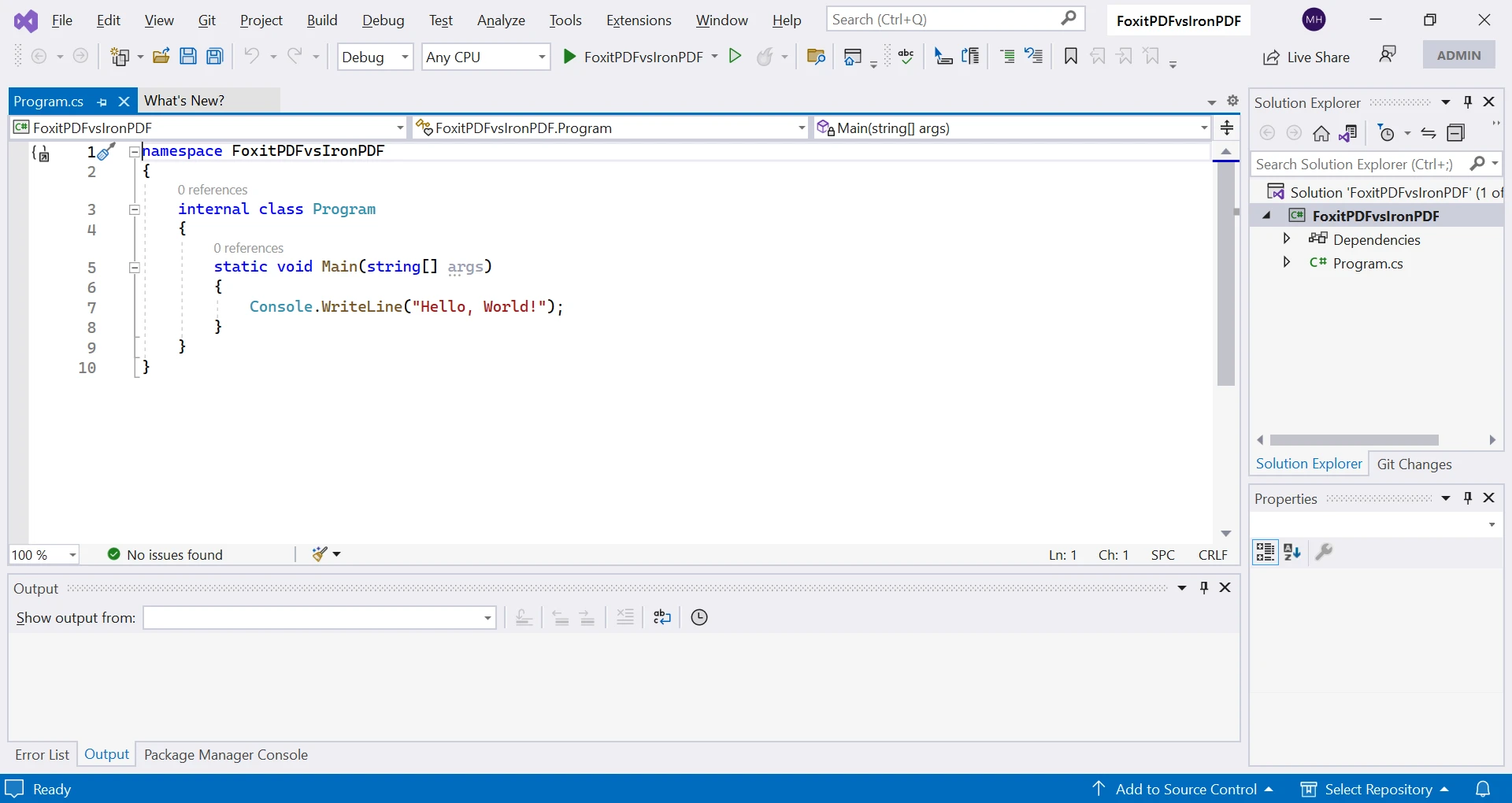
Stwórzmy nowy projekt Visual Studio z szablonem aplikacji konsolowej, aby zademonstrować przykład kodu.
Utwórz nowy projekt:
* Otwórz Visual Studio 2022 (Możesz użyć dowolnej wersji).
* Kliknij "Create a new project" na stronie startowej lub wybierz "File" > "New" > "Project" z menu.
* W "Create a new project" wybierz "Console App (.NET Core)" w sekcji "Console".
* Wybierz nazwę i lokalizację dla swojego projektu, a następnie kliknij "Create".
* Visual Studio utworzy nowy projekt aplikacji konsolowej z domyślnym plikiem "Program.cs".
### Jak tworzyć pliki PDF za pomocą IronPDF?
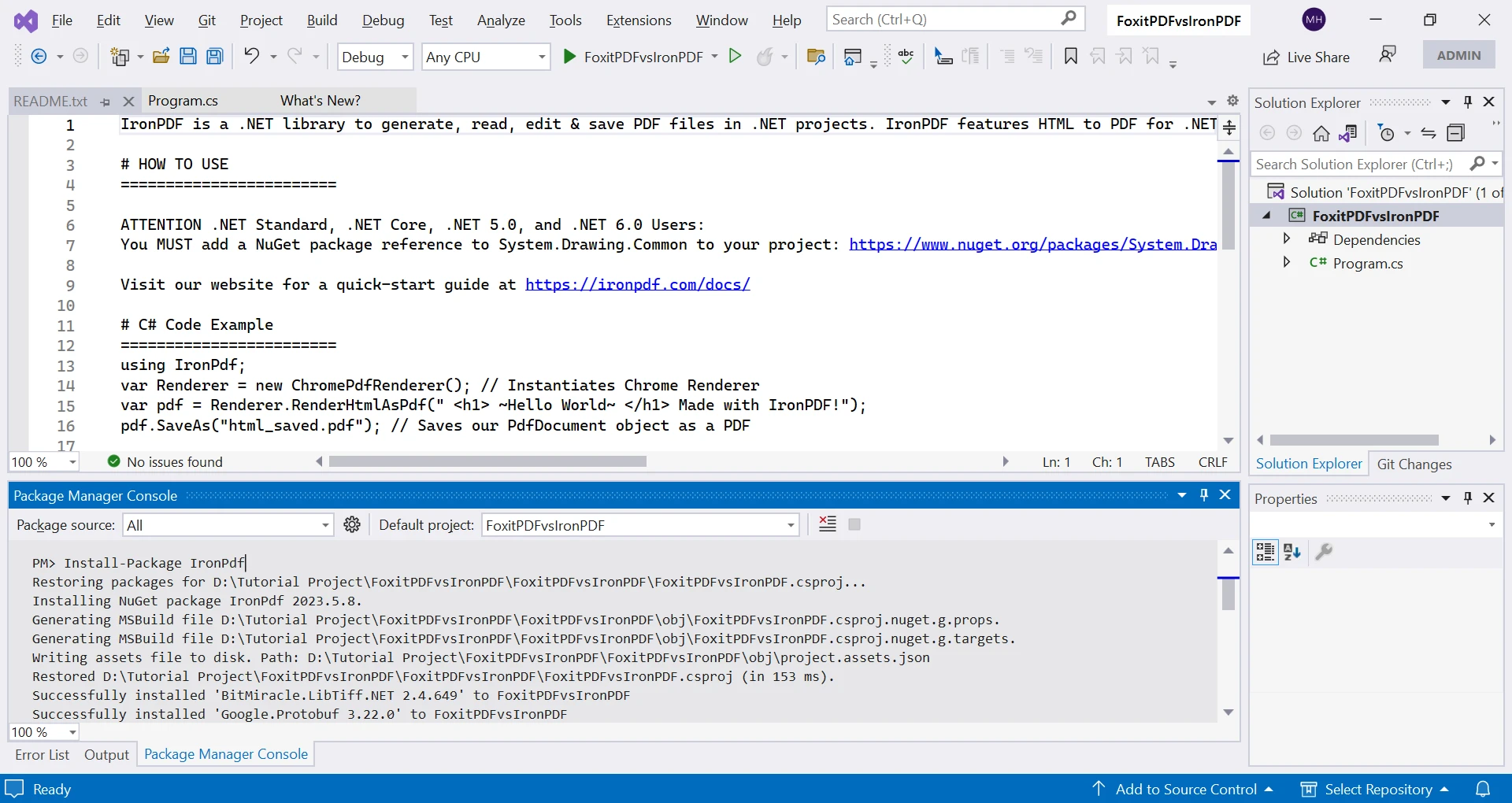
Musisz zainstalować [pakiet NuGet IronPDF](https://www.nuget.org/packages/IronPdf) w swoim projekcie:
Kliknij menu "Tools", wybierz "NuGet Package Manager", a następnie "Package Manager Console".
W oknie Package Manager Console wpisz:
```shell
:ProductInstall
```
Naciśnij "Enter", aby wykonać. Poczekaj na zakończenie instalacji i rozwiązanie zależności.
Gdy wszystko się zakończy, możesz zacząć używać IronPDF, dodając instrukcje using i wywołując API IronPDF. Aby uzyskać wskazówki dotyczące wdrożenia enterprise, zobacz [omówienie instalacji](https://ironpdf.com/get-started/installation-overview/). Dodatkowe metody obejmują [Windows Installer](https://ironpdf.com/get-started/ironpdf-installer/) i [zaawansowaną konfigurację NuGet](https://ironpdf.com/get-started/advanced-installation-nuget/).
```csharp
// This C# code demonstrates using IronPDF to create a new PDF from HTML content.
static void Main(string[] args)
{
    // Create an instance of ChromePdfRenderer to render HTML as a PDF document.
    var renderer = new ChromePdfRenderer();

    // Convert HTML content to a PDF document using RenderHtmlAsPdf.
    var pdfDoc = renderer.RenderHtmlAsPdf("This is my PDF file created by IronPDF.");

    // Save the PDF document to the filename "IronPDF.pdf".
    pdfDoc.SaveAs("IronPDF.pdf");
}
```
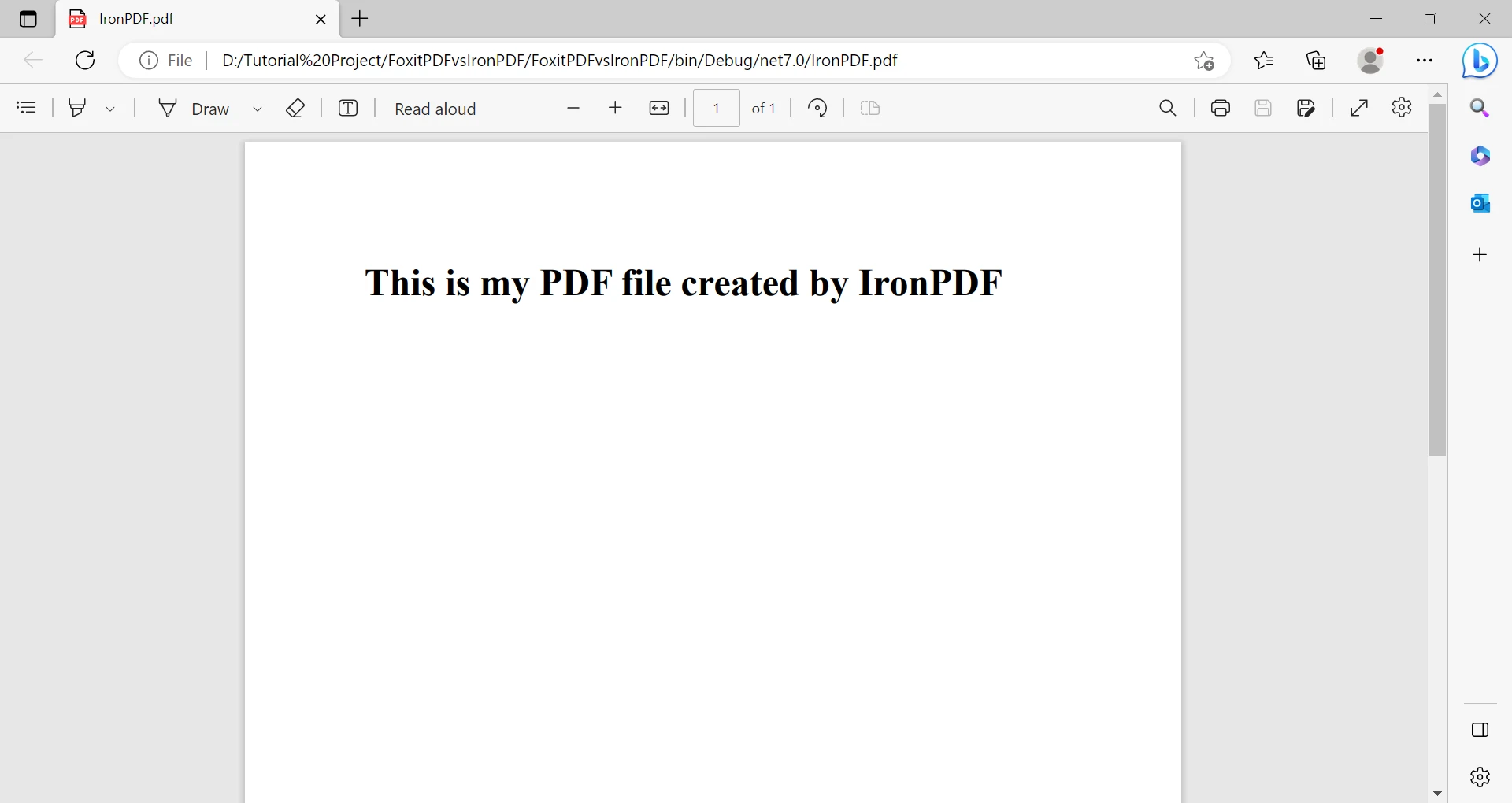
Kod powyżej generuje PDF z ciągu HTML. Tworzy instancję `ChromePdfRenderer` do renderowania HTML do PDF. Wywołuje `RenderHtmlAsPdf`, aby utworzyć PDF z ciągu HTML. Na koniec zapisuje PDF jako "IronPDF.pdf" używając `SaveAs`. Aby uzyskać zaawansowane opcje zapisu, zobacz [dokumentację eksportu i zapisu PDF](https://ironpdf.com/how-to/export-save-pdf-csharp/). Można zapisywać pliki PDF w [strumieniach pamięci](https://ironpdf.com/how-to/pdf-to-memory-stream/) lub [eksportować różne wersje PDF](https://ironpdf.com/how-to/pdf-versions/).
Wystarczyły zaledwie trzy linijki kodu, aby wygenerować i zapisać plik PDF. To pokazuje prostotę i łatwość obsługi IronPDF. Więcej przykładów można znaleźć w [sekcji przykładów kodu](https://ironpdf.com/examples/using-html-to-create-a-pdf/).
Szczegółowe przykłady kodu i samouczki można znaleźć w[ oficjalnej dokumentacji API IronPDF](/object-reference/api/). Dodatkowe samouczki dotyczą [tworzenia plików PDF](https://ironpdf.com/how-to/create-new-pdfs/), [ich edycji](https://ironpdf.com/tutorials/csharp-edit-pdf-complete-tutorial/) oraz [porządkowania](https://ironpdf.com/tutorials/organize-pdfs-complete-tutorial/).
### Jak tworzyć pliki PDF za pomocą Foxit PDF SDK?
W oknie Package Manager Console wpisz:
```powershell
Install-Package Foxit.SDK.Dotnet
```
Naciśnij "Enter", aby wykonać. Poczekaj na instalację pakietu i rozwiązanie zależności.
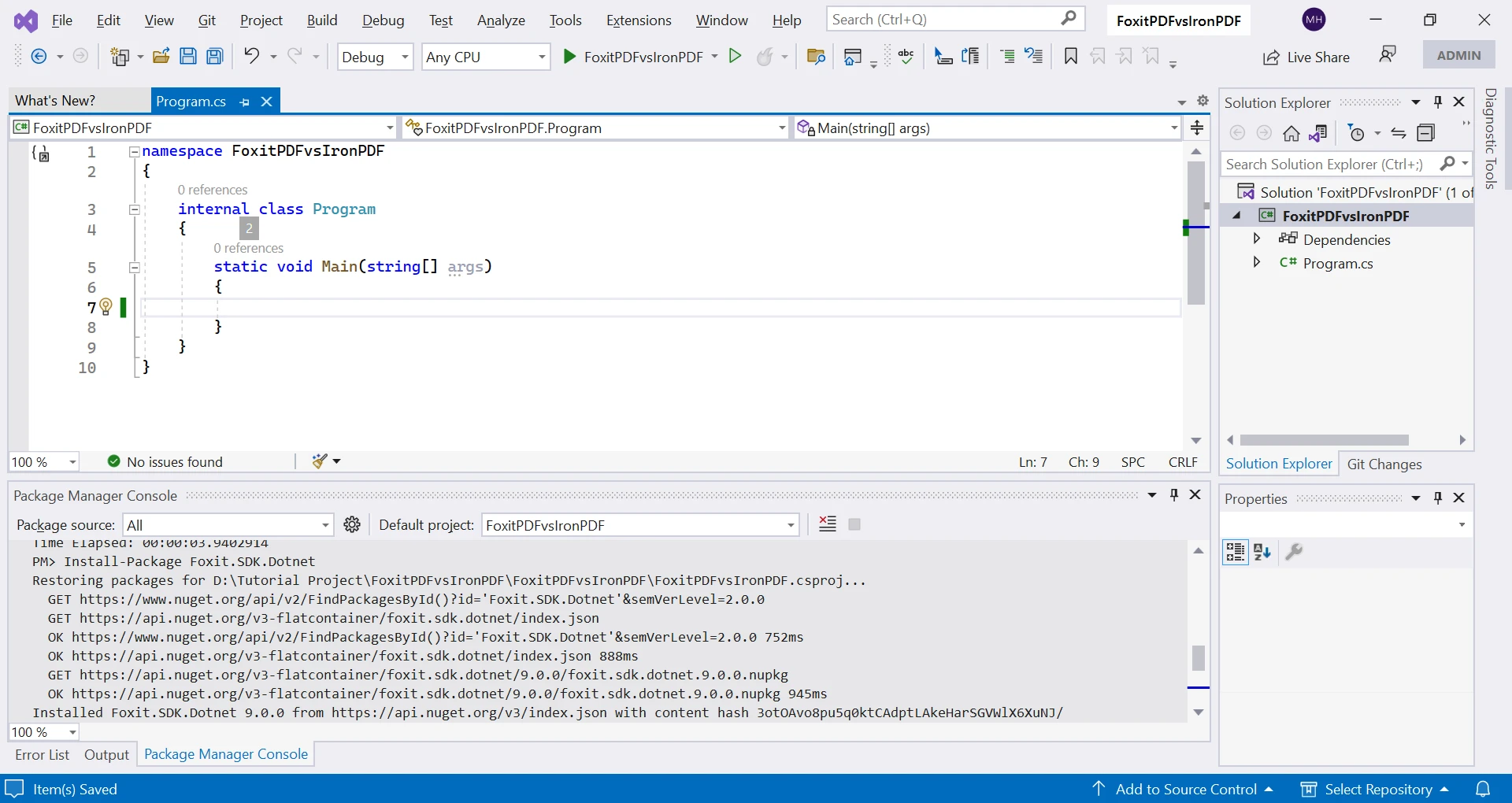
Po zakończeniu możesz korzystać z Foxit PDF, dodając instrukcje using i wywołując interfejsy API Foxit PDF.
```csharp
// This C# code demonstrates creating a simple PDF document using Foxit PDF SDK.
using (var doc = new PDFDoc())
{
// Insert a new page in the PDF document.
var page = doc.InsertPage(0, PDFPage.Size.e_SizeLetter);
// Define a rectangular area where text will be added on the page.
RectF rect = new RectF(100, 50, 220, 100);
// Create a style for the text to be added.
RichTextStyle richtext_style = new RichTextStyle();
// Add text to the page within the defined rectangle.
page.AddText("This is my PDF generated by Foxit PDF.", rect, richtext_style);
// Save the document as a PDF file on the disk.
doc.SaveAs("FoxitPDF.pdf", 0);
}
```
Ta biblioteka wymaga więcej wysiłku przy wykonywaniu podstawowych zadań, co widać na przykładzie tego kodu tworzącego prosty plik PDF. Szczegółowe informacje na temat API można znaleźć w [oficjalnej dokumentacji](https://developers.foxit.com/developer-hub/). Aby ułatwić tworzenie plików PDF, zapoznaj się z [przewodnikiem IronPDF dotyczącym tworzenia nowych plików PDF](https://ironpdf.com/how-to/create-new-pdfs/). IronPDF oferuje [szablony dla popularnych typów plików PDF](https://ironpdf.com/how-to/csharp-pdf-reports/) oraz [funkcje tworzenia formularzy](https://ironpdf.com/how-to/create-forms/).
### Czy mogę konwertować HTML na PDF za pomocą IronPDF?
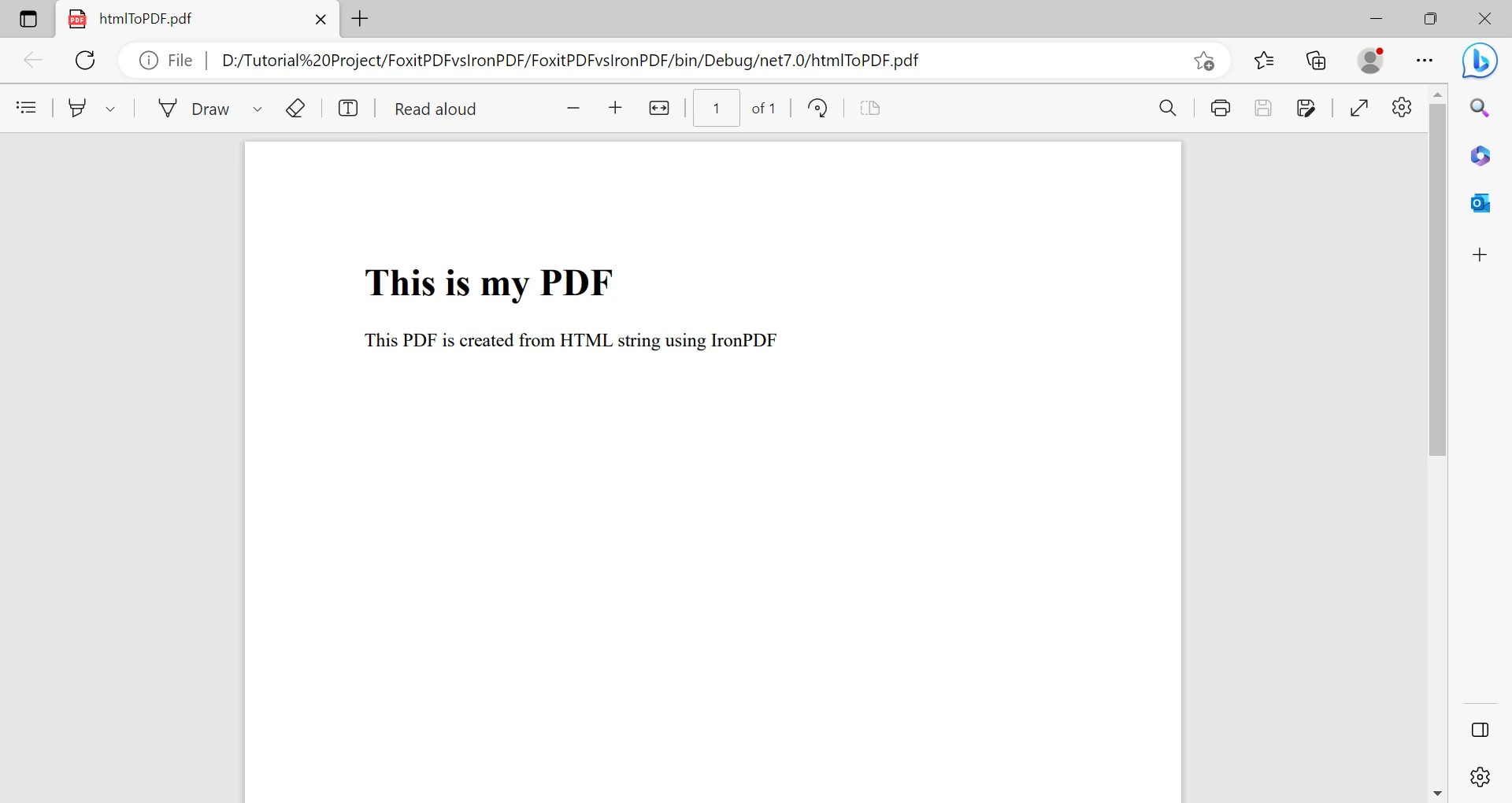
Poniższy kod pokazuje tworzenie plików PDF z HTML przy użyciu [konwertera HTML na PDF](https://ironpdf.com/tutorials/html-to-pdf/) firmy IronPDF. IronPDF konwertuje [pliki HTML](https://ironpdf.com/how-to/html-file-to-pdf/), [ciągi znaków HTML](https://ironpdf.com/how-to/html-string-to-pdf/) oraz [pliki ZIP](https://ironpdf.com/how-to/html-zip-file-to-pdf/) zawierające [HTML](https://ironpdf.com/how-to/html-zip-file-to-pdf/).
```csharp
// This C# code demonstrates converting HTML to PDF using IronPDF.
static void Main(string[] args)
{
// HTML content to be converted to PDF.
string htmlText = "This is a PDF created from an HTML string using IronPDF.";
// Create an instance of ChromePdfRenderer for rendering HTML to PDF.
var renderer = new ChromePdfRenderer();
// Render the HTML content as a PDF document.
PdfDocument pdf = renderer.RenderHtmlAsPdf(htmlText);
// Save the PDF document to the filename "htmlToPDF.pdf".
pdf.SaveAs("htmlToPDF.pdf");
}
```
Dodatkowo za pomocą IronPDF można tworzyć pliki PDF na podstawie adresu [URL](/examples/converting-a-url-to-a-pdf/) i [pliku HTML](/blog/using-ironpdf/csharp-html-to-pdf-example/). Dla złożonego kodu HTML, w tym [obsługa JavaScript](https://ironpdf.com/how-to/javascript-to-pdf/) i [responsywnego CSS](https://ironpdf.com/how-to/html-to-pdf-responsive-css/). IronPDF obsługuje [strony ASPX](https://ironpdf.com/how-to/aspx-to-pdf/), [widoki Razor](https://ironpdf.com/how-to/cshtml-to-pdf-mvc-core/) oraz [komponenty Blazor](https://ironpdf.com/how-to/razor-to-pdf-blazor-server/).
### Czy Foxit PDF SDK może konwertować HTML na PDF?
Biblioteka Foxit PDF nie obsługuje [konwersji całych dokumentów HTML do formatu PDF](https://developers.foxit.com/developer-hub/document/programmatically-convert-html-pdf/). Zespoły potrzebujące konwersji HTML do PDF powinny zapoznać się z [pełnymi funkcjami konwersji HTML oferowanymi przez IronPDF](https://ironpdf.com/features/create/). IronPDF oferuje specjalistyczne konwertery do konwersji plików [Markdown na PDF](https://ironpdf.com/how-to/md-to-pdf/), [Angular na PDF](https://ironpdf.com/examples/angular-to-pdf/) oraz [wykresów JavaScript na PDF](https://ironpdf.com/examples/js-charts-to-pdf/).
Porównajmy teraz te zestawy SDK w szczegółach.
## Jakie są kluczowe różnice między IronPDF a Foxit PDF SDK?
### Który zestaw SDK oferuje lepszą konwersję HTML do PDF?
IronPDF zapewnia doskonałą obsługę konwersji plików HTML do formatu PDF. Ta zaleta w porównaniu z brakiem wbudowanej konwersji HTML w Foxit SDK okazuje się szczególnie przydatna przy generowaniu dynamicznych plików PDF ze stron internetowych lub aplikacji. W celu zaawansowanego renderowania HTML, IronPDF obsługuje [renderowanie z dokładnością do piksela](https://ironpdf.com/how-to/pixel-perfect-html-to-pdf/) oraz [niestandardowe opóźnienia renderowania](https://ironpdf.com/how-to/javascript-to-pdf/). Biblioteka obsługuje [nagłówki żądań HTTP](https://ironpdf.com/how-to/http-request-header/) i [pliki cookie](https://ironpdf.com/how-to/cookies/) dla treści wymagających uwierzytelnienia.
Konwersja HTML w IronPDF oferuje wysoki poziom dostosowania. Możesz określić opcje, takie jak [rozmiar strony](https://ironpdf.com/how-to/custom-paper-size/), [orientacja](https://ironpdf.com/how-to/page-orientation-rotation/), [marginesy](https://ironpdf.com/how-to/custom-margins/) i skalowanie, a także zmodyfikować treść przed zapisaniem. Plus możesz określić opcje, takie jak rozmiar strony, orientacja IronPDF obsługuje stylizację CSS, co pozwala tworzyć atrakcyjne wizualnie pliki PDF. W kwestii obsługi zasobów zapoznaj się z [przewodnikiem](https://ironpdf.com/how-to/base-urls/) dotyczącym [adresów bazowych i kodowania zasobów](https://ironpdf.com/how-to/base-urls/) oraz [osadzania DataURI](https://ironpdf.com/how-to/datauris/).
### Jak wypadają porównania możliwości języków programowania?
IronPDF współpracuje z każdym językiem .NET, w tym [C#](https://ironpdf.com/how-to/create-new-pdfs/), [VB.NET](https://ironpdf.com/get-started/vb-net-pdf/) i [F#](https://ironpdf.com/get-started/fsharp-pdf-library-html-to-pdf/). Ułatwi to wdrożenie tym programistom, którzy znają te języki. Foxit PDF SDK posiada powiązania językowe dla kilku języków, ale może nie obsługiwać wszystkich języków, których potrzebujesz. Aby porównać biblioteki .NET, zobacz [QuestPDF vs IronPDF](https://ironpdf.com/competitors/questpdf-vs-ironpdf/) oraz [Syncfusion vs IronPDF](https://ironpdf.com/competitors/syncfusion-vs-ironpdf/).
IronPDF obsługuje .NET Standard i .NET Core, co umożliwia korzystanie z niego w systemach [Windows](https://ironpdf.com/get-started/windows/), [Linux](https://ironpdf.com/get-started/linux/) i [macOS](https://ironpdf.com/get-started/macos/). Ta elastyczność platformy stanowi przewagę nad oddzielnymi zestawami SDK Foxit PDF SDK dla poszczególnych systemów operacyjnych. IronPDF obsługuje wdrożenia [na systemie Android](https://ironpdf.com/get-started/android/) i działa w [kontenerach Docker](https://ironpdf.com/get-started/ironpdf-docker/) lub jako [usługa](https://ironpdf.com/get-started/ironpdfengine-docker/) [zdalna](https://ironpdf.com/get-started/ironpdfengine-docker/).
### Który zestaw SDK jest łatwiejszy do wdrożenia?
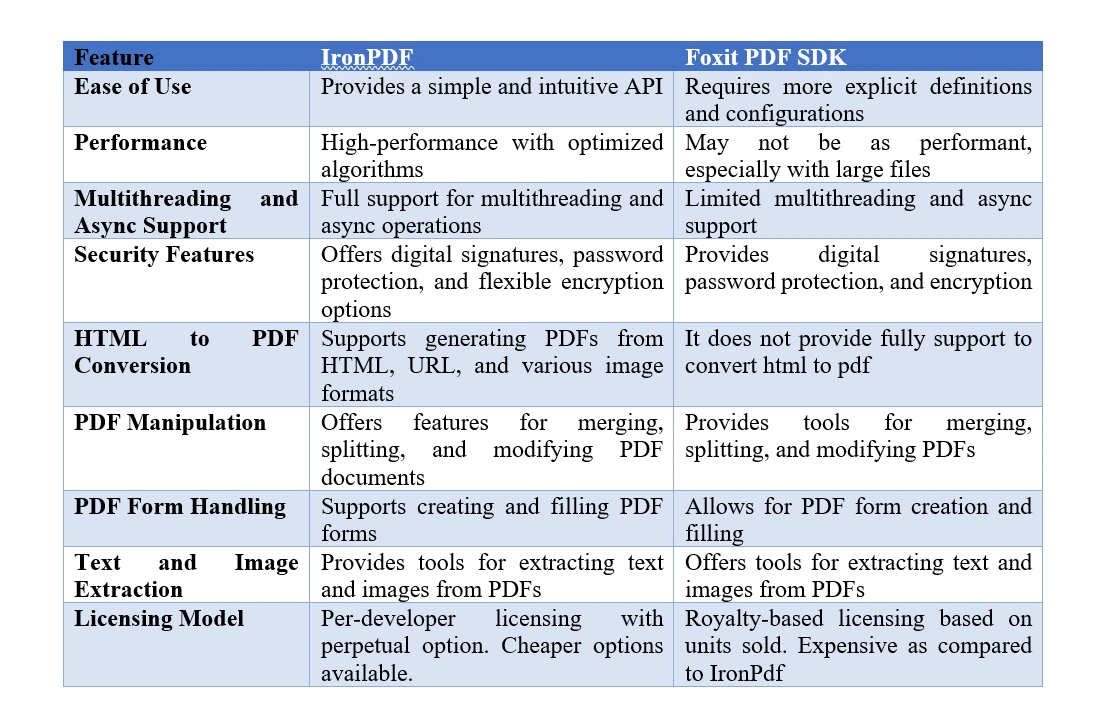
IronPDF zapewnia prosty rdzeń API, który abstrakcyjnie przedstawia złożoność tworzenia i manipulacji plikami PDF. Jego intuicyjna składnia pozwala tworzyć i edytować pliki PDF przy użyciu minimalnej ilości kodu, co wymaga mniejszej wiedzy technicznej. [Przewodnik szybkiego](https://ironpdf.com/get-started/quickstart/) startu pokazuje tę prostotę. Foxit PDF SDK wymaga jednoznacznego zdefiniowania niemal wszystkiego. Do efektywnego korzystania z nich potrzebna jest dogłębna znajomość SDK oraz specyfikacji formatu PDF. Skutkuje to dłuższym czasem rozwoju i bardziej stromą krzywą uczenia się. Łatwość obsługi IronPDF zapewnia płynny proces tworzenia oprogramowania, co przekłada się na większą wydajność. W przypadku problemów technicznych zapoznaj się z [krótkim przewodnikiem dotyczącym rozwiązywania problemów](https://ironpdf.com/troubleshooting/quick-ironpdf-troubleshooting/).
### Jak wypada porównanie funkcji bezpieczeństwa między różnymi zestawami SDK?
Zarówno IronPDF, jak i Foxit PDF SDK chronią pliki PDF przed nieautoryzowanym dostępem za pomocą [zabezpieczeń hasłem](https://ironpdf.com/how-to/pdf-permissions-passwords/), szyfrowania i [podpisów cyfrowych](https://ironpdf.com/how-to/signing/). Jednak IronPDF oferuje większą elastyczność szyfrowania, umożliwiając wybór różnych algorytmów i długości kluczy w celu dostosowania zabezpieczeń do indywidualnych potrzeb. Ta elastyczność ma kluczowe znaczenie w przypadku aplikacji przetwarzających dane wrażliwe lub poufne. Foxit PDF SDK może mieć ograniczone opcje szyfrowania, niewystarczające dla bardziej rygorystycznych wymagań bezpieczeństwa. W celu zapewnienia zgodności z wymogąmi Enterprise IronPDF udostępnia [dokumentację dotyczącą bezpieczeństwa](https://ironpdf.com/troubleshooting/ironpdf-security-cve/) i obsługuje [moduły bezpieczeństwa sprzętowego](https://ironpdf.com/how-to/signing-pdf-with-hsm/). Biblioteka oferuje [śledzenie historii zmian](https://ironpdf.com/how-to/revision-history/) oraz [czyszczenie dokumentów](https://ironpdf.com/how-to/sanitize-pdf/).
### Który zestaw SDK zapewnia lepszą wydajność?
IronPDF szybko i sprawnie przetwarza pliki PDF. Ulepszone algorytmy zapewniają szybkie działanie podczas przetwarzania PDF. IronPDF z łatwością obsługuje duże pliki PDF, dzięki czemu doskonale nadaje się do aplikacji przetwarzających duże ilości danych. Wydajność ulega dalszej poprawie dzięki [obsłudze asynchroniczności i wielowątkowości](https://ironpdf.com/how-to/async/). Foxit PDF SDK może nie dorównywać wydajnością IronPDF, zwłaszcza w przypadku dużych plików PDF, co skutkuje wolniejszym przetwarzaniem. Informacje na temat technik optymalizacji można znaleźć w [przewodniku dotyczącym wydajności IronPDF](https://ironpdf.com/troubleshooting/ironpdf-performance-assistance/). IronPDF obsługuje [równoległe generowanie plików PDF](https://ironpdf.com/examples/parallel/) oraz [niestandardowe logowanie](https://ironpdf.com/how-to/custom-logging/) w celu monitorowania wydajności.
### Jak wypadają modele licencyjne i ceny w porównaniu?
IronPDF oferuje elastyczne licencje i ceny dostosowane do potrzeb indywidualnych lub organizacyjnych. Jest bezpłatny do celów programistycznych, a licencje komercyjne są dostępne w ramach [bezpłatnej](trial-license) wersji [próbnej](trial-license). [Model licencjonowania wieczystego](/licensing/) oznacza, że używasz go bezterminowo po zakupie, bez dodatkowych opłat. IronPDF oferuje różne licencje, w tym opcje dla pojedynczego programisty, zespołu i witryny, pomagając wybrać tę, która najlepiej pasuje. Informacje na temat zarządzania licencjami można znaleźć w [przewodniku po kluczach licencyjnych](https://ironpdf.com/how-to/license-keys/). IronPDF oferuje [przedłużenie licencji](https://ironpdf.com/licensing/extensions/) i [opcje aktualizacji](https://ironpdf.com/licensing/upgrades/).
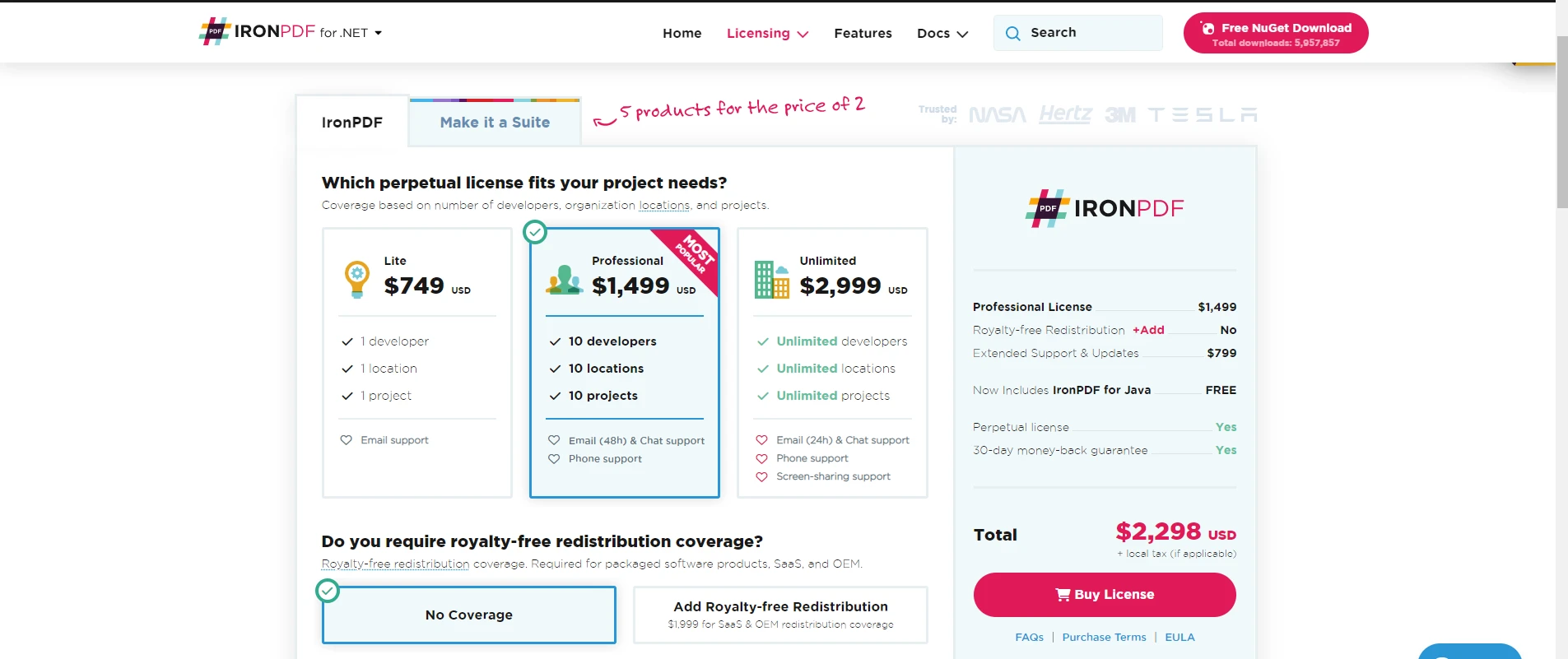
Foxit PDF SDK korzysta z licencji opartej na subskrypcji, wymagającej regularnych opłat. [Ceny licencji Foxit PDF SDK](https://developers.foxit.com/pdf-sdk/free-trial/) zaczynają się od 3000 USD rocznie za platformę. W przypadku długoterminowych projektów lub wielu licencji okazuje się to kosztowne. Ograniczone opcje licencyjne Foxit PDF SDK mogą nie odpowiadać wszystkim organizacjom. Aby zapoznać się z alternatywnymi cenami, zobacz porównanie [Apryse vs IronPDF](https://ironpdf.com/competitors/apryse-vs-ironpdf/).
## Który zestaw SDK do obsługi plików PDF powinni wybrać architekci Enterprise?
IronPDF zapewnia wydajne przetwarzanie plików PDF, charakteryzujące się wyjątkową łatwością obsługi i niezawodną funkcjonalnością. Oparty na silniku renderującym opartym na Chromium, zapewnia prosty interfejs API do tworzenia, edycji i renderowania plików PDF. Dzięki obszernej obsłudze formatów HTML, CSS, JavaScript i obrazów, IronPDF umożliwia płynną konwersję treści internetowych do wysokiej jakości plików PDF. Oferuje [wielowątkowość i wsparcie dla asynchroniczności](https://ironpdf.com/examples/parallel/) w celu poprawy wydajności i skalowalności. Ponadto IronPDF zapewnia zaawansowane zabezpieczenia, w tym szyfrowanie, [podpisy cyfrowe](https://ironpdf.com/examples/digitally-sign-a-pdf/) i ochronę hasłem. Kompletne klasy i funkcje do manipulacji plikami PDF, [obsługi formularzy](https://ironpdf.com/how-to/create-forms/) i [wyodrębniania tekstu](https://ironpdf.com/how-to/csharp-parse-pdf/) sprawiają, że jest to narzędzie wszechstronne do różnych zadań związanych z plikami PDF. IronPDF umożliwia ci tworzenie niezawodnej struktury do przetwarzania PDF w twoich aplikacjach. Aby poznać dodatkowe funkcje, zapoznaj się z [kompresją plików PDF](https://ironpdf.com/examples/pdf-compression/), [znakami wodnymi](https://ironpdf.com/examples/pdf-watermarking/) i [numeracją stron](https://ironpdf.com/how-to/page-numbers/).
Foxit PDF SDK zapewnia pełne możliwości przetwarzania plików PDF dostosowane do potrzeb programistów. Oferuje szeroki zestaw narzędzi do tworzenia, edycji i obróbki plików PDF. Dzięki API masz precyzyjną kontrolę nad tekstem, obrazami, adnotacjami i polami formularzy. Foxit PDF SDK zapewnia kompatybilność dzięki niezawodnej obsłudze standardów PDF. Jego funkcje obejmują szyfrowanie, podpisy cyfrowe oraz ochronę hasłem wrażliwych danych. SDK zapewnia wysokowydajne renderowanie, umożliwiające płynne wyświetlanie plików PDF. Dzięki Foxit PDF SDK możesz tworzyć zaawansowane aplikacje PDF z niestandardowymi przepływami pracy, automatyzacją dokumentów i integracją systemową.
IronPDF oferuje bardziej opłacalne licencje niż Foxit PDF SDK, dzięki czemu jest przystępny cenowo dla Twoich potrzeb programistycznych. Licencjonowanie IronPDF na programistę pozwala całemu zespołowi korzystać z jednej licencji. Umożliwia to współpracę bez dodatkowych kosztów licencji dla każdego członka zespołu. IronPDF oferuje licencję wieczystą na nieograniczone użytkowanie bez przyszłych opłat za aktualizacje. Model oparty na opłatach licencyjnych Foxit PDF SDK wymaga uiszczenia opłat w zależności od liczby sprzedanych jednostek. Powoduje to wyższe koszty w przypadku aplikacji o dużej bazie użytkowników. Struktura licencyjna IronPDF zapewnia opłacalne rozwiązania, pozwalające zaoszczędzić na kosztach licencji, a jednocześnie oferujące skuteczne funkcje związane z plikami PDF.
IronPDF ma kilka zalet technicznych w porównaniu z Foxit PDF. IronPDF oferuje intuicyjny, przyjazny dla programistów interfejs API, ułatwiający integrację. Jego prosty API umożliwia uproszczone przetwarzanie PDF, skracając twój czas tworzenia oprogramowania. IronPDF zapewnia niezawodne wsparcie dla [HTML](https://ironpdf.com/features/), CSS, JavaScript i formatów obrazów dla płynnej konwersji web-to-PDF. Oferuje [obsługę wielowątkowości i asynchroniczności](https://ironpdf.com/examples/threading/), zapewniając wydajność i skalowalność przy pracy z dużymi plikami PDF. Elastyczne opcje szyfrowania IronPDF pozwalają na wybór algorytmów i długości kluczy w celu dostosowania zabezpieczeń. Licencje IronPDF na jednego programistę oraz Licencje wieczyste okazują się bardziej opłacalne. Ogólnie rzecz biorąc, IronPDF wyróżnia się łatwością obsługi, funkcjonalnością i opłacalnością.
IronPDF dołącza do [Iron Suite](https://ironsoftware.com/suite/), kolekcji poprawiającej twoje możliwości rozwoju. Suite zawiera [IronOCR](https://ironsoftware.com/csharp/ocr/) do optycznego rozpoznawania znaków, [IronPDF](/) do przetwarzania PDF, [IronBarcode](https://ironsoftware.com/csharp/barcode/) do generowania kodów kreskowych, [IronXL](https://ironsoftware.com/csharp/excel/) do manipulacji Excel, oraz [IronWebScraper](https://ironsoftware.com/csharp/webscraper/) do ekstrakcji danych z web. Kupując kompletną Suite, korzystasz z połączonej mocy pięciu produktów, zaspokajając wszystkie potrzeby programistyczne za cenę dwóch produktów. Jeśli chodzi o bezpieczeństwo dokumentów w Enterprise, rozważ [IronSecureDoc,](https://ironsoftware.com/enterprise/securedoc/) aby uzyskać zaawansowaną ochronę. Aby obejrzeć prezentacje, odwiedź [stronę](https://ironpdf.com/demos/) [z demonstracjami](https://ironpdf.com/demos/).
[[i:(Foxit PDF SDK jest zastrzeżonym znakiem towarowym odpowiedniego właściciela. Ta strona nie jest powiązana z Foxit PDF SDK, nie jest przez nią promowana ani sponsorowana. Wszystkie nazwy produktów, logo i marki są własnością ich odpowiednich właścicieli. Porównania mają charakter wyłącznie informacyjny i odzwierciedlają informacje dostępne publicznie w momencie pisania.)]]
IronPDF wyróżnia się płynną konwersją HTML do PDF i nowoczesnym wsparciem dla frameworków CSS w środowiskach .NET, podczas gdy Foxit PDF SDK oferuje szerszą kompatybilność platform, ale wymaga bardziej skomplikowanej implementacji i nie posiada natywnych możliwości konwersji HTML.
Dokumenty PDF stały się standardowym formatem do dzielenia się i prezentowania informacji w różnych branżach. Kiedy potrzebujesz generować dokumenty PDF z aplikacji lub manipulować istniejącymi, SDK do przetwarzania PDF dostarczają niezbędnej funkcjonalności. Te SDK oferują potrzebne narzędzia i funkcje do tworzenia, edytowania i manipulowania dokumentami PDF w twoich aplikacjach.
Foxit PDF SDK i IronPDF reprezentują dwa ugruntowane na rynku SDK do przetwarzania PDF. Oba SDK dostarczają kompletnych funkcji dla twoich potrzeb rozwojowych, ale różnią się w kluczowych aspektach wpływających na ich przydatność w różnych scenariuszach.
Ten artykuł bada cechy i korzyści Foxit PDF SDK i IronPDF poprzez szczegółowe porównanie. Zdiscoveryszouciszajomie się między nimi mocne i słabe strony każdego SDK poprzez pełną ocenę ich zdolności. Ta analiza pomoże ci wybrać SDK do przetwarzania PDF, które najlepiej spełni twoje specyficzne wymagania.
Czym jest IronPDF i jakie są jego podstawowe możliwości?
IronPDF to skuteczny SDK do przetwarzania PDF rozwijany przez Iron Software, który pozwala na tworzenie, edytowanie i manipulowanie dokumentami PDF w ramach twoich aplikacji .NET. Dostarcza kompletnych narzędzi i funkcji do regularnej pracy z dokumentami PDF. Dla środowisk przedsiębiorstw wymagających zgodności z bezpieczeństwem, IronPDF oferuje szczegółową dokumentację bezpieczeństwa i utrzymuje aktywne certyfikacje.
Czy IronPDF różni się od innych bibliotek PDF?
Jak działa konwersja HTML do PDF w IronPDF?
IronPDF umożliwia konwersję kodu HTML do dokumentów PDF w sposób efektywny. Proces konwersji przebiega szybko, zapewniając kontrolę poprzez opcje jak rozmiar strony, marginesy i orientacja. IronPDF wspiera zaawansowane formatowanie włącznie z nagłówkami i stopkami, pozwalając na precyzyjne dostrojenie układu PDF. Możesz określić, które elementy HTML uwzględnić w wyjściowym PDF, zapewniając większą kontrolę nad treścią dokumentu. Dla skomplikowanych układów, zobacz przewodnik dotyczący przerw stron.
Dlaczego generowanie PDF z wielu źródeł jest ważne?
Kiedy powinieneś używać funkcji wyodrębniania PDF?
Funkcje wyodrębniania IronPDF pozwalają na wydobycie różnych typów treści z dokumentów PDF, włącznie z tekstem, obrazami i danymi. Ta funkcjonalność pomaga w ponownym wykorzystaniu treści lub efektywnym analizowaniu danych PDF. IronPDF dostarcza zaawansowanych zdolności wyodrębniania tekstu, które zachowują integralność formatowania. Dodatkowo, możesz wyodrębnić obrazy w formatach takich jak PNG lub JPEG. Te funkcje wyodrębniania dostarczają elastycznych i efektywnych narzędzi do pracy z danymi PDF.
Jakie zaawansowane funkcje oferuje IronPDF dla przedsiębiorstw?
Jak adnotacje i wypełnianie formularzy poprawiają interakcję użytkownika?
IronPDF wspiera adnotacje i wypełnianie formularzy, niezbędne dla interaktywnych aplikacji PDF. Możesz dodawać tekst, obrazy i elementy do PDF, uwzględniając pola formularzy dla wprowadzeń użytkownika. IronPDF dostarcza API do manipulacji danymi formularzy, umożliwiając ich wydobywanie i przetwarzanie w ramach aplikacji. Dla potrzeb zgodności, IronPDF wspiera format PDF/A do archiwizacji i PDF/UA dla dostępności. Biblioteka spełnia zgodność z Sekcją 508 dla wymogów rządowych.
Dlaczego wsparcie dla wielozadaniowości i asynchronizacji ma znaczenie dla wydajności?
IronPDF oferuje pełne wsparcie dla wielozadaniowości i asynchronizacji dla poprawy wydajności. Dzięki wielozadaniowości możesz przetwarzać PDF na wielu wątkach jednocześnie, aby przyspieszyć wykonanie. Wsparcie asynchroniczne obsługuje długotrwałe zadania, takie jak konwersja czy wydobywanie, nie blokując głównego wątku. To zapewnia, że twoja aplikacja pozostaje responsywna, zapewniając lepsze doświadczenie użytkownika. Te funkcje pomagają tworzyć wydajne i niezawodne aplikacje o wysokiej wydajności. Zobacz przewodnik pomocy dla wydajności dla wskazówek dotyczących optymalizacji.
Jak IronPDF radzi sobie z wymogami bezpieczeństwa i zgodności?
Jakie funkcje bezpieczeństwa oferuje IronPDF dla przedsiębiorstw?
Funkcje bezpieczeństwa IronPDF dają pełne narzędzia do zabezpieczania dokumentów PDF, zapewniając bezpieczeństwo danych i integralność. Możesz ustawić ochronę hasłem na poziomie dokumentu lub strony, ograniczając dostęp do określonych funkcji. Opcje szyfrowania obejmują szyfrowanie 40-bitowe i 128-bitowe dla niefiltrowanego dostępu. Podpisy cyfrowe i zarządzanie certyfikatami autoryzują podpisujących i zapewniają integralność dokumentu. Te funkcje czynią IronPDF doskonałym do aplikacji wymagających ochrony danych IronPDF wspiera podpisywanie PDF z HSM dla bezpieczeństwa sprzętowego. Dodatkowe funkcje obejmują sanityzację PDF i możliwości redakcji.
Jak wsparcie językowe .NET korzysta rozwojowi przedsiębiorstw?
Jakie są funkcje dla przedsiębiorstw Foxit PDF SDK?
Foxit PDF SDK to kompletny zestaw narzędzi do integracji funkcji PDF w twoich aplikacjach. Oferuje funkcje do tworzenia, odczytywania, edytowania i adnotowania dokumentów PDF, plus możliwości konwersji plików. For alternative comparisons, see Aspose vs IronPDF and iText vs IronPDF.
Jakie zdolności przetwarzania dokumentów oferuje Foxit PDF SDK?
Jak działa tworzenie i konwersja PDF w Foxit?
Foxit PDF SDK pozwala tworzyć nowe PDF od podstaw lub konwertować istniejące dokumenty na format PDF. Obsługuje różne formaty plików, w tym Microsoft Word, Excel, PowerPoint, i inne. SDK obsługuje konwersję z formatów obrazów takich jak JPEG, PNG, i TIFF do PDF. Dla zaawansowanej konwersji, IronPDF oferuje możliwości konwersji DOCX na PDF, RTF na PDF oraz XML na PDF.
Foxit PDF SDK umożliwia dodawanie adnotacji, w tym podkreśleń, komentarzy, pieczęci i wizualnych pomocy. Zapewnia narzędzia do tworzenia niestandardowych adnotacji, takich jak podpisy czy pieczątki gumowe. IronPDF oferuje podobne możliwości adnotacji z obsługą zakładek i generowania spisu treści.
Jakie funkcje bezpieczeństwa i optymalizacji zawiera Foxit PDF SDK?
Jakie opcje bezpieczeństwa oferuje Foxit PDF SDK?
Foxit PDF SDK zapewnia funkcje zabezpieczające PDF-y przed nieautoryzowanym dostępem. Obejmują one ochronę hasłem, podpisy cyfrowe, szyfrowanie i zarządzanie certyfikatami. IronPDF oferuje porównywalne funkcje zabezpieczeń z obsługą historii zmian i spłaszczania dokumentów.
W jaki sposób optymalizacja PDF poprawia wydajność?
Foxit PDF SDK zawiera narzędzia optymalizacji dla szybszego ładowania i wydajności. Funkcje obejmują kompresję, próbkowanie obrazów, osadzanie czcionek i inne. Te optymalizacje zmniejszają rozmiary plików i poprawiają czasy ładowania dla lepszej dostępności. IronPDF zapewnia zaawansowane opcje kompresji i linearizacji dla szybkiego przeglądu www.
Kiedy powinno się używać funkcji wypełniania formularzy PDF?
Foxit PDF SDK umożliwia tworzenie i wypełnianie formularzy PDF, w tym dynamicznych formularzy programowo wypełnianych. SDK obsługuje walidację pól formularzy i ekstrakcję danych dla łatwiejszego zbierania i analizy. IronPDF oferuje kompletne tworzenie formularzy i edycję formularzy z interaktywnym wsparciem dla pól.
Dlaczego ekstrakcja PDF jest ważna dla przetwarzania danych?
Bootstrap 5: Pełne wsparcie dla układów flexbox, CSS Grid, klas użytkowych i wszystkich systemów komponentów
Bootstrap 4: Kompleksowe komponenty kart, elementy nawigacji, elastyczne narzędzia i responsywny design
Tailwind CSS: Wszystkie klasy użytkowe renderują się dokładnie
Foundation: Kompletny system siatki i biblioteka komponentów
Nowoczesny CSS3: Flexbox, CSS Grid, zmienne zwyczajowe, animacje, przejścia i transformacje
Wynik: Profesjonalna deska rozdzielcza powiadomień PDF z komponentami alertów Bootstrap 5, układami flexbox, narzędziami odznak, systemami kart i grupami list - wszystko renderowane z perfekcyjną dokładnością kolorów, odstępami i hierarchią wizualną.
Jakie są ograniczenia frameworków CSS w Foxit PDF SDK?
Foxit PDF SDK używa niestandardowego silnika renderującego z udokumentowanymi ograniczeniami dla nowoczesnych frameworków CSS:
Częściowe wsparcie CSS3: Nowoczesne cechy flexbox i CSS Grid mogą nie renderować się poprawnie
Ograniczenia Bootstrap 4/5: Złożone układy wymagają intensywnych testów i obejść
Ograniczenia JavaScript: Ograniczona egzekucja w porównaniu do środowisk przeglądarkowych
Kompatybilność z frameworkami: Nie zaprojektowano z myślą o Bootstrapie lub nowoczesnych frameworkach
Dokumentacja zauważa, że zaawansowane cechy CSS mogą dawać nieoczekiwane rezultaty. Twój zespół programistyczny zgłasza problemy z responsywnymi narzędziami, układami flex i komponentami Bootstrap. Aby rozwiązać problemy z CSS, zobacz przewodnik rozwiązywania problemów z czcionkami i rozwiązania dostrajania czcionek.
Wpływ na rozwój: Zespoły używające Foxit PDF SDK często muszą tworzyć uproszczone układy lub utrzymywać oddzielne pliki CSS "bezpieczne dla PDF", co zwiększa nakład pracy programistycznej i zmniejsza spójność projektowania pomiędzy aplikacjami webowymi a dokumentami PDF.
// This C# code demonstrates using IronPDF to create a new PDF from HTML content.static voidMain(string[] args){ // Create an instance of ChromePdfRenderer to render HTML as a PDF document. var renderer = new ChromePdfRenderer(); // Convert HTML content to a PDF document using RenderHtmlAsPdf. var pdfDoc = renderer.RenderHtmlAsPdf("This is my PDF file created by IronPDF."); // Save the PDF document to the filename "IronPDF.pdf". pdfDoc.SaveAs("IronPDF.pdf");}
// This C# code demonstrates using IronPDF to create a new PDF from HTML content.
static void Main(string[] args)
{
    // Create an instance of ChromePdfRenderer to render HTML as a PDF document.
    var renderer = new ChromePdfRenderer();

    // Convert HTML content to a PDF document using RenderHtmlAsPdf.
    var pdfDoc = renderer.RenderHtmlAsPdf("This is my PDF file created by IronPDF.");

    // Save the PDF document to the filename "IronPDF.pdf".
    pdfDoc.SaveAs("IronPDF.pdf");
}
' This VB.NET code demonstrates using IronPDF to create a new PDF from HTML content.SubMain(args AsString()) ' Create an instance of ChromePdfRenderer to render HTML as a PDF document. Dim renderer As New ChromePdfRenderer() ' Convert HTML content to a PDF document using RenderHtmlAsPdf. Dim pdfDoc = renderer.RenderHtmlAsPdf("This is my PDF file created by IronPDF.") ' Save the PDF document to the filename "IronPDF.pdf". pdfDoc.SaveAs("IronPDF.pdf")End Sub
' This VB.NET code demonstrates using IronPDF to create a new PDF from HTML content.
Sub Main(args As String())
    ' Create an instance of ChromePdfRenderer to render HTML as a PDF document.
    Dim renderer As New ChromePdfRenderer()

    ' Convert HTML content to a PDF document using RenderHtmlAsPdf.
    Dim pdfDoc = renderer.RenderHtmlAsPdf("This is my PDF file created by IronPDF.")

    ' Save the PDF document to the filename "IronPDF.pdf".
    pdfDoc.SaveAs("IronPDF.pdf")
End Sub
Kod powyżej generuje PDF z ciągu HTML. Tworzy instancję ChromePdfRenderer do renderowania HTML do PDF. Wywołuje RenderHtmlAsPdf, aby utworzyć PDF z ciągu HTML. Na koniec zapisuje PDF jako "IronPDF.pdf" używając SaveAs. Aby uzyskać zaawansowane opcje zapisu, zobacz dokumentację eksportu i zapisu PDF. Można zapisywać pliki PDF w strumieniach pamięci lub eksportować różne wersje PDF.
Wystarczyły zaledwie trzy linijki kodu, aby wygenerować i zapisać plik PDF. To pokazuje prostotę i łatwość obsługi IronPDF. Więcej przykładów można znaleźć w sekcji przykładów kodu.
Naciśnij "Enter", aby wykonać. Poczekaj na instalację pakietu i rozwiązanie zależności.
Po zakończeniu możesz korzystać z Foxit PDF, dodając instrukcje using i wywołując interfejsy API Foxit PDF.
// This C# code demonstrates creating a simple PDF document using Foxit PDF SDK.using (var doc = new PDFDoc()){ // Insert a new page in the PDF document. var page = doc.InsertPage(0, PDFPage.Size.e_SizeLetter); // Define a rectangular area where text will be added on the page. RectF rect = new RectF(100, 50, 220, 100); // Create a style for the text to be added. RichTextStyle richtext_style = new RichTextStyle(); // Add text to the page within the defined rectangle. page.AddText("This is my PDF generated by Foxit PDF.", rect, richtext_style); // Save the document as a PDF file on the disk. doc.SaveAs("FoxitPDF.pdf", 0);}
// This C# code demonstrates creating a simple PDF document using Foxit PDF SDK.
using (var doc = new PDFDoc())
{
    // Insert a new page in the PDF document.
    var page = doc.InsertPage(0, PDFPage.Size.e_SizeLetter);

    // Define a rectangular area where text will be added on the page.
    RectF rect = new RectF(100, 50, 220, 100);

    // Create a style for the text to be added.
    RichTextStyle richtext_style = new RichTextStyle();

    // Add text to the page within the defined rectangle.
    page.AddText("This is my PDF generated by Foxit PDF.", rect, richtext_style);

    // Save the document as a PDF file on the disk.
    doc.SaveAs("FoxitPDF.pdf", 0);
}
' This VB.NET code demonstrates creating a simple PDF document using Foxit PDF SDK.Using doc As New PDFDoc() ' Insert a new page in the PDF document. Dim page = doc.InsertPage(0, PDFPage.Size.e_SizeLetter) ' Define a rectangular area where text will be added on the page. Dim rect As New RectF(100, 50, 220, 100) ' Create a style for the text to be added. Dim richtext_style As New RichTextStyle() ' Add text to the page within the defined rectangle. page.AddText("This is my PDF generated by Foxit PDF.", rect, richtext_style) ' Save the document as a PDF file on the disk. doc.SaveAs("FoxitPDF.pdf", 0)EndUsing
' This VB.NET code demonstrates creating a simple PDF document using Foxit PDF SDK.
Using doc As New PDFDoc()
    ' Insert a new page in the PDF document.
    Dim page = doc.InsertPage(0, PDFPage.Size.e_SizeLetter)

    ' Define a rectangular area where text will be added on the page.
    Dim rect As New RectF(100, 50, 220, 100)

    ' Create a style for the text to be added.
    Dim richtext_style As New RichTextStyle()

    ' Add text to the page within the defined rectangle.
    page.AddText("This is my PDF generated by Foxit PDF.", rect, richtext_style)

    ' Save the document as a PDF file on the disk.
    doc.SaveAs("FoxitPDF.pdf", 0)
End Using
// This C# code demonstrates converting HTML to PDF using IronPDF.static voidMain(string[] args){ // HTML content to be converted to PDF. string htmlText = "This is a PDF created from an HTML string using IronPDF."; // Create an instance of ChromePdfRenderer for rendering HTML to PDF. var renderer = new ChromePdfRenderer(); // Render the HTML content as a PDF document. PdfDocument pdf = renderer.RenderHtmlAsPdf(htmlText); // Save the PDF document to the filename "htmlToPDF.pdf". pdf.SaveAs("htmlToPDF.pdf");}
// This C# code demonstrates converting HTML to PDF using IronPDF.
static void Main(string[] args)
{
    // HTML content to be converted to PDF.
    string htmlText = "This is a PDF created from an HTML string using IronPDF.";

    // Create an instance of ChromePdfRenderer for rendering HTML to PDF.
    var renderer = new ChromePdfRenderer();

    // Render the HTML content as a PDF document.
    PdfDocument pdf = renderer.RenderHtmlAsPdf(htmlText);

    // Save the PDF document to the filename "htmlToPDF.pdf".
    pdf.SaveAs("htmlToPDF.pdf");
}
' This VB.NET code demonstrates converting HTML to PDF using IronPDF.SubMain(args AsString()) ' HTML content to be converted to PDF. Dim htmlText AsString = "This is a PDF created from an HTML string using IronPDF." ' Create an instance of ChromePdfRenderer for rendering HTML to PDF. Dim renderer As New ChromePdfRenderer() ' Render the HTML content as a PDF document. Dim pdf AsPdfDocument = renderer.RenderHtmlAsPdf(htmlText) ' Save the PDF document to the filename "htmlToPDF.pdf". pdf.SaveAs("htmlToPDF.pdf")End Sub
' This VB.NET code demonstrates converting HTML to PDF using IronPDF.
Sub Main(args As String())
    ' HTML content to be converted to PDF.
    Dim htmlText As String = "This is a PDF created from an HTML string using IronPDF."

    ' Create an instance of ChromePdfRenderer for rendering HTML to PDF.
    Dim renderer As New ChromePdfRenderer()

    ' Render the HTML content as a PDF document.
    Dim pdf As PdfDocument = renderer.RenderHtmlAsPdf(htmlText)

    ' Save the PDF document to the filename "htmlToPDF.pdf".
    pdf.SaveAs("htmlToPDF.pdf")
End Sub
Jakie są kluczowe różnice między IronPDF a Foxit PDF SDK?
Który zestaw SDK oferuje lepszą konwersję HTML do PDF?
IronPDF zapewnia doskonałą obsługę konwersji plików HTML do formatu PDF. Ta zaleta w porównaniu z brakiem wbudowanej konwersji HTML w Foxit SDK okazuje się szczególnie przydatna przy generowaniu dynamicznych plików PDF ze stron internetowych lub aplikacji. W celu zaawansowanego renderowania HTML, IronPDF obsługuje renderowanie z dokładnością do piksela oraz niestandardowe opóźnienia renderowania. Biblioteka obsługuje nagłówki żądań HTTP i pliki cookie dla treści wymagających uwierzytelnienia.
Konwersja HTML w IronPDF oferuje wysoki poziom dostosowania. Możesz określić opcje, takie jak rozmiar strony, orientacja, marginesy i skalowanie, a także zmodyfikować treść przed zapisaniem. Plus możesz określić opcje, takie jak rozmiar strony, orientacja IronPDF obsługuje stylizację CSS, co pozwala tworzyć atrakcyjne wizualnie pliki PDF. W kwestii obsługi zasobów zapoznaj się z przewodnikiem dotyczącym adresów bazowych i kodowania zasobów oraz osadzania DataURI.
Jak wypadają porównania możliwości języków programowania?
IronPDF współpracuje z każdym językiem .NET, w tym C#, VB.NET i F#. Ułatwi to wdrożenie tym programistom, którzy znają te języki. Foxit PDF SDK posiada powiązania językowe dla kilku języków, ale może nie obsługiwać wszystkich języków, których potrzebujesz. Aby porównać biblioteki .NET, zobacz QuestPDF vs IronPDF oraz Syncfusion vs IronPDF.
IronPDF obsługuje .NET Standard i .NET Core, co umożliwia korzystanie z niego w systemach Windows, Linux i macOS. Ta elastyczność platformy stanowi przewagę nad oddzielnymi zestawami SDK Foxit PDF SDK dla poszczególnych systemów operacyjnych. IronPDF obsługuje wdrożenia na systemie Android i działa w kontenerach Docker lub jako usługazdalna.
Który zestaw SDK jest łatwiejszy do wdrożenia?
IronPDF zapewnia prosty rdzeń API, który abstrakcyjnie przedstawia złożoność tworzenia i manipulacji plikami PDF. Jego intuicyjna składnia pozwala tworzyć i edytować pliki PDF przy użyciu minimalnej ilości kodu, co wymaga mniejszej wiedzy technicznej. Przewodnik szybkiego startu pokazuje tę prostotę. Foxit PDF SDK wymaga jednoznacznego zdefiniowania niemal wszystkiego. Do efektywnego korzystania z nich potrzebna jest dogłębna znajomość SDK oraz specyfikacji formatu PDF. Skutkuje to dłuższym czasem rozwoju i bardziej stromą krzywą uczenia się. Łatwość obsługi IronPDF zapewnia płynny proces tworzenia oprogramowania, co przekłada się na większą wydajność. W przypadku problemów technicznych zapoznaj się z krótkim przewodnikiem dotyczącym rozwiązywania problemów.
Jak wypada porównanie funkcji bezpieczeństwa między różnymi zestawami SDK?
Zarówno IronPDF, jak i Foxit PDF SDK chronią pliki PDF przed nieautoryzowanym dostępem za pomocą zabezpieczeń hasłem, szyfrowania i podpisów cyfrowych. Jednak IronPDF oferuje większą elastyczność szyfrowania, umożliwiając wybór różnych algorytmów i długości kluczy w celu dostosowania zabezpieczeń do indywidualnych potrzeb. Ta elastyczność ma kluczowe znaczenie w przypadku aplikacji przetwarzających dane wrażliwe lub poufne. Foxit PDF SDK może mieć ograniczone opcje szyfrowania, niewystarczające dla bardziej rygorystycznych wymagań bezpieczeństwa. W celu zapewnienia zgodności z wymogąmi Enterprise IronPDF udostępnia dokumentację dotyczącą bezpieczeństwa i obsługuje moduły bezpieczeństwa sprzętowego. Biblioteka oferuje śledzenie historii zmian oraz czyszczenie dokumentów.
Który zestaw SDK zapewnia lepszą wydajność?
IronPDF szybko i sprawnie przetwarza pliki PDF. Ulepszone algorytmy zapewniają szybkie działanie podczas przetwarzania PDF. IronPDF z łatwością obsługuje duże pliki PDF, dzięki czemu doskonale nadaje się do aplikacji przetwarzających duże ilości danych. Wydajność ulega dalszej poprawie dzięki obsłudze asynchroniczności i wielowątkowości. Foxit PDF SDK może nie dorównywać wydajnością IronPDF, zwłaszcza w przypadku dużych plików PDF, co skutkuje wolniejszym przetwarzaniem. Informacje na temat technik optymalizacji można znaleźć w przewodniku dotyczącym wydajności IronPDF. IronPDF obsługuje równoległe generowanie plików PDF oraz niestandardowe logowanie w celu monitorowania wydajności.
Jak wypadają modele licencyjne i ceny w porównaniu?
IronPDF oferuje elastyczne licencje i ceny dostosowane do potrzeb indywidualnych lub organizacyjnych. Jest bezpłatny do celów programistycznych, a licencje komercyjne są dostępne w ramach bezpłatnej wersji próbnej. Model licencjonowania wieczystego oznacza, że używasz go bezterminowo po zakupie, bez dodatkowych opłat. IronPDF oferuje różne licencje, w tym opcje dla pojedynczego programisty, zespołu i witryny, pomagając wybrać tę, która najlepiej pasuje. Informacje na temat zarządzania licencjami można znaleźć w przewodniku po kluczach licencyjnych. IronPDF oferuje przedłużenie licencji i opcje aktualizacji.
Foxit PDF SDK korzysta z licencji opartej na subskrypcji, wymagającej regularnych opłat. Ceny licencji Foxit PDF SDK zaczynają się od 3000 USD rocznie za platformę. W przypadku długoterminowych projektów lub wielu licencji okazuje się to kosztowne. Ograniczone opcje licencyjne Foxit PDF SDK mogą nie odpowiadać wszystkim organizacjom. Aby zapoznać się z alternatywnymi cenami, zobacz porównanie Apryse vs IronPDF.
Który zestaw SDK do obsługi plików PDF powinni wybrać architekci Enterprise?
IronPDF zapewnia wydajne przetwarzanie plików PDF, charakteryzujące się wyjątkową łatwością obsługi i niezawodną funkcjonalnością. Oparty na silniku renderującym opartym na Chromium, zapewnia prosty interfejs API do tworzenia, edycji i renderowania plików PDF. Dzięki obszernej obsłudze formatów HTML, CSS, JavaScript i obrazów, IronPDF umożliwia płynną konwersję treści internetowych do wysokiej jakości plików PDF. Oferuje wielowątkowość i wsparcie dla asynchroniczności w celu poprawy wydajności i skalowalności. Ponadto IronPDF zapewnia zaawansowane zabezpieczenia, w tym szyfrowanie, podpisy cyfrowe i ochronę hasłem. Kompletne klasy i funkcje do manipulacji plikami PDF, obsługi formularzy i wyodrębniania tekstu sprawiają, że jest to narzędzie wszechstronne do różnych zadań związanych z plikami PDF. IronPDF umożliwia ci tworzenie niezawodnej struktury do przetwarzania PDF w twoich aplikacjach. Aby poznać dodatkowe funkcje, zapoznaj się z kompresją plików PDF, znakami wodnymi i numeracją stron.
Foxit PDF SDK zapewnia pełne możliwości przetwarzania plików PDF dostosowane do potrzeb programistów. Oferuje szeroki zestaw narzędzi do tworzenia, edycji i obróbki plików PDF. Dzięki API masz precyzyjną kontrolę nad tekstem, obrazami, adnotacjami i polami formularzy. Foxit PDF SDK zapewnia kompatybilność dzięki niezawodnej obsłudze standardów PDF. Jego funkcje obejmują szyfrowanie, podpisy cyfrowe oraz ochronę hasłem wrażliwych danych. SDK zapewnia wysokowydajne renderowanie, umożliwiające płynne wyświetlanie plików PDF. Dzięki Foxit PDF SDK możesz tworzyć zaawansowane aplikacje PDF z niestandardowymi przepływami pracy, automatyzacją dokumentów i integracją systemową.
IronPDF oferuje bardziej opłacalne licencje niż Foxit PDF SDK, dzięki czemu jest przystępny cenowo dla Twoich potrzeb programistycznych. Licencjonowanie IronPDF na programistę pozwala całemu zespołowi korzystać z jednej licencji. Umożliwia to współpracę bez dodatkowych kosztów licencji dla każdego członka zespołu. IronPDF oferuje licencję wieczystą na nieograniczone użytkowanie bez przyszłych opłat za aktualizacje. Model oparty na opłatach licencyjnych Foxit PDF SDK wymaga uiszczenia opłat w zależności od liczby sprzedanych jednostek. Powoduje to wyższe koszty w przypadku aplikacji o dużej bazie użytkowników. Struktura licencyjna IronPDF zapewnia opłacalne rozwiązania, pozwalające zaoszczędzić na kosztach licencji, a jednocześnie oferujące skuteczne funkcje związane z plikami PDF.
IronPDF ma kilka zalet technicznych w porównaniu z Foxit PDF. IronPDF oferuje intuicyjny, przyjazny dla programistów interfejs API, ułatwiający integrację. Jego prosty API umożliwia uproszczone przetwarzanie PDF, skracając twój czas tworzenia oprogramowania. IronPDF zapewnia niezawodne wsparcie dla HTML, CSS, JavaScript i formatów obrazów dla płynnej konwersji web-to-PDF. Oferuje obsługę wielowątkowości i asynchroniczności, zapewniając wydajność i skalowalność przy pracy z dużymi plikami PDF. Elastyczne opcje szyfrowania IronPDF pozwalają na wybór algorytmów i długości kluczy w celu dostosowania zabezpieczeń. Licencje IronPDF na jednego programistę oraz Licencje wieczyste okazują się bardziej opłacalne. Ogólnie rzecz biorąc, IronPDF wyróżnia się łatwością obsługi, funkcjonalnością i opłacalnością.
IronPDF dołącza do Iron Suite, kolekcji poprawiającej twoje możliwości rozwoju. Suite zawiera IronOCR do optycznego rozpoznawania znaków, IronPDF do przetwarzania PDF, IronBarcode do generowania kodów kreskowych, IronXL do manipulacji Excel, oraz IronWebScraper do ekstrakcji danych z web. Kupując kompletną Suite, korzystasz z połączonej mocy pięciu produktów, zaspokajając wszystkie potrzeby programistyczne za cenę dwóch produktów. Jeśli chodzi o bezpieczeństwo dokumentów w Enterprise, rozważ IronSecureDoc, aby uzyskać zaawansowaną ochronę. Aby obejrzeć prezentacje, odwiedź stronęz demonstracjami.
Zwróć uwagę: Foxit PDF SDK jest zastrzeżonym znakiem towarowym odpowiedniego właściciela. Ta strona nie jest powiązana z Foxit PDF SDK, nie jest przez nią promowana ani sponsorowana. Wszystkie nazwy produktów, logo i marki są własnością ich odpowiednich właścicieli. Porównania mają charakter wyłącznie informacyjny i odzwierciedlają informacje dostępne publicznie w momencie pisania.
Curtis Chau posiada tytuł licencjata z informatyki (Uniwersytet Carleton) i specjalizuje się w front-endowym rozwoju, z ekspertką w Node.js, TypeScript, JavaScript i React. Pasjonuje się tworzeniem intuicyjnych i estetycznie przyjemnych interfejsów użytkownika, Curtis cieszy się pracą z nowoczesnymi frameworkami i tworzeniem dobrze zorganizowanych, atrakcyjnych wizualnie podręczników.




















