1
Install
Copy the NuGet
command above - ready
in about 5 minutes.
Chromium 수준의 엔진을 사용하여 HTML, CSS, 그리고 JavaScript를 PDF로 변환하세요. 세 줄의 C# 코드. .NET 10, 9, 8, Framework, Core, Standard에서 작동
using IronPdf;

// Convert an HTML string to PDF in C#
var renderer = new ChromePdfRenderer();
PdfDocument pdf = renderer.RenderHtmlAsPdf("<h1>Hello World</h1>");
pdf.SaveAs("output.pdf");

// Also supported:
// renderer.RenderUrlAsPdf("https://example.com");
// renderer.RenderHtmlFileAsPdf("design.html");Imports IronPdf
' Convert an HTML string to PDF in VB
Dim renderer As New ChromePdfRenderer()
Dim pdf As PdfDocument = renderer.RenderHtmlAsPdf("<h1>Hello World</h1>")
pdf.SaveAs("output.pdf")
' Also supported:
' renderer.RenderUrlAsPdf("https://example.com")
' renderer.RenderHtmlFileAsPdf("design.html")
PM >
Install-Package IronPdf
Copy the NuGet
command above - ready
in about 5 minutes.
Test in production without watermarks and 30 days fully
functional product. 24/5 technical support during trial
See your PDF workflow
running in a live
production project.
IronPDF는 C# 및 VB.NET 개발자에게 깨끗한 .NET API에 포함된 Chromium 렌더링 엔진을 제공합니다. HTML, CSS, JavaScript, 웹 폰트, SVG 및 복잡한 레이아웃은 실제 브라우저에서와 동일한 방식으로 렌더링됩니다. 헤드리스 Chrome 프로세스를 관리할 필요도 없고, wkhtmltopdf의 결함도 없으며, 폰트가 누락되지 않습니다.
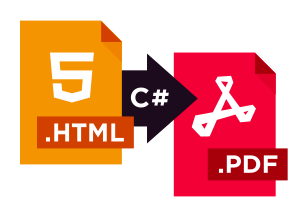
브라우저와 실제로 일치하는 HTML을 PDF로 변환해야 하는 개발자를 위해 구축되었습니다.


Install-Package IronPdf


 40%절약
40%절약 과거에는 OCR을 위해 별도의 플러그인이나 패키지를 사용하고, PDF를 위해서는 또 다른 플러그인이나 패키지를 사용해야 했지만, 이제 모든 기능이 하나의 저렴한 패키지에 통합되어 있어서 정말 좋았습니다.
 데이비드 존스수석 소프트웨어 엔지니어사례 연구를 읽어보세요

 절약20%
절약20%
Green2view는 20%의 비용 절감, 30%의 문서 처리 시간 단축, 그리고 100% 규정 준수를 달성했습니다.
사례 연구를 읽어보세요
 관리 업무 감소40%
이 기능은 완벽하게 작동합니다. 자동 PDF 생성 기능을 통해 매번 픽셀 단위까지 완벽한 재무 보고서를 받아볼 수 있습니다.
사례 연구를 읽어보세요





복잡한 HTML5, CSS3, JavaScript로 픽셀-완벽한 PDF를 렌더링할 수 있나요?예!
HTML 문자열을 C# 코드 한 줄로 PDF로 변환할 수 있습니까? 예!
인증, 쿠키, 사용자 정의 헤더로 URL을 PDF로 변환할 수 있습니까? 예!
Razor, CSHTML 또는 ASPX 보기에서 PDF를 생성할 수 있습니까? 예!
변환 중 사용자 정의 헤더, 푸터, 페이지 번호 및 워터마크를 추가할 수 있습니까? 예!
Docker, Azure Functions, 또는 AWS Lambda에서 HTML을 PDF로 변환할 수 있습니까? 예!
내 애플리케이션을 라이브러리를 사용하여 Linux, macOS, Windows, Docker 컨테이너를 포함하여 배포할 수 있나요?예!
라이브러리가 고도의 동시성, 멀티 스레드 서버 애플리케이션 및 API에서 사용하기에 스레드 안전한가요?예!
사용자 정의 뷰포트 크기와 인쇄 매체 CSS를 설정하여 반응형 레이아웃을 제어할 수 있나요?예!
IronPDF가 Azure Functions와 호환되나요?예!
PDF 문서에서 민감한 텍스트와 이미지를 영구적으로 삭제할 수 있나요?예!
URL로부터 사용자 인증이 필요한 경우 맞춤 헤더, 쿠키 또는 폼 로그인을 통해 PDF를 생성할 수 있습니까?예!
ObjectModel 속성을 통해 PDF DOM에 접근할 수 있습니까?예!
프로그램적으로 AcroForm을 채우고, 읽고, 평면화할 수 있습니까?예!
PDF/A 및 PDF/UA 규격을 준수하는 문서를 생성하여 보관 및 접근성 표준을 지원합니까?예!
문서를 256비트 AES 암호로 보호하고 사용자 권한을 설정할 수 있습니까?예!
X.509 인증서를 사용하여 PDF에 디지털 서명을 적용하고 검증할 수 있습니까?예!
IronPDF를 실시간 프로젝트에서 무료로 테스트할 수 있습니까?예!  30일 무료 체험을 시작하려면 여기를 클릭하세요






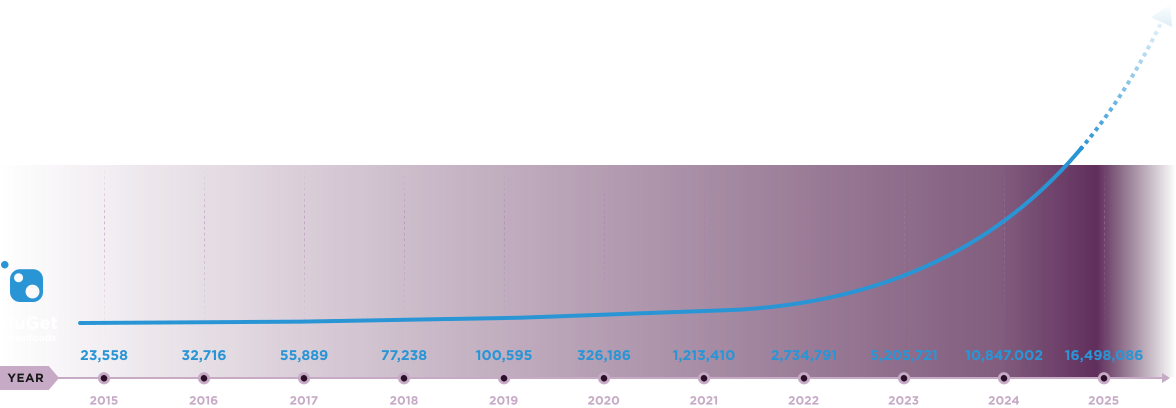
Nuget Downloads 20,389,208|버전:2026.7방금 출시


10개의 .NET API 제품, 당신의 사무 문서를 위해











PDF 파일을 HTML처럼 빠르게 변환해야 할 때.


%20-107C10?logo=visual-studio-code&color=106E58&cacheSeconds=432000)