1
Install
Copy the NuGet
command above - ready
in about 5 minutes.
Open a PDF that already exists and change what is actually on it. Find and replace text, redact it permanently, stamp, watermark, annotate, draw text and bitmaps, add headers, footers and page numbers, extract text and images, and translate, scale, or remove individual objects on the page. Thirteen editing operations through one .NET API — no Acrobat automation, no Office interop, no content-stream surgery. Runs on .NET 10, 9, 8, Framework, Core, and Standard.
using IronPdf;
using IronPdf.Editing;

// Start from a file that already exists — nothing is re-generated
PdfDocument pdf = PdfDocument.FromFile("contract.pdf");

// Change the text that is already in the document
pdf.ReplaceTextOnAllPages("[CLIENT_NAME]", "Northwind Traders");

// Redact — the characters are removed, not just covered over
pdf.RedactTextOnAllPages("Account No. 4417-9920");

// Overlay an approval mark on page 1
pdf.ApplyStamp(new HtmlStamper("<h2>APPROVED</h2>")
{
    HorizontalAlignment = HorizontalAlignment.Right,
    VerticalAlignment   = VerticalAlignment.Top
}, 0);

// Number every page
pdf.AddTextFooters(new TextHeaderFooter
{
    CenterText = "Page {page} of {total-pages}"
});

pdf.SaveAs("contract-final.pdf");
// No Acrobat. No Office interop. No content-stream surgery.

PM >
Install-Package IronPdf
Copy the NuGet
command above - ready
in about 5 minutes.
Test in production without watermarks and 30 days fully
functional product. 24/5 technical support during trial
See your PDF workflow
running in a live
production project.
The editing API is fully managed and behaves identically everywhere — the same find-and-replace, the same redaction, the same object edits, whether the job runs on a Windows box, in a Linux container, or inside a serverless function. Nothing here depends on desktop software being installed on the machine.
Designed for C#, F#, & VB.NET running on .NET 10, 9, 8, 7, 6, 5, Core, Standard, or Framework
Available for .NET, Java, Node.js, and Python.





Most .NET tools that say "edit" mean merge, split, and rotate. The generation-first libraries cannot open your file at all; the low-level free ones can, but replacing a line of text means rewriting content streams by hand. IronPDF edits inside the page: find and replace, redact, extract text and images, translate, scale, or remove objects, stamp, watermark, annotate, draw, set backgrounds, and add headers, footers and page numbers — one managed .NET API, no Acrobat, no Office interop.
Edit any PDF on any server — no Acrobat licence, no Office interop, no COM objects to keep alive.


Install-Package IronPdf
PdfDocument.FromFile("yours.pdf") — one line from editing. Replace text, redact, stamp, watermark, annotate, move or delete objects, add headers and page numbers, all named the way you would describe the task out loud.


 40%SAVING
 Where in the past we might have to go out and use one plug-in or one package for OCR, and another one for PDF, having them all integrated into one low-cost package was really great for us.
 David JonesLead Software EngineerRead the case study

 SAVING20%
Green2view achieved 20% savings, 30% faster document turnaround, and 100% compliance.
Read the case study
 LESS ADMIN WORK40%
It just works—automated PDF generation delivers pixel-perfect financial reports every time.
Read the case study





Can I open a PDF I did not create and edit the text inside it?YES!
Does redaction actually remove the text, or just draw a black box over it?REMOVES IT
Can I move, resize, or delete individual objects on a page?YES!
Do I need Adobe Acrobat, Word, or any Office interop installed on the server?NO
Can I add headers, footers, page numbers, watermarks, stamps, and annotations to an existing file?YES!
Will editing a PDF re-flow or degrade the rest of the document?NO
Can I render pixel-perfect PDFs from complex HTML5, CSS3, and JavaScript?YES!
Can I convert an HTML string to PDF in one line of C# code?YES!
Can I convert a URL to PDF with authentication, cookies, and custom headers?YES!
Can I generate a PDF from Razor, CSHTML, or ASPX views?YES!
Can I add custom headers, footers, page numbers, and watermarks during conversion?YES!
Can I run HTML to PDF conversion in Docker, Azure Functions, or AWS Lambda?YES!
Can I deploy my application using the library to Linux, macOS, or Windows, including Docker containers?YES!
Is the library thread-safe for use in highly concurrent, multi-threaded server applications and APIs?YES!
Can I set custom viewport dimensions and print media CSS to control responsive layouts?YES!
Is IronPDF compatible with Azure Functions?YES!
Can I permanently redact sensitive text and images from PDF documents?YES!
Can I generate a PDF from a URL that requires authentication via custom headers, cookies, or form logins?YES!
Can I access PDF DOM through ObjectModel property?YES!
Can I programmatically fill, read, and flatten interactive AcroForm?YES!
Does it support generating PDF/A and PDF/UA compliant documents for archiving and accessibility standards?YES!
Can I secure a document with 256-bit AES password encryption and set user permissions?YES!
Can I apply and verify digital signatures on a PDF using X.509 certificates?YES!
Can I test IronPDF in my live project for free now?YES!  Click here to start your 30-day free trial






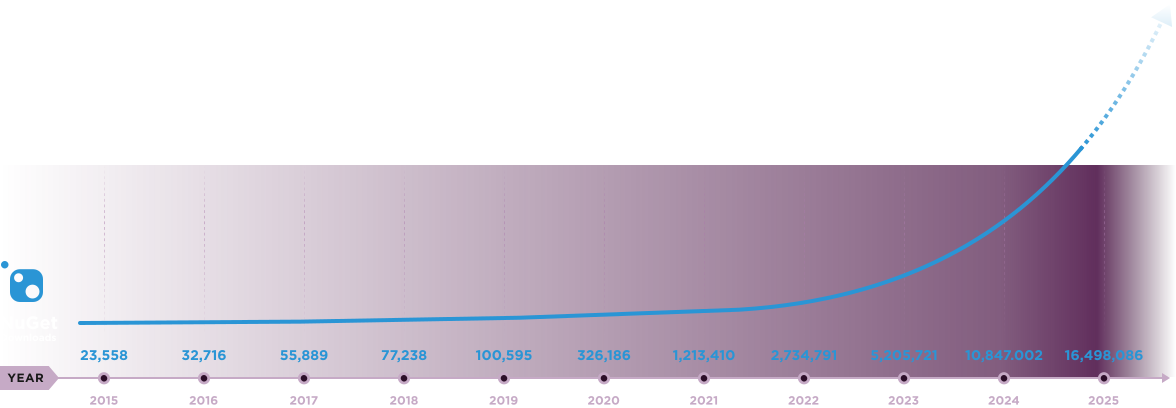
Nuget Downloads 20,389,208|Version:2026.8just released


10 .NET API products for your office documents











When you need your PDF to look like HTML, fast.


%20-107C10?logo=visual-studio-code&color=106E58&cacheSeconds=432000)