%20-107C10?logo=visual-studio-code&color=106E58&cacheSeconds=432000)






 40%节省
40%节省
 过去我们可能需要使用一个插件或一个包来处理OCR,再使用另一个来处理PDF,而现在它们都集成到一个低成本包中,对我们来说真的非常棒。
 David Jones首席软件工程师阅读案例研究
SelectPdf是一个功能强大的仅限Windows的库,Linux、macOS和Docker通过其云API进行路由。IronPDF使用Chromium在每个平台上对HTML、CSS和JavaScript进行运行中渲染,提供完整试用且无页面限制。三行C#代码。
// SelectPdf: clean API, but the in-process library is Windows-only.
// Linux / macOS / Docker must call SelectPdf's cloud REST API instead.
using SelectPdf;
HtmlToPdf converter = new HtmlToPdf();
PdfDocument doc = converter.ConvertHtmlString("<h1>Hello World</h1>");
doc.Save("output.pdf");
doc.Close();
// Free Community Edition caps output at 5 pages per PDF.

// IronPDF: same clean API, in-process on every platform, no cap
using IronPdf;
var renderer = new ChromePdfRenderer();
PdfDocument pdf = renderer.RenderHtmlAsPdf("<h1>Hello World</h1>");
pdf.SaveAs("output.pdf");' SelectPdf: clean API, but the in-process library is Windows-only.
' Linux / macOS / Docker must call SelectPdf's cloud REST API instead.
Imports SelectPdf
Dim converter As New HtmlToPdf()
Dim doc As PdfDocument = converter.ConvertHtmlString("<h1>Hello World</h1>")
doc.Save("output.pdf")
doc.Close()
' Free Community Edition caps output at 5 pages per PDF.
' IronPDF: same clean API, in-process on every platform, no cap
Imports IronPdf
Dim renderer As New ChromePdfRenderer()
Dim pdf As PdfDocument = renderer.RenderHtmlAsPdf("<h1>Hello World</h1>")
pdf.SaveAs("output.pdf")
PM >
Install-Package IronPdf
SelectPdf是一个成熟的商业转换器,拥有WebKit、Blink和Chromium引擎和一个干净的API。实际差别在于部署和试用模式:SelectPdf的运行中库仅在Windows上运行,因此Linux、macOS和Docker必须通过其云REST API实现,其免费社区版限制在五页,没有加载现有PDF、转换PDF为文本或表单填充功能。IronPDF使用Chromium在每个平台上进行运行中渲染,您的HTML保存在您的服务器上,并提供一个完全功能的试用版。
| SelectPdf | IronPDF | |
|---|---|---|
| HTML5 / CSS3 / JS | 支持 | 支持 |
| 渲染引擎 | WebKit,Blink,Chromium(选择,部署) | Chromium,一个捆绑引擎 |
| 运行中平台 | 仅限 Windows | Windows、Linux、macOS、Docker |
| Linux / macOS / Docker | 通过SelectPdf云REST API | 运行中,本地,数据不出站 |
| 免费选项 | 社区版,5页限制 | 30天完整试用,无限制,无水印 |
| 社区差距 | 不能加载现有PDF、PDF到文本、表单 | 试用中的完整功能集 |
| 维护 | 自2014年以来积极维护 | 积极维护 |
| PDF编辑 | 完整的SDK;社区版有限 | 编辑,合并,签名,表单,提取 |
| 库定价 | 从$499永久 | 从$749永久,24/5支持 |
为需要在每个平台上进行运行中HTML到PDF转换且无试用限制的开发者而构建。


Install-Package IronPdf





IronPDF能否在Linux、macOS和Docker上进行运行中HTML到PDF转换,而不仅限于Windows?是的!
我能避免在非Windows部署中将我的HTML发送到云API吗?是的!
试用版功能齐全,无5页限制且无水印吗?是的!
IronPDF能否使用Chromium引擎渲染HTML5、CSS3和JavaScript?是的!
我能否在一个库中编辑、合并、签名、提取文本和填写表单?是的!
它能否在Azure、AWS和容器上运行,而无需单独的云服务?是的!
我能否通过复杂的 HTML5、CSS3 和 JavaScript 呈现像素完美的 PDF?
我可以用一行C#代码将HTML字符串转换为PDF吗?是的!
我可以通过身份验证、Cookies和自定义头将URL转换为PDF吗?是的!
我可以从Razor、CSHTML或ASPX视图生成PDF吗?是的!
我可以在转换过程中添加自定义页眉、页脚、页码和水印吗?是的!
我可以在Docker、Azure Functions或AWS Lambda中运行HTML到PDF的转换吗?是的!
我能否使用该库将应用程序部署到 Linux、macOS 或 Windows 系统(包括 Docker 容器)?可以!
该库是否适用于高并发、多线程的服务器应用程序和接口?是的!
我能否设置自定义视口尺寸和打印介质CSS来控制响应式布局?可以!
IronPDF 是否兼容 Azure Functions?是的!
能否永久性地从PDF文档中删除敏感文本和图像?可以!
能否从需要通过自定义头、Cookie 或表单登录进行身份验证的 URL 生成 PDF?可以!
能否通过ObjectModel属性访问PDF DOM?可以!
能否通过编程方式填充、读取和扁平化交互式AcroForm?可以!
是否支持生成符合PDF/A和PDF/UA标准的文档,以满足归档和无障碍访问要求?是的!
我能否使用256位AES密码加密来保护文档并设置用户权限?可以!
我能否使用X.509证书对PDF文件进行数字签名申请和验证?可以!
我现在可以在我的实时项目中免费测试 IronPDF 吗?可以!  点击此处开始您的 30 天免费试用。






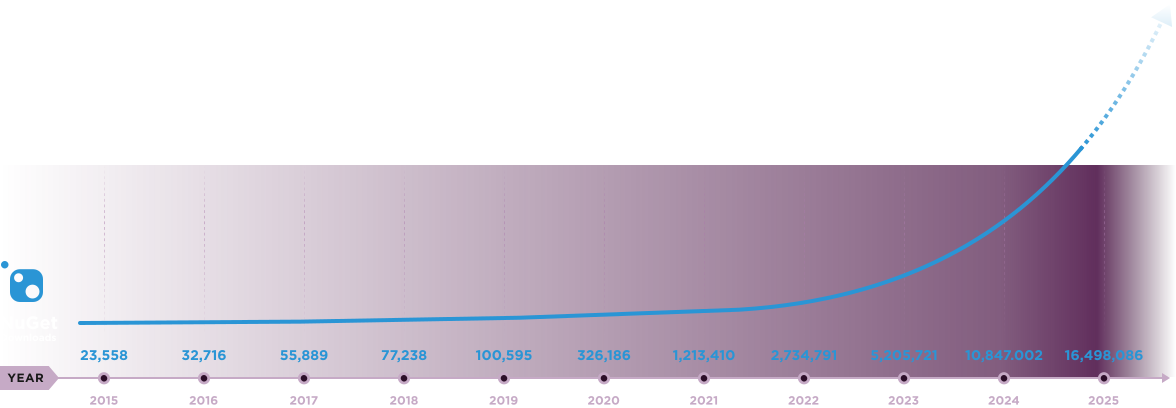
Nuget Downloads 20,389,208|版本:2026.7刚刚发布

当您需要PDF看起来像HTML时,速度快。