



Updated September 2, 2026
HTML to PDF in C#: Benchmarking 7 .NET Libraries (2026)
Compare 7 C# HTML to PDF libraries on .NET 10 for cold start, throughput, memory and rendering accuracy. Only 3 rendered the test invoice correctly.
Read More

IronPDF offers complete ASP.NET Core PDF generation using Chrome-based rendering with 98% HTML accuracy, a straightforward API design, and full feature coverage at $999 for perpetual licensing. This provides better value than competitors' annual subscriptions while delivering superior HTML-to-PDF conversion capabilities.
| Feature | IronPDF | Aspose.PDF | Syncfusion PDF |
|---|---|---|---|
| HTML to PDF Rendering | Chrome engine | Proprietary HTML engine (Aspose.HTML); CSS3 supported, JavaScript rendering limited compared to browser-based engines | WebKit-based (good CSS support) |
| Learning Curve | Simple, intuitive API | Complex, verbose | Moderate complexity |
| JavaScript Support | Full support | Partial support (less comprehensive than browser-based engines) | Partial support |
| Forms Processing | HTML forms to PDF forms | Complete form handling | Interactive form fields |
| Platform Support | Windows, Linux, macOS, Docker | All major platforms | Windows Forms, .NET Core, Web |
| Pricing Model | $999 perpetual | $1,199+ per year | $995/year (free community) |
| Documentation | Extensive with examples | Detailed but complex | Good with tutorials |
| Free Trial | 30 days full features | Limited evaluation | Community edition available |
Your .NET applications need complete PDF functionality beyond basic generation. A capable library should convert HTML pages smoothly, handle existing documents, and generate precise output. Understanding PDF functionality types -- creation, manipulation, and conversion -- helps you make informed decisions.
Key requirements to evaluate include support for CSS styling, management of multiple PDF files, and smooth integration with ASP.NET Core projects without external dependencies. Performance in server environments is crucial when processing documents at scale. Strong async operations support is equally important for optimal web application performance.
Beyond generation, consider security-related needs: creating digitally signed documents, merging existing PDFs, and handling file attachments. Efficient output management capabilities are essential. According to Microsoft's documentation on PDF generation, the library choice significantly impacts development efficiency and long-term maintenance costs.
When evaluating libraries, test your most complex real-world documents rather than simple samples. A library that handles plain text documents easily may struggle with your production HTML templates, JavaScript-heavy content, or pages that rely on modern CSS grid layouts.
IronPDF stands out with its Chrome rendering engine, providing exceptional HTML-to-PDF conversion accuracy. This .NET component maintains CSS fidelity and executes JavaScript, making it ideal for converting complex HTML pages. The library handles responsive CSS and renders content with the same fidelity as a browser.
The practical difference becomes clear when you have documents with dynamic content, charts, or styled tables. Because IronPDF uses the same engine as Google Chrome, any page that renders correctly in a browser converts accurately to PDF. This eliminates a common pain point in PDF workflows: the gap between what the browser shows and what the PDF contains.
The library efficiently manages external resources during conversion. You can add images from various locations, import data from external templates, and produce output that precisely matches your design specifications.
Learn about IronPDF's HTML to PDF capabilities and rendering options for improved control over your output.
Install the package first (available on NuGet):
Then generate a styled invoice PDF from HTML:
using IronPdf;

string invoiceHtml = @"
<!DOCTYPE html>
<html>
<head>
    <style>
        body { font-family: Arial; margin: 40px; }
        .header { background: #2c3e50; color: white; padding: 20px; }
        table { width: 100%; border-collapse: collapse; margin-top: 20px; }
        th { background: #34495e; color: white; padding: 10px; }
        td { border: 1px solid #ddd; padding: 10px; }
        .total { font-weight: bold; background: #ecf0f1; }
    </style>
</head>
<body>
    <div class='header'>
        <h1>Invoice #2024-001</h1>
    </div>
    <table>
        <tr><th>Item</th><th>Quantity</th><th>Price</th></tr>
        <tr><td>Software License</td><td>1</td><td>$999</td></tr>
        <tr class='total'><td colspan='2'>Total</td><td>$999</td></tr>
    </table>
</body>
</html>";

var renderer = new ChromePdfRenderer();

// Configure rendering options
renderer.RenderingOptions.MarginTop = 25;
renderer.RenderingOptions.MarginBottom = 25;
renderer.RenderingOptions.EnableJavaScript = true;

// Convert HTML string to PDF
var pdf = renderer.RenderHtmlAsPdf(invoiceHtml);

// Save the document
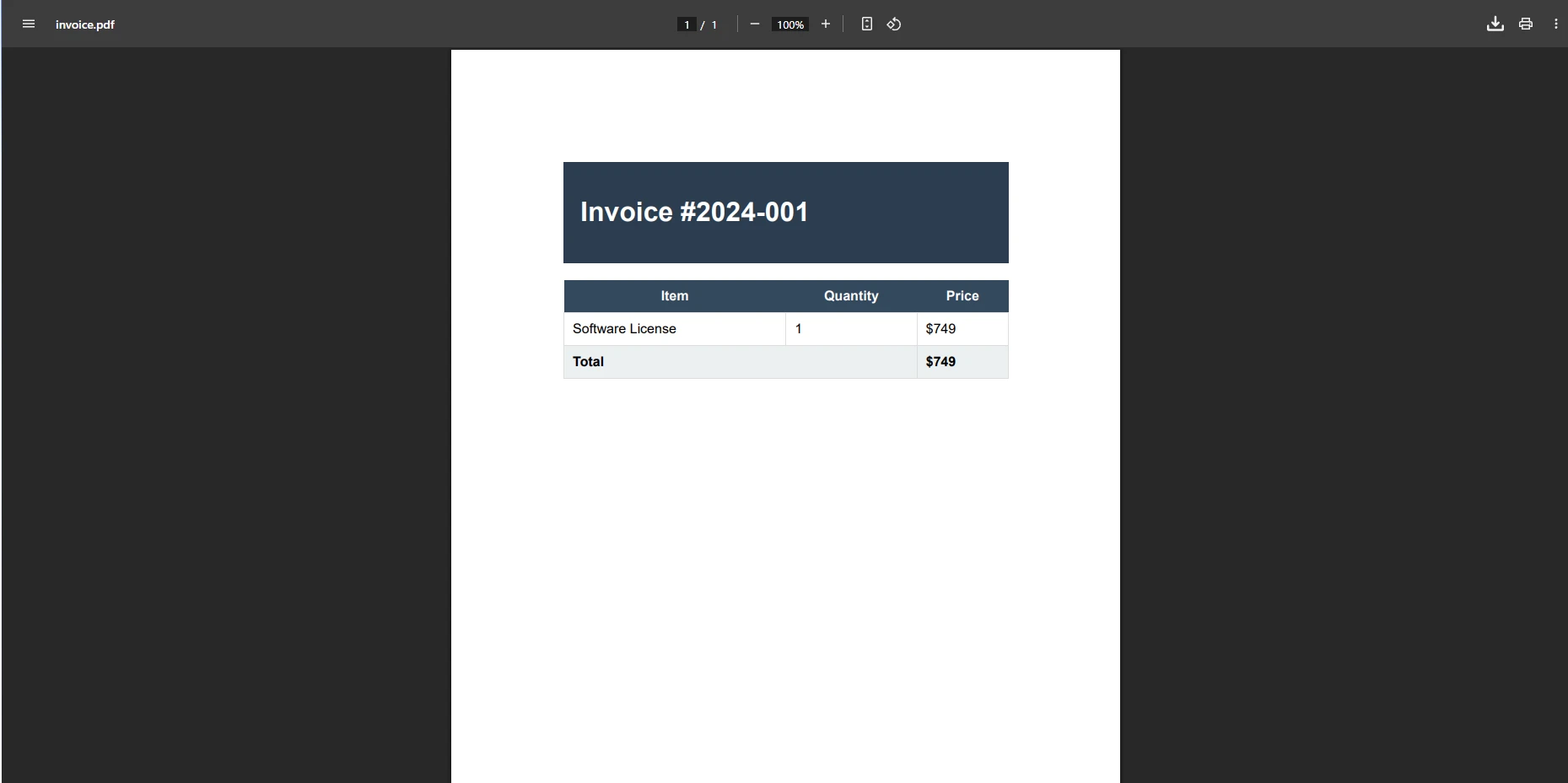
pdf.SaveAs("invoice.pdf");This code demonstrates IronPDF's handling of complex HTML with CSS styling. The Chrome engine ensures your PDF output matches browser rendering, maintaining all formatting and styles. The straightforward API requires minimal code to create professional PDFs. You can also set custom margins, add headers and footers, and configure paper sizes for your documents.
IronPDF excels at handling existing PDFs, enabling editing, merging, and manipulation. Support for Windows, Linux, and cloud platforms ensures deployment flexibility. The rendering engine maintains efficient memory usage throughout processing. You can also use PDF compression to reduce file sizes and apply watermarks and annotations for document management workflows.
For advanced features like adding pages, stamping images, adding bookmarks, and managing forms, the documentation guides your implementation at every step.
Aspose.PDF provides granular control over PDFs through its complete object model. This library suits projects where you need to create PDFs programmatically with precise element control. The component integrates directly into your application architecture. While IronPDF offers superior HTML rendering, Aspose excels in low-level PDF manipulation tasks.
The tradeoff is verbosity: Aspose requires significantly more code to achieve the same visual results because you construct each document element manually. This gives you fine-grained control but increases the amount of boilerplate code you need to maintain.
using Aspose.Pdf;
using Aspose.Pdf.Text;

// Create new document
Document document = new Document();
Page page = document.Pages.Add();

// Add formatted text
TextFragment title = new TextFragment("Invoice #INV-2024-001");
title.TextState.FontSize = 18;
title.TextState.Font = FontRepository.FindFont("Arial");
page.Paragraphs.Add(title);

// Create table
Table table = new Table();
table.ColumnWidths = "200 100 100";

// Add header row
Row headerRow = table.Rows.Add();
headerRow.Cells.Add("Item");
headerRow.Cells.Add("Quantity");
headerRow.Cells.Add("Price");

// Add data row
Row dataRow = table.Rows.Add();
dataRow.Cells.Add("Professional Services");
dataRow.Cells.Add("10");
dataRow.Cells.Add("$1,000");

page.Paragraphs.Add(table);
document.Save("invoice.pdf");Imports Aspose.Pdf
Imports Aspose.Pdf.Text
' Create new document
Dim document As New Document()
Dim page As Page = document.Pages.Add()
' Add formatted text
Dim title As New TextFragment("Invoice #INV-2024-001")
title.TextState.FontSize = 18
title.TextState.Font = FontRepository.FindFont("Arial")
page.Paragraphs.Add(title)
' Create table
Dim table As New Table()
table.ColumnWidths = "200 100 100"
' Add header row
Dim headerRow As Row = table.Rows.Add()
headerRow.Cells.Add("Item")
headerRow.Cells.Add("Quantity")
headerRow.Cells.Add("Price")
' Add data row
Dim dataRow As Row = table.Rows.Add()
dataRow.Cells.Add("Professional Services")
dataRow.Cells.Add("10")
dataRow.Cells.Add("$1,000")
page.Paragraphs.Add(table)
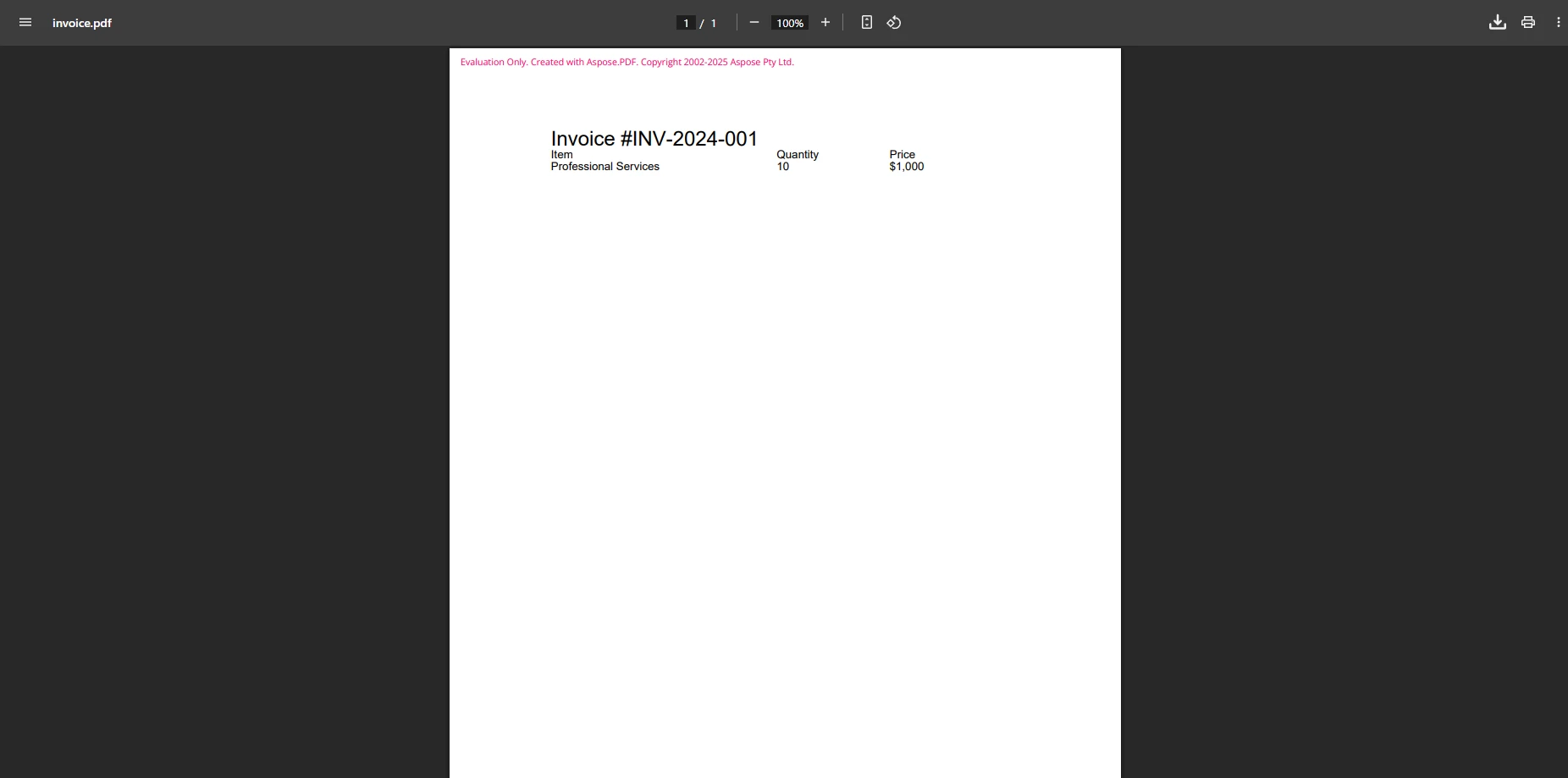
document.Save("invoice.pdf")This example shows Aspose's detailed but effective approach. While requiring more code for similar results, you gain complete document structure control. The library produces encrypted documents and handles complex annotations, though the learning curve is steeper. You must manually construct each element rather than convert existing HTML. For a detailed comparison, see the Aspose vs IronPDF analysis.
Aspose provides PDF/A compliance and advanced metadata management, though complexity increases proportionally with the document's requirements. The library handles linearized PDFs for fast web viewing and supports various PDF versions for archive and compliance workflows.
Syncfusion's PDF library fits well within their broader component suite, offering solid PDF functionality within a complete toolkit. The library provides reliable PDF creation and editing capabilities while maintaining reasonable performance. For a detailed comparison, see the Syncfusion vs IronPDF analysis.
The main advantage of Syncfusion is ecosystem consistency: if your project already depends on Syncfusion's UI controls, grids, or charts, adding their PDF library keeps your dependency tree uniform. That said, the PDF component does not offer HTML-to-PDF conversion at the quality level IronPDF achieves.
using Syncfusion.Pdf;
using Syncfusion.Pdf.Graphics;
using Syncfusion.Pdf.Grid;

// Create document
PdfDocument document = new PdfDocument();
PdfPage page = document.Pages.Add();
PdfGraphics graphics = page.Graphics;

// Draw text
PdfFont font = new PdfStandardFont(PdfFontFamily.Helvetica, 18);
graphics.DrawString("Invoice #INV-2024-001", font, PdfBrushes.Black, new PointF(10, 10));

// Create grid for items
PdfGrid grid = new PdfGrid();
grid.Columns.Add(3);
grid.Headers.Add(1);
PdfGridRow header = grid.Headers[0];
header.Cells[0].Value = "Item";
header.Cells[1].Value = "Quantity";
header.Cells[2].Value = "Price";

PdfGridRow row = grid.Rows.Add();
row.Cells[0].Value = "Professional Services";
row.Cells[1].Value = "10";
row.Cells[2].Value = "$1,000";

grid.Draw(page, new PointF(10, 50));

// Save document
using FileStream stream = new FileStream("invoice.pdf", FileMode.Create);
document.Save(stream);
document.Close(true);Imports Syncfusion.Pdf
Imports Syncfusion.Pdf.Graphics
Imports Syncfusion.Pdf.Grid
Imports System.IO
' Create document
Dim document As New PdfDocument()
Dim page As PdfPage = document.Pages.Add()
Dim graphics As PdfGraphics = page.Graphics
' Draw text
Dim font As PdfFont = New PdfStandardFont(PdfFontFamily.Helvetica, 18)
graphics.DrawString("Invoice #INV-2024-001", font, PdfBrushes.Black, New PointF(10, 10))
' Create grid for items
Dim grid As New PdfGrid()
grid.Columns.Add(3)
grid.Headers.Add(1)
Dim header As PdfGridRow = grid.Headers(0)
header.Cells(0).Value = "Item"
header.Cells(1).Value = "Quantity"
header.Cells(2).Value = "Price"
Dim row As PdfGridRow = grid.Rows.Add()
row.Cells(0).Value = "Professional Services"
row.Cells(1).Value = "10"
row.Cells(2).Value = "$1,000"
grid.Draw(page, New PointF(10, 50))
' Save document
Using stream As New FileStream("invoice.pdf", FileMode.Create)
document.Save(stream)
End Using
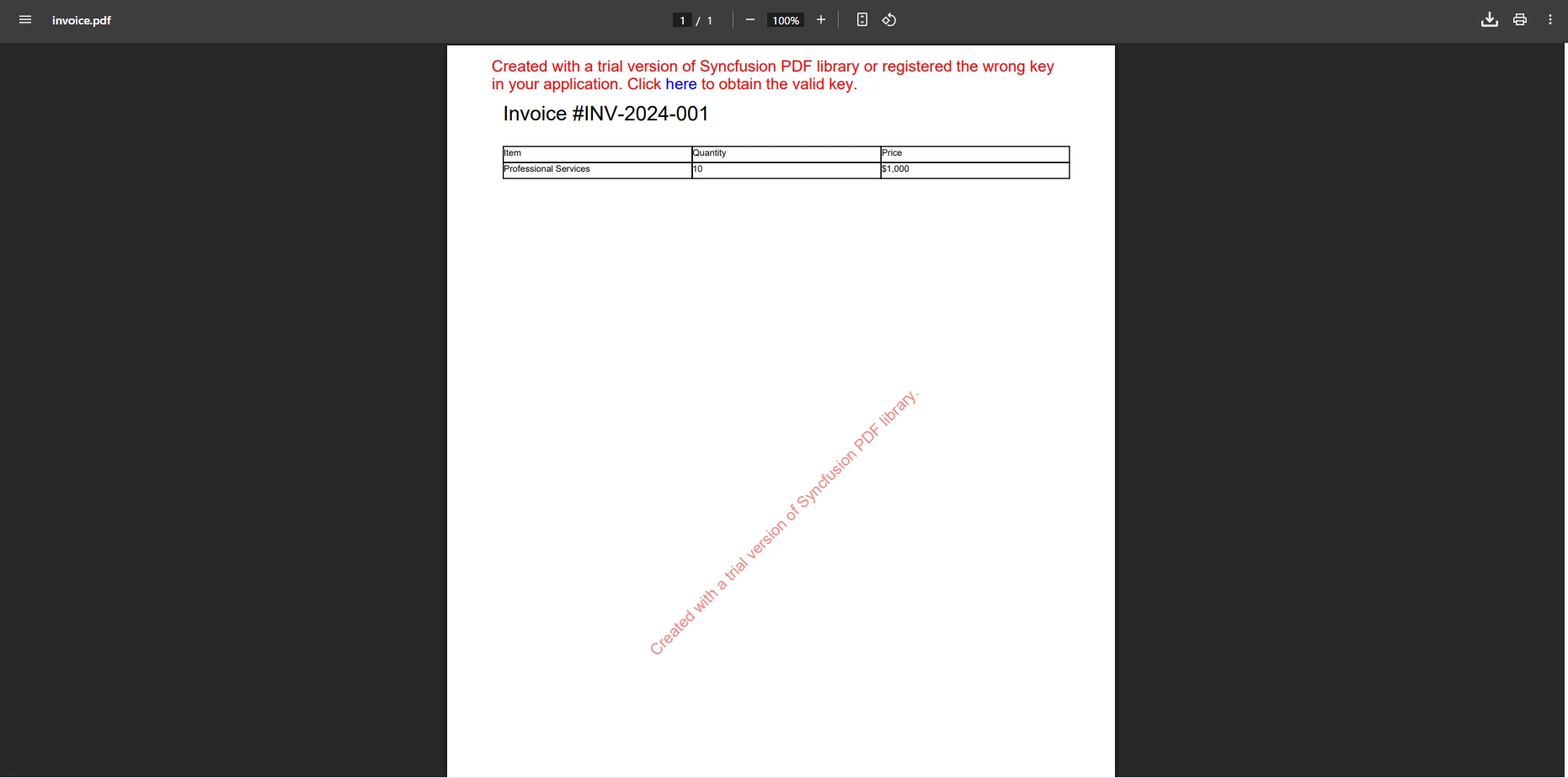
document.Close(True)Syncfusion requires building PDFs element by element, similar to Aspose but with a cleaner API design. The library handles fonts effectively and includes support for various output features. Their community edition provides free access for small teams with certain usage limitations. When generating files for browser download, Syncfusion handles server-side generation reliably.
Syncfusion supports PDF form creation and digital signatures, though with less flexibility than an HTML-based approach. The library also handles PDF compression and page manipulation for standard document workflows.
For complex document scenarios that go beyond basic generation, IronPDF provides a rich set of manipulation tools:
using IronPdf;

var pdf = PdfDocument.FromFile("invoice.pdf");

// Add watermark
pdf.ApplyWatermark("<h2 style='color:red;opacity:0.5;'>CONFIDENTIAL</h2>",
    30, VerticalAlignment.Middle, HorizontalAlignment.Center);

// Add background layer
var backgroundPdf = new ChromePdfRenderer()
    .RenderHtmlAsPdf("<div style='background:#f0f0f0;height:100vh'></div>");
pdf.AddBackgroundPdf(backgroundPdf);

// Add page numbers
pdf.AddTextFooters("Page {page} of {total-pages}",
    IronPdf.Editing.TextAlignment.Center, new IronSoftware.Drawing.FontTypes.Font("Arial", 10));

pdf.SaveAs("invoice-final.pdf");Imports IronPdf
Dim pdf = PdfDocument.FromFile("invoice.pdf")
' Add watermark
pdf.ApplyWatermark("<h2 style='color:red;opacity:0.5;'>CONFIDENTIAL</h2>", 30, VerticalAlignment.Middle, HorizontalAlignment.Center)
' Add background layer
Dim backgroundPdf = New ChromePdfRenderer().RenderHtmlAsPdf("<div style='background:#f0f0f0;height:100vh'></div>")
pdf.AddBackgroundPdf(backgroundPdf)
' Add page numbers
pdf.AddTextFooters("Page {page} of {total-pages}", IronPdf.Editing.TextAlignment.Center, New IronSoftware.Drawing.FontTypes.Font("Arial", 10))
pdf.SaveAs("invoice-final.pdf")This approach allows you to post-process documents independently of how they were originally generated. You can apply consistent branding, confidentiality markers, and page numbering to PDFs from any source.
While commercial libraries dominate enterprise scenarios, open-source alternatives are worth knowing. QuestPDF offers a modern fluent API for PDF creation, though it lacks HTML conversion capabilities. PDFSharp provides basic PDF generation but struggles with complex layouts and modern CSS.
These options work for simple requirements but lack the complete features and professional support of commercial solutions. Form handling in open-source libraries often requires significant additional development effort.
For production environments requiring PDF/A compliance, PDF/UA accessibility, or reliable international language support, commercial solutions provide better reliability and guaranteed updates. Open-source libraries may struggle with SVG rendering or advanced CSS that commercial alternatives handle without configuration.
For most ASP.NET Core projects requiring HTML to PDF conversion, IronPDF provides the most practical solution. Its Chrome-based rendering ensures accurate web content conversion, while the intuitive API reduces development time significantly.
The ability to handle existing documents, create forms, add bookmarks, and process complex HTML makes IronPDF versatile across a wide range of use cases. Consider these factors when selecting:
Aspose.PDF suits projects requiring extensive programmatic control and complex document manipulation when HTML conversion is not the primary need. Organizations already invested in Syncfusion's ecosystem benefit from choosing their PDF component for consistency. For comparisons with additional libraries, see the analyses of iText vs IronPDF and Apryse vs IronPDF.
Start a free trial to experience IronPDF's capabilities in your development environment.
Choosing an ASP.NET PDF library affects development speed, output quality, and long-term maintenance. IronPDF's combination of accurate HTML rendering, a straightforward API, and complete features makes it the practical choice for most .NET Core applications.
While Aspose.PDF and Syncfusion PDF offer valuable capabilities for specific scenarios, IronPDF's balance of simplicity and functionality -- supported by thorough documentation and responsive support -- positions it well for modern ASP.NET PDF generation needs.
Key capabilities include creating digitally signed documents, merging PDFs, and handling file attachments. The library also excels in specialized scenarios like Blazor integration, MAUI support, and F# development. Strong text extraction capabilities benefit end-users by enabling search functionality within generated documents.
Purchase a license to access IronPDF's full capabilities in production environments.

Curtis Chau holds a Bachelor’s degree in Computer Science (Carleton University) and specializes in front-end development with expertise in Node.js, TypeScript, JavaScript, and React. Passionate about crafting intuitive and aesthetically pleasing user interfaces, Curtis enjoys working with modern frameworks and creating well-structured, visually appealing manuals.



IronPDF is a part of IRONSUITE
10 .NET API products for your office documents











When you need your PDF to look like HTML, fast.


