1
Install
Copy the NuGet
command above - ready
in about 5 minutes.
Generate PDFs from HTML, then edit, merge, watermark, sign, and secure them — from one library, one API, one licence. No fluent layout code to hand-write, no AGPL obligations, no stitching together three free packages that were never meant to work as a set. Runs on .NET 10, 9, 8, Framework, Core, and Standard.
using IronPdf;

// One .NET library: generate, then edit, merge, and sign
var renderer = new ChromePdfRenderer();
PdfDocument pdf = renderer.RenderHtmlAsPdf("<h1>Report</h1>");
PdfDocument cover = PdfDocument.FromFile("cover.pdf");

PdfDocument merged = PdfDocument.Merge(cover, pdf);
merged.SecuritySettings.OwnerPassword = "secret";
merged.SaveAs("final.pdf");

// No second package for the merge. No third for the password.
Imports IronPdf

' One .NET library: generate, then edit, merge, and sign
Dim renderer As New ChromePdfRenderer()
Dim pdf As PdfDocument = renderer.RenderHtmlAsPdf("<h1>Report</h1>")
Dim cover As PdfDocument = PdfDocument.FromFile("cover.pdf")

Dim merged As PdfDocument = PdfDocument.Merge(cover, pdf)
merged.SecuritySettings.OwnerPassword = "secret"
merged.SaveAs("final.pdf")

' No second package for the merge. No third for the password.
Copy the NuGet
command above - ready
in about 5 minutes.
Test in production without watermarks and 30 days fully
functional product. 24/5 technical support during trial
See your PDF workflow
running in a live
production project.
The same single library runs identically on every supported platform — one dependency to test, deploy, and support, whether you ship to Windows, a Linux container, or a serverless function.
Designed for C#, F#, & VB.NET running on .NET 10, 9, 8, 7, 6, 5, Core, Standard, or Framework
Available for .NET, Java, Node.js, and Python.





Building a real PDF feature on free packages usually means assembling a stack: one library to render your HTML, another to edit or merge the result, a third to handle signatures or encryption. Each brings its own API to learn, its own licence to check, and its own maintenance risk — and they were never designed to work together. Some ask you to rebuild layout in C# by hand; some ship under copyleft licences that reach into your own source; some stopped being maintained years ago. IronPDF is one supported library that generates, edits, merges, signs, and secures behind a single clean .NET API, with a commercial licence and an engineer on the other end of the ticket.
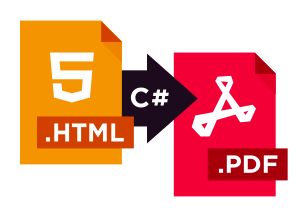
One library, one licence, one support desk — instead of a stack of free packages you assemble and maintain yourself.


 40%SAVING
 Where in the past we might have to go out and use one plug-in or one package for OCR, and another one for PDF, having them all integrated into one low-cost package was really great for us.
 David JonesLead Software EngineerRead the case study

 SAVING20%
Green2view achieved 20% savings, 30% faster document turnaround, and 100% compliance.
Read the case study
 LESS ADMIN WORK40%
It just works—automated PDF generation delivers pixel-perfect financial reports every time.
Read the case study





Does one IronPDF package cover generating, editing, merging, and signing, or do I need add-ons?ONE PACKAGE
Can I generate PDFs from HTML, CSS3, and JavaScript with browser-grade accuracy?YES!
Can I edit, merge, split, watermark, and encrypt existing PDFs with the same library?YES!
Will IronPDF's licence force me to open-source my application, the way AGPL libraries do?NO
Do I have to stitch together several free NuGet packages to get a full PDF workflow?NO
Is the library supported, with an engineer I can reach when something breaks?YES!
Can I render pixel-perfect PDFs from complex HTML5, CSS3, and JavaScript?YES!
Can I convert an HTML string to PDF in one line of C# code?YES!
Can I convert a URL to PDF with authentication, cookies, and custom headers?YES!
Can I generate a PDF from Razor, CSHTML, or ASPX views?YES!
Can I add custom headers, footers, page numbers, and watermarks during conversion?YES!
Can I run HTML to PDF conversion in Docker, Azure Functions, or AWS Lambda?YES!
Can I deploy my application using the library to Linux, macOS, or Windows, including Docker containers?YES!
Is the library thread-safe for use in highly concurrent, multi-threaded server applications and APIs?YES!
Can I set custom viewport dimensions and print media CSS to control responsive layouts?YES!
Is IronPDF compatible with Azure Functions?YES!
Can I permanently redact sensitive text and images from PDF documents?YES!
Can I generate a PDF from a URL that requires authentication via custom headers, cookies, or form logins?YES!
Can I access PDF DOM through ObjectModel property?YES!
Can I programmatically fill, read, and flatten interactive AcroForm?YES!
Does it support generating PDF/A and PDF/UA compliant documents for archiving and accessibility standards?YES!
Can I secure a document with 256-bit AES password encryption and set user permissions?YES!
Can I apply and verify digital signatures on a PDF using X.509 certificates?YES!
Can I test IronPDF in my live project for free now?YES!  Click here to start your 30-day free trial






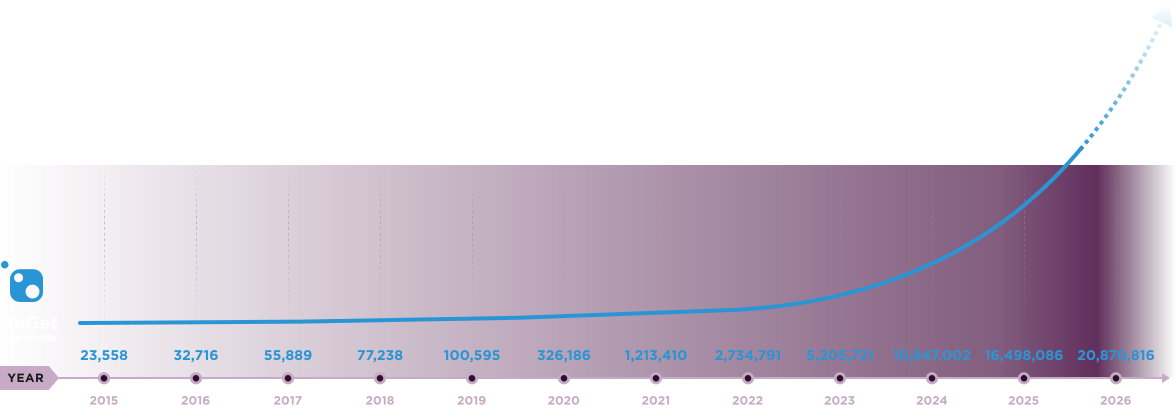
Nuget Downloads 20,878,335|Version:2026.9just released

IronPDF is a part of IRONSUITE
10 .NET API products for your office documents











When you need your PDF to look like HTML, fast.


%20-107C10?logo=visual-studio-code&color=106E58&cacheSeconds=432000)