IRONSOFTWAREHOME

The wkhtmltopdf C# Alternative for HTML to PDF

Stop shelling out to an archived command-line tool. IronPDF is a maintained .NET library with a modern Chromium engine, real CSS3 and JavaScript, and no native binary to deploy. Convert HTML to PDF in three lines of C#.

  • A managed .NET API, no System.Diagnostics.Process and no exe to spawn
  • Modern Chromium rendering with real flexbox, grid, web fonts, and JavaScript
  • Actively maintained with current .NET support, not archived since 2023
  • Free 30-day trial, no watermarks, no credit card
wkhtmltopdf vs IronPDF
Online DemoSee All Code Examples
// wkhtmltopdf: shell out to the archived command-line executable
using System.Diagnostics;

var psi = new ProcessStartInfo {
    FileName = "wkhtmltopdf.exe",                 // ship this native binary
    Arguments = "\"input.html\" \"output.pdf\"",  // quote paths
    UseShellExecute = false,
    RedirectStandardError = true,
    CreateNoWindow = true
};
using var proc = Process.Start(psi);
proc.WaitForExit();
if (proc.ExitCode != 0)
    throw new Exception(proc.StandardError.ReadToEnd());

// IronPDF: a maintained managed API, no process, no native binary
using IronPdf;
var renderer = new ChromePdfRenderer();
PdfDocument pdf = renderer.RenderHtmlFileAsPdf("input.html");
pdf.SaveAs("output.pdf");
NuGet Downloads Badge
PM >
Install-Package IronPdf

Cross Platform Support

One managed NuGet package deploys to Windows, Linux, Docker, Azure, and IIS without shipping or locating a wkhtmltopdf executable per platform.

Designed for C#, F#, & VB.NET running on .NET 10, 9, 8, 7, 6, 5, Core, Standard, or Framework
Available for .NET, Java, Node.js, and Python.

NET Logo
Windows Logo
Linux Logo
Mac Logo
Docker Logo
Azure Logo
AWS Logo
Visual Studio Logo
NuGet Logo
ReSharper

.NET Versions:

OS & Processors:

  • Windows (x64, x86)
  • Mac (x64, ARM)
  • Linux (x64)

.NET Project Types:

  • Web (Blazor & WebForms)
  • Desktop (WPF & MAUI)
  • Console (App & Library)

App Environments:

  • Windows (10+, Server UI 2012+, Server Core 2022)
  • Linux (Ubuntu, Debian, CentOS, etc.)
  • Mac (macOS 10+)
  • Docker (Windows, Linux, Azure)
  • Azure (VPS, WebApp, Function)
  • AWS (EC2, Lambda)

IDEs:

Binary Certification

  • DigiCert Signed Binaries

Why C# developers migrate from wkhtmltopdf to IronPDF

wkhtmltopdf is a command-line tool built on a Qt WebKit engine frozen around 2015. Its repository was archived in January 2023 and its last release shipped in June 2020, so modern CSS gaps and known security issues stay unaddressed. In C# you deploy the native executable and drive it through System.Diagnostics.Process. IronPDF replaces that with a maintained Chromium engine behind a clean managed API, plus editing, merging, forms, and signing in the same library.

Get your free 30-day Trial Key instantly.

Everything an archived command-line tool cannot give you

Create PDFs

wkhtmltopdf vs IronPDF

wkhtmltopdfIronPDF
Project statusArchived Jan 2023, last release Jun 2020Actively maintained, regular releases
IntegrationCommand-line exe via ProcessNative managed .NET API
DeploymentShip and locate native binaryPure NuGet, no binary
Rendering engineQt WebKit, frozen around 2015Modern Chromium
Modern CSS / JSNo grid, limited flexbox and JSFull CSS3, flexbox, grid, JavaScript
SecurityUnpatched CVEs (SSRF)Maintained and patched
PDF featuresConvert onlyEdit, merge, sign, PDF/A, watermark, extract
Error handlingParse exit codes and stderrTyped .NET exceptions
License and supportFree, LGPLv3, no supportCommercial, perpetual, 24/5 engineers

Why IronPDF?

Built for developers replacing an archived wkhtmltopdf command-line tool with a maintained, modern engine.

Click to view video about Why IronPDF?

Pixel-perfect rendering

  • Chromium-grade HTML/CSS/JS ➝ what you see in the browser is what’s in the PDF.
  • Fonts, SVGs, image, complex layouts - consistent across environment.
  • Handles header/footers, page number, margins, and pagination edge cases.

Up & running in 5 mins

  • PM > Install-Package IronPdf
    and one dependency covers generate, edit, merge, watermark, sign, and secure
  • No second package to add, no third licence to reconcile, no glue code between libraries that disagree.
  • Instant licence key, full API access, and a commercial licence with no copyleft strings attached.

Cross-platform

  • .NET 10, 9, 8 LTS, Framework 4.62+
  • OS: Windows, Linux, macOS.
  • Cloud/containers: Azure, AWS, Docker/Kubernetes, serverless.
Platform that supported

Great documentation

  • Copy-paste your first PDF
  • Task-based examples for HTML ➝ PDF, merge/split, stamping, forms, signing.
  • Troubleshooting for fonts, page breaks, headless/ cloud deploys.

Perpetual license & 24/5 support

  • Perpetual license - buy once, use forever. Optional updates and renewals.
  • 24/5 engineer support (24/7 in Premium) Real humans, median chat response <1 min
  • 30-day money-back guarantee Not the right fit? Full refund, no questions.

For builders

  • Features you'll actually use:
    • merge/split
    • TOC/bookmarks
    • headers/footers/margins
    • watermarks/stamps
    • forms (fill/extract)
    • attachments
    • images
    • permissions
    • compressing
    • digital signing
  • Works everywhere: Windows, Linux, macOS, Docker, Azure, AWS, cloud.

For buyers

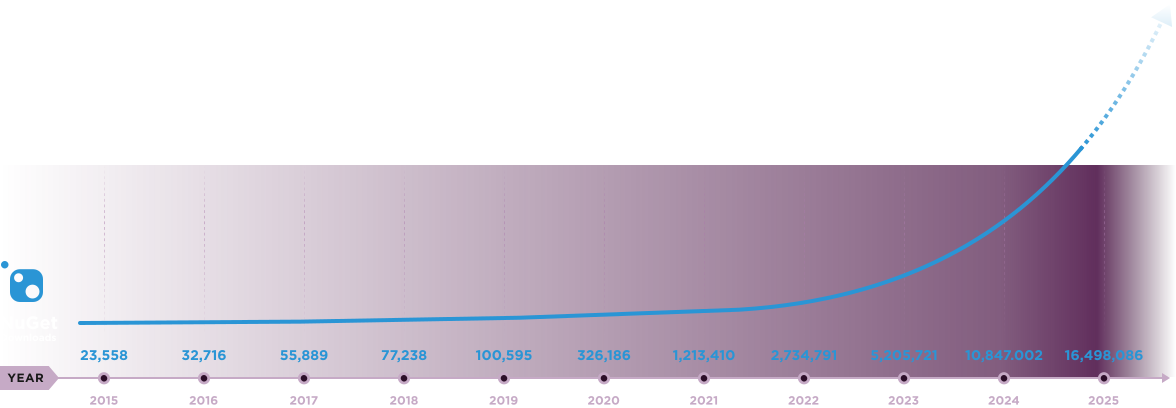
  • Trusted by 2M+ engineers • 14M+ NuGet installs.
  • Teams report 40% dev-time saved vs DIY/OSS wrappers.
  • Redistribution/SaaS options available.
  • Procurement-friendly: perpetual license, optional renewals, invoice available, multiple payment options (including local).
  • 30-day money-back guarantee.

What our Customers say about IronPDF?

Agorus40%SAVING

quote_symbolWhere in the past we might have to go out and use one plug-in or one package for OCR, and another one for PDF, having them all integrated into one low-cost package was really great for us.

David JonesDavid JonesLead Software EngineerRead the case study

Green2View

Green2View savings chartSAVING20%

Green2view achieved 20% savings, 30% faster document turnaround, and 100% compliance.

Read the case study
WILLAN

WILLAN savings chartLESS ADMIN WORK40%

It just works—automated PDF generation delivers pixel-perfect financial reports every time.

Read the case study

Every time developers ask, it's a YES! from IronPDF

Is IronPDF a maintained alternative to wkhtmltopdf in C#?YES!

Can I convert HTML to PDF without shelling out to wkhtmltopdf.exe?YES!

Can I stop shipping and locating a native wkhtmltopdf binary?YES!

Does IronPDF render modern CSS, flexbox, grid, and JavaScript wkhtmltopdf cannot?YES!

Can I edit, merge, sign, and extract from PDFs, not only generate them?YES!

Can IronPDF replace an archived wkhtmltopdf install with security in mind?YES!

Can I render pixel-perfect PDFs from complex HTML5, CSS3, and JavaScript?YES!

Can I convert an HTML string to PDF in one line of C# code?YES!

Can I convert a URL to PDF with authentication, cookies, and custom headers?YES!

Can I generate a PDF from Razor, CSHTML, or ASPX views?YES!

Can I add custom headers, footers, page numbers, and watermarks during conversion?YES!

Can I run HTML to PDF conversion in Docker, Azure Functions, or AWS Lambda?YES!

Can I deploy my application using the library to Linux, macOS, or Windows, including Docker containers?YES!

Is the library thread-safe for use in highly concurrent, multi-threaded server applications and APIs?YES!

Can I set custom viewport dimensions and print media CSS to control responsive layouts?YES!

Is IronPDF compatible with Azure Functions?YES!

Can I permanently redact sensitive text and images from PDF documents?YES!

Can I generate a PDF from a URL that requires authentication via custom headers, cookies, or form logins?YES!

Can I access PDF DOM through ObjectModel property?YES!

Can I programmatically fill, read, and flatten interactive AcroForm?YES!

Does it support generating PDF/A and PDF/UA compliant documents for archiving and accessibility standards?YES!

Can I secure a document with 256-bit AES password encryption and set user permissions?YES!

Can I apply and verify digital signatures on a PDF using X.509 certificates?YES!

Can I test IronPDF in my live project for free now?YES! Click here to start your 30-day free trial

World-Class Engineering,
24-Hour Support

Talk to an Expert

20 Million NuGet Installs and Only Accelerating

20M+2026

Ready to Get Started?

Nuget Downloads 20,389,208Version:2026.8just released

Get your free 30-day Trial Key instantly.

No credit card or account creation required
Key in blue circle

Get your free 30-day Trial Key instantly.

bullet_checkedNo credit card or account creation required
  • Logo Aetna
  • Logo NASA
  • Logo GE
  • Logo Porsche
  • Logo USDA
  • Logo Qatar
Join Millions of Engineers who’ve tried IronPDF
Book your free Live Demo
Booking Badge related to IronPDF Product Demo

Trusted by Millions of Engineers Worldwide

Iron Software's customer logos
Get Your No-Obligation Consult
Complete the form below or email sales@ironsoftware.com
Your details will always be kept confidential.
Trusted by Millions of Engineers Worldwide
Iron Software's customer logos
Get your free 30-day Trial Key instantly.
No credit card or account creation required