


C#でPDF/A準拠のPDFアーカイブを作成・PDF変換する方法

.NET開発者はIronPDFを使用してC#でPDF/Aコンプライアンスに準拠し、ISO 19005規格に準拠したアーカイブPDFを作成、変換、検証することができます。 HTMLをPDF/Aにレンダリングし、既存のファイルをPDF/A-1b、PDF/A-2b、PDF/A-3bに変換することから、ZUGFeRDやFactur-X e-invoicingに準拠するためのソースデータを埋め込むことまで、.NETエコシステムを離れることなく、PDF/A変換**のワークフローを完全に処理します。
TL;DR: クイックスタート ガイド
このチュートリアルでは、C#でPDF/A準拠のドキュメントを作成、変換、検証する方法について説明します。
- 対象者:長期保存や規制アーカイブのためにドキュメントを生成するアプリケーションを構築する.NET開発者(政府の記録管理、法的提出、財務監査証跡、医療記録の保持、PDF/Aが厳しいコンプライアンス要件である電子請求書プラットフォームなど)。
- 構築するもの:ゼロからのHTML-to-PDF/Aレンダリング、既存のPDFのPDF/A-1b/2b/3bへの変換、ZUGFeRD/Factur-X e-invoicingのための埋め込みソースデータ添付、障害報告を伴うPDF/Aコンプライアンス検証、NARA、法廷文書、医療記録要件のための実世界のアーカイブパターン。
- Where it runs: あらゆる.NET環境 - .NET 10、.NET 8 LTS、.NET Framework 4.6.2+、.NET Standard 2.0。PDF/A 変換と検証は完全にローカルで実行されます; 生成に外部バリデータツールは必要ありません。
- このアプローチを使用する場合:アプリケーションが、請求書、契約書、コンプライアンスレポート、裁判所提出書類、医療記録など、長期的に存続しなければならないドキュメントを生成し、規制上の義務(NARA、EUアーカイブ基準、HIPAA、SEC)が自己完結型で検証可能なPDF/Aフォーマットを必要とする場合。
- 技術的に重要な理由 標準のPDFは、外部フォントを参照したり、アクティブコンテンツを埋め込んだり、システム固有のレンダリングに依存したりすることができます。PDF/A は、これらの依存関係をフォーマット レベルで禁止し、レンダリングに必要なすべてをファイルに直接埋め込み、どの準拠したビューアでも同一の出力を無期限に保証します。
わずか数行のコードで既存のPDFをPDF/Aに変換します:

IronPDFを購入または30日間のトライアルにサインアップした後、アプリケーションの最初にライセンスキーを追加してください。
IronPdf.License.LicenseKey = "KEY";IronPdf.License.LicenseKey = "KEY";Imports IronPdf
IronPdf.License.LicenseKey = "KEY" 購入の準備ができていませんか?
目次
- PDF/Aを理解する
- PDF/Aドキュメントの作成
- 高度なPDF/Aワークフロー
- 現実世界のアーカイブシナリオ
PDF/Aとは何ですか、そしてなぜ重要なのですか?
PDF/Aは、PDFフォーマット(ISO 19005)のISO標準化サブセットで、電子文書の長期的で信頼性の高いアーカイブのために特別に設計されています。 外部フォントを参照したり、外部コンテンツにリンクしたり、システム固有のレンダリング動作に依存したりする標準的なPDFとは異なり、PDF/Aファイルは完全に自己完結しています。 ドキュメントのレンダリングに必要なすべてのフォント、カラープロファイル、メタデータは、ファイル内に直接埋め込まれています。
なぜなら、PDF/A文書は、オペレーティングシステムやソフトウェアのバージョンに関係なく、どのような準拠ビューア上でも、現在でも100年後でも同じようにレンダリングされるからです。 消える可能性のある外部リソースへの依存や、特定のフォントがインストールされていることへの依存、色や透明度の表示方法のあいまいさなどはありません。
技術的な耐久性だけでなく、PDF/Aへの準拠は単なるベストプラクティスではなく、しばしば厳しい要件となります。PDF/Aを義務付けている業界や機関には次のようなものがあります:
法律と司法システム - 米国、EU、その他多くの管轄区域の裁判所は、電子的な提出物に対してPDF/Aを要求しているか、強く推奨しています。 米国連邦裁判所システムのCM/ECFファイリング基準では、長期的な記録保持に望ましいフォーマットとしてPDF/Aを参照しています。
政府機関 - 米国国立公文書記録管理局(NARA)は、永久的な電子記録を転送するために受け入れられるフォーマットとしてPDF/Aを指定しています。 同様に、欧州委員会は、特定の公式出版物や規制当局への提出物にPDF/Aを義務付けています。
金融サービスおよび監査 - SECのような規制機関はPDF/Aによる提出を受け入れており、内部監査チームは、財務諸表、報告書、および裏付け文書が長期間にわたって変更されず検証可能であることを保証するために、頻繁にPDF/Aを採用しています。
ヘルスケア - 医療記録の保存規制(米国のHIPAAなど)は特定のファイル形式を義務付けていませんが、PDF/Aは長期的な可読性を保証するため、患者記録、画像レポート、臨床文書をアーカイブするための事実上の標準となっています。
つまり、PDF/Aは、時間、システム、組織の境界を越えて、ドキュメントを変更せずに存続させなければならない場合に使用するフォーマットです。 請求書、契約書、コンプライアンス報告書、医療記録など、数年後に参照される可能性のある文書を作成するアプリケーションには、PDF/Aが適しています。
PDF/Aバージョンの説明
PDF/A標準は、いくつかのバージョンを経て進化してきました。各バージョンは、厳格なアーカイブ保証を維持しながら、PDFの追加機能をサポートするために最後のバージョンをベースにしています。 バージョン間の違いを理解することは、ユースケースに適したものを選択するために不可欠です。
PDF/A-1(基本アーカイブ)
PDF/A-1(ISO 19005-1:2005)は、PDF 1.4をベースにした規格の最初のバージョンです。すべてのフォントが埋め込まれていなければならない; 暗号化は禁止されています; オーディオ/ビデオコンテンツは使用できません; JavaScriptは使用できません。 PDF/A-1には2つの適合レベルがあります:
PDF/A-1b(基本):文書の信頼できる視覚的な再現を保証します。 これは最低限の適合レベルであり、文書がレンダリングされたときに正しく見えることを保証します。
PDF/A-1a (アクセシブル): アクセシビリティのためのタグ付けされたコンテンツ、Unicode 文字マッピング、論理的な読み取り順序など、1b の上に構造的および意味的な要件を追加します。 これはより高い基準であり、アクセシビリティの遵守が重要な場合に求められます。
PDF/A-1は最も広くサポートされているバージョンであり、特に、新しい機能よりも幅広い互換性が優先される法律や政府の文脈では、現在でも一般的に使用されています。
PDF/A-2 (JPEG2000, 透明)
PDF/A-2 (ISO 19005-2:2011)はPDF 1.7に基づいており、PDF/A-1では利用できなかった機能のサポートを導入しています:
JPEG2000画像圧縮: PDF/A-1で利用可能なJPEG圧縮よりも優れた品質対サイズ比を提供します。
透過性とレイヤーのサポート:すべてを不透明な要素にフラット化することなく、より複雑なビジュアルレイアウトを可能にします。
埋め込み PDF/A 添付ファイル: PDF/A-2 文書は、他の PDF/A 準拠のファイルを添付ファイルとして埋め込むことができます (ただし、PDF/A ファイルのみで、任意の形式は埋め込めません)。
PDF/A-2 には、PDF/A-1 と同じ準拠レベル (2b および 2a) に加えて、新しいレベルPDF/A-2u ( Unicode ) が含まれます。このレベルでは、すべてのテキストに Unicode マッピングが必要ですが、レベル a の完全な構造タグ付けは必要ありません。
PDF/A-3(埋め込みファイル)
PDF/A-3(ISO 19005-3:2012)は、現代のワークフローにとって最も重要な拡張機能です。 これは、PDF/A-2(PDF 1.7)と同じベースを共有し、そのすべての機能を保持していますが、1つの重要な機能が追加されています:PDF/A文書内にあらゆる形式のファイルを埋め込む能力です。
つまり、元のXMLソースデータ、CSVエクスポート、スプレッドシート、またはその他の機械可読ファイルを、人間が読めるビジュアルドキュメントと一緒に添付することができます。 PDF/A-3コンテナは、プレゼンテーションレイヤーと基礎となるデータの両方を保持する単一のパッケージとなります。
この能力は、現代の電子請求書作成標準の基礎となるものです:
ZUGFeRD:もともとはドイツで、現在はFactur-XとしてEU全域で採用されています。 構造化されたXML請求書データ(Cross-Industry Invoice形式)をPDF/A-3ドキュメントに埋め込みます。1つのファイルで、人間と機械の両方の処理ニーズに対応します。
PDF/A-3 準拠レベルは同じパターンに従います: 3b (ビジュアル)、3a (アクセス可能 + タグ付き)、および 3u (Unicode マップ)。
PDF/A-4(PDF2.0ベース)
PDF/A-4(ISO 19005-4:2020)は、PDF 2.0に基づく最新バージョンです。コンフォーマンスレベルの構造が簡素化されています; a/b/u の区別はなくなりました。 代わりに、PDF/A-4は3つのプロファイルを定義しています:
PDF/A-4:一般的なアーカイブ用の基本プロファイルです。
PDF/A-4f:あらゆるフォーマットの埋め込みファイルを許可します(PDF/A-3に似ています)。
PDF/A-4e:特にエンジニアリング文書のために設計されています; 3Dコンテンツ、リッチメディア、その他の技術要素に対応しています。
PDF/A-4 は、タグ付け構造の改善や、XMP (拡張可能メタデータ プラットフォーム) を使用したメタデータ機能の強化など、PDF 2.0 自体の改善の恩恵も受けています。
PDF/A-4の採用は拡大していますが、PDF/A-2やPDF/A-3と比べると、ビューアやバリデータによる普遍的なサポートはまだ不十分です。
どのバージョンを使うべきですか?
適切なPDF/Aバージョンの選択は、お客様の特定の要件によって異なります:
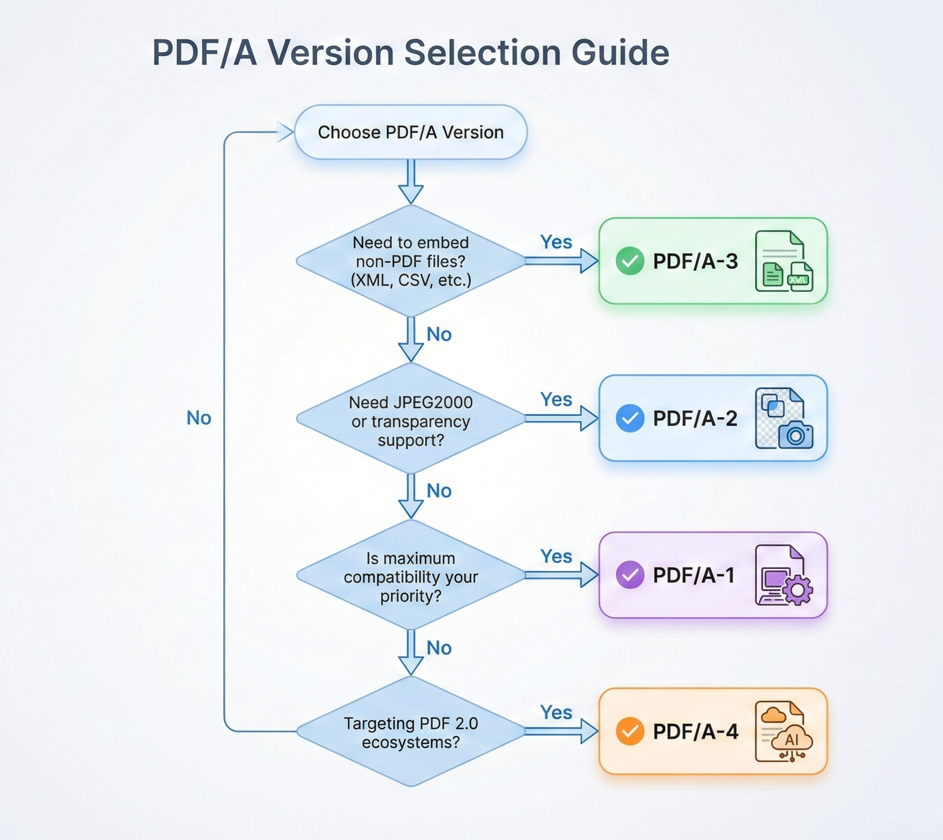
最大限の互換性: 既存のシステム、バリデータ、ビューア(特に法律や政府の文脈)には、PDF/A-1bまたはPDF/A-2bを使用してください。
電子請求書: ZUGFeRD、Factur-X、または埋め込みソースデータを必要とする同様の規格には、PDF/A-3bを使用してください。
アクセシビリティ準拠: Section 508 または WCAG の要件については、使用しているバージョンの a 準拠レベル (PDF/A-2a、または PDF/A-3a) を選択します。
最新のワークフロー:コンシューマがPDF 2.0をサポートする最新の機能については、PDF/A-4を使用してください。
迷ったときは、PDF/A-3bが最新の機能と幅広いサポートの間で最高のバランスを提供します。
PDF/Aドキュメントをゼロから作成する
PDF/Aとは何か、どのバージョンをターゲットにすべきかを理解したところで、コードに入りましょう。 IronPdfはHTMLコンテンツから直接PDF/A準拠のドキュメントを生成したり、既存のPDFをPDF/Aフォーマットに変換することを簡単にします。
IronPDFのインストール
始める前に、.NETプロジェクトにIronPDF NuGetパッケージをインストールしてください。 NuGetパッケージマネージャーコンソール、.NET CLI、またはVisual Studio NuGet UIを介して行うことができます。
Install-Package IronPdfInstall-Package IronPdfまたは.NET CLIを使用して:
dotnet add package IronPdfdotnet add package IronPdfIronPdfは.NET Framework 4.6.2+、.NET Core、.NET 5+、.NET Standard 2.0をサポートしているため、互換性を気にすることなく、ほぼすべての最新 for .NETプロジェクトにフィットします。
HTMLをPDF/Aにレンダリングする
最も一般的なワークフローは、HTMLコンテンツからPDFを生成し、PDF/A形式で直接保存することです。 IronPDF の ChromePdfRenderer は HTML から PDF への変換を処理し、 SaveAsPdfA メソッドはコンプライアンス変換を 1 つのステップで処理します。
:path=/static-assets/pdf/content-code-examples/tutorials/pdfa-archiving-csharp/pdfa-render-html-to-pdfa.csusing IronPdf;
// Create HTML content for the document
string htmlContent = @"
E html>
le>
body { font-family: Arial, sans-serif; margin: 40px; }
h1 { color: #2c3e50; }
.section { margin: 20px 0; }
table { width: 100%; border-collapse: collapse; }
th, td { border: 1px solid #ddd; padding: 10px; text-align: left; }
th { background: #3498db; color: white; }
yle>
Quarterly Financial Report</h1>
eport Period: Q4 2025</p>
class='section'>
<table>
<tr><th>Metric</th><th>Value</th></tr>
<tr><td>Total Revenue</td><td>$4.2M</td></tr>
<tr><td>Operating Expenses</td><td>$2.1M</td></tr>
<tr><td>Net Income</td><td>$2.1M</td></tr>
</table>
v>
his document is archived in PDF/A-3b format for long-term preservation.</p>
;
// Render HTML to PDF
var renderer = new ChromePdfRenderer();
using var pdf = renderer.RenderHtmlAsPdf(htmlContent);
// Save as PDF/A-3b for archival compliance
pdf.SaveAsPdfA("quarterly-report-archived.pdf", PdfAVersions.PdfA3b);Imports IronPdf
' Create HTML content for the document
Dim htmlContent As String = "
<!DOCTYPE html>
<html>
<head>
<style>
body { font-family: Arial, sans-serif; margin: 40px; }
h1 { color: #2c3e50; }
.section { margin: 20px 0; }
table { width: 100%; border-collapse: collapse; }
th, td { border: 1px solid #ddd; padding: 10px; text-align: left; }
th { background: #3498db; color: white; }
</style>
</head>
<body>
<h1>Quarterly Financial Report</h1>
<p>Report Period: Q4 2025</p>
<div class='section'>
<table>
<tr><th>Metric</th><th>Value</th></tr>
<tr><td>Total Revenue</td><td>$4.2M</td></tr>
<tr><td>Operating Expenses</td><td>$2.1M</td></tr>
<tr><td>Net Income</td><td>$2.1M</td></tr>
</table>
</div>
<p>This document is archived in PDF/A-3b format for long-term preservation.</p>
</body>
</html>
"
' Render HTML to PDF
Dim renderer As New ChromePdfRenderer()
Using pdf = renderer.RenderHtmlAsPdf(htmlContent)
' Save as PDF/A-3b for archival compliance
pdf.SaveAsPdfA("quarterly-report-archived.pdf", PdfAVersions.PdfA3b)
End Using出力
この例では、IronPDFのChromiumベースのレンダリングエンジンを使用してHTMLをPDFにレンダリングしています。 次に、SaveAsPdfA メソッドは、必要なすべてのフォントを埋め込み、必要に応じてカラー スペースを変換し、禁止されている機能 ( JavaScriptや外部リンクなど) を削除し、準拠した XMP メタデータを書き込みます。 その結果、完全に自己完結したPDF/A-3bファイルが完成し、アーカイブとして保存できるようになります。
このアプローチはIronPDFの他のレンダリング機能ともシームレスに機能します。 ヘッダーとフッターの適用、ページサイズと余白の設定、CSSスタイルの挿入、そしてSaveAsPdfA呼び出しは、PDFの生成方法に関係なく、コンプライアンス変換を処理します。
既存のPDFをPDF/Aに変換する
HTMLから始めるとは限りません。 実世界の多くのシナリオでは、スキャナ、サードパーティシステム、レガシーアーカイブ、またはユーザーアップロードから既存のPDFファイルを受け取り、準拠した保存のためにPDF/Aに変換する必要があります。
IronPDF はこれを同じ SaveAsPdfA メソッドで処理します。
:path=/static-assets/pdf/content-code-examples/tutorials/pdfa-archiving-csharp/pdfa-convert-existing-pdf.csusing IronPdf;
// Load an existing PDF file
using var pdf = PdfDocument.FromFile("existing-document.pdf");
// Convert and save as PDF/A-3b
// IronPDF automatically embeds fonts, converts color spaces, adds XMP metadata,
// and removes non-compliant features during conversion
pdf.SaveAsPdfA("existing-document-archived.pdf", PdfAVersions.PdfA3b);
// Alternative: Use ConvertToPdfA for in-memory conversion
using var pdf2 = PdfDocument.FromFile("another-document.pdf");
using var pdfA = pdf2.ConvertToPdfA(PdfAVersions.PdfA2b);
pdfA.SaveAs("another-document-archived.pdf");Imports IronPdf
' Load an existing PDF file
Using pdf As PdfDocument = PdfDocument.FromFile("existing-document.pdf")
' Convert and save as PDF/A-3b
' IronPDF automatically embeds fonts, converts color spaces, adds XMP metadata,
' and removes non-compliant features during conversion
pdf.SaveAsPdfA("existing-document-archived.pdf", PdfAVersions.PdfA3b)
End Using
' Alternative: Use ConvertToPdfA for in-memory conversion
Using pdf2 As PdfDocument = PdfDocument.FromFile("another-document.pdf")
Using pdfA As PdfDocument = pdf2.ConvertToPdfA(PdfAVersions.PdfA2b)
pdfA.SaveAs("another-document-archived.pdf")
End Using
End Using変換中、IronPdfは既存のPDFを分析し、必要な変換を行います:参照されているが含まれていないフォントの埋め込み、RGBまたはCMYKカラースペースの適切なプロファイルへの変換、必要なXMPメタデータの追加、暗号化、マルチメディア、JavaScriptのような非準拠の機能の削除。 すぐにディスクに保存せずにメモリ内で変換する場合は、ConvertToPdfA メソッドを使用することもできます。これは、変換後に追加の処理が続くパイプラインに便利です。
このパターンは、レガシードキュメントストアを最新のアーカイブ標準に準拠させる必要がある移行プロジェクトに最適です。
ソースデータの埋め込み (PDF/A-3)
PDF/A-3規格の最も強力な機能の1つは、XML、CSV、JSON、スプレッドシートなど、任意のファイルをPDF文書内に直接埋め込めることです。 これにより、PDFは、純粋に視覚的な文書から、人間が読めるプレゼンテーションと機械が読めるソースデータの両方を1つのファイルに格納するハイブリッドコンテナに変換されます。
ビジュアルドキュメントと一緒に XML/CSV を添付する
基本的なワークフローはシンプルです。ビジュアルPDFを生成または読み込み、ソースデータファイルを埋め込み添付ファイルとして添付し、PDF/A-3として保存します。IronPDFは、EmbedFileStreamを使用することもできます。 各アプローチは、PDF/Aへの完全準拠を維持しています。
:path=/static-assets/pdf/content-code-examples/tutorials/pdfa-archiving-csharp/pdfa-embed-xml-attachment.csusing IronPdf;
using System.Collections.Generic;
// Load the visual PDF document
using var pdf = PdfDocument.FromFile("financial-report.pdf");
// Prepare XML source data to embed
string xmlData = @"<?xml version='1.0' encoding='UTF-8'?>
alReport>
iod>Q4 2025</Period>
enue>4200000</Revenue>
enses>2100000</Expenses>
Income>2100000</NetIncome>
ialReport>";
byte[] xmlBytes = System.Text.Encoding.UTF8.GetBytes(xmlData);
// Configure the embedded file
var xmlConfig = new EmbedFileConfiguration(EmbedFileType.xml)
{
EmbedFileName = "financial-data.xml",
AFDesc = "Source financial data in XML format",
AFRelationship = AFRelationship.Data
};
// Create embed file collection
var embedFiles = new List<EmbedFileByte>
{
new EmbedFileByte(xmlBytes, xmlConfig)
};
// Convert to PDF/A-3b with embedded data
using var archivedPdf = pdf.ConvertToPdfA(embedFiles, PdfAVersions.PdfA3b);
archivedPdf.SaveAs("financial-report-with-data.pdf");Imports IronPdf
Imports System.Collections.Generic
Imports System.Text
' Load the visual PDF document
Using pdf = PdfDocument.FromFile("financial-report.pdf")
' Prepare XML source data to embed
Dim xmlData As String = "<?xml version='1.0' encoding='UTF-8'?>
<FinancialReport>
<Period>Q4 2025</Period>
<Revenue>4200000</Revenue>
<Expenses>2100000</Expenses>
<NetIncome>2100000</NetIncome>
</FinancialReport>"
Dim xmlBytes As Byte() = Encoding.UTF8.GetBytes(xmlData)
' Configure the embedded file
Dim xmlConfig As New EmbedFileConfiguration(EmbedFileType.xml) With {
.EmbedFileName = "financial-data.xml",
.AFDesc = "Source financial data in XML format",
.AFRelationship = AFRelationship.Data
}
' Create embed file collection
Dim embedFiles As New List(Of EmbedFileByte) From {
New EmbedFileByte(xmlBytes, xmlConfig)
}
' Convert to PDF/A-3b with embedded data
Using archivedPdf = pdf.ConvertToPdfA(embedFiles, PdfAVersions.PdfA3b)
archivedPdf.SaveAs("financial-report-with-data.pdf")
End Using
End Usingこのパターンは、財務報告のワークフローで特に有用です。ビジュアルなPDFは、書式化された貸借対照表や損益計算書かもしれませんが、添付のXMLやCSVには、レポートを生成するために使用された生データが含まれています。 監査人は、視覚的な文書を検査し、埋め込まれたソースデータを使用して、その基となる数値を独立して検証できます。これらはすべて単一のファイルから行えます。ConvertToPdfA メソッドのコレクションパラメータに追加のファイルパスまたはバイト配列を渡すことで、同じ文書に複数の添付ファイルを埋め込むことができます。
ZUGFeRDとFactur-Xの電子請求書コンプライアンス
ZUGFeRD(Zentraler User Guide des Forums elektronische Rechnung Deutschland)とその国際版であるFactur-Xは、PDF/A-3文書に構造化請求書データをどのように埋め込むべきかを規定した電子請求書規格です。 ビジュアルなPDFは人間が読める請求書として機能し、埋め込まれたXMLファイル(Cross-Industry Invoice(CII)フォーマットに準拠)は機械処理可能なデータを運びます。
ZUGFeRD/Factur-Xに準拠するための主な要件は以下のとおりです:
PDFはPDF/A-3b(最低限)に準拠している必要があります。 埋め込むXMLファイルは、UN/CEFACT Cross-Industry Invoiceスキーマに従わなければなりません。 XML ファイルは、標準の仕様に従って命名する必要があります (通常、Factur-X の場合は factur-x.xml、ZUGFeRD の場合は zugferd-invoice.xml)。 ZUGFeRD/Factur-Xインボイスとしてドキュメントを識別するために、特定のXMPメタデータプロパティを設定する必要があります。
IronPDF の EmbedFileConfiguration クラスを使用すると、これらの要件をきめ細かく制御できます。 対象システムが期待する電子請求書プロファイルと正確に一致するように、ConformanceLevel (ConformanceLevel.XRECHNUNG など)、PropertyVersion、および AFRelationship プロパティを設定できます。
IronPDFでZUGFeRDに準拠した請求書を作成する方法はこちらです:
:path=/static-assets/pdf/content-code-examples/tutorials/pdfa-archiving-csharp/pdfa-zugferd-invoice.csusing IronPdf;
using System.Collections.Generic;
// Create visual invoice HTML
string invoiceHtml = @"
E html>
le>
body { font-family: Arial, sans-serif; margin: 40px; }
.header { border-bottom: 2px solid #e74c3c; padding-bottom: 15px; }
h1 { color: #e74c3c; }
.invoice-details { margin: 30px 0; }
.line-item { display: flex; justify-content: space-between; padding: 10px 0; border-bottom: 1px solid #eee; }
.total { font-size: 20px; font-weight: bold; margin-top: 20px; text-align: right; }
yle>
class='header'>
<h1>INVOICE #INV-2026-0042</h1>
<p>Date: February 7, 2026</p>
v>
class='invoice-details'>
<p><strong>Bill To:</strong> Acme Corporation</p>
<p><strong>Address:</strong> 123 Business Ave, Suite 100</p>
v>
class='line-item'><span>Software License (Enterprise)</span><span>$2,499.00</span></div>
class='line-item'><span>Annual Support Contract</span><span>$499.00</span></div>
class='line-item'><span>Implementation Services</span><span>$1,500.00</span></div>
class='total'>Total: $4,498.00</div>
tyle='margin-top: 40px; font-size: 12px; color: #666;'>
This invoice complies with ZUGFeRD/Factur-X e-invoicing standards.
;
// Render the visual invoice
var renderer = new ChromePdfRenderer();
using var invoicePdf = renderer.RenderHtmlAsPdf(invoiceHtml);
// Prepare ZUGFeRD/Factur-X XML invoice data
string zugferdXml = @"<?xml version='1.0' encoding='UTF-8'?>
ssIndustryInvoice xmlns:rsm='urn:un:unece:uncefact:data:standard:CrossIndustryInvoice:100'>
:ExchangedDocument>
<ram:ID>INV-2026-0042</ram:ID>
<ram:IssueDateTime>2026-02-07</ram:IssueDateTime>
m:ExchangedDocument>
:SupplyChainTradeTransaction>
<ram:ApplicableHeaderTradeSettlement>
<ram:InvoiceCurrencyCode>USD</ram:InvoiceCurrencyCode>
<ram:SpecifiedTradeSettlementHeaderMonetarySummation>
<ram:GrandTotalAmount>4498.00</ram:GrandTotalAmount>
</ram:SpecifiedTradeSettlementHeaderMonetarySummation>
</ram:ApplicableHeaderTradeSettlement>
m:SupplyChainTradeTransaction>
ossIndustryInvoice>";
byte[] xmlBytes = System.Text.Encoding.UTF8.GetBytes(zugferdXml);
// Configure for ZUGFeRD/Factur-X compliance
var zugferdConfig = new EmbedFileConfiguration(EmbedFileType.xml)
{
EmbedFileName = "factur-x.xml",
AFDesc = "Factur-X Invoice Data",
ConformanceLevel = ConformanceLevel.EN16931,
SchemaNamespace = SchemaNamespace.facturX,
SchemaPrefix = SchemaPrefix.fx,
PropertyVersion = PropertyVersion.v1,
AFRelationship = AFRelationship.Alternative
};
var embedFiles = new List<EmbedFileByte>
{
new EmbedFileByte(xmlBytes, zugferdConfig)
};
// Convert to PDF/A-3b with embedded ZUGFeRD data
using var zugferdInvoice = invoicePdf.ConvertToPdfA(embedFiles, PdfAVersions.PdfA3b);
// Set invoice metadata
zugferdInvoice.MetaData.Title = "Invoice INV-2026-0042";
zugferdInvoice.MetaData.Author = "IronSoftware Billing";
zugferdInvoice.MetaData.Subject = "ZUGFeRD/Factur-X Compliant Invoice";
zugferdInvoice.SaveAs("invoice-zugferd.pdf");Imports IronPdf
Imports System.Collections.Generic
Imports System.Text
' Create visual invoice HTML
Dim invoiceHtml As String = "
<!DOCTYPE html>
<html>
<head>
<style>
body { font-family: Arial, sans-serif; margin: 40px; }
.header { border-bottom: 2px solid #e74c3c; padding-bottom: 15px; }
h1 { color: #e74c3c; }
.invoice-details { margin: 30px 0; }
.line-item { display: flex; justify-content: space-between; padding: 10px 0; border-bottom: 1px solid #eee; }
.total { font-size: 20px; font-weight: bold; margin-top: 20px; text-align: right; }
</style>
</head>
<body>
<div class='header'>
<h1>INVOICE #INV-2026-0042</h1>
<p>Date: February 7, 2026</p>
</div>
<div class='invoice-details'>
<p><strong>Bill To:</strong> Acme Corporation</p>
<p><strong>Address:</strong> 123 Business Ave, Suite 100</p>
</div>
<div class='line-item'><span>Software License (Enterprise)</span><span>$2,499.00</span></div>
<div class='line-item'><span>Annual Support Contract</span><span>$499.00</span></div>
<div class='line-item'><span>Implementation Services</span><span>$1,500.00</span></div>
<div class='total'>Total: $4,498.00</div>
<p style='margin-top: 40px; font-size: 12px; color: #666;'>
This invoice complies with ZUGFeRD/Factur-X e-invoicing standards.
</p>
</body>
</html>"
' Render the visual invoice
Dim renderer As New ChromePdfRenderer()
Using invoicePdf = renderer.RenderHtmlAsPdf(invoiceHtml)
' Prepare ZUGFeRD/Factur-X XML invoice data
Dim zugferdXml As String = "<?xml version='1.0' encoding='UTF-8'?>
<rsm:CrossIndustryInvoice xmlns:rsm='urn:un:unece:uncefact:data:standard:CrossIndustryInvoice:100'>
<rsm:ExchangedDocument>
<ram:ID>INV-2026-0042</ram:ID>
<ram:IssueDateTime>2026-02-07</ram:IssueDateTime>
</rsm:ExchangedDocument>
<rsm:SupplyChainTradeTransaction>
<ram:ApplicableHeaderTradeSettlement>
<ram:InvoiceCurrencyCode>USD</ram:InvoiceCurrencyCode>
<ram:SpecifiedTradeSettlementHeaderMonetarySummation>
<ram:GrandTotalAmount>4498.00</ram:GrandTotalAmount>
</ram:SpecifiedTradeSettlementHeaderMonetarySummation>
</ram:ApplicableHeaderTradeSettlement>
</rsm:SupplyChainTradeTransaction>
</rsm:CrossIndustryInvoice>"
Dim xmlBytes As Byte() = Encoding.UTF8.GetBytes(zugferdXml)
' Configure for ZUGFeRD/Factur-X compliance
Dim zugferdConfig As New EmbedFileConfiguration(EmbedFileType.xml) With {
.EmbedFileName = "factur-x.xml",
.AFDesc = "Factur-X Invoice Data",
.ConformanceLevel = ConformanceLevel.EN16931,
.SchemaNamespace = SchemaNamespace.facturX,
.SchemaPrefix = SchemaPrefix.fx,
.PropertyVersion = PropertyVersion.v1,
.AFRelationship = AFRelationship.Alternative
}
Dim embedFiles As New List(Of EmbedFileByte) From {
New EmbedFileByte(xmlBytes, zugferdConfig)
}
' Convert to PDF/A-3b with embedded ZUGFeRD data
Using zugferdInvoice = invoicePdf.ConvertToPdfA(embedFiles, PdfAVersions.PdfA3b)
' Set invoice metadata
zugferdInvoice.MetaData.Title = "Invoice INV-2026-0042"
zugferdInvoice.MetaData.Author = "IronSoftware Billing"
zugferdInvoice.MetaData.Subject = "ZUGFeRD/Factur-X Compliant Invoice"
zugferdInvoice.SaveAs("invoice-zugferd.pdf")
End Using
End Using出力
このアプローチにより、請求書発行システムは、標準に準拠した単一のパッケージで、人間のレビュー(視覚的なPDF)と自動処理(埋め込まれたXML)の両方を満たす文書を作成することができます。
監査証跡の保存
電子請求書だけでなく、PDF/A-3の埋め込み機能は、完全な監査証跡を維持することが重要なあらゆるワークフローにとって価値があります。 元のソースデータ、処理ログ、または変更履歴を最終文書と一緒に添付することで、将来のどの時点でも独立して検証できる自己完結型の記録を作成します。
一般的な監査証跡の埋め込みパターンには、次のようなものがあります:
財務諸表 - フォーマットされた財務報告書と一緒に、生の会計データ(ERPシステムからのCSVまたはXMLエクスポート)を埋め込みます。 監査員は、元のシステムにアクセスすることなく、ビジュアルドキュメントの数字がソースデータと一致していることを検証できます。
規制当局への提出書類 - オリジナルの提出データ、検証結果、裏付けとなる計算結果を、最終提出書類内の埋め込みファイルとして添付してください。 これにより、出願の完全な記録を含む単一のアーカイブパッケージが作成されます。
契約管理 - バージョン履歴、承認チェーン、または署名されたメタデータファイルを、最終的に締結された契約PDF内に埋め込みます。 これにより、ドキュメントのライフサイクル全体が1つのアーカイブファイルに保存されます。
:path=/static-assets/pdf/content-code-examples/tutorials/pdfa-archiving-csharp/pdfa-audit-trail.csusing IronPdf;
using System;
using System.Collections.Generic;
using System.Text.Json;
// Load the final document to archive
using var pdf = PdfDocument.FromFile("executed-contract.pdf");
// Create audit trail data
var auditTrail = new
{
DocumentId = "CONTRACT-2026-00142",
CreatedDate = "2026-01-15T09:30:00Z",
FinalizedDate = "2026-02-07T14:22:00Z",
Versions = new[]
{
new { Version = 1, Date = "2026-01-15", Action = "Draft created", User = "john.smith@company.com" },
new { Version = 2, Date = "2026-01-20", Action = "Legal review completed", User = "legal@company.com" },
new { Version = 3, Date = "2026-02-01", Action = "Client revisions incorporated", User = "john.smith@company.com" },
new { Version = 4, Date = "2026-02-07", Action = "Final execution", User = "ceo@company.com" }
},
Signatures = new[]
{
new { Signer = "Company CEO", SignedDate = "2026-02-07T14:20:00Z", IPAddress = "192.168.1.100" },
new { Signer = "Client Representative", SignedDate = "2026-02-07T14:22:00Z", IPAddress = "10.0.0.50" }
},
Checksum = "SHA256:a1b2c3d4e5f6..."
};
string auditJson = JsonSerializer.Serialize(auditTrail, new JsonSerializerOptions { WriteIndented = true });
byte[] auditBytes = System.Text.Encoding.UTF8.GetBytes(auditJson);
// Configure audit trail attachment
var auditConfig = new EmbedFileConfiguration(EmbedFileType.xml)
{
EmbedFileName = "audit-trail.json",
AFDesc = "Complete document audit trail and version history",
AFRelationship = AFRelationship.Supplement
};
// Create validation log
string validationLog = @"
on Report
=========
: CONTRACT-2026-00142
d: 2026-02-07T14:25:00Z
erformed:
ll required fields present
ignature blocks completed
ate formats valid
urrency amounts verified
egal clauses match template v2.1
atus: APPROVED FOR ARCHIVAL
byte[] validationBytes = System.Text.Encoding.UTF8.GetBytes(validationLog);
var validationConfig = new EmbedFileConfiguration(EmbedFileType.xml)
{
EmbedFileName = "validation-report.txt",
AFDesc = "Pre-archive validation report",
AFRelationship = AFRelationship.Supplement
};
// Embed both files
var embedFiles = new List<EmbedFileByte>
{
new EmbedFileByte(auditBytes, auditConfig),
new EmbedFileByte(validationBytes, validationConfig)
};
// Convert to PDF/A-3b with full audit trail
using var archivedContract = pdf.ConvertToPdfA(embedFiles, PdfAVersions.PdfA3b);
// Set archival metadata
archivedContract.MetaData.Title = "Executed Contract - CONTRACT-2026-00142";
archivedContract.MetaData.Author = "Contract Management System";
archivedContract.MetaData.Subject = "Fully executed agreement with audit trail";
archivedContract.MetaData.Keywords = "contract, executed, 2026, archived";
archivedContract.SaveAs("contract-archived-with-audit.pdf");Imports IronPdf
Imports System
Imports System.Collections.Generic
Imports System.Text.Json
' Load the final document to archive
Using pdf = PdfDocument.FromFile("executed-contract.pdf")
' Create audit trail data
Dim auditTrail = New With {
.DocumentId = "CONTRACT-2026-00142",
.CreatedDate = "2026-01-15T09:30:00Z",
.FinalizedDate = "2026-02-07T14:22:00Z",
.Versions = New Object() {
New With {.Version = 1, .Date = "2026-01-15", .Action = "Draft created", .User = "john.smith@company.com"},
New With {.Version = 2, .Date = "2026-01-20", .Action = "Legal review completed", .User = "legal@company.com"},
New With {.Version = 3, .Date = "2026-02-01", .Action = "Client revisions incorporated", .User = "john.smith@company.com"},
New With {.Version = 4, .Date = "2026-02-07", .Action = "Final execution", .User = "ceo@company.com"}
},
.Signatures = New Object() {
New With {.Signer = "Company CEO", .SignedDate = "2026-02-07T14:20:00Z", .IPAddress = "192.168.1.100"},
New With {.Signer = "Client Representative", .SignedDate = "2026-02-07T14:22:00Z", .IPAddress = "10.0.0.50"}
},
.Checksum = "SHA256:a1b2c3d4e5f6..."
}
Dim auditJson As String = JsonSerializer.Serialize(auditTrail, New JsonSerializerOptions With {.WriteIndented = True})
Dim auditBytes As Byte() = System.Text.Encoding.UTF8.GetBytes(auditJson)
' Configure audit trail attachment
Dim auditConfig As New EmbedFileConfiguration(EmbedFileType.xml) With {
.EmbedFileName = "audit-trail.json",
.AFDesc = "Complete document audit trail and version history",
.AFRelationship = AFRelationship.Supplement
}
' Create validation log
Dim validationLog As String = "
on Report
=========
: CONTRACT-2026-00142
d: 2026-02-07T14:25:00Z
erformed:
ll required fields present
ignature blocks completed
ate formats valid
urrency amounts verified
egal clauses match template v2.1
atus: APPROVED FOR ARCHIVAL
"
Dim validationBytes As Byte() = System.Text.Encoding.UTF8.GetBytes(validationLog)
Dim validationConfig As New EmbedFileConfiguration(EmbedFileType.xml) With {
.EmbedFileName = "validation-report.txt",
.AFDesc = "Pre-archive validation report",
.AFRelationship = AFRelationship.Supplement
}
' Embed both files
Dim embedFiles As New List(Of EmbedFileByte) From {
New EmbedFileByte(auditBytes, auditConfig),
New EmbedFileByte(validationBytes, validationConfig)
}
' Convert to PDF/A-3b with full audit trail
Using archivedContract = pdf.ConvertToPdfA(embedFiles, PdfAVersions.PdfA3b)
' Set archival metadata
archivedContract.MetaData.Title = "Executed Contract - CONTRACT-2026-00142"
archivedContract.MetaData.Author = "Contract Management System"
archivedContract.MetaData.Subject = "Fully executed agreement with audit trail"
archivedContract.MetaData.Keywords = "contract, executed, 2026, archived"
archivedContract.SaveAs("contract-archived-with-audit.pdf")
End Using
End UsingPDF/Aコンプライアンスを検証する
文書を作成し、それをPDF/Aと呼ぶだけでは十分ではありません。出力が実際に規格の要件を満たしているかどうかを検証する必要があります。 PDF/Aであると主張しながら検証に失敗したファイルは、アーカイブシステム、政府ポータル、電子請求書プラットフォームでは受け入れられません。
IronPDF の SaveAsPdfA および ConvertToPdfA メソッドは、フォント埋め込み、カラー スペースの変換、禁止機能の削除、XMP メタデータの書き込みなど、コンプライアンス変換の面倒な作業を処理します。 ただし、出力を独自に検証するには、veraPDF(業界標準のオープンソースPDF/Aバリデータ)やAdobe Acrobat Proの内蔵プリフライトツールなど、専用の外部ツールを使って検証する必要があります。 veraPDFをCI/CDパイプラインまたは文書処理ワークフローに統合することで、作成されたすべてのファイルが保存または配布される前に、主張された標準を満たしていることを、権威あるサードパーティが確認することができます。
よくあるコンプライアンスの失敗と修正
IronPDFがコンプライアンス作業の大部分を処理しても、特定の入力条件によってバリデーションに失敗することがあります。 ここでは、最も一般的な問題とその解決方法について説明します:
非埋め込みフォント - これは最も一般的な失敗例です。 ソースPDFがフォントを名前で参照し、フォントデータを埋め込んでいない場合、出力はPDF/A準拠ではありません。 IronPDFは変換中に自動的にフォントの埋め込みを試みますが、IronPDFが実行されているシステムでフォントファイルが利用できない場合、埋め込みは失敗します。 修正:ソースドキュメントで使用されているすべてのフォントがサーバーにインストールされていることを確認するか、HTMLコンテンツで普遍的に利用可能なウェブセーフフォントを使用してください。
サポートされていないカラースペース - PDF/Aでは、すべてのカラーデータが、特定の埋め込みカラープロファイル(通常、スクリーン指向の文書ではsRGB、印刷ではCMYKプロファイル)内で定義されることが要求されます。 プロファイルが埋め込まれていないデバイス依存の色空間を使用しているソースPDFは、検証に失敗します。 修正: IronPDFはほとんどの場合、自動的に色空間変換を行います。 エッジケースについては、ソースコンテンツがsRGBで色を指定していることを確認してください。
暗号化またはパスワード保護 - PDF/Aは暗号化を厳しく禁じています。 パスワードで保護された PDF を変換する場合は、まず暗号化を解除する必要があります。修正方法:変換前に保護されたファイルを開くには、PdfDocument.FromFile("encrypted.pdf", "password") を使用してください。
JavaScriptまたはマルチメディアコンテンツ - PDF/Aは、JavaScript、オーディオ、ビデオ、その他のインタラクティブ要素を禁じています。 ソース HTML に <script> タグ、埋め込みビデオ、またはインタラクティブ フォームが含まれている場合は、これらを削除する必要があります。そうしないと、変換によってそれらが削除されます。 修正: PDF/Aにレンダリングする前に、HTMLコンテンツが静的であることを確認してください。
透明性の問題(PDF/A-1のみ) - PDF/A-1は透明性をサポートしていません。 文書に透過要素(最近のCSSレイアウトでは一般的)が含まれている場合、PDF/A-1に変換するには平坦化が必要になります。 修正:ドキュメントで透明性を使用する場合は PDF/A-2 以降をターゲットにし、PDF/A-1 をターゲットにする場合は CSS で rgba、または透明な PNG が使用されていないことを確認します。
フォント、色空間、およびメタデータの要件
PDF/A準拠の3つの柱であるフォント、カラースペース、メタデータを理解することで、一度で検証に合格する文書を設計することができます。
Fonts: ドキュメントで使用されるすべてのフォントは、完全に埋め込まれていなければなりません。 これには、一部のグリフだけでなく、テキストに登場するすべてのグリフが含まれます。 PDF/A-1a、2a、3a適合レベルでは、すべての文字にUnicodeマッピングを施し、テキストを確実に抽出・検索できるようにする必要があります。
IronPdfのHTML-to-PDFレンダリングを使用する場合、Chromiumエンジンは自動的にシステムで使用可能なフォントを埋め込みます。 さまざまなデプロイメント環境(開発、ステージング、本番)間で一貫性を保証するには、HTML の <link> タグを使用して読み込んだ Google Fonts を使用するか、フォント ファイルをアプリケーションにパッケージ化して CSS @font-face 経由で参照することを検討してください。
色空間: PDF/Aでは、ICCプロファイルに裏打ちされた、デバイスに依存しない色空間内ですべての色を指定する必要があります。実際には、これはほとんどのドキュメントで sRGB を使用することを意味します。 IronPDFは適切なICCプロファイルを埋め込み、SaveAsPdfAプロセス中に自動的に色を変換します。ワークフローで特定のプロファイルが必要な場合は、カスタムICCファイルパスを渡すこともできます。ただし、CMYKの精度が求められる印刷用ドキュメントを扱う場合は、ソースコンテンツでCMYKに適したプロファイルが使用されており、変換時にそれらのプロファイルが保持されていることを確認してください。
Metadata: PDF/Aでは、文書にXMP(Extensible Metadata Platform)メタデータを埋め込む必要があります。 これには、文書のタイトル、作成者、作成日、変更日、PDF/A適合性レベル識別子が含まれます。 IronPDF はこれらのフィールドを自動的に入力しますが、より細かい制御を行うために、MetaData プロパティを使用して明示的に設定することもできます。
:path=/static-assets/pdf/content-code-examples/tutorials/pdfa-archiving-csharp/pdfa-metadata-settings.csusing IronPdf;
using System;
// Create a PDF document
var renderer = new ChromePdfRenderer();
using var pdf = renderer.RenderHtmlAsPdf("<h1>Annual Report 2025</h1><p>Corporate performance summary.</p>");
// Set standard metadata properties
pdf.MetaData.Title = "Annual Report 2025 - IronSoftware Inc.";
pdf.MetaData.Author = "Finance Department";
pdf.MetaData.Subject = "Corporate annual financial and operational report";
pdf.MetaData.Keywords = "annual report, financial, 2025, corporate, IronSoftware";
pdf.MetaData.Creator = "IronPDF Document Generator";
pdf.MetaData.CreationDate = DateTime.Now;
pdf.MetaData.ModifiedDate = DateTime.Now;
// For custom or batch metadata, use SetMetaDataDictionary
var metadataDict = new System.Collections.Generic.Dictionary<string, string>
{
{ "Title", "Quarterly Report Q4 2025" },
{ "Author", "Finance Team" },
{ "Subject", "Q4 Financial Results" },
{ "Keywords", "quarterly, Q4, 2025, finance" },
{ "Department", "Finance" },
{ "Classification", "Internal" },
{ "RetentionPeriod", "7 years" }
};
using var pdf2 = renderer.RenderHtmlAsPdf("<h1>Q4 Report</h1>");
pdf2.MetaData.SetMetaDataDictionary(metadataDict);
// Convert to PDF/A with metadata preserved
pdf.SaveAsPdfA("annual-report-2025.pdf", PdfAVersions.PdfA3b);
pdf2.SaveAsPdfA("q4-report-2025.pdf", PdfAVersions.PdfA3b);Imports IronPdf
Imports System
Imports System.Collections.Generic
' Create a PDF document
Dim renderer As New ChromePdfRenderer()
Using pdf = renderer.RenderHtmlAsPdf("<h1>Annual Report 2025</h1><p>Corporate performance summary.</p>")
' Set standard metadata properties
pdf.MetaData.Title = "Annual Report 2025 - IronSoftware Inc."
pdf.MetaData.Author = "Finance Department"
pdf.MetaData.Subject = "Corporate annual financial and operational report"
pdf.MetaData.Keywords = "annual report, financial, 2025, corporate, IronSoftware"
pdf.MetaData.Creator = "IronPDF Document Generator"
pdf.MetaData.CreationDate = DateTime.Now
pdf.MetaData.ModifiedDate = DateTime.Now
' For custom or batch metadata, use SetMetaDataDictionary
Dim metadataDict As New Dictionary(Of String, String) From {
{"Title", "Quarterly Report Q4 2025"},
{"Author", "Finance Team"},
{"Subject", "Q4 Financial Results"},
{"Keywords", "quarterly, Q4, 2025, finance"},
{"Department", "Finance"},
{"Classification", "Internal"},
{"RetentionPeriod", "7 years"}
}
Using pdf2 = renderer.RenderHtmlAsPdf("<h1>Q4 Report</h1>")
pdf2.MetaData.SetMetaDataDictionary(metadataDict)
' Convert to PDF/A with metadata preserved
pdf.SaveAsPdfA("annual-report-2025.pdf", PdfAVersions.PdfA3b)
pdf2.SaveAsPdfA("q4-report-2025.pdf", PdfAVersions.PdfA3b)
End Using
End Usingメタデータを明示的に設定することは、記録管理システムによって索引付けされる文書にとって特に重要です。タイトルと著者のフィールドは、目録作成と検索に頻繁に使用されるからです。
政府記録管理ユースケース
PDF/Aは単なる技術仕様ではなく、多くの政府、法律、医療の場面で実用的な要件となっています。 このセクションでは、PDF/Aが特定の規制フレームワークにどのように適合するか、またIronPDFを使用してその要件を満たすために知っておくべきことについて見ていきます。
NARAの要件(米国国立公文書館)
米国国立公文書記録管理局(NARA)は、永続的な価値を持つ連邦記録の保存に責任を負っています。 NARAの移管ガイダンスでは、永久電子記録を国立公文書館に移管する際に望ましいフォーマットの1つとしてPDF/Aを指定しています。
PDF/A提出に関するNARAの主な要件:
NARAは、ほとんどの記録タイプについてPDF/A-1、PDF/A-2、PDF/A-3を受け入れます。文書は、転送前に、請求されたPDF/Aバージョンに対して検証されなければなりません。 メタデータには、作成機関、レコードシリーズ識別子、対象日付範囲を含める必要があります。 埋め込みフォントは必須です。NARAはフォントがない、または参照のみの文書を明確に却下します。 デジタル化された(スキャンされた)記録について、NARAは300 DPIの最低解像度を推奨し、画像圧縮が改善されているためPDF/A-2以降を好みます。
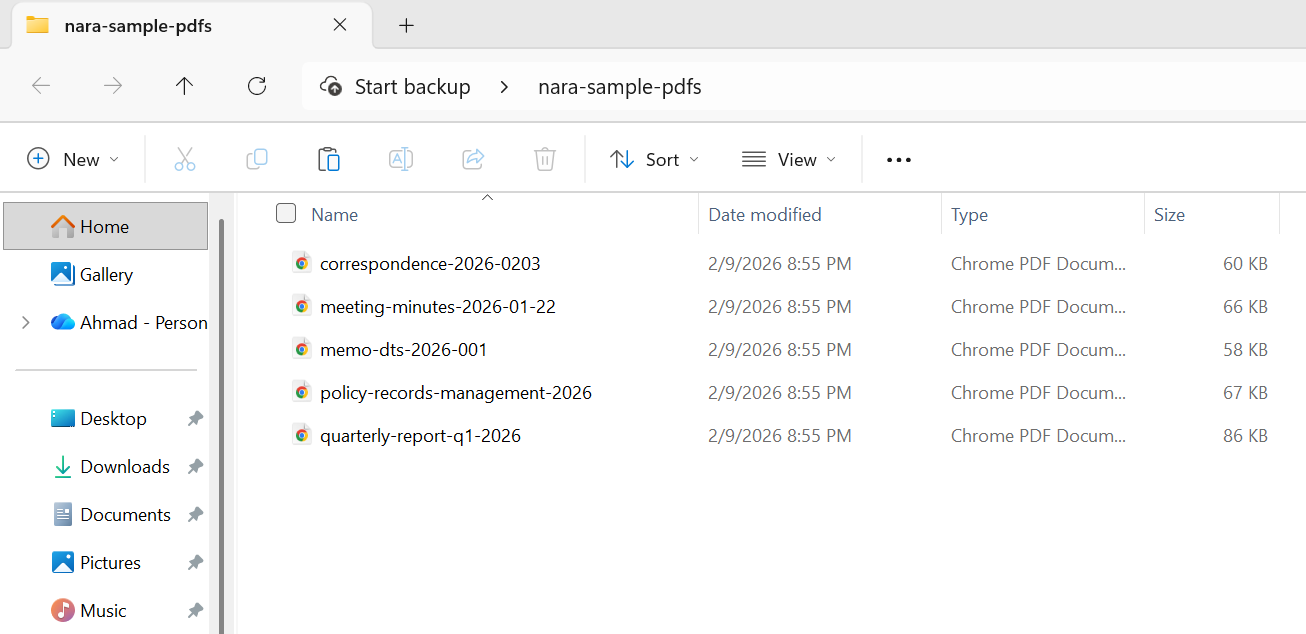
以下は、NARAに移管する機関記録のバッチをどのように準備するかです:
入力
:path=/static-assets/pdf/content-code-examples/tutorials/pdfa-archiving-csharp/pdfa-nara-compliance.csusing IronPdf;
using System;
using System.IO;
string inputFolder = "agency-records/";
string validatedFolder = "nara-transfer/validated/";
string rejectedFolder = "nara-transfer/rejected/";
// Create output directories
Directory.CreateDirectory(validatedFolder);
Directory.CreateDirectory(rejectedFolder);
// NARA transfer metadata requirements
string agencyName = "Department of Example";
string recordSeries = "Administrative Correspondence";
string dateRange = "2020-2025";
// Process all PDF files in the input folder
string[] pdfFiles = Directory.GetFiles(inputFolder, "*.pdf");
Console.WriteLine($"Preparing {pdfFiles.Length} records for NARA transfer");
Console.WriteLine($"Agency: {agencyName}");
Console.WriteLine($"Record Series: {recordSeries}");
Console.WriteLine();
int successCount = 0;
int failCount = 0;
foreach (string inputPath in pdfFiles)
{
string fileName = Path.GetFileName(inputPath);
try
{
using var pdf = PdfDocument.FromFile(inputPath);
// Set NARA-required metadata
var metadata = new System.Collections.Generic.Dictionary<string, string>
{
{ "Title", Path.GetFileNameWithoutExtension(inputPath) },
{ "Author", agencyName },
{ "Subject", recordSeries },
{ "Keywords", $"NARA, {recordSeries}, {dateRange}" },
{ "Agency", agencyName },
{ "RecordSeries", recordSeries },
{ "DateRange", dateRange },
{ "TransferDate", DateTime.Now.ToString("yyyy-MM-dd") }
};
pdf.MetaData.SetMetaDataDictionary(metadata);
// Convert to PDF/A-2b (NARA preferred for digitized records)
string outputPath = Path.Combine(validatedFolder, fileName);
pdf.SaveAsPdfA(outputPath, PdfAVersions.PdfA2b);
// Verify the output
using var verifyPdf = PdfDocument.FromFile(outputPath);
if (verifyPdf.PageCount > 0)
{
successCount++;
Console.WriteLine($"[OK] {fileName}");
}
else
{
throw new Exception("Output PDF has no pages");
}
}
catch (Exception ex)
{
failCount++;
Console.WriteLine($"[FAILED] {fileName}: {ex.Message}");
// Move original to rejected folder for manual review
try
{
File.Copy(inputPath, Path.Combine(rejectedFolder, fileName), overwrite: true);
}
catch { }
}
}
Console.WriteLine();
Console.WriteLine("=== NARA Transfer Preparation Complete ===");
Console.WriteLine($"Successfully converted: {successCount}");
Console.WriteLine($"Failed (requires review): {failCount}");
Console.WriteLine($"Output location: {validatedFolder}");Imports IronPdf
Imports System
Imports System.IO
Module Program
Sub Main()
Dim inputFolder As String = "agency-records/"
Dim validatedFolder As String = "nara-transfer/validated/"
Dim rejectedFolder As String = "nara-transfer/rejected/"
' Create output directories
Directory.CreateDirectory(validatedFolder)
Directory.CreateDirectory(rejectedFolder)
' NARA transfer metadata requirements
Dim agencyName As String = "Department of Example"
Dim recordSeries As String = "Administrative Correspondence"
Dim dateRange As String = "2020-2025"
' Process all PDF files in the input folder
Dim pdfFiles As String() = Directory.GetFiles(inputFolder, "*.pdf")
Console.WriteLine($"Preparing {pdfFiles.Length} records for NARA transfer")
Console.WriteLine($"Agency: {agencyName}")
Console.WriteLine($"Record Series: {recordSeries}")
Console.WriteLine()
Dim successCount As Integer = 0
Dim failCount As Integer = 0
For Each inputPath As String In pdfFiles
Dim fileName As String = Path.GetFileName(inputPath)
Try
Using pdf = PdfDocument.FromFile(inputPath)
' Set NARA-required metadata
Dim metadata As New System.Collections.Generic.Dictionary(Of String, String) From {
{"Title", Path.GetFileNameWithoutExtension(inputPath)},
{"Author", agencyName},
{"Subject", recordSeries},
{"Keywords", $"NARA, {recordSeries}, {dateRange}"},
{"Agency", agencyName},
{"RecordSeries", recordSeries},
{"DateRange", dateRange},
{"TransferDate", DateTime.Now.ToString("yyyy-MM-dd")}
}
pdf.MetaData.SetMetaDataDictionary(metadata)
' Convert to PDF/A-2b (NARA preferred for digitized records)
Dim outputPath As String = Path.Combine(validatedFolder, fileName)
pdf.SaveAsPdfA(outputPath, PdfAVersions.PdfA2b)
' Verify the output
Using verifyPdf = PdfDocument.FromFile(outputPath)
If verifyPdf.PageCount > 0 Then
successCount += 1
Console.WriteLine($"[OK] {fileName}")
Else
Throw New Exception("Output PDF has no pages")
End If
End Using
End Using
Catch ex As Exception
failCount += 1
Console.WriteLine($"[FAILED] {fileName}: {ex.Message}")
' Move original to rejected folder for manual review
Try
File.Copy(inputPath, Path.Combine(rejectedFolder, fileName), overwrite:=True)
Catch
End Try
End Try
Next
Console.WriteLine()
Console.WriteLine("=== NARA Transfer Preparation Complete ===")
Console.WriteLine($"Successfully converted: {successCount}")
Console.WriteLine($"Failed (requires review): {failCount}")
Console.WriteLine($"Output location: {validatedFolder}")
End Sub
End Module出力
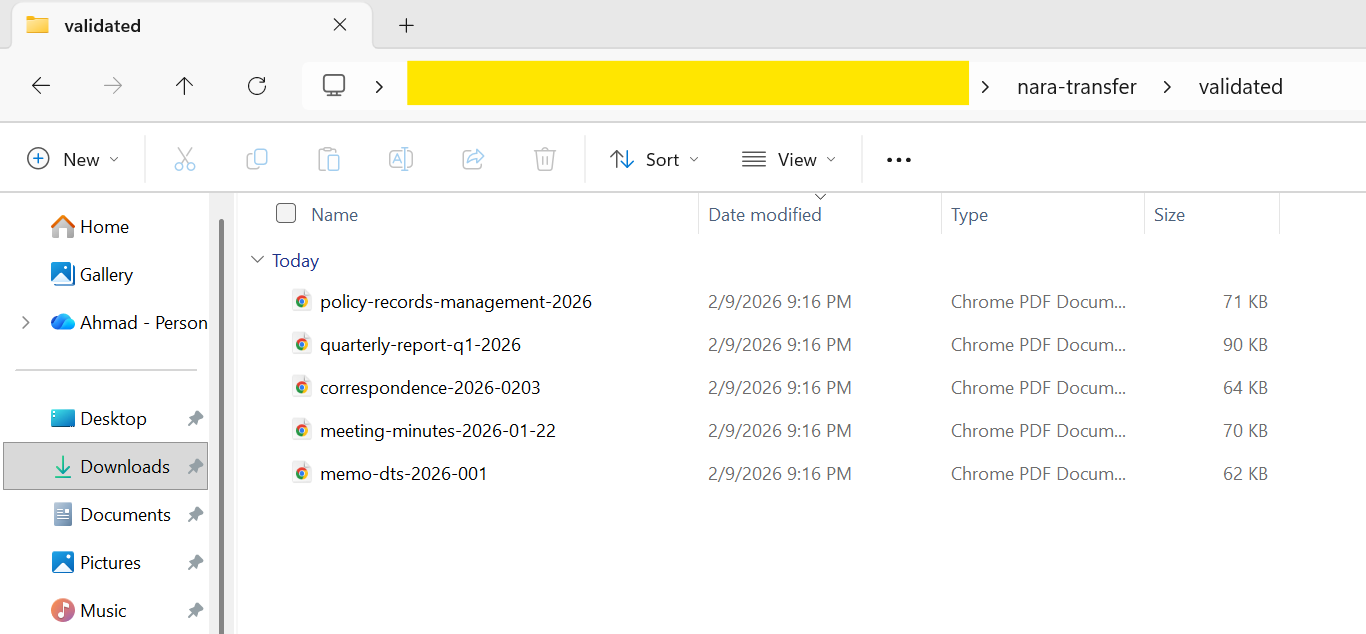
NARAに移管する記録を準備する際には、すべてのファイルを個別に検証することが重要です。 NARAの取り込みプロセスでは、非準拠のファイルは拒否され、大規模なバッチの再処理には時間と労力の両方においてコストがかかります。 各 SaveAsPdfA 呼び出しの後に veraPDF などのツールを使用して、変換パイプラインに直接検証を組み込むのが最も信頼性の高いアプローチです。
法廷文書のアーカイブ
米国連邦裁判所システムと多くの州裁判所システムは、長期的な記録保持のためにPDF/Aを受け入れるか要求する電子ファイリングシステム(主に連邦レベルのCM/ECF)を使用しています。 正確な要件は管轄地域によって異なりますが、一般的に求められることは一貫しています:
連邦裁判所 - 米国裁判所事務局は、永久的な訴訟記録の一部となる文書にPDF/Aを推奨しています。 CM/ECFシステムは、一般的にPDF/A-1bを最低標準として受け入れますが、複雑な書式を持つ文書にはPDF/A-2bが好まれるようになっています。
州裁判所 - 要件は多岐にわたります。 州によっては(テキサス州やカリフォルニア州など)、特定の種類の提出書類についてPDF/Aを明示的に要求しているところもあれば、単にベストプラクティスとして推奨しているところもあります。対象となる司法管轄区の具体的な規則を確認することは不可欠です。
各裁判所に共通する要件
ドキュメントはテキスト検索可能でなければなりません(単なるスキャン画像ではありません)。これは、可能な限りPDF/A-1aまたは2a準拠を使用するか、スキャン文書にOCRが適用されていることを確認することを意味します。 ページサイズは標準的なものであること(通常USレター、8.5インチ×11インチ)。 メタデータには、案件番号、出願日、ファイリングシステムがサポートしている文書の種類を含める必要があります。
:path=/static-assets/pdf/content-code-examples/tutorials/pdfa-archiving-csharp/pdfa-court-filing.csusing IronPdf;
using System;
// Court filing configuration
string caseNumber = "1:26-cv-00142-ABC";
string courtName = "US District Court, Northern District";
string documentType = "Motion for Summary Judgment";
string filingParty = "Plaintiff";
// Create legal document HTML
string legalDocumentHtml = $@"
E html>
le>
body {{
font-family: 'Times New Roman', Times, serif;
font-size: 12pt;
line-height: 2;
margin: 1in;
}}
.header {{ text-align: center; margin-bottom: 24pt; }}
.case-caption {{
border: 1px solid black;
padding: 12pt;
margin: 24pt 0;
}}
.section {{ margin: 12pt 0; }}
h1 {{ font-size: 14pt; text-align: center; }}
.signature {{ margin-top: 48pt; }}
yle>
class='header'>
<strong>{courtName}</strong>
v>
class='case-caption'>
<p>ACME CORPORATION,<br> Plaintiff,</p>
<p>v.</p>
<p>EXAMPLE INDUSTRIES, INC.,<br> Defendant.</p>
<p style='text-align: right;'><strong>Case No. {caseNumber}</strong></p>
v>
{documentType.ToUpper()}</h1>
class='section'>
<p>Plaintiff ACME Corporation, by and through undersigned counsel, respectfully
moves this Court for summary judgment pursuant to Federal Rule of Civil Procedure 56...</p>
v>
class='section'>
<h2>I. INTRODUCTION</h2>
<p>This motion presents the Court with a straightforward question of contract interpretation...</p>
v>
class='signature'>
<p>Respectfully submitted,</p>
<p>_________________________<br>
Jane Attorney, Esq.<br>
Bar No. 12345<br>
Law Firm LLP<br>
123 Legal Street<br>
City, State 12345<br>
(555) 123-4567<br>
jane@lawfirm.com</p>
<p>Attorney for Plaintiff</p>
v>
;
// Render with court-appropriate settings
var renderer = new ChromePdfRenderer();
renderer.RenderingOptions.PaperSize = IronPdf.Rendering.PdfPaperSize.Letter;
renderer.RenderingOptions.MarginTop = 72;
renderer.RenderingOptions.MarginBottom = 72;
renderer.RenderingOptions.MarginLeft = 72;
renderer.RenderingOptions.MarginRight = 72;
using var pdf = renderer.RenderHtmlAsPdf(legalDocumentHtml);
// Set metadata for court filing system indexing
var metadata = new System.Collections.Generic.Dictionary<string, string>
{
{ "Title", $"{documentType} - {caseNumber}" },
{ "Author", "Law Firm LLP" },
{ "Subject", $"Court Filing - {caseNumber}" },
{ "CaseNumber", caseNumber },
{ "DocumentType", documentType },
{ "FilingParty", filingParty },
{ "FilingDate", DateTime.Now.ToString("yyyy-MM-dd") }
};
pdf.MetaData.SetMetaDataDictionary(metadata);
// Convert to PDF/A-2b (widely accepted by federal courts)
string outputPath = $"court-filing-{caseNumber.Replace(":", "-")}.pdf";
pdf.SaveAsPdfA(outputPath, PdfAVersions.PdfA2b);Imports IronPdf
Imports System
Imports System.Collections.Generic
' Court filing configuration
Dim caseNumber As String = "1:26-cv-00142-ABC"
Dim courtName As String = "US District Court, Northern District"
Dim documentType As String = "Motion for Summary Judgment"
Dim filingParty As String = "Plaintiff"
' Create legal document HTML
Dim legalDocumentHtml As String = $"
<!DOCTYPE html>
<html>
<head>
<style>
body {{
font-family: 'Times New Roman', Times, serif;
font-size: 12pt;
line-height: 2;
margin: 1in;
}}
.header {{ text-align: center; margin-bottom: 24pt; }}
.case-caption {{
border: 1px solid black;
padding: 12pt;
margin: 24pt 0;
}}
.section {{ margin: 12pt 0; }}
h1 {{ font-size: 14pt; text-align: center; }}
.signature {{ margin-top: 48pt; }}
</style>
</head>
<body>
<div class='header'>
<strong>{courtName}</strong>
</div>
<div class='case-caption'>
<p>ACME CORPORATION,<br> Plaintiff,</p>
<p>v.</p>
<p>EXAMPLE INDUSTRIES, INC.,<br> Defendant.</p>
<p style='text-align: right;'><strong>Case No. {caseNumber}</strong></p>
</div>
<h1>{documentType.ToUpper()}</h1>
<div class='section'>
<p>Plaintiff ACME Corporation, by and through undersigned counsel, respectfully
moves this Court for summary judgment pursuant to Federal Rule of Civil Procedure 56...</p>
</div>
<div class='section'>
<h2>I. INTRODUCTION</h2>
<p>This motion presents the Court with a straightforward question of contract interpretation...</p>
</div>
<div class='signature'>
<p>Respectfully submitted,</p>
<p>_________________________<br>
Jane Attorney, Esq.<br>
Bar No. 12345<br>
Law Firm LLP<br>
123 Legal Street<br>
City, State 12345<br>
(555) 123-4567<br>
jane@lawfirm.com</p>
<p>Attorney for Plaintiff</p>
</div>
</body>
</html>
"
' Render with court-appropriate settings
Dim renderer As New ChromePdfRenderer()
renderer.RenderingOptions.PaperSize = IronPdf.Rendering.PdfPaperSize.Letter
renderer.RenderingOptions.MarginTop = 72
renderer.RenderingOptions.MarginBottom = 72
renderer.RenderingOptions.MarginLeft = 72
renderer.RenderingOptions.MarginRight = 72
Using pdf = renderer.RenderHtmlAsPdf(legalDocumentHtml)
' Set metadata for court filing system indexing
Dim metadata As New Dictionary(Of String, String) From {
{"Title", $"{documentType} - {caseNumber}"},
{"Author", "Law Firm LLP"},
{"Subject", $"Court Filing - {caseNumber}"},
{"CaseNumber", caseNumber},
{"DocumentType", documentType},
{"FilingParty", filingParty},
{"FilingDate", DateTime.Now.ToString("yyyy-MM-dd")}
}
pdf.MetaData.SetMetaDataDictionary(metadata)
' Convert to PDF/A-2b (widely accepted by federal courts)
Dim outputPath As String = $"court-filing-{caseNumber.Replace(":", "-")}.pdf"
pdf.SaveAsPdfA(outputPath, PdfAVersions.PdfA2b)
End Using出力
文書管理システムを構築している法律事務所やリーガルテクノロジー企業では、PDF/A変換をファイリングワークフローに統合することで、パラリーガルや弁護士が手作業で操作することなく、アーカイブされたすべての文書が裁判所の長期保存要件を満たすようになります。
医療記録の保持
医療機関では、患者の記録を保持するための厳しい要件に直面しています。 HIPAAは特定のファイル形式を義務付けているわけではありませんが、長い保存期間(多くの場合、成人は7~10年、未成年者はそれ以上)、アクセシビリティの要件、監査の期待などの組み合わせから、PDF/Aは医療文書をアーカイブするための自然な選択肢となっています。
医療記録アーカイブの主な考慮事項
保存期間 - 連邦および州の規制により、医療記録の保存期間はさまざまで、多くの場合10年以上に及びます。 PDF/Aは長期的な可読性が保証されているため、フォーマットの陳腐化を心配することなく、これらの要件を満たすのに理想的です。
アクセシビリティ - ADAと508条は、電子カルテがアクセシブルであることを要求しています。 PDF/A-2aまたはPDF/A-3a適合レベル(構造タグ付けを含む)を使用することで、これらのアクセシビリティ要件を満たすことができます。
相互運用性 - 医療記録は、医療提供者、保険者、患者の間で頻繁に共有されます。 PDF/Aは自己完結型であるため、ビューアやシステムに関係なく、一貫したレンダリングが可能です。
監査対応 - 医療監査では、作成から何年も経過した医療記録の作成が求められることがあります。 PDF/A は、監査中に作成される文書がオリジナルと同一であることを保証し、文書の整合性に疑問を抱かせるようなレンダリングの違いはありません。
:path=/static-assets/pdf/content-code-examples/tutorials/pdfa-archiving-csharp/pdfa-medical-records.csusing IronPdf;
using System;
using System.Collections.Generic;
// Medical record metadata
string patientId = "MRN-2026-00847";
string documentType = "Discharge Summary";
string facility = "Metro General Hospital";
string department = "Internal Medicine";
DateTime encounterDate = new DateTime(2026, 2, 5);
// Create clinical document HTML
string clinicalDocumentHtml = $@"
E html>
ng='en'>
le>
body {{ font-family: Arial, sans-serif; margin: 40px; line-height: 1.6; }}
.header {{ border-bottom: 2px solid #2c3e50; padding-bottom: 15px; margin-bottom: 20px; }}
.patient-info {{ background: #ecf0f1; padding: 15px; margin: 15px 0; }}
.section {{ margin: 20px 0; }}
h1 {{ color: #2c3e50; }}
h2 {{ color: #3498db; font-size: 14pt; }}
.footer {{ margin-top: 40px; font-size: 10pt; color: #666; }}
yle>
class='header'>
<h1>{facility}</h1>
<p>{department} | {documentType}</p>
v>
class='patient-info'>
<p><strong>Patient ID:</strong> {patientId}</p>
<p><strong>Encounter Date:</strong> {encounterDate:MMMM d, yyyy}</p>
<p><strong>Attending Physician:</strong> Dr. Sarah Johnson, MD</p>
v>
class='section'>
<h2>Chief Complaint</h2>
<p>Patient presented with acute respiratory symptoms including shortness of breath and persistent cough.</p>
v>
class='section'>
<h2>Hospital Course</h2>
<p>Patient was admitted for observation and treatment. Symptoms improved with standard protocol...</p>
v>
class='section'>
<h2>Discharge Instructions</h2>
<ul>
<li>Continue prescribed medications as directed</li>
<li>Follow up with primary care physician within 7 days</li>
<li>Return to ED if symptoms worsen</li>
</ul>
v>
class='footer'>
<p>Document generated: {DateTime.Now:yyyy-MM-dd HH:mm}</p>
<p>This document is archived in PDF/A-3a format for accessibility and long-term preservation.</p>
v>
;
var renderer = new ChromePdfRenderer();
using var pdf = renderer.RenderHtmlAsPdf(clinicalDocumentHtml);
// Set comprehensive metadata for medical records management
var metadata = new System.Collections.Generic.Dictionary<string, string>
{
{ "Title", $"{documentType} - {patientId}" },
{ "Author", "Metro General Hospital EHR System" },
{ "Subject", $"Clinical documentation for patient {patientId}" },
{ "PatientMRN", patientId },
{ "DocumentType", documentType },
{ "Facility", facility },
{ "Department", department },
{ "EncounterDate", encounterDate.ToString("yyyy-MM-dd") },
{ "RetentionCategory", "Medical Record - Adult" },
{ "RetentionPeriod", "10 years from last encounter" }
};
pdf.MetaData.SetMetaDataDictionary(metadata);
// Embed clinical data (HL7 FHIR format)
string fhirData = @"{
sourceType"": ""DocumentReference"",
atus"": ""current"",
pe"": { ""text"": ""Discharge Summary"" },
bject"": { ""reference"": ""Patient/MRN-2026-00847"" }
byte[] fhirBytes = System.Text.Encoding.UTF8.GetBytes(fhirData);
var fhirConfig = new EmbedFileConfiguration(EmbedFileType.xml)
{
EmbedFileName = "clinical-data.json",
AFDesc = "FHIR DocumentReference metadata",
AFRelationship = AFRelationship.Data
};
var embedFiles = new List<EmbedFileByte>
{
new EmbedFileByte(fhirBytes, fhirConfig)
};
// Convert to PDF/A-3a (accessible archival with embedded data)
using var archivedRecord = pdf.ConvertToPdfA(embedFiles, PdfAVersions.PdfA3a);
string outputPath = $"medical-record-{patientId}-{encounterDate:yyyyMMdd}.pdf";
archivedRecord.SaveAs(outputPath);Imports IronPdf
Imports System
Imports System.Collections.Generic
Imports System.Text
' Medical record metadata
Dim patientId As String = "MRN-2026-00847"
Dim documentType As String = "Discharge Summary"
Dim facility As String = "Metro General Hospital"
Dim department As String = "Internal Medicine"
Dim encounterDate As DateTime = New DateTime(2026, 2, 5)
' Create clinical document HTML
Dim clinicalDocumentHtml As String = $"
<!DOCTYPE html>
<html lang='en'>
<head>
<style>
body {{ font-family: Arial, sans-serif; margin: 40px; line-height: 1.6; }}
.header {{ border-bottom: 2px solid #2c3e50; padding-bottom: 15px; margin-bottom: 20px; }}
.patient-info {{ background: #ecf0f1; padding: 15px; margin: 15px 0; }}
.section {{ margin: 20px 0; }}
h1 {{ color: #2c3e50; }}
h2 {{ color: #3498db; font-size: 14pt; }}
.footer {{ margin-top: 40px; font-size: 10pt; color: #666; }}
</style>
</head>
<body>
<div class='header'>
<h1>{facility}</h1>
<p>{department} | {documentType}</p>
</div>
<div class='patient-info'>
<p><strong>Patient ID:</strong> {patientId}</p>
<p><strong>Encounter Date:</strong> {encounterDate:MMMM d, yyyy}</p>
<p><strong>Attending Physician:</strong> Dr. Sarah Johnson, MD</p>
</div>
<div class='section'>
<h2>Chief Complaint</h2>
<p>Patient presented with acute respiratory symptoms including shortness of breath and persistent cough.</p>
</div>
<div class='section'>
<h2>Hospital Course</h2>
<p>Patient was admitted for observation and treatment. Symptoms improved with standard protocol...</p>
</div>
<div class='section'>
<h2>Discharge Instructions</h2>
<ul>
<li>Continue prescribed medications as directed</li>
<li>Follow up with primary care physician within 7 days</li>
<li>Return to ED if symptoms worsen</li>
</ul>
</div>
<div class='footer'>
<p>Document generated: {DateTime.Now:yyyy-MM-dd HH:mm}</p>
<p>This document is archived in PDF/A-3a format for accessibility and long-term preservation.</p>
</div>
</body>
</html>"
Dim renderer As New ChromePdfRenderer()
Using pdf = renderer.RenderHtmlAsPdf(clinicalDocumentHtml)
' Set comprehensive metadata for medical records management
Dim metadata As New Dictionary(Of String, String) From {
{"Title", $"{documentType} - {patientId}"},
{"Author", "Metro General Hospital EHR System"},
{"Subject", $"Clinical documentation for patient {patientId}"},
{"PatientMRN", patientId},
{"DocumentType", documentType},
{"Facility", facility},
{"Department", department},
{"EncounterDate", encounterDate.ToString("yyyy-MM-dd")},
{"RetentionCategory", "Medical Record - Adult"},
{"RetentionPeriod", "10 years from last encounter"}
}
pdf.MetaData.SetMetaDataDictionary(metadata)
' Embed clinical data (HL7 FHIR format)
Dim fhirData As String = "{
""resourceType"": ""DocumentReference"",
""status"": ""current"",
""type"": { ""text"": ""Discharge Summary"" },
""subject"": { ""reference"": ""Patient/MRN-2026-00847"" }
}"
Dim fhirBytes As Byte() = Encoding.UTF8.GetBytes(fhirData)
Dim fhirConfig As New EmbedFileConfiguration(EmbedFileType.xml) With {
.EmbedFileName = "clinical-data.json",
.AFDesc = "FHIR DocumentReference metadata",
.AFRelationship = AFRelationship.Data
}
Dim embedFiles As New List(Of EmbedFileByte) From {
New EmbedFileByte(fhirBytes, fhirConfig)
}
' Convert to PDF/A-3a (accessible archival with embedded data)
Using archivedRecord = pdf.ConvertToPdfA(embedFiles, PdfAVersions.PdfA3a)
Dim outputPath As String = $"medical-record-{patientId}-{encounterDate:yyyyMMdd}.pdf"
archivedRecord.SaveAs(outputPath)
End Using
End Using出力
電子カルテ(EHR)システムの場合、最も効果的なアプローチは、検査結果が作成されるとき、臨床記録が確定されるとき、退院サマリーが作成されるときなど、作成時点で文書をPDF/Aに変換することです。 この"作成時にアーカイブする"戦略は、後で一括移行するコストと複雑さを回避します。
次のステップ
PDF/Aフォーマットで文書をアーカイブすることは、複雑である必要はありません。 IronPdfは.NET開発者にPDF/A準拠のドキュメントを作成、変換、リッチ化するための完全なツールキットを提供します。 HTMLからアーカイブドキュメントを生成する場合でも、政府や医療機関に配布するアクセシブルなPDFを生成する場合でも、レガシーPDFを長期保存用に変換する場合でも、大量のバッチパイプラインに外部検証を統合する場合でも、IronPdfが技術的な詳細を処理するので、アプリケーションの要件に集中することができます。
基本的なPDF/A-1標準からPDF/A-3やPDF/A-4の最新機能まで、IronPDFはPDF/A-1a、1b、2a、2b、3a、3b、4、4e、4fを含むアーカイブバージョンとコンフォーマンスレベルの全範囲をサポートしています。 専用のPDF/Aハウツーガイドでは、変換オプションと適合レベルを詳しく説明しています。 メタデータ管理、EmbedFileConfiguration によるファイル埋め込み、 ZUGFeRD/Factur-X 電子請求書サポートと組み合わせることで、政府機関、裁判所システム、医療機関、金融機関のアーカイブ要件を満たすために必要なすべての機能が提供されます。
アーカイブを始める準備はできましたか? IronPdfをダウンロードして無料トライアルでお試しください。 ご質問がある場合、または特定のコンプライアンスシナリオについて相談したい場合は、当社のエンジニアリングサポートチームまでご連絡ください。
よくある質問
PDF/Aコンプライアンスとは何ですか?
PDF/A 準拠とは、電子文書のアーカイブと長期保存のために特別に設計された ISO 標準化バージョンの PDF を指します。これは、文書が将来にわたって同じ方法で複製できることを保証するものです。
C# を使って PDF/A 準拠の文書を作成するにはどうすればよいですか?
C#を使用してPDF/A準拠のドキュメントを作成するには、IronPDFライブラリを使用します。IronPDFライブラリはPDFを生成し、様々なPDF/Aフォーマットに変換する堅牢なツールを提供します。
IronPDFがサポートするPDF/Aバージョンにはどのようなものがありますか?
IronPDFはPDF/A-1、PDF/A-2、PDF/A-3を含む複数のPDF/Aバージョンをサポートしており、それぞれ文書のアーカイブと保存に関する異なる要件に対応しています。
IronPDFはZUGFeRDやFactur-Xのような電子請求書標準のソースデータの埋め込みに役立ちますか?
はい、IronPDFはZUGFeRDやFactur-Xのような電子請求書標準のソースデータを埋め込み、電子請求書処理とコンプライアンスを促進することができます。
C# で PDF/A 準拠を検証するには?
C#でIronPDFを使用してPDF/A準拠を検証することができます。IronPDFに組み込まれた検証ツールを活用することで、文書がPDF/A仕様に準拠していることを確認することができます。
IronPDFで政府のアーカイブシナリオに対応できますか?
はい、IronPDFはNARA、法廷文書、医療記録に要求される標準への準拠を含む、様々な政府のアーカイブシナリオに対応することができます。
PDF/Aをアーカイブに使用するメリットは何ですか?
アーカイブにPDF/Aを使用する利点には、長期にわたって文書の忠実性を確保すること、長期保存のための標準化されたフォーマットを提供すること、法律や組織の要件に準拠することなどがあります。
IronPDFは既存のPDFをPDF/Aフォーマットに変換できますか?
IronPDFは既存のPDFをPDF/Aフォーマットに変換することをサポートしており、簡単にコンプライアンスに準拠し、ドキュメントを長期保存することができます。
IronPDFはPDF/A変換においてどのようにドキュメントの忠実性を確保していますか?
IronPDFはPDF/A変換において、フォント、画像、レイアウトの整合性を維持することで文書の忠実性を保証します。
医療記録のアーカイブにIronPDFを使用できますか?
はい、IronPDFは医療記録のアーカイブに使用でき、文書保存のための業界標準や規制への準拠を保証します。

まだスクロールしていますか?
すぐに証拠が欲しいですか? PM > Install-Package IronPdf
サンプルを実行するHTML が PDF に変換されるのを確認します。






 無料で始めましょう
 無料で始めましょう
 無料ライブデモを予約





 クレジットカードやアカウントの作成は不要です。










