
Jak archiwizować pliki PDF zgodnie ze standardem PDF/A w C#

Zgodność z PDF/A w C# z IronPDF zapewnia programistom .NET bezpośrednią ścieżkę do tworzenia, konwersji i walidacji archiwalnych PDF, które spełniają standardy ISO 19005 - zapewniając jednolite renderowanie dokumentów na dowolnym systemie, teraz lub za dziesięciolecia. Od renderowania HTML do PDF/A i konwertowania istniejących plików do PDF/A-1b, PDF/A-2b lub PDF/A-3b, po osadzanie danych źródłowych dla zgodności z ZUGFeRD i e-fakturowaniem Factur-X, IronPDF obsługuje cały przepływ pracy konwersji PDF/A bez opuszczania ekosystemu .NET.
TL;DR: Przewodnik QuickstartTen samouczek obejmuje tworzenie, konwersję i walidację dokumentów zgodnych z PDF/A w C# - w tym formatów e-faktur i rzeczywistych wymagań archiwizacji rządu.
- Dla kogo jest to przeznaczone: Dla programistów .NET budujących aplikacje generujące dokumenty do długoterminowego przechowywania lub archiwizacji regulowanej - zarządzanie aktami rządowymi, składanie dokumentów prawnych, ścieżki audytu finansowego, przechowywanie dokumentacji medycznej lub platformy e-fakturowania, gdzie PDF/A jest trudnym wymaganiem zgodności.
- Co zbudujesz: rendering od HTML do PDF/A od podstaw, konwersja istniejących plików PDF do PDF/A-1b/2b/3b, osadzenie załączników danych źródłowych dla ZUGFeRD/Factur-X e-fakturowania, walidacja zgodności z PDF/A z raportowaniem błędów i rzeczywiste wzorce archiwizacji dla NARA, wymagania dokumentów sądowych i medycznych.
- Gdzie to działa: W dowolnym środowisku .NET - .NET 10, .NET 8 LTS, .NET Framework 4.6.2+, .NET Standard 2.0. Konwersja i walidacja PDF/A odbywa się całkowicie lokalnie; nie są wymagane zewnętrzne narzędzia weryfikacji do generowania.
- Kiedy używać tego podejścia: Gdy aplikacja generuje dokumenty, które muszą przetrwać długoterminowo - faktury, umowy, raporty zgodności, akta sądowe lub zapisy medyczne - i gdzie mandat regulacyjny (NARA, standardy archiwizacji EU, HIPAA, SEC) wymaga zamkniętego, sprawdzalnego formatu PDF/A.
- Dlaczego to ma znaczenie od strony technicznej: Standardowe PDFy mogą odwoływać się do zewnętrznych czcionek, osadzać aktywną zawartość i polegać na renderowaniu specyficznym dla systemu - wszystko to psuje się z czasem. PDF/A zabrania tych zależności na poziomie formatu, osadzając wszystko co jest wymagane do renderowania bezpośrednio w pliku, gwarantując identyczne wyjście na dowolnym zgodnym czytniku w nieskończoność.
Przekonwertuj istniejący PDF na PDF/A za pomocą zaledwie kilku linijek kodu:
-
1Zainstaluj IronPDF z NuGet Package Manager
-
2Skopiuj i uruchom ten fragment kodu.
using IronPdf; PdfDocument pdf = PdfDocument.FromFile("report.pdf"); pdf.SaveAsPdfA("archived-report.pdf", PdfAVersions.PdfA3b);Imports IronPdf Dim pdf As PdfDocument = PdfDocument.FromFile("report.pdf") pdf.SaveAsPdfA("archived-report.pdf", PdfAVersions.PdfA3b)Imports IronPdf Dim pdf As PdfDocument = PdfDocument.FromFile("report.pdf") pdf.SaveAsPdfA("archived-report.pdf", PdfAVersions.PdfA3b) -
3Wdrożenie do testowania w środowisku produkcyjnym
Rozpocznij korzystanie z IronPDF w swoim projekcie już dziś z darmową wersją próbną
Po zakupie lub zapisaniu się na 30-dniowy okres próbny IronPDF, dodaj swój klucz licencyjny na początku aplikacji.
IronPdf.License.LicenseKey = "KEY";IronPdf.License.LicenseKey = "KEY";Imports IronPdf
IronPdf.License.LicenseKey = "KEY"Imports IronPdf
IronPdf.License.LicenseKey = "KEY" Instalacja z NuGet
- Zrozumienie PDF/A
- Tworzenie dokumentów PDF/A
- Zaawansowane przepływy pracy PDF/A
- Rzeczywiste scenariusze archiwizacji
Co to jest PDF/A i dłączego ma to znaczenie?
PDF/A jest standaryzowaną przez ISO podzbiorem formatu PDF (ISO 19005) zaprojektowanym specjalnie dla długoterminowego, niezawodnego archiwizowania dokumentów elektronicznych. W przeciwieństwie do standardowego PDF, który może odwoływać się do zewnętrznych czcionek, łączyć z zewnętrznymi treściami i polegać na specyficznych dla systemu zachowaniach renderowania, plik PDF/A jest całkowicie samowystarczalny. Każda czcionka, profil kolorów i dane metadane wymagane do renderowania dokumentu są osadzone bezpośrednio w pliku.
Ma to znaczenie, ponieważ dokument PDF/A będzie wyświetlany identycznie, niezależnie od tego, czy jest otwierany dzisiaj, czy za 100 lat, na dowolnym zgodnym przeglądarce, niezależnie od systemu operacyjnego lub wersji oprogramowania. Nie ma zależności od zasobów zewnętrznych, które mogą zniknąć, nie polega się na zainstalowaniu konkretnej czcionki i nie ma niejasności, jak kolory lub przezroczystość powinny być wyświetlane.
Poza trwałością techniczną, zgodność z PDF/A jest często trudnym wymaganiem - nie tylko dobrym praktyką. Branże i instytucje, które nakazują PDF/A, obejmują:
Systemy prawne i sądownicze - Sądy w USA, UE i wielu innych jurysdykcjach wymagają lub silnie zalecają PDF/A dla elektronicznego składania dokumentów. Federalne standardy zgłoszeń CM/ECF w USA odnoszą się do PDF/A jako preferowanego formatu dla długoterminowego przechowywania rejestrów.
Agencje rządowe - Amerykańska Administracja Archiwów i Akt Narodowych (NARA) określa PDF/A jako akceptowany format do transferu trwałych zapisów elektronicznych. Podobnie, Komisja Europejska wymaga PDF/A dla niektórych oficjalnych publikacji i zgłoszeń regulacyjnych.
Usługi finansowe i audyty - Organy regulacyjne, takie jak SEC, akceptują zgłoszenia PDF/A, a zespoły audytowe wewnętrzne często przyjmują PDF/A, aby zapewnić, że sprawozdania finansowe, raporty i dokumentacja wspierająca pozostaną niezmienne i weryfikowalne w czasie.
Opieka zdrowotna - Przepisy dotyczące przechowywania dokumentacji medycznej (takie jak HIPAA w USA) nie narzucają konkretnego formatu pliku, ale PDF/A stał się domyślnym standardem archiwizacji dokumentacji pacjentów, raportów obrazowania i dokumentacji klinicznej, ponieważ gwarantuje długoterminową czytelność.
Krótko mówiąc, PDF/A jest formatem, którego używasz, gdy dokument musi przetrwać niezmiennie w czasie, systemach i granicach organizacyjnych. Jeśli twoja aplikacja generuje dokumenty, które mogą być odwoływane po latach - faktury, umowy, raporty zgodności, dokumentacja medyczna - PDF/A jest właściwym wyborem.
Wersje PDF/A wyjaśnione
Standard PDF/A ewoluował przez kilka wersji, z których każda opiera się na wcześniejszych, aby wspierać dodatkowe funkcje PDF przy jednoczesnym zachowaniu rygorystycznych gwarancji archiwizacji. Zrozumienie różnic między wersjami jest kluczowe dla wyboru odpowiedniego do zastosowania przypadku.
PDF/A-1 (Podstawowe archiwizowanie)
PDF/A-1 (ISO 19005-1:2005) była pierwszą wersją standardu, opartą na PDF 1.4. Ustanowiła podstawowe wymogi archiwizacji: wszystkie czcionki muszą być osadzone; szyfrowanie jest zabronione; zawartość audio/wideo nie jest dozwolona; JavaScript jest zabroniony. PDF/A-1 występuje w dwóch poziomach zgodności:
PDF/A-1b (podstawowy): Zapewnia niezawodną wizualną reprodukcję dokumentu. To jest minimalny poziom zgodności i gwarantuje, że dokument wygląda poprawnie podczas renderowania.
PDF/A-1a (dostępne): Dodaje strukturalne i semantyczne wymagania na szczycie 1b, w tym oznaczoną zawartość dla dostępności, mapowanie znaków Unicode i logiczną kolejność czytania. To jest wyższy standard i jest wymagany, gdy liczy się zgodność dla dostępności.
PDF/A-1 jest najczęściej wspierana wersją i nadal jest powszechnie stosowana, szczególnie w kontekście prawnym i rządowym, gdzie szeroka zgodność jest priorytetem nad nowszymi funkcjami.
PDF/A-2 (JPEG2000, Przezroczystość)
PDF/A-2 (ISO 19005-2:2011) jest oparta na PDF 1.7 i wprowadza wsparcie dla funkcji, które były niedostępne w PDF/A-1:
Kompresja obrazów JPEG2000: Oferuje lepsze stosunki jakości do wielkości niż kompresja JPEG dostępna w PDF/A-1.
Przezroczystość i obsługa warstw: Umożliwia bardziej złożone wizualne układy bez spłaszczania wszystkiego do nieprzejrzystych elementów.
Osadzone załączniki PDF/A: Dokumenty PDF/A-2 mogą osadzać inne zgodne z PDF/A pliki jako załączniki (ale tylko pliki PDF/A, a nie dowolne formaty).
PDF/A-2 zawiera te same poziomy zgodności co PDF/A-1 (2b i 2a), plus nowy poziom: PDF/A-2u (Unicode), który wymaga mapowania Unicode dla całego tekstu, ale nie wymaga pełnego oznaczania strukturalnego poziomu a.
PDF/A-3 (Osadzone pliki)
PDF/A-3 (ISO 19005-3:2012) jest najbardziej znaczącym rozszerzeniem dla nowoczesnych przepływów pracy. Dzieli te same podstawy co PDF/A-2 (PDF 1.7) i zachowuje wszystkie jego funkcje, ale dodaje jedną kluczową zdolność: możliwość osadzania plików w dowolnym formacie w dokumencie PDF/A.
Oznacza to, że możesz dołączyć oryginalne dane źródłowe XML, eksporty CSV, arkusze kalkulacyjne lub inne maszynowo odczytywalne pliki razem z wizualnym, odczytywalnym dla człowieka dokumentem. Kontener PDF/A-3 staje się jedną paczką, która zawiera zarówno warstwę prezentacyjną, jak i bazowe dane.
Ta zdolność jest podstawą nowoczesnych standardów e-fakturowania:
ZUGFeRD: Pochodzący z Niemieć, obecnie przyjęty w całej UE jako Factur-X. Osadza strukturalne dane faktury XML (w formacie faktury międzybranżowej) w dokumencie PDF/A-3, który również zawiera wizualną, odczytywalną dla człowieka fakturę. Jeden plik służy zarówno potrzebom przetwarzania przez człowieka, jak i maszynę.
Poziomy zgodności PDF/A-3 podążają za tym samym schematem: 3b (wizualny), 3a (dostępny + oznaczony) i 3u (mapowanie Unicode).
PDF/A-4 (Oparte na PDF 2.0)
PDF/A-4 (ISO 19005-4:2020) jest najnowszą wersją, oparta na PDF 2.0. Upraszcza strukturę poziomów zgodności; nie ma już rozróżnienia a/b/u. Zamiast tego, PDF/A-4 definiuje trzy profile:
PDF/A-4: Podstawowy profil dla ogólnej archiwizacji.
PDF/A-4f: Pozwala na osadzanie plików w dowolnym formacie (podobnie jak PDF/A-3).
PDF/A-4e: Zaprojektowany specjalnie dla dokumentów inżynieryjnych; obsługuje zawartość 3D, bogate multimedia i inne elementy techniczne.
PDF/A-4 korzysta również z usprawnień PDF 2.0, w tym ulepszonych struktur oznaczania i zwiększonych możliwości metadanych za pomocą XMP (Platforma Rozszerzanych Metadanych).
Adopcja PDF/A-4 rośnie, ale wciąż jest mniej powszechnie wspierana przez przeglądarki i walidatory w porównaniu do PDF/A-2 i PDF/A-3.
Którą wersję wybrać?
Wybór odpowiedniej wersji PDF/A zależy od Twoich konkretnych wymagań:
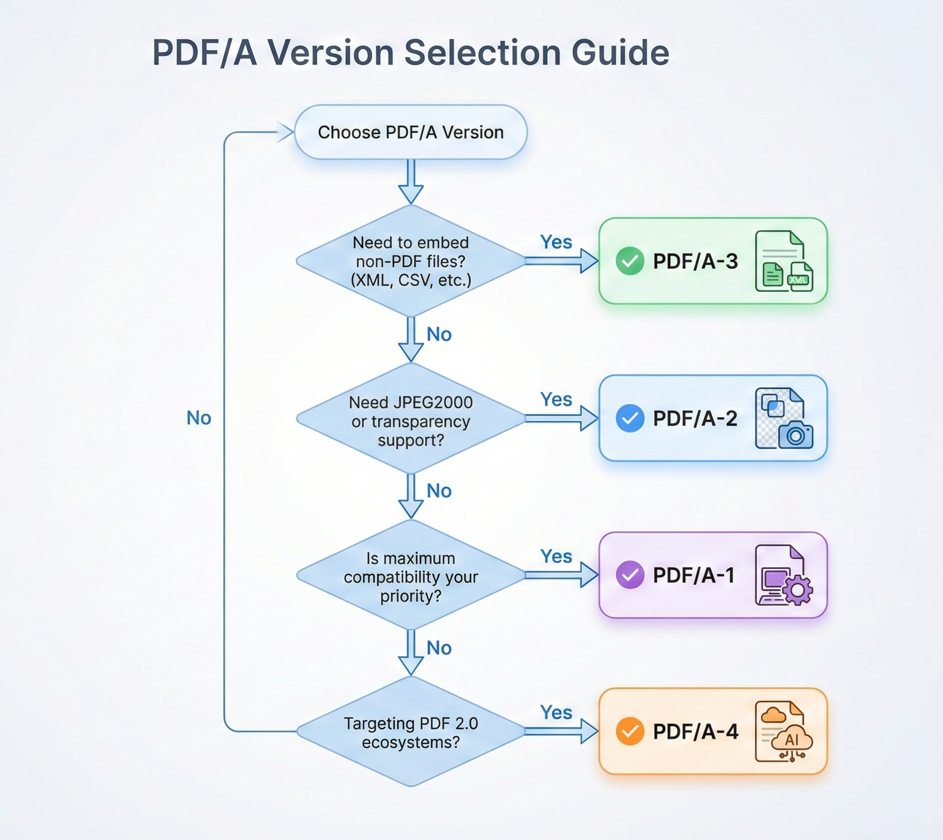
Maksymalna zgodność: Dla istniejących systemów, walidatorów i przeglądarek (szczególnie w kontekstach prawniczych i rządowych), użyj PDF/A-1b lub PDF/A-2b.
E-fakturowanie: Dla ZUGFeRD, Factur-X lub podobnych standardów wymagających osadzonych danych źródłowych, użyj PDF/A-3b.
Zgodność z dostępnością: Dla wymagań Sekcji 508 lub WCAG, wybierz poziom zgodności a dowolnej używanej wersji (PDF/A-1a, PDF/A-2a lub PDF/A-3a).
Nowoczesne przepływy pracy: Dla najnowszych funkcji, gdzie Twoi konsumenci wspierają PDF 2.0, użyj PDF/A-4.
W razie wątpliwości, PDF/A-3b zapewnia najlepsze połączenie nowoczesnych możliwości i szerokiego wsparcia.
Tworzenie dokumentów PDF/A od podstaw
Teraz, gdy rozumiesz, czym jest PDF/A i na którą wersję skupić się, przejdźmy do kodu. IronPDF sprawia, że generowanie dokumentów zgodnych z PDF/A bezpośrednio z treści HTML lub konwertowanie istniejących PDF-ów do formatu PDF/A jest proste.
Instalacja IronPDF
Zanim zaczniesz, zainstaluj pakiet NuGet IronPdf w swoim projekcie .NET. Można to zrobić za pomocą konsoli menedżera pakietów NuGet, interfejsu CLI .NET lub interfejsu użytkownika NuGet w programie Visual Studio.
Lub przy użyciu interfejsu CLI platformy .NET:
IronPDF obsługuje .NET Framework 4.6.2+, .NET Core, .NET 5+ oraz .NET Standard 2.0, dzięki czemu pasuje do praktycznie każdego nowoczesnego projektu .NET bez obaw o kompatybilność.
Renderowanie HTML do PDF/A
Najczęstszym sposobem pracy jest generowanie pliku PDF z treści HTML i zapisywanie go bezpośrednio w formacie PDF/A. ChromePdfRenderer IronPDF obsługuje konwersję HTML-na-PDF, a metoda SaveAsPdfA obsługuje konwersję zgodności w jednym kroku.
using IronPdf;

// Create HTML content for the document
string htmlContent = @"
E html>


le>
body { font-family: Arial, sans-serif; margin: 40px; }
h1 { color: #2c3e50; }
.section { margin: 20px 0; }
table { width: 100%; border-collapse: collapse; }
th, td { border: 1px solid #ddd; padding: 10px; text-align: left; }
th { background: #3498db; color: white; }
yle>


Quarterly Financial Report</h1>
eport Period: Q4 2025</p>
 class='section'>
<table>
    <tr><th>Metric</th><th>Value</th></tr>
    <tr><td>Total Revenue</td><td>$4.2M</td></tr>
    <tr><td>Operating Expenses</td><td>$2.1M</td></tr>
    <tr><td>Net Income</td><td>$2.1M</td></tr>
</table>
v>
his document is archived in PDF/A-3b format for long-term preservation.</p>

;

// Render HTML to PDF
var renderer = new ChromePdfRenderer();
using var pdf = renderer.RenderHtmlAsPdf(htmlContent);

// Save as PDF/A-3b for archival compliance
pdf.SaveAsPdfA("quarterly-report-archived.pdf", PdfAVersions.PdfA3b);
using IronPdf;
// Create HTML content for the document
string htmlContent = @"
E html>
le>
body { font-family: Arial, sans-serif; margin: 40px; }
h1 { color: #2c3e50; }
.section { margin: 20px 0; }
table { width: 100%; border-collapse: collapse; }
th, td { border: 1px solid #ddd; padding: 10px; text-align: left; }
th { background: #3498db; color: white; }
yle>
Quarterly Financial Report</h1>
eport Period: Q4 2025</p>
class='section'>
<table>
<tr><th>Metric</th><th>Value</th></tr>
<tr><td>Total Revenue</td><td>$4.2M</td></tr>
<tr><td>Operating Expenses</td><td>$2.1M</td></tr>
<tr><td>Net Income</td><td>$2.1M</td></tr>
</table>
v>
his document is archived in PDF/A-3b format for long-term preservation.</p>
;
// Render HTML to PDF
var renderer = new ChromePdfRenderer();
using var pdf = renderer.RenderHtmlAsPdf(htmlContent);
// Save as PDF/A-3b for archival compliance
pdf.SaveAsPdfA("quarterly-report-archived.pdf", PdfAVersions.PdfA3b);Imports IronPdf
' Create HTML content for the document
Dim htmlContent As String = "
<!DOCTYPE html>
<html>
<head>
<style>
body { font-family: Arial, sans-serif; margin: 40px; }
h1 { color: #2c3e50; }
.section { margin: 20px 0; }
table { width: 100%; border-collapse: collapse; }
th, td { border: 1px solid #ddd; padding: 10px; text-align: left; }
th { background: #3498db; color: white; }
</style>
</head>
<body>
<h1>Quarterly Financial Report</h1>
<p>Report Period: Q4 2025</p>
<div class='section'>
<table>
<tr><th>Metric</th><th>Value</th></tr>
<tr><td>Total Revenue</td><td>$4.2M</td></tr>
<tr><td>Operating Expenses</td><td>$2.1M</td></tr>
<tr><td>Net Income</td><td>$2.1M</td></tr>
</table>
</div>
<p>This document is archived in PDF/A-3b format for long-term preservation.</p>
</body>
</html>
"
' Render HTML to PDF
Dim renderer As New ChromePdfRenderer()
Using pdf = renderer.RenderHtmlAsPdf(htmlContent)
' Save as PDF/A-3b for archival compliance
pdf.SaveAsPdfA("quarterly-report-archived.pdf", PdfAVersions.PdfA3b)
End UsingImports IronPdf
' Create HTML content for the document
Dim htmlContent As String = "
<!DOCTYPE html>
<html>
<head>
<style>
body { font-family: Arial, sans-serif; margin: 40px; }
h1 { color: #2c3e50; }
.section { margin: 20px 0; }
table { width: 100%; border-collapse: collapse; }
th, td { border: 1px solid #ddd; padding: 10px; text-align: left; }
th { background: #3498db; color: white; }
</style>
</head>
<body>
<h1>Quarterly Financial Report</h1>
<p>Report Period: Q4 2025</p>
<div class='section'>
<table>
<tr><th>Metric</th><th>Value</th></tr>
<tr><td>Total Revenue</td><td>$4.2M</td></tr>
<tr><td>Operating Expenses</td><td>$2.1M</td></tr>
<tr><td>Net Income</td><td>$2.1M</td></tr>
</table>
</div>
<p>This document is archived in PDF/A-3b format for long-term preservation.</p>
</body>
</html>
"
' Render HTML to PDF
Dim renderer As New ChromePdfRenderer()
Using pdf = renderer.RenderHtmlAsPdf(htmlContent)
' Save as PDF/A-3b for archival compliance
pdf.SaveAsPdfA("quarterly-report-archived.pdf", PdfAVersions.PdfA3b)
End UsingWynik
W tym przykładzie kod HTML jest renderowany do formatu PDF przy użyciu silnika renderującego IronPDF opartego na Chromium, co zapewnia idealną zgodność z nowoczesnymi standardami internetowymi. Metoda SaveAsPdfA następnie osadza wszystkie wymagane czcionki, konwertuje przestrzenie kolorów w miarę potrzeb, usuwa wszelkie zabronione funkcje (takie jak JavaScript lub zewnętrzne linki) i zapisuje zgodne metadane XMP. Wynikiem jest w pełni samodzielny plik PDF/A-3b gotowy do archiwizacji.
To podejście działa również z innymi funkcjami renderowania IronPDF. Możesz zastosować nagłówki i stopki, ustawić rozmiary stron i marginesy, włączyć style CSS i użyć RenderingOptions, aby dostroić wyjście - wszystko przed krokiem konwersji PDF/A. Wywołanie SaveAsPdfA obsługuje transformację zgodności niezależnie od tego, jak PDF został wygenerowany.
Konwersja istniejących plików PDF do formatu PDF/A
Nie zawsze zaczyna się od HTML. W wielu rzeczywistych scenariuszach otrzymasz istniejące pliki PDF - ze skanerów, systemów zewnętrznych, starszych archiwów lub przesłane przez użytkowników - i będziesz musiał je przekonwertować na PDF/A do zgodnego przechowywania.
IronPDF obsługuje to samą metodą SaveAsPdfA:
using IronPdf;

// Load an existing PDF file
using var pdf = PdfDocument.FromFile("existing-document.pdf");

// Convert and save as PDF/A-3b
// IronPDF automatically embeds fonts, converts color spaces, adds XMP metadata,
// and removes non-compliant features during conversion
pdf.SaveAsPdfA("existing-document-archived.pdf", PdfAVersions.PdfA3b);

// Alternative: Use ConvertToPdfA for in-memory conversion
using var pdf2 = PdfDocument.FromFile("another-document.pdf");
using var pdfA = pdf2.ConvertToPdfA(PdfAVersions.PdfA2b);
pdfA.SaveAs("another-document-archived.pdf");
using IronPdf;
// Load an existing PDF file
using var pdf = PdfDocument.FromFile("existing-document.pdf");
// Convert and save as PDF/A-3b
// IronPDF automatically embeds fonts, converts color spaces, adds XMP metadata,
// and removes non-compliant features during conversion
pdf.SaveAsPdfA("existing-document-archived.pdf", PdfAVersions.PdfA3b);
// Alternative: Use ConvertToPdfA for in-memory conversion
using var pdf2 = PdfDocument.FromFile("another-document.pdf");
using var pdfA = pdf2.ConvertToPdfA(PdfAVersions.PdfA2b);
pdfA.SaveAs("another-document-archived.pdf");Imports IronPdf
' Load an existing PDF file
Using pdf As PdfDocument = PdfDocument.FromFile("existing-document.pdf")
' Convert and save as PDF/A-3b
' IronPDF automatically embeds fonts, converts color spaces, adds XMP metadata,
' and removes non-compliant features during conversion
pdf.SaveAsPdfA("existing-document-archived.pdf", PdfAVersions.PdfA3b)
End Using
' Alternative: Use ConvertToPdfA for in-memory conversion
Using pdf2 As PdfDocument = PdfDocument.FromFile("another-document.pdf")
Using pdfA As PdfDocument = pdf2.ConvertToPdfA(PdfAVersions.PdfA2b)
pdfA.SaveAs("another-document-archived.pdf")
End Using
End UsingImports IronPdf
' Load an existing PDF file
Using pdf As PdfDocument = PdfDocument.FromFile("existing-document.pdf")
' Convert and save as PDF/A-3b
' IronPDF automatically embeds fonts, converts color spaces, adds XMP metadata,
' and removes non-compliant features during conversion
pdf.SaveAsPdfA("existing-document-archived.pdf", PdfAVersions.PdfA3b)
End Using
' Alternative: Use ConvertToPdfA for in-memory conversion
Using pdf2 As PdfDocument = PdfDocument.FromFile("another-document.pdf")
Using pdfA As PdfDocument = pdf2.ConvertToPdfA(PdfAVersions.PdfA2b)
pdfA.SaveAs("another-document-archived.pdf")
End Using
End UsingPodczas konwersji IronPDF analizuje istniejący plik PDF i stosuje niezbędne przekształcenia: osadza czcionki, do których odwołano się, ale które nie zostały dołączone, konwertuje przestrzenie kolorów RGB lub CMYK na odpowiednie profile, dodaje wymagane metadane XMP oraz usuwa wszelkie niezgodne elementy, takie jak szyfrowanie, multimedia lub JavaScript. Możesz także użyć metody ConvertToPdfA, jeśli chcesz przekonwertować w pamięci, bez natychmiastowego zapisu na dysk - przydatne dla pipeline'ów, gdzie po konwersji następuje dodatkowe przetwarzanie.
Ten wzorzec jest idealny dla projektów migracyjnych, w których konieczne jest dostosowanie starszego magazynu dokumentów do współczesnych standardów archiwizacji.
Osadzanie danych źródłowych (PDF/A-3)
Jedną z najpotężniejszych możliwości standardu PDF/A-3 jest możliwość osadzania dowolnych plików - XML, CSV, JSON, arkuszy kalkulacyjnych lub dowolnego innego formatu - bezpośrednio w dokumencie PDF. Dzięki temu plik PDF z czysto wizualnego dokumentu staje się hybrydowym nośnikiem, który w jednym pliku zawiera zarówno prezentację czytelną dla człowieka, jak i dane źródłowe czytelne dla maszyny.
Załączanie plików XML/CSV wraz z dokumentem wizualnym
Podstawowy przepływ pracy jest prosty: generuj lub ładuj swój wizualny PDF, dołącz plik danych źródłowych jako załącznik osadzony i zapisz jako PDF/A-3. IronPDF obsługuje osadzanie plików przez wiele przeciążeń metody ConvertToPdfA - możesz bezpośrednio przekazywać ścieżki do plików jako IEnumerable<string>, używać EmbedFileByte dla tablic bajtów już w pamięci lub EmbedFileStream dla przepływów danych opartych na strumieniach. Każde z tych rozwiązań zapewnia pełną zgodność z formatem PDF/A.
using IronPdf;
using System.Collections.Generic;

// Load the visual PDF document
using var pdf = PdfDocument.FromFile("financial-report.pdf");

// Prepare XML source data to embed
string xmlData = @"<?xml version='1.0' encoding='UTF-8'?>
alReport>
iod>Q4 2025</Period>
enue>4200000</Revenue>
enses>2100000</Expenses>
Income>2100000</NetIncome>
ialReport>";

byte[] xmlBytes = System.Text.Encoding.UTF8.GetBytes(xmlData);

// Configure the embedded file
var xmlConfig = new EmbedFileConfiguration(EmbedFileType.xml)
{
    EmbedFileName = "financial-data.xml",
    AFDesc = "Source financial data in XML format",
    AFRelationship = AFRelationship.Data
};

// Create embed file collection
var embedFiles = new List<EmbedFileByte>
{
    new EmbedFileByte(xmlBytes, xmlConfig)
};

// Convert to PDF/A-3b with embedded data
using var archivedPdf = pdf.ConvertToPdfA(embedFiles, PdfAVersions.PdfA3b);
archivedPdf.SaveAs("financial-report-with-data.pdf");
using IronPdf;
using System.Collections.Generic;
// Load the visual PDF document
using var pdf = PdfDocument.FromFile("financial-report.pdf");
// Prepare XML source data to embed
string xmlData = @"<?xml version='1.0' encoding='UTF-8'?>
alReport>
iod>Q4 2025</Period>
enue>4200000</Revenue>
enses>2100000</Expenses>
Income>2100000</NetIncome>
ialReport>";
byte[] xmlBytes = System.Text.Encoding.UTF8.GetBytes(xmlData);
// Configure the embedded file
var xmlConfig = new EmbedFileConfiguration(EmbedFileType.xml)
{
EmbedFileName = "financial-data.xml",
AFDesc = "Source financial data in XML format",
AFRelationship = AFRelationship.Data
};
// Create embed file collection
var embedFiles = new List<EmbedFileByte>
{
new EmbedFileByte(xmlBytes, xmlConfig)
};
// Convert to PDF/A-3b with embedded data
using var archivedPdf = pdf.ConvertToPdfA(embedFiles, PdfAVersions.PdfA3b);
archivedPdf.SaveAs("financial-report-with-data.pdf");Imports IronPdf
Imports System.Collections.Generic
Imports System.Text
' Load the visual PDF document
Using pdf = PdfDocument.FromFile("financial-report.pdf")
' Prepare XML source data to embed
Dim xmlData As String = "<?xml version='1.0' encoding='UTF-8'?>
<FinancialReport>
<Period>Q4 2025</Period>
<Revenue>4200000</Revenue>
<Expenses>2100000</Expenses>
<NetIncome>2100000</NetIncome>
</FinancialReport>"
Dim xmlBytes As Byte() = Encoding.UTF8.GetBytes(xmlData)
' Configure the embedded file
Dim xmlConfig As New EmbedFileConfiguration(EmbedFileType.xml) With {
.EmbedFileName = "financial-data.xml",
.AFDesc = "Source financial data in XML format",
.AFRelationship = AFRelationship.Data
}
' Create embed file collection
Dim embedFiles As New List(Of EmbedFileByte) From {
New EmbedFileByte(xmlBytes, xmlConfig)
}
' Convert to PDF/A-3b with embedded data
Using archivedPdf = pdf.ConvertToPdfA(embedFiles, PdfAVersions.PdfA3b)
archivedPdf.SaveAs("financial-report-with-data.pdf")
End Using
End UsingImports IronPdf
Imports System.Collections.Generic
Imports System.Text
' Load the visual PDF document
Using pdf = PdfDocument.FromFile("financial-report.pdf")
' Prepare XML source data to embed
Dim xmlData As String = "<?xml version='1.0' encoding='UTF-8'?>
<FinancialReport>
<Period>Q4 2025</Period>
<Revenue>4200000</Revenue>
<Expenses>2100000</Expenses>
<NetIncome>2100000</NetIncome>
</FinancialReport>"
Dim xmlBytes As Byte() = Encoding.UTF8.GetBytes(xmlData)
' Configure the embedded file
Dim xmlConfig As New EmbedFileConfiguration(EmbedFileType.xml) With {
.EmbedFileName = "financial-data.xml",
.AFDesc = "Source financial data in XML format",
.AFRelationship = AFRelationship.Data
}
' Create embed file collection
Dim embedFiles As New List(Of EmbedFileByte) From {
New EmbedFileByte(xmlBytes, xmlConfig)
}
' Convert to PDF/A-3b with embedded data
Using archivedPdf = pdf.ConvertToPdfA(embedFiles, PdfAVersions.PdfA3b)
archivedPdf.SaveAs("financial-report-with-data.pdf")
End Using
End UsingTen wzorzec jest szczególnie przydatny w procesach sprawozdawczości finansowej, gdzie wizualny plik PDF może być sformatowanym bilansem lub rachunkiem zysków i strat, podczas gdy załączony plik XML lub CSV zawiera surowe dane, które zostały użyte do wygenerowania raportu. Audytorzy mogą sprawdzać wizualny dokument i niezależnie weryfikować ukryte liczby przy użyciu osadzonych danych źródłowych - wszystko z jednego pliku. Możesz osadzić wiele załączników w tym samym dokumencie, przekazując dodatkowe ścieżki plików lub tablice bajtów do parametru kolekcji metody ConvertToPdfA.
ZUGFeRD i Factur-X – zgodność z przepisami dotyczącymi e-fakturowania
ZUGFeRD (Zentraler User Guide des Forums elektronische Rechnung Deutschland) i jego międzynarodowy odpowiednik Factur-X to standardy e-fakturowania, które określają, w jaki sposób ustrukturyzowane dane faktury powinny być osadzone w dokumencie PDF/A-3. Wizualny plik PDF służy jako faktura czytelna dla człowieka, natomiast osadzony plik XML (zgodny z formatem Cross-Industry Invoice, czyli CII) zawiera dane przetwarzalne maszynowo.
Kluczowe wymagania dotyczące zgodności z ZUGFeRD/Factur-X to:
PDF musi być zgodny z PDF/A-3b (co najmniej). Dołączony plik XML musi być zgodny ze schematem faktury międzybranżowej UN/CEFACT. Plik XML musi być nazwany zgodnie ze specyfikacją standardu (zazwyczaj factur-x.xml dla Factur-X lub zugferd-invoice.xml dla ZUGFeRD). Należy ustawić określone właściwości metadanych XMP, aby zidentyfikować dokument jako fakturę ZUGFeRD/Factur-X.
Klasa EmbedFileConfiguration IronPDF daje ci precyzyjną kontrolę nad tymi wymaganiami. Możesz ustawić właściwości ConformanceLevel (takie jak ConformanceLevel.XRECHNUNG), SchemaNamespace, SchemaPrefix, PropertyVersion i AFRelationship, aby dopasować dokładny profil e-fakturowania, którego oczekuje twoja docelowa platforma.
Oto jak można utworzyć fakturę zgodną ze standardem ZUGFeRD za pomocą IronPDF:
using IronPdf;
using System.Collections.Generic;

// Create visual invoice HTML
string invoiceHtml = @"
E html>


le>
body { font-family: Arial, sans-serif; margin: 40px; }
.header { border-bottom: 2px solid #e74c3c; padding-bottom: 15px; }
h1 { color: #e74c3c; }
.invoice-details { margin: 30px 0; }
.line-item { display: flex; justify-content: space-between; padding: 10px 0; border-bottom: 1px solid #eee; }
.total { font-size: 20px; font-weight: bold; margin-top: 20px; text-align: right; }
yle>


 class='header'>
<h1>INVOICE #INV-2026-0042</h1>
<p>Date: February 7, 2026</p>
v>
 class='invoice-details'>
<p><strong>Bill To:</strong> Acme Corporation</p>
<p><strong>Address:</strong> 123 Business Ave, Suite 100</p>
v>
 class='line-item'><span>Software License (Enterprise)</span><span>$2,499.00</span></div>
 class='line-item'><span>Annual Support Contract</span><span>$499.00</span></div>
 class='line-item'><span>Implementation Services</span><span>$1,500.00</span></div>
 class='total'>Total: $4,498.00</div>
tyle='margin-top: 40px; font-size: 12px; color: #666;'>
This invoice complies with ZUGFeRD/Factur-X e-invoicing standards.


;

// Render the visual invoice
var renderer = new ChromePdfRenderer();
using var invoicePdf = renderer.RenderHtmlAsPdf(invoiceHtml);

// Prepare ZUGFeRD/Factur-X XML invoice data
string zugferdXml = @"<?xml version='1.0' encoding='UTF-8'?>
ssIndustryInvoice xmlns:rsm='urn:un:unece:uncefact:data:standard:CrossIndustryInvoice:100'>
:ExchangedDocument>
<ram:ID>INV-2026-0042</ram:ID>
<ram:IssueDateTime>2026-02-07</ram:IssueDateTime>
m:ExchangedDocument>
:SupplyChainTradeTransaction>
<ram:ApplicableHeaderTradeSettlement>
    <ram:InvoiceCurrencyCode>USD</ram:InvoiceCurrencyCode>
    <ram:SpecifiedTradeSettlementHeaderMonetarySummation>
        <ram:GrandTotalAmount>4498.00</ram:GrandTotalAmount>
    </ram:SpecifiedTradeSettlementHeaderMonetarySummation>
</ram:ApplicableHeaderTradeSettlement>
m:SupplyChainTradeTransaction>
ossIndustryInvoice>";

byte[] xmlBytes = System.Text.Encoding.UTF8.GetBytes(zugferdXml);

// Configure for ZUGFeRD/Factur-X compliance
var zugferdConfig = new EmbedFileConfiguration(EmbedFileType.xml)
{
    EmbedFileName = "factur-x.xml",
    AFDesc = "Factur-X Invoice Data",
    ConformanceLevel = ConformanceLevel.EN16931,
    SchemaNamespace = SchemaNamespace.facturX,
    SchemaPrefix = SchemaPrefix.fx,
    PropertyVersion = PropertyVersion.v1,
    AFRelationship = AFRelationship.Alternative
};

var embedFiles = new List<EmbedFileByte>
{
    new EmbedFileByte(xmlBytes, zugferdConfig)
};

// Convert to PDF/A-3b with embedded ZUGFeRD data
using var zugferdInvoice = invoicePdf.ConvertToPdfA(embedFiles, PdfAVersions.PdfA3b);

// Set invoice metadata
zugferdInvoice.MetaData.Title = "Invoice INV-2026-0042";
zugferdInvoice.MetaData.Author = "IronSoftware Billing";
zugferdInvoice.MetaData.Subject = "ZUGFeRD/Factur-X Compliant Invoice";

zugferdInvoice.SaveAs("invoice-zugferd.pdf");
using IronPdf;
using System.Collections.Generic;
// Create visual invoice HTML
string invoiceHtml = @"
E html>
le>
body { font-family: Arial, sans-serif; margin: 40px; }
.header { border-bottom: 2px solid #e74c3c; padding-bottom: 15px; }
h1 { color: #e74c3c; }
.invoice-details { margin: 30px 0; }
.line-item { display: flex; justify-content: space-between; padding: 10px 0; border-bottom: 1px solid #eee; }
.total { font-size: 20px; font-weight: bold; margin-top: 20px; text-align: right; }
yle>
class='header'>
<h1>INVOICE #INV-2026-0042</h1>
<p>Date: February 7, 2026</p>
v>
class='invoice-details'>
<p><strong>Bill To:</strong> Acme Corporation</p>
<p><strong>Address:</strong> 123 Business Ave, Suite 100</p>
v>
class='line-item'><span>Software License (Enterprise)</span><span>$2,499.00</span></div>
class='line-item'><span>Annual Support Contract</span><span>$499.00</span></div>
class='line-item'><span>Implementation Services</span><span>$1,500.00</span></div>
class='total'>Total: $4,498.00</div>
tyle='margin-top: 40px; font-size: 12px; color: #666;'>
This invoice complies with ZUGFeRD/Factur-X e-invoicing standards.
;
// Render the visual invoice
var renderer = new ChromePdfRenderer();
using var invoicePdf = renderer.RenderHtmlAsPdf(invoiceHtml);
// Prepare ZUGFeRD/Factur-X XML invoice data
string zugferdXml = @"<?xml version='1.0' encoding='UTF-8'?>
ssIndustryInvoice xmlns:rsm='urn:un:unece:uncefact:data:standard:CrossIndustryInvoice:100'>
:ExchangedDocument>
<ram:ID>INV-2026-0042</ram:ID>
<ram:IssueDateTime>2026-02-07</ram:IssueDateTime>
m:ExchangedDocument>
:SupplyChainTradeTransaction>
<ram:ApplicableHeaderTradeSettlement>
<ram:InvoiceCurrencyCode>USD</ram:InvoiceCurrencyCode>
<ram:SpecifiedTradeSettlementHeaderMonetarySummation>
<ram:GrandTotalAmount>4498.00</ram:GrandTotalAmount>
</ram:SpecifiedTradeSettlementHeaderMonetarySummation>
</ram:ApplicableHeaderTradeSettlement>
m:SupplyChainTradeTransaction>
ossIndustryInvoice>";
byte[] xmlBytes = System.Text.Encoding.UTF8.GetBytes(zugferdXml);
// Configure for ZUGFeRD/Factur-X compliance
var zugferdConfig = new EmbedFileConfiguration(EmbedFileType.xml)
{
EmbedFileName = "factur-x.xml",
AFDesc = "Factur-X Invoice Data",
ConformanceLevel = ConformanceLevel.EN16931,
SchemaNamespace = SchemaNamespace.facturX,
SchemaPrefix = SchemaPrefix.fx,
PropertyVersion = PropertyVersion.v1,
AFRelationship = AFRelationship.Alternative
};
var embedFiles = new List<EmbedFileByte>
{
new EmbedFileByte(xmlBytes, zugferdConfig)
};
// Convert to PDF/A-3b with embedded ZUGFeRD data
using var zugferdInvoice = invoicePdf.ConvertToPdfA(embedFiles, PdfAVersions.PdfA3b);
// Set invoice metadata
zugferdInvoice.MetaData.Title = "Invoice INV-2026-0042";
zugferdInvoice.MetaData.Author = "IronSoftware Billing";
zugferdInvoice.MetaData.Subject = "ZUGFeRD/Factur-X Compliant Invoice";
zugferdInvoice.SaveAs("invoice-zugferd.pdf");Imports IronPdf
Imports System.Collections.Generic
Imports System.Text
' Create visual invoice HTML
Dim invoiceHtml As String = "
<!DOCTYPE html>
<html>
<head>
<style>
body { font-family: Arial, sans-serif; margin: 40px; }
.header { border-bottom: 2px solid #e74c3c; padding-bottom: 15px; }
h1 { color: #e74c3c; }
.invoice-details { margin: 30px 0; }
.line-item { display: flex; justify-content: space-between; padding: 10px 0; border-bottom: 1px solid #eee; }
.total { font-size: 20px; font-weight: bold; margin-top: 20px; text-align: right; }
</style>
</head>
<body>
<div class='header'>
<h1>INVOICE #INV-2026-0042</h1>
<p>Date: February 7, 2026</p>
</div>
<div class='invoice-details'>
<p><strong>Bill To:</strong> Acme Corporation</p>
<p><strong>Address:</strong> 123 Business Ave, Suite 100</p>
</div>
<div class='line-item'><span>Software License (Enterprise)</span><span>$2,499.00</span></div>
<div class='line-item'><span>Annual Support Contract</span><span>$499.00</span></div>
<div class='line-item'><span>Implementation Services</span><span>$1,500.00</span></div>
<div class='total'>Total: $4,498.00</div>
<p style='margin-top: 40px; font-size: 12px; color: #666;'>
This invoice complies with ZUGFeRD/Factur-X e-invoicing standards.
</p>
</body>
</html>"
' Render the visual invoice
Dim renderer As New ChromePdfRenderer()
Using invoicePdf = renderer.RenderHtmlAsPdf(invoiceHtml)
' Prepare ZUGFeRD/Factur-X XML invoice data
Dim zugferdXml As String = "<?xml version='1.0' encoding='UTF-8'?>
<rsm:CrossIndustryInvoice xmlns:rsm='urn:un:unece:uncefact:data:standard:CrossIndustryInvoice:100'>
<rsm:ExchangedDocument>
<ram:ID>INV-2026-0042</ram:ID>
<ram:IssueDateTime>2026-02-07</ram:IssueDateTime>
</rsm:ExchangedDocument>
<rsm:SupplyChainTradeTransaction>
<ram:ApplicableHeaderTradeSettlement>
<ram:InvoiceCurrencyCode>USD</ram:InvoiceCurrencyCode>
<ram:SpecifiedTradeSettlementHeaderMonetarySummation>
<ram:GrandTotalAmount>4498.00</ram:GrandTotalAmount>
</ram:SpecifiedTradeSettlementHeaderMonetarySummation>
</ram:ApplicableHeaderTradeSettlement>
</rsm:SupplyChainTradeTransaction>
</rsm:CrossIndustryInvoice>"
Dim xmlBytes As Byte() = Encoding.UTF8.GetBytes(zugferdXml)
' Configure for ZUGFeRD/Factur-X compliance
Dim zugferdConfig As New EmbedFileConfiguration(EmbedFileType.xml) With {
.EmbedFileName = "factur-x.xml",
.AFDesc = "Factur-X Invoice Data",
.ConformanceLevel = ConformanceLevel.EN16931,
.SchemaNamespace = SchemaNamespace.facturX,
.SchemaPrefix = SchemaPrefix.fx,
.PropertyVersion = PropertyVersion.v1,
.AFRelationship = AFRelationship.Alternative
}
Dim embedFiles As New List(Of EmbedFileByte) From {
New EmbedFileByte(xmlBytes, zugferdConfig)
}
' Convert to PDF/A-3b with embedded ZUGFeRD data
Using zugferdInvoice = invoicePdf.ConvertToPdfA(embedFiles, PdfAVersions.PdfA3b)
' Set invoice metadata
zugferdInvoice.MetaData.Title = "Invoice INV-2026-0042"
zugferdInvoice.MetaData.Author = "IronSoftware Billing"
zugferdInvoice.MetaData.Subject = "ZUGFeRD/Factur-X Compliant Invoice"
zugferdInvoice.SaveAs("invoice-zugferd.pdf")
End Using
End UsingImports IronPdf
Imports System.Collections.Generic
Imports System.Text
' Create visual invoice HTML
Dim invoiceHtml As String = "
<!DOCTYPE html>
<html>
<head>
<style>
body { font-family: Arial, sans-serif; margin: 40px; }
.header { border-bottom: 2px solid #e74c3c; padding-bottom: 15px; }
h1 { color: #e74c3c; }
.invoice-details { margin: 30px 0; }
.line-item { display: flex; justify-content: space-between; padding: 10px 0; border-bottom: 1px solid #eee; }
.total { font-size: 20px; font-weight: bold; margin-top: 20px; text-align: right; }
</style>
</head>
<body>
<div class='header'>
<h1>INVOICE #INV-2026-0042</h1>
<p>Date: February 7, 2026</p>
</div>
<div class='invoice-details'>
<p><strong>Bill To:</strong> Acme Corporation</p>
<p><strong>Address:</strong> 123 Business Ave, Suite 100</p>
</div>
<div class='line-item'><span>Software License (Enterprise)</span><span>$2,499.00</span></div>
<div class='line-item'><span>Annual Support Contract</span><span>$499.00</span></div>
<div class='line-item'><span>Implementation Services</span><span>$1,500.00</span></div>
<div class='total'>Total: $4,498.00</div>
<p style='margin-top: 40px; font-size: 12px; color: #666;'>
This invoice complies with ZUGFeRD/Factur-X e-invoicing standards.
</p>
</body>
</html>"
' Render the visual invoice
Dim renderer As New ChromePdfRenderer()
Using invoicePdf = renderer.RenderHtmlAsPdf(invoiceHtml)
' Prepare ZUGFeRD/Factur-X XML invoice data
Dim zugferdXml As String = "<?xml version='1.0' encoding='UTF-8'?>
<rsm:CrossIndustryInvoice xmlns:rsm='urn:un:unece:uncefact:data:standard:CrossIndustryInvoice:100'>
<rsm:ExchangedDocument>
<ram:ID>INV-2026-0042</ram:ID>
<ram:IssueDateTime>2026-02-07</ram:IssueDateTime>
</rsm:ExchangedDocument>
<rsm:SupplyChainTradeTransaction>
<ram:ApplicableHeaderTradeSettlement>
<ram:InvoiceCurrencyCode>USD</ram:InvoiceCurrencyCode>
<ram:SpecifiedTradeSettlementHeaderMonetarySummation>
<ram:GrandTotalAmount>4498.00</ram:GrandTotalAmount>
</ram:SpecifiedTradeSettlementHeaderMonetarySummation>
</ram:ApplicableHeaderTradeSettlement>
</rsm:SupplyChainTradeTransaction>
</rsm:CrossIndustryInvoice>"
Dim xmlBytes As Byte() = Encoding.UTF8.GetBytes(zugferdXml)
' Configure for ZUGFeRD/Factur-X compliance
Dim zugferdConfig As New EmbedFileConfiguration(EmbedFileType.xml) With {
.EmbedFileName = "factur-x.xml",
.AFDesc = "Factur-X Invoice Data",
.ConformanceLevel = ConformanceLevel.EN16931,
.SchemaNamespace = SchemaNamespace.facturX,
.SchemaPrefix = SchemaPrefix.fx,
.PropertyVersion = PropertyVersion.v1,
.AFRelationship = AFRelationship.Alternative
}
Dim embedFiles As New List(Of EmbedFileByte) From {
New EmbedFileByte(xmlBytes, zugferdConfig)
}
' Convert to PDF/A-3b with embedded ZUGFeRD data
Using zugferdInvoice = invoicePdf.ConvertToPdfA(embedFiles, PdfAVersions.PdfA3b)
' Set invoice metadata
zugferdInvoice.MetaData.Title = "Invoice INV-2026-0042"
zugferdInvoice.MetaData.Author = "IronSoftware Billing"
zugferdInvoice.MetaData.Subject = "ZUGFeRD/Factur-X Compliant Invoice"
zugferdInvoice.SaveAs("invoice-zugferd.pdf")
End Using
End UsingWynik
Takie podejście pozwala systemówi fakturowania generować dokumenty, które spełniają wymagania zarówno weryfikacji przez człowieka (wizualny plik PDF), jak i przetwarzania automatycznego (osadzony XML) w jednym pakiecie zgodnym ze standardami.
Zachowanie ścieżki audytu
Poza e-fakturowaniem, możliwość osadzania plików PDF/A-3 jest cenna w każdym przepływie pracy, w którym ważne jest zachowanie pełnej ścieżki audytu. Dołączając oryginalne dane źródłowe, logi przetwarzania lub historię zmian wraz z dokumentem końcowym, tworzysz samodzielny zapis, który można niezależnie zweryfikować w dowolnym momencie w przyszłości.
Typowe wzorce osadzania ścieżki audytu obejmują:
Sprawozdania finansowe - Osadź surowe dane księgowe (eksport CSV lub XML z systemu ERP) obok sformatowanego raportu finansowego. Audytorzy mogą sprawdzić, czy liczby w dokumencie wizualnym są zgodne z danymi źródłowymi bez konieczności uzyskiwania dostępu do oryginalnego systemu.
Zgłoszenia regulacyjne - Dołącz oryginalne dane zgłoszenia, wyniki walidacji i wszelkie wspomagające obliczenia jako osadzone pliki w ostatecznym dokumencie zgłoszenia. W ten sposób powstaje pojedynczy pakiet archiwalny zawierający kompletny zapis zgłoszenia.
Zarządzanie umowami - Osadź historie wersji, łańcuchy zatwierdzeń lub podpisane pliki metadanych w ostatecznym wykonanym dokumencie PDF umowy. Pozwala to zachować pełny cykl życia dokumentu w jednym pliku archiwalnym.
using IronPdf;
using System;
using System.Collections.Generic;
using System.Text.Json;

// Load the final document to archive
using var pdf = PdfDocument.FromFile("executed-contract.pdf");

// Create audit trail data
var auditTrail = new
{
    DocumentId = "CONTRACT-2026-00142",
    CreatedDate = "2026-01-15T09:30:00Z",
    FinalizedDate = "2026-02-07T14:22:00Z",
    Versions = new[]
    {
        new { Version = 1, Date = "2026-01-15", Action = "Draft created", User = "john.smith@company.com" },
        new { Version = 2, Date = "2026-01-20", Action = "Legal review completed", User = "legal@company.com" },
        new { Version = 3, Date = "2026-02-01", Action = "Client revisions incorporated", User = "john.smith@company.com" },
        new { Version = 4, Date = "2026-02-07", Action = "Final execution", User = "ceo@company.com" }
    },
    Signatures = new[]
    {
        new { Signer = "Company CEO", SignedDate = "2026-02-07T14:20:00Z", IPAddress = "192.168.1.100" },
        new { Signer = "Client Representative", SignedDate = "2026-02-07T14:22:00Z", IPAddress = "10.0.0.50" }
    },
    Checksum = "SHA256:a1b2c3d4e5f6..."
};

string auditJson = JsonSerializer.Serialize(auditTrail, new JsonSerializerOptions { WriteIndented = true });
byte[] auditBytes = System.Text.Encoding.UTF8.GetBytes(auditJson);

// Configure audit trail attachment
var auditConfig = new EmbedFileConfiguration(EmbedFileType.xml)
{
    EmbedFileName = "audit-trail.json",
    AFDesc = "Complete document audit trail and version history",
    AFRelationship = AFRelationship.Supplement
};

// Create validation log
string validationLog = @"
on Report
=========
: CONTRACT-2026-00142
d: 2026-02-07T14:25:00Z

erformed:
ll required fields present
ignature blocks completed
ate formats valid
urrency amounts verified
egal clauses match template v2.1

atus: APPROVED FOR ARCHIVAL


byte[] validationBytes = System.Text.Encoding.UTF8.GetBytes(validationLog);

var validationConfig = new EmbedFileConfiguration(EmbedFileType.xml)
{
    EmbedFileName = "validation-report.txt",
    AFDesc = "Pre-archive validation report",
    AFRelationship = AFRelationship.Supplement
};

// Embed both files
var embedFiles = new List<EmbedFileByte>
{
    new EmbedFileByte(auditBytes, auditConfig),
    new EmbedFileByte(validationBytes, validationConfig)
};

// Convert to PDF/A-3b with full audit trail
using var archivedContract = pdf.ConvertToPdfA(embedFiles, PdfAVersions.PdfA3b);

// Set archival metadata
archivedContract.MetaData.Title = "Executed Contract - CONTRACT-2026-00142";
archivedContract.MetaData.Author = "Contract Management System";
archivedContract.MetaData.Subject = "Fully executed agreement with audit trail";
archivedContract.MetaData.Keywords = "contract, executed, 2026, archived";

archivedContract.SaveAs("contract-archived-with-audit.pdf");
using IronPdf;
using System;
using System.Collections.Generic;
using System.Text.Json;
// Load the final document to archive
using var pdf = PdfDocument.FromFile("executed-contract.pdf");
// Create audit trail data
var auditTrail = new
{
DocumentId = "CONTRACT-2026-00142",
CreatedDate = "2026-01-15T09:30:00Z",
FinalizedDate = "2026-02-07T14:22:00Z",
Versions = new[]
{
new { Version = 1, Date = "2026-01-15", Action = "Draft created", User = "john.smith@company.com" },
new { Version = 2, Date = "2026-01-20", Action = "Legal review completed", User = "legal@company.com" },
new { Version = 3, Date = "2026-02-01", Action = "Client revisions incorporated", User = "john.smith@company.com" },
new { Version = 4, Date = "2026-02-07", Action = "Final execution", User = "ceo@company.com" }
},
Signatures = new[]
{
new { Signer = "Company CEO", SignedDate = "2026-02-07T14:20:00Z", IPAddress = "192.168.1.100" },
new { Signer = "Client Representative", SignedDate = "2026-02-07T14:22:00Z", IPAddress = "10.0.0.50" }
},
Checksum = "SHA256:a1b2c3d4e5f6..."
};
string auditJson = JsonSerializer.Serialize(auditTrail, new JsonSerializerOptions { WriteIndented = true });
byte[] auditBytes = System.Text.Encoding.UTF8.GetBytes(auditJson);
// Configure audit trail attachment
var auditConfig = new EmbedFileConfiguration(EmbedFileType.xml)
{
EmbedFileName = "audit-trail.json",
AFDesc = "Complete document audit trail and version history",
AFRelationship = AFRelationship.Supplement
};
// Create validation log
string validationLog = @"
on Report
=========
: CONTRACT-2026-00142
d: 2026-02-07T14:25:00Z
erformed:
ll required fields present
ignature blocks completed
ate formats valid
urrency amounts verified
egal clauses match template v2.1
atus: APPROVED FOR ARCHIVAL
byte[] validationBytes = System.Text.Encoding.UTF8.GetBytes(validationLog);
var validationConfig = new EmbedFileConfiguration(EmbedFileType.xml)
{
EmbedFileName = "validation-report.txt",
AFDesc = "Pre-archive validation report",
AFRelationship = AFRelationship.Supplement
};
// Embed both files
var embedFiles = new List<EmbedFileByte>
{
new EmbedFileByte(auditBytes, auditConfig),
new EmbedFileByte(validationBytes, validationConfig)
};
// Convert to PDF/A-3b with full audit trail
using var archivedContract = pdf.ConvertToPdfA(embedFiles, PdfAVersions.PdfA3b);
// Set archival metadata
archivedContract.MetaData.Title = "Executed Contract - CONTRACT-2026-00142";
archivedContract.MetaData.Author = "Contract Management System";
archivedContract.MetaData.Subject = "Fully executed agreement with audit trail";
archivedContract.MetaData.Keywords = "contract, executed, 2026, archived";
archivedContract.SaveAs("contract-archived-with-audit.pdf");Imports IronPdf
Imports System
Imports System.Collections.Generic
Imports System.Text.Json
' Load the final document to archive
Using pdf = PdfDocument.FromFile("executed-contract.pdf")
' Create audit trail data
Dim auditTrail = New With {
.DocumentId = "CONTRACT-2026-00142",
.CreatedDate = "2026-01-15T09:30:00Z",
.FinalizedDate = "2026-02-07T14:22:00Z",
.Versions = New Object() {
New With {.Version = 1, .Date = "2026-01-15", .Action = "Draft created", .User = "john.smith@company.com"},
New With {.Version = 2, .Date = "2026-01-20", .Action = "Legal review completed", .User = "legal@company.com"},
New With {.Version = 3, .Date = "2026-02-01", .Action = "Client revisions incorporated", .User = "john.smith@company.com"},
New With {.Version = 4, .Date = "2026-02-07", .Action = "Final execution", .User = "ceo@company.com"}
},
.Signatures = New Object() {
New With {.Signer = "Company CEO", .SignedDate = "2026-02-07T14:20:00Z", .IPAddress = "192.168.1.100"},
New With {.Signer = "Client Representative", .SignedDate = "2026-02-07T14:22:00Z", .IPAddress = "10.0.0.50"}
},
.Checksum = "SHA256:a1b2c3d4e5f6..."
}
Dim auditJson As String = JsonSerializer.Serialize(auditTrail, New JsonSerializerOptions With {.WriteIndented = True})
Dim auditBytes As Byte() = System.Text.Encoding.UTF8.GetBytes(auditJson)
' Configure audit trail attachment
Dim auditConfig As New EmbedFileConfiguration(EmbedFileType.xml) With {
.EmbedFileName = "audit-trail.json",
.AFDesc = "Complete document audit trail and version history",
.AFRelationship = AFRelationship.Supplement
}
' Create validation log
Dim validationLog As String = "
on Report
=========
: CONTRACT-2026-00142
d: 2026-02-07T14:25:00Z
erformed:
ll required fields present
ignature blocks completed
ate formats valid
urrency amounts verified
egal clauses match template v2.1
atus: APPROVED FOR ARCHIVAL
"
Dim validationBytes As Byte() = System.Text.Encoding.UTF8.GetBytes(validationLog)
Dim validationConfig As New EmbedFileConfiguration(EmbedFileType.xml) With {
.EmbedFileName = "validation-report.txt",
.AFDesc = "Pre-archive validation report",
.AFRelationship = AFRelationship.Supplement
}
' Embed both files
Dim embedFiles As New List(Of EmbedFileByte) From {
New EmbedFileByte(auditBytes, auditConfig),
New EmbedFileByte(validationBytes, validationConfig)
}
' Convert to PDF/A-3b with full audit trail
Using archivedContract = pdf.ConvertToPdfA(embedFiles, PdfAVersions.PdfA3b)
' Set archival metadata
archivedContract.MetaData.Title = "Executed Contract - CONTRACT-2026-00142"
archivedContract.MetaData.Author = "Contract Management System"
archivedContract.MetaData.Subject = "Fully executed agreement with audit trail"
archivedContract.MetaData.Keywords = "contract, executed, 2026, archived"
archivedContract.SaveAs("contract-archived-with-audit.pdf")
End Using
End UsingImports IronPdf
Imports System
Imports System.Collections.Generic
Imports System.Text.Json
' Load the final document to archive
Using pdf = PdfDocument.FromFile("executed-contract.pdf")
' Create audit trail data
Dim auditTrail = New With {
.DocumentId = "CONTRACT-2026-00142",
.CreatedDate = "2026-01-15T09:30:00Z",
.FinalizedDate = "2026-02-07T14:22:00Z",
.Versions = New Object() {
New With {.Version = 1, .Date = "2026-01-15", .Action = "Draft created", .User = "john.smith@company.com"},
New With {.Version = 2, .Date = "2026-01-20", .Action = "Legal review completed", .User = "legal@company.com"},
New With {.Version = 3, .Date = "2026-02-01", .Action = "Client revisions incorporated", .User = "john.smith@company.com"},
New With {.Version = 4, .Date = "2026-02-07", .Action = "Final execution", .User = "ceo@company.com"}
},
.Signatures = New Object() {
New With {.Signer = "Company CEO", .SignedDate = "2026-02-07T14:20:00Z", .IPAddress = "192.168.1.100"},
New With {.Signer = "Client Representative", .SignedDate = "2026-02-07T14:22:00Z", .IPAddress = "10.0.0.50"}
},
.Checksum = "SHA256:a1b2c3d4e5f6..."
}
Dim auditJson As String = JsonSerializer.Serialize(auditTrail, New JsonSerializerOptions With {.WriteIndented = True})
Dim auditBytes As Byte() = System.Text.Encoding.UTF8.GetBytes(auditJson)
' Configure audit trail attachment
Dim auditConfig As New EmbedFileConfiguration(EmbedFileType.xml) With {
.EmbedFileName = "audit-trail.json",
.AFDesc = "Complete document audit trail and version history",
.AFRelationship = AFRelationship.Supplement
}
' Create validation log
Dim validationLog As String = "
on Report
=========
: CONTRACT-2026-00142
d: 2026-02-07T14:25:00Z
erformed:
ll required fields present
ignature blocks completed
ate formats valid
urrency amounts verified
egal clauses match template v2.1
atus: APPROVED FOR ARCHIVAL
"
Dim validationBytes As Byte() = System.Text.Encoding.UTF8.GetBytes(validationLog)
Dim validationConfig As New EmbedFileConfiguration(EmbedFileType.xml) With {
.EmbedFileName = "validation-report.txt",
.AFDesc = "Pre-archive validation report",
.AFRelationship = AFRelationship.Supplement
}
' Embed both files
Dim embedFiles As New List(Of EmbedFileByte) From {
New EmbedFileByte(auditBytes, auditConfig),
New EmbedFileByte(validationBytes, validationConfig)
}
' Convert to PDF/A-3b with full audit trail
Using archivedContract = pdf.ConvertToPdfA(embedFiles, PdfAVersions.PdfA3b)
' Set archival metadata
archivedContract.MetaData.Title = "Executed Contract - CONTRACT-2026-00142"
archivedContract.MetaData.Author = "Contract Management System"
archivedContract.MetaData.Subject = "Fully executed agreement with audit trail"
archivedContract.MetaData.Keywords = "contract, executed, 2026, archived"
archivedContract.SaveAs("contract-archived-with-audit.pdf")
End Using
End Using
Moją ulubioną biblioteką tego typu jest IronPDF. Umożliwia ona szybkie i efektywne manipulowanie plikami PDF. Posiada także wiele cennych funkcji, takich jak eksport do formatu PDF/A i cyfrowe podpisywanie dokumentów PDF.

IronOCR pozwala nam oszczędzić 40 000 USD rocznie na ręcznym przetwarzaniu, jednocześnie zwiększając produktywność i uwalniając zasoby do zadań o wysokim wpływie. Gorąco polecam.

Weryfikacja zgodności z formatem PDF/A
Utworzenie dokumentu i nazwanie go PDF/A nie wystarczy - musisz zweryfikować, czy wyjście rzeczywiście spełnia wymagania standardu. Plik, który twierdzi, że jest w formacie PDF/A, ale nie przechodzi walidacji, nie zostanie zaakceptowany przez systemy archiwizacji, portale rządowe ani platformy e-fakturowania.
Metody SaveAsPdfA i ConvertToPdfA IronPDF obsługują ciężkie obciążenie procesu konwersji zgodności - osadzanie czcionek, konwersję przestrzeni kolorów, usuwanie zabronionych funkcji i zapisywanie metadanych XMP. Jednak, dla niezależnej weryfikacji wyjścia, powinieneś wykonać walidację przy użyciu dedykowanych narzędzi zewnętrznych, takich jak veraPDF (standardowy, otwartoźródłowy validator PDF/A) lub wbudowane narzędzie Preflight narzędzia Adobe Acrobat Pro. Włączenie veraPDF do procesu CI/CD lub przepływu pracy związanego z przetwarzaniem dokumentów daje Ci wiarygodne, niezależne potwierdzenie, że każdy wygenerowany plik spełnia deklarowane standardy, zanim zostanie zapisany lub udostępniony.
Typowe błędy w zakresie zgodności i sposoby ich naprawy
Nawet jeśli IronPDF zajmuje się większością zadań związanych z zapewnieniem zgodności, niektóre warunki wejściowe mogą powodować błędy walidacji. Oto najczęstsze problemy i sposoby ich rozwiązania:
Nieosadzone czcionki - To jest najczęstsza przyczyna niepowodzeń. Jeśli plik PDF źródłowy odwołuje się do czcionki z nazwy, ale nie zawiera danych czcionki, plik wyjściowy nie będzie zgodny ze standardem PDF/A. IronPDF próbuje automatycznie osadzać czcionki podczas konwersji, ale jeśli plik czcionki nie jest dostępny w systemie, w którym działa IronPDF, osadzanie zakończy się niepowodzeniem. Rozwiązanie: Upewnij się, że wszystkie czcionki użyte w dokumentach źródłowych są zainstalowane na serwerze lub używaj w treści HTML czcionek bezpiecznych dla sieci, które są powszechnie dostępne.
Niesupported przestrzenie kolorów - PDF/A wymaga, aby wszystkie dane kolorów były zdefiniowane w określonym, osadzonym profilu kolorów (zazwyczaj sRGB dla dokumentów ekranowych lub profilu CMYK dla druku). Pliki PDF źródłowe, które wykorzystują przestrzenie kolorów zależne od urządzenia bez osadzonego profilu, nie przejdą walidacji. Poprawka: IronPDF w większości przypadków automatycznie obsługuje konwersję przestrzeni kolorów. W przypadku sytuacji granicznych upewnij się, że treść źródłowa określa kolory w przestrzeni sRGB.
Szyfrowanie lub ochrona hasłem - PDF/A zdecydowanie zabrania szyfrowania. Jeśli konwertujesz dokument PDF zabezpieczony hasłem, musisz go najpierw odszyfrować. Napraw: Użyj PdfDocument.FromFile("encrypted.pdf", "password"), aby otworzyć chroniony plik przed konwersją.
JavaScript lub multimedia - PDF/A zabrania JavaScriptu, audio, wideo i innych elementów interaktywnych. Jeśli twój źródłowy HTML zawiera tagi <script>, osadzone wideo lub formularze interaktywne, muszą one zostać usunięte lub konwersja je usunie. Rozwiązanie: Upewnij się, że treść HTML jest statyczna przed renderowaniem do formatu PDF/A.
Problemy z przezroczystością (tylko PDF/A-1) - PDF/A-1 nie obsługuje przezroczystości. Jeśli dokument zawiera elementy przezroczyste (często spotykane w nowoczesnych układach CSS), konwersja do formatu PDF/A-1 będzie wymagała spłaszczenia. Napraw: Skieruj PDF/A-2 lub późniejsze, jeśli twoje dokumenty używają przezroczystości, lub upewnij się, że CSS nie używa opacity, rgba lub przezroczystych PNG przy kierowaniu PDF/A-1.
Wymagania dotyczące czcionek, przestrzeni kolorów i metadanych
Zrozumienie trzech filarów zgodności PDF/A - czcionek, przestrzeni kolorów i metadanych - pomoże ci zaprojektować dokumenty, które przejdą walidację za pierwszym razem.
Czcionki: Każda czcionka użyta w dokumencie musi być w pełni osadzona. Obejmuje to wszystkie glify występujące w tekście, a nie tylko ich podzbiór. Dla poziomów zgodności PDF/A-1a, PDF/A-2a i PDF/A-3a, każdy znak musi również mieć mapowanie Unicode, zapewniając, że tekst może być niezawodnie wydobywany i przeszukiwany.
Kiedy używasz renderowania HTML do PDF IronPDF, silnik Chromium automatycznie osadza czcionki dostępne w systemie. Aby zapewnić zgodność w różnych środowiskach wdrożeniowych (rozwój, testy, produkcja), rozważ użycie czcionek Google ładowanych za pomocą tagów <link> w swoim HTML-u lub pakowanie plików czcionek z aplikacją i ich odwoływanie za pomocą CSS @font-face.
Przestrzenie kolorów: Format PDF/A wymaga, aby wszystkie kolory były określone w przestrzeni kolorów niezależnej od urządzenia, opartej na profilu ICC. W praktyce oznacza to użycie przestrzeni sRGB dla większości dokumentów. IronPDF automatycznie osadza odpowiedni profil ICC i konwertuje kolory podczas procesu SaveAsPdfA - możesz także podać ścieżkę niestandardowego pliku ICC, jeśli twój przepływ pracy wymaga określonego profilu. Jednak, jeśli pracujesz z dokumentami zorientowanymi na druk, które wymagają dokładności CMYK, upewnij się, że twoje źródło używa odpowiednich profili CMYK i że są one zachowane podczas konwersji.
Metadane: Format PDF/A wymaga osadzenia w dokumencie metadanych XMP (Extensible Metadata Platform). Obejmuje to tytuł dokumentu, autora, datę utworzenia, datę modyfikacji oraz identyfikator poziomu zgodności z PDF/A. IronPDF automatycznie wypełnia te pola, ale możesz je również ustawić jawnie poprzez właściwość MetaData, aby uzyskać większą kontrolę:
using IronPdf;
using System;

// Create a PDF document
var renderer = new ChromePdfRenderer();
using var pdf = renderer.RenderHtmlAsPdf("<h1>Annual Report 2025</h1><p>Corporate performance summary.</p>");

// Set standard metadata properties
pdf.MetaData.Title = "Annual Report 2025 - IronSoftware Inc.";
pdf.MetaData.Author = "Finance Department";
pdf.MetaData.Subject = "Corporate annual financial and operational report";
pdf.MetaData.Keywords = "annual report, financial, 2025, corporate, IronSoftware";
pdf.MetaData.Creator = "IronPDF Document Generator";
pdf.MetaData.CreationDate = DateTime.Now;
pdf.MetaData.ModifiedDate = DateTime.Now;

// For custom or batch metadata, use SetMetaDataDictionary
var metadataDict = new System.Collections.Generic.Dictionary<string, string>
{
    { "Title", "Quarterly Report Q4 2025" },
    { "Author", "Finance Team" },
    { "Subject", "Q4 Financial Results" },
    { "Keywords", "quarterly, Q4, 2025, finance" },
    { "Department", "Finance" },
    { "Classification", "Internal" },
    { "RetentionPeriod", "7 years" }
};

using var pdf2 = renderer.RenderHtmlAsPdf("<h1>Q4 Report</h1>");
pdf2.MetaData.SetMetaDataDictionary(metadataDict);

// Convert to PDF/A with metadata preserved
pdf.SaveAsPdfA("annual-report-2025.pdf", PdfAVersions.PdfA3b);
pdf2.SaveAsPdfA("q4-report-2025.pdf", PdfAVersions.PdfA3b);
using IronPdf;
using System;
// Create a PDF document
var renderer = new ChromePdfRenderer();
using var pdf = renderer.RenderHtmlAsPdf("<h1>Annual Report 2025</h1><p>Corporate performance summary.</p>");
// Set standard metadata properties
pdf.MetaData.Title = "Annual Report 2025 - IronSoftware Inc.";
pdf.MetaData.Author = "Finance Department";
pdf.MetaData.Subject = "Corporate annual financial and operational report";
pdf.MetaData.Keywords = "annual report, financial, 2025, corporate, IronSoftware";
pdf.MetaData.Creator = "IronPDF Document Generator";
pdf.MetaData.CreationDate = DateTime.Now;
pdf.MetaData.ModifiedDate = DateTime.Now;
// For custom or batch metadata, use SetMetaDataDictionary
var metadataDict = new System.Collections.Generic.Dictionary<string, string>
{
{ "Title", "Quarterly Report Q4 2025" },
{ "Author", "Finance Team" },
{ "Subject", "Q4 Financial Results" },
{ "Keywords", "quarterly, Q4, 2025, finance" },
{ "Department", "Finance" },
{ "Classification", "Internal" },
{ "RetentionPeriod", "7 years" }
};
using var pdf2 = renderer.RenderHtmlAsPdf("<h1>Q4 Report</h1>");
pdf2.MetaData.SetMetaDataDictionary(metadataDict);
// Convert to PDF/A with metadata preserved
pdf.SaveAsPdfA("annual-report-2025.pdf", PdfAVersions.PdfA3b);
pdf2.SaveAsPdfA("q4-report-2025.pdf", PdfAVersions.PdfA3b);Imports IronPdf
Imports System
Imports System.Collections.Generic
' Create a PDF document
Dim renderer As New ChromePdfRenderer()
Using pdf = renderer.RenderHtmlAsPdf("<h1>Annual Report 2025</h1><p>Corporate performance summary.</p>")
' Set standard metadata properties
pdf.MetaData.Title = "Annual Report 2025 - IronSoftware Inc."
pdf.MetaData.Author = "Finance Department"
pdf.MetaData.Subject = "Corporate annual financial and operational report"
pdf.MetaData.Keywords = "annual report, financial, 2025, corporate, IronSoftware"
pdf.MetaData.Creator = "IronPDF Document Generator"
pdf.MetaData.CreationDate = DateTime.Now
pdf.MetaData.ModifiedDate = DateTime.Now
' For custom or batch metadata, use SetMetaDataDictionary
Dim metadataDict As New Dictionary(Of String, String) From {
{"Title", "Quarterly Report Q4 2025"},
{"Author", "Finance Team"},
{"Subject", "Q4 Financial Results"},
{"Keywords", "quarterly, Q4, 2025, finance"},
{"Department", "Finance"},
{"Classification", "Internal"},
{"RetentionPeriod", "7 years"}
}
Using pdf2 = renderer.RenderHtmlAsPdf("<h1>Q4 Report</h1>")
pdf2.MetaData.SetMetaDataDictionary(metadataDict)
' Convert to PDF/A with metadata preserved
pdf.SaveAsPdfA("annual-report-2025.pdf", PdfAVersions.PdfA3b)
pdf2.SaveAsPdfA("q4-report-2025.pdf", PdfAVersions.PdfA3b)
End Using
End UsingImports IronPdf
Imports System
Imports System.Collections.Generic
' Create a PDF document
Dim renderer As New ChromePdfRenderer()
Using pdf = renderer.RenderHtmlAsPdf("<h1>Annual Report 2025</h1><p>Corporate performance summary.</p>")
' Set standard metadata properties
pdf.MetaData.Title = "Annual Report 2025 - IronSoftware Inc."
pdf.MetaData.Author = "Finance Department"
pdf.MetaData.Subject = "Corporate annual financial and operational report"
pdf.MetaData.Keywords = "annual report, financial, 2025, corporate, IronSoftware"
pdf.MetaData.Creator = "IronPDF Document Generator"
pdf.MetaData.CreationDate = DateTime.Now
pdf.MetaData.ModifiedDate = DateTime.Now
' For custom or batch metadata, use SetMetaDataDictionary
Dim metadataDict As New Dictionary(Of String, String) From {
{"Title", "Quarterly Report Q4 2025"},
{"Author", "Finance Team"},
{"Subject", "Q4 Financial Results"},
{"Keywords", "quarterly, Q4, 2025, finance"},
{"Department", "Finance"},
{"Classification", "Internal"},
{"RetentionPeriod", "7 years"}
}
Using pdf2 = renderer.RenderHtmlAsPdf("<h1>Q4 Report</h1>")
pdf2.MetaData.SetMetaDataDictionary(metadataDict)
' Convert to PDF/A with metadata preserved
pdf.SaveAsPdfA("annual-report-2025.pdf", PdfAVersions.PdfA3b)
pdf2.SaveAsPdfA("q4-report-2025.pdf", PdfAVersions.PdfA3b)
End Using
End UsingWyraźne określenie metadanych jest szczególnie ważne w przypadku dokumentów, które będą indeksowane przez systemy zarządzania dokumentacją, ponieważ pola tytułu i autora są często wykorzystywane do katalogowania i wyszukiwania.
Przykłady zastosowań w zarządzaniu dokumentacją rządową
PDF/A nie jest tylko specyfikacją techniczną - to praktyczne wymaganie w wielu kontekstach rządowych, prawnych i związanych z opieką zdrowotną. W tej sekcji przyjrzymy się, jak format PDF/A wpisuje się w konkretne ramy regulacyjne oraz co należy wiedzieć, aby spełnić ich wymagania przy użyciu IronPDF.
Wymagania NARA (Archiwa Narodowe Stanów Zjednoczonych)
Amerykańska Narodowa Administracja Archiwów i Dokumentacji (NARA) jest odpowiedzialna za przechowywanie dokumentów federalnych o trwałej wartości. Wytyczne NARA dotyczące przekazywania dokumentów określają format PDF/A jako jeden z preferowanych formatów do przekazywania stałych dokumentów elektronicznych do Archiwum Narodowego.
Kluczowe wymagania NARA dotyczące zgłoszeń w formacie PDF/A:
NARA akceptuje formaty PDF/A-1, PDF/A-2 i PDF/A-3 dla większości typów dokumentów. Przed przesłaniem dokumenty muszą zostać zweryfikowane pod kątem zgodności z deklarowaną wersją PDF/A. Metadane muszą zawierać nazwę agencji, która je stworzyła, identyfikator serii dokumentów oraz zakres dat, których dotyczą. Osadzone czcionki są obowiązkowe - NARA zdecydowanie odrzuca dokumenty z brakującymi lub jedynie odniesionymi czcionkami. W przypadku dokumentów cyfrowych (zeskanowanych) NARA zaleca minimalną rozdzielczość 300 DPI i preferuje format PDF/A-2 lub nowszy ze względu na lepszą kompresję obrazu.
Oto jak możesz przygotować grupę rekordów agencji do transferu NARA:
Wejscie
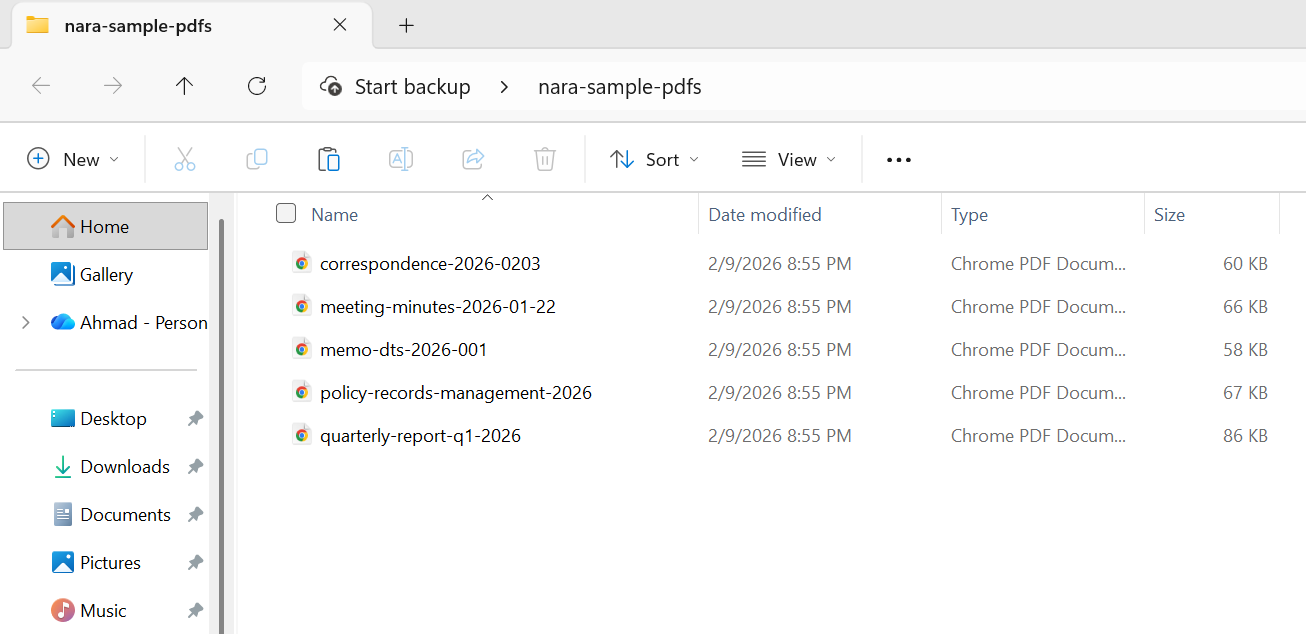
using IronPdf;
using System;
using System.IO;

string inputFolder = "agency-records/";
string validatedFolder = "nara-transfer/validated/";
string rejectedFolder = "nara-transfer/rejected/";

// Create output directories
Directory.CreateDirectory(validatedFolder);
Directory.CreateDirectory(rejectedFolder);

// NARA transfer metadata requirements
string agencyName = "Department of Example";
string recordSeries = "Administrative Correspondence";
string dateRange = "2020-2025";

// Process all PDF files in the input folder
string[] pdfFiles = Directory.GetFiles(inputFolder, "*.pdf");

Console.WriteLine($"Preparing {pdfFiles.Length} records for NARA transfer");
Console.WriteLine($"Agency: {agencyName}");
Console.WriteLine($"Record Series: {recordSeries}");
Console.WriteLine();

int successCount = 0;
int failCount = 0;

foreach (string inputPath in pdfFiles)
{
    string fileName = Path.GetFileName(inputPath);

    try
    {
        using var pdf = PdfDocument.FromFile(inputPath);

        // Set NARA-required metadata
        var metadata = new System.Collections.Generic.Dictionary<string, string>
        {
            { "Title", Path.GetFileNameWithoutExtension(inputPath) },
            { "Author", agencyName },
            { "Subject", recordSeries },
            { "Keywords", $"NARA, {recordSeries}, {dateRange}" },
            { "Agency", agencyName },
            { "RecordSeries", recordSeries },
            { "DateRange", dateRange },
            { "TransferDate", DateTime.Now.ToString("yyyy-MM-dd") }
        };
        pdf.MetaData.SetMetaDataDictionary(metadata);

        // Convert to PDF/A-2b (NARA preferred for digitized records)
        string outputPath = Path.Combine(validatedFolder, fileName);
        pdf.SaveAsPdfA(outputPath, PdfAVersions.PdfA2b);

        // Verify the output
        using var verifyPdf = PdfDocument.FromFile(outputPath);
        if (verifyPdf.PageCount > 0)
        {
            successCount++;
            Console.WriteLine($"[OK] {fileName}");
        }
        else
        {
            throw new Exception("Output PDF has no pages");
        }
    }
    catch (Exception ex)
    {
        failCount++;
        Console.WriteLine($"[FAILED] {fileName}: {ex.Message}");

        // Move original to rejected folder for manual review
        try
        {
            File.Copy(inputPath, Path.Combine(rejectedFolder, fileName), overwrite: true);
        }
        catch { }
    }
}

Console.WriteLine();
Console.WriteLine("=== NARA Transfer Preparation Complete ===");
Console.WriteLine($"Successfully converted: {successCount}");
Console.WriteLine($"Failed (requires review): {failCount}");
Console.WriteLine($"Output location: {validatedFolder}");
using IronPdf;
using System;
using System.IO;
string inputFolder = "agency-records/";
string validatedFolder = "nara-transfer/validated/";
string rejectedFolder = "nara-transfer/rejected/";
// Create output directories
Directory.CreateDirectory(validatedFolder);
Directory.CreateDirectory(rejectedFolder);
// NARA transfer metadata requirements
string agencyName = "Department of Example";
string recordSeries = "Administrative Correspondence";
string dateRange = "2020-2025";
// Process all PDF files in the input folder
string[] pdfFiles = Directory.GetFiles(inputFolder, "*.pdf");
Console.WriteLine($"Preparing {pdfFiles.Length} records for NARA transfer");
Console.WriteLine($"Agency: {agencyName}");
Console.WriteLine($"Record Series: {recordSeries}");
Console.WriteLine();
int successCount = 0;
int failCount = 0;
foreach (string inputPath in pdfFiles)
{
string fileName = Path.GetFileName(inputPath);
try
{
using var pdf = PdfDocument.FromFile(inputPath);
// Set NARA-required metadata
var metadata = new System.Collections.Generic.Dictionary<string, string>
{
{ "Title", Path.GetFileNameWithoutExtension(inputPath) },
{ "Author", agencyName },
{ "Subject", recordSeries },
{ "Keywords", $"NARA, {recordSeries}, {dateRange}" },
{ "Agency", agencyName },
{ "RecordSeries", recordSeries },
{ "DateRange", dateRange },
{ "TransferDate", DateTime.Now.ToString("yyyy-MM-dd") }
};
pdf.MetaData.SetMetaDataDictionary(metadata);
// Convert to PDF/A-2b (NARA preferred for digitized records)
string outputPath = Path.Combine(validatedFolder, fileName);
pdf.SaveAsPdfA(outputPath, PdfAVersions.PdfA2b);
// Verify the output
using var verifyPdf = PdfDocument.FromFile(outputPath);
if (verifyPdf.PageCount > 0)
{
successCount++;
Console.WriteLine($"[OK] {fileName}");
}
else
{
throw new Exception("Output PDF has no pages");
}
}
catch (Exception ex)
{
failCount++;
Console.WriteLine($"[FAILED] {fileName}: {ex.Message}");
// Move original to rejected folder for manual review
try
{
File.Copy(inputPath, Path.Combine(rejectedFolder, fileName), overwrite: true);
}
catch { }
}
}
Console.WriteLine();
Console.WriteLine("=== NARA Transfer Preparation Complete ===");
Console.WriteLine($"Successfully converted: {successCount}");
Console.WriteLine($"Failed (requires review): {failCount}");
Console.WriteLine($"Output location: {validatedFolder}");Imports IronPdf
Imports System
Imports System.IO
Module Program
Sub Main()
Dim inputFolder As String = "agency-records/"
Dim validatedFolder As String = "nara-transfer/validated/"
Dim rejectedFolder As String = "nara-transfer/rejected/"
' Create output directories
Directory.CreateDirectory(validatedFolder)
Directory.CreateDirectory(rejectedFolder)
' NARA transfer metadata requirements
Dim agencyName As String = "Department of Example"
Dim recordSeries As String = "Administrative Correspondence"
Dim dateRange As String = "2020-2025"
' Process all PDF files in the input folder
Dim pdfFiles As String() = Directory.GetFiles(inputFolder, "*.pdf")
Console.WriteLine($"Preparing {pdfFiles.Length} records for NARA transfer")
Console.WriteLine($"Agency: {agencyName}")
Console.WriteLine($"Record Series: {recordSeries}")
Console.WriteLine()
Dim successCount As Integer = 0
Dim failCount As Integer = 0
For Each inputPath As String In pdfFiles
Dim fileName As String = Path.GetFileName(inputPath)
Try
Using pdf = PdfDocument.FromFile(inputPath)
' Set NARA-required metadata
Dim metadata As New System.Collections.Generic.Dictionary(Of String, String) From {
{"Title", Path.GetFileNameWithoutExtension(inputPath)},
{"Author", agencyName},
{"Subject", recordSeries},
{"Keywords", $"NARA, {recordSeries}, {dateRange}"},
{"Agency", agencyName},
{"RecordSeries", recordSeries},
{"DateRange", dateRange},
{"TransferDate", DateTime.Now.ToString("yyyy-MM-dd")}
}
pdf.MetaData.SetMetaDataDictionary(metadata)
' Convert to PDF/A-2b (NARA preferred for digitized records)
Dim outputPath As String = Path.Combine(validatedFolder, fileName)
pdf.SaveAsPdfA(outputPath, PdfAVersions.PdfA2b)
' Verify the output
Using verifyPdf = PdfDocument.FromFile(outputPath)
If verifyPdf.PageCount > 0 Then
successCount += 1
Console.WriteLine($"[OK] {fileName}")
Else
Throw New Exception("Output PDF has no pages")
End If
End Using
End Using
Catch ex As Exception
failCount += 1
Console.WriteLine($"[FAILED] {fileName}: {ex.Message}")
' Move original to rejected folder for manual review
Try
File.Copy(inputPath, Path.Combine(rejectedFolder, fileName), overwrite:=True)
Catch
End Try
End Try
Next
Console.WriteLine()
Console.WriteLine("=== NARA Transfer Preparation Complete ===")
Console.WriteLine($"Successfully converted: {successCount}")
Console.WriteLine($"Failed (requires review): {failCount}")
Console.WriteLine($"Output location: {validatedFolder}")
End Sub
End ModuleImports IronPdf
Imports System
Imports System.IO
Module Program
Sub Main()
Dim inputFolder As String = "agency-records/"
Dim validatedFolder As String = "nara-transfer/validated/"
Dim rejectedFolder As String = "nara-transfer/rejected/"
' Create output directories
Directory.CreateDirectory(validatedFolder)
Directory.CreateDirectory(rejectedFolder)
' NARA transfer metadata requirements
Dim agencyName As String = "Department of Example"
Dim recordSeries As String = "Administrative Correspondence"
Dim dateRange As String = "2020-2025"
' Process all PDF files in the input folder
Dim pdfFiles As String() = Directory.GetFiles(inputFolder, "*.pdf")
Console.WriteLine($"Preparing {pdfFiles.Length} records for NARA transfer")
Console.WriteLine($"Agency: {agencyName}")
Console.WriteLine($"Record Series: {recordSeries}")
Console.WriteLine()
Dim successCount As Integer = 0
Dim failCount As Integer = 0
For Each inputPath As String In pdfFiles
Dim fileName As String = Path.GetFileName(inputPath)
Try
Using pdf = PdfDocument.FromFile(inputPath)
' Set NARA-required metadata
Dim metadata As New System.Collections.Generic.Dictionary(Of String, String) From {
{"Title", Path.GetFileNameWithoutExtension(inputPath)},
{"Author", agencyName},
{"Subject", recordSeries},
{"Keywords", $"NARA, {recordSeries}, {dateRange}"},
{"Agency", agencyName},
{"RecordSeries", recordSeries},
{"DateRange", dateRange},
{"TransferDate", DateTime.Now.ToString("yyyy-MM-dd")}
}
pdf.MetaData.SetMetaDataDictionary(metadata)
' Convert to PDF/A-2b (NARA preferred for digitized records)
Dim outputPath As String = Path.Combine(validatedFolder, fileName)
pdf.SaveAsPdfA(outputPath, PdfAVersions.PdfA2b)
' Verify the output
Using verifyPdf = PdfDocument.FromFile(outputPath)
If verifyPdf.PageCount > 0 Then
successCount += 1
Console.WriteLine($"[OK] {fileName}")
Else
Throw New Exception("Output PDF has no pages")
End If
End Using
End Using
Catch ex As Exception
failCount += 1
Console.WriteLine($"[FAILED] {fileName}: {ex.Message}")
' Move original to rejected folder for manual review
Try
File.Copy(inputPath, Path.Combine(rejectedFolder, fileName), overwrite:=True)
Catch
End Try
End Try
Next
Console.WriteLine()
Console.WriteLine("=== NARA Transfer Preparation Complete ===")
Console.WriteLine($"Successfully converted: {successCount}")
Console.WriteLine($"Failed (requires review): {failCount}")
Console.WriteLine($"Output location: {validatedFolder}")
End Sub
End ModuleWynik
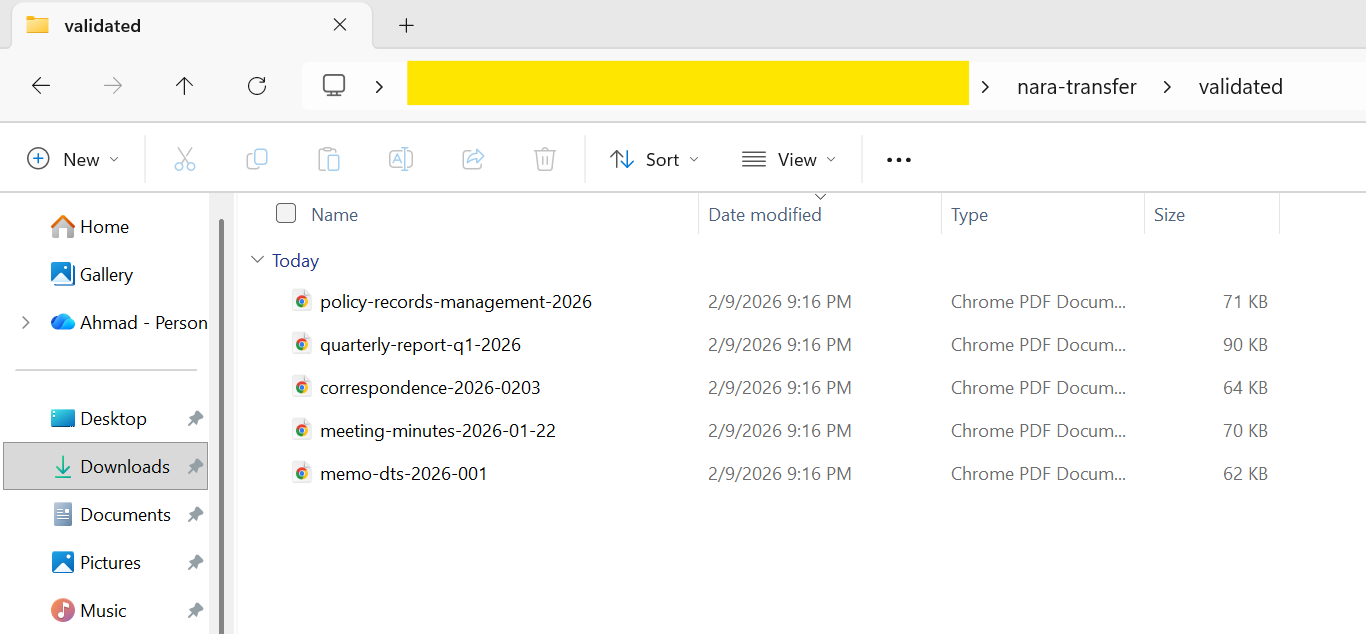
Podczas przygotowywania rekordów do transferu NARA, kluczowe jest zweryfikowanie każdego pliku z osobna. Proces przyjmowania NARA odrzuci niezgodne pliki, a ponowne przetwarzanie dużej grupy jest kosztowne zarówno pod względem czasu, jak i wysiłku. Wbudowanie walidacji bezpośrednio do twojego pipeline'a konwersji - używając narzędzia takiego jak veraPDF po każdym wywołaniu SaveAsPdfA - to najbardziej niezawodne podejście.
Archiwizacja dokumentów sądowych
Federalny system sądowy w USA i wiele systemów sądowych stanowych używa systemów elektronicznych zgłoszeń (przede wszystkim CM/ECF na poziomie federalnym), które akceptują lub wymagają PDF/A do długoterminowego przechowywania dokumentów. Chociaż precyzyjne wymogi różnią się w zależności od jurysdykcji, ogólne oczekiwania są konsekwentne:
Sądy federalne - Biuro Administracyjne Sądów USA zaleca PDF/A dla dokumentów, które staną się częścią trwałej dokumentacji sprawy. Systemy CM/ECF ogólnie akceptują PDF/A-1b jako minimalny standard, chociaż PDF/A-2b jest coraz bardziej preferowany dla dokumentów z złożonym formatowaniem.
Sądy stanowe - Wymagania różnią się znacznie. Niektóre stany (jak Teksas i Kalifornia) mają szczególne wymogi PDF/A dla określonych typów zgłoszeń, podczas gdy inne po prostu zalecają to jako najlepszą praktykę. Sprawdzenie konkretnych zasad dla docelowej jurysdykcji jest niezbędne.
Typowe wymagania w sądowych systemach obejmują:
Dokumenty muszą być przeszukiwalne tekstowo (nie tylko zeskanowane obrazy), co oznacza użycie poziomów zgodności PDF/A-1a lub PDF/A-2a, jeśli to możliwe, lub zapewnienie, że OCR został zastosowany do zeskanowanych dokumentów. Rozmiary stron muszą być standardowe (zazwyczaj Letter USA, 8,5" × 11"). Metadane powinny obejmować numer sprawy, datę zgłoszenia i typ dokumentu, jeśli system zgłoszeń to obsługuje.
using IronPdf;
using System;
// Court filing configuration
string caseNumber = "1:26-cv-00142-ABC";
string courtName = "US District Court, Northern District";
string documentType = "Motion for Summary Judgment";
string filingParty = "Plaintiff";
// Create legal document HTML
string legalDocumentHtml = $@"
E html>
le>
body {{
font-family: 'Times New Roman', Times, serif;
font-size: 12pt;
line-height: 2;
margin: 1in;
}}
.header {{ text-align: center; margin-bottom: 24pt; }}
.case-caption {{
border: 1px solid black;
padding: 12pt;
margin: 24pt 0;
}}
.section {{ margin: 12pt 0; }}
h1 {{ font-size: 14pt; text-align: center; }}
.signature {{ margin-top: 48pt; }}
yle>
class='header'>
<strong>{courtName}</strong>
v>
class='case-caption'>
<p>ACME CORPORATION,<br> Plaintiff,</p>
<p>v.</p>
<p>EXAMPLE INDUSTRIES, INC.,<br> Defendant.</p>
<p style='text-align: right;'><strong>Case No. {caseNumber}</strong></p>
v>
{documentType.ToUpper()}</h1>
class='section'>
<p>Plaintiff ACME Corporation, by and through undersigned counsel, respectfully
moves this Court for summary judgment pursuant to Federal Rule of Civil Procedure 56...</p>
v>
class='section'>
<h2>I. INTRODUCTION</h2>
<p>This motion presents the Court with a straightforward question of contract interpretation...</p>
v>
class='signature'>
<p>Respectfully submitted,</p>
<p>_________________________<br>
Jane Attorney, Esq.<br>
Bar No. 12345<br>
Law Firm LLP<br>
123 Legal Street<br>
City, State 12345<br>
(555) 123-4567<br>
jane@lawfirm.com</p>
<p>Attorney for Plaintiff</p>
v>
;
// Render with court-appropriate settings
var renderer = new ChromePdfRenderer();
renderer.RenderingOptions.PaperSize = IronPdf.Rendering.PdfPaperSize.Letter;
renderer.RenderingOptions.MarginTop = 72;
renderer.RenderingOptions.MarginBottom = 72;
renderer.RenderingOptions.MarginLeft = 72;
renderer.RenderingOptions.MarginRight = 72;
using var pdf = renderer.RenderHtmlAsPdf(legalDocumentHtml);
// Set metadata for court filing system indexing
var metadata = new System.Collections.Generic.Dictionary<string, string>
{
{ "Title", $"{documentType} - {caseNumber}" },
{ "Author", "Law Firm LLP" },
{ "Subject", $"Court Filing - {caseNumber}" },
{ "CaseNumber", caseNumber },
{ "DocumentType", documentType },
{ "FilingParty", filingParty },
{ "FilingDate", DateTime.Now.ToString("yyyy-MM-dd") }
};
pdf.MetaData.SetMetaDataDictionary(metadata);
// Convert to PDF/A-2b (widely accepted by federal courts)
string outputPath = $"court-filing-{caseNumber.Replace(":", "-")}.pdf";
pdf.SaveAsPdfA(outputPath, PdfAVersions.PdfA2b);using IronPdf;
using System;
// Court filing configuration
string caseNumber = "1:26-cv-00142-ABC";
string courtName = "US District Court, Northern District";
string documentType = "Motion for Summary Judgment";
string filingParty = "Plaintiff";
// Create legal document HTML
string legalDocumentHtml = $@"
E html>
le>
body {{
font-family: 'Times New Roman', Times, serif;
font-size: 12pt;
line-height: 2;
margin: 1in;
}}
.header {{ text-align: center; margin-bottom: 24pt; }}
.case-caption {{
border: 1px solid black;
padding: 12pt;
margin: 24pt 0;
}}
.section {{ margin: 12pt 0; }}
h1 {{ font-size: 14pt; text-align: center; }}
.signature {{ margin-top: 48pt; }}
yle>
class='header'>
<strong>{courtName}</strong>
v>
class='case-caption'>
<p>ACME CORPORATION,<br> Plaintiff,</p>
<p>v.</p>
<p>EXAMPLE INDUSTRIES, INC.,<br> Defendant.</p>
<p style='text-align: right;'><strong>Case No. {caseNumber}</strong></p>
v>
{documentType.ToUpper()}</h1>
class='section'>
<p>Plaintiff ACME Corporation, by and through undersigned counsel, respectfully
moves this Court for summary judgment pursuant to Federal Rule of Civil Procedure 56...</p>
v>
class='section'>
<h2>I. INTRODUCTION</h2>
<p>This motion presents the Court with a straightforward question of contract interpretation...</p>
v>
class='signature'>
<p>Respectfully submitted,</p>
<p>_________________________<br>
Jane Attorney, Esq.<br>
Bar No. 12345<br>
Law Firm LLP<br>
123 Legal Street<br>
City, State 12345<br>
(555) 123-4567<br>
jane@lawfirm.com</p>
<p>Attorney for Plaintiff</p>
v>
;
// Render with court-appropriate settings
var renderer = new ChromePdfRenderer();
renderer.RenderingOptions.PaperSize = IronPdf.Rendering.PdfPaperSize.Letter;
renderer.RenderingOptions.MarginTop = 72;
renderer.RenderingOptions.MarginBottom = 72;
renderer.RenderingOptions.MarginLeft = 72;
renderer.RenderingOptions.MarginRight = 72;
using var pdf = renderer.RenderHtmlAsPdf(legalDocumentHtml);
// Set metadata for court filing system indexing
var metadata = new System.Collections.Generic.Dictionary<string, string>
{
{ "Title", $"{documentType} - {caseNumber}" },
{ "Author", "Law Firm LLP" },
{ "Subject", $"Court Filing - {caseNumber}" },
{ "CaseNumber", caseNumber },
{ "DocumentType", documentType },
{ "FilingParty", filingParty },
{ "FilingDate", DateTime.Now.ToString("yyyy-MM-dd") }
};
pdf.MetaData.SetMetaDataDictionary(metadata);
// Convert to PDF/A-2b (widely accepted by federal courts)
string outputPath = $"court-filing-{caseNumber.Replace(":", "-")}.pdf";
pdf.SaveAsPdfA(outputPath, PdfAVersions.PdfA2b);Imports IronPdf
Imports System
Imports System.Collections.Generic
' Court filing configuration
Dim caseNumber As String = "1:26-cv-00142-ABC"
Dim courtName As String = "US District Court, Northern District"
Dim documentType As String = "Motion for Summary Judgment"
Dim filingParty As String = "Plaintiff"
' Create legal document HTML
Dim legalDocumentHtml As String = $"
<!DOCTYPE html>
<html>
<head>
<style>
body {{
font-family: 'Times New Roman', Times, serif;
font-size: 12pt;
line-height: 2;
margin: 1in;
}}
.header {{ text-align: center; margin-bottom: 24pt; }}
.case-caption {{
border: 1px solid black;
padding: 12pt;
margin: 24pt 0;
}}
.section {{ margin: 12pt 0; }}
h1 {{ font-size: 14pt; text-align: center; }}
.signature {{ margin-top: 48pt; }}
</style>
</head>
<body>
<div class='header'>
<strong>{courtName}</strong>
</div>
<div class='case-caption'>
<p>ACME CORPORATION,<br> Plaintiff,</p>
<p>v.</p>
<p>EXAMPLE INDUSTRIES, INC.,<br> Defendant.</p>
<p style='text-align: right;'><strong>Case No. {caseNumber}</strong></p>
</div>
<h1>{documentType.ToUpper()}</h1>
<div class='section'>
<p>Plaintiff ACME Corporation, by and through undersigned counsel, respectfully
moves this Court for summary judgment pursuant to Federal Rule of Civil Procedure 56...</p>
</div>
<div class='section'>
<h2>I. INTRODUCTION</h2>
<p>This motion presents the Court with a straightforward question of contract interpretation...</p>
</div>
<div class='signature'>
<p>Respectfully submitted,</p>
<p>_________________________<br>
Jane Attorney, Esq.<br>
Bar No. 12345<br>
Law Firm LLP<br>
123 Legal Street<br>
City, State 12345<br>
(555) 123-4567<br>
jane@lawfirm.com</p>
<p>Attorney for Plaintiff</p>
</div>
</body>
</html>
"
' Render with court-appropriate settings
Dim renderer As New ChromePdfRenderer()
renderer.RenderingOptions.PaperSize = IronPdf.Rendering.PdfPaperSize.Letter
renderer.RenderingOptions.MarginTop = 72
renderer.RenderingOptions.MarginBottom = 72
renderer.RenderingOptions.MarginLeft = 72
renderer.RenderingOptions.MarginRight = 72
Using pdf = renderer.RenderHtmlAsPdf(legalDocumentHtml)
' Set metadata for court filing system indexing
Dim metadata As New Dictionary(Of String, String) From {
{"Title", $"{documentType} - {caseNumber}"},
{"Author", "Law Firm LLP"},
{"Subject", $"Court Filing - {caseNumber}"},
{"CaseNumber", caseNumber},
{"DocumentType", documentType},
{"FilingParty", filingParty},
{"FilingDate", DateTime.Now.ToString("yyyy-MM-dd")}
}
pdf.MetaData.SetMetaDataDictionary(metadata)
' Convert to PDF/A-2b (widely accepted by federal courts)
Dim outputPath As String = $"court-filing-{caseNumber.Replace(":", "-")}.pdf"
pdf.SaveAsPdfA(outputPath, PdfAVersions.PdfA2b)
End UsingImports IronPdf
Imports System
Imports System.Collections.Generic
' Court filing configuration
Dim caseNumber As String = "1:26-cv-00142-ABC"
Dim courtName As String = "US District Court, Northern District"
Dim documentType As String = "Motion for Summary Judgment"
Dim filingParty As String = "Plaintiff"
' Create legal document HTML
Dim legalDocumentHtml As String = $"
<!DOCTYPE html>
<html>
<head>
<style>
body {{
font-family: 'Times New Roman', Times, serif;
font-size: 12pt;
line-height: 2;
margin: 1in;
}}
.header {{ text-align: center; margin-bottom: 24pt; }}
.case-caption {{
border: 1px solid black;
padding: 12pt;
margin: 24pt 0;
}}
.section {{ margin: 12pt 0; }}
h1 {{ font-size: 14pt; text-align: center; }}
.signature {{ margin-top: 48pt; }}
</style>
</head>
<body>
<div class='header'>
<strong>{courtName}</strong>
</div>
<div class='case-caption'>
<p>ACME CORPORATION,<br> Plaintiff,</p>
<p>v.</p>
<p>EXAMPLE INDUSTRIES, INC.,<br> Defendant.</p>
<p style='text-align: right;'><strong>Case No. {caseNumber}</strong></p>
</div>
<h1>{documentType.ToUpper()}</h1>
<div class='section'>
<p>Plaintiff ACME Corporation, by and through undersigned counsel, respectfully
moves this Court for summary judgment pursuant to Federal Rule of Civil Procedure 56...</p>
</div>
<div class='section'>
<h2>I. INTRODUCTION</h2>
<p>This motion presents the Court with a straightforward question of contract interpretation...</p>
</div>
<div class='signature'>
<p>Respectfully submitted,</p>
<p>_________________________<br>
Jane Attorney, Esq.<br>
Bar No. 12345<br>
Law Firm LLP<br>
123 Legal Street<br>
City, State 12345<br>
(555) 123-4567<br>
jane@lawfirm.com</p>
<p>Attorney for Plaintiff</p>
</div>
</body>
</html>
"
' Render with court-appropriate settings
Dim renderer As New ChromePdfRenderer()
renderer.RenderingOptions.PaperSize = IronPdf.Rendering.PdfPaperSize.Letter
renderer.RenderingOptions.MarginTop = 72
renderer.RenderingOptions.MarginBottom = 72
renderer.RenderingOptions.MarginLeft = 72
renderer.RenderingOptions.MarginRight = 72
Using pdf = renderer.RenderHtmlAsPdf(legalDocumentHtml)
' Set metadata for court filing system indexing
Dim metadata As New Dictionary(Of String, String) From {
{"Title", $"{documentType} - {caseNumber}"},
{"Author", "Law Firm LLP"},
{"Subject", $"Court Filing - {caseNumber}"},
{"CaseNumber", caseNumber},
{"DocumentType", documentType},
{"FilingParty", filingParty},
{"FilingDate", DateTime.Now.ToString("yyyy-MM-dd")}
}
pdf.MetaData.SetMetaDataDictionary(metadata)
' Convert to PDF/A-2b (widely accepted by federal courts)
Dim outputPath As String = $"court-filing-{caseNumber.Replace(":", "-")}.pdf"
pdf.SaveAsPdfA(outputPath, PdfAVersions.PdfA2b)
End UsingWynik
Dla kancelarii prawnych i firm technologicznych w dziedzinie prawa budujących systemy zarządzania dokumentami, integracja konwersji PDF/A w proces składania zapewnia, że każdy zarchiwizowany dokument spełnia długoterminowe wymagania sądu dotyczące przechowywania - bez ręcznej interwencji para-prawników czy prawników.
Zatrzymywanie dokumentacji medycznej
Organizacje opieki zdrowotnej stoją przed rygorystycznymi wymogąmi przechowywania kart pacjentów. Chociaż HIPAA nie wymaga konkretnego formatu pliku, kombinacja długich okresów przechowywania (często 7–10 lat dla dorosłych, dłużej dla nieletnich), wymogów dostępu i oczekiwań audytu sprawia, że PDF/A jest naturalnym wyborem do archiwizacji dokumentów medycznych.
Kluczowe rozważenia dla archiwizacji dokumentacji medycznej:
Okresy przechowywania - Federalne i stanowe regulacje wymagają, aby dokumentacja medyczna była przechowywana przez różny czas, często sięgający ponad 10 lat. Gwarancja PDF/A dotycząca długoterminowej czytelności czyni go idealnym dla spełnienia tych wymagań bez obaw o przestarzałość formatu.
Dostępność - ADA i Sekcja 508 wymagają, aby elektroniczna dokumentacja medyczna była dostępna. Użycie poziomów zgodności PDF/A-2a lub PDF/A-3a (które obejmują oznaczanie strukturalne) pomaga spełnić te wymagania dotyczące dostępności.
Interoperacyjność - Dokumentacja medyczna jest często udostępniana między dostawcami, ubezpieczycielami i pacjentami. Samodzielna natura PDF/A zapewnia, że dokumenty renderują się spójnie niezależnie od przeglądarki lub systemu, który ich używa do otwierania.
Gotowość do audytu - Audyty w opiece zdrowotnej mogą wymagać wydania dokumentacji medycznej wiele lat po jej utworzeniu. PDF/A zapewnia, że dokumenty produkowane podczas audytu są identyczne z oryginałami, bez różnic w renderingu, które mogłyby budzić wątpliwości co do integralności dokumentów.
using IronPdf;
using System;
using System.Collections.Generic;

// Medical record metadata
string patientId = "MRN-2026-00847";
string documentType = "Discharge Summary";
string facility = "Metro General Hospital";
string department = "Internal Medicine";
DateTime encounterDate = new DateTime(2026, 2, 5);

// Create clinical document HTML
string clinicalDocumentHtml = $@"
E html>
ng='en'>

le>
body {{ font-family: Arial, sans-serif; margin: 40px; line-height: 1.6; }}
.header {{ border-bottom: 2px solid #2c3e50; padding-bottom: 15px; margin-bottom: 20px; }}
.patient-info {{ background: #ecf0f1; padding: 15px; margin: 15px 0; }}
.section {{ margin: 20px 0; }}
h1 {{ color: #2c3e50; }}
h2 {{ color: #3498db; font-size: 14pt; }}
.footer {{ margin-top: 40px; font-size: 10pt; color: #666; }}
yle>


 class='header'>
<h1>{facility}</h1>
<p>{department} | {documentType}</p>
v>

 class='patient-info'>
<p><strong>Patient ID:</strong> {patientId}</p>
<p><strong>Encounter Date:</strong> {encounterDate:MMMM d, yyyy}</p>
<p><strong>Attending Physician:</strong> Dr. Sarah Johnson, MD</p>
v>

 class='section'>
<h2>Chief Complaint</h2>
<p>Patient presented with acute respiratory symptoms including shortness of breath and persistent cough.</p>
v>

 class='section'>
<h2>Hospital Course</h2>
<p>Patient was admitted for observation and treatment. Symptoms improved with standard protocol...</p>
v>

 class='section'>
<h2>Discharge Instructions</h2>
<ul>
    <li>Continue prescribed medications as directed</li>
    <li>Follow up with primary care physician within 7 days</li>
    <li>Return to ED if symptoms worsen</li>
</ul>
v>

 class='footer'>
<p>Document generated: {DateTime.Now:yyyy-MM-dd HH:mm}</p>
<p>This document is archived in PDF/A-3a format for accessibility and long-term preservation.</p>
v>

;

var renderer = new ChromePdfRenderer();
using var pdf = renderer.RenderHtmlAsPdf(clinicalDocumentHtml);

// Set comprehensive metadata for medical records management
var metadata = new System.Collections.Generic.Dictionary<string, string>
{
    { "Title", $"{documentType} - {patientId}" },
    { "Author", "Metro General Hospital EHR System" },
    { "Subject", $"Clinical documentation for patient {patientId}" },
    { "PatientMRN", patientId },
    { "DocumentType", documentType },
    { "Facility", facility },
    { "Department", department },
    { "EncounterDate", encounterDate.ToString("yyyy-MM-dd") },
    { "RetentionCategory", "Medical Record - Adult" },
    { "RetentionPeriod", "10 years from last encounter" }
};
pdf.MetaData.SetMetaDataDictionary(metadata);

// Embed clinical data (HL7 FHIR format)
string fhirData = @"{
sourceType"": ""DocumentReference"",
atus"": ""current"",
pe"": { ""text"": ""Discharge Summary"" },
bject"": { ""reference"": ""Patient/MRN-2026-00847"" }


byte[] fhirBytes = System.Text.Encoding.UTF8.GetBytes(fhirData);

var fhirConfig = new EmbedFileConfiguration(EmbedFileType.xml)
{
    EmbedFileName = "clinical-data.json",
    AFDesc = "FHIR DocumentReference metadata",
    AFRelationship = AFRelationship.Data
};

var embedFiles = new List<EmbedFileByte>
{
    new EmbedFileByte(fhirBytes, fhirConfig)
};

// Convert to PDF/A-3a (accessible archival with embedded data)
using var archivedRecord = pdf.ConvertToPdfA(embedFiles, PdfAVersions.PdfA3a);

string outputPath = $"medical-record-{patientId}-{encounterDate:yyyyMMdd}.pdf";
archivedRecord.SaveAs(outputPath);
using IronPdf;
using System;
using System.Collections.Generic;
// Medical record metadata
string patientId = "MRN-2026-00847";
string documentType = "Discharge Summary";
string facility = "Metro General Hospital";
string department = "Internal Medicine";
DateTime encounterDate = new DateTime(2026, 2, 5);
// Create clinical document HTML
string clinicalDocumentHtml = $@"
E html>
ng='en'>
le>
body {{ font-family: Arial, sans-serif; margin: 40px; line-height: 1.6; }}
.header {{ border-bottom: 2px solid #2c3e50; padding-bottom: 15px; margin-bottom: 20px; }}
.patient-info {{ background: #ecf0f1; padding: 15px; margin: 15px 0; }}
.section {{ margin: 20px 0; }}
h1 {{ color: #2c3e50; }}
h2 {{ color: #3498db; font-size: 14pt; }}
.footer {{ margin-top: 40px; font-size: 10pt; color: #666; }}
yle>
class='header'>
<h1>{facility}</h1>
<p>{department} | {documentType}</p>
v>
class='patient-info'>
<p><strong>Patient ID:</strong> {patientId}</p>
<p><strong>Encounter Date:</strong> {encounterDate:MMMM d, yyyy}</p>
<p><strong>Attending Physician:</strong> Dr. Sarah Johnson, MD</p>
v>
class='section'>
<h2>Chief Complaint</h2>
<p>Patient presented with acute respiratory symptoms including shortness of breath and persistent cough.</p>
v>
class='section'>
<h2>Hospital Course</h2>
<p>Patient was admitted for observation and treatment. Symptoms improved with standard protocol...</p>
v>
class='section'>
<h2>Discharge Instructions</h2>
<ul>
<li>Continue prescribed medications as directed</li>
<li>Follow up with primary care physician within 7 days</li>
<li>Return to ED if symptoms worsen</li>
</ul>
v>
class='footer'>
<p>Document generated: {DateTime.Now:yyyy-MM-dd HH:mm}</p>
<p>This document is archived in PDF/A-3a format for accessibility and long-term preservation.</p>
v>
;
var renderer = new ChromePdfRenderer();
using var pdf = renderer.RenderHtmlAsPdf(clinicalDocumentHtml);
// Set comprehensive metadata for medical records management
var metadata = new System.Collections.Generic.Dictionary<string, string>
{
{ "Title", $"{documentType} - {patientId}" },
{ "Author", "Metro General Hospital EHR System" },
{ "Subject", $"Clinical documentation for patient {patientId}" },
{ "PatientMRN", patientId },
{ "DocumentType", documentType },
{ "Facility", facility },
{ "Department", department },
{ "EncounterDate", encounterDate.ToString("yyyy-MM-dd") },
{ "RetentionCategory", "Medical Record - Adult" },
{ "RetentionPeriod", "10 years from last encounter" }
};
pdf.MetaData.SetMetaDataDictionary(metadata);
// Embed clinical data (HL7 FHIR format)
string fhirData = @"{
sourceType"": ""DocumentReference"",
atus"": ""current"",
pe"": { ""text"": ""Discharge Summary"" },
bject"": { ""reference"": ""Patient/MRN-2026-00847"" }
byte[] fhirBytes = System.Text.Encoding.UTF8.GetBytes(fhirData);
var fhirConfig = new EmbedFileConfiguration(EmbedFileType.xml)
{
EmbedFileName = "clinical-data.json",
AFDesc = "FHIR DocumentReference metadata",
AFRelationship = AFRelationship.Data
};
var embedFiles = new List<EmbedFileByte>
{
new EmbedFileByte(fhirBytes, fhirConfig)
};
// Convert to PDF/A-3a (accessible archival with embedded data)
using var archivedRecord = pdf.ConvertToPdfA(embedFiles, PdfAVersions.PdfA3a);
string outputPath = $"medical-record-{patientId}-{encounterDate:yyyyMMdd}.pdf";
archivedRecord.SaveAs(outputPath);Imports IronPdf
Imports System
Imports System.Collections.Generic
Imports System.Text
' Medical record metadata
Dim patientId As String = "MRN-2026-00847"
Dim documentType As String = "Discharge Summary"
Dim facility As String = "Metro General Hospital"
Dim department As String = "Internal Medicine"
Dim encounterDate As DateTime = New DateTime(2026, 2, 5)
' Create clinical document HTML
Dim clinicalDocumentHtml As String = $"
<!DOCTYPE html>
<html lang='en'>
<head>
<style>
body {{ font-family: Arial, sans-serif; margin: 40px; line-height: 1.6; }}
.header {{ border-bottom: 2px solid #2c3e50; padding-bottom: 15px; margin-bottom: 20px; }}
.patient-info {{ background: #ecf0f1; padding: 15px; margin: 15px 0; }}
.section {{ margin: 20px 0; }}
h1 {{ color: #2c3e50; }}
h2 {{ color: #3498db; font-size: 14pt; }}
.footer {{ margin-top: 40px; font-size: 10pt; color: #666; }}
</style>
</head>
<body>
<div class='header'>
<h1>{facility}</h1>
<p>{department} | {documentType}</p>
</div>
<div class='patient-info'>
<p><strong>Patient ID:</strong> {patientId}</p>
<p><strong>Encounter Date:</strong> {encounterDate:MMMM d, yyyy}</p>
<p><strong>Attending Physician:</strong> Dr. Sarah Johnson, MD</p>
</div>
<div class='section'>
<h2>Chief Complaint</h2>
<p>Patient presented with acute respiratory symptoms including shortness of breath and persistent cough.</p>
</div>
<div class='section'>
<h2>Hospital Course</h2>
<p>Patient was admitted for observation and treatment. Symptoms improved with standard protocol...</p>
</div>
<div class='section'>
<h2>Discharge Instructions</h2>
<ul>
<li>Continue prescribed medications as directed</li>
<li>Follow up with primary care physician within 7 days</li>
<li>Return to ED if symptoms worsen</li>
</ul>
</div>
<div class='footer'>
<p>Document generated: {DateTime.Now:yyyy-MM-dd HH:mm}</p>
<p>This document is archived in PDF/A-3a format for accessibility and long-term preservation.</p>
</div>
</body>
</html>"
Dim renderer As New ChromePdfRenderer()
Using pdf = renderer.RenderHtmlAsPdf(clinicalDocumentHtml)
' Set comprehensive metadata for medical records management
Dim metadata As New Dictionary(Of String, String) From {
{"Title", $"{documentType} - {patientId}"},
{"Author", "Metro General Hospital EHR System"},
{"Subject", $"Clinical documentation for patient {patientId}"},
{"PatientMRN", patientId},
{"DocumentType", documentType},
{"Facility", facility},
{"Department", department},
{"EncounterDate", encounterDate.ToString("yyyy-MM-dd")},
{"RetentionCategory", "Medical Record - Adult"},
{"RetentionPeriod", "10 years from last encounter"}
}
pdf.MetaData.SetMetaDataDictionary(metadata)
' Embed clinical data (HL7 FHIR format)
Dim fhirData As String = "{
""resourceType"": ""DocumentReference"",
""status"": ""current"",
""type"": { ""text"": ""Discharge Summary"" },
""subject"": { ""reference"": ""Patient/MRN-2026-00847"" }
}"
Dim fhirBytes As Byte() = Encoding.UTF8.GetBytes(fhirData)
Dim fhirConfig As New EmbedFileConfiguration(EmbedFileType.xml) With {
.EmbedFileName = "clinical-data.json",
.AFDesc = "FHIR DocumentReference metadata",
.AFRelationship = AFRelationship.Data
}
Dim embedFiles As New List(Of EmbedFileByte) From {
New EmbedFileByte(fhirBytes, fhirConfig)
}
' Convert to PDF/A-3a (accessible archival with embedded data)
Using archivedRecord = pdf.ConvertToPdfA(embedFiles, PdfAVersions.PdfA3a)
Dim outputPath As String = $"medical-record-{patientId}-{encounterDate:yyyyMMdd}.pdf"
archivedRecord.SaveAs(outputPath)
End Using
End UsingImports IronPdf
Imports System
Imports System.Collections.Generic
Imports System.Text
' Medical record metadata
Dim patientId As String = "MRN-2026-00847"
Dim documentType As String = "Discharge Summary"
Dim facility As String = "Metro General Hospital"
Dim department As String = "Internal Medicine"
Dim encounterDate As DateTime = New DateTime(2026, 2, 5)
' Create clinical document HTML
Dim clinicalDocumentHtml As String = $"
<!DOCTYPE html>
<html lang='en'>
<head>
<style>
body {{ font-family: Arial, sans-serif; margin: 40px; line-height: 1.6; }}
.header {{ border-bottom: 2px solid #2c3e50; padding-bottom: 15px; margin-bottom: 20px; }}
.patient-info {{ background: #ecf0f1; padding: 15px; margin: 15px 0; }}
.section {{ margin: 20px 0; }}
h1 {{ color: #2c3e50; }}
h2 {{ color: #3498db; font-size: 14pt; }}
.footer {{ margin-top: 40px; font-size: 10pt; color: #666; }}
</style>
</head>
<body>
<div class='header'>
<h1>{facility}</h1>
<p>{department} | {documentType}</p>
</div>
<div class='patient-info'>
<p><strong>Patient ID:</strong> {patientId}</p>
<p><strong>Encounter Date:</strong> {encounterDate:MMMM d, yyyy}</p>
<p><strong>Attending Physician:</strong> Dr. Sarah Johnson, MD</p>
</div>
<div class='section'>
<h2>Chief Complaint</h2>
<p>Patient presented with acute respiratory symptoms including shortness of breath and persistent cough.</p>
</div>
<div class='section'>
<h2>Hospital Course</h2>
<p>Patient was admitted for observation and treatment. Symptoms improved with standard protocol...</p>
</div>
<div class='section'>
<h2>Discharge Instructions</h2>
<ul>
<li>Continue prescribed medications as directed</li>
<li>Follow up with primary care physician within 7 days</li>
<li>Return to ED if symptoms worsen</li>
</ul>
</div>
<div class='footer'>
<p>Document generated: {DateTime.Now:yyyy-MM-dd HH:mm}</p>
<p>This document is archived in PDF/A-3a format for accessibility and long-term preservation.</p>
</div>
</body>
</html>"
Dim renderer As New ChromePdfRenderer()
Using pdf = renderer.RenderHtmlAsPdf(clinicalDocumentHtml)
' Set comprehensive metadata for medical records management
Dim metadata As New Dictionary(Of String, String) From {
{"Title", $"{documentType} - {patientId}"},
{"Author", "Metro General Hospital EHR System"},
{"Subject", $"Clinical documentation for patient {patientId}"},
{"PatientMRN", patientId},
{"DocumentType", documentType},
{"Facility", facility},
{"Department", department},
{"EncounterDate", encounterDate.ToString("yyyy-MM-dd")},
{"RetentionCategory", "Medical Record - Adult"},
{"RetentionPeriod", "10 years from last encounter"}
}
pdf.MetaData.SetMetaDataDictionary(metadata)
' Embed clinical data (HL7 FHIR format)
Dim fhirData As String = "{
""resourceType"": ""DocumentReference"",
""status"": ""current"",
""type"": { ""text"": ""Discharge Summary"" },
""subject"": { ""reference"": ""Patient/MRN-2026-00847"" }
}"
Dim fhirBytes As Byte() = Encoding.UTF8.GetBytes(fhirData)
Dim fhirConfig As New EmbedFileConfiguration(EmbedFileType.xml) With {
.EmbedFileName = "clinical-data.json",
.AFDesc = "FHIR DocumentReference metadata",
.AFRelationship = AFRelationship.Data
}
Dim embedFiles As New List(Of EmbedFileByte) From {
New EmbedFileByte(fhirBytes, fhirConfig)
}
' Convert to PDF/A-3a (accessible archival with embedded data)
Using archivedRecord = pdf.ConvertToPdfA(embedFiles, PdfAVersions.PdfA3a)
Dim outputPath As String = $"medical-record-{patientId}-{encounterDate:yyyyMMdd}.pdf"
archivedRecord.SaveAs(outputPath)
End Using
End UsingWynik
Dla systemów elektronicznej dokumentacji medycznej (EHR), najskuteczniejsze podejście to konwersja dokumentów do PDF/A w momencie ich tworzenia - gdy wyniki laboratoryjne są generowane, gdy notatki kliniczne są finalizowane lub gdy podsumowania wypisu są tworzone. Ta strategia "archiwizacji w momencie tworzenia" unika kosztów i złożoności późniejszej masowej migracji.
Kolejne kroki
Archiwizowanie dokumentów w formacie PDF/A nie musi być skomplikowane. IronPDF daje programistom .NET kompletny zestaw narzędzi do tworzenia, konwersji i wzbogacania dokumentów zgodnych z PDF/A - wszystko w znanym ekosystemie C#. Niezależnie od tego, czy generujesz dokumenty archiwalne z HTML, tworzysz dostępne PDFy dla dystrybucji rządowej i opieki zdrowotnej, konwertujesz starsze PDFy do długoterminowego przechowywania czy integrujesz zewnętrzną walidację w pipeline'ie dużej objętości, IronPDF obsługuje szczegóły techniczne, abyś mógł skupić się na wymaganiach swojej aplikacji.
Od podstawowego standardu PDF/A-1 do nowoczesnych możliwości PDF/A-3 i PDF/A-4, IronPDF wspiera pełny zakres wersji archiwalnych i poziomów zgodności - w tym PDF/A-1a, PDF/A-1b, PDF/A-2a, PDF/A-2b, PDF/A-3a, PDF/A-3b, PDF/A-4, PDF/A-4e, i PDF/A-4f. Dedykowany przewodnik po PDF/A obejmuje szczegółowe opcje konwersji i poziomy zgodności. W połączeniu z zarządzaniem metadanymi, osadzaniem plików przez EmbedFileConfiguration i obsługą e-fakturowania ZUGFeRD/Factur-X, zapewnia wszystko, czego potrzebujesz, aby spełnić wymagania archiwizacyjne agencji rządowych, systemów sądowych, organizacji opieki zdrowotnej i instytucji finansowych.
Gotowy, by rozpocząć archiwizację? Pobierz IronPDF i wypróbuj go z darmową wersją próbną. Jeśli masz pytania lub chcesz omówić swój konkretny scenariusz zgodności, skontaktuj się z naszym zespołem wsparcia inżynieryjnego - z przyjemnością pomożemy ci to zrobić właściwie.
Najczęściej zadawane pytania
Czym jest zgodność z PDF/A i dlaczego jest ważna dla archiwizacji dokumentów?
PDF/A to znormalizowany przez ISO podzbiór formatu PDF zaprojektowany do niezawodnej długoterminowej archiwizacji. Zapewnia, że dokumenty są samoistne, z osadzonymi czcionkami i metadanymi, dzięki czemu wyświetlają się identycznie na różnych platformach, zarówno teraz, jak i w przyszłości. Zgodność z PDF/A jest kluczowa dla branż takich jak prawo, administracja publiczna i opieka zdrowotna, w których integralność dokumentów na przestrzeni czasu jest krytyczna.
Jak IronPDF pomaga programistom .NET tworzyć dokumenty zgodne z PDF/A?
IronPDF dostarcza programistom .NET narzędzi do generowania, konwersji i weryfikacji dokumentów zgodnych z PDF/A. Obsługuje renderowanie HTML do PDF/A, konwersję istniejących PDF-ów do różnych wersji PDF/A oraz osadzanie danych źródłowych dla zgodności z e-fakturowaniem w ekosystemie .NET.
Czy IronPDF może być użyty do konwersji istniejących plików PDF na format PDF/A?
Tak, IronPDF może konwertować istniejące pliki PDF na różne formaty PDF/A, takie jak PDF/A-1b, PDF/A-2b czy PDF/A-3b. Osadza czcionki, konwertuje przestrzenie kolorów i usuwa niezgodne funkcje podczas procesu konwersji, aby zapewnić zgodność.
Jakie są korzyści z używania PDF/A-3 w elektronicznym fakturowaniu?
PDF/A-3 umożliwia osadzanie dowolnych plików, takich jak XML czy CSV, w ramach PDF. Jest to korzystne dla standardów e-fakturowania takich jak ZUGFeRD czy Factur-X, gdzie wizualna faktura PDF zawiera również osadzone dane przetwarzalne przez maszyny. Zapewnia zgodność zarówno z wymaganiami audytowymi, jak i potrzebami automatycznego przetwarzania.
Jak IronPDF wspiera wymagania archiwizacji rządowej takie jak te od NARA?
IronPDF wspiera tworzenie dokumentów zgodnych z PDF/A-2b i PDF/A-3b, które spełniają standardy archiwizacji NARA dla elektronicznych dokumentów. Pozwala na osadzanie metadanych wymaganych dla identyfikacji agencji, serii rekordów i transferu, zapewniając zgodność z rządowymi wytycznymi archiwizacji.
Jakie funkcje dostępności są dostępne w dokumentach PDF/A tworzonych za pomocą IronPDF?
IronPDF obsługuje tworzenie dokumentów PDF/A z funkcjami dostępności poprzez wybór poziomów zgodności takich jak PDF/A-1a, PDF/A-2a czy PDF/A-3a. Zapewniają one, że dokumenty zawierają strukturalne tagowanie i mapowanie Unicode, czyniąc je zgodnymi z wymaganiami dostępu, takimi jak Section 508 czy WCAG.
Jaką rolę odgrywają metadane w zgodności z PDF/A i jak są one obsługiwane przez IronPDF?
Metadane w dokumentach zgodnych z PDF/A zawierają informacje takie jak tytuł, autor, data utworzenia i poziom zgodności. IronPDF automatycznie obsługuje te metadane podczas konwersji, ale pozwala również na ich dostosowanie, aby spełnić specyficzne wymagania archiwizacji. Dokładne metadane zapewniają poprawną kategoryzację i możliwość wyszukiwania dokumentów.
Jak IronPDF zapewnia, że dokumenty zgodne z PDF/A pozostaną czytelne na przestrzeni czasu?
IronPDF zapewnia, że wszystkie czcionki i profile kolorów są osadzane, zapobiega używaniu fontów specyficznych dla systemu lub renderowania oraz usuwa elementy interaktywne takie jak JavaScript. Takie podejście gwarantuje, że dokumenty zgodne z PDF/A będą wyświetlane spójnie i będą czytelne na dowolnym zgodnym przeglądarce, niezależnie od aktualizacji systemu.
Jak IronPDF może pomóc w tworzeniu dokumentów zgodnych z wymaganiami sądowymi?
IronPDF może tworzyć dokumenty PDF/A z wymaganymi metadanymi i formatem niezbędnym dla składania wniosków sądowych. Obsługuje tworzenie przeszukiwalnych, tekstowych dokumentów zgodnych z federalnymi i stanowymi systemami sądowymi, w tym wymagania dotyczące rodzaju dokumentu, numerów spraw i metadanych dotyczących składania.
Czy IronPDF może być użyty do osadzania ścieżek audytowych w dokumentach archiwalnych?
Tak, IronPDF obsługuje osadzanie ścieżek audytowych i innych danych źródłowych jako załączników w plikach PDF/A-3. Ta funkcjonalność zapewnia, że wraz z wizualnym dokumentem archiwizowany jest kompleksowy, weryfikowalny zapis, co jest kluczowe dla audytów i długoterminowej integralności dokumentacji.

Ahmad to full-stack developer z solidnym fundamentem w C#, Pythonie i technologiach webowych. Ma głębokie zainteresowanie tworzeniem skalowalnych rozwiązań oprogramowania i cieszy się badaniem, jak projektowanie i funkcjonalność spotykają się w rzeczywistych aplikacjach.

