


Przetwarzanie PDF zasilane przez AI w C#: Podsumowania, Ekstrakcja i Analiza Dokumentów z IronPDF

Przetwarzanie PDF zasilane AI w C# z IronPDF pozwala programistom .NET tworzyć podsumowania dokumentów, ekstrahować ustrukturyzowane dane i budować systemy odpowiedzi na pytania bezpośrednio na istniejących przepływach pracy PDF — używając pakietu IronPdf.Extensions.AI zbudowanego na Microsoft Semantic Kernel, aby bezproblemowo łączyć się z modelami Azure OpenAI i OpenAI. Niezależnie od tego, czy budujesz narzędzia do odkrywania prawnego, przepływy analizy finansowej, czy platformy inteligencji dokumentów, IronPDF obsługuje ekstrakcję PDF i przygotowanie kontekstu, dzięki czemu możesz skupić się na logice AI.
TL;DR: Przewodnik Quickstart
Ten samouczek obejmuje, jak podłączyć IronPDF do usług AI w celu tworzenia podsumowań dokumentów, ekstrakcji danych i inteligentnego zapytania w C# .NET.
- Dla kogo to jest: Dla programistów .NET budujących aplikacje inteligencji dokumentów — systemy odkrywania prawnego, narzędzia analizy finansowej, platformy przeglądu zgodności lub dowolną aplikację, która potrzebuje wydobyć znaczenie z dużych zbiorów dokumentów PDF.
- Co zbudujesz: Podsumowania pojedynczych dokumentów, ekstrakcję ustrukturyzowanych danych JSON z niestandardowymi schematami, odpowiedzi na pytania dotyczące treści dokumentów, RAG pipelines dla długich dokumentów i przepływy pracy przetwarzania AI w bibliotekach dokumentów.
- Gdzie to działa: W dowolnym środowisku .NET 6+ z kluczem API Azure OpenAI lub OpenAI. Rozszerzenie AI integruje się z Microsoft Semantic Kernel i zarządza automatycznie zarządzaniem oknem kontekstu, chunkingiem i orkiestracją.
- Kiedy używać tego podejścia: Kiedy aplikacja musi przetwarzać PDF-y wykraczające poza ekstrakcję tekstu — rozumienie zobowiązań umownych, podsumowywanie prac badawczych, ekstrakcja tabel finansowych jako danych strukturalnych, lub odpowiadanie na pytania użytkowników odnośnie zawartości dokumentu na dużą skalę.
- Dlaczego to ma znaczenie techniczne: Ekstrakcja surowego tekstu traci strukturę dokumentu — tabele rozpadają się, układy wielokolumnowe łamią się, a semantyczne relacje zanikają. IronPDF przygotowuje dokumenty do konsumpcji przez AI, zachowując strukturę i zarządzając limitami tokenów, dzięki czemu model otrzymuje czysty, dobrze zorganizowany input.
Podsumuj dokument PDF przy użyciu zaledwie kilku linii kodu:
-
Install IronPDF with NuGet Package Manager
PM > Install-Package IronPdf -
Skopiuj i uruchom ten fragment kodu.
await IronPdf.AI.PdfAIEngine.Summarize("contract.pdf", "summary.txt", azureEndpoint, azureApiKey); -
Wdrożenie do testowania w środowisku produkcyjnym
Rozpocznij używanie IronPDF w swoim projekcie już dziś z darmową wersją próbną

Po zakupie lub zapisaniu się na 30-dniowy okres próbny IronPDF, dodaj swój klucz licencyjny na początku aplikacji.
IronPdf.License.LicenseKey = "KEY";IronPdf.License.LicenseKey = "KEY";Imports IronPdf
IronPdf.License.LicenseKey = "KEY" Zainstaluj za pomocą NuGet
Spis treści
- Możliwość AI + PDF
- Wbudowana integracja AI IronPDF
- Podsumowanie dokumentów
- Inteligentna ekstrakcja danych
- Odpowiadanie na pytania dotyczące dokumentów
- Przetwarzanie partii AI
- Przypadki użycia w rzeczywistości
- Rozwiązywanie problemów i pomoc techniczna
Możliwość AI + PDF
Dlaczego PDF-y są największym niewykorzystanym źródłem danych
PDF-y stanowią jedno z największych repozytoriów ustrukturyzowanej wiedzy biznesowej w nowoczesnym przedsiębiorstwie. Dokumenty profesjonalne — umowy, sprawozdania finansowe, raporty zgodności, streszczenia prawne i prace naukowe — są głównie przechowywane w formacie PDF. Te dokumenty zawierają kluczowe informacje biznesowe: warunki umów definiujące zobowiązania i odpowiedzialności, wskaźniki finansowe napędzające decyzje inwestycyjne, wymagania regulacyjne zapewniające zgodność i wyniki badań kształtujące strategię.
Jednak tradycyjne podejścia do przetwarzania PDF były poważnie ograniczone. Podstawowe narzędzia do ekstrakcji tekstu mogą wydobywać surowe znaki z strony, ale tracą one kluczowy kontekst: struktury tabel siadają do pomieszanych tekstów, układy wielokolumnowe stają się bezsensowne, a semantyczne relacje między sekcjami zanikają.
Przełom następuje dzięki zdolności AI do rozumienia kontekstu i struktury. Współczesne LLM-y nie tylko widzą słowa — rozumieją organizację dokumentu, rozpoznają wzorce, takie jak klauzule umów czy tabele finansowe, i mogą wydobywać znaczenie nawet z złożonych układów. Zunifikowany system rozumowania GPT-5 ze swoim routerem w czasie rzeczywistym i rozszerzone możliwości agentów Claude Sonnet 4.5 pokazują znacznie zmniejszoną stopę halucynacji w porównaniu do wcześniejszych modeli, czyniąc je niezawodnymi do analizy profesjonalnych dokumentów.
Jak LLM-y rozumieją strukturę dokumentów
Duże modele językowe wnoszą zaawansowane możliwości przetwarzania języka naturalnego do analizy PDF. Hybrydowa architektura GPT-5 obejmuje wiele sub-modeli (główny, mini, myślenie, nano) z routerem w czasie rzeczywistym, który dynamicznie wybiera optymalny wariant w zależności od złożoności zadania — proste pytania są kierowane do szybszych modeli, podczas gdy złożone zadania logiczne angażują pełny model.
Claude Opus 4.6 szczególnie wyróżnia się na długoterminowych zadaniach agentnych, z zespołami agentów, które koordynują bezpośrednio w podzielonych zadaniach i oknem kontekstowym na 1M tokenów, które może przetwarzać całe biblioteki dokumentów bez partycjonowania.
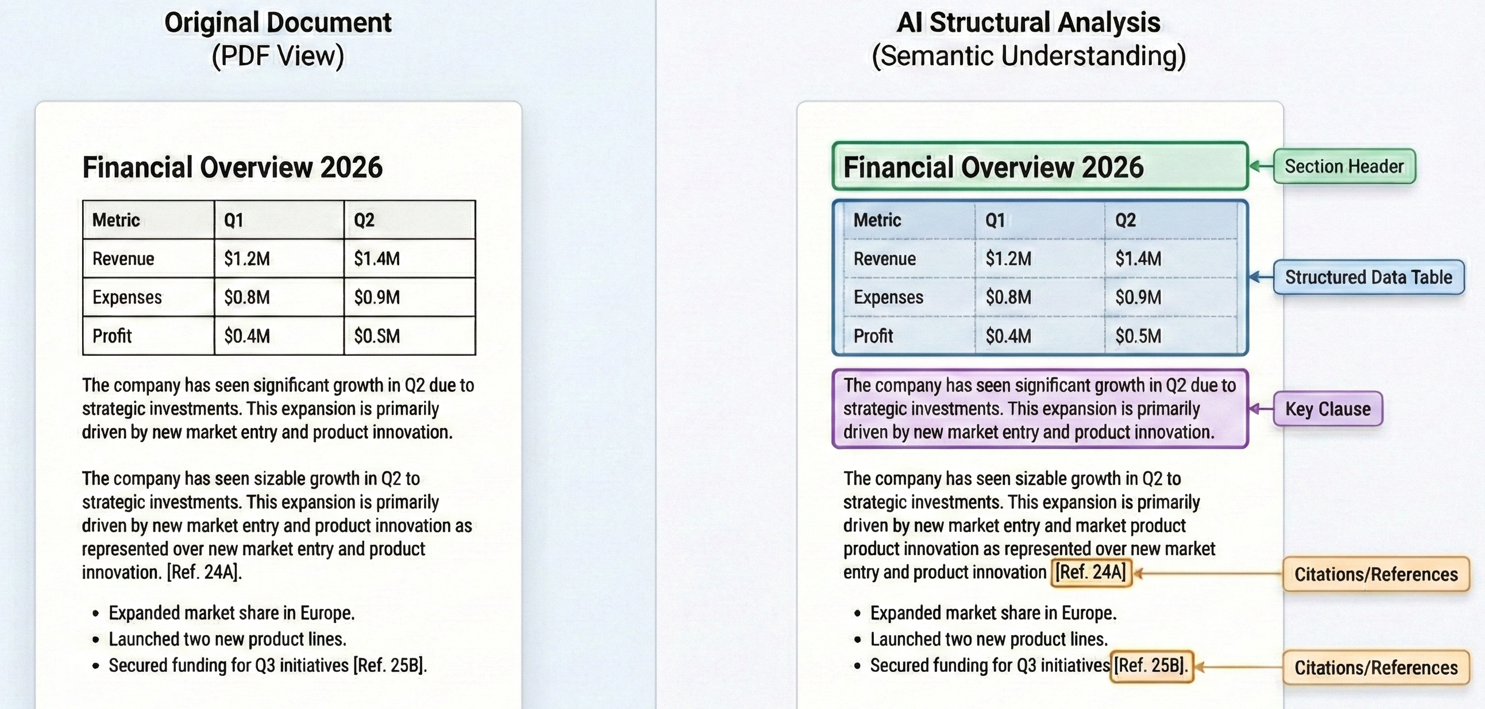
To zrozumienie kontekstu pozwala LLM na wykonywanie zadań, które wymagają prawdziwego zrozumienia. Podczas analizy umowy, LLM może zidentyfikować nie tylko klauzule zawierające słowo "rozwiązanie", ale zrozumieć konkretne warunki, pod którymi rozwiązanie jest dozwolone, wymagania dotyczące powiadomienia i wynikające z tego zobowiązania. Techniczne fundamenty umożliwiające tę zdolność to architektura transformatora, która napędza nowoczesne LLM-y, z oknem kontekstowym GPT-5 wspierającym do 272 000 tokenów wejściowych i oknem na 200K tokenów Claude Sonnet 4.5 zapewniającym kompleksowe pokrycie dokumentów.
Wbudowana integracja AI IronPDF
Instalowanie IronPDF i rozszerzeń AI
Rozpoczęcie pracy z przetwarzaniem PDF zasilanym AI wymaga biblioteki IronPDF core, pakietu rozszerzeń AI i zależności Microsoft Semantic Kernel.
Zainstaluj IronPDF za pomocą Menedżera Pakietów NuGet:
PM > Install-Package IronPdf
PM > Install-Package IronPdf.Extensions.AI
PM > Install-Package Microsoft.SemanticKernel
PM > Install-Package Microsoft.SemanticKernel.Plugins.Memory
PM > Install-Package IronPdf
PM > Install-Package IronPdf.Extensions.AI
PM > Install-Package Microsoft.SemanticKernel
PM > Install-Package Microsoft.SemanticKernel.Plugins.MemoryTe pakiety razem tworzą kompletne rozwiązanie. IronPDF zajmuje się wszystkimi operacjami związanymi z PDF — ekstrakcją tekstu, renderowaniem stron, konwersją formatu — podczas gdy rozszerzenie AI zarządza integracją z modelami językowymi za pośrednictwem Microsoft Semantic Kernel.
<NoWarn>$(NoWarn);SKEXP0001;SKEXP0010;SKEXP0050</NoWarn> do swojej Grupy Właściwości .csproj, aby wyłączyć ostrzeżenia kompilatora.Konfigurowanie klucza API OpenAI/Azure
Zanim będziesz mógł skorzystać z funkcji AI, musisz skonfigurować dostęp do dostawcy usług AI. Rozszerzenie AI IronPDF obsługuje zarówno OpenAI, jak i Azure OpenAI. Azure OpenAI jest często preferowane dla aplikacji przedsiębiorstwowych, ponieważ oferuje ulepszone funkcje bezpieczeństwa, certyfikaty zgodności i możliwość przechowywania danych w określonych regionach geograficznych.
Aby skonfigurować Azure OpenAI, będziesz potrzebować adresu URL punktu końcowego Azure, klucza API i nazw wdrożeń dla modeli czatowych i osadzających z portalu Azure.
Inicjalizowanie Silnika AI
Rozszerzenie AI IronPDF używa Microsoft Semantic Kernel pod powierzchnią. Przed skorzystaniem z jakiejkolwiek funkcji AI, musisz zainicjować kernel z poświadczeniami Azure OpenAI i skonfigurować pamięć na potrzeby przetwarzania dokumentów.
:path=/static-assets/pdf/content-code-examples/tutorials/ai-powered-pdf-processing-csharp/configure-azure-credentials.csusing IronPdf;
using IronPdf.AI;
using Microsoft.SemanticKernel;
using Microsoft.SemanticKernel.Memory;
using Microsoft.SemanticKernel.Connectors.OpenAI;
// Initialize IronPDF AI with Azure OpenAI credentials
// Azure OpenAI configuration
string azureEndpoint = "https://your-resource.openai.azure.com/";
string apiKey = "your-azure-api-key";
string chatDeployment = "gpt-4o";
string embeddingDeployment = "text-embedding-ada-002";
// Initialize Semantic Kernel with Azure OpenAI
var kernel = Kernel.CreateBuilder()
.AddAzureOpenAITextEmbeddingGeneration(embeddingDeployment, azureEndpoint, apiKey)
.AddAzureOpenAIChatCompletion(chatDeployment, azureEndpoint, apiKey)
.Build();
// Create memory store for document embeddings
var memory = new MemoryBuilder()
.WithMemoryStore(new VolatileMemoryStore())
.WithAzureOpenAITextEmbeddingGeneration(embeddingDeployment, azureEndpoint, apiKey)
.Build();
// Initialize IronPDF AI
IronDocumentAI.Initialize(kernel, memory);
Console.WriteLine("IronPDF AI initialized successfully with Azure OpenAI");Imports IronPdf
Imports IronPdf.AI
Imports Microsoft.SemanticKernel
Imports Microsoft.SemanticKernel.Memory
Imports Microsoft.SemanticKernel.Connectors.OpenAI
' Initialize IronPDF AI with Azure OpenAI credentials
' Azure OpenAI configuration
Dim azureEndpoint As String = "https://your-resource.openai.azure.com/"
Dim apiKey As String = "your-azure-api-key"
Dim chatDeployment As String = "gpt-4o"
Dim embeddingDeployment As String = "text-embedding-ada-002"
' Initialize Semantic Kernel with Azure OpenAI
Dim kernel = Kernel.CreateBuilder() _
.AddAzureOpenAITextEmbeddingGeneration(embeddingDeployment, azureEndpoint, apiKey) _
.AddAzureOpenAIChatCompletion(chatDeployment, azureEndpoint, apiKey) _
.Build()
' Create memory store for document embeddings
Dim memory = New MemoryBuilder() _
.WithMemoryStore(New VolatileMemoryStore()) _
.WithAzureOpenAITextEmbeddingGeneration(embeddingDeployment, azureEndpoint, apiKey) _
.Build()
' Initialize IronPDF AI
IronDocumentAI.Initialize(kernel, memory)
Console.WriteLine("IronPDF AI initialized successfully with Azure OpenAI")Inicjalizacja tworzy dwa kluczowe komponenty:
- Kernel: Odpowiada za zakończenia czatu i generację osadzania tekstu przez Azure OpenAI
- Pamięć: Przechowuje osadzenia dokumentów na potrzeby operacji wyszukiwania semantycznego i pobierania
Po zainicjowaniu przez IronDocumentAI.Initialize(), możesz używać funkcji AI w całej swojej aplikacji. W przypadku aplikacji produkcyjnych zdecydowanie zaleca się przechowywanie poświadczeń w zmiennych środowiskowych lub Azure Key Vault.
Jak IronPDF Przygotowuje PDF-y do Kontekstu AI
Jednym z najtrudniejszych aspektów przetwarzania PDF zasilanego AI jest przygotowanie dokumentów do konsumpcji przez modele językowe. Podczas gdy GPT-5 obsługuje do 272 000 tokenów wejściowych, a Claude Opus 4.6 oferuje teraz okno kontekstowe z 1M tokenów, pojedyncza umowa prawna lub raport finansowy mogą łatwo przekroczyć limity starszych modeli.
Rozszerzenie AI IronPDF radzi sobie z tą złożonością dzięki inteligentnemu przygotowaniu dokumentu. Gdy wywołasz metodę AI, IronPDF najpierw wydobywa tekst z PDF, jednocześnie zachowując informacje strukturalne — identyfikując akapity, zachowując struktury tabelowe i utrzymując relacje między sekcjami.
W przypadku dokumentów, które przekraczają limity kontekstowe, IronPDF implementuje strategiczne dzielenie na fragmenty w naturalnych punktach podziału struktury dokumentu, takich jak nagłówki sekcji, podziały stron czy granice akapitów.
Podsumowanie Dokumentów
Podsumowania Pojedynczych Dokumentów
Podsumowanie dokumentów dostarcza natychmiastowej wartości, kondensując obszerne dokumenty w przyswajalne wglądy. Metoda Summarize obsługuje cały przepływ pracy: ekstrakcję tekstu, przygotowanie do spożycia przez AI, żądanie podsumowania od modelu językowego i zapisanie wyników.
Wejście
Kod ładuje PDF za pomocą PdfDocument.FromFile() i wywołuje pdf.Summarize(), aby wygenerować zwięzłe podsumowanie, a następnie zapisuje wynik do pliku tekstowego.
:path=/static-assets/pdf/content-code-examples/tutorials/ai-powered-pdf-processing-csharp/single-document-summary.csusing IronPdf;
using IronPdf.AI;
using Microsoft.SemanticKernel;
using Microsoft.SemanticKernel.Memory;
using Microsoft.SemanticKernel.Connectors.OpenAI;
// Summarize a PDF document using IronPDF AI
// Azure OpenAI configuration
string azureEndpoint = "https://your-resource.openai.azure.com/";
string apiKey = "your-azure-api-key";
string chatDeployment = "gpt-4o";
string embeddingDeployment = "text-embedding-ada-002";
// Initialize Semantic Kernel
var kernel = Kernel.CreateBuilder()
.AddAzureOpenAITextEmbeddingGeneration(embeddingDeployment, azureEndpoint, apiKey)
.AddAzureOpenAIChatCompletion(chatDeployment, azureEndpoint, apiKey)
.Build();
var memory = new MemoryBuilder()
.WithMemoryStore(new VolatileMemoryStore())
.WithAzureOpenAITextEmbeddingGeneration(embeddingDeployment, azureEndpoint, apiKey)
.Build();
IronDocumentAI.Initialize(kernel, memory);
// Load and summarize PDF
var pdf = PdfDocument.FromFile("sample-report.pdf");
string summary = await pdf.Summarize();
Console.WriteLine("Document Summary:");
Console.WriteLine(summary);
File.WriteAllText("report-summary.txt", summary);
Console.WriteLine("\nSummary saved to report-summary.txt");Imports IronPdf
Imports IronPdf.AI
Imports Microsoft.SemanticKernel
Imports Microsoft.SemanticKernel.Memory
Imports Microsoft.SemanticKernel.Connectors.OpenAI
' Summarize a PDF document using IronPDF AI
' Azure OpenAI configuration
Dim azureEndpoint As String = "https://your-resource.openai.azure.com/"
Dim apiKey As String = "your-azure-api-key"
Dim chatDeployment As String = "gpt-4o"
Dim embeddingDeployment As String = "text-embedding-ada-002"
' Initialize Semantic Kernel
Dim kernel = Kernel.CreateBuilder() _
.AddAzureOpenAITextEmbeddingGeneration(embeddingDeployment, azureEndpoint, apiKey) _
.AddAzureOpenAIChatCompletion(chatDeployment, azureEndpoint, apiKey) _
.Build()
Dim memory = New MemoryBuilder() _
.WithMemoryStore(New VolatileMemoryStore()) _
.WithAzureOpenAITextEmbeddingGeneration(embeddingDeployment, azureEndpoint, apiKey) _
.Build()
IronDocumentAI.Initialize(kernel, memory)
' Load and summarize PDF
Dim pdf = PdfDocument.FromFile("sample-report.pdf")
Dim summary As String = Await pdf.Summarize()
Console.WriteLine("Document Summary:")
Console.WriteLine(summary)
File.WriteAllText("report-summary.txt", summary)
Console.WriteLine(vbCrLf & "Summary saved to report-summary.txt")Wynik konsoli
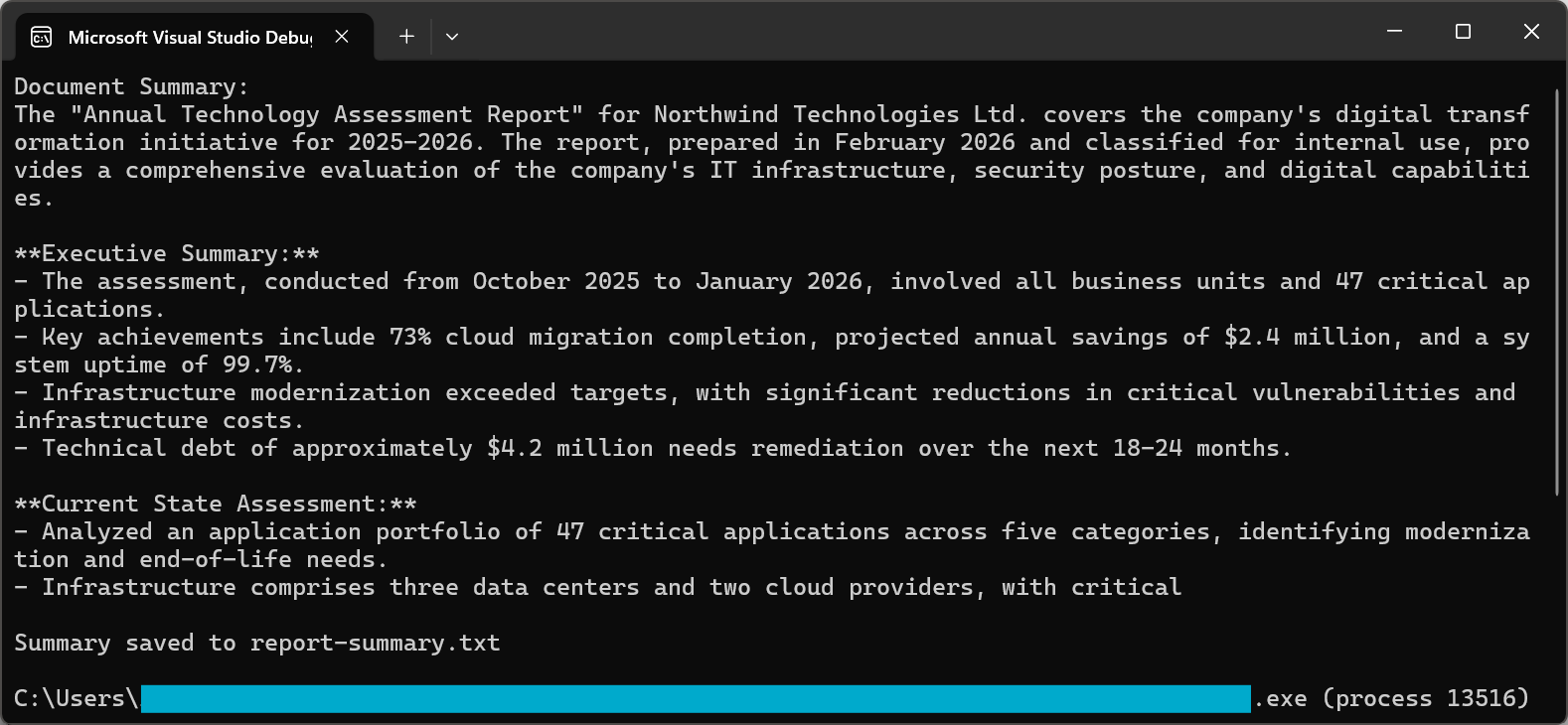
Proces podsumowywania wykorzystuje zaawansowane podpowiedzi, aby zapewnić wysokiej jakości wyniki. Zarówno GPT-5, jak i Claude Sonnet 4.5 w 2026 roku charakteryzują się znacznie poprawionymi możliwościami podążania za instrukcjami, zapewniając podsumowania, które uchwycają istotne informacje, pozostając zwięzłymi i czytelnymi.
Dla bardziej szczegółowego wyjaśnienia technik podsumowywania dokumentów i zaawansowanych opcji, zapoznaj się z naszym przewodnikiem jak to zrobić.
Synteza Wielu Dokumentów
Wiele scenariuszy w rzeczywistości wymaga syntezowania informacji z wielu dokumentów. Zespół prawny może potrzebować zidentyfikować wspólne klauzule w portfelu umów, lub analityk finansowy może chcieć porównać wskaźniki w raportach kwartalnych.
Podejście do syntezy wielodokumentowej polega na indywidualnym przetwarzaniu każdego dokumentu w celu wydobycia kluczowych informacji, a następnie ich agregacji w celu ostatecznej syntezy.
Ten przykład iteruje przez wiele PDF-ów, wywołując pdf.Summarize() na każdym z nich, a następnie używa pdf.Query() z połączonymi podsumowaniami, aby wygenerować zintegrowaną syntezę.
:path=/static-assets/pdf/content-code-examples/tutorials/ai-powered-pdf-processing-csharp/multi-document-synthesis.csusing IronPdf;
using IronPdf.AI;
using Microsoft.SemanticKernel;
using Microsoft.SemanticKernel.Memory;
using Microsoft.SemanticKernel.Connectors.OpenAI;
// Synthesize insights across multiple related documents (e.g., quarterly reports into annual summary)
// Azure OpenAI configuration
string azureEndpoint = "https://your-resource.openai.azure.com/";
string apiKey = "your-azure-api-key";
string chatDeployment = "gpt-4o";
string embeddingDeployment = "text-embedding-ada-002";
// Initialize Semantic Kernel
var kernel = Kernel.CreateBuilder()
.AddAzureOpenAITextEmbeddingGeneration(embeddingDeployment, azureEndpoint, apiKey)
.AddAzureOpenAIChatCompletion(chatDeployment, azureEndpoint, apiKey)
.Build();
var memory = new MemoryBuilder()
.WithMemoryStore(new VolatileMemoryStore())
.WithAzureOpenAITextEmbeddingGeneration(embeddingDeployment, azureEndpoint, apiKey)
.Build();
IronDocumentAI.Initialize(kernel, memory);
// Define documents to synthesize
string[] documentPaths = {
"Q1-report.pdf",
"Q2-report.pdf",
"Q3-report.pdf",
"Q4-report.pdf"
};
var documentSummaries = new List<string>();
// Summarize each document
foreach (string path in documentPaths)
{
var pdf = PdfDocument.FromFile(path);
string summary = await pdf.Summarize();
documentSummaries.Add($"=== {Path.GetFileName(path)} ===\n{summary}");
Console.WriteLine($"Processed: {path}");
}
// Combine and synthesize across all documents
string combinedSummaries = string.Join("\n\n", documentSummaries);
var synthesisDoc = PdfDocument.FromFile(documentPaths[0]);
string synthesisQuery = @"Based on the quarterly summaries below, provide an annual synthesis:
ll trends across quarters
chievements and challenges
over-year patterns
s:
inedSummaries;
string synthesis = await synthesisDoc.Query(synthesisQuery);
Console.WriteLine("\n=== Annual Synthesis ===");
Console.WriteLine(synthesis);
File.WriteAllText("annual-synthesis.txt", synthesis);Imports IronPdf
Imports IronPdf.AI
Imports Microsoft.SemanticKernel
Imports Microsoft.SemanticKernel.Memory
Imports Microsoft.SemanticKernel.Connectors.OpenAI
Imports System.IO
' Synthesize insights across multiple related documents (e.g., quarterly reports into annual summary)
' Azure OpenAI configuration
Dim azureEndpoint As String = "https://your-resource.openai.azure.com/"
Dim apiKey As String = "your-azure-api-key"
Dim chatDeployment As String = "gpt-4o"
Dim embeddingDeployment As String = "text-embedding-ada-002"
' Initialize Semantic Kernel
Dim kernel = Kernel.CreateBuilder() _
.AddAzureOpenAITextEmbeddingGeneration(embeddingDeployment, azureEndpoint, apiKey) _
.AddAzureOpenAIChatCompletion(chatDeployment, azureEndpoint, apiKey) _
.Build()
Dim memory = New MemoryBuilder() _
.WithMemoryStore(New VolatileMemoryStore()) _
.WithAzureOpenAITextEmbeddingGeneration(embeddingDeployment, azureEndpoint, apiKey) _
.Build()
IronDocumentAI.Initialize(kernel, memory)
' Define documents to synthesize
Dim documentPaths As String() = {
"Q1-report.pdf",
"Q2-report.pdf",
"Q3-report.pdf",
"Q4-report.pdf"
}
Dim documentSummaries = New List(Of String)()
' Summarize each document
For Each path As String In documentPaths
Dim pdf = PdfDocument.FromFile(path)
Dim summary As String = Await pdf.Summarize()
documentSummaries.Add($"=== {Path.GetFileName(path)} ==={vbCrLf}{summary}")
Console.WriteLine($"Processed: {path}")
Next
' Combine and synthesize across all documents
Dim combinedSummaries As String = String.Join(vbCrLf & vbCrLf, documentSummaries)
Dim synthesisDoc = PdfDocument.FromFile(documentPaths(0))
Dim synthesisQuery As String = "Based on the quarterly summaries below, provide an annual synthesis:" & vbCrLf &
"Overall trends across quarters" & vbCrLf &
"Key achievements and challenges" & vbCrLf &
"Year-over-year patterns" & vbCrLf & vbCrLf &
combinedSummaries
Dim synthesis As String = Await synthesisDoc.Query(synthesisQuery)
Console.WriteLine(vbCrLf & "=== Annual Synthesis ===")
Console.WriteLine(synthesis)
File.WriteAllText("annual-synthesis.txt", synthesis)Ten wzorzec skutecznie skalowuje się do dużych zbiorów dokumentów. Przetwarzając dokumenty równolegle i zarządzając wynikami pośrednimi, można analizować setki lub tysiące dokumentów przy jednoczesnym zachowaniu spójnej syntezy.
Generowanie Podsumowań Wykonawczych
Podsumowania wykonawcze wymagają innego podejścia niż standardowe podsumowania. Zamiast zwykłego kondensowania treści, podsumowanie wykonawcze musi zidentyfikować najważniejsze informacje biznesowe, podkreślić kluczowe decyzje lub zalecenia i przedstawić wyniki w formacie odpowiednim do przeglądu przywództwa.
Kod używa pdf.Query() z ustrukturyzowaną podpowiedzią, żądając kluczowych decyzji, istotnych wyników, wpływu finansowego i oceny ryzyka w języku biznesowym.
:path=/static-assets/pdf/content-code-examples/tutorials/ai-powered-pdf-processing-csharp/executive-summary.csusing IronPdf;
using IronPdf.AI;
using Microsoft.SemanticKernel;
using Microsoft.SemanticKernel.Memory;
using Microsoft.SemanticKernel.Connectors.OpenAI;
// Generate executive summary from strategic documents for C-suite leadership
// Azure OpenAI configuration
string azureEndpoint = "https://your-resource.openai.azure.com/";
string apiKey = "your-azure-api-key";
string chatDeployment = "gpt-4o";
string embeddingDeployment = "text-embedding-ada-002";
// Initialize Semantic Kernel
var kernel = Kernel.CreateBuilder()
.AddAzureOpenAITextEmbeddingGeneration(embeddingDeployment, azureEndpoint, apiKey)
.AddAzureOpenAIChatCompletion(chatDeployment, azureEndpoint, apiKey)
.Build();
var memory = new MemoryBuilder()
.WithMemoryStore(new VolatileMemoryStore())
.WithAzureOpenAITextEmbeddingGeneration(embeddingDeployment, azureEndpoint, apiKey)
.Build();
IronDocumentAI.Initialize(kernel, memory);
var pdf = PdfDocument.FromFile("strategic-plan.pdf");
string executiveQuery = @"Create an executive summary for C-suite leadership. Include:
cisions Required:**
ny decisions needing executive approval
al Findings:**
5 most important findings (bullet points)
ial Impact:**
e/cost implications if mentioned
ssessment:**
riority risks identified
ended Actions:**
ate next steps
er 500 words. Use business language appropriate for board presentation.";
string executiveSummary = await pdf.Query(executiveQuery);
File.WriteAllText("executive-summary.txt", executiveSummary);
Console.WriteLine("Executive summary saved to executive-summary.txt");Imports IronPdf
Imports IronPdf.AI
Imports Microsoft.SemanticKernel
Imports Microsoft.SemanticKernel.Memory
Imports Microsoft.SemanticKernel.Connectors.OpenAI
' Generate executive summary from strategic documents for C-suite leadership
' Azure OpenAI configuration
Dim azureEndpoint As String = "https://your-resource.openai.azure.com/"
Dim apiKey As String = "your-azure-api-key"
Dim chatDeployment As String = "gpt-4o"
Dim embeddingDeployment As String = "text-embedding-ada-002"
' Initialize Semantic Kernel
Dim kernel = Kernel.CreateBuilder() _
.AddAzureOpenAITextEmbeddingGeneration(embeddingDeployment, azureEndpoint, apiKey) _
.AddAzureOpenAIChatCompletion(chatDeployment, azureEndpoint, apiKey) _
.Build()
Dim memory = New MemoryBuilder() _
.WithMemoryStore(New VolatileMemoryStore()) _
.WithAzureOpenAITextEmbeddingGeneration(embeddingDeployment, azureEndpoint, apiKey) _
.Build()
IronDocumentAI.Initialize(kernel, memory)
Dim pdf = PdfDocument.FromFile("strategic-plan.pdf")
Dim executiveQuery As String = "Create an executive summary for C-suite leadership. Include:
cisions Required:**
ny decisions needing executive approval
al Findings:**
5 most important findings (bullet points)
ial Impact:**
e/cost implications if mentioned
ssessment:**
riority risks identified
ended Actions:**
ate next steps
er 500 words. Use business language appropriate for board presentation."
Dim executiveSummary As String = Await pdf.Query(executiveQuery)
File.WriteAllText("executive-summary.txt", executiveSummary)
Console.WriteLine("Executive summary saved to executive-summary.txt")Wynikowe podsumowanie wykonawcze priorytetyzuje informacje, na których można działać, ponad wszechstronne pokrycie, dostarczając dokładnie to, czego potrzebują decydenci, bez przytłaczających szczegółów.
Inteligentna Ekstrakcja Danych
Ekstrakcja Ustrukturyzowanych Danych do JSON
Jedną z najpotężniejszych aplikacji przetwarzania PDF zasilanego AI jest ekstrakcja ustrukturyzowanych danych z nieustrukturyzowanych dokumentów. Kluczem do pomyślnej ekstrakcji strukturalnej w 2026 roku jest użycie schematów JSON z trybami wyjścia strukturalnego. GPT-5 wprowadza ulepszone strukturalne wyniki, podczas gdy Claude Sonnet 4.5 oferuje ulepszoną orkiestrację narzędzi do niezawodnej ekstrakcji danych.
Wejście
Kod wywołuje pdf.Query() z podpowiedzią schematu JSON, a następnie używa JsonSerializer.Deserialize() do parsowania i walidacji wyodrębnionych danych faktur.
:path=/static-assets/pdf/content-code-examples/tutorials/ai-powered-pdf-processing-csharp/extract-invoice-json.csusing IronPdf;
using IronPdf.AI;
using Microsoft.SemanticKernel;
using Microsoft.SemanticKernel.Memory;
using Microsoft.SemanticKernel.Connectors.OpenAI;
using System.Text.Json;
// Extract structured invoice data as JSON from PDF
// Azure OpenAI configuration
string azureEndpoint = "https://your-resource.openai.azure.com/";
string apiKey = "your-azure-api-key";
string chatDeployment = "gpt-4o";
string embeddingDeployment = "text-embedding-ada-002";
// Initialize Semantic Kernel
var kernel = Kernel.CreateBuilder()
.AddAzureOpenAITextEmbeddingGeneration(embeddingDeployment, azureEndpoint, apiKey)
.AddAzureOpenAIChatCompletion(chatDeployment, azureEndpoint, apiKey)
.Build();
var memory = new MemoryBuilder()
.WithMemoryStore(new VolatileMemoryStore())
.WithAzureOpenAITextEmbeddingGeneration(embeddingDeployment, azureEndpoint, apiKey)
.Build();
IronDocumentAI.Initialize(kernel, memory);
var pdf = PdfDocument.FromFile("sample-invoice.pdf");
// Define JSON schema for extraction
string extractionQuery = @"Extract invoice data and return as JSON with this exact structure:
voiceNumber"": ""string"",
voiceDate"": ""YYYY-MM-DD"",
eDate"": ""YYYY-MM-DD"",
ndor"": {
""name"": ""string"",
""address"": ""string"",
""taxId"": ""string or null""
stomer"": {
""name"": ""string"",
""address"": ""string""
neItems"": [
{
""description"": ""string"",
""quantity"": number,
""unitPrice"": number,
""total"": number
}
btotal"": number,
xRate"": number,
xAmount"": number,
tal"": number,
rrency"": ""string""
NLY valid JSON, no additional text.";
string jsonResponse = await pdf.Query(extractionQuery);
// Parse and save JSON
try
{
var invoiceData = JsonSerializer.Deserialize<JsonElement>(jsonResponse);
string formattedJson = JsonSerializer.Serialize(invoiceData, new JsonSerializerOptions { WriteIndented = true });
Console.WriteLine("Extracted Invoice Data:");
Console.WriteLine(formattedJson);
File.WriteAllText("invoice-data.json", formattedJson);
}
catch (JsonException)
{
Console.WriteLine("Unable to parse JSON response");
File.WriteAllText("invoice-raw-response.txt", jsonResponse);
}Imports IronPdf
Imports IronPdf.AI
Imports Microsoft.SemanticKernel
Imports Microsoft.SemanticKernel.Memory
Imports Microsoft.SemanticKernel.Connectors.OpenAI
Imports System.Text.Json
' Extract structured invoice data as JSON from PDF
' Azure OpenAI configuration
Dim azureEndpoint As String = "https://your-resource.openai.azure.com/"
Dim apiKey As String = "your-azure-api-key"
Dim chatDeployment As String = "gpt-4o"
Dim embeddingDeployment As String = "text-embedding-ada-002"
' Initialize Semantic Kernel
Dim kernel = Kernel.CreateBuilder() _
.AddAzureOpenAITextEmbeddingGeneration(embeddingDeployment, azureEndpoint, apiKey) _
.AddAzureOpenAIChatCompletion(chatDeployment, azureEndpoint, apiKey) _
.Build()
Dim memory = New MemoryBuilder() _
.WithMemoryStore(New VolatileMemoryStore()) _
.WithAzureOpenAITextEmbeddingGeneration(embeddingDeployment, azureEndpoint, apiKey) _
.Build()
IronDocumentAI.Initialize(kernel, memory)
Dim pdf = PdfDocument.FromFile("sample-invoice.pdf")
' Define JSON schema for extraction
Dim extractionQuery As String = "Extract invoice data and return as JSON with this exact structure:
voiceNumber"": ""string"",
voiceDate"": ""YYYY-MM-DD"",
eDate"": ""YYYY-MM-DD"",
ndor"": {
""name"": ""string"",
""address"": ""string"",
""taxId"": ""string or null""
stomer"": {
""name"": ""string"",
""address"": ""string""
neItems"": [
{
""description"": ""string"",
""quantity"": number,
""unitPrice"": number,
""total"": number
}
btotal"": number,
xRate"": number,
xAmount"": number,
tal"": number,
rrency"": ""string""
NLY valid JSON, no additional text."
Dim jsonResponse As String = Await pdf.QueryAsync(extractionQuery)
' Parse and save JSON
Try
Dim invoiceData = JsonSerializer.Deserialize(Of JsonElement)(jsonResponse)
Dim formattedJson As String = JsonSerializer.Serialize(invoiceData, New JsonSerializerOptions With {.WriteIndented = True})
Console.WriteLine("Extracted Invoice Data:")
Console.WriteLine(formattedJson)
File.WriteAllText("invoice-data.json", formattedJson)
Catch ex As JsonException
Console.WriteLine("Unable to parse JSON response")
File.WriteAllText("invoice-raw-response.txt", jsonResponse)
End TryCzęściowy zrzut ekranu wygenerowanego pliku JSON
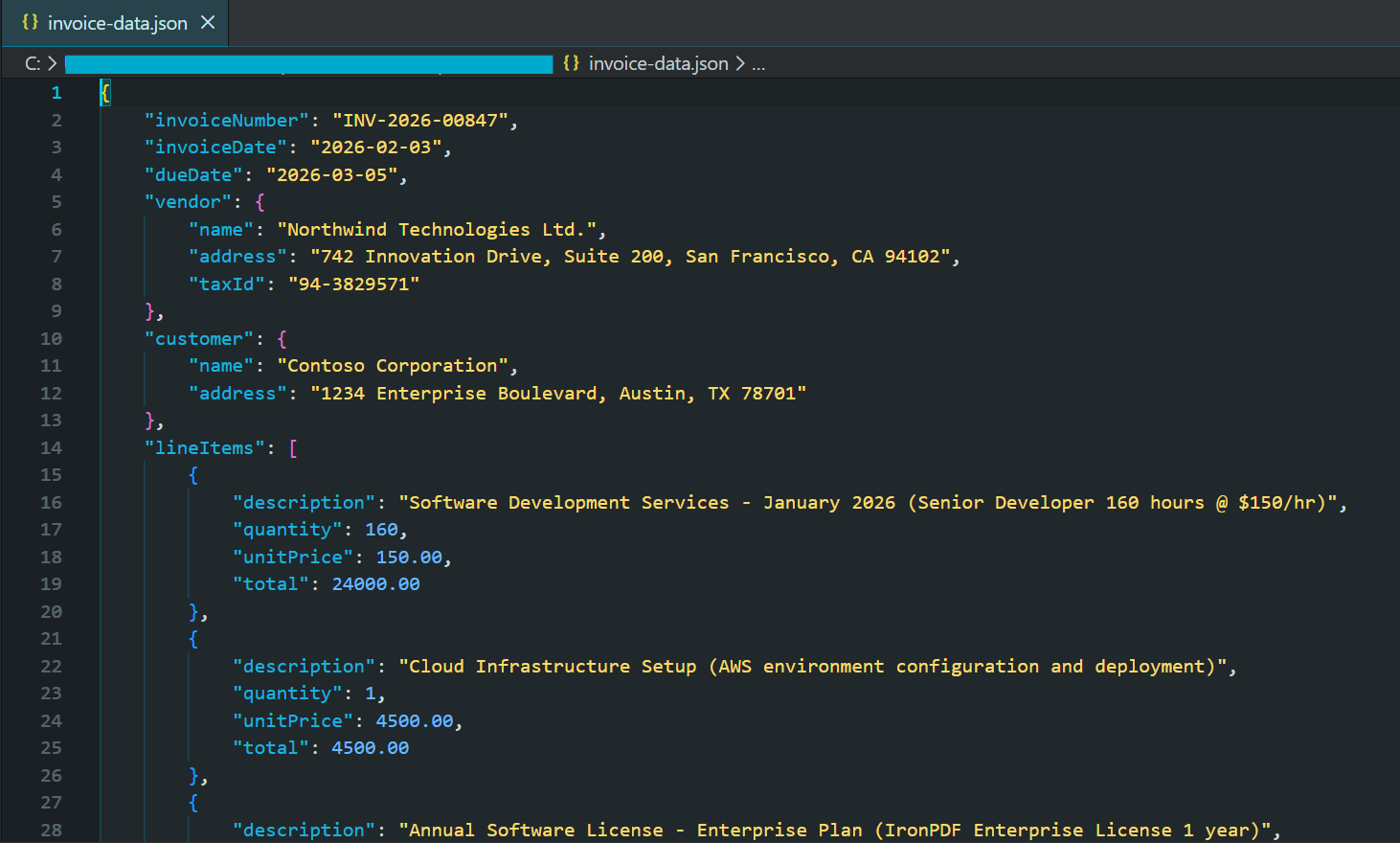
Współczesne modele AI w 2026 roku obsługują strukturalne tryby wyjścia, które gwarantują prawidłowe reakcje JSON zgodne z dostarczonymi schematami. To eliminuje potrzebę złożonego obsługi błędów wokół nieprawidłowych odpowiedzi.
Identyfikacja Klauzul w Umowach
Umowy prawne zawierają określone typy klauzul, które mają szczególne znaczenie: postanowienia o rozwiązaniu, ograniczenia odpowiedzialności, wymagania dotyczące odszkodowania, przydział własności intelektualnej i zobowiązania do zachowania poufności. Identyfikacja klauzul zasilana przez AI automatyzuje tę analizę przy jednoczesnym zachowaniu wysokiej dokładności.
Ten przykład używa pdf.Query() z fokusem na klauzule w schemacie JSON, aby wyodrębnić typ umowy, strony, kluczowe daty i poszczególne klauzule z poziomami ryzyka.
:path=/static-assets/pdf/content-code-examples/tutorials/ai-powered-pdf-processing-csharp/contract-clause-analysis.csusing IronPdf;
using IronPdf.AI;
using Microsoft.SemanticKernel;
using Microsoft.SemanticKernel.Memory;
using Microsoft.SemanticKernel.Connectors.OpenAI;
using System.Text.Json;
// Analyze contract clauses and identify key terms, risks, and critical dates
// Azure OpenAI configuration
string azureEndpoint = "https://your-resource.openai.azure.com/";
string apiKey = "your-azure-api-key";
string chatDeployment = "gpt-4o";
string embeddingDeployment = "text-embedding-ada-002";
// Initialize Semantic Kernel
var kernel = Kernel.CreateBuilder()
.AddAzureOpenAITextEmbeddingGeneration(embeddingDeployment, azureEndpoint, apiKey)
.AddAzureOpenAIChatCompletion(chatDeployment, azureEndpoint, apiKey)
.Build();
var memory = new MemoryBuilder()
.WithMemoryStore(new VolatileMemoryStore())
.WithAzureOpenAITextEmbeddingGeneration(embeddingDeployment, azureEndpoint, apiKey)
.Build();
IronDocumentAI.Initialize(kernel, memory);
var pdf = PdfDocument.FromFile("contract.pdf");
// Define JSON schema for contract analysis
string clauseQuery = @"Analyze this contract and identify key clauses. Return JSON:
ntractType"": ""string"",
rties"": [""string""],
fectiveDate"": ""string"",
auses"": [
{
""type"": ""Termination|Liability|Indemnification|Confidentiality|IP|Payment|Warranty|Other"",
""title"": ""string"",
""summary"": ""string"",
""riskLevel"": ""Low|Medium|High"",
""keyTerms"": [""string""]
}
iticalDates"": [
{
""description"": ""string"",
""date"": ""string""
}
erallRiskAssessment"": ""Low|Medium|High"",
commendations"": [""string""]
: termination rights, liability caps, indemnification, IP ownership, confidentiality, payment terms.
NLY valid JSON.";
string analysisJson = await pdf.Query(clauseQuery);
try
{
var analysis = JsonSerializer.Deserialize<JsonElement>(analysisJson);
string formatted = JsonSerializer.Serialize(analysis, new JsonSerializerOptions { WriteIndented = true });
Console.WriteLine("Contract Clause Analysis:");
Console.WriteLine(formatted);
File.WriteAllText("contract-analysis.json", formatted);
// Display high-risk clauses
Console.WriteLine("\n=== High Risk Clauses ===");
foreach (var clause in analysis.GetProperty("clauses").EnumerateArray())
{
if (clause.GetProperty("riskLevel").GetString() == "High")
{
Console.WriteLine($"- {clause.GetProperty("type")}: {clause.GetProperty("summary")}");
}
}
}
catch (JsonException)
{
Console.WriteLine("Unable to parse contract analysis");
File.WriteAllText("contract-analysis-raw.txt", analysisJson);
}Imports IronPdf
Imports IronPdf.AI
Imports Microsoft.SemanticKernel
Imports Microsoft.SemanticKernel.Memory
Imports Microsoft.SemanticKernel.Connectors.OpenAI
Imports System.Text.Json
' Analyze contract clauses and identify key terms, risks, and critical dates
' Azure OpenAI configuration
Dim azureEndpoint As String = "https://your-resource.openai.azure.com/"
Dim apiKey As String = "your-azure-api-key"
Dim chatDeployment As String = "gpt-4o"
Dim embeddingDeployment As String = "text-embedding-ada-002"
' Initialize Semantic Kernel
Dim kernel = Kernel.CreateBuilder() _
.AddAzureOpenAITextEmbeddingGeneration(embeddingDeployment, azureEndpoint, apiKey) _
.AddAzureOpenAIChatCompletion(chatDeployment, azureEndpoint, apiKey) _
.Build()
Dim memory = New MemoryBuilder() _
.WithMemoryStore(New VolatileMemoryStore()) _
.WithAzureOpenAITextEmbeddingGeneration(embeddingDeployment, azureEndpoint, apiKey) _
.Build()
IronDocumentAI.Initialize(kernel, memory)
Dim pdf = PdfDocument.FromFile("contract.pdf")
' Define JSON schema for contract analysis
Dim clauseQuery As String = "Analyze this contract and identify key clauses. Return JSON:
ntractType"": ""string"",
rties"": [""string""],
fectiveDate"": ""string"",
auses"": [
{
""type"": ""Termination|Liability|Indemnification|Confidentiality|IP|Payment|Warranty|Other"",
""title"": ""string"",
""summary"": ""string"",
""riskLevel"": ""Low|Medium|High"",
""keyTerms"": [""string""]
}
iticalDates"": [
{
""description"": ""string"",
""date"": ""string""
}
erallRiskAssessment"": ""Low|Medium|High"",
commendations"": [""string""]
: termination rights, liability caps, indemnification, IP ownership, confidentiality, payment terms.
NLY valid JSON."
Dim analysisJson As String = Await pdf.Query(clauseQuery)
Try
Dim analysis = JsonSerializer.Deserialize(Of JsonElement)(analysisJson)
Dim formatted As String = JsonSerializer.Serialize(analysis, New JsonSerializerOptions With {.WriteIndented = True})
Console.WriteLine("Contract Clause Analysis:")
Console.WriteLine(formatted)
File.WriteAllText("contract-analysis.json", formatted)
' Display high-risk clauses
Console.WriteLine(vbCrLf & "=== High Risk Clauses ===")
For Each clause In analysis.GetProperty("clauses").EnumerateArray()
If clause.GetProperty("riskLevel").GetString() = "High" Then
Console.WriteLine($"- {clause.GetProperty("type")}: {clause.GetProperty("summary")}")
End If
Next
Catch ex As JsonException
Console.WriteLine("Unable to parse contract analysis")
File.WriteAllText("contract-analysis-raw.txt", analysisJson)
End TryTa zdolność przekształca przegląd umów z procesu sekwencyjnego, ręcznego, w zautomatyzowany, skalowalny przepływ pracy. Zespoły prawników mogą szybko zidentyfikować klauzule wysokiego ryzyka w setkach umów.
Parsowanie Danych Finansowych
Dokumenty finansowe zawierają kluczowe dane ilościowe osadzone w złożonych narracjach i tabelach. Parsowanie zasilane AI w dokumentach finansowych wyróżnia się, ponieważ rozumie kontekst — odróżniając wyniki historyczne od prognoz na przyszłość, identyfikując, czy liczby są w tysiącach czy milionach, i rozumiejąc relacje między różnymi wskaźnikami.
Kod używa pdf.Query() z schematem JSON finansowym, aby wydobyć dane dotyczące sprawozdań finansowych, wskaźników bilansu i przewodników na przyszłość do strukturalnego wyjścia.
:path=/static-assets/pdf/content-code-examples/tutorials/ai-powered-pdf-processing-csharp/financial-data-extraction.csusing IronPdf;
using IronPdf.AI;
using Microsoft.SemanticKernel;
using Microsoft.SemanticKernel.Memory;
using Microsoft.SemanticKernel.Connectors.OpenAI;
using System.Text.Json;
// Extract financial metrics from annual reports and earnings documents
// Azure OpenAI configuration
string azureEndpoint = "https://your-resource.openai.azure.com/";
string apiKey = "your-azure-api-key";
string chatDeployment = "gpt-4o";
string embeddingDeployment = "text-embedding-ada-002";
// Initialize Semantic Kernel
var kernel = Kernel.CreateBuilder()
.AddAzureOpenAITextEmbeddingGeneration(embeddingDeployment, azureEndpoint, apiKey)
.AddAzureOpenAIChatCompletion(chatDeployment, azureEndpoint, apiKey)
.Build();
var memory = new MemoryBuilder()
.WithMemoryStore(new VolatileMemoryStore())
.WithAzureOpenAITextEmbeddingGeneration(embeddingDeployment, azureEndpoint, apiKey)
.Build();
IronDocumentAI.Initialize(kernel, memory);
var pdf = PdfDocument.FromFile("annual-report.pdf");
// Define JSON schema for financial extraction (numbers in millions)
string financialQuery = @"Extract financial metrics from this document. Return JSON:
portPeriod"": ""string"",
mpany"": ""string"",
rrency"": ""string"",
comeStatement"": {
""revenue"": number,
""costOfRevenue"": number,
""grossProfit"": number,
""operatingExpenses"": number,
""operatingIncome"": number,
""netIncome"": number,
""eps"": number
lanceSheet"": {
""totalAssets"": number,
""totalLiabilities"": number,
""shareholdersEquity"": number,
""cash"": number,
""totalDebt"": number
yMetrics"": {
""revenueGrowthYoY"": ""string"",
""grossMargin"": ""string"",
""operatingMargin"": ""string"",
""netMargin"": ""string"",
""debtToEquity"": number
idance"": {
""nextQuarterRevenue"": ""string"",
""fullYearRevenue"": ""string"",
""notes"": ""string""
for unavailable data. Numbers in millions unless stated.
NLY valid JSON.";
string financialJson = await pdf.Query(financialQuery);
try
{
var financials = JsonSerializer.Deserialize<JsonElement>(financialJson);
string formatted = JsonSerializer.Serialize(financials, new JsonSerializerOptions { WriteIndented = true });
Console.WriteLine("Extracted Financial Data:");
Console.WriteLine(formatted);
File.WriteAllText("financial-data.json", formatted);
}
catch (JsonException)
{
Console.WriteLine("Unable to parse financial data");
File.WriteAllText("financial-raw.txt", financialJson);
}Imports IronPdf
Imports IronPdf.AI
Imports Microsoft.SemanticKernel
Imports Microsoft.SemanticKernel.Memory
Imports Microsoft.SemanticKernel.Connectors.OpenAI
Imports System.Text.Json
' Extract financial metrics from annual reports and earnings documents
' Azure OpenAI configuration
Dim azureEndpoint As String = "https://your-resource.openai.azure.com/"
Dim apiKey As String = "your-azure-api-key"
Dim chatDeployment As String = "gpt-4o"
Dim embeddingDeployment As String = "text-embedding-ada-002"
' Initialize Semantic Kernel
Dim kernel = Kernel.CreateBuilder() _
.AddAzureOpenAITextEmbeddingGeneration(embeddingDeployment, azureEndpoint, apiKey) _
.AddAzureOpenAIChatCompletion(chatDeployment, azureEndpoint, apiKey) _
.Build()
Dim memory = New MemoryBuilder() _
.WithMemoryStore(New VolatileMemoryStore()) _
.WithAzureOpenAITextEmbeddingGeneration(embeddingDeployment, azureEndpoint, apiKey) _
.Build()
IronDocumentAI.Initialize(kernel, memory)
Dim pdf = PdfDocument.FromFile("annual-report.pdf")
' Define JSON schema for financial extraction (numbers in millions)
Dim financialQuery As String = "Extract financial metrics from this document. Return JSON:
portPeriod"": ""string"",
mpany"": ""string"",
rrency"": ""string"",
comeStatement"": {
""revenue"": number,
""costOfRevenue"": number,
""grossProfit"": number,
""operatingExpenses"": number,
""operatingIncome"": number,
""netIncome"": number,
""eps"": number
lanceSheet"": {
""totalAssets"": number,
""totalLiabilities"": number,
""shareholdersEquity"": number,
""cash"": number,
""totalDebt"": number
yMetrics"": {
""revenueGrowthYoY"": ""string"",
""grossMargin"": ""string"",
""operatingMargin"": ""string"",
""netMargin"": ""string"",
""debtToEquity"": number
idance"": {
""nextQuarterRevenue"": ""string"",
""fullYearRevenue"": ""string"",
""notes"": ""string""
for unavailable data. Numbers in millions unless stated.
NLY valid JSON."
Dim financialJson As String = Await pdf.Query(financialQuery)
Try
Dim financials = JsonSerializer.Deserialize(Of JsonElement)(financialJson)
Dim formatted As String = JsonSerializer.Serialize(financials, New JsonSerializerOptions With {.WriteIndented = True})
Console.WriteLine("Extracted Financial Data:")
Console.WriteLine(formatted)
File.WriteAllText("financial-data.json", formatted)
Catch ex As JsonException
Console.WriteLine("Unable to parse financial data")
File.WriteAllText("financial-raw.txt", financialJson)
End TryWyodrębnione strukturalne dane mogą bezpośrednio zasilać modele finansowe, bazy danych szeregów czasowych lub platformy analityczne, umożliwiając automatyczne śledzenie wskaźników w okresach sprawozdawczych.
Niestandardowe Prompty Ekstrakcji
Wiele organizacji ma unikalne wymagania dotyczące ekstrakcji w zależności od ich konkretnej domeny, formatów dokumentów lub procesów biznesowych. Integracja AI IronPDF w pełni obsługuje niestandardowe prompty ekstrakcji, pozwalając na zdefiniowanie, jakie informacje mają być wyodrębnione i jak mają być ustrukturyzowane.
Ten przykład pokazuje pdf.Query() z schematem skoncentrowanym na badaniach, wyodrębniającym metodologię, kluczowe ustalenia z poziomami pewności i ograniczenia z prac naukowych.
:path=/static-assets/pdf/content-code-examples/tutorials/ai-powered-pdf-processing-csharp/custom-research-extraction.csusing IronPdf;
using IronPdf.AI;
using Microsoft.SemanticKernel;
using Microsoft.SemanticKernel.Memory;
using Microsoft.SemanticKernel.Connectors.OpenAI;
using System.Text.Json;
// Extract structured research metadata from academic papers
// Azure OpenAI configuration
string azureEndpoint = "https://your-resource.openai.azure.com/";
string apiKey = "your-azure-api-key";
string chatDeployment = "gpt-4o";
string embeddingDeployment = "text-embedding-ada-002";
// Initialize Semantic Kernel
var kernel = Kernel.CreateBuilder()
.AddAzureOpenAITextEmbeddingGeneration(embeddingDeployment, azureEndpoint, apiKey)
.AddAzureOpenAIChatCompletion(chatDeployment, azureEndpoint, apiKey)
.Build();
var memory = new MemoryBuilder()
.WithMemoryStore(new VolatileMemoryStore())
.WithAzureOpenAITextEmbeddingGeneration(embeddingDeployment, azureEndpoint, apiKey)
.Build();
IronDocumentAI.Initialize(kernel, memory);
var pdf = PdfDocument.FromFile("research-paper.pdf");
// Define JSON schema for research paper extraction
string researchQuery = @"Extract structured information from this research paper. Return JSON:
tle"": ""string"",
thors"": [""string""],
stitution"": ""string"",
blicationDate"": ""string"",
stract"": ""string"",
searchQuestion"": ""string"",
thodology"": {
""type"": ""Quantitative|Qualitative|Mixed Methods"",
""approach"": ""string"",
""sampleSize"": ""string"",
""dataCollection"": ""string""
yFindings"": [
{
""finding"": ""string"",
""significance"": ""string"",
""confidence"": ""High|Medium|Low""
}
mitations"": [""string""],
tureWork"": [""string""],
ywords"": [""string""]
extracting verifiable claims and noting uncertainty.
NLY valid JSON.";
string extractionResult = await pdf.Query(researchQuery);
try
{
var research = JsonSerializer.Deserialize<JsonElement>(extractionResult);
string formatted = JsonSerializer.Serialize(research, new JsonSerializerOptions { WriteIndented = true });
Console.WriteLine("Research Paper Extraction:");
Console.WriteLine(formatted);
File.WriteAllText("research-extraction.json", formatted);
// Display key findings with confidence levels
Console.WriteLine("\n=== Key Findings ===");
foreach (var finding in research.GetProperty("keyFindings").EnumerateArray())
{
string confidence = finding.GetProperty("confidence").GetString() ?? "Unknown";
Console.WriteLine($"[{confidence}] {finding.GetProperty("finding")}");
}
}
catch (JsonException)
{
Console.WriteLine("Unable to parse research extraction");
File.WriteAllText("research-raw.txt", extractionResult);
}Imports IronPdf
Imports IronPdf.AI
Imports Microsoft.SemanticKernel
Imports Microsoft.SemanticKernel.Memory
Imports Microsoft.SemanticKernel.Connectors.OpenAI
Imports System.Text.Json
' Extract structured research metadata from academic papers
' Azure OpenAI configuration
Dim azureEndpoint As String = "https://your-resource.openai.azure.com/"
Dim apiKey As String = "your-azure-api-key"
Dim chatDeployment As String = "gpt-4o"
Dim embeddingDeployment As String = "text-embedding-ada-002"
' Initialize Semantic Kernel
Dim kernel = Kernel.CreateBuilder() _
.AddAzureOpenAITextEmbeddingGeneration(embeddingDeployment, azureEndpoint, apiKey) _
.AddAzureOpenAIChatCompletion(chatDeployment, azureEndpoint, apiKey) _
.Build()
Dim memory = New MemoryBuilder() _
.WithMemoryStore(New VolatileMemoryStore()) _
.WithAzureOpenAITextEmbeddingGeneration(embeddingDeployment, azureEndpoint, apiKey) _
.Build()
IronDocumentAI.Initialize(kernel, memory)
Dim pdf = PdfDocument.FromFile("research-paper.pdf")
' Define JSON schema for research paper extraction
Dim researchQuery As String = "Extract structured information from this research paper. Return JSON:
tle"": ""string"",
thors"": [""string""],
stitution"": ""string"",
blicationDate"": ""string"",
stract"": ""string"",
searchQuestion"": ""string"",
thodology"": {
""type"": ""Quantitative|Qualitative|Mixed Methods"",
""approach"": ""string"",
""sampleSize"": ""string"",
""dataCollection"": ""string""
yFindings"": [
{
""finding"": ""string"",
""significance"": ""string"",
""confidence"": ""High|Medium|Low""
}
mitations"": [""string""],
tureWork"": [""string""],
ywords"": [""string""]
extracting verifiable claims and noting uncertainty.
NLY valid JSON."
Dim extractionResult As String = Await pdf.Query(researchQuery)
Try
Dim research = JsonSerializer.Deserialize(Of JsonElement)(extractionResult)
Dim formatted As String = JsonSerializer.Serialize(research, New JsonSerializerOptions With {.WriteIndented = True})
Console.WriteLine("Research Paper Extraction:")
Console.WriteLine(formatted)
File.WriteAllText("research-extraction.json", formatted)
' Display key findings with confidence levels
Console.WriteLine(vbCrLf & "=== Key Findings ===")
For Each finding In research.GetProperty("keyFindings").EnumerateArray()
Dim confidence As String = finding.GetProperty("confidence").GetString() OrElse "Unknown"
Console.WriteLine($"[{confidence}] {finding.GetProperty("finding")}")
Next
Catch ex As JsonException
Console.WriteLine("Unable to parse research extraction")
File.WriteAllText("research-raw.txt", extractionResult)
End TryNiestandardowe prompty przekształcają ekstrakcję zasilaną AI z narzędzia ogólnego w wyspecjalizowane rozwiązanie dostosowane do Twoich konkretnych potrzeb.
Odpowiadanie na Pytania Dotyczące Dokumentów
Tworzenie Systemu Pytania-Odpowiedzi dla PDF
Systemy pytania-odpowiedzi umożliwiają użytkownikom interakcję z dokumentami PDF w sposób konwersacyjny, zadawanie pytań w języku naturalnym i otrzymywanie dokładnych, kontekstowych odpowiedzi. Podstawowy wzorzec polega na ekstrakcji tekstu z PDF, połączeniu go z pytaniem użytkownika w podpowiedzi i żądaniu odpowiedzi od AI.
Wejście
Kod wywołuje pdf.Memorize(), aby indeksować dokument pod kątem wyszukiwania semantycznego, a następnie wchodzi w interaktywną pętlę używając pdf.Query(), aby odpowiadać na pytania użytkowników.
:path=/static-assets/pdf/content-code-examples/tutorials/ai-powered-pdf-processing-csharp/pdf-question-answering.csusing IronPdf;
using IronPdf.AI;
using Microsoft.SemanticKernel;
using Microsoft.SemanticKernel.Memory;
using Microsoft.SemanticKernel.Connectors.OpenAI;
// Interactive Q&A system for querying PDF documents
// Azure OpenAI configuration
string azureEndpoint = "https://your-resource.openai.azure.com/";
string apiKey = "your-azure-api-key";
string chatDeployment = "gpt-4o";
string embeddingDeployment = "text-embedding-ada-002";
// Initialize Semantic Kernel
var kernel = Kernel.CreateBuilder()
.AddAzureOpenAITextEmbeddingGeneration(embeddingDeployment, azureEndpoint, apiKey)
.AddAzureOpenAIChatCompletion(chatDeployment, azureEndpoint, apiKey)
.Build();
var memory = new MemoryBuilder()
.WithMemoryStore(new VolatileMemoryStore())
.WithAzureOpenAITextEmbeddingGeneration(embeddingDeployment, azureEndpoint, apiKey)
.Build();
IronDocumentAI.Initialize(kernel, memory);
var pdf = PdfDocument.FromFile("sample-legal-document.pdf");
// Memorize document to enable persistent querying
await pdf.Memorize();
Console.WriteLine("PDF Q&A System - Type 'exit' to quit\n");
Console.WriteLine($"Document loaded and memorized: {pdf.PageCount} pages\n");
// Interactive Q&A loop
while (true)
{
Console.Write("Your question: ");
string? question = Console.ReadLine();
if (string.IsNullOrWhiteSpace(question) || question.ToLower() == "exit")
break;
string answer = await pdf.Query(question);
Console.WriteLine($"\nAnswer: {answer}\n");
Console.WriteLine(new string('-', 50) + "\n");
}
Console.WriteLine("Q&A session ended.");Imports IronPdf
Imports IronPdf.AI
Imports Microsoft.SemanticKernel
Imports Microsoft.SemanticKernel.Memory
Imports Microsoft.SemanticKernel.Connectors.OpenAI
' Interactive Q&A system for querying PDF documents
' Azure OpenAI configuration
Dim azureEndpoint As String = "https://your-resource.openai.azure.com/"
Dim apiKey As String = "your-azure-api-key"
Dim chatDeployment As String = "gpt-4o"
Dim embeddingDeployment As String = "text-embedding-ada-002"
' Initialize Semantic Kernel
Dim kernel = Kernel.CreateBuilder() _
.AddAzureOpenAITextEmbeddingGeneration(embeddingDeployment, azureEndpoint, apiKey) _
.AddAzureOpenAIChatCompletion(chatDeployment, azureEndpoint, apiKey) _
.Build()
Dim memory = New MemoryBuilder() _
.WithMemoryStore(New VolatileMemoryStore()) _
.WithAzureOpenAITextEmbeddingGeneration(embeddingDeployment, azureEndpoint, apiKey) _
.Build()
IronDocumentAI.Initialize(kernel, memory)
Dim pdf = PdfDocument.FromFile("sample-legal-document.pdf")
' Memorize document to enable persistent querying
Await pdf.Memorize()
Console.WriteLine("PDF Q&A System - Type 'exit' to quit" & vbCrLf)
Console.WriteLine($"Document loaded and memorized: {pdf.PageCount} pages" & vbCrLf)
' Interactive Q&A loop
While True
Console.Write("Your question: ")
Dim question As String = Console.ReadLine()
If String.IsNullOrWhiteSpace(question) OrElse question.ToLower() = "exit" Then
Exit While
End If
Dim answer As String = Await pdf.Query(question)
Console.WriteLine($"{vbCrLf}Answer: {answer}{vbCrLf}")
Console.WriteLine(New String("-"c, 50) & vbCrLf)
End While
Console.WriteLine("Q&A session ended.")Wynik konsoli
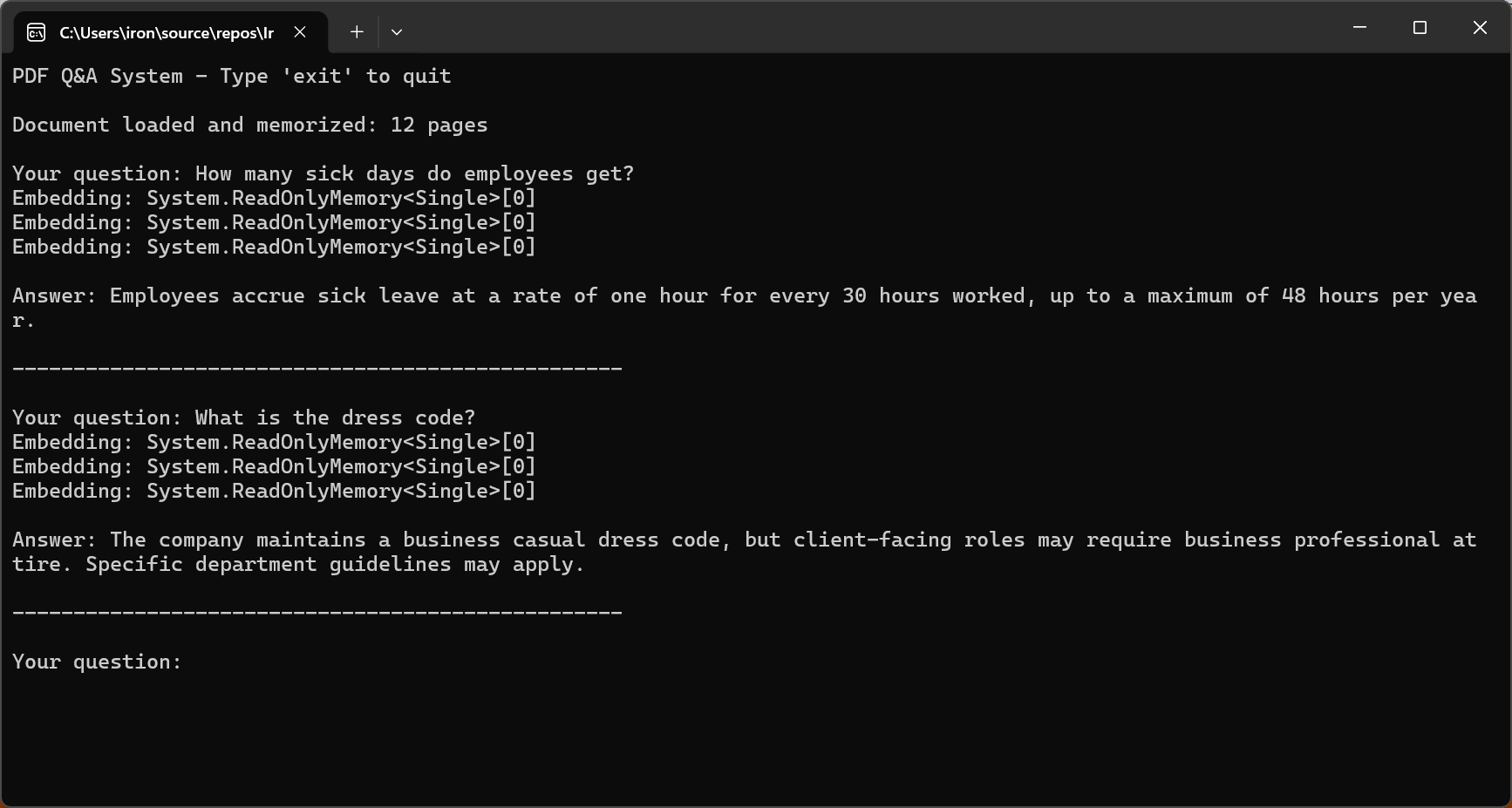
Kluczem do efektywnego systemu pytania-odpowiedzi w 2026 roku jest ograniczenie AI do odpowiedzi wyłącznie na podstawie treści dokumentu. Metoda "bezpiecznych zakończeń" trenowania GPT-5 i ulepszona zgodność Claude Sonnet 4.5 znacznie redukują stopę halucynacji.
Podział Długich Dokumentów dla Okien Kontekstowych
Większość dokumentów w rzeczywistości przekracza okna kontekstowe AI. Efektywne strategie podziału są niezbędne do przetwarzania tych dokumentów. Podział polega na dzieleniu dokumentów na segmenty wystarczająco małe, aby zmieścić się w oknach kontekstowych, jednocześnie zachowując spójność semantyczną.
Kod iteruje przez pdf.Pages, tworząc obiekty DocumentChunk z konfigurowalnymi maxChunkTokens i overlapTokens dla ciągłości kontekstu.
:path=/static-assets/pdf/content-code-examples/tutorials/ai-powered-pdf-processing-csharp/semantic-document-chunking.csusing IronPdf;
// Split long documents into overlapping chunks for RAG systems
var pdf = PdfDocument.FromFile("long-document.pdf");
// Chunking configuration
int maxChunkTokens = 4000; // Leave room for prompts and responses
int overlapTokens = 200; // Overlap for context continuity
int approxCharsPerToken = 4; // Rough estimate for tokenization
int maxChunkChars = maxChunkTokens * approxCharsPerToken;
int overlapChars = overlapTokens * approxCharsPerToken;
var chunks = new List<DocumentChunk>();
var currentChunk = new System.Text.StringBuilder();
int chunkStartPage = 1;
int currentPage = 1;
for (int i = 0; i < pdf.PageCount; i++)
{
string pageText = pdf.Pages[i].Text;
currentPage = i + 1;
if (currentChunk.Length + pageText.Length > maxChunkChars && currentChunk.Length > 0)
{
chunks.Add(new DocumentChunk
{
Text = currentChunk.ToString(),
StartPage = chunkStartPage,
EndPage = currentPage - 1,
ChunkIndex = chunks.Count
});
// Create overlap with previous chunk for continuity
string overlap = currentChunk.Length > overlapChars
? currentChunk.ToString().Substring(currentChunk.Length - overlapChars)
: currentChunk.ToString();
currentChunk.Clear();
currentChunk.Append(overlap);
chunkStartPage = currentPage - 1;
}
currentChunk.AppendLine($"\n--- Page {currentPage} ---\n");
currentChunk.Append(pageText);
}
if (currentChunk.Length > 0)
{
chunks.Add(new DocumentChunk
{
Text = currentChunk.ToString(),
StartPage = chunkStartPage,
EndPage = currentPage,
ChunkIndex = chunks.Count
});
}
Console.WriteLine($"Document chunked into {chunks.Count} segments");
foreach (var chunk in chunks)
{
Console.WriteLine($" Chunk {chunk.ChunkIndex + 1}: Pages {chunk.StartPage}-{chunk.EndPage} ({chunk.Text.Length} chars)");
}
// Save chunk metadata for RAG indexing
File.WriteAllText("chunks-metadata.json", System.Text.Json.JsonSerializer.Serialize(
chunks.Select(c => new { c.ChunkIndex, c.StartPage, c.EndPage, Length = c.Text.Length }),
new System.Text.Json.JsonSerializerOptions { WriteIndented = true }
));
ic class DocumentChunk
public string Text { get; set; } = "";
public int StartPage { get; set; }
public int EndPage { get; set; }
public int ChunkIndex { get; set; }Imports IronPdf
Imports System.IO
Imports System.Text
Imports System.Text.Json
' Split long documents into overlapping chunks for RAG systems
Dim pdf = PdfDocument.FromFile("long-document.pdf")
' Chunking configuration
Dim maxChunkTokens As Integer = 4000 ' Leave room for prompts and responses
Dim overlapTokens As Integer = 200 ' Overlap for context continuity
Dim approxCharsPerToken As Integer = 4 ' Rough estimate for tokenization
Dim maxChunkChars As Integer = maxChunkTokens * approxCharsPerToken
Dim overlapChars As Integer = overlapTokens * approxCharsPerToken
Dim chunks As New List(Of DocumentChunk)()
Dim currentChunk As New StringBuilder()
Dim chunkStartPage As Integer = 1
Dim currentPage As Integer = 1
For i As Integer = 0 To pdf.PageCount - 1
Dim pageText As String = pdf.Pages(i).Text
currentPage = i + 1
If currentChunk.Length + pageText.Length > maxChunkChars AndAlso currentChunk.Length > 0 Then
chunks.Add(New DocumentChunk With {
.Text = currentChunk.ToString(),
.StartPage = chunkStartPage,
.EndPage = currentPage - 1,
.ChunkIndex = chunks.Count
})
' Create overlap with previous chunk for continuity
Dim overlap As String = If(currentChunk.Length > overlapChars,
currentChunk.ToString().Substring(currentChunk.Length - overlapChars),
currentChunk.ToString())
currentChunk.Clear()
currentChunk.Append(overlap)
chunkStartPage = currentPage - 1
End If
currentChunk.AppendLine(vbCrLf & "--- Page " & currentPage & " ---" & vbCrLf)
currentChunk.Append(pageText)
Next
If currentChunk.Length > 0 Then
chunks.Add(New DocumentChunk With {
.Text = currentChunk.ToString(),
.StartPage = chunkStartPage,
.EndPage = currentPage,
.ChunkIndex = chunks.Count
})
End If
Console.WriteLine($"Document chunked into {chunks.Count} segments")
For Each chunk In chunks
Console.WriteLine($" Chunk {chunk.ChunkIndex + 1}: Pages {chunk.StartPage}-{chunk.EndPage} ({chunk.Text.Length} chars)")
Next
' Save chunk metadata for RAG indexing
File.WriteAllText("chunks-metadata.json", JsonSerializer.Serialize(
chunks.Select(Function(c) New With {.ChunkIndex = c.ChunkIndex, .StartPage = c.StartPage, .EndPage = c.EndPage, .Length = c.Text.Length}),
New JsonSerializerOptions With {.WriteIndented = True}
))
Public Class DocumentChunk
Public Property Text As String = ""
Public Property StartPage As Integer
Public Property EndPage As Integer
Public Property ChunkIndex As Integer
End Class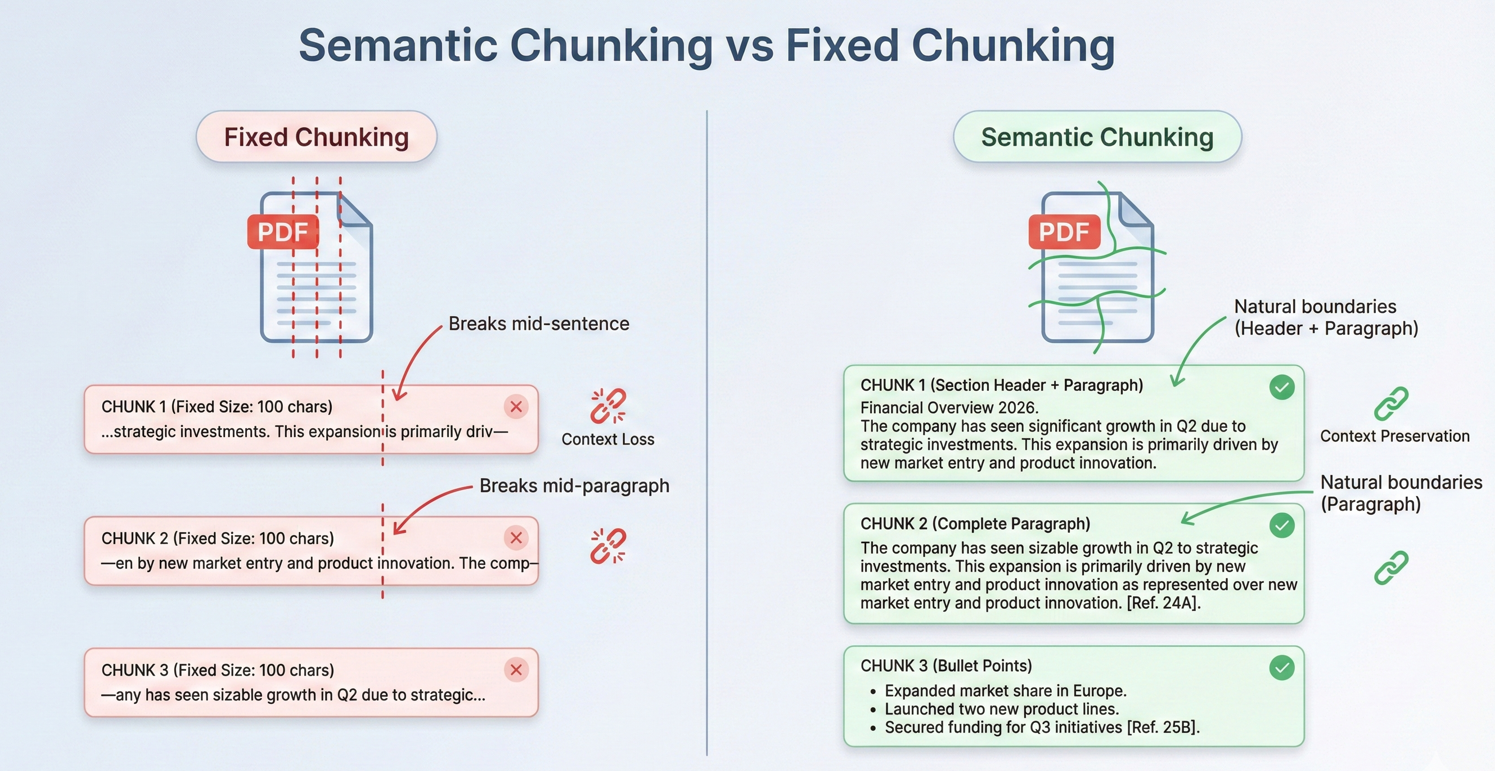
Nakładające się segmenty zapewniają ciągłość w poprzek granic, zapewniając, że AI ma wystarczający kontekst, nawet gdy istotne informacje obejmują granice segmentów.
Wzorce RAG (Retrieval-Augmented Generation)
Retrieval-Augmented Generation reprezentuje potężny wzorzec analizy dokumentów zasilanej AI w 2026 roku. Zamiast podawać AI całe dokumenty, systemy RAG najpierw wyszukują jedynie istotne fragmenty dla danego zapytania, a następnie używają tych fragmentów jako kontekstu do generowania odpowiedzi.
Przepływ pracy RAG ma trzy główne fazy: przygotowanie dokumentu (podział i tworzenie osadzeń), wyszukiwanie (przeszukiwanie istotnych fragmentów) i generacja (użycie pobranych fragmentów jako kontekstu dla odpowiedzi AI).
Kod indeksuje wiele PDF-ów, wywołując pdf.Memorize() na każdej z nich, a następnie używa pdf.Query(), aby pobrać odpowiedzi z połączonej pamięci dokumentowej.
:path=/static-assets/pdf/content-code-examples/tutorials/ai-powered-pdf-processing-csharp/rag-system-implementation.csusing IronPdf;
using IronPdf.AI;
using Microsoft.SemanticKernel;
using Microsoft.SemanticKernel.Memory;
using Microsoft.SemanticKernel.Connectors.OpenAI;
// Retrieval-Augmented Generation (RAG) system for querying across multiple indexed documents
// Azure OpenAI configuration
string azureEndpoint = "https://your-resource.openai.azure.com/";
string apiKey = "your-azure-api-key";
string chatDeployment = "gpt-4o";
string embeddingDeployment = "text-embedding-ada-002";
// Initialize Semantic Kernel
var kernel = Kernel.CreateBuilder()
.AddAzureOpenAITextEmbeddingGeneration(embeddingDeployment, azureEndpoint, apiKey)
.AddAzureOpenAIChatCompletion(chatDeployment, azureEndpoint, apiKey)
.Build();
var memory = new MemoryBuilder()
.WithMemoryStore(new VolatileMemoryStore())
.WithAzureOpenAITextEmbeddingGeneration(embeddingDeployment, azureEndpoint, apiKey)
.Build();
IronDocumentAI.Initialize(kernel, memory);
// Index all documents in folder
string[] documentPaths = Directory.GetFiles("documents/", "*.pdf");
Console.WriteLine($"Indexing {documentPaths.Length} documents...\n");
// Memorize each document (creates embeddings for retrieval)
foreach (string path in documentPaths)
{
var pdf = PdfDocument.FromFile(path);
await pdf.Memorize();
Console.WriteLine($"Indexed: {Path.GetFileName(path)} ({pdf.PageCount} pages)");
}
Console.WriteLine("\n=== RAG System Ready ===\n");
// Query across all indexed documents
string query = "What are the key compliance requirements for data retention?";
Console.WriteLine($"Query: {query}\n");
var searchPdf = PdfDocument.FromFile(documentPaths[0]);
string answer = await searchPdf.Query(query);
Console.WriteLine($"Answer: {answer}");
// Interactive query loop
Console.WriteLine("\n--- Enter questions (type 'exit' to quit) ---\n");
while (true)
{
Console.Write("Question: ");
string? userQuery = Console.ReadLine();
if (string.IsNullOrWhiteSpace(userQuery) || userQuery.ToLower() == "exit")
break;
string response = await searchPdf.Query(userQuery);
Console.WriteLine($"\nAnswer: {response}\n");
}Imports IronPdf
Imports IronPdf.AI
Imports Microsoft.SemanticKernel
Imports Microsoft.SemanticKernel.Memory
Imports Microsoft.SemanticKernel.Connectors.OpenAI
Imports System.IO
' Retrieval-Augmented Generation (RAG) system for querying across multiple indexed documents
' Azure OpenAI configuration
Dim azureEndpoint As String = "https://your-resource.openai.azure.com/"
Dim apiKey As String = "your-azure-api-key"
Dim chatDeployment As String = "gpt-4o"
Dim embeddingDeployment As String = "text-embedding-ada-002"
' Initialize Semantic Kernel
Dim kernel = Kernel.CreateBuilder() _
.AddAzureOpenAITextEmbeddingGeneration(embeddingDeployment, azureEndpoint, apiKey) _
.AddAzureOpenAIChatCompletion(chatDeployment, azureEndpoint, apiKey) _
.Build()
Dim memory = New MemoryBuilder() _
.WithMemoryStore(New VolatileMemoryStore()) _
.WithAzureOpenAITextEmbeddingGeneration(embeddingDeployment, azureEndpoint, apiKey) _
.Build()
IronDocumentAI.Initialize(kernel, memory)
' Index all documents in folder
Dim documentPaths As String() = Directory.GetFiles("documents/", "*.pdf")
Console.WriteLine($"Indexing {documentPaths.Length} documents..." & vbCrLf)
' Memorize each document (creates embeddings for retrieval)
For Each path As String In documentPaths
Dim pdf = PdfDocument.FromFile(path)
Await pdf.Memorize()
Console.WriteLine($"Indexed: {Path.GetFileName(path)} ({pdf.PageCount} pages)")
Next
Console.WriteLine(vbCrLf & "=== RAG System Ready ===" & vbCrLf)
' Query across all indexed documents
Dim query As String = "What are the key compliance requirements for data retention?"
Console.WriteLine($"Query: {query}" & vbCrLf)
Dim searchPdf = PdfDocument.FromFile(documentPaths(0))
Dim answer As String = Await searchPdf.Query(query)
Console.WriteLine($"Answer: {answer}")
' Interactive query loop
Console.WriteLine(vbCrLf & "--- Enter questions (type 'exit' to quit) ---" & vbCrLf)
While True
Console.Write("Question: ")
Dim userQuery As String = Console.ReadLine()
If String.IsNullOrWhiteSpace(userQuery) OrElse userQuery.ToLower() = "exit" Then
Exit While
End If
Dim response As String = Await searchPdf.Query(userQuery)
Console.WriteLine(vbCrLf & $"Answer: {response}" & vbCrLf)
End WhileSystemy RAG doskonale radzą sobie z dużymi kolekcjami dokumentów — bazami danych spraw prawnych, bibliotekami dokumentacji technicznej, archiwami badań. Pobierając jedynie istotne fragmenty, zachowują jakość odpowiedzi, przy jednoczesnym skalowaniu do praktycznie nieograniczonych rozmiarów dokumentów.
Podawanie Źródeł z Stron PDF
Dla profesjonalnych aplikacji, odpowiedzi AI muszą być weryfikowalne. Podejście oparte na cytowaniu polega na utrzymaniu metadanych o pochodzeniu fragmentów podczas podziału i pobierania. Każdy fragment przechowuje nie tylko treść tekstową, ale także numery stron źródłowych, nagłówki sekcji i pozycję w dokumencie.
Wejście
Kod używa pdf.Query() z instrukcjami cytowania, a następnie wywołuje ExtractCitedPages() z regexem, aby analizować odniesienia do stron i weryfikować źródła używając pdf.Pages[pageNum - 1].Text.
:path=/static-assets/pdf/content-code-examples/tutorials/ai-powered-pdf-processing-csharp/answer-with-citations.csusing IronPdf;
using IronPdf.AI;
using Microsoft.SemanticKernel;
using Microsoft.SemanticKernel.Memory;
using Microsoft.SemanticKernel.Connectors.OpenAI;
using System.Text.RegularExpressions;
// Answer questions with page citations and source verification
// Azure OpenAI configuration
string azureEndpoint = "https://your-resource.openai.azure.com/";
string apiKey = "your-azure-api-key";
string chatDeployment = "gpt-4o";
string embeddingDeployment = "text-embedding-ada-002";
// Initialize Semantic Kernel
var kernel = Kernel.CreateBuilder()
.AddAzureOpenAITextEmbeddingGeneration(embeddingDeployment, azureEndpoint, apiKey)
.AddAzureOpenAIChatCompletion(chatDeployment, azureEndpoint, apiKey)
.Build();
var memory = new MemoryBuilder()
.WithMemoryStore(new VolatileMemoryStore())
.WithAzureOpenAITextEmbeddingGeneration(embeddingDeployment, azureEndpoint, apiKey)
.Build();
IronDocumentAI.Initialize(kernel, memory);
var pdf = PdfDocument.FromFile("sample-legal-document.pdf");
await pdf.Memorize();
string question = "What are the termination conditions in this agreement?";
// Request citations in query
string citationQuery = $@"{question}
T: Include specific page citations in your answer using the format (Page X) or (Pages X-Y).
e information that appears in the document.";
string answerWithCitations = await pdf.Query(citationQuery);
Console.WriteLine("Question: " + question);
Console.WriteLine("\nAnswer with Citations:");
Console.WriteLine(answerWithCitations);
// Extract cited page numbers using regex
var citedPages = ExtractCitedPages(answerWithCitations);
Console.WriteLine($"\nCited pages: {string.Join(", ", citedPages)}");
// Verify citations with page excerpts
Console.WriteLine("\n=== Source Verification ===");
foreach (int pageNum in citedPages.Take(3))
{
if (pageNum <= pdf.PageCount && pageNum > 0)
{
string pageText = pdf.Pages[pageNum - 1].Text;
string excerpt = pageText.Length > 200 ? pageText.Substring(0, 200) + "..." : pageText;
Console.WriteLine($"\nPage {pageNum} excerpt:\n{excerpt}");
}
}
// Extract page numbers from citation format (Page X) or (Pages X-Y)
List<int> ExtractCitedPages(string text)
{
var pages = new HashSet<int>();
var matches = Regex.Matches(text, @"\(Pages?\s*(\d+)(?:\s*-\s*(\d+))?\)", RegexOptions.IgnoreCase);
foreach (Match match in matches)
{
int startPage = int.Parse(match.Groups[1].Value);
pages.Add(startPage);
if (match.Groups[2].Success)
{
int endPage = int.Parse(match.Groups[2].Value);
for (int p = startPage; p <= endPage; p++)
pages.Add(p);
}
}
return pages.OrderBy(p => p).ToList();
}Imports IronPdf
Imports IronPdf.AI
Imports Microsoft.SemanticKernel
Imports Microsoft.SemanticKernel.Memory
Imports Microsoft.SemanticKernel.Connectors.OpenAI
Imports System.Text.RegularExpressions
' Answer questions with page citations and source verification
' Azure OpenAI configuration
Dim azureEndpoint As String = "https://your-resource.openai.azure.com/"
Dim apiKey As String = "your-azure-api-key"
Dim chatDeployment As String = "gpt-4o"
Dim embeddingDeployment As String = "text-embedding-ada-002"
' Initialize Semantic Kernel
Dim kernel = Kernel.CreateBuilder() _
.AddAzureOpenAITextEmbeddingGeneration(embeddingDeployment, azureEndpoint, apiKey) _
.AddAzureOpenAIChatCompletion(chatDeployment, azureEndpoint, apiKey) _
.Build()
Dim memory = New MemoryBuilder() _
.WithMemoryStore(New VolatileMemoryStore()) _
.WithAzureOpenAITextEmbeddingGeneration(embeddingDeployment, azureEndpoint, apiKey) _
.Build()
IronDocumentAI.Initialize(kernel, memory)
Dim pdf = PdfDocument.FromFile("sample-legal-document.pdf")
Await pdf.Memorize()
Dim question As String = "What are the termination conditions in this agreement?"
' Request citations in query
Dim citationQuery As String = $"{question}
T: Include specific page citations in your answer using the format (Page X) or (Pages X-Y).
e information that appears in the document."
Dim answerWithCitations As String = Await pdf.Query(citationQuery)
Console.WriteLine("Question: " & question)
Console.WriteLine(vbCrLf & "Answer with Citations:")
Console.WriteLine(answerWithCitations)
' Extract cited page numbers using regex
Dim citedPages = ExtractCitedPages(answerWithCitations)
Console.WriteLine(vbCrLf & "Cited pages: " & String.Join(", ", citedPages))
' Verify citations with page excerpts
Console.WriteLine(vbCrLf & "=== Source Verification ===")
For Each pageNum As Integer In citedPages.Take(3)
If pageNum <= pdf.PageCount AndAlso pageNum > 0 Then
Dim pageText As String = pdf.Pages(pageNum - 1).Text
Dim excerpt As String = If(pageText.Length > 200, pageText.Substring(0, 200) & "...", pageText)
Console.WriteLine(vbCrLf & "Page " & pageNum & " excerpt:" & vbCrLf & excerpt)
End If
Next
' Extract page numbers from citation format (Page X) or (Pages X-Y)
Function ExtractCitedPages(ByVal text As String) As List(Of Integer)
Dim pages = New HashSet(Of Integer)()
Dim matches = Regex.Matches(text, "\((Pages?)\s*(\d+)(?:\s*-\s*(\d+))?\)", RegexOptions.IgnoreCase)
For Each match As Match In matches
Dim startPage As Integer = Integer.Parse(match.Groups(2).Value)
pages.Add(startPage)
If match.Groups(3).Success Then
Dim endPage As Integer = Integer.Parse(match.Groups(3).Value)
For p As Integer = startPage To endPage
pages.Add(p)
Next
End If
Next
Return pages.OrderBy(Function(p) p).ToList()
End FunctionWynik konsoli
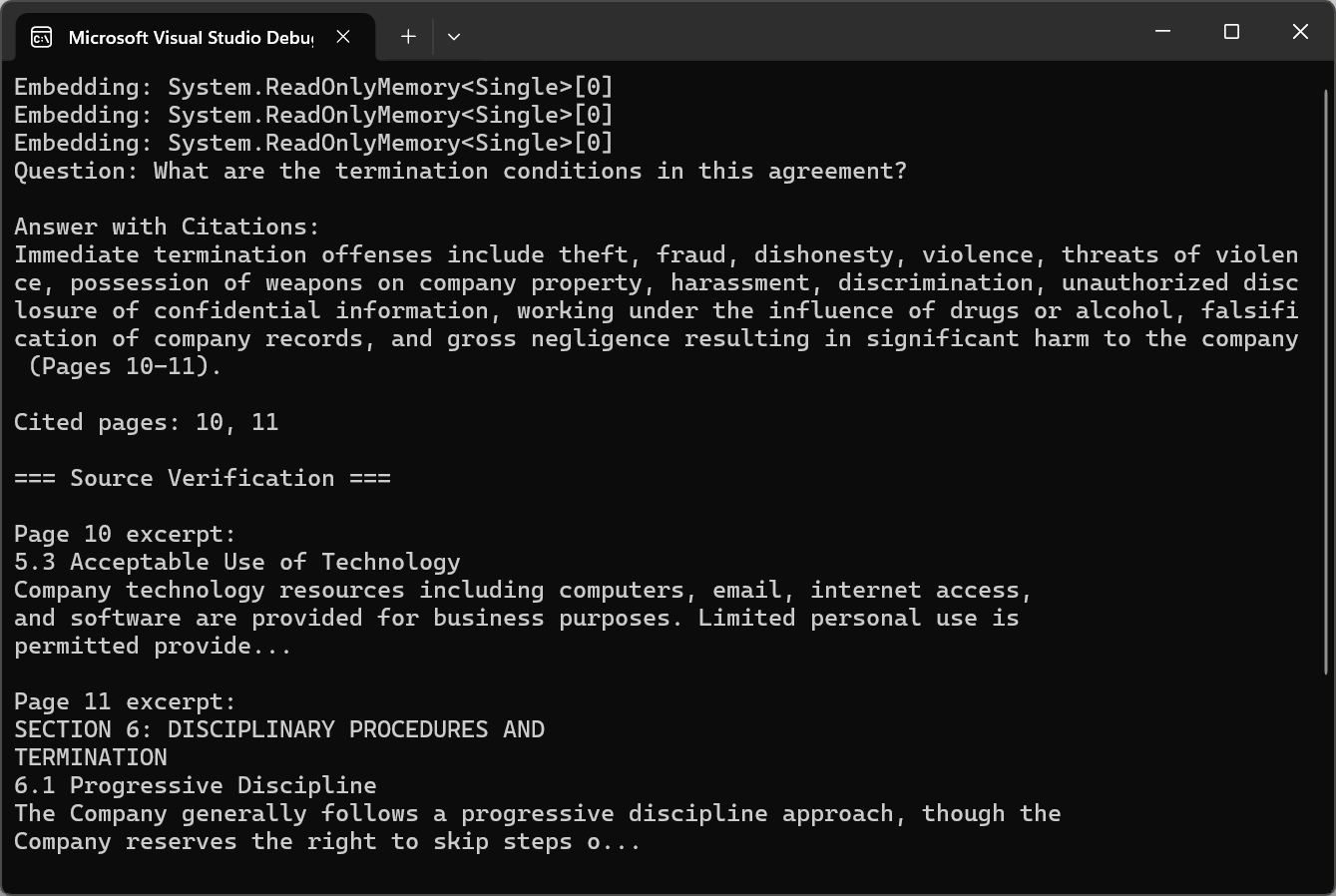
Cytowania przekształcają odpowiedzi generowane przez AI z nieprzejrzystych wyjść w przejrzyste, weryfikowalne informacje. Użytkownicy mogą przeglądać materiały źródłowe, aby zweryfikować odpowiedzi i budować zaufanie do analizy wspomaganej przez AI.
Przetwarzanie Partii AI
Przetwarzanie Bibliotek Dokumentów na Dużą Skalę
Przetwarzanie dokumentów w przedsiębiorstwie często obejmuje setki tysięcy lub miliony PDF-ów. Podstawą skalowalnego przetwarzania partii jest równoległość. IronPDF jest bezpieczny dla wątków, umożliwiając równoczesne przetwarzanie PDF-ów bez zakłóceń.
Kod używa SemaphoreSlim z konfigurowalnym maxConcurrency do równoległego przetwarzania PDF-ów, wywołując pdf.Summarize() na każdym z nich przy jednoczesnym śledzeniu wyników w ConcurrentBag.
:path=/static-assets/pdf/content-code-examples/tutorials/ai-powered-pdf-processing-csharp/batch-document-processing.csusing IronPdf;
using IronPdf.AI;
using Microsoft.SemanticKernel;
using Microsoft.SemanticKernel.Memory;
using Microsoft.SemanticKernel.Connectors.OpenAI;
using System;
using System.Collections.Concurrent;
using System.Text;
// Process multiple documents in parallel with rate limiting
// Azure OpenAI configuration
string azureEndpoint = "https://your-resource.openai.azure.com/";
string apiKey = "your-azure-api-key";
string chatDeployment = "gpt-4o";
string embeddingDeployment = "text-embedding-ada-002";
// Initialize Semantic Kernel
var kernel = Kernel.CreateBuilder()
.AddAzureOpenAITextEmbeddingGeneration(embeddingDeployment, azureEndpoint, apiKey)
.AddAzureOpenAIChatCompletion(chatDeployment, azureEndpoint, apiKey)
.Build();
var memory = new MemoryBuilder()
.WithMemoryStore(new VolatileMemoryStore())
.WithAzureOpenAITextEmbeddingGeneration(embeddingDeployment, azureEndpoint, apiKey)
.Build();
IronDocumentAI.Initialize(kernel, memory);
// Configure parallel processing with rate limiting
int maxConcurrency = 3;
string inputFolder = "documents/";
string outputFolder = "summaries/";
Directory.CreateDirectory(outputFolder);
string[] pdfFiles = Directory.GetFiles(inputFolder, "*.pdf");
Console.WriteLine($"Processing {pdfFiles.Length} documents...\n");
var results = new ConcurrentBag<ProcessingResult>();
var semaphore = new SemaphoreSlim(maxConcurrency);
var tasks = pdfFiles.Select(async filePath =>
{
await semaphore.WaitAsync();
var result = new ProcessingResult { FilePath = filePath };
try
{
var stopwatch = System.Diagnostics.Stopwatch.StartNew();
var pdf = PdfDocument.FromFile(filePath);
string summary = await pdf.Summarize();
string outputPath = Path.Combine(outputFolder,
Path.GetFileNameWithoutExtension(filePath) + "-summary.txt");
await File.WriteAllTextAsync(outputPath, summary);
stopwatch.Stop();
result.Success = true;
result.ProcessingTime = stopwatch.Elapsed;
result.OutputPath = outputPath;
Console.WriteLine($"[OK] {Path.GetFileName(filePath)} ({stopwatch.ElapsedMilliseconds}ms)");
}
catch (Exception ex)
{
result.Success = false;
result.ErrorMessage = ex.Message;
Console.WriteLine($"[ERROR] {Path.GetFileName(filePath)}: {ex.Message}");
}
finally
{
semaphore.Release();
results.Add(result);
}
}).ToArray();
await Task.WhenAll(tasks);
// Generate processing report
var successful = results.Where(r => r.Success).ToList();
var failed = results.Where(r => !r.Success).ToList();
var report = new StringBuilder();
report.AppendLine("=== Batch Processing Report ===");
report.AppendLine($"Successful: {successful.Count}");
report.AppendLine($"Failed: {failed.Count}");
if (successful.Any())
{
var avgTime = TimeSpan.FromMilliseconds(successful.Average(r => r.ProcessingTime.TotalMilliseconds));
report.AppendLine($"Average processing time: {avgTime.TotalSeconds:F1}s");
}
if (failed.Any())
{
report.AppendLine("\nFailed documents:");
foreach (var fail in failed)
report.AppendLine($" - {Path.GetFileName(fail.FilePath)}: {fail.ErrorMessage}");
}
string reportText = report.ToString();
Console.WriteLine($"\n{reportText}");
File.WriteAllText(Path.Combine(outputFolder, "processing-report.txt"), reportText);
s ProcessingResult
public string FilePath { get; set; } = "";
public bool Success { get; set; }
public TimeSpan ProcessingTime { get; set; }
public string OutputPath { get; set; } = "";
public string ErrorMessage { get; set; } = "";Imports IronPdf
Imports IronPdf.AI
Imports Microsoft.SemanticKernel
Imports Microsoft.SemanticKernel.Memory
Imports Microsoft.SemanticKernel.Connectors.OpenAI
Imports System
Imports System.Collections.Concurrent
Imports System.Text
Imports System.IO
Imports System.Linq
Imports System.Threading
Imports System.Threading.Tasks
' Process multiple documents in parallel with rate limiting
' Azure OpenAI configuration
Dim azureEndpoint As String = "https://your-resource.openai.azure.com/"
Dim apiKey As String = "your-azure-api-key"
Dim chatDeployment As String = "gpt-4o"
Dim embeddingDeployment As String = "text-embedding-ada-002"
' Initialize Semantic Kernel
Dim kernel = Kernel.CreateBuilder() _
.AddAzureOpenAITextEmbeddingGeneration(embeddingDeployment, azureEndpoint, apiKey) _
.AddAzureOpenAIChatCompletion(chatDeployment, azureEndpoint, apiKey) _
.Build()
Dim memory = New MemoryBuilder() _
.WithMemoryStore(New VolatileMemoryStore()) _
.WithAzureOpenAITextEmbeddingGeneration(embeddingDeployment, azureEndpoint, apiKey) _
.Build()
IronDocumentAI.Initialize(kernel, memory)
' Configure parallel processing with rate limiting
Dim maxConcurrency As Integer = 3
Dim inputFolder As String = "documents/"
Dim outputFolder As String = "summaries/"
Directory.CreateDirectory(outputFolder)
Dim pdfFiles As String() = Directory.GetFiles(inputFolder, "*.pdf")
Console.WriteLine($"Processing {pdfFiles.Length} documents...{vbCrLf}")
Dim results = New ConcurrentBag(Of ProcessingResult)()
Dim semaphore = New SemaphoreSlim(maxConcurrency)
Dim tasks = pdfFiles.Select(Async Function(filePath)
Await semaphore.WaitAsync()
Dim result = New ProcessingResult With {.FilePath = filePath}
Try
Dim stopwatch = System.Diagnostics.Stopwatch.StartNew()
Dim pdf = PdfDocument.FromFile(filePath)
Dim summary As String = Await pdf.Summarize()
Dim outputPath = Path.Combine(outputFolder, Path.GetFileNameWithoutExtension(filePath) & "-summary.txt")
Await File.WriteAllTextAsync(outputPath, summary)
stopwatch.Stop()
result.Success = True
result.ProcessingTime = stopwatch.Elapsed
result.OutputPath = outputPath
Console.WriteLine($"[OK] {Path.GetFileName(filePath)} ({stopwatch.ElapsedMilliseconds}ms)")
Catch ex As Exception
result.Success = False
result.ErrorMessage = ex.Message
Console.WriteLine($"[ERROR] {Path.GetFileName(filePath)}: {ex.Message}")
Finally
semaphore.Release()
results.Add(result)
End Try
End Function).ToArray()
Await Task.WhenAll(tasks)
' Generate processing report
Dim successful = results.Where(Function(r) r.Success).ToList()
Dim failed = results.Where(Function(r) Not r.Success).ToList()
Dim report = New StringBuilder()
report.AppendLine("=== Batch Processing Report ===")
report.AppendLine($"Successful: {successful.Count}")
report.AppendLine($"Failed: {failed.Count}")
If successful.Any() Then
Dim avgTime = TimeSpan.FromMilliseconds(successful.Average(Function(r) r.ProcessingTime.TotalMilliseconds))
report.AppendLine($"Average processing time: {avgTime.TotalSeconds:F1}s")
End If
If failed.Any() Then
report.AppendLine($"{vbCrLf}Failed documents:")
For Each fail In failed
report.AppendLine($" - {Path.GetFileName(fail.FilePath)}: {fail.ErrorMessage}")
Next
End If
Dim reportText As String = report.ToString()
Console.WriteLine($"{vbCrLf}{reportText}")
File.WriteAllText(Path.Combine(outputFolder, "processing-report.txt"), reportText)
Public Class ProcessingResult
Public Property FilePath As String = ""
Public Property Success As Boolean
Public Property ProcessingTime As TimeSpan
Public Property OutputPath As String = ""
Public Property ErrorMessage As String = ""
End ClassNiezawodne obsługiwanie błędów jest kluczowe na dużą skalę. Systemy produkcyjne wdrażają logikę ponawiania z wykładniczym odwrotem, osobne zapisy błędów dla nieudanych dokumentów i przetwarzanie wznawialne.
Zarządzanie Kosztami i Użyciem Tokenów
Koszty API AI są zazwyczaj naliczane za token. W 2026 roku koszt GPT-5 wynosi $1,25 za milion tokenów wejściowych i $10 za milion tokenów wyjściowych, podczas gdy Claude Sonnet 4.5 kosztuje $3 za milion tokenów wejściowych i $15 za milion tokenów wyjściowych. Podstawowa strategia optymalizacji kosztów polega na minimalizowaniu niepotrzebnego użycia tokenów.
Batch API OpenAI oferuje 50% zniżki na koszty tokenów w zamian za dłuższe czasy przetwarzania (do 24 godzin). W przypadku przetwarzania nocnego lub okresowej analizy, przetwarzanie partii dostarcza znacznych oszczędności.
Kod wydobywa tekst przy użyciu pdf.ExtractAllText(), tworzy batchowe żądania JSONL, wgrywa przez HttpClient do punktu końcowego plików OpenAI i przesyła do batchowego API.
:path=/static-assets/pdf/content-code-examples/tutorials/ai-powered-pdf-processing-csharp/batch-api-processing.csusing IronPdf;
using System.Text.Json;
using System.Net.Http.Headers;
// Use OpenAI Batch API for 50% cost savings on large-scale document processing
string openAiApiKey = "your-openai-api-key";
string inputFolder = "documents/";
// Prepare batch requests in JSONL format
var batchRequests = new List<string>();
string[] pdfFiles = Directory.GetFiles(inputFolder, "*.pdf");
Console.WriteLine($"Preparing batch for {pdfFiles.Length} documents...\n");
foreach (string filePath in pdfFiles)
{
var pdf = PdfDocument.FromFile(filePath);
string pdfText = pdf.ExtractAllText();
// Truncate to stay within batch API limits
if (pdfText.Length > 100000)
pdfText = pdfText.Substring(0, 100000) + "\n[Truncated...]";
var request = new
{
custom_id = Path.GetFileNameWithoutExtension(filePath),
method = "POST",
url = "/v1/chat/completions",
body = new
{
model = "gpt-4o",
messages = new[]
{
new { role = "system", content = "Summarize the following document concisely." },
new { role = "user", content = pdfText }
},
max_tokens = 1000
}
};
batchRequests.Add(JsonSerializer.Serialize(request));
}
// Create JSONL file
string batchFilePath = "batch-requests.jsonl";
File.WriteAllLines(batchFilePath, batchRequests);
Console.WriteLine($"Created batch file with {batchRequests.Count} requests");
// Upload file to OpenAI
using var httpClient = new HttpClient();
httpClient.DefaultRequestHeaders.Authorization = new AuthenticationHeaderValue("Bearer", openAiApiKey);
using var fileContent = new MultipartFormDataContent();
fileContent.Add(new ByteArrayContent(File.ReadAllBytes(batchFilePath)), "file", "batch-requests.jsonl");
fileContent.Add(new StringContent("batch"), "purpose");
var uploadResponse = await httpClient.PostAsync("https://api.openai.com/v1/files", fileContent);
var uploadResult = JsonSerializer.Deserialize<JsonElement>(await uploadResponse.Content.ReadAsStringAsync());
string fileId = uploadResult.GetProperty("id").GetString()!;
Console.WriteLine($"Uploaded file: {fileId}");
// Create batch job (24-hour completion window for 50% discount)
var batchJobRequest = new
{
input_file_id = fileId,
endpoint = "/v1/chat/completions",
completion_window = "24h"
};
var batchResponse = await httpClient.PostAsync(
"https://api.openai.com/v1/batches",
new StringContent(JsonSerializer.Serialize(batchJobRequest), System.Text.Encoding.UTF8, "application/json")
);
var batchResult = JsonSerializer.Deserialize<JsonElement>(await batchResponse.Content.ReadAsStringAsync());
string batchId = batchResult.GetProperty("id").GetString()!;
Console.WriteLine($"\nBatch job created: {batchId}");
Console.WriteLine("Job will complete within 24 hours");
Console.WriteLine($"Check status: GET https://api.openai.com/v1/batches/{batchId}");
File.WriteAllText("batch-job-id.txt", batchId);
Console.WriteLine("\nBatch ID saved to batch-job-id.txt");Imports IronPdf
Imports System.Text.Json
Imports System.Net.Http.Headers
' Use OpenAI Batch API for 50% cost savings on large-scale document processing
Dim openAiApiKey As String = "your-openai-api-key"
Dim inputFolder As String = "documents/"
' Prepare batch requests in JSONL format
Dim batchRequests As New List(Of String)()
Dim pdfFiles As String() = Directory.GetFiles(inputFolder, "*.pdf")
Console.WriteLine($"Preparing batch for {pdfFiles.Length} documents..." & vbCrLf)
For Each filePath As String In pdfFiles
Dim pdf = PdfDocument.FromFile(filePath)
Dim pdfText As String = pdf.ExtractAllText()
' Truncate to stay within batch API limits
If pdfText.Length > 100000 Then
pdfText = pdfText.Substring(0, 100000) & vbCrLf & "[Truncated...]"
End If
Dim request = New With {
.custom_id = Path.GetFileNameWithoutExtension(filePath),
.method = "POST",
.url = "/v1/chat/completions",
.body = New With {
.model = "gpt-4o",
.messages = New Object() {
New With {.role = "system", .content = "Summarize the following document concisely."},
New With {.role = "user", .content = pdfText}
},
.max_tokens = 1000
}
}
batchRequests.Add(JsonSerializer.Serialize(request))
Next
' Create JSONL file
Dim batchFilePath As String = "batch-requests.jsonl"
File.WriteAllLines(batchFilePath, batchRequests)
Console.WriteLine($"Created batch file with {batchRequests.Count} requests")
' Upload file to OpenAI
Using httpClient As New HttpClient()
httpClient.DefaultRequestHeaders.Authorization = New AuthenticationHeaderValue("Bearer", openAiApiKey)
Using fileContent As New MultipartFormDataContent()
fileContent.Add(New ByteArrayContent(File.ReadAllBytes(batchFilePath)), "file", "batch-requests.jsonl")
fileContent.Add(New StringContent("batch"), "purpose")
Dim uploadResponse = Await httpClient.PostAsync("https://api.openai.com/v1/files", fileContent)
Dim uploadResult = JsonSerializer.Deserialize(Of JsonElement)(Await uploadResponse.Content.ReadAsStringAsync())
Dim fileId As String = uploadResult.GetProperty("id").GetString()
Console.WriteLine($"Uploaded file: {fileId}")
' Create batch job (24-hour completion window for 50% discount)
Dim batchJobRequest = New With {
.input_file_id = fileId,
.endpoint = "/v1/chat/completions",
.completion_window = "24h"
}
Dim batchResponse = Await httpClient.PostAsync(
"https://api.openai.com/v1/batches",
New StringContent(JsonSerializer.Serialize(batchJobRequest), System.Text.Encoding.UTF8, "application/json")
)
Dim batchResult = JsonSerializer.Deserialize(Of JsonElement)(Await batchResponse.Content.ReadAsStringAsync())
Dim batchId As String = batchResult.GetProperty("id").GetString()
Console.WriteLine(vbCrLf & $"Batch job created: {batchId}")
Console.WriteLine("Job will complete within 24 hours")
Console.WriteLine($"Check status: GET https://api.openai.com/v1/batches/{batchId}")
File.WriteAllText("batch-job-id.txt", batchId)
Console.WriteLine(vbCrLf & "Batch ID saved to batch-job-id.txt")
End Using
End UsingMonitorowanie użycia tokenów w produkcji jest niezbędne. Wiele organizacji odkrywa, że 80% ich dokumentów można przetwarzać za pomocą mniejszych, tańszych modeli, rezerwując drogie modele tylko dla złożonych przypadków.
Cache'owanie i Przetwarzanie Inkrementalne
Dla kolekcji dokumentów, które aktualizują się inkrementalnie, inteligentne cache'owanie i strategie przetwarzania inkrementalnego dramatycznie redukują koszty. Cache'owanie na poziomie dokumentu przechowuje wyniki wraz z hashem źródłowego PDF, zapobiegając niepotrzebnemu ponownemu przetwarzaniu niezmienionych dokumentów.
Klasa DocumentCacheManager używa ComputeFileHash() z SHA256 do wykrywania zmian, przechowując wyniki w obiektach CacheEntry z LastAccessed znacznikami czasowymi.
:path=/static-assets/pdf/content-code-examples/tutorials/ai-powered-pdf-processing-csharp/incremental-caching.csusing IronPdf;
using IronPdf.AI;
using Microsoft.SemanticKernel;
using Microsoft.SemanticKernel.Memory;
using Microsoft.SemanticKernel.Connectors.OpenAI;
using System;
using System.Collections.Generic;
using System.Security.Cryptography;
using System.Text.Json;
// Cache AI processing results using file hashes to avoid reprocessing unchanged documents
// Azure OpenAI configuration
string azureEndpoint = "https://your-resource.openai.azure.com/";
string apiKey = "your-azure-api-key";
string chatDeployment = "gpt-4o";
string embeddingDeployment = "text-embedding-ada-002";
// Initialize Semantic Kernel
var kernel = Kernel.CreateBuilder()
.AddAzureOpenAITextEmbeddingGeneration(embeddingDeployment, azureEndpoint, apiKey)
.AddAzureOpenAIChatCompletion(chatDeployment, azureEndpoint, apiKey)
.Build();
var memory = new MemoryBuilder()
.WithMemoryStore(new VolatileMemoryStore())
.WithAzureOpenAITextEmbeddingGeneration(embeddingDeployment, azureEndpoint, apiKey)
.Build();
IronDocumentAI.Initialize(kernel, memory);
// Configure caching
string cacheFolder = "ai-cache/";
string documentsFolder = "documents/";
Directory.CreateDirectory(cacheFolder);
var cacheManager = new DocumentCacheManager(cacheFolder);
// Process documents with caching
string[] pdfFiles = Directory.GetFiles(documentsFolder, "*.pdf");
int cached = 0, processed = 0;
foreach (string filePath in pdfFiles)
{
string fileName = Path.GetFileName(filePath);
string fileHash = cacheManager.ComputeFileHash(filePath);
var cachedResult = cacheManager.GetCachedResult(fileName, fileHash);
if (cachedResult != null)
{
Console.WriteLine($"[CACHE HIT] {fileName}");
cached++;
continue;
}
Console.WriteLine($"[PROCESSING] {fileName}");
var pdf = PdfDocument.FromFile(filePath);
string summary = await pdf.Summarize();
cacheManager.CacheResult(fileName, fileHash, summary);
processed++;
}
Console.WriteLine($"\nProcessing complete: {cached} cached, {processed} newly processed");
Console.WriteLine($"Cost savings: {(cached * 100.0 / Math.Max(1, cached + processed)):F1}% served from cache");
ash-based cache manager with JSON index
s DocumentCacheManager
private readonly string _cacheFolder;
private readonly string _indexPath;
private Dictionary<string, CacheEntry> _index;
public DocumentCacheManager(string cacheFolder)
{
_cacheFolder = cacheFolder;
_indexPath = Path.Combine(cacheFolder, "cache-index.json");
_index = LoadIndex();
}
private Dictionary<string, CacheEntry> LoadIndex()
{
if (File.Exists(_indexPath))
{
string json = File.ReadAllText(_indexPath);
return JsonSerializer.Deserialize<Dictionary<string, CacheEntry>>(json) ?? new();
}
return new Dictionary<string, CacheEntry>();
}
private void SaveIndex()
{
string json = JsonSerializer.Serialize(_index, new JsonSerializerOptions { WriteIndented = true });
File.WriteAllText(_indexPath, json);
}
// SHA256 hash to detect file changes
public string ComputeFileHash(string filePath)
{
using var sha256 = SHA256.Create();
using var stream = File.OpenRead(filePath);
byte[] hash = sha256.ComputeHash(stream);
return Convert.ToHexString(hash);
}
public string? GetCachedResult(string fileName, string currentHash)
{
if (_index.TryGetValue(fileName, out var entry))
{
if (entry.FileHash == currentHash && File.Exists(entry.CachePath))
{
entry.LastAccessed = DateTime.UtcNow;
SaveIndex();
return File.ReadAllText(entry.CachePath);
}
}
return null;
}
public void CacheResult(string fileName, string fileHash, string result)
{
string cachePath = Path.Combine(_cacheFolder, $"{Path.GetFileNameWithoutExtension(fileName)}-{fileHash[..8]}.txt");
File.WriteAllText(cachePath, result);
_index[fileName] = new CacheEntry
{
FileHash = fileHash,
CachePath = cachePath,
CreatedAt = DateTime.UtcNow,
LastAccessed = DateTime.UtcNow
};
SaveIndex();
}
s CacheEntry
public string FileHash { get; set; } = "";
public string CachePath { get; set; } = "";
public DateTime CreatedAt { get; set; }
public DateTime LastAccessed { get; set; }Imports IronPdf
Imports IronPdf.AI
Imports Microsoft.SemanticKernel
Imports Microsoft.SemanticKernel.Memory
Imports Microsoft.SemanticKernel.Connectors.OpenAI
Imports System
Imports System.Collections.Generic
Imports System.Security.Cryptography
Imports System.Text.Json
' Cache AI processing results using file hashes to avoid reprocessing unchanged documents
' Azure OpenAI configuration
Dim azureEndpoint As String = "https://your-resource.openai.azure.com/"
Dim apiKey As String = "your-azure-api-key"
Dim chatDeployment As String = "gpt-4o"
Dim embeddingDeployment As String = "text-embedding-ada-002"
' Initialize Semantic Kernel
Dim kernel = Kernel.CreateBuilder() _
.AddAzureOpenAITextEmbeddingGeneration(embeddingDeployment, azureEndpoint, apiKey) _
.AddAzureOpenAIChatCompletion(chatDeployment, azureEndpoint, apiKey) _
.Build()
Dim memory = New MemoryBuilder() _
.WithMemoryStore(New VolatileMemoryStore()) _
.WithAzureOpenAITextEmbeddingGeneration(embeddingDeployment, azureEndpoint, apiKey) _
.Build()
IronDocumentAI.Initialize(kernel, memory)
' Configure caching
Dim cacheFolder As String = "ai-cache/"
Dim documentsFolder As String = "documents/"
Directory.CreateDirectory(cacheFolder)
Dim cacheManager = New DocumentCacheManager(cacheFolder)
' Process documents with caching
Dim pdfFiles As String() = Directory.GetFiles(documentsFolder, "*.pdf")
Dim cached As Integer = 0, processed As Integer = 0
For Each filePath As String In pdfFiles
Dim fileName As String = Path.GetFileName(filePath)
Dim fileHash As String = cacheManager.ComputeFileHash(filePath)
Dim cachedResult As String = cacheManager.GetCachedResult(fileName, fileHash)
If cachedResult IsNot Nothing Then
Console.WriteLine($"[CACHE HIT] {fileName}")
cached += 1
Continue For
End If
Console.WriteLine($"[PROCESSING] {fileName}")
Dim pdf = PdfDocument.FromFile(filePath)
Dim summary As String = Await pdf.Summarize()
cacheManager.CacheResult(fileName, fileHash, summary)
processed += 1
Next
Console.WriteLine(vbCrLf & $"Processing complete: {cached} cached, {processed} newly processed")
Console.WriteLine($"Cost savings: {(cached * 100.0 / Math.Max(1, cached + processed)):F1}% served from cache")
' Hash-based cache manager with JSON index
Public Class DocumentCacheManager
Private ReadOnly _cacheFolder As String
Private ReadOnly _indexPath As String
Private _index As Dictionary(Of String, CacheEntry)
Public Sub New(cacheFolder As String)
_cacheFolder = cacheFolder
_indexPath = Path.Combine(cacheFolder, "cache-index.json")
_index = LoadIndex()
End Sub
Private Function LoadIndex() As Dictionary(Of String, CacheEntry)
If File.Exists(_indexPath) Then
Dim json As String = File.ReadAllText(_indexPath)
Return JsonSerializer.Deserialize(Of Dictionary(Of String, CacheEntry))(json) OrElse New Dictionary(Of String, CacheEntry)()
End If
Return New Dictionary(Of String, CacheEntry)()
End Function
Private Sub SaveIndex()
Dim json As String = JsonSerializer.Serialize(_index, New JsonSerializerOptions With {.WriteIndented = True})
File.WriteAllText(_indexPath, json)
End Sub
' SHA256 hash to detect file changes
Public Function ComputeFileHash(filePath As String) As String
Using sha256 = SHA256.Create()
Using stream = File.OpenRead(filePath)
Dim hash As Byte() = sha256.ComputeHash(stream)
Return Convert.ToHexString(hash)
End Using
End Using
End Function
Public Function GetCachedResult(fileName As String, currentHash As String) As String
If _index.TryGetValue(fileName, entry) Then
If entry.FileHash = currentHash AndAlso File.Exists(entry.CachePath) Then
entry.LastAccessed = DateTime.UtcNow
SaveIndex()
Return File.ReadAllText(entry.CachePath)
End If
End If
Return Nothing
End Function
Public Sub CacheResult(fileName As String, fileHash As String, result As String)
Dim cachePath As String = Path.Combine(_cacheFolder, $"{Path.GetFileNameWithoutExtension(fileName)}-{fileHash.Substring(0, 8)}.txt")
File.WriteAllText(cachePath, result)
_index(fileName) = New CacheEntry With {
.FileHash = fileHash,
.CachePath = cachePath,
.CreatedAt = DateTime.UtcNow,
.LastAccessed = DateTime.UtcNow
}
SaveIndex()
End Sub
End Class
Public Class CacheEntry
Public Property FileHash As String = ""
Public Property CachePath As String = ""
Public Property CreatedAt As DateTime
Public Property LastAccessed As DateTime
End ClassGPT-5 i Claude Sonnet 4.5 w 2026 roku oferują również automatyczne cache'owanie promptów, które może zmniejszyć efektywne zużycie tokenów o 50-90% dla powtarzających się wzorców — znaczna oszczędność kosztów dla operacji na dużą skalę.
Praktyczne przykłady zastosowań
Odkrywanie Prawne i Analiza Umów
Tradycyjnie odkrywanie prawne wymagało armii młodszych prawników ręcznie przeglądających setki tysięcy stron. Odkrywanie wspomagane AI przekształca ten proces, umożliwiając szybkie identyfikowanie istotnych dokumentów, automatyczną weryfikację przywilejów i ekstrakcję kluczowych faktów dowodowych.
Integracja AI IronPDF umożliwia zaawansowane przepływy pracy prawników: wykrywanie przywilejów, ocenę istotności, identyfikację problemów i ekstrakcję kluczowych dat. Kancelarie prawne zgłaszają redukcję czasów przeglądu odkrywczego o 70-80%, co pozwala im na obsługę większych spraw mniejszymi zespołami.
Dzięki zwiększonej dokładności GPT-5 i zmniejszonej podatności na halucynacje Claude Sonnet 4.5 w 2026 roku, profesjonaliści prawni mogą ufać analizie wspomaganej AI dla coraz bardziej krytycznych decyzji.
Analiza Raportów Finansowych
Analitycy finansowi spędzają ogromne ilości czasu na wydobywaniu danych z raportów zysków, zgłoszeń do SEC i prezentacji analityków. Przetwarzanie dokumentów finansowych zasilane AI automatyzuje tę ekstrakcję, umożliwiając analitykom skupienie się na interpretacji, a nie zbieraniu danych.
Ten przykład przetwarza wiele zgłoszeń 10-K, używając pdf.Query() z schematem JSON CompanyFinancials, aby wydobyć i porównać przychody, marże i czynniki ryzyka w różnych firmach.
:path=/static-assets/pdf/content-code-examples/tutorials/ai-powered-pdf-processing-csharp/financial-sector-analysis.csusing IronPdf;
using IronPdf.AI;
using Microsoft.SemanticKernel;
using Microsoft.SemanticKernel.Memory;
using Microsoft.SemanticKernel.Connectors.OpenAI;
using System.Collections.Generic;
using System.Text.Json;
using System.Text;
// Compare financial metrics across multiple company filings for sector analysis
// Azure OpenAI configuration
string azureEndpoint = "https://your-resource.openai.azure.com/";
string apiKey = "your-azure-api-key";
string chatDeployment = "gpt-4o";
string embeddingDeployment = "text-embedding-ada-002";
// Initialize Semantic Kernel
var kernel = Kernel.CreateBuilder()
.AddAzureOpenAITextEmbeddingGeneration(embeddingDeployment, azureEndpoint, apiKey)
.AddAzureOpenAIChatCompletion(chatDeployment, azureEndpoint, apiKey)
.Build();
var memory = new MemoryBuilder()
.WithMemoryStore(new VolatileMemoryStore())
.WithAzureOpenAITextEmbeddingGeneration(embeddingDeployment, azureEndpoint, apiKey)
.Build();
IronDocumentAI.Initialize(kernel, memory);
// Analyze company filings
string[] companyFilings = {
"filings/company-a-10k.pdf",
"filings/company-b-10k.pdf",
"filings/company-c-10k.pdf"
};
var sectorData = new List<CompanyFinancials>();
foreach (string filing in companyFilings)
{
Console.WriteLine($"Analyzing: {Path.GetFileName(filing)}");
var pdf = PdfDocument.FromFile(filing);
// Define JSON schema for 10-K extraction (numbers in millions USD)
string extractionQuery = @"Extract key financial metrics from this 10-K filing. Return JSON:
mpanyName"": ""string"",
scalYear"": ""string"",
venue"": number,
venueGrowth"": number,
ossMargin"": number,
eratingMargin"": number,
tIncome"": number,
s"": number,
talDebt"": number,
shPosition"": number,
ployeeCount"": number,
yRisks"": [""string""],
idance"": ""string""
in millions USD. Growth/margins as percentages.
NLY valid JSON.";
string result = await pdf.Query(extractionQuery);
try
{
var financials = JsonSerializer.Deserialize<CompanyFinancials>(result);
if (financials != null)
sectorData.Add(financials);
}
catch
{
Console.WriteLine($" Warning: Could not parse financials for {filing}");
}
}
// Generate sector comparison report
var report = new StringBuilder();
report.AppendLine("=== Sector Analysis Report ===\n");
report.AppendLine("Revenue Comparison (millions USD):");
foreach (var company in sectorData.OrderByDescending(c => c.Revenue))
report.AppendLine($" {company.CompanyName}: ${company.Revenue:N0} ({company.RevenueGrowth:+0.0;-0.0}% YoY)");
report.AppendLine("\nProfitability Margins:");
foreach (var company in sectorData.OrderByDescending(c => c.OperatingMargin))
report.AppendLine($" {company.CompanyName}: {company.GrossMargin:F1}% gross, {company.OperatingMargin:F1}% operating");
report.AppendLine("\nFinancial Health (Debt vs Cash):");
foreach (var company in sectorData)
{
double netDebt = company.TotalDebt - company.CashPosition;
string status = netDebt < 0 ? "Net Cash" : "Net Debt";
report.AppendLine($" {company.CompanyName}: {status} ${Math.Abs(netDebt):N0}M");
}
string reportText = report.ToString();
Console.WriteLine($"\n{reportText}");
File.WriteAllText("sector-analysis-report.txt", reportText);
// Save full JSON data
string outputJson = JsonSerializer.Serialize(sectorData, new JsonSerializerOptions { WriteIndented = true });
File.WriteAllText("sector-analysis.json", outputJson);
Console.WriteLine("Analysis saved to sector-analysis.json and sector-analysis-report.txt");
s CompanyFinancials
public string CompanyName { get; set; } = "";
public string FiscalYear { get; set; } = "";
public double Revenue { get; set; }
public double RevenueGrowth { get; set; }
public double GrossMargin { get; set; }
public double OperatingMargin { get; set; }
public double NetIncome { get; set; }
public double Eps { get; set; }
public double TotalDebt { get; set; }
public double CashPosition { get; set; }
public int EmployeeCount { get; set; }
public List<string> KeyRisks { get; set; } = new();
public string Guidance { get; set; } = "";Imports IronPdf
Imports IronPdf.AI
Imports Microsoft.SemanticKernel
Imports Microsoft.SemanticKernel.Memory
Imports Microsoft.SemanticKernel.Connectors.OpenAI
Imports System.Collections.Generic
Imports System.Text.Json
Imports System.Text
Imports System.IO
' Compare financial metrics across multiple company filings for sector analysis
' Azure OpenAI configuration
Dim azureEndpoint As String = "https://your-resource.openai.azure.com/"
Dim apiKey As String = "your-azure-api-key"
Dim chatDeployment As String = "gpt-4o"
Dim embeddingDeployment As String = "text-embedding-ada-002"
' Initialize Semantic Kernel
Dim kernel = Kernel.CreateBuilder() _
.AddAzureOpenAITextEmbeddingGeneration(embeddingDeployment, azureEndpoint, apiKey) _
.AddAzureOpenAIChatCompletion(chatDeployment, azureEndpoint, apiKey) _
.Build()
Dim memory = New MemoryBuilder() _
.WithMemoryStore(New VolatileMemoryStore()) _
.WithAzureOpenAITextEmbeddingGeneration(embeddingDeployment, azureEndpoint, apiKey) _
.Build()
IronDocumentAI.Initialize(kernel, memory)
' Analyze company filings
Dim companyFilings As String() = {
"filings/company-a-10k.pdf",
"filings/company-b-10k.pdf",
"filings/company-c-10k.pdf"
}
Dim sectorData = New List(Of CompanyFinancials)()
For Each filing As String In companyFilings
Console.WriteLine($"Analyzing: {Path.GetFileName(filing)}")
Dim pdf = PdfDocument.FromFile(filing)
' Define JSON schema for 10-K extraction (numbers in millions USD)
Dim extractionQuery As String = "Extract key financial metrics from this 10-K filing. Return JSON:
mpanyName"": ""string"",
scalYear"": ""string"",
venue"": number,
venueGrowth"": number,
ossMargin"": number,
eratingMargin"": number,
tIncome"": number,
s"": number,
talDebt"": number,
shPosition"": number,
ployeeCount"": number,
yRisks"": [""string""],
idance"": ""string""
in millions USD. Growth/margins as percentages.
NLY valid JSON."
Dim result As String = Await pdf.Query(extractionQuery)
Try
Dim financials = JsonSerializer.Deserialize(Of CompanyFinancials)(result)
If financials IsNot Nothing Then
sectorData.Add(financials)
End If
Catch
Console.WriteLine($" Warning: Could not parse financials for {filing}")
End Try
Next
' Generate sector comparison report
Dim report = New StringBuilder()
report.AppendLine("=== Sector Analysis Report ===" & vbCrLf)
report.AppendLine("Revenue Comparison (millions USD):")
For Each company In sectorData.OrderByDescending(Function(c) c.Revenue)
report.AppendLine($" {company.CompanyName}: ${company.Revenue:N0} ({company.RevenueGrowth:+0.0;-0.0}% YoY)")
Next
report.AppendLine(vbCrLf & "Profitability Margins:")
For Each company In sectorData.OrderByDescending(Function(c) c.OperatingMargin)
report.AppendLine($" {company.CompanyName}: {company.GrossMargin:F1}% gross, {company.OperatingMargin:F1}% operating")
Next
report.AppendLine(vbCrLf & "Financial Health (Debt vs Cash):")
For Each company In sectorData
Dim netDebt As Double = company.TotalDebt - company.CashPosition
Dim status As String = If(netDebt < 0, "Net Cash", "Net Debt")
report.AppendLine($" {company.CompanyName}: {status} ${Math.Abs(netDebt):N0}M")
Next
Dim reportText As String = report.ToString()
Console.WriteLine(vbCrLf & reportText)
File.WriteAllText("sector-analysis-report.txt", reportText)
' Save full JSON data
Dim outputJson As String = JsonSerializer.Serialize(sectorData, New JsonSerializerOptions With {.WriteIndented = True})
File.WriteAllText("sector-analysis.json", outputJson)
Console.WriteLine("Analysis saved to sector-analysis.json and sector-analysis-report.txt")
Public Class CompanyFinancials
Public Property CompanyName As String = ""
Public Property FiscalYear As String = ""
Public Property Revenue As Double
Public Property RevenueGrowth As Double
Public Property GrossMargin As Double
Public Property OperatingMargin As Double
Public Property NetIncome As Double
Public Property Eps As Double
Public Property TotalDebt As Double
Public Property CashPosition As Double
Public Property EmployeeCount As Integer
Public Property KeyRisks As List(Of String) = New List(Of String)()
Public Property Guidance As String = ""
End ClassFirmy inwestycyjne używają analizy wspomaganej AI do przetwarzania tysięcy dokumentów dziennie, umożliwiając analitykom monitorowanie szerszego pokrycia rynkowego i szybsze reagowanie na pojawiające się możliwości.
Podsumowanie Prac badawczych
Naukowe badania generują rocznie miliony publikacji. Podsumowanie zasilane AI pomaga badaczom szybko ocenić istotność pracy, zrozumieć kluczowe ustalenia i zidentyfikować prace wymagające szczegółowej lektury. Efektywne podsumowanie badań musi zidentyfikować pytanie badawcze, wyjaśnić metodologię, podsumować kluczowe ustalenia z odpowiednimi zastrzeżeniami i umieścić wyniki w kontekście.
Instytucje badawcze używają podsumowania AI do utrzymania baz wiedzy instytucjonalnej, automatycznie przetwarzając nowe publikacje. Z poprawionym rozumowaniem naukowym GPT-5 i ulepszonymi umiejętnościami analitycznymi Claude Sonnet 4.5 w 2026 roku, podsumowanie akademickie osiąga nowy poziom dokładności.
Przetwarzanie Dokumentów Rządowych
Agencje rządowe tworzą ogromne zbiory dokumentów — regulacje, komentarze publiczne, oświadczenia o wpływie na środowisko, zgłoszenia sądowe, raporty audytowe. Przetwarzanie dokumentów zasilane AI sprawia, że informacje rządowe stają się działaniami — poprzez analizę zgodności regulacyjnej, ocenę wpływu na środowisko i śledzenie legislacji.
Analiza komentarzy publicznych prezentuje unikalne wyzwania — duże zaproponowane regulacje mogą otrzymać setki tysięcy komentarzy. Systemy AI mogą kategoryzować komentarze według tematów, identyfikować wspólne wątki, wykrywać skoordynowane kampanie i wydobywać merytoryczne argumenty wymagające odpowiedzi agencji.
Generacja modeli AI z 2026 roku wnosi bezprecedensowe zdolności do przetwarzania dokumentów rządowych, wspierając demokratyczną przejrzystość i świadome kształtowanie polityki.
Rozwiązywanie problemów i pomoc techniczna
Szybkie Naprawy Najczęstszych Błędów
- Wolne pierwsze renderowanie? Normalne. Chrome inicjalizuje się w 2–3 sekundy, a następnie przyspiesza.
- Problemy z chmurą? Użyj przynajmniej zasobów Azure B1 lub ich ekwiwalentu.
- Brakujące zasoby? Ustaw ścieżki bazowe lub osadzaj jako base64.
- Brakujące elementy? Dodaj RenderDelay dla wykonywania JavaScript.
- Problemy z pamięcią? Zaktualizuj do najnowszej wersji IronPDF dla poprawy wydajności.
- Problemy z polami formularza? Upewnij się, że nazwy są unikalne i zaktualizuj do najnowszej wersji.
Uzyskaj Pomoc od Inżynierów, Którzy Stworzyli IronPDF, 24/7
IronPDF oferuje wsparcie inżynierskie 24/7. Masz problem z konwersją HTML na PDF lub integracją AI? Skontaktuj się z nami:
- Obszerny przewodnik rozwiązywania problemów
- Strategie optymalizacji wydajności
- Żądania wsparcia inżynierskiego
- Szybka lista kontrolna rozwiązywania problemów
Kolejne kroki
Teraz, gdy rozumiesz przetwarzanie PDF zasilane AI, następnym krokiem jest eksplorowanie szerszych możliwości IronPDF. Przewodnik dotyczący integracji z OpenAI dostarcza głębszej wiedzy na temat podsumowywania, zapytań i wzorców zapamiętywania, podczas gdy samouczek ekstrakcji tekstu i obrazów pokazuje, jak wstępnie przetworzyć PDF-y przed analizą AI. Dla przepływów pracy związanych z montażem dokumentów, dowiedz się jak scalaj i dziel PDF-y dla przetwarzania partii.
Gdy będziesz gotowy do rozszerzenia poza funkcje AI, kompletny samouczek edycji PDF obejmuje znaki wodne, nagłówki, stopki, formularze i adnotacje. Dla alternatywnych podejść integracji AI, samouczek ChatGPT C# demonstruje różne wzorce. Wsparcie wdrożenia produkcyjnego jest omówione w przewodniku wdrożenia Azure dla WebApps i funkcji oraz samouczku tworzenia PDF w C# obejmującym generowanie PDF-ów z HTML, URL-y i surowe treści.
Gotowi, aby rozpocząć? Rozpocznij darmową 30-dniową wersję próbną, aby testować w produkcji bez znaków wodnych, z elastycznym licencjonowaniem, które rośnie wraz z zespołem. Dla pytań dotyczących integracji AI lub jakichkolwiek funkcji IronPDF, nasz zespół wsparcia inżynierskiego jest dostępny, aby pomóc.
Często Zadawane Pytania
What are the benefits of using AI for PDF processing in C#?
AI-powered PDF processing in C# allows for advanced capabilities such as document summarization, data extraction to JSON, and building Q&A systems. It enhances efficiency and accuracy in handling large volumes of documents.
How does IronPDF integrate AI for summarizing documents?
IronPDF integrates AI by leveraging models like GPT-5 and Claude, which can analyze and summarize documents, making it easier to derive insights and comprehend large texts quickly.
What is the role of RAG patterns in AI-powered PDF processing?
RAG (Retrieve and Generate) patterns are used in AI-powered PDF processing to improve the quality of information retrieval and generation, allowing for more accurate and contextually relevant document analysis.
How can structured data be extracted from PDFs using IronPDF?
IronPDF enables the extraction of structured data from PDFs into formats like JSON, facilitating seamless data integration and analysis across different applications and systems.
Can IronPDF handle large document libraries with AI?
Yes, IronPDF can process large document libraries efficiently by using AI models to automate tasks such as summarization and data extraction, which scales well with OpenAI and Azure OpenAI integrations.
What AI models are supported by IronPDF for PDF processing?
IronPDF supports advanced AI models like GPT-5 and Claude, which are used for tasks such as document summarization and Q&A system building, enhancing the overall processing capabilities.
How does IronPDF facilitate the building of Q&A systems?
IronPDF aids in building Q&A systems by processing and analyzing documents to extract relevant information, which can then be used to generate accurate responses to user queries.
What are the primary use cases for AI-powered PDF processing in C#?
Primary use cases include document summarization, structured data extraction, Q&A system development, and handling large-scale document processing tasks using AI integrations like OpenAI.
Is it possible to use IronPDF with Azure OpenAI for document processing?
Yes, IronPDF can be integrated with Azure OpenAI to enhance document processing tasks, providing scalable solutions for summarizing, extracting, and analyzing PDF documents.
How does IronPDF improve document analysis with AI?
IronPDF improves document analysis by utilizing AI models to automate and enhance tasks such as summarization, data extraction, and information retrieval, leading to more efficient and accurate document handling.

Wciąż przewijasz?
Czy chcesz szybko dowodu? PM > Install-Package IronPdf
Uruchom przykład i zobacz, jak Twój kod HTML zamienia się w plik PDF.






 Rozpocznij za DARMO
 Rozpocznij za DARMO
 Zarezerwuj darmowe Demo na żywo





 Nie wymaga karty kredytowej ani tworzenia konta










