


C# による AI を活用した PDF 処理:IronPDF でドキュメントを要約・抽出・分析する

IronPDFを使用したC#でのAI を活用した PDF 処理により、 .NET開発者は、 Microsoft Semantic Kernel上に構築された IronPdf.Extensions.AI パッケージを使用してAzure OpenAI**および**OpenAIモデルとシームレスに接続し、ドキュメントを要約し、構造化データを抽出し、既存の PDF ワークフロー上に直接質問応答システムを構築できます。 あなたが法的発見ツール、財務分析パイプライン、ドキュメントインテリジェンスプラットフォームを構築しているかどうかに関わらず、IronPDFはPDF抽出とコンテキストの準備を行いますので、あなたはAIロジックに集中することができます。
TL;DR:クイックスタートガイド
このチュートリアルでは、C# .NETでドキュメントの要約、データ抽出、インテリジェントなクエリのためにIronPDFをAIサービスに接続する方法を説明します。
- 対象者:ドキュメントインテリジェンスアプリケーションを構築している.NET開発者-法的証拠開示システム、財務分析ツール、コンプライアンスレビュープラットフォーム、または大量のPDFドキュメントから意味を抽出する必要があるあらゆるアプリケーション。
- 構築するもの 単一ドキュメントの要約、カスタムスキーマによる構造化JSONデータ抽出、ドキュメントコンテンツに対する質問応答、長いドキュメントのためのRAGパイプライン、ドキュメントライブラリ全体にわたるバッチAI処理ワークフロー。
- Where it runs: Azure OpenAIまたはOpenAI APIキーがある任意 for .NET 6+環境。 AIエクステンションはMicrosoft Semantic Kernelと統合され、コンテキストウィンドウの管理、チャンキング、オーケストレーションを自動的に処理します。
- このアプローチを使用する場合: アプリケーションが、テキスト抽出を超えてPDFを処理する必要がある場合、つまり、契約義務の理解、研究論文の要約、構造化データとしての財務表の抽出、文書の内容に関するユーザーからの質問に大規模に回答する必要がある場合。
- 技術的に重要な理由生のテキストを抽出すると、テーブルが崩れたり、複数カラムのレイアウトが崩れたり、意味的な関係がなくなったりして、文書の構造が失われます。 IronPdfは構造を保持し、トークンの制限を管理することで、AIが消費するためのドキュメントを準備します。
わずか数行のコードでPDFを要約します:

IronPDFを購入または30日間のトライアルにサインアップした後、アプリケーションの最初にライセンスキーを追加してください。
IronPdf.License.LicenseKey = "KEY";IronPdf.License.LicenseKey = "KEY";Imports IronPdf
IronPdf.License.LicenseKey = "KEY" 購入の準備ができていませんか?
目次
- AI+PDFのチャンス。
- IronPDFのビルトインAIインテグレーション。
- ドキュメントの要約.
- インテリジェントなデータ抽出。
- Question-Answering Over Documents (ドキュメント上の質問に対する回答
- バッチAI処理。
- 実世界での使用例。
- トラブルシューティングとテクニカルサポート。
AI+PDFのチャンス
なぜPDFは未開拓の最大のデータソースなのか
PDF は、現代の企業において、構造化されたビジネス知識の最大のリポジトリの 1 つです。契約書、財務諸表、コンプライアンス報告書、法的概要、研究論文など、Professional な文書は主に PDF 形式で保存されています。 これらの文書には、義務や負債を定義する契約用語、投資の意思決定を促す財務指標、コンプライアンスを保証する規制要件、戦略の指針となる調査結果など、重要なビジネス情報が含まれています。
しかし、PDF処理に対する従来のアプローチには大きな限界がありました。 基本的なテキスト抽出ツールは、ページから生の文字を抽出することはできますが、重要な文脈を失ってしまいます。表構造が崩れてごちゃごちゃしたテキストになったり、複数カラムのレイアウトが無意味になったり、セクション間の意味的な関係が消えてしまったりします。
画期的なのは、文脈と構造を理解するAIの能力です。 現代のLLMは、単に単語を見るだけでなく、文書の構成を理解し、契約条項や財務表のようなパターンを認識し、複雑なレイアウトからも意味を抽出することができます。 GPT-5のリアルタイム・ルーターを備えた統合推論システムと、クロード・ソネット4.5の強化されたエージェント機能は、どちらも以前のモデルと比べて幻覚率が大幅に減少していることを実証しており、プロフェッショナルな文書分析に信頼できるものとなっている。
LLMは文書構造をどのように理解しているか
大規模な言語モデルは、PDF分析に高度な自然言語処理機能をもたらします。 GPT-5のハイブリッド・アーキテクチャは、複数のサブモデル(メイン、ミニ、シンキング、ナノ)と、タスクの複雑さに基づいて最適なバリアントを動的に選択するリアルタイム・ルータを備えています。
Claude Opus 4.6は、分割されたジョブを直接調整するエージェントチームと、チャンキングなしでドキュメントライブラリ全体を処理できる1Mトークンのコンテキストウィンドウを備え、特に長時間実行するエージェントタスクに優れています。
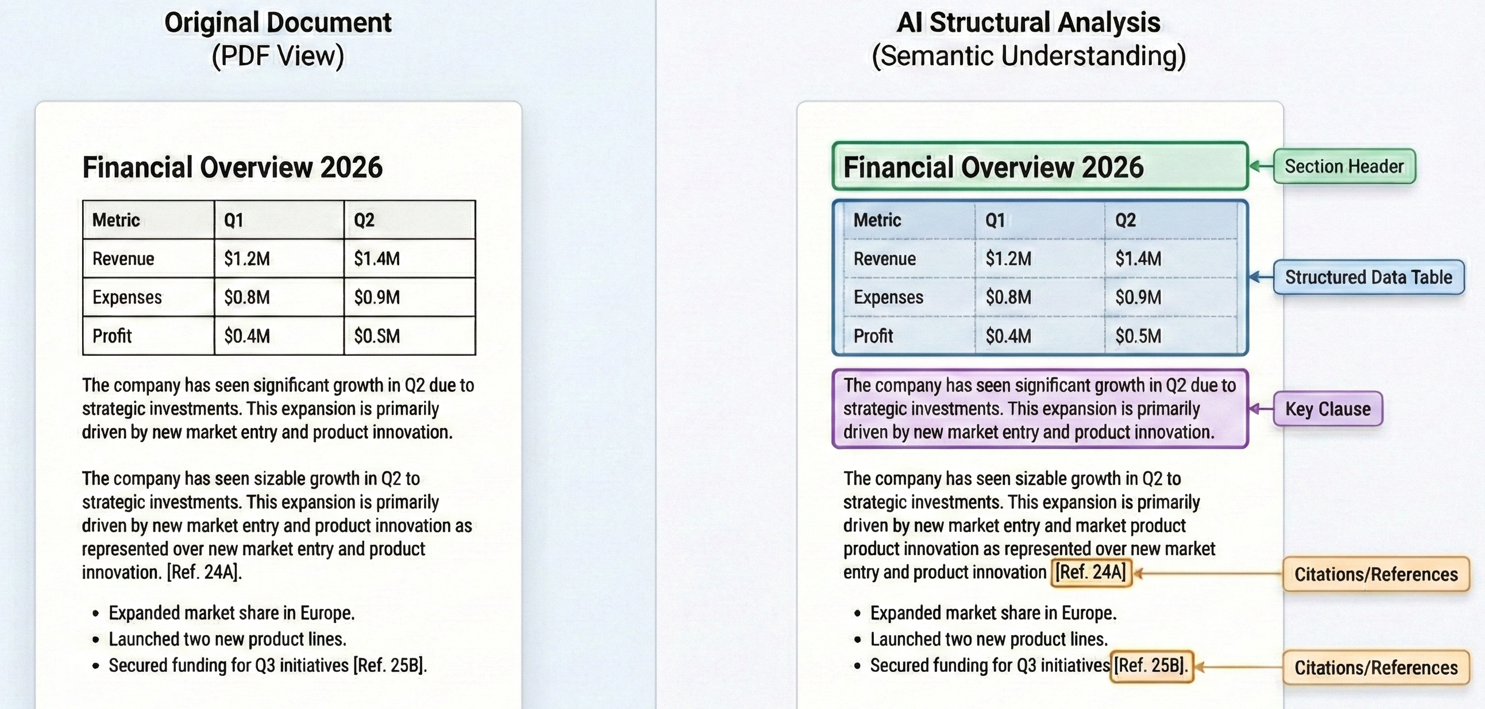
このように文脈を理解することで、LLMは真の理解力を必要とする作業を行うことができます。 契約書を分析する際、LLM は"契約解除"という単語を含む条項を特定するだけでなく、契約解除が認められる具体的な条件、関連する通知要件、およびその結果生じる責任を理解することができます。 GPT-5のコンテキストウィンドウは最大272,000の入力トークンをサポートし、Claude Sonnet 4.5の200Kトークンウィンドウは包括的なドキュメントカバレッジを提供します。
IronPDFの組み込みAIインテグレーション
IronPDFとAI拡張機能のインストール
AIによるPDF処理を始めるには、IronPDFライブラリのコア、AI拡張パッケージ、Microsoft Semantic Kernelの依存関係が必要です。
NuGetパッケージマネージャを使ってIronPDFをインストールしてください:
PM > Install-Package IronPdf
PM > Install-Package IronPdf.Extensions.AI
PM > Install-Package Microsoft.SemanticKernel
PM > Install-Package Microsoft.SemanticKernel.Plugins.Memory
PM > Install-Package IronPdf
PM > Install-Package IronPdf.Extensions.AI
PM > Install-Package Microsoft.SemanticKernel
PM > Install-Package Microsoft.SemanticKernel.Plugins.Memoryこれらのパッケージは連携して完全なソリューションを提供します。 IronPDFはテキスト抽出、ページレンダリング、フォーマット変換などPDFに関連するすべての処理を行い、AIエクステンションはMicrosoft Semantic Kernelを通して言語モデルとの統合を管理します。
<NoWarn>$(NoWarn);SKEXP0001;SKEXP0010;SKEXP0050</NoWarn>を追加してください。
OpenAI/AzureのAPIキーを設定する
AI機能を活用する前に、AIサービスプロバイダーへのアクセスを設定する必要があります。 IronPdfのAIエクステンションはOpenAIとAzure OpenAIの両方をサポートしています。 Azure OpenAIは、強化されたセキュリティ機能、コンプライアンス認証、特定の地域内にデータを保持する機能を提供するため、エンタープライズアプリケーションに好まれることがよくあります。
Azure OpenAIを設定するには、Azureポータルからチャットと埋め込みモデルの両方のAzureエンドポイントURL、APIキー、デプロイメント名が必要です。
AIエンジンを初期化する
IronPdfのAIエクステンションはMicrosoft Semantic Kernelを使用しています。 AIの機能を使用する前に、Azure OpenAIの認証情報でカーネルを初期化し、ドキュメント処理のためのメモリストアを設定する必要があります。
:path=/static-assets/pdf/content-code-examples/tutorials/ai-powered-pdf-processing-csharp/configure-azure-credentials.csusing IronPdf;
using IronPdf.AI;
using Microsoft.SemanticKernel;
using Microsoft.SemanticKernel.Memory;
using Microsoft.SemanticKernel.Connectors.OpenAI;
// Initialize IronPDF AI with Azure OpenAI credentials
// Azure OpenAI configuration
string azureEndpoint = "https://your-resource.openai.azure.com/";
string apiKey = "your-azure-api-key";
string chatDeployment = "gpt-4o";
string embeddingDeployment = "text-embedding-ada-002";
// Initialize Semantic Kernel with Azure OpenAI
var kernel = Kernel.CreateBuilder()
.AddAzureOpenAITextEmbeddingGeneration(embeddingDeployment, azureEndpoint, apiKey)
.AddAzureOpenAIChatCompletion(chatDeployment, azureEndpoint, apiKey)
.Build();
// Create memory store for document embeddings
var memory = new MemoryBuilder()
.WithMemoryStore(new VolatileMemoryStore())
.WithAzureOpenAITextEmbeddingGeneration(embeddingDeployment, azureEndpoint, apiKey)
.Build();
// Initialize IronPDF AI
IronDocumentAI.Initialize(kernel, memory);
Console.WriteLine("IronPDF AI initialized successfully with Azure OpenAI");Imports IronPdf
Imports IronPdf.AI
Imports Microsoft.SemanticKernel
Imports Microsoft.SemanticKernel.Memory
Imports Microsoft.SemanticKernel.Connectors.OpenAI
' Initialize IronPDF AI with Azure OpenAI credentials
' Azure OpenAI configuration
Dim azureEndpoint As String = "https://your-resource.openai.azure.com/"
Dim apiKey As String = "your-azure-api-key"
Dim chatDeployment As String = "gpt-4o"
Dim embeddingDeployment As String = "text-embedding-ada-002"
' Initialize Semantic Kernel with Azure OpenAI
Dim kernel = Kernel.CreateBuilder() _
.AddAzureOpenAITextEmbeddingGeneration(embeddingDeployment, azureEndpoint, apiKey) _
.AddAzureOpenAIChatCompletion(chatDeployment, azureEndpoint, apiKey) _
.Build()
' Create memory store for document embeddings
Dim memory = New MemoryBuilder() _
.WithMemoryStore(New VolatileMemoryStore()) _
.WithAzureOpenAITextEmbeddingGeneration(embeddingDeployment, azureEndpoint, apiKey) _
.Build()
' Initialize IronPDF AI
IronDocumentAI.Initialize(kernel, memory)
Console.WriteLine("IronPDF AI initialized successfully with Azure OpenAI")初期化では、2つの重要なコンポーネントを作成します:
- カーネル: Azure OpenAIを通してチャットの完了とテキスト埋め込み生成を処理します。
- メモリ: セマンティック検索と検索操作のために、ドキュメントの埋め込みを保存します。
IronDocumentAI.Initialize() で初期化すると、アプリケーション全体で AI 機能を使用できるようになります。 本番アプリケーションでは、認証情報を環境変数または Azure Key Vault に保存することを強く推奨します。
どのようにIronPDFはAIコンテキストのためにPDFを準備するのか
AIを活用したPDF処理で最も困難な側面の1つは、言語モデルによって消費される文書を準備することです。 GPT-5は最大272,000の入力トークンをサポートし、Claude Opus 4.6は現在1Mトークンのコンテキストウィンドウを提供していますが、単一の法的契約や財務報告書は、まだ簡単に古いモデルの制限を超えることができます。
IronPDFのAIエクステンションはインテリジェントな文書作成を通してこの複雑さを処理します。 AIメソッドを呼び出すと、IronPDFはまずPDFからテキストを抽出し、段落の識別、表の構造の保持、セクション間の関係の保持といった構造情報を保持します。
コンテキストの制限を超える文書に対して、IronPDFはセマンティック・ブレイクポイント(セクションヘッダー、改ページ、段落境界などの文書構造上の自然な区切り)で戦略的なチャンキングを行います。
ドキュメントの要約
単一ドキュメントの要約
ドキュメントの要約は、長いドキュメントを消化しやすい洞察に凝縮することで、即座に価値を提供します。 Summarize メソッドは、テキストの抽出、AI での使用に向けた準備、言語モデルからの要約の要求、結果の保存というワークフロー全体を処理します。
入力
このコードは、PdfDocument.FromFile() を使用して PDF を読み込み、pdf.Summarize() を呼び出して簡潔な要約を生成し、その結果をテキスト ファイルに保存します。
:path=/static-assets/pdf/content-code-examples/tutorials/ai-powered-pdf-processing-csharp/single-document-summary.csusing IronPdf;
using IronPdf.AI;
using Microsoft.SemanticKernel;
using Microsoft.SemanticKernel.Memory;
using Microsoft.SemanticKernel.Connectors.OpenAI;
// Summarize a PDF document using IronPDF AI
// Azure OpenAI configuration
string azureEndpoint = "https://your-resource.openai.azure.com/";
string apiKey = "your-azure-api-key";
string chatDeployment = "gpt-4o";
string embeddingDeployment = "text-embedding-ada-002";
// Initialize Semantic Kernel
var kernel = Kernel.CreateBuilder()
.AddAzureOpenAITextEmbeddingGeneration(embeddingDeployment, azureEndpoint, apiKey)
.AddAzureOpenAIChatCompletion(chatDeployment, azureEndpoint, apiKey)
.Build();
var memory = new MemoryBuilder()
.WithMemoryStore(new VolatileMemoryStore())
.WithAzureOpenAITextEmbeddingGeneration(embeddingDeployment, azureEndpoint, apiKey)
.Build();
IronDocumentAI.Initialize(kernel, memory);
// Load and summarize PDF
var pdf = PdfDocument.FromFile("sample-report.pdf");
string summary = await pdf.Summarize();
Console.WriteLine("Document Summary:");
Console.WriteLine(summary);
File.WriteAllText("report-summary.txt", summary);
Console.WriteLine("\nSummary saved to report-summary.txt");Imports IronPdf
Imports IronPdf.AI
Imports Microsoft.SemanticKernel
Imports Microsoft.SemanticKernel.Memory
Imports Microsoft.SemanticKernel.Connectors.OpenAI
' Summarize a PDF document using IronPDF AI
' Azure OpenAI configuration
Dim azureEndpoint As String = "https://your-resource.openai.azure.com/"
Dim apiKey As String = "your-azure-api-key"
Dim chatDeployment As String = "gpt-4o"
Dim embeddingDeployment As String = "text-embedding-ada-002"
' Initialize Semantic Kernel
Dim kernel = Kernel.CreateBuilder() _
.AddAzureOpenAITextEmbeddingGeneration(embeddingDeployment, azureEndpoint, apiKey) _
.AddAzureOpenAIChatCompletion(chatDeployment, azureEndpoint, apiKey) _
.Build()
Dim memory = New MemoryBuilder() _
.WithMemoryStore(New VolatileMemoryStore()) _
.WithAzureOpenAITextEmbeddingGeneration(embeddingDeployment, azureEndpoint, apiKey) _
.Build()
IronDocumentAI.Initialize(kernel, memory)
' Load and summarize PDF
Dim pdf = PdfDocument.FromFile("sample-report.pdf")
Dim summary As String = Await pdf.Summarize()
Console.WriteLine("Document Summary:")
Console.WriteLine(summary)
File.WriteAllText("report-summary.txt", summary)
Console.WriteLine(vbCrLf & "Summary saved to report-summary.txt")コンソール出力
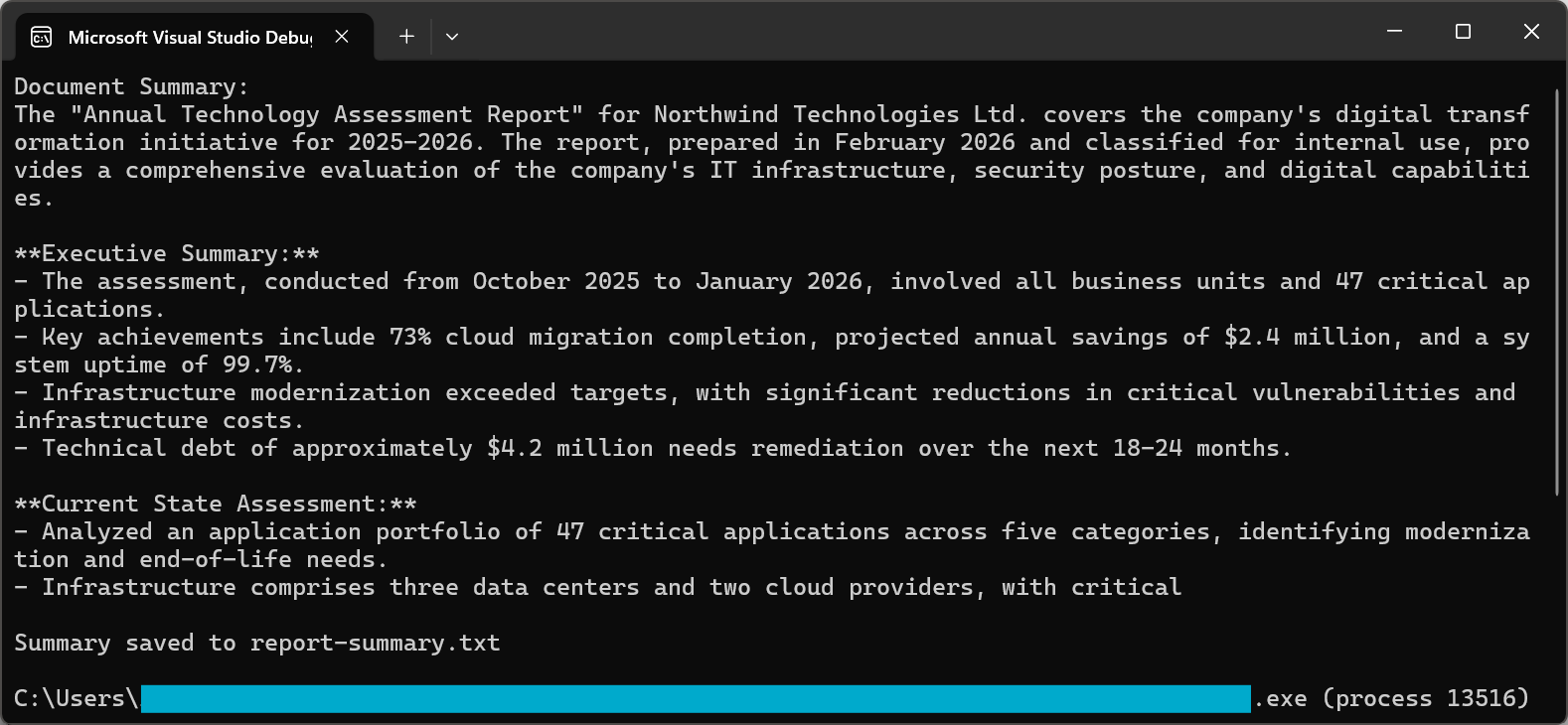
要約プロセスでは、洗練されたプロンプトを使用して、高品質の結果を保証します。 2026年のGPT-5とクロード・ソネット4.5は、どちらも命令フォロー機能が大幅に向上しており、簡潔で読みやすいまま、重要な情報を確実に要約します。
ドキュメントの要約テクニックと高度なオプションの詳細については、ハウツーガイドを参照してください。
複数ドキュメントの合成
実世界の多くのシナリオでは、複数の文書にまたがる情報を統合する必要があります。 法務チームは、契約書のポートフォリオに共通する条項を特定する必要があるかもしれませんし、財務アナリストは、四半期報告書の指標を比較する必要があるかもしれません。
マルチドキュメント合成のアプローチでは、各ドキュメントを個別に処理して重要な情報を抽出し、これらの洞察を集約して最終的な合成を行います。
この例では、複数の PDF を反復処理し、それぞれに対して pdf.Summarize() を呼び出し、結合された要約とともに pdf.Query() を使用して、統合された合成を生成します。
:path=/static-assets/pdf/content-code-examples/tutorials/ai-powered-pdf-processing-csharp/multi-document-synthesis.csusing IronPdf;
using IronPdf.AI;
using Microsoft.SemanticKernel;
using Microsoft.SemanticKernel.Memory;
using Microsoft.SemanticKernel.Connectors.OpenAI;
// Synthesize insights across multiple related documents (e.g., quarterly reports into annual summary)
// Azure OpenAI configuration
string azureEndpoint = "https://your-resource.openai.azure.com/";
string apiKey = "your-azure-api-key";
string chatDeployment = "gpt-4o";
string embeddingDeployment = "text-embedding-ada-002";
// Initialize Semantic Kernel
var kernel = Kernel.CreateBuilder()
.AddAzureOpenAITextEmbeddingGeneration(embeddingDeployment, azureEndpoint, apiKey)
.AddAzureOpenAIChatCompletion(chatDeployment, azureEndpoint, apiKey)
.Build();
var memory = new MemoryBuilder()
.WithMemoryStore(new VolatileMemoryStore())
.WithAzureOpenAITextEmbeddingGeneration(embeddingDeployment, azureEndpoint, apiKey)
.Build();
IronDocumentAI.Initialize(kernel, memory);
// Define documents to synthesize
string[] documentPaths = {
"Q1-report.pdf",
"Q2-report.pdf",
"Q3-report.pdf",
"Q4-report.pdf"
};
var documentSummaries = new List<string>();
// Summarize each document
foreach (string path in documentPaths)
{
var pdf = PdfDocument.FromFile(path);
string summary = await pdf.Summarize();
documentSummaries.Add($"=== {Path.GetFileName(path)} ===\n{summary}");
Console.WriteLine($"Processed: {path}");
}
// Combine and synthesize across all documents
string combinedSummaries = string.Join("\n\n", documentSummaries);
var synthesisDoc = PdfDocument.FromFile(documentPaths[0]);
string synthesisQuery = @"Based on the quarterly summaries below, provide an annual synthesis:
ll trends across quarters
chievements and challenges
over-year patterns
s:
inedSummaries;
string synthesis = await synthesisDoc.Query(synthesisQuery);
Console.WriteLine("\n=== Annual Synthesis ===");
Console.WriteLine(synthesis);
File.WriteAllText("annual-synthesis.txt", synthesis);Imports IronPdf
Imports IronPdf.AI
Imports Microsoft.SemanticKernel
Imports Microsoft.SemanticKernel.Memory
Imports Microsoft.SemanticKernel.Connectors.OpenAI
Imports System.IO
' Synthesize insights across multiple related documents (e.g., quarterly reports into annual summary)
' Azure OpenAI configuration
Dim azureEndpoint As String = "https://your-resource.openai.azure.com/"
Dim apiKey As String = "your-azure-api-key"
Dim chatDeployment As String = "gpt-4o"
Dim embeddingDeployment As String = "text-embedding-ada-002"
' Initialize Semantic Kernel
Dim kernel = Kernel.CreateBuilder() _
.AddAzureOpenAITextEmbeddingGeneration(embeddingDeployment, azureEndpoint, apiKey) _
.AddAzureOpenAIChatCompletion(chatDeployment, azureEndpoint, apiKey) _
.Build()
Dim memory = New MemoryBuilder() _
.WithMemoryStore(New VolatileMemoryStore()) _
.WithAzureOpenAITextEmbeddingGeneration(embeddingDeployment, azureEndpoint, apiKey) _
.Build()
IronDocumentAI.Initialize(kernel, memory)
' Define documents to synthesize
Dim documentPaths As String() = {
"Q1-report.pdf",
"Q2-report.pdf",
"Q3-report.pdf",
"Q4-report.pdf"
}
Dim documentSummaries = New List(Of String)()
' Summarize each document
For Each path As String In documentPaths
Dim pdf = PdfDocument.FromFile(path)
Dim summary As String = Await pdf.Summarize()
documentSummaries.Add($"=== {Path.GetFileName(path)} ==={vbCrLf}{summary}")
Console.WriteLine($"Processed: {path}")
Next
' Combine and synthesize across all documents
Dim combinedSummaries As String = String.Join(vbCrLf & vbCrLf, documentSummaries)
Dim synthesisDoc = PdfDocument.FromFile(documentPaths(0))
Dim synthesisQuery As String = "Based on the quarterly summaries below, provide an annual synthesis:" & vbCrLf &
"Overall trends across quarters" & vbCrLf &
"Key achievements and challenges" & vbCrLf &
"Year-over-year patterns" & vbCrLf & vbCrLf &
combinedSummaries
Dim synthesis As String = Await synthesisDoc.Query(synthesisQuery)
Console.WriteLine(vbCrLf & "=== Annual Synthesis ===")
Console.WriteLine(synthesis)
File.WriteAllText("annual-synthesis.txt", synthesis)このパターンは、大規模な文書セットに効果的に対応します。 ドキュメントを並列処理し、中間結果を管理することで、首尾一貫した合成を維持しながら、数百、数千のドキュメントを分析することができます。
エグゼクティブサマリーの作成
エグゼクティブサマリーは、標準的な要約とは異なるアプローチが必要です。 エグゼクティブサマリーでは、単に内容を凝縮するのではなく、ビジネス上最も重要な情報を特定し、重要な決定事項や推奨事項を強調し、リーダーのレビューに適した形式で結果を提示する必要があります。
このコードでは、ビジネス言語での主要な決定、重大な発見、財務上の影響、およびリスク評価を要求する構造化されたプロンプトとともに pdf.Query() を使用します。
:path=/static-assets/pdf/content-code-examples/tutorials/ai-powered-pdf-processing-csharp/executive-summary.csusing IronPdf;
using IronPdf.AI;
using Microsoft.SemanticKernel;
using Microsoft.SemanticKernel.Memory;
using Microsoft.SemanticKernel.Connectors.OpenAI;
// Generate executive summary from strategic documents for C-suite leadership
// Azure OpenAI configuration
string azureEndpoint = "https://your-resource.openai.azure.com/";
string apiKey = "your-azure-api-key";
string chatDeployment = "gpt-4o";
string embeddingDeployment = "text-embedding-ada-002";
// Initialize Semantic Kernel
var kernel = Kernel.CreateBuilder()
.AddAzureOpenAITextEmbeddingGeneration(embeddingDeployment, azureEndpoint, apiKey)
.AddAzureOpenAIChatCompletion(chatDeployment, azureEndpoint, apiKey)
.Build();
var memory = new MemoryBuilder()
.WithMemoryStore(new VolatileMemoryStore())
.WithAzureOpenAITextEmbeddingGeneration(embeddingDeployment, azureEndpoint, apiKey)
.Build();
IronDocumentAI.Initialize(kernel, memory);
var pdf = PdfDocument.FromFile("strategic-plan.pdf");
string executiveQuery = @"Create an executive summary for C-suite leadership. Include:
cisions Required:**
ny decisions needing executive approval
al Findings:**
5 most important findings (bullet points)
ial Impact:**
e/cost implications if mentioned
ssessment:**
riority risks identified
ended Actions:**
ate next steps
er 500 words. Use business language appropriate for board presentation.";
string executiveSummary = await pdf.Query(executiveQuery);
File.WriteAllText("executive-summary.txt", executiveSummary);
Console.WriteLine("Executive summary saved to executive-summary.txt");Imports IronPdf
Imports IronPdf.AI
Imports Microsoft.SemanticKernel
Imports Microsoft.SemanticKernel.Memory
Imports Microsoft.SemanticKernel.Connectors.OpenAI
' Generate executive summary from strategic documents for C-suite leadership
' Azure OpenAI configuration
Dim azureEndpoint As String = "https://your-resource.openai.azure.com/"
Dim apiKey As String = "your-azure-api-key"
Dim chatDeployment As String = "gpt-4o"
Dim embeddingDeployment As String = "text-embedding-ada-002"
' Initialize Semantic Kernel
Dim kernel = Kernel.CreateBuilder() _
.AddAzureOpenAITextEmbeddingGeneration(embeddingDeployment, azureEndpoint, apiKey) _
.AddAzureOpenAIChatCompletion(chatDeployment, azureEndpoint, apiKey) _
.Build()
Dim memory = New MemoryBuilder() _
.WithMemoryStore(New VolatileMemoryStore()) _
.WithAzureOpenAITextEmbeddingGeneration(embeddingDeployment, azureEndpoint, apiKey) _
.Build()
IronDocumentAI.Initialize(kernel, memory)
Dim pdf = PdfDocument.FromFile("strategic-plan.pdf")
Dim executiveQuery As String = "Create an executive summary for C-suite leadership. Include:
cisions Required:**
ny decisions needing executive approval
al Findings:**
5 most important findings (bullet points)
ial Impact:**
e/cost implications if mentioned
ssessment:**
riority risks identified
ended Actions:**
ate next steps
er 500 words. Use business language appropriate for board presentation."
Dim executiveSummary As String = Await pdf.Query(executiveQuery)
File.WriteAllText("executive-summary.txt", executiveSummary)
Console.WriteLine("Executive summary saved to executive-summary.txt")その結果、エグゼクティブサマリーでは、包括的な内容よりも実用的な情報を優先し、意思決定者が必要とする情報を細部まで正確に伝えることができました。
インテリジェントなデータ抽出
構造化データを JSON に抽出する
AIによるPDF処理の最も強力な用途の1つは、非構造化文書から構造化データを抽出することです。 2026年に構造化抽出を成功させる鍵は、構造化出力モードを持つJSONスキーマを使用することです。 GPT-5では、構造化出力が改善され、Claude Sonnet 4.5では、信頼性の高いデータ抽出のためのツールオーケストレーションが強化されています。
入力
このコードは、JSON スキーマ プロンプトを使用して pdf.Query() を呼び出し、次に JsonSerializer.Deserialize() を使用して、抽出された請求書データを解析および検証します。
:path=/static-assets/pdf/content-code-examples/tutorials/ai-powered-pdf-processing-csharp/extract-invoice-json.csusing IronPdf;
using IronPdf.AI;
using Microsoft.SemanticKernel;
using Microsoft.SemanticKernel.Memory;
using Microsoft.SemanticKernel.Connectors.OpenAI;
using System.Text.Json;
// Extract structured invoice data as JSON from PDF
// Azure OpenAI configuration
string azureEndpoint = "https://your-resource.openai.azure.com/";
string apiKey = "your-azure-api-key";
string chatDeployment = "gpt-4o";
string embeddingDeployment = "text-embedding-ada-002";
// Initialize Semantic Kernel
var kernel = Kernel.CreateBuilder()
.AddAzureOpenAITextEmbeddingGeneration(embeddingDeployment, azureEndpoint, apiKey)
.AddAzureOpenAIChatCompletion(chatDeployment, azureEndpoint, apiKey)
.Build();
var memory = new MemoryBuilder()
.WithMemoryStore(new VolatileMemoryStore())
.WithAzureOpenAITextEmbeddingGeneration(embeddingDeployment, azureEndpoint, apiKey)
.Build();
IronDocumentAI.Initialize(kernel, memory);
var pdf = PdfDocument.FromFile("sample-invoice.pdf");
// Define JSON schema for extraction
string extractionQuery = @"Extract invoice data and return as JSON with this exact structure:
voiceNumber"": ""string"",
voiceDate"": ""YYYY-MM-DD"",
eDate"": ""YYYY-MM-DD"",
ndor"": {
""name"": ""string"",
""address"": ""string"",
""taxId"": ""string or null""
stomer"": {
""name"": ""string"",
""address"": ""string""
neItems"": [
{
""description"": ""string"",
""quantity"": number,
""unitPrice"": number,
""total"": number
}
btotal"": number,
xRate"": number,
xAmount"": number,
tal"": number,
rrency"": ""string""
NLY valid JSON, no additional text.";
string jsonResponse = await pdf.Query(extractionQuery);
// Parse and save JSON
try
{
var invoiceData = JsonSerializer.Deserialize<JsonElement>(jsonResponse);
string formattedJson = JsonSerializer.Serialize(invoiceData, new JsonSerializerOptions { WriteIndented = true });
Console.WriteLine("Extracted Invoice Data:");
Console.WriteLine(formattedJson);
File.WriteAllText("invoice-data.json", formattedJson);
}
catch (JsonException)
{
Console.WriteLine("Unable to parse JSON response");
File.WriteAllText("invoice-raw-response.txt", jsonResponse);
}Imports IronPdf
Imports IronPdf.AI
Imports Microsoft.SemanticKernel
Imports Microsoft.SemanticKernel.Memory
Imports Microsoft.SemanticKernel.Connectors.OpenAI
Imports System.Text.Json
' Extract structured invoice data as JSON from PDF
' Azure OpenAI configuration
Dim azureEndpoint As String = "https://your-resource.openai.azure.com/"
Dim apiKey As String = "your-azure-api-key"
Dim chatDeployment As String = "gpt-4o"
Dim embeddingDeployment As String = "text-embedding-ada-002"
' Initialize Semantic Kernel
Dim kernel = Kernel.CreateBuilder() _
.AddAzureOpenAITextEmbeddingGeneration(embeddingDeployment, azureEndpoint, apiKey) _
.AddAzureOpenAIChatCompletion(chatDeployment, azureEndpoint, apiKey) _
.Build()
Dim memory = New MemoryBuilder() _
.WithMemoryStore(New VolatileMemoryStore()) _
.WithAzureOpenAITextEmbeddingGeneration(embeddingDeployment, azureEndpoint, apiKey) _
.Build()
IronDocumentAI.Initialize(kernel, memory)
Dim pdf = PdfDocument.FromFile("sample-invoice.pdf")
' Define JSON schema for extraction
Dim extractionQuery As String = "Extract invoice data and return as JSON with this exact structure:
voiceNumber"": ""string"",
voiceDate"": ""YYYY-MM-DD"",
eDate"": ""YYYY-MM-DD"",
ndor"": {
""name"": ""string"",
""address"": ""string"",
""taxId"": ""string or null""
stomer"": {
""name"": ""string"",
""address"": ""string""
neItems"": [
{
""description"": ""string"",
""quantity"": number,
""unitPrice"": number,
""total"": number
}
btotal"": number,
xRate"": number,
xAmount"": number,
tal"": number,
rrency"": ""string""
NLY valid JSON, no additional text."
Dim jsonResponse As String = Await pdf.QueryAsync(extractionQuery)
' Parse and save JSON
Try
Dim invoiceData = JsonSerializer.Deserialize(Of JsonElement)(jsonResponse)
Dim formattedJson As String = JsonSerializer.Serialize(invoiceData, New JsonSerializerOptions With {.WriteIndented = True})
Console.WriteLine("Extracted Invoice Data:")
Console.WriteLine(formattedJson)
File.WriteAllText("invoice-data.json", formattedJson)
Catch ex As JsonException
Console.WriteLine("Unable to parse JSON response")
File.WriteAllText("invoice-raw-response.txt", jsonResponse)
End Try生成されたJSONファイルの部分的なスクリーンショット
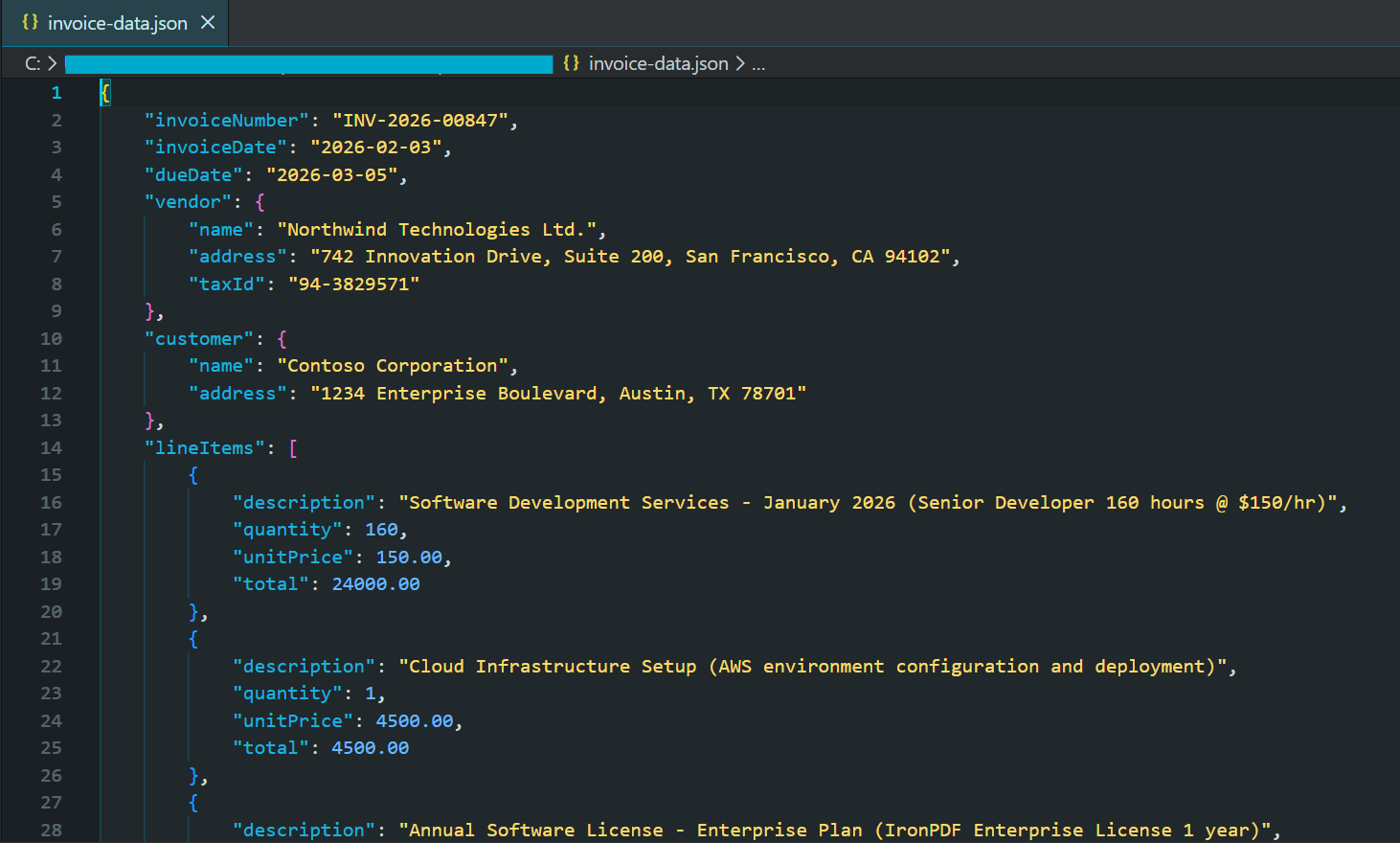
2026年の最新のAIモデルは、提供されたスキーマに準拠した有効なJSON応答を保証する構造化出力モードをサポートしています。 これにより、不正なレスポンスに関する複雑なエラー処理が不要になります。
契約条項の識別
法律上の契約には、契約解除条項、責任制限、補償要件、知的財産の譲渡、秘密保持義務など、特に重要な条項が含まれています。 AIを活用した文節識別は、高い精度を維持しながら、この分析を自動化します。
この例では、条項に重点を置いた JSON スキーマで pdf.Query() を使用して、契約の種類、関係者、重要な日付、およびリスク レベルの個々の条項を抽出します。
:path=/static-assets/pdf/content-code-examples/tutorials/ai-powered-pdf-processing-csharp/contract-clause-analysis.csusing IronPdf;
using IronPdf.AI;
using Microsoft.SemanticKernel;
using Microsoft.SemanticKernel.Memory;
using Microsoft.SemanticKernel.Connectors.OpenAI;
using System.Text.Json;
// Analyze contract clauses and identify key terms, risks, and critical dates
// Azure OpenAI configuration
string azureEndpoint = "https://your-resource.openai.azure.com/";
string apiKey = "your-azure-api-key";
string chatDeployment = "gpt-4o";
string embeddingDeployment = "text-embedding-ada-002";
// Initialize Semantic Kernel
var kernel = Kernel.CreateBuilder()
.AddAzureOpenAITextEmbeddingGeneration(embeddingDeployment, azureEndpoint, apiKey)
.AddAzureOpenAIChatCompletion(chatDeployment, azureEndpoint, apiKey)
.Build();
var memory = new MemoryBuilder()
.WithMemoryStore(new VolatileMemoryStore())
.WithAzureOpenAITextEmbeddingGeneration(embeddingDeployment, azureEndpoint, apiKey)
.Build();
IronDocumentAI.Initialize(kernel, memory);
var pdf = PdfDocument.FromFile("contract.pdf");
// Define JSON schema for contract analysis
string clauseQuery = @"Analyze this contract and identify key clauses. Return JSON:
ntractType"": ""string"",
rties"": [""string""],
fectiveDate"": ""string"",
auses"": [
{
""type"": ""Termination|Liability|Indemnification|Confidentiality|IP|Payment|Warranty|Other"",
""title"": ""string"",
""summary"": ""string"",
""riskLevel"": ""Low|Medium|High"",
""keyTerms"": [""string""]
}
iticalDates"": [
{
""description"": ""string"",
""date"": ""string""
}
erallRiskAssessment"": ""Low|Medium|High"",
commendations"": [""string""]
: termination rights, liability caps, indemnification, IP ownership, confidentiality, payment terms.
NLY valid JSON.";
string analysisJson = await pdf.Query(clauseQuery);
try
{
var analysis = JsonSerializer.Deserialize<JsonElement>(analysisJson);
string formatted = JsonSerializer.Serialize(analysis, new JsonSerializerOptions { WriteIndented = true });
Console.WriteLine("Contract Clause Analysis:");
Console.WriteLine(formatted);
File.WriteAllText("contract-analysis.json", formatted);
// Display high-risk clauses
Console.WriteLine("\n=== High Risk Clauses ===");
foreach (var clause in analysis.GetProperty("clauses").EnumerateArray())
{
if (clause.GetProperty("riskLevel").GetString() == "High")
{
Console.WriteLine($"- {clause.GetProperty("type")}: {clause.GetProperty("summary")}");
}
}
}
catch (JsonException)
{
Console.WriteLine("Unable to parse contract analysis");
File.WriteAllText("contract-analysis-raw.txt", analysisJson);
}Imports IronPdf
Imports IronPdf.AI
Imports Microsoft.SemanticKernel
Imports Microsoft.SemanticKernel.Memory
Imports Microsoft.SemanticKernel.Connectors.OpenAI
Imports System.Text.Json
' Analyze contract clauses and identify key terms, risks, and critical dates
' Azure OpenAI configuration
Dim azureEndpoint As String = "https://your-resource.openai.azure.com/"
Dim apiKey As String = "your-azure-api-key"
Dim chatDeployment As String = "gpt-4o"
Dim embeddingDeployment As String = "text-embedding-ada-002"
' Initialize Semantic Kernel
Dim kernel = Kernel.CreateBuilder() _
.AddAzureOpenAITextEmbeddingGeneration(embeddingDeployment, azureEndpoint, apiKey) _
.AddAzureOpenAIChatCompletion(chatDeployment, azureEndpoint, apiKey) _
.Build()
Dim memory = New MemoryBuilder() _
.WithMemoryStore(New VolatileMemoryStore()) _
.WithAzureOpenAITextEmbeddingGeneration(embeddingDeployment, azureEndpoint, apiKey) _
.Build()
IronDocumentAI.Initialize(kernel, memory)
Dim pdf = PdfDocument.FromFile("contract.pdf")
' Define JSON schema for contract analysis
Dim clauseQuery As String = "Analyze this contract and identify key clauses. Return JSON:
ntractType"": ""string"",
rties"": [""string""],
fectiveDate"": ""string"",
auses"": [
{
""type"": ""Termination|Liability|Indemnification|Confidentiality|IP|Payment|Warranty|Other"",
""title"": ""string"",
""summary"": ""string"",
""riskLevel"": ""Low|Medium|High"",
""keyTerms"": [""string""]
}
iticalDates"": [
{
""description"": ""string"",
""date"": ""string""
}
erallRiskAssessment"": ""Low|Medium|High"",
commendations"": [""string""]
: termination rights, liability caps, indemnification, IP ownership, confidentiality, payment terms.
NLY valid JSON."
Dim analysisJson As String = Await pdf.Query(clauseQuery)
Try
Dim analysis = JsonSerializer.Deserialize(Of JsonElement)(analysisJson)
Dim formatted As String = JsonSerializer.Serialize(analysis, New JsonSerializerOptions With {.WriteIndented = True})
Console.WriteLine("Contract Clause Analysis:")
Console.WriteLine(formatted)
File.WriteAllText("contract-analysis.json", formatted)
' Display high-risk clauses
Console.WriteLine(vbCrLf & "=== High Risk Clauses ===")
For Each clause In analysis.GetProperty("clauses").EnumerateArray()
If clause.GetProperty("riskLevel").GetString() = "High" Then
Console.WriteLine($"- {clause.GetProperty("type")}: {clause.GetProperty("summary")}")
End If
Next
Catch ex As JsonException
Console.WriteLine("Unable to parse contract analysis")
File.WriteAllText("contract-analysis-raw.txt", analysisJson)
End Tryこの機能により、契約書レビューが逐次的な手作業から、自動化されたスケーラブルなワークフローに変わります。 法務チームは、何百もの契約書の中からリスクの高い条項を迅速に特定することができます。
金融データ解析
財務文書には、複雑な物語や表の中に重要な定量データが含まれています。 AIによる解析は、過去の実績と将来の予測を区別し、数値が千単位か百万単位かを識別し、異なる指標間の関係を理解するなど、コンテキストを理解するため、財務文書に優れています。
このコードは、財務 JSON スキーマで pdf.Query() を使用して、損益計算書データ、貸借対照表メトリック、およびフォワードガイダンスを構造化された出力に抽出します。
:path=/static-assets/pdf/content-code-examples/tutorials/ai-powered-pdf-processing-csharp/financial-data-extraction.csusing IronPdf;
using IronPdf.AI;
using Microsoft.SemanticKernel;
using Microsoft.SemanticKernel.Memory;
using Microsoft.SemanticKernel.Connectors.OpenAI;
using System.Text.Json;
// Extract financial metrics from annual reports and earnings documents
// Azure OpenAI configuration
string azureEndpoint = "https://your-resource.openai.azure.com/";
string apiKey = "your-azure-api-key";
string chatDeployment = "gpt-4o";
string embeddingDeployment = "text-embedding-ada-002";
// Initialize Semantic Kernel
var kernel = Kernel.CreateBuilder()
.AddAzureOpenAITextEmbeddingGeneration(embeddingDeployment, azureEndpoint, apiKey)
.AddAzureOpenAIChatCompletion(chatDeployment, azureEndpoint, apiKey)
.Build();
var memory = new MemoryBuilder()
.WithMemoryStore(new VolatileMemoryStore())
.WithAzureOpenAITextEmbeddingGeneration(embeddingDeployment, azureEndpoint, apiKey)
.Build();
IronDocumentAI.Initialize(kernel, memory);
var pdf = PdfDocument.FromFile("annual-report.pdf");
// Define JSON schema for financial extraction (numbers in millions)
string financialQuery = @"Extract financial metrics from this document. Return JSON:
portPeriod"": ""string"",
mpany"": ""string"",
rrency"": ""string"",
comeStatement"": {
""revenue"": number,
""costOfRevenue"": number,
""grossProfit"": number,
""operatingExpenses"": number,
""operatingIncome"": number,
""netIncome"": number,
""eps"": number
lanceSheet"": {
""totalAssets"": number,
""totalLiabilities"": number,
""shareholdersEquity"": number,
""cash"": number,
""totalDebt"": number
yMetrics"": {
""revenueGrowthYoY"": ""string"",
""grossMargin"": ""string"",
""operatingMargin"": ""string"",
""netMargin"": ""string"",
""debtToEquity"": number
idance"": {
""nextQuarterRevenue"": ""string"",
""fullYearRevenue"": ""string"",
""notes"": ""string""
for unavailable data. Numbers in millions unless stated.
NLY valid JSON.";
string financialJson = await pdf.Query(financialQuery);
try
{
var financials = JsonSerializer.Deserialize<JsonElement>(financialJson);
string formatted = JsonSerializer.Serialize(financials, new JsonSerializerOptions { WriteIndented = true });
Console.WriteLine("Extracted Financial Data:");
Console.WriteLine(formatted);
File.WriteAllText("financial-data.json", formatted);
}
catch (JsonException)
{
Console.WriteLine("Unable to parse financial data");
File.WriteAllText("financial-raw.txt", financialJson);
}Imports IronPdf
Imports IronPdf.AI
Imports Microsoft.SemanticKernel
Imports Microsoft.SemanticKernel.Memory
Imports Microsoft.SemanticKernel.Connectors.OpenAI
Imports System.Text.Json
' Extract financial metrics from annual reports and earnings documents
' Azure OpenAI configuration
Dim azureEndpoint As String = "https://your-resource.openai.azure.com/"
Dim apiKey As String = "your-azure-api-key"
Dim chatDeployment As String = "gpt-4o"
Dim embeddingDeployment As String = "text-embedding-ada-002"
' Initialize Semantic Kernel
Dim kernel = Kernel.CreateBuilder() _
.AddAzureOpenAITextEmbeddingGeneration(embeddingDeployment, azureEndpoint, apiKey) _
.AddAzureOpenAIChatCompletion(chatDeployment, azureEndpoint, apiKey) _
.Build()
Dim memory = New MemoryBuilder() _
.WithMemoryStore(New VolatileMemoryStore()) _
.WithAzureOpenAITextEmbeddingGeneration(embeddingDeployment, azureEndpoint, apiKey) _
.Build()
IronDocumentAI.Initialize(kernel, memory)
Dim pdf = PdfDocument.FromFile("annual-report.pdf")
' Define JSON schema for financial extraction (numbers in millions)
Dim financialQuery As String = "Extract financial metrics from this document. Return JSON:
portPeriod"": ""string"",
mpany"": ""string"",
rrency"": ""string"",
comeStatement"": {
""revenue"": number,
""costOfRevenue"": number,
""grossProfit"": number,
""operatingExpenses"": number,
""operatingIncome"": number,
""netIncome"": number,
""eps"": number
lanceSheet"": {
""totalAssets"": number,
""totalLiabilities"": number,
""shareholdersEquity"": number,
""cash"": number,
""totalDebt"": number
yMetrics"": {
""revenueGrowthYoY"": ""string"",
""grossMargin"": ""string"",
""operatingMargin"": ""string"",
""netMargin"": ""string"",
""debtToEquity"": number
idance"": {
""nextQuarterRevenue"": ""string"",
""fullYearRevenue"": ""string"",
""notes"": ""string""
for unavailable data. Numbers in millions unless stated.
NLY valid JSON."
Dim financialJson As String = Await pdf.Query(financialQuery)
Try
Dim financials = JsonSerializer.Deserialize(Of JsonElement)(financialJson)
Dim formatted As String = JsonSerializer.Serialize(financials, New JsonSerializerOptions With {.WriteIndented = True})
Console.WriteLine("Extracted Financial Data:")
Console.WriteLine(formatted)
File.WriteAllText("financial-data.json", formatted)
Catch ex As JsonException
Console.WriteLine("Unable to parse financial data")
File.WriteAllText("financial-raw.txt", financialJson)
End Try抽出された構造化データは、財務モデル、時系列データベース、または分析プラットフォームに直接取り込むことができ、報告期間にわたる測定基準の自動追跡を可能にします。
カスタム抽出プロンプト
多くの組織では、特定のドメイン、文書フォーマット、またはビジネスプロセスに基づいて独自の抽出要件があります。 IronPdfのAI統合はカスタム抽出プロンプトを完全にサポートしており、抽出すべき情報とその構造を正確に定義することができます。
この例では、研究に重点を置いたスキーマ抽出方法、信頼レベル付きの主要な調査結果、および学術論文からの制限を使用して、pdf.Query() を示します。
:path=/static-assets/pdf/content-code-examples/tutorials/ai-powered-pdf-processing-csharp/custom-research-extraction.csusing IronPdf;
using IronPdf.AI;
using Microsoft.SemanticKernel;
using Microsoft.SemanticKernel.Memory;
using Microsoft.SemanticKernel.Connectors.OpenAI;
using System.Text.Json;
// Extract structured research metadata from academic papers
// Azure OpenAI configuration
string azureEndpoint = "https://your-resource.openai.azure.com/";
string apiKey = "your-azure-api-key";
string chatDeployment = "gpt-4o";
string embeddingDeployment = "text-embedding-ada-002";
// Initialize Semantic Kernel
var kernel = Kernel.CreateBuilder()
.AddAzureOpenAITextEmbeddingGeneration(embeddingDeployment, azureEndpoint, apiKey)
.AddAzureOpenAIChatCompletion(chatDeployment, azureEndpoint, apiKey)
.Build();
var memory = new MemoryBuilder()
.WithMemoryStore(new VolatileMemoryStore())
.WithAzureOpenAITextEmbeddingGeneration(embeddingDeployment, azureEndpoint, apiKey)
.Build();
IronDocumentAI.Initialize(kernel, memory);
var pdf = PdfDocument.FromFile("research-paper.pdf");
// Define JSON schema for research paper extraction
string researchQuery = @"Extract structured information from this research paper. Return JSON:
tle"": ""string"",
thors"": [""string""],
stitution"": ""string"",
blicationDate"": ""string"",
stract"": ""string"",
searchQuestion"": ""string"",
thodology"": {
""type"": ""Quantitative|Qualitative|Mixed Methods"",
""approach"": ""string"",
""sampleSize"": ""string"",
""dataCollection"": ""string""
yFindings"": [
{
""finding"": ""string"",
""significance"": ""string"",
""confidence"": ""High|Medium|Low""
}
mitations"": [""string""],
tureWork"": [""string""],
ywords"": [""string""]
extracting verifiable claims and noting uncertainty.
NLY valid JSON.";
string extractionResult = await pdf.Query(researchQuery);
try
{
var research = JsonSerializer.Deserialize<JsonElement>(extractionResult);
string formatted = JsonSerializer.Serialize(research, new JsonSerializerOptions { WriteIndented = true });
Console.WriteLine("Research Paper Extraction:");
Console.WriteLine(formatted);
File.WriteAllText("research-extraction.json", formatted);
// Display key findings with confidence levels
Console.WriteLine("\n=== Key Findings ===");
foreach (var finding in research.GetProperty("keyFindings").EnumerateArray())
{
string confidence = finding.GetProperty("confidence").GetString() ?? "Unknown";
Console.WriteLine($"[{confidence}] {finding.GetProperty("finding")}");
}
}
catch (JsonException)
{
Console.WriteLine("Unable to parse research extraction");
File.WriteAllText("research-raw.txt", extractionResult);
}Imports IronPdf
Imports IronPdf.AI
Imports Microsoft.SemanticKernel
Imports Microsoft.SemanticKernel.Memory
Imports Microsoft.SemanticKernel.Connectors.OpenAI
Imports System.Text.Json
' Extract structured research metadata from academic papers
' Azure OpenAI configuration
Dim azureEndpoint As String = "https://your-resource.openai.azure.com/"
Dim apiKey As String = "your-azure-api-key"
Dim chatDeployment As String = "gpt-4o"
Dim embeddingDeployment As String = "text-embedding-ada-002"
' Initialize Semantic Kernel
Dim kernel = Kernel.CreateBuilder() _
.AddAzureOpenAITextEmbeddingGeneration(embeddingDeployment, azureEndpoint, apiKey) _
.AddAzureOpenAIChatCompletion(chatDeployment, azureEndpoint, apiKey) _
.Build()
Dim memory = New MemoryBuilder() _
.WithMemoryStore(New VolatileMemoryStore()) _
.WithAzureOpenAITextEmbeddingGeneration(embeddingDeployment, azureEndpoint, apiKey) _
.Build()
IronDocumentAI.Initialize(kernel, memory)
Dim pdf = PdfDocument.FromFile("research-paper.pdf")
' Define JSON schema for research paper extraction
Dim researchQuery As String = "Extract structured information from this research paper. Return JSON:
tle"": ""string"",
thors"": [""string""],
stitution"": ""string"",
blicationDate"": ""string"",
stract"": ""string"",
searchQuestion"": ""string"",
thodology"": {
""type"": ""Quantitative|Qualitative|Mixed Methods"",
""approach"": ""string"",
""sampleSize"": ""string"",
""dataCollection"": ""string""
yFindings"": [
{
""finding"": ""string"",
""significance"": ""string"",
""confidence"": ""High|Medium|Low""
}
mitations"": [""string""],
tureWork"": [""string""],
ywords"": [""string""]
extracting verifiable claims and noting uncertainty.
NLY valid JSON."
Dim extractionResult As String = Await pdf.Query(researchQuery)
Try
Dim research = JsonSerializer.Deserialize(Of JsonElement)(extractionResult)
Dim formatted As String = JsonSerializer.Serialize(research, New JsonSerializerOptions With {.WriteIndented = True})
Console.WriteLine("Research Paper Extraction:")
Console.WriteLine(formatted)
File.WriteAllText("research-extraction.json", formatted)
' Display key findings with confidence levels
Console.WriteLine(vbCrLf & "=== Key Findings ===")
For Each finding In research.GetProperty("keyFindings").EnumerateArray()
Dim confidence As String = finding.GetProperty("confidence").GetString() OrElse "Unknown"
Console.WriteLine($"[{confidence}] {finding.GetProperty("finding")}")
Next
Catch ex As JsonException
Console.WriteLine("Unable to parse research extraction")
File.WriteAllText("research-raw.txt", extractionResult)
End Tryカスタムプロンプトは、AIによる抽出を汎用的なツールから、特定のニーズに合わせた専門的なソリューションに変えます。
ドキュメント上の質問に対する回答
PDFのQ&Aシステムを構築する
質問応答システムは、ユーザーが自然言語で質問し、文脈に沿った正確な回答を受け取ることで、PDF文書を会話形式で操作できるようにします。 基本的なパターンは、PDFからテキストを抽出し、プロンプトでユーザーの質問と組み合わせ、AIに回答を求めるというものです。
入力
このコードは、セマンティック検索のためにドキュメントをインデックスするために pdf.Memorize() を呼び出して、次に、pdf.Query() を使用して対話型ループに入り、ユーザーの質問に答えます。
:path=/static-assets/pdf/content-code-examples/tutorials/ai-powered-pdf-processing-csharp/pdf-question-answering.csusing IronPdf;
using IronPdf.AI;
using Microsoft.SemanticKernel;
using Microsoft.SemanticKernel.Memory;
using Microsoft.SemanticKernel.Connectors.OpenAI;
// Interactive Q&A system for querying PDF documents
// Azure OpenAI configuration
string azureEndpoint = "https://your-resource.openai.azure.com/";
string apiKey = "your-azure-api-key";
string chatDeployment = "gpt-4o";
string embeddingDeployment = "text-embedding-ada-002";
// Initialize Semantic Kernel
var kernel = Kernel.CreateBuilder()
.AddAzureOpenAITextEmbeddingGeneration(embeddingDeployment, azureEndpoint, apiKey)
.AddAzureOpenAIChatCompletion(chatDeployment, azureEndpoint, apiKey)
.Build();
var memory = new MemoryBuilder()
.WithMemoryStore(new VolatileMemoryStore())
.WithAzureOpenAITextEmbeddingGeneration(embeddingDeployment, azureEndpoint, apiKey)
.Build();
IronDocumentAI.Initialize(kernel, memory);
var pdf = PdfDocument.FromFile("sample-legal-document.pdf");
// Memorize document to enable persistent querying
await pdf.Memorize();
Console.WriteLine("PDF Q&A System - Type 'exit' to quit\n");
Console.WriteLine($"Document loaded and memorized: {pdf.PageCount} pages\n");
// Interactive Q&A loop
while (true)
{
Console.Write("Your question: ");
string? question = Console.ReadLine();
if (string.IsNullOrWhiteSpace(question) || question.ToLower() == "exit")
break;
string answer = await pdf.Query(question);
Console.WriteLine($"\nAnswer: {answer}\n");
Console.WriteLine(new string('-', 50) + "\n");
}
Console.WriteLine("Q&A session ended.");Imports IronPdf
Imports IronPdf.AI
Imports Microsoft.SemanticKernel
Imports Microsoft.SemanticKernel.Memory
Imports Microsoft.SemanticKernel.Connectors.OpenAI
' Interactive Q&A system for querying PDF documents
' Azure OpenAI configuration
Dim azureEndpoint As String = "https://your-resource.openai.azure.com/"
Dim apiKey As String = "your-azure-api-key"
Dim chatDeployment As String = "gpt-4o"
Dim embeddingDeployment As String = "text-embedding-ada-002"
' Initialize Semantic Kernel
Dim kernel = Kernel.CreateBuilder() _
.AddAzureOpenAITextEmbeddingGeneration(embeddingDeployment, azureEndpoint, apiKey) _
.AddAzureOpenAIChatCompletion(chatDeployment, azureEndpoint, apiKey) _
.Build()
Dim memory = New MemoryBuilder() _
.WithMemoryStore(New VolatileMemoryStore()) _
.WithAzureOpenAITextEmbeddingGeneration(embeddingDeployment, azureEndpoint, apiKey) _
.Build()
IronDocumentAI.Initialize(kernel, memory)
Dim pdf = PdfDocument.FromFile("sample-legal-document.pdf")
' Memorize document to enable persistent querying
Await pdf.Memorize()
Console.WriteLine("PDF Q&A System - Type 'exit' to quit" & vbCrLf)
Console.WriteLine($"Document loaded and memorized: {pdf.PageCount} pages" & vbCrLf)
' Interactive Q&A loop
While True
Console.Write("Your question: ")
Dim question As String = Console.ReadLine()
If String.IsNullOrWhiteSpace(question) OrElse question.ToLower() = "exit" Then
Exit While
End If
Dim answer As String = Await pdf.Query(question)
Console.WriteLine($"{vbCrLf}Answer: {answer}{vbCrLf}")
Console.WriteLine(New String("-"c, 50) & vbCrLf)
End While
Console.WriteLine("Q&A session ended.")コンソール出力
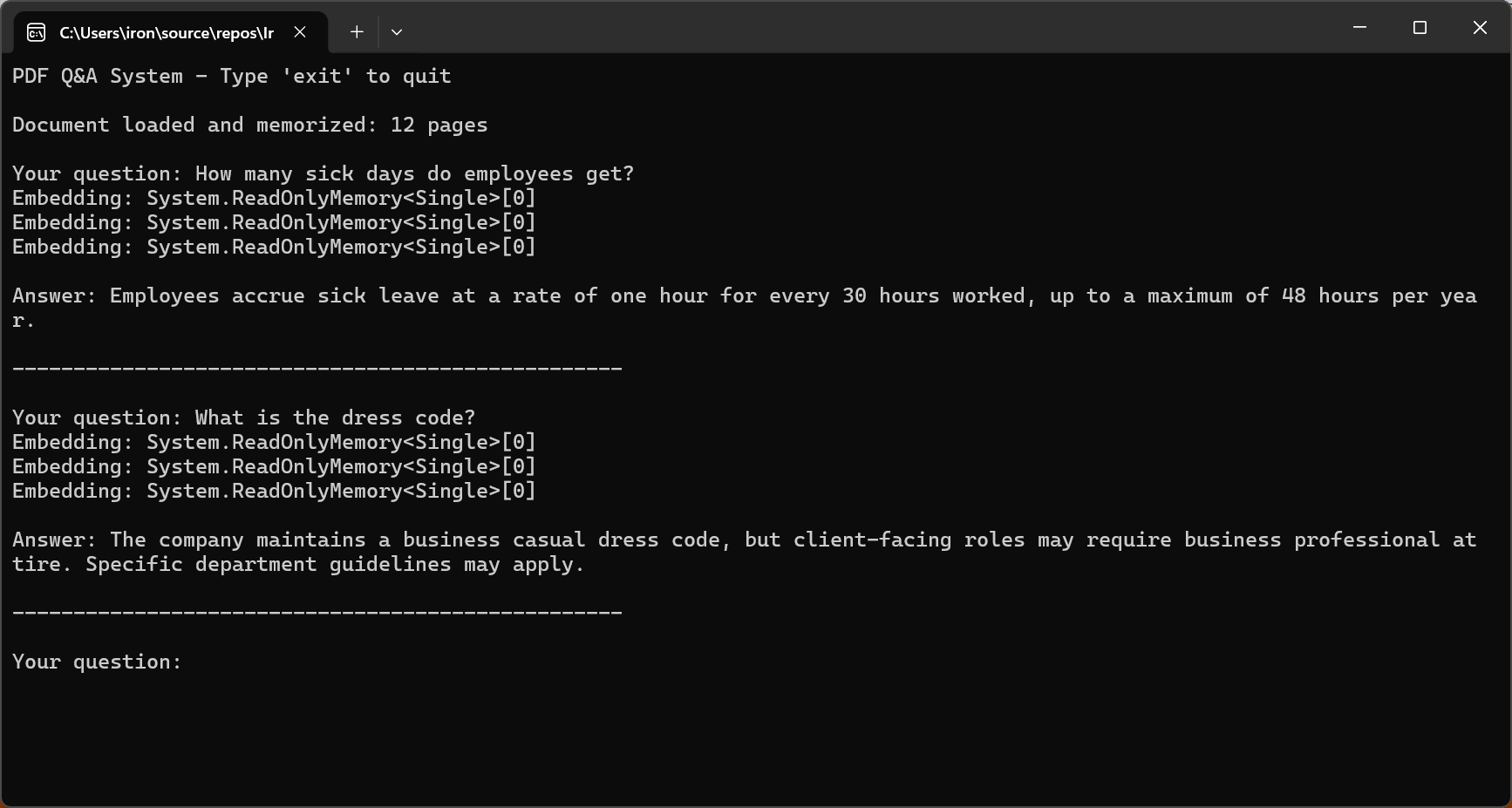
2026年における効果的なQ&Aの鍵は、ドキュメントの内容のみに基づいて回答するようAIを制限することです。 GPT-5の "安全な補完 "トレーニングメソッドとクロード・ソネット4.5の改良されたアライメントにより、幻覚の発生率が大幅に減少しました。
コンテキスト Windows 用の長いドキュメントのチャンキング
ほとんどの実世界の文書は、AIのコンテキストウィンドウを超えます。 これらの文書を処理するには、効果的なチャンキング戦略が不可欠です。 チャンキングでは、意味的な一貫性を保ちながら、ドキュメントをコンテキストウィンドウに収まるような小さなセグメントに分割します。
このコードは、pdf.Pages を反復処理し、コンテキストの継続性のために構成可能な maxChunkTokens および overlapTokens を使用して DocumentChunk オブジェクトを作成します。
:path=/static-assets/pdf/content-code-examples/tutorials/ai-powered-pdf-processing-csharp/semantic-document-chunking.csusing IronPdf;
// Split long documents into overlapping chunks for RAG systems
var pdf = PdfDocument.FromFile("long-document.pdf");
// Chunking configuration
int maxChunkTokens = 4000; // Leave room for prompts and responses
int overlapTokens = 200; // Overlap for context continuity
int approxCharsPerToken = 4; // Rough estimate for tokenization
int maxChunkChars = maxChunkTokens * approxCharsPerToken;
int overlapChars = overlapTokens * approxCharsPerToken;
var chunks = new List<DocumentChunk>();
var currentChunk = new System.Text.StringBuilder();
int chunkStartPage = 1;
int currentPage = 1;
for (int i = 0; i < pdf.PageCount; i++)
{
string pageText = pdf.Pages[i].Text;
currentPage = i + 1;
if (currentChunk.Length + pageText.Length > maxChunkChars && currentChunk.Length > 0)
{
chunks.Add(new DocumentChunk
{
Text = currentChunk.ToString(),
StartPage = chunkStartPage,
EndPage = currentPage - 1,
ChunkIndex = chunks.Count
});
// Create overlap with previous chunk for continuity
string overlap = currentChunk.Length > overlapChars
? currentChunk.ToString().Substring(currentChunk.Length - overlapChars)
: currentChunk.ToString();
currentChunk.Clear();
currentChunk.Append(overlap);
chunkStartPage = currentPage - 1;
}
currentChunk.AppendLine($"\n--- Page {currentPage} ---\n");
currentChunk.Append(pageText);
}
if (currentChunk.Length > 0)
{
chunks.Add(new DocumentChunk
{
Text = currentChunk.ToString(),
StartPage = chunkStartPage,
EndPage = currentPage,
ChunkIndex = chunks.Count
});
}
Console.WriteLine($"Document chunked into {chunks.Count} segments");
foreach (var chunk in chunks)
{
Console.WriteLine($" Chunk {chunk.ChunkIndex + 1}: Pages {chunk.StartPage}-{chunk.EndPage} ({chunk.Text.Length} chars)");
}
// Save chunk metadata for RAG indexing
File.WriteAllText("chunks-metadata.json", System.Text.Json.JsonSerializer.Serialize(
chunks.Select(c => new { c.ChunkIndex, c.StartPage, c.EndPage, Length = c.Text.Length }),
new System.Text.Json.JsonSerializerOptions { WriteIndented = true }
));
ic class DocumentChunk
public string Text { get; set; } = "";
public int StartPage { get; set; }
public int EndPage { get; set; }
public int ChunkIndex { get; set; }Imports IronPdf
Imports System.IO
Imports System.Text
Imports System.Text.Json
' Split long documents into overlapping chunks for RAG systems
Dim pdf = PdfDocument.FromFile("long-document.pdf")
' Chunking configuration
Dim maxChunkTokens As Integer = 4000 ' Leave room for prompts and responses
Dim overlapTokens As Integer = 200 ' Overlap for context continuity
Dim approxCharsPerToken As Integer = 4 ' Rough estimate for tokenization
Dim maxChunkChars As Integer = maxChunkTokens * approxCharsPerToken
Dim overlapChars As Integer = overlapTokens * approxCharsPerToken
Dim chunks As New List(Of DocumentChunk)()
Dim currentChunk As New StringBuilder()
Dim chunkStartPage As Integer = 1
Dim currentPage As Integer = 1
For i As Integer = 0 To pdf.PageCount - 1
Dim pageText As String = pdf.Pages(i).Text
currentPage = i + 1
If currentChunk.Length + pageText.Length > maxChunkChars AndAlso currentChunk.Length > 0 Then
chunks.Add(New DocumentChunk With {
.Text = currentChunk.ToString(),
.StartPage = chunkStartPage,
.EndPage = currentPage - 1,
.ChunkIndex = chunks.Count
})
' Create overlap with previous chunk for continuity
Dim overlap As String = If(currentChunk.Length > overlapChars,
currentChunk.ToString().Substring(currentChunk.Length - overlapChars),
currentChunk.ToString())
currentChunk.Clear()
currentChunk.Append(overlap)
chunkStartPage = currentPage - 1
End If
currentChunk.AppendLine(vbCrLf & "--- Page " & currentPage & " ---" & vbCrLf)
currentChunk.Append(pageText)
Next
If currentChunk.Length > 0 Then
chunks.Add(New DocumentChunk With {
.Text = currentChunk.ToString(),
.StartPage = chunkStartPage,
.EndPage = currentPage,
.ChunkIndex = chunks.Count
})
End If
Console.WriteLine($"Document chunked into {chunks.Count} segments")
For Each chunk In chunks
Console.WriteLine($" Chunk {chunk.ChunkIndex + 1}: Pages {chunk.StartPage}-{chunk.EndPage} ({chunk.Text.Length} chars)")
Next
' Save chunk metadata for RAG indexing
File.WriteAllText("chunks-metadata.json", JsonSerializer.Serialize(
chunks.Select(Function(c) New With {.ChunkIndex = c.ChunkIndex, .StartPage = c.StartPage, .EndPage = c.EndPage, .Length = c.Text.Length}),
New JsonSerializerOptions With {.WriteIndented = True}
))
Public Class DocumentChunk
Public Property Text As String = ""
Public Property StartPage As Integer
Public Property EndPage As Integer
Public Property ChunkIndex As Integer
End Class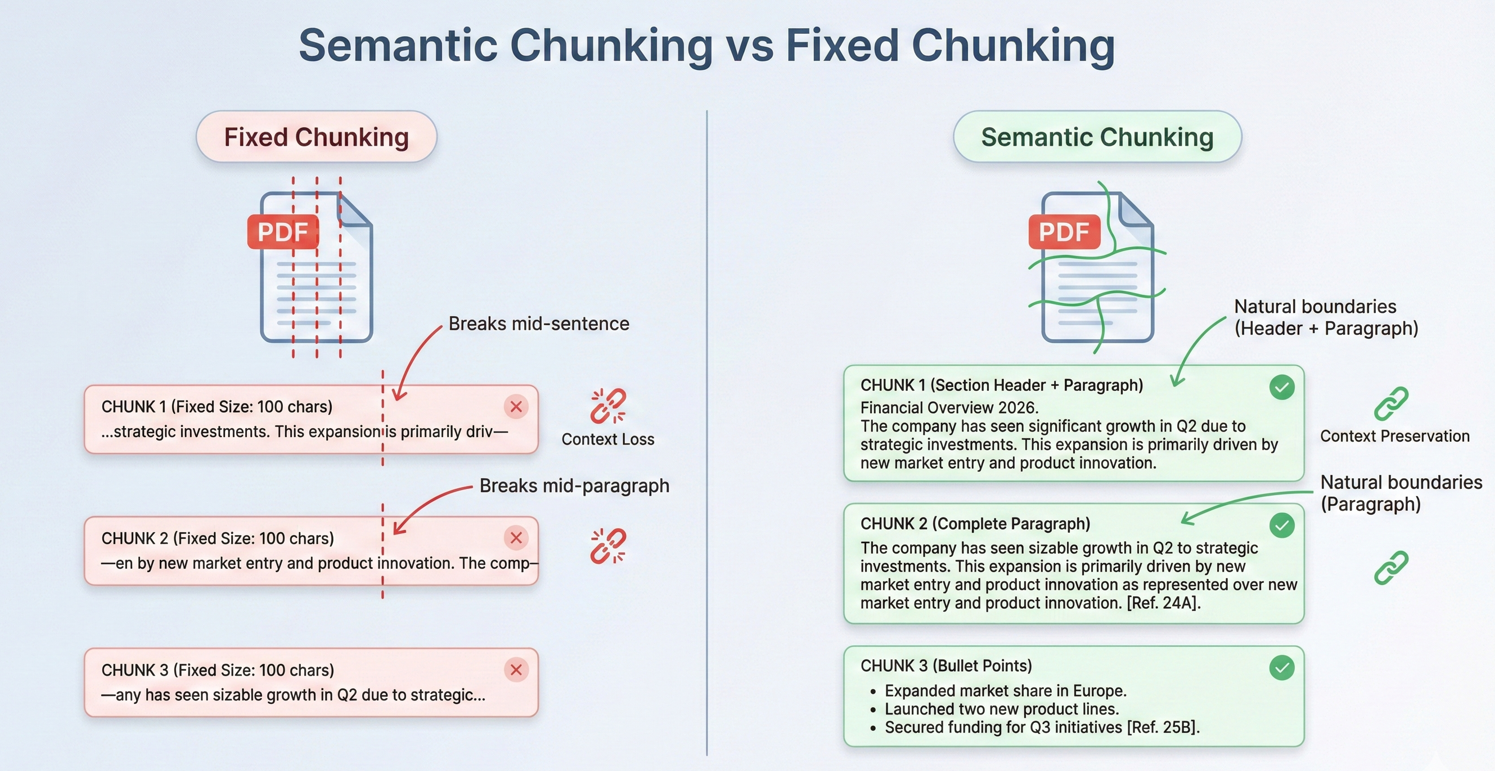
また、チャンクを重ねることで、チャンクの境界を越えて連続性を持たせ、関連する情報がチャンクの境界をまたいだ場合でも、AIが十分な文脈を理解できるようにしています。
RAG(検索-拡張生成)パターン
検索-拡張世代は、2026年のAIによる文書分析の強力なパターンを示している。RAGシステムは、文書全体をAIに送り込むのではなく、まず与えられたクエリに関連する部分のみを検索し、次にそれらの部分を回答生成のためのコンテキストとして使用する。
RAGのワークフローには、文書の準備(チャンキングと埋め込みデータの作成)、検索(関連するチャンクの検索)、生成(検索されたチャンクをAI応答のコンテキストとして使用)の3つの主要フェーズがあります。
このコードは、各 PDF に対して pdf.Memorize() を呼び出して複数の PDF にインデックスを付け、次に pdf.Query() を使用して結合されたドキュメント メモリから回答を取得します。
:path=/static-assets/pdf/content-code-examples/tutorials/ai-powered-pdf-processing-csharp/rag-system-implementation.csusing IronPdf;
using IronPdf.AI;
using Microsoft.SemanticKernel;
using Microsoft.SemanticKernel.Memory;
using Microsoft.SemanticKernel.Connectors.OpenAI;
// Retrieval-Augmented Generation (RAG) system for querying across multiple indexed documents
// Azure OpenAI configuration
string azureEndpoint = "https://your-resource.openai.azure.com/";
string apiKey = "your-azure-api-key";
string chatDeployment = "gpt-4o";
string embeddingDeployment = "text-embedding-ada-002";
// Initialize Semantic Kernel
var kernel = Kernel.CreateBuilder()
.AddAzureOpenAITextEmbeddingGeneration(embeddingDeployment, azureEndpoint, apiKey)
.AddAzureOpenAIChatCompletion(chatDeployment, azureEndpoint, apiKey)
.Build();
var memory = new MemoryBuilder()
.WithMemoryStore(new VolatileMemoryStore())
.WithAzureOpenAITextEmbeddingGeneration(embeddingDeployment, azureEndpoint, apiKey)
.Build();
IronDocumentAI.Initialize(kernel, memory);
// Index all documents in folder
string[] documentPaths = Directory.GetFiles("documents/", "*.pdf");
Console.WriteLine($"Indexing {documentPaths.Length} documents...\n");
// Memorize each document (creates embeddings for retrieval)
foreach (string path in documentPaths)
{
var pdf = PdfDocument.FromFile(path);
await pdf.Memorize();
Console.WriteLine($"Indexed: {Path.GetFileName(path)} ({pdf.PageCount} pages)");
}
Console.WriteLine("\n=== RAG System Ready ===\n");
// Query across all indexed documents
string query = "What are the key compliance requirements for data retention?";
Console.WriteLine($"Query: {query}\n");
var searchPdf = PdfDocument.FromFile(documentPaths[0]);
string answer = await searchPdf.Query(query);
Console.WriteLine($"Answer: {answer}");
// Interactive query loop
Console.WriteLine("\n--- Enter questions (type 'exit' to quit) ---\n");
while (true)
{
Console.Write("Question: ");
string? userQuery = Console.ReadLine();
if (string.IsNullOrWhiteSpace(userQuery) || userQuery.ToLower() == "exit")
break;
string response = await searchPdf.Query(userQuery);
Console.WriteLine($"\nAnswer: {response}\n");
}Imports IronPdf
Imports IronPdf.AI
Imports Microsoft.SemanticKernel
Imports Microsoft.SemanticKernel.Memory
Imports Microsoft.SemanticKernel.Connectors.OpenAI
Imports System.IO
' Retrieval-Augmented Generation (RAG) system for querying across multiple indexed documents
' Azure OpenAI configuration
Dim azureEndpoint As String = "https://your-resource.openai.azure.com/"
Dim apiKey As String = "your-azure-api-key"
Dim chatDeployment As String = "gpt-4o"
Dim embeddingDeployment As String = "text-embedding-ada-002"
' Initialize Semantic Kernel
Dim kernel = Kernel.CreateBuilder() _
.AddAzureOpenAITextEmbeddingGeneration(embeddingDeployment, azureEndpoint, apiKey) _
.AddAzureOpenAIChatCompletion(chatDeployment, azureEndpoint, apiKey) _
.Build()
Dim memory = New MemoryBuilder() _
.WithMemoryStore(New VolatileMemoryStore()) _
.WithAzureOpenAITextEmbeddingGeneration(embeddingDeployment, azureEndpoint, apiKey) _
.Build()
IronDocumentAI.Initialize(kernel, memory)
' Index all documents in folder
Dim documentPaths As String() = Directory.GetFiles("documents/", "*.pdf")
Console.WriteLine($"Indexing {documentPaths.Length} documents..." & vbCrLf)
' Memorize each document (creates embeddings for retrieval)
For Each path As String In documentPaths
Dim pdf = PdfDocument.FromFile(path)
Await pdf.Memorize()
Console.WriteLine($"Indexed: {Path.GetFileName(path)} ({pdf.PageCount} pages)")
Next
Console.WriteLine(vbCrLf & "=== RAG System Ready ===" & vbCrLf)
' Query across all indexed documents
Dim query As String = "What are the key compliance requirements for data retention?"
Console.WriteLine($"Query: {query}" & vbCrLf)
Dim searchPdf = PdfDocument.FromFile(documentPaths(0))
Dim answer As String = Await searchPdf.Query(query)
Console.WriteLine($"Answer: {answer}")
' Interactive query loop
Console.WriteLine(vbCrLf & "--- Enter questions (type 'exit' to quit) ---" & vbCrLf)
While True
Console.Write("Question: ")
Dim userQuery As String = Console.ReadLine()
If String.IsNullOrWhiteSpace(userQuery) OrElse userQuery.ToLower() = "exit" Then
Exit While
End If
Dim response As String = Await searchPdf.Query(userQuery)
Console.WriteLine(vbCrLf & $"Answer: {response}" & vbCrLf)
End WhileRAGシステムは、法律判例データベース、技術文書ライブラリ、研究アーカイブなど、大規模な文書コレクションの取り扱いに優れています。 関連部分のみを検索することで、応答品質を維持しながら、実質的に無制限のドキュメントサイズに対応します。
PDFページからソースを引用する
プロフェッショナルな用途のため、AIの回答は検証可能でなければなりません。 引用のアプローチでは、チャンキングと検索時にチャンクのオリジンに関するメタデータを維持します。 各チャンクには、テキストコンテンツだけでなく、ソースのページ番号、セクションヘッダー、ドキュメント内での位置も格納されます。
入力
このコードは、引用指示とともに pdf.Query() を使用し、次に正規表現とともに ExtractCitedPages() を呼び出してページ参照を解析し、pdf.Pages[pageNum - 1].Text を使用してソースを検証します。
:path=/static-assets/pdf/content-code-examples/tutorials/ai-powered-pdf-processing-csharp/answer-with-citations.csusing IronPdf;
using IronPdf.AI;
using Microsoft.SemanticKernel;
using Microsoft.SemanticKernel.Memory;
using Microsoft.SemanticKernel.Connectors.OpenAI;
using System.Text.RegularExpressions;
// Answer questions with page citations and source verification
// Azure OpenAI configuration
string azureEndpoint = "https://your-resource.openai.azure.com/";
string apiKey = "your-azure-api-key";
string chatDeployment = "gpt-4o";
string embeddingDeployment = "text-embedding-ada-002";
// Initialize Semantic Kernel
var kernel = Kernel.CreateBuilder()
.AddAzureOpenAITextEmbeddingGeneration(embeddingDeployment, azureEndpoint, apiKey)
.AddAzureOpenAIChatCompletion(chatDeployment, azureEndpoint, apiKey)
.Build();
var memory = new MemoryBuilder()
.WithMemoryStore(new VolatileMemoryStore())
.WithAzureOpenAITextEmbeddingGeneration(embeddingDeployment, azureEndpoint, apiKey)
.Build();
IronDocumentAI.Initialize(kernel, memory);
var pdf = PdfDocument.FromFile("sample-legal-document.pdf");
await pdf.Memorize();
string question = "What are the termination conditions in this agreement?";
// Request citations in query
string citationQuery = $@"{question}
T: Include specific page citations in your answer using the format (Page X) or (Pages X-Y).
e information that appears in the document.";
string answerWithCitations = await pdf.Query(citationQuery);
Console.WriteLine("Question: " + question);
Console.WriteLine("\nAnswer with Citations:");
Console.WriteLine(answerWithCitations);
// Extract cited page numbers using regex
var citedPages = ExtractCitedPages(answerWithCitations);
Console.WriteLine($"\nCited pages: {string.Join(", ", citedPages)}");
// Verify citations with page excerpts
Console.WriteLine("\n=== Source Verification ===");
foreach (int pageNum in citedPages.Take(3))
{
if (pageNum <= pdf.PageCount && pageNum > 0)
{
string pageText = pdf.Pages[pageNum - 1].Text;
string excerpt = pageText.Length > 200 ? pageText.Substring(0, 200) + "..." : pageText;
Console.WriteLine($"\nPage {pageNum} excerpt:\n{excerpt}");
}
}
// Extract page numbers from citation format (Page X) or (Pages X-Y)
List<int> ExtractCitedPages(string text)
{
var pages = new HashSet<int>();
var matches = Regex.Matches(text, @"\(Pages?\s*(\d+)(?:\s*-\s*(\d+))?\)", RegexOptions.IgnoreCase);
foreach (Match match in matches)
{
int startPage = int.Parse(match.Groups[1].Value);
pages.Add(startPage);
if (match.Groups[2].Success)
{
int endPage = int.Parse(match.Groups[2].Value);
for (int p = startPage; p <= endPage; p++)
pages.Add(p);
}
}
return pages.OrderBy(p => p).ToList();
}Imports IronPdf
Imports IronPdf.AI
Imports Microsoft.SemanticKernel
Imports Microsoft.SemanticKernel.Memory
Imports Microsoft.SemanticKernel.Connectors.OpenAI
Imports System.Text.RegularExpressions
' Answer questions with page citations and source verification
' Azure OpenAI configuration
Dim azureEndpoint As String = "https://your-resource.openai.azure.com/"
Dim apiKey As String = "your-azure-api-key"
Dim chatDeployment As String = "gpt-4o"
Dim embeddingDeployment As String = "text-embedding-ada-002"
' Initialize Semantic Kernel
Dim kernel = Kernel.CreateBuilder() _
.AddAzureOpenAITextEmbeddingGeneration(embeddingDeployment, azureEndpoint, apiKey) _
.AddAzureOpenAIChatCompletion(chatDeployment, azureEndpoint, apiKey) _
.Build()
Dim memory = New MemoryBuilder() _
.WithMemoryStore(New VolatileMemoryStore()) _
.WithAzureOpenAITextEmbeddingGeneration(embeddingDeployment, azureEndpoint, apiKey) _
.Build()
IronDocumentAI.Initialize(kernel, memory)
Dim pdf = PdfDocument.FromFile("sample-legal-document.pdf")
Await pdf.Memorize()
Dim question As String = "What are the termination conditions in this agreement?"
' Request citations in query
Dim citationQuery As String = $"{question}
T: Include specific page citations in your answer using the format (Page X) or (Pages X-Y).
e information that appears in the document."
Dim answerWithCitations As String = Await pdf.Query(citationQuery)
Console.WriteLine("Question: " & question)
Console.WriteLine(vbCrLf & "Answer with Citations:")
Console.WriteLine(answerWithCitations)
' Extract cited page numbers using regex
Dim citedPages = ExtractCitedPages(answerWithCitations)
Console.WriteLine(vbCrLf & "Cited pages: " & String.Join(", ", citedPages))
' Verify citations with page excerpts
Console.WriteLine(vbCrLf & "=== Source Verification ===")
For Each pageNum As Integer In citedPages.Take(3)
If pageNum <= pdf.PageCount AndAlso pageNum > 0 Then
Dim pageText As String = pdf.Pages(pageNum - 1).Text
Dim excerpt As String = If(pageText.Length > 200, pageText.Substring(0, 200) & "...", pageText)
Console.WriteLine(vbCrLf & "Page " & pageNum & " excerpt:" & vbCrLf & excerpt)
End If
Next
' Extract page numbers from citation format (Page X) or (Pages X-Y)
Function ExtractCitedPages(ByVal text As String) As List(Of Integer)
Dim pages = New HashSet(Of Integer)()
Dim matches = Regex.Matches(text, "\((Pages?)\s*(\d+)(?:\s*-\s*(\d+))?\)", RegexOptions.IgnoreCase)
For Each match As Match In matches
Dim startPage As Integer = Integer.Parse(match.Groups(2).Value)
pages.Add(startPage)
If match.Groups(3).Success Then
Dim endPage As Integer = Integer.Parse(match.Groups(3).Value)
For p As Integer = startPage To endPage
pages.Add(p)
Next
End If
Next
Return pages.OrderBy(Function(p) p).ToList()
End Functionコンソール出力
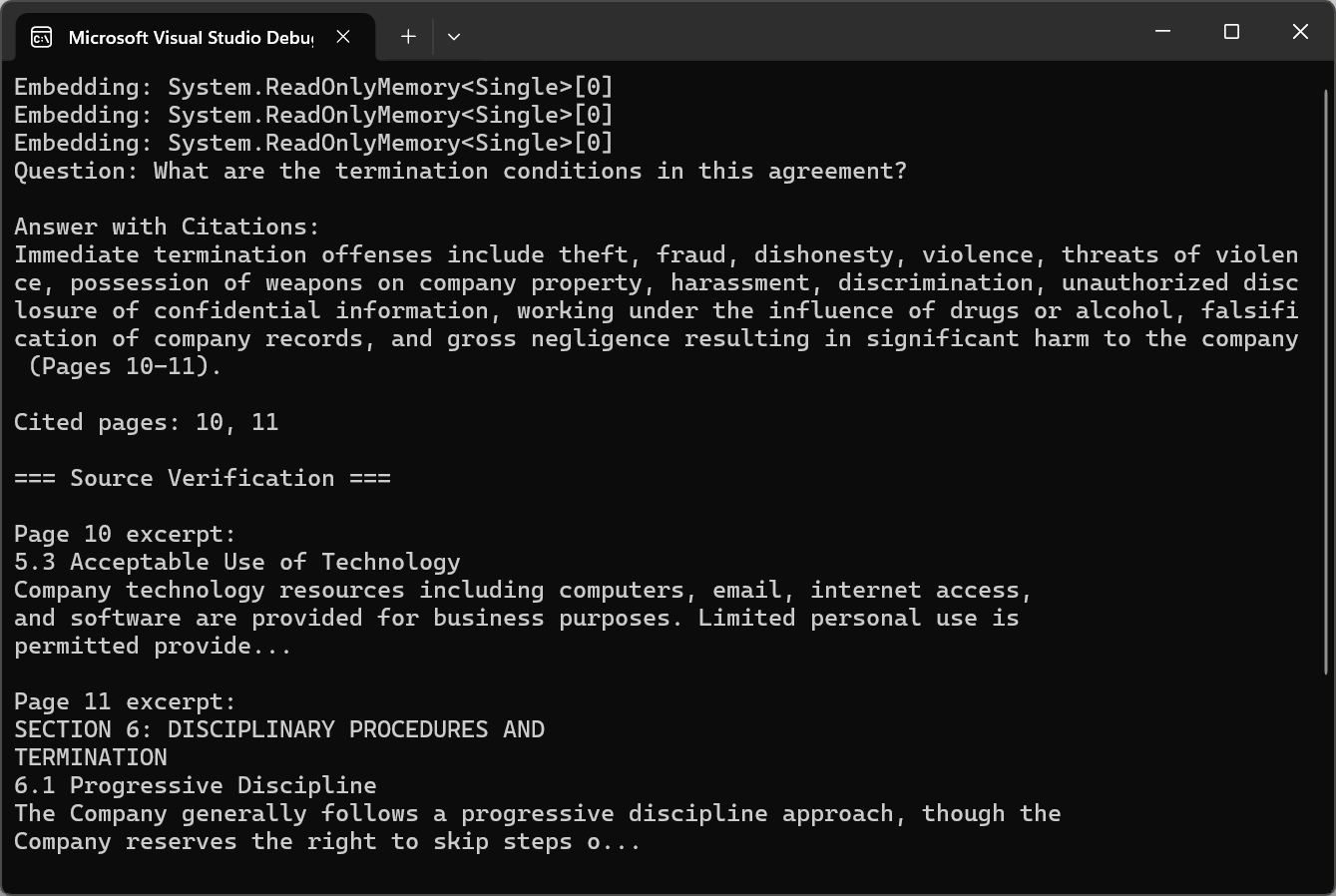
引用は、AIが生成した回答を不透明な出力から透明で検証可能な情報に変換します。 ユーザーは、ソースを確認して回答を確認し、AI支援分析に対する自信を深めることができます。
AIバッチ処理
ドキュメント ライブラリを大規模に処理する
企業の文書処理では、何千、何百万ものPDFが使用されることがよくあります。 スケーラブルなバッチ処理の基本は並列化です。 IronPdfはスレッドセーフであり、干渉することなくPDFの同時処理が可能です。
このコードは、SemaphoreSlim と設定可能な maxConcurrency を使用して PDF を並列処理し、ConcurrentBag で結果を追跡しながらそれぞれに pdf.Summarize() を呼び出します。
:path=/static-assets/pdf/content-code-examples/tutorials/ai-powered-pdf-processing-csharp/batch-document-processing.csusing IronPdf;
using IronPdf.AI;
using Microsoft.SemanticKernel;
using Microsoft.SemanticKernel.Memory;
using Microsoft.SemanticKernel.Connectors.OpenAI;
using System;
using System.Collections.Concurrent;
using System.Text;
// Process multiple documents in parallel with rate limiting
// Azure OpenAI configuration
string azureEndpoint = "https://your-resource.openai.azure.com/";
string apiKey = "your-azure-api-key";
string chatDeployment = "gpt-4o";
string embeddingDeployment = "text-embedding-ada-002";
// Initialize Semantic Kernel
var kernel = Kernel.CreateBuilder()
.AddAzureOpenAITextEmbeddingGeneration(embeddingDeployment, azureEndpoint, apiKey)
.AddAzureOpenAIChatCompletion(chatDeployment, azureEndpoint, apiKey)
.Build();
var memory = new MemoryBuilder()
.WithMemoryStore(new VolatileMemoryStore())
.WithAzureOpenAITextEmbeddingGeneration(embeddingDeployment, azureEndpoint, apiKey)
.Build();
IronDocumentAI.Initialize(kernel, memory);
// Configure parallel processing with rate limiting
int maxConcurrency = 3;
string inputFolder = "documents/";
string outputFolder = "summaries/";
Directory.CreateDirectory(outputFolder);
string[] pdfFiles = Directory.GetFiles(inputFolder, "*.pdf");
Console.WriteLine($"Processing {pdfFiles.Length} documents...\n");
var results = new ConcurrentBag<ProcessingResult>();
var semaphore = new SemaphoreSlim(maxConcurrency);
var tasks = pdfFiles.Select(async filePath =>
{
await semaphore.WaitAsync();
var result = new ProcessingResult { FilePath = filePath };
try
{
var stopwatch = System.Diagnostics.Stopwatch.StartNew();
var pdf = PdfDocument.FromFile(filePath);
string summary = await pdf.Summarize();
string outputPath = Path.Combine(outputFolder,
Path.GetFileNameWithoutExtension(filePath) + "-summary.txt");
await File.WriteAllTextAsync(outputPath, summary);
stopwatch.Stop();
result.Success = true;
result.ProcessingTime = stopwatch.Elapsed;
result.OutputPath = outputPath;
Console.WriteLine($"[OK] {Path.GetFileName(filePath)} ({stopwatch.ElapsedMilliseconds}ms)");
}
catch (Exception ex)
{
result.Success = false;
result.ErrorMessage = ex.Message;
Console.WriteLine($"[ERROR] {Path.GetFileName(filePath)}: {ex.Message}");
}
finally
{
semaphore.Release();
results.Add(result);
}
}).ToArray();
await Task.WhenAll(tasks);
// Generate processing report
var successful = results.Where(r => r.Success).ToList();
var failed = results.Where(r => !r.Success).ToList();
var report = new StringBuilder();
report.AppendLine("=== Batch Processing Report ===");
report.AppendLine($"Successful: {successful.Count}");
report.AppendLine($"Failed: {failed.Count}");
if (successful.Any())
{
var avgTime = TimeSpan.FromMilliseconds(successful.Average(r => r.ProcessingTime.TotalMilliseconds));
report.AppendLine($"Average processing time: {avgTime.TotalSeconds:F1}s");
}
if (failed.Any())
{
report.AppendLine("\nFailed documents:");
foreach (var fail in failed)
report.AppendLine($" - {Path.GetFileName(fail.FilePath)}: {fail.ErrorMessage}");
}
string reportText = report.ToString();
Console.WriteLine($"\n{reportText}");
File.WriteAllText(Path.Combine(outputFolder, "processing-report.txt"), reportText);
s ProcessingResult
public string FilePath { get; set; } = "";
public bool Success { get; set; }
public TimeSpan ProcessingTime { get; set; }
public string OutputPath { get; set; } = "";
public string ErrorMessage { get; set; } = "";Imports IronPdf
Imports IronPdf.AI
Imports Microsoft.SemanticKernel
Imports Microsoft.SemanticKernel.Memory
Imports Microsoft.SemanticKernel.Connectors.OpenAI
Imports System
Imports System.Collections.Concurrent
Imports System.Text
Imports System.IO
Imports System.Linq
Imports System.Threading
Imports System.Threading.Tasks
' Process multiple documents in parallel with rate limiting
' Azure OpenAI configuration
Dim azureEndpoint As String = "https://your-resource.openai.azure.com/"
Dim apiKey As String = "your-azure-api-key"
Dim chatDeployment As String = "gpt-4o"
Dim embeddingDeployment As String = "text-embedding-ada-002"
' Initialize Semantic Kernel
Dim kernel = Kernel.CreateBuilder() _
.AddAzureOpenAITextEmbeddingGeneration(embeddingDeployment, azureEndpoint, apiKey) _
.AddAzureOpenAIChatCompletion(chatDeployment, azureEndpoint, apiKey) _
.Build()
Dim memory = New MemoryBuilder() _
.WithMemoryStore(New VolatileMemoryStore()) _
.WithAzureOpenAITextEmbeddingGeneration(embeddingDeployment, azureEndpoint, apiKey) _
.Build()
IronDocumentAI.Initialize(kernel, memory)
' Configure parallel processing with rate limiting
Dim maxConcurrency As Integer = 3
Dim inputFolder As String = "documents/"
Dim outputFolder As String = "summaries/"
Directory.CreateDirectory(outputFolder)
Dim pdfFiles As String() = Directory.GetFiles(inputFolder, "*.pdf")
Console.WriteLine($"Processing {pdfFiles.Length} documents...{vbCrLf}")
Dim results = New ConcurrentBag(Of ProcessingResult)()
Dim semaphore = New SemaphoreSlim(maxConcurrency)
Dim tasks = pdfFiles.Select(Async Function(filePath)
Await semaphore.WaitAsync()
Dim result = New ProcessingResult With {.FilePath = filePath}
Try
Dim stopwatch = System.Diagnostics.Stopwatch.StartNew()
Dim pdf = PdfDocument.FromFile(filePath)
Dim summary As String = Await pdf.Summarize()
Dim outputPath = Path.Combine(outputFolder, Path.GetFileNameWithoutExtension(filePath) & "-summary.txt")
Await File.WriteAllTextAsync(outputPath, summary)
stopwatch.Stop()
result.Success = True
result.ProcessingTime = stopwatch.Elapsed
result.OutputPath = outputPath
Console.WriteLine($"[OK] {Path.GetFileName(filePath)} ({stopwatch.ElapsedMilliseconds}ms)")
Catch ex As Exception
result.Success = False
result.ErrorMessage = ex.Message
Console.WriteLine($"[ERROR] {Path.GetFileName(filePath)}: {ex.Message}")
Finally
semaphore.Release()
results.Add(result)
End Try
End Function).ToArray()
Await Task.WhenAll(tasks)
' Generate processing report
Dim successful = results.Where(Function(r) r.Success).ToList()
Dim failed = results.Where(Function(r) Not r.Success).ToList()
Dim report = New StringBuilder()
report.AppendLine("=== Batch Processing Report ===")
report.AppendLine($"Successful: {successful.Count}")
report.AppendLine($"Failed: {failed.Count}")
If successful.Any() Then
Dim avgTime = TimeSpan.FromMilliseconds(successful.Average(Function(r) r.ProcessingTime.TotalMilliseconds))
report.AppendLine($"Average processing time: {avgTime.TotalSeconds:F1}s")
End If
If failed.Any() Then
report.AppendLine($"{vbCrLf}Failed documents:")
For Each fail In failed
report.AppendLine($" - {Path.GetFileName(fail.FilePath)}: {fail.ErrorMessage}")
Next
End If
Dim reportText As String = report.ToString()
Console.WriteLine($"{vbCrLf}{reportText}")
File.WriteAllText(Path.Combine(outputFolder, "processing-report.txt"), reportText)
Public Class ProcessingResult
Public Property FilePath As String = ""
Public Property Success As Boolean
Public Property ProcessingTime As TimeSpan
Public Property OutputPath As String = ""
Public Property ErrorMessage As String = ""
End Class堅牢なエラー処理は、規模が大きくなるほど重要です。 本番システムでは、指数関数バックオフによる再試行ロジック、失敗したドキュメントの個別のエラーログ、および再開可能な処理が実装されています。
コスト管理とトークンの使用
AI API のコストは通常、トークンごとに課金されます。 2026年、GPT-5の価格は入力トークン100万個あたり125ドル、出力トークン100万個あたり10ドルで、クロード・ソネット4.5の価格は入力トークン100万個あたり3ドル、出力トークン100万個あたり15ドルです。 主なコスト最適化戦略は、不要なトークンの使用を最小限に抑えることです。
OpenAIのバッチAPIは、処理時間が長い(最大24時間)代わりに、トークンのコストを50%割引します。 夜間処理や定期的な分析では、バッチ処理により大幅なコスト削減が可能です。
このコードは、pdf.ExtractAllText() を使用してテキストを抽出し、JSONL バッチ リクエストを作成し、HttpClient を介して OpenAI ファイル エンドポイントにアップロードし、バッチ API に送信します。
:path=/static-assets/pdf/content-code-examples/tutorials/ai-powered-pdf-processing-csharp/batch-api-processing.csusing IronPdf;
using System.Text.Json;
using System.Net.Http.Headers;
// Use OpenAI Batch API for 50% cost savings on large-scale document processing
string openAiApiKey = "your-openai-api-key";
string inputFolder = "documents/";
// Prepare batch requests in JSONL format
var batchRequests = new List<string>();
string[] pdfFiles = Directory.GetFiles(inputFolder, "*.pdf");
Console.WriteLine($"Preparing batch for {pdfFiles.Length} documents...\n");
foreach (string filePath in pdfFiles)
{
var pdf = PdfDocument.FromFile(filePath);
string pdfText = pdf.ExtractAllText();
// Truncate to stay within batch API limits
if (pdfText.Length > 100000)
pdfText = pdfText.Substring(0, 100000) + "\n[Truncated...]";
var request = new
{
custom_id = Path.GetFileNameWithoutExtension(filePath),
method = "POST",
url = "/v1/chat/completions",
body = new
{
model = "gpt-4o",
messages = new[]
{
new { role = "system", content = "Summarize the following document concisely." },
new { role = "user", content = pdfText }
},
max_tokens = 1000
}
};
batchRequests.Add(JsonSerializer.Serialize(request));
}
// Create JSONL file
string batchFilePath = "batch-requests.jsonl";
File.WriteAllLines(batchFilePath, batchRequests);
Console.WriteLine($"Created batch file with {batchRequests.Count} requests");
// Upload file to OpenAI
using var httpClient = new HttpClient();
httpClient.DefaultRequestHeaders.Authorization = new AuthenticationHeaderValue("Bearer", openAiApiKey);
using var fileContent = new MultipartFormDataContent();
fileContent.Add(new ByteArrayContent(File.ReadAllBytes(batchFilePath)), "file", "batch-requests.jsonl");
fileContent.Add(new StringContent("batch"), "purpose");
var uploadResponse = await httpClient.PostAsync("https://api.openai.com/v1/files", fileContent);
var uploadResult = JsonSerializer.Deserialize<JsonElement>(await uploadResponse.Content.ReadAsStringAsync());
string fileId = uploadResult.GetProperty("id").GetString()!;
Console.WriteLine($"Uploaded file: {fileId}");
// Create batch job (24-hour completion window for 50% discount)
var batchJobRequest = new
{
input_file_id = fileId,
endpoint = "/v1/chat/completions",
completion_window = "24h"
};
var batchResponse = await httpClient.PostAsync(
"https://api.openai.com/v1/batches",
new StringContent(JsonSerializer.Serialize(batchJobRequest), System.Text.Encoding.UTF8, "application/json")
);
var batchResult = JsonSerializer.Deserialize<JsonElement>(await batchResponse.Content.ReadAsStringAsync());
string batchId = batchResult.GetProperty("id").GetString()!;
Console.WriteLine($"\nBatch job created: {batchId}");
Console.WriteLine("Job will complete within 24 hours");
Console.WriteLine($"Check status: GET https://api.openai.com/v1/batches/{batchId}");
File.WriteAllText("batch-job-id.txt", batchId);
Console.WriteLine("\nBatch ID saved to batch-job-id.txt");Imports IronPdf
Imports System.Text.Json
Imports System.Net.Http.Headers
' Use OpenAI Batch API for 50% cost savings on large-scale document processing
Dim openAiApiKey As String = "your-openai-api-key"
Dim inputFolder As String = "documents/"
' Prepare batch requests in JSONL format
Dim batchRequests As New List(Of String)()
Dim pdfFiles As String() = Directory.GetFiles(inputFolder, "*.pdf")
Console.WriteLine($"Preparing batch for {pdfFiles.Length} documents..." & vbCrLf)
For Each filePath As String In pdfFiles
Dim pdf = PdfDocument.FromFile(filePath)
Dim pdfText As String = pdf.ExtractAllText()
' Truncate to stay within batch API limits
If pdfText.Length > 100000 Then
pdfText = pdfText.Substring(0, 100000) & vbCrLf & "[Truncated...]"
End If
Dim request = New With {
.custom_id = Path.GetFileNameWithoutExtension(filePath),
.method = "POST",
.url = "/v1/chat/completions",
.body = New With {
.model = "gpt-4o",
.messages = New Object() {
New With {.role = "system", .content = "Summarize the following document concisely."},
New With {.role = "user", .content = pdfText}
},
.max_tokens = 1000
}
}
batchRequests.Add(JsonSerializer.Serialize(request))
Next
' Create JSONL file
Dim batchFilePath As String = "batch-requests.jsonl"
File.WriteAllLines(batchFilePath, batchRequests)
Console.WriteLine($"Created batch file with {batchRequests.Count} requests")
' Upload file to OpenAI
Using httpClient As New HttpClient()
httpClient.DefaultRequestHeaders.Authorization = New AuthenticationHeaderValue("Bearer", openAiApiKey)
Using fileContent As New MultipartFormDataContent()
fileContent.Add(New ByteArrayContent(File.ReadAllBytes(batchFilePath)), "file", "batch-requests.jsonl")
fileContent.Add(New StringContent("batch"), "purpose")
Dim uploadResponse = Await httpClient.PostAsync("https://api.openai.com/v1/files", fileContent)
Dim uploadResult = JsonSerializer.Deserialize(Of JsonElement)(Await uploadResponse.Content.ReadAsStringAsync())
Dim fileId As String = uploadResult.GetProperty("id").GetString()
Console.WriteLine($"Uploaded file: {fileId}")
' Create batch job (24-hour completion window for 50% discount)
Dim batchJobRequest = New With {
.input_file_id = fileId,
.endpoint = "/v1/chat/completions",
.completion_window = "24h"
}
Dim batchResponse = Await httpClient.PostAsync(
"https://api.openai.com/v1/batches",
New StringContent(JsonSerializer.Serialize(batchJobRequest), System.Text.Encoding.UTF8, "application/json")
)
Dim batchResult = JsonSerializer.Deserialize(Of JsonElement)(Await batchResponse.Content.ReadAsStringAsync())
Dim batchId As String = batchResult.GetProperty("id").GetString()
Console.WriteLine(vbCrLf & $"Batch job created: {batchId}")
Console.WriteLine("Job will complete within 24 hours")
Console.WriteLine($"Check status: GET https://api.openai.com/v1/batches/{batchId}")
File.WriteAllText("batch-job-id.txt", batchId)
Console.WriteLine(vbCrLf & "Batch ID saved to batch-job-id.txt")
End Using
End Using本番環境でのトークン使用状況のモニタリングが不可欠です。 多くの組織では、文書の80%は小規模で安価なモデルで処理でき、高価なモデルは複雑なケースにのみ使用できることが分かっています。
キャッシュとインクリメンタル処理
インクリメンタルに更新されるドキュメントコレクションでは、インテリジェントなキャッシュとインクリメンタル処理戦略により、コストを劇的に削減できます。 文書レベルのキャッシュは、ソースPDFのハッシュとともに結果を保存し、変更のない文書の不要な再処理を防ぎます。
DocumentCacheManager クラスは、SHA256 と ComputeFileHash() を使用して変更を検出し、結果を LastAccessed タイムスタンプを持つ CacheEntry オブジェクトに保存します。
:path=/static-assets/pdf/content-code-examples/tutorials/ai-powered-pdf-processing-csharp/incremental-caching.csusing IronPdf;
using IronPdf.AI;
using Microsoft.SemanticKernel;
using Microsoft.SemanticKernel.Memory;
using Microsoft.SemanticKernel.Connectors.OpenAI;
using System;
using System.Collections.Generic;
using System.Security.Cryptography;
using System.Text.Json;
// Cache AI processing results using file hashes to avoid reprocessing unchanged documents
// Azure OpenAI configuration
string azureEndpoint = "https://your-resource.openai.azure.com/";
string apiKey = "your-azure-api-key";
string chatDeployment = "gpt-4o";
string embeddingDeployment = "text-embedding-ada-002";
// Initialize Semantic Kernel
var kernel = Kernel.CreateBuilder()
.AddAzureOpenAITextEmbeddingGeneration(embeddingDeployment, azureEndpoint, apiKey)
.AddAzureOpenAIChatCompletion(chatDeployment, azureEndpoint, apiKey)
.Build();
var memory = new MemoryBuilder()
.WithMemoryStore(new VolatileMemoryStore())
.WithAzureOpenAITextEmbeddingGeneration(embeddingDeployment, azureEndpoint, apiKey)
.Build();
IronDocumentAI.Initialize(kernel, memory);
// Configure caching
string cacheFolder = "ai-cache/";
string documentsFolder = "documents/";
Directory.CreateDirectory(cacheFolder);
var cacheManager = new DocumentCacheManager(cacheFolder);
// Process documents with caching
string[] pdfFiles = Directory.GetFiles(documentsFolder, "*.pdf");
int cached = 0, processed = 0;
foreach (string filePath in pdfFiles)
{
string fileName = Path.GetFileName(filePath);
string fileHash = cacheManager.ComputeFileHash(filePath);
var cachedResult = cacheManager.GetCachedResult(fileName, fileHash);
if (cachedResult != null)
{
Console.WriteLine($"[CACHE HIT] {fileName}");
cached++;
continue;
}
Console.WriteLine($"[PROCESSING] {fileName}");
var pdf = PdfDocument.FromFile(filePath);
string summary = await pdf.Summarize();
cacheManager.CacheResult(fileName, fileHash, summary);
processed++;
}
Console.WriteLine($"\nProcessing complete: {cached} cached, {processed} newly processed");
Console.WriteLine($"Cost savings: {(cached * 100.0 / Math.Max(1, cached + processed)):F1}% served from cache");
ash-based cache manager with JSON index
s DocumentCacheManager
private readonly string _cacheFolder;
private readonly string _indexPath;
private Dictionary<string, CacheEntry> _index;
public DocumentCacheManager(string cacheFolder)
{
_cacheFolder = cacheFolder;
_indexPath = Path.Combine(cacheFolder, "cache-index.json");
_index = LoadIndex();
}
private Dictionary<string, CacheEntry> LoadIndex()
{
if (File.Exists(_indexPath))
{
string json = File.ReadAllText(_indexPath);
return JsonSerializer.Deserialize<Dictionary<string, CacheEntry>>(json) ?? new();
}
return new Dictionary<string, CacheEntry>();
}
private void SaveIndex()
{
string json = JsonSerializer.Serialize(_index, new JsonSerializerOptions { WriteIndented = true });
File.WriteAllText(_indexPath, json);
}
// SHA256 hash to detect file changes
public string ComputeFileHash(string filePath)
{
using var sha256 = SHA256.Create();
using var stream = File.OpenRead(filePath);
byte[] hash = sha256.ComputeHash(stream);
return Convert.ToHexString(hash);
}
public string? GetCachedResult(string fileName, string currentHash)
{
if (_index.TryGetValue(fileName, out var entry))
{
if (entry.FileHash == currentHash && File.Exists(entry.CachePath))
{
entry.LastAccessed = DateTime.UtcNow;
SaveIndex();
return File.ReadAllText(entry.CachePath);
}
}
return null;
}
public void CacheResult(string fileName, string fileHash, string result)
{
string cachePath = Path.Combine(_cacheFolder, $"{Path.GetFileNameWithoutExtension(fileName)}-{fileHash[..8]}.txt");
File.WriteAllText(cachePath, result);
_index[fileName] = new CacheEntry
{
FileHash = fileHash,
CachePath = cachePath,
CreatedAt = DateTime.UtcNow,
LastAccessed = DateTime.UtcNow
};
SaveIndex();
}
s CacheEntry
public string FileHash { get; set; } = "";
public string CachePath { get; set; } = "";
public DateTime CreatedAt { get; set; }
public DateTime LastAccessed { get; set; }Imports IronPdf
Imports IronPdf.AI
Imports Microsoft.SemanticKernel
Imports Microsoft.SemanticKernel.Memory
Imports Microsoft.SemanticKernel.Connectors.OpenAI
Imports System
Imports System.Collections.Generic
Imports System.Security.Cryptography
Imports System.Text.Json
' Cache AI processing results using file hashes to avoid reprocessing unchanged documents
' Azure OpenAI configuration
Dim azureEndpoint As String = "https://your-resource.openai.azure.com/"
Dim apiKey As String = "your-azure-api-key"
Dim chatDeployment As String = "gpt-4o"
Dim embeddingDeployment As String = "text-embedding-ada-002"
' Initialize Semantic Kernel
Dim kernel = Kernel.CreateBuilder() _
.AddAzureOpenAITextEmbeddingGeneration(embeddingDeployment, azureEndpoint, apiKey) _
.AddAzureOpenAIChatCompletion(chatDeployment, azureEndpoint, apiKey) _
.Build()
Dim memory = New MemoryBuilder() _
.WithMemoryStore(New VolatileMemoryStore()) _
.WithAzureOpenAITextEmbeddingGeneration(embeddingDeployment, azureEndpoint, apiKey) _
.Build()
IronDocumentAI.Initialize(kernel, memory)
' Configure caching
Dim cacheFolder As String = "ai-cache/"
Dim documentsFolder As String = "documents/"
Directory.CreateDirectory(cacheFolder)
Dim cacheManager = New DocumentCacheManager(cacheFolder)
' Process documents with caching
Dim pdfFiles As String() = Directory.GetFiles(documentsFolder, "*.pdf")
Dim cached As Integer = 0, processed As Integer = 0
For Each filePath As String In pdfFiles
Dim fileName As String = Path.GetFileName(filePath)
Dim fileHash As String = cacheManager.ComputeFileHash(filePath)
Dim cachedResult As String = cacheManager.GetCachedResult(fileName, fileHash)
If cachedResult IsNot Nothing Then
Console.WriteLine($"[CACHE HIT] {fileName}")
cached += 1
Continue For
End If
Console.WriteLine($"[PROCESSING] {fileName}")
Dim pdf = PdfDocument.FromFile(filePath)
Dim summary As String = Await pdf.Summarize()
cacheManager.CacheResult(fileName, fileHash, summary)
processed += 1
Next
Console.WriteLine(vbCrLf & $"Processing complete: {cached} cached, {processed} newly processed")
Console.WriteLine($"Cost savings: {(cached * 100.0 / Math.Max(1, cached + processed)):F1}% served from cache")
' Hash-based cache manager with JSON index
Public Class DocumentCacheManager
Private ReadOnly _cacheFolder As String
Private ReadOnly _indexPath As String
Private _index As Dictionary(Of String, CacheEntry)
Public Sub New(cacheFolder As String)
_cacheFolder = cacheFolder
_indexPath = Path.Combine(cacheFolder, "cache-index.json")
_index = LoadIndex()
End Sub
Private Function LoadIndex() As Dictionary(Of String, CacheEntry)
If File.Exists(_indexPath) Then
Dim json As String = File.ReadAllText(_indexPath)
Return JsonSerializer.Deserialize(Of Dictionary(Of String, CacheEntry))(json) OrElse New Dictionary(Of String, CacheEntry)()
End If
Return New Dictionary(Of String, CacheEntry)()
End Function
Private Sub SaveIndex()
Dim json As String = JsonSerializer.Serialize(_index, New JsonSerializerOptions With {.WriteIndented = True})
File.WriteAllText(_indexPath, json)
End Sub
' SHA256 hash to detect file changes
Public Function ComputeFileHash(filePath As String) As String
Using sha256 = SHA256.Create()
Using stream = File.OpenRead(filePath)
Dim hash As Byte() = sha256.ComputeHash(stream)
Return Convert.ToHexString(hash)
End Using
End Using
End Function
Public Function GetCachedResult(fileName As String, currentHash As String) As String
If _index.TryGetValue(fileName, entry) Then
If entry.FileHash = currentHash AndAlso File.Exists(entry.CachePath) Then
entry.LastAccessed = DateTime.UtcNow
SaveIndex()
Return File.ReadAllText(entry.CachePath)
End If
End If
Return Nothing
End Function
Public Sub CacheResult(fileName As String, fileHash As String, result As String)
Dim cachePath As String = Path.Combine(_cacheFolder, $"{Path.GetFileNameWithoutExtension(fileName)}-{fileHash.Substring(0, 8)}.txt")
File.WriteAllText(cachePath, result)
_index(fileName) = New CacheEntry With {
.FileHash = fileHash,
.CachePath = cachePath,
.CreatedAt = DateTime.UtcNow,
.LastAccessed = DateTime.UtcNow
}
SaveIndex()
End Sub
End Class
Public Class CacheEntry
Public Property FileHash As String = ""
Public Property CachePath As String = ""
Public Property CreatedAt As DateTime
Public Property LastAccessed As DateTime
End ClassGPT-5と2026年のクロード・ソネット4.5は、自動プロンプト・キャッシング機能も備えており、繰り返されるパターンについて、トークンの有効消費を50~90%削減することができます。
実際の利用例
法的発見と契約分析
法的証拠開示では、従来、数十万ページを手作業で確認する若手弁護士の軍隊が必要でした。 AIを活用した証拠開示は、このプロセスを一変させ、関連文書の迅速な特定、自動特権審査、重要な証拠事実の抽出を可能にします。
IronPdfのAI統合により、特権の検出、関連性のスコアリング、問題の特定、重要な日付の抽出といった高度な法務ワークフローが可能になります。 法律事務所では、証拠開示のレビュー時間が70~80%短縮され、小規模なチームで大規模なケースに対応できるようになったと報告しています。
2026年にGPT-5とクロード・ソネット4.5の精度が向上し、幻覚率が減少することで、法律の専門家は、ますます重要な意思決定においてAI支援分析を信頼できるようになります。
財務レポート分析
金融アナリストは、決算報告書、SEC提出書類、アナリスト向けプレゼンテーションからデータを抽出するのに膨大な時間を費やしています。 AIを活用した金融文書処理は、この抽出を自動化し、アナリストがデータ収集ではなく解釈に集中できるようにします。
この例では、pdf.Query() と CompanyFinancials JSON スキーマを使用して複数の 10-K 提出書類を処理し、企業間の収益、マージン、およびリスク要因を抽出して比較します。
:path=/static-assets/pdf/content-code-examples/tutorials/ai-powered-pdf-processing-csharp/financial-sector-analysis.csusing IronPdf;
using IronPdf.AI;
using Microsoft.SemanticKernel;
using Microsoft.SemanticKernel.Memory;
using Microsoft.SemanticKernel.Connectors.OpenAI;
using System.Collections.Generic;
using System.Text.Json;
using System.Text;
// Compare financial metrics across multiple company filings for sector analysis
// Azure OpenAI configuration
string azureEndpoint = "https://your-resource.openai.azure.com/";
string apiKey = "your-azure-api-key";
string chatDeployment = "gpt-4o";
string embeddingDeployment = "text-embedding-ada-002";
// Initialize Semantic Kernel
var kernel = Kernel.CreateBuilder()
.AddAzureOpenAITextEmbeddingGeneration(embeddingDeployment, azureEndpoint, apiKey)
.AddAzureOpenAIChatCompletion(chatDeployment, azureEndpoint, apiKey)
.Build();
var memory = new MemoryBuilder()
.WithMemoryStore(new VolatileMemoryStore())
.WithAzureOpenAITextEmbeddingGeneration(embeddingDeployment, azureEndpoint, apiKey)
.Build();
IronDocumentAI.Initialize(kernel, memory);
// Analyze company filings
string[] companyFilings = {
"filings/company-a-10k.pdf",
"filings/company-b-10k.pdf",
"filings/company-c-10k.pdf"
};
var sectorData = new List<CompanyFinancials>();
foreach (string filing in companyFilings)
{
Console.WriteLine($"Analyzing: {Path.GetFileName(filing)}");
var pdf = PdfDocument.FromFile(filing);
// Define JSON schema for 10-K extraction (numbers in millions USD)
string extractionQuery = @"Extract key financial metrics from this 10-K filing. Return JSON:
mpanyName"": ""string"",
scalYear"": ""string"",
venue"": number,
venueGrowth"": number,
ossMargin"": number,
eratingMargin"": number,
tIncome"": number,
s"": number,
talDebt"": number,
shPosition"": number,
ployeeCount"": number,
yRisks"": [""string""],
idance"": ""string""
in millions USD. Growth/margins as percentages.
NLY valid JSON.";
string result = await pdf.Query(extractionQuery);
try
{
var financials = JsonSerializer.Deserialize<CompanyFinancials>(result);
if (financials != null)
sectorData.Add(financials);
}
catch
{
Console.WriteLine($" Warning: Could not parse financials for {filing}");
}
}
// Generate sector comparison report
var report = new StringBuilder();
report.AppendLine("=== Sector Analysis Report ===\n");
report.AppendLine("Revenue Comparison (millions USD):");
foreach (var company in sectorData.OrderByDescending(c => c.Revenue))
report.AppendLine($" {company.CompanyName}: ${company.Revenue:N0} ({company.RevenueGrowth:+0.0;-0.0}% YoY)");
report.AppendLine("\nProfitability Margins:");
foreach (var company in sectorData.OrderByDescending(c => c.OperatingMargin))
report.AppendLine($" {company.CompanyName}: {company.GrossMargin:F1}% gross, {company.OperatingMargin:F1}% operating");
report.AppendLine("\nFinancial Health (Debt vs Cash):");
foreach (var company in sectorData)
{
double netDebt = company.TotalDebt - company.CashPosition;
string status = netDebt < 0 ? "Net Cash" : "Net Debt";
report.AppendLine($" {company.CompanyName}: {status} ${Math.Abs(netDebt):N0}M");
}
string reportText = report.ToString();
Console.WriteLine($"\n{reportText}");
File.WriteAllText("sector-analysis-report.txt", reportText);
// Save full JSON data
string outputJson = JsonSerializer.Serialize(sectorData, new JsonSerializerOptions { WriteIndented = true });
File.WriteAllText("sector-analysis.json", outputJson);
Console.WriteLine("Analysis saved to sector-analysis.json and sector-analysis-report.txt");
s CompanyFinancials
public string CompanyName { get; set; } = "";
public string FiscalYear { get; set; } = "";
public double Revenue { get; set; }
public double RevenueGrowth { get; set; }
public double GrossMargin { get; set; }
public double OperatingMargin { get; set; }
public double NetIncome { get; set; }
public double Eps { get; set; }
public double TotalDebt { get; set; }
public double CashPosition { get; set; }
public int EmployeeCount { get; set; }
public List<string> KeyRisks { get; set; } = new();
public string Guidance { get; set; } = "";Imports IronPdf
Imports IronPdf.AI
Imports Microsoft.SemanticKernel
Imports Microsoft.SemanticKernel.Memory
Imports Microsoft.SemanticKernel.Connectors.OpenAI
Imports System.Collections.Generic
Imports System.Text.Json
Imports System.Text
Imports System.IO
' Compare financial metrics across multiple company filings for sector analysis
' Azure OpenAI configuration
Dim azureEndpoint As String = "https://your-resource.openai.azure.com/"
Dim apiKey As String = "your-azure-api-key"
Dim chatDeployment As String = "gpt-4o"
Dim embeddingDeployment As String = "text-embedding-ada-002"
' Initialize Semantic Kernel
Dim kernel = Kernel.CreateBuilder() _
.AddAzureOpenAITextEmbeddingGeneration(embeddingDeployment, azureEndpoint, apiKey) _
.AddAzureOpenAIChatCompletion(chatDeployment, azureEndpoint, apiKey) _
.Build()
Dim memory = New MemoryBuilder() _
.WithMemoryStore(New VolatileMemoryStore()) _
.WithAzureOpenAITextEmbeddingGeneration(embeddingDeployment, azureEndpoint, apiKey) _
.Build()
IronDocumentAI.Initialize(kernel, memory)
' Analyze company filings
Dim companyFilings As String() = {
"filings/company-a-10k.pdf",
"filings/company-b-10k.pdf",
"filings/company-c-10k.pdf"
}
Dim sectorData = New List(Of CompanyFinancials)()
For Each filing As String In companyFilings
Console.WriteLine($"Analyzing: {Path.GetFileName(filing)}")
Dim pdf = PdfDocument.FromFile(filing)
' Define JSON schema for 10-K extraction (numbers in millions USD)
Dim extractionQuery As String = "Extract key financial metrics from this 10-K filing. Return JSON:
mpanyName"": ""string"",
scalYear"": ""string"",
venue"": number,
venueGrowth"": number,
ossMargin"": number,
eratingMargin"": number,
tIncome"": number,
s"": number,
talDebt"": number,
shPosition"": number,
ployeeCount"": number,
yRisks"": [""string""],
idance"": ""string""
in millions USD. Growth/margins as percentages.
NLY valid JSON."
Dim result As String = Await pdf.Query(extractionQuery)
Try
Dim financials = JsonSerializer.Deserialize(Of CompanyFinancials)(result)
If financials IsNot Nothing Then
sectorData.Add(financials)
End If
Catch
Console.WriteLine($" Warning: Could not parse financials for {filing}")
End Try
Next
' Generate sector comparison report
Dim report = New StringBuilder()
report.AppendLine("=== Sector Analysis Report ===" & vbCrLf)
report.AppendLine("Revenue Comparison (millions USD):")
For Each company In sectorData.OrderByDescending(Function(c) c.Revenue)
report.AppendLine($" {company.CompanyName}: ${company.Revenue:N0} ({company.RevenueGrowth:+0.0;-0.0}% YoY)")
Next
report.AppendLine(vbCrLf & "Profitability Margins:")
For Each company In sectorData.OrderByDescending(Function(c) c.OperatingMargin)
report.AppendLine($" {company.CompanyName}: {company.GrossMargin:F1}% gross, {company.OperatingMargin:F1}% operating")
Next
report.AppendLine(vbCrLf & "Financial Health (Debt vs Cash):")
For Each company In sectorData
Dim netDebt As Double = company.TotalDebt - company.CashPosition
Dim status As String = If(netDebt < 0, "Net Cash", "Net Debt")
report.AppendLine($" {company.CompanyName}: {status} ${Math.Abs(netDebt):N0}M")
Next
Dim reportText As String = report.ToString()
Console.WriteLine(vbCrLf & reportText)
File.WriteAllText("sector-analysis-report.txt", reportText)
' Save full JSON data
Dim outputJson As String = JsonSerializer.Serialize(sectorData, New JsonSerializerOptions With {.WriteIndented = True})
File.WriteAllText("sector-analysis.json", outputJson)
Console.WriteLine("Analysis saved to sector-analysis.json and sector-analysis-report.txt")
Public Class CompanyFinancials
Public Property CompanyName As String = ""
Public Property FiscalYear As String = ""
Public Property Revenue As Double
Public Property RevenueGrowth As Double
Public Property GrossMargin As Double
Public Property OperatingMargin As Double
Public Property NetIncome As Double
Public Property Eps As Double
Public Property TotalDebt As Double
Public Property CashPosition As Double
Public Property EmployeeCount As Integer
Public Property KeyRisks As List(Of String) = New List(Of String)()
Public Property Guidance As String = ""
End Class投資会社は、AI を活用した分析によって毎日何千もの文書を処理し、アナリストがより広範な市場カバレッジを監視し、新たなビジネスチャンスに迅速に対応できるようにしています。
研究論文の要約
学術研究では、年間数百万件の論文が作成されています。 AIを活用した要約は、研究者が論文の関連性を迅速に評価し、重要な発見を理解し、詳しく読む価値のある論文を特定するのに役立ちます。 効果的な研究の要約は、研究課題を特定し、方法論を説明し、適切な注意書きを添えて主要な調査結果を要約し、結果を文脈の中に配置する必要があります。
研究機関では、AI要約を使用して機関の知識ベースを維持し、新しい出版物を自動的に処理しています。 2026年、GPT-5の科学的推論の向上とクロード・ソネット4.5の分析機能の強化により、学術的要約は新たなレベルの精度に到達します。
政府文書処理
政府機関では、規制、パブリックコメント、環境影響評価書、裁判所提出書類、監査報告書など、膨大な文書が作成されます。 AIを活用した文書処理により、規制遵守分析、環境影響評価、立法追跡など、政府の情報を実用的なものにします。
パブリックコメントの分析には独特の課題があります。大きな規制案には何十万ものコメントが寄せられることがあります。 AIシステムは、トピックごとにコメントを分類し、共通のテーマを特定し、協調的なキャンペーンを検出し、機関の対応を保証する実質的な主張を抽出することができます。
2026年世代のAIモデルは、政府の文書処理に前例のない能力をもたらし、民主主義の透明性と情報に基づいた政策立案を支援します。
トラブルシューティングとテクニカル サポート
一般的なエラーの迅速な解決
- 最初のレンダリングは遅いですか普通です。 Chromeは2〜3秒で初期化され、その後スピードアップします。
- クラウドの問題 少なくともAzure B1または同等のリソースを使用してください。
- Missing assets? ベースパスを設定するか、base64として埋め込んでください。
- 不足している要素 JavaScriptの実行にRenderDelayを追加してください。
- メモリの問題パフォーマンスを修正するためにIronPDFの最新バージョンにアップデートしてください。
- フォームフィールドの問題 一意の名前を確保し、最新バージョンに更新してください。
IronPDFを構築したエンジニアからの24時間年中無休のサポートを受ける
IronPDFは24時間365日のエンジニアサポートを提供しています。 HTMLからPDFへの変換やAIの統合でお困りですか? お問い合わせ
次のステップ
AIを活用したPDF処理についてご理解いただけたと思いますので、次のステップとしてIronPDFの幅広い機能をご紹介します。 OpenAI統合ガイドは、要約、クエリ、および記憶パターンについてより深くカバーしており、テキストと画像の抽出チュートリアルは、AI分析の前にPDFを前処理する方法を示しています。 ドキュメント アセンブリ ワークフローでは、バッチ処理のために PDF をマージおよび分割する方法を学びます。
AIの機能を超えて拡張する準備ができたら、完全なPDF編集チュートリアルで透かし、ヘッダー、フッター、フォーム、注釈をカバーします。 別のAI統合アプローチについては、ChatGPT C#チュートリアルでさまざまなパターンを紹介しています。 WebAppsとFunctionsのためのAzureデプロイメントガイドでは、本番デプロイメントをカバーし、C#のPDF作成チュートリアルでは、HTML、URL、生のコンテンツからPDFを生成することをカバーしています。
始める準備はできましたか? 30日間の無料トライアルを開始し、柔軟なライセンスで、ウォーターマークなしで実運用環境でテストしてください。 AIの統合やIronPDFの機能についてのご質問は、エンジニアリングサポートチームまでお問い合わせください。
よくある質問
C#でPDF処理にAIを使用する利点は何ですか?
C#でAIを活用したPDF処理を行うことで、文書の要約、JSONへのデータ抽出、Q&Aシステムの構築などの高度な機能を実現できます。大量のドキュメントを処理する際の効率と精度を高めます。
IronPDFはどのように文書を要約するAIを統合しているのですか?
IronPDFはGPT-5やClaudeのようなモデルを活用することでAIを統合し、ドキュメントを分析して要約することで、洞察を導き出し、大きなテキストを素早く理解することを容易にします。
AIによるPDF処理におけるRAGパターンの役割とは?
RAG (Retrieve and Generate) パターンは、AI を利用した PDF 処理で使用され、情報検索と情報生成の品質を向上させ、より正確で文脈に関連した文書分析を可能にします。
IronPDFを使ってPDFからどのように構造化データを抽出できますか?
IronPDFはPDFからJSONのようなフォーマットへの構造化データの抽出を可能にし、異なるアプリケーションやシステム間でのシームレスなデータ統合と分析を容易にします。
IronPDFはAIで大規模なドキュメントライブラリを扱うことができますか?
IronPDFはAIモデルを使って要約やデータ抽出などのタスクを自動化することで、大規模なドキュメントライブラリを効率的に処理することができます。
IronPDFはどのようなAIモデルのPDF処理をサポートしていますか?
IronPDFはGPT-5やClaudeのような高度なAIモデルをサポートしており、ドキュメントの要約やQ&Aシステムの構築などのタスクに使用され、全体的な処理能力を高めています。
IronPDFはQ&Aシステムの構築をどのように促進しますか?
IronPDFはドキュメントを処理して分析し、関連する情報を抽出することでQ&Aシステムの構築を支援します。
C#でAIを利用したPDF処理の主なユースケースは?
主な使用例としては、文書の要約、構造化データの抽出、Q&Aシステムの開発、OpenAIのようなAI統合を使用した大規模な文書処理タスクの処理などがあります。
IronPDF をAzure OpenAIで文書処理に使用することは可能ですか?
IronPDFはAzure OpenAIと統合してドキュメント処理タスクを強化し、PDFドキュメントの要約、抽出、分析のためのスケーラブルなソリューションを提供します。
IronPDFはAIを使ってどのように文書解析を改善しますか?
IronPDFは、要約、データ抽出、情報検索などのタスクを自動化・強化するAIモデルを活用することで、文書分析を改善し、より効率的で正確な文書処理に導きます。

まだスクロールしていますか?
すぐに証拠が欲しいですか? PM > Install-Package IronPdf
サンプルを実行するHTML が PDF に変換されるのを確認します。






 無料で始めましょう
 無料で始めましょう
 無料ライブデモを予約





 クレジットカードやアカウントの作成は不要です。










