


C# 中的批量 PDF 处理:大规模自动化 PDF合并、PDF拆分与 PDF压缩

使用 IronPDF 在 C# 中进行 Batch PDF 处理,.NET 开发人员就可以大规模 自动化文档工作流--从并行 HTML 到 PDF 的转换和批量合并/拆分,到带有内置错误处理、重试逻辑和检查点的 async PDF 管道。 IronPDF 的线程安全 Chromium 引擎和基于 IDisposable 的内存管理使其成为专为高吞吐量 PDF 自动化而构建的,无论您是在本地运行、在Azure Functions 、 AWS Lambda还是Kubernetes中运行。
TL;DR:快速入门指南
本教程涵盖 C# 中可扩展的 PDF 自动化 - 从并行转换和批量操作到云部署和弹性管道模式。
- 适用对象:负责文档密集型工作流的 .NET 开发人员和架构师--文档迁移项目、日常报告生成管道、合规性补救扫描或存档数字化工作,其中顺序处理是不可行的。
- 你将构建:并行 HTML 到 PDF 转换(使用
Parallel.ForEach)、批量合并和拆分操作、异步管道(使用SemaphoreSlim进行并发控制)、错误处理(使用失败时跳过和重试逻辑)、崩溃恢复的检查点/恢复模式,以及 Azure Functions、AWS Lambda 和 Kubernetes 的云部署配置。 - 运行环境: .NET 6+、.NET Framework 4.6.2+、.NET Standard 2.0。所有渲染均使用 IronPDF 的嵌入式 Chromium 引擎--无需无头浏览器依赖或外部服务。
- 何时使用此方法:当您需要处理的 PDF 超过顺序执行所允许的数量时(大规模文档迁移、时间窗口紧迫的计划批处理作业或文档负载不稳定的多租户平台)。
- 从技术角度来看,这很重要: IronPDF 的
ChromePdfRenderer是线程安全的,并且每次渲染都是无状态的,这意味着多个线程可以安全地共享一个渲染器实例。 结合 .NET 的任务并行库和IDisposableonPdfDocument,您可以获得可预测的内存行为和 CPU 饱和度,而不会出现竞争条件或内存泄漏。
只需几行代码即可将整个目录中的 HTML 文件批量转换为 PDF:
-
使用 NuGet 包管理器安装 https://www.nuget.org/packages/IronPdf
PM > Install-Package IronPdf -
复制并运行这段代码。
using IronPdf; using System.IO; using System.Threading.Tasks; var renderer = new ChromePdfRenderer(); var htmlFiles = Directory.GetFiles("input/", "*.html"); Parallel.ForEach(htmlFiles, htmlFile => { var pdf = renderer.RenderHtmlFileAsPdf(htmlFile); pdf.SaveAs($"output/{Path.GetFileNameWithoutExtension(htmlFile)}.pdf"); }); -
部署到您的生产环境中进行测试
通过免费试用立即在您的项目中开始使用IronPDF

购买或注册 IronPDF 30 天试用版后,请在应用程序的开头添加许可证密钥。
IronPdf.License.LicenseKey = "KEY";IronPdf.License.LicenseKey = "KEY";Imports IronPdf
IronPdf.License.LicenseKey = "KEY"今天在您的项目中使用 IronPDF,免费试用。
 使用 NuGet 安装
目录
- 了解问题
- When You Have Thousands of PDFs to Process (当您有成千上万份 PDF 文件需要处理时)
- 基础
- 核心业务
- 弹性
- 性能
- 部署
- 集大成
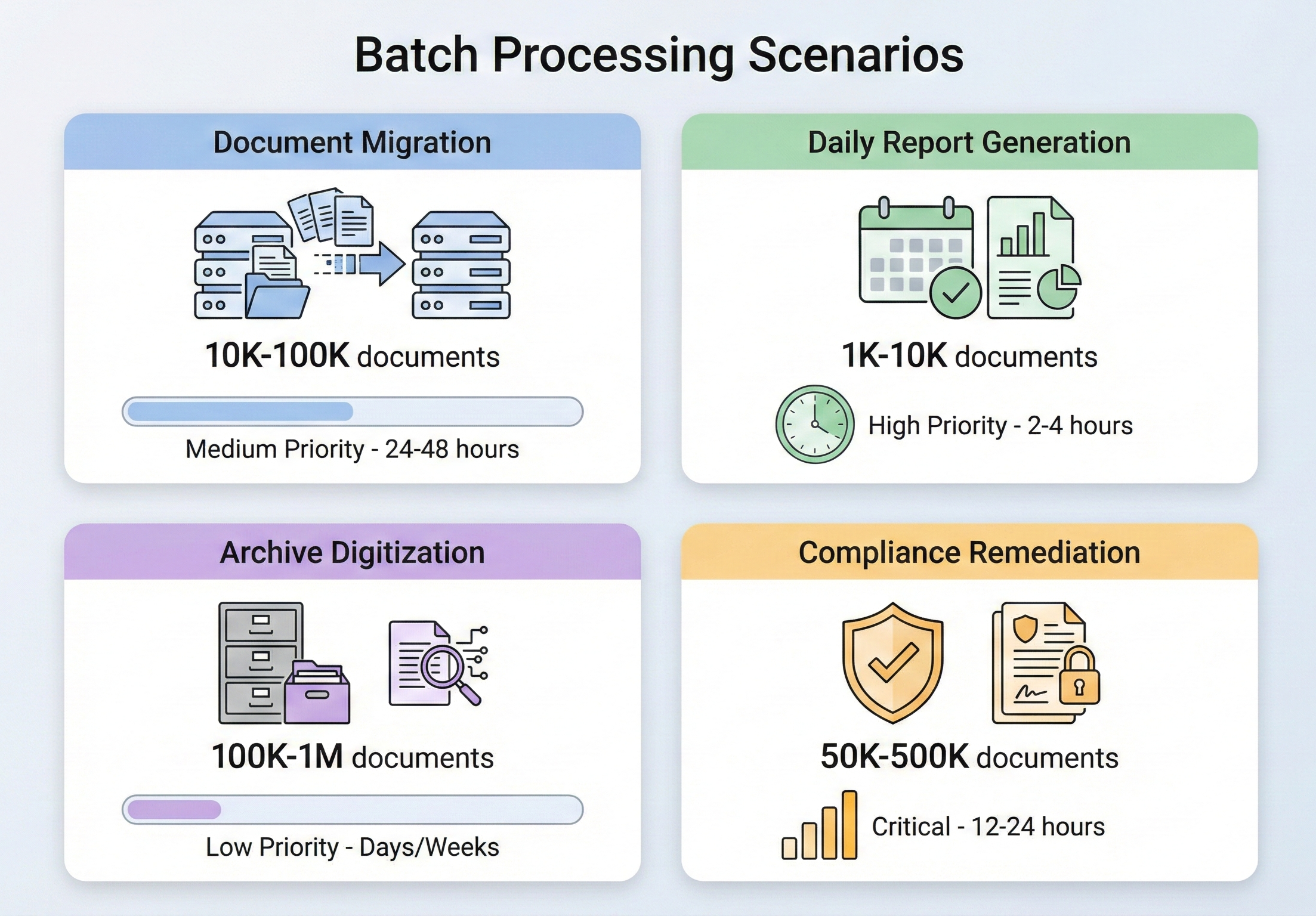
当您需要处理数千份 PDF 文件时
批量处理 PDF 并不是小众需求,而是企业文档管理的常规部分。 各行各业都会遇到需要翻译的情况,而这些情况都有一个共同的特点:一次做完一件事是不可能的。
文档迁移项目是最常见的触发因素之一。 当一个组织从一个文档管理系统转移到另一个系统时,成千上万(有时是数百万)的文档需要转换、重新格式化或重新标记。 一家保险公司从传统理赔系统迁移过来,可能需要将 500,000 份基于 TIFF 的理赔文件转换为可搜索的 PDF 文件。 一家律师事务所在迁移到新的案件管理平台后,可能需要将分散的信件合并到统一的案件文件中。 这些工作都是一次性的,但范围很大,而且不容出错。
每日报告生成是同一问题的稳态版本。 金融机构要为成千上万的客户生成每日投资组合报告,物流公司要为每个出港集装箱生成货运清单,医疗保健系统要为成百上千的科室生成每日病人摘要--所有这些都要生成 PDF 输出,其规模之大,顺序处理将超过可接受的时间窗口。 如果需要在早上 6 点之前准备好 10,000 份报告,而数据要到午夜才能最终完成,那么您就没有 6 个小时的时间来逐一渲染这些报告。
档案数字化是迁移和合规性的交叉点。 拥有数十年纸质记录的政府机构、大学和企业面临着将文档数字化并以符合标准的格式(通常为 PDF/A)归档的任务。 翻译量是惊人的--仅 NARA 就接收了数百万页需要永久保存的联邦记录--翻译过程必须足够可靠,以免多年后发现漏洞。
合规补救通常是最紧迫的触发因素。 当审计发现您的文档存档不符合新实施的标准时--例如,您存储的发票不符合电子发票规定的 PDF/A-3,或者您的医疗记录缺乏 508 条款要求的可访问性标记--您需要根据新标准处理整个现有存档。 工作压力大,时间紧迫,工作量随您的存档文件而定。
在上述每一种情况下,核心挑战都是一样的:如何可靠、高效地处理大量 PDF 操作,并且在出错时不会耗尽内存或留下半成品?
IronPDF 批量处理架构
在深入了解具体操作之前,有必要了解 IronPDF 是如何设计来处理并发工作负载的,以及在其基础上构建批处理流水线时应做出哪些架构决策。
安装 IronPDF
通过 NuGet 安装 IronPdf:
Install-Package IronPdfInstall-Package IronPdf或使用.NET CLI:
dotnet add package IronPdfdotnet add package IronPdfIronPDF 支持 .NET Framework 4.6.2+、.NET Core、.NET 5 到 .NET 10 以及 .NET Standard 2.0。它可在 Windows、Linux、macOS 和 Docker 容器上运行,因此既适用于内部批处理作业,也适用于云原生部署。
对于生产批量处理,请在应用程序启动时,在任何 PDF 操作开始之前,使用 License.LicenseKey 设置您的许可证密钥。 这样可以确保所有线程中的每个渲染调用都能使用完整的功能集,而不会在每个文件上留下水印。
并发控制和线程安全
IronPDF 基于 Chromium 的渲染引擎是线程安全的。 您可以跨线程创建多个 ChromePdfRenderer 实例,或者共享单个实例 — IronPDF会处理内部同步。 官方建议的批量处理方法是使用 .NET 内置的 Parallel.ForEach,它会自动将工作分配到所有可用的 CPU 核心上。
也就是说,"线程安全"并不意味着"使用无限线程"。每个并发的 PDF 渲染操作都会消耗内存(Chromium 引擎需要工作空间来进行 DOM 解析、CSS 布局和图像光栅化),在内存受限的系统上启动过多的并行操作会降低性能或导致 OutOfMemoryException。 正确的并发级别取决于您的硬件:配备 64 GB 内存的 16 核服务器可以轻松处理 8-12 次并发渲染; 一台 4 核 8 GB 内存的虚拟机可能只能运行 2-4 个 CPU 核心。使用 ParallelOptions.MaxDegreeOfParallelism 控制此设置 — 将其设置为可用 CPU 核心数的一半左右作为起点,然后根据观察到的内存压力进行调整。
大规模内存管理
内存管理是批量 PDF 处理中最重要的问题。 每个 PdfDocument 对象都保存着内存中 PDF 的完整二进制内容,如果不释放这些对象,内存将随着处理的文件数量线性增长。
关键规则:始终使用 using 语句或在 PdfDocument 对象上显式调用Dispose()。 IronPDF 的 PdfDocument 实现了 IDisposable,而未能释放内存是批处理场景中内存问题的最常见原因。 处理循环的每次迭代都应该创建一个 PdfDocument,执行其工作,然后释放它——除非有特殊原因并且有足够的内存来处理,否则永远不要在列表或集合中积累 PdfDocument 对象。
除了处理之外,还可以考虑采用这些内存管理策略来处理大批量文件:
分块处理,而不是一次性加载所有内容。 如果您需要处理 50,000 个文件,请不要将它们全部枚举到一个列表中,然后进行迭代,而是以 100 或 500 为一批进行处理,让垃圾回收器在每批之间回收内存。
对于超大批量数据,强制在数据块之间进行垃圾回收。 虽然通常应该让 GC 自行管理,但批量处理是少数几种情况之一,在块边界之间调用 GC.Collect() 可以防止内存压力累积。
使用 GC.GetTotalMemory() 或进程级指标监控内存消耗。 如果内存使用量超过阈值(如可用内存的 80%),则暂停处理,让 GC 赶上。
进度报告和日志
当一项批处理工作需要数小时才能完成时,对其进度的可视性就不是可有可无的了,而是至关重要的。 至少应记录每个文件的开始和完成时间,跟踪成功/失败次数,并提供预计剩余时间。 运行并行操作时,请使用 Interlocked.Increment 进行线程安全计数器,并定期(每 50 或 100 个文件)记录日志,而不是在每个文件上记录日志,以避免输出过多。 使用 System.Diagnostics.Stopwatch 跟踪您的运行时间,并计算每秒运行的文件数,以给出有意义的预计完成时间。
对于生产批处理作业,请考虑将进度写入持久存储(数据库、文件或消息队列),这样监控仪表板就可以显示实时状态,而无需直接连接到批处理流程。
常见批处理操作
有了架构基础,让我们来了解一下最常见的批处理操作及其 IronPDF 实现。
批量 HTML 到 PDF 转换
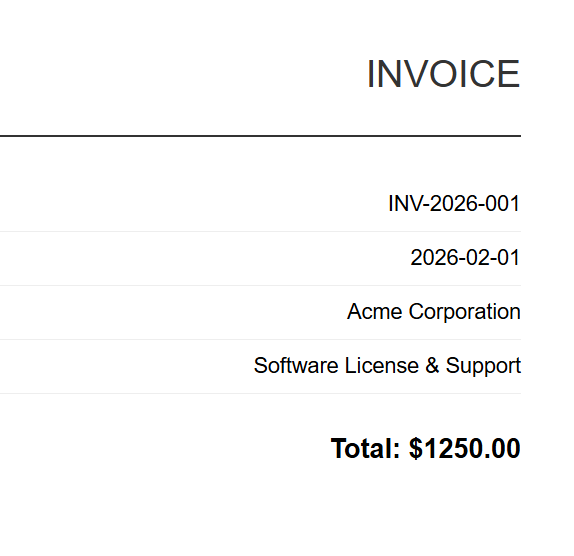
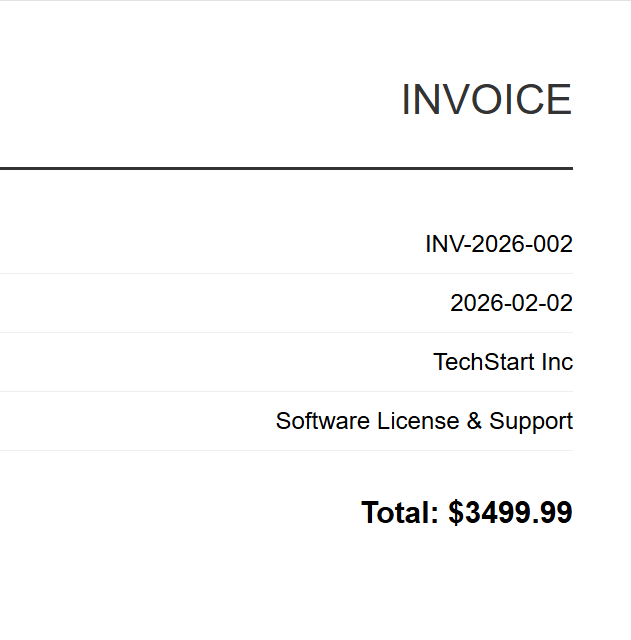
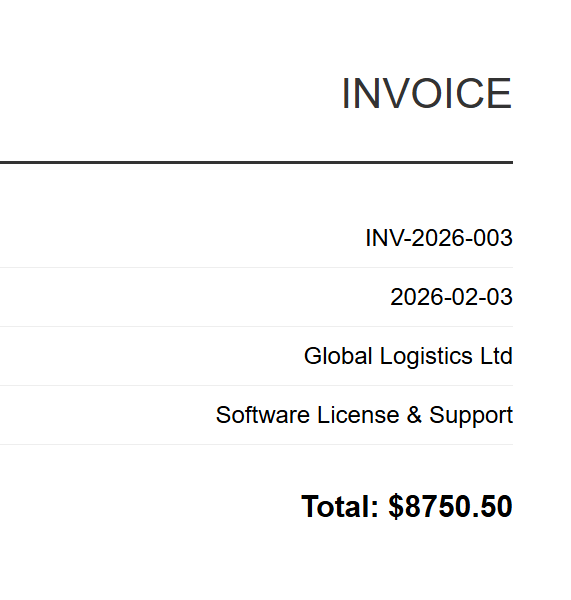
HTML 到 PDF 的转换是最常见的批量操作。 无论是从模板生成发票、将 HTML 文档库转换为 PDF,还是从网络应用程序渲染动态报告,模式都是一样的:遍历输入、渲染每个输入并保存输出。
输入(5 个 HTML 文件)
INV-2026-001
INV-2026-002
INV-2026-003
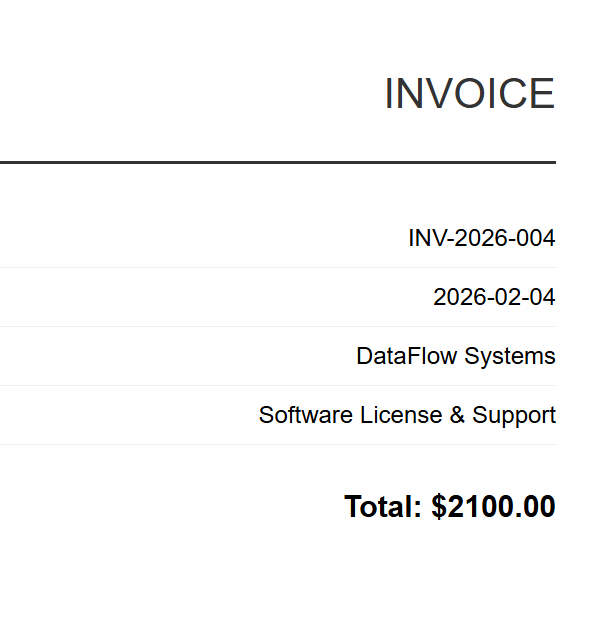
INV-2026-004
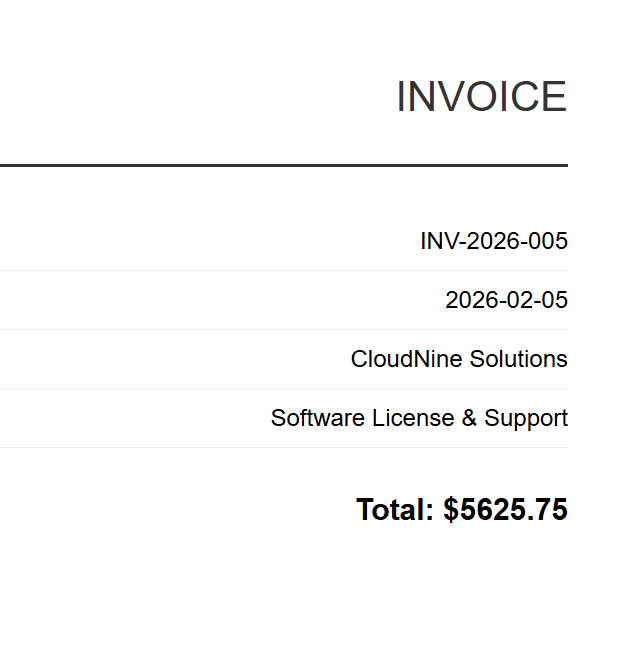
INV-2026-005
该实现使用 ChromePdfRenderer 和 Parallel.ForEach 并发处理所有 HTML 文件,通过 MaxDegreeOfParallelism 控制并行性,以平衡吞吐量和内存消耗。 每个文件都使用 RenderHtmlFileAsPdf 进行渲染,并保存到输出目录,通过线程安全的 Interlocked 计数器进行进度跟踪。
:path=/static-assets/pdf/content-code-examples/tutorials/batch-pdf-processing-csharp/batch-processing-html-to-pdf.csusing IronPdf;
using System;
using System.IO;
using System.Threading.Tasks;
using System.Threading;
// Configure paths
string inputFolder = "input/";
string outputFolder = "output/";
Directory.CreateDirectory(outputFolder);
string[] htmlFiles = Directory.GetFiles(inputFolder, "*.html");
Console.WriteLine($"Found {htmlFiles.Length} HTML files to convert");
// Create renderer instance (thread-safe, can be shared)
var renderer = new ChromePdfRenderer();
// Track progress
int processed = 0;
int failed = 0;
// Process in parallel with controlled concurrency
var options = new ParallelOptions
{
MaxDegreeOfParallelism = Environment.ProcessorCount / 2
};
Parallel.ForEach(htmlFiles, options, htmlFile =>
{
try
{
string fileName = Path.GetFileNameWithoutExtension(htmlFile);
string outputPath = Path.Combine(outputFolder, $"{fileName}.pdf");
using var pdf = renderer.RenderHtmlFileAsPdf(htmlFile);
pdf.SaveAs(outputPath);
Interlocked.Increment(ref processed);
Console.WriteLine($"[OK] {fileName}.pdf");
}
catch (Exception ex)
{
Interlocked.Increment(ref failed);
Console.WriteLine($"[ERROR] {Path.GetFileName(htmlFile)}: {ex.Message}");
}
});
Console.WriteLine($"\nComplete: {processed} succeeded, {failed} failed");Imports IronPdf
Imports System
Imports System.IO
Imports System.Threading.Tasks
Imports System.Threading
' Configure paths
Dim inputFolder As String = "input/"
Dim outputFolder As String = "output/"
Directory.CreateDirectory(outputFolder)
Dim htmlFiles As String() = Directory.GetFiles(inputFolder, "*.html")
Console.WriteLine($"Found {htmlFiles.Length} HTML files to convert")
' Create renderer instance (thread-safe, can be shared)
Dim renderer As New ChromePdfRenderer()
' Track progress
Dim processed As Integer = 0
Dim failed As Integer = 0
' Process in parallel with controlled concurrency
Dim options As New ParallelOptions With {
.MaxDegreeOfParallelism = Environment.ProcessorCount \ 2
}
Parallel.ForEach(htmlFiles, options, Sub(htmlFile)
Try
Dim fileName As String = Path.GetFileNameWithoutExtension(htmlFile)
Dim outputPath As String = Path.Combine(outputFolder, $"{fileName}.pdf")
Using pdf = renderer.RenderHtmlFileAsPdf(htmlFile)
pdf.SaveAs(outputPath)
End Using
Interlocked.Increment(processed)
Console.WriteLine($"[OK] {fileName}.pdf")
Catch ex As Exception
Interlocked.Increment(failed)
Console.WriteLine($"[ERROR] {Path.GetFileName(htmlFile)}: {ex.Message}")
End Try
End Sub)
Console.WriteLine($"\nComplete: {processed} succeeded, {failed} failed")输出
每张 HTML 发票都会渲染成相应的 PDF 文件。 上图显示的是 INV-2026-001.pdf - 5 个批量输出之一。
对于基于模板的生成(如发票、报告),您通常会在渲染前将数据合并到 HTML 模板中。 这种方法很简单:加载一次 HTML 模板,使用 string.Replace 注入每条记录的数据(客户名称、总计、日期),然后将填充好的 HTML 传递给并行循环中的 RenderHtmlAsPdf。 IronPDF还提供了 RenderHtmlAsPdfAsync,用于您希望使用 async/await 而不是 Parallel.ForEach 的情况——我们将在后面的章节中详细介绍异步模式。
批量 PDF合并
在法律(合并案件卷宗文件)、财务(将月度报表合并为季度报告)和出版工作流程中,将 PDF 文件组合并为综合文件是很常见的。
:path=/static-assets/pdf/content-code-examples/tutorials/batch-pdf-processing-csharp/batch-processing-merge.csusing IronPdf;
using System;
using System.IO;
using System.Linq;
using System.Collections.Generic;
string inputFolder = "documents/";
string outputFolder = "merged/";
Directory.CreateDirectory(outputFolder);
// Group PDFs by prefix (e.g., "invoice-2026-01-*.pdf" -> one merged file)
var pdfFiles = Directory.GetFiles(inputFolder, "*.pdf");
var groups = pdfFiles
.GroupBy(f => Path.GetFileName(f).Split('-').Take(3).Aggregate((a, b) => $"{a}-{b}"))
.Where(g => g.Count() > 1);
Console.WriteLine($"Found {groups.Count()} groups to merge");
foreach (var group in groups)
{
string groupName = group.Key;
var filesToMerge = group.OrderBy(f => f).ToList();
Console.WriteLine($"Merging {filesToMerge.Count} files into {groupName}.pdf");
try
{
// Load all PDFs for this group
var pdfDocs = new List<PdfDocument>();
foreach (string filePath in filesToMerge)
{
pdfDocs.Add(PdfDocument.FromFile(filePath));
}
// Merge all documents
using var merged = PdfDocument.Merge(pdfDocs);
merged.SaveAs(Path.Combine(outputFolder, $"{groupName}-merged.pdf"));
// Dispose source documents
foreach (var doc in pdfDocs)
{
doc.Dispose();
}
Console.WriteLine($" [OK] Created {groupName}-merged.pdf ({merged.PageCount} pages)");
}
catch (Exception ex)
{
Console.WriteLine($" [ERROR] {groupName}: {ex.Message}");
}
}
Console.WriteLine("\nMerge complete");Imports IronPdf
Imports System
Imports System.IO
Imports System.Linq
Imports System.Collections.Generic
Module Program
Sub Main()
Dim inputFolder As String = "documents/"
Dim outputFolder As String = "merged/"
Directory.CreateDirectory(outputFolder)
' Group PDFs by prefix (e.g., "invoice-2026-01-*.pdf" -> one merged file)
Dim pdfFiles = Directory.GetFiles(inputFolder, "*.pdf")
Dim groups = pdfFiles _
.GroupBy(Function(f) Path.GetFileName(f).Split("-"c).Take(3).Aggregate(Function(a, b) $"{a}-{b}")) _
.Where(Function(g) g.Count() > 1)
Console.WriteLine($"Found {groups.Count()} groups to merge")
For Each group In groups
Dim groupName As String = group.Key
Dim filesToMerge = group.OrderBy(Function(f) f).ToList()
Console.WriteLine($"Merging {filesToMerge.Count} files into {groupName}.pdf")
Try
' Load all PDFs for this group
Dim pdfDocs As New List(Of PdfDocument)()
For Each filePath As String In filesToMerge
pdfDocs.Add(PdfDocument.FromFile(filePath))
Next
' Merge all documents
Using merged = PdfDocument.Merge(pdfDocs)
merged.SaveAs(Path.Combine(outputFolder, $"{groupName}-merged.pdf"))
End Using
' Dispose source documents
For Each doc In pdfDocs
doc.Dispose()
Next
Console.WriteLine($" [OK] Created {groupName}-merged.pdf ({merged.PageCount} pages)")
Catch ex As Exception
Console.WriteLine($" [ERROR] {groupName}: {ex.Message}")
End Try
Next
Console.WriteLine(vbCrLf & "Merge complete")
End Sub
End Module合并大量文件时,请注意内存:PdfDocument.Merge 方法会将所有源文档同时加载到内存中。 如果您要合并数百个大型 PDF 文件,可以考虑分阶段合并 - 将 10-20 个文件组合并为中间文件,然后再合并中间文件。
批量 PDF拆分
将多页 PDF 分割成单个页面(或页面范围)是合并的逆过程。 常见于邮件收发室处理中,需要将扫描的批量文档分离成单个记录,以及打印工作流程中,需要将复合文档拆分。
输入
下面的代码演示了如何使用 CopyPage 在并行循环中提取单个页面,并为每个页面创建单独的 PDF 文件。 另一个 SplitByRange 辅助函数展示了如何提取页面范围而不是单个页面,这对于将大型文档分成较小的部分非常有用。
:path=/static-assets/pdf/content-code-examples/tutorials/batch-pdf-processing-csharp/batch-processing-split.csusing IronPdf;
using System;
using System.IO;
using System.Threading.Tasks;
string inputFolder = "multipage/";
string outputFolder = "split/";
Directory.CreateDirectory(outputFolder);
string[] pdfFiles = Directory.GetFiles(inputFolder, "*.pdf");
Console.WriteLine($"Found {pdfFiles.Length} PDFs to split");
var options = new ParallelOptions
{
MaxDegreeOfParallelism = Environment.ProcessorCount / 2
};
Parallel.ForEach(pdfFiles, options, pdfFile =>
{
string baseName = Path.GetFileNameWithoutExtension(pdfFile);
try
{
using var pdf = PdfDocument.FromFile(pdfFile);
int pageCount = pdf.PageCount;
Console.WriteLine($"Splitting {baseName}.pdf ({pageCount} pages)");
// Extract each page as a separate PDF
for (int i = 0; i < pageCount; i++)
{
using var singlePage = pdf.CopyPage(i);
string outputPath = Path.Combine(outputFolder, $"{baseName}-page-{i + 1:D3}.pdf");
singlePage.SaveAs(outputPath);
}
Console.WriteLine($" [OK] Created {pageCount} files from {baseName}.pdf");
}
catch (Exception ex)
{
Console.WriteLine($" [ERROR] {baseName}: {ex.Message}");
}
});
// Alternative: Extract page ranges instead of individual pages
void SplitByRange(string inputFile, string outputFolder, int pagesPerChunk)
{
using var pdf = PdfDocument.FromFile(inputFile);
string baseName = Path.GetFileNameWithoutExtension(inputFile);
int totalPages = pdf.PageCount;
int chunkNumber = 1;
for (int startPage = 0; startPage < totalPages; startPage += pagesPerChunk)
{
int endPage = Math.Min(startPage + pagesPerChunk - 1, totalPages - 1);
using var chunk = pdf.CopyPages(startPage, endPage);
chunk.SaveAs(Path.Combine(outputFolder, $"{baseName}-chunk-{chunkNumber:D3}.pdf"));
chunkNumber++;
}
}
Console.WriteLine("\nSplit complete");Imports IronPdf
Imports System
Imports System.IO
Imports System.Threading.Tasks
Module Program
Sub Main()
Dim inputFolder As String = "multipage/"
Dim outputFolder As String = "split/"
Directory.CreateDirectory(outputFolder)
Dim pdfFiles As String() = Directory.GetFiles(inputFolder, "*.pdf")
Console.WriteLine($"Found {pdfFiles.Length} PDFs to split")
Dim options As New ParallelOptions With {
.MaxDegreeOfParallelism = Environment.ProcessorCount \ 2
}
Parallel.ForEach(pdfFiles, options, Sub(pdfFile)
Dim baseName As String = Path.GetFileNameWithoutExtension(pdfFile)
Try
Using pdf = PdfDocument.FromFile(pdfFile)
Dim pageCount As Integer = pdf.PageCount
Console.WriteLine($"Splitting {baseName}.pdf ({pageCount} pages)")
' Extract each page as a separate PDF
For i As Integer = 0 To pageCount - 1
Using singlePage = pdf.CopyPage(i)
Dim outputPath As String = Path.Combine(outputFolder, $"{baseName}-page-{i + 1:D3}.pdf")
singlePage.SaveAs(outputPath)
End Using
Next
Console.WriteLine($" [OK] Created {pageCount} files from {baseName}.pdf")
End Using
Catch ex As Exception
Console.WriteLine($" [ERROR] {baseName}: {ex.Message}")
End Try
End Sub)
' Alternative: Extract page ranges instead of individual pages
Sub SplitByRange(inputFile As String, outputFolder As String, pagesPerChunk As Integer)
Using pdf = PdfDocument.FromFile(inputFile)
Dim baseName As String = Path.GetFileNameWithoutExtension(inputFile)
Dim totalPages As Integer = pdf.PageCount
Dim chunkNumber As Integer = 1
For startPage As Integer = 0 To totalPages - 1 Step pagesPerChunk
Dim endPage As Integer = Math.Min(startPage + pagesPerChunk - 1, totalPages - 1)
Using chunk = pdf.CopyPages(startPage, endPage)
chunk.SaveAs(Path.Combine(outputFolder, $"{baseName}-chunk-{chunkNumber:D3}.pdf"))
chunkNumber += 1
End Using
Next
End Using
End Sub
Console.WriteLine(vbCrLf & "Split complete")
End Sub
End Module输出
第 2 页以独立 PDF 格式提取(年度报告-page-2.pdf)
IronPDF 的 CopyPage 和 CopyPages 方法创建包含指定页面的新 PdfDocument 对象。 请记住,在保存后,要同时处理源文件和每个提取的页面文件。
批量压缩
当存储成本很高或需要在带宽受限的连接上传输 PDF 时,批量压缩可以显著减少存档占用空间。 IronPDF提供两种压缩方法:CompressImages 用于降低图像质量/大小,以及 CompressStructTree 用于删除结构元数据。 较新的 CompressAndSaveAs API(在 2025.12 版本中引入)通过结合多种优化技术提供更优越的压缩性能。
:path=/static-assets/pdf/content-code-examples/tutorials/batch-pdf-processing-csharp/batch-processing-compression.csusing IronPdf;
using System;
using System.IO;
using System.Threading.Tasks;
using System.Threading;
string inputFolder = "originals/";
string outputFolder = "compressed/";
Directory.CreateDirectory(outputFolder);
string[] pdfFiles = Directory.GetFiles(inputFolder, "*.pdf");
Console.WriteLine($"Found {pdfFiles.Length} PDFs to compress");
long totalOriginalSize = 0;
long totalCompressedSize = 0;
int processed = 0;
var options = new ParallelOptions
{
MaxDegreeOfParallelism = Environment.ProcessorCount / 2
};
Parallel.ForEach(pdfFiles, options, pdfFile =>
{
string fileName = Path.GetFileName(pdfFile);
string outputPath = Path.Combine(outputFolder, fileName);
try
{
long originalSize = new FileInfo(pdfFile).Length;
Interlocked.Add(ref totalOriginalSize, originalSize);
using var pdf = PdfDocument.FromFile(pdfFile);
// Apply compression with JPEG quality setting (0-100, lower = more compression)
pdf.CompressAndSaveAs(outputPath, 60);
long compressedSize = new FileInfo(outputPath).Length;
Interlocked.Add(ref totalCompressedSize, compressedSize);
Interlocked.Increment(ref processed);
double reduction = (1 - (double)compressedSize / originalSize) * 100;
Console.WriteLine($"[OK] {fileName}: {originalSize / 1024}KB → {compressedSize / 1024}KB ({reduction:F1}% reduction)");
}
catch (Exception ex)
{
Console.WriteLine($"[ERROR] {fileName}: {ex.Message}");
}
});
double totalReduction = (1 - (double)totalCompressedSize / totalOriginalSize) * 100;
Console.WriteLine($"\nCompression complete:");
Console.WriteLine($" Files processed: {processed}");
Console.WriteLine($" Total original: {totalOriginalSize / 1024 / 1024}MB");
Console.WriteLine($" Total compressed: {totalCompressedSize / 1024 / 1024}MB");
Console.WriteLine($" Overall reduction: {totalReduction:F1}%");Imports IronPdf
Imports System
Imports System.IO
Imports System.Threading.Tasks
Imports System.Threading
Module Program
Sub Main()
Dim inputFolder As String = "originals/"
Dim outputFolder As String = "compressed/"
Directory.CreateDirectory(outputFolder)
Dim pdfFiles As String() = Directory.GetFiles(inputFolder, "*.pdf")
Console.WriteLine($"Found {pdfFiles.Length} PDFs to compress")
Dim totalOriginalSize As Long = 0
Dim totalCompressedSize As Long = 0
Dim processed As Integer = 0
Dim options As New ParallelOptions With {
.MaxDegreeOfParallelism = Environment.ProcessorCount \ 2
}
Parallel.ForEach(pdfFiles, options, Sub(pdfFile)
Dim fileName As String = Path.GetFileName(pdfFile)
Dim outputPath As String = Path.Combine(outputFolder, fileName)
Try
Dim originalSize As Long = New FileInfo(pdfFile).Length
Interlocked.Add(totalOriginalSize, originalSize)
Using pdf = PdfDocument.FromFile(pdfFile)
' Apply compression with JPEG quality setting (0-100, lower = more compression)
pdf.CompressAndSaveAs(outputPath, 60)
End Using
Dim compressedSize As Long = New FileInfo(outputPath).Length
Interlocked.Add(totalCompressedSize, compressedSize)
Interlocked.Increment(processed)
Dim reduction As Double = (1 - CDbl(compressedSize) / originalSize) * 100
Console.WriteLine($"[OK] {fileName}: {originalSize \ 1024}KB → {compressedSize \ 1024}KB ({reduction:F1}% reduction)")
Catch ex As Exception
Console.WriteLine($"[ERROR] {fileName}: {ex.Message}")
End Try
End Sub)
Dim totalReduction As Double = (1 - CDbl(totalCompressedSize) / totalOriginalSize) * 100
Console.WriteLine(vbCrLf & "Compression complete:")
Console.WriteLine($" Files processed: {processed}")
Console.WriteLine($" Total original: {totalOriginalSize \ 1024 \ 1024}MB")
Console.WriteLine($" Total compressed: {totalCompressedSize \ 1024 \ 1024}MB")
Console.WriteLine($" Overall reduction: {totalReduction:F1}%")
End Sub
End Module关于压缩,有几点需要注意:JPEG 质量设置低于 60 会在大多数图像中产生明显的伪影。 ShrinkImage 选项在某些配置下可能会导致失真——在运行完整批次之前,请用代表性样本进行测试。 删除结构树(CompressStructTree)会影响压缩 PDF 中的文本选择和搜索,因此只有在不需要这些功能时才使用它。
批量格式转换(PDF/A、PDF/UA)
将现有存档转换为符合标准的格式(用于长期存档的 PDF/A 或用于可访问性的 PDF/UA)是价值最高的批量操作之一。 IronPDF 支持全部 PDF/A 版本(包括 2025.11 版新增的 PDF/A-4)和 PDF/UA 合规性(包括 2025.12 版新增的 PDF/UA-2)。
输入
该示例使用 PdfDocument.FromFile 加载每个 PDF,然后使用 SaveAsPdfA 和 PdfAVersions.PdfA3b 参数将其转换为 PDF/A-3b。 另一种 ConvertToPdfUA 函数演示了使用 SaveAsPdfUA 进行辅助功能合规性转换,尽管 PDF/UA 需要具有正确结构标记的源文档。
:path=/static-assets/pdf/content-code-examples/tutorials/batch-pdf-processing-csharp/batch-processing-format-conversion.csusing IronPdf;
using System;
using System.IO;
using System.Threading.Tasks;
using System.Threading;
string inputFolder = "originals/";
string outputFolder = "pdfa-archive/";
Directory.CreateDirectory(outputFolder);
string[] pdfFiles = Directory.GetFiles(inputFolder, "*.pdf");
Console.WriteLine($"Found {pdfFiles.Length} PDFs to convert to PDF/A-3b");
int converted = 0;
int failed = 0;
var options = new ParallelOptions
{
MaxDegreeOfParallelism = Environment.ProcessorCount / 2
};
Parallel.ForEach(pdfFiles, options, pdfFile =>
{
string fileName = Path.GetFileName(pdfFile);
string outputPath = Path.Combine(outputFolder, fileName);
try
{
using var pdf = PdfDocument.FromFile(pdfFile);
// Convert to PDF/A-3b for long-term archival
pdf.SaveAsPdfA(outputPath, PdfAVersions.PdfA3b);
Interlocked.Increment(ref converted);
Console.WriteLine($"[OK] {fileName} → PDF/A-3b");
}
catch (Exception ex)
{
Interlocked.Increment(ref failed);
Console.WriteLine($"[ERROR] {fileName}: {ex.Message}");
}
});
Console.WriteLine($"\nConversion complete: {converted} succeeded, {failed} failed");
// Alternative: Convert to PDF/UA for accessibility compliance
void ConvertToPdfUA(string inputFolder, string outputFolder)
{
Directory.CreateDirectory(outputFolder);
string[] files = Directory.GetFiles(inputFolder, "*.pdf");
Parallel.ForEach(files, pdfFile =>
{
string fileName = Path.GetFileName(pdfFile);
try
{
using var pdf = PdfDocument.FromFile(pdfFile);
// PDF/UA requires proper tagging - ensure source is well-structured
pdf.SaveAsPdfUA(Path.Combine(outputFolder, fileName));
Console.WriteLine($"[OK] {fileName} → PDF/UA");
}
catch (Exception ex)
{
Console.WriteLine($"[ERROR] {fileName}: {ex.Message}");
}
});
}Imports IronPdf
Imports System
Imports System.IO
Imports System.Threading.Tasks
Imports System.Threading
Module Program
Sub Main()
Dim inputFolder As String = "originals/"
Dim outputFolder As String = "pdfa-archive/"
Directory.CreateDirectory(outputFolder)
Dim pdfFiles As String() = Directory.GetFiles(inputFolder, "*.pdf")
Console.WriteLine($"Found {pdfFiles.Length} PDFs to convert to PDF/A-3b")
Dim converted As Integer = 0
Dim failed As Integer = 0
Dim options As New ParallelOptions With {
.MaxDegreeOfParallelism = Environment.ProcessorCount \ 2
}
Parallel.ForEach(pdfFiles, options, Sub(pdfFile)
Dim fileName As String = Path.GetFileName(pdfFile)
Dim outputPath As String = Path.Combine(outputFolder, fileName)
Try
Using pdf = PdfDocument.FromFile(pdfFile)
' Convert to PDF/A-3b for long-term archival
pdf.SaveAsPdfA(outputPath, PdfAVersions.PdfA3b)
Interlocked.Increment(converted)
Console.WriteLine($"[OK] {fileName} → PDF/A-3b")
End Using
Catch ex As Exception
Interlocked.Increment(failed)
Console.WriteLine($"[ERROR] {fileName}: {ex.Message}")
End Try
End Sub)
Console.WriteLine($"{vbCrLf}Conversion complete: {converted} succeeded, {failed} failed")
End Sub
' Alternative: Convert to PDF/UA for accessibility compliance
Sub ConvertToPdfUA(inputFolder As String, outputFolder As String)
Directory.CreateDirectory(outputFolder)
Dim files As String() = Directory.GetFiles(inputFolder, "*.pdf")
Parallel.ForEach(files, Sub(pdfFile)
Dim fileName As String = Path.GetFileName(pdfFile)
Try
Using pdf = PdfDocument.FromFile(pdfFile)
' PDF/UA requires proper tagging - ensure source is well-structured
pdf.SaveAsPdfUA(Path.Combine(outputFolder, fileName))
Console.WriteLine($"[OK] {fileName} → PDF/UA")
End Using
Catch ex As Exception
Console.WriteLine($"[ERROR] {fileName}: {ex.Message}")
End Try
End Sub)
End Sub
End Module输出

输出的 PDF 在外观上字节对字节完全相同,但现在带有用于存档系统的 PDF/A-3b 合规元数据。
格式转换对于合规性补救项目尤为重要,在这些项目中,组织会发现其现有存档不符合法规标准。 批处理模式简单明了,但验证步骤至关重要--在认为完成之前,一定要验证每个转换后的文件是否真正通过了合规性检查。 我们将在下文的弹性部分详细介绍验证。
构建弹性批处理管道
一个批处理管道在 100 个文件上运行完美,但在 50,000 个文件中的第 4,327 个文件上崩溃,这样的批处理管道是没有用的。 弹性--优雅地处理错误、重试瞬时故障和崩溃后恢复的能力--是生产级管道与原型的区别所在。
错误处理和故障跳过
最基本的恢复模式是故障时跳过:如果单个文件处理失败,则记录错误并继续处理下一个文件,而不是中止整个批处理。 这听起来很明显,但当你使用 Parallel.ForEach 时,却很容易被忽略——任何并行任务中未处理的异常都会传播为 AggregateException 并终止循环。
以下示例演示了失败时跳过和重试逻辑的结合——将每个文件包装在 try-catch 中以实现优雅的错误处理,并使用内部重试循环对诸如 IOException 和 OutOfMemoryException 之类的瞬态异常使用指数退避:
:path=/static-assets/pdf/content-code-examples/tutorials/batch-pdf-processing-csharp/batch-processing-error-handling-retry.csusing IronPdf;
using System;
using System.IO;
using System.Threading.Tasks;
using System.Threading;
using System.Collections.Concurrent;
string inputFolder = "input/";
string outputFolder = "output/";
string errorLogPath = "error-log.txt";
Directory.CreateDirectory(outputFolder);
string[] htmlFiles = Directory.GetFiles(inputFolder, "*.html");
var renderer = new ChromePdfRenderer();
var errorLog = new ConcurrentBag<string>();
int processed = 0;
int failed = 0;
int retried = 0;
const int maxRetries = 3;
var options = new ParallelOptions
{
MaxDegreeOfParallelism = Environment.ProcessorCount / 2
};
Parallel.ForEach(htmlFiles, options, htmlFile =>
{
string fileName = Path.GetFileNameWithoutExtension(htmlFile);
string outputPath = Path.Combine(outputFolder, $"{fileName}.pdf");
int attempt = 0;
bool success = false;
while (attempt < maxRetries && !success)
{
attempt++;
try
{
using var pdf = renderer.RenderHtmlFileAsPdf(htmlFile);
pdf.SaveAs(outputPath);
success = true;
Interlocked.Increment(ref processed);
if (attempt > 1)
{
Interlocked.Increment(ref retried);
Console.WriteLine($"[OK] {fileName}.pdf (succeeded on attempt {attempt})");
}
else
{
Console.WriteLine($"[OK] {fileName}.pdf");
}
}
catch (Exception ex) when (IsTransientException(ex) && attempt < maxRetries)
{
// Transient error - wait and retry with exponential backoff
int delayMs = (int)Math.Pow(2, attempt) * 500;
Console.WriteLine($"[RETRY] {fileName}: {ex.Message} (attempt {attempt}, waiting {delayMs}ms)");
Thread.Sleep(delayMs);
}
catch (Exception ex)
{
// Non-transient error or max retries exceeded
Interlocked.Increment(ref failed);
string errorMessage = $"{DateTime.Now:yyyy-MM-dd HH:mm:ss} | {fileName} | {ex.GetType().Name} | {ex.Message}";
errorLog.Add(errorMessage);
Console.WriteLine($"[ERROR] {fileName}: {ex.Message}");
}
}
});
// Write error log
if (errorLog.Count > 0)
{
File.WriteAllLines(errorLogPath, errorLog);
}
Console.WriteLine($"\nBatch complete:");
Console.WriteLine($" Processed: {processed}");
Console.WriteLine($" Failed: {failed}");
Console.WriteLine($" Retried: {retried}");
if (failed > 0)
{
Console.WriteLine($" Error log: {errorLogPath}");
}
// Helper to identify transient exceptions worth retrying
bool IsTransientException(Exception ex)
{
return ex is IOException ||
ex is OutOfMemoryException ||
ex.Message.Contains("timeout", StringComparison.OrdinalIgnoreCase) ||
ex.Message.Contains("locked", StringComparison.OrdinalIgnoreCase);
}Imports IronPdf
Imports System
Imports System.IO
Imports System.Threading
Imports System.Collections.Concurrent
Module Program
Sub Main()
Dim inputFolder As String = "input/"
Dim outputFolder As String = "output/"
Dim errorLogPath As String = "error-log.txt"
Directory.CreateDirectory(outputFolder)
Dim htmlFiles As String() = Directory.GetFiles(inputFolder, "*.html")
Dim renderer As New ChromePdfRenderer()
Dim errorLog As New ConcurrentBag(Of String)()
Dim processed As Integer = 0
Dim failed As Integer = 0
Dim retried As Integer = 0
Const maxRetries As Integer = 3
Dim options As New ParallelOptions With {
.MaxDegreeOfParallelism = Environment.ProcessorCount \ 2
}
Parallel.ForEach(htmlFiles, options, Sub(htmlFile)
Dim fileName As String = Path.GetFileNameWithoutExtension(htmlFile)
Dim outputPath As String = Path.Combine(outputFolder, $"{fileName}.pdf")
Dim attempt As Integer = 0
Dim success As Boolean = False
While attempt < maxRetries AndAlso Not success
attempt += 1
Try
Using pdf = renderer.RenderHtmlFileAsPdf(htmlFile)
pdf.SaveAs(outputPath)
success = True
Interlocked.Increment(processed)
If attempt > 1 Then
Interlocked.Increment(retried)
Console.WriteLine($"[OK] {fileName}.pdf (succeeded on attempt {attempt})")
Else
Console.WriteLine($"[OK] {fileName}.pdf")
End If
End Using
Catch ex As Exception When IsTransientException(ex) AndAlso attempt < maxRetries
' Transient error - wait and retry with exponential backoff
Dim delayMs As Integer = CInt(Math.Pow(2, attempt)) * 500
Console.WriteLine($"[RETRY] {fileName}: {ex.Message} (attempt {attempt}, waiting {delayMs}ms)")
Thread.Sleep(delayMs)
Catch ex As Exception
' Non-transient error or max retries exceeded
Interlocked.Increment(failed)
Dim errorMessage As String = $"{DateTime.Now:yyyy-MM-dd HH:mm:ss} | {fileName} | {ex.GetType().Name} | {ex.Message}"
errorLog.Add(errorMessage)
Console.WriteLine($"[ERROR] {fileName}: {ex.Message}")
End Try
End While
End Sub)
' Write error log
If errorLog.Count > 0 Then
File.WriteAllLines(errorLogPath, errorLog)
End If
Console.WriteLine($"{vbCrLf}Batch complete:")
Console.WriteLine($" Processed: {processed}")
Console.WriteLine($" Failed: {failed}")
Console.WriteLine($" Retried: {retried}")
If failed > 0 Then
Console.WriteLine($" Error log: {errorLogPath}")
End If
End Sub
' Helper to identify transient exceptions worth retrying
Function IsTransientException(ex As Exception) As Boolean
Return TypeOf ex Is IOException OrElse
TypeOf ex Is OutOfMemoryException OrElse
ex.Message.Contains("timeout", StringComparison.OrdinalIgnoreCase) OrElse
ex.Message.Contains("locked", StringComparison.OrdinalIgnoreCase)
End Function
End Module批处理完成后,查看错误日志以了解哪些文件失败以及失败原因。 常见的失败原因包括源文件损坏、PDF 文件受密码保护、源内容中不支持的功能以及超大文件出现内存不足的情况。
针对瞬态故障的重试逻辑
有些失败是短暂的--如果您再试一次,它们就会成功。 这些术语包括文件系统争用(另一个进程锁定了文件)、临时内存压力(GC 尚未跟上)以及在 HTML 内容中加载外部资源时的网络超时。 上面的代码示例使用指数式延迟处理这些问题--从较短的延迟开始,每次重试都将延迟加倍,并以最大重试次数(通常为 3 次)为上限。
关键是要区分可重试故障和不可重试故障。 如果出现 IOException(文件已锁定)或 OutOfMemoryException(临时压力),则值得重试。 ArgumentException(无效输入)或持续的渲染错误不是问题所在——重试不会有帮助,只会浪费时间和资源。
崩溃后恢复的检查点
当一项批处理工作在数小时内处理 50,000 个文件时,如果在处理第 35,000 号文件时出现崩溃,这并不意味着要从头开始。 检查点(Checkpointing)--记录哪些文件已被成功处理--让您可以从中断的地方继续。
:path=/static-assets/pdf/content-code-examples/tutorials/batch-pdf-processing-csharp/batch-processing-checkpointing.csusing IronPdf;
using System;
using System.IO;
using System.Linq;
using System.Threading.Tasks;
using System.Threading;
using System.Collections.Generic;
string inputFolder = "input/";
string outputFolder = "output/";
string checkpointPath = "checkpoint.txt";
string errorLogPath = "errors.txt";
Directory.CreateDirectory(outputFolder);
// Load checkpoint - files already processed successfully
var completedFiles = new HashSet<string>();
if (File.Exists(checkpointPath))
{
completedFiles = new HashSet<string>(File.ReadAllLines(checkpointPath));
Console.WriteLine($"Resuming from checkpoint: {completedFiles.Count} files already processed");
}
// Get files to process (excluding already completed)
string[] allFiles = Directory.GetFiles(inputFolder, "*.html");
string[] filesToProcess = allFiles
.Where(f => !completedFiles.Contains(Path.GetFileName(f)))
.ToArray();
Console.WriteLine($"Files to process: {filesToProcess.Length} (skipping {completedFiles.Count} already done)");
var renderer = new ChromePdfRenderer();
var checkpointLock = new object();
int processed = 0;
int failed = 0;
var options = new ParallelOptions
{
MaxDegreeOfParallelism = Environment.ProcessorCount / 2
};
Parallel.ForEach(filesToProcess, options, htmlFile =>
{
string fileName = Path.GetFileName(htmlFile);
string baseName = Path.GetFileNameWithoutExtension(htmlFile);
string outputPath = Path.Combine(outputFolder, $"{baseName}.pdf");
try
{
using var pdf = renderer.RenderHtmlFileAsPdf(htmlFile);
pdf.SaveAs(outputPath);
// Record success in checkpoint (thread-safe)
lock (checkpointLock)
{
File.AppendAllText(checkpointPath, fileName + Environment.NewLine);
}
Interlocked.Increment(ref processed);
Console.WriteLine($"[OK] {baseName}.pdf");
}
catch (Exception ex)
{
Interlocked.Increment(ref failed);
// Log error for review
lock (checkpointLock)
{
File.AppendAllText(errorLogPath,
$"{DateTime.Now:yyyy-MM-dd HH:mm:ss} | {fileName} | {ex.Message}{Environment.NewLine}");
}
Console.WriteLine($"[ERROR] {fileName}: {ex.Message}");
}
});
Console.WriteLine($"\nBatch complete:");
Console.WriteLine($" Newly processed: {processed}");
Console.WriteLine($" Failed: {failed}");
Console.WriteLine($" Total completed: {completedFiles.Count + processed}");
Console.WriteLine($" Checkpoint saved to: {checkpointPath}");Imports IronPdf
Imports System
Imports System.IO
Imports System.Linq
Imports System.Threading.Tasks
Imports System.Threading
Imports System.Collections.Generic
Module Program
Sub Main()
Dim inputFolder As String = "input/"
Dim outputFolder As String = "output/"
Dim checkpointPath As String = "checkpoint.txt"
Dim errorLogPath As String = "errors.txt"
Directory.CreateDirectory(outputFolder)
' Load checkpoint - files already processed successfully
Dim completedFiles As New HashSet(Of String)()
If File.Exists(checkpointPath) Then
completedFiles = New HashSet(Of String)(File.ReadAllLines(checkpointPath))
Console.WriteLine($"Resuming from checkpoint: {completedFiles.Count} files already processed")
End If
' Get files to process (excluding already completed)
Dim allFiles As String() = Directory.GetFiles(inputFolder, "*.html")
Dim filesToProcess As String() = allFiles _
.Where(Function(f) Not completedFiles.Contains(Path.GetFileName(f))) _
.ToArray()
Console.WriteLine($"Files to process: {filesToProcess.Length} (skipping {completedFiles.Count} already done)")
Dim renderer As New ChromePdfRenderer()
Dim checkpointLock As New Object()
Dim processed As Integer = 0
Dim failed As Integer = 0
Dim options As New ParallelOptions With {
.MaxDegreeOfParallelism = Environment.ProcessorCount \ 2
}
Parallel.ForEach(filesToProcess, options, Sub(htmlFile)
Dim fileName As String = Path.GetFileName(htmlFile)
Dim baseName As String = Path.GetFileNameWithoutExtension(htmlFile)
Dim outputPath As String = Path.Combine(outputFolder, $"{baseName}.pdf")
Try
Using pdf = renderer.RenderHtmlFileAsPdf(htmlFile)
pdf.SaveAs(outputPath)
End Using
' Record success in checkpoint (thread-safe)
SyncLock checkpointLock
File.AppendAllText(checkpointPath, fileName & Environment.NewLine)
End SyncLock
Interlocked.Increment(processed)
Console.WriteLine($"[OK] {baseName}.pdf")
Catch ex As Exception
Interlocked.Increment(failed)
' Log error for review
SyncLock checkpointLock
File.AppendAllText(errorLogPath,
$"{DateTime.Now:yyyy-MM-dd HH:mm:ss} | {fileName} | {ex.Message}{Environment.NewLine}")
End SyncLock
Console.WriteLine($"[ERROR] {fileName}: {ex.Message}")
End Try
End Sub)
Console.WriteLine(vbCrLf & "Batch complete:")
Console.WriteLine($" Newly processed: {processed}")
Console.WriteLine($" Failed: {failed}")
Console.WriteLine($" Total completed: {completedFiles.Count + processed}")
Console.WriteLine($" Checkpoint saved to: {checkpointPath}")
End Sub
End Module检查点文件是已完成工作的持久记录。 当管道启动时,它会读取检查点文件,并跳过任何已成功处理的文件。 文件处理完成后,其路径会被附加到检查点文件中。这种方法简单,基于文件,不需要任何外部依赖。
对于更复杂的场景,可以考虑使用数据库表或分布式缓存(如 Redis)作为检查点存储,尤其是当多个 Worker 在不同机器上并行处理文件时。
处理前后的验证
验证是弹性管道的基础。预处理验证可在有问题的输入浪费处理时间之前将其捕获;后处理验证可确保输出符合质量和合规性要求。
输入
该实现使用 PreValidate 和 PostValidate 辅助函数包装处理循环。 在处理之前,会对文件大小、内容类型和基本 HTML 结构进行预验证。 后期验证可验证输出 PDF 的页数和文件大小是否合理,将通过验证的文件移动到一个单独的文件夹,而未通过验证的文件则会被路由到一个剔除文件夹,以供人工审核。
:path=/static-assets/pdf/content-code-examples/tutorials/batch-pdf-processing-csharp/batch-processing-validation.csusing IronPdf;
using System;
using System.IO;
using System.Threading.Tasks;
using System.Threading;
using System.Collections.Concurrent;
string inputFolder = "input/";
string outputFolder = "output/";
string validatedFolder = "validated/";
string rejectedFolder = "rejected/";
Directory.CreateDirectory(outputFolder);
Directory.CreateDirectory(validatedFolder);
Directory.CreateDirectory(rejectedFolder);
string[] inputFiles = Directory.GetFiles(inputFolder, "*.html");
var renderer = new ChromePdfRenderer();
int preValidationFailed = 0;
int processingFailed = 0;
int postValidationFailed = 0;
int succeeded = 0;
var options = new ParallelOptions
{
MaxDegreeOfParallelism = Environment.ProcessorCount / 2
};
Parallel.ForEach(inputFiles, options, inputFile =>
{
string fileName = Path.GetFileNameWithoutExtension(inputFile);
string outputPath = Path.Combine(outputFolder, $"{fileName}.pdf");
// Pre-validation: Check input file
if (!PreValidate(inputFile))
{
Interlocked.Increment(ref preValidationFailed);
Console.WriteLine($"[SKIP] {fileName}: Failed pre-validation");
return;
}
try
{
// Process
using var pdf = renderer.RenderHtmlFileAsPdf(inputFile);
pdf.SaveAs(outputPath);
// Post-validation: Check output file
if (PostValidate(outputPath))
{
// Move to validated folder
string validatedPath = Path.Combine(validatedFolder, $"{fileName}.pdf");
File.Move(outputPath, validatedPath, overwrite: true);
Interlocked.Increment(ref succeeded);
Console.WriteLine($"[OK] {fileName}.pdf (validated)");
}
else
{
// Move to rejected folder for manual review
string rejectedPath = Path.Combine(rejectedFolder, $"{fileName}.pdf");
File.Move(outputPath, rejectedPath, overwrite: true);
Interlocked.Increment(ref postValidationFailed);
Console.WriteLine($"[REJECT] {fileName}.pdf: Failed post-validation");
}
}
catch (Exception ex)
{
Interlocked.Increment(ref processingFailed);
Console.WriteLine($"[ERROR] {fileName}: {ex.Message}");
}
});
Console.WriteLine($"\nValidation summary:");
Console.WriteLine($" Succeeded: {succeeded}");
Console.WriteLine($" Pre-validation failed: {preValidationFailed}");
Console.WriteLine($" Processing failed: {processingFailed}");
Console.WriteLine($" Post-validation failed: {postValidationFailed}");
// Pre-validation: Quick checks on input file
bool PreValidate(string filePath)
{
try
{
var fileInfo = new FileInfo(filePath);
// Check file exists and is readable
if (!fileInfo.Exists) return false;
// Check file is not empty
if (fileInfo.Length == 0) return false;
// Check file is not too large (e.g., 50MB limit)
if (fileInfo.Length > 50 * 1024 * 1024) return false;
// Quick content check - must be valid HTML
string content = File.ReadAllText(filePath);
if (string.IsNullOrWhiteSpace(content)) return false;
if (!content.Contains("<html", StringComparison.OrdinalIgnoreCase) &&
!content.Contains("<!DOCTYPE", StringComparison.OrdinalIgnoreCase))
{
return false;
}
return true;
}
catch
{
return false;
}
}
// Post-validation: Verify output PDF meets requirements
bool PostValidate(string pdfPath)
{
try
{
using var pdf = PdfDocument.FromFile(pdfPath);
// Check PDF has at least one page
if (pdf.PageCount < 1) return false;
// Check file size is reasonable (not just header, not corrupted)
var fileInfo = new FileInfo(pdfPath);
if (fileInfo.Length < 1024) return false;
return true;
}
catch
{
return false;
}
}Imports IronPdf
Imports System
Imports System.IO
Imports System.Threading.Tasks
Imports System.Threading
Imports System.Collections.Concurrent
Module Program
Sub Main()
Dim inputFolder As String = "input/"
Dim outputFolder As String = "output/"
Dim validatedFolder As String = "validated/"
Dim rejectedFolder As String = "rejected/"
Directory.CreateDirectory(outputFolder)
Directory.CreateDirectory(validatedFolder)
Directory.CreateDirectory(rejectedFolder)
Dim inputFiles As String() = Directory.GetFiles(inputFolder, "*.html")
Dim renderer As New ChromePdfRenderer()
Dim preValidationFailed As Integer = 0
Dim processingFailed As Integer = 0
Dim postValidationFailed As Integer = 0
Dim succeeded As Integer = 0
Dim options As New ParallelOptions With {
.MaxDegreeOfParallelism = Environment.ProcessorCount \ 2
}
Parallel.ForEach(inputFiles, options, Sub(inputFile)
Dim fileName As String = Path.GetFileNameWithoutExtension(inputFile)
Dim outputPath As String = Path.Combine(outputFolder, $"{fileName}.pdf")
' Pre-validation: Check input file
If Not PreValidate(inputFile) Then
Interlocked.Increment(preValidationFailed)
Console.WriteLine($"[SKIP] {fileName}: Failed pre-validation")
Return
End If
Try
' Process
Using pdf = renderer.RenderHtmlFileAsPdf(inputFile)
pdf.SaveAs(outputPath)
' Post-validation: Check output file
If PostValidate(outputPath) Then
' Move to validated folder
Dim validatedPath As String = Path.Combine(validatedFolder, $"{fileName}.pdf")
File.Move(outputPath, validatedPath, overwrite:=True)
Interlocked.Increment(succeeded)
Console.WriteLine($"[OK] {fileName}.pdf (validated)")
Else
' Move to rejected folder for manual review
Dim rejectedPath As String = Path.Combine(rejectedFolder, $"{fileName}.pdf")
File.Move(outputPath, rejectedPath, overwrite:=True)
Interlocked.Increment(postValidationFailed)
Console.WriteLine($"[REJECT] {fileName}.pdf: Failed post-validation")
End If
End Using
Catch ex As Exception
Interlocked.Increment(processingFailed)
Console.WriteLine($"[ERROR] {fileName}: {ex.Message}")
End Try
End Sub)
Console.WriteLine(vbCrLf & "Validation summary:")
Console.WriteLine($" Succeeded: {succeeded}")
Console.WriteLine($" Pre-validation failed: {preValidationFailed}")
Console.WriteLine($" Processing failed: {processingFailed}")
Console.WriteLine($" Post-validation failed: {postValidationFailed}")
End Sub
' Pre-validation: Quick checks on input file
Function PreValidate(filePath As String) As Boolean
Try
Dim fileInfo As New FileInfo(filePath)
' Check file exists and is readable
If Not fileInfo.Exists Then Return False
' Check file is not empty
If fileInfo.Length = 0 Then Return False
' Check file is not too large (e.g., 50MB limit)
If fileInfo.Length > 50 * 1024 * 1024 Then Return False
' Quick content check - must be valid HTML
Dim content As String = File.ReadAllText(filePath)
If String.IsNullOrWhiteSpace(content) Then Return False
If Not content.Contains("<html", StringComparison.OrdinalIgnoreCase) AndAlso
Not content.Contains("<!DOCTYPE", StringComparison.OrdinalIgnoreCase) Then
Return False
End If
Return True
Catch
Return False
End Try
End Function
' Post-validation: Verify output PDF meets requirements
Function PostValidate(pdfPath As String) As Boolean
Try
Using pdf = PdfDocument.FromFile(pdfPath)
' Check PDF has at least one page
If pdf.PageCount < 1 Then Return False
' Check file size is reasonable (not just header, not corrupted)
Dim fileInfo As New FileInfo(pdfPath)
If fileInfo.Length < 1024 Then Return False
Return True
End Using
Catch
Return False
End Try
End Function
End Module输出
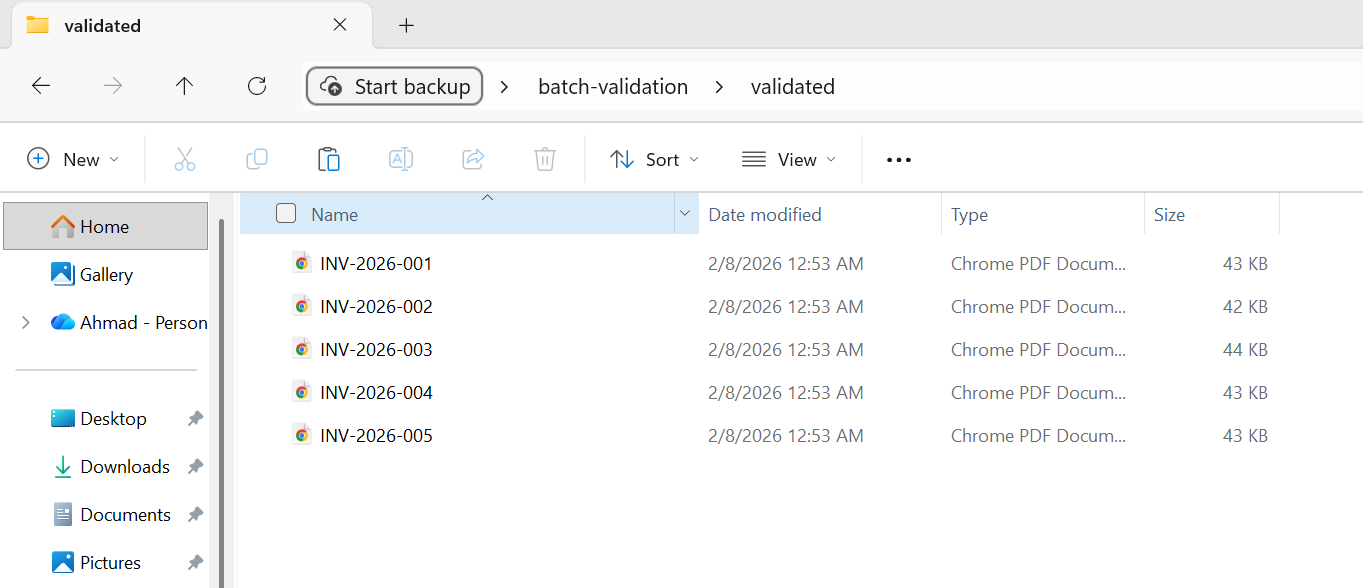
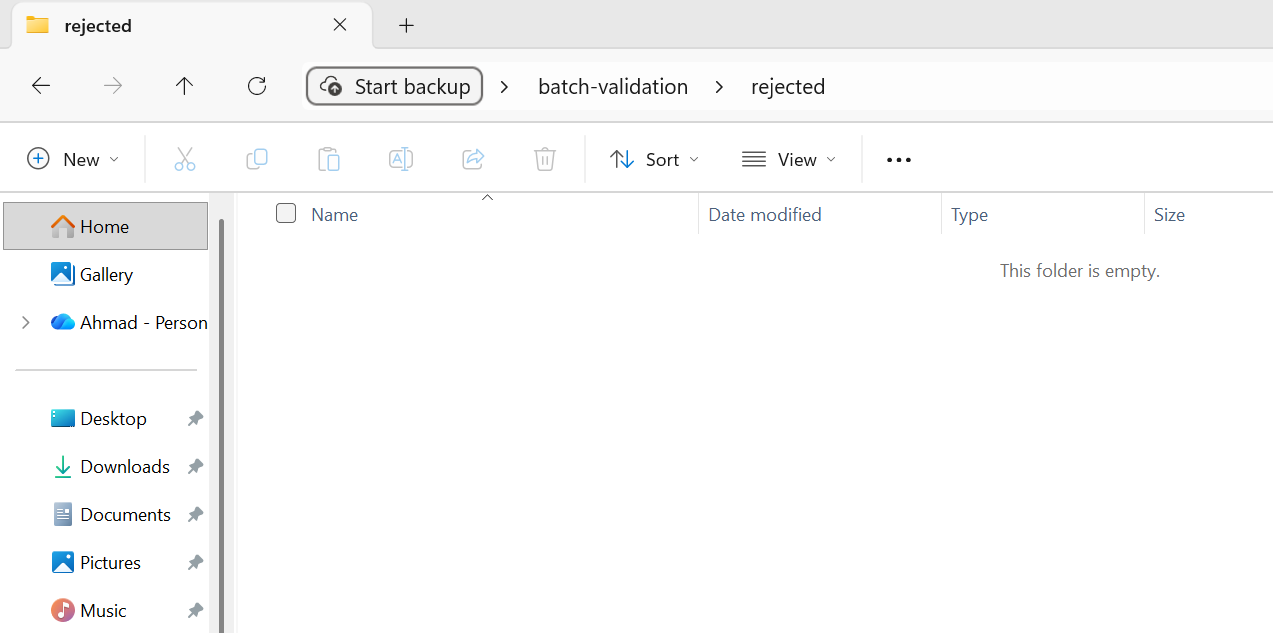
所有 5 个文件均通过验证,并移至验证文件夹。
预处理验证应该快速--您需要检查的是明显有问题的输入,而不是进行全面处理。 后处理验证可以更加彻底,特别是对于输出必须通过特定标准(PDF/A、PDF/UA)的合规性转换。 任何未通过后处理验证的文件都应标记为人工审核,而不是默许。
异步和并行处理模式
IronPDF同时支持 Parallel.ForEach(基于线程的并行)和 async/await(异步 I/O)。 了解何时使用每种工具,以及如何将它们有效地结合起来,是最大限度提高吞吐量的关键。
任务并行库集成
Parallel.ForEach 是 CPU 密集型批处理操作最简单、最有效的方法。 IronPDF 的渲染引擎是 CPU 密集型的(HTML 解析、CSS 布局、图像光栅化),并且 Parallel.ForEach 会自动将这些工作分配到所有可用的核心上。
:path=/static-assets/pdf/content-code-examples/tutorials/batch-pdf-processing-csharp/batch-processing-tpl.csusing IronPdf;
using System;
using System.IO;
using System.Threading.Tasks;
using System.Threading;
using System.Diagnostics;
string inputFolder = "input/";
string outputFolder = "output/";
Directory.CreateDirectory(outputFolder);
string[] htmlFiles = Directory.GetFiles(inputFolder, "*.html");
var renderer = new ChromePdfRenderer();
Console.WriteLine($"Processing {htmlFiles.Length} files with {Environment.ProcessorCount} CPU cores");
int processed = 0;
var stopwatch = Stopwatch.StartNew();
// Configure parallelism based on system resources
// Rule of thumb: ProcessorCount / 2 for memory-intensive operations
var options = new ParallelOptions
{
MaxDegreeOfParallelism = Math.Max(1, Environment.ProcessorCount / 2)
};
Console.WriteLine($"Max parallelism: {options.MaxDegreeOfParallelism}");
// Use Parallel.ForEach for CPU-bound batch operations
Parallel.ForEach(htmlFiles, options, htmlFile =>
{
string fileName = Path.GetFileNameWithoutExtension(htmlFile);
string outputPath = Path.Combine(outputFolder, $"{fileName}.pdf");
try
{
// Render HTML to PDF
using var pdf = renderer.RenderHtmlFileAsPdf(htmlFile);
pdf.SaveAs(outputPath);
int current = Interlocked.Increment(ref processed);
// Progress reporting every 10 files
if (current % 10 == 0)
{
double elapsed = stopwatch.Elapsed.TotalSeconds;
double rate = current / elapsed;
double remaining = (htmlFiles.Length - current) / rate;
Console.WriteLine($"Progress: {current}/{htmlFiles.Length} ({rate:F1} files/sec, ~{remaining:F0}s remaining)");
}
}
catch (Exception ex)
{
Console.WriteLine($"[ERROR] {fileName}: {ex.Message}");
}
});
stopwatch.Stop();
double totalRate = processed / stopwatch.Elapsed.TotalSeconds;
Console.WriteLine($"\nComplete:");
Console.WriteLine($" Files processed: {processed}/{htmlFiles.Length}");
Console.WriteLine($" Total time: {stopwatch.Elapsed.TotalSeconds:F1}s");
Console.WriteLine($" Average rate: {totalRate:F1} files/sec");
Console.WriteLine($" Time per file: {stopwatch.Elapsed.TotalMilliseconds / processed:F0}ms");
// Memory monitoring helper (call between chunks for large batches)
void CheckMemoryPressure()
{
const long memoryThreshold = 4L * 1024 * 1024 * 1024; // 4 GB
long currentMemory = GC.GetTotalMemory(forceFullCollection: false);
if (currentMemory > memoryThreshold)
{
Console.WriteLine($"Memory pressure detected ({currentMemory / 1024 / 1024}MB), forcing GC...");
GC.Collect();
GC.WaitForPendingFinalizers();
GC.Collect();
}
}Imports IronPdf
Imports System
Imports System.IO
Imports System.Threading.Tasks
Imports System.Threading
Imports System.Diagnostics
Module Program
Sub Main()
Dim inputFolder As String = "input/"
Dim outputFolder As String = "output/"
Directory.CreateDirectory(outputFolder)
Dim htmlFiles As String() = Directory.GetFiles(inputFolder, "*.html")
Dim renderer As New ChromePdfRenderer()
Console.WriteLine($"Processing {htmlFiles.Length} files with {Environment.ProcessorCount} CPU cores")
Dim processed As Integer = 0
Dim stopwatch As Stopwatch = Stopwatch.StartNew()
' Configure parallelism based on system resources
' Rule of thumb: ProcessorCount / 2 for memory-intensive operations
Dim options As New ParallelOptions With {
.MaxDegreeOfParallelism = Math.Max(1, Environment.ProcessorCount \ 2)
}
Console.WriteLine($"Max parallelism: {options.MaxDegreeOfParallelism}")
' Use Parallel.ForEach for CPU-bound batch operations
Parallel.ForEach(htmlFiles, options, Sub(htmlFile)
Dim fileName As String = Path.GetFileNameWithoutExtension(htmlFile)
Dim outputPath As String = Path.Combine(outputFolder, $"{fileName}.pdf")
Try
' Render HTML to PDF
Using pdf = renderer.RenderHtmlFileAsPdf(htmlFile)
pdf.SaveAs(outputPath)
End Using
Dim current As Integer = Interlocked.Increment(processed)
' Progress reporting every 10 files
If current Mod 10 = 0 Then
Dim elapsed As Double = stopwatch.Elapsed.TotalSeconds
Dim rate As Double = current / elapsed
Dim remaining As Double = (htmlFiles.Length - current) / rate
Console.WriteLine($"Progress: {current}/{htmlFiles.Length} ({rate:F1} files/sec, ~{remaining:F0}s remaining)")
End If
Catch ex As Exception
Console.WriteLine($"[ERROR] {fileName}: {ex.Message}")
End Try
End Sub)
stopwatch.Stop()
Dim totalRate As Double = processed / stopwatch.Elapsed.TotalSeconds
Console.WriteLine(vbCrLf & "Complete:")
Console.WriteLine($" Files processed: {processed}/{htmlFiles.Length}")
Console.WriteLine($" Total time: {stopwatch.Elapsed.TotalSeconds:F1}s")
Console.WriteLine($" Average rate: {totalRate:F1} files/sec")
Console.WriteLine($" Time per file: {stopwatch.Elapsed.TotalMilliseconds / processed:F0}ms")
' Memory monitoring helper (call between chunks for large batches)
CheckMemoryPressure()
End Sub
Sub CheckMemoryPressure()
Const memoryThreshold As Long = 4L * 1024 * 1024 * 1024 ' 4 GB
Dim currentMemory As Long = GC.GetTotalMemory(forceFullCollection:=False)
If currentMemory > memoryThreshold Then
Console.WriteLine($"Memory pressure detected ({currentMemory \ 1024 \ 1024}MB), forcing GC...")
GC.Collect()
GC.WaitForPendingFinalizers()
GC.Collect()
End If
End Sub
End ModuleMaxDegreeOfParallelism 选项至关重要。 如果没有这个选项,TPL 会尝试使用所有可用内核,如果每次渲染都是资源密集型的,内存就会不堪重负。请根据系统可用内存除以典型的每次渲染内存消耗量(对于复杂的 HTML,每次并发渲染的内存消耗量通常为 100-300 MB)来设置。
控制并发性(SemaphoreSlim)
当您需要比 Parallel.ForEach 提供的更精细的并发控制时(例如,将异步 I/O 与 CPU 密集型渲染混合时),SemaphoreSlim 可以明确控制同时运行的操作数量。 该模式很简单:创建一个具有所需并发限制(例如,4 个并发渲染)的 SemaphoreSlim,在每次渲染之前调用 WaitAsync,然后在 finally 块之后调用 Release。 然后启动所有任务,使用 Task.WhenAll。
当您的流水线包括 I/O 绑定步骤(从 blob 存储读取文件、将结果写入数据库)和 CPU 绑定步骤(渲染 PDF)时,这种模式尤其有用。 信号传递器限制了与 CPU 绑定的渲染并发性,同时允许与 I/O 绑定的步骤不受限制地进行。
Async/Await 最佳实践
IronPDF提供了其渲染方法的异步变体,包括 RenderHtmlAsPdfAsync、RenderUrlAsPdfAsync 和 RenderHtmlFileAsPdfAsync。 这些工具非常适合网络应用程序(阻塞请求线程是不可接受的)以及混合 PDF 渲染与异步 I/O 操作的流水线。
用于批处理的一些重要的异步最佳实践:
不要使用 Task.Run 来包装同步的IronPDF方法——请改用原生的异步变体。 将同步方法包装在 Task.Run 中会浪费线程池线程并增加开销,而没有任何好处。
不要在异步任务中使用 .Result 或 .Wait() — 这会阻塞调用线程,并可能导致 UI 或ASP.NET上下文中的死锁。 始终使用 await。
将 Task.WhenAll 调用批量处理,而不是一次性等待所有任务。 如果你有 10,000 个任务,并且同时对它们调用 Task.WhenAll,你将启动 10,000 个并发操作。 请改用 .Chunk(10) 或类似方法,按组处理它们,并依次等待每一组处理完毕。
避免内存耗尽
内存耗尽是批量 PDF 处理中最常见的故障模式。 防御性方法是在每次渲染之前使用 GC.GetTotalMemory() 监控内存使用情况,并在消耗超过阈值(例如 4 GB 或可用 RAM 的 80%)时触发回收。 先调用 GC.Collect(),再调用 GC.WaitForPendingFinalizers(),然后调用第二个 GC.Collect(),以便在继续之前尽可能多地回收内存。 这会增加一个短暂的停顿,但可以防止出现 OutOfMemoryException 错误导致整个批处理在第 30,000 个文件处崩溃的灾难性后果。
将此与 TPL 部分的 MaxDegreeOfParallelism 节流和内存管理部分的 using 处置模式结合起来,你就拥有了针对内存问题的三层防御:限制并发、积极处置和使用安全阀进行监控。
批量工作的云部署
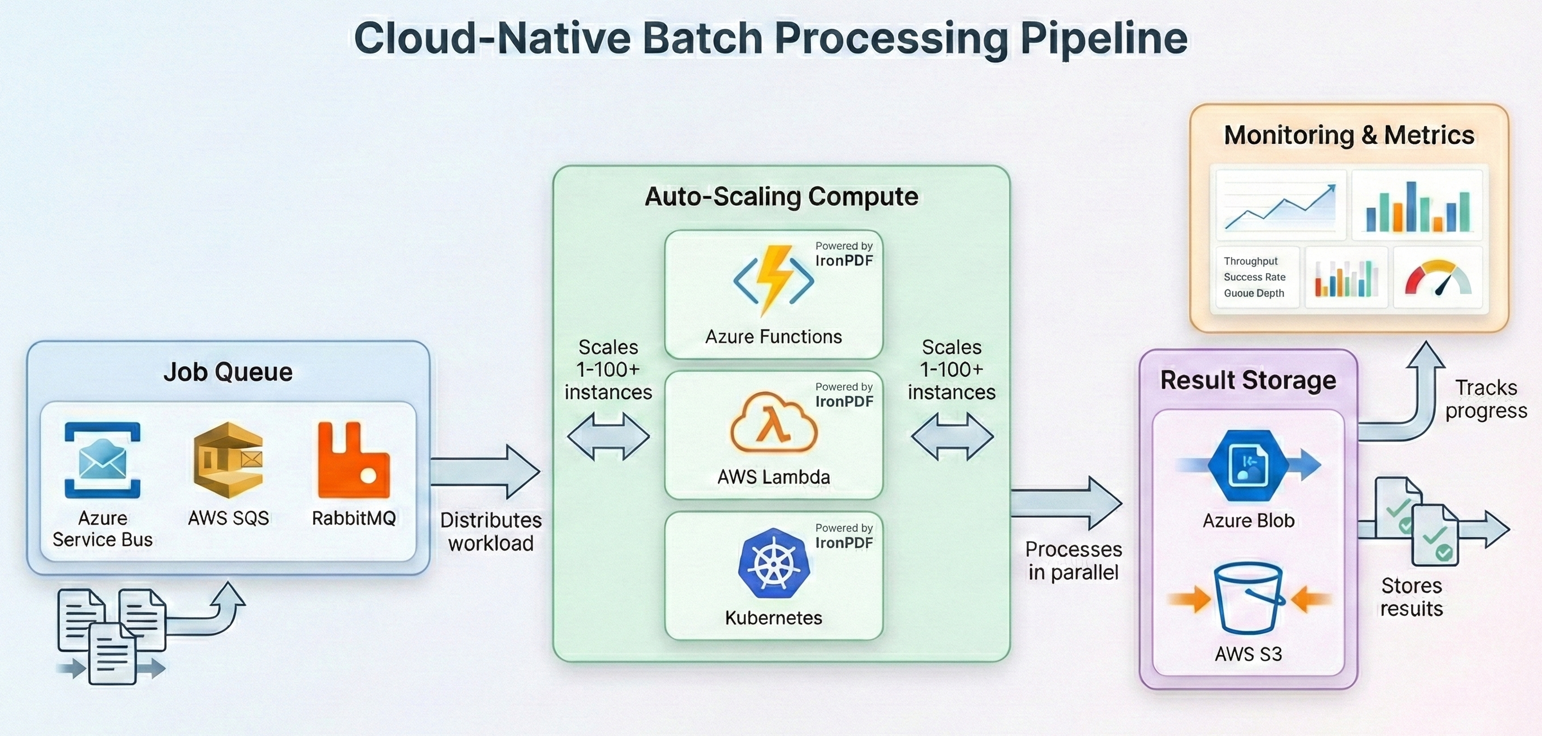
现代批处理越来越多地在云中运行,在云中您可以扩展计算资源以满足工作负载的需求,并且只需为您所使用的资源付费。 IronPDF 可在所有主流云平台上运行--以下是如何为每种平台构建批处理管道。
Azure Functions 与 Durable Functions
Azure Durable Functions 为扇出/扇入模式提供了内置协调功能,使其成为批量 PDF 处理的理想选择。 协调器功能将工作分配给多个活动功能实例,每个实例处理一个文件子集。 您的编排器在一个扇出循环中调用 CallActivityAsync,每个活动函数实例化一个 ChromePdfRenderer,处理其文件块,然后编排器收集结果。
Azure Functions 的主要注意事项:默认消费计划每次调用函数有 5 分钟的超时时间,且内存有限。 对于批处理,请使用 Premium 或 Dedicated计划,它们支持更长的超时和更大的内存。 IronPDF 需要完整的 .NET 运行时(未裁剪),因此请确保您的功能应用程序为 .NET 8+ 配置了适当的运行时标识符。
带有 Step 函数的AWS Lambda.
AWS Step Functions 提供与 Azure Durable Functions 类似的协调功能。 状态机中的每一步都会调用一个 Lambda 函数来处理大量文件。 您的 Lambda 处理程序接收一批 S3 对象键,将每个 PDF 加载 PdfDocument.FromFile,应用您的处理管道(压缩、格式转换等),并将结果写回输出 S3 存储桶。
AWS Lambda 的最大执行时间为 15 分钟,存储空间有限(默认 512 MB,可配置为最多 10 GB)。 对于大批量作业,可使用步骤函数对工作负载进行分块,并在单独的 Lambda 调用中处理每个分块。 将中间结果存储在 S3 中,而不是本地存储。
Kubernetes 作业调度
对于运行自己的 Kubernetes 集群的组织而言,批量 PDF 处理可以很好地映射到 Kubernetes Jobs 和 CronJobs。 每个 pod 运行一个批处理 Worker,该 Worker 从队列(Azure 服务总线、RabbitMQ 或 SQS)中提取文件,使用 IronPDF 对其进行处理,并将结果写入对象存储。 工作循环遵循前面章节中介绍的相同模式:从队列中取出消息,使用 ChromePdfRenderer.RenderHtmlAsPdf() 或 PdfDocument.FromFile() 处理文档,上传结果,并确认消息。 将处理过程包装在同一个 try-catch 中,并使用弹性模式中的重试逻辑,然后使用 SemaphoreSlim 来控制每个 pod 的并发性。
IronPDF 提供官方 Docker 支持,可在 Linux 容器上运行。 使用 IronPdf NuGet包,以及适用于容器操作系统的相应本机运行时包(例如,对于基于 Linux 的镜像,使用 IronPdf.Linux)。 对于 Kubernetes,请定义与 IronPDF 的内存要求(通常为每个 pod 512 MB-2 GB,具体取决于并发量)相匹配的资源请求和限制。 Horizontal Pod Autoscaler 可以根据队列深度来扩展 Worker,其检查点模式可确保在 Pod 被驱逐时不会丢失任何工作。
成本优化策略
如果在资源分配方面考虑不周,云批处理的成本可能会很高。 以下是影响最大的策略:
合理调整计算大小。PDF 渲染是 CPU 和内存密集型工作,而非 GPU 密集型工作。请使用计算优化的实例(Azure 上的 C 系列,AWS 上的 C 类型),而不是通用或内存优化的实例。 您将获得更高的翻译价格比。
对于可以容忍中断的批处理工作负载,使用 spot/preemptible 实例。 批量 PDF 处理本身具有可恢复性(得益于检查点功能),因此是现货定价的理想选择,通常比按需定价优惠 60-90%。
如果时间允许,请在非高峰时间处理。 许多云提供商在夜间和周末提供更低的价格或更高的现货可用性。
尽早压缩,一次存储。将压缩作为处理管道的一部分运行,而不是作为一个单独的步骤。从一开始就存储压缩 PDF 可降低存档生命周期内的持续存储成本。
分层存储。经常访问的已处理 PDF 文件应放在热存储中; 很少访问的存档 PDF 应转移到冷却或存档层(Azure Cool/Archive、AWS S3 Glacier)。 仅此一项就可降低 50-80% 的存储成本。
现实世界管道示例
让我们用一个完整的生产级批处理管道来展示整个工作流程,从而将一切联系起来:检测 → 验证 → 处理 → 存档 → 报告。
本示例处理 HTML 发票模板目录,将其渲染为 PDF,压缩输出,转换为 PDF/A-3b 以符合存档要求,验证结果,并在最后生成一份摘要报告。
使用上述批量转换示例中的 5 张 HTML 发票...
:path=/static-assets/pdf/content-code-examples/tutorials/batch-pdf-processing-csharp/batch-processing-full-pipeline.csusing IronPdf;
using System;
using System.Collections.Generic;
using System.IO;
using System.Linq;
using System.Threading.Tasks;
using System.Threading;
using System.Collections.Concurrent;
using System.Diagnostics;
using System.Text.Json;
// Configuration
var config = new PipelineConfig
{
InputFolder = "input/",
OutputFolder = "output/",
ArchiveFolder = "archive/",
ErrorFolder = "errors/",
CheckpointPath = "pipeline-checkpoint.json",
ReportPath = "pipeline-report.json",
MaxConcurrency = Math.Max(1, Environment.ProcessorCount / 2),
MaxRetries = 3,
JpegQuality = 70
};
// Initialize folders
Directory.CreateDirectory(config.OutputFolder);
Directory.CreateDirectory(config.ArchiveFolder);
Directory.CreateDirectory(config.ErrorFolder);
// Load checkpoint for resume capability
var checkpoint = LoadCheckpoint(config.CheckpointPath);
var results = new ConcurrentBag<ProcessingResult>();
var stopwatch = Stopwatch.StartNew();
// Get files to process
string[] allFiles = Directory.GetFiles(config.InputFolder, "*.html");
string[] filesToProcess = allFiles
.Where(f => !checkpoint.CompletedFiles.Contains(Path.GetFileName(f)))
.ToArray();
Console.WriteLine($"Pipeline starting:");
Console.WriteLine($" Total files: {allFiles.Length}");
Console.WriteLine($" Already processed: {checkpoint.CompletedFiles.Count}");
Console.WriteLine($" To process: {filesToProcess.Length}");
Console.WriteLine($" Concurrency: {config.MaxConcurrency}");
var renderer = new ChromePdfRenderer();
var checkpointLock = new object();
var options = new ParallelOptions
{
MaxDegreeOfParallelism = config.MaxConcurrency
};
Parallel.ForEach(filesToProcess, options, inputFile =>
{
var result = new ProcessingResult
{
FileName = Path.GetFileName(inputFile),
StartTime = DateTime.UtcNow
};
try
{
// Stage: Pre-validation
if (!ValidateInput(inputFile))
{
result.Status = "PreValidationFailed";
result.Error = "Input file failed validation";
results.Add(result);
return;
}
string baseName = Path.GetFileNameWithoutExtension(inputFile);
string tempPath = Path.Combine(config.OutputFolder, $"{baseName}.pdf");
string archivePath = Path.Combine(config.ArchiveFolder, $"{baseName}.pdf");
// Stage: Process with retry
PdfDocument pdf = null;
int attempt = 0;
bool success = false;
while (attempt < config.MaxRetries && !success)
{
attempt++;
try
{
pdf = renderer.RenderHtmlFileAsPdf(inputFile);
success = true;
}
catch (Exception ex) when (IsTransient(ex) && attempt < config.MaxRetries)
{
Thread.Sleep((int)Math.Pow(2, attempt) * 500);
}
}
if (!success || pdf == null)
{
result.Status = "ProcessingFailed";
result.Error = "Max retries exceeded";
results.Add(result);
return;
}
using (pdf)
{
// Stage: Compress and convert to PDF/A-3b for archival
pdf.SaveAsPdfA(tempPath, PdfAVersions.PdfA3b);
}
// Stage: Post-validation
if (!ValidateOutput(tempPath))
{
File.Move(tempPath, Path.Combine(config.ErrorFolder, $"{baseName}.pdf"), overwrite: true);
result.Status = "PostValidationFailed";
result.Error = "Output file failed validation";
results.Add(result);
return;
}
// Stage: Archive
File.Move(tempPath, archivePath, overwrite: true);
// Update checkpoint
lock (checkpointLock)
{
checkpoint.CompletedFiles.Add(result.FileName);
SaveCheckpoint(config.CheckpointPath, checkpoint);
}
result.Status = "Success";
result.OutputSize = new FileInfo(archivePath).Length;
result.EndTime = DateTime.UtcNow;
results.Add(result);
Console.WriteLine($"[OK] {baseName}.pdf ({result.OutputSize / 1024}KB)");
}
catch (Exception ex)
{
result.Status = "Error";
result.Error = ex.Message;
result.EndTime = DateTime.UtcNow;
results.Add(result);
Console.WriteLine($"[ERROR] {result.FileName}: {ex.Message}");
}
});
stopwatch.Stop();
// Generate report
var report = new PipelineReport
{
TotalFiles = allFiles.Length,
ProcessedThisRun = results.Count,
Succeeded = results.Count(r => r.Status == "Success"),
PreValidationFailed = results.Count(r => r.Status == "PreValidationFailed"),
ProcessingFailed = results.Count(r => r.Status == "ProcessingFailed"),
PostValidationFailed = results.Count(r => r.Status == "PostValidationFailed"),
Errors = results.Count(r => r.Status == "Error"),
TotalDuration = stopwatch.Elapsed,
AverageFileTime = results.Any() ? TimeSpan.FromMilliseconds(stopwatch.Elapsed.TotalMilliseconds / results.Count) : TimeSpan.Zero
};
string reportJson = JsonSerializer.Serialize(report, new JsonSerializerOptions { WriteIndented = true });
File.WriteAllText(config.ReportPath, reportJson);
Console.WriteLine($"\n=== Pipeline Complete ===");
Console.WriteLine($"Succeeded: {report.Succeeded}");
Console.WriteLine($"Failed: {report.PreValidationFailed + report.ProcessingFailed + report.PostValidationFailed + report.Errors}");
Console.WriteLine($"Duration: {report.TotalDuration.TotalMinutes:F1} minutes");
Console.WriteLine($"Report: {config.ReportPath}");
// Helper methods
bool ValidateInput(string path)
{
try
{
var info = new FileInfo(path);
if (!info.Exists || info.Length == 0 || info.Length > 50 * 1024 * 1024) return false;
string content = File.ReadAllText(path);
return content.Contains("<html", StringComparison.OrdinalIgnoreCase) ||
content.Contains("<!DOCTYPE", StringComparison.OrdinalIgnoreCase);
}
catch { return false; }
}
bool ValidateOutput(string path)
{
try
{
using var pdf = PdfDocument.FromFile(path);
return pdf.PageCount > 0 && new FileInfo(path).Length > 1024;
}
catch { return false; }
}
bool IsTransient(Exception ex) =>
ex is IOException || ex is OutOfMemoryException ||
ex.Message.Contains("timeout", StringComparison.OrdinalIgnoreCase);
Checkpoint LoadCheckpoint(string path)
{
if (File.Exists(path))
{
string json = File.ReadAllText(path);
return JsonSerializer.Deserialize<Checkpoint>(json) ?? new Checkpoint();
}
return new Checkpoint();
}
void SaveCheckpoint(string path, Checkpoint cp) =>
File.WriteAllText(path, JsonSerializer.Serialize(cp));
ata classes
s PipelineConfig
public string InputFolder { get; set; } = "";
public string OutputFolder { get; set; } = "";
public string ArchiveFolder { get; set; } = "";
public string ErrorFolder { get; set; } = "";
public string CheckpointPath { get; set; } = "";
public string ReportPath { get; set; } = "";
public int MaxConcurrency { get; set; }
public int MaxRetries { get; set; }
public int JpegQuality { get; set; }
s Checkpoint
public HashSet<string> CompletedFiles { get; set; } = new();
s ProcessingResult
public string FileName { get; set; } = "";
public string Status { get; set; } = "";
public string Error { get; set; } = "";
public long OutputSize { get; set; }
public DateTime StartTime { get; set; }
public DateTime EndTime { get; set; }
s PipelineReport
public int TotalFiles { get; set; }
public int ProcessedThisRun { get; set; }
public int Succeeded { get; set; }
public int PreValidationFailed { get; set; }
public int ProcessingFailed { get; set; }
public int PostValidationFailed { get; set; }
public int Errors { get; set; }
public TimeSpan TotalDuration { get; set; }
public TimeSpan AverageFileTime { get; set; }Imports IronPdf
Imports System
Imports System.Collections.Generic
Imports System.IO
Imports System.Linq
Imports System.Threading.Tasks
Imports System.Threading
Imports System.Collections.Concurrent
Imports System.Diagnostics
Imports System.Text.Json
' Configuration
Dim config As New PipelineConfig With {
.InputFolder = "input/",
.OutputFolder = "output/",
.ArchiveFolder = "archive/",
.ErrorFolder = "errors/",
.CheckpointPath = "pipeline-checkpoint.json",
.ReportPath = "pipeline-report.json",
.MaxConcurrency = Math.Max(1, Environment.ProcessorCount \ 2),
.MaxRetries = 3,
.JpegQuality = 70
}
' Initialize folders
Directory.CreateDirectory(config.OutputFolder)
Directory.CreateDirectory(config.ArchiveFolder)
Directory.CreateDirectory(config.ErrorFolder)
' Load checkpoint for resume capability
Dim checkpoint As Checkpoint = LoadCheckpoint(config.CheckpointPath)
Dim results As New ConcurrentBag(Of ProcessingResult)()
Dim stopwatch As Stopwatch = Stopwatch.StartNew()
' Get files to process
Dim allFiles As String() = Directory.GetFiles(config.InputFolder, "*.html")
Dim filesToProcess As String() = allFiles.
Where(Function(f) Not checkpoint.CompletedFiles.Contains(Path.GetFileName(f))).
ToArray()
Console.WriteLine("Pipeline starting:")
Console.WriteLine($" Total files: {allFiles.Length}")
Console.WriteLine($" Already processed: {checkpoint.CompletedFiles.Count}")
Console.WriteLine($" To process: {filesToProcess.Length}")
Console.WriteLine($" Concurrency: {config.MaxConcurrency}")
Dim renderer As New ChromePdfRenderer()
Dim checkpointLock As New Object()
Dim options As New ParallelOptions With {
.MaxDegreeOfParallelism = config.MaxConcurrency
}
Parallel.ForEach(filesToProcess, options, Sub(inputFile)
Dim result As New ProcessingResult With {
.FileName = Path.GetFileName(inputFile),
.StartTime = DateTime.UtcNow
}
Try
' Stage: Pre-validation
If Not ValidateInput(inputFile) Then
result.Status = "PreValidationFailed"
result.Error = "Input file failed validation"
results.Add(result)
Return
End If
Dim baseName As String = Path.GetFileNameWithoutExtension(inputFile)
Dim tempPath As String = Path.Combine(config.OutputFolder, $"{baseName}.pdf")
Dim archivePath As String = Path.Combine(config.ArchiveFolder, $"{baseName}.pdf")
' Stage: Process with retry
Dim pdf As PdfDocument = Nothing
Dim attempt As Integer = 0
Dim success As Boolean = False
While attempt < config.MaxRetries AndAlso Not success
attempt += 1
Try
pdf = renderer.RenderHtmlFileAsPdf(inputFile)
success = True
Catch ex As Exception When IsTransient(ex) AndAlso attempt < config.MaxRetries
Thread.Sleep(CInt(Math.Pow(2, attempt)) * 500)
End Try
End While
If Not success OrElse pdf Is Nothing Then
result.Status = "ProcessingFailed"
result.Error = "Max retries exceeded"
results.Add(result)
Return
End If
Using pdf
' Stage: Compress and convert to PDF/A-3b for archival
pdf.SaveAsPdfA(tempPath, PdfAVersions.PdfA3b)
End Using
' Stage: Post-validation
If Not ValidateOutput(tempPath) Then
File.Move(tempPath, Path.Combine(config.ErrorFolder, $"{baseName}.pdf"), overwrite:=True)
result.Status = "PostValidationFailed"
result.Error = "Output file failed validation"
results.Add(result)
Return
End If
' Stage: Archive
File.Move(tempPath, archivePath, overwrite:=True)
' Update checkpoint
SyncLock checkpointLock
checkpoint.CompletedFiles.Add(result.FileName)
SaveCheckpoint(config.CheckpointPath, checkpoint)
End SyncLock
result.Status = "Success"
result.OutputSize = New FileInfo(archivePath).Length
result.EndTime = DateTime.UtcNow
results.Add(result)
Console.WriteLine($"[OK] {baseName}.pdf ({result.OutputSize \ 1024}KB)")
Catch ex As Exception
result.Status = "Error"
result.Error = ex.Message
result.EndTime = DateTime.UtcNow
results.Add(result)
Console.WriteLine($"[ERROR] {result.FileName}: {ex.Message}")
End Try
End Sub)
stopwatch.Stop()
' Generate report
Dim report As New PipelineReport With {
.TotalFiles = allFiles.Length,
.ProcessedThisRun = results.Count,
.Succeeded = results.Count(Function(r) r.Status = "Success"),
.PreValidationFailed = results.Count(Function(r) r.Status = "PreValidationFailed"),
.ProcessingFailed = results.Count(Function(r) r.Status = "ProcessingFailed"),
.PostValidationFailed = results.Count(Function(r) r.Status = "PostValidationFailed"),
.Errors = results.Count(Function(r) r.Status = "Error"),
.TotalDuration = stopwatch.Elapsed,
.AverageFileTime = If(results.Any(), TimeSpan.FromMilliseconds(stopwatch.Elapsed.TotalMilliseconds / results.Count), TimeSpan.Zero)
}
Dim reportJson As String = JsonSerializer.Serialize(report, New JsonSerializerOptions With {.WriteIndented = True})
File.WriteAllText(config.ReportPath, reportJson)
Console.WriteLine(vbCrLf & "=== Pipeline Complete ===")
Console.WriteLine($"Succeeded: {report.Succeeded}")
Console.WriteLine($"Failed: {report.PreValidationFailed + report.ProcessingFailed + report.PostValidationFailed + report.Errors}")
Console.WriteLine($"Duration: {report.TotalDuration.TotalMinutes:F1} minutes")
Console.WriteLine($"Report: {config.ReportPath}")
' Helper methods
Function ValidateInput(path As String) As Boolean
Try
Dim info As New FileInfo(path)
If Not info.Exists OrElse info.Length = 0 OrElse info.Length > 50 * 1024 * 1024 Then Return False
Dim content As String = File.ReadAllText(path)
Return content.Contains("<html", StringComparison.OrdinalIgnoreCase) OrElse
content.Contains("<!DOCTYPE", StringComparison.OrdinalIgnoreCase)
Catch
Return False
End Try
End Function
Function ValidateOutput(path As String) As Boolean
Try
Using pdf = PdfDocument.FromFile(path)
Return pdf.PageCount > 0 AndAlso New FileInfo(path).Length > 1024
End Using
Catch
Return False
End Try
End Function
Function IsTransient(ex As Exception) As Boolean
Return TypeOf ex Is IOException OrElse TypeOf ex Is OutOfMemoryException OrElse
ex.Message.Contains("timeout", StringComparison.OrdinalIgnoreCase)
End Function
Function LoadCheckpoint(path As String) As Checkpoint
If File.Exists(path) Then
Dim json As String = File.ReadAllText(path)
Return JsonSerializer.Deserialize(Of Checkpoint)(json) OrElse New Checkpoint()
End If
Return New Checkpoint()
End Function
Sub SaveCheckpoint(path As String, cp As Checkpoint)
File.WriteAllText(path, JsonSerializer.Serialize(cp))
End Sub
' Data classes
Class PipelineConfig
Public Property InputFolder As String = ""
Public Property OutputFolder As String = ""
Public Property ArchiveFolder As String = ""
Public Property ErrorFolder As String = ""
Public Property CheckpointPath As String = ""
Public Property ReportPath As String = ""
Public Property MaxConcurrency As Integer
Public Property MaxRetries As Integer
Public Property JpegQuality As Integer
End Class
Class Checkpoint
Public Property CompletedFiles As HashSet(Of String) = New HashSet(Of String)()
End Class
Class ProcessingResult
Public Property FileName As String = ""
Public Property Status As String = ""
Public Property Error As String = ""
Public Property OutputSize As Long
Public Property StartTime As DateTime
Public Property EndTime As DateTime
End Class
Class PipelineReport
Public Property TotalFiles As Integer
Public Property ProcessedThisRun As Integer
Public Property Succeeded As Integer
Public Property PreValidationFailed As Integer
Public Property ProcessingFailed As Integer
Public Property PostValidationFailed As Integer
Public Property Errors As Integer
Public Property TotalDuration As TimeSpan
Public Property AverageFileTime As TimeSpan
End Class输出
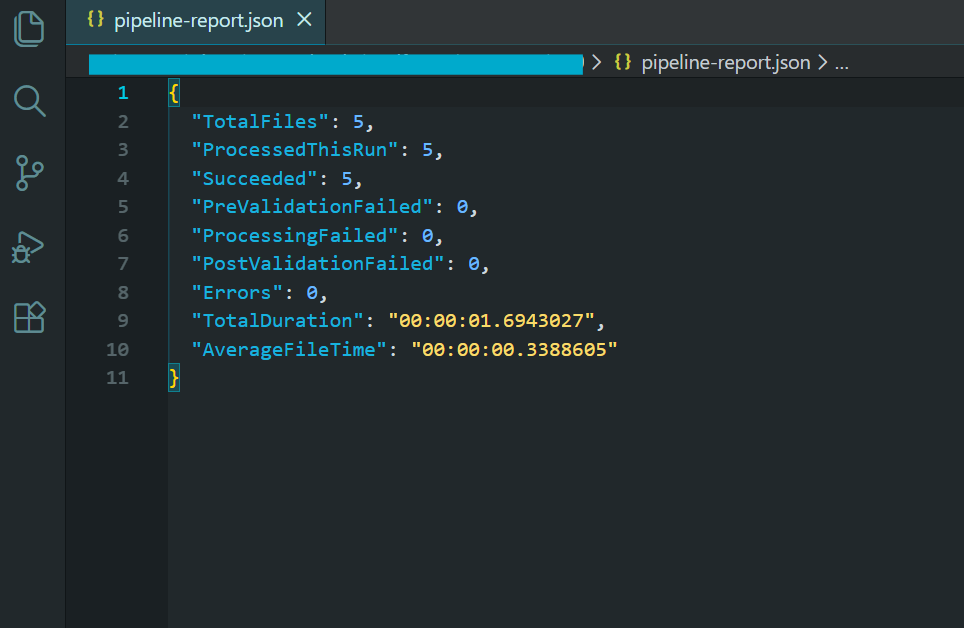
显示批处理结果的管道报告。
该流水线融合了我们在本教程中介绍的所有模式:并行处理与受控并发、每文件错误处理与故障跳过、瞬时错误重试逻辑、崩溃后恢复的检查点、处理前和处理后验证、内存管理与显式处置,以及全面日志记录与最终总结报告。
该流水线的输出是一个符合 PDF/A-3b 标准的压缩归档文件目录、一个用于恢复功能的检查点文件、一个用于记录无法处理的文件的错误日志,以及一份包含处理统计数据的汇总报告。 对于任何重要的批量 PDF 处理工作负载,这都是您想要的模式。
下一步
大规模批量处理 PDF 不仅仅是在循环中调用渲染方法。它需要围绕并发、内存管理、错误处理和部署进行周到的架构设计,还需要合适的库来实现这一切。 IronPDF提供线程安全渲染引擎、异步 API 表面、压缩工具和格式转换功能,这些构成了任何 .NET 批量 PDF 管道的基础。
无论您是要构建一个在日出前生成数千份 PDF 的夜间报告生成器,还是要将传统文档归档迁移到 PDF/A 合规性,或者是要在 Kubernetes 上建立一个云原生处理服务,本教程中的模式都将为您提供一个成熟的框架。 并行处理与受控并发保持高吞吐量。 当个别文件出现问题时,故障跳过和重试逻辑可确保流水线正常运行。 检查点功能可确保您不会丢失进度。 云部署模式可让您根据工作负载扩展计算。
准备好开始构建了吗? 下载 IronPDF 并免费试用--同一个库可以处理从单一文件渲染到数十万文件的批处理管道。 如果您对特定用例的扩展、部署或架构有任何疑问,请联系我们的工程支持团队--我们已经帮助团队构建了各种规模的批处理管道,我们很乐意帮助您获得成功。
常见问题解答
什么是 C# 中的批量 PDF 处理?
C# 中的批量 PDF 处理是指使用 C# 编程语言同时自动处理大量 PDF 文档。这种方法是大规模自动化文档工作流程的理想选择。
IronPDF 如何协助批量处理 PDF?
IronPDF 提供了强大的工具和库,可简化 C# 中的 PDF 批量处理。它支持并行处理,可同时高效处理数千份 PDF。
使用 IronPDF 进行并行处理有什么好处?
使用 IronPDF 进行并行处理可以更快、更高效地批量处理 PDF。这种方法最大限度地提高了资源利用率,大大缩短了处理时间。
IronPDF 可以部署在云平台上进行批处理吗?
是的,IronPDF 可以部署在 Azure Functions、AWS Lambda 和 Kubernetes 等云平台上,实现可扩展和灵活的批量 PDF 处理。
IronPDF 如何处理批量 PDF 处理过程中的错误?
IronPDF 包括错误处理和重试逻辑功能,可确保批量 PDF 处理过程中的可靠性。这些功能有助于管理和纠正错误,无需人工干预。
使用 IronPDF 进行 PDF 处理时,重试逻辑的作用是什么?
IronPDF 中的重试逻辑可确保临时问题不会扰乱批处理工作流程。如果出现错误,IronPDF 可以自动尝试重新处理失败的文档。
为什么 C# 是一种适合批量处理 PDF 的语言?
C# 是一种功能强大的编程语言,拥有大量的库和框架,是批量处理 PDF 的理想选择。它与 IronPDF 无缝集成,可实现高效的文档自动化。
IronPDF 如何确保 PDF 文档在处理过程中的安全性?
IronPDF 通过提供加密和密码保护功能支持 PDF 文档的安全处理,确保处理过的文档保持机密和安全。
批量 PDF 处理在企业中有哪些使用案例?
企业将批量 PDF 处理用于批量发票生成、文档数字化和大规模报告分发等任务。IronPDF 通过自动化和简化文档工作流程为这些用例提供了便利。
IronPDF 能否处理不同的 PDF 格式和版本?
是的,IronPDF 可处理各种 PDF 格式和版本,确保批处理任务的兼容性和灵活性。

还在滚动吗?
想快速获得证据? PM > Install-Package IronPdf
运行示例看着你的HTML代码变成PDF文件。






 免费开始
免费开始 免费开始
免费开始 预定免费现场演示





 无需信用卡或创建账户










