


如何在 C# 中实现符合 PDF/A 合规性的 PDF 归档

IronPDF 的 C# 中的 PDF/A 合规性为 .NET 开发人员提供了创建、转换和验证符合 ISO 19005 标准的 存档 PDFs 的直接途径--确保文档在任何系统中呈现一致,无论是现在还是几十年后。 从渲染 HTML 到 PDF/A,以及将现有文件转换为 PDF/A-1b、PDF/A-2b 或 PDF/A-3b,到嵌入源数据以符合 ZUGFeRD 和 Factur-X 电子发票,IronPDF 可处理完整的 PDF/A 转换工作流程,而无需离开 .NET 生态系统。
TL;DR:快速入门指南
本教程涵盖用 C# 创建、转换和验证符合 PDF/A 标准的文档,包括电子发票格式和现实世界中的政府存档要求。
- 适用对象: .NET 开发人员在构建应用程序时,需要生成用于长期存储或规范存档的文档,如政府记录管理、法律文件、财务审计跟踪、医疗记录保留或电子发票平台(PDF/A 是硬性合规要求)。
- 您将构建的内容:从零开始的 HTML 到 PDF/A 渲染、将现有 PDF 转换为 PDF/A-1b/2b/3b、ZUGFeRD/Factur-X 电子发票的嵌入式源数据附件、带有故障报告的 PDF/A 合规性验证,以及满足 NARA、法庭文件和医疗记录要求的实际存档模式。
- 运行地点:任何 .NET 环境 - .NET 10、.NET 8 LTS、.NET Framework 4.6.2+、.NET Standard 2.0。PDF/A 转换和验证完全在本地运行; 无需外部验证工具即可生成。
- 何时使用此方法:当您的应用程序生成的文档必须长期有效时(发票、合同、合规报告、法庭文件或医疗记录),并且监管规定(NARA、欧盟存档标准、HIPAA、SEC)要求使用自包含、可验证的 PDF/A 格式。
- 为什么它在技术上很重要: 标准 PDF 可以引用外部字体、嵌入活动内容并依赖于特定于系统的呈现--所有这些都会随着时间的推移而损坏。PDF/A 在格式层面上禁止了这些依赖性,直接在文件中嵌入了渲染所需的所有内容,从而保证在任何兼容的阅读器上都能无限期地输出相同的内容。
只需几行代码即可将现有 PDF 转换为 PDF/A:

购买或注册 IronPDF 30 天试用版后,请在应用程序的开头添加许可证密钥。
IronPdf.License.LicenseKey = "KEY";IronPdf.License.LicenseKey = "KEY";Imports IronPdf
IronPdf.License.LicenseKey = "KEY" 使用 NuGet 安装
目录
- 了解 PDF/A
- 创建 PDF/A 文档
- 高级 PDF/A 工作流程
- 现实世界中的存档场景 -政府档案管理用例
什么是 PDF/A,为什么它很重要?
PDF/A 是 PDF 格式(ISO 19005)的一个 ISO 标准化子集,专门用于电子文档的长期可靠归档。 标准 PDF 可以引用外部字体、链接到外部内容并依赖于特定系统的渲染行为,而 PDF/A 文件则完全独立。 渲染文档所需的每种字体、颜色配置文件和元数据都直接嵌入到文件中。
这一点很重要,因为 PDF/A 文档无论现在打开还是 100 年后打开,无论操作系统或软件版本如何,都能在任何兼容的阅读器上呈现出相同的效果。 不能依赖于可能消失的外部资源,不能依赖于已安装的特定字体,也不能在颜色或透明度的显示方式上含糊不清。
除了技术上的耐久性,PDF/A 合规性经常是一项硬性要求,而不仅仅是一种最佳实践。必须遵守 PDF/A 的行业和机构包括
法律和司法系统--美国、欧盟和许多其他司法管辖区的法院要求或强烈建议使用 PDF/A 进行电子存档。 美国联邦法院系统的 CM/ECF 存档标准将 PDF/A 作为长期记录保存的首选格式。
政府机构 - 美国国家档案馆和记录管理局 (NARA) 指定 PDF/A 为传输永久电子记录的公认格式。 同样,欧盟委员会规定某些官方出版物和监管文件必须使用 PDF/A。
金融服务和审计 - 美国证券交易委员会(SEC)等监管机构接受 PDF/A 文件,内部审计团队也经常采用 PDF/A,以确保财务报表、报告和支持文件长期保持不可更改和可验证。
医疗保健--医疗记录保留法规(如美国的 HIPAA)并不强制规定特定的文件格式,但 PDF/A 已成为归档患者记录、成像报告和临床文档的事实标准,因为它能保证长期可读性。
简而言之,当文档必须跨越时间、系统和组织边界而保持不变时,PDF/A 就是您要使用的格式。 如果您的应用程序生成的文档可能会在多年后被引用,如发票、合同、合规报告、医疗记录等,那么 PDF/A 就是您的正确选择。
PDF/A 版本解释
PDF/A 标准经历了几个版本的演变,每个版本都在上一个版本的基础上支持更多的 PDF 功能,同时保持严格的存档保证。 了解不同版本之间的差异对于选择适合您使用情况的版本至关重要。
PDF/A-1(基本存档)
PDF/A-1 (ISO 19005-1:2005) 是基于 PDF 1.4 标准的第一个版本。它确立了核心存档要求:所有字体必须嵌入; 禁止加密; 不允许有音频/视频内容; 禁止使用 JavaScript。 PDF/A-1 有两个一致性级别:
PDF/A-1b(基本):确保可靠地直观再现文档。 这是最低一致性级别,可确保文件在呈现时看起来正确无误。
PDF/A-1a (可访问):在 1b 的基础上增加了结构和语义要求,包括用于辅助功能的标记内容、Unicode 字符映射和逻辑阅读顺序。 这是更高的标准,也是符合可访问性要求的要求。
PDF/A-1 是受支持最广泛的版本,目前仍在普遍使用,特别是在法律和政府领域,广泛的兼容性比更新的功能更重要。
PDF/A-2(JPEG2000,透明)
PDF/A-2 (ISO 19005-2:2011)基于 PDF 1.7,并引入了对 PDF/A-1 中未提供的功能的支持:
JPEG2000 图像压缩: 比 PDF/A-1 中的 JPEG 压缩提供更好的质量尺寸比。
透明度和图层支持:可实现更复杂的可视化布局,而无需将所有内容扁平化为不透明元素。
嵌入式 PDF/A 附件: PDF/A-2 文档可以嵌入其他符合 PDF/A 标准的文件作为附件(但只能是 PDF/A 文件,不能是任意格式的文件)。
PDF/A-2 包含与 PDF/A-1 相同的符合性级别(2b 和 2a),以及一个新的级别: PDF/A-2u ( Unicode ),它要求所有文本都进行 Unicode 映射,但不需要 a 级别的完整结构标记。
PDF/A-3(嵌入式文件)
PDF/A-3 (ISO 19005-3:2012)是现代工作流程最重要的扩展。 它与 PDF/A-2 (PDF 1.7) 具有相同的基础,并保留了其所有功能,但增加了一项关键功能:在 PDF/A 文档中嵌入任何格式文件的能力。
这意味着您可以将原始 XML 源数据、CSV 导出、电子表格或任何其他机器可读文件与人类可读的可视化文档一并附上。 PDF/A-3 容器成为一个同时容纳表现层和底层数据的单一软件包。
这种能力是现代电子发票标准的基础:
ZUGFeRD:源于德国,现被欧盟各国采用为Factur-X。 将结构化 XML 发票数据(跨行业发票格式)嵌入 PDF/A-3 文档中,该文档还包含可视化、人类可读的发票。单个文件可满足人工和机器处理需求。
PDF/A-3 符合性级别遵循相同的模式:3a(可访问 + 标记),以及 3u(Unicode 映射)。
PDF/A-4(基于 PDF 2.0)
PDF/A-4 (ISO 19005-4:2020)是基于 PDF 2.0 的最新版本。它简化了一致性级别结构; 不再有 a/b/u 的区别。 相反,PDF/A-4 定义了三个配置文件:
PDF/A-4:一般存档的基本配置文件。
PDF/A-4f: 允许嵌入任何格式的文件(类似于 PDF/A-3)。
PDF/A-4e: 专用于工程文档; 支持 3D 内容、富媒体和其他技术元素。
PDF/A-4 也受益于 PDF 2.0 本身的改进,包括改进的标记结构和使用 XMP(可扩展元数据平台)增强的元数据功能。
PDF/A-4 的采用率正在不断增长,但与 PDF/A-2 和 PDF/A-3 相比,它仍未得到阅览器和验证器的普遍支持。
您应该使用哪个版本?
选择合适的 PDF/A 版本取决于您的具体要求:
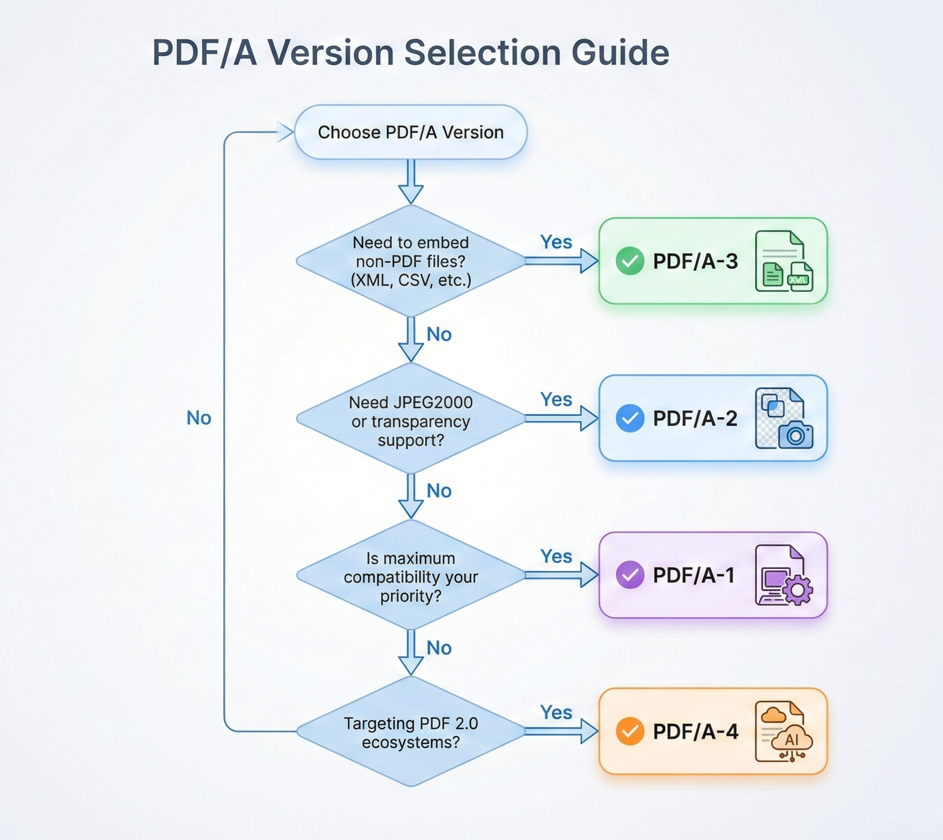
最大兼容性:对于现有系统、验证器和阅读器(尤其是在法律和政府环境中),请使用 PDF/A-1b 或 PDF/A-2b。
电子发票:对于需要嵌入源数据的 ZUGFeRD、Factur-X 或类似标准,请使用 PDF/A-3b。
无障碍合规性:对于第 508 节或 WCAG 要求,请选择您正在使用的任何版本的 @@--CODE-662--CODE-663--CODE-664--CODE-664 的 @@--CODE-661--CODE-661 符合性级别。
现代工作流程:对于用户支持 PDF 2.0 的最新功能,请使用 PDF/A-4。
如果有疑问,PDF/A-3b 可在现代功能和广泛支持之间实现最佳平衡。
从零开始创建 PDF/A 文档
既然您已经了解了什么是 PDF/A,以及要针对哪个版本进行翻译,那么让我们开始讨论代码吧。 IronPDF 可直接从 HTML 内容生成符合 PDF/A 标准的文档,或将现有 PDF 转换为 PDF/A 格式。
安装 IronPDF
开始之前,请将 IronPDF NuGet 包安装到您的 .NET 项目中。 您可以通过 NuGet 软件包管理器控制台、.NET CLI 或 Visual Studio NuGet UI 进行翻译。
Install-Package IronPdfInstall-Package IronPdf或使用.NET CLI:
dotnet add package IronPdfdotnet add package IronPdfIronPDF 支持 .NET Framework 4.6.2+、.NET Core、.NET 5+ 和 .NET Standard 2.0,因此它几乎适用于任何现代 .NET 项目,而无需担心兼容性问题。
将 HTML 渲染成 PDF/A.
最常见的工作流程是从 HTML 内容生成 PDF 并直接保存为 PDF/A 格式。 IronPDF 的 ChromePdfRenderer 方法处理 HTML 到 PDF 的转换,而 SaveAsPdfA 方法一步处理合规性转换。
:path=/static-assets/pdf/content-code-examples/tutorials/pdfa-archiving-csharp/pdfa-render-html-to-pdfa.csusing IronPdf;
// Create HTML content for the document
string htmlContent = @"
E html>
le>
body { font-family: Arial, sans-serif; margin: 40px; }
h1 { color: #2c3e50; }
.section { margin: 20px 0; }
table { width: 100%; border-collapse: collapse; }
th, td { border: 1px solid #ddd; padding: 10px; text-align: left; }
th { background: #3498db; color: white; }
yle>
Quarterly Financial Report</h1>
eport Period: Q4 2025</p>
class='section'>
<table>
<tr><th>Metric</th><th>Value</th></tr>
<tr><td>Total Revenue</td><td>$4.2M</td></tr>
<tr><td>Operating Expenses</td><td>$2.1M</td></tr>
<tr><td>Net Income</td><td>$2.1M</td></tr>
</table>
v>
his document is archived in PDF/A-3b format for long-term preservation.</p>
;
// Render HTML to PDF
var renderer = new ChromePdfRenderer();
using var pdf = renderer.RenderHtmlAsPdf(htmlContent);
// Save as PDF/A-3b for archival compliance
pdf.SaveAsPdfA("quarterly-report-archived.pdf", PdfAVersions.PdfA3b);Imports IronPdf
' Create HTML content for the document
Dim htmlContent As String = "
<!DOCTYPE html>
<html>
<head>
<style>
body { font-family: Arial, sans-serif; margin: 40px; }
h1 { color: #2c3e50; }
.section { margin: 20px 0; }
table { width: 100%; border-collapse: collapse; }
th, td { border: 1px solid #ddd; padding: 10px; text-align: left; }
th { background: #3498db; color: white; }
</style>
</head>
<body>
<h1>Quarterly Financial Report</h1>
<p>Report Period: Q4 2025</p>
<div class='section'>
<table>
<tr><th>Metric</th><th>Value</th></tr>
<tr><td>Total Revenue</td><td>$4.2M</td></tr>
<tr><td>Operating Expenses</td><td>$2.1M</td></tr>
<tr><td>Net Income</td><td>$2.1M</td></tr>
</table>
</div>
<p>This document is archived in PDF/A-3b format for long-term preservation.</p>
</body>
</html>
"
' Render HTML to PDF
Dim renderer As New ChromePdfRenderer()
Using pdf = renderer.RenderHtmlAsPdf(htmlContent)
' Save as PDF/A-3b for archival compliance
pdf.SaveAsPdfA("quarterly-report-archived.pdf", PdfAVersions.PdfA3b)
End Using输出
在本例中,HTML 使用 IronPDF 基于 Chromium 的渲染引擎渲染成 PDF,该引擎可确保像素完美的保真度,符合现代网络标准。 然后,该方法嵌入所有必需的字体,根据需要转换颜色空间,去除任何禁止的功能(如JavaScript或外部链接),并写入符合规范的 XMP 元数据。 翻译结果是一个完全独立的 PDF/A-3b 文件,可随时存档。
这种方法还能与 IronPDF 的其他渲染功能无缝配合。 您可以添加页眉和页脚、设置页面大小和边距、添加 CSS 样式,并使用 RenderingOptions 来微调输出——所有这些操作都可以在 PDF/A 转换步骤之前完成。SaveAsPdfA 调用会处理合规性转换,而无需考虑 PDF 的生成方式。
将现有 PDF 转换为 PDF/A.
您并不总是从 HTML 开始。 在许多实际应用场景中,您会从扫描仪、第三方系统、传统存档或用户上传中接收到现有的 PDF 文件,并需要将其转换为 PDF/A 以进行合规存储。
IronPDF使用相同的 SaveAsPdfA 方法处理此问题:
:path=/static-assets/pdf/content-code-examples/tutorials/pdfa-archiving-csharp/pdfa-convert-existing-pdf.csusing IronPdf;
// Load an existing PDF file
using var pdf = PdfDocument.FromFile("existing-document.pdf");
// Convert and save as PDF/A-3b
// IronPDF automatically embeds fonts, converts color spaces, adds XMP metadata,
// and removes non-compliant features during conversion
pdf.SaveAsPdfA("existing-document-archived.pdf", PdfAVersions.PdfA3b);
// Alternative: Use ConvertToPdfA for in-memory conversion
using var pdf2 = PdfDocument.FromFile("another-document.pdf");
using var pdfA = pdf2.ConvertToPdfA(PdfAVersions.PdfA2b);
pdfA.SaveAs("another-document-archived.pdf");Imports IronPdf
' Load an existing PDF file
Using pdf As PdfDocument = PdfDocument.FromFile("existing-document.pdf")
' Convert and save as PDF/A-3b
' IronPDF automatically embeds fonts, converts color spaces, adds XMP metadata,
' and removes non-compliant features during conversion
pdf.SaveAsPdfA("existing-document-archived.pdf", PdfAVersions.PdfA3b)
End Using
' Alternative: Use ConvertToPdfA for in-memory conversion
Using pdf2 As PdfDocument = PdfDocument.FromFile("another-document.pdf")
Using pdfA As PdfDocument = pdf2.ConvertToPdfA(PdfAVersions.PdfA2b)
pdfA.SaveAs("another-document-archived.pdf")
End Using
End Using在转换过程中,IronPdf 会分析现有 PDF 并进行必要的转换:嵌入任何引用但未包含的字体,将 RGB 或 CMYK 色彩空间转换为适当的配置文件,添加所需的 XMP 元数据,并删除任何不合规的功能,如加密、多媒体或 JavaScript。 如果你想在内存中进行转换而不立即保存到磁盘,也可以使用 ConvertToPdfA 方法——这对于转换后进行额外处理的管道非常有用。
这种模式非常适合迁移项目,在这些项目中,您需要使传统文档存储符合现代存档标准。
嵌入源数据(PDF/A-3)
PDF/A-3 标准最强大的功能之一是在 PDF 文档中直接嵌入任意文件(XML、CSV、JSON、电子表格或任何其他格式)。 这就将 PDF 从纯粹的可视化文档转变为一个混合容器,在单个文件中承载了人类可读的演示和机器可读的源数据。
在可视化文档旁附加 XML/CSV.
核心工作流程很简单:生成或加载可视化 PDF,将源数据文件作为IronPDF附件附加,然后另存为 PDF/A-3。IronPDF 支持通过 ConvertToPdfA 方法的多个重载来嵌入文件——您可以直接传递文件路径作为 IEnumerable<string>,使用 EmbedFileByte 处理内存中已有的字节数组,或者使用 EmbedFileStream 处理基于流的工作流程。 每种方法都必须完全符合 PDF/A 标准。
:path=/static-assets/pdf/content-code-examples/tutorials/pdfa-archiving-csharp/pdfa-embed-xml-attachment.csusing IronPdf;
using System.Collections.Generic;
// Load the visual PDF document
using var pdf = PdfDocument.FromFile("financial-report.pdf");
// Prepare XML source data to embed
string xmlData = @"<?xml version='1.0' encoding='UTF-8'?>
alReport>
iod>Q4 2025</Period>
enue>4200000</Revenue>
enses>2100000</Expenses>
Income>2100000</NetIncome>
ialReport>";
byte[] xmlBytes = System.Text.Encoding.UTF8.GetBytes(xmlData);
// Configure the embedded file
var xmlConfig = new EmbedFileConfiguration(EmbedFileType.xml)
{
EmbedFileName = "financial-data.xml",
AFDesc = "Source financial data in XML format",
AFRelationship = AFRelationship.Data
};
// Create embed file collection
var embedFiles = new List<EmbedFileByte>
{
new EmbedFileByte(xmlBytes, xmlConfig)
};
// Convert to PDF/A-3b with embedded data
using var archivedPdf = pdf.ConvertToPdfA(embedFiles, PdfAVersions.PdfA3b);
archivedPdf.SaveAs("financial-report-with-data.pdf");Imports IronPdf
Imports System.Collections.Generic
Imports System.Text
' Load the visual PDF document
Using pdf = PdfDocument.FromFile("financial-report.pdf")
' Prepare XML source data to embed
Dim xmlData As String = "<?xml version='1.0' encoding='UTF-8'?>
<FinancialReport>
<Period>Q4 2025</Period>
<Revenue>4200000</Revenue>
<Expenses>2100000</Expenses>
<NetIncome>2100000</NetIncome>
</FinancialReport>"
Dim xmlBytes As Byte() = Encoding.UTF8.GetBytes(xmlData)
' Configure the embedded file
Dim xmlConfig As New EmbedFileConfiguration(EmbedFileType.xml) With {
.EmbedFileName = "financial-data.xml",
.AFDesc = "Source financial data in XML format",
.AFRelationship = AFRelationship.Data
}
' Create embed file collection
Dim embedFiles As New List(Of EmbedFileByte) From {
New EmbedFileByte(xmlBytes, xmlConfig)
}
' Convert to PDF/A-3b with embedded data
Using archivedPdf = pdf.ConvertToPdfA(embedFiles, PdfAVersions.PdfA3b)
archivedPdf.SaveAs("financial-report-with-data.pdf")
End Using
End Using这种模式对于财务报告工作流程尤为重要,在这种流程中,可视化 PDF 可能是格式化的资产负债表或损益表,而所附的 XML 或 CSV 则包含用于生成报告的原始数据。 审计人员可以检查可视化文档,并使用嵌入的源数据独立验证底层数字——所有操作均可从单个文件中完成。您可以通过将其他文件路径或字节数组传递给 ConvertToPdfA 方法的 collection 参数,在同一文档中嵌入多个附件。
ZUGFeRD 和 Factur-X 电子发票合规性
ZUGFeRD(Zentraler User Guide des Forums elektronische Rechnung Deutschland)及其国际对应版本 Factur-X 是电子发票标准,规定了结构化发票数据嵌入 PDF/A-3 文档的方式。 可视化 PDF 可作为人类可读的发票,而嵌入式 XML 文件(遵循跨行业发票或 CII 格式)则携带机器可处理的数据。
符合 ZUGFeRD/Factur-X 标准的主要要求包括
PDF 必须符合 PDF/A-3b(至少)。 嵌入的 XML 文件必须遵循 UN/CEFACT 跨行业发票模式。 XML 文件必须按照标准规范命名(通常 Factur-X 为 factur-x.xml,ZUGFeRD 为 zugferd-invoice.xml)。 必须设置特定的 XMP 元数据属性,以便将文档识别为 ZUGFeRD/Factur-X 发票。
IronPDF 的 EmbedFileConfiguration 类可以让你对这些要求进行细粒度的控制。 您可以设置 ConformanceLevel(例如 PropertyVersion 和 AFRelationship 属性,以匹配目标系统期望的确切电子发票配置文件。
以下是如何使用 IronPdf 构建符合 ZUGFeRD 标准的发票:
:path=/static-assets/pdf/content-code-examples/tutorials/pdfa-archiving-csharp/pdfa-zugferd-invoice.csusing IronPdf;
using System.Collections.Generic;
// Create visual invoice HTML
string invoiceHtml = @"
E html>
le>
body { font-family: Arial, sans-serif; margin: 40px; }
.header { border-bottom: 2px solid #e74c3c; padding-bottom: 15px; }
h1 { color: #e74c3c; }
.invoice-details { margin: 30px 0; }
.line-item { display: flex; justify-content: space-between; padding: 10px 0; border-bottom: 1px solid #eee; }
.total { font-size: 20px; font-weight: bold; margin-top: 20px; text-align: right; }
yle>
class='header'>
<h1>INVOICE #INV-2026-0042</h1>
<p>Date: February 7, 2026</p>
v>
class='invoice-details'>
<p><strong>Bill To:</strong> Acme Corporation</p>
<p><strong>Address:</strong> 123 Business Ave, Suite 100</p>
v>
class='line-item'><span>Software License (Enterprise)</span><span>$2,499.00</span></div>
class='line-item'><span>Annual Support Contract</span><span>$499.00</span></div>
class='line-item'><span>Implementation Services</span><span>$1,500.00</span></div>
class='total'>Total: $4,498.00</div>
tyle='margin-top: 40px; font-size: 12px; color: #666;'>
This invoice complies with ZUGFeRD/Factur-X e-invoicing standards.
;
// Render the visual invoice
var renderer = new ChromePdfRenderer();
using var invoicePdf = renderer.RenderHtmlAsPdf(invoiceHtml);
// Prepare ZUGFeRD/Factur-X XML invoice data
string zugferdXml = @"<?xml version='1.0' encoding='UTF-8'?>
ssIndustryInvoice xmlns:rsm='urn:un:unece:uncefact:data:standard:CrossIndustryInvoice:100'>
:ExchangedDocument>
<ram:ID>INV-2026-0042</ram:ID>
<ram:IssueDateTime>2026-02-07</ram:IssueDateTime>
m:ExchangedDocument>
:SupplyChainTradeTransaction>
<ram:ApplicableHeaderTradeSettlement>
<ram:InvoiceCurrencyCode>USD</ram:InvoiceCurrencyCode>
<ram:SpecifiedTradeSettlementHeaderMonetarySummation>
<ram:GrandTotalAmount>4498.00</ram:GrandTotalAmount>
</ram:SpecifiedTradeSettlementHeaderMonetarySummation>
</ram:ApplicableHeaderTradeSettlement>
m:SupplyChainTradeTransaction>
ossIndustryInvoice>";
byte[] xmlBytes = System.Text.Encoding.UTF8.GetBytes(zugferdXml);
// Configure for ZUGFeRD/Factur-X compliance
var zugferdConfig = new EmbedFileConfiguration(EmbedFileType.xml)
{
EmbedFileName = "factur-x.xml",
AFDesc = "Factur-X Invoice Data",
ConformanceLevel = ConformanceLevel.EN16931,
SchemaNamespace = SchemaNamespace.facturX,
SchemaPrefix = SchemaPrefix.fx,
PropertyVersion = PropertyVersion.v1,
AFRelationship = AFRelationship.Alternative
};
var embedFiles = new List<EmbedFileByte>
{
new EmbedFileByte(xmlBytes, zugferdConfig)
};
// Convert to PDF/A-3b with embedded ZUGFeRD data
using var zugferdInvoice = invoicePdf.ConvertToPdfA(embedFiles, PdfAVersions.PdfA3b);
// Set invoice metadata
zugferdInvoice.MetaData.Title = "Invoice INV-2026-0042";
zugferdInvoice.MetaData.Author = "IronSoftware Billing";
zugferdInvoice.MetaData.Subject = "ZUGFeRD/Factur-X Compliant Invoice";
zugferdInvoice.SaveAs("invoice-zugferd.pdf");Imports IronPdf
Imports System.Collections.Generic
Imports System.Text
' Create visual invoice HTML
Dim invoiceHtml As String = "
<!DOCTYPE html>
<html>
<head>
<style>
body { font-family: Arial, sans-serif; margin: 40px; }
.header { border-bottom: 2px solid #e74c3c; padding-bottom: 15px; }
h1 { color: #e74c3c; }
.invoice-details { margin: 30px 0; }
.line-item { display: flex; justify-content: space-between; padding: 10px 0; border-bottom: 1px solid #eee; }
.total { font-size: 20px; font-weight: bold; margin-top: 20px; text-align: right; }
</style>
</head>
<body>
<div class='header'>
<h1>INVOICE #INV-2026-0042</h1>
<p>Date: February 7, 2026</p>
</div>
<div class='invoice-details'>
<p><strong>Bill To:</strong> Acme Corporation</p>
<p><strong>Address:</strong> 123 Business Ave, Suite 100</p>
</div>
<div class='line-item'><span>Software License (Enterprise)</span><span>$2,499.00</span></div>
<div class='line-item'><span>Annual Support Contract</span><span>$499.00</span></div>
<div class='line-item'><span>Implementation Services</span><span>$1,500.00</span></div>
<div class='total'>Total: $4,498.00</div>
<p style='margin-top: 40px; font-size: 12px; color: #666;'>
This invoice complies with ZUGFeRD/Factur-X e-invoicing standards.
</p>
</body>
</html>"
' Render the visual invoice
Dim renderer As New ChromePdfRenderer()
Using invoicePdf = renderer.RenderHtmlAsPdf(invoiceHtml)
' Prepare ZUGFeRD/Factur-X XML invoice data
Dim zugferdXml As String = "<?xml version='1.0' encoding='UTF-8'?>
<rsm:CrossIndustryInvoice xmlns:rsm='urn:un:unece:uncefact:data:standard:CrossIndustryInvoice:100'>
<rsm:ExchangedDocument>
<ram:ID>INV-2026-0042</ram:ID>
<ram:IssueDateTime>2026-02-07</ram:IssueDateTime>
</rsm:ExchangedDocument>
<rsm:SupplyChainTradeTransaction>
<ram:ApplicableHeaderTradeSettlement>
<ram:InvoiceCurrencyCode>USD</ram:InvoiceCurrencyCode>
<ram:SpecifiedTradeSettlementHeaderMonetarySummation>
<ram:GrandTotalAmount>4498.00</ram:GrandTotalAmount>
</ram:SpecifiedTradeSettlementHeaderMonetarySummation>
</ram:ApplicableHeaderTradeSettlement>
</rsm:SupplyChainTradeTransaction>
</rsm:CrossIndustryInvoice>"
Dim xmlBytes As Byte() = Encoding.UTF8.GetBytes(zugferdXml)
' Configure for ZUGFeRD/Factur-X compliance
Dim zugferdConfig As New EmbedFileConfiguration(EmbedFileType.xml) With {
.EmbedFileName = "factur-x.xml",
.AFDesc = "Factur-X Invoice Data",
.ConformanceLevel = ConformanceLevel.EN16931,
.SchemaNamespace = SchemaNamespace.facturX,
.SchemaPrefix = SchemaPrefix.fx,
.PropertyVersion = PropertyVersion.v1,
.AFRelationship = AFRelationship.Alternative
}
Dim embedFiles As New List(Of EmbedFileByte) From {
New EmbedFileByte(xmlBytes, zugferdConfig)
}
' Convert to PDF/A-3b with embedded ZUGFeRD data
Using zugferdInvoice = invoicePdf.ConvertToPdfA(embedFiles, PdfAVersions.PdfA3b)
' Set invoice metadata
zugferdInvoice.MetaData.Title = "Invoice INV-2026-0042"
zugferdInvoice.MetaData.Author = "IronSoftware Billing"
zugferdInvoice.MetaData.Subject = "ZUGFeRD/Factur-X Compliant Invoice"
zugferdInvoice.SaveAs("invoice-zugferd.pdf")
End Using
End Using输出
通过这种方法,您的开票系统可以在一个符合标准的软件包中生成既能满足人工审核(可视化 PDF)又能满足自动处理(嵌入式 XML)的文档。
保留审计线索
除电子发票外,PDF/A-3 的嵌入功能对于任何需要保持完整审计跟踪的工作流程都非常有价值。 通过在最终文档中附上原始源数据、处理日志或更改历史记录,您可以创建一个独立的记录,在将来的任何时候都可以进行独立验证。
常见的审计跟踪嵌入模式包括
财务报表 - 在格式化的财务报告中嵌入原始会计数据(从 ERP 系统导出的 CSV 或 XML)。 审核人员可以验证可视化文档中的数字是否与源数据相符,而无需访问原始系统。
法规申报 - 将原始申报数据、验证结果和任何辅助计算作为嵌入文件附在最终申报文件中。 这将创建一个包含完整申报记录的单一档案包。
合同管理--在最终执行的合同 PDF 中嵌入版本历史、批准链或已签署的元数据文件。 这样就可以在一个存档文件中保留文档的整个生命周期。
:path=/static-assets/pdf/content-code-examples/tutorials/pdfa-archiving-csharp/pdfa-audit-trail.csusing IronPdf;
using System;
using System.Collections.Generic;
using System.Text.Json;
// Load the final document to archive
using var pdf = PdfDocument.FromFile("executed-contract.pdf");
// Create audit trail data
var auditTrail = new
{
DocumentId = "CONTRACT-2026-00142",
CreatedDate = "2026-01-15T09:30:00Z",
FinalizedDate = "2026-02-07T14:22:00Z",
Versions = new[]
{
new { Version = 1, Date = "2026-01-15", Action = "Draft created", User = "john.smith@company.com" },
new { Version = 2, Date = "2026-01-20", Action = "Legal review completed", User = "legal@company.com" },
new { Version = 3, Date = "2026-02-01", Action = "Client revisions incorporated", User = "john.smith@company.com" },
new { Version = 4, Date = "2026-02-07", Action = "Final execution", User = "ceo@company.com" }
},
Signatures = new[]
{
new { Signer = "Company CEO", SignedDate = "2026-02-07T14:20:00Z", IPAddress = "192.168.1.100" },
new { Signer = "Client Representative", SignedDate = "2026-02-07T14:22:00Z", IPAddress = "10.0.0.50" }
},
Checksum = "SHA256:a1b2c3d4e5f6..."
};
string auditJson = JsonSerializer.Serialize(auditTrail, new JsonSerializerOptions { WriteIndented = true });
byte[] auditBytes = System.Text.Encoding.UTF8.GetBytes(auditJson);
// Configure audit trail attachment
var auditConfig = new EmbedFileConfiguration(EmbedFileType.xml)
{
EmbedFileName = "audit-trail.json",
AFDesc = "Complete document audit trail and version history",
AFRelationship = AFRelationship.Supplement
};
// Create validation log
string validationLog = @"
on Report
=========
: CONTRACT-2026-00142
d: 2026-02-07T14:25:00Z
erformed:
ll required fields present
ignature blocks completed
ate formats valid
urrency amounts verified
egal clauses match template v2.1
atus: APPROVED FOR ARCHIVAL
byte[] validationBytes = System.Text.Encoding.UTF8.GetBytes(validationLog);
var validationConfig = new EmbedFileConfiguration(EmbedFileType.xml)
{
EmbedFileName = "validation-report.txt",
AFDesc = "Pre-archive validation report",
AFRelationship = AFRelationship.Supplement
};
// Embed both files
var embedFiles = new List<EmbedFileByte>
{
new EmbedFileByte(auditBytes, auditConfig),
new EmbedFileByte(validationBytes, validationConfig)
};
// Convert to PDF/A-3b with full audit trail
using var archivedContract = pdf.ConvertToPdfA(embedFiles, PdfAVersions.PdfA3b);
// Set archival metadata
archivedContract.MetaData.Title = "Executed Contract - CONTRACT-2026-00142";
archivedContract.MetaData.Author = "Contract Management System";
archivedContract.MetaData.Subject = "Fully executed agreement with audit trail";
archivedContract.MetaData.Keywords = "contract, executed, 2026, archived";
archivedContract.SaveAs("contract-archived-with-audit.pdf");Imports IronPdf
Imports System
Imports System.Collections.Generic
Imports System.Text.Json
' Load the final document to archive
Using pdf = PdfDocument.FromFile("executed-contract.pdf")
' Create audit trail data
Dim auditTrail = New With {
.DocumentId = "CONTRACT-2026-00142",
.CreatedDate = "2026-01-15T09:30:00Z",
.FinalizedDate = "2026-02-07T14:22:00Z",
.Versions = New Object() {
New With {.Version = 1, .Date = "2026-01-15", .Action = "Draft created", .User = "john.smith@company.com"},
New With {.Version = 2, .Date = "2026-01-20", .Action = "Legal review completed", .User = "legal@company.com"},
New With {.Version = 3, .Date = "2026-02-01", .Action = "Client revisions incorporated", .User = "john.smith@company.com"},
New With {.Version = 4, .Date = "2026-02-07", .Action = "Final execution", .User = "ceo@company.com"}
},
.Signatures = New Object() {
New With {.Signer = "Company CEO", .SignedDate = "2026-02-07T14:20:00Z", .IPAddress = "192.168.1.100"},
New With {.Signer = "Client Representative", .SignedDate = "2026-02-07T14:22:00Z", .IPAddress = "10.0.0.50"}
},
.Checksum = "SHA256:a1b2c3d4e5f6..."
}
Dim auditJson As String = JsonSerializer.Serialize(auditTrail, New JsonSerializerOptions With {.WriteIndented = True})
Dim auditBytes As Byte() = System.Text.Encoding.UTF8.GetBytes(auditJson)
' Configure audit trail attachment
Dim auditConfig As New EmbedFileConfiguration(EmbedFileType.xml) With {
.EmbedFileName = "audit-trail.json",
.AFDesc = "Complete document audit trail and version history",
.AFRelationship = AFRelationship.Supplement
}
' Create validation log
Dim validationLog As String = "
on Report
=========
: CONTRACT-2026-00142
d: 2026-02-07T14:25:00Z
erformed:
ll required fields present
ignature blocks completed
ate formats valid
urrency amounts verified
egal clauses match template v2.1
atus: APPROVED FOR ARCHIVAL
"
Dim validationBytes As Byte() = System.Text.Encoding.UTF8.GetBytes(validationLog)
Dim validationConfig As New EmbedFileConfiguration(EmbedFileType.xml) With {
.EmbedFileName = "validation-report.txt",
.AFDesc = "Pre-archive validation report",
.AFRelationship = AFRelationship.Supplement
}
' Embed both files
Dim embedFiles As New List(Of EmbedFileByte) From {
New EmbedFileByte(auditBytes, auditConfig),
New EmbedFileByte(validationBytes, validationConfig)
}
' Convert to PDF/A-3b with full audit trail
Using archivedContract = pdf.ConvertToPdfA(embedFiles, PdfAVersions.PdfA3b)
' Set archival metadata
archivedContract.MetaData.Title = "Executed Contract - CONTRACT-2026-00142"
archivedContract.MetaData.Author = "Contract Management System"
archivedContract.MetaData.Subject = "Fully executed agreement with audit trail"
archivedContract.MetaData.Keywords = "contract, executed, 2026, archived"
archivedContract.SaveAs("contract-archived-with-audit.pdf")
End Using
End Using验证 PDF/A 合规性
仅创建文档并将其称为 PDF/A 是不够的,还需要验证输出是否真正符合标准要求。 声称是 PDF/A 但未能通过验证的文件将不会被档案系统、政府门户网站或电子发票平台接受。
IronPDF 的 SaveAsPdfA 和 ConvertToPdfA 方法可以处理合规性转换的繁重工作——嵌入字体、转换颜色空间、去除禁止的功能以及写入 XMP 元数据。 但是,为了对输出结果进行独立验证,您应该使用专门的外部工具进行验证,例如 veraPDF(行业标准开源 PDF/A 验证器)或 Adobe Acrobat Pro 的内置预检工具。 将 veraPDF 集成到您的 CI/CD 流水线或文档处理工作流程中,您就可以获得权威的第三方确认,确保生成的每个文件在存储或分发之前都符合所宣称的标准。
常见合规性故障和修复
即使 IronPDF 处理了大部分合规性工作,某些输入条件也会产生验证失败。 以下是最常见的问题及解决方法:
非嵌入式字体--这是最常见的故障。 如果源 PDF 引用了字体名称,但没有嵌入字体数据,输出结果将不符合 PDF/A 标准。 IronPDF 会尝试在转换过程中自动嵌入字体,但如果运行 IronPDF 的系统上没有可用的字体文件,嵌入就会失败。 修复:确保源文件中使用的所有字体都安装在服务器上,或者在 HTML 内容中使用普遍可用的网络安全字体。
不支持的色彩空间 - PDF/A 要求所有色彩数据都定义在特定的嵌入式色彩配置文件中(通常是用于面向屏幕文档的 sRGB 或用于打印的 CMYK 配置文件)。 使用依赖于设备的色彩空间但未嵌入配置文件的源 PDF 将无法通过验证。 修复:IronPDF 可在大多数情况下自动处理色彩空间转换。 对于边缘情况,请确保您的源内容以 sRGB 指定颜色。
加密或密码保护 - PDF/A 严格禁止加密。 如果要转换受密码保护的 PDF 文件,必须先对其进行解密。解决方法:使用 PdfDocument.FromFile("encrypted.pdf", "password") 打开受保护的文件后再进行转换。
JavaScript 或多媒体内容 - PDF/A 禁止使用 JavaScript、音频、视频和其他交互式元素。 如果您的源 HTML 包含 <script> 标签、嵌入式视频或交互式表单,则需要将其删除,否则转换过程会将其移除。 修复:确保您的 HTML 内容在呈现为 PDF/A 之前是静态的。
透明度问题(仅限 PDF/A-1) - PDF/A-1 不支持透明度。 如果您的文档包含透明元素(在现代 CSS 布局中很常见),则转换为 PDF/A-1 时需要进行扁平化处理。 修复:如果您的文档使用透明度,请以 PDF/A-2 或更高版本为目标;或者,在以 PDF/A-1 为目标时,确保 CSS 不使用 rgba 或透明 PNG。
字体、色彩空间和元数据要求
了解 PDF/A 合规性的三大支柱--字体、色彩空间和元数据--有助于您设计首次尝试就能通过验证的文档。
Fonts: 文档中使用的每种字体都必须完全嵌入。 这包括文本中出现的所有字形,而不仅仅是一个子集。 对于 PDF/A-1a、2a 和 3a 一致性级别,每个字符都必须有一个 Unicode 映射,以确保能可靠地提取和搜索文本。
使用 IronPDF 的 HTML-to-PDF 渲染功能时,Chromium 引擎会自动嵌入系统中可用的字体。 为了保证不同部署环境(开发、测试、生产)之间的一致性,请考虑在 HTML 中使用通过 <link> 标签加载的 Google Fonts,或者将字体文件打包到您的应用程序中,并通过 CSS @font-face 引用它们。
色彩空间: PDF/A 要求所有颜色都在 ICC 配置文件支持的独立于设备的色彩空间内指定。实际上,这意味着大多数文档使用 sRGB。 IronPDF会在转换过程中嵌入相应的 ICC 配置文件并自动转换颜色——如果您的工作流程需要特定的配置文件,您也可以传递自定义的 ICC 文件路径。但是,如果您处理的是需要 CMYK 精确度的印刷文档,请确保源内容使用 CMYK 兼容的配置文件,并在转换过程中保留这些配置文件。
Metadata: PDF/A 要求在文档中嵌入 XMP(可扩展元数据平台)元数据。 这包括文档标题、作者、创建日期、修改日期和 PDF/A 一致性级别标识符。 IronPDF会自动填充这些字段,但您也可以通过 MetaData 属性显式设置它们,以便更好地控制:
:path=/static-assets/pdf/content-code-examples/tutorials/pdfa-archiving-csharp/pdfa-metadata-settings.csusing IronPdf;
using System;
// Create a PDF document
var renderer = new ChromePdfRenderer();
using var pdf = renderer.RenderHtmlAsPdf("<h1>Annual Report 2025</h1><p>Corporate performance summary.</p>");
// Set standard metadata properties
pdf.MetaData.Title = "Annual Report 2025 - IronSoftware Inc.";
pdf.MetaData.Author = "Finance Department";
pdf.MetaData.Subject = "Corporate annual financial and operational report";
pdf.MetaData.Keywords = "annual report, financial, 2025, corporate, IronSoftware";
pdf.MetaData.Creator = "IronPDF Document Generator";
pdf.MetaData.CreationDate = DateTime.Now;
pdf.MetaData.ModifiedDate = DateTime.Now;
// For custom or batch metadata, use SetMetaDataDictionary
var metadataDict = new System.Collections.Generic.Dictionary<string, string>
{
{ "Title", "Quarterly Report Q4 2025" },
{ "Author", "Finance Team" },
{ "Subject", "Q4 Financial Results" },
{ "Keywords", "quarterly, Q4, 2025, finance" },
{ "Department", "Finance" },
{ "Classification", "Internal" },
{ "RetentionPeriod", "7 years" }
};
using var pdf2 = renderer.RenderHtmlAsPdf("<h1>Q4 Report</h1>");
pdf2.MetaData.SetMetaDataDictionary(metadataDict);
// Convert to PDF/A with metadata preserved
pdf.SaveAsPdfA("annual-report-2025.pdf", PdfAVersions.PdfA3b);
pdf2.SaveAsPdfA("q4-report-2025.pdf", PdfAVersions.PdfA3b);Imports IronPdf
Imports System
Imports System.Collections.Generic
' Create a PDF document
Dim renderer As New ChromePdfRenderer()
Using pdf = renderer.RenderHtmlAsPdf("<h1>Annual Report 2025</h1><p>Corporate performance summary.</p>")
' Set standard metadata properties
pdf.MetaData.Title = "Annual Report 2025 - IronSoftware Inc."
pdf.MetaData.Author = "Finance Department"
pdf.MetaData.Subject = "Corporate annual financial and operational report"
pdf.MetaData.Keywords = "annual report, financial, 2025, corporate, IronSoftware"
pdf.MetaData.Creator = "IronPDF Document Generator"
pdf.MetaData.CreationDate = DateTime.Now
pdf.MetaData.ModifiedDate = DateTime.Now
' For custom or batch metadata, use SetMetaDataDictionary
Dim metadataDict As New Dictionary(Of String, String) From {
{"Title", "Quarterly Report Q4 2025"},
{"Author", "Finance Team"},
{"Subject", "Q4 Financial Results"},
{"Keywords", "quarterly, Q4, 2025, finance"},
{"Department", "Finance"},
{"Classification", "Internal"},
{"RetentionPeriod", "7 years"}
}
Using pdf2 = renderer.RenderHtmlAsPdf("<h1>Q4 Report</h1>")
pdf2.MetaData.SetMetaDataDictionary(metadataDict)
' Convert to PDF/A with metadata preserved
pdf.SaveAsPdfA("annual-report-2025.pdf", PdfAVersions.PdfA3b)
pdf2.SaveAsPdfA("q4-report-2025.pdf", PdfAVersions.PdfA3b)
End Using
End Using明确设置元数据对于将被记录管理系统编入索引的文档尤为重要,因为标题和作者字段经常用于编目和搜索。
政府记录管理使用案例
PDF/A 不仅仅是一个技术规范,它还是许多政府、法律和医疗机构的实际要求。 在本节中,我们将了解 PDF/A 如何融入特定的监管框架,以及使用 IronPDF 满足其要求所需的知识。
NARA 要求(美国国家档案馆)
美国国家档案馆和记录管理局 (NARA) 负责保存具有永久价值的联邦记录。 NARA 的传输指南规定 PDF/A 是向国家档案馆传输永久电子记录的首选格式之一。
NARA 对 PDF/A 提交的主要要求:
对于大多数记录类型,NARA 都接受 PDF/A-1、PDF/A-2 和 PDF/A-3。文件在传输前必须根据声称的 PDF/A 版本进行 验证。 元数据必须包括创建机构、记录系列标识符和涵盖的日期范围。 必须使用嵌入式字体--NARA 明确拒绝缺少字体或仅引用字体的文档。 对于数字化(扫描)记录,NARA 建议最低分辨率为 300 DPI,并且由于改进了图像压缩,NARA 更喜欢 PDF/A-2 或更高版本。
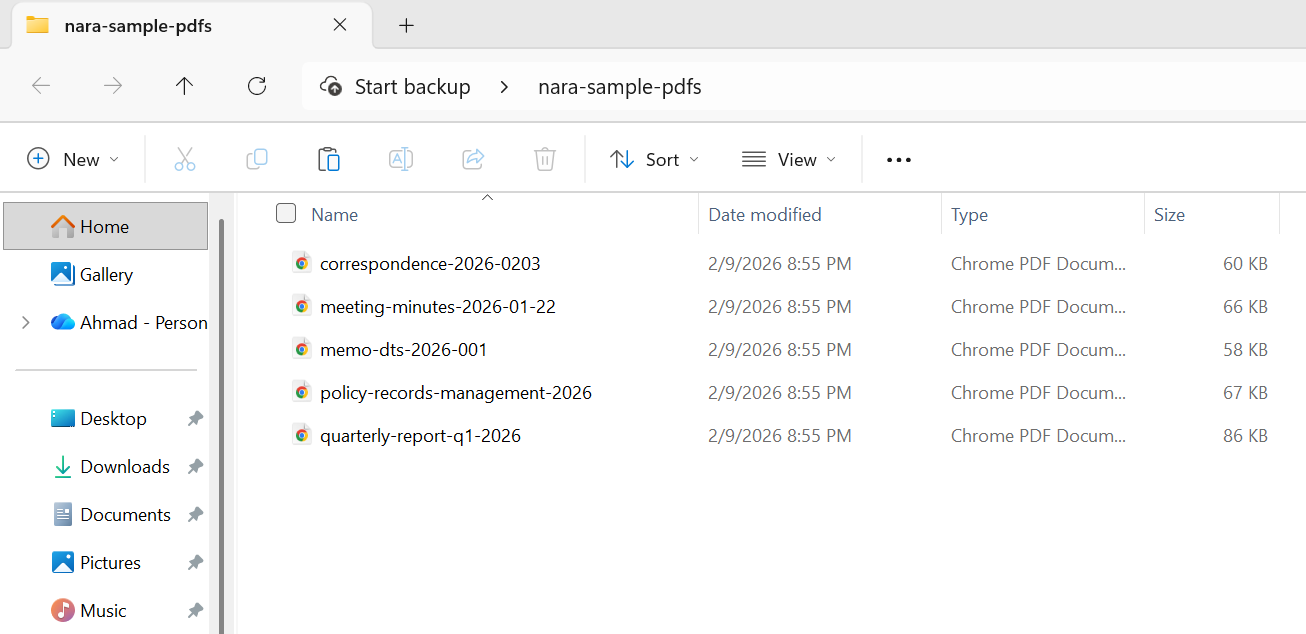
以下是您如何准备将一批机构记录移交给 NARA:
输入
:path=/static-assets/pdf/content-code-examples/tutorials/pdfa-archiving-csharp/pdfa-nara-compliance.csusing IronPdf;
using System;
using System.IO;
string inputFolder = "agency-records/";
string validatedFolder = "nara-transfer/validated/";
string rejectedFolder = "nara-transfer/rejected/";
// Create output directories
Directory.CreateDirectory(validatedFolder);
Directory.CreateDirectory(rejectedFolder);
// NARA transfer metadata requirements
string agencyName = "Department of Example";
string recordSeries = "Administrative Correspondence";
string dateRange = "2020-2025";
// Process all PDF files in the input folder
string[] pdfFiles = Directory.GetFiles(inputFolder, "*.pdf");
Console.WriteLine($"Preparing {pdfFiles.Length} records for NARA transfer");
Console.WriteLine($"Agency: {agencyName}");
Console.WriteLine($"Record Series: {recordSeries}");
Console.WriteLine();
int successCount = 0;
int failCount = 0;
foreach (string inputPath in pdfFiles)
{
string fileName = Path.GetFileName(inputPath);
try
{
using var pdf = PdfDocument.FromFile(inputPath);
// Set NARA-required metadata
var metadata = new System.Collections.Generic.Dictionary<string, string>
{
{ "Title", Path.GetFileNameWithoutExtension(inputPath) },
{ "Author", agencyName },
{ "Subject", recordSeries },
{ "Keywords", $"NARA, {recordSeries}, {dateRange}" },
{ "Agency", agencyName },
{ "RecordSeries", recordSeries },
{ "DateRange", dateRange },
{ "TransferDate", DateTime.Now.ToString("yyyy-MM-dd") }
};
pdf.MetaData.SetMetaDataDictionary(metadata);
// Convert to PDF/A-2b (NARA preferred for digitized records)
string outputPath = Path.Combine(validatedFolder, fileName);
pdf.SaveAsPdfA(outputPath, PdfAVersions.PdfA2b);
// Verify the output
using var verifyPdf = PdfDocument.FromFile(outputPath);
if (verifyPdf.PageCount > 0)
{
successCount++;
Console.WriteLine($"[OK] {fileName}");
}
else
{
throw new Exception("Output PDF has no pages");
}
}
catch (Exception ex)
{
failCount++;
Console.WriteLine($"[FAILED] {fileName}: {ex.Message}");
// Move original to rejected folder for manual review
try
{
File.Copy(inputPath, Path.Combine(rejectedFolder, fileName), overwrite: true);
}
catch { }
}
}
Console.WriteLine();
Console.WriteLine("=== NARA Transfer Preparation Complete ===");
Console.WriteLine($"Successfully converted: {successCount}");
Console.WriteLine($"Failed (requires review): {failCount}");
Console.WriteLine($"Output location: {validatedFolder}");Imports IronPdf
Imports System
Imports System.IO
Module Program
Sub Main()
Dim inputFolder As String = "agency-records/"
Dim validatedFolder As String = "nara-transfer/validated/"
Dim rejectedFolder As String = "nara-transfer/rejected/"
' Create output directories
Directory.CreateDirectory(validatedFolder)
Directory.CreateDirectory(rejectedFolder)
' NARA transfer metadata requirements
Dim agencyName As String = "Department of Example"
Dim recordSeries As String = "Administrative Correspondence"
Dim dateRange As String = "2020-2025"
' Process all PDF files in the input folder
Dim pdfFiles As String() = Directory.GetFiles(inputFolder, "*.pdf")
Console.WriteLine($"Preparing {pdfFiles.Length} records for NARA transfer")
Console.WriteLine($"Agency: {agencyName}")
Console.WriteLine($"Record Series: {recordSeries}")
Console.WriteLine()
Dim successCount As Integer = 0
Dim failCount As Integer = 0
For Each inputPath As String In pdfFiles
Dim fileName As String = Path.GetFileName(inputPath)
Try
Using pdf = PdfDocument.FromFile(inputPath)
' Set NARA-required metadata
Dim metadata As New System.Collections.Generic.Dictionary(Of String, String) From {
{"Title", Path.GetFileNameWithoutExtension(inputPath)},
{"Author", agencyName},
{"Subject", recordSeries},
{"Keywords", $"NARA, {recordSeries}, {dateRange}"},
{"Agency", agencyName},
{"RecordSeries", recordSeries},
{"DateRange", dateRange},
{"TransferDate", DateTime.Now.ToString("yyyy-MM-dd")}
}
pdf.MetaData.SetMetaDataDictionary(metadata)
' Convert to PDF/A-2b (NARA preferred for digitized records)
Dim outputPath As String = Path.Combine(validatedFolder, fileName)
pdf.SaveAsPdfA(outputPath, PdfAVersions.PdfA2b)
' Verify the output
Using verifyPdf = PdfDocument.FromFile(outputPath)
If verifyPdf.PageCount > 0 Then
successCount += 1
Console.WriteLine($"[OK] {fileName}")
Else
Throw New Exception("Output PDF has no pages")
End If
End Using
End Using
Catch ex As Exception
failCount += 1
Console.WriteLine($"[FAILED] {fileName}: {ex.Message}")
' Move original to rejected folder for manual review
Try
File.Copy(inputPath, Path.Combine(rejectedFolder, fileName), overwrite:=True)
Catch
End Try
End Try
Next
Console.WriteLine()
Console.WriteLine("=== NARA Transfer Preparation Complete ===")
Console.WriteLine($"Successfully converted: {successCount}")
Console.WriteLine($"Failed (requires review): {failCount}")
Console.WriteLine($"Output location: {validatedFolder}")
End Sub
End Module输出
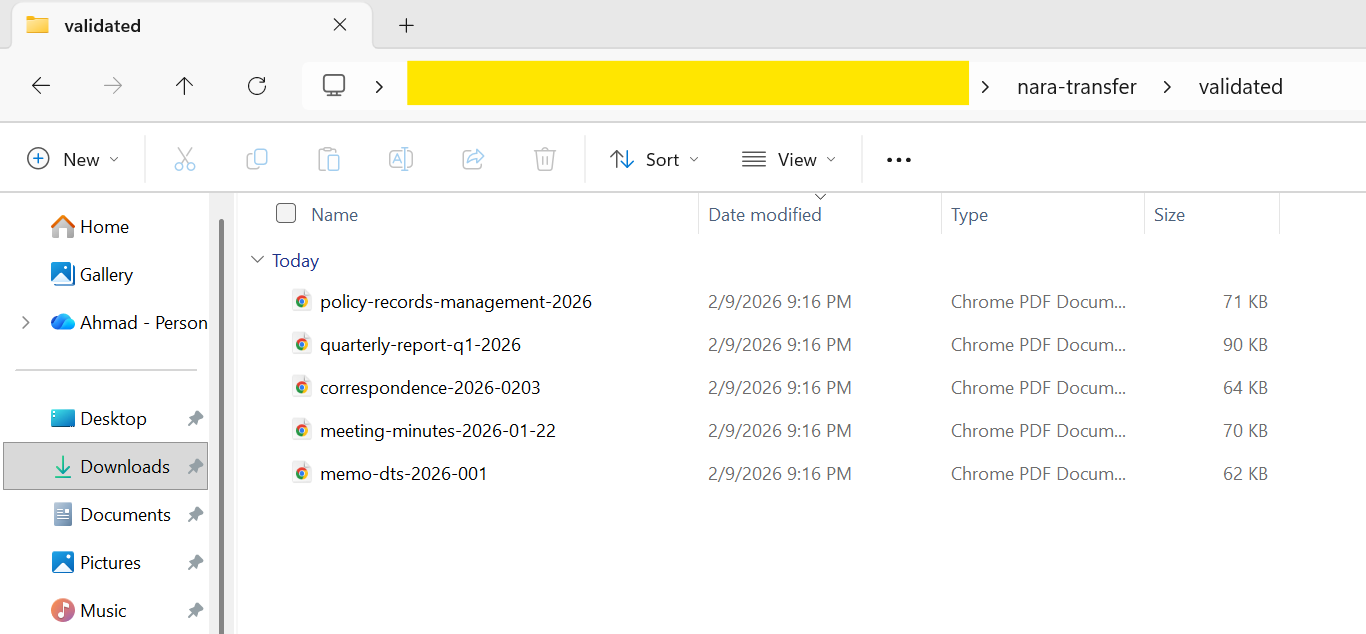
在准备将记录移交给 NARA 时,对每个文件进行单独验证至关重要。 NARA 的录入流程会拒绝不符合要求的文件,而重新处理一大批文件既费时又费力。 将验证直接构建到转化管道中——在每次调用 SaveAsPdfA 后使用 veraPDF 等工具——是最可靠的方法。
法庭文件归档
美国联邦法院系统和许多州法院系统使用的电子存档系统(主要是联邦一级的 CM/ECF)接受或要求 PDF/A 以长期保存记录。 虽然具体要求因辖区而异,但总体期望是一致的:
联邦法院 - 美国法院行政办公室建议将成为永久案件记录一部分的文件使用 PDF/A。 CM/ECF 系统通常接受 PDF/A-1b 作为最低标准,但对于格式复杂的文档,PDF/A-2b 越来越受青睐。
州法院 - 要求差异很大。 有些州(如德克萨斯州和加利福尼亚州)对某些文件类型有明确的 PDF/A 要求,而其他州只是建议将其作为最佳实践。检查目标辖区的具体规则至关重要。
各法院系统的共同要求包括
文件必须可进行文本搜索(而不仅仅是扫描图像),这意味着尽可能使用符合 PDF/A-1a 或 2a 标准的文件,或确保扫描文件已应用 OCR 技术。 页面尺寸必须符合标准(通常为 US Letter,8.5" × 11")。 元数据应包括案件编号、归档日期和归档系统支持的文件类型。
:path=/static-assets/pdf/content-code-examples/tutorials/pdfa-archiving-csharp/pdfa-court-filing.csusing IronPdf;
using System;
// Court filing configuration
string caseNumber = "1:26-cv-00142-ABC";
string courtName = "US District Court, Northern District";
string documentType = "Motion for Summary Judgment";
string filingParty = "Plaintiff";
// Create legal document HTML
string legalDocumentHtml = $@"
E html>
le>
body {{
font-family: 'Times New Roman', Times, serif;
font-size: 12pt;
line-height: 2;
margin: 1in;
}}
.header {{ text-align: center; margin-bottom: 24pt; }}
.case-caption {{
border: 1px solid black;
padding: 12pt;
margin: 24pt 0;
}}
.section {{ margin: 12pt 0; }}
h1 {{ font-size: 14pt; text-align: center; }}
.signature {{ margin-top: 48pt; }}
yle>
class='header'>
<strong>{courtName}</strong>
v>
class='case-caption'>
<p>ACME CORPORATION,<br> Plaintiff,</p>
<p>v.</p>
<p>EXAMPLE INDUSTRIES, INC.,<br> Defendant.</p>
<p style='text-align: right;'><strong>Case No. {caseNumber}</strong></p>
v>
{documentType.ToUpper()}</h1>
class='section'>
<p>Plaintiff ACME Corporation, by and through undersigned counsel, respectfully
moves this Court for summary judgment pursuant to Federal Rule of Civil Procedure 56...</p>
v>
class='section'>
<h2>I. INTRODUCTION</h2>
<p>This motion presents the Court with a straightforward question of contract interpretation...</p>
v>
class='signature'>
<p>Respectfully submitted,</p>
<p>_________________________<br>
Jane Attorney, Esq.<br>
Bar No. 12345<br>
Law Firm LLP<br>
123 Legal Street<br>
City, State 12345<br>
(555) 123-4567<br>
jane@lawfirm.com</p>
<p>Attorney for Plaintiff</p>
v>
;
// Render with court-appropriate settings
var renderer = new ChromePdfRenderer();
renderer.RenderingOptions.PaperSize = IronPdf.Rendering.PdfPaperSize.Letter;
renderer.RenderingOptions.MarginTop = 72;
renderer.RenderingOptions.MarginBottom = 72;
renderer.RenderingOptions.MarginLeft = 72;
renderer.RenderingOptions.MarginRight = 72;
using var pdf = renderer.RenderHtmlAsPdf(legalDocumentHtml);
// Set metadata for court filing system indexing
var metadata = new System.Collections.Generic.Dictionary<string, string>
{
{ "Title", $"{documentType} - {caseNumber}" },
{ "Author", "Law Firm LLP" },
{ "Subject", $"Court Filing - {caseNumber}" },
{ "CaseNumber", caseNumber },
{ "DocumentType", documentType },
{ "FilingParty", filingParty },
{ "FilingDate", DateTime.Now.ToString("yyyy-MM-dd") }
};
pdf.MetaData.SetMetaDataDictionary(metadata);
// Convert to PDF/A-2b (widely accepted by federal courts)
string outputPath = $"court-filing-{caseNumber.Replace(":", "-")}.pdf";
pdf.SaveAsPdfA(outputPath, PdfAVersions.PdfA2b);Imports IronPdf
Imports System
Imports System.Collections.Generic
' Court filing configuration
Dim caseNumber As String = "1:26-cv-00142-ABC"
Dim courtName As String = "US District Court, Northern District"
Dim documentType As String = "Motion for Summary Judgment"
Dim filingParty As String = "Plaintiff"
' Create legal document HTML
Dim legalDocumentHtml As String = $"
<!DOCTYPE html>
<html>
<head>
<style>
body {{
font-family: 'Times New Roman', Times, serif;
font-size: 12pt;
line-height: 2;
margin: 1in;
}}
.header {{ text-align: center; margin-bottom: 24pt; }}
.case-caption {{
border: 1px solid black;
padding: 12pt;
margin: 24pt 0;
}}
.section {{ margin: 12pt 0; }}
h1 {{ font-size: 14pt; text-align: center; }}
.signature {{ margin-top: 48pt; }}
</style>
</head>
<body>
<div class='header'>
<strong>{courtName}</strong>
</div>
<div class='case-caption'>
<p>ACME CORPORATION,<br> Plaintiff,</p>
<p>v.</p>
<p>EXAMPLE INDUSTRIES, INC.,<br> Defendant.</p>
<p style='text-align: right;'><strong>Case No. {caseNumber}</strong></p>
</div>
<h1>{documentType.ToUpper()}</h1>
<div class='section'>
<p>Plaintiff ACME Corporation, by and through undersigned counsel, respectfully
moves this Court for summary judgment pursuant to Federal Rule of Civil Procedure 56...</p>
</div>
<div class='section'>
<h2>I. INTRODUCTION</h2>
<p>This motion presents the Court with a straightforward question of contract interpretation...</p>
</div>
<div class='signature'>
<p>Respectfully submitted,</p>
<p>_________________________<br>
Jane Attorney, Esq.<br>
Bar No. 12345<br>
Law Firm LLP<br>
123 Legal Street<br>
City, State 12345<br>
(555) 123-4567<br>
jane@lawfirm.com</p>
<p>Attorney for Plaintiff</p>
</div>
</body>
</html>
"
' Render with court-appropriate settings
Dim renderer As New ChromePdfRenderer()
renderer.RenderingOptions.PaperSize = IronPdf.Rendering.PdfPaperSize.Letter
renderer.RenderingOptions.MarginTop = 72
renderer.RenderingOptions.MarginBottom = 72
renderer.RenderingOptions.MarginLeft = 72
renderer.RenderingOptions.MarginRight = 72
Using pdf = renderer.RenderHtmlAsPdf(legalDocumentHtml)
' Set metadata for court filing system indexing
Dim metadata As New Dictionary(Of String, String) From {
{"Title", $"{documentType} - {caseNumber}"},
{"Author", "Law Firm LLP"},
{"Subject", $"Court Filing - {caseNumber}"},
{"CaseNumber", caseNumber},
{"DocumentType", documentType},
{"FilingParty", filingParty},
{"FilingDate", DateTime.Now.ToString("yyyy-MM-dd")}
}
pdf.MetaData.SetMetaDataDictionary(metadata)
' Convert to PDF/A-2b (widely accepted by federal courts)
Dim outputPath As String = $"court-filing-{caseNumber.Replace(":", "-")}.pdf"
pdf.SaveAsPdfA(outputPath, PdfAVersions.PdfA2b)
End Using输出
对于建立文档管理系统的律师事务所和法律技术公司来说,将 PDF/A 转换集成到归档工作流程中可确保归档的每份文档都符合法院的长期保存要求,而无需律师助理或律师的人工干预。
医疗记录保留
医疗机构面临着保存患者记录的严格要求。 虽然 HIPAA 并未强制要求使用特定的文件格式,但较长的保存期限(成人通常为 7-10 年,未成年人则更长)、可访问性要求和审计期望等综合因素使得 PDF/A 成为归档医疗文档的自然选择。
医疗记录归档的主要注意事项:
保留期限--联邦和州法规要求医疗记录的保留期限各不相同,通常长达 10 年以上。 PDF/A 的长期可读性保证使其成为满足这些要求的理想选择,而不必担心格式过时。
可访问性--《美国残疾人法案》和第 508 条要求电子病历具有可访问性。 使用 PDF/A-2a 或 PDF/A-3a 一致性级别(包括结构标记)有助于满足这些无障碍要求。
互操作性--医疗记录经常在医疗机构、保险公司和患者之间共享。 PDF/A 的自足性确保了无论使用何种阅读器或系统打开文档,都能呈现一致的效果。
审计准备就绪--医疗审计可能要求在医疗记录创建多年后才提供。 PDF/A 可确保在审计过程中生成的文档与原件完全相同,不会出现可能引起文档完整性问题的渲染差异。
:path=/static-assets/pdf/content-code-examples/tutorials/pdfa-archiving-csharp/pdfa-medical-records.csusing IronPdf;
using System;
using System.Collections.Generic;
// Medical record metadata
string patientId = "MRN-2026-00847";
string documentType = "Discharge Summary";
string facility = "Metro General Hospital";
string department = "Internal Medicine";
DateTime encounterDate = new DateTime(2026, 2, 5);
// Create clinical document HTML
string clinicalDocumentHtml = $@"
E html>
ng='en'>
le>
body {{ font-family: Arial, sans-serif; margin: 40px; line-height: 1.6; }}
.header {{ border-bottom: 2px solid #2c3e50; padding-bottom: 15px; margin-bottom: 20px; }}
.patient-info {{ background: #ecf0f1; padding: 15px; margin: 15px 0; }}
.section {{ margin: 20px 0; }}
h1 {{ color: #2c3e50; }}
h2 {{ color: #3498db; font-size: 14pt; }}
.footer {{ margin-top: 40px; font-size: 10pt; color: #666; }}
yle>
class='header'>
<h1>{facility}</h1>
<p>{department} | {documentType}</p>
v>
class='patient-info'>
<p><strong>Patient ID:</strong> {patientId}</p>
<p><strong>Encounter Date:</strong> {encounterDate:MMMM d, yyyy}</p>
<p><strong>Attending Physician:</strong> Dr. Sarah Johnson, MD</p>
v>
class='section'>
<h2>Chief Complaint</h2>
<p>Patient presented with acute respiratory symptoms including shortness of breath and persistent cough.</p>
v>
class='section'>
<h2>Hospital Course</h2>
<p>Patient was admitted for observation and treatment. Symptoms improved with standard protocol...</p>
v>
class='section'>
<h2>Discharge Instructions</h2>
<ul>
<li>Continue prescribed medications as directed</li>
<li>Follow up with primary care physician within 7 days</li>
<li>Return to ED if symptoms worsen</li>
</ul>
v>
class='footer'>
<p>Document generated: {DateTime.Now:yyyy-MM-dd HH:mm}</p>
<p>This document is archived in PDF/A-3a format for accessibility and long-term preservation.</p>
v>
;
var renderer = new ChromePdfRenderer();
using var pdf = renderer.RenderHtmlAsPdf(clinicalDocumentHtml);
// Set comprehensive metadata for medical records management
var metadata = new System.Collections.Generic.Dictionary<string, string>
{
{ "Title", $"{documentType} - {patientId}" },
{ "Author", "Metro General Hospital EHR System" },
{ "Subject", $"Clinical documentation for patient {patientId}" },
{ "PatientMRN", patientId },
{ "DocumentType", documentType },
{ "Facility", facility },
{ "Department", department },
{ "EncounterDate", encounterDate.ToString("yyyy-MM-dd") },
{ "RetentionCategory", "Medical Record - Adult" },
{ "RetentionPeriod", "10 years from last encounter" }
};
pdf.MetaData.SetMetaDataDictionary(metadata);
// Embed clinical data (HL7 FHIR format)
string fhirData = @"{
sourceType"": ""DocumentReference"",
atus"": ""current"",
pe"": { ""text"": ""Discharge Summary"" },
bject"": { ""reference"": ""Patient/MRN-2026-00847"" }
byte[] fhirBytes = System.Text.Encoding.UTF8.GetBytes(fhirData);
var fhirConfig = new EmbedFileConfiguration(EmbedFileType.xml)
{
EmbedFileName = "clinical-data.json",
AFDesc = "FHIR DocumentReference metadata",
AFRelationship = AFRelationship.Data
};
var embedFiles = new List<EmbedFileByte>
{
new EmbedFileByte(fhirBytes, fhirConfig)
};
// Convert to PDF/A-3a (accessible archival with embedded data)
using var archivedRecord = pdf.ConvertToPdfA(embedFiles, PdfAVersions.PdfA3a);
string outputPath = $"medical-record-{patientId}-{encounterDate:yyyyMMdd}.pdf";
archivedRecord.SaveAs(outputPath);Imports IronPdf
Imports System
Imports System.Collections.Generic
Imports System.Text
' Medical record metadata
Dim patientId As String = "MRN-2026-00847"
Dim documentType As String = "Discharge Summary"
Dim facility As String = "Metro General Hospital"
Dim department As String = "Internal Medicine"
Dim encounterDate As DateTime = New DateTime(2026, 2, 5)
' Create clinical document HTML
Dim clinicalDocumentHtml As String = $"
<!DOCTYPE html>
<html lang='en'>
<head>
<style>
body {{ font-family: Arial, sans-serif; margin: 40px; line-height: 1.6; }}
.header {{ border-bottom: 2px solid #2c3e50; padding-bottom: 15px; margin-bottom: 20px; }}
.patient-info {{ background: #ecf0f1; padding: 15px; margin: 15px 0; }}
.section {{ margin: 20px 0; }}
h1 {{ color: #2c3e50; }}
h2 {{ color: #3498db; font-size: 14pt; }}
.footer {{ margin-top: 40px; font-size: 10pt; color: #666; }}
</style>
</head>
<body>
<div class='header'>
<h1>{facility}</h1>
<p>{department} | {documentType}</p>
</div>
<div class='patient-info'>
<p><strong>Patient ID:</strong> {patientId}</p>
<p><strong>Encounter Date:</strong> {encounterDate:MMMM d, yyyy}</p>
<p><strong>Attending Physician:</strong> Dr. Sarah Johnson, MD</p>
</div>
<div class='section'>
<h2>Chief Complaint</h2>
<p>Patient presented with acute respiratory symptoms including shortness of breath and persistent cough.</p>
</div>
<div class='section'>
<h2>Hospital Course</h2>
<p>Patient was admitted for observation and treatment. Symptoms improved with standard protocol...</p>
</div>
<div class='section'>
<h2>Discharge Instructions</h2>
<ul>
<li>Continue prescribed medications as directed</li>
<li>Follow up with primary care physician within 7 days</li>
<li>Return to ED if symptoms worsen</li>
</ul>
</div>
<div class='footer'>
<p>Document generated: {DateTime.Now:yyyy-MM-dd HH:mm}</p>
<p>This document is archived in PDF/A-3a format for accessibility and long-term preservation.</p>
</div>
</body>
</html>"
Dim renderer As New ChromePdfRenderer()
Using pdf = renderer.RenderHtmlAsPdf(clinicalDocumentHtml)
' Set comprehensive metadata for medical records management
Dim metadata As New Dictionary(Of String, String) From {
{"Title", $"{documentType} - {patientId}"},
{"Author", "Metro General Hospital EHR System"},
{"Subject", $"Clinical documentation for patient {patientId}"},
{"PatientMRN", patientId},
{"DocumentType", documentType},
{"Facility", facility},
{"Department", department},
{"EncounterDate", encounterDate.ToString("yyyy-MM-dd")},
{"RetentionCategory", "Medical Record - Adult"},
{"RetentionPeriod", "10 years from last encounter"}
}
pdf.MetaData.SetMetaDataDictionary(metadata)
' Embed clinical data (HL7 FHIR format)
Dim fhirData As String = "{
""resourceType"": ""DocumentReference"",
""status"": ""current"",
""type"": { ""text"": ""Discharge Summary"" },
""subject"": { ""reference"": ""Patient/MRN-2026-00847"" }
}"
Dim fhirBytes As Byte() = Encoding.UTF8.GetBytes(fhirData)
Dim fhirConfig As New EmbedFileConfiguration(EmbedFileType.xml) With {
.EmbedFileName = "clinical-data.json",
.AFDesc = "FHIR DocumentReference metadata",
.AFRelationship = AFRelationship.Data
}
Dim embedFiles As New List(Of EmbedFileByte) From {
New EmbedFileByte(fhirBytes, fhirConfig)
}
' Convert to PDF/A-3a (accessible archival with embedded data)
Using archivedRecord = pdf.ConvertToPdfA(embedFiles, PdfAVersions.PdfA3a)
Dim outputPath As String = $"medical-record-{patientId}-{encounterDate:yyyyMMdd}.pdf"
archivedRecord.SaveAs(outputPath)
End Using
End Using输出
对于电子健康记录 (EHR) 系统来说,最有效的方法是在创建文档时将其转换为 PDF/A - 在生成实验室结果、临床笔记定稿或出院摘要时。 这种 "创建时存档 "的策略避免了日后批量迁移的成本和复杂性。
下一步
以 PDF/A 格式存档文件并不复杂。 IronPDF 为 .NET 开发人员提供了一个完整的工具包,用于创建、转换和丰富符合 PDF/A 标准的文档--所有这一切都在熟悉的 C# 生态系统中进行。 无论您是要从HTML生成存档文档,还是要为政府和医疗保健分发制作可访问的 PDF,或者是要转换传统 PDF 以便长期存储,又或者是要将外部验证集成到大容量批处理流水线中,IronPDF 都能处理技术细节,让您专注于应用程序的需求。
从基础的 PDF/A-1 标准到 PDF/A-3 和 PDF/A-4 的现代功能,IronPdf 支持所有的归档版本和一致性级别--包括 PDF/A-1a、1b、2a、2b、3a、3b、4、4e 和 4f。 专门的 IronPDF/A 方法指南详细介绍了转换选项和一致性级别。 结合元数据管理、通过 EmbedFileConfiguration 进行文件嵌入以及ZUGFeRD/Factur-X 电子发票支持,它提供了满足政府机构、法院系统、医疗保健机构和金融机构归档要求所需的一切。
准备好开始存档了吗? 下载 IronPDF 并免费试用。 如果您有任何疑问或想讨论您的具体合规情况,请联系我们的工程支持团队--我们很乐意帮助您获得成功。
常见问题解答
什么是 PDF/A 合规性?
PDF/A 合规性是指专为电子文档归档和长期保存而设计的 ISO 标准化 PDF 版本。它可确保文档在未来数年内都能以相同的方式复制。
如何使用 C# 创建符合 PDF/A 标准的文档?
通过利用 IronPDF 库,您可以使用 C# 创建符合 PDF/A 标准的文档,该库提供了生成 PDF 并将其转换为各种 PDF/A 格式的强大工具。
IronPDF 支持哪些不同的 PDF/A 版本?
IronPDF 支持多个 PDF/A 版本,包括 PDF/A-1、PDF/A-2 和 PDF/A-3,每个版本都能满足不同的文档存档和保存要求。
IronPDF 能否帮助嵌入 ZUGFeRD 和 Factur-X 等电子发票标准的源数据?
是的,IronPDF 可以嵌入 ZUGFeRD 和 Factur-X 等电子发票标准的源数据,以促进电子发票的处理和合规性。
如何在 C# 中验证 PDF/A 合规性?
您可以在 C# 中使用 IronPDF 验证 PDF/A 合规性,利用其内置的验证工具确保您的文档符合所需的 PDF/A 规范。
是否可以使用 IronPDF 处理政府归档情况?
是的,IronPDF 能够处理各种政府归档情况,包括符合 NARA、法院文件和医疗记录要求的标准。
使用 PDF/A 存档有哪些好处?
使用 PDF/A 存档的好处包括:确保文档的长期保真度,提供长期保存的标准化格式,以及符合法律和组织要求。
IronPDF 是否支持将现有 PDF 转换为 PDF/A 格式?
IronPDF 支持将现有 PDF 转换为 PDF/A 格式,以便于合规和长期保存文档。
IronPDF 如何确保 PDF/A 转换中的文档保真度?
IronPDF 通过保持字体、图像和布局的完整性来确保 PDF/A 转换中的文档保真度,因此存档文档看起来与预期完全一致。
我可以使用 IronPDF 进行病历归档吗?
是的,IronPDF 可用于医疗记录归档,帮助确保符合文档保存的行业标准和规定。

还在滚动吗?
想快速获得证据? PM > Install-Package IronPdf
运行示例看着你的HTML代码变成PDF文件。






 免费开始
免费开始 免费开始
免费开始 预定免费现场演示





 无需信用卡或创建账户










