


2022年的PDF查看器工具

Full Comparison
Looking for a detailed feature-by-feature breakdown? See how IronPDF stacks up against Itext on pricing, HTML support, and licensing.
IronPDF提供完整的文件,包括逐步教程和24/5客戶支持,而iText8的文件則是模塊化的,要求大量的學習投入。 IronPDF的統一文件方法、可投入生產的範例和及時的支持,使其成為快速企業開發和降低維護成本的首選。
在.NET中開發企業級PDF解決方案時,文件質量和客戶支持直接影響項目進度和維護成本。 高級開發者需要可靠的資源,以最大限度地減少學習曲線,同時最大化實施效率。 本分析檢查IronPDF和iText(現為iText8)在文件質量、支持響應性和開發者體驗方面的表現,以指導PDF處理決策。
IronPDF和iText的文件質量如何比較?
為什麼IronPDF的文件被認為更有利於開發者?
IronPDF的文件具有統一的、層次分明的結構,引導開發者從基本概念到高級實現。 其架構遵循邏輯進程:安裝、基本操作、高級功能和優化技術。 每個部分都包含經過測試的可用程式碼範例,並針對最新的程式庫版本進行測試,以確保生產可靠性。
快速入門部分提供適用於Windows、Linux、macOS和Docker環境的特定平台安裝指南。 這種全面覆蓋了多樣的企業部署場景。 雲端部署指南涵蓋Azure Functions和AWS Lambda的實現,包括無伺服器架構的配置細節。 文件還包括專門的指南,以適用於Android部署和F#開發,確保涵蓋多樣的技術棧。
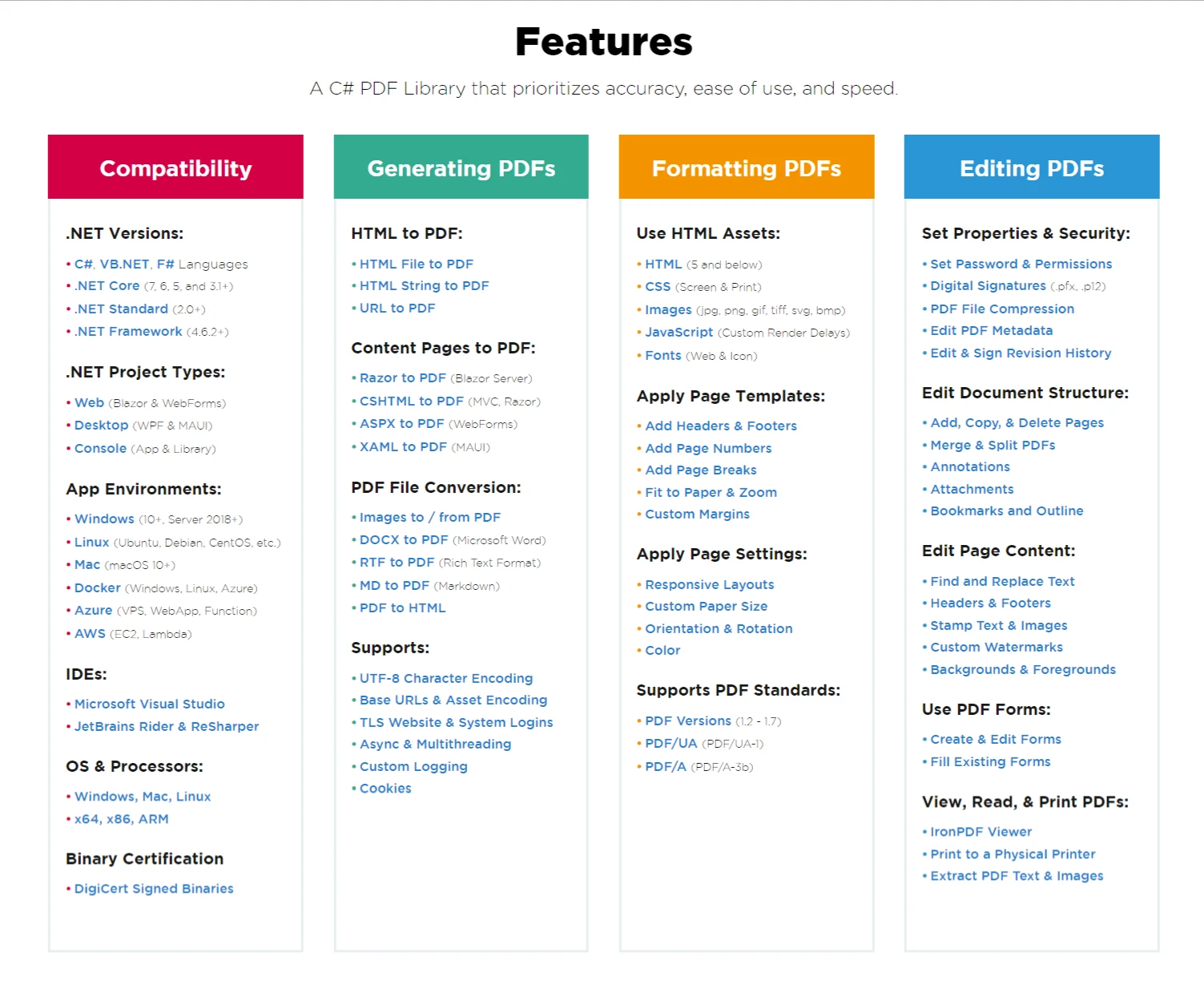
圖1:IronPDF的功能文件提供了清晰的層次結構,並附有每個功能的實施指南的直接連結。
文件通過上下文感知範例表現出色。 在實現HTML轉PDF轉換時,文件涵蓋了基本的轉換,加上常見的生產場景,如響應式CSS處理和JavaScript執行:
using IronPdf;

// Production-ready HTML to PDF conversion with error handling
public class PdfGenerator
{
    private readonly ChromePdfRenderer _renderer;

    public PdfGenerator()
    {
        _renderer = new ChromePdfRenderer();

        // Configure for production use
        _renderer.RenderingOptions.MarginTop = 25;
        _renderer.RenderingOptions.MarginBottom = 25;
        _renderer.RenderingOptions.CssMediaType = PdfCssMediaType.Print;
        _renderer.RenderingOptions.PrintHtmlBackgrounds = true;

        // Performance optimization
        _renderer.RenderingOptions.RenderDelay = 500; // Wait for JavaScript
        _renderer.RenderingOptions.Timeout = 60000; // 60-second timeout
    }

    public byte[] GeneratePdfFromHtml(string html, string baseUrl = null)
    {
        try
        {
            // Set base URL for relative asset resolution
            if (!string.IsNullOrEmpty(baseUrl))
            {
                _renderer.RenderingOptions.BaseUrl = new Uri(baseUrl);
            }

            // Generate PDF with proper encoding
            var pdf = _renderer.RenderHtmlAsPdf(html);

            // Apply compression for smaller file size
            pdf.CompressImages(90);

            return pdf.BinaryData;
        }
        catch (Exception ex)
        {
            // Log error details for debugging
            Console.WriteLine($"PDF generation failed: {ex.Message}");
            throw;
        }
    }
}
using IronPdf;
// Production-ready HTML to PDF conversion with error handling
public class PdfGenerator
{
private readonly ChromePdfRenderer _renderer;
public PdfGenerator()
{
_renderer = new ChromePdfRenderer();
// Configure for production use
_renderer.RenderingOptions.MarginTop = 25;
_renderer.RenderingOptions.MarginBottom = 25;
_renderer.RenderingOptions.CssMediaType = PdfCssMediaType.Print;
_renderer.RenderingOptions.PrintHtmlBackgrounds = true;
// Performance optimization
_renderer.RenderingOptions.RenderDelay = 500; // Wait for JavaScript
_renderer.RenderingOptions.Timeout = 60000; // 60-second timeout
}
public byte[] GeneratePdfFromHtml(string html, string baseUrl = null)
{
try
{
// Set base URL for relative asset resolution
if (!string.IsNullOrEmpty(baseUrl))
{
_renderer.RenderingOptions.BaseUrl = new Uri(baseUrl);
}
// Generate PDF with proper encoding
var pdf = _renderer.RenderHtmlAsPdf(html);
// Apply compression for smaller file size
pdf.CompressImages(90);
return pdf.BinaryData;
}
catch (Exception ex)
{
// Log error details for debugging
Console.WriteLine($"PDF generation failed: {ex.Message}");
throw;
}
}
}Imports IronPdf
' Production-ready HTML to PDF conversion with error handling
Public Class PdfGenerator
Private ReadOnly _renderer As ChromePdfRenderer
Public Sub New()
_renderer = New ChromePdfRenderer()
' Configure for production use
_renderer.RenderingOptions.MarginTop = 25
_renderer.RenderingOptions.MarginBottom = 25
_renderer.RenderingOptions.CssMediaType = PdfCssMediaType.Print
_renderer.RenderingOptions.PrintHtmlBackgrounds = True
' Performance optimization
_renderer.RenderingOptions.RenderDelay = 500 ' Wait for JavaScript
_renderer.RenderingOptions.Timeout = 60000 ' 60-second timeout
End Sub
Public Function GeneratePdfFromHtml(html As String, Optional baseUrl As String = Nothing) As Byte()
Try
' Set base URL for relative asset resolution
If Not String.IsNullOrEmpty(baseUrl) Then
_renderer.RenderingOptions.BaseUrl = New Uri(baseUrl)
End If
' Generate PDF with proper encoding
Dim pdf = _renderer.RenderHtmlAsPdf(html)
' Apply compression for smaller file size
pdf.CompressImages(90)
Return pdf.BinaryData
Catch ex As Exception
' Log error details for debugging
Console.WriteLine($"PDF generation failed: {ex.Message}")
Throw
End Try
End Function
End ClassAPI 參考提供每個公開類、方法和屬性的IntelliSense相容文件。 這種IDE整合使開發者能夠在他們的開發環境中直接存取文件,減少上下文切換,提高生產力。 文件包括詳盡的自訂日誌、本地與遠程引擎部署和授權金鑰管理的指南。
什麼使iText8的文件更難以導航?
iText8的文件反映了其模塊化架構,將功能分配給多個包:iText Core、pdfHTML、pdfSweep、pdfCalligraph等。 雖然這種模塊性為專門的使用案例提供了靈活性,但它造成了分散的學習體驗。 開發者必須在實現基本功能之前了解模塊之間的相互依賴性。
文件結構要求在不同的模塊文件網站之間導航,每個網站都有自己版本控制和相容性矩陣。 將HTML轉PDF需要了解iText Core和pdfHTML附加組件,以及每個組件單獨的文件。 這種分離導致了缺乏完整實現上下文的範例。 與IronPDF對URL轉PDF或HTML文件處理的統一方法不同,iText8對基本操作需要多個文件參考。
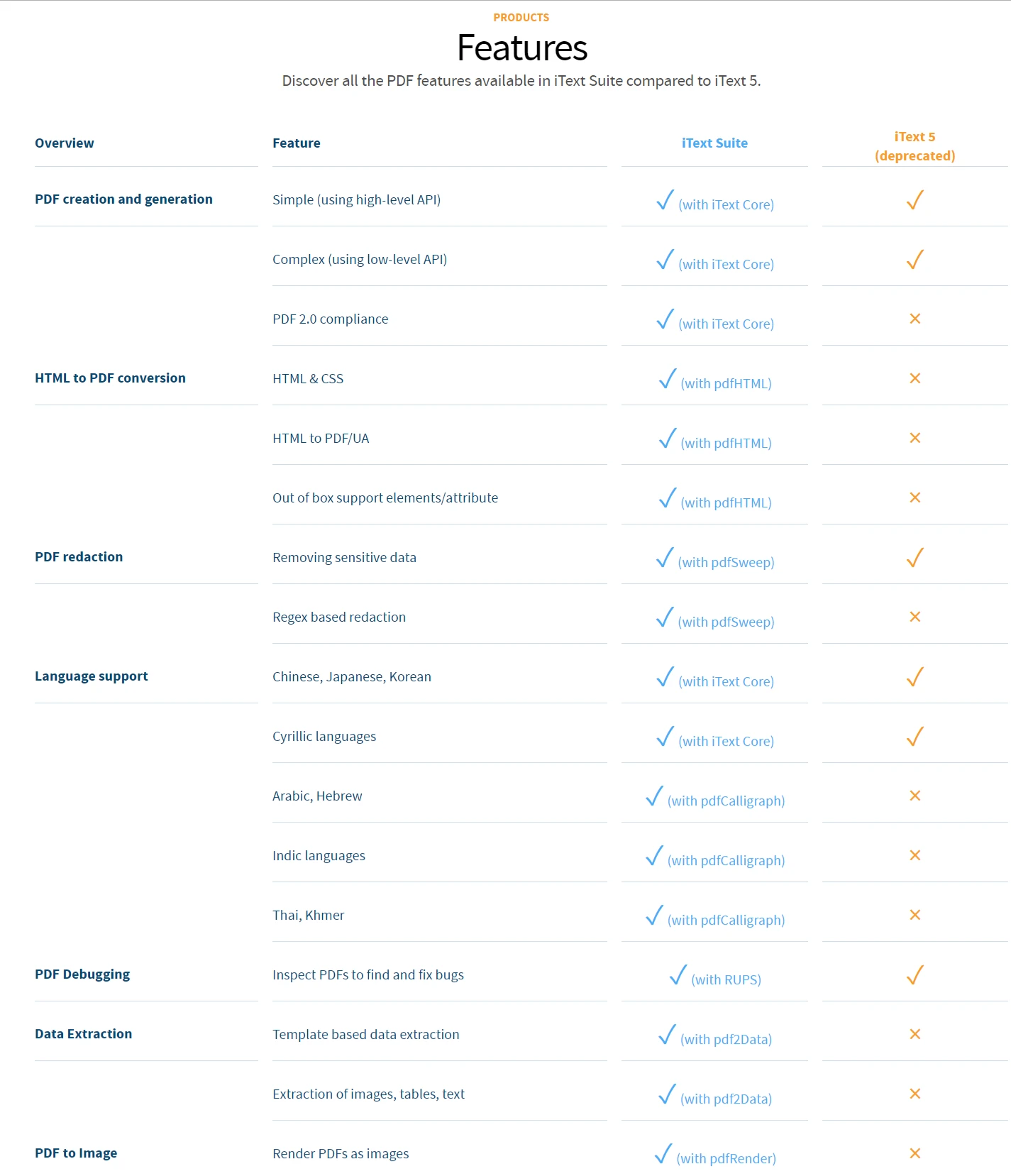
圖2:iText8的模塊化架構需要了解多個組件及其交互,以實現完整的PDF解決方案。
以下是典型的iText8實現,顯示基本操作的複雜性:
using iText.Kernel.Pdf;
using iText.Layout;
using iText.Layout.Element;
using iText.Layout.Properties;
using iText.Kernel.Font;
using iText.IO.Font;

public class ITextPdfGenerator
{
    public void CreatePdfWithHeaderFooter(string outputPath)
    {
        // Initialize writer and document
        PdfWriter writer = new PdfWriter(outputPath);
        PdfDocument pdfDoc = new PdfDocument(writer);
        Document document = new Document(pdfDoc);

        // Configure page size and margins
        pdfDoc.SetDefaultPageSize(PageSize.A4);
        document.SetMargins(72, 72, 72, 72);

        // Create font for consistency
        PdfFont font = PdfFontFactory.CreateFont(FontConstants.HELVETICA);

        // Add event handler for headers/footers (requires understanding event system)
        pdfDoc.AddEventHandler(PdfDocumentEvent.END_PAGE, new HeaderFooterEventHandler());

        // Add content
        Paragraph title = new Paragraph("Document Title")
            .SetFont(font)
            .SetFontSize(18)
            .SetTextAlignment(TextAlignment.CENTER);
        document.Add(title);

        // Multiple steps required for basic formatting
        for (int i = 0; i < 5; i++)
        {
            Paragraph para = new Paragraph($"Section {i + 1} content goes here.")
                .SetFont(font)
                .SetFontSize(12)
                .SetTextAlignment(TextAlignment.JUSTIFIED);
            document.Add(para);
        }

        document.Close();
    }

    // Separate class required for header/footer handling
    private class HeaderFooterEventHandler : IEventHandler
    {
        public void HandleEvent(Event @event)
        {
            PdfDocumentEvent docEvent = (PdfDocumentEvent)@event;
            PdfDocument pdfDoc = docEvent.GetDocument();
            PdfPage page = docEvent.GetPage();

            // Complex implementation for simple headers/footers
            // ... additional code required
        }
    }
}
using iText.Kernel.Pdf;
using iText.Layout;
using iText.Layout.Element;
using iText.Layout.Properties;
using iText.Kernel.Font;
using iText.IO.Font;
public class ITextPdfGenerator
{
public void CreatePdfWithHeaderFooter(string outputPath)
{
// Initialize writer and document
PdfWriter writer = new PdfWriter(outputPath);
PdfDocument pdfDoc = new PdfDocument(writer);
Document document = new Document(pdfDoc);
// Configure page size and margins
pdfDoc.SetDefaultPageSize(PageSize.A4);
document.SetMargins(72, 72, 72, 72);
// Create font for consistency
PdfFont font = PdfFontFactory.CreateFont(FontConstants.HELVETICA);
// Add event handler for headers/footers (requires understanding event system)
pdfDoc.AddEventHandler(PdfDocumentEvent.END_PAGE, new HeaderFooterEventHandler());
// Add content
Paragraph title = new Paragraph("Document Title")
.SetFont(font)
.SetFontSize(18)
.SetTextAlignment(TextAlignment.CENTER);
document.Add(title);
// Multiple steps required for basic formatting
for (int i = 0; i < 5; i++)
{
Paragraph para = new Paragraph($"Section {i + 1} content goes here.")
.SetFont(font)
.SetFontSize(12)
.SetTextAlignment(TextAlignment.JUSTIFIED);
document.Add(para);
}
document.Close();
}
// Separate class required for header/footer handling
private class HeaderFooterEventHandler : IEventHandler
{
public void HandleEvent(Event @event)
{
PdfDocumentEvent docEvent = (PdfDocumentEvent)@event;
PdfDocument pdfDoc = docEvent.GetDocument();
PdfPage page = docEvent.GetPage();
// Complex implementation for simple headers/footers
// ... additional code required
}
}
}Imports iText.Kernel.Pdf
Imports iText.Layout
Imports iText.Layout.Element
Imports iText.Layout.Properties
Imports iText.Kernel.Font
Imports iText.IO.Font
Public Class ITextPdfGenerator
Public Sub CreatePdfWithHeaderFooter(outputPath As String)
' Initialize writer and document
Dim writer As New PdfWriter(outputPath)
Dim pdfDoc As New PdfDocument(writer)
Dim document As New Document(pdfDoc)
' Configure page size and margins
pdfDoc.SetDefaultPageSize(PageSize.A4)
document.SetMargins(72, 72, 72, 72)
' Create font for consistency
Dim font As PdfFont = PdfFontFactory.CreateFont(FontConstants.HELVETICA)
' Add event handler for headers/footers (requires understanding event system)
pdfDoc.AddEventHandler(PdfDocumentEvent.END_PAGE, New HeaderFooterEventHandler())
' Add content
Dim title As New Paragraph("Document Title") _
.SetFont(font) _
.SetFontSize(18) _
.SetTextAlignment(TextAlignment.CENTER)
document.Add(title)
' Multiple steps required for basic formatting
For i As Integer = 0 To 4
Dim para As New Paragraph($"Section {i + 1} content goes here.") _
.SetFont(font) _
.SetFontSize(12) _
.SetTextAlignment(TextAlignment.JUSTIFIED)
document.Add(para)
Next
document.Close()
End Sub
' Separate class required for header/footer handling
Private Class HeaderFooterEventHandler
Implements IEventHandler
Public Sub HandleEvent([event] As [Event]) Implements IEventHandler.HandleEvent
Dim docEvent As PdfDocumentEvent = CType([event], PdfDocumentEvent)
Dim pdfDoc As PdfDocument = docEvent.GetDocument()
Dim page As PdfPage = docEvent.GetPage()
' Complex implementation for simple headers/footers
' ... additional code required
End Sub
End Class
End Class此程式碼範例顯示iText8如何需要了解事件系統以處理頁眉/頁腳、管理字體資源,並導航類層次結構以進行基本操作。 每個組件都需要引用不同的文件部分,複雜了心智模型的構建。 IronPDF簡化了這些操作,通過直接的方法來新增頁碼、自訂水印和背景/前景元素。
程式碼範例的質量和完整性如何比較?
IronPDF的文件強調可立即適應的生產就緒範例。 指南部分提供完整的可執行範例,用於普通場景並解釋配置選項。 實現自訂頁眉和頁腳包含簡單和複雜的方法:
using IronPdf;

// Simple approach with built-in placeholders
var renderer = new ChromePdfRenderer();

// Text headers with merge fields
renderer.RenderingOptions.TextHeader = new TextHeaderFooter
{
    CenterText = "{pdf-title}",
    LeftText = "{date}",
    RightText = "Page {page} of {total-pages}",
    FontSize = 11,
    FontFamily = "Arial"
};

// HTML headers for complex layouts
renderer.RenderingOptions.HtmlHeader = new HtmlHeaderFooter
{
    Height = 25,
    HtmlFragment = @"
        <div style='display: flex; justify-content: space-between; width: 100%;'>
            <img src='logo.png' style='height: 20px;' />
            <span>Confidential Document</span>
            <span>{page}/{total-pages}</span>
        </div>",
    BaseUrl = new Uri(@"C:\assets\")
};

var pdf = renderer.RenderHtmlAsPdf("<h1>Document Content</h1>");
pdf.SaveAs("document-with-headers.pdf");
using IronPdf;
// Simple approach with built-in placeholders
var renderer = new ChromePdfRenderer();
// Text headers with merge fields
renderer.RenderingOptions.TextHeader = new TextHeaderFooter
{
CenterText = "{pdf-title}",
LeftText = "{date}",
RightText = "Page {page} of {total-pages}",
FontSize = 11,
FontFamily = "Arial"
};
// HTML headers for complex layouts
renderer.RenderingOptions.HtmlHeader = new HtmlHeaderFooter
{
Height = 25,
HtmlFragment = @"
<div style='display: flex; justify-content: space-between; width: 100%;'>
<img src='logo.png' style='height: 20px;' />
<span>Confidential Document</span>
<span>{page}/{total-pages}</span>
</div>",
BaseUrl = new Uri(@"C:\assets\")
};
var pdf = renderer.RenderHtmlAsPdf("<h1>Document Content</h1>");
pdf.SaveAs("document-with-headers.pdf");Imports IronPdf
' Simple approach with built-in placeholders
Dim renderer = New ChromePdfRenderer()
' Text headers with merge fields
renderer.RenderingOptions.TextHeader = New TextHeaderFooter With {
.CenterText = "{pdf-title}",
.LeftText = "{date}",
.RightText = "Page {page} of {total-pages}",
.FontSize = 11,
.FontFamily = "Arial"
}
' HTML headers for complex layouts
renderer.RenderingOptions.HtmlHeader = New HtmlHeaderFooter With {
.Height = 25,
.HtmlFragment = "
<div style='display: flex; justify-content: space-between; width: 100%;'>
<img src='logo.png' style='height: 20px;' />
<span>Confidential Document</span>
<span>{page}/{total-pages}</span>
</div>",
.BaseUrl = New Uri("C:\assets\")
}
Dim pdf = renderer.RenderHtmlAsPdf("<h1>Document Content</h1>")
pdf.SaveAs("document-with-headers.pdf")文件涵蓋了邊界情況和性能考量。 對於異步操作,它提供了基本的async/await模式和批量操作的高級並行技術。 性能優化指南指出了常見瓶頸及其具體解決方案與基準測試。 額外資源涵蓋渲染選項、自訂紙張尺寸和視窗配置以獲得精確控制。
客戶支持的差異是什麼?
為什麼IronPDF的24/5支持模型對企業開發更有效?
IronPDF的支持模型認識到PDF生成問題在關鍵部署窗口或生產事故期間出現。 24/5的支持可用性確保了来自不同時區的開發人員在工作時間內獲得協助。 這種支持結構包括:
1.初始回應:電子郵件查詢在24小時內回復 2.技術升級:複雜問題升級至工程團隊 3.程式碼審查:支持工程師審查實施程式碼 4.定制解決方案:企業客戶獲得定制解決方案
故障排除部分主動解決常見的部署問題。 Azure部署指南涵蓋了應用服務計劃的具體配置要求,包括運行正確的渲染引擎所需的B1層級。 Docker故障排除指南解釋了容器化部署的包依賴關係和卷設置。
支持互動受益於統一的文件結構。 支持工程師引用與開發人員所用的相同文件,確保一致的術語和方法。 這種一致性減少了誤解並加速了解決。 工程支持請求指南提供詳細的BUG報告模板,包括環境細節、程式碼範例和行為比較。 其他支持資源包括502 Bad Gateway錯誤、AWS Lambda 部署問題和記憶體管理問題的指南。
開發者在iText8支持上面臨哪些挑戰?
iText8的支持模型為期限驅動的開發人員創造了障礙。 分層結構需要商業許可證以獲得優先協助,社區版使用者僅能依賴論壇和Stack Overflow。 這種模式適合可預測的時間線,但在需要即時生產協助時失效。
分散的文件增加了支持挑戰。 報告問題需要指定模塊、版本相容性矩陣,以及由於複雜的組件交互而進行的廣泛的複製步驟。 支持回應可能引用多個網站的文件,需要從各種資源中組建解決方案。
社區支持質量有顯著差異。 儘管一些iText員工監控論壇,回覆時間卻不可預測。 模塊化架構意味著專門知識-pdfHTML專家可能不了解pdfSweep問題,建立了延遲解決的支持孤島。 許多社區解決方案引用不相容iText8架構的過時iText方法。
文件學習曲線如何影響開發速度?
是什麼使IronPDF的學習路徑更高效?
IronPDF的文件遵循故意學習進程映射至典型項目需求。 新開發者從快速入門指南開始,提供在幾分鐘之內完成的PDF生成的工作範例。 這種即時成功建立信心並設立圖書館心智模型。
從基礎到高級功能的進展遵循自然項目演變:
1.基本生成:HTML轉PDF轉換涵蓋80%的使用場景 2.客製化:頁眉、頁腳和水印品牌化 3.高級功能:表單填寫、數位簽署和壓縮 4.優化:性能調教和記憶體管理
每個部分包括"下一步"連結,指引開發者至相關主題,創造自我指導的學習經驗。 教程部分提供端到端的範例,展示多個功能一起應用的情況,把個別文件與真實世界的應用橋接起來。 其他教程涵蓋編輯PDF、PDF安全性和組織文件。
爲什麼iText8需要投入更多學習時間?
iText8的學習曲線反映了它的歷史演化和架構決策。 該庫的強大來自於細粒度的PDF內部控制,要求了解PDF規範的細節,而IronPDF則進行了抽象。 開發者必須學習:
這種低層知識對於專門的PDF操作顯得有價值,但對於標準商業需求來說是額外負擔。 文件假設內部PDF的熟悉度,採用了規範術語卻未給予上下文。 這種方法對PDF專家有效,但為以功能為導向的開發者創造了障礙。 IronPDF 通過直觀的方法抽象了這些複雜性,更容易實現灰階轉換、PDF線性化和頁面方向控制。
模塊化架構增加學習要求。 每個模塊都有不同的API模式、配置方法和最佳實踐。 需要實現HTML轉PDF和表單填寫的開發人員,必須分別學習iText Core、pdfHTML和表單處理API,然後理解整合點。 這種分散的路徑延長了時間線並增加了實施錯誤。 IronPDF通過統一的API簡化了這些功能,用於表單建立、表單編輯和PDF註釋。
哪一個庫提供了更好的安全性和合規性文件?
IronPDF如何滿足企業安全要求?
安全文件是企業採納的關鍵區分因素。 IronPDF的文件針對程式庫操作中的安全問題。 PDF密碼和权限指南涵盖安全最佳實踐的實施:
using IronPdf;

// Enterprise-grade security implementation
public class SecurePdfGenerator
{
    public void CreateSecurePdf(string content, string outputPath)
    {
        var renderer = new ChromePdfRenderer();
        var pdf = renderer.RenderHtmlAsPdf(content);

        // Apply 256-bit AES encryption
        pdf.SecuritySettings.OwnerPassword = GenerateStrongPassword();
        pdf.SecuritySettings.UserPassword = "user_password";

        // Granular permission control
        pdf.SecuritySettings.AllowUserPrinting = PdfPrintSecurity.NoPrint;
        pdf.SecuritySettings.AllowUserEditing = false;
        pdf.SecuritySettings.AllowUserCopyPasteContent = false;
        pdf.SecuritySettings.AllowUserFormData = true; // Allow form filling only
        pdf.SecuritySettings.AllowUserAnnotations = false;

        // Compliance features
        pdf.SecuritySettings.MakePdfDocumentReadOnly = true;

        // Add digital signature for integrity
        pdf.SignWithDigitalSignature(new PdfSignature("cert.pfx", "password")
        {
            SigningContact = "security@company.com",
            SigningLocation = "Corporate HQ",
            SigningReason = "Document Integrity"
        });

        pdf.SaveAs(outputPath);
    }

    private string GenerateStrongPassword()
    {
        // Implementation for strong password generation
        return System.Web.Security.Membership.GeneratePassword(32, 8);
    }
}
using IronPdf;
// Enterprise-grade security implementation
public class SecurePdfGenerator
{
public void CreateSecurePdf(string content, string outputPath)
{
var renderer = new ChromePdfRenderer();
var pdf = renderer.RenderHtmlAsPdf(content);
// Apply 256-bit AES encryption
pdf.SecuritySettings.OwnerPassword = GenerateStrongPassword();
pdf.SecuritySettings.UserPassword = "user_password";
// Granular permission control
pdf.SecuritySettings.AllowUserPrinting = PdfPrintSecurity.NoPrint;
pdf.SecuritySettings.AllowUserEditing = false;
pdf.SecuritySettings.AllowUserCopyPasteContent = false;
pdf.SecuritySettings.AllowUserFormData = true; // Allow form filling only
pdf.SecuritySettings.AllowUserAnnotations = false;
// Compliance features
pdf.SecuritySettings.MakePdfDocumentReadOnly = true;
// Add digital signature for integrity
pdf.SignWithDigitalSignature(new PdfSignature("cert.pfx", "password")
{
SigningContact = "security@company.com",
SigningLocation = "Corporate HQ",
SigningReason = "Document Integrity"
});
pdf.SaveAs(outputPath);
}
private string GenerateStrongPassword()
{
// Implementation for strong password generation
return System.Web.Security.Membership.GeneratePassword(32, 8);
}
}Imports IronPdf
' Enterprise-grade security implementation
Public Class SecurePdfGenerator
Public Sub CreateSecurePdf(content As String, outputPath As String)
Dim renderer As New ChromePdfRenderer()
Dim pdf = renderer.RenderHtmlAsPdf(content)
' Apply 256-bit AES encryption
pdf.SecuritySettings.OwnerPassword = GenerateStrongPassword()
pdf.SecuritySettings.UserPassword = "user_password"
' Granular permission control
pdf.SecuritySettings.AllowUserPrinting = PdfPrintSecurity.NoPrint
pdf.SecuritySettings.AllowUserEditing = False
pdf.SecuritySettings.AllowUserCopyPasteContent = False
pdf.SecuritySettings.AllowUserFormData = True ' Allow form filling only
pdf.SecuritySettings.AllowUserAnnotations = False
' Compliance features
pdf.SecuritySettings.MakePdfDocumentReadOnly = True
' Add digital signature for integrity
pdf.SignWithDigitalSignature(New PdfSignature("cert.pfx", "password") With {
.SigningContact = "security@company.com",
.SigningLocation = "Corporate HQ",
.SigningReason = "Document Integrity"
})
pdf.SaveAs(outputPath)
End Sub
Private Function GenerateStrongPassword() As String
' Implementation for strong password generation
Return System.Web.Security.Membership.GeneratePassword(32, 8)
End Function
End ClassPDF/A 合規文件涉及長期存檔需求,並清楚地說明不同PDF/A級別和使用情境。 PDF/UA可存取性指南協助開發者符合508部分和WCAG合規性要求,這對政府和企業部署至關重要。 其他安全功能包括PDF淨化、修訂歷史追蹤和基於HSM簽名,用於硬體安全模塊整合。
iText8文件包含哪些安全考量?
iText8的安全文件提供完整覆蓋,但分散在模塊之間。 數位簽章需要了解iText的簽章架構、證書處理和PDF簽章規範。 文件提供技術準確性,但缺乏在選擇適當的安全層級上的上下文指導。
合规性功能如PDF/A生產涉及多個模塊和配置步驟。 文件解釋了技術要求,但未將其連接到業務合規需求。 開發者必須獨立研究合規標準,然後將要求對應到iText8的功能中。 IronPDF提供更清晰的指導,通過專門的安全CVE文件和元資料管理指南。
性能和優化資源如何比較?
IronPDF提供了哪些表現指南?
IronPDF的性能文件採取了完整的方法,涵蓋程式庫配置和部署架構:
渲染優化:
// Optimized configuration for high-volume processing
var renderer = new ChromePdfRenderer
{
    RenderingOptions = new ChromePdfRenderOptions
    {
        RenderDelay = 0, // No delay for static content
        Timeout = 30000, // 30-second timeout
        CssMediaType = PdfCssMediaType.Screen,
        EnableJavaScript = false, // Disable if not needed
        GrayScale = true, // Reduce file size for B&W documents
    }
};

// Reuse renderer instance for multiple operations
foreach (var html in htmlDocuments)
{
    var pdf = renderer.RenderHtmlAsPdf(html);
    pdf.SaveAs($"output_{Guid.NewGuid()}.pdf");
}
// Optimized configuration for high-volume processing
var renderer = new ChromePdfRenderer
{
RenderingOptions = new ChromePdfRenderOptions
{
RenderDelay = 0, // No delay for static content
Timeout = 30000, // 30-second timeout
CssMediaType = PdfCssMediaType.Screen,
EnableJavaScript = false, // Disable if not needed
GrayScale = true, // Reduce file size for B&W documents
}
};
// Reuse renderer instance for multiple operations
foreach (var html in htmlDocuments)
{
var pdf = renderer.RenderHtmlAsPdf(html);
pdf.SaveAs($"output_{Guid.NewGuid()}.pdf");
}' Optimized configuration for high-volume processing
Dim renderer As New ChromePdfRenderer With {
.RenderingOptions = New ChromePdfRenderOptions With {
.RenderDelay = 0, ' No delay for static content
.Timeout = 30000, ' 30-second timeout
.CssMediaType = PdfCssMediaType.Screen,
.EnableJavaScript = False, ' Disable if not needed
.GrayScale = True ' Reduce file size for B&W documents
}
}
' Reuse renderer instance for multiple operations
For Each html In htmlDocuments
Dim pdf = renderer.RenderHtmlAsPdf(html)
pdf.SaveAs($"output_{Guid.NewGuid()}.pdf")
Next文件包括不同場景的基準測試,幫助設定現實的性能期望。 異步處理指南展示了並行化技術,可在多核系統中減少高達65%的批量處理時間。 性能資源還涵蓋了渲染延遲配置、初始渲染優化和WaitFor方法以處理動態內容。
iText8如何記載性能優化?
iText8的性能文件專注於低層次優化,如流處理和記憶體管理。 雖然這些優化帶來顯著改善,但它們需要深入理解PDF內部和Java風格的資源管理模式。 文件提供了範例,但缺乏完整的基準測試或比較指標。
模塊化架構在模塊相互作用時影響性能。 文件沒有明確說明模塊組合的性能影響,留給開發者通過測試來發現瓶頸。 不同模塊之間的記憶體使用模式各異,但統一的優化指導仍然有限。 IronPDF通過專門的指南解決這些問題,如包大小優化、運行時資料夾管理和IronPdf.Slim部署。
哪個庫提供了更好的第三方整合範例?
IronPDF文档通常整合得如何?
IronPDF的文件包括企業場景的廣泛整合範例。 Azure Blob 儲存整合展示了雲原生模式:
using Azure.Storage.Blobs;
using IronPdf;

public class CloudPdfGenerator
{
    private readonly BlobServiceClient _blobClient;
    private readonly ChromePdfRenderer _renderer;

    public CloudPdfGenerator(string connectionString)
    {
        _blobClient = new BlobServiceClient(connectionString);
        _renderer = new ChromePdfRenderer();
    }

    public async Task<string> GenerateAndStorePdf(string html, string containerName)
    {
        // Generate PDF in memory
        var pdf = _renderer.RenderHtmlAsPdf(html);
        var pdfBytes = pdf.BinaryData;

        // Upload to blob storage
        var container = _blobClient.GetBlobContainerClient(containerName);
        var blobName = $"documents/{Guid.NewGuid()}.pdf";
        var blobClient = container.GetBlobClient(blobName);

        using (var stream = new MemoryStream(pdfBytes))
        {
            await blobClient.UploadAsync(stream, overwrite: true);
        }

        return blobClient.Uri.ToString();
    }
}
using Azure.Storage.Blobs;
using IronPdf;
public class CloudPdfGenerator
{
private readonly BlobServiceClient _blobClient;
private readonly ChromePdfRenderer _renderer;
public CloudPdfGenerator(string connectionString)
{
_blobClient = new BlobServiceClient(connectionString);
_renderer = new ChromePdfRenderer();
}
public async Task<string> GenerateAndStorePdf(string html, string containerName)
{
// Generate PDF in memory
var pdf = _renderer.RenderHtmlAsPdf(html);
var pdfBytes = pdf.BinaryData;
// Upload to blob storage
var container = _blobClient.GetBlobContainerClient(containerName);
var blobName = $"documents/{Guid.NewGuid()}.pdf";
var blobClient = container.GetBlobClient(blobName);
using (var stream = new MemoryStream(pdfBytes))
{
await blobClient.UploadAsync(stream, overwrite: true);
}
return blobClient.Uri.ToString();
}
}Imports Azure.Storage.Blobs
Imports IronPdf
Imports System.IO
Imports System.Threading.Tasks
Public Class CloudPdfGenerator
Private ReadOnly _blobClient As BlobServiceClient
Private ReadOnly _renderer As ChromePdfRenderer
Public Sub New(connectionString As String)
_blobClient = New BlobServiceClient(connectionString)
_renderer = New ChromePdfRenderer()
End Sub
Public Async Function GenerateAndStorePdf(html As String, containerName As String) As Task(Of String)
' Generate PDF in memory
Dim pdf = _renderer.RenderHtmlAsPdf(html)
Dim pdfBytes = pdf.BinaryData
' Upload to blob storage
Dim container = _blobClient.GetBlobContainerClient(containerName)
Dim blobName = $"documents/{Guid.NewGuid()}.pdf"
Dim blobClient = container.GetBlobClient(blobName)
Using stream As New MemoryStream(pdfBytes)
Await blobClient.UploadAsync(stream, overwrite:=True)
End Using
Return blobClient.Uri.ToString()
End Function
End Class文件涵蓋了與Blazor、MAUI和各種MVC模式等流行框架的整合。 每個整合指南都包括框架特有的考慮因素和優化技術。 其它整合包括ASPX頁面、Razor Pages和MVC框架的支援。 對於現代應用程式,指南涵蓋OpenAI整合和WebGL渲染。
iText8提供了哪些整合文档?
iText8的整合文件專注於Java生態系統模式,對於.NET範例感覺像是翻譯而不是本地實現。 第三方整合需要開發者將Java中心的範例適應於.NET方言。 文件假定熟悉依賴注入模式和企業Java架構,可能無法轉換到.NET開發程式。 IronPDF提供本地.NET整合模式,包括IIS部署、ClickOnce相容性和Kerberos驗證支持。
爲何定價和許可文件比較重要?
什麼使IronPDF的許可模型更清晰?
IronPDF的許可文件提供簡明的價格資訊,其中包含明確的層級定義:
- 開發:免費用于開發和測試
- Lite 授權:$999 單一開發者、單一專案
- Plus 授權:$1,499 用於3個開發者、3個專案
- 專業:$2,999 用於大型團隊
- 企業級:自訂定價附帶源程式碼存取
文件明確解答了常見授權問題:部署場景、OEM使用和SaaS應用程式。 授權金鑰實施指南顯示了多種配置方法及安全最佳實踐。 額外資源覆蓋授權升級、Web.config 設置和連接故障排除。
爲什麼iText8的許可更復雜難懂?
iText8的雙重授權模型(AGPL/商業)在多個頁面上記載的內容造成困惑。 開源的AGPL許可對商業應用需要仔細的法律審查。 商業授權涉及模塊特定的價格,根據部署情境而變化,使總成本計算變得複雜。
文件未提供明確的定價層級,需要銷售溝通獲取報價。 這種不透明性使預算規劃變得困難。 有關模塊使用和部署目標的授權限制增加了合规跟踪複雜性。
每個庫的社區資源如何支援?
IronPDF如何支持開發社區?
IronPDF的社群資源以保持質量控制的官方渠道為中心。 教程部分提供產品專家撰寫的完整指南,确保準確性和最佳實踐。 程式碼範例庫中包含經過生產測試的實施範例,供參考使用。
支持驅動的社羣模型意味着通用問題成為官方文件。 疑難解答部分從頻繁的支持問題中發展出來,提供預防性解決方案。 這種方法確保了社羣知識被抓住,驗證並可存取。 資源包括爲像素完美渲染、註冊表問題和Red Hat Linux支持的專門指南。
iText8有什麼社區資源?
iText8的社區在傳統的iText使用者和當前的iText8採用者之間分裂。 Stack Overflow包含許多關於iText的問題,但答案常引用過時的版本或Java特定解決方案。 官方論壇和其他開源項目相比活躍度有限。
GitHub問題為一些社羣互動提供了平臺,但倉庫結構反映了模塊化架構,需正確選擇倉庫以解決問題。 這種分裂降低了通過社區搜索發現相關解決方案的能力。
哪個庫更好地服務於不同的開發者場景?
IronPDF在哪些情況下可以出色應對?
IronPDF的文件和支持模型在需要快速開發的場景中表現優越:
1. 初創MVP開發:簡單的API和完整的範例使使用HTML字串轉PDF轉換快速生成原型。 2. 企業現代化:遷移指南和支持協助轉型計劃,包括DOCX轉PDF和RTF轉PDF轉換。 3. 雲原生應用:專門的雲端部署文件減少AWS日誌管理和Azure錄製的採擇阻力。 4. 受監管行業:清晰的合規和安全文件支持通過PDF壓平、元資料可見性控制和Log4j安全規範的審覈要求。
儘管面對文件挑戰,何時iText8可能是更好的選擇?
iText8複雜的文件在以下情況下可被證明是合理的:
1. PDF規範專家:開發人員使用低層次控制進行專門操作,如PDF DOM存取 2. 跨平台Java/.NET 小組:組織維護跨VB.NET和Java平台的程式碼庫一致性 3. 開源需求:AGPL許可無商業費用,儘管IronPDF提供演示版以便評估
關於文件和支持卓越性的最終結論是什麼?
在完整分析了文件質量、支持響應性和開發者體驗後,IronPDF成為滿足大多數.NET PDF處理需求的最佳選擇。 統一的文件方法,響應迅速的24/5支持,以及專注於開發者生產力,創造了切實的優勢:
- 縮減開發時間:清晰的範例和漸進的學習路徑最小化實現時間,使用功能如Markdown轉PDF和XML轉PDF轉換
- 更低的維護成本:完整的故障排除指南和迅速的支援減少了除錯負擔
- 可預測的專案時間表:完善的功能文件和可靠的支援使得具有里程碑追蹤的準確規劃成為可能
- 企業信心:安全性、合規性和部署文件支持包括PDF文件版本管理在內的審計要求
IronPDF對文件質量的承諾反映在定期更新中,變更日誌顯示了基於開發者反饋的持續改進。 像PDF在MAUI中的查看和WebGL渲染支持這樣的功能顯示了不斷的創新和相應的文件更新。 近期的里程碑包括Chrome渲染引擎整合、改善相容性和PDFium DOM支持。
高級功能不斷擴展,包括目錄生成、SVG圖形支持、條碼整合和DataURI嵌入。 專業化的工作流程包括PDF解析、文字提取、文字編輯和圖像光柵化。
對於優先考慮開發人員生產力、可維護程式碼和可靠支援的團隊來說,IronPDF提供了卓越的體驗。 通過減少開發時間、降低支援事件數量以及提升生產部署信心來獲得商業授權投資回報。 跨平台支持包括Windows部署、macOS相容性和完整的Linux配置。
準備好體驗不同了嗎? 從IronPDF的免費試用開始,親自評估文件和支援的質量。 對於生產部署,授權起價$999,具有透明的價格和無隱藏的模塊成本。 從IronPDF的官網下載程式庫,並加入數千名選擇完整文件和迅速支援來滿足其PDF處理需求的開發者。
常見問題
如何在C#中將HTML轉換為PDF?
您可以使用IronPDF的RenderHtmlAsPdf方法將HTML字串轉換成PDF。也可以使用RenderHtmlFileAsPdf將HTML文件轉換為PDF。
IronPDF的文件如何做到使用者友好?
IronPDF的文件因其全面的分步教程、詳細的程式碼範例和功能說明而使用者友好,適合所有技能水平的開發者。
IronPDF的客戶支援與iText8相比如何?
IronPDF提供24/5的客戶支援,為開發者提供快速回應的協助,而iText8的支援僅限於工作時間,可能導致解決問題的延遲。
哪個PDF程式庫對C#初學者更好?
IronPDF因其易於導航的文件和直接的範例被認為對初學者更好,相比iText8能促進更快的學習曲線。
使用IronPDF進行PDF操作的好處是什麼?
使用IronPDF的好處包括其包含實用教程的全面文件、強大的客戶支援和易於使用,使其適合於快速專案啟動和問題解決。
IronPDF有免費版本提供給開發者嗎?
是的,IronPDF針對開發用途提供免費版本和完整功能與支援的免費試用,讓開發者在購買前進行評估。
開發者可以在哪裡找到IronPDF的文件?
開發者可以在IronPDF的官方網站上找到文件,該網站提供詳細的指南和API參考以協助實現。
iText8的文件主要挑戰是什麼?
iText8的文件主要挑戰在於其複雜性及導航和理解其廣泛內容所需的努力,這對開發者可能構成學習曲線。
推薦哪個程式庫給尋求強大PDF處理功能的開發者?
尋求強大PDF處理功能並願意學習複雜文件的開發者可以考慮iText8,儘管學習曲線陡峭,但它提供了廣泛的能力。







 免費開始
免費開始 免費開始
免費開始 預訂免費直播演示
















