IronPDF는 완벽한 웹 렌더링 지원으로 HTML-to-PDF 변환에 탁월하며, SautinSoft PDF Focus .NET은 기존 PDF를 Word, Excel 및 기타 형식으로 변환하는 데 특화되어 있습니다. PDF 생성이 필요한지 또는 PDF 추출 기능이 필요한지에 따라 선택하십시오.
IronPDF와 SautinSoft PDF Focus .NET이란 무엇인가?
PDF는 그래픽, 텍스트, 기타 요소를 포함하는 다용도 파일 포맷인 휴대용 문서 포맷의 약자입니다. 이러한 요소는 1990년대에 다양한 컴퓨터 시스템 간의 정보 교환을 가능하게 하기 위해 등장한 현대 PDF의 기초를 형성합니다.
이 기사에서는 두 가지 인기 있는 .NET 개발용 PDF 라이브러리를 비교합니다:
두 라이브러리는 Microsoft .NET 응용 프로그램 내에서 PDF 파일 생성 및 조작을 가능하게 하며, ASP.NET 웹 응용 프로그램과 전통적인 Windows 응용 프로그램을 포함합니다. 이 비교는 PDF 파일을 변환 및 조작할 때의 기능과 성능을 검토합니다.
두 라이브러리는 Microsoft .NET Framework를 지원합니다.
SautinSoft PDF Focus .NET의 차별점은 무엇인가?
SautinSoft PDF Focus .NET은 개발자가 PDF 문서를 다른 형식으로 변환하는 애플리케이션을 구축하는 데 도움을 줍니다. .NET 또는 WPF 애플리케이션에서 PDF를 Word로 변환하려면 'PdfFocus.dll'에 참조를 추가하고 3-4줄의 C# 코드를 작성하세요.
SautinSoft PDF Focus .NET의 주요 기능:
- .NET Framework를 사용하여 PDF 문서를 변환
- Adobe 및 제3자 제작자의 PDF 처리
- 내장된 PDF 분석기 포함
- HTML5 형식 문서 생성:
- HTML Fixed는 PDF 레이아웃과 페이지 구조 중복
- HTML Flowing은 편집 및 병합 가능
- 간단하고 읽기 쉬운 HTML 마크업 생성
- base64로 인코딩된 이미지와 함께 HTML 생성
- 완벽한 변환 API 제공
IronPDF 다른 제품과 차별화되는 점은 무엇일까요?
IronPDF from Iron Software는 .NET 개발자에게 HTML 웹 페이지를 PDF 형식으로 변환하는 효율적인 방법을 제공합니다. 라이브러리는 최소한의 코드로 프로그래밍 가능하게 PDF 문서 생성을 처리합니다.
IronPDF는 개발자가 PDF에 헤더, 푸터, 워터마크, 북마크 등 다양한 요소를 추가할 수 있게 해줍니다.
IronPDF의 주요 기능:
이 PDF 라이브러리를 어떻게 설치합니까?
IronPDF를 직접 다운로드하려면 어떡하죠?
IronPDF NuGet 패키지에서 IronPDF.dll을 다운로드하고 .NET 프로젝트에서 참조하십시오. IronPDF 네임스페이스를 통해 IronPDF 클래스에 접근하십시오. 고급 설치 옵션은 완전한 설치 가이드를 참조하십시오. 이 라이브러리는 Windows 설치, Linux 배포 및 macOS 구성을 지원합니다.
SautinSoft PDF Focus .NET을 직접 다운로드하는 방법은?
공식 웹사이트에서 PdfFocus 패키지를 다운로드하여 .NET 프로젝트에 참조하세요. PdfFocus 객체를 사용하여 문서를 변환하세요.
Visual Studio 설치 단계는 무엇입니까?
Visual Studio에서 SautinSoft를 설치하는 방법은?
- Visual Studio 시작
- 새 프로젝트 생성(콘솔 애플리케이션)
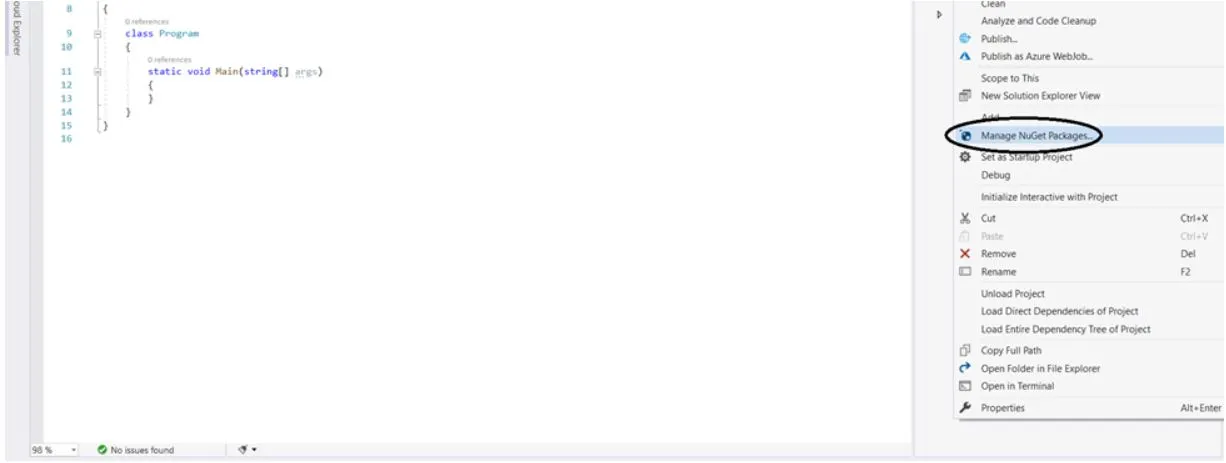
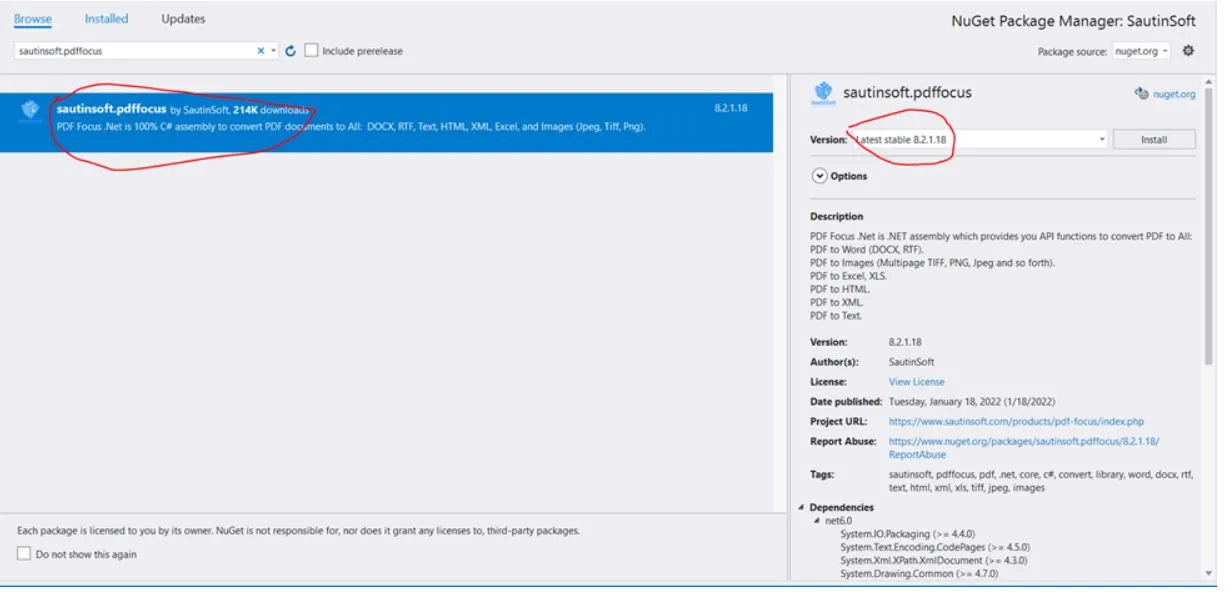
- NuGet 패키지 관리를 사용하여
PdfFocus를 설치하세요:
- 설치 버튼을 클릭하여 프로젝트에
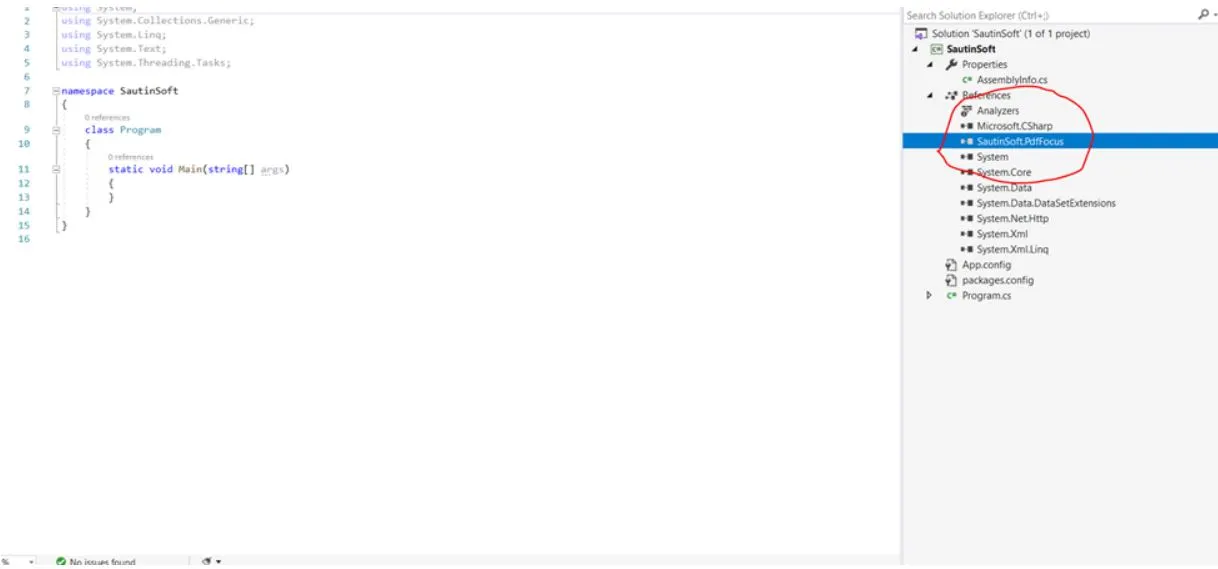
PdfFocus.dll을 추가하세요:
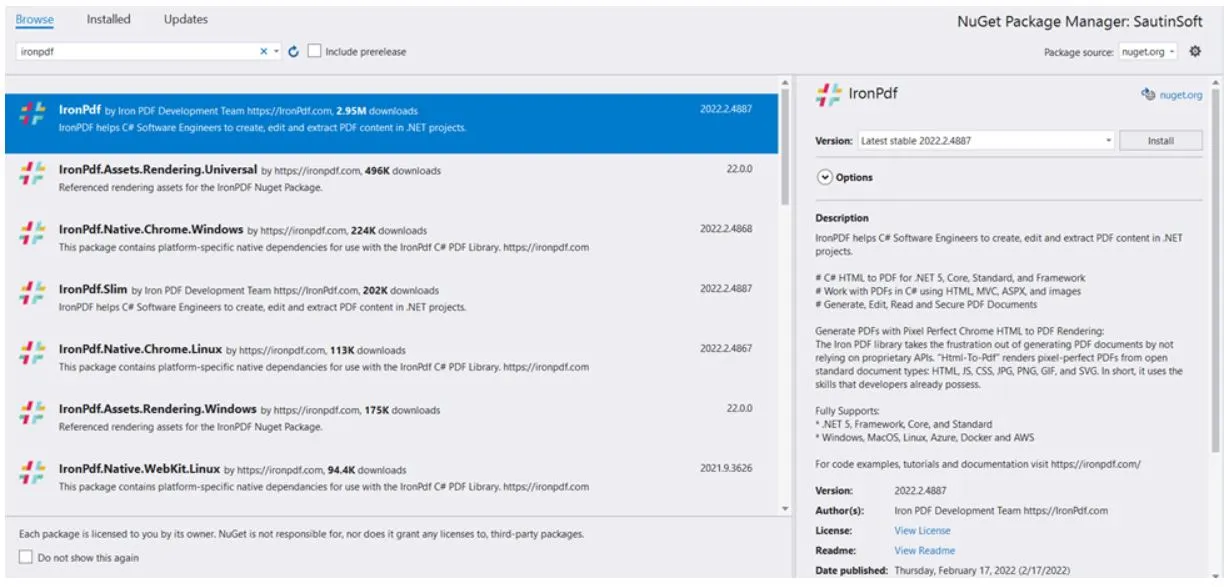
IronPDF를 Visual Studio에 설치하려면 어떡하죠?
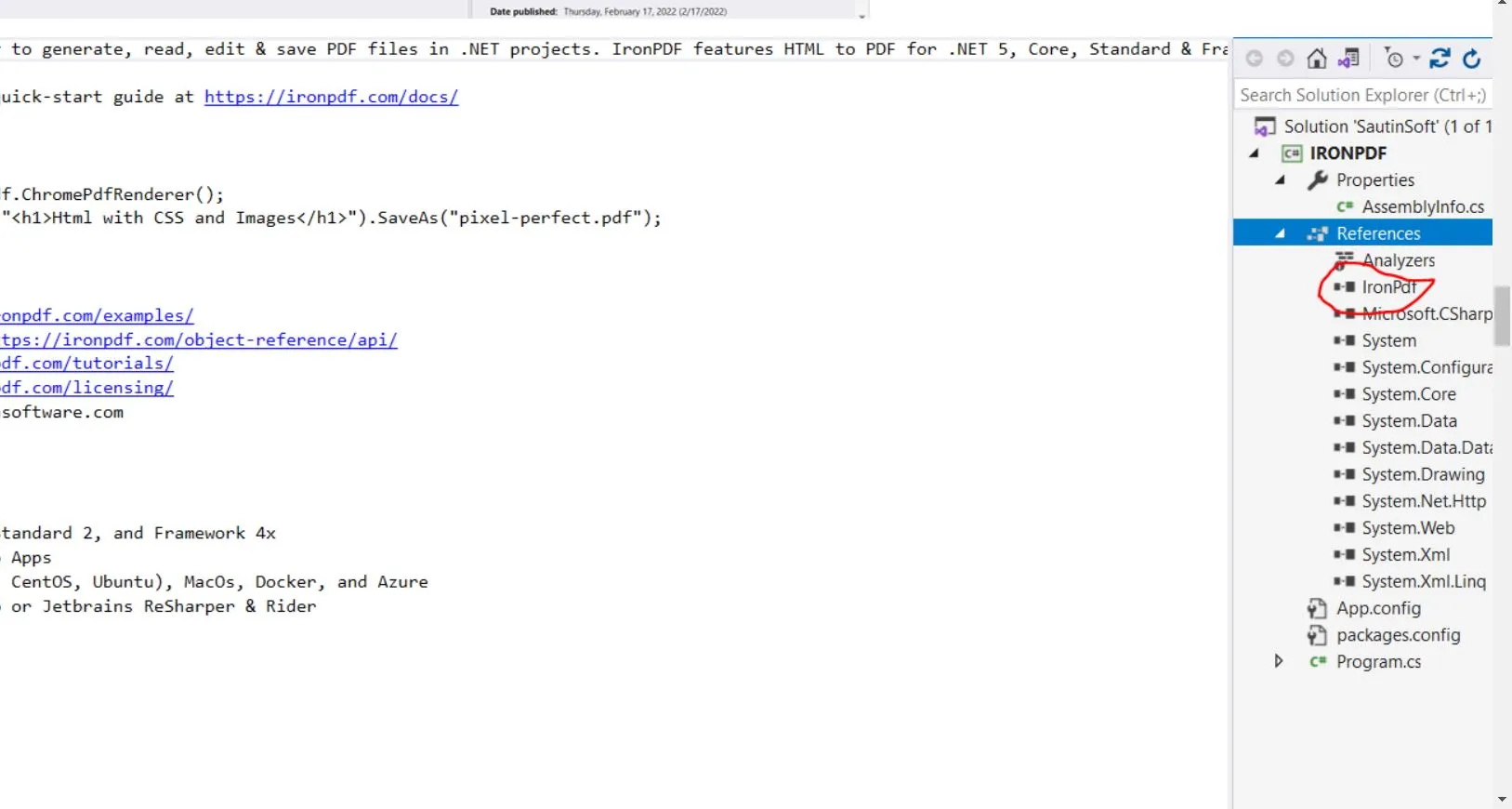
동일한 단계를 따르되 IronPDF를 검색합니다. 상세한 지침은 설치 가이드를 참조하십시오. 특정 플랫폼에 대한 가이드는 Windows, Linux, macOS, Docker 배포를 확인하십시오. 이 라이브러리는 Azure 배포 및 AWS Lambda 함수도 지원합니다.
IronPDF를 프로젝트 참조로 추가:
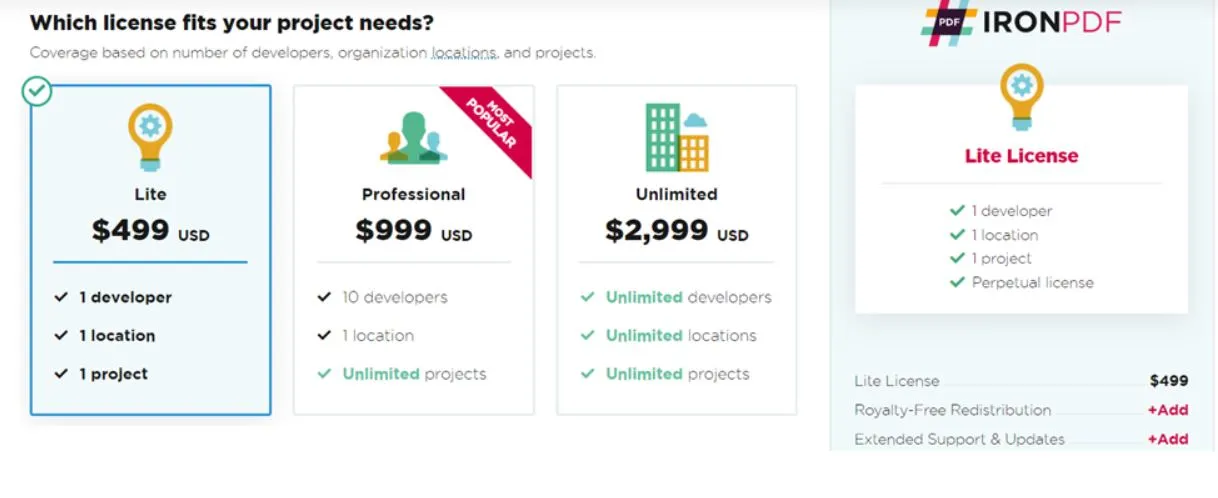
가격 옵션은 무엇입니까?
IronPDF의 가격은 얼마입니까?
SautinSoft PDF Focus .NET의 가격은 얼마인가?
SautinSoft는 경쟁력 있는 가격에 품질 변환을 제공합니다. PDF Focus .NET은 경쟁 제품보다 저렴합니다. HTML 에디션은 $299 USD부터 시작하고, 총판 에디션은 $778부터 시작합니다.
- 평생 라이선스를 가진 일회성 구매
- 1년간 무제한 지원
- Total - 모든 형식으로 PDF 변환 ($778+)
- Office - PDF를 Word/Excel/텍스트로 변환 ($599+)
- Picasso - PDF를 이미지로 변환 ($599+)
- HTML - PDF를 HTML/XML로 변환 ($299+)
IronPDF는 어떤 HTML to PDF 기능을 지원합니까?
어떤 HTML 기술이 지원됩니까?
사용 가능한 구성 옵션은 무엇입니까?
SautinSoft가 제공하는 PDF 변환 기능은 무엇인가?
PDF를 텍스트로 변환하는 방법은?
PDF Focus .NET은 PDF 문서에서 텍스트를 효율적으로 추출합니다. 전체 문서 또는 개별 페이지에서 추출합니다. 이 라이브러리는 단어 사이에 여분의 공백 없이 고품질의 텍스트를 제공하며 유니코드를 지원합니다. 텍스트 레이아웃은 올바른 줄 바꿈과 열을 사용하여 RTF 모양을 유지합니다. IronPDF에서 유사한 기능을 사용하려면 텍스트 추출 가이드와 PDF 구문 분석 튜토리얼을 참조하십시오. IronPDF는 국제 언어에 대한 UTF-8 인코딩도 지원합니다.
PDF를 DOCX로 변환하는 방법은?
SautinSoft PDF Focus는 자체 PDF 리더와 DOCX 렌더러를 포함합니다. Microsoft Office 또는 Adobe Acrobat 의존성 없이 PDF 문서를 DOCX로 변환합니다. 결과 DOCX는 단락, 열, 표, 하이퍼링크, 이미지, 페이지 구분을 포함합니다.
PDF Focus .NET은 AI 기능을 사용하여 행과 셀이 있는 표를 인식하고 재구성하므로 PDF 시각적 테이블을 실제 문서 테이블로 변환합니다. 역방향 프로세스를 위해, IronPDF는 DOCX를 PDF로 변환하고 메일 머지 지원을 제공합니다. IronPDF는 또한 RTF를 PDF로 변환하고 HTML을 PDF로 변환하는 기능도 제공합니다.
어떤 .NET Framework와 플랫폼이 지원됩니까?
IronPDF는 어떤 플랫폼을 지원합니까?
SautinSoft PDF Focus가 지원하는 플랫폼은?
- .NET Framework 4.0 이상
- .NET Framework 및 .NET Core 2.0
- 관리 C#로 작성됨
- 다중 플랫폼 호환
- 클라우드 플랫폼 지원:
- AWS
- Docker
SharePoint- Google Cloud Platform## 일반적인 PDF 작업은 어떻게 구현합니까?
IronPDF로 PDF를 어떻게 생성합니까?
HTML을 PDF로 어떻게 변환합니까?
.NET 애플리케이션에서 HTML을 PDF로 변환하는 것은 흔한 작업입니다. 더 복잡한 시나리오에 대해서는 HTML 렌더링 설정 및 픽셀 완벽 렌더링 가이드를 참조하십시오. IronPDF는 HTML 파일을 PDF로 변환하고 HTML ZIP 파일 처리를 지원합니다.
// PM> Install-Package IronPdf

using IronPdf;

var Renderer = new IronPdf.ChromePdfRenderer();
// Render HTML string as a PDF document and save it
Renderer.RenderHtmlAsPdf("<h1>Test HTML with images</h1>").SaveAs("test_image.pdf");

/****** Advanced ******/

// Render HTML and external assets into a PDF
// BasePath is used to resolve relative paths to assets like images and styles
var PDF = Renderer.RenderHtmlAsPdf("<img src='icons/iron.png'>", @"C:\site\assets\");
PDF.SaveAs("html-with-assets.pdf");
// PM> Install-Package IronPdf

using IronPdf;

var Renderer = new IronPdf.ChromePdfRenderer();
// Render HTML string as a PDF document and save it
Renderer.RenderHtmlAsPdf("<h1>Test HTML with images</h1>").SaveAs("test_image.pdf");

/****** Advanced ******/

// Render HTML and external assets into a PDF
// BasePath is used to resolve relative paths to assets like images and styles
var PDF = Renderer.RenderHtmlAsPdf("<img src='icons/iron.png'>", @"C:\site\assets\");
PDF.SaveAs("html-with-assets.pdf");
' PM> Install-Package IronPdf
Imports IronPdf
Private Renderer = New IronPdf.ChromePdfRenderer()
' Render HTML string as a PDF document and save it
Renderer.RenderHtmlAsPdf("<h1>Test HTML with images</h1>").SaveAs("test_image.pdf")
'''**** Advanced *****
' Render HTML and external assets into a PDF
' BasePath is used to resolve relative paths to assets like images and styles
Dim PDF = Renderer.RenderHtmlAsPdf("<img src='icons/iron.png'>", "C:\site\assets\")
PDF.SaveAs("html-with-assets.pdf")
' PM> Install-Package IronPdf

Imports IronPdf

Private Renderer = New IronPdf.ChromePdfRenderer()
' Render HTML string as a PDF document and save it
Renderer.RenderHtmlAsPdf("<h1>Test HTML with images</h1>").SaveAs("test_image.pdf")

'''**** Advanced *****

' Render HTML and external assets into a PDF
' BasePath is used to resolve relative paths to assets like images and styles
Dim PDF = Renderer.RenderHtmlAsPdf("<img src='icons/iron.png'>", "C:\site\assets\")
PDF.SaveAs("html-with-assets.pdf")
더 많은 예제를 보려면 HTML 문자열을 PDF로 변환 가이드, 파일을 PDF로 변환 튜토리얼, 및 반응형 HTML 렌더링 문서를 참조하십시오.
URL을 PDF로 변환하려면 어떻게 해야 하나요?
웹 페이지를 PDF로 변환하는 것은 아카이빙, 보고 및 문서화에 유용합니다. 인증된 페이지의 경우, 로그인 인증 가이드와 TLS 인증 튜토리얼을 참조하십시오. IronPDF는 Kerberos 인증과 HTTP 요청 헤더를 지원합니다.
// PM> Install-Package IronPdf

using IronPdf;

// Create a new renderer instance
IronPdf.ChromePdfRenderer Renderer = new IronPdf.ChromePdfRenderer();

// Configure rendering options for better output
Renderer.RenderingOptions.PrintHtmlBackgrounds = true;
Renderer.RenderingOptions.PaperOrientation = PdfPrintOptions.PdfPaperOrientation.Portrait;
Renderer.RenderingOptions.MarginTop = 20;
Renderer.RenderingOptions.MarginBottom = 20;

// Render a PDF from a URL
var Pdf = Renderer.RenderUrlAsPdf("___PROTECTED_URL_259___");

// Save the PDF file
Pdf.SaveAs("url.pdf");
// see also Pdf.Stream for handling PDF data directly from memory
// PM> Install-Package IronPdf

using IronPdf;

// Create a new renderer instance
IronPdf.ChromePdfRenderer Renderer = new IronPdf.ChromePdfRenderer();

// Configure rendering options for better output
Renderer.RenderingOptions.PrintHtmlBackgrounds = true;
Renderer.RenderingOptions.PaperOrientation = PdfPrintOptions.PdfPaperOrientation.Portrait;
Renderer.RenderingOptions.MarginTop = 20;
Renderer.RenderingOptions.MarginBottom = 20;

// Render a PDF from a URL
var Pdf = Renderer.RenderUrlAsPdf("___PROTECTED_URL_259___");

// Save the PDF file
Pdf.SaveAs("url.pdf");
// see also Pdf.Stream for handling PDF data directly from memory
' PM> Install-Package IronPdf
Imports IronPdf
' Create a new renderer instance
Dim Renderer As New IronPdf.ChromePdfRenderer()
' Configure rendering options for better output
Renderer.RenderingOptions.PrintHtmlBackgrounds = True
Renderer.RenderingOptions.PaperOrientation = PdfPrintOptions.PdfPaperOrientation.Portrait
Renderer.RenderingOptions.MarginTop = 20
Renderer.RenderingOptions.MarginBottom = 20
' Render a PDF from a URL
Dim Pdf = Renderer.RenderUrlAsPdf("___PROTECTED_URL_259___")
' Save the PDF file
Pdf.SaveAs("url.pdf")
' see also Pdf.Stream for handling PDF data directly from memory
' PM> Install-Package IronPdf

Imports IronPdf

' Create a new renderer instance
Dim Renderer As New IronPdf.ChromePdfRenderer()

' Configure rendering options for better output
Renderer.RenderingOptions.PrintHtmlBackgrounds = True
Renderer.RenderingOptions.PaperOrientation = PdfPrintOptions.PdfPaperOrientation.Portrait
Renderer.RenderingOptions.MarginTop = 20
Renderer.RenderingOptions.MarginBottom = 20

' Render a PDF from a URL
Dim Pdf = Renderer.RenderUrlAsPdf("___PROTECTED_URL_259___")

' Save the PDF file
Pdf.SaveAs("url.pdf")
' see also Pdf.Stream for handling PDF data directly from memory
고급 URL 렌더링 옵션의 경우, URL을 PDF로 변환 가이드, 렌더링 옵션 문서, 및 URL 변환 예제를 참조하십시오.
이미지를 PDF로 변환하려면 어떻게 해야 하나요?
이미지를 PDF로 변환하는 것은 사진 앨범, 포트폴리오 또는 문서 아카이브를 만들기에 적합합니다. IronPDF는 다중 프레임 TIFF 변환 및 Azure Blob Storage 이미지를 지원합니다. 라이브러리는 또한 임베디드 이미지와 비트맵을 처리합니다.
// PM> Install-Package IronPdf
using IronPdf;
using System.IO;
using System.Linq;

// Get all image files (.jpg or .jpeg) from a specific directory
var ImageFiles = Directory.EnumerateFiles(@"C:\project\test").Where(f => f.EndsWith(".jpg") || f.EndsWith(".jpeg"));

// Convert the images to a single PDF document and save it
ImageToPdfConverter.ImageToPdf(ImageFiles).SaveAs(@"C:\project\testing.pdf");

// Use PdfDocument.RasterizeToImageFiles() to flatten a PDF back into images or thumbnails
// PM> Install-Package IronPdf
using IronPdf;
using System.IO;
using System.Linq;

// Get all image files (.jpg or .jpeg) from a specific directory
var ImageFiles = Directory.EnumerateFiles(@"C:\project\test").Where(f => f.EndsWith(".jpg") || f.EndsWith(".jpeg"));

// Convert the images to a single PDF document and save it
ImageToPdfConverter.ImageToPdf(ImageFiles).SaveAs(@"C:\project\testing.pdf");

// Use PdfDocument.RasterizeToImageFiles() to flatten a PDF back into images or thumbnails
' PM> Install-Package IronPdf
Imports IronPdf
Imports System.IO
Imports System.Linq
' Get all image files (.jpg or .jpeg) from a specific directory
Private ImageFiles = Directory.EnumerateFiles("C:\project\test").Where(Function(f) f.EndsWith(".jpg") OrElse f.EndsWith(".jpeg"))
' Convert the images to a single PDF document and save it
ImageToPdfConverter.ImageToPdf(ImageFiles).SaveAs("C:\project\testing.pdf")
' Use PdfDocument.RasterizeToImageFiles() to flatten a PDF back into images or thumbnails
' PM> Install-Package IronPdf
Imports IronPdf
Imports System.IO
Imports System.Linq

' Get all image files (.jpg or .jpeg) from a specific directory
Private ImageFiles = Directory.EnumerateFiles("C:\project\test").Where(Function(f) f.EndsWith(".jpg") OrElse f.EndsWith(".jpeg"))

' Convert the images to a single PDF document and save it
ImageToPdfConverter.ImageToPdf(ImageFiles).SaveAs("C:\project\testing.pdf")

' Use PdfDocument.RasterizeToImageFiles() to flatten a PDF back into images or thumbnails
더 많은 이미지 처리를 위해, 이미지를 PDF로 변환 가이드, 래스터화 튜토리얼, 및 이미지 최적화 예제를 참조하십시오.
SautinSoft로 PDF를 어떻게 변환하나요?
PDF를 워드 문서로 변환하려면 어떻게 해야 하나요?
형식을 유지하면서 PDF를 워드 문서로 변환:
using System;
using System.IO;

string pdfFile = @"c:\test.pdf";
MemoryStream docxStream = new MemoryStream();

SautinSoft.PdfFocus f = new SautinSoft.PdfFocus();

// Open a PDF file from disk into a FileStream
using (FileStream pdfStream = new FileStream(pdfFile, FileMode.Open, FileAccess.Read))
{
    f.OpenPdf(pdfStream);

    if (f.PageCount > 0)
    {
        // Set conversion options
        f.WordOptions.Format = SautinSoft.PdfFocus.CWordOptions.eWordDocument.Docx;
        f.WordOptions.RenderMode = SautinSoft.PdfFocus.CWordOptions.eRenderMode.Flowing;

        // Convert the PDF to a Word document and store it in docxStream
        int res = f.ToWord(docxStream);

        // Save the DOCX to disk if conversion was successful
        if (res == 0)
        {
            string docxFile = Path.ChangeExtension(pdfFile, ".docx");
            File.WriteAllBytes(docxFile, docxStream.ToArray());
            System.Diagnostics.Process.Start(docxFile);
        }
    }
}
using System;
using System.IO;

string pdfFile = @"c:\test.pdf";
MemoryStream docxStream = new MemoryStream();

SautinSoft.PdfFocus f = new SautinSoft.PdfFocus();

// Open a PDF file from disk into a FileStream
using (FileStream pdfStream = new FileStream(pdfFile, FileMode.Open, FileAccess.Read))
{
    f.OpenPdf(pdfStream);

    if (f.PageCount > 0)
    {
        // Set conversion options
        f.WordOptions.Format = SautinSoft.PdfFocus.CWordOptions.eWordDocument.Docx;
        f.WordOptions.RenderMode = SautinSoft.PdfFocus.CWordOptions.eRenderMode.Flowing;

        // Convert the PDF to a Word document and store it in docxStream
        int res = f.ToWord(docxStream);

        // Save the DOCX to disk if conversion was successful
        if (res == 0)
        {
            string docxFile = Path.ChangeExtension(pdfFile, ".docx");
            File.WriteAllBytes(docxFile, docxStream.ToArray());
            System.Diagnostics.Process.Start(docxFile);
        }
    }
}
Imports System
Imports System.IO
Dim pdfFile As String = "c:\test.pdf"
Dim docxStream As New MemoryStream()
Dim f As New SautinSoft.PdfFocus()
' Open a PDF file from disk into a FileStream
Using pdfStream As New FileStream(pdfFile, FileMode.Open, FileAccess.Read)
f.OpenPdf(pdfStream)
If f.PageCount > 0 Then
' Set conversion options
f.WordOptions.Format = SautinSoft.PdfFocus.CWordOptions.eWordDocument.Docx
f.WordOptions.RenderMode = SautinSoft.PdfFocus.CWordOptions.eRenderMode.Flowing
' Convert the PDF to a Word document and store it in docxStream
Dim res As Integer = f.ToWord(docxStream)
' Save the DOCX to disk if conversion was successful
If res = 0 Then
Dim docxFile As String = Path.ChangeExtension(pdfFile, ".docx")
File.WriteAllBytes(docxFile, docxStream.ToArray())
System.Diagnostics.Process.Start(docxFile)
End If
End If
End Using
Imports System
Imports System.IO

Dim pdfFile As String = "c:\test.pdf"
Dim docxStream As New MemoryStream()

Dim f As New SautinSoft.PdfFocus()

' Open a PDF file from disk into a FileStream
Using pdfStream As New FileStream(pdfFile, FileMode.Open, FileAccess.Read)
    f.OpenPdf(pdfStream)

    If f.PageCount > 0 Then
        ' Set conversion options
        f.WordOptions.Format = SautinSoft.PdfFocus.CWordOptions.eWordDocument.Docx
        f.WordOptions.RenderMode = SautinSoft.PdfFocus.CWordOptions.eRenderMode.Flowing

        ' Convert the PDF to a Word document and store it in docxStream
        Dim res As Integer = f.ToWord(docxStream)

        ' Save the DOCX to disk if conversion was successful
        If res = 0 Then
            Dim docxFile As String = Path.ChangeExtension(pdfFile, ".docx")
            File.WriteAllBytes(docxFile, docxStream.ToArray())
            System.Diagnostics.Process.Start(docxFile)
        End If
    End If
End Using
IronPDF는 메모리 스트림과 내보내기 기능을 통해 유사한 문서 처리를 제공합니다.
PDF를 이미지로 변환하려면 어떻게 해야 하나요?
PDF를 이미지로 변환하면 썸네일 생성 및 미리보기 기능을 활성화할 수 있습니다. IronPDF는 PDF 래스터화, 품질 유지 및 메모리 스트림 처리를 통한 유사한 기능을 제공합니다.
using System;
using SautinSoft;

PdfFocus f = new PdfFocus();
f.OpenPdf(@"C:\Computer\testpdf");

if (f.PageCount > 0)
{
    // Set conversion options for images
    f.ImageOptions.ImageFormat = System.Drawing.Imaging.ImageFormat.Jpeg;
    f.ImageOptions.Dpi = 200;
    f.ImageOptions.JpegQuality = 90;

    // Save all PDF pages as JPEG images
    for (int page = 1; page <= f.PageCount; page++)
    {
        f.ToImage(@"C:\Pictures\page_" + page + ".jpg", page);
    }
}
using System;
using SautinSoft;

PdfFocus f = new PdfFocus();
f.OpenPdf(@"C:\Computer\testpdf");

if (f.PageCount > 0)
{
    // Set conversion options for images
    f.ImageOptions.ImageFormat = System.Drawing.Imaging.ImageFormat.Jpeg;
    f.ImageOptions.Dpi = 200;
    f.ImageOptions.JpegQuality = 90;

    // Save all PDF pages as JPEG images
    for (int page = 1; page <= f.PageCount; page++)
    {
        f.ToImage(@"C:\Pictures\page_" + page + ".jpg", page);
    }
}
Imports System
Imports SautinSoft
Dim f As New PdfFocus()
f.OpenPdf("C:\Computer\testpdf")
If f.PageCount > 0 Then
' Set conversion options for images
f.ImageOptions.ImageFormat = System.Drawing.Imaging.ImageFormat.Jpeg
f.ImageOptions.Dpi = 200
f.ImageOptions.JpegQuality = 90
' Save all PDF pages as JPEG images
For page As Integer = 1 To f.PageCount
f.ToImage("C:\Pictures\page_" & page & ".jpg", page)
Next page
End If
Imports System
Imports SautinSoft

Dim f As New PdfFocus()
f.OpenPdf("C:\Computer\testpdf")

If f.PageCount > 0 Then
    ' Set conversion options for images
    f.ImageOptions.ImageFormat = System.Drawing.Imaging.ImageFormat.Jpeg
    f.ImageOptions.Dpi = 200
    f.ImageOptions.JpegQuality = 90

    ' Save all PDF pages as JPEG images
    For page As Integer = 1 To f.PageCount
        f.ToImage("C:\Pictures\page_" & page & ".jpg", page)
    Next page
End If
IronPDF는 PDF를 이미지로 변환, PDF 평면화 및 비트맵 그리기를 포함한 고급 이미지 처리 기능을 제공합니다.
PDF를 HTML로 변환하려면 어떻게 해야 하나요?
IronPDF의 PDF를 HTML로 변환에 대해서는 PDF를 HTML로 변환 가이드 및 변환 예제를 참조하십시오:
using System;
using SautinSoft;

PdfFocus f = new PdfFocus();
f.OpenPdf(@"c:\test.pdf");

if (f.PageCount > 0)
{
    // Set HTML conversion options
    f.HtmlOptions.IncludeImageInHtml = true;
    f.HtmlOptions.Title = "Converted from PDF";
    f.HtmlOptions.RenderMode = PdfFocus.CHtmlOptions.eHtmlRenderMode.Flowing;

    // Convert PDF to HTML
    int result = f.ToHtml(@"c:\output.html");

    // Open the resulting HTML document in the default browser
    if (result == 0)
    {
        System.Diagnostics.Process.Start(@"c:\output.html");
    }
}
using System;
using SautinSoft;

PdfFocus f = new PdfFocus();
f.OpenPdf(@"c:\test.pdf");

if (f.PageCount > 0)
{
    // Set HTML conversion options
    f.HtmlOptions.IncludeImageInHtml = true;
    f.HtmlOptions.Title = "Converted from PDF";
    f.HtmlOptions.RenderMode = PdfFocus.CHtmlOptions.eHtmlRenderMode.Flowing;

    // Convert PDF to HTML
    int result = f.ToHtml(@"c:\output.html");

    // Open the resulting HTML document in the default browser
    if (result == 0)
    {
        System.Diagnostics.Process.Start(@"c:\output.html");
    }
}
Imports System
Imports SautinSoft
Dim f As New PdfFocus()
f.OpenPdf("c:\test.pdf")
If f.PageCount > 0 Then
' Set HTML conversion options
f.HtmlOptions.IncludeImageInHtml = True
f.HtmlOptions.Title = "Converted from PDF"
f.HtmlOptions.RenderMode = PdfFocus.CHtmlOptions.eHtmlRenderMode.Flowing
' Convert PDF to HTML
Dim result As Integer = f.ToHtml("c:\output.html")
' Open the resulting HTML document in the default browser
If result = 0 Then
System.Diagnostics.Process.Start("c:\output.html")
End If
End If
Imports System
Imports SautinSoft

Dim f As New PdfFocus()
f.OpenPdf("c:\test.pdf")

If f.PageCount > 0 Then
    ' Set HTML conversion options
    f.HtmlOptions.IncludeImageInHtml = True
    f.HtmlOptions.Title = "Converted from PDF"
    f.HtmlOptions.RenderMode = PdfFocus.CHtmlOptions.eHtmlRenderMode.Flowing

    ' Convert PDF to HTML
    Dim result As Integer = f.ToHtml("c:\output.html")

    ' Open the resulting HTML document in the default browser
    If result = 0 Then
        System.Diagnostics.Process.Start("c:\output.html")
    End If
End If
IronPDF는 다양한 문서 워크플로를 위해 XML을 PDF로 변환, Markdown을 PDF로, 및 XAML을 PDF로도 지원합니다.
각 라이브러리의 주요 장점은 무엇인가요?
왜 IronPDF를 선택해야 할까요?
SautinSoft PDF Focus를 선택해야 하는 이유는?
- C# 코드의 3-4줄 필요
- 여러 포맷 변환을 위한 API 제공
- 종속성이 없는 독립형 라이브러리
- 평생 사용을 위한 일회성 결제
- 다중 페이지 TIFF 파일 처리
- 1년간 무료 기술 지원
SautinSoft보다 IronPDF를 선호해야 하는 이유는?
SautinSoft는 출력 문서에 시험 사용 알림과 임의의 'Trial' 텍스트를 추가합니다. 반면에, IronPDF는 워터마크 없이 무제한 체험판 기능을 제공합니다.
IronPDF의 비용은 SautinSoft의 동등한 라이선스의 대략 절반 정도입니다. 다른 경쟁사와의 상세한 가격 비교를 위해 Aspose 대안, iText 대안, Syncfusion 대안, QuestPDF 비교, Apryse 평가 페이지를 참조하세요.
두 라이브러리를 비교해 보면, IronPDF는 거의 절반의 비용으로 더 뛰어난 안정성을 제공하며, 더 나은 지원과 더 많은 기능을 제공합니다. IronPDF는 모든 기능에 대한 완전한 문서, 코드 예제, 튜토리얼, API 참조를 제공합니다.
또한, IronPDF는 다음을 제공합니다:
어떤 PDF 라이브러리를 선택해야 할까요?
이 비교는 IronPDF와 SautinSoft PDF Focus .NET을 조사하였습니다. IronPDF는 .NET 애플리케이션 내에서 웹 폼, HTML 페이지 및 웹 콘텐츠를 PDF로 변환합니다. SautinSoft PDF Focus는 기존 PDF를 DOCX, 이미지, HTML 등과 같은 형식으로 변환합니다. 테스트 결과 IronPDF는 출력물에 제품 라벨 없이 무제한 체험판 기능을 제공합니다.
IronPDF는 Portable Document Format(휴대용 문서 형식)에 대해 강력한 성능과 광범위한 기능을 제공합니다. 라이브러리는 기능 활용을 개선하기 위한 완전한 지원 및 문서를 포함합니다. 자세한 정보는 기능 페이지, 실시간 데모 시도, 또는 변경 로그에서 최신 업데이트를 확인하세요. 주요 기능을 검토하세요. 여기에 Chrome 렌더링, 호환성 개선, PDF/A 지원, PDFium DOM, 및 안정성 개선이 포함됩니다. 특정 문제에 대해서는 문제 해결 가이드를 참조하거나 엔지니어링 지원을 요청하세요.
튜토리얼을 탐색하세요. 여기에 PDF 생성, PDF 편집, PDF 변환, PDF 정리, PDF 서명 및 보안, 및 API 참조가 포함됩니다.
SautinSoft PDF Focus .NET은 해당 소유자의 등록 상표입니다. 이 사이트는 SautinSoft PDF Focus .NET과 관련도 없으며 승인되지 않았고 후원 받지 않았습니다. 모든 제품명, 로고 및 브랜드는 해당 소유자의 자산입니다. 비교는 정보 제공 목적으로만 사용되며, 작성 시점에 공개적으로 이용 가능한 정보를 반영합니다.