
How to Run & Deploy IronPDF .NET on Azure Function


Yes. IronPDF can be used to generate, manipulate, and read PDF documents on Azure. IronPDF has been thoroughly tested on multiple Azure platforms including MVC websites, Azure Functions, and many more.
How to convert HTML to PDF in Azure Function
- Install C# library to convert HTML to PDF in Azure Function
- Choose the Azure Basic B1 hosting tier or above
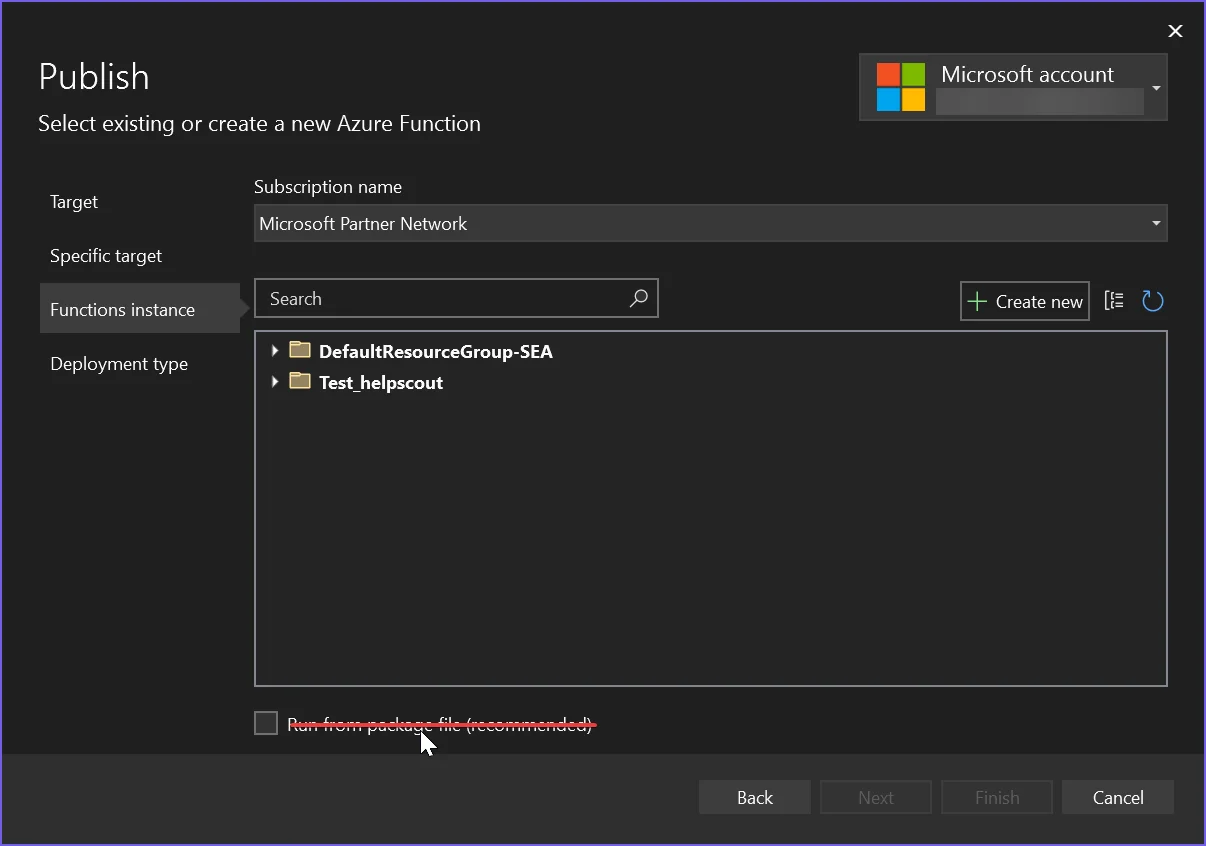
- Uncheck the
Run from package fileoption when publishing the native package - Follow the recommended configuration instructions
- Use the code example to create a PDF generator using Azure
How to Tutorial
Install IronPDF Package
Azure Function Apps have three distinct environments: Linux, Windows, and Container. This article explains how to set up IronPDF in all three environments. Among these, Azure Function App Container is recommended because it provides an isolated environment. To begin, let's select the appropriate package to install.
Azure Function App Container
Azure Function App Container involves minimal hassle, making it the recommended way to deploy IronPDF.
- IronPdf.Linux package
Install-Package IronPdf.Linux
Configure Docker File
Configure the Docker file based on the Linux distribution you are using. Please refer to this article for detailed instructions.
Azure Function App (Windows)
To use the standard IronPDF package, ensure the Run from package file option is unchecked. Enabling this option deploys the project as a ZIP file, which interferes with IronPDF's file configuration. If you prefer to enable the Run from package file option, install the IronPdf.Slim package instead, and set CustomDeploymentDirectory to a writable path outside the app root such as D:\home\data\ironsoftware\.
- IronPDF package
2026.8.1, enabling Run from package file causes a startup crash whichever package you install. See Startup Crash with Run From Package for details.Azure Function App (Linux)
For Azure Function App (Linux), the project is deployed as a ZIP file by default, and this behavior cannot be disabled. This is similar to enabling the Run from package file option on Azure Function App (Windows).
- IronPdf.Slim package
Install-Package IronPdf.Slim
Select Correct Azure Options
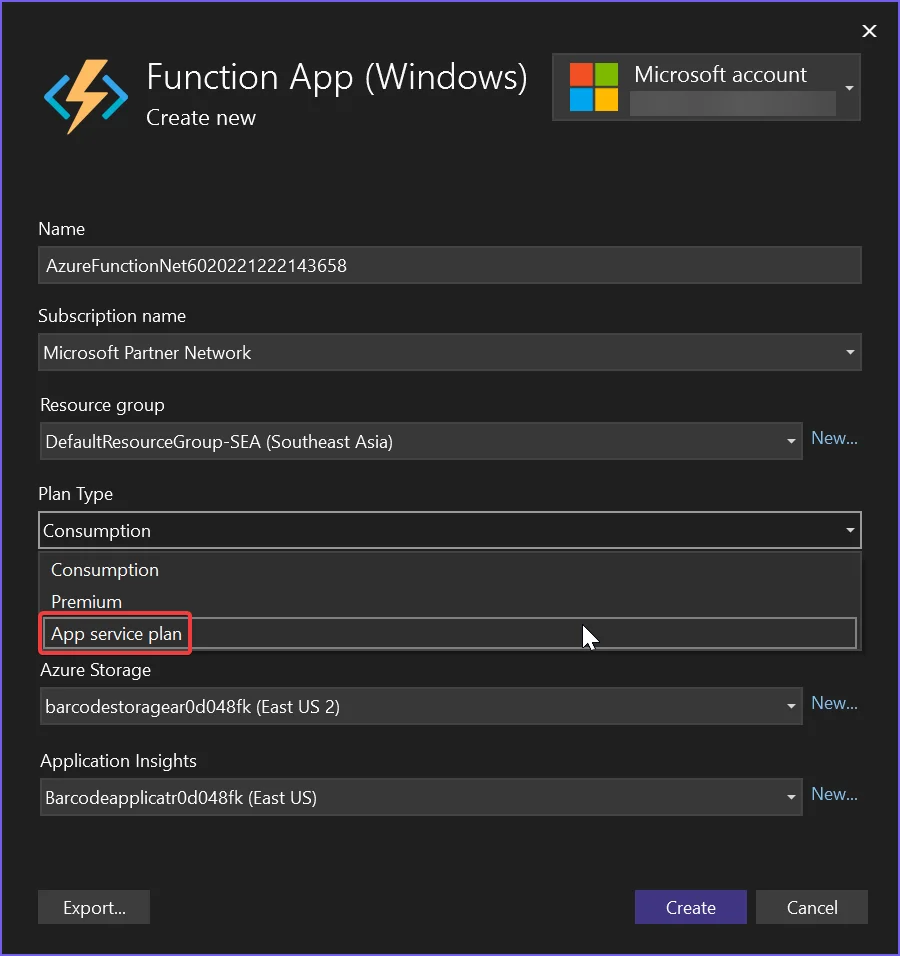
Choosing the Correct Hosting Tier
Azure Basic B1 is the minimum hosting level required for our end users' rendering needs. If you are creating a high throughput system, this may need to be upgraded.
Configuration for .NET 6
Microsoft recently removed imaging libraries from .NET 6+, breaking many legacy APIs. As such, it is necessary to configure your project to still allow these legacy API calls.
-
On Linux, set
Installation.LinuxAndDockerDependenciesAutoConfig=true;to ensurelibgdiplusis installed on the machine -
Add the following to the .csproj file for your .NET 6 project:
<GenerateRuntimeConfigurationFiles>true</GenerateRuntimeConfigurationFiles>XML -
Create a file in your project called
runtimeconfig.template.jsonand populate it with the following:{ "configProperties": { "System.Drawing.EnableUnixSupport": true } }JSON -
Finally, add the following line to the beginning of your program:
System.AppContext.SetSwitch("System.Drawing.EnableUnixSupport", true);System.AppContext.SetSwitch("System.Drawing.EnableUnixSupport", True)
Azure Function Code Example
This example is converting HTML to PDF and automatically outputs log entries to the built-in Azure logger (see ILogger log).
[FunctionName("PrintPdf")]
public static async Task<IActionResult> Run(
    [HttpTrigger(AuthorizationLevel.Anonymous, "get", "post", Route = null)] HttpRequest req,
    ILogger log, ExecutionContext context)
{
    log.LogInformation("Entered PrintPdf API function...");

    // Apply license key
    IronPdf.License.LicenseKey = "IRONPDF-MYLICENSE-KEY-1EF01";

    // Enable logging
    IronPdf.Logging.Logger.LoggingMode = IronPdf.Logging.Logger.LoggingModes.Custom;
    IronPdf.Logging.Logger.CustomLogger = log;

    // Configure IronPdf settings
    IronPdf.Installation.LinuxAndDockerDependenciesAutoConfig = true;
    IronPdf.Installation.AutomaticallyDownloadNativeBinaries = true;
    IronPdf.Installation.ChromeGpuMode = IronPdf.Engines.Chrome.ChromeGpuModes.Disabled;
    IronPdf.Installation.CustomDeploymentDirectory = "/tmp";

    try
    {
        log.LogInformation("About to render PDF...");
        ChromePdfRenderer renderer = new ChromePdfRenderer();
        // Render PDF from a URL
        var pdf = renderer.RenderUrlAsPdf("https://www.google.com/");
        log.LogInformation("Finished rendering PDF...");
        return new FileContentResult(pdf.BinaryData, "application/pdf") { FileDownloadName = "google.pdf" };
    }
    catch (Exception e)
    {
        log.LogError(e, "Error while rendering PDF");
        return new OkObjectResult($"Error while rendering PDF: {e}");
    }
}<FunctionName("PrintPdf")>
Public Shared Async Function Run(
<HttpTrigger(AuthorizationLevel.Anonymous, "get", "post", Route:=Nothing)> req As HttpRequest,
log As ILogger, context As ExecutionContext) As Task(Of IActionResult)
log.LogInformation("Entered PrintPdf API function...")
' Apply license key
IronPdf.License.LicenseKey = "IRONPDF-MYLICENSE-KEY-1EF01"
' Enable logging
IronPdf.Logging.Logger.LoggingMode = IronPdf.Logging.Logger.LoggingModes.Custom
IronPdf.Logging.Logger.CustomLogger = log
' Configure IronPdf settings
IronPdf.Installation.LinuxAndDockerDependenciesAutoConfig = True
IronPdf.Installation.AutomaticallyDownloadNativeBinaries = True
IronPdf.Installation.ChromeGpuMode = IronPdf.Engines.Chrome.ChromeGpuModes.Disabled
IronPdf.Installation.CustomDeploymentDirectory = "/tmp"
Try
log.LogInformation("About to render PDF...")
Dim renderer As New ChromePdfRenderer()
' Render PDF from a URL
Dim pdf = renderer.RenderUrlAsPdf("https://www.google.com/")
log.LogInformation("Finished rendering PDF...")
Return New FileContentResult(pdf.BinaryData, "application/pdf") With {.FileDownloadName = "google.pdf"}
Catch e As Exception
log.LogError(e, "Error while rendering PDF")
Return New OkObjectResult($"Error while rendering PDF: {e}")
End Try
End FunctionCreating a project using the Azure Function template in Visual Studio may result in slightly different code. Due to these differences, even with the same package installed, one project might work while the other does not. If this occurs, please set the CustomDeploymentDirectory property to "/tmp".
Understand Each Installation Configuration
- LinuxAndDockerDependenciesAutoConfig: This setting checks and attempts to download all necessary dependencies for the Chrome Engine. It is required when using non-GUI systems, such as Linux. In container systems, the dependencies are usually listed in the Dockerfile; therefore, you can set this to false.
- AutomaticallyDownloadNativeBinaries: This option downloads the native Chrome binary at runtime. It is required when using the IronPdf.Slim package.
- CustomDeploymentDirectory: This setting is required for systems with limited write access. On Azure App Service with Run from package file enabled, the app root is read-only, so point this at a writable path such as
D:\home\data\ironsoftware\on Windows or/home/data/ironsoftware/on Linux.
Known Issues
SVG Fonts Rendering is Not Available on Shared Hosting Plans
One limitation we have found is that the Azure hosting platform does not support servers loading SVG fonts, such as Google Fonts, in their cheaper shared web-app tiers. This is because these shared hosting platforms are not allowed to access windows GDI+ graphics objects for security reasons.
We recommend using a Windows or Linux Docker Container or perhaps a VPS on Azure to navigate this issue where the best font rendering is required.
Azure Free Tier Hosting is Slow
Azure free and shared tiers, and the consumption plan, are not suitable for PDF rendering. We recommend Azure B1 hosting/Premium plan, which is what we use ourselves. The process of HTML to PDF is significant 'work' for any computer - similar to opening and rendering a web page on your own machine. A real browser engine is used, hence we need to provision accordingly and expect similar render times to a desktop machine of similar power.
Creating an Engineering Support Request Ticket
In order to create a request ticket refer to the 'How to Make an Engineering Support Request for IronPDF' guide
Frequently Asked Questions
Can IronPDF be deployed on Azure?
Yes, IronPDF can be deployed on Azure and has been thoroughly tested on various Azure platforms, including MVC websites and Azure Functions.
What hosting tier is recommended for IronPDF on Azure?
Azure Basic B1 is the minimum hosting tier recommended for running IronPDF, but upgrading may be necessary for high throughput systems.
Why should I use Azure Function App Container for IronPDF?
Azure Function App Container is recommended for deploying IronPDF because it offers an isolated environment with minimal hassle, especially when using the IronPdf.Linux package.
What is the best way to convert HTML to PDF with IronPDF on Azure?
To convert HTML to PDF using IronPDF on Azure, you should install the C# library, choose an appropriate hosting plan such as Basic B1 or above, and follow the recommended configuration instructions.
What configuration is necessary for running IronPDF on .NET 6 in Azure?
For .NET 6, configure the `Install.LinuxAndDockerDependenciesAutoConfig` to true, include necessary properties in the `.csproj` file, and create a `runtimeconfig.template.json` to enable Unix support.
How can I ensure proper deployment of IronPDF in Azure Function App (Windows)?
Ensure that the 'Run from package file' option is unchecked or use IronPdf.Slim to avoid file configuration issues during deployment.
What are common issues with IronPDF on Azure shared hosting plans?
Shared hosting plans on Azure do not support loading SVG fonts and may limit IronPDF's graphics capabilities due to restrictions on accessing Windows GDI+ graphics objects.
Is the Azure Free Tier suitable for IronPDF?
No, the Azure Free Tier and shared hosting plans are generally too slow for IronPDF tasks. We recommend utilizing an Azure B1 hosting or Premium plan for better performance.
How can I address deployment differences between Azure Function projects?
If deployment differences arise, ensure that the `CustomDeploymentDirectory` is set to '/tmp', and check for any additional configurations needed for your specific setup.
What logging options are available for IronPDF on Azure?
IronPDF allows logging through Azure's built-in logger by enabling custom logging modes and setting `CustomLogger` to the desired log.

Curtis Chau holds a Bachelor’s degree in Computer Science (Carleton University) and specializes in front-end development with expertise in Node.js, TypeScript, JavaScript, and React. Passionate about crafting intuitive and aesthetically pleasing user interfaces, Curtis enjoys working with modern frameworks and creating well-structured, visually appealing manuals.



